

Page 1

SM-N930V/A/P/T/U/
VL/R4/R6/R7/W8
Mobile Device
Common
CONTENTS
1. Safety Precautions
2. Specification
3. Product Function
4. Exploded View and Parts list
5. MAIN Electrical Parts List
6. Level 1 Repair
7. Level 2 Repair
8. Level 3 Repair
9. Reference data
Notice: All functionality, features, specifications,
and other product information provided in this
document, including but not limited to, benefits,
design, pricing, components, performance,
availability, and capabiliti-es of the product are
subject to change without notice. Samsung
reserves the right to alter this doc-ument or the
product described herein at anytime, without
obligation to provide notification of such
changes.
Page 2

This Service Manual is a property of Samsung Electronics Co.,Ltd.
Any unauthorized use of Manual can be punished under applicable
International and/or domestic law.
Samsung Electronics Co.,Ltd
ⓒ
2016. 08. Rev 1.0
Page 3

2. Specification
2-1. CDMA/LTE General Specification
Tx Freq. range 1850 ~ 1910MHz 824.04 ~ 848.97MHz 777 ~787 MHz 1710~1755 MHz
Rx Freq. range 1930 ~ 1990MHz 869.04 ~ 893.97MHz 1575.42MHz 746 ~ 756 MHz 2110~2155 MHz
Channel Bandwidth 1.23MHz 1.23MHz 2MHz 10 MHz 5, 10, 20 MHz
Channel Spacing 50KHz 30KHz Not Used 180KHz 180KHz
Number of Channel 1200 832 1 50(# of RB) 25, 50, 100
Duplex Separation 80MHz 45MHz - 31MHz 400 MHz
Type of Emission 1M29F9W 1M28F9W -
US PCS CDMA GPS LTE FDD B13 LTE FDD B4
4M53G7D (QPSK)
4M49W7D (16QAM)
4M52G7D (QPSK)
4M50W7D (16QAM)
8M97G7D (QPSK)
8M96W7D (16QAM)
8M99G7D (QPSK)
8M97W7D (16QAM)
13M5G7D (QPSK)
13M5W7D (16QAM)
18M0G7D (QPSK)
18M0W7D (16QAM)
Tx Local Frequency FTx * 0.7999 FTx * 1.6666 -
Rx Local Frequency FRx * 0.8888 FRx * 2 FRx * 2
Frequency Stability
Operating
Temperature
(FRX-80MHz)±150Hz
-30℃ ~ +60℃ -30℃ ~ +60℃ -30℃ ~ +60℃ -30℃ ~ +60℃ -30℃ ~ +60℃
(FRX-45MHz)±300Hz
Confidential and proprietary-the contents in this service guide subject to change without prior notice
Distribution, transmission, or infringement of any content or data from this document without Samsung’s written authorization is strictly prohibited.
Page 4
2. Specification
Tx Freq. range 1850 ~ 1910 MHz 824 ~ 849 MHz
Rx Freq. range 1930 ~ 1990 MHz 869 ~ 894 MHz
Channel Bandwidth 5, 10, 20 MHz 5, 10 MHz
Channel Spacing 180KHz 180KHz
Number of Channel 25, 50, 100 25, 50
Duplex Separation 80 MHz 55 MHz
4M50G7D (QPSK)
4M50W7D (16QAM)
8M98G7D (QPSK)
Type of Emission
8M96W7D (16QAM)
13M5G7D (QPSK)
13M5W7D (16QAM)
18M0G7D (QPSK)
18M0W7D (16QAM)
LTE FDD B2 LTE FDD B5
4M53G7D (QPSK)
4M51W7D (16QAM)
8M99G7D (QPSK)
8M97W7D (16QAM)
Tx Local Frequency
Rx Local Frequency
Frequency Stability
Operating Temperature -30℃ ~ +60℃ -30℃ ~ +60℃
Confidential and proprietary-the contents in this service guide subject to change without prior notice
Distribution, transmission, or infringement of any content or data from this document without Samsung’s written authorization is strictly prohibited.
Page 5
2. Specification
2-2. GSM/WCDMA General Specification
Freq.
Band[MHz
]
Uplink/
Downlink
ARFCN
range
Tx/Rx
spacing
Mod. Bit
rate/
Bit Period
Time Slot
Period/
Frame
Period
GSM850
824~849
869~894
128~251
45MHz 45MHz 95MHz 80MHz 190MHz 80MHz 400MHz 45MHz 45MHz
270.833kb
ps
3.692us
576.9us
4.615ms
EGSM
900
880~915
925~960
0~124
& 975~10
23
270.833k
bps
3.692us
576.9us
4.615ms
DCS1800 PCS1900
1710~178
5
1805~188
0
512~885 512~810
270.833kb
ps
3.692us
576.9us
4.615ms
1850~191
0
1930~199
0
270.833k
bps
3.692us
576.9us
4.615ms
WCDMA
2100
1922~197
7
2112~216
7
UL:
9612~988
8
DL:
10562~10
838
3.84Mcps 3.84Mcps 3.84Mcps 3.84Mcps 3.84Mcps
FrameLen
gth:
10ms
Slotlength
:
0.667ms
WCDMA
1900
1852~190
7
1932~198
7
UL:
9262~953
8
DL:
9662~993
8
FrameLen
gth:
10ms
Slotlength
:
0.667ms
WCDMA
1700
1710~175
5
2110~215
5
UL:
1312~151
3
DL:
1537~173
8
FrameLen
gth:
10ms
Slotlength
:
0.667ms
WCDMA
900
880~915
925~960
UL:
2712~286
3
DL:
2937~308
8
FrameLen
gth:
10ms
Slotlength
:
0.667ms
WCMDA
850
824~849
869~894
UL:
4132~423
DL:
4357~445
FrameLen
gth:
10ms
Slotlength
0.667ms
3
8
:
Modulatio
n
MS Power
Power
Class
Sensitivit
y
TDMA
Mux
Cell
Radius
0.3GMSK 0.3GMSK 0.3GMSK 0.3GMSK
33dBm~5
dBm
5pcl ~
19pcl
-102dBm -102dBm -100dBm -100dBm
8 8 8 8
35Km 35Km 2Km 2Km 2Km 2Km 2Km 2Km 2Km
33dBm~5
dBm
5pcl ~ 19pcl 0pcl ~ 15pcl 0pcl ~ 15pcl
30dBm~0
dBm
30dBm~0
dBm
QPSKHQ
PSK
24dBm~
-50dBm
3(max+24d
Bm)
-
106.7dBm-106.7dBm-106.7dBm -106.7dBm-106.7dBm
8
QPSKHQ
PSK
24dBm~
-50dBm
3(max+24d
Bm)
8 8 8 8
QPSKHQ
PSK
24dBm~
-50dBm
3(max+24d
Bm)
QPSKHQ
PSK
24dBm~
-50dBm
3(max+24d
Bm)
QPSKHQ
PSK
24dBm~
-50dBm
3(max+24d
Bm)
Confidential and proprietary-the contents in this service guide subject to change without prior notice
Distribution, transmission, or infringement of any content or data from this document without Samsung’s written authorization is strictly prohibited.
Page 6
2. Specification
2-3. GSM Tx Power Class
TX Power
control
level
5 33±2 dBm
6 31±2 dBm
7 29±2 dBm
8 27±2 dBm
9 25±2 dBm
10 23±2 dBm
11 21±2 dBm
12 19±2 dBm
GSM850
TX Power
control
level
5 33±2 dBm
6 31±2 dBm
7 29±2 dBm
8 27±2 dBm
9 25±2 dBm
10 23±2 dBm
11 21±2 dBm
12 19±2 dBm
EGSM900
TX Power
control
level
0 30±3 dBm
1 28±3 dBm
2 26±3 dBm
3 24±3 dBm
4 22±3 dBm
5 20±3 dBm
6 18±3 dBm
7 16±3 dBm
DCS1800
TX Power
control
level
0 30±3 dBm
1 28±3 dBm
2 26±3 dBm
3 24±3 dBm
4 22±3 dBm
5 20±3 dBm
6 18±3 dBm
7 16±3 dBm
PCS1900
13 17±2 dBm
14 15±2 dBm
15 13±2 dBm
16 11±3 dBm
17 9±3dBm
18 7±3 dBm
19 5±3 dBm
13 17±2 dBm
14 15±2 dBm
15 13±2 dBm
16 11±3 dBm
17 9±3dBm
18 7±3 dBm
19 5±3 dBm
8 14±3 dBm
9 12±4 dBm
10 10±4 dBm
11 8±4 dBm
12 6±4 dBm
13 4±4 dBm
14 2±5 dBm
15 0±5 dBm
8 14±3 dBm
9 12±4 dBm
10 10±4 dBm
11 8±4 dBm
12 6±4 dBm
13 4±4 dBm
14 2±5 dBm
15 0±5 dBm
Confidential and proprietary-the contents in this service guide subject to change without prior notice
Distribution, transmission, or infringement of any content or data from this document without Samsung’s written authorization is strictly prohibited.
Page 7

3. Operation Instruction and Installation
Main Function
Item Description
OS Android V6.0.1 (Marshmallow)
2G CDMA : BC0/BC1/BC10
2G GSM 850(B5)/900(B8)/1800(B3)/1900(B2)
3G WCDMA : B1/B2/B4/B5/B8
RF
Battery 3,500mAh
Base Band MSM8996 / 2.15GHz, 1.6GHz
Other RF GPS, Glonass, BT 4.2, USB 3.1, WIFI 802.11 a/b/g/n/ac (2.4G+5GHz), NFC, MST
4G(LTE)
- FDD : B2 / B3 / B4 / B5 / B7 / B8 / B13 / B18 / B19 / B20 + B1 / B12 / B17 / B25 / B26 / B29 / B30
- TDD : 38/39/40/41
- TD-SCDMA : B34/B39
Camera
LCD 5.67” Quad HD, 2560 x 1440, dual edge Super AMOLED
RAM 4GB LPDDR4 + 64GB UFS
Sensor
Accessory
12 MP Rear, Dual Pixel, AF
5.0 MP Front
Accelerometer, Barometer, Fingerprint Sensor, Gyro Sensor, Geomagnetic Sensor, Hall Sensor,
HR Sensor, Iris Sensor, Proximity Sensor, RGB Light Sensor
Charger : 5V/2A or 9 V/1.67 A
Data cable : USB Type-C
Earjack : 3.5pi, 4Pin
S-PEN
Confidential and proprietary-the contents in this service guide subject to change without prior notice
Distribution, transmission, or infringement of any content or data from this document without Samsung’s written authorization is strictly prohibited.
Page 8

9. Reference Abbreviate
Reference Abbreviate
― AAC: Advanced Audio Coding.
― AVC : Advanced Video Coding.
― BER : Bit Error Rate
― BPSK: Binary Phase Shift Keying
― CA : Conditional Access
― CDM : Code Division Multiplexing
― C/I : Carrier to Interference
― DMB : Digital Multimedia Broadcasting
― EN : European Standard
― ES : Elementary Stream
― ETSI: European Telecommunications Standards Institute
― MPEG: Moving Picture Experts Group
― PN : Pseudo-random Noise
― PS : Pilot Symbol
― QPSK: Quadrature Phase Shift Keying
― RS : Reed-Solomon
― SI : Service Information
― TDM : Time Division Multiplexing
― TS : Transport Stream
Confidential and proprietary-the contents in this service guide subject to change without prior notice
Distribution, transmission, or infringement of any content or data from this document without Samsung’s written authorization is strictly prohibited.
Page 9

1.Safety Precautions
1-1. Repair Precaution
Before attempting any repair or detailed tuning, shield the device from RF noise or static
electricity discharges.
Use only demagnetized tools that are specifically designed for small electronic repairs,
as most electronic parts are sensitive to electromagnetic forces.
Use only high quality screwdrivers when servicing products. Low quality screwdrivers can
easily damage the heads of screws.
Use only conductor wire of the properly gauge and insulation for low resistance, because of the low margin
of error of most testing equipment.
We recommend 22-gauge twisted copper wire.
Hand-soldering is not recommended, because printed circuit boards (PCBs) can be easily
damaged, even with relatively low heat. Never use a soldering iron with a power rating of
more than 100 watts and use only lead-free solder with a melting point below 250°C (482°F).
Prior to disassembling the battery charger for repair, ensure that the AC power is disconnected.
Always use the replacement parts that are registered in the SEC system. Third-party replacement parts
may not function properly.
Confidential and proprietary-the contents in this service guide subject to change without prior notice
Distribution, transmission, or infringement of any content or data from this document without Samsung’s written authorization is strictly prohibited.
Page 10

1.Safety Precautions
1-2. ESD(Electrostatically Sensitive Devices) Precaution
Many semiconductors and ESDs in electronic devices are particularly sensitive to static discharge and can
be easily damaged by it. We recommend protecting these components with conductive anti-static bags
when you store or transport them.
Always use an anti-static strap or wristband and remove electrostatic buildup or dissipate
static electricity from your body before repairing ESDs.
Ensure that soldering irons have AC adapter with ground wires and that the ground wires are properly
connected.
Use only desoldering tools with plastic tips to prevent static discharge.
Properly shield the work environment from accidental electrostatic discharge before opening
packages containing ESDs.
The potential for static electricity discharge may be increased in low humidity environments,
such as air-conditioned rooms. Increase the airflow to the working area to decrease the
chance of accidental static electricity discharges.
Confidential and proprietary-the contents in this service guide subject to change without prior notice
Distribution, transmission, or infringement of any content or data from this document without Samsung’s written authorization is strictly prohibited.
Page 11
6. Level 1 Repair
6-1. S/W installation
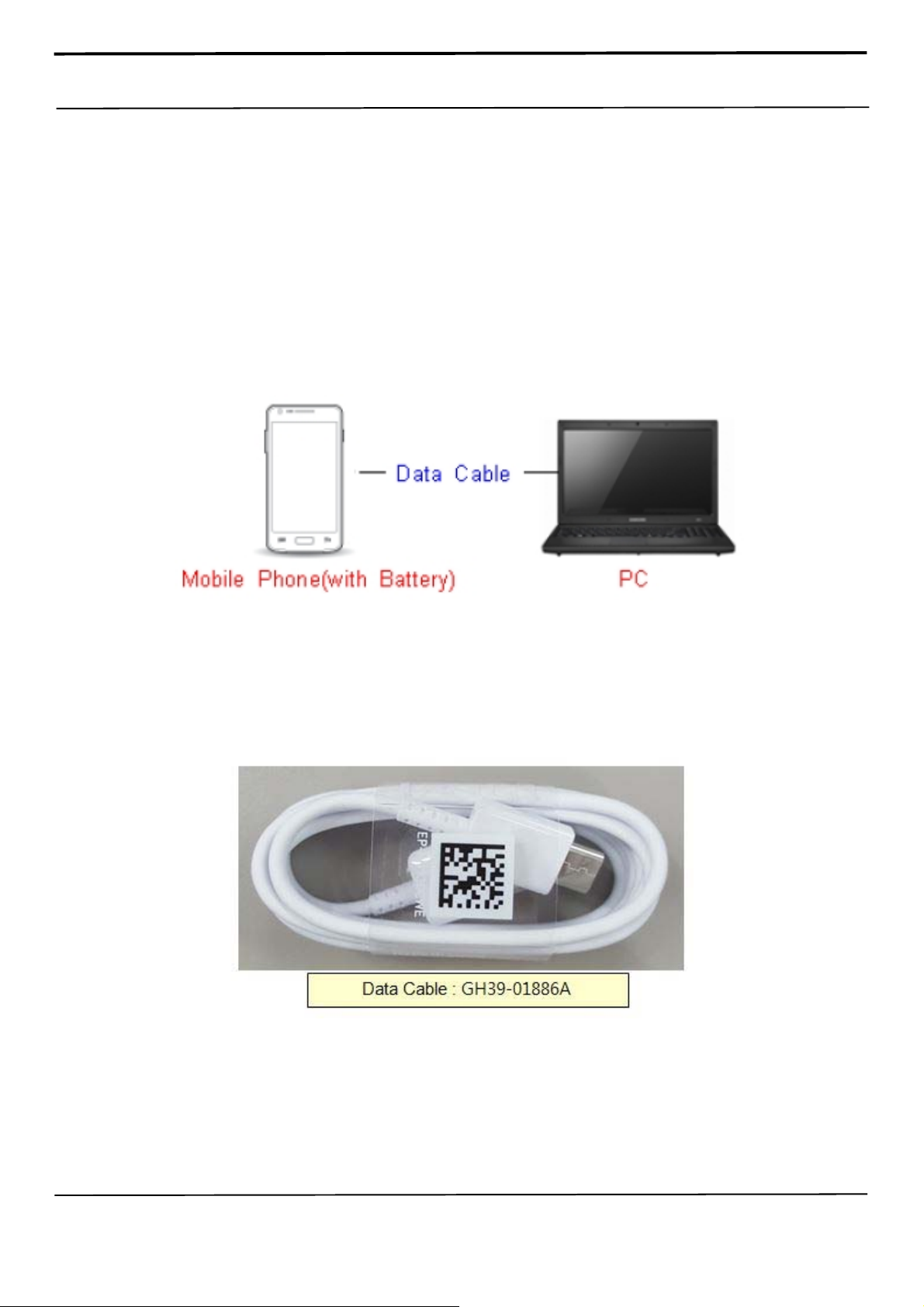
6-1-1. Required items in order to install S/W
Installation program: Downloader Program (Odin3 v3.12.5.exe)
Mobile Phone
Data Cable
Mobile device specific S/W: Binary files
※ Settings
Confidential and proprietary-the contents in this service guide subject to change without prior notice
Distribution, transmission, or infringement of any content or data from this document without Samsung’s written authorization is strictly prohibited.
Page 12

6. Level 1 Repair
6-1-2. S/W Installation Program (Downloader program)
Open up the S/W Installation Program by executing the "Odin3 v3.12.5.exe"
Confidential and proprietary-the contents in this service guide subject to change without prior notice
Distribution, transmission, or infringement of any content or data from this document without Samsung’s written authorization is strictly prohibited.
Page 13

6. Level 1 Repair
1. Enable the check mark by click on the following options,
- Check Auto Reboot, Re-Partition, and F. Reset Time-
- Check PIT
- Check Nand Erase All
- Check BL, AP, CP, and CSC Files
* Note : "Odin v3.12 or above" checks MD5 checksum just after file selection.
Confidential and proprietary-the contents in this service guide subject to change without prior notice
Distribution, transmission, or infringement of any content or data from this document without Samsung’s written authorization is strictly prohibited.
Page 14
6. Level 1 Repair
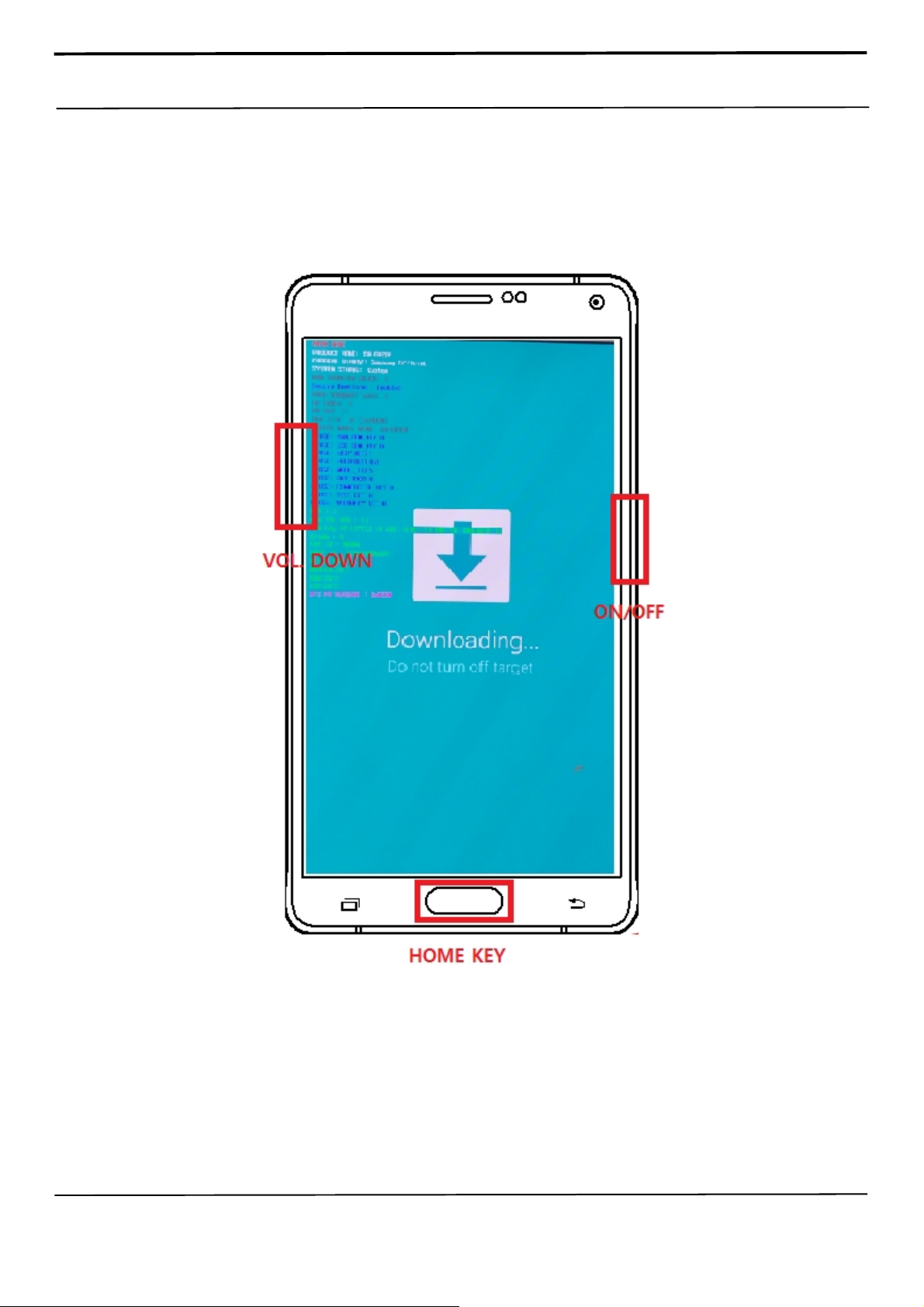
2. Enter into Download Mode
- Enter into Download Mode by pressing Home button, Volume Down button and Power On/Off
Button simultaneously followed by pressing Volume up button as a direction of the phone.
Confidential and proprietary-the contents in this service guide subject to change without prior notice
Distribution, transmission, or infringement of any content or data from this document without Samsung’s written authorization is strictly prohibited.
Page 15
6. Level 1 Repair
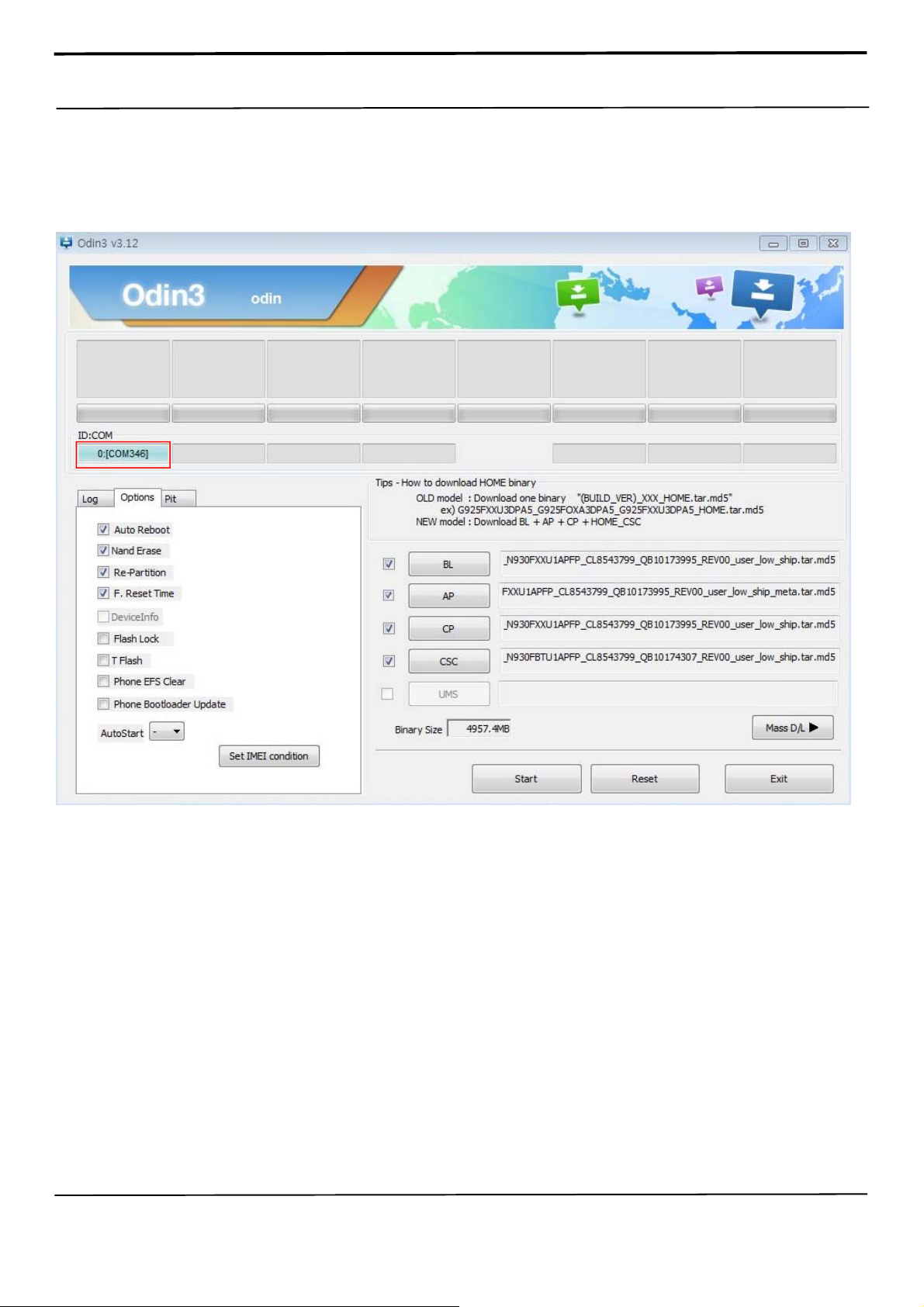
3. Connect the device to PC via Data Cable.
Make sure that the one of communication ports [ID:COM] box is highlighted in
sky blue. The device is now connected with the PC and ready to download the
binary files in it.
Confidential and proprietary-the contents in this service guide subject to change without prior notice
Distribution, transmission, or infringement of any content or data from this document without Samsung’s written authorization is strictly prohibited.
Page 16
6. Level 1 Repair
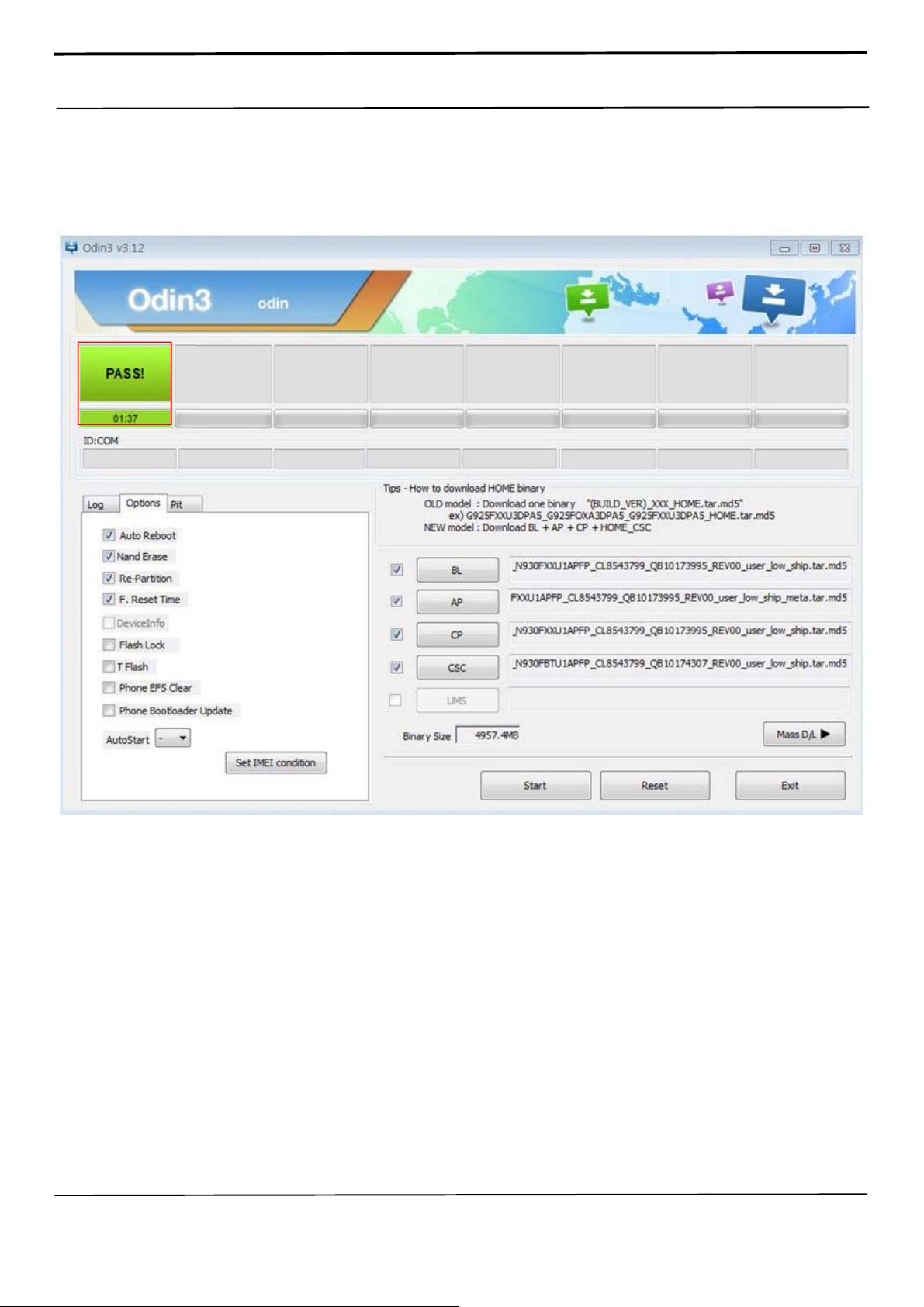
4. Start downloading the binary files into the device by clicking Start button on the
screen. The green colored "PASS!" sign will appear on the upper-left box if the
binary files have been successfully downloaded into the device.
5. Disconnect the device from the Data cable.
6. Once the device boots up, you can check the version of the binary file or name
by pressing the following code in sequence;
*#1234#
You can perform Factory Reset by Settings → Accounts → Backup and reset
Confidential and proprietary-the contents in this service guide subject to change without prior notice
Distribution, transmission, or infringement of any content or data from this document without Samsung’s written authorization is strictly prohibited.
Page 17

6. Level 1 Repair
6-2 IMEI writing
6-2-1 Preparation
- New IMEI writing Program has been released.
- Supported Model : Models which CAB files are uploaded on HHPsvc INI File
category, instead of ini file.
- Refer to below IMEI writing procedure.
- H/W
- S/W
① Library Install
②Launcher
③ Runtime File
④Model File
To use Daseul, library files should be installed.
Refer to SVC Bulletin
“(11-82) Daseul (New IMEI writing Program) Library Install
guide_rev1.0”
DASEUL_SVC_Launcher_v3_0_25 or higher
-Uploaded on HHPsvc Notice
1. DASEUL_Runtime_Ver_3.1.139.0.CAB or higher
-Uploaded on HHPsvc Notice
2. Make ‘ModelName’ folder at the same position with
launcher & Runtime file.
Copy Model File under the ‘Model Name’ folder
Confidential and proprietary-the contents in this service guide subject to change without prior notice
Distribution, transmission, or infringement of any content or data from this document without Samsung’s written authorization is strictly prohibited.
Page 18

6. Level 1 Repair
6-2-2 IMEI writing Process
1. Run DASEUL_SVC_Launcher_v3.0.10.exe
2. Select Service Mode
3. Click and Select folder where the Launcher exists
Confidential and proprietary-the contents in this service guide subject to change without prior notice
Distribution, transmission, or infringement of any content or data from this document without Samsung’s written authorization is strictly prohibited.
Page 19

6. Level 1 Repair
4. Select Model
5. Check IMEI and click System Setting
※Once you setup the setting, you don t have to do it again, unless there is change. From second run of the
IMEI program, check IMEI and click Extract & Run.
Confidential and proprietary-the contents in this service guide subject to change without prior notice
Distribution, transmission, or infringement of any content or data from this document without Samsung’s written authorization is strictly prohibited.
Page 20
6. Level 1 Repair
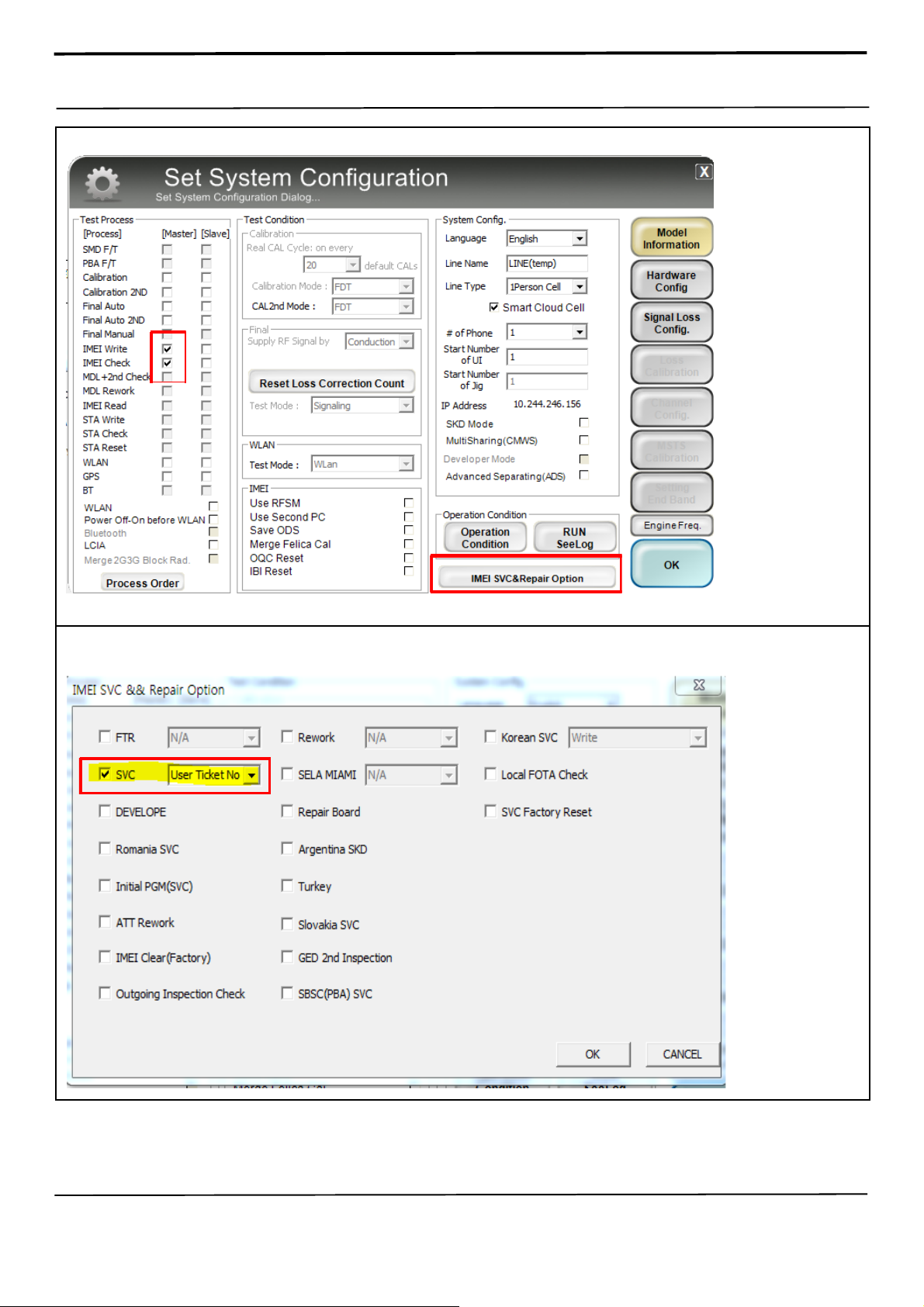
6. Check IMEI Write / IMEI Check and click IMEI SVC & Repair Option.
①
②
7. Check SVC , User Ticket No and click OK
Confidential and proprietary-the contents in this service guide subject to change without prior notice
Distribution, transmission, or infringement of any content or data from this document without Samsung’s written authorization is strictly prohibited.
Page 21

6. Level 1 Repair
8. Click Hardware Config
9. Click Port Setting
Confidential and proprietary-the contents in this service guide subject to change without prior notice
Distribution, transmission, or infringement of any content or data from this document without Samsung’s written authorization is strictly prohibited.
Page 22

6. Level 1 Repair
10. Select Port Number and SAVE
11.Click OK to proceed
Confidential and proprietary-the contents in this service guide subject to change without prior notice
Distribution, transmission, or infringement of any content or data from this document without Samsung’s written authorization is strictly prohibited.
Page 23

6. Level 1 Repair
12. Click Model Info and OK when pop-up shows
13. Click OK
Confidential and proprietary-the contents in this service guide subject to change without prior notice
Distribution, transmission, or infringement of any content or data from this document without Samsung’s written authorization is strictly prohibited.
Page 24
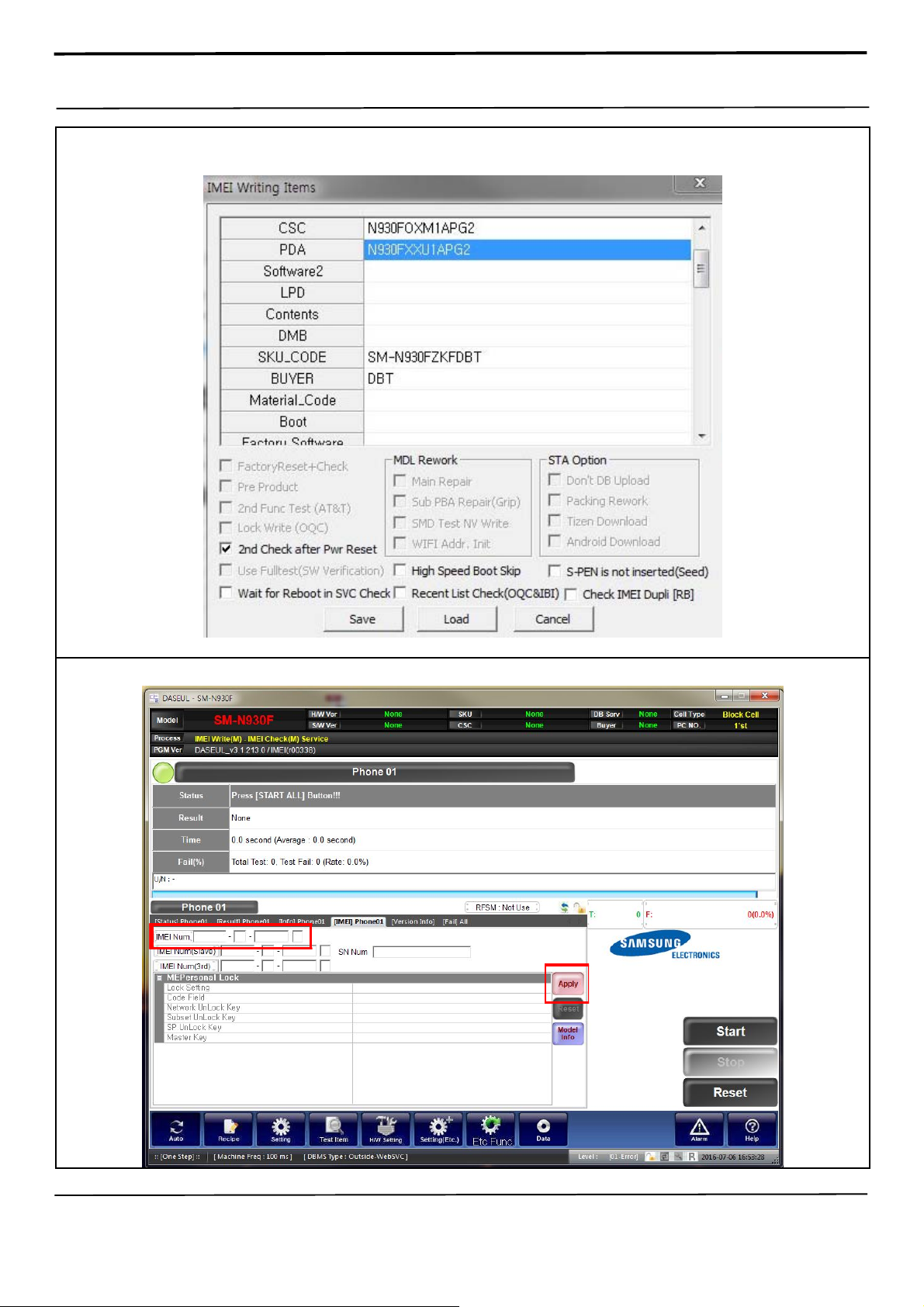
6. Level 1 Repair
14. Input SKU_CODE and BUYER, then click Save button.
※ Refer to HHPsvc→IMEI Review to check SKU Code and buyer
15. Input IMEI Number and click Apply
Confidential and proprietary-the contents in this service guide subject to change without prior notice
Distribution, transmission, or infringement of any content or data from this document without Samsung’s written authorization is strictly prohibited.
Page 25

6. Level 1 Repair
16. ① Click Start, and input IMEI writing ID and Password →②input Ticket No
17. Connect the phone to Anyway JIG
※ When you connect the phone, the phone should be turned off.
After connecting the phone, the phone will be booted automatically.
18. IMEI Writing Proceeding
Confidential and proprietary-the contents in this service guide subject to change without prior notice
Distribution, transmission, or infringement of any content or data from this document without Samsung’s written authorization is strictly prohibited.
Page 26
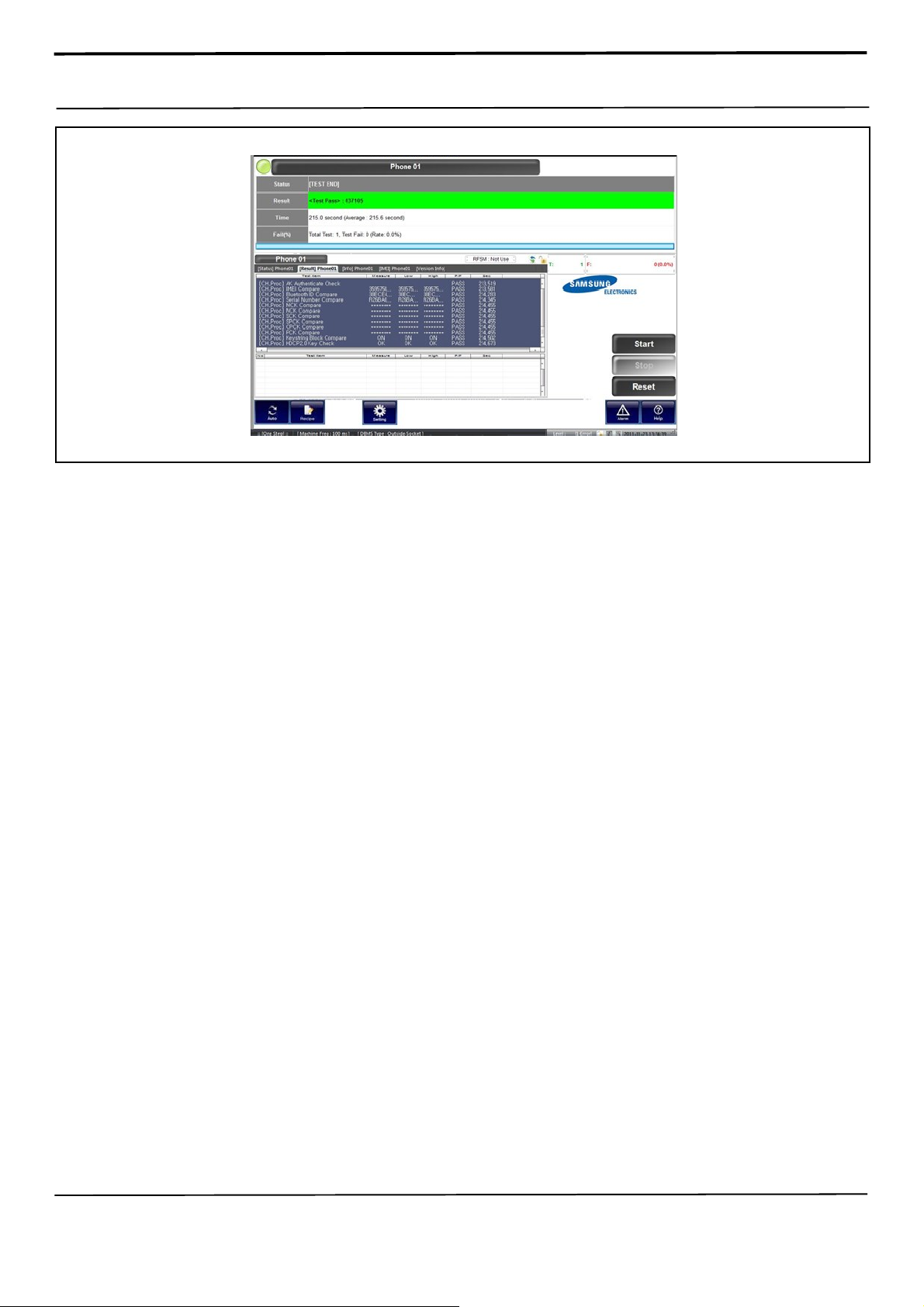
6. Level 1 Repair
19. IMEI Writing Success
Confidential and proprietary-the contents in this service guide subject to change without prior notice
Distribution, transmission, or infringement of any content or data from this document without Samsung’s written authorization is strictly prohibited.
Page 27
6. Level 1 Repair
6-3. RF Calibration
6-3-1. Required items in order to calibrate RF
a. Installation program: RF Calibration Program
- DASEUL_Launcher_v4.0.0.exe
- DASEUL_CAL_ALL_Runtime_3.1.211.0_r00402.CAB
- Model File (SM-N930F_OPEN_CALIBRATION_Ver_3.1.206.7.CAB)
※ It is required to use the latest program.
b. Mobile Phone (DUT)
c. Type-C IF Cable (GH81-11962W)
d. JIG BOX (S103, GH81-12520B)
e. JIG BOX Adapter (GH81-11888K)
f. UART Serial Cable
g. E3632A Power Supply
h. Current Cable
i. R&S CMW500
j. GPIB Cable (2ea)
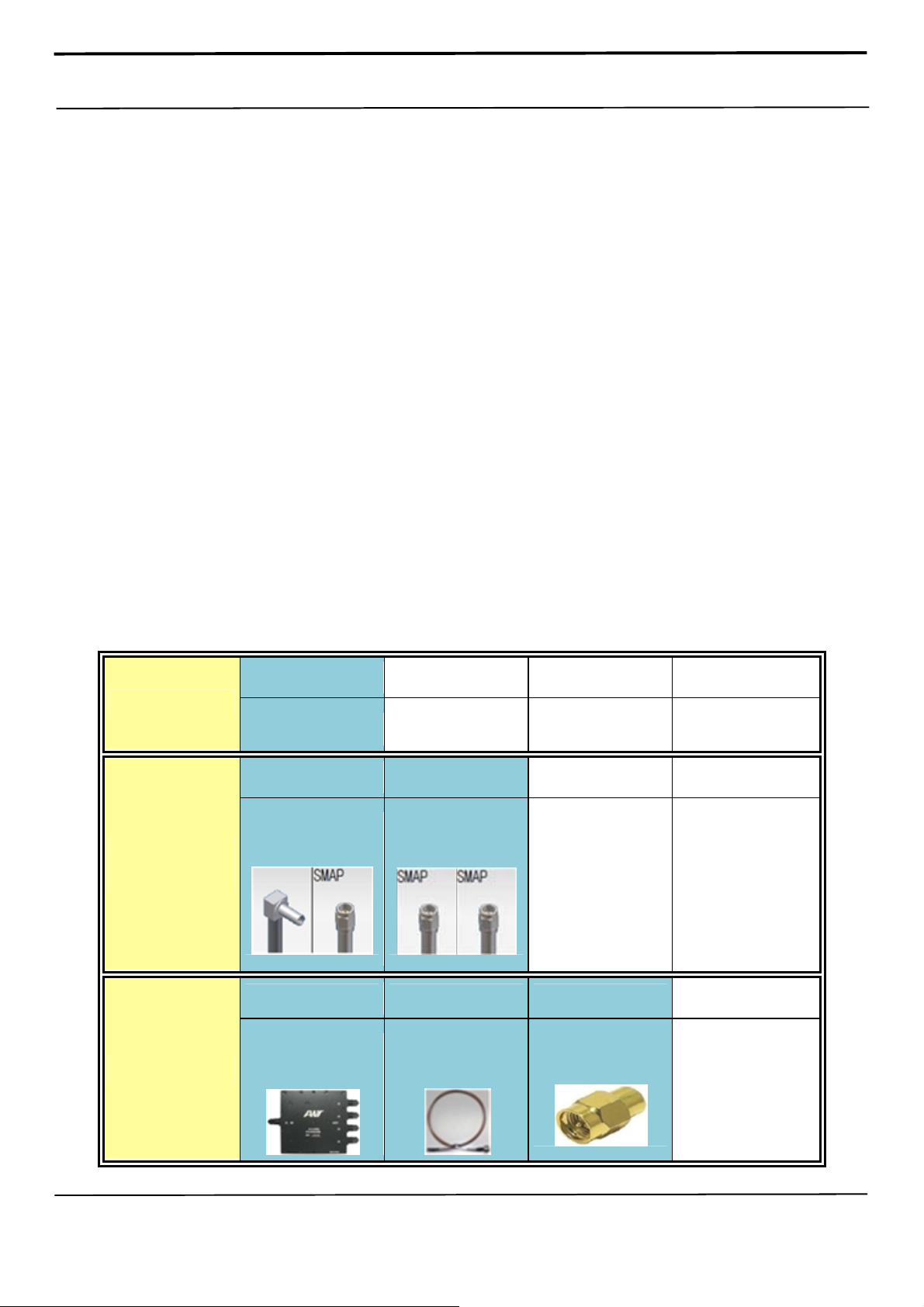
k. Table of test cables
IF Cable
RF Cable
(Manual)
4 Port Divider
GH81-11962W
USB C type
GH81-11962M GH81-11962U
1.2T, 102mm
SMAP, 300mm
2ea
2ea
GH81-11962A GH81-11962B GH81-11962E
Divider
Divider Cable
50Ω terminator
2ea
Confidential and proprietary-the contents in this service guide subject to change without prior notice
Distribution, transmission, or infringement of any content or data from this document without Samsung’s written authorization is strictly prohibited.
Page 28

6. Level 1 Repair
● Cable setting
Confidential and proprietary-the contents in this service guide subject to change without prior notice
Distribution, transmission, or infringement of any content or data from this document without Samsung’s written authorization is strictly prohibited.
Page 29
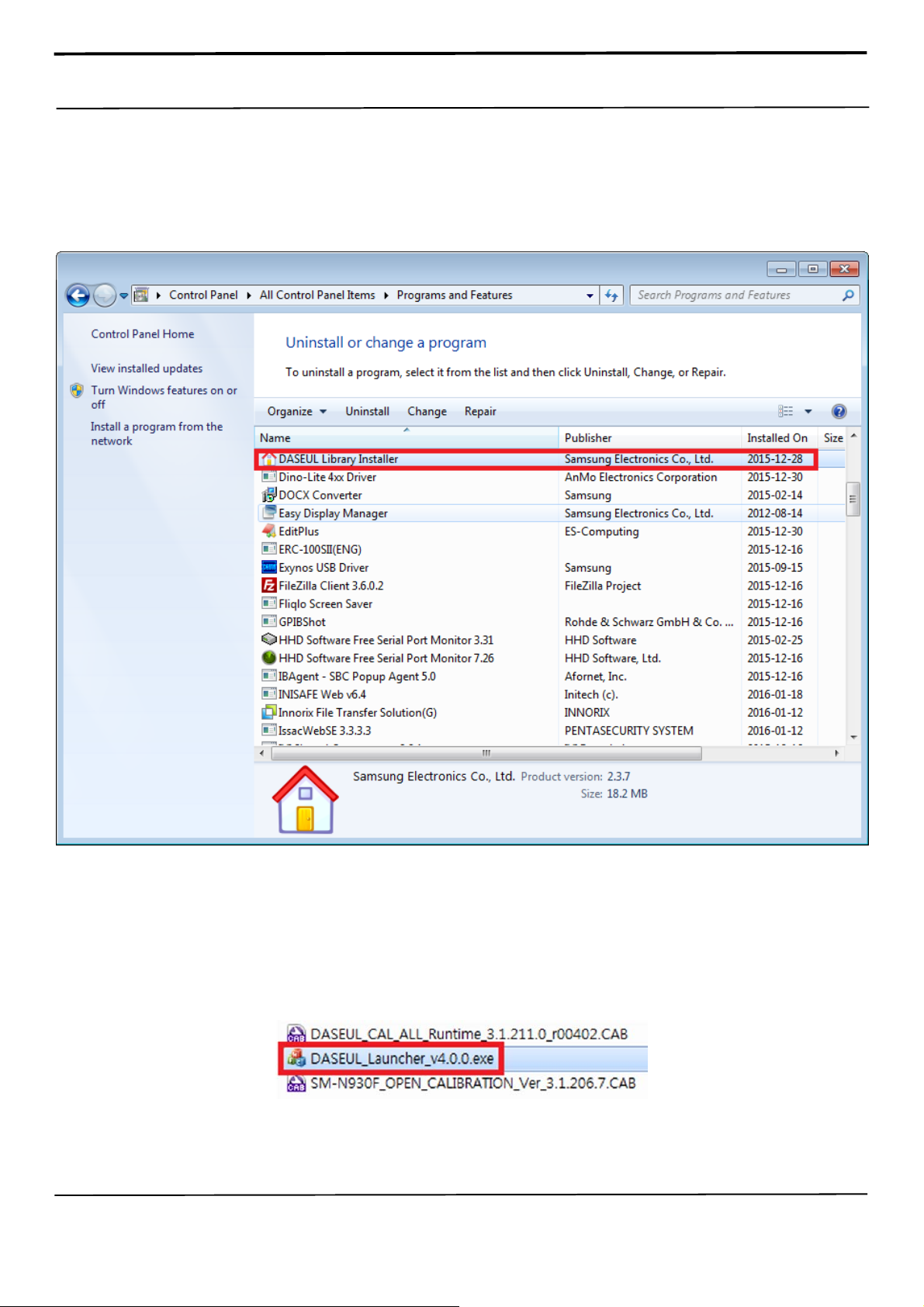
6. Level 1 Repair
6-3-2. RF Calibration Program
1. Uninstall DASEL Library and install latest version.
(Daseul_Library_Installer_151217_v2.3.7 or later)
2. Place three files below in the same folder, and Run the RF Calibration Program Launcher,
‘DASEUL_Launcher_v4.0.0.exe'.
Confidential and proprietary-the contents in this service guide subject to change without prior notice
Distribution, transmission, or infringement of any content or data from this document without Samsung’s written authorization is strictly prohibited.
Page 30

6. Level 1 Repair
3. Check the 'Calibration' menu, and select 'Extract & Run'.
Confidential and proprietary-the contents in this service guide subject to change without prior notice
Distribution, transmission, or infringement of any content or data from this document without Samsung’s written authorization is strictly prohibited.
Page 31
6. Level 1 Repair
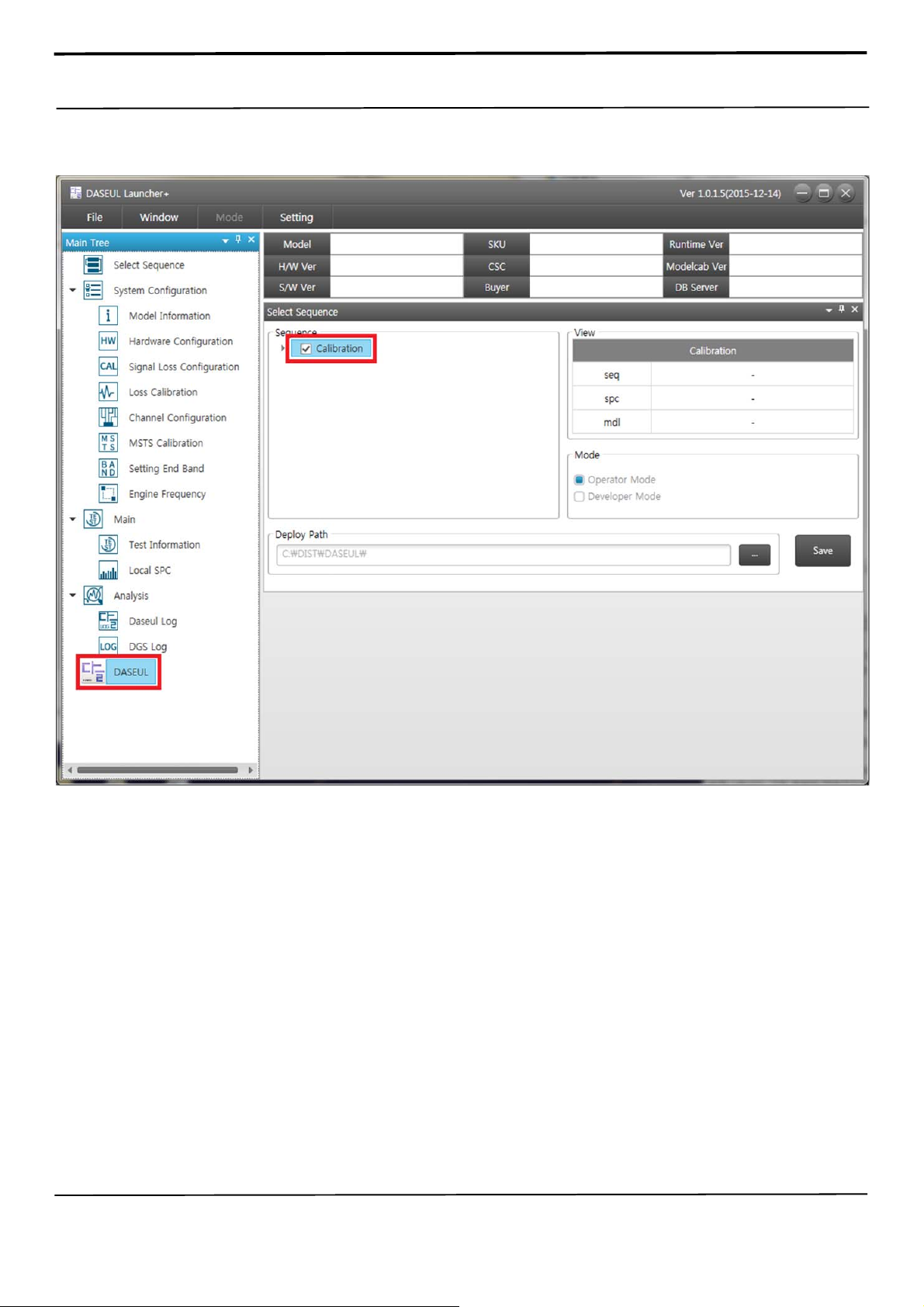
4. Check the 'Calibration' option and Click ‘DASEUL’ Icon on your left side.
Confidential and proprietary-the contents in this service guide subject to change without prior notice
Distribution, transmission, or infringement of any content or data from this document without Samsung’s written authorization is strictly prohibited.
Page 32
6. Level 1 Repair
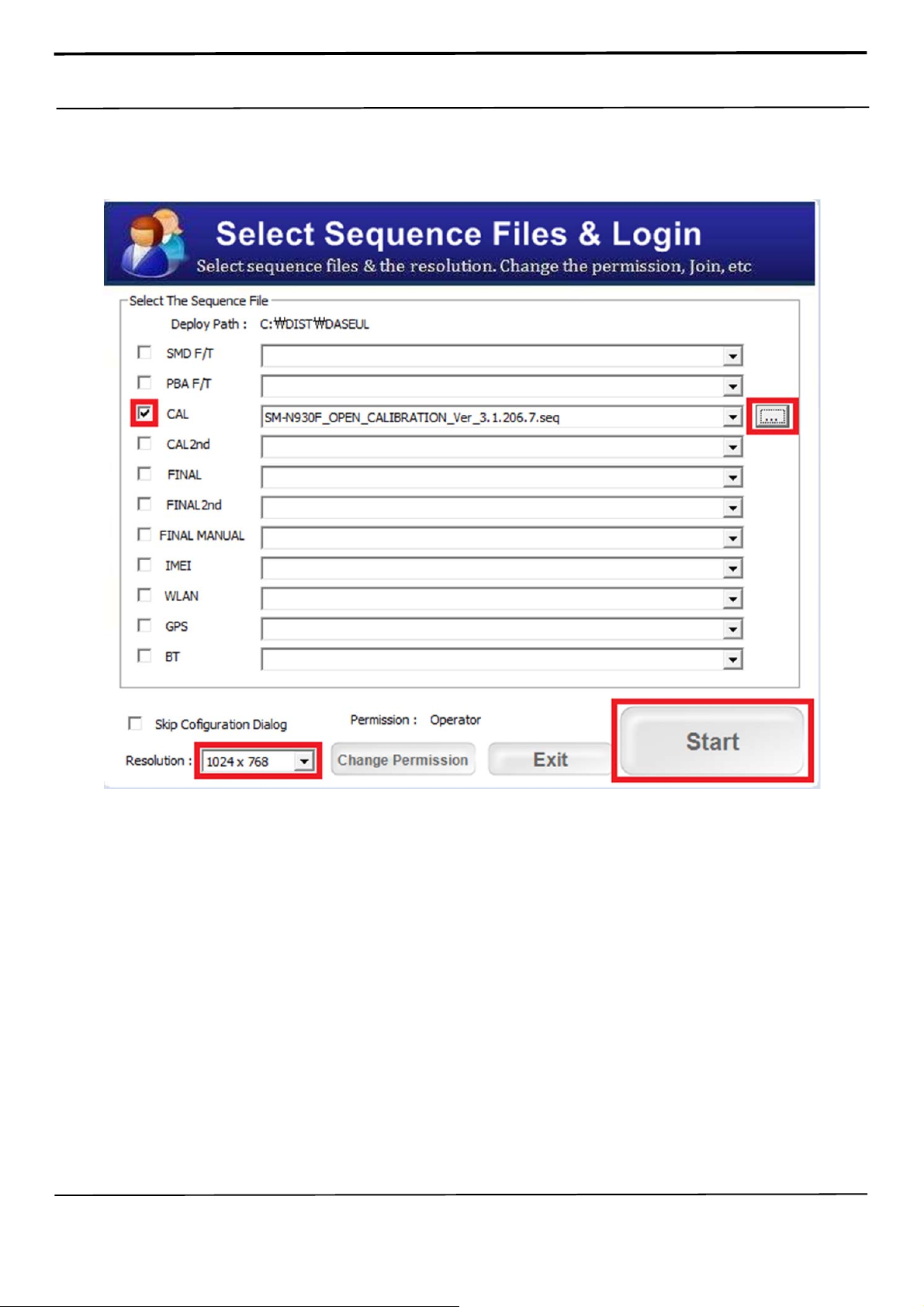
5. Apply the proper Resolution setting.
Check and Select a sequence file, and Click ‘Start’ Button.
Confidential and proprietary-the contents in this service guide subject to change without prior notice
Distribution, transmission, or infringement of any content or data from this document without Samsung’s written authorization is strictly prohibited.
Page 33
6. Level 1 Repair
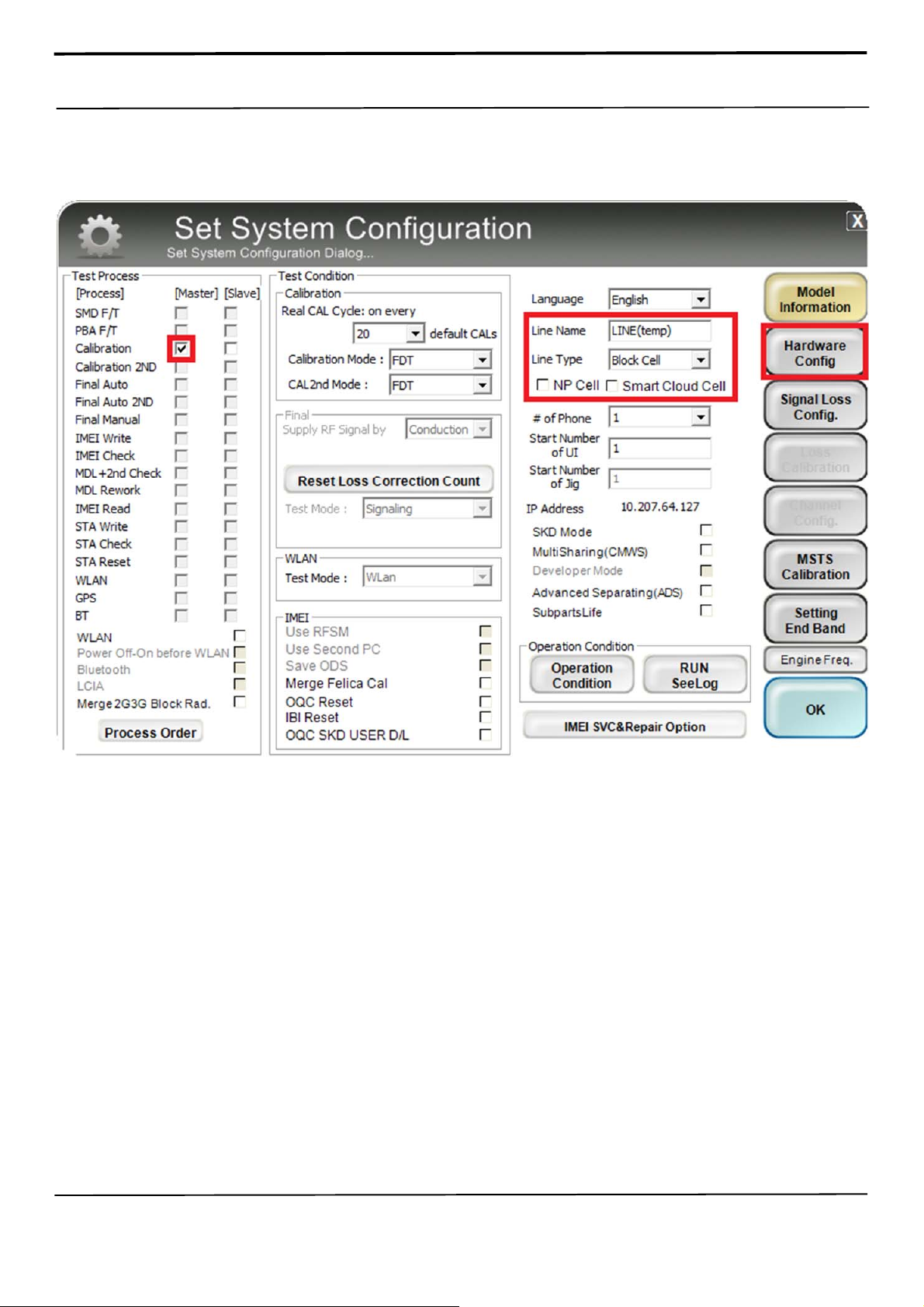
6. Select Master Calibration Process and Change the Line Type to 'Block Cell' and disable
'Smart Cloud Cell'.
And Click 'Hardware Config' to adjust the GPIB setting for equipment.
Confidential and proprietary-the contents in this service guide subject to change without prior notice
Distribution, transmission, or infringement of any content or data from this document without Samsung’s written authorization is strictly prohibited.
Page 34
6. Level 1 Repair
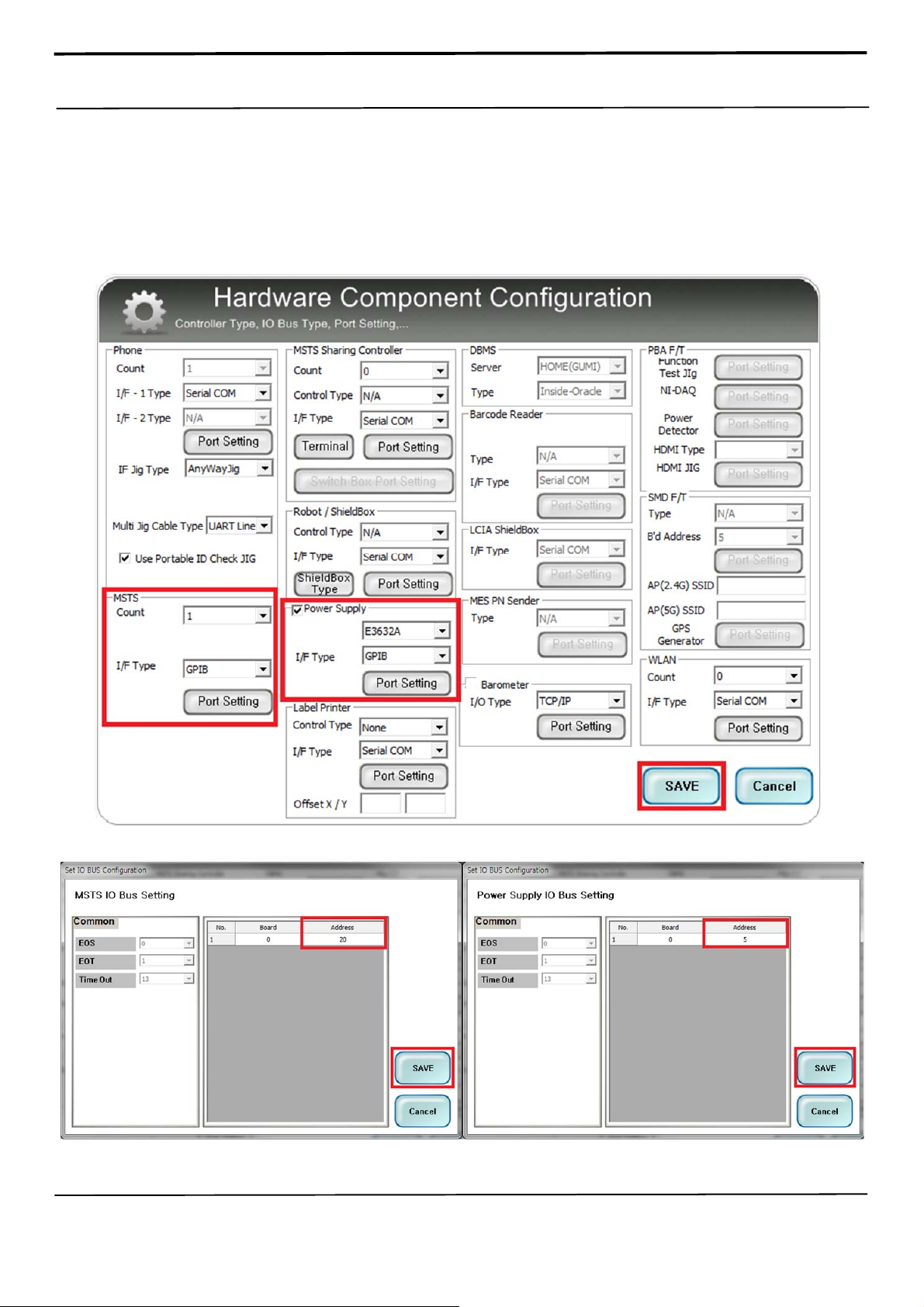
7. Set the GPIB address of MSTS(CMW500) and Power Supply(E3632A) by selecting 'Port
Setting'.
MSTS – address 20 / Power Supply – address 5
And 'Save'.
Confidential and proprietary-the contents in this service guide subject to change without prior notice
Distribution, transmission, or infringement of any content or data from this document without Samsung’s written authorization is strictly prohibited.
Page 35
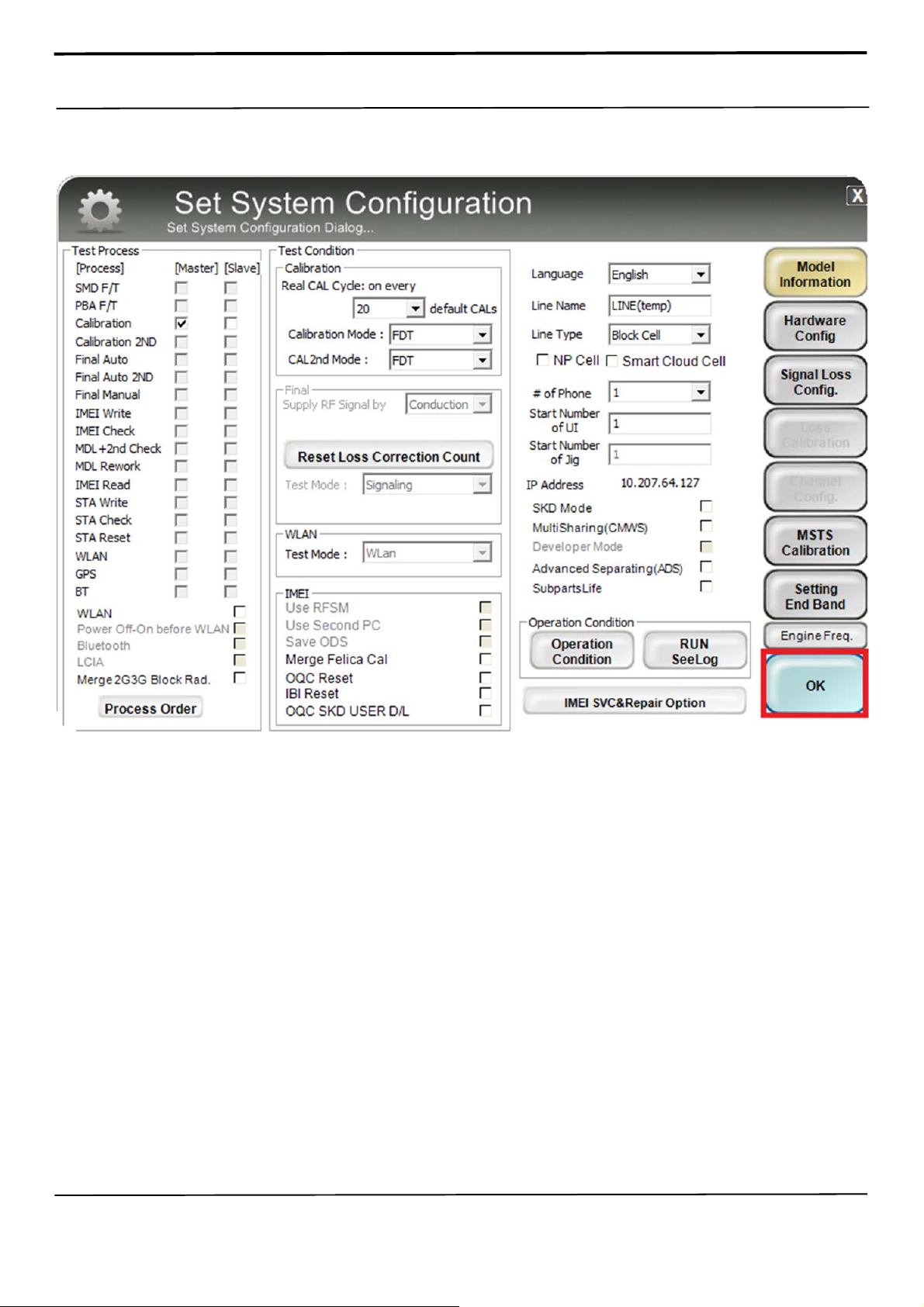
6. Level 1 Repair
8. Press 'OK' to start RF Calibration after completing all settings.
Confidential and proprietary-the contents in this service guide subject to change without prior notice
Distribution, transmission, or infringement of any content or data from this document without Samsung’s written authorization is strictly prohibited.
Page 36
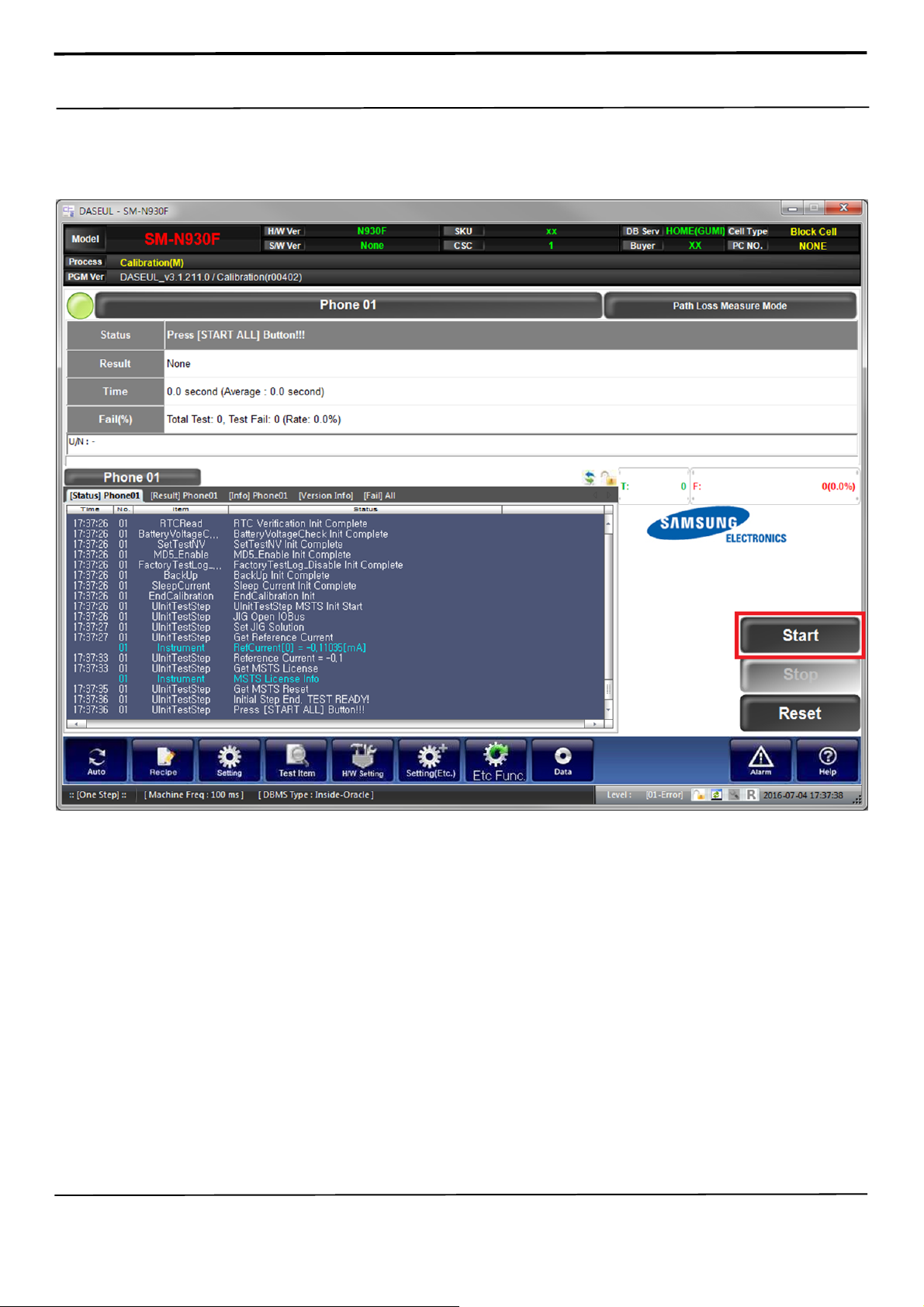
6. Level 1 Repair
9. After activating the 'Start' button, insert the RF cables and IF cable.
And 'Start'.
Confidential and proprietary-the contents in this service guide subject to change without prior notice
Distribution, transmission, or infringement of any content or data from this document without Samsung’s written authorization is strictly prohibited.
Page 37
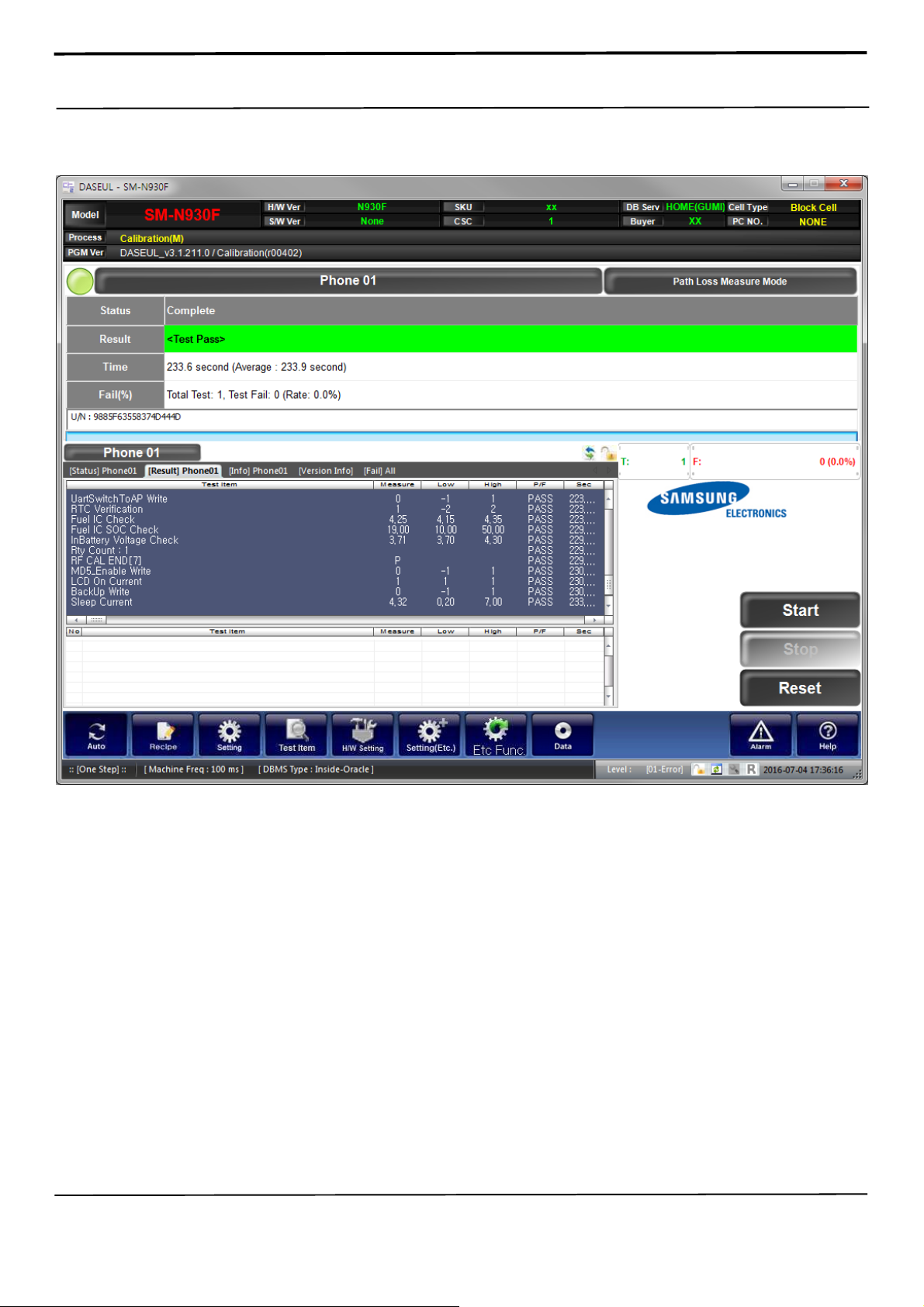
6. Level 1 Repair
10. Calibration complete.
Confidential and proprietary-the contents in this service guide subject to change without prior notice
Distribution, transmission, or infringement of any content or data from this document without Samsung’s written authorization is strictly prohibited.
Page 38
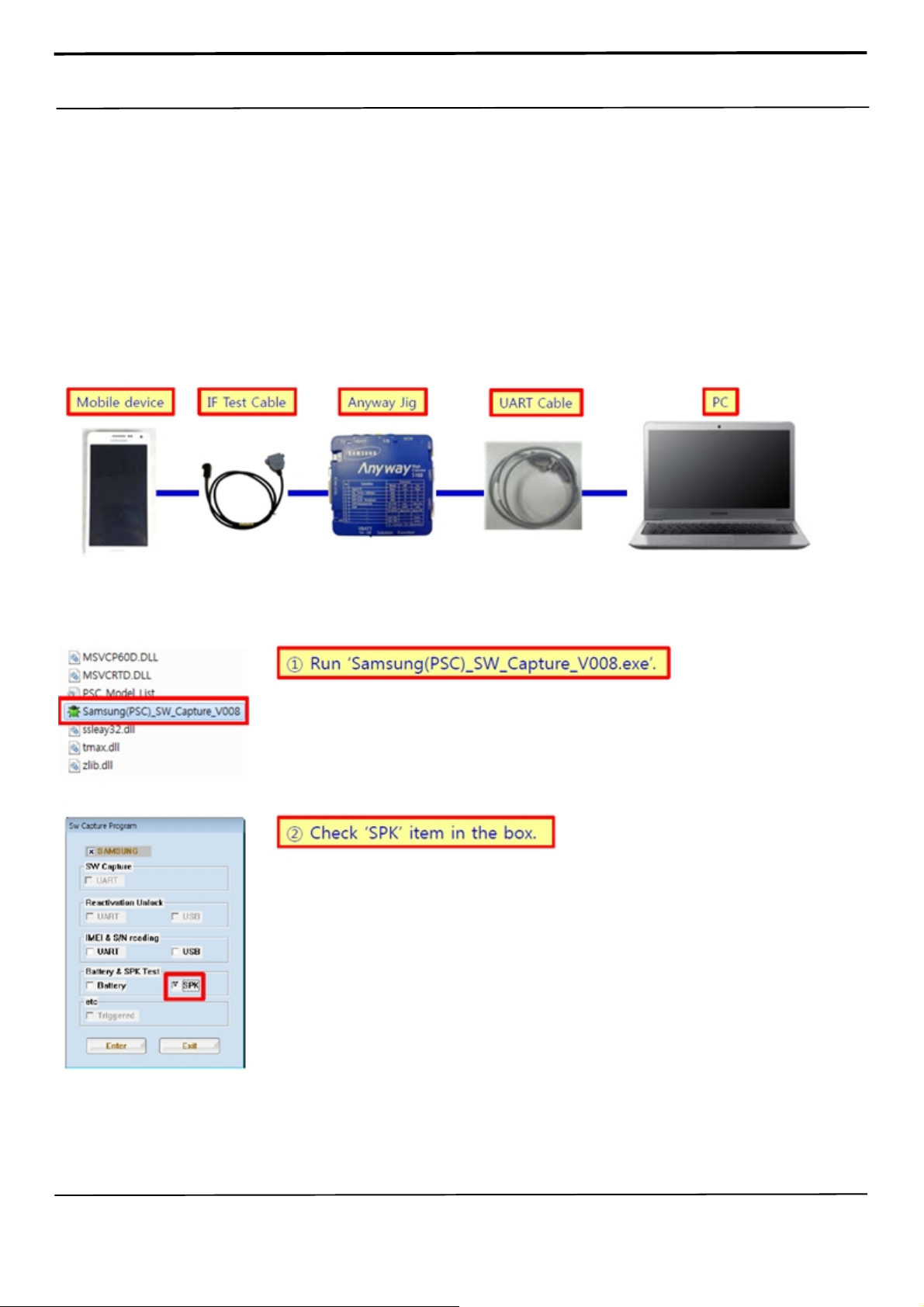
6. Level 1 Repair
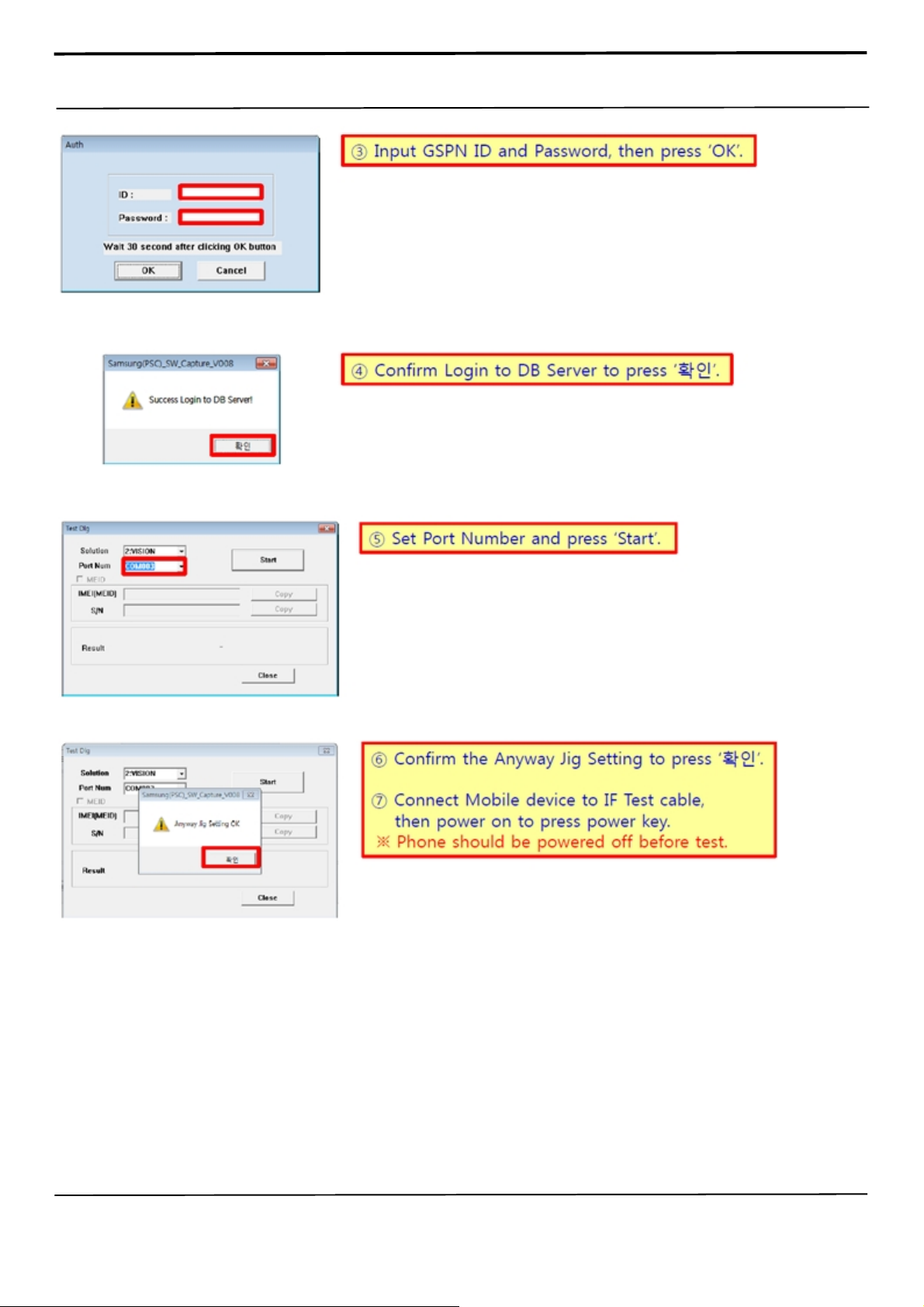
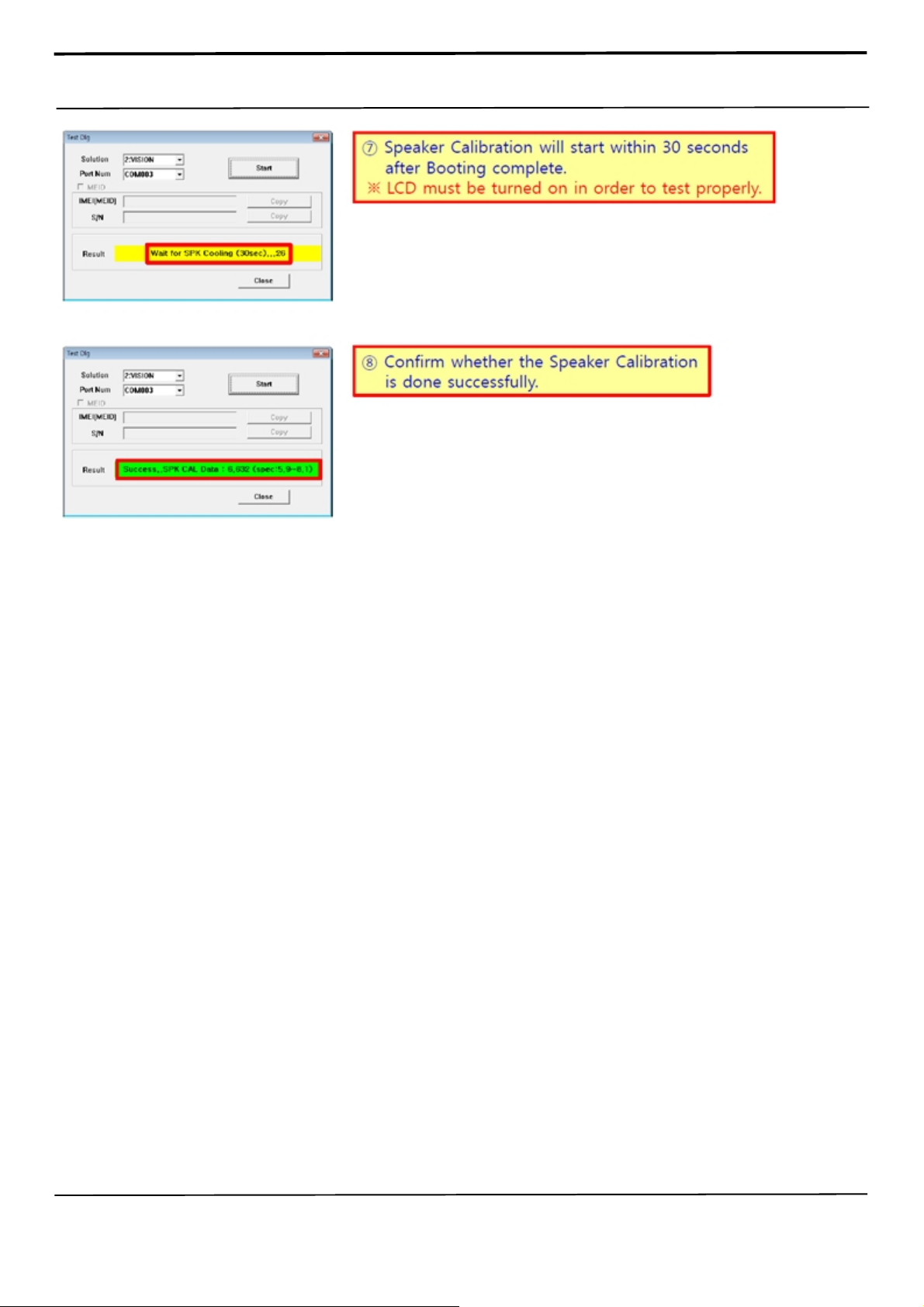
6-4. Speaker Calibration
6-4-1 Notice
- It is necessary to calibrate the speaker for all cases of replacing the speakers.
6-4-2 You need :
- Mobile device
- Laptop or Note PC
- Anyway Jig
- UART Serial Cable
- IF Test Cable (Different by models)
6-4-3 Lay-out
6-4-4 How to Calibrate Speaker
Confidential and proprietary-the contents in this service guide subject to change without prior notice
Distribution, transmission, or infringement of any content or data from this document without Samsung’s written authorization is strictly prohibited.
Page 39
6. Level 1 Repair
Confidential and proprietary-the contents in this service guide subject to change without prior notice
Distribution, transmission, or infringement of any content or data from this document without Samsung’s written authorization is strictly prohibited.
Page 40
6. Level 1 Repair
Confidential and proprietary-the contents in this service guide subject to change without prior notice
Distribution, transmission, or infringement of any content or data from this document without Samsung’s written authorization is strictly prohibited.
Page 41
6. Level 1 Repair
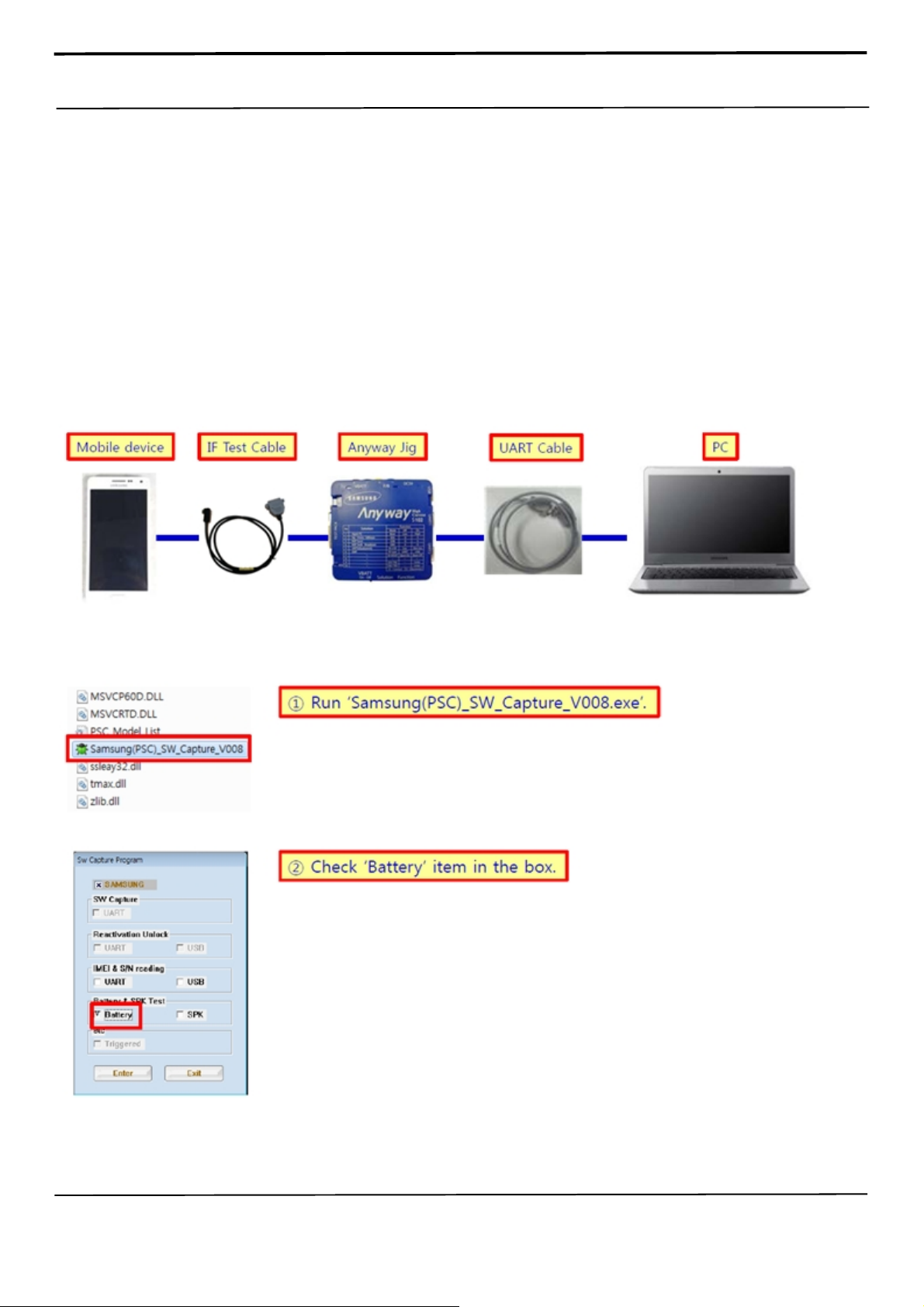
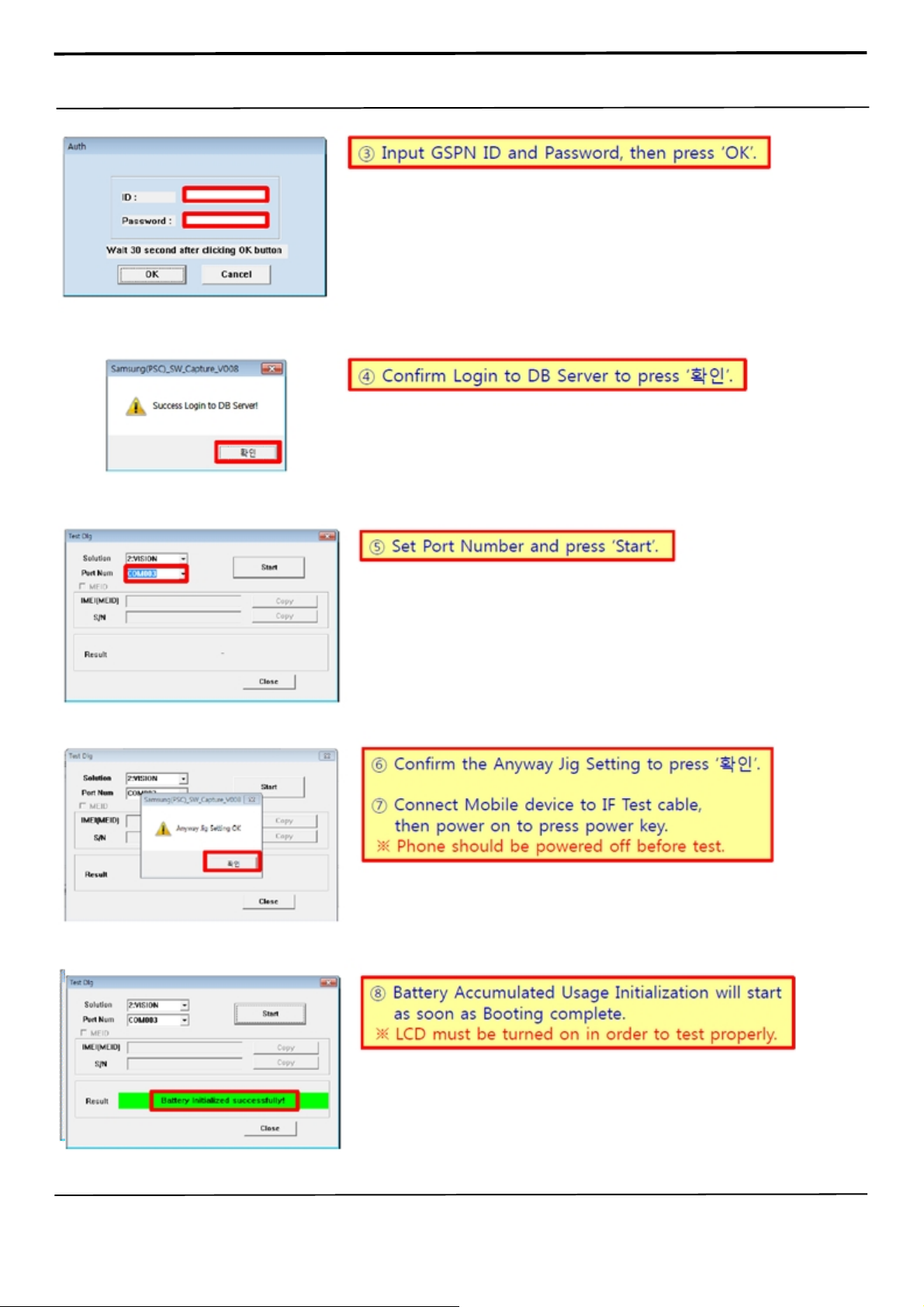
6-5. Battery Accumulated Usage Initialization
6-5-1 Notice
- It is necessary to initialize the battery accumulated usage for all cases of replacing
the batteries.
6-5-2 You need :
- Mobile device
- Laptop or Note PC
- Anyway Jig
- UART Serial Cable
- IF Test Cable (Different by models)
6-5-3 Lay-out
6-5-4 How to Initialize Battery Accumulated Usage
Confidential and proprietary-the contents in this service guide subject to change without prior notice
Distribution, transmission, or infringement of any content or data from this document without Samsung’s written authorization is strictly prohibited.
Page 42
6. Level 1 Repair
Confidential and proprietary-the contents in this service guide subject to change without prior notice
Distribution, transmission, or infringement of any content or data from this document without Samsung’s written authorization is strictly prohibited.
Page 43
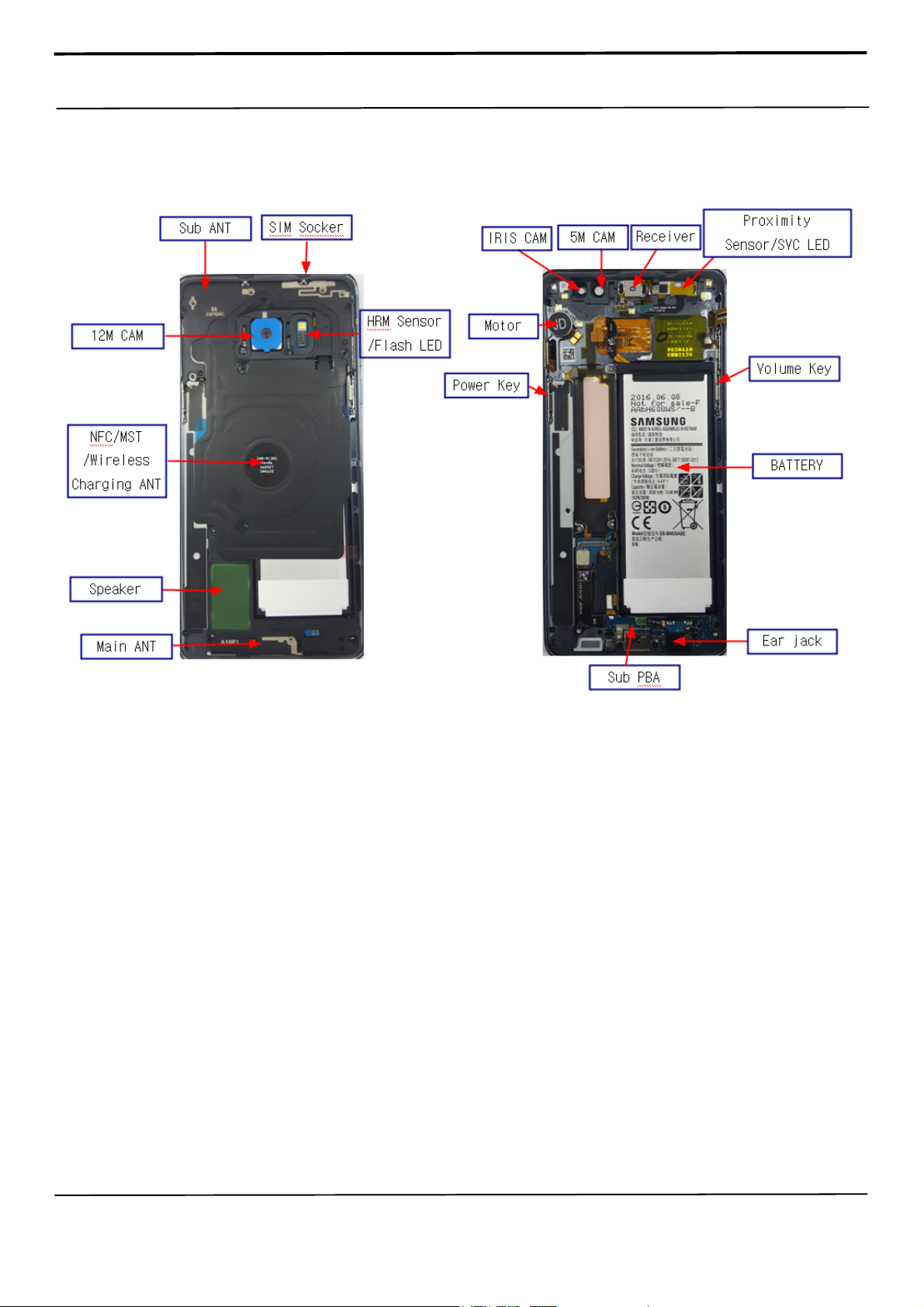
7. Level 2 Repair
7-1. Components on the Rear Case
Confidential and proprietary-the contents in this service guide subject to change without prior notice
Distribution, transmission, or infringement of any content or data from this document without Samsung’s written authorization is strictly prohibited.
Page 44
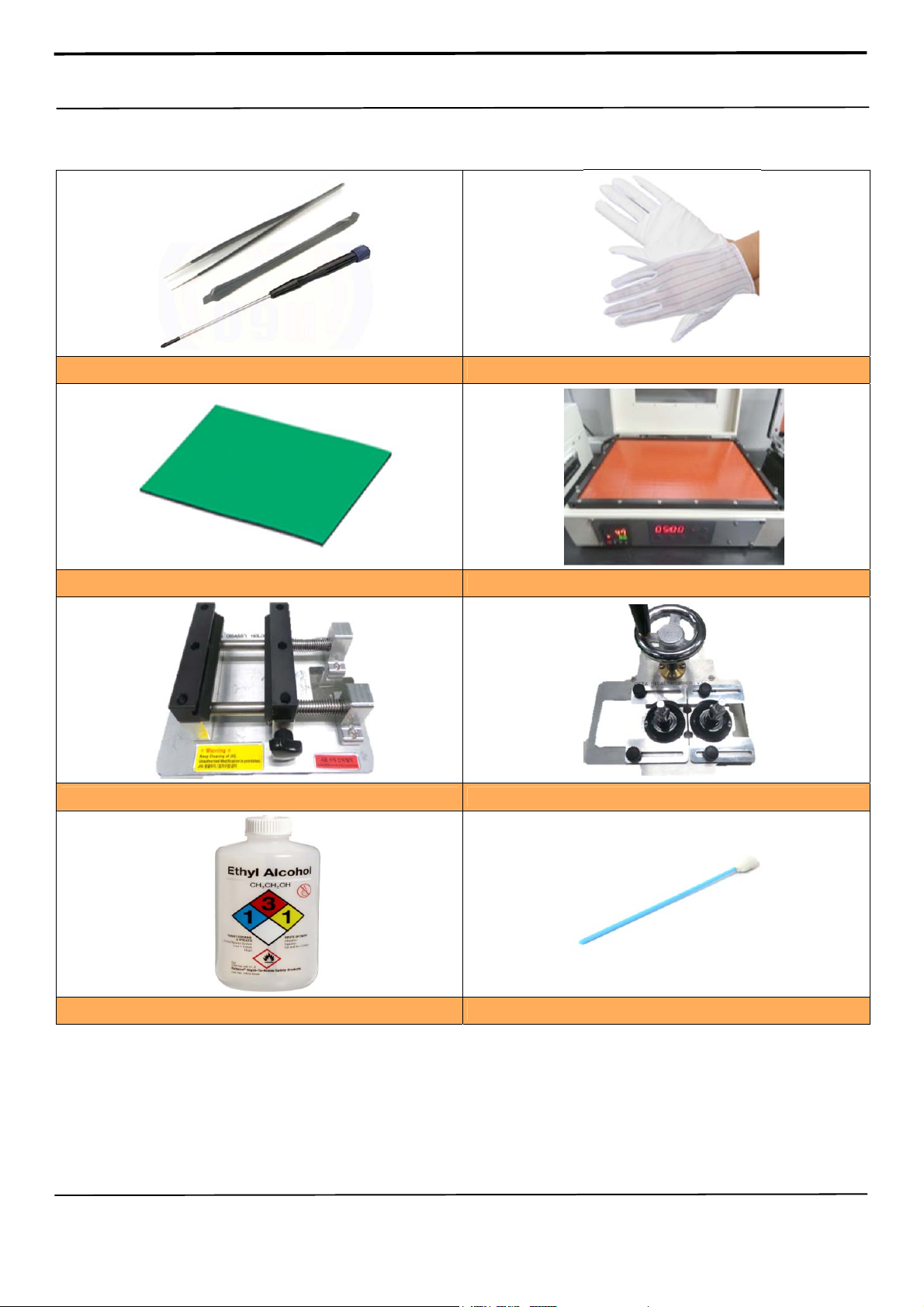
7. Level 2 Repair
7-2. Pre-requisite
Tweezers / Disass'y Stick / Screw Driver
Anti-static Mat
A OCTA Disassembly Holder
Anti-static Gloves
Hot Plate
OCTA Disassembly Upper
Ethyl Alcohol Cotton Swab
Confidential and proprietary-the contents in this service guide subject to change without prior notice
Distribution, transmission, or infringement of any content or data from this document without Samsung’s written authorization is strictly prohibited.
Page 45
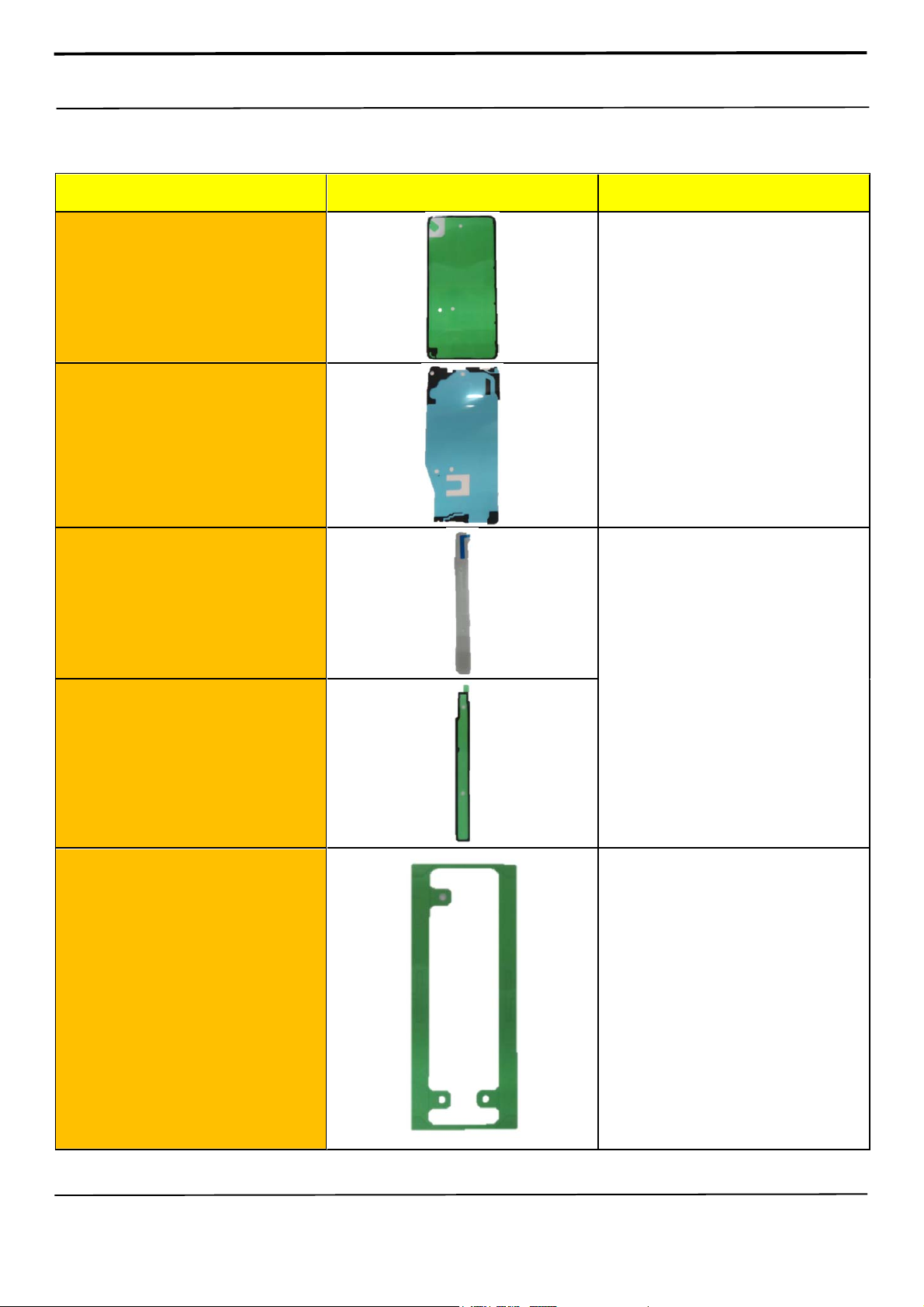
7. Level 2 Repair
7-3. Parts which must be changed after repair
BOM discription & part code Image Remarks
A/S Back Glass Outside Tape
(Common)
[GH81-14004A]
A/S Back Glass Inner Tape
(America/Japan/Korea)
[GH81-14003A]
A/S S-Pen Cover
[GH98-40437A]
A/S S-Pen Cover Tape
[GH02-13334A]
Replace for
Back Glass repair
Replace for
S-pen cover repair
A/S Battery Tape
Replace for
[GH02-13318A]
Battery repair
Confidential and proprietary-the contents in this service guide subject to change without prior notice
Distribution, transmission, or infringement of any content or data from this document without Samsung’s written authorization is strictly prohibited.
Page 46
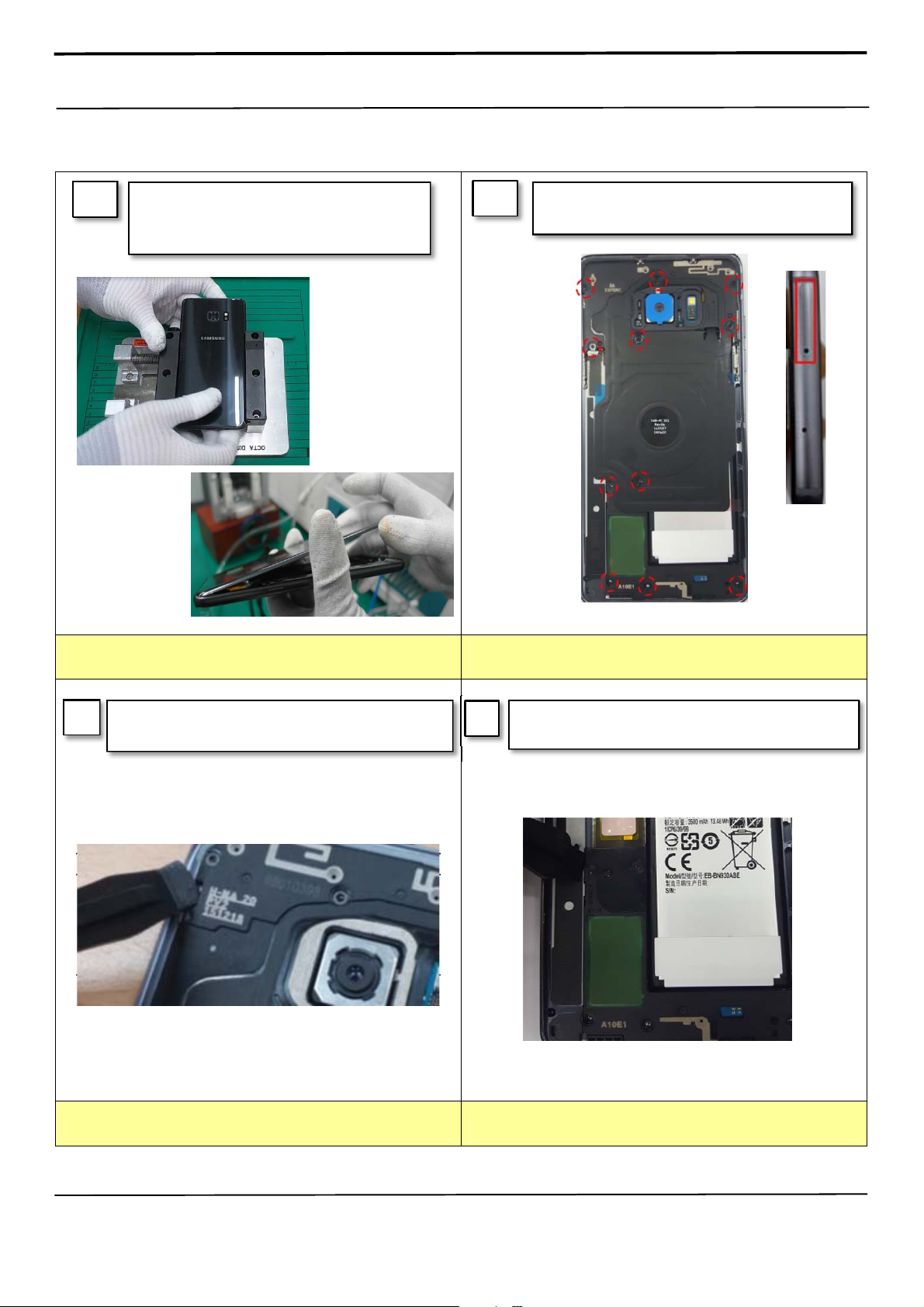
7. Level 2 Repair
7-4. Disassembly
1
1) Put the device on the Hot plate for
5 minutes under 60℃.
2) Detach the Back Glass.
2
Unscrew 11 Point and
disassemble SIM Tray from device
※
Caution
1) Be care of scratch
Disassemble Upper Rear.
3
(Use disassemble hole left side of Rear to detach it)
※
Caution
1) Be care of scratch
Finally Disassemble Rear of bottom side.
4
(Use disassemble hole left side of Rear to detach it)
※
Caution
1) Be care of Rear damage
Confidential and proprietary-the contents in this service guide subject to change without prior notice
Distribution, transmission, or infringement of any content or data from this document without Samsung’s written authorization is strictly prohibited.
※
Caution
1) Be care of Rear and connector damage
Page 47
7. Level 2 Repair
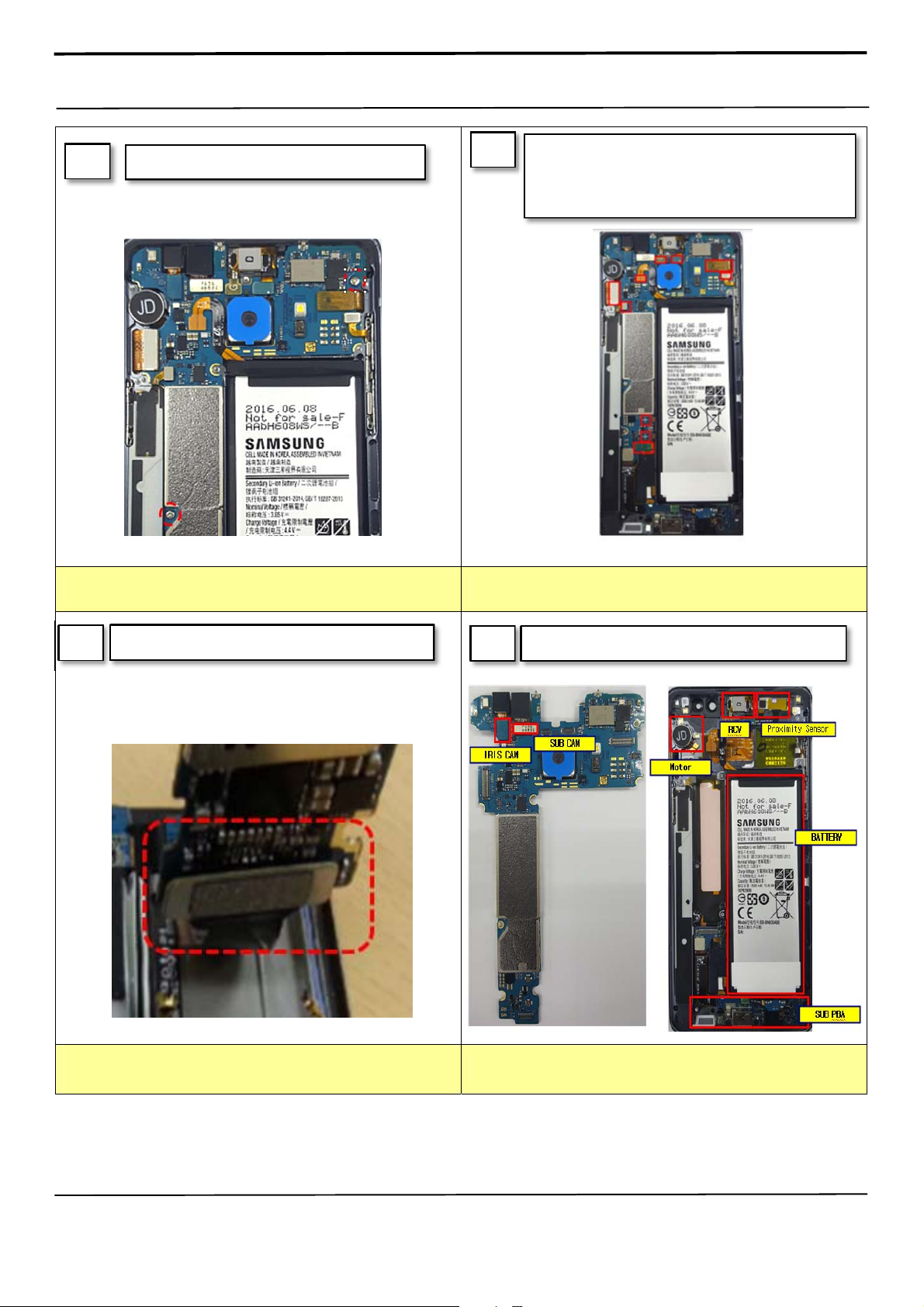
Unscrew PBA 2points. 5
※
Caution
1) Be careful not to damage the PBA
6
※
Caution
1) Be care of connector/cable damage
Detach 2 3D PCB Receptacle cables, Battery
connect and the other connectors. (10 Point,
except for Front/IRIS Cam connector)
7
※
1) Be care of FPCB damage
2) Be care of SUB PBA connector
Detach main PBA from Front.
Caution
※
Caution
1) Be care of several kinds of damage
Detach other components.
8
Confidential and proprietary-the contents in this service guide subject to change without prior notice
Distribution, transmission, or infringement of any content or data from this document without Samsung’s written authorization is strictly prohibited.
Page 48
7. Level 2 Repair
7-6. Aassembly
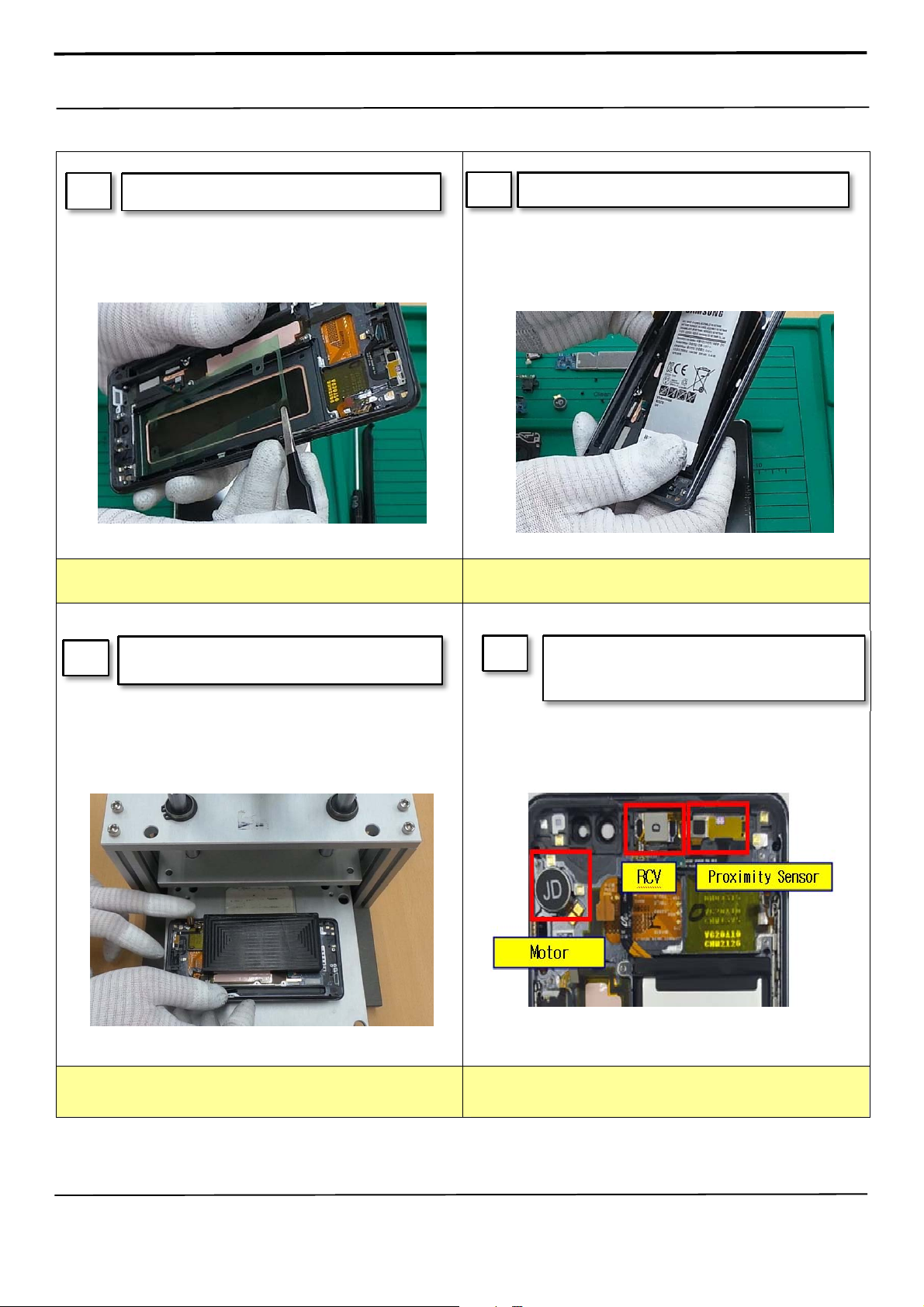
1
※ Caution
Attach Battery tape on Front.
2
※
1) Be care of Battery damage
Attach Battery on Front
Caution
3
※ Caution
1) Be care of Battery damage
Press the Battery with pressing jig.
Pressing force: 1N / Pressing time: 3s
※ Caution
1) Be care of FPCB damage and tilt
2) Be care of press power/time
4
Attach components on Front.
(RCV module, Sensor FPCB, Motor) and then
Press RCV.
Confidential and proprietary-the contents in this service guide subject to change without prior notice
Distribution, transmission, or infringement of any content or data from this document without Samsung’s written authorization is strictly prohibited.
Page 49
7. Level 2 Repair
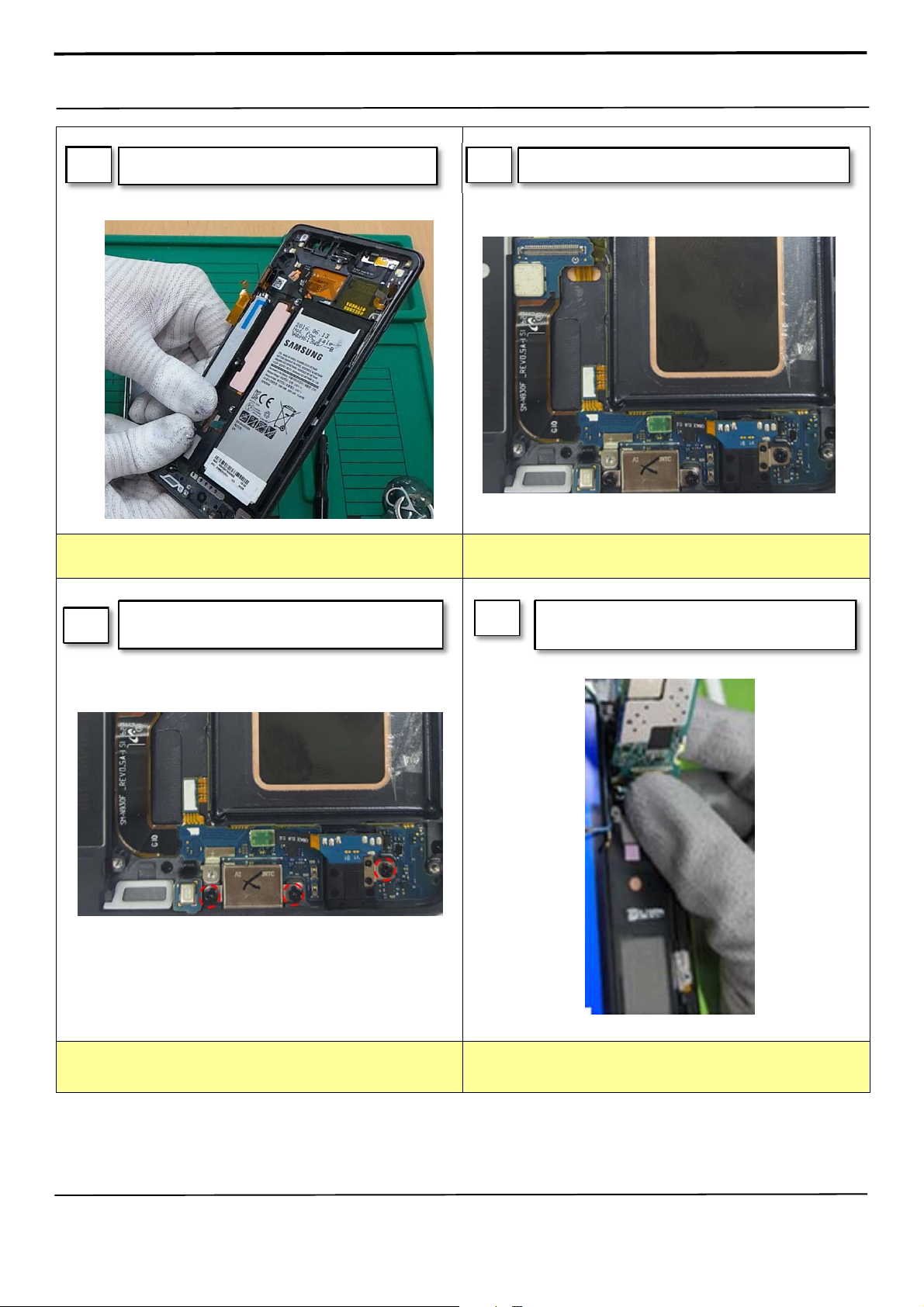
5
※ Caution
Attach S-pen Cover on Front.
6
Attach SUB PBA and Ear jack on Front.
※
Caution
1) Be care of Battery damage
7
Screw 3 point in SUB PBA.
※
Caution
1) Be care of chip damage nearby screw point.
※ Caution
1) Be care of Push SUB PBA connector.
2) Be care of components FPCB.
8
Attach PBA assy In Front Assy.
(PBA+ Front)
Confidential and proprietary-the contents in this service guide subject to change without prior notice
Distribution, transmission, or infringement of any content or data from this document without Samsung’s written authorization is strictly prohibited.
Page 50
(
)
7. Level 2 Repair
9
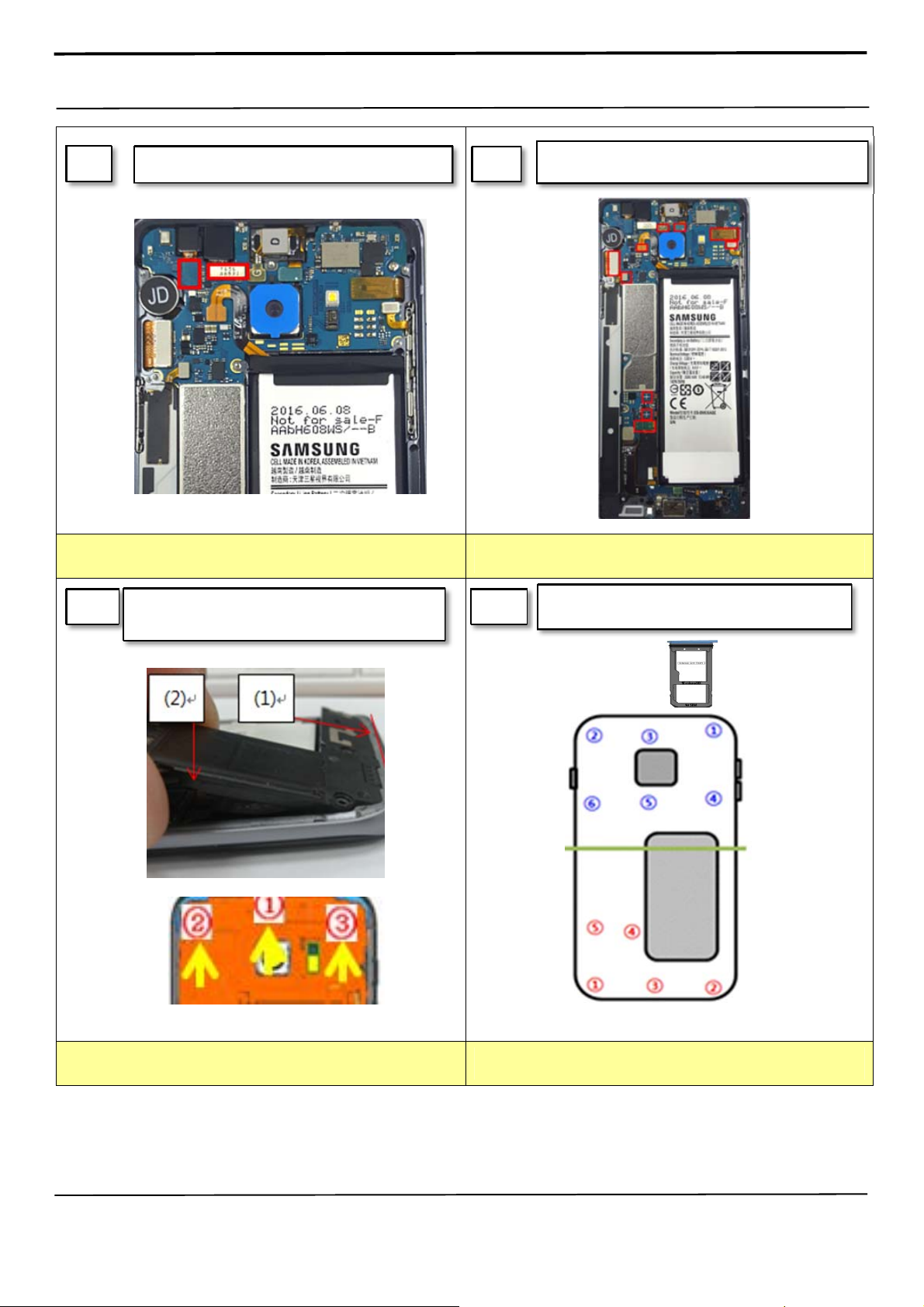
Attach IRIS/SUB CMA on PBA.
※ Caution
1) Be care of coaxial cable damage
11
Assemble the REAR in sequence
Lower → Upper Rear.
10
※ Caution
1) Be care of CAM Lens from finger print.
12
Attach 2 3D PCB Receptacle cables, Battery
connect and the other connectors.
Screw 11 Point and then insert SIM Tray on
device.
10 Point
※
Caution
1) Be care of scratch and REAR damage
Confidential and proprietary-the contents in this service guide subject to change without prior notice
Distribution, transmission, or infringement of any content or data from this document without Samsung’s written authorization is strictly prohibited.
※
Caution
1) Be care of scratch and REAR damage
Page 51
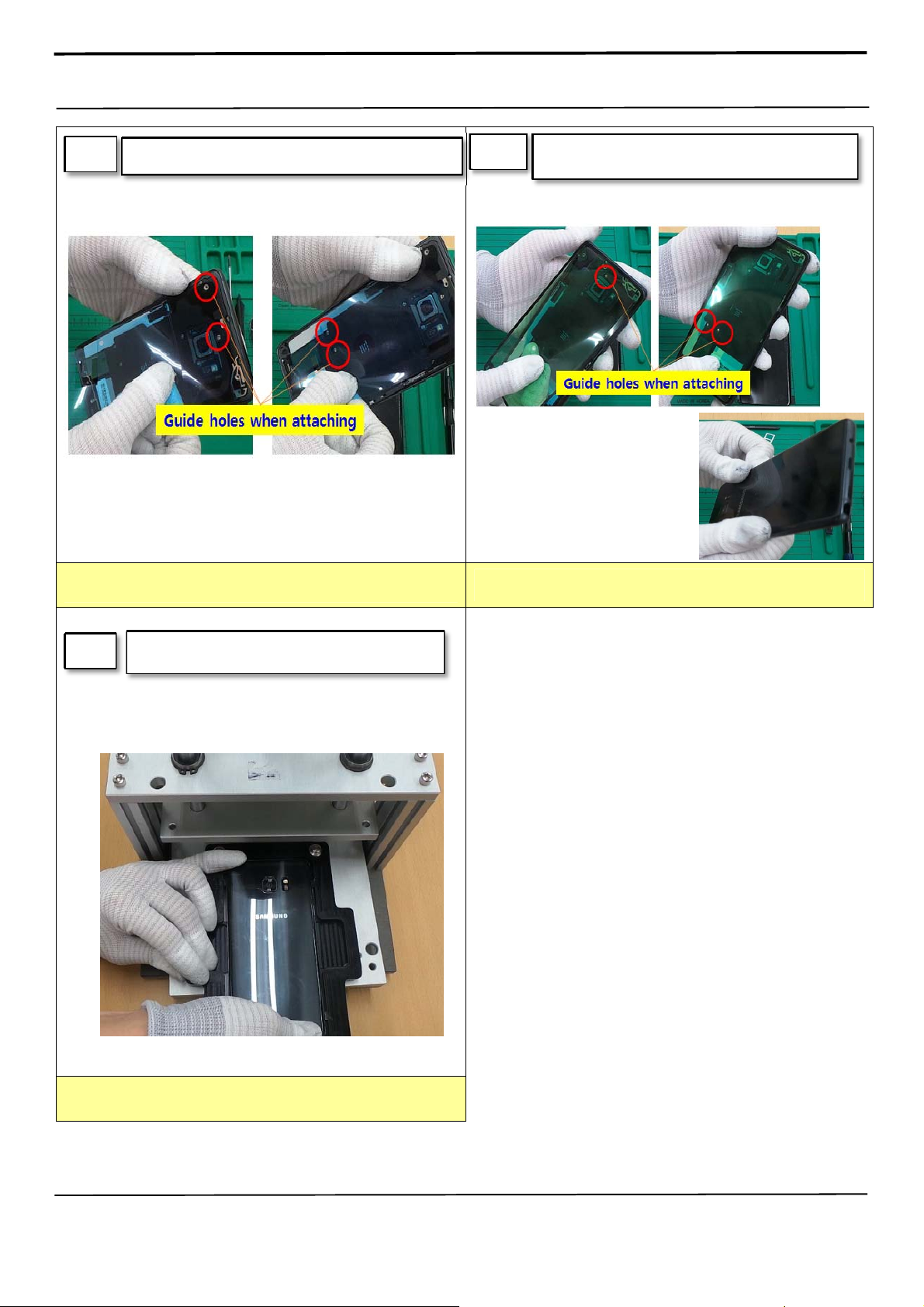
g
7. Level 2 Repair
13
Attach the back glass inner tape on the rear case
14
Attach the back glass outside tape on the rear
case and Assemble the back
lass
※ Caution
1) Be care of scratch and tilt.
15
Press Back Glass.
※
Caution
1) Be care of scratch and tilt.
※ Caution
1) Be care of scratch.
Confidential and proprietary-the contents in this service guide subject to change without prior notice
Distribution, transmission, or infringement of any content or data from this document without Samsung’s written authorization is strictly prohibited.
Page 52
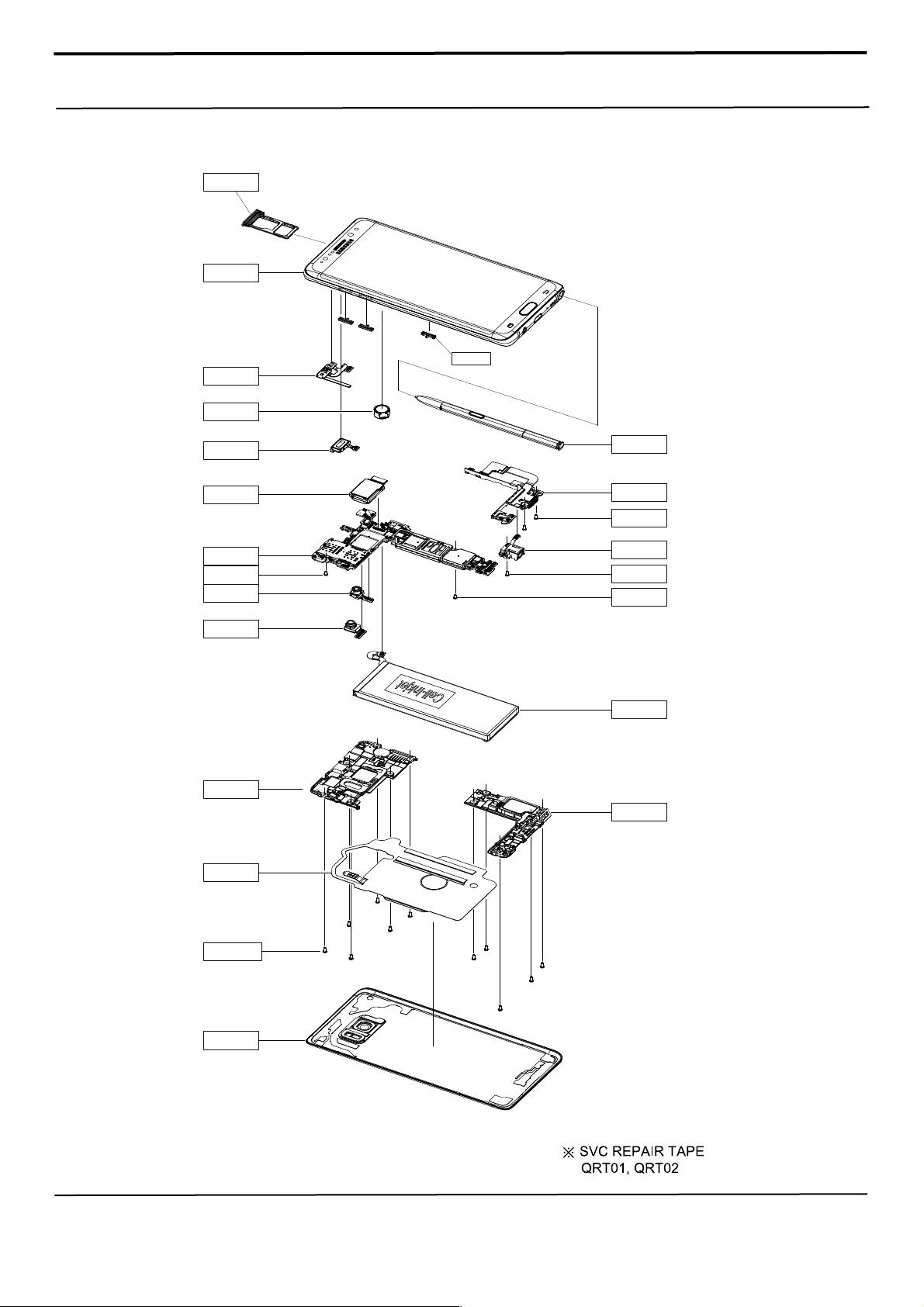
4. Exploded View and Parts List
4-1. Cellular phone Exploded View
QSM01
QFR01
QME01
QMO01
QSK01
QAR01
QCA01
QMP01
QCR92
QCA03
QCA02
QAN01
QAN02
QST01
QME02
QCR12
QJK01
QCR12
QCR92
QBA01
QSP01
QCR175
QBC01
Confidential and proprietary-the contents in this service guide subject to change without prior notice
Distribution, transmission, or infringement of any content or data from this document without Samsung’s written authorization is strictly prohibited.
Page 53
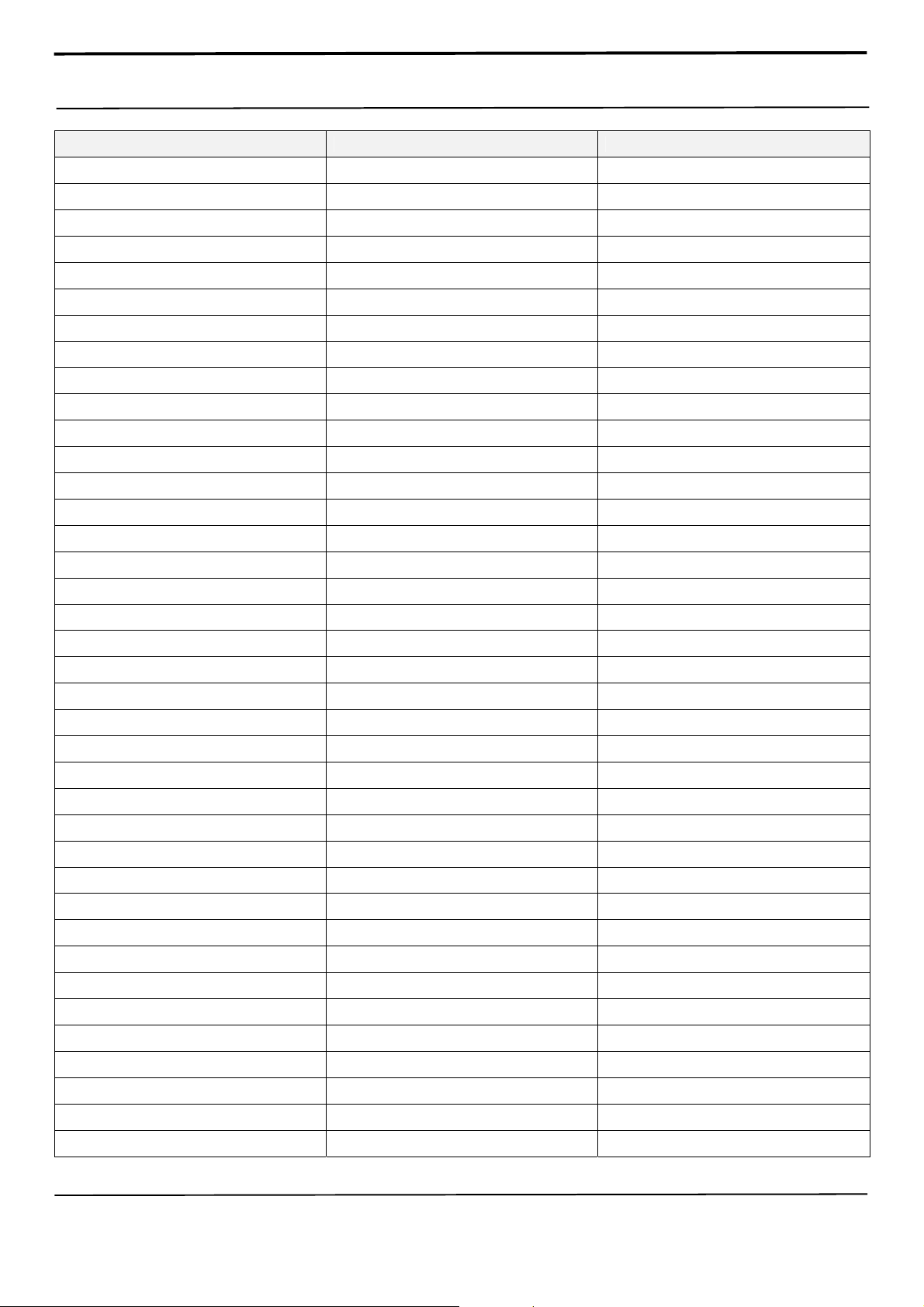
5. MAIN Electrical Parts List
SEC CODE Design LOC Description
0202-002125 R3017,R5005,R9040 PB-SHORT-0603
0404-001250 D6000,D6001,D6002 DIODE-SCHOTTKY
0404-001250 D9002 DIODE-SCHOTTKY
0406-001506 ZD2000,ZD3003 DIODE-TVS
0406-001592 ZD7000,ZD7001 DIODE-TVS
0406-001645 ZD9000,ZD9001 DIODE-TVS
0406-001675 ZD6000 DIODE-TVS
0406-001690 ZD9004,ZD9005 DIODE-TVS
0406-001695 ZD9006,ZD9007 DIODE-TVS
0406-001715 ZD3002,ZD8010,ZD8011 DIODE-TVS
0406-001715 ZD8012,ZD8013 DIODE-TVS
0406-001717 C9066,ZD3000,ZD3001 DIODE-TVS
0406-001717 ZD3004,ZD3005,ZD3006 DIODE-TVS
0406-001717 ZD8000,ZD8001,ZD8002 DIODE-TVS
0406-001717 ZD8003,ZD9002,ZD9003 DIODE-TVS
0406-001724 ZD6005,ZD7004,ZD7005 DIODE-TVS
0406-001724 ZD7006 DIODE-TVS
0406-001725 ZD9025,ZD9026 DIODE-TVS
0406-001729 ZD6003,ZD6004 DIODE-TVS
0406-001743 ZD9009,ZD9010,ZD9011 DIODE-TVS
0406-001743 ZD9012,ZD9013,ZD9020 DIODE-TVS
0406-001743 ZD9021,ZD9022,ZD9023 DIODE-TVS
0406-001743 ZD9024,ZD9027,ZD9028 DIODE-TVS
0406-001743 ZD9029,ZD9030,ZD9033 DIODE-TVS
0406-001759 ZD9031,ZD9032,ZD9036 DIODE-TVS
0406-001759 ZD9037 DIODE-TVS
0505-003234 Q6000,TR3000 FET-SILICON
0505-003529 Q4000 FET-SILICON
0505-003564 Q8000 FET-SILICON
0601-003552 LED6000 LED
0801-003435 U5002,U8004 IC
0801-003602 U6009,U6014 IC
1001-001844 U2000 IC
1001-001956 U1003,U1005,U2010 IC
1001-001972 U1006 IC
1001-001975 U1011,U2006 IC
1001-001990 U2002 IC
1001-001994 U1000,U1002 IC
Confidential and proprietary-the contents in this service guide subject to change without prior notice
Distribution, transmission, or infringement of any content or data from this document without Samsung’s written authorization is strictly prohibited.
Page 54
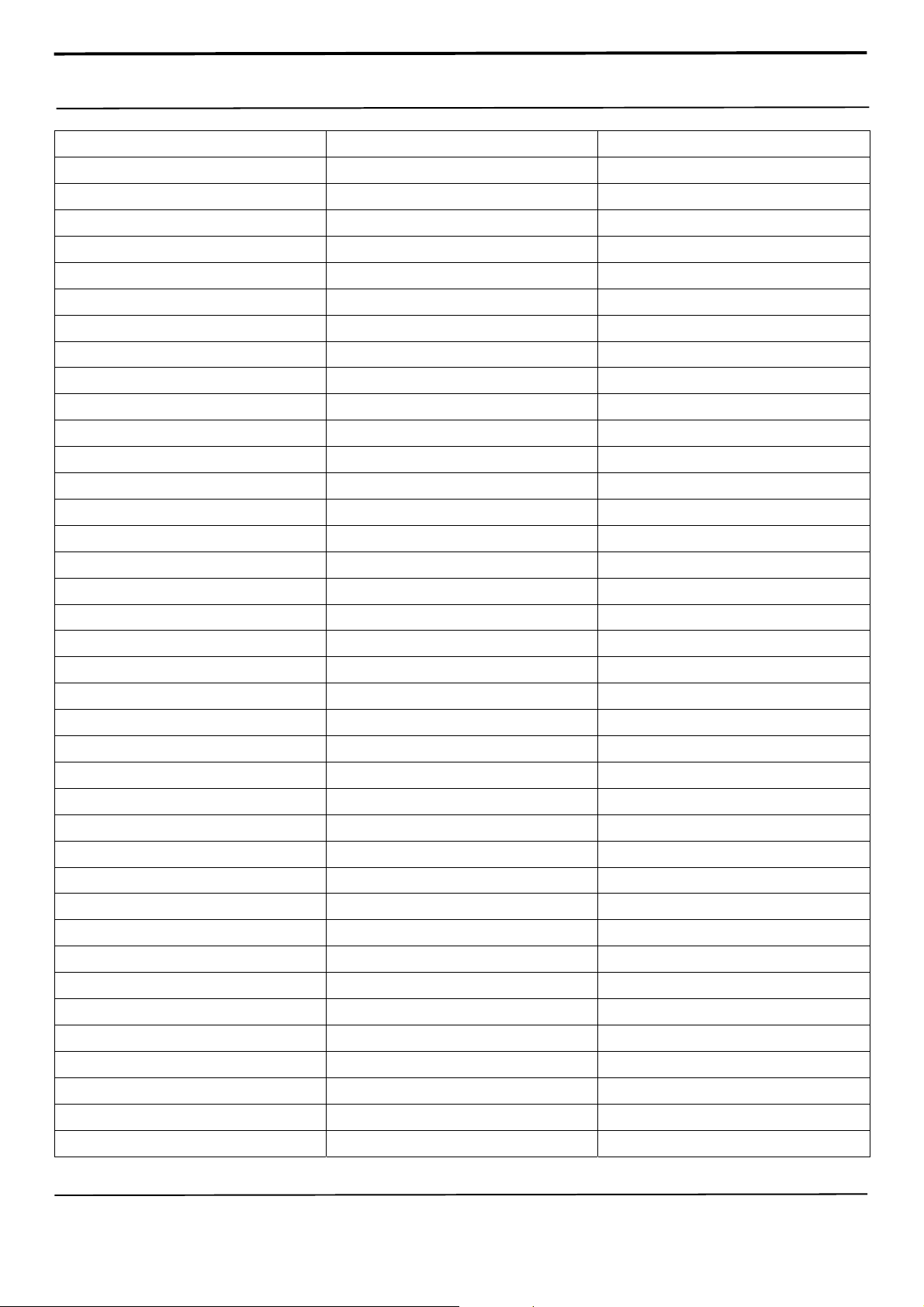
5. MAIN Electrical Parts List
1001-001996 U2004 IC
1003-002837 U6013 IC
1009-001066 U4001 IC
1105-002806 UCP500UP IC
1107-002478 UME5000 IC
1201-003729 U2011 IC
1201-003972 U1021 IC
1201-003973 U1007 IC
1201-003974 U1017 IC
1201-003976 U1014,U1018,U2012 IC
1201-003977 U1013 IC
1201-003983 U1008 IC
1201-003984 U1016,U1019 IC
1201-003985 U1004 IC
1201-004020 U1010 IC
1201-004024 U1009 IC
1201-004027 U7001 IC
1201-004031 U1001 IC
1202-001120 U8006 IC
1203-006817 U8003 IC
1203-008250 U7000,U9000 IC
1203-008459 U6007 IC
1203-008472 U6001 IC
1203-008698 U6010 IC
1203-008707 U6005 IC
1203-008709 U6011 IC
1203-008718 U6000 IC
1203-008719 U3017 IC
1203-008720 U8005 IC
1203-008792 U6012 IC
1203-008797 U9002 IC
1203-008802 U9001 IC
1203-008818 U2008 IC
1204-003661 U3002 IC
1204-003685 U7004 IC
1204-003686 U8000 IC
1205-005037 U4003 IC
1205-005106 U9004 IC
1205-005228 U2001 IC
Confidential and proprietary-the contents in this service guide subject to change without prior notice
Distribution, transmission, or infringement of any content or data from this document without Samsung’s written authorization is strictly prohibited.
Page 55
5. MAIN Electrical Parts List
1205-005278 U2003 IC
1205-005491 U3005 IC
1205-005505 UCP500 IC
1205-005509 U7002 IC
1205-005619 U7009 IC
1205-005640 U3014 IC
1205-005652 U9003 IC
1209-002244 U3018 IC
1209-002344 U3013 IC
1209-002401 U3016 IC
1209-002442 U9007 IC
1404-001724 TH4000,V1000,V6000 THERMISTOR
1405-001183 V7000,V7001 VARISTOR
1405-001404 V3003,V5001,V5003 VARISTOR
1405-001404 V5004,V5005,V5006 VARISTOR
1405-001404 V9006 VARISTOR
1405-001410 C3095,V2001 VARISTOR
1405-001411 V9001,V9002 VARISTOR
1405-001420 C3088,V2000,V3001 VARISTOR
1405-001420 V3006,V9003,V9004 VARISTOR
1405-001420 V9005 VARISTOR
1405-001422 V2002 VARISTOR
1405-001429 V9008 VARISTOR
2007-003015 R9012,R9013 R-CHIP
2007-007177 R9067,R9068 R-CHIP
2007-007334 R6003 R-CHIP
2007-007741 R1001,R3020,R3021 R-CHIP
2007-007741 R5002,R6012,R6014 R-CHIP
2007-007741 R6016,R6017,R6025 R-CHIP
2007-007741 R6026,R7023,R7024 R-CHIP
2007-007741 R8004,R9002,R9017 R-CHIP
2007-007741 R9018,R9047 R-CHIP
2007-007798 R4023 R-CHIP
2007-008057 R9062,R9063 R-CHIP
2007-008210 R1002 R-CHIP
2007-008211 R3027 R-CHIP
2007-008263 R4022 R-CHIP
2007-008403 R6031 R-CHIP
2007-008420 R5000,R6011,R6041 R-CHIP
Confidential and proprietary-the contents in this service guide subject to change without prior notice
Distribution, transmission, or infringement of any content or data from this document without Samsung’s written authorization is strictly prohibited.
Page 56
5. MAIN Electrical Parts List
2007-008420 R7012,R7013,R8011 R-CHIP
2007-008420 R9045 R-CHIP
2007-008531 R8010 R-CHIP
2007-008582 R1003,R1004 R-CHIP
2007-008587 R3002,R3003,R7009 R-CHIP
2007-009111 R9048,R9065,R9066 R-CHIP
2007-009157 R3026,R6000,R6001 R-CHIP
2007-009157 R6002,R6004,R6013 R-CHIP
2007-009157 R6019,R6022,R6023 R-CHIP
2007-009157 R7021,R7022,R7025 R-CHIP
2007-009157 R9003,R9004,R9006 R-CHIP
2007-009157 R9008 R-CHIP
2007-009212 R4041,R4050,R4051 R-CHIP
2007-009212 R6027,R7006,R9064 R-CHIP
2007-009223 R7002 R-CHIP
2007-009314 R9032 R-CHIP
2007-009352 R3013,R3014,R4033 R-CHIP
2007-009352 R8005,R9046,R9061 R-CHIP
2007-009408 R4002,R4003,R4004 R-CHIP
2007-009408 R4005,R4006,R4008 R-CHIP
2007-009408 R4011,R4012,R4014 R-CHIP
2007-009408 R4015,R4018,R4019 R-CHIP
2007-009408 R4020,R4021,R4024 R-CHIP
2007-009408 R4025,R4026,R4027 R-CHIP
2007-009408 R4028,R4029,R4045 R-CHIP
2007-009408 R4046,R4047,R4048 R-CHIP
2007-009408 R4052,R4053,R7007 R-CHIP
2007-009408 R9044 R-CHIP
2007-009793 R7004 R-CHIP
2007-009801 R3015,R4036,R4044 R-CHIP
2007-009801 R4049,R8003,R9050 R-CHIP
2007-009801 R9051 R-CHIP
2007-009805 R1006 R-CHIP
2007-009866 R6021,R8007,R8009 R-CHIP
2007-009920 R4034,R4035,R4042 R-CHIP
2007-009920 R4043 R-CHIP
2007-009924 R9024,R9025 R-CHIP
2007-009969 R3016,R3018,R4001 R-CHIP
2007-009969 R7008 R-CHIP
Confidential and proprietary-the contents in this service guide subject to change without prior notice
Distribution, transmission, or infringement of any content or data from this document without Samsung’s written authorization is strictly prohibited.
Page 57
5. MAIN Electrical Parts List
2007-010202 R7005,R9009 R-CHIP
2007-010233 R4037 R-CHIP
2007-010685 R3012,R9010 R-CHIP
2007-011043 R4000 R-CHIP
2007-011378 R3025,R7003 R-CHIP
2007-011591 R4010,R4013,R4016 R-CHIP
2007-011591 R4017,R9014,R9015 R-CHIP
2007-011591 R9016 R-CHIP
2007-011599 R7015,R7016,R7026 R-CHIP
2007-011648 R2003,R3036 R-CHIP
2007-012038 R6020 R-CHIP
2007-012197 R6015 R-CHIP
2203-000233 C6098,C6173,L3013 C-CERAMIC,CHIP
2203-000311 C3037,C3049 C-CERAMIC,CHIP
2203-000425 C3042 C-CERAMIC,CHIP
2203-000489 C6153 C-CERAMIC,CHIP
2203-000585 C6162 C-CERAMIC,CHIP
2203-000725 C6149 C-CERAMIC,CHIP
2203-000812 C9017 C-CERAMIC,CHIP
2203-001239 C6113 C-CERAMIC,CHIP
2203-005682 C1000,C2052,C2086 C-CERAMIC,CHIP
2203-005682 C2094,C2097,C2112 C-CERAMIC,CHIP
2203-005682 C2115,C3065,C3067 C-CERAMIC,CHIP
2203-005682 C6143,C7013,C7024 C-CERAMIC,CHIP
2203-005682 C7062,C8013,C8014 C-CERAMIC,CHIP
2203-005682 C8019,C8020,C8039 C-CERAMIC,CHIP
2203-005682 C8052,C8053,C8054 C-CERAMIC,CHIP
2203-005682 C8055,C8056,C8057 C-CERAMIC,CHIP
2203-005682 C8058,C8059,C8060 C-CERAMIC,CHIP
2203-005682 C8061,C8062,C8063 C-CERAMIC,CHIP
2203-005682 C8064,C8065,C8066 C-CERAMIC,CHIP
2203-005682 C8067,C8068,C9035 C-CERAMIC,CHIP
2203-005682 C9037,C9040,C9046 C-CERAMIC,CHIP
2203-005682 C9047,C9053,C9056 C-CERAMIC,CHIP
2203-005682 C9057,C9067,L1035 C-CERAMIC,CHIP
2203-005682 L1041 C-CERAMIC,CHIP
2203-005683 C1065 C-CERAMIC,CHIP
2203-005725 C1034,C1093,C1104 C-CERAMIC,CHIP
2203-005725 C2036,C2040,C2044 C-CERAMIC,CHIP
Confidential and proprietary-the contents in this service guide subject to change without prior notice
Distribution, transmission, or infringement of any content or data from this document without Samsung’s written authorization is strictly prohibited.
Page 58
5. MAIN Electrical Parts List
2203-005725 C2046,C2047,C2054 C-CERAMIC,CHIP
2203-005725 C2072,C2087,C2090 C-CERAMIC,CHIP
2203-005725 C2095,C3100,C4004 C-CERAMIC,CHIP
2203-005725 C8009,L1071 C-CERAMIC,CHIP
2203-005726 C7026 C-CERAMIC,CHIP
2203-005727 C2104,C7049,C7052 C-CERAMIC,CHIP
2203-005729 C1041,C1045,C1060 C-CERAMIC,CHIP
2203-005729 C6078,C6079,L1050 C-CERAMIC,CHIP
2203-005731 C9021,C9022 C-CERAMIC,CHIP
2203-005732 C1078,C9019,C9020 C-CERAMIC,CHIP
2203-005736 C1006,C1011,C1012 C-CERAMIC,CHIP
2203-005736 C1015,C1018,C1021 C-CERAMIC,CHIP
2203-005736 C1024,C1027,C1030 C-CERAMIC,CHIP
2203-005736 C1038,C1042,C1048 C-CERAMIC,CHIP
2203-005736 C1049,C1050,C1057 C-CERAMIC,CHIP
2203-005736 C1058,C1061,C1075 C-CERAMIC,CHIP
2203-005736 C1108,C2002,C2006 C-CERAMIC,CHIP
2203-005736 C2021,C2027,C2038 C-CERAMIC,CHIP
2203-005736 C2039,C2041,C2045 C-CERAMIC,CHIP
2203-005736 C2057,C2096,C2098 C-CERAMIC,CHIP
2203-005736 C2100,C2108,C2120 C-CERAMIC,CHIP
2203-005736 C2121,C2128,C3015 C-CERAMIC,CHIP
2203-005736 C3029,C3050,C3075 C-CERAMIC,CHIP
2203-005736 C3097,C6170,C6174 C-CERAMIC,CHIP
2203-005736 C7025,C9054,C9055 C-CERAMIC,CHIP
2203-005736 C9072,L1006,L1024 C-CERAMIC,CHIP
2203-005736 L1029,L1063,L2023 C-CERAMIC,CHIP
2203-005740 C2032 C-CERAMIC,CHIP
2203-005777 C1016,C1102,C1105 C-CERAMIC,CHIP
2203-005777 L1026,L2000 C-CERAMIC,CHIP
2203-005779 C8006,C8051 C-CERAMIC,CHIP
2203-005789 C1002,C1029,C1033 C-CERAMIC,CHIP
2203-005789 C1044,C1062,C1077 C-CERAMIC,CHIP
2203-005789 C1100,C1107,C2092 C-CERAMIC,CHIP
2203-005789 C2109,L1067,L1068 C-CERAMIC,CHIP
2203-005792 C1101,C1106,L1082 C-CERAMIC,CHIP
2203-005792 L1092 C-CERAMIC,CHIP
2203-005806 C3040,C3043,C6068 C-CERAMIC,CHIP
2203-006194 C1013,C1023,C1047 C-CERAMIC,CHIP
Confidential and proprietary-the contents in this service guide subject to change without prior notice
Distribution, transmission, or infringement of any content or data from this document without Samsung’s written authorization is strictly prohibited.
Page 59
5. MAIN Electrical Parts List
2203-006194 C1059,C2035,C3066 C-CERAMIC,CHIP
2203-006305 C2058,C2080,C3071 C-CERAMIC,CHIP
2203-006305 C3072,C3073 C-CERAMIC,CHIP
2203-006318 C1017,L1089 C-CERAMIC,CHIP
2203-006348 C9013 C-CERAMIC,CHIP
2203-006400 C1036,C1043,C1076 C-CERAMIC,CHIP
2203-006400 C1080,C1089,C2019 C-CERAMIC,CHIP
2203-006400 C2023,C2085,C2107 C-CERAMIC,CHIP
2203-006400 C5006,C5007,C6136 C-CERAMIC,CHIP
2203-006401 C9027,C9028 C-CERAMIC,CHIP
2203-006410 C1066,C2113 C-CERAMIC,CHIP
2203-006423 C1035,C1037,C1040 C-CERAMIC,CHIP
2203-006423 C1064,C1083,C1096 C-CERAMIC,CHIP
2203-006423 C2005,C2011,C2012 C-CERAMIC,CHIP
2203-006423 C2013,C2014,C2015 C-CERAMIC,CHIP
2203-006423 C2026,C2029,C2030 C-CERAMIC,CHIP
2203-006423 C2031,C2050,C2088 C-CERAMIC,CHIP
2203-006423 C2102,C3059,C3060 C-CERAMIC,CHIP
2203-006423 C3061,C3064,C3074 C-CERAMIC,CHIP
2203-006423 C3081,C3082,C3083 C-CERAMIC,CHIP
2203-006423 C4003,C4006,C4007 C-CERAMIC,CHIP
2203-006423 C5075,C5090,C6080 C-CERAMIC,CHIP
2203-006423 C6081,C6082,C6087 C-CERAMIC,CHIP
2203-006423 C6095,C6135,C7001 C-CERAMIC,CHIP
2203-006423 C7002,C7003,C7006 C-CERAMIC,CHIP
2203-006423 C7007,C7009,C7012 C-CERAMIC,CHIP
2203-006423 C7021,C7031,C7033 C-CERAMIC,CHIP
2203-006423 C7044,C8002,C8022 C-CERAMIC,CHIP
2203-006426 C2060 C-CERAMIC,CHIP
2203-006562 C1068,C3053,C6073 C-CERAMIC,CHIP
2203-006562 C6168 C-CERAMIC,CHIP
2203-006648 C9068 C-CERAMIC,CHIP
2203-006668 C3084,C8007 C-CERAMIC,CHIP
2203-006674 C2028,C9071 C-CERAMIC,CHIP
2203-006693 C7057,C7058,C7065 C-CERAMIC,CHIP
2203-006839 C3046,C3052,C3057 C-CERAMIC,CHIP
2203-006839 C3058,C3077,C3078 C-CERAMIC,CHIP
2203-006839 C4000,C7004,C7014 C-CERAMIC,CHIP
2203-006839 C7043 C-CERAMIC,CHIP
Confidential and proprietary-the contents in this service guide subject to change without prior notice
Distribution, transmission, or infringement of any content or data from this document without Samsung’s written authorization is strictly prohibited.
Page 60
5. MAIN Electrical Parts List
2203-006841 C6096 C-CERAMIC,CHIP
2203-006844 C1069 C-CERAMIC,CHIP
2203-006846 C9065 C-CERAMIC,CHIP
2203-006979 C9029,C9031 C-CERAMIC,CHIP
2203-007143 C9014 C-CERAMIC,CHIP
2203-007170 C1032 C-CERAMIC,CHIP
2203-007194 C1095,C2103 C-CERAMIC,CHIP
2203-007210 C5073 C-CERAMIC,CHIP
2203-007240 C6085,C8001 C-CERAMIC,CHIP
2203-007269 C8025 C-CERAMIC,CHIP
2203-007271 C6130,C6131,C9010 C-CERAMIC,CHIP
2203-007391 C2004,C2018,C2020 C-CERAMIC,CHIP
2203-007391 C2049,C2051,C2083 C-CERAMIC,CHIP
2203-007391 C3056,C6042,C7028 C-CERAMIC,CHIP
2203-007391 C7029,C7030,C9036 C-CERAMIC,CHIP
2203-007391 C9038 C-CERAMIC,CHIP
2203-007393 C3048,C3051,C6041 C-CERAMIC,CHIP
2203-007393 C6166,C7063,C8029 C-CERAMIC,CHIP
2203-007393 C8030,C9000,C9008 C-CERAMIC,CHIP
2203-007393 C9030,C9039,C9049 C-CERAMIC,CHIP
2203-007393 C9051,C9052 C-CERAMIC,CHIP
2203-007425 C6101 C-CERAMIC,CHIP
2203-007449 C2016,C2024,C2034 C-CERAMIC,CHIP
2203-007449 C3041,C5014,C5015 C-CERAMIC,CHIP
2203-007449 C5016,C5017,C5019 C-CERAMIC,CHIP
2203-007449 C5020,C5021,C5022 C-CERAMIC,CHIP
2203-007449 C5028,C5029,C5030 C-CERAMIC,CHIP
2203-007449 C5031,C5035,C5036 C-CERAMIC,CHIP
2203-007449 C5037,C5038,C5039 C-CERAMIC,CHIP
2203-007449 C5040,C5041,C5042 C-CERAMIC,CHIP
2203-007449 C5043,C5044,C5045 C-CERAMIC,CHIP
2203-007449 C5046,C5047,C5048 C-CERAMIC,CHIP
2203-007449 C5049,C5050,C5051 C-CERAMIC,CHIP
2203-007449 C5052,C5053,C5054 C-CERAMIC,CHIP
2203-007449 C5056,C5057,C5058 C-CERAMIC,CHIP
2203-007449 C5064,C5065,C5066 C-CERAMIC,CHIP
2203-007449 C5067,C5068,C5069 C-CERAMIC,CHIP
2203-007449 C5070,C5077,C5078 C-CERAMIC,CHIP
2203-007449 C5079,C5080,C5081 C-CERAMIC,CHIP
Confidential and proprietary-the contents in this service guide subject to change without prior notice
Distribution, transmission, or infringement of any content or data from this document without Samsung’s written authorization is strictly prohibited.
Page 61
5. MAIN Electrical Parts List
2203-007449 C5082,C5083,C5084 C-CERAMIC,CHIP
2203-007449 C5085,C5086,C5089 C-CERAMIC,CHIP
2203-007449 C5091,C5092,C6009 C-CERAMIC,CHIP
2203-007449 C6010,C6011,C6049 C-CERAMIC,CHIP
2203-007449 C6050,C6051,C6052 C-CERAMIC,CHIP
2203-007449 C6053,C6054,C6055 C-CERAMIC,CHIP
2203-007449 C6056,C6057,C6060 C-CERAMIC,CHIP
2203-007449 C6061,C6063,C6064 C-CERAMIC,CHIP
2203-007449 C6065,C6066,C6067 C-CERAMIC,CHIP
2203-007449 C6077,C6086,C6088 C-CERAMIC,CHIP
2203-007449 C6089,C6094,C6119 C-CERAMIC,CHIP
2203-007449 C6127,C6146,C6150 C-CERAMIC,CHIP
2203-007449 C6169,C6171,C7008 C-CERAMIC,CHIP
2203-007449 C7022,C7027,C7032 C-CERAMIC,CHIP
2203-007449 C7038,C7039,C7040 C-CERAMIC,CHIP
2203-007449 C7041,C7042,C7047 C-CERAMIC,CHIP
2203-007449 C7048,C7051,C7055 C-CERAMIC,CHIP
2203-007449 C8008,C8021,C8034 C-CERAMIC,CHIP
2203-007449 C8047,C9003 C-CERAMIC,CHIP
2203-007456 C6128 C-CERAMIC,CHIP
2203-007474 C2000,C2022,C6084 C-CERAMIC,CHIP
2203-007474 C8010,C8011 C-CERAMIC,CHIP
2203-007544 C6155,C6156,C6157 C-CERAMIC,CHIP
2203-007544 C6158 C-CERAMIC,CHIP
2203-007621 C7034,C7035,C7037 C-CERAMIC,CHIP
2203-007621 C9061,C9062,C9063 C-CERAMIC,CHIP
2203-007621 C9064 C-CERAMIC,CHIP
2203-007634 C9012 C-CERAMIC,CHIP
2203-007781 C6111,C7005,C8027 C-CERAMIC,CHIP
2203-007781 C8028,C8037,C9001 C-CERAMIC,CHIP
2203-007781 C9011 C-CERAMIC,CHIP
2203-007795 C7036,C8012,C9032 C-CERAMIC,CHIP
2203-007796 C3033,C3036,C3055 C-CERAMIC,CHIP
2203-007796 C4001,C4002,C4005 C-CERAMIC,CHIP
2203-007796 C7011 C-CERAMIC,CHIP
2203-008097 C1053,C6097,C6120 C-CERAMIC,CHIP
2203-008097 C6122,C7016 C-CERAMIC,CHIP
2203-008158 C6107,C6108,C6114 C-CERAMIC,CHIP
2203-008158 C6115,C6165 C-CERAMIC,CHIP
Confidential and proprietary-the contents in this service guide subject to change without prior notice
Distribution, transmission, or infringement of any content or data from this document without Samsung’s written authorization is strictly prohibited.
Page 62
5. MAIN Electrical Parts List
2203-008161 C6109,C6116,C9018 C-CERAMIC,CHIP
2203-008242 C3069,C3070,C5018 C-CERAMIC,CHIP
2203-008242 C5023,C5059,C5062 C-CERAMIC,CHIP
2203-008242 C5063,C5074,C5076 C-CERAMIC,CHIP
2203-008242 C6000,C6007,C6029 C-CERAMIC,CHIP
2203-008242 C6030,C6031,C6032 C-CERAMIC,CHIP
2203-008242 C6033,C6034,C6035 C-CERAMIC,CHIP
2203-008242 C6036,C6037,C6038 C-CERAMIC,CHIP
2203-008242 C6039,C6040,C6172 C-CERAMIC,CHIP
2203-008242 C7023,C8000,C8003 C-CERAMIC,CHIP
2203-008242 C8004,C8005,C8015 C-CERAMIC,CHIP
2203-008242 C8016,C8017,C8018 C-CERAMIC,CHIP
2203-008242 C8038,C8040,C8044 C-CERAMIC,CHIP
2203-008242 C8045,C8048,C8049 C-CERAMIC,CHIP
2203-008242 C8050 C-CERAMIC,CHIP
2203-008394 C1039,C1091,L1081 C-CERAMIC,CHIP
2203-008394 L1088 C-CERAMIC,CHIP
2203-008529 C2076 C-CERAMIC,CHIP
2203-008572 C6090,C6099,C6164 C-CERAMIC,CHIP
2203-008572 C7017,C7018,C7019 C-CERAMIC,CHIP
2203-008844 C6001,C6008,C6012 C-CERAMIC,CHIP
2203-008844 C6013,C6014,C6015 C-CERAMIC,CHIP
2203-008844 C6016,C6017,C6019 C-CERAMIC,CHIP
2203-008844 C6020,C6021,C6022 C-CERAMIC,CHIP
2203-008844 C6023,C6024,C6025 C-CERAMIC,CHIP
2203-008844 C6026,C6043,C6074 C-CERAMIC,CHIP
2203-008844 C6075,C6076 C-CERAMIC,CHIP
2203-008860 C1008,C1055,C3068 C-CERAMIC,CHIP
2203-008860 C6123,C6124,C7000 C-CERAMIC,CHIP
2203-008860 C7010,C8033,C8035 C-CERAMIC,CHIP
2203-008860 C8041,C8042,C8043 C-CERAMIC,CHIP
2203-008860 C8046,C9002,C9015 C-CERAMIC,CHIP
2203-008960 C6103,C6104,C6121 C-CERAMIC,CHIP
2203-009064 C5000,C5001,C5002 C-CERAMIC,CHIP
2203-009064 C5008,C5009,C5010 C-CERAMIC,CHIP
2203-009064 C5011 C-CERAMIC,CHIP
2203-009167 C3038,C3044 C-CERAMIC,CHIP
2203-009328 C6048 C-CERAMIC,CHIP
2203-009444 C6106 C-CERAMIC,CHIP
Confidential and proprietary-the contents in this service guide subject to change without prior notice
Distribution, transmission, or infringement of any content or data from this document without Samsung’s written authorization is strictly prohibited.
Page 63
5. MAIN Electrical Parts List
2203-009537 C6027,C6046,C6047 C-CERAMIC,CHIP
2203-009537 C8024 C-CERAMIC,CHIP
2203-009600 C2062,C2068,C2071 C-CERAMIC,CHIP
2203-009600 C2074,C2075,C2079 C-CERAMIC,CHIP
2203-009600 C2082,C2084 C-CERAMIC,CHIP
2203-009618 C2053,C6006,C6018 C-CERAMIC,CHIP
2203-009618 C8026 C-CERAMIC,CHIP
2203-009733 C1007,C1052,C2077 C-CERAMIC,CHIP
2203-009733 C2078,C6002,C6003 C-CERAMIC,CHIP
2203-009733 C6004,C6005,C6044 C-CERAMIC,CHIP
2203-009733 C6110,C6117,C6118 C-CERAMIC,CHIP
2203-009733 C6133,C6167,C8023 C-CERAMIC,CHIP
2203-009733 C8036 C-CERAMIC,CHIP
2203-009735 C5004,C5005,C5024 C-CERAMIC,CHIP
2203-009735 C5025 C-CERAMIC,CHIP
2203-009736 C2056,C5072,C6028 C-CERAMIC,CHIP
2203-009736 C6058,C6059,C6062 C-CERAMIC,CHIP
2203-009736 C7015,C7020,C7050 C-CERAMIC,CHIP
2203-009736 C7056,C7059,C7060 C-CERAMIC,CHIP
2203-009736 C7061 C-CERAMIC,CHIP
2203-009738 C5032,C5071,C6069 C-CERAMIC,CHIP
2203-009738 C6070,C6071,C6072 C-CERAMIC,CHIP
2203-009812 C6100 C-CERAMIC,CHIP
2409-001365 TA6001 CAPACITOR
2409-001369 TA6000,TA6003 CAPACITOR
2409-001387 C6147,C6148 CAPACITOR
2703-002649 C1098,L1017,L1025 INDUCTOR-SMD
2703-002649 L1084,L2012,L2036 INDUCTOR-SMD
2703-002649 L2040,L2048,L3005 INDUCTOR-SMD
2703-002649 L3006 INDUCTOR-SMD
2703-002900 L1038 INDUCTOR-SMD
2703-002901 L1015,L1028,L2015 INDUCTOR-SMD
2703-002901 L2019 INDUCTOR-SMD
2703-002907 C1079,C2091,L2013 INDUCTOR-SMD
2703-002907 L3010 INDUCTOR-SMD
2703-002953 C1046,L1018,L1037 INDUCTOR-SMD
2703-002953 L1047,L9011 INDUCTOR-SMD
2703-002958 L1009,L2016 INDUCTOR-SMD
2703-002960 L2005,L9005,L9006 INDUCTOR-SMD
Confidential and proprietary-the contents in this service guide subject to change without prior notice
Distribution, transmission, or infringement of any content or data from this document without Samsung’s written authorization is strictly prohibited.
Page 64
5. MAIN Electrical Parts List
2703-002960 L9007 INDUCTOR-SMD
2703-002999 C2010,C9070,L1045 INDUCTOR-SMD
2703-002999 L1049,L1051 INDUCTOR-SMD
2703-003970 L1016,L1097,L2037 INDUCTOR-SMD
2703-004000 L1003,L1031,L1034 INDUCTOR-SMD
2703-004000 L1036,L1043,L1044 INDUCTOR-SMD
2703-004012 C1028,L1010,L1020 INDUCTOR-SMD
2703-004012 L1056,L1065,L1075 INDUCTOR-SMD
2703-004012 L2002,L2003,L2031 INDUCTOR-SMD
2703-004013 C1063,C1092,L1091 INDUCTOR-SMD
2703-004013 L2029 INDUCTOR-SMD
2703-004034 C1081,C2069,L1054 INDUCTOR-SMD
2703-004034 L1059,L1060,L2004 INDUCTOR-SMD
2703-004034 L2009,L2030,L2033 INDUCTOR-SMD
2703-004034 L2050 INDUCTOR-SMD
2703-004036 L1023,L1032,L1040 INDUCTOR-SMD
2703-004036 L1046 INDUCTOR-SMD
2703-004193 L2071,L3015,L3016 INDUCTOR-SMD
2703-004300 C1067,L1039,L1076 INDUCTOR-SMD
2703-004300 L1098 INDUCTOR-SMD
2703-004301 C1074,C2017,L1103 INDUCTOR-SMD
2703-004301 L2046 INDUCTOR-SMD
2703-004328 C2059,L1078,L2010 INDUCTOR-SMD
2703-004328 L2044 INDUCTOR-SMD
2703-004367 C2117 INDUCTOR-SMD
2703-004371 L1027,L1069,L1100 INDUCTOR-SMD
2703-004371 L2018,L3011 INDUCTOR-SMD
2703-004786 L3009 INDUCTOR-SMD
2703-004853 L9004 INDUCTOR-SMD
2703-004862 C2118,L1004,L1012 INDUCTOR-SMD
2703-004862 L1080,L1093,L1101 INDUCTOR-SMD
2703-004862 L1102 INDUCTOR-SMD
2703-004911 L1011 INDUCTOR-SMD
2703-005058 L1066,L1094,L1096 INDUCTOR-SMD
2703-005058 L2034,L9010 INDUCTOR-SMD
2703-005066 L6000,L6007,L7000 INDUCTOR-SMD
2703-005067 L6004,L6009,L6011 INDUCTOR-SMD
2703-005067 L6012,L6013,L6014 INDUCTOR-SMD
2703-005067 L6015,L6017,L6018 INDUCTOR-SMD
Confidential and proprietary-the contents in this service guide subject to change without prior notice
Distribution, transmission, or infringement of any content or data from this document without Samsung’s written authorization is strictly prohibited.
Page 65
5. MAIN Electrical Parts List
2703-005085 C1004,C1025,C1031 INDUCTOR-SMD
2703-005085 L1000,L1061,L1074 INDUCTOR-SMD
2703-005085 L1077,L1085,L1087 INDUCTOR-SMD
2703-005085 L2043 INDUCTOR-SMD
2703-005086 L1013,L1022,L1062 INDUCTOR-SMD
2703-005086 L1064,L1090,L2020 INDUCTOR-SMD
2703-005086 L2021,L2025,L2027 INDUCTOR-SMD
2703-005086 L2047 INDUCTOR-SMD
2703-005087 C1097,L1001,L1002 INDUCTOR-SMD
2703-005087 L1083,L2035 INDUCTOR-SMD
2703-005100 L7001,L7002 INDUCTOR-SMD
2703-005104 L3002,L3007 INDUCTOR-SMD
2703-005200 L6008,L6016 INDUCTOR-SMD
2703-005201 L6005,L6022,L6023 INDUCTOR-SMD
2703-005225 L6006,L6010,L9000 INDUCTOR-SMD
2703-005233 L6024,L6025,L9002 INDUCTOR-SMD
2703-005233 L9003 INDUCTOR-SMD
2703-005418 L8008 INDUCTOR-SMD
2703-005419 L8011 INDUCTOR-SMD
2703-005426 L2024 INDUCTOR-SMD
2703-005428 L8012 INDUCTOR-SMD
2703-005429 L2026 INDUCTOR-SMD
2703-005438 L8000,L8016 INDUCTOR-SMD
2703-005462 L6027,L6028 INDUCTOR-SMD
2703-005514 L6001,L6002,L6003 INDUCTOR-SMD
2703-005514 L8007 INDUCTOR-SMD
2801-005444 OSC7000 CRYSTAL-UNIT
2801-005454 OSC6000 CRYSTAL-UNIT
2901-001690 C5003,C5012,C5013 FILTER-EMI
2901-001690 C5026,C5027,C5055 FILTER-EMI
2901-001690 C5060,C5061 FILTER-EMI
2904-002068 F2005 FILTER-SAW
2904-002134 F1006 FILTER-SAW
2904-002163 F1001,U2005 FILTER-SAW
2904-002168 F2006 FILTER-SAW
2904-002219 F1008 FILTER-SAW
2904-002241 F1009 FILTER-SAW
2904-002253 U1012 FILTER-SAW
2904-002286 F3003 FILTER-SAW
Confidential and proprietary-the contents in this service guide subject to change without prior notice
Distribution, transmission, or infringement of any content or data from this document without Samsung’s written authorization is strictly prohibited.
Page 66
5. MAIN Electrical Parts List
2904-002304 F1003 FILTER-SAW
2904-002305 U2007 FILTER-SAW
2904-002308 F1007,F2007 FILTER-SAW
2904-002323 F3002 FILTER-SAW
2904-002335 F2002 FILTER-SAW
2910-000389 F1010 FILTER
2911-000404 F2003 FILTER
2911-000406 F2004 FILTER
2911-000410 F2001 FILTER
3003-001210 MIC7000 MIC-CONDENSOR
3301-001534 L7007,L7008 CORE-FERRITE
3301-001756 L7003 CORE-FERRITE
3301-001778 L1058 CORE-FERRITE
3301-001895 L2007,L2028,L2032 CORE-FERRITE
3301-002078 L8002 CORE-FERRITE
3301-002085 L7012 CORE-FERRITE
3301-002223 L8001,L8004 CORE-FERRITE
3301-002235 L2008,L2068,L2069 CORE-FERRITE
3301-002235 L2070,L4000,L4001 CORE-FERRITE
3301-002235 L9014,L9015 CORE-FERRITE
3301-002236 L3012,L3017,L3018 CORE-FERRITE
3301-002236 L8003,L8005,L8015 CORE-FERRITE
3301-002237 L7013,R7001 CORE-FERRITE
3301-002238 L8013,L8014,L9012 CORE-FERRITE
3301-002244 L2022 CORE-FERRITE
3301-002269 L9001 CORE-FERRITE
3301-002279 L9013 CORE-FERRITE
3301-002287 L7010,L7011 CORE-FERRITE
3301-002312 L8006,L8009,L8010 CORE-FERRITE
3301-002312 L9008,L9009 CORE-FERRITE
3301-002331 L6019,L6020,L6021 CORE-FERRITE
3301-002331 L6026 CORE-FERRITE
3301-002356 L7004,L7005,L7006 CORE-FERRITE
3705-001937 RFS1000,RFS1002 CONNECTOR-COAXIAL
3709-001892 SIM9000 CONNECTOR-CARD
3710-003985 SOC8001 CONNECTOR-SOCKET
3710-004008 SOC6000 CONNECTOR-SOCKET
3710-004077 HEA8001 CONNECTOR-SOCKET
3710-004105 SOC7000 CONNECTOR-SOCKET
Confidential and proprietary-the contents in this service guide subject to change without prior notice
Distribution, transmission, or infringement of any content or data from this document without Samsung’s written authorization is strictly prohibited.
Page 67
5. MAIN Electrical Parts List
3710-004136 SOC9002 CONNECTOR-SOCKET
3710-004168 SOC6001,SOC7001 CONNECTOR-SOCKET
3710-004168 SOC9003 CONNECTOR-SOCKET
3710-004174 SOC9001 CONNECTOR-SOCKET
3711-008793 SOC3000 CONNECTOR-HEADER
3711-009065 HEA8002 CONNECTOR-HEADER
3711-009066 HEA8000 CONNECTOR-HEADER
3712-001604 ANT2000,ANT2003 CONNECTOR
3712-001604 ANT2005,ANT3001 CONNECTOR
3712-001604 ANT3002,ANT3007 CONNECTOR
3712-001604 ANT7000,ANT7001 CONNECTOR
3712-001604 GA9001,GA9002,GA9004 CONNECTOR
3712-001621 ANT3005,ANT3006 CONNECTOR
3712-001621 ANT6002,ANT6003 CONNECTOR
3712-001621 ANT6004,ANT6005 CONNECTOR
3712-001626 ANT2002,ANT2004 CONNECTOR
3712-001626 ANT3003,ANT3004 CONNECTOR
3712-001634 ANT6000,ANT6001 CONNECTOR
3712-001715 ANT2001 CONNECTOR
4709-002196 F1000,F2000 RF-MODULE
4709-002278 F1002 RF-MODULE
4709-002443 U3011 RF-MODULE
GH02-13188A SC4000SP GASKET-TAPE
GH62-00040A GA9000,GA9003 GASKET
GH63-13117A SC4002 SHIELD CAN
GH63-13118A SC4003 SHIELD CAN
GH63-13120A SC4000 SHIELD CAN
GH63-13121A SC4001 SHIELD CAN
Please consult the GSPN website (Samsung Portal) for the most recent version of the product's part list.
Confidential and proprietary-the contents in this service guide subject to change without prior notice
Distribution, transmission, or infringement of any content or data from this document without Samsung’s written authorization is strictly prohibited.
Page 68
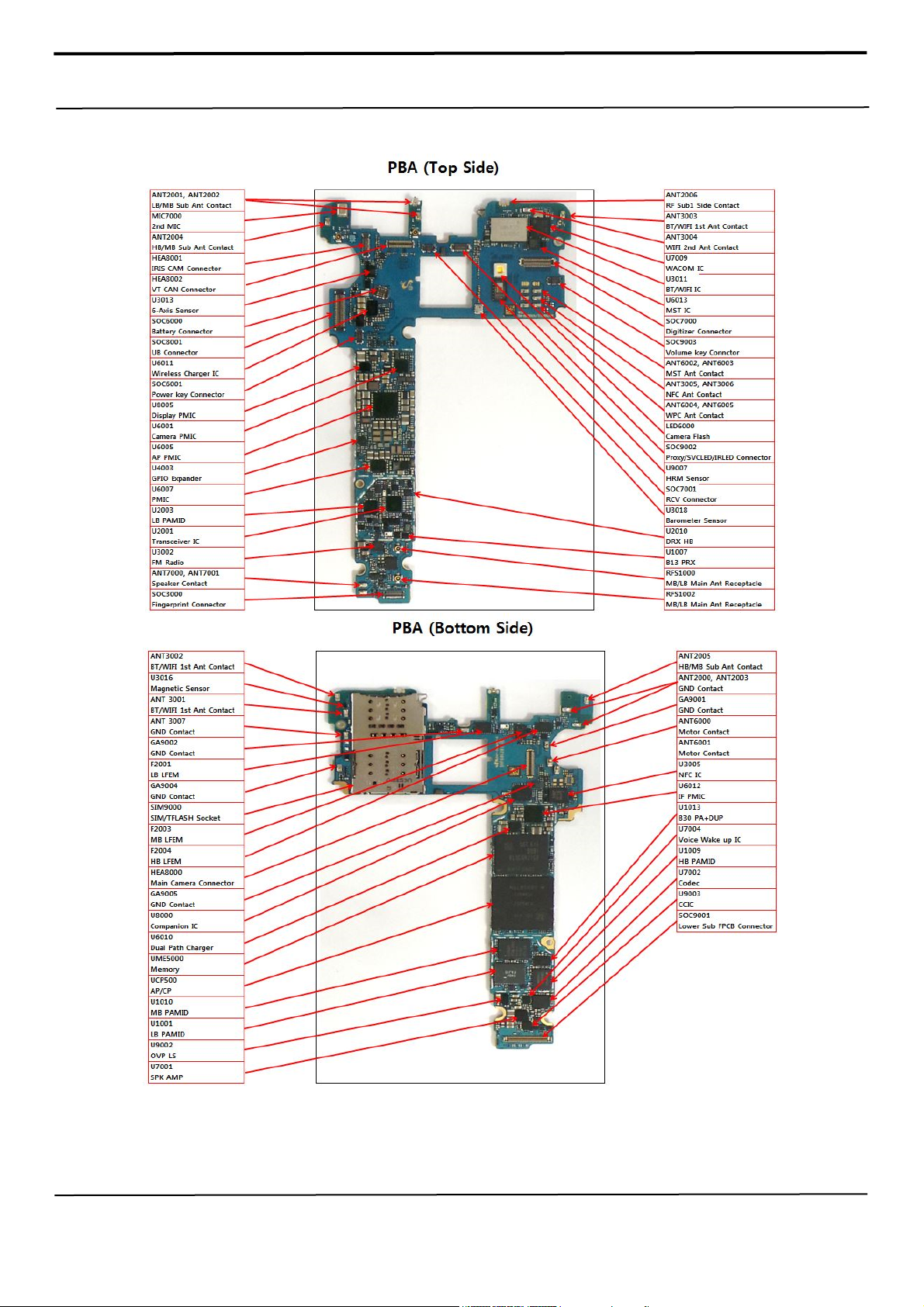
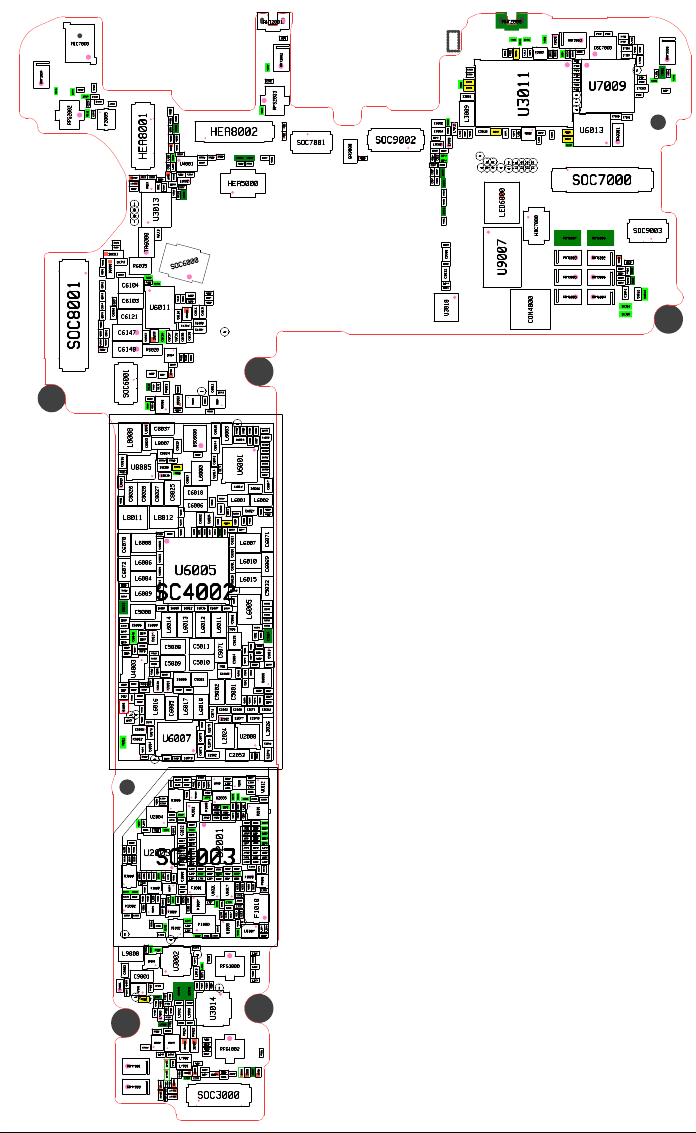
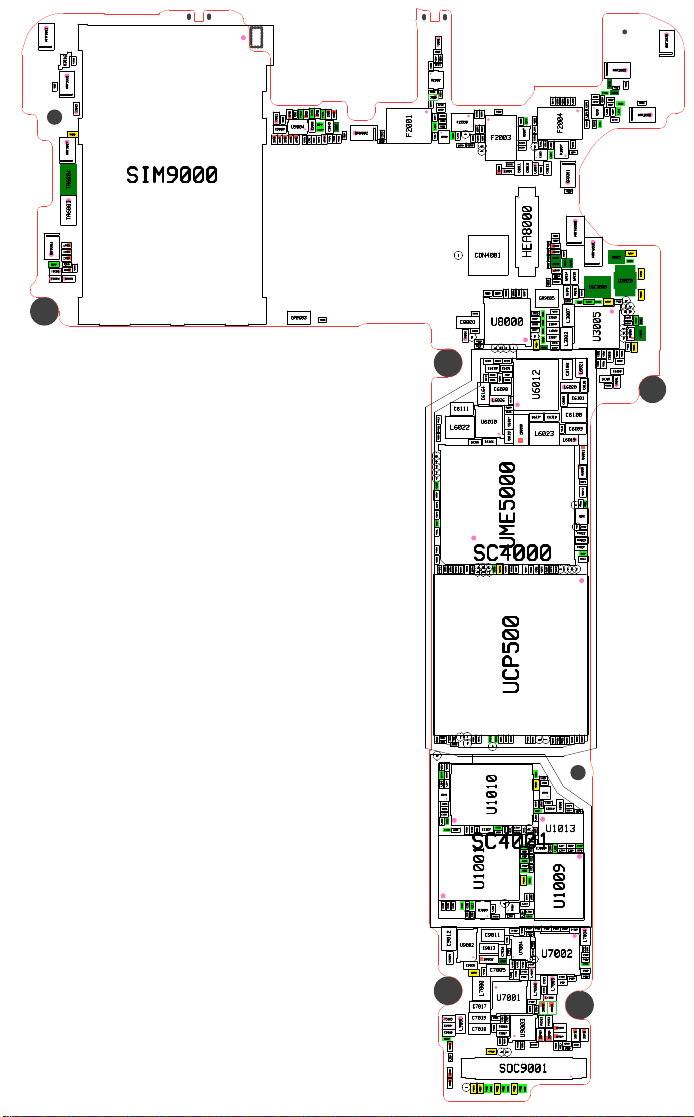
8. Level 3 Repair
8-1. Components Layout
Confidential and proprietary-the contents in this service guide subject to change without prior notice
Distribution, transmission, or infringement of any content or data from this document without Samsung’s written authorization is strictly prohibited.
Page 69
MIC7000
ANT2004
C2131
L2038
RFS2002
SOC8001
C2098
L2039
C7062
C7044
L7013
C2120
C2132
L2040
F2005
D6001
C8064
C8041
C8042C8043C8044C8045
C8046
C8040
C8039
C8063
C8038
L8013
L2043
HEA8001
C8068
L8015
ZD8013
ZD8012
U8003
C8022
TP_6AXIS_SPI_NSS
TP_6AXIS_SPI_CLK
TP_6AXIS_SPI_MOSI
TP_6AXIS_SPI_MISO
R6012
R6017
TA6000
C6173
R6015
D6000
R6023
C6125
R6022
C6104
C6103
C6097
U6011
C6096
C6121
C6147
C6109
R6020
C6148
L6028
C6142
SOC6001
R8009
C8069
C8037
L8006
L8008
C8023
C8036
U8005
R4025
L8009
C8026
C8028
C8034
L8012
L8011
L6008
C6070
L6006
C6072
L6004
C6080
C6056
L6009
C6064
SC4002
C5033
C5000
C5028
C6003
C6005
R4042
C5039
C5018
C5085
C5023
C6045
C5016
C5065
C5030
C5078
C5047
C5036
R4033
C5020
C5022
C5059
U4003
C5092
R4048
R4047
C5014
C5067
C5082
C5037
C5081
C4001
C5066
C5083
Q4000
C6082
TP6008
TP6007
C5021
C5049
C5048
C5055
C6076
C5012
V5002
C6084
C6171
L1058
U2004
L2009
C2037
C2036
C2030
L1037
L1038
C1038
U2003
L1034
C1034
C1035
SC4003
U1003
L1035
L1036
L1050
L1044
F1003
C1039
L2011
L2014
L2012
L2010
L1045
C1041
F2002
C1096
L2013
C2038
TP_VOICE_RST
R4007
R9006
L9000
U9001
C9000
C9001
C7010
R7001
V5001
U7000
R9008
TP_4000
R5005
TP_UB
C9003
ANT7001
ANT7000
C8066
C8021
C3060
U3013
C6113
SOC6000
C6126
ZD6003
C6154
L6027
C6143
R6027
U8006
R8007
L8007
C8024
C8033
C8030
L8010
C8027
R6004
C6024
C6026
U6005
C6021 C6022
C6066
C6059
C5027
C5008
C5009
C5063
C5042
C5026
L6016
U6007
C6086
TP6005
C1037
C2035
C2039
C2043
C2112
L1043
L1052
C1046
L1093
C1101
C1102
U1019
L1094
C1031
C1033
L1033
C1023
R4009
C7011
R7027
R7007
R7006
C7026
R7009
C7025
R7004
L7003
ZD9008
C3068
C9002
U9000
C3070
ZD9002ZD9003
C8050
R4003
C8019
C8048
ZD8010
L4000
R4032
L4001
C4000
C8062
ZD8011
C8015
C3059
C6157
U6014
R6041
ZD7006
R6003
C8035
R8006
C8025
C6050
C6008
L6014
C5003
C6085
C6087
C1105
U1005
C2044
L2016
C2041
L1041
C1036
U1004
L1040
L1042
F1009
U1002
TP1001
U3002
R7002
C7021
R7008
R7005
U3017
C3069
C7024
ZD7001
ZD7000
R3025
R9014
ZD3002
ZD7004
R9015R9016
ZD7005
R4005
ZD8009
C8049
C8061
C8065
U4001
R4052 R4053
L8002
C8067
C8020
ZD8008
C6094
R6016
C6120
C6095
ZD6004
C6116
C6153
C6155
C6156
C6158
R4006
R4008
R8005
R8003
Q8000
R8004
C8029
R8008
C6019
C6018
C6006
C6169
C6055
C6063
C6012
L6013
C5011
C5010
C5005
C5050
C5053
L6017
C6073
C1107
L1101
C1106
L1102
C1042
L2017
C2045
C2023
C2025
C2022
C2016
C2004
C2021
C2013
C2020
C2012
C2034
C2011
C2031
C2014
C2029
C2015
C2024
L1028
C1029
C1027
C2000
C1025
F1001
L1027
L1087
L1039
C1095
C1089
C1001
L1000
C1002
ZD9034
ZD9035
C9019 C9020
L9002
L9003
C9021 C9022
R9024
ZD9006
L7002
L7001
ZD3000
C7013
C3099 C3100
SOC3000
HEA8002
L8005
C8018
C8016
C8017
HEA5000
R6019
R4027
R4029
C6114
C6115
C6108
C6107
TP_IRIS_LED_EN
C6041
C6172
R6011
U6009
U8004
R8011
C6048
OSC6000
C6044
C6068
C6043
C6174
C6014
L6000
C6067
C6065
C6062
C6002
C6004
C6089
C6060
C6088
C6146
C6051
C6057
R5003
C6016 C6017
L6011
L6012
C5071
C5051
C5060
C5024
C5002
C2062 C2068 C2071
L6018
C2074
L2022
C5056
C2075
C2079
C6074 C6075
C2082
R1003
U1018
R1001
C1040
R1002
R1004
L2035
U1006
L2042
U2005
L2019
F2006
L2018
F1002
C2046
L2036
U2001
C1104
L1023
L1085
C1022
L1100
C1094
L1022
L1098
C1093
U1021
L1097
L1099
F1007
L1049
F1000
L1003
C1004
L1008
L1006
C3078
TP_FM_CLK
C1108
C3077
RFS1000
L3014
L3013
C3075
C3061
C3082
C3083
C3084
TP_DSDA
U3014
R9025
R3002
L3018
ZD9007
R3003
RFS1002
L3017
R3027
C3065
C3066
ZD3001
ZD3004
C3067
R3026
ZD8006 ZD8007
C8013 C8014
TP_DISP_TE
TP_CAM_TORCH_EN
C6030
L6003
C6015
U6001
C6013
L6001 L6002
C6081
L8014
R5004
C6054
C6052
C6049
C6023
L6007
C6020
L6010
C6001
L6015
C6025
C6058
C6061
C5054
C5061
C5076
C5025
C5004
C5001
C2077 C2078
U2008
L2024
C2053
C2050
L1090
L1096
C2042
L2025
L2015
C2072 C2073
C2040
C1098
L1063
C1063
C1099
L1064
L1092
L1016
U1017
C1016
L1011
L1086
L1084
L1012
C1045
C1017
L1017
L1051
U1008
L3012
C6077
C5062
U2006
C2107C2108 C2110
C1043
L1048
C6038
C6027
R6002
C5084
C5070
C5046
C5041
C5086
C2055
L2021
C2054
L2033
L2031
L2029
L2027
C2047 C2048
L1071
L1088 L1089
C1091 C1092
L1059
F1008
L1010
L1015
TP1003
U1007
ZD3003
C6035
C6029
C6046
R6001
L6005
C5068
C2057
L1068
L1066
C1066
C1078
L1091
ZD3005
ANT2001
C6034
C6036
C6028
C6007
C6039
C6033
C6032
C6031
C6000
C6042
R6000
L2071
ANT2002
C2139
C2032
RFS2003
C2119
V7000V7001
SOC7001
C5007
C5006
GA9000
SOC9002
V9008
C9052
C9051
C9072
L9013
C9068
C9067
R9047
C9057
C9047
C6047
R4024
R4020
ANT2006
C2136
V2004
C2126
F3003
L3011
C3073
R3020
R3021
R3024
C3058
C3057
R3028
R3019
R3023
C3051
U3011
L3009
C9048
L7012
R3035
C3048
R9048
L7011
L9009
R9065
C9074
L9012
C9073
R9066
ZD9016
L9006 L9007
ZD9015
C9046
L9005
ZD9014
R9044
C9031
C9030
C9029
C9032
C3074
C3081
U3018
F3002
C3041
L3005
C3071
C9038
C9037
TP3022
TP3020TP3021
TP3004
TP3009
TP3010
TP3006
TP3016
TP3014
TP3019
TP3011
TP3018
TP3007
TP3012
TP3005
TP3008
TP3013
LED6000
HDC7000
U9007
CON4000
ANT3004
C3094
C3095
L3010
C3029
C3050
C3087
R6035
C3072
C3015
R6034
L3006
C6139
SOC7000
ANT3005 ANT3006
OSC7000
C3088
L3016
R7022
R7025
R4045
R7024
R7023
R4046
R7021
U7009
TP_BT_WLAN_CLK
TP3015
TP7006
U6013
ANT6006ANT6007
ANT6002ANT6003
ANT6004ANT6005
C7049
C7052
C7051
C7047
L7010
C7056
C7048
C7055
C7059
ANT3003
C7050
TP7007
V3006
L3015
V3002
C7057
C3098
C3092
C7058
C7063
C3097
C7065
C7060
C7061
TA6001
SOC9003
L9010
ZD6005
C9055
R9051
R9052
C9056
C9054
R9050
R9049
C9053
C3042
C6162
C6163
C6161
C6160
C6071
C6069
C5032
C5044
C5045
C5038
C5035
C5029
C5091
R4034
C5052
C5034
R9010
C5069
C5015
C5013
C6010
C5077
C6011
C6009
C5043
U6000
C5019
C5017
C5031
C5040
C5079
C5080
C2084
L2026
C2056
C2076
C2060
R2003
U1012
C2096
C2088
U2010
C2095
C2101
C2090 C2093
C2087
C2089
C2080 C2081
L2020
L1074
C1074
C1097
L1082
L1062
C1060
L1076
C1079
F1006
C1100
C1081
F1010
L1046
L1047
C1044
C1032
L1029
L1032
C1030
L1031
R3036
ZD3006
ZD3007
Page 70
ANT3002
U3016
V3001
GA9004
C9069
V9006
V5003
C3064
ANT3001
V3003
C3096
ANT3007
SIM9000
TA6003 TA6004
ZD9022
ZD9023
ZD9024
R9046
ZD9033
R9032
V9001
V2001
L2005
C2006
C2007
C2121
C2028
U2002
C2026
C2027
ZD2000
C2128
L2008
L2003
R9042
ZD9020
R9061
R9043
R9041
ZD9029
ZD9030
ZD9021
ZD9028
C9040
V9002
C9075
U9004
L9008
C9039
ZD9013
ZD9017
C9050
C9049
GA9002
V9004
C9035
C9036
R9045
L9011
C9070
C9065
C9071
ZD9027
ZD9009
ZD9010
ZD9011
ZD9012
GA9003
V9005
C2117
L2006
F2001
C2019
C2017
L2068
TP_CAM_FLASH_EN
TP5004
C5088
C5089
C5074
C5075C5087
R4021
R8010
C8051
L2002
C2118
C2010
L2000
F2000
C2002
L2007
C2049
TP1000
U2000
L2004
C2009
F2003
L2069
C2051
C2052
C2018
C2005
TP_RFFE5_DATA
TP_RFEE5_CLK
TP8004
CON4001
C8005
C8002
C8001
U8000
C8004
TP8005
V5006
R4011
R4012
C6150
C6133
C6170
C6164
C6111
R4019
U6010
L6022
R4018
R6014
C6166
C6165
TP5000 TP5001 TP5002
UME5000
SC4000
TP5006
TP5007
L8016
R4036
C5058
C8009
L8000
C8006
R4049
TP_4003
TP5005
C2058
C8052
ZD8001
L8001
HEA8000
C8000
C8003
TP8001
TP8003
TP8002
C6123C6124
C6131
C6127
R6025
R6021
R6026
C6119
C6090
L6026
C6135
V6000
C6136
C6167
C6110
TP5008
C6083
C6053
R6008
TP5009
L8003
C4006
C8011
C8060
TP_COMP_MCLK
ZD6000
C4007
C2070
C2069
U2007
L2023
C2059
C8010
C6037
U6012
C5057
C2091
L2030
C2092
TP2000
L8004
GA9005
C8055
C8047
C8008
C8007
TP8000
R6037
C6117 C6118
L6023
C4005
R4044
L2044
U2012
C8053
R6036
C4002
C7046
L2032
C2094
C2102
L2070
L2028
C2085
C2086
C2083
L2048
U2011
L2046
L2041
C2109
C2100
F2004
C2113
C2104
L2047
F2007
L2049 L2050
C8012
GA9001
V9003
ANT6000
C8056
C8059
R4016R4017
ZD8002
ZD8003
C8057
ANT6001
ZD8004
R4010
ZD8005
ZD6001
ZD6002
R4013
ZD8000
C8054
L6024
L6025
C6040
C8058
OSC3000
C6149
C3052
R6031
C3043
R3029
C3090
C3089
R3018
C3054
C3049
L3007
C3045
C3044
C3038
C3039
C3037
U3005
C3034
R3016
L3002
C3040
C3056
C3055
C3046
C3036
L6021
C6106
C6130
L6020
C6128
C6101
C6098
C6100
C6099
C6122
L6019
D6002
Q6000
C5073
C5072
TP_4002
R5000
R5001
U5002
R5002
TP5003
R4022
R4023
R4037
R6007
C5064
TP_4004
TP_4001
TP6006
TP_VREF_EBI
C6078
C6079
C5090
ANT2005
ANT2003
ZD7003
V2002
R7026
ZD7002
C2103
V2000
C2116
L2037
L2034
C2097
L2051
ANT2000
C2115
R3037
U3021
C3091
R3033
U3020
R3032
TP_FIRM
R4002
R3017
TP_EN
TP_WPT_EN
TP_CLK_REQ
TP_NFC_IRQ
R4004
R3030
R3034
R3015
TP_eSE_SCK
TP_eSE_MISO
TR3001
TR3000
TP_eSE_MOSI
R3012
R3031
R3013
R3014
C3053
C3033
C6168
V5004
R6013
UCP500
TP1008
TP1010
C9064
C9061
C9062
C4004
R4041
R9063
C9063
TP1002
R9062
TP1009
C1067
C1065
L1069
L1070
L1077
L1078
U1014
C1076
R1006
U1010
C1028
C1026
L1026
L1002
C1009
C1007
C1008
C1055
C1006
SC4001
U1001
L1019
L1024
L1025
C1018
C1020
C1024
U1000
L1018
L1103
C9011
C9012
U9002
C9013
D9002
C9010
C9008
R9005
C7004
L7000
C7017
C7019
V5005
C9017
L9001
C7018
C9018
R9001
C9066
L9004
SOC9001
ZD9025 ZD9026
TP_MAIN_CTL10012
R9057
R9058
R4040
L1009
C7005
U7001
R9040
R9028
R9021
TP_SSC_DBG_UART_TX
TP_SSC_DBG_UART_RX
C4003
R4039
R4000
R4001
TP1007
C1003
C1061
C1011
C1000
L1001
C1062
TP1006
U1016
C1083
C1013
C7038
C7031
C7037
U7004
C7036
C9009
C7040
C7041
C7008
R7003
C7016
C7007
C7014
R9068
R9003
R9067
U9003
R9004
R9009
R9002
TP9009
TP9008
R9026
R9029
R9019
R9022
L1061
L1014
L1013
L1004
L1005
L1020
L1021
R1000
L1083
L1081
L1065
L1067
C1070
C7006
C7012
C7042
C7028
C7032
R9064
R9020
R9027
R4050
R4051
C1054
C1059
C1064
R1005
U1011
L1060
C1058
L1057
L1056
TP_RFFE2_CLK
U1013
V1000
TP_RFFE2_DATA
C1047
C1052
C1015
C1012
C1021
C1010
L1080
U1009
C7002
R7015
R7016
R7012
U7002
TP_VOICE_CLK
C7030
L7007
C7015
C7029
L7006
C7000
C9014
C9015
ZD9000
R9013
ZD9005
L9014
R4035
R4043
TH4000
R4028
R4014
R4026
R4015
C1080
C1075
C1068
C1069
C1077
L1075
C1049
L1053
C1057
C1053
L1055
C1048
C1050
L1054
C7022
C7023
C7043
C7020
L7004
C7034
C7035
C7033
R7013
C7045
C7039
C7003
C7009
C7001
C7027
L7005
L7008
ZD9001
R9012
ZD9032
ZD9037
ZD9031
ZD9036
ZD9004
C9028
C9027
R9017
R9018
L9015
Page 71
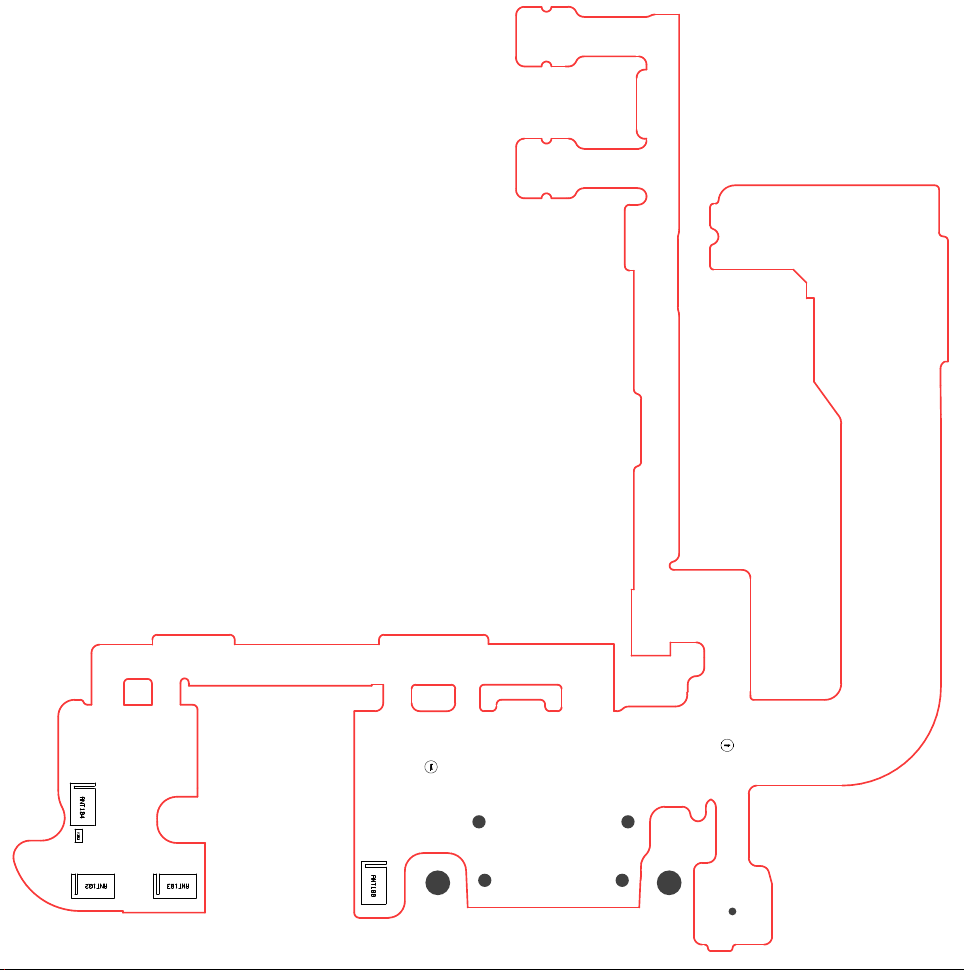
ANT104
V101
FM107
FM106
ANT102
ANT103
ANT100
Page 72
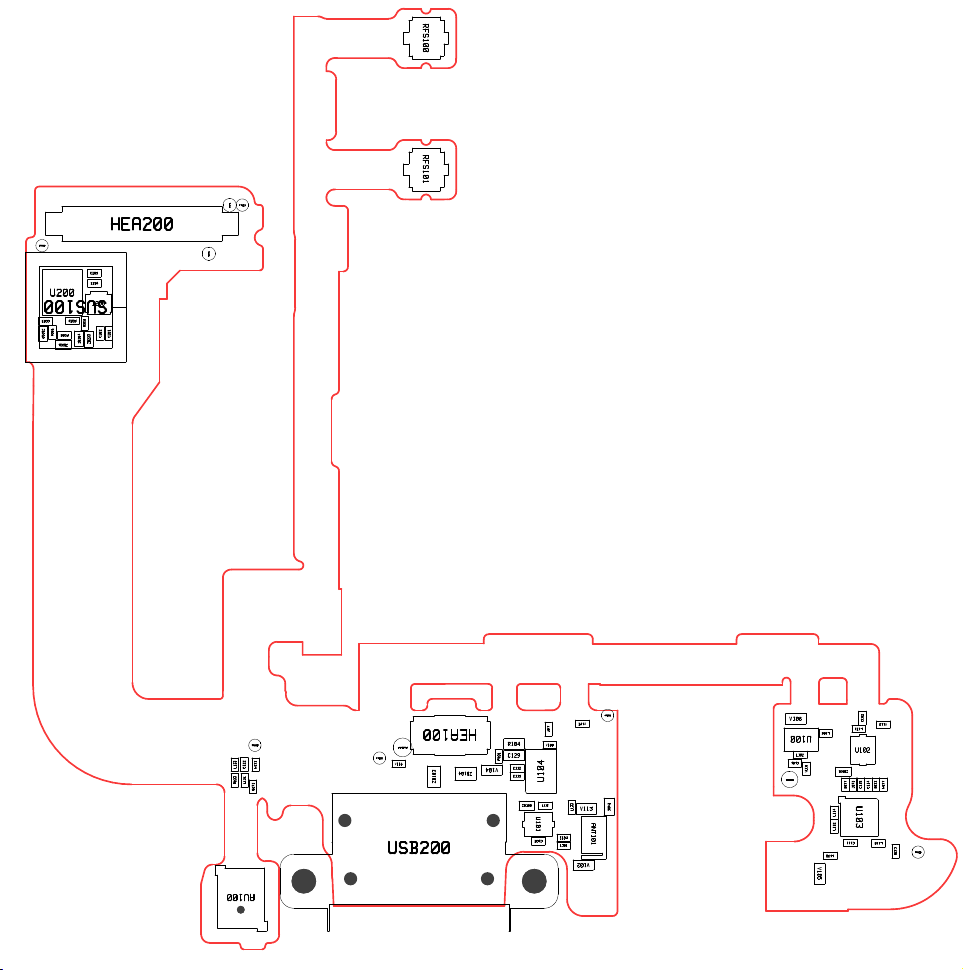
FM102
U200
C200
ZD202
R201
HEA200
C203
C204
SUS100
D200
R202
R203
R200
ZD201
ZD204
ZD203
RFS100 RFS101
TP_TDMA
FM101
TP_MAIN_CTL200
C201
C202
L123
R103
FM103
C122
C123
L124
AU100
FM104
V115
HEA100
TP_IMPEDANCE100
C124
FM100
V116
ZD104
ZD103
USB200
L107
R104
V108
C129
R101
V104
C112
C113
U104
L112
ZD100
U101
C105
R106
L133
V113
ANT101
C104
L101
V102
V106
L102
C101
TP_IMPEDANCE101
U100
V110
C102
V112
L131
L106
U102
ZD101
C107
C108
L103
L104
C114
C115
U103
L114
L132
C111
L118
C130
L120
V105
FM105
Page 73
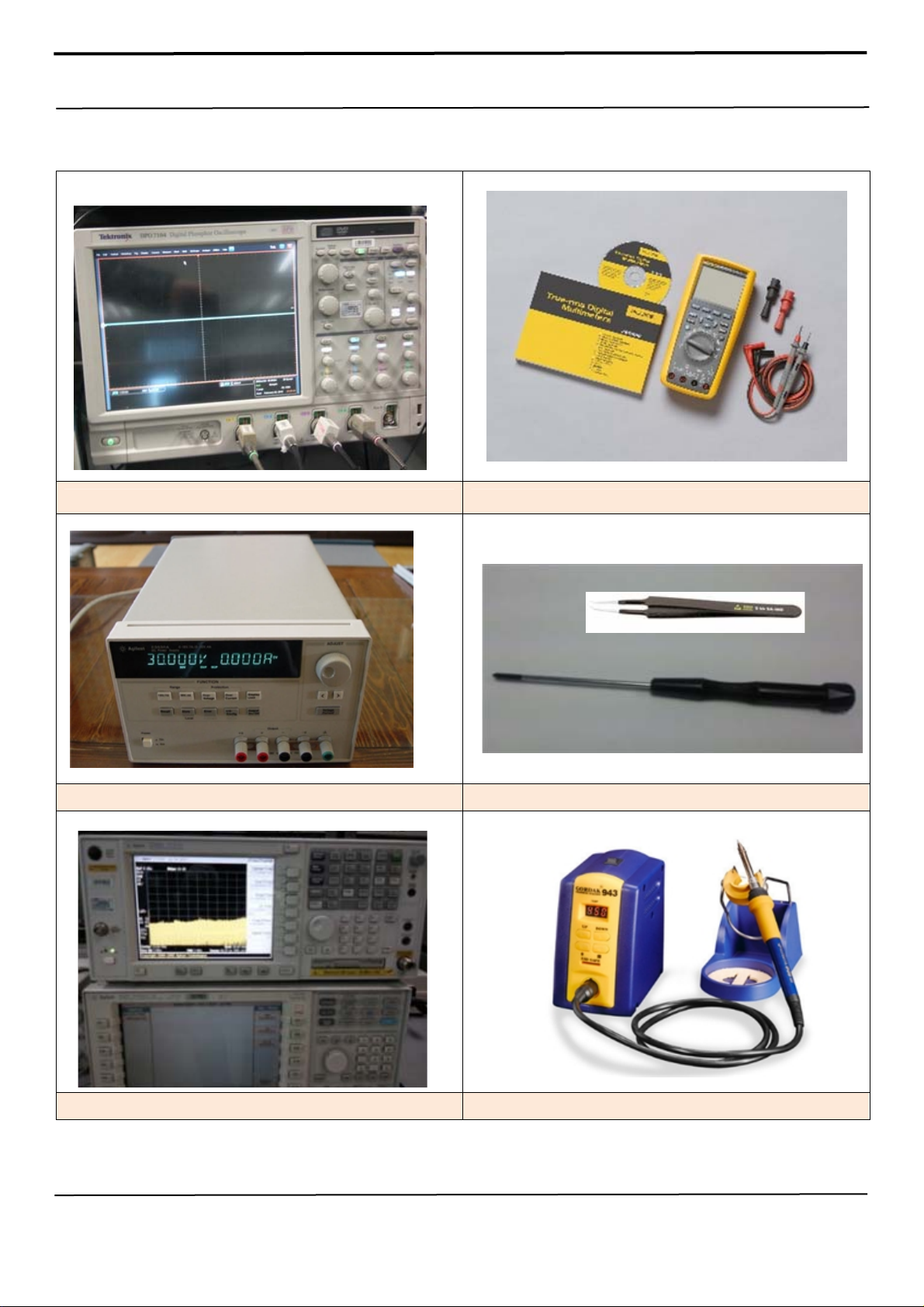
8. Level 3 Repair
8-3. Flow chart of Troubleshooting.
Oscilloscope Digital Multimeter
Power Supply + driver, ESD Safe Tweezer
8960 & Spectrum Analyzer Soldering iron
Confidential and proprietary-the contents in this service guide subject to change without prior notice
Distribution, transmission, or infringement of any content or data from this document without Samsung’s written authorization is strictly prohibited.
Page 74
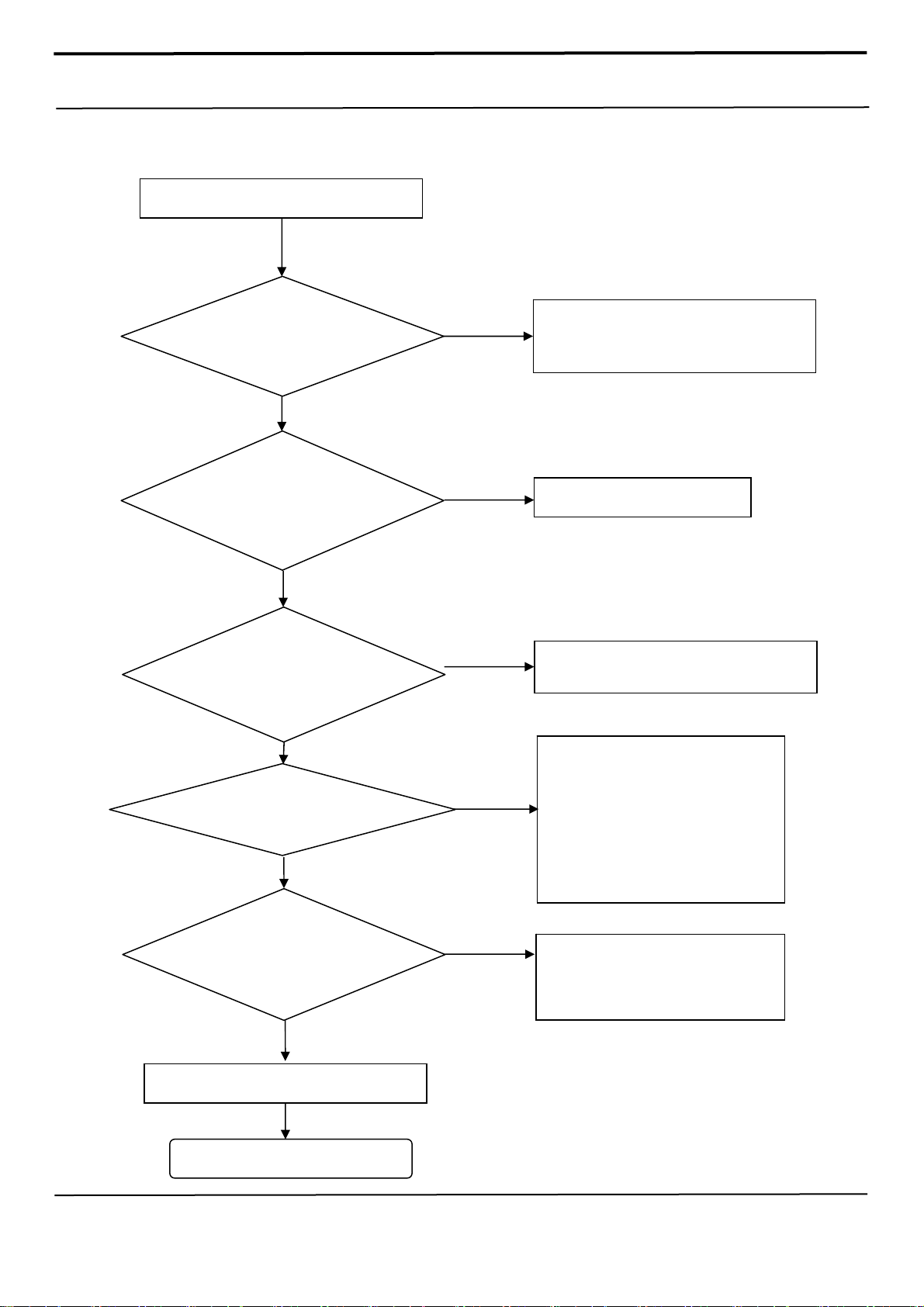
8. Level 3 Repair
8-4-1.
Power on
Distribution, transmission, or infringement of any content or data from this document without Samsung’s written authorization is strictly prohibited.
Mobile phone does not power on
YES
Check the Battery Voltage.
Is it more than 3.8V
Is it more than 3.8V?
YES
Power-on the phone and
check the power-on sound
or motor Vibration.
Sound or Vibration is ok?
YES
When pressing Power key,
check if the Power key
FPCB pad on rear is
Check the signal of
AP_PS_HOLD = 1.8V
Check the Clock OSC6000
is that frequency 19.2MHz
check the initial operation
Confidential and proprietary-the contents in this service guide subject to change without prior notice
shorted
END
YES
YES
YES
YES
NO
NO
NO
NO
NO
Charging the battery by TA. If its voltage level
is extremely low(under 3.0V),
Change the battery.
Change the FRONT-LCD ASSY
Replace the POWER KEY FPCB
Check the output voltage of U7003
(L6005 >0.85V, L6011 > 0.5V,
L6004 > 0.8V, C6071 > 1.8V,
C6052 > 1.8V, L6015 > 1.15V,
C5057 > 3.075V, C6062 >1.2V,
C5042 > 1.25V, C6053 >2.95V,
L6012 > 0.8V)
If the output voltage is not normal,
Change the U6005
※ Each voltage level has ±10% margin.
Replace the OSC6000.
※ Test condition (Oscilloscope setting)
: 20.0us.div (time division)
Page 75
8. Level 3 Repair
8-4-2. Motor
Motor does not work
Check the Clip on MAIN PBA
ANT6000 and ANT6001
Yes
No
Resolder or Reconnect
ANT6000, ANT6001
Yes
Check
(crack,open,etc)
L6024, L6025
Yes
Check the C6150 = 3.3~3.4V
Yes
Replace Motor
Yes
END
No
No
Resolder or Replace
L6024, L6025
Resolder or Replace C6150
or
Replace : U6012
Confidential and proprietary-the contents in this service guide subject to change without prior notice
Distribution, transmission, or infringement of any content or data from this document without Samsung’s written authorization is strictly prohibited.
Page 76
8. Level 3 Repair
8-4-3. initial
Initial Failure
Re-download Software
Re check “8-4-1 Power on”
Trouble shooting process
Change UME5000.
Do not use Blank MEMORY
Change PBA
NO
Normal
Normal
YES
END
Check the UCP500 (Crack etc )
Confidential and proprietary-the contents in this service guide subject to change without prior notice
Distribution, transmission, or infringement of any content or data from this document without Samsung’s written authorization is strictly prohibited.
Page 77
8. Level 3 Repair
8-4-4. SIM PART
SIM Card does not work
Check the SIM card
VDD_NFC_SIM1=1.8V
VREG_L9_1P8=1.8V
ZD9022,ZD9023,ZD9024
Check the
Check the
END
YES
NO
Abnormal
Abnormal
Abnormal
Change : SIM Card
Check the NFC IC(U3005)
Check the PMIC(U6005)
Check the SIM/SD Socket,
PMIC(U6005), AP(UCP500)
Confidential and proprietary-the contents in this service guide subject to change without prior notice
Distribution, transmission, or infringement of any content or data from this document without Samsung’s written authorization is strictly prohibited.
Page 78
,
)
8. Level 3 Repair
8-4-5. SIM/SD PART
SD Card does not work
Check the SD card
SD Socket
YES
Check the VDD T Flash
VREG_L21_2P95=C9031
= 2.95V or 1.8V
NO
Check the R9045,
ZD9009, ZD9010, ZD9011,
ZD9012
ZD9013
END
Abnormal
Abnormal
Abnormal
Change : SD Card or Replace : SD Socket
Check the PMIC(U6005)
Check the SD Socket, AP(UCP-500
Confidential and proprietary-the contents in this service guide subject to change without prior notice
Distribution, transmission, or infringement of any content or data from this document without Samsung’s written authorization is strictly prohibited.
Page 79
(
)
(
8. Level 3 Repair
8-4-6. OTG
OTG does not work
Check the OTG ICON
YES
Check the Voltage of
Loadswitch (L9001)=5V
YES
Check the IF Socket &
SUB PCB connector
END
Abnormal
Abnormal
Check the CCIC
U9003
Check the IF PMIC
VBUS_5P0(C9013)=5V
Abnormal
Check the Loadswitch
U9002)
Check the IF PMIC
(U6012)
Confidential and proprietary-the contents in this service guide subject to change without prior notice
Distribution, transmission, or infringement of any content or data from this document without Samsung’s written authorization is strictly prohibited.
Page 80
8. Level 3 Repair
8-4-7. Hall IC
Hall Sensor of main PBA does not work
Yes
Check the voltage
C4000, L4000 =1.8V
Check the voltage
Yes
C4032 =1.8V
Yes
END
No
Replace U6005
No
Replace U4001
Hall Sensor of Sub PBA does not work
Yes
Check the voltage
C101 of Sub PBA =1.8V
Yes
No
Check the SOC9001
Connection
No
Yes
END
1. Reconnect SOC9001
2. Replace SUB PBA
1. Reconnect SOC9001
2. Replace SUB PBA
Confidential and proprietary-the contents in this service guide subject to change without prior notice
Distribution, transmission, or infringement of any content or data from this document without Samsung’s written authorization is strictly prohibited.
Page 81
8. Level 3 Repair
8-4-8. 6Axis sensor
6Axis Sensor does not work
Check the voltage
C3059, C3060 =1.8V
Yes
No
Replace U6005
Check 6Axis
MOSI, CLK, NSS, MISO pin
(SPI is OK?)
Check U3013
(crack, open, etc.)
END
Yes
No
Replace UCP500
Yes
Abnormal
Replace U3013
Yes
Confidential and proprietary-the contents in this service guide subject to change without prior notice
Distribution, transmission, or infringement of any content or data from this document without Samsung’s written authorization is strictly prohibited.
Page 82
8. Level 3 Repair
8-4-9. Magnetic sensor
Magnetic Sensor does not work
Check the voltage
C3064 =1.8V
Yes
No
Replace U6005
Check R4011, R4012
(I2C is OK?)
Check U3016
(crack, open, etc.)
Yes
No
Yes
Abnormal
Yes
END
Replace UCP500
Replace U3016
Confidential and proprietary-the contents in this service guide subject to change without prior notice
Distribution, transmission, or infringement of any content or data from this document without Samsung’s written authorization is strictly prohibited.
Page 83
(
8. Level 3 Repair
8-4-10. Barometer sensor
Barometer Sensor does not work
Yes
Check the voltage
C3081 =2.8V
Sensor’s VDD voltage)
No
Replace U6005
Check the voltage
C3074 =1.8V
(Sensor’s IO voltage)
Check R4011, R4012
(I2C is OK?)
Check connection U3018
Yes
No
Yes
No
Yes
No
Yes
END
Replace U6005
Replace UCP500
Replace U3018
Confidential and proprietary-the contents in this service guide subject to change without prior notice
Distribution, transmission, or infringement of any content or data from this document without Samsung’s written authorization is strictly prohibited.
Page 84
(
8. Level 3 Repair
8-4-11. Proximity + RGB sensor
Proximity + RGB Light Sensor does not work
Check the voltage
L9009, C9051, C9052 =1.8V
Sensor’s IO voltage)
Yes
No
Replace U6005
Yes
Check the voltage
L9008, C9049 =3.0V
(Sensor’s LED voltage)
Check R4011, R4012
(I2C is OK?)
Check connection SOC9002
Check sensor FPCB
(crack, damaged, etc.)
No
Yes
No
Yes
No
Yes
Abnormal
Replace U6001
Replace UCP500
Reconnect SOC9002
Replace Sensor FPCB
Yes
END
Confidential and proprietary-the contents in this service guide subject to change without prior notice
Distribution, transmission, or infringement of any content or data from this document without Samsung’s written authorization is strictly prohibited.
Page 85
(
8. Level 3 Repair
8-4-12. HRM sensor
HRM Sensor does not work
Check the voltage
C9030, C9031 =1.8V
Sensor’s VDD voltage)
Yes
No
Replace U6005
Check the voltage
C9029, C9032 =3.3V
(Sensor’s LED voltage)
Check R4002, R4004
(I2C is OK?)
Yes
No
Yes
No
Yes
END
Replace U6005
Replace U9007
Confidential and proprietary-the contents in this service guide subject to change without prior notice
Distribution, transmission, or infringement of any content or data from this document without Samsung’s written authorization is strictly prohibited.
Page 86
8. Level 3 Repair
8-4-13. Display
LCD is still off after PWR ON
Check the connection of
SOC8001
Yes
No
Reconnect the SOC8001
VDD_DDI_3P0=3.0V (C8044)
VDD_DDR_1P6=1.6V (C8046)
ELVDD 4P6=4.6V (C8042, C8026)
ELVSS_-4P4 = -1.4 ~ -5.4V (C8041, C8025)
ELAVDD_7P0 = 5.8 ~ 7.9V (C8043, C8037)
Resolder or Replace UCP500
Check
Check
Yes
Yes
Yes
Yes
No
No
Resolder or Replace the PMIC (U8005)
Resolder or Replace the PMIC (U8005)
END
Confidential and proprietary-the contents in this service guide subject to change without prior notice
Distribution, transmission, or infringement of any content or data from this document without Samsung’s written authorization is strictly prohibited.
Page 87
8. Level 3 Repair
8-4-14. TSP
Touch Screen does not work
Check TSP Connector on
MAIN PBA
Yes
No
Reconnect the SOC8001
VDD_TSP_1.8V (C8039, C8040)
VDD_TSP_3.3V (C8038)
Replace the UB
Check
END
Yes
Yes
Yes
No
Resolder or Replace U6005
Confidential and proprietary-the contents in this service guide subject to change without prior notice
Distribution, transmission, or infringement of any content or data from this document without Samsung’s written authorization is strictly prohibited.
Page 88
8. Level 3 Repair
8-4-15. VT CAMERA
“Camera” function does not work
Check the Camera connector
on Main PBA
Check the voltage
C8018 : 2.9V
C8015 : 1.2V
C8016 : 1.8V
Yes
No
Reconnect the HEA8002
Yes
No
Resolder or Replace U6001
Yes
Check the VTCAM_MCLK is
26Mhz (C8006)
Replace the camera module
Yes
Yes
END
No
Reconnect the PBA
Confidential and proprietary-the contents in this service guide subject to change without prior notice
Distribution, transmission, or infringement of any content or data from this document without Samsung’s written authorization is strictly prohibited.
Page 89
8. Level 3 Repair
8-4-16. 12M CAMERA
“Camera” function does not work
Yes
Check the Camera connector
on Main PBA
Yes
No
Check the voltage
C8010 : 2.8V , C8012 : 1.8V
C8056 : 1.05V , C8057 : 1.8V
C8054 : 2.8V , C8058 : 1.8V
C8059 : 2.8V , C8060 : 2.8V
Yes
No
Reconnect the HEA8000
Resolder or Replace U6001
Check the CAM_MCLK is
26Mhz (C8009)
Replace the camera module
Yes
Yes
END
No
Reconnect the PBA
Confidential and proprietary-the contents in this service guide subject to change without prior notice
Distribution, transmission, or infringement of any content or data from this document without Samsung’s written authorization is strictly prohibited.
Page 90
8. Level 3 Repair
8-4-17. IRIS CAMERA
“Camera” function does not work
Yes
Check the Sensor FPCB
Check the Camera module
Check the voltage
Check the voltage
C8049 : 1.2V , C8050 : 1.8V
Check the IRIS_MCLK is
26 Mhz (C8051)
Replace the camera module
Connection
Yes
Connection
Yes
C8048 : 2.8V
Yes
Yes
Yes
Yes
END
No
Reconnect or Replace the Sensor FPCB
No
Reconnect the HEA8001
No
Resolder or Replace U8003
No
Resolder or Replace U6005
No
Reconnect the PBA
Confidential and proprietary-the contents in this service guide subject to change without prior notice
Distribution, transmission, or infringement of any content or data from this document without Samsung’s written authorization is strictly prohibited.
Page 91
)
8. Level 3 Repair
8-4-18-1. Main MIC
Check main microphone function
In voice call Handset mode
or voice recorder mode
Check sub board
Connection (SOC9001)
YES
Check the voltage at
SOC9001 31th Pin = 1.8V
END
NO
NO
Set the SOC9001 connection
Resolderor replace the U7002(Codec IC
Confidential and proprietary-the contents in this service guide subject to change without prior notice
Distribution, transmission, or infringement of any content or data from this document without Samsung’s written authorization is strictly prohibited.
Page 92
)
8. Level 3 Repair
8-4-18-2. Sub(2nd) MIC
Check sub(2nd) microphone function
In voice call LoudSPK mode
or camcording mode
Check the voltage at
C7044 = 1.8V
YES
NO
Resolderor replace the U7002(Codec IC
END
Confidential and proprietary-the contents in this service guide subject to change without prior notice
Distribution, transmission, or infringement of any content or data from this document without Samsung’s written authorization is strictly prohibited.
Page 93
8. Level 3 Repair
8-4-19. Speaker part
Check the speaker function,
Play MP3 with maximum volume level
Check the contact
ANT7000, ANT7001
Check the signals of
C-clips(pins) of
YES
L7001, L7002
END
NO
Replace the SPK module
NO
Replace the U7001 (SPK amp)
Confidential and proprietary-the contents in this service guide subject to change without prior notice
Distribution, transmission, or infringement of any content or data from this document without Samsung’s written authorization is strictly prohibited.
Page 94
y
)
8. Level 3 Repair
8-4-20. Receiver part
Check the Receiver function,
In voice call Handset mode
Check RCV module where
RCV’s placed
for an
damage
YES
Check the signals on
V7000, V7001
END
NO
NO
Replace the RCV module.
Resolder or replace the U7002(Codec IC
Confidential and proprietary-the contents in this service guide subject to change without prior notice
Distribution, transmission, or infringement of any content or data from this document without Samsung’s written authorization is strictly prohibited.
Page 95
(
)
8. Level 3 Repair
8-4-21. BT/WIFI
BT/WIFI is not working
Yes
Check BT or WIFI fuction ON
No
Check the Voltage on C3021 =
Check the Voltage on C3051
1.8V
=1.3V
Yes
No
Yes
No
Yes
Enable BT or WIFI function.
Check the U6005
Crack, open, damaged, etc
Resolder or change the C3051
Check the status of
ANT3001,ANT3002,ANT3003,ANT3
Check the Status of V3002, V3006,
C3097, C3015, C3088, C3029,
C3072, F3002, C3071, C3050,
F3003, C3073
Resolder or change U3011
004,ANT3007
Yes
Yes
Yes
No
No
Resolder or change the
ANT3001,ANT3002,ANT3003,ANT3004,A
NT3007
Resolder or Replace of
V3002, V3006, C3097, C3015, C3088,
C3029, C3072, F3002, C3071, C3050,
F3003, C3073
END
Confidential and proprietary-the contents in this service guide subject to change without prior notice
Distribution, transmission, or infringement of any content or data from this document without Samsung’s written authorization is strictly prohibited.
Page 96
,
8. Level 3 Repair
8-4-22. GPS
GPS is not working
Yes
Check GPS function ON
No
Check the Antenna connect
ANT2000,ANT2004,ANT2005
Check(crack,open,etc)
C2098, C2120, L2040,
C2115, C2097, L2037, C2103, L2034
C2100
L2035, L2036
Yes
No
Yes
No
Enable GPS Function in the setting.
1. Resolder or Replace
ANT2000, ANT2004, ANT2005
2. Replace REAR
Resolder or change the wrong element
(open, crack, deviation, etc)
Yes
Check 19.2MHz Clock at output
Check the voltage on
Resolder or change U2001
of OSC6000
Yes
L2032=1.8V
Yes
Yes
END
No
No
Check OSC6000
(short, open, crack, etc.)
Check AP PMIC(U6005)
(short, open, crack, etc.)
Confidential and proprietary-the contents in this service guide subject to change without prior notice
Distribution, transmission, or infringement of any content or data from this document without Samsung’s written authorization is strictly prohibited.
Page 97
_FM_
8. Level 3 Repair
8-4-23. FM Radio
FM Radio is not working
Yes
Check FM Radio function ON
Check the Earphone connected
Check the Earjack FPCB work well.
Check the Sub PBA work well.
Check C3075, L3013
Check the voltage on
Check Reference Clock at
TP
Resolder or change U3002
Yes
Yes
Yes
Yes
Yes
C3077=1.8V
C3078=2.8V
Yes
CLK.
Yes
Yes
END
No
No
No
No
No
No
Enable FM Radio Function in the setting.
Connect the earphone into the phone.
Replace the Earjack FPCB
Replace the Sub PBA.
Resolder or change the wrong element
(open, crack, deviation, etc)
Check AP PMIC(U6005)
(short, open, crack, etc.)
Confidential and proprietary-the contents in this service guide subject to change without prior notice
Distribution, transmission, or infringement of any content or data from this document without Samsung’s written authorization is strictly prohibited.
Page 98
8. Level 3 Repair
8-4-24. NFC
NFC is not working
Yes
Check NFC function ON
No
Check the Antenna connect
ANT3005, ANT3006
Check the Voltage on
R3031 = 1.8V
Check 19.2MHz Clock at
R3017
Yes
No
Yes
No
Yes
No
Enable NFC Function
1. Resolder or Replace ANT3005, ANT3006
2. Replace REAR
Check U6005
(crack, open, damaged, etc.)
Check U6005
Yes
Check the Status of
C3042,C3039,C3045,C3037,C3049
,C3038,C3044,C3034,R3016,L3002
,L3007,R3018,C3054,C3036,C3040
,C3043,C3046,C3052,C3056,C305
5,C3053,R3013,R3014,R3015,TR3
Resolder or Replace U3005
Confidential and proprietary-the contents in this service guide subject to change without prior notice
Distribution, transmission, or infringement of any content or data from this document without Samsung’s written authorization is strictly prohibited.
000
Yes
Yes
END
No
C3042,C3039,C3045,C3037,C3049,C303
8,C3044,C3034,R3016,L3002,L3007,R30
18,C3054,C3036,C3040,C3043,C3046,C
3052,C3056,C3055,C3053,R3013,R3014,
Resolder or Replace
R3015,TR3000
Page 99
8. Level 3 Repair
8-4-25. MST
MST is not working
Yes
Check MST function ON
No
Check the Antenna contact
ANT6002, ANT6003
Check the battery level
Battery >= 5%
Type *#0*# -> MST Test On
Check voltage on TA6001
Yes
No
Yes
No
Yes
No
Enable MST Function.
1. Resolder or Replace ANT6002,
ANT6003
2. Replace REAR
Charging the Battery
Resolder or Replace U6013
Yes
No
Check the Status of U6013
Confidential and proprietary-the contents in this service guide subject to change without prior notice
Distribution, transmission, or infringement of any content or data from this document without Samsung’s written authorization is strictly prohibited.
Yes
END
Resolder or Replace U6013
Page 100
8. Level 3 Repair
8-4-26. SPEN
“S-Pen” function does not work
Yes
Check the Digitizer connector
on Main PBA
Yes
Check the voltage
C7048 : 3.3V , C7059 : 3.3V
Check the OSC7000 is 16 Mhz
Replace the UB
Yes
(C7049)
Yes
No
Reconnect the SOC7000
No
Resolder or Replace U6005
No
Resolder or Replace OSC7000
Yes
END
Confidential and proprietary-the contents in this service guide subject to change without prior notice
Distribution, transmission, or infringement of any content or data from this document without Samsung’s written authorization is strictly prohibited.
 Loading...