

Page 1
QuickStartGuide
You can access the full user manual for
informa
tion.
“Viewing the user
Tolearntoaccess the user
manual”in this quick
Draft Version /
2014-10-07
SCT21
mor
manual,see
startguide
e
.
Page 2
2
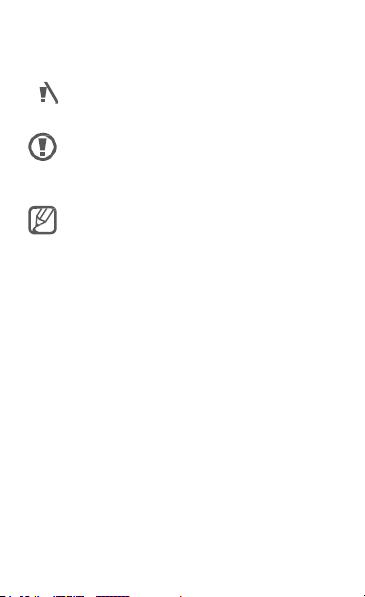
Instructional icons
Warning:
injury
to
aution:
yourself or
situations
to
C
damage
equipment
Note: notes, usage
information
situations
that could
others
that could
your device or
tips,
cause
other
or
additional
cause
Page 3

5
C
opyright
Copyright
This guide is
copyright laws.
No
distr
in any form or by any
or
recor
storage and retrieval system,
the prior written permission of Samsung
Electronics.
© 2013 Samsung Electronics
protected under int
part of this guide
ibuted,
tr
anslated,
mechanical,
ding,
including
or storing in any
may be
reproduced,
or
transmitted
means, electronic
photocopying
information
without
erna
tional
,
Page 4

6
T
rademarks
•
SAMSUNG and the SAMSUNG
are registered trademarks of Samsung
Electronics.
•
Bluet
ooth
is a
registered trademark
®
Bluetooth
• Wi-F
Direct™, Wi-Fi
logo are registered trademarks of
A
lliance.
Your device uses a
frequency and
European c
operated in the
indoors,
•
All other trademarks and copyrights
the property of their
SIG, Inc. wor
i®, Wi-Fi Protected S
CERTIFIED™,
non-harmonised
is
intended for
ountries. The WLAN can
EU
but cannot be operated
without
respective owners.
ldwide
etup™, W
logo
of
.
i-F
i
and
the W
the W
use in
all
be
restriction
out
doors.
are
i-F
i
i-F
i
Page 5

7
Getting
Device lay
V
Power
butt
Light
Touch
Menu
butt
Home
button
olume
button
on
sensor
scr
een
on
started
out
Front camera
IrLED
Speaker
M
ultipur
pose
jack
Memory
card
slot
Back
button
Page 6

8
started
Rear
camera
F
lash
Microphone
GPS ant
enna
Headset
jack
Speaker
Do not cover the antenna area
your hands or other
cause
connectivity problems or
the batt
ery.
objects. This
with
may
drain
Page 7
9
started
Charging the
Before using the device for the first
when the battery
extended per
battery.
Use only Samsung-approved char
batter
chargers or cables
battery
device.
C
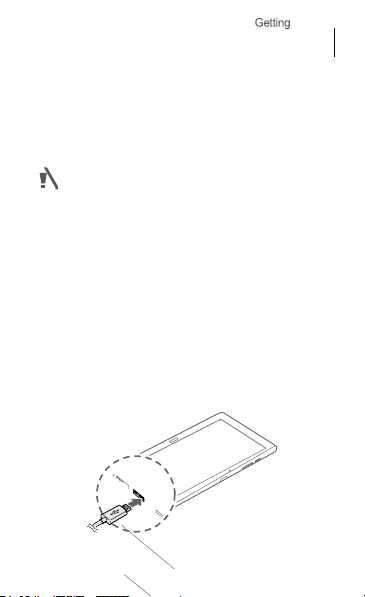
onnect
the USB cable
adaptor and then plug the end of the
cable
into the multipurpose
When using
cable
into the right
jack as
shown in the image below.
battery
has been unused
iods,
you must charge
ies,
and
cables. Unapproved
to
explode
a USB 2.0
side of the
can
or
to
the USB
cable,
damage the
cause
power
jack.
plug the
multipur
time
for
the
the
USB
USB
or
gers,
pose
Page 8
1
started
After fully
from the
from the
electric socket.
Connecting the charger
may cause serious damage
the
device. Any damage
by misuse is not covered by
improperly
to
caused
the
warranty.
char
ging,
disc
onnect
the
char
ger.
First unplug the
device, and then unplug
To save
energy, unplug the
when not in
use.
The charger
device
charger
it
from
char
does
not have a power switch, so you
unplug the charger from the
socket when not in use
wasting
power. The charger
remain close
to
the electric
and easily accessible while
to av
electric
oid
should
socket
char
the
ger
must
ging.
Page 9
11
started
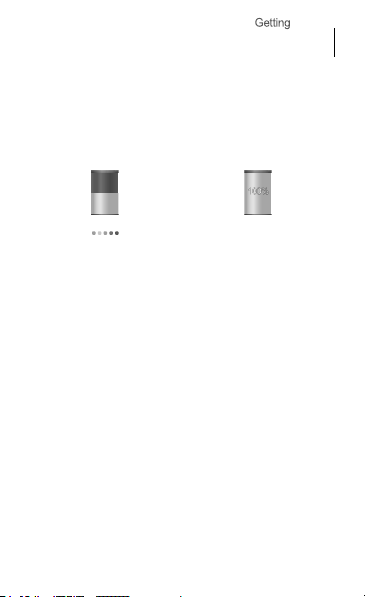
Checking the battery
status
When you charge
device is
the current battery
off,
Charging
the battery while
the following icons will
charge
Turning the device on and
When turning on the device for the
time,
follow the on-screen instructions
up your
device.
char
status:
Fully
charged
ge
the
show
off
first
to set
Page 10
1
started
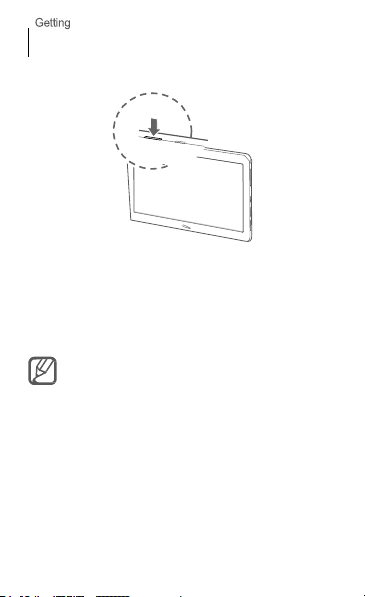
Press
and hold the Power button for a few
seconds
to
turn the device on and
Viewing the user
The user manual provides
information about operating your
You may incur additional charges
accessing
downloading media
contact your
manual
the Internet
service provider.
off.
complete
device.
or
files. For
for
details
,
Page 11
13
started
From your
Open
1
Tap
2
S
3
To access the user manual more easily,
a
shortcut or widget for the
the Home
device
the Internet
to
open the bookmarks
elect
the bookmark for the user
scr
The user manual may not be av
depending on the web browser
service provider.
een.
application.
user manual
From your computer
Access
www.samsung.com and then
for the user manual by the model name
your
device.
list.
manual
place
ailable
or
sear
ch
of
.
on
Page 12
16
Safety
This safety information contains content for
devices. Some content may be not applicable
your device.
others or damage to your device, read the
information about your device before using
device.
information
To prevent injury to yourself
W
arning
Failure to comply with safety
and regulations can cause serious
or
death
Do not use damaged power cords or plugs, or loose
electrical
sockets
Unsecured connections can cause electric shock or fire.
Do not touch the power cord with wet hands
disconnect the charger by pulling the cord
Doing so may result
Do not bend or damage the power cord
Doing so may cause electric shock or fire.
in electrocution.
warnings
mobile
to
and
safety
the
injury
or
Page 13

17
information
Do not use your device while
your device with wet
Doing so may cause electric
Do not short-circuit the charger or the
Doing so may cause electric shock or fire,
may malfunction or explode.
Do not use your device outdoor during
thunderstorm
Doing so may result
malfunction.
Use
manufacturer-approved batteries,
accessories, and
•
Using generic
life of your device or cause the device
They may also cause a fire or cause
e
xplode.
•
Use only Samsung-approved battery and
specifically designed for your
battery
damage
• Samsung cannot be responsible for the user’s safety
when using accessories or supplies
approved by Samsung.
in
supplies
batteries or
and charger can cause serious injuries
to
your device.
it
is
hands
electric shock or
charging or
shock.
chargers may
device. Incompa
device
or the
a
devic
chargers
shorten
to
malfunction.
the battery to
that
are
touch
battery
e
,
the
charger
tible
or
not
Page 14

18
information
Do not drop or cause an impact to the charger
the
device
Handle and dispose of the device and charger
care
•
Never dispose
place
such as
device may explode when
regulations when disposing of used
•
Never crush or puncture the
•
Avoid exposing the device
which can lead
ov
erhea
Protect the device, battery and charger
damage
•
Avoid exposing your device and
or very
•
Extreme
reduce the charging capacity and life of your
and battery.
• Pr
event
with
between the + and –
lead
•
Never use a damaged charger or batt
of the battery or
the battery or
microwave ov
ting.
hot temperatures.
temperatures
the battery from coming
metal objects, as this can create a
to
temporary or permanent battery
device on or
to
an
device
in
ens, stoves, or r
internal short circuit
can damage the device
terminals of your battery
heating devices,
ov
erheated. Follow all
device.
to
high exter
battery
into contact
or
with
in
a fire.
Never
adiators. The
battery or device.
ery.
local
nal pr
essure
and
from
to
very
cold
and
devic
connection
and
damage.
,
e
Page 15

19
information
Do not store your device near or in
microwaves, hot cooking equipment, or
pressure containers
•
The
battery
•
Your device may
Do not use or store your device in areas with
concentrations of dust or airborne
Dust or foreign mater
malfunction and may result
Prevent the multipurpose jack and the small end
the charger from contact with conductive mat
such as liquids, dust, metal powders, and
leads
Conductive mater
corrosion of the terminals,
explosion or fire.
Do not bite or suck the device or the
•
Doing so may damage the device or result
explosion or fire.
•
Children or animals can choke on small
•
If children use the
device properly.
may leak.
overheat and
ials can cause your device to
ials may cause a
device, make sure
heaters,
cause a fire.
materials
in
fire or electric shock.
short circuit
which may result
battery
that
high
pencil
in an
in an
parts.
they use
high
of
erials,
or
the
Page 16
20
information
Do not insert the device or supplied
the eyes, ears, or
Doing so may cause suffocation or serious
Do not handle a damaged or leaking Lithium
(Li-Ion)
For safe disposal of your Li-Ion batt
nearest authorised service centre.
mouth
battery
ery,
accessories
contact
C
aution
Failure to comply with safety cautions
and regulations can cause
property
Do not use your device near other electronic
•
•
damage
Most electronic devices use radio frequency
Your device may
devices.
Using an
with
other devices, such as
t
elephones.
interfere
LTE
data connection may
injury or
with
other
electronic
cause interf
audio equipment
injur
into
ies.
Ion
your
devices
sig
nals
erenc
and
.
e
Page 17

21
information
Do not use your device in a hospital, on an
or in an automotive equipment that can
interfered with by radio
•
Avoid using your device
pacemaker, if
the
pacemaker.
with
•
To minimise possible
use your device only on the side of your body
opposite the
•
If you use medical
manufacturer before using your device
whether or
radio frequencies emitted by the
•
On an
with
Make sure the device is turned
landing.
mode
•
Electronic devices
to
manufacturer for more
Do not expose the device to heavy smoke or
Doing so may damage the outside of the device
cause
not
aircraft, using electronic devices can
the
aircraft’s
After takeoff,
if
allowed by
radio interference from your device. Contact the
it to malfunction.
frequency
within
possible,
pacemaker.
equipment, contact the
the equipment
electronic navigational instruments.
aircraft
in
a 15 cm range of
as your device can
interference
will
device.
off
you can use the device
your car
during takeoff
personnel.
may malfunction,
information.
aircraft,
be
a
interfere
with a pacemaker
be affected by
that is
equipment
to determine
interfere
and
in
fligh
due
fumes
or
,
t
Page 18

22
information
If
you use a hearing aid, contact the
for information about radio
The
radio frequency emitted by your device
interfere
with
device, contact the manufacturer
or
not
frequencies emitted by the
Do not use your device near devices or
that emit radio frequencies,
or radio
R
adio frequencies may cause your device to
malfunction.
Turn off the device in potentially explosive
environments
•
Turn
environments instead of removing the battery.
•
Always comply
signs
•
Do
stations), near fuels or chemicals,
•
Do
explosive mater
device, its
some hearing aids. Before using
your hearing aid
towers
off
your device
with
in
potentially explosive en
not
use your device
not
store or carry flammable
ials
parts, or
interference
will
be affected
device.
such as sound sy
in
potentially
regulations,
at refuelling points
in
the same
accessories.
to
vironments.
liquids,
compartment
manufac
may
determine
by
radio
apparatuses
explosive
instructions
or
in
blasting areas.
gases,
tur
your
whether
and
(petrol
or
as
er
stems
the
Page 19

23
information
If
you notice strange smells or sounds coming
your device or the battery, or if you see smoke
liquids leaking from the device or battery,
using the device immediately and take
Samsung Service Centre
Failure
to
do so may result
Comply with all safety warnings and
regarding mobile device usage while operating
vehicle
While
driving,
esponsibility. Never use your mobile device
r
dr
iving, if it
the safety of
remember the following
•
Get
ea
f
help you reduce the time needed
calls on your m obile
•
Position your device
you can
your eyes
at
it
•
Suspend calls
c
onditions.
be
safely operating the vehicle is your
is
prohibited by law.
others,
to
know your device and its
tures, such as speed dial and
access your wireless device
off
an
inconvenient
for you.
Rain,
hazar
dous.
in
fire or
explosion.
use your common sense
the road.
in
heavy traffic or hazardous
sleet,
For your safety
tips:
convenience
redial.
device.
within
easy reach. Make
If you receive an incoming
time,
let your voicemail
snow, ice, and heavy traffic
to
place or
without taking
from
or
stop
it
to
a
regulations
first
while
and
and
These fea
tur
receive
sure
answer
weather
a
es
call
can
Page 20

24
information
•
Do
not
take notes or look up phone
down a “to do”
book takes
responsibility of driving
•
Dial sensibly and
you are
to
plan calls when your car
•
Do
not
conversations
person you are talking
and suspend conversations
divert your attention from the road.
list or
flipping
attention
away from your
saf
assess the traffic.
not
moving or before pulling
engage
in
stressful or
that
may be
to
ely.
will
distracting.
aware
that
C
are and use your mobile device
Keep your device
•
Humidity and liquids may damage the parts
electronic ci rcuits
•
Do
not turn
already on,
immediately (if the
cannot remove the batt
the device
•
Liquids
indicates water
damage
warranty.
dry
in
your device.
on your device
turn it off
with a towel
will
change the colour of the label
damage inside the
to
your device can void your manufac
if it
and remove the
device
will not turn off
ery,
leave
and take
numbers. Jotting
through your address
primary
Place calls
be
sta
emotional
that
could
into traffic. Tr
tionary.
Make
the
you are
driving
potentially
when
properly
If your device
battery
or
it
as-is). Then,
a service centre.
that
device.
Water
or
you
dry
tur
is
wet.
it to
y
is
er’
s
Page 21

25
information
Store your device only on flat
If your device falls, it
Do not store your device in very hot or very cold
areas.
It
is
temperatures from 5
•
Do
not
store your device
inside a car
the screen
device, or cause
•
Do
not
expose your device
extended periods of time (on the
for
example).
• Store the battery at temperatures from
Do not store your device with metal objects, such
coins, keys, and
•
Your device may be scrat
•
If the battery terminals
objects, this may cause a fire.
Do not store your device near magnetic
•
Your device may
discharge from exposure
•
Magnetic stripe cards,
cards,
passbooks,
damaged by magnetic fields.
may be
recommended to use your device
in
the summer
to
malfunction, result
the battery
necklaces
malfunction or the battery
and boarding
surfaces
damaged.
°C to 35 °C
in
very
hot
time.
Doing so may cause
to explode.
to
direct sunlight
ched or may
come
into
to
magnetic fields.
including credit
passes, may
areas such as
in
damage
dashboard of a car
0 °C
malfunction.
contact
cards,
at
to the
for
to
45 °C.
with metal
fields
may
phone
be
,
as
Page 22

26
information
Do not use your device or applications for a while
the device is
Prolonged exposure of your skin
device may cause
such as red spots and
Do not use your device with the back cover
The
in
damage or
If
your device has a camera flash or light, do not
it
close
Using a flash close
loss of vision or damage
Use caution when exposed to flashing
•
While using your
room and do
eyes.
•
Seizures or blackouts can occur when you
exposed
playing Flash-based games
If you feel any di sc
immediately.
•
If anyone
or blackouts while using a similar
physician before using the
overheated
low temperature burn sympt
pigmentation.
battery
may fall
out
malfunction.
to the eyes of people or
to
the eyes may cause
device, leave some lights on
not
hold the screen
to
flashing lights while watching
omfort,
related
to
you has experienced
to
an
overheated
of the device, which may
pets
to
the eyes.
lights
too
close
for extended per
stop using the
device, consult
device.
oms
removed
result
temporary
in the
to your
are
videos
iods.
device
seizur
es
if
,
use
or
a
Page 23
27
information
•
If you feel
disc
omfort,
disoriented,
consult a
•
Reduce the risk of repetitive motion
When you repetitively perform actions,
keys,
your fingers,
occasional
or other parts of your
extended per
press the keys
continue
stop using the device and consult a
Protect your hearing and ears when using a
•
physician.
To
prevent
using the device.
drawing
discomfort
to
have
•
•
Always
turn
earphones
minimum volume setting
conversation or music.
such as a muscle spasm,
stop using the device
eye strain, take
charact
or playing
iods,
ligh
Excessive exposure
cause hearing
Exposure
may
ac
cident.
the volume down before plugging
into
frequent
ers on a
touch
games,
you may
in
your
hands,
body.
When using your device
hold the device
tly,
and take
discomfort during or after
to
distract your attention and
an audio source and use only
with
frequent breaks.
to
damage.
loud sounds while
necessary
immediately
breaks
while
injuries
such as pressing
screen
with
experience
neck,
shoulders,
a relaxed grip,
such
physician.
loud sounds
walking
cause
to
hear
or
and
If
you
use
headset
can
an
the
the
your
for
,
Page 24

28
information
•
In dry environments, static electricity can
the
headset.
environments or touch a metal object
static electricity before connecting
device.
•
Do
may
may be illegal depending on your
Use caution when using the device while
or
moving
•
Always be aware of your surroundings
to
•
Make sure the headset cable does
entangled
Do not carry your device in your back pockets
around your
You could be injured or damage the device
Do not paint or put stickers on your
• Paint
proper
•
If you are allergic
you may experience itching,
sk
consult your
Avoid using headsets
not
use a headset while driving or riding.
distract your attention and
yourself or
others.
in
your arms or on nearby
waist
and stickers can clog moving parts and
operation.
to
paint or metal
in. When this happens,
physician.
in dry
a headset
cause an ac
region.
not
parts of the
eczema, or swelling
stop using the
build up in
to discharge
Doing
cident,
walking
to
avoid
bec
ome
objects.
if
you fall.
device
prevent
device
to the
injury
or
device,
of the
and
so
or
Page 25

29
information
Do not use the device if
Broken glass or acrylic could cause injury
and face. Take the device
to
have
it repaired.
Install mobile devices and equipment with caution
•
Ensure
that
installed
•
Avoid placing your device and accessories near
in
wireless
airbags
Do not drop your device or cause impacts to
device
•
Your device may be damaged or may
•
If bent or deformed,
parts may
Ensure maximum battery and charger
•
Avoid charging your device for more than a week,
overcharging may
•
Over
recharged before
•
Disc
not in
•
Use
any mobile devices
in
your vehicle are securely
an airbag
equipment
inflate rapidly.
malfunction.
time,
unused device
onnect
the charger from power sources
use.
the battery only for their intended
it
is cracked or
to a S
deployment
use.
amsung Service Centre
or related
area.
Improperly
can cause serious injury
your device may be damaged
shorten battery
will
discharge and must
broken
to
mounted.
malfunction.
life
life.
pur
your
hands
equipment
or
installed
when
your
or
as
be
when
poses.
Page 26

30
information
•
Leaving
batteries
their lifespan and
batteries
• Follow all instructions
the longest lifespan of your device and battery
Damages or poor performance caused by
to
follow warnings and instructions can void
manufacturer’s warranty.
•
Your device may wear
repairs are covered by the
per
iod, but
unapproved
When using the device, mind the
•
Hold the device
traditional
•
Speak directly
Do not disassemble, modify, or repair your
•
Any changes or modifications
your manufacturer’s warranty.
ser
vicing,
Centre.
•
Do
not
can cause explosion or fire.
•
Turn
off
you remove the battery
may cause the device
unused over time may
perfor
mance.
to
malfunction or explode,
damages or deterioration caused by
accessories are not.
upright, as
phone.
into
the microphone.
take your device
disassemble or puncture the batt
the device before removing the battery. If
It
in
this manual
out
over
time. Some parts
warranty
you would
to
If your device
to a S
with
the device turned on,
to malfunction.
reduce
may also cause
or cause a fire.
to ensure
failure
your
within
the
following
with a
device
your device can
amsung S
ery,
needs
ervic
as
the
.
and
validity
using
void
e
this
it
Page 27

31
information
When cleaning your device, mind the
•
Wipe your device or charger
•
Clean
the battery terminals
towel.
•
Do
not
use chemicals or
discolour or corrode the outside the device or
result
in
electric shock or fire.
Do not use the device for anything other than
intended
use
Your device may
Avoid disturbing others when using the device
public
Allow only qualified personnel to service
device
Allowing unqualified personnel
may result
manufacturer’s warranty.
Handle memory cards, or cables with care
•
When inserting a
device, make sure
cable is
•
Do
or accessing
data and/or damage
malfunction.
in
damage
connected
not
remove a card while the device is
information,
with a towel or
with a cotton ball or
detergents. Doing so
to
to
card or connecting
that
to
the proper
to
service your
your device and
the card is
inserted or
side.
as
this could result
the card or
device.
following
an er
your
will
void
a cable
to your
transferring
aser.
a
may
may
its
in
device
your
the
in
loss
of
Page 28

32
information
• Protect
cards from strong shocks, static
and electrical noise from other
•
Do
not
touch gold-coloured
your fingers or metal objects. If
with
card
with a soft
•
Inserting a
improperly may result in damage
jack or other parts of the
Ensure access
Emergency calls from your device may
in
some areas or
remote or undeveloped
method of contacting emergency
Protect your personal data and prevent leakage
misuse of sensitive
•
While using your
important
loss of any
•
When disposing of your
then reset your device
personal
•
Carefully read the permissions screen
downloading applications.
with
functions or
information.
cloth.
card or connecting
to emergency
cir
cumstances. Before travelling
information
device, be sure
data. Samsung is
data.
information.
applications
that
to a significant amount of your
devices.
contacts or
dirty,
a cable by force
to
services
not
prevent
Be
particularly
the
not
alternative
services
to
back
responsible for
misuse of
when
to many
device.
areas, plan an
device, back up all data
to
have access
electricity,
terminals
wipe
the
or
multipurpose
be
possible
in
personnel.
or
up
the
and
your
cautious
personal
Page 29

33
information
•
Check your accounts regularly for unapproved
suspicious use. If you find any sign of misuse of
personal
information, contact your
to
delete or change
•
In the event your
passwords on your accounts
information.
•
Avoid using applications from unknown sources
lock your device
Do not distribute copyright-protected
Do
not
distribute copyright-protected material
the permission
violate copyright laws. The
for any legal issues caused by the user’s illegal use
copyrighted material.
your account
device is lost or stolen, change
with a pattern,
of the content o
service
information.
to
protect your
password,
wners.
manufacturer
Doing this
M
alw
are and vir
To protect your device from malware and
follow these usage tips. Failure to do
in damages or
by the warranty
•
Do
not
download unknown applications.
•
Do
not
visit untrusted websites.
•
Delete suspicious messages or email from
senders.
uses
loss
of data that may not be co
service
or
material
is
not liable
viruses,
so may
unknown
or
your
provider
the
personal
and
PIN.
without
may
of
result
vered
Page 30
information
36
Correct disposal of this
(Waste Electrical & Electronic Equipment)
(Applicable
collection
systems)
This marking on the product, accessories
literature indicates
electronic
accessories (e.g.
should
not
To
human health from uncontrolled waste disposal, please
separate
recycle them responsibly
reuse
Household users
where they purchased this product, or their
government office, for details of where and how
can take these items for environmentally
Business users
the terms and conditions of the
product and its electronic
mixed
This EEE is
be disposed of
prevent
possible harm
these items from other types of waste
of material r
with
esources.
should contact either the
should contact their supplier and
other commercial wastes for
compliant
product
in
countries
that
char
ger,
with
other household waste
to
the environment
to
promote the
purchase contract. T
accessories should
with RoHS.
with separate
the product and
headset,
USB
sustainable
retailer
local
safe recycling.
disposal.
or
its
cable)
.
or
and
they
check
his
not be
Page 31
information
37
Correct disposal of batteries in
product
(Applicable
collection
The marking on the batt
packaging
this product should
household waste.
Hg
, Cd or Pb
cadmium or lead above the reference levels
Directive
2006/66.
The
battery incorporated
r
eplaceable.
please
contact your
to
remove the battery or
disassemble,
intend
to
discard the product, the waste collection
will
take
the appropriate
treatment of the product, including the batt
in
countries
systems)
indicates
that
not
be disposed of
Where
mar
indicate
For
information on its r
crush, or puncture the battery.
ked,
that
the battery
in
this product
service provider.
dispose
measures for the recycling
this
with
separat
e
ery,
manual
with other
contains
is
not user
ement,
Do
not attempt
a fire. Do
or
in
mercury,
in
EC
not
If
you
ery.
site
and
the battery
the chemical symbols
eplac
it in
Page 32

information
38
Disclaimer
S
ome content and
device belong
copyr
ight, patent, trademark and/or other
property laws. Such
solely for your personal non-commercial
may
not
that
has
or service provider.
unless expressly authorised by the applicable
owner or service provider,
republish,
derivative works, e
or medium any
this device.
“THIRD
PARTY CONTENT AND SERVICES ARE PR
“AS
IS.” SAMSUNG DOES NOT WARRANT CONTENT
OR SERVICE S
IMPLIEDLY, FOR ANY PURPOSE. SAMSUNG
DISCLAI MS ANY IMPLIED WARRANTIES, INCLUDING
NOT LIMITED
FITNESS FOR A PARTICULAR PURPOSE.
NOT GUARANTEE THE ACCURACY,
LEGALITY, OR COMPLETENESS OF
SERVICE
THIS DEVICE AND UNDER NO CIR
INCLUDING NEGLIGENCE, SHALL SAMSUNG
WHETHER IN CONTRACT OR TORT, FOR ANY DIRECT
INDIRECT, INCIDENTAL, SPECIAL OR C
DAMAGES, ATTORNEY
services accessible
to third
parties and are
content and
use any
content or
not
been authorised by the content
Without
upload,
post, transmit, translate,
xploit,
content or
SO PROVIDED,
TO,
WARRANTIES OF MER
MADE AVAILABLE THR
services are
services
limiting
you may
or distribute
services displayed
EITHER EXPRESSLY
ANY CONTENT OR
OUGH
CUMST
FEES, EXPENSES, OR ANY OTHER
through
protected
in a manner
the foregoing,
not
modify, copy,
in
CHANT
SA
V
ALIDITY,
ANCES,
ONSEQUENTIAL
this
intellectual
provided
use. You
owner
content
sell,
create
any
manner
through
OVIDED
OR
EXPRESSL
ABILITY OR
MSUNG
TIMELINESS,
BE
LIABLE
by
Y
BUT
DOES
,
,
Page 33

information
39
DAMAGES ARISING OUT OF, OR IN CONNECTION
ANY INFORMATION CONTAINED IN,
THE USE OF ANY CONTENT OR SERVICE BY
THIRD PART Y, EVEN IF ADVISED
SUCH DAMAGES.
Third party
at
any
or warranty
available for any period of
are
transmitted by
and transmission facilities over which Samsung
has no control. Without
disclaimer, Samsung expressly disclaims
responsibility or liability for any
suspension of any
through this device.
S
amsung is neither responsible nor liable for
service
question or request for service relating
or services should be made directly
content and
”
services may be
time,
and Samsung makes no
that
any
content or
third
content or
related
to
the content and
service pro
parties by means of
limiting
viders.
OR AS A RESULT
OF THE POSSIBILITY
terminated or
representation
service
time. Content
the generality
interruption
service made av
services.
to
YOU OR ANY
interrupted
will remain
and
ser
networks
of
any
or
ailable
cust
Any
to
the
content
the
respective
WITH,
vic
this
omer
OF
OF
es
Page 34

For 802.11 devices operating in the frequency range of 5.15 - 5.25 GHz, they are restricted for
indoor operations to reduce any potential harmful interference for Mobile Satellite Services
(MSS) in the US. WIFI Access Points that are capable of allowing your device to operate in
5.15 - 5.25 GHz band are optimized for indoor use only. If your WIFI network is capable of
operating in this mode, please restrict your WIFI use indoors to not violate federal regulations
to protect Mobile Satellite Services.
Page 35
FCC Notice and Cautions
FCC Notice
This device complies with Part 15 of the FCC Rules. Operation is
subject to the following two conditions: (1) this device may not cause
harmful int
received, including interference that may cause undesired operation.
This equipment has been tested and found to comply with the limits
for a Class B digital device, pursuant to part 15 of the FCC Rules.
These limits are designed to provide reasonable protection against
harmful interference in a residential installation. This equipment
generates, uses and can radiate radio frequency energy and, if not
installed and used in accordance with the instructions, may cause
harmful interference to radio communications. However, there is no
guarantee that interference will not occur in a particular installation.
If this equipment does cause harmful interference to radio or
television reception, which can be determined by turning the
equipment off and on, the user is encouraged to try to correct the
interference by one or more of the following measures:
-R
eorient or relocate the receiving antenna.
-
Increase the separation be
-Co
nnect the equipment into an outlet on a circuit different from that to
whi
ch the receiver is connected.
-Consult the dealer or an experienced radio/TV technician for help.
erference, and (2) this device must accept any interference
twe
en the equipment and receiver.
The tablet may cause TV or radio interference if used in close
to receiving equipment. The FCC can require you to stop using the tablet
if such interference cannot be eliminated.
Vehicles using liquefied petroleum gas (such as propane or butane) must
comply with the National Fire Protection Standard (NFPA-58). For a copy
of this standard, contact the National Fire Protection Association, One
Battery march Park, Quincy, MA 02269, Attn: Publication Sales Division.
Cautions
Changes or modifications made in the radio phone, not expressly
approved by Samsung, will void the user’s authority to operate the
equipment.
The use of any unauthorized accessories may be dangerous and void the
tablet warranty if said accessories cause damage or a defect to the tablet.
Although your tablet is quite sturdy, it is a complex piece of equip
can be broken. Avoid dropping, hitting, bending or sitting on it.
pro
ximit
y
ment an
d
Page 36

Do not short-circuit the battery. Accidental short- circuiting can
occur when a metallic object (coin, clip or pen) causes a direct
connection between the + and - terminals of the battery (metal
strips on the battery), for example when you carry a spare battery
in a pocket or bag. Short-circuiting the terminals may damage the
battery or the object causing the short-circuiting.
Dispose of used batteries in accordance with local regulations. In
some areas, the disposal of batteries in household or business
trash may be prohibited. For safe disposal options for Li-Ion
batteries, contact your nearest Samsung authorized service center.
Always recycle. Do not dispose of batteries in a fire.
Care and Maintenance
Your tablet is a product of superior design and craftsmanship and should
be treated with care. The suggestions below will help you fulfill any
warranty obligations and allow you to enjoy this product for many years.
Keep the tablet and all its parts and accessories out of the reach of
small children.
Keep the tablet dry. Precipitation, humidity and liquids contain
minerals that will corrode electronic circuits.
Do not use the tablet with a wet hand. Doing so may cause an
electric shock to you or damage to the tablet.
Do not use or store the tablet in dusty, dirty areas, as its moving
parts may be damaged.
Do not store the tablet in hot areas. High temperatures can
shorten the life of electronic devices, damage batteries, and warp
or melt certain plastics.
Do not store the tablet in cold areas. When the tablet warms up to
its normal operating temperature, moisture can form inside the tablet
, which may damage the tablet's electronic circuit boards.
Do not drop, knock or shake the tablet. Rough handling can break
internal circuit boards.
Do not use harsh chemicals, cleaning solvents or strong detergents
to clean. Wipe it with a soft cloth slightly dampened in a
mild soap-and-water solution.
Do not paint the tablet. Paint can clog the device's moving parts
and prevent proper operation.
Do not put the tablet in or on heating devices, such as a
microwave oven, a stove or a radiator. The tablet may explode
when overheated.
When the tablet or battery gets wet, the label indicating water
damage inside the tablet changes color. In this case, tablet repairs
are no longer guaranteed by the manufacturer's warranty, even if
the warranty for your tablet has not expired.
If your tablet has a flash or light, do not use it too close to the
eyes of people or animals. This may cause damage to their eyes.
Page 37
Use only the supplied or an approved replacement antenna.
Unauthorized antennas or modified accessories may damage the
phone and violate regulations governing radio devices.
If the tablet, battery, charger or any accessory is not working
properly, take it to your nearest qualified service facility. The
personnel there will assist you, and if necessary, arrange for
service.
Correct disposal of this product
(Waste Electrical & Electronic Equipment)
(Applicable in the European Union and other European countries with separate
collection systems)
This marking shown on the product or its literature, indicates that it should not be
disposed with other household wastes at the end of its working life. To prevent
possible harm to the environment or human health from uncontrolled waste disposal,
please separate this from other types of wastes and recycle it responsibly to promote
the sustainable reuse of material resources.
Household users should contact either the retailer where they purchased this product,
or their local government office, for details of where and how they can take this item
for environmentally safe recycling.
Business users should contact their supplier and check the terms and conditions of
the purchase contract. This product should not be mixed with other commercial
wastes for disposal.
Correct disposal of batteries in this product
(Applicable in the European Union and other European countries with separate
battery return systems)
This marking on the battery, manual or packaging indicates that the batteries in this
product should not be disposed of with other household waste at the end of their
working life. Where marked, the chemical symbols Hg, Cd or Pb indicate that the
battery contains mercury, cadmium or lead above the reference levels in EC
Directive 2006/66. If batteries are not properly disposed of, these substances can
cause harm to human health or the environment.
To protect natural resources and to promote material reuse, please separate
batteries from other types of waste and recycle them through your local, free battery
return system.
Page 38
Health and safety
information
ExposuretoR
Your wireless device is a radio transmitter and receiver.
It
is designed
exposure limits
the
Federal Communications Commission
U.S.
government.
from therec
the National
Measurement (NCRP)
Electronics
and
engineering experts drawn from
The exposure
devices employs a
the rate of absorption of
expressedinunitsofwatts per kilogram(W/kg).The
adioFr
equency
and
manufactured
for
radio frequency
These FCC
ommendationsoftwoexpertor
Counsel onR
Engineers (IEEE).
limit
exposure limits are
and the
set
by the
unit of
measurement known as
RF
energy by the human
(RF)
not to
(RF) energy set
adiation
Protection
InstituteofElec
In both
industry,government,
FCC
for
wireless
Signal
s
exceed
(FCC)
of the
derived
ganizations
and
trica
cases,
the
mobile
the
body
FCC
the
by
requires wireless devicestocomply
1.6 watts per kilogram (1.6 W/kg). The
of
limit
incorporates a substantial marginofsafety
additional protection
any variationsinmeasur
SAR
tests are conducted
positions
testedfrequency bands.Although the
,
of
maximumvalue.
l
to
power requiredtoreach
closer
lower the power
Before a new model device is available
it
the
positions and locations (e.g. near the body)asrequired
by theFCC.
accepted
the
device
operate at multiple power
you
aretoa wireless base station antenna,
does
not
FCC. Tests
to the
ements
by the
while operating canbewell
This is because the
the
output.
exceed
the
exposure
for
each model are performed
with
a safety
FCC
public andtoaccount
.
using recommended
FCC
with
the
SARisdet
below the
device
ork.In
limit
is designed
use only
general,
for
sale
established
levels soasto
netw
exposur
to give
operating
device
ermined
to the
in
limit
for
the
the
the
by
e
For typical
tested
SAR
be viewed on-line at http://www.fcc
This
You can check
Onceyou
follow the instructions on the website and
provide values
a
SAR
c
operations,this model has
and
meets
the
FCC exposure
information on this andother modelscan
siteuses
the
FCCIDnumberA3L
the
FCC ID on the rearcase.
have
the
FCCIDnumber for
for
particulardevice
information can also be obtainedatwww.fcc.go
gb/sar
.
typicalormaximum
been
guidelines.
.go
v/oet/ea/fccid/.
SCT21..
a particular
it should
SAR
device
for
v/
OperatingEnvironment
Remember tofollow any special regulationsinforce
any areaandalwaysswitch
forbidden to
danger.Whenconnecting
another device, read its user’s guide
instructions.Do
,
use
not
your
it, or whenitmay cause
connect incompatible
device
the
deviceoranyac
interference
for
detailed
products
in
or
cessoryto
safety
.
 Loading...