

Page 1
Refrigerator
User manual
RT16A61****
Free Standing Appliance
Untitled-2 1 2021-07-13 6:31:43
Page 2
Contents
Safety information 3
Important safety symbols and precautions: 4
State of California Proposition 65 Warning 4
Severe warning signs for transportation and site 5
Critical installation warnings 5
Contents
Installation cautions 7
Critical usage warnings 7
Usage cautions 10
Cleaning cautions 11
Critical disposal warnings 12
This appliance is intended to be used in household and similar applications such as 13
Additional tips for proper usage 13
Installation 14
Refrigerator at a glance 14
Step-by-step installation 15
Operations 18
Temperature controller 18
Special features 19
Maintenance 22
Door reversal (applicable models only) 22
Handle and care 34
Cleaning 36
Replacement 36
Troubleshooting 37
General 37
Do you hear abnormal sounds from the refrigerator? 39
LIMITED WARRANTY (U.S.A.) 41
SAMSUNG REFRIGERATOR 41
Warranty Information (CANADA) 44
If your refrigerator needs service 44
Limited Warranty for Original Purchaser 44
Obligation to the Original Owner 45
Exclusions of the Warranty 45
English2
Untitled-2 2 2021-07-13 6:31:43
Page 3
Safety information
• Before using your new Samsung Refrigerator, please read this manual thoroughly
to ensure that you know how to operate the features and functions that your new
appliance offers safely and efciently.
• This appliance is not intended for use by persons (including children) with reduced
physical, sensory or mental capabilities, or lack of experience and knowledge, unless
they have been given supervision or instruction concerning use of the appliance by a
person responsible for their safety. Children should be supervised to ensure that they
do not play with the appliance.
• This appliance can be used by children aged 8 years and above and persons with
reduced physical, sensory or mental capabilities or lack of experience and knowledge
if they have been given supervision or instruction concerning use of the appliance
in a safe way and understand the hazards involved. Do not let children play with the
refrigerator. Do not let children clean the refrigerator or perform user maintenance on
the refrigerator without supervision.
• Warnings and Important Safety Instructions in this manual do not cover all possible
conditions and situations that may occur.
It is your responsibility to use common sense, caution, and care when installing,
maintaining, and operating your appliance.
• Because the following operating instructions cover various models, the characteristics
of your refrigerator may differ slightly from those described in this manual. Not all
warning signs may be applicable. If you have any questions or concerns, contact your
nearest Samsung service center or nd help and information online at www.samsung.
com.
• Refrigerant squirting out of the pipes could ignite or cause an eye injury. When
refrigerant leaks from the pipe, avoid any naked ames and move anything ammable
away from the product and ventilate the room immediately.
- Failing to do so may result in re or explosion.
• It is hazardous for anyone other than an Authorised Service Person to service this
appliance.
Safety information
Warning; Risk of re / ammable materials
English 3
Untitled-2 3 2021-07-13 6:31:43
Page 4
Safety information
Safety information
WARNING
• R-600a is used as a refrigerant. This product contains ammable gas (Refrigerant
R-600a), contact your local authority in regard to safe disposal of this product.
• In order to avoid the creation of a ammable gas-air mixture if a leak in the
refrigerating circuit occurs, the size of the room in which the appliance may be sited
depends on the amount of refrigerant used. The room must be 35.3 ft³ in size for every
8 g of R-600a refrigerant inside the appliance.
• The installation location should not be exposed to direct sunlight and not placed near
any electric appliance or heat source, e.g. stove, oven or hob, radiator, etc.
• If you use two products side by side, for safety reason, be sure to use certied products
in explosive gas atmospheres.
• Never start up an appliance showing any signs of damage. If in doubt, consult your
dealer.
WARNING
• Fill with potable water only.
• Keep ventilation openings, in the appliance enclosure or in the built-in structure, clear of
obstruction.
• Do not use mechanical devices or other means to accelerate the defrosting process,
other than those recommended by the manufacturer.
• Do not damage the refrigerant circuit.
• Do not use electrical appliances inside the food storage compartments of The appliance,
unless they are of the type recommended by the manufacturer.
• Connect to potable water supply only.
Important safety symbols and precautions:
WARNING
Hazards or unsafe practices that may result in severe personal injury or death.
CAUTION
Hazards or unsafe practices that may result in minor personal injury or property damage.
These warning signs are here to prevent injury to you and others.
Please follow them carefully.
After reading this section, keep it in a safe place for future reference.
State of California Proposition 65 Warning
WARNING
Cancer and Reproductive Harm - www.P65Warnings.ca.gov.
English4
Untitled-2 4 2021-07-13 6:31:43
Page 5
Severe warning signs for transportation and site
WARNING
• When transporting and installing the appliance, care should be taken to ensure that no
parts of the refrigerating circuit are damaged.
- Refrigerant leaking from the pipe work could ignite or cause an eye injury. If a leak
is detected, avoid any naked ames or potential sources of ignition and air the room
in which the appliance is standing for several minutes.
- This appliance contains a small amount of isobutane refrigerant (R-600a), a natural
gas with high environmental compatibility that is, however, also ammable. When
transporting and installing the appliance, care should be taken to ensure that no
parts of the refrigerating circuit are damaged.
Critical installation warnings
WARNING
• Do not install the refrigerator in a damp location or place where it may come in contact
with water.
- Deteriorated insulation on electrical parts may cause an electric shock or re.
• Do not place this refrigerator in direct sunlight or expose it to the heat from stoves,
room heaters, or other appliances.
• Do not plug several appliances into the same multiple power strip. The refrigerator
should always be plugged into its own individual electrical outlet which has a voltage
rating that matches the voltage listed on the refrigerator’s rating plate.
- This provides the best performance and also prevents overloading of house wiring
circuits, which could cause a re hazard from overheated wires.
• If the wall socket is loose, do not insert the power plug.
- There is a risk of electric shock of re.
• Do not use a power cord that has cracks or abrasion damage along its length or at
either end.
• Do not bend the power cord excessively or place heavy objects on it.
• Do not pull or excessively bend the power cord.
• Do not twist or tie the power cord.
• Do not hook the power cord over a metal object, place a heavy object on the power
cord, insert the power cord between objects, or push the power cord into the space
behind the appliance.
• When moving the refrigerator, be careful not to roll over or damage the power cord.
- This may result in an electric shock or re.
• Never unplug your refrigerator by pulling on the power cord. Always grip the plug
rmly and pull straight out from the outlet.
- Damage to the cord may cause a short-circuit, re, and/or electric shock.
• Do not store explosive substances such as aerosol cans with a ammable propellant in
this appliance.
• Do not install this appliance near a heater or ammable material.
Safety information
English 5
Untitled-2 5 2021-07-13 6:31:43
Page 6
Safety information
Safety information
• Do not install this appliance in a location where gas may leak.
- This may result in an electric shock or re.
• This refrigerator must be properly located and installed in accordance with the
instructions in this manual before you use it.
• Connect the power plug in the proper position with the cord hanging down.
- If you connect the power plug upside down, the wire can get cut off and cause a re
or electric shock.
• Make sure that the power plug is not crushed or damaged by the back of the
refrigerator.
• Keep the packing materials out of reach of children.
- There is a risk of death from suffocation if a child puts the packing materials on his
or her head.
• The appliance must be positioned so that the plug is accessible after installation.
- Failing to do so may result in an electric shock or re due to electric leakage.
• Do not install this appliance in a humid, oily or dusty location, in a location exposed to
direct sunlight and water (rain drops).
- Deteriorated insulation of electrical parts may cause an electric shock or re.
• If any dust or water is in the refrigerator, pull out power plug and contact a Samsung
Electronics service center.
- Otherwise there is a risk of re.
• Do not stand on top of the appliance or place objects (such as laundry, lighted candles,
lighted cigarettes, dishes, chemicals, metal objects, etc.) on the appliance.
- This may result in an electric shock, re, problems with the product, or injury.
• You need to remove all the protective plastic lm before you initially plug the product
in.
• Children should be supervised to ensure that they do not play with the snap rings used
for door adjustment or the water tube clips.
- There is risk of death by suffocation if a child swallows a snap ring or water tube
clip. Keep the snap rings and water tube clips out of children’s reach.
• The refrigerator must be safely grounded.
- Always make sure that you have grounded the refrigerator before attempting to
investigate or repair any part of the appliance. Power leakages can cause severe
electric shock.
• Never use gas pipes, telephone lines, or other potential lightning attractors as an
electrical ground.
- You must ground the refrigerator to prevent any power leakages or electric shocks
caused by current leakage from the refrigerator.
- Grounding the refrigerator improperly may result in an electric shock, re, explosion,
or problems with the product.
- Improper use of the grounding plug can result in a risk of electric shock. If it is
necessary to use an extension cord, use only a 3-wire extension cord that has a
3-blade grounding plug and a 3-slot receptacle that will accept the plug on the
appliance. The marked rating of the extension cord should be AC 115-120 V, 10 A, or
more. If a grounding adapter is used, make sure the receptacle box is fully grounded.
• Plug the power plug into the wall socket rmly. Do not use a damaged power plug,
damaged power cord, or loose wall socket.
- This may result in an electric shock or re.
English6
Untitled-2 6 2021-07-13 6:31:43
Page 7
• If the power cord is damaged, have it replaced immediately by the manufacturer or one
of its service agents.
• The fuse on the refrigerator must be changed by a qualied technician or service
company.
- Failing to do so may result in an electric shock or personal injury.
• The wall socket must be easily accessible so that the appliance can be quickly
disconnected from the wall socket in an emergency.
• It must be outside the area of the rear of the appliance.
• When positioning the appliance, ensure the power cord is not trapped or damaged.
• Do not locate multiple portable socket-outlets or portable power supplies at the rear of
the appliance.
Installation cautions
CAUTION
• Allow sufcient space around the refrigerator and install it on a at surface.
- Keep the ventilation space in the appliance enclosure or mounting structure clear of
obstructions.
• After the refrigerator has been installed and turned on, let it stand for 2 hours before
loading it with food.
• It is strongly recommended you have a qualied technician or service company install
the refrigerator.
- Failing to do so may result in an electric shock, re, explosion, problems with the
product, or injury.
• Overloading the refrigerator door may cause the refrigerator to fall, causing physical
injury.
Safety information
Critical usage warnings
WARNING
• Do not insert the power plug into a wall socket with wet hands.
- This may result in an electric shock.
• Do not store articles on the top of the appliance.
- When you open or close the door, the articles may fall and cause personal injury
and/or material damage.
• Do not insert hands, feet, or metal objects (such as chopsticks, etc.) into the bottom or
into the back of the refrigerator.
- This may result in an electric shock or injury.
- Any sharp edges may cause a personal injury.
• Do not touch the inside walls of the freezer or products stored in the freezer with wet
hands.
- This may cause frostbite.
• Do not put a container lled with water on the refrigerator.
- If spilled, there is a risk of re or electric shock.
English 7
Untitled-2 7 2021-07-13 6:31:43
Page 8
Safety information
Safety information
• Do not keep volatile or ammable objects or substances (benzene, thinner, propane gas,
alcohol, ether, LP gas, and other such products) in the refrigerator.
- This refrigerator is for storing food only.
- This may result in re or explosion.
• Children should be supervised to ensure that they do not play with the appliance.
- Keep ngers out of “pinch point” areas. Clearances between the doors and cabinet
are necessarily small. Be careful when you open the doors if children are in the area.
• Do not let children hang on the door or door bins. A serious injury may occur.
• Do not let children go inside the refrigerator. They could become trapped.
• Do not store pharmaceutical products, scientic materials, or temperature sensitive
products in the refrigerator.
- Products that require strict temperature controls must not be stored in the
refrigerator.
• Do not place or use electrical appliances inside the refrigerator/freezer, unless they are
of a type recommended by the manufacturer.
• If you smell a burning smell or smoke, pull out power plug immediately and contact a
Samsung Electronics service center.
• If any dust or water is in Refrigerator, pull out power plug and contact your nearest
Samsung Electronics service center.
- Otherwise there is a risk of re.
• Do not let children step on a drawer.
- The drawer may break and cause them to slip.
• Do not leave the doors of the refrigerator open while the refrigerator is unattended and
do not let children enter inside the refrigerator.
• Do not allow babies or children go inside a drawer.
- It can cause death from suffocation by entrapment or personal injury.
• Do not overll the refrigerator with food.
- When you open the door, an item may fall out and cause personal injury or material
damage.
• Do not spray volatile material such as insecticide onto the surface of the appliance.
- As well as being harmful to humans, it may also result in an electric shock, re, or
problems with the product.
• Do not use or place any substances sensitive to temperature such as ammable sprays,
ammable objects, dry ice, medicine, or chemicals near or inside of the refrigerator.
• Do not use a hair dryer to dry the inside of the refrigerator. Do not place a lighted
candle in the refrigerator for removing bad odours.
- This may result in an electric shock or re.
• Fill the water tank, ice tray and water cubes with potable water only (tap water, mineral
water, or puried water).
- Do not ll the tank with tea, juice or sports drinks. This may damage the refrigerator.
• Do not stand on top of the appliance or place objects (such as laundry, lighted candles,
lighted cigarettes, dishes, chemicals, metal objects, etc.) on the appliance. This may
result in an electric shock, re, problems with the product, or injury. Do not put a
container lled with water on the appliance.
- If spilled, there is a risk of re or electric shock.
• Never stare directly at the UV LED lamp for long periods of time.
- This may result in eye strain due to the ultraviolet rays.
English8
Untitled-2 8 2021-07-13 6:31:43
Page 9
• Do not put fridge shelves in upside down. The shelf stopper, which prevents the shelf
from falling, will not work.
- The shelf could fall and cause a personal injury.
• Keep ngers out of “pinch point” areas. Clearances between the doors and cabinet are
necessarily small. Be careful when you open the doors if children are in the area.
• If a gas leak is detected, avoid any naked ames or potential sources of ignition, and air
the room in which the appliance is standing for several minutes.
- Do not touch the appliance or power cord.
- Do not use a ventilating fan.
- A spark may result in explosion or re.
• Use only the LED Lamps provided by the manufacturer or its service agents.
• Bottles should be stored tightly together so that they do not fall out.
• This product is intended only for the storage of food in a domestic environment.
• Do not attempt to repair, disassemble, or modify the refrigerator yourself.
- Unauthorized modications can cause safety problems. To reverse an unauthorized
modication, we will charge the full cost of parts and labor.
• Do not use any fuse (such as cooper, steel wire, etc.) other than a standard fuse.
• If your refrigerator needs to be repaired or reinstalled, contact your nearest Samsung
service center.
- Failing to do so may result in an electric shock, re, problems with the product, or
injury.
• If the interior or exterior LED lamp has gone out, contact your nearest Samsung service
center.
• If the refrigerator emits a burning smell or smoke, unplug the refrigerator immediately
and contact your Samsung Electronics service center.
- Failing to do so may result in an electric or re hazard.
• Pull the power plug out of the socket before changing the interior lamps of the
refrigerator.
- Otherwise, there is a risk of electric shock.
• If you experience difculty changing a non-LED light, contact a Samsung service center.
• If the product is equipped with LED lamps, do not disassemble the Lamp Covers and
LED lamps yourself.
- Contact a Samsung service center.
• Plug the power plug into the wall socket rmly.
• Do not use a damaged power plug, damaged power cord or loose wall socket.
- This may result in an electric shock or re.
Safety information
English 9
Untitled-2 9 2021-07-13 6:31:43
Page 10
Safety information
Safety information
Usage cautions
CAUTION
• Do not re-freeze frozen foods that have thawed completely. Do not place carbonated or
zzy drinks in the freezer compartment. Do not put bottles or glass containers in the
freezer.
- When the contents freeze, the glass may break and cause personal injury.
• Use only the ice maker provided with the refrigerator.
• To get the best performance from the product:
- Do not place food too close to the vents at the rear of the refrigerator as this can
obstruct free air circulation in the refrigerator compartment.
- Wrap food up properly or place it in airtight containers before putting it into the
refrigerator.
- Do not place glass bottles or carbonated beverages into the freezer. They can freeze
and break. Broken beverage containers can cause injury.
- Please observe maximum storage times and expiration dates of frozen goods.
• Do not place carbonated or zzy drinks in the freezer compartment. Do not put bottles
or glass containers in the freezer compartment.
- When the contents freeze, the glass may break and cause personal injury and
property damage.
• Service Warranty and Modication.
- Any changes or modications performed by a 3rd party on this nished appliance
are not covered under Samsung warranty service, nor is Samsung responsible for
safety issues that result from 3rd party modications.
• Do not block the air vents inside the refrigerator.
- If the air vents are blocked, especially with a plastic bag, the refrigerator can be over
cooled. If a cooling period lasts too long, the water lter may break and cause water
leakage.
• Wipe excess moisture from the inside and leave the doors open.
- Otherwise, odor and mold may develop.
• If the refrigerator is disconnected from the power supply, you should wait for at least
ve minutes before plugging it back in.
• If the refrigerator is ooded by water, there is a risk of electric shock or re. Pull out
the power plug, and then contact a Samsung Electronics service center as soon as
possible.
• Do not strike or apply excessive force to any glass surface.
- Broken glass may result in a personal injury and/or property damage.
• Fill the water tank and ice cube trays with potable water only (tap water, mineral water,
or puried water).
- Do not ll the tank with tea or a sports drink. This may damage the refrigerator.
English10
Untitled-2 10 2021-07-13 6:31:43
Page 11
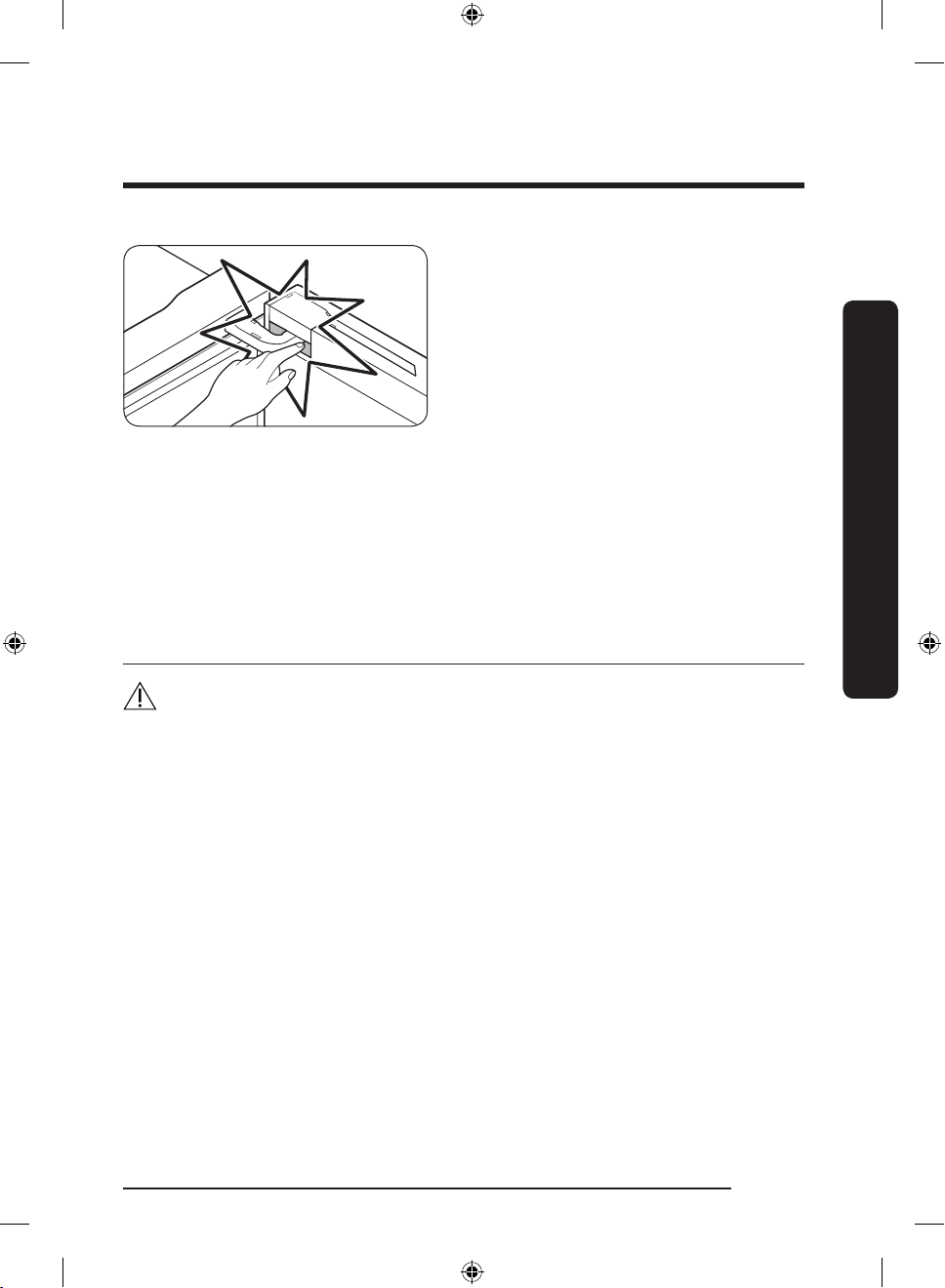
• Be careful that your ngers do not get
caught in the door or the space between
the door and the door hinge.
• The lamps in the freezer and refrigerator may turn off if the doors of the freezer and
refrigerator are left open for 2 seconds or longer.
- The lamps will turn back on when the doors are closed and opened again.
• Do not keep vegetable oil in your refrigerator’s door bins. The oil can solidify, making it
foul-tasting and difcult to use. In addition, the open container can leak and the leaked
oil can cause the door bin to crack. After opening an oil container, it is best to keep the
container in a cool and shaded place such as a cupboard or pantry.
- Examples of vegetable oil: olive oil, corn oil, grape-seed oil, etc.
Cleaning cautions
CAUTION
• Do not spray water directly on the inside or outside the refrigerator.
- There is a risk of re or electric shock.
• Do not use a hair dryer to dry the inside of the refrigerator.
• Do not place a lighted candle in the refrigerator to remove bad odors.
- This may result in an electric shock or re.
• Do not spray cleaning products directly on the display.
- Printed letters on the display may come off.
• If any foreign substance such as water has entered the appliance, unplug the power
plug and contact your nearest Samsung service center.
- Failing to do so may result in an electric shock or re.
• Use a clean, dry cloth to remove any foreign matter or dust from the power plug blades.
Do not use a wet or damp cloth when cleaning the plug.
- Otherwise, there is a risk of re or electric shock.
• Do not clean the appliance by spraying water directly onto it.
• Do not use benzene, thinner, or Clorox, Chloride for cleaning.
- They may damage the surface of the appliance and may cause a re.
• Never put ngers or other objects into the dispenser hole.
- It may cause a personal injury or material damage.
• Before cleaning or performing maintenance, unplug the appliance from the wall socket.
- Failing to do so may result in an electric shock or re.
• Use a clean sponge or soft cloth and a mild detergent in warm water to clean the
refrigerator.
Safety information
English 11
Untitled-2 11 2021-07-13 6:31:44
Page 12
Safety information
• Do not use abrasive or harsh cleansers such as window sprays, scouring cleansers,
ammable uids, muriatic acid, cleaning waxes, concentrated detergents, bleaches, or
cleansers containing petroleum products on exterior surfaces (doors and cabinet), plastic
parts, door and interior liners, and gaskets.
- These can scratch or damage the material.
• Do not clean glass shelves or covers with warm water when they are cold. Glass shelves
and covers may break if exposed to sudden temperature changes or impacts such as
bumping or dropping.
Safety information
Critical disposal warnings
WARNING
• Children trapped inside a refrigerator can hurt themselves or suffocate to death.
• Please dispose of the packaging material from this product in an environmentally
friendly manner.
• Ensure that none of the pipes on the back of the refrigerator are damaged prior to
disposal.
• R-600a is used as a refrigerant. This product contains ammable gas (Refrigerant
R-600a), contact your local authority in regard to safe disposal of this product.
• When disposing of this refrigerator, remove the door/door seals and door latch so that
small children or animals cannot become trapped inside. Children should be supervised
to ensure that they do not play with the appliance. If trapped inside, a child may get
hurt or suffocate to death.
- If trapped inside, the child may get hurt or suffocate to death.
• Cyclopentane is used in the insulation. The gases in the insulation material require
a special disposal procedure. Please contact your local authorities in regard to the
environmentally safe disposal of this product.
• Keep all packaging materials well out of the reach of children, as packaging materials
can be dangerous to children.
- If a child places a bag over his or her head, the child could suffocate.
WARNING
• Risk of child entrapment. Before you throw away your old refrigerator or freezer:
- Take off the doors.
- Leave the shelves in place so that children may not easily climb inside.
English12
Untitled-2 12 2021-07-13 6:31:44
Page 13
This appliance is intended to be used in household and similar applications such as
• staff kitchen areas in shops, ofces and other working environments;
• farm houses and by clients in hotels, motels and other residential type environments;
• bed and breakfast type environments;
• catering and similar non-retail applications.
Additional tips for proper usage
• In the event of a power failure, call the local ofce of your electric company and ask
how long the failure is going to last.
- Most power failures that are corrected in an hour or two will not affect your
refrigerator temperatures. However, you should minimize the number of door
openings while the power is off.
- Should the power failure last more than 24 hours, remove and discard all frozen
food.
• The refrigerator might not operate consistently (frozen contents can thaw or
temperatures can become too warm in the frozen food compartment) if sited for an
extended period of time in a location where ambient air temperatures are constantly
below the temperatures for which the appliance is designed.
• Some foods (bananas, etc.) should not be refrigerated. Refrigeration can cause these
foods to deteriorate.
• Your appliance is frost free, which means there is no need to manually defrost your
appliance. This will be carried out automatically.
• Temperature rise during defrosting complies with ISO requirements. If you want to
prevent an undue rise in the temperature of frozen food while the appliance defrosts,
wrap the frozen food in several layers of newspaper.
• Do not re-freeze frozen foods that have thawed completely.
Safety information
English 13
Untitled-2 13 2021-07-13 6:31:44
Page 14
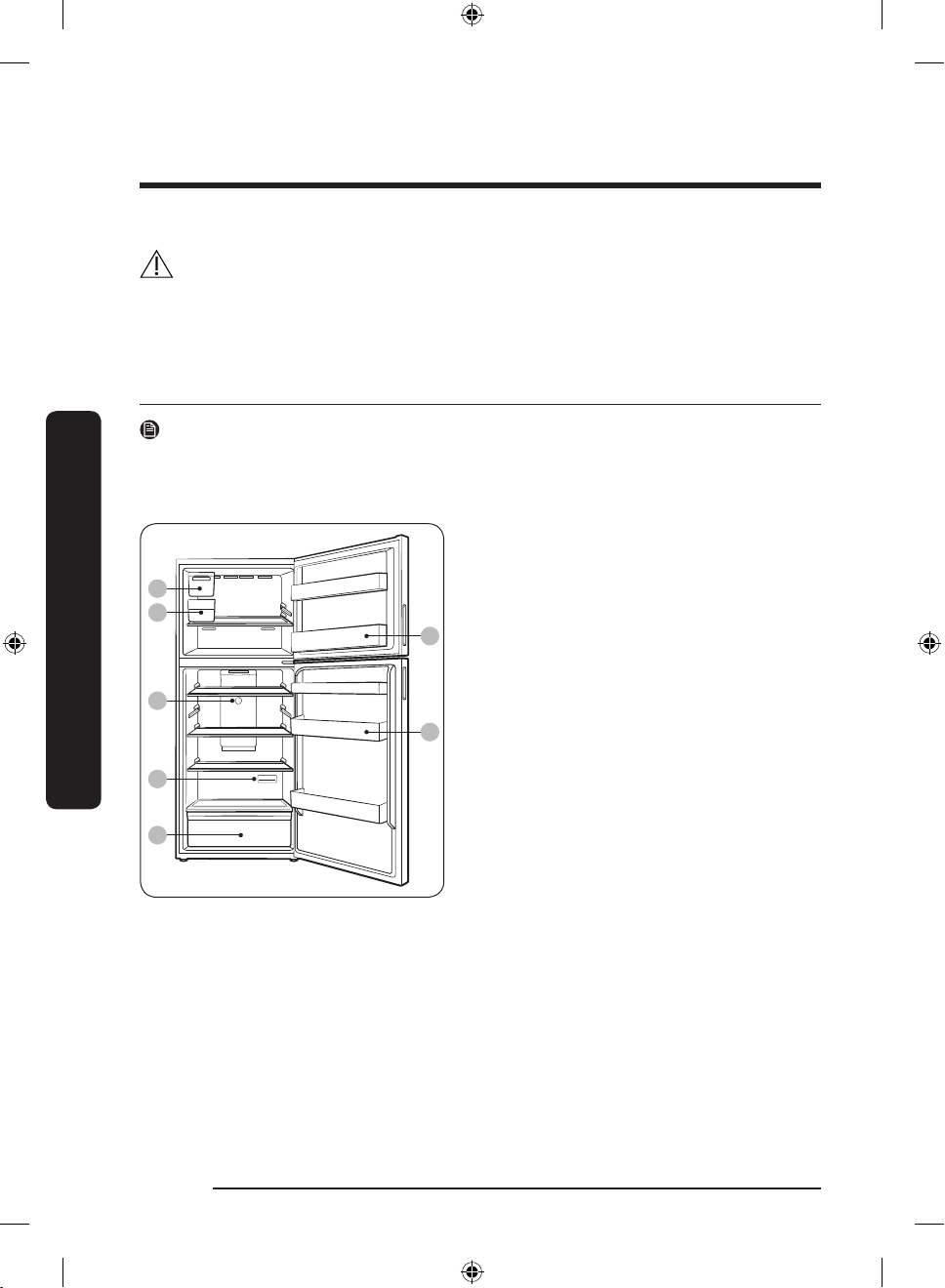
02
01
07
04
06
03
05
Installation
Installation
Follow these instructions carefully to ensure the proper installation of this refrigerator and
to prevent accidents before using it.
WARNING
• Use the refrigerator only for its intended purpose as described in this manual.
• Any servicing must be performed by a qualied technician.
• Dispose of the product packaging material in compliance with the local regulations.
Refrigerator at a glance
NOTE
The illustrations of the refrigerator and its component parts shown in this manual may
differ from your actual refrigerator and its component parts, depending on the model and
your country.
01 Auto Ice Maker **
02 Ice bucket **
03 Freezer door bin
04 Fridge temperature controller
05 Fridge door bin
06 Deodorizer
07 Vegetable drawer
* applicable models only
** Auto Ice Maker models only
English14
Untitled-2 14 2021-07-13 6:31:44
Page 15
Step-by-step installation
B
C
A
03
01
03
05
02
04
STEP 1 Select a site
Select a site that:
• Has a solid, level surface without carpeting or ooring that may obstruct ventilation
• Is away from direct sunlight
• Has adequate room for opening and closing the door
• Is away from any heat sources
• Provides room for maintenance and servicing
• Has a temperature range between 50 °F (10 °C) and 109 °F (43 °C)
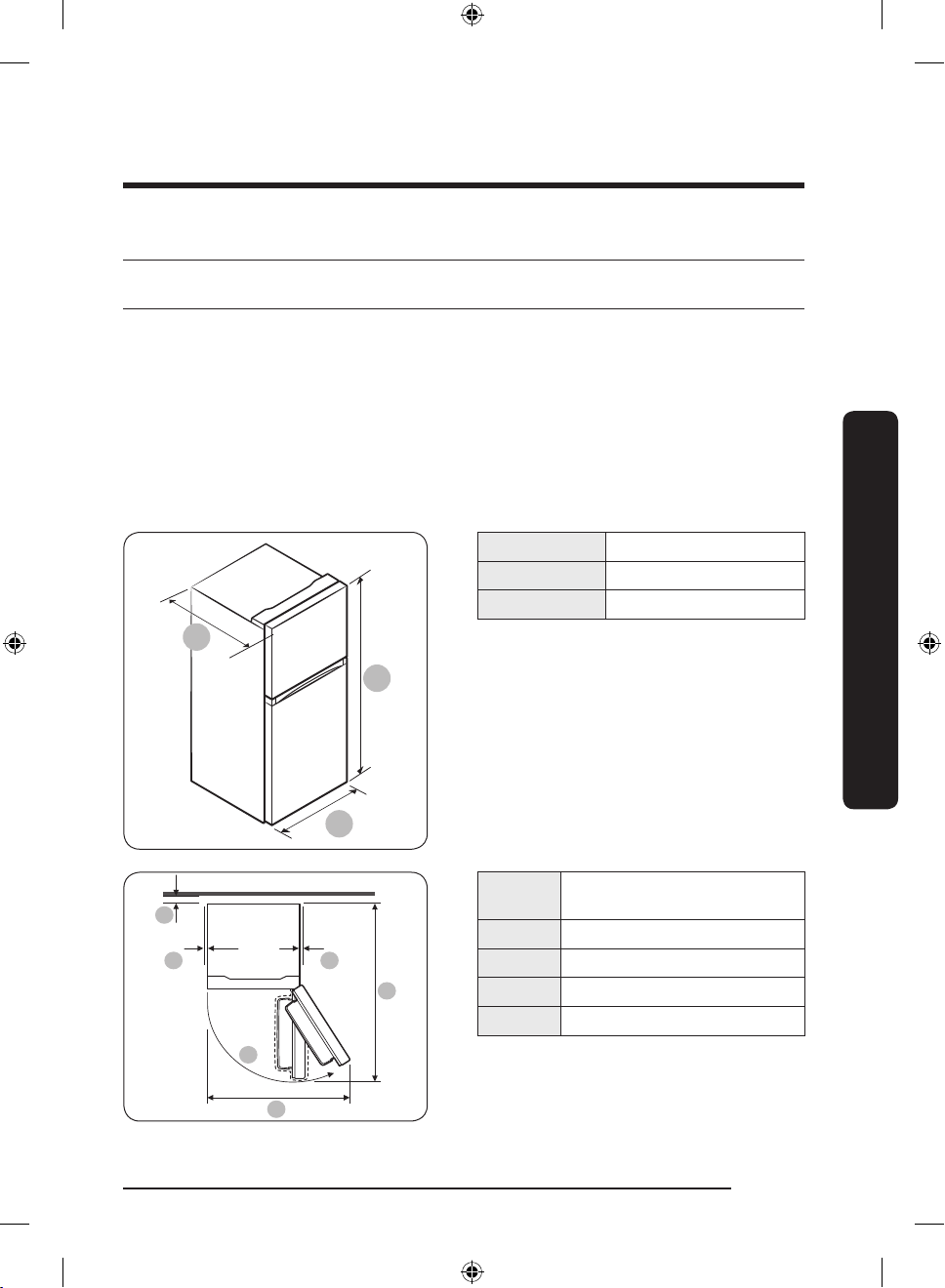
Clearance
See the pictures and table below for space requirements for installation.
Depth "A" 29 1/4” (742 mm)
Installation
Width “B” 27 5/8” (700 mm)
Height “C” 66 7/8” (1700 mm)
01
more than 2” (50 mm)
recommended
02 115˚ (Freezer) / 120˚ (Fridge)
03 at least 2” (50 mm)
04 41 5/8” (1056 mm)
05 54 3/8” (1383 mm)
Untitled-2 15 2021-07-13 6:31:44
English 15
Page 16
Installation
STEP 2 Flooring
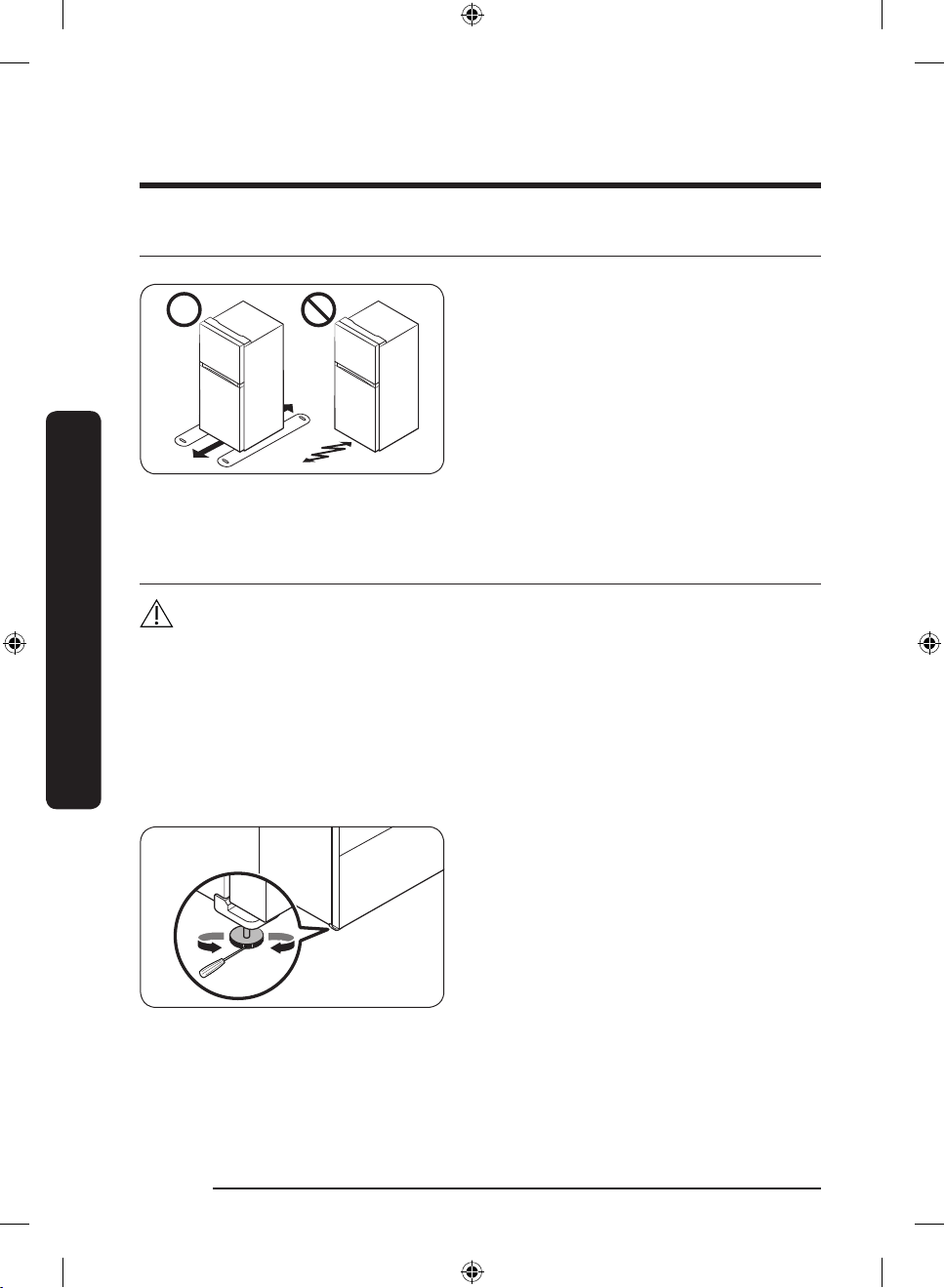
• The surface you install the refrigerator
on must support a fully loaded
refrigerator. (Approximately 200 lb or
90 kg.)
• To protect the oor, put a large piece
of cardboard along the path to the
refrigerator's nal installation location.
• Once the refrigerator is in its nal
position, do not move it unless
necessary to protect the oor. If you
have to move the refrigerator, place
thick paper or cloth such as old carpets
along the path of movement.
Installation
STEP 3 Leveling the refrigerator
CAUTION
• In all cases including door reversal, to prevent the refrigerator from tipping, make sure
the leveling leg on the door is on the oor and fully supporting the weight of the door.
• When installed, the refrigerator must be leveled on a at, solid oor. Not leveling the
refrigerator can cause damage to the refrigerator or physical injury.
• Leveling must be performed with the refrigerator empty. Make sure no food items are
inside the refrigerator.
• For safety reasons, adjust the front a little higher than the rear. Level the refrigerator
using the special screws (levelers) on the front legs. Use a at-head screwdriver to turn
the levelers.
To level the refrigerator, use a athead screwdriver to turn the leveling
leg clockwise or counterclockwise. Turn
the leveling leg clockwise to raise, and
counterclockwise to lower the height.
English16
Untitled-2 16 2021-07-13 6:31:44
Page 17
STEP 4 Install the ice maker and connect the water line (optional)
If your model supports the optional Auto Ice Maker (part type: RA-T00R63AA/AA)
installation, you can purchase and install the Auto Ice Maker separately.
• To purchase the Auto Ice Maker, visit the Samsung website (www.samsung.com) or
contact your retailer.
• To use the ice maker, you must connect the water line to it. For the ice maker to operate
properly, a water pressure of 20 - 125 psi (0.138 - 0.862 mPa) is required.
• For detailed instructions on the installation of the Auto Ice Maker, refer to the
installation manual enclosed with the Auto Ice Maker kit.
STEP 5 Initial settings
By completing the following steps, the refrigerator should be fully functioning.
1. Plug the power cord into the wall socket to turn the refrigerator on.
2. Open the door, and check if the interior light lights up.
3. Set the temperature to the coldest setting, and wait for about an hour. Then, the freezer
should be slightly chilled, and the motor should be running smoothly.
4. Wait until the refrigerator reaches the set temperature. The refrigerator is now ready
for use.
STEP 6 Final check
When installation is complete, conrm that:
• The refrigerator is plugged into an electrical outlet and grounded properly.
• The refrigerator is installed on a at, level surface with a reasonable clearance from the
wall or the cabinet.
• The refrigerator is level and is sitting rmly on the oor.
• The door opens and closes freely, and the interior light turns on automatically when you
open the door.
Installation
English 17
Untitled-2 17 2021-07-13 6:31:44
Page 18
Operations
Operations
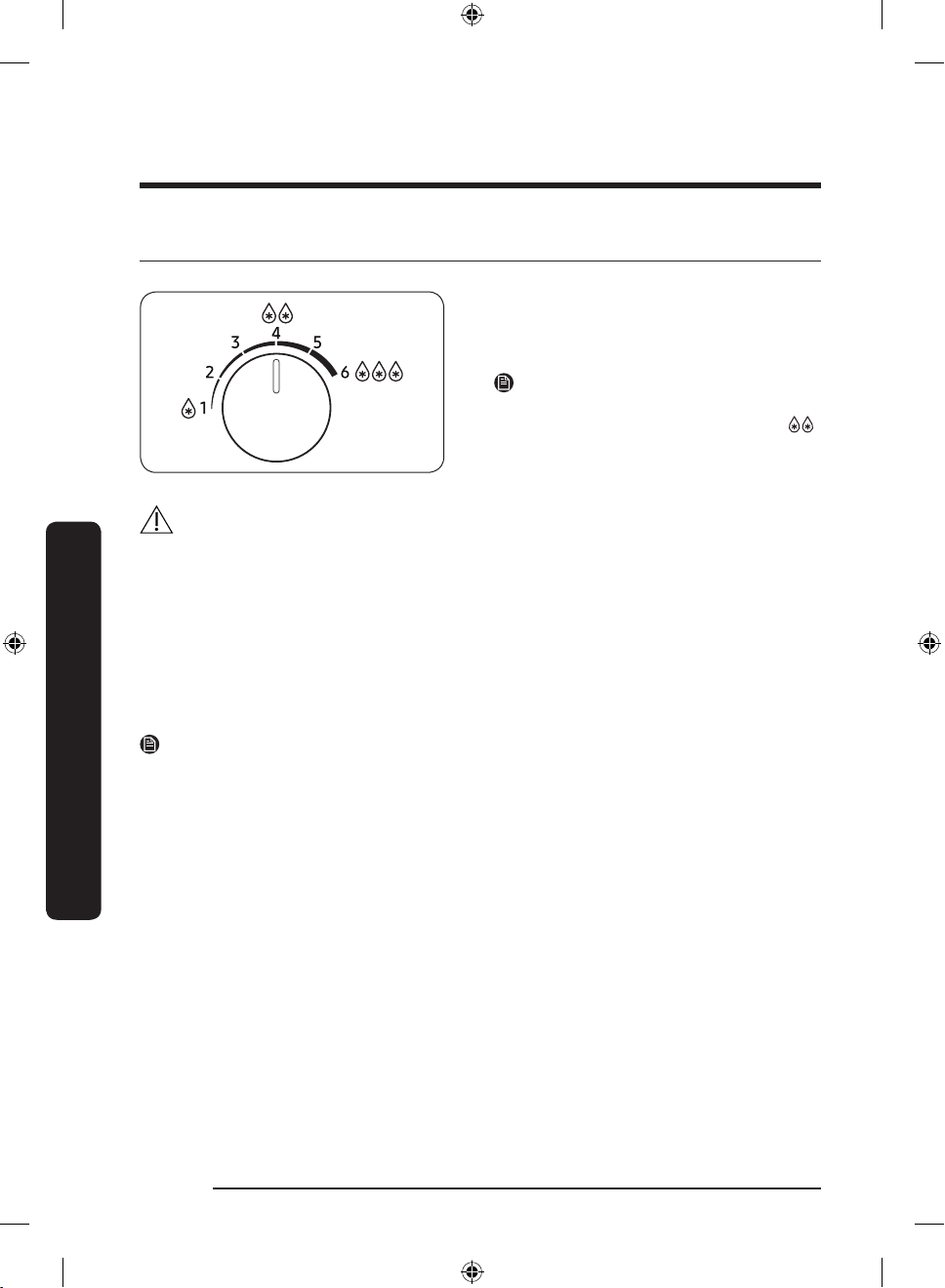
Temperature controller
• Turn the dial left and right to set the
desired temperature.
• Turn the dial left to raise, and turn it
right to lower the temperature.
NOTE
To ensure optimal performance, we
recommend setting the temperature to .
CAUTION
• Do not set the fridge temperature higher (1-2) when the room temperature is lower
than 50 °F (10 °C), and lower (4-6) when the temperature is higher than 95 °F (35 °C). It
may cause problems with the cooling performance.
Sabbath mode
The Sabbath mode stays active for 85 hours once it is activated.
• To activate or deactivate the Sabbath mode, turn the dial in following order: 1 > 4 > 2 >
5 > 1. You must turn the dial within a second for each level.
• When you activate the Sabbath mode, the interior lamps do not turn on. The interior
lamps will turn on again when you deactivate the Sabbath mode.
NOTE
Even after the refrigerator powers off and restarts, the Sabbath mode remains active. To
exit the Sabbath mode, you must deactivate it manually.
English18
Untitled-2 18 2021-07-13 6:31:44
Page 19
Special features
A
Your refrigerator and its special functions may differ from the images and functions
presented in this section depending on your model and country.
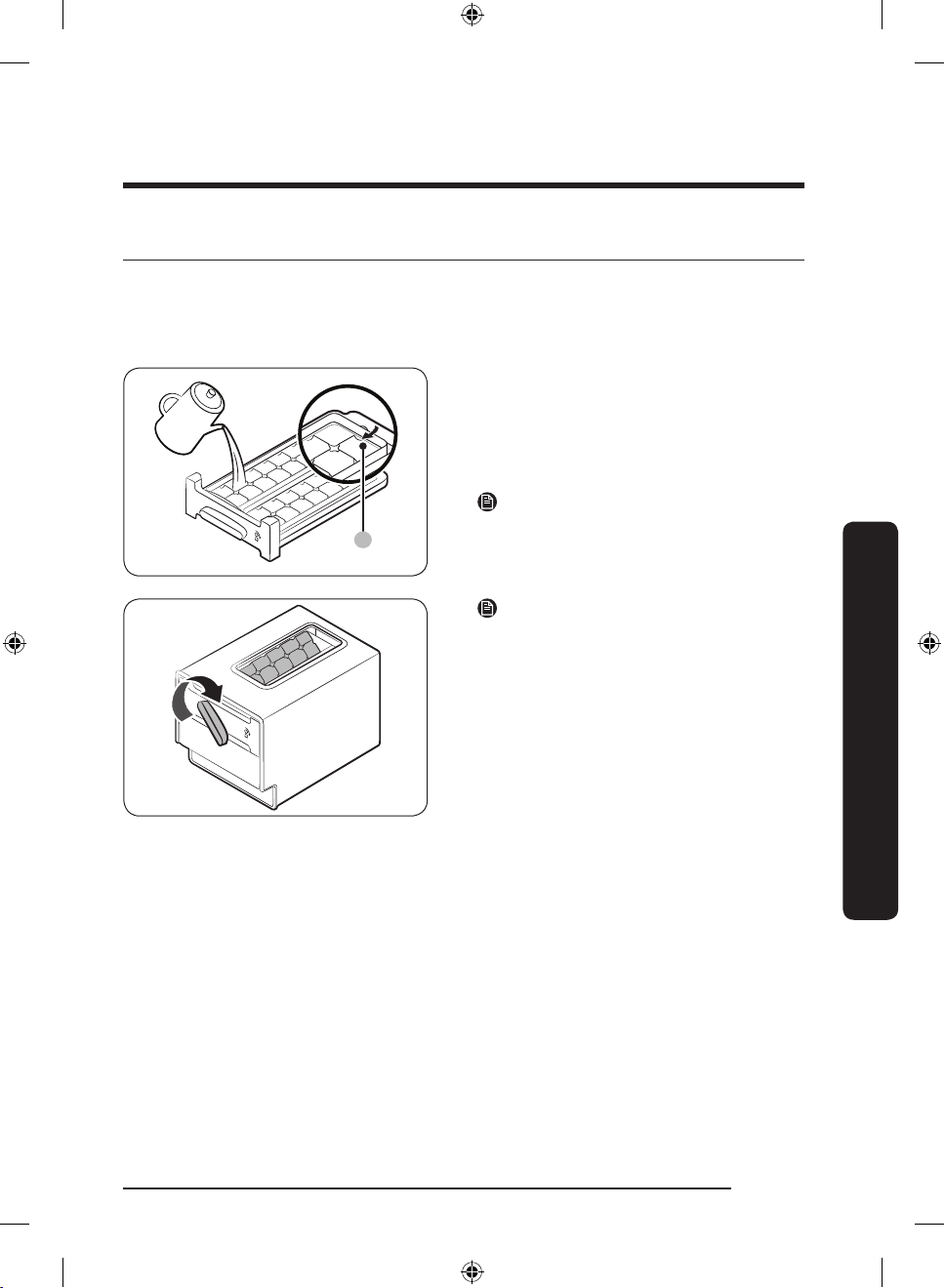
Twist Ice Maker (applicable models only)
1. Open the freezer door, and slide open
the ice tray.
2. Fill the tray with water up to the
maximum level (A) marked on the inner
rear of the tray.
3. Slide the tray back into position.
NOTE
The ice making time depends on your
temperature settings.
NOTE
• Make sure the ice bucket is in place
under the ice tray.
• To dispense the ice cubes, turn the
handle of the bin to the right to empty
half of the ice cubes into the bin. Then,
turn it to the left to empty the other
half.
• Take out the bin by slightly twisting and
pulling to the front.
Operations
English 19
Untitled-2 19 2021-07-13 6:31:44
Page 20
Operations
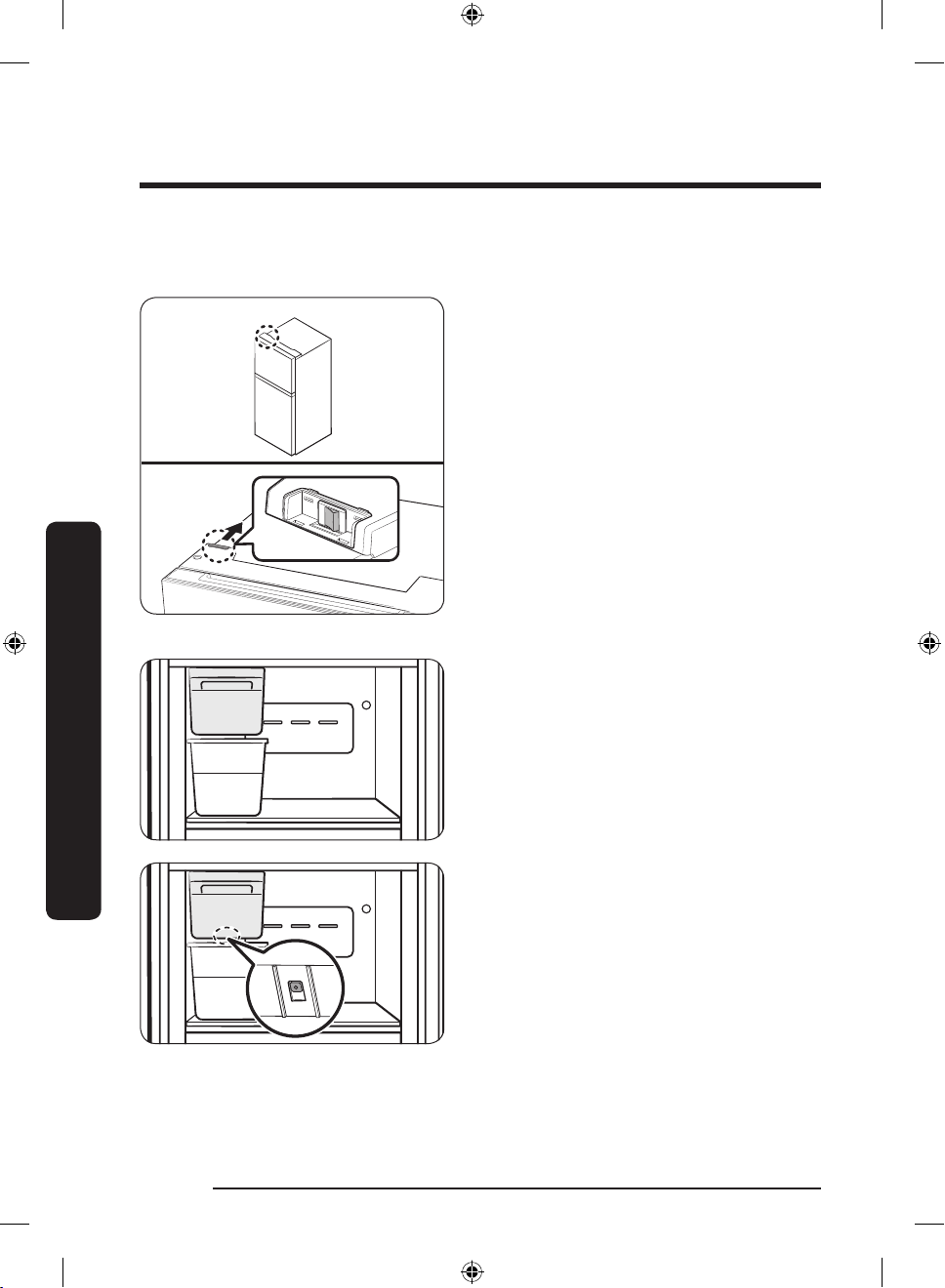
Auto Ice Maker (applicable models only)
The refrigerator has an ice maker that automatically dispenses ice.
Turning the Auto Ice Maker on or off
You can turn the Auto Ice Maker on or
off with the switch on the top of the
refrigerator.
Operations
For rst-time use
• Let the ice maker make ice for 1-2 days.
• Discard the rst 1-2 buckets of ice to
remove impurities in the water supply
system.
Diagnosis
If the Auto Ice Maker does not make ice,
remove the ice bucket and press Test
button to check if the Auto Ice Maker
operates properly.
English20
Untitled-2 20 2021-07-13 6:31:45
Page 21
CAUTION
• When the Auto Ice Maker is on, the refrigerator will keep making ice even when you
remove the ice bucket. Make sure to turn the Auto Ice Maker off, when you are not
going to use it.
• When the refrigerator recovers power after a power failure, the ice bucket may
contain a mix of melted and jammed ice cubes, which can prevent the ice maker from
working properly. To prevent this, make sure to empty the ice bucket before using the
refrigerator.
• Do not put ngers or any objects into the ice maker. This can cause physical injury or
property damage.
• Due to sublimation, ice stored in the freezer for a long time gets smaller and then forms
large ice chunks. Therefore, if it will be a long time before you use ice, turn the ice
maker off.
NOTE
If you are not using the Auto Ice Maker, you can remove the ice bucket for more storage
space.
Operations
English 21
Untitled-2 21 2021-07-13 6:31:45
Page 22
Maintenance
Door reversal (applicable models only)
Reversing the door must be performed by Samsung-approved servicing personnel at your
own expense because this kind of servicing is not covered by the Warranty.
WARNING
• Reversing failure or property damage that may occur by unapproved agencies will not
be covered by the Warranty.
• Make sure that the refrigerator is disconnected from the power source before doing the
reversal.
• You must wait for at least an hour after door reversing is complete. This is to prevent
electric shock that could occur.
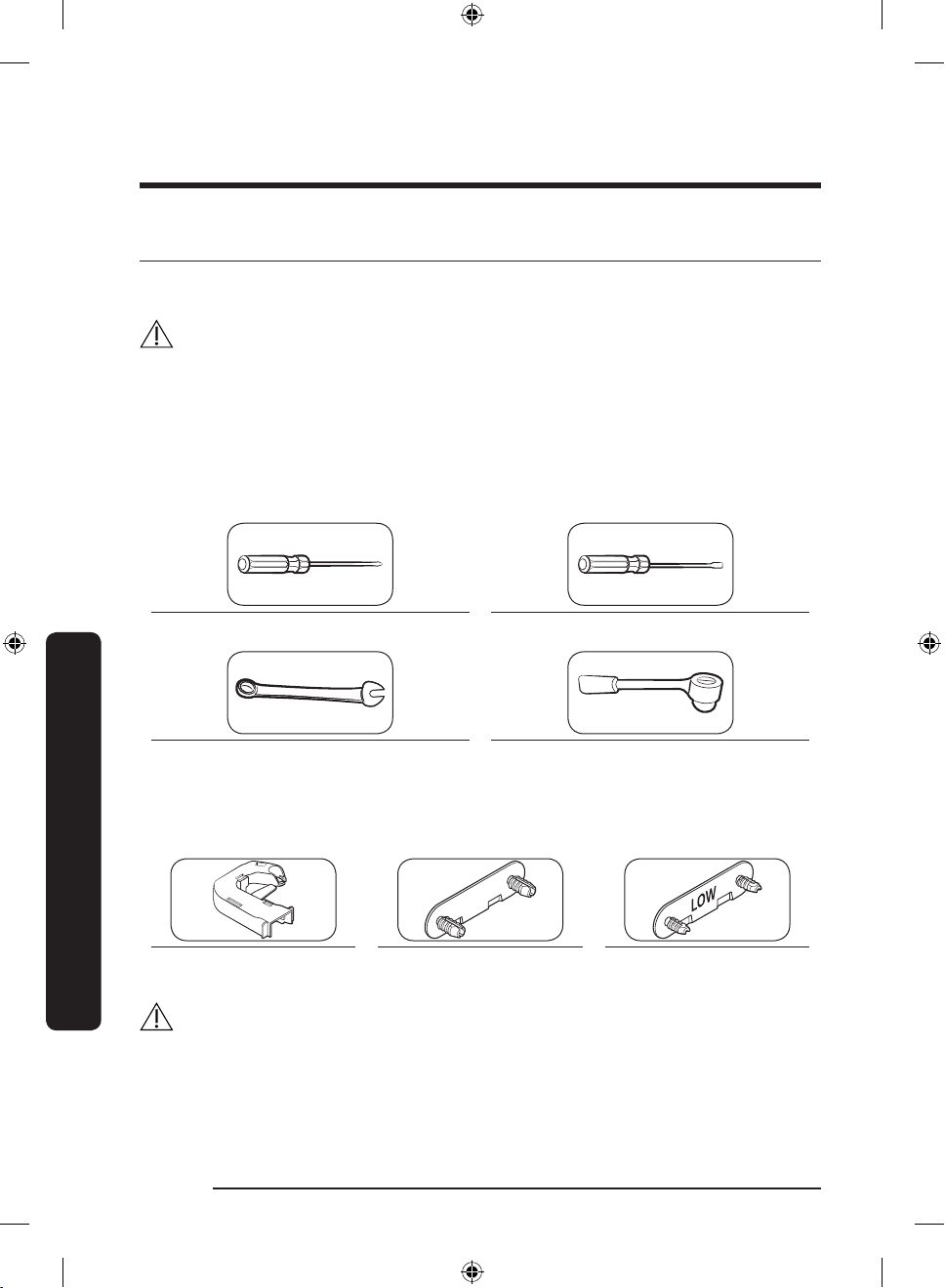
Tools required (not provided)
Phillips screwdriver Flat-head screwdriver
Maintenance
11 mm spanner
(for hinge shaft)
8 mm socket wrench
(for bolts)
Accessories
Hinge Cover (L) Middle-Hinge Screw cap Bottom-Hinge Screw cap
CAUTION
Throughout the entire reversing procedure, keep all the small parts (screws, caps, etc.) of
the refrigerator away from children or infants for safety reasons.
English22
Untitled-2 22 2021-07-13 6:31:45
Page 23
Step-by-step instructions
A
A
A
A
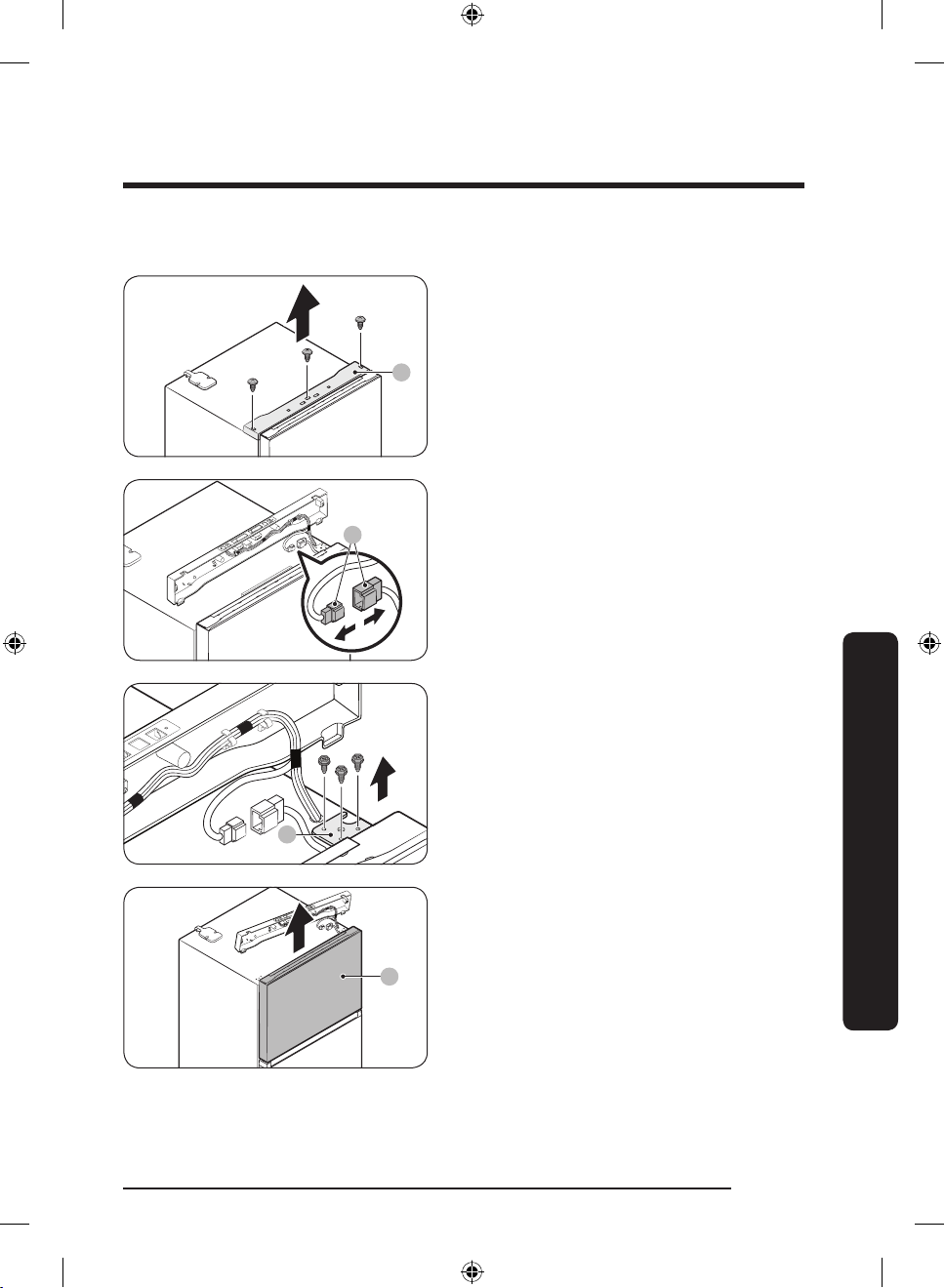
1. Use a Phillips screwdriver to remove the
screws on the top table (A). Then, gently
pull out the top table (A).
2. Decouple the wire connectors (A).
3. Remove the screws fastening the top
hinge (A).
Maintenance
4. Gently lift the freezer door (A) to
remove it.
Untitled-2 23 2021-07-13 6:31:45
English 23
Page 24
Maintenance
A
A
A
A
B
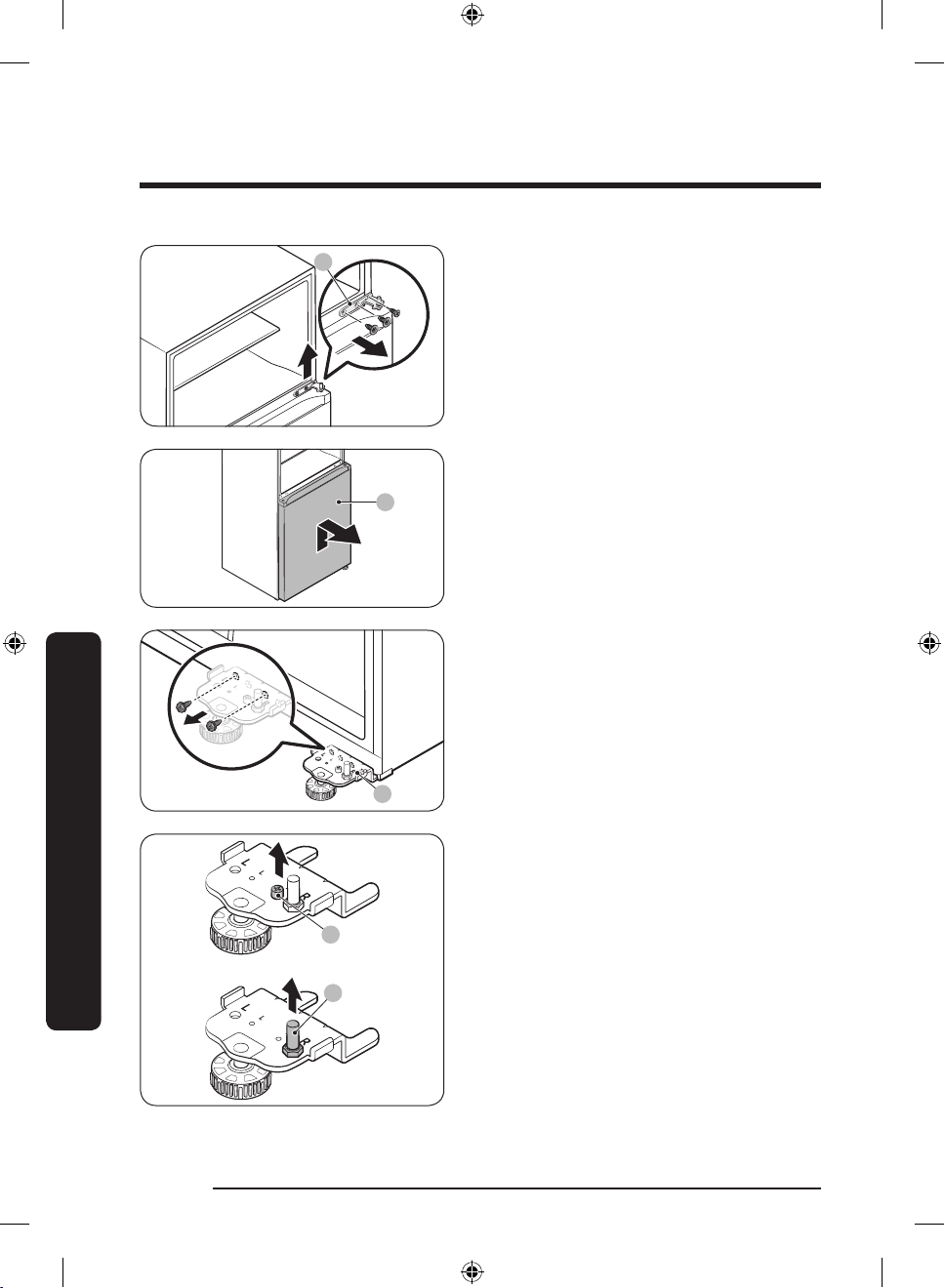
5. Use a screwdriver to remove the screws
and then detach the middle hinge (A).
6. Gently lift the fridge door (A) to remove
it from the bottom hinge.
7. Use a screwdriver to remove the screws
fastening the bottom hinge (A).
Maintenance
8. Use a screwdriver to remove the hinge
bolt (A). Then, use a spanner to remove
the hinge shaft (B).
English24
Untitled-2 24 2021-07-13 6:31:46
Page 25
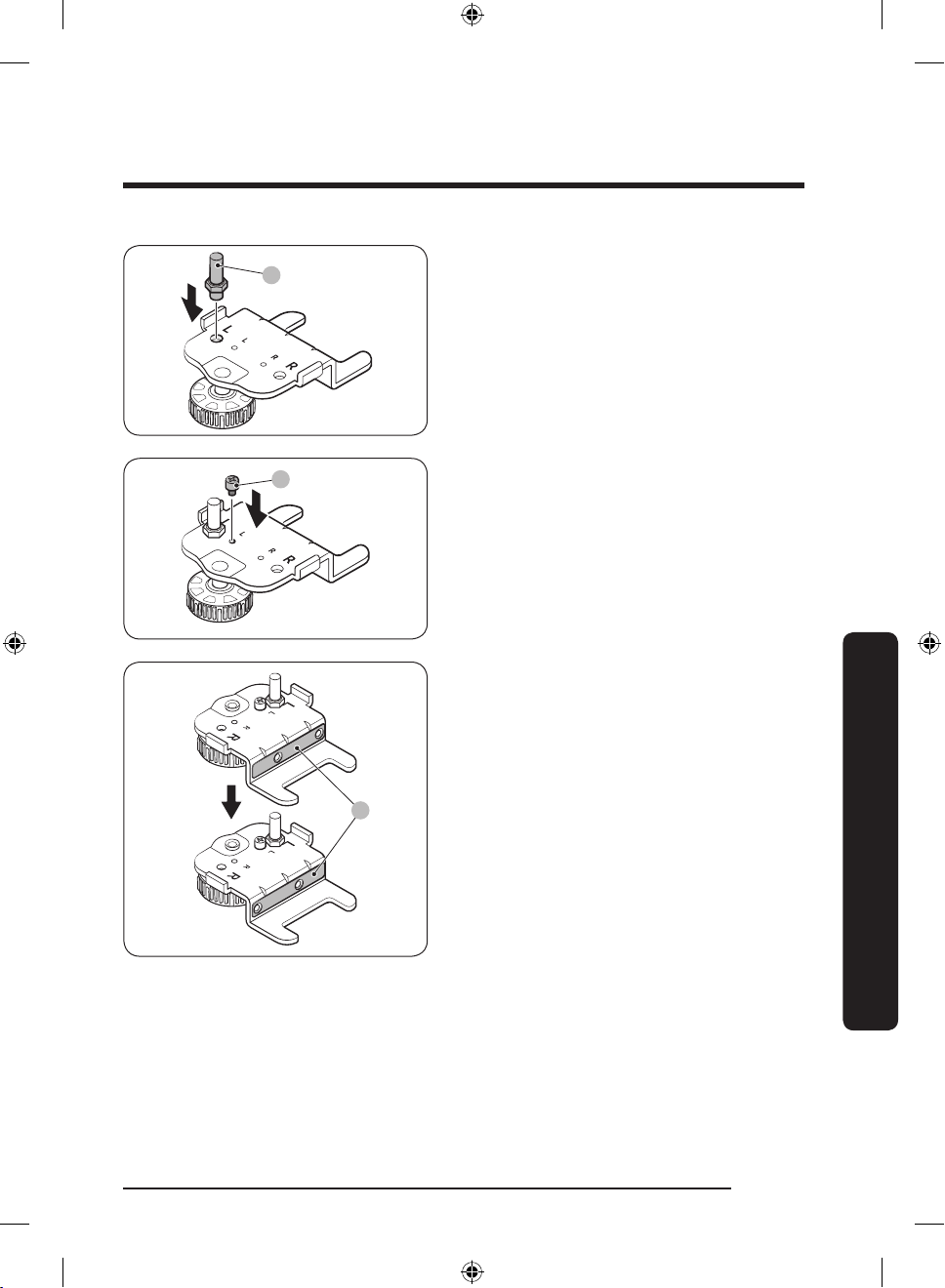
A
9. Insert the hinge shaft (A) into the
A
A
leftmost hole on the bottom hinge plate
as shown in the gure, and then tighten
it until it is securely in place.
10. Insert the hinge bolt (A) into the hole
next to the hinge shaft as shown in
the gure, and then tighten it until it is
securely in place.
11. Flip the hinge shim (A) 180 degrees as
shown in the gure.
Maintenance
English 25
Untitled-2 25 2021-07-13 6:31:46
Page 26
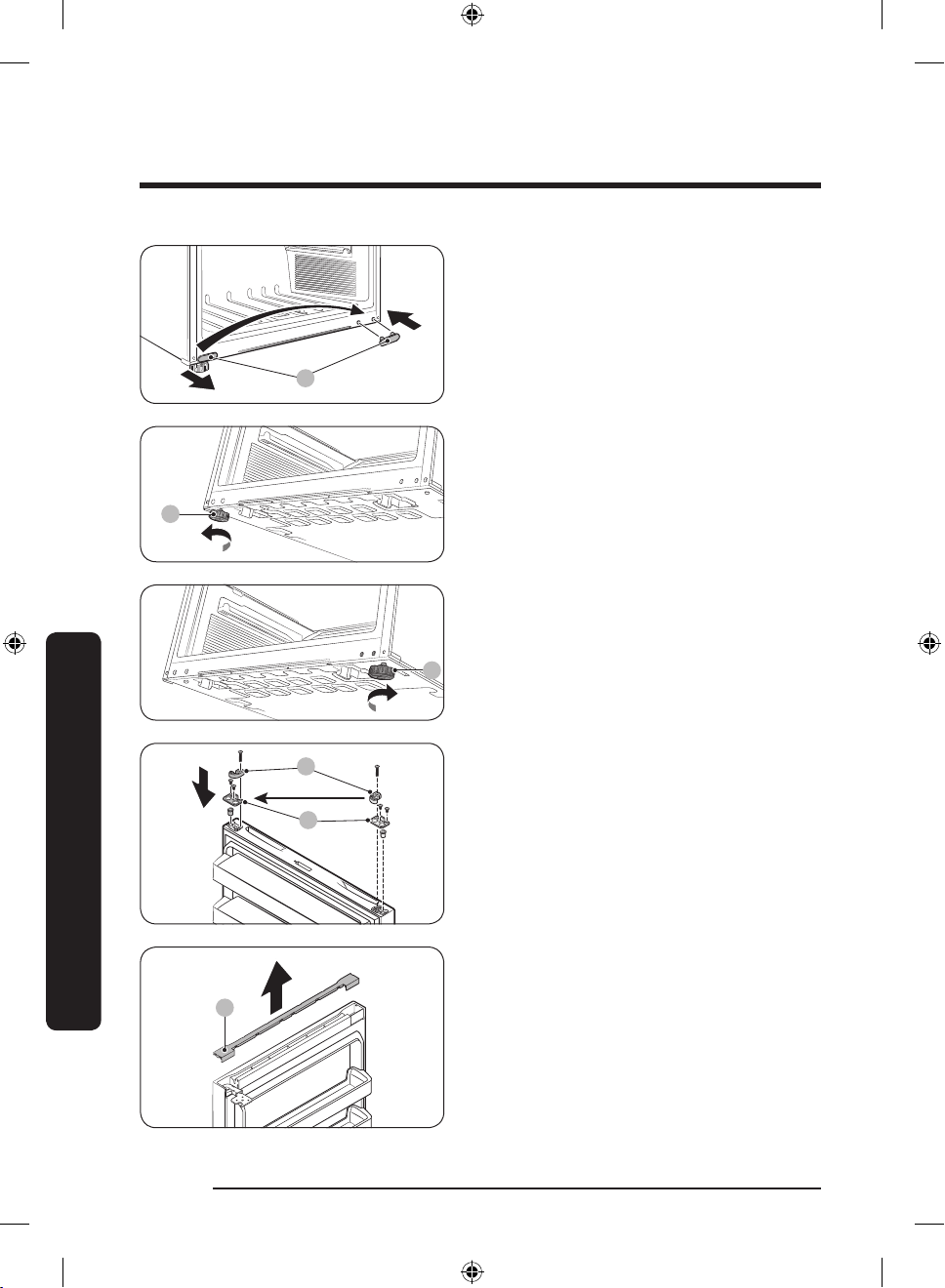
Maintenance
A
A
A
A
B
A
12. Use a at-head screwdriver to remove
the bottom-hinge screw cap (A), and
then reinsert it on the opposite side.
13. Remove the leveling leg (A) attached to
the left side of the main unit.
14. Attach the leveling leg (A) to the
opposite side.
15. Remove the auto closer (A) and the
Maintenance
stopper (B) from the bottom of the
fridge/freezer doors. Then, reinsert
them on the opposite side of the fridge/
freezer doors as shown in the gure.
16. Pull up to remove the bar cover (A) on
the top of the freezer door.
Untitled-2 26 2021-07-13 6:31:46
English26
Page 27
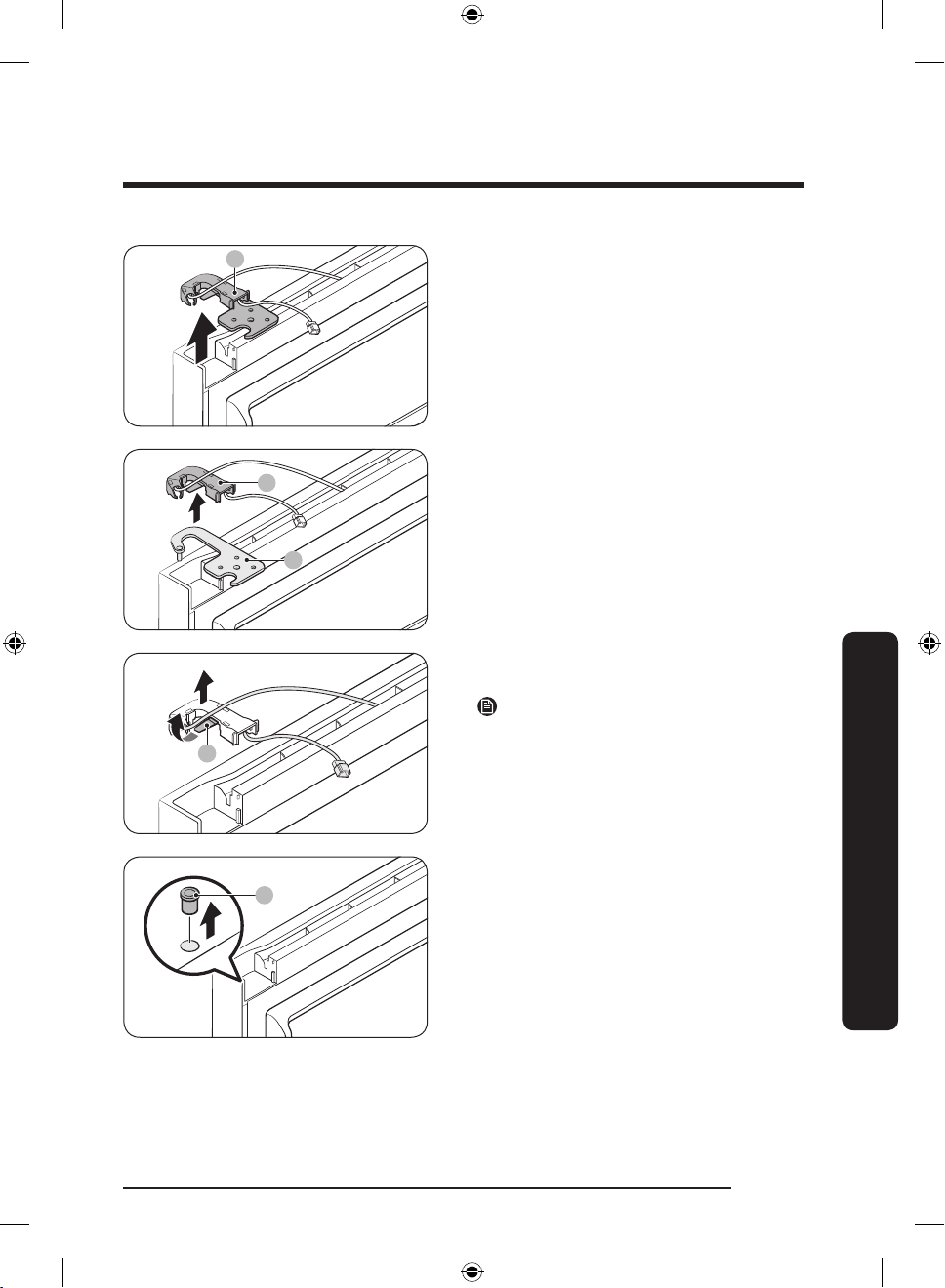
A
17. Remove the top hinge (A) with its cover.
B
A
A
A
18. Separate the top hinge (A) and the hinge
cover (B).
19. Take out the wires from the hinge cover
(A).
NOTE
Keep the detached hinge cover in a safe
place for later use.
Maintenance
20. Use a at-head screwdriver to remove
the hinge grommet (A).
English 27
Untitled-2 27 2021-07-13 6:31:47
Page 28
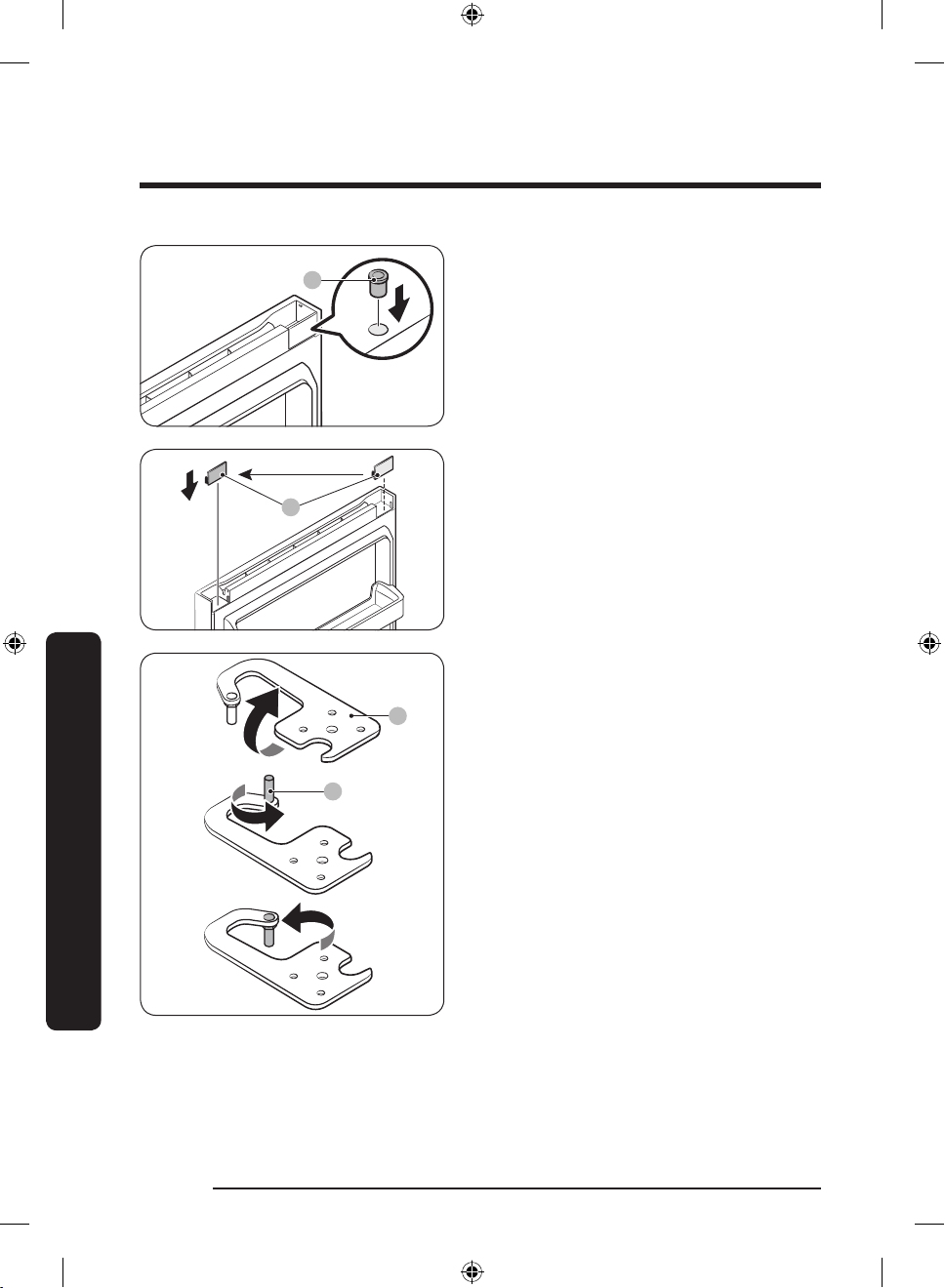
Maintenance
A
A
A
B
21. Reinsert the hinge grommet (A) on the
opposite side.
22. Remove the cap spacer (A), and then
reinsert it on the opposite side.
23. Flip the top hinge (A) 180 degrees.
Remove the hinge shaft (B), and then
reattach it facing down.
Maintenance
English28
Untitled-2 28 2021-07-13 6:31:47
Page 29
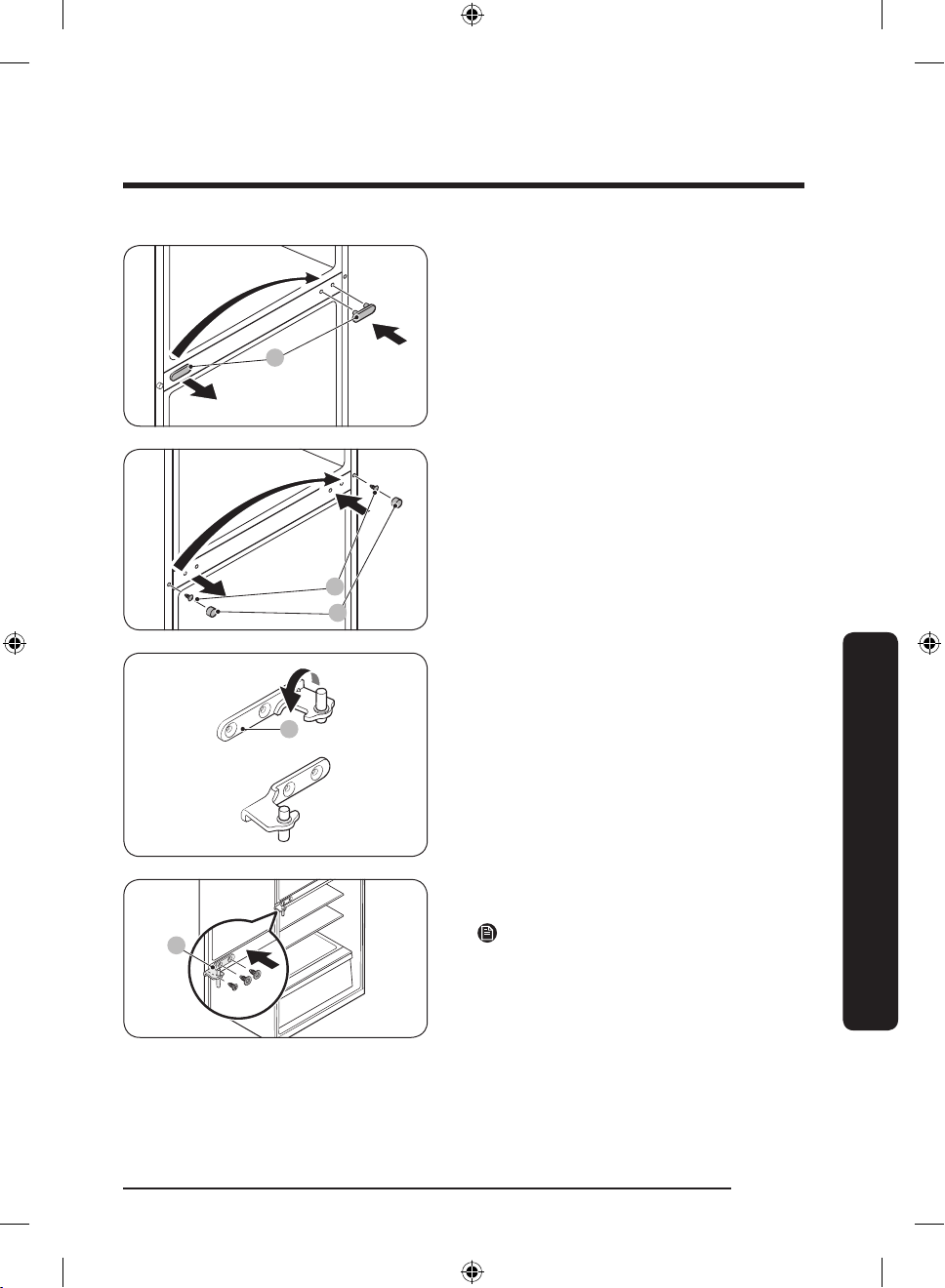
A
24. Use a at-head screwdriver to remove
A
B
A
A
the middle-hinge screw cap (A), and
then reinsert it on the opposite side.
25. Use the at-head screwdriver to remove
the ange-screw cap (A) to reveal
the ange screw (B). Use a Phillips
screwdriver to remove the ange screw
(B), and then tighten it on the opposite
side. Finally, close the ange-screw cap
(A) on the opposite side.
26. Flip the middle hinge (A) 180 degrees
as shown.
Maintenance
27. Fasten the middle hinge (A) on the
opposite side.
NOTE
When you reverse the door to open from
the right, you must attach the middle hinge
prior to the bottom hinge.
Untitled-2 29 2021-07-13 6:31:47
English 29
Page 30
Maintenance
A B
A
A
A
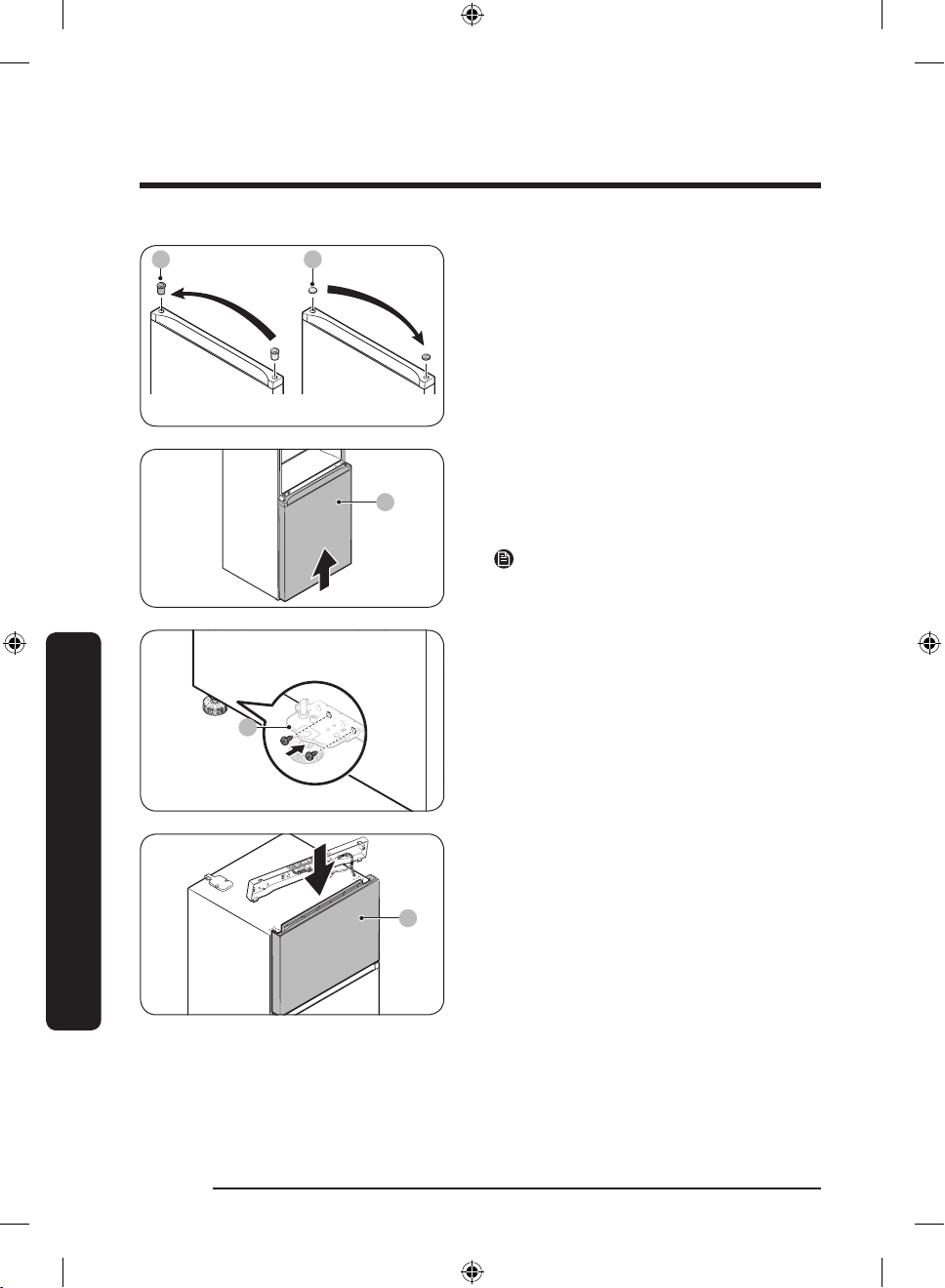
28. Use the at-head screwdriver to remove
both the hinge grommet (A) on one side
and the hinge-hole cap (B) on the other
side. Reinsert them on their respective
opposite side.
29. Align the middle hinge shaft to the
hinge grommet on the top of the fridge
door (A). Then, lift the door and hold
it so the shaft is inserted into the
grommet.
NOTE
You need two people to assemble the
fridge door back.
30. While one person holding the fridge
door, fasten the bottom hinge (A).
Maintenance
English30
Untitled-2 30 2021-07-13 6:31:47
31. Put the freezer door (A) on the middle
hinge.
Page 31
A
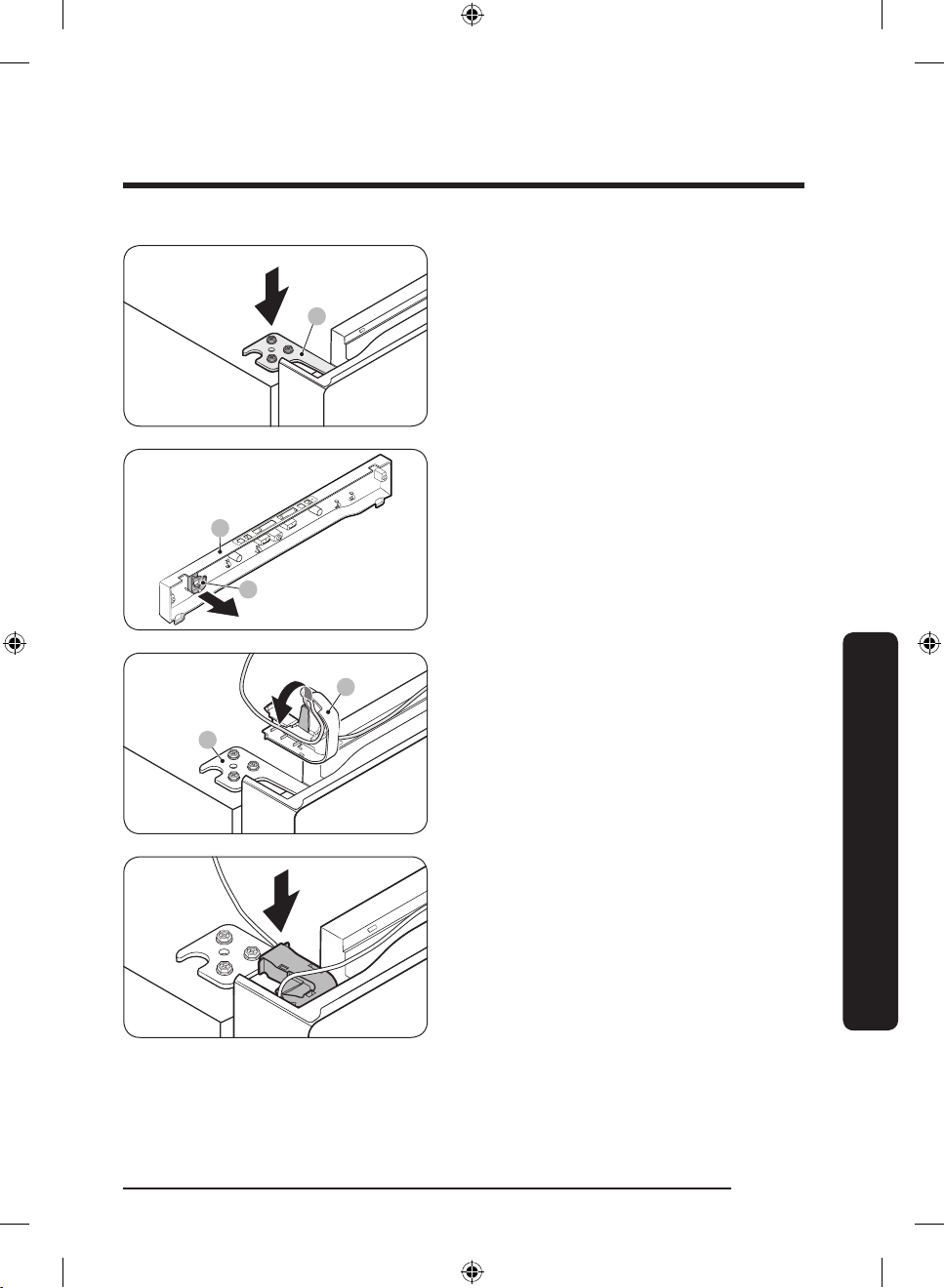
32. Insert and fasten the top hinge (A) on
B
A
A
B
the opposite side.
33. Detach the hinge cover (A) from the top
table (B).
34. Arrange the door wire in the hinge
cover (A) before placing the hinge cover
(A) onto the top hinge (B).
Maintenance
Untitled-2 31 2021-07-13 6:31:48
English 31
Page 32
Maintenance
A
A
B
A
A
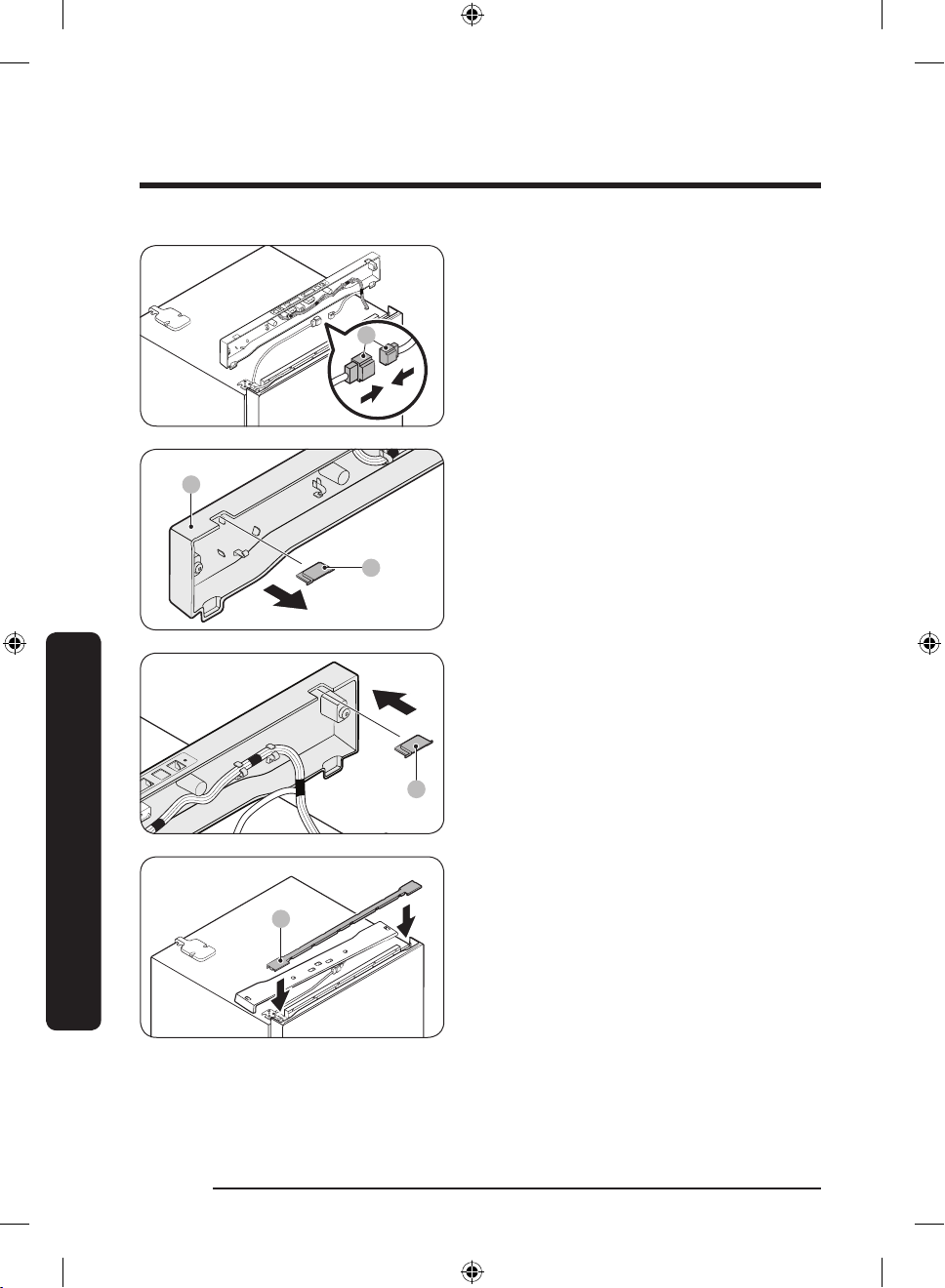
35. Connect the wire connectors (A).
36. Remove the hinge hole cap (A) from the
top table (B), and then reinsert it on the
opposite side.
Maintenance
37. Insert the bar cover (A).
English32
Untitled-2 32 2021-07-13 6:31:48
Page 33
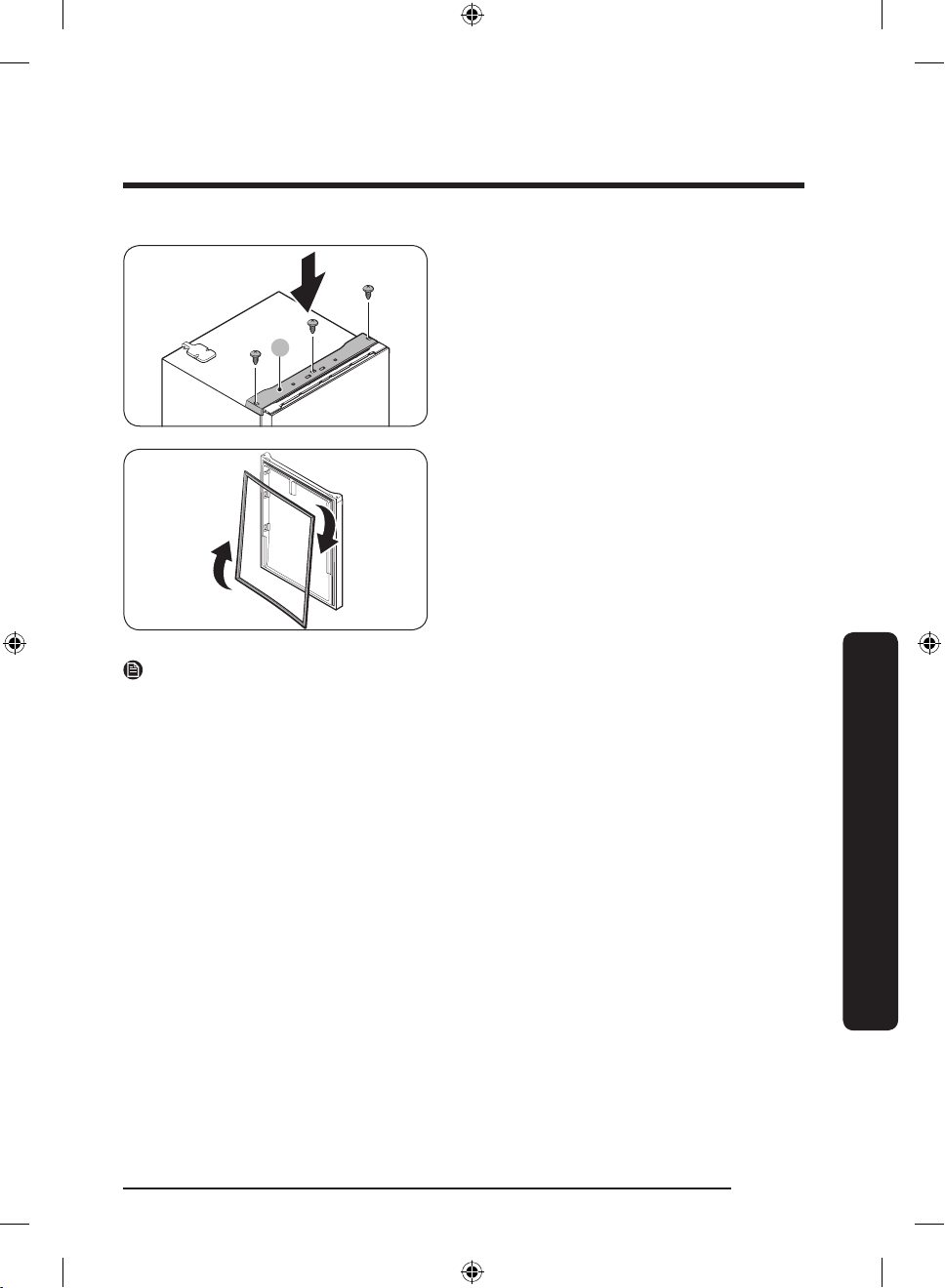
A
38. Insert the top table (A), and then x
it rmly to the refrigerator using the
screws (x3).
39. Remove the fridge door and freezer
door gaskets. Turn them clockwise by
180 degrees, and then reattach them.
NOTE
In the future, you might want to return the doors to their initial position (before the doors
were reversed). In that case, refer to the instructions on the previous pages, but switch the
doors, hinges, and covers back to their initial positions.
Maintenance
English 33
Untitled-2 33 2021-07-13 6:31:48
Page 34
Maintenance
Handle and care
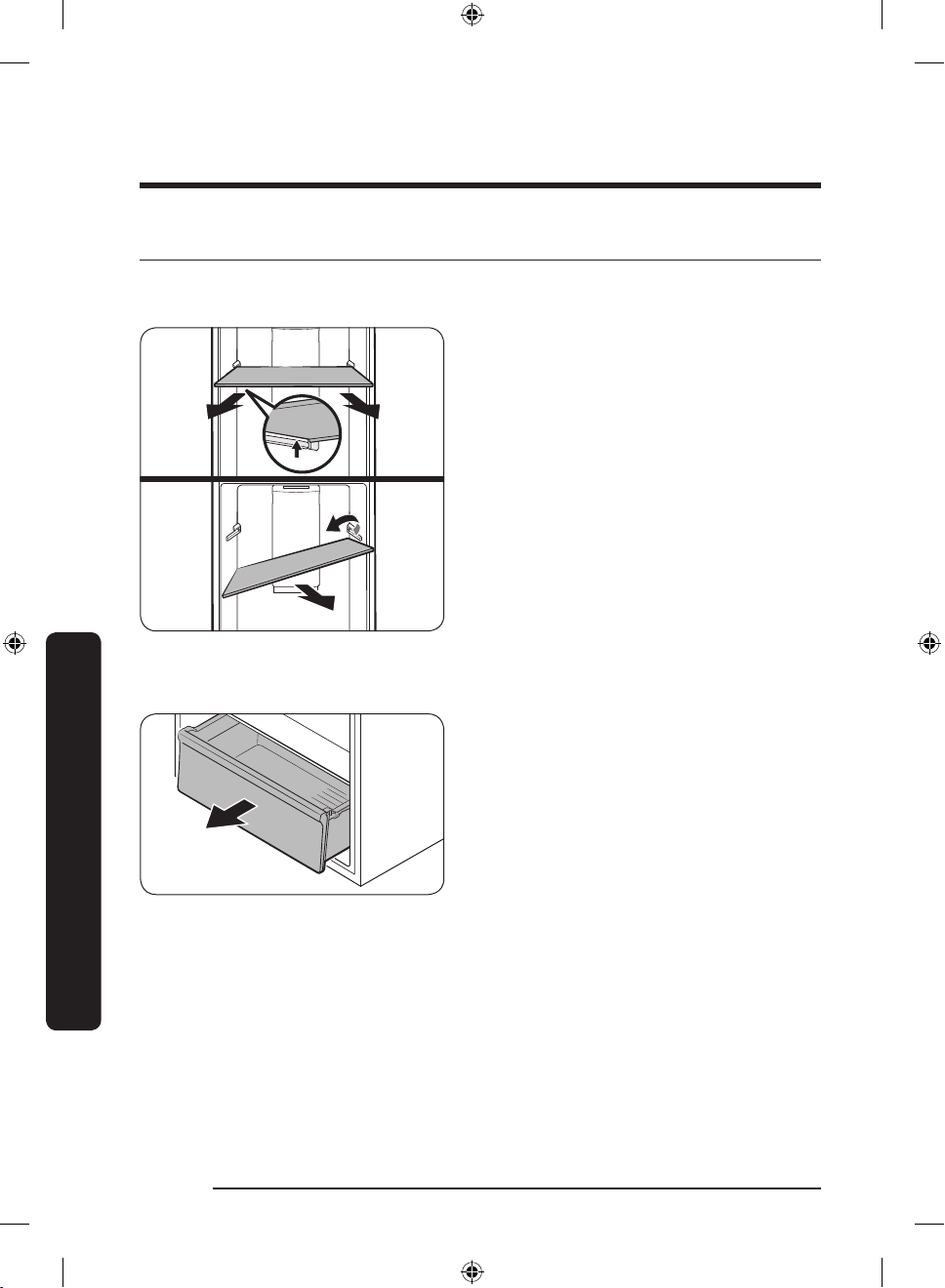
Shelves (fridge/freezer)
Vegetable drawers
To remove the shelf, hold it with both
hands and lift it to release it from the rear
hook. Then, tilt it on one side and pull it
out.
Gently lift up the front of the drawer, and
then slide it out.
Maintenance
English34
Untitled-2 34 2021-07-13 6:31:48
Page 35
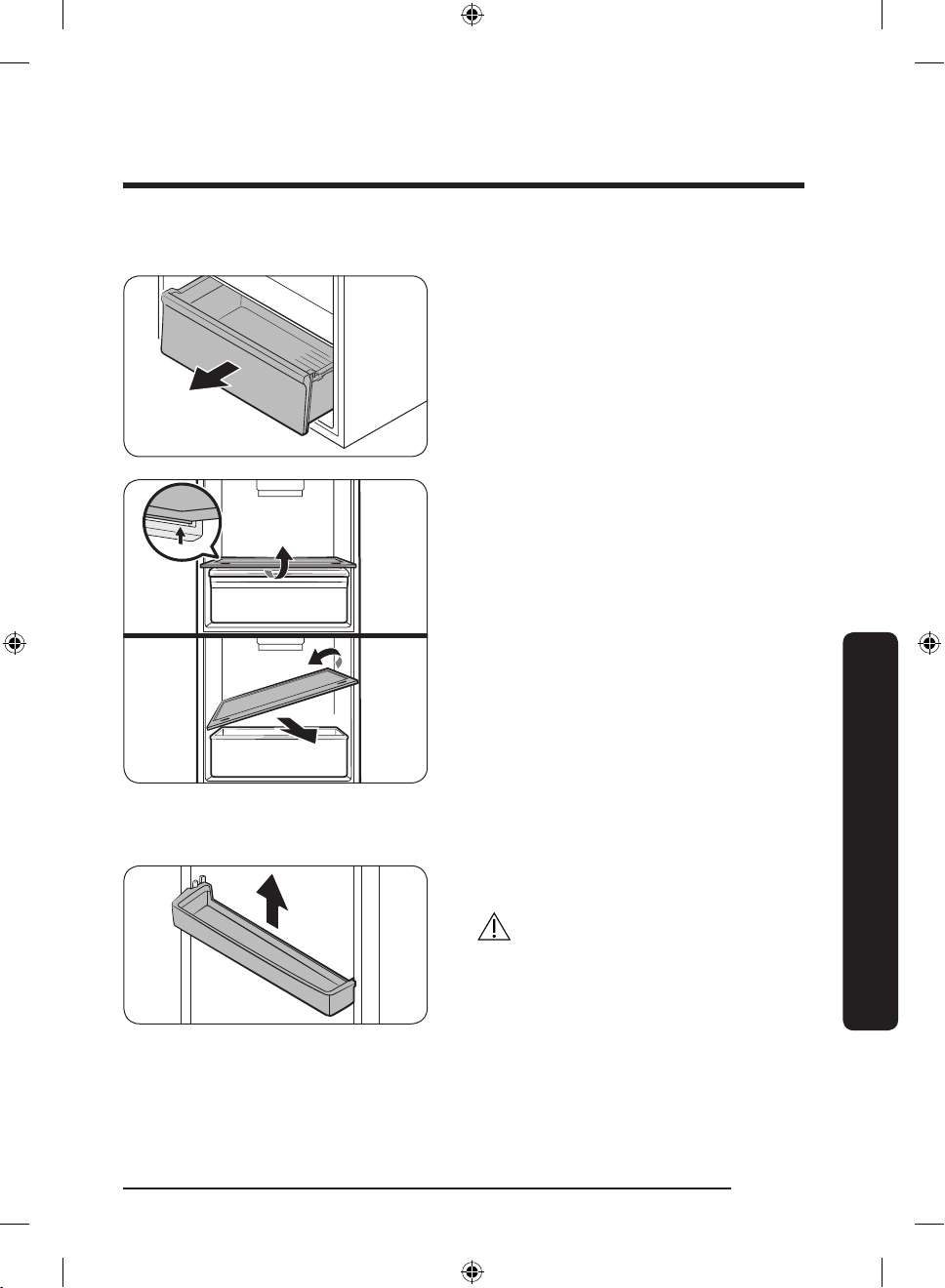
Vegetable shelf
1. Gently lift up the front of the drawer,
and then slide it out.
2. Hold the vegetable shelf with both
hands and lift it to release it from the
rear hook. Then, tilt it on one side and
pull it out.
Maintenance
Door bins
Lift up the door bin slightly, and then pull
it out .
CAUTION
To prevent accidents, empty the door bins
before removing.
English 35
Untitled-2 35 2021-07-13 6:31:49
Page 36
Maintenance
Cleaning
WARNING
• Do not use benzene, thinner, home/car detergent, or Clorox™ to clean your refrigerator.
They may damage the surface of the refrigerator and cause a re.
• Do not spray water onto the refrigerator. This may cause electric shock.
Regularly use a dry cloth to remove all foreign substances such as dust or water from the
power plug terminals and contact points.
1. Unplug the power cord of the refrigerator.
2. Use a moistened, soft, lint-free cloth or paper towel to clean the refrigerator’s interior
and exterior.
3. When done, use a dry cloth or paper towel to dry the refrigerator well.
4. Plug in the power cord of the refrigerator to turn the refrigerator on.
NOTE
If you have removed any removable parts such as shelves for cleaning, refer to the overall
layout in the Refrigerator at a glance section to make sure you have re-inserted them
correctly.
Replacement
LED Lamps
To replace the lamps of the refrigerator, contact a local Samsung service center.
Maintenance
Untitled-2 36 2021-07-13 6:31:49
WARNING
• The lamps are not user-serviceable. Do not attempt to replace a lamp yourself. This can
cause electric shock.
English36
Page 37
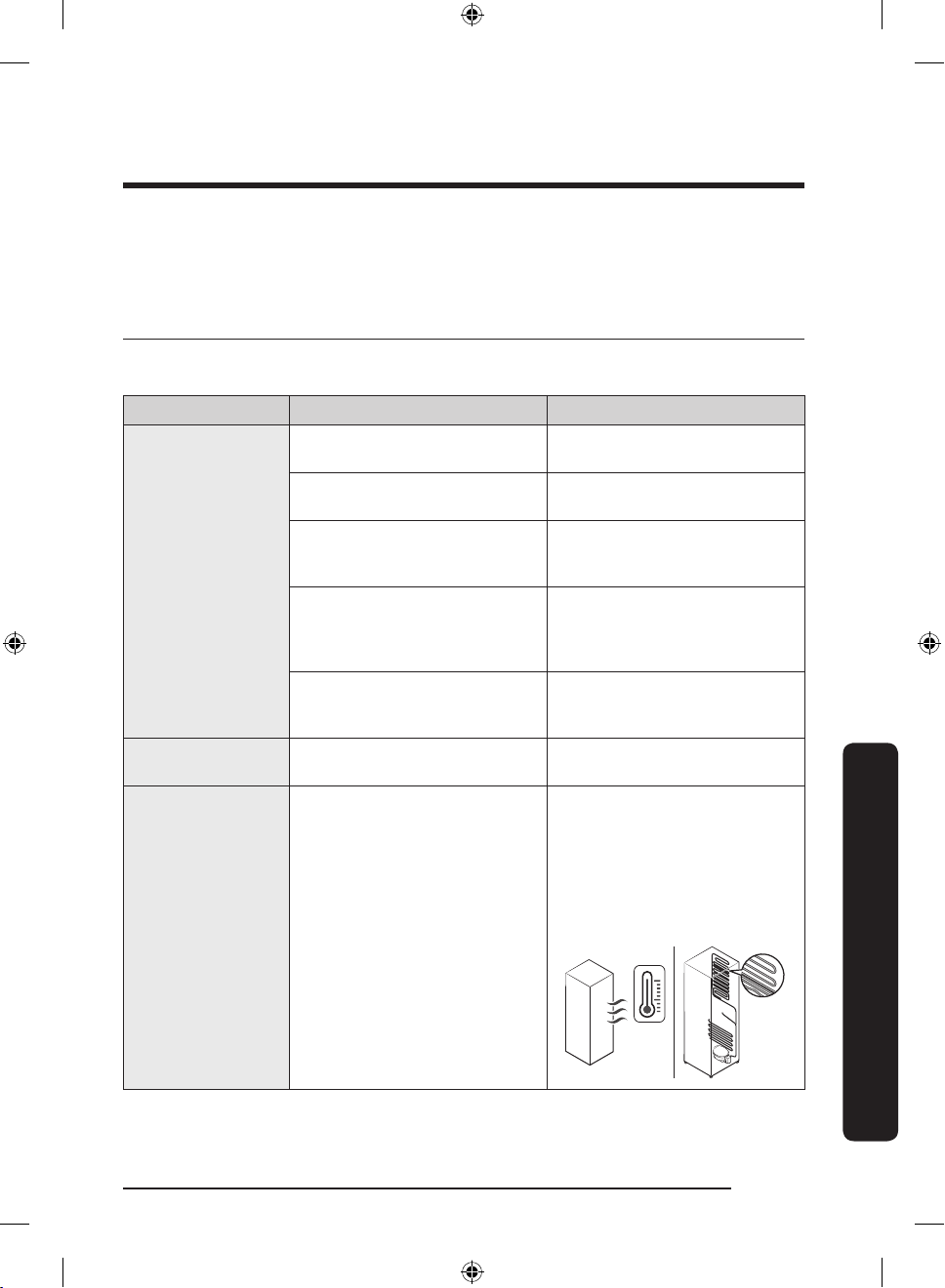
Troubleshooting
If you encounter a problem with the refrigerator, rst check the tables starting below,
and then try the suggested solutions. If none of the suggested solutions resolve your
problem, please visit our website at www.samsung.com or call Samsung Customer Care at
1-800-SAMSUNG (726-7864).
General
Temperature
Symptom Possible causes Solution
Fridge/freezer does
not operate.
Fridge/freezer
temperature is
warm.
Fridge/freezer is
over-cooling.
Interior wall is hot.
• Power cord is not plugged in
properly.
• Temperature control is not
set correctly.
• Refrigerator is located near
a heat source or in direct
sunlight.
• Not enough clearance
between refrigerator and
sides/rear.
• The refrigerator is
overloaded. Food is blocking
the refrigerator vents.
• Temperature control is not
set correctly.
• Refrigerator has heat-proof
piping in the interior wall.
• Properly plug in the power
cord.
• Set the temperature lower.
• Keep the refrigerator away
from direct sunlight or a
heat source.
• We recommend that the gap
between the refrigerator and
nearby walls (or cabinets) is
more than 2”.
• Do not overload the
refrigerator. Do not allow
food to block ventilation.
• Set the temperature higher.
• To prevent condensation
from forming, the
refrigerator has heat-proof
piping in the front corners.
If the ambient temperature
rises, this equipment may
not work effectively. This is
not a system failure.
Troubleshooting
English 37
Untitled-2 37 2021-07-13 6:31:49
Page 38
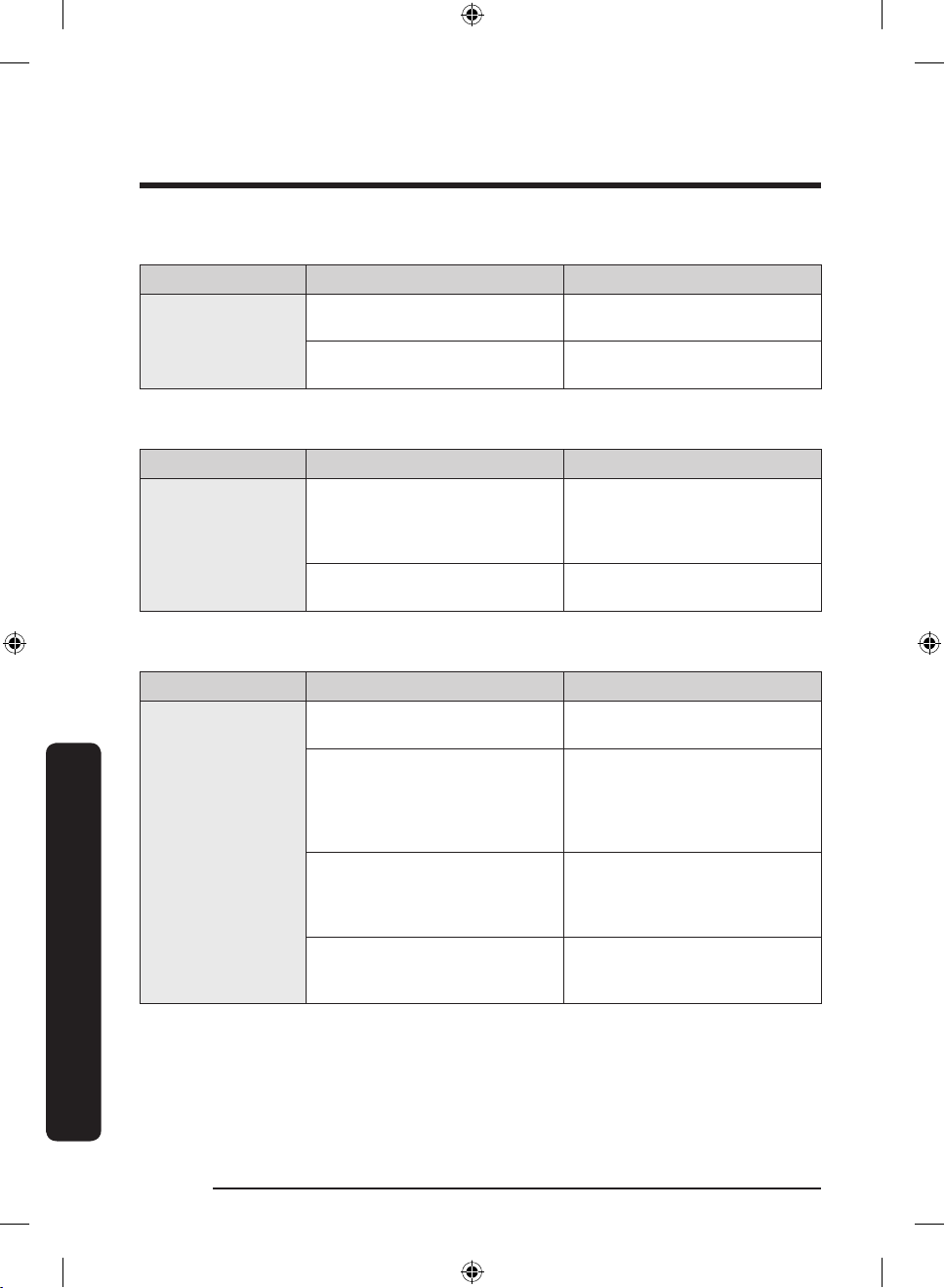
Troubleshooting
Troubleshooting
Odors
Symptom Possible causes Solution
Refrigerator has
odors.
• Spoiled food.
• Food with strong odors.
Condensation
Symptom Possible causes Solution
Condensation forms
on the interior
walls.
• If door is left open, moisture
enters the refrigerator.
• Food with high moisture
content.
Water/ice (Auto Ice Maker models only)
Symptom Possible causes Solution
• The freezer room is not cold
enough.
• The ice maker is turned off.
The ice maker does
not produce ice.
• The wire connector of the
ice maker is not connected
properly.
• The water line owing to the
ice maker is bent or kinked.
• Clean the refrigerator and
remove any spoiled food.
• Make sure strong smelling
food is wrapped airtight.
• Remove the moisture and do
not leave the door open for
extended periods of time or
open the door frequently.
• Make sure food is wrapped
airtight.
• Make sure the cold air outlet
is not clogged.
• Make sure the ice maker
is turned on. Turn on the
switch located at the top of
the refrigerator, and check if
the ice maker starts working.
• Make sure the wire
connector from the wire
housing is connected
properly.
• Make sure the water line in
the rear of the refrigerator is
not bent or kinked.
English38
Untitled-2 38 2021-07-13 6:31:49
Page 39
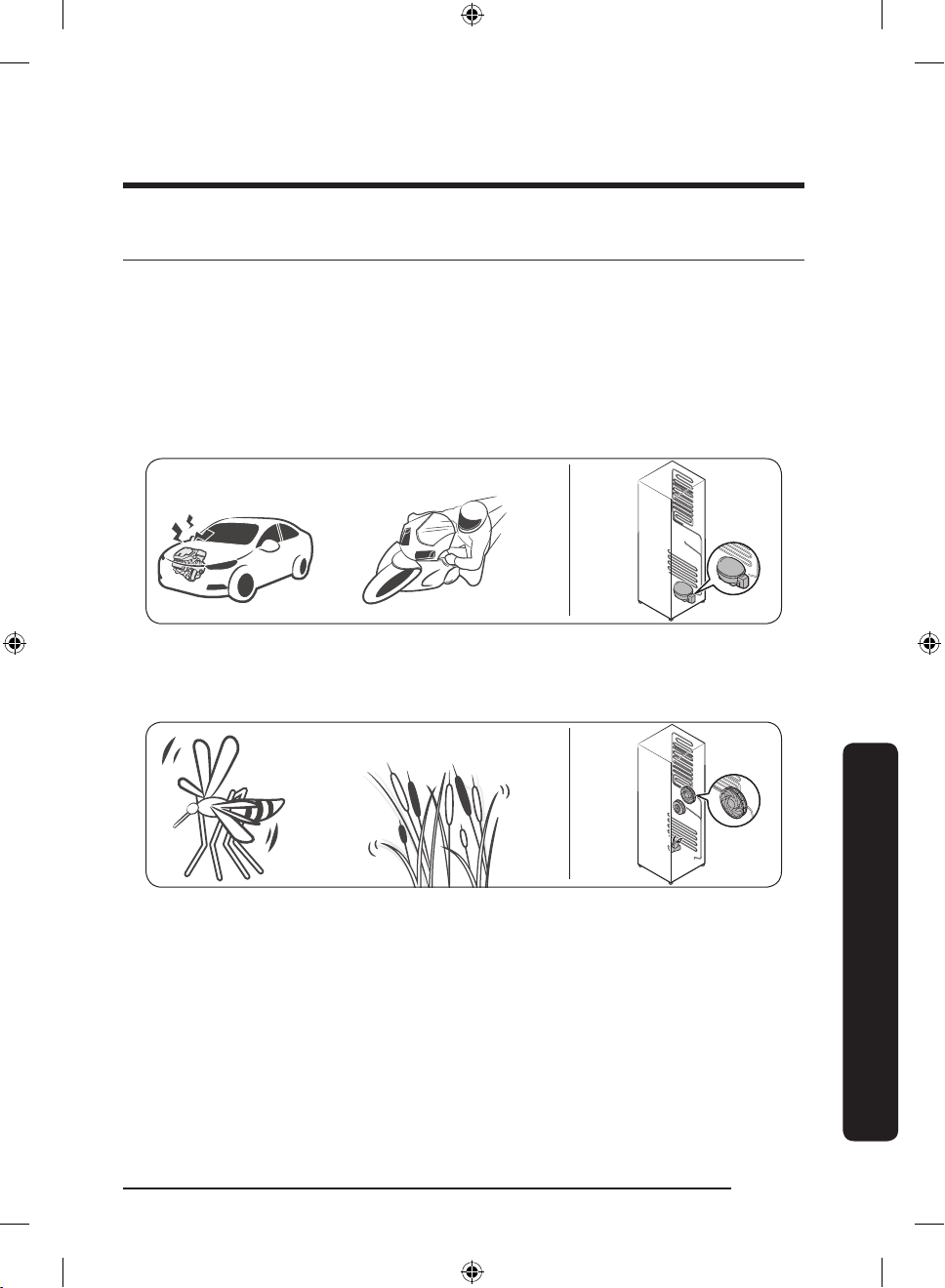
Do you hear abnormal sounds from the refrigerator?
Clicking!
or Chirping!
Buzzing!
SSSRRR!
Whir!
Before calling for service, review the information below. Note that you will be charged
for any service calls related to normal operating sounds in which no defects were found.
If you have any questions about sounds your refrigerator is making, please call Samsung
Customer Care at 1-800-SAMSUNG (726-7864).
These sounds are normal.
• When starting or ending an operation, the refrigerator may make sounds similar to a
car engine ignition. As the operation stabilizes, the sounds will decrease.
• While the fan is operating, these sounds may occur. When the refrigerator reaches the
set temperature, no fan sound will occur.
English 39
Untitled-2 39 2021-07-13 6:31:49
Troubleshooting
Page 40
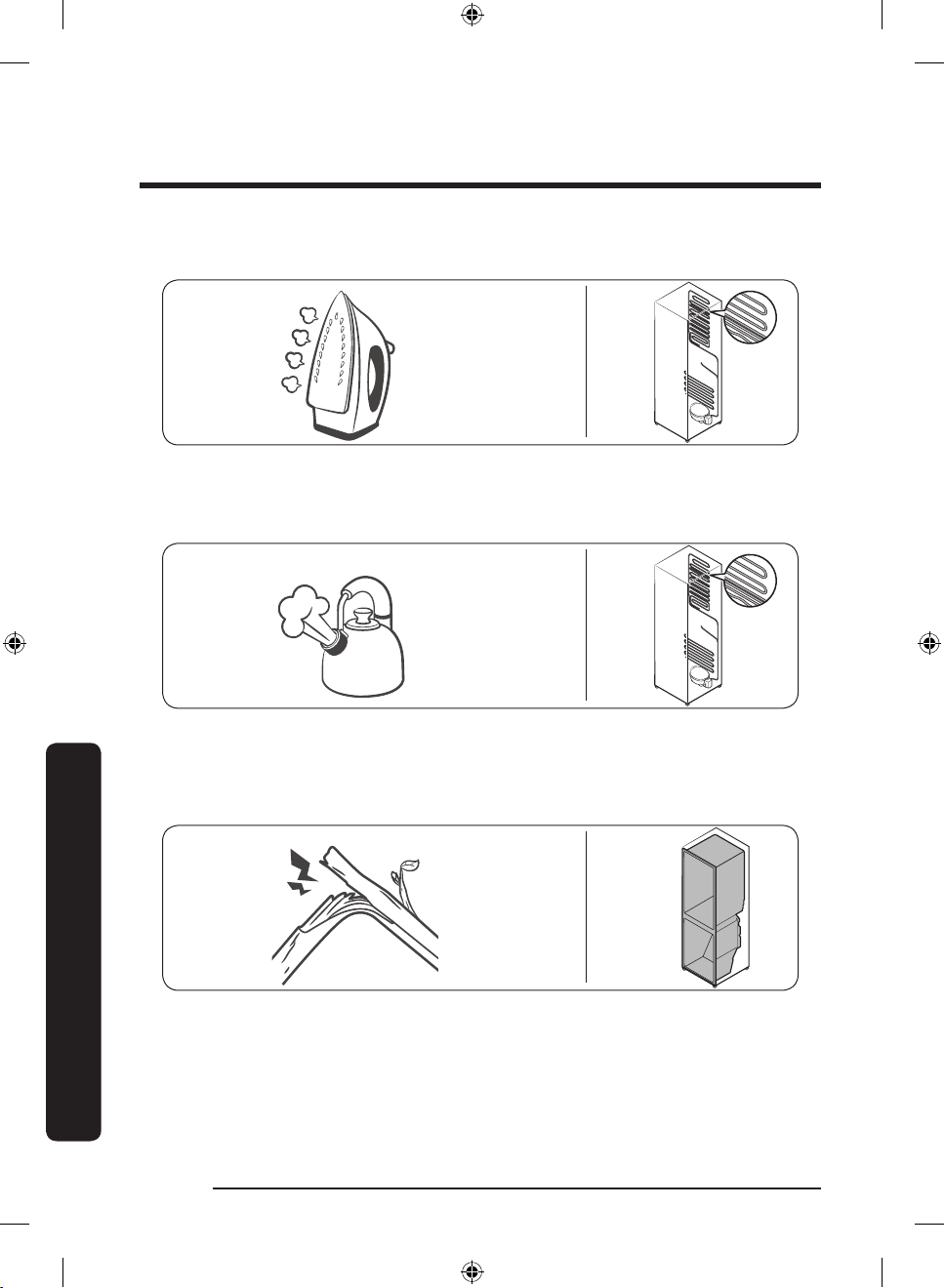
Troubleshooting
HiSS!
Bubbling!
Cracking!
• During a defrost cycle, water may drip on the defrost heater, causing sizzling sounds.
• As the refrigerator cools or freezes, refrigerant gas moves through sealed pipes, causing
bubbling sounds.
• As the refrigerator temperature increases or decreases, plastic parts contract and
expand, creating knocking noises. These noises occur during the defrosting cycle or
when electronic parts are working.
Troubleshooting
• For ice maker models: When the water valve opens to ll the ice maker, buzzing sounds
may occur.
• Due to pressure equalizing when you open and close the refrigerator door, whooshing
sounds may occur.
English40
Untitled-2 40 2021-07-13 6:31:49
Page 41
LIMITED WARRANTY (U.S.A.)
SAMSUNG REFRIGERATOR
LIMITED WARRANTY TO ORIGINAL CONSUMER PURCHASER WITH PROOF OF
PURCHASE
This SAMSUNG brand product, as supplied and distributed by Samsung Electronics
America, Inc. (SAMSUNG) and delivered new, in the original carton to the original consumer
purchaser, is warranted by SAMSUNG against manufacturing defects in materials or
workmanship for the limited warranty period of:
One (1) year parts and labor
Five (5) years parts and labor on Sealed Refrigeration System Only (Compressor,
Evaporator, Condenser, Drier, and Connecting Tubing)
Ten (10) years part and Five (5) years labor on Digital Inverter Compressor Only
This limited warranty is valid only on products purchased and used in the United States
that have been installed, operated, and maintained according to the instructions attached
to or furnished with the product. To receive warranty service, the purchaser must contact
SAMSUNG at the address or phone number provided below for problem determination and
service procedures. Warranty service can only be performed by a SAMSUNG authorized
service center. The original dated bill of sale must be presented upon request as proof
of purchase to SAMSUNG or SAMSUNG’s authorized service center to receive warranty
service.
SAMSUNG will provide in-home service within the contiguous United States during the
warranty period at no charge, subject to availability of SAMSUNG authorized servicers
within the customer’s geographic area. If in-home service is not available, SAMSUNG may
elect, at its option, to provide transportation of the product to and from an authorized
service center. If the product is located in an area where service by a SAMSUNG authorized
servicer is not available, you may be responsible for a trip charge or required to bring the
product to a SAMSUNG authorized service center for service.
To receive in-home service, product must be unobstructed and accessible to the service
agent.
During the applicable warranty period, a product will be repaired, replaced, or the purchase
price refunded, at the sole option of SAMSUNG. SAMSUNG may use new or reconditioned
parts in repairing a product, or replace the product with a new or reconditioned product.
Replacement parts and products are warranted for the remaining portion of the original
product’s warranty or ninety (90) days, whichever is longer. All replaced parts and products
are the property of SAMSUNG and you must return them to SAMSUNG.
English 41
Untitled-2 41 2021-07-13 6:31:49
Page 42
LIMITED WARRANTY (U.S.A.)
This limited warranty covers manufacturing defects in materials or workmanship
encountered in normal household, noncommercial use of this product and shall not
cover the following: damage that occurs in shipment, delivery, installation, and uses for
which this product was not intended; damage caused by unauthorized modication or
alteration of the product; product where the original factory serial numbers have been
removed, defaced, changed in any way, or cannot be readily determined; cosmetic damage
including scratches, dents, chips, and other damage to the product’s nishes; damage
caused by abuse, misuse, pest infestations, accident, re, oods, or other acts of nature or
God; damage caused by use of equipment, utilities, services, parts, supplies, accessories,
applications, installations, repairs, external wiring or connectors not supplied or authorized
by SAMSUNG; damage caused by incorrect electrical line current, voltage, uctuations
and surges; damage caused by failure to operate and maintain the product according
to instructions; in-home instruction on how to use your product; and service to correct
installation not in accordance with electrical or plumbing codes or correction of household
electrical or plumbing (i.e., house wiring, fuses, or water inlet hoses). The cost of repair or
replacement under these excluded circumstances shall be the customer’s responsibility.
Visits by an authorized servicer to explain product functions, maintenance or installation
are not covered by this limited warranty. Please contact SAMSUNG at the number below
for assistance with any of these issues.
EXCLUSION OF IMPLIED WARRANTIES
IMPLIED WARRANTIES, INCLUDING THE IMPLIED WARRANTIES OF MERCHANTABILITY OR
FITNESS FOR A PARTICULAR PURPOSE, ARE LIMITED TO ONE YEAR OR THE SHORTEST
PERIOD ALLOWED BY LAW. Some states do not allow limitations on how long an implied
warranty lasts, so the above limitations or exclusions may not apply to you. This warranty
gives you specic rights, and you may also have other rights, which vary from state to
state.
English42
Untitled-2 42 2021-07-13 6:31:49
Page 43
LIMITATION OF REMEDIES
YOUR SOLE AND EXCLUSIVE REMEDY IS PRODUCT REPAIR, PRODUCT REPLACEMENT,
OR REFUND OF THE PURCHASE PRICE AT SAMSUNG’S OPTION, AS PROVIDED IN THIS
LIMITED WARRANTY. SAMSUNG SHALL NOT BE LIABLE FOR SPECIAL, INCIDENTAL OR
CONSEQUENTIAL DAMAGES, INCLUDING BUT NOT LIMITED TO TIME AWAY FROM WORK,
HOTELS AND/OR RESTAURANT MEALS, REMODELING EXPENSES, LOSS OF REVENUE OR
PROFITS, FAILURE TO REALIZE SAVINGS OR OTHER BENEFITS REGARDLESS OF THE LEGAL
THEORY ON WHICH THE CLAIM IS BASED, AND EVEN IF SAMSUNG HAS BEEN ADVISED OF
THE POSSIBILITY OF SUCH DAMAGES. Some states do not allow exclusion or limitation of
incidental or consequential damages, so the above limitations or exclusions may not apply
to you. This warranty gives you specic rights, and you may also have other rights, which
vary from state to state.
SAMSUNG does not warrant uninterrupted or error-free operation of the product. No
warranty or guarantee given by any other person, rm, or corporation with respect to this
product shall be binding on SAMSUNG.
To obtain warranty service, please contact SAMSUNG at:
Samsung Electronics America, Inc.
85 Challenger Road
Ridgeeld Park, NJ 07660
1-800-SAMSUNG (726-7864)
www.samsung.com/us/support
English 43
Untitled-2 43 2021-07-13 6:31:49
Page 44
Warranty Information (CANADA)
If your refrigerator needs service
Do not hesitate to call any Samsung Authorized Service Center nearby giving them your
name, address and telephone number if your product is not functioning properly.
Limited Warranty for Original Purchaser
This Samsung product is warranted by Samsung Electronics Canada Inc. (hereafter referred
to as SECA) against manufacturing defects in material or workmanship for the following
periods:
Labor : 1 year (in-home)
Parts : 1 year
Inverter Compressor : 10 years (Part only)
SECA further warrants that if this product fails to operate properly within the specied
warranty period and the failure is due to improper workmanship or defective material,
SECA will repair or replace the product at its option. In-home service is not available in all
areas. Contact us to nd out if in-home service is currently available in your area by using
the contact information at the back of this warranty.
All warranty repairs or part replacements must be performed by a SECA Authorized Service
Center. (To nd the nearest SECA Service Center, call 1-800-SAMSUNG (7267864) or visit
our web site at www.samsung.com/ca)
English44
Untitled-2 44 2021-07-13 6:31:49
Page 45
Obligation to the Original Owner
The original dated sales receipt must be retained by the customer and is the only
acceptable proof of purchase. It must be presented to a SECA Authorized Service Center
at the time service is requested before warranty services are rendered. On all carry-in
models, transportation to and from the Authorized Service Center is the responsibility of
the customer.
Exclusions of the Warranty
This warranty does not cover damage due to accident, re, ood, and/or other Acts of God,
misuse, incorrect line voltage, improper installation, improper or unauthorized repairs,
commercial use, or damage that occurs during shipping. Customer adjustments which are
explained in this owners manual are not covered under the terms of this warranty. This
warranty will automatically be voided for any unit found with a missing or altered serial
number. This warranty is valid only on products purchased and used in Canada.
SAMSUNG CUSTOMER CARE CENTER
Samsung Electronics Canada Inc.
2050 Derry Road West
Mississauga, Ontario L5N 0B9
Canada
1-800-SAMSUNG (726-7864)
www.samsung.com/ca/support (English)
www.samsung.com/ca_fr/support (French)
English 45
Untitled-2 45 2021-07-13 6:31:49
Page 46
Memo
Untitled-2 46 2021-07-13 6:31:49
Page 47
Memo
Untitled-2 47 2021-07-13 6:31:49
Page 48
Scan the QR code* or visit
www.samsung.com/spsn
s
to view our helpful
How-to Videos and Live Show
* Requires reader to be installed on your
smartphone
Contact SAMSUNG WORLD WIDE
If you have any questions or comments relating to Samsung products, please contact the
SAMSUNG Customer Care Center.
Country Contact Center Web Site
U.S.A
CANADA
1-800-SAMSUNG (726-7864)
1-844-SAM-PAYS (726-7297)
1-800-SAMSUNG(726-7864)
1-844-SAM-PAYS (726-7297)
www.samsung.com/us/support
www.samsung.com/ca/support (English)
www.samsung.com/ca_fr/support (French)
DA68-03376Q-00
Untitled-2 48 2021-07-13 6:31:49
 Loading...