

Page 1
Refrigerator
User manual
RB38M*
SEUK, SEF, SEG, SEI Free Standing Appliance
Untitled-5 1 2018-05-25 5:13:51
Page 2
Contents
Safety information 3
Important safety symbols and precautions: 5
Severe warning signs for transportation and site 6
Critical installation warnings 7
Installation cautions 10
Contents
Critical usage warnings 11
Usage cautions 16
Cleaning cautions 18
Critical disposal warnings 19
Additional tips for proper usage 20
Saving Energy Tips 21
This appliance is intended to be used in household and similar applications such as 22
Instructions about the WEEE 23
Installation 24
Refrigerator at a glance 24
Step-by-step installation 25
Operations 31
User interface 31
SmartThings 40
Recommendations for voice recognition 43
Samsung Family Hub 43
Storage information 45
Maintenance 47
Door reversal (applicable models only) 47
Handle and care 60
Cleaning 65
Replacement 65
Troubleshooting 66
General 66
Do you hear abnormal sounds from the refrigerator? 68
SmartThings 70
Samsung Family Hub 71
LCD 72
English2
Untitled-5 2 2018-05-25 5:13:51
Page 3

Safety information
• Before using your new Samsung Refrigerator, please read
this manual thoroughly to ensure that you know how to
operate the features and functions that your new appliance
offers safely and efciently.
• This appliance is not intended for use by persons
(including children) with reduced physical, sensory, or
mental capabilities, or those who lack experience and
knowledge, unless they have been given supervision or
instruction concerning the use of the appliance by a person
responsible for their safety.
• This appliance can be used by children aged from 8 years
and above and persons with reduced physical, sensory or
mental capabilities or lack of experience and knowledge
if they have been given supervision or instruction
concerning use of the appliance in a safe way and
understand the hazards involved.
Children shall not play with the appliance. Cleaning and
user maintenance shall not be made by children without
supervision.
Safety information
• Warnings and Important Safety Instructions in this manual
do not cover all possible conditions and situations that
may occur.
It is your responsibility to use common sense, caution,
and care when installing, maintaining, and operating your
appliance.
English 3
Untitled-5 3 2018-05-25 5:13:51
Page 4
Safety information
Safety information
• Because these following operating instructions cover
various models, the characteristics of your refrigerator
may differ slightly from those described in this manual and
not all warning signs may be applicable. If you have any
questions or concerns, contact your nearest service center
or nd help and information online at www.samsung.com.
• In order to avoid the creation of a ammable gas-air
mixture if a leak in the refrigerating circuit occurs, the size
of the room in which the appliance may be sited depends
on the amount of refrigerant used.
• Never start up an appliance showing any signs of damage.
If in doubt, consult your dealer. The room must be 1 m³
in size for every 8 g of R-600a refrigerant inside the
appliance. The amount of refrigerant in your particular
appliance is shown on the identication plate inside the
appliance.
• Refrigerant squirting out of the pipes could ignite or cause
an eye injury. When refrigerant leaks from the pipe, avoid
any naked ames and move anything ammable away
from the product and ventilate the room immediately.
- Failing to do so may result in re or explosion.
• It is hazardous for anyone other than an Authorised
Service Person to service this appliance.
• Do not store explosive substances such as aerosol cans
with a ammable propellant in this appliance.
Warning; Risk of re / ammable materials
English4
Untitled-5 4 2018-05-25 5:13:51
Page 5
Important safety symbols and precautions:
Please follow all safety instructions in this manual. This
manual uses the following safety symbols.
WARNING
Hazards or unsafe practices that may result in severe personal
injury, property damage, and/or death.
CAUTION
Hazards or unsafe practices that may result in severe personal
injury and/or property damage.
NOTE
Useful information that helps users understand or benet
from the refrigerator.
These warning signs are here to prevent injury to you and
others.
Please follow them carefully.
After reading this section, keep it in a safe place for future
reference.
Safety information
English 5
Untitled-5 5 2018-05-25 5:13:51
Page 6
Safety information
Safety information
Severe warning signs for transportation and site
WARNING
• When transporting and installing the appliance, care should
be taken to ensure that no parts of the refrigerating circuit
are damaged.
- Refrigerant leaking from the pipe work could ignite
or cause an eye injury. If a leak is detected, avoid any
naked ames or potential sources of ignition and air
the room in which the appliance is standing for several
minutes.
- This appliance contains a small amount of isobutane
refrigerant (R-600a), a natural gas with high
environmental compatibility that is, however, also
combustible. When transporting and installing the
appliance, care should be taken to ensure that no parts
of the refrigerating circuit are damaged.
English6
Untitled-5 6 2018-05-25 5:13:51
Page 7
Critical installation warnings
WARNING
• Do not install the refrigerator in a damp location or place
where it may come in contact with water.
- Deteriorated insulation on electrical parts may cause an
electric shock or re.
• Do not place this refrigerator in direct sunlight or expose it
to the heat from stoves, room heaters, or other appliances.
• Do not plug several appliances into the same multiple
power strip. The refrigerator should always be plugged
into its own individual electrical outlet which has a voltage
rating that matches the voltage listed on the refrigerator’s
rating plate.
- This provides the best performance and also prevents
overloading of house wiring circuits, which could cause
a re hazard from overheated wires.
• If the wall socket is loose, do not insert the power plug.
- There is a risk of electric shock of re.
• Do not use a power cord that has cracks or abrasion
damage along its length or at either end.
• Do not bend the power cord excessively or place heavy
objects on it.
• Do not pull or excessively bend the power cord.
• Do not twist or tie the power cord.
• Do not hook the power cord over a metal object, place a
heavy object on the power cord, insert the power cord
between objects, or push the power cord into the space
behind the appliance.
Safety information
English 7
Untitled-5 7 2018-05-25 5:13:51
Page 8
Safety information
Safety information
• When moving the refrigerator, be careful not to roll over or
damage the power cord.
- This may result in an electric shock or re.
• Never unplug your refrigerator by pulling on the power
cord. Always grip the plug rmly and pull straight out from
the outlet.
- Damage to the cord may cause a short-circuit, re, and/
or electric shock.
• Do not store explosive substances such as aerosol cans
with a ammable propellant in this appliance.
• Do not install this appliance near a heater or inammable
material.
• Do not install this appliance in a location where gas may
leak.
- This may result in an electric shock or re.
• This refrigerator must be properly located and installed in
accordance with the instructions in this manual before you
use it.
• Connect the power plug in the proper position with the
cord hanging down.
- If you connect the power plug upside down, the wire
can get cut off and cause a re or electric shock.
• Make sure that the power plug is not crushed or damaged
by the back of the refrigerator.
• Keep the packing materials out of reach of children.
- There is a risk of death from suffocation if a child puts
the packing materials on his or her head.
English8
Untitled-5 8 2018-05-25 5:13:51
Page 9
• The appliance must be positioned so that the plug is
accessible after installation.
- Failing to do so may result in an electric shock or re
due to electric leakage.
• Do not install this appliance in a humid, oily or dusty
location, in a location exposed to direct sunlight and water
(rain drops).
- Deteriorated insulation of electrical parts may cause an
electric shock or re.
• If any dust or water is in the refrigerator, pull out power
plug and contact your Samsung Electronics service center.
- Otherwise there is a risk of re.
• Do not stand on top of the appliance or place objects (such
as laundry, lighted candles, lighted cigarettes, dishes,
chemicals, metal objects, etc.) on the appliance.
- This may result in an electric shock, re, problems with
the product, or injury.
• You need to remove all the protective plastic lm before
you initially plug the product in.
• The refrigerator must be safely grounded.
- Always make sure that you have grounded the
refrigerator before attempting to investigate or repair
any part of the appliance. Power leakages can cause
severe electric shock.
• Never use gas pipes, telephone lines, or other potential
lightning attractors as an electrical ground.
- You must ground the refrigerator to prevent any power
leakages or electric shocks caused by current leakage
from the refrigerator.
Safety information
English 9
Untitled-5 9 2018-05-25 5:13:51
Page 10
Safety information
Safety information
- This may result in an electric shock, re, explosion, or
problems with the product.
• Plug the power plug into the wall socket rmly. Do not use
a damaged power plug, damaged power cord, or loose wall
socket.
- This may result in an electric shock or re.
• If the power cord is damaged, have it replaced
immediately by the manufacturer or one of its service
agents.
• The fuse on the refrigerator must be changed by a
qualied technician or service company.
- Failing to do so may result in an electric shock or
personal injury.
• When positioning the appliance, ensure the supply cord is
not trapped or damaged.
• Do not locate multiple portable socket-outlets or portable
power supplies at the rear of the appliance.
Installation cautions
CAUTION
• Allow sufcient space around the refrigerator and install it
on a at surface.
- Keep the ventilation space in the appliance enclosure or
mounting structure clear of obstructions.
• Allow the appliance to stand for 2 hours before loading
foods after installation and turning on.
English10
Untitled-5 10 2018-05-25 5:13:52
Page 11
• We strongly recommend you have a qualied technician or
service company install the refrigerator.
- Failing to do so may result in an electric shock, re,
explosion, problems with the product, or injury.
• Overload on any one door may fell the refrigerator,
causing physical injury.
Critical usage warnings
WARNING
• Do not insert the power plug into a wall socket with wet
hands.
- This may result in an electric shock.
• Do not store articles on the top of the appliance.
- When you open or close the door, the articles may fall
and cause personal injury and/or material damage.
• Do not insert hands, feet or metal objects (such as
chopsticks, etc.) into the bottom or the back of the
refrigerator.
- This may result in an electric shock or injury.
- Any sharp edges may cause a personal injury.
• Do not touch the inside walls of the freezer or products
stored in the freezer with wet hands.
- This may cause frostbite.
• Do not put a container lled with water on the refrigerator.
- If spilled, there is a risk of re or electric shock.
Safety information
English 11
Untitled-5 11 2018-05-25 5:13:52
Page 12
Safety information
Safety information
• Do not keep volatile or ammable objects or substances
(benzene, thinner, propane gas, alcohol, ether, LP gas, and
other such products) in the refrigerator.
- This refrigerator is for storing food only.
- This may result in re or explosion.
• Children should be supervised to ensure that they do not
play with the appliance.
- Keep ngers out of “pinch point” areas. Clearances
between the doors and cabinet are necessarily small. Be
careful when you open the doors if children are in the
area.
• Do not let children hang on the door or door bins. A
serious injury may occur.
• Do not let children go inside the refrigerator. They could
become trapped.
• Do not insert your hands into the bottom area under the
appliance.
- Any sharp edges may cause personal injury.
• Do not store pharmaceutical products, scientic materials,
or temperature sensitive products in the refrigerator.
- Products that require strict temperature controls must
not be stored in the refrigerator.
• Do not place or use electrical appliance inside
the refrigerator/freezer, unless they are of a type
recommended by the manufacturer.
• If you smell pharmaceutical or smoke, pull out power plug
immediately and contact your Samsung Electronics service
center.
English12
Untitled-5 12 2018-05-25 5:13:52
Page 13
• If any dust or water is in Refrigerator, pull out power plug
and contact your Samsung Electronics service center.
- Otherwise there is a risk of re.
• Do not let children step on a drawer.
- The drawer may break and cause them to slip.
• Do not leave the doors of the refrigerator open while the
refrigerator is unattended and do not let children enter
inside the refrigerator.
• Do not allow babies or children go inside the drawer.
- It can cause death from suffocation by entrapment or
personal injury.
• Do not overll the refrigerator with food.
- When you open the door, an item may fall out and
cause personal injury or material damage.
• Do not spray volatile material such as insecticide onto the
surface of the appliance.
- As well as being harmful to humans, it may also result
in an electric shock, re, or problems with the product.
• Do not use or place any substances sensitive to
temperature such as ammable sprays, ammable objects,
dry ice, medicine, or chemicals near or inside of the
refrigerator.
• Do not use a hair dryer to dry the inside of the
refrigerator. Do not place a lighted candle in the
refrigerator for removing bad odours.
- This may result in an electric shock or re.
Safety information
English 13
Untitled-5 13 2018-05-25 5:13:52
Page 14
Safety information
Safety information
• Do not stand on top of the appliance or place objects (such
as laundry, lighted candles, lighted cigarettes, dishes,
chemicals, metal objects, etc.) on the appliance. This may
result in an electric shock, re, problems with the product,
or injury. Do not put a container lled with water on the
appliance.
- If spilled, there is a risk of re or electric shock.
• Do not use mechanical devices or any other means
to accelerate the defrosting process, other than those
recommended by the manufacturer.
• Do not damage the refrigerant circuit.
• Never stare directly at the UV LED lamp for long periods of
time.
- This may result in eye strain due to the ultraviolet rays.
• Do not put fridge shelf in upside down. Shelf stopper could
not work.
- It may cause a personal injury because of glass shelf
drop.
• Keep ngers out of “pinch point” areas. Clearances
between the doors and cabinet are necessarily small. Be
careful when you open the doors if children are in the area.
• If a gas leak is detected, avoid any naked ames or
potential sources of ignition, and air the room in which the
appliance is standing for several minutes.
- Do not touch the appliance or power cord.
- Do not use a ventilating fan.
- A spark may result in explosion or re.
• Use only the LED Lamps provided by the manufacturer or
its service agents.
English14
Untitled-5 14 2018-05-25 5:13:52
Page 15
• Bottles should be stored tightly together so that they do
not fall out.
• This product is intended only for the storage of food in a
domestic environment.
• Do not attempt to repair, disassemble, or modify the
refrigerator yourself.
- Unauthorized modications can cause safety problems.
To reverse an unauthorized modication, we will charge
the full cost of parts and labor.
• Do not use any fuse (such as cooper, steel wire, etc.) other
than a standard fuse.
• If your refrigerator needs to be repaired or reinstalled,
contact your nearest service center.
- Failing to do so may result in an electric shock, re,
problems with the product, or injury.
• If the interior or exterior LED lamp has gone out, contact
your nearest service center.
• If the refrigerator emits a burning smell or smoke, unplug
the refrigerator immediately and contact your Samsung
Electronics service center.
- Failing to do so may result in an electric or re hazards.
• Pull the power plug out of the socket before changing the
interior lamps of the refrigerator.
- Otherwise, there is a risk of electric shock.
• If you experience difculty changing a non-LED light,
contact a Samsung service center.
• If the product is equipped with LED lamps, do not
disassemble the Lamp Covers and LED lamps yourself.
- Contact a Samsung service center.
• Plug the power plug into the wall socket rmly.
Safety information
English 15
Untitled-5 15 2018-05-25 5:13:52
Page 16
Safety information
Safety information
• Do not use a damaged power plug, damaged power cord or
loose wall socket.
- This may result in an electric shock or re.
Usage cautions
CAUTION
• Do not re-freeze frozen foods that have thawed
completely. Do not place carbonated or zzy drinks in
the freezer compartment. Do not put bottles or glass
containers in the freezer.
- When the contents freeze, the glass may break and
cause personal injury.
• To get the best performance from the product:
- Do not place food too close to the vents at the rear of
the refrigerator as this can obstruct free air circulation
in the refrigerator compartment.
- Wrap food up properly or place it in airtight containers
before putting it into the refrigerator.
- Do not place glass bottles or carbonated beverages
into the freezer. They can freeze and break. Broken
beverage containers can cause injury.
- Please observe maximum storage times and expiration
dates of frozen goods.
• Do not place glass or bottles or carbonated beverages into
the freezer.
- The container may freeze and break, and this may
result in injury.
English16
Untitled-5 16 2018-05-25 5:13:52
Page 17
• Do not place carbonated or zzy drinks in the freezer
compartment. Do not put bottles or glass containers in the
freezer.
- When the contents freeze, the glass may break and
cause personal injury and property damage.
• Service Warranty and Modication.
- Any changes or modications performed by a 3rd
party on this nished appliance are not covered
under Samsung warranty service, nor is Samsung
responsible for safety issues that result from 3rd party
modications.
• Do not block the air vents inside the refrigerator.
- If the air vents are blocked, especially with a plastic
bag, the refrigerator can be over cooled. If a cooling
period lasts too long, cause water leakage.
• Wipe excess moisture from the inside and leave the doors
open.
- Otherwise, odor and mold may develop.
• If the refrigerator is disconnected from the power supply,
you should wait for at least ve minutes before plugging it
back in.
• When the refrigerator got wet by water, pull out the power
plug and contact your Samsung Electronics service center.
• Do not strike or apply excessive force to any glass surface.
- Broken glass may result in a personal injury and/or
property damage.
• Be careful that your ngers are not caught in.
• If the refrigerator is ooded, make sure to contact your
nearest service center.
- There is a risk of electric shock or re.
Safety information
English 17
Untitled-5 17 2018-05-25 5:13:52
Page 18
Safety information
Safety information
Cleaning cautions
CAUTION
• Do not spray water directly on the inside or outside the
refrigerator.
- There is a risk of re or electric shock.
• Do not use a hair dryer to dry the inside of the
refrigerator.
• Do not place a lighted candle in the refrigerator to remove
bad odors.
- This may result in an electric shock or re.
• Do not spray cleaning products directly on the display.
- Printed letters on the display may come off.
• If any foreign substance such as water has entered the
appliance, unplug the power plug and contact your nearest
service center.
- Failing to do so may result in an electric shock or re.
• Use a clean, dry cloth to remove any foreign matter or dust
from the power plug blades. Do not use a wet or damp
cloth when cleaning the plug.
- Otherwise, there is a risk of re or electric shock.
• Do not clean the appliance by spraying water directly onto
it.
• Do not use benzene, thinner, or Clorox, Chloride for
cleaning.
- They may damage the surface of the appliance and may
cause a re.
• Before cleaning or performing maintenance, unplug the
appliance from the wall socket.
- Failing to do so may result in an electric shock or re.
English18
Untitled-5 18 2018-05-25 5:13:52
Page 19
Critical disposal warnings
WARNING
• Please dispose of the packaging material from this product
in an environmentally friendly manner.
• Ensure that none of the pipes on the back of the
refrigerator are damaged prior to disposal.
• R-600a or R-134a is used as a refrigerant. Check the
compressor label on the rear of the appliance or the rating
label inside the fridge to see which refrigerant is used for
your refrigerator. If this refrigerator contains ammable
gas (Refrigerant R-600a), contact your local authority in
regard to safe disposal of this product.
• When disposing of this refrigerator, remove the door/
door seals and door latch so that small children or
animals cannot become trapped inside. Children should
be supervised to ensure that they do not play with the
appliance. If trapped inside, a child may get hurt or
suffocate to death.
- If trapped inside, the child may become injury and
suffocate to death.
• Cyclopentane is used in the insulation. The gases in the
insulation material require a special disposal procedure.
Please contact your local authorities in regard to the
environmentally safe disposal of this product.
• Keep all packaging materials well out of the reach of
children, as packaging materials can be dangerous to
children.
- If a child places a bag over his or her head, the child
could suffocate.
Safety information
English 19
Untitled-5 19 2018-05-25 5:13:52
Page 20
Safety information
Safety information
Additional tips for proper usage
• In the event of a power failure, call the local ofce of your
electric company and ask how long the failure is going to
last.
- Most power failures that are corrected in an hour or two
will not affect your refrigerator temperatures. However,
you should minimize the number of door openings
while the power is off.
- Should the power failure last more than 24 hours,
remove and discard all frozen food.
• The refrigerator might not operate consistently (frozen
contents can thaw or temperatures can become too
warm in the frozen food compartment) if sited for an
extended period of time in a location where ambient air
temperatures are constantly below the temperatures for
which the appliance is designed.
• In case of particular foods, keeping it under refrigeration
can have a bad effect on preservation due to its properties.
• Your appliance is frost free, which means there is no need
to manually defrost your appliance. This will be carried out
automatically.
• Temperature rise during defrosting complies with ISO
requirements. If you want to prevent an undue rise in the
temperature of frozen food while the appliance defrosts,
wrap the frozen food in several layers of newspaper.
• Do not re-freeze frozen foods that have thawed
completely.
English20
Untitled-5 20 2018-05-25 5:13:52
Page 21
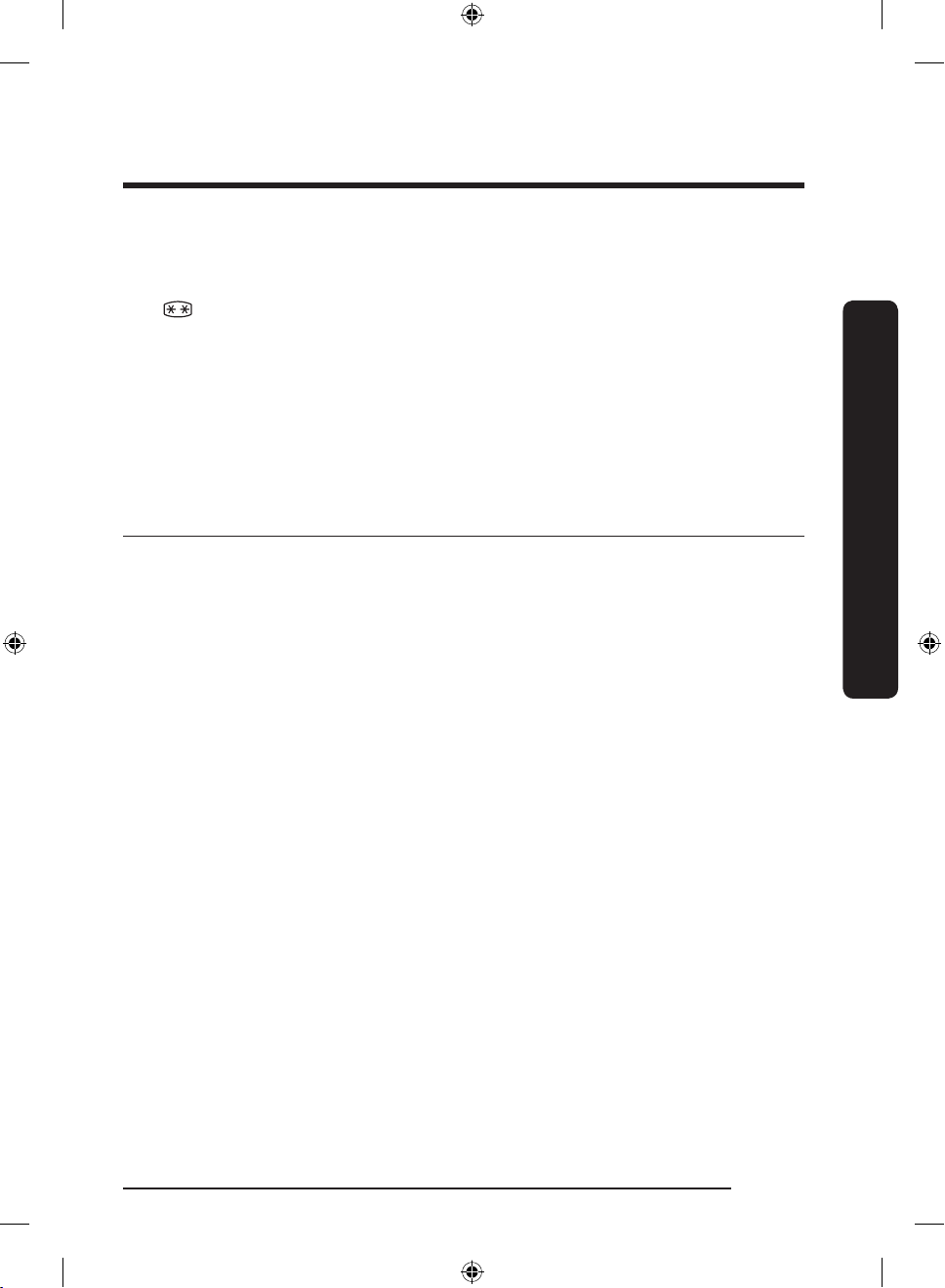
• The temperature of two star section (sections) or
compartment (compartments) which have two star symbol
( ) is slightly higher than other freezer compartment
(compartments).
The two star section (sections) or compartment
(compartments) is (are) based on the instruction and/or the
condition as delivered.
Saving Energy Tips
• Install the appliance in a cool, dry room with adequate
ventilation. Ensure that it is not exposed to direct sunlight
and never put it near a direct source of heat (a radiator, for
example).
• Not to block any vents and grilles is recommended for
energy efciency.
• Allow warm food to cool down before placing it in the
appliance.
• Put frozen food in the refrigerator to thaw. You can then
use the low temperatures of the frozen products to cool
food in the refrigerator.
• Do not keep the door of the refrigerator open for too long
when putting food in or taking food out. The shorter the
time the door is open, the less frost build-up you’ll have in
the freezer.
• It is recommended to install the refrigerator with clearance
to the back and sides. This will help reduce power
consumption and keep your energy bills lower.
Safety information
English 21
Untitled-5 21 2018-05-25 5:13:52
Page 22
Safety information
Safety information
• For the most efcient use of energy, please keep the all
inner ttings such as baskets, drawers, shelves on the
position supplied by manufacturer.
This appliance is intended to be used in household and similar applications such as
• staff kitchen areas in shops, ofces and other working
environments;
• farm houses and by clients in hotels, motels and other
residential type environments;
• bed and breakfast type environments;
• catering and similar non-retail applications.
English22
Untitled-5 22 2018-05-25 5:13:52
Page 23
Instructions about the WEEE
Correct Disposal of This Product (Waste Electrical & Electronic Equipment)
(Applicable in countries with separate collection systems)
This marking on the product, accessories or literature indicates that the
product and its electronic accessories (e.g. charger, headset, USB cable)
should not be disposed of with other household waste at the end of their
working life. To prevent possible harm to the environment or human
health from uncontrolled waste disposal, please separate these items
from other types of waste and recycle them responsibly to promote the
sustainable reuse of material resources.
Household users should contact either the retailer where they purchased
this product, or their local government ofce, for details of where and
how they can take these items for environmentally safe recycling.
Business users should contact their supplier and check the terms and
conditions of the purchase contract. This product and its electronic
accessories should not be mixed with other commercial wastes for
disposal.
For information on Samsung’s environmental commitments
and product specic regulatory obligations e.g. REACH
visit: samsung.com/uk/aboutsamsung/samsungelectronics/
corporatecitizenship/data_corner.html
(For products sold in European countries only)
Safety information
English 23
Untitled-5 23 2018-05-25 5:13:52
Page 24
01
02
07
06
08
10
03
04
05
09
Installation
Installation
Follow these instructions carefully to ensure a proper installation of this refrigerator and to
prevent accidents before using it.
WARNING
• Use the refrigerator only for its intended purpose as described in this manual.
• Any servicing must be performed by a qualied technician.
• Dispose of the product packaging material in compliance with the local regulations.
• To prevent electric shock, unplug the power cord before servicing or replacements.
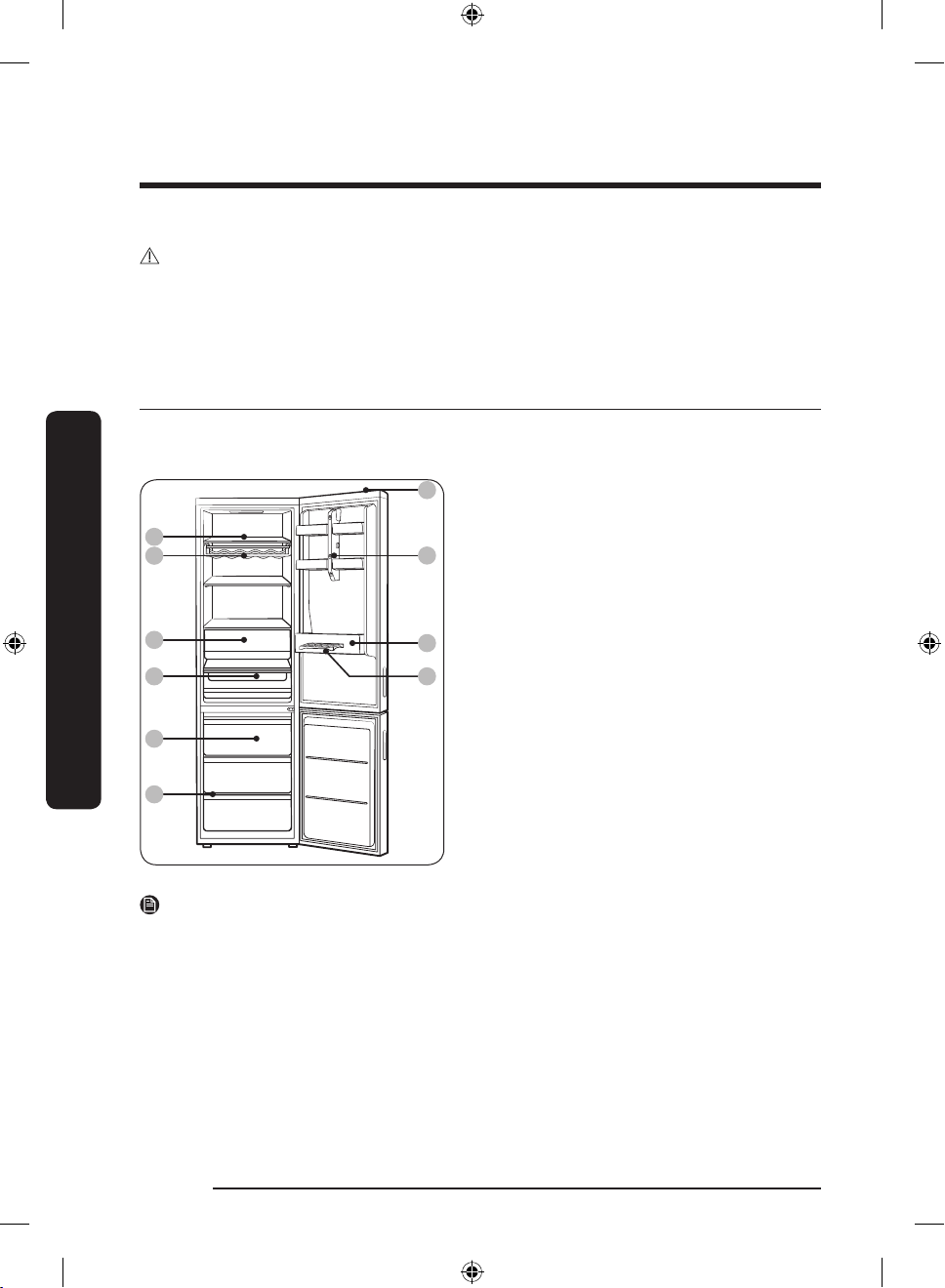
Refrigerator at a glance
The actual image and provided component parts of the refrigerator may differ, depending
on the model and the country.
01 Shelves
02 Wine rack *
03 Fridge drawer
04 Chef-pan *
05 Freezer drawer
06 Display switch
07 Camera
08 Guard
09 Freezer shelf
10 Egg tray
* applicable models only
NOTE
• To quickly freeze large quantities of food, use the bottom drawer.
• For best energy efciency, make sure all of shelves, drawers, and baskets are placed in
their original position.
• To get more space, you can remove the top and middle drawers and locate the ‘Freezer
Shelf’ on the bottom drawer in freezer, since it does not affect thermal and mechanical
characteristics. A declared storage volume of frozen food storage compartment is
calculated with these drawers removed.
English24
Untitled-5 24 2018-05-25 5:13:53
Page 25
Step-by-step installation
STEP 1 Select a site
Site requirements:
• Solid, level surface without carpeting or ooring that may obstruct ventilation
• Away from direct sunlight
• Adequate room for opening and closing the door
• Away from a heat source
• Room for maintenance and servicing
• Temperature range: between 10 °C and 43 °C
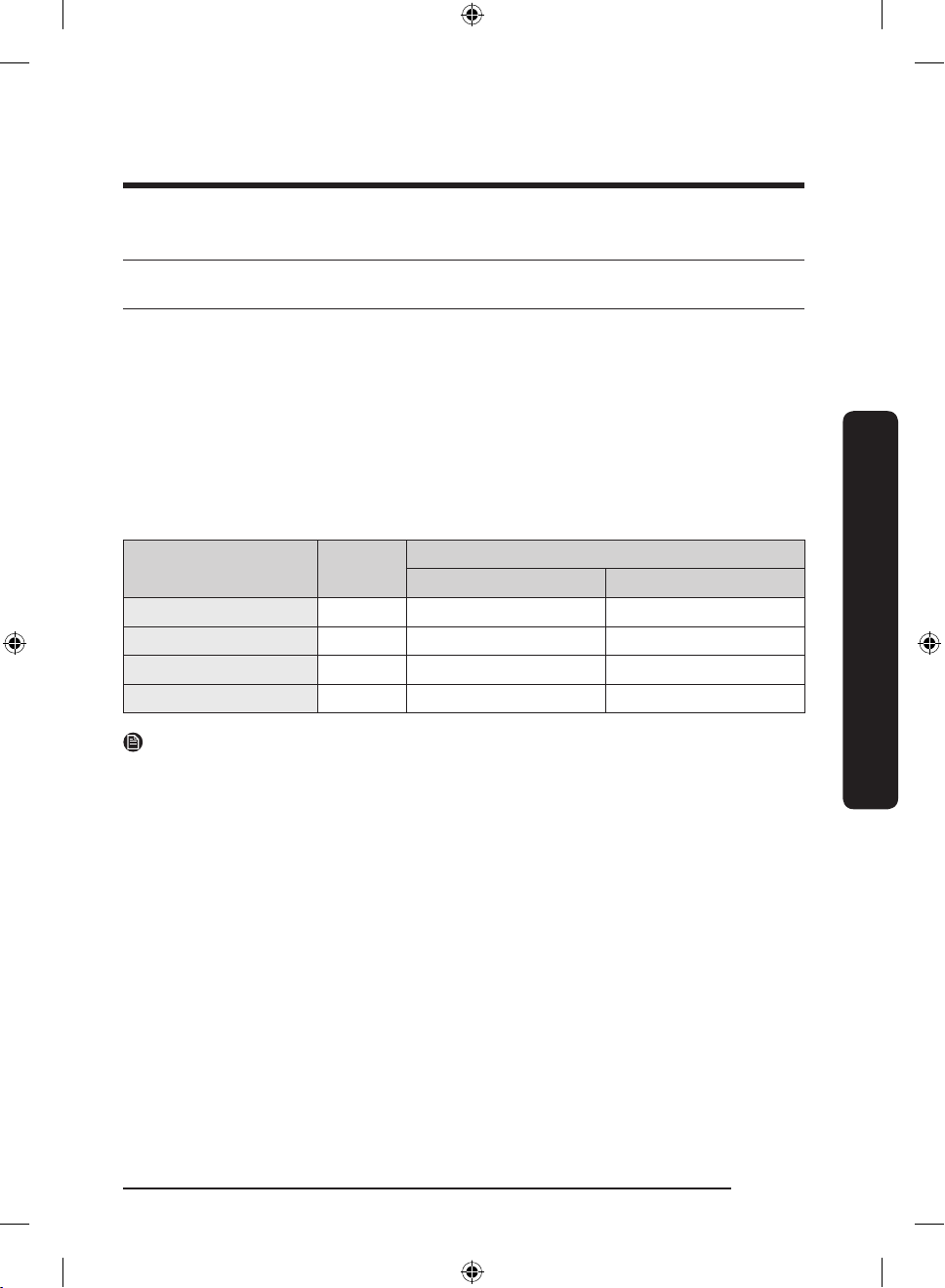
Effective temperature range
The refrigerator is designed to operate normally in the temperature range specied by its
class rating.
Class Symbol
Extended Temperate SN +10 to +32 +10 to +32
Temperate N +16 to +32 +16 to +32
Subtropical ST +16 to +38 +18 to +38
Tropical T +16 to +43 +18 to +43
NOTE
The cooling performance and power consumption of the refrigerator may be affected by
the ambient temperature, the door-opening frequency, and the location of the refrigerator.
We recommend adjusting the temperature settings as appropriate.
IEC 62552 (ISO 15502) ISO 8561
Ambient Temperature range (°C)
Installation
English 25
Untitled-5 25 2018-05-25 5:13:53
Page 26
Installation
A
B
C
Installation
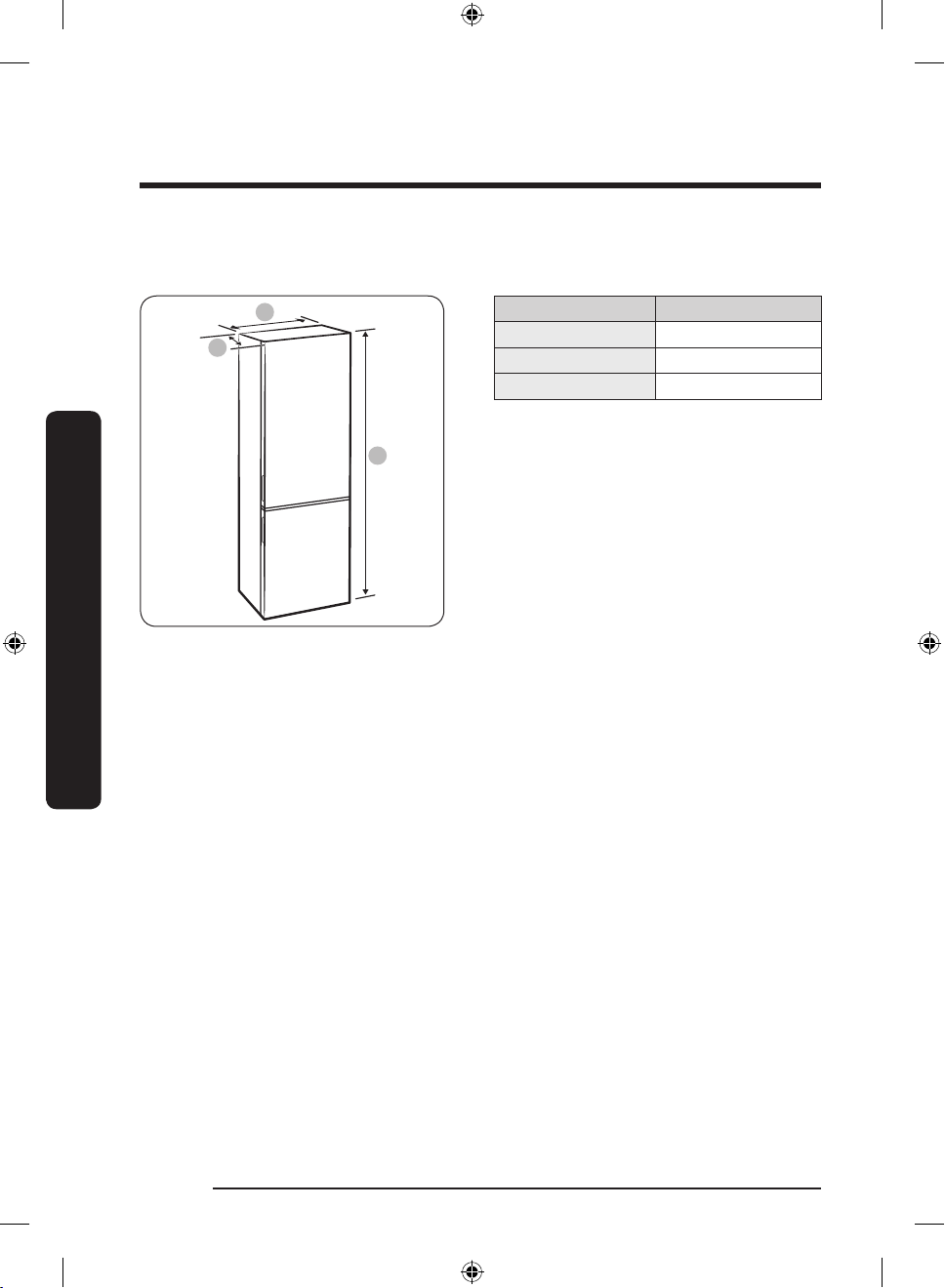
Clearance
See the pictures and table below for space requirements for installation.
Model RB38*
Depth “A” 650
Width “B” 595
Overall Height “C” 1927
(unit : mm)
English26
Untitled-5 26 2018-05-25 5:13:53
Page 27
01
02
04
05
06
07
03
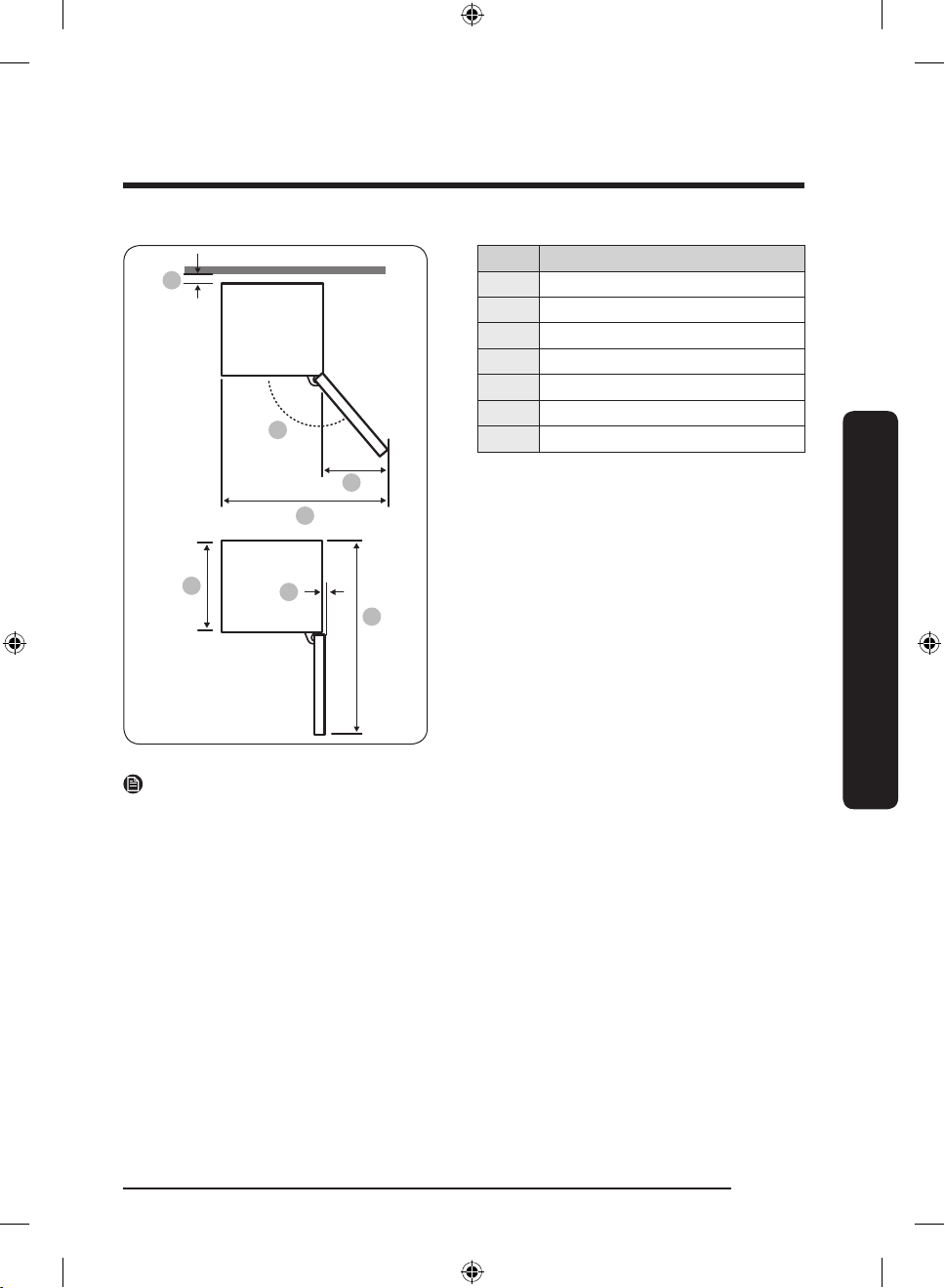
Model RB38*
01 more than 50 mm recommended
02 155°
03 500
04 1092
05 595
06 7
07 1202
(unit : mm)
Installation
NOTE
The measurements in the above table may differ, depending on the measuring method.
English 27
Untitled-5 27 2018-05-25 5:13:53
Page 28
Installation
Installation
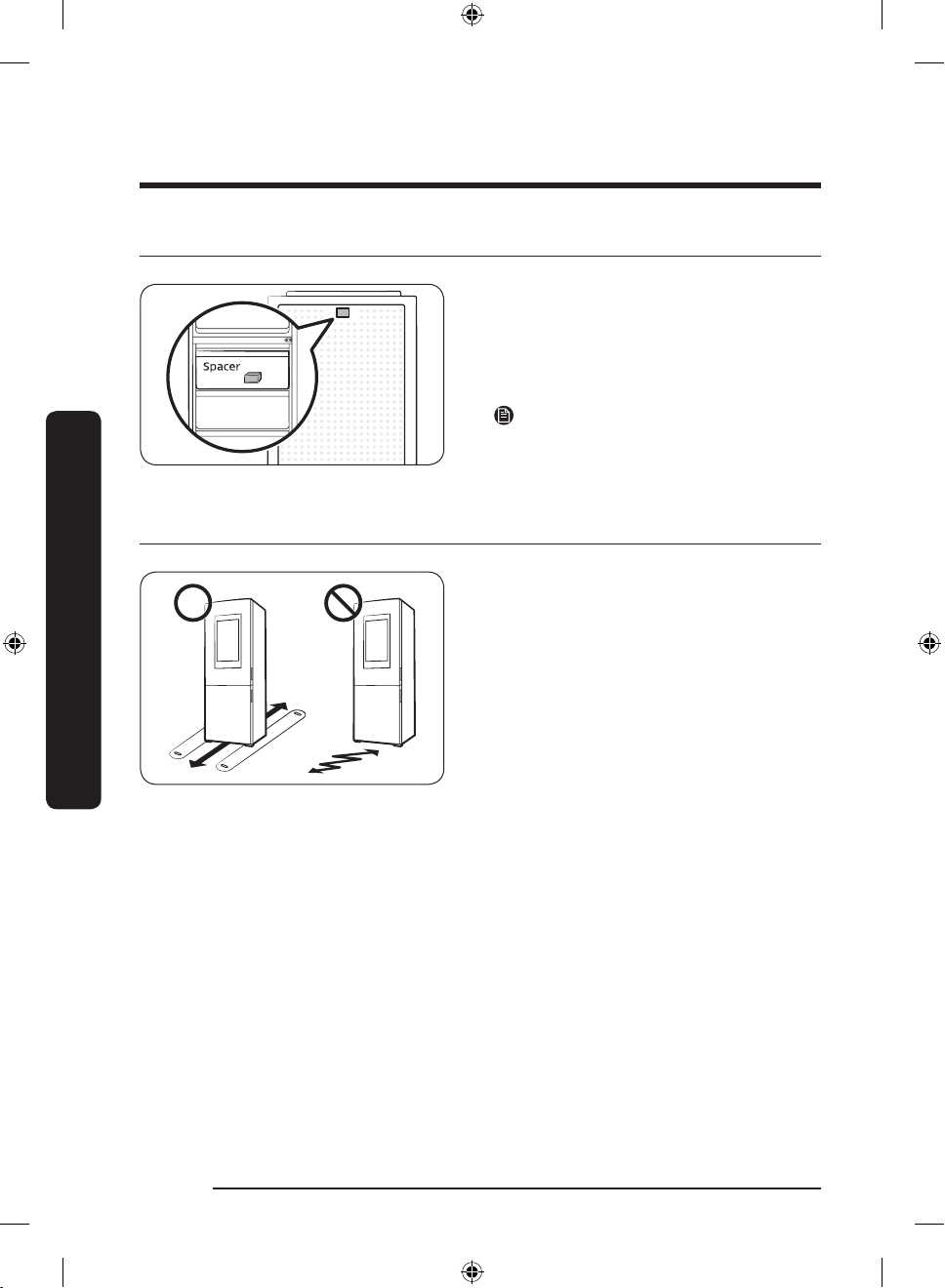
STEP 2 Spacing (applicable models only)
1. Open the door and locate the provided
spacer.
2. Unpack the spacer and attach it to the
rear of the refrigerator as shown. This
helps ventilate air to the rear wall and
save power consumption.
NOTE
If you install the refrigerator in line with
furniture, make sure to remove the spacer
so that the door ushes the furniture.
STEP 3 Flooring
• The surface to install the refrigerator
must support a fully loaded refrigerator.
• To protect the oor, put a large piece
of cardboard on each foot of the
refrigerator.
• Once the refrigerator is in its nal
position, do not move it unless
necessary to protect the oor. If you
have to, use a thick paper or cloth such
as old carpet along the movement path.
English28
Untitled-5 28 2018-05-25 5:13:53
Page 29
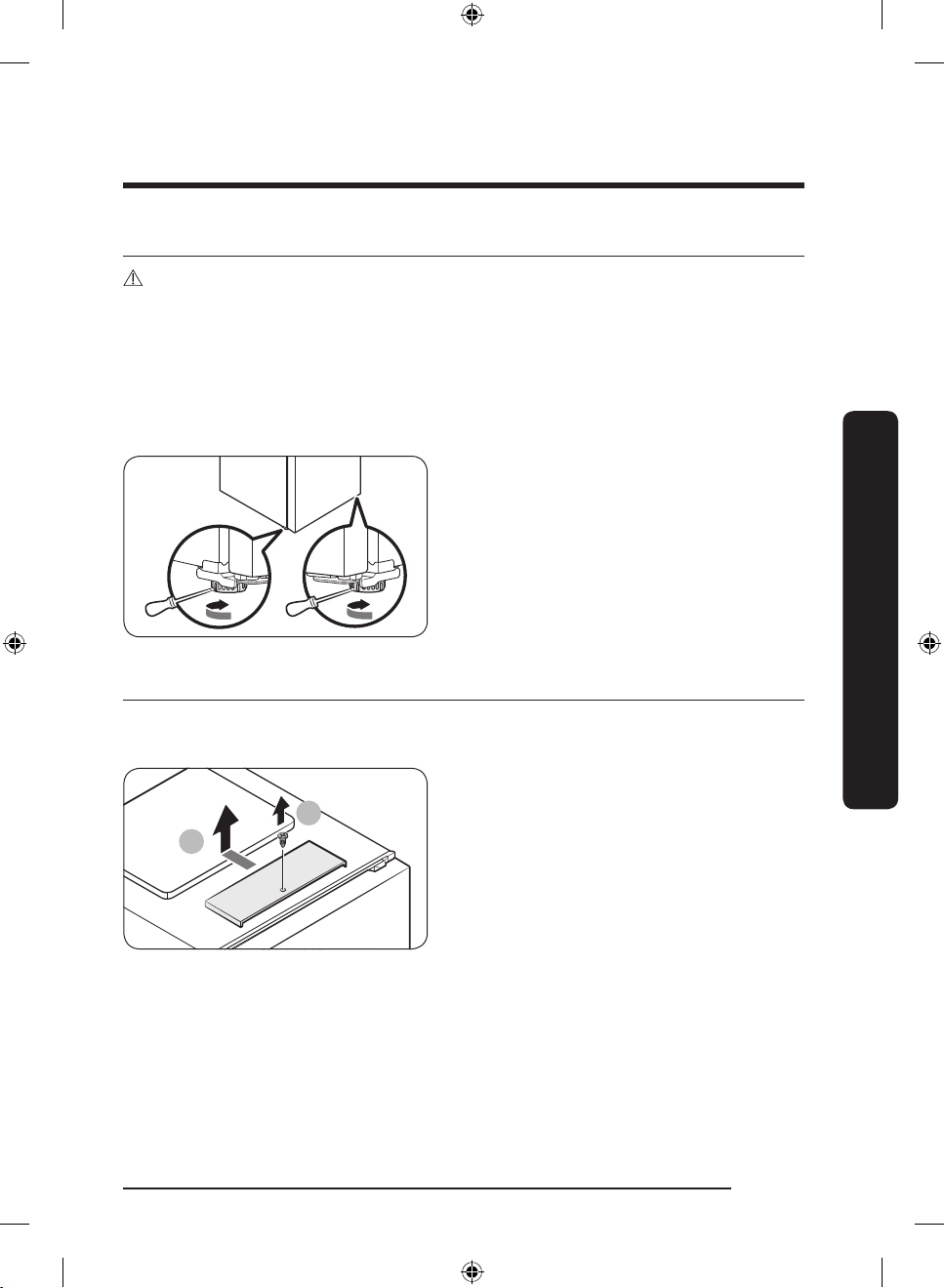
STEP 4 Adjust the levelling legs
1
2
CAUTION
• The refrigerator must be levelled on a at, solid oor. Failing to do so can cause damage
to the refrigerator or physical injury.
• Levelling must be performed with an empty refrigerator. Make sure no food items
remain inside the refrigerator.
• For safety reasons, adjust the front side a little higher than the rear side.
The refrigerator can be levelled using the front legs that have a special screw (leveller) for
levelling purposes. Use a at-head screwdriver for levelling.
To adjust the height
Either side of the refrigerator can be
adjusted using the leveller.
Insert a at-head screwdriver into the
leveller of the front leg of the target side.
Turn the leveller clockwise to raise, or turn
it counter clockwise to lower.
STEP 5 Open the speaker cover
To install and use the refrigerator indoors, remove the speaker cover on the top of the
refrigerator.
1. Use a Phillips screwdriver to remove the
screw on the speaker.
2. Slide to open up the speaker cover.
Installation
Untitled-5 29 2018-05-25 5:13:53
English 29
Page 30
Installation
STEP 6 Initial settings
By completing the following steps, the refrigerator should be fully functioning.
1. Remove the PE foam sheet on each shelf corner, which is attached to protect the
refrigerator during transportation.
2. Plug the power cord into the wall socket to turn the refrigerator on .
3. Open the door, and check if the interior light lights up.
4. Set the temperature to the coldest, and wait for about an hour. Then, the freezer will be
slightly chilled, and the motor will run smoothly.
5. Wait until the refrigerator reaches the set temperature. Now the refrigerator is ready
for use.
NOTE
When the refrigerator powers on, the alarm will sound. To turn off the alarm, press Freezer
or Fridge.
Installation
STEP 7 Final check
When installation is complete, conrm that:
• The refrigerator is plugged into an electrical outlet and grounded properly.
• The refrigerator is installed on a at, level surface with a reasonable clearance from the
wall or the cabinet.
• The refrigerator is level and is sitting rmly on the oor.
• The door opens and closes freely, and the interior light turns on automatically when you
open the door.
English30
Untitled-5 30 2018-05-25 5:13:54
Page 31
Operations
01
02
User interface
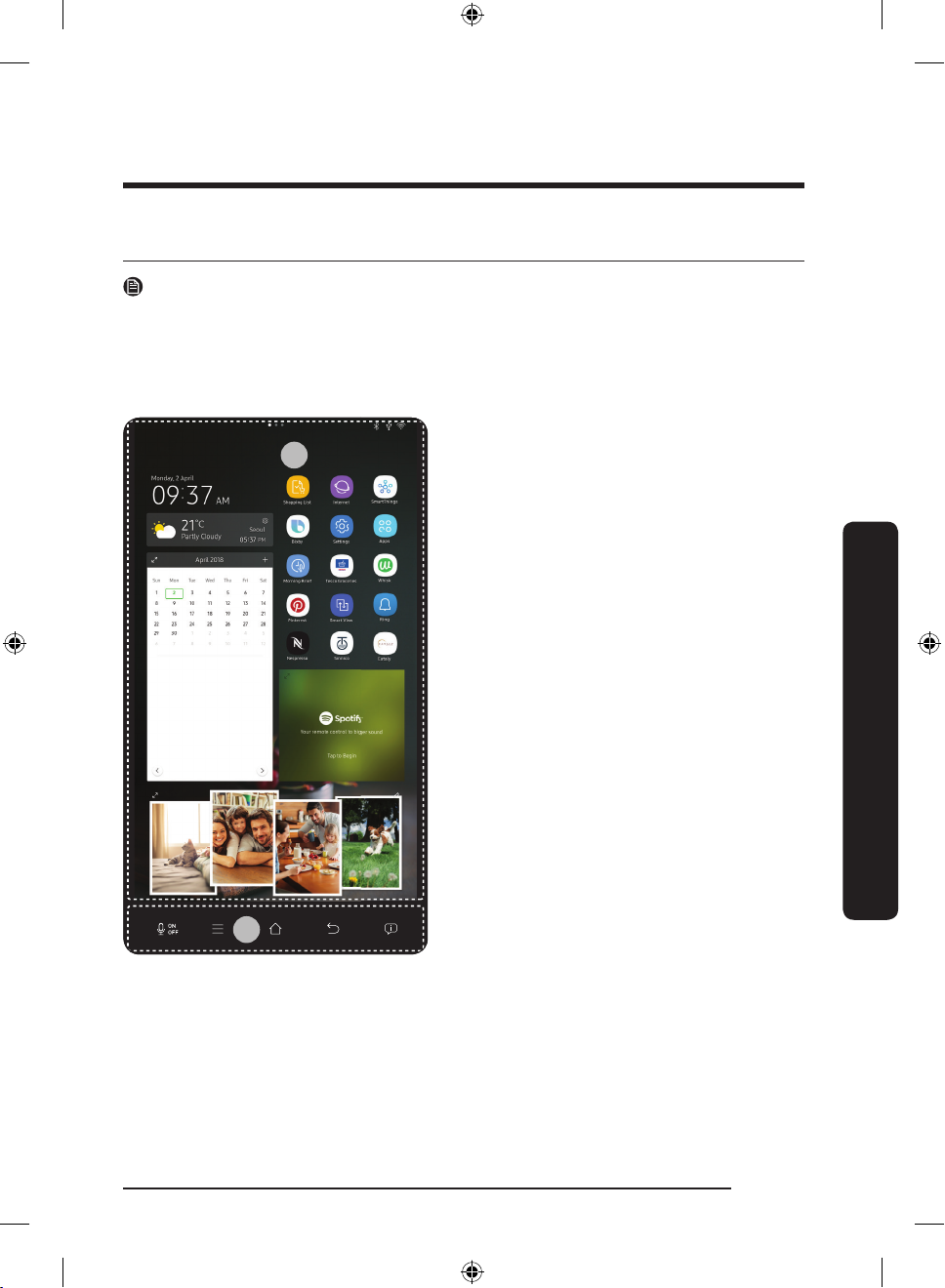
NOTE
• For more information about other menus and apps available on the Refrigerator app,
see the Online manual of your refrigerator.
• The content of apps and widgets, or their design is subject to change or support may be
discontinued without notice, depending on the content provider’s policy.
• Underage transactions with the services must be supervised by adults.
01 Home screen
02 Task bar
Operations
English 31
Untitled-5 31 2018-05-25 5:13:54
Page 32
Operations
01
02
Operations
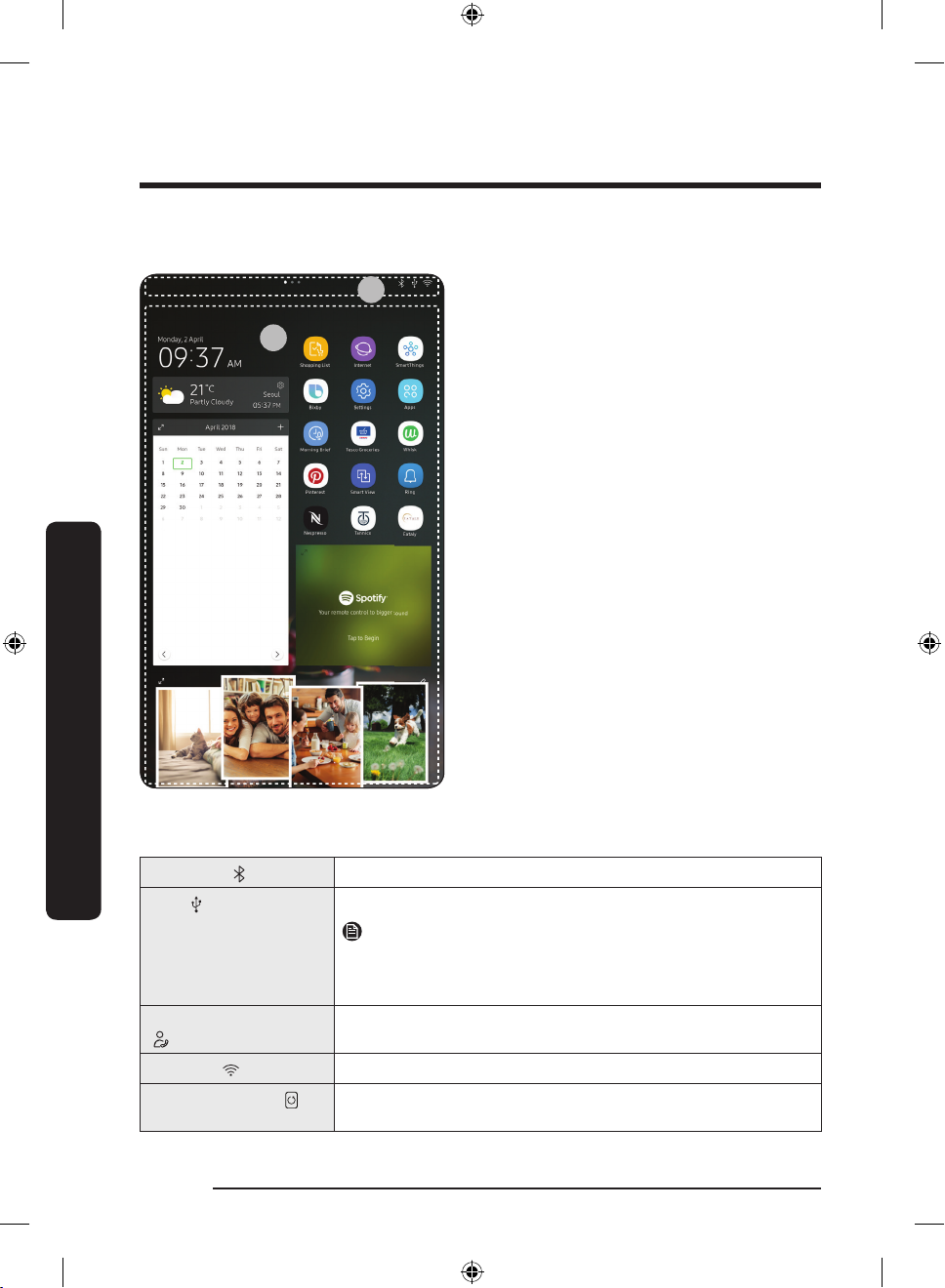
01 Home screen
01 Apps & Widgets
• Tap a desired app or widget to launch it.
• Tap and hold an app or widget to enter
Edit mode. A grid appears. In Edit mode,
you can drag and drop an app or widget
to a new position on the grid. When you
move the app or widget to a new grid
location, the location turns blue if it is
available. If it is not available, it turns
red.
• You can add an app or widget that has
been removed from the Apps list.
02 Status bar
• Displays the status of various functions.
(Refer to the following Icon descriptions
table.)
Icon descriptions
Bluetooth ( )
USB ( )
Remote Management
( )
Network ( )
Software Update ( )
English32
Untitled-5 32 2018-05-25 5:13:55
Indicates Bluetooth connection status.
Indicates USB connection status.
NOTE
The refrigerator supports USB memory that is formatted in the
FAT32 or exFAT le systems. NTFS is not supported. Be sure to
convert NTFS to FAT32 or exFAT before use.
Turns on when Remote Management is enabled and running.
Indicates network connection status in 5 levels (Off, 1-4).
Indicates the newest version of software has been downloaded
from the server and is ready to update.
Page 33
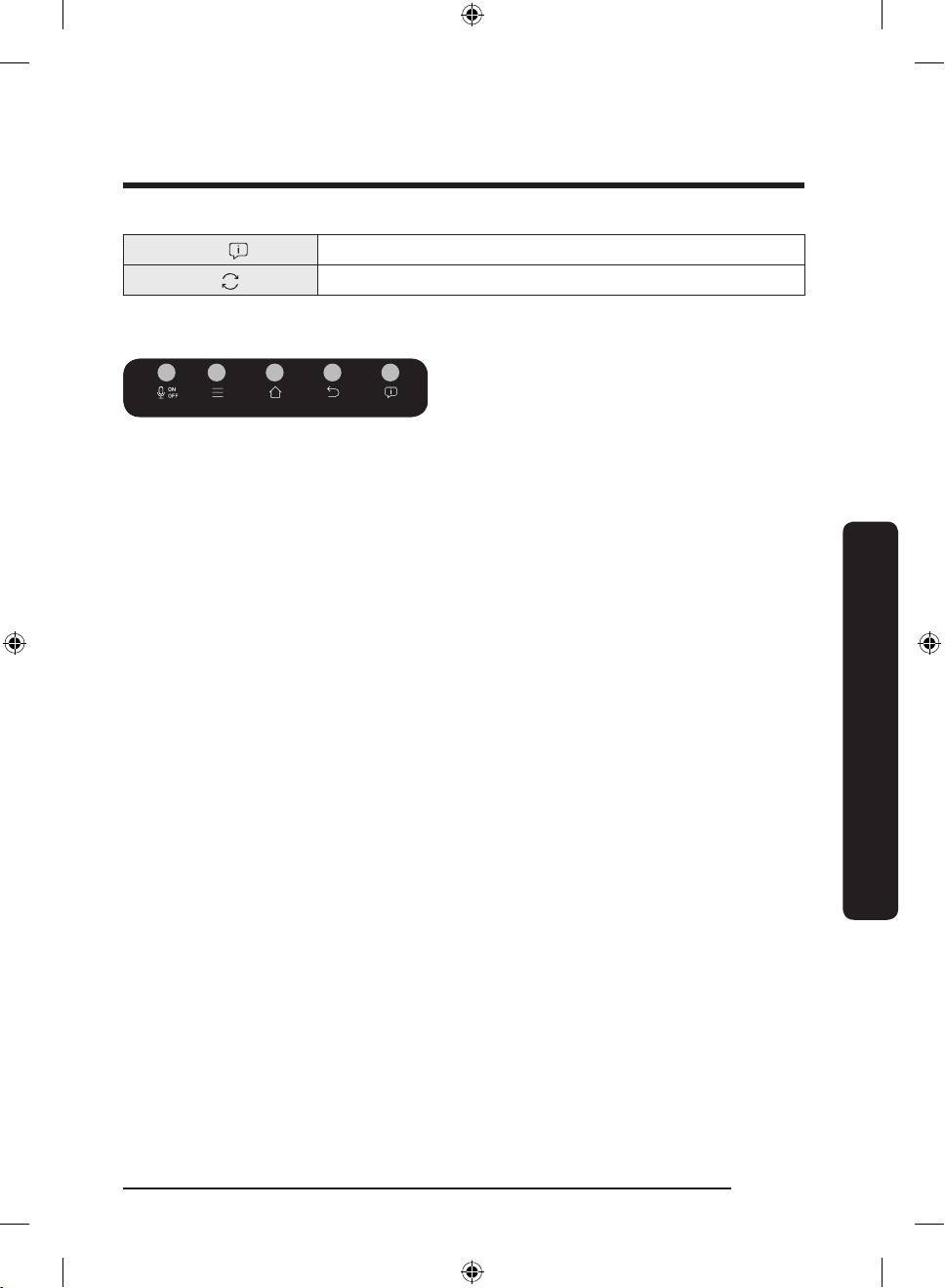
Notication ( )
01 02 03 04 05
Cloud sync ( )
02 Task bar
Indicates there is a notication message.
Indicates Family Hub is receiving data from the cloud server.
01 Microphone
• Tap to turn on or off the voice
recognition function.
• The microphone icon turns red when it
is turned off.
02 Menu
• Tap to display the menus available.
03 Home
• Tap to open the Home screen.
• Tap and hold to open the Task Manager.
See the Task Manager section for details.
04 Previous
• Tap to return to the previous screen.
05 Notication
• Tap to display the Quick Panel.
Operations
Untitled-5 33 2018-05-25 5:13:56
English 33
Page 34
Operations
Operations
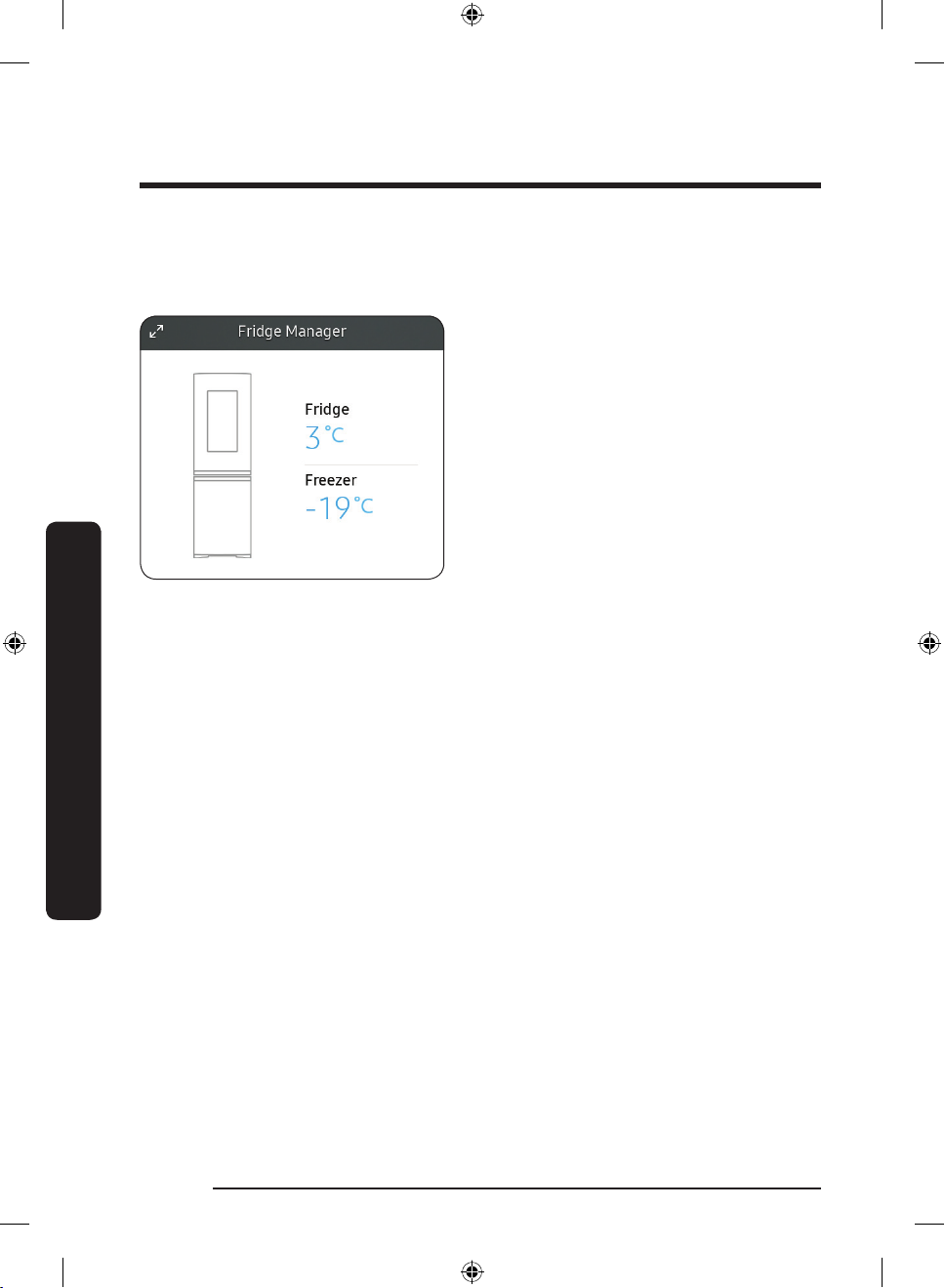
Fridge Manager
To access Fridge Manager, swipe the Home screen to the left, and then tap the Fridge
Manager widget.
• You can check the current temperatures
or modes of each compartment as well
as active special functions.
• Tap the widget to open the Fridge
Manager for detailed settings.
English34
Untitled-5 34 2018-05-25 5:13:56
Page 35
01
02
04
03
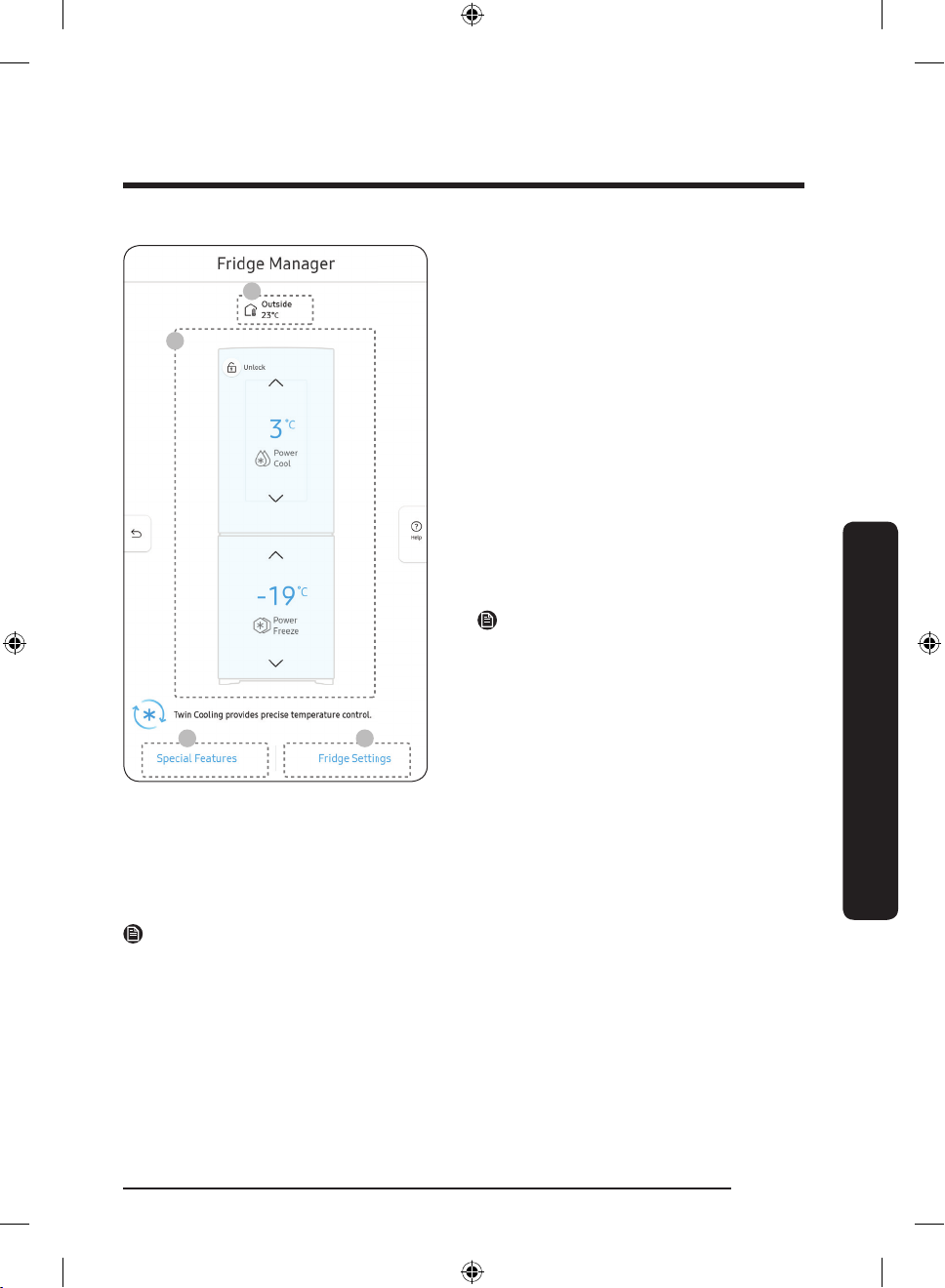
The Fridge Manager is a graphical
representation of your refrigerator. The
temperature or mode settings for each are
displayed over each section.
Fridge Manager At a Glance
01 Temperature
Set or change the temperature for the
fridge and freezer with Power mode
(Power Cool or Power Freeze).
- Power Cool and Power Freeze speeds
up the cooling and freezing process
at maximum fan speed. The fridge
and the freezer keeps running at full
speed for several hours, and then
returns to the previous temperature.
- To freeze large amounts of food,
activate Power Freeze for at least
20 hours before putting food in the
freezer.
NOTE
Using Power Cool or Power Freeze
increases power consumption. Make sure
you turn it off to return to the previous
Operations
temperature if you do not intend to use it.
02 Special Features
Special functions available on this refrigerator are listed with a brief description.
03 Fridge Settings
See the next page for details.
04 External Conditions
Displays the external (ambient) temperature and humidity.
NOTE
The displayed conditions may differ from the actual temperature and humidity.
English 35
Untitled-5 35 2018-05-25 5:13:56
Page 36
Operations
Operations
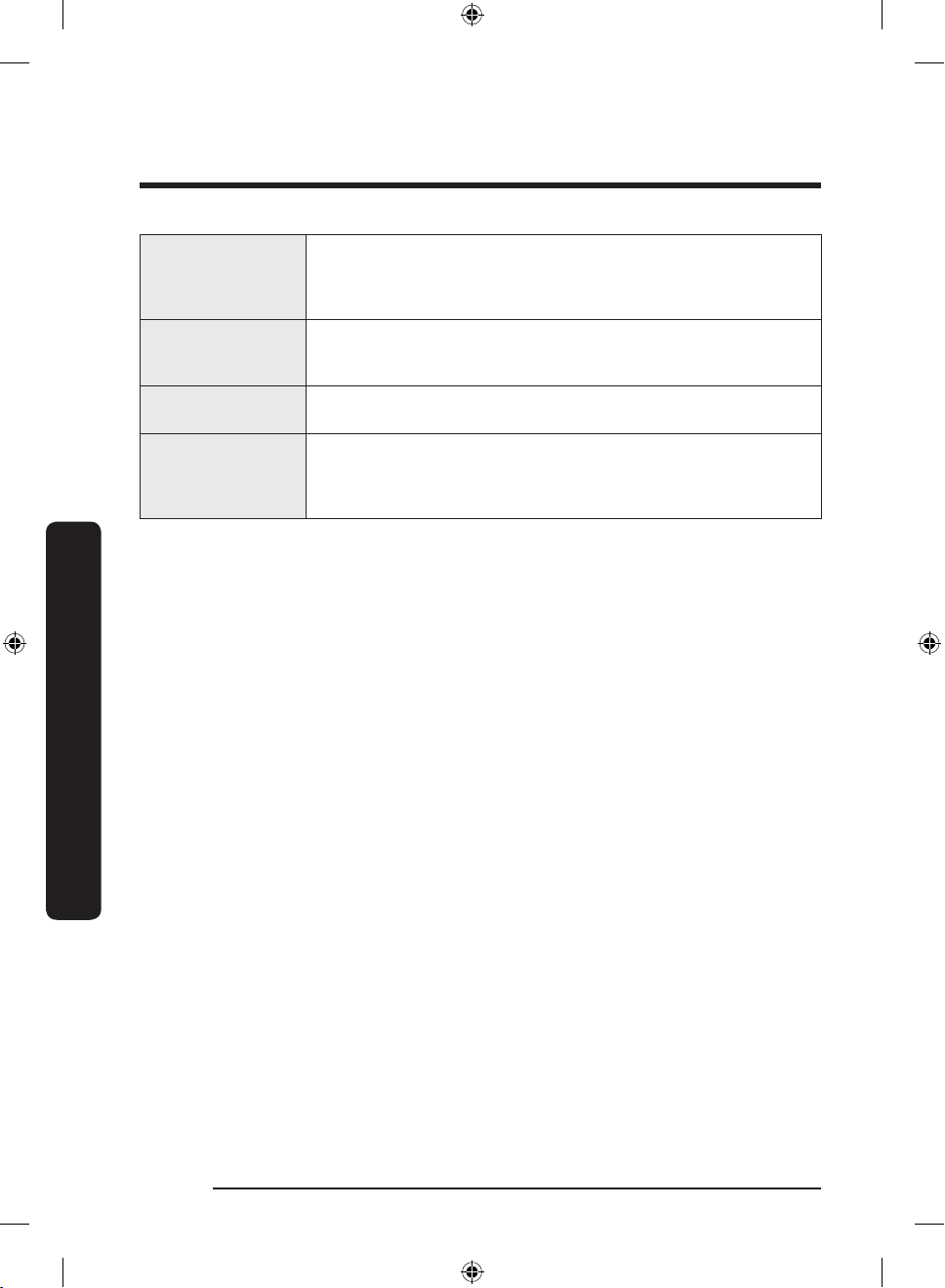
Handle Light
Door Alarm
Self Check
Vacation Mode
If you want the handle light (which is located below the fridge
door) to stay turned on, turn the Handle Light on. The handle light
turns off if the freezer door is open, or both the fridge door and
the freezer door are open.
With the Door Alarm enabled, the door being open displays an
alert with a beep. With the Door Alarm disabled, the door being
open displays just an alert.
Self Check is a self diagnoses function. Tap to open, and then tap
Start to run.
If you are going on vacation or a business trip, or if you do not
intend to use the refrigerator for an extended time, turn the
Vacation Mode on. The refrigerator drops the internal temperature
to below 17 °C.
English36
Untitled-5 36 2018-05-25 5:13:56
Page 37
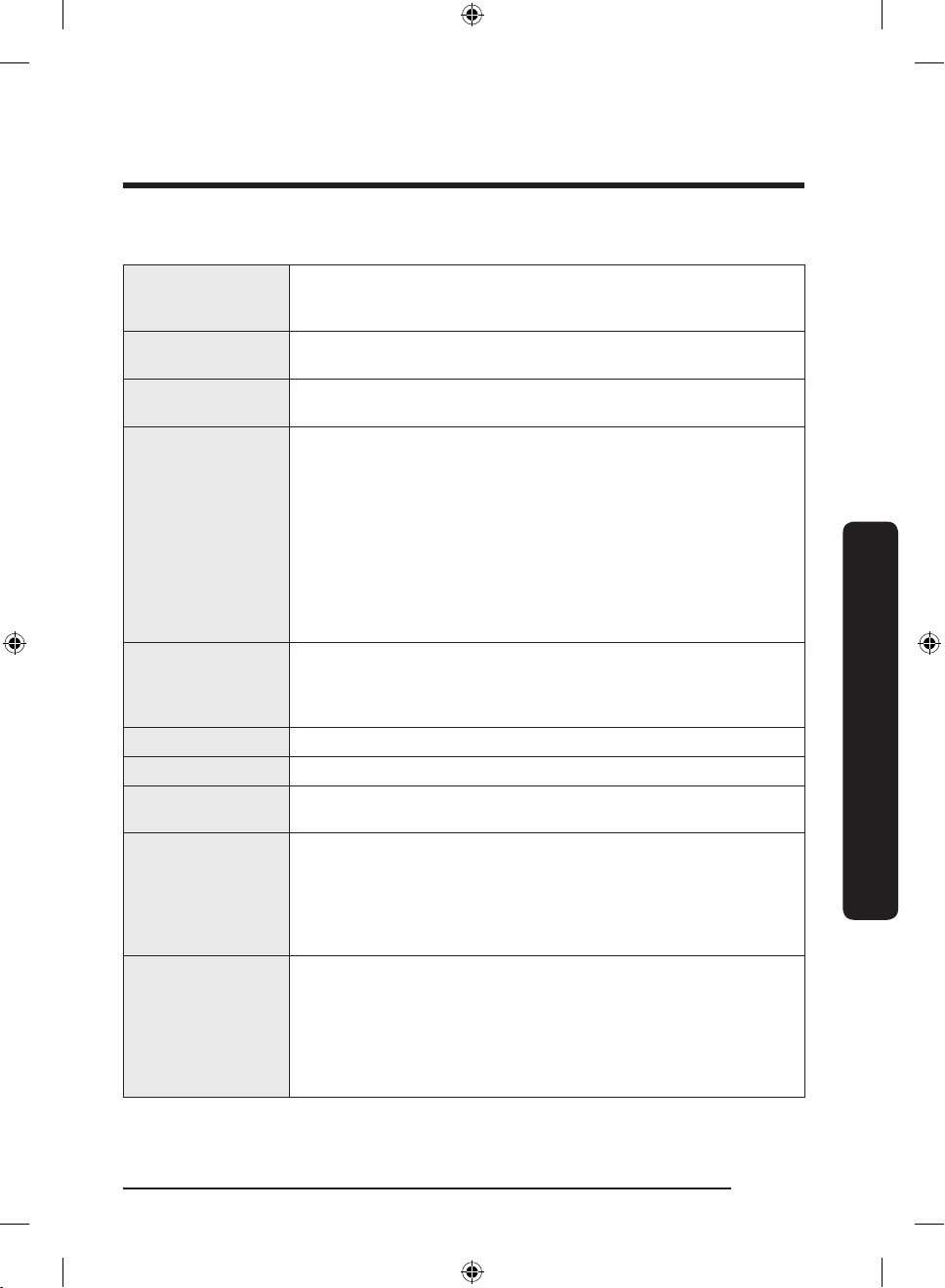
Settings
Display
motion detector, theme, screen timeout, and duration of the
screen saver.
• You can set the screen brightness, wallpapers, auto wake-up,
Sound
Wi-Fi
• Set the volume and equalizer and turn on or turn off the touch
sound.
• Turn on or turn off a Wi-Fi connection. The current Wi-Fi
network is listed rst in the access point (AP) list.
• When the Speaker mode is on, you can listen to music and
media on your mobile phone or tablet through Family Hub’s
speaker.
- Only one connected mobile phone or tablet is listed.
• When the Speaker mode is off, you can search and connect to
Bluetooth
nearby Bluetooth-enabled devices.
- Up to 4 recently paired Bluetooth devices are listed.
- To add a new device when 4 paired devices are listed, rst
unpair a paired device from the device list.
- Available devices are Bluetooth-enabled headsets,
headphones, and speakers.
• You can check the Voice function language, turn on or turn off
Voice
Voice wake-up, select Wake Word, register and manage Voice
ID, and check information about Bixby. If you want to erase the
voice data, check the privacy tab.
Prole • You can add, edit, or delete a prole.
Security • Enable or disable restrictions on Family Hub features and apps.
Language
• Select a preferred language. Available languages depend on the
sales region.
• Make sure the Automatic date and time setting is on with a
proper Wi-Fi network connection. Open the fridge door and
Date and Time
locate the display reset button on the inner side of the door.
Press the button and press again to reset the display. Then, the
date and time will be synced by the time server.
• You can change the time zone through the Time zone menu.
• Make sure the Software Update function is on with a proper
Wi-Fi network connection.
• When updates are available, the Update button becomes
About Device
active. When updates are complete, the refrigerator restarts
automatically.
• Legal information displays the Open Source License Agreement.
Tap the list item to open the Open Source Announcement.
Operations
English 37
Untitled-5 37 2018-05-25 5:13:56
Page 38
Operations
Operations
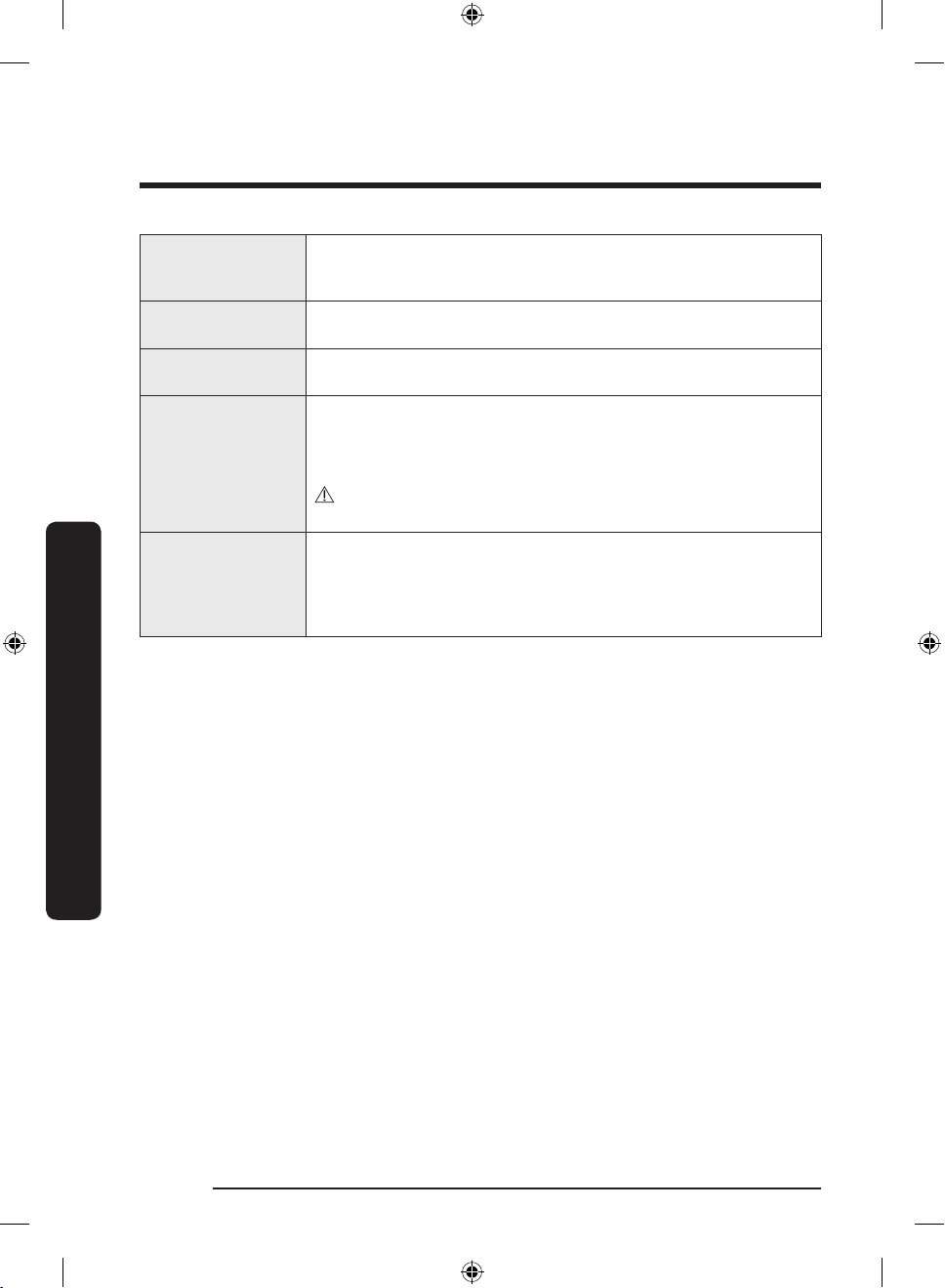
Easy Connection
Clean Screen Mode
Online Manual
Factory Data Reset
Remote
Management
• Easy Connection can be used with Samsung Smartphone apps,
and allows you to connect your device to the same home Wi-Fi
network that your smartphone is connected to.
• Turn on so you can clean the screen without activating any
apps.
• The online manual will walk you through various menus and
apps that the refrigerator provides directly on the display.
• Tap Reset to restart the refrigerator in Factory Data Reset
mode. All user data will be removed permanently. Data that will
be removed includes account information, memos, photos, and
user settings.
CAUTION
Once factory reset is complete, no user data can be recovered.
• Use Remote Management to allow a service representative to
remotely diagnose problems and provide solutions.
• Remote Management requires a Wi-Fi connection.
• The Remote Management menu does not appear on models
that do not support Remote Management.
English38
Untitled-5 38 2018-05-25 5:13:56
Page 39
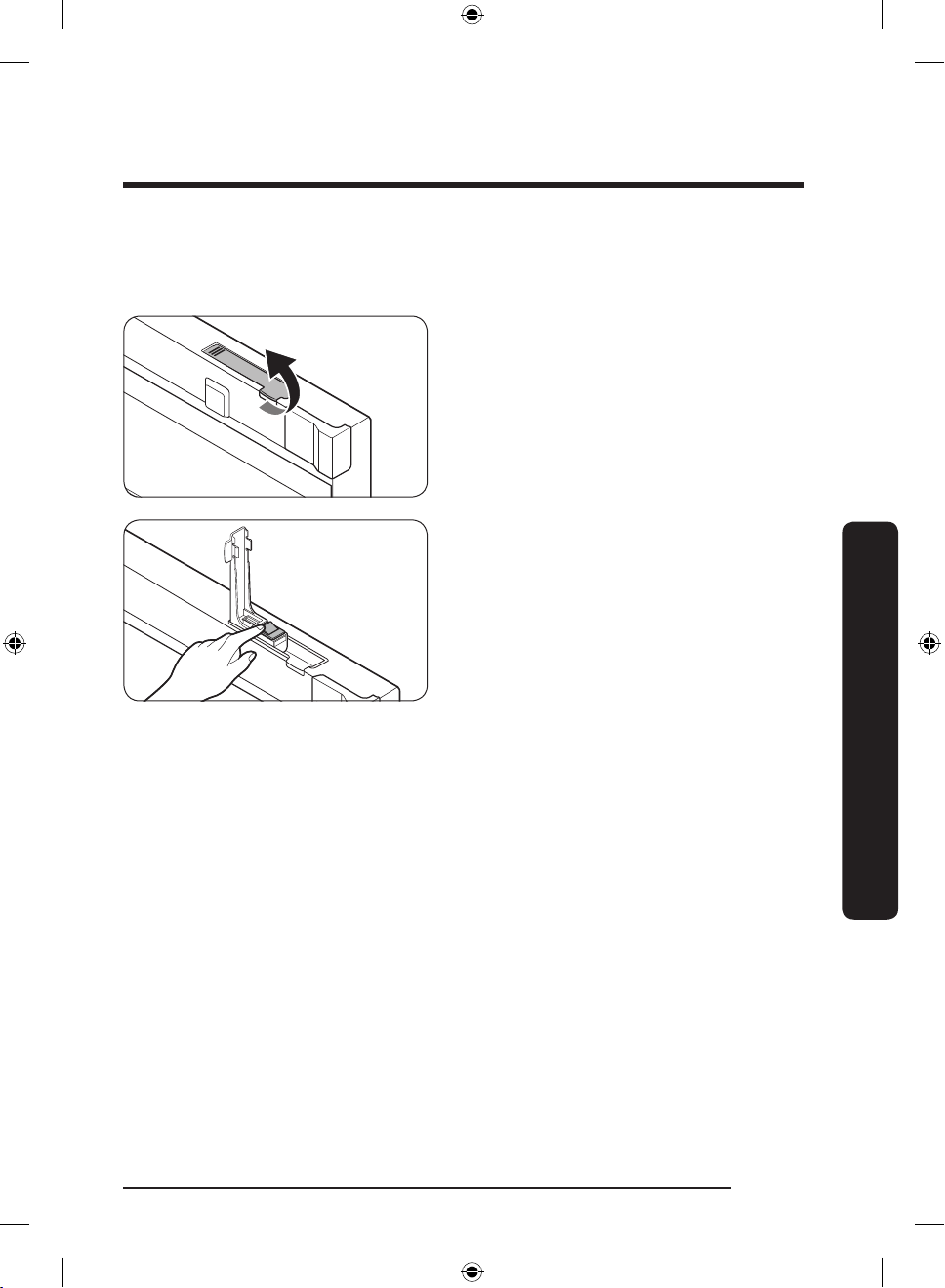
Display reset
If you encounter an abnormal symptom on the display, try resetting the display. This may
solve the symptom.
1. Pull up to open the display switch cover
at the top of the fridge door.
2. Press the display switch to turn the
display off. Then, press again to reset
the display. Check if the display
operates normally.
Operations
English 39
Untitled-5 39 2018-05-25 5:13:57
Page 40
Operations
Operations
SmartThings
Installation
Visit the Google Play Store, Galaxy Apps, or Apple App Store and search for “SmartThings”.
Download and install the SmartThings app provided by Samsung Electronics to your smart
device.
NOTE
• The SmartThings app is designed for Android 6.0 (Marshmallow) or later, iOS 10.0 or
later, iPhone 6 or later, and is optimized for Samsung smartphones (Galaxy S and Galaxy
Note series).
• For improved performance, the SmartThings app is subject to change without notice, or
discontinued support according to the manufacturer’s policy.
• Recommended encryption systems include WPA/TKIP and WPA2/AES. Any newer or
unstandardized Wi-Fi authentication protocols are not supported.
• Wireless networks may be affected by the surrounding wireless communication
environment.
• If your Internet service provider has registered the MAC address of your PC or modem
for identication, your Samsung Smart Refrigerator may fail to connect to the Internet.
If this happens, contact your Internet service provider for technical assistance.
• The rewall settings of your network system may prevent your Samsung Smart
Refrigerator from accessing the Internet. Contact your Internet service provider for
technical assistance. If this symptom continues, contact a local Samsung service center
or retailer.
• To congure the wireless access point (AP) settings, see the user manual of the AP.
• Samsung Smart Refrigerators support both Wi-Fi 2.4 GHz with IEEE 802.11 b/g/n and
Soft-AP protocols (IEEE 802.11 n is recommended).
• Unauthorized Wi-Fi wireless routers may fail to connect to applicable Samsung Smart
Refrigerators.
English40
Untitled-5 40 2018-05-25 5:13:57
Page 41
Samsung account
You are required to register your Samsung account to use the app. If you don’t have a
Samsung account, follow the app’s onscreen instructions to create a free Samsung account.
Getting started
Turn on the device you want to connect, open the SmartThings app on your phone, then
follow the instructions below.
If a pop-up appears saying that a new device has been found, tap ADD NOW.
If a pop-up doesn't appear, tap the + button, then select the device you want to connect
from the list of available devices.
If your device isn't in the list of available devices, tap Supported Devices, select the device
type (Refrigerator), and then select the specic device model.
Follow the instructions in the app to set up your device. Once setup is complete, your
refrigerator will appear as a "card" on your Devices screen.
Refrigerator app
Integrated control
You can monitor and control your refrigerator at home and on the go.
• Tap the refrigerator icon on the SmartThings Dashboard or tap the Devices icon at the
bottom of the Dashboard, and then tap the refrigerator "card" to open the Refrigerator
page.
• Check the operation status or notications related to your refrigerator, and change
options or settings if necessary.
NOTE
Some options or settings of the refrigerator may not be available for remote control.
Operations
English 41
Untitled-5 41 2018-05-25 5:13:57
Page 42
Operations
Operations
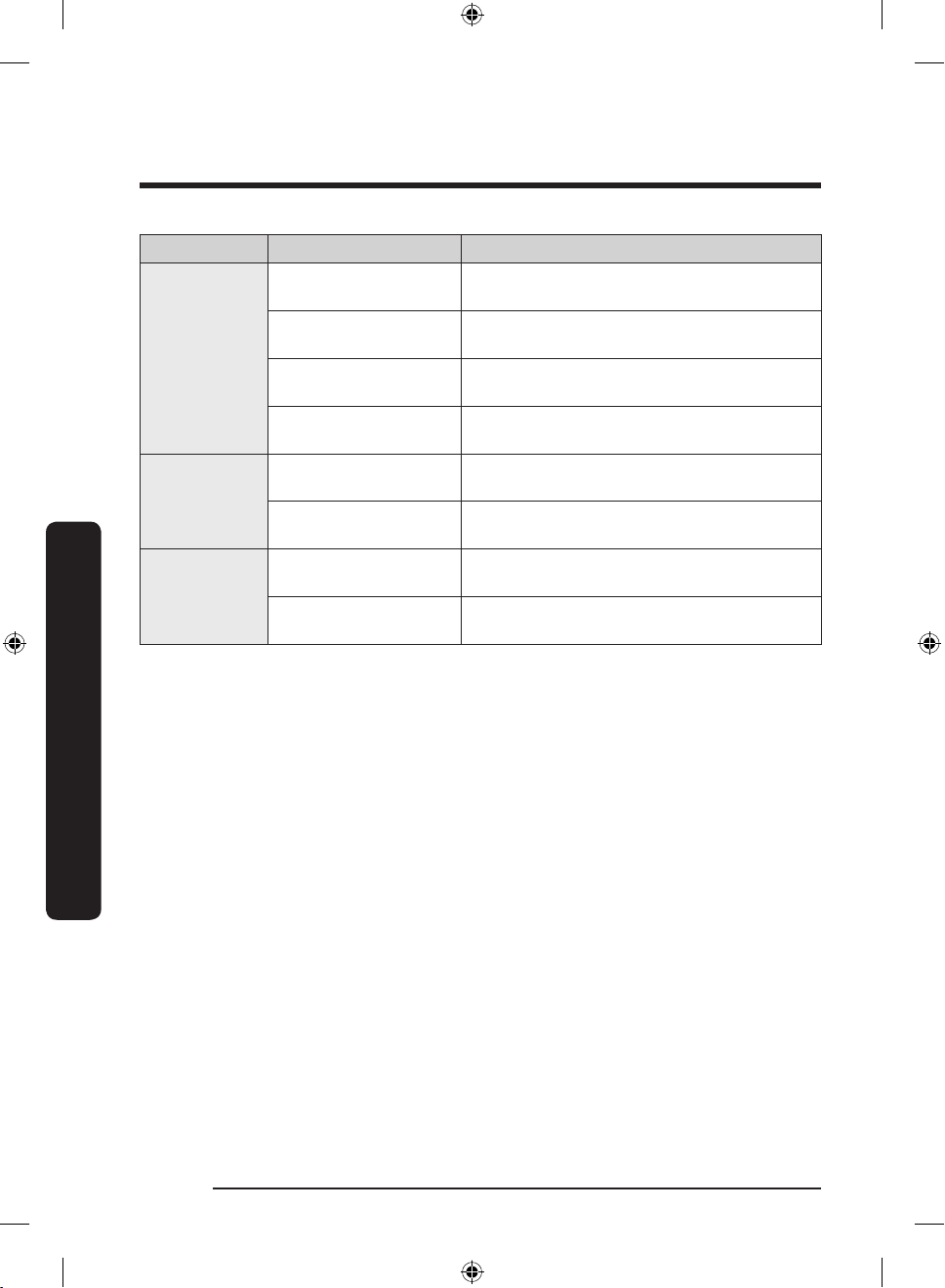
Category Item Description
Displays the current temperature setting of
the fridge.
Displays the current temperature setting of
the freezer.
Detects abnormal operations of the
refrigerator.
Checks the accumulated power consumption
of the refrigerator for the last 180 days.
You can turn Power Cool on or off, and check
the current settings.
You can turn Power Freeze on or off, and
check the current settings.
This alarm is triggered when the fridge or the
freezer has abnormally high temperatures.
This alarm is triggered if the fridge or freezer
door is left open for a specic time.
Monitoring
Functions
Alarms
Fridge temperature
Freezer temperature
Self Check
Energy monitoring
Power Cool
Power Freeze
Abnormally high
temperature
Door opening
English42
Untitled-5 42 2018-05-25 5:13:57
Page 43
Recommendations for voice recognition
For the voice recognition function, there is a built-in microphone at the top of the
refrigerator’s display. To use the voice recognition function:
• Stand no more than 1 meter from the refrigerator and speak loudly and clearly towards
the built-in microphone.
• Speak at a regular pace. Reduce ambient noises, such as noises from a living-room TV.
NOTE
The voice recognition function may not work if you stand more than 1 meter away or if
you speak too softly.
Samsung Family Hub
Installation
Visit the Google Play Store, Galaxy Apps, or Apple App Store and search for “Samsung
Family Hub”. Download and install the Samsung Family Hub app provided by Samsung
Electronics to your smart device.
NOTE
• The Samsung Family Hub app is designed for Android 4.4 (KitKat) or higher, or iOS 8.0
or higher, and is optimized for Samsung smartphones (Galaxy S and Galaxy Note series).
• For improved performance, the Samsung Family Hub app is subject to change without
notice. Support may be discontinued according to the manufacturer's policy.
• Wireless networks may be affected by the surrounding wireless communication
environment.
• If your Internet service provider has registered the MAC address of your PC or modem
for identication, your Samsung Smart Refrigerator may fail to connect to the Internet.
If this happens, contact your Internet service provider for technical assistance.
• The rewall settings of your network system may prevent your Samsung Smart
Refrigerator from accessing the Internet. Contact your Internet service provider for
technical assistance. If this symptom continues, contact a local Samsung service center
or retailer.
Operations
English 43
Untitled-5 43 2018-05-25 5:13:57
Page 44
Operations
Operations
Samsung account
You are required to register your Samsung account to use the Samsung Family Hub app. If
you don’t have a Samsung account, follow the app’s onscreen instructions to create a free
Samsung account.
NOTE
To connect your smartphone and the refrigerator, register your Samsung account in
Settings Prole.
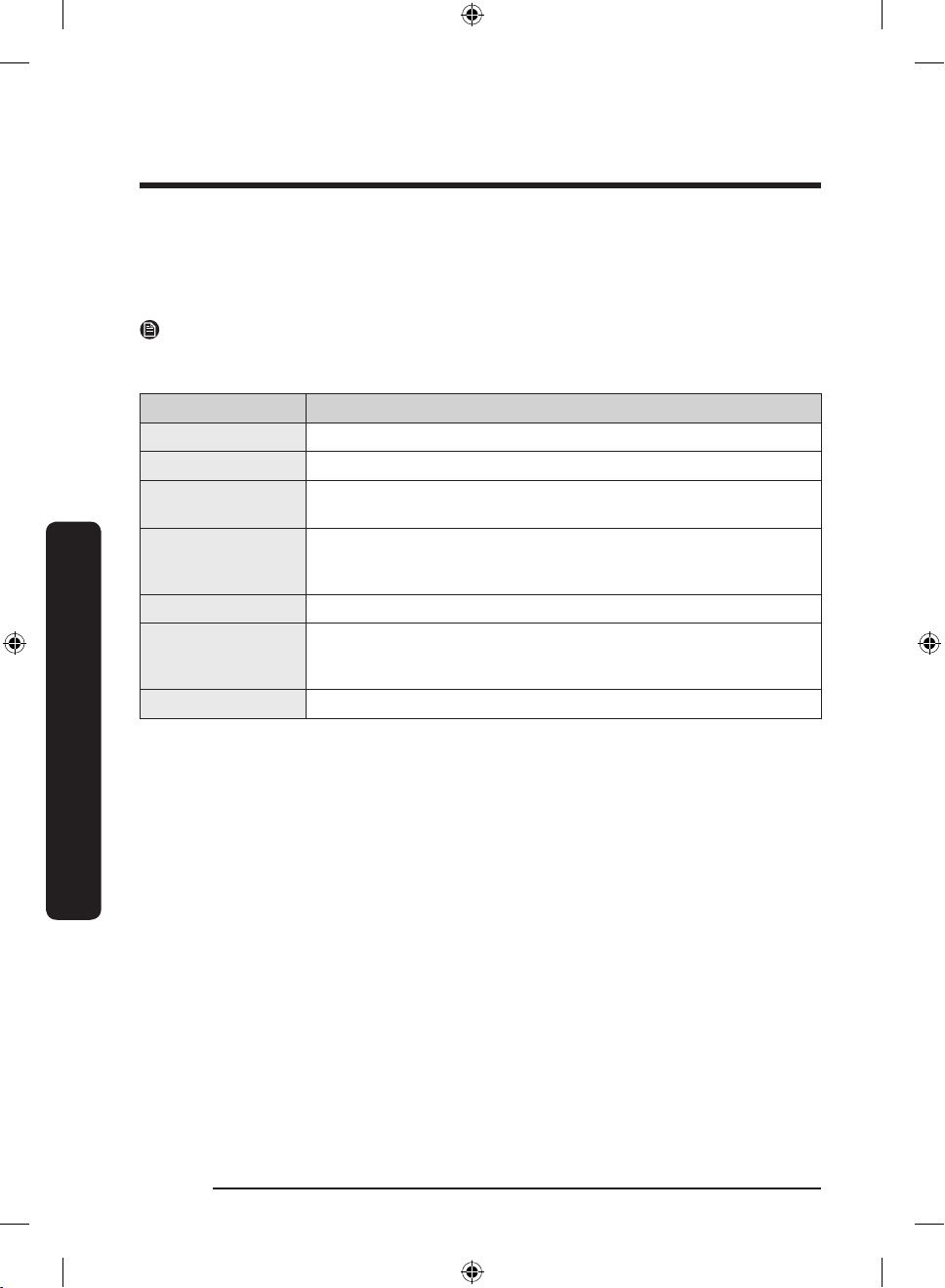
Item Description
Calendar You can share your schedule with your family.
To Do You can create and edit a to-do list.
Memo You can bring a Memo from your refrigerator to your smartphone
or send a Memo from your smartphone to your refrigerator.
White Board You can bring a White Board message from your refrigerator
to your smartphone or send a White Board message from your
smartphone to your refrigerator.
Gallery You can send photos from your smartphone to the refrigerator.
View Inside You can check the inner view of the refrigerator, use different
labels to register item-specic storage periods, and keep track of
them to ensure you use items by their use-by dates.
Shopping List You can create and edit shopping lists.
English44
Untitled-5 44 2018-05-25 5:13:57
Page 45
Storage information
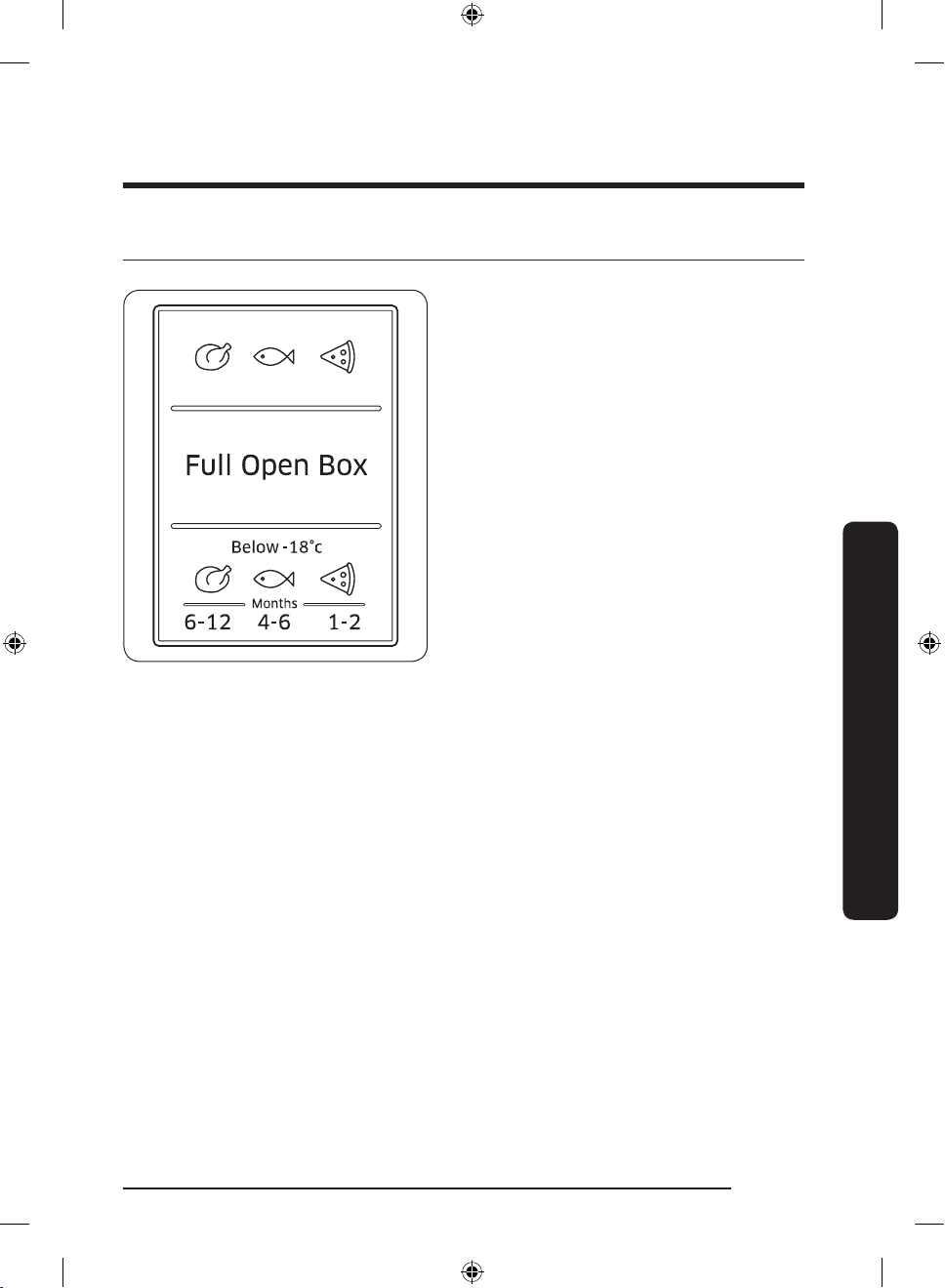
The numbers marked in the bottom section
of this gure indicate the storage period
for the immediately above food item. For
example, 4-6 months for sh.
To freeze food
1. Wrap the food airtight with suitable wrapping materials.
2. Seal the wrapping.
3. Label the wrapping with the content and date.
Operations
Wrapping materials
• Materials suitable for wrapping food: plastic lm, polyethylene blown lm, aluminium
foil, and freezer tins.
• Materials not suitable for wrapping food: wrapping paper, greaseproof paper,
cellophane, food garbage bags, and used shopping bags.
Sealing materials
Rubber bands, plastic clips, string, cold-resistant adhesive tape or similar. Bags and
polyethylene blown lm can be sealed with a lm sealer.
English 45
Untitled-5 45 2018-05-25 5:13:57
Page 46
Operations
Operations
Storage period of frozen food
The storage period differs with food types and storing temperatures. The following
specication is based on a temperature of -18 °C:
• Fresh poultry (whole chickens), fresh meat (steaks, roasts): up to 12 months
• Fish (lean sh, cooked sh), fresh shrimp, scallops, squid: up to 6 months
• Pizza, sausage: up to 2 months
NOTE
For more information, visit the FDA web site (http://www.fda.gov/).
Thawing
Frozen food can be thawed in the following ways:
• Naturally at room temperatures
• Naturally in the fridge
• By using an electric oven with or without heat support
• By using a microwave oven
NOTE
• Do not refreeze thawed food. Some parts of the food may not freeze completely.
• Do not store frozen food for longer than the max storage period.
English46
Untitled-5 46 2018-05-25 5:13:57
Page 47
Maintenance
Door reversal (applicable models only)
Reversing the door must be performed by Samsung-approved servicing personnel at your
own expense because this kind of servicing is not covered by the Warranty.
WARNING
• Reversing failure or property damage that may occur by unapproved agencies will not
be covered by the Warranty.
• Make sure that the refrigerator is disconnected from the power source before doing the
reversal.
• You must wait for at least an hour after door reversing is complete. This is to prevent
electric shock that could occur.
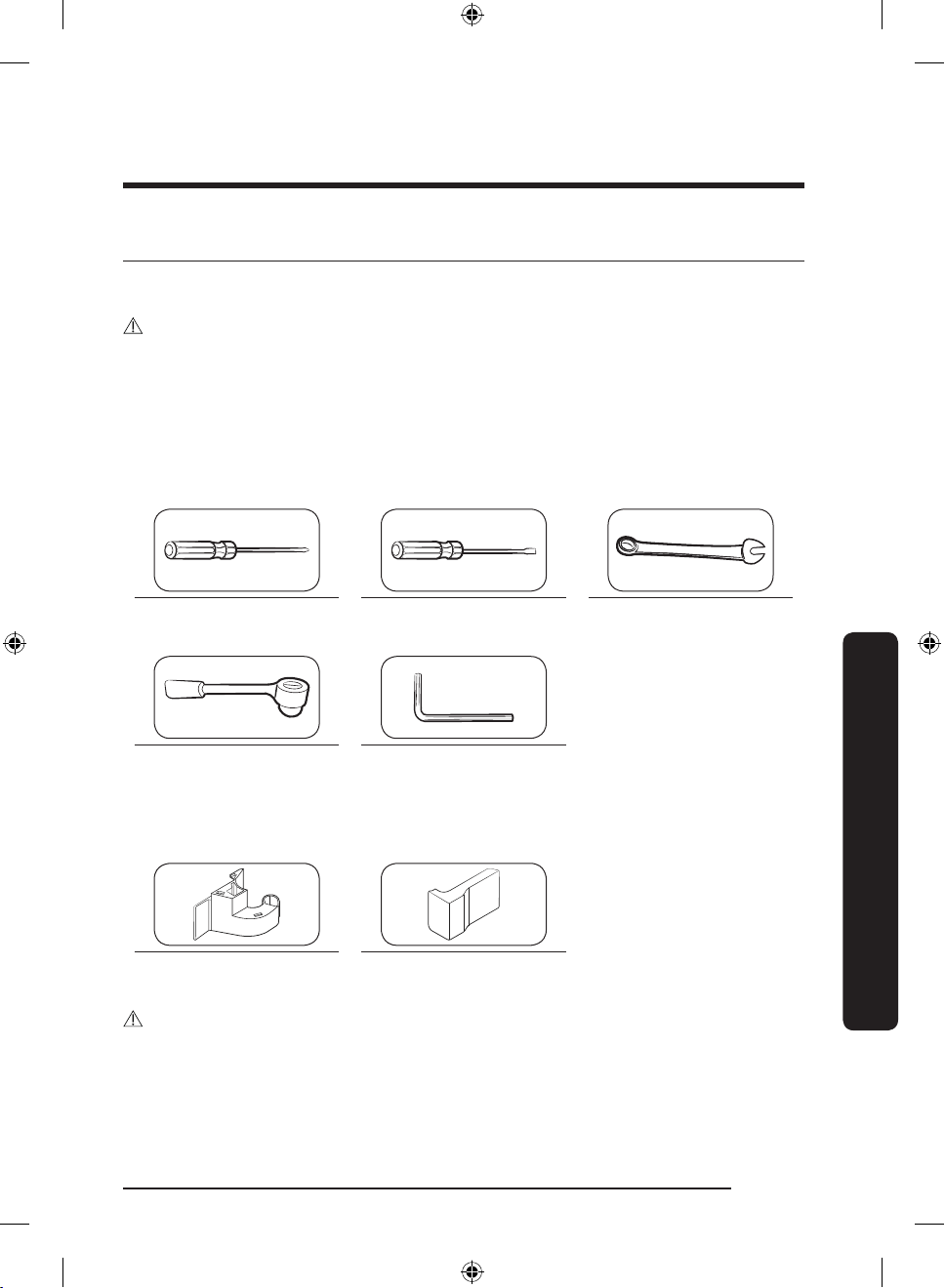
Tools required (not provided)
Phillips screwdriver Flat-head screwdriver 11 mm spanner
8 mm socket wrench
(for bolts)
5 mm Allen wrench
(for middle hinge)
(for hinge shaft)
Accessories
Hinge Cover (L) Space Cover (L)
CAUTION
Throughout the entire reversing procedure, keep all the small parts (screws, caps, etc.) of
the refrigerator away from children or infants for safety reasons.
Maintenance
English 47
Untitled-5 47 2018-05-25 5:13:58
Page 48
Maintenance
1
2
1
2
3
Step-by-step instructions
STEP 1 Remove the fridge door
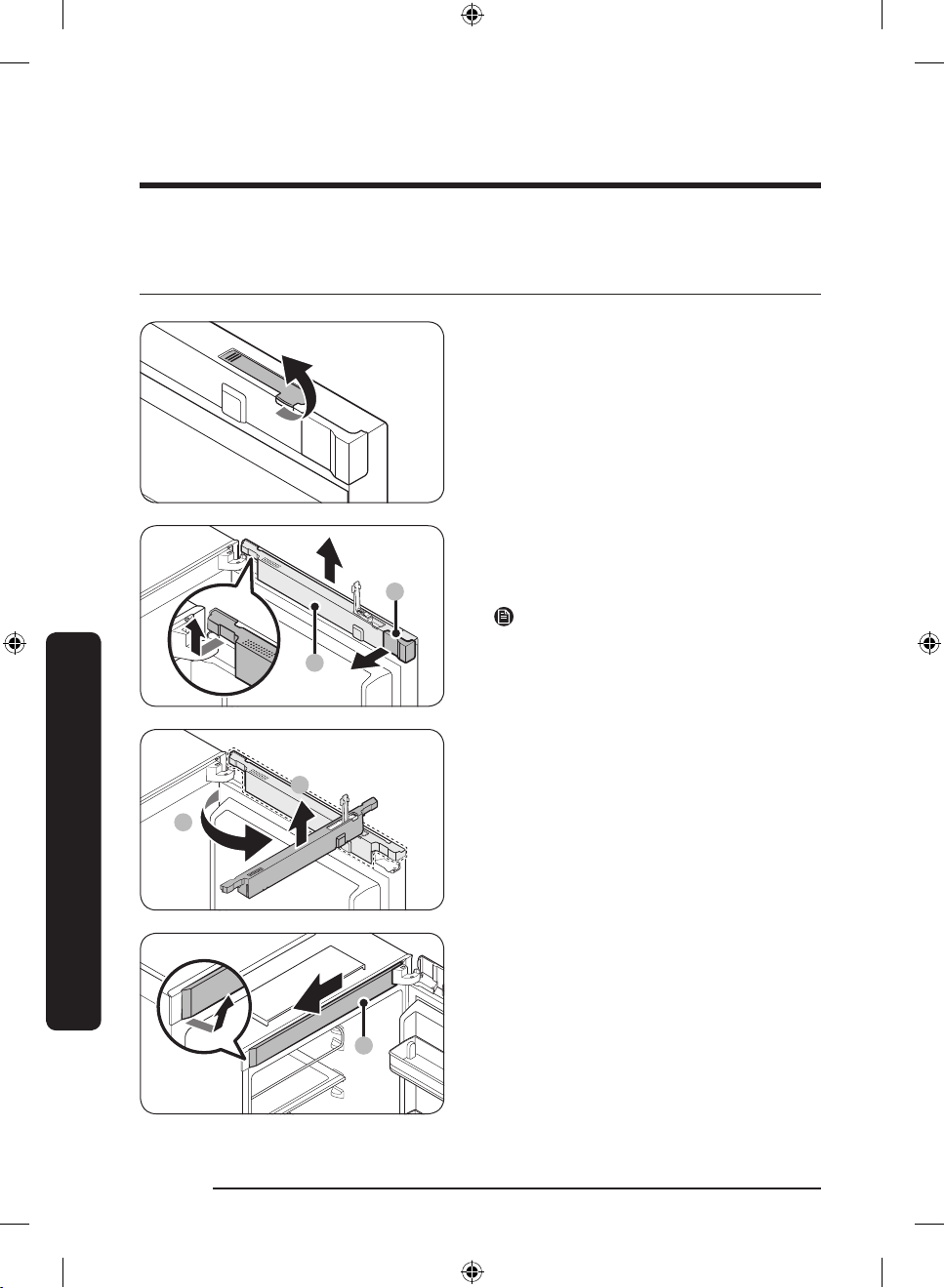
1. Open the fridge door, and pull up to
open the display switch cover.
2. Lift up the wire cover (1) and remove
the space cover (2). Turn the wire cover
to the front by 90 degrees, and then
push up to remove.
NOTE
Keep the space cover in a safe place. It is
necessary when you return the door to the
initial position (before reversing the door).
Maintenance
3. Remove the top frame cover (3) from
the bottom left then the top side. Then,
pull out to the front.
English48
Untitled-5 48 2018-05-25 5:13:58
Page 49
4
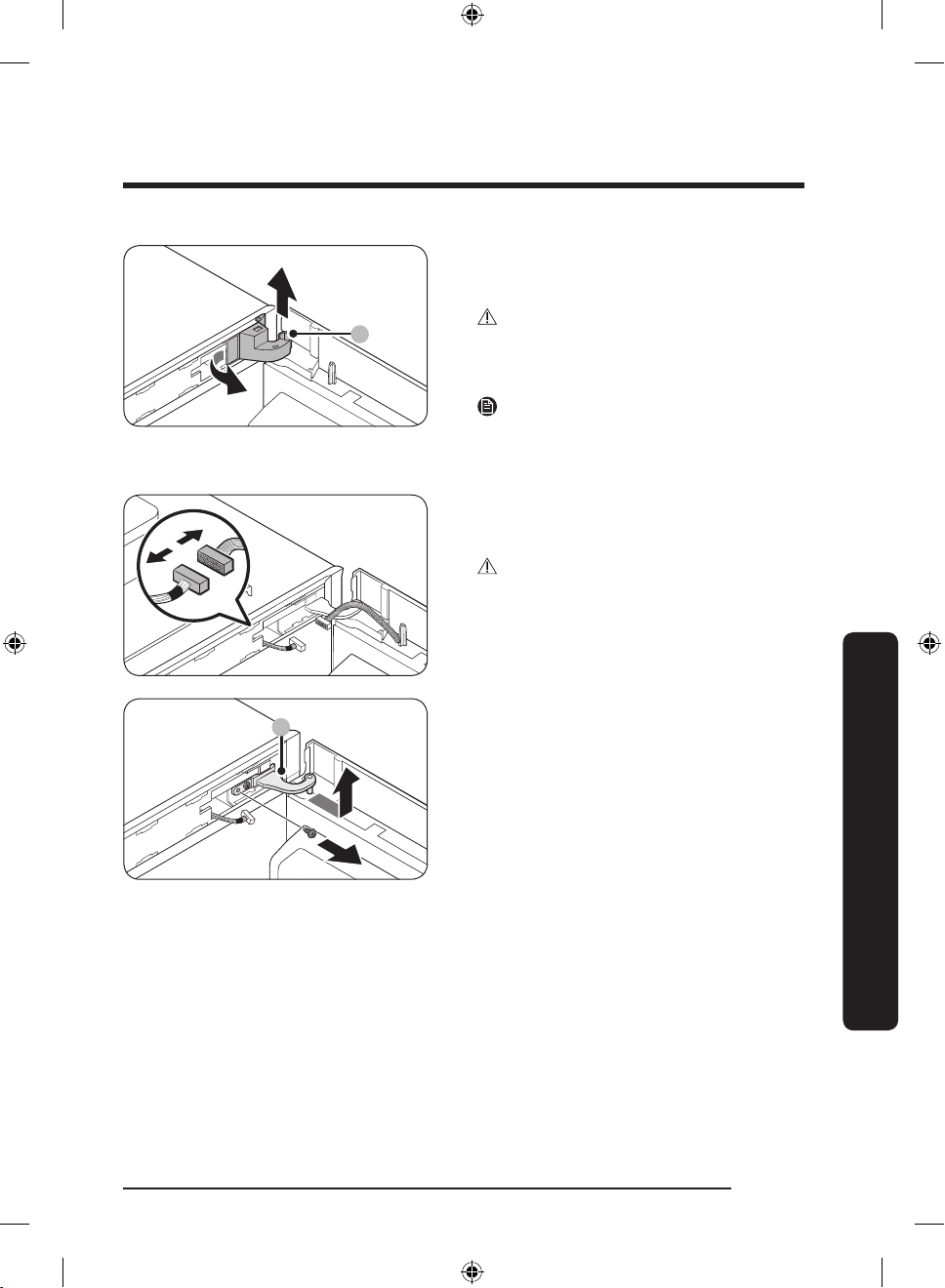
4. Pull out the left side of the hinge cover
5
(4) to remove, and then slightly lift up
the bottom to pull out.
CAUTION
When removing the hinge cover, use
caution not to damage the connectors and
wires on or around the fridge door.
NOTE
Keep the hinge cover in a safe place. It is
necessary when you return the door to the
initial position (before reversing the door).
5. Disconnect the connectors on or around
the fridge door. Loosen the screws from
the top hinge (5) to remove.
CAUTION
To prevent the fridge door from falling,
make sure to hold the fridge door tight
while removing the top hinge.
Maintenance
Untitled-5 49 2018-05-25 5:13:59
English 49
Page 50
Maintenance
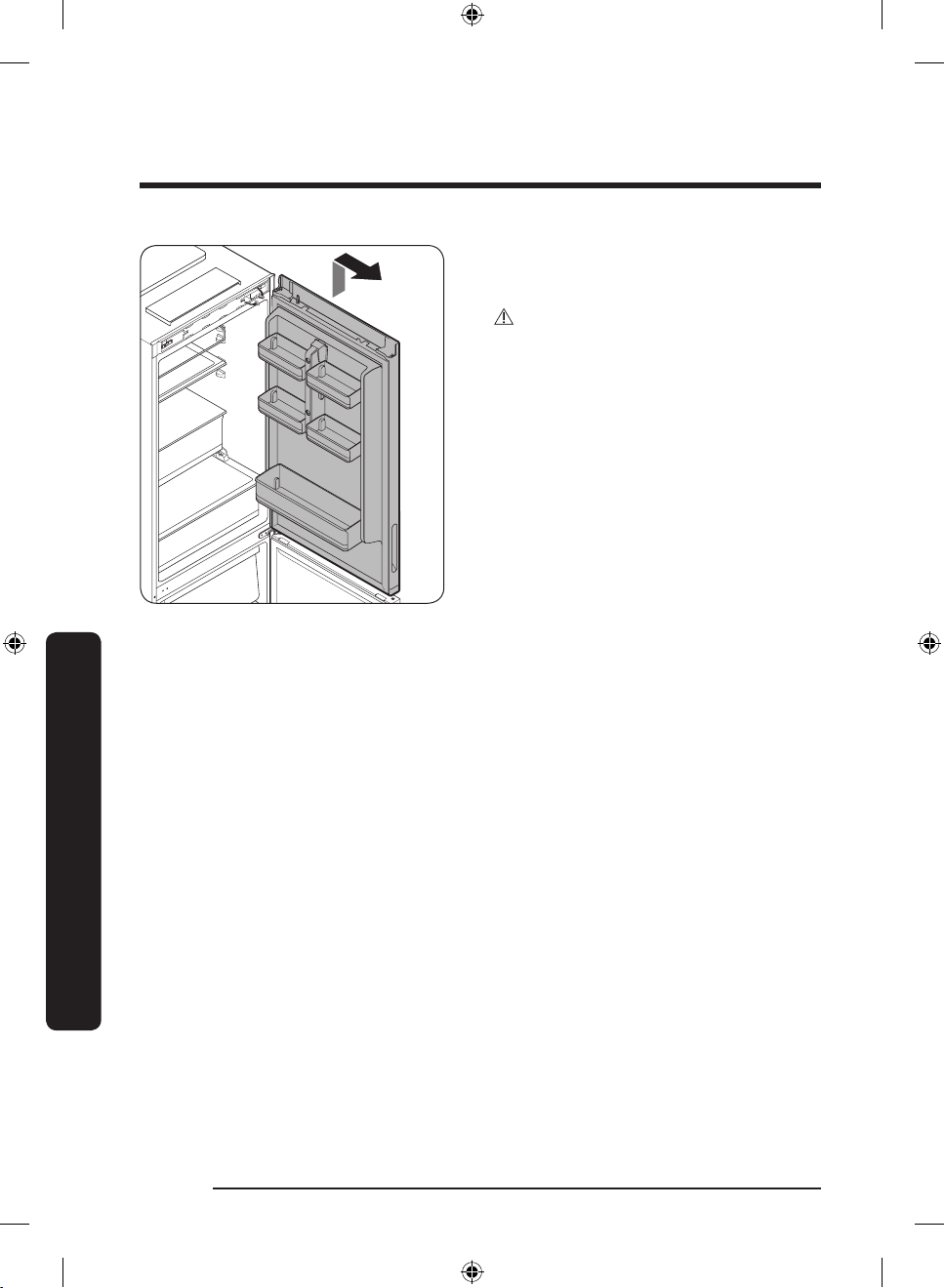
6. When the top hinge is removed, lift up
to remove the fridge door. Keep the
door in a safe place.
CAUTION
The door is heavy. To prevent damage or
injury, use caution while removing the
door.
Maintenance
English50
Untitled-5 50 2018-05-25 5:13:59
Page 51
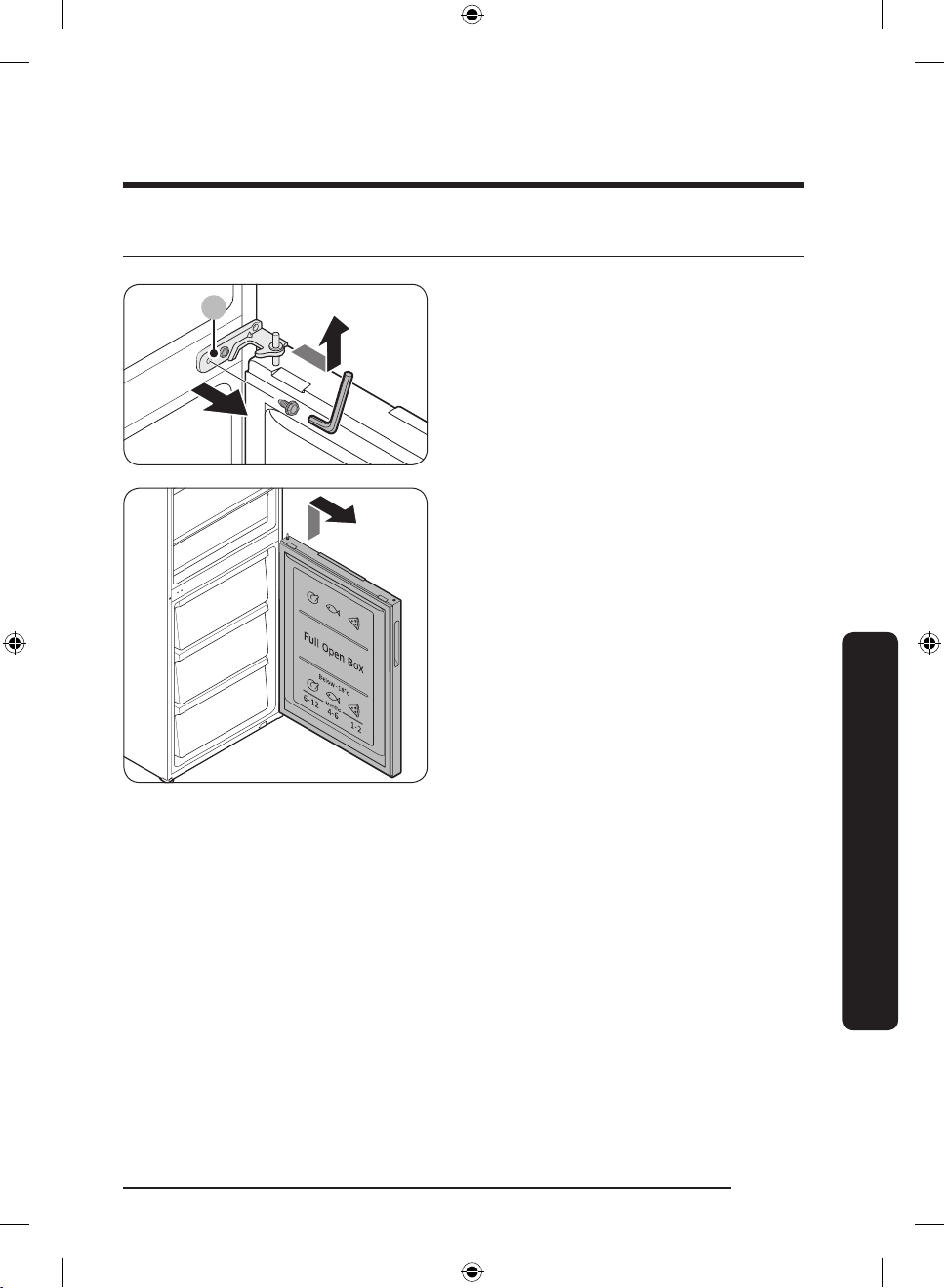
STEP 2 Remove the freezer door
6
1. Open the freezer door, and remove
the middle hinge (6) by loosening the
screws.
• Use the 5 mm Allen wrench for
removing the bolts.
2. Gently lift up to remove the freezer
door.
Maintenance
English 51
Untitled-5 51 2018-05-25 5:13:59
Page 52
Maintenance
7
8
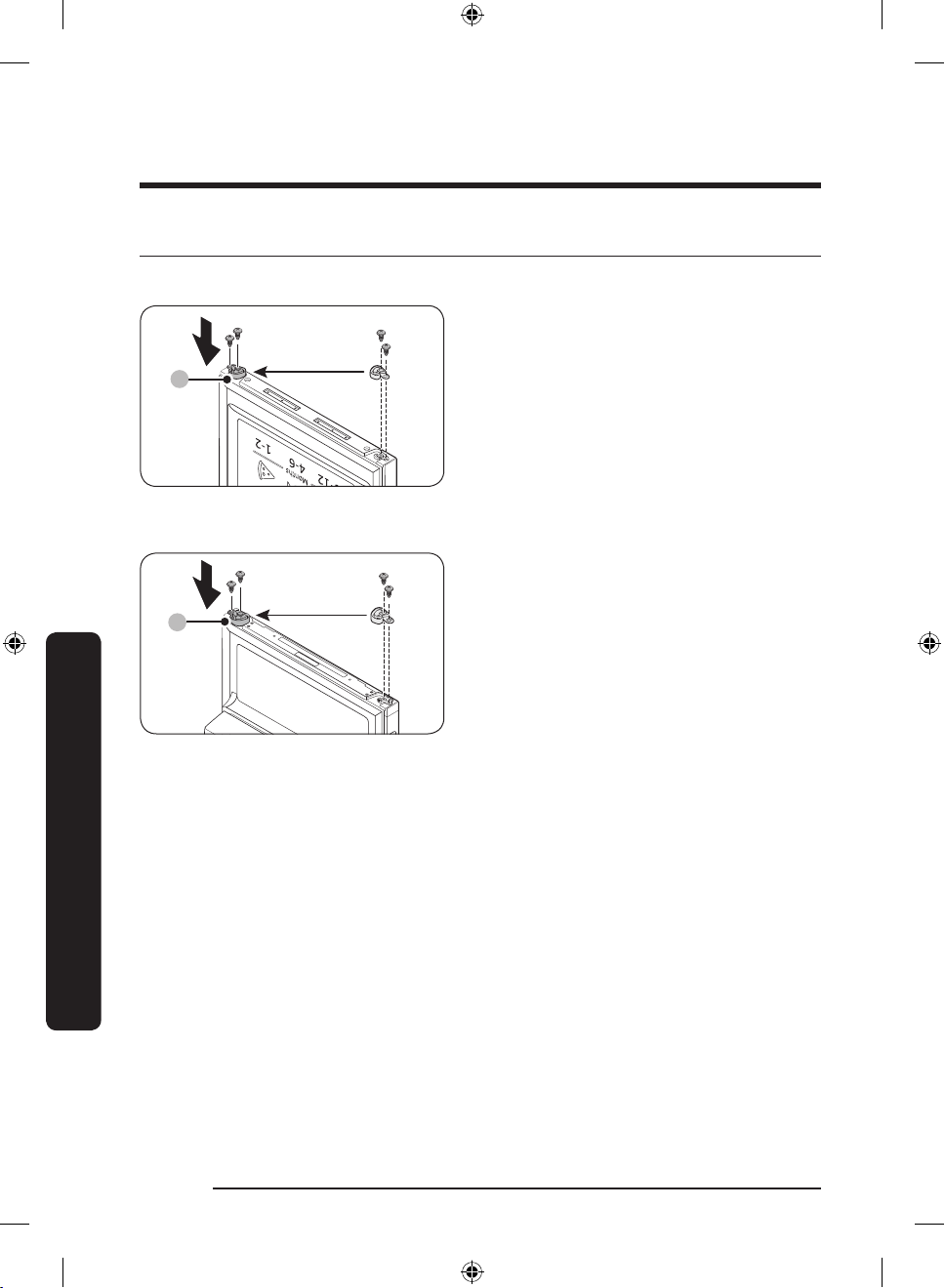
STEP 3 Reverse the auto closers
On the freezer door
On the fridge door
1. From the freezer door, remove the auto
closer lever (7) by loosening the screws
on the lever and the screws in the
opposite side.
2. Insert the auto closer lever (7) in the
opposite side, and tighten the screws.
1. From the fridge door, remove the auto
closer lever (8) by loosening the screws
on the lever and the screws in the
opposite side.
2. Insert the auto closer lever (8) in the
opposite side, and tighten the screws.
Maintenance
English52
Untitled-5 52 2018-05-25 5:14:00
Page 53
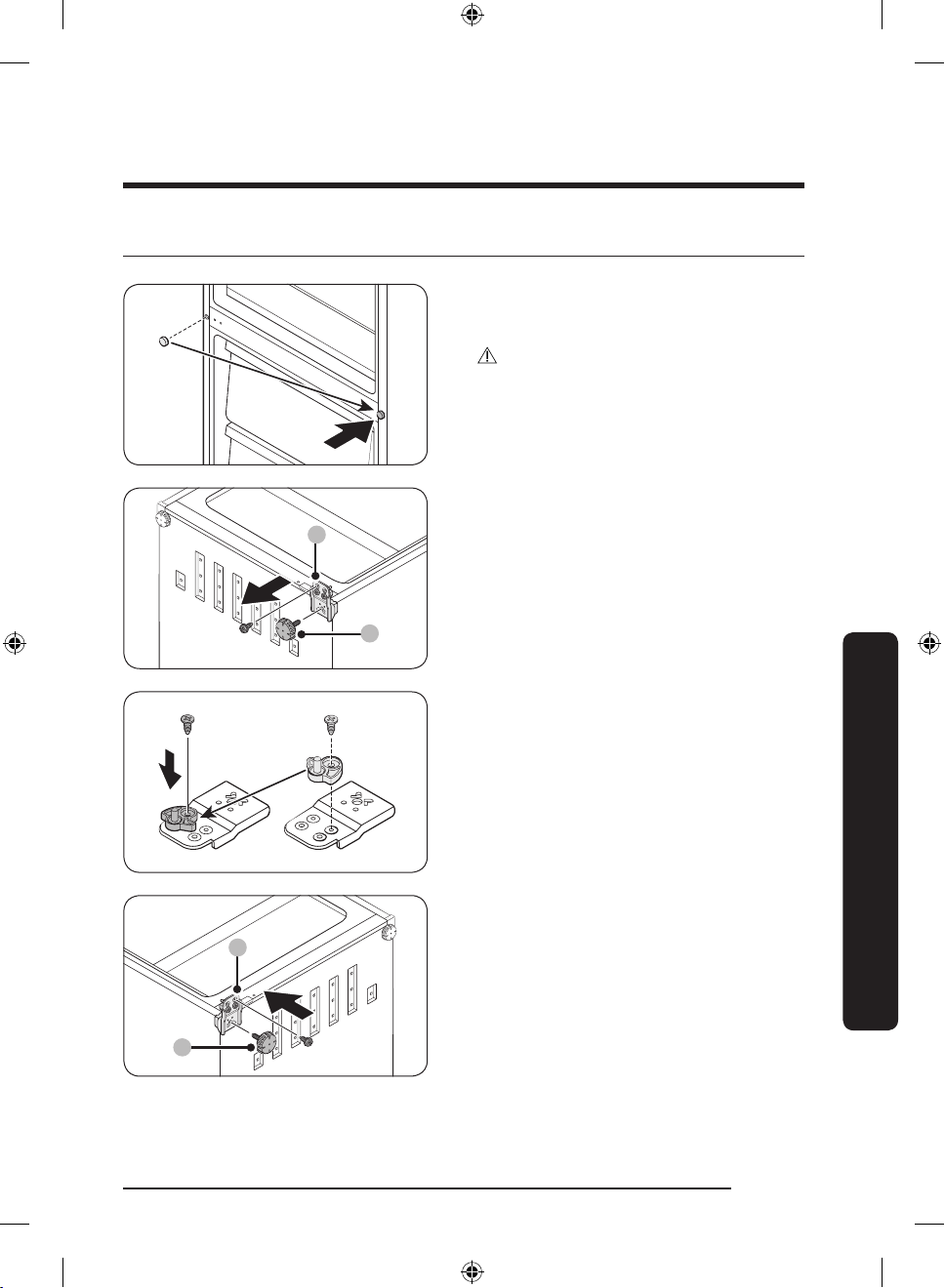
STEP 4 Reattach the freezer door
9
10
9
10
1. Use a at-head screwdriver to remove
the screw cap. Then, insert the screw
cap in the opposite side.
CAUTION
To prevent physical damage, use caution
when removing the screw cap.
2. Lay down the refrigerator with care.
Then, remove the screws from the
levelling leg (9) and the bottom hinge
(10).
3. Use a 11 mm wrench to remove the
hinge shaft from the bottom hinge.
Then, insert the auto closer guard as
shown.
Maintenance
4. Insert the bottom hinge (10) in the
opposite side. Then, insert the levelling
leg (9).
5. Insert the freezer door and t into
the bottom hinge. Then, stand the
refrigerator with care.
English 53
Untitled-5 53 2018-05-25 5:14:00
Page 54
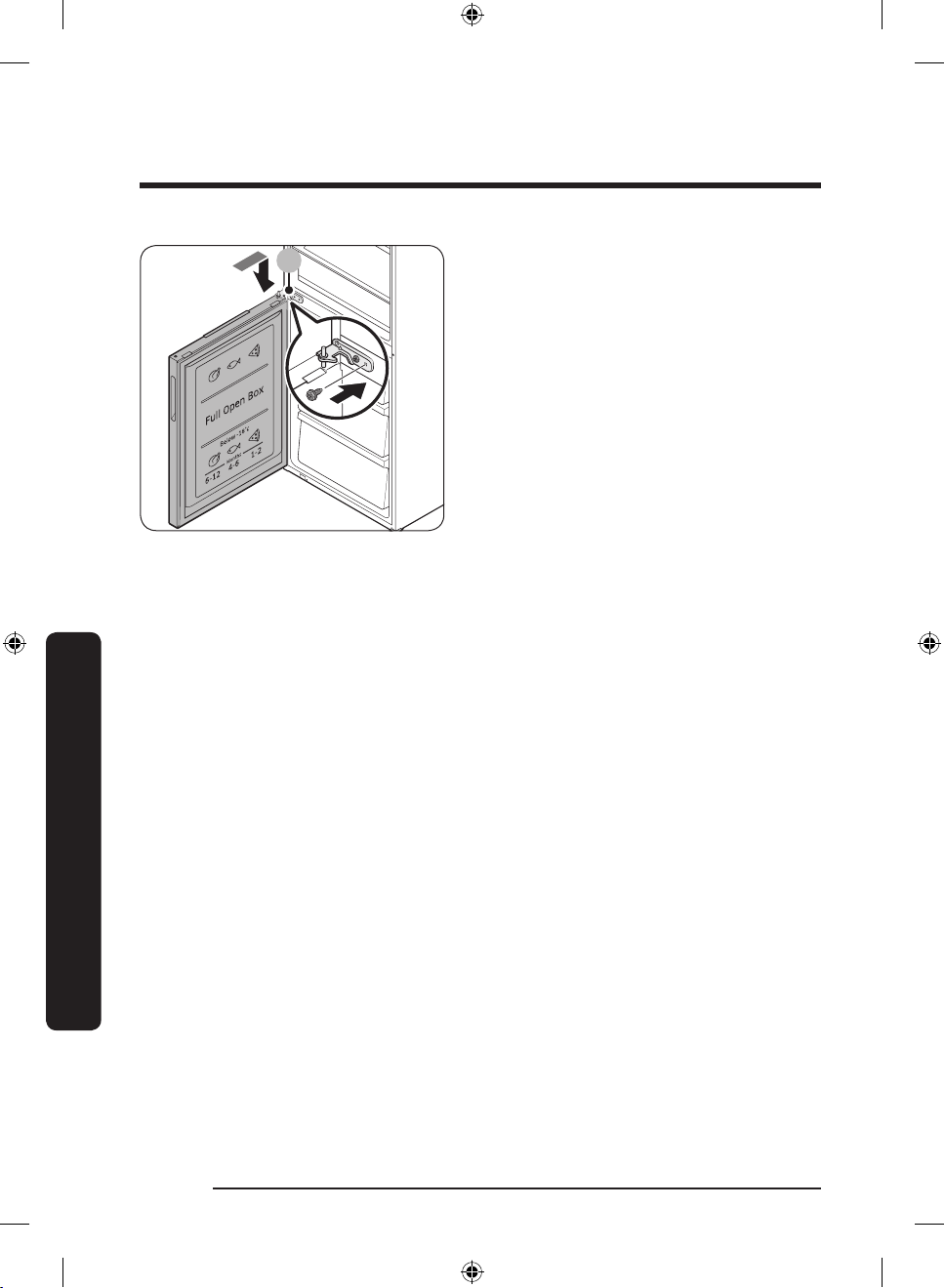
Maintenance
6
6. Reinsert the middle hinge (6) that was
removed in STEP 2.
- Remove the washer from the middle
hinge. Then, reverse the washer
before reinserting the middle hinge
in the top of the freezer door.
Maintenance
English54
Untitled-5 54 2018-05-25 5:14:00
Page 55
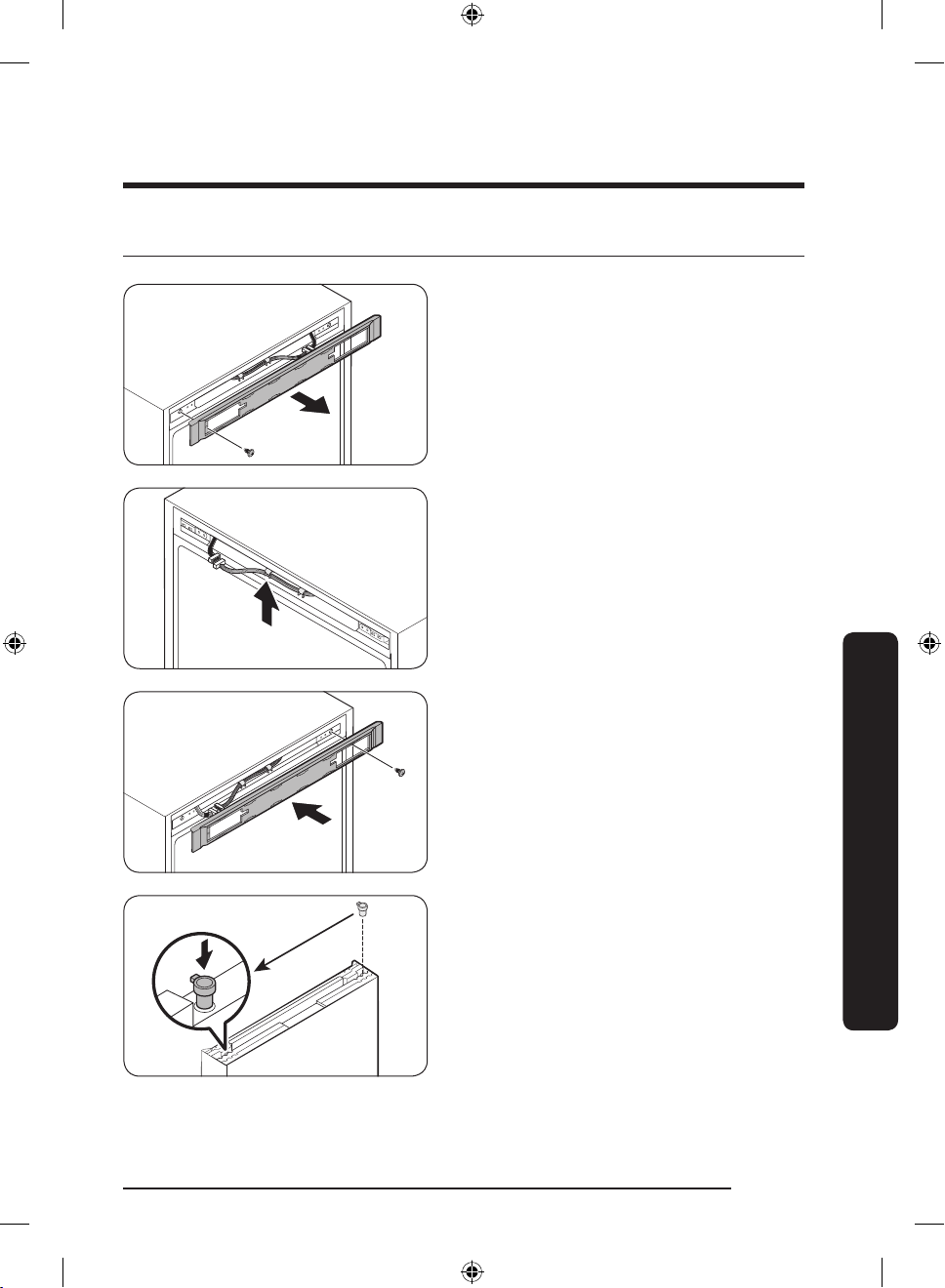
STEP 5 Reattach the fridge door
1. Loosen and remove the top screws of
the fridge. Then, remove the control
cover.
2. Move the connectors and wires to the
opposite side. Insert the control cover,
and then tighten the screws on the
opposite side.
Maintenance
• Use a at-head screwdriver to remove
the grommet hinge on the top of the
fridge door. Then, insert the hinge in the
opposite side.
English 55
Untitled-5 55 2018-05-25 5:14:01
Page 56
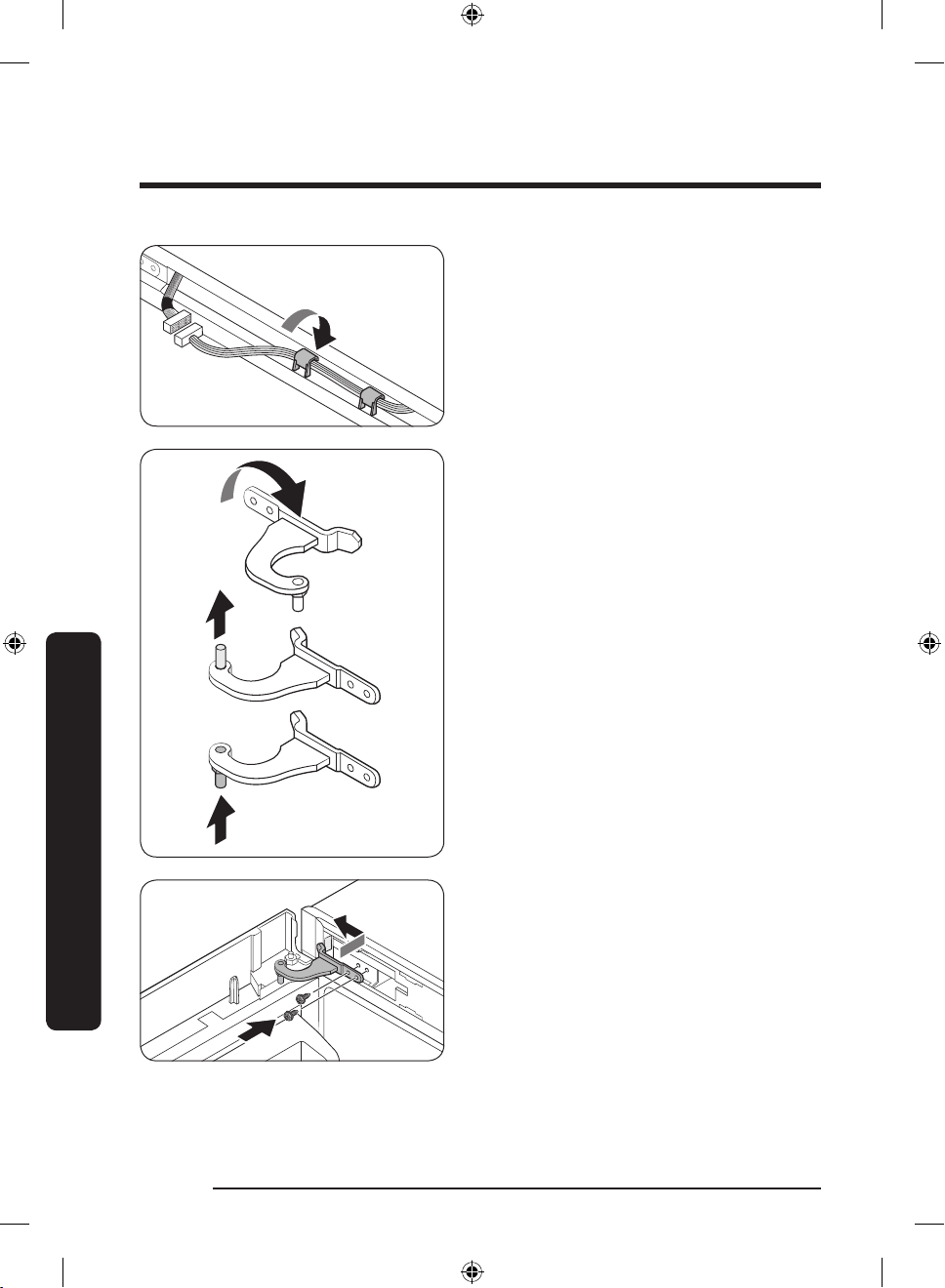
Maintenance
3. Connect the wires from the fridge door
to the opposite side. Fix the wires using
the hook.
4. Reverse the top hinge (5) as shown.
Remove the shaft from the hinge,
and then reassemble the hinge on the
opposite side.
Maintenance
5. Insert the top hinge (5) in the top left
of the fridge door with the shorter side
rst. Fit the fridge door by inserting the
top hinge then the middle hinge. Then,
tighten the top hinge screws.
English56
Untitled-5 56 2018-05-25 5:14:01
Page 57
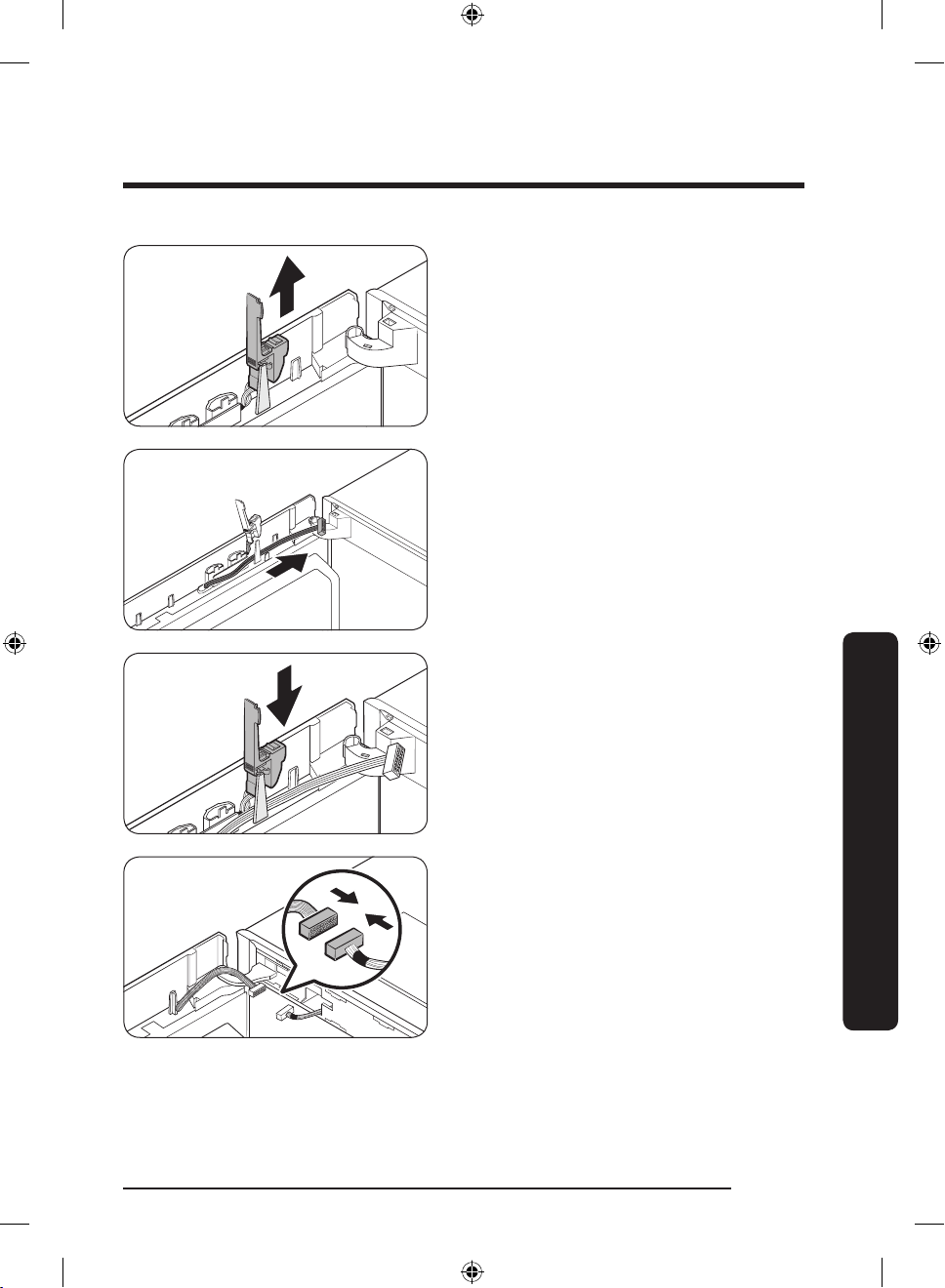
6. Pull up to remove the display switch.
7. Move the wires to the opposite side
and x them on the inner hook of the
opposite side.
8. Reinsert the display switch in the
original position.
Maintenance
9. Connect the connectors from the fridge
door and the main unit. Then, x the
wires on the inner hook of the optional
hinge cover (L).
English 57
Untitled-5 57 2018-05-25 5:14:02
Page 58
Maintenance
a
b
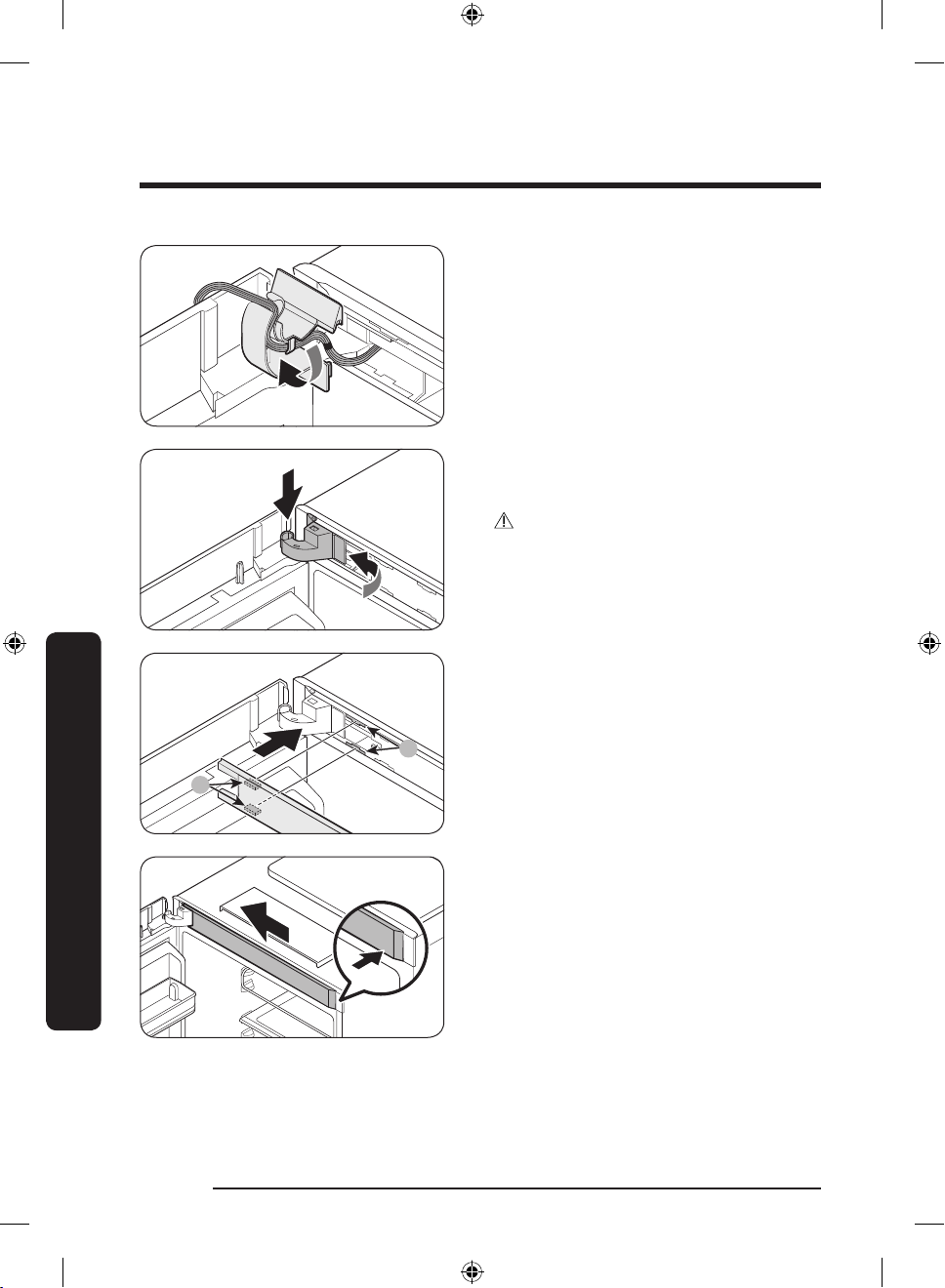
10. Insert the hinge cover in the top hinge
with the right side rst. Then, press the
bottom of the cover to t.
CAUTION
Make sure all of the wires and connectors
are not stuck in the middle.
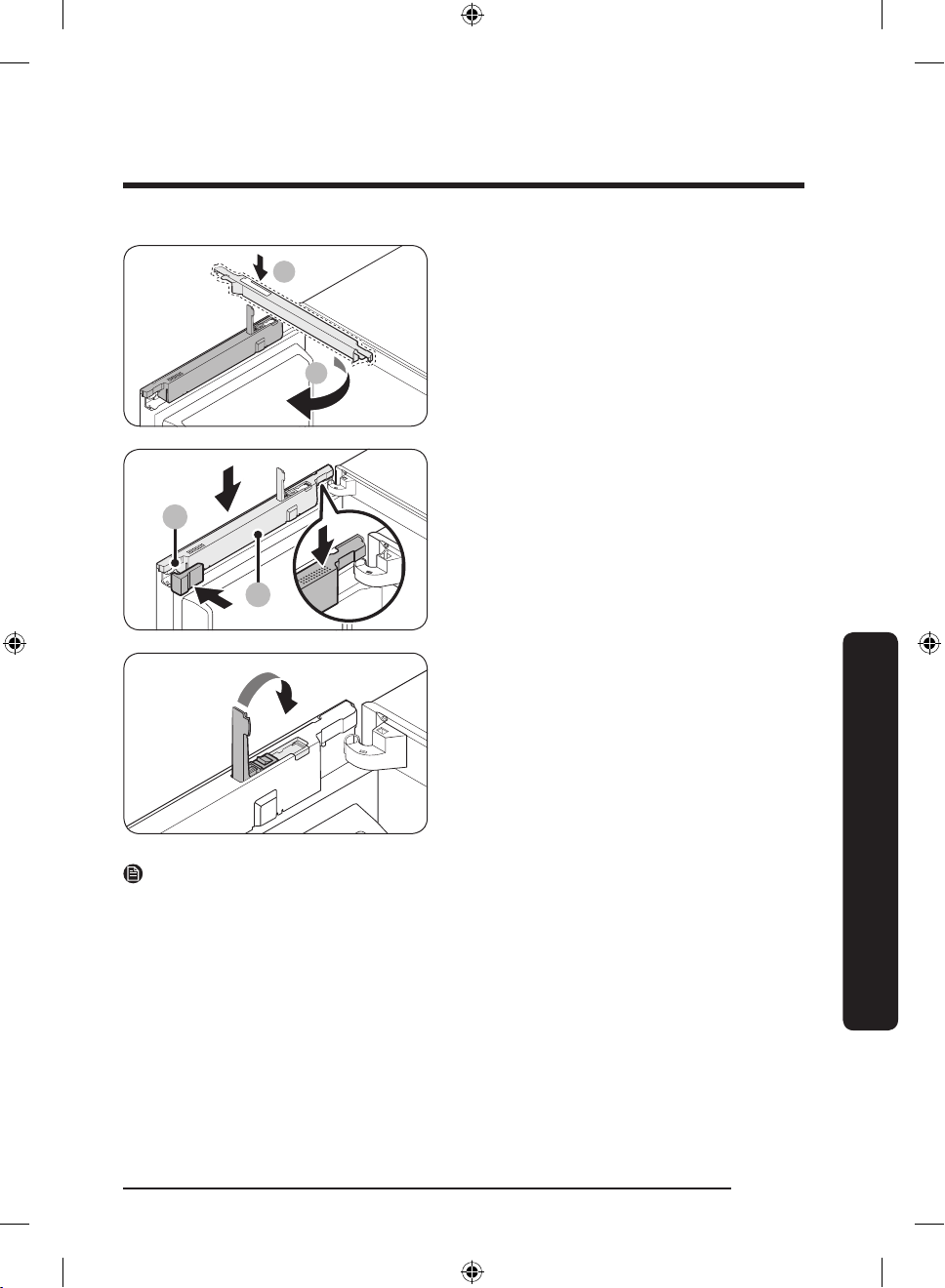
11. Insert the top frame cover with the
part (b) tting in the part (a) diagonally.
Then, slide the end of the cover to the
left to lock.
Maintenance
English58
Untitled-5 58 2018-05-25 5:14:02
Page 59
1
2
12. With the display switch cover opened,
2
1
insert the wire cover (1) and turn it to
the rear. Then, insert the space cover (L)
and close the wire cover.
13. Press down to close the display switch
cover.
Maintenance
NOTE
You might want to return the doors to the initial position (before reversing the door). In
that case, refer to the instructions above but switch the doors, hinges, and covers back to
the initial position.
Untitled-5 59 2018-05-25 5:14:03
English 59
Page 60
Maintenance
Handle and care
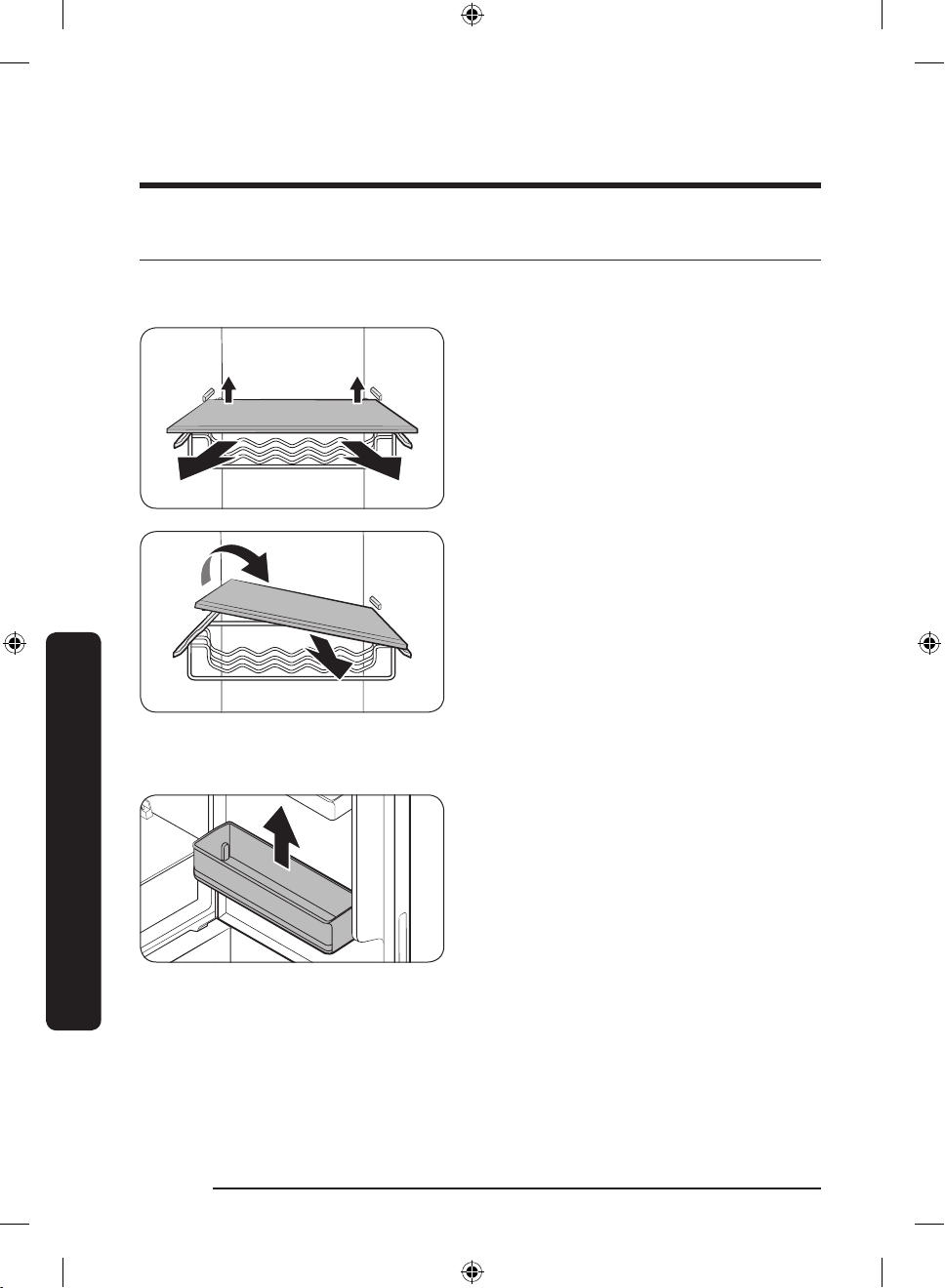
Shelves (fridge/freezer)
1. To remove the shelf, hold it with both
hands and lift to release from the rear
hooks. Then, pull it halfway to the front.
2. In an area between the hooks, tilt the
shelf on the front side by more than 45°
as shown.
Maintenance
Door guard
To remove a door guard, hold the front
sides of the bin and gently lift up to
remove.
English60
Untitled-5 60 2018-05-25 5:14:03
Page 61
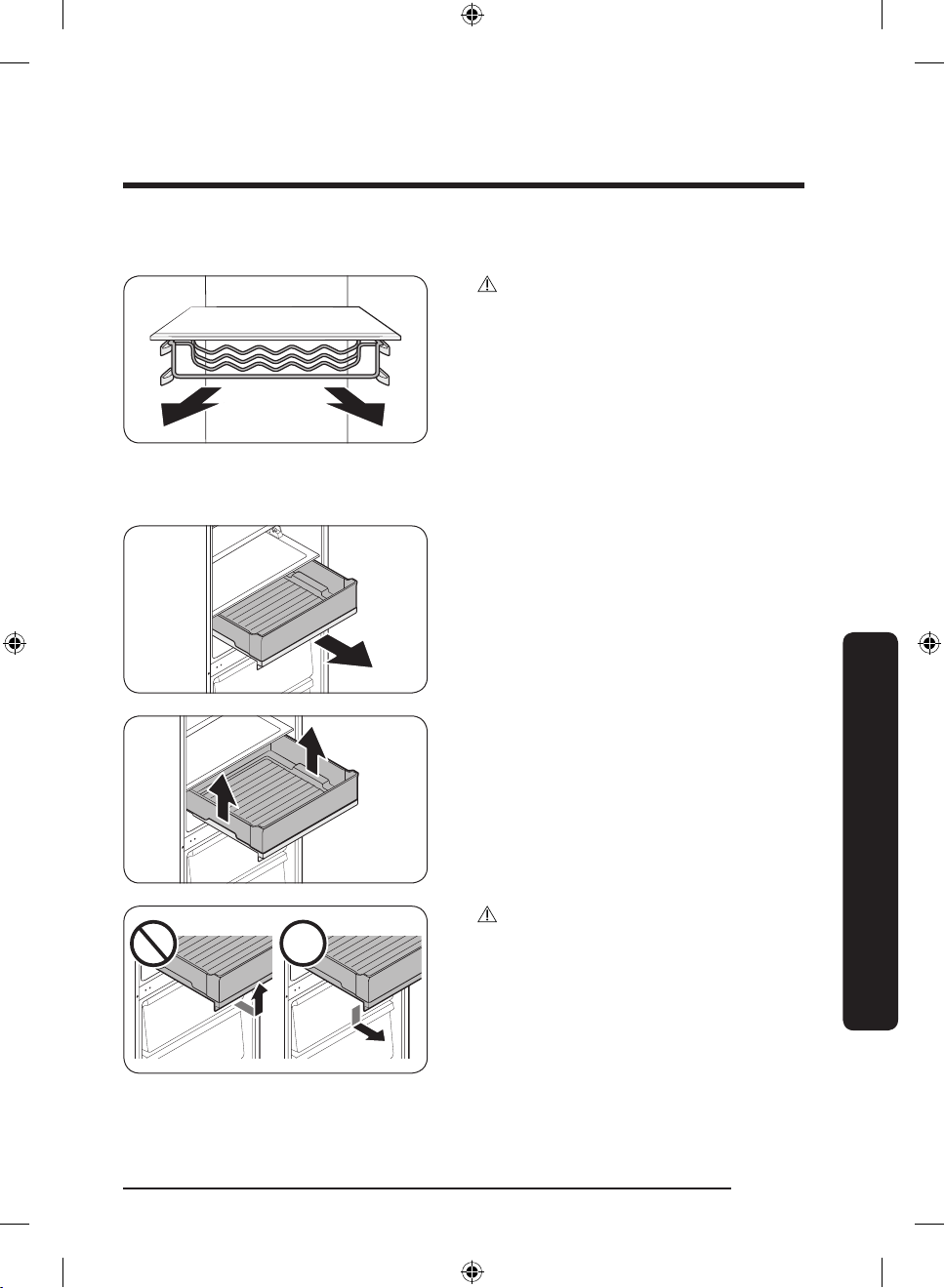
Wine rack (applicable models only)
Chef box (applicable models only)
CAUTION
To slide open the wine rack, make sure
to hold the wine rack with both hands.
Otherwise, the wine rack will sag on the
rear side, causing food under the wine rack
to fall.
1. Hold the front handle of the chef box
and slide open.
2. When the chef box is fully open, hold
the side handles and remove.
Maintenance
CAUTION
• Do not hold other sides of the chef box,
but only hold the front handle. The chef
box may not open or slip aside while
opening.
English 61
Untitled-5 61 2018-05-25 5:14:04
Page 62
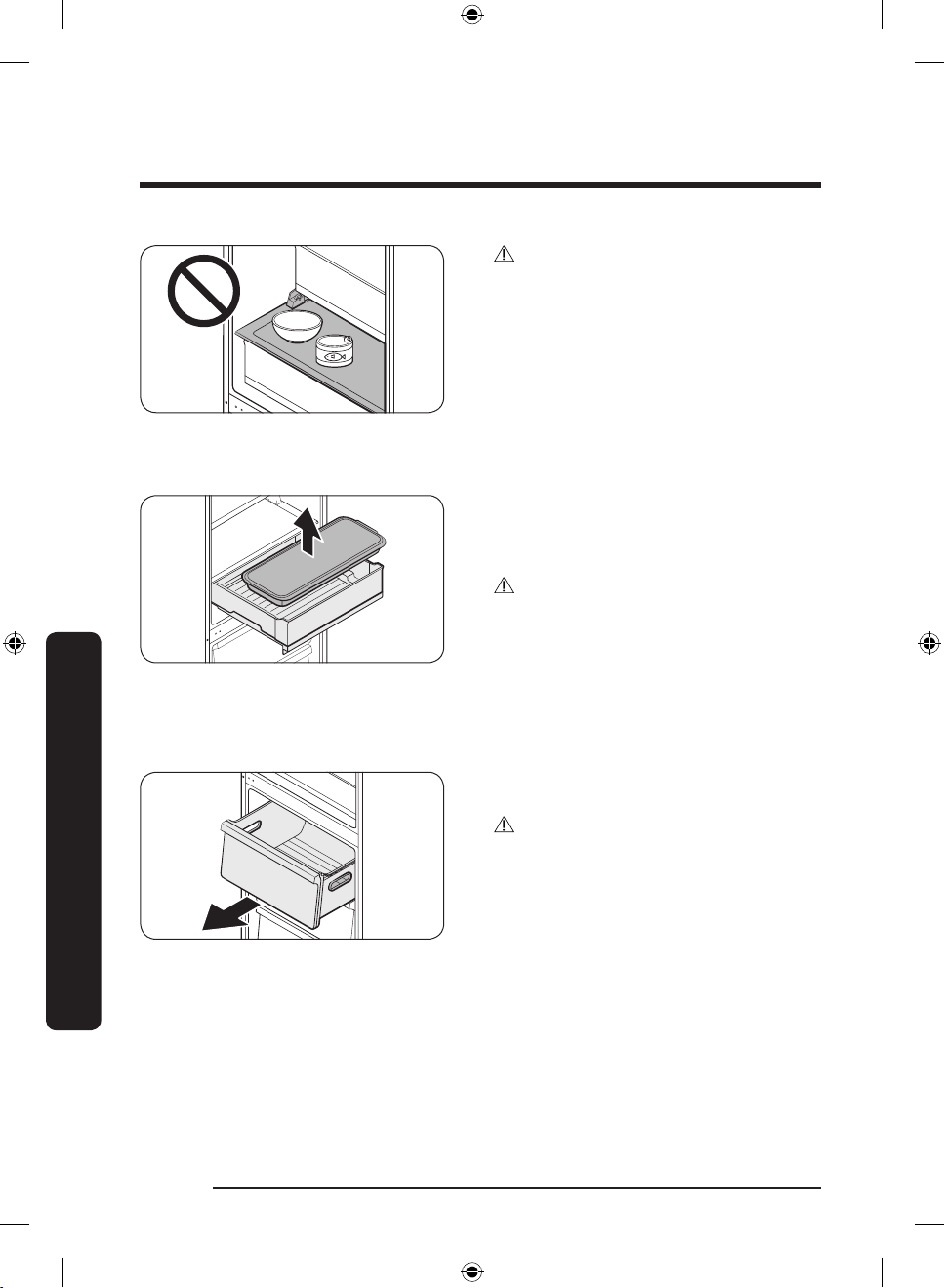
Maintenance
Chef pan (applicable models only)
CAUTION
• Do not put food or objects on the chef
box. The door will not close properly.
The chef pan can be positioned on chef
box, or used with an oven if you want.
When using the chef pan with an oven,
remove the tray cover.
CAUTION
• The chef pan is not suitable for use with
microwave ovens.
• The chef pan may freeze on or inside
the chef box.
• Use caution not to drop the tray cover.
Freezer drawer
Maintenance
English62
Untitled-5 62 2018-05-25 5:14:04
Gently lift up the front of the drawer and
slide out.
CAUTION
• Make sure to hold the drawer handle
while moving.
• Use caution not to drop the drawer. This
can cause physical injury.
Page 63
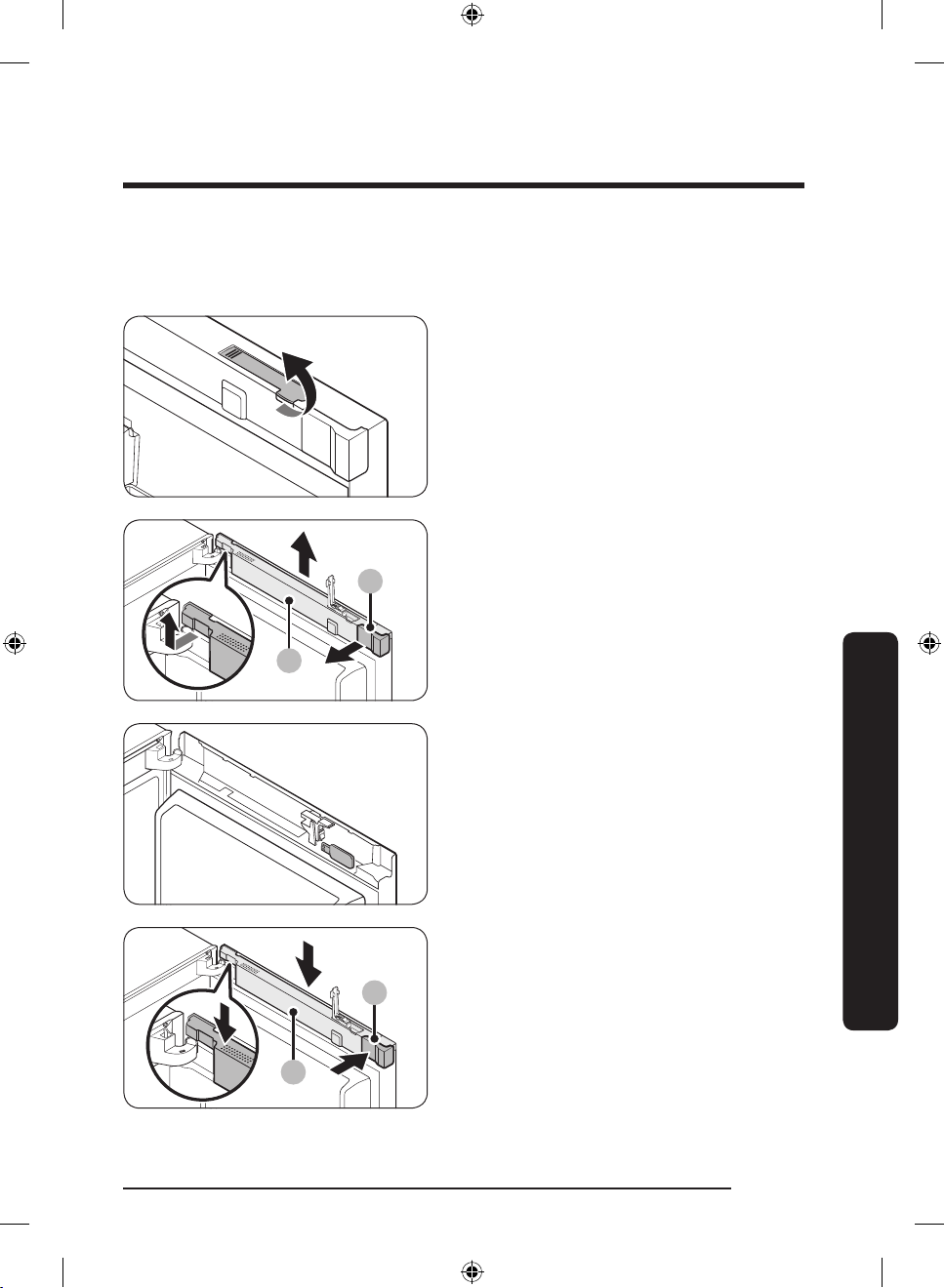
USB memory
1
2
1
2
If you fail to insert a USB memory (not provided), follow these steps to remove the USB
memory, and then try again.
1. Open the fridge door, and pull up to
open the display switch cover.
2. Lift up the wire cover (1) and remove
the space cover (2).
3. Remove the USB memory.
Maintenance
4. Insert the space cover (2) and close the
wire cover (1).
English 63
Untitled-5 63 2018-05-25 5:14:05
Page 64
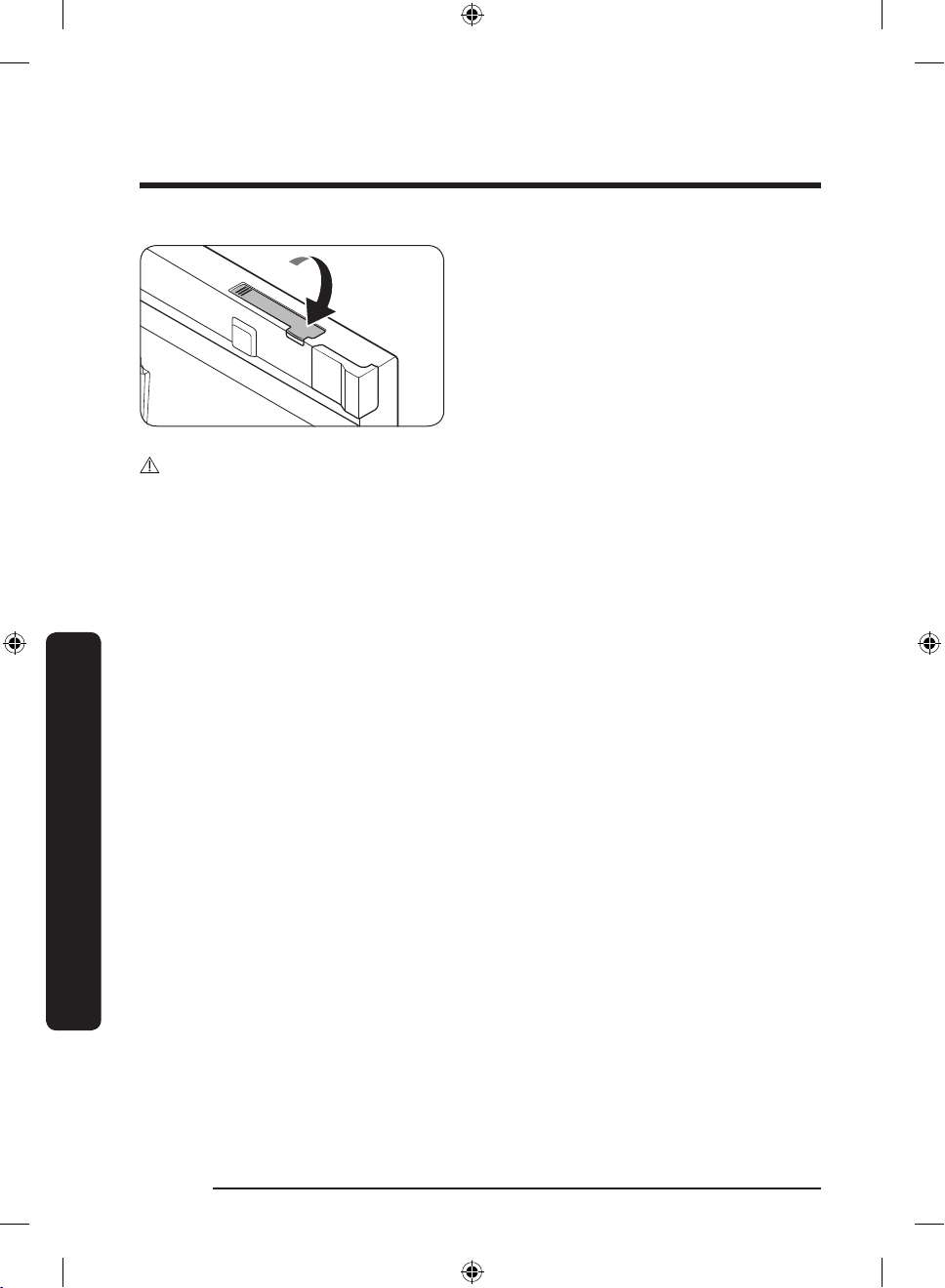
Maintenance
CAUTION
Use caution not to catch wires in the cover.
5. Press down to close the display switch
cover.
Maintenance
English64
Untitled-5 64 2018-05-25 5:14:05
Page 65
Cleaning
Interior and exterior
WARNING
• Do not use benzene, thinner, or home/car detergent such as Clorox™ for cleaning
purposes. They may damage the surface of the refrigerator and cause a re.
• Do not spray water onto the refrigerator. This may cause electric shock.
• Do not put ngers or other objects into the dispenser hole.
Regularly use a dry cloth to remove all foreign substances such as dust or water from the
power plug terminals and contact points.
1. Unplug the power cord.
2. Use a moistened, soft, lint-free cloth or paper towel to clean the refrigerator’s interior
and exterior.
3. When done, use a dry cloth or paper towel to dry well.
4. Plug in the power cord.
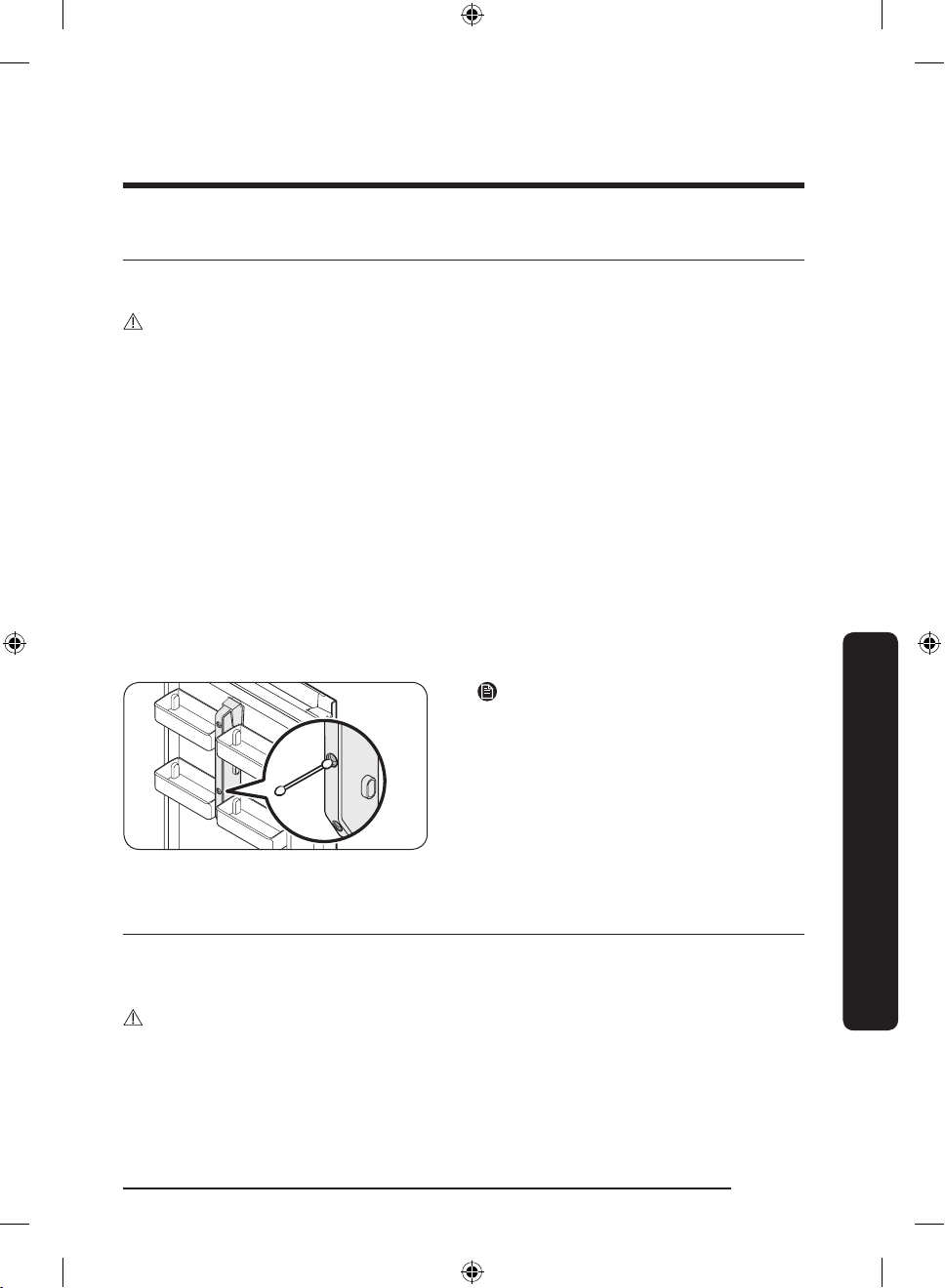
Inner-view camera
Contaminated camera lenses cause the inner view to be cloudy or out of focus. This is
because moisture may form on the camera lens while opening or closing the door, or
ngerprints or other impurities remain on the lens. If this happens, clean the lens.
NOTE
Use a cotton swab or microber cloth to
clean the camera lenses in the middle of
the fridge door.
Maintenance
Replacement
LED Lamps
To replace the lamps of the refrigerator, contact a local Samsung service centre.
WARNING
• The lamps are not user-serviceable. Do not attempt to replace a lamp yourself. This can
cause electric shock.
English 65
Untitled-5 65 2018-05-25 5:14:05
Page 66
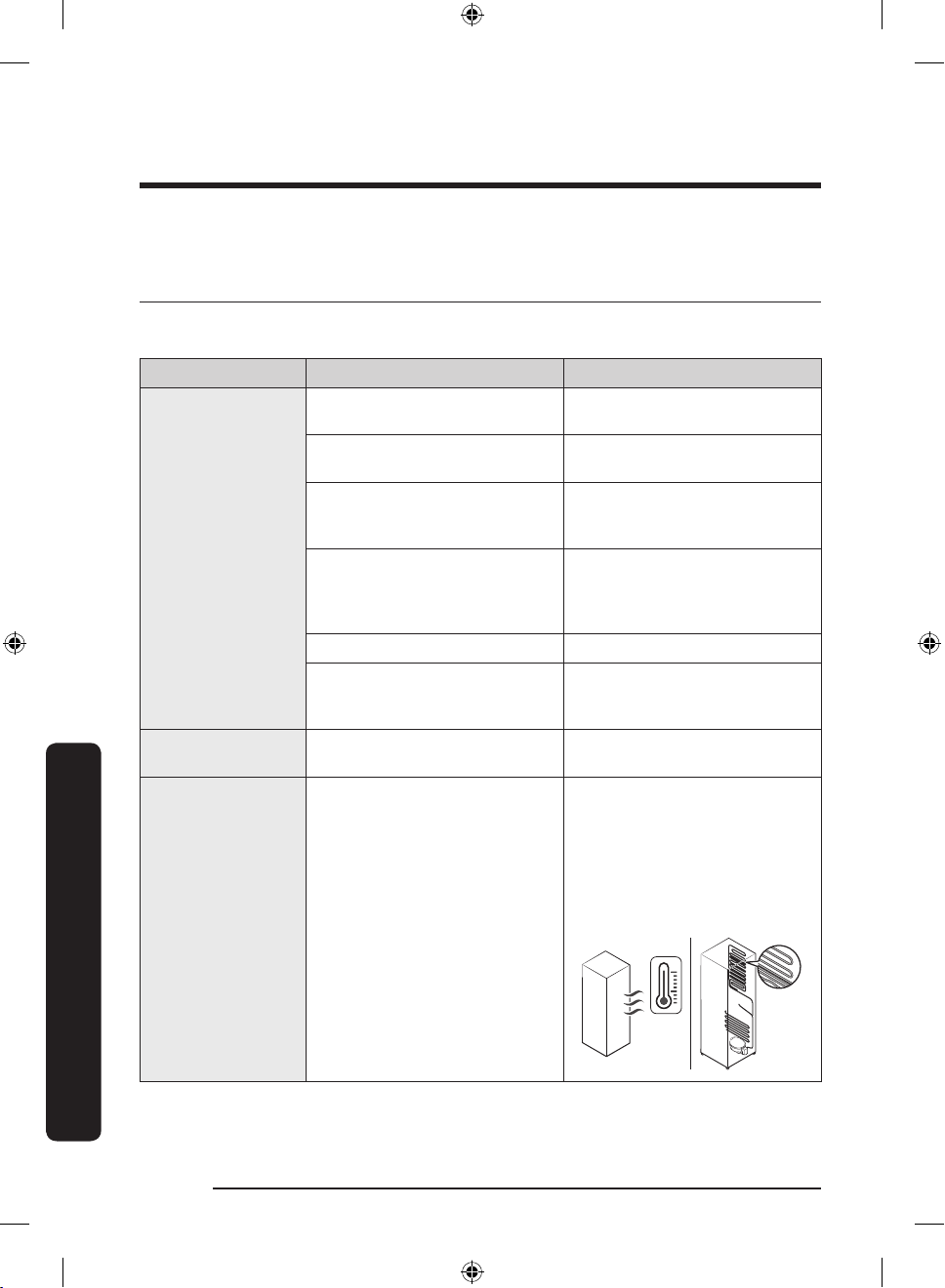
Troubleshooting
Troubleshooting
Before calling for service, review the checkpoints below. Any service calls regarding
normal situations (No Defect Cases) will be charged to users.
General
Temperature
Symptom Possible causes Solution
Fridge/freezer does
not operate.
Fridge/freezer
temperature is
warm.
Fridge/freezer is
over-cooling.
Interior wall is hot.
• Power cord is not plugged in
properly.
• Temperature control is not
set correctly.
• Refrigerator is located near
a heat source or direct
sunlight.
• Not enough clearance
between refrigerator and
sides/rear.
• Vacation mode is activated. • Deactivate vacation mode.
• The refrigerator is
overloaded. Food is blocking
the refrigerator vents.
• Temperature control is not
set correctly.
• Refrigerator has heat-proof
piping in the interior wall.
• Properly plug in the power
cord.
• Set the temperature lower.
• Keep the refrigerator away
from direct sunlight or a
heat source.
• We recommend that the gap
between the refrigerator and
nearby walls (or cabinets) is
more than 50 mm.
• Do not overload the
refrigerator. Do not allow
food to block ventilation.
• Set the temperature higher.
• To prevent condensation
from forming, the
refrigerator has heat-proof
piping in the front corners.
If the ambient temperature
rises, this equipment may
not work effectively. This is
not a system failure.
English66
Untitled-5 66 2018-05-25 5:14:05
Page 67
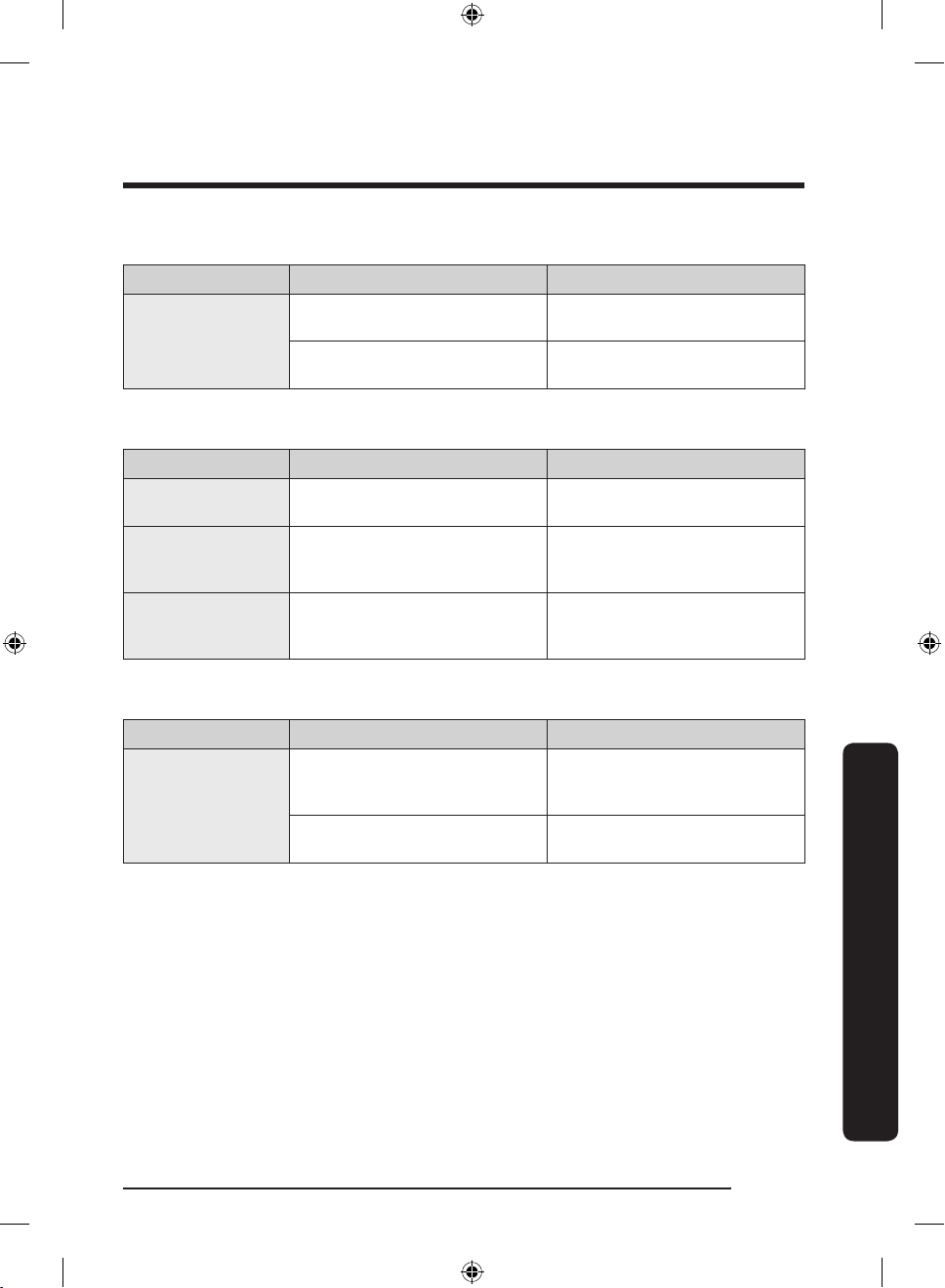
Odors
Symptom Possible causes Solution
• Clean the refrigerator and
remove any spoiled food.
• Make sure strong smelling
food is wrapped airtight.
Refrigerator has
odors.
• Spoiled food.
• Food with strong odors.
Frost
Symptom Possible causes Solution
Frost around the
vents.
Frost on interior
walls.
Fruits or vegetables
are frozen.
• Food is blocking the vents.
• Door is not closed properly.
• Fruits or vegetables are
stored in the Fresh/Chef
Zone.
• Make sure no food blocks
the refrigerator vents.
• Make sure food does not
block the door. Clean the
door gasket.
• The Fresh/Chef Zone is only
for meat/sh.
Condensation
Symptom Possible causes Solution
• Remove the moisture and do
not open the door for a long
time.
• Make sure food is wrapped
airtight.
Condensation forms
on the interior
walls.
• If door is left open, moisture
enters the refrigerator.
• Food with high moisture
content.
Troubleshooting
English 67
Untitled-5 67 2018-05-25 5:14:05
Page 68
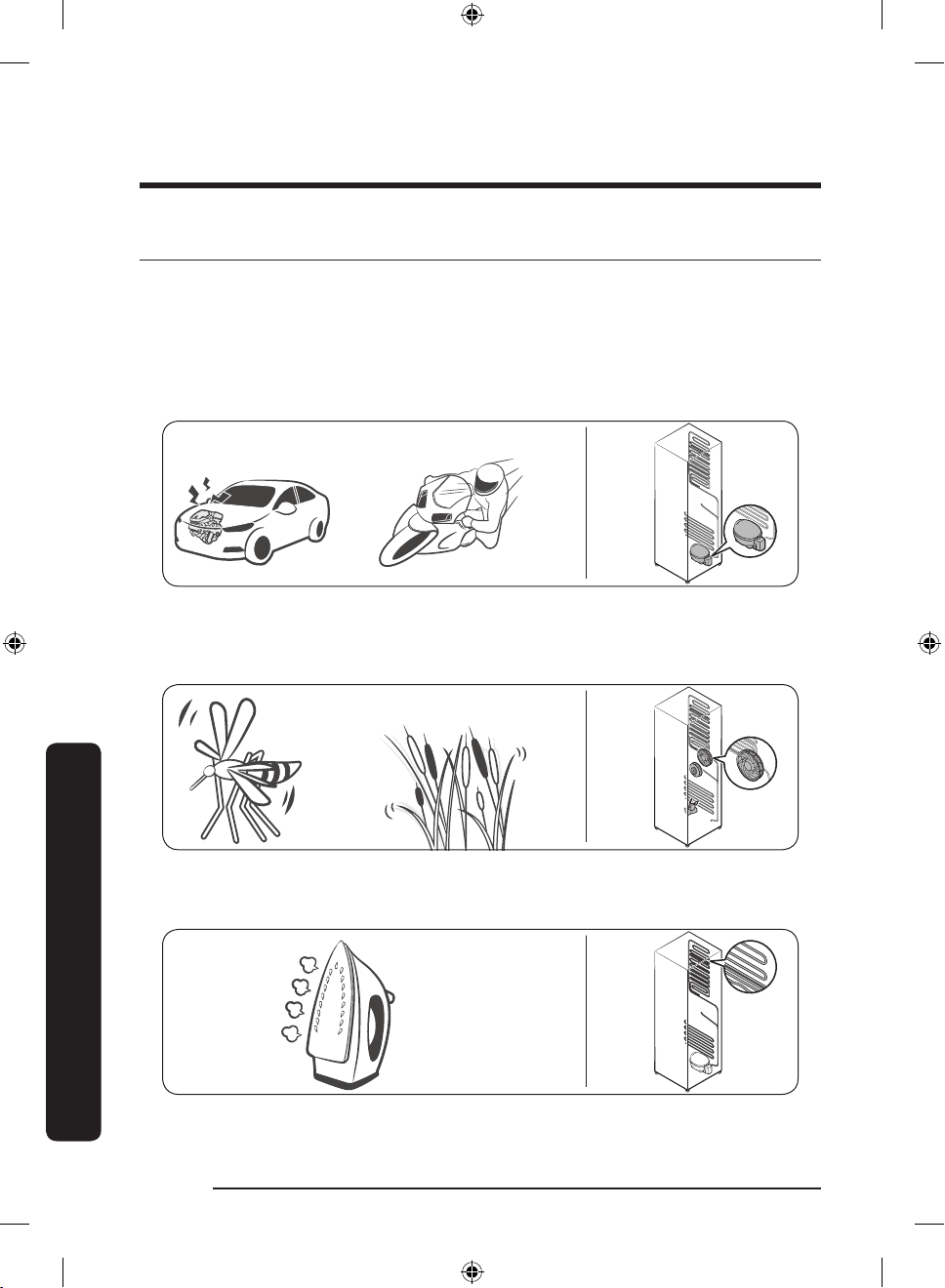
Troubleshooting
Clicking!
or Chirping!
Buzzing!
SSSRRR!
Whir!
HiSS!
Do you hear abnormal sounds from the refrigerator?
Before calling for service, review the checkpoints below. Any service calls related to
normal sounds will be charged to the user.
These sounds are normal.
• When starting or ending an operation, the refrigerator may make sounds similar to a
car engine igniting. As the operation stabilizes, the sounds will decrease.
• While the fan is operating, these sounds may occur. When the refrigerator reaches the
set temperature, no fan sound will occur.
Troubleshooting
• During a defrost cycle, water may drip on the defrost heater, causing sizzling sounds.
English68
Untitled-5 68 2018-05-25 5:14:06
Page 69
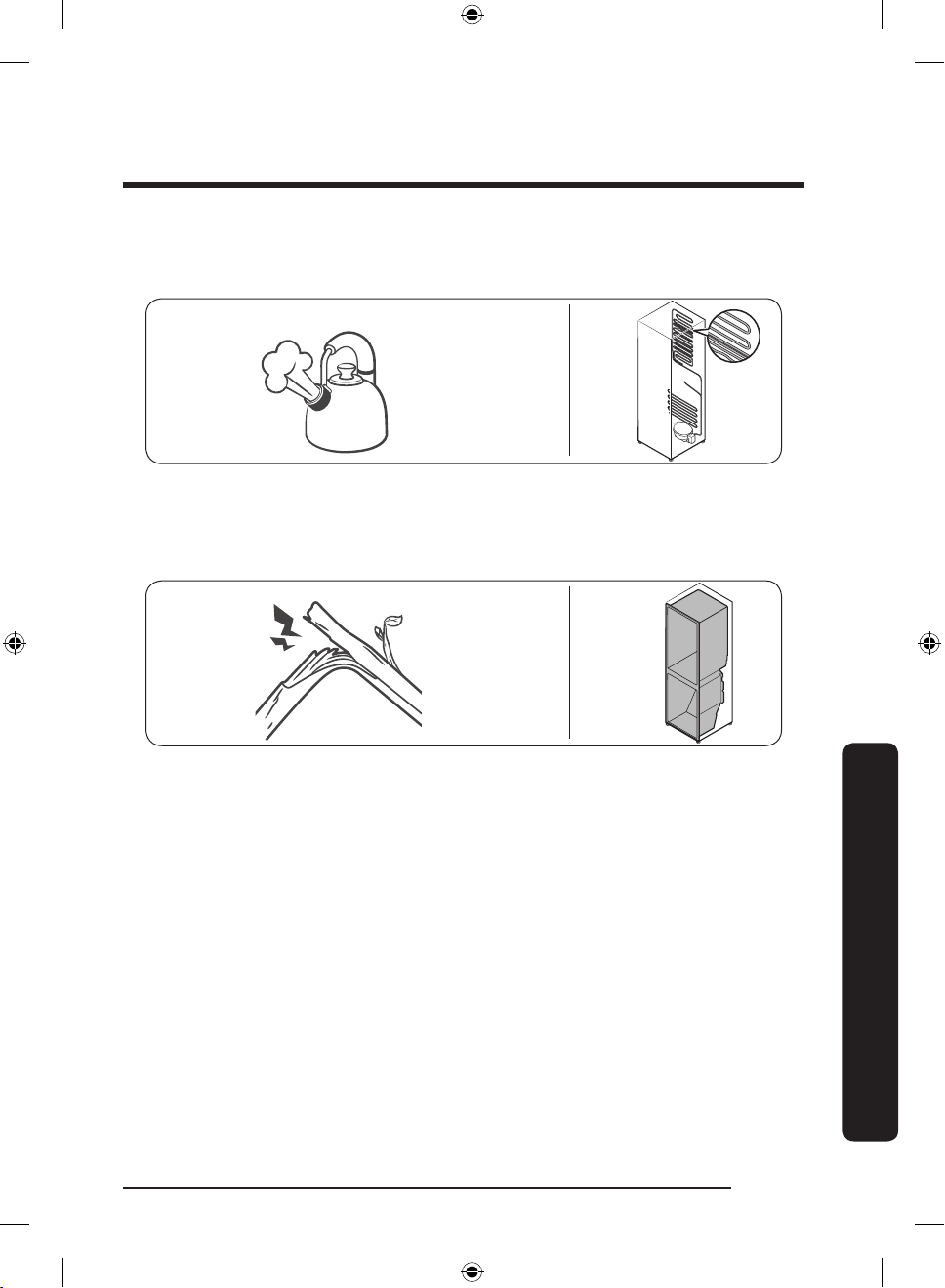
• As the refrigerator cools or freezes, refrigerant gas moves through sealed pipes, causing
Bubbling!
Cracking!
bubbling sounds.
• As the refrigerator temperature increases or decreases, plastic parts contract and
expand, creating knocking noises. These noises occur during the defrosting cycle or
when electronic parts are working.
• For ice maker models: When the water valve opens to ll the ice maker, buzzing sounds
may occur.
• Due to pressure equalizing when opening and closing the refrigerator door, whooshing
sounds may occur.
Troubleshooting
English 69
Untitled-5 69 2018-05-25 5:14:06
Page 70
Troubleshooting
SmartThings
Symptom Action
Could not nd
“SmartThings” in
the app market.
The SmartThings
app fails to operate.
The SmartThings
app is installed but
is not connected to
my refrigerator.
Could not log into
the app.
An error message
appears when I
try to register my
refrigerator.
The SmartThings
app is successfully
connected to my
refrigerator but
does not run.
• The SmartThings app is designed for Android 6.0
(Marshmallow) or later, iOS 10.0 or later, iPhone 6 or later, and
is optimized for Samsung smartphones (Galaxy S and Galaxy
Note series).
• The SmartThings app is available for applicable models only.
• The old Samsung Smart Refrigerator app cannot connect with
Samsung Smart Home models.
• You must log into your Samsung account to use the app.
• Make sure that your router is operating normally.
• If you have not connected your refrigerator to the SmartThings
App after the app was installed, you must make the connection
using the device registration function of the app.
• You must log into your Samsung account to use the app.
• If you don’t have a Samsung account, follow the app’s onscreen
instructions to create one.
• Easy Connection may fail due to the distance from your access
point (AP) or electrical interference from the surrounding
environment. Wait a moment and try again.
• Exit and restart the SmartThings app or disconnect and
reconnect the router.
• Unplug the power cord of the refrigerator, and then plug it in
again after 1 minute.
Troubleshooting
English70
Untitled-5 70 2018-05-25 5:14:06
Page 71
Samsung Family Hub
Symptom Action
Could not nd
“Samsung Family
Hub” in the app
market.
Could not log into
the app.
• The Samsung Family Hub app is available for smartphones that
run Android 4.4 (KitKat) or higher, or iOS 8.0 or higher.
• You must log into your Samsung account to use the app.
• If you don’t have a Samsung account, follow the app’s onscreen
instructions to create one.
English 71
Untitled-5 71 2018-05-25 5:14:06
Troubleshooting
Page 72
Troubleshooting
LCD
Symptom Action
• This refrigerator can connect only with Samsung Smart TV
Cannot connect to
my TV.
The inner view
picture looks
bulged.
The displayed
measurement on
the Fridge Manager
is not correct.
6400 series or higher models released since 2015. Please
check the model name of your TV rst.
• Network connections may suffer temporarily. Turn your TV off,
and then try again.
• The edges of the inner view may look bulged, which is
attributed to the convex lens.
• The inner view may be incomplete due to the blind spots on
the left and right corners or screened depending on the layout
of food items. Make sure to place food items in the front center.
• The displayed conditions may differ from the actual
temperature.
Troubleshooting
English72
Untitled-5 72 2018-05-25 5:14:06
Page 73
Memo
Untitled-5 73 2018-05-25 5:14:06
Page 74
Memo
Untitled-5 74 2018-05-25 5:14:06
Page 75
Memo
Untitled-5 75 2018-05-25 5:14:06
Page 76
NOTE
Hereby, Samsung Electronics, declares that the radio equipment type appliance is in
compliance with Directive 2014/53/EU.
The full text of the EU declaration of conformity is available at the following internet
address: The ofcial Declaration of conformity may be found at http://www.samsung.com,
go to Support > Search Product Support and enter the model name.
CAUTION
The 5 GHz WLAN function of this equipment may only be operated indoors. This
equipment may be operated in all EU countries.
Frequency range Transmitter power (Max)
2412 - 2472 MHz 20 dBm
Wi-Fi
5120 - 5250 MHz 23 dBm
5250 - 5350 MHz 20 dBm
5470 - 5725 MHz 27 dBm
Bluetooth 2402 - 2480 MHz 20 dBm
Contact SAMSUNG WORLD WIDE
If you have any questions or comments relating to Samsung products, please contact the
SAMSUNG customer care center.
Country Contact Center Web Site
UK 0330 SAMSUNG (7267864) www.samsung.com/uk/support
IRELAND (EIRE) 0818 717100 www.samsung.com/ie/support
GERMANY
FRANCE 01 48 63 00 00 www.samsung.com/fr/support
ITALIA 800-SAMSUNG (800.7267864) www.samsung.com/it/support
SWITZERLAND 0800 726 78 64 (0800-SAMSUNG)
06196 77 555 66 *HHP
06196 77 555 77 *OTH
www.samsung.com/de/support
www.samsung.com/ch/support (German)
www.samsung.com/ch_fr/support (French)
DA68-03511C-04
Untitled-5 76 2018-05-25 5:14:06
Page 77
Kühl-/Gefrierkombination
Benutzerhandbuch
RB38M*
SEUK, SEF, SEG, SEI Standgerät
Untitled-6 1 2018-05-25 5:15:32
Page 78
Inhalt
Inhalt
Sicherheitsinformationen 3
Wichtige Symbole für Sicherheits- und Gefahrenhinweise: 5
Wichtige Warnhinweise für Transport und Aufstellungsort 6
Wichtige Warnhinweise für das Aufstellen 7
Vorsichtshinweise für die Aufstellung 11
Wichtige Warnhinweise für die Verwendung 12
Vorsichtshinweise für die Verwendung 18
Vorsichtshinweise für die Reinigung 21
Wichtige Hinweise für die Entsorgung 22
Weitere Tipps zur ordnungsgemäßen Verwendung 24
Energiespartipps 25
Dieses Gerät ist zur Verwendung im Haushalt und ähnlichen Umgebungen bestimmt, wie z. B.: 26
Hinweise zur WEEE-Kennzeichnung 27
Aufstellung 28
Ihre Kühl-/Gefrierkombination auf einen Blick 28
Aufstellungshinweise in Verfahrensschritten 29
Bedienung 35
Benutzerschnittstelle 35
SmartThings 44
Empfehlungen für die Spracherkennung 47
Samsung Family Hub 47
Lagerungshinweise 49
Wartung und Pege 51
Ändern der Anschlagseite für die Gerätetür (nur bestimmte Modelle) 51
Handhabung und Pege 64
Reinigung 69
Ersetzen von Teilen 69
Problembehebung 70
Allgemein 70
Hören Sie ungewöhnliche Geräusche aus dem Kühlschrank? 73
SmartThings 75
Samsung Family Hub 76
LED 77
Deutsch2
Untitled-6 2 2018-05-25 5:15:33
Page 79
Sicherheitsinformationen
• Um sicherzustellen, dass Sie über die Eigenschaften und
Funktionen Ihres neuen Geräts Bescheid wissen, müssen
Sie diese Anleitung sorgfältig durchlesen, ehe Sie Ihre neue
Kühl-/Gefrierkombination von Samsung in Betrieb nehmen.
• Dieses Gerät ist nicht zur Verwendung durch Personen
(einschließlich Kindern) mit verringerten körperlichen,
sensorischen oder mentalen Fähigkeiten oder einem
Mangel an Erfahrung und Wissen bestimmt, sofern sie
nicht von einer für ihre Sicherheit verantwortlichen Person
im Umgang mit dem Gerät unterwiesen wurden und von
dieser beaufsichtigt werden.
• Dieses Gerät darf von Kindern ab 8 Jahren und Personen
mit verminderten körperlichen, sensorischen oder
geistigen Fähigkeiten oder einem Mangel an Erfahrung und
Wissen nur bedient werden, wenn sie unter Aufsicht stehen
oder eine Unterweisung zum sicheren Umgang mit dem
Gerät erhalten haben und die damit verbundenen Gefahren
verstehen.
Kinder dürfen nicht mit dem Gerät spielen. Kinder dürfen
bei Reinigung und Wartung nur dann helfen, wenn sie
dabei beaufsichtigt werden.
Sicherheitsinformationen
• Die Warnungen und wichtigen Sicherheitsinformationen
in diesem Benutzerhandbuch decken nicht alle denkbaren
Umstände und Situationen ab.
Lassen Sie den gesunden Menschenverstand, Vorsicht und
die notwendige Sorgfalt nicht außer Acht, wenn Sie Ihr
Gerät installieren, warten und einsetzen.
Deutsch 3
Untitled-6 3 2018-05-25 5:15:33
Page 80
Sicherheitsinformationen
• Da die folgenden Hinweise zum Betrieb für verschiedene
Sicherheitsinformationen
• Um die Entwicklung eines entammbaren Gas-
• Schalten Sie das Gerät niemals ein, wenn es Anzeichen von
• Aus den Geräterohren austretendes Kältemittel kann sich
• Wartungs- oder Reparaturarbeiten dürfen nur von
Modelle gelten, können sich die Eigenschaften
Ihres Geräts leicht von den in diesem Handbuch
beschriebenen unterscheiden, und es kann sein, dass
nicht alle Warnhinweise zutreffen. Bei Fragen oder
Problemen wenden Sie sich an Ihr nächstgelegenes
Kundendienstzentrum, oder holen Sie sich Hilfe und
Informationen online unter www.samsung.com.
Luftgemisches bei einem Leck des Kühlkreislaufs zu
vermeiden, muss die Raumgröße entsprechend der
eingesetzten Menge an Kältemitteln im Gerät gewählt
werden.
Beschädigungen zeigt. Setzen Sie sich im Zweifelsfall mit
Ihrem Händler in Verbindung. Der für die Aufstellung des
Geräts vorgesehene Raum muss für je 8 g des Kältemittels
R-600a im Gerät ein Raumvolumen von 1 m³ besitzen.
Die Menge des in Ihrem Gerät eingesetzten Kältemittels
können Sie an dem Typenschild im Innern des Geräts
ablesen.
entzünden oder zu Verletzungen an den Augen führen.
Wenn Kältemittel aus den Rohren austritt, vermeiden
Sie offene Flammen, und nehmen Sie entzündliche
Gegenstände aus der Reichweite des Geräts. Lüften Sie
außerdem sofort den Raum.
- Andernfalls besteht Brand- oder Explosionsgefahr.
sachkundigem Fachpersonal ausgeführt werden.
Deutsch4
Untitled-6 4 2018-05-25 5:15:33
Page 81
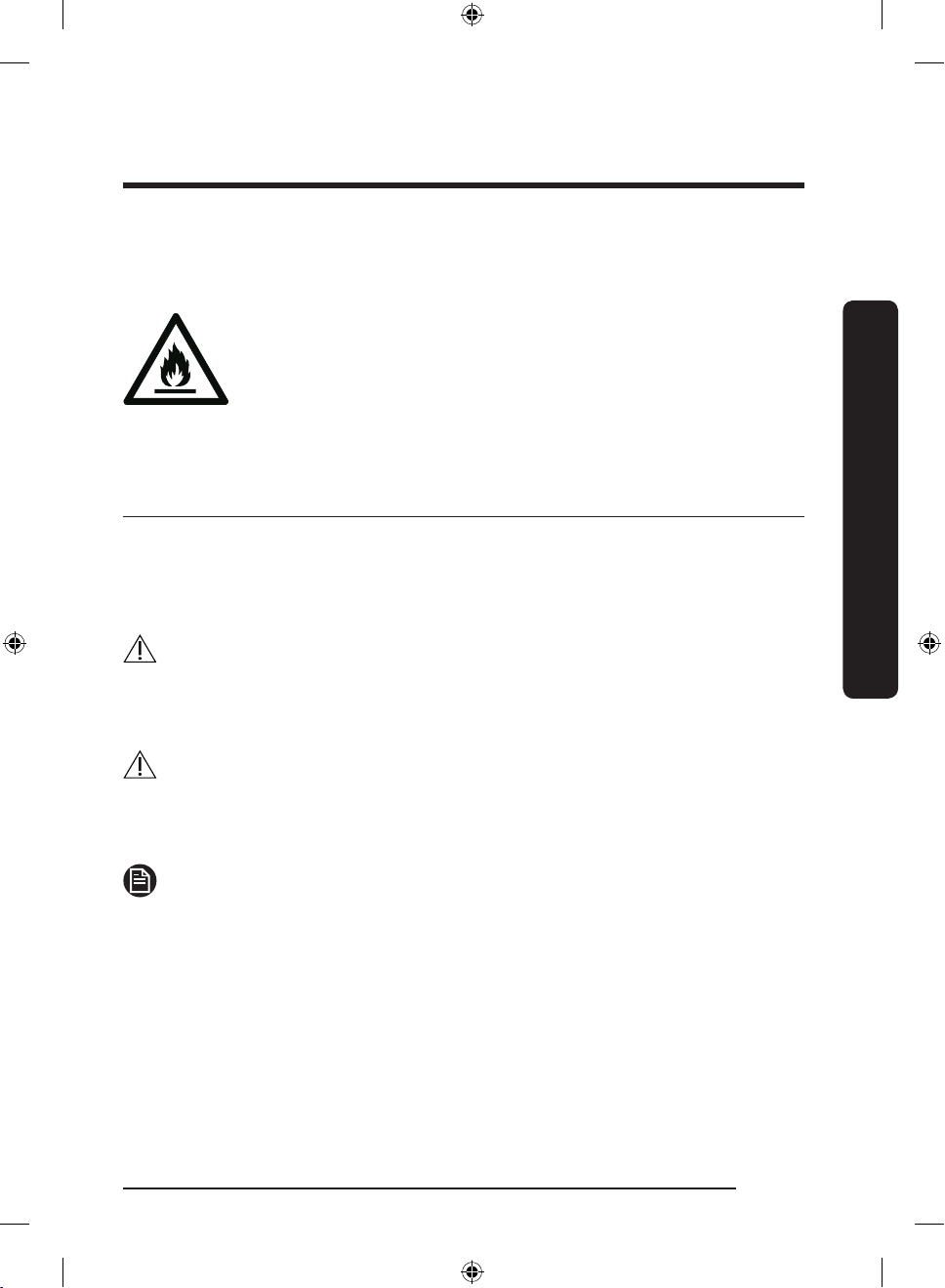
• Bewahren Sie in diesem Gerät keine explosiven Stoffe wie
zum Beispiel Sprühdosen mit brennbarem Treibgas auf.
Warnung: Feuergefahr / brennbare Materialien
Wichtige Symbole für Sicherheits- und Gefahrenhinweise:
Bitte beachten Sie alle Sicherheitshinweise in diesem
Benutzerhandbuch. In diesem Handbuch werden folgende
Sicherheitssymbole verwendet.
WARNUNG
Gefährliche bzw. unsichere Verhaltensweisen, die zu schweren
Verletzungen, Sachschäden und/oder zum Tod führen können.
VORSICHT
Gefährliche bzw. unsichere Verhaltensweisen, die zu schweren
Verletzungen und/oder Sachschäden führen können.
Sicherheitsinformationen
HINWEIS
Nützliche Informationen, die dem Benutzer beim Einsatz der
Kühl-/Gefrierkombination helfen.
Die folgenden Warnhinweise sollen Sie und andere vor
Verletzungen schützen.
Befolgen Sie sie gewissenhaft.
Deutsch 5
Untitled-6 5 2018-05-25 5:15:33
Page 82
Sicherheitsinformationen
Lesen Sie diesen Abschnitt aufmerksam durch, und bewahren
Sie das Handbuch zum späteren Nachschlagen an einem
sicheren Ort auf.
Sicherheitsinformationen
Wichtige Warnhinweise für Transport und Aufstellungsort
• Achten Sie darauf, dass keine Teile des Kühlkreislaufs
WARNUNG
beschädigt werden, wenn Sie das Gerät transportieren oder
aufstellen.
- Aus den Rohren austretendes Kältemittel kann sich
entzünden oder zu Verletzungen der Augen führen.
Wenn Kältemittel austritt, vermeiden Sie offene
Flammen oder potenzielle Zündquellen, und lüften Sie
einige Minuten lang den Raum, in dem sich das Gerät
bendet.
- Bei diesem Gerät wird eine geringe Menge eines
Isobutan-Kältemittels (R-600a) eingesetzt. Dies ist ein
natürliches Gas mit hoher Umweltverträglichkeit, das
allerdings auch brennbar ist. Achten Sie darauf, dass
keine Teile des Kühlkreislaufs beschädigt werden, wenn
Sie das Gerät transportieren oder aufstellen.
Deutsch6
Untitled-6 6 2018-05-25 5:15:33
Page 83
Wichtige Warnhinweise für das Aufstellen
WARNUNG
• Stellen Sie das Gerät nicht in feuchten Räumen oder an
einem Ort auf, wo es mit Wasser in Kontakt kommen kann.
- Beschädigte Isolierungen von elektrischen Teilen
können zu einem Stromschlag oder Brand führen.
• Setzen Sie das Gerät nicht direktem Sonnenlicht aus und
stellen Sie es nicht in der Nähe von Öfen, Heizkörpern oder
anderen Wärmequellen auf.
• Stecken Sie den Netzstecker des Geräts nicht in eine
Steckdosenleiste, die auch für andere Geräte verwendet
wird. Die Kühl-Gefrier-Kombination darf immer nur an
eine ausschließlich für dieses Gerät bestimmte Steckdose
angeschlossen werden, deren Spannung mit der auf dem
Typenschild am Gerät übereinstimmt.
- Dies gewährleistet eine optimale Leistung und
verhindert eine Überlastung der Stromkreise im Haus,
die einen Brand aufgrund überhitzter Leitungen
auslösen könnte.
• Stecken Sie den Netzstecker nicht in eine lose Steckdose.
- Andernfalls besteht die Gefahr eines Stromschlags oder
Brands.
• Verwenden Sie keine Kabel, die im Kabelverlauf oder
an einem der Enden Brüche oder Abnutzungsschäden
aufweisen.
• Knicken Sie das Netzkabel nicht übermäßig und stellen Sie
keine schweren Gegenstände darauf ab.
• Ziehen Sie nicht am Netzkabel und knicken Sie es nicht
übermäßig.
Sicherheitsinformationen
Deutsch 7
Untitled-6 7 2018-05-25 5:15:33
Page 84
Sicherheitsinformationen
• Verdrehen bzw. verknoten Sie das Netzkabel nicht.
• Verlegen Sie das Netzkabel nicht über scharfe
Sicherheitsinformationen
• Achten Sie darauf, das Gerät beim Verschieben nicht über
• Schalten Sie Ihre Kühl-/Gefrierkombination niemals aus,
• Bewahren Sie in diesem Gerät keine explosiven Stoffe wie
• Stellen Sie dieses Gerät nicht in der Nähe von Heizkörpern
• Stellen Sie dieses Gerät nicht an Orten auf, an denen Gas
• Dieses Gerät muss vor der Inbetriebnahme in
Metallkanten, stellen Sie keine schweren Gegenstände
darauf, verlegen Sie das Netzkabel nicht zwischen
Objekten und schieben Sie das Netzkabel nicht in den
Raum hinter dem Gerät.
das Netzkabel zu fahren und dieses zu beschädigen.
- Andernfalls besteht die Gefahr eines Stromschlags oder
Brands.
indem Sie das Netzkabel herausziehen. Fassen Sie den
Stecker immer fest an und ziehen Sie ihn gerade aus der
Steckdose.
- Schäden am Kabel können einen Kurzschluss, Brand
und/oder Stromschlag verursachen.
zum Beispiel Sprühdosen mit brennbarem Treibgas auf.
oder brennbaren Materialien auf.
austreten kann.
- Andernfalls besteht die Gefahr eines Stromschlags oder
Brands.
Übereinstimmung mit den Anweisungen in diesem
Benutzerhandbuch ordnungsgemäß aufgestellt und
installiert werden.
Deutsch8
Untitled-6 8 2018-05-25 5:15:33
Page 85
• Schließen Sie den Netzstecker ordnungsgemäß mit dem
Kabel nach unten an die Steckdose an.
- Wenn Sie den Netzstecker falsch herum (also mit
dem Kabel nach oben) in die Steckdose stecken, kann
das Kabel durchtrennt werden und einen Brand oder
Stromschlag verursachen.
• Stellen Sie stets sicher, dass der Netzstecker nicht durch die
Rückwand des Geräts gequetscht oder beschädigt wird.
• Bewahren Sie die Verpackungsmaterialien außerhalb der
Reichweite von Kindern auf.
- Es besteht Erstickungsgefahr, wenn Kinder sich diese
Materialien über den Kopf ziehen.
• Das Gerät muss so aufgestellt werden, dass der Stecker
nach dem Aufstellen frei zugänglich ist.
- Andernfalls besteht die Gefahr von Stromschlägen oder
eines Brands aufgrund von Fehlströmen.
• Stellen Sie dieses Gerät weder an einem feuchten, öligen
oder staubigen Ort noch an einem Platz auf, der direktem
Sonnenlicht oder Wassereinwirkungen (z. B. Regen)
ausgesetzt ist.
- Beschädigte Isolierungen von elektrischen Teilen
können zu einem Stromschlag oder Brand führen.
• Wenn sich Staub oder Wasser im Gerät angesammelt
haben, trennen Sie die Stromversorgung, und wenden Sie
sich an das nächstgelegene Kundendienstzentrum von
Samsung Electronics.
- Andernfalls besteht Brandgefahr.
Sicherheitsinformationen
Deutsch 9
Untitled-6 9 2018-05-25 5:15:33
Page 86
Sicherheitsinformationen
• Stellen Sie sich nicht auf das Gerät und legen oder
Sicherheitsinformationen
• Entfernen Sie sämtliche Schutzfolien, bevor Sie das Gerät
• Die Kühl-/Gefrierkombination muss sicher geerdet werden.
• Verwenden Sie niemals Gasleitungen, Telefonleitungen
• Stecken Sie den Netzstecker fest in die Steckdose.
stellen Sie keine Gegenstände (Wäsche, brennende
Kerzen, brennende Zigaretten, Geschirr, Chemikalien,
Metallgegenstände usw.) auf das Gerät.
- Andernfalls besteht Verletzungs- oder Brandgefahr
bzw. die Gefahr von Stromschlägen oder Störungen des
Geräts.
erstmalig in Betrieb nehmen.
- Achten Sie immer darauf, dass die Kühl-/
Gefrierkombination geerdet ist, bevor Sie versuchen,
irgendein Teil des Gerätes zu untersuchen oder zu
reparieren. Leckagen im Stromkreislauf können zu
schweren elektrischen Schlägen führen.
oder andere potenziell blitzschlaggefährdete Gegenstände
zur Erdung des Gerätes.
- Das Gerät muss geerdet werden, um durch Leckströme
verursachte Stromverluste und Stromschläge zu
verhindern.
- Andernfalls besteht die Gefahr von Stromschlägen,
Brand, Explosion oder Störungen des Geräts.
Verwenden Sie keine beschädigten Netzstecker bzw.
Netzkabel und keine losen Steckdosen.
- Andernfalls besteht die Gefahr eines Stromschlags oder
Brands.
Deutsch10
Untitled-6 10 2018-05-25 5:15:33
Page 87
• Wenn das Netzkabel beschädigt ist, lassen Sie es
umgehend vom Hersteller oder vom Kundendienst
austauschen.
• Die Gerätesicherung darf nur von einem qualizierten
Techniker oder einem dazu befugten Dienstleister
ausgetauscht werden.
- Andernfalls besteht die Gefahr von Stromschlägen oder
Verletzungen.
• Achten Sie beim Aufstellen des Geräts darauf, dass das
Netzkabel nicht eingeklemmt oder beschädigt wird.
• Stellen Sie weder Steckdosenleisten noch tragbare
Stromversorgungen hinter dem Gerät auf.
Vorsichtshinweise für die Aufstellung
VORSICHT
• Stellen Sie die Kühl-/Gefrierkombination auf einer ebene
Fläche auf und lassen Sie ausreichend Platz um das Gerät.
- Stellen Sie sicher, dass die Lüftungsöffnung des
Gerätegehäuses oder der Halterung nicht blockiert sind.
• Lassen Sie das Gerät nach dem Aufstellen und Einschalten
2 Stunden lang ruhen, bevor Sie es mit Lebensmitteln
befüllen.
• Wir empfehlen Ihnen dringend, die Aufstellung der Kühl-/
Gefrierkombination durch einen qualizierten Techniker
oder ein Serviceunternehmen durchführen zu lassen.
- Andernfalls besteht Verletzungs- oder Brandgefahr
bzw. die Gefahr von Stromschlägen, Explosionen oder
Störungen des Geräts.
Sicherheitsinformationen
Deutsch 11
Untitled-6 11 2018-05-25 5:15:33
Page 88
Sicherheitsinformationen
• Wenn die Gerätetüren übermäßig beladen werden, kann
das Gerät kippen und Verletzungen verursachen.
Wichtige Warnhinweise für die Verwendung
Sicherheitsinformationen
• Stecken Sie den Netzstecker nicht mit nassen Händen in
• Stellen Sie keine Gegenstände oben auf das Gerät.
• Stecken Sie weder Ihre Hände und Füße noch
• Berühren Sie die Innenseiten des Geräts oder die darin
• Stellen Sie keinen mit Wasser gefüllten Behälter auf das
WARNUNG
die Steckdose.
- Andernfalls besteht die Gefahr von Stromschlägen.
- Die Gegenstände könnten beim Öffnen oder Schließen
der Gerätetür herunterfallen und zu Verletzungen und/
oder Sachschäden führen.
Metallgegenstände (Essstäbchen usw.) von unten oder von
hinten in das Gerät.
- Andernfalls besteht die Gefahr von Stromschlägen oder
Verletzungen.
- Scharfe Kanten können zu Verletzungen führen.
aufbewahrten Lebensmittel nicht mit nassen Händen.
- Dies kann zu Erfrierungen führen.
Gerät.
- Wenn das Wasser verschüttet wird, besteht die Gefahr
eines Stromschlags oder Brands.
Deutsch12
Untitled-6 12 2018-05-25 5:15:33
Page 89
• Bewahren Sie keine üchtigen oder entammbaren
Gegenstände oder Stoffe (Reinigungsbenzin, Verdünner,
Propangas, Alkohol, Äther, Erdgas oder ähnliche Produkte)
in der Kühl-/Gefrierkombination auf.
- Dieses Gerät ist ausschließlich zur Aufbewahrung von
Lebensmitteln bestimmt.
- Andernfalls besteht Brand- oder Explosionsgefahr.
• Kinder müssen beaufsichtigt werden, um zu verhindern,
dass sie mit dem Gerät spielen.
- Halten Sie Ihre Finger von „Quetschstellen“ fern. Die
Abstände zwischen den Türen und dem Schrank sind
notwendigerweise klein. Öffnen Sie die Gerätetüren mit
großer Vorsicht, wenn sich Kinder in der Nähe benden.
• Lassen Sie nicht zu, dass Kinder sich an die Tür oder die
Türkörbe hängen. Andernfalls kann es zu ernsthaften
Verletzungen kommen.
• Lassen Sie Kinder nicht in das Gerät hineinklettern. Sie
könnten sich darin einsperren.
• Stecken Sie Ihre Hände nicht in den Bodenbereich unter
dem Gerät.
- Scharfe Kanten können zu Verletzungen führen.
• Bewahren Sie keine Arzneimittel, lebensmittelfremde
Materialien oder temperaturempndliche Produkte in der
Kühl-/Gefrierkombination auf.
- Lebensmittel, die unter streng kontrollierten
Temperaturbedingungen gelagert werden müssen,
dürfen nicht in diesem Gerät aufbewahrt werden.
• Lagern bzw. verwenden Sie keine elektrischen Apparate
oder Maschinen im Gerät, sofern diese nicht vom Hersteller
zugelassen sind.
Sicherheitsinformationen
Deutsch 13
Untitled-6 13 2018-05-25 5:15:33
Page 90
Sicherheitsinformationen
• Wenn das Gerät nach Arzneimitteln oder Rauch riecht,
• Wenn sich Staub oder Wasser im Gerät angesammelt
Sicherheitsinformationen
• Lassen Sie nicht zu, dass Kinder auf die Schubfächer der
• Lassen Sie die Türen des Geräts nicht offen stehen, wenn
• Lassen Sie Kinder oder Kleinkinder nicht in die
• Füllen Sie nicht zu viele Lebensmittel in die Kühl-/
trennen Sie sofort die Stromversorgung und wenden Sie
sich an Ihr nächstgelegenes Kundendienstzentrum von
Samsung Electronics.
haben, trennen Sie die Stromversorgung und wenden Sie
sich an das nächstgelegene Kundendienstzentrum von
Samsung Electronics.
- Andernfalls besteht Brandgefahr.
Kühl-/Gefrierkombination steigen.
- Die Schubfächer könnten abbrechen und zu Stürzen
führen.
dieses unbeaufsichtigt ist, und lassen Sie Kinder nicht in
das Gerät hineinklettern.
Schubfächer klettern.
- Dies kann zum Tod durch Ersticken oder zu
Verletzungen führen, wenn die Kinder darin gefangen
sind.
Gefrierkombination.
- Die Gegenstände könnten beim Öffnen der Gerätetür
herausfallen und zu Verletzungen oder Sachschäden
führen.
Deutsch14
Untitled-6 14 2018-05-25 5:15:33
Page 91
• Sprühen Sie keine üchtigen Substanzen wie
Insektensprays auf die Oberäche des Geräts.
- Sie sind nicht nur gefährlich für Ihre Gesundheit,
sondern es besteht außerdem die Gefahr eines Brands,
eines Stromschlags oder einer Störung des Geräts.
• Verwenden Sie keine temperaturempndlichen Materialien
wie entammbare Sprays und Gegenstände, Trockeneis,
Medikamente oder Chemikalien in der Nähe oder innerhalb
der Kühl-/Gefrierkombination und bewahren Sie sie nicht
dort auf.
• Verwenden Sie keine Haartrockner, um das Innere des
Geräts zu trocknen. Stellen Sie keine brennende Duftkerze
in das Gerät, um unangenehme Gerüche zu beseitigen.
- Andernfalls besteht die Gefahr eines Stromschlags oder
Brands.
• Stellen Sie sich nicht auf das Gerät und legen oder
stellen Sie keine Gegenstände (Wäsche, brennende
Kerzen, brennende Zigaretten, Geschirr, Chemikalien,
Metallgegenstände usw.) auf das Gerät. Andernfalls besteht
Verletzungs- oder Brandgefahr bzw. die Gefahr von
Stromschlägen oder Störungen des Geräts. Stellen Sie keine
mit Wasser gefüllten Behälter auf das Gerät.
- Wenn das Wasser verschüttet wird, besteht die Gefahr
eines Stromschlags oder Brands.
• Verwenden Sie keine anderen als die vom Hersteller
empfohlenen mechanischen Vorrichtungen oder Hilfsmittel,
um den Abtauvorgang zu beschleunigen.
• Beschädigen Sie niemals das Kältemittelsystem.
Sicherheitsinformationen
Deutsch 15
Untitled-6 15 2018-05-25 5:15:33
Page 92
Sicherheitsinformationen
• Schauen Sie niemals direkt für eine längere Zeit auf die
• Legen Sie die Fachböden nicht mit der Oberseite nach
Sicherheitsinformationen
• Halten Sie Ihre Finger von „Quetschstellen“ fern. Die
• Wenn ein Gasleck auftritt, vermeiden Sie offenes Feuer
• Verwenden Sie nur die vom Hersteller oder Kundendienst
• Flaschen sollten dicht nebeneinander verstaut werden,
• Dieses Gerät ist ausschließlich für die Aufbewahrung von
LED-UV-Lampe.
- Andernfalls können Verletzungen der Augen aufgrund
der UV-Strahlung die Folge sein.
unten ein. Dies könnte die Funktionsweise der Fachböden
beeinträchtigen.
- Dies kann zu Verletzungen oder Sachschäden durch
herunterfallende Glasfachböden führen.
Abstände zwischen den Türen und dem Schrank sind
notwendigerweise klein. Öffnen Sie die Gerätetüren mit
großer Vorsicht, wenn sich Kinder in der Nähe benden.
oder potenzielle Zündquellen und lüften Sie einige Minuten
lang den Raum, in dem sich das Gerät bendet.
- Berühren Sie dann weder das Gerät noch das Netzkabel.
- Verwenden Sie keinen Lüfter.
- Jeder Funke kann zu einer Explosion oder einem Brand
führen.
empfohlenen LED-Lampen.
damit sie nicht aus dem Gerät fallen.
Lebensmitteln in Privathaushalten bestimmt.
Deutsch16
Untitled-6 16 2018-05-25 5:15:33
Page 93
• Versuchen Sie nicht, das Gerät selbst zu reparieren,
auseinander zu bauen oder zu verändern.
- Nicht autorisierte Änderungen können
Sicherheitsprobleme verursachen. Wenn wir eine nicht
autorisierte Änderung rückgängig machen sollen,
berechnen wir die vollen Kosten für Ersatzteile und
Arbeitszeit.
• Verwenden Sie ausschließlich Normsicherungen
(KEINESFALLS Überbrückungen aus Kupfer, Stahldraht
usw.).
• Wenn Ihre Kühl-/Gefrierkombination repariert oder an
einem anderen Ort aufgestellt werden muss, wenden Sie
sich bitte an den nächstgelegenen Servicepartner.
- Andernfalls besteht Verletzungs- oder Brandgefahr
bzw. die Gefahr von Stromschlägen oder Störungen des
Geräts.
• Wenn die innere oder äußere LED nicht mehr leuchtet,
wenden Sie sich bitte an Ihren Servicepartner.
• Wenn die Kühl-/Gefrierkombination nach Feuer riecht
oder Rauch abgibt, trennen Sie das Gerät sofort vom
Stromnetz und wenden Sie sich Ihren Samsung ElectronicsServicepartner.
- Andernfalls besteht die Gefahr eines Stromschlags oder
Brands.
• Ziehen Sie den Netzstecker aus der Steckdose, bevor Sie
die Beleuchtung im Innern des Geräts austauschen.
- Andernfalls besteht die Gefahr eines Stromschlags.
• Wenn Sie Probleme bei Austausch einer Nicht-LEDLampe haben, wenden Sie sich bitte an einen SamsungServicepartner.
Sicherheitsinformationen
Deutsch 17
Untitled-6 17 2018-05-25 5:15:33
Page 94
Sicherheitsinformationen
• Wenn das Gerät mit LED-Lampen ausgestattet ist,
Sicherheitsinformationen
• Stecken Sie den Netzstecker fest in die Steckdose.
• Verwenden Sie keine beschädigten Netzstecker bzw.
Vorsichtshinweise für die Verwendung
• Frieren Sie bereits vollständig aufgetaute Lebensmittel
• Um eine optimale Leistung des Geräts zu gewährleisten,
entfernen Sie nicht selbst die Lampenabdeckungen und die
Lampen.
- Wenden Sie sich an das nächstgelegene SamsungKundendienstzentrum.
Netzkabel und keine losen Steckdosen.
- Andernfalls besteht die Gefahr eines Stromschlags oder
Brands.
VORSICHT
nicht wieder ein. Legen Sie keine kohlensäurehaltigen
Getränke oder Sprudel in das Gerät. Legen Sie keine
Flaschen oder Glasbehälter in das Gerät.
- Wenn der Inhalt gefriert, kann das Glas platzen und zu
Verletzungen führen.
- stellen Sie keine Lebensmittel zu nah an die
Lüftungsöffnungen auf der Rückseite des Geräts, da
sonst die Luftzirkulation im Gerät beeinträchtigt werden
kann,
- geben Sie die zu lagernden Lebensmittel in geeignete
Kunststoffbeutel oder in luftdichte Behälter, bevor Sie
sie in das Gerät legen,
Deutsch18
Untitled-6 18 2018-05-25 5:15:34
Page 95
- bewahren Sie keine Glasaschen oder
kohlensäurehaltige Getränke im Gefrierabteil auf.
Sie könnten gefrieren und zerbrechen. Zerbrochene
Getränkebehälter können Verletzungen verursachen.
- Beachten Sie die maximale Aufbewahrungsdauer und
das Verfallsdatum von tiefgefrorenen Lebensmitteln.
• Bewahren Sie keine Glasbehälter, Flaschen oder
kohlesäurehaltige Getränke im Gefrierabteil auf.
- Die Behälter könnten beim Einfrieren platzen und zu
Verletzungen führen.
• Legen Sie keine kohlensäurehaltigen Getränke oder Sprudel
in das Gerät. Legen Sie keine Flaschen oder Glasbehälter in
das Gerät.
- Wenn der Inhalt gefriert, kann das Glas platzen und
Verletzungen oder Sachschäden verursachen.
• Servicegarantie und Veränderungen.
- Sämtliche Veränderungen, die von einer Fremdpartei an
diesem Gerät durchgeführt werden, sind nicht durch die
Servicegarantie von Samsung abgedeckt und Samsung
haftet daher nicht für Sicherheitsprobleme und Schäden,
die durch solche von Fremdparteien vorgenommenen
Veränderungen verursacht werden.
• Blockieren Sie nicht die Lüftungsöffnungen im Innern der
Kühl-/Gefrierkombination.
- Wenn die Lüftungsöffnungen beispielsweise mit
einer Plastiktüte blockiert sind, wird die Kühl-/
Gefrierkombination möglicherweise zu stark
heruntergekühlt. Wenn eine Kühlzeit zu lange dauert,
kann dies ein Wasserleck verursachen.
Sicherheitsinformationen
Deutsch 19
Untitled-6 19 2018-05-25 5:15:34
Page 96
Sicherheitsinformationen
• Wischen Sie überschüssige Feuchtigkeit im Innern des
• Wenn der Kühlschrank von der Stromversorgung getrennt
Sicherheitsinformationen
• Wenn das Gerät durch den Kontakt mit Wasser nass
• Beschädigen Sie keine Glasächen durch Schläge oder
• Seien Sie vorsichtig, damit Sie sich nicht die Finger
• Kontaktieren Sie bitte den Kundendienst, wenn die Kühl-/
Geräts ab und lassen Sie die Gerätetür geöffnet.
- Andernfalls können sich schlechte Gerüche und
Ablagerungen bilden.
war, müssen Sie mindestens fünf Minuten warten, ehe Sie
ihn wieder anschließen.
geworden ist, ziehen Sie den Netzstecker und wenden Sie
sich an den Kundendienst von Samsung Electronics.
starke Krafteinwirkung.
- Das Glas könnte brechen und zu Verletzungen und/oder
Sachschäden führen.
einklemmen.
Gefrierkombination unter Wasser gesetzt wurde.
- Andernfalls besteht die Gefahr eines Stromschlags oder
Brands.
Deutsch20
Untitled-6 20 2018-05-25 5:15:34
Page 97
Vorsichtshinweise für die Reinigung
VORSICHT
• Sprühen Sie kein Wasser direkt in oder auf die Kühl-/
Gefrierkombination.
- Es besteht die Gefahr von Stromschlägen oder Bränden.
• Verwenden Sie keine Haartrockner, um das Innere des
Geräts zu trocknen.
• Stellen Sie keine brennende Duftkerze in das Gerät, um
unangenehme Gerüche zu beseitigen.
- Andernfalls besteht die Gefahr eines Stromschlags oder
Brands.
• Sprühen Sie keine Reinigungsmittel direkt auf das Display.
- Andernfalls können sich die Aufdrucke auf dem Display
lösen.
• Wenn ein Fremdstoff, wie z. B. Wasser, in das Gerät
eingedrungen ist, ziehen Sie den Netzstecker und wenden
Sie sich an Ihr nächstgelegenes Kundendienstzentrum.
- Andernfalls besteht die Gefahr eines Stromschlags oder
Brands.
• Verwenden Sie ein sauberes, trockenes Tuch, um
Fremdkörper oder Staub von den Kontakten des
Netzsteckers zu entfernen. Verwenden Sie zur Reinigung
des Steckers kein nasses oder feuchtes Tuch.
- Andernfalls besteht die Gefahr eines Stromschlags oder
Brandes.
• Sprühen Sie zum Reinigen kein Wasser direkt auf das
Gerät.
Sicherheitsinformationen
Deutsch 21
Untitled-6 21 2018-05-25 5:15:34
Page 98
Sicherheitsinformationen
• Reinigen Sie das Gerät niemals mit Waschbenzin,
• Ziehen Sie den Netzstecker aus der Steckdose, bevor Sie
Sicherheitsinformationen
Wichtige Hinweise für die Entsorgung
• Achten Sie auf eine umweltgerechte Entsorgung des
• Stellen Sie vor der Entsorgung sicher, dass die Rohre an
• Als Kältemittel werden R-600a oder R-134a verwendet.
Verdünner, Bleichmittel oder Chlor.
- Andernfalls können Schäden an der Oberäche des
Geräts oder ein Brand die Folge sein.
das Gerät reinigen oder Wartungsarbeiten durchführen.
- Andernfalls besteht die Gefahr eines Stromschlags oder
Brands.
WARNUNG
Verpackungsmaterials für dieses Gerät.
der Geräterückseite nicht beschädigt sind.
Sie können dem Kompressoraufkleber auf der Rückseite
Ihres Geräts oder dem Typenschild im Innern des
Geräts entnehmen, welches Kältemittel für Ihre Kühl-/
Gefrierkombination verwendet wurde. Wenn diese Kühl-/
Gefrierkombination entzündliche Gase enthält (Kältemittel
R-600a), wenden Sie sich an die örtlichen Behörden, die
Ihnen Informationen über die sichere Entsorgung zur
Verfügung stellen können.
Deutsch22
Untitled-6 22 2018-05-25 5:15:34
Page 99
• Entfernen Sie für eine ordnungsgemäße Entsorgung
dieser Kühl-/Gefrierkombination die Gerätetür sowie
die Dichtungen und die Verriegelung der Gerätetür,
damit Kinder oder Tiere nicht versehentlich im Gerät
eingeschlossen werden können. Kinder müssen
beaufsichtigt werden, um zu verhindern, dass sie mit dem
Gerät spielen. Wenn ein Kind eingeschlossen ist, kann es
sich verletzen und ersticken.
- Wenn ein Kind im Gerät eingeschlossen ist, besteht
Verletzungs- und Erstickungsgefahr.
• In der Geräteisolierung wurde Cyclopentan verwendet.
Die im Isoliermaterial gebundenen Gase erfordern
eine spezielle Entsorgung. Informationen zur
umweltfreundlichen Entsorgung dieses Geräts erhalten Sie
bei den örtlichen Behörden.
• Bewahren Sie alle Verpackungsmaterialien außerhalb der
Reichweite von Kindern auf, denn Verpackungsmaterial
kann für Kinder gefährlich sein.
- Wenn ein Kind sich eine Plastiktüte über den Kopf zieht,
kann dies zum Ersticken führen.
Sicherheitsinformationen
Deutsch 23
Untitled-6 23 2018-05-25 5:15:34
Page 100
Sicherheitsinformationen
Weitere Tipps zur ordnungsgemäßen Verwendung
• Wenden Sie sich im Falle eines Stromausfalls an das
Sicherheitsinformationen
• Die Kühl-/Gefrierkombination arbeitet möglicherweise
• Bestimmte temperaturempndliche Lebensmittel
• Ihr Gerät ist frostfrei, d. h. der Abtauvorgang muss nicht
örtliche Büro Ihres Stromversorgungsunternehmens und
fragen Sie, wie lange der Ausfall voraussichtlich dauern
wird.
- Die meisten Stromausfälle können innerhalb von
ein bis zwei Stunden behoben werden und haben
keine negativen Auswirkungen auf die in Ihrer Kühl-/
Gefrierkombination herrschende Temperatur. Während
eines Stromausfalls sollten Sie jedoch die Gerätetür so
selten wie möglich öffnen.
- Sollte der Stromausfall länger als 24 Stunden andauern,
entsorgen Sie das gesamte Gefriergut.
nicht korrekt (gefrorener Inhalt kann auftauen oder die
Temperatur im Gefrierfach zu hoch werden), wenn er über
einen längeren Zeitraum an einem Ort aufgestellt ist, wo
die Umgebungstemperatur durchgehend unterhalb der
Temperatur liegt, für die das Gerät ausgelegt ist.
sollten nicht gekühlt oder gar eingefroren werden, da
sie ansonsten aufgrund ihrer speziellen Eigenschaften
verderben können.
von Ihnen manuell durchgeführt werden. Er erfolgt
automatisch.
Deutsch24
Untitled-6 24 2018-05-25 5:15:34
 Loading...