

Page 1

- 이 문서는 삼성전자의 기술 자산으로 승인자만이 사용할 수 있습니다 -
- This Document can not be used without Samsung's authorization -
2. Introduction and Specification
1)
Introduction
(1) High Performance PC
- Intel®Core™ 2 Duo Processor and DDR II Memory
- nVIDIA Geforce 8600 G/8400 G PCI-Express Graphic
- Intel Santa Rosa Platform
- Wireless LAN (option), Bluetooth (option)
(2)Convenientfeature
- Internal Camera (Option) for easily video and photo capture
(3) Prudent Design for easy use
- Price competitive power preservation
- Variant Multi-media card support
- Good feeling with free type touchpad, advanced design appearance.
2 - 1
Page 2

- 이 문서는 삼성전자의 기술 자산으로 승인자만이 사용할 수 있습니다 -
- This Document can not be used without Samsung's authorization -
2. Introduction and Specification
2)
Specification
Processor and Motherboard Description
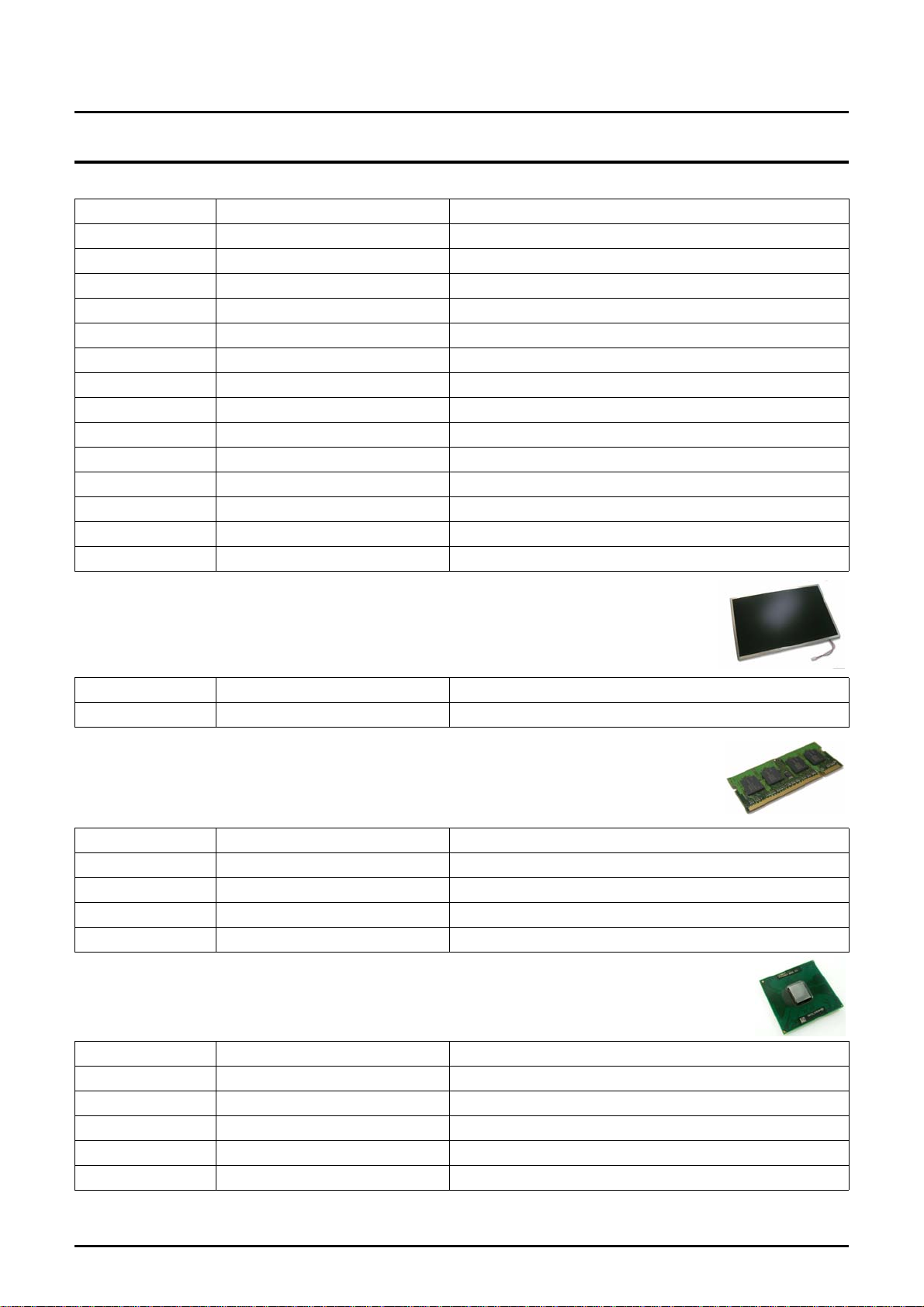
Intel® Core™ 2 Duo Processor
CPU
Speed
Cache
Chipset Intel PM/GM965+ ICH8M
BIOS 8 Mbit, Flash upgradable
Thermal Design Performance MAX. 35W
Intel® Core™ Duo Processor
Intel® Pentium Dual Core™ Processor
Intel® Celeron® M Processor
Intel® Core™ 2 Duo Processor T9500, T9300, T8300, T8100,
T7700:2.4G, T7500:2.2G, T7250:2.0G, T2370:1.73
T5750:2.0G, T5550:1.83G, T5250:1.5G, T2330:1.6G
Intel® Celeron® M ProcessorCel 560, Cel 550, Cel 540
6MB/3M T9500, T9300, T8300, T8100
4MB/2MB T7700, T7500, T7250,T5750, T5550, T5250
1MB (Pentium Dual Core, Celeron M) T2370, T2330, Cel 560, Cel
550, Cel 540
Memory
Memory/Max.Memory 1GB ~ 4GB
Memory type PC2-4200(533MHz) / PC2-5300(667MHz) DDR2 SODIMM
Memory Modules 256MB,512MB, 1GB,SODIMM
Sockets 2-slot SODIMM's
Display and Graphics
LCD 17" WXGA+(200nits
LCD Vendor
17" WXGA
LCD Viewable Area 367.20 x 229.50mm (H x V)
LCD Resolution 1440 x 900 x 262,144 color
Dot Pitch 0.255 x 0.255mm (H x V)
Viewing angle Hor. +45/-45, Ver. +20/-25
Contrast Ratio min.300 (CR)
Brightness typ.200 (cd/m2)
Response time Typ.16ms / max.25ms,(Tr+Tf)
Glare pole Glare pole with Anti-Reflexion-Coat
Weight 700g
17" WXGA
LCD Viewable Area 367.20 x 229.50mm (H x V)
+
+
이상
, Glare&N_Glare)
Samsung AMLCD (LTN170X2-L02)
CMO LCD (N170C2-L02)
Samsung AMLCD (LTN170X2-L02)
CMO LCD (N170C2-L02)
2 - 2
Page 3

- 이 문서는 삼성전자의 기술 자산으로 승인자만이 사용할 수 있습니다 -
- This Document can not be used without Samsung's authorization -
2. Introduction and Specification
LCD Resolution 1440 x 900 x 262,144 color
Dot Pitch 0.255 x 0.255mm (H x V)
Viewing angle Hor. +45/-45, Ver. +20/-25
Contrast Ratio min.300 (CR)
Brightness typ.200 (cd/m2)
Response time Typ.10ms / max.20ms,(Tr+Tf)
Glare pole Glare pole with Anti-Reflexion-Coat
Weight 670g
Graphics Controller
Video Memory
Max.Resolution for LFP LVDS 1920 x 1440 x 32Bits color (WUXGA)
Max.Resolution for External
Monitor
Factory option
Ext/NVIDIA GeForce NB8P-SE/NB8M-GS ,Int/Intel GMA X3100
Ext. : 256MB GDDR3/128MB GDDR3
Int. : Shared Memory 64MB ~ Max 128MB
Upto 1,920x1,440 : 32-bit true color
EDID Support (Extended Display Identity Data)
Intel Internal GFX Intel GMA X3100
Video Memory
Max.Resolution for LFP LVDS 1920 x 1200 x 32Bits color (WUXGA)
Max.Resolution for External
Monitor
Nvidia External GFX NVIDIA GeForce 8600M
Video Memory (Physical 256MB + TurboCache)
Max.Resolution for LFP LVDS 2048 x 1536 x 32Bits color (QXGA)
Max.Resolution for External
Monitor
Nvidia External GFX NVIDIA GeForce 8400M
Video Memory
Max.Resolution for LFP LVDS 2048 x 1536 x 32Bits color (QXGA)
Max.Resolution for External
Monitor
Audio
128 / 256MB
2048 x 1536 @60HZ (CRT)
2048 x 1536 @85HZ (CRT)
NVIDIA GeForce 8400M G
(Physical 128MB + TurboCache)
2048 x 1536 @85HZ (CRT)
Sound High Definition Audio
Controller HD Audio Codec, ALC262
Conversion Built-in high performance 20-bit ADC & 24-bit DAC
Internal Interfaces Embedded 2 stereo speakers, Internal microphone
Speaker Power Rating 2 Speakers x 2 Watt with enclosure each
2 - 3
Page 4
- 이 문서는 삼성전자의 기술 자산으로 승인자만이 사용할 수 있습니다 -
- This Document can not be used without Samsung's authorization -
2. Introduction and Specification
External Interfaces Microphone, Headphone, S/PDIF
Controls Keyboard volume control
Microphone Mono Microphone
Microphone Mono
Sensitivity -44dB
Output Impedance 2.2KΩ
Storage
Hard Disk Drive 9.5mmH 2.5" HDD, Removable
Supports SMART UltraDMA-33/66/100 support
Average Access Time 13m sec.
Speed 4200rpm ~ 7200rpm,SATA
Capacity
Optical Disk Drive DVD / Combo / Super Multi DL
Type Fixed type (Factory Option)
S/W supplied Cyberlink DVD Solution
Security RPC-II Regional Encoding
Optical Driver Modules
80GB/100GB/120GB/160G/200GB/250G/300G(12.5mmH): HGST,
Hitachi, Fujitsu, Samsung
- 80 ~ 300 GB SATA 5400rpm
- 80 ~ 200 GB SATA 7200rpm
- 80 ~ 160GB SATA 5400rpm, Hybride + 256MB
- 120 ~ 250GB SATA 5400rpm, Hybride + 512MB
DVD/CD-RW Combo Drive 1 Factory Option
Module type Fixed 12.7mm Slim
Speed 8x DVD-ROM, 24x RW, 24x CD-R, 24x CD : TSST, TS-L462D
Average Access Time SEC: DVD 130ms Typ, CD 130ms Typ, CD-RW 130ms Typ.
Weight 180g or less
S/W Supplied Power DVD Player (5.0), Nero Burning or equivalent S/W
Security RPC-II Regional Encoding
DVD/CD-RW Combo Drive 2 Factory Option
Module type Fixed 12.7mm Slim
Speed 8x DVD-ROM, 24x RW, 24x CD-R, 24x CD : Teac, DW-224E-V
Average Access Time DVD 110ms Typ., CD 90ms Typ.
Weight 190g or less
S/W supplied Power DVD Player (5.0), Nero Burning or equivalent S/W
Security RPC-II Regional Encoding
2 - 4
Page 5

- 이 문서는 삼성전자의 기술 자산으로 승인자만이 사용할 수 있습니다 -
- This Document can not be used without Samsung's authorization -
2. Introduction and Specification
Super Multi 1 Factory Option
Module type Fixed 12.7mm Slim
Speed
Average Access Time DVD 130ms Typ., CD 130ms Typ.
Weight 190g or less
S/W supplied Power DVD Player (5.0), Nero Burning or equivalent S/W
Security RPC-II Regional Encoding
Super Multi 2 Factory Option
Module type Fixed 12.7mm Slim
Speed
Average Access Time DVD 160ms Typ., CD 150ms Typ.
Weight 190g or less
S/W supplied Power DVD Player (5.0), Nero Burning or equivalent S/W
Security RPC-II Regional Encoding
5x DVD-RAM, 8x DVD±R 2.4x DVD+R DL, 4x DVD±RW, 24x CD-
R, 16x CD-RW, 8x DVD, 24x CD : TEAC DV-W28EC
5x DVD-RAM, 8x DVD±R 2.4x DVD+R DL, 4x DVD±RW, 24x CD-
R, 10x CD-RW, 8x DVD, 24x CD : TSST TS-L632H
Network Tools
Fax/Modem 56Kbps / V.92 Azalia Modem, DELPHI (D40) (Factory Option)
Chipset CSP1040 AGR A3 & A3 5V1
Features RJ11 Output
LAN 10/100 Gigabit LAN
Chipset Marvell 88E8039/88E8055
Features RJ45 Output
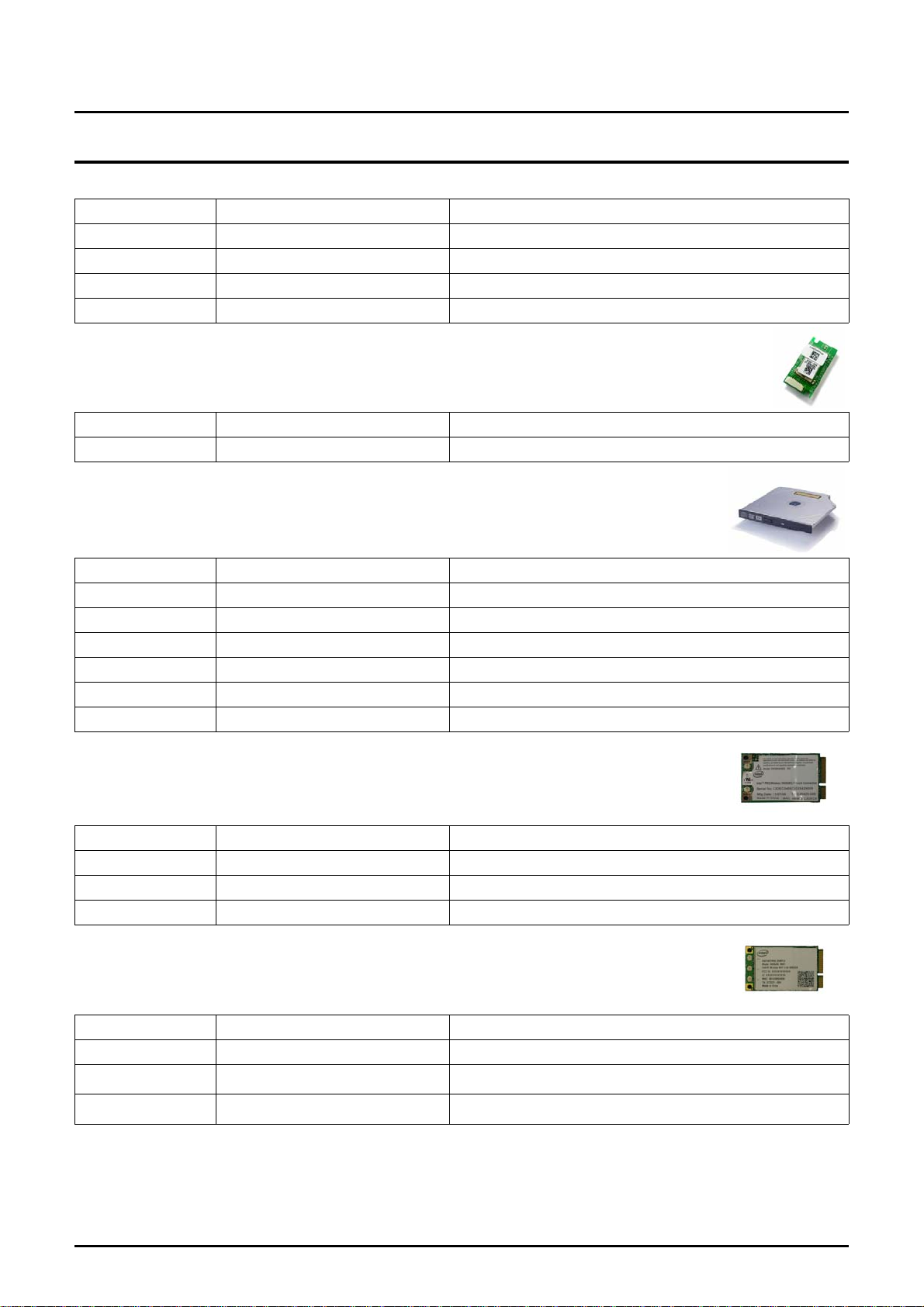
802.11b/g Wireless LAN Intel® PRO/Wireless 3945AGBXGEN : Intel 802.11b/g
Type Mini card (Factory Option)
Chipset Golan
Antenna Integrated 2 Antenna
802.11a/g Wireless LAN Intel® PRO/Wireless 3945ABG : Intel 802.11a/b/g
Type Mini card (Factory Option)
Chipset Golan
Antenna Integrated 2 Antenna
802.11a/g/n Wireless LAN
Type Mini card (Factory Option)
Chipset Kedron
Antenna Integrated 3 Antenna
Bluetooth BCM92045NMD : Factory Option
Type USB daughter card with integrated PIFA antenna
Intel® PRO/Wireless 4965AGNMKRGN : Intel 802.11a/b/g/n
(Factory Option)
2 - 5
Page 6
- 이 문서는 삼성전자의 기술 자산으로 승인자만이 사용할 수 있습니다 -
- This Document can not be used without Samsung's authorization -
2. Introduction and Specification
Chipset Broadcom BCM2045
Standard version 2.0
I/O Interface
Express Card Slots PCI Express Card Slot (54mm Type)
Type USB Port
I/O Ports
USB Port 4(USB2.0)
Video Port 2(VGA,HDMI)
Audio Jacks Headphone-out, MIC-in
SIO(option) 1
Modem / LAN RJ11, RJ45
Power 1(3Pin)
Security Kensington Lock
Input Devices
Camera 1.3M Pixels Digital Camera (Factory Option)
Key board 100KEY(KOR/RUS/UKR/CHN/SHK), 101KEY(GER/FRA/SPA/UK,ITA)
Touchpad PS/2 Touchpad with 2 Buttons, Scroll Area
Multi Memory Card Slot
Controller AU6371B51
Type
Power and Power
Management
Battery 3UR18650F-3-SDN-3 (9cells, Smart Li-Ion Battery)
Dimension 204 x 67 x 20mm
Weight 480g (max)
Recharge Time 3 hours to 100% with Windows on & off
Battery Life over 4.5hours ( Battery mark 4.01)
Details of Cell 9cells (3Parallel 3Serial)
Voltage 11.1Vdc
Battery Capacity 2600mAh/cell
Battery Rating 11.1V / 7800mAh (86.58Wh)
DVD Playing Time 150mins
Charing Time 2hours
Battery 3UR186 50F-2-SDN-12 (6cells, Smart Li-Ion Battery)
Dimension 204x48x20mm
Weight 350g (max)
Recharge Time 2hours to 100% with Windows on & off
Memory Stick / Memory Stick Pro / SD / SDHC / xD / MMC/ MMC
plus (7-in-1)
2 - 6
Page 7
- 이 문서는 삼성전자의 기술 자산으로 승인자만이 사용할 수 있습니다 -
- This Document can not be used without Samsung's authorization -
2. Introduction and Specification
Battery Life over 3hour ( Battery mark 4.01)
Details of Cell 6cells (2Parallel 3Serial)
Voltage 11.1Vdc
Battery Capacity 2600mAh/cell
Battery Rating 11.1V / 5200mAh (57.72Wh)
DVD Playing Time 150mins
Charing Time 2hours
AC Adapter 0455A1990
Output Power 90Watts
Dimension 127 X 51 X 30mm
Weight (AC Adapter) 430g(typ)
Worldwide Compatibility Auto-sensing 90 - 264VAC
Line Frequency 47 / 63Hz
Adapter Rating - Input 90V - 264V, 1.4A
Adapter Rating - Output 19.0VDC / 4.74A
Power Management Features
ACPI 1.0b support, Standby(S3), Hibernate(S4)
System Dimensions
Dimensions (W X D X H) 395 x 279 x 29.7~39.8mm
Weight (Full system w/ 6cell
Battery)
Materials LCD back/Bottom : Magnesium Alloy
3.18kg
Status : Super-Multi , 6cell battery, 2.5" 120GB 1 platter HDD
TopHousing/Door-HDD:PC-GF,Front/Ant-Cvr/OtherParts:PC
-ABS
2 - 7
Page 8

- 이 문서는 삼성전자의 기술 자산으로 승인자만이 사용할 수 있습니다 -
- This Document can not be used without Samsung's authorization -
2. Introduction and Specification
3) Key Feature
M60 R700
CPU
Chipset
Memory
Graphic
LCD
HDD
ODD
Port
667/800MHz Intel Core 2 Duo Processor
(Merom)
Intel 965PM + ICH8M Intel 965PM + ICH8M
DDR2 667MHz Dual channel DDR2 667MHz
nVIDIA Geforce 8600M/8400M nVIDIA Geforce 8600M/8400M
17” WSXGA+ Glare 17" WXGA+ Glare
SATA 9.5mm SATA 9.5mm
PATA,Combo/Super-Multi/Blueray/HD-DVD PATA,DVD Combo/Super-Multi
3USB, VGA, Headphone, MIC, S/PDIF
1394(4pin), RJ45, RJ11, PC-Card, 6-in-1,
AC-IN, HDMI, Kensington Lock
Intel Core Duo/Merom(FSB800,Penryn
ready)
4USB, VGA, Headphone, MIC, RJ45, RJ11,
Express-Card, 7-in-1, AC-IN,
SIO(Option),HDMI, Kensington Lock
Battery
SIZE(WxHxD)
6cell 6cell
2.96Kg
395 x 278.8 x 30.5~39.1mm
3.18Kg
395 x 279 x 29.7~39.8mm
2 - 8
Page 9
- 이 문서는 삼성전자의 기술 자산으로 승인자만이 사용할 수 있습니다 -
- This Document can not be used without Samsung's authorization -
2. Introduction and Specification
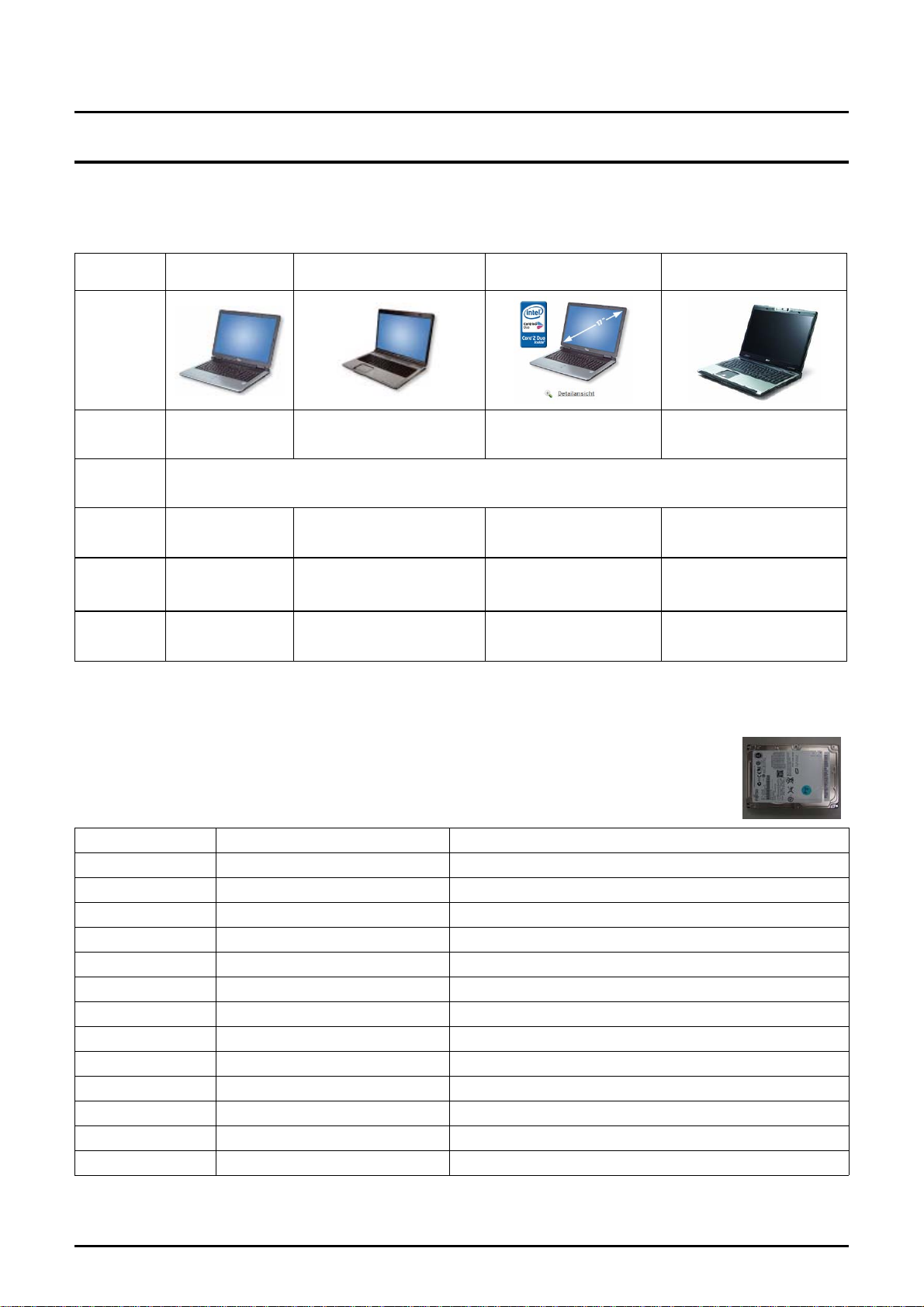
4) Compare with competitor
Model
Image
CPU
LCD
Gfx
Others
Mechanics
Acer Aspire
9300
Tur64x2 TL50 C2D T5500 C2D T5600 Sempron 3400+
GF GO 7300
128MB
DDR2 533 1GB
120GB
3.81kg(6cell) 3.52kg(8cell) 4kg(6cell) 3.68kg(6cell)
GF GO 7600
256MB
1GB
320(160*2)GB
HP dv9318 FSC Amilo Xi1526 Acer Aspire 7000
17”WXGA+ Glare
GF GO 7600
256MB
2GB
320(160*2)GB
GF GO 6100(int.)
DDR2 533 1GB
120GB
5) Option Partlist
HDD
BA59-01999A HTS541660J9SA00 5400rpm, 60G, SATA, 8M
BA59-01946A MHV2060BH-PL 5400rpm, 60G, SATA, 8M
BA59-02084A MHW2060BH 5400rpm, 60G, SATA, 8M
BA59-02038A HM060HI 5400rpm, 60G, SATA, 8M
BA59-02001A HTS541680J9SA00 5400rpm, 80G, SATA, 8M
BA59-01947A MHV2080BH-PL 5400rpm, 80G, SATA, 8M
BA59-02085A MHW2080BH 5400rpm, 80G, SATA, 8M
BA59-02009A ST980815AS 5400rpm, 80G, SATA, 8M
BA59-01742A HTS541010G9SA00 5400rpm, 100G, SATA, 8M
BA59-01948A MHV2100BH-PL 5400rpm, 100G, SATA, 8M
BA59-02086A MHW2100BH 5400rpm, 100G, SATA, 8M
BA59-02014A HM101JI 5400rpm, 100G, SATA, FFS
BA59-02010A ST9100828AS 5400rpm, 100G, SATA, 8M
BA59-02002A HTS541612J9SA00 5400rpm, 120G, SATA, 8M
2 - 9
Page 10
- 이 문서는 삼성전자의 기술 자산으로 승인자만이 사용할 수 있습니다 -
- This Document can not be used without Samsung's authorization -
2. Introduction and Specification
BA59-01957A MHV2120BH-PL 5400rpm, 120G, SATA, 8M
BA59-02087A MHW2120BH 5400rpm, 120G, SATA, 8M
BA59-02013A HM121JI 5400rpm, 120G, SATA, FFS
BA59-02039A HM120JI 5400rpm, 120G, SATA, 8M
BA59-02011A ST9120822AS 5400rpm, 120G, SATA, 8M
BA59-02003A HTS541616J9SA00 5400rpm, 160G, SATA, 8M
BA59-02012A ST9160821AS 5400rpm, 160G, SATA, 8M
BA59-02110A MHW2160BH-PL 5400rpm, 160G, SATA, 8M
BA59-02137A MK2035GSS 4200rpm, 200G, SATA, FDB
BA59-02204A HTS542520K9A300 5400rpm, 200G, SATA, FDB
BA59-02210A MHY2200BH 5400rpm, 200G, SATA, FDB
BA59-02211A MHY2250BH 5400rpm, 200G, SATA, FDB
BA59-02205A HTS542525K9A300 5400rpm, 200G, SATA, FDB
BA59-02228A WD2500BEVS-22UST0 5400rpm, 200G, SATA, FDB
BA59-02190A HM250JI 5400rpm, 200G, SATA, FDB
LCD
BA59-01566A SAMSUNG AMLCD LTN170X2-L02
BA59-02242A CMO LCD N170C2-L02
MEMORY
1105-001683 DDR2 667Mhz 512MB M470T6554CZ3-CE6
1105-001684 DDR2 667Mhz 1GB M470T2953CZ3-CE6
1105-001825 DDR2 667Mhz 2GB M470T5663CZ3
1105-001790 DDR2 667Mhz 1GB NT1GT64U8HB0BN-3C
1105-001783 DDR2 667Mhz 512MB NT512T64UH8B0FN-3C
CPU
0902-002198 T_T7500(Merom Dual Core ) 2.2Ghz(FSB800) 4MB
0902-002199 T_T7700(Merom Dual Core ) 2.4Ghz(FSB800) 4MB
0902-002257 NCEL_550 2.00GHz(FSB533)
0902-002254 T5550(Merom Dual Core) 1.83GHz(FSB667),2M
0902-002253 T2310(Merom Dual Core) 1.46GHz(FSB533),1M
0902-002250 T7250(Merom Dual Core) 2.0GHz(FSB800),2M
2 - 10
Page 11
- 이 문서는 삼성전자의 기술 자산으로 승인자만이 사용할 수 있습니다 -
- This Document can not be used without Samsung's authorization -
2. Introduction and Specification
0902-002252 T2330(Merom Dual Core) 1.60GHz(FSB533),1M
0902-002234 NCEL_540(Celeron) 1.86GHz,1M
0902-002228 T5450(Merom Dual Core) 1.66GHz(FSB667),2M
0902-002226 T5250(Merom Dual Core) 1.5GHz(FSB667),2M
0902-002276 T5270(Merom Dual Core) 1.4GHz(FSB667),2M
BLUETOOTH
BA59-01691A BT MODULE(FOX) Bluetooth V2.0, T60H928.01, Bluetooth Module
BA59-01916A BT MODULE(SEM) Bluetooth V2.0, BTO2P0B2SA, Bluetooth Module,
ODD
BA96-03223A S_MULTI(DV228EC) TEAC
BA96-03241A S_MULTI(UJ-850) MATSUHITA
BA96-03242A S_MULTI(TS-L632D) TSST
BA96-03243A S_MULT ScriveI(TS-L632M) TSST
BA96-03222A COMBO(DW-224E-R) TEAC
BA96-03239A COMBO(TS-L462D) TSST
BA96-03245A DVD(TS-L332A) TS-L332A
WLAN_GOLAN
BA59-01723A 802.11a/b/g 3945ABGKOR
BA59-01722A 802.11a/b/g 3945ABGROW
BA59-01724A 802.11a/b/g 3945ABGMOW2
BA59-01721A 802.11a/b/g 3945BG
WLAN_Kedron
BA59-02065A 802.11a/g/n 4965AGN KOR
BA59-02062A 802.11n 4965AGN MOW1
BA59-02063A 802.11a/b/g/n 4965AGN MOW2
BA59-02064A 802.11n 4965AGN ROW
2 - 11
Page 12
- 이 문서는 삼성전자의 기술 자산으로 승인자만이 사용할 수 있습니다 -
- This Document can not be used without Samsung's authorization -
2. Introduction and Specification
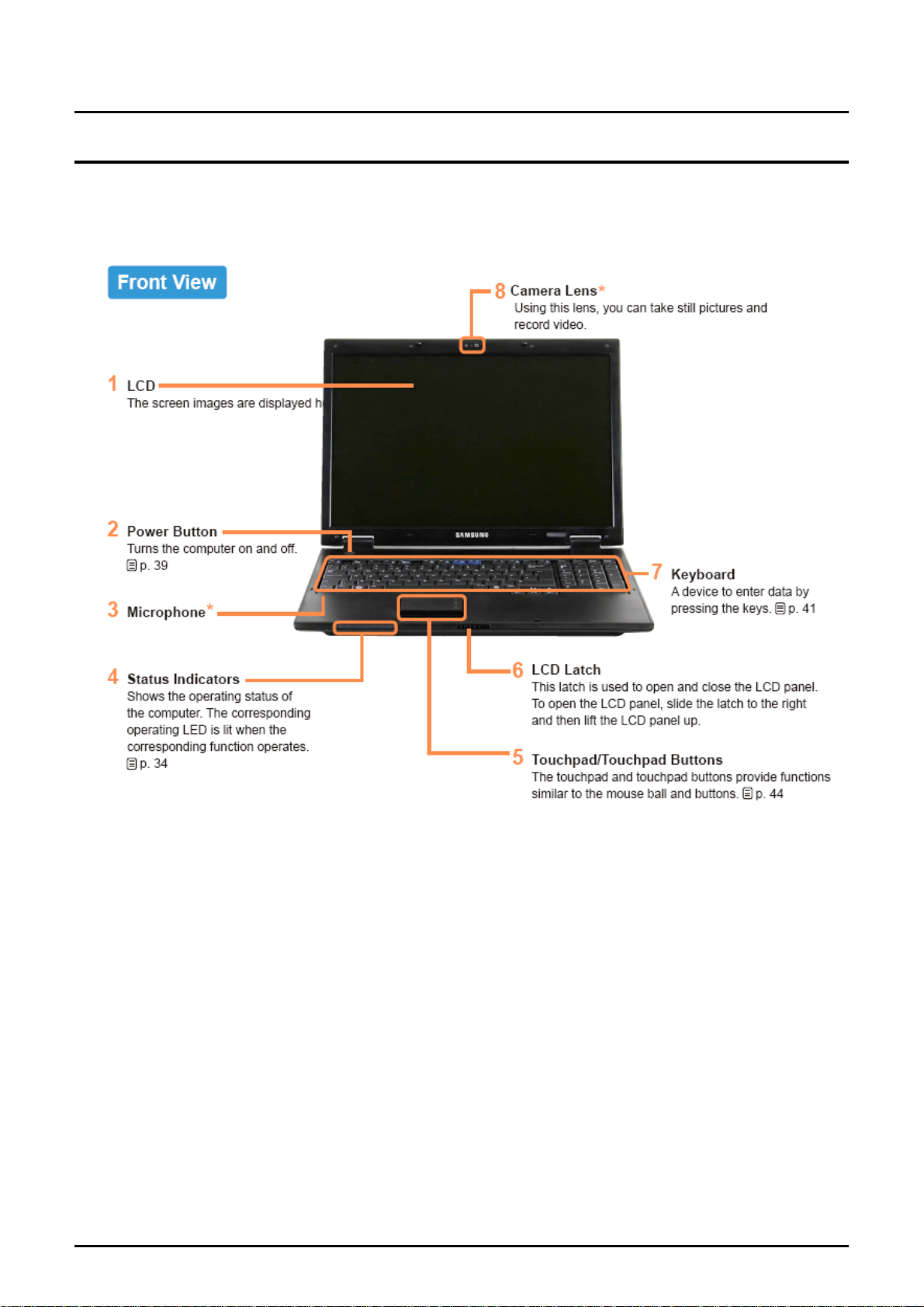
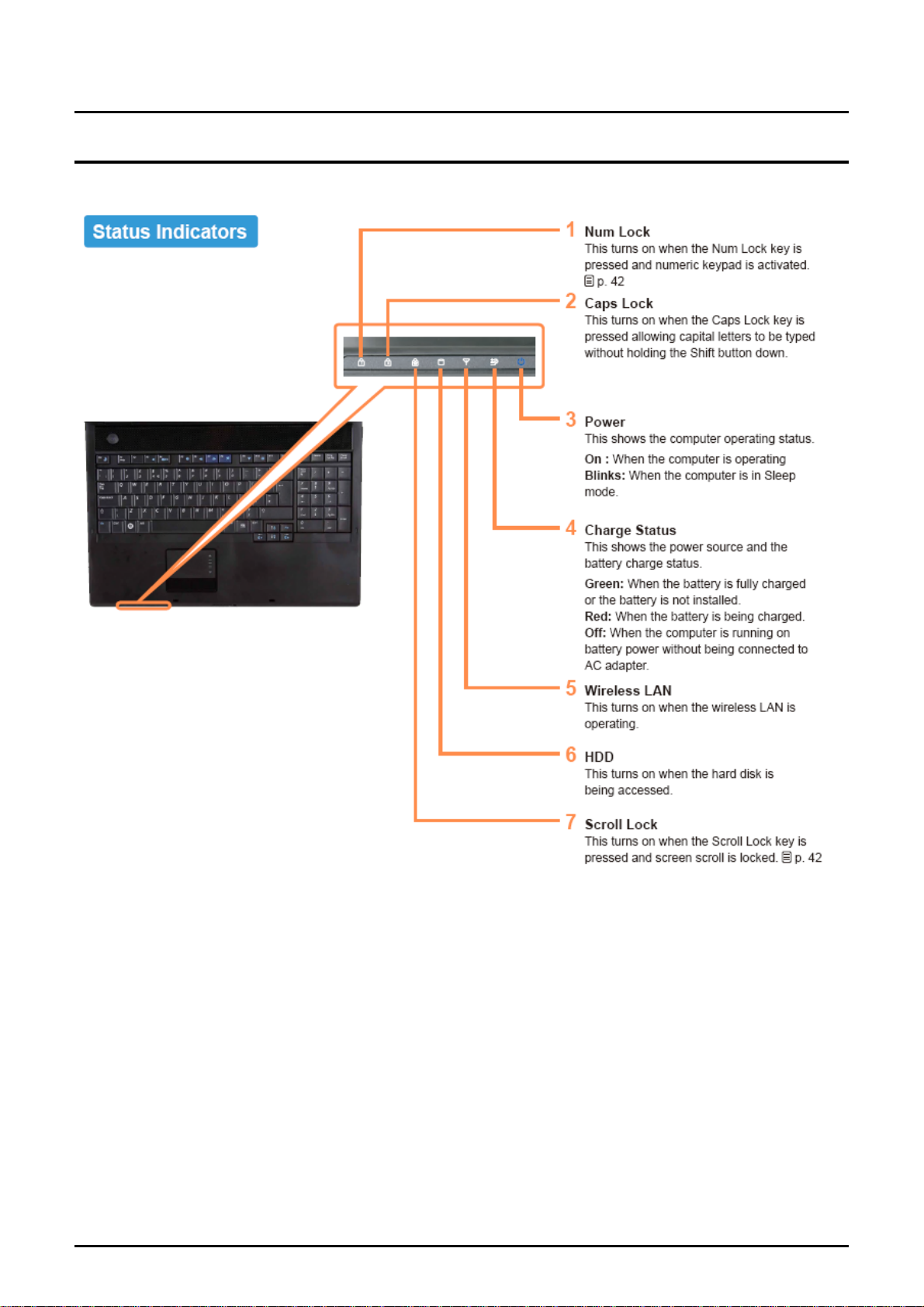
6) Product Feature
6)-1 System View
2 - 12
Page 13
- 이 문서는 삼성전자의 기술 자산으로 승인자만이 사용할 수 있습니다 -
- This Document can not be used without Samsung's authorization -
2. Introduction and Specification
2 - 13
Page 14
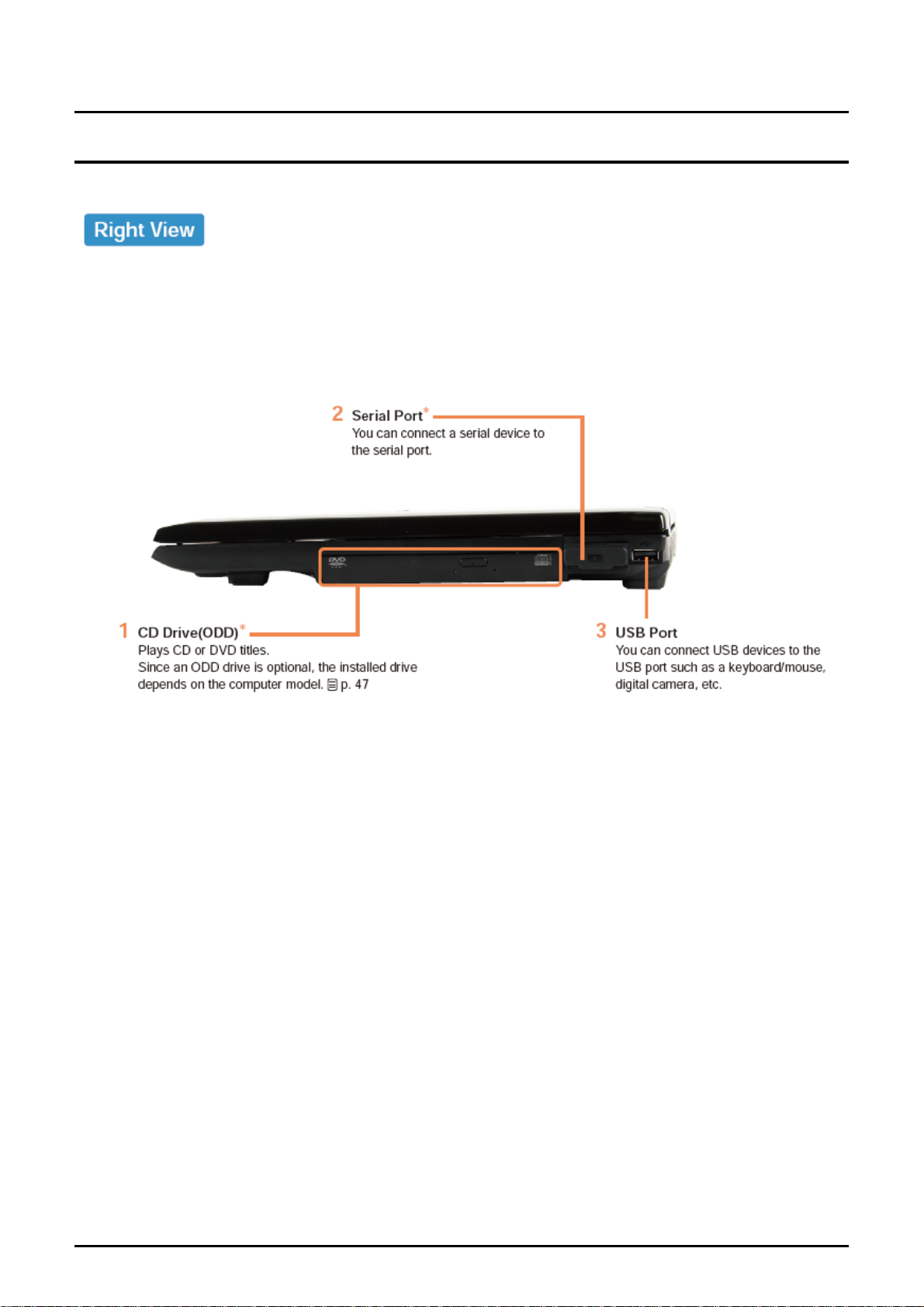
- 이 문서는 삼성전자의 기술 자산으로 승인자만이 사용할 수 있습니다 -
- This Document can not be used without Samsung's authorization -
2. Introduction and Specification
2 - 14
Page 15
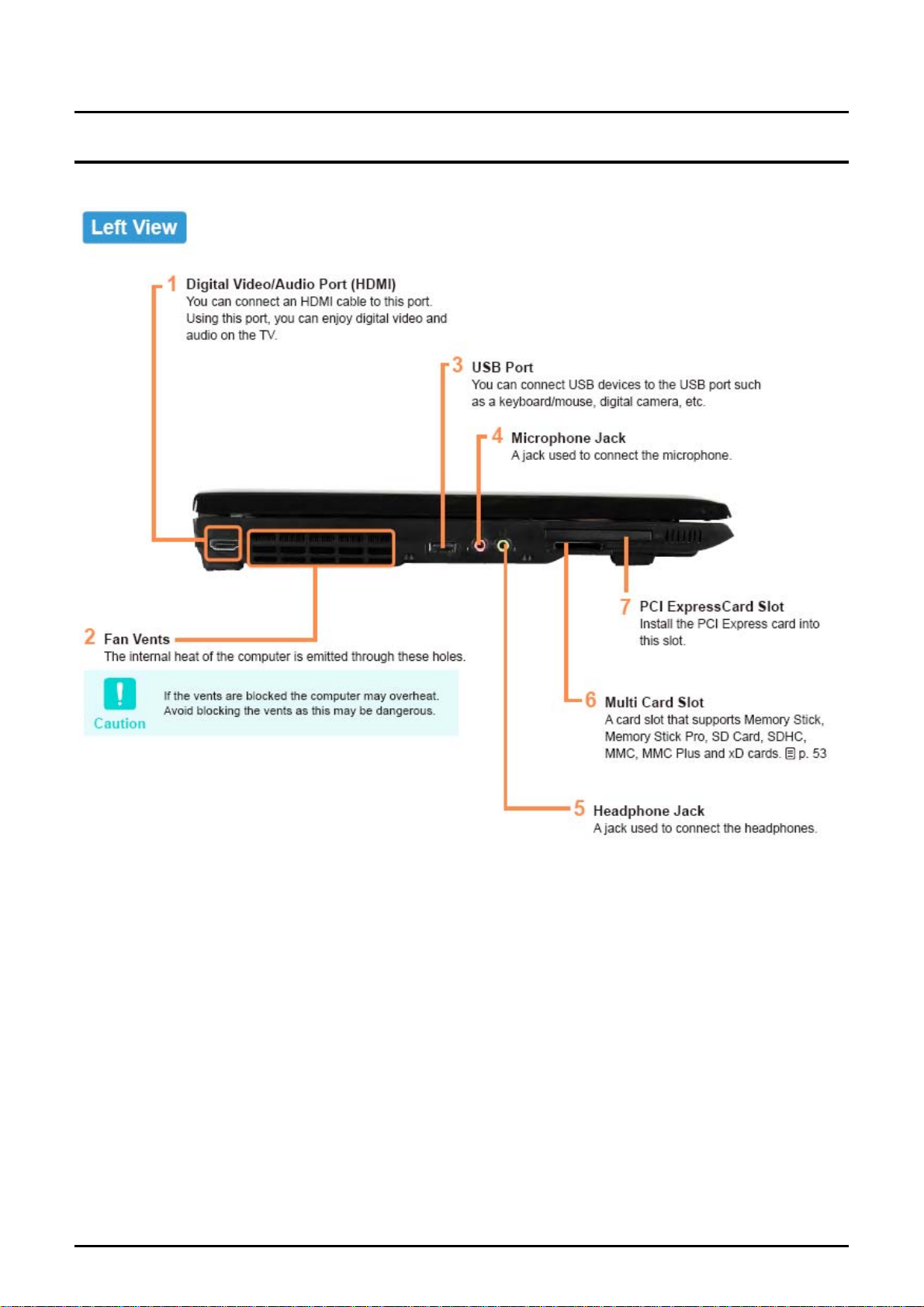
- 이 문서는 삼성전자의 기술 자산으로 승인자만이 사용할 수 있습니다 -
- This Document can not be used without Samsung's authorization -
2. Introduction and Specification
2 - 15
Page 16
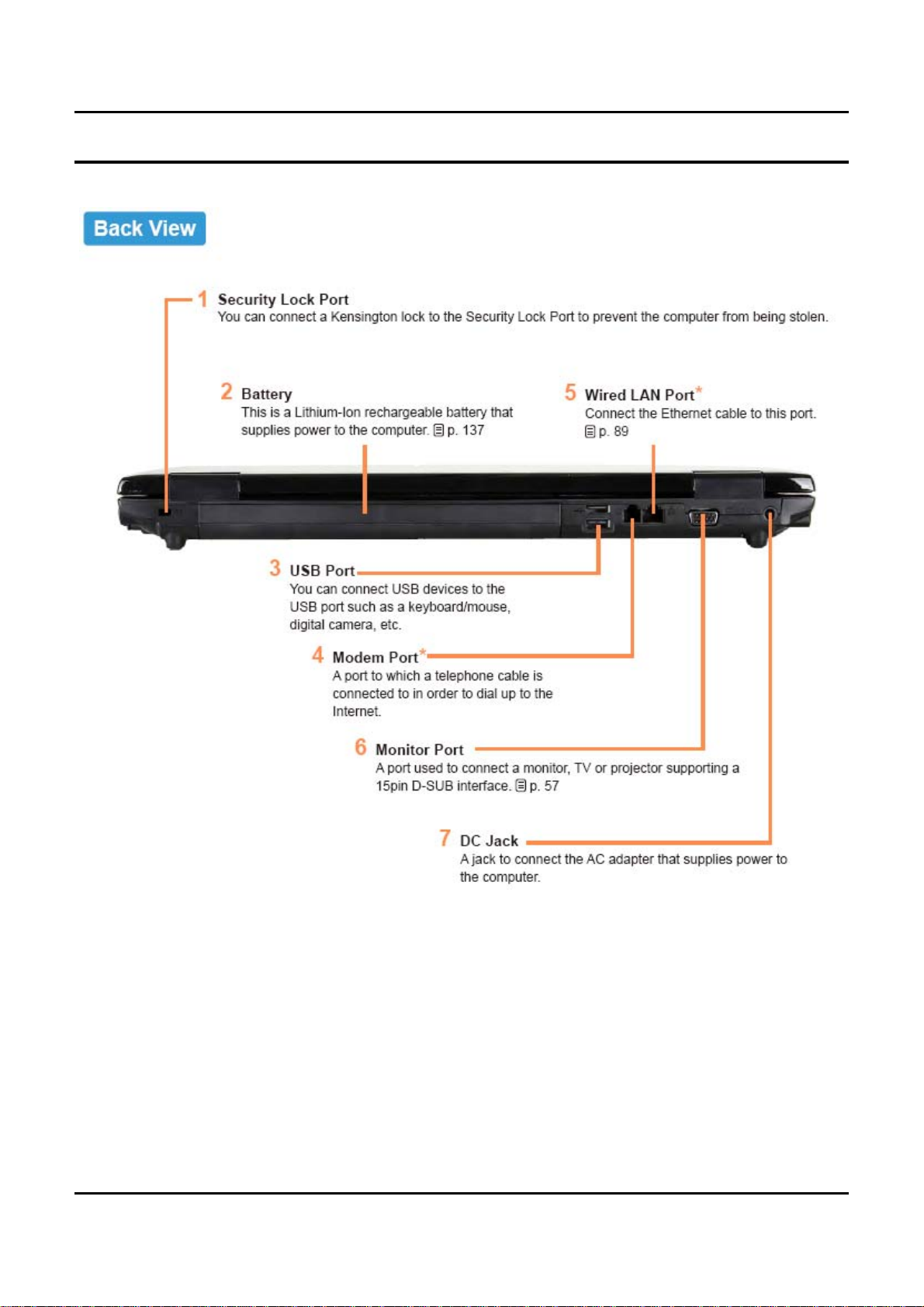
- 이 문서는 삼성전자의 기술 자산으로 승인자만이 사용할 수 있습니다 -
- This Document can not be used without Samsung's authorization -
2. Introduction and Specification
2 - 16
Page 17
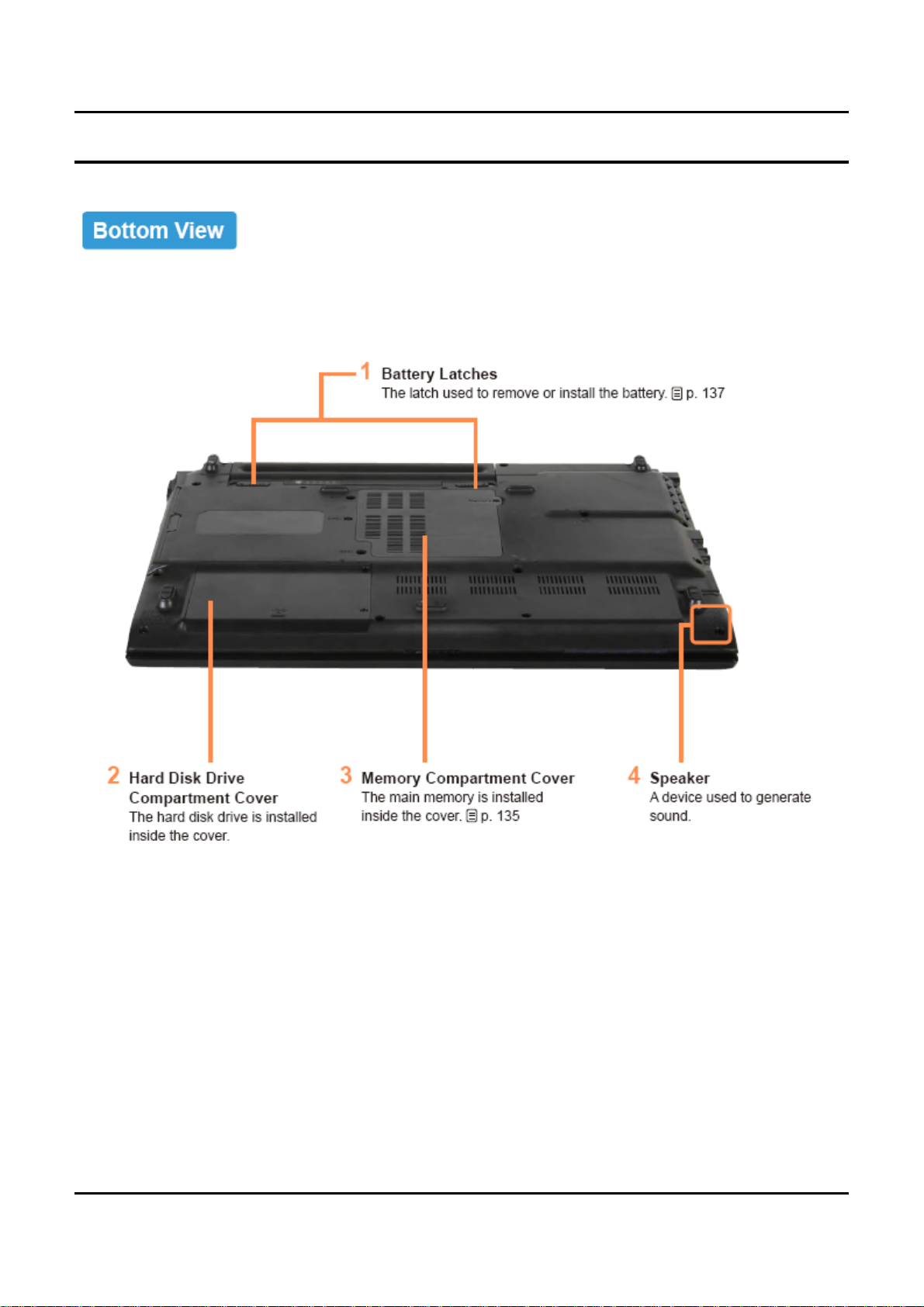
- 이 문서는 삼성전자의 기술 자산으로 승인자만이 사용할 수 있습니다 -
- This Document can not be used without Samsung's authorization -
2. Introduction and Specification
2 - 17
Page 18
- 이 문서는 삼성전자의 기술 자산으로 승인자만이 사용할 수 있습니다 -
- This Document can not be used without Samsung's authorization -
2. Introduction and Specification
7) New Function
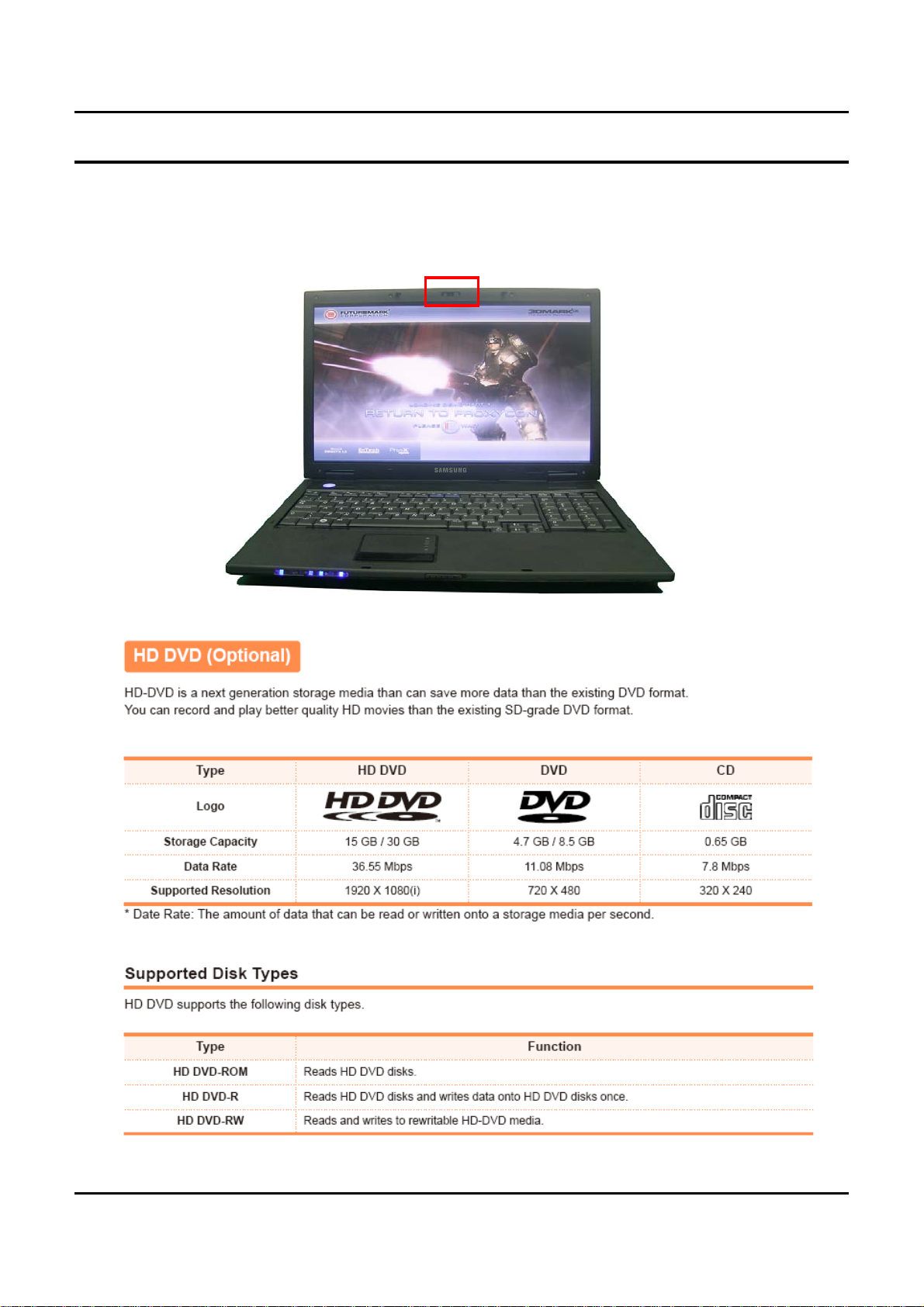
7)-1. Camera (Option)
Internal Camera (Option) for easily video and photo capture
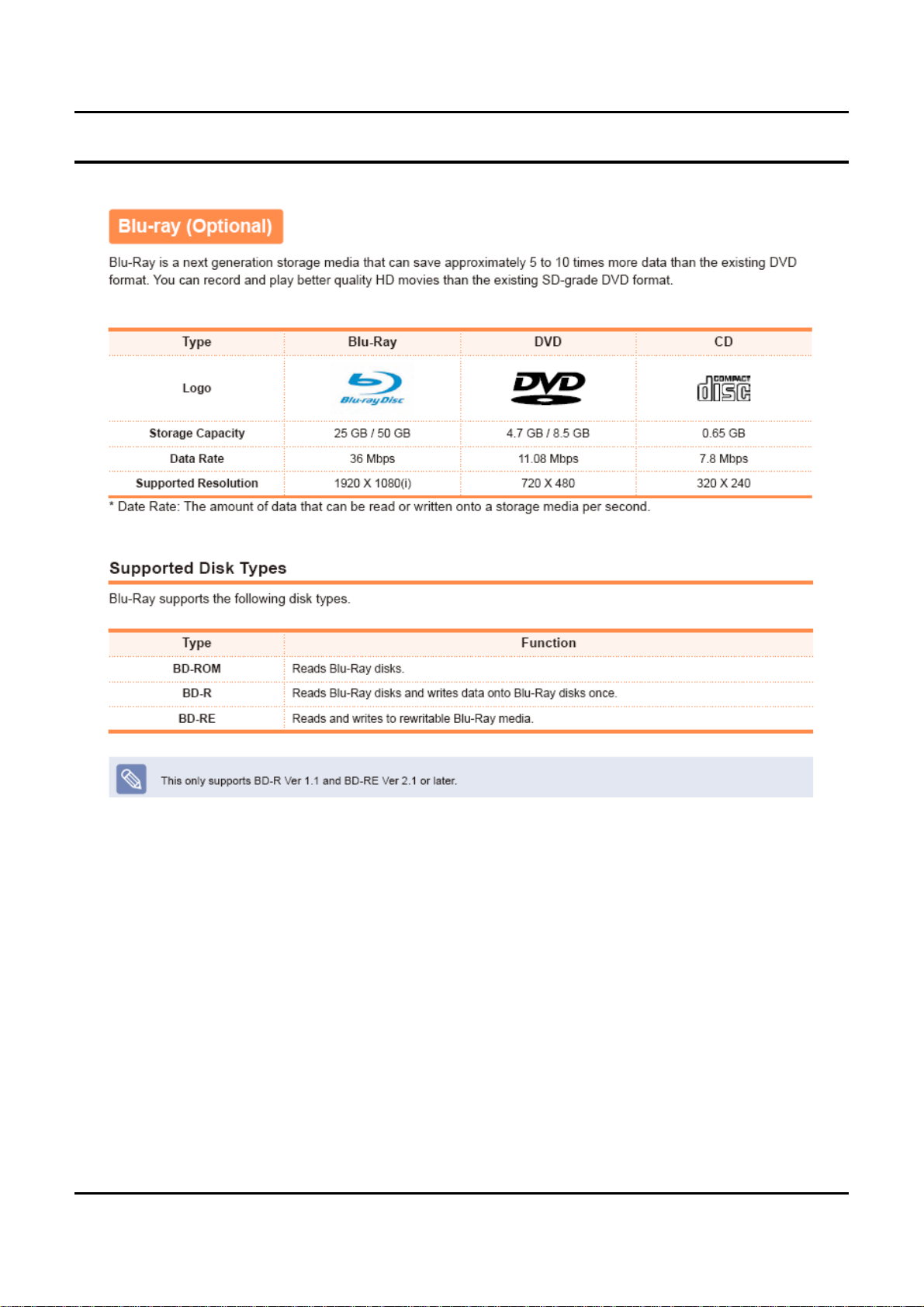
7)-2. HD-DVD
2 - 18
Page 19
- 이 문서는 삼성전자의 기술 자산으로 승인자만이 사용할 수 있습니다 -
- This Document can not be used without Samsung's authorization -
2. Introduction and Specification
2 - 19
Page 20
- 이 문서는 삼성전자의 기술 자산으로 승인자만이 사용할 수 있습니다 -
- This Document can not be used without Samsung's authorization -
2. Introduction and Specification
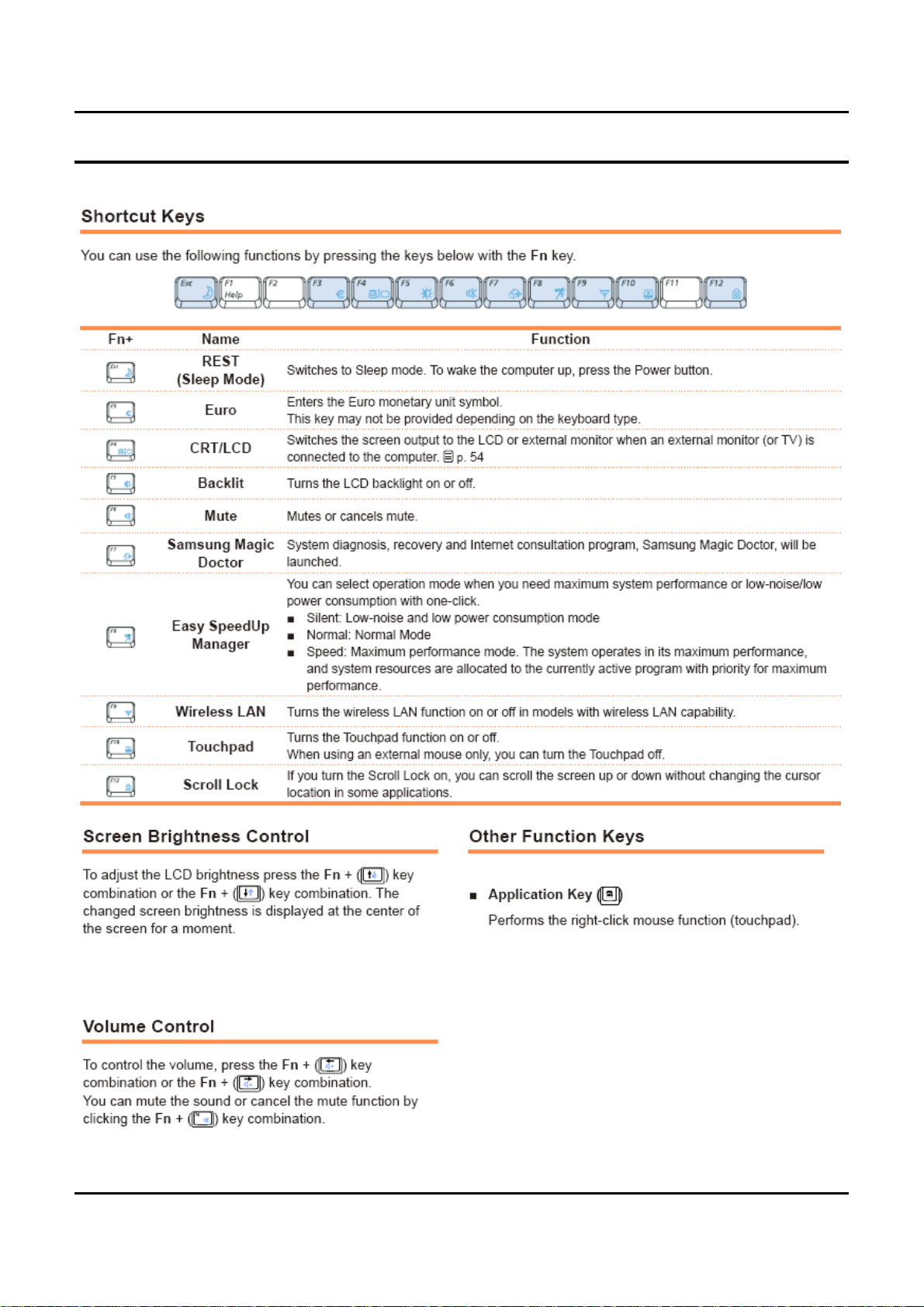
7)-3. New Keyboard
2 - 20
Page 21
- 이 문서는 삼성전자의 기술 자산으로 승인자만이 사용할 수 있습니다 -
- This Document can not be used without Samsung's authorization -
2. Introduction and Specification
2 - 21
Page 22
- 이 문서는 삼성전자의 기술 자산으로 승인자만이 사용할 수 있습니다 -
- This Document can not be used without Samsung's authorization -
2. Introduction and Specification
8) Software List
Items Specification Version
Vista Home Premium 32Bit -
OS
Driver
Application
Windows Vista
Windows XP SP2
Chipset Intel 965GM/PM + ICH8M 8.2.0.1014
Graphic driver nVIDIA Geforce 8400M G 156.72
Wireess LAN driver Intel 3965ABG 11.1.1.16
Sound driver ALC262 6.0.1.5482EDSP2
Bluetooth Driver Bluetooth Driver 6.0.1.5500
Touchpad Driver Touchpad Driver 9.1.22.0
Modem Driver Delphi V92 2.1.77
Memory Card Driver AU6371B51 6.0.6000.16386
LAN Driver Marvell 10/100/1000 LAN 10.14.6.3
Vista Home Basic 32Bit -
Vista Biz 32Bit -
XP professional -
XP home -
Samsung Battery Manager 3.2.1.3
Samsung Recovery Solution 2 1.0.3.1
Easy Speedup Manager 2.0.0.12
Easy Display Manager 2.1.9.2(HDMI-Icon)
Easy Network Manager 3.0.1.7
Samsung Update Plus 1.3.0.12
Play Camera 1.0.0.32
AV Station Movie/Music/Digioke 4.1.7 / 4.1.8 / 4.1.5
Magic Doctor 5.0.2.8
CyberLink DVD Solution 121
Adobe Reader(Others) 8.1.0.137
McAfee Anti-Virus 7.2.142.0
Screen Saver 1.0.2.0
Wallpaper 2.0.0.0
Easy Partition Manager 2.2.1.8
2 - 22
Page 23
- 이 문서는 삼성전자의 기술 자산으로 승인자만이 사용할 수 있습니다 -
- This Document can not be used without Samsung's authorization -
2. Introduction and Specification
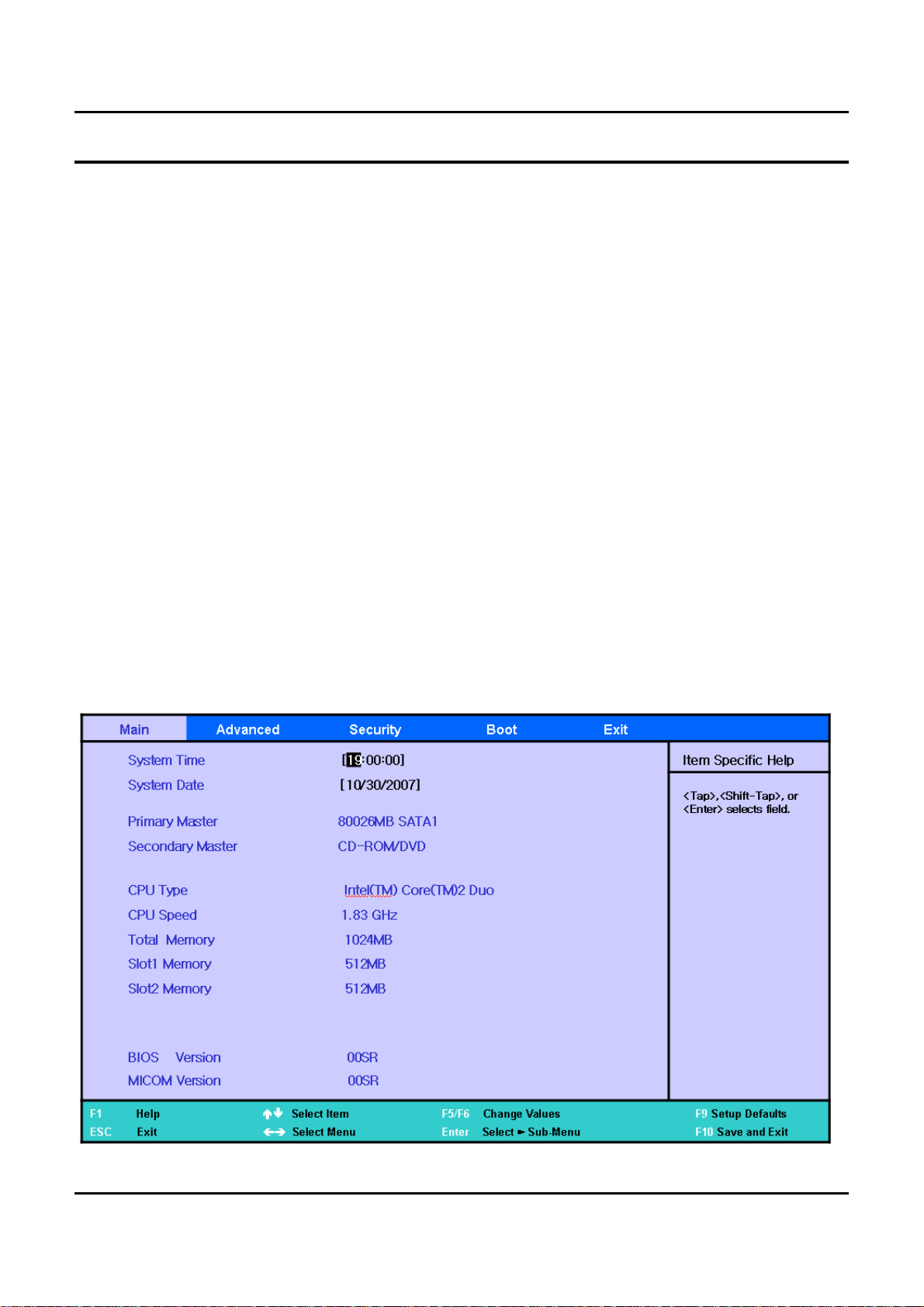
9) System Setup (BIOS Setup)
MAIN
Primary Master
▷
The information on the device mounted on the Primary Master. The HDD capacity is displayed in
Geneva.
Secondary Master
▷
The information on the device mounted on the Primary Slave. The DVD/CD-ROM is displayed in
Geneva.
Total Memory
▷
The total capacity of the current memory installed on the system.
Slot1 Memory
▷
The capacity of the memory installed in Slot 1. The Slot1 memory indicates the capacity of the
On-Board Memory in Geneva.
Slot2 Memory
▷
The capacity of the memory installed in Slot 2. The Slot2 memory indicates the capacity of the
memoryinstalledinthememory slot in Geneva.
Graphics Memory
▷
The option to determine the maximum size of the dynamic graphic memory in Geneva.
External
2 - 23
Page 24

- 이 문서는 삼성전자의 기술 자산으로 승인자만이 사용할 수 있습니다 -
- This Document can not be used without Samsung's authorization -
2. Introduction and Specification
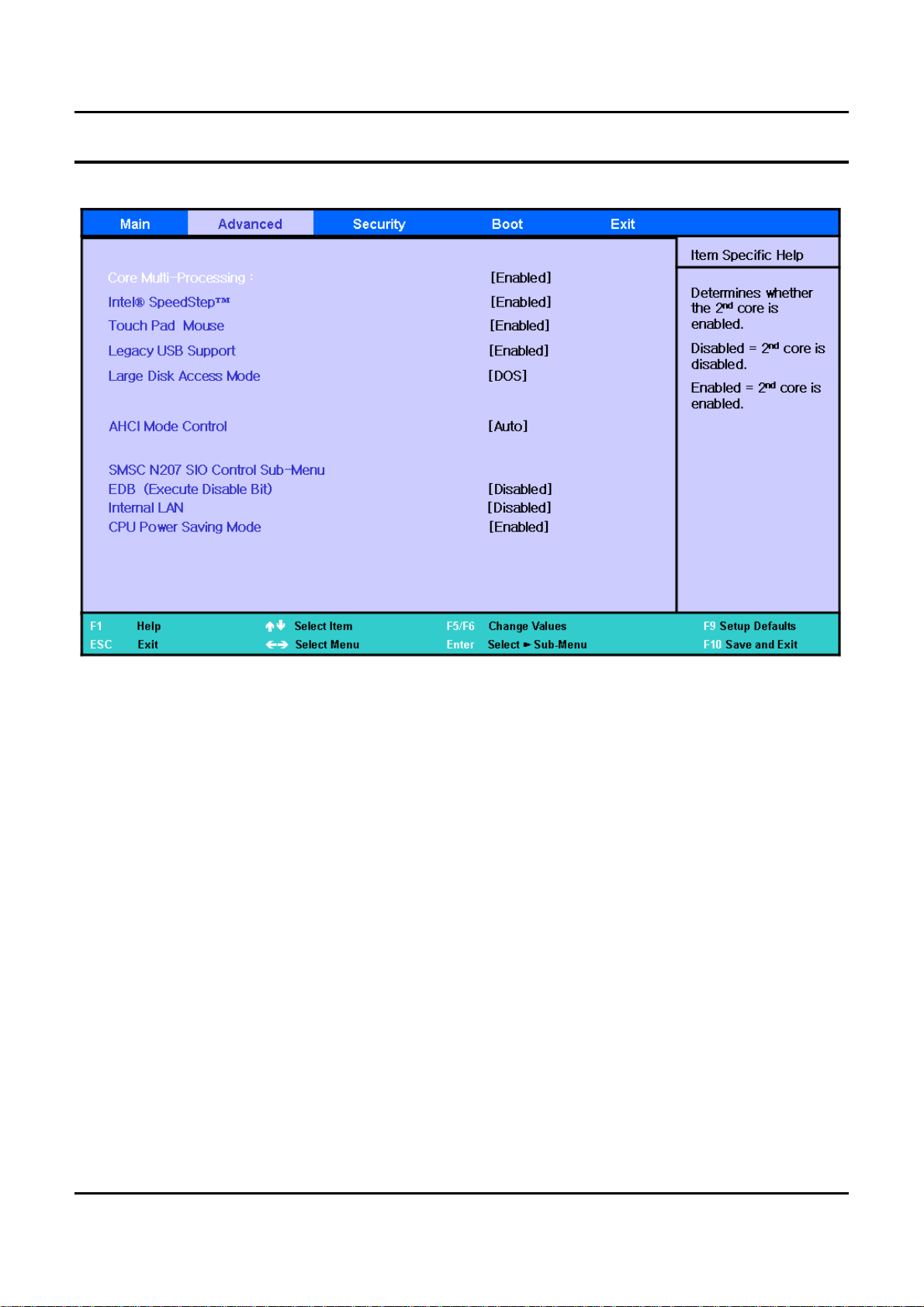
Advanced
Core Multi-Processing
▷
The option to determine whether to switch Single core or Dual Core processing.
Intel(R) SpeedStep(TM)
▷
The option to enable or disable the SpeedStep function that automatically changes the CPU clock
speed according to CPU usage. Enabling this function extends the battery use time.
Touch Pad Mouse
▷
The option to enable or disable the touch pad function. If the touch pad function is disabled using
this option, the disabled status will be retained at the next boot time. For your information, if the
touch pad function is disabled by pressing Fn+F9, the touch pad function is enabled at the next boot
time.
Legacy USB Support
▷
The option to determine whether to support a Legacy USB device. If this option is set to Enabled,
you can boot from a USB device.
LargeDiskAccessMode
▷
Currently, [DOS] should be set in Geneva. Setting this option is rarely needed.
EDB (Execute Disable Bit)
▷
If [enable], Intel Execute Enable Bit(function) will be enabled.
Internal LAN
▷
The option to determine whether to use a cable LAN device of the system.
CPU Power Saving Mode
▷
If [Enabled] is selected, the system can enter C3 mode and save CPU power consumption.
However, you may experience performance degradation.
Delete Recovery Area
▷
If you want to delete the HDD recovery solution 2 area included in the Geneva HDD, this option
should be set to [Enabled].
Purchased Date
▷
Displays the date when a user boots the PC for the 10th time.
2 - 24
Page 25
- 이 문서는 삼성전자의 기술 자산으로 승인자만이 사용할 수 있습니다 -
- This Document can not be used without Samsung's authorization -
2. Introduction and Specification
2 - 25
Page 26
- 이 문서는 삼성전자의 기술 자산으로 승인자만이 사용할 수 있습니다 -
- This Document can not be used without Samsung's authorization -
2. Introduction and Specification
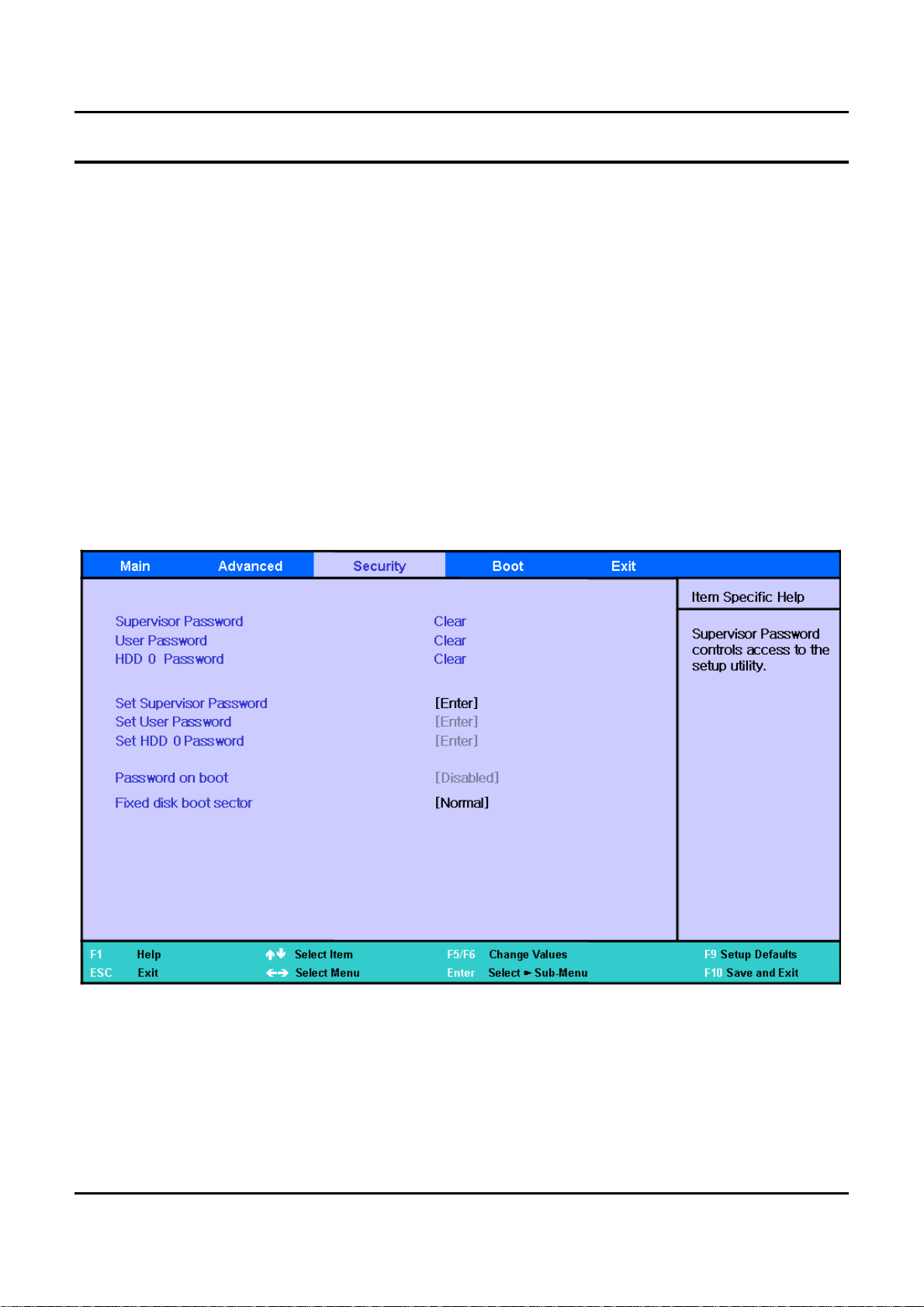
Security
Set the Supervisor Password
▷
Select to set the supervisor password.
Set a User Password
▷
Select to set a user password
Set a HDD 0 Password
▷
Select to set a HDD password
PasswordonBoot
▷
This is the option for determining whether to ask for a password when the system starts. The
supervisor password should already be set.
Fixed Disk Boot Sector
▷
If [Write Protect] is selected, writing to the boot sector of the HDD is blocked.
2 - 26
Page 27

- 이 문서는 삼성전자의 기술 자산으로 승인자만이 사용할 수 있습니다 -
- This Document can not be used without Samsung's authorization -
2. Introduction and Specification
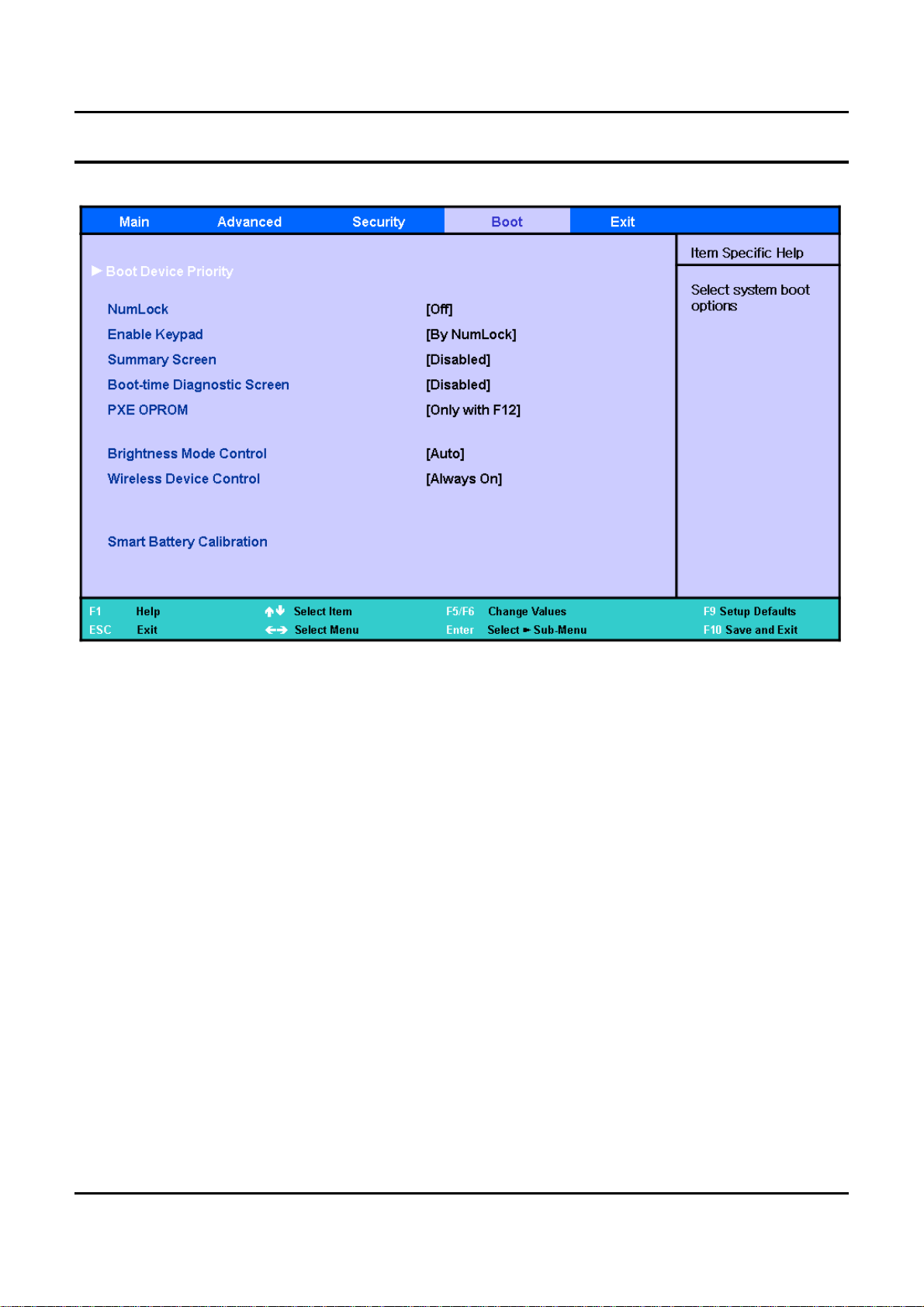
Boot
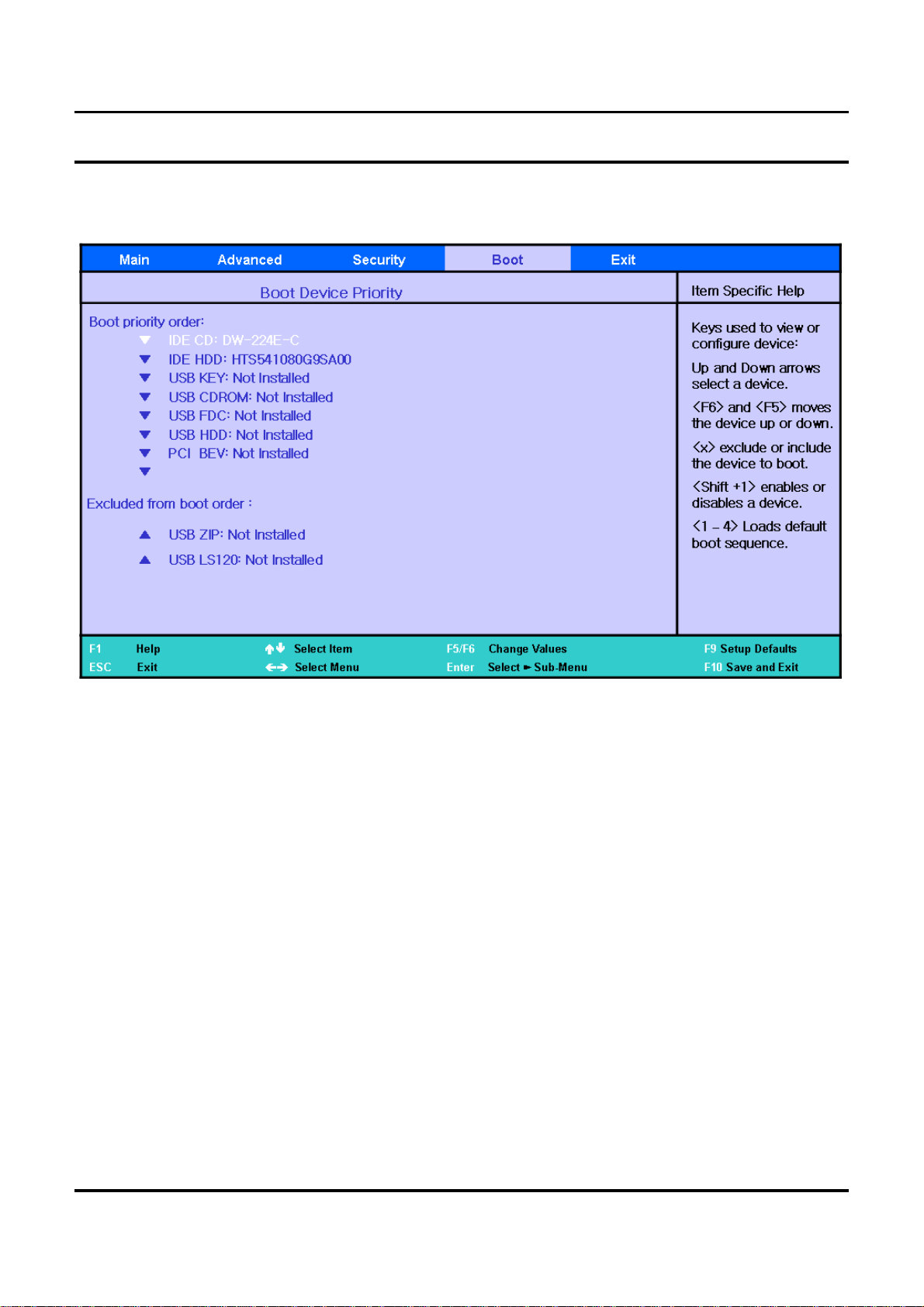
Boot Device Priority
▷
Sets the priority of the booting devices.
NumLock
▷
The option to determine whether to switch NumLock on or off when booting.
Enable Keypad
▷
The option to determine how to use the keypad of the keyboard.
-Ifthisoptionissetto[OnlyByFnKey],youhavetopressanumerickeywiththeFnkeyto
enter a number.
- If this option is set to [By NumLock], you can enter a number by just pressing the
corresponding numeric key if NumLock is switched On.
Summary Screen
▷
The option to determine whether to display the system information (CPU, memory, HDD) on the
screen when booting.
Boot-time Diagnostic Screen
▷
The option to determine whether to display the Samsung logo on the screen when booting.
PXE OPROM
▷
The option to determine whether to always initialize PXE Oprom in relation to a network boot.
Since the general user does not use network boot, setting this option to [Only with F12] is
recommended.
Brightness Control Mode
▷
If this option is set to [Auto], the screen brightness automatically changes to Level 1, when
operating on battery power is detected while booting or resuming from S3 status, or when the AC
adapter is removed and the system power changes to battery while using the system.
▷
If this option is set to [User Control], the previous status is always remembered..
Wireless Device Control
▷
If this option is set to [Always On / Off], the Wireless LAN will be turned on / off when system
boot into Windows.
▷
If this option is set to [Last Status], the Wireless LAN will remain its status as the last time when
system in Windows mode.
Smart Battery Calibration
▷
Corrects the difference between the actual battery capacity and the remaining capacity.
2 - 27
Page 28
- 이 문서는 삼성전자의 기술 자산으로 승인자만이 사용할 수 있습니다 -
- This Document can not be used without Samsung's authorization -
2. Introduction and Specification
2 - 28
Page 29
- 이 문서는 삼성전자의 기술 자산으로 승인자만이 사용할 수 있습니다 -
- This Document can not be used without Samsung's authorization -
2. Introduction and Specification
2 - 29
Page 30
- 이 문서는 삼성전자의 기술 자산으로 승인자만이 사용할 수 있습니다 -
- This Document can not be used without Samsung's authorization -
2. Introduction and Specification
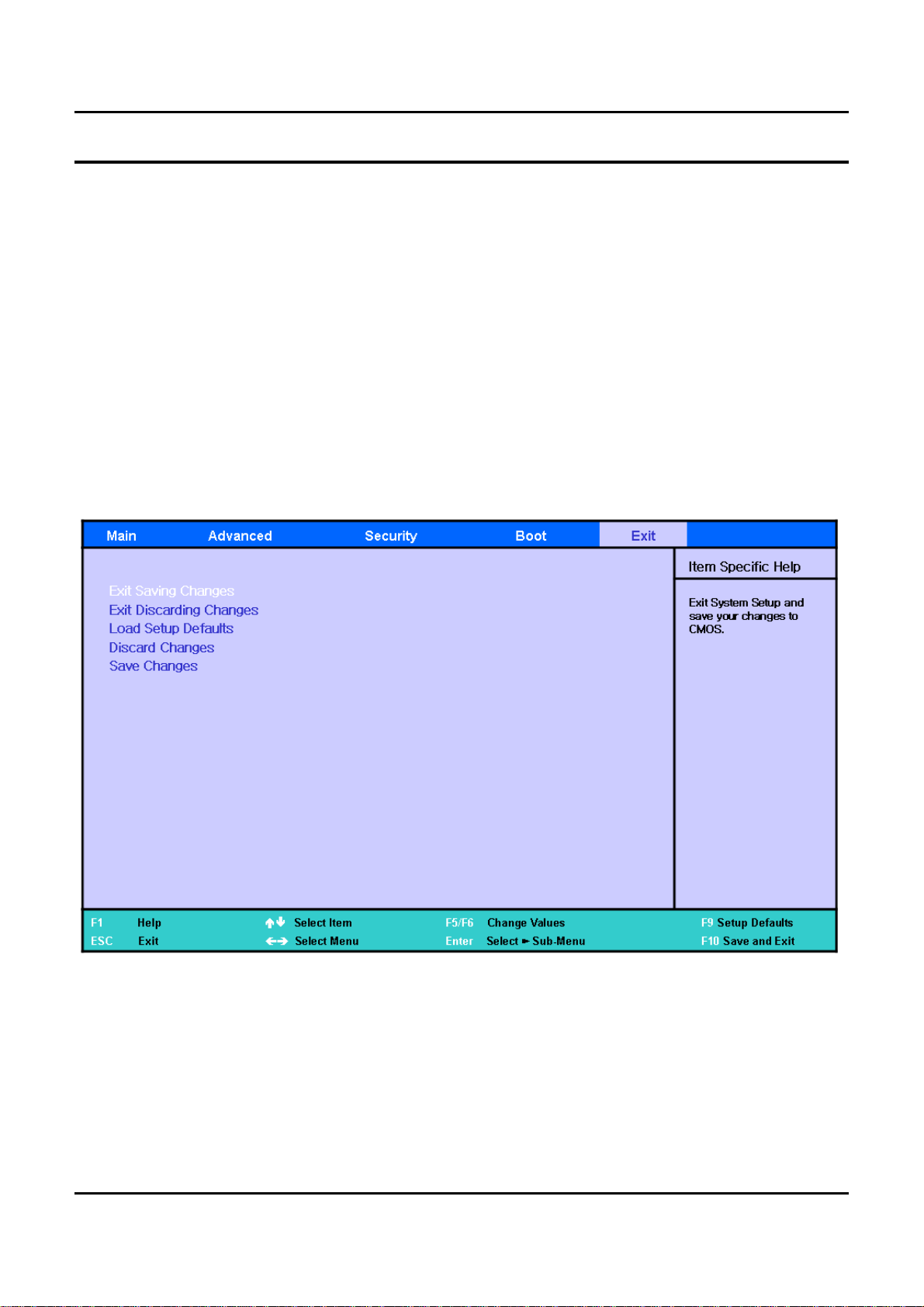
Exit
Exit Saving changes
▷
Saves the changed settings and exits.
Exit Discarding Changes
▷
The changed settings are not saved and the previous settings are restored. Exits without saving
the changes.
Load Setup Defaults
▷
Sets the settings to the default values.
Discard Changes
▷
Restores the changed settings to the previous values.
Save Changes
▷
Saves the changed settings.
2 - 30
Page 31
- 이 문서는 삼성전자의 기술 자산으로 승인자만이 사용할 수 있습니다 -
- This Document can not be used without Samsung's authorization -
2. Introduction and Specification
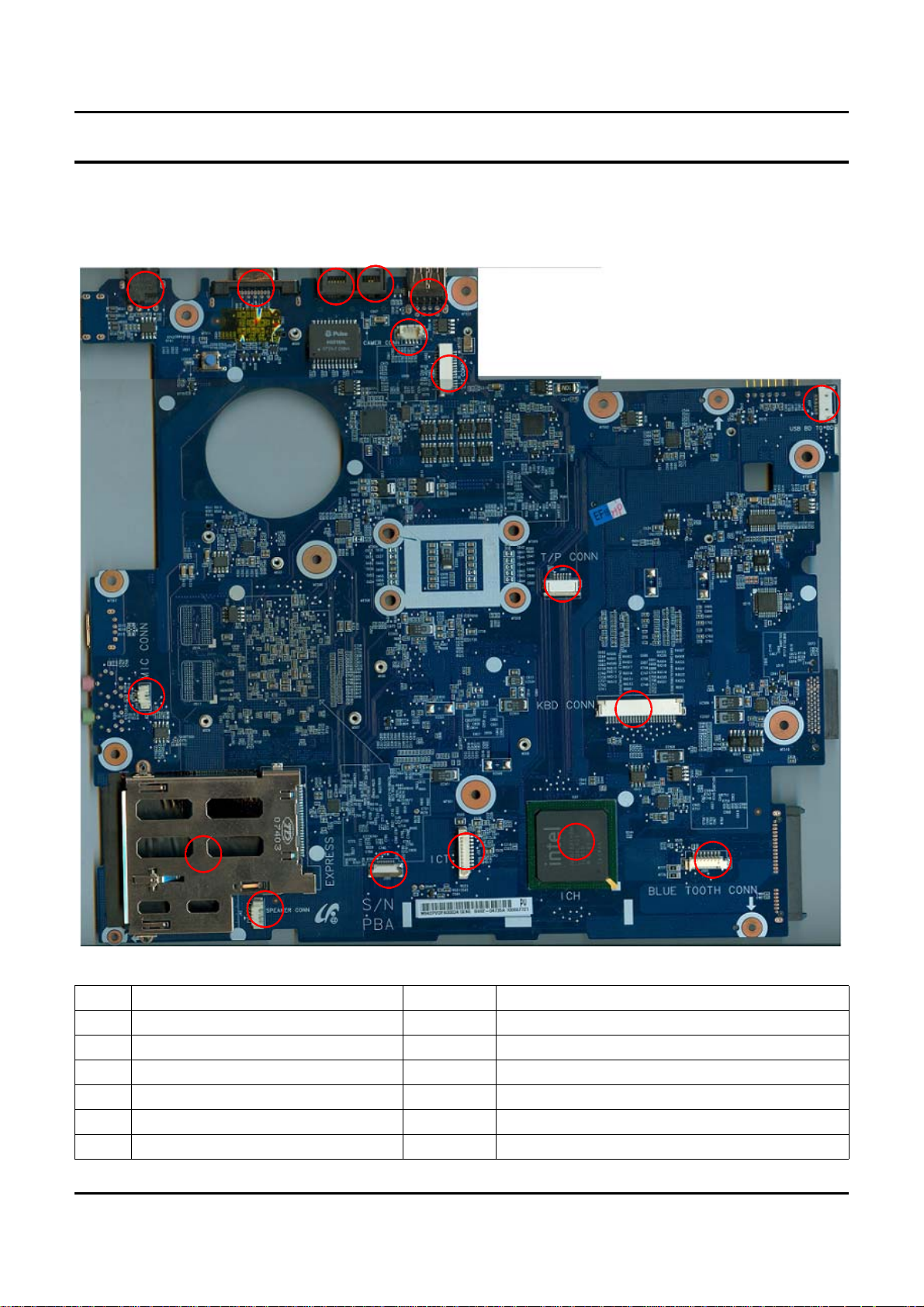
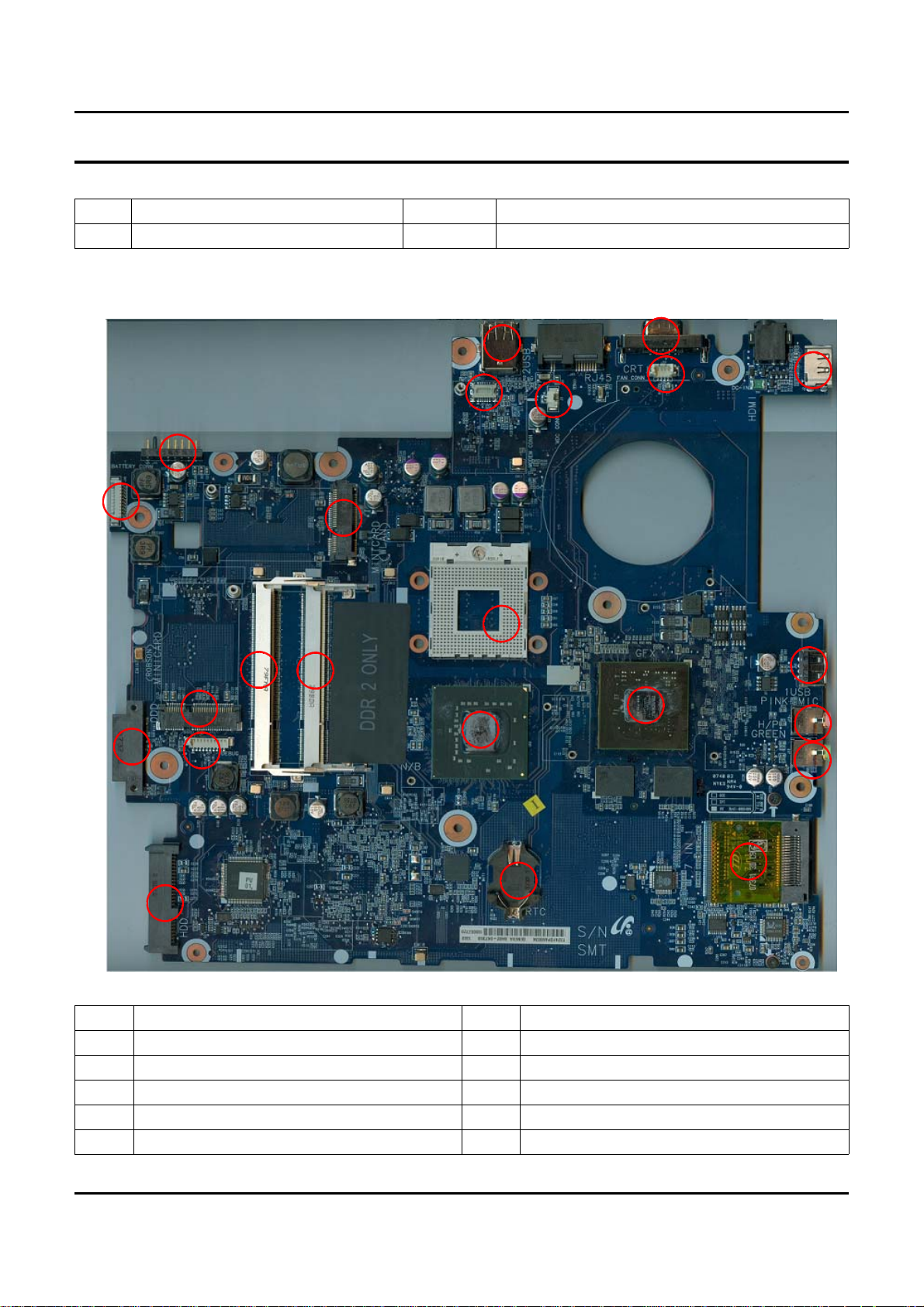
10) Description of Main board
10)-1. Top
4
7
6
5
3
15
14
1
16
2
8
10
9
1 USB BD to BD connector(J504) 2 Internal MIC connector(J502)
3 USB connector(J22) 4 RJ11 Connector
5 RJ45 connector 6 CRT connector (LCD1)
7 DC-Jack (J47) 8 Express card Frame
9 Speaker connector(J42) 10 Touchpad LED board connector
11 ICT connector(J52) 12 KBD connector (J503)
13 Bluetooth connector (J505) 14 LCD connector(J36)
11
17
12
13
2 - 31
Page 32
- 이 문서는 삼성전자의 기술 자산으로 승인자만이 사용할 수 있습니다 -
- This Document can not be used without Samsung's authorization -
2. Introduction and Specification
15 Camera connector (J43) 16 Touchpad connector(J501)
17 ICH8M (U33)
10)-2. Bottom
10
15
17
14
9
8
7
16
19
1
2
20
23
13
21
3
22
12
11
18
5
4
1 Battery connector (J46) 2 USB cable connector(J40)
3 ODD connector (J18) 4 SATA connector (J48)
5 RCT slot(BATT1) 6 7-in-1 connector(J41)
7 Headphone + S/PDIF Jack (J12) 8 MIC Jack (J13)
9 USB connector(J50) 10 Graphics Controller (U36)
11 (G)MCH (U32) 12 SODIMM Channel A (DDR1)
2 - 32
6
Page 33

- 이 문서는 삼성전자의 기술 자산으로 승인자만이 사용할 수 있습니다 -
- This Document can not be used without Samsung's authorization -
2. Introduction and Specification
13 SODIMM Channel B (DDR2) 14 HDMI connector(J2)
15 CRT connector (J38) 16 USB connector(J22)
17 FAN connector(J30) 18 MDC cable connector(J3)
19 MDC connector (J21) 20 Minicard connector (WLAN) (J10)
21 Minicard connector (ROBSON) (J11) 22 Debug connector (J27)
23 CPU socket (J1)
2 - 33
 Loading...