

Page 1
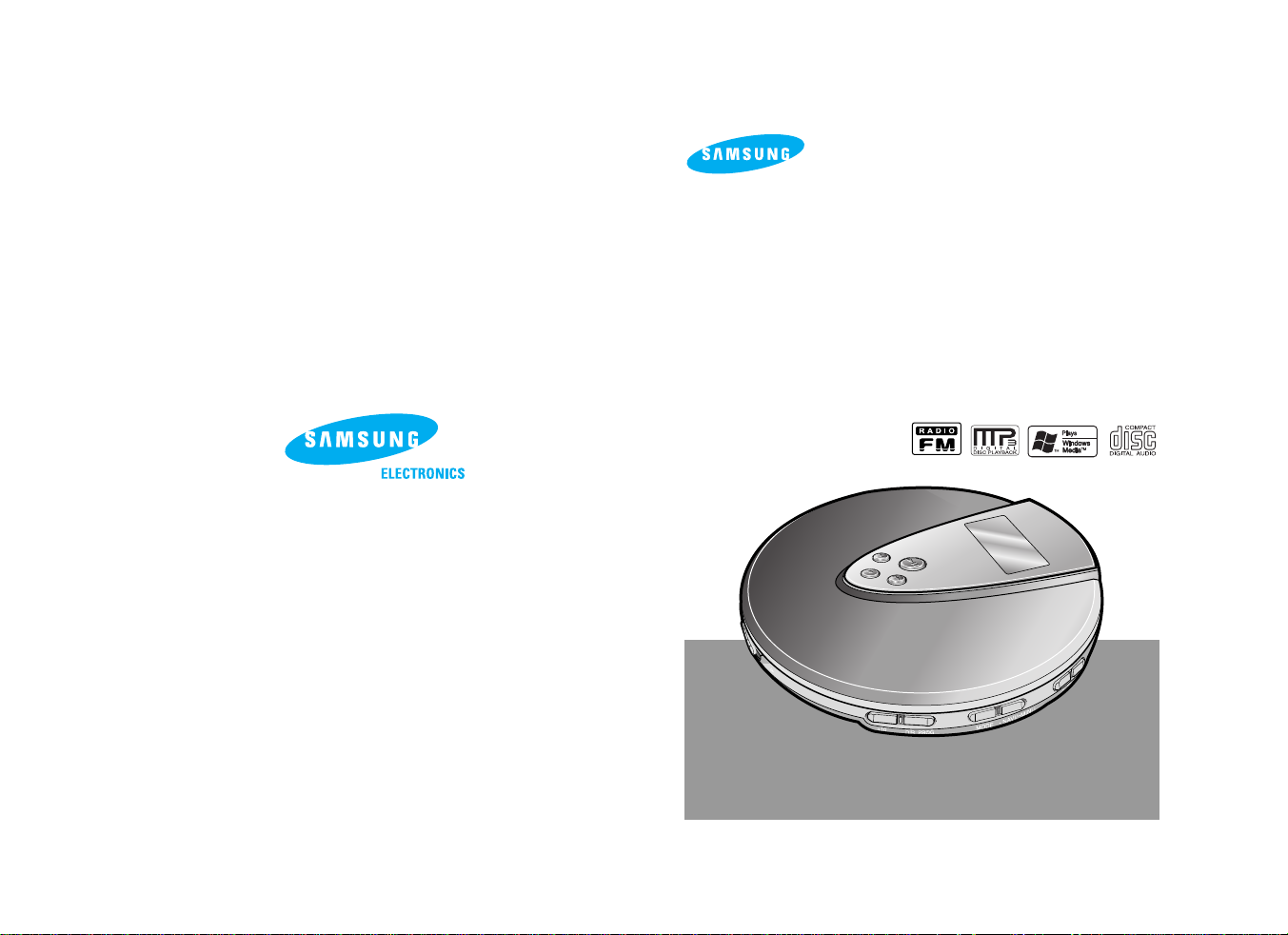
Portable MP3-CD Player
MP3-CD, WMA-CD, CD-DA Playback
MCD-CF370
OPEN
Instruction Manual
AH68-01589A
Page 2
21
Menu function
You can easily customize the
settings to your liking.
Navigation function
(MP3(WMA)-CD Only)
You can easily scan and select a file
on an MP3(WMA)-CD.
Safety Warning.................................................................3
Buttons and Controls........................................................5
Preparation before using your unit...................................9
● How to Connect..........................................................9
● Using the rechargeable batteries (not supplied) ......10
● Using standard batteries (not supplied) ...................11
CD Playback...................................................................12
MP3(WMA)-CD Playback...............................................13
Skip/Search function ......................................................14
MENU function ...............................................................15
EQ function.....................................................................16
DISPLAY function...........................................................17
● SCROLL SPEED......................................................17
● TAG .................................................................18
● LCD CONTRAST .....................................................18
SYSTEM function ...........................................................19
● SLEEP......................................................................19
● LANGUAGE .............................................................20
● RESUME..................................................................21
● CD VEOS .................................................................21
● DEFAULT .................................................................22
REPEAT function............................................................23
+10/DIR function.............................................................24
NAVIGATION function ....................................................25
● In the stop mode ......................................................25
● During Playback .......................................................26
Program function ............................................................27
● To confirm the program ............................................28
● To change the program ............................................28
● To cancel the program mode ...................................28
Listening to FM Radio ....................................................29
● To select the desired radio station ...........................30
● Presetting Stations in Memory (Memory function)...30
● Tuning in to a Preset Station....................................30
Features .........................................................................31
Precautions when using compact discs .........................32
Troubleshooting Guide ...................................................33
Specifications .................................................................34
Main Features Contents
What is MP3?
VEOS function
The VEOS function ensures high
resistance to shock or vibration so
that the sound signal remains
undisturbed.
Resume function
(MP3(WMA)-CD Only)
The Resume function allows you to
resume playback from the start of the
track that you last listened to.
MP3 means MPEG1 Layer 3, the global standard for audio signal compression technology.
It uses digital compression technology to compress original sound data by up to 12 times
without sound quality degradation.
What is WMA?
WMA (Windows Media Audio) is a file format, created by Microsoft, that offers a higher
compression rate and just as good sound quality as MP3.
Typical MP3 files are about one-tenth the size of the original, whereas WMAfiles are
about half the size of standard MP3.
Random function
The Random function allows you to
play tracks in random order.
Directory function
(MP3(WMA)-CD Only)
The Dirtctory function allows easy
browsing and searching of your
favorite tunes by album name,
track
title and artist.
FM Radio function
You can listen to FM radio using
various functions such as the
automatic tuning, preset FM
stations, and etc.
Page 3
43
Road safety
● Do not use the earphones while riding a bicycle, driving any kind of motor
vehicle or motorcycle.
This is very dangerous and is illegal in certain regions.
It is dangerous to listen to earphones at high volume while crossing roads.
In order to protect your hearing
● Do not wear the earphones with the volume set too high.
Doctors state that listening to music at high volume for prolonged periods is
harmful to hearing.
● If you experience a ringing in your ears, reduce the volume or stop listening.
Earphones
● Your unit consists of materials which can be recycled if disassembled by a
specialized company. Please observe local regulations regarding the
disposal of packing materials, exhausted batteries and old equipment.
Environmental information
● Ambient temperature : 5°C~35°C (41°F~95°F)
● Humidity : 10~75%
Ambient operating conditions
Safety Warning
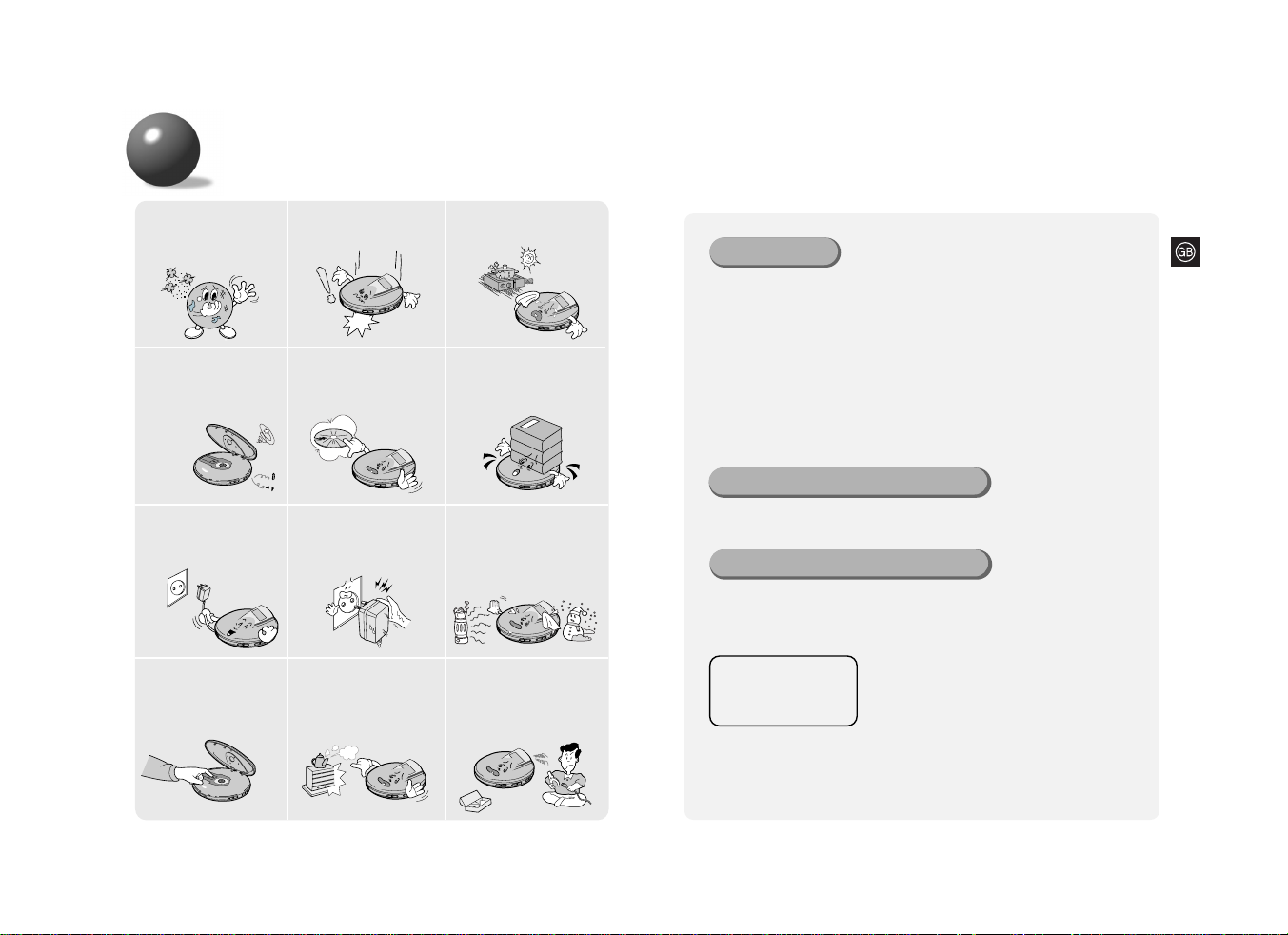
Take care not to allow dust
or other contaminants to
come into contact with your
player.
Do not apply heavy
pressure to the player.
Do not leave your player
in direct sunlight or
near a heat source.
Do not put anything other
than a CD (CD-R or CD-RW)
inside your player.
●
Such actions will damage
your player.
Do not use broken or
scratched MP3 CDs.
Do not use your player on
uneven or unstable surfaces.
●
Your player may not
operate properly.
Do not touch the lens
with your finger or
scratch it.
●
Your player may not
operate properly.
Do not place your player
in a dusty or humid location.
Do not attempt to take
apart, repair or modify
your player.
●
Such actions will damage
your player.
Unplug the power cord
when not using the
player for long periods
of time.
Do not touch the AC
Adaptor with wet hands
when it is plugged in.
Avoid places of low
temperature (below
5°C
)
or high temperature
(above 3
5°C
).
●
Use of controls adjustments or performance of
procedures other than those specified herein
may result in hazardous radiation exposure.
●
CLASS 1 LASER PRODUCT
This Compact Disc player is classified as a CLASS 1 LASER product.
●
CAUTION-INVISIBLE LASER RADIATION WHEN OPEN AND
INTER LOCKS DEFEATED, AVOID EXPOSURE TO BEAM.
CLASS 1 LASER PRODUCT
KLASSE 1 LASER PRODUKT
LUOKAN 1 LASER LAITE
KLASS 1 LASER APPARAT
PRODUCTO LASER CLASE 1
Page 4
65
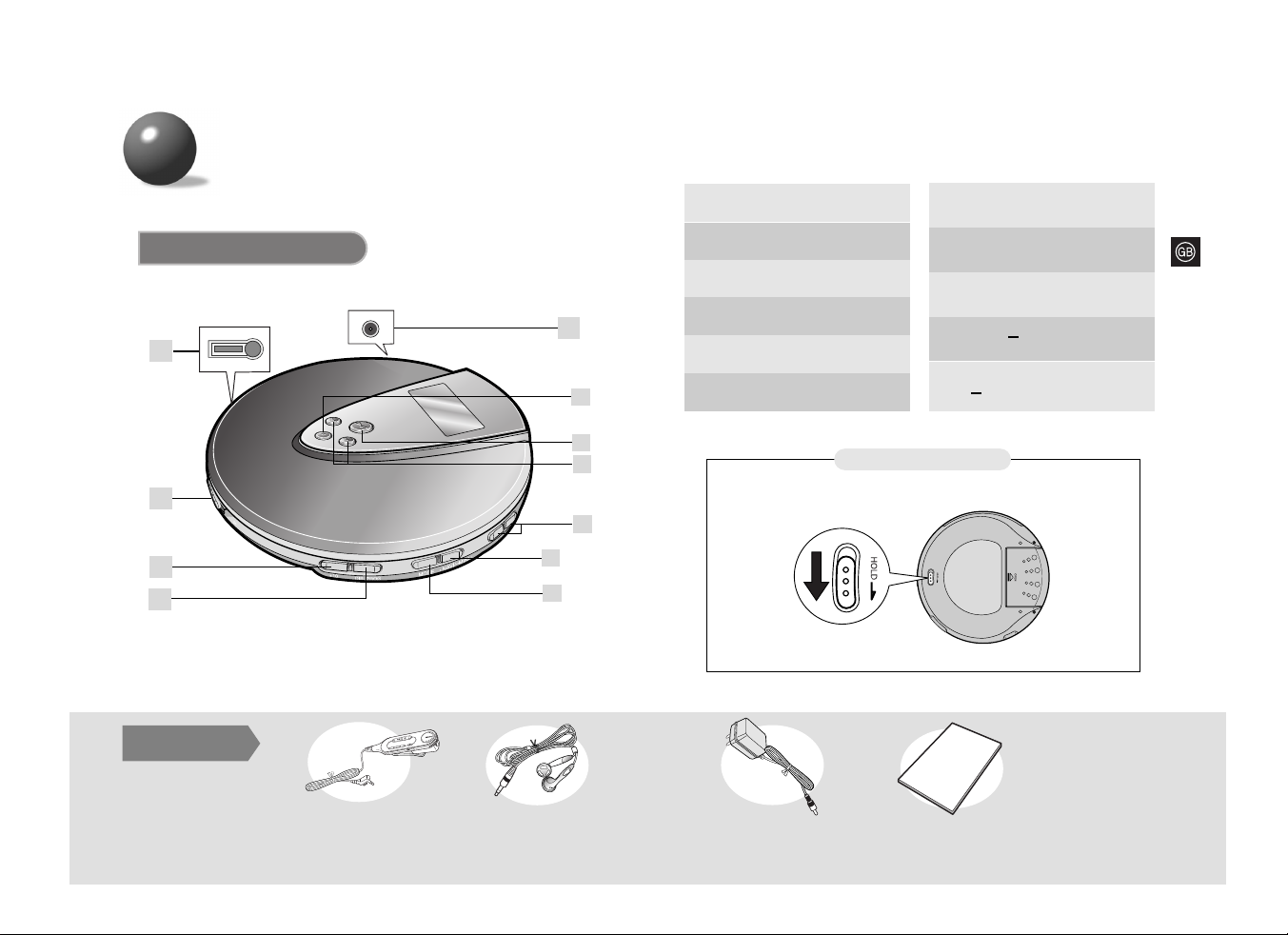
Accessories
Remote Control
Main Unit
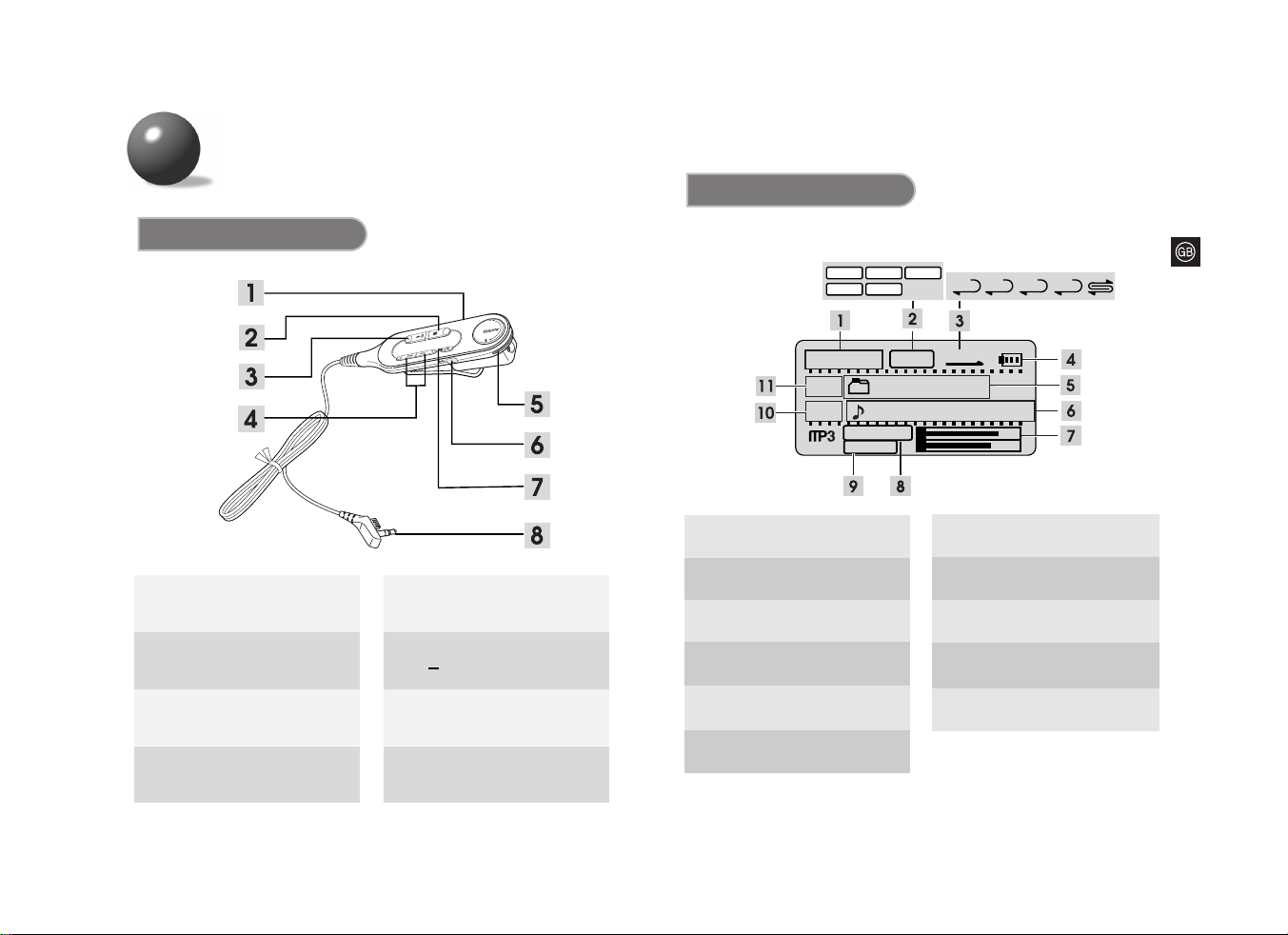
Buttons and Controls
O
PEN
1
2
4
3
5
6
7
8
9
10
11
HOLD switch
Bottom of the Main Unit
Open switch
+10 button
Remote control Connection jack
2.
3.
4.
1.
• DIR./PROG. button
• Preset button (FM)
Stop
( ■ )
button
Play/Pause
(
√»
)
button
Power Input Jack
6.
7.
5.
Earphones AC adaptor
User Manual
8.
Skip/Search button
Volume buttons
9.
10.
• NAVI/
MENU
button
• MODE button
FM Radio button (FM)
11.
User Manual
Page 5
87
FLAT
JAZ
ROC CLAS
POP
0:03:15
001
Boyz II MEN
001
End [Boyz II MEN]
128 kbps
44KHz
NOR
ONE
FLAT
ALLDIRNOR
L
R
1.
Play Time Indicator
*
The picture of the display panel below is based on MP3-CD playback.
5.
Directory Name Indicator
(MP3(WMA)-CD Only)
6.
7.
8.
9.
10.
11.
L/R Channel Level Indicator
Sampling Frequency Indicator
(MP3(WMA)-CD Only)
Track Number Indicator
Title Indicator
(MP3(WMA)-CD Only)
Bit Rate Indicator
(MP3(WMA)-CD Only)
Directory Number Indicator
(MP3(WMA)-CD Only)
Buttons and Controls
Display
Remote Control
Stop button
Play/Pause button
Hold switch
2.
3.
4.
1.
Skip/Search button
• MODE button
FM Radio button (FM)
+10 button
Volume
6.
7.
8.
5.
Main Unit connection jack
2.
EQ Mode Indicator
3.
Playback or Repeat Mode
Indicator
4.
Remaining Battery Power Indicator
Page 6
109
Preparation before using your unit
Note
•
Time taken to fully charge the battery : 10 hours
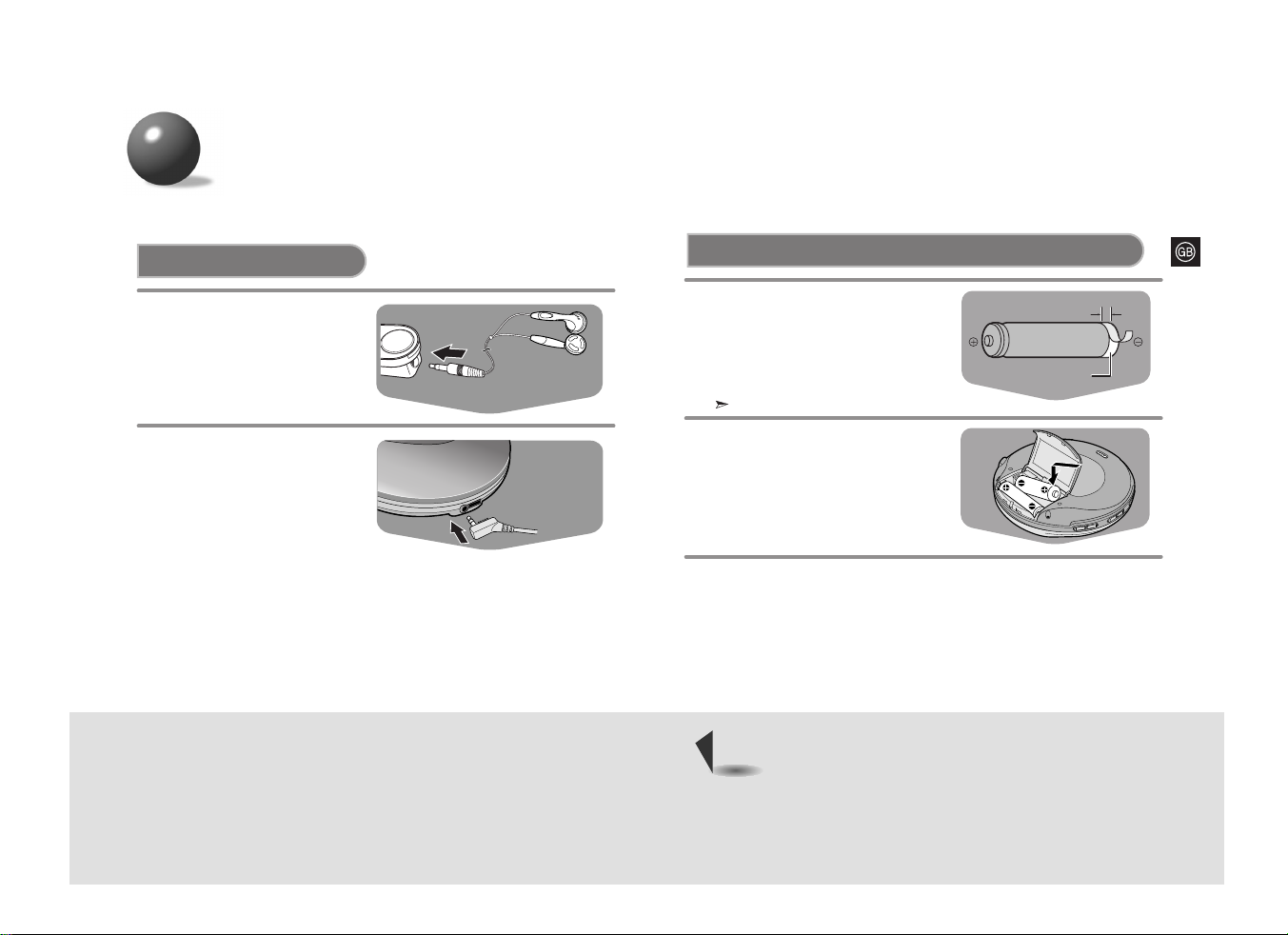
Using rechargeable batteries
(not supplied)
Strip the sheath covering the
terminals of the rechargeable
battery before charging it.
•
As shown in the illustration, with a knife
carefully strip the sheath of the negative
(-) terminal by 6 mm.
1
Insert the batteries into the
battery compartment.
2
3
Sheath to be stripped
Rechargeable Battery
(size: AA/LR6)
If the sheath is not stripped, charging will not function.
An AC adaptor must be connected to the AC outlet
and power input.
•
Charging of the rechargeable batteries will commence.
AC adaptor : DC 4.5V, 500mA
How to Connect
1
Connect the earphones to the
remote control.
Connect the main unit
connection jack to the main
unit.
2
6mm
Page 7
1211
0:03:15
TRACK 05
PLAY
CDDA
NOR
FLAT
L
R
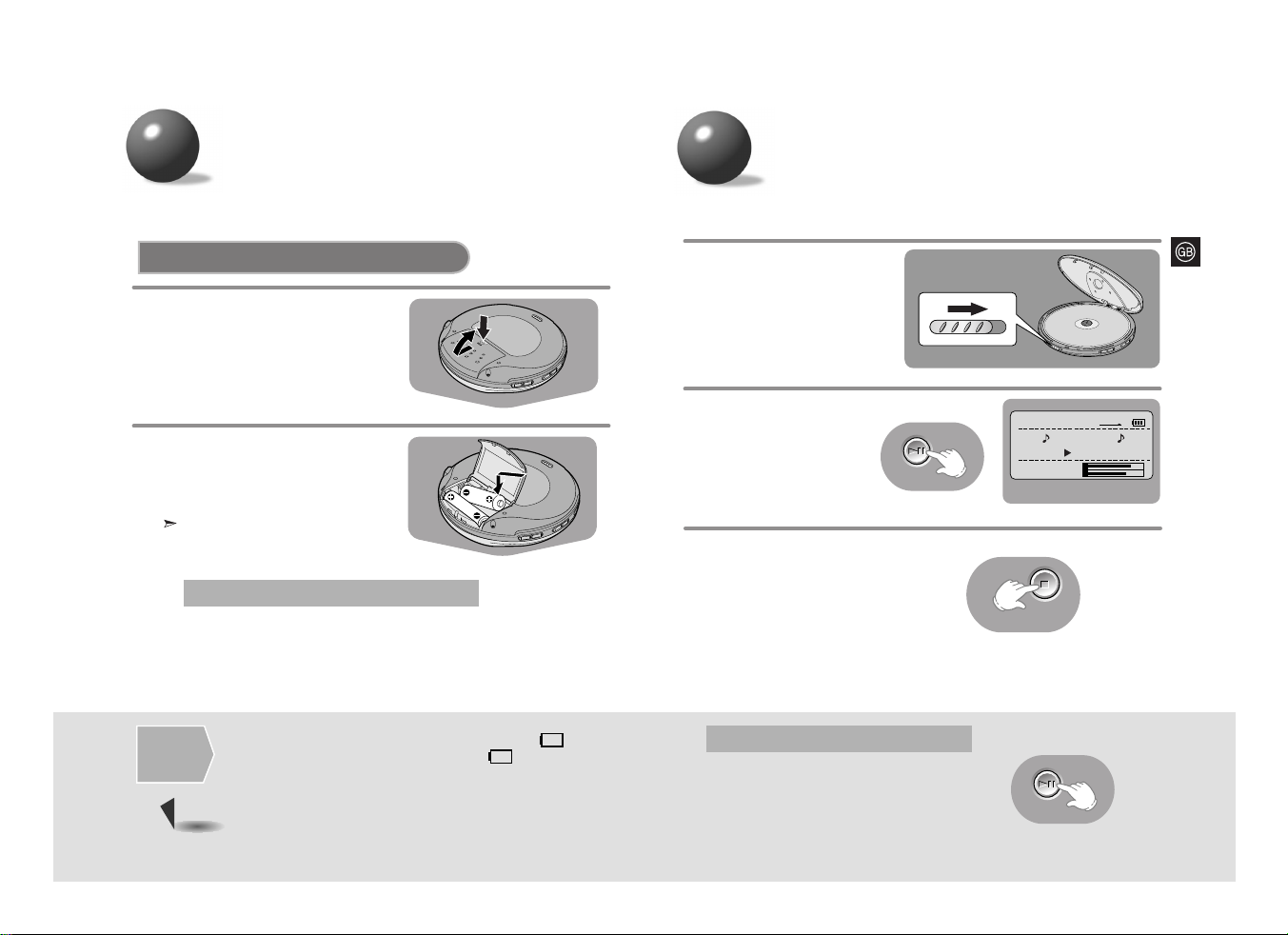
Slide the OPEN button to
open the door.
Insert a CD.
•
Push the door to close it.
1
Press the PLAY/PAUSE
(
√»
) button.
•
Once the CD is
recognized, playback
commences.
2
To stop playback, press
the STOP (■) button.
•
Press and hold the STOP
(■) button to switch off the
unit.
3
Press the PLAY/PAUSE (√») button.
•
Playback will be temporarily suspended.
•
Press the PLAY/PAUSE (√») button again to resume
playback.
To temporarily pause playback
CD Playback
• If no
buttons are pressed, the power
will automatically switch off after 15
seconds.
Carefully check the correct
orientation of the positive and
negative terminals of the batteries.
•
Use two AA/LR6 type 1.5 V batteries.
2
Open the cover of the battery
compartment.
1
Using standard batteries (not supplied)
Use two AA/LR6 alkaline batteries.
Manganese batteries have a shorter
battery life.
*
The battery life-time is based on continuous use.
•
WMA-CD : 27 hours max.
•
CD (When VEOS is On) : 16 hours max.
Battery Life (Using alkaline batteries)
•
Do not mix old and new batteries.
•
Remove the batteries if they will not be used for a long time.
•
Standard batteries cannot be recharged.
•
Remove the batteries when you use an AC adaptor.
Warning
•
Replace the batteries if the remaining battery power indicator “ ” flashes.
•
Even though the remaining battery power indicator “ ” may be flashing,
if the batteries have already expired, the LCD will not be lit.
Time for
Battery
Replacement
Preparation before
using your unit
Page 8
1413
Skip
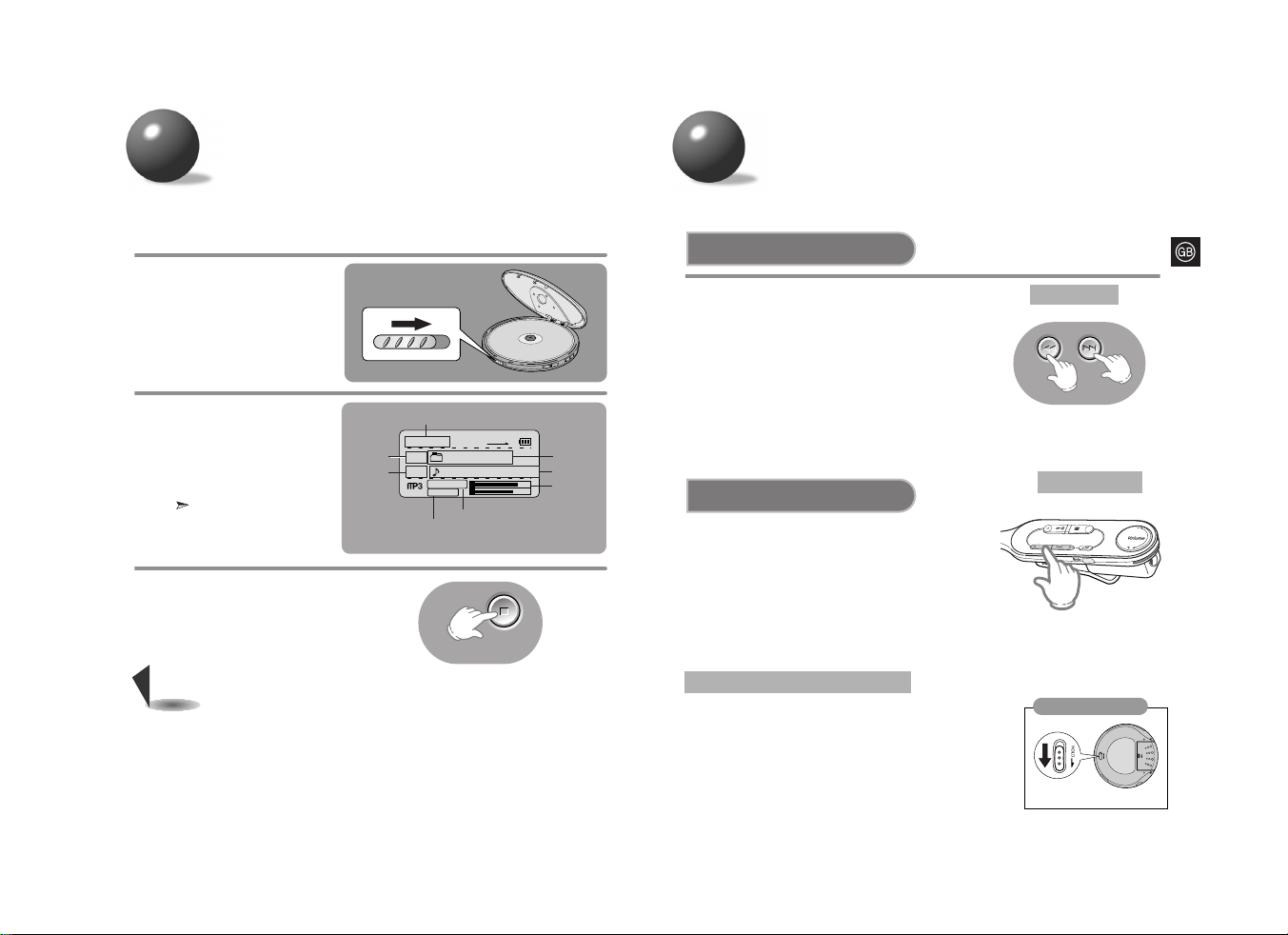
Press and release the
Iî orï
I
button
during playback of a CD.
• Press the
ï
I
button to play the next track.
Press the
Iî
button to go back to the beginning
of the current track. (Briefly press the
Iî
button
twice to repeat the previous track).
• Press the
ï
I
button while the unit is in “STOP”
(no playback) mode. Track 2 will be played back.
Press the
Iî
button to play back the previous song.
Search
Press and hold the
Iî orï
I
button
during playback of a CD.
•
Press and hold the
Iî orï
I
button.
The CD will playback in fast forward or fast reverse mode.
•
Release the button to return to normal playback mode.
• Buttons pressed during CD playback will not function.
(The “HOLD” message will appear on the display.)
• Use the HOLD function when carrying your CD Player around with you.
Use of this function will allow you to conserve battery life as it prevents
the CD Player from being turned on if a button is pressed unintentionally.
• The remote control will still operate while the HOLD function on the
main unit is active.
• The main unit will still operate while the HOLD function on the remote
control is active.
HOLD function
SKIP/SEARCH function
Bottom of the Main Unit
0:03:15
001
Boyz II MEN
001
End [Boyz II MEN]
128 kbps
44KHz
NOR
FLAT
L
R
Slide the OPEN button to
open the door, and insert
an MP3(WMA)-CD.
•
Push the door to close it.
1
Press the PLAY/PAUSE
(
√»
) button.
•
The inserted MP3(WMA)-CD
will be scanned for about
30~90 seconds. Playback will
then commence.
Your CD Player will take a
few moments to scan through
all the tracks and the sessions
recorded on an MP3(WMA)-CD.
2
To stop playback, press the STOP (■)
button.
•
Press and hold the STOP (■) button to
switch off the unit.
3
Directory
Number
indicator
Track
Number
indicator
Directory
Name
indicator
Title indicator
L/R Channel
Level Indicator
Playtime
indicator
•
If a music file is corrupted and a particular section cannot be read, only
that section will be skipped. But if the file continues to be unreadable,
the player will skip to the next file.
•
Files that do not conform to specifications (refer to P. 34) will be skipped.
• When the Open switch is slid to open the door, playback will stop.
•
The quality of MP3(WMA)-CD playback may vary depending on the condition of the
disc containing the music files or the condition of the recorder with which the disc
was created.
•
If different types of files or unnecessary folders are on the same disc, you will have
problems with playback.
Note
MP3(WMA)-CD Playback
Bit rate indicator
Sampling Frequency
Indicator
Main Unit
Remote Control
Page 9
1615
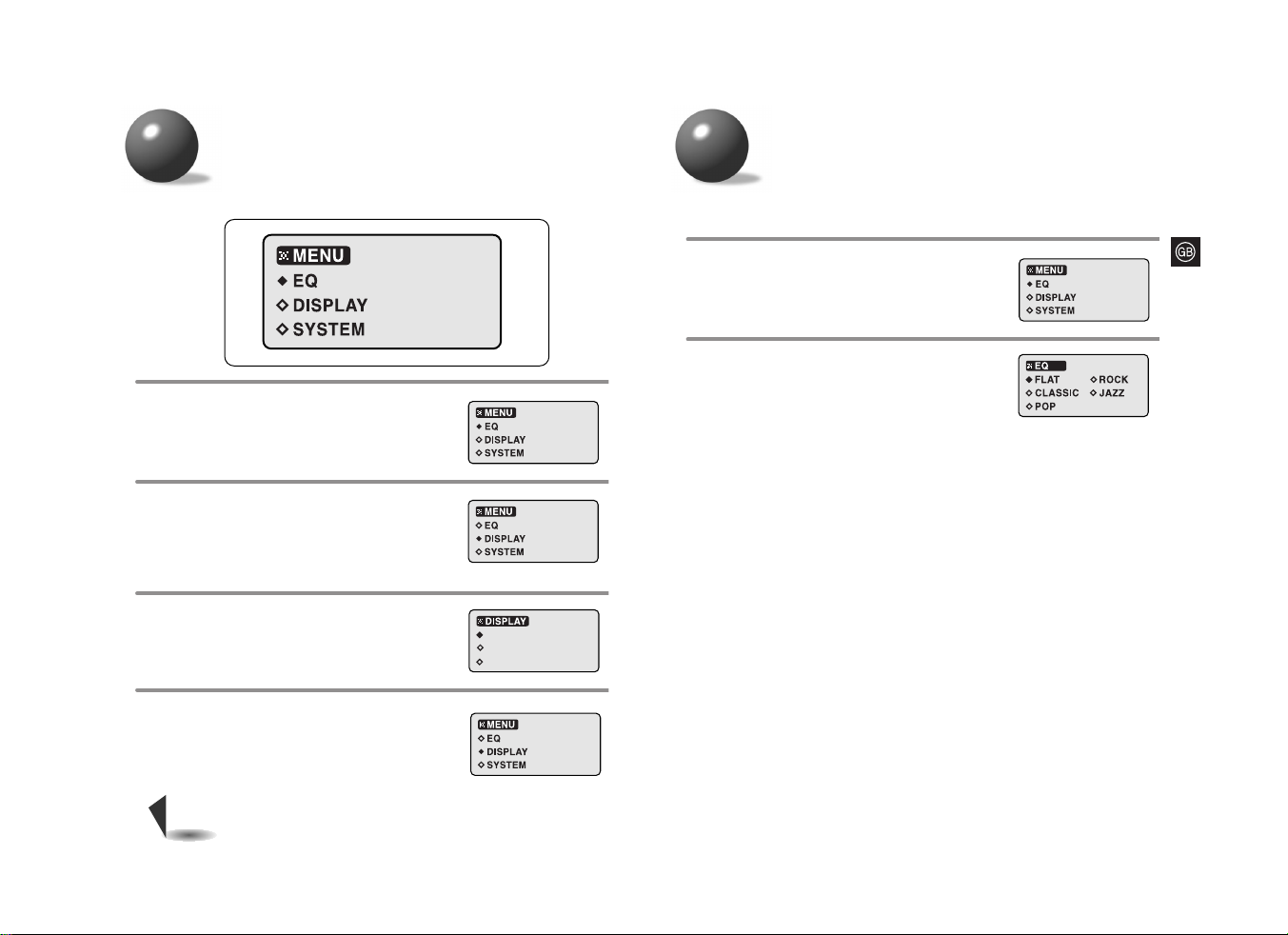
EQ function
You can customize the settings to your liking.
MENU function
Press the
STOP (■)
button to move to
a higher level menu.
•
If no button is pressed for 20 seconds,
you will be exited to the main unit display.
4
Use the
Iî ,ï
I
buttons to select the
desired function, and then press the
PLAY/PAUSE (
√»
) button.
3
SCROLL SPEED
LCD CONTRAST
ID3 TAG
Use the
Iî ,ï
I
buttons to select
the desired menu, and then press
the PLAY/PAUSE (
√»
) button.
•
A list of functions will appear.
2
Press and hold the
NAVI/-MENU button.
•
A group of menu icons will appear.
1
•
While the Disc is being read, you won't be able to use the Menu function.
Note
●
Menu Structure
Briefly press the EQ button to activate the Repeat function or
hold it down for longer to activate the Menu function.
Use the
Iî ,ï
I
buttons to select the
desired EQ mode.
•
FLAT ➝ ROCK ➝ CLASSIC ➝ JAZZ ➝ POP
2
Select EQ in the MENU screen.
1
Page 10
1817
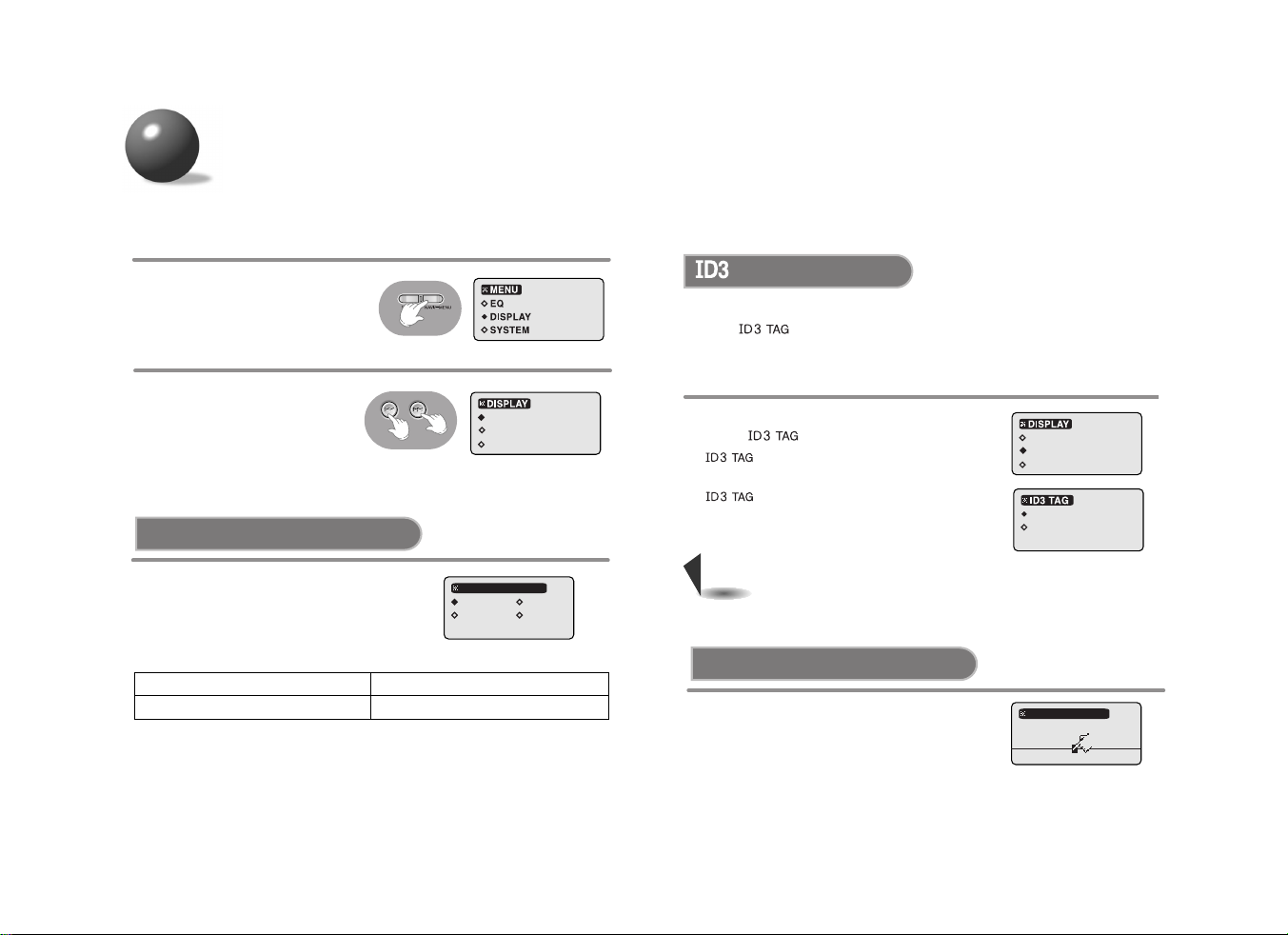
DISPLAY function
Select DISPLAY in the MENU
screen.
1
Use the
Iî ,ï
I
buttons to
select the desired menu, and
then press the
PLAY/PAUSE (
√»
) button.
•
A list of functions will appear.
2
SCROLL SPEED
LCD CONTRAST
ID3 TAG
●
Use the
Iî ,ï
I
buttons to set the
scroll speed.
●
You can adjust the scroll speed of the
track titles.
1X
3X
2X
4X
SCROLL SPEED
SCROLL SPEED
●
1X : Scrolls at normal speed.
●
2X : Scrolls at two times the normal speed.
●
3X : Scrolls at three times the normal speed.
●
4X : Scrolls at four times the normal speed.
TAG
*
This function is only available during
playback of an MP3(WMA)-CD.
•
This function displays the tag information from all of the tracks on an MP3/WMA-CD.
What is ?
•
This is what is attached to an MP3 audio file to carry information relevant to the file,
such as the title, artist, album, year, genre and a comment field.
SCROLL SPEED
LCD CONTRAST
ID3 TAG
●
Use the
Iî ,ï
I
buttons
to select ON or OFF.
ON
OFF
•
If no tag information is present in the file, the
track
title or artist cannot be
displayed.
Only the file name is displayed.
Note
•
ON : Tag information of the track
file is displayed.
•
OFF : Only the name of the track
file is displayed.
●
Use the
Iî ,ï
I
buttons to set the
contrast.
●
The setting range of the contrast, which
adjusts the brightness of the screen, is 0 to 19.
LCD CONTRAST
09
LCD CONTRAST
Page 11
2019
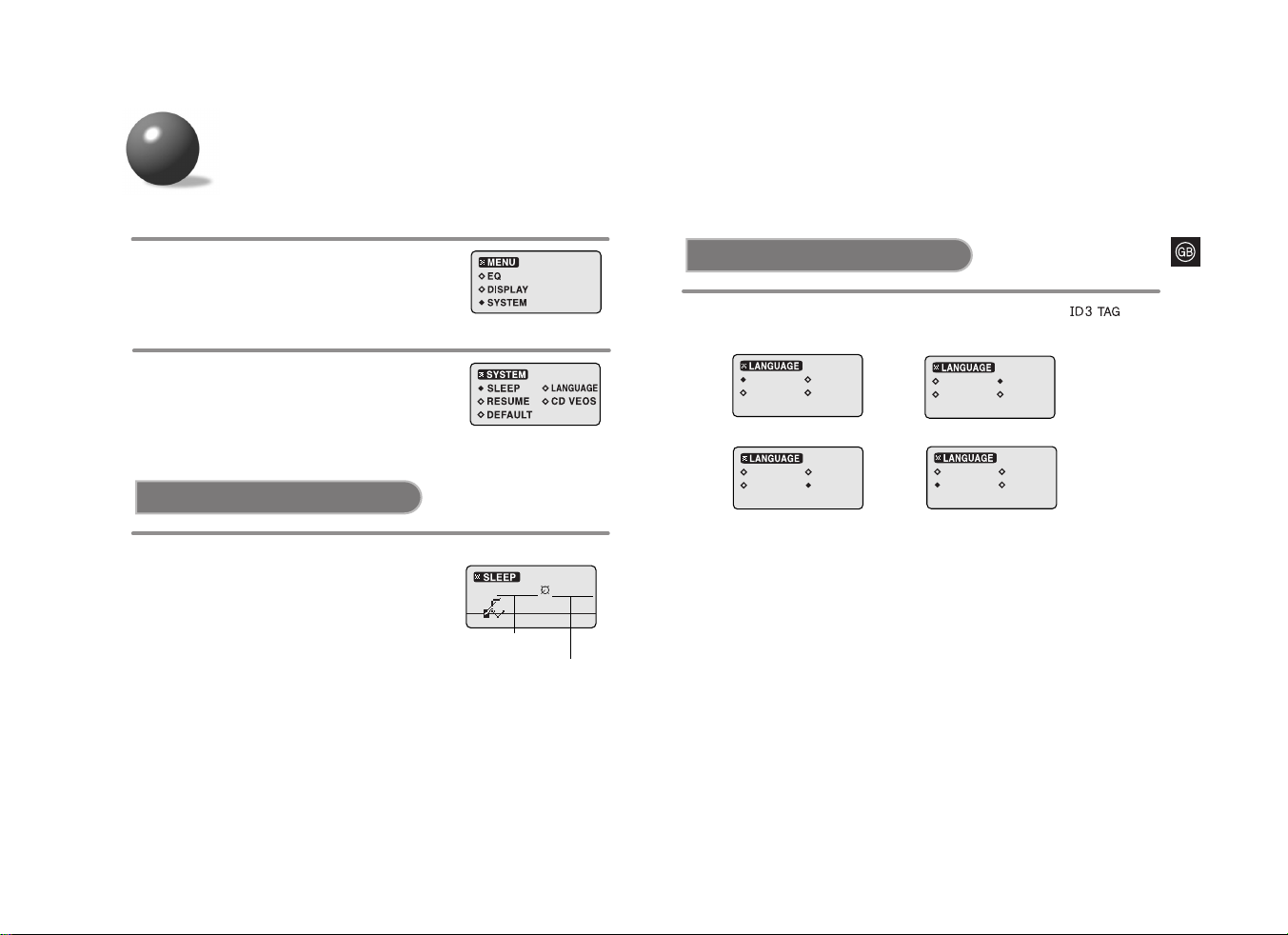
Select SYSTEM in the MENU screen.
1
Use the
Iî ,ï
I
buttons to select
the desired menu, and then press
the PLAY/PAUSE (
√»
) button.
2
SYSTEM function
SLEEP
020 min 011 min
●
Use the
Iî ,ï
I
buttons to set the
sleep time.
●
Use this function to set the player to power off
automatically after a preset time has elapsed.
●
You can turn off the sleep timer or select from
10 to 120 minutes in 10 minute increment:
OFF → 010 →
● ● ● ● ●
120.
LANGUAGE
●
Languages Supported
- Western Europe: Albanian, Catalan, Danish, Dutch, English, Faeroese, Finnish,
French, Galician, German, Icelandic, Italian, Norwegian,
Portuguese, Spanish, Swedish
- Eastern Europe: Croatian, Czech, Estonian, Hungarian, Latvian, Lithuanian, Polish,
Romanian, Slovak, Slovene
-
Russian
: Bulgarian, Byelorussian, Macedonian, Russian, Serbian, Ukrainian
ENGLISH
RUSSIAN
WEST EU EAST EU
ENGLISH
RUSSIAN
WEST EU EAST EU
→
English
Russian
→
Western European
Languages
Eastern European
Languages
→
ENGLISH
RUSSIAN
WEST EU EAST EU
ENGLISH
RUSSIAN
WEST EU EAST EU
●
Use the
Iî ,ï
I
buttons to select the language in which the
of music files will be displayed.
Setting Time
Remaining Time
Page 12
2221
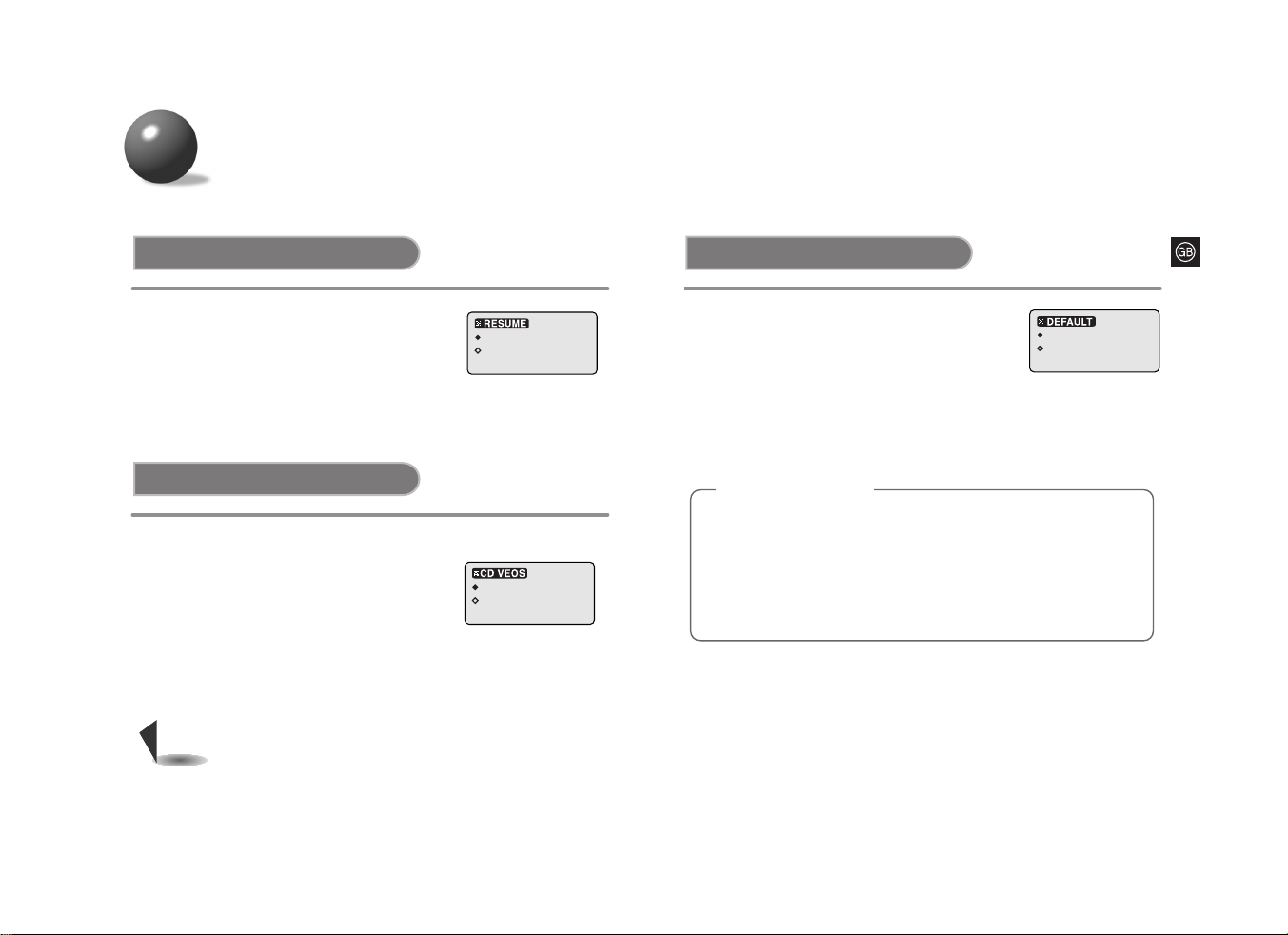
SYSTEM function
RESUME DEFAULT
YES
NO
OFF
ON
CD VEOS
●
Use the
Iî ,ï
I
buttons to select RESUME ON
or OFF.
●
ON: Resumes playback from the last turn-off
track.
●
OFF: Plays the first track on the CD.
OFF
ON
●
Use the
Iî ,ï
I
buttons to select CD VEOS
ON or OFF.
●
This function prevents music from skipping
during movement by buffering ahead in the data
stream.
●
CD VEOS ON : For an Audio CD, the player buffers up
to 45 seconds of CD data.
●
120 seconds of data stream for an MP3-CD and 240
seconds for a WMA-CD will be buffered
automatically.
What is VEOS(Versatile ESP Operating System)?
VEOS (Versatile ESP Operating System) combines the strengths of
Memory Buffering and Fast Recovery System to store the contents of a
CD in memory before playing back and to recover from CD skips in the
shortest amount of time.
Note
●
Use the
Iî ,ï
I
buttons to select DEFAULT
YES or NO.
●
YES: Initializes all settings to their default values.
●
NO: Maintains the existing settings.
Default Settings
●
REPEAT : NORMAL
●
EQ : FLAT
●
SCROLL SPEED : 2 X
●
ID3 TAG : ON
●
LCD CONTRAST : 9
●
LANGUAGE : ENGLISH
●
RESUME : ON
●
CD VEOS : ON
●
SLEEP : OFF
●
DEFAULT : NO
●
VOL : 20
Page 13
23 24
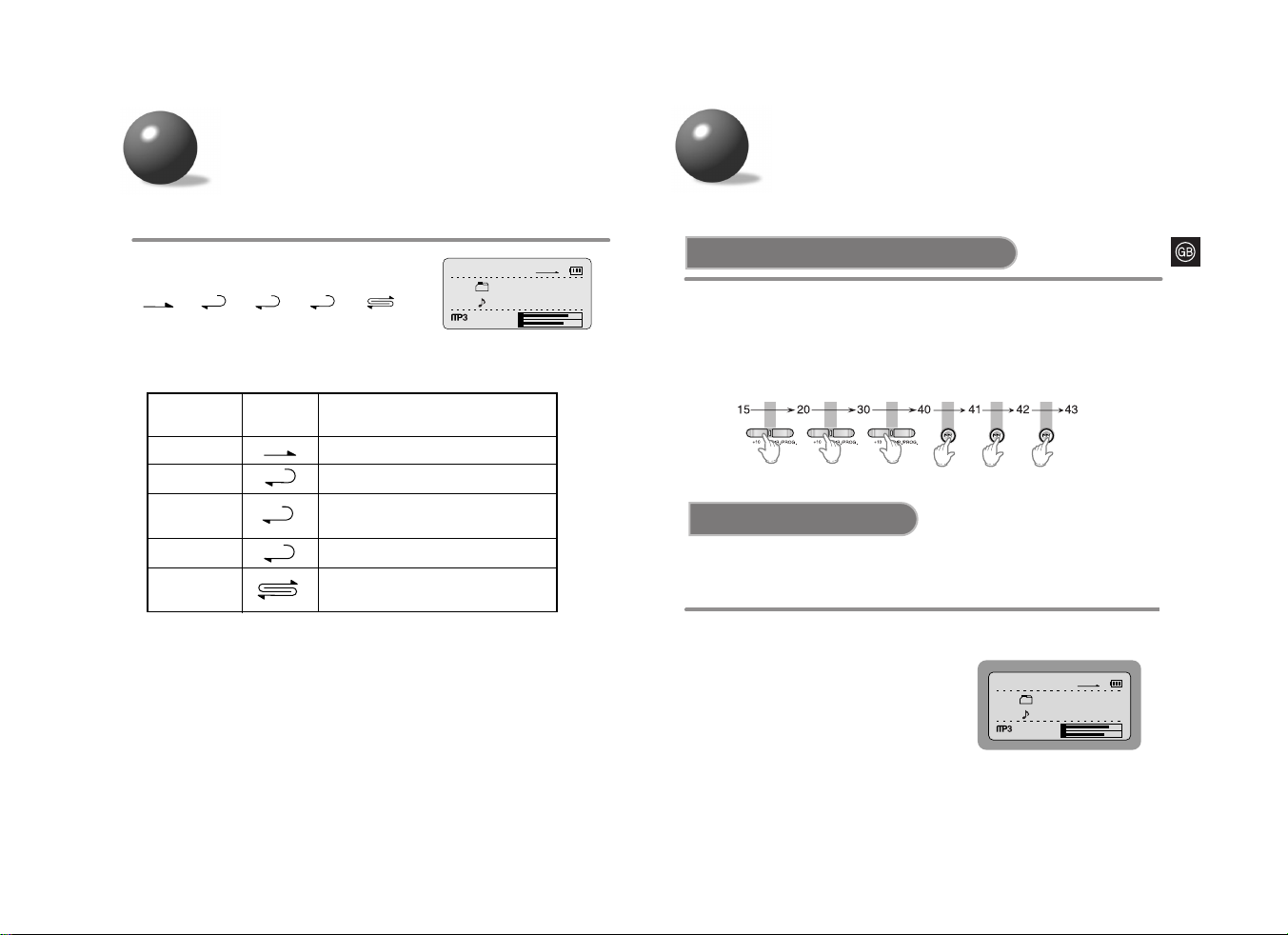
DIRECTORY function
Press the DIR./PROG. button.
•
It moves to the next album.
Example) Pressing the DIR./PROG
button during playback of
the first album will take you
to the start of the first track
of the second album.
•
This function is only available during playback of an MP3(WMA)-CD.
Albums are sections of tracks representing one artist.
This function makes it easier to skip between them.
0:03:15
001
Boyz II MEN
001
End [Boyz II MEN]
128 kbps
44KHz
NOR
FLAT
L
R
REPEAT function
+10 +10 +10
●
Press the +10 button briefly while playing back a CD.
Playback will skip 10 tracks.
Example : If you want to select track 43 during playback of track 15, press
the +10 button three times, then press the
ï
I
button three times.
+10 function
+10/DIR function
Press the MODE button.
•
Each time the button is pressed,
➞ ➞ ➞ ➞
are selected.
(album mode only works for MP3(WMA)-CD disks
which contain albums.)
ALL
DIR
ONE
NOR
0:03:15
001
Boyz II MEN
001
End [Boyz II MEN]
128 kbps
44KHz
NOR
FLAT
L
R
Mode
Repeat Mode
indicator
NORMAL
REPEAT ONE
REPEAT
DIRECTORY
REPEAT ALL
RANDOM
Description
- Plays all of the tracks on a CD once.
- Repeatedly plays one track.
- Repeatedly plays all of the tracks in
the selected directory.
-
Repeatedly plays all of the tracks on a CD.
- Plays all of the tracks on a CD in
random order.
NOR
ONE
ALL
DIR
Page 14
2625
*
This function is only available during
playback of an MP3(WMA)-CD.
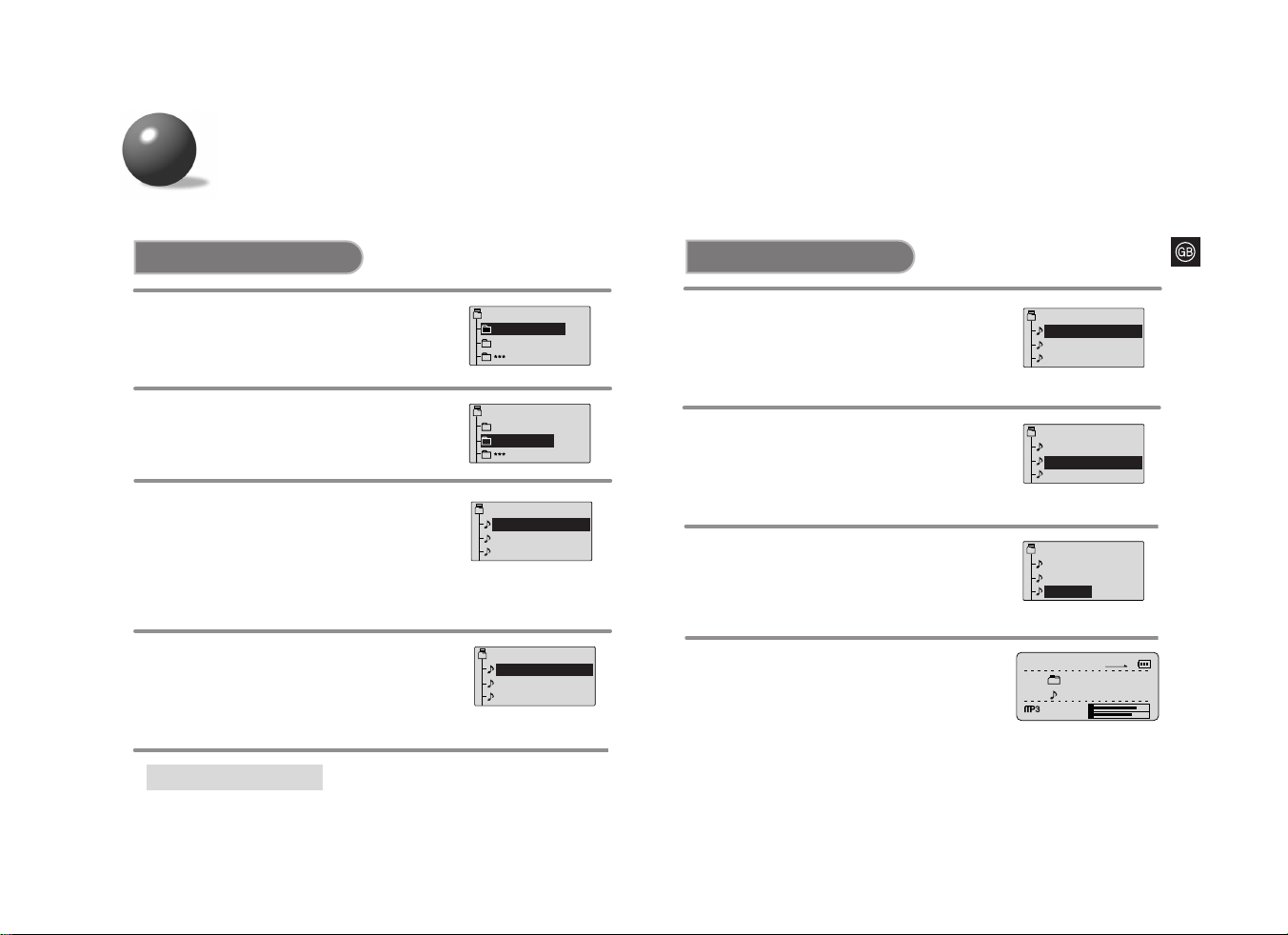
During Playback
Press the NAVI/-MENU button.
•
A list of all the tracks in the album
will be displayed.
1
2
Press the PLAY/PAUSE (√») button.
•
The selected track will be played back.
3
To cancel the navigation function,
press the
NAVI/-MENU
button again.
•
The navigation function does not work
while the program function is operating.
Using
Iî orï
I
button,
select the desired track.
•
If no button is pressed for 20 seconds,
the display switches to the playback
mode.
◆
◆
• In the currently selected album, press the STOP (
■
)
button to move to the album
that is one level higher in hierarchy.
NAVIGATION function
You can easily select and play the
track
you want from the album.
*
This function is only available during
playback of an MP3(WMA)-CD.
In the stop mode
Press the NAVI/-MENU button.
• Albums in the root folder will be displayed.
1
Root
Boyz II MEN
Janet Jackson
Root
Boyz II MEN
Janet Jackson
01 -
02 -
Boyz II MEN
Come back to
It’s So Hard To
03 -
End
01 -
02 -
Boyz II MEN
Come back to
It’s So Hard To
03 -
End
2
Press the PLAY/PAUSE (√») button.
•
Album : Albums or
tracks
in the selected
album
will be displayed.
Repeat the steps 2-3 above to select
the track you want.
•
Track : The selected
track will be played back.
3
To cancel the navigation function,
press the
NAVI/-MENU
button again.
•
If no button is pressed for 20 seconds,
the display switches to the stop mode.
Using
Iî orï
I
button, select
the desired album or track.
To move to a higher album
◆
◆
01 -
02 -
Boyz II MEN
Come back to
It’s So Hard To
03 -
End
01 -
02 -
Boyz II MEN
Come back to
It’s So Hard To
03 -
End
01 02 -
Boyz II MEN
Come back to
It’s So Hard To
03 -
End
0:03:15
001
Boyz II MEN
001
End [Boyz II MEN]
128 kbps
44KHz
NOR
FLAT
L
R
Page 15
2827
• During programming, if no action is performed for about 40 seconds,
the player will automatically turn itself off to conserve battery power
consumption.
Warning
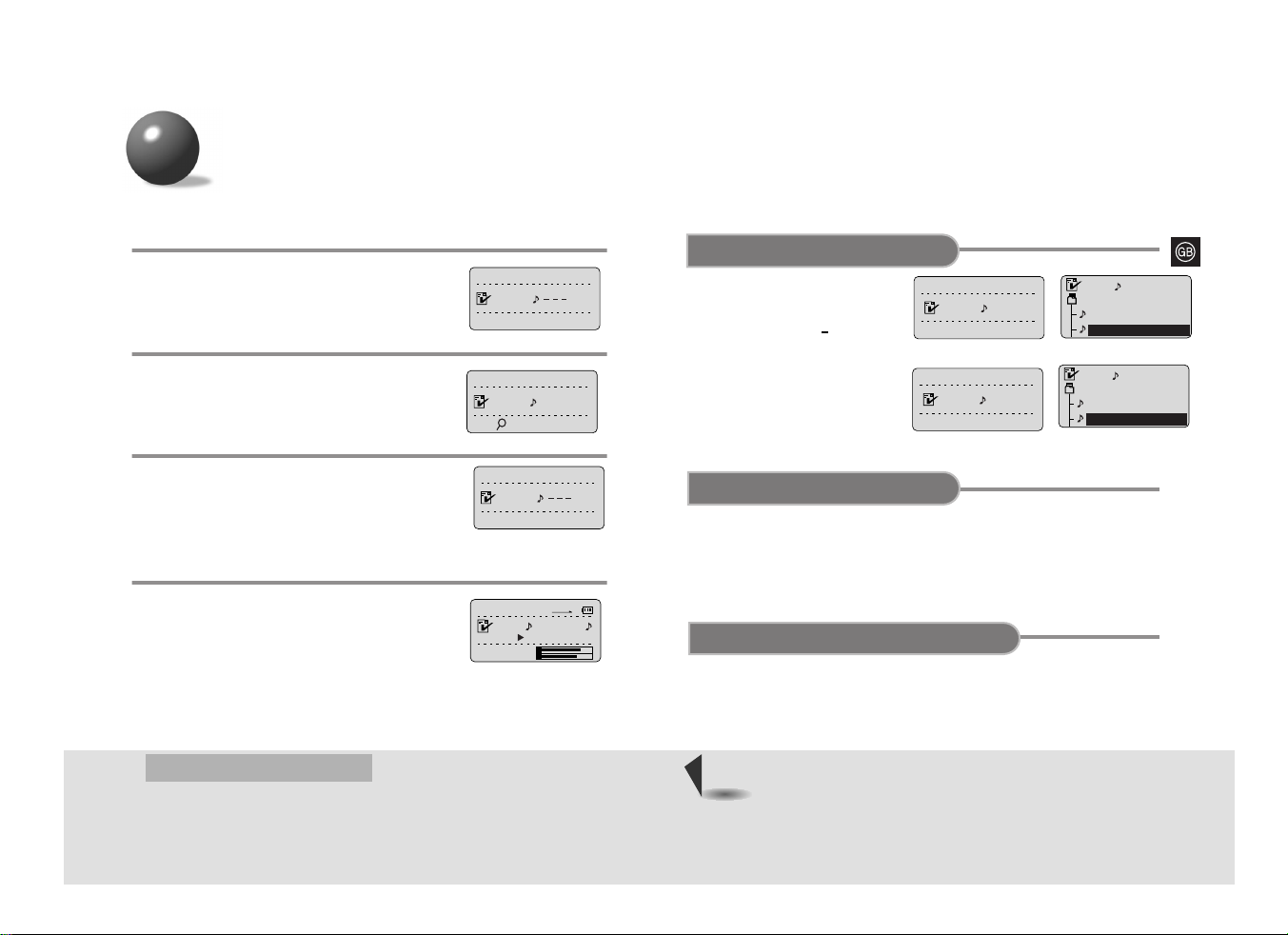
• In the stop mode, press and hold
the
DIR./PROG.
button.
• Each time the NAVI./ MENU is
pressed, track numbers will be
shown on the display according
to their program seguence.
To confirm the program
•
To change the programmed tracks during program
confirmation, use
Iî orï
I
to select the track to
change.
•
Press the PLAY/PAUSE button.
To change the program
• Press the STOP (
■
) button twice.
• The Program mode will also be canceled if the
lid opens during programming.
To cancel the program mode
PROGRAM
SELECT
001 004
PROGRAM
SELECT
002 007
005
001
JANET JACKSON
What have you don
Come back to me
006
002
JANET JACKSON
Rush
Come back to me
Example: When storing track number 4 to program number 1.
In the stop mode, press and hold the
DIR./PROG.
button
.
1
Press the PLAY/PAUSE (√»)
button
.
•
Track number 4 is stored under program
number 1 and you will be taken to
program number 2.
•
Continue to program the desired tracks.
3
Press the DIR./PROG.
button when programming
is complete.
4
Using
Iî orï
I
button,
select the desired track.
2
• Press the STOP (■) button.
• The total number of programmed tracks as well as the total number of tracks in a given
disk will be shown on the display.
• Press the PLAY/PAUSE (√») button to resume program playback.
To stop program playback
PROGRAM function
You can store up to 30 tracks.
PROGRAM
SELECT
001
PROGRAM
SEARCH...
001 004
PROGRAM
SELECT
002
0:03:15
NOR
FLAT
L
R
002 TRACK 7
PLAY
CDDA
CD
CD
MP3(WMA)-CD
MP3(WMA)-CD
Page 16
3029
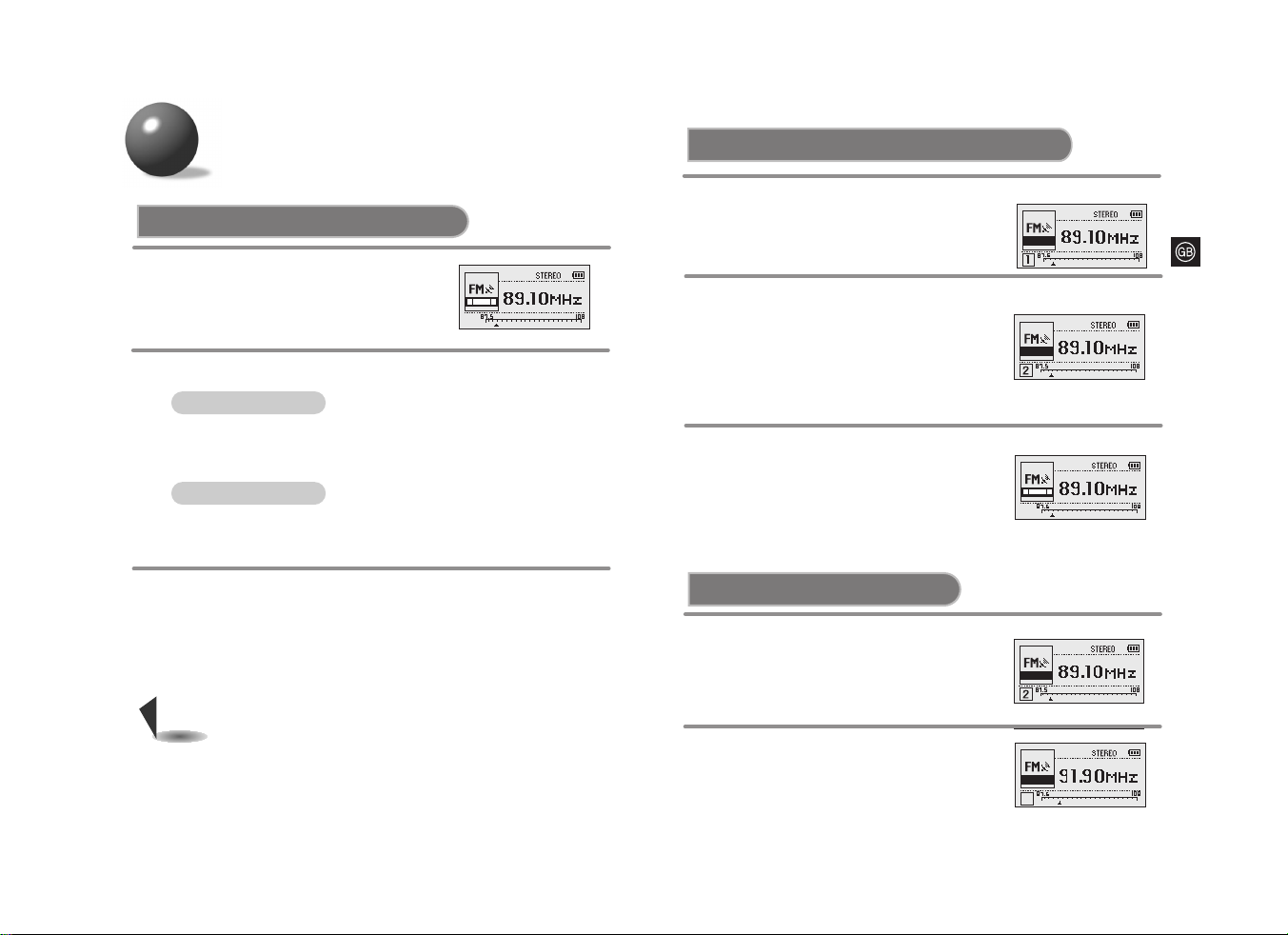
To select the desired radio station
Automatic Tuning
Press and hold the MODE button.
•
Press the MODE button to select
either Mono or Stereo.
1
To turn off the radio, press
and hold the STOP (■) button.
3
Press and hold
the
Iî orïI.
•
Automatically scans and tunes to the next avaiable station.
Press the
Iî orï
I
.
•
Press the button repeatedly to tune in the desired station manually.
2
• The reception may not be clear in a weak signal area.
•
If the reception of an FM station transmitting in stereo is weak, press the
MODE button to switch to the mono mode for improved sound quality.
Note
Manual Tuning
Listening to FM Radio
•
Press the PLAY/PAUSE (√») button to switch to CD mode.
Use the
Iî ,ï
I
buttons to tune in to a desired radio station.
Press
Iî orï
I
to select the preset
“P. MEMORY 2”.
•
Each time the button is pressed a higher or
lower preset number is selected.
•
Start with the preset station number 1 if you
are presetting stations for the first time since
the purchase of the product.
2
*
You can either manually
or automatically preset
and store FM stations.
Presetting Stations in Memory(Memory function)
EXAMPLE: Storing an FM station at 89.10 MHz into preset number 2
Tune to a station of 89.10 MHz and
then press the DIR./PROG. button.
1
Press the DIR./PROG. button again to
store the selected station.
•
The preset number disappears, indicating
that the station has been stored.
•
Repeat steps 1 to 3 to change the station or
store other stations. You can preset up to
15 stations.
3
Tuning in to a Preset Station
Press
Iî orï
I
to select the
desired preset number.
•
"PRESET" remains, and the frequencies
of the preset stations are displayed in turn.
2
If you have already stored
stations into memory,
press the STOP (■) button.
1
•
"PRESET" and the station frequency stored
under that preset number appear on the display.
P.MEMORY
P.MEMORY
PRESET
PRESET
3
Page 17
3231
Looking after your CDs
Wash the disc with a neutral detergent diluted in water, and
then wipe gently with a soft dry cloth from the center of the
disc to the outside.
Handling your CDs
Carefully pick up the disc by its edge without
touching the disc’s surface.
Do not attach stickers to the
signal surface (the side with
shiny, rainbow colors).
Do not write on the labeled (printed) side with a
ballpoint pen or a pencil.
Do not clean your CDs with
record spray or anti-static.
Do not use volatile chemicals
such as benzene or thinners.
Precautions when using compact discs
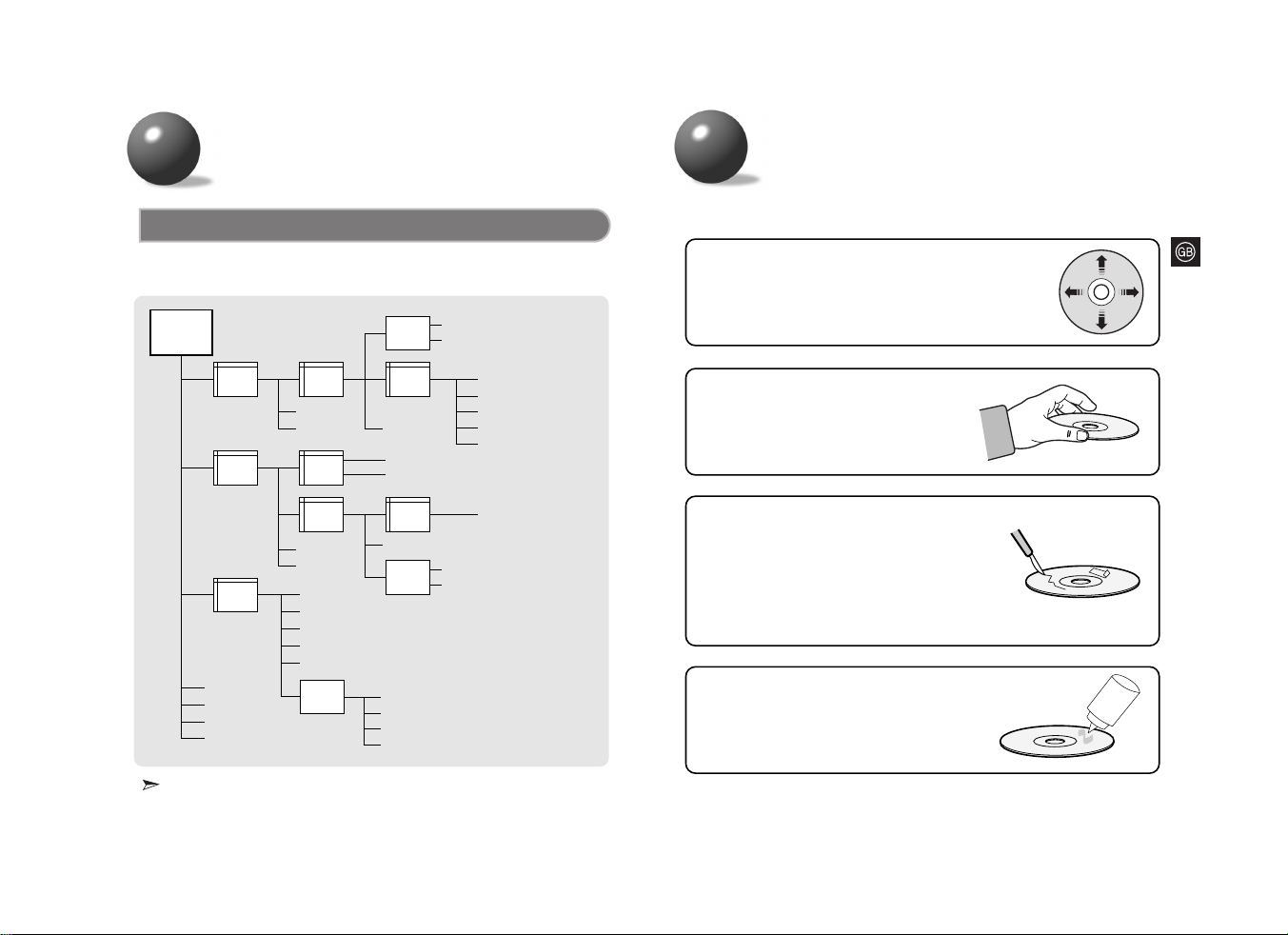
Playback sequence of albums and tracks
• Albums with .jpg, .wav or .doc are not audio files and therefore will be skipped.
Features
The player can recognize up to about 999 files.
a. hwp
Root
(Album 1)
Album
2
Album
3
Album
4
1. mp3
2. mp3
3. mp3
4. mp3
Album
5
5.mp3
6.mp3
Album
6
Album
7
7.wma
8.mp3
9.mp3
10.mp3
11.mp3
12.mp3
13.mp3
Music
(skipped)
Document
(skipped)
Album
8
14.mp3
c.doc(skipped)
15.mp3
Album
9
16.mp3
Picture
(skipped)
f. wav
g. mid
h. rm
i. ra
b. gul
d. jpg
e. jpg
17.mp3
18.mp3
19.mp3
20.mp3
21.mp3
22.mp3
Page 18
3433
Specifications
File Compatibility
● Only files in MP3 Format (Mpeg1.Layer3), with an .mp3 as the file extension, and
WMA files with .WMA extension can be played back.
How many MP3 files can a CD-R or CD-RW disc record?
● The maximum capacity of one CD-R or CD-RW disc is 700MB.
Normally, one MP3 file has a capacity of 4MB, therefore approximately 170 files can
be recorded on a single disc.
*
:
(Based on the jack output of the main unit)
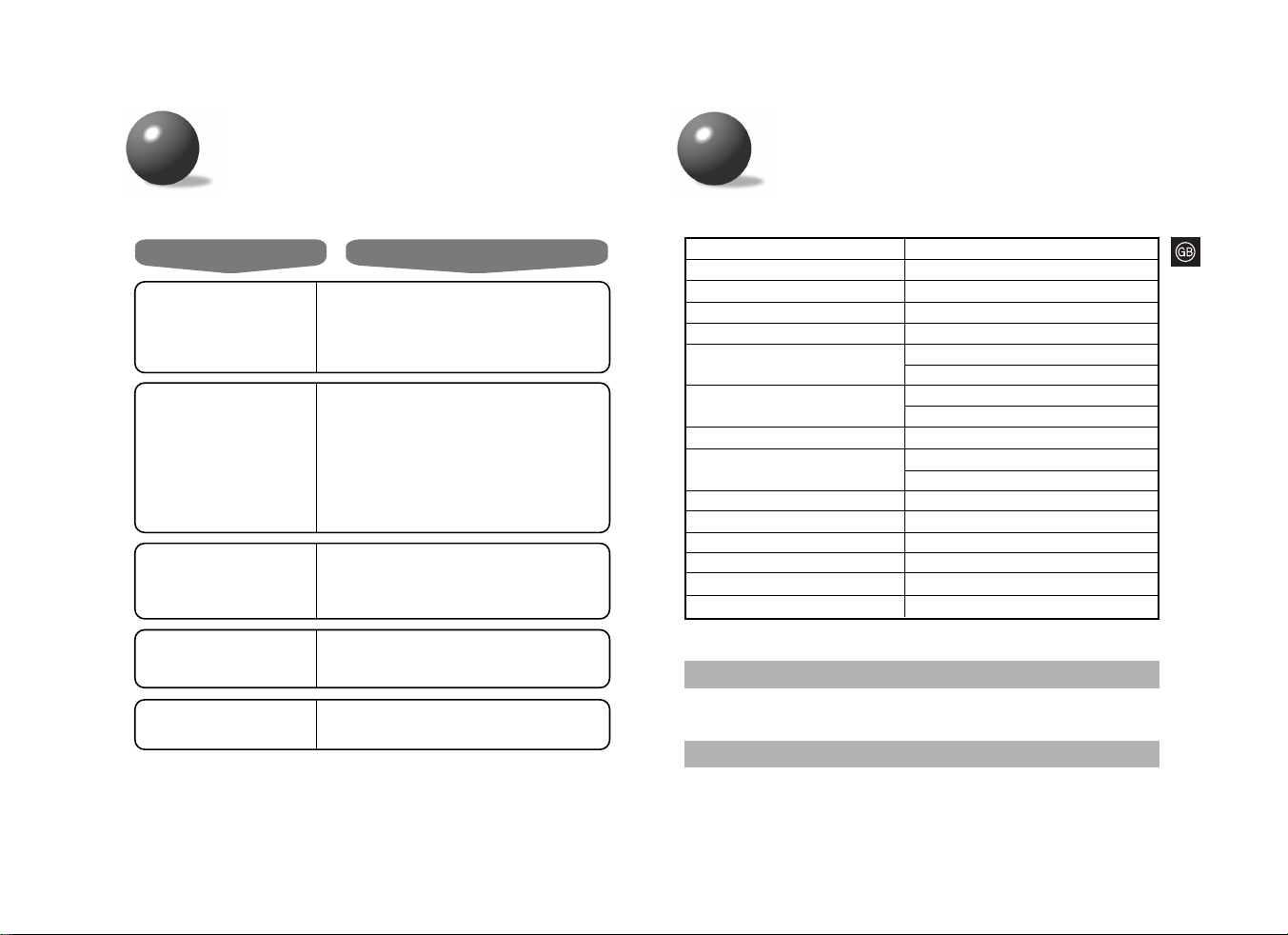
Problem Check
Unit has no power.
● Did you insert the battery with the correct
polarity?
● Are the batteries drained?
● Is the AC adaptor connected correctly?
● Is the door open?
Earphones don’t work.
● Is the volume control on the unit at the minimum
setting?
A sound or track is
skipped.
● Was the unit jolted or knocked?
● Is there dust, fingerprints or scratches on the
disc?
Some of the MP3(WMA) files
on a CD are not recognized.
● Check if the unreadable files have .mp3(.WMA)
as their extension on your PC.
Playback does not
function.
● Is the disc inserted correctly?
● Is the disc damaged or deformed?
● Has the unit been locked with the HOLD switch?
● Has the unit been moved from a cold place to a
hot place?
Abrupt change of temperature may cause
condensation to form on the lens. Keep your CD
Player in a warm place until the condensation
on the lens has disappeared.
Troubleshooting Guide
Item Description
*
Frequency range 20Hz ~ 20KHz
*
Earphone output 330mV(RMS), 6.8mW/CH,16Ω
*
Signal/noise ratio 90dB (1kHz)
*
Total harmonic distortion 0.1% (1kHz, 0dB)
Format Support
CD-DA (8Cm/12Cm)
CD-ROM Mode 1, Mode 2 Form 1
CD-R/RW Readability
ISO 9660, Joliet
Romeo, Multi-session
File Support MPEG 1 Layer 3, WMA
Bit Rate
8kbps ~ 320kbps (MP3)
32kbps ~ 320kbps (WMA)
FM Frequency Range 87.50MHz ~ 108.00MHz
FM S/N Ratio 58dB
FM Stereo Separation 30dB
Tag Support ID3 V1, ID3 V2 2.0
Dimensions 136(W) X 136(D) X 30(H)(mm)
Weight 200g (without batteries)
 Loading...