

Page 1
Global LCD Panel Exchange Center
ISSUED DATE : 2011-2-21
SAMSUNG TFT-LCD PRODUCT INFORMATION
MODEL : LTM240CL01
www.panelook.com
PRODUCT INFORMATION
Note : This is Product Information is subject to change after 3 months of issuing date.
Application Engineering Group, LCD Sales & Marketing Team
LCD Business, Samsung Electronics Co . , LTD.
MODEL LTM240CL01 Page
One step solution for LCD / PDP / OLED panel application: Datasheet, inventory and accessory!
www.panelook.com
1/31
Page 2
Global LCD Panel Exchange Center
www.panelook.com
PRODUCT INFORMATION
Contents
General Description --------------------------------------------------------------------------------- (3)
1. Absolute Maximum Ratings -------------------------------------------------------------------- (4)
2. Optical Characteristics --------------------------------------------------------------------------- (6)
3. Electrical Characteristics ----------------------------------------------------------------------- (11)
3.1 TFT LCD Module
3.2 Back Light Unit
4. Block Diagram ------------------------------------------------------------------------------------ (14)
4.1 TFT LCD Module
4.2 Back Light Unit
5. Input Terminal Pin Assignment ---------------------------------------------------------------- (15)
5.1 Input Signal & Power
5.2 Input Power
5.3 Back Light Unit
5.4 LVDS Interface
5.5 Input Signals, Basic Display Colors and Gray Scale of Each Color
6. Interface Timing ----------------------------------------------------------------------------------- (23)
6.1 Timing Parameters (DE only mode)
6.2 Timing Diagrams of interface Signal (DE only mode)
6.3 Power ON/OFF Sequence
6.4 VDD Power Dip Condition
7. Outline Dimension -------------------------------------------------------------------------------- (27)
8. General Precaution ------------------------------------------------------------------------------- (29)
8.1 Handling
8.2 Storage
8.3 Operation
8.4 Operation Condition Guide
8.5 Others
MODEL LTM240CL01 Page
One step solution for LCD / PDP / OLED panel application: Datasheet, inventory and accessory!
2/31
www.panelook.com
Page 3
Global LCD Panel Exchange Center
www.panelook.com
General Description
PRODUCT INFORMATION
Description
LTM240CL01 is a color active matrix liquid crystal display (LCD) that uses amorphous
silicon TFT (Thin Film Transistor) as switching components. This model is composed of
a TFT LCD panel, a driver circuit and a back light unit. The resolution of a 24.0” is 1920
x 1200 and this model can display up to 16.7 millions colors.
Features
High Color Saturation, high aperture structure
PLS mode
Wide Viewing Angle
WUXGA (1920 x 1200 pixels) resolution
DE (Data Enable) only mode
White LED Edge Backlight (1-side)
RoHS, Halogen Free compliance
TCO 5.0 compliances
( Except for 2.2 response time; this product does not have over driving function.
It is recommended to support in system level )
Applications
Workstation & desktop monitors
MFM & Graphic application
Display terminals for AV application products
Financial market
Monitors for industrial machine
Monitors for HDTV
Monitors for Professional Medical machine
* If the module is used to other applications besides the above, please contact SEC
in advance.
General Information
Items Specification Unit Note
Pixel Pitch 0.270(H) x 0.270(W) mm
Active Display Area 518.4(H) x 324.0(V) mm
Surface Treatment (Haze 47%), Hard –coating(3H)
Display Colors 16.7M colors
Number of Pixels 1920 x 1200 pixel
Pixel Arrangement RGB vertical stripe
Display Mode Normally Black
Luminance of White 300(Typ.)
cd/༇
MODEL LTM240CL01 Page
One step solution for LCD / PDP / OLED panel application: Datasheet, inventory and accessory!
3/31
www.panelook.com
Page 4
Global LCD Panel Exchange Center
www.panelook.com
PRODUCT INFORMATION
Mechanical Information
Item Min. Typ. Max. Unit Note
Horizontal (H) 545.9 546.4 546.9 mm
Module
size
Depth (D) - - 15.0 mm
Weight - - 2400 g LCD module only
Note (1) Mechanical tolerance is · 0.5mm unless there is a special comment.
-Vertical (V) 351.5 352.0 352.5 mm
1. Absolute Maximum Ratings
If the condition exceeds maximum ratings, it can cause malfunction or unrecoverable
damage to the device.
Item Symbol Min. Max. Unit Note
Power Supply Voltage V
Storage temperature T
Glass surface temperature
(Operation condition)
T
Shock ( non - operating ) S
Vibration ( non - operating ) V
DD
STG
OPR
nop
nop
GND-0.5 5.5 V
-20 60
050
-50G(2)
- 1.5 G (3)
(1)
Note (1) Ta= 25 · 2 ¶C
MODEL LTM240CL01 Page
One step solution for LCD / PDP / OLED panel application: Datasheet, inventory and accessory!
4/31
www.panelook.com
Page 5
Global LCD Panel Exchange Center
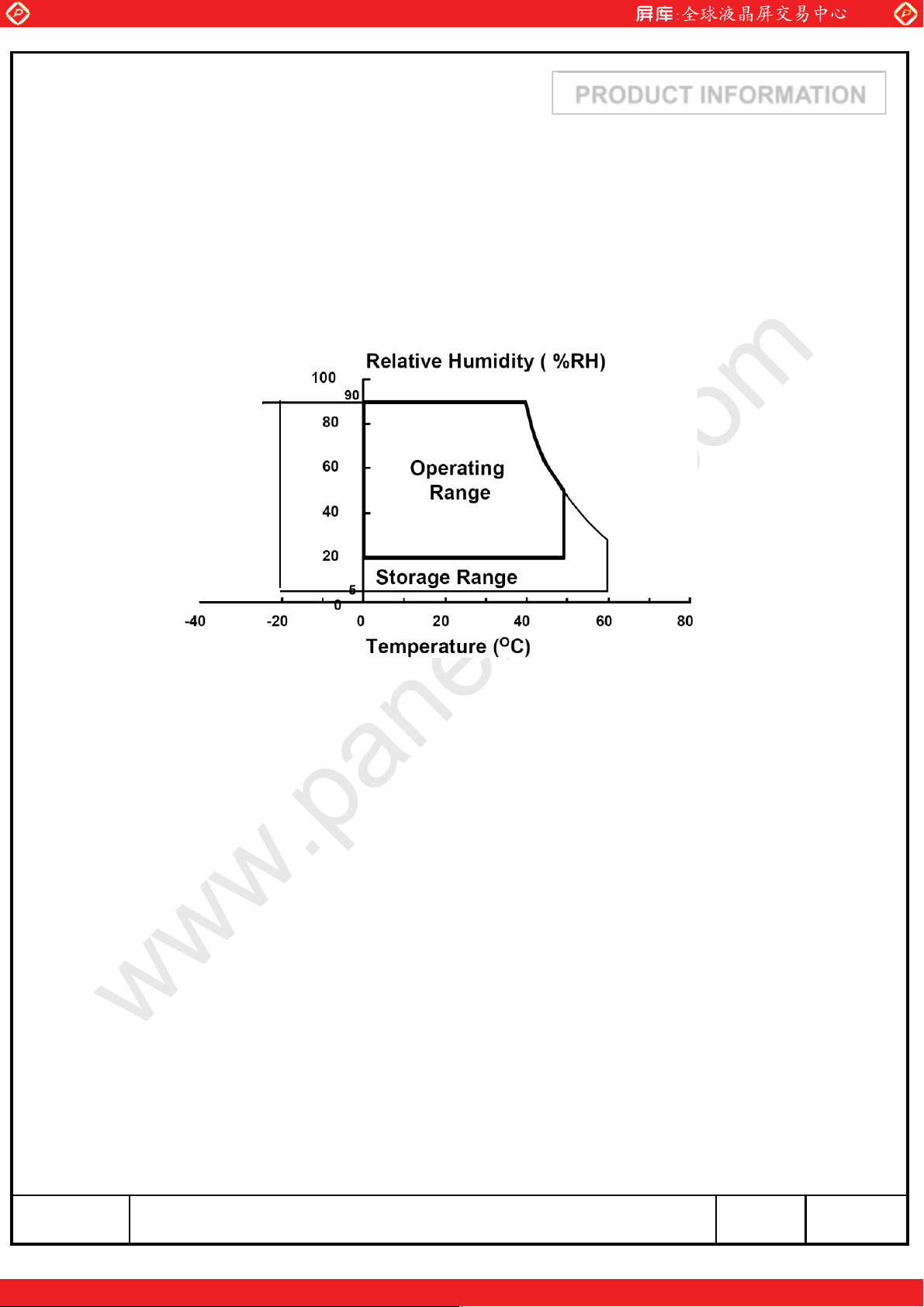
(1) Temperature and relative humidity range are shown in the figure below.
a. 90 % RH Max. (Ta ≤ 39 ¶C)
b. Maximum wet-bulb temperature at 39 ¶C or less. (Ta ≤ 39 ¶C)
c. No condensation
(2) 11ms, sine wave, one time for ·X, ·Y, ·Z axis
(3) 10-300 Hz, Sweep rate 10min, 30min for X,Y,Z axis
www.panelook.com
(39,90)
(39,90)
(39,90)
(39,90)
PRODUCT INFORMATION
25,5)
25,5)
((--25,5)
((--25,5)
Fig. Temperature and Relative humidity range
(50,50.4)
(50,50.4)
(50,50.4)
(50,50.4)
(60,27.7)
(60,27.7)
(60,27.7)
(60,27.7)
MODEL LTM240CL01 Page
One step solution for LCD / PDP / OLED panel application: Datasheet, inventory and accessory!
5/31
www.panelook.com
Page 6
Global LCD Panel Exchange Center
www.panelook.com
2. Optical Characteristics
PRODUCT INFORMATION
The optical characteristics should be measured in a dark room or equivalent.
Measuring equipment : SR-3, RD-80S (TOPCON), EZ-Contrast (Eldim)
(Ta = 25 · 2¶C, VDD=5V, fv= 60Hz, Fdclk= 77MHz, If = 480 mA )
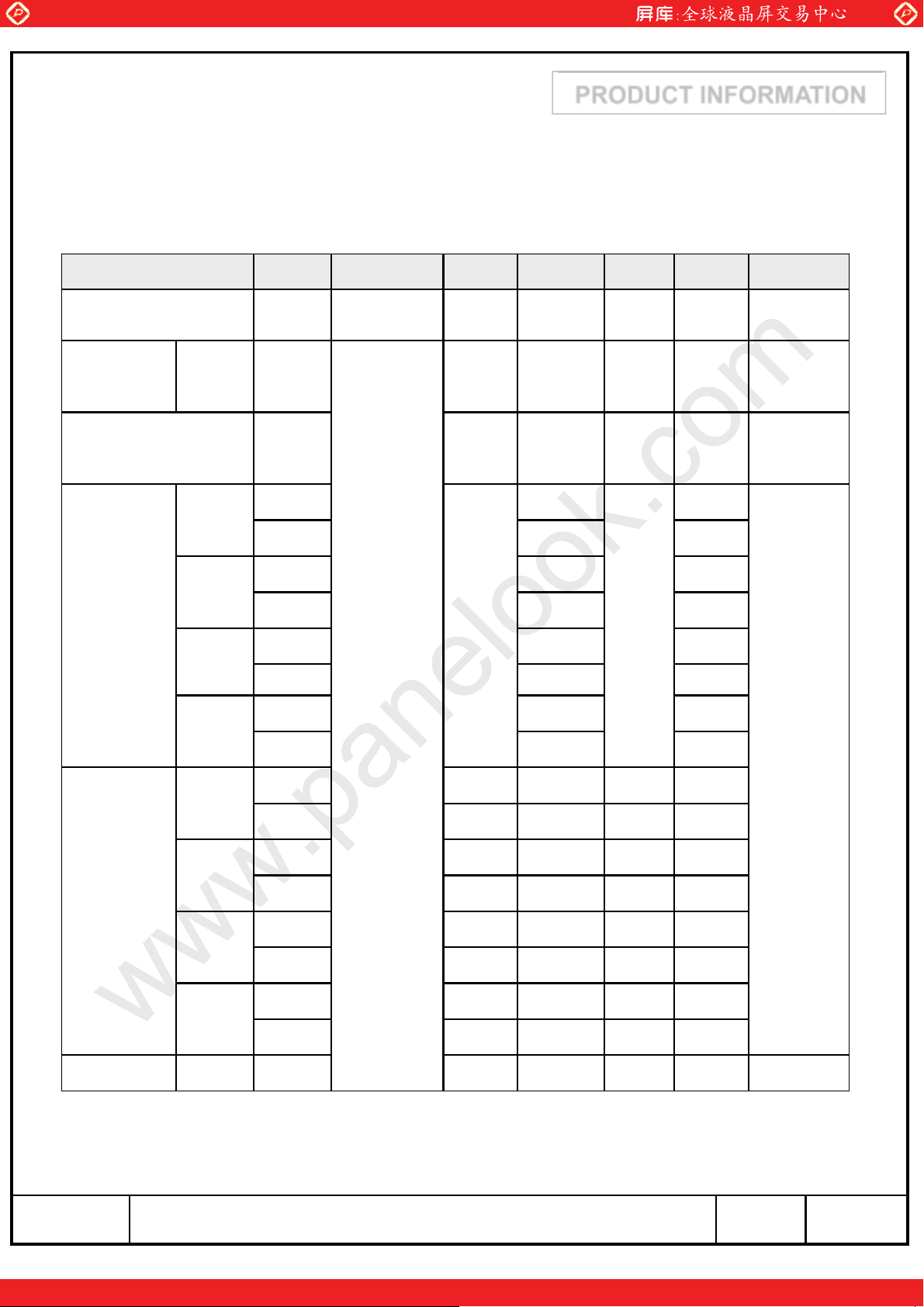
Item Symbol Condition Min. Typ. Max. Unit Note
Contrast Ratio
(Center of screen)
Response
Time
Luminance of White
(Center of screen)
On/Off Tr+Tf - 12 - msec
Red
C/R 600 1,000 -
Y
L
Rx
Ry (0.330)
250 300 - cd/m2
(0.640)
(3)
SR-3
(5)
RD-80S
(6)
SR-3
Color
Chromaticity
(CIE 1931)
Color
Chromaticity
(CIE 1976)
Green
Blue
White
Red
Green
Blue
White
Gx
Gy (0.600)
Bx (0.150)
By (0.060)
Wx 0.313
Wy 0.329 (7),(8)
Ru' - (0.451) - SR-3
Rv' - (0.523) -
Gu' - (0.125) -
Gv' - (0.563) -
Bu' - (0.175) -
Bv' - (0.158) -
Wu' - 0.198 -
Wv' - 0.468 -
Normal
=0
θ
L,R
=0
θ
U,D
Viewing
Angle
-0.030
(0.300)
+0.030
C.G.L White
* C.G.L : Color Grayscale Linearity (continue to the next page)
Ƹu'v'
- - 0.02 (9)
MODEL LTM240CL01 Page
One step solution for LCD / PDP / OLED panel application: Datasheet, inventory and accessory!
6/31
www.panelook.com
Page 7
Global LCD Panel Exchange Center
www.panelook.com
PRODUCT INFORMATION
Item Symbol Condition Min. Typ. Max. Unit Note
Color Gamut - - 72 - %
Color Temperature - - 6500 - K
θ
Hor.
Viewing
Angle
Ver.
Brightness Uniformity
(9 Points)
L
θ
R
θ
U
θ
D
B
uni
CR≥10
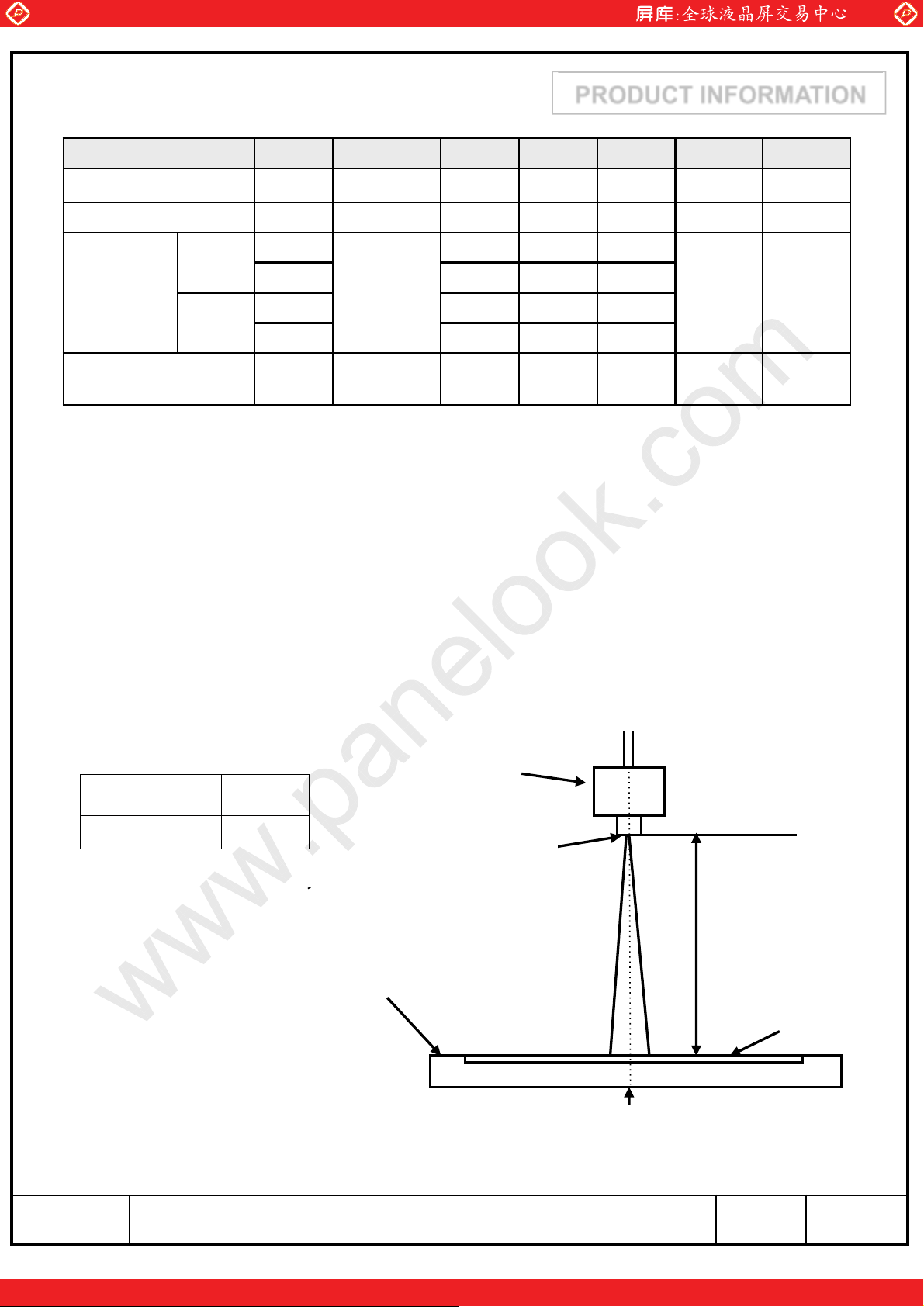
Note (1) Test Equipment Setup
The measurement should be executed in a stable, windless and dark room between
30min after lighting the back light at the given temperature for stabilization
of the back light. This should be measured in the center of screen.
LED current : 480 mA
Environment condition : Ta = 25 · 2 ¶C
80 89 -
80 89 -
Degrees
80 89 -
80 89 -
--25%
(8)
SR-3
(4)
SR-3
Photo detector
Photo detector Field
SR-3
1ദ
Field
SR-3 : 50
TFT - LCD Module
LCD Panel
The center of the screen
MODEL LTM240CL01 Page
7/31
One step solution for LCD / PDP / OLED panel application: Datasheet, inventory and accessory!
www.panelook.com
Page 8
Global LCD Panel Exchange Center
B
(
)
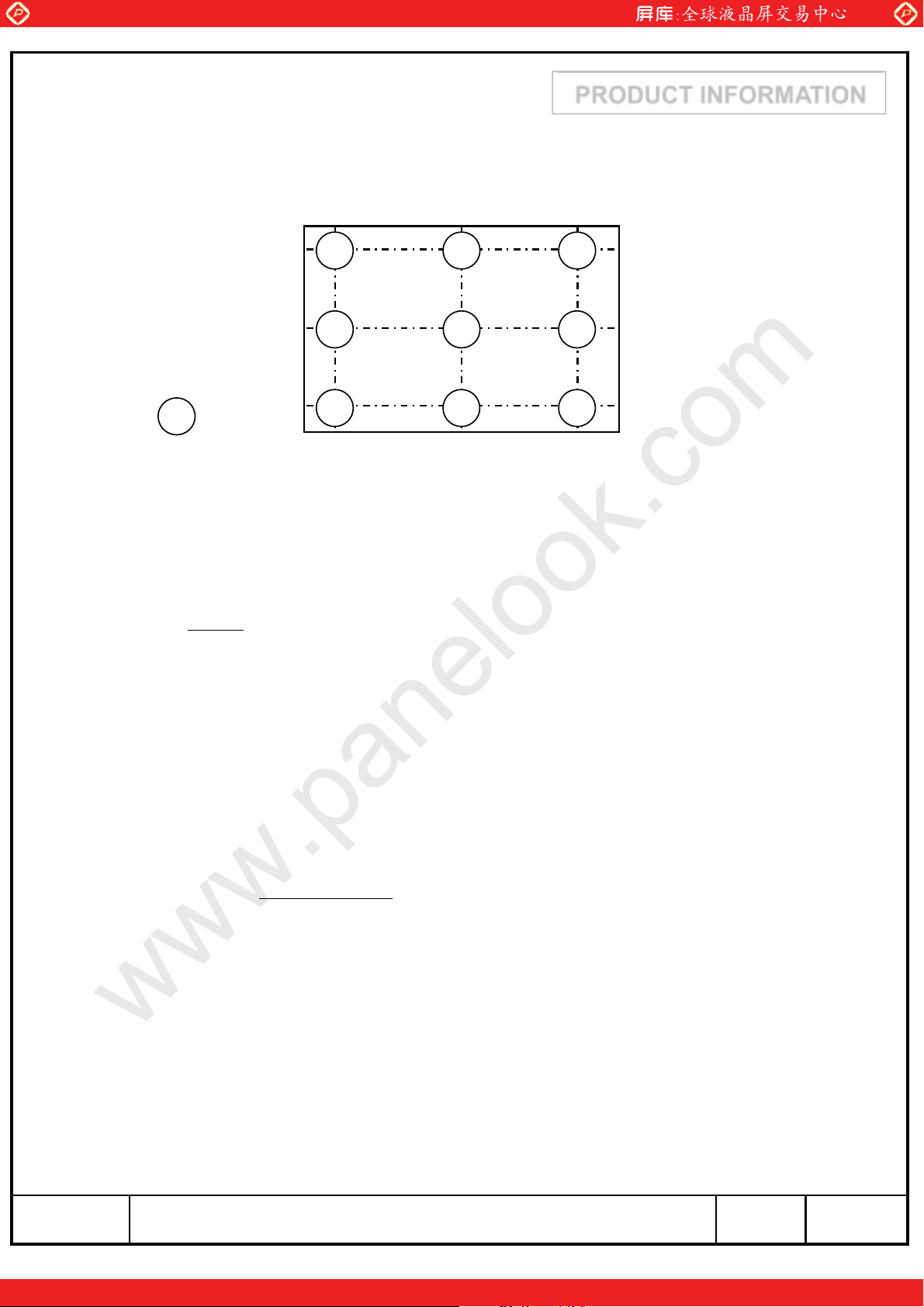
Note (2) Definition of test point
www.panelook.com
PRODUCT INFORMATION
192 960 1728
Active Area
6
: Test Point
Note (3) Definition of Contrast Ratio (C/R)
: Ratio of gray max (Gmax) & gray min (Gmin) at the center point䐣 of the panel
G
CR
max
G
min
3 2 1
8 79
45
120
600
1080
Gmax : Luminance with all pixels white
Gmin : Luminance with all pixels black
Note (4) Definition of 9 points brightness uniformity
uni
BB
100
Bmax : Maximum brightness with all pixels white
Bmin : Minimum brightness with all pixels white
max min
B
max
MODEL LTM240CL01 Page
One step solution for LCD / PDP / OLED panel application: Datasheet, inventory and accessory!
8/31
www.panelook.com
Page 9
Global LCD Panel Exchange Center
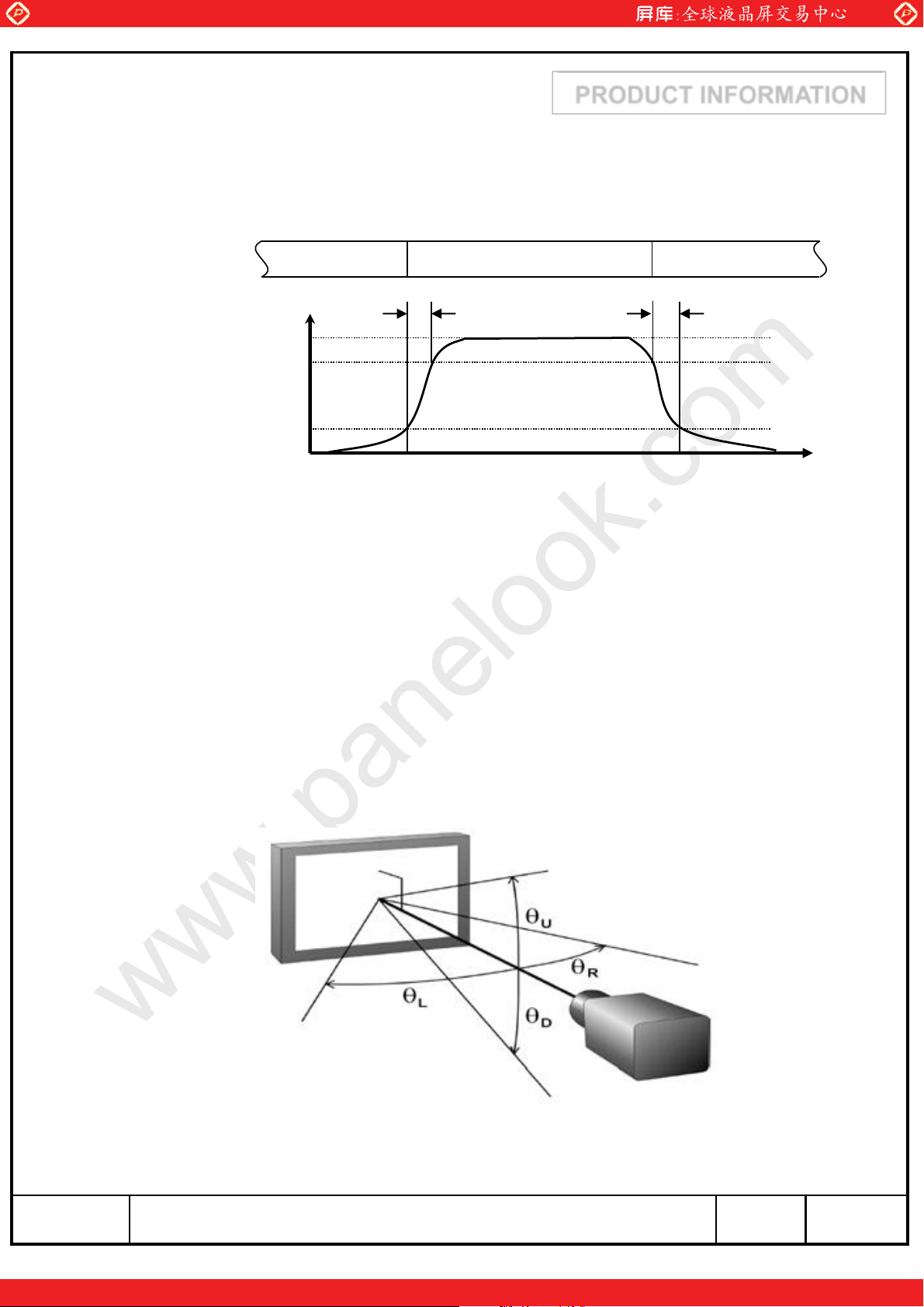
Note (5) Definition of Response time
a. On/Off response time : Sum of Tr, Tf
www.panelook.com
PRODUCT INFORMATION
Display Data
Optical
Black (TFT OFF) White (TFT ON) Black (TFT OFF)
T
F
100%
90%
T
R
Response
10%
0%
Note (6) Definition of Luminance of White : Luminance of white at center point䐣
Note (7) Definition of Color Chromaticity (CIE 1931, CIE1976)
Color coordinate of Red, Green, Blue & White at center point䐣
Time
Note (8) Definition of Viewing Angle
: Viewing angle range ( CR ≥10 )
MODEL LTM240CL01 Page
One step solution for LCD / PDP / OLED panel application: Datasheet, inventory and accessory!
9/31
www.panelook.com
Page 10
Global LCD Panel Exchange Center
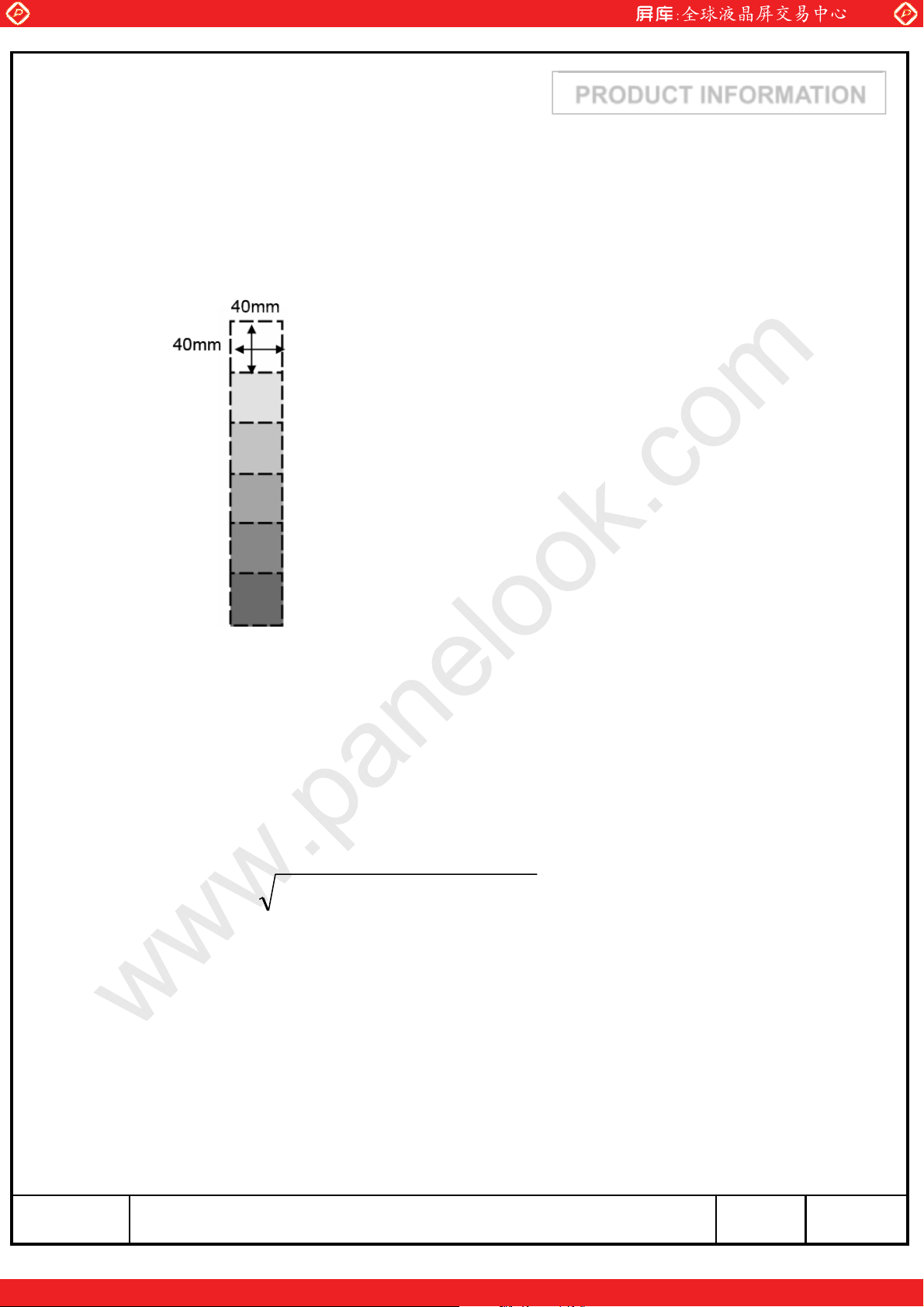
Note (9) Color Grayscale Linearity
a. Test image : 100% full white pattern with a test pattern as below
b. Test pattern : Squares, 40mm by 40mm in size, filled with 255, 225, 195, 165, 135 and
105 grays steps should be arranged at the centerྜྷ of the screen.
www.panelook.com
PRODUCT INFORMATION
c. Test method
st
gray step : move a square of 255 gray level should be moved into the center of the
-1
screen and measure luminance and u’ and v’ coordinates.
- Next gray step : Move a 225 gray square into the center and measure both
luminance and coordinates, too.
d. Test evaluation
u'v'= (u' - u' ) + (v' - v' )
AB
2
AB
2
Where A, B : 2 gray levels found to have the largest color differences between them
i.e. get the largest Δu’ and Δv’ of each 6 pair of u’ and v’ and calculate the Δu’v’.
MODEL LTM240CL01 Page
One step solution for LCD / PDP / OLED panel application: Datasheet, inventory and accessory!
10/31
www.panelook.com
Page 11

Global LCD Panel Exchange Center
www.panelook.com
3. Electrical Characteristics
3.1 TFT LCD Module
The connector for display data & timing signal should be connected.
Item Symbol Min. Typ. Max. Unit Note
Voltage of Power Supply V
Interface Type LVDS LVDS
(a) Black
Current of
Power
Supply
Vsync Frequency f
Hsync Frequency f
(b) White - 1,400 - mA
(c) Dot - 1,200 1,800 mA
I
DD
DD
V
H
PRODUCT INFORMATION
Ta = 25 ¶C
4.5 5.0 5.5 V (1)
- 900 - mA
(2),(3)
45 60 80 Hz
55 74 98 kHz
Main Frequency f
Rush Current I
DCLK
RUSH
58 77 103 MHz
- - 5.0 A (4)
MODEL LTM240CL01 Page
One step solution for LCD / PDP / OLED panel application: Datasheet, inventory and accessory!
11/31
www.panelook.com
Page 12

Global LCD Panel Exchange Center
www.panelook.com
PRODUCT INFORMATION
Note (1) The ripple voltage should be controlled under 10% of VDD.
(2) fV=60Hz, fDCLK = 77MHz, VDD = 5.0V, DC Current.
(3) Power dissipation check pattern (LCD Module only)
a) White Pattern b) Black Pattern c) Dot Pattern
(4) Measurement Condition
100%
90%
10%
GND
Rush Current I
RUSH
T
RUSH
=470༕
can be measured when T
. is 470༕.
RUSH
V
DD
MODEL LTM240CL01 Page
One step solution for LCD / PDP / OLED panel application: Datasheet, inventory and accessory!
12/31
www.panelook.com
Page 13

Global LCD Panel Exchange Center
3.2 Back Light Unit
3.2.1 The characteristics of LED bar
The back light unit is composed of WLED.
Item Symbol Min. Typ. Max. Unit Note
www.panelook.com
PRODUCT INFORMATION
Ta=25 · 2¶C
LED Forward Current I
LED Array Voltage V
F
P
- 480 - mA (1)
-46.2 49V(1)
Operating Life Time Hr 30,000 - - Hour (2)
Note (1) The above specification is not for the converter output, but for the LED bar.
The LED bar consists of 56 LED packages ; 4 parallel X 14 serial
(2) Life time(Hr) is defined as the time when brightness of a LED package itself
becomes 50% or less than its original value at the condition of Ta=25 · 2¶C
and I
=480mA
F
MODEL LTM240CL01 Page
One step solution for LCD / PDP / OLED panel application: Datasheet, inventory and accessory!
13/31
www.panelook.com
Page 14

Global LCD Panel Exchange Center
www.panelook.com
4. BLOCK DIAGRAM
PRODUCT INFORMATION
4.1 TFT LCD Module
HF mLVDS
Source Driver ICs
Column Driver Circuit
TFT-LCD
LVDS
pair #1
LVDS
pair #2
+5.0V
V
DD
CN1
(30pin)
LVDS (Rx)
HF mLVDS(Tx)
Timing Controller
Power
Circuit
Control signal
S1 S1920
Control signal
(1920 x RGB x 1200 pixels)
4.2 Back Light Unit
Connector: Molex 1.25 WTB CONN (6-pin connector) or equivalent
LED Power
LED Return
signal
signal
LED Power
LED Return
6-pin connectorLED bar
MODEL LTM240CL01 Page
One step solution for LCD / PDP / OLED panel application: Datasheet, inventory and accessory!
14/31
www.panelook.com
Page 15

Global LCD Panel Exchange Center
www.panelook.com
5. Input Terminal Pin Assignment
PRODUCT INFORMATION
5.1. Input Signal & Power ( Connector : P-TWO 196308-30041 or equivalent )
PIN NO SYMBOL FUNCTION
1 RXO0N Negative LVDS differential data output
2 RXO0P Positive LVDS differential data output
3 RXO1N Negative LVDS differential data output
4 RXO1P Positive LVDS differential data output
5 RXO2N Negative LVDS differential data output
6 RXO2P Positive LVDS differential data output
7 GND Ground
8 RXOC- Negative Sampling Clock (ODD data)
9 RXOC+ Positive Sampling Clock (ODD data)
10 RXO3N Negative LVDS differential data output
11 RXO3P Positive LVDS differential data output
12 RXE0N Negative LVDS differential data output
13 RXE0P Positive LVDS differential data output
14 GND Ground
15 RXE1N Negative LVDS differential data output
16 RXE1P Positive LVDS differential data output
17 GND Ground
18 RXE2N Negative LVDS differential data output
19 RXE2P Positive LVDS differential data output
20 RXEC- Negative Sampling Clock (EVEN data)
21 RXEC+ Positive Sampling Clock (EVEN data)
22 RXE3N Negative LVDS differential data output
23 RXE3P Positive LVDS differential data output
24 GND Ground
25 NC * CE (For LCD internal use only. Do not connect)
26 NC * CTL (For LCD internal use only. Do not connect)
27 NC No Connection
28 VDD
29 VDD
30 VDD
Power Supply : +5V
MODEL LTM240CL01 Page
One step solution for LCD / PDP / OLED panel application: Datasheet, inventory and accessory!
15/31
www.panelook.com
Page 16

Global LCD Panel Exchange Center
Note) Pin number starts from Left side
www.panelook.com
PRODUCT INFORMATION
PCB
Pin No. 1 Pin No. 30
#1
P-TWO 196308-30041 or equivalent
#1
Fig. Connector diagram
a. All GND pins should be connected together and also be connected to the
LCD’s metal chassis.
b. All power input pins should be connected together.
c. All NC pins should be separated from other signal or power.
#30
#30
MODEL LTM240CL01 Page
One step solution for LCD / PDP / OLED panel application: Datasheet, inventory and accessory!
16/31
www.panelook.com
Page 17

Global LCD Panel Exchange Center
www.panelook.com
PRODUCT INFORMATION
5.3 Back Light Unit
LED Bar input connector : Molex 1.25 WTB CONN (6-pin connector) or equivalent
Pin No. Pin description Description
1 RTN 1 Channel 1 return signal
2 RTN 2 Channel 2 return signal
3 Vin LED power input
4 Vin LED power input
5 RTN 3 Channel 3 return signal
6 RTN 4 Channel 4 return signal
Note ) Pin number starts from Left side
Rear view of panel
Connector
#1
Fig. Connector diagram
#6
MODEL LTM240CL01 Page
One step solution for LCD / PDP / OLED panel application: Datasheet, inventory and accessory!
17/31
www.panelook.com
Page 18

Global LCD Panel Exchange Center
5.4 LVDS Interface
5.4.1 Odd Pixel Data (1st pixel data)
1st LVDS Transmitter ( DS90C383, DS90C385 ) Signal Interface
www.panelook.com
PRODUCT INFORMATION
Device Input Pin Device Input Signal
No Symbol Symbol Function Terminal Symbol
51 TXIN0 RO0 Red Odd Pixel Data (LSB)
52 TXIN1 RO1 Red Odd Pixel Data
54 TXIN2 RO2 Red Odd Pixel Data
55 TXIN3 RO3 Red Odd Pixel Data
56 TXIN4 RO4 Red Odd Pixel Data
2 TXIN5 RO7 Red Odd Pixel Data (MSB)
3 TXIN6 RO5 Red Odd Pixel Data
4 TXIN7 GO0 Green Odd Pixel Data (LSB)
6 TXIN8 GO1 Green Odd Pixel Data
7 TXIN9 GO2 Green Odd Pixel Data
8 TXIN10 GO6 Green Odd Pixel Data
10 TXIN11 GO7 Green Odd Pixel Data (MSB)
Output
Signal
TXOUT0-
TXOUT0+
TXOUT3-
TXOUT3+
TXOUT0-
TXOUT0+
TXOUT1-
TXOUT1+
TXOUT3-
TXOUT3+
To LTM240CL01
Interface ( CN1 )
No. 1
No. 2
No. 10
No. 11
No. 1
No. 2
No. 3
No. 4
No. 10
No. 11
RXO0-
RXO0+
RXO3-
RXO3+
RXO0-
RXO0+
RXO1-
RXO1+
RXO3-
RXO3+
11 TXIN12 GO3 Green Odd Pixel Data
12 TXIN13 GO4 Green Odd Pixel Data
14 TXIN14 GO5 Green Odd Pixel Data
15 TXIN15 BO0 Blue Odd Pixel Data (LSB)
16 TXIN16 BO6 Blue Odd Pixel Data
18 TXIN17 BO7 Blue Odd Pixel Data (MSB)
19 TXIN18 BO1 Blue Odd Pixel Data
20 TXIN19 BO2 Blue Odd Pixel Data
22 TXIN20 BO3 Blue Odd Pixel Data
23 TXIN21 BO4 Blue Odd Pixel Data
24 TXIN22 BO5 Blue Odd Pixel Data
50 TXIN27 RO6 Red Odd Pixel Data
TXOUT1-
TXOUT1+
TXOUT3-
TXOUT3+
TXOUT1-
TXOUT1+
TXOUT2-
TXOUT2+
TXOUT3-
TXOUT3+
No. 3
No. 4
No. 10
No. 11
No. 3
No. 4
No. 5
No. 6
No. 10
No. 11
RXO1-
RXO1+
RXO3-
RXO3+
RXO1-
RXO1+
RXO2-
RXO2+
RXO3-
RXO3+
MODEL LTM240CL01 Page
One step solution for LCD / PDP / OLED panel application: Datasheet, inventory and accessory!
18/31
www.panelook.com
Page 19

Global LCD Panel Exchange Center
5.4.2 Even Pixel Data (2nd pixel data)
2nd LVDS Transmitter ( DS90C383, DS90C385 ) Signal Interface
www.panelook.com
PRODUCT INFORMATION
Device Input Pin Device Input Signal
No Symbol Symbol Function Terminal Symbol
51 TXIN0 RE0 Red Even Pixel Data (LSB)
52 TXIN1 RE1 Red Even Pixel Data
54 TXIN2 RE2 Red Even Pixel Data
55 TXIN3 RE3 Red Even Pixel Data
56 TXIN4 RE4 Red Even Pixel Data
2 TXIN5 RE7 Red Even Pixel Data (MSB)
3 TXIN6 RE5 Red Even Pixel Data
4 TXIN7 GE0 Green Even Pixel Data (LSB)
6 TXIN8 GE1 Green Even Pixel Data
7 TXIN9 GE2 Green Even Pixel Data
Output
Signal
TXOUT0-
TXOUT0+
TXOUT3-
TXOUT3+
TXOUT0-
TXOUT0+
TXOUT1-
TXOUT1+
To LTM240CL01
Interface ( CN1 )
No. 12
No. 13
No. 22
No. 23
No. 12
No. 13
No. 15
No. 16
RXE0-
RXE0+
RXE3-
RXE3+
RXE0-
RXE0+
RXE1-
RXE1+
8 TXIN10 GE6 Green Even Pixel Data
10 TXIN11 GE7 Green Even Pixel Data (MSB)
11 TXIN12 GE3 Green Even Pixel Data
12 TXIN13 GE4 Green Even Pixel Data
14 TXIN14 GE5 Green Even Pixel Data
15 TXIN15 BE0 Blue Even Pixel Data (LSB)
16 TXIN16 BE6 Blue Even Pixel Data
18 TXIN17 BE7 Blue Even Pixel Data (MSB)
19 TXIN18 BE1 Blue Even Pixel Data
20 TXIN19 BE2 Blue Even Pixel Data
22 TXIN20 BE3 Blue Even Pixel Data
23 TXIN21 BE4 Blue Even Pixel Data
24 TXIN22 BE5 Blue Even Pixel Data
TXOUT3-
TXOUT3+
TXOUT1-
TXOUT1+
TXOUT3-
TXOUT3+
TXOUT1-
TXOUT1+
TXOUT2-
TXOUT2+
No. 22
No. 23
No. 15
No. 16
No. 22
No. 23
No. 15
No. 16
No. 18
No. 19
RXE3-
RXE3+
RXE1-
RXE1+
RXE3-
RXE3+
RXE1-
RXE1+
RXE2-
RXE2+
50 TXIN27 RE6 Red Even Pixel Data
TXOUT3-
TXOUT3+
No. 22
No. 23
MODEL LTM240CL01 Page
One step solution for LCD / PDP / OLED panel application: Datasheet, inventory and accessory!
RXE3-
RXE3+
19/31
www.panelook.com
Page 20

Global LCD Panel Exchange Center
5.4.3 Odd Pixel Data (1st pixel data))
LVDS Transmitter ( DS90C387 ) Signal Interface
www.panelook.com
PRODUCT INFORMATION
Device Input Pin Device Input Signal
No Symbol Symbol Function Terminal Symbol
10 R10 RO0 Red Odd Pixel Data (LSB)
9 R11 RO1 Red Odd Pixel Data
8 R12 RO2 Red Odd Pixel Data
7 R13 RO3 Red Odd Pixel Data
6 R14 RO4 Red Odd Pixel Data
3 R17 RO7 Red Odd Pixel Data (MSB)
5 R15 RO5 Red Odd Pixel Data
2 G10 GO0 Green Odd Pixel Data (LSB)
1 G11 GO1 Green Odd Pixel Data
100 G12 GO2 Green Odd Pixel Data
94 G16 GO6 Green Odd Pixel Data
93 G17 GO7 Green Odd Pixel Data (MSB)
Output
Signal
A0M
A0P
A3M
A3P
A0M
A0P
A1M
A1P
A3M
A3P
To LTM240CL01
Interface ( CN1 )
No. 1
No. 2
No. 10
No. 11
No. 1
No. 2
No. 3
No. 4
No. 10
No. 11
RXO0-
RXO0+
RXO3-
RXO3+
RXO0-
RXO0+
RXO1-
RXO1+
RXO3-
RXO3+
99 G13 GO3 Green Odd Pixel Data
96 G14 GO4 Green Odd Pixel Data
95 G15 GO5 Green Odd Pixel Data
92 B10 BO0 Blue Odd Pixel Data (LSB)
86 B16 BO6 Blue Odd Pixel Data
85 B17 BO7 Blue Odd Pixel Data (MSB)
91 B11 BO1 Blue Odd Pixel Data
90 B12 BO2 Blue Odd Pixel Data
89 B13 BO3 Blue Odd Pixel Data
88 B14 BO4 Blue Odd Pixel Data
87 B15 BO5 Blue Odd Pixel Data
4 R16 RO6 Red Odd Pixel Data
A1M
A1P
A3M
A3P
A1M
A1P
A2M
A2P
A3M
A3P
No. 3
No. 4
No. 10
No. 11
No. 3
No. 4
No. 5
No. 6
No. 10
No. 11
RXO1-
RXO1+
RXO3-
RXO3+
RXO1-
RXO1+
RXO2-
RXO2+
RXO3-
RXO3+
MODEL LTM240CL01 Page
One step solution for LCD / PDP / OLED panel application: Datasheet, inventory and accessory!
20/31
www.panelook.com
Page 21

Global LCD Panel Exchange Center
5.4.4 Even Pixel Data (2nd pixel data)
LVDS Transmitter ( DS90C387 ) Signal Interface
www.panelook.com
PRODUCT INFORMATION
Device Input Pin Device Input Signal
No Symbol Symbol Function Terminal Symbol
84 R20 RE0 Red Even Pixel Data (LSB)
81 R21 RE1 Red Even Pixel Data
80 R22 RE2 Red Even Pixel Data
79 R23 RE3 Red Even Pixel Data
78 R24 RE4 Red Even Pixel Data
75 R27 RE7 Red Even Pixel Data (MSB)
77 R25 RE5 Red Even Pixel Data
74 G20 GE0 Green Even Pixel Data (LSB)
73 G21 GE1 Green Even Pixel Data
72 G22 GE2 Green Even Pixel Data
66 G26 GE6 Green Even Pixel Data
65 G27 GE7 Green Even Pixel Data (MSB)
Output
Signal
A4M
A4P
A7M
A7P
A4M
A4P
A5M
A5P
A7M
A7P
To LTM240CL01
Interface ( CN1 )
No. 12
No. 13
No. 22
No. 23
No. 12
No. 13
No. 15
No. 16
No. 22
No. 23
RXE0-
RXE0+
RXE3-
RXE3+
RXE0-
RXE0+
RXE1-
RXE1+
RXE3-
RXE3+
71 G23 GE3 Green Even Pixel Data
70 G24 GE4 Green Even Pixel Data
69 G25 GE5 Green Even Pixel Data
64 B20 BE0 Blue Even Pixel Data (LSB)
58 B26 BE6 Blue Even Pixel Data
57 B27 BE7 Blue Even Pixel Data (MSB)
63 B21 BE1 Blue Even Pixel Data
62 B22 BE2 Blue Even Pixel Data
61 B23 BE3 Blue Even Pixel Data
60 B24 BE4 Blue Even Pixel Data
59 B25 BE5 Blue Even Pixel Data
76 R26 RE6 Red Even Pixel Data
A5M
A5P
A7M
A7P
A5M
A5P
A6M
A6P
A7M
A7P
No. 15
No. 16
No. 22
No. 23
No. 15
No. 16
No. 18
No. 19
No. 22
No. 23
RXE1-
RXE1+
RXE3-
RXE3+
RXE1-
RXE1+
RXE2-
RXE2+
RXE3-
RXE3+
MODEL LTM240CL01 Page
One step solution for LCD / PDP / OLED panel application: Datasheet, inventory and accessory!
21/31
www.panelook.com
Page 22

Global LCD Panel Exchange Center
www.panelook.com
PRODUCT INFORMATION
5.5 Input Signals, Basic Display Colors and Gray Scale of Each Color
DATA SIGNAL
COLORDISPLAY
BASIC
COLO
R
GRAY
SCALE
OF
RED
GRAY
SCALE
OF
GREE
N
GRAY
SCALE
OF
BLUE
(8bit)
BLACK 000000000000000000000000 -
BLUE 000000000000000011111111 -
GREEN 000000001111111100000000 -
CYAN 000000001111111111111111 -
RED 111111110000000000000000 -
MAGENT
A
YELLOW111111111111111100000000 -
WHITE 111111111111111111111111 -
BLACK 000000000000000000000000 R0
DARK
↑
↓
LIGHT
RED 111111110000000000000000 R255
BLACK 000000000000000000000000 G0
DARK
↑
↓
LIGHT
GREEN 000000001111111100000000 G255
BLACK 000000000000000000000000 B0
DARK
↑
↓
LIGHT
BLUE 000000000000000011111111 B255
R0 R1 R2 R3 R4 R5 R6 R7 G0
111111110000000011111111 -
100000000000000000000000 R1
010000000000000000000000 R2
:::::: :::::: ::::::
:::::: :::::: ::::::
101111110000000000000000 R253
011111110000000000000000 R254
000000001000000000000000 G1
000000000100000000000000 G2
:::::: :::::: ::::::
:::::: :::::: ::::::
000000001011111100000000 G253
000000000111111100000000 G254
000000000000000010000000 B1
000000000000000001000000 B2
:::::: :::::: ::::::
:::::: :::::: ::::::
000000000000000010111111 B253
000000000000000001111111 B254
RED GREEN BLUE
G1G
2
G3
G4G
G
G6
5
B0 B1 B2 B3 B4 B5 B6 B7
7
GRAY
SCALE
LEVEL
R3~
R252
G3~
G252
B3~
B252
Note (1) Definition of Gray :
Rn : Red Gray, Gn : Green Gray, Bn : Blue Gray (n = Gray level)
Input Signal : 0 = Low level voltage, 1 = High level voltage
MODEL LTM240CL01 Page
One step solution for LCD / PDP / OLED panel application: Datasheet, inventory and accessory!
22/31
www.panelook.com
Page 23

Global LCD Panel Exchange Center
www.panelook.com
6. Interface Timing
PRODUCT INFORMATION
6.1 Timing Parameters ( DE only mode )
SIGNAL ITEM SYMBOL MIN. TYP. MAX. Unit NOTE
Clock
Hsync F
Frequency
Vsync F
Active
Display
Vertical
Period
Display Term
Vertical Total T
Active Display
Horizontal
Period
Display Term
Horizontal
Total
1/T
T
T
T
H
V
VD
VB
HD
H
C
58 77 103 MHz -
55 74 98 KHz -
45 60 80 Hz -
1200 1200 1200 lines -
1209 1235 1245 lines -
960 960 960 Pixels
993 1040 1075 Pixels
2pixel
/clock
2pixel
/clock
Note (1) This product is DE only mode. The input of Hsync & Vsync signal does
not have an effect on normal operation.
(2) Test Point : TTL control signal and CLK at LVDS Tx input terminal in system
(3) Internal Vcc = 5.0V
MODEL LTM240CL01 Page
One step solution for LCD / PDP / OLED panel application: Datasheet, inventory and accessory!
23/31
www.panelook.com
Page 24

Global LCD Panel Exchange Center
www.panelook.com
PRODUCT INFORMATION
6.2 Timing diagrams of interface signal ( DE only mode )
TV
DE
DE
DCLK
DATA
SIGNALS
TVD
TVB
TH
THD
TC
DCLK
DISPLAY
DATA
DE
TC
TCH
TDS TDH
TES
TCL
0.5
V
0.5
V
CC
0.5
V
CC
CC
MODEL LTM240CL01 Page
One step solution for LCD / PDP / OLED panel application: Datasheet, inventory and accessory!
24/31
www.panelook.com
Page 25

Global LCD Panel Exchange Center
www.panelook.com
PRODUCT INFORMATION
6.3 Power ON/OFF Sequence
To prevent a latch-up or DC operation of the LCD Module, the power on/off
sequence should be as the diagram below.
0≤T1≤10msec
0≤T2≤50msec
0≤T3≤50msec
1sec≤T4
Back-Light
(Recommended)
500msec≤T5
100msec≤T6
T1 : VDDrising time from 10% to 90%
T2 : The time from V
T3 : The time from valid data off to V
to valid data at power ON.
DD
off at power Off.
DD
T4 : VDDoff time for Windows restart
T5 : The time from valid data to B/L enable at power ON.
T6 : The time from valid data off to B/L disable at power Off.
The supply voltage of the external system for the Module input should be the same
as the definition of VDD.
Apply the lamp voltage within the LCD operation range. When the back light turns on
before the LCD operation or the LCD turns off before the back light turns off,
the display may momentarily show abnormal screen.
In case of V
= off level,
DD
please keep the level of input signals low or keep a high impedance.
T4 should be measured after the Module has been fully discharged between power off
and on period.
Interface signal should not be kept at high impedance when the power is on.
MODEL LTM240CL01 Page
One step solution for LCD / PDP / OLED panel application: Datasheet, inventory and accessory!
25/31
www.panelook.com
Page 26

Global LCD Panel Exchange Center
6.4 VDD Power Dip Sequence
V
DD
90%
www.panelook.com
T
d
PRODUCT INFORMATION
80%
V
CC
GND
4.5V ≤ VDD≤ 5.5V
(typ.) x 80% ≤ VCC≤ VDD(typ) x 90%,
If V
DD
then 0<Td ≤20msec
Note (1) The above conditions are for the glitch of the input voltage.
(2) For stable operation of an LCD Module power, please follow them.
i.e., if typ VDD x 80% ≤ Vcc ≤ typ VDD x 90%, then T
should be less than 20ms.
d
MODEL LTM240CL01 Page
One step solution for LCD / PDP / OLED panel application: Datasheet, inventory and accessory!
26/31
www.panelook.com
Page 27

Global LCD Panel Exchange Center
www.panelook.com
7. Outline Dimension
[ Refer to the next page ]
PRODUCT INFORMATION
MODEL LTM240CL01 Page
One step solution for LCD / PDP / OLED panel application: Datasheet, inventory and accessory!
27/31
www.panelook.com
Page 28

Global LCD Panel Exchange Center
www.panelook.com
One step solution for LCD / PDP / OLED panel application: Datasheet, inventory and accessory!
www.panelook.com
Page 29

Global LCD Panel Exchange Center
www.panelook.com
8. General Precautions
PRODUCT INFORMATION
8.1 Handling
(a) When the module is assembled, it should be attached to the system firmly
using all mounting holes. Be careful not to twist and bend the module.
(b) Because the inverter uses high voltages, it should be disconnected from power
source before it is assembled or disassembled.
(c) Refrain from strong mechanical shock and / or any force to the module.
In addition to damage, it may cause improper operation or damage to the module
and LED back light.
(d) Note that polarizer films are very fragile and could be damaged easily.
Do not press or scratch the surface harder than a HB pencil lead.
(e) Wipe off water droplets or oil immediately. If you leave the droplets for a long
time, staining or discoloration may occur.
(f) If the surface of the polarizer is dirty, clean it using absorbent cotton or soft cloth.
(g) Desirable cleaners are water, IPA (Isopropyl Alcohol) or Hexane.
Do not use Ketone type materials (ex. Acetone), Ethyl alcohol, Toluene, Ethyl acid
or Methyl chloride. It might cause permanent damage to the polarizer due to chemical
reaction.
(h) If the liquid crystal material leaks from the panel, it should be kept away
from the eyes or mouth . In case of contact with hands, legs or clothes, it must
be washed away with soap thoroughly.
(i) Protect the Module from static, or the CMOS Gate Array IC would be damaged.
(j) Use finger-stalls with soft gloves in order to keep display clean during the
incoming inspection and assembly process.
(k) Do not disassemble the Module.
(l) Do not pull or fold the lamp wire.
(m) Do not adjust the variable resistor located on the Module.
(n) Protection film for polarizer on the Module should be slowly peeled off just before use
so that the electrostatic charge can be minimized.
(o) Pins of I/F connector should not be touched directly with bare hands.
MODEL LTM240CL01 Page
One step solution for LCD / PDP / OLED panel application: Datasheet, inventory and accessory!
29/31
www.panelook.com
Page 30

Global LCD Panel Exchange Center
www.panelook.com
PRODUCT INFORMATION
8.2 Storage
(a) Do not leave the module in high temperature, and high humidity for a long time.
It is highly recommended to store the module with temperature from 5 to 40 ¶C
and relative humidity of less than 70%.
(b) Do not store the TFT-LCD module in direct sunlight.
(c) The module shall be stored in a dark place. It is prohibited to apply sunlight or
fluorescent light during the store.
(d) Storage period is recommended not to exceed 1 year.
8.3 Operation
(a) Do not connect or disconnect the Module in the "Power On" condition.
(b) Power supply should always be turned on/off by the item 6.3
"Power on/off sequence"
(c) Module has high frequency circuits. Sufficient suppression to the electromagnetic
interference should be done by system manufacturers. Grounding and shielding
methods may be important to minimize the interference.
8.4 Operation Condition Guide
(a) The LCD product should be operated under normal conditions.
Normal condition is defined as below;
- Temperature : 20·15
- Humidity : 65·20%
- Display pattern : continually changing pattern (Not stationary)
(b) If the product will be used in extreme conditions such as high temperature,
humidity, display patterns or operation time etc.., It is strongly recommended
to contact SEC for Application engineering advice. Otherwise, its reliability and
function may not be guaranteed. Extreme conditions are commonly found at
Airports, Transit Stations, Banks, Stock market, and Controlling systems.
MODEL LTM240CL01 Page
One step solution for LCD / PDP / OLED panel application: Datasheet, inventory and accessory!
30/31
www.panelook.com
Page 31

Global LCD Panel Exchange Center
www.panelook.com
PRODUCT INFORMATION
8.5 Others
(a) Ultra-violet ray filter is necessary for outdoor operation.
(b) Avoid condensation of water. It may result in improper operation or disconnection
of electrode.
(c) Do not exceed the absolute maximum rating value. ( supply voltage variation,
input voltage variation, variation in part contents and environmental temperature,
and so on)
Otherwise the Module may be damaged.
(d) If the Module keeps displaying the same pattern for a long period of time,
the image may be "stuck" to the screen.
To avoid image sticking, it is recommended to use a screen saver.
(e) This Module has its circuitry PCB's on the rear side and should be handled
carefully in order not to be stressed.
(f) Please contact SEC in advance when you display the same pattern for a long time.
MODEL LTM240CL01 Page
One step solution for LCD / PDP / OLED panel application: Datasheet, inventory and accessory!
31/31
www.panelook.com
 Loading...