

Page 1
User Manual
IWJ (IW008J)
The color and the appearance may differ depending on the product, and the content in the
manual is subject to change without prior notice to improve the performance.
An administration fee may be charged in the following situations:
(a) An engineer is called out at your request, but it is found that the product has no defect (i.e.,
where the user manual has not been read).
(b) You bring the unit to a repair centre, but it is found that the product has no defect (i.e.,
where the user manual has not been read).
You will be informed of the administration fee amount before a technician visits.
© Samsung Electronics
Samsung Electronics owns the copyright for this manual. Use or reproduction of this manual in parts or entirety without the authorization of Samsung Electronics is prohibited. Trademarks other than Samsung Electronics are
property of their respective owners.
Page 2

Table of contents
Before Using the Product
Safety Precautions 3
Safety symbols 3
Electricity and Safety 4
Installation 5
Operation 6
Cleaning 7
Preparations
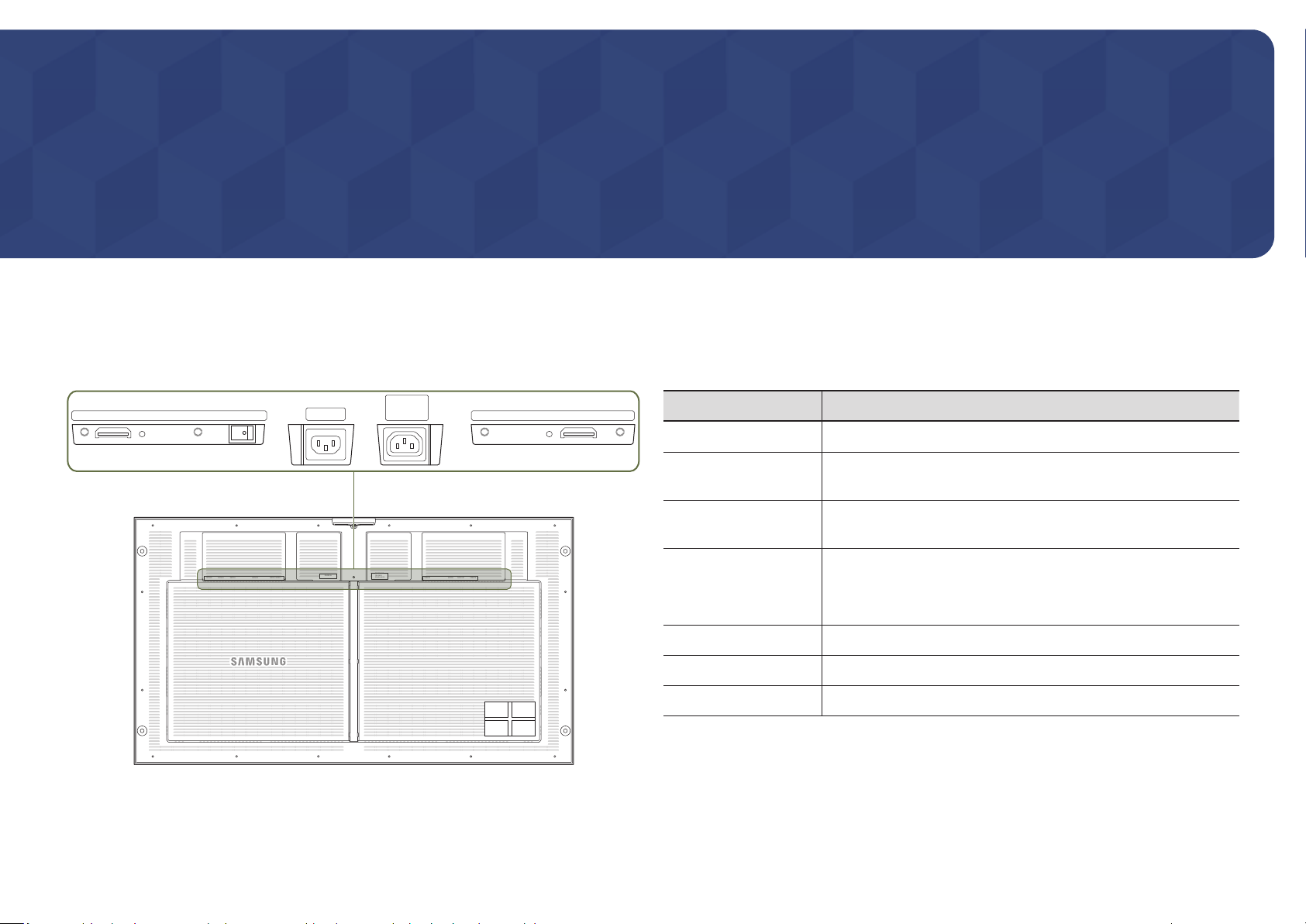
Ports 8
Connecting Devices
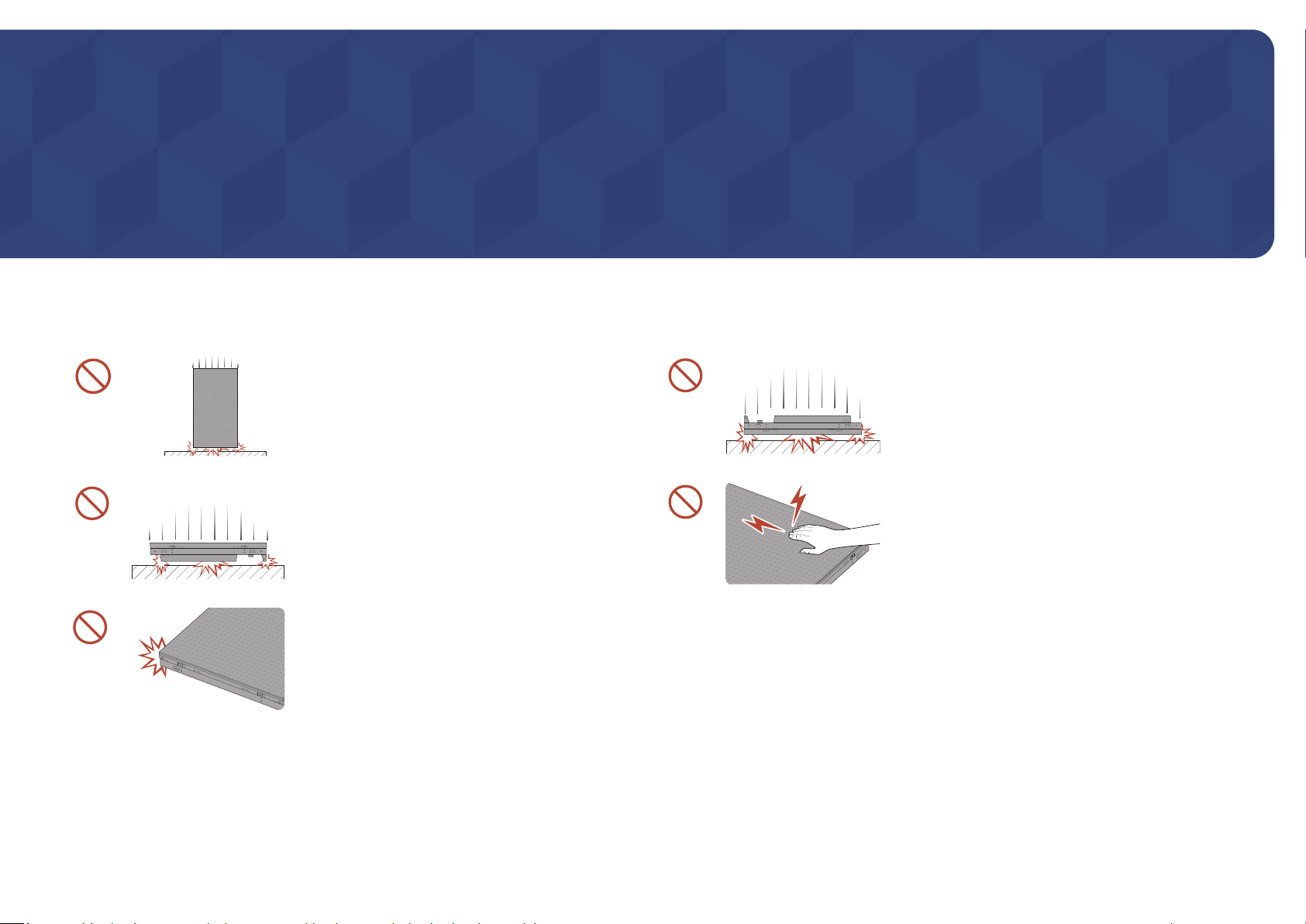
Precautions when handling the cabinets 9
Installing the cabinets 10
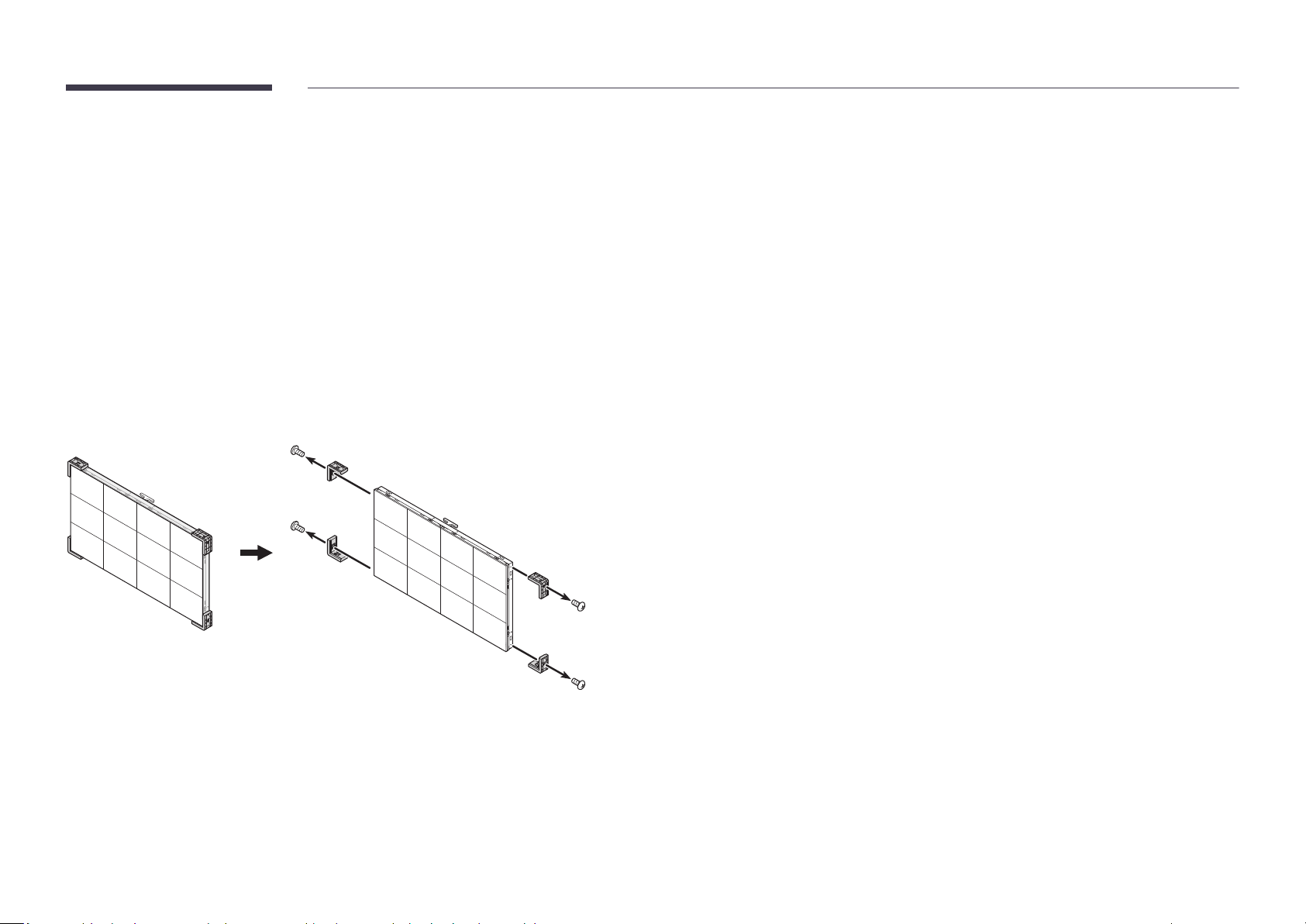
Removing the protective brackets 10
Connecting to cabinets 11
Supported resolutions per installation 11
Appendix
Responsibility for the Pay Service (Cost to
Customers) 14
Not a product defect 14
A Product damage caused by customer's fault 14
Others 14
License 15
Connecting the Power Cable 12
Specifications
General 13
2
Page 3

Chapter 01
Before Using the Product
Safety Precautions
The following safety instructions are to ensure your personal safety and prevent property
damage. Please read the following to ensure the proper use of the product.
Safety symbols
Symbol Name Meaning
Warning
Caution
Prohibition
Instruction
A serious or fatal injury may result if instructions are not followed.
Personal injury or damage to properties may result if instructions
are not followed.
Do NOT attempt.
Follow directions.
CAUTION
RISK OF ELECTRIC SHOCK. DO NOT OPEN.
CAUTION: TO REDUCE THE RISK OF ELECTRIC SHOCK, DO NOT REMOVE COVER (OR BACK). THERE
ARE NO USER SERVICEABLE PARTS INSIDE. REFER ALL SERVICING TO QUALIFIED PERSONNEL.
This symbol indicates that high
voltage is present inside. It is
dangerous to make any kind of
contact with any internal part of this
product.
This symbol indicates that this
product has included important
literature concerning operation and
maintenance.
Class II product: This symbol indicates
that a safety connection to electrical
earth (ground) is not required. If this
symbol is not present on a product
with a mains lead, the product
MUST have a reliable connection to
protective earth (ground).
AC voltage: Rated voltage marked
with this symbol is AC voltage.
DC voltage: Rated voltage marked
with this symbol is DC voltage.
Caution. Consult instructions for use:
This symbol instructs the user to
consult the user manual for further
safety related information.
3
Page 4
Electricity and Safety
Warning
Do not use a damaged power cord or plug, or a loose power socket.
An electric shock or fire may result.
Do not use multiple products with a single power socket.
Overheated power sockets may cause a fire.
Do not touch the power plug with wet hands. Otherwise, an electric shock may result.
Do not bend or pull the power cord with force. Be careful not to leave the power cord
under a heavy object.
Damage to the cord may result in a fire or electric shock.
Do not place the power cord or product near heat sources.
A fire or electric shock may result.
Insert the power plug all the way in so it is not loose.
An unsecure connection may cause a fire.
Connect the power plug to a grounded power socket (type 1 insulated devices only).
An electric shock or injury may result.
Clean any dust around the pins of the power plug or the power socket with a dry cloth.
A fire may result.
Caution
Do not disconnect the power cord while the product is being used.
The product may become damaged by an electric shock.
Only use the power cord provided with your product by Samsung. Do not use the power
cord with other products.
A fire or electric shock may result.
Keep the power socket where the power cord is connected unobstructed.
The power cord must be disconnected to cut off power to the product when an issue
occurs.
Hold the plug when disconnecting the power cord from the power socket.
An electric shock or fire may result.
4
Page 5

Installation
Warning
DO NOT PLACE CANDLES, INSECT REPELLANTS OR CIGARETTES ON TOP OF THE
PRODUCT. DO NOT INSTALL THE PRODUCT NEAR HEAT SOURCES.
A fire may result.
Do not install the product in poorly ventilated spaces such as a bookcase or closet.
An increased internal temperature may cause a fire.
Do not install the product on an unstable or vibrating surface (insecure shelf, sloped
surface, etc.)
• The product may fall and become damaged and/or cause an injury.
• Using the product in an area with excess vibration may damage the product or
cause a fire.
Do not expose the product to direct sunlight, heat, or a hot object such as a stove.
The product lifespan may be reduced or a fire may result.
Do not install the product within the reach of young children.
The product may fall and injure children.
Edible oil, such as soybean oil, can damage or deform the product. Do not install the
product in a kitchen or near a kitchen counter.
Have a technician install the wall-mount hanger.
• Installation by an unqualified person can result in an injury.
• Only use approved cabinets.
Install the product at least 10 cm away from the wall to allow ventilation.
An increased internal temperature may cause a fire.
Keep the plastic packaging out of the reach of children.
Children may suffocate.
Do not install the product in a vehicle or a place exposed to dust, moisture (water drips,
etc.), oil, or smoke.
A fire or electric shock may result.
Following installation, it is recommended to dehumidify the LED Signage product before
use.
• This helps prevent moisture damage and maintain optimal performance.
• For product dehumidification, refer to the supplied installation manual.
The installation manual is available for download at www.samsung.com/
displaysolutions.
Caution
Do not set down the product on its front.
The screen may become damaged.
When installing the product on a cabinet or shelf, make sure that the bottom edge of the
front of the product is not protruding.
• The product may fall and become damaged and/or cause an injury.
• Install the product only on cabinets or shelves of the right size.
Do not drop the product while moving. Product failure or personal injury may result.
Set down the product gently.
Product failure or personal injury may result.
Installing the product in an unusual place (a place exposed to a lot of ne dust, chemical
substances, extreme temperatures or a signicant presence of moisture, or a place
where the product will operate continuously for an extended period of time) may
seriously affect its performance.
Be sure to consult Samsung Customer Service Center if you want to install the
product at such a place.
5
Page 6
Operation
Warning
There is a high voltage inside the product. Never disassemble, repair or modify the
product yourself.
• A fire or electric shock may result.
• Contact Samsung Customer Service Center for repairs.
If the product is dropped or the outer case is damaged, turn off the power switch and
disconnect the power cord. Then contact Samsung Customer Service Center.
Continued use can result in a fire or electric shock.
Do not leave heavy objects or items that children like (toys, sweets, etc.) on top of the
product.
The product or heavy objects may fall as children try to reach for the toys or sweets
resulting in a serious injury.
Do not move the product by pulling the power cord or any cable.
Product failure, an electric shock or fire may result from a damaged cable.
Do not lift or move the product by pulling the power cord or any cable.
Product failure, an electric shock or fire may result from a damaged cable.
Ensure the vents are not blocked by tablecloths or curtains.
An increased internal temperature may cause a fire.
Do not insert metallic objects (chopsticks, coins, hairpins, etc) or objects that burn easily
(paper, matches, etc) into the product (via the vent or input/output ports, etc).
• Be sure to power off the product and disconnect the power cord when water
or other foreign substances have entered the product. Then contact Samsung
Customer Service Center.
• Product failure, an electric shock or fire may result.
Do not place objects containing liquid (vases, pots, bottles, etc) or metallic objects on
top of the product.
• Be sure to power off the product and disconnect the power cord when water
or other foreign substances have entered the product. Then contact Samsung
Customer Service Center.
• Product failure, an electric shock or fire may result.
Before moving the product, turn off the power switch and disconnect the power cable
and all other connected cables.
Damage to the cord may result in a fire or electric shock.
If the product generates abnormal sounds, a burning smell or smoke, disconnect the
power cord immediately and contact Samsung Customer Service Center.
An electric shock or fire may result.
During a lightning or thunderstorm, power off the product and remove the power cable.
A fire or electric shock may result.
Do not drop objects on the product or apply impact.
A fire or electric shock may result.
If a gas leakage is found, do not touch the product or power plug. Also, ventilate the area
immediately.
Sparks can cause an explosion or fire.
Do not use or keep combustible spray or an inammable substance near the product.
An explosion or fire may result.
6
Page 7
Caution
Cleaning
The screen is bright. Keep a sufcient distance from the screen.
• Continuously looking at the screen up close is bad for your eyes.
• Keep at least the recommended viewing distance (pixel pitch x 3.3 m) from the
screen.
e.g. For IW008J: 0.84 x 3.5 m = a distance of at least 2.9 m is recommended
Do not use humidiers or stoves around the product.
A fire or electric shock may result.
Do not touch the screen when the product has been turned on for an extended period of
time as it will become hot.
Do not place heavy objects on the product.
Product failure or personal injury may result.
Disconnect the power cord from the power socket if you do not plan on using the product
for an extended period of time (vacation, etc).
Dust accumulation combined with heat can cause a fire, electric shock or electric
leakage.
Store small accessories out of the reach of children.
The LED structure is revealed on the front of the monitor. Exercise caution to ensure that you do
not touch the structure. There is a risk that the LED element may fall or become damaged.
To clean the exterior, use the soft cleaning cloth that came with the monitor to wipe the exterior
gently.
(The installation manual is available for download at www.samsung.com/displaysolutions.)
Contact Customer Service Center if the inside of the product needs cleaning (service fee will be
charged).
7
Page 8
Chapter 02
Preparations
Ports
"
The color and shape of parts may differ from what is shown. Specifications are subject to change without notice to improve quality.
POWER OUT
SERVICE SWITCH SERVICE
DATA IN
STB
POWER IN
100-240V
50/60Hz 4.0A
SERVICE SWITCH
SERVICE
DATA OU TMODE 1/MODE 2
SERVICE
Parts Description
Dedicated to service technicians.
SERVICE DATA IN SWITCH SERVICE MODE 1/MODE 2
DATA IN
SWITCH
OUT
POWER
100-240V
IN
POWER
50/60Hz 4.0A
SERVICE SERVICESWITCH DATA OUT
MODE 1/MODE 2
Connects to the DATA OUT port on an interface gender or on the
previous cabinet to receive video data.
Enters factory mode (press and hold for 5 seconds) or factory reset
mode (press and hold for 10 seconds).
Specify the monitor mode:
• MODE 1: Standby mode (STB: Stand-By)
• MODE 2: Operating mode (O: Operating)
DATA OUT
POWER IN
POWER OUT
Connects to the DATA IN port on the next cabinet.
Connects to an AC power.
Connects the power cable to the next cabinet to support AC power.
8
Page 9
Chapter 03
Connecting Devices
Precautions when handling the cabinets
[Caution to prevent external shock and dropping of the
product]
After removing the protective brackets, be careful not
to expose the product to external shocks or vibrations.
Make sure that the product is not dropped from any
height.
[Caution to prevent damage to the LED]
Be careful not to expose the product to vibrations or
external shocks when it is lying flat on the floor.
[Caution to prevent damage to corners]
Take extra care to ensure that the corners of a cabinet
do not get damaged.
[Caution to prevent damage to the LED]
After removing the protective brackets, do not place
the product on the floor with the LED facing down.
[Caution to prevent damage to the LED from static]
Do not touch the product without anti-static gloves.
• Be sure to wear anti-static gloves when touching
the product.
9
Page 10
Installing the cabinets
• Make sure you entrust the installation to a professional installation service provider. For
further information regarding installation, contact the dealer you purchased the product
from.
• Install the cabinet using the frame kit provided by the manufacturer.
For more information about how to install the frame kit, refer to the user manual that comes
with it.
• Samsung Electronics shall not be liable for any damage to the product and any injury to the
users or others that may be incurred while the users install the product by themselves.
Removing the protective brackets
Remove the safety bracket before proceeding to installation.
10
Page 11
Connecting to cabinets
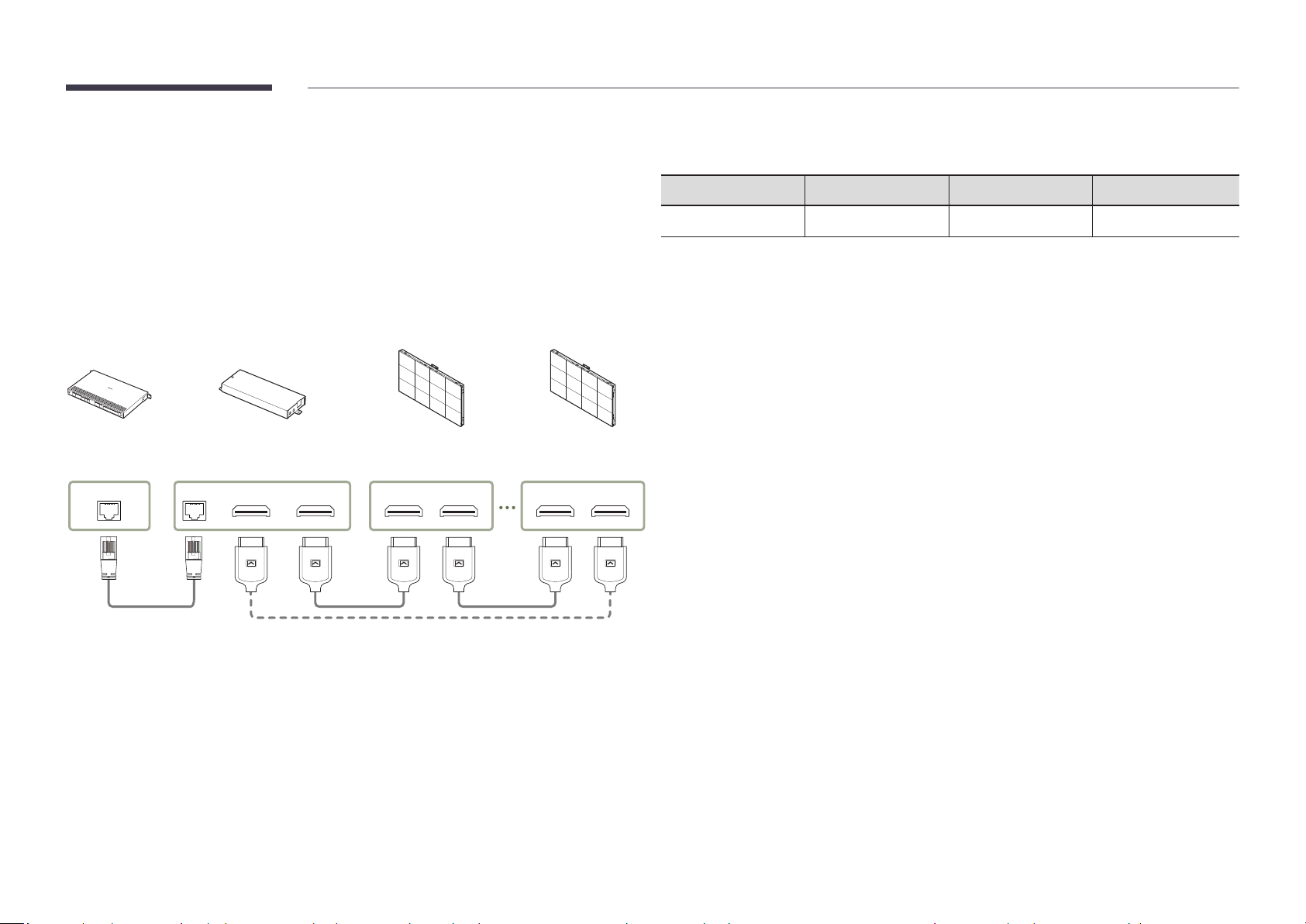
Supported resolutions per installation
Connect the S-Box (SNOW-1810U) and the cabinet (IW008J) to the installed cabinet for video
signal transmission.
"
Connect the S-Box to the external device before connecting the S-Box to the cabinet.
"
Before connecting power to the cabinets, connect the I/G card to the cabinets first.
"
Connect only one type of LED pitch cabinets to a single S-Box. Normal picture quality may
not be obtained if different types of cabinets are connected. Do NOT use different types of
LED pitch cabinets together.
S-Box
(SNOW-1810U)
HDBT OUT
Connect the HDBT terminals on the S-Box and I/G cards using a LAN cable.
1
Connect I/G cards and cabinets using OCM cables.
2
"
Use a cable of CAT 6 (*STP type) or higher.
*STP: Shielded Twisted Pair
"
Connect the HDBT by using a LAN cable that is 15–100 m in length. If you use a cable that is
out of specified length range, the signal quality may be unstable.
"
Use the LAN cables recommended on the HDBaseT website (http://hdbaset.org/hdbasetrecommended-cables). If a LAN cable that is not recommended is used, the HDBT signals
may become unstable.
HDBT IN
DATA IN (Reverse)
DATA OUT (Forward)
Connecting cables for redundancy
First cabinet
(IW008J)
DATA IN DATA OU T
Last cabinet
(IW008J)I/G Card
DATA IN DATA OU T
Resolution 960 x 540 1920 x 1080 3840 x 2160
Quantity of cabinets 1 2 x 2 4 x 4
"
One S-Box (SNOW-1810U) supports up to UHD resolution because it has four built-in HDBT
OUT ports.
"
To enjoy resolutions that exceed UHD resolution, you need to add S-Box (SNOW-1810U) to
the configuration.
11
Page 12
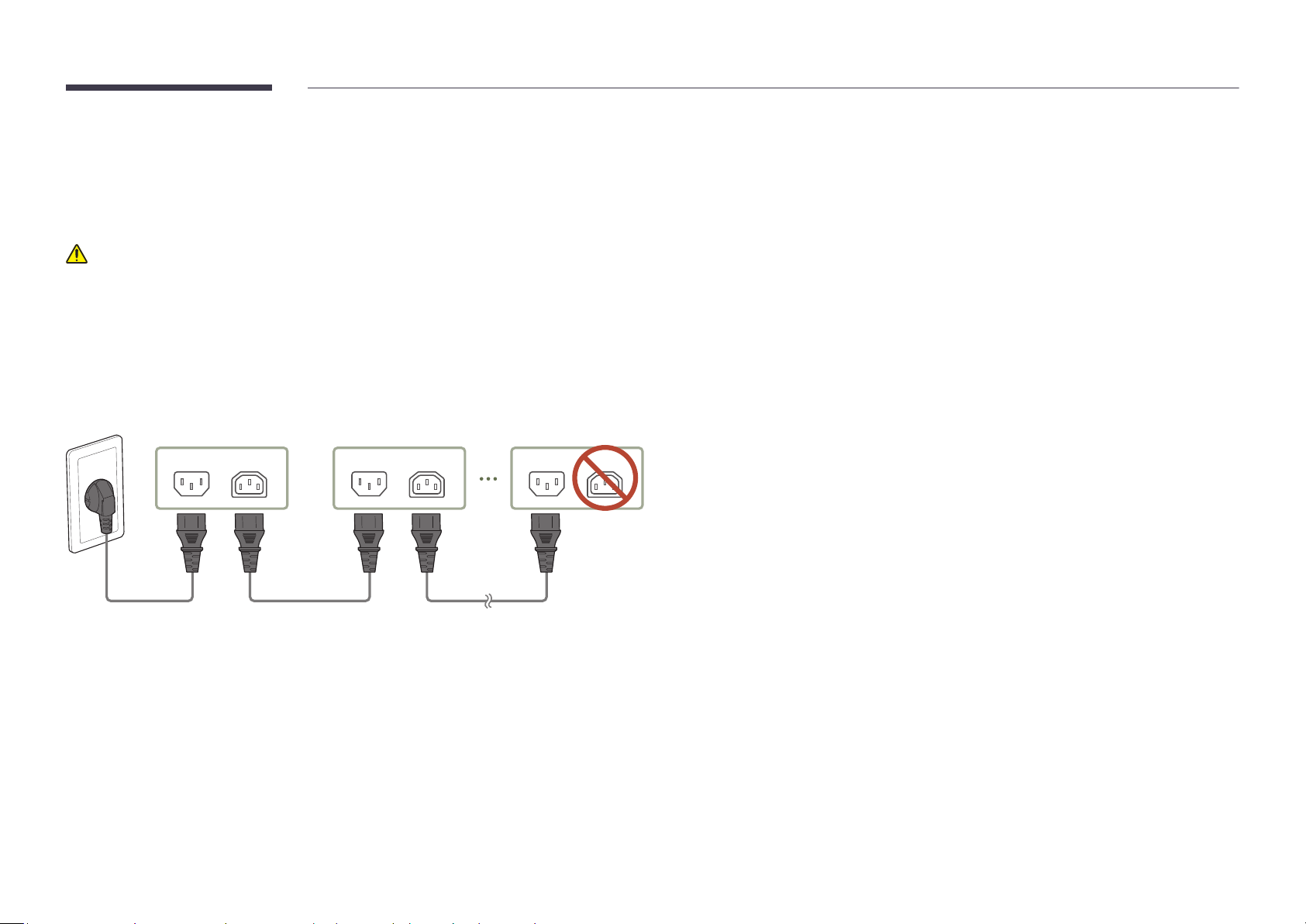
Connecting the Power Cable
• Connect the power cable after all cables are connected.
• Before connecting external devices, be sure to disconnect the power cable.
Precautions when connecting power
If using 110V power, a maximum of three cabinets can be connected to the power source. If using
220V power, a maximum of four cabinets can be connected to the power source.
"
Exceeding the recommended maximum number of devices may produce overvoltage, causing
the circuit breaker to trip down or the product to be damaged. Make sure that the number of
connected devices does not exceed the recommended maximum number.
"
Samsung Electronics is not liable for any problems incurred by connecting devices that
exceed the recommended maximum number.
First cabinet Second cabinet Last cabinet
POWER IN POWER OUT POWER IN POWER OUT POWER IN POWER OUT
Do not use
12
Page 13
Chapter 04
Specications
General
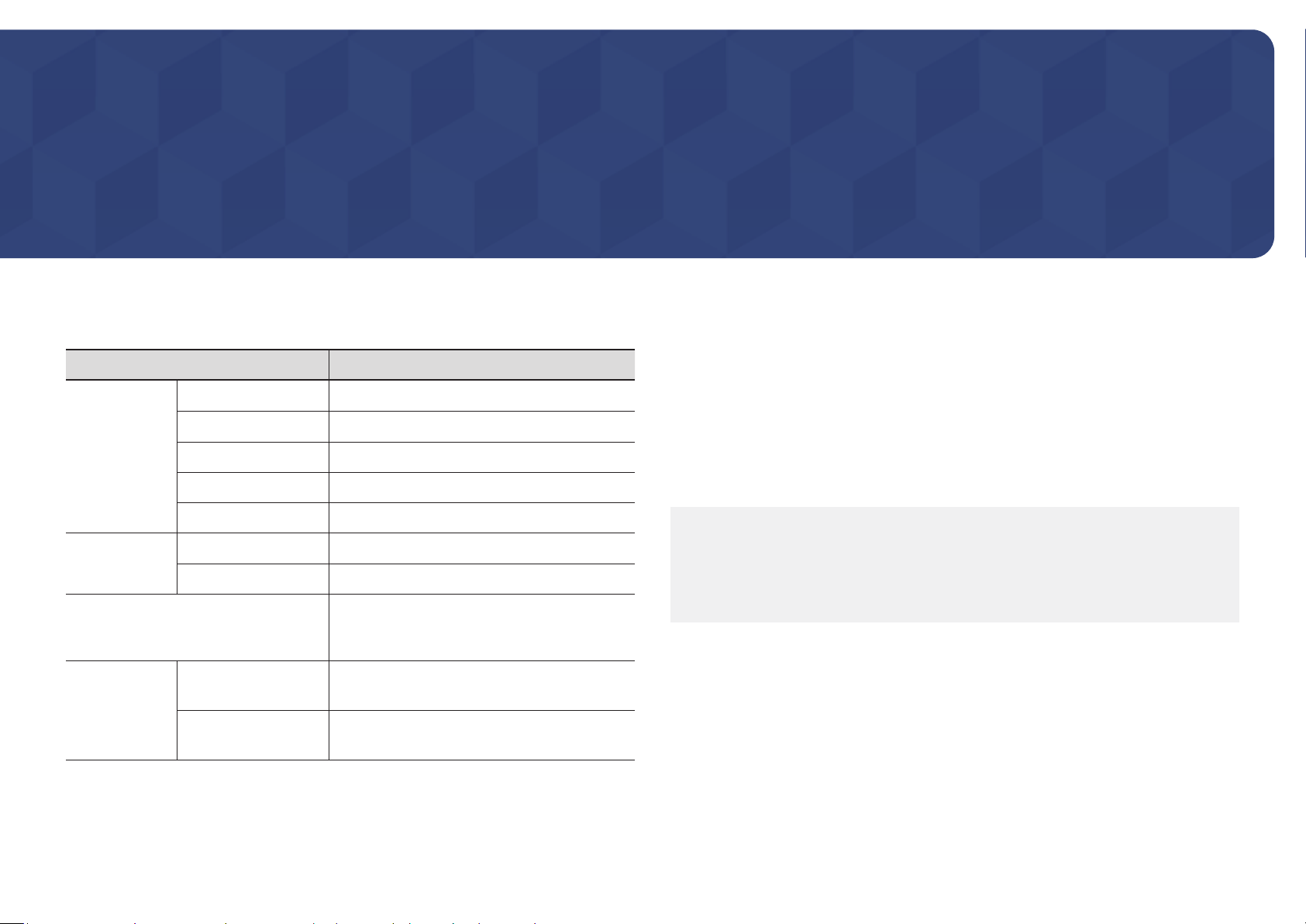
Model Name IW008J
0.84 mm
Flip Chip LED
0.42 mm x 0.1 mm
960 x 540 pixels
Cabinet
Pixel Pitch
LED pixel conguration
LED pixel size (W x H)
Pixels (Row x Column)
"
Plug-and-Play
This monitor can be installed and used with any Plug-and-Play compatible systems. Two-
way data exchange between the monitor and PC system optimizes the monitor settings.
Monitor installation takes place automatically. However, you can customize the installation
settings if desired.
"
This device is a Class B digital apparatus.
"
For detailed device specifications, visit the Samsung Electronics website.
Synchronization
Power Supply
Environmental
considerations
Aspect ratio (W:H)
Refresh rate
Video Frame rate
Operating
Storage
16:9 (806.4 x 453.6)
3840Hz
50/60Hz
AC100-240V~ 50/60Hz
Refer to the label at the back of the product as the
standard voltage can vary in different countries.
Temperature : 32 °F - 104 °F (0 °C - 40 °C)
Humidity : 10% - 80%, non-condensing
Temperature : -4 °F - 113 °F (-20 °C - 45 °C)
Humidity : 5% - 95%, non-condensing
(USA only)
Dispose unwanted electronics through an approved recycler.
To find the nearest recycling location, go to our website:
www.samsung.com/recyclingdirect or call, 1‐800‐SAMSUNG
13
Page 14

Chapter 05
Appendix
Responsibility for the Pay Service (Cost to Customers)
"
When the service is requested, in spite of in warranty, we may charge you for a visit from a
service technician in the following cases.
Not a product defect
Cleaning of the product, Adjustment, Explanation, Re-installation and etc.
• If a service technician gives instructions on how to use product or simply adjusts options
without disassembling product.
• If a defect is caused by external environmental factors (Internet, Antenna, Wired Signal,
etc.)
• If a product is reinstalled or devices are connected additionally after installing the
purchased product for the first time.
• If a product is reinstalled to move to a different spot or to move to a different house.
• If customer requests instructions on how to use because of another company's product.
• If customer requests instructions on how to use the network or another company's program.
• If customer requests software installation and setup for the product.
• If a service technician removes/cleans dusts or foreign materials inside of the product.
• If customer requests an installation additionally after purchasing a product through home-
shopping or online.
A Product damage caused by customer's fault
Product damage caused by customer's mishandling or wrong repair
If a product damage is caused by;
• External impact or drop.
• Use of supplies or separately sold product unspecified by Samsung.
• Repair from a person besides an engineer of outsourcing service company or partner of
Samsung Electronics Co., Ltd.
• Remodeling or repairing the product by customer.
• Using it with incorrect voltage or non-authorized electrical connections.
• Not following the "cautions" in User Manual.
Others
• If product fails by natural disaster. (lightning, fire, earthquake, flood damage, etc)
• If consumable components are all used up. (Battery, Toner, Fluorescent lights, Head,
Vibrator, Lamp, Filter, Ribbon, etc.)
"
If customer requests a service in case the product has no defect, service fee may be
charged. So please read User Manual first.
14
Page 15
License
Open Source Announcement
Some software components of this product incorporate source code covered under the GNU
General Public License (GPL), the GNU Lesser General Public License (LGPL) etc.
Acknowledgement:
The software included in this product contains copyrighted software that is licensed under
the GPL/LGPL etc. You may obtain the complete Corresponding Source code from us for
a period of three years after our last shipment of this product by sending email to: oss.
[email protected]
If you want to obtain the complete Corresponding Source code in the physical medium such
as CD-ROM, the cost of physically performing source distribution may be charged.
You may also find a copy of the source at following website.
http://software-dl.ti.com/processor-sdk-linux/esd/AM335X/latest/exports/software_
manifest.htm
15
 Loading...