

Page 1
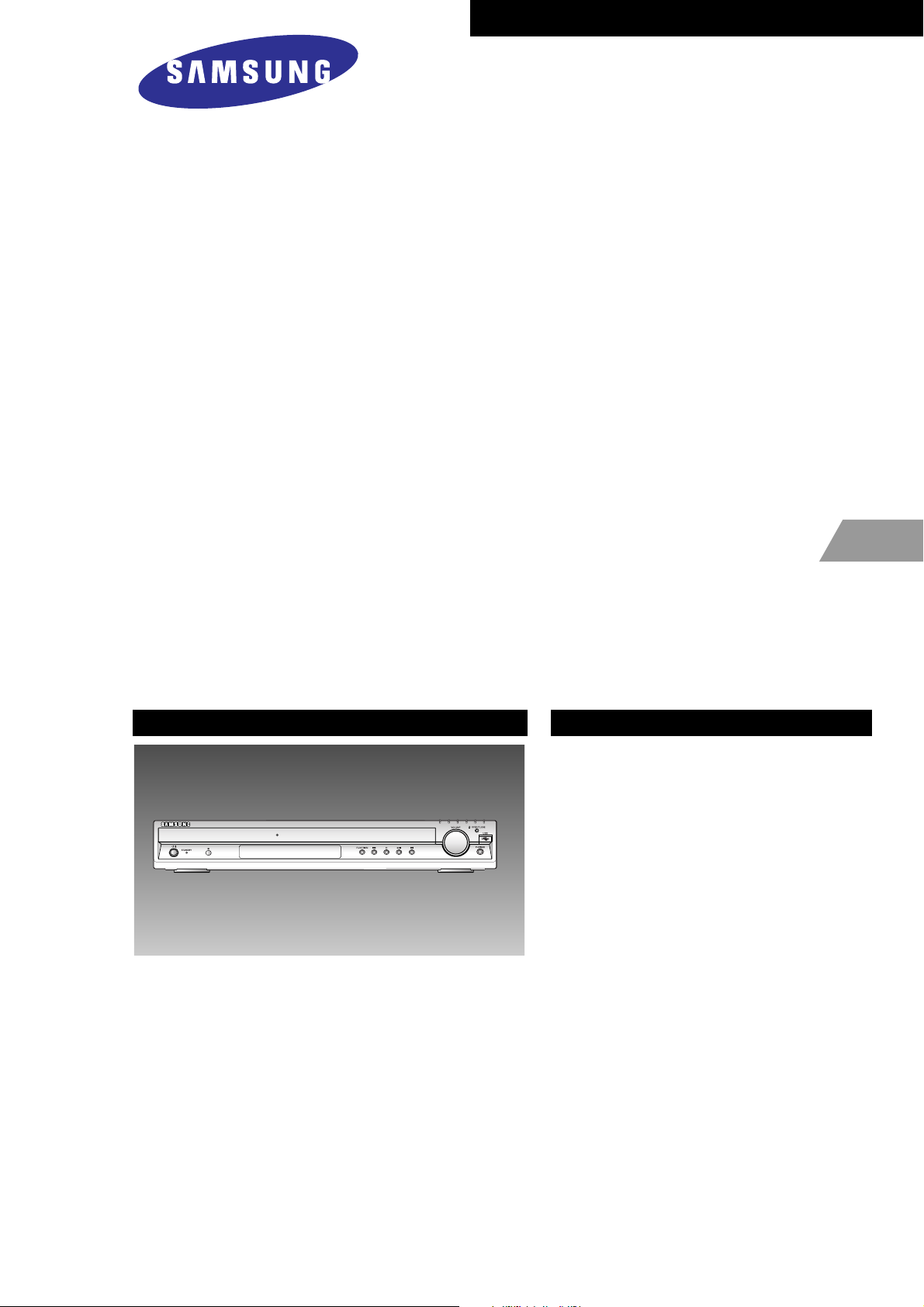
DVD RECEIVER AMP
BASIC MODEL : HT-Q80
SERVICE
Manual
DVD RECEIVER AMP SYSTEM Features
*
Multi-Disc Playback & FM Tuner
* USB Host Play
* Dolby Pro Logic II
* DTS (Digital Theater Systems)
* TV Screen Saver Function
* Power Saving Function
* Customized TV Screen Display
* AV SYNC Function
- Confidential -
MODEL : HT-Q80
* Application : HT-Q70/Q80
HT-TQ72/TQ85
Page 2
©Samsung Electronics Co.,Ltd. April. 2005
Printed in Korea
Code no. AH68-01893A
ELECTRONICS
Page 3
Ch1 Precautions
1-1. Safety Precautions 1-1
1-2. Servicing Precautions 1-2
1-3. Precautions for Electrostatically
Sensitive Device (ESDs) 1-3
1-4. Special Precautions and Warning
Lables for Laser Products 1-3
1-5. Special Precautions for HDD 1-4
INDEX
Ch2 Product Descriptions
1. Specifications 2-1
2. Notes on Discs 2-2
3. Accessories 2-4
Ch3 Product Functions
1. SPK Connection & Setup 3-1
2. Main Functions 3-3
3. New Functions 3-6
Ch4 Adjustments
Protection Mode Explanation 4-1
Ch5 How to disassemble
How to disassemble 5-1
Ch6 Troubleshooting
1. Power 6-1
2. Output 6-2
Ch7 Exploded View & Parts List
1. Total Exploded View 7-1
2. Parts List 7-4
Ch8 Electrical Parts List
Electrical Parts List 8-1
Ch9 Block Diagram
Block Diagram 9-1
Ch10 Wiring Diagram
Wiring Diagram 10-1
Ch11 PCB Diagram
1. MAIN 11-1
2. AMP 11-2
Ch12 Schematic Diagram
1. AMP 12-1
1. FRONT 12-2
3. MPEG 12-3
4. KARAOKE 12-4
5. MICOM 12-5
6. VIDEO 12-6
7. SMPS 12-7
8. HDMI 12-8
Ch13 Circuit Description
Circuit Board Description 13-1
Ch14 HTS Reference
1. HTS (Home Theater Sytsem) 14-1
2. About “Sound” 14-2
3. 5.1 Channel Sound 14-3
4. HTS Sound Format 14-4
5. HTS Devices 14-5
Page 4
Samsung Electronics 2-1
2. Product Description
1. Specifications
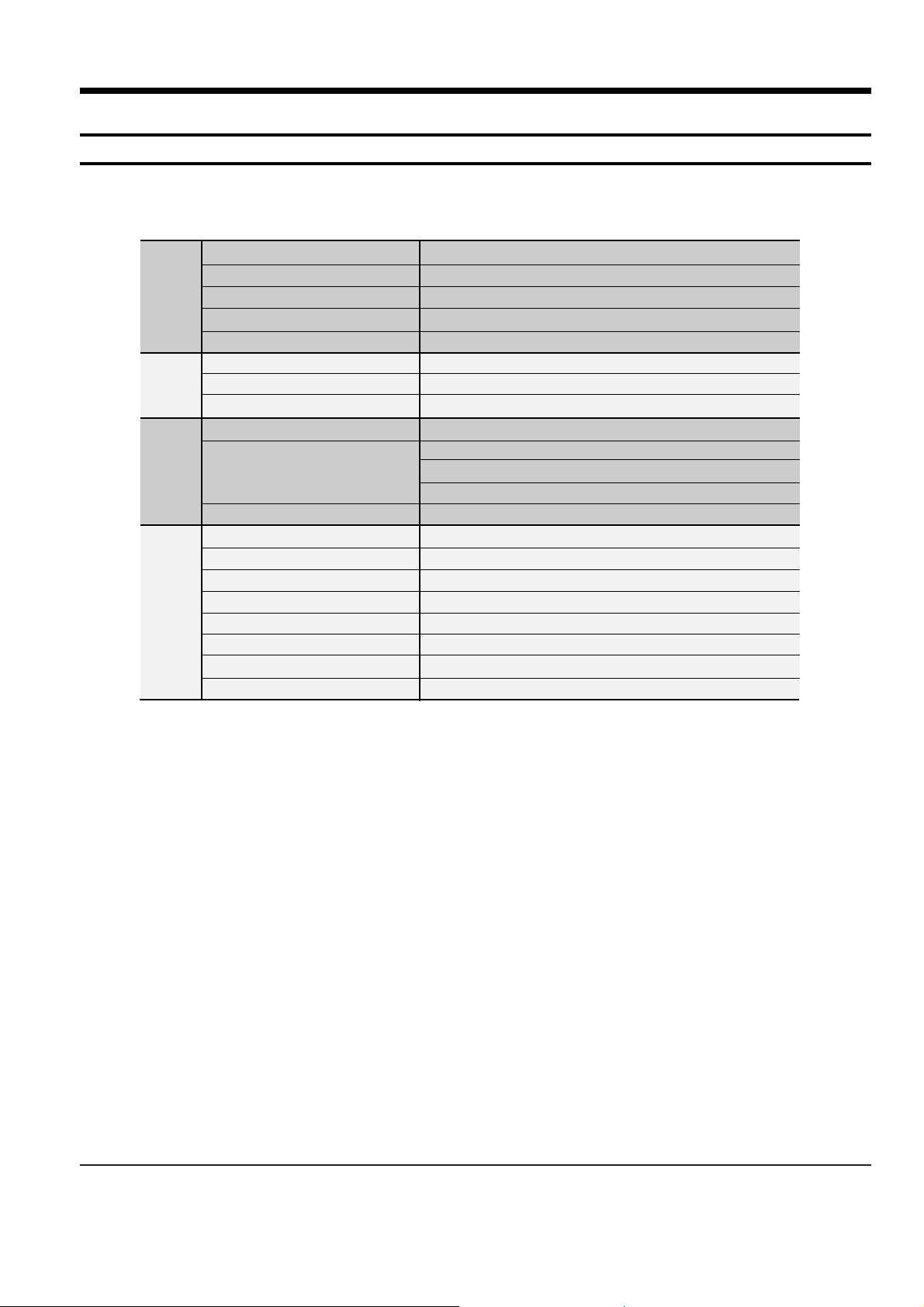
Power Consumption
Weight
Dimensions (W x H x D)
Operating Temperature Range
Operating Humidity Range
Usable Sensitivity
S/N Ratio
Distortion
Composite Video
Component Video
HDMI
Front speaker output
Center speaker output
Rear speaker output
Subwoofer speaker output
Frequency range
S/N Ratio
Channel separation
Input sensitivity
G
E
N
E
R
A
L
T
U
N
E
R
F
M
O
U
T
P
U
T
V
I
D
E
O
A
M
P
L
I
F
I
E
R
110W
11Ibs
17 x 3 x 17.1 inches
41°F ~ 95°F
10% ~ 75%
10dB
60dB
1%
1.0Vp-p(75Ω load)
Y:1.0Vp-p(75Ω load)
Pr:0.70Vp-p(75Ω load)
Pb:0.70Vp-p(75Ω load)
Impedance: 85~115Ω
134W x 2(3Ω)
134W(3Ω)
134W x 2(3Ω)
130W(3Ω)
20Hz~20KHz
75dB
60dB
(AUX)400mV
Page 5
2-2 Samsung Electronics
2. Notes on discs
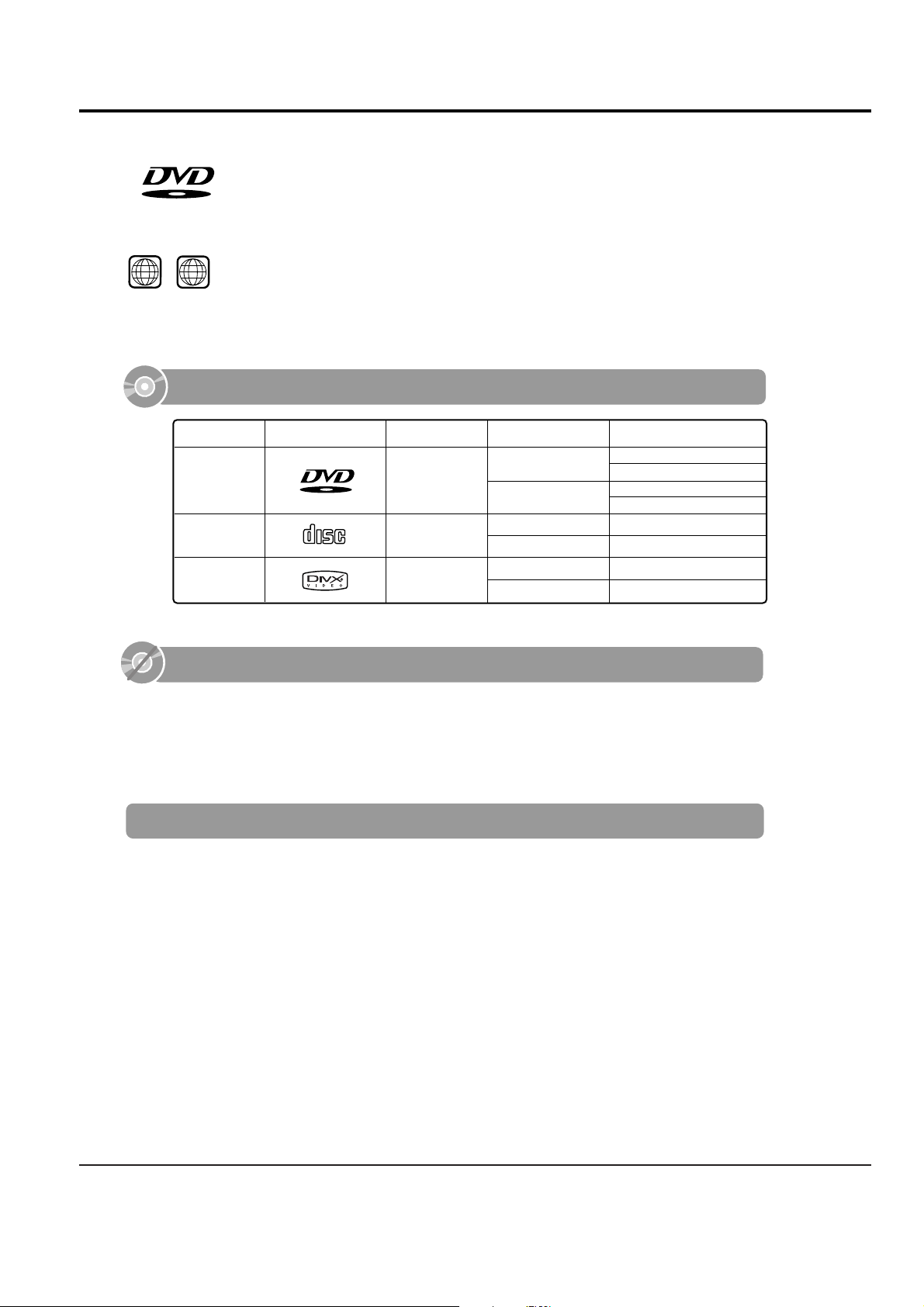
DVD (Digital Versatile Disc) offers fantastic audio and video, thanks to Dolby Digital sur-
round sound and MPEG-2 video compression technology. Now you can enjoy these realistic
effects in the home, as if you were in a movie theater or concert hall.
V I D E O
DVD players and the discs are coded by region. These regional codes must match in order
for the disc to play. If the codes do not match, the disc will not play.
The Region Number for this player is given on the rear panel of the player.
(Your DVD player will only play DVDs that are labeled with identical region codes.)
1 6
~
•
LD, CD-G, CD-I, CD-ROM and DVD-ROM discs cannot be played on this player.
If such discs are played, a "WRONG DISC FORMAT" message appears on the TV screen.
•
DVD discs purchased abroad may not play on this player.
If such discs are played, a "WRONG REGION CODE" message appears on the TV screen.
Do not use the following types of disc!
•
Many DVD discs are encoded with copy protection. Because of this, you should only connect
your DVD player directly to your TV, not to a VCR. Connecting to a VCR results in a distorted
picture from copy-protected DVD discs.
•
This product incorporates copyright protection technology that is protected by methods claims of certain
U.S. patents and other intellectual property rights owned by Macrovision Corporation and other rights
owners. Use of this copyright protection technology must be authorized by Macrovision Corporation, and
is intended for home and other limited viewing uses only unless otherwise authorized by Macrovision
Corporation. Reverse engineering or disassembly is prohibited.
Copy Protection
V I D E O
COMPACT
DIGITAL AUDIO
Mark (Logo)
Audio + Video
DVD
AUDIO-CD
5"
Approx. 240 min. (single-sided)
Approx. 480 min. (double-sided)
Approx. 80 min. (single-sided)
Approx. 160 min. (double-sided)
74 min.
20 min.
74 min.
20 min.
3 1/2"
5"
3 1/2"
Audio
Recorded Signals
Disc Type Disc Size Max. Playing Time
Playable Discs
DivX
5"
3 1/2"
MPEG4
MP3
Page 6

Samsung Electronics 2-3
CD-R Discs
•
Some CD-R discs may not be playable depending on the disc recording device (CD-Recorder or PC) and the
condition of the disc.
•
Use a 650MB/74 minute CD-R disc.
Do not use CD-R discs over 700MB/80 minute as they may not be played back.
•
Some CD-RW (Rewritable) media, may not be playable.
•
Only CD-Rs that are properly "closed" can be fully played. If the session is closed but the disc is left open, you
may not be able to fully play the disc.
CD-R JPEG Discs
•
Only files with the ".jpeg" and ".JPEG" extensions can be played.
•
If the disc is not closed, it will take longer to start playing and not all of the recorded files may be played.
•
Only CD-R discs with JPEG files in ISO 9660 or Joliet format can be played.
•
JPEG file names should be 8 characters or less in length and contain no blank spaces or special characters (. / = +).
•
Only a consecutively written multisession disc can be played. If there is a blank segment in the multisession disc, the
disc can be played only up to the blank segment.
•
A maximum of 9,999 images can be stored on a single CD.
•
When playing a Kodak/Fuji Picture CD, only the JPEG files in the picture folder can be played.
•
Picture discs other than Kodak/Fuji Picture CDs may take longer to start playing or may not play at all.
Disc Recording Format
CD-R MP3 Discs
•
Only CD-R discs with MP3 files in ISO 9660 or Joliet format can be played.
•
MP3 file names should be 8 characters or less in length and contain no blank spaces or special characters (. / = +).
•
Use discs recorded with a compression/decompression data rate greater than 128Kbps.
•
Only files with the ".mp3" and ".MP3" extensions can be played.
•
Only a consecutively written Multisession disc can be played. If there is a blank segment in the Multisession disc,
the disc can be played only up to the blank segment.
•
If the disc is not closed, it will take longer to begin playback and not all of the recorded files may be played.
•
For files encoded in Variable Bit Rate (VBR) format, i.e. files encoded in both low bit rate and high bit rate
(e.g., 32Kbps ~ 320Kbps), the sound may skip during playback.
•
A maximum of 500 tracks can be played per CD.
•
A maximum of 300 folders can be played per CD.
CD-R/RW DivX Discs
•
Since this product only provides encoding formats authorized by DivX Networks, Inc., a DivX file created by the user
might not be played.
•
Software update for unsupported formats is not supported.
(Example: QPEL, GMC, resolution higher than 720 x 480 pixels, etc.)
•
Sections with high frame rate might not be played while playing a DivX file.
•
For more information about the formats authorized by DivX Networks, Inc., visit "www.divxnetworks.net".
This product does not support Secure (DRM) Media files.
Page 7

2-4 Samsung Electronics
3. Accessories
Code no. Description & Specification Remarks
AH39-40001V CABLE-AUDIO CABLE;1P-1P,3000MM,- COMMON
AH42-00021A ANT FM T;T18011F-1,75 ohm,1800mm COMMON
Page 8
Samsung Electronics 3-1
3. Product Functions
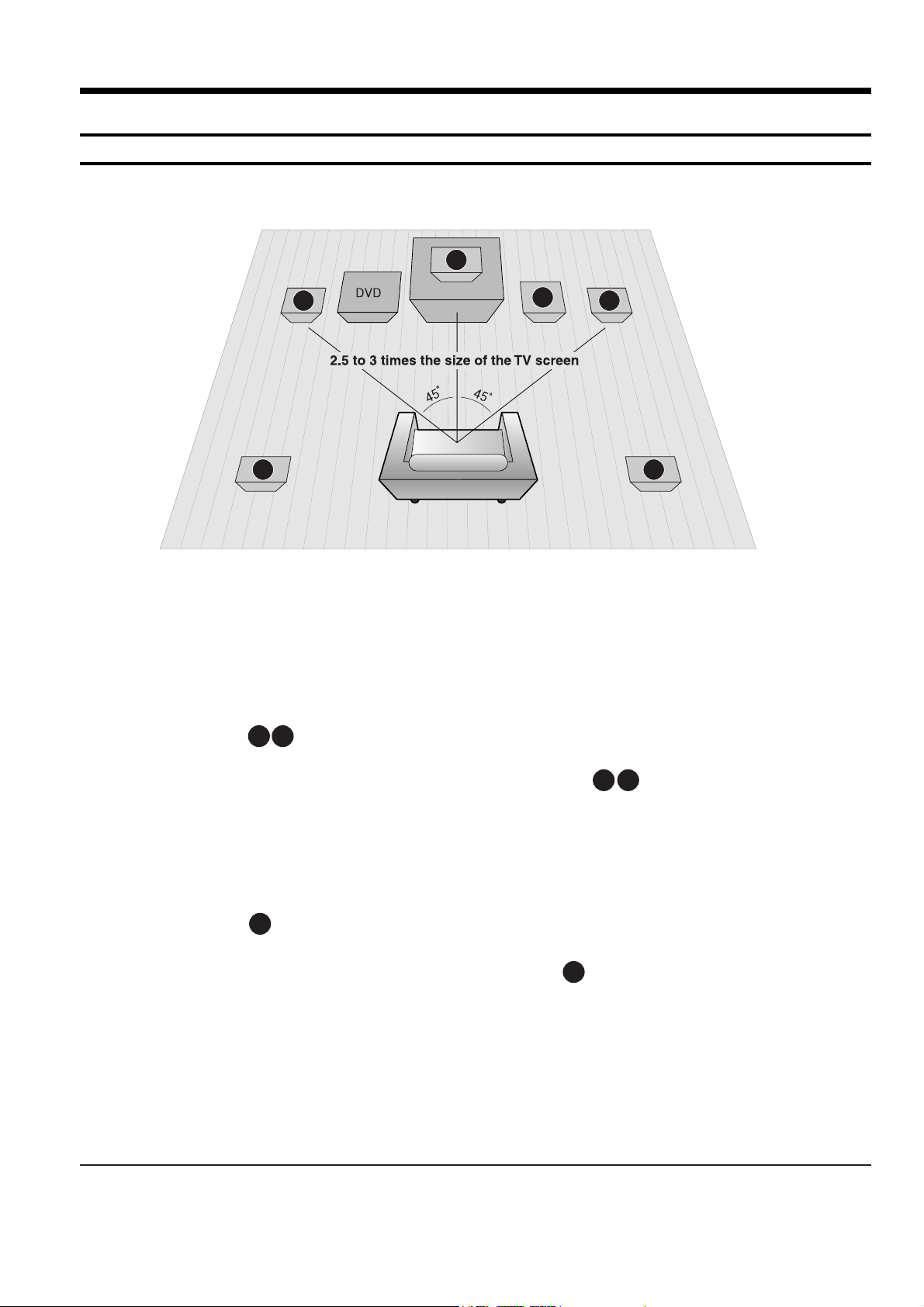
1. SPK connection
SRSL
C
L
SW
R
Rear Speakers
•
Place these speakers behind your listening position.
•
If there isn't enough room, place these speakers so they face each
other.
•
Place them about 60 to 90cm (2 to 3feet) above your ear, facing
slightly downward.
*
Unlike the front and center speakers, the rear speakers are used
to handle mainly sound effects and sound will not come from
them all the time.
Subwoofer
•
The position of the subwoofer is not so critical.
Place it anywhere you like.
Front Speakers
•
Place these speakers in front of your listening position, facing inwards (about 45°) toward you.
•
Place the speakers so that their tweeters will be at
the same height as your ear.
•
Align the front face of the front speakers with the
front face of the center speaker or place them
slightly in front of the center speakers.
Center Speaker
•
It is best to install it at the same height as the front
speakers.
•
You can also install it directly over or under the TV.
Position of the Home Theater
•
Place it on a stand, cabinet shelf, or under the
TV stand.
Selecting the Listening Position
The listening position should be located about 2.5 to 3
times the distance of the TV's screen size away from the
TV. Example: For 32" TVs 2~2.4m (6~8 feet)
For 55" TVs 3.5~4m (11~13 feet)
RLC
SR
SL
SW
Page 9
3-2 Samsung Electronics
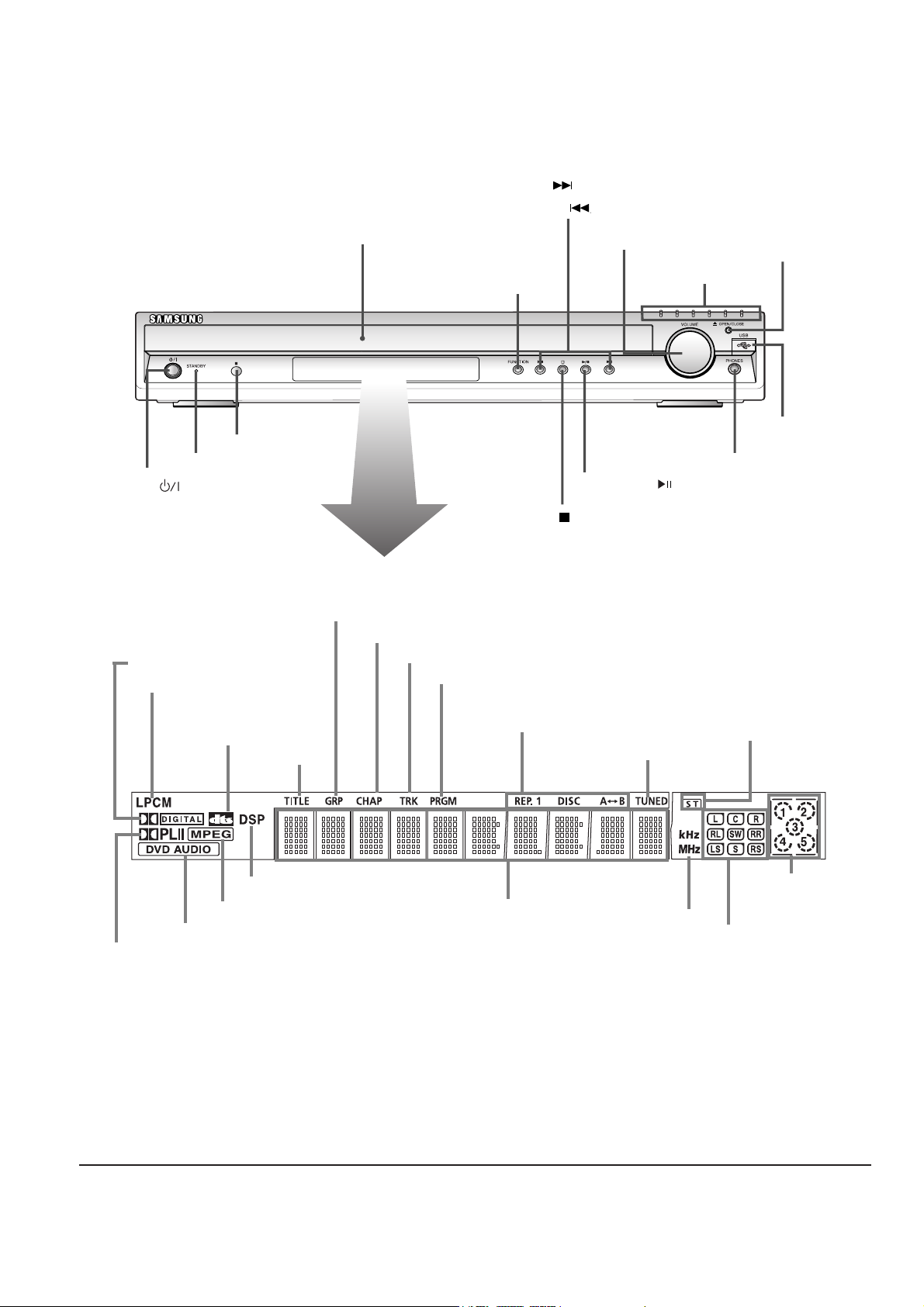
—Front Panel—
DOLBY DIGITAL indicator
LINEAR PCM indicator
DVD AUDIO indicator
MPEG indicator
DSP indicator
TITLE
indicator
GROUP indicator
PROGRAM indicator
CHAPTER indicator
DISC(1~5)
indicator
TRACK indicator
REPEAT indicator
TUNED indicator
STEREO indicator
RADIO FRE-
QUENCY
indicator
System Status Display
SPEAKER indicator
DTS
indicator
Power ( ) button
Standby indicator
Remote Control Sensor
Function button
Headphone Jack
USB Port
Disc Tray
Open/
Close button
Direct Play buttons
Volume control
Tuning Down & Skip ( ) buttons
Tuning Up & Skip ( ) buttons
Play/Pause ( ) button
Stop ( ) button
Page 10
Samsung Electronics 3-3
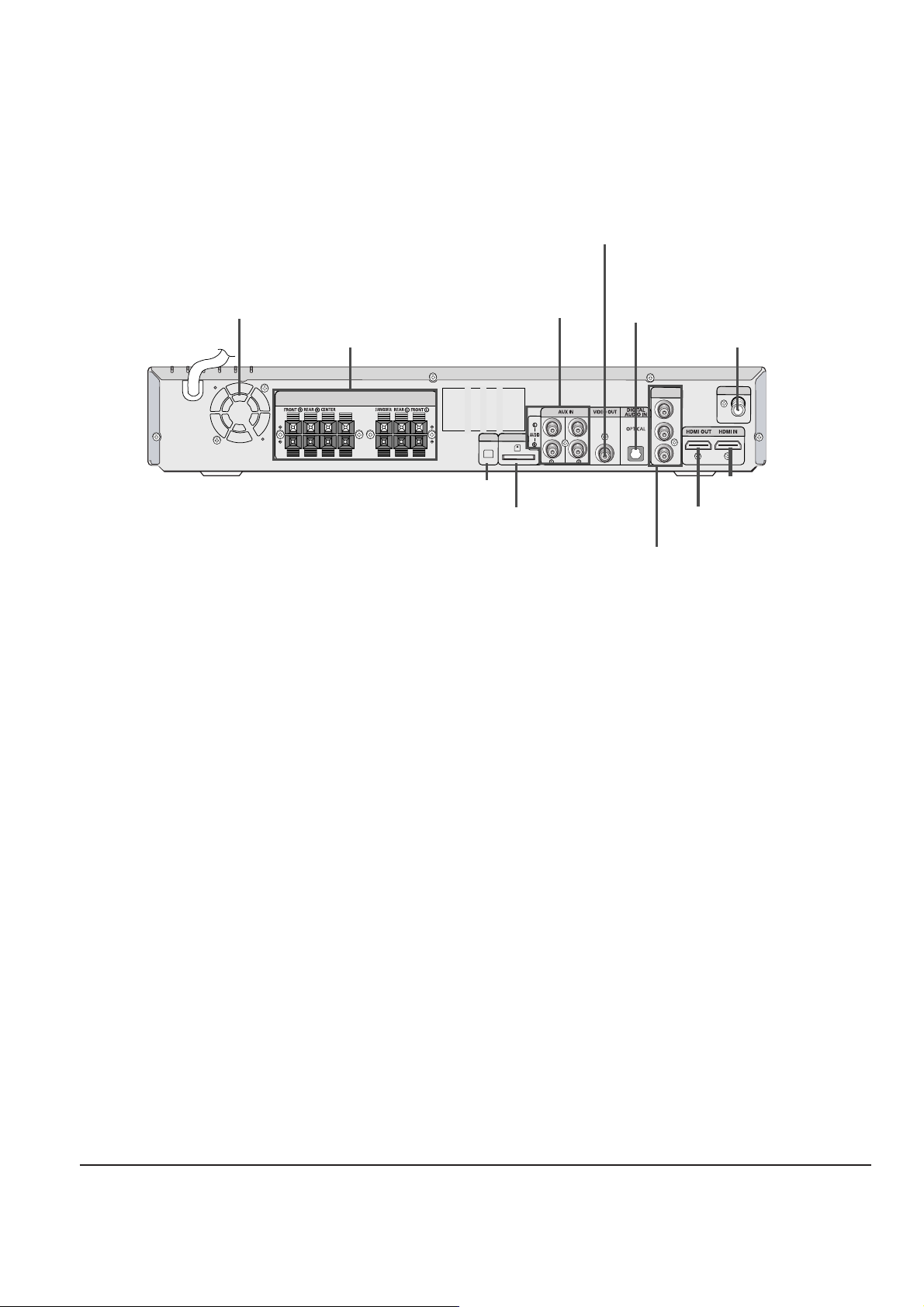
—Rear Panel—
FM 75Ω
RADIO ANT
SPEAKERS OUT
(IMPEDANCE 3Ω)
XM
WIRELESS
Y
PB
PR
COMPONENT
OUT
FM Antenna Connector
External Audio
Input Connectors
5.1 Channel Speaker
Output Terminals
TX Card Connector
XM Antenna Connector
HDMI OUT Port
HDMI IN Port
External Digital Optical
Input Connector
Use this to connect external equipment
capable of digital output.
Cooling Fan
COMPONENT VIDEO OUTPUT
Connectors
Connect a TV with component video inputs
to these jacks.
Video Output Connector
Connect the TV's video input jacks
(VIDEO IN) to the VIDEO OUT connector.
Page 11
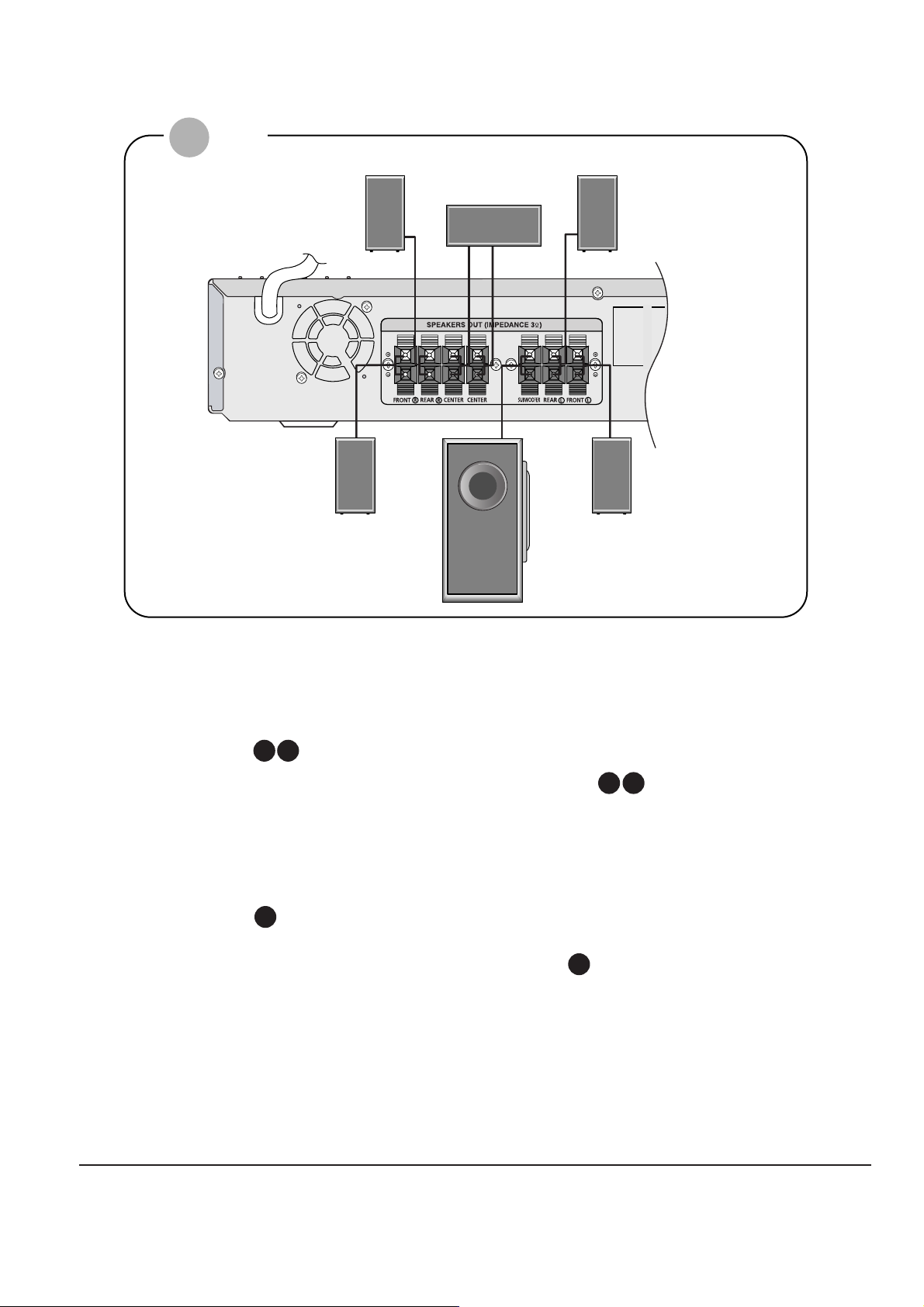
3-4 Samsung Electronics
Rear Speakers
•
Place these speakers behind your listening position.
•
If there isn't enough room, place these speakers so they face each
other.
•
Place them about 60 to 90cm (2 to 3feet) above your ear, facing
slightly downward.
*
Unlike the front and center speakers, the rear speakers are used
to handle mainly sound effects and sound will not come from
them all the time.
Subwoofer
•
The position of the subwoofer is not so critical.
Place it anywhere you like.
Front Speakers
•
Place these speakers in front of your listening position, facing inwards (about 45°) toward you.
•
Place the speakers so that their tweeters will be at
the same height as your ear.
•
Align the front face of the front speakers with the
front face of the center speaker or place them
slightly in front of the center speakers.
Center Speaker
•
It is best to install it at the same height as the front
speakers.
•
You can also install it directly over or under the TV.
Position of the Home Theater
•
Place it on a stand, cabinet shelf, or under the
TV stand.
Selecting the Listening Position
The listening position should be located about 2.5 to 3
times the distance of the TV's screen size away from the
TV. Example: For 32" TVs 2~2.4m (6~8 feet)
For 55" TVs 3.5~4m (11~13 feet)
R
L
C
SR
SL
SW
Rear Speaker (R)
Front Speaker (R)
Subwoofer
Center Speaker
Rear Speaker (L)
Front Speaker (L)
HT-Q80
Page 12
Samsung Electronics 3-5
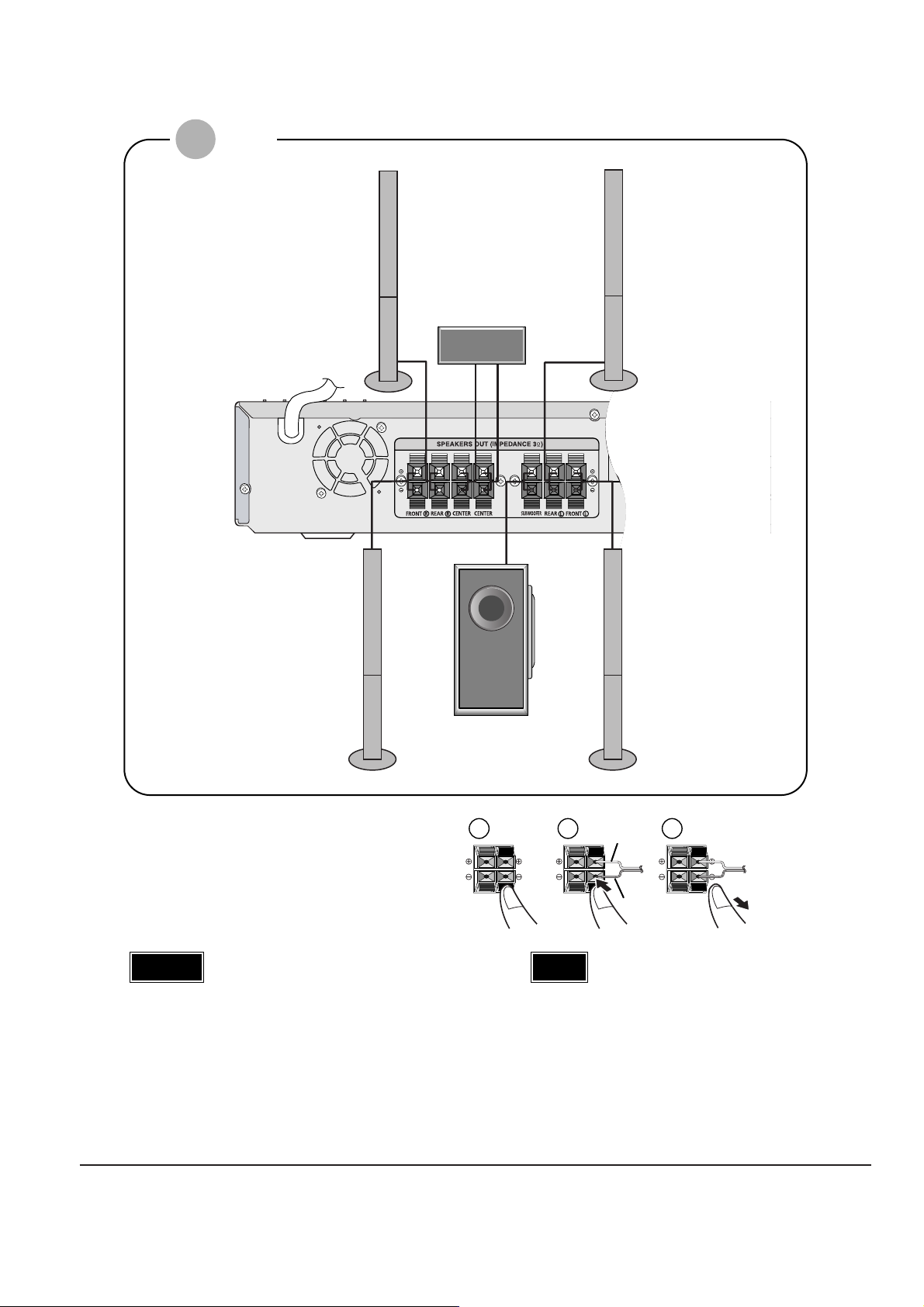
Rear Speaker (R)
Front Speaker (R)
Subwoofer
Center Speaker
Rear Speaker (L)
Front Speaker (L)
Press and hold the terminal tab.
Insert the speaker cord.
Release your finger.
1
2
3
12 3
Red
Black
HT-TQ85
•
Do not let children play with or near the speakers.
They could get hurt if a speaker falls.
•
When connecting the speaker wires to the speakers,
make sure that the polarity (+/–) is correct.
Caution
•
If you place a speaker near your TV set,
screen color may be distorted because of
the magnetic field generated by the speaker. If this occurs, place the speaker away
from your TV set.
Note
Page 13
3-6 Samsung Electronics
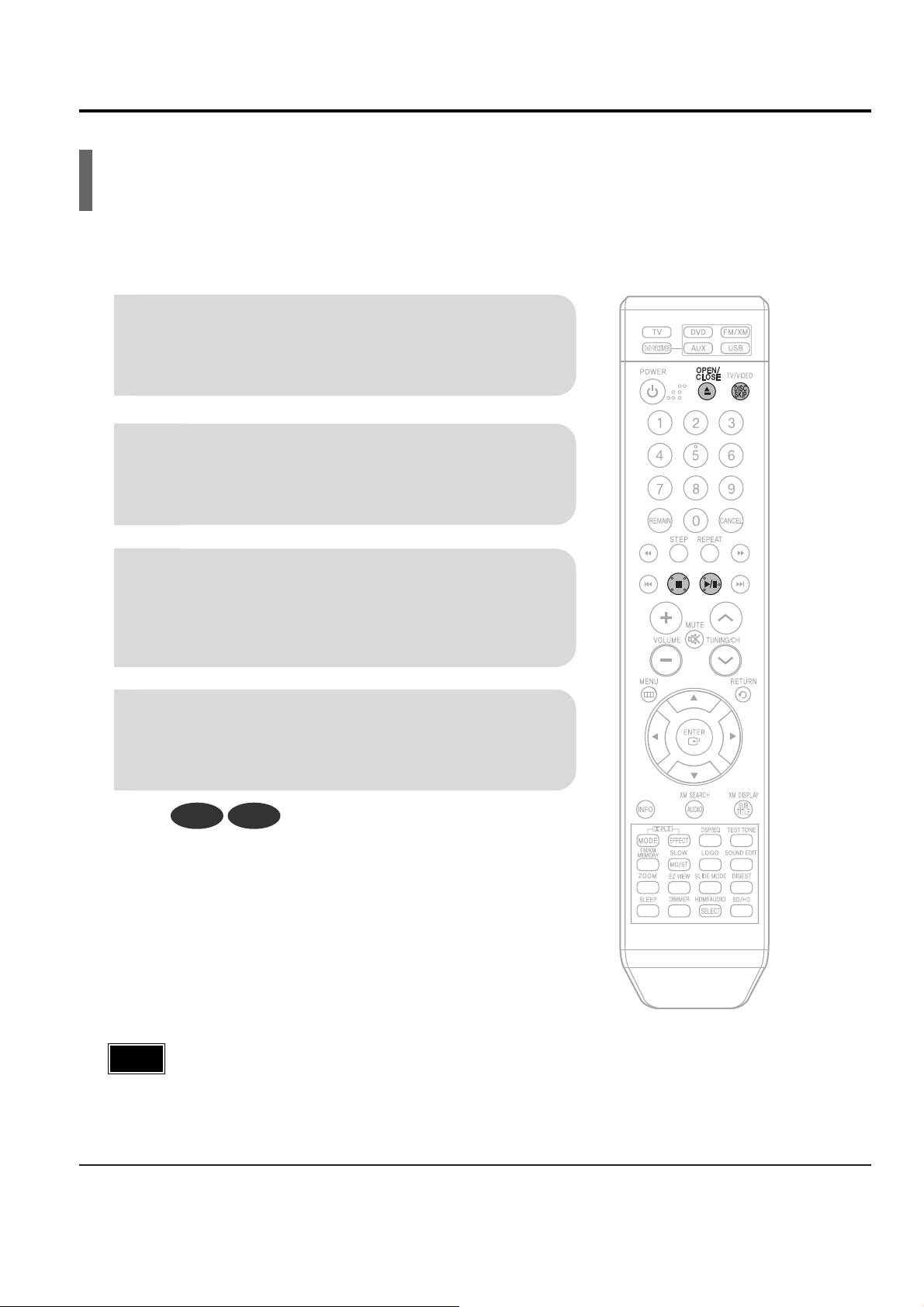
2. Main Functions
Disc Playback
2
Load a disc.
•
Place a disc gently into the tray with the disc’s label
facing up.
•
Depending on the content of the disc, the initial screen may appear different.
1
Press OPEN/CLOSE button to open the
disc tray.
3
Press DISC SKIP button.
•
Rotate the carousel tray so you can load the third, fourth,
and fifth discs.
4
Close the compartment by pressing the
OPEN/CLOSE button again.
DVD CD
•
Playback starts automatically.
Note
Page 14
Samsung Electronics 3-7
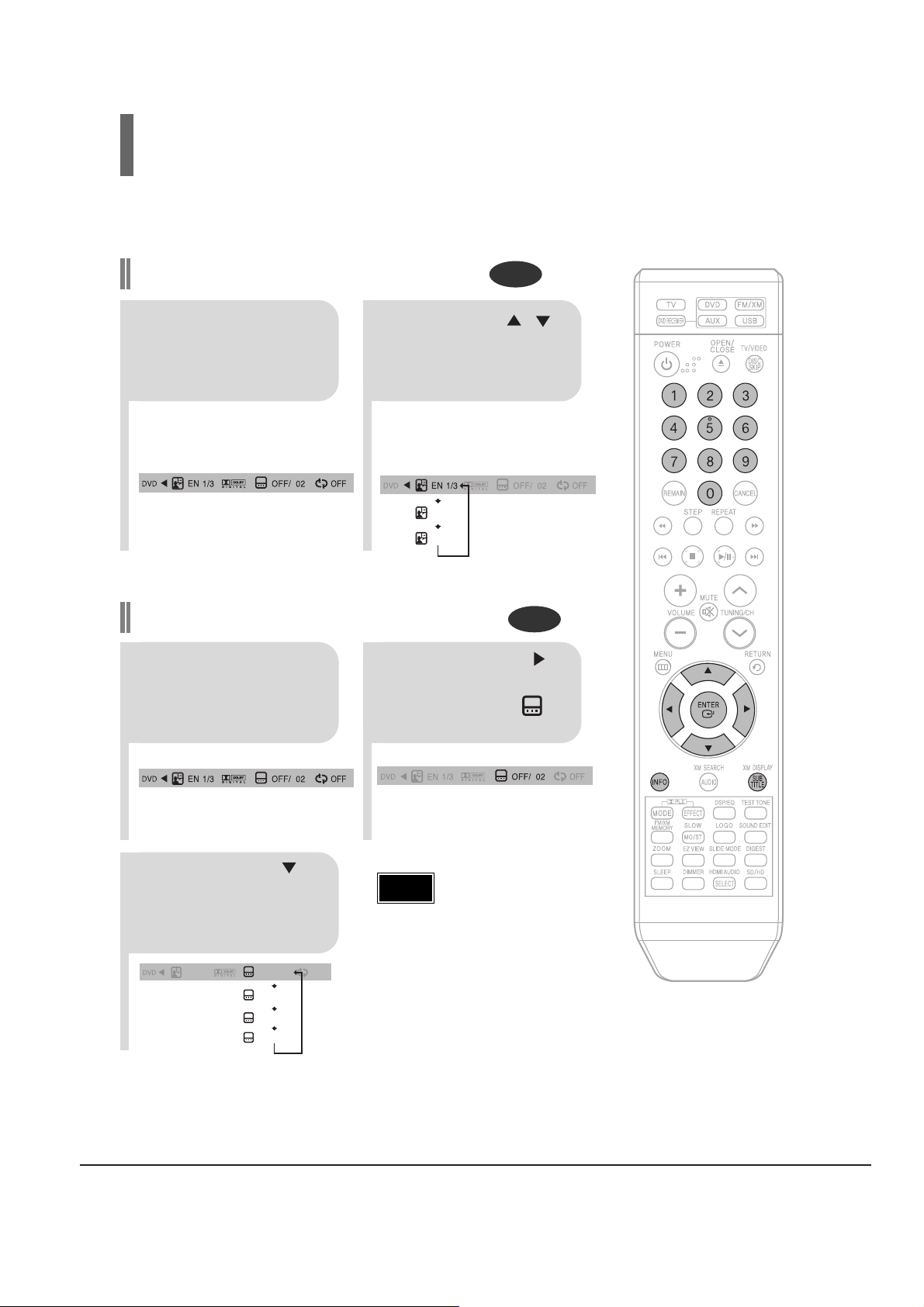
•
Depending on the number of languages
on a DVD disc, a different audio language
(ENGLISH, SPANISH, FRENCH, etc.) is
selected each time the button is pressed.
2
Press Cursor ,
buttons or numeric buttons to select the
desired audio language.
1
Press INFO button
twice.
SP 2/3
FR 3/3
EN 1/3 EN 01/ 03
OFF
SP 02/ 03
FR 03/ 03
OFF / 03
Audio Language Selection Function
DVD
Subtitle Language Selection Function
DVD
2
Press Cursor
button to move to
SUBTITLE ( )
display.
1
Press INFO button
twice.
3
Press Cursor
button or numeric
buttons to select
the desired subtitle.
Selecting Audio/Subtitle Language
•
To operate this function, you can also
press the Select AUDIO or Select SUBTITLE buttons on the remote control.
•
Depending on the disc, the Subtitle
and Audio Language functions may
not be available.
Note
Page 15
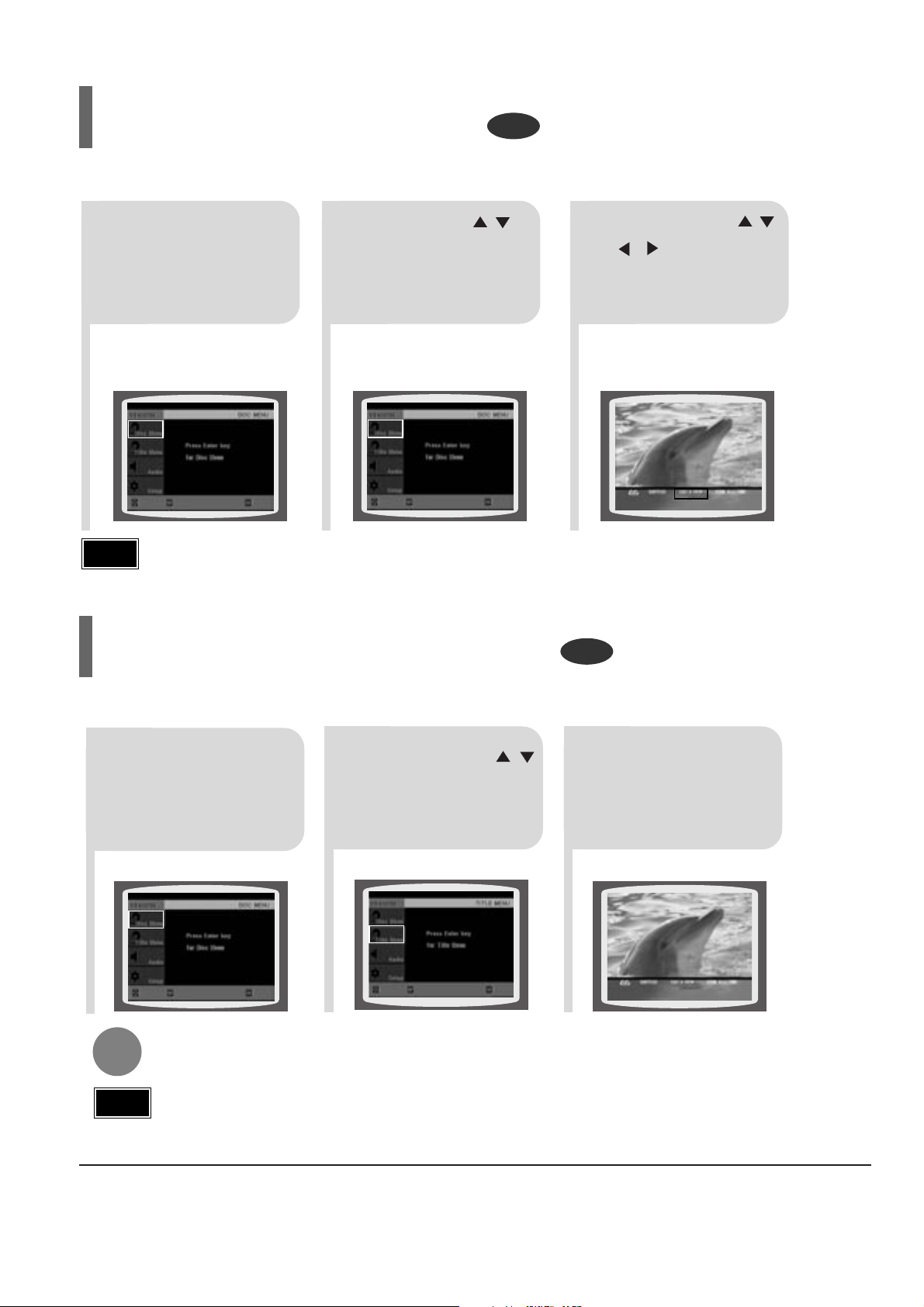
3-8 Samsung Electronics
2
Press Cursor ,
button to move to
‘Title Menu’.
DVD
1
In Stop mode,
press MENU button.
3
Press ENTER button.
•
The title menu appears.
Press MENU button to exit the setup screen.
DVD
2
•
When you select Disc Menu and it is not
supported by the disc, the "This menu is not sup-
ported" message appears on the screen.
1
In Stop mode,
press MENU
button.
Press Cursor ,
buttons to move to
‘DISC MENU’ and then
press ENTER button.
3
•
Press ENTER button.
Press Cursor ,
, buttons to
select the desired
item.
You can use the menus for the audio language, subtitle language, profile, etc.
DVD menu contents differ from disc to disc.
Using Disc Menu
For DVDs containing multiple titles, you can view the title of each movie.
Depending on the disc, the availability of this feature may vary.
Using the Title Menu
•
Disc menu display may be different depending on the disc.
Note
•
Title menu display may be different depending on the disc.
Note
ENTERMOVE EXIT
ENTERMOVE EXIT
ENTERMOVE EXIT
ENTERMOVE EXIT
Page 16
Samsung Electronics 3-9
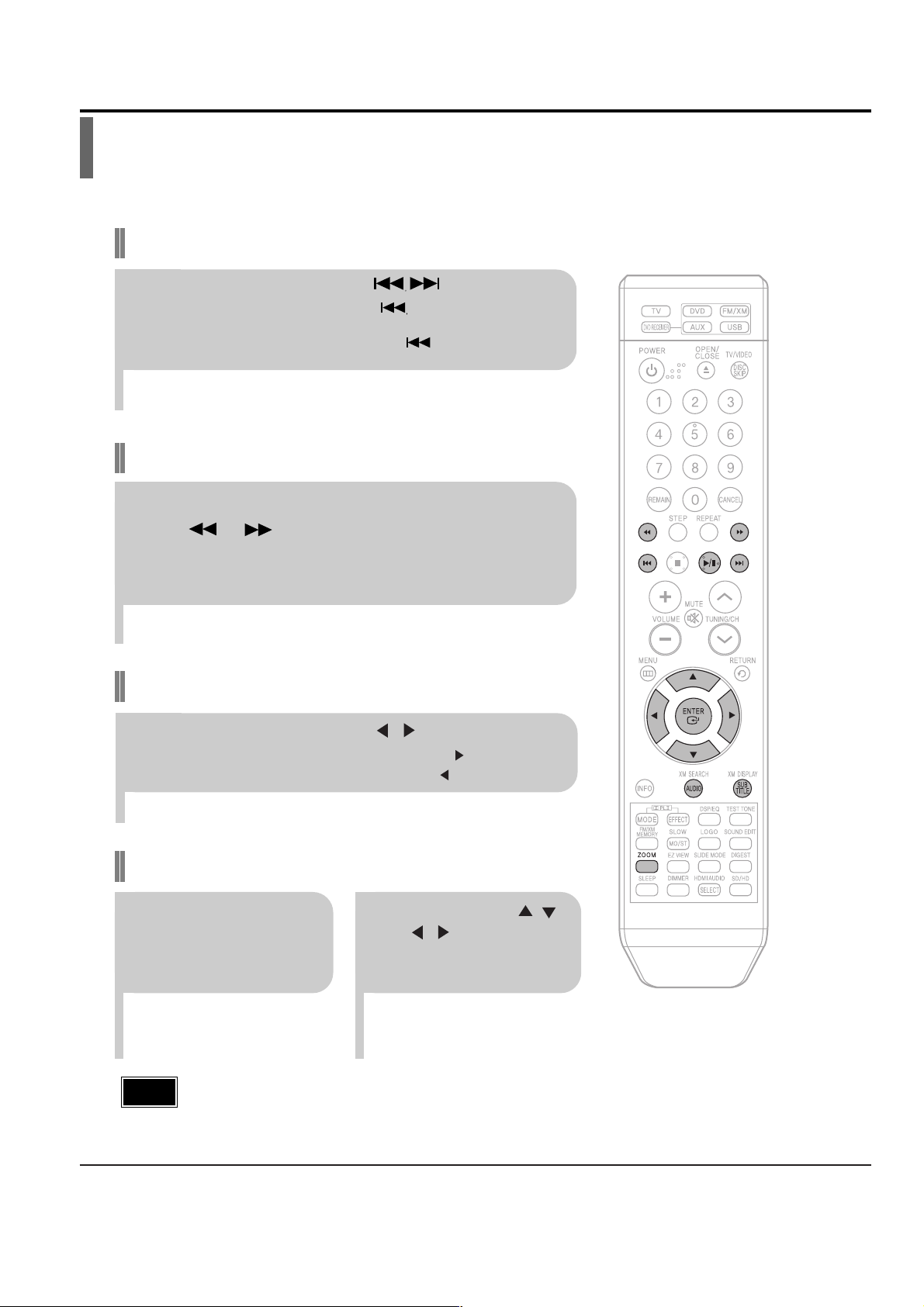
3. New Functions
Fast playback
Skip Forward/Back
During playback, press the button.
•
Goes to the next file whenever you press button, if there are over
2 files in the disk.
•
Goes to the previous file whenever you press button, if there are
over 2 files in the disk.
To play back the disc at a faster speed,
press or during playback.
•
Each time you press either button, the playback speed will change as
follows:
2x ➞ 4x ➞ 8x ➞ 32x ➞ Normal.
•
DIVX file can be zoomed only in ZOOM X2 mode.
•
DivX files have .Avi file extensions, however, not all .Avi files are DivX
and may not be playable in this unit.
Note
Zoom Function
2
Press Cursor , ,
, buttons to
move to the area
you want to enlarge.
1
Press ZOOM
button.
•
Each time you press the button,
your selection will toggle between
“ZOOM X2” and “ZOOM OFF”.
DivX Playback
5 Minute Skip function
During playback, press the , button.
•
Playback skips 5 minutes forward whenever you press button.
•
Playback skips 5 minutes back whenever you press button.
The functions on this page apply to DIVX disc playback.
Page 17
3-10 Samsung Electronics
•
" " is displayed when there is one supported language in the disc.
Note
Press the SUBTITLE button.
•
Each time you press the button, your selection will toggle between “SUBTITLE (1/1, 1/2 ...)” and “SUBTITLE OFF”.
•
If the disc has only one subtitle file, it will be played automatically.
•
See number 2 (Caption Function) below for more details concerning Subtitle usage with DIVX discs.
Subtitle Display
Press the AUDIO button.
•
If there are multiple audio tracks on a disc, you can toggle between them.
•
Each time you press the button, your selection will toggle between “AUDIO(1/1, 1/2 ...)” and
“”.
Audio Display
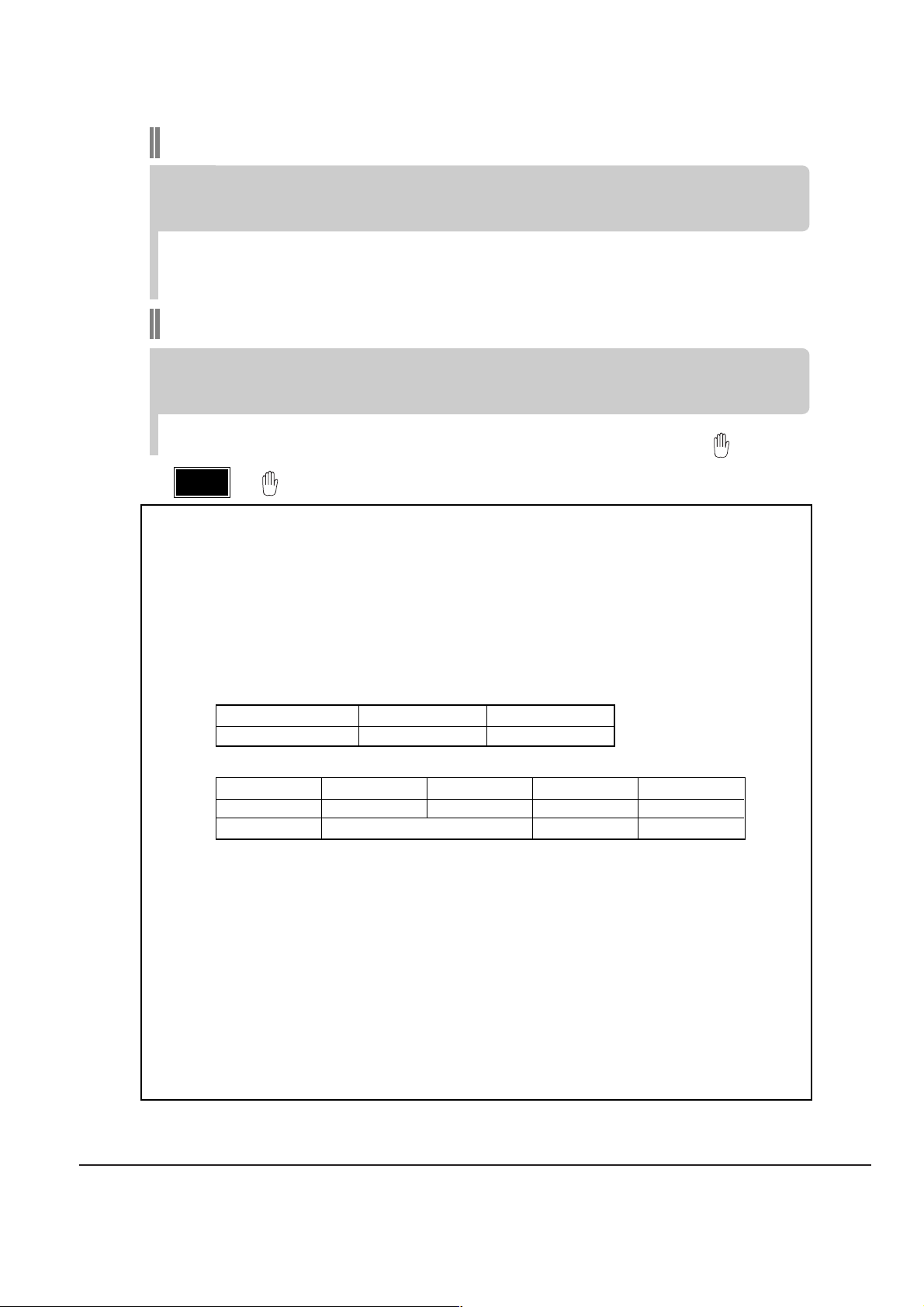
Format AVI WMV
Supported Versions DivX3.11 ~ 5.1 V1/V2/V3/V7
DivX
(Digital internet video eXpress)
DivX is a video file format developed by Microsoft and is based on MPEG4 compression technology
to provide audio and video data over the Internet in real-time.
MPEG4 is used for video encoding and MP3 for audio encoding so that the users can watch a movie
at near DVD-quality video and audio.
1. Supported Formats
•
This product only supports the following media formats.If both video and audio formats are not supported, the user may experience problems such as broken images or no sound.
2. Caption Function
•
You must have some experience with video extraction and editing in order to use this feature properly.
•
To use the caption function, save the caption file (*.smi) in the same file name as that of the DivX
media file (*.avi) within the same folder.
Example. Root Samsung_007CD1.avi
Samsung_007CD1.smi
•
Up to 60 alphanumeric characters or 30 East Asian characters (2 byte characters such as Korean and
Chinese) for the file name.
●
Supported Video Formats
Format MP3 WMA AC3 DTS
Bit Rate 80~384kbps 56~128kbps 128~384kbps 1.5Mbps
Sampling Frequency
44.1khz 44.1/48khz 44.1khz
•
DivX files, including audio and video files, created in the DTS format can only support up to 6Mbps.
•
Aspect Ratio: Although default DivX resolution is 640*480 pixels (4:3), this product supports up to
720*480 pixels (16:9). TV screen resolutions higher than 800 will not be supported.
•
When you play a disc whose sampling frequency is higher than 48khz or 320kbps, you may experience shaking on the screen during playback.
●
Supported Audio Formats
Page 18
Samsung Electronics 3-11
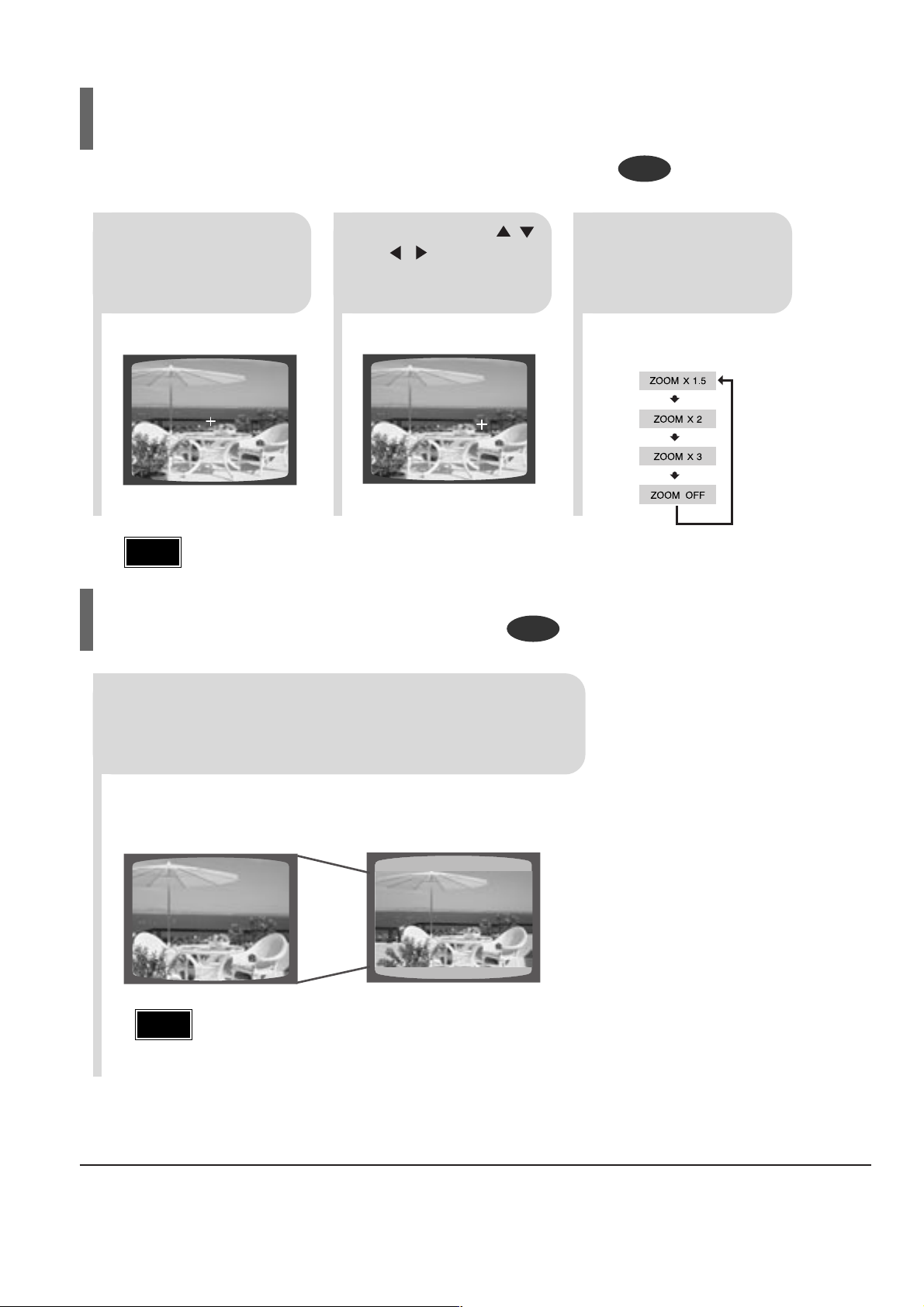
DVD
DVD
2
Press Cursor , ,
, buttons to
move to the area
you want to enlarge.
1
Press ZOOM button.
•
Each time the button is pressed, the
zoom level changes as follows:
3
Press ENTER button.
Press EZ VIEW button.
•
Each time the button is pressed, the zoom function will switch between On
and Off.
•
When a movie is played in Widescreen format, black bars at the top and bottom of the TV screen can be removed by pressing the EZ VIEW button.
EZ VIEW OFFEZ VIEW
SELECT ZOOM POSITION
This function allows you to enlarge a particular area of the displayed image.
Zoom (Screen Enlarge) Function
EZ VIEW Function
•
This function will not work if the DVD is recorded with multi-camera angle format.
•
Black bars may not disappear because some DVD discs have a built-in horizontal to vertical ratio.
•
This feature is not supported for DivX discs.
Note
•
When a DivX disc is being played, only the 2:1 zoom-in is available.
Note
Page 19
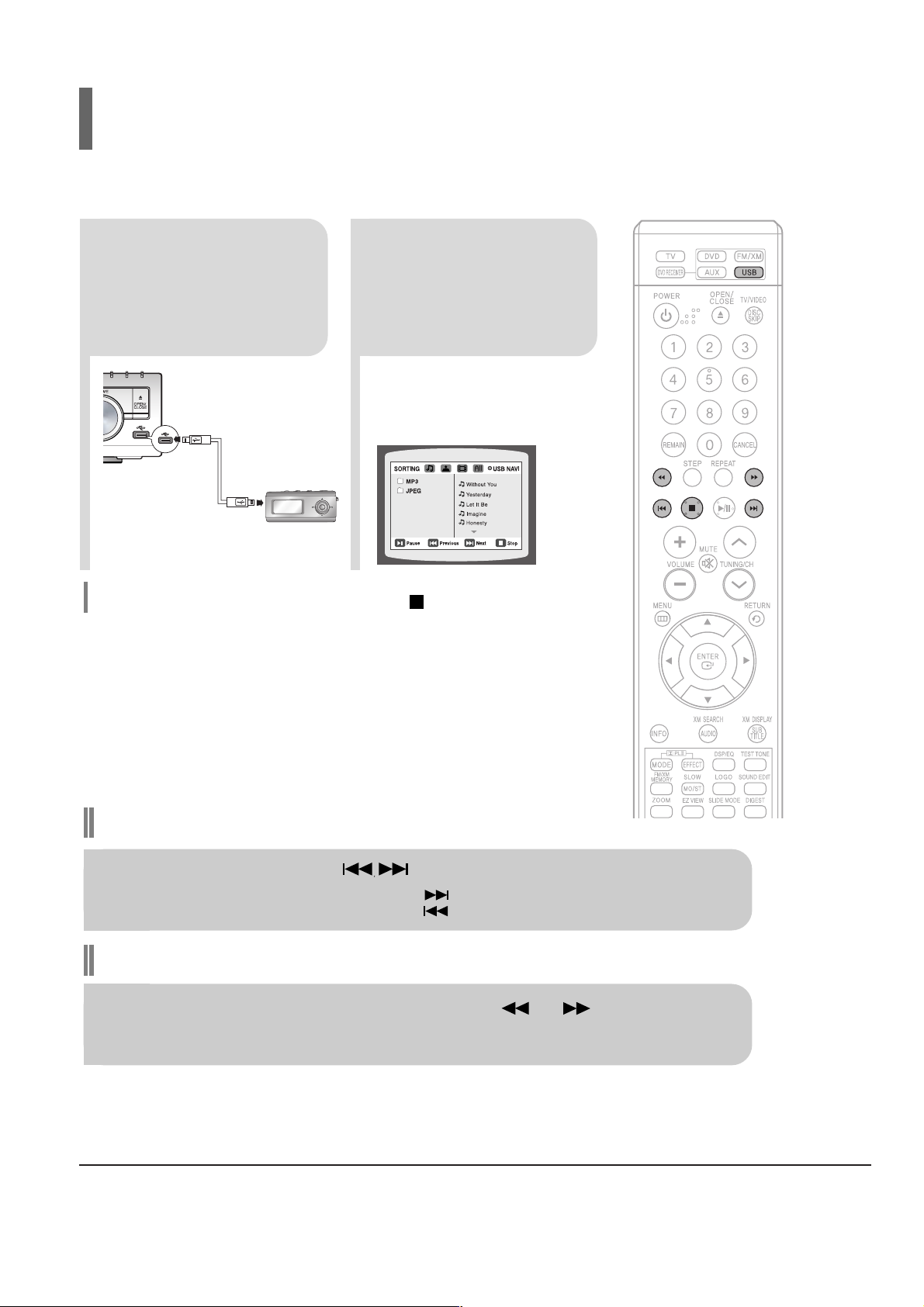
3-12 Samsung Electronics
2
Press the FUNCTION
button on the main unit
or the USB button on
the remote control to
select the USB mode.
•
“USB” appears on the display screen
and then disappears.
•
USB MENU
screen appears on the TV
screen and the saved file is played.
1
Connect the USB
device to the USB
port on the rear of
the unit.
To stop playback, press the STOP ( ) button.
Fast playback
Skip Forward/Back
During playback, press the button.
•
When there is more than one file, when you press the button, the next file is selected.
•
When there is more than one file, when you press the button, the previous file is selected.
To play back the disc at a faster speed, press or during playback.
•
Each time you press either button, the playback speed will change as follows:
2x ➞ 4x ➞ 8x ➞ 32x ➞ Normal.
You can enjoy media files such as pictures, movies and music saved in an MP3 player, USB memory or digital camera in high
quality video with 5.1 channel home theater sound by connecting the storage device to the USB port of the home theater.
Safe USB Removal
To prevent damage to the memory stored in the USB device, perform safe removal
before disconnecting the USB cable.
(1) Press the Stop button twice in a row.
The display will show REMOVE ➞ USB.
(2) Remove the USB cable.
Playing Media Files using the USB HOST feature
Page 20
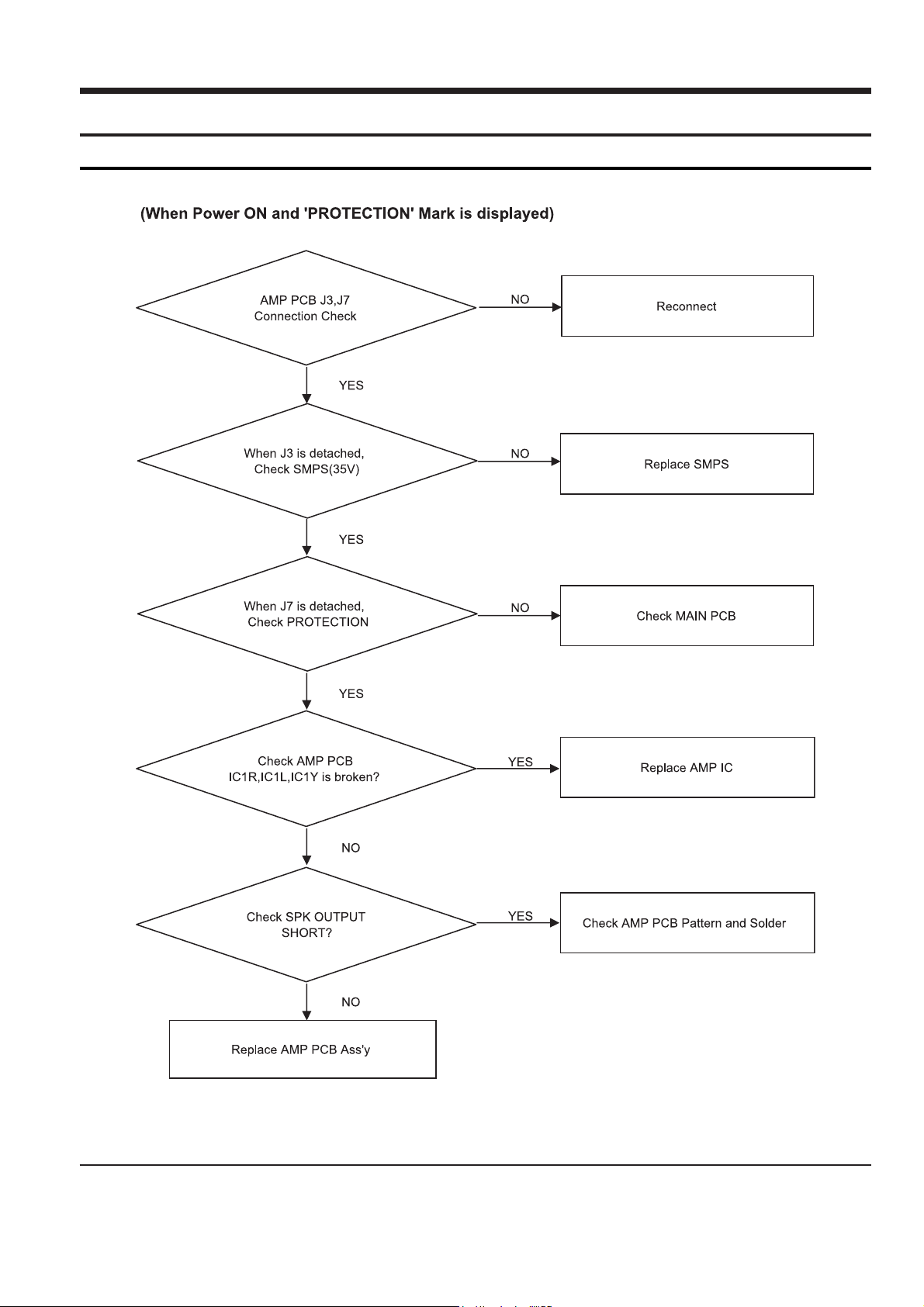
4. Adjustments
PROTECTION
4-1 Samsung Electronics
Page 21
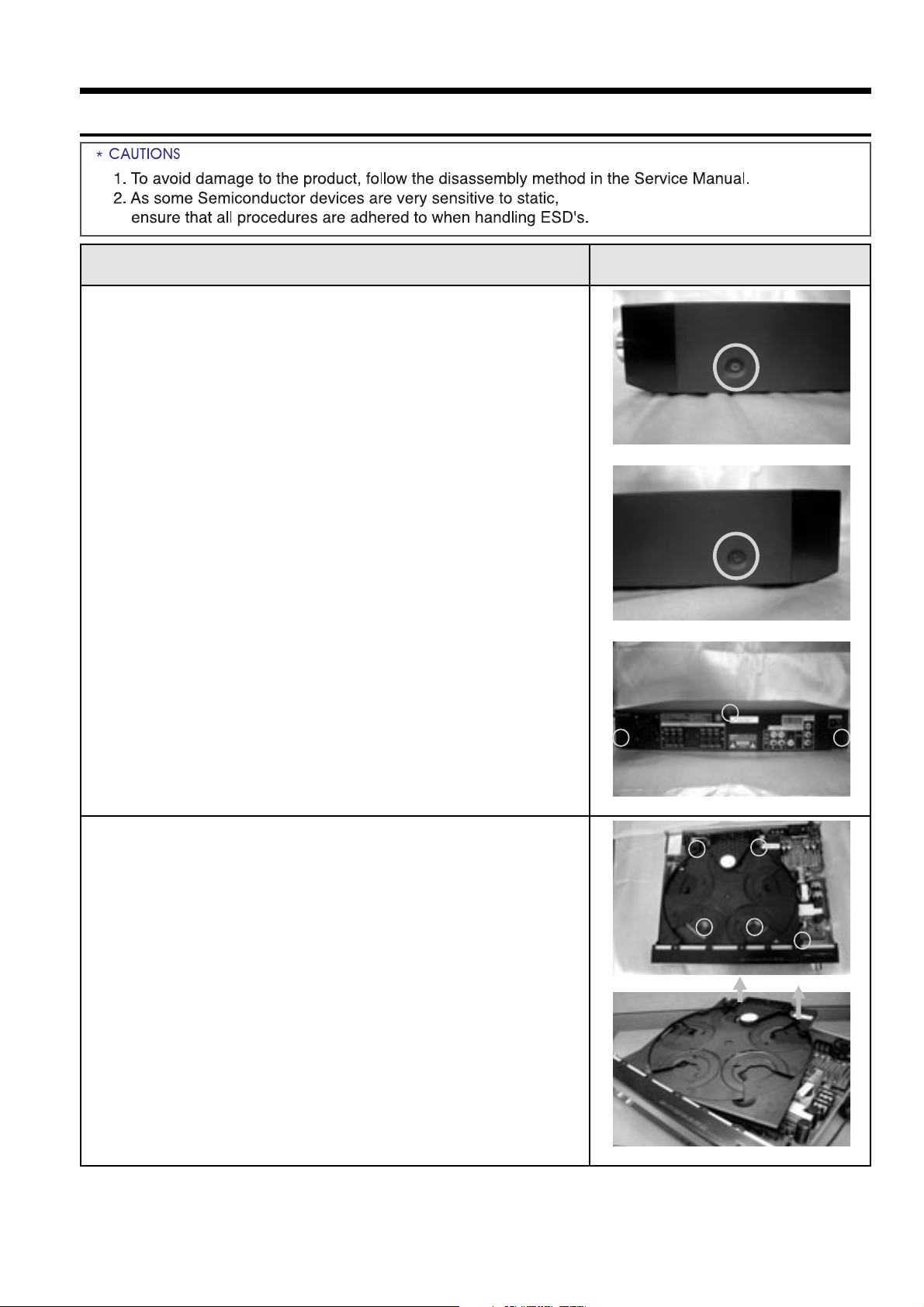
Samsung Electronics 5-1
5. How to disassemble
Order(Description) Picture
1. Separate CABINET-TOP
a. Unfasten 1 SCREW on LEFT and RIGHT SIDE.
b. Unfasten 3 SCREW on REAR SIDE.
a. <RIGHT SIDE>
<LEFT-SIDE>
<REAR SIDE>
a.
b.
2. Separate DVD MECHA
a. Rotate the tray 36 degree so that 4 screw
assembly holes are shown. Unfasten 4 screw of
TRAY and 1 screw of HOLDER-MECHA.
b. Slightly lift the front, right and left of TRAY to
rotate the door. and lift the back of DVD MECHA
to separate while the door open.
Page 22
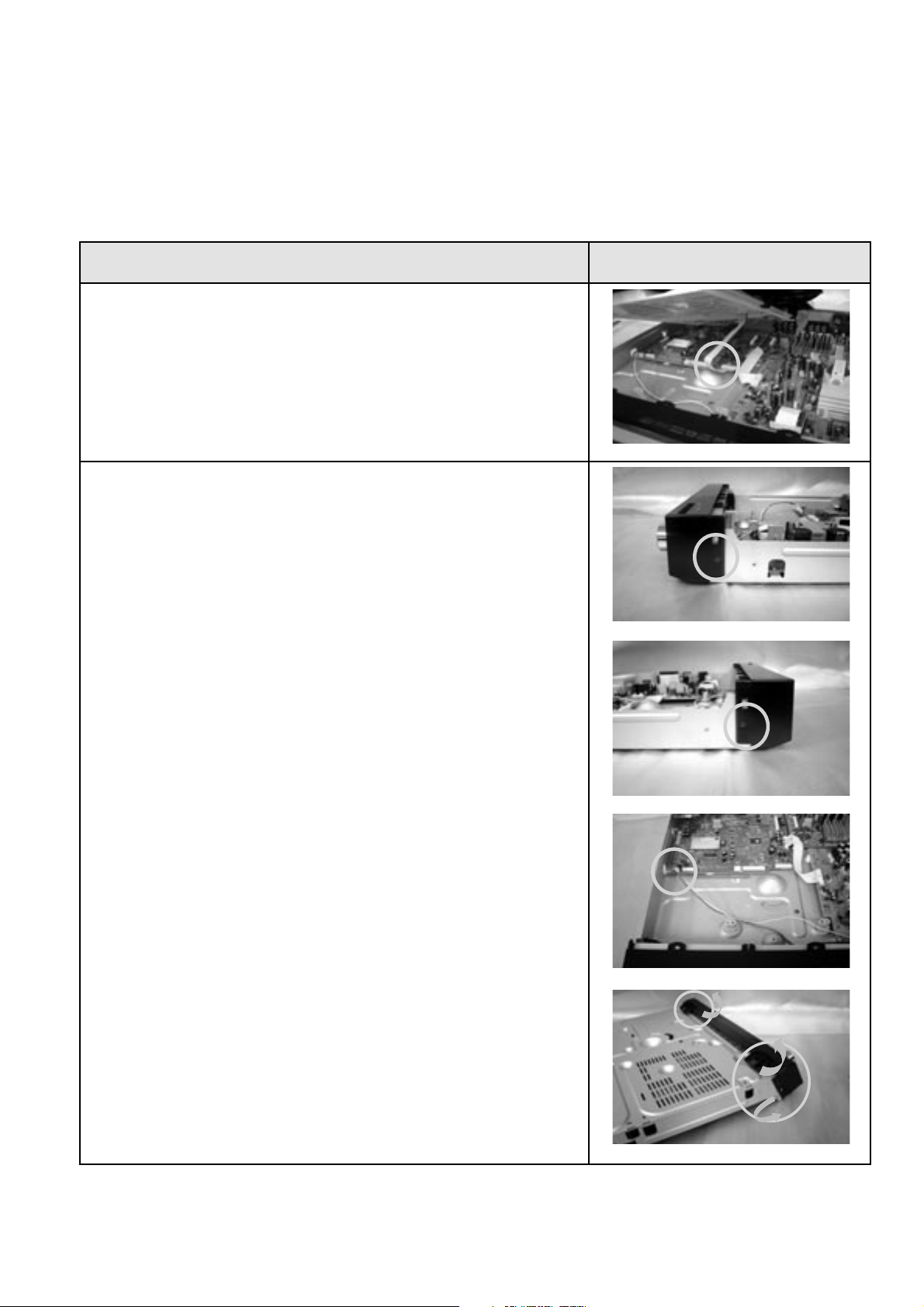
5-2 Samsung Electronics
Order(Description) Picture
c. Separate connector 1.
3. Separate ASSY FRONT
a. Unfasten 1 SCREW on LEFT and RIGHT SIDE.
b. Separate the wire connector connected to PCB.
c. Slightly turn over the hook of bottom and
2 places of sides to separate.
c.
a. <RIGHT SIDE>
<LEFT-SIDE>
b.
c.
Page 23
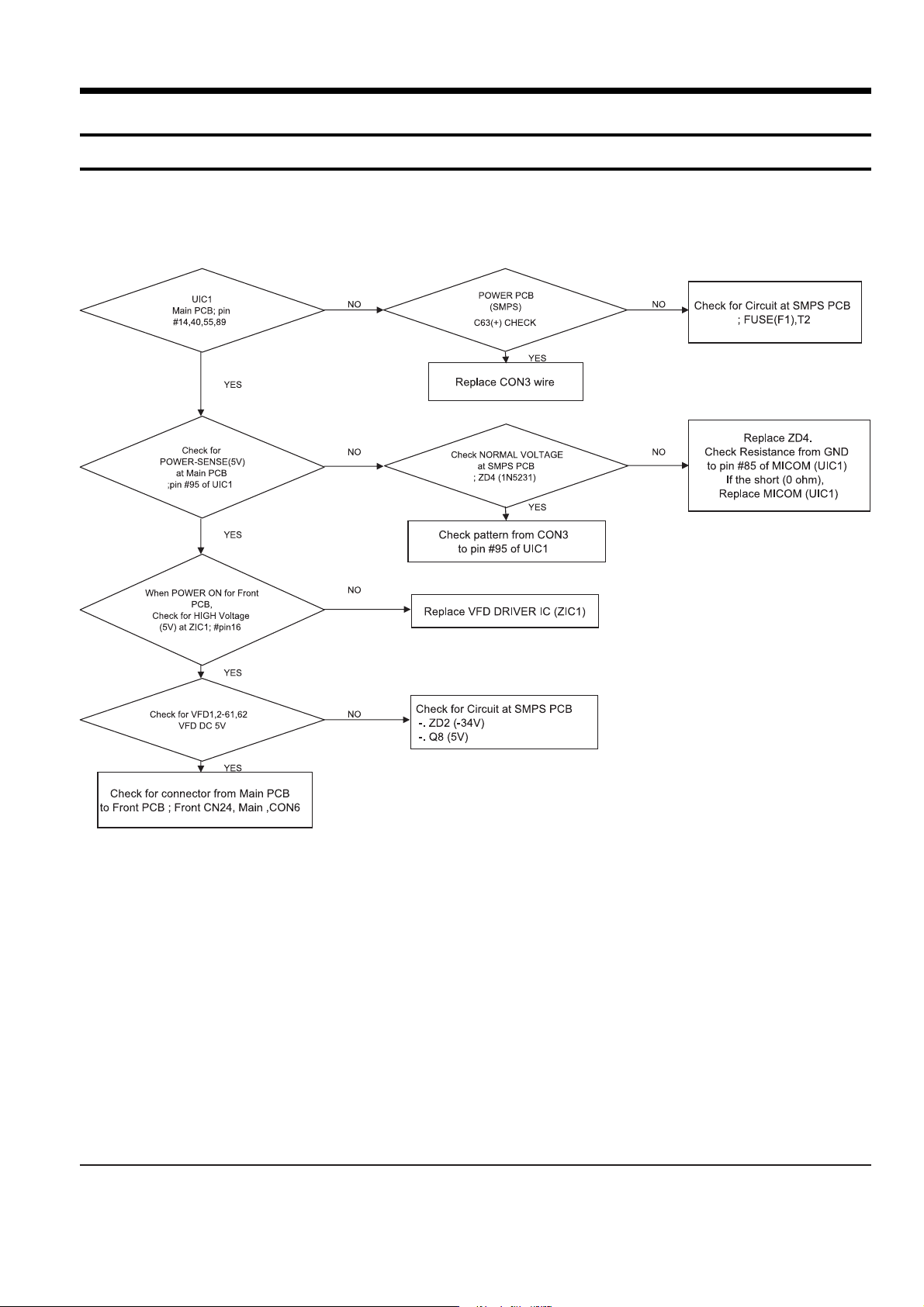
Samsung Electronics 6-1
6. Troubleshooting
1. POWER
Page 24
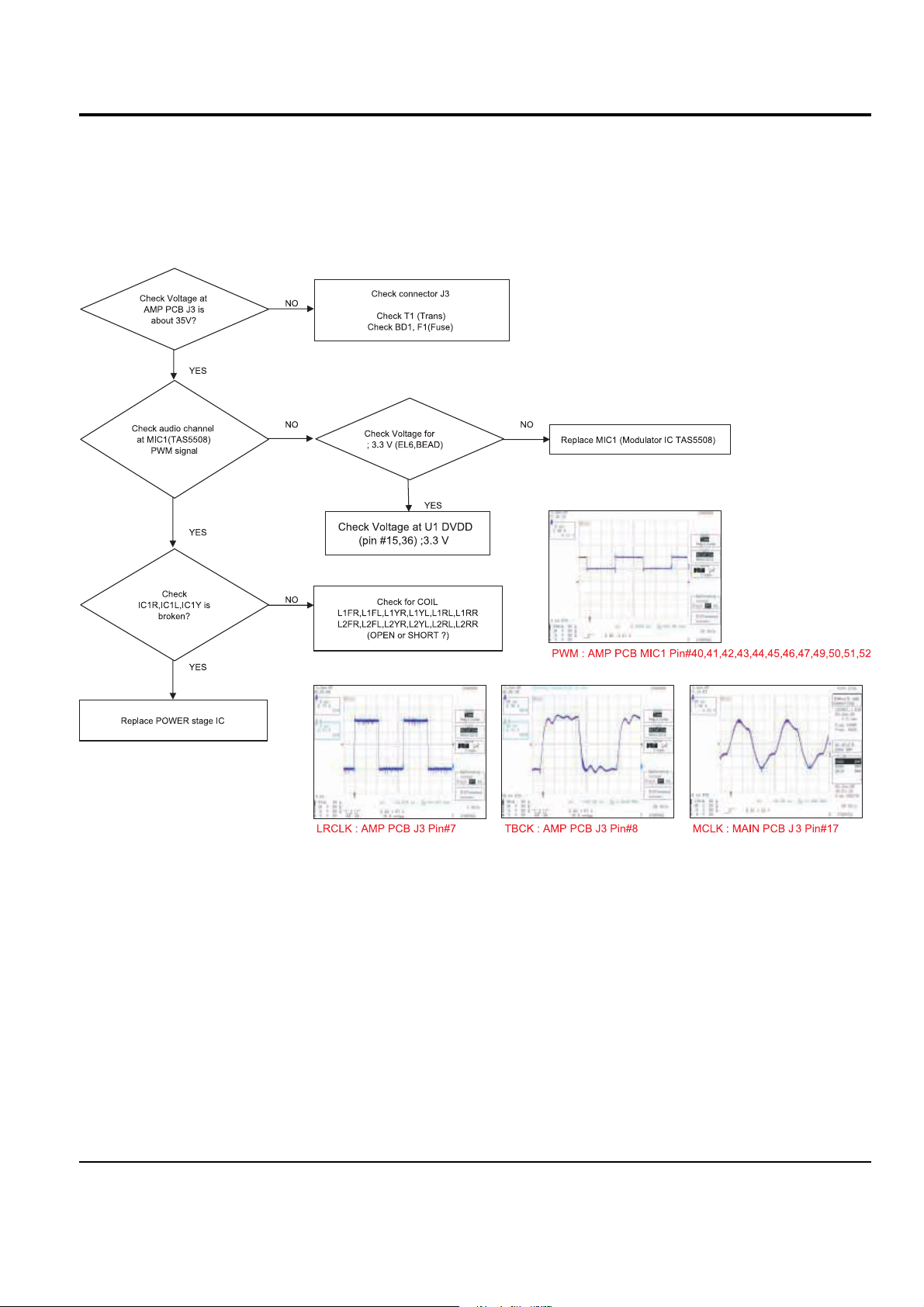
2. Output
6-2 Samsung Electronics
Page 25
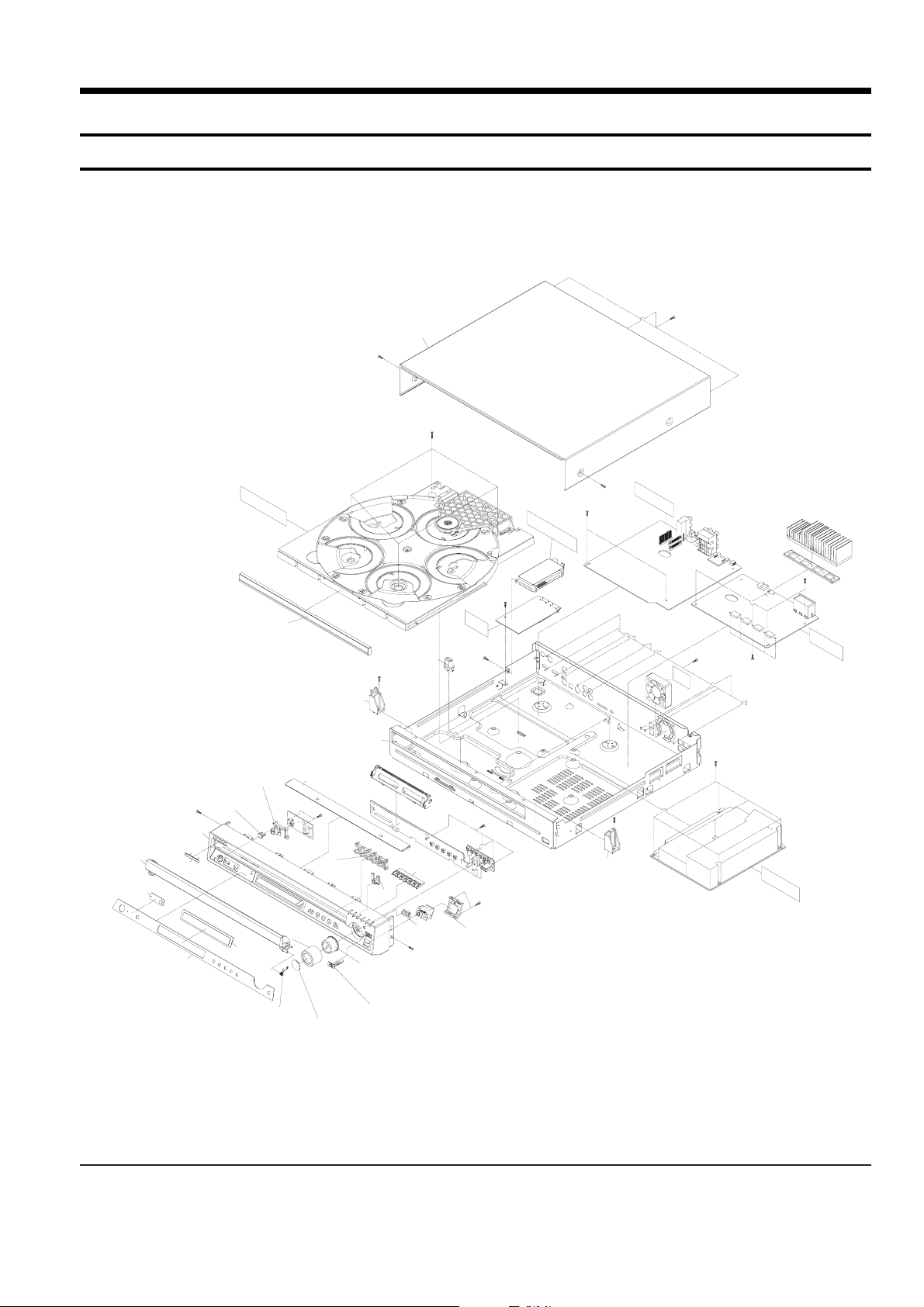
Samsung Electronics 7-1
7.Exploded Views and Parts List
1. Total Exploded View
AC080
D
F
M
A
C
H
A
T
R
A
Y
AD510
AH320
A
D
D
P
C
B
M
A
I
T
U
A
H
D
M
I
A
A
N
N
E
R
P
A
C
K
N
A
P
C
B
A
M
D
F
A
N
C
P
AD502
AL150
AC010
AB030
AD265
E
AD280
AK290
AK420
AW140
AS260
AT090
AB155
C
AK170
AD370
AC020
AH160
AL210
AC320
AK110
AK270
E
C
C
AH350
A
AT100
B
P
C
B
S
M
P
S
Page 26
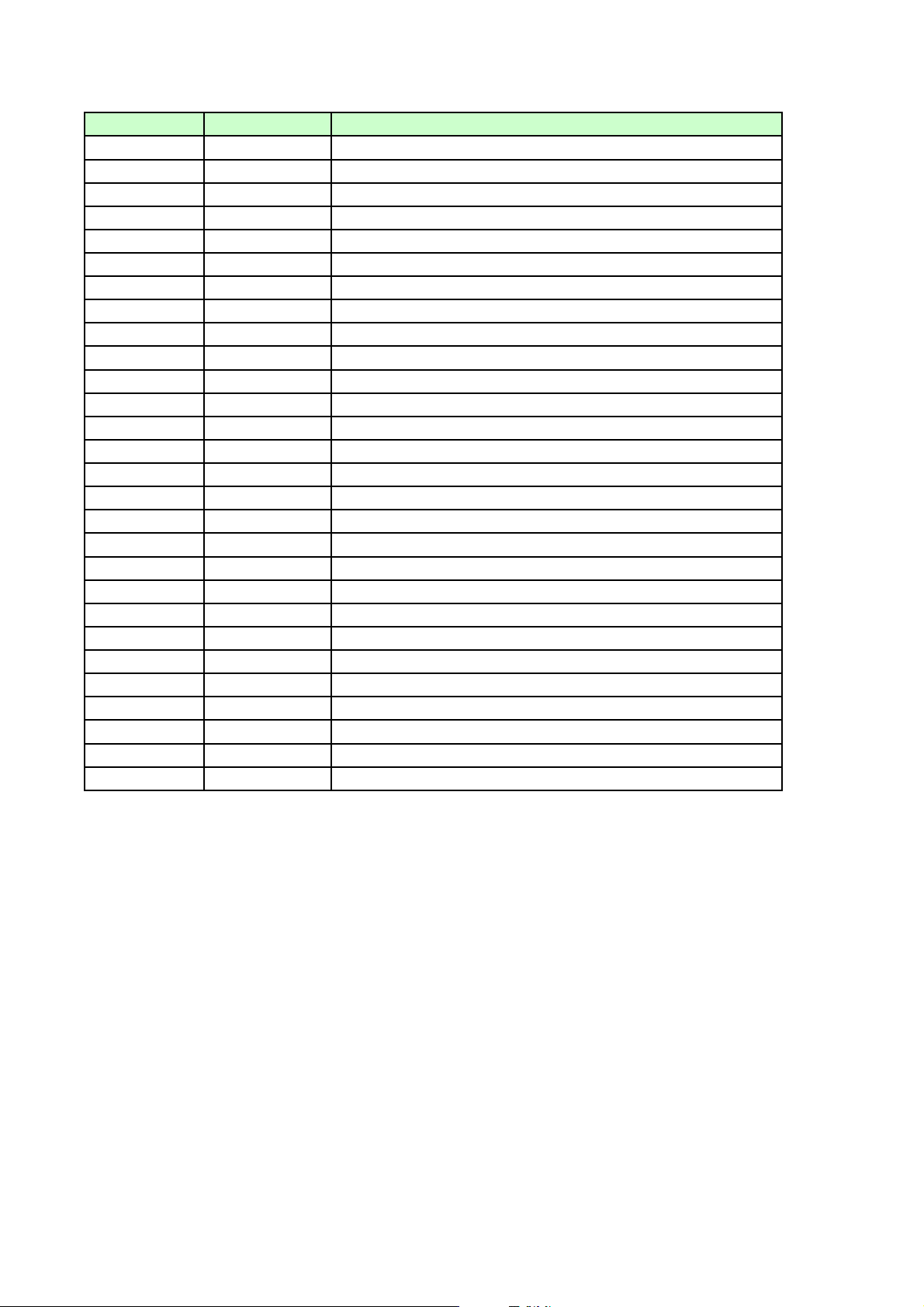
Location No. Part No. Part Name
AB155 AH61-02124A BRACKET-FRONT;HT-Q40,SECC,1.0T,-,-,-,AB260 AH61-10513A BRACKET-PCB;DAT7000,SUN,T2.0,W85,L105,GR
AC010 AH64-03927F CABINET-FRONT;HT-Q70,HIPS,-,-,-,-,-,USA
AC020 AH64-03822E CABINET-BOTTOM;HT-Q40,SECC 0.6T,-,-,-,-,
AC080 AH64-03823A CABINET-TOP;HT-Q40,SECC,0.6T,-,-,-,-,AC320 AH63-01140A COVER-USB;HT-Q80,ABS+ELST,-,-,-,-,-,-,AD502 AH64-03805B DOOR-DVD;HT-Q80,ABS,-,-,-,-,BLACK,AD510 AH64-03812B DOOR-TRAY;HT-Q40,-,-,-,-,-,-,AH160 AH61-02121A HOLDER-DOOR;HT-Q40,ABS,-,-,-,-,AH320 AH61-02059A HOLDER-MECHA;HT-P29,ABS,-,-,-,-,AK110 AH64-03928A KNOB-DIRECT;HT-Q80,ABS,-,-,-,-,-,-,AK170 AH64-03809B KNOB-FUNCTION;HT-Q80,ABS,-,-,-,-,-,-,Cr
AK270 AH64-03929A KNOB-OPEN;HT-Q80,ABS,-,-,-,-,-,-,AK290 AH64-03806A KNOB-POWER;HT-Q80,ABS,-,-,-,-,-,-,AL150 AH67-00427A LENS-REMOCON;HT-Q80,PMMA,-,-,-,-,AS000 6001-001257 SCREW-MACHINE;PWH,+,M1.7,L3,ZPC(YEL),SWR
AS030 6002-000126 SCREW-TAPPING;FH,+,-,2S,M3,L10,ZPC(BLK),
AS040 6003-001465 SCREW-TAPTITE;BWH,+,B,M3,L8,ZPC(YEL)
AS040 6003-000264 SCREW-TAPTITE;PWH,+,-,B,M3,L6,ZPC(YEL),S
AS040 6003-000280 SCREW-TAPTITE;BH,+,-,B,M3,L25,ZPC(YEL),S
AS040 6003-001561 SCREW-TAPTITE;BH,+,-,B,M3,L6,ZPC(YEL),SW
AS259 AH61-01747A SPRING ETC-DECK;SDM-R51,SUS304,-,-,-,-,AS260 AH61-02136A SPRING ETC-DOOR;HT-Q80,-,-,-,-,-,-,-,-,AS260 AH61-02136C SPRING ETC-DOOR;HT-Q80,-,-,-,-,-,-,-,-,AT090 AH63-01092A TRAY-SUPPORT,L;HT-P29,POM BLACK,-,-,-,-,
AT100 AH63-00872A TRAY-SUPPORT_RH;SDM-R51,ABS,-,-,-,-,-,AT100 AH63-01093A TRAY-SUPPORT,R;HT-P29,POM BLACK,-,-,-,-,
AW140 AH64-03943A WINDOW-VFD;HT-Q80,PMMA 2T,-,-,-,-,-,-
Page 27

Samsung Electronics 8-1
***** HT-Q70T/XAA Parts List *****
AB155 AH61-02124A BRACKET-FRONT;HT-Q40,SECC,1.0T,-,-,-,AB260 AH61-10513A BRACKET-PCB;DAT7000,SUN,T2.0,W85,L105,GR
AC010 AH64-03927F CABINET-FRONT;HT-Q70,HIPS,-,-,-,-,-,USA
AC020 AH64-03822E CABINET-BOTTOM;HT-Q40,SECC 0.6T,-,-,-,-,
AC080 AH64-03823A CABINET-TOP;HT-Q40,SECC,0.6T,-,-,-,-,AC16 2401-000414 C-AL;10uF,20%,16V,GP,TP,4x7,5
AC320 AH63-01140A COVER-USB;HT-Q80,ABS+ELST,-,-,-,-,-,-,AC45 2401-000651 C-AL;2.2uF,20%,50V,GP,TP,4x7,5
AD3 0402-000309 DIODE-RECTIFIER;1SR154-400,400V,1A,SOD-1
AD502 AH64-03805B DOOR-DVD;HT-Q80,ABS,-,-,-,-,BLACK,AD510 AH64-03812B DOOR-TRAY;HT-Q40,-,-,-,-,-,-,AH160 AH61-02121A HOLDER-DOOR;HT-Q40,ABS,-,-,-,-,AH320 AH61-02059A HOLDER-MECHA;HT-P29,ABS,-,-,-,-,AIC3 1002-001392 IC-A/D CONVERTER;WM8775EDS,24BIT,SSOP,28
AK110 AH64-03928A KNOB-DIRECT;HT-Q80,ABS,-,-,-,-,-,-,AK170 AH64-03809B KNOB-FUNCTION;HT-Q80,ABS,-,-,-,-,-,-,Cr
AK270 AH64-03929A KNOB-OPEN;HT-Q80,ABS,-,-,-,-,-,-,AK290 AH64-03806A KNOB-POWER;HT-Q80,ABS,-,-,-,-,-,-,AL150 AH67-00427A LENS-REMOCON;HT-Q80,PMMA,-,-,-,-,AR3 2007-000087 R-CHIP;6.8Kohm,5%,1/10W,TP,1608
AR8 2007-000091 R-CHIP;12Kohm,5%,1/10W,TP,1608
AS000 6001-001257 SCREW-MACHINE;PWH,+,M1.7,L3,ZPC(YEL),SWR
AS030 6002-000126 SCREW-TAPPING;FH,+,-,2S,M3,L10,ZPC(BLK),
AS040 6003-001465 SCREW-TAPTITE;BWH,+,B,M3,L8,ZPC(YEL)
AS040 6003-000264 SCREW-TAPTITE;PWH,+,-,B,M3,L6,ZPC(YEL),S
AS040 6003-000280 SCREW-TAPTITE;BH,+,-,B,M3,L25,ZPC(YEL),S
AS040 6003-001561 SCREW-TAPTITE;BH,+,-,B,M3,L6,ZPC(YEL),SW
AS259 AH61-01747A SPRING ETC-DECK;SDM-R51,SUS304,-,-,-,-,AS260 AH61-02136A SPRING ETC-DOOR;HT-Q80,-,-,-,-,-,-,-,-,AS260 AH61-02136C SPRING ETC-DOOR;HT-Q80,-,-,-,-,-,-,-,-,AT 090 AH63-01092A TRAY-SUPPORT,L;HT-P29,POM BLACK,-,-,-,-,
AT 100 AH63-00872A TRAY-SUPPORT_RH;SDM-R51,ABS,-,-,-,-,-,AT 100 AH63-01093A TRAY-SUPPORT,R;HT-P29,POM BLACK,-,-,-,-,
AW140 AH64-03943A WINDOW-VFD;HT-Q80,PMMA 2T,-,-,-,-,-,C21SW 2203-000787 C-CER,CHIP;0.33NF,5%,50V,C0G,TP,2012
C24RR 2401-002300 C-AL;47uF,20%,50V,GP,TP,6.3x11,5
C25SW 2203-000257 C-CER,CHIP;10nF,10%,50V,X7R,1608
C2RL 2203-005171 C-CER,CHIP;1000nF,10%,16V,X7R,2012
C37CC 2305-000407 C-FILM,LEAD-PEF;470nF,5%,100V,TP,-,5mm
C3RR 2203-005249 C-CER,CHIP;100nF,10%,50V,X7R,1608
C7 2203-000189 C-CER,CHIP;100nF,+80-20%,25V,Y5V,1608
C8FL 2401-004106 C-AL;680uF,20%,50V,-,BK,12.5 x 35,5
C9SW 2203-001634 C-CER,CHIP;33nF,10%,50V,X7R,1608
CD000 AH61-01736A BASE-MAIN;SMD-R51,ABS,-,-,-,NTR,CD020 AH81-01563A BELT-LOAD;-,-,-,-,-,-,CD230 AH66-00253A GEAR-CONVERT;SDM-R51,TPE,-,-,-,BLK,-,-,CD240 AH66-00254A GEAR-LOAD;SDM-R51,POM,-,-,-,BLK,-,-,CD300 AH66-00252A GEAR-TRAY;SDM-R51,POM,-,-,-,-,-,-,CD340 AH66-00258A LEVER-LIFT;SDM-R51,ABS,-,-,-,-,BLK,CD540 AH63-00822A TRAY-DISC;SDM-R51,ABS,-,-,-,-,BLK,CD550 AH63-00823A TRAY-ROULETTE;-,POM,-,-,-,-,BLK,CN24 3708-001488 CONNECTOR-FPC/FFC/PIC;30P,1.25MM,STRAIGH
CN25A AH39-00822A WIRE HARNESS;HT-Q80,-,-,5,45mm,BLACK/WHI
CN26 AH39-00753A LEAD CONNECTOR;HT-P50,4P,2mm,490,2854#28
CN3 3710-002241 SOCKET-BOARD TO CABLE;34P,2R,2mm,SMD-S,A
CNXM2 AH37-00022A PLUG-USB;4P,AU,UL94V-0,SMD,USB
CON1 AH39-00823A WIRE HARNESS;HT-Q80,-,-,8,60mm,BLACK/WHI
CON1 3708-001122 CONNECTOR-FPC/FFC/PIC;26P,1.25MM,STRAIGH
CON3 AH39-00824A WIRE HARNESS;HT-Q40,-,-,15,150mm,BLACK/W
CON6 3708-001577 CONNECTOR-FPC/FFC/PIC;30P,1.25MM,STRAIGH
CON7 3711-000682 HEADER-BOARD TO CABLE;BOX,13P,1R,2MM,ANG
CON8 3708-000448 CONNECTOR-FPC/FFC/PIC;6P,1.25MM,STRAIGHT
CON9 3709-001287 CONNECTOR-CARD SLOT;10P,1.5mm,SMD-A,AU10
CV1 2203-000783 C-CER,CHIP;0.33nF,5%,50V,C0G,1608
CXM1 2401-001938 C-AL;22uF,20%,25V,GP,TP,5x11mm,5mm
CXM13 2203-000626 C-CER,CHIP;0.022nF,5%,50V,C0G,1608
DD1 0407-000116 DIODE-ARRAY;DAP202K,80V,100mA,CK2-3,SOTDIC1 1003-001450 IC-MOTOR DRIVER;BA5954FM,SOP,28P,300MIL,
DIC2 1201-001842 IC-OP AMP;TL3472CD,SO,TP,8P,-,DUAL,-,PAL
DR12 2007-000483 R-CHIP;1OHM,5%,1/8W,TP,2012
DR200 2007-000131 R-CHIP;91Kohm,5%,1/10W,TP,1608
DR201 2007-000965 R-CHIP;5.1Kohm,5%,1/10W,TP,1608
DR28 2007-000109 R-CHIP;1Mohm,5%,1/10W,TP,1608
DR29 2007-000120 R-CHIP;680ohm,5%,1/10W,TP,1608
DR32 2007-000458 R-CHIP;18Kohm,5%,1/10W,TP,1608
DR36 2007-000084 R-CHIP;4.7Kohm,5%,1/10W,TP,1608
DR44 2007-000029 R-CHIP;0ohm,5%,1/8W,TP,2012
ED1 0401-001099 DIODE-SWITCHING;1N4148WS,75V,150mA,SOD-3
EL1 3301-001069 BEAD-SMD;120ohm,1.6x0.8x0.8mm,200mA,TP,
EMR4 2007-000694 R-CHIP;3.3ohm,5%,1/8W,TP,2012
ESS-H AH62-00062G HEAT SINK-TR;HT-DS400,AL EXTR,-,-,-,-,-,
FC17 2402-001049 C-AL,SMD;10uF,20%,16V,GP,TP,3.3x3.3x5.4
FC18 2402-000009 C-AL,SMD;47uF,20%,6.3V,GP,TP,5.3x5.3x5.
FC2 2401-001975 C-AL;47uF,20%,16V,GP,TP,5x11mm,5mm
FIC1 1203-001369 IC-VOL. DETECTOR;XC61CN1902,SOT-23,3P,63
FIC2 1003-001684 IC-DISPLAY DRIVER;FLI2301BD,PQFP,208P,28
FIC5 1105-001376 IC-DRAM;W986432DH-7,4X512KX32BIT,TSOP(
FJ1 3711-000820 HEADER-BOARD TO CABLE;BOX,2P,1R,2.5MM,ST
FL1 AH07-00189A VF DISPLAY;HNV-12SN01T,HT-Q80,135.2x20.5
FQ1 0501-000422 TR-SMALL SIGNAL;KTA1273,PNP,-30V,-30V,-2
FQ2 0501-000341 TR-SMALL SIGNAL;KSC1623-L,NPN,200mW,SOTFR1 2003-000587 R-METAL OXIDE(S);22ohm,5%,1W,AA,TP,3.3x9
FR1 2007-000094 R-CHIP;22Kohm,5%,1/10W,TP,1608
FR10 2007-000449 R-CHIP;180ohm,5%,1/8W,TP,2012
FR12 2003-000674 R-METAL OXIDE(S);39ohm,5%,1W,AA,TP,3.3x9
FR12 2007-001166 R-CHIP;75ohm,5%,1/8W,TP,2012
FR17 2011-000475 R-NET;33ohm,5%,1/16W,L,CHIP,8P,TP,32
FR3 2003-000708 R-METAL OXIDE(S);47ohm,5%,1W,AA,TP,3.3x9
FR30 2011-000816 R-NET;100OHM,5%,1/16W,L,CHIP,8P,TP
FX1 2801-004182 CRYSTAL-SMD;13.5MHZ,10PPM,28-AAN,24PF,60
HC1 2401-000042 C-AL;100uF,20%,16V,GP,TP,6.3x7,5
HC20 2203-001640 C-CER,CHIP;0.39nF,10%,50V,X7R,1608
HC26 2203-001052 C-CER,CHIP;0.56nF,10%,50V,X7R,TP,1608
HC2L 2203-000236 C-CER,CHIP;0.1nF,5%,50V,C0G,1608
HC55 2203-005065 C-CER,CHIP;1000nF,+80-20%,10V,Y5V,1608
HDCN2 3701-001314 CONNECTOR-HDMI;19P,2R,FEMALE,SMD-A,AU
HIC 1201-000163 IC-OP AMP;4560,SOP,8P,173MIL,DUAL,100V/m
HIC1 1204-002421 IC-VIDEO ENCODER;SAA7128AH/V1,QFP,44P,10
HIC20 1205-002671 IC-TRANSMITTER;SII9030CTU80,TQFP,80P,12x
HJ1 3711-006077 CONNECTOR-HEADER;NOWALL,34P,2R,2mm,STRAI
HL14 3301-001495 BEAD-SMD;120ohm,2012,2500mA,TP,115ohm/1
HL1R 2703-000404 INDUCTOR-SMD;220uH,10%,3225
HL20 2901-001302 FILTER-EMI SMD;20V,0.3A,-,-,2.0x1.2x1.3m
HOLD- AH63-00384A SHIELD-SPK,8;HT-DL100,SPTE 0.3T,-,-,-,-,
HOLDE AH61-01869A HOLDER-HEATSINK;HT-P50,ABS+GF30%,-,-,-,HQ3 0501-000002 TR-SMALL SIGNAL;KSA812,PNP,150MW,SOT-23,
HQ4 0505-000110 FET-SILICON;2N7002,N,60V,115mA,7.5ohm,0.
HR2 2007-000116 R-CHIP;120ohm,5%,1/10W,TP,1608
HR26 2007-000076 R-CHIP;330ohm,5%,1/10W,TP,1608
HR31 2007-000362 R-CHIP;12ohm,5%,1/10W,TP,1608
HR33 2007-001167 R-CHIP;75ohm,5%,1/10W,TP,1608
HR54 2007-000729 R-CHIP;300ohm,5%,1/10W,TP,1608
HR56 2007-001164 R-CHIP;75ohm,1%,1/10W,TP,1608
HR59 2007-002899 R-CHIP;10ohm,1%,1/10W,TP,1608
HR67 2007-000080 R-CHIP;2Kohm,5%,1/10W,TP,1608
HREG1 1203-003091 IC-POSI.FIXED REG.;FAN1587AMC33X,TO-263,
HS-MA AH62-00140A HEAT SINK-MAIN;HT-P50,AL,-,-,-,-,-,IC1R 1201-002236 IC-AUDIO AMP;TAS5152,PSOP3,36P,15.9x11mm
J0 2007-000309 R-CHIP;10ohm,5%,1/10W,TP,1608
J3 AH39-00821A WIRE HARNESS;HT-Q40,-,-,9,50mm,BLACK/WHI
L1FL 2702-001130 INDUCTOR-RADIAL;10uH,10%,19x15.8mm
L1YL AH27-00055A COIL CHOKE;DBF-1310A,HT-DS600,10uH,-,-,2
L2 2703-000397 INDUCTOR-SMD;33uH,10%,2520
LED2 0601-001432 LED;ROUND,BLUE,3mm,455nm
LXM2 2703-000125 INDUCTOR-SMD;10uH,10%,2012
MC15 2203-001607 C-CER,CHIP;0.22nF,5%,50V,NP0,1608
MC16 2401-001164 C-AL;33uF,20%,16V,GP,TP,5x11mm,5mm
MC16 2203-000972 C-CER,CHIP;47nF,10%,16V,X7R,1608
MC18 2203-000998 C-CER,CHIP;0.047nF,5%,50V,C0G,1608
MC22 2401-002042 C-AL;220uF,20%,10V,GP,TP,6.3x11,5
MC23 2203-005221 C-CER,CHIP;15nF,10%,50V,X7R,1608
MC24 2203-000815 C-CER,CHIP;0.033nF,5%,50V,C0G,1608
MC31 2203-001656 C-CER,CHIP;0.47nF,5%,50V,NP0,1608
MC40 2203-001103 C-CER,CHIP;6.8nF,10%,50V,X7R,1608
MC43 2203-000646 C-CER,CHIP;0.024NF,5%,50V,C0G,TP,1608
MC44 2203-000681 C-CER,CHIP;0.027nF,5%,50V,C0G,1608
MC47 2203-000440 C-CER,CHIP;1nF,10%,50V,X7R,1608
MC6 2203-006170 C-CER,CHIP;220nF,10%,16V,X7R,1608
MC82 2203-000888 C-CER,CHIP;4.7nF,10%,50V,X7R,1608
MC95 2203-005148 C-CER,CHIP;100nF,10%,16V,X7R,1608
MIC1 1204-002361 IC-MODULATOR;TAS5508PAG,TQFP,64P,-,PLAST
MIC1 0801-002683 IC-CMOS LOGIC;74HCT245,TRANSCEIVER,TSSOP
MIC10 1003-001508 IC-MOTOR DRIVER;FAN8082DTF,SOP,8P,200MIL
MIC3 1107-001505 IC-FLASH MEMORY;49BV162AT,16Mbit,1Mx16/2
MIC4 1204-002450 IC-PAL/NTSC DECODER;ES6697FDF,PQFP,256P,
MIC6 1103-001334 IC-EEPROM;K524A60X81,1KX8BIT,SOP,8P,5X4M
MIC8 1105-001535 IC-DRAM;M12L128168A-7T,-,128MBIT,4X2MX
MJ1 3711-005971 HEADER-BOARD TO BOARD;NOWALL,30P,2R,2MM,
MJ4 3708-001878 CONNECTOR-FPC/FFC/PIC;6P,1MM,SMD-A,SNPB,
MR153 2011-000651 R-NET;10ohm,5%,1/16W,L,CHIP,8P,TP,32
MR19 2007-000052 R-CHIP;10Kohm,1%,1/10W,TP,1608
MR2 2007-000882 R-CHIP;4.7ohm,5%,1/10W,TP,1608
MR219 2007-000119 R-CHIP;560ohm,5%,1/10W,TP,1608
MR25 2007-000072 R-CHIP;47ohm,5%,1/10W,TP,1608
MR29 2007-000100 R-CHIP;68Kohm,5%,1/10W,TP,1608
MR3 2007-000695 R-CHIP;3.3ohm,5%,1/10W,TP,1608
MR30 2007-000093 R-CHIP;20Kohm,5%,1/10W,TP,1608
MR31 2007-000070 R-CHIP;0ohm,5%,1/10W,TP,1608
MR35 2007-000962 R-CHIP;5.1Kohm,1%,1/10W,TP,1608
MR55 2007-000082 R-CHIP;3.3Kohm,5%,1/10W,TP,1608
MR65 2007-000643 R-CHIP;270ohm,5%,1/10W,TP,1608
MR66 2007-000799 R-CHIP;360ohm,5%,1/10W,TP,1608
MR8 2007-000539 R-CHIP;200ohm,5%,1/10W,TP,1608
MR86 2007-000608 R-CHIP;240ohm,5%,1/10W,TP,1608
Location no. Code no. Description & Specification Remarks
Location no. Code no. Description & Specification Remarks
8. Electrical Parts List
*S.N.A. : Service Not Available
Page 28

MR93 2007-000118 R-CHIP;390ohm,5%,1/10W,TP,1608
MREG1 1203-002425 IC-POSI.FIXED REG.;AP1117,SOT-223,3P,138
MREG3 1203-002935 IC-POSI.ADJUST REG.;AIC1117ACE,TO-252,3P
OPIC1 1001-001170 IC-AUDIO SWITCH;CS8415A-CZZ,RECEIVER&DEC
OPIC2 0802-001007 IC-CMOS LOGIC;74LCX244,BUFFER/LINE DRIVE
OPIC3 0802-001025 IC-CMOS LOGIC;74LCX374,D FILP-FLOP,TSSOP
OPIC4 0801-002518 IC-CMOS LOGIC;74LCX157,2-INPUT MULTIPLEX
OPT1 0603-001164 OPTIC TRANSMITTER;5V,16Mb/s,-,-,650nm,40
OR80A 2007-007625 R-CHIP;0OHM,5%,1W,TP,6432
PC34 2401-001238 C-AL;4.7uF,20%,25V,GP,BK,3x5,1mm
PS300 AH59-01705A SPEAKER SYSTEM;PS-Q70,-,-,-,-,-,SPEAKER
Q1 0504-000156 TR-DIGITAL;KSR2103,PNP,200MW,22K/22K,SOT
Q1 0504-000128 TR-DIGITAL;-,NPN,200MW,22K/22K,SOT-23,TP
Q3 0501-002184 TR-SMALL SIGNAL;KTD1304,NPN,200mW,SOT-23
R11 2007-000121 R-CHIP;820ohm,5%,1/10W,TP,1608
R13YR 2007-002425 R-CHIP;1ohm,5%,1/10W,TP,1608
R150 2007-000941 R-CHIP;47Kohm,5%,1/8W,TP,2012
R3RR 2007-000312 R-CHIP;10ohm,5%,1/4W,TP,3216
R4 2007-000124 R-CHIP;2.2Kohm,5%,1/10W,TP,1608
R4 2007-000134 R-CHIP;33Kohm,5%,1/10W,TP,1608
R46 2007-000253 R-CHIP;1.5ohm,5%,1/4W,TP,3216
R4YR 2007-000090 R-CHIP;10Kohm,5%,1/10W,TP,1608
R81 2007-000075 R-CHIP;220ohm,5%,1/10W,TP,1608
R9YL 2007-000947 R-CHIP;47ohm,5%,1/8W,TP,2012
RC10 2203-000491 C-CER,CHIP;2.2nF,10%,50V,X7R,1608
RC13 2203-000315 C-CER,CHIP;0.12nF,5%,50V,C0G,1608
RC15 2203-001222 C-CER,CHIP;0.82nF,10%,50V,X7R,1608
RC25 2203-000357 C-CER,CHIP;0.15nF,5%,50V,C0G,1608
RC27 2203-000560 C-CER,CHIP;220nF,+80-20%,25V,Y5V,TP,1608
RC31 2203-000975 C-CER,CHIP;47nF,10%,25V,X7R,TP,1608,RC7 2402-001009 C-AL,SMD;100uF,20%,6.3V,GP,TP,5.3x5.3x5
RCN1 3708-001808 CONNECTOR-FPC/FFC/PIC;24P,0.5MM,SMD-A,SN
RCN2 3710-002223 SOCKET-BOARD TO CABLE;30P,2R,2mm,SMD-S,A
REMO 0609-001189 MODULE REMOCON;HORIZONTAL,16.4MM,TR
RIC1 1201-002059 IC-RF AMP;ES6603SF,LQFP,64P,10X10MM,SING
RQ5 0501-000632 TR-SMALL SIGNAL;2SB1197K,PNP,200mW,SOT-2
RR16 2007-000097 R-CHIP;47Kohm,5%,1/10W,TP,1608
RR30 2007-000071 R-CHIP;22ohm,5%,1/10W,TP,1608
RR4 2007-000308 R-CHIP;10ohm,5%,1/8W,TP,2012
RR5 2007-000078 R-CHIP;1Kohm,5%,1/10W,TP,1608
SC17 2203-000384 C-CER,CHIP;0.015nF,5%,50V,C0G,1608
SC21 2203-000280 C-CER,CHIP;0.01nF,0.5pF,50V,C0G,1608
SC23 2203-001083 C-CER,CHIP;0.005nF,0.1pF,50V,NP0,TP,1608
SIC5 0904-001922 IC-USC;ubi9021,8Bit,QFP,48P,9.0x9.0mm
SL1 2703-000185 INDUCTOR-SMD;3.3uH,10%,2012
SPK1 3716-001173 TERMINAL-BLOCK;SOLDER,8P,12.5MM,60V,7A
SPK2 3716-001131 TERMINAL-BLOCK;SOLDER,6P,-,-,SR18 2007-000102 R-CHIP;100Kohm,5%,1/10W,TP,1608
SR20 2007-000552 R-CHIP;20ohm,5%,1/10W,TP,1608
SR21 2007-000092 R-CHIP;15Kohm,5%,1/10W,TP,1608
SR24 2007-000077 R-CHIP;470ohm,5%,1/10W,TP,1608
SR25 2007-000113 R-CHIP;33ohm,5%,1/10W,TP,1608
SW11 3404-000165 SWITCH-TACT;12V,50mA,160gf,6x6mm,SPST
TJ1 3708-001094 CONNECTOR-FPC/FFC/PIC;13P,1.25MM,STRAIGH
UC1 2401-000759 C-AL;220nF,20%,50V,GP,TP,5x11mm,5mm
UC3 2409-000123 C-EDL;47000uF,4uA,5.5V,-,BK,-,5mm
UCN1 3711-000471 HEADER-BOARD TO CABLE;3WALL,4P,1R,2mm,ST
UIC1 0903-001405 IC-MICROCONTROLLER;LC87F5CC8A,8Bit,QFP,1
UR11 2007-001196 R-CHIP;820Kohm,5%,1/10W,TP,1608
UR13 2007-000402 R-CHIP;150ohm,5%,1/10W,TP,1608
UR161 2007-000081 R-CHIP;2.7Kohm,5%,1/10W,TP,1608
UR19 2007-000106 R-CHIP;220Kohm,5%,1/10W,TP,1608
UR71 2007-000074 R-CHIP;100ohm,5%,1/10W,TP,1608
USBJ 3722-002313 JACK-USB;4P/1C,AU30U,BLK,STRAIGHT,A TYP
VC29 2402-001198 C-AL,SMD;330UF,20%,6.3V,GP,TP,6.6X6.6X7
VC71 2401-001092 C-AL;330uF,20%,10V,GP,-,8x11.5,2.5m
VFD-H AH61-02119A HOLDER-VFD;ABS,HT-Q80,-,-,-,-,VJ1 3722-001606 JACK-PIN;4P,3.5mm,NI,BLK(WHT2/RED2),VJ2-1 AH37-00005A JACK-RCA;1P,S-440B,YELLOW,-,SHIELD PLAT
VJ3 3722-002009 JACK-PIN;3P,NI-P,GRN/BLE/RED,ANGLE
VL15 2703-001254 INDUCTOR-SMD;1.8uH,10%,2012
VOL1 3406-001047 SWITCH-ROTARY;5V DC,0.5mA,-,12mm
VR70 2007-001134 R-CHIP;68ohm,5%,1/10W,TP,1608
X1 2801-004132 CRYSTAL-UNIT;13.5MHZ,10PPM,ATS-49/U,24PF
X1 2801-003863 CRYSTAL-UNIT;48MHz,30ppm,28-AAA,18pF,80o
X2 2801-004284 CRYSTAL-SMD;27MHZ,10PPM,28-AAN,20PF,30OH
XD16 0401-001090 DIODE-SWITCHING;1SS355,80V,100MA,SOD-323
XIC3 0801-002564 IC-CMOS LOGIC;74VHCT244A,BUFFER,TSSOP,20
XMIC1 1205-002832 IC-TRANSCEIVER;XM/DT IC,LQFP,48P,7x7mm,P
XMIC7 1002-001294 IC-D/A CONVERTER;PCM1742KE,24BIT,TSSOP,1
XMX1 2801-004494 CRYSTAL-SMD;45.1584MHz,30ppm,SX-1,18pF,8
X-TAL 2802-001174 RESONATOR-CERAMIC;10MHZ,0.5%,BK,8X3.5X3M
ZC100 2401-000243 C-AL;100uF,20%,10V,GP,TP,6.3x5,5
ZC4 2401-001502 C-AL;47uF,20%,16V,GP,TP,6.3x5,2.5
ZD103 0404-000156 DIODE-SCHOTTKY;RB441Q,40V,350MA,DO-34,TP
ZD11 0403-001008 DIODE-ZENER;RLZ5.6A,5.6V,5.28-5.55V,500m
ZD12 0403-000746 DIODE-ZENER;RLZ3.9B,3.89-4.16V,500MW,LLZIC1 1003-001708 IC-VFD;S5G5128A,LQFP,64P,1063MIL,-,-,
ZJACK 3722-001588 JACK-PHONE;7P,3.6PI,AG,BLK,ZLED1 0601-001238 LED;LTL-1CHESS-UA,ROUND,RED,3.1mm,697nm
ZR10 2007-000079 R-CHIP;1.8Kohm,5%,1/10W,TP,1608
ZR100 2007-001010 R-CHIP;51Kohm,5%,1/10W,TP,1608
ZR28 2007-000123 R-CHIP;1.5Kohm,5%,1/10W,TP,1608
ZR2B 2007-000451 R-CHIP;180ohm,5%,1/4W,TP,3216
ZR6 2007-000122 R-CHIP;1.2Kohm,5%,1/10W,TP,1608
2001-000281 R-CARBON;100OHM,5%,1/8W,AA,TP,1.8X3.2MM
2001-000660 R-CARBON;33KOHM,5%,1/8W,AA,TP,1.8X3.2MM
2001-000780 R-CARBON;470OHM,5%,1/8W,AA,TP,1.8X3.2MM
2001-000977 R-CARBON;8.2KOHM,5%,1/8W,AA,TP,1.8X3.2M
2202-002037 C-CERAMIC,MLC-AXIAL;100nF,80-20%,50V,Y5V
3101-001300 MOTOR-DC;2670RPM,9G.CM,3.9V,160MA
3711-000826 HEADER-BOARD TO CABLE;BOX,2P,1R,2MM,ANGL
3811-000389 WIRE-NO SHEATH CU;SPCW,300V,52.4mm,1/0.5
AH59-01592A DECK-CD;-,CMS-S75RB,MAGNET,23.2mm,3V,S
AH92-02503A ASSY PCB;HT-Q40,RF MANU
0604-001264 PHOTO-INTERRUPTER;TR,-,-,REFLECTIVE,0604-001295 PHOTO-INTERRUPTER;TR,-,-,DIP,ST
3301-001760 CORE-FERRITE;-,33x12x8mm,-,3708-001372 CONNECTOR-FPC/FFC/PIC;8P,1.25MM,ANGLE,SN
3809-001675 FFC CABLE-FLAT;30V,80C,121mm,6P,1.0mm,UL
3809-001677 FFC CABLE-FLAT;30V,80C,139mm,24P,0.5mm,U
AH32-10001F SENSOR;KPI-L06,-,-,-,-,-,AH39-00468A WIRE HARNESS-DECK;CMS-R500,-,-,13P,200 M
AH39-00763A WIRE HARNESS;-,-,-,3P,115,-,-,-,-,-,-,-,
AH61-01737A BODY CLAMPER-HOLDER;SMD-R51,PC,-,-,-,-,B
AH61-01738A STOPPER-RUBBER;SDM-R51,POM,-,-,-,-,AH61-01739A BODY CLAMPER-UPPER;SDM-R51,POM,-,-,-,-,N
AH61-02041A BODY CLAMPER-LOWER;SDM-R51,POM,-,-,-,-,W
AH66-00250A CAM-SLIDE;SMD-R51,ABS,-,-,BLK,-,-,-,AH66-00251A CAM-GEAR;SDM-R51,POM,-,-,BLK,-,-,-,AH66-00255A GEAR-IDLE;SDM-R51,TPE,-,-,-,BLK,-,-,AH66-00256A PULLEY-MOTOR;SDM-R51,POM,-,BLK,-,-,-,AH66-00257A CAM-LEVER;SDM-R51,POM,-,-,BLK,-,-,-,AH66-00259A PULLEY-ROULETTE;SDM-R51,POM,-,BLK,-,-,-,
AH66-00260A PULLEY-LOAD;SDM-R51,POM,-,BLK,-,-,-,AH73-00058A SILICON/RUBBER-DECK;CMS-SD100,SILICON,D1
AH81-01561A PIN-GEAR;GEAR ∞Ì¡§«…,SDM-R51,-,-,-,-,AH81-01564A BELT-ROULTTE;-,-,-,-,-,-,AH61-02123A HOLDER-PHONES;HT-Q80,ABS,-,-,-,-,AH73-00003A RUBBER
AH64-03942A DECO PANEL;HT-Q80,AL 1T,-,-,-,-,SILVER,AH97-01580E ASSY OPTION-FRONT;USA,HT-Q70
AH97-01581A ASSY OPTION-VOLUME;-,3103-001159 FAN-DC;12V,180mA,4500rpm,0.296m^3/mi,
3301-000132 CORE-FERRITE;AC,28.8x19.3x7.5mm,1400,290
3809-001211 CABLE-FLAT;30V,80C,250mm,30P,1.25mm,UL28
3809-001234 CABLE-FLAT;30V,80C,150mm,13P,1.25mm,UL28
3809-001569 CABLE-FLAT;30V,80C,50MM,26P,1.25MM,UL289
6902-000385 BAG PE;LDPE,T0.03,W250,L350,TRP,8,1PE
AH39-00258U CBF-POWER CORD;MXK55V,-,EP2,125V,7A,1830
AH39-40001V CABLE-AUDIO CABLE;-,-,1P-1P,3000MM,-,-,AH40-00089A TUNER-PACK;KST-ML001FA0-52S,FM,-,-,-,-,AH42-00017A ANTENNA-FM;T150S1N-1,-,-,-,-,-,1500°æ50m
AH44-00112A SMPS;HT-Q40,ORTP750_120V,AC / DC,40
AH59-01611B DECK-5DVD MECHA ASSY;AH59-01611B,HT-Q40,
AH59-01643F REMOCON-ASSY;HT-Q80,XAA,-,-,AR-7060,-,-,
AH68-01833A MANUAL USERS;HT-Q70,XAA,ENG,-,-,190,260,
AH68-01866H MANUAL USERS-QG;HT-Q70,XAA,ENG,-,-,210,1
AH68-01866Y MANUAL USERS-CARD-XM;HT-Q70,XAA,ENG,-,-,
AH68-01885E LABEL-LABEL-POP;HT-Q80,-,-,-,-,-,-,-,-,X
AH69-01613J PAD-PAPER;HT-Q80,-,-,-,-,-,-,-,AH69-01789D CUSHION-PAD;HT-Q80,-,-,-,-,-,-,-,-,-,AH92-02494A ASSY PCB;HT-Q80,FRONT MANU
AH92-02495A ASSY PCB;HT-Q80,AMP MANU
AH92-02583A ASSY PCB;HT-Q70,HDMI MANU
AH92-02584A ASSY PCB;HT-Q70,HT-Q70,MAIN PCB ASSY
Location no. Code no. Description & Specification Remarks Location no. Code no. Description & Specification Remarks
8-2 Samsung Electronics
Page 29
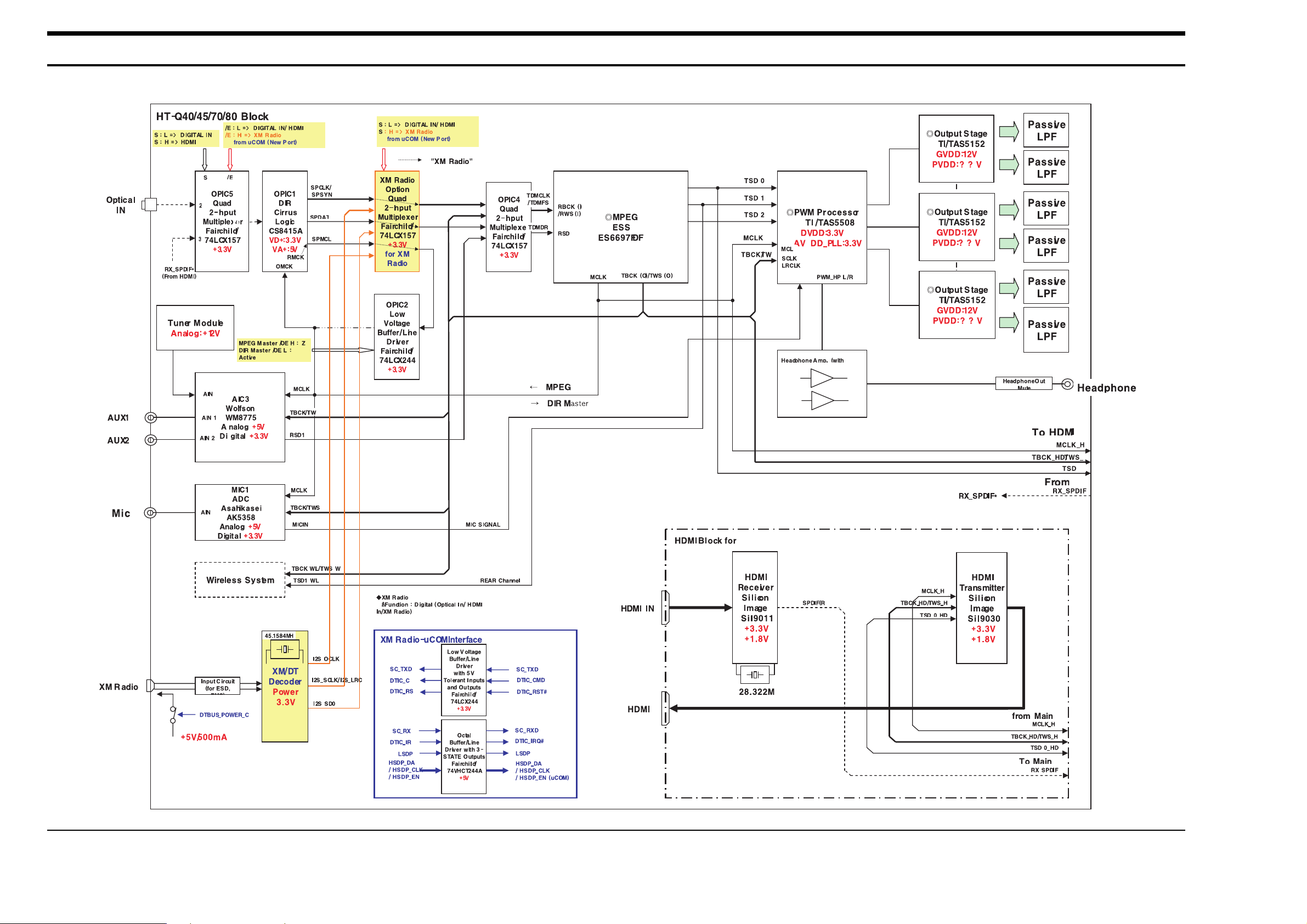
Samsung Electronics 9-1
9. Block Diagram
¡¡
¡¡
¡¡
¡¡
¡¡
¡¡
Page 30
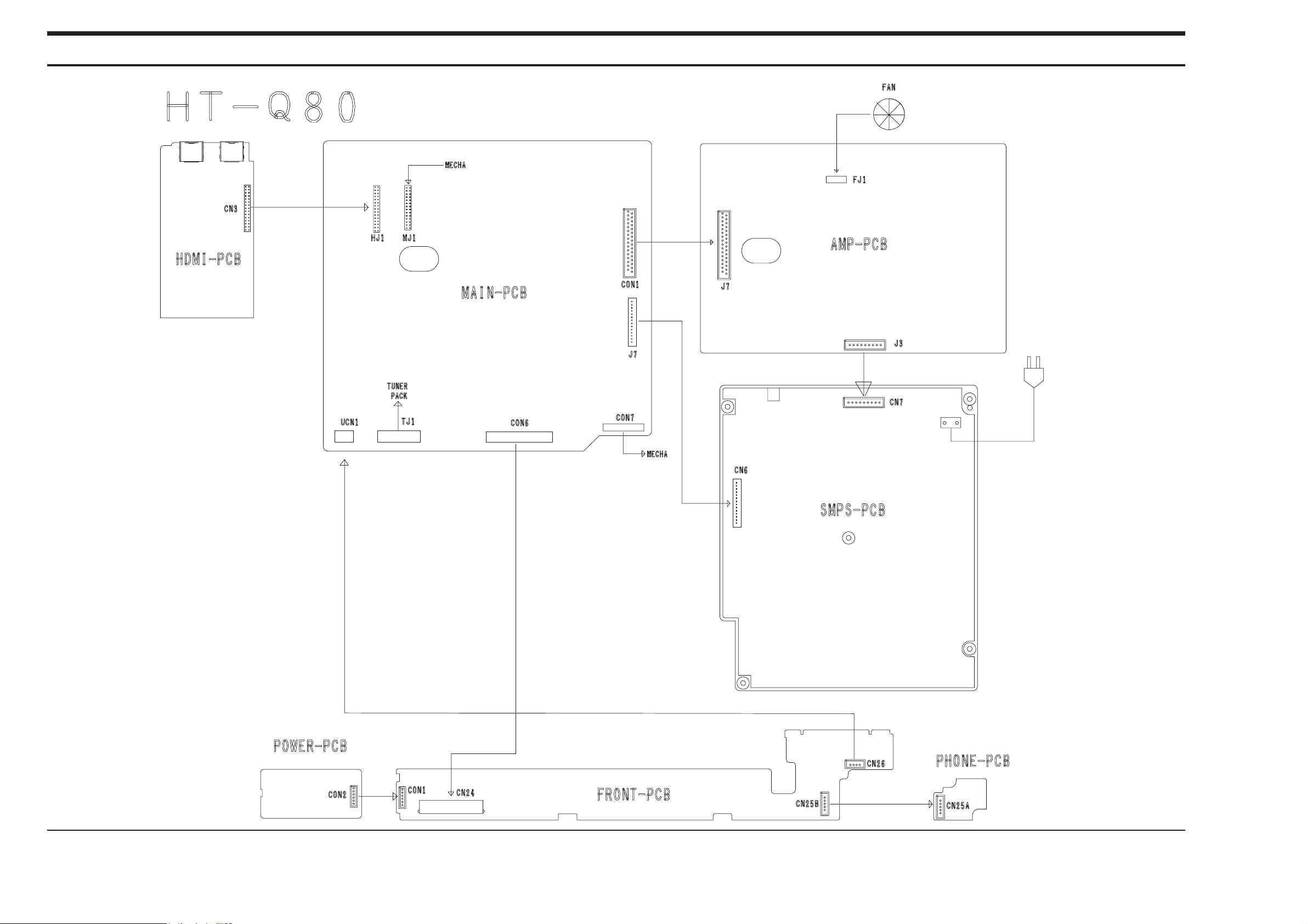
10. Wiring Diagram
10-1 Samsung Electronics
Page 31
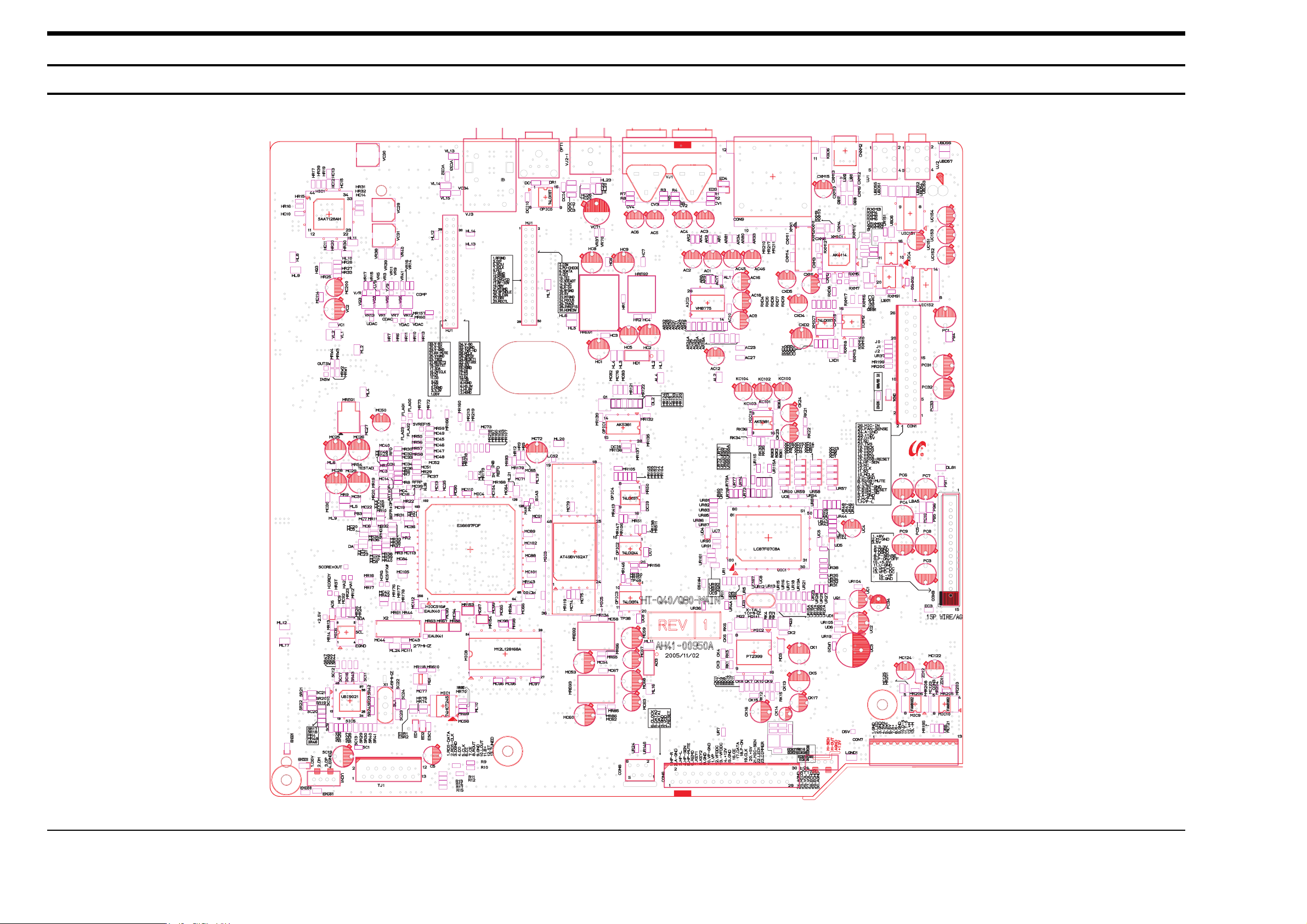
Samsung Electronics 11-1
11. PCB Diagram
1. MAIN
Page 32
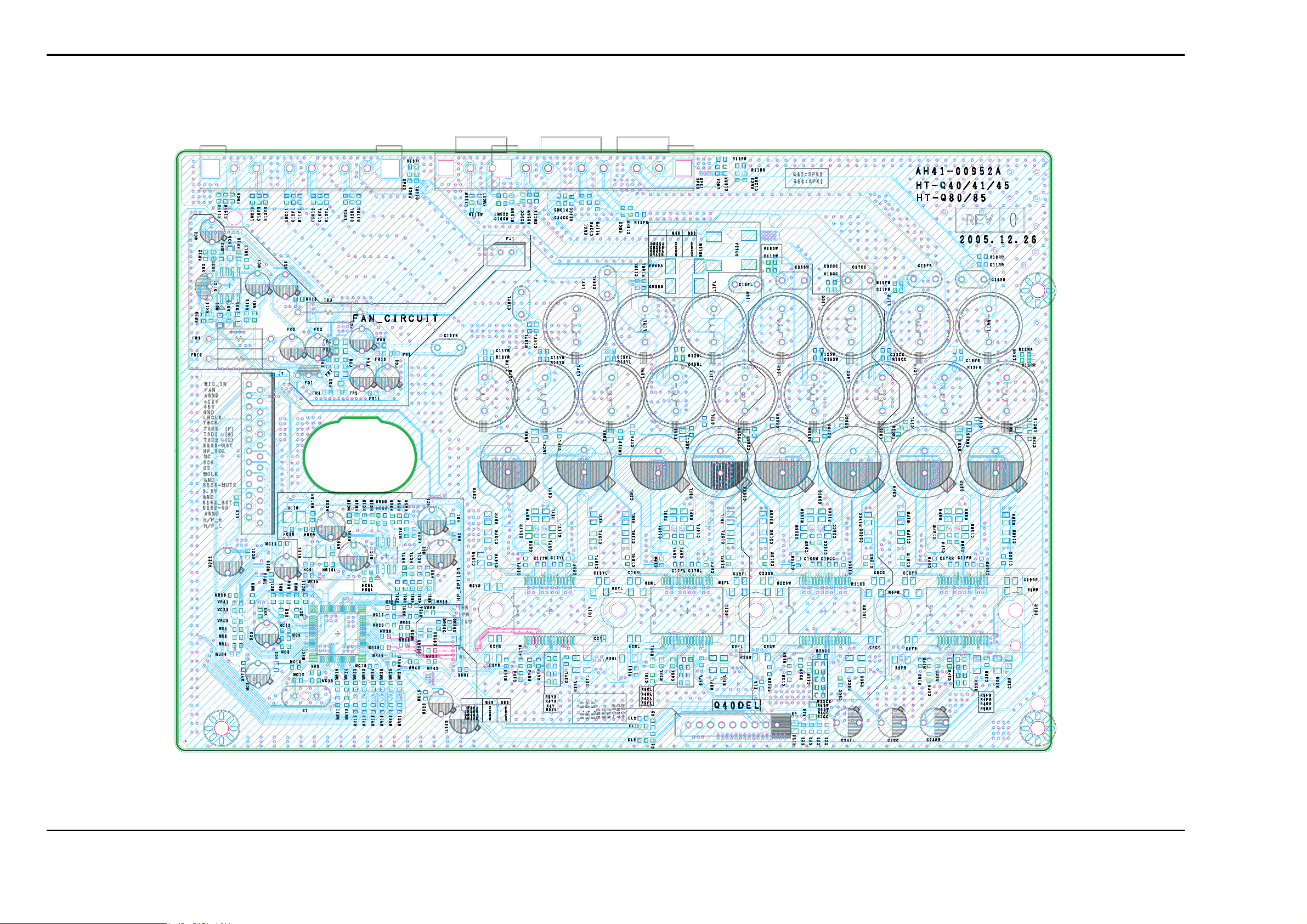
11-2 Samsung Electronics
2. AMP
Page 33
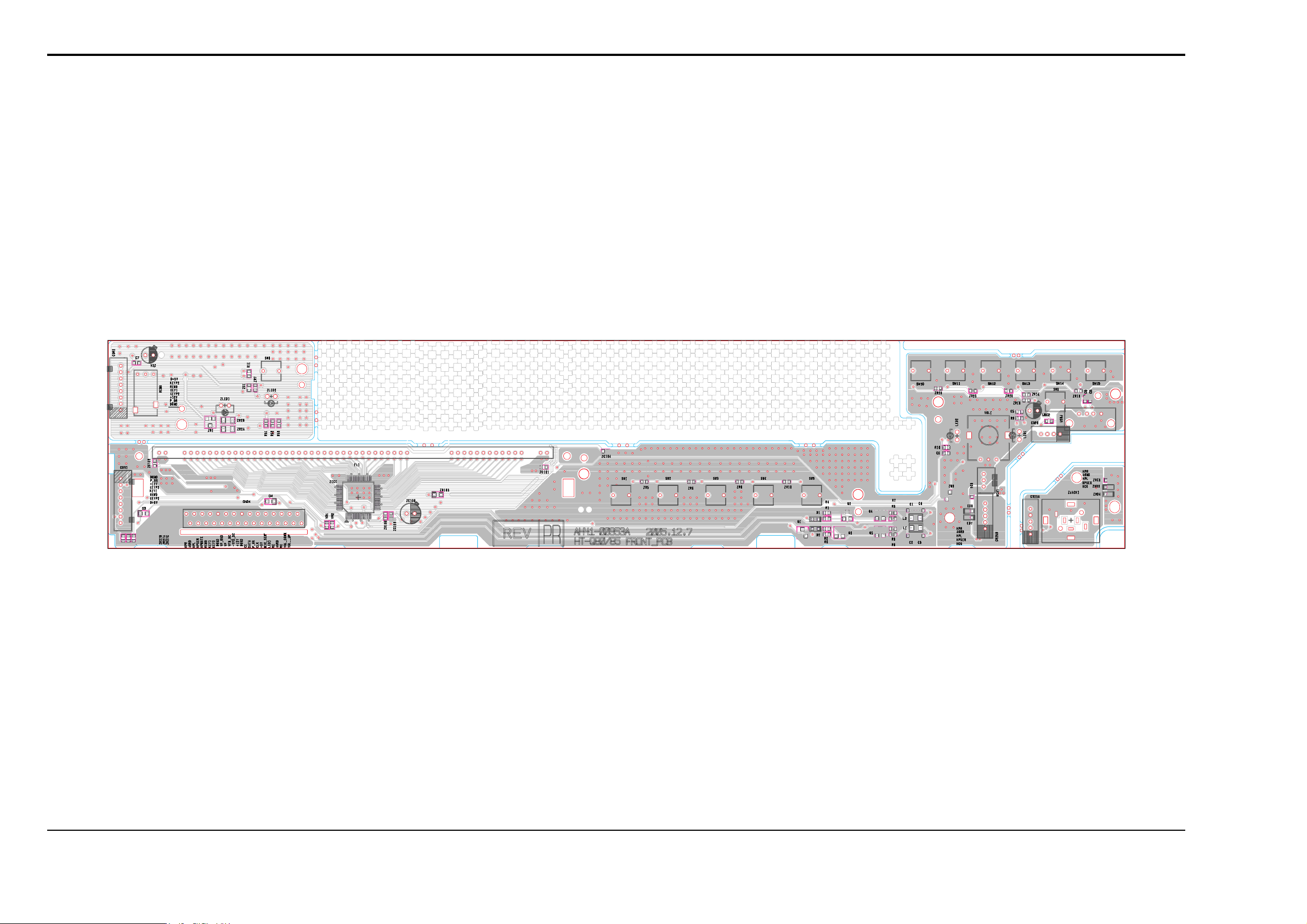
Samsung Electronics 11-3
3. FRONT
Page 34
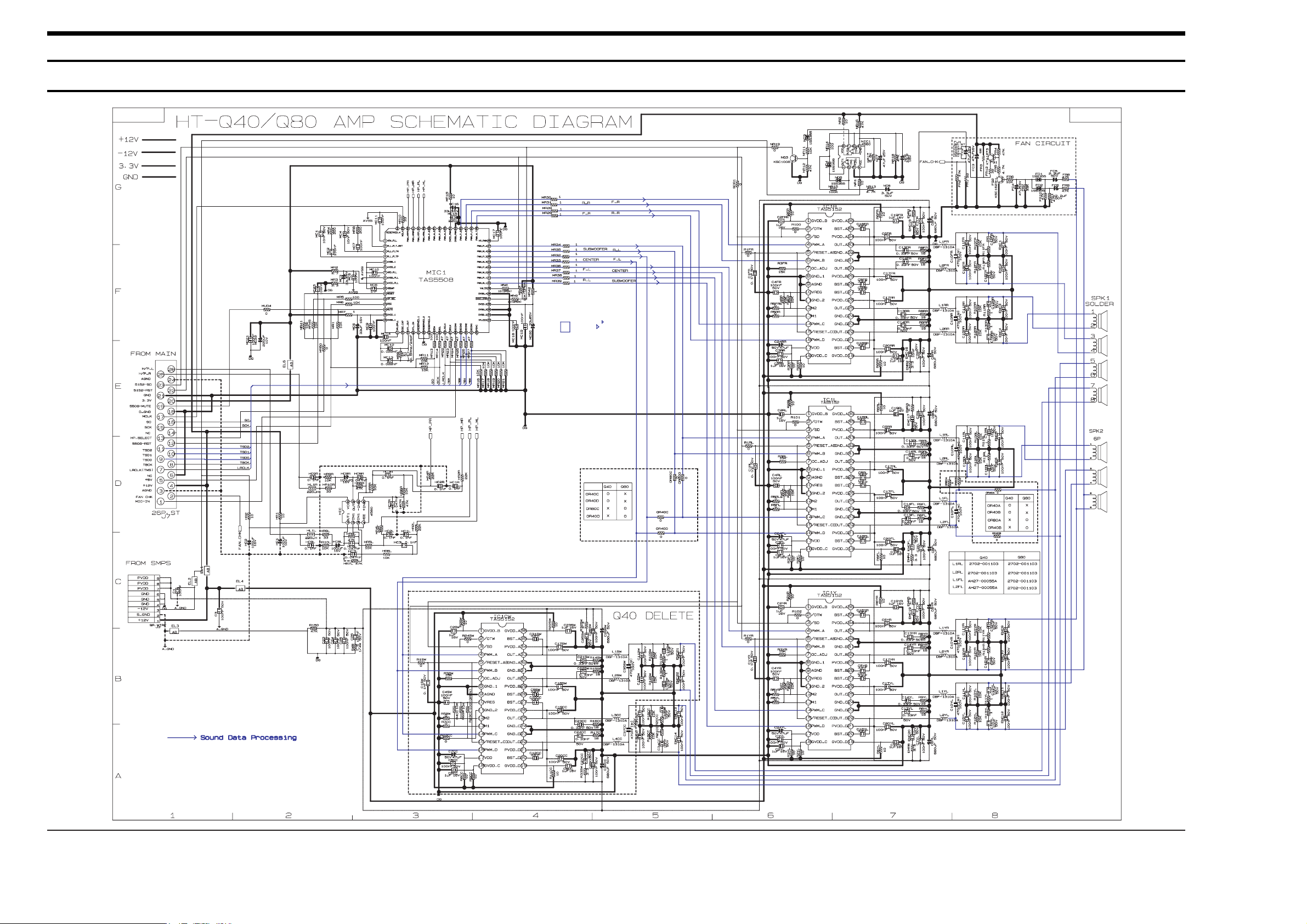
- This Document can not be used without Samsung’s authorization -
12. Schematic Diagram
1. AMP
12-1 Samsung Electronics
Page 35
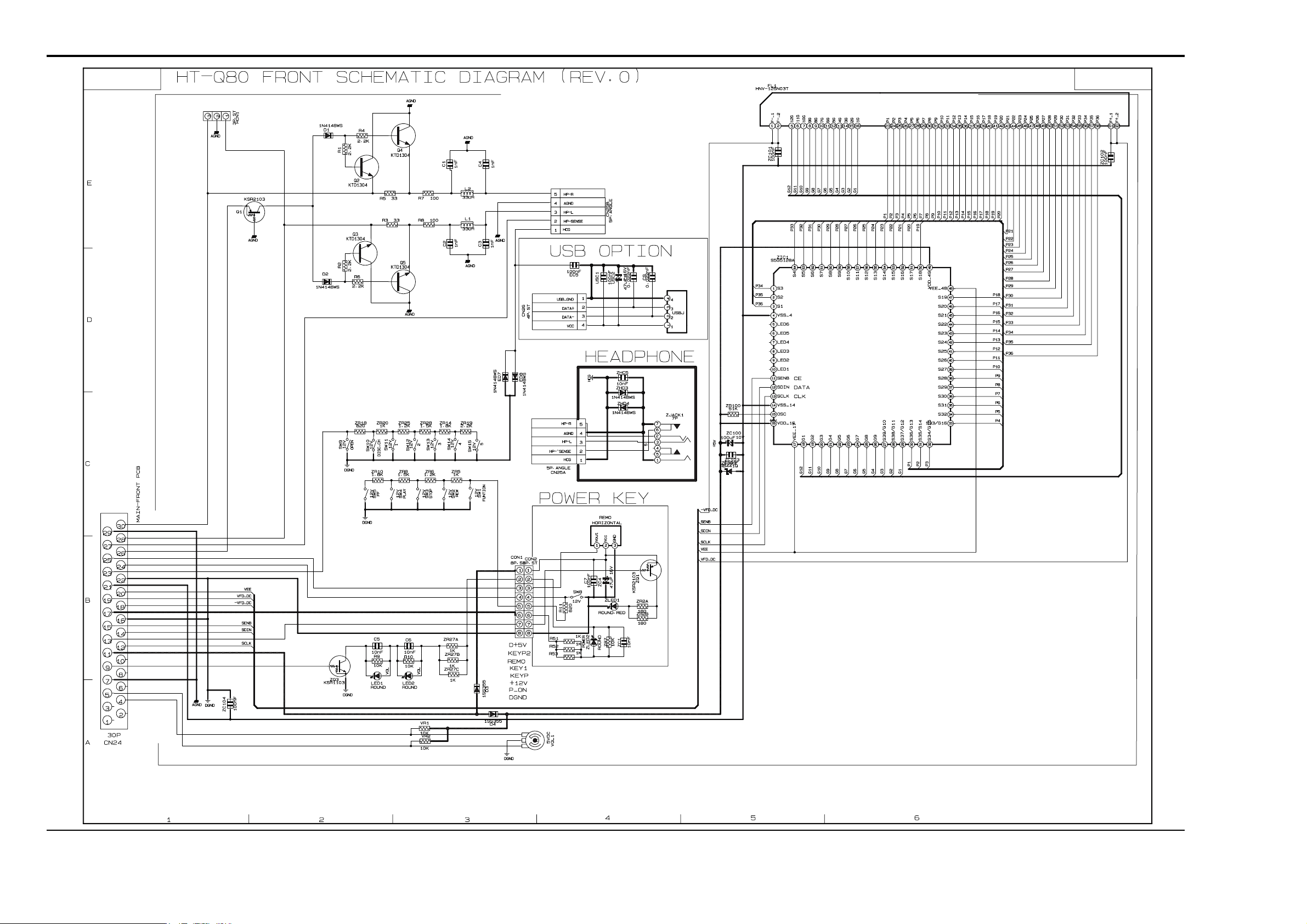
Samsung Electronics 12-2
- This Document can not be used without Samsung’s authorization -
2. FRONT
Page 36
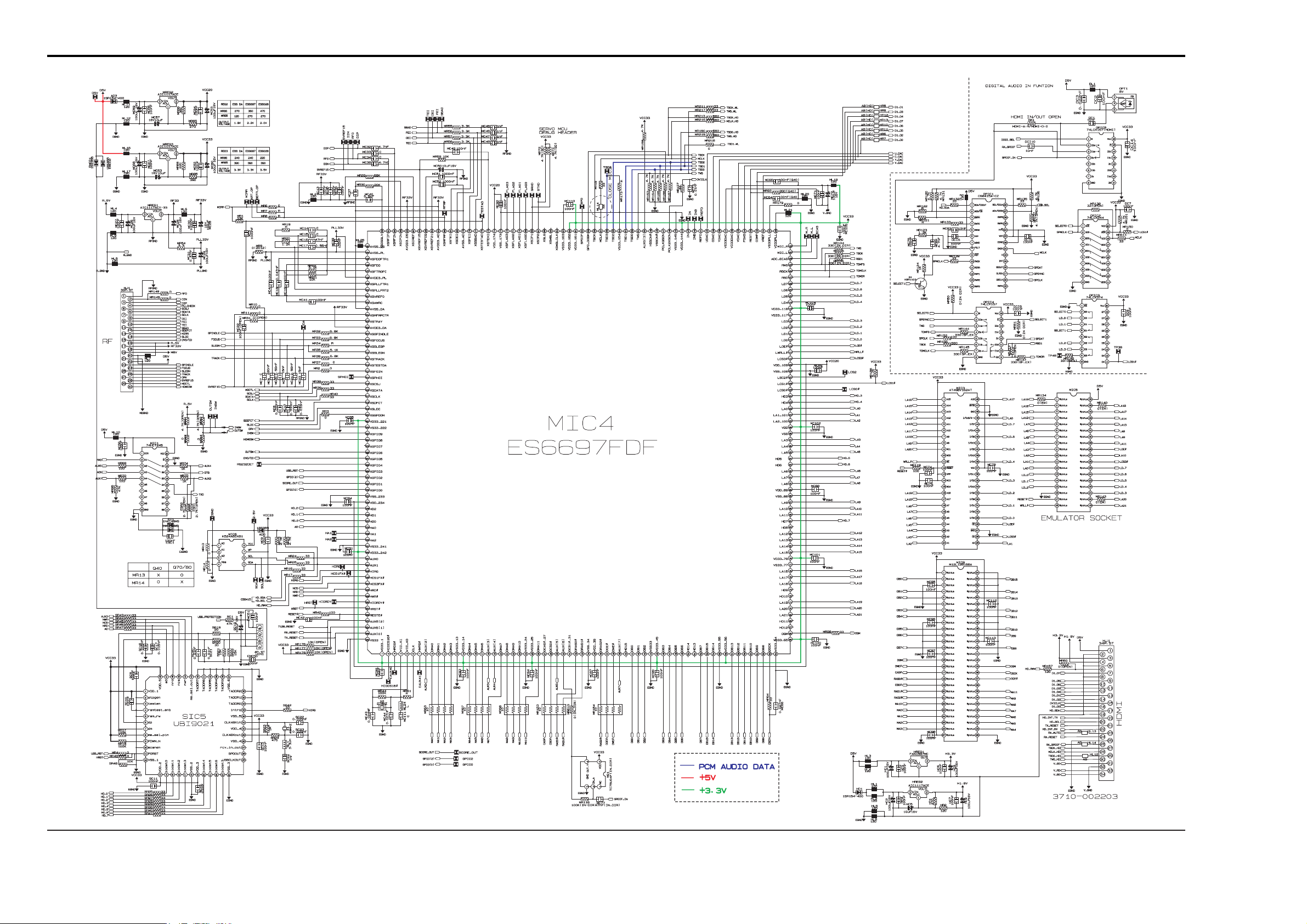
- This Document can not be used without Samsung’s authorization -
3. MPEG
12-3 Samsung Electronics
Page 37
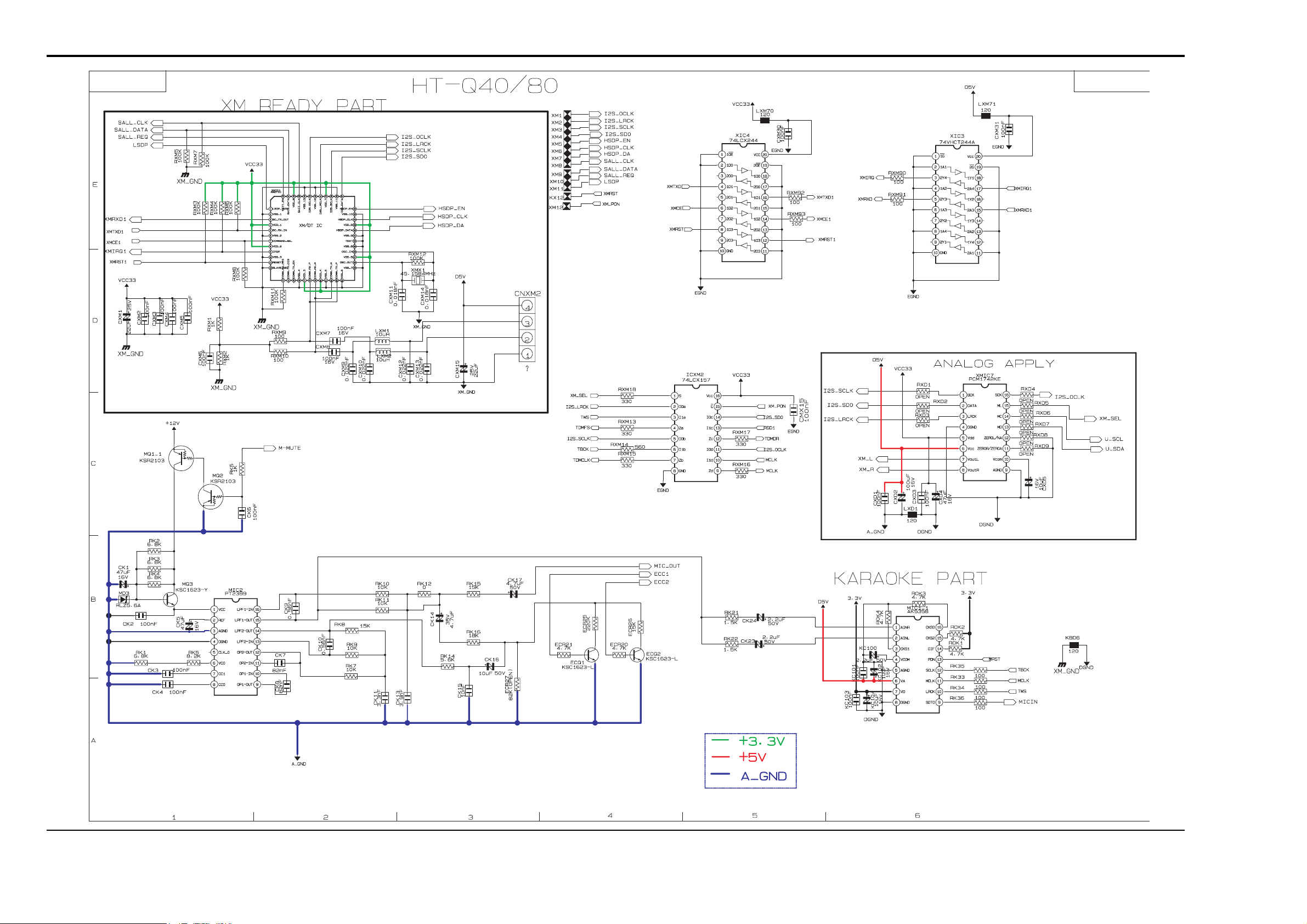
Samsung Electronics 12-4
- This Document can not be used without Samsung’s authorization -
4. KARAOKE
Page 38
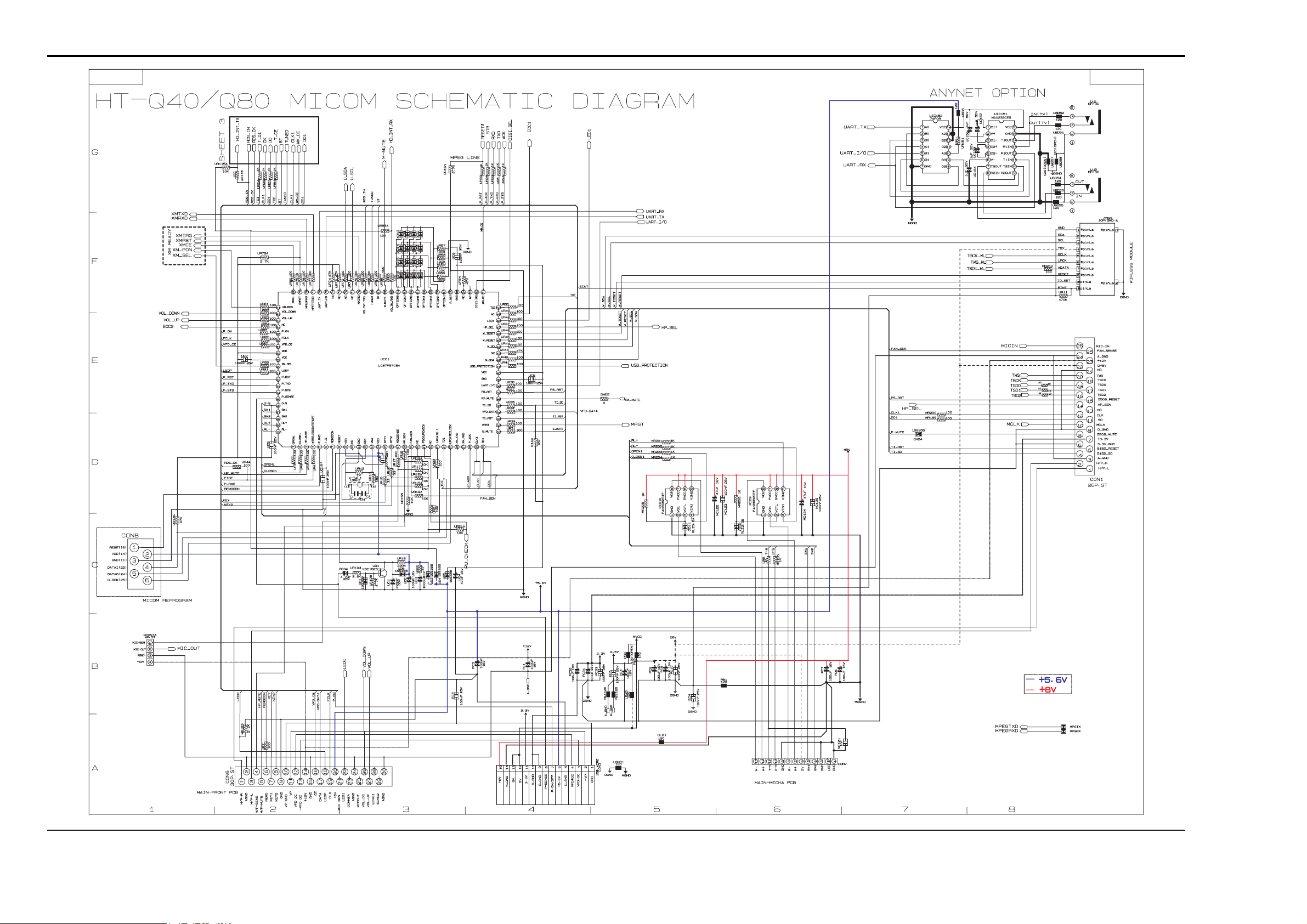
- This Document can not be used without Samsung’s authorization -
5. MICOM
12-5 Samsung Electronics
Page 39
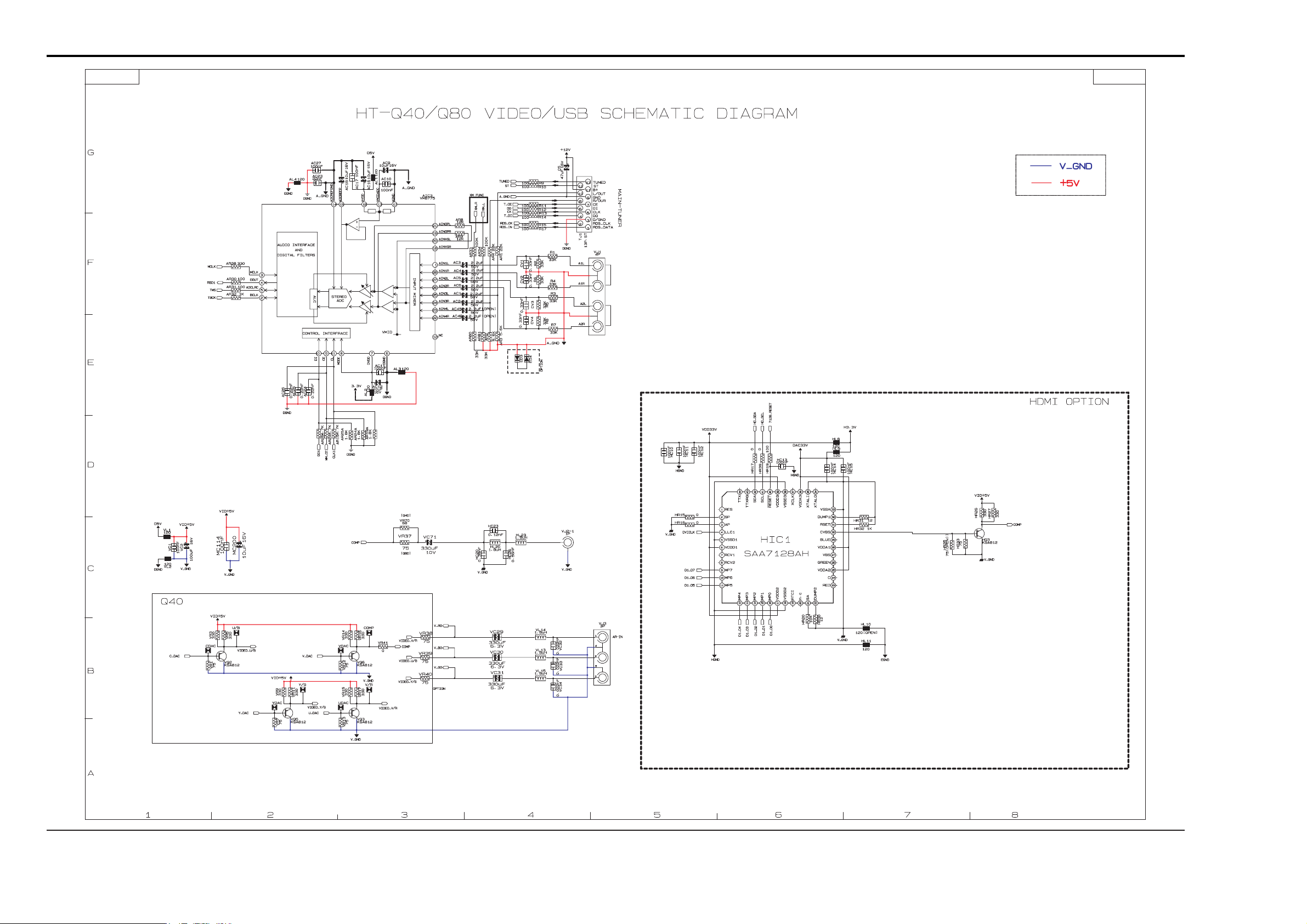
- This Document can not be used without Samsung’s authorization -
6. VIDEO
Samsung Electronics 12-6
Page 40
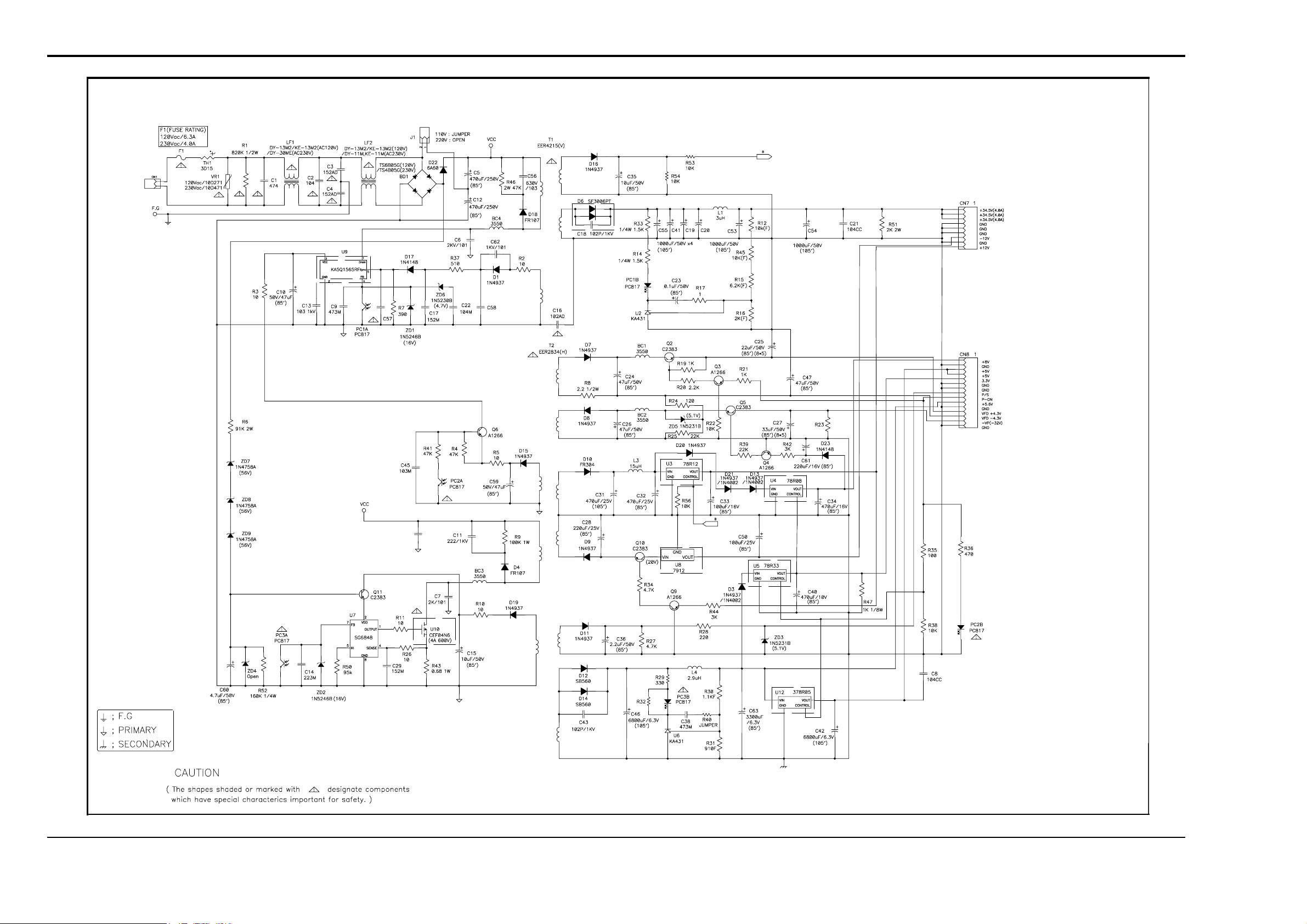
Samsung Electronics 12-7
- This Document can not be used without Samsung’s authorization -
7. SMPS
Page 41
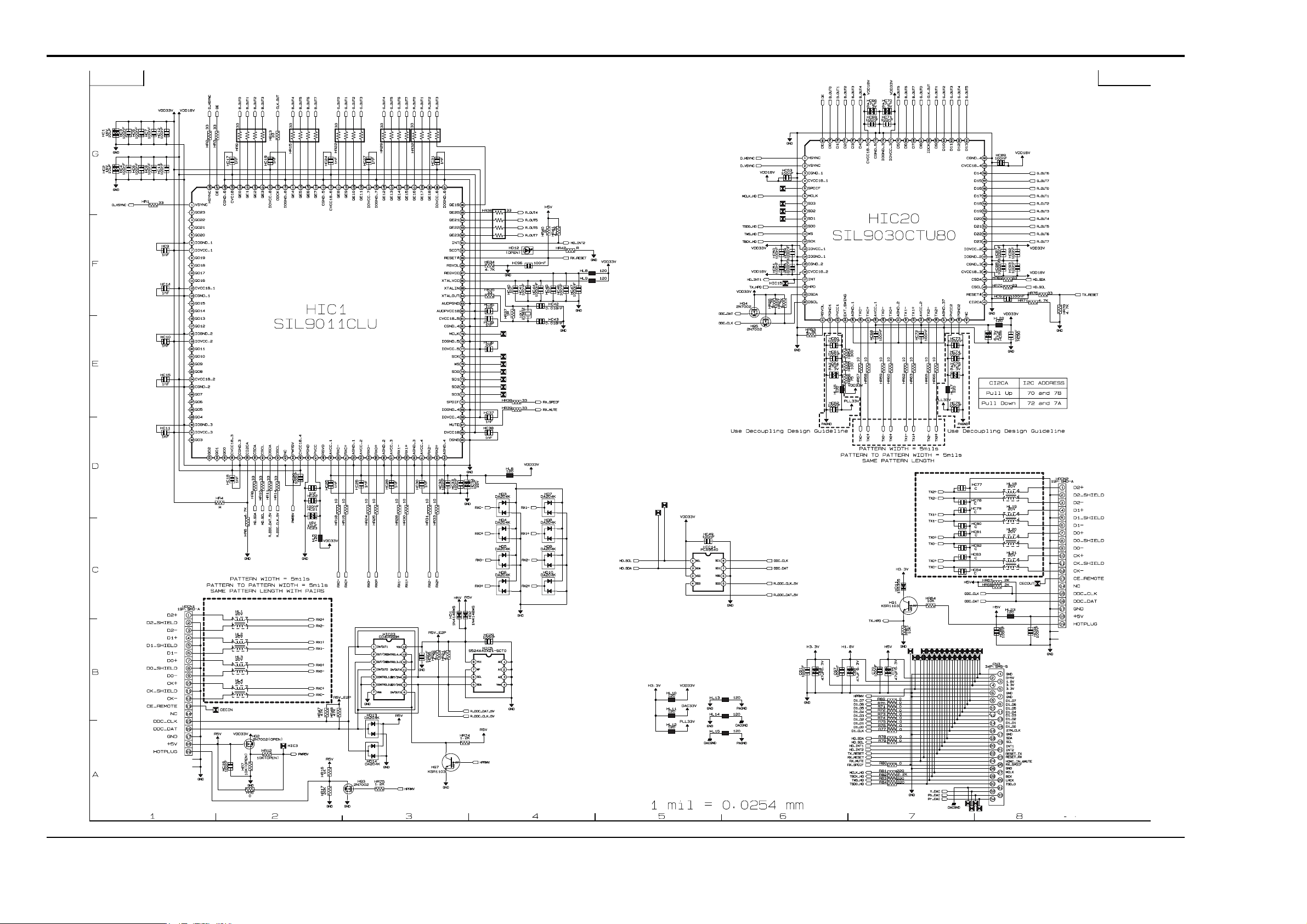
12-8 Samsung Electronics
- This Document can not be used without Samsung’s authorization -
8. HDMI
Page 42
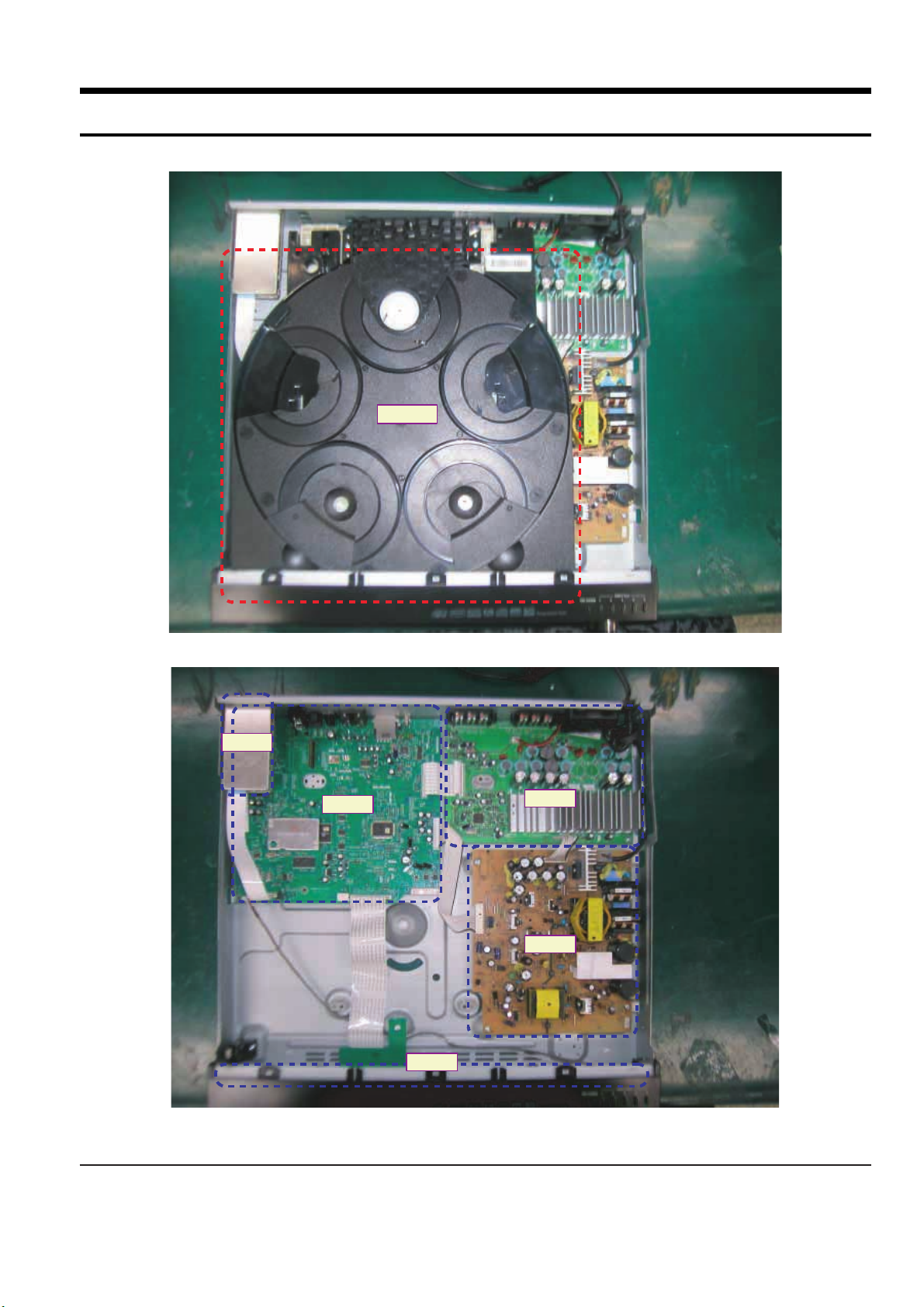
Samsung Electronics 13-1
13. Circuit Board Description
ííj
ö”ó
SM PS
M AIN
AM P
FRONT
ííj
ö”ó
M AIN
AMP
SMPS
FRONT
Page 43
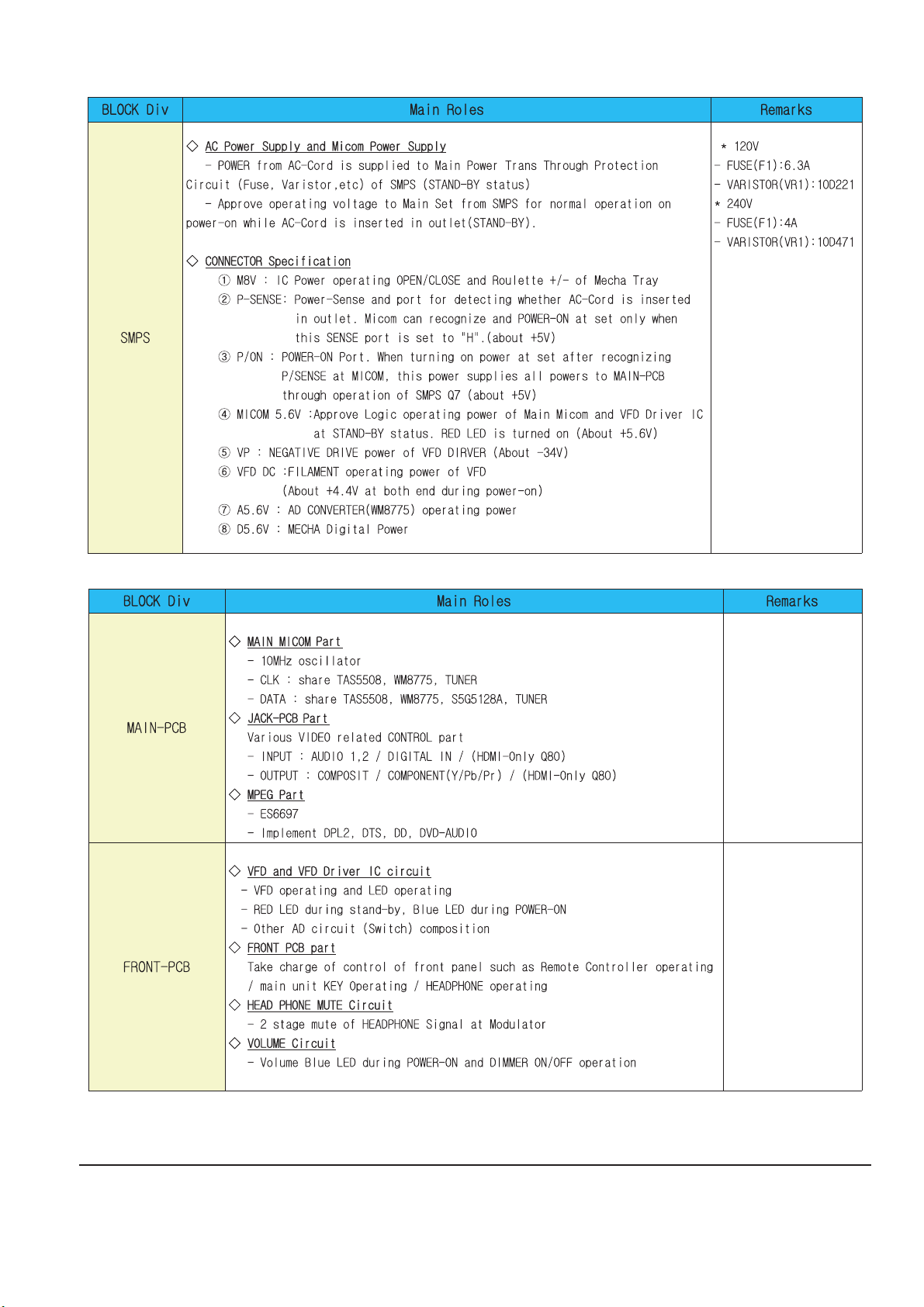
13-2 Samsung Electronics
Page 44
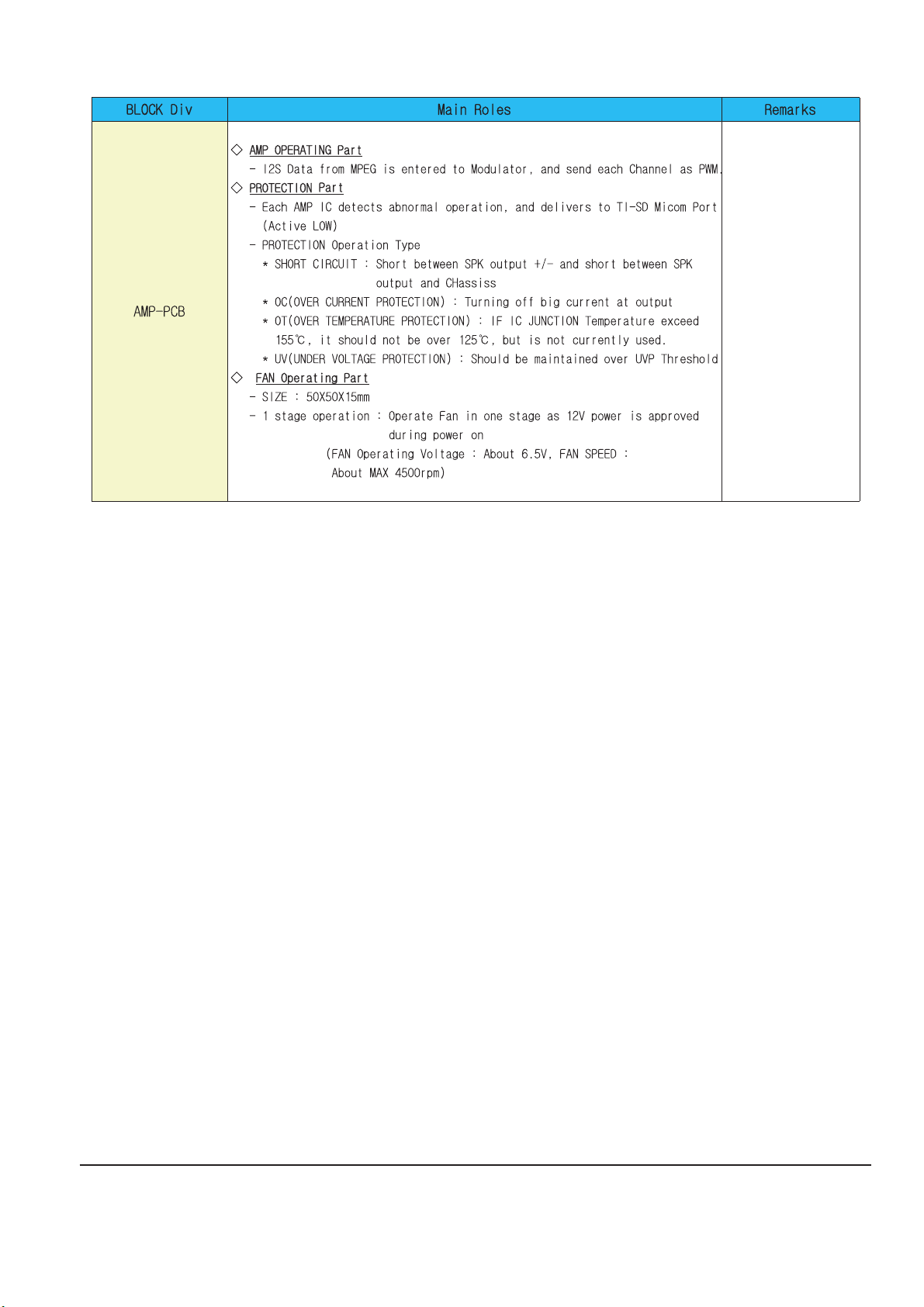
Samsung Electronics 13-3
 Loading...