

Page 1
Auto
The device automatically detects the surroundings and controls
various options that can affect the photograph to allow you to
take the best shot for the current environment. This mode is
suitable for general users, as the device controls most settings.
Smart
Capture the moments you do not want to miss using various
shooting modes. This mode helps you take the optimum shots
in any environment where the photo is taken. Find out more
details how to take photos in this user guide.
Expert
Customise the options that affect the photography according
to the environment where the photo is taken. This mode is
suitable for advanced users, as the users are required to adjust
the settings manually.
• Program(P): The device detects the shooting environment
and automatically adjusts the shutter speed and aperture.
This mode is suitable when taking general photos.
• Aperture priority(A): The device automatically adjusts the
shutter speed according to the customised aperture setting.
This mode is suitable when highlighting the subject and
making it look more vivid by blurring the background.
• Shutter priority(S): The device automatically adjusts the
aperture according to the customised shutter speed. This
mode is suitable when taking photos of water gushing out of
a fountain, or of a rapidly moving object.
• Manual(M): Manually adjust all options required to take
photos.
Modes
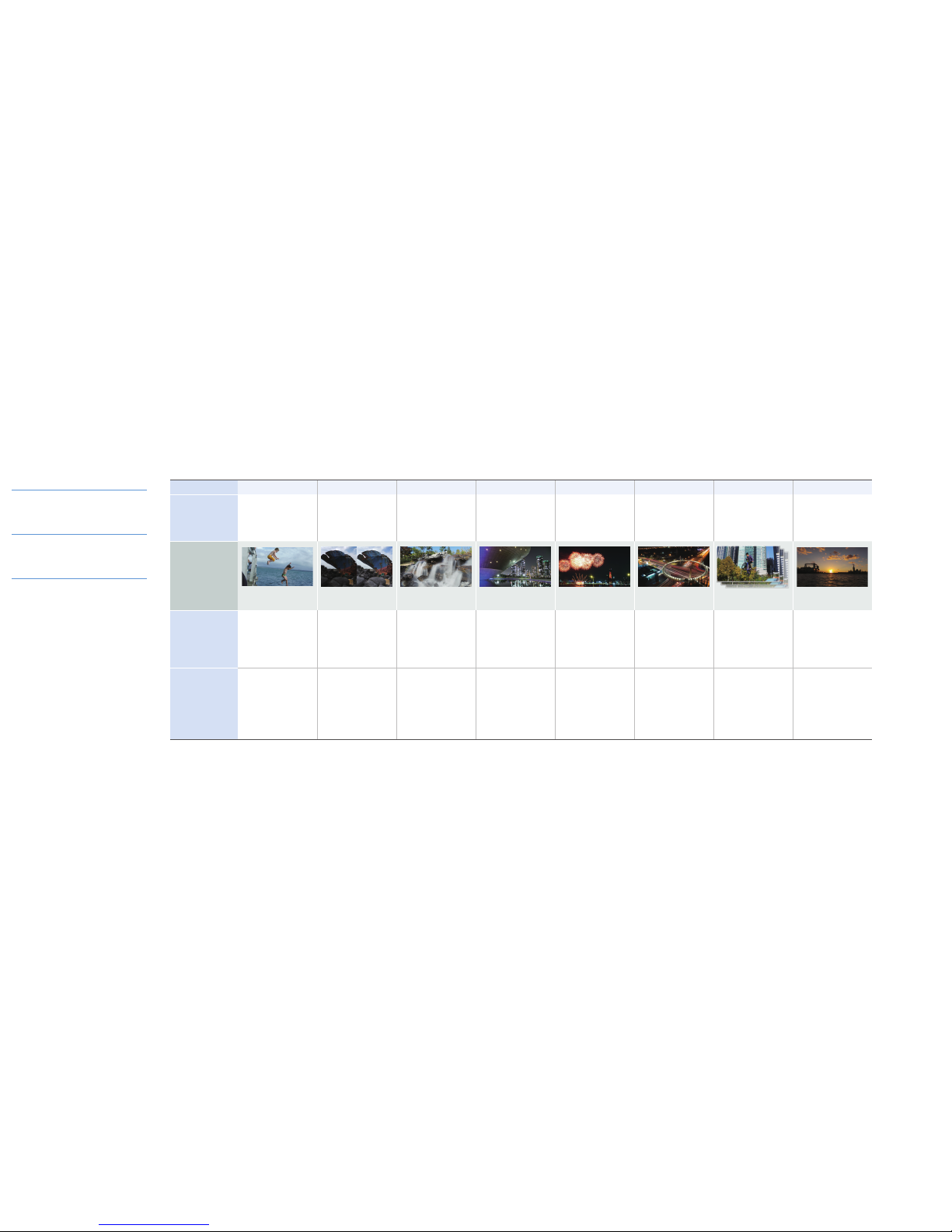
Action freeze Rich tone Waterfall Night Fireworks Light trace Continuous shot Sunset
Description
Instantly take photos of a fast
moving subject.
This mode is suitable when
taking photos of moving children
or scenes in a sports game.
Take photos of the subject in
softer and richer colour.
This mode is suitable when
taking vivid photos on a cloudy
day.
Take photos of the dynamic
movement of flowing water.
This mode is suitable when
taking photos of waterfalls or
fountains.
Take photos of beautifully lit
landscapes at night.
This mode is suitable when
taking photos of dark scenes or
the landscape at night.
Take photos of fireworks.
This mode is suitable when
taking photos of fireworks.
Take photos of light trails to
make them more dramatic.
This mode is suitable when
taking photos of the headlights
of a moving car or lit areas at
night.
Take a series of consecutive
photos of a subject.
This mode is suitable when
taking photos of a moving
subject, or changes of facial
expression.
Take photos of the red sunset in
rich colours.
This mode is suitable when
taking photos of the sunset or
the evening glow.
Example photos
The actual photo may
differ due to ambient light
intensity and the shooting
environment.
F2.8, 1/1600 s, ISO100 Not used Used F8.0, 6 s, ISO100 F5.6, 8 s, ISO100 F8.0, 10 s, ISO100 F4.0, 1/1250 s, ISO100
F5.0, 1/800 s, ISO100
Control range
The range may vary
depending on the
ambient light intensity,
the customised setting,
and the shooting
environment.
• A: F2.8
• S: 1/500–1/2000 s
• ISO: 100
• A: F2.8–F8.0
• S: 1/8–1/2000 s
• ISO: 100–400
• A: F8.0
• S: 2–10 s
• ISO: 100
• A: F2.8
• S: 1/8–4 s
• ISO: 100–400
• A: F5.6–F8.0
• S: 2–8 s
• ISO: 100
• A: F8.0
• S: 5–16 s
• ISO: 100
The device automatically adjusts
the camera settings, including
aperture, exposure time, and ISO
sensitivity, depending on the
shooting environment.
• A: F4.0–F8.0
• S: 1/500–1/2000 s
• ISO: 100
Remarks
The device takes multiple shots
to produce images in softer and
richer colours. Do not move
the camera until the photo has
been taken.
• The image may appear blurry
due to the slow shutter speed
when the camera takes
photos. Make sure to use a
tripod.
• Taking photos with a long
exposure in Manual(M) mode
may saturate images. Use
an ND filter to decrease the
amount of light.
The image may appear blurred
because of the slow shutter
speed when the camera takes
photos. Make sure to use a
tripod.
The image may appear blurred
because of the slow shutter
speed when the camera takes
photos. Make sure to use a
tripod.
The image may appear blurred
because of the slow shutter
speed when the camera takes
photos. Make sure to use a
tripod.
It is possible to take a maximum
of 20 shots while pressing the
Shutter button down.
A: Aperture / S: Shutter speed / ISO: ISO sensitivity
Page 2
Printed in Korea
AD68-07606A
English. 10/2012. Rev. 1.0
Quick Reference Guide
EK-GC100
www.samsung.comA: Aperture / S: Shutter speed / ISO: ISO sensitivity
Modes
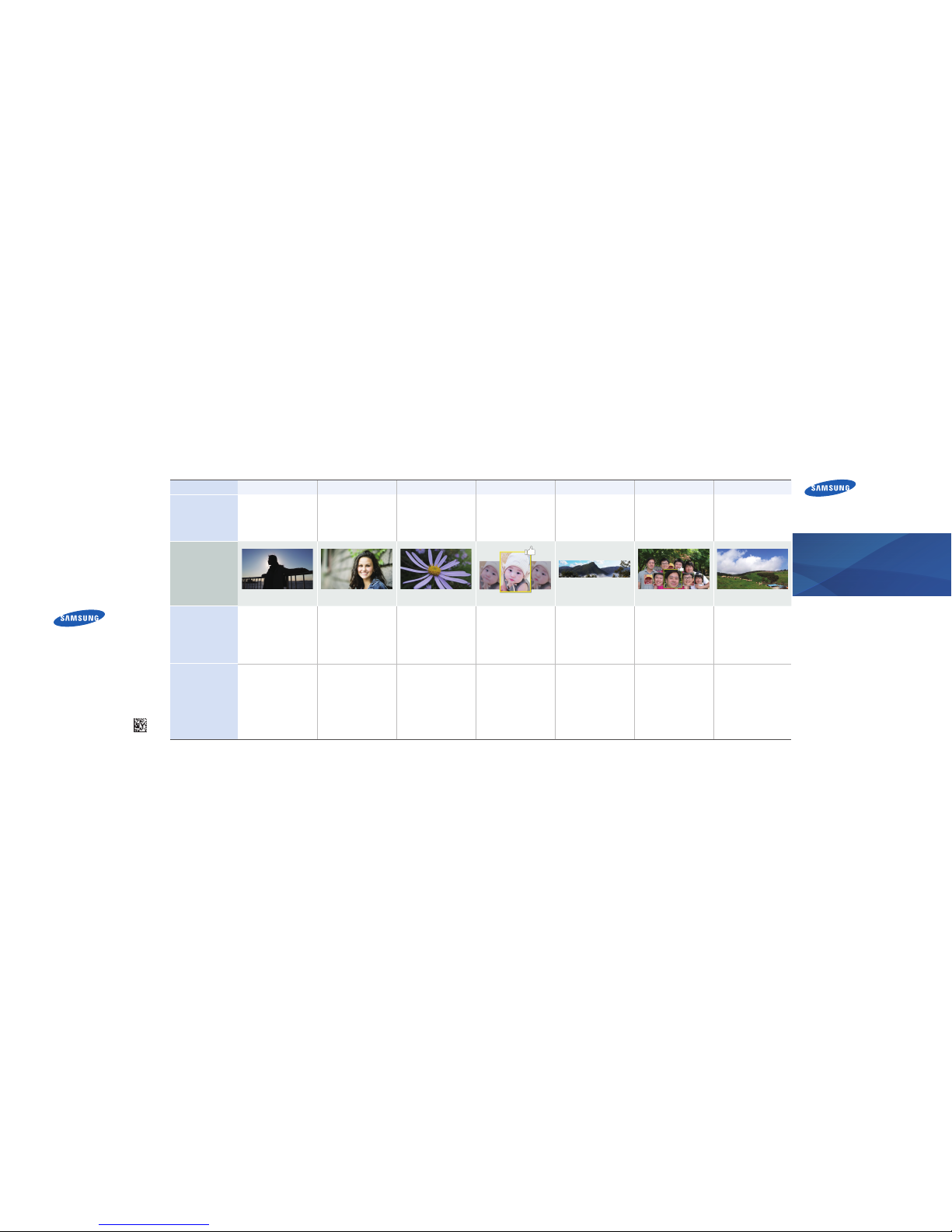
Silhouette Beauty face Macro Best photo Panorama Best face Landscape
Description
Highlight the outline of the
subject using backlight.
This mode is suitable when
taking artistic photos through
contrast between the
background and the subject.
Brighten the skin tone of
the subject to hide facial
imperfections.
This mode is suitable when
taking portrait photos.
Take vivid photos of the subject
at close range.
This mode is suitable when
taking photos of small objects,
such as flowers and insects.
Take a series of consecutive
photos of the subject, and select
the best shot.
This mode is suitable when
taking photos of natural
expressions.
Take photos of the panoramic
view of a vast landscape in a
single photo.
This mode is suitable when
taking photos of natural scenery.
Take a series of consecutive
photos of subjects, and then
select your favourite shot by
subject to create a single photo.
This mode is suitable when
taking group photos.
Take photos of the nature in
vivid colours.
This mode is suitable when
taking photos of the outdoor
scenery.
Example photos
The actual photo may
differ due to ambient light
intensity and the shooting
environment.
F5.6, 1/1250 s, ISO100 F2.8, 1/1000 s, ISO100 F4.0, 1/200 s, ISO100
Control range
The range may vary
depending on the
ambient light intensity,
the customised setting,
and the shooting
environment.
The device automatically adjusts
the camera settings, including
aperture, exposure time, and ISO
sensitivity, depending on the
shooting environment.
The device automatically adjusts
the camera settings, including
aperture, exposure time, and ISO
sensitivity, depending on the
shooting environment.
• A: F2.8
• S: 1/500–1/2000 s
• ISO: 100 ~ 400
The device automatically adjusts
the camera settings, including
aperture, exposure time, and ISO
sensitivity, depending on the
shooting environment.
The device automatically adjusts
the camera settings, including
aperture, exposure time, and ISO
sensitivity, depending on the
shooting environment.
The device automatically adjusts
the camera settings, including
aperture, exposure time, and ISO
sensitivity, depending on the
shooting environment.
• A: F4.0 – F5.6
• S: 1/500–1/2000 s
• ISO: 100
Remarks
To maximise the silhouette
effect, take photos at a bright.
Make sure to move the camera in
the same direction.
 Loading...