

Page 1
INSTALLATION
HSILGNE
MANUA
DH60T Series
DH48T Series
DC60T Series
DC48T Series
DC60TV Series
DC48TV Series
L
LOÑAPSE
SI
AÇ
N
ARF
System Air Conditioner(Cooling and Heating)
This product is not manufactured for Iran.
SVC Warranty will not be applicable and the user will be responsible
for service expenses when the product is used in Iran.
E
S F A
DB98-23539A(7)
Page 2
Safety Precautions
The following safety precautions must be taken when using your air conditioner.
◆ The unit should not be installed by the user. Ask the dealer or authorized
company to install the units except room air conditioners for the U.S.A and
Canada area.
◆ If the unit is installed improperly, water leakage, electric shock or fire may
result.
◆ Mount with the lowest moving parts at least 2.5 m above the floor or grade
level. (If applicable)
◆ The manufacturer does not assume responsibility for accidents or injury
caused by an incorrectly installed air conditioner. If you are unsure about
installation, contact an installation specialist.
◆ When installing the built-in type air conditioner, keep all electrical cables
such as the power cable and the connection cord in pipe, ducts, cable
channels e.t.c to protect them against liquids, outside impacts and so on.
◆ This appliance is not accessible to the general public. This appliance
should be installed according to the provided installation
instruction.
WARNING
INSTALLING THE UNIT
◆ If the power cord of this air conditioner is damaged, it must be replaced by
the manufacturer, its service agent or similarly qualified persons in order to
avoid a hazard.
◆ The unit must be plugged into an independent circuit if applicable or
connect the power cable to the auxiliary circuit breaker. An all pole
disconnection from the power supply must be incorporated in the fixed
wiring with a contact opening of >3mm.
◆ Do not use an extension cord with this product.
◆ If the unit is equipped with a power supply cord and a plug, the plug must
be accessible after installation.
◆ The air conditioner must be installed in accordance with national wiring
regulations and safety regulations wherever applicable.
POWER SUPPL Y LINE,
FUSE OR CIRCUIT
BREAKER
Risk of electric shock. • Can cause injury or death. • Disconnect all
remote electric power supplies before servicing, installing or cleaning.
• This must be done by the manufacturer or its service agent or a similar
qualified person in order to avoid a hazard.
E-2
Page 3
E-3
H
SILGN
E
Preparation for Installation ............................................................................ 4
Deciding on Where to Install the Air Conditioner ........................................ 5
Indoor Unit Installation ................................................................................ 10
Purging the Unit .......................................................................................... 11
Connecting the Connection Cord ................................................................ 11
Connecting the Cables to the Outdoor Unit ................................................ 16
Drain Hose Installation ................................................................................ 17
Connecting the Indoor Unit Assembly Piping .............................................. 19
Cutting/Flaring the Pipes ............................................................................. 20
Checking Correct Grounding ....................................................................... 21
Fixing the Unit in Position ........................................................................... 22
Connecting Up and Removing Air In the Circuit ......................................... 23
Performing Leak Tests ................................................................................ 24
Insulation ..................................................................................................... 25
Adjusting Air Flow ........................................................................................ 26
Setting Up the Model Option ....................................................................... 27
Assigning Address to Indoor Unit ................................................................ 30
Additional Functions .................................................................................... 31
Drain Pump Installation (Optional) .............................................................. 33
Setting Up Option Switches (Outdoor unit) ................................................. 35
Testing Operations ...................................................................................... 37
Troubleshooting .......................................................................................... 38
Parts List ................................................................................................... 42
Contents
................................ 25
Pump Down Procedure (When removing the product)
Page 4
E-4
Preparation for Installation
When deciding on the location of the air conditioner with the owner,
the following restrictions must be taken into account.
Do NOT install the air conditioner in a location where it will come into
contact with
the following elements:
◆
Combustible gases
◆
Saline air
◆
Machine oil
◆
Sulphide gas
◆
Special environmental conditions
If you must install the unit in such conditions, first consult your dealer
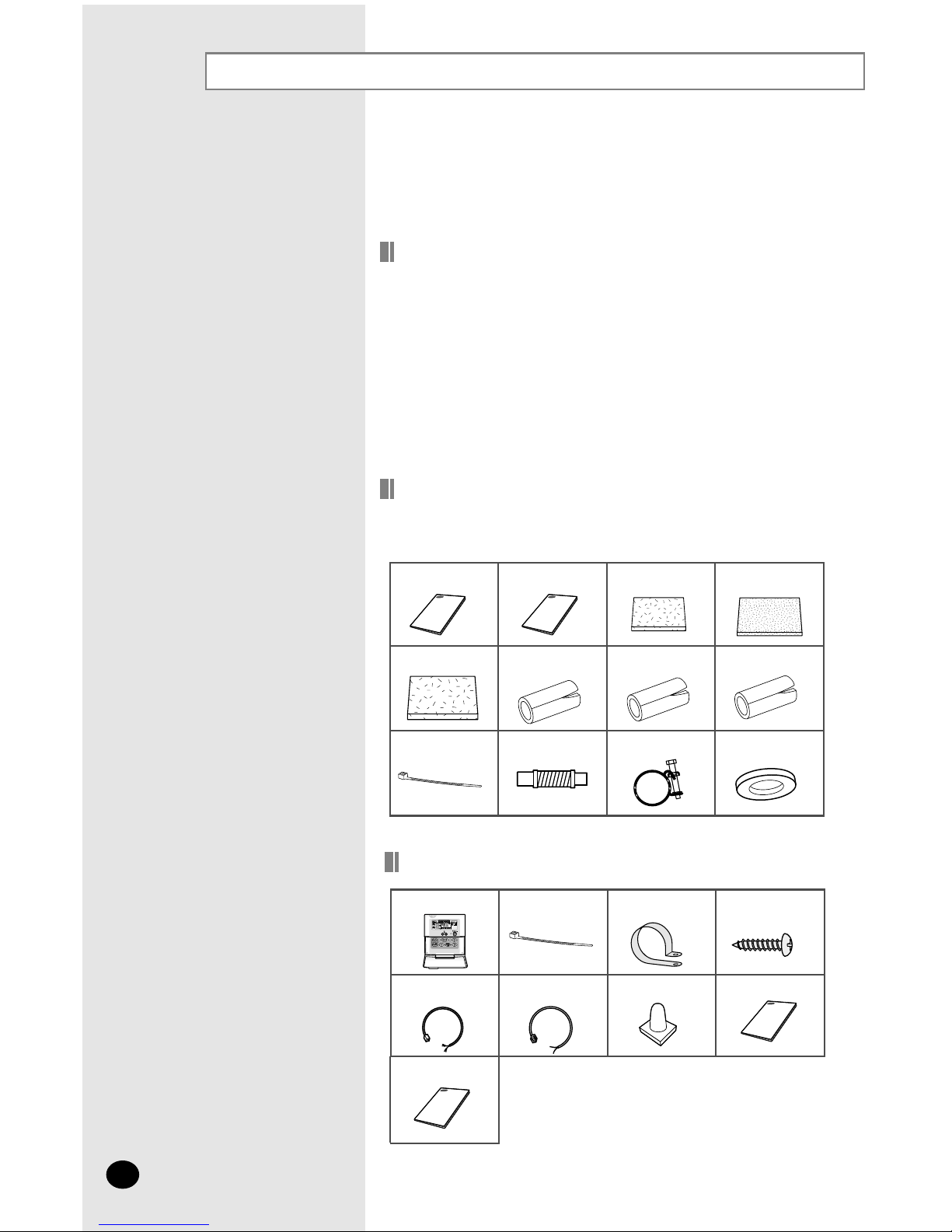
Cable-Tie Cable
Clamp M4 x 16 Tapped
Screws
Indoor unit power
drawing cable
Communication cable of
the wired remote
controller
Wire joint
Owner’s Instruction
Installation Manual
Wired remote controller
Owner’s
Instructions(1)
Installation
Manual(1)
Insulation Cover
Pipe
in
(1)
Insulation Cover
Pipe out(1)
Insulation Pipe in(1)
Insulation Cover
Drain(1)
Insulation Pipe out(1)
Clamp hose(2)
Cable-Tie(8)
Flexible hose(1)
Accessories
General
Wired Remote Controller Accessories
◆ The following accessories are supplied with the indoor unit.
The type and quantity may differ depending on the specifications.
Insulation Drain (1)
Rubber(8)
Page 5
E-5
Deciding on Where to Install the Air Conditioner
Indoor Unit
There must be no obstacles near the air inlet and outlet.
Install the indoor unit on a ceiling that can support its weight.
Maintain sufficient clearance around the indoor unit.
Make sure that the water dripping from the drain hose runs away cor-
rectly and safely.
The indoor unit must be installed in this way, that they are out of public
access. (Not touchable by the users)
After connecting a chamber, insulate the connection part between the
indoor unit and the chamber with t10 or thicker insulation. Otherwise,
there can be air leak or dew from the connection part.
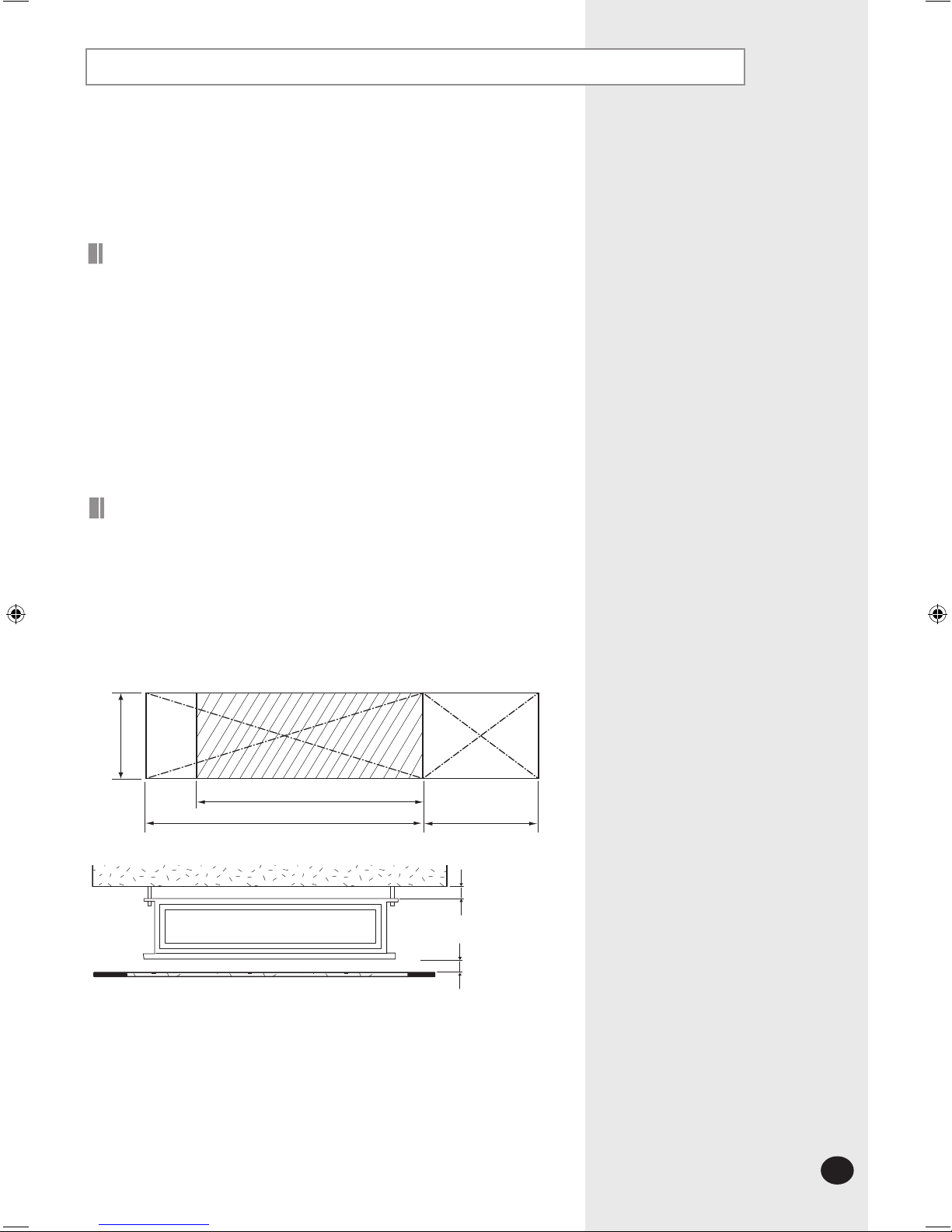
20mm or more
Space Requirements for Installation& Service
Construction Standard for Inspection Hole
1)
In case, the ceiling is tex tile, Inspection hole dose not need.
2)
In case, the ceiling is plaster board, Inspection hole depends on Inside
height of the ceiling.
a.
Height is more than 1m : Only "B" [Inspection for PBA] is applied.
b.
Height is less than 1m : Both "A"&"B" are applied.
c. "A"&"B" are inspection holes .
Unit Width(W)
"A"=W+100mm
Unit Depth(D)+50mm
"B"=500mm
20mm or more
You must have 20mm or more space between the ceiling and the bottom of
indoor unit. Otherwise, the noise from the vibration of indoor unit may bother
the user.When the ceiling is under construction, the hole for check-up must be
made to take service, clean and repair the unit.
It is possible to install the unit at an height of between 2.2~2.5m from the
ground, if the unit has a duct with a well defined lenght (300mm or more), to
avoid fan motor blower contact.
Page 6
Deciding on where to install the Air Conditioner (Continued)
Outdoor Unit
◆ The outdoor unit must not be placed on its side or upside down, as the
compressor
lubrication oil will run into the cooling circuit and seriously
damage
the unit.
◆ Choose a location that is dry and sunny, but not exposed to direct sunlight or
strong
winds.
◆ Do not block any passageways or thoroughfares.
◆ Choose a location where the noise of the air conditioner when running and
the
discharged air do not disturb any neighbours.
◆ Choose a position that enables the pipes and cables to be easily connected
to
the indoor unit.
◆ Install the outdoor unit on a flat, stable surface that can support its weight
and
does not generate any unnecessary noise and vibration.
◆ Position the outdoor unit so that the air flow is directed towards the open
area
.
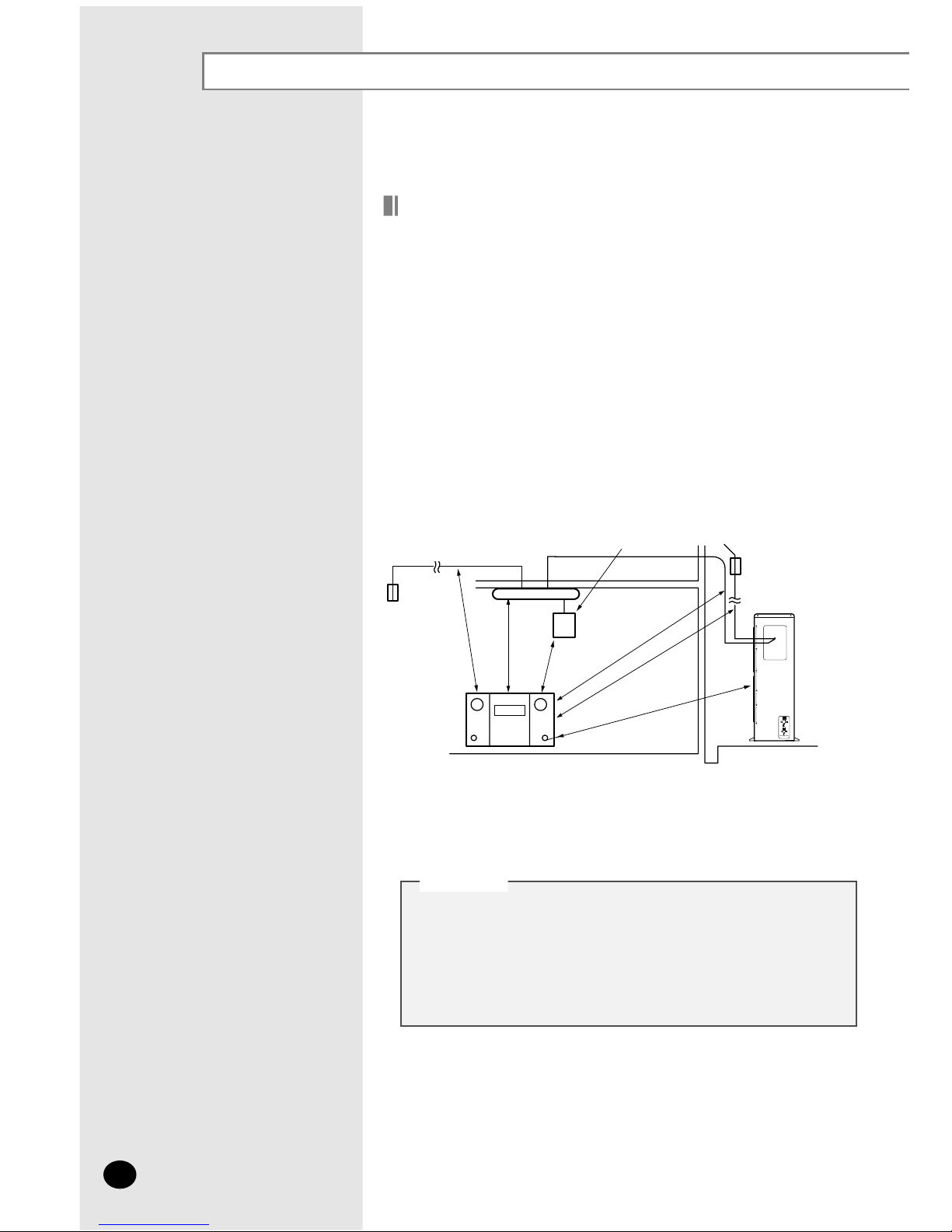
◆ Maintain sufficient clearance around the outdoor unit, especially from a radio,
compute
r, stereo system, etc.
◆ If the outdoor unit is installed at a height, ensure that its base is firmly fixed in
position
.
◆ Make sure that the water dripping from the drain hose runs away correctly
and
safely.
e
r
o
m
r
o
m
5
.
1
Indoor Unit
Circuit
Breaker
Outdoo
r
Unit
Remote
Controller
e
r
o
m
r
o
m
1
e
r
o
m
r
o
m
1
e
r
o
m
r
o
m
5
.
1
e
r
o
m
r
o
m
5
.
1
m
5
.
1
m
r
o
e
r
o
Circuit Breaker
Stere
o
◆ You have just purchased a system air conditioner and it
has been installed by your installation specialist.
◆ This device must be installed according to the national
electrical rules.
CCCCAAAAUUUUTTTTIIIIOOOONN
NN
E-6
◆ When installing the model DC48FTVX/DC60GTVX/
DC60FTVX get rid of the cushion on the top of compressor.
Page 7
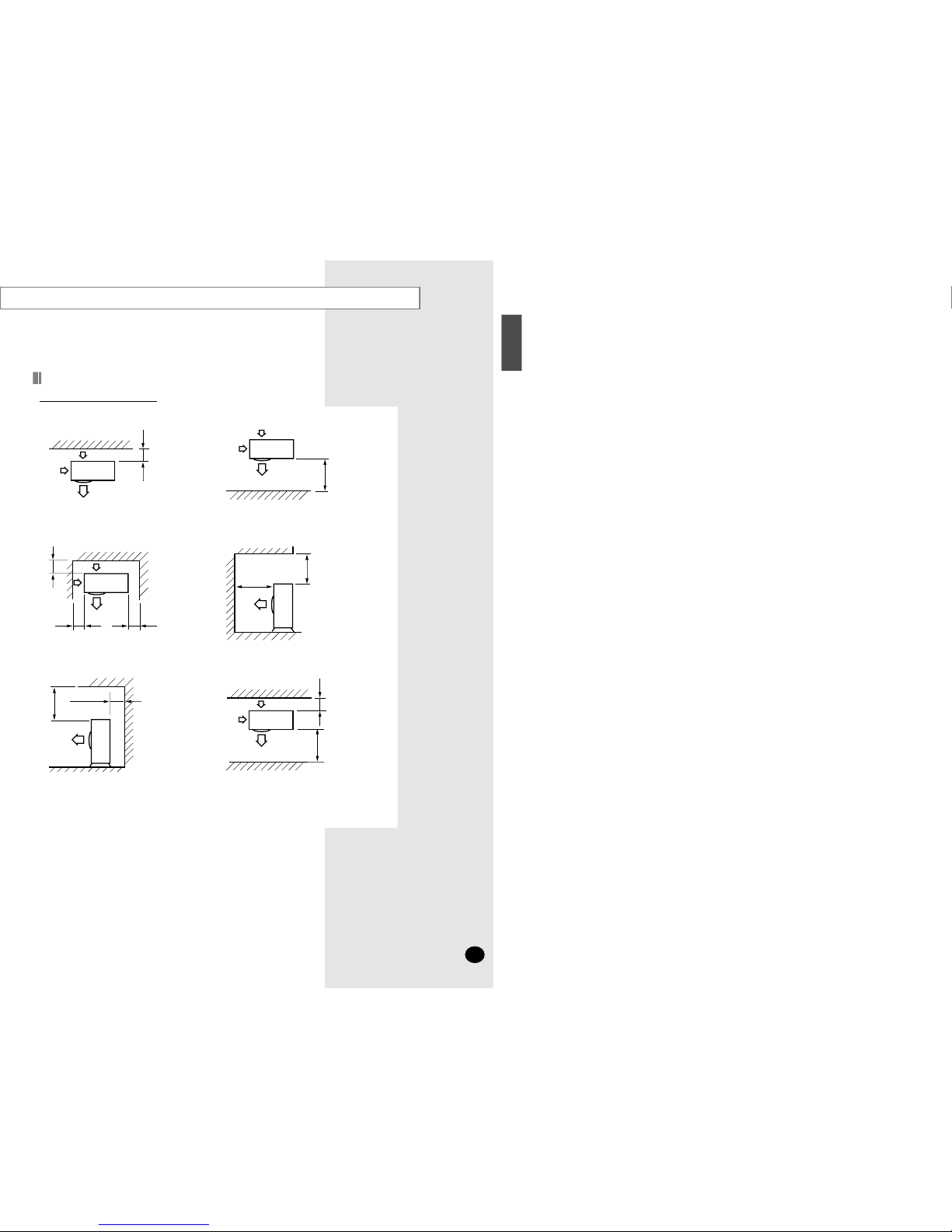
ero
m
r
o
300
❋ When the air outlet is opposite the wall
erom
r
o
2000
❋ When the air outlet is towards the wall
e
rom
ro
300
300 or more
600
or more
❋ When 3 sides of the outdoor unit are
blocked
by the wall
erom
ro
0
051
2000 or more
❋ The upper part of the outdoor unit and
the
air outlet is towards the wall
e
rom
ro
005
300 or more
❋ The upper part of the outdoor unit
and
the air outlet is opposite the wall
e
r
o
m
ro
00
3
ero
m
r
o
2000
❋ When front and rear side of the outdoor
unit
is towards the wall
Unit : mm
Space Requirements for Outdoor Unit
When installing 1 outdoor unit
H
SILGN
E
E-7
Page 8
E-8
Deciding on where to install the Air Conditioner (Continued)
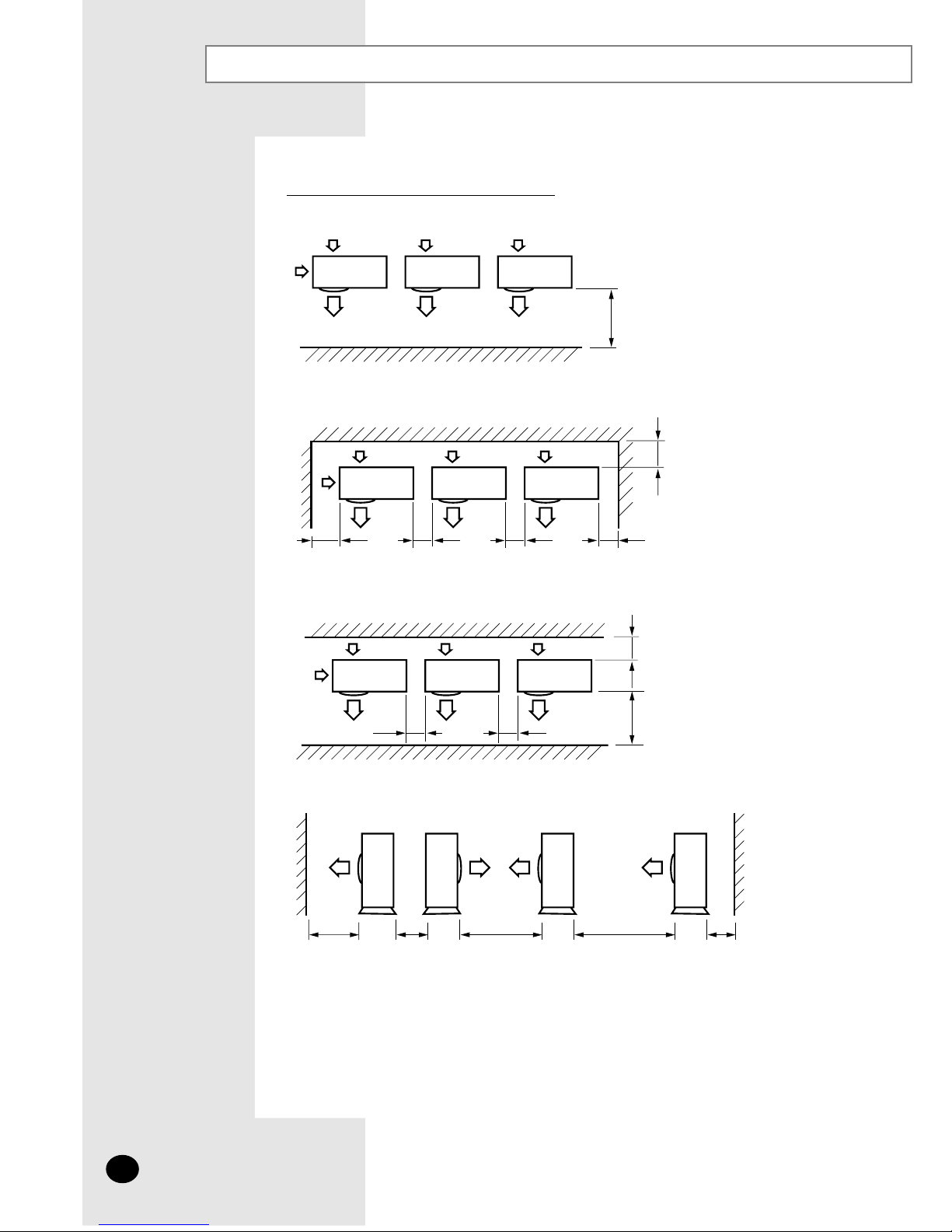
Unit : mm
e
rom r
o
0
0
02
✽
When the air outlet is towards the wall
erom
ro
003
300 or more
200
0
or more 1000 or more 5000 or more 200 or more4000 or more
60
0
or more 600 or more
e
ro
m
r
o
0
03
e
rom ro
000
2
600 or more 600 or more
60
0 or more
✽
When 3 sides of the outdoor unit are blocked by the wall
✽
When front and rear side of the outdoor unit is towards the wall
✽✽
When front and rear side of the outdoor unit is towards the wall
When installing more than 1 outdoor unit
Page 9
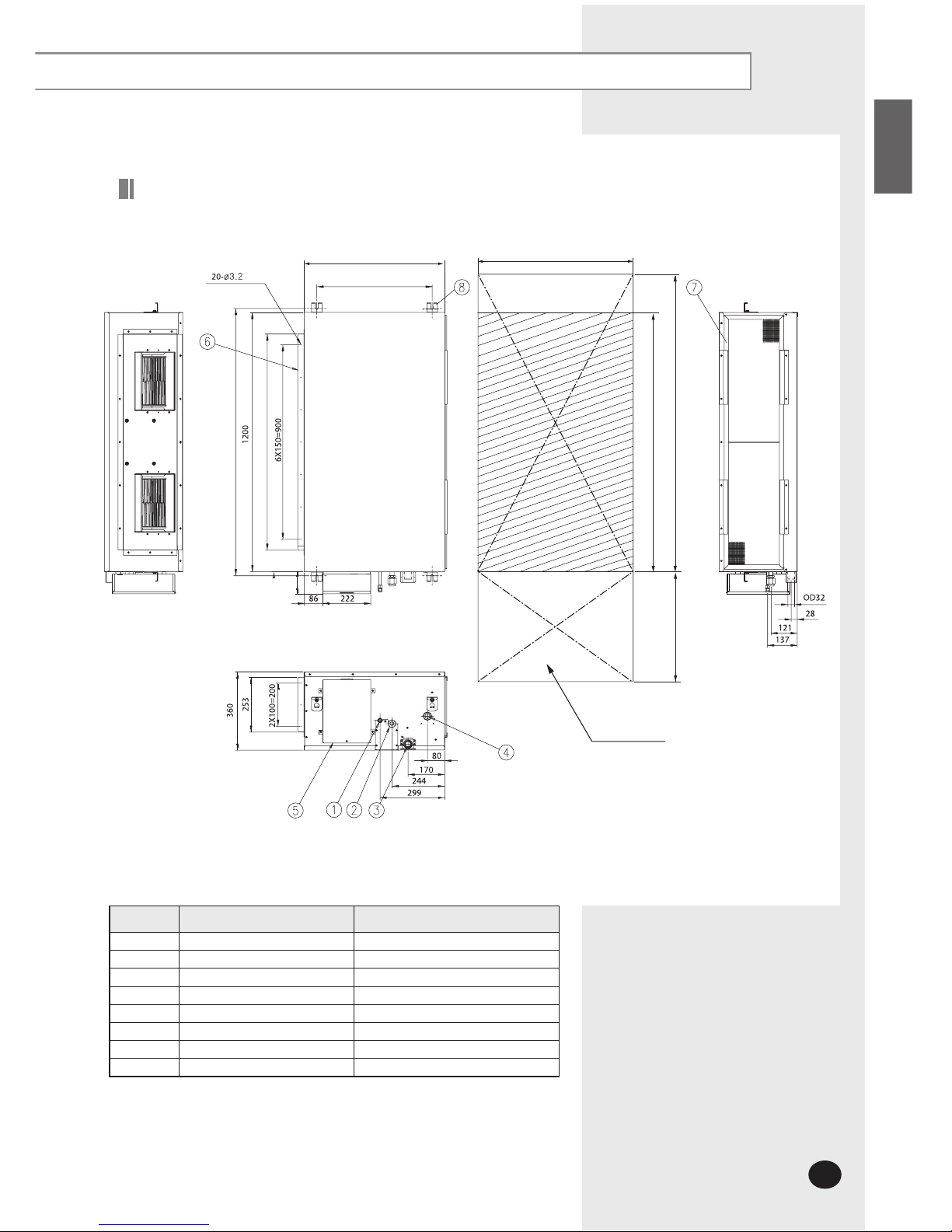
ENGLISH
102
No. Name Description
1 Liquid pipe connection ø9.52
2 Gas pipe connection ø19.05
3 Drain pipe connection OD32 ID26
4 Drain pipe connection Using drain pump (Optional)
5 Power supply connection
6 Air discharge flange
7 Air filter
8 Hook M8~M10
Unit : mm
Drawing of the indoor unit
E-9
Page 10
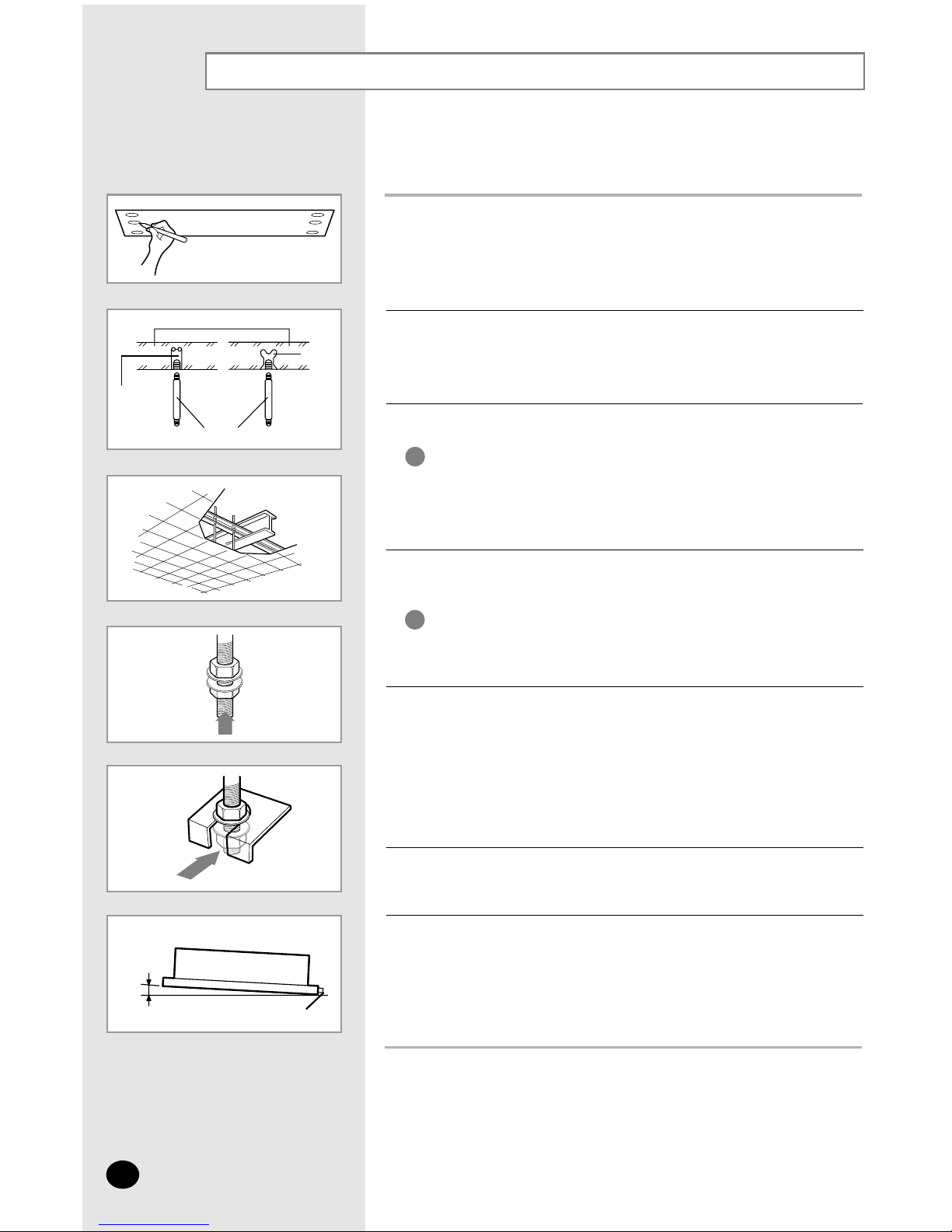
Indoor Unit Installation
E-10
1
Mark the place to insert the suspension bolt where you want to install the
indoor unit.
2
Insert bolt anchors. Use existing ceiling supports or construct a suitable
support as shown in figure.
3
Install the suspension bolts depending on the ceiling type.
4
Screw eight nuts to the suspension bolts making space for hanging
the indoor unit.
5
Hang the indoor unit to the suspension bolts between two nuts.
6
Screw the nuts to suspend the unit.
7
Adjust level of the unit by using measurement plate for all 4 sides.
Ensure that the ceiling is strong enough to support
the weight of the indoor unit.
Before hanging the unit, test the strength of each
attached suspension bolt.
IMPORTANT
You must install the suspension bolts more than 4
when installing the indoor unit.
IMPORTANT
◆ Tubing must be laid and connected inside the ceiling when
suspending the unit. If the ceiling is already constructed,
lay the tubing into position for connection to the unit before
placing the unit inside the ceiling.
NNNNoooottttee
ee
◆ Refer to page 9 for the dimension.
NNNNoooottttee
ee
◆ For proper drainage of condensate, give a 10mm slant to the
left or right side of the unit which will be connected with the drain
hose, as shown in the figure. Make a tilt when you wish to install
the drain pump, too.
NNNNoooottttee
ee
Concrete
Suspension bolt(M8)-field supply
Hole in anchor
Hole in plug
Insert
Ceiling support
Drain hose connection port
10mm
Page 11
ENGLISH
E-11
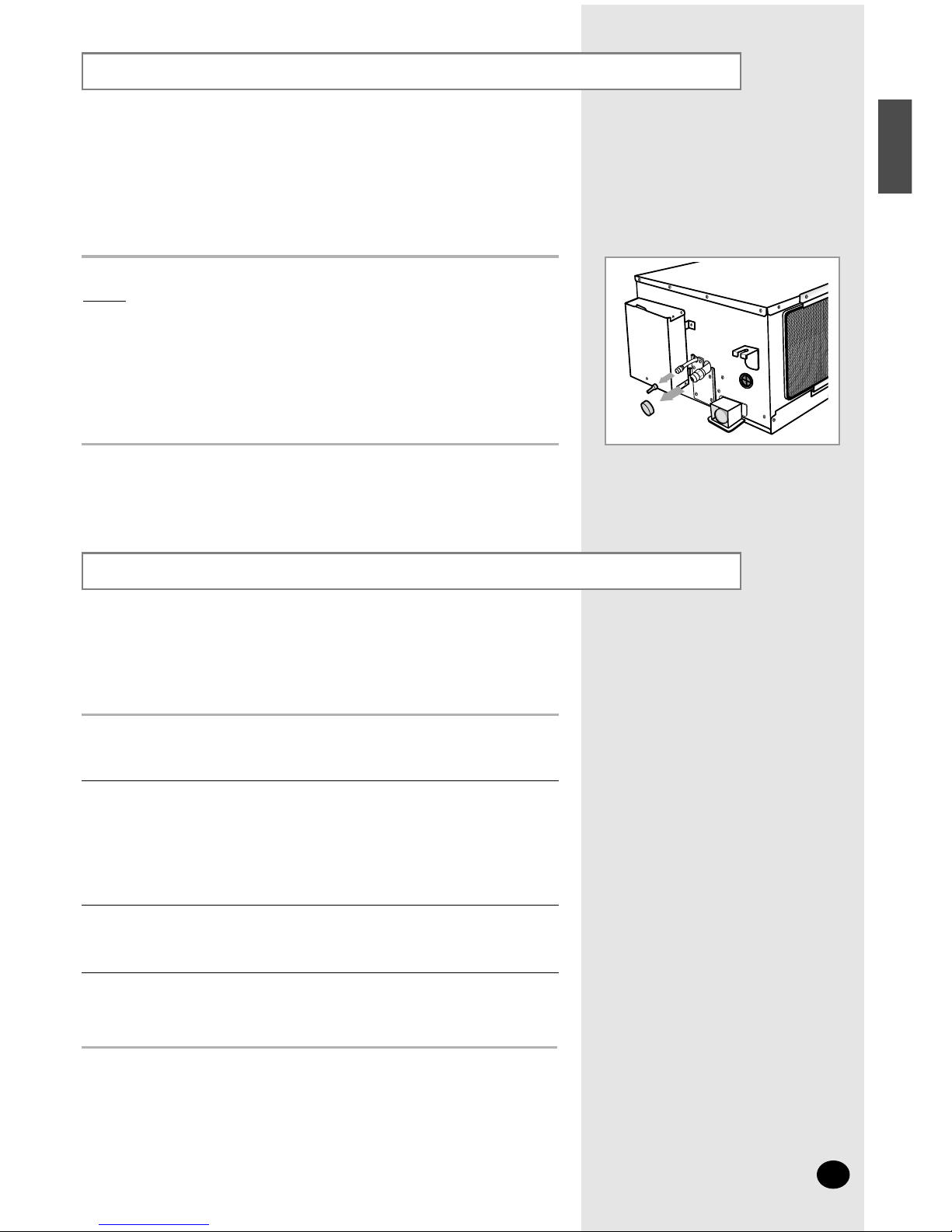
Purging the Unit
On delivery, the indoor unit is loaded with an inert nitrogen gas.
All this gas must therefore be purged before connecting the assembly
piping. To purge the inert gas, proceed as follows.
Unscrew the caps at the end of each pipe.
Result:
All inert gas escapes from the indoor unit.
◆ To prevent dirt or foreign objects from getting into the pipes
during installation, do NOT remove the caps completely until
you are ready to connect the piping.
NNNNoooottttee
ee
Connecting the Connection Cord
The indoor unit is powered from the outdoor unit via the connection cord.
◆ When connecting the cables, you must pass them through
the cable clamp to fix them securely.
NNNNoooottttee
ee
Remove the screw on the electrical component box and remove the cover
plate.
1
Route the connection cord through the side of the indoor unit and connect
the cable to terminals as shown in pages 12 and 15.
2
Route the other end of the cable to the outdoor unit through the ceiling &
the hole on the wall.
3
Reassemble the electrical component box cover, carefully tightening the
screw.
4
Page 12
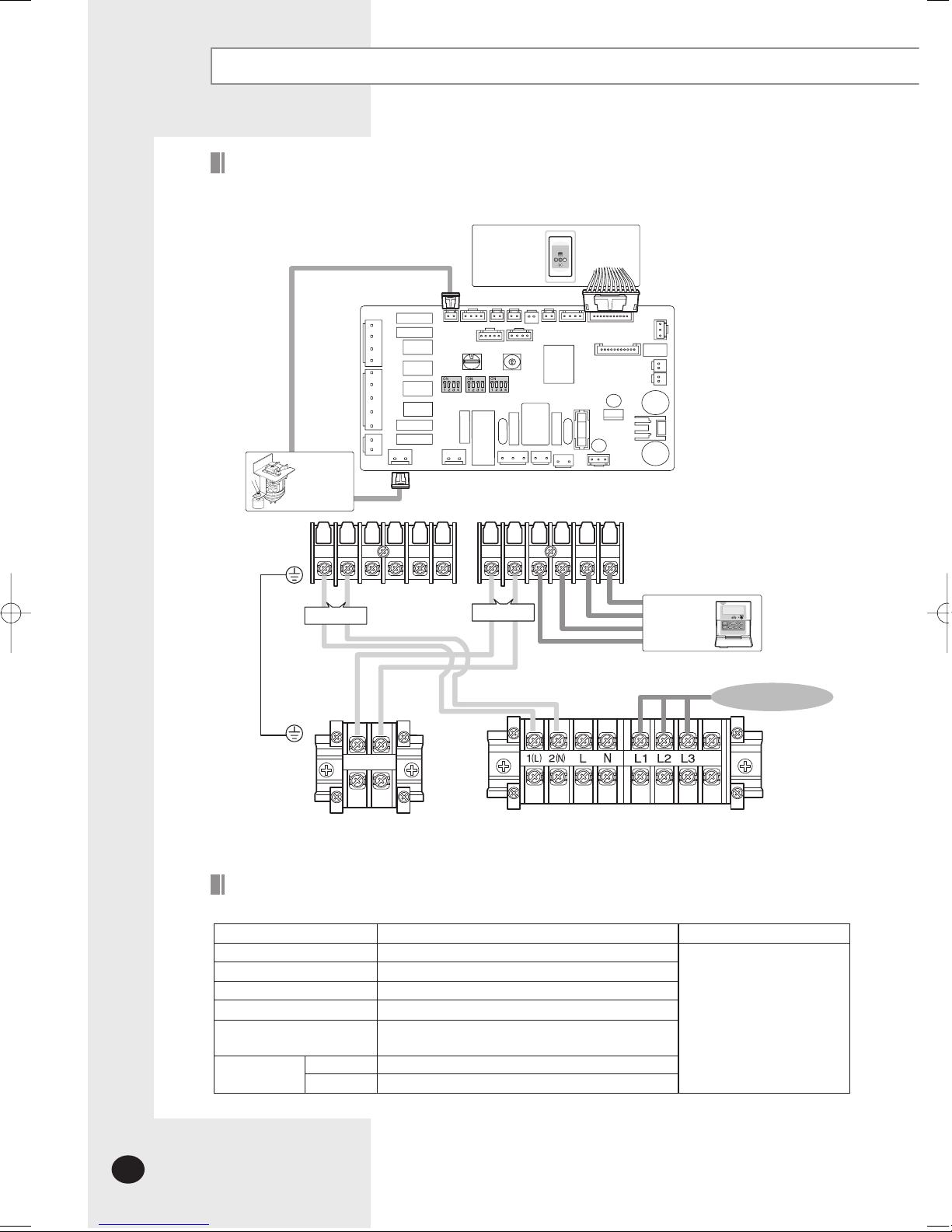
E-12
Connecting the Connection Cord (Continued)
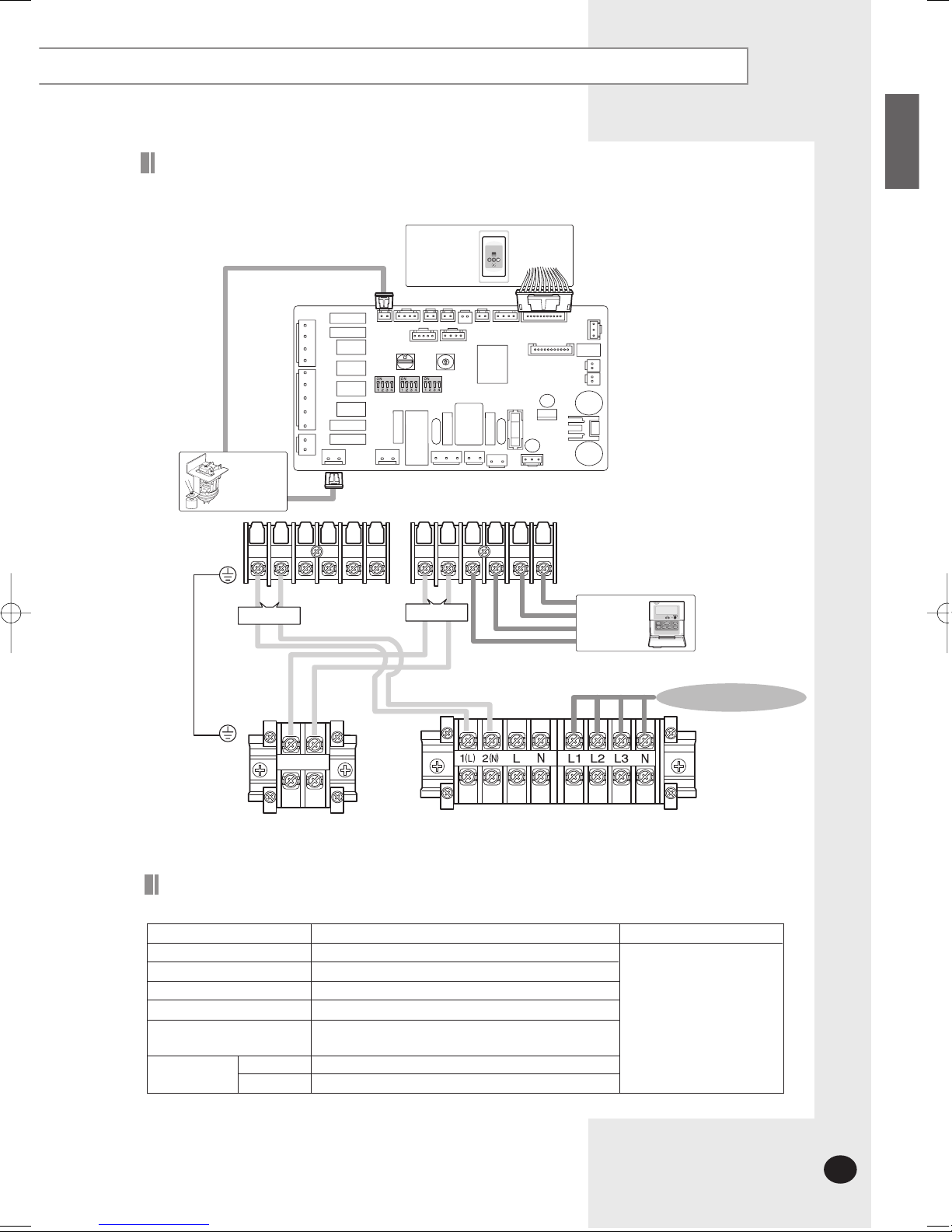
1(L)
2(N)
Vc Vc Vw Vw F1 F2 V1 V2 F3 F4
F1 F2
Receiver &
Display Unit
(Optional)
Float Switch
Drain Pump
(Optional)
Wired
Remote
Controller
MAIN PCB
3ø220V~, 60H
z
Communication
Power
The following electrical characteristics must be respected.
MODEL
Power
Circuit breaker
Indoor unit power cable
Communication cable
Wired remote controller power
& communication cable
Power cable
20m or less
50m or less
DH48FTA(X), DH60FTA(X), DC48FTA(X), DC60FTA(X)
3ø 220V~, 60Hz
30A
1.25mm
2
(CV, 3 wire)
0.75~1.0mm2(CV, 2 wire)
The power cables are not
supplied with the air
conditioner.
The user should purchase
them separately.
0.5~0.75mm
2
(CV, 2 wire)
5.5mm
2
(CV, 4 wire)
8.0mm2(CV, 4 wire)
Note
MAIN POWER
Indoor Unit
Outdoor Unit
Wiring Diagram (DH48FTA, DH60FTA, DC48FTA, DC60FTA )
Cable Specifications
Page 13
ENGLISH
E-13
1(L)
2(N)
Vc Vc Vw Vw F1 F2 V1 V2 F3 F4
F1 F2
Receiver &
Display Unit
(Optional)
Float Switch
Drain Pump
(Optional)
Wired
Remote
Controller
MAIN PCB
3ø380 - 415V~, 50H
z
Communication
Power
MAIN POWER
Indoor Unit
Outdoor Unit
The following electrical characteristics must be respected.
MODEL
Power
Circuit breaker
Indoor unit power cable
Communication cable
Wired remote controller power
& communication cable
Power cable
20m or less
50m or less
DH48GTA(X), DH60GTA(X), DC48GTA(X), DC60GTA(X)
3ø 380-415V~, 50Hz
20A
1.25mm
2
(CV, 3 wire)
0.75~1.0mm2(CV, 2 wire)
The power cables are not
supplied with the air
conditioner.
The user should purchase
them separately.
0.5~0.75mm
2
(CV, 2 wire)
2.0mm
2
(CV, 5 wire)
2.5mm2(CV, 5 wire)
Note
Cable Specifications
Wiring Diagram (DH48GTA, DH60GTA, DC48GTA, DC60GTA)
Page 14
E-14
Connecting the Connection Cord (Continued)
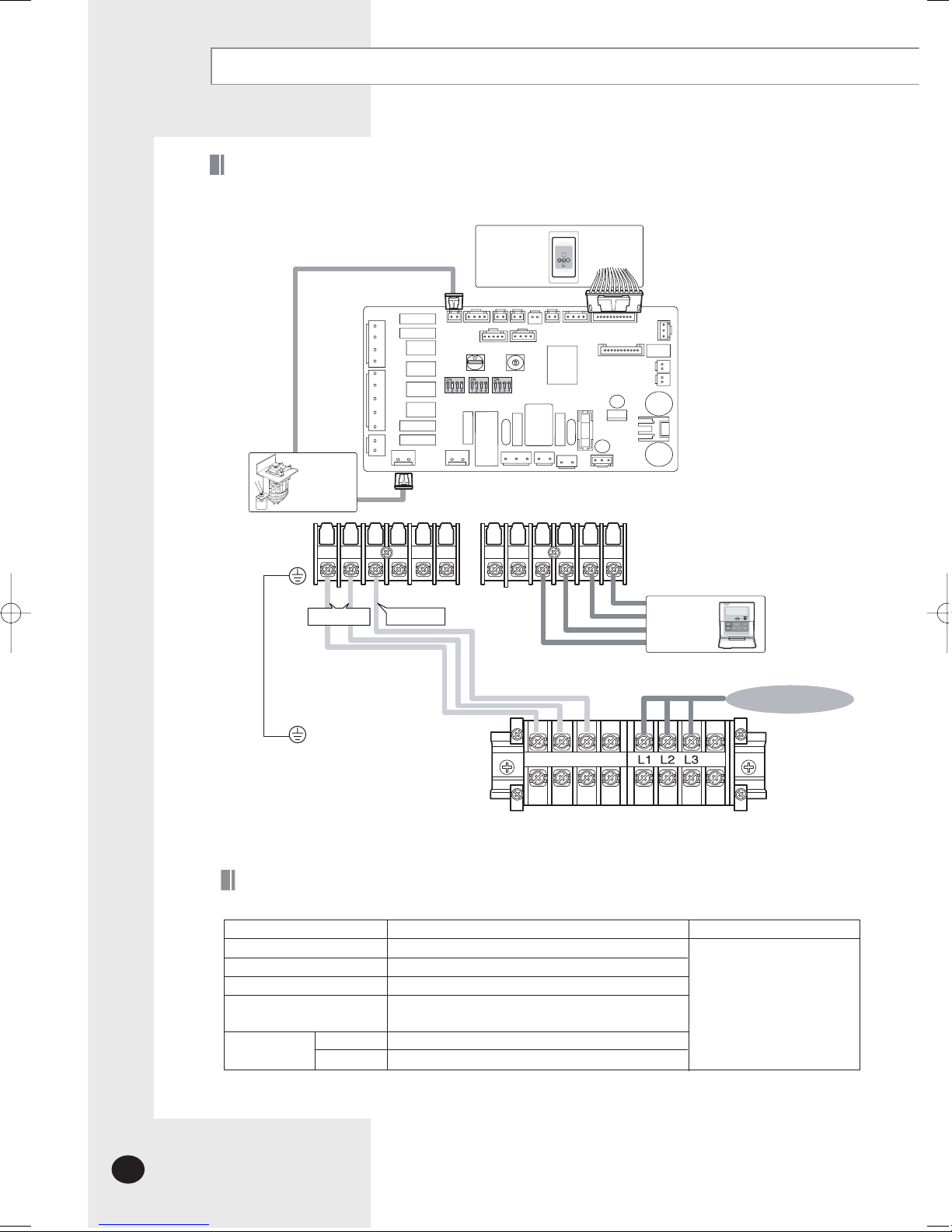
1(L)
2(N)
3(C)
Vc Vc
F1 F2 V1 V2 F3 F4
3(C)2(N)1(L)
Receiver &
Displ
ay Unit
(Option
al)
Float Switch
Dra
in Pump
(Option
al)
Wired
Remo
te
Controller
MAIN PCB
Power
3ø 220V~, 60H
z
MAIN POWER
Indo
or
Unit
Outdo
or Unit
Wiring Diagram (DC48FTVA,DC60FTVA)
Signal
The following electrical characteristics must be respected.
MODEL
Po
we
r
Circu
it breaker
Indo
or
unit power cable
Wired remote controller power
& communication cable
Power cable
20m or less
50m or less
DC48FTVA(X),DC60FTVA(X)
3ø 220V~, 60Hz
30
A
1.2
5mm2(CV, 4 wire)
The power cables are not
suppli
ed with the air
conditio
ner.
The
user should purchase
th
em separately.
0.5~0.7
5mm
2
(CV, 2 wire)
5.5
mm
2
(CV, 4 wire)
8.0
mm2(CV, 4 wire)
Note
Cable Specifications
Page 15

HSILGNE
E-15
1(L)
2(N)
3(C)
Vc Vc
F1 F2 V1 V2 F3 F4
3(C)2(N)1(L)
Receiver &
Displ
ay Unit
(Option
al)
Float Switch
Dra
in Pump
(Option
al)
Wired
Remote
Control
ler
MAIN PCB
Power
3ø 380 - 415V~, 50H
z
MAIN POWER
Indo
or
Unit
Outdo
or Unit
Wiring Diagram (DC48GTVA,DC60GTVA)
Signal
The following electrical characteristics must be respected.
MODEL
Pow
e
r
Circui
t breaker
Indoo
r
unit power cable
Wired remote controller power
& communication cable
Power cable
20m or less
50
m or less
DC48GTVA(X),DC60GTVA(X)
3ø 380-415V~, 50Hz
20
A
1.25
mm2(CV, 4 wire)
Th
e power cables are not
supplie
d with the air
condition
er.
Th
e
user should purchase
the
m separately.
0.5~0.75
mm
2
(CV, 2 wire)
2.0
mm
2
(CV, 5 wire)
2.5
mm2(CV, 5 wire)
No
te
Cable Specifications
Page 16

E-16
Connecting the Cables to the Outdoor Unit
Two electric cables must be connected to the outdoor unit.
◆ The connection cord connecting the indoor unit to the outdoor unit
◆ The power cable connecting the auxiliary circuit breaker to the
outdoor unit
Remove the terminal board cover on the side of the outdoor unit.
Connect the connection cord and power cable to terminals as shown in the
diagram.
1
2
Connect the power cable to the auxiliary circuit breaker.
3
Replace the terminal board cover, carefully tightening the screw.
4
◆
CCCCAAAAUUUUTTTTIIIIOOOONN
NN
Keep the power cable and the connection cord in a
steel pipe to protect them against liquids, outside
impacts and so on.
Page 17

ENGLISH
E-17
Drain Hose Installation
Care must be taken when installing the drain hose for the indoor unit
to ensure that any condensate water is correctly drained outside. The
drain hose can be installed to the right of the base pan.
Unscrew the 4 tapped screws to remove the cover of the drain hose
connection port.
1
Insert the flexible hose to the drain hose port.2
CCCCAAAAUUUUTTTTIIIIOOOONN
NN
When not installing the drain pump
Do not give the hose and upward gradient
after the connection port.
This will cause water to flow backwards when
the unit is stopped, resulting in water leaks.
Do not apply force to the piping on the unit side
when connecting the drain hose. The hose should
not be allowed to hang loose from its connection to
the unit. Fasten the hose to a wall, frame or other
support as close to the unit as possible.
Upward gradient
Support pieces
Ceiling
Ceiling
75cm or less
Ceiling
When installing the drain pump
If it is necessary to increase the height of the
drain hose somewhat, the portion directly after
75cm. If it is raised higher than 75cm, there can
be water leaks.
◆ Fix the flexible hose to the indoor unit with the supplied cable
clamp securely.
(Use the screwdriver to fix the flexible hose securely.)
NNNNoooottttee
ee
Install the drain hose so that its length can be as short as possible.
Internal diameter of the drain hose should be the same or slightly bigger
than the external diameter of the drain hose port.
◆
Inner diameter of the drain hose
3
Wrap the drain hose with the insulation drain as shown in figure and secure it.
4
◆ Give a slightly slant to the drain hose for proper drainage of
condensate.
◆ Fix the flexible hose to the PVC with the supplied cable tie
securely.
NNNNoooottttee
ee
32mm(Inner diameter)
CCCCAAAAUUUUTTTTIIIIOOOONN
NN
Must fit tightly against
body without any gap.
Insulation cover drain
No gap
Insulation drain hose
Cable-Tie
Indoor
Unit
Drain hose connection port
Cable
Clamp
Page 18

Drain Hose Installation (Continued)
E-18
Prepare a little water about 5 liters.
Pour water into the base pan in the indoor unit as shown in figure.1
Confirm that the water flows out through the drain hose.
2
Testing the drainage
Page 19

Connecting the Indoor Unit Assembly Piping
ENGLISH
E-19
There are two refrigerant pipes of differing diameters:
◆ A smaller one(9.52mm, 3/8
"
) for the liquid refrigerant
◆ A larger one(19.05mm, 3/4
"
) for the gas refrigerant
◆ The thickness of tube should not less than 1.0mm.
◆ The inside of copper tube must be clean & has no dust.
The connection procedure for the refrigerant pipes varies according to
the exit position of the pipes from the indoor unit, as seen when facing
the indoor in the “A” side.
◆ Liquid refrigerant port
◆ Gas refrigerant port
◆ Drain hose connection port
Remove the pinch pipe on the pipes and connect the assembly pipes to
each pipe, tightening the nuts, first manually and then with a torque
wrench, a spanner applying the following torque.
Must use insulator which is thick enough to cover the refrigerant tube to
protect the condensate water on the outside of pipe falling onto the floor
and the efficiency of the unit will be better.
1
2
Cut off any excess foam insulation.
3
Be sure that there must be no crack or wave on the bended area.
4
It would be necessary to double the insulation thickness (10mm or more)
to prevent condensation even on the insulator when if the installed area is
warm and humid.
5
Shape an oil trap as shown in figure the oil trap must be formed every
level difference of 10m.
6
◆ If the pipes must be shortened refer to page 18.
NNNNoooottttee
ee
Outer Diameter Torque
9.52 mm (3/8") 250~280 kgf•cm
19.05 mm (3/4") 990~1210 kgf•cm
Indoor unit
Outdoor unit
Oil trap (Must be install
every 10m)
a. When the indoor unit is above the outdoor
unit
Radius
5cm
Oil trap
(suction tube)
Outdoor unit
Indoor unit
b. When the outdoor unit is above the indoor
unit
Oil trap(Must be installed
every 10m)
Drain hose connection port
Liquid
refrigerant port
A
Gas refrigerant port
Page 20

E-20
Cutting/Flaring the Pipes
Connect the pipe within 50m and cutting pieces will not be gone
into the pipe as being clean to pipe section.
Make sure that you have the required tools available (pipe cutter, reamer,
flaring tool and pipe holder).
If you wish to shorten the pipes, cut it with a pipe cutter, taking care to
ensure that the cut edge remains at a 90° angle with the side of the pipe.
Refer to the illustrations below for examples of edges cut correctly and
incorrectly.
1
2
To prevent any gas from leaking out, remove all burrs at the cut edge of the
pipe, using a reamer.
3
Slide a flare nut on to the pipe and modify the flare.
Outer Diameter(D) Depth (A)
9.52 mm (3/8") 1.8 mm
19.05 mm (3/4") 2.2 mm
4
Align the pipes and tighten the flare nuts first manually and then with
a torque wrench, applying the following torque.
Outer Diameter Torque
9.52 mm (3/8") 250~280 kgf•cm
19.05 mm (3/4") 990~1210 kgf•cm
6
Check that the flaring is correct, referring to the illustrations below for
examples of incorrect flaring.
5
90
O
Oblique Rough Burr
Inclined Damaged Surface Cracked Uneven Thickness
◆
CCCCAAAAUUUUTTTTIIIIOOOONN
NN
In case of welding the pipe, you must weld with nitrogen
gas blowing.
Page 21

ENGLISH
E-21
Checking Correct Grounding
If the power distribution circuit does not have an earth or the ground does
not comply with specifications, an grounding electrode must be installed.
The corresponding accessories are NOT supplied with the air conditioner.
Select an grounding electrode that complies with the specifications given
in the illustration.
1
Determine a suitable location for the grounding electrode:
◆ In damp hard soil rather than loose sandy or gravel soil that has a
higher grounding resistance
◆ Away from underground structures or facilities, such as gas pipes,
water pipes, telephone lines and underground cables
◆ At least two metres away from a lightening conductor grounding
electrode and its cable
2
Install a green/yellow coloured grounding wire (Ø1.6 mm, section 2 mm
2
or greater):
◆ If the grounding wire is too short, connect an extension lead, in a
mechanical way and wrapping it with insulating tape (do not bury the
connection)
◆ Secure the grounding wire in position with staples
4
Finish wrapping insulating tape around the rest of the pipes leading to the
outdoor unit.
3
Carefully check the installation, by measuring the grounding resistance
with a ground resistance tester. If the resistance is above required level,
drive the electrode deeper into the ground or increase the number of
grounding electrodes.
5
Connect the grounding wire to the electrical component box inside of the
outdoor unit.
6
◆ The grounding wire for the telephone line cannot be used to
ground the air conditioner.
NNNNoooottttee
ee
◆
If the grounding electrode is installed in an area of
heavy traffic, its wire must be connected securely.
NNNNoooottttee
ee
Terminal M4
PVC-insulated green/
yellow wire, 2mm
2
x 3.5 mTogrounding
screw
Steel
core
Carbon
plastic
30cm
50cm
Page 22

Fixing the Unit in Position
E-22
The outdoor unit must be installed on a rigid and stable base to avoid any
increase in the noise level and vibration, particularly if the outdoor unit is to
be installed close to a neighbour. If it is to be installed in a location exposed to
strong winds or at a height, the unit must be fixed to an appropriate support
(wall or ground).
Position the outdoor unit so that the air flow is directed towards the
outside.
1
Attach the outdoor unit to the appropriate support using anchor bolts.
2
If the outdoor unit is exposed to strong winds, install shield plates around
the outdoor unit, so that the fan can operate correctly.
3
670mm
403mm
Page 23

Connecting Up and Removing Air In the Circuit
H
SILGN
E
E-23
If you have used...
More than 5 metres
of the pipes
“A”g of refrigerant (R22)
must be added for each
extra metre.
Less than 5 metres
of piping
The purge time is normal
Then...
The outdoor unit is loaded with sufficient R22 refrigerant for 5 metres of piping.
The air in the indoor unit and in the pipe must be purged. If air remains in the
refrigeration pipes, it will affect the compressor, reduce to cooling capacity and
could lead to a malfunction. Refrigerant for air purging is not charged in the
outdoor unit. Use Vacuum Pump as shown at the figure.
Adding Refrigerant
Refrigerant must be added if the piping measures more than 5 metres in
length (maximum of 50 metres). This operation can only be performed by
a qualified refrigeration specialist.
Connect each assembly pipe to the appropriate valve on the outdoor unit
and tighten the flare nut.
1
Referring to the illustration opposite, tighten the flare nut on section B first
manually and then with a wrench, applying the following torque.
Outer Diameter Torque
9.52 mm (3/ 8") 250~280 kgf•cm
19.05 mm (3/ 4")
990~1210
kgf•cm
2
Connect the charging hose of low pressure side of manifold gauge to the
packed valve having a service port as shown at the figure.
3
Open the valve of the low pressure side of manifold gauge counterclockwise.
4
Purge the air from the system using vacuum pump for about 10 minutes.
Close the valve of the low pressure side of manifold gauge clockwise.
Make sure that pressure gauge show -0.1MPa(-76cmHg) after about
10 minutes.
This procedure is very important in order to avoid gas leak.
Turn off the vacuum pump.
Remove the hose of the low pressure side of manifold gauge.
5
Set valve cork of both liquid side and gas side of packed valve to the
open position.
6
Mount the valve stem nuts and the service port cap to the valve, and
tighten them at the torque of 183kgf•cm with a torque wrench.
7
Check for gas leakage.
At this time, especially check for gas leakage from the 3-way valve’s
stem nuts(A port), and from the service port cap.
8
A
B
C
D
Outdoor unit Indoor unit
Gas
pipe side
Liquid
pipe side
Valve stem
A(gas)
B(liquid)
Stem
cap
Vacuum
pump
Outdoor Unit
DH48FTX
DH48GTX
DH60FTX
DH60G
TX
DC48FTX
DC48GTX
DC60FTX
DC60GTX
“A”
40
40
50
50
40
40
50
50
When installing, make sure there is no leakage.
When recovering the refrigerant, ground the compressor first before removing
the connection pipe.
If the refrigerant pipe is not properly connected and the compressor works with
the service valve open, the pipe inhales the air and it makes the pressure inside
of the refrigerant cycle abnormally high, It may cause explosion and injury.
Page 24

E-24
Performing Leak Tests
Before completing the installation (insulation of the hose and piping),
you must check that there are no gas leaks.
To check for gas leaks on the... Then, using a leak detector,
check the...
Indoor unit Flare nuts at the end of sections
A and B.
Outdoor unit Valves on sections C and D.
D
C
AB
Page 25

ENGLISH
E-25
Insulation
Once you have checked that there are no leaks in the system, you can
insulate the piping and hose.
To avoid condensation problems, place heat-resistant polyethylene
foam separately around each refrigerant pipe.
1
Wind insulating tape around the pipes.
2
Finish wrapping insulating tape around the rest of the pipes leading to the
outdoor unit.
3
No gap
Heat resistant polyethylene
foam
Insulation
cover pipe
Insulation
pipe
Be sure to overlap
the insulation
Body
CCCCAAAAUUUUTTTTIIIIOOOONN
NN
Must fit tightly against
body without any gap.
◆ Always make the seam of pipes face upwards.
NNNNoooottttee
ee
Pump Down Procedure (When removing the product)
1) Turn on the air conditioner and select Cool mode to run the compressor for 3 minutes.
2) Release the valve caps on High and Low pressure side.
3) Use L wrench to close the valve on the high pressure side.
4) Approximately 2 minutes after, close the valve on the low pressure side.
5) Stop operation of the air conditioner.
6) Disconnect the pipes.
Page 26

E-26
Adjusting Air Flow
E. S. P(External Static Pressure) Setting for Phase Control Motor
With its phase control motor, you can adjust the indoor unit fan speed depending on the installation
conditi
on.
If the external static pressure is high so that the duct becomes longer or if the external static
press
ure is low so that the duct becomes shorter, adjust the fan speed by referring the following table.
Re
fer to the page 25 to set the option code.
Range of static pressure (Factory preset)
Static Pressure(mmAq)
Mode
l
CMM
(CFM
)
Step
Option Code for Indoor Unit
1086420
DH48FTA
DH48G
TA
DH60F
TA
DH60G
TA
DC48F
TA
DC48G
TA
DC60FTA
DC60G
TA
represents E. S. P(External Static Pressure) range of factory setting.
You don't have to adjust the fan speed separately if the external static pressure of the installation
pl
ace is in . When it is out of , input the appropriate option code.
If you input the inappropriate option code, error may occur or the air conditioner is out
of
order. The option code must be inputted correctly by the installation specialist or
serv
ice agent.
NNNNoooottttee
ee
Hi
Mid
Low
Hi
Mid
Low
Hi
Mid
Low
Hi
Mid
Low
Hi
Mid
Low
Hi
Mid
Low
Hi
Mid
Low
Hi
Mid
Low
40(1412)
35(1236)
30(1059)
40(1412)
35(1236)
30(1059)
50(1765)
45(1589)
40(1412)
50(1765)
45(1589)
40(1412)
40(1412)
35(1236)
30(1059)
40(1412)
35(1236)
30(1059)
50(1765)
45(1589)
40(1412)
50(1765)
45(1589)
40(1412)
Model
Exter
nal static pressue(mmAq)
DH48FTA
DC48FTA
DH60FTA
DC60FTA
DH48GTA
DC48GTA
DH60GTA
DC60GTA
Min.
0
No
rm
al
2
Ma
x.
4
6 8 10
015811
-1303C2
011801
-1303F3
0158
11
-13023D
011803
-1401EC
0158
11
-14029F
011803
-130137
0158
11
-13025E
011803
-14032F
0158
11
-1403A0
011803
-130159
0158
11
-13027F
011804
-140252
0158
11
-1403D2
011803
-13018C
0158
11
-130390
011804
-140285
015813
-140
113
011804
-1300F4
015813
-130104
011804
-1402CC
015813
-140328
011803
-1301BF
011804
-1402CA
015813
-140175
010801
-1303F3
010803
-130137
010803
-130159
010803
-13018C
010804
-1300F4
010803
-1301BF
0108
11
-13023D
010811
-13025E
0108
11
-13027F
010811
-130390
010813
-130104
010811
-1303C2
010803
-1401EC
010803
-14032F
010804
-140252
010804
-140285
010804
-1402CC
010804
-1402CA
0108
11
-14029F
010811
-1403A0
0108
11
-1403D2
010813
-140
113
010813
-140328
15
-
015813
-1303FB
-
015814
-140223
-
010813
-1303FB
-
010814
-140223
010813
-140175
DC48FTVA
DC48G
TVA
DC60F
TVA
DC60G
TV
A
Hi
Mid
Low
Hi
Mid
Low
Hi
Mid
Low
Hi
Mid
Low
010814
-1300A1
010814
-1300E5
010814
-130208
010814
-13024B
010814
-1303A1
010814
-13027E
0108
13
-13018E
010814
-1300A0
0108
14
-1300C2
010814
-1300E5
010814
-130249
010814
-130217
010814
-1402AF
010814
-1403C2
010814
-1403E4
010814
-1403F6
010814
-1403FB
010814
-1403F8
010814
-1400D7
010814
-14020A
0108
14
-14023C
010814
-14025E
010814
-1403F6
0108
14
-1303E1
-
010814
-1303F9
010814
-1403A2
010814
-1403FD
DC48FTVA
DC60FTVA
DC48GTVA
DC60GTVA
34(870)
30(813)
38(984)
34(904)
30(823)
46(1042)
42(970)
37(893)
41(1226)
38(1192)
35(1143)
38(920)
Page 27

Setting Up the Mode Option
ENGLISH
E-27
Setting Option Setup Method
Prepare of the Option Setup mode.
1
For example) Option Code :
Enter the Option Setup mode and select your option according to the
following procedure.
2
a. Take out the batteries of remote control.
b. Press the button simultaneously and insert the battery again.
c. Make sure the remote control display shows as .
The default value is . Otherwise, push the button to .
◆
Every time you press the button, the display panel reads or
repeatedly.
1
2
3
4
5
6
1
2
3
4
5
6
Press the button to set the display panel to .
◆
Every time you press the button, the display panel reads
repeatedly.
...
Press the button to set the display panel to .
◆
Every time you press the button, the display panel reads
repeatedly.
...
Press the button to set the display panel to .
◆
Every time you press the button, the display panel reads
repeatedly.
...
Press the button to set the display panel to .
◆
Every time you press the button, the display panel reads
repeatedly.
...
Press the button to set the display panel to .
◆
Every time you press the button, the display panel reads
repeatedly.
...
❊ Setting is not required if you want to input
. is displayed by default.
Page 28

E-28
Setting Up the Mode Option (Continued)
7
8
9
10
11
12
Press the button, then the default value is .
Press the button to set the display panel to .
◆
Every time you press the button, the display panel reads
repeatedly.
...
Press the button to set the display panel to .
◆
Every time you press the button, the display panel reads
repeatedly.
...
Press the button to set the display panel to .
◆
Every time you press the button, the display panel reads
repeatedly.
...
Press the button to set the display panel to .
◆
Every time you press the button, the display panel reads
repeatedly.
...
Press the button to set the display panel to .
◆
Every time you press the button, the display panel reads
repeatedly.
...
Check you made right selections upon completion of the selection.
3
a. Press the button once to check the former part of option code
you inputted.
◆
The display part shows .
b. Press the button once more to check the latter part of option
code you inputted
◆
The display part shows .
❊ Setting is not required if you want to input
. is displayed by default.
7
8
9
10
11
12
Page 29

Press the button.
4
When you press the button towards the indoor unit,
the sound 'Ding' or 'Diriring' is heard and the power indicator of the
display flashes at the same time. Then the option code setting is
completed.
(If the sound is not heard, press the button again.)
Check the air conditioner operates normally.
5
a. Remove the battery from the remote control.
b. Insert the battery into the remote control again.
c. Press the towards the indoor unit.
If all indicators of the indoor unit are flashing, plug out the power plug
an
d plug it in again. Then press the button.
If the air conditioner does not operate normally or all lamps indicators
flash
, check that the correct option code is set up.
NNNNoooottttee
ee
Option items
Model
SEG1 SEG2 SEG3 SEG4 SEG5 SEG6 SEG7 SEG8 SEG9 SEG10 SEG11 SEG12
DH48FTA
DH48GTA
DH60FTA
DH60GTA
DC48FTA
DC48GTA
DC60FTA
DC60GTA
Remote
Cont
r
ol
DC48FTVA
DC48GTVA
DC60FTVA
DC60GTVA
HS
ILGNE
E-29
❋
Page 30

E-30
Assigning Address to Indoor Unit
Before installing the indoor unit, assign an address to the indoor unit
according to the air conditioning system plan.
1
The address of the indoor unit is assigned by adjusting MAIN(SW02) and
RMC(SW04) rotary switches.
2
It is required to set the RMC address if you install the wired remote controller
and/or the centralized controller.
3
If you install optional accessories such as the wired remote controller, centralized
controller, etc. see an appropriate installation manual.
4
If an optional accessory is not installed, you do not have to set the RMC
address. However, adjust K1 and K2 switches of the SW05 DIP switch to "ON"
position in this case.
5
SW05
SW02 SW04
SW07SW06
K1 K2 K3 K4
SW05
SW06
K5 K6 K7 K8
SW07
K9
K10
K11
K12
SW02
SW04
Page 31

ENGLISH
E-31
Additional Functions
Compensation for lost temperature in heating operation
◆ Reduces the difference between an actual room temperature and a sensed
temperature by the air conditioner when heating.
Adjusting filter cleaning cycle
◆ You can adjust the cycle for filter sign indicator.
K5 2°C compensation 5°C compensation
Switch No.
Switch ON Switch OFF
K6 1000 hours 2000 hours
Switch No.
Switch ON Switch OFF
Hot water heater
◆ You must adjust the K7 when you install the hot water heater.
K7 No use of hot water heater Use of hot water heater
Switch No.
Switch ON Switch OFF
SW06
K5 K6 K7 K8
SW06
K5 K6 K7 K8
SW06
K5 K6 K7 K8
Page 32

E-32
Additional Functions (Continued)
External Control
You must adjust the K11 when you use external control.
K11
No use of
external control
Use of
external control
Switch No.
Switch ON Switch OFF
You can use external control when the K11 switch is turned off.
Operatio
n ON/OFF Function
CN83(RED) Operation ON Operation OFF
Connector No.
SH
O
RT OPEN
Operation State Display
PIN #1 and #2 of CN81(RED)
PI
N #3 and #4 of CN81(RED)
+12
V Out if any error occurs
+12
V Out when the compressor is operating
Connector No.
Functi
o
n
CN83(RED)
SW07
K 9
K 1
0
K 1
1
K 12
ON/OFF Switch
Comp. Status Display
Erro
r Display
AC
22
0
V
Sub. PCB
CN81(RE
D)
❋
❋
Page 33

ENGLISH
E-33
Drain Pump Installation (Optional)
Accessories
Drain Pump and Float
Switch(1)
M4 X 12 Tapped
Screw (4)
Cable-Tie (3) Insulation Drain (2) Drain Hose (1)
Remove the air filter.
Assemble the drain socket as seen in the picture after removing the rubber
cap.
1
2
Assemble the float switch with the drain pump.
3
Connect the drain hose.
4
Attach the drain hose tightly with the cable tie or a bonding
agent so that it does not get removed or water does not drain.
NNNNoooottttee
ee
Drain socket
Drain pump and
float switch
Drain hose
Page 34

E-34
Drain Pump Installation (optional) (Continued)
Insert the flexible hose into the drain socket until it clicks.
5
Connect the cable to the electrical component box as shown at the figure.
6
Adjust K4 DIP switch(SW05) to the "OFF" position.
7
◆
Wrap the drain tube outlet on the right and left side of
the indoor unit with an insulating materials.
NNNNoooottttee
ee
◆
Connect the drain pump cable to yellow terminal(CN74)
and the float switch to black terminal(CN51).
NNNNoooottttee
ee
◆
Check if water does not drain.
◆
Insulate the drain hose so that frost does not form.
NNNNoooottttee
ee
Switch No.K4Switch Position
ON
OFF
Using Drain Pump
X
O
K1 K2 K3 K4
SW05
Cable-tie
Indoor unit
Drain hose
Insulation
Must fit tightly against body without any gap.
Float switch
Drain pump
Page 35

Setting Up Option Switches (Outdoor unit)
You should display that how many indoor units are connected to
the outdoor unit. Refer to the table below, then turn the arrow to
appropriate position.
Rotary Switch
0 or 1
2
3
4
5
6
7
8
One
Two
Thre
e
Four
Five
Six
Seven
Eight
9
A
B
C
D
E
F
-
Nine
Ten
Eleven
Twelve
Thirteen
Fourteen
Fifteen
-
Switch No.
Number
of
indoor
unit(s)
Switch No.
Number
of
indoor
unit(s)
Rotary switch
Displa
y
PCB
KEY
Function
Number of
press times
1
2
3
4
K1 K3K2
CHECK
MODE
Use the K1 only for heat pump models.
Except for cooling only models
(The outdoor unit PCB is not applied to the cooling only value models :
DC48FTV,DC48GTV,DC60FTV,DC60GTV)
DISPLAY
MODE
RESET
K4
DIS 1 DIS 2
K1
(Displayed on SEG 3, 4)
Adding refrigerant at
heating mode
Test operation at
heating mode
End
-
K2
(Displayed on SEG 3, 4)
Adding refrigerant at
cooling mode
Test operation at
cooling mode
Pump Down for recovery
of refrigerant
End
K3
(Displayed on SEG 3, 4)
Reset
-
-
-
K4
(Displayed on SEG 3, 4)
Displays data
-
-
-
Summary of KEY functions
DisplayKEY
ITEM NO. CURRENT DATA DISPLAY
E-35
H
SILGN
E
❋
❋
Page 36

Setting up Option Switches (Outdoor unit) (Continued)
K1
K2
K3
K4
1
2
3
1
2
3
4
1
2
3
4
5
6
7
Adding refrigerant for heat pump models
Test operation for heat pump models
End
Adding refrigerant for cooling only models
Test operation for cooling only models
Pump Down for recovery of refrigerant
End
Reset
Discharge temperature of compressor
Temperature of outdoor heat exchanger
Outdoor temperature
Step of electronic expansion valve
(0 step : all closed, 480 step : all open)
Temperature of evaporator
Indoor temperature
Stopping view mode & display communication data
120STEP
(12 x 10)
-2
°C
12
°C
22
°C
-2
°C
12
°C
22
°C
110
°C
38
°C
34
°C
Reading data indicated on the display
KEY
Number of
press
Item
Example
Display Meaning
E-36
Page 37

Testing Operations
Check the power supply between the outdoor unit and the auxiliary circuit
breaker.
◆
Single phase power supply: L, N
◆
Three phase power supply: L1, L2, L3
1
Check the indoor unit.
◆
Check that you have connected the power and communication
cables correctly. (If the power cable and communication cables
one mixed up or connected incorrectly, the PCB will be damaged.)
2
If the outdoor unit is powered on, it will start tracking to check user's
option(s) and number of indoor unit.
- At this time, the SEG 1 and SEG 2 on outdoor unit PCB display the
number of indoor unit registered and the SEG 3 and SEG 4 display
the number of indoor units which responded.
- If an error mode is displayed, fix the error according to the service
manual.
- If you press K2, the compressor starts operation.
Operate the compressor for 20 minutes, then add refrigerant according
to the pipe length.
- If you press K2 again, test operation is started.
- If you don't stop the operation of adding refrigerant, it will be stopped
automatically after 1 hour.
- If you don't stop test operation, it will be stopped automatically
after 1 hour.
- If K2 is pressed during the operation of adding refrigerant, test operation
is started without compressor stopping. Therefore, start test operation
after the operation of adding refrigerant.
- The compressor can be operated after completely 3-minute preparation
and tracking.
- When testing operations at Heating Mode, press K1 instead of K2.
3
Press K2 on the outdoor unit PCB.
4
- You should test operations for more than 30 minutes.
- Check that the water dripping from the drain hose runs away correctly
and safely.
Check that indoor and outdoor temperatures, step of electronic expansion
valve and operation of compressor by using the display mode(K4).
5
Check that there is any error mode in the outdoor unit PCB during the test.
6
To complete the test, press the test operation KEY(K2) again.
7
ENGLISH
E-37
Page 38

Troubleshooting
Detection of errors
◆ If an error occurs during the operation, one or more LED flickers and the operation is stopped except the LED.
◆ If you re-operate the air conditioner, it operates normally at first, then detect an error again.
LED Display
LED Display on the receiver & display unit
1. Indoor unit error
(Display is unrelated
with operation)
2. Outdoor unit error
(Display is unrelated
with operation)
Error of temperature sensor
in the indoor unitt (Open/Short)
Error of heat exchanger sensor
in the indoor unit
Error of the outdoor temperature sensor
Error of the condensor temperature sensor
Error of the discharge temperature sensor
1. No communication for 2 minutes
between indoor units
(Communication error for more than 2 minutes)
2. Indoor unit receiving the communication
error from outdoor unit
3. Outdoor unit tracking 3 minutes error
4. When sending the communication error
from the outdoor unit, the mismatching
of the communication numbers and
installed numbers after completion of
tracking
(Communication error for more than 2 minutes)
Power reset
XXX
XXX
XXXX
X
X
X
X
X
X
X
● On Flickering X Off
◆
If you turn off the air conditioner when the LED is flickering, the LED is also turned off.
RemarksAbnormal conditions
Indicators
Blue Red
Concealed Type
Standard Type
E-38
Page 39

Error of setting option switches for optional
accessories
1. Error of electronic expansion valve close
2. Error of electronic expansion valve open
3. 2’nd detection of high temperature cond
4. 2’nd detection of high temperature
discharge
5. Error of reverse phase
6. Compressor down due to 6’th detection
of freezing
Communication error between indoor units
XXX
XXX
XX
● On Flickering X Off
◆
If you turn off the air conditioner when the LED is flickering, the LED is also turned off.
LED Display
Detection of the float switch
XX
EEPROM error
XX
EEPROM option error
RemarksAbnormal conditions
Indicators
Blue Red
Concealed Type
Standard Type
ENGLISH
E-39
Page 40

Troubleshooting (Continued)
Explanation
Display
Compressor down due to protection control of the discharge
temperature sensor
Control due to the condenser temperature sensor when cooling
mode
Error about protection
control of the outdoor unit
Communication and the
indoor unit errors
Self-diagnosis of the
indoor and outdoor unit
Wired remote controller
errors
Error about the outdoor unit
sensor (Open/Short)
Detection during the
operation of the indoor unit
(sensing and sending errors
into the communication data)
Remark
Error of the low pressure switch (Protection control)
Reverse phase error (Protection control)
In removing frost
Error of the outdoor temperature sensor (Open/Short)
Error of condensor temperature sensor (Open/Short)
Master wired remote controller ↔Slave wired remote controller
COM1/COM2 Cross-installed error
Error of setting option for wired remote controller COM2
Error of discharge temperature sensor (Open/Short)
- System down caused by communication error after completion
of tracking
- Mismatching of the indoor unit numbers set with those
communication after completion of 5 times tracking
Error of electronic expansion valve close in the outdoor unit
(when it is detected more than once)
Error of communication between the indoor unit and the wired
remote controller
Error of temperature sensor in the indoor unit (Open/Short)
Error of the heat exchanger sensor in the indoor unit (Open/Short)
Error of electronic expansion valve open in the outdoor unit
(when it is detected more than once)
Wired remote controller
◆ If an error occurs, is displayed on the wired remote controller.
◆ If you would like to see an error code, press the Test button.
E-40
Page 41

High temperature of Discharge (Protection control)
High temperature of outdoor heat exchanger (Protection control)
Rev
ers
e phase error (Protection control)
COMP DOWN to protect being frozen
In removing frost
Error of OUTTEMP sensor (OPEN/SHORT)
Error of temperature sensor in outdoor heat exchanger (OPEN/SHORT)
Error of Discharge TEMPsensor (OPEN/SHORT)
Sys
tem
Down caused by communication error after
completio
n of tracking
Mismatc
hing of the indoor unit numbers set with those
communicated after completion of tracking
Er
ror of float switch in indoor unit
Er
ror of setting option switches for optional accessories
OPEN/
SHORT error of room sensor in indoor unit
OPEN/
SHORT error of eva in sensor in indoor unit
EEP
ROM option error
Er
ror of fan starting
Open error of electronic expansion valve in outdoor unit
(Detected once or more times)
Clos
e error of electronic expansion valve in outdoor unit
(Detected once or more times)
Belo
w -5°C when cooling (Outdoor temperature)
Over 30°C when heating (Outdoor temperature)
If an error occurs during the operation, it is displayed on the outdoor unit PCB .
Outdoor unit
x
x
Explanation
Display
Error about protection
control
of outdoor unit
Errors about outdoor unit
sensor (OPEN/SHORT)
Detec
tion during the
opera
tion of indoor unit
(Sensing and sending errors
into
the communication data)
Communication and indoor
unit errors
Self-diagnosi
s of indoor
and outdoor unit (x:indoor
unit
address)
Display
s of operating status
Remark
Flicker
Flicker
K1, K2, K3, K4,
K5
Flicker
x
x
The order of priority : E1 → E2 → E5 → P0 → P1 → P4 → P5 → P9 → t1 → t2 → t3 → tu → to →
G4 → G5 → E3 → qx → rx → vx → K1, K2, K3, K4, K5
- In case that the same error displays from multi-indoor units, the one having the faster
address has the priority.
HNGLIS
E
Except for cooling only value models
(The outdoor unit PCB is not applied to the cooling only value models : DC48FTV,DC48GTV,DC60FTV,DC60
GTV)
*
E-41
Page 42

Parts List
E-42
Receiver & Display Unit Accessories
STS 2S-2x10
tapped screw
4
2S-4x12
tapped screw
2
Concealed T
ype
Standard Type
M4x16 tapped
screw
7
Cable-tie2Cable clamp
5
Battery
2
Remote control
holder
1
STS 2S-2x10
tapped screw
2
Owner’s
instructions
1
Installation
manual
1
Owner’s
instructions
1
Installation
manual
1
Owner’s
instructions
1
Installation
manual
1
Wireless Remote Controller Accessories
Wire kit
1
Wire kit
1
◆ Receiver & display unit ◆ Wire kit
◆ Wire kit
◆ Receiver & display unit
Receiver &
display unit
1
Receiver &
display unit
1
Wireless
remote controller
1
E-40
Page 43

ENGLISH
E-43
Centralized Controller Accessories
Cable-tie2Cable clamp
5
M4x16 tapped
screw
7
Owner’s
instructions
1
Installation
manual
1
Centralized
controller
1
T ransmitter Accessories
Function Controller Accessories
Cable-tie2Cable clamp
6
M4x16 tapped
screw
7
Owner’s
instructions
1
Installation
manual
1
Function
controller
1
7-day Scheduler Accessories
Cable-tie2Cable clamp
2
M4x16 tapped
screw
4
Owner’s
instructions
1
Installation
manual
1
7-day
Scheduler
1
Transmitter
power cable
1
Transmitter
communication cable
1
Installation
manual
1
Transmitter
1
◆
If you would like to install the centralized controller,
you must install the transmitter in the outdoor unit.
NNNNoooottttee
ee
Page 44

 Loading...