

Page 1
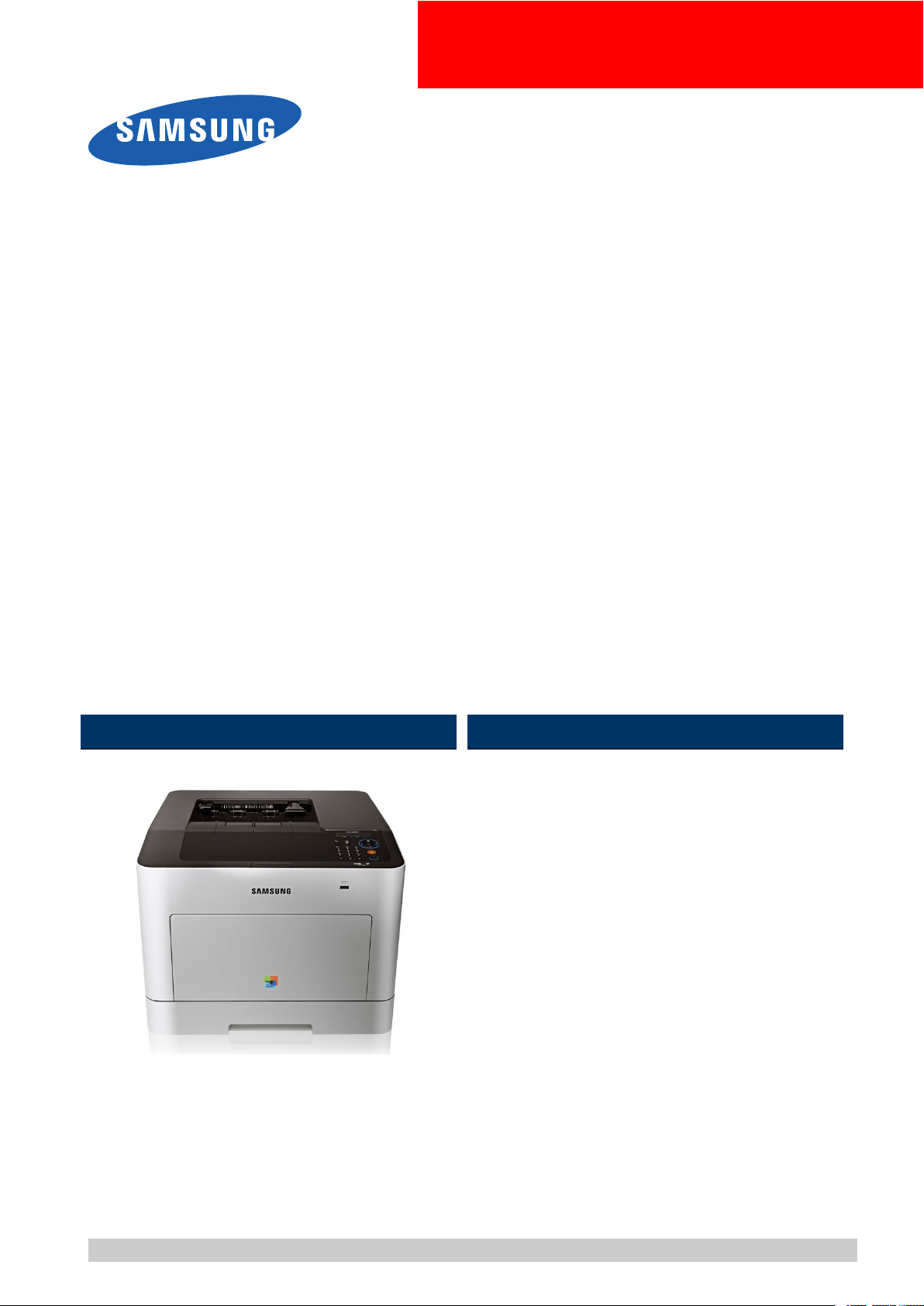
ColorLaserPrinter
CLP-680series
CLP-680ND/680DW
(Ver1.0)
MANUAL
SERVICE
ColorLaserPrinterContents
1.Precautions
2.ProductSpecicationanddescription
3.DisassemblyandReassembly
4.AlignmentandTroubleshooting
5.SystemDiagram
6.ReferenceInformation
RefertotheservicemanualintheGSPN(seetherearcover)formoreinformation.
Page 2

Contents
Contents
1.Precautions......................................................................................................................................1−1
1.1.Safetywarning........................................................................................................................1−1
1.2.Cautionforsafety....................................................................................................................1−2
1.2.1.Toxicmaterial.............................................................................................................1−2
1.2.2.Electricshockandresafetyprecautions.........................................................................1−2
1.2.3.Handlingprecautions...................................................................................................1−3
1.2.4.AssemblyandDisassemblyprecautions...........................................................................1−3
1.2.5.Disregardingthiswarningmaycausebodilyinjury............................................................1−4
1.3.ESDprecautions......................................................................................................................1−5
2.ProductSpecicationanddescription....................................................................................................2−1
2.1.ProductSpecication................................................................................................................2−1
2.1.1.ProductOverview........................................................................................................2−1
2.1.2.Specications.............................................................................................................2−2
2.1.2.1.GeneralPrintEngine......................................................................................2−2
2.1.2.2.ControllerandSoftware..................................................................................2−2
2.1.2.3.PaperHandling.............................................................................................2−5
2.1.2.4.ReliabilityandService...................................................................................2−7
2.1.2.5.Environment................................................................................................2−8
2.1.2.6.Consumables................................................................................................2−8
2.1.2.7.MaintenanceParts.........................................................................................2−9
2.1.2.8.Option.........................................................................................................2−9
2.1.3.ModelComparisonTable..............................................................................................2−10
2.2.SystemOverview.....................................................................................................................2−11
2.2.1.FrontView.................................................................................................................2−11
2.2.2.RearView..................................................................................................................2−12
2.2.3.PaperPath..................................................................................................................2−13
2.2.4.SystemLayout............................................................................................................2−14
2.2.4.1.FeedingSection............................................................................................2−15
2.2.4.2.TransferRoller.............................................................................................2−16
2.2.4.3.DriveUnit...................................................................................................2−16
2.2.4.4.FuserUnit....................................................................................................2−17
2.2.4.5.LSU(LaserScannerUnit)...............................................................................2−18
2.2.4.6.TonerCartridge.............................................................................................2−19
2.2.5.Hardwareconguration................................................................................................2−20
2.2.5.1.Mainboard..................................................................................................2−22
2.2.5.2.OPEController.............................................................................................2−24
2.2.5.3.WirelessLANboard......................................................................................2−25
2.2.5.4.SMPSboard.................................................................................................2−26
iCopyright©1995-2012SAMSUNG.Allrightsreserved.
Page 3

Contents
2.2.5.5.HVPSboard.................................................................................................2−28
2.2.5.6.ITBEEPROMPBA.......................................................................................2−29
2.2.5.7.HUBPBA...................................................................................................2−29
2.2.5.8.ElectricalPartsLocation.................................................................................2−30
2.2.6.EngineF/WControlAlgorithm......................................................................................2−32
2.2.6.1.Feeding.......................................................................................................2−32
2.2.6.2.Transfer.......................................................................................................2−32
2.2.6.3.Fusing.........................................................................................................2−33
2.2.6.4.LSU............................................................................................................2−33
2.2.7.SoftwareDescriptions..................................................................................................2−34
2.2.7.1.Softwaresystemoverview..............................................................................2−34
2.2.7.2.Architecture.................................................................................................2−34
2.2.7.3.DataandControlFlow...................................................................................2−35
3.DisassemblyandReassembly..............................................................................................................3−1
3.1.Precautionswhenreplacingparts................................................................................................3−1
3.1.1.Precautionswhenassemblinganddisassembling...............................................................3−1
3.1.2.PrecautionswhenhandlingPBA.....................................................................................3−1
3.1.3.ReleasingPlasticLatches..............................................................................................3−2
3.2.Screwsusedintheprinter..........................................................................................................3−3
3.3.Replacingthemaintenanceparts.................................................................................................3−5
3.3.1.TonerCartridge...........................................................................................................3−5
3.3.2.WasteTonerContainer.................................................................................................3−6
3.3.3.ITBUnit....................................................................................................................3−7
3.3.4.FuserUnit..................................................................................................................3−9
3.3.5.Pickup_Forward_Reverseroller.....................................................................................3−9
3.4.ReplacingthemainSVCparts....................................................................................................3−10
3.4.1.LeftandRightcover....................................................................................................3−10
3.4.2.Topcover...................................................................................................................3−11
3.4.3.HVPSboard...............................................................................................................3−12
3.4.4.OuterTemperatureSensor.............................................................................................3−12
3.4.5.MainBoard................................................................................................................3−13
3.4.6.SMPSFan..................................................................................................................3−13
3.4.7.SMPSboard...............................................................................................................3−14
3.4.8.LSU..........................................................................................................................3−14
3.4.9.FuserFan...................................................................................................................3−15
3.4.10.MainDriveUnit..........................................................................................................3−15
3.4.11.DRIVE-T1.................................................................................................................3−16
3.4.12.FuserDriveUnit.........................................................................................................3−16
3.4.13.PH(PaperHandling)DriveUnit.....................................................................................3−17
3.4.14.ExitUnit....................................................................................................................3−18
Copyright©1995-2012SAMSUNG.Allrightsreserved.ii
Page 4

Contents
3.4.15.MPPick-UpUnit.........................................................................................................3−19
4.AlignmentandTroubleshooting...........................................................................................................4−1
4.1.AlignmentandAdjustments.......................................................................................................4−1
4.1.1.Controlpanel..............................................................................................................4−1
4.1.2.UnderstandingthestatusLED........................................................................................4−3
4.1.3.Clearingpaperjams.....................................................................................................4−4
4.1.4.Usefulmenuitemforservice.........................................................................................4−9
4.1.5.PeriodicDefectiveImage..............................................................................................4−11
4.1.6.Usefulmanagementtools..............................................................................................4−12
4.1.6.1.UsingSamsungEasyPrinterManager(WindowsandMacintoshonly)....................4−12
4.1.6.2.UsingSamsungPrinterStatus(Windowsonly)...................................................4−14
4.1.6.3.UsingSyncThruWebService(SWS)................................................................4−15
4.1.7.UpdatingFirmware......................................................................................................4−17
4.1.7.1.UpdatethermwarebyusingtheUSBport........................................................4−17
4.1.7.2.Updatethermwarebyusingthenetwork..........................................................4−18
4.1.8.TechMode(DiagnosticMode).......................................................................................4−20
4.2.Troubleshooting......................................................................................................................4−24
4.2.1.Procedureofcheckingthesymptoms...............................................................................4−24
4.2.1.1.BasicCheckList...........................................................................................4−25
4.2.2.ErrorCodeandTroubleshooting.....................................................................................4−26
4.2.3.Imagequalityproblems................................................................................................4−49
4.2.4.Othererrors................................................................................................................4−53
5.SystemDiagram................................................................................................................................5−1
5.1.BlockDiagram........................................................................................................................5−1
5.2.ConnectionDiagram.................................................................................................................5−2
6.ReferenceInformation........................................................................................................................6−1
6.1.ToolforTroubleshooting...........................................................................................................6−1
6.2.Glossary.................................................................................................................................6−2
iiiCopyright©1995-2012SAMSUNG.Allrightsreserved.
Page 5
1.Precautions
Inordertopreventaccidentsanddamagestotheequipmentpleasereadtheprecautionslistedbelowcarefullybefore
servicingtheproductandfollowthemclosely .
1.1.Safetywarning
1)Onlytobeservicedbyafactorytrainedservicetechnician.
Highvoltagesandlasersinsidethisproductaredangerous.Thisproductshouldonlybeservicedbyafactorytrained
servicetechnician.
2)UseonlySamsungreplacementparts.
Therearenouserserviceablepartsinsidetheproduct.Donotmakeanyunauthorizedchangesoradditionstothe
productasthesecouldcausetheproducttomalfunctionsandcreateanelectricshocksorrehazards.
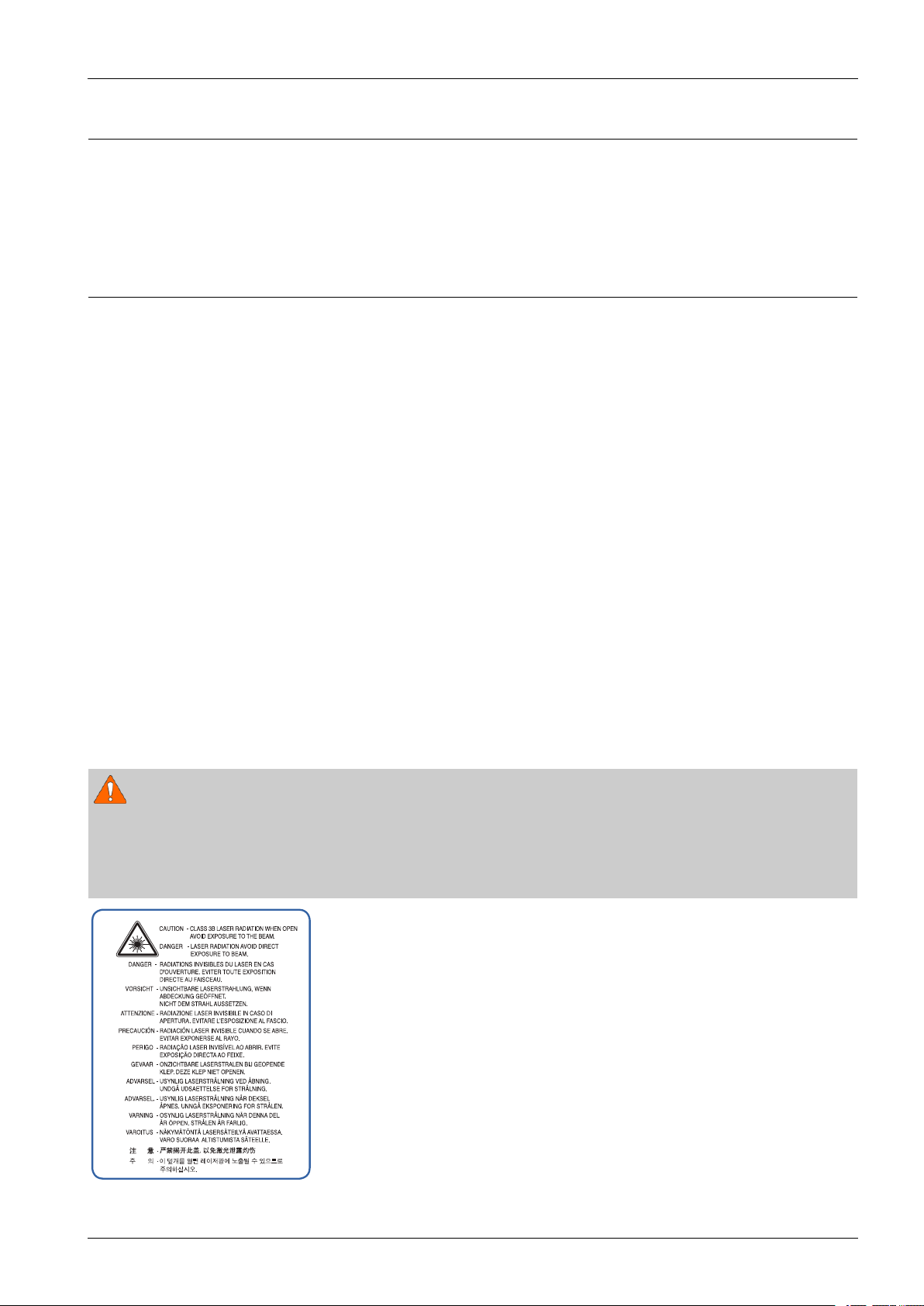
3)LaserSafetyStatement
TheprinteriscertiedintheU.S.toconformtotherequirementsofDHHS21CFR,chapter1SubchapterJfor
ClassI(1)laserproducts,andelsewhereiscertiedasaClassIlaserproductconformingtotherequirementsofIEC
60825-1.ClassIlaserproductsarenotconsideredtobehazardous.Thelasersystemandprinteraredesignedso
thereisneveranyhumanaccesstolaserradiationaboveaClassIlevelduringnormaloperation,usermaintenance
orprescribedservicecondition.
1.Precautions
•Wavelength:788nm(-13/+12)
•Beamdivergence
-Paraller:8degrees(-2/+4)
-Perpendicular:31degrees(-6/+4)
•Maximumpowerofenergyoutput:12mW
WARNING
NeveroperateorservicetheproductwiththeprotectivecoverremovedfromLaser/Scannerassembly.Thereected
beam,althoughinvisible,candamageyoureyes.
Whenusingthisproduct,thesebasicsafetyprecautionsshouldalwaysbefollowedtoreduceriskofre,electricshock,
andpersonalinjury .
Copyright©1995-2012SAMSUNG.Allrightsreserved.1-1
Page 6

1.Precautions
1.2.Cautionforsafety
1.2.1.Toxicmaterial
Thisproductcontainstoxicmaterialsthatcouldcauseillnessifingested.
1)Pleasekeepimagingunitandtonercartridgeawayfromchildren.Thetonerpowdercontainedintheimagingunitand
tonercartridgemaybeharmful,andifswallowed,youshouldcontactadoctor.
1.2.2.Electricshockandresafetyprecautions
Failuretofollowthefollowinginstructionscouldcauseelectricshockorpotentiallycauseare.
1)Useonlythecorrectvoltage,failuretodosocoulddamagetheproductandpotentiallycauseareorelectricshock.
2)Useonlythepowercablesuppliedwiththeproduct.Useofanincorrectlyspeciedcablecouldcausethecableto
overheatandpotentiallycauseare.
3)Donotoverloadthepowersocket,thiscouldleadtooverheatingofthecablesinsidethewallandcouldleadtoare.
4)Donotallowwaterorotherliquidstospillintotheproduct,thiscancauseelectricshock.Donotallowpaperclips,pins
orotherforeignobjectstofallintotheproduct,thesecouldcauseashortcircuitleadingtoanelectricshockorrehazard.
5)Nevertouchtheplugsoneitherendofthepowercablewithwethands,thiscancauseelectricshock.Whenservicing
theproduct,removethepowerplugfromthewallsocket.
6)Usecautionwheninsertingorremovingthepowercord.Whenremovingthepowercord,gripitrmlyandpull.The
powercordmustbeinsertedcompletely,otherwiseapoorcontactcouldcauseoverheatingleadingtoare.
7)Takecareofthepowercable.Donotallowittobecometwisted,bentsharplyaroundcornersorpowercablemaybe
damaged.Donotplaceobjectsontopofthepowercable.Ifthepowercableisdamageditcouldoverheatandcausea
re.Exposedcablescouldcauseanelectricshock.Replacethedamagedpowercableimmediately,donotreuseor
repairthedamagedcable.Somechemicalscanattackthecoatingonthepowercable,weakeningthecoverorexposing
cablescausingreandshockrisks.
8)Ensurethatthepowersocketsandplugsarenotcrackedorbrokeninanyway.Anysuchdefectsshouldberepaired
immediately.T akecarenottocutordamagethepowercableorplugswhenmovingthemachine.
9)Usecautionduringthunderorlightningstorms.Samsungrecommendsthatthismachinebedisconnectedfromthe
powersourcewhensuchweatherconditionsareexpected.Donottouchthemachineorthepowercordifitisstill
connectedtothewallsocketintheseweatherconditions.
10)A voiddampordustyareas,installtheproductinacleanwellventilatedlocation.Donotpositionthemachineneara
humidierorinfrontofanairconditioner.Moistureanddustbuiltupinsidethemachinecanleadtooverheatingand
causeareorcausepartstorust.
11)Donotpositiontheproductindirectsunlight.Thiswillcausethetemperatureinsidetheproducttorisepossiblyleading
totheproductfailingtoworkproperlyandinextremeconditionscouldleadtoare.
12)Donotinsertanymetalobjectsintothemachinethroughtheventilatorfanorotherpartofthecasing,itcouldmake
contactwithahighvoltageconductorinsidethemachineandcauseanelectricshock.
13)
cangetashockbytheelectricdischarge.
1-2Copyright©1995-2012SAMSUNG.Allrightsreserved.
WhenreplacingtheSMPSboard,pleasewait5minutesafterunpluggingthepowercord,thenreplaceit.Y ou
Page 7

1.Precautions
1.2.3.Handlingprecautions
Thefollowinginstructionsareforyourownpersonalsafetytoavoidinjuryandsoasnottodamagetheproduct.
1)Ensuretheproductisinstalledonalevelsurface,capableofsupportingitsweight.Failuretodosocouldcause
theproducttotiporfall.
2)Theproductcontainsmanyrollers,gearsandfans.Takegreatcaretoensurethatyoudonotcatchyourngers,hairor
clothinginanyoftheserotatingdevices.
3)Donotplaceanysmallmetalobjects,containersofwater,chemicalsorotherliquidsclosetotheproductwhichifspilled
couldgetintothemachineandcausedamageorashockorrehazard.
4)Donotinstallthemachineinareaswithhighdustormoisturelevels,besideonopenwindoworclosetoahumidieror
heater.Damagecouldbecausedtotheproductinsuchareas.
5)Donotplacecandles,burningcigarettes,etcontheproduct,Thesecouldcauseare.
1.2.4.AssemblyandDisassemblyprecautions
1)ReplacepartscarefullyandalwaysuseSamsungparts.T akecaretonotetheexactlocationofpartsandalsocable
routingbeforedismantlinganypartofthemachine.Ensureallpartsandcablesarereplacedcorrectly.Pleasecarryout
thefollowingproceduresbeforedismantlingtheproductorreplacinganyparts.
2)Ensurethatpowerisdisconnectedbeforeservicingorreplacinganyelectricalparts.
3)Disconnectinterfacecablesandpowercables.
4)Onlyuseapprovedspareparts.Ensurethatpartnumber,productname,anyvoltage,currentortemperaturerating
arecorrect.
5)Whenremovingorre-ttinganypartsdonotuseexcessiveforce,especiallywhenttingscrewsintoplastic.
6)Takecarenottodropanysmallpartsintothemachine.
7)HandlingoftheOPCDrum
•TheOPCDrumcanbeirreparablydamagedifitexposedtolight.T akecarenottoexposetheOPCDrumeither
todirectsunlightortouorescentorincandescentroomlighting.Exposureforaslittleas5minutescandamage
thesurfaceofthephotoconductivepropertiesandwillresultinprintqualitydegradation.Takeextracarewhen
servicingtheproduct.RemovetheOPCDrumandstoreitinablackbagorotherlightproofcontainer.Take
carewhenworkingwiththeCovers(especiallythetopcover)openaslightisadmittedtotheOPCareaandcan
damagetheOPCDrum.
•TakecarenottoscratchthegreensurfaceofOPCDrumUnit.IfthegreensurfaceoftheDrumCartridgeis
scratchedortouchedtheprintqualitywillbecompromised.
Copyright©1995-2012SAMSUNG.Allrightsreserved.1-3
Page 8

1.Precautions
1.2.5.Disregardingthiswarningmaycausebodilyinjury
1)Becarefulwiththehightemperaturepart.
Thefuserunitworksatahightemperature.Usecautionwhenworkingontheprinter .W aitforthefuserunitto
cooldownbeforedisassembly.
2)Donotputngersorhairintotherotatingparts.
Whenoperatingaprinter,donotputhandorhairintotherotatingparts(Paperfeedingentrance,motor,fan,etc.).
Ifdo,youcangetharm.
3)Whenyoumovetheprinter,usesafeliftingandhandlingtechniques.
Thisprinterisheavy .Usetheliftinghandleslocatedoneachsideofthemachine.Backinjurycouldbecausedif
youdonotliftcarefully .
4)Ensuretheprinterisinstalledsafely.
Ensuretheprinterisinstalledonalevelsurface,capableofsupportingitsweight.Failuretodosocouldcausethe
printertotiporfallpossiblycausingpersonalinjuryordamagingtheprinter.
5)Donotinstalltheprinteronaslopingorunstablesurface.Afterinstallation,doublecheckthattheprinterisstable.
1-4Copyright©1995-2012SAMSUNG.Allrightsreserved.
Page 9

1.Precautions
1.3.ESDprecautions
Certainsemiconductordevicescanbeeasilydamagedbystaticelectricity.Suchcomponentsarecommonlycalled
“ElectrostaticallySensitive(ES)Devices”orESDs.ExamplesoftypicalESDsare:integratedcircuits,someeldeffect
transistors,andsemiconductor“chip”components.Thetechniquesoutlinedbelowshouldbefollowedtohelpreducethe
incidenceofcomponentdamagecausedbystaticelectricity.
CAUTION
Besurenopowerisappliedtothechassisorcircuit,andobserveallothersafetyprecautions.
1)Immediatelybeforehandlingasemiconductorcomponentorsemiconductor-equippedassembly,drainoffany
electrostaticchargeonyourbodybytouchingaknownearthground.Alternatively,employacommerciallyavailable
wriststrapdevice,whichshouldberemovedforyourpersonalsafetyreasonspriortoapplyingpowertotheunit
undertest.
2)AfterremovinganelectricalassemblyequippedwithESDs,placetheassemblyonaconductivesurface,suchas
aluminumorcopperfoil,orconductivefoam,topreventelectrostaticchargebuildupinthevicinityoftheassembly.
3)UseonlyagroundedtipsolderingirontosolderordesolderESDs.
4)Useonlyan“anti-static”solderremovaldevice.Somesolderremovaldevicesnotclassiedas“anti-static”can
generateelectricalchargessufcienttodamageESDs.
5)DonotuseFreon-propelledchemicals.Whensprayed,thesecangenerateelectricalchargessufcienttodamageESDs.
6)DonotremoveareplacementESDfromitsprotectivepackaginguntilimmediatelybeforeinstallingit.Most
replacementESDsarepackagedwithallleadsshortedtogetherbyconductivefoam,aluminumfoil,oracomparable
conductivematerial.
7)ImmediatelybeforeremovingtheprotectiveshortingmaterialfromtheleadsofareplacementESD,touchtheprotective
materialtothechassisorcircuitassemblyintowhichthedevicewillbeinstalled.
8)MaintaincontinuouselectricalcontactbetweentheESDandtheassemblyintowhichitwillbeinstalled,until
completelypluggedorsolderedintothecircuit.
9)MinimizebodilymotionswhenhandlingunpackagedreplacementESDs.Normalmotions,suchasthebrushingtogether
ofclothingfabricandliftingone’sfootfromacarpetedoor,cangeneratestaticelectricitysufcienttodamageanESD.
Copyright©1995-2012SAMSUNG.Allrightsreserved.1-5
Page 10
2.ProductSpecicationanddescription
2.ProductSpecicationanddescription
2.1.ProductSpecication
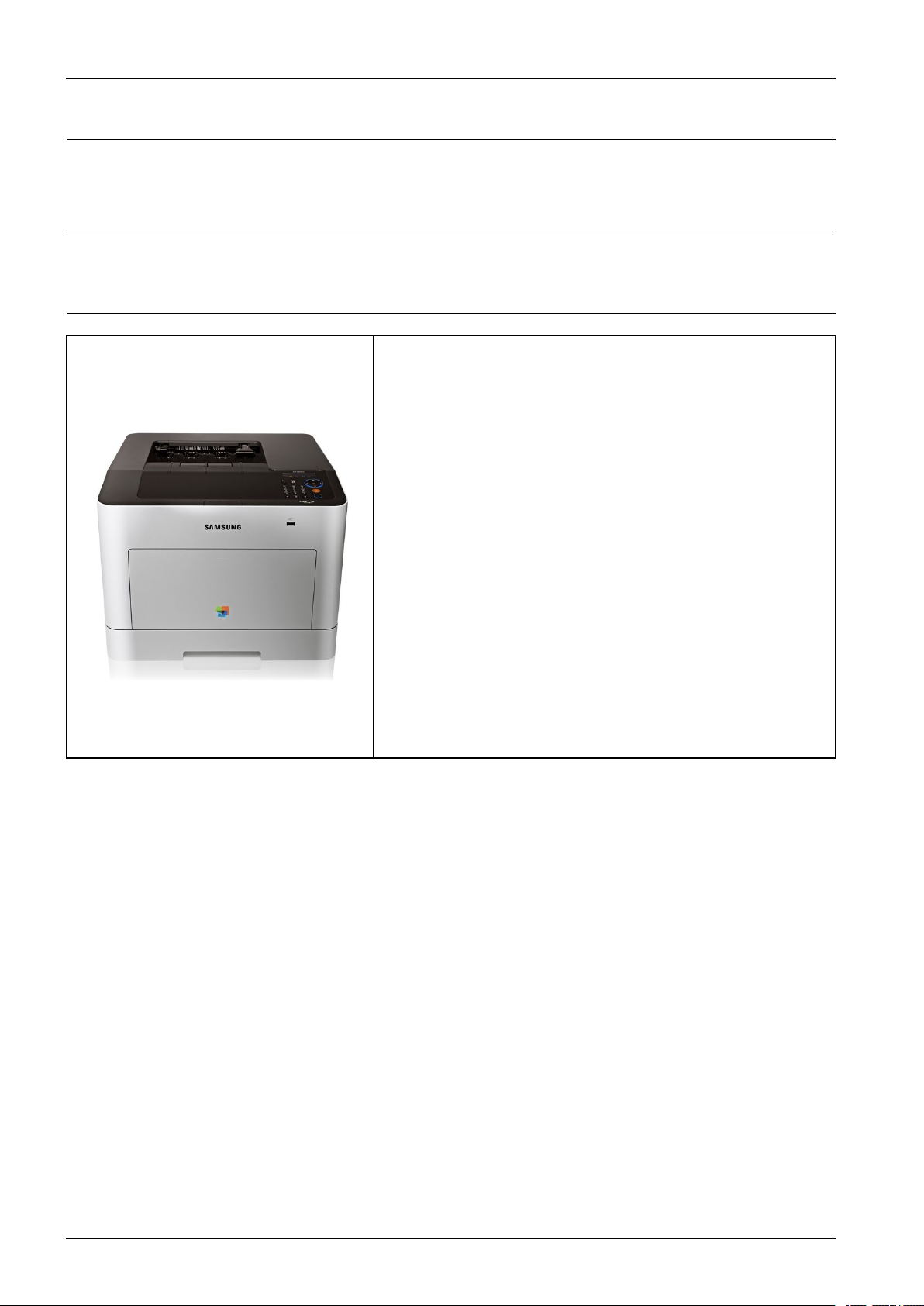
2.1.1.ProductOverview
1)PrintingSpeed
•24(Color)/24(Mono)ppminA4(25/25ppminLetter)
2)Processor
•533MHz
3)PrinterLanguage
•SPLC,PCL5Ce,PCL6C,PS3,PDFV1.7
4)Memory
•256MB(Standard)/512MB(Max)
5)Interface
•HighSpeedUSB2.0
•10/100/1000BaseTXnetworkconnector
•802.11b/g/nwirelessLAN(CLP-680DWonly)
6)Tonercartridge
•Initial:2K(K)/1.5K(CMY)
•Sales:
•Standard:2K(K)/1.5K(CMY)
•HighCapacity:6K(K)/3.5K(CMY)
2-1Copyright©1995-2012SAMSUNG.Allrightsreserved.
Page 11
2.1.2.Specications
NOTE
ProductSpecicationsaresubjecttochangewithoutnotice.
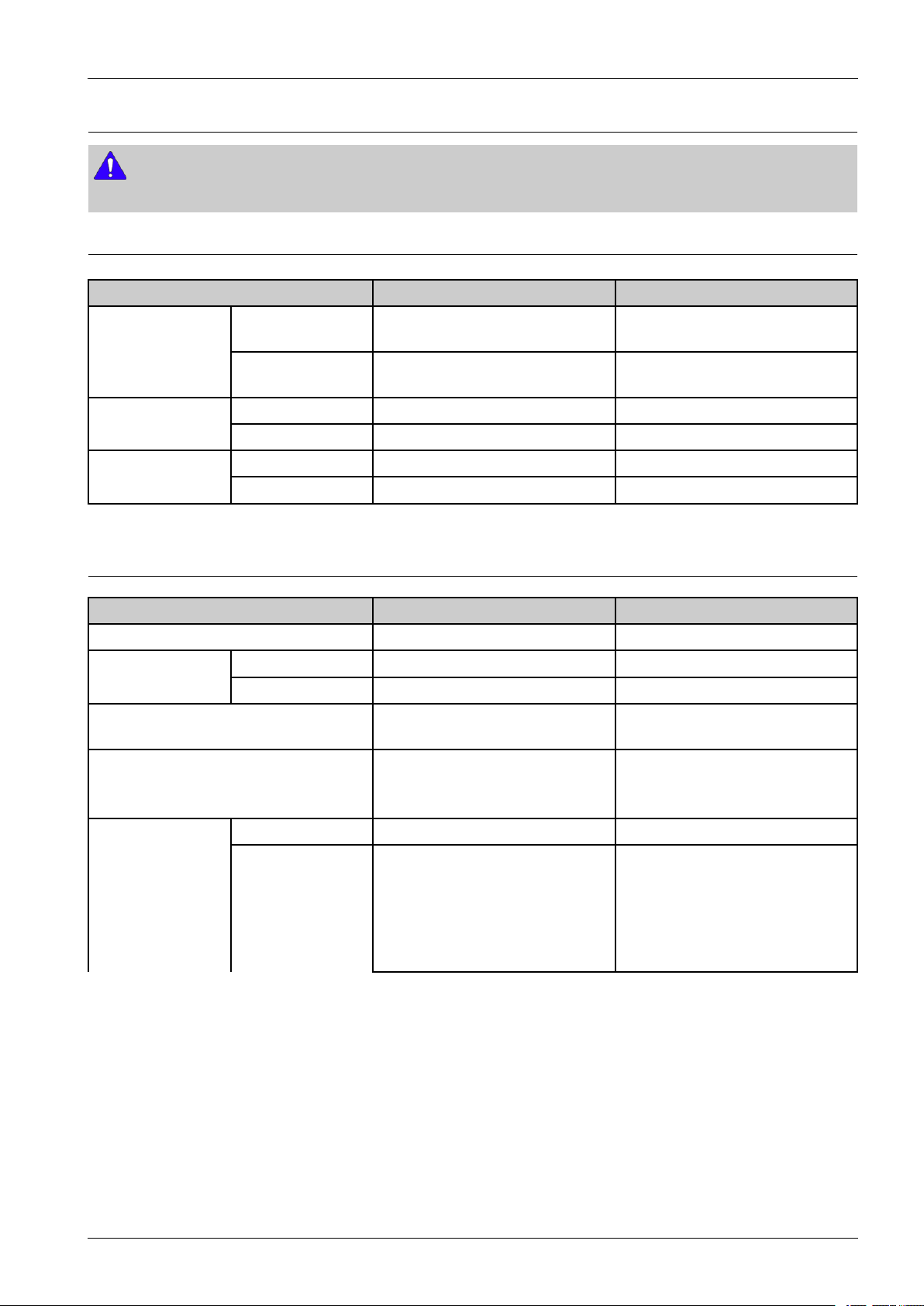
2.1.2.1.GeneralPrintEngine
ItemCLP-680NDCLP-680DW
2.ProductSpecicationanddescription
Simplex(C/M)
EngineSpeed
Duplex
FromReady(C/M)Asfastas17/17secAsfastas17/17sec
FPOT
FromSleep(C/M)Asfastas17/17secAsfastas17/17sec
Optical600x600dpi600x600dpi
Resolution
EnhancedUpto9,600x600effectiveoutputUpto9,600x600effectiveoutput
Upto24/24ppminA4(25/25ppmin
Letter)
Upto12/12ipminA4(12/12ipmin
Letter)
2.1.2.2.ControllerandSoftware
ItemCLP–680NDCLP-680DW
ProcessorSamsung533MHzSamsung533MHz
Memory
PrinterLanguages
Fonts
Std.256MB256MB
Max.512MB512MB
SPLC,PCL5Ce,PCL6C,PS3,PDF
V1.7
•PCL:95ScalableFonts(include
OCR-A,OCR-B),1bitmap
•PS:136ScalableFonts
Upto24/24ppminA4(25/25ppmin
Letter)
Upto12/12ipminA4(12/12ipmin
Letter)
SPLC,PCL5Ce,PCL6C,PS3,PDF
V1.7
•PCL:95ScalableFonts(include
OCR-A,OCR-B),1bitmap
•PS:136ScalableFonts
DefaultDriverSPLSPL
[WINDOW]
Driver
SupportingOS
•XP(32/64bit)/2003
Server(32/64bit)/
Vista(32/64bit)/2008
Server(32/64bit)/7(32/64bit)/
2008ServerR2
Copyright©1995-2012SAMSUNG.Allrightsreserved.2-2
[WINDOW]
•XP(32/64bit)/2003
Server(32/64bit)/
Vista(32/64bit)/2008
Server(32/64bit)/7(32/64bit)/
2008ServerR2
Page 12

2.ProductSpecicationanddescription
ItemCLP–680NDCLP-680DW
[Linux]
•RedHatEnterpriseLinuxWS4,
5(32/64bit)
•Fedora5,6,7,8,9,10,11,12,
13(32/64bit)
•SuSELinux10.1(32bit)
•OpenSuSE10.2,10.3,11.0,
11.1,11.2(32/64bit)
•Mandriva2007,2008,2009,
2009.1,2010(32/64bit)
•Ubuntu6.06,6.10,7.04,7.10,
8.04,8.10,9.04,9.10,10.04
(32/64bit)
•SuSELinuxEnterpriseDesktop
10,11(32/64bit)
•Debian4.0,5.0(32/64bit)
MacOSX10.4~10.7MacOSX10.4~10.7
[UNIX]
•SunSolaris9,10(x86,SP ARC)
•HP-UX11.0,11iv1,11iv2,11i
v3(PA-RISC,Itanium)
•IBMAI5.1,5.2,5.3,5.4
[Linux]
•RedHatEnterpriseLinuxWS4,
5(32/64bit)
•Fedora5,6,7,8,9,10,11,12,
13(32/64bit)
•SuSELinux10.1(32bit)
•OpenSuSE10.2,10.3,11.0,
11.1,11.2(32/64bit)
•Mandriva2007,2008,2009,
2009.1,2010(32/64bit)
•Ubuntu6.06,6.10,7.04,7.10,
8.04,8.10,9.04,9.10,10.04
(32/64bit)
•SuSELinuxEnterpriseDesktop
10,11(32/64bit)
•Debian4.0,5.0(32/64bit)
[UNIX]
•SunSolaris9,10(x86,SP ARC)
•HP-UX11.0,11iv1,11iv2,11i
v3(PA-RISC,Itanium)
•IBMAI5.1,5.2,5.3,5.4
•SPL/PCL6/PSdriver:Windows
2003(32bit),Windows
2003(64bit),Windows
Vista(32bit),Windows
Vista(64bit),Windows
WHQL
7(32bit),Windows7(64bit),
Window2000/XP(32/64bit)
•XPSdriver:Windows
Vista(32bit),Windows
Vista(64bit),Windwos7(32bit),
Windows7(64bit)
[TCP/IP]
•TCP/IPv4/IPv6,HTTP,
SNMPv1/v2c/v3,SMTP ,IPSec,
DNS/WINS,DDNS,DHCP ,
SSL/TLS,BOOTP ,AutoIP ,
StandardTCP/IPprinting,LPR,
WiredNetwork
Protocol
IPP,UPnP(SSDP),Bonjour,
Telnet,WSD,SLP,SetIP ,
AirPrint,ThinPrint
[Others]
•HTTPs,IPPs,802.1x
(EAP-MD5,EAP-MSCHAPv2,
PEAP,TLS),IPSec
•SPL/PCL6/PSdriver:Windows
2003(32bit),Windows
2003(64bit),Windows
Vista(32bit),Windows
Vista(64bit),Windows
7(32bit),Windows7(64bit),
Window2000/XP(32/64bit)
•XPSdriver:Windows
Vista(32bit),Windows
Vista(64bit),Windwos7(32bit),
Windows7(64bit)
[TCP/IP]
•TCP/IPv4/IPv6,HTTP,
SNMPv1/v2c/v3,SMTP ,IPSec,
DNS/WINS,DDNS,DHCP ,
SSL/TLS,BOOTP ,AutoIP ,
StandardTCP/IPprinting,LPR,
IPP,UPnP(SSDP),Bonjour,
Telnet,WSD,SLP,SetIP ,
AirPrint,ThinPrint
[Others]
•HTTPs,IPPs,802.1x
(EAP-MD5,EAP-MSCHAPv2,
PEAP,TLS),IPSec
2-3Copyright©1995-2012SAMSUNG.Allrightsreserved.
Page 13
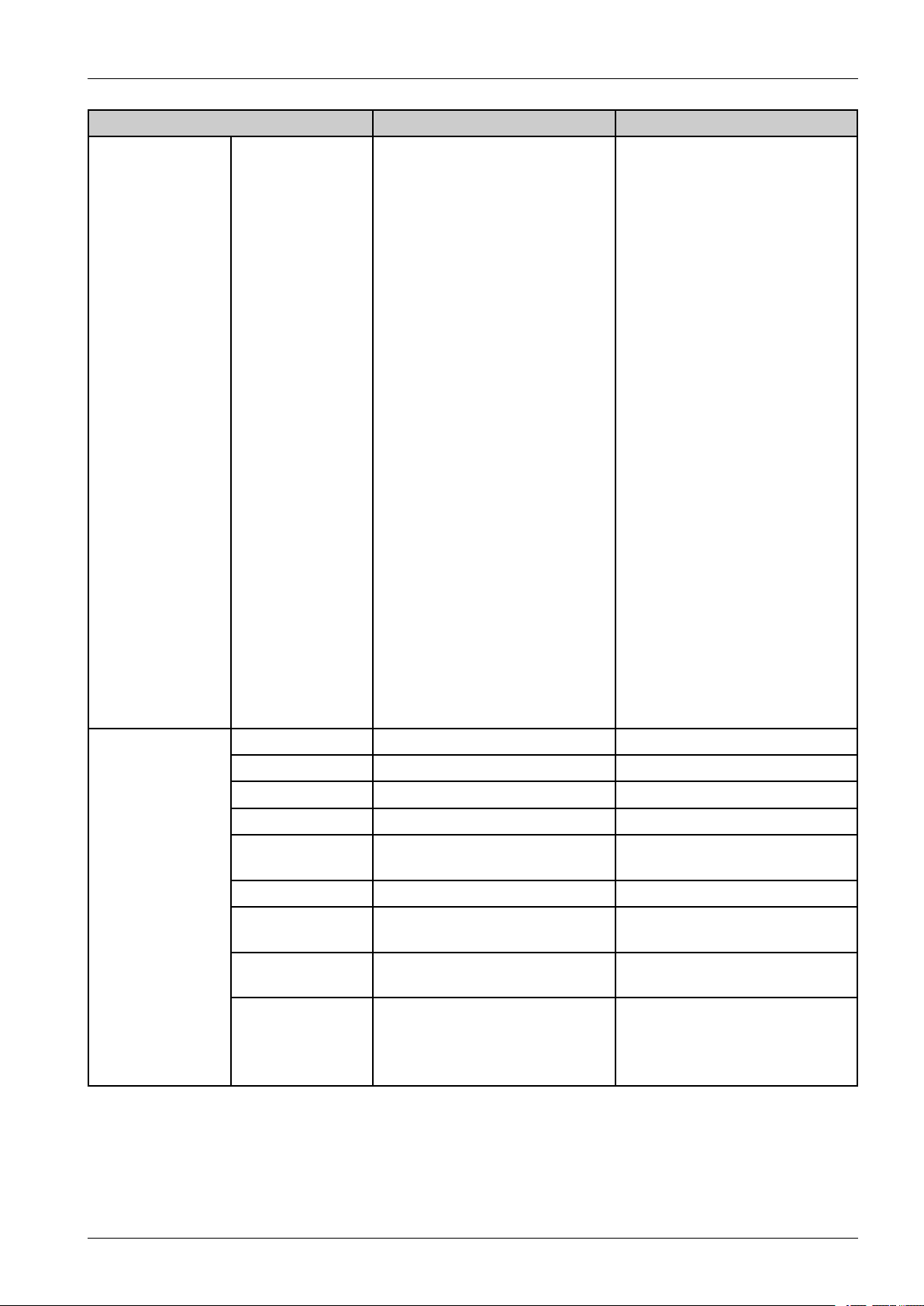
ItemCLP–680NDCLP-680DW
2.ProductSpecicationanddescription
SupportingOS
[Windows]
•MicrosoftWindows
XP(32/64bits)/2003
Server(32/64bits)/
Vista(32/64bits)/2008
Server(32/64bit)/7/2008
ServerR2/7/2008R2
[Mac]
•MacOSX10.4~10.7
[Linux]
•RedHat8~9(32bit)/Enterprise
LinuxWS4,5(32/64bit)
•FedoraCore1~7(32/64bit)
•SuSE8.2~10.2/Enterprise
Desktop9~10(32/64bit)
•Madrake9.2~10.1(32/64bit)
•Mandriva2005~2007
•Ubuntu6.06~7.04
•Debian3.1~4.0
[Novell]
•Netware5.x,6.x(TCP/IPOnly)
[Others]
•UnixSunSolaris
8,9,10(SPARC/86)IBMAIx
5.x(6.1)IBMLinux(System
P)HP-U11i(PA-RISC/IA-64)
(11.11/11.20/11.22/11.23/11.31)
[Windows]
•MicrosoftWindows
XP(32/64bits)/2003
Server(32/64bits)/
Vista(32/64bits)/2008
Server(32/64bit)/7/2008
ServerR2/7/2008R2
[Mac]
•MacOSX10.4~10.7
[Linux]
•RedHat8~9(32bit)/Enterprise
LinuxWS4,5(32/64bit)
•FedoraCore1~7(32/64bit)
•SuSE8.2~10.2/Enterprise
Desktop9~10(32/64bit)
•Madrake9.2~10.1(32/64bit)
•Mandriva2005~2007
•Ubuntu6.06~7.04
•Debian3.1~4.0
[Novell]
•Netware5.x,6.x(TCP/IPOnly)
[Others]
•UnixSunSolaris
8,9,10(SPARC/86)IBMAIx
5.x(6.1)IBMLinux(System
P)HP-U11i(PA-RISC/IA-64)
(11.11/11.20/11.22/11.23/11.31)
AnywebPrintNONO
InstallerYESYES
EasyPrinterManagerYESYES
EasyColorManagerYESYES
EasyDocument
Creator
NetPCFaxNONO
Application
DirectPrinting
Utility
EasyDeployment
Manager
Network
Management
NONO
YESYES
YESYES
SetIP ,SW AS5.0&SWS2.0,
CounThru2.5SW ASPlug-In
-JobAccounting,DriverManagement
Plug-in,DeviceMapPlug-in
SetIP ,SW AS5.0&SWS2.0,
CounThru2.5SW ASPlug-In
-JobAccounting,DriverManagement
Plug-in,DeviceMapPlug-in
Copyright©1995-2012SAMSUNG.Allrightsreserved.2-4
Page 14
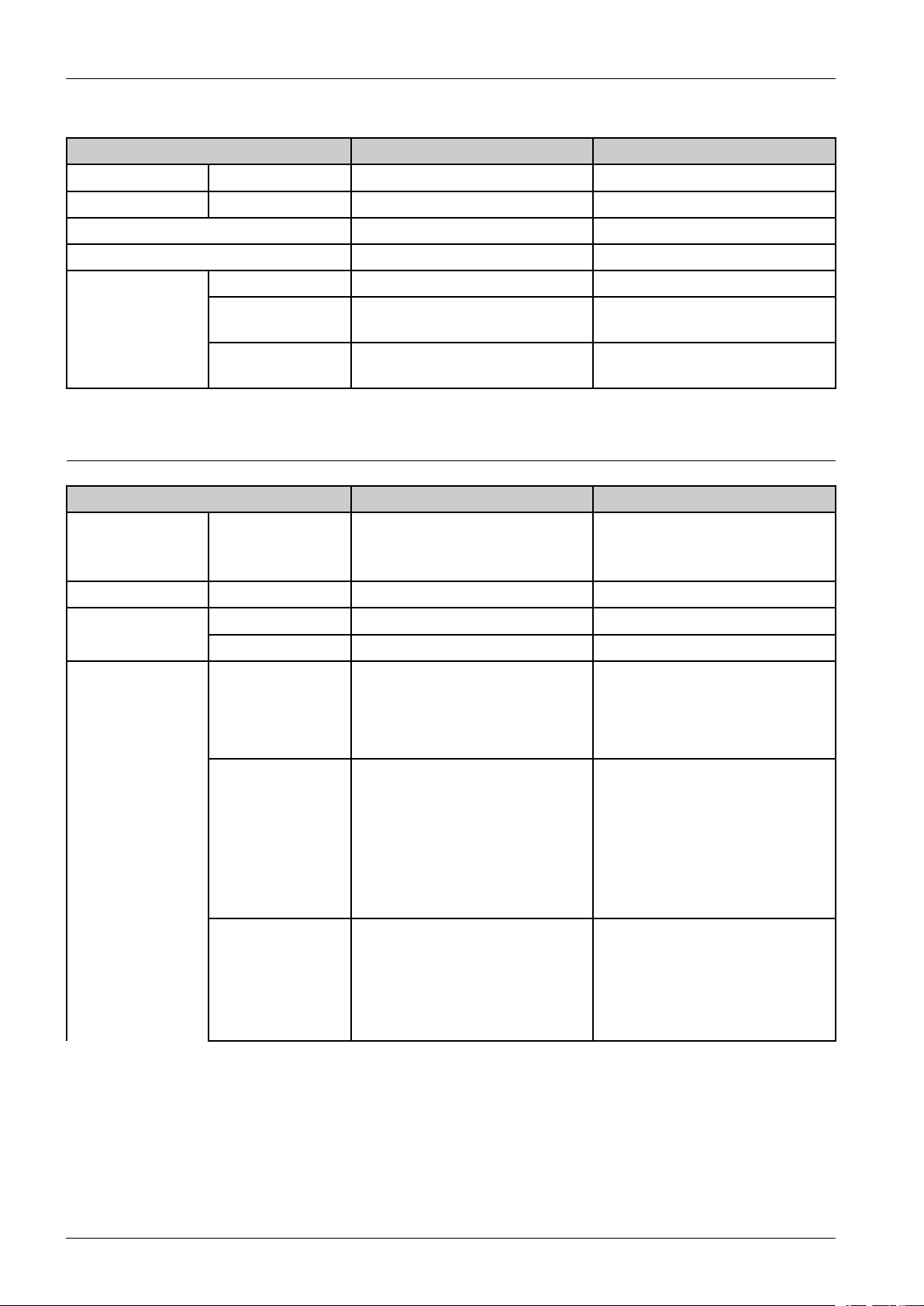
2.ProductSpecicationanddescription
■Interface
ItemCLP–680NDCLP-680DW
ParallelOptionInterfaceIEEE1284bParallelOptionConnectorIEEE1284bParallelOptionConnector
USBHighSpeedUSB2.0Device1Port,Host1PortDevice1Port,Host1Port
WiredNetwork10/100/1000BaseTX10/100/1000BaseTX
WirelessNetworkN/A802.11b/g/n
LCD16charactersx2lines16charactersx2lines
LED4(ECO,POWER,NAVI,ST A TUS)
Key
7Keys(3*4Key,Power,ECO,NAVI,
OK,Stop,Demo)
2.1.2.3.PaperHandling
ItemCLP-680NDCLP-680DW
•250-sheetCassette
StandardCapacity-
Max.Capacity-820sheets@80g/m²820sheets@80g/m²
Max.Size216x356mm(8.5"x14")216x356mm(8.5"x14")
Printing
Min.Size76x127mm(3.0"x5.0")76x127mm(3.0"x5.0")
Capacity
Tray@80g/m²
•50-sheetManualTray
•PlainPaper:50sheet@80g/m²
•Transparency:10sheet
•Label:10sheet
•Envelope:5sheet
5(ECO,POWER,NAVI,STA TUS,
Wireless) UserInterface
7Keys(3*4Key,Power,ECO,NAVI,
OK,Stop,WPS)
•250-sheetCassette
Tray@80g/m²
•50-sheetManualTray
•PlainPaper:50sheet@80g/m²
•Transparency:10sheet
•Label:10sheet
•Envelope:5sheet
Multi-purposetray
Mediasizes
Mediatype
A4,Letter,Legal,Ocio,Folio,
JISB5,ISOB5,Executive,A5,
Statement,A6,IndexCardStock,
Postcard,EnvelopeMonarch,
EnvelopeNo-10,EnvelopeDL,
EnvelopeC5,EnvelopeC6,Envelope
No9,Custom[76x127mm(3.0"x
5.0")~216x356mm(8.5"x14")]
PlainPaper,ThinPaper,ThickPaper,
Cardstock,ThickerPaper,Hole
Punched,Transparency,Pre-Printed,
LetterHead,Recycled,Archive,Bond,
Label,Envelope,Cotton,Colored,
Glossy
A4,Letter,Legal,Ocio,Folio,
JISB5,ISOB5,Executive,A5,
Statement,A6,IndexCardStock,
Postcard,EnvelopeMonarch,
EnvelopeNo-10,EnvelopeDL,
EnvelopeC5,EnvelopeC6,Envelope
No9,Custom[76x127mm(3.0"x
5.0")~216x356mm(8.5"x14")]
PlainPaper,ThinPaper,ThickPaper,
Cardstock,ThickerPaper,Hole
Punched,Transparency,Pre-Printed,
LetterHead,Recycled,Archive,Bond,
Label,Envelope,Cotton,Colored,
Glossy
2-5Copyright©1995-2012SAMSUNG.Allrightsreserved.
Page 15

ItemCLP-680NDCLP-680DW
2.ProductSpecicationanddescription
•SupportedW eight:60~
220g/m²
•ThinPaper:60~69g/m²
Mediaweight
SensingPaperEmpty:Y esPaperEmpty:Y es
Capacity
Mediasizes
Mediatypes
StandardCassette
Tray
•PlainPaper:70~89g/m²
•ThickPaper:90~120g/m²
•Cardstock:121~163g/m²
•ThickerPaper:164~220g/m²
•BondPaper:105~120g/m²
•250sheets@80g/m²
•Envelope20sheets
A4,Letter,Legal,Ocio,Folio,JIS
B5,ISOB5,Executive,A5,Statement,
A6,Postcard,EnvelopeMonarch,
EnvelopeNo-10,EnvelopeDL,
EnvelopeC5,EnvelopeC6,Envelope
No9,Custom[98x127mm(3.86"x
5.00")~216x356mm(8.5"x14")]
PlainPaper,ThinPaper,ThickPaper,
Cardstock,ThickerPaper,Hole
Punched,Transparency,Pre-Printed,
LetterHead,Recycled,Archive,Bond,
Label,Envelope,Cotton,Colored,
Glossy
•SupportedW eight:60~
220g/m²
•ThinPaper:60~69g/m²
Mediaweight
•PlainPaper:70~89g/m²
•ThickPaper:90~120g/m²
•Cardstock:121~163g/m²
•ThickerPaper:164~220g/m²
•BondPaper:105~120g/m²
•SupportedW eight:60~
220g/m²
•ThinPaper:60~69g/m²
•PlainPaper:70~89g/m²
•ThickPaper:90~120g/m²
•Cardstock:121~163g/m²
•ThickerPaper:164~220g/m²
•BondPaper:105~120g/m²
•250sheets@80g/m²
•Envelope20sheets
A4,Letter,Legal,Ocio,Folio,JIS
B5,ISOB5,Executive,A5,Statement,
A6,Postcard,EnvelopeMonarch,
EnvelopeNo-10,EnvelopeDL,
EnvelopeC5,EnvelopeC6,Envelope
No9,Custom[98x127mm(3.86"x
5.00")~216x356mm(8.5"x14")]
PlainPaper,ThinPaper,ThickPaper,
Cardstock,ThickerPaper,Hole
Punched,Transparency,Pre-Printed,
LetterHead,Recycled,Archive,Bond,
Label,Envelope,Cotton,Colored,
Glossy
•SupportedW eight:60~
220g/m²
•ThinPaper:60~69g/m²
•PlainPaper:70~89g/m²
•ThickPaper:90~120g/m²
•Cardstock:121~163g/m²
•ThickerPaper:164~220g/m²
•BondPaper:105~120g/m²
•H/WInstallDetect:No
Sensing
Capacity520sheets@80g/m²
MediasizesA4,Letter,Legal,Ocio,Folio,JIS
OptionCassette
(SCF)
MediatypesPlainPaper,ThinPaper,ThickPaper,
Copyright©1995-2012SAMSUNG.Allrightsreserved.2-6
•PaperEmpty:Y es
•PaperTypeDetect:No
•PaperSizeDetect:No
(550sheets@75g/m²)
B5,ISOB5,Executive,A5,Statement,
Custom[98x210mm(3.86"x8.3")~
216x356mm(8.5"x14")]
Cardstock,HolePunched,Pre-Printed,
LetterHead,Recycled,Archive,Bond,
Label,Cotton,Colored,Glossy
•H/WInstallDetect:No
•PaperEmpty:Y es
•PaperTypeDetect:No
•PaperSizeDetect:No
520sheets@80g/m²
(550sheets@75g/m²)
A4,Letter,Legal,Ocio,Folio,JIS
B5,ISOB5,Executive,A5,Statement,
Custom[98x210mm(3.86"x8.3")~
216x356mm(8.5"x14")]
PlainPaper,ThinPaper,ThickPaper,
Cardstock,HolePunched,Pre-Printed,
LetterHead,Recycled,Archive,Bond,
Label,Cotton,Colored,Glossy
Page 16

2.ProductSpecicationanddescription
ItemCLP-680NDCLP-680DW
Mediaweight•SupportedW eight:60~
163g/m²
•ThinPaper:60~69g/m²
•PlainPaper:70~89g/m²
•ThickPaper:90~120g/m²
•Cardstock:121~163g/m²
•BondPaper:105~120g/m²
Sensing•H/WInstallDetect:Y es
•PaperEmpty:Y es
•PaperTypeDetect:No
•PaperSizeDetect:Y es
Capacity
OutputStacking
ADFN/AN/A
Duplex
(Face-Down)
OutputFullsensingPaperfullSensorPaperfullSensor
SupportYesY es
MediasizesA4,LETTER,FOLIO,OFFICIO,
MediatypesPlain,Thick,HolePunched,
100sheets@80g/m²150sheets@80g/m²
LEGAL
Pre-Printed,LetterHead,Recycled,
Thin,Cotton,Colored,Glossy
•SupportedW eight:60~
163g/m²
•ThinPaper:60~69g/m²
•PlainPaper:70~89g/m²
•ThickPaper:90~120g/m²
•Cardstock:121~163g/m²
•BondPaper:105~120g/m²
•H/WInstallDetect:Y es
•PaperEmpty:Y es
•PaperTypeDetect:No
•PaperSizeDetect:Y es
A4,LETTER,FOLIO,OFFICIO,
LEGAL
Plain,Thick,HolePunched,
Pre-Printed,LetterHead,Recycled,
Thin,Cotton,Colored,Glossy
Mediaweight60~120g/m²60~120g/m²
•Top&Bottom:4.23mm(0.2")
OtherMedia
fromedge
•Left&Right:3mm(0.11")
•Top&Bottom:4.23mm(0.2")
•Left&Right:3mm(0.11")
fromedge
Non-PrintableArea
Envelope
•Top&Bottom:10mm(0.4")
fromedge
•Left&Right:10mm(0.4")
•Top&Bottom:10mm(0.4")
•Left&Right:10mm(0.4")
fromedge
2.1.2.4.ReliabilityandService
ItemCLP-680NDCLP-680DW
PrintingV olume(SETAMPV)2,400sheets/month2,400sheets/month
Max.MonthlyDuty40,000sheets40,000sheets
fromedge
fromedge
fromedge
fromedge
2-7Copyright©1995-2012SAMSUNG.Allrightsreserved.
Page 17
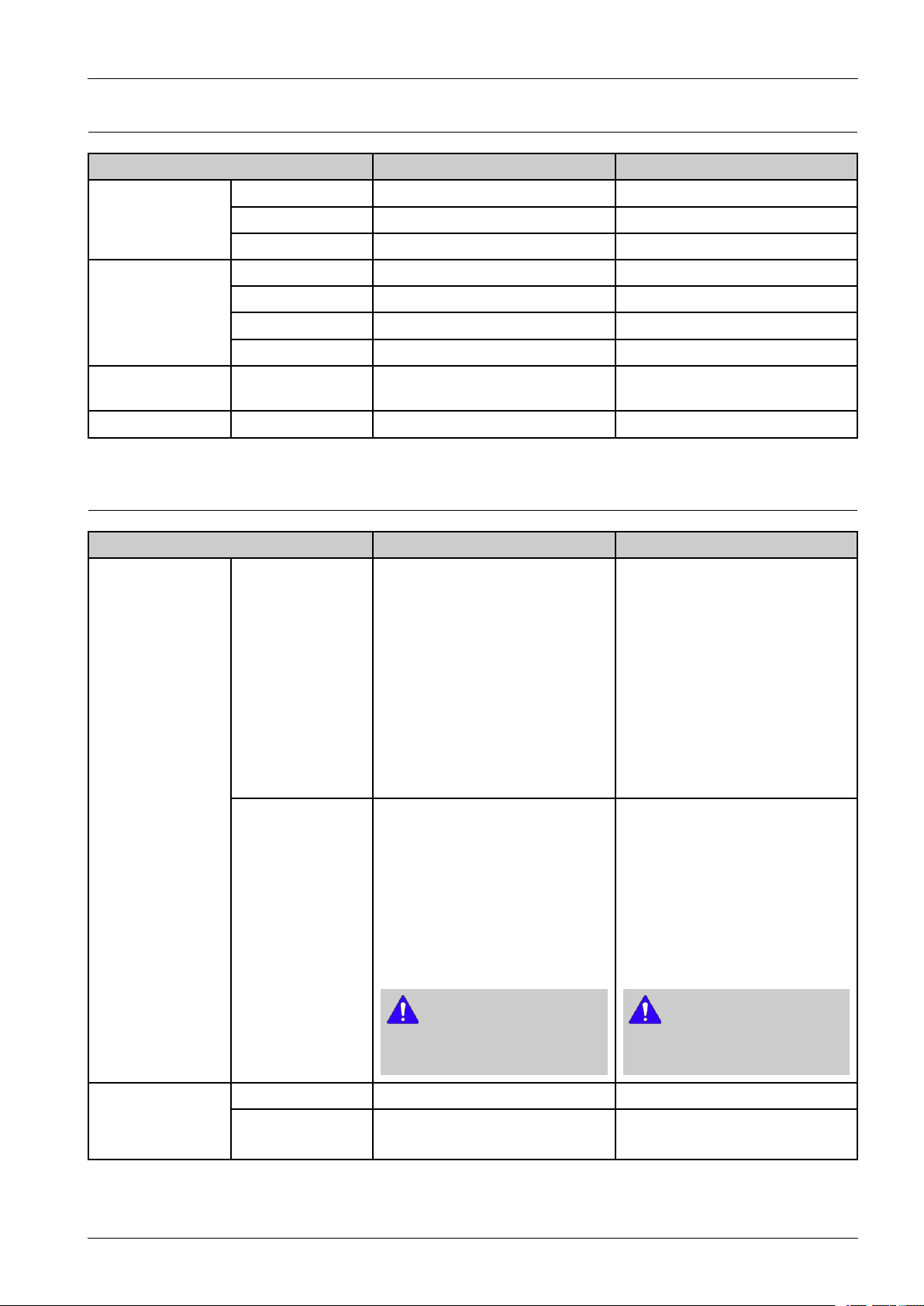
2.1.2.5.Environment
ItemCLP-680NDCLP-680DW
2.ProductSpecicationanddescription
AcousticNoise
Level(Sound
Power/Pressure)
PowerConsumption
Dimension(WxDx
H)
WeightSET19.96Kg(44lbs)19.96Kg(44lbs)
PrintingLessthan52dBA(SoundPressure)Lessthan52dBA(SoundPressure)
StandbyLessthan37.0dBA(SoundPressure)Lessthan37.0dBA(SoundPressure)
SleepBackGroundLevelBackGroundLevel
ReadyLessthan10WLessthan10W
A VG.Lessthan450WLessthan450W
Max/Peak1400W1400W
PowerSaveLessthan1.3WLessthan2.0W
SET
453x420x312mm(17.83x16.54x
12.28inches)
453x420x312mm(17.83x16.54x
12.28inches)
2.1.2.6.Consumables
ItemCLP-680NDCLP-680DW
•Standardyield
•CLT-K506S:Black
•CLT-Y506S:Y ellow
•CLT-M506S:Magenta
Model
•CLT-C506S:Cyan
•Highyield
•CLT-K506L:Black
•CLT-Y506L:Y ellow
•CLT-M506L:Magenta
•CLT-C506L:Cyan
•Standardyield
•CLT-K506S:Black
•CLT-Y506S:Y ellow
•CLT-M506S:Magenta
•CLT-C506S:Cyan
•Highyield
•CLT-K506L:Black
•CLT-Y506L:Y ellow
•CLT-M506L:Magenta
•CLT-C506L:Cyan
TonerCartridge
•Standardyield
•Approx.2,000pages(K)
•Approx.1,500pages
(CMY)
•Highyield
Yield
•Approx.6,000pages(K)
•Approx.3,500pages
(CMY)
NOTE
Declaredcartridgeyieldin
accordancewithISO/IEC19798.
ModelCL T-W506CLT-W506
WasteToner
Container
Copyright©1995-2012SAMSUNG.Allrightsreserved.2-8
Yield
Approx.14,000pages(Mono)
Approx.3,500pages(Color)
•Standardyield
•Approx.2,000pages(K)
•Approx.1,500pages
(CMY)
•Highyield
•Approx.6,000pages(K)
•Approx.3,500pages
(CMY)
NOTE
Declaredcartridgeyieldin
accordancewithISO/IEC19798.
Approx.14,000pages(Mono)
Approx.3,500pages(Color)
Page 18
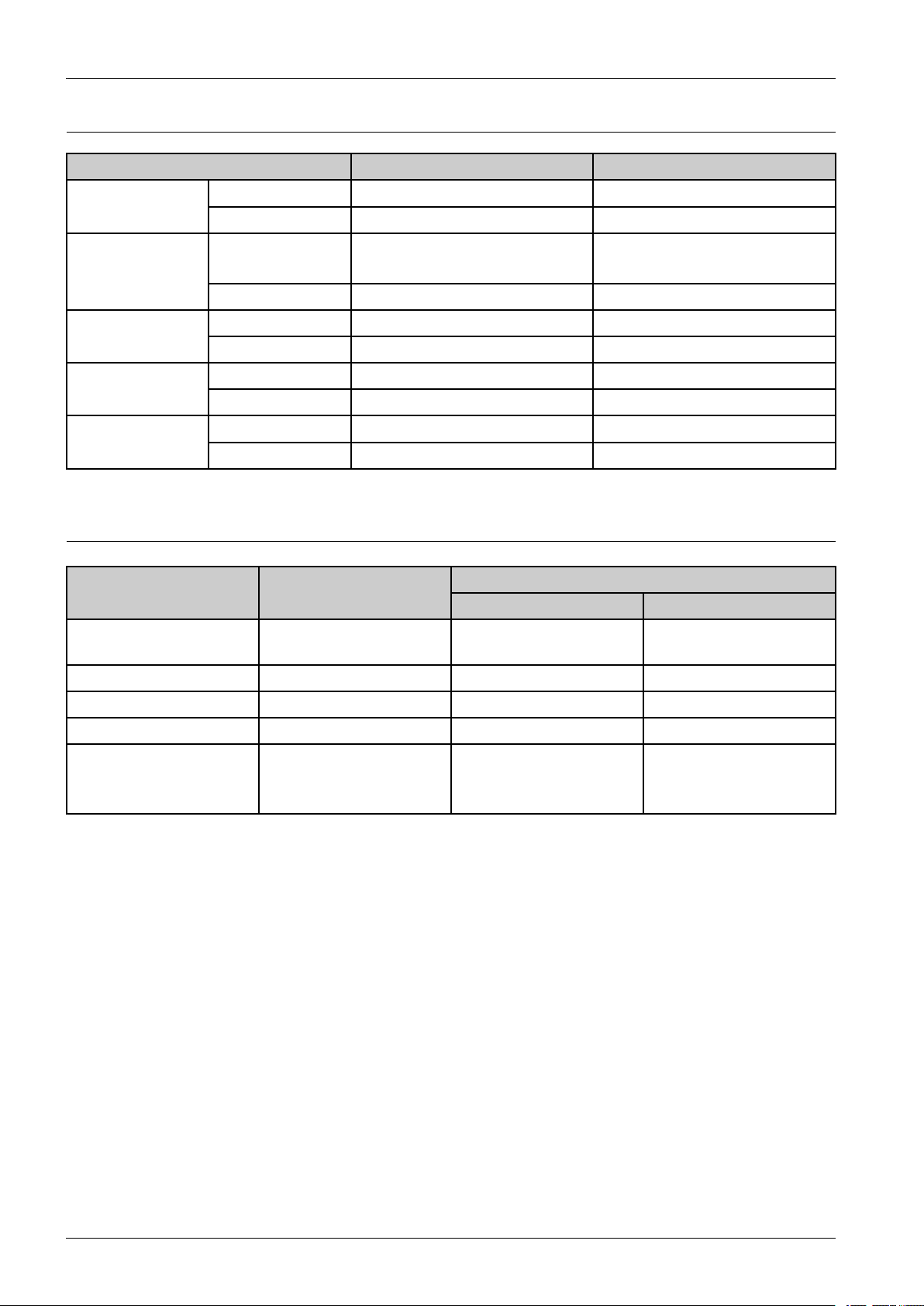
2.ProductSpecicationanddescription
2.1.2.7.MaintenanceParts
ItemCLP-680NDCLP-680DW
PartCodeJC95–01638AJC95–01638A Transferroller
Life100,000pages100,000pages
Fuserunit
roller
PartCode•JC91–01129A(220V)
•JC91–01128A(110V)
Life100,000pages100,000pages
PartCodeJC93-00673AJC93-00673A Pick-Uproller
Life300,000pages300,000pages
PartCodeJC93–00794AJC93–00794A Retard(Reverse)
Life100,000pages100,000pages
PartCodeJC96-06514AJC96-06514A ITBunit
Life100,000pages100,000pages
•JC91–01129A(220V)
•JC91–01128A(110V)
2.1.2.8.Option
ItemModelName
Memory
OptionCassette(SCF)CLP-S680AY esY es
•ML–MEM370:512
MB
Support
CLP-680NDCLP-680DW
YesY es
Wirelessnetwork-N/AYes(Default)
HardDisk-N/AN/A
USBtoParallelCable
(IEEE1284BParallel
connection)
ML-PAR100Y esY es
2-9Copyright©1995-2012SAMSUNG.Allrightsreserved.
Page 19
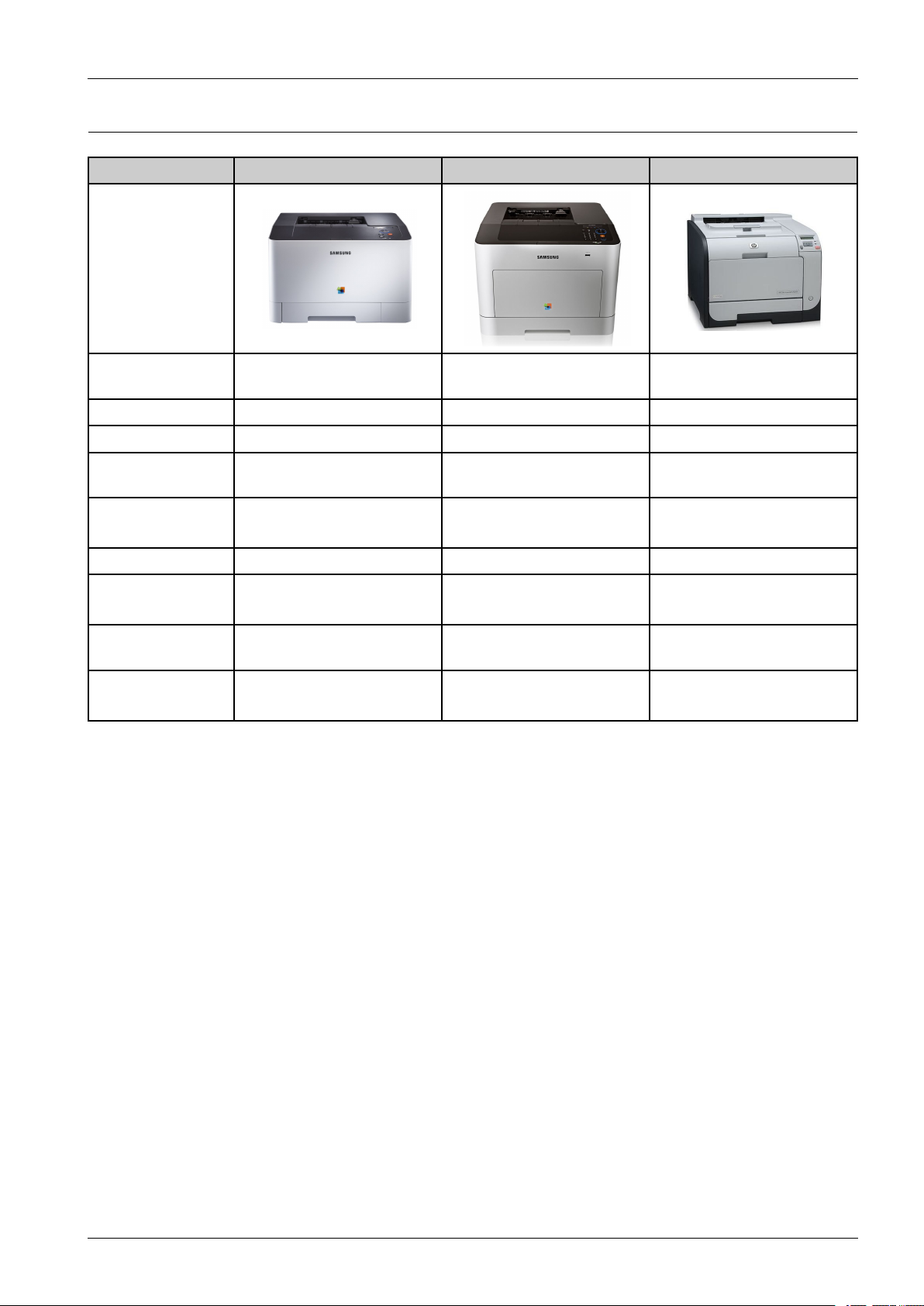
2.1.3.ModelComparisonTable
SamsungCLP-415NWSamsungCLP-680NDHPCP2025dn
Image
2.ProductSpecicationanddescription
Mono/ColorSpeed
(A4)
Processor533MHz533MHz600MHz
Memory(Std/Max)256MB/512MB256MB/512MB128MB/384MB
PrintLanguageSPLC,PCL5Ce,PCL6C,PS3,
PaperInput250sheetsCassette250sheetsCassette
DuplexN/AStandardStandard
InterfaceHighSpeedUSB2.0
Size(mm)420x426x264mm(16.54x
TonerCartridge
(K/CMY)
18/18ppm24/24ppm20/20ppm
SPLC,PCL5Ce,PCL6C,PS3,
PDFV1.7
10/100/1000BaseTX
16.77x10.39inches)
2.5K/1.8K•2K/1.5K
PDFV1.7
520sheetsOptionalCassette
HighSpeedUSB2.0
10/100/1000BaseTX
453x420x312mm(17.83x
16.54x12.28inches)
•6K/3.5K
HPPCL6,HPPCL5c,HP
postscript3
250sheetsCassette
250sheetsOptionalCassette
HighSpeedUSB2.0
10/100BaseTX
405x484x322mm
3.5K/2.8K
Copyright©1995-2012SAMSUNG.Allrightsreserved.2-10
Page 20
2.ProductSpecicationanddescription
0
0
0
v
v
w
w
xx
y
y
{
{
zz
}
}
v
v
u
u
vv
vv
v
v
w
w
v
v
x
x
v
v
y
y
v
v
z
z
vv{{
e
e
||
~
~
2.2.SystemOverview
Thischapterdescribesthefunctionsandoperatingprincipalofthemaincomponent.
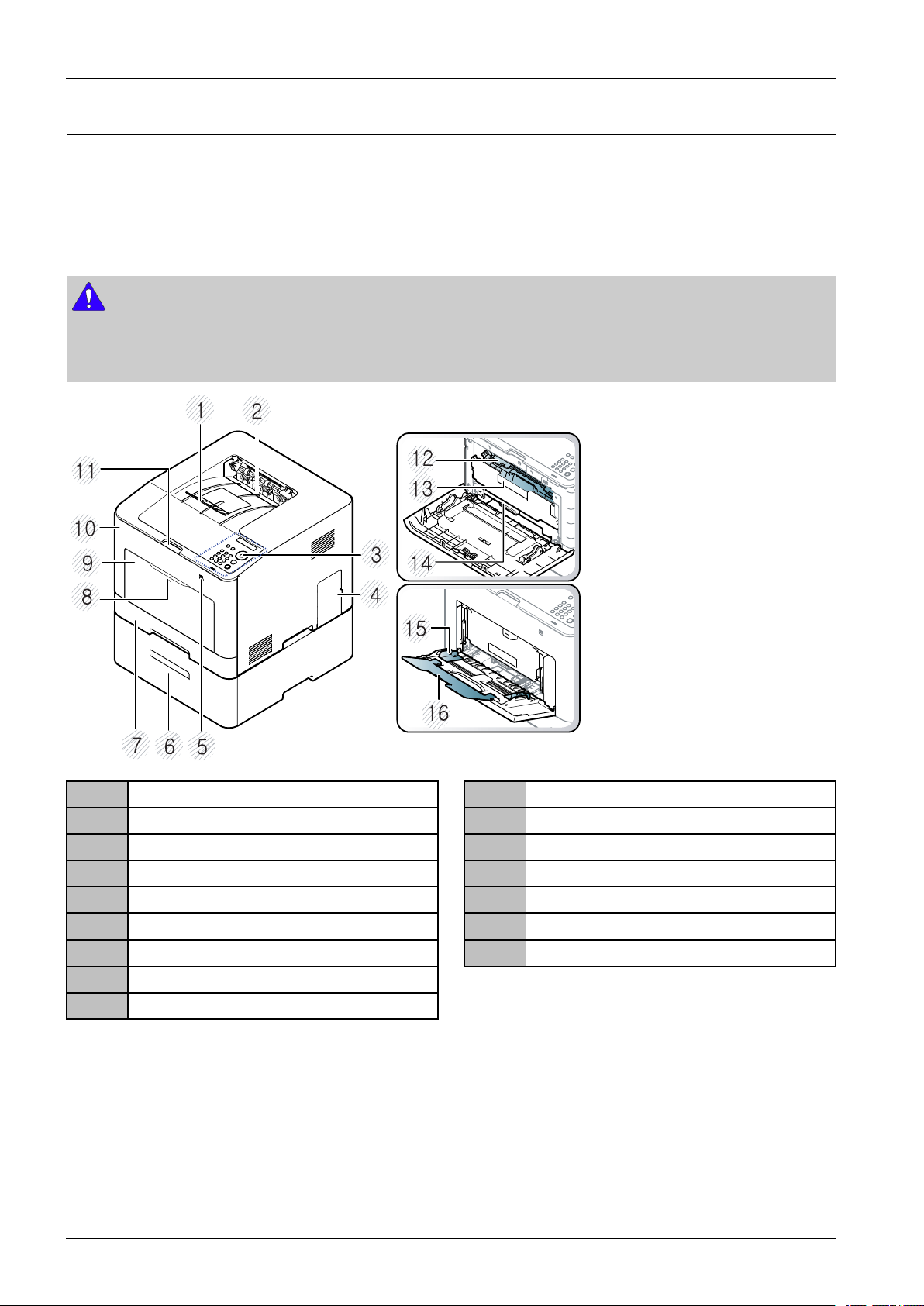
2.2.1.FrontView
NOTE
•Thisillustrationmaydifferfromyourmachinedependingonyourmodel.Therearevarioustypesofmachine.
•Somefeaturesandoptionalgoodsmaynotbeavailabledependingonmodelorcountry.
1Outputsupport
2Outputtray
3Controlpanel
4Controlboardcover
5USBmemoryport
6Optionaltray
7Tray1
8Push-releaseofMulti-purposetray
9Multi-purposetray
10Frontcover
11Frontcoverhandle
12Tonercartridges
13Tonercartridgehandle
14IntermediateTransferBelt(ITB)
15Paperwidthguidesonamultipurposetray
16Multi-purposesupporttray
2-11Copyright©1995-2012SAMSUNG.Allrightsreserved.
Page 21
2.ProductSpecicationanddescription
w
w
x
x
{
{
|
|
}
}
0
v
v
y
y
z
z
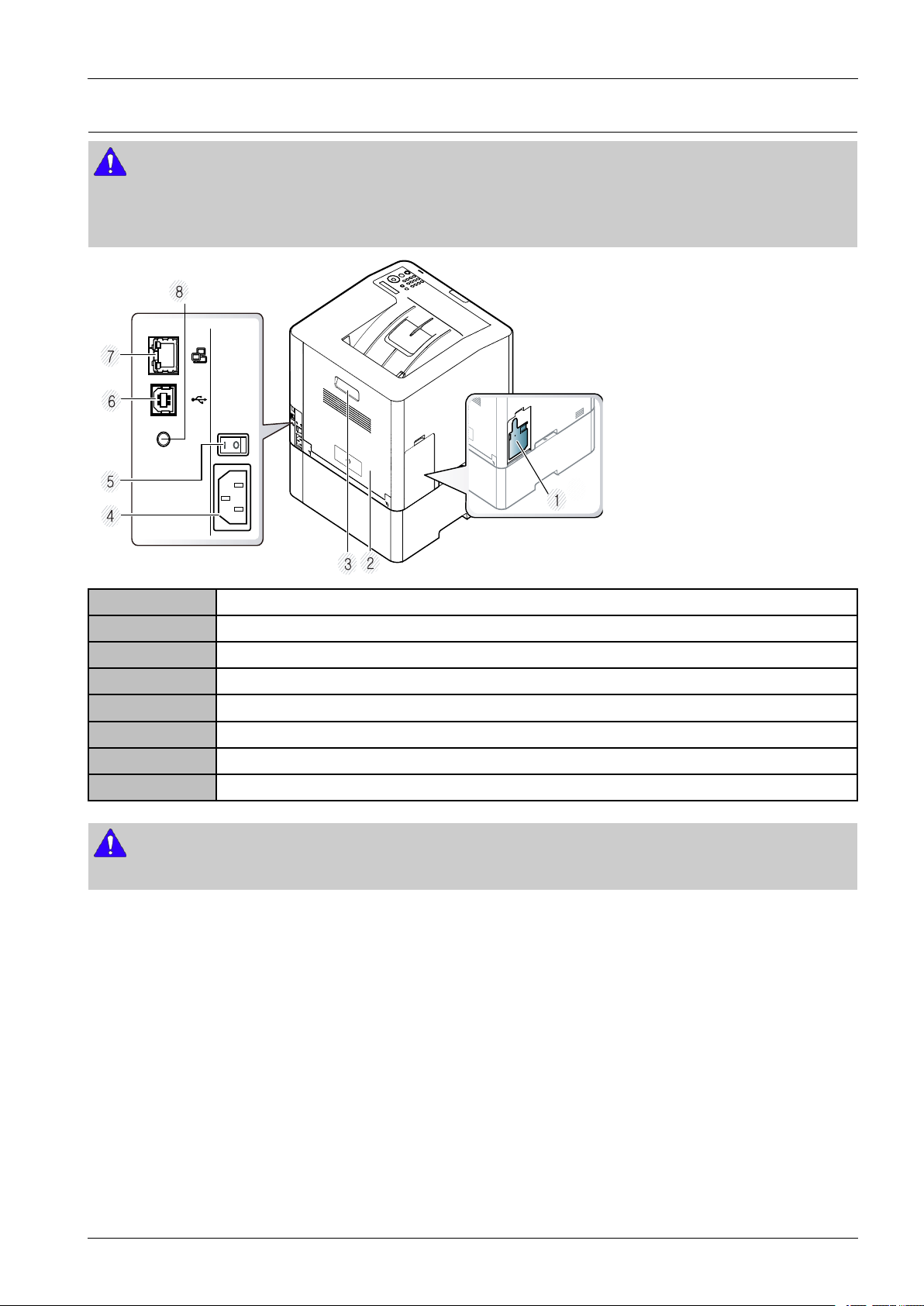
2.2.2.RearView
NOTE
•Thisillustrationmaydifferfromyourmachinedependingonyourmodel.Therearevarioustypesofmachine.
•Somefeaturesandoptionalgoodsmaynotbeavailabledependingonmodelorcountry.
1Wastertonercontainer
2Rearcover
3Rearcoverhandle
4Powerreceptacle
5Power-switch
6USBport*
7Networkport
85VoutputportforIEEE1284parallelconnector*
NOTE
*TheoptionalIEEE1284parallelconnectorcanbeusedbyplugginginboththeUSBportandthe5Voutputport.
Copyright©1995-2012SAMSUNG.Allrightsreserved.2-12
Page 22
2.ProductSpecicationanddescription
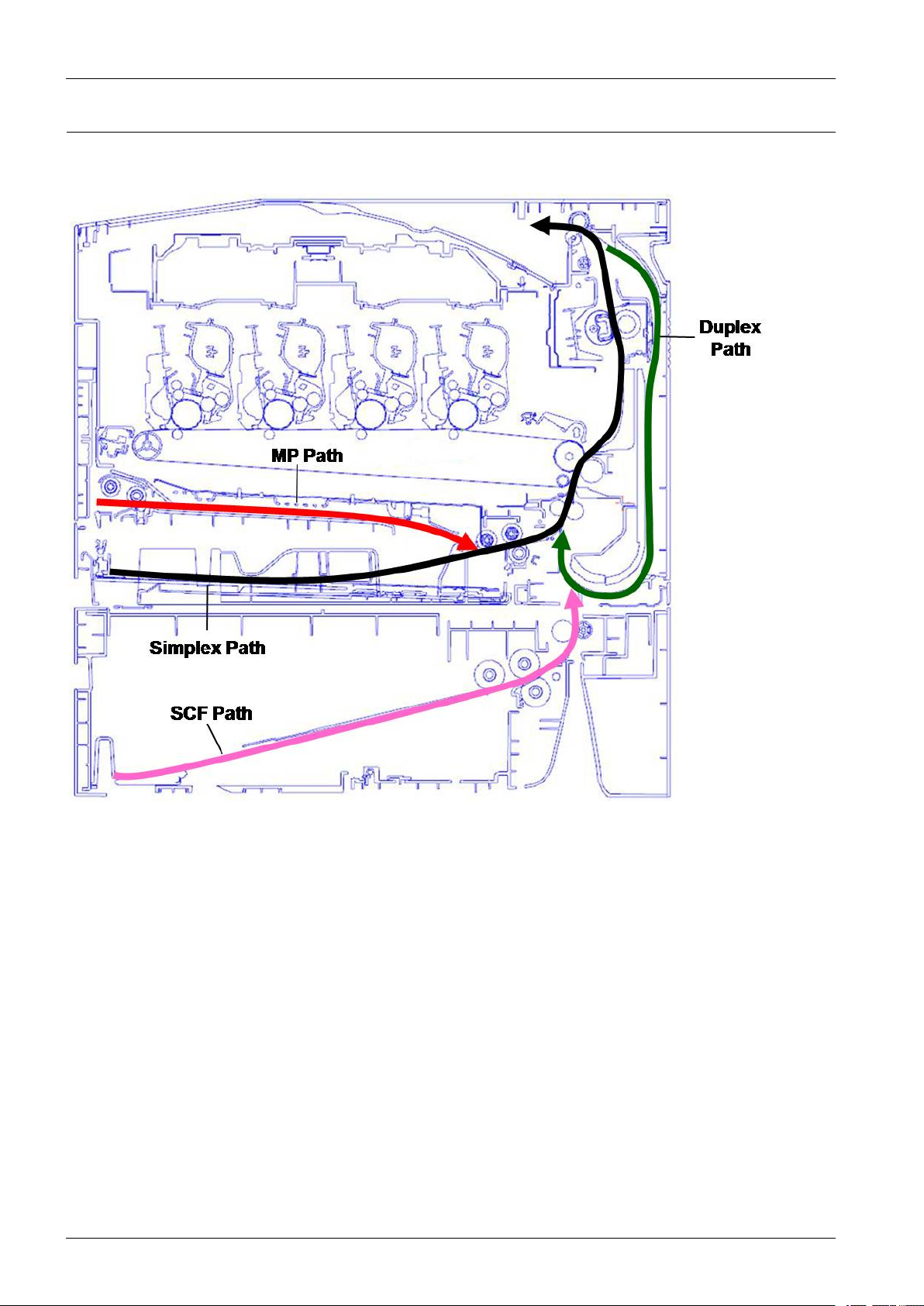
2.2.3.PaperPath
Thefollowingdiagramdisplaysthepaththepaperfollowsduringtheprintingprocess.
2-13Copyright©1995-2012SAMSUNG.Allrightsreserved.
Page 23
2.ProductSpecicationanddescription
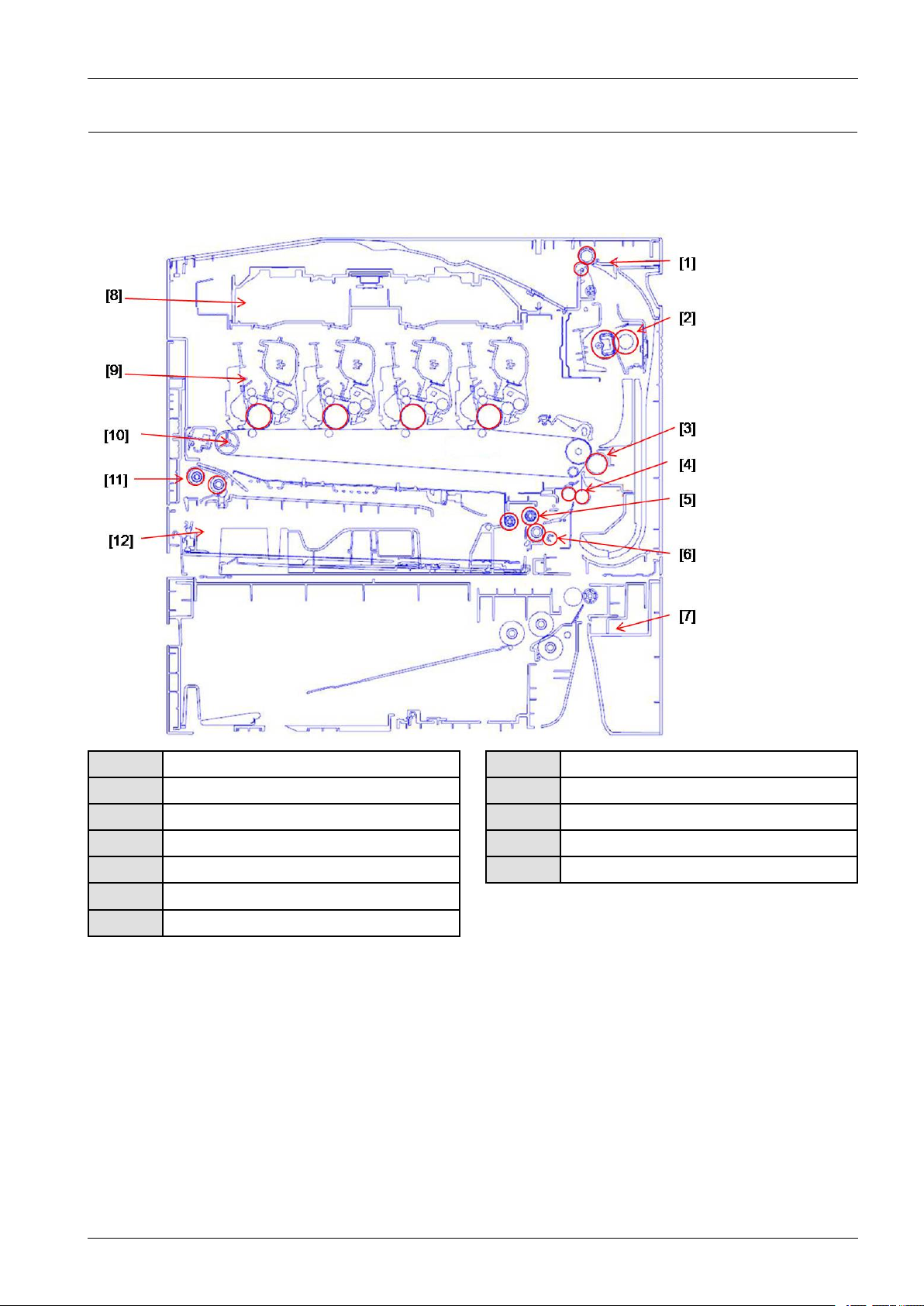
2.2.4.SystemLayout
Thismodelconsistsoftheengineparts,hardwareparts,rmware.Theenginepartsconsistsofthemechanicalparts
comprisingFrame,TonerCartridge,DriveUnit,Transferroller,Pickupunit,Fuser,Cassette.Thehardwarepartsconsistsof
themainboard,SMPS,HVPSboard,OPEboard,PCinterface.
1ExitUnit
2FuserUnit
3T2(Secondtransfer)roller
4Registration(Regi.)roller
5Pickuproller
6Reverseroller
7SCF(SecondCassetteFeeder)
8LSU
9TonerCartridge
10ITBUnit
11MPUnit
12Cassette
Copyright©1995-2012SAMSUNG.Allrightsreserved.2-14
Page 24
2.ProductSpecicationanddescription
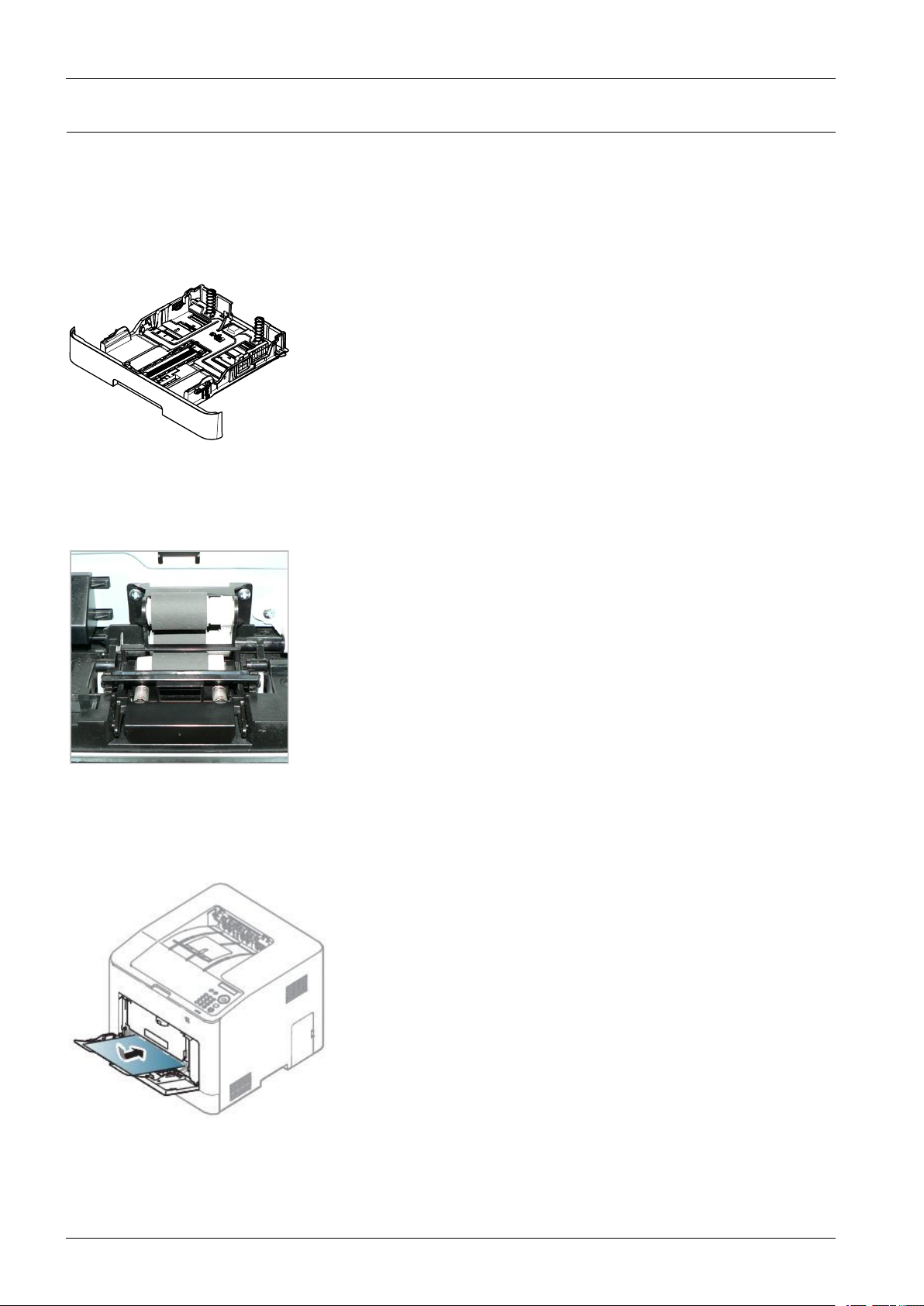
2.2.4.1.FeedingSection
Itisconsistsofabasiccassette,pickup/forward/retardrollerandpartsrelatedtopapertransferring.
1)Cassette(Tray1)
Thismodelhasacassettetypetray.Ithasapaperexistencesensingfunction,paperstoringfunction,paperarranging
function.
2)Pickup/Forward/Reverseroller
Theyhavefunctionssuchasapaperpickupfunction,drivingcontrolfunction,paperfeedingfunction,andremoving
electronicstaticfunction.Pickuprollerisdrivenbyclutch.
3)MP(Multi-Purpose)Tray
TheMP(multi-purpose)traycanholdspecialsizesandtypesofprintmaterial,suchaspostcards,notecards,andenvelopes.
Itisusefulforsinglepageprintingonletterheadorcoloredpaper.
2-15Copyright©1995-2012SAMSUNG.Allrightsreserved.
Page 25
2.ProductSpecicationanddescription
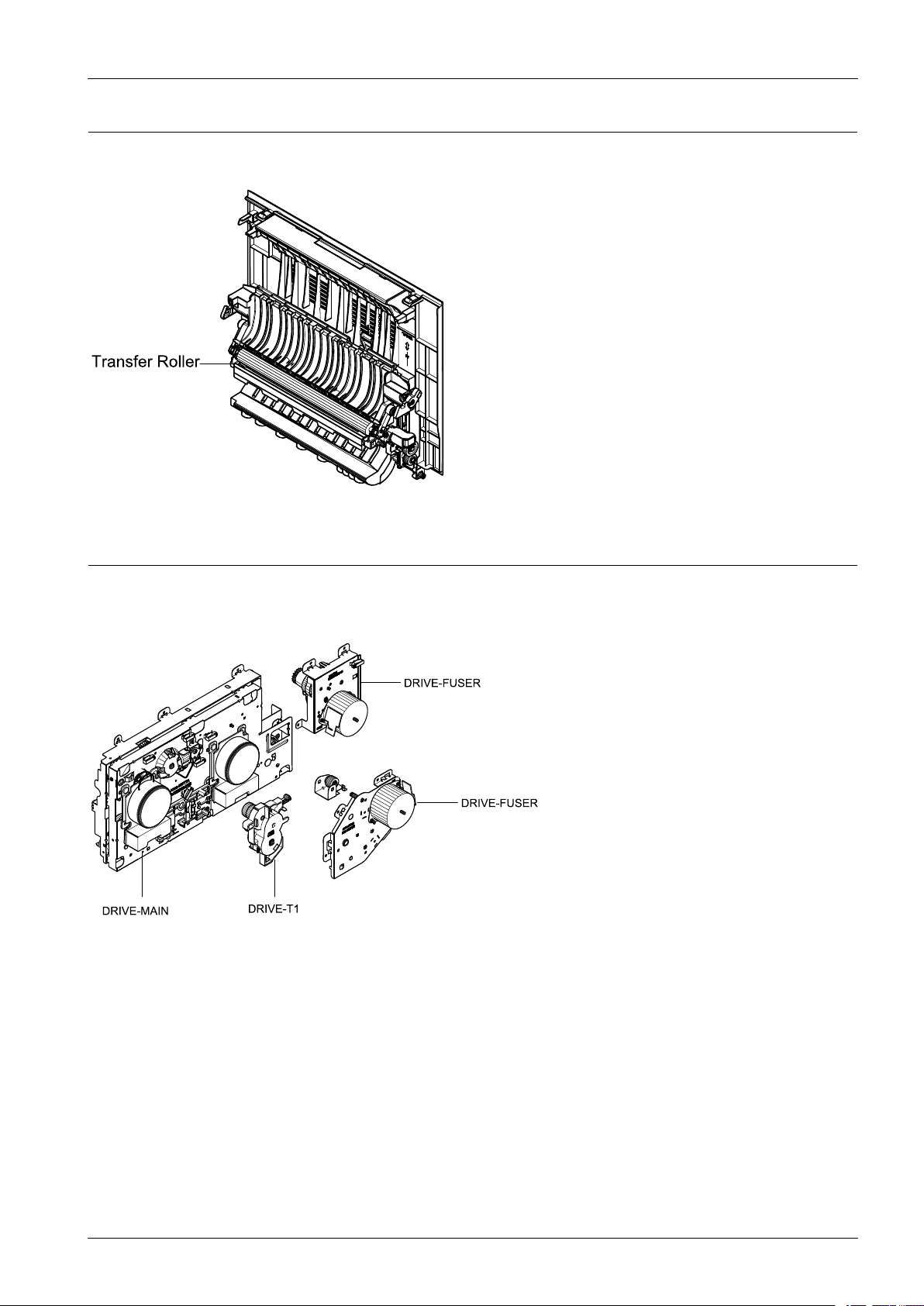
2.2.4.2.TransferRoller
Thetransferrollerunitisassembledtotherearcover.ThetransferrollerdeliversthetoneroftheOPCdrumtothepaper.
2.2.4.3.DriveUnit
Thismachinehasvariousdriveunits.Eachdriveunitcontrolstheoperationforfuser,tonercartridge,duplex,pickup,
feedingbyusingmotorandgeartrain.
Copyright©1995-2012SAMSUNG.Allrightsreserved.2-16
Page 26
2.ProductSpecicationanddescription
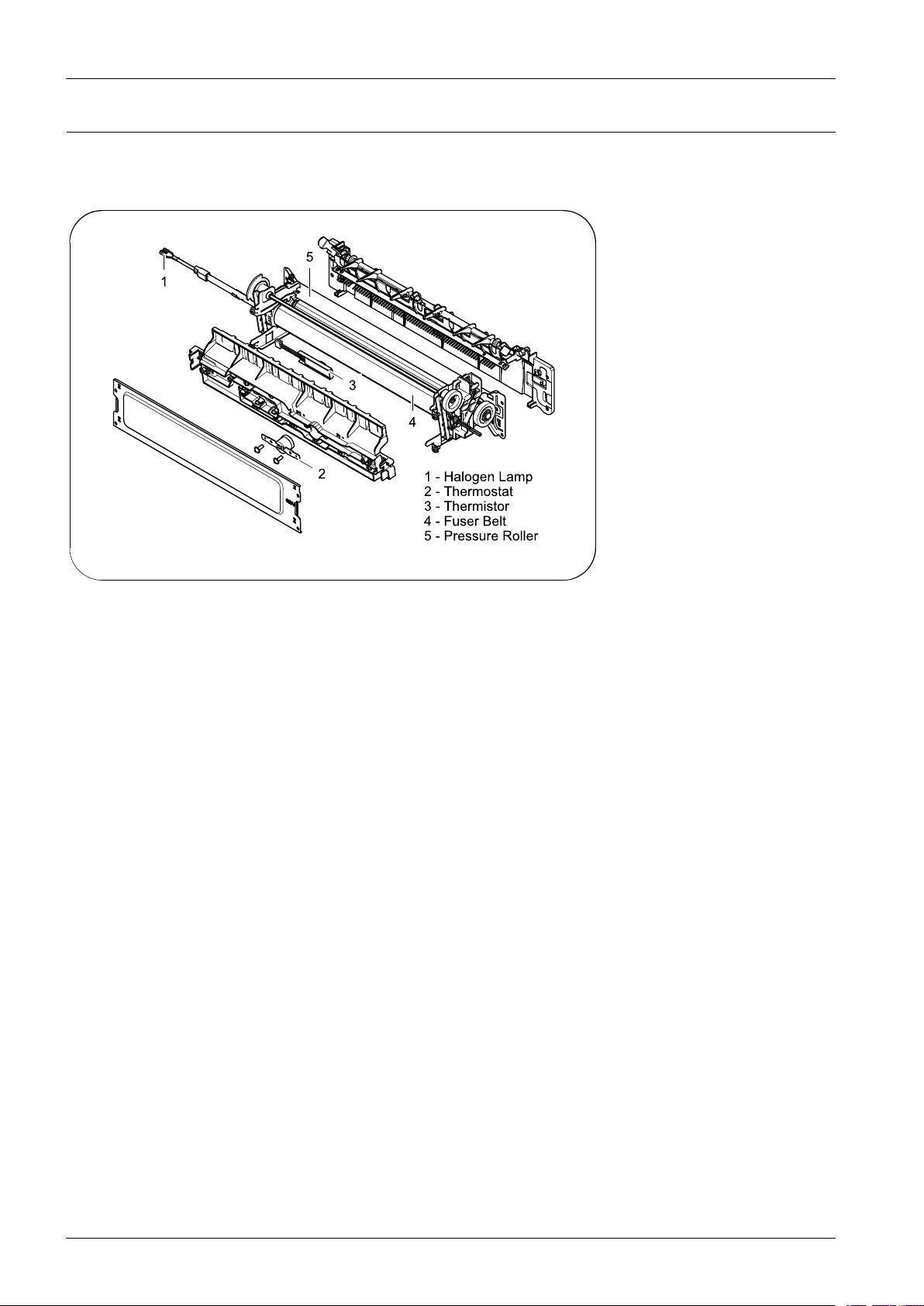
2.2.4.4.FuserUnit
Thisunitconsistsofahalogenlamp,afuserbelt,aThermostat,andThermistor,etc.Itfusesthetonerthatwastransferredby
thetransferrollerontothepaper,byapplyingheatandpressuretocompletefusingprocess.
1)Thermostat
Whenaheatlampisoverheated,aThermostatcutsoffthemainpowertopreventover-heating.
•ThermostatType:Non-ContacttypeThermostat
•ControlTemperature:195°C±5°C
2)Thermistor
Itisatemperaturedetectingsensor .
•TemperatureResistance:7kΩ(180°C)
3)FusingBelt
Thefusingbeltgetsheatfromthehalogenlampandtransferittotonerandpaper.Thethinfusingbeltreduceswarming
uptimeandmodechangingtime.
4)Pressureroller
Thepressurerollerisarubberrollerwhichensurespropernipwidthbetweenthepressurerollerandfusingbelt.Itis
drivenbythedrivingsystemanddrivesthefusingbelt.
5)HalogenLamp
•V oltage:120V(115±5%)/220V:230±5%
•Capacity:850Watt±25W
2-17Copyright©1995-2012SAMSUNG.Allrightsreserved.
Page 27
2.ProductSpecicationanddescription
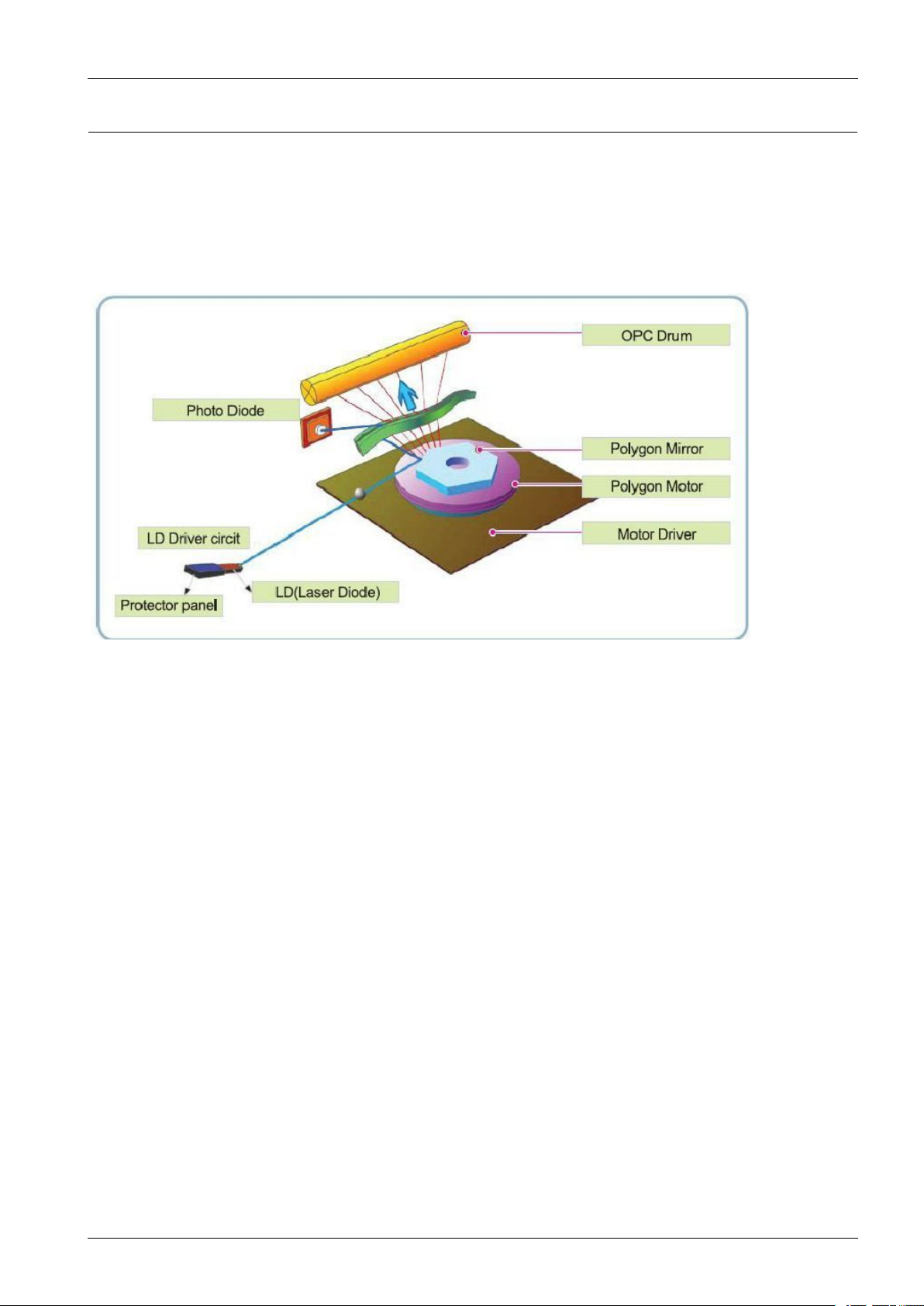
2.2.4.5.LSU(LaserScannerUnit)
ItisthecorepartoftheLBP(LaserBeamPrinter)whichswitchesfromthevideodatareceivedtothecontrollertothe
electrostaticlatentimageontheOPCdrumbycontrollinglaserbeam,exposingOPCdrum,andturningprincipleofpolygon
mirror.TheOPCdrumisturnedwiththepaperfeedingspeed.TheHSYNCsignaliscreatedwhenthelaserbeamfromLSU
reachestheendofthepolygonmirror,andthesignalissenttothecontroller.ThecontrollerdetectstheHSYNCsignalto
adjusttheverticallineoftheimageonpaper.Inotherwords,aftertheHSYNCsignalisdetected,theimagedataissentto
theLSUtoadjusttheleftmarginonpaper.Theonesideofthepolygonmirrorisonelineforscanning.
Copyright©1995-2012SAMSUNG.Allrightsreserved.2-18
Page 28
2.ProductSpecicationanddescription
2.2.4.6.TonerCartridge
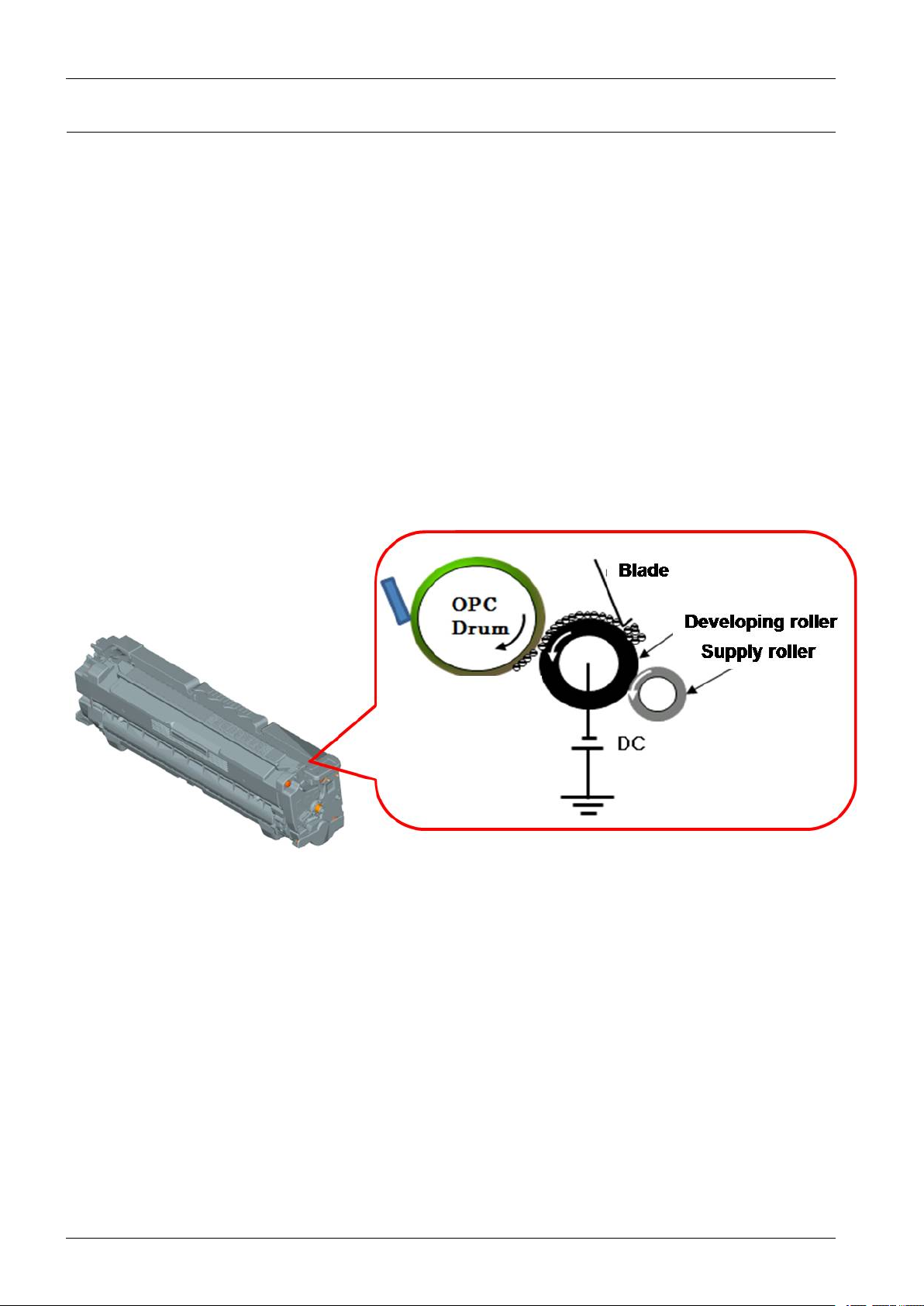
Byusingtheelectronicphotoprocess,itcreatesavisualimage.Inthetonercartridge,theOPCunitandthedeveloping
unitareinabody.TheOPCunithasOPCdrumandchargingroller,andthedevelopingunithastoner,supplyroller,
developingroller,andblade.
•DevelopingMethod:Nonmagneticsinglecomponentnon-contactingmethod
•Toner:Nonmagneticsinglecomponentpulverizedtypetoner
•Thelifespanoftoner(ISO19798pattern/A4standard)
-Initialtoner:2K(K)/1.5K(CMY)
-Salestoner:
▪Standardyield:2K(K)/1.5K(CMY)
▪Highyield:6K(K)/3.5K(CMY)
•OPCCleaning:Collectthetonerbyusingcleaningblade
•Handlingofwastedtoner:Collectthewastedtonerinthecleaningframebyusingcleaningblade
•Classifyingdevicefortonercartridge:IDisclassiedbyCRUM
2-19Copyright©1995-2012SAMSUNG.Allrightsreserved.
Page 29
2.2.5.Hardwareconguration
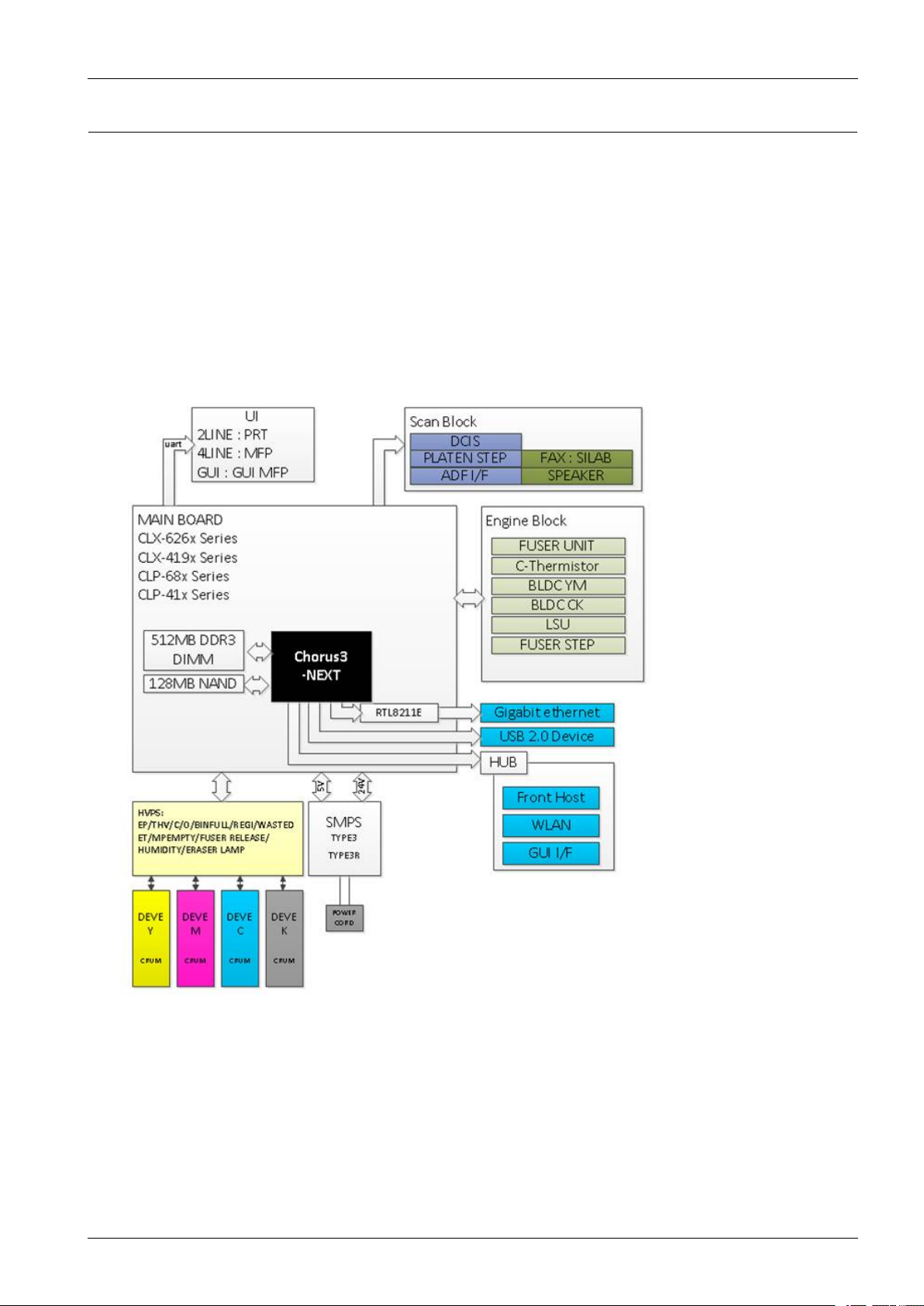
TheCLP-680seriesElectricalCircuitSystemconsistsofthefollowing:
•Mainboard(Systemboard)
•OPEboard
•SMPSboard
•HVPSboard
•HUBboard
DiagramoftheCLP-680seriesElectricalCircuit
2.ProductSpecicationanddescription
CLP-68xserieshasasystemboardofintegratedenginecontrollerandvideocontroller .
Theenginecontrollercontrolsallmodulesrequiredtoprint,thatis,LSU,HVPS/SMPS,Fuser,Motoretc.Itcommunicates
withthevideocontrolblockinsideCPUforprinting.Andithastheinterfaceforallvideosyncsignaltoprintout
thevideodata.
ThevideocontrollerreceivesprintdatafromthehostthroughnetworkorUSBPort.Ittakesthisinformationandgenerates
printablevideobitmapdata.
Themainboardisadopted533MHzC3NCPUthatisintegratedwithengine/video/scancontroller.ItusesDDR3
256MByte.
Copyright©1995-2012SAMSUNG.Allrightsreserved.2-20
Page 30

2.ProductSpecicationanddescription
Circuitboardlocations
Thefollowingdiagramsshowthelocationsoftheprintercircuitboards:
2-21Copyright©1995-2012SAMSUNG.Allrightsreserved.
Page 31

2.ProductSpecicationanddescription
2.2.5.1.Mainboard
Chorus3–Next(C3N)chipisadoptedasthemainprocessor.Itsprocessspeedis533MHz.Itisintegratedenginecontroller,
videocontroller,scancontroller .
DDR3256MBisadoptedforhighspeeddataprocessing.Bootadoptedthe128MBNANDFlash.
USBistheembeddedtypeandwirednetworksupports1000Mfullduplex.
[Mainboarddiagram]
Copyright©1995-2012SAMSUNG.Allrightsreserved.2-22
Page 32

2.ProductSpecicationanddescription
[Mainboardimage]
•Connection
1NETWORKconnector
2USBDeviceconnector
31284I/Fconnector
4FeedStepMotorconnector
5Regi.Clutchconnector
6PickUpClutchconnector
7SCFconnector
8SMPSFanT1DCmotorconnector
9MPEmtpy,CassetteOpenconnector
10ITBJointconnector
11FuserCONT.connector
12HUBI/Fconnector
13SMPSconnector
14BLDCMotorconnector
15DEVEHomesensor/solenoidconnector
16OPCHomesensorconector
17HVPS2connector
18HVPS1connector
19LSUconnector
20OPEconnector
21FuserFanconnector
22Thermistorconnector
23ExitMotorconnector
•Information
-PartCode
▪JC92-02528A:CLP-680DW
▪JC92-02528B:CLP-680ND
2-23Copyright©1995-2012SAMSUNG.Allrightsreserved.
Page 33

2.ProductSpecicationanddescription
2.2.5.2.OPEController
TheOPEcontrolleriscomposedofanMICOM(STM8SP103K3MAZTR),STA TUSLED,ECOLED,POWERLED,
NA VIGAIONLED,WPSLED(CLP-680DWonly),2LINELCD,KEY
TheOPEcontrollercommunicateswithmaincontrollerviaUART .ThepowerLEDiscontrolledbythemainboard.
[OPEcontrollerdiagram]
[OPEcontrollerimage]
Copyright©1995-2012SAMSUNG.Allrightsreserved.2-24
Page 34

2.ProductSpecicationanddescription
•Information
-PartCode:JC92–02520A~D
-PartName:PBA-OPE
•Connection
1InterfaceConnectortoMainboard
2.2.5.3.WirelessLANboard
TheWirelessLANModulesupports802.11b/g/n.ItcommunicateswithvideocontrollerviaUSB.
•Information
-PartCode:JC92–02510A
-PBAName:PBA-WNPC
•Connection
InterfaceConnectortoSystemboard
(JC39–01858A/JC39–01803A/JC39–01853A,HARNESS-WLAN)
1
NOTE
TheHARNESS-WLANdifferfromyourmachinedependingonyourmodel.
2-25Copyright©1995-2012SAMSUNG.Allrightsreserved.
Page 35

2.ProductSpecicationanddescription
2.2.5.4.SMPSboard
TheSMPS(SwitchingModePowerSupply)BoardsupplieselectricpowertotheMainBoardandotherboardsthrougha
MainController.Thevoltageprovidedincludes+24Vfroma110V/220Vpowerinput.
•Specication
1)AC110V(90V~135V)
2)AC220V(180V~270V)
3)InputCurrent:10.0A(110V)/8.0A(220V)
4)OutputPower:161.5W
-DC5V:17.5W
-DC24V:144W
•Information
110V220V
PartCodeJC44-00222AJC44-00223A
PBANameSMPSV1SMPSV2
•Connection
1AC_Inlet
2FUSER_ACOutput
3OUTPUT_DC
Copyright©1995-2012SAMSUNG.Allrightsreserved.2-26
Page 36

2.ProductSpecicationanddescription
•Input/Outputconnector
-ACInputConnector(CON1)
PINASSIGNPINNODescription
1AC_L
2AC_N
-ACInputConnector(CON2)
PINASSIGNPINNODescription
1AC_L
2AC_N
-DCOutputConnector(CON3)
PINASSIGNPINNODescription
15V+5VPower
2GNDGround
324V1+24VPower
4GNDGround
524V2+24VPower
6GNDGround
724V3+24VPower
ACInput
ACOutput
forHeaterController
-SignalConnector(CON4)
PINASSIGNPINNODescription
1GNDGround
224V_ON_OFF24V_ON_OFF
3RelayonFuserRelay
424VSPhotoTriacBias
5FuserOnFuserOn
2-27Copyright©1995-2012SAMSUNG.Allrightsreserved.
Page 37

2.ProductSpecicationanddescription
2.2.5.5.HVPSboard
TheHVPSboardgenerateshigh-voltagechannelswhichincludesMHV ,DEV ,Blade,SUP ,THV1,THV2.
•Connection
1MHV/DEV/BLD/SUPY
2MHV/DEV/BLD/SUPM
3MHV/DEV/BLD/SUPC
4MHV/DEV/BLD/SUPK
5THV1YMCK
6THV2
7Main-HVPSI/F#1
8Main-HVPSI/F#2
9Paperexit,Outbinfull
10WTBinterface
11CrumY ,M
12CrumC,K
13Ambient,Humidity
14PaperRegi
15FuserRelease
16FrontcoveropenSwitch
17RearcoveropenSwitch
•Information
-PartCode:JC44–00216A
-PBAName:HVPS
Copyright©1995-2012SAMSUNG.Allrightsreserved.2-28
Page 38

2.ProductSpecicationanddescription
2.2.5.6.ITBEEPROMPBA
TheITBEEPROMPBAstoredtheITBserialnumberandadjustmentinformationlikeaS-Gain,ITBlife.
Itconsistsofthe4–pinconnector,EEPROM,resistor,capandisconnectedtothemainboard.Itcommunicateswith
mainboard.
•Information
-PartCode:JC92–02531A
-PBAName:PBA-ITBEEPROM
•Connection
1
2.2.5.7.HUBPBA
TheHUBPBAconnectstheUSBblockofthemainboardand3externalinterfacemodules.
Itconsistsof4connectorandCrystal.Hubcontrollerchip.
InterfaceConnectortoSystemBoard
(JC39–01814A,HARNESS-ITB)
•Information
-PartCode:JC92–02525A
-PBAName:PBA-HUB
•Connection
1HUBPBAtoMainPBAconnector
2HUBPBAtoWLANconnector(CLP-680DWonly)
3HUBPBAto4.3inchGUIconnector(CLX-6260FWonly)
4HUBPBAtoUSBHostconnector
2-29Copyright©1995-2012SAMSUNG.Allrightsreserved.
Page 39

2.2.5.8.ElectricalPartsLocation
1)Sensors
2.ProductSpecicationanddescription
No.DescriptionControllerFunction
S1Photointerrupter(Exitsensor)MainBoardExitdetection
S2Photointerrupter(DriveOPCsensor)MainBoardDriveOPCdetection
S3Photointerrupter(DeveNipsensor)MainBoardDeveNipdetection
S4Photointerrupter(DriveOPCsensor)MainBoardDriveOPCdetection
S5Photointerrupter(MPPickupsensor)MainBoardMPPickupdetection
S6SwitchFrontCover(CoverFrontOpensensor)HVPSCoverOpendetection
S7Photointerrupter(MPFeedsensor)MainBoardMPFeeddetection
S8Photointerrupter(ITBsensor)MainBoardITBdetection
S9Photointerrupter(Emptysensor)MainBoardEmptydetection
S10Photointerrupter(WTBOpensensor)MainBoardWTBOpendetection
S11Photointerrupter(Regi.sensor)MainBoardPaperFeeddetection
S12Photointerrupter(FuserCamsensor)MainBoardFuserCamdetection
S13Photointerrupter(Binfullsensor)MainBoardBinfulldetection
S14Photointerrupter(FuserExitsensor)MainBoardFuserExitdetection
S15SwitchRearCover(CoverRearOpensensor)HVPSCoverOpendetection
Copyright©1995-2012SAMSUNG.Allrightsreserved.2-30
Page 40

2.ProductSpecicationanddescription
2)Motor,Clutch,Solenoid,etc
No.Description
1HVPS
2Humidi.-TempSensor
3PBAWasteSensor
4PowerInlet
5MotorStep
6MainBoard
7MotorStep
8FanType-5
9PBAWireless
10MotorBLDC
No.Description
11PBA-HUBWIFI
12MotorBLDC-BT6
13Clutch-ElectricZ41
14SMPS
15FanType-1
16Clutch-ElectricZ41
17Clutch-ElectricZ41
18SolenoidMP
19Clutch-ElectricZ41
2-31Copyright©1995-2012SAMSUNG.Allrightsreserved.
Page 41

2.ProductSpecicationanddescription
2.2.6.EngineF/WControlAlgorithm
2.2.6.1.Feeding
Iffeedingfromacassette,thedriveofthepickuprolleriscontrolledbycontrollingthesolenoid.Theon/offofthe
solenoidiscontrolledbycontrollingthegeneraloutputportortheexternaloutputport.Whilepapermoves,occurrence
ofJamisjudgedasbelow.
ItemDescription
JaminTray1•Afterpickingup,papercannotbeenteredbecausetopaperisnotfed.
•Afterpickingup,paperenteredbutitcannotreachtothefeedsensorinpredeterminedperiodof
time.duetoslip,etc.
•Afterpickingup,ifthefeedsensorisnoton,re-pickup.Afterre-pickingup,ifthefeedsensoris
notonaftercertaintime,itisJAM0.
•Eventhoughthepaperreachestothefeedsensor,thefeedsensordoesn’tbeON.
Jaminside
machine
•Aftertheleadingedgeofthepaperpassesthefeedsensor,thetrailingedgeofthepapercannotpass
thefeedsensorafterpredeterminedperiodoftime.
•Aftertheleadingedgeofthepaperpassesthefeedsensor,thepapercannotreachtheexitsensor
afterpredeterminedperiodoftime.
*Thepaperexistsbetweenthefeedsensorandtheexitsensor.
JaminExit
area
Afterthetrailingedgeofthepaperpassesthefeedsensor,thepapercannotpasstheexitsensorpredetermined
periodoftime.
2.2.6.2.Transfer
Thechargingvoltage,developingvoltageandthetransfervoltagearecontrolledbyPWM(PulseWidthModulation).The
eachoutputvoltageischangeableduetothePWMduty.Thetransfervoltageadmittedwhenthepaperpassesthetransfer
rollerisdecidedbyenvironmentconditions.Theresistancevalueofthetransferrollerischangedduetothesurrounding
environmentortheenvironmentoftheset,andthevoltagevalue,whichchangesduetotheenvironments,ischanged
throughADconverter.Thevoltagevalueforimpressingtothetransferrollerisdecidedbythechangedvalue.
Copyright©1995-2012SAMSUNG.Allrightsreserved.2-32
Page 42

2.ProductSpecicationanddescription
2.2.6.3.Fusing
Thetemperaturechangeoftheheatroller’ssurfaceischangedtotheresistancevaluethroughtheuseofathermistor.
TheMainBoardusestheresistancevalueoftheThermistorandconvertsittoavoltagevaluethroughtheuseofanAD
converter,thetemperatureisdecidedbasedonthevoltagevalueread.TheACpoweriscontrolledbycomparingthetarget
temperaturetothevaluefromthethermistor .Ifthevaluefromthethermistorisoutofcontrollingrangewhilecontrollingthe
fusing,theerrorstatedinthebelowtableoccurs.
•OpenHeatError
Whentheengineoperatesthewarm-upprocess,ifthetemperatureofthexingunitisnothigherthanaspecied
temperature,theenginedenesOpenHeatError.Whenthiserrorisdetected,theenginestopsallfunctionsandkeeps
theerrorstate.Also,theengineinformstheerrorstatusofthemainsystem,soitcantakeappropriateaction;andthen
theerrormessageisdisplayedatLCDwindoworLEDinformingtheerrorstatusoftheuser.
•LowHeatError
Whentheengineisatstand-by,printingorwarm-upmode,ifthetemperatureofthexingunitislowerthanthe
speciedtemperatureateachstateandthelowertemperaturestateismaintainedduringthespeciedtime,theengine
denesLowHeatError.Whenthiserrorisdetected,theenginestopsallfunctionsandkeepsitattheerrorstate.Also,
theengineinformstheerrorstatusofthemainsystem,soitcantakeappropriateaction;andthentheerrormessage
isdisplayedatLCDwindoworLEDinformingtheerrorstatusoftheuser.
•OverHeatError
Foroverallenginestate,ifthetemperatureofthexingunitishigherthanthespeciedtemperatureandthetemperature
stateisdetectedforaspecicduration,thentheenginedenesOverHeatError.Whenthiserrorisdetected,theengine
stopsallfunctionsandkeepsitattheerrorstate.Also,theengineinformstheerrorstatusofthemainsystem,soit
cantakeappropriateaction;andthentheerrormessageisdisplayedatLCDwindoworLEDinformingtheerror
statusoftheuser.
2.2.6.4.LSU
LSUreceivestheimagedatafromPVCorHPVCandmakethelatentimageonOPCsurface.Itusesthesinglebeam,
LD.TheerrorsrelatedtoLSUareasfollows:
•ByLready
Whentheprintingisstarted,theenginedrivesthepolygonmotorofLSU.Afterthespeciedtimeiselapsed,ifthe
motorisnotinareadystatus,theenginedetectstheerrorthatthepolygonmotorisnotinareadystatus.Ifthiserror
happens,theenginestopsallfunctionsandkeepsitattheerrorstate.Also,theengineinformstheerrorstatusofthe
mainsystemandtheerrormessageisdisplayedatLCDwindowtoinformtheerrorstatusoftheuser.
•ByHsync
Whenthepolygonmotorisready,theLSUsendsoutthesignalcalledHsyncandusedtosynchronizewitheachimage
line.So,iftheenginedoesnotdetectconsecutivelythesignalforaxedtime,itdenestheHsyncError.Ifthiserror
happens,theenginestopsallfunctionsandkeepsitattheerrorstate.Also,theengineinformstheerrorstatusofthe
mainsystemandthentheerrormessageisdisplayedatLCDwindowtoinformtheerrorstatusoftheuser.LSUError
Recovery:IftheLReadyorHsyncerrorhappens,thepaperisexitedbeforetheerrorcodeisinitiated.Theenginemode
ischangedtorecoverymodeandtheengineinformsthemainsystemoftheenginemode.Andtheenginechecksthe
LSUerror.Iftheerrordoesn’thappen,theprintingjob.
2-33Copyright©1995-2012SAMSUNG.Allrightsreserved.
Page 43

2.2.7.SoftwareDescriptions
P r in te r /MFP
HOS T
S o ftw a r e
Driv e r
Web -b a s e d
App lic atio n
S ta n d -a lo ne
App lic atio n
Fi rm wa re
App lic atio n
(Em ula tio n )
Ker n e l
2.2.7.1.Softwaresystemoverview
Thesoftwaresystemofthismodelisconstructedwith
•HostSoftwarepartthattheapplicationsoftwareoperatedinWindowandWebEnvironment
•FirmwarepartsthatisaEmbeddedsoftwarecontrolsprintingjob.
2.2.7.2.Architecture
2.ProductSpecicationanddescription
HostSoftwareismadeupof
1)GraphicUserInterfaceoffersthevariouseditingfunctionstouserinHost.
2)DrivertranslatesthereceiveddocumenttoaPrintingCommandlanguagewhichprintercanunderstandandtransfers
datatospooler.
3)Stand-aloneApplicationoffersthevariousprintingapplicationsuchasEasyPrinterManager,PrinterStatusinWindow
system.
4)Web-based-ApplicationoffersthesamefunctionsasStand-aloneApplicationinW ebenvironment.
Firmwareismadeupof
1)Application(Emulation)thatisainterpretertranslatesdatareceivedfromHosttoaprintinglanguage(PCL,PS,GDI,
etc.)tobeabletomaketheusertotakesameoutputasoriginallyonewhatcomposedinHost.
2)KernelcontrolsandmanagethewholeprocedureincludingControlowandPrintingJobbeforetransferringtoEngine
system.
Copyright©1995-2012SAMSUNG.Allrightsreserved.2-34
Page 44

2.ProductSpecicationanddescription
Drive r
- PCL3, PS 3
Web -b a s e d
- Do c ument Manag e m e nt
S ys te m
- Netwo rk Ad m inis tration
- S ta tus Mo nitor
- Re m o te Co ntrol Pa ne l
S t a n d -a lon e
- P rinter S etting Utility
- Netwo rk Ad m inis tration
- S ta tus Mo nitor
Q
Q
p
p
s
s
uu
N
N
p
p
o
o
jj
u
u
p
p
s
s
Netwo r k
Interfa c e
App lic a tio n
KERNEL
App lic a tio n
(Em ulatio n )
- P CL
- P S 3
En g in e
US B
Ho s t Firm w a re
2.2.7.3.DataandControlFlow
TheaboveBlockDiagramisexplainedthat:
HostSideismadeupof
1)DriverthatisWindowsapplicationsoftwaretranslateprinteddatatooneofprinterlanguageandcreatespoolerle.
2)Web-basedApplicationthatofferavariousprinteradditionalfunctions,managementofprintingjob,printer
administration,StatusmonitortomonitoringtheprinterstatusbyrealtimeinW eb,independentenvironmentonOS.
3)Stand-aloneApplicationthatisasimilarWindowsoftwareassameasabove2.
4)PortMonitorthatmanagesthenetworkcommunicationbetweenspoolerandNetworkInterfaceCard,orvarious
additionalapplicationandNetworkInterfaceCard,(thisis,atrst,makecommunicationlogicalport,managethedata,
transferthemfromspoolertonetworkport,andoffertheresultofprinting).
FirmwareSideismadeupof
1)NetworkInterfaceCardisthatrelaythecommunicationbetweenHostandkernelusingvariousnetworkprotocol.
2)Kernelisthatmanagestheowcontrolofemulationprocedure,receivingdatafromHostorNetworkcardandprinting
withengine&renderingjob.
2-35Copyright©1995-2012SAMSUNG.Allrightsreserved.
Page 45

2.ProductSpecicationanddescription
3)Emulationisthatinterpretsthevariousoutputdatafromselectedemulation.
4)Engineisthatprintsrenderedbit-mapdatatopaperwithrequiredsizeandtypebyKernel.
Andthen,forJobSpoolingfunctionforMulti-User,Multi-PrintingthatisoccurredinNetworkprintingandvarious
additionalprintingfunctions,thisKernelusemax.10Queuingsystemsinamemory.
InPrinting,thetwoproceduresare
1)CaseofusingUSBPort
•AfteruserstarttoprintthewanteddocumenttoPCLstringorcompressedGDIbit-mapdata,theDrivertranslates
theallgraphicdataoftheclientPCandsenddatatohostspooler.Andthenthespoolersendsthedatastreamto
theprinterviaUSBport.
•KernelreceivesthisdatafromHost,andthenselectemulationttodataandstartselectedone.Afteremulationjob
end,Kernelsendstheoutputbit-mapdatatoEngineusingPrinterVideoController(byclocktypeforLSU).
•Engineprintthereceiveddatatorequiredpaperwiththesequentialdevelopingprocess.
2)CaseofusingNetworkInterfaceCard
•AfteruserstarttoprintthewanteddocumenttoPCLstringorcompressedGDIbit-mapdata,Drivertranslatethe
allgraphicdataofitandsenddatatohostspooler.
•Ifso,PortmonitormanagingnetworkportreceivesdatafromspoolerandsendsadatastreamtotheNetwork
InterfaceCard.
•NetworkinterfacecardreceivesitandsendtoKernelpart.
•KernelreceivesthisdatafromHost,andthenselectemulationttodataandstartselectedone.Afteremulationjob
end,Kernelsendstheoutputbit-mapdatatoEngineusingPrinterVideoController(byclocktypeforLSU).
•Engineprintthereceiveddatatorequiredpaperwiththesequentialdevelopingprocess.
Copyright©1995-2012SAMSUNG.Allrightsreserved.2-36
Page 46

3.DisassemblyandReassembly
3.DisassemblyandReassembly
3.1.Precautionswhenreplacingparts
3.1.1.Precautionswhenassemblinganddisassembling
•UseonlyapprovedSamsungspareparts.Ensurethatpartnumber,productname,anyvoltage,currentortemperature
ratingarecorrect.Failuretodosocouldresultindamagetothemachine,circuitoverload,reorelectricshock.
•Donotmakeanyunauthorizedchangesoradditionstotheprinter,thesecouldcausetheprintertomalfunctionand
createelectricshockorrehazards.
•Takecarewhendismantlingtheunittonotewhereeachscrewgoes.Thereare19differentscrews.Useofthewrong
screwcouldleadtosystemfailure,shortcircuitorelectricshock.
•DonotdisassembletheLSUunit.Onceitisdisassembleddustisadmittedtothemirrorchamberandwillseriously
degradeprintquality .Therearenoserviceablepartsinside.
•Regularlychecktheconditionofthepowercord,plugandsocket.Badcontactscouldleadtooverheatingandrfe.
Damagedcablescouldleadtoelectricshockorunitmalfunction.
3.1.2.PrecautionswhenhandlingPBA
StaticelectricitycandamageaPBA,alwaysusedapprovedanti-staticprecautionswhenhandlingorstoringaPBA.
•PrecautionswhenmovingandstoringPBA
1)PleasekeepPBAinaconductivecase,anti-staticbag,orwrappedinaluminumfoil.
2)DonotstoreaPBAwhereitisexposedtodirectsunlight.
•PrecautionswhenreplacingPBA
1)Disconnectpowerconnectorsrst,beforedisconnectingothercables.
2)Donottouchanysolderedconnections,connectorterminalsorotherelectronicpartswhenhandlinginsulatedparts.
•PrecautionswhencheckingPBA
1)BeforetouchingaPBA,pleasetouchothergroundedareasofthechassistodischargeanystaticelectricalcharge
onthebody.
2)TakecarenottotouchthePBAwithyourbarehandsormetalobjectsasyoucouldcreateashortcircuitorgetan
electricshock.TakeextracarewhenhandlingPBAswithmovingpartsttedsuchassensors,motorsorlampsas
theymaygethot.
3)Takecarewhentting,orremoving,screws.Lookoutforhiddenscrews.Alwaysensurethatthecorrectscrewis
usedandalwaysensurethatwhentoothedwashersareremovedtheyarerettedintheiroriginalpositions.
3-1Copyright©1995-2012SAMSUNG.Allrightsreserved.
Page 47

3.DisassemblyandReassembly
3.1.3.ReleasingPlasticLatches
Manyofthepartsareheldinplacewithplasticlatches.Thelatchesbreakeasily;releasethemcarefully.
Toremovesuchparts,pressthehookendofthelatchawayfromtheparttowhichitislatched.
Copyright©1995-2012SAMSUNG.Allrightsreserved.3-2
Page 48

3.DisassemblyandReassembly
3.2.Screwsusedintheprinter
Thescrewslistedinthetablebelowareusedinthisprinter.Pleaseensurethat,whenyoudisassembletheprinter,youkeep
anoteofwhichscrewisusedforwhichpartandthat,whenreassemblingtheprinter,thecorrectscrewsareusedinthe
appropriateplaces.
NOTE
ThislistisbasedonCLP-680FW.So,thislistmaydifferfromyourmachinedependingonitsmodel.
PartsCodeLocationDescriptionQty
6002-000440FUSERSCREW-TAPPING;PWH,+,2,M3,L8,ZPC(BLK),SWRCH18A2
6003-000269FUSERSCREW-TAPTYPE;BH,+,-,S,M3,L6,ZPC(WHT),SWRCH18A,-7
6003-000269FRAMEBASESCREW-T APTYPE;BH,+,-,S,M3,L6,ZPC(WHT),SWRCH18A,-41
6002-000440FRAME-LEFTSCREW-T APPING;PWH,+,2,M3,L8,ZPC(BLK),SWRCH18A12
6003-000269FRAME-LEFTSCREW-T APTYPE;BH,+,-,S,M3,L6,ZPC(WHT),SWRCH18A,-16
6002-000440FRAME-GUIDE
CSTL
6002-000440FRAME-CRUM
HOLDER
6002-000440FRAME-RIGHTSCREW-TAPPING;PWH,+,2,M3,L8,ZPC(BLK),SWRCH18A3
6003-000269FRAME-RIGHTSCREW-TAPTYPE;BH,+,-,S,M3,L6,ZPC(WHT),SWRCH18A,-27
6002-000440FRAME-GUIDE
CSTR
6003-000269FRAME-BRACKET
OPCR
6003-000269DRIVE-EXITSCREW-T APTYPE;BH,+,-,S,M3,L6,ZPC(WHT),SWRCH18A,-1
6003-000269FRAME-BRACKET
MP
6003-000196FRAMEMAINSCREW-T APTYPE;PWH,+,B,M3,L10,NIPLT ,SWRCH18A6
6003-000214FRAMEMAINSCREW-T APTYPE;PH,+,WP ,B,M3,L8,ZPC(WHT),SWRCH18A,-1
6003-000269FRAMEMAINSCREW-T APTYPE;BH,+,-,S,M3,L6,ZPC(WHT),SWRCH18A,-61
6003-000301FRAMEMAINSCREW-T APTYPE;BH,+,S,M4,L6,ZPC(WHT),SWRCH18A1
6003-000196FRAME-EXITSCREW-T APTYPE;PWH,+,B,M3,L10,NIPLT ,SWRCH18A1
6003-000269DRIVE-MAINSCREW-T APTYPE;BH,+,-,S,M3,L6,ZPC(WHT),SWRCH18A,-20
SCREW-T APPING;PWH,+,2,M3,L8,ZPC(BLK),SWRCH18A1
SCREW-T APPING;PWH,+,2,M3,L8,ZPC(BLK),SWRCH18A8
SCREW-T APPING;PWH,+,2,M3,L8,ZPC(BLK),SWRCH18A1
SCREW-T APTYPE;BH,+,-,S,M3,L6,ZPC(WHT),SWRCH18A,-1
SCREW-T APTYPE;BH,+,-,S,M3,L6,ZPC(WHT),SWRCH18A,-13
6003-000301DRIVE-MAINSCREW-T APTYPE;BH,+,S,M4,L6,ZPC(WHT),SWRCH18A6
6009-001697DRIVE-MAINSCREW-SPECIAL;PH,+,M3,L4.4(3),NIPLT ,SWRCH18A,MACH,2BODY1
6003-000269DRIVE-FUSERSCREW-TAPTYPE;BH,+,-,S,M3,L6,ZPC(WHT),SWRCH18A,-4
6003-000269DRIVE-PHSCREW-TAPTYPE;BH,+,-,S,M3,L6,ZPC(WHT),SWRCH18A,-2
6003-000282FRAME-RETARDSCREW-TAPTYPE;BH,+,-,B,M3,L8,ZPC(BLK),SWRCH18A,-3
6003-000196COVER-FRONTSCREW-TAPTYPE;PWH,+,B,M3,L10,NIPL T,SWRCH18A4
6003-000264COVER-MPTRA YSCREW-TAPTYPE;PWH,+,-,B,M3,L6,ZPC(WHT),SWRCH18A,-1
6003-000196COVER-REARSCREW-T APTYPE;PWH,+,B,M3,L10,NIPLT ,SWRCH18A14
6003-000196DUPLEX
GUIDE-LOWER
3-3Copyright©1995-2012SAMSUNG.Allrightsreserved.
SCREW-T APTYPE;PWH,+,B,M3,L10,NIPLT ,SWRCH18A1
Page 49

3.DisassemblyandReassembly
PartsCodeLocationDescriptionQty
6003-000196COVER-TOPSCREW-TAPTYPE;PWH,+,B,M3,L10,NIPLT,SWRCH18A9
6003-000264COVER-TOPSCREW-TAPTYPE;PWH,+,-,B,M3,L6,ZPC(WHT),SWRCH18A,-1
6003-000196MAINLINESCREW-T APTYPE;PWH,+,B,M3,L10,NIPLT ,SWRCH18A2
6003-000196FRONT_INNER+
SCREW-T APTYPE;PWH,+,B,M3,L10,NIPLT ,SWRCH18A1
RIGHT
6003-000196PBA-WIRELESSSCREW-TAPTYPE;PWH,+,B,M3,L10,NIPLT,SWRCH18A1
6003-000269BRACKET-
SCREW-T APTYPE;BH,+,-,S,M3,L6,ZPC(WHT),SWRCH18A,-1
HOLDER_FDB
6003-000269MAINLINESCREW-T APTYPE;BH,+,-,S,M3,L6,ZPC(WHT),SWRCH18A,-34
6003-000269HOLDER-USB
SCREW-T APTYPE;BH,+,-,S,M3,L6,ZPC(WHT),SWRCH18A,-1
_HOST
6003-000269PBA-HUBSCREW-T APTYPE;BH,+,-,S,M3,L6,ZPC(WHT),SWRCH18A,-1
Copyright©1995-2012SAMSUNG.Allrightsreserved.3-4
Page 50

3.DisassemblyandReassembly
3.3.Replacingthemaintenanceparts
3.3.1.TonerCartridge
1.Openthefrontcover.
2.Holdthegreenhandleandpulltheguide-cartridge.
3.Removethetonercartridges.
3-5Copyright©1995-2012SAMSUNG.Allrightsreserved.
Page 51

3.3.2.WasteTonerContainer
1.OpentheW asteTonerContainercover.Removethe
WasteTonerContainerwhilepullingthegreenlever
tothedirectionofarrow.
3.DisassemblyandReassembly
Copyright©1995-2012SAMSUNG.Allrightsreserved.3-6
Page 52

3.DisassemblyandReassembly
3.3.3.ITBUnit
1.Removealltonercartridges.
2.Removetheguide-cartridgebyreleasingtherighthook.
4.Removetheharnesscoverafterremoving1screw .
5.Unplugtheconnector.
3.Removethecassette.
6.Opentherearcover.
3-7Copyright©1995-2012SAMSUNG.Allrightsreserved.
Page 53

3.DisassemblyandReassembly
7.Openthefrontcover.Pickouttheconnectorthatis
unpluggedinstep5.
10.Remove2screwssecuringtheleftcoverfromthefront.
11.Removethewastetonercontainer .Releasetheleft
coverbypushingittothedirectionofarrow.
8.LiftupthebothsidesoftheITBUnitslightly.
9.Remove2screwssecuringtheleftcoverfromtherear.
12.RemovetheITBUnit.
Copyright©1995-2012SAMSUNG.Allrightsreserved.3-8
Page 54

3.DisassemblyandReassembly
3.3.4.FuserUnit
1.Opentherearcover.Remove5screws.Andremove
thecover[A].
2.Remove5screws.Rmovethecover[A].Andtakeoff
thefuserunit.
3.3.5.Pickup_Forward_Reverseroller
1.Removethecassette.Standthemachinetoseethe
bottom.
3.Removethefuserunitperfectlyafterunpluggingthe
connectors.
3.Remove2screws.PullandreleasethePick-up/Forward
rollerAssy .
2.ReleasetheReverserollerAssybypushingbothhooks.
3-9Copyright©1995-2012SAMSUNG.Allrightsreserved.
Page 55

3.4.ReplacingthemainSVCparts
NOTE
Beforeservice,removealltonercartridgesandguide-cartridge.
3.4.1.LeftandRightcover
3.DisassemblyandReassembly
1.Opentherearcover.Remove4screws.
2.Openthefrontcover.Remove4screws.
3.Releasetheleftcover.
4.Releasetherightcover.
Copyright©1995-2012SAMSUNG.Allrightsreserved.3-10
Page 56

3.DisassemblyandReassembly
3.4.2.Topcover
1.Removetherightcover.(Referto3.4.1)
2.UnplugtheOPEconnectoronthemainboard.
3.Opentherearcover.Remove2screws.
4.Openthefrontcover.Remove2screws.Andliftup
thetopcover.
3-11Copyright©1995-2012SAMSUNG.Allrightsreserved.
Page 57

3.DisassemblyandReassembly
3.4.3.HVPSboard
1.Removetheleftcover.(Referto3.4.1.)2.Remove10screws.Unplugtheconnector .Andrelease
theHVPSboard.
3.4.4.OuterTemperatureSensor
1.Removetheleftcover.(Referto3.4.1)
2.Remove1screw.Unplugtheconnector.Andremove
thesensor .
Copyright©1995-2012SAMSUNG.Allrightsreserved.3-12
Page 58

3.DisassemblyandReassembly
3.4.5.MainBoard
1.Removetherightcover.(Referto3.4.1)2.Unplugallconnector.Remove4screws.Andremove
themainboard.
3.4.6.SMPSFan
1.Removetherightcover.(Referto3.4.1)
2.Unplugthefanconnector.
3.RemovetheSMPSfan.
3-13Copyright©1995-2012SAMSUNG.Allrightsreserved.
Page 59

3.4.7.SMPSboard
3.DisassemblyandReassembly
1.Removetherightcover.
2.RemovetheSMPSboardcoverafterremoving3
screws.
3.4.8.LSU
1.Removethetopcover.(Referto3.4.2)
2.Remove4screws.
3.UnplugallconnectorsonSMPSboard.Remove3
screws.AndremovetheSMPSboard.
3.Unplugallconnectors.AndremovetheLSU.
Copyright©1995-2012SAMSUNG.Allrightsreserved.3-14
Page 60

3.DisassemblyandReassembly
3.4.9.FuserFan
1.Removetherightcover.
2.Unplugthefanconnectoronthemainboard.
3.Removetheharnessholder[A]afterremoving1screw.
3.4.10.MainDriveUnit
1.Removetherightcover.(Referto3.4.1)
4.Removethefuserfan[B]afterremoving2screws.
4.Remove7screwssecuringthemaindriveunit.
2.RemovetheSMPSboard.(Referto3.4.1)
3.Removethemainboardbracketafterremoving4
screws.
5.Releasethemaindriveunit.
3-15Copyright©1995-2012SAMSUNG.Allrightsreserved.
Page 61

3.DisassemblyandReassembly
3.4.11.DRIVE-T1
1.Removetherightcover.(Refer3.4.1)
2.RemovetheSMPSboard.(Referto3.4.7)
3.Removethemainboardbracketafterremoving4
screws.
3.4.12.FuserDriveUnit
1.Removetherightcover.
4.RemovetheBRACKET-T1afterremoving3screws.
3.RemovetheFuserDriveUnitafterremoving4screws.
2.Removetheharnessholder[A].
Copyright©1995-2012SAMSUNG.Allrightsreserved.3-16
Page 62

3.DisassemblyandReassembly
3.4.13.PH(PaperHandling)DriveUnit
1.Removetherightcover.(Referto3.4.1)
2.Removethemainboardbracketafterremoving4
screws.
3.Removetherearcover.
4.Releasethespring.Removethepoly-washer.And
removetheduplexswinggearAssy[B].
5.RemovetheInletAssy[A]afterremoving2screws.
6.RemovetheHolder-TRMotorDCafterremoving4
screws.
7.RemovethePHdriveunitafterremoving4screws.
3-17Copyright©1995-2012SAMSUNG.Allrightsreserved.
Page 63

3.4.14.ExitUnit
1.Removethetopcover.(Referto3.4.2)
2.Unplugtheconnectorfromthemainboard.
3.RemovetheExitUnitafterremoving4screws.
3.DisassemblyandReassembly
Copyright©1995-2012SAMSUNG.Allrightsreserved.3-18
Page 64

3.DisassemblyandReassembly
3.4.15.MPPick-UpUnit
1.Removetherightcoverandleftcover.(Referto3.4.1)
2.Removethefrontcover.
4.Remove4screws.
5.RemovetheMPPick-Upunitafterunplugthe
connector.
3.RemovetheMPtray.
3-19Copyright©1995-2012SAMSUNG.Allrightsreserved.
Page 65

4.AlignmentandTroubleshooting
x
x
y
y
|
|
}
}
~~
v
v
v
v
v
v
w
w
v
v
u
u
{
{
z
z
w
w
v
v
4.AlignmentandTroubleshooting
4.1.AlignmentandAdjustments
Thischapterdescribesthemainfunctionsforservice,suchastheproductmaintenancemethod,thetestoutputrelatedto
maintenanceandrepair,Jamremovingmethod,andsoon.Itincludesthecontentsofuserguide.
4.1.1.Controlpanel
NOTE
•Thiscontrolpanelmaydifferfromyourmachinedependingonitsmodel.Therearevarioustypesofcontrolpanels.
•Somefeaturesandoptionalgoodsmaynotbeavailabledependingonmodelorcountry.
1DisplayscreenShowsthecurrentstatusandpromptsduringanoperation.
2TonercolorsShowthestatusofeachtonercartridge.Ifthetonercartridgeislowor
needstobereplaced,theStatusLEDturnsredandthedisplayshows
themessage.Howeverthearrowmarkshowswhichcolortonerisof
concernormaybeinstalledwithanewcartridge.
3MenuEntersmenumodeandscrollsthroughtheavailablemenus.
4ArrowNavigatesavailablevaluesbymovingtothenextorpreviousoptions.
5OKConrmstheselectiononthescreen.
6BackSendsyoubacktotheuppermenulevel.
7CancelStopscurrentoperation.
Copyright©1995-2012SAMSUNG.Allrightsreserved.4-1
Page 66

4.AlignmentandTroubleshooting
8Power/WakeupYoucanturnthepoweronandoffwiththisbutton.Orwakeupfrom
thepowersavemode.
StatusIndicatesthestatusofyourmachine. 9LED
Wireless*Indicatesthewirelessstatusofyourmachine.
WPS*Conguresthewirelessnetworkconnectioneasilywithoutacomputer. 10
DemopagePrintsademopagebypressingthisbutton.
11EcoEntersecomodetoreducetonerconsumptionandpaperusage.
12NumerickeypadUsethekeypadtoenternumbersandcharacters.
NOTE
*CLP-680DWseriesonly .
4-2Copyright©1995-2012SAMSUNG.Allrightsreserved.
Page 67

4.AlignmentandTroubleshooting
4.1.2.UnderstandingthestatusLED
ThecoloroftheLEDindicatesthemachine'scurrentstatus.
NOTE
•SomeLEDsmaynotbeavailabledependingonmodelorcountry.
•Toresolvetheerror,lookattheerrormessageanditsinstructionsfromthetroubleshootingpart.
•Youalsocanresolvetheerrorwiththeguidelinefromthecomputers’sSamsungPrintingStatuswindow.
LEDStatusDescription
Status
OffThemachineisoff-line.
BlinkingWhenthebacklightblinks,themachineisreceivingorprintingdata. Green
On•Themachineison-lineandcanbeused.
Red
Blinking•Aminorerrorhasoccurredandthemachineiswaitingfortheerrorto
becleared.Checkthedisplaymessage.Whentheproblemiscleared,
themachineresumes.
•Smallamountoftonerisleftinthecartridge.Theestimatedcartridge
life*oftonerisclose.Prepareanewcartridgeforreplacement.You
maytemporarilyincreasetheprintingqualitybyredistributingthe
toner.
On•Atonercartridgehasalmostreacheditsestimatedcartridgelife*.Itis
recommendedtoreplacethetonercartridge.
•Thecoverisopened.Closethecover.
•Thereisnopaperinthetray.Loadpaperinthetray.
•Themachinehasstoppedduetoamajorerror.
•Apaperjamhasoccurred.
WPS**
Wireless**
up
Blue
Blue
BlinkingThemachineisconnectingtoawirelessnetwork.
OnThemachineisconnectedtoawirelessnetwork.
OffThemachineisdisconnectedfromawirelessnetwork.
OnThemachineisinpowersavemode. Power/Wake
OffThemachineisinreadymodeormachine’spowerisoff.
OnEcomodeison. EcoGreen
OffEcomodeisoff.
*Estimatedcartridgelifemeanstheexpectedorestimatedtonercartridgelife,whichindicatestheaveragecapacityof
print-outsandisdesignedpursuanttoISO/IEC19798.Thenumberofpagesmaybeaffectedbyoperatingenvironment,
percentageofimagearea,printinginterval,graphics,mediaandmediasize.Someamountoftonermayremaininthe
cartridgeevenwhenredLEDisonandtheprinterstopsprinting.
**SomeLEDsmaynotbeavailabledependingonmodelorcountry.
Copyright©1995-2012SAMSUNG.Allrightsreserved.4-3
Page 68

4.AlignmentandTroubleshooting
4.1.3.Clearingpaperjams
NOTE
Toavoidtearingthepaper,pullthejammedpaperoutslowly
andgently.
Intray1
1)Takeoffthecassette.
2)Removethejammedpaperbygentlypullingitstraight
out.
3)Reinstallthecassette.
4-4Copyright©1995-2012SAMSUNG.Allrightsreserved.
Page 69

Inoptionaltray
4.AlignmentandTroubleshooting
1)Takeofftheoptionalcassette.
2)Removethejammedpaperbygentlypullingitstraight
out.
4)Opentherearcover.
5)Removethejammedpaperbygentlypullingitstraight
out.
3)Reinstalltheoptionalcassette.
6)Closetherearcover.
Ifyoudonotseethepaperinthisarea,stopandgoto
nextstep:
Copyright©1995-2012SAMSUNG.Allrightsreserved.4-5
Page 70

4.AlignmentandTroubleshooting
v
v
w
w
x
x
Inthemulti-purposetray
1)Removethejammedpaperbygentlypullingitstraight
out.
Ifyoudonotseethepaperinthisarea,stopandgoto
nextstep:
2)ClosetheMPtray.
3)Takeoffthecassette.
4)Removethejammedpaperbygentlypullingitstraight
out.
5)Reinstallthecassette.
4-6Copyright©1995-2012SAMSUNG.Allrightsreserved.
Page 71

Insidethemachine
4.AlignmentandTroubleshooting
CAUTION
Thefuserareaishot.Takecarewhenremovingpaper
fromthemachine.
1)Removethejammedpaperbygentlypullingitstraight
out.
2)Opentherearcover.
3)Removethejammedpaperbygentlypullingitstraight
out.
4)Closetherearcover.
Copyright©1995-2012SAMSUNG.Allrightsreserved.4-7
Page 72

4.AlignmentandTroubleshooting
Intheduplexunitarea
1)Opentherearcover.
2)Removethejammedpaperbygentlypullingitstraight
out.
3)Closetherearcover.
4-8Copyright©1995-2012SAMSUNG.Allrightsreserved.
Page 73

4.AlignmentandTroubleshooting
1 High 3
2 High 2
3 High 1
4 Nor m al
0
4,000 m
(13,123 ft)
3,000 m
(9,842 ft)
2,000 m
(6,561 ft)
1,000 m
(3,280 ft)
4
3
2
1
4.1.4.Usefulmenuitemforservice
1)Monitoringthesupplieslife
Ifyouexperiencefrequentpaperjamsorprintingproblems,checkthenumberofpagesthemachinehasprintedorscanned.
Replacethecorrespondingparts,ifnecessary.
NOTE
•ItmaybenecessarytopressOKtonavigatetolower-levelmenusforsomemodels.
1)Select“Menu>SystemSetup>Maintenance>SuppliesLife”onthecontrolpanel.
2)SelecttheoptionyouwantandpressOK.
3)Press“Stop/Clear”buttontoreturntoreadymode.
2)Altitudeadjustment
Printqualityisaffectedbyatmosphericpressure,whichisdeterminedbytheheightofthemachineabovesealevel.The
followinginformationwillguideyouonhowtosetyourmachineforthebestprintquality.
Beforeyousetthealtitudevalue,determinethealtitudewhereyouare.
YoucansetthealtitudevaluefromDeviceSettingsinSamsungEasyPrinterManagerprogram.
•ForWindowsandMacintoshusers,yousetfromSamsungEasyPrinterManager>Switchtoadvancedmode
>DeviceSettings.
NOTE
•Ifyourmachineisconnectedtothenetwork,youcansetthealtitudeviaSyncThru™WebService.
•YoucanalsosetthealtitudeinSystemSetupoptiononthemachine’sdisplay .
-Menu>SystemSetup>AltitudeAdj
3)AutoColorReg.
Themachinevirtuallyprintscertainpatternedimagetocalibratethecolorprintingposition.Thisfeatureenhancesthecolored
imagesharperandclearer,whichmeansthemachineprintsthecoloredimageonthepapermoreliketheoneinthemonitor .
Copyright©1995-2012SAMSUNG.Allrightsreserved.4-9
Page 74

4.AlignmentandTroubleshooting
NOTE
Ifyouhavemovedthemachine,itisstronglyrecommendedtooperatethismenumanually .
Selectthemenuitem.
•Select“Menu>ImageMgr>AutoColorReg.”ontheOPPanel
4-10Copyright©1995-2012SAMSUNG.Allrightsreserved.
Page 75

4.AlignmentandTroubleshooting
4.1.5.PeriodicDefectiveImage
Ifanimagedefectsappearsatregularintervalsontheprinted-paper,itisduetoafaultyordamagedroller.Refertothetable
belowandchecktheconditionoftheappropriateroller.
RollerPeriodPhenomenonDefectivepart
1PressureRoller69.1mmBackground
2HeatRoller76.9mmBlackspotandimageghost
3ChargingRoller26.7mmBlackSpotandlineandperiodicband
4OPCDrum75.4mmWhiteandBlackSpots
5DevelopingRoller37.7mmWhitespot,Horizontalblackband
6SupplyRoller35.5mmPeriodicBandbylittledifferenceofdensity
7TransferRoller25.1mmGhost,DamagedimagebyabnormaltransferTransferroller
Copyright©1995-2012SAMSUNG.Allrightsreserved.4-11
Fuser
TonerCartridge
Page 76

4.AlignmentandTroubleshooting
4.1.6.Usefulmanagementtools
4.1.6.1.UsingSamsungEasyPrinterManager(WindowsandMacintoshonly)
NOTE
•Thisfeaturemaynotbeavailabledependingonmodeloroptionalgoods.
•AvailableforWindowsorMacintoshOSusersonly.
•ForWindows,InternetExplorer6.0orhigheristheminimumrequirementforSamsungEasyPrinterManager.
SamsungEasyPrinterManagerisanapplicationthatcombinesSamsungmachinesettingsintoonelocation.Samsung
EasyPrinterManagercombinesdevicesettingsaswellasprintingenvironments,settings/actionsandlaunching.Allof
thesefeaturesprovideagatewaytoconvenientlyuseyourSamsungmachine.SamsungEasyPrinterManagerprovidestwo
differentuserinterfacesfortheusertochoosefrom:thebasicuserinterfaceandtheadvanceduserinterface.Switching
betweenthetwointerfacesiseasy:justclickabutton.
UnderstandingSamsungEasyPrinterManager
Toopentheprogram:
•ForWindows,SelectStart>ProgramsorAllPrograms>SamsungPrinters>SamsungEasyPrinterManager>
SamsungEasyPrinterManager.
•ForMacintosh,OpentheApplicationsfolder>Samsungfolder>SamsungEasyPrinterManager.
TheSamsungEasyPrinterManagerinterfaceiscomprisedofvariousbasicsectionsasdescribedinthetablethatfollows:
NOTE
Thescreenshotmaydifferdependingonoperatingsystemyouareusing.
4-12Copyright©1995-2012SAMSUNG.Allrightsreserved.
Page 77

4.AlignmentandTroubleshooting
NoAreaDescription
1PrinterListTheprinterlistdisplaystheinstalledprintericonsonyourcomputer.
2PrinterInformationThisareagivesyougeneralinformationaboutyourmachine.Y oucancheck
information,suchasthemachine’smodelname,IPaddress(orPortname),
andmachinestatus.
NOTE
Troubleshootingbutton:ThisbuttonopensTroubleshootingGuidewhenan
erroroccurs.Y oucandirectlyopenthenecessarysectionintheuser’sguide.
3ApplicationInformationIncludeslinksforchangingtotheadvancedsettings,preference,help,and
about.
4QuicklinksDisplaysQuicklinkstomachinespecicfunctions.Thissectionalsoincludes
linkstoapplicationsintheadvancedsettings.
5ContentsAreaDisplaysinformationabouttheselectedmachine,remainingtonerlevel,
andpaper.Theinformationwillvarybasedonthemachineselected.Some
machinesdonothavethisfeature.
6OrderSuppliesClickontheOrderbuttonfromthesupplyorderingwindow.Y oucanorder
replacementtonercartridge(s)fromonline.
Advancedsettingsuserinterfaceoverview
Theadvanceduserinterfaceisintendedtobeusedbythepersonresponsibleformanagingthenetworkandmachines.
•DeviceSettings
Youcancongurevariousmachinesettingssuchasmachinesetup,paper,layout,emulation,network,andprint
information.
•AlertSettings
Thisismenuincludessettingsrelatedtoerroralerting.
-PrinterAlert:Providessettingsrelatedtowhenalertswillbereceived.
-EmailAlert:Providesoptionsrelatingtoreceivingalertsviaemail.
-HistoryAlert:Providesahistoryofdeviceandtonerrelatedalerts.
•JobAccounting
Providesqueryingofquotainformationofthespeciedjobaccountinguser.Thisquotainformationcanbecreatedand
appliedtodevicesbyjobaccountingsoftwaresuchasSyncThru™orCounThru™adminsoftware.
Copyright©1995-2012SAMSUNG.Allrightsreserved.4-13
Page 78

4.AlignmentandTroubleshooting
4.1.6.2.UsingSamsungPrinterStatus(Windowsonly)
TheSamsungPrinterStatusisaprogramthatmonitorsandinformsyouofthemachinestatus.
NOTE
•TheSamsungPrinterStatuswindowanditscontentsshowninthisuser’sguidemaydifferdependingonthemachine
oroperatingsysteminuse.
•Checktheoperatingsystem(s)thatarecompatiblewithyourmachine.
SamsungPrinterStatusoverview
Ifanerroroccurswhileoperating,youcanchecktheerrorfromtheSamsungPrinterStatus.SamsungPrinterStatusis
installedautomaticallywhenyouinstallthemachinesoftware.
YoucanalsolaunchSamsungPrinterStatusmanually.GotothePrintingPreferences,clicktheBasictab>Printer
Statusbutton.
TheseiconsappearontheWindowstaskbar:
IconMeanDescription
NormalThemachineisinreadymodeandexperiencingnoerrorsorwarnings.
WarningThemachineisinastatewhereasofterrorhasoccurred.Forexample,atonerlowstatus,
whichmayleadtotoneremptystatus.
ErrorThemachinehasatleastoneharderror,suchasoutofpaper,fusererror,etc.Machine
doesnothaveabilitytocometoreadywithoutcustomerintervention.
1T onerLevelY oucanviewtheleveloftonerremainingineachtonercartridge.Themachine
andthenumberoftonercartridge(s)shownintheabovewindowmaydiffer
dependingonthemachineinuse.Somemachinesdonothavethisfeature.
2AlertSettingsSelectthesettingsyouwantfromtheoptionswindow.
3OrderSuppliesYoucanorderreplacementtonercartridge(s)fromonline.
4TroubleshootingY oucandirectlyopenthetroubleshootingsectionintheuser’sguide.
5CloseClosethewindow .
4-14Copyright©1995-2012SAMSUNG.Allrightsreserved.
Page 79

4.AlignmentandTroubleshooting
4.1.6.3.UsingSyncThruWebService(SWS)
SWSisanembeddedwebserverinthemachine.Thiswebserverinformsyouofmachineconguration,version,statusand
allowsyoutocustomizethemachine’ ssettings.Youcancontactthisserverviawiredandwirelessnetworkusingyour
webbrowserintheremoteplace.
Connectingpreparations
•WiredorWirelessNetworkconnectionisestablished.
•Browser(Ex>InternetExplorer)ProgramonyourPCnetworkconnected
SWSoverview
SyncThruW ebService(SWS)
•acceptsHTTPrequestviaport80asnormalwebservers.
•providesinterfacetousersinformationofnetworkedprintersandallowtocongurethesettingofprinters.
•isabletoprovidemorecomplicatedoptionsthanLocalUIforprinterconguration.
ConnectionProcedure
1)OpentheW eb-browserandinputIPaddressofmachine.Click“Login”.
2)Log-inAdminMode.(ID:admin,PW:sec00000)
3)Selectpagestocheckthecongurationandcustomizethesettings.
CAUTION
Please,changeSWSDefaultIDandPasswordforsystemsecurityincaseofyourrstconnection.
Copyright©1995-2012SAMSUNG.Allrightsreserved.4-15
Page 80

4.AlignmentandTroubleshooting
NOTE
Ifthemachinesupports‘DirectPrint’,youcanenablethisfunctionusingtheSWSmenu.Thedefaultcongurationis
‘Disabled’foryoursecurity .
Firstly,youhavetologintoSWS.
1)Click‘DirectPrintConguration’inthepopupwindowswhenclicking‘DirectPrint’.
2)Inthe‘Services’Menu,check‘DirectPrint’.
Or,
1)Click‘SystemSecurity’inthe‘Security’menu.
2)Select‘FeatureManagement’intheleftframe.
3)Inthe‘Services’Menu,check‘DirectPrint’.
4-16Copyright©1995-2012SAMSUNG.Allrightsreserved.
Page 81

4.AlignmentandTroubleshooting
4.1.7.UpdatingFirmware
Thischapterincludesinstructionsforupdatingtheprinterrmware.Y oucanupdatetheprinterrmwarebyusingone
ofthefollowingmethods:
•UpdatethermwarebyusingtheUSBport.
•UpdatethermwarebyusingtheNetwork.
4.1.7.1.UpdatethermwarebyusingtheUSBport
Upgradingpreparations
•usblist2.exe:T oolwhichsendsrmwaredatatoprinter .
•Firmwareletoupdate.
UpgradeProcedure
1)Turnthemachineoff.
2)ConnectUSBcabletoprinter .
3)Turnthemachineon.Checkiftheprinteristhereadystatus.
4)DragthermwareleandDropdownontheusblist2.exe.
Andthenrmwareupdatewillbestartedautomatically.
5)Whenupgradingiscompleted,machineisautomaticallyre-booting.
Copyright©1995-2012SAMSUNG.Allrightsreserved.4-17
Page 82

4.AlignmentandTroubleshooting
4.1.7.2.Updatethermwarebyusingthenetwork
Upgradingpreparations
•WiredorWirelessNetworkconnectionisestablished.
•Firmwareletoupdate
UpgradeProcedure
1)OpentheW eb-browserandinputIPaddressofmachine.Click“Login”.
2)Log-inAdminMode.(ID:admin,PW:sec00000)
3)SelectMaintenancemenuandclick“upgradewizard”
4-18Copyright©1995-2012SAMSUNG.Allrightsreserved.
Page 83

4)Selectrmwareleusing“browser”buttonandpressnextbutton.
5)SyncThruwillcheckverifyrmwareleandcompareversionandpressnextbutton.
4.AlignmentandTroubleshooting
6)Machinestartsupgrading.SyncThruwillreturnhomepageafterupgradingiscompleted.
Copyright©1995-2012SAMSUNG.Allrightsreserved.4-19
Page 84

4.AlignmentandTroubleshooting
4.1.8.TechMode(DiagnosticMode)
Inservice(tech)mode,thetechniciancancheckthemachineandperformvarioustesttoisolatethecauseofamalfunction.
WhileinTechmode,themachinestillperformsallnormaloperations.
1)EnteringTechMode
1)Press“Menu>#>1>9>3>4”onthecontrolpanelcontinuously.
2)PressMenu.
3)Select“T echMode”.
2)TechModeMenu
NOTE
Somemenuitemsmaynotappearonthedisplaydependingontheoptionsormodels.
Depth1Depth2Depth3Depth4Depth5
TechMode
EDCMode
DataSetup
Report
NVMReadWrite
NVMInitializeInitializeNow
TestRoutines
CounterReset
ClearAllMem.[Countrylist]
B2BMode0-99
TonerLowLevel[1~30]:10%*
SuppiliesInfoPrinting…
CongurationPrinting…
UsageCounterPrinting…
JobDutyPrinting…
ErrorInfoPrinting…
AutoColorRegPrinting…
AutoToningPrinting…
Fuser
PickupRoller
Tray1
Tray2
MPTray
3)DataSetup
•CounterReset
Thisfunctionresetsthecountvalueyouselect.
•ClearAllMemory
Thefunctionresetsthesystemtofactorydefaultsettings.Thisfunctionisusedtoresetthesystemtotheinitialvalue
whentheproductisfunctioningabnormally.Allthevaluesarereturnedtothedefaultvalues,andalltheinformation,
whichwassetbytheuser,willbeerased.
4-20Copyright©1995-2012SAMSUNG.Allrightsreserved.
Page 85

4.AlignmentandTroubleshooting
NOTE
Alwaysperformamemoryclearafterreplacingthemainboard.Otherwise,thesystemmaynotoperateproperly .
•TonerLowLevel
Thefunctionistosetupthetimetoinformtonerlowstatus.Thisfunctioncanprovideuserconvenienceforreplacing
thetonercartridge.
4)Report
•SuppliesInfo
SuppliesInformationReportshowstonercartridgeinformationsuchastonerremaining,tonercapacity,tonerproduct
dateetc.
•Conguration
Congurationreportshowsthestatusoftheuser-selectableoptions.Y oumayprintthislisttoconrmyourchanges
afterchangingsettings.Thispageprovidesusefulinformationforservice.
•ErrorInfo
ErrorInformationReportshowserrorrecords.
5)EDCmode
•NVMRead/Write:Thismenuchangesacongurationvalueforenginermware.
Depth1Depth2
0030-MHVDCK 105-Charger
0031-MHVDCCo
106-Developer
109-Fixing0010-PrintT emp
110-LSU
0000-DeveDCY
0010-DeveDCM
0020-DeveDCC
0030-DeveDCK
0121-YBladeDC
0122-MBladeDC
0123-CBladeDC
0124-KBladeDC
0030-THV 107-Transfer
0080-THV2
0040-LDPowerY
0050-LDPowerM
0060-LDPowerC
0070-LDPowerK
•NVMInitialize:ThismenuresetsallNVMvaluetothefactorysetting.
•TestRoutines:Thismenuperformstestroutinesfortheengine.
Copyright©1995-2012SAMSUNG.Allrightsreserved.4-21
Page 86

4.AlignmentandTroubleshooting
Depth1Depth2
100-Motor
0020-KOPC
0030-KOPCRdy
0040-ColorOPC
0050-ColorOPCRdy
0120-ExitMotFwd
0120-ExitMotFwd
0260-SMPSFan
0340-FeedMot
0360-ITBTRMot
101-Clutch
0000-ByPassFeedClutch
0010-Tray1Pickup
0020-Tray2Pickup
0030-Tray3Pickup
0050-Registration
0070-DupGate
0090-Tray2Feed
0130-Tray2FeedMot
0131-Tray2FeedMotSlow
0171-FrontCoverOpen
0190-OutBinFull
0230-T2NipRelease
0240-DRNipRelease
0250-KnockUpPlate
102-Sensor
0010-Tray1Empty
0080-Tray2Empty
0280-MPEmpty
0291-MPFeedSensor
0360-RegiSens
0370-ExitSens
0680-ITBTensionHomeSensor
0030-KMHVBias 105-Charger
0031-ColorMHVBias
106-Developer
0000-YDevBias
0010-MDevBias
0020-CDevBias
0030-KDevBias
0040-BlackOPCHomeSensor
0050-ColorOPCHomeSensor
0060-DRNipHomeSensor
0070-YBladeDC
4-22Copyright©1995-2012SAMSUNG.Allrightsreserved.
Page 87

Depth1Depth2
0080-MBladeDC
0090-CBladeDC
0100-KBladeDC
4.AlignmentandTroubleshooting
107-Transfer
0071-YMCKTHVBias
0072-YMCKTHVBiasR
0073-YMCKTHV-Bias
0080-THV+
0090-THV+R
0160-EraseLamp
0161-EraseLamp2
0190-T1NipHomeSensor
109-Fixing
0000-TempA
0011-LSUTemperature
0012-InnerTemperature
0013-OuterTemperature
0014-Huminity
0020-FuserFanRdy
0034-FuserMotRdy
0040-FuserFanRun
0140-FuserHomeSens
110-LSU
0000-LSUMotor1Rdy
0060-LSUMotor1Run
0080-LDPower1
0090-LDPower2
0100-LDPower3
0110-LDPower4
0080-IDSensor 111-Toner
0090-IDSensorChk
Copyright©1995-2012SAMSUNG.Allrightsreserved.4-23
Page 88

4.AlignmentandTroubleshooting
Power On
Red LED on /
Error message
is displayed.
OPE LED
Green OK?
Print (test page)
Printing
quality is
nomal?
Refer to "Solution
of Image Problem"
See the troubleshooting
for error code
END
- No Power
- Power Module error
- Main PBA
OPE LED
ON?
4.2.Troubleshooting
4.2.1.Procedureofcheckingthesymptoms
Beforeattemptingtorepairtheprinterrstobtainadetaileddescriptionoftheproblemfromthecustomer.
4-24Copyright©1995-2012SAMSUNG.Allrightsreserved.
Page 89

4.2.1.1.BasicCheckList
1)CheckthePower.
•Checkthatthepowerswitchisturnedon.
•Checkthatthepowercableispluggedintotheoutletandtheprinter.
•Checkthevoltageofthepoweroutlet.
2)ChecktheLEDofPanel.
•IsthereOPELEDON?
›Ifnotcheckpowercable,switchSMPSorMainboard.
•IstheabnormalLamp?
›ChecktheMainboardandcableharness.
3)CheckthePaperPath
•IsthereaPaperJam?
›Removeanypaperfragmentscaughtinthepaperpath.
4.AlignmentandTroubleshooting
•PaperJamoccursrepeatedlyataspecicpointinthePaperPath
›Openthefusercover,Jamclear.
›Dismantlethemachineandcarefullyinspecttheregionwherethejamoccurs.
(Especially,checkifpaperfragmentsarecaughtintheFuser
4)PrinttheInformationPage(Conguration).
•Tryprintingatestpagefromacomputer.
›Ifthereisanerrorcheckcablesanddriverinstallation.
5)CheckthePrintQuality.
•IsthereareaPrintQualityProblem?
›Refertoimagequalityproblemsection.
6)Checkconsumables(toneretc.).
•UsingthekeysprinttheTestPattern.
›Expectedlifeofvariousconsumableparts,comparethiswiththeguresprintedandreplaceasrequired
Copyright©1995-2012SAMSUNG.Allrightsreserved.4-25
Page 90

4.AlignmentandTroubleshooting
4.2.2.ErrorCodeandTroubleshooting
Messagesappearonthecontrolpaneldisplaytoindicatethemachine’sstatusorerrors.Refertothetablesbelowto
understandthemessages’andtheirmeaning,andcorrecttheproblem,ifnecessary.
NOTE
Somemessagesmaynotappearonthedisplaydependingontheoptionsormodels.
ErrorCodeErrorMessageTroubleshootingPage
A1-1210Error#A1-1210CallforservicePage4–29
A1-2114Error#A1-2114CallforservicePage4–30
A1-3621Error#A1-3621CallforservicePage4–30
A1-3622Error#A1-3622CallforservicePage4–30
A1-4111Error#A1-4111CallforservicePage4–30
A1-4112Error#A1-4112CallforservicePage4–30
A1-4310Error#A1-4310CallforservicePage4–31
A2-1210Error#A2-1210CallforservicePage4–31
A2-2110Error#A2-2110CallforservicePage4–31
A3-3211Error#A3-3211CallforservicePage4–31
A3-3212Error#A3-3212CallforservicePage4–31
A3-3311Error#A3-3311CallforservicePage4–32
A3-3312Error#A3-3312CallforservicePage4–32
A3-3320Notproperroomtemp.MovesetPage4–32
C2-2110PrepareTonerPage4–33
C2-2120ReplaceTonerPage4–33
C2-2150ReplaceTonerPage4–33
C2-2320Error#C2-2320InstallYtonerPage4–34
C2-2410InstallyellowtonercartridgePage4–34
C2-2512NotCompatibleYtonercart.Page4–35
C2-3110PrepareTonerPage4–33
C2-3120ReplaceTonerPage4–33
C2-3150ReplaceTonerPage4–33
C2-3320Error#C2-3320InstallMtonerPage4–34
C2-3410InstallmagentatonercartridgePage4–34
C2-3512NotCompatibleMtonercart.Page4–35
C2-4110PrepareTonerPage4–33
C2-4120ReplaceTonerPage4–33
C2-4150ReplaceTonerPage4–33
C2-4320Error#C2-4320InstallCtonerPage4–34
C2-4410InstallCyantonercartridgePage4–34
C2-4512NotCompatibleCtonercart.Page4–35
C2-5110PrepareTonerPage4–33
C2-5120ReplaceTonerPage4–33
4-26Copyright©1995-2012SAMSUNG.Allrightsreserved.
Page 91

4.AlignmentandTroubleshooting
ErrorCodeErrorMessageTroubleshootingPage
C2-5150ReplaceTonerPage4–33
C2-5320Error#C2-5320InstallKtonerPage4–34
C2-5410InstallblacktonercartridgePage4–34
C2-5512NotCompatibleKtonercart.Page4–35
C5-1110PreparenewTransferbeltPage4–35
C5-1120ReplacenewTransferbeltPage4–35
C5-1310InstallTR.beltunit.Page4–35
C5-1410NotcompatibletransferbeltPage4–36
C5-1710TransferBeltErrorPage4–36
C6-1110ReplaceFuserSoonPage4–36
C6-1120ReplacenewFuserunitPage4–36
C7-1110WastetonerFullReplacenewonePage4–36
C7-1311NotInstalledWastetankPage4–37
C9-1112ReplacenewTray1rollerPage4–37
C9-1116ReplacenewTray1rollerPage4–37
C9-1122ReplacenewTray2rollerPage4–37
C9-1126ReplacenewTray2rollerPage4–37
C9-1162ReplacenewMPPickuprollerPage4–38
H1-1210PaperJaminTray2Page4–38
H1-1252PaperEmptyinTray2Page4–38
M1-1110PaperJaminTray1Page4–39
M1-1610PaperJaminMPtrayPage4–40
M1-5112PaperEmptyinTray1Page4–40
M1-5612PaperEmptyinMPTrayPage4–40
M2-1110PaperJaminsidemachinePage4–41
M2-2210PaperJaminsideofduplexPage4–41
M3-1110PaperJaminexitareaPage4–42
M3-2130OutputbinfullRemovepaperPage4–43
S2-1210Error#S2-1210CallforservicePage4–44
S2-4120DooropenCloseitPage4–44
S5-3110Error#S5-3110CallforservicePage4–45
S6-3123NetworkProblem:IPConictPage4–45
S6-3128802.1xNetworkErrorPage4–45
U1-2115Error#U1-2115TurnoffthenonPage4–46
U1-2116Error#U1-2116TurnoffthenonPage4–46
U1-2132Error#U1-2132TurnoffthenonPage4–47
U1-2315Error#U1-2315TurnoffthenonPage4–47
U1-2320Error#U1-2320TurnoffthenonPage4–47
U1-2330Error#U1-2330TurnoffthenonPage4–47
U1-2334Error#U1-2334TurnoffthenonPage4–47
Copyright©1995-2012SAMSUNG.Allrightsreserved.4-27
Page 92

4.AlignmentandTroubleshooting
ErrorCodeErrorMessageTroubleshootingPage
U1-2340Error#U1-2340TurnoffthenonPage4–47
U1-234HError#U1-234HTurnoffthenonPage4–47
U2-6122Error#U2-6122TurnoffthenonPage4–47
U2-6142Error#U2-6142TurnoffthenonPage4–48
U2-6143Error#U2-6143TurnoffthenonPage4–48
4-28Copyright©1995-2012SAMSUNG.Allrightsreserved.
Page 93

►ErrorCode
A1-1210
►Errormessage
Error#A1-1210Callforservice
►Symptom
Thefusermotordoesnotoperate./Thefusermotorisoperatingbutisrecognizedasstopstatus.
►Troubleshootingmethod
1)Turnthemachineoffthenon.Iftheerrorpersists,turnthemachineoffagain.
2)Removetherearandrightcover.
3)Checkifthereareanyobstaclesorpaperaroundthefuserunit.
4)Checkiftheconnectionbetweenmainboardandfusermotorarecorrect.
5)IftheconnectionisOK,replacethefusermotor.
4.AlignmentandTroubleshooting
6)Iftheproblempersists,replacethemainboard.
Copyright©1995-2012SAMSUNG.Allrightsreserved.4-29
Page 94

4.AlignmentandTroubleshooting
►ErrorCode
A1-2114
A1-3621
A1-3622
A1-4111
A1-4112
A1-4310
►Errormessage
Error#A1-2114Callforservice
Error#A1-3621Callforservice
Error#A1-3622Callforservice
Error#A1-4111Callforservice
Error#A1-4112Callforservice
Error#A1-4310Callforservice
►Symptom
ThemotorforOPC/Deve/ITBdoesnotoperatenormally.
►Troubleshootingmethod
1)Turnthemachineoffthenon.Iftheerrorpersists,turnthemachineoffagain.
2)Removetherightcover.
3)Checkiftheconnectionbetweenmainboardand2motorsinthemaindriveunitarecorrect.
4)IftheconnectionisOK,replacethemotorinthemaindriveunit.
5)Iftheproblempersists,replacethemaindriveunit.
4-30Copyright©1995-2012SAMSUNG.Allrightsreserved.
Page 95

►ErrorCode
A2-1210
A2-2110
►Errormessage
Error#A2-1210Callforservice
Error#A2-2110Callforservice
►Symptom
TheSMPSfanorFuserfandoesnooperatenormally.
►Troubleshootingmethod
1)Turnthemachineoffthenon.Iftheerrorpersists,turnthemachineoffagain.
2)Removetherightcover.
3)Checkiftheconnectionbetweenmainboardandtherelatedfaniscorrect.
4.AlignmentandTroubleshooting
4)IftheconnectionisOK,replacethedefectivefan.
►ErrorCode
A3–3211
A3–3212
►Errormessage
Error#A3-3211Callforservice
Error#A3-3212Callforservice
►Symptom
Theinnertemperaturesensorisdefective.
►Troubleshootingmethod
1)Turnthemachineoffthenon.Iftheerrorpersists,turnthemachineoffagain.
2)Enterthetechmode.Checkthetemperaturesensoroutput.
3)Ifthesensorisdefective,replaceit.
4)IfthetemperaturesensorisOK,replacethemainboard.
Copyright©1995-2012SAMSUNG.Allrightsreserved.4-31
Page 96

4.AlignmentandTroubleshooting
►ErrorCode
A3–3311
A3–3312
►Errormessage
Error#A3-3311Callforservice
Error#A3-3312Callforservice
►Symptom
Theoutertemperaturesensorisdefective.
►Troubleshootingmethod
1)Turnthemachineoffthenon.Iftheerrorpersists,turnthemachineoffagain.
2)Enterthetechmode.Checkthetemperaturesensoroutput.
3)Ifthesensorisdefective,replaceit.
4)IfthetemperaturesensorisOK,replacethemainboard.
►ErrorCode
A3–3320
►Errormessage
Notproperroomtemp.Moveset
►Symptom
Thevalueoftheoutertemperaturesensorisoutofnormalarea.
►Troubleshootingmethod
1)Checkifthemachineisinstalledintheproperarea.
2)Ifthetemperaturesensorisdefective,replaceit.
4-32Copyright©1995-2012SAMSUNG.Allrightsreserved.
Page 97

►ErrorCode
C2-2110
C2-3110
C2-4110
C2-5110
►Errormessage
PrepareT oner
►Symptom
Theremainingtonercartridgeislessthan10%
►Troubleshootingmethod
1)Printthesupplyinformationreport.Checktheliferemainingofthetonercartridge.
2)Ifitslifeisattheend,turnthemachineoffandreplacethetonercartridgewithnewone.
►ErrorCode
C2-2120
C2-2150
C2-3120
C2-3150
C2-4120
C2-4150
C2-5120
C2-5150
4.AlignmentandTroubleshooting
►Errormessage
ReplaceT oner
►Symptom
Thetonercartridgeisattheendofitslife.
►Troubleshootingmethod
1)Ifitslifeisattheend,turnthemachineoffandreplacethetonercartridgewithnewone.
Copyright©1995-2012SAMSUNG.Allrightsreserved.4-33
Page 98

4.AlignmentandTroubleshooting
►ErrorCode
C2-2320
C2-2410
C2-3320
C2-3410
C2-4320
C2-4410
C2-5320
C2-5410
►Errormessage
Error#C2-2320InstallYtoner
Installyellowtonercartridge
Error#C2-3320InstallMtoner
Installmagentatonercartridge
Installcyantonercartridge
Error#C2-4320InstallCtoner
Installcyantonercartridge
Error#C2-5320InstallKtoner
Installblacktonercartridge
►Symptom
ThetonercartridgeisnotinstalledortheCRUMhassomeproblem.
►Troubleshootingmethod
1)Checkifthetonercartridgeisinstalledproperly.Turnthemachineoffthenon.
2)Iftheerrormessageisnotdisappear,removethetonercartridge.Thoroughlyrollthecartridgeveorsixtimesto
distributethetonerevenlyinsidethecartridge.Andreinstallthetonercartridge.
3)Iftheproblempersists,checkthattheCRUMcontactareaiscontaminated.Cleanit.
4)Iftheproblempersists,replacethetonercartridgewithnewone.
4-34Copyright©1995-2012SAMSUNG.Allrightsreserved.
Page 99

►ErrorCode
C2-2512
C2-3512
C2-4512
C2-5512
►Errormessage
NotCompatibleYtonercart.
NotCompatibleMtonercart.
NotCompatibleCtonercart.
NotCompatibleKtonercart.
►Symptom
Tonercartridgeisnotcompatible.
►Troubleshootingmethod
1)Printthesupplyinformationreport.Checkinformationofthetonercartridge.
2)IfthetonercartridgeisnotaSamsunggenuinetonercartridge,replacewithnewone.
4.AlignmentandTroubleshooting
►ErrorCode
C5-1110
C5-1120
►Errormessage
PreparenewTransferbelt
ReplacenewTransferbelt
►Symptom
TheITBUnitisattheendofitslife.
►Troubleshootingmethod
1)Printthesupplyinformationreport.ChecktheliferemainingoftheITBunit.
2)Ifitslifeisattheend,turnthemachineoffandreplacetheITBunitwithnewone.
►ErrorCode
C5-1310
►Errormessage
InstallTRbeltunit.
►Symptom
TheITBUnitisnotinstalledproperly.
►Troubleshootingmethod
1)Turnthemachineoff.RemoveandreinstalltheITBunit.
2)Turnthemachineon.Iftheproblempersists,replacetheITBunit.
Copyright©1995-2012SAMSUNG.Allrightsreserved.4-35
Page 100

4.AlignmentandTroubleshooting
►ErrorCode
C5-1410
►Errormessage
Notcompatibletransferbelt
►Symptom
TheITBunitisnotcompatible.
►Troubleshootingmethod
1)Printthesupplyinformationreport.CheckinformationoftheITBUnit.
2)IfthetonercartridgeisnotaSamsunggenuineITBUnit,replacewithnewone.
►ErrorCode
C5-1710
►Errormessage
TransferBeltError
►Symptom
TheITBhomepositionsensorhastheproblem.
►Troubleshootingmethod
1)Turnthemachineoff.ReplacetheITBUnit.
►ErrorCode
C6-1110
C6-1120
►Errormessage
ReplaceFuserSoon
ReplacenewFuserunit
►Symptom
Thefuserunitisattheendofitslife.
►Troubleshootingmethod
1)Printthesupplyinformationreport.Checktheliferemainingofthefuserunit.
2)Ifitslifeisattheend,turnthemachineoffandreplacethefuserunitwithnewone.
►ErrorCode
C7-1110
►Errormessage
WastetonerFullReplacenewone
►Symptom
Thewastetonercontainerisattheendofitslife.
►Troubleshootingmethod
1)Printthesupplyinformationreport.Checktheliferemainingofthewastetonercontainer.
2)Ifitslifeisattheend,turnthemachineoffandreplacethewastetonercontainerwithnewone.
4-36Copyright©1995-2012SAMSUNG.Allrightsreserved.
 Loading...