

Page 1
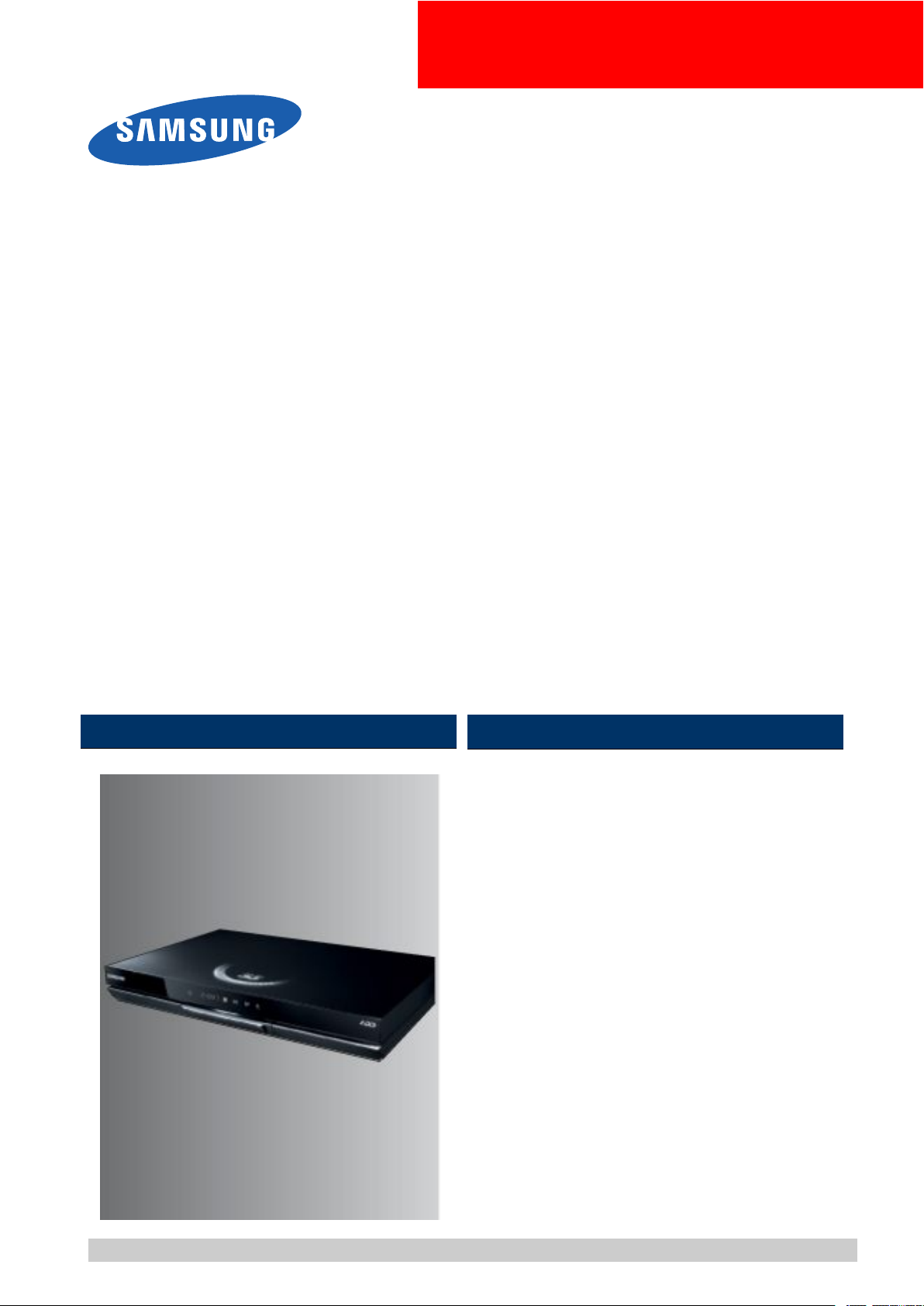
Blu-rayDiscPlayer
BASIC:BD-D8909S
Application
Models
ApplicationAreaZG
MANUAL
BD-D8509S/BD-D8200S
SERVICE
Blu-RayDiscPlayer
1.Precautions
2.ProductSpecications
3.DisassemblyandReassembly
4.Troubleshooting
5.PCBDiagrams
6.SchematicDiagrams
Contents
RefertotheservicemanualintheGSPN(seetherearcover)formoreinformation.
Page 2

Contents
Contents
1.Precautions......................................................................................................................................1−1
1.1.SafetyPrecautions...................................................................................................................1−1
1.2.ServicingPrecautions...............................................................................................................1−3
1.2.1.GeneralServicingPrecautions.......................................................................................1−3
1.2.2.InsulationCheckingProcedure.......................................................................................1−3
1.3.ESDPrecautions......................................................................................................................1−4
1.4.Handlingtheopticalpick-up......................................................................................................1−5
2.ProductSpecications........................................................................................................................2−1
2.1.ProductSpecication................................................................................................................2−1
2.1.1.PlayerFeatures...........................................................................................................2−2
2.1.2.Blu-rayDiscFeatures...................................................................................................2−2
2.1.3.DiscTypesandContentsthatcanbeplayed......................................................................2−3
2.1.4.Disctypesthatcannotbeplayed.....................................................................................2−4
2.1.5.Regioncode...............................................................................................................2−4
2.1.6.Blu-rayDiscCompatibility............................................................................................2−6
2.1.7.DiscTypes.................................................................................................................2−6
2.1.8.SupportedFileFormats.................................................................................................2−7
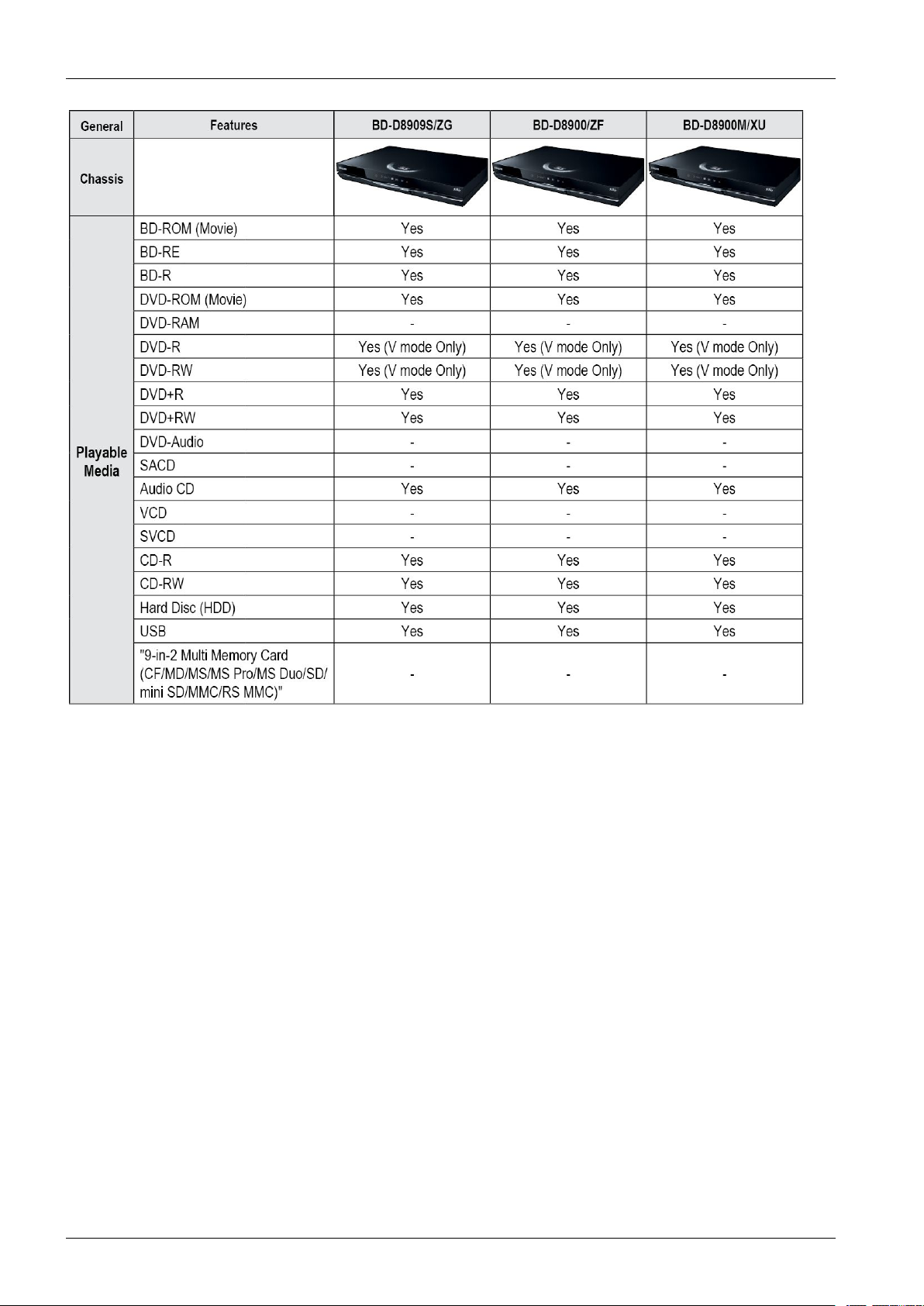
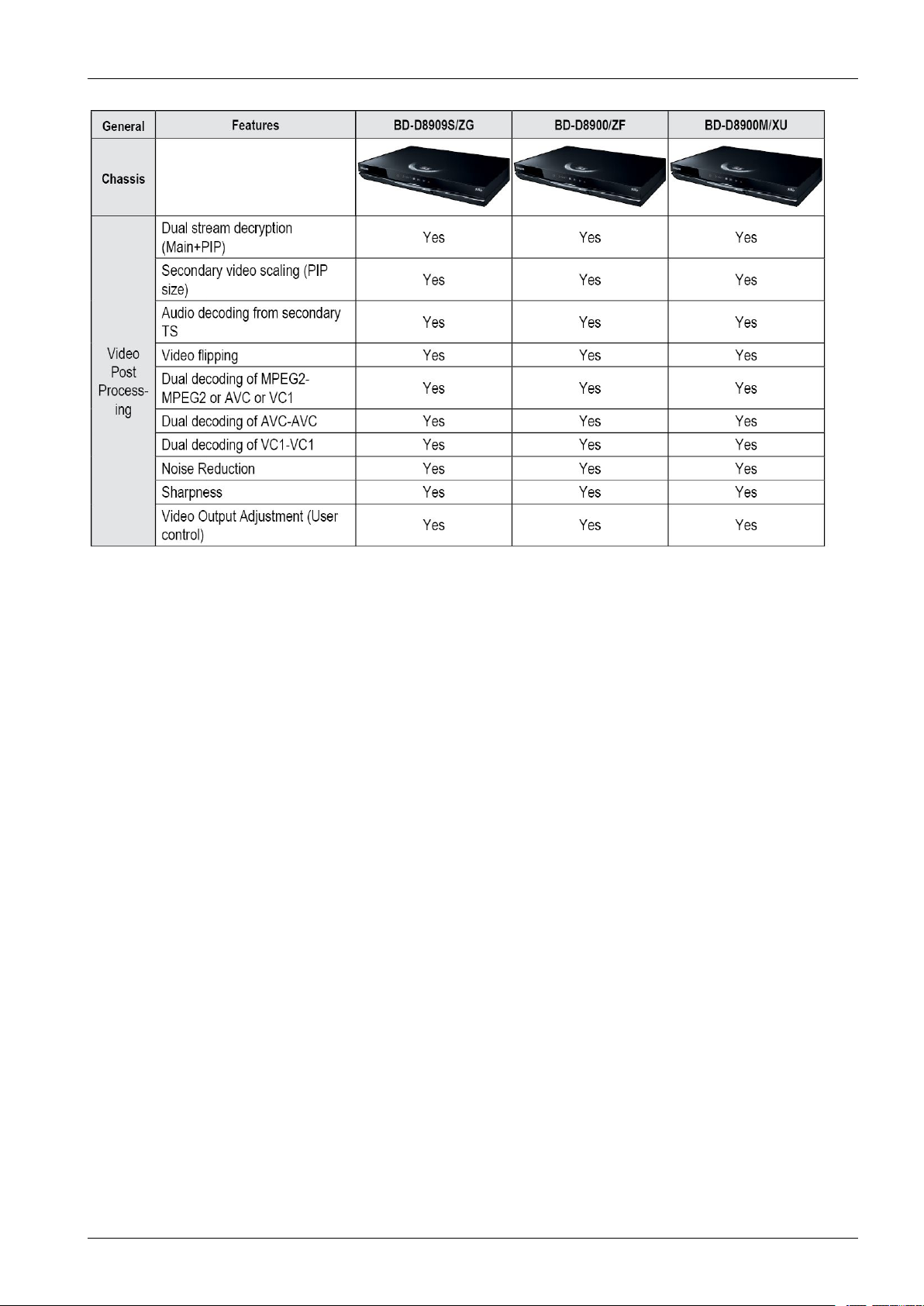
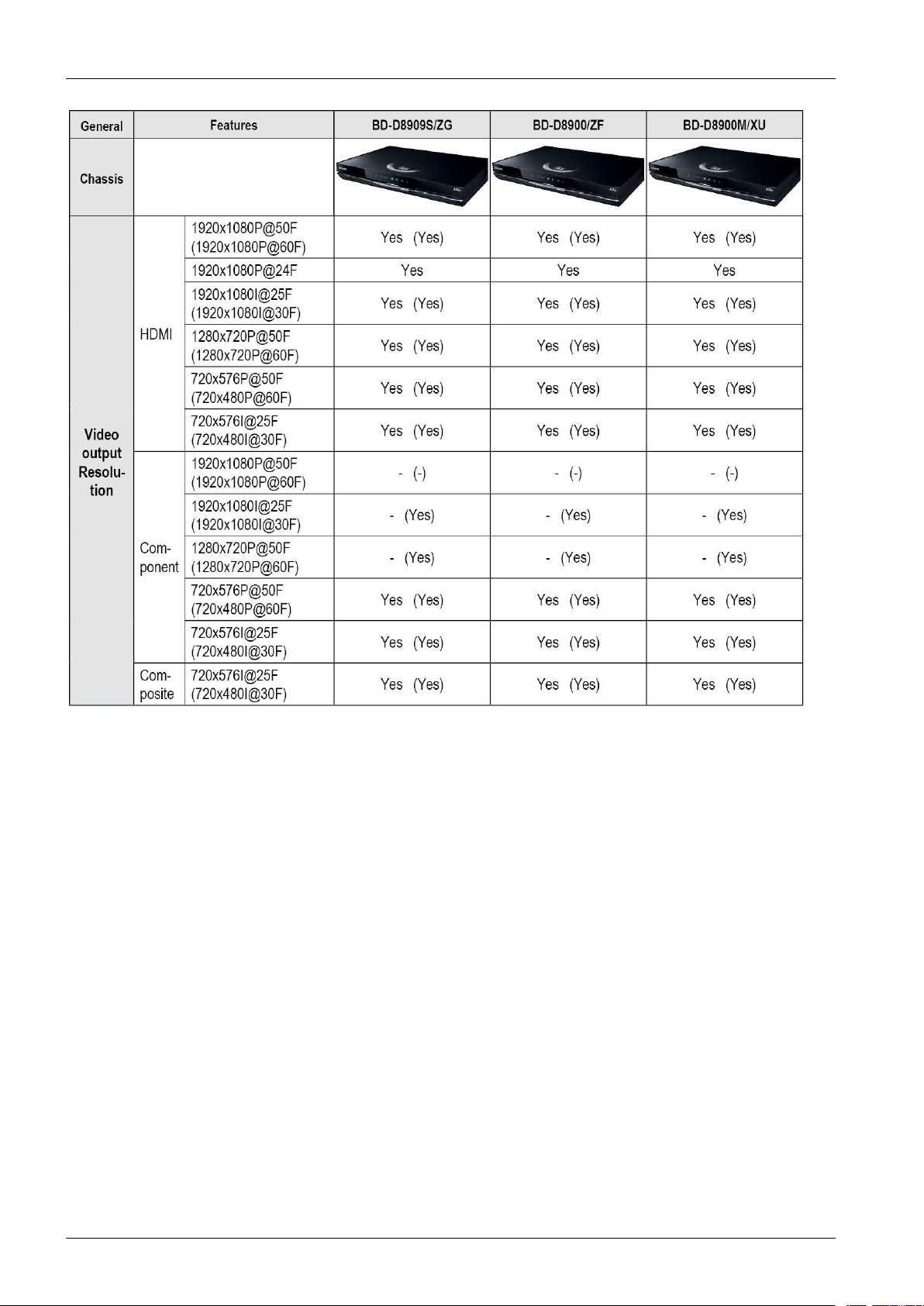
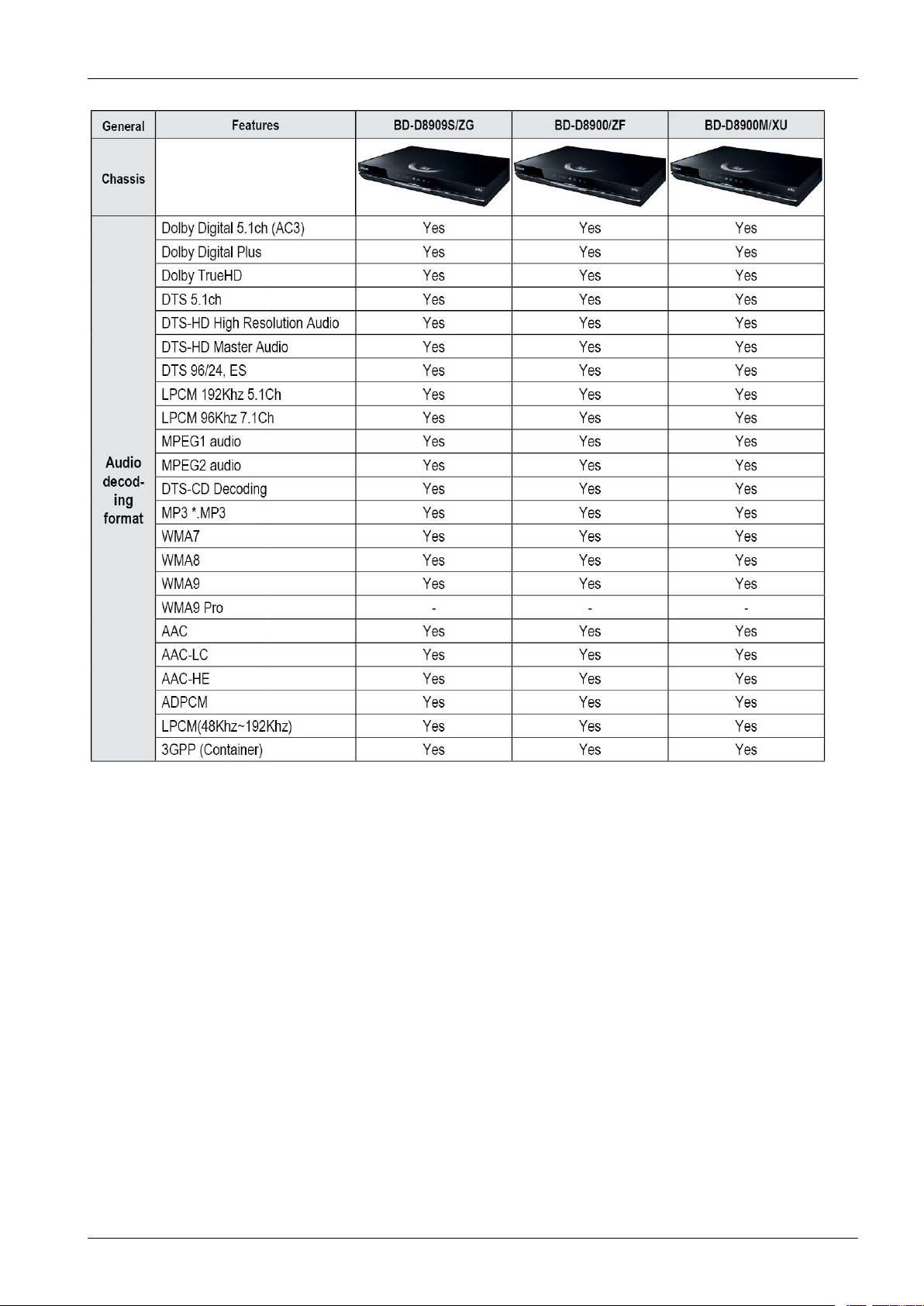
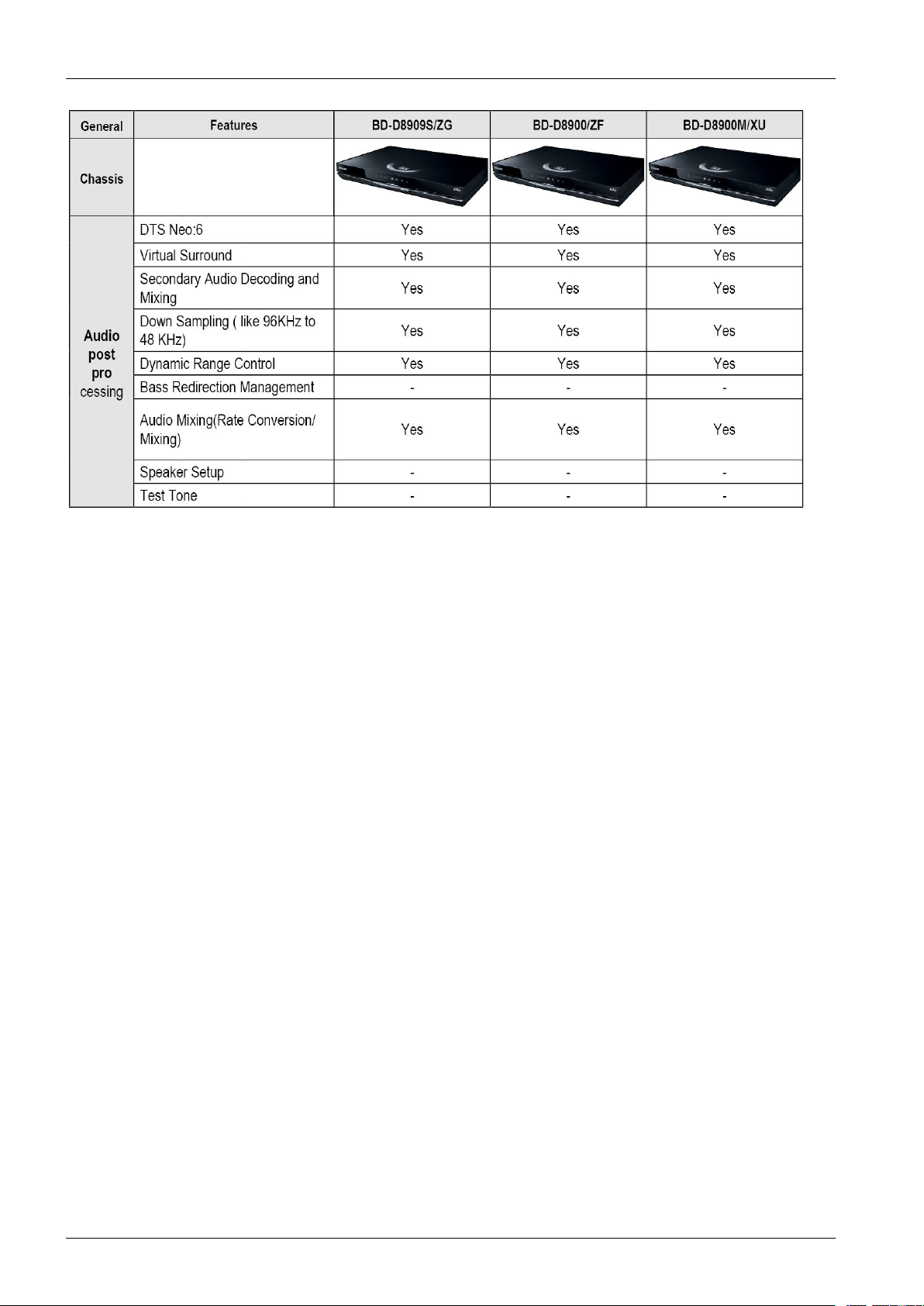
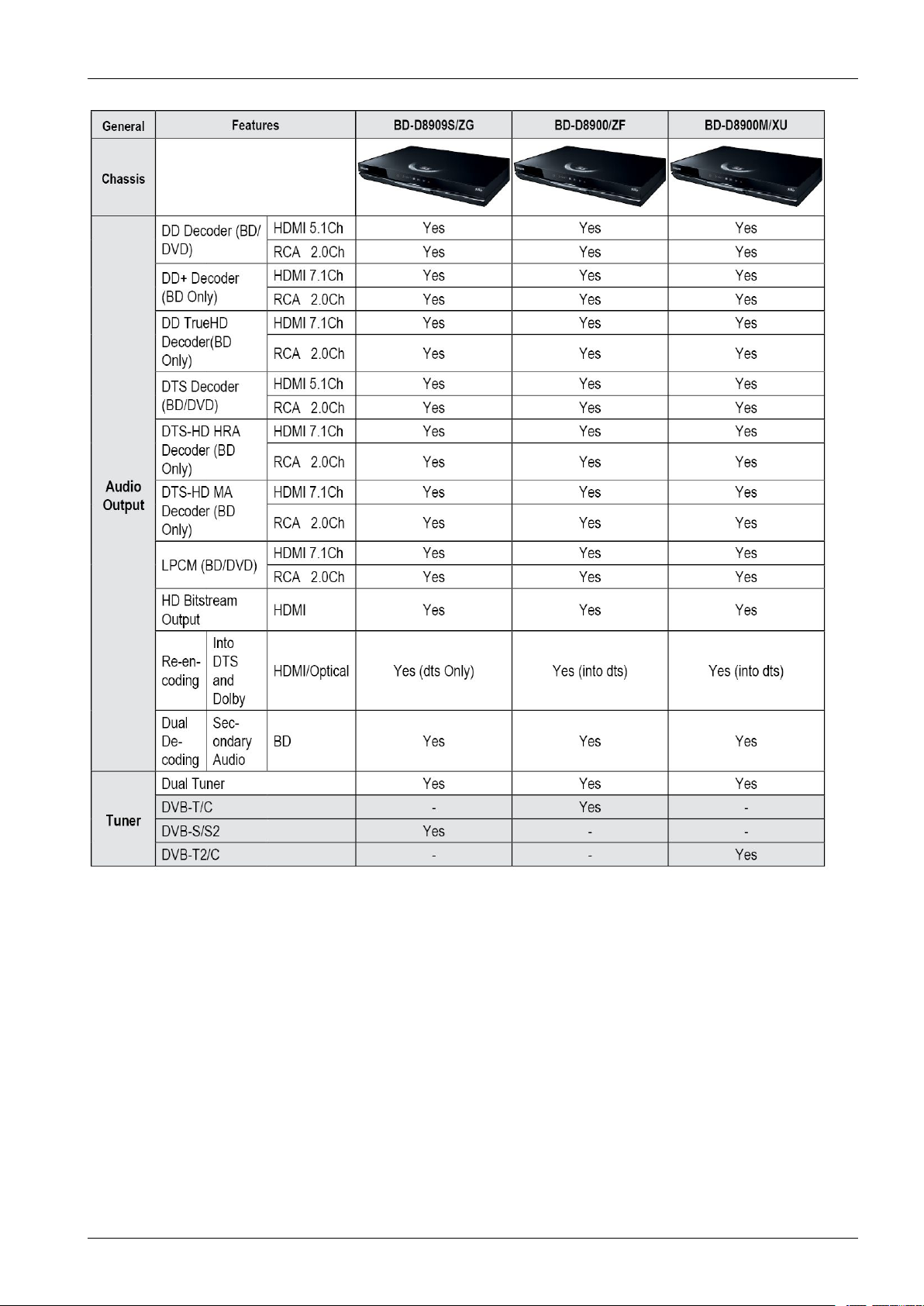
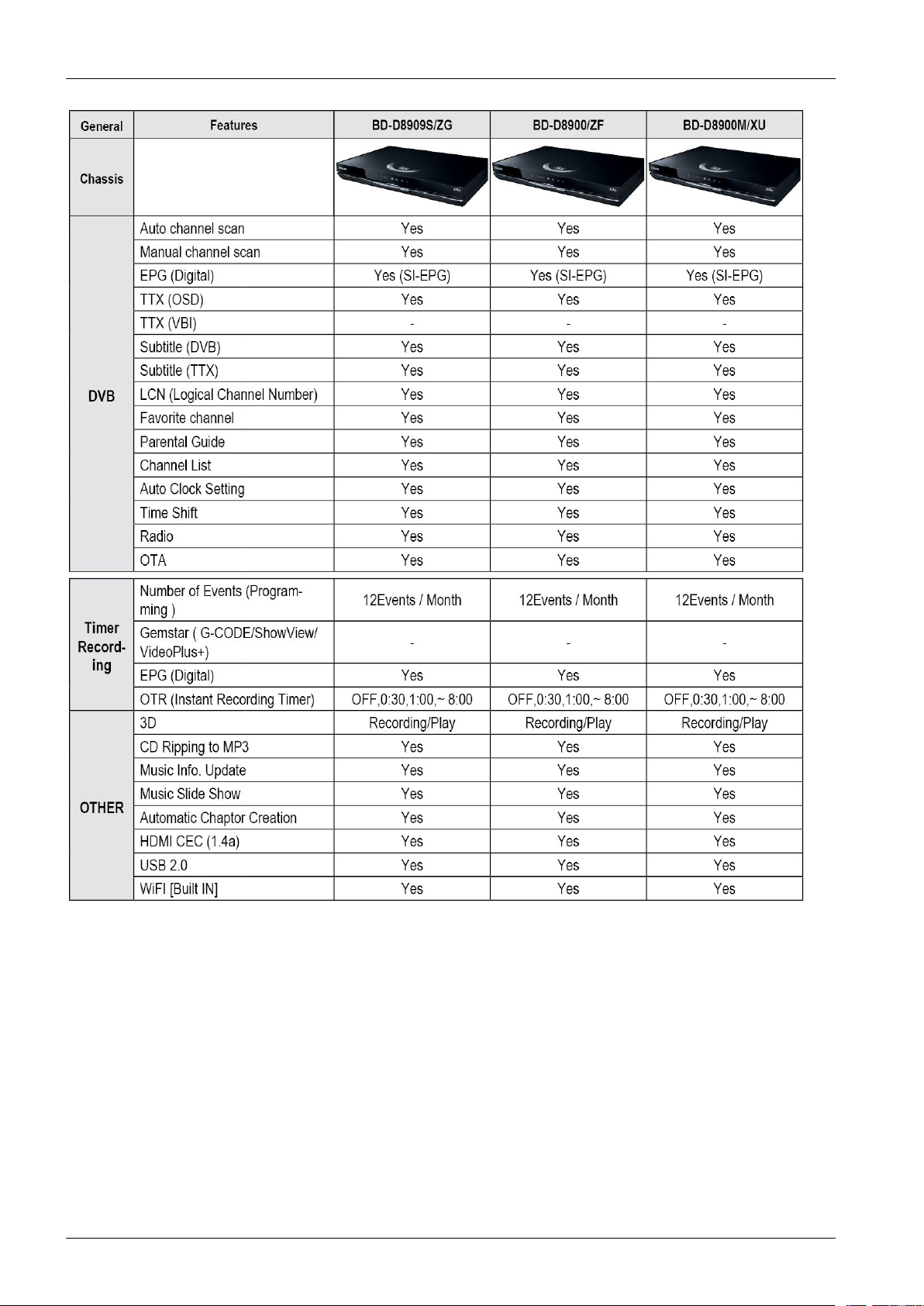
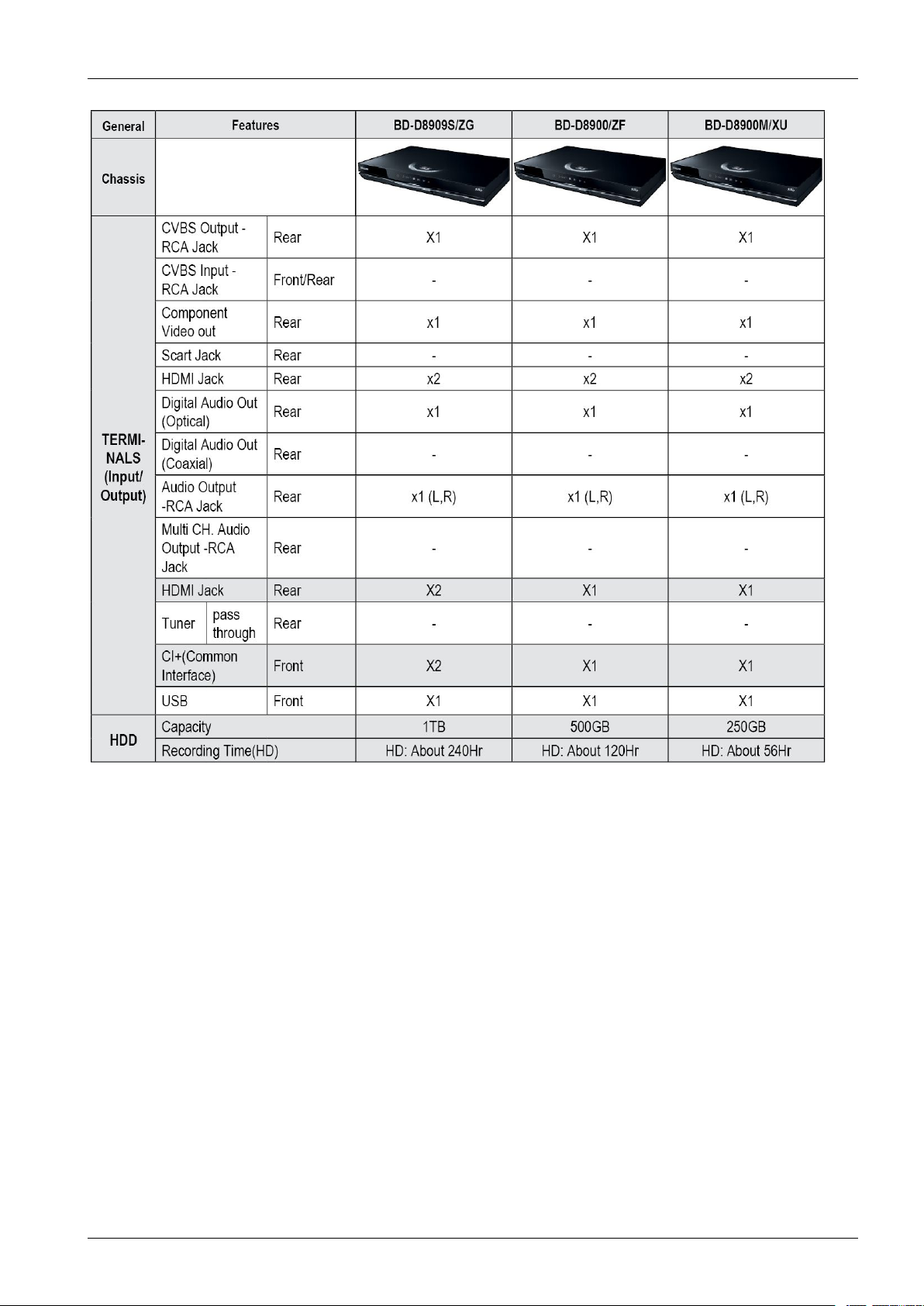
2.2.ChassisProductSpecication.....................................................................................................2−11
2.3.OptionProductSpecication......................................................................................................2−21
3.DisassemblyandReassembly..............................................................................................................3−1
3.1.CabinetandPCB.....................................................................................................................3−1
3.1.1.TopCabinetRemoval...................................................................................................3−1
3.1.2.AssyFront-CabinetRemoval.........................................................................................3−2
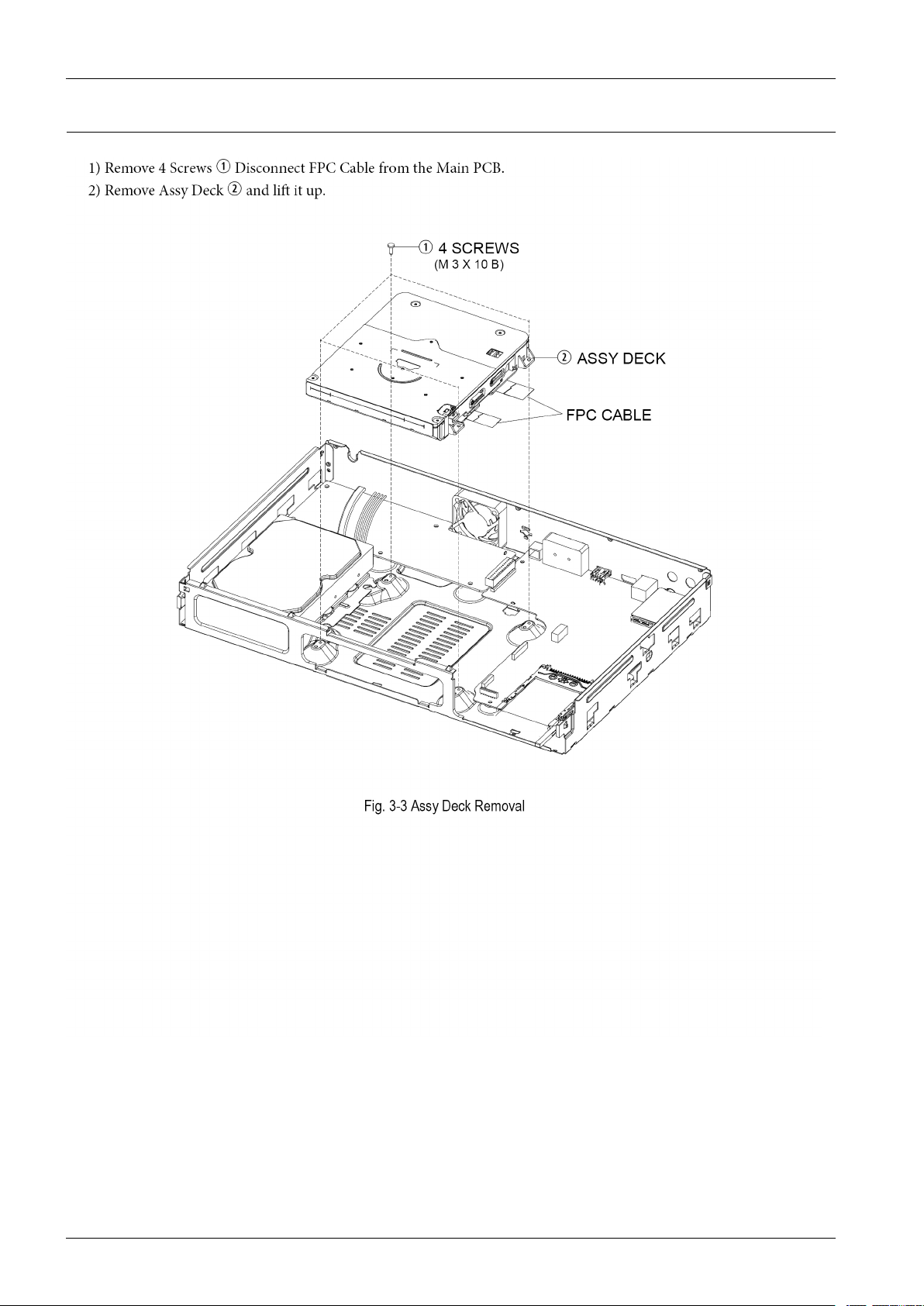
3.1.3.AssyDeckRemoval.....................................................................................................3−3
3.1.4.AssyHDDRemoval....................................................................................................3−4
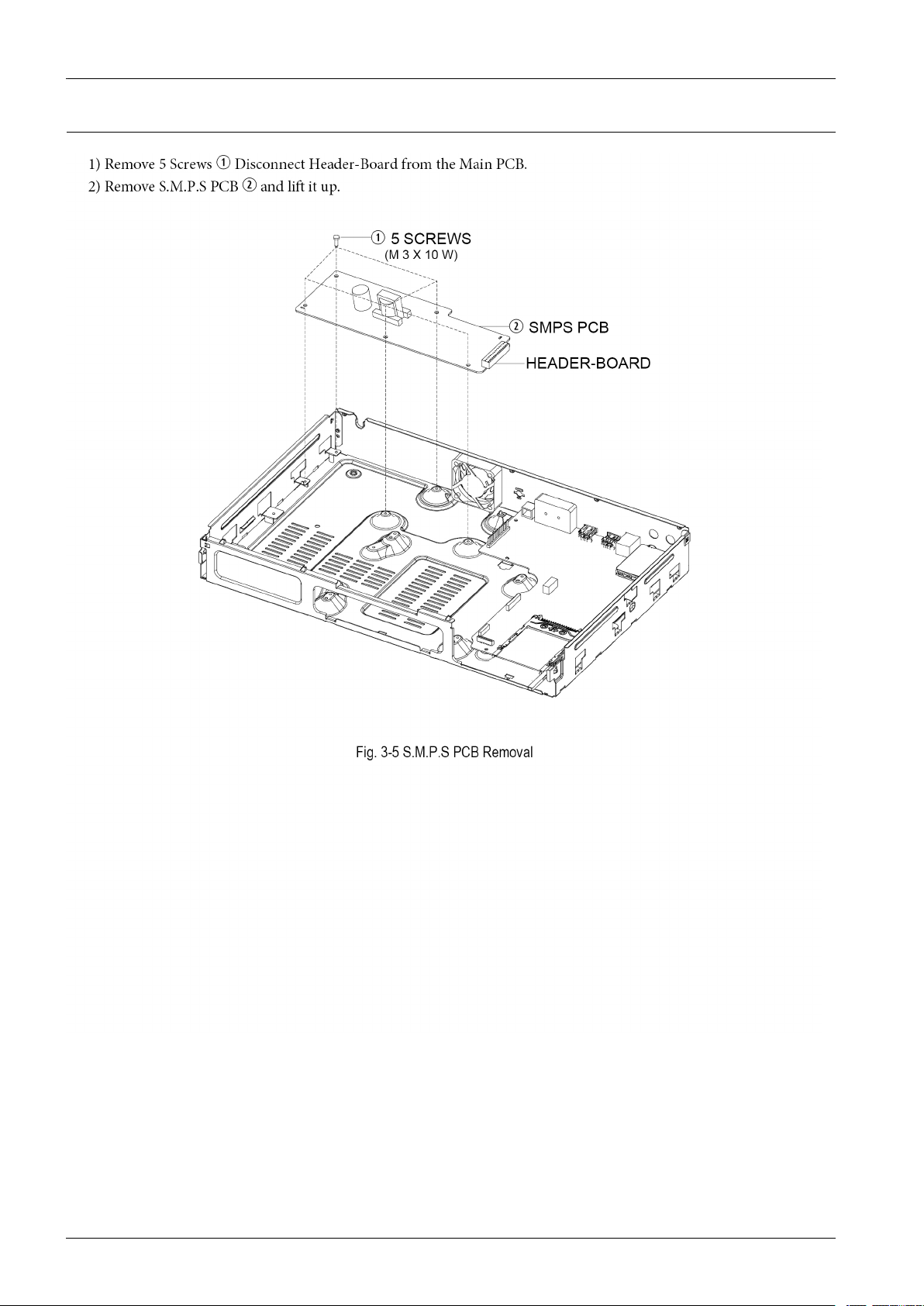
3.1.5.SMPSPCBRemoval....................................................................................................3−5
3.1.6.FanRemoval..............................................................................................................3−6
3.1.7.MainPCBRemoval.....................................................................................................3−7
3.1.8.AssyLEDPCBRemoval..............................................................................................3−8
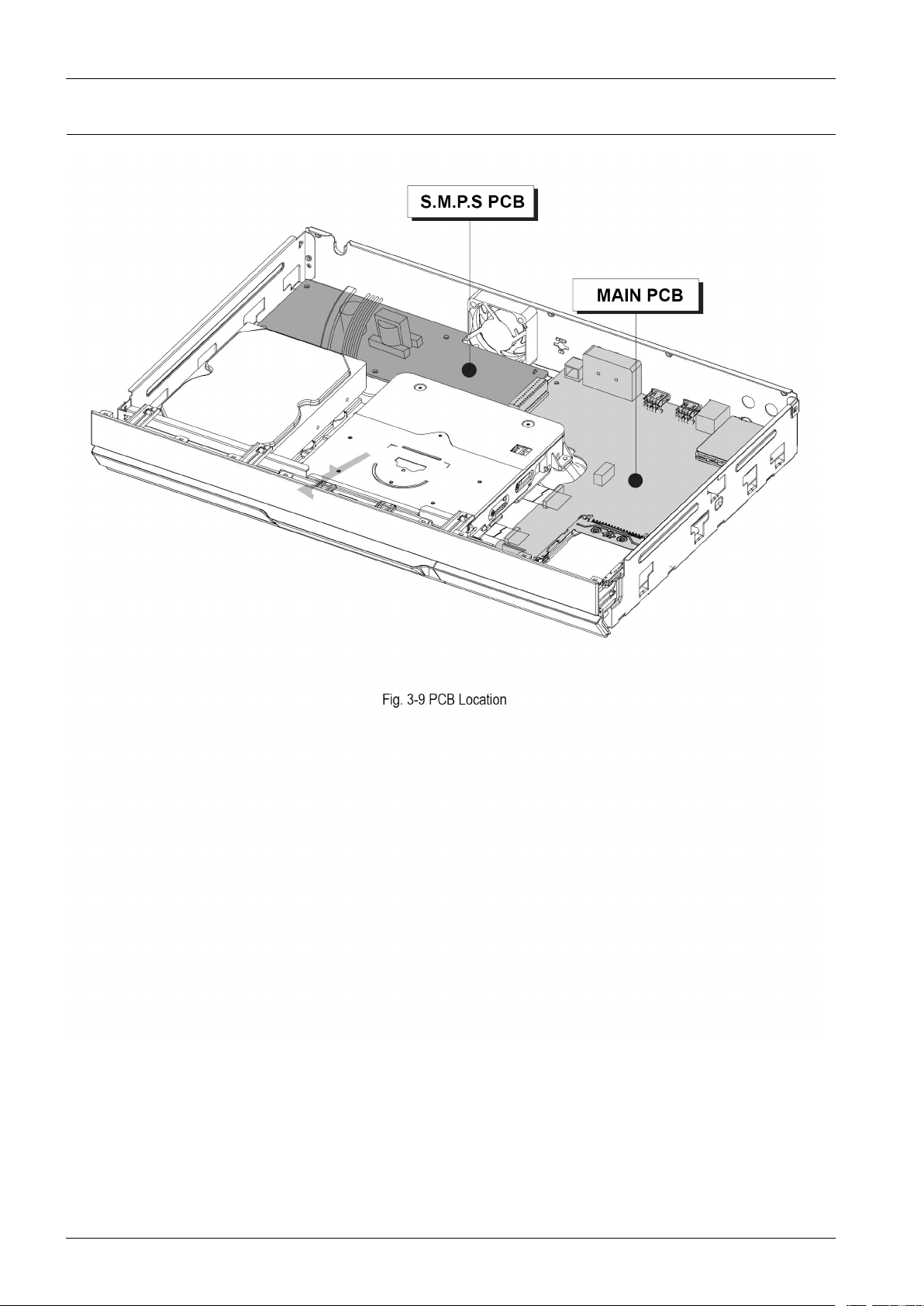
3.2.PCBLocation.........................................................................................................................3−9
4.Troubleshooting................................................................................................................................4−1
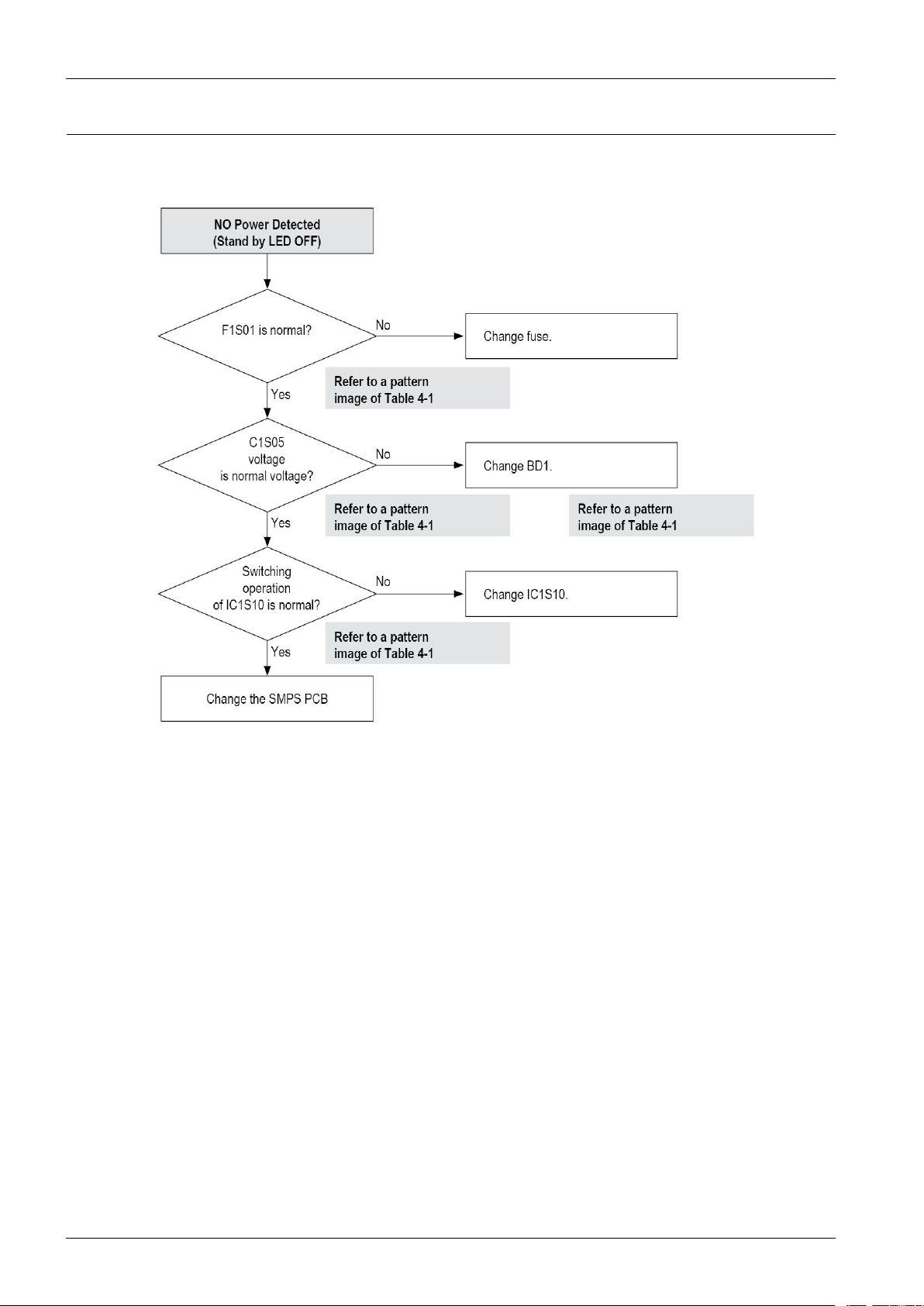
4.1.Troubleshooting......................................................................................................................4−2
4.2.SoftwareUpdate......................................................................................................................4−24
4.2.1.Upgrade.....................................................................................................................4−24
5.PCBDiagrams..................................................................................................................................5−1
5.1.WiringDiagram.......................................................................................................................5−2
5.2.MainPCB..............................................................................................................................5−3
5.3.S.M.P.SPCB...........................................................................................................................5−6
iCopyright©1995-2011SAMSUNG.Allrightsreserved.
Page 3

Contents
5.4.FrontPCB..............................................................................................................................5−8
5.5.USBPCB...............................................................................................................................5−9
5.6.TopLEDPCB.........................................................................................................................5−10
6.SchematicDiagrams..........................................................................................................................6−1
6.1.AllBlockDiagram...................................................................................................................6−2
6.2.Power....................................................................................................................................6−3
6.2.1.AboutS.M.P .S(RingingChokeConverterMethod)............................................................6−3
6.2.2.Circuitdescripcotion[FL Y -BackRCC(RingingChokeConverter)]Control............................6−3
6.2.3.InternalBlockDiagram(InternalBlockDiagramofS.M.P .SCircuit)....................................6−5
6.3.S.M.P.S(S.M.P .SPCB).............................................................................................................6−6
6.4.AnalogA VOut(MainPCB)......................................................................................................6−7
6.5.USB_EthernetBlock(MainPCB)...............................................................................................6−9
6.6.HDMI1Out(MainPCB)...........................................................................................................6−10
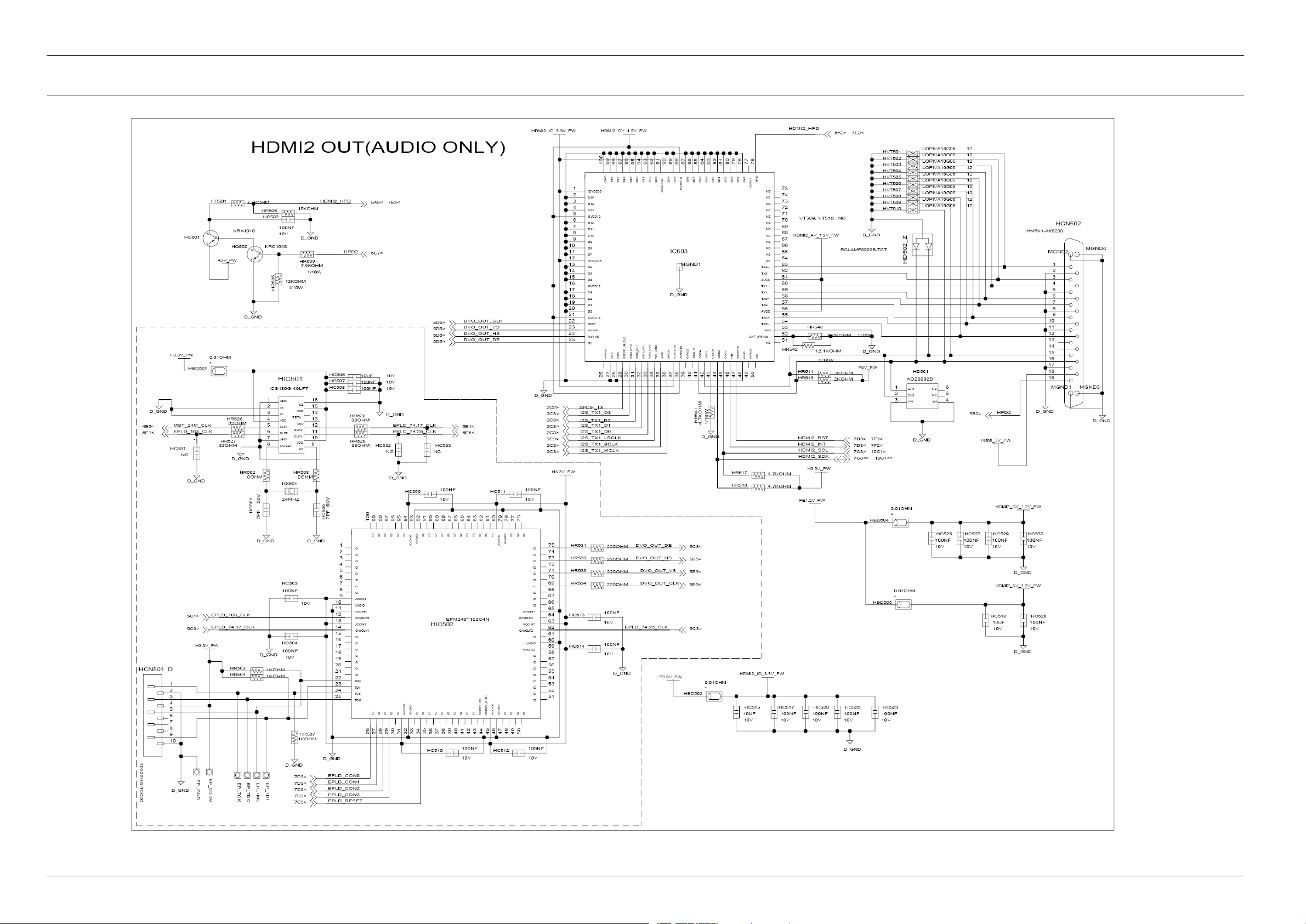
6.7.HDMI2Out(AudioOnly)(MainPCB)........................................................................................6−11
6.8.DDR3-SDRAMBlock(MainPCB).............................................................................................6−12
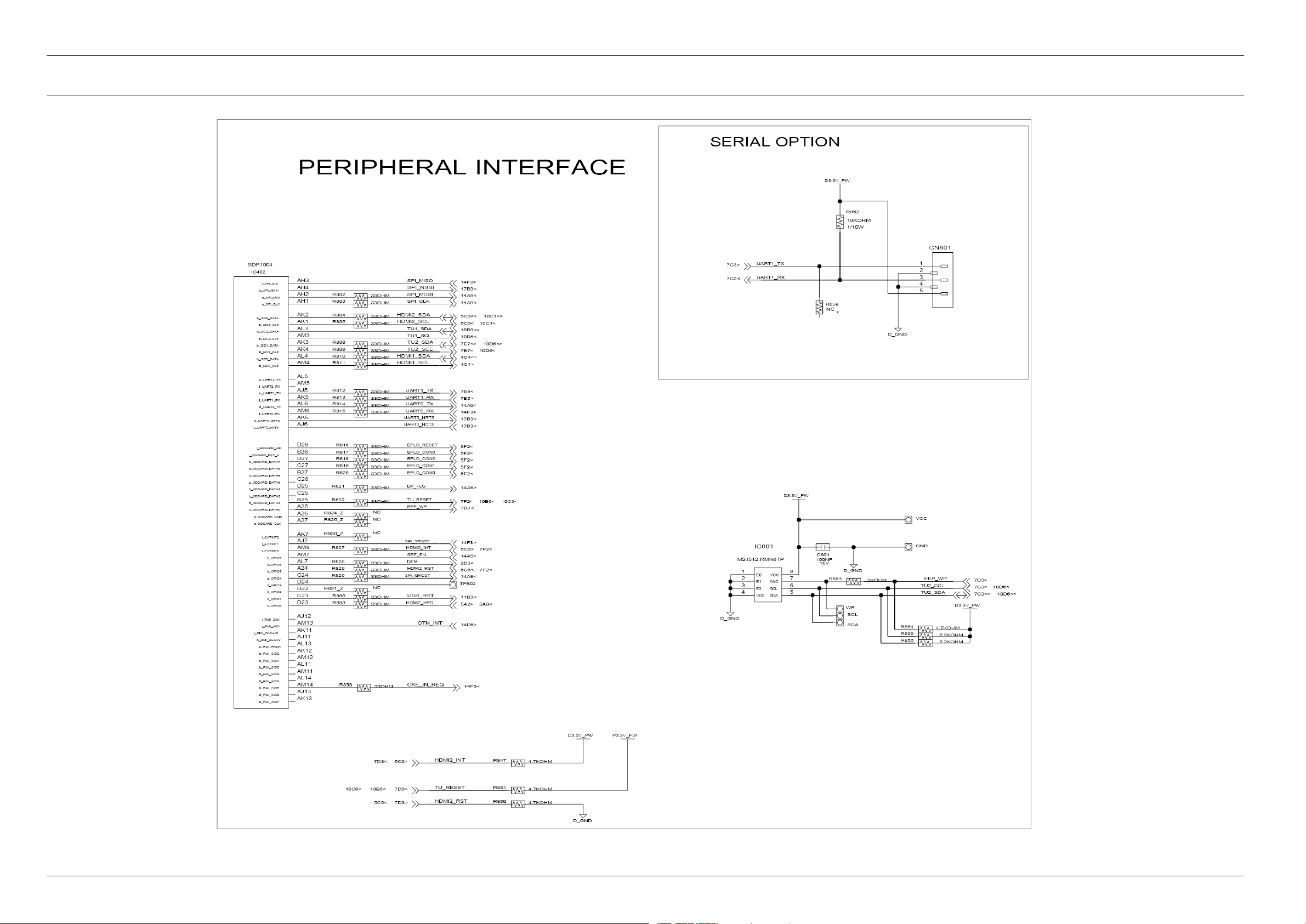
6.9.PeripheralInterface(MainPCB).................................................................................................6−13
6.10.SATAInterface(MainPCB)......................................................................................................6−14
6.11.SLC-NANDFlash(MainPCB)..................................................................................................6−15
6.12.DVB-S2Nim_DUALLNB(MainPCB)......................................................................................6−16
6.13.USBHUB(MainPCB).............................................................................................................6−17
6.14.CIMAX+(MainPCB)..............................................................................................................6−18
6.15.2CISLOT(MainPCB).............................................................................................................6−19
6.16.Front-Micom(MainPCB).........................................................................................................6−20
6.17.SOCPowerSupply(MainPCB).................................................................................................6−21
6.18.SystemPowerSupply(MainPCB)..............................................................................................6−22
6.19.JTAG-Debug(MainPCB).........................................................................................................6−23
6.20.MotorDriver_OPUConnection(MainPCB).................................................................................6−24
6.21.Front-EndConnection(MainPCB).............................................................................................6−25
6.22.Front(FrontPCB)....................................................................................................................6−26
6.23.USB(USBPCB).....................................................................................................................6−27
6.24.TopLED(LEDPCB)...............................................................................................................6−28
Copyright©1995-2011SAMSUNG.Allrightsreserved.ii
Page 4
1.Precautions
1.Precautions
1.1.SafetyPrecautions
1)Beforereturninganinstrumenttothecustomer,alwaysmakeasafetycheckoftheentireinstrument,including,butnot
limitedto,thefollowingitems:
a)Besurethatnobuilt-inprotectivedevicesaredefectiveorhavebeendefeatedduringservicing
i)Protectiveshieldsareprovidedtoprotectboththetechnicianandthecustomer.Correctlyreplaceallmissing
protectiveshields,includinganyremovedforservicingconvenience.
ii)Whenreinstallingthechassisand/orotherassemblyinthecabinet,besuretoputbackinplaceallprotective
devices,including,butnotlimitedto,nonmetalliccontrolknobs,insulatingshpapers,adjustmentand
compartmentcovers/shields,andisolationresistor/capacitornetworks.Donotoperatethisinstrumentorpermit
ittobeoperatedwithoutallprotectivedevicescorrectlyinstalledandfunctioning.
b)Besurethattherearenocabinetopeningsthroughwhichadultsorchildrenmightbeabletoinserttheirngersand
contactahazardousvoltage.Suchopeningsinclude,butarenotlimitedto,excessivelywidecabinetventilation
slots,andanimproperlyttedand/orincorrectlysecuredcabinetbackcover.
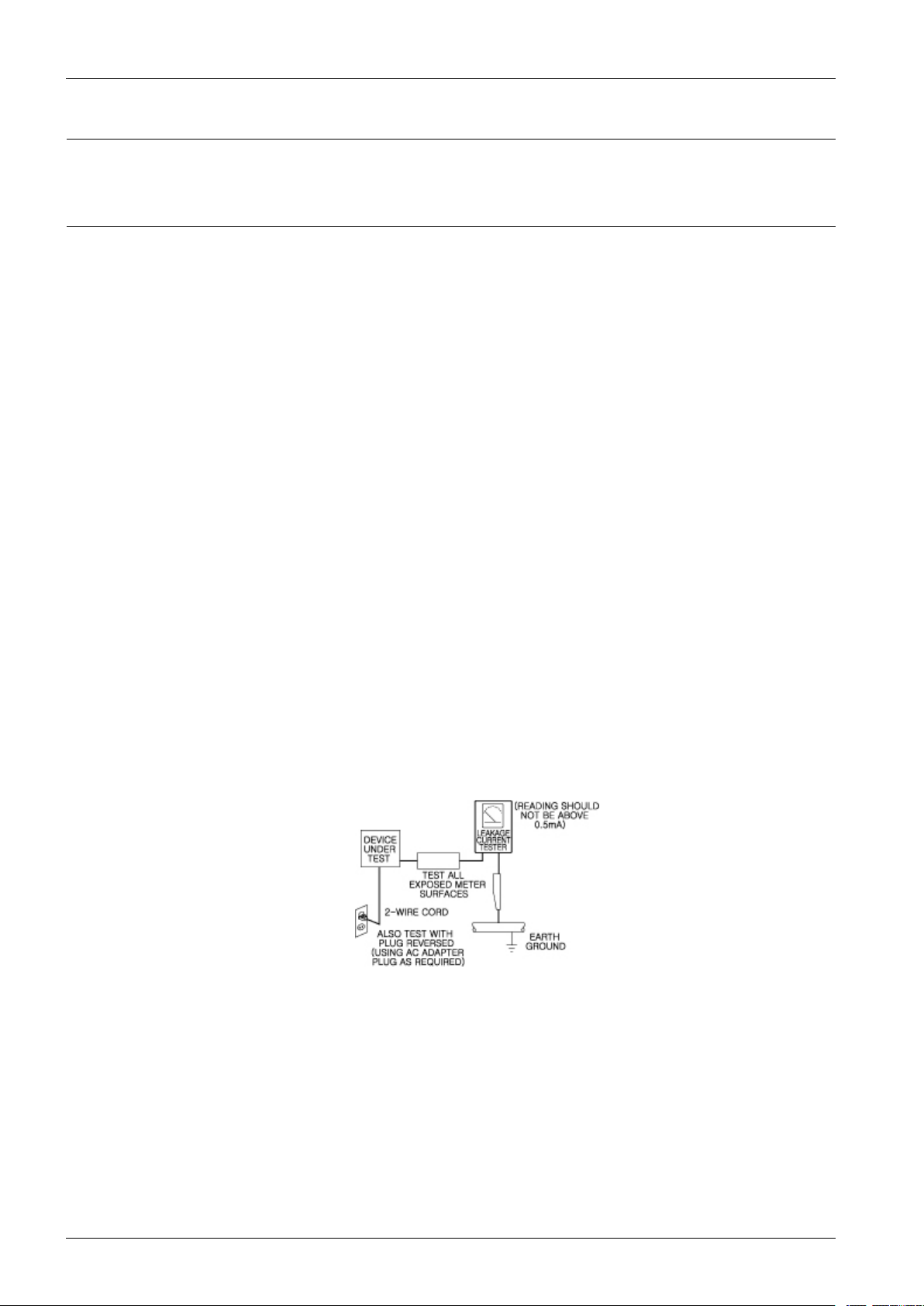
c)LeakageCurrentHotCheck—Withtheinstrumentcompletelyreassembled,plugtheAClinecorddirectlyintoa
230V(220V~240V)ACoutlet.(Donotuseanisolationtransformerduringthistest.)
UsealeakagecurrenttesterorameteringsystemthatcomplieswithAmericanNationalStandardInstitute(ANSI)
C101.1LeakageCurrentforAppliancesandUnderwritersLaboratories(UL)1270(40.7).Withtheinstrument’ s
ACswitchrstintheONpositionandthenintheOFFposition,measurefromaknownearthground(metal
waterpipe,conduit,etc.)toallexposedmetalpartsoftheinstrument(antennas,handlebrackets,metalcabinets,
screwheads,metallicoverlays,controlshafts,etc.),especiallyanyexposedmetalpartsthatofferanelectrical
returnpathtothechassis.
Anycurrentmeasuredmustnotexceed0.5mA.
Reversetheinstrumentpowercordplugintheoutletandrepeatthetest.See
Anymeasurementsnotwithinthelimitsspeciedhereinindicateapotentialshockhazardthatmustbeeliminated
beforereturningtheinstrumenttothecustomer.
Figure1.1ACLeakageT est
1-1Copyright©1995-2011SAMSUNG.Allrightsreserved.
Page 5
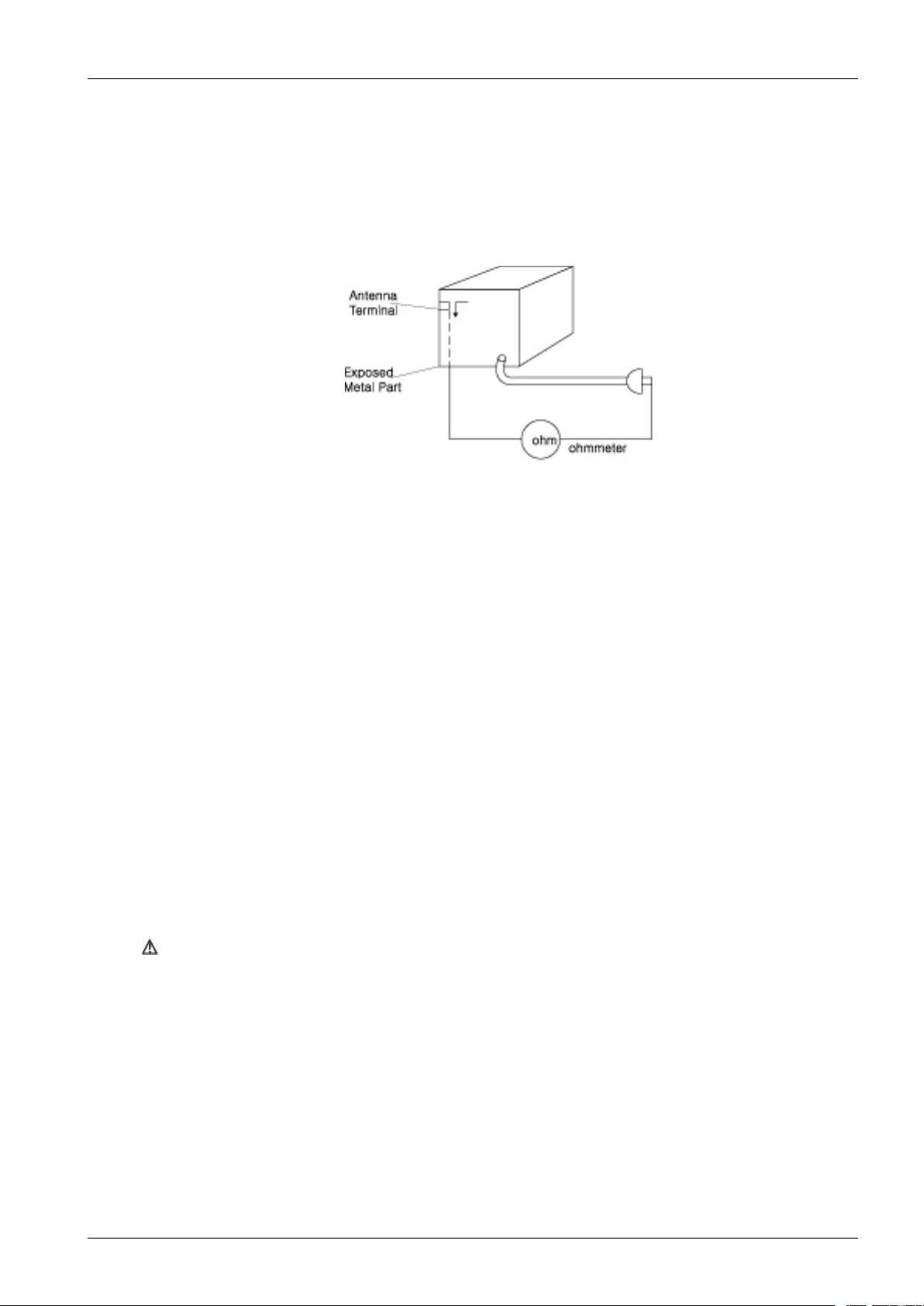
d)InsulationResistanceT estColdCheck—(1)Unplugthepowersupplycordandconnectajumperwirebetween
thetwoprongsoftheplug.(2)Turnonthepowerswitchoftheinstrument.(3)Measuretheresistancewith
anohmmeterbetweenthejumperedACplugandallexposedmetalliccabinetpartsontheinstrument,suchas
screwheads,antenna,controlshafts,handlebrackets,etc.Whenanexposedmetallicparthasareturnpathtothe
chassis,thereadingshouldbebetween1and5.2megohm.Whenthereisnoreturnpathtothechassis,thereading
mustbeinnite.Ifthereadingisnotwithinthelimitsspecied,thereisthepossibilityofashockhazard,andthe
instrumentmustberepairedandrecheckedbeforeitisreturnedtothecustomer.See
1.Precautions
2)Readandcomplywithallcautionandsafetyrelatednotesonorinsidethecabinet,oronthechassis.
3)DesignAlterationWarning—Donotalteroraddtothemechanicalorelectricaldesignofthisinstrument.
Designalterationsandadditions,includingbutnotlimitedto,circuitmodicationsandtheadditionofitemssuchas
auxiliaryaudiooutputconnections,mightalterthesafetycharacteristicsofthisinstrumentandcreateahazardtothe
user.Anydesignalterationsoradditionswillmakeyou,theservicer,responsibleforpersonalinjuryorproperty
damageresultingtherefrom.
4)Observeoriginalleaddress.T akeextracaretoassurecorrectleaddressinthefollowingareas:
(1)nearsharpedges,(2)nearthermallyhotparts(besurethatleadsandcomponentsdonottouchthermallyhotparts),
(3)theACsupply,(4)highvoltage,and(5)antennawiring.Alwaysinspectinallareasforpinched,out-of-place,or
frayedwiring,Donotchangespacingbetweenacomponentandtheprinted-circuitboard.ChecktheACpowercord
fordamage.
5)Components,parts,and/orwiringthatappeartohaveoverheatedorthatareotherwisedamagedshouldbereplacedwith
components,partsand/orwiringthatmeetoriginalspecications.
Additionally,determinethecauseofoverheatingand/ordamageand,ifnecessary,takecorrectiveactiontoremove
anypotentialsafetyhazard.
6)ProductSafetyNotice—Someelectricalandmechanicalpartshavespecialsafety-relatedcharacteristicswhichare
oftennotevidentfromvisualinspection,norcantheprotectiontheygivenecessarilybeobtainedbyreplacingthemwith
componentsratedforhighervoltage,wattage,etc.Partsthathavespecialsafetycharacteristicsareidentiedbyshading,
an(
)schematicsandpartslists.Useofasubstitutereplacementthatdoesnothavethesamesafetycharacteristics
astherecommendedreplacementpartmightcreateshock,reand/orotherhazards.Productsafetyisunderreview
continuouslyandnewinstructionsareissuedwheneverappropriate.
Copyright©1995-2011SAMSUNG.Allrightsreserved.1-2
Page 6

1.Precautions
1.2.ServicingPrecautions
CAUTION
Beforeservicingunitscoveredbythisservicemanualanditssupplements,readandfollowtheSafetyPrecautions
sectionofthismanual.
NOTE
Ifunforeseencircumstancescreateconictbetweenthefollowingservicingprecautionsandanyofthesafetyprecautions,
alwaysfollowthesafetyprecautions.Remember:SafetyFirst.
1.2.1.GeneralServicingPrecautions
1)a.Alwaysunplugtheinstrument’ sACpowercordfromtheACpowersourcebefore(1)removingorreinstallingany
component,circuitboard,moduleoranyotherinstrumentassembly,(2)disconnectinganyinstrumentelectricalplugor
otherelectricalconnection,(3)connectingatestsubstituteinparallelwithanelectrolyticcapacitorintheinstrument.
b.Donotdamageanyplug/socketB+voltageinterlockswithwhichinstrumentscoveredbythisservicemanual
mightbeequipped.
c.DonotapplyACpowertothisinstrumentandoranyofitselectricalassembliesunlessallsolid-statedeviceheat
sinksarecorrectlyinstalled.
d.Alwaysconnectatestinstrument’sgroundleadtotheinstrumentchassisgroundbeforeconnectingthetestinstrument
positivelead.Alwaysremovethetestinstrumentgroundleadlast.
NOTE
RefertotheSafetyPrecautionssectiongroundleadlast.
2)Theserviceprecautionsareindicatedorprintedonthecabinet,chassisorcomponents.Whenservicing,followthe
printedorindicatedserviceprecautionsandservicematerials.
3)Thecomponentsusedintheunithaveaspeciedameresistanceanddielectricstrength.Whenreplacingcomponents,
usecomponentswhichhavethesame.Componentsidentiedbyshading,inthecircuitdiagramareimportantforsafety
orforthecharacteristicsoftheunit.Alwaysreplacethemwiththeexactreplacementcomponents.
4)Aninsulationtubeortapeissometimesusedandsomecomponentsareraisedabovetheprintedwiringboardfor
safety.Theinternalwiringissometimesclampedtopreventcontactwithheatingcomponents.Installsuchelements
astheywere.
5)Afterservicing,alwayscheckthattheremovedscrews,components,andwiringhavebeeninstalledcorrectlyandthat
theportionaroundtheservicedparthasnotbeendamagedandsoon.
Further,checktheinsulationbetweenthebladesoftheattachmentplugandaccessibleconductiveparts.
1.2.2.InsulationCheckingProcedure
DisconnecttheattachmentplugfromtheACoutletandturnthepowerON.Connecttheinsulationresistancemeter(500V)
tothebladesoftheattachmentplug.Theinsulationresistancebetweeneachbladeoftheattachmentplugandaccessible
conductiveparts(seenote)shouldbemorethan1Megohm.
NOTE
Accessibleconductivepartsincludemetalpanels,inputterminals,earphonejacks,etc.
1-3Copyright©1995-2011SAMSUNG.Allrightsreserved.
Page 7

1.Precautions
1.3.ESDPrecautions
ElectrostaticallySensitiveDevices(ESD)
Somesemiconductor(solidstate)devicescanbedamagedeasilybystaticelectricity.
SuchcomponentscommonlyarecalledElectrostaticallySensitiveDevices(ESD).ExamplesoftypicalESDdevicesare
integratedcircuitsandsomeeld-effecttransistorsandsemiconductorchipcomponents.Thefollowingtechniquesshould
beusedtohelpreducetheincidenceofcomponentdamagecausedbystaticelectricity.
1)Immediatelybeforehandlinganysemiconductorcomponentorsemiconductor-equippedassembly,drainoffany
electrostaticchargeonyourbodybytouchingaknownearthground.Alternatively,obtainandwearacommercially
availabledischargingwriststrapdevice,whichshouldberemovedforpotentialshockreasonspriortoapplyingpower
totheunitundertest.
2)AfterremovinganelectricalassemblyequippedwithESDdevices,placetheassemblyonaconductivesurfacesuchas
aluminumfoil,topreventelectrostaticchargebuilduporexposureoftheassembly.
3)Useonlyagrounded-tipsolderingirontosolderorunsolderESDdevices.
4)Useonlyananti-staticsolderremovaldevices.Somesolderremovaldevicesnotclassiedas“anti-static”cangenerate
electricalchargessufcienttodamageESDdevices.
5)Donotusefreon-propelledchemicals.ThesecangenerateelectricalchargessufcienttodamageESDdevices.
6)DonotremoveareplacementESDdevicefromitsprotectivepackageuntilimmediatelybeforeinstallingit.(Most
replacementESDdevicesarepackagedwithleadselectricallyshortedtogetherbyconductivefoam,aluminumfoilor
comparableconductivematerials).
7)ImmediatelybeforeremovingtheprotectivematerialsfromtheleadsofareplacementESDdevice,touchtheprotective
materialtothechassisorcircuitassemblyintowhichthedevicewillbeinstalled.
CAUTION
Besurenopowerisappliedtothechassisorcircuit,andobserveallothersafetyprecautions.
8)MinimizebodymotionswhenhandlingunpackagedreplacementESDdevices.
(Otherwiseharmlessmotionssuchasthebrushingtogetherofyourclothesfabricortheliftingofyourfootfroma
carpetedoorcangeneratestaticelectricitysufcienttodamageanESDdevice).
Copyright©1995-2011SAMSUNG.Allrightsreserved.1-4
Page 8
1.Precautions
1.4.Handlingtheopticalpick-up
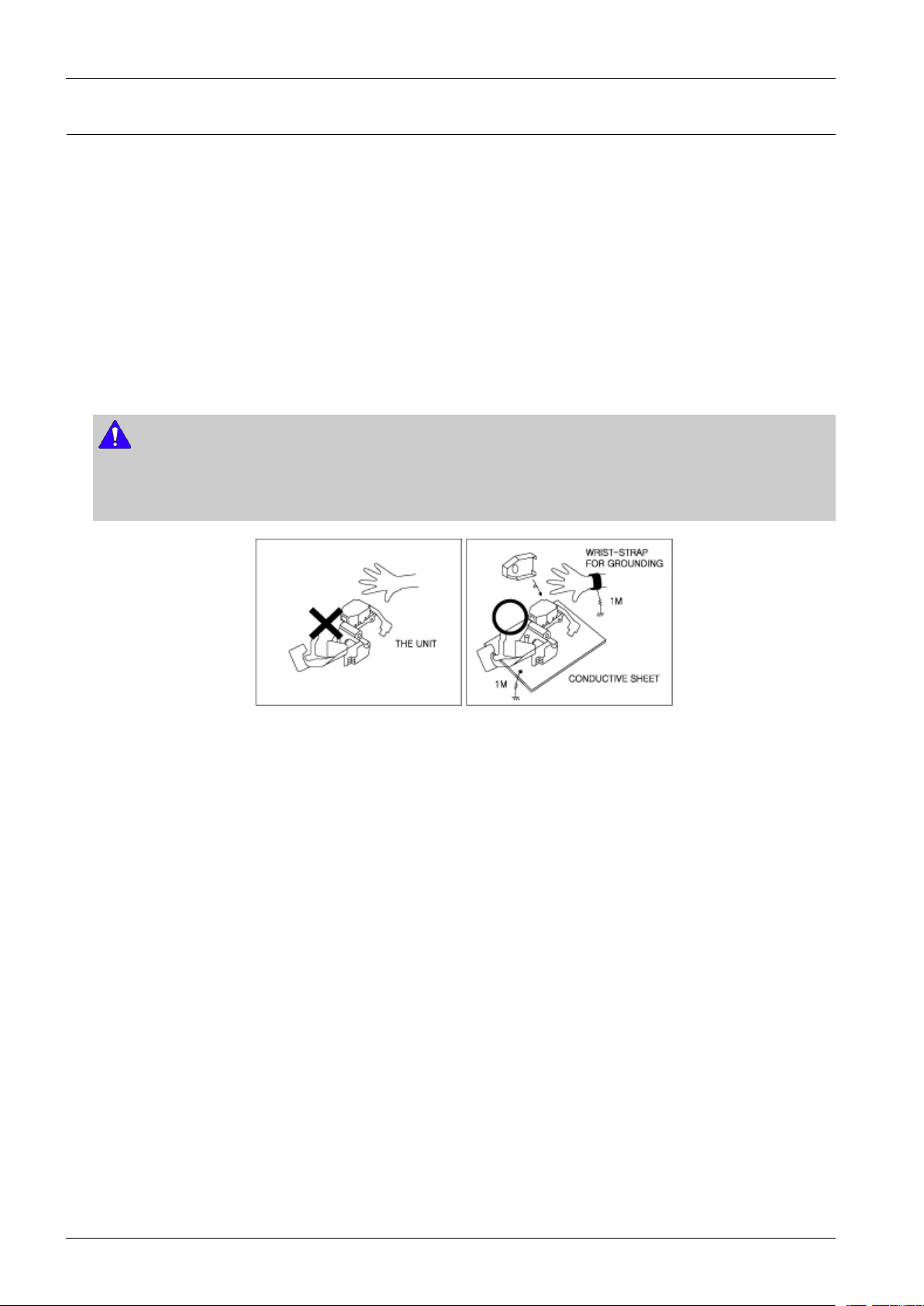
Thelaserdiodeintheopticalpickupmaysufferelectrostaticbreakdownbecauseofpotentialstaticelectricityfrom
clothingandyourbody.
Thefollowingmethodisrecommended.
1)Placeaconductivesheetontheworkbench(Theblacksheetusedforwrappingrepairparts.)
2)Placethesetontheconductivesheetsothatthechassisisgroundedtothesheet.
3)Placeyourhandsontheconductivesheet(Thisgivesthemthesamegroundasthesheet.)
4)Removetheopticalpickupblock
5)Performworkontopoftheconductivesheet.Becarefultoletyourclothesoranyotherstaticsourcestouchtheunit.
NOTE
•Besuretoputonawriststrapgroundedtothesheet.
•Besuretolayaconductivesheet,thatisgroundedtothetable,madeofcopper.
Fig.1-3
6)ShorttheshortterminalonthePCB,whichisinsidethePick-UpASS’Y ,beforereplacingthePick-Up.(Theshort
terminalisshortedwhenthePick-UpAss’yisbeingliftedormoved.)
7)AfterreplacingthePick-up,opentheshortterminalonthePCB.
1-5Copyright©1995-2011SAMSUNG.Allrightsreserved.
Page 9
2.ProductSpecications
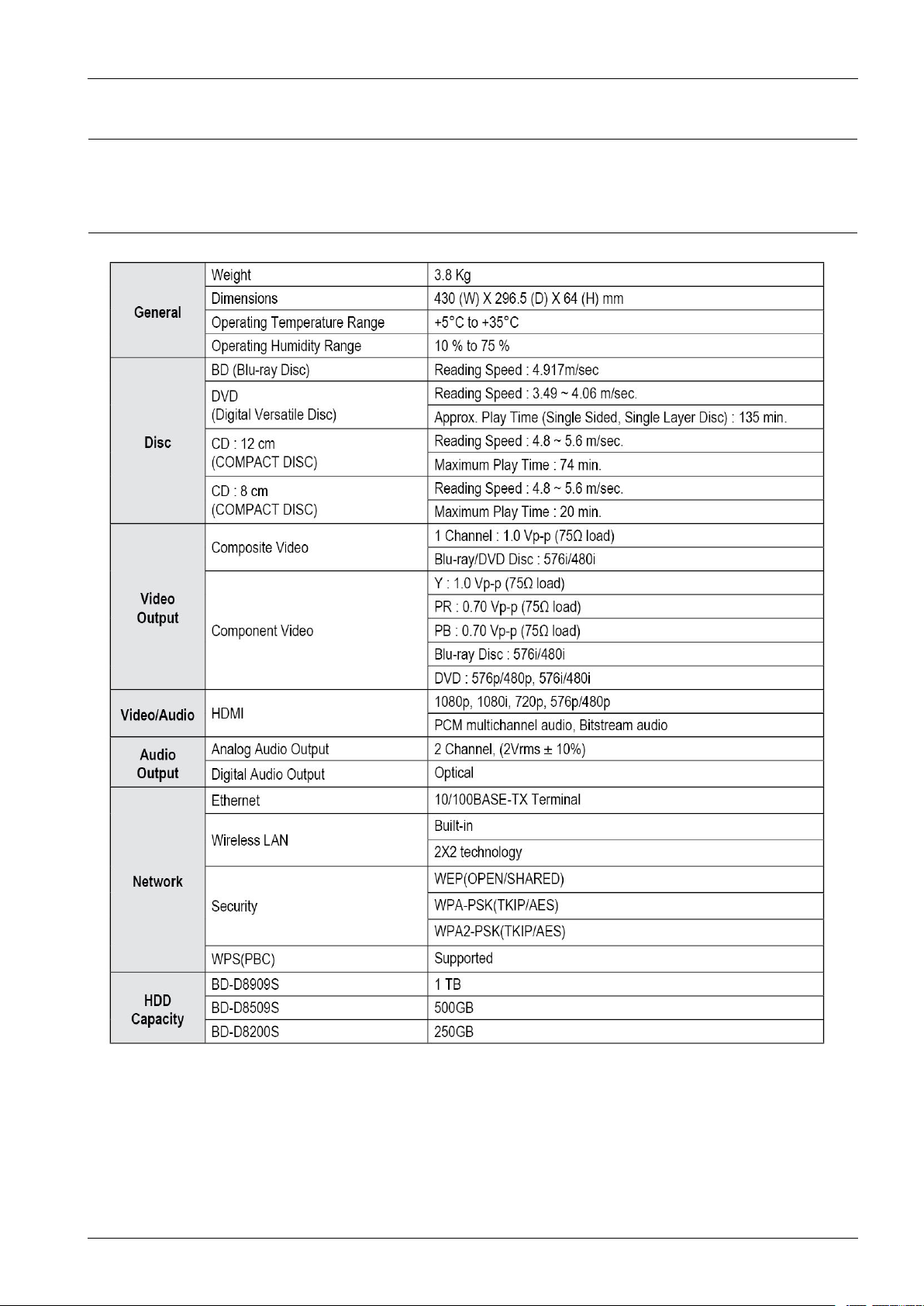
2.ProductSpecications
2.1.ProductSpecication
Copyright©1995-2011SAMSUNG.Allrightsreserved.2-1
Page 10
2.ProductSpecications
2.1.1.PlayerFeatures
•SupportsaV arietyofDiscT ypes
-Blu-ray(BD-ROM,BD-RE,BD-R),DVDV ideo,DVD-RW/-R(Vmodeandnalizedonly)discsandAudioCD.
-CD-RW/CD-R,DVD-RW/-RandUSBstoragedevicecontentsuchasMP3,JPEGandDivXles.
•HDMI(HighDenitionMultimediaInterface)
HDMIreducespicturenoisebyallowingapuredigitalvideo/audiosignalpathfromtheplayertoyourTV .
2.1.2.Blu-rayDiscFeatures
Blu-rayDiscscanstore25GB(singlelayer)or50GB(duallayer)onasinglesideddisc-about5to10timesthecapacity
ofaDVD.Blu-rayDiscsalsosupportthehighestqualityHDvideoavailableintheindustry(upto1920x1080at40
Mbit/sec)–Largecapacitymeansnocompromiseonvideoquality.Furthermore,aBlu-rayDischasthesamefamiliarsize
andlookasDVD.
NOTE
ThefollowingBlu-rayDiscfeaturesarediscdependantandwillvary.
Appearanceandnavigationoffeatureswillalsovaryfromdisctodisc.
Notalldiscswillhavethefeaturesdescribedbelow.
•Videohighlights
TheBD-ROMformatformoviedistributionsupportsthreehighlyadvancedvideocodecs,includingA VC,VC-1,
andMPEG-2.
HDvideoresolutionsarealsoavailable:
-1920x1080HD
-1280x720HD
•ForHigh-DenitionPlayback
Toviewhigh-denitioncontentsinBDdiscs,anHDTV(HighDenitionTelevision)isrequired.Somediscsmay
requireusingtheplayer'sHDMIOUTtoviewhigh-Denitioncontent.Theabilitytoviewhigh-Denitioncontenton
BDdiscsmaybelimiteddependingontheresolutionofyourTV .
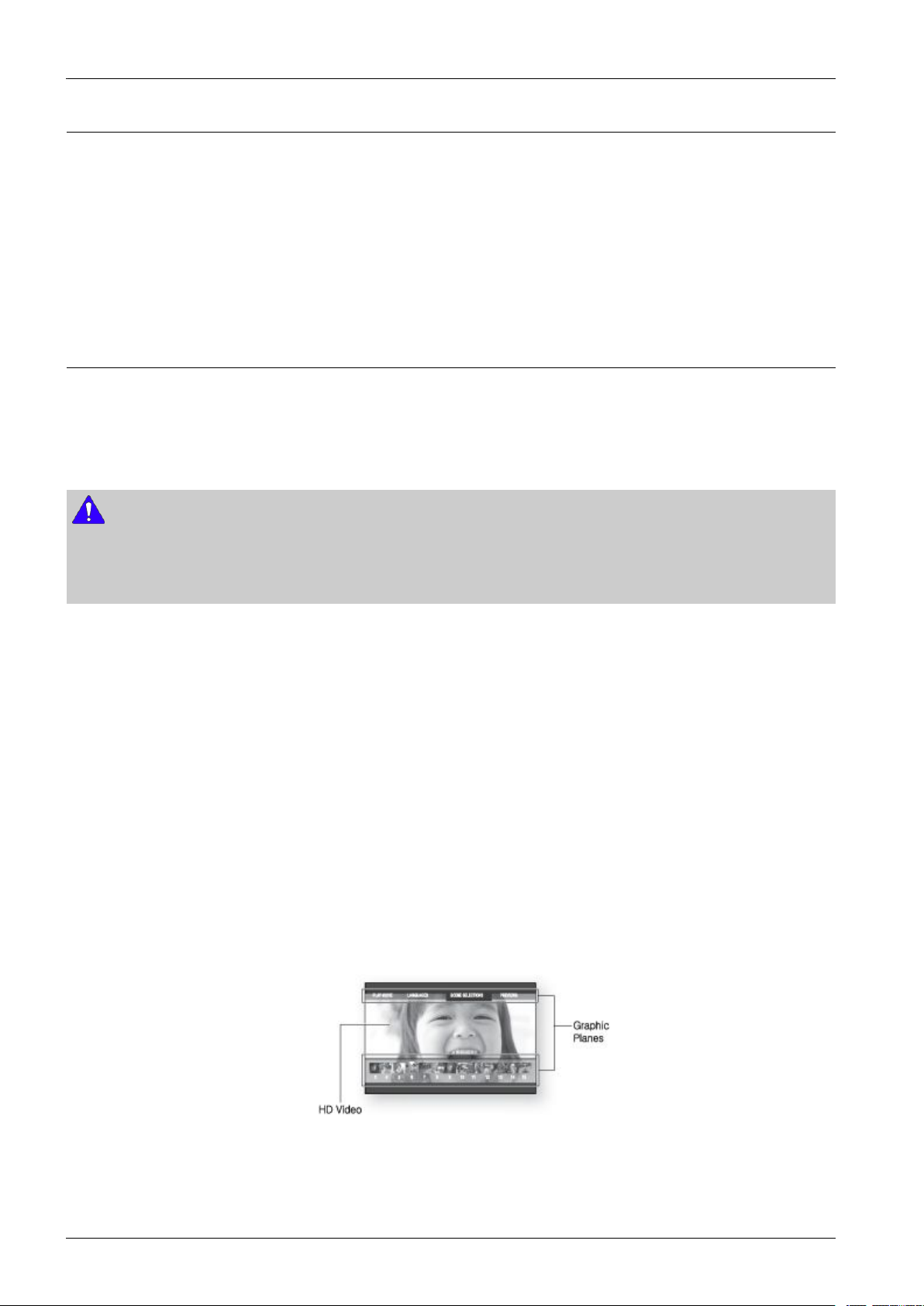
•Graphicplanes
Twoindividual,fullHDresolution(1920x1080)videolayersareavailableontopoftheHDvideolayer.
Onelayerisassignedtovideo-relatedgraphics(likesubtitles),andtheotherlayerisassignedtointeractiveelements,
suchasbuttonsormenus.V ariouswipes,fadesandscrolleffectsmaybeavailableonbothlayers.
•Menugraphics
Support256fullcolorresolutiongraphicsandanimation,therebygreatlysurpassingthecapabilitiesofDVDVideo.
UnlikeDVD,Menuscanbeaccessedduringvideoplayback.
2-2Copyright©1995-2011SAMSUNG.Allrightsreserved.
Page 11
2.ProductSpecications
•Menusounds
WhenyouhighlightorselectamenuoptiononaBlu-raydisc,soundscanbeheardsuchasbuttonclicksoravoice
overexplainingthehighlightedmenuchoice.
•Multi-page/PopUpMenus
WithDVD-Video,playbackisinterruptedeachtimeanewmenuscreenisaccessed.DuetoBlu-rayDisc'sabilityto
preloaddatafromthediscwithoutinterruptingplayback,amenumayconsistofseveralpages.
Youcanbrowsethroughthemenupagesorselectdifferentmenupaths,whiletheaudioandvideoremainplaying
inthebackground.
•Interactivity
CertainBlu-rayDiscsmaycontainAnimatedmenusandTriviagames.
•UserBrowsableSlideshows
WithBlu-rayDiscs,youcanbrowsethroughvariousstillpictureswhiletheaudioremainsplaying.
•Subtitles
DependingonwhatiscontainedontheBlu-rayDisc,youmaybeabletoselectdifferentfontstyles,sizesandcolorsfor
thesubtitles,Subtitlesmayalsobeanimated,scrolledorfadedinandout.
•BD-LIVE
YoucanuseaBlu-rayDiscsupportingBD-LIVEthroughnetworkconnectiontoenjoyvariouscontentsprovided
bythediscmanufacturer.
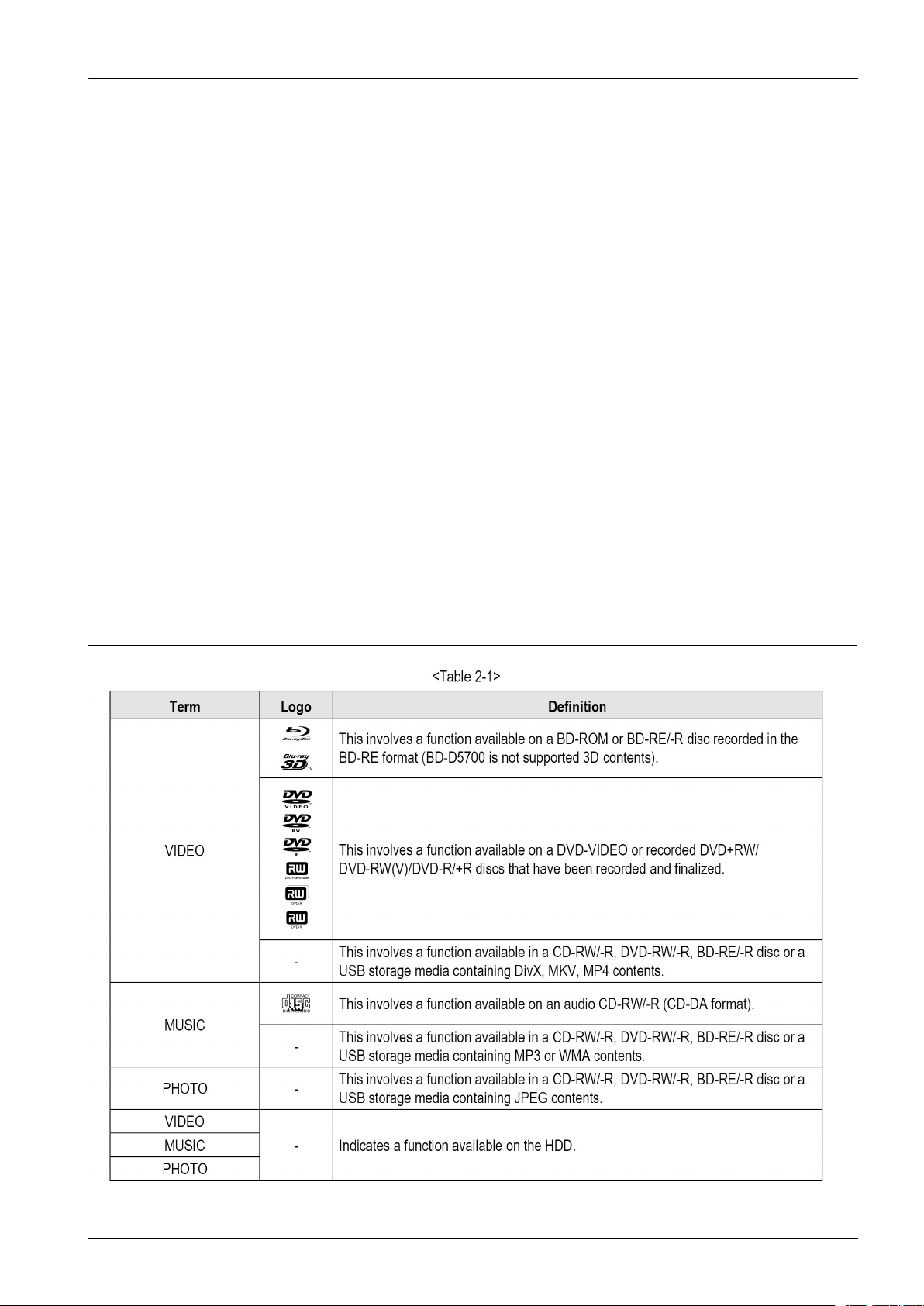
2.1.3.DiscTypesandContentsthatcanbeplayed
Copyright©1995-2011SAMSUNG.Allrightsreserved.2-3
Page 12

2.ProductSpecications
NOTE
•TheproductmaynotplaycertainCD-RW/-RandDVD-Rduetothedisctypeorrecordingconditions.
•IfaDVD-RW/-RdischasnotbeenrecordedproperlyinDVDvideoformat,itwillnotbeplayable.
2.1.4.Disctypesthatcannotbeplayed
•Blu-rayDiscswitharegioncodeotherthan"RegionB".
•DVD-VIDEOwitharegionnumberotherthan"2"or"ALL"(BD-D8900/D8900M/D8900N).
•DVD-VIDEOwitharegionnumberotherthan"4"or"ALL"(BD-D8900A).
•HDDVD
•DVD-RAM
•DVD-RW(VRmode)
•3.9GBDVD-RDiscforAuthoring.
•DVD-ROM/PD/MVDisc,etc
•SuperAudioCD(exceptCDlayer)
•CVD/CD-ROM/CDV/CD-G/CD-I/LD(CD-Gsplayaudioonly,notgraphics.)
NOTE
-SomecommercialdiscsandDVDdiscspurchasedoutsideyourregionmaynotbeplayablewiththisproduct.Youmay
receiveoneofthefollowingerrormessages;
either"Thisdisccannotbeplayed."or"Pleasechecktheregionalcodeofthedisc."willbedisplayed.
-Playbackmaynotworkforsometypesofdiscs,orwhenspecicoperations,suchasanglechangeandaspectratio
adjustment,arebeingperformed.
Informationaboutthediscsiswrittenindetailonthediscbox.Pleaserefertothisifnecessary.
-Donotallowthedisctobecomedirtyorscratched.Fingerprints,dirt,dust,scratchesordepositsofcigarettesmokeon
therecordingsurfacemaymakeitimpossibletousethediscforplayback.
-DiscswithP ALprogramsrecordedonthemcannotbeplayedusingthisproduct.
-ThisproductiscompatiblewiththeNTSCcolorsystemonly.
-WhenaBD-Jtitleisplayed,loadingmaytakelongerthananormaltitle,orsomefunctionsmayperformslowly .
-ThisproductmaynotrespondtoalloperatingcommandsbecausesomeBlu-ray ,DVDandCDdiscsallowspecicor
limitedoperationandfeaturesduringplayback.
Pleasenotethatthisisnotadefectintheproduct.
-SamsungcannotassurethatthisproductwillplayeverydiscbearingtheBlu-rayDisc,DVDorCDlogobecausedisc
formatsevolve,andproblemsanderrorsmayoccurduringthecreationofBlu-rayDisc,DVD,CDsoftwareand/or
themanufactureofdiscs.
PleasecontacttheSAMSUNGcustomercarecenterifyouhavequestionsorencounterdifcultyinplayingBlu-ray
Disc,DVD,CDdiscsinthisproduct.Also,refertorestofthisusermanualforadditionalinformationonplayback
restrictions.
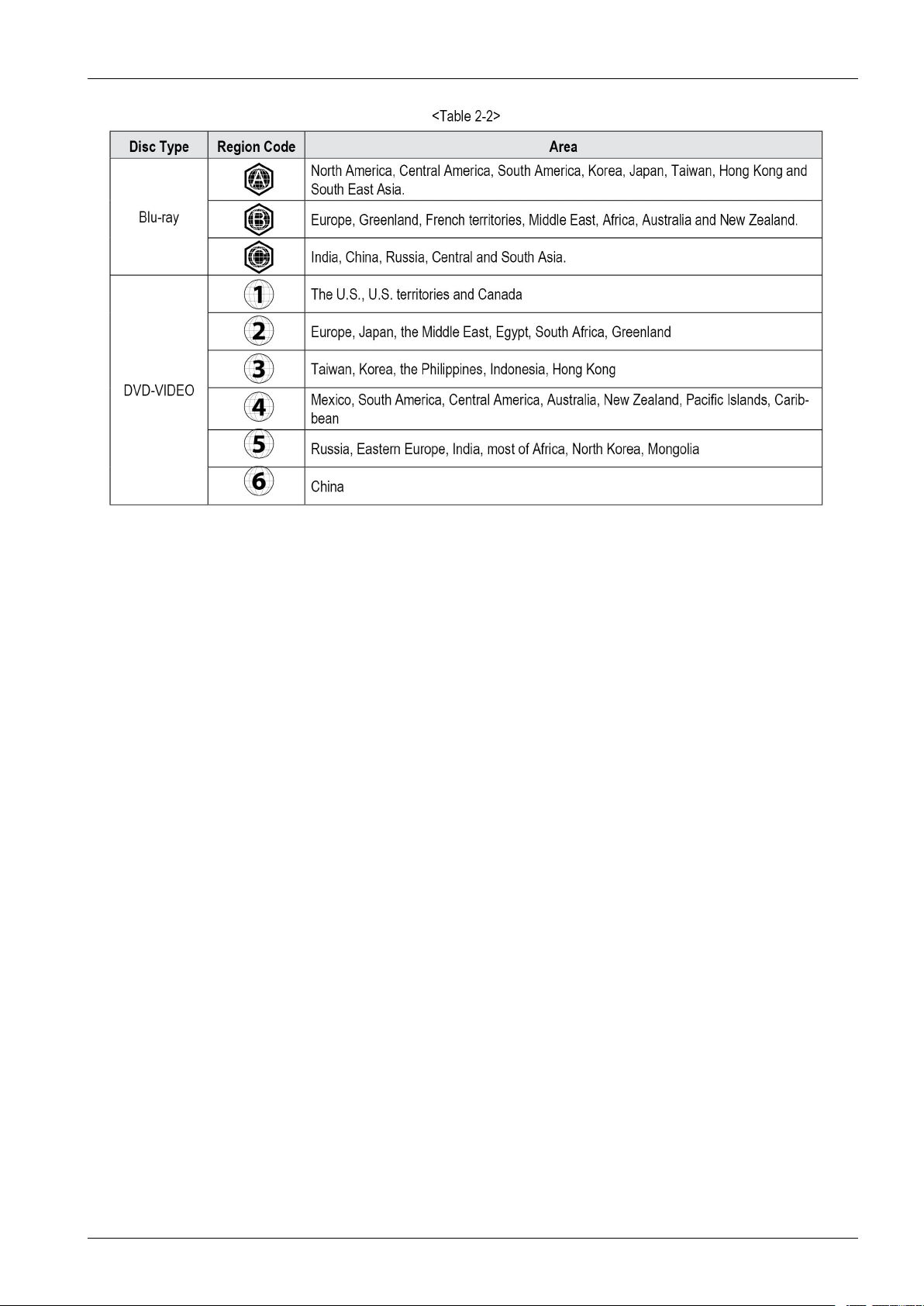
2.1.5.Regioncode
codesdonotmatch,thediscwillnotplay.
TheRegionNumberforthisproductisdescribedontherearpaneloftheproduct.
2-4Copyright©1995-2011SAMSUNG.Allrightsreserved.
Page 13
2.ProductSpecications
Copyright©1995-2011SAMSUNG.Allrightsreserved.2-5
Page 14

2.ProductSpecications
2.1.6.Blu-rayDiscCompatibility
Blu-rayDiscisanewandevolvingformat.Accordingly,disccompatibilityissuesarepossible.Notalldiscsarecompatible
andnoteverydiscwillplayback.Foradditionalinformation,refertotheComplianceandCompatibilityNoticesection
ofthisManual.Ifyouencountercompatibilityproblems,pleasecontacttheSAMSUNGcustomercarecenter .This
SamsungBlu-raydiscplayersupportsonlytheBDROMProle2(a.k.a.BD-LIVE).Ifyouwanttoplaylaterversiondiscs,
youmayneedtoupdateplayer'srmware.Pleaserefertohttp://www.samsung.com
carecenterat1-800SAMSUNG.
orcontactSAMSUNGcustomer
2.1.7.DiscTypes
•BD-ROM
-Blu-rayROMdiscscanonlybeplayedback.Thisproductcanplaybackpre-recordedcommercialBD-ROMdiscs.
•BD-RE/-R
-Blu-rayRE/-Rdiscscanberecordedonandplayedback.ThisproductcanplaybackaBD-RE/-Rdiscrecordedby
othercompatibleBlu-raydiscrecorders.
•DVD-VIDEO
-Thisproductcanplaybackpre-recordedcommercialDVDdiscs(DVD-VIDEOdiscs)withmovies.
-Whenswitchingfromtherstlayertothesecondlayerofadual-layeredDVD-VIDEOdisc,theremaybe
momentarydistortionintheimageandsound.Thisisnotamalfunctionoftheproduct
•DVD-RW/-R/+R
-ThisproductcanplaybackaDVD-RW/-R/+RdiscrecordedandnalizedwithaDVDvideorecorder.Theability
toplaybackmaydependonrecordingconditions.
•DVD-RW
-ThisproductcanplaybackaDVD+RWdiscrecordedwithaDVDV ideorecorder.Theabilitytoplaybackmay
dependonrecordingconditions.
•AudioCD(CD-DA)
-ThisproductcanplaybackCD-DAformataudioCD-RW/-Rdiscs.
-TheproductmaynotbeabletoplaysomeCD-RW/-Rdiscsduetotheconditionoftherecording.
•CD-RW/-R
-Usea700MB(80minutes)CD-RW/-Rdisc.Ifpossible,donotusea800MB(90minutes)orabovedisc,asthe
discmaynotplayback.
-IftheCD-RW/-Rdiscwasnotrecordedasaclosedsession,youmayexperiencedelayswhenplayingbackthe
beginningofthediscorallrecordedlesmaynotplay.
-SomeCD-RW/-Rdiscsmaynotbeplayablewiththisproduct,dependingonthedevicewhichwasusedtoburn
them.ForcontentsrecordedonCD-RW/-RmediafromCDsforyourpersonaluse,playabilitymayvarydepending
oncontentsanddiscs.
2-6Copyright©1995-2011SAMSUNG.Allrightsreserved.
Page 15

2.ProductSpecications
•AVCHD(AdvancedVideoCodecHighDenition)
-ThisproductcanplaybackA VCHDformatdiscs.Thesediscsarenormallyrecordedandusedincamcorders.
-TheA VCHDformatisahighdenitiondigitalvideocameraformat.
-TheMPEG-4A VC/H.264formatcompressesimageswithgreaterefciencythantheconventionalimage
compressingformat.
-SomeA VCHDdiscsusethe“x.v .Colour”format.ThisproductcanplaybackA VCHDdiscsthatuse“x.v.Colour”
format.
-“x.v.Colour”isatrademarkofSonyCorporation.
-“AVCHD”andtheA VCHDlogoaretrademarksofMatsushitaElectronicIndustrialCo.,Ltd.andSonyCorporation.
NOTE
•SomeA VCHDformatdiscsmaynotplay,dependingontherecordingcondition.A VCHDformatdiscsneedtobenalized.
•“x.v.Colour”offersawidercolourrangethannormalDVDcamcorderdiscs.
•SomeDivX,MKVandMP4formatdiscsmaynotplay ,dependingonthevideoresolutionandframeratecondition.
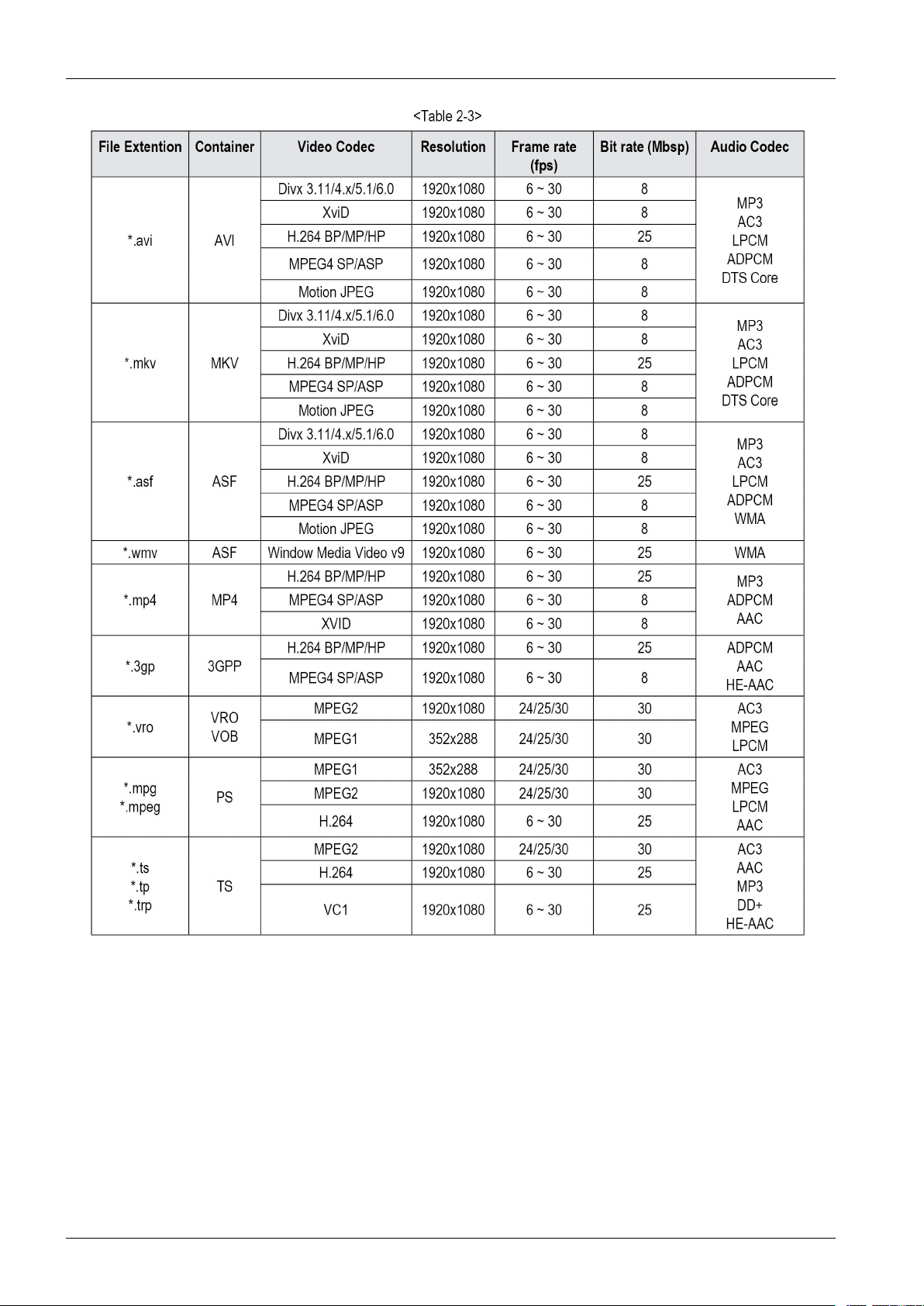
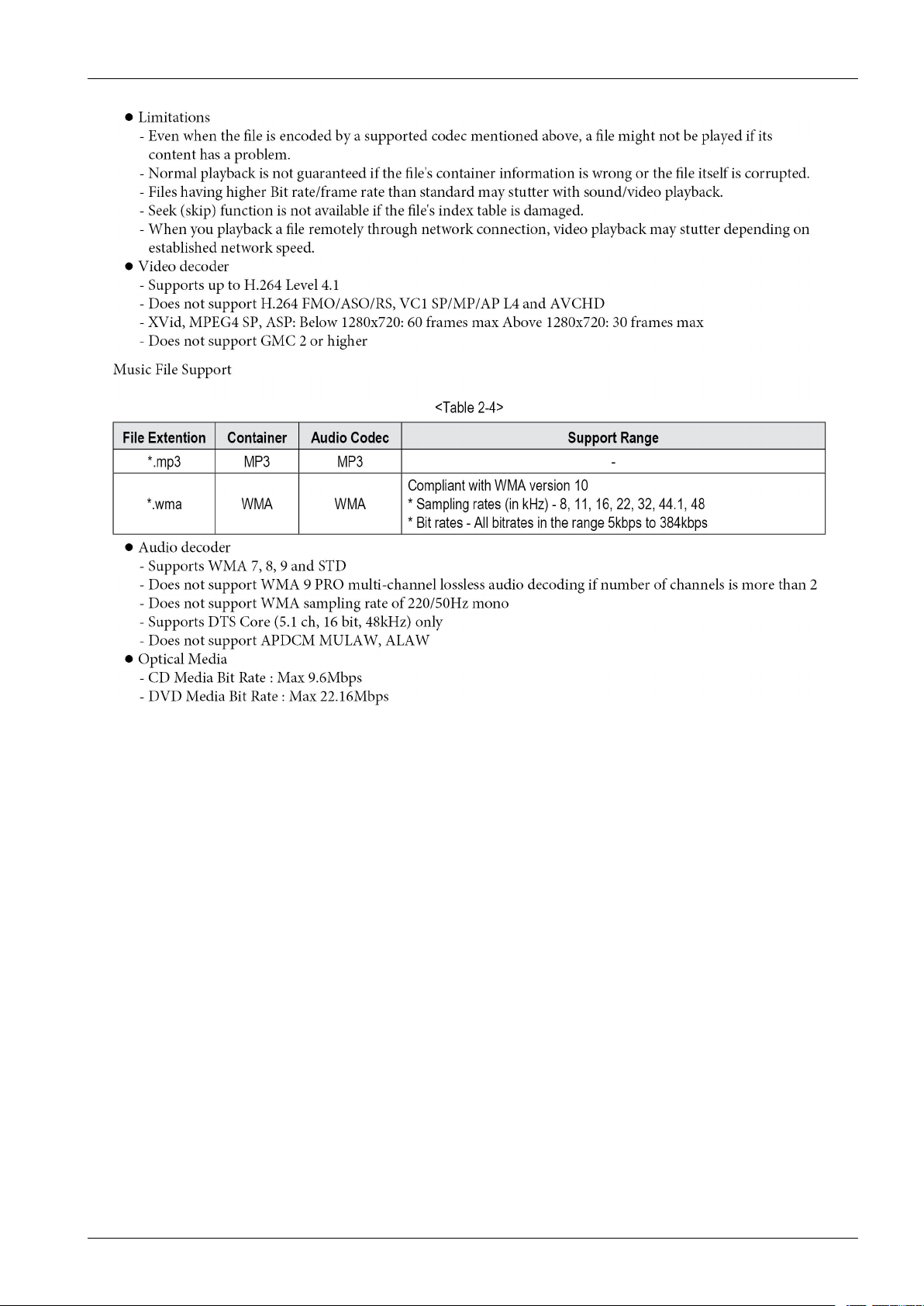
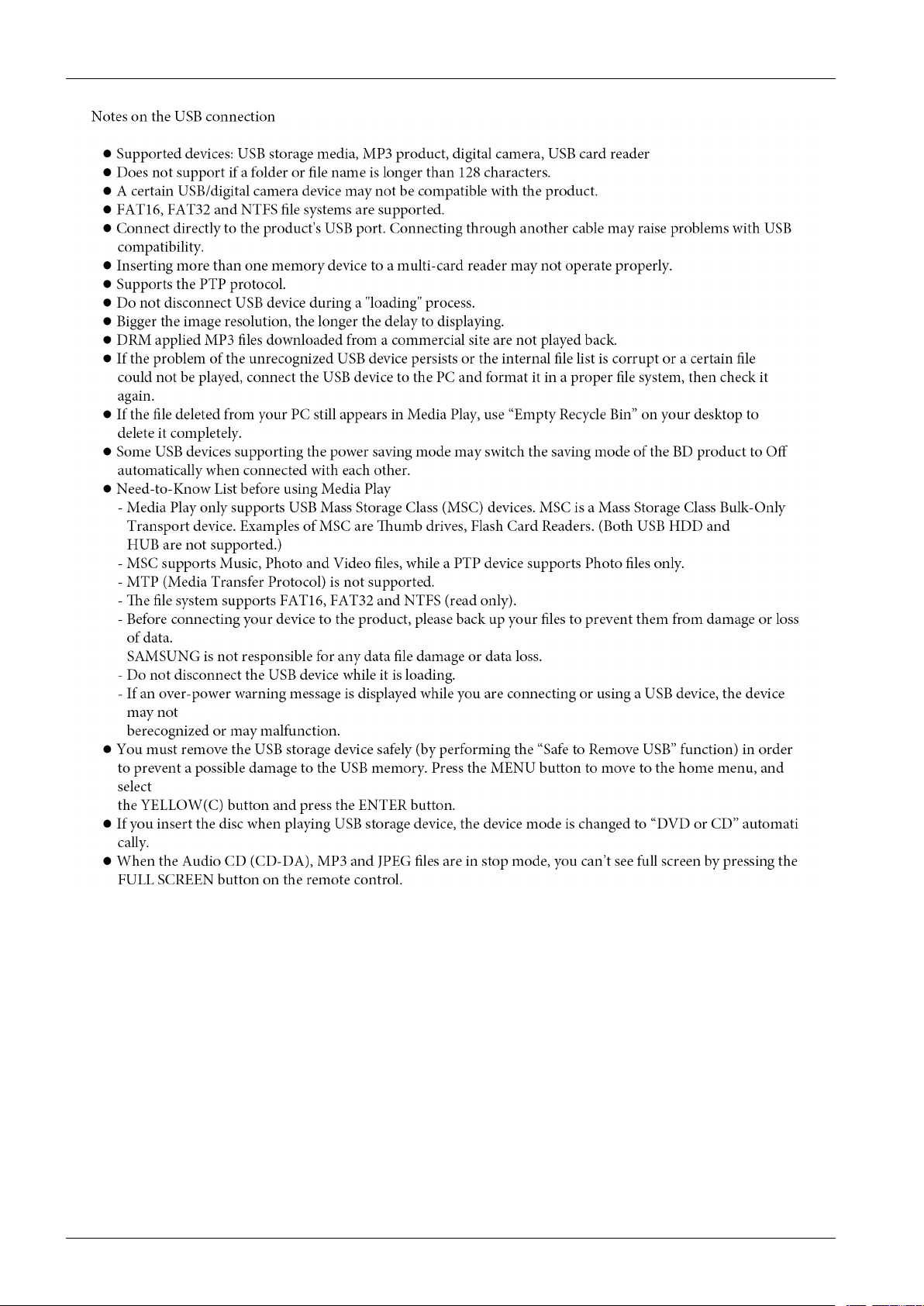
2.1.8.SupportedFileFormats
VideoFileSupport
Copyright©1995-2011SAMSUNG.Allrightsreserved.2-7
Page 16
2.ProductSpecications
2-8Copyright©1995-2011SAMSUNG.Allrightsreserved.
Page 17
2.ProductSpecications
Copyright©1995-2011SAMSUNG.Allrightsreserved.2-9
Page 18
2.ProductSpecications
2-10Copyright©1995-2011SAMSUNG.Allrightsreserved.
Page 19
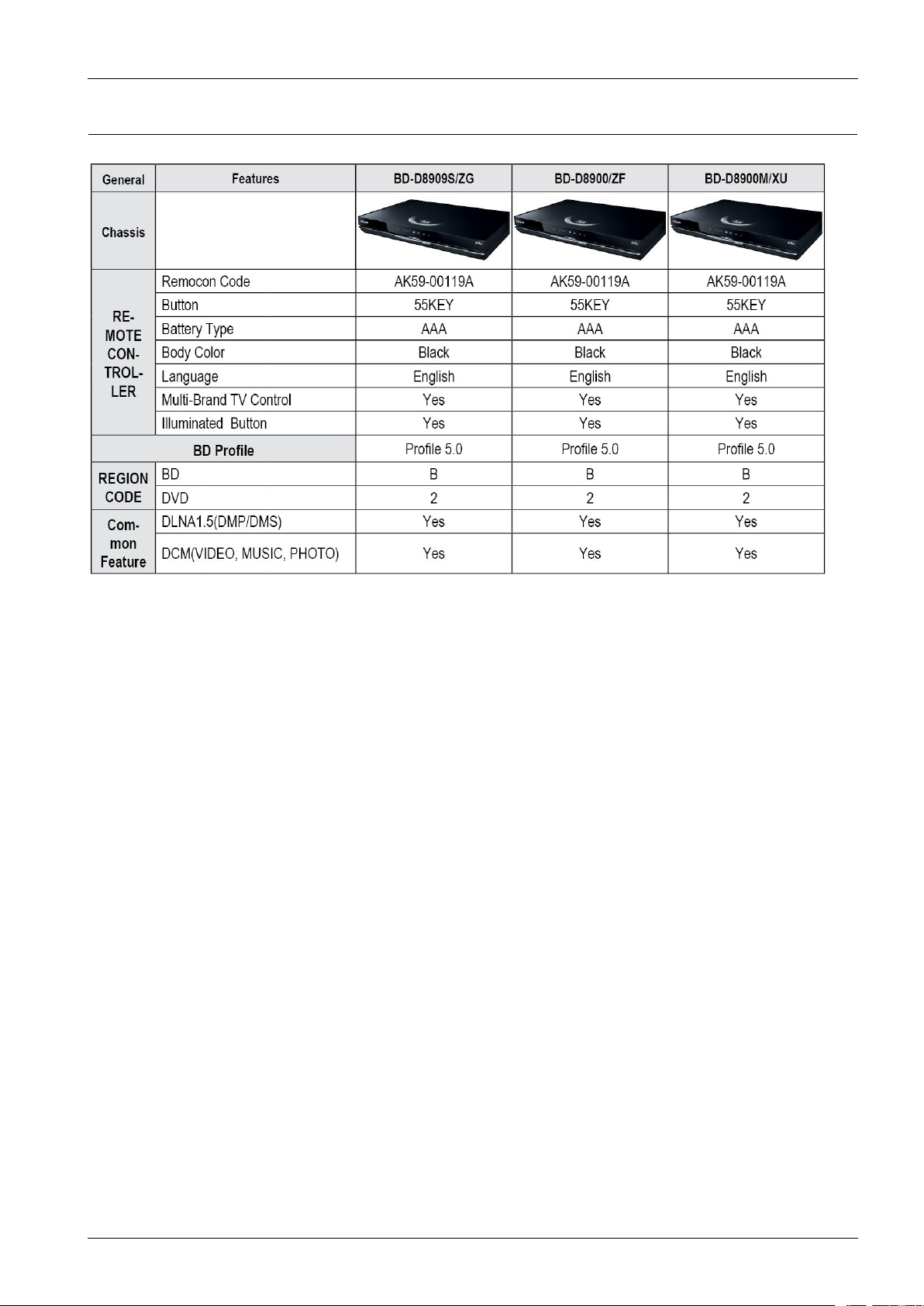
2.2.ChassisProductSpecication
2.ProductSpecications
Copyright©1995-2011SAMSUNG.Allrightsreserved.2-11
Page 20
2.ProductSpecications
2-12Copyright©1995-2011SAMSUNG.Allrightsreserved.
Page 21
2.ProductSpecications
Copyright©1995-2011SAMSUNG.Allrightsreserved.2-13
Page 22
2.ProductSpecications
2-14Copyright©1995-2011SAMSUNG.Allrightsreserved.
Page 23
2.ProductSpecications
Copyright©1995-2011SAMSUNG.Allrightsreserved.2-15
Page 24
2.ProductSpecications
2-16Copyright©1995-2011SAMSUNG.Allrightsreserved.
Page 25
2.ProductSpecications
Copyright©1995-2011SAMSUNG.Allrightsreserved.2-17
Page 26
2.ProductSpecications
2-18Copyright©1995-2011SAMSUNG.Allrightsreserved.
Page 27
2.ProductSpecications
Copyright©1995-2011SAMSUNG.Allrightsreserved.2-19
Page 28
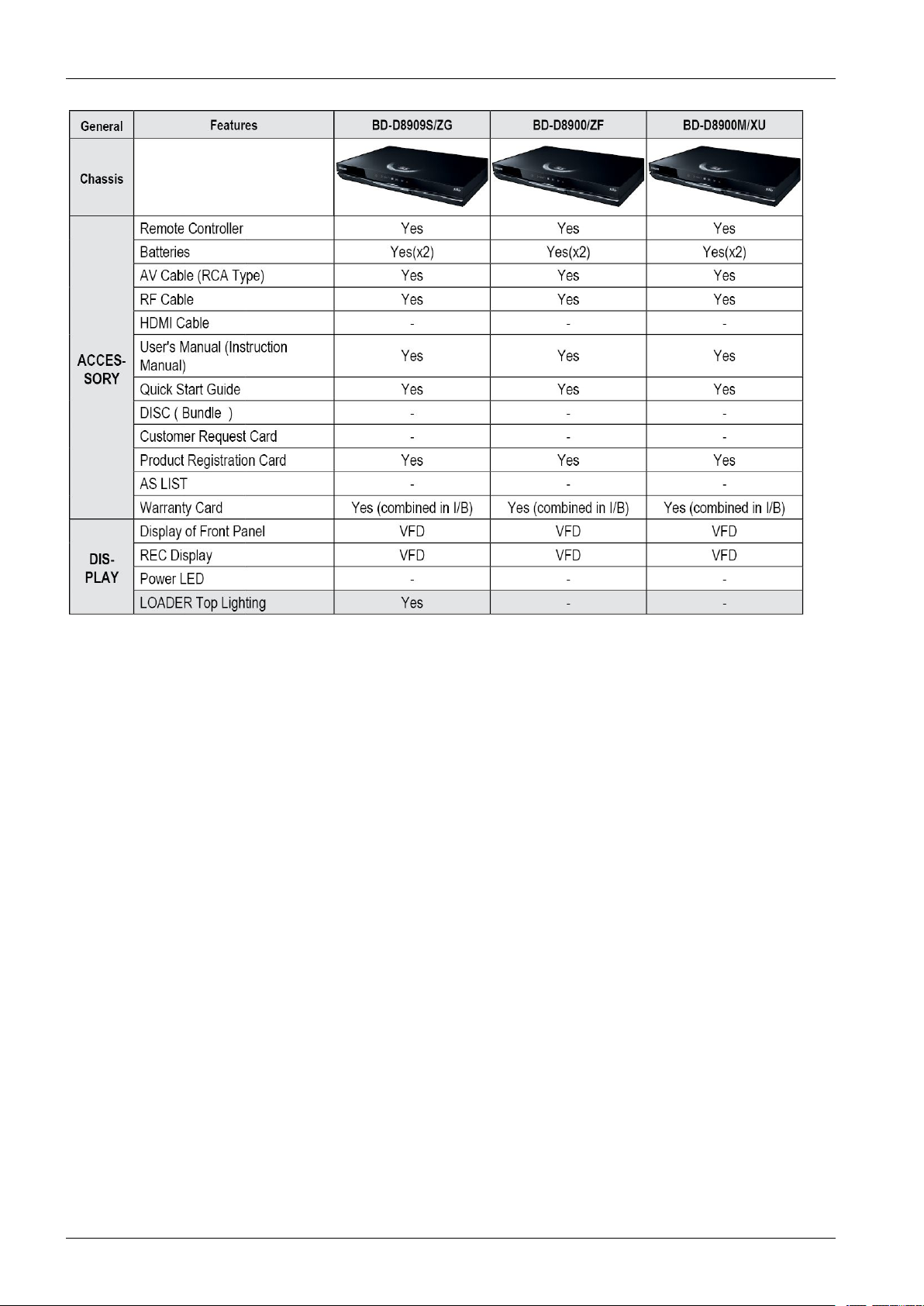
2.ProductSpecications
2-20Copyright©1995-2011SAMSUNG.Allrightsreserved.
Page 29
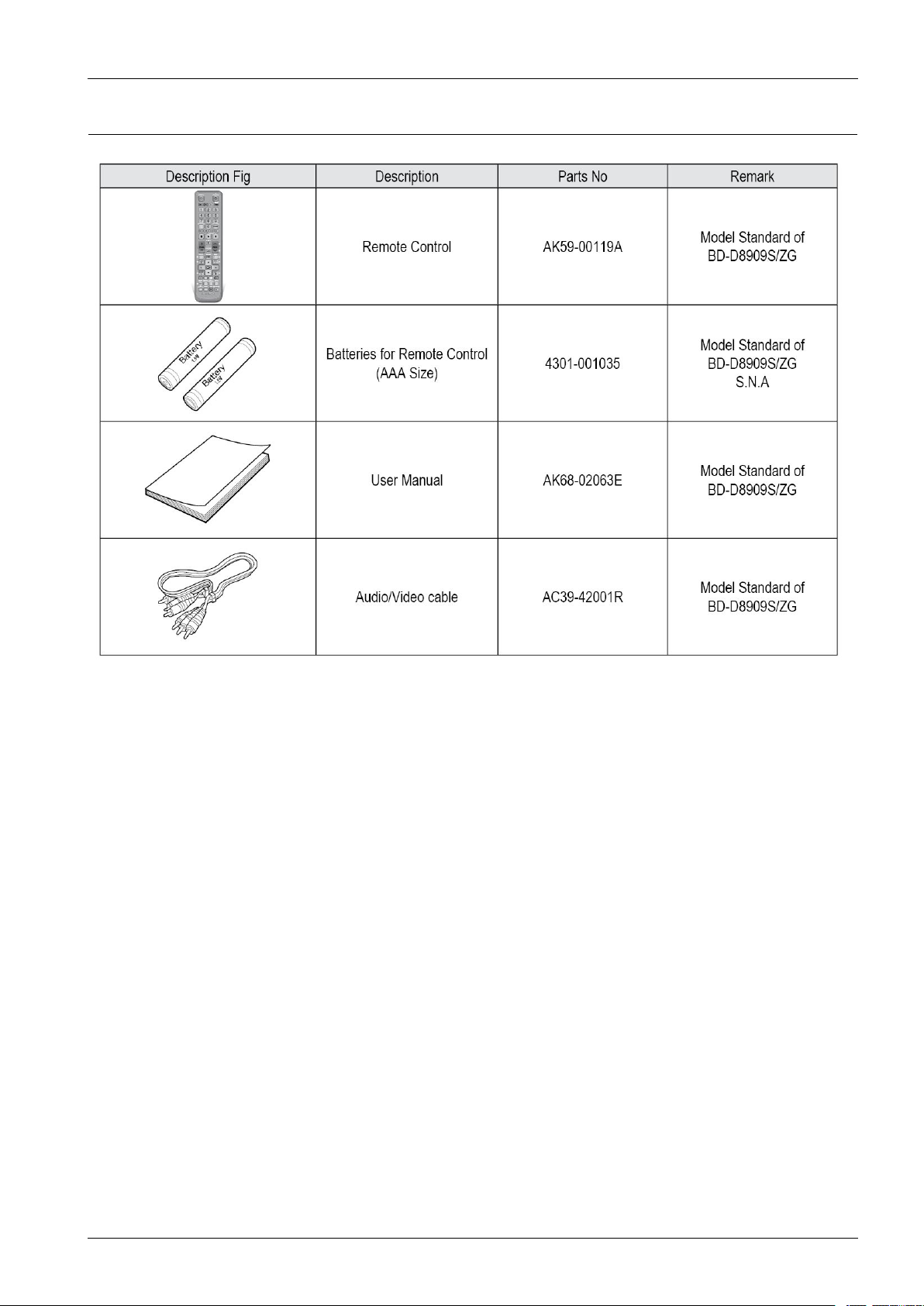
2.3.OptionProductSpecication
2.ProductSpecications
Copyright©1995-2011SAMSUNG.Allrightsreserved.2-21
Page 30
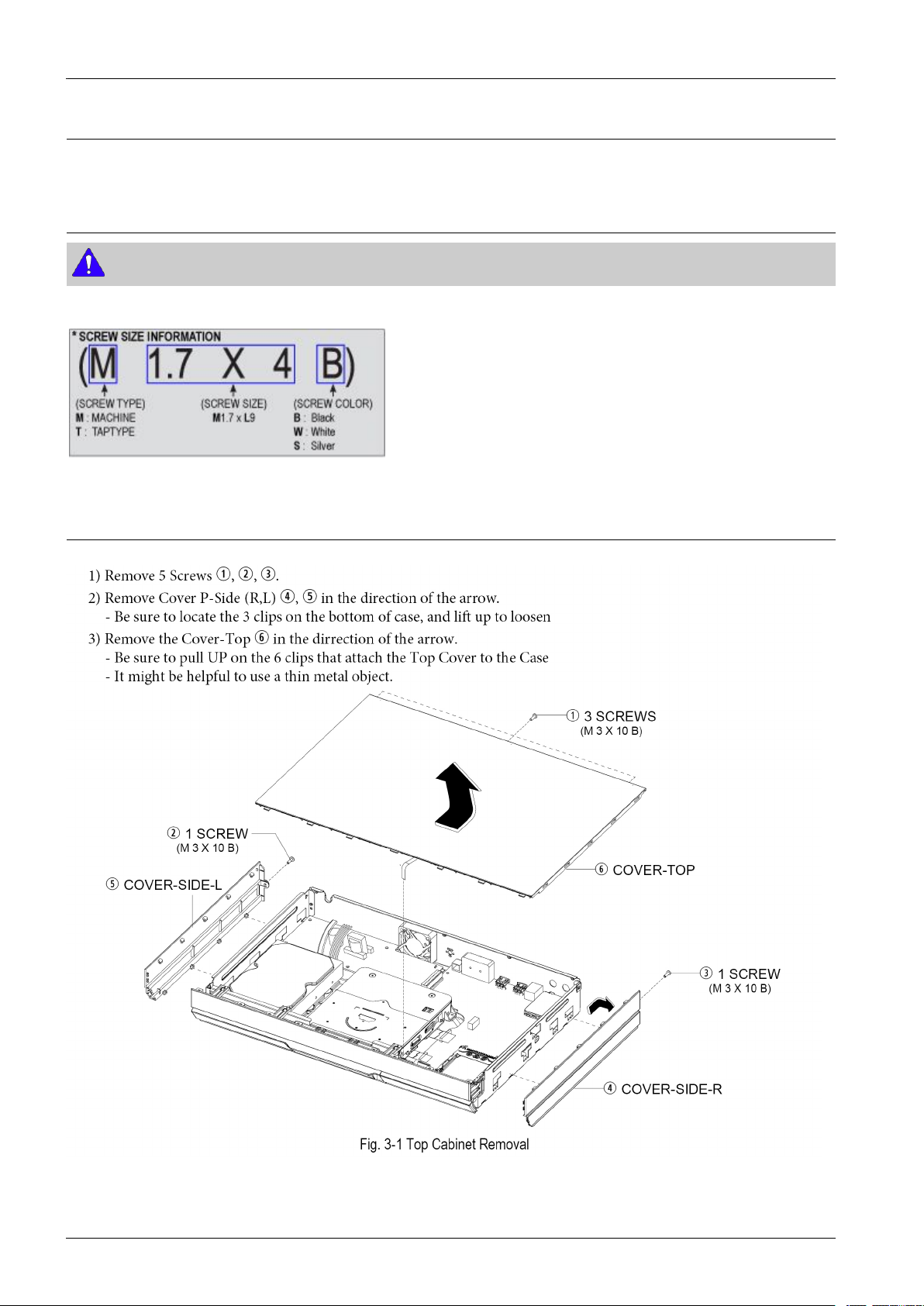
3.DisassemblyandReassembly
3.DisassemblyandReassembly
3.1.CabinetandPCB
NOTE
ConnectorMustberemovedwithcare
3.1.1.TopCabinetRemoval
3-1Copyright©1995-2011SAMSUNG.Allrightsreserved.
Page 31
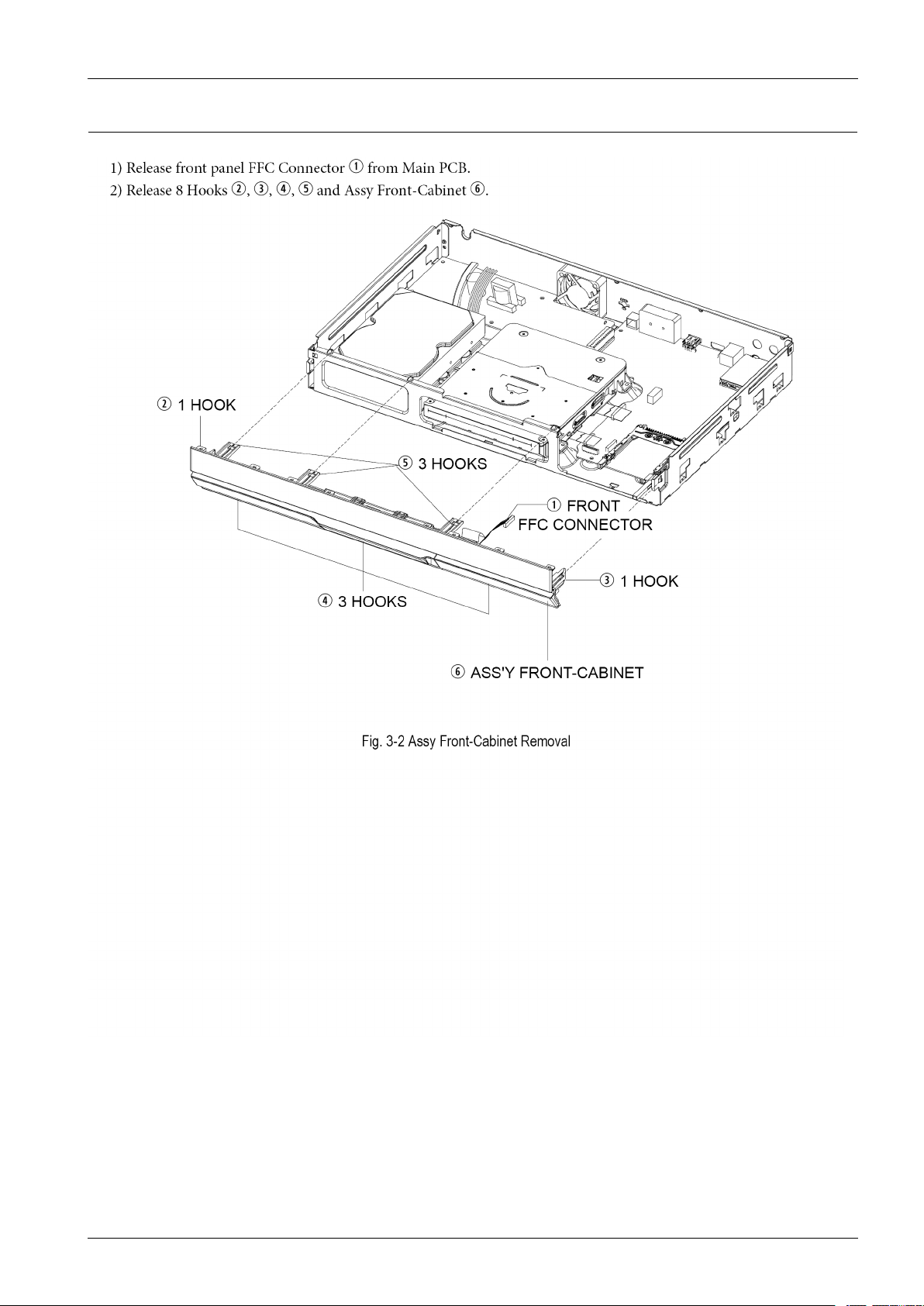
3.1.2.AssyFront-CabinetRemoval
3.DisassemblyandReassembly
Copyright©1995-2011SAMSUNG.Allrightsreserved.3-2
Page 32
3.DisassemblyandReassembly
3.1.3.AssyDeckRemoval
3-3Copyright©1995-2011SAMSUNG.Allrightsreserved.
Page 33
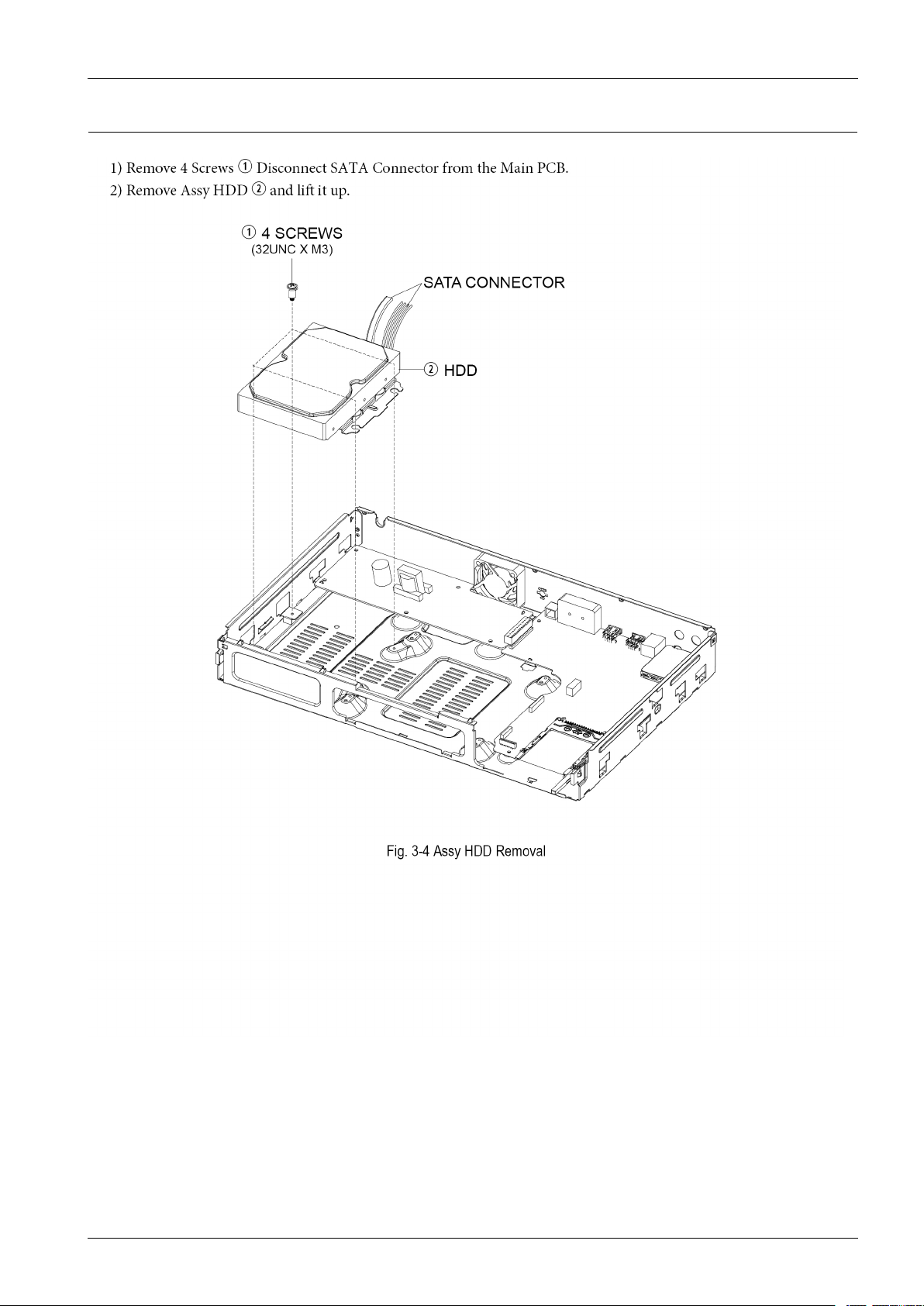
3.1.4.AssyHDDRemoval
3.DisassemblyandReassembly
Copyright©1995-2011SAMSUNG.Allrightsreserved.3-4
Page 34
3.DisassemblyandReassembly
3.1.5.SMPSPCBRemoval
3-5Copyright©1995-2011SAMSUNG.Allrightsreserved.
Page 35
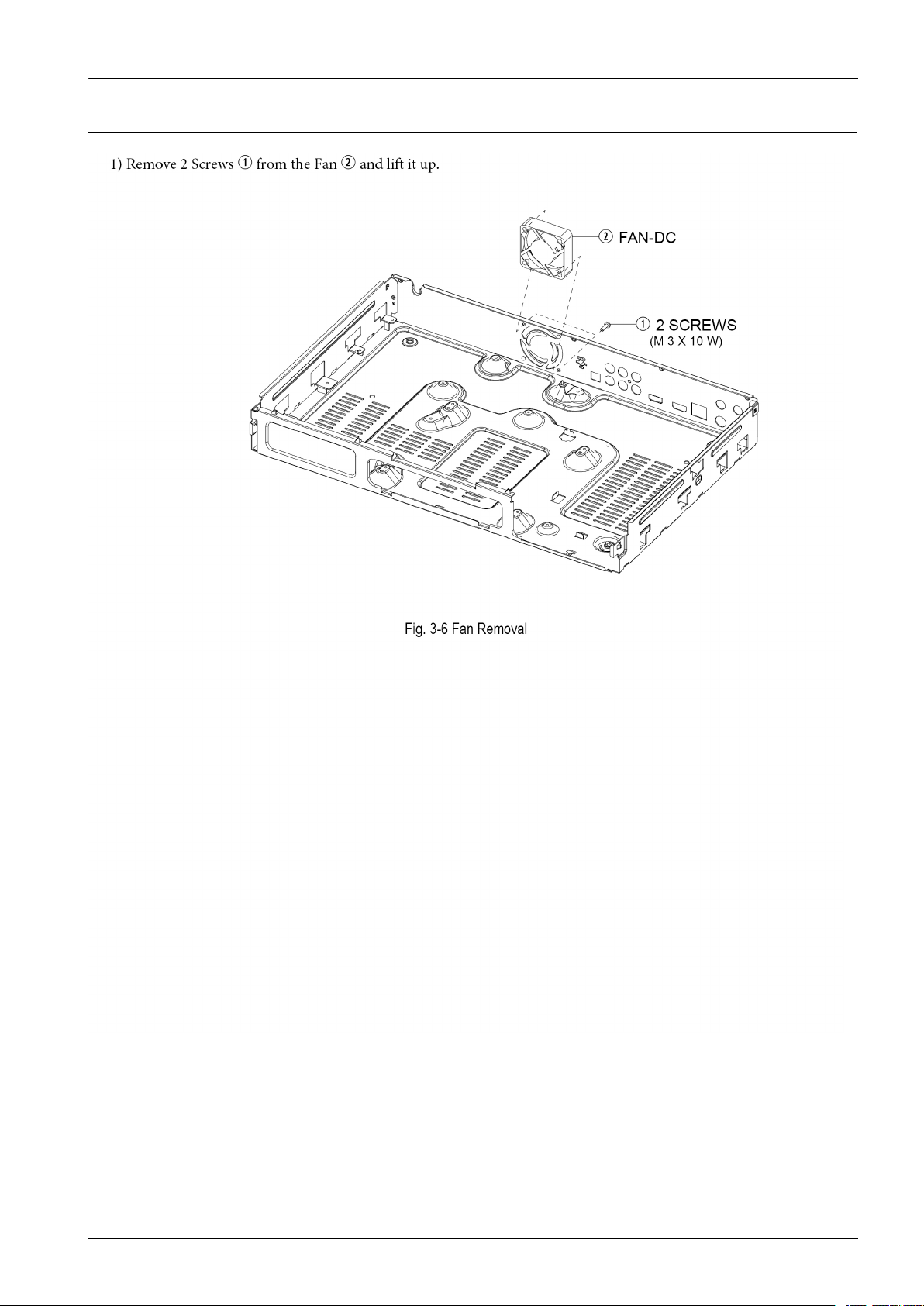
3.1.6.FanRemoval
3.DisassemblyandReassembly
Copyright©1995-2011SAMSUNG.Allrightsreserved.3-6
Page 36
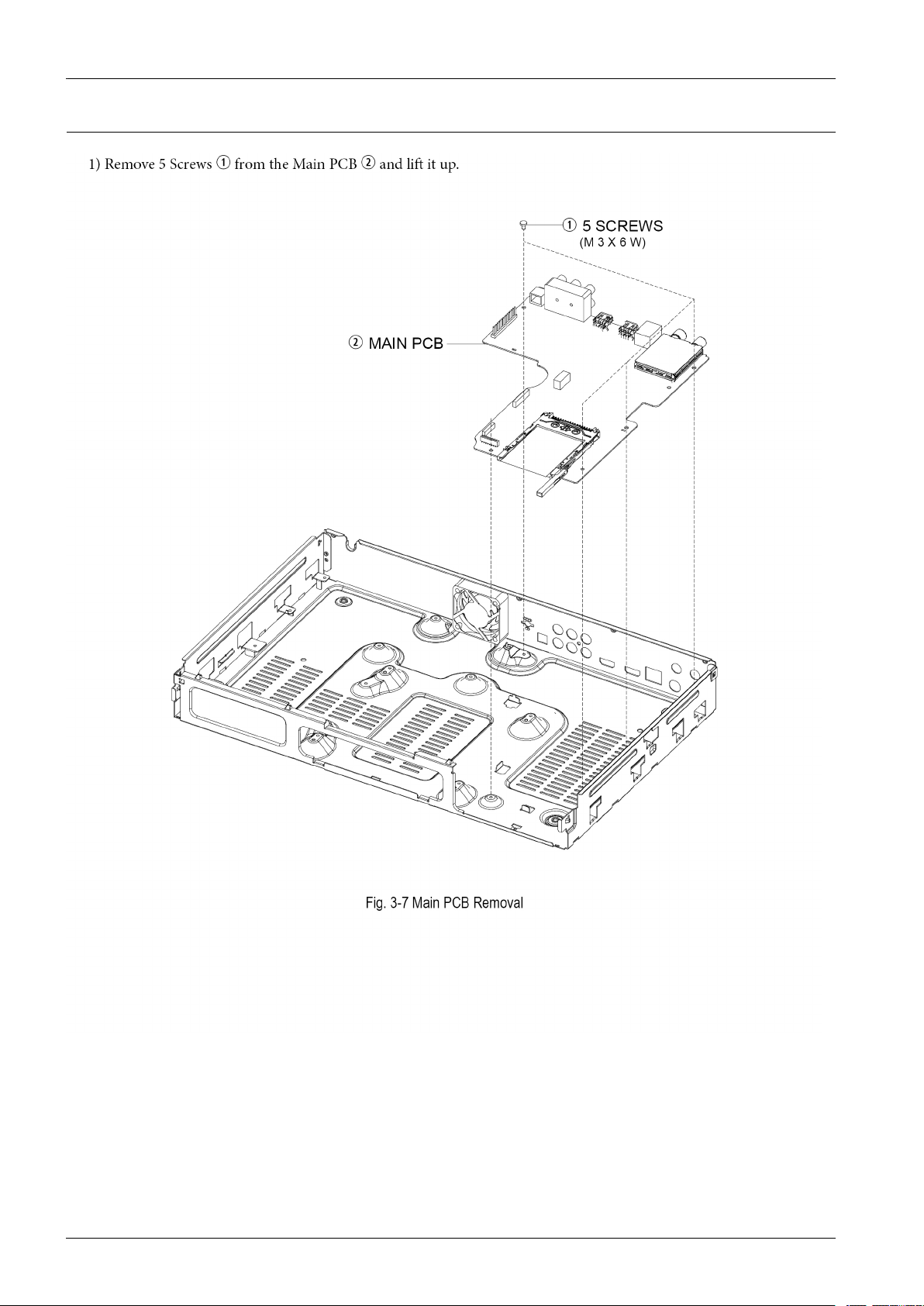
3.DisassemblyandReassembly
3.1.7.MainPCBRemoval
3-7Copyright©1995-2011SAMSUNG.Allrightsreserved.
Page 37
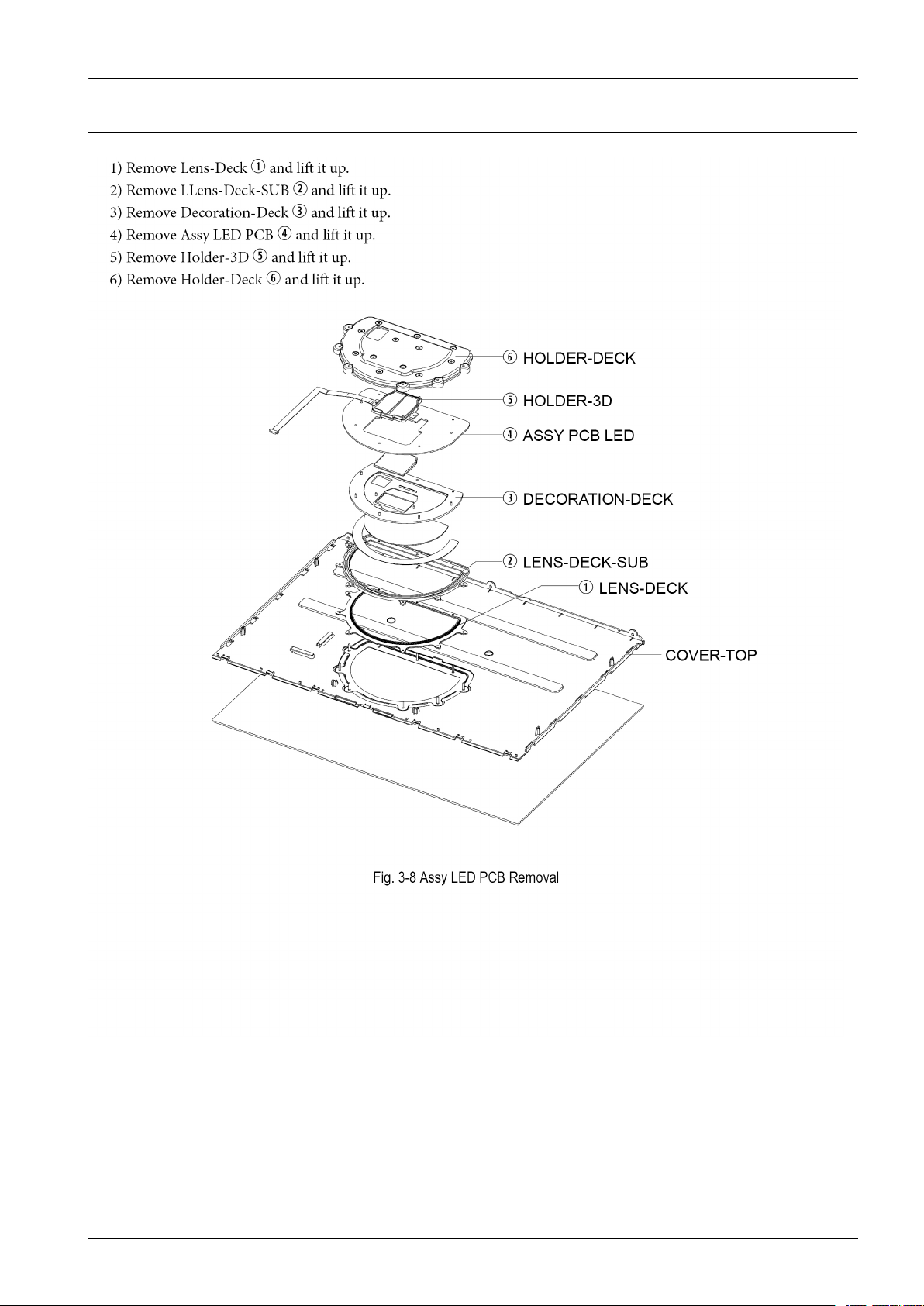
3.1.8.AssyLEDPCBRemoval
3.DisassemblyandReassembly
Copyright©1995-2011SAMSUNG.Allrightsreserved.3-8
Page 38
3.DisassemblyandReassembly
3.2.PCBLocation
3-9Copyright©1995-2011SAMSUNG.Allrightsreserved.
Page 39

4.Troubleshooting
4.Troubleshooting
Copyright©1995-2011SAMSUNG.Allrightsreserved.4-1
Page 40
4.Troubleshooting
4.1.Troubleshooting
4-2Copyright©1995-2011SAMSUNG.Allrightsreserved.
Page 41
4.Troubleshooting
Copyright©1995-2011SAMSUNG.Allrightsreserved.4-3
Page 42
4.Troubleshooting
4-4Copyright©1995-2011SAMSUNG.Allrightsreserved.
Page 43
4.Troubleshooting
Copyright©1995-2011SAMSUNG.Allrightsreserved.4-5
Page 44
4.Troubleshooting
4-6Copyright©1995-2011SAMSUNG.Allrightsreserved.
Page 45
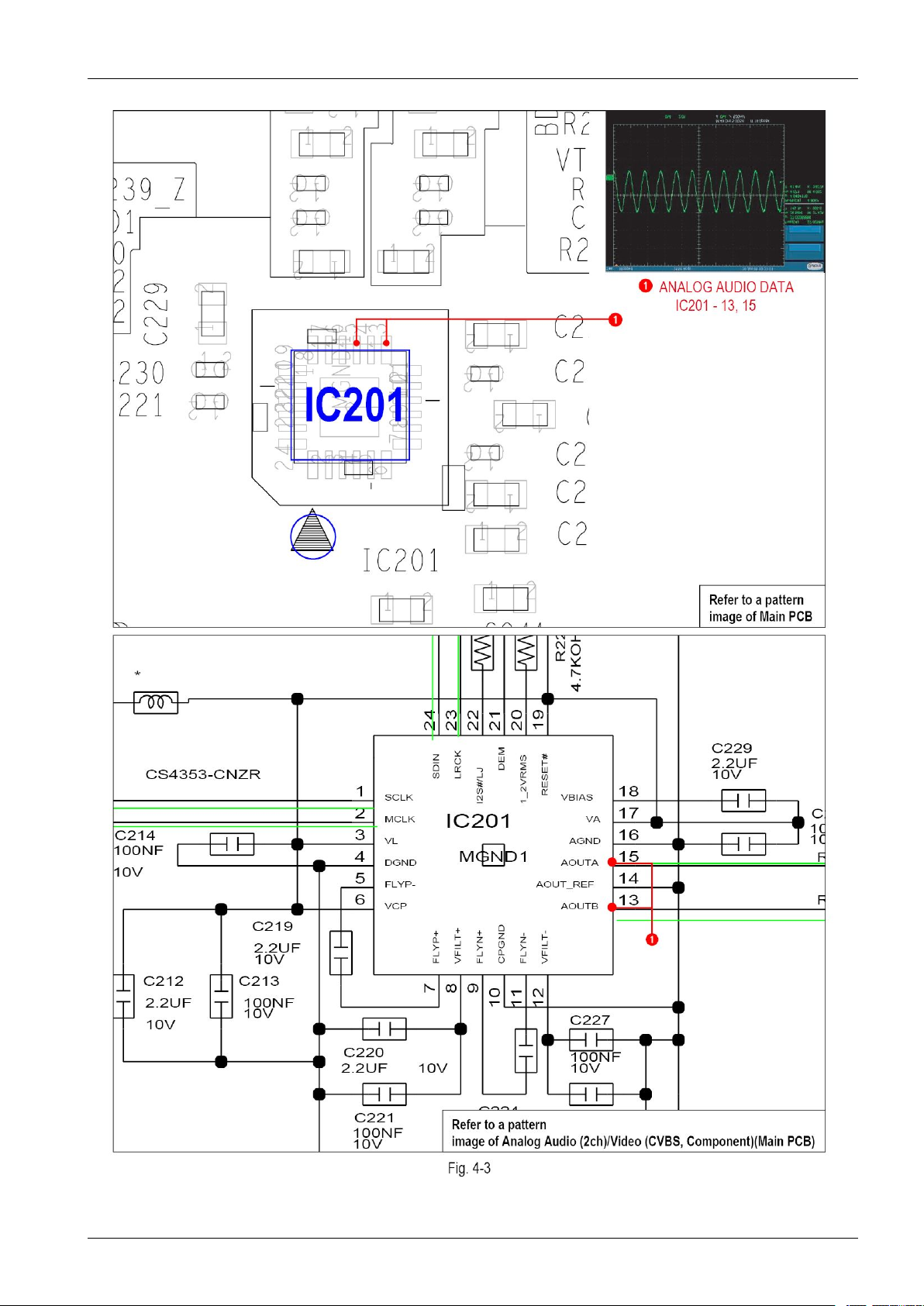
4.Troubleshooting
Copyright©1995-2011SAMSUNG.Allrightsreserved.4-7
Page 46
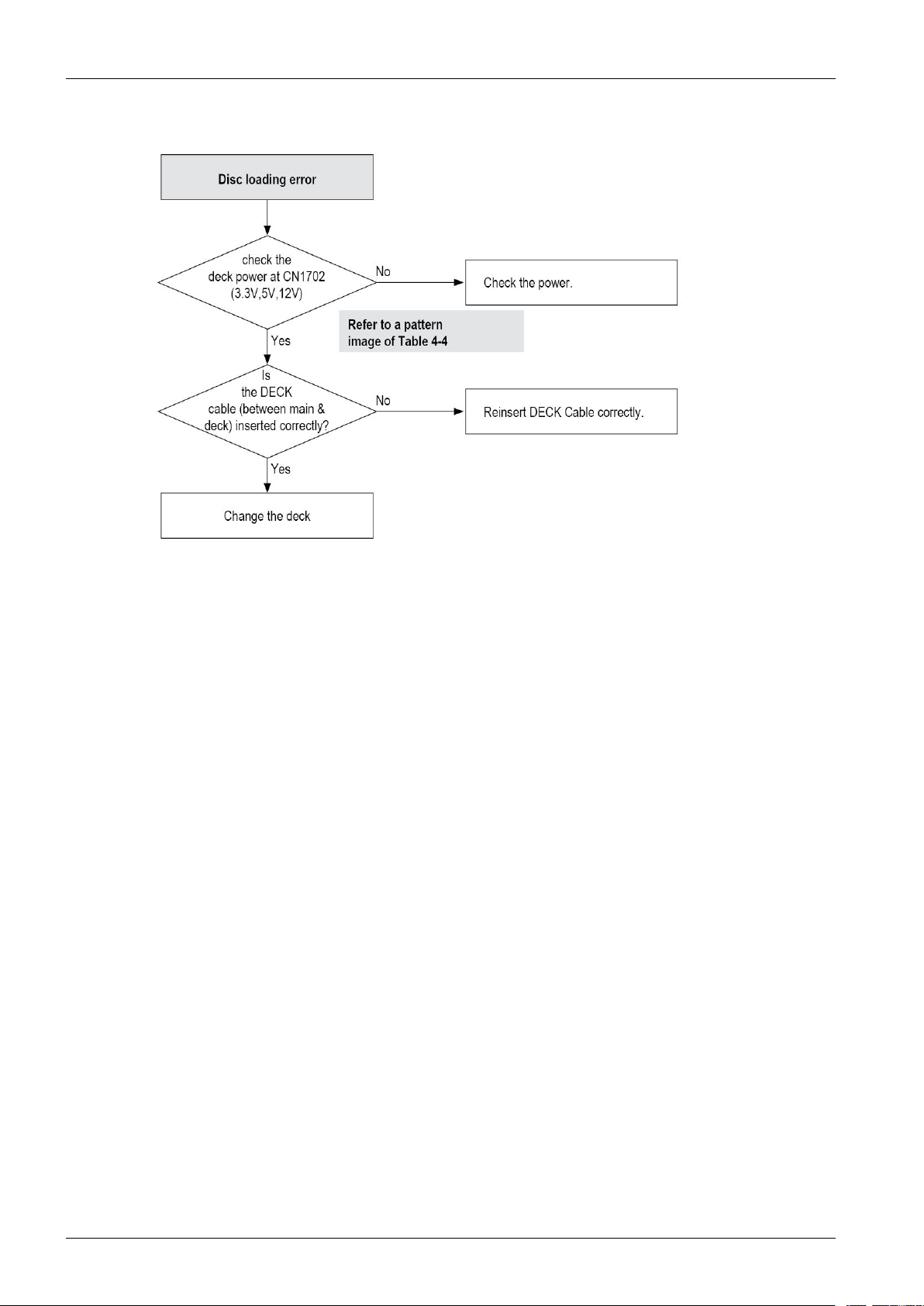
4.Troubleshooting
4-8Copyright©1995-2011SAMSUNG.Allrightsreserved.
Page 47
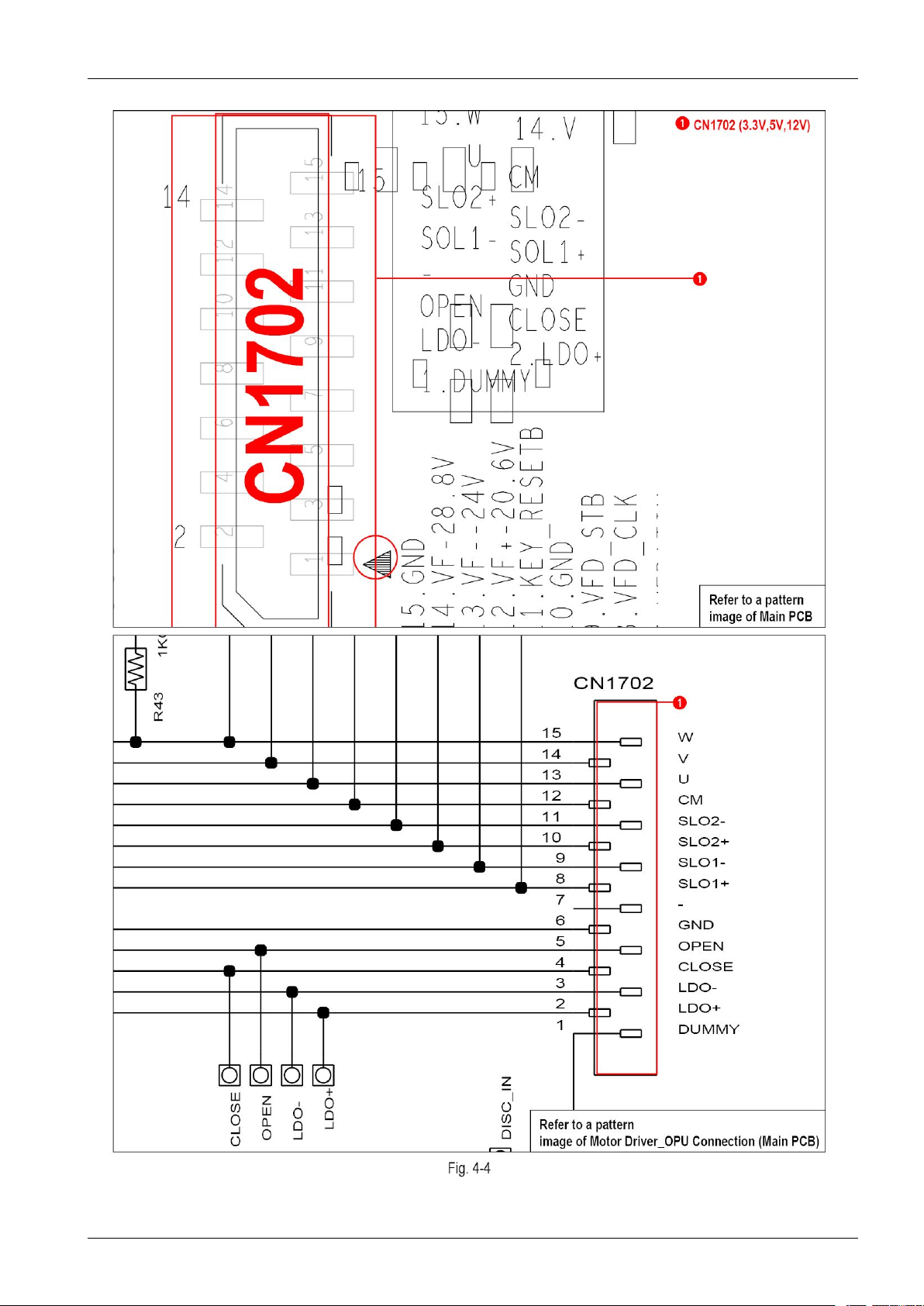
4.Troubleshooting
Copyright©1995-2011SAMSUNG.Allrightsreserved.4-9
Page 48
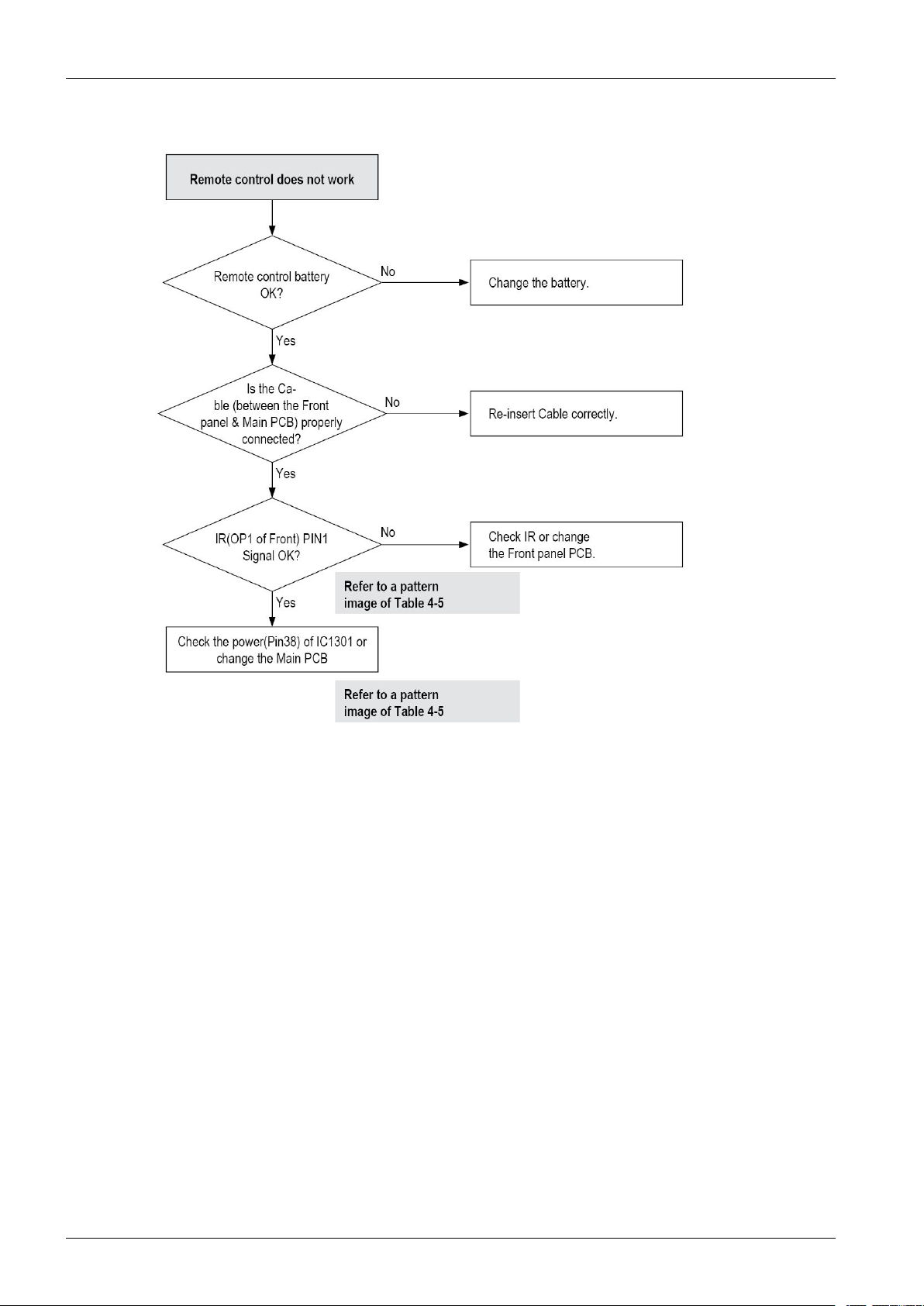
4.Troubleshooting
4-10Copyright©1995-2011SAMSUNG.Allrightsreserved.
Page 49
4.Troubleshooting
Copyright©1995-2011SAMSUNG.Allrightsreserved.4-11
Page 50
4.Troubleshooting
4-12Copyright©1995-2011SAMSUNG.Allrightsreserved.
Page 51
4.Troubleshooting
Copyright©1995-2011SAMSUNG.Allrightsreserved.4-13
Page 52
4.Troubleshooting
4-14Copyright©1995-2011SAMSUNG.Allrightsreserved.
Page 53
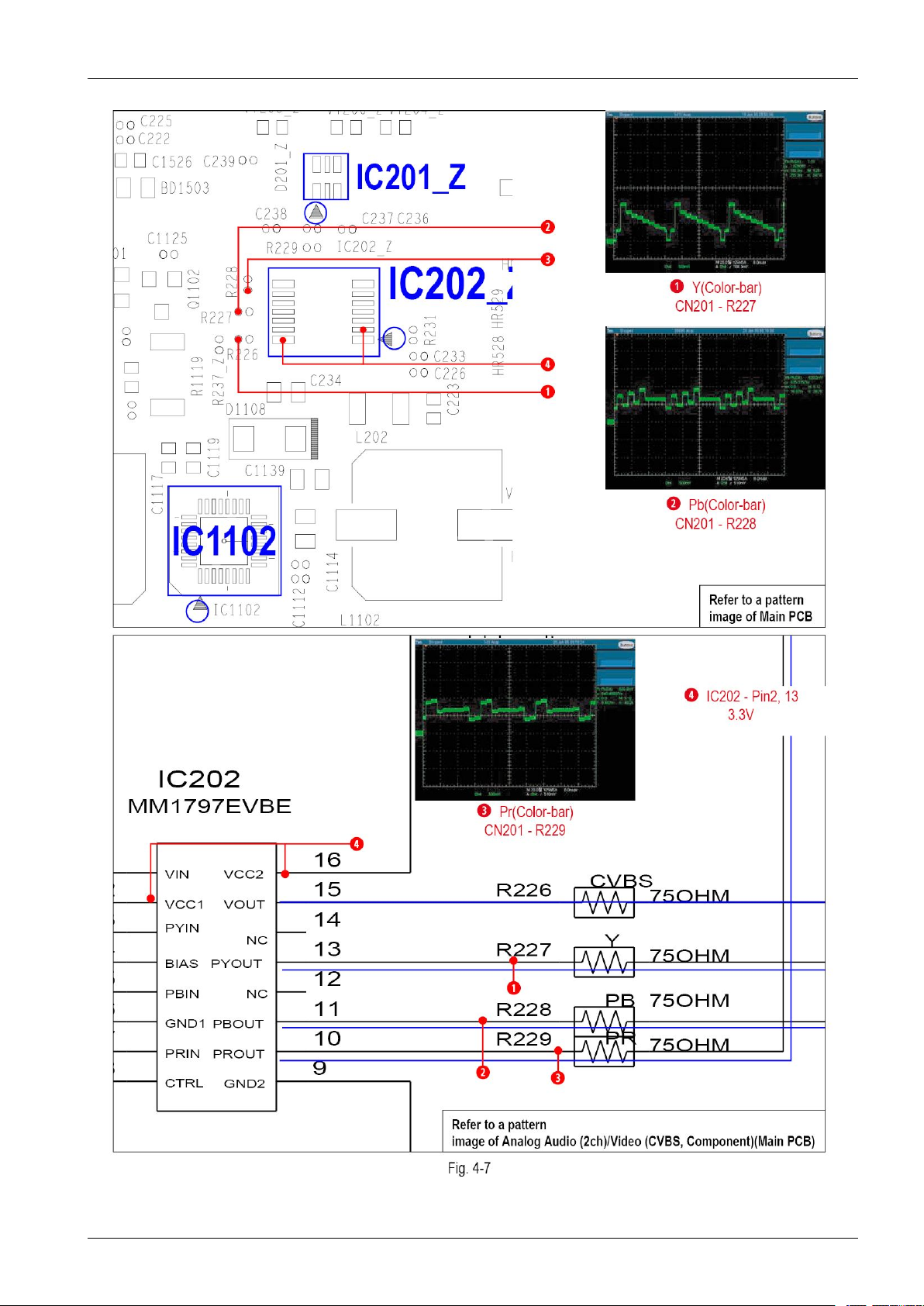
4.Troubleshooting
Copyright©1995-2011SAMSUNG.Allrightsreserved.4-15
Page 54
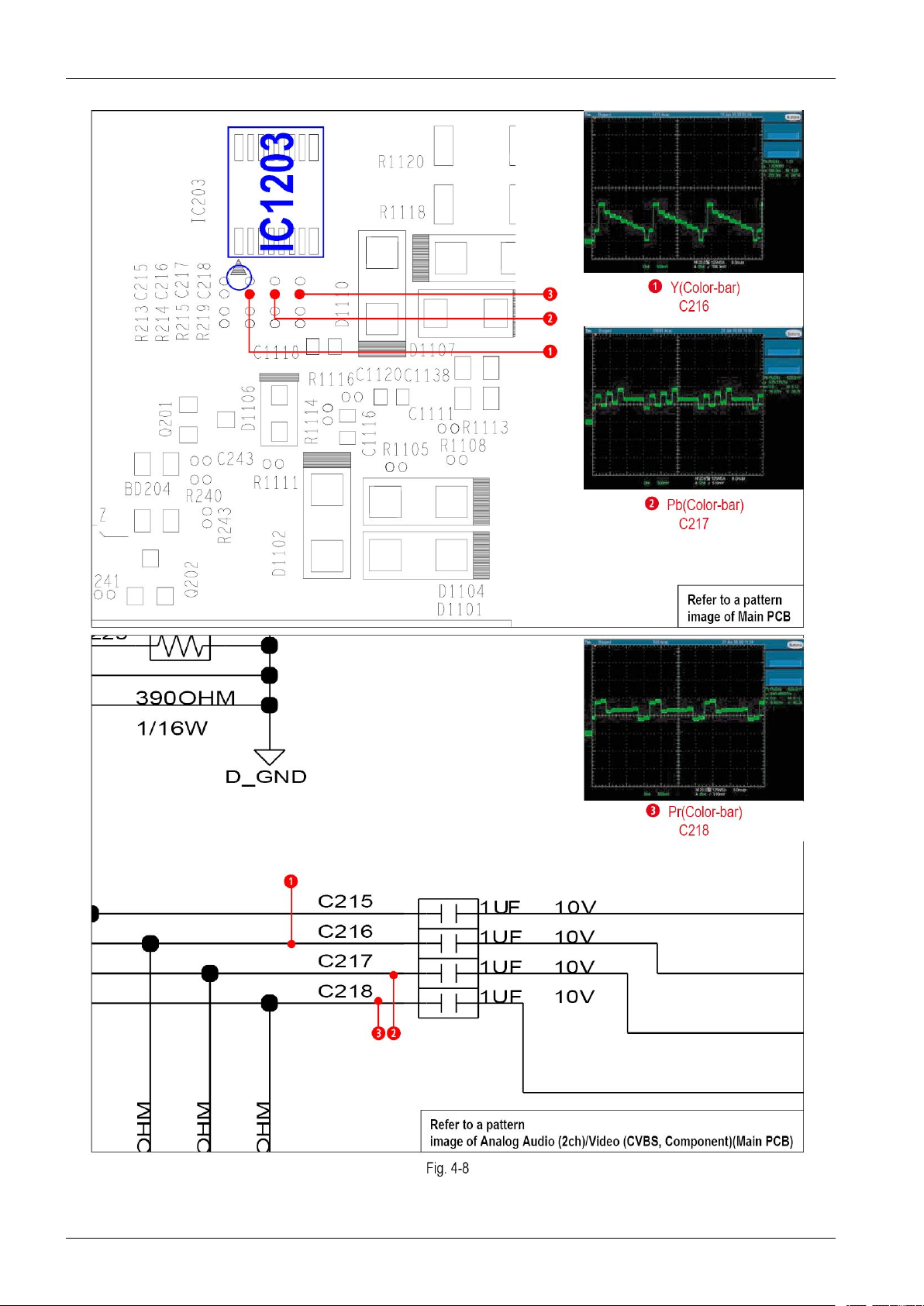
4.Troubleshooting
4-16Copyright©1995-2011SAMSUNG.Allrightsreserved.
Page 55
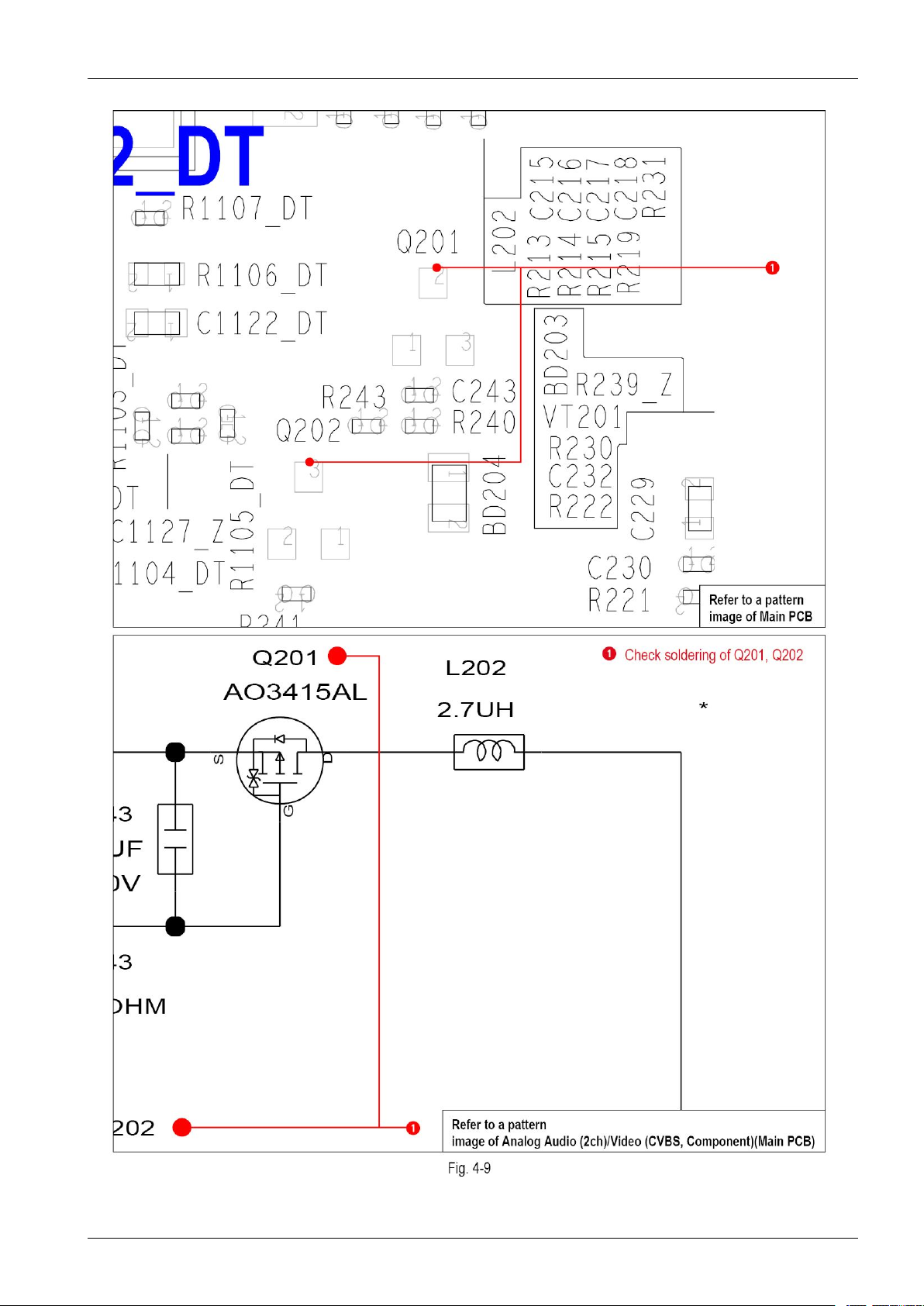
4.Troubleshooting
Copyright©1995-2011SAMSUNG.Allrightsreserved.4-17
Page 56
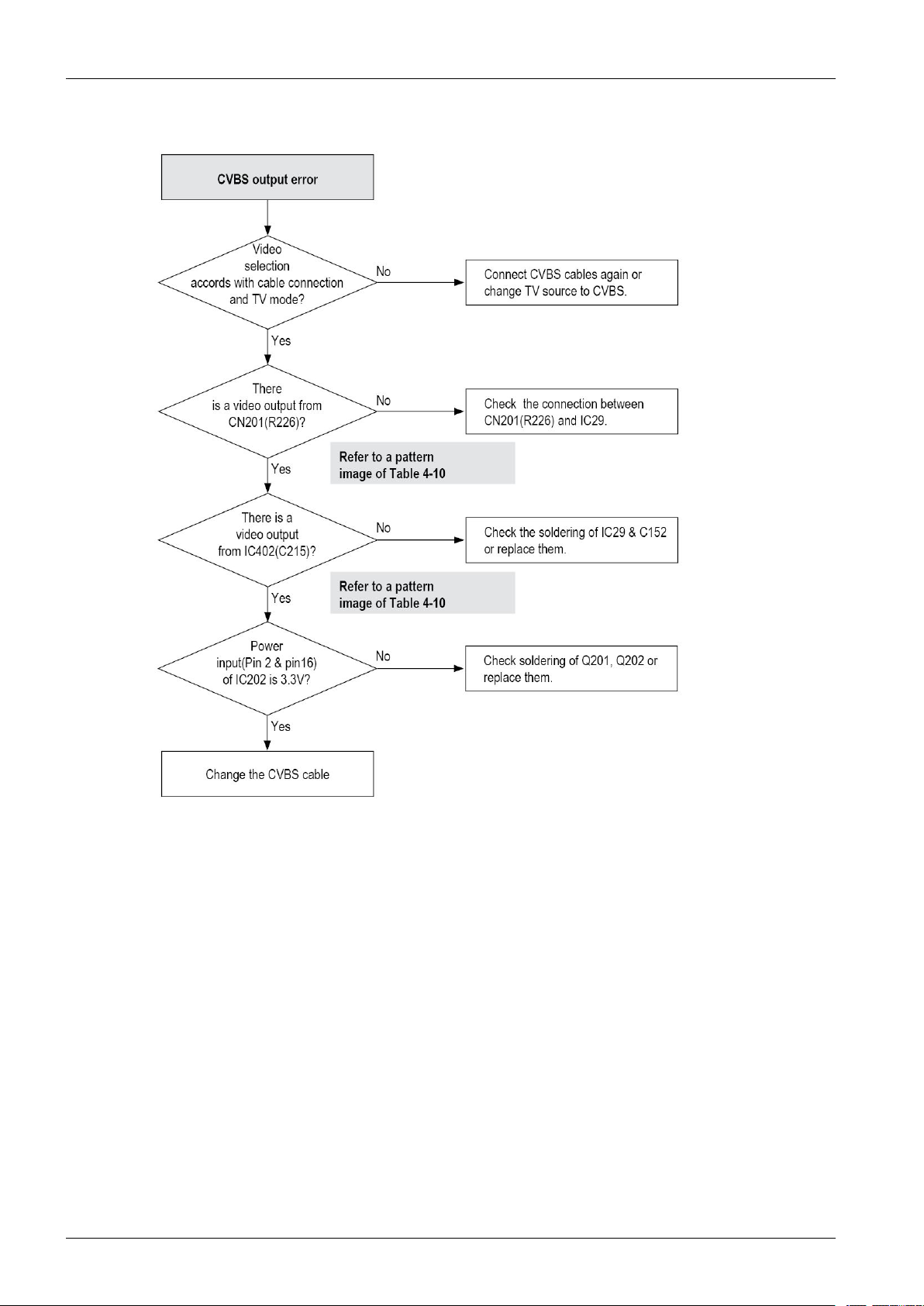
4.Troubleshooting
4-18Copyright©1995-2011SAMSUNG.Allrightsreserved.
Page 57
4.Troubleshooting
Copyright©1995-2011SAMSUNG.Allrightsreserved.4-19
Page 58
4.Troubleshooting
4-20Copyright©1995-2011SAMSUNG.Allrightsreserved.
Page 59
4.Troubleshooting
Copyright©1995-2011SAMSUNG.Allrightsreserved.4-21
Page 60
4.Troubleshooting
4-22Copyright©1995-2011SAMSUNG.Allrightsreserved.
Page 61
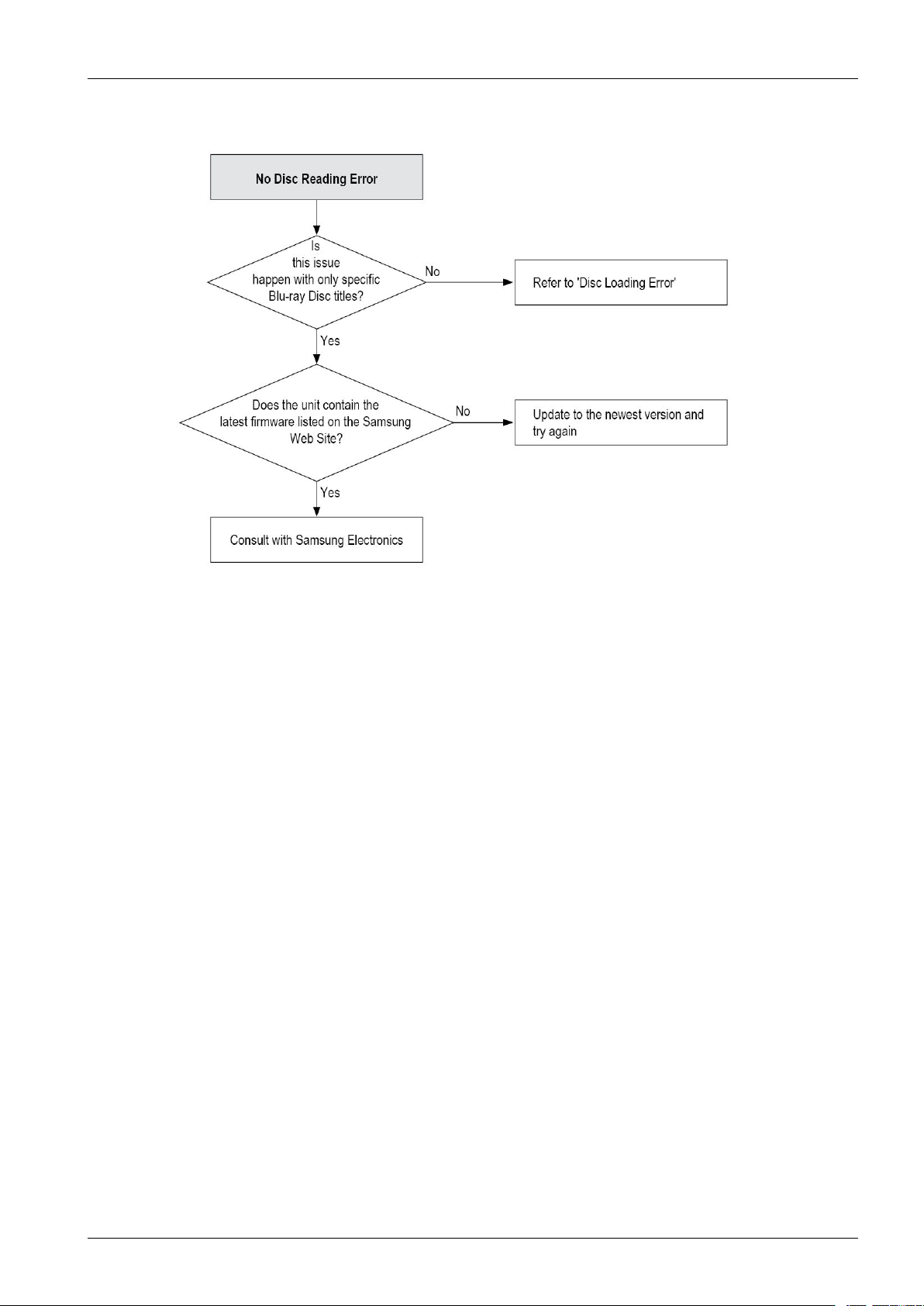
4.Troubleshooting
Copyright©1995-2011SAMSUNG.Allrightsreserved.4-23
Page 62

4.Troubleshooting
4.2.SoftwareUpdate
TheSoftwareUpgrademenuallowsyoutoupgradetheplayer’ssoftwareforperformanceimprovementsoradditional
services.Youcanupgradeinfourways:
•ByInternet
•ByUSB
•ByDisc
•ByDownloaded(File)
•ViaDownload
Thevemethodsareexplainedbelow.
4.2.1.Upgrade
ByInternet
ToupgradebyInternet,followthesesteps:
1)SelectByInternet,andthenpresstheENTERbutton.TheConnectingtoServermessageappears.
2)Ifthereisadownloadavailable,theDownloadpop-upappearswithaprogressbarandthedownloadstarts.
3)Whenthedownloadiscomplete,theUpgradeQuerywindowappearswiththreechoices:UpgradeNow,Upgrade
Later,orDon’tUpgrade.
4)IfyouselectUpgradeNow,theplayerupgradesthesoftware,turnsoff,andthenturnsonautomatically .
5)IfyoudonotmakeaselectioninoneminuteorselectUpgradeLater,theplayerstoresthenewupgradesoftware.Y ou
canupgradethesoftwarelaterusingtheByDownloadedfunction.
6)IfyouselectDon’tUpgrade,theplayercancelstheupgrade.
NOTE
•YourplayermustbeconnectedtotheInternettousetheByInternetfunction.
•Theupgradeiscompletewhentheplayerturnsoff,andthenturnsonagainbyitself.
•Neverturntheplayerofforbackonmanuallyduringtheupdateprocess.
•SamsungElectronicsshalltakenolegalresponsibilityforplayermalfunctioncausedbyanunstableInternetconnectionor
consumernegligenceduringasoftwareupgrade.
•Ifyouwanttocanceltheupgradewhiletheupgradesoftwareisdownloading,presstheENTERbutton.
ByChannel
Upgradesoftwareusingthebroadcastingsignal.
ByUSB
ToupgradebyUSB,followthesesteps:
1)Visitwww.samsung.com/bluraysupport
2)DownloadthelatestUSBsoftwareupgradeziparchivetoyourcomputer.
4-24Copyright©1995-2011SAMSUNG.Allrightsreserved.
Page 63

3)Unziptheziparchivetoyourcomputer.Y oushouldhaveasinglefolderwiththesamenameastheziple.
4)CopythefoldertoaUSBashdrive.
5)Makesurethedisctrayisempty ,andtheninserttheUSBashdriveintotheUSBportoftheplayer.
6)Intheplayer’smenu,gotoSettings>Support>SoftwareUpgrade.
7)SelectByUSB.
NOTE
•ThedisctraymustbeemptywhenyouupgradethesoftwareusingtheUSBHostjack.
•Whenthesoftwareupgradeisdone,checkthesoftwaredetailsinthesoftwareUpgrademenu.
•Donotturnofftheplayerduringthesoftwareupgrade.Itmaycausetheplayertomalfunction.
•SoftwareupgradesusingtheUSBHostjackmustbeperformedwithaUSBmemoryashstickonly.
ByDisc
ToupgradebyDisc,followthesesteps:
4.Troubleshooting
1)Visitwww.samsung.com/bluraysupport.
2)Downloadthelatestdiscsoftwareupgradeziparchivetoyourcomputer .
3)Unziptheziparchivetoyourcomputer .Y oushouldhaveasingle.RUFle.
4)WritetheRUFleontoadisc.WerecommendaCD-RorDVD-R.
5)Finalizethediscbeforeyouremoveitfromyourcomputer.
6)Insertthediscintoplayer.
7)Intheplayer’smenu,gotoSettings>Support>Softwareupgrade.
8)SelectByDisc.
NOTE
•Whenthesystemupgradeisdone,checkthesoftwaredetailsinthesoftwareUpgrademenu.
•DonotturnofftheplayerduringtheSoftwareUpgrade.Itmaycausetheplayermalfunction.
ViaDownloaded
TheViaDownloadedoptionletsyouupgradeusingaletheplayerdownloadedearlierbutyoudecidednottoinstall
immediatelyoraledownloadedbytheplayerinStandbyMode(SeeDownloadinStandbyModebelow).ToupgradeVia
Downloaded,followthesesteps:
1)Ifupgradesoftwarehasbeendownloaded,youwillseethesoftwareversionnumbertotherightofViaDownloaded.
2)SelectViaDownloaded,andthenpresstheENTERbutton.
3)Theplayerdisplaysamessageaskingifyouwanttoupgrade.SelectYes.Theplayerbeginstheupgrade.
4)Whentheupdateiscomplete,theplayerturnsoffautomatically,andthenturnson.
Copyright©1995-2011SAMSUNG.Allrightsreserved.4-25
Page 64
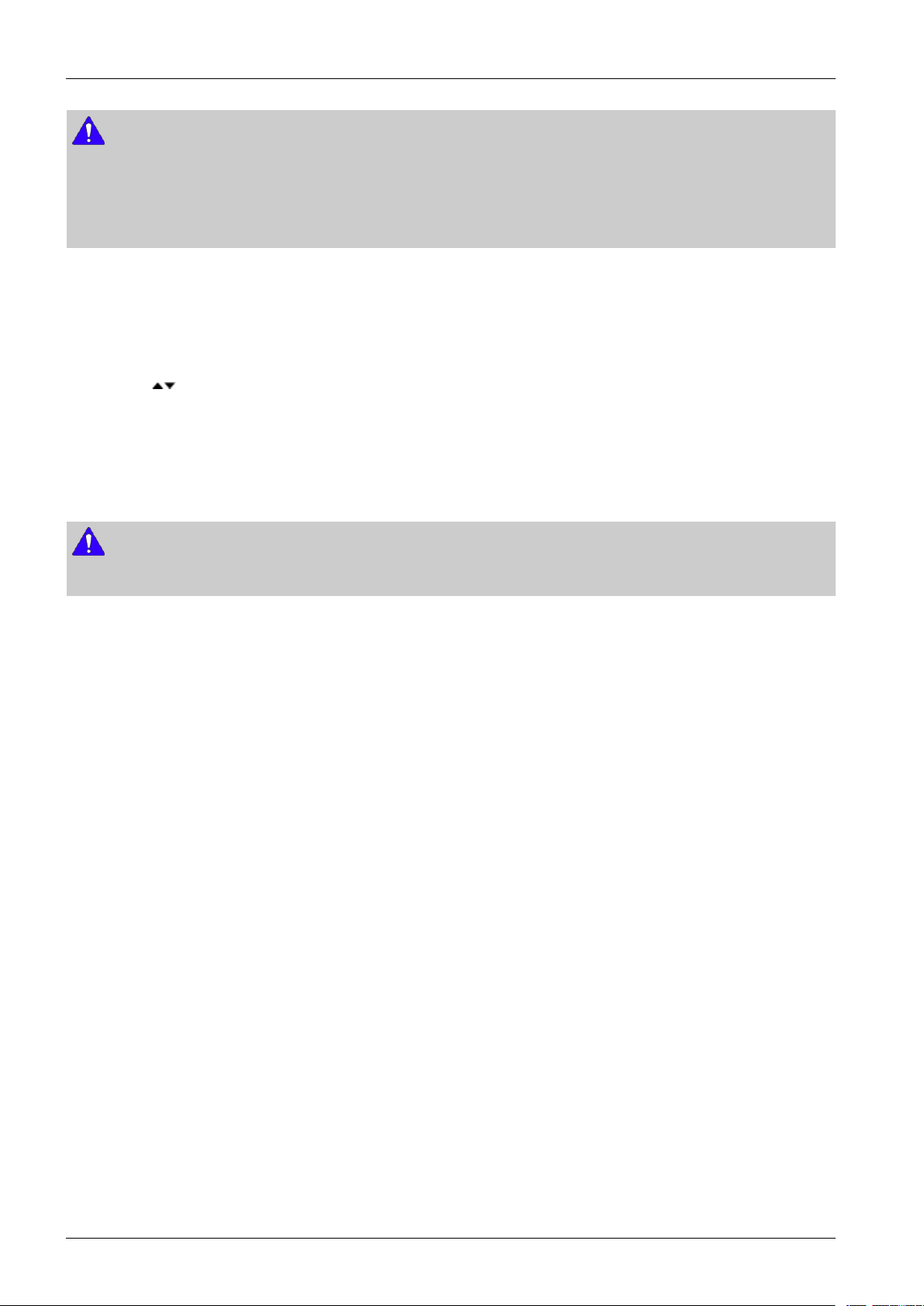
4.Troubleshooting
NOTE
•Whenthesystemupgradeisdone,checkthesoftwaredetailsinthesoftwareUpgrademenu.
•DonotturnofftheplayerduringthesoftwareUpgrade.Itmaycausetheplayertomalfunction.
•TousetheViadownloadfunction,yourplayermustbeconnectedtotheInternet.
DownloadinStandbyMode.
YoucansettheDownloadinStandbyModefunctionsothattheplayerdownloadsnewupgradesoftwarewhenitisin
Standbymode.InStandbymode,theplayerisoff,butitsInternetconnectionisactive.Thisallowstheplayertodownload
upgradesoftwareautomatically,whenyouarenotusingit.T osetDownloadinStandbyMode,followthesesteps:
1)Pressthe
buttonstoselectDownloadinStandbyMode,andthenpresstheENTERbutton.
2)SelectOnorOff
OFF:IfyouselectOff,theplayerwillnotifyyouwithapopupmessagewhennewupgradesoftwareisavailable.
ON:IfyouselectOn,theplayerwillautomaticallydownloadnewupgradesoftwarewhenitisinStandbymode
withthepoweroff.Ifitdownloadsnewupgradesoftware,theplayerwillaskyouifyouwanttoinstallitwhenyou
turntheplayeron.
NOTE
•TousetheByDownloadedfunction,yourplayermustbeconnectedtotheInternet.
4-26Copyright©1995-2011SAMSUNG.Allrightsreserved.
Page 65

5.PCBDiagrams
5.PCBDiagrams
Copyright©1995-201 1SAMSUNG.Allrightsreserved.5-1
Page 66
5.PCBDiagrams
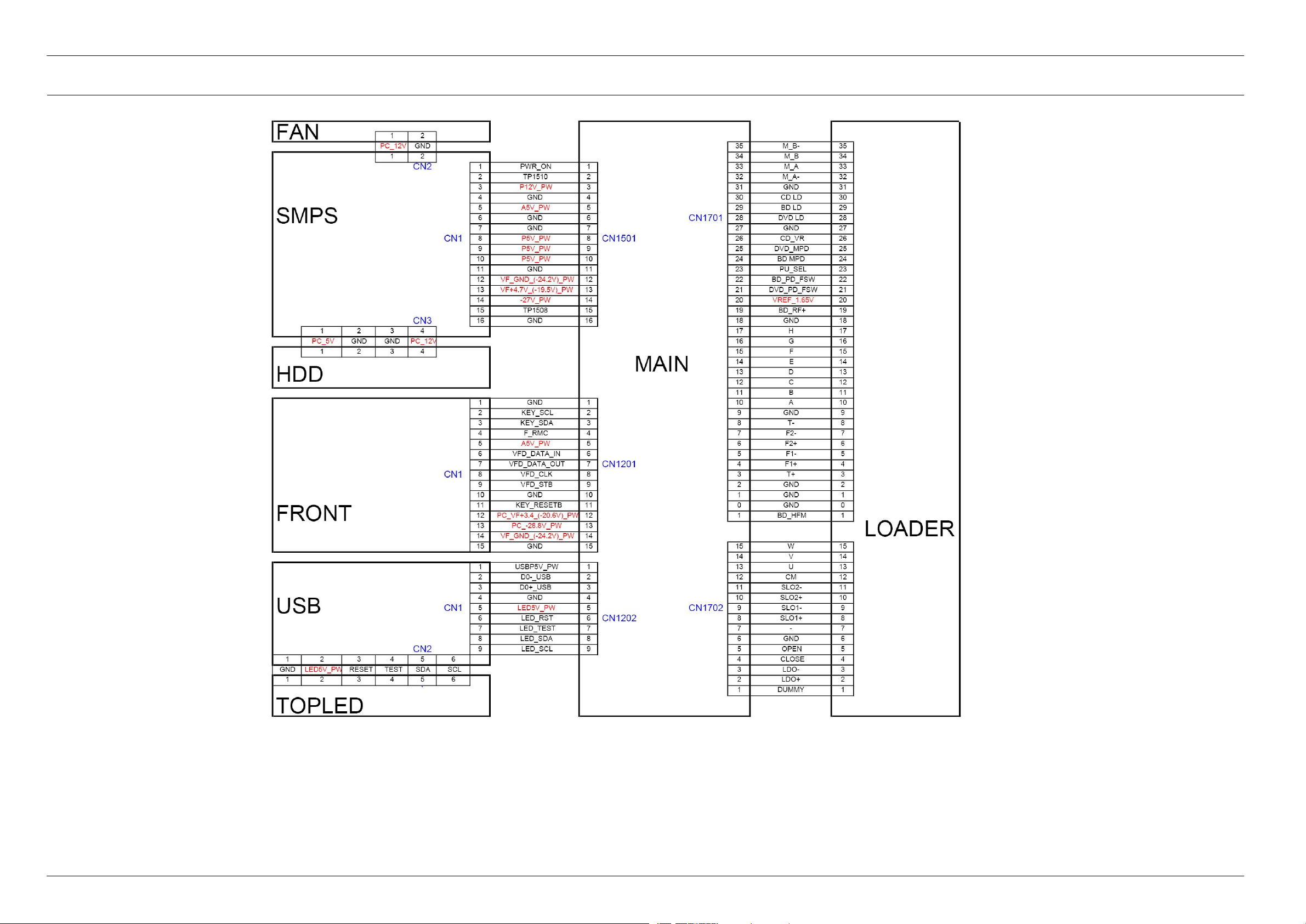
5.1.WiringDiagram
5-2Copyright©1995-2011SAMSUNG.Allrightsreserved.
Page 67
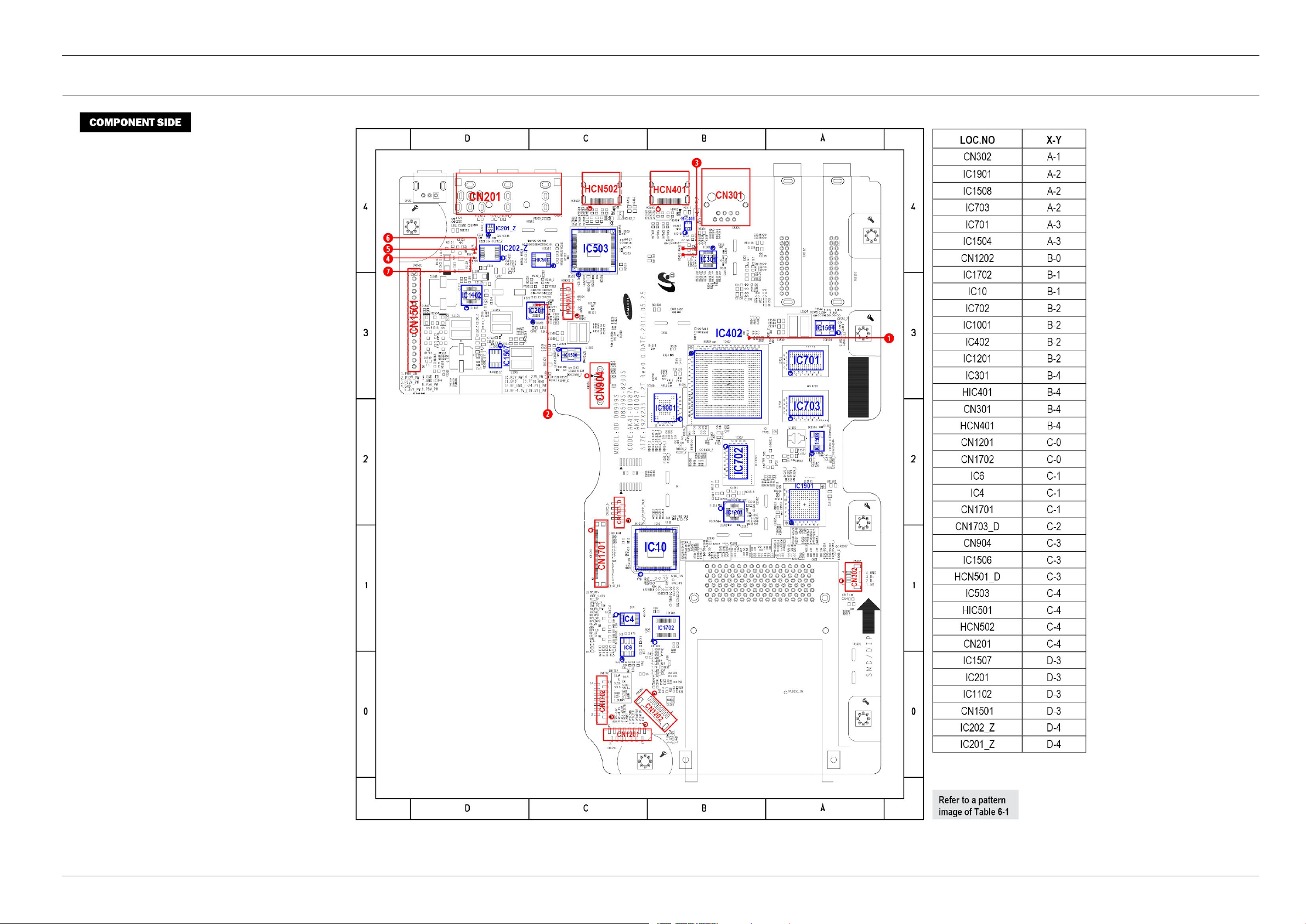
5.2.MainPCB
5.PCBDiagrams
Copyright©1995-201 1SAMSUNG.Allrightsreserved.5-3
Page 68
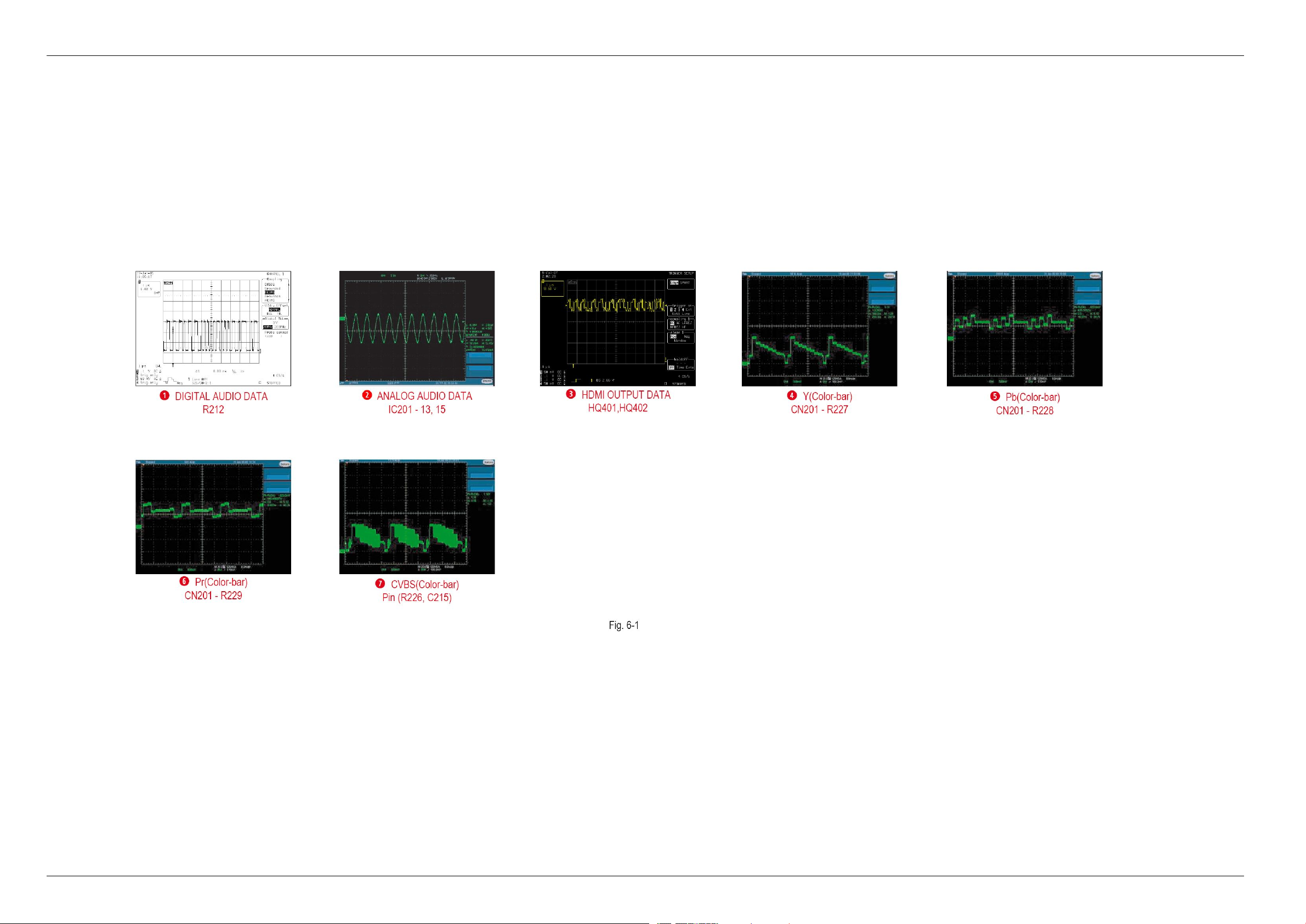
5.PCBDiagrams
5-4Copyright©1995-2011SAMSUNG.Allrightsreserved.
Page 69
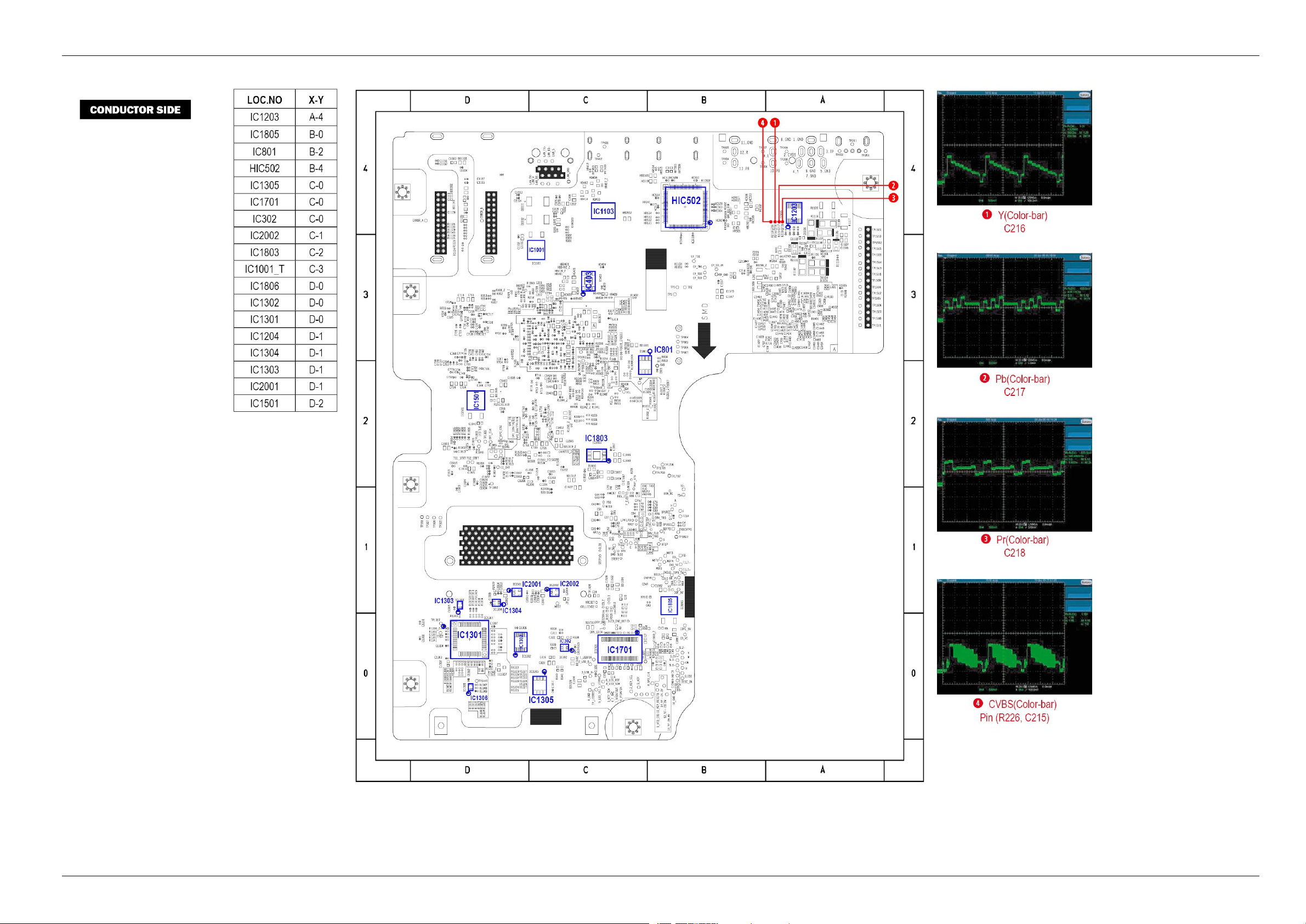
5.PCBDiagrams
Copyright©1995-201 1SAMSUNG.Allrightsreserved.5-5
Page 70
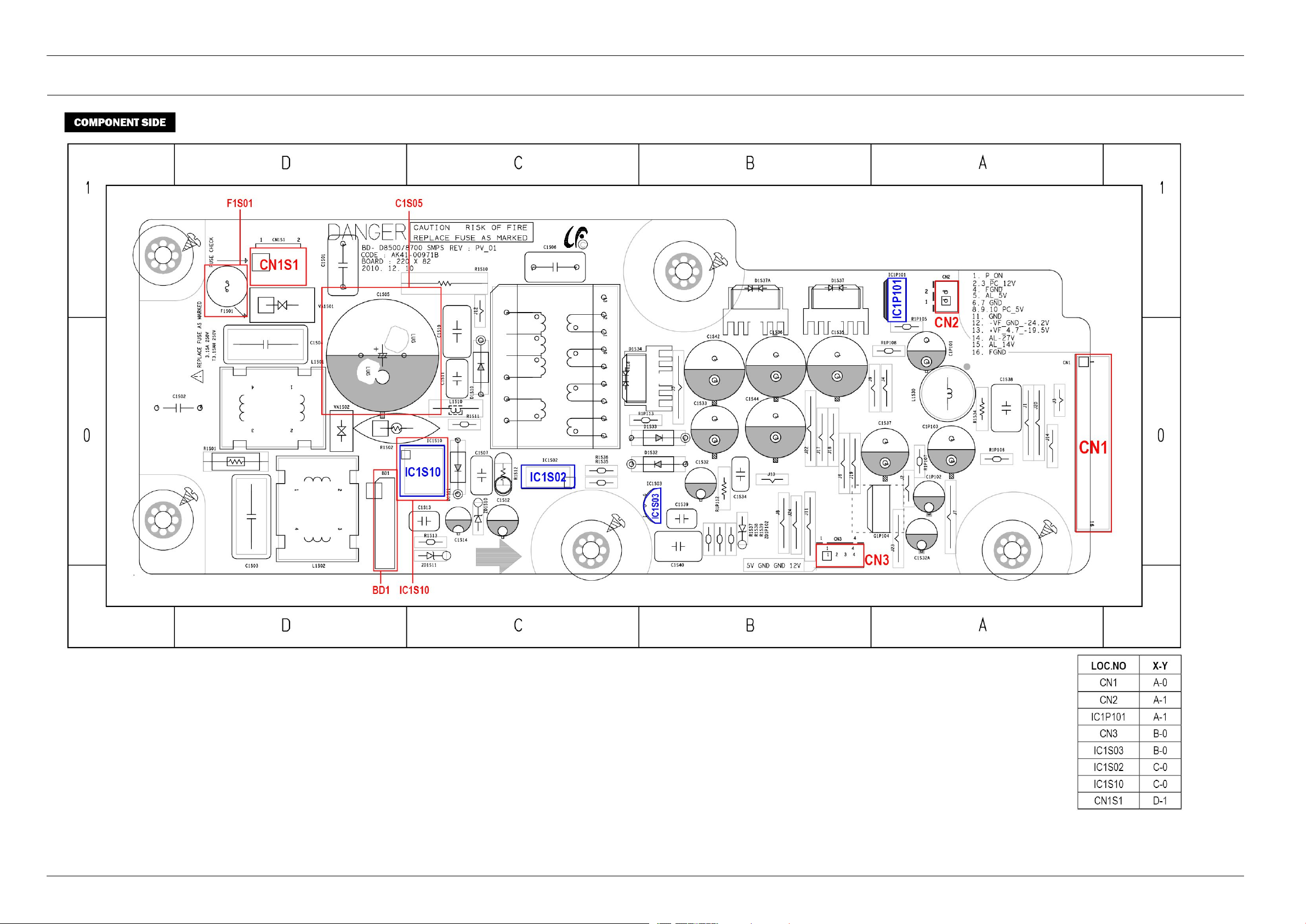
5.PCBDiagrams
5.3.S.M.P .SPCB
5-6Copyright©1995-2011SAMSUNG.Allrightsreserved.
Page 71
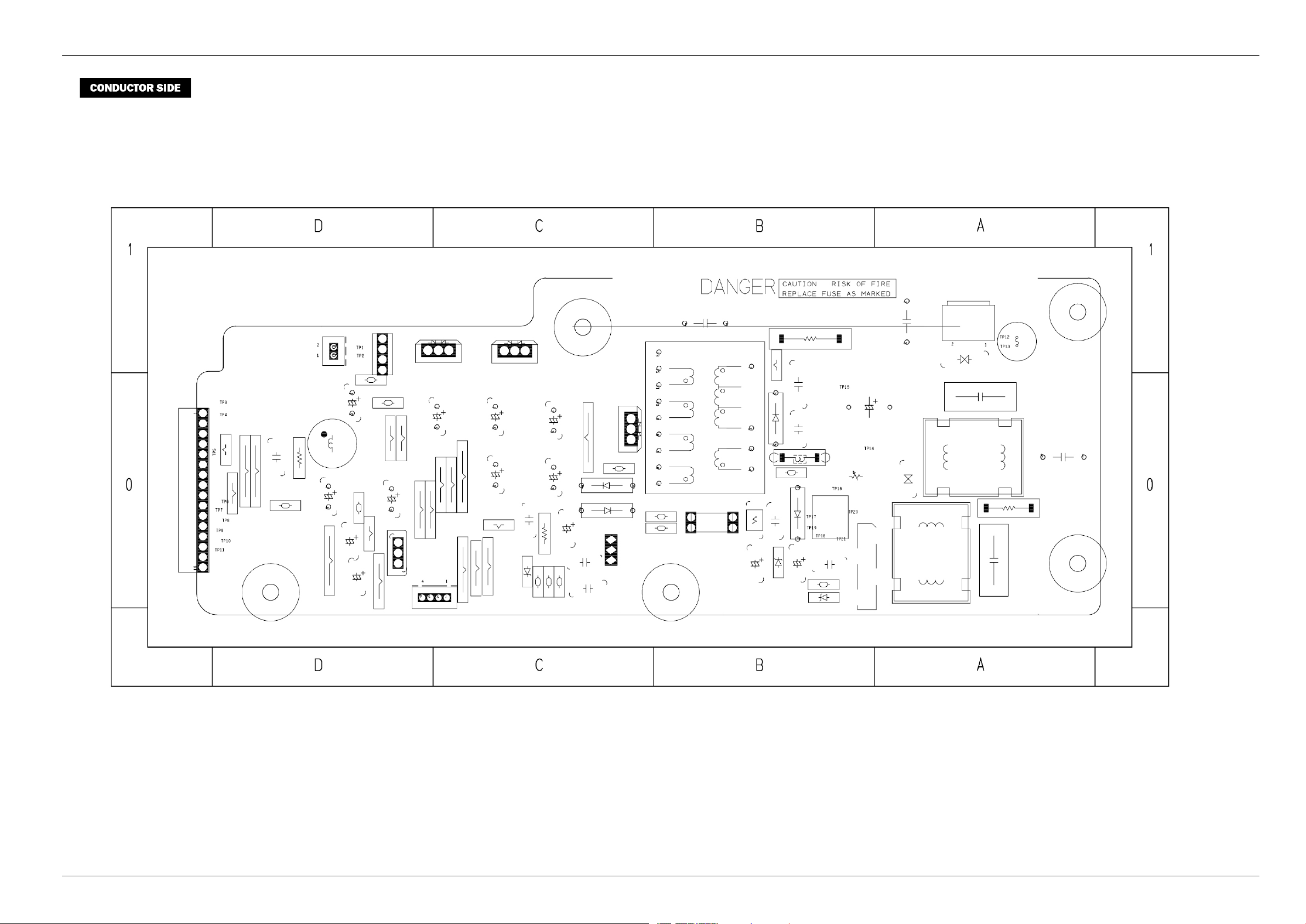
5.PCBDiagrams
Copyright©1995-201 1SAMSUNG.Allrightsreserved.5-7
Page 72
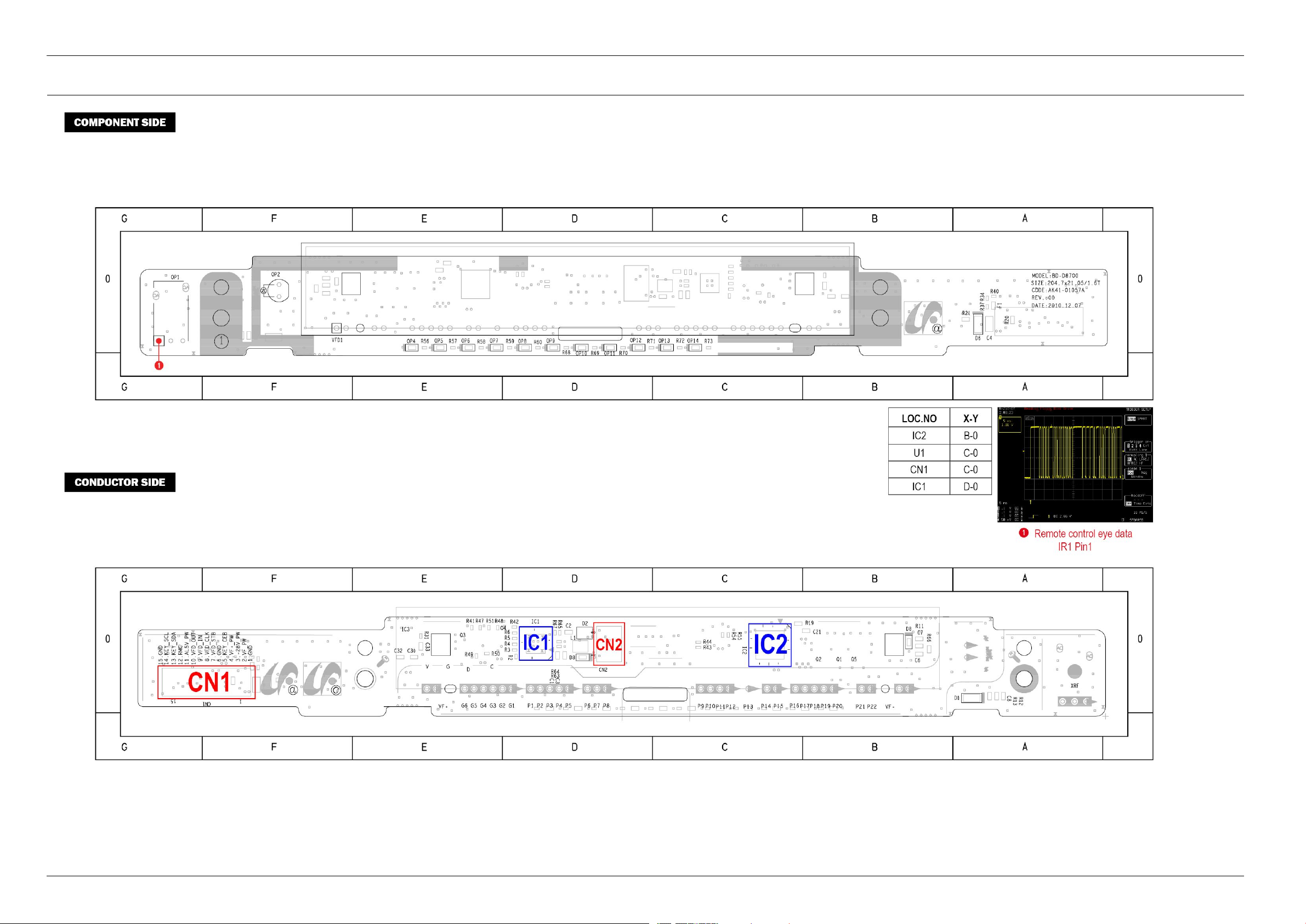
5.PCBDiagrams
5.4.FrontPCB
5-8Copyright©1995-2011SAMSUNG.Allrightsreserved.
Page 73
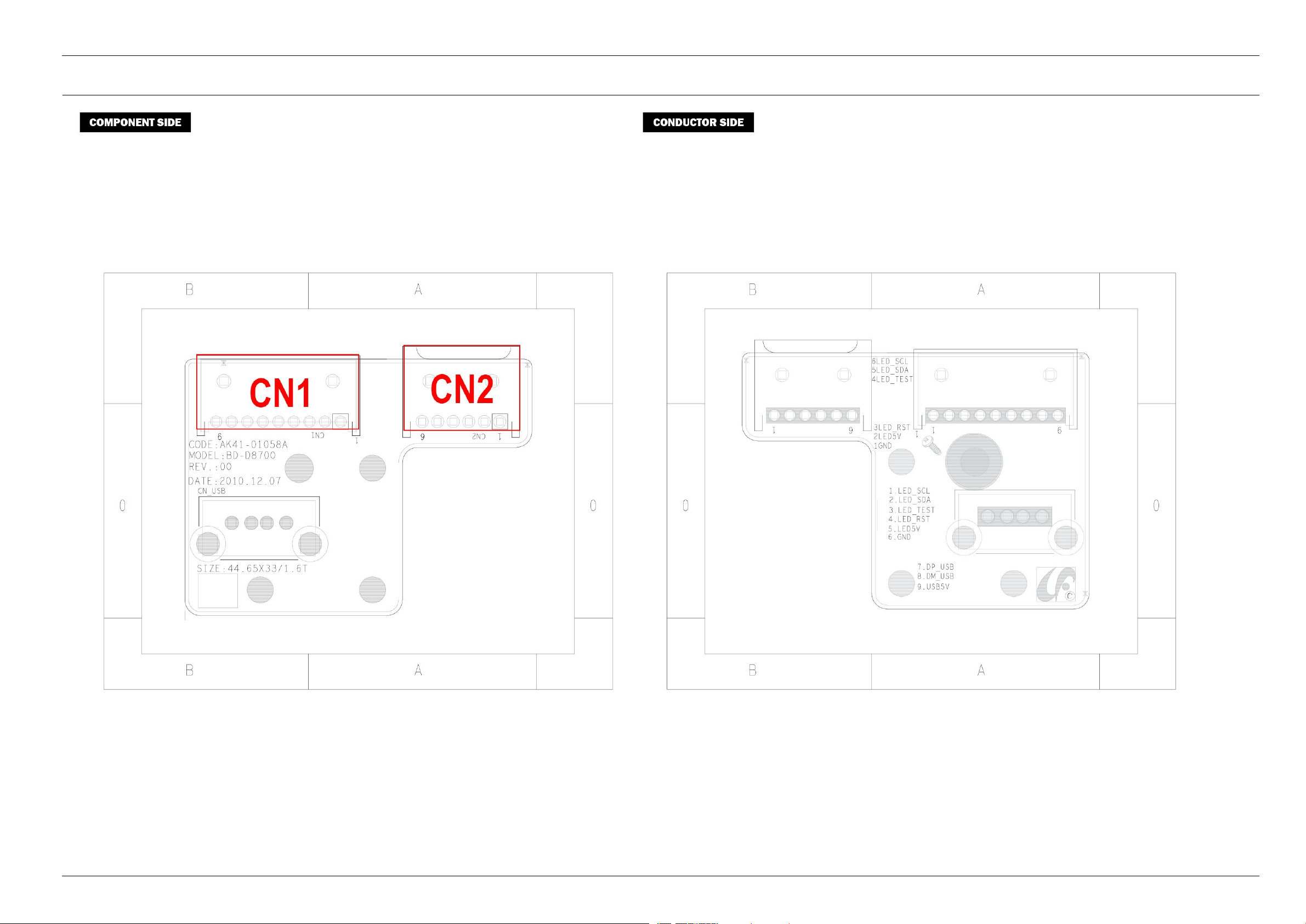
5.5.USBPCB
5.PCBDiagrams
Copyright©1995-201 1SAMSUNG.Allrightsreserved.5-9
Page 74
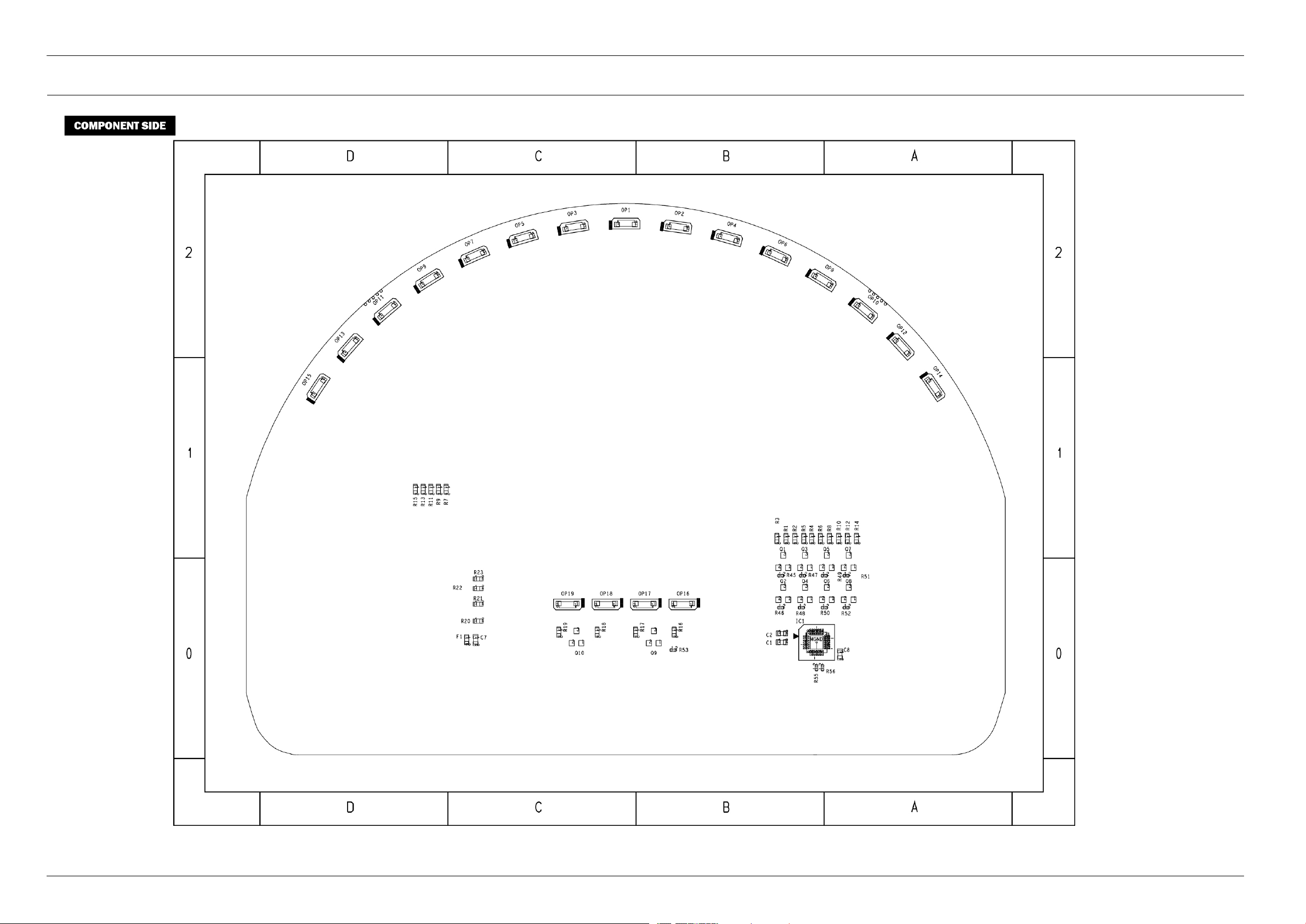
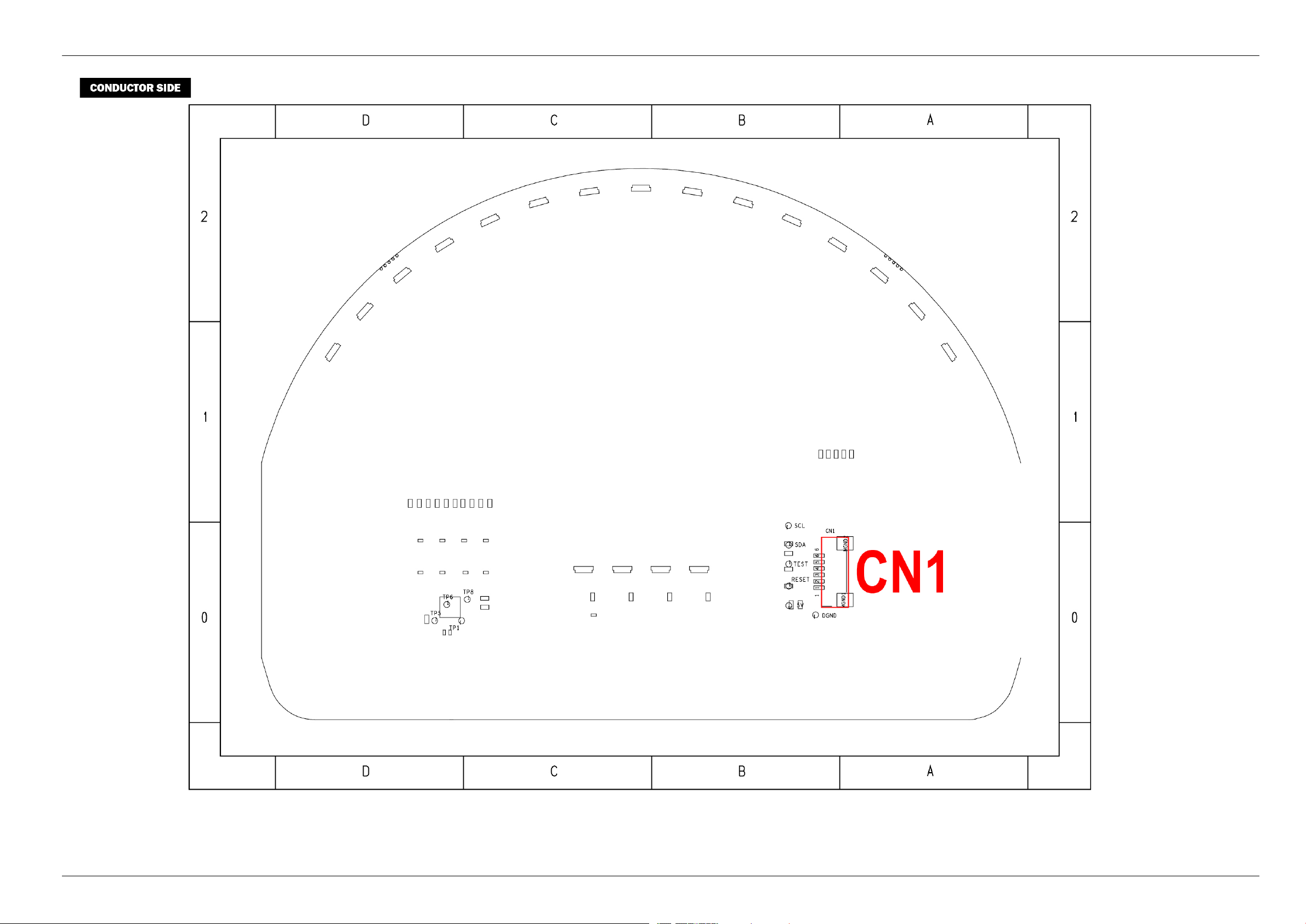
5.PCBDiagrams
5.6.TopLEDPCB
5-10Copyright©1995-2011SAMSUNG.Allrightsreserved.
Page 75
5.PCBDiagrams
Copyright©1995-201 1SAMSUNG.Allrightsreserved.5-11
Page 76

6.SchematicDiagrams
6.SchematicDiagrams
NOTE
•ForschematicDiagram
-Resistorsareinohms,1/8Wunlessotherwisenoted.
NOTE
Donotusethepartnumbershownonthisdrawingforordering.Thecorrectpartnumberisshowninthepartslist(maybeslightlydifferentoramendedsincethisdrawingwasprepared).
CAUTION
Mostsemiconductordevicesareelectrostaticallysensitiveandthereforerequirethespecialhandlingtechniquesdescribedunderthe“electrostaticallysensitive(ES)devices”sectionofthisservicemanual.
WARNING
Componentsidentiedwiththemarkhavethespecialcharacteristicsforsafety.Whenreplacinganyofthesecomponents.Useonlythesametype.
6-1Copyright©1995-2011SAMSUNG.Allrightsreserved.
Page 77
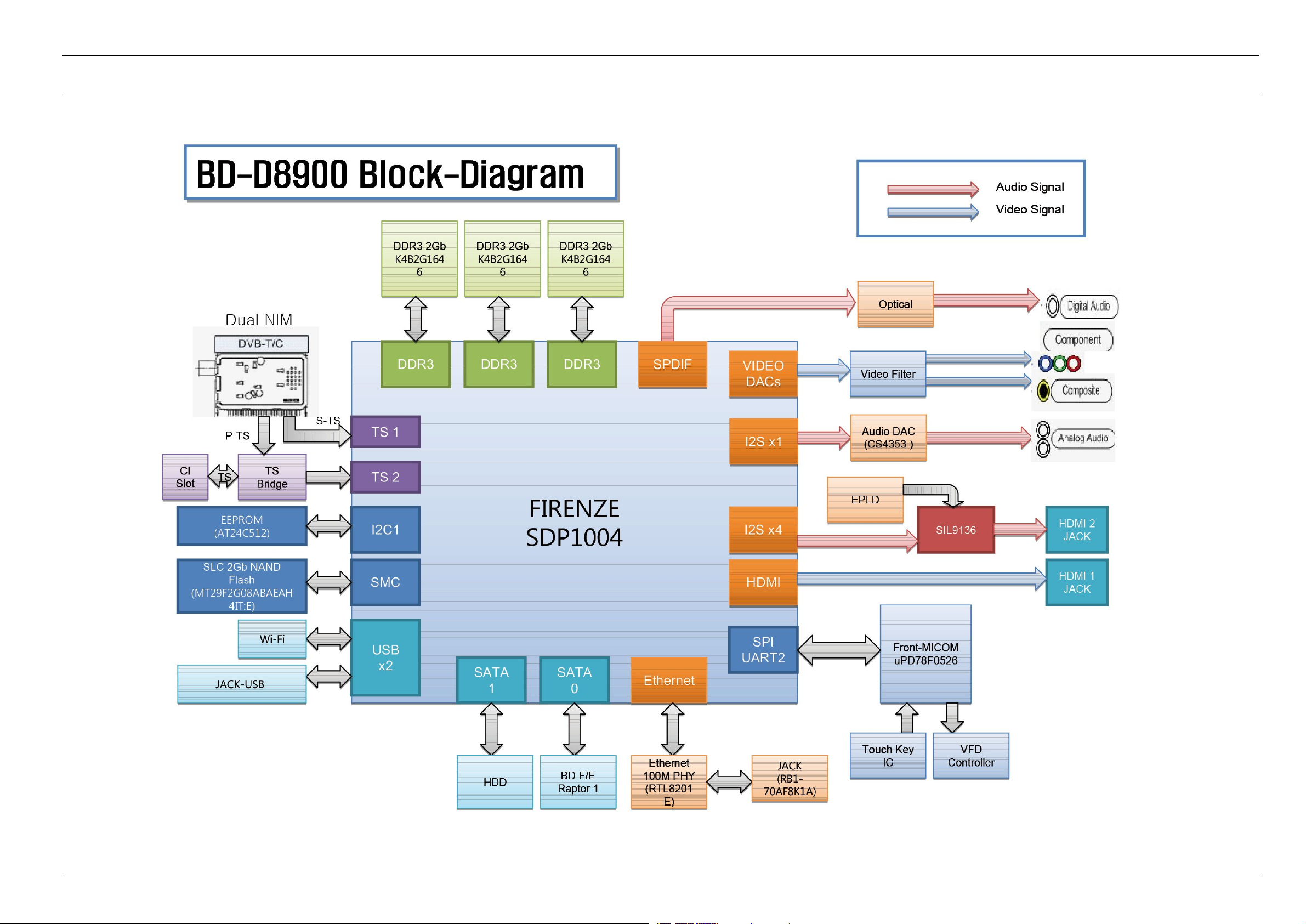
6.1.AllBlockDiagram
6.SchematicDiagrams
Copyright©1995-201 1SAMSUNG.Allrightsreserved.6-2
Page 78
6.SchematicDiagrams
6.2.Power
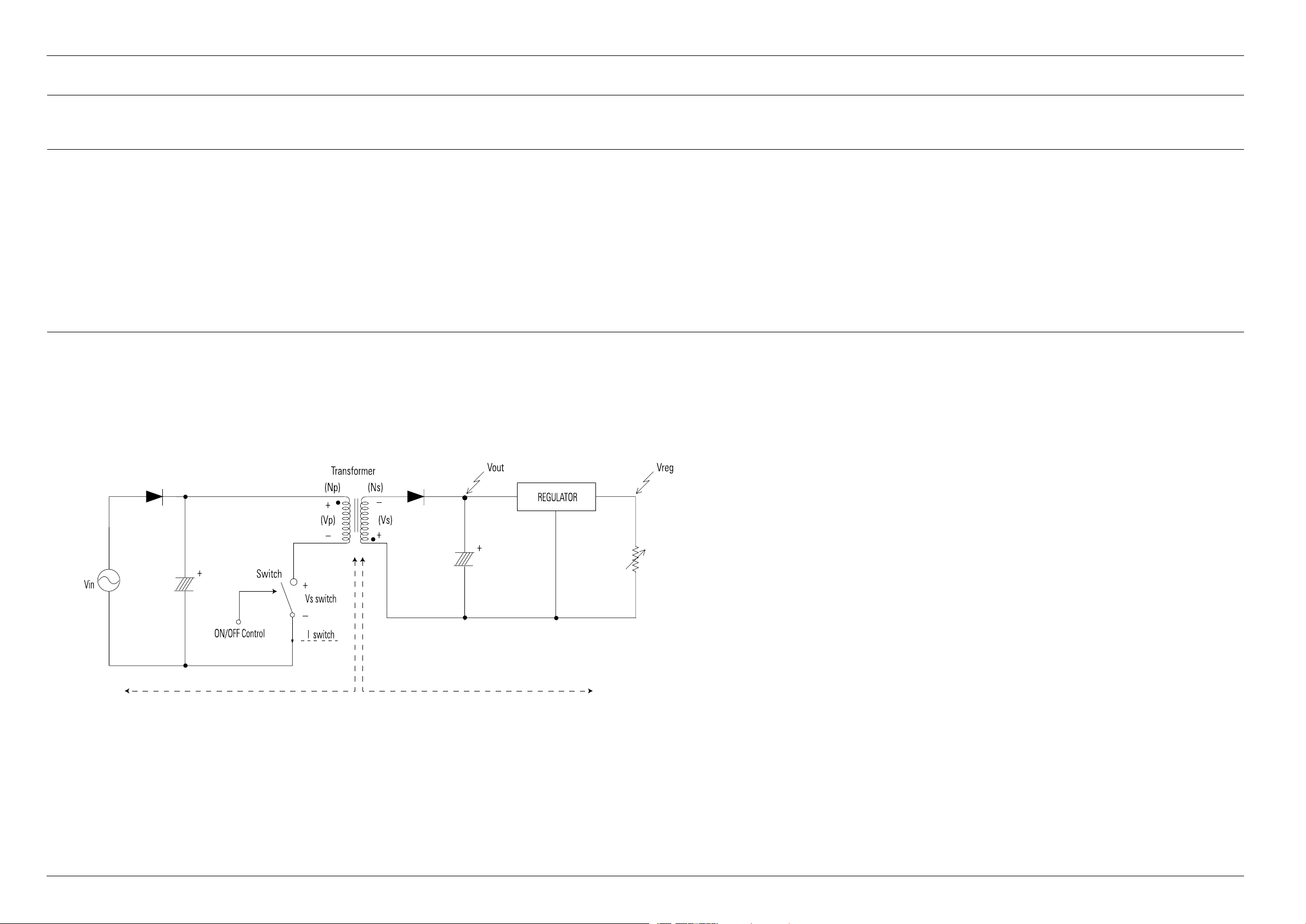
6.2.1.AboutS.M.P .S(RingingChokeConverterMethod)
Terms
1)1st:Commonpowerinputto1stwinding.
2)2nd:Circuitfollowingsoutputwindingoftransformer.
3)f(Frequency):Switchingfrequency(T:Switchingcycle)
4)Duty:(Ton/T)x100
6.2.2.Circuitdescripcotion[FL Y-BackRCC(RingingChokeConverter)]Control
1)ACPowerRectication/SmoothingT erminal
a)BD01~04:ConvertACpowertoDC(Waverectication).
b)C1S05B:SmooththevoltageconvertedtoDC.
c)L1S01,C1S03,C1S04:Noiseremovalatpowerinput/output.
d)R1S02:Rushcurrentlimitresistanceatthemomentofpowercordinsertion.
WithoutP1S02,thebridgediodemightbedamagedastherushcurrentincreases.
2)SNUBBERCircuit:D1S10,C1S10,R1S10
a)Preventresidualhighvoltageattheterminalsofswitchduringswitchoff/Suppressnoise.Highinvertedpoweroccursatswitchoff,becauseofthe1stwindingoftransformer:(V=-L1xdi/dt.L1:LeakageInduction)Averyhighresidualvoltageexistonboth
terminalsofIC1becausedtisaveryshort.
b)SNUBBERcircuitprotectsIC1fromdamagethroughleakagevoltagesuppressionbyRC,(ChargestheleakagevoltagetoDIS10andCIS10anddischargestoR1S10).
6-3Copyright©1995-2011SAMSUNG.Allrightsreserved.
Page 79
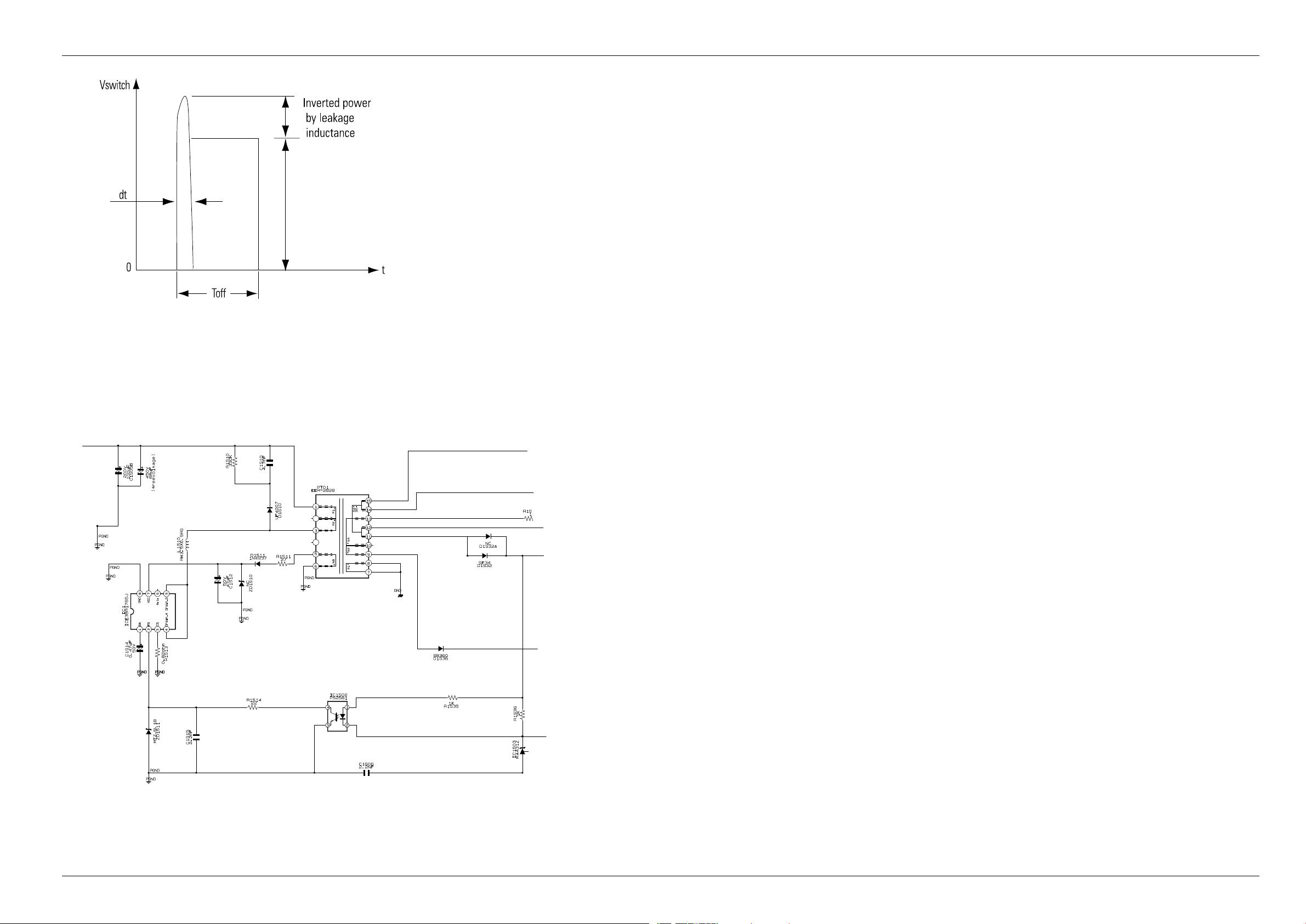
3)IC1S01Vcccircuit
a)ICIS01,RIS05,RIS07,RIS08:ICIS01drivingresistance(ICIS01worksthroughdrivingresistanceatpowercordin)
b)ICIS01Vcc:RIS05,RIS07,RIS08
i)UsetheoutputoftransformerasVcc,becausethecurrentstartstoowintotransformerwhileICIS01isactive
ii)RectifytoDIS07andsmoothtoCIS09.
iii)UsetheoutputoftransformerasICIS01Vcc:TheloadsaredifferentbeforeandafterICIS01driving.(VccofICIS01decreasesbelowOFFvoltage,usingonlytheresistanceduttolodeincreaseafterICIS01driving.)
6.SchematicDiagrams
4)FeedbackControlCircuit
a)F/BTerminalofIC1determinesoutputdutycycle.
b)C-E(Collector-Emitter)ofandF/BpotentialofPQIZ1aresame.
Copyright©1995-201 1SAMSUNG.Allrightsreserved.6-4
Page 80
6.SchematicDiagrams
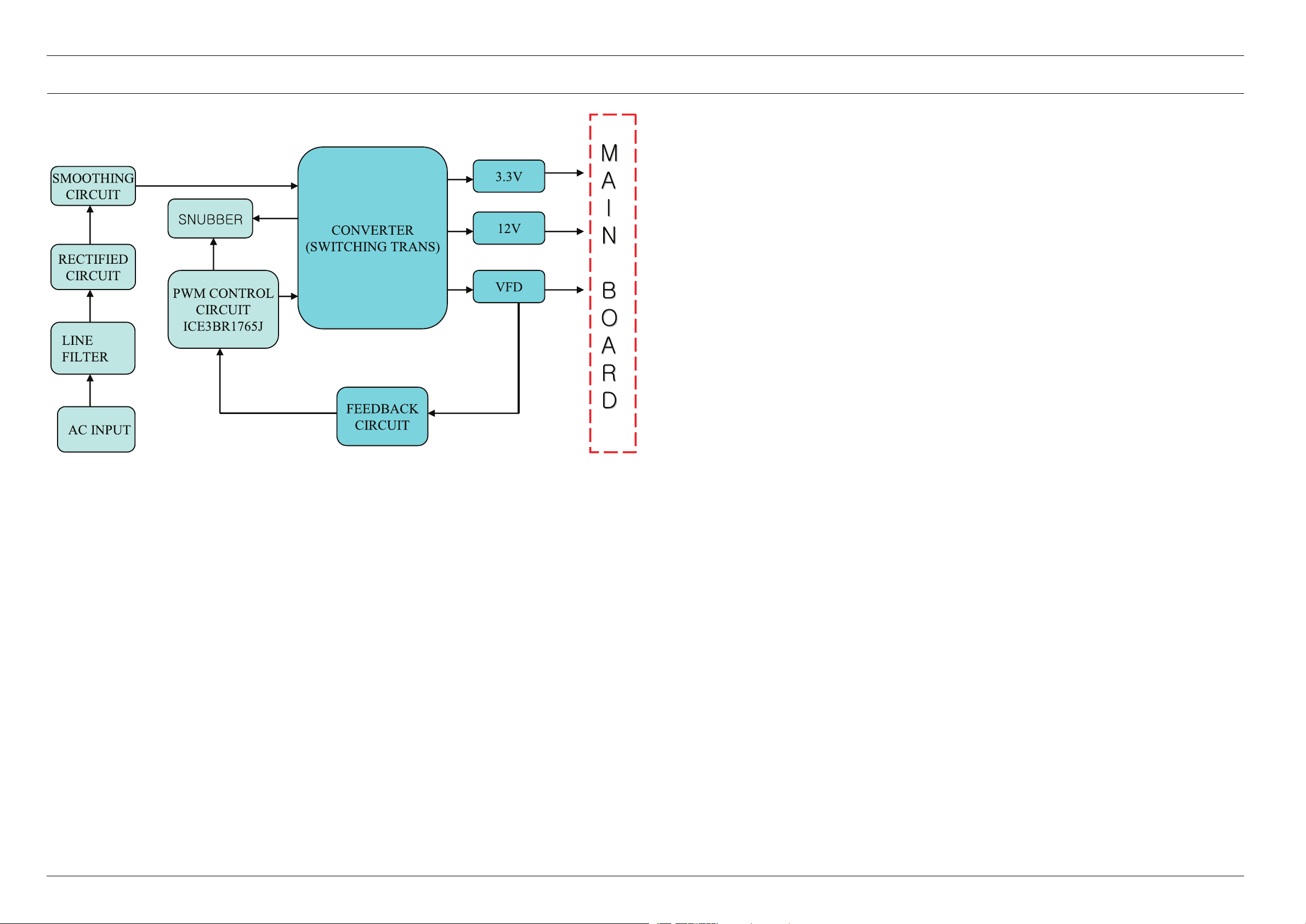
6.2.3.InternalBlockDiagram(InternalBlockDiagramofS.M.P .SCircuit)
6-5Copyright©1995-2011SAMSUNG.Allrightsreserved.
Page 81
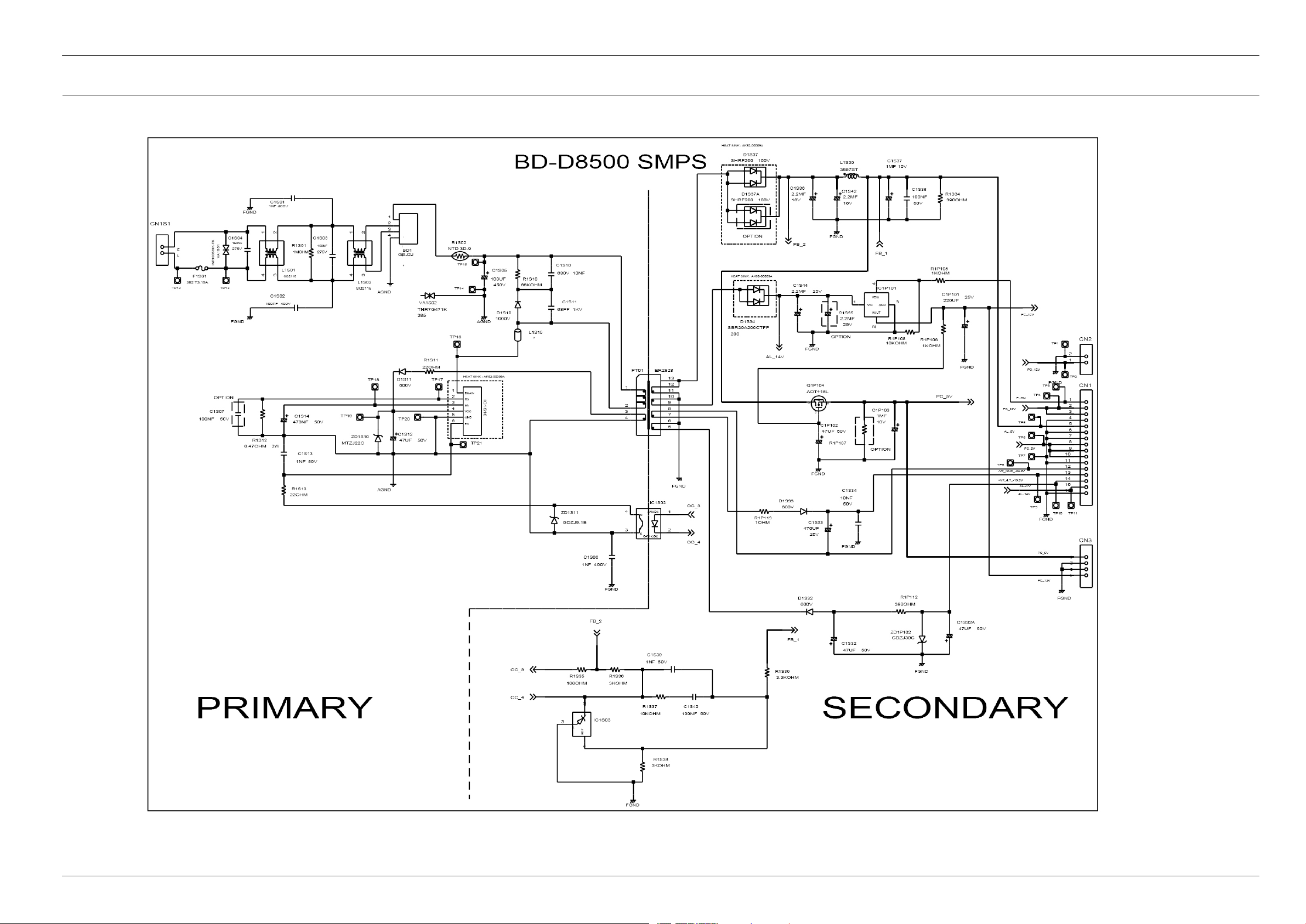
6.3.S.M.P .S(S.M.P.SPCB)
6.SchematicDiagrams
Copyright©1995-201 1SAMSUNG.Allrightsreserved.6-6
Page 82
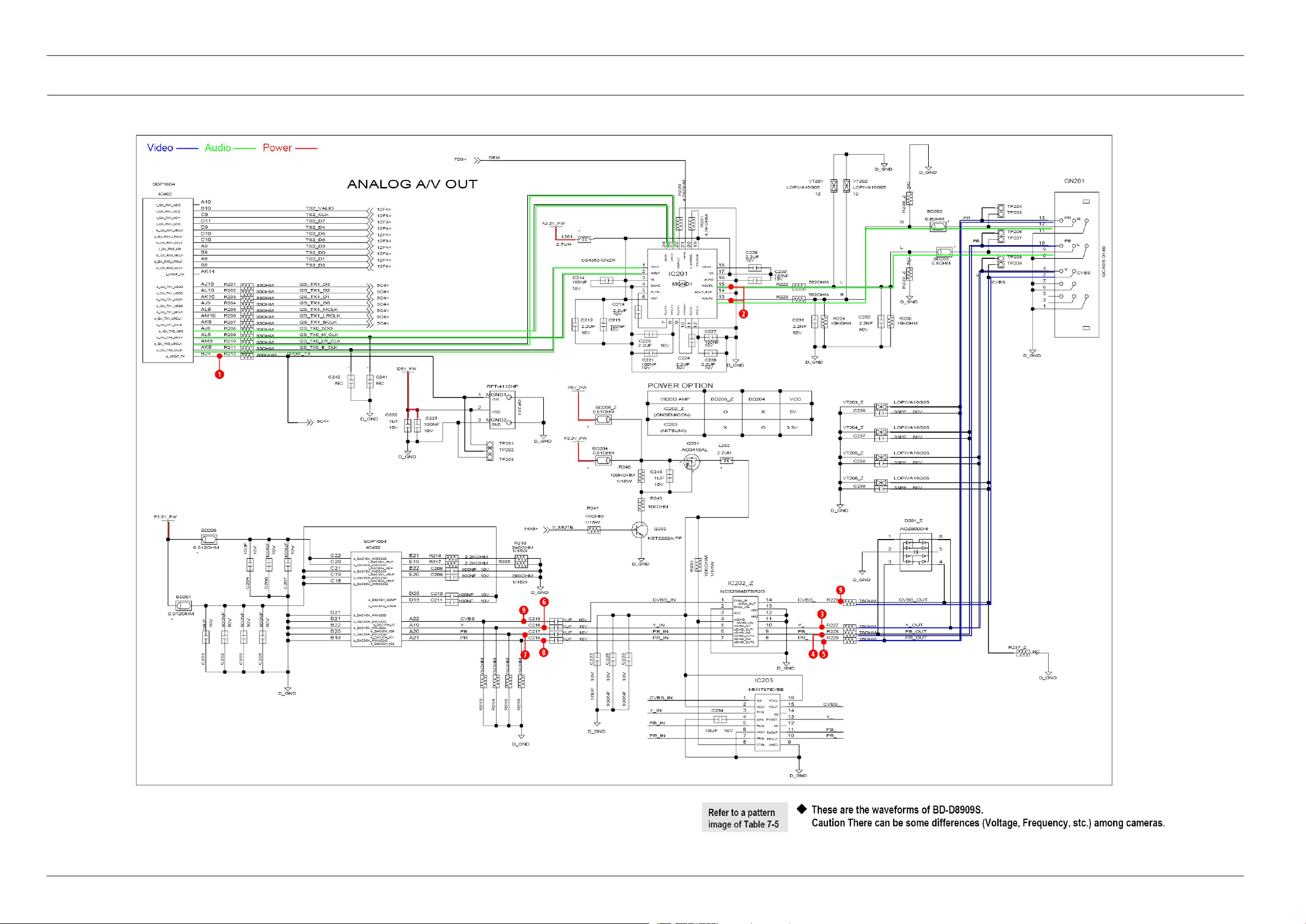
6.SchematicDiagrams
6.4.AnalogAVOut(MainPCB)
6-7Copyright©1995-2011SAMSUNG.Allrightsreserved.
Page 83
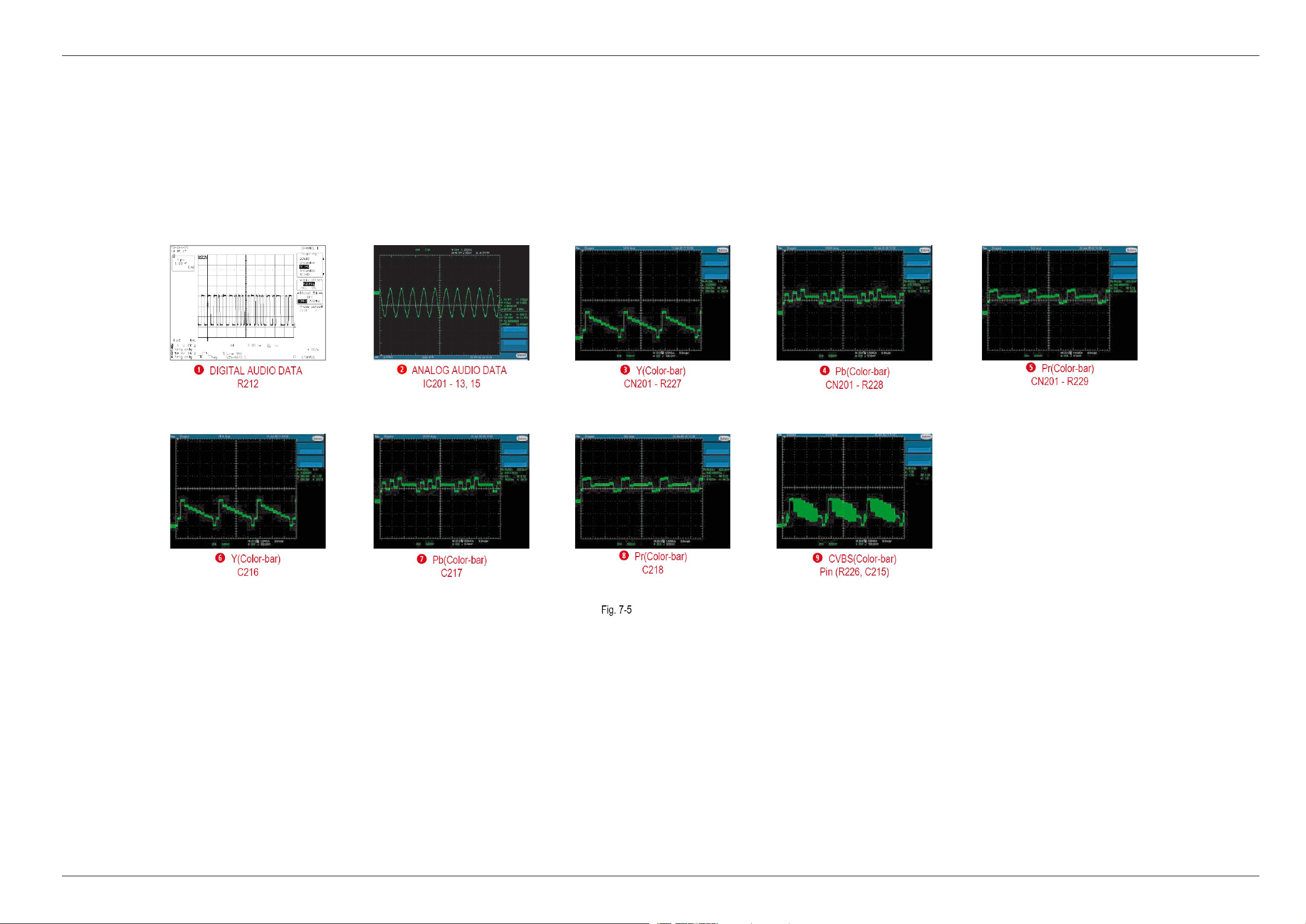
6.SchematicDiagrams
Copyright©1995-201 1SAMSUNG.Allrightsreserved.6-8
Page 84
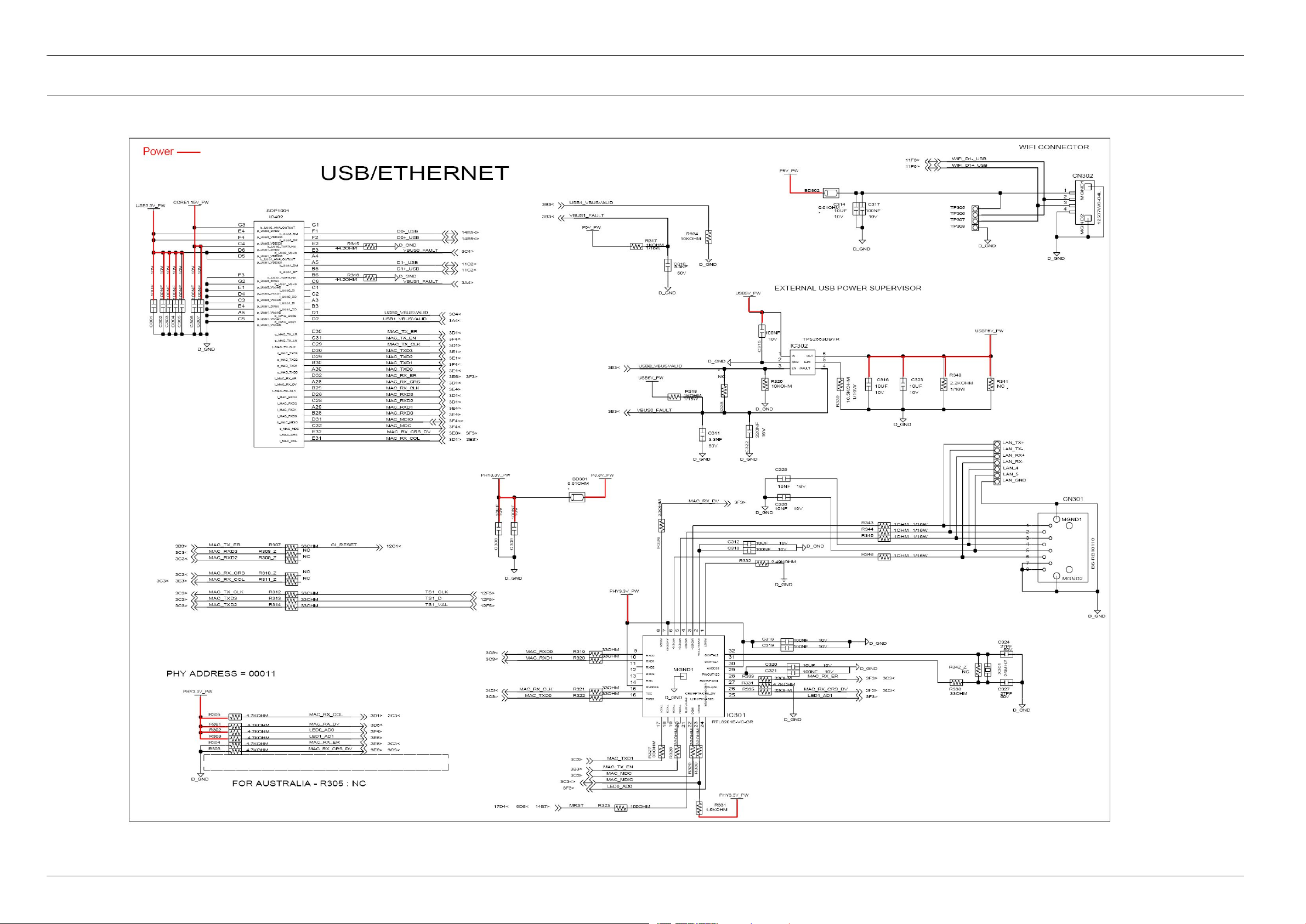
6.SchematicDiagrams
6.5.USB_EthernetBlock(MainPCB)
6-9Copyright©1995-2011SAMSUNG.Allrightsreserved.
Page 85
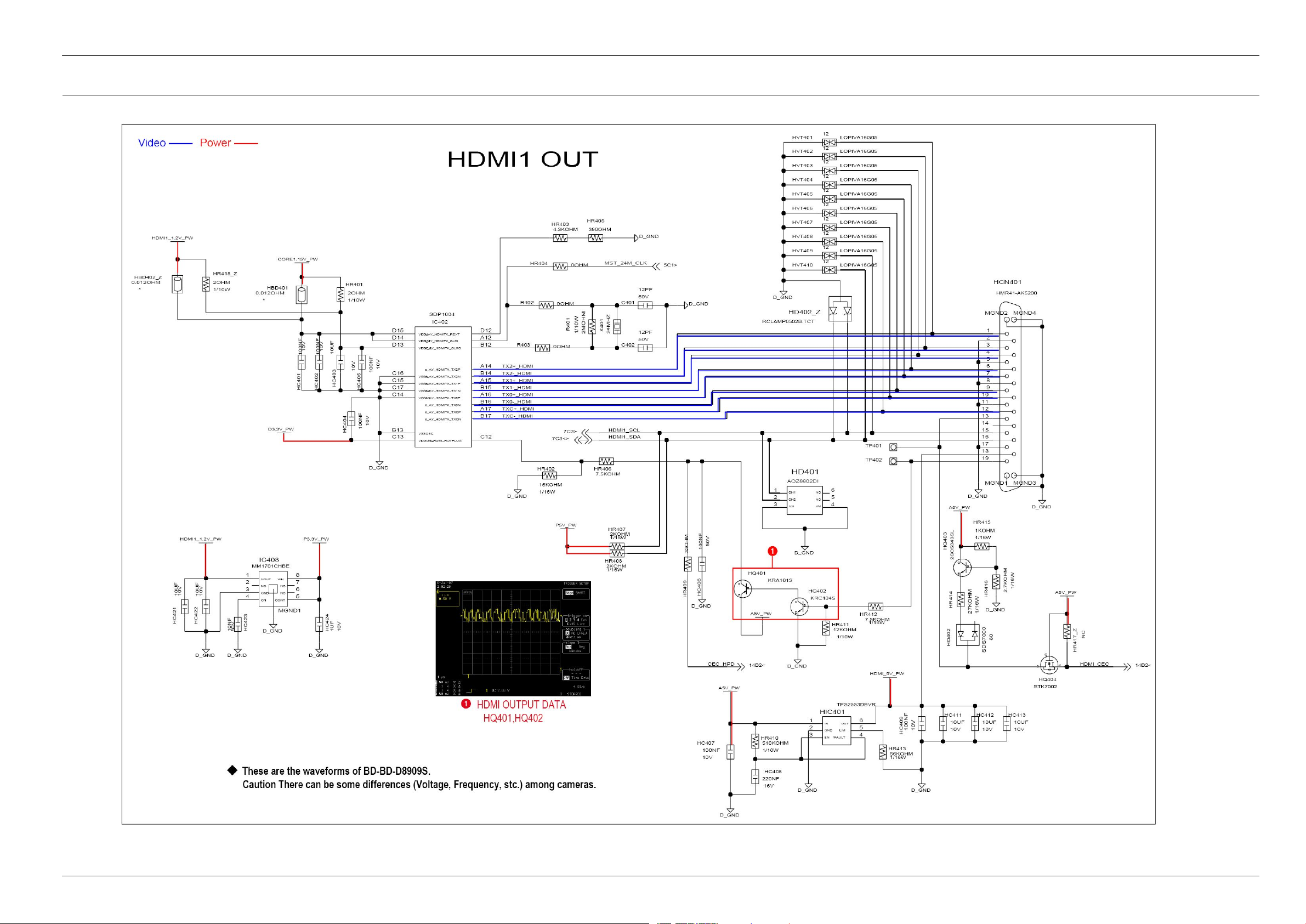
6.6.HDMI1Out(MainPCB)
6.SchematicDiagrams
Copyright©1995-201 1SAMSUNG.Allrightsreserved.6-10
Page 86
6.SchematicDiagrams
6.7.HDMI2Out(AudioOnly)(MainPCB)
6-11Copyright©1995-2011SAMSUNG.Allrightsreserved.
Page 87
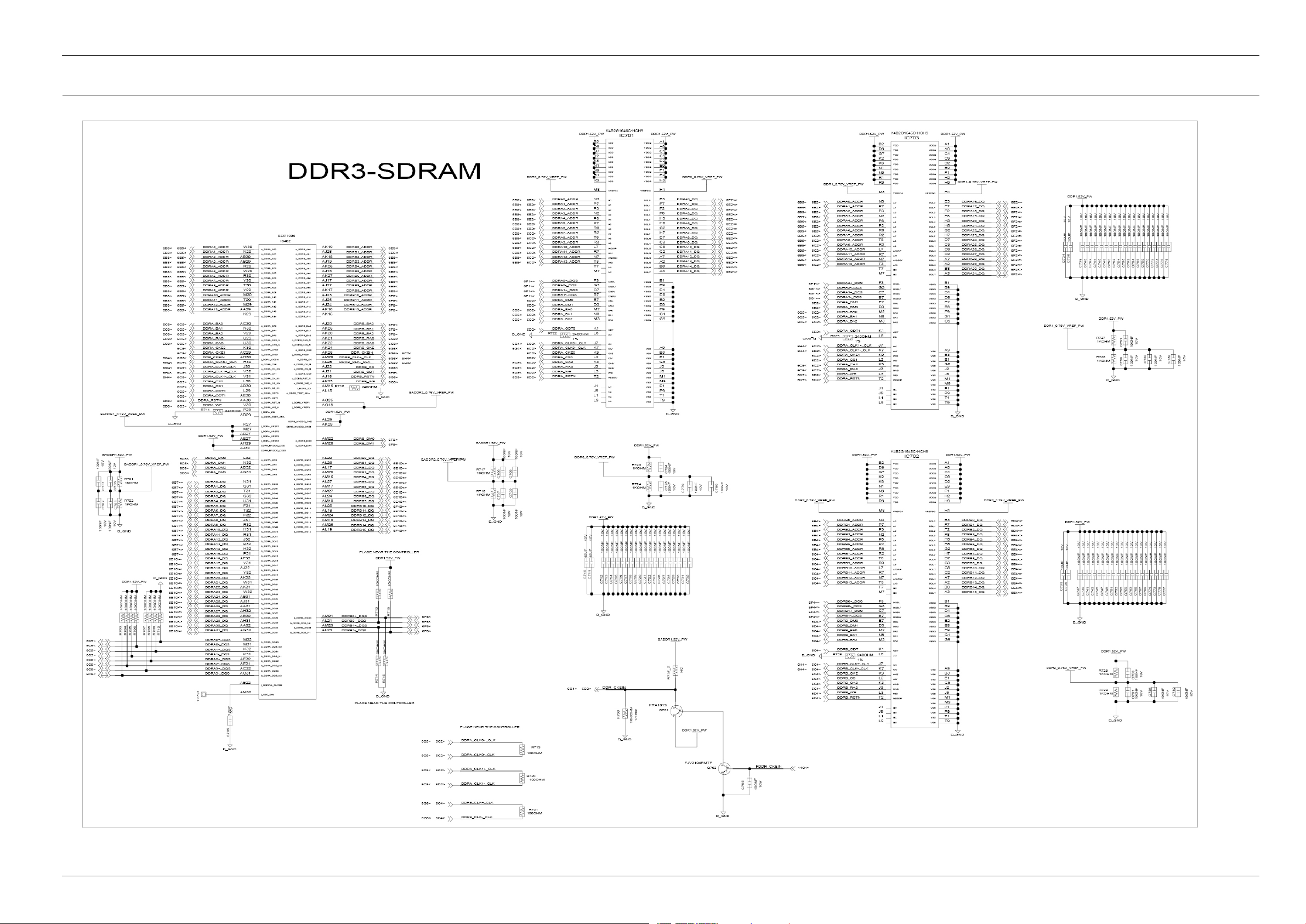
6.8.DDR3-SDRAMBlock(MainPCB)
6.SchematicDiagrams
Copyright©1995-201 1SAMSUNG.Allrightsreserved.6-12
Page 88
6.SchematicDiagrams
6.9.PeripheralInterface(MainPCB)
6-13Copyright©1995-2011SAMSUNG.Allrightsreserved.
Page 89
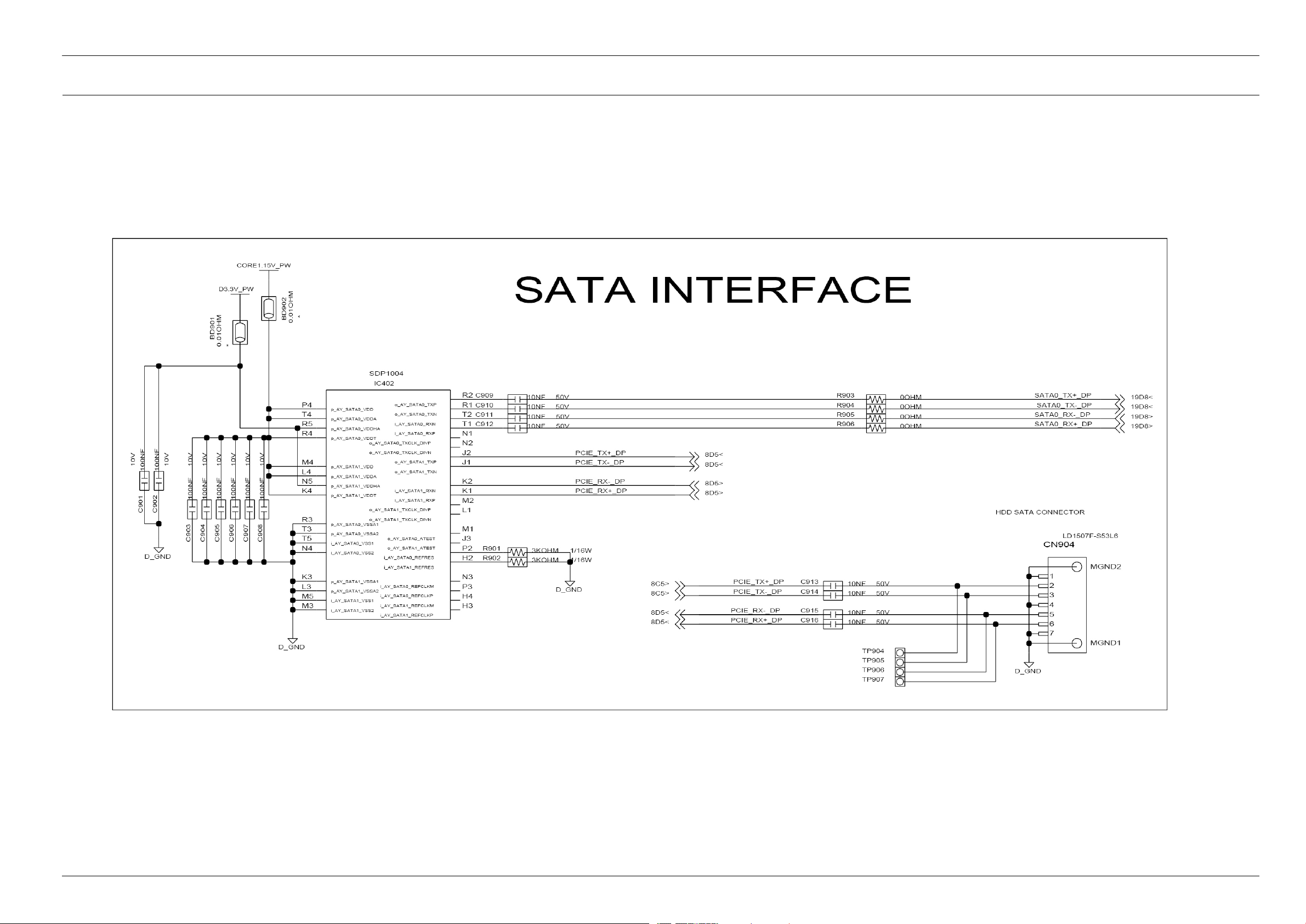
6.10.SATAInterface(MainPCB)
6.SchematicDiagrams
Copyright©1995-201 1SAMSUNG.Allrightsreserved.6-14
Page 90
6.SchematicDiagrams
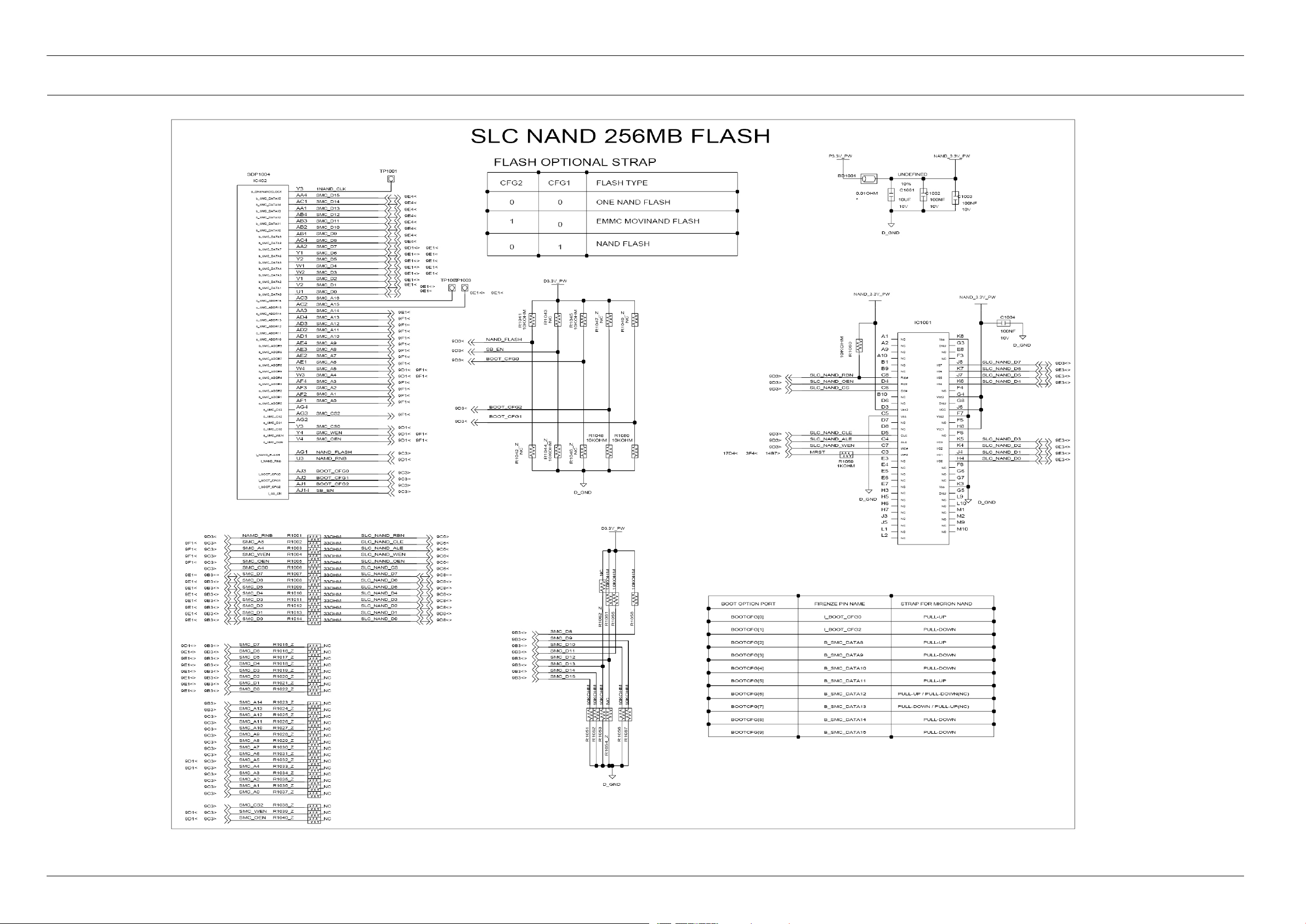
6.11.SLC-NANDFlash(MainPCB)
6-15Copyright©1995-2011SAMSUNG.Allrightsreserved.
Page 91
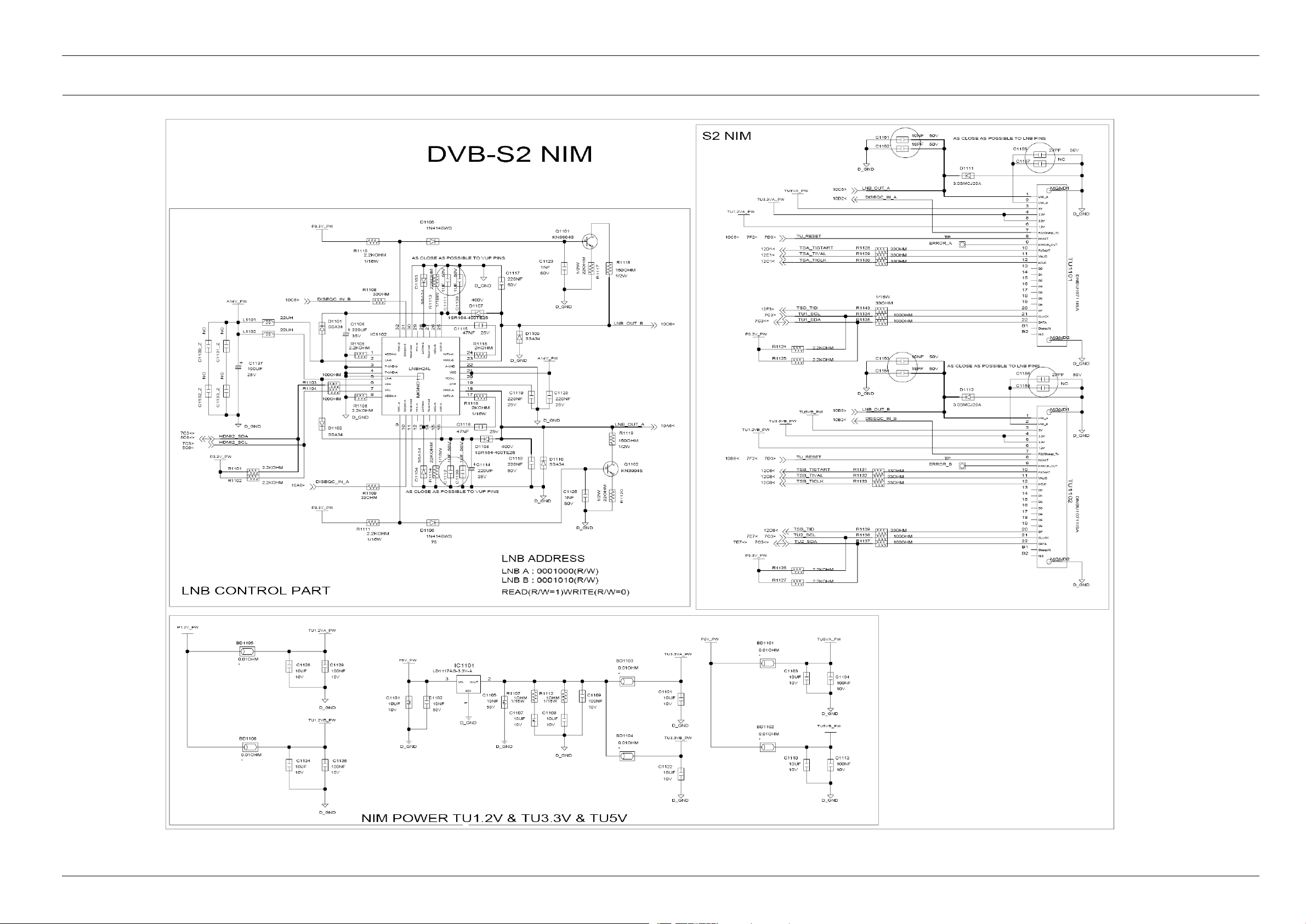
6.12.DVB-S2Nim_DUALLNB(MainPCB)
6.SchematicDiagrams
Copyright©1995-201 1SAMSUNG.Allrightsreserved.6-16
Page 92
6.SchematicDiagrams
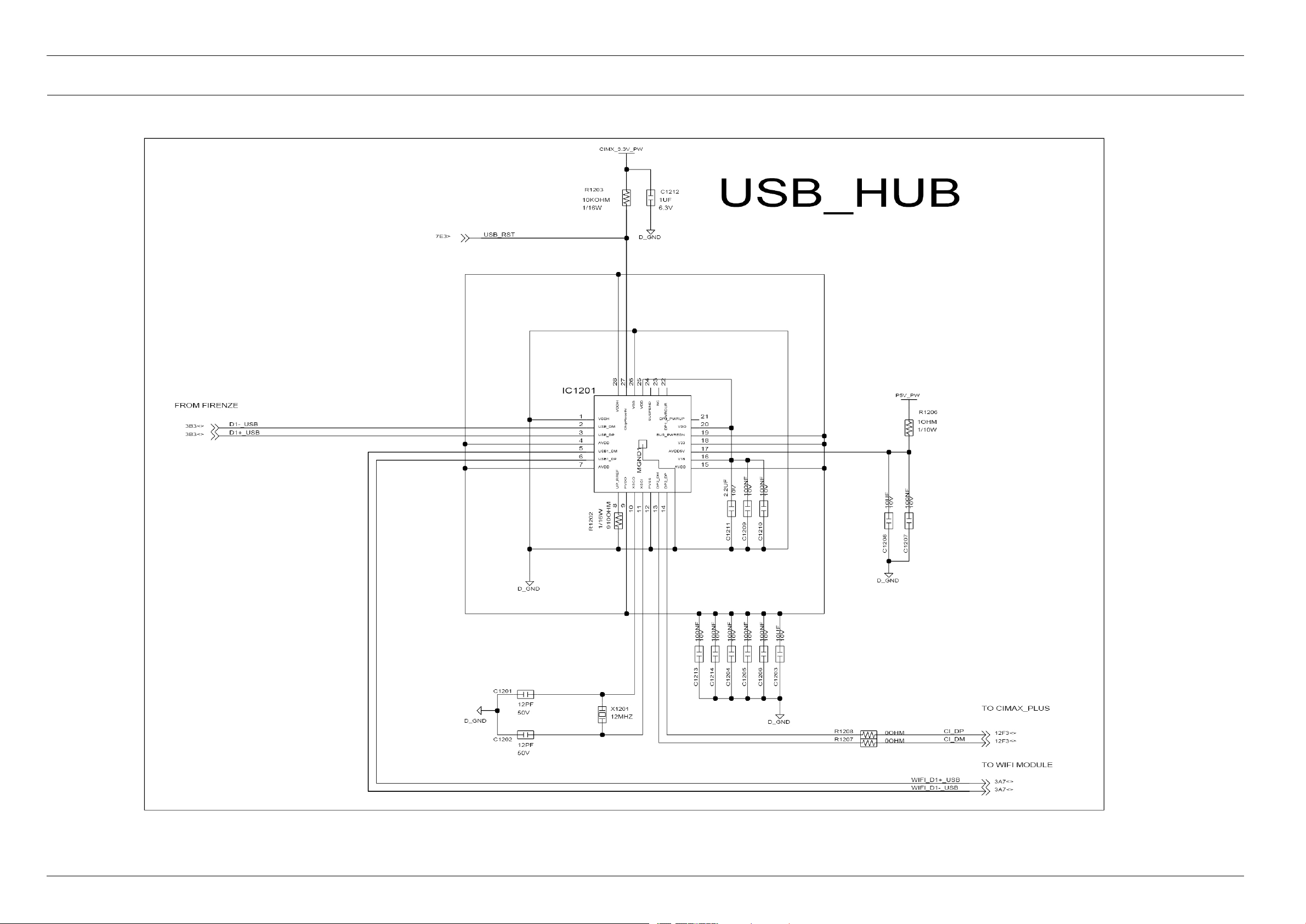
6.13.USBHUB(MainPCB)
6-17Copyright©1995-2011SAMSUNG.Allrightsreserved.
Page 93
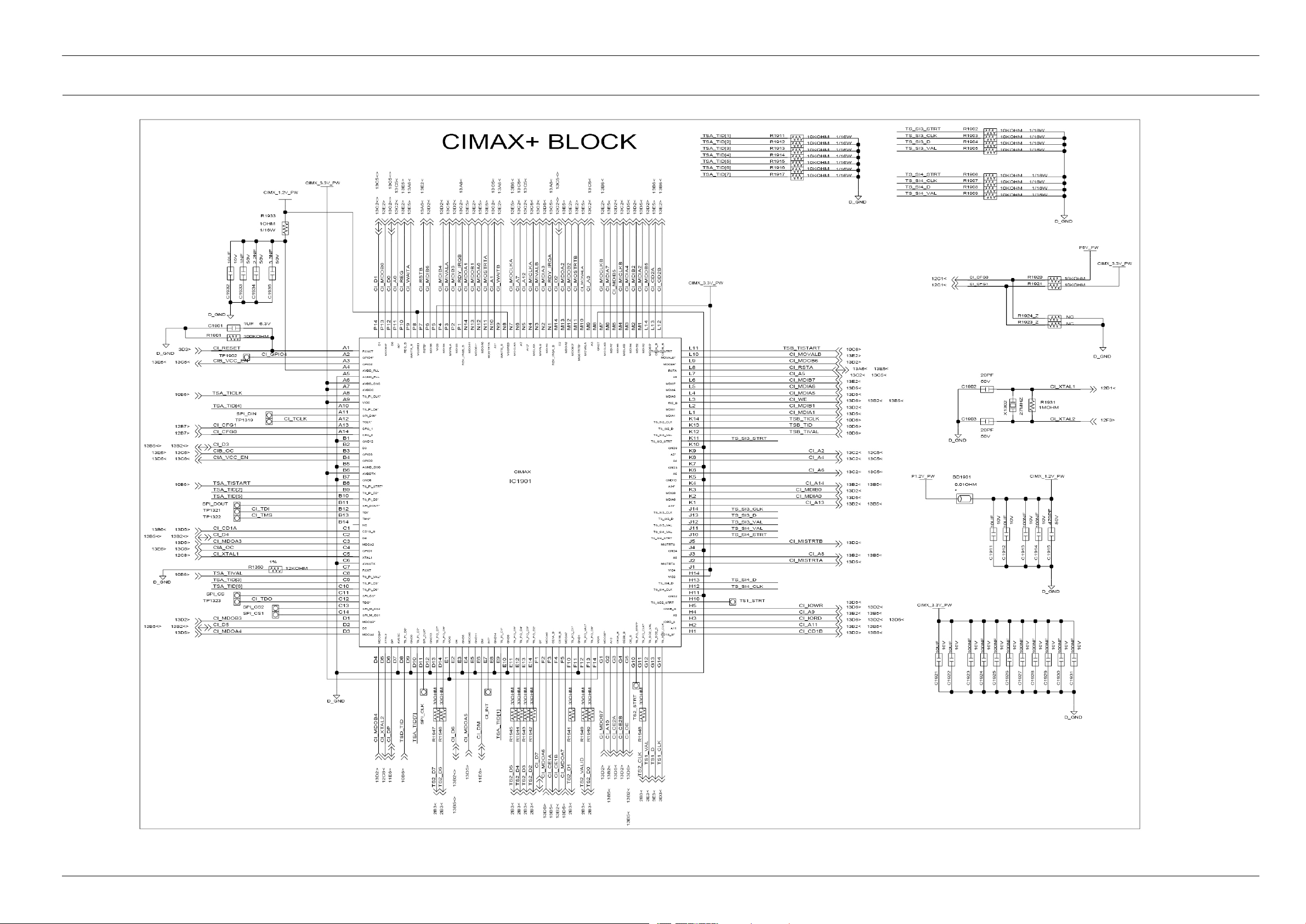
6.14.CIMAX+(MainPCB)
6.SchematicDiagrams
Copyright©1995-201 1SAMSUNG.Allrightsreserved.6-18
Page 94
6.SchematicDiagrams
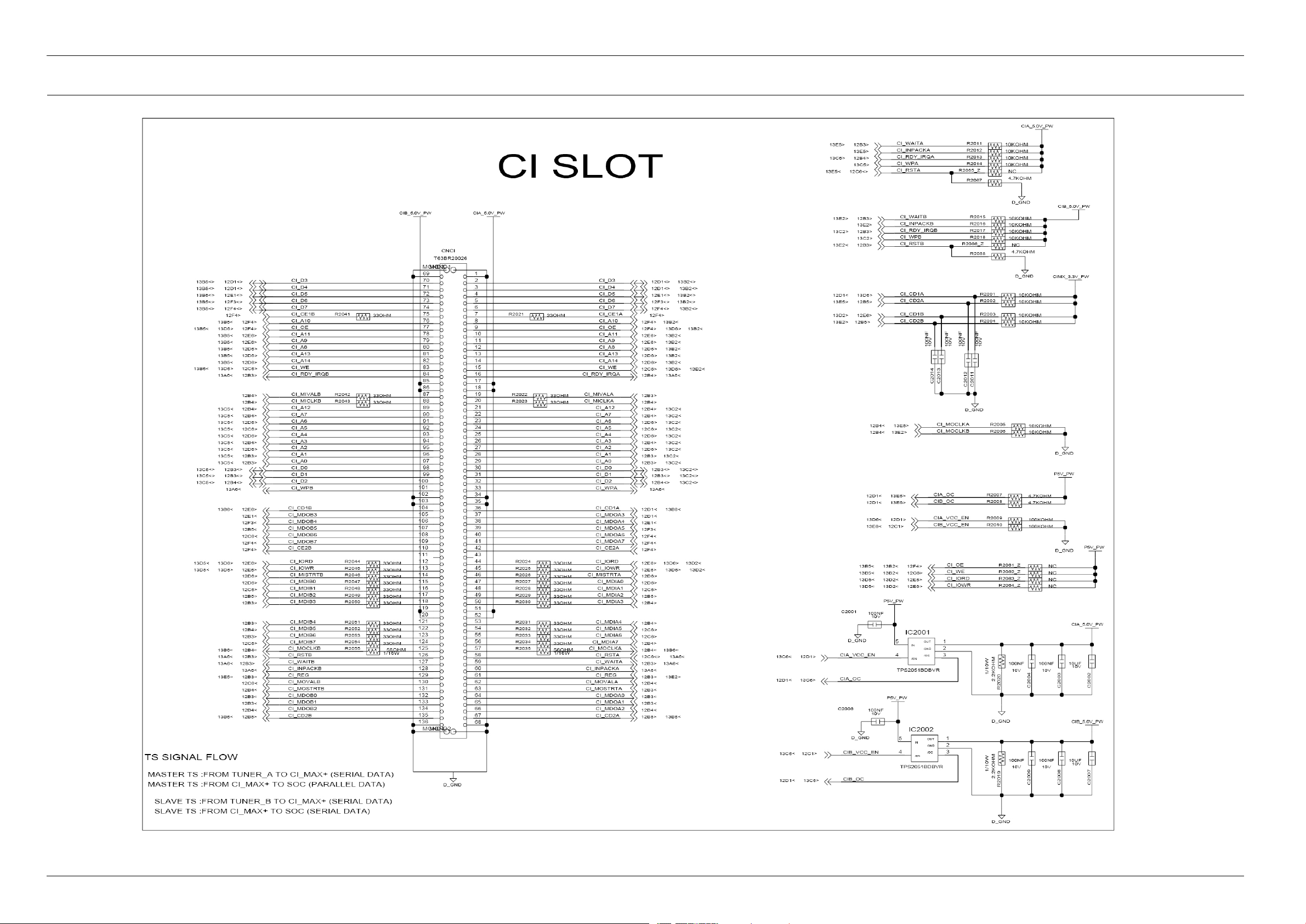
6.15.2CISLOT(MainPCB)
6-19Copyright©1995-2011SAMSUNG.Allrightsreserved.
Page 95
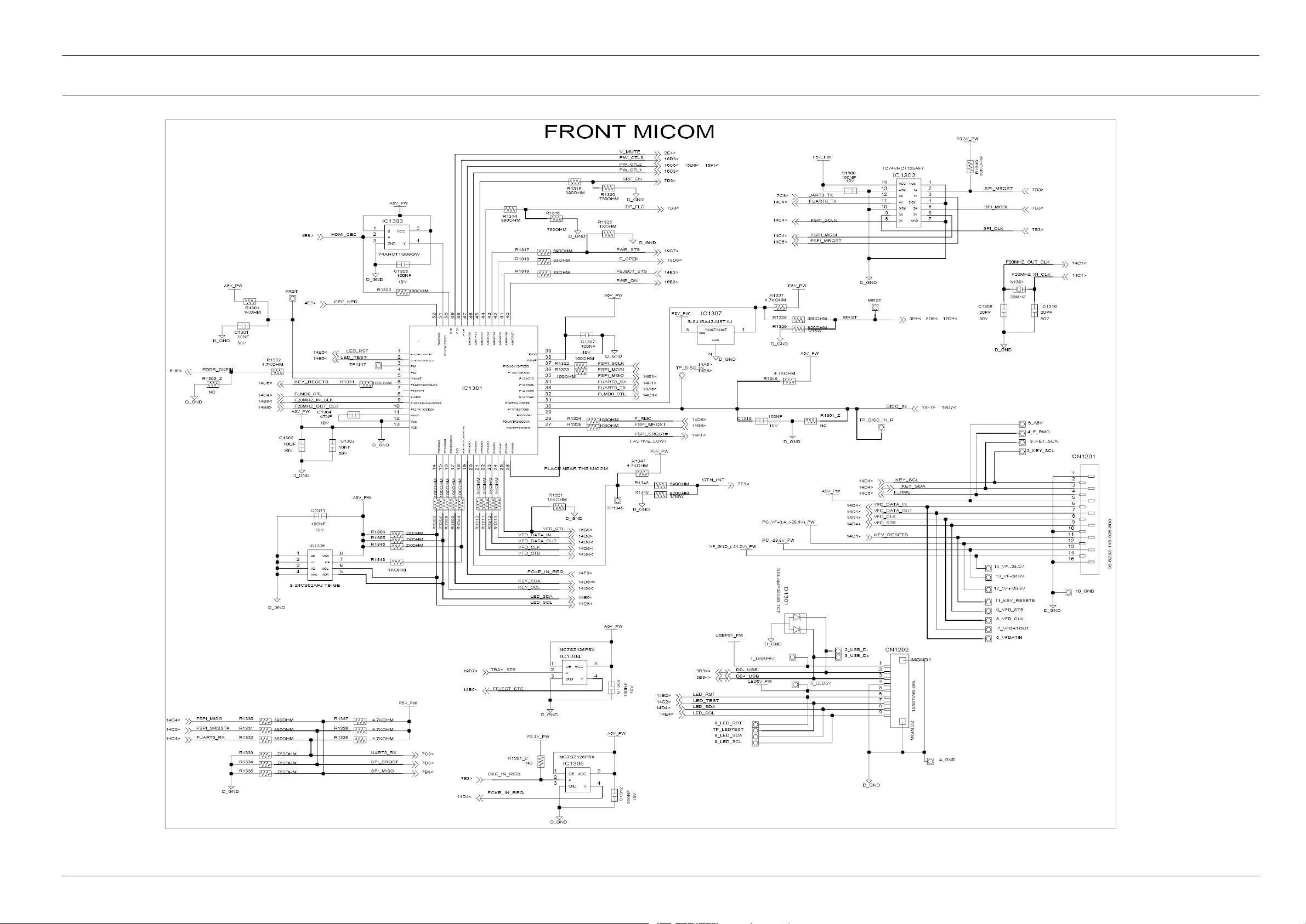
6.16.Front-Micom(MainPCB)
6.SchematicDiagrams
Copyright©1995-201 1SAMSUNG.Allrightsreserved.6-20
Page 96
6.SchematicDiagrams
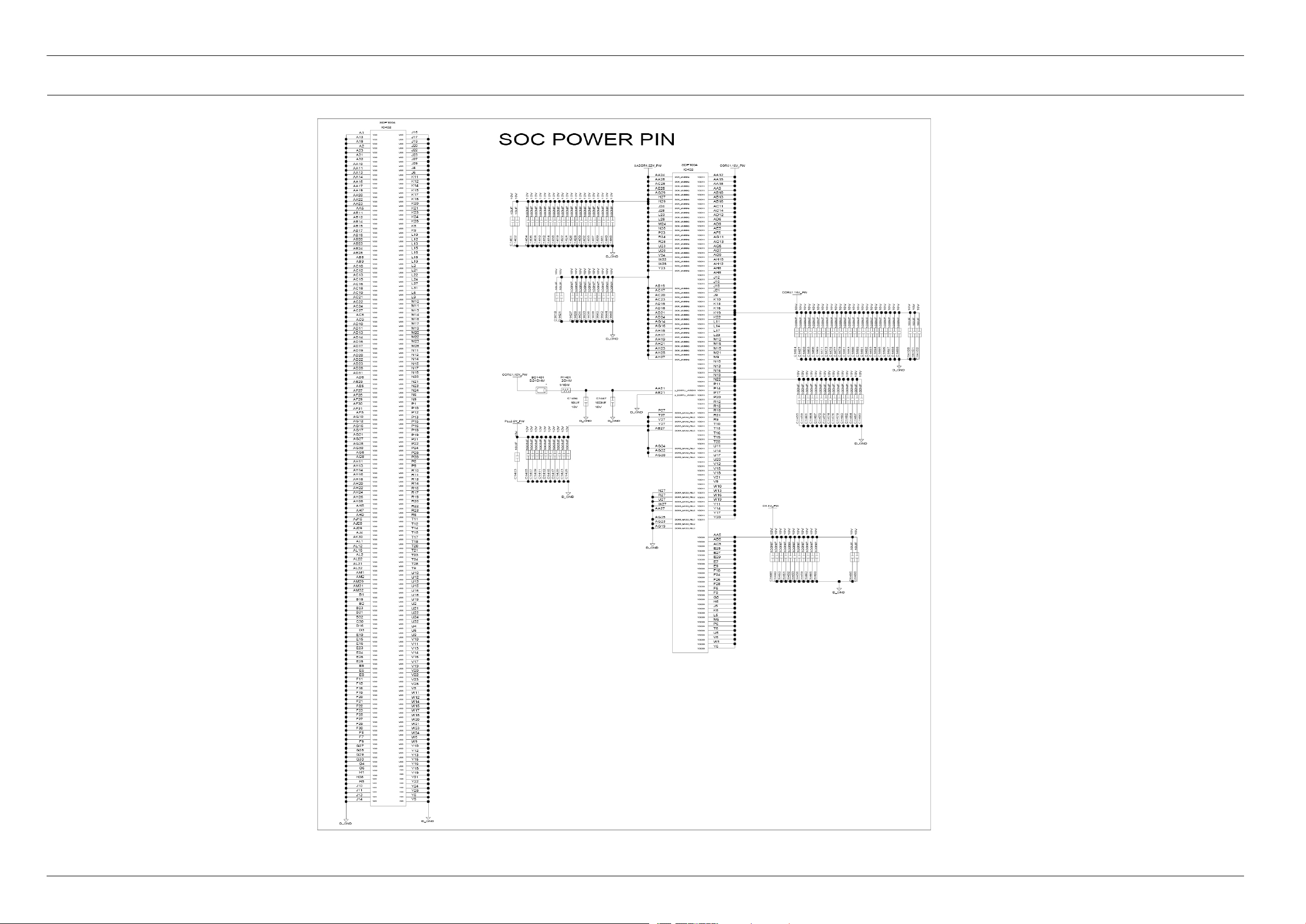
6.17.SOCPowerSupply(MainPCB)
6-21Copyright©1995-2011SAMSUNG.Allrightsreserved.
Page 97
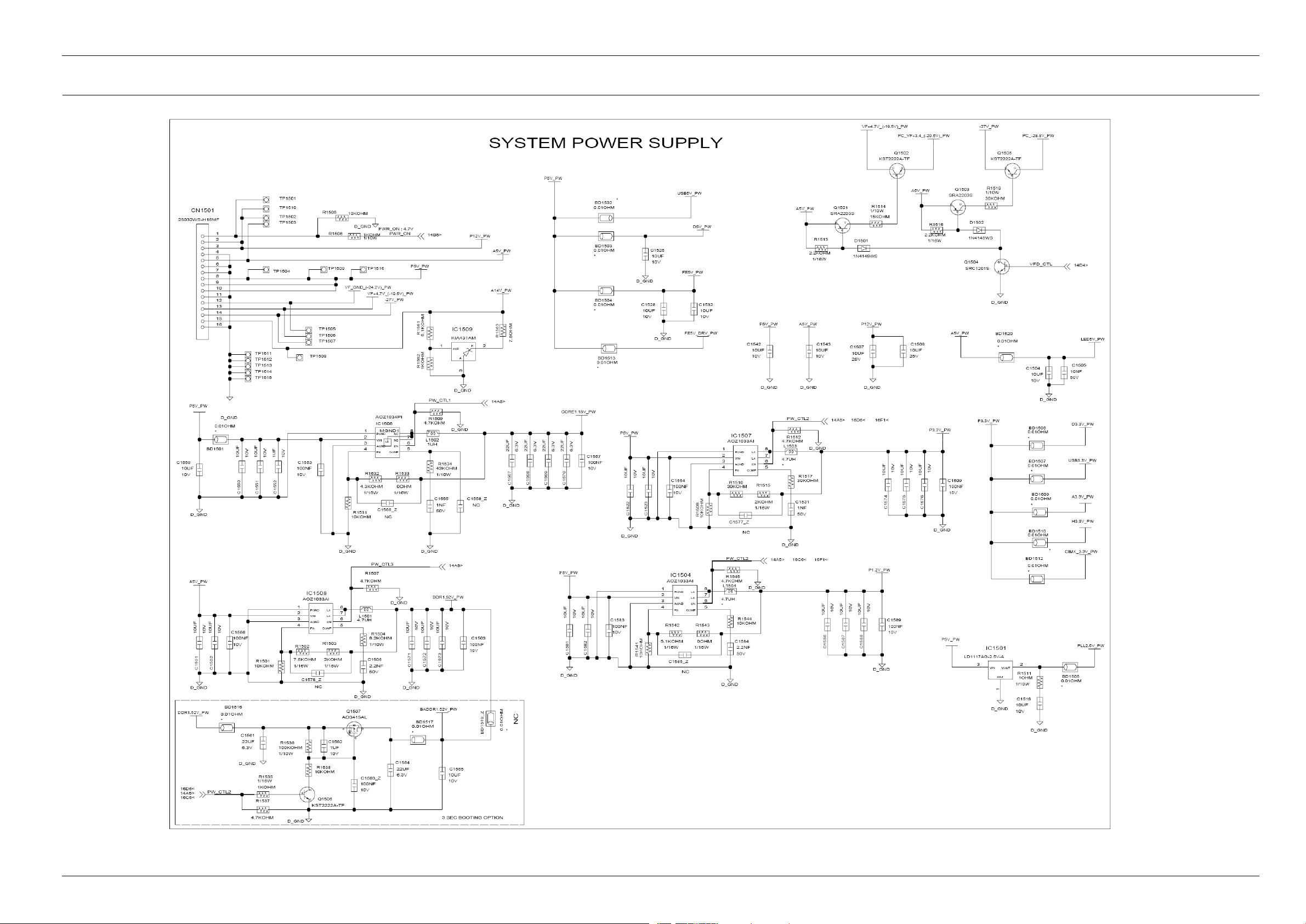
6.18.SystemPowerSupply(MainPCB)
6.SchematicDiagrams
Copyright©1995-201 1SAMSUNG.Allrightsreserved.6-22
Page 98
6.SchematicDiagrams
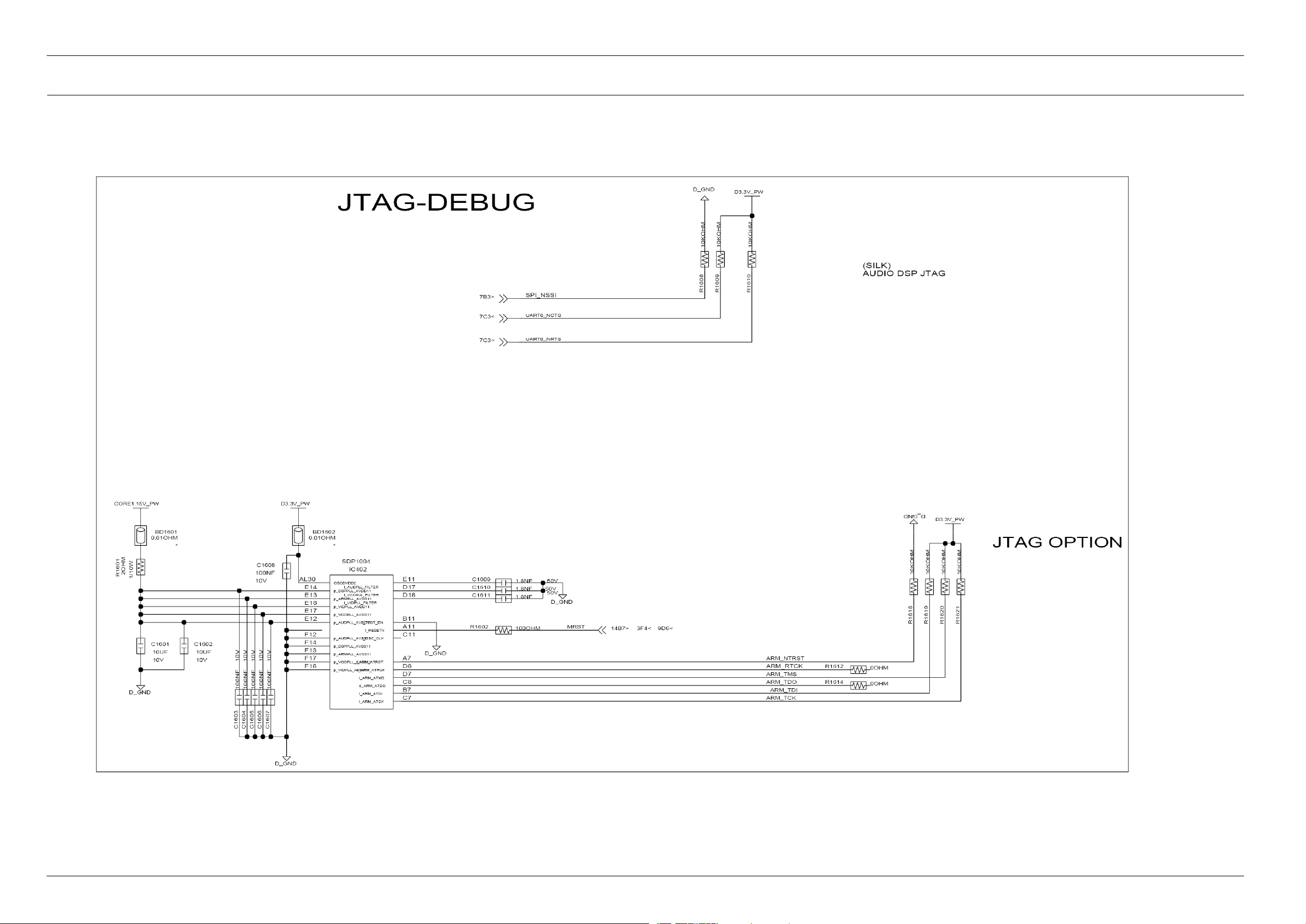
6.19.JTAG-Debug(MainPCB)
6-23Copyright©1995-2011SAMSUNG.Allrightsreserved.
Page 99
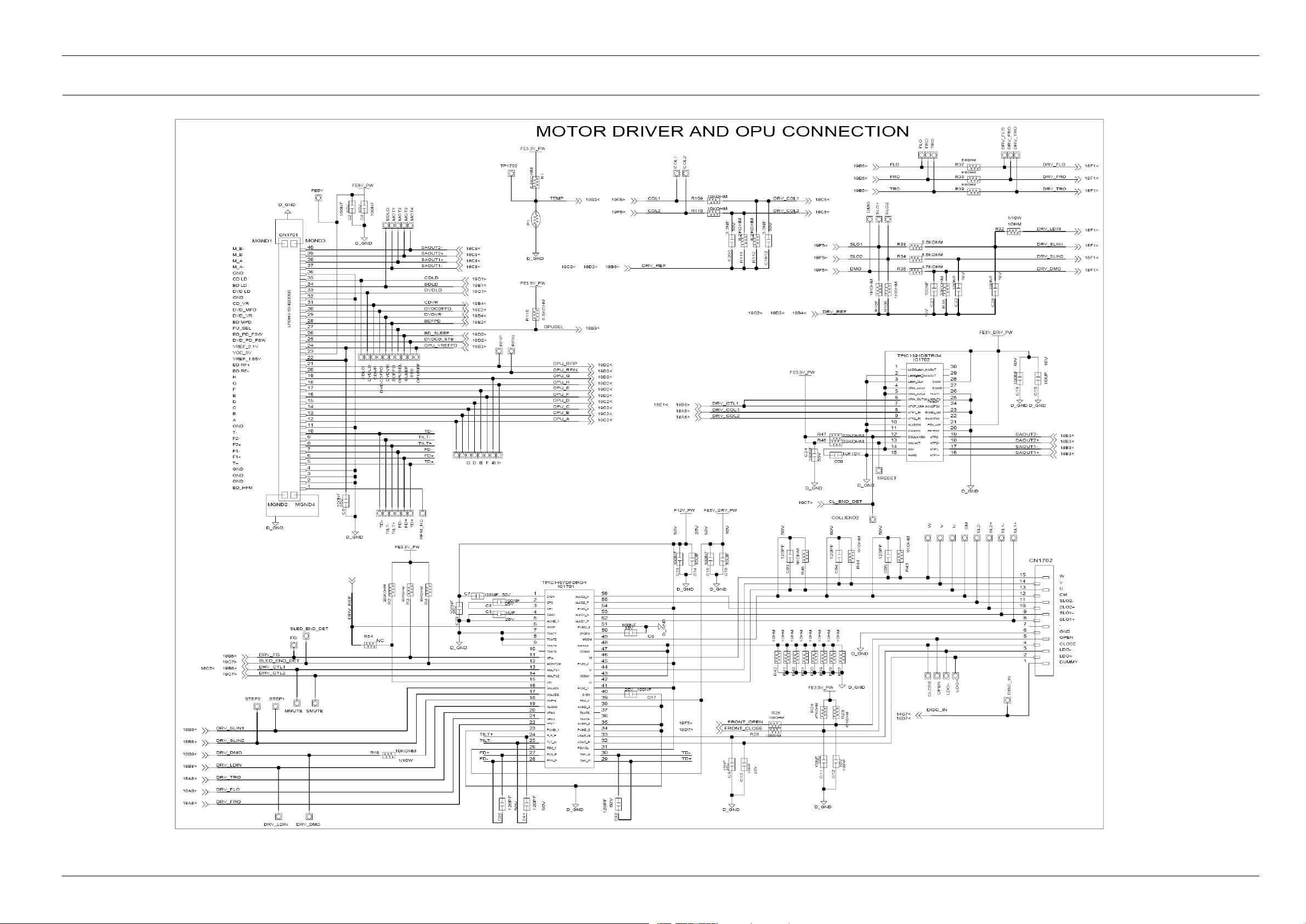
6.20.MotorDriver_OPUConnection(MainPCB)
6.SchematicDiagrams
Copyright©1995-201 1SAMSUNG.Allrightsreserved.6-24
Page 100
6.SchematicDiagrams
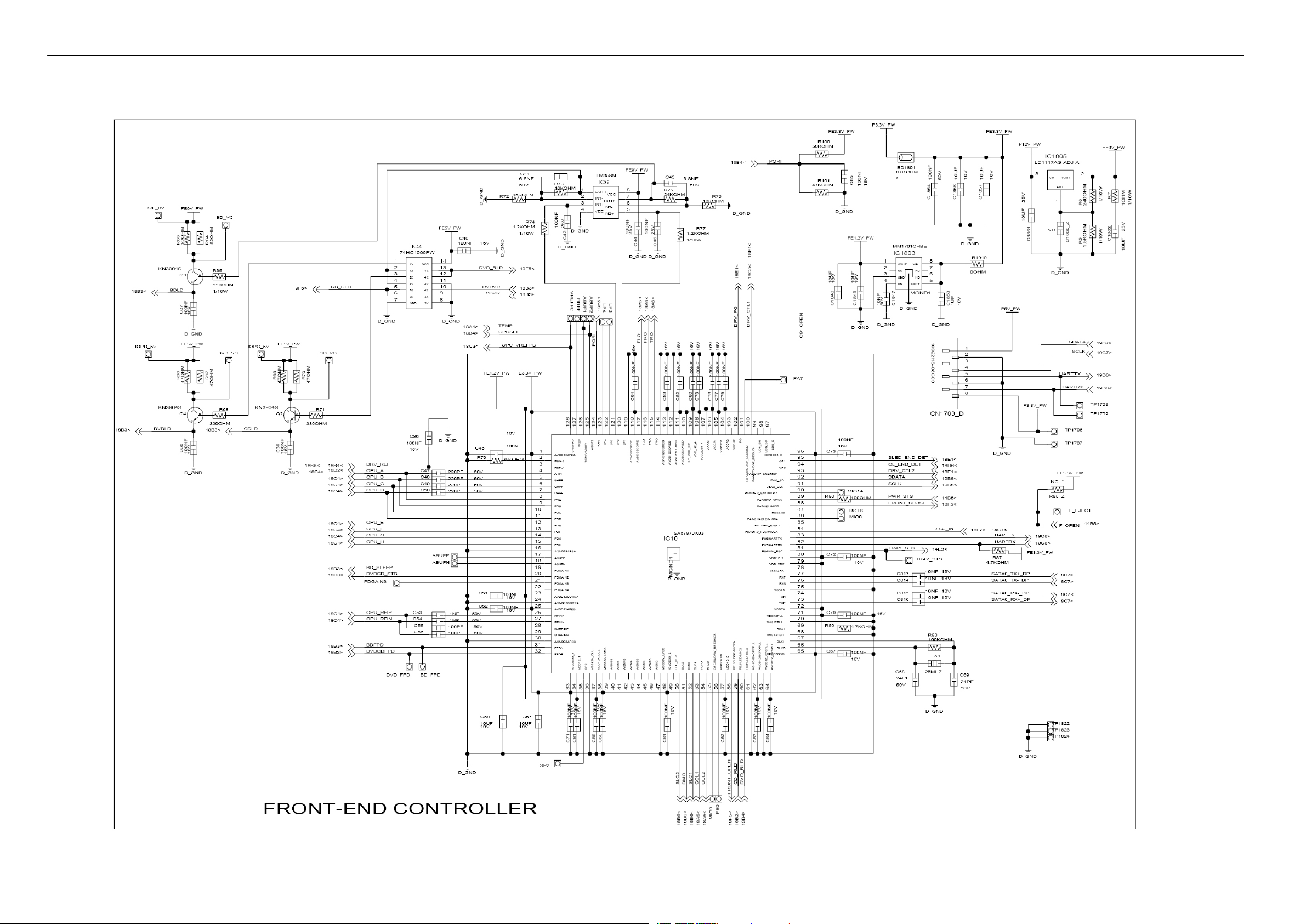
6.21.Front-EndConnection(MainPCB)
6-25Copyright©1995-2011SAMSUNG.Allrightsreserved.
 Loading...