

Page 1
DB98-15112A(1)
AW0503M
AW0505M
AW0603M
AW0803M
AW1003M
AW1203M
AW1403M
AW1803M
AW0593M
AW0693M
AW0893M
AW1093M
AW1293M
Window-type Room Air Conditioner
(Cool)
ES
OWNER’S
INSTRUCTIONS
Page 2
E-
2
The following safety precautions must be taken when installing
and using your air conditioner.
Safety Precautions
1 The air conditioner must be plugged into its own specific power source, which must be
installed in compliance with national wiring, earthing and safety regulations.
Depending on national regulations and your specific installation, you may need to install:
◆ A circuit breaker
For further information on electrical requirements, contact a professional electrician.
This device must be installed according to the national electrical rules.
2 Make sure that the unit is correctly ventilated at all times;
do NOT place clothing or other materials over it.
4 Do NOT insert anything between the air outlet blades, as it may damage the inner fan
and you may get hurt. Keep children away from the unit.
5 If the supply cord is damaged, it must be replaced by the manufacturer, its service agent
or similarly qualified persons in order to avoid a hazard.
6 Do NOT attempt to repair the unit yourself. If it is damaged in any way, contact:
◆ An authorized service center
◆ The dealer from whom you purchased the air conditioner.
7 Do NOT place any blocking objects in front of the unit.
3 NEVER spill liquids of any kind into the unit.
Should this happen, unplug the unit and contact your installation specialist.
8 If the remote control will not be used for a long time, remove the batteries.
9 Before throwing out the device, it is necessary to pull back the battery cells
and get rid of them safely.
10 The appliance is not intended for use by young children or infirm person without supervision;
young children should be supervised to ensure that they do not play with the appliance.
11 Do NOT use an extension cord with this product.
The manufacturer does not assume responsibility for accidents or injury
caused by an incorrectly installed air conditioner. If you are unsure about
installation, contact an installation specialist.
CCCAAUUTTIIOON
N
Page 3
Contents
◆ PREPARING YOUR AIR CONDITIONER
■ Safety Precautions ......................................................................................... 2
■ Description of Each Component .................................................................... 4
■ Getting Started ............................................................................................... 5
◆ OPERATING YOUR AIR CONDITIONER
■ Cooling Your Room ........................................................................................ 6
■ Ventilating Your Room .................................................................................... 7
■ Switching the Air Conditioner Off .................................................................... 8
■ Adjusting the Air Flow Direction Horizontally .................................................. 9
■ Adjusting the Air Flow Direction Vertically ...................................................... 9
◆ RECOMMENDATIONS FOR USE
■ Power Failure ................................................................................................. 10
■ Temperature and Humidity Ranges ................................................................ 10
■ Cleaning Your Air Conditioner ........................................................................ 11
■ Solving Common Problems ............................................................................ 12
■ Technical Specifications ................................................................................. 13
E-
3
Page 4
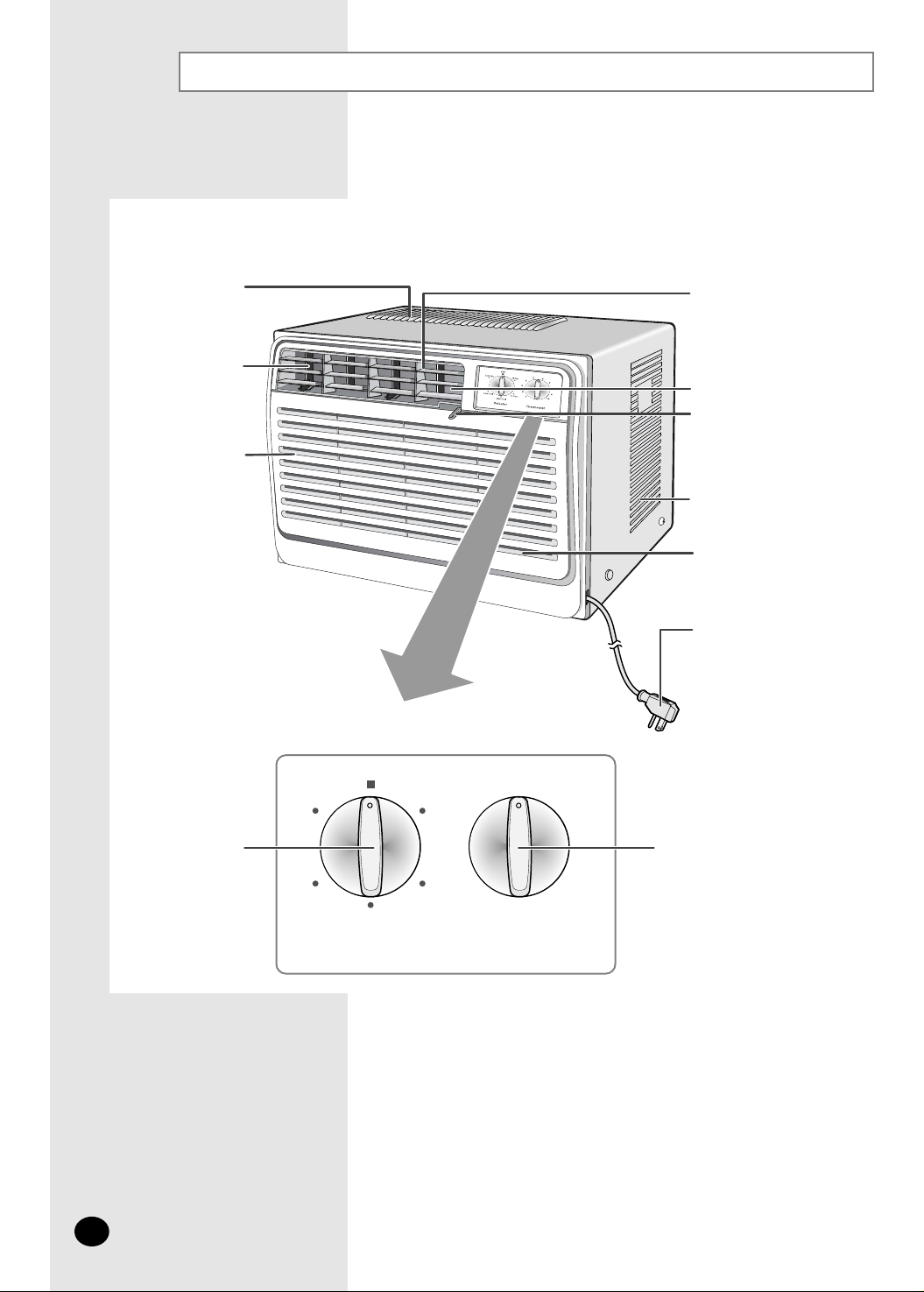
Description of Each Component
E-
4
❄ The design and shape are subject to
change.
Selector Thermostat
Hi Fan
110
29
38
47
56
Low Fan
OFF
Hi Cool
Med Cool
Low Cool
Air outlet
Inner air flow
blades (right/left
orientation)
Air inlet (Inside)
Outer air flow blades
(up/down orientation)
- Except AW0503M / AW0505M
/ AW0593M/AW0603M
Power plug
(The type of power plug
may differ, depending on
the local power supply.)
Operating mode
selection dial
Thermostat
control
Ventilation lever
- Except AW0503M / AW0505M
/ AW0593M/AW0603M
Air outlet
Air inlet (Outside)
Air filter (Inside)
Page 5
Getting Started
You have just purchased a Samsung window-type room air conditioner which should be
installed following your Owner’s Instructions.
Your Owner's Instructions contain much valuable information on using your air conditioner.
Please take the time to read them as they will help you take full advantage of the unit's
features.
The illustrations in the step-by-step procedures use four different symbols:
E-
5
PRESS PUSH IMPORTANT NOTE
☛
➢
Page 6
Cooling Your Room
To control the direction of the air flow, refer to page 9.3
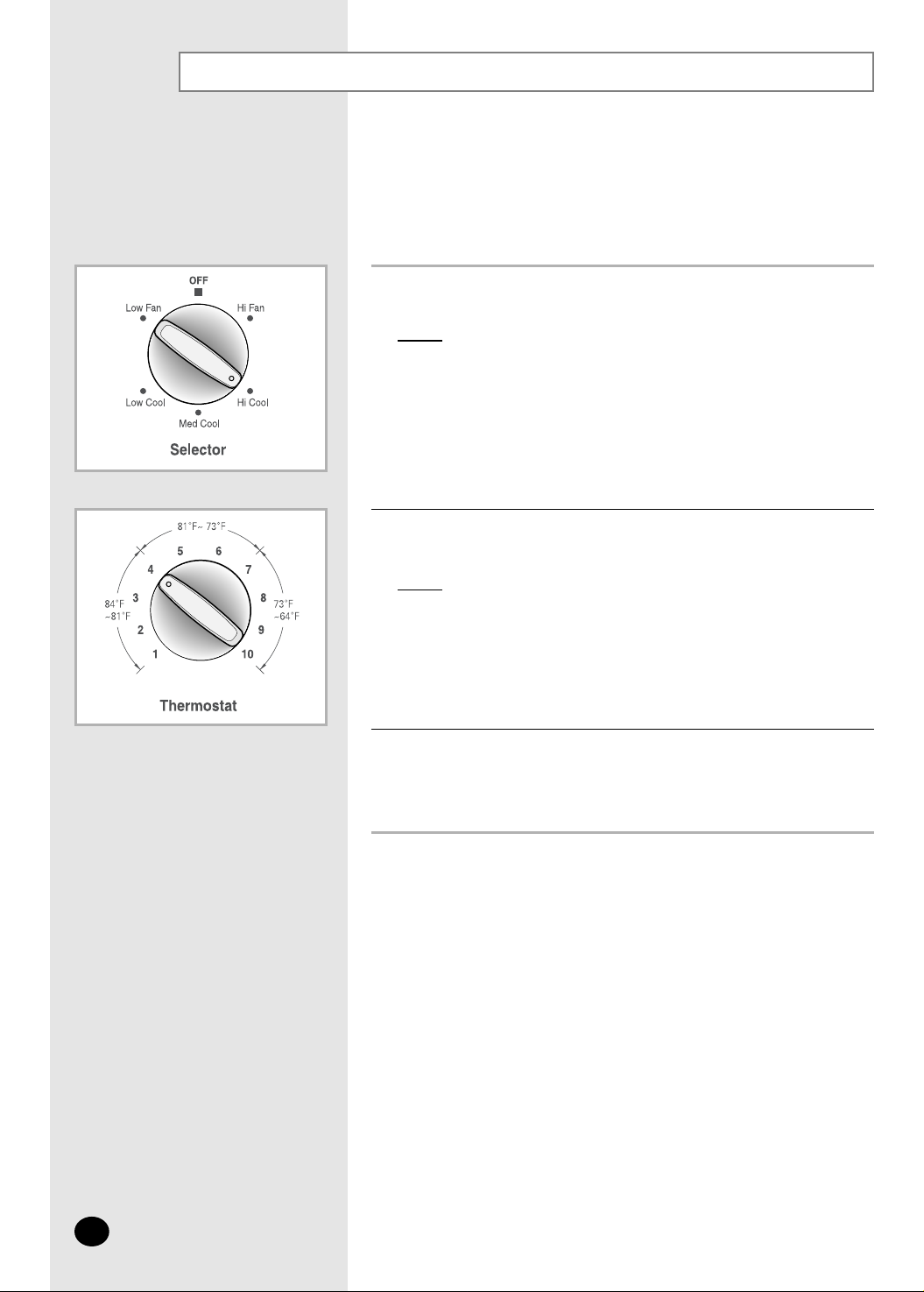
Turn the operating mode selection dial and set it to “ Hi Cool ” ,
“ Med Cool ” or “ Low Cool ”.
Result:
The air conditioner starts up in cool mode.
➢ You can change modes at any time.
Turn the THERMOSTAT control to the desired position.
You must select the COOL mode if you wish to adjust the:
◆ Cooling temperature
◆ Fan speed when Cooling
1
2
Possible temperatures: Can be set between 64°F and 84°F.
Result:
The air conditioner starts cooling if the room temperature is
higher than the selected temperature.
E-
6
Page 7
Ventilating Your Room
If the air in your room is stale, you can ventilate the room using the
Fan feature. (Except AW0503M / AW0505M / AW0593M / AW0603M)
1
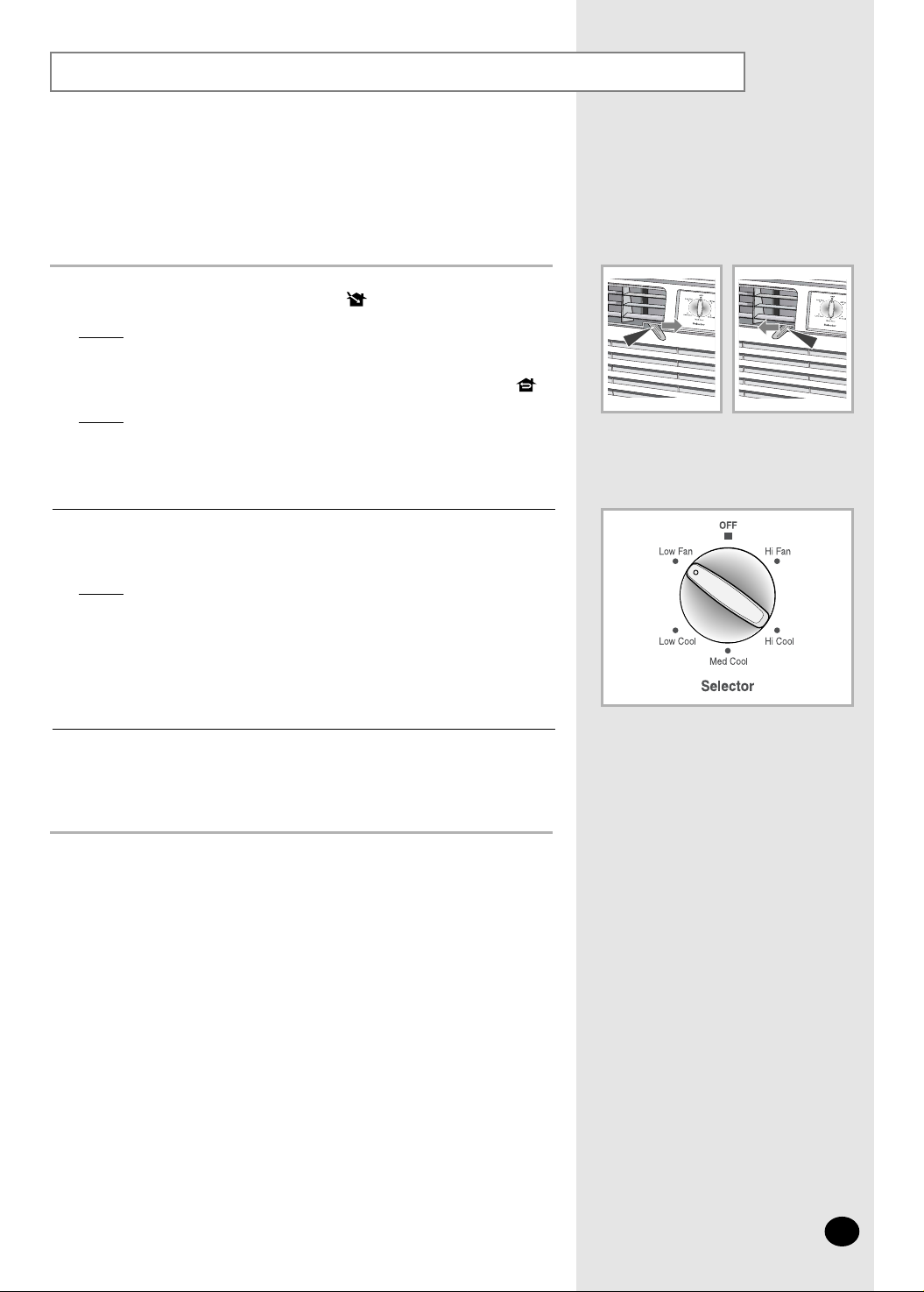
Turn the operating mode selection dial and set it to “Hi Fan” or “Low Fan” position.
Result: The air conditioner starts up in fan mode.
➢
◆ Hi Fan : The fan turns rapidly.
◆ Low Fan : The fan turns slowly.
◆ You can change modes at any time.
2
To control the direction of the air flow, refer to page 9.
3
If you wish to discharge stale air, push the ventilation lever on the front
of the unit to the right and open position ( ).
Result:
The air inside the room circulates and stale air is discharged
outside.
Otherwise, push the ventilation lever to the left and closed position ( ).
Result:
The air simply circulates inside the room.
E-
7
Page 8
Switching the Air Conditioner Off
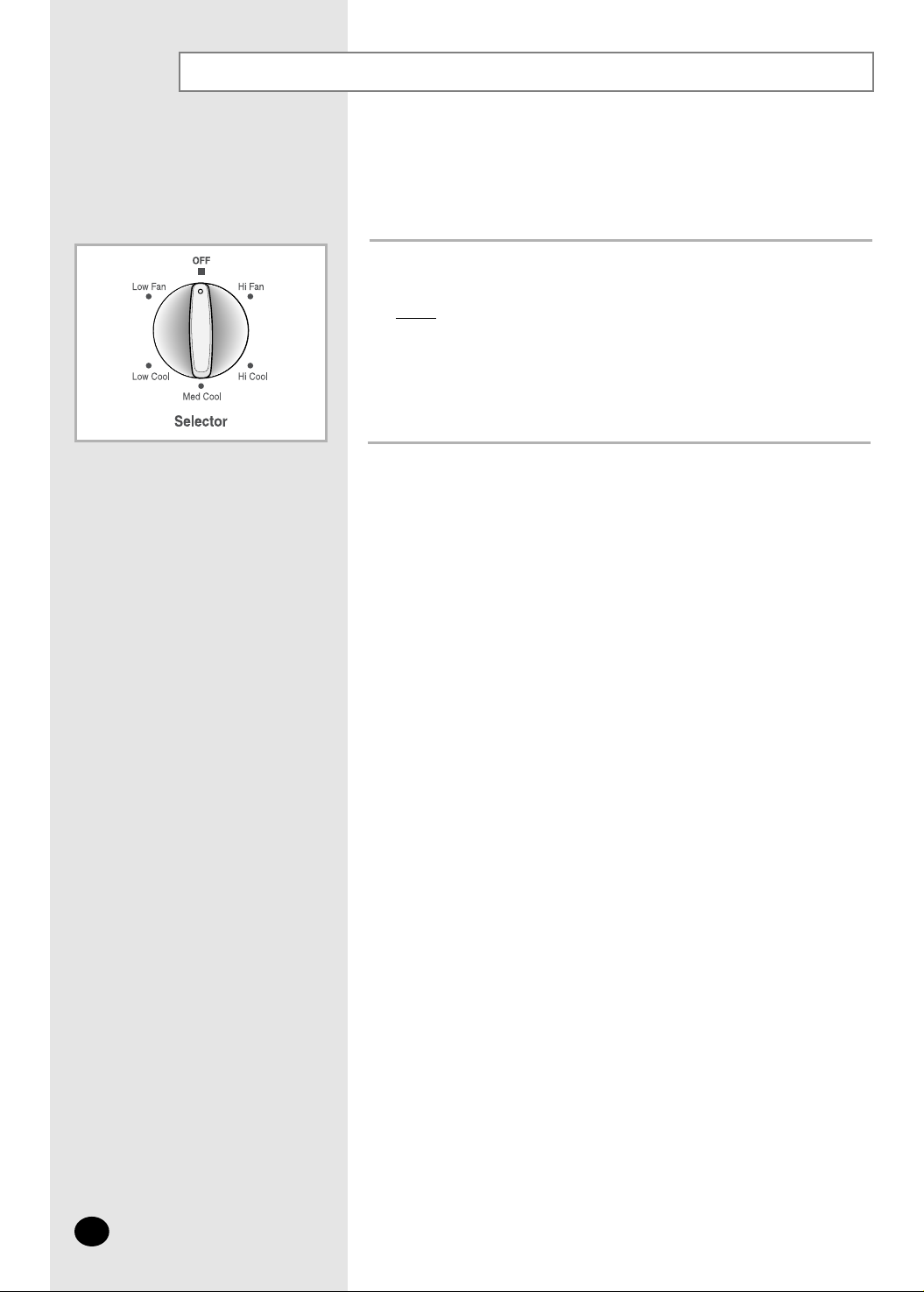
To switch the unit off, simply set the operating mode selection dial to the
"
OFF
"
position.
Result
: The air conditioner stops operating.
You can switch the air conditioner off whenever you want.
1
E-
8
Page 9
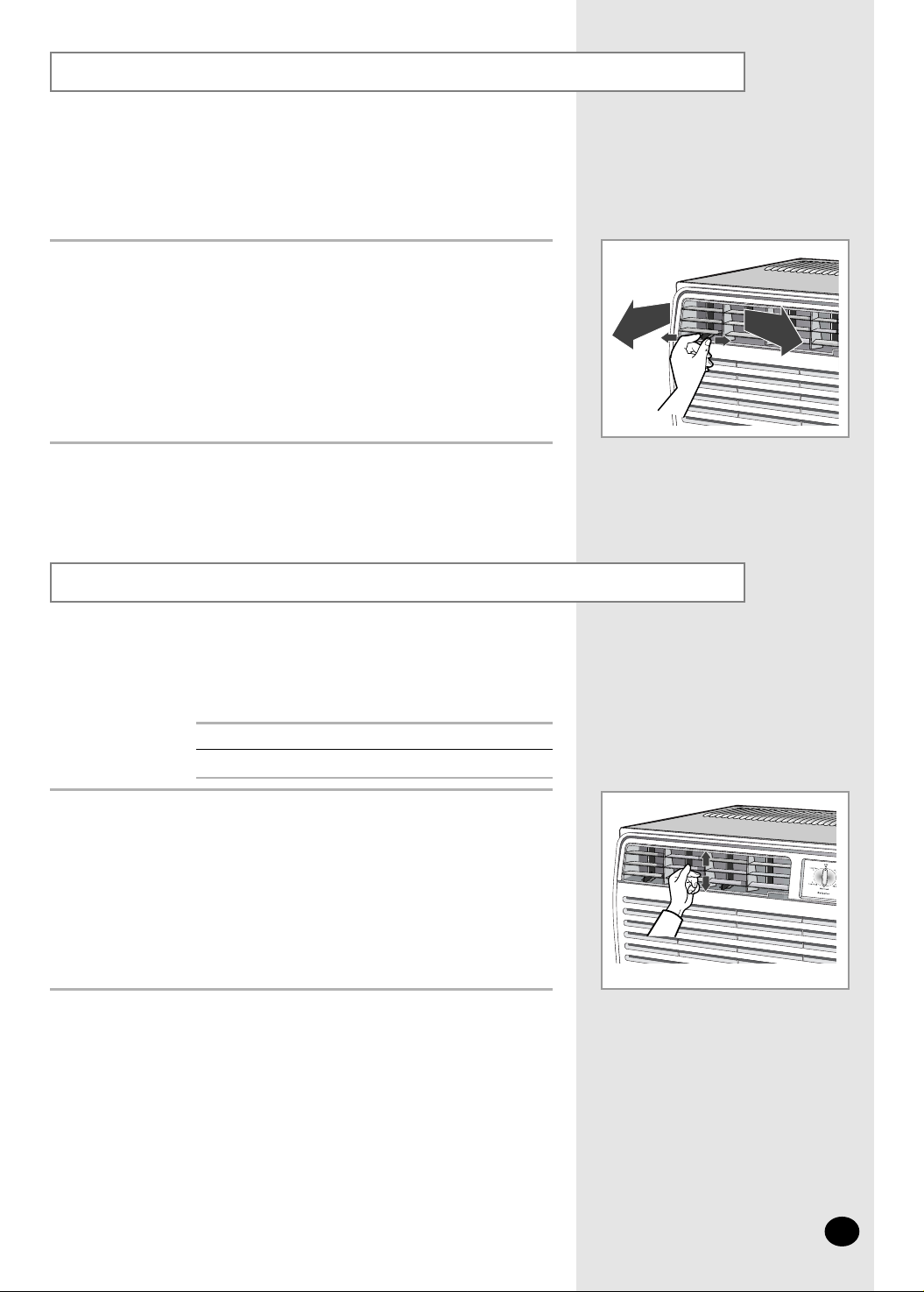
Adjusting the Air Flow Direction Horizontally
Adjusting the Air Flow Direction Vertically
The outer air flow blades can be adjusted to control the vertical air
flow direction. (Except AW0503M / AW0505M / AW0593M / AW0603M)
RECOMMENDATION
When...
Cooling
Adjust the blades to face...
Upwards.
Adjust the air flow blades to the desired position, by pushing them
upwards or downwards.
If you orient the air flow blades downwards and the unit operates
in Cool mode for long periods of time, dew may:
-
Form on the surface of the blades
-
Drip from the blades
➢
E-
9
Depending on the position of the unit in your room, you can adjust
the orientation of the inner air flow blades on the unit.
Adjust the air flow blades to the desired position by sliding them side to side.
Page 10
Power Failure
Temperature and Humidity Ranges
If the air conditioner is used at... Then...
Higher temperature The automatic protection feature may be triggered
and the air conditioner stopped.
Lower temperature A water leakage or some other malfunction may happen
if the heat exchanger freezes.
Higher humidity levels Water may condense on and drip from the surface of the unit
if it is used for long periods.
The following table indicates the temperature and humidity ranges
within which the air conditioner can be used.
Mode Indoor
Temperature
Outdoor
Temperature
Indoor Humidity
Cooling 70°F to 90°F approx. 70°F to 110°F approx. 80% or less
If a power failure occurs, the air conditioner is switched off.
When the power comes back on, the air conditioner starts up again
automatically.
E-
10
Page 11
E-
11
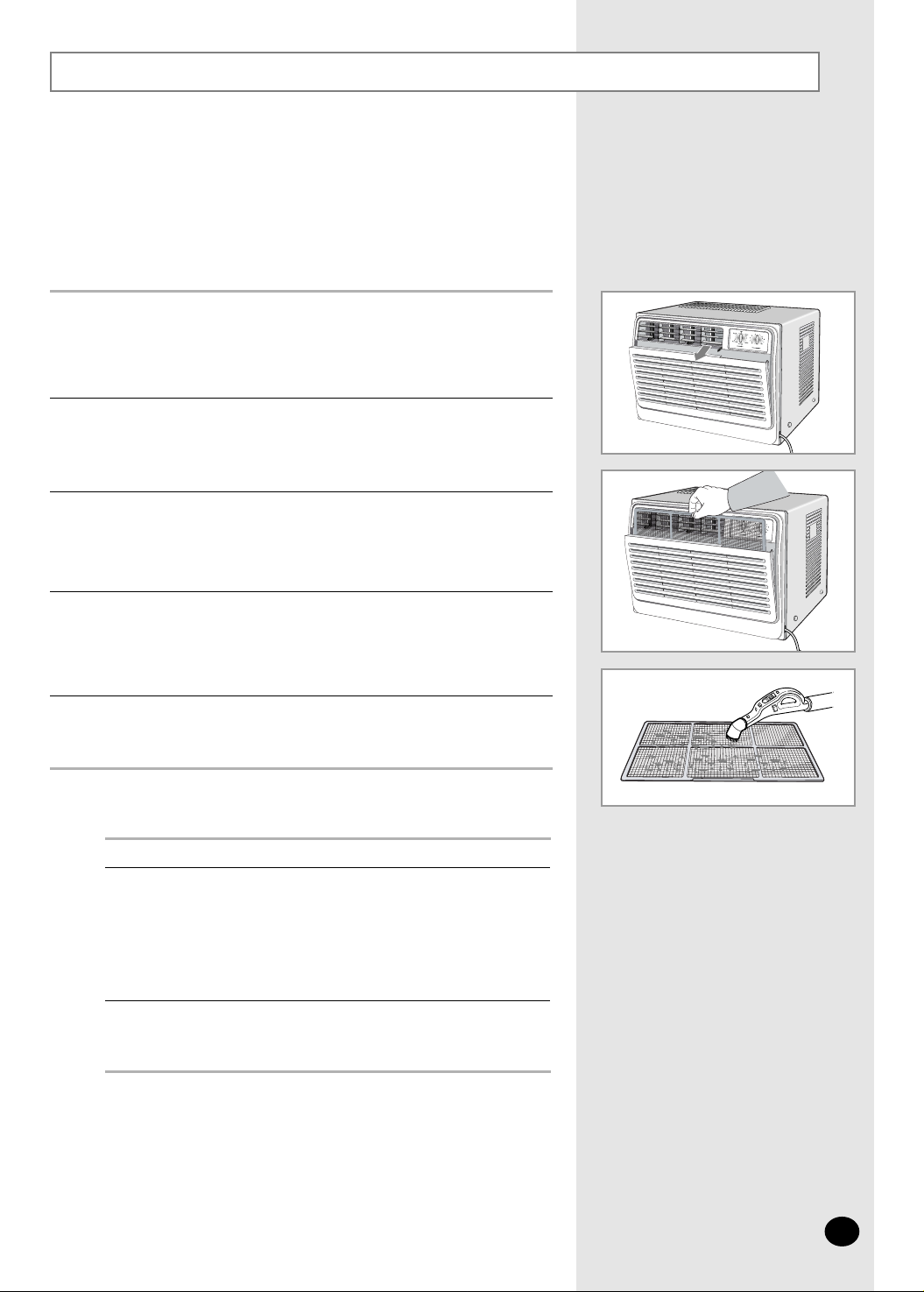
Cleaning Your Air Conditioner
Open the front grille by pulling the tabs on both sides of the grille.
Then lift it up slightly to open the front grille completely.
1
Remove all dust on the air filter with a vacuum cleaner or brush.
3
Grab the tabs on the filter and pull it up and out.
2
When you have finished, insert the air filter back into its original position.
4
Wipe the surface of the unit with a neutral detergent
and then wipe it again with dry cloth.
(Be sure not to use benzene, solvent or other chemical products.)
5
Be sure to clean the air filter periodically to maintain the air conditioner
in the best condition for a long period of time.
When cleaning the air conditioner, turn it off and pull out the
power plug.
Set the fan going for a few hours to
dry the inside of the air conditioner
thoroughly.
If you... Then...
Will not be using the
air conditioner for a
long period of time
◆ Set the fan going for a few
hours to dry the inside of the air
conditioner thoroughly.
◆ Switch the air conditioner off and
unplug it from the wall socket.
◆ Clean the filter and outer surfaces.
Have not used the air
conditioner for a long
period of time
➢
☛
Page 12
Solving Common Problems
Explanation / Solution
◆ Check for a power failure.
◆ Check the voltage.
(See the technical specifications)
◆ Check the power plug for disconnection.
◆ Check to see whether the operating mode selection dial is placed in the
"Off" position. (Set it to the desired position.)
◆ Check to see whether the room temperature is too low.
- Refer to page 10 for details about temperature condition.
◆ Set the THERMOSTAT control to the desired position.
- When the number on the THERMOSTAT control is too high,
the room temperature may be too warm.
◆ Check to see whether there is an open window or other leakage of cool
air to the outside.
- Close the window, and fill the gap.
◆ Check to see whether there is any obstacle adversely affecting
the flow of the air inside and outside the room.
- Remove the obstacle or change the position of the air conditioner.
◆ Check to see whether the air filter is clogged with dust or
contaminated with foreign substances.
- Clean the air filter.
◆ Check to see whether there is any direct sunlight facing the air conditioner.
- Block the sunlight with a sunshade.
◆ Check to see whether there is any electric device generating heat.
- Do not use the air conditioner together with any heating device.
◆
Ventilate the room.
Problem
The air conditioner
does not operate at all.
The air comes out smoothly,
but cooling is not effective.
Odors are permeating the
room during air conditioning.
Before contacting an authorized service center, perform the following simple checks.
They may save you the time and the expense of an unnecessary call.
E-
12
Page 13
Technical Specifications
Model Power Supply
AW0503M
AW0593M
AW0505M
AW0693M
AW0603M
AW0893M
AW0803M
AW1093M
AW1003M
AW1293M
AW1203M
AW1403M
230 - 208V~, 60HzAW1803M
Design and specifications are subject to change without notice.
115V~, 60Hz
E-
13
Page 14
This limited warranty begins on the original date of purchase, and is valid only on products purchased and used in the United
States. Warranty repairs must be performed by SAMSUNG's authorized service center. To receive warranty service, the original
dated bill of sale must be presented upon request as proof of purchase to SAMSUNG or SAMSUNG's authorized service center.
SAMSUNG will repair or replace any part found to be defective at no charge, as stipulated herein, with new or reconditioned parts
during the limited warranty period specified above. To request warranty service, the purchaser must contact SAMSUNG for
problem determination and service procedures. SAMSUNG does not warrant uninterrupted or error-free operation of the product.
All replaced parts and products become the property of SAMSUNG and must be returned to SAMSUNG. Replacement parts and
products assume the remaining original warranty, or ninety(90) days,whichever is longer.
In - Home Service (Except AW0503M / AW0505M / AW0593M / AW0603M):
During the warranty labor period, in-home service will be provided subject to availability within the contiguous United States.
In-home service is not available in all areas. If during in-home service repair can not be completed, it may be necessary to remove,
repair and return the product. If in-home service is unavailable, SAMSUNG may elect, at our option, to provide for transportation of
our choice to and from a SAMSUNG authorized service center . Otherwise, transportation to and from the SAMSUNG authorized
service center is the responsibility of the purchaser.
This limited warranty covers manufacturing defects in materials and workmanship encountered in normal, noncommercial use of
this product and shall not apply to the following, including, but not limited to: delivery and installation; damage which occurs in
shipment; applications and uses for which this product was not intended; failures or problems which are caused by products or
equipment not supplied by SAMSUNG; accidents, misuse, abuse, neglect, misapplication, fire, water, lightning or other acts of
nature; incorrect electrical line voltage, fluctuations or surges; damage caused by improper or faulty installation; product alteration or
modification; improper or unauthorized repair; cosmetic damage or exterior finish; product with altered serial numbers; failure to
follow operating and environmental instructions that are covered and prescribed in the instruction book; customer adjustments,
routine maintenance and cleaning; consumable items such as filters; use of non-SAMSUNG or unauthorized parts, supplies,
accessories or equipment which damage this product or result in service problems.
THERE ARE NO EXPRESS WARRANTIES OTHER THAN THOSE LISTED AND DESCRIBED ABOVE, AND NO WARRANTIES
WHETHER EXPRESS OR IMPLIED, INCLUDING, BUT NOT LIMITED TO, ANY IMPLIED WARRANTIES OF MERCHANTABILITY OR FITNESS FOR A P ARTICULAR PURPOSE, SHALLAPPLYAFTER THE EXPRESS WARRANTY PERIODS STA TED
ABOVE, AND NO OTHER EXPRESS WARRANTY OR GUARANTY GIVEN BYANY PERSON, FIRM OR CORPORATION
WITH RESPECT TO THIS PRODUCT SHALLBE BINDING ON SAMSUNG. SAMSUNG SHALL NOT BE LIABLE FOR LOSS
OF REVENUE OR PROFITS, FAILURE TO REALIZE SAVINGS OR OTHER BENEFITS, OR ANYOTHER SPECIAL,
INCIDENTALOR CONSEQUENTIALDAMAGES CAUSED BY THE USE, MISUSE OR INABILITYTO USE THIS PRODUCT,
REGARDLESS OF THE LEGALTHEORY ON WHICH THE CLAIM IS BASED, AND EVEN IF SAMSUNG HAS BEEN ADVISED
OF THE POSSIBILITY OF SUCH DAMAGES. NOR SHALL RECOVERYOF ANY KIND AGAINST SAMSUNG BE GREATER IN
AMOUNT THAN THE PURCHASE PRICE OF THE PRODUCT SOLD BYSAMSUNG AND CAUSING THE ALLEGED
DAMAGE. WITHOUT LIMITING THE FOREGOING, PURCHASER ASSUMES ALLRISK AND LIABILITYFOR LOSS, DAMAGE
OR INJURYTO PURCHASER AND PURCHASERS PROPERTYAND TO OTHERS AND THEIR PROPER TYARISING OUTOF
THE USE, MISUSE OR INABILITY TO USE THIS PRODUCT SOLD BYSAMSUNG NOT CAUSED DIRECTLY BY THE
NEGLIGENCE OF SAMSUNG. THIS LIMITED WARRANTYSHALL NOT EXTEND TO ANYONE OTHER THAN THE ORIGINAL
PURCHASER OF THIS PRODUCT, IS NONTRANSFERABLE AND ST ATES YOUR EXCLUSIVE REMEDY.
Some states do not allow limitations on how long an implied warranty lasts, or the exclusion or limitation of incidental or
consequential damages, so the above limitations or exclusions may not apply to you. This warranty gives you specific legal rights,
and you may also have other rights which vary from state to state.
To obtain warranty service, please contact SAMSUNG at:
One (1) Year Parts and Labor, Five (5) Years Parts Warranty for Compressor
SAMSUNG ELECTRONICS AMERICA, INC. - CONSUMER ELECTRONICS CUSTOMER SERVICE
400 Valley Road, Suite 201 Mount Arlington, NJ 07856
Tel: 973-601-6000, Fax: 973-601-6001
1-800-SAMSUNG (1-800-726-7864)
www.sosimple.com
SAMSUNG ROOM AIR CONDITIONER
This SAMSUNG brand product, as supplied and distributed by SAMSUNG ELECTRONICS AMERICA, INC.
(SAMSUNG) and delivered new, in the original carton to the original consumer purchaser, is warranted by SAMSUNG
against manufacturing defects in materials and workmanship for a limited warranty period of:
LIMITED WARRANTY TO ORIGINAL PURCHASER
 Loading...