

Page 1
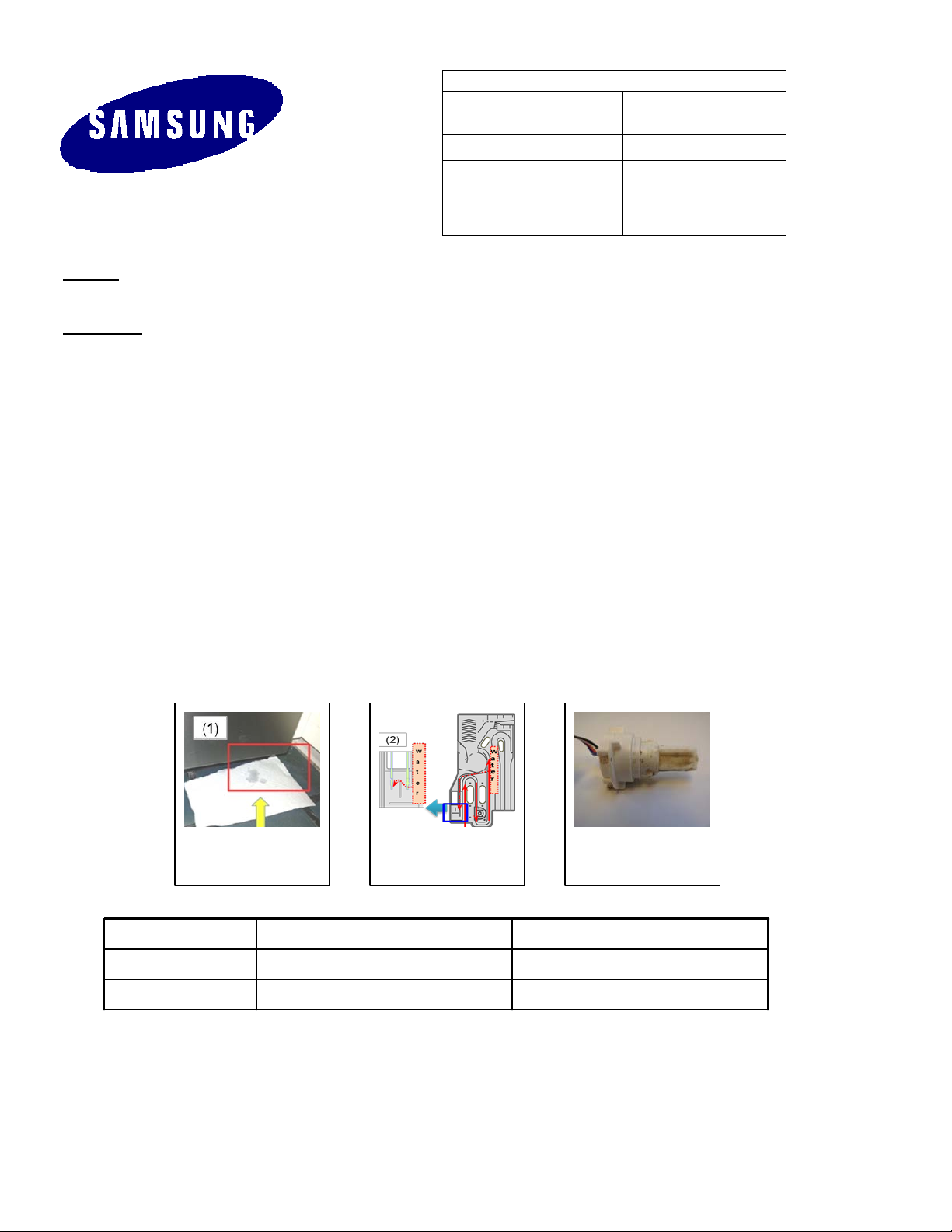
Model DW80F800*** DW80F600***
Overflow error "oE" display on c/panel Heavy+Smart auto LED blink
Drain error "5E" display on c/panel Delicate LED blink
SERVICE BULLETIN
Product:
Dishwasher
Bulletin Number:
ASC20141007001
DW80F600UTS/AA,
DW80F800UWS/AA
ELECTRONICS
Subject: How to troubleshoot and repair DW80F dishwashers with water leaks from the door, oE over level
water errors, or 5E drain errors
Symptoms:
1. Water Leak from Door Corners
Hot water supplied during the initial water fill may cause water to leak from the corners of the door
during the first few rotations of the spray arm. Increased air pressure from the hot water will force
water out of the bottom front corners of the tub.
2. oE Error Code
Normally, during the water fill portion of a cycle, water comes from the water valve, through the case
brake, and then into the tub. When the water passes through the case brake a small amount of
water is diverted to the overflow chamber where the overfill probes are located. However, on some
occasions, water is not entering the overflow chamber correctly and it is making contact with the
overfill probes causing an oE error code.
3. 5E Drain Error Code
A 5E drain error occurs even though there is no water in the dishwasher. If the ECS is contaminated,
the ECS will send a false signal to the main PCB causing an unintended 5E drain error.
Bulletin Date: 10/7/2014
Models:
DW80F600UTB/AA,
DW80F600UTW/AA,
1 2 3
This information is published for informational purposes only and intended for use only by personnel qualified for the specific tasks
depicted. Qualified personnel are those who, based on their training and experience, are capable of identifying risks and avoiding
potential hazards when handling or servicing a product. Only qualified personnel should repair products powered by electricity. Any
attempt to handle, service or repair the product or products by anyone other than qualified personnel could result in serious injury or
death. You agree that your use of and reliance on this information is at your sole risk. This information is subject to change or update
without notice. There are no warranties, either expressed or implied, regarding the accuracy or completeness of this information.
Page 2
Solutions:
1. Water Leak from Door Corners:
• Level the dishwasher.
• Change the main PCB. Refer to the chart on the next page.
2. oE Error Code:
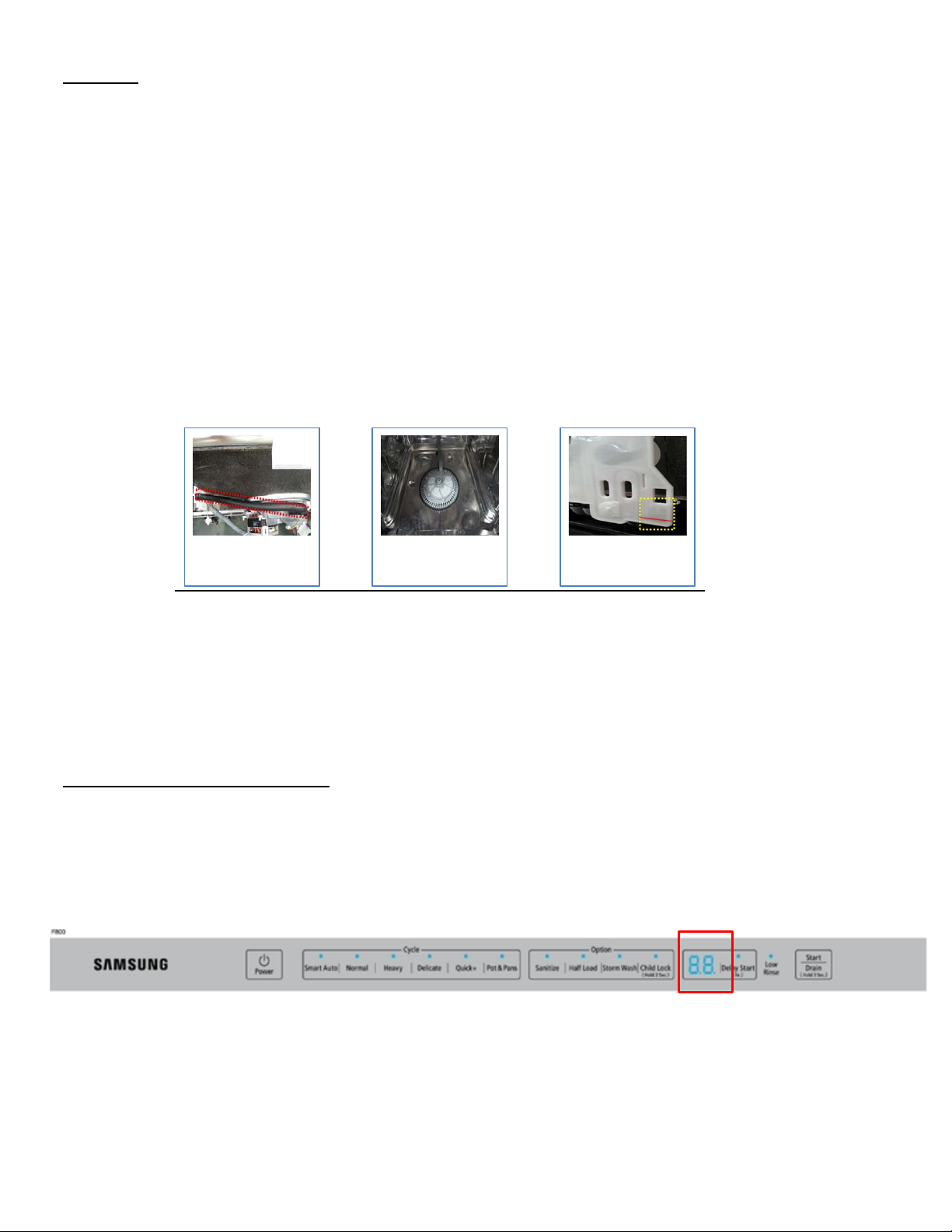
• Check the tub and make sure there is no water left after a drain cycle.
If water is left in the tub, check the operation of the drain pump and inspect the condition of
the drain hose.
Check the sensor hose from the sump to the case brake for obstructions.
• Open the door after filling the tub with water and make sure the water level is correct.
• Check the water level in the overflow chamber on the case brake.
• If all of the above is normal. Replace the main PCB and the case brake assy (refer to the chart
below).
Sensor Hose
Water level in the
tub
Water level in the
overflow chamber
3. 5E Drain Error Code:
• Check for obstructions in the drain hose.
• Check the wiring connection on the drain pump.
• Check the resistance of the drain pump. The drain pump should measure 25Ω.
• Even if the drain pump and drain hose are good, replace the main PCB. The main PCB
software has been updated. It will no longer detect the water level by the ECS.
How to Check the Software Version:
The new software version is number 5840. To check the software version, enter the service test mode by
pressing the Power, Delicate, and Heavy keys at the same time. The software version will be displayed as
soon as the dishwasher enters the service test mode.
DW80F800 will show a “40” in the delay start display
This information is published for informational purposes only and intended for use only by personnel qualified for the specific tasks
depicted. Qualified personnel are those who, based on their training and experience, are capable of identifying risks and avoiding
potential hazards when handling or servicing a product. Only qualified personnel should repair products powered by electricity. Any
attempt to handle, service or repair the product or products by anyone other than qualified personnel could result in serious injury or
death. You agree that your use of and reliance on this information is at your sole risk. This information is subject to change or update
without notice. There are no warranties, either expressed or implied, regarding the accuracy or completeness of this information.
Page 3
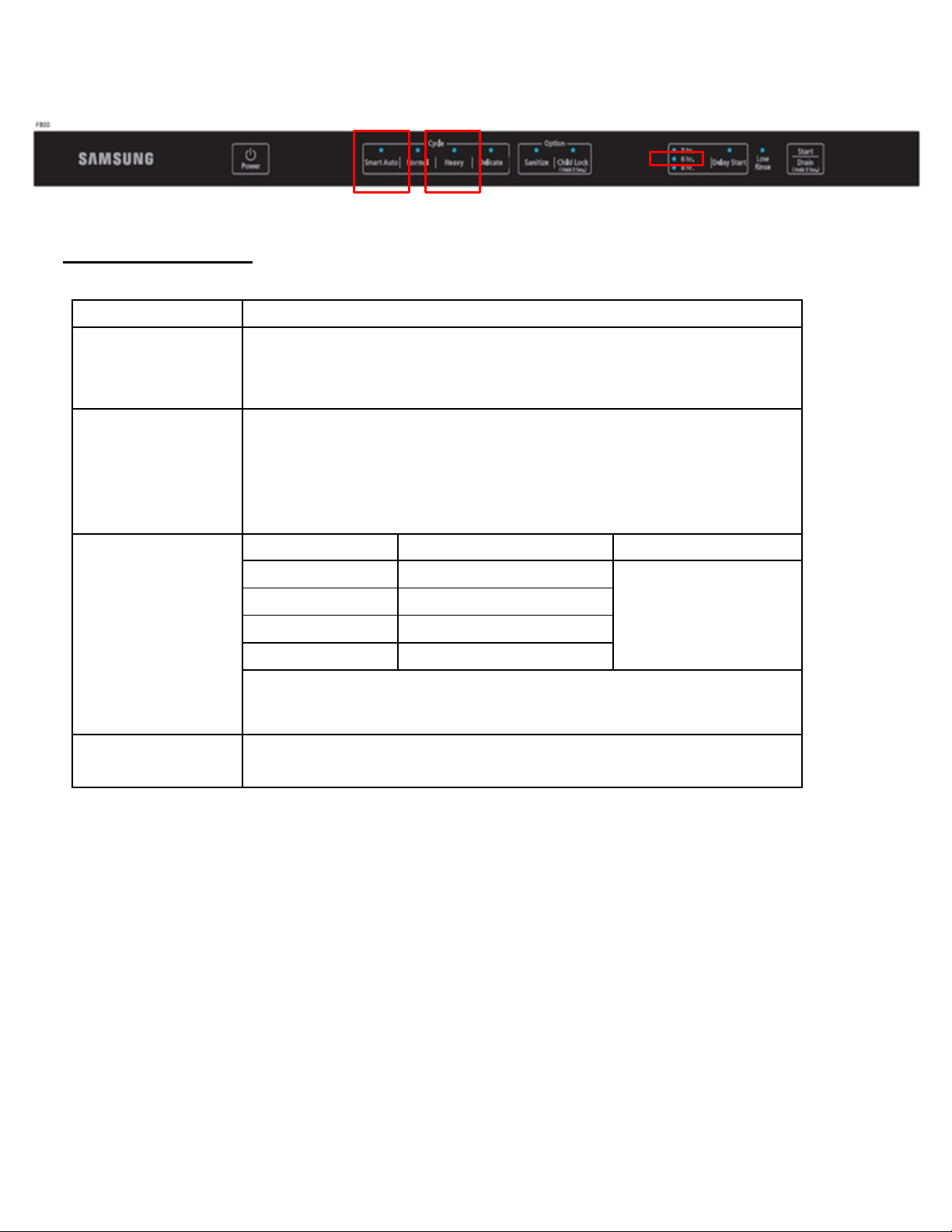
The DW80F600 will turn on numerous LED’s. Verify that the Smart Auto, Heavy, and 6 hr. LED’s are
Model
DW80F800***, DW80F600***
OE Error
Water Leak from door
Target Serial
OE : June 2013 ~ July, 2014
5E, No drain & Leak : June, 2013 ~ December, 2013
Model
Main PCB
Case Brake
DW80F800*** 00
DD92-00033B
DW80F600*** 00
DD92-00033C
DW80F800*** 01
Do Not Replace
DW80F600*** 01
Do Not Replace
For oE" errors on version 01 models (DW80F800*** 01, DW80F600*** 01), do
illuminated. This indicates software version 5840. Other LED’s will illuminate, however, these other LED’s
indicate software versions for the sub PCB and key panel.
Parts Replacement Chart:
Symptom
Numbers/Production
Dates
Parts to order
Repair Method
5E Drain Error
See How to Read the Serial Number on the next page for instructions that
explain how to extract the production year and month from the serial number.
DD82-01111A
not order the PCB. Order a Case Brake only.
Replace the parts
This information is published for informational purposes only and intended for use only by personnel qualified for the specific tasks
depicted. Qualified personnel are those who, based on their training and experience, are capable of identifying risks and avoiding
potential hazards when handling or servicing a product. Only qualified personnel should repair products powered by electricity. Any
attempt to handle, service or repair the product or products by anyone other than qualified personnel could result in serious injury or
death. You agree that your use of and reliance on this information is at your sole risk. This information is subject to change or update
without notice. There are no warranties, either expressed or implied, regarding the accuracy or completeness of this information.
Page 4
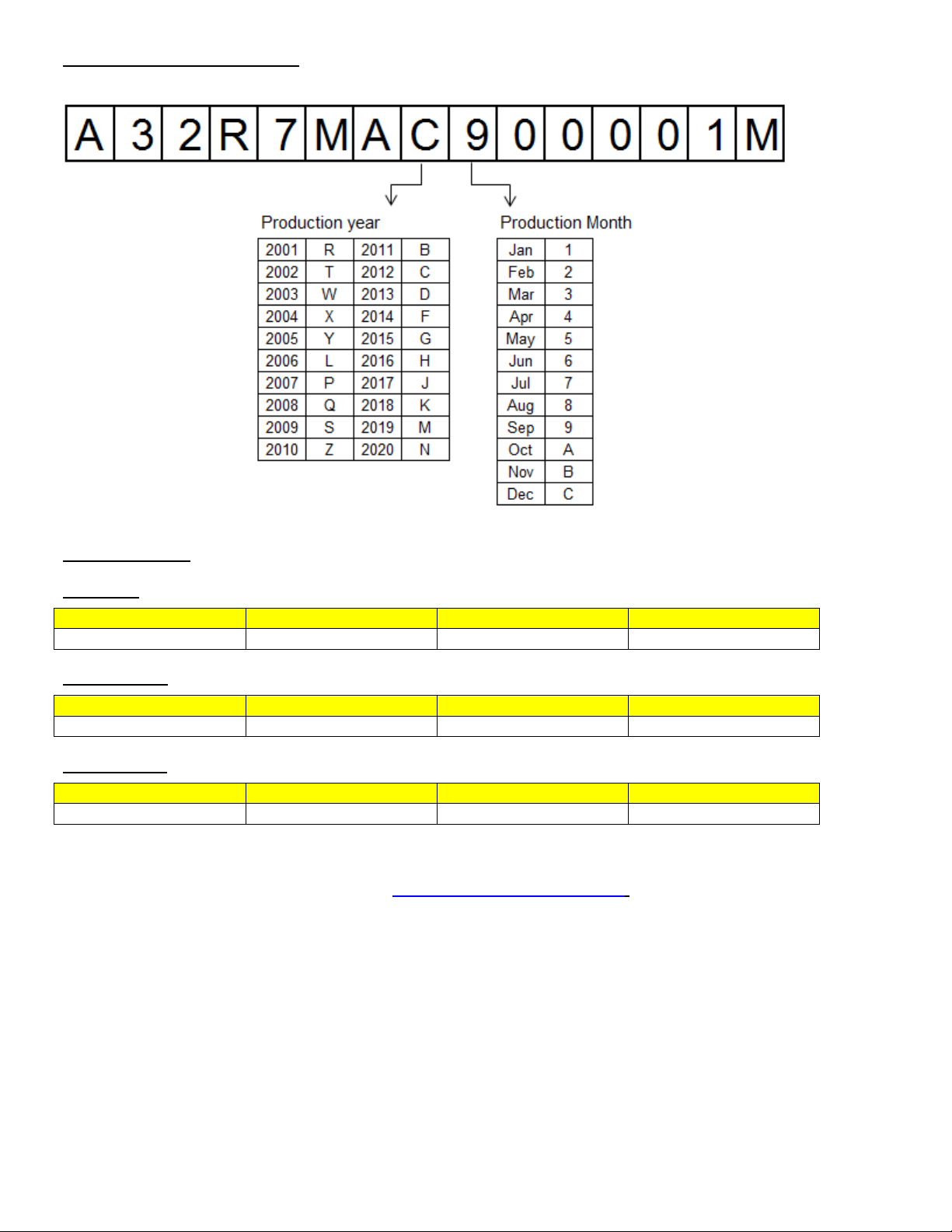
How to Read the Serial Number:
Symptom 1
Symptom 2
Symptom 3
Symptom 4
3 2 2
Symptom 1
Symptom 2
Symptom 3
Symptom 4
1 1 8
Symptom 1
Symptom 2
Symptom 3
Symptom 4
1 1 5
Symptom Codes:
Door Leak
oE Error Code
5E Error Code
Note: Consult the Samsung Service Website at http://.service.samsungportal.com for the Service Manual
and other information on this product.
This information is published for informational purposes only and intended for use only by personnel qualified for the specific tasks
depicted. Qualified personnel are those who, based on their training and experience, are capable of identifying risks and avoiding
potential hazards when handling or servicing a product. Only qualified personnel should repair products powered by electricity. Any
attempt to handle, service or repair the product or products by anyone other than qualified personnel could result in serious injury or
death. You agree that your use of and reliance on this information is at your sole risk. This information is subject to change or update
without notice. There are no warranties, either expressed or implied, regarding the accuracy or completeness of this information.
 Loading...