

Page 1

ENGLISH
For appliance description see diagram on page 3:
M
A Spray jet
B Water filling inlet
C DM 110, 115, 120: Steam control
button with extra steam and selfclean function
DM 130, 140: Steam control slide
with self-clean function
D Spray control
E Steam jet control (Models DM 130
and DM 140)
SAFETY INSTRUCTIONS:
P Read these operating instructions thoroughly and keep them in an
accessible place.
E The appliance complies with EU directives 72/23/EEC and 89/336/EEC.
E The appliance may only be connected to alternating current as specified
on the rating plate.
U.K. ONLY
SAFETY POINTS FOR REWIREABLE OR MOULDED PLUG:
E The mains lead is fitted with a BS 1363 13A plug.
E If the plug supplied with the product is not suitable for your socket
outlet, then it must be removed (cut off, if it is a moulded-on plug) and a
suitable 3 pin plug fitted in accordance with the instructions given below.
F Flexible cord support or protector
G Mains supply cord
H Warning light
I Infinitely variable temperature
control
J DM 110: Aluminium soleplate
DM 115: Sterling soleplate
DM 120, 130, 140: Inox stainless
steel soleplate
K Transparent water tank
L Maximum water level indicator
1DM-100
Page 2
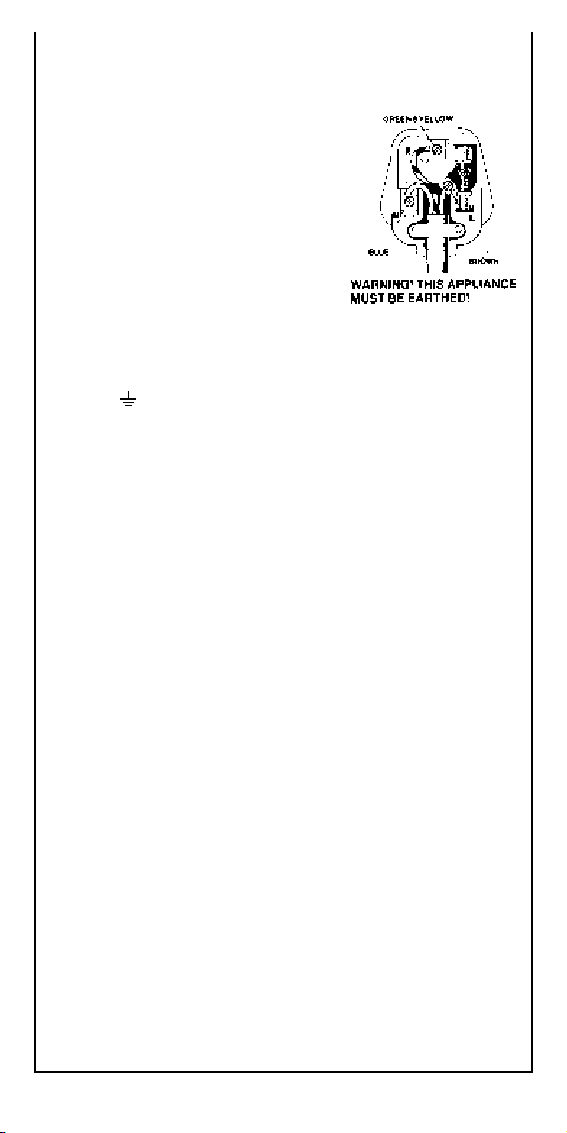
IF YOU ARE IN ANY DOUBT, PLEASE CONTACT A QUALIFIED
ELECTRICIAN.
WARNING: Dispose of a plug that has been cut from the power supply
cord, as such a plug is hazardous if inserted in a live 13 A socket outlet
elsewhere in the house.
How to connect the cord to a U.K.plug:
IMPORTANT!
The wires in the mains lead are coloured in
accordance with the following code:
Green & Yellow Earth
Blue Neutral
Brown Live
Please read the instructions given below
before connecting the cord to a plug. If
you are in any doubt please consult a
qualified electrician.
WARNING! THIS APPLIANCE MUST BE
EARTHED!
As the colours of the wires in the mains lead of this iron may not
correspond with the coloured markings identifying the terminals in your
plug, proceed as follows:
E The wire that is coloured GREEN & YELLOW must be connected to the
terminal in the plug which is marked with the letter E, or the earth
Symbol , or coloured GREEN or GREEN & YELLOW.
E The wire that is coloured BROWN must be connected to the terminal
which is marked with the letter L or coloured RED.
E The wire that is coloured BLUE must be connected to the terminal which
is marked with the letter N or coloured BLACK.
E This appliance requires a 13 amp fuse.
E Should the fuse need to be replaced an ASTA marked fuse, approved to
BS 1362, of the same rating must be used.
E Always replace the fuse cover after fitting a fuse. The plug must NOT be
used if the cover is omitted or lost until a replacement is obtained - make
certain that only the correct fuse cover is used and fitted.
E For plugs with a detachable fuse cover, the replacement must be the
same as the colour insert in the base of the plug, or as directed by the
embossed working on the base of the plug.
E If the detachable fuse cover is lost, a replacement may be purchased from
a Rowenta Service Centre (see enclosed Service Information leaflet).
E Information for supply may also be obtained from the plug manufacturer.
E Do not leave the appliance unattended while it is connected to the mains
supply.
E The iron and escaping water or steam are hot.
Always use the handles provided. Never direct the jet of steam at
persons.
E Use and store the appliance (and supply cord!) out of the reach of
children.
E Always disconnect the appliance:
– before filling or emptying the water tank;
– before leaving the room (even for a short time);
– after use and before cleaning it.
E Never unplug the appliance by tugging on the cord.
E Do not immerse the appliance in water.
E An electrical appliance should not be used if:
– the appliance, the supply cord or the cord protector is damaged;
– the appliance has been dropped or is obviously leaking.
In this case the appliance should be returned to a Rowenta Service Centre
for repair (see enclosed list for addresses).
Repairs to electrical appliances may only be carried out by specialists.
Improperly carried out repairs may cause serious danger to users.
E To avoid danger to users, a defective or damaged supply cord may only
be replaced by an authorised Rowenta service centre.
E No liability will be accepted for any damage arising from improper use or
operation
P When the appliance has reached the end of its operational life it should
be disposed of through the correct channels.
2
Page 3
1 FIRST USE
Before use, remove the sticker from the soleplate slowly and completely.
Fill with water (containing no additives) up to the max mark. Water is suitable
M
up to 17°.
Plug the iron into the mains electricity supply.
M
IRONING
2 Setting the ironing temperature
Set the temperature control on the iron using the international dot symbols
M
(see the control knob/garment label) or by type of fabric.
The warning light comes on to indicate that the iron is heating up.
M
Wait for the light to get off and come on again before you start ironing.
M
Variable steam volume
Steam can only be generated if the ironing temperature on the temperature
M
control is set in the coloured area (max.
With Models DM 110, DM 115 and DM 120, set the steam volume required
with the steam control button (see Fig. 3a).
With Models DM 130 and DM 140, set the steam volume required with the
steam slide control (see Fig. 3b).
Steam generation can be interrupted:
by setting the iron on its heel
M
by pushing the steam control button the steam control slide to “0“ or fully to
M
the left.
●●●).
4 Extra steam
For Models DM 110, DM 115 and DM 120:
Please press the steam control button down shortly to produce extra
powerful steam. Release the button afterwards and leave at least 4 seconds
before using again.
5 Steam jet
For Models DM 130 and DM 140:
Please press the steam jet control button down briefly every 4 seconds while
ironing to produce the steam jet. A powerful steam jet deeply penetrates
the fibre.
6 Vertical steam jet
Only for Model DM 140:
The iron can also be used vertically (please refer to “Steam jet“ for how to
proceed). This is ideal for removing wrinkles from clothing on hangers, curtains,
wall tapestries, etc.
Dry ironing
For Models DM 110, DM 115 and DM 120, turn the steam control button to
“0“ and iron as usual.
For Models DM 130 and DM 140, push the steam control slide fully to the left
(“min“ position) and iron as usual.
3DM-100
Page 4
Spray function
DM 110, 115, 120: (Fig. 7a)
DM 130, 140: (Fig. 7b)
Laundry can be spray dampened as soon as there is water in the tank.
M
Press down spray button:
M
slowly = spray jet
fast and strongly = spray mist
AFTER IRONING
Unplug the iron. Return the steam control button the steam control slide to
M
„0“ or “min“. Pour off remaining water and leave the iron to cool off.
Always store the iron on its heel (to protect the soleplate).
M
CLEANING AND MAINTENANCE
Cleaning the soleplate
Do not scratch or scrape the soleplate. Do not use strong or abrasive deter-
M
gents for cleaning.
®
Models with sterling soleplate/Alutherm
Use a damp cloth to clean the soleplate, then wipe dry.
Models with stainless steel soleplate:
For cleaning the stainless steel soleplate, we recommend the stainless steel cleaner
(Order No. 0800) available from Rowenta dealers (addresses in the service list).
8 Self-cleaning
To clean the steam chamber, it is advisable to activate the iron’s self-clean
M
function once a month. If the water in your area is very hard, we recommend
weekly cleaning. Fill the tank to the max mark, allow the iron to heat up to
maximum temperature and hold it over a sink.
With Models DM 110, DM 115 and DM 120 set the steam control button
to „0“, press the knob down and hold it firmly in this position.
With Models DM 130 and DM 140, push the steam control slide fully to the
left and hold it there.
Initially a great deal of steam will be expelled. After a few seconds this is fol-
M
lowed by steam and water, which rinses dirt and scale particles out of the
steam chamber. Unplug the iron, allow it to cool and wipe the soleplate with a
damp cloth. Plug in the iron again, allow it to heat up and hold it over the sink
for a moment to release steam.
In line with a policy of continuous product improvement Rowenta reserves the
right to change product specifications without prior notice.
soleplate:
Customer Relations Tel. Number
0845 602 1454
4
 Loading...