

Page 1
Owner's Manual
DCAC
AC & BATTERY
POWERED
FET
1
Page 2

Thank you, and congratulations on your choice of BOSS TR-2 Tremolo.
Before using this unit, carefully read the sections entitled: “USING THE UNIT SAFELY”
and “IMPORTANT NOTES” (p.16; p.4). These sections provide important information
concerning the proper operation of the unit. Additionally, in order to feel assured that you
have gained a good grasp of every feature provided by your new unit, this manual should
be read in its entirety. The manual should be saved and kept on hand as a convenient
reference.
Copyright © 1997 BOSS CORPORATION
All rights reserved. No part of this publication may be reproduced in any form without the
written permission of BOSS CORPORATION.
2
Page 3

FEATURES
• The TR-2 is an effect that periodically changes only the volume of the sound. This
means that the tone will not be altered with the TR-2.
• The Wave knob allows you to select very delicate changes in the volume, or more rapid
and extreme ones—whatever you need.
3
Page 4

IMPORTANT NOTES
In addition to the items listed under “USING THE UNIT SAFELY” on page 16, please read
and observe the following:
Power Supply
• Do not use this unit on the same power circuit
with any device that will generate line noise
(such as an electric motor or variable lighting
system).
• The AC adaptor will begin to generate heat
after long hours of consecutive use. This is
normal, and is not a cause for concern.
• Batteries should always be installed or re-
placed before connecting any other devices.
This way, you can prevent malfunction and/or
damage to speakers or other devices.
• A battery was installed in the unit before it left
the factory. The life of this battery may be
limited, however, since its primary purpose
was to enable testing.
4
• Before connecting this unit to other devices,
turn off the power to all units. This will help
prevent malfunctions and/or damage to speakers or other devices.
Placement
• Using the unit near power amplifiers (or other
equipment containing large power transformers) may induce hum. To alleviate the problem, change the orientation of this unit; or
move it farther away from the source of interference.
• Do not expose the unit to direct sunlight,
place it near devices that radiate heat, leave it
inside an enclosed vehicle, or otherwise subject it to temperature extremes. Excessive heat
can deform or discolor the unit.
Page 5

Maintenance
• For everyday cleaning wipe the unit with a
soft, dry cloth or one that has been slightly
dampened with water. To remove stubborn
dirt, use a cloth impregnated with a mild, nonabrasive detergent. Afterwards, be sure to
wipe the unit thoroughly with a soft, dry cloth.
• Never use benzene, thinners, alcohol or solvents of any kind, to avoid the possibility of
discoloration and/or deformation.
Additional Precautions
• Use a reasonable amount of care when using
the unit's buttons, sliders, or other controls;
and when using its jacks and connectors.
Rough handling can lead to malfunctions.
• When connecting / disconnecting all cables,
grasp the connector itself—never pull on the
cable. This way you will avoid causing shorts,
or damage to the cable's internal elements.
• To avoid disturbing your neighbors, try to
keep the unit's volume at reasonable levels.
You may prefer to use headphones, so you do
not need to be concerned about those around
you (especially when it is late at night).
• When you need to transport the unit, package
it in the box (including padding) that it came
in, if possible. Otherwise, you will need to use
equivalent packaging materials.
5
Page 6
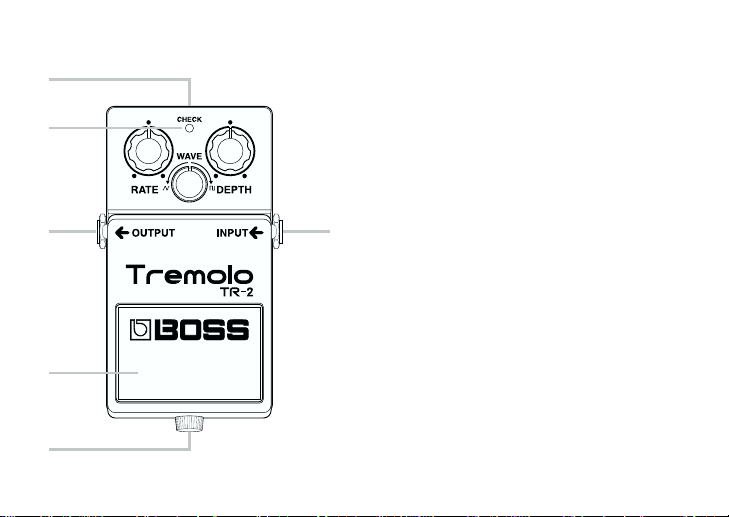
PANEL DESCRIPTIONS
1
2
3
4
5
6
1. AC Adaptor Jack
Accepts connection of an AC Adaptor (optionally available BOSS PSA-Series). By
using an AC Adaptor, you can play without
being concerned about how much battery
power you have left.
* If there are batteries in the unit while an AC
6
adaptor is being used, normal operation will
continue should the line voltage be interrupted (power blackout or power cord disconnection).
* If you are going to use an AC adaptor, be sure
to use the specified unit (BOSS PSA-Series).
Use of any other adaptor may result in damage, malfunction or electric shock.
Also, if you are not going to be using it for an
extended period of time, disconnect the AC
adaptor from the AC outlet.
Page 7

2. CHECK Indicator
This indicator shows whether an effect is
ON/OFF, and also doubles as the Battery
Check indicator.
The indicator lights when an effect is ON.
If this indicator goes dim or no longer lights
while an effect is ON, the battery is near
exhaustion and should be replaced immediately.
3. OUTPUT Jack
The output jack is used to connect the unit
to an amplifier or another device.
4. Pedal Switch
This switch turns the effects ON/OFF.
5. Thumbscrew
This thumbscrew is loosened to open the
pedal, allowing battery replacement. For
instructions on how to replace the battery,
please refer to “CHANGING THE BATTERY (p.12).”
6. INPUT Jack
This jack accepts input signals (coming
from a guitar, some other musical instrument, or another effects unit).
* The INPUT jack also serves as the power
switch. Power is turned on whenever a plug is
inserted into the INPUT jack, and is turned off
when the plug is disconnected. When not
using the unit, you should disconnect any
cord connected to the INPUT jack.
7
Page 8
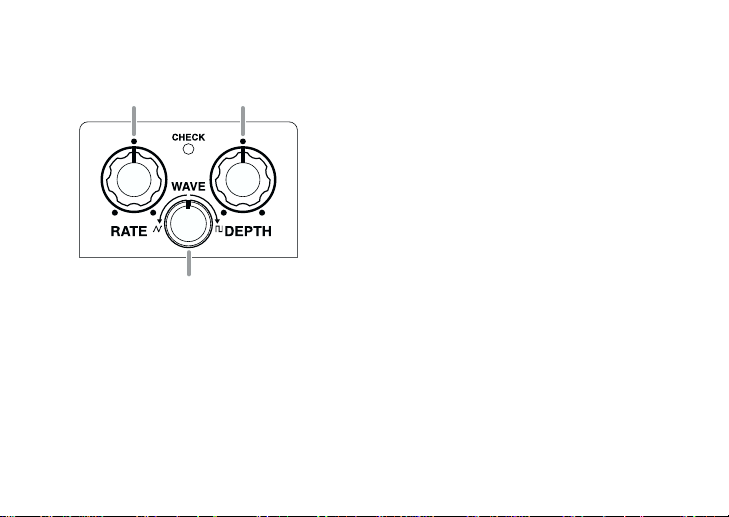
RATE Knob DEPTH Knob
CHECK
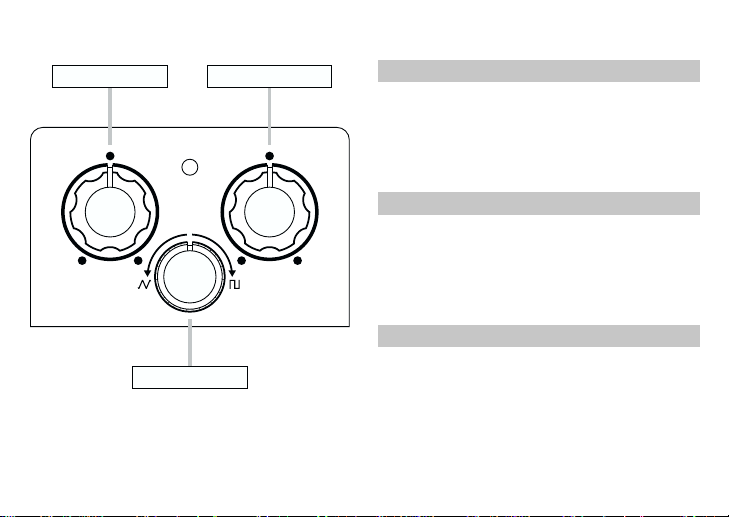
RATE Knob
This adjusts the rate of the tremolo. The
further you move the knob clockwise, the
faster the rate becomes.
WAVE
RATE DEPTH
WAVE Knob
8
DEPTH Knob
This adjusts the depth of the tremolo. When
it is turned fully counterclockwise, no
tremolo effect will be created.
WAVE Knob
This controls the waveform of the tremolo.
You can go from smooth volume changes
to more dramatic ones.
Page 9
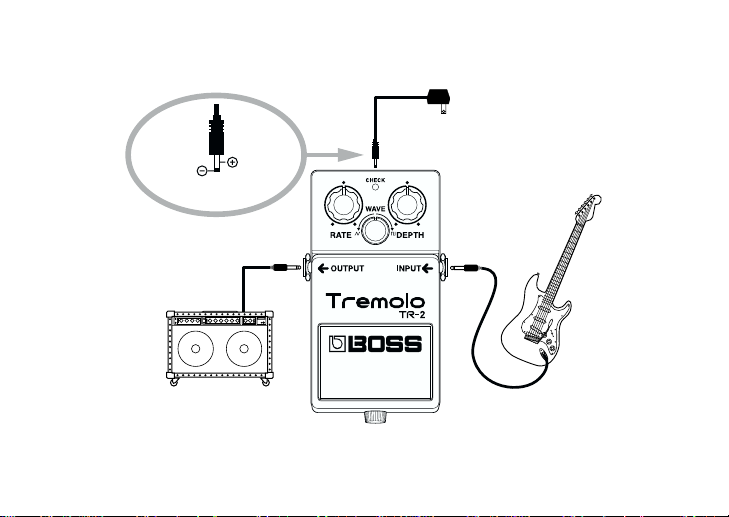
MAKING THE CONNECTIONS
OUT 9V DC/200mA
Guitar Amplifier
AC Adaptor
BOSS PSA-series
(option)
Electric
Guitar
9
Page 10

* Inserting a plug into the INPUT Jack will automatically switch the unit on.
* To prevent malfunction and/or damage to speakers or other devices, always turn down the
volume, and turn off the power on all devices before making any connections.
* If there are batteries in the unit while an AC adaptor is being used, normal operation will continue
should the line voltage be interrupted (power blackout or power cord disconnection).
* Once the connections have been completed, turn on power to your various devices in the order
specified. By turning on devices in the wrong order, you risk causing malfunction and/or damage
to speakers and other devices.
When powering up: Turn on the power to your guitar amp last.
When powering down: Turn off the power to your guitar amp first.
* Always make sure to have the volume level turned down before switching on power. Even with
the volume all the way down, you may still hear some sound when the power is switched on, but
this is normal, and does not indicate a malfunction.
* When operating on battery power only, the unit’s indicator will become dim when battery power
gets too low. Replace the battery as soon as possible.
* The CHECK indicator shows whether the effect is being applied or not. It does not indicate
whether the power to the device is on or not.
10
Page 11
OPERATING THE UNIT
3
4
5
1. When you have made the necessary
connections, set the knobs as shown in
the illustration.
2. Depress the pedal switch to turn the
effect on. (Make sure the CHECK indicator lights.)
3. Adjust the rate of the tremolo using the
RATE knob.
4. Adjust the depth of the tremolo using
the DEPTH knob.
5. Adjust the waveform of the tremolo
using the WAVE knob.
11
Page 12
CHANGING THE BATTERY
When the indicator goes dim or no longer
lights while an effect is on, it means that the
battery is nearly dead and must be replaced.
Replace the battery following the steps
below.
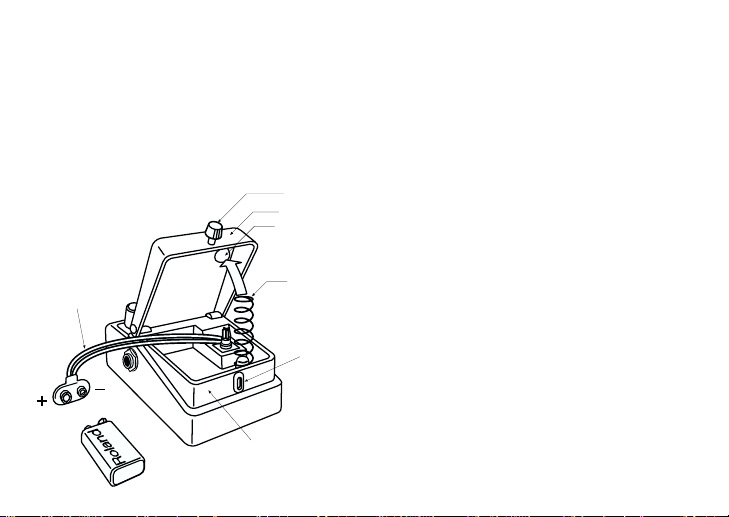
Battery Snap Cord
Battery Snap
9V Battery
12
Spring Base
Battery
Housing
Thumbscrew
Pedal
Coil Spring
Guide
Bush
Hole
1 Loosen the thumbscrew at the front of the
pedal, then lift the pedal upwards to open
the unit.
* The thumbscrew can be left in the pedal
while changing the battery.
2 Remove the old battery from the battery
housing, and remove the snap cord connected to it.
3 Connect the snap cord to the new battery,
and place the battery inside the battery
housing.
* Be sure to carefully observe the battery's
polarity (+ versus -).
4 Slip the coil spring onto the spring base on
the back of the pedal, then close the
pedal.
* Carefully avoid getting the snap cord
caught in the coil spring.
5 Finally, insert the thumbscrew into the
guide bush hole and fasten it securely.
Page 13
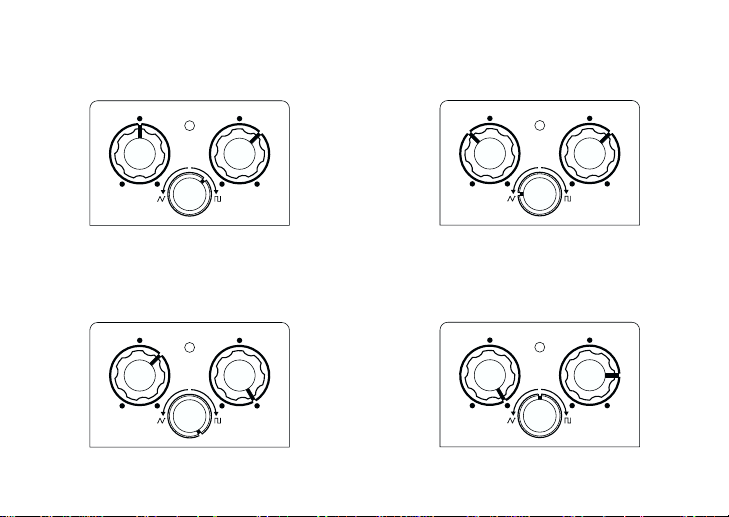
SETTING EXAMPLES
Vintage Tremolo
Electric Piano sound
CHECK
WAVE
RATE DEPTH
Switching technique sound
CHECK
WAVE
RATE DEPTH
CHECK
WAVE
RATE DEPTH
Rotary Speaker sound
CHECK
WAVE
RATE DEPTH
13
Page 14

SPECIFICATIONS
TR-2: Tremolo
Nominal Input Level ........ -20 dBu
Input Impedance .............. 1 MΩ
Nominal Output Level ..... -20 dBu
Output Impedance ........... 1 kΩ
LFO Rate.......................... 90 to 900 ms
Residual Noise Level........ -90 dBu (IHF-A Weighted, Typ.)
Controls ........................... Pedal Switch, RATE Knob, DEPTH Knob, WAVE Knob
Indicator .......................... CHECK Indicator (Serves also as battery check indicator)
Connectors ...................... INPUT Jack, OUTPUT Jack, AC Adaptor Jack (DC 9 V)
Power Supply................... DC 9 V: Dry Battery (6F22/ 9 V)
AC Adaptor (PSA Series: Optional)
Current Draw................... 20 mA (DC 9 V)
14
* Expected battery life under continuous use:
Carbon: 10 hours
These figures will vary depending on the actual conditions of use.
Page 15

Dimensions...................... 73 (W) x 129 (D) x 59 (H) mm
2-7/8 (W) x 5-1/8 (D) x 2-3/8 (H) inches
Weight ............................. 400 g/ 15 oz (including battery)
Accessories ...................... Owner's Manual, Dry Battery; 6F22/ 9 V (Carbon),
Leaflet
(“USING THE UNIT SAFELY,” “IMPORTANT NOTES,” and “Information”)
Options............................ AC Adaptor PSA-Series
* 0 dBu = 0.775 Vrms
* In the interest of product improvement, the specifications and/or appearance of this unit are
subject to change without prior notice.
15
Page 16
USING THE UNIT SAFELY
ALWAYS OBSERVE THE FOLLOWING
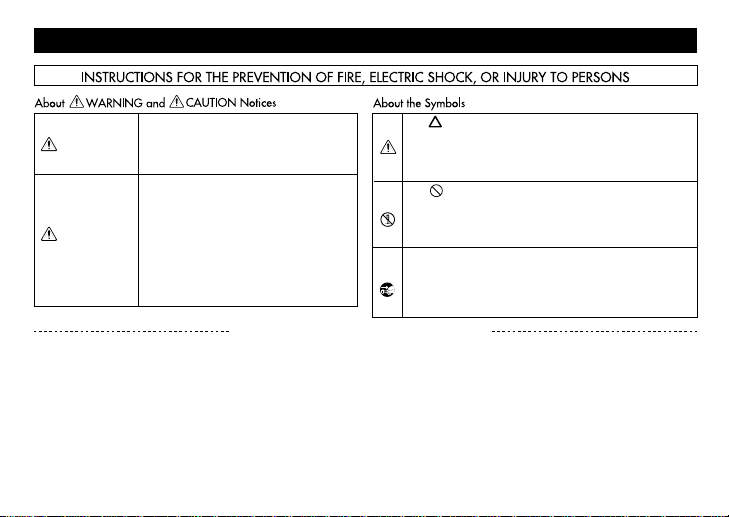
Used for instructions intended to alert
the user to the risk of injury or material
damage should the unit be used
improperly.
* Material damage refers to damage or
other adverse effects caused with
respect to the home and all its
furnishings, as well to domestic
animals or pets.
Used for instructions intended to alert
the user to the risk of death or severe
injury should the unit be used
improperly.
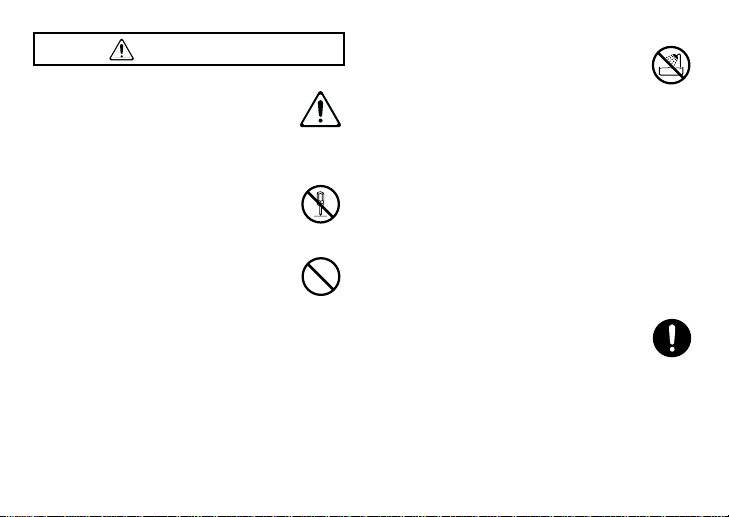
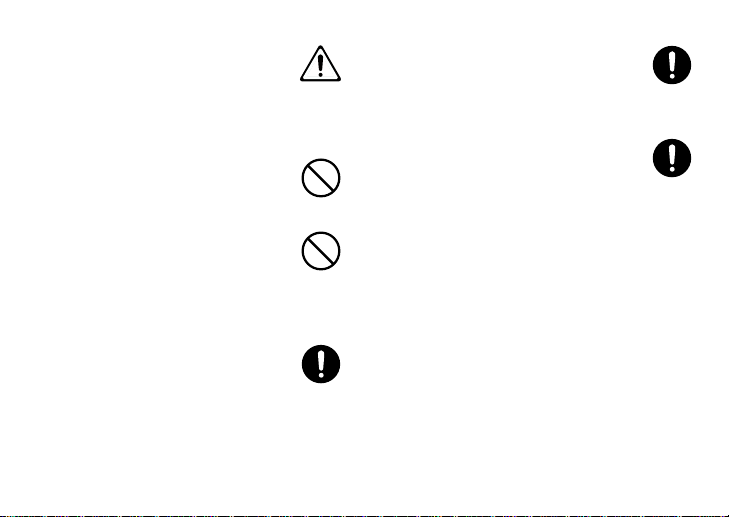
The ● symbol alerts the user to things that must be
carried out. The specific thing that must be done is
indicated by the design contained within the circle. In
the case of the symbol at left, it means that the powercord plug must be unplugged from the outlet.
WARNING
CAUTION
The symbol alerts the user to important instructions
or warnings.The specific meaning of the symbol is
determined by the design contained within the
triangle. In the case of the symbol at left, it is used for
general cautions, warnings, or alerts to danger.
The symbol alerts the user to items that must never
be carried out (are forbidden). The specific thing that
must not be done is indicated by the design contained
within the circle. In the case of the symbol at left, it
means that the unit must never be disassembled.
16
Page 17
• Before using this unit, make sure to
WARNING
read the instructions below, and the
Owner's Manual.
..........................................................................................
• Do not open (or modify in any way)
the unit or its AC adaptor.
..........................................................................................
• Do not attempt to repair the unit, or
replace parts within it (except when
this manual provides specific instructions directing you to do so). Refer all
servicing to your dealer, or qualified
Roland service personnel.
..........................................................................................
• Never use or store the unit in places
that are:
• Subject to temperature extremes
(e.g., direct sunlight in an enclosed
vehicle, near a heating duct, on top
of heat-generating equipment); or
are
• Damp (e.g., baths, washrooms, on
wet floors); or are
• Humid; or are
• Dusty; or are
• Subject to high levels of vibration.
..........................................................................................
• Make sure you always have the unit
placed so it is level and sure to
remain stable. Never place it on
stands that could wobble, or on
inclined surfaces.
..........................................................................................
17
Page 18
• Use only the specified AC adaptor
(PSA-Series), and make sure the line
voltage at the installation matches
the input voltage specified on the AC
adaptor's body. Other AC adaptors
may use a different polarity, or be
designed for a different voltage, so
their use could result in damage,
malfunction, or electric shock.
..........................................................................................
• Avoid damaging the power cord. Do
not bend it excessively, step on it,
place heavy objects on it, etc. A damaged cord can easily become a shock
or fire hazard. Never use a power
cord after it has been damaged.
..........................................................................................
18
• This unit, either alone or in combination with an amplifier and headphones or speakers, may be capable
of producing sound levels that could
cause permanent hearing loss. Do
not operate for a long period of time
at a high volume level, or at a level
that is uncomfortable. If you experience any hearing loss or ringing in
the ears, you should immediately
stop using the unit, and consult an
audiologist.
..........................................................................................
• Do not allow any objects (e.g., flammable material, coins, pins); or liquids of any kind (water, soft drinks,
etc.) to penetrate the unit.
..........................................................................................
Page 19
• Immediately turn the power off,
remove the AC adaptor from the outlet, and request servicing by your
dealer or qualified Roland service
personnel when:
• The AC adaptor or the power-sup-
ply cord has been damaged; or
• Objects have fallen into, or liquid
has been spilled onto the unit; or
• The unit has been exposed to rain
(or otherwise has become wet); or
• The unit does not appear to operate
normally or exhibits a marked
change in performance.
..........................................................................................
• In households with small children, an
adult should provide supervision
until the child is capable of following
all the rules essential for the safe
operation of the unit.
..........................................................................................
• Protect the unit from strong impact.
(Do not drop it!)
..........................................................................................
• Do not force the unit's power-supply
cord to share an outlet with an unreasonable number of other devices. Be
especially careful when using extension cords—the total power used by
all devices you have connected to the
extension cord's outlet must never
exceed the power rating (watts/
amperes) for the extension cord.
Excessive loads can cause the insulation on the cord to heat up and eventually melt through.
..........................................................................................
• Before using the unit in a foreign
country, consult with your dealer, or
qualified Roland service personnel.
..........................................................................................
19
Page 20
• Batteries must never be recharged,
CAUTION
heated, taken apart, or thrown into
fire or water.
..........................................................................................
• The unit and the AC adaptor should
be located so their location or position does not interfere with their
proper ventilation.
..........................................................................................
• Always grasp only the plug or the
body of the AC adaptor when plugging into, or unplugging from, an
outlet or this unit.
..........................................................................................
• Whenever the unit is to remain
unused for an extended period of
time, disconnect the AC adaptor.
..........................................................................................
20
Page 21
• Try to prevent cords and cables from
becoming entangled. Also, all cords
and cables should be placed so they
are out of the reach of children.
..........................................................................................
• Never climb on top of, nor place
heavy objects on the unit.
..........................................................................................
• Never handle the AC adaptor body,
or its plugs, with wet hands when
plugging into, or unplugging from,
an outlet or this unit.
..........................................................................................
• Before moving the unit, disconnect
the AC adaptor and all cords coming
from external devices.
..........................................................................................
• Before cleaning the unit, turn off the
power and unplug the AC adaptor
from the outlet (p.9).
..........................................................................................
• Whenever you suspect the possibility
of lightning in your area, disconnect
the AC adaptor from the outlet.
..........................................................................................
21
Page 22
• If used improperly, batteries may
explode or leak and cause damage or
injury. In the interest of safety, please
read and observe the following precautions (page 12).
• Carefully follow the installation
instructions for batteries, and make
sure you observe the correct polarity.
• Remove the batteries whenever the
unit is to remain unused for an
extended period of time.
• If a battery has leaked, use a soft
piece of cloth or paper towel to
wipe all remnants of the discharge
from the battery compartment.
Then install new batteries. T o avoid
inflammation of the skin, make
sure that none of the battery discharge gets onto your hands or
skin. Exercise the utmost caution
so that none of the discharge gets
near your eyes. Immediately rinse
the affected area with running
water if any of the discharge has
entered the eyes.
22
• Never keep batteries together with
metallic objects such as ballpoint
pens, necklaces, hairpins, etc.
..........................................................................................
• Used batteries must be disposed of in
compliance with whatever regulations for their safe disposal that may
be observed in the region in which
you live.
..........................................................................................
Page 23
This product complies with the requirements of
For EU Countries
European Directive 89/336/EEC.
23
Page 24

24
G601725903
 Loading...