

Page 1
TD-12 Version 1.1 Changes & Improvements
The following changes have been implemented in this new version (1.1). Read this document while referring to the “TD-12 Owner’s
Manual.”
Contents
• New Trigger Types
• Improved Hi-Hat Response
• Improved V-Editing
• Other Improvements
New trigger types have been added to simplify making trigger
settings. See the list below. All you need to do is select a
specific trigger type, and the various trigger parameters
(except for Crosstalk Cancel) will be automatically set to
recommended values.
Trigger Type List
The dynamics, feel and response of the hi-hat has been
improved for using the VH-12 or VH-11 Hi-Hat controllers.
The dynamics of closed hi-hat, edge shots, foot splashes and
even loose half-open playing feel absolutely natural!
With the V-Hi-Hat VH-12, foot pressure while the hi-hat is in a
closed position will provide subtle changes in the nuance of
the sound, as with an acoustic hi-hat.
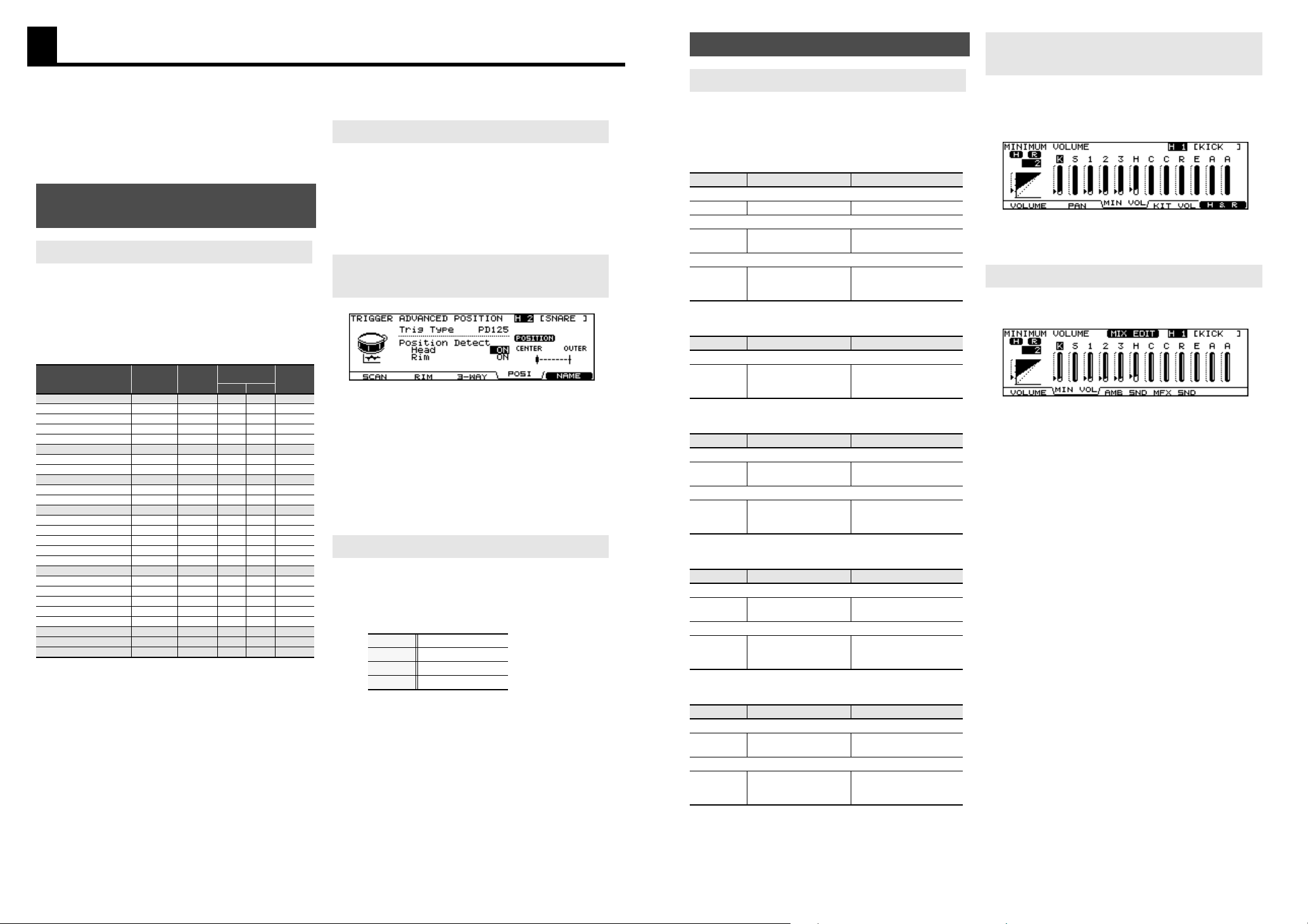
“Position Detect” has been added to the Advanced Trigger
Parameters. This allows you to turn the position detection ON
or OFF.
Access: OFF, ON
Trigger Inputs that allow positional sensing:
SNARE (Head, Rim), TOMs (Rim), RIDE (Bow), and AUXs (Rim).
* If you select a non-positional sensing trigger type or trigger
input, “---” appears.
Access: [TRIGGER] - [F5 (ADVANCE)] - [F4 (POSI)] - Pad Select
• Internal settings for existing trigger types and crosstalk
cancel settings have been re-adjusted to improve
playability.
• Trigger Bank contents have also changed, including a
Bank for the TD-12KX.
• The Trigger Types order has also changed, now
beginning from KDs (kick triggers).
Playability, Pad and Trigger
Settings
New Trigger Types
Used Modes
Trigger
Type
Rim Shot
Positional
Sensing
Choke
play
Head Rim
KD-140
KD140
X X X X
KD-120
KD120
X X X X
KD-85, KD-80
KD85 X X X X
KD-8
KD8
X X X X
KD-7
KD7
X X X X
PD-125X
, PD-125XS
PD125X O O O X
PD-125
PD125
O O O X
PD-120
PD120
O O X X
PD-105X
PD105X O O O X
PD-105, PD-100
PD105
O O O X
PD-85, PD-80R, PD-80 PD85
O O O X
PDX-8
PDX8 O X X X
PD-9, PD-8, PD-7
PD9/8/7
O O X O
CY-15R
CY15R
O O X O
CY-14C
CY14C O O X O
CY-12R/C
CY12RC
O O X O
CY-8
CY8
O X X O
CY-5, CY-6
CY5/6 O X X O
CY-12H
CY12H
O X X O
VH-12
VH12
O X X O
VH-11
VH11 O X X O
Non-Roland pad
PAD1
O X X O
Non-Roland pad
PAD2
O X X X
RT-10K
RT10K X X X X
RT-10S
RT10S
O X X X
RT-10T
RT10T
X X X X
Improved Hi-Hat Response
New Parameter for Positional
Sensing
Others
Bank1
TD-12KX
Bank2 TD-12KX (Copy)
Bank3 TD-12V, TD-12K
Bank4 TD-20K
Here are the new V-Edit parameters that will greatly increase
the editing power of the TD-12.
Access: [INST] - [F2 (EDIT)]
Kick
Snare
Tom
Hi-Hat
Crash/Splash/China/Ride
The “MINIMUM VOLUME” function has been enhanced with
improved dynamic resolution, allowing you to easily control
the sound level for specific pads. It also helps you when
playing ghost notes.
Values: 0-15
Access: [MIXER] - [F3 (MIN VOL)]
Adjust the “MINIMUM VOLUME” parameters with the group
faders (MIX EDIT).
Access: [INST] + [MIXER] - [F2 (MIN VOL)]
Editing Functions
Improved V-Editing
Parameter
Value Discription
[F1 (SHELL)]
Beater Type FELT, WOOD, PLASTIC Type of beater
[F3 (MUFFLE)]
Snare Buzz Off, 1–8
New resolutions allow more
realistic buzz resonance.
[F4 (MIC)]
Mic Position
OUTSIDE2, OUTSIDE1,
STANDARD, INSIDE1,
INSIDE2
Type of microphone
placement
Parameter
Value Discription
[F4 (MIC)]
Mic Position
OUTSIDE2, OUTSIDE1,
STANDARD, INSIDE1,
INSIDE2
Type of microphone
placement.
Parameter
Value Discription
[F3 (MUFFLE)]
Snare Buzz Off, 1–8
New resolutions allow more
realistic buzz resonance.
[F4 (MIC)]
Mic Position
OUTSIDE2, OUTSIDE1,
STANDARD, INSIDE1,
INSIDE2
Type of microphone
placement
Parameter
Value Discription
[F2 (TAMB)]
Add
Tambourine
Off, ON
Allows you to add
tambourine to the hi-hat.
[F4 (MIC)]
Mic Position
OUTSIDE2, OUTSIDE1,
STANDARD, INSIDE1,
INSIDE2
Type of microphone
placement
Parameter
Value Discription
[F2 (SIZZLE)]
Sizzle Type OFF, RIVET, CHAIN
New “CHAIN” sizzle type has
been added.
[F4 (MIC)]
Mic Position
OUTSIDE2, OUTSIDE1,
STANDARD, INSIDE1,
INSIDE2
Type of microphone
placement
“MINIMUM VOLUME” of Each Trigger
Input
“MINIMUM VOLUME” on “MIX EDIT”
Page 2
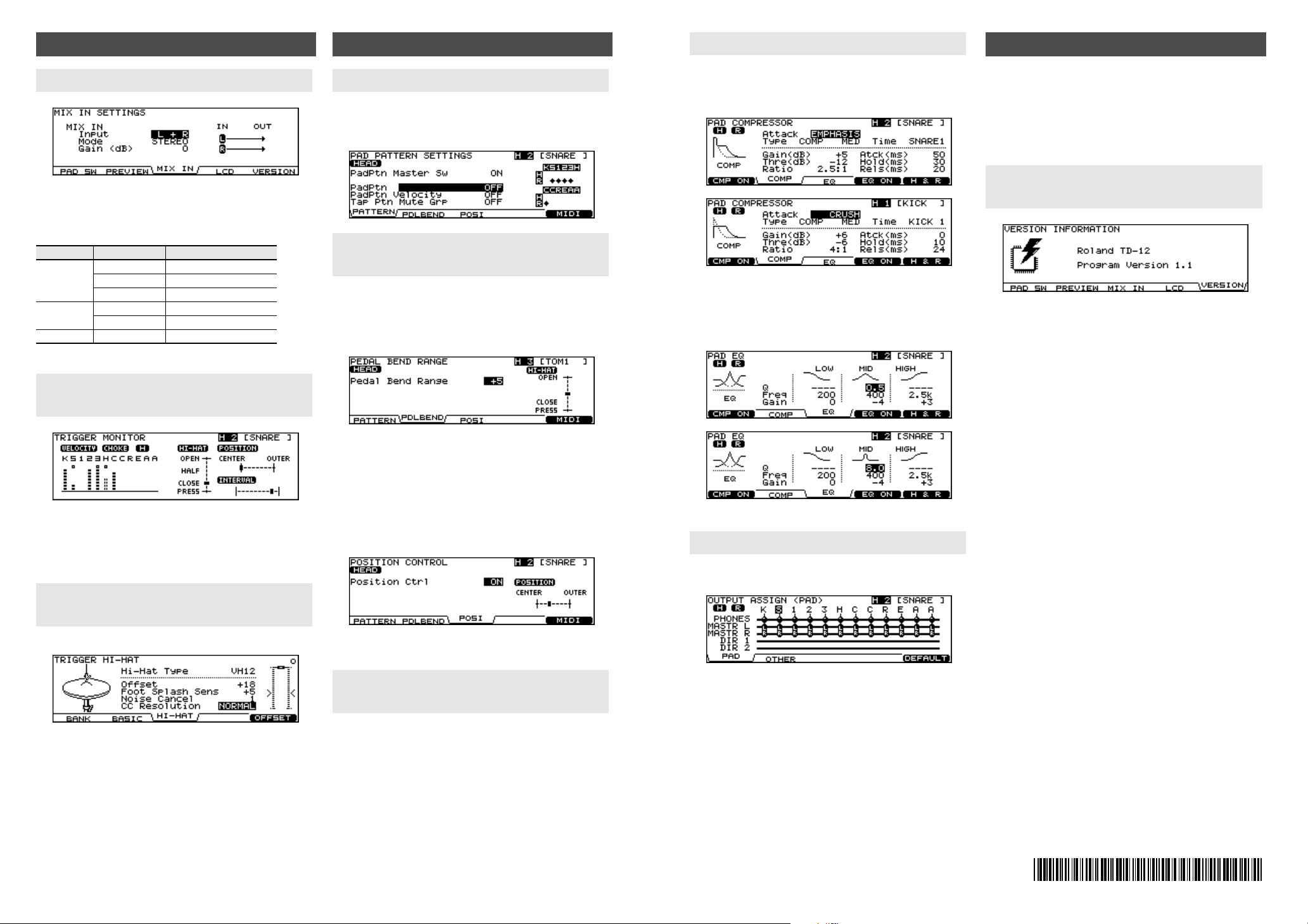
The MIX IN jack can handle a mono or stereo signal.
Example: An audio signal to the MIX IN Jack has a click on the
Right side, and the backing track on the Left, you can use this
function to merge the signals.
Access: [SETUP] - [F3 (CONTROL)] - [F3 (MIX IN)]
You can visually confirm each trigger’s velocity as well as the
Hi-Hat open/close gaps and positional sensing on the Snare
Drum, Ride Cymbal, and RIMs of the TOMs and AUXs. The
“interval meter” shows the intervals between strokes.
Access: [SHIFT] + [TRIGGER]
The “CC Resolution” for the VH-12 can be adjusted.
“CC Resolution” is the parameter relative to the amount of data
transmitted from hi-hat pedal.
Values: NORMAL, HIGH (initial value: NORMAL)
Access: [TRIGGER] - [F3 (HI-HAT)]
The “PAD PATTERN SETTINGS” screen (below) can be accessed
by [INST] - [F4 (CONTROL)] - [F1(PATTERN)].
Here are you able to check all pad settings at once.
“PEDAL BEND RANGE” screen
The hi-hat pedal position meter appears on the “PEDAL BEND
RANGE” screen.
Access: [INST] - [F4 (CONTROL)] - [F2(PDLBEND)]
* When using the VH-11, the position meter will move be-
tween “OPEN” and “CLOSE.” When using the VH-12, it moves
between “OPEN” and “PRESS.”
“POSITION CONTROL” screen
The “Position Control” setting has own screen.
Access: [INST] - [F4 (CONTROL)] - [F3 (POSI)]
A position meter has been added to this screen.
“Position Ctrl” is the parameter that creates tonal changes as a
result of the respective strike position or rim shot nuance.
• An instrument can be restored to a non v-edited state,
press [SHIFT] and [F4] while in the “INST” or “INST EDIT”
screen.
• To reset the Ambience parameters “Room Size,” “Wall
Type,” “Mic Position,” and “Room Shape,” press [SHIFT]
and [F4] while in the “AMBIENCE ROOM” screen.
New Functions
MIX IN Jack - New Audio Routing
Parameter
Value Discription
Input
L+R Use both channels
L ONLY Use only the left channel
R ONLY Use only the right channel
Mode
STEREO Use as stereo input
MONO Use as monaural x 2
Gain 0, +6, +12 Adjusts the input level
Checking the Trigger Information
(TRIGGER MONITOR)
“CC Resolution” for the V-Hi-Hat
VH-12
Other Improvements
Checking the “Pad Pattern Settings”
Checking the Pedal Position and the
Strike Position
Reset Functions for V-Edit and
Ambience
ˇ
“PAD COMPRESSOR” screen
The icon on the “PAD COMPRESSOR” screen will change
according to the “Attack” setting.
Access: [INST] - [F3 (COMP/EQ)] - [F2 (COMP)]
“PAD EQ” screen
The icon on the “PAD EQ” screen will change according to the
“Mid Q” setting.
Access: [INST] - [F3 (COMP/EQ)] - [F3 (EQ)]
The Phones bus now appears on the “OUTPUT ASSIGN (PAD)”
screen.
Access: [SETUP] - [F2 (OUTPUT)] - [F1 (PAD)]
The latest version of the TD-12 Version 1.1 is compatible with
original TD-12 Version 1.0.
You can load MIDI Bulk Data from different version of TD-12.
As certain Trigger Types are merged, if you are using the
following pads, please re-adjust the Trigger Types.
PD-100, PD-9, PD-8, PD-7, PD-6
Access: [SETUP] - [F3 (CONTROL)] - [F5 (VERSION)]
Icon for Pad Comp/EQ
“OUTPUT ASSIGN (PAD)” screen
Data Compatibility
How To Check the System Program
Version
Copyright
©
2009 ROLAND CORPORATION
All rights reserved. No part of this publication may be
reproduced in any form without the written permission of
ROLAND CORPORATION
*5100012427 -02 *
TD-12
 Loading...