

Page 1
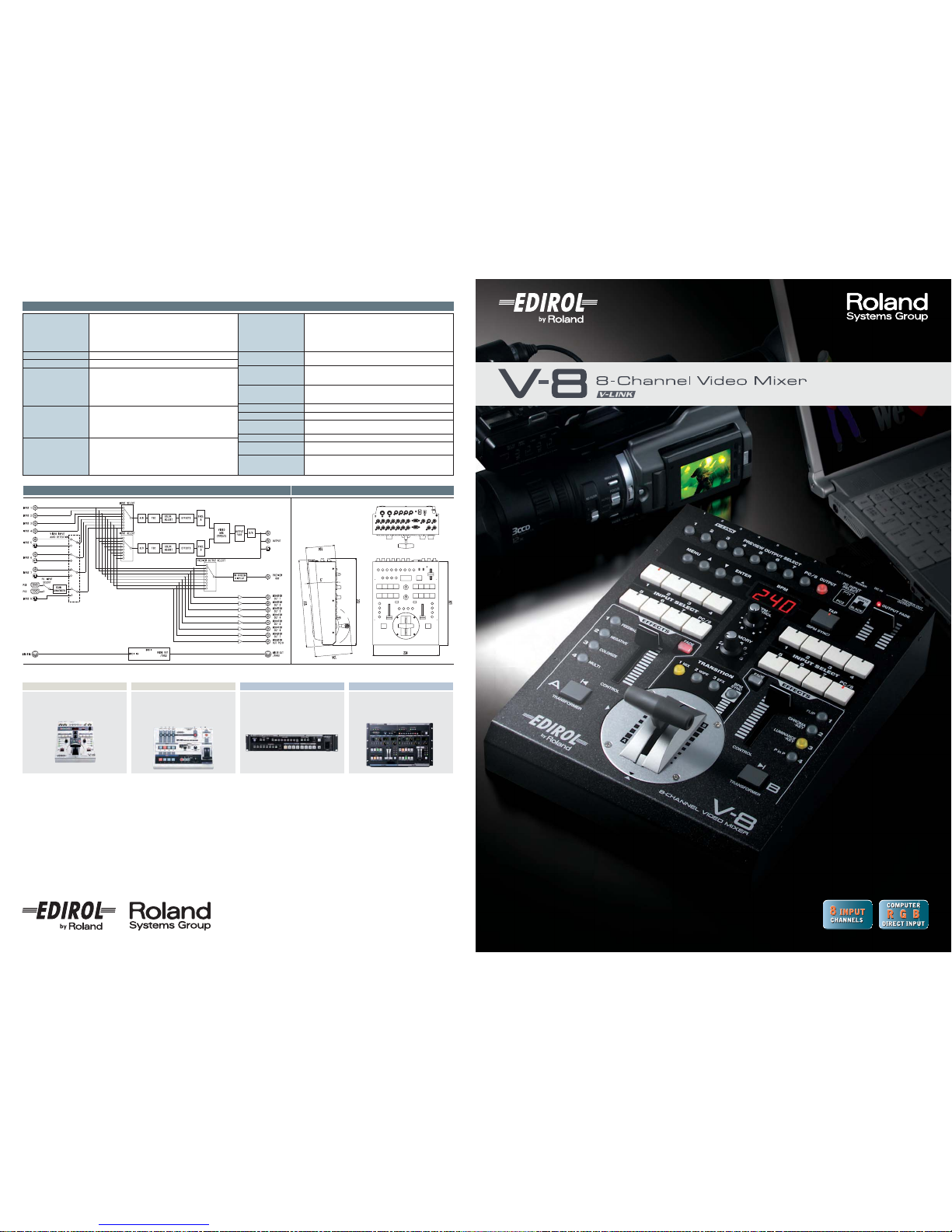
Block Diagram Dimensions
Unit: mm
Specifications
Video Format
Video: NTSC or PAL (ITU601)
PC-RGB: 640 x 480/120 Hz, 800 x 600/120 Hz, 832 x 624/75 Hz,
1024 x 768/80 Hz, 1152 x 864/80 Hz, 1152 x 870/75 Hz,
1280 x 1024/75 Hz, 1600 x 1200/60 Hz
(RGB VH: positive/negative logic)
* VESA DMT Version 1.0 Revision 10 conform.
* The refresh rate is the maximum value of each resolution.
Video Sampling Rate
Video: 4:2:2 (Y:B-Y:R-Y), 8-bit, 13.5 MHz
Frame Synchronizer
2 systems
Input Level and
Impedance
Video (composite): 1.0 Vp-p, 75 ohms
S-video: <Luminance signal> 1.0 Vp-p, 75 ohms
<Chrominance signal> 0.286 mVp-p,
75 ohms (NTSC) / 0.3 mVp-p,
75 ohms (PAL)
PC-RGB: 0.7 Vp-p, 75 ohms (H, V: 5 V TTL)
Output Level and
Impedance
Video (composite): 1.0 Vp-p, 75 ohms
S-video: <Luminance signal> 0 Vp-p, 75 ohms
<Chrominance signal> 0.286 mVp-p,
75 ohms (NTSC) / 0.3 mVp-p,
75 ohms (PAL)
Connectors
Input
Video (composite): BNC type x 7 (Ch 1 - 7)
S-video: 4-pin mini DIN type x 4 (Ch 5 - 8)
PC-RGB: D-SUB 15pin Shrink Type x 2 (Ch8: PC1 / PC2)
* Inputs 5 - 8; however if S-video is simultaneously input to 5-8,
S-video takes priority
Remote Control Interfaces
MIDI IN: 5-pin DIN type x 1,
MIDI OUT/THRU: 5-pin DIN type x 1
Transition effects
(more than 200 types)
Mix (Dissolve, Non-Additive Mix : NAM, Full-Additive Mix : FAM),
Wipe (Hard edge wipe, Soft edge wipe),
Key, Slide, Stretch, User Transition
Video effects
Still, Strobe, Afterimage, Feedback, Shake, Negative, Colorize,
Find Edge, Silhouette, Mono Color, Emboss, Posterize, Color Pass,
Luminance key, Chroma key, Flip, Multi, Mirror, Picture-in-picture
Power Supply
DC 9 V (AC Adaptor: Roland PSB-1U)
Current Draw
2 A (Preliminary, AC Adaptor PSB-1U 0.4A)
Dimensions
238 (W) x 315 (D) x 134 (H) mm
(9-3/8 (W) x 12-7/16 (D) x 5-5/16 (H) inches)
Weight
3.2 kg (7 lbs 1 oz)
Accessories
AC Adaptor, Power Cord, BNC to RCA video adapter x 4,
mount screw for Video fader x 4, Owner's Manual
Options
Cross Fader: V-4CF
Output
Video (composite): BNC type x 2, S-video: 4-pin mini DIN type x 1
Preview Output
Video (composite): BNC type x 1 (OSD Menu)
Monitor Output
Video (composite): BNC type x 8 (Ch 1 - 8)
V-4 LVS-400 V-44SW V-440HD
■
Video Mixer Line-up
The world’s standard of compact video
mixer. Four SD inputs and high-quality
video effects at an affordable price.
Rack-mount, eight channel multi-format
video switcher for applications requiring
seamless mixing of SD, HD and RGB
sources.
Multi-format video mixer with tactile
operation offers extremely smooth and
intuitive mixing and switching of SD, HD
and RGB sources.
Four channel video mixer with simple
and straightforward operation with
rugged build structure. Perfect for video
performance at events, exhibitions and
presentations.
Meet the next generation in video mixing.
8 Inputs, 3 Outputs and all new Special Effects.
Jul. 2008 RAM-7018 GEN
Copyright 2008 Roland Corporation. All rights reserved.
All specifications and appearances are subject to change without notice.
www.rolandsystemsgroup.net
Page 2
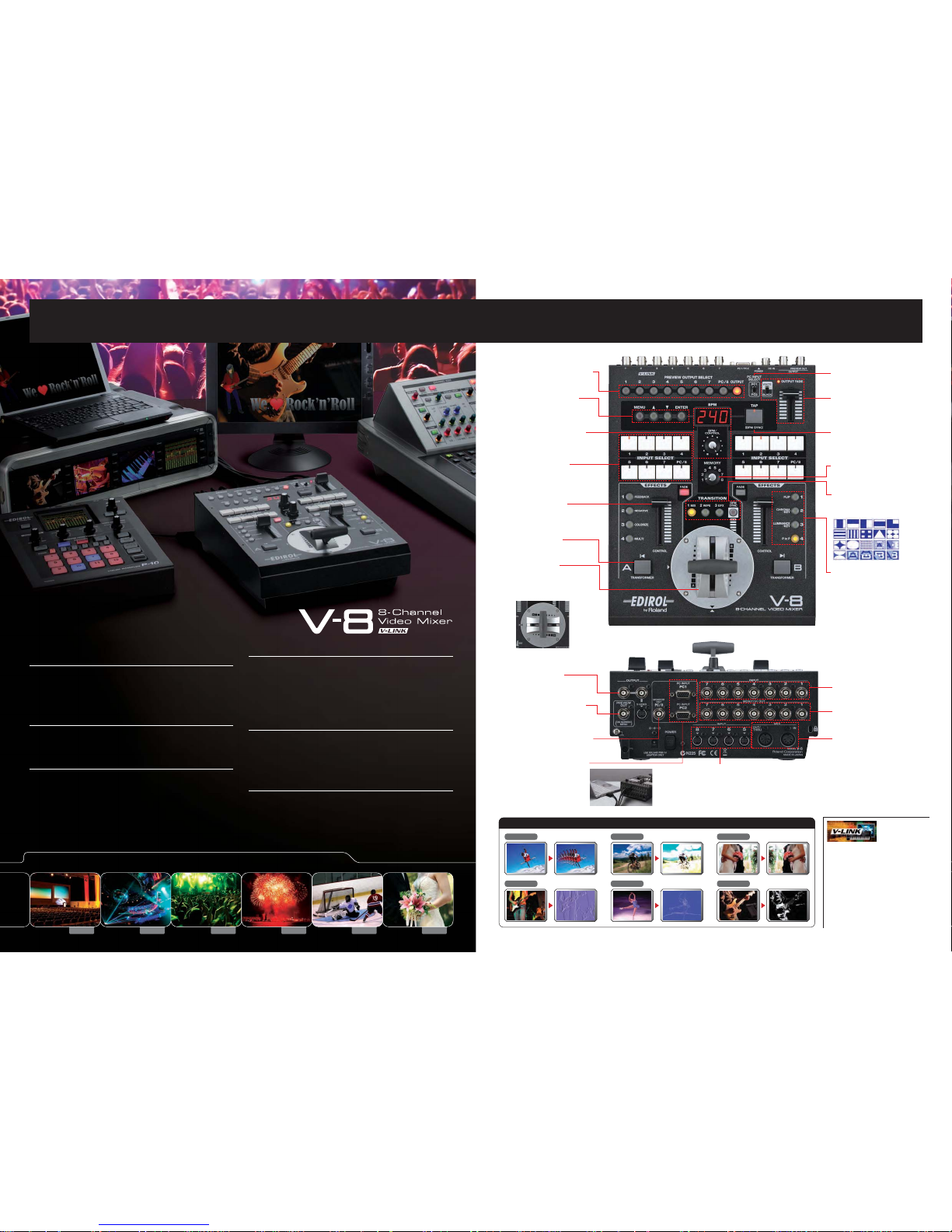
Afterimage Feedback Flip
Emboss Find Edge Silhouette
Examples of The Newly Added Video Effects (Filters
)
Select which channel is shown on the
preview monitor.
■ Preview Select Buttons
Select one of the two RGB
computer input ports.
■ Computer Input Selector
Apply fade-to-white or fade-to-black
to the final output. The color is
selectable with the adjacent color switch.
■ Output Fader
Use this to control BPM sync. Tap it in
time to the beat so the effects will match
your music.
■ TAP button
Select one of eight memory settings of
the V-8 instantly by turning this dial.
■ Memory Dial
■ Transition Buttons
These customizable buttons to apply
video effects (filter/composition) to
inputs on A/B busses.
■ Effect Buttons
The T-Bar video fader allows intuitive
transitions between the A and B buses.
You can change T-bar orientation from
up/down to left/right according to
your preference.
■ Video Fader
Customize your button layout or
change system settings.
■ Parameter Setting
Buttons
Select the input source for
A and B busses.
■ Input Selectors
Instantly toggle between the A and B
images without using the video fader.
■ Transformer
Fades the A or B bus image when
FADE is turned on. When turned off,
it can smoothly control parameters of
a video effect.
■ Channel Fader
Displays current BPM (Beat Per Minute).
Adjust the adjacent BPM/CONTROL dial
to change the current BPM value.
■ BPM Control Section
Select the type of transition effects. When
BPM SYNC is turned on, V-8 automatically
switches between A and B on BPM timing.
■ Monitor Output of Ch.8
An SD monitor jack for channel 8
(RGB or S-Video).
■ Output Jacks
Composite x 2 and S-Video x 1 for
output to projectors or TV
screens.
■ Preview Output Jack
Outputs the channel selected via the
Preview Select Buttons and displays
the menu.
■ S-Video Input Jacks
S-Video input jack x 4. If S-Video and another signal
(composite or RGB) are input to Ch.5 - 8
simultaneously, S-Video will take priority.
■ MIDI Connectors
MIDI input/output ports for connection
with external MIDI and V-LINK
compatible devices.
■ Composite Input Jacks
BNC input jack x 7 for connection with
various SD video sources.
■ Monitor Output Jacks
Provides loop-thru monitoring of SD
input Ch. 1 - 7.
■ Computer Input Jacks
D-Sub 15pin input jack x 2 to
receive RGB signal from
computers. Select which one is
routed to the mix using the
selector switch on the top panel.
■
A natural evolution of the legendary V-4
Compact Video Mixer
The EDIROL V-8 has all the features of the legendary V-4, such as, ease of
use, high-quality digital processing of video, numerous video effects and
BPM sync with music. This next generation video mixer includes new effects
and expands the potential to new applications and dimensions.
■
DV Quality Video Outputs with Full Digital
Processing
The internal processing of V-8 is 4:2:2 full-frame digital. More than 500
lines of video resolution ensure very high image quality after digital
processing and mixing.
■
Direct input of computer signal
The V-8 has a built-in scan converter, providing direct input of RGB signals
(VGA - UXGA) from two D-Sub terminals on the rear panel. With the selector
switch located on the top panel, you can select between two computer sources.
Using the luminance key or chroma key, enables logos or text from your
computer to be keyed over background video enabling the display of lyrics,
bottom thirds, and announcements. Integrating computer graphics and visual
applications with video sources has never been easier.
■
New Video Filters and Numerous Transitions
All your favorite effects like colorize and negative are included, along with
newly added effects like feedback, afterimage, emboss, find edge and more.
Composite two images with Picture-in-Picture and Luminance or Chroma
keying. Customize your transitions between the A and B bus with multiple
flavors of simple mix, hard or soft wipes, and the all-new stretch and slide
transitions.
■
Independent faders on each bus as well as
master output
Faders are independently equipped for both A/B buses allowing you to
create a video fade on just one bus or adjust the various video effects
parameters. The master fader control is a slider bar enabling quick and
intuitive operation while working on the fly.
■
Next generation V-LINK control enables
audio- follow
The V-8 can be remote controlled from EDIROL PR series video presenters
as well as the V-4. The V-8 can also send remote control signals to the new
generation of Roland’s digital audio mixer, the RSS M-400 (V-Mixer). The
motorized faders of the M-400 automatically follow the video switching of
the V-8. Now you can have your audio sources follow your video sources
without the need to change two mixers at once.
Bridging the Audio & Visual World
V-LINK is a MIDI-based protocol that enables
audio/musical devices and video devices to
communicate with each other via simple connection
resulting in expanded audio/visual applications.
V-LINK equipped devices allow creators to trigger video
clips, perform video effects/transitions and wow
audiences with real-time audio/video manipulation and
creation. For example, controlling EDIROLvideo
products from V-LINK compatible musical instruments
allows musicians to perform visually while
simultaneously playing an instrument. Further, the V-LINK
function allows the EDIROLvideo mixer to control the
RSS M-400 live audio mixer. This enables the correct
audio source to follow the specific videos source
thereby ensuring that the video and matching audio will
always stay synchronized.
Business Clubs (VJ) Concerts Events Sports Wedding
The V-8 Offers an Expanded Visual Experience.
The V-8 provides a one-unit solution to various facilities and applications.
Shown with the P-10 Visual Sampler,
the perfect companion for the V-8.
 Loading...