

Page 1
Page 2

Your X-Tune™ pedal has been tested and complies with the following
Standards and Directives as set forth by the European Union:
Council Directive(s): 89/336/EEC Electromagnetic Compatibility
Standard(s): EN55013, EN50082-1
This means that this product has been designed to meet stringent guidelines on how much RF energy it can emit, and that it should be immune from
other sources of interference when properly used. Improper use of this
equipment could result in increased RF emissions, which may or may not
interfere with other electronic products.
To insure against this possibility, always use good shielded cables for all
audio input and output connections. This will help insure compliance with
the Directive(s).
For more information about other Rocktron products, please see your local
dealer or one of our importers closest to you (listed on the Rocktron website
- www.rocktron.com).
Precautions
Read all instructions contained in this manual.
Keep these instructions
Heed all warnings
Follow all instructions.
Do not use this apparatus near water.
Clean with dry cloth
Copyright © 2004 GHS Corporation
All Rights Reserved.
Page 3

Precautions Continued....
Do not block any ventilation openings (if applicable). Install in accordance with the
manufacturer’s instructions.
Do not install near any heat sources such as radiators, heat registers, stoves or other
apparatus (including amplifiers) that produce heat.
This product is not equipped with a plug or cable. This pedal runs on a 9 Volt
Battery, if a 9Volt DC adapter is the used please follow adapter manufacturer’s
operation instructions.
Only used attachments/accessories specified by the manufacturer.
Do not use this product with any case, stand tripod, bracket or table that is not
specified by the manufacturer. Insure that the case, stand, tripod, bracket etc. is
properly adjusted and setup (follow all instructions). Extra care and caution should
be taken to avoid tip over and injury.
Unplug this apparatus during lightening storms or when unused during long periods
of time.
Refer all service to qualified service personnel. Servicing is required when the
apparatus has been damaged in any way, such as power supply or plug is damaged,
liquid has been spilled or objects have fallen into the apparatus or if the apparatus
has been exposed to rain or moisture, does not operate normally or has been
dropped.
DO NOT ATTEMPT TO SERVICE THIS EQUIPMENT. QUALIFIED PERSONNEL SHOULD SERVICE THIS EQUIPMENT ONLY. DO NOT MAKE ANY
INTERNAL ADJUSTMENTS OR ADDITIONS TO THIS EQUIPMENT A T ANY
TIME OR T AMPER WITH INTERNAL ELECTRONIC COMPONENTS AT ANY
TIME. FAILURE T O FOLLOW THESE INSTRUCTIONS MA Y VOID THE
WARRANTY OF THIS EQUIPMENT AS WELL AS CAUSING A SHOCK
HAZARD.
OPERA TING TEMPERATURE
Do not expose this unit to excessive heat. This unit is designed to operate between
32 F and 104 F (0 C and 40 C). This unit may not function properly under extreme
temperatures.
Page 4

Introduction
Congratulations on your purchase of the Rocktron
X-Tune.
The X-Tune provides easy tuning in a cool pedal
format. A chromatic pedal tuner for guitar and bass, the
X-Tune offers multi-LEDs and lighted notes that make
it easy to tune on dark stages. Built in Rocktron’s
strong aluminum chassis, the X-Tune allows muting for
silent tuning, and continuous out for live tuning. The
X-Tune handles 12 Note tuning and a 7 octave range. A
calibration switch is provided. Like most Rocktron
pedals, the X-Tune features an easy access battery
compartment. Add this tuner to your stomp box setup
and stay in the pedal world
Enjoy
Page 5
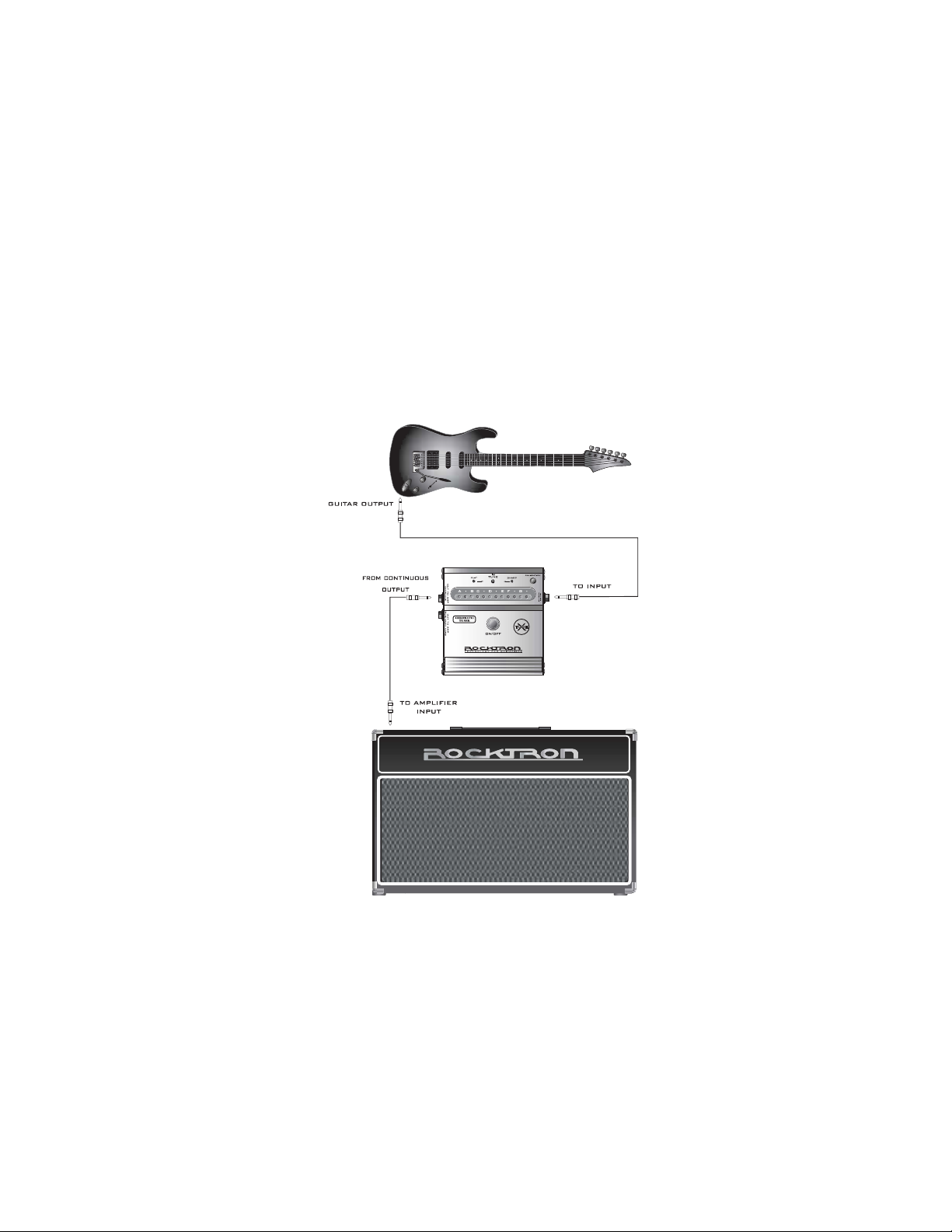
Connection 1- Continuous Tuning
Page 6
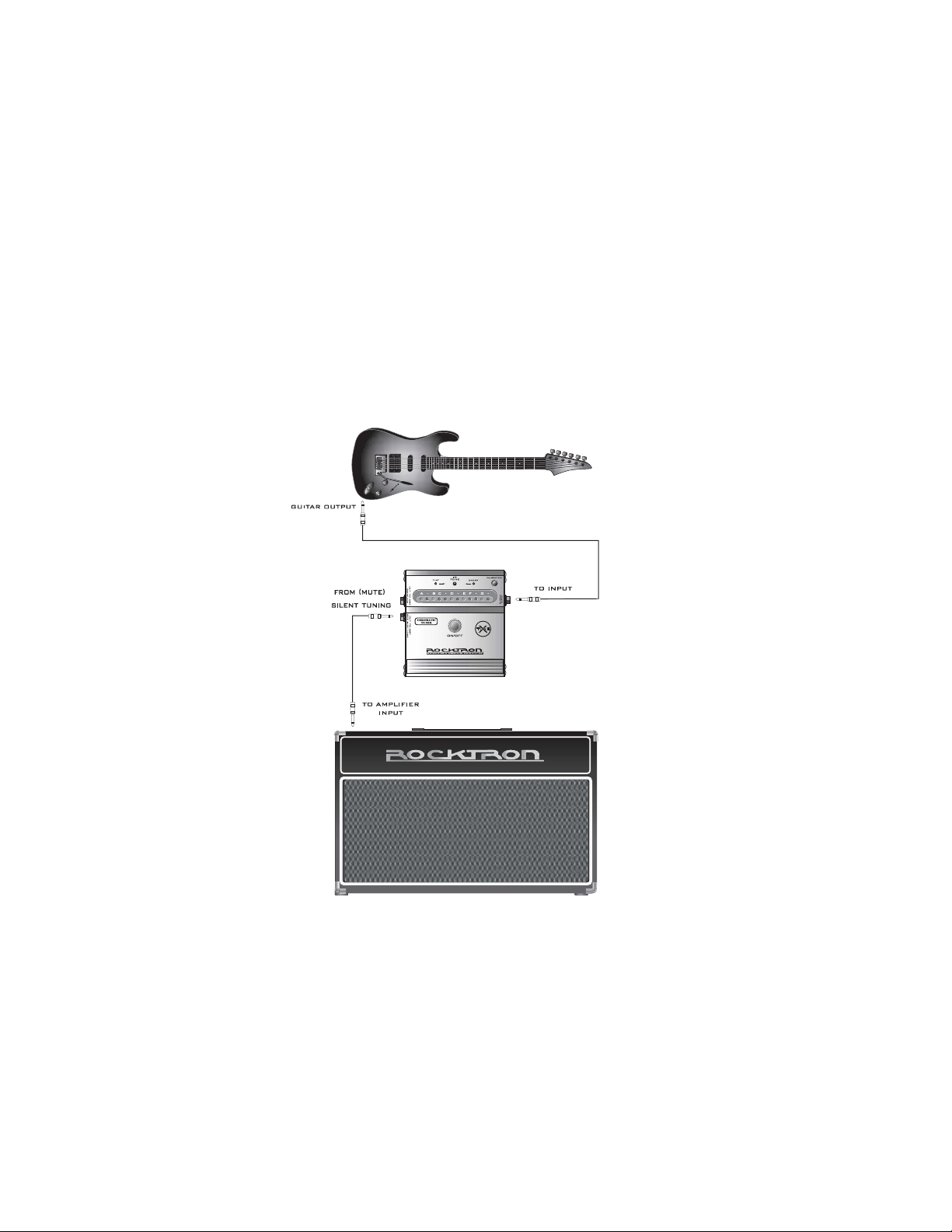
Connection 2 - MUTE Silent Tuning
Page 7
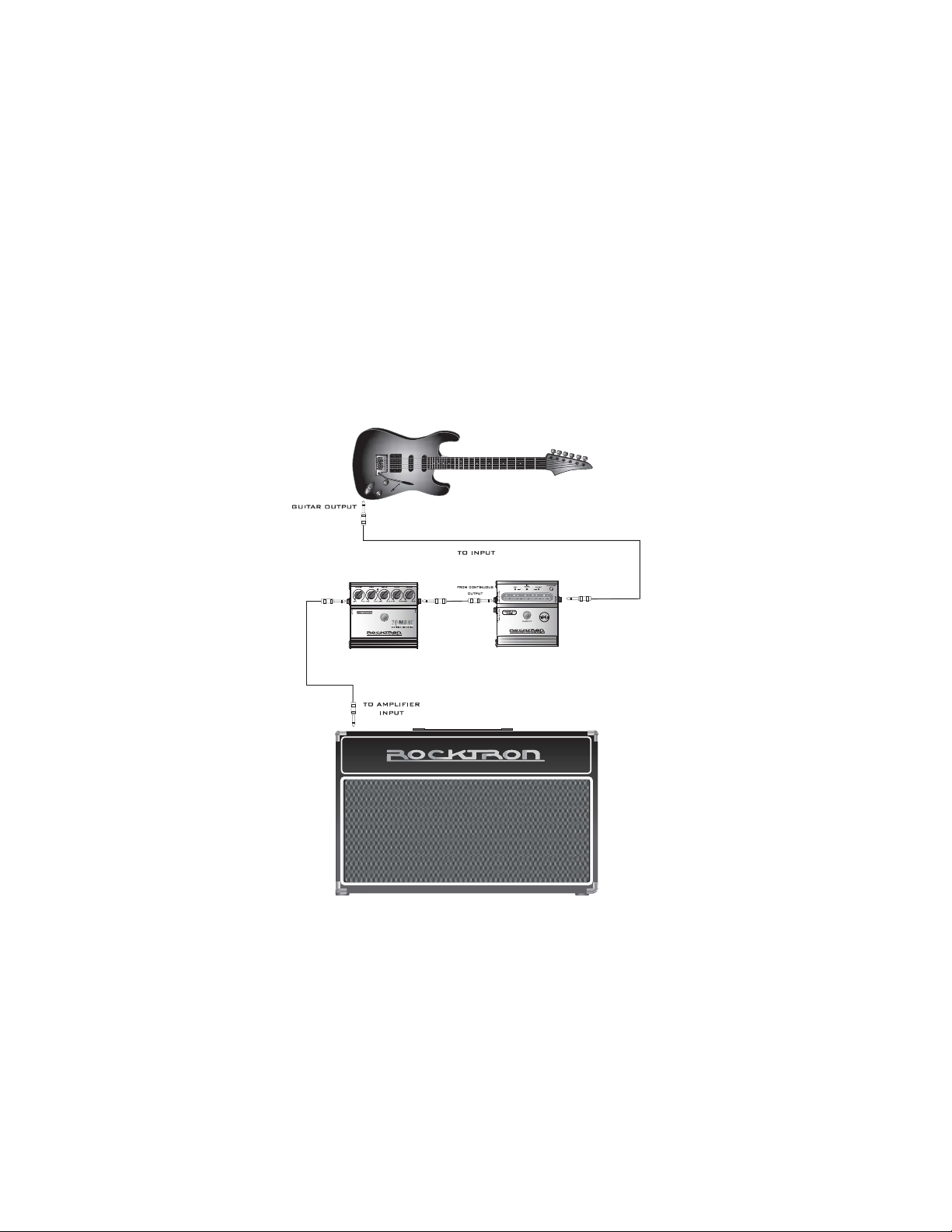
Connection 3- Continuous Tuning with
another stomp box
Page 8
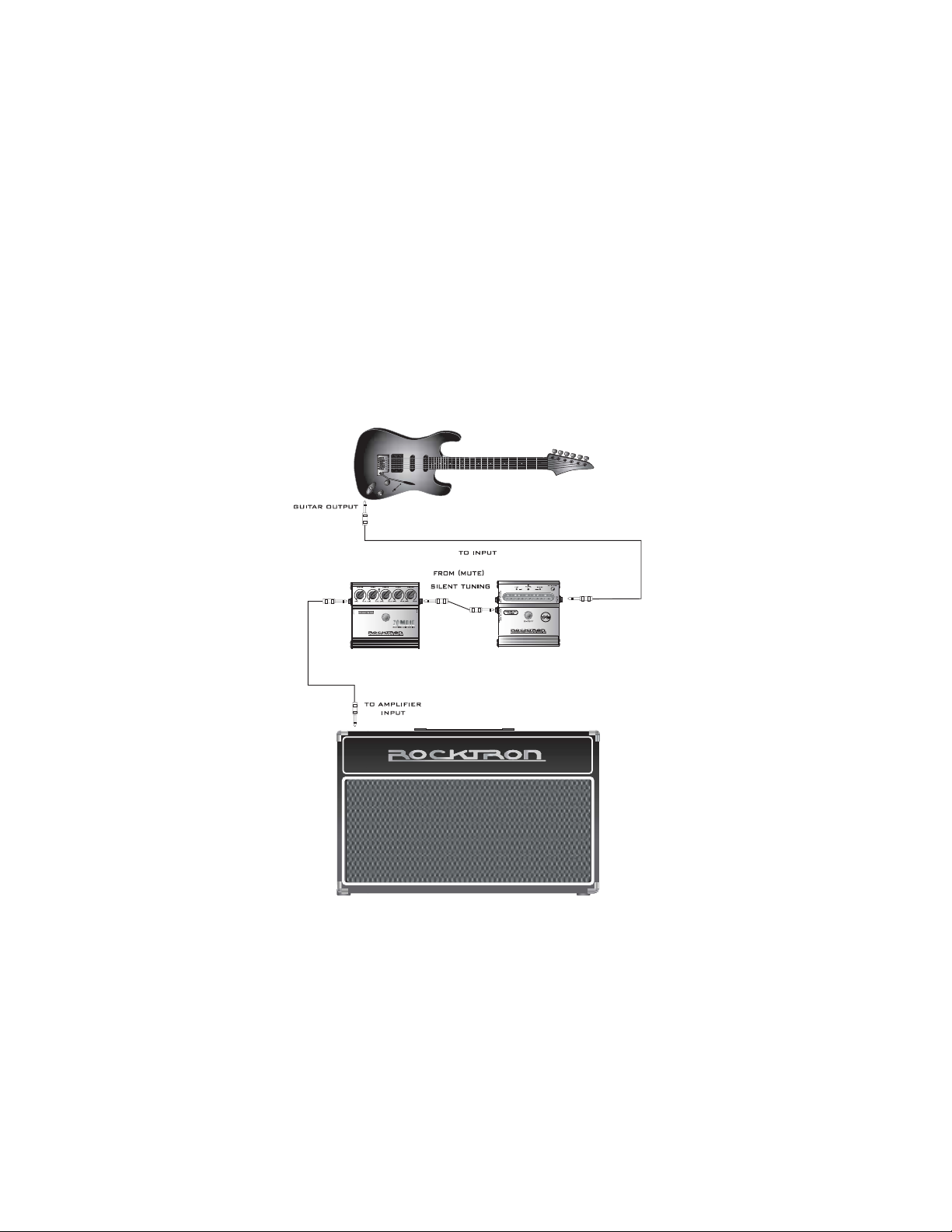
Connection 4 - MUTE Silent Tuning
with another stomp box.
Page 9
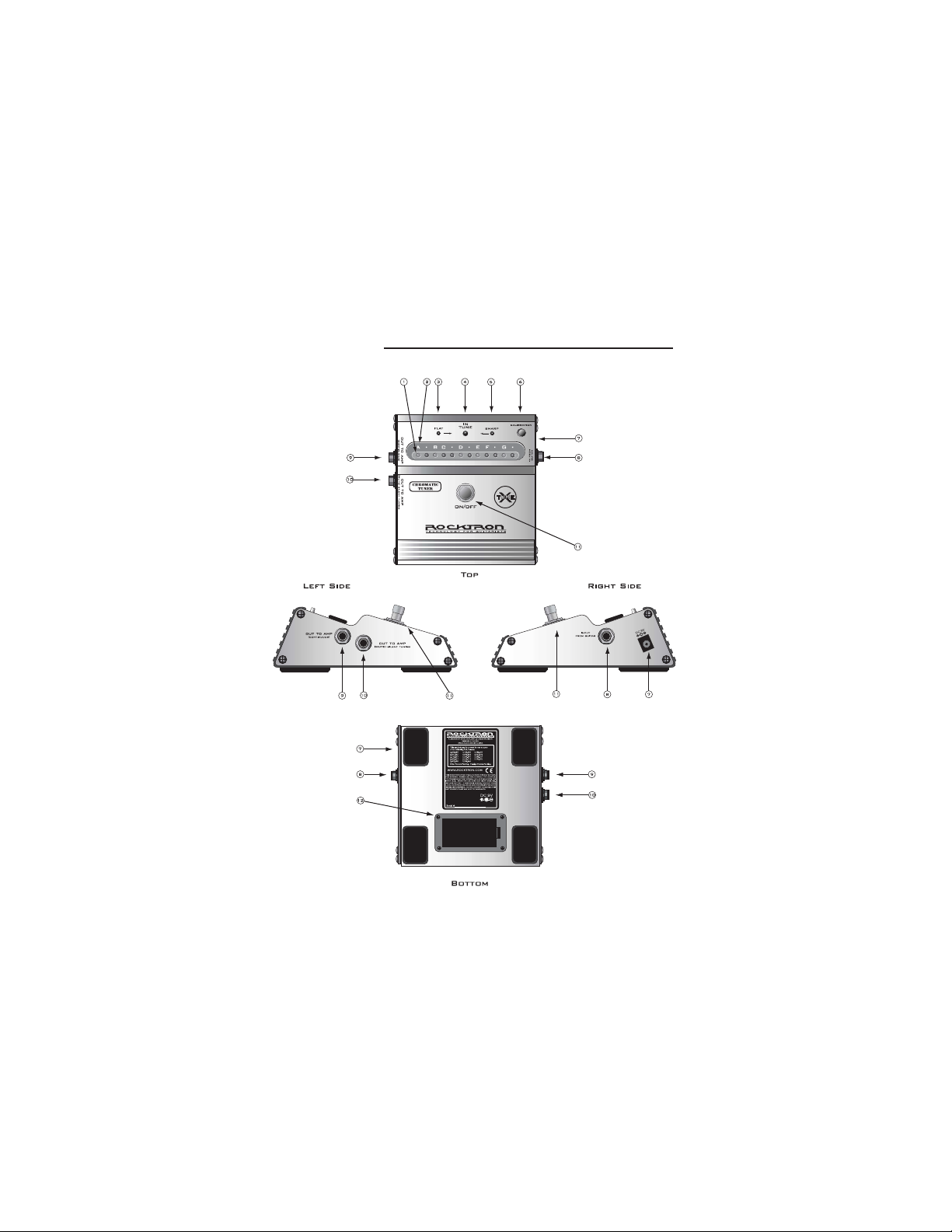
Descriptions
Page 10

Descriptions
Note Indicator LEDs -These LEDs show the note being tuned. The note
1
indicated above the LED (see point 2) is actual note being tuned.
Notes - This row of notes will light up when the unit is turned on. The LED
2
under the note being tuned will light up.
Flat Indicator LED - this flashing LED will light if the note being played is
3
flat. The more “flat” the note is, the faster the LED will flash.
In Tune LED - when the note being played is “in tune” this LED will light.
4
Sharp Indicator LED - this flashing LED will light if the note being played is
5
sharp. The more “sharp” the note is, the faster the LED will flash.
Calibration Button - this button is used to calibrate the X-Tune to match the
6
pitch of any instrument or audio source (like an old piano or tape player). For
details on this function - see section titled “X-Tune Calibration.”
DC 9V Input - To use external power (not provided) use only a 9-Volt DC
7
adapter
Input - Using a standard guitar cable with a 1/4” jack, plug your guitar into
8
this jack.
OUT TO AMP - Continuous Output Jack - If you would like to be able to hear
9
the guitar note while tuning connect a standard guitar cable with a 1/4” jack
connect to your next effect or directly into your amplifier.
OUT TO AMP - Mute Silent Tuning Jack - If you would like to be able to
10
mute the output of your guitar going to your amplifier or next stomp box so
that you can tune in silence - connect a standard guitar cable with a 1/4” jack
connect to your next effect or directly into your amplifier.
Page 11

Descriptions Continued
On/Off Switch - This switch determines whether the pedal is “on” or
11
“off” - When ON the blue LED will be lit. When OFF the LED will not
be lit.
9-Volt Battery Compartment - to access pull on small tab labeled
12
“OPEN”. Replace with a new 9-Volt battery. Always remember to
unplug your guitar cords from the pedal to conserve battery life. Some
battery drain may take place when unit is plugged in (even if the unit is
bypassed).
X-Tune Calibration
To match the pitch of any instrument or audio source (like an old piano or tape
player) press the “Calibration” button while simultaneously playing the note on the
instrument. (Note: you might have to first tune one string on the guitar or bass by
ear to match the actual note if the piano is out of standard tuning or if the tape
player you are playing along with runs slower or faster than normal). Once you
have one note on the guitar tuned to the source - simply play that note on the guitar while the note is “ringing” press the Calibration button. The tuning pitch of the
tuner will automatically be shifted to match the pitch of the audio source. Release
the button and tune the remaining strings as normal with the tuner The tuner at this
point has automatically adjusted the tuning range to match that pitch. T o reset the
tuner to standard 440Hz pitch turn off the tuner and then back on again with the
footswitch (see controls - point 11).
Page 12
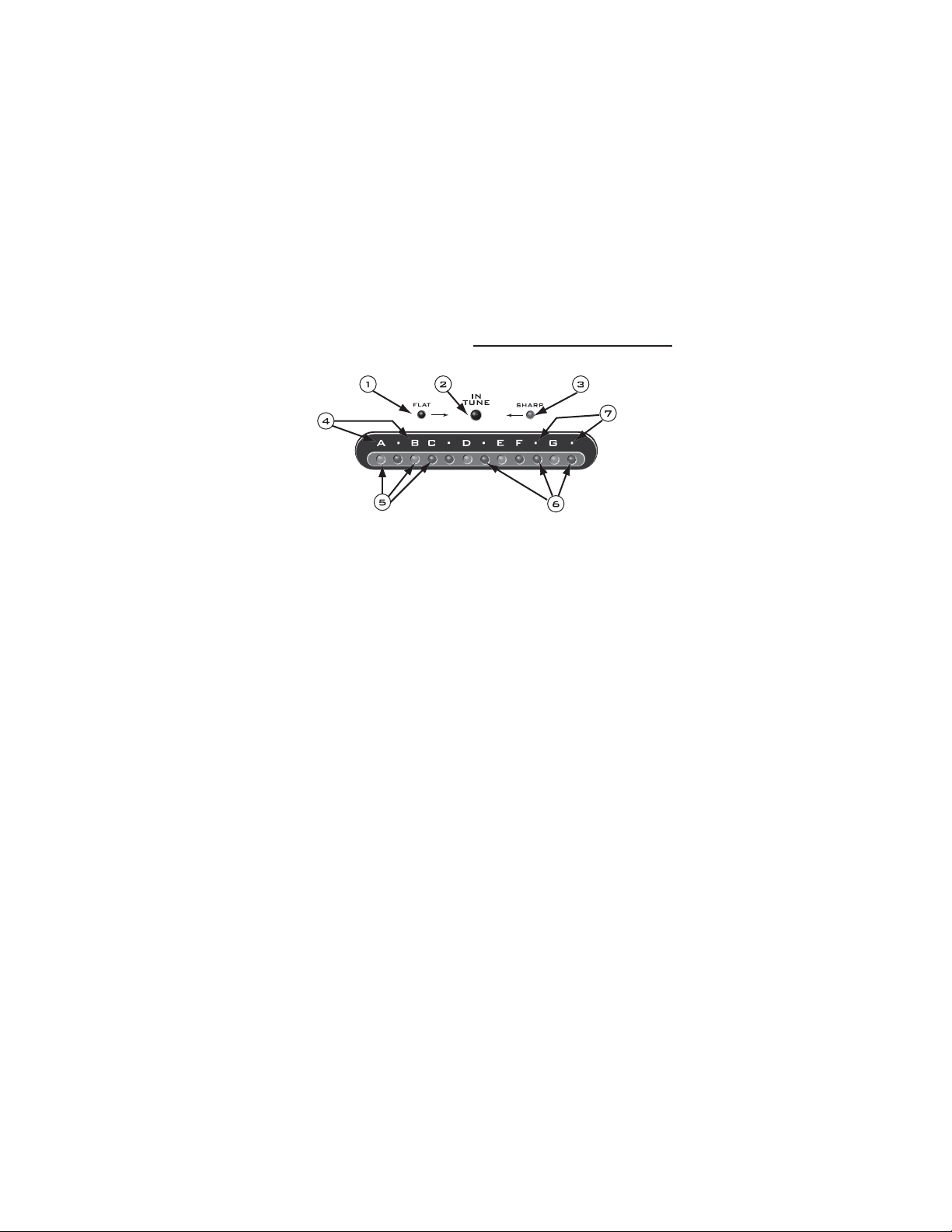
LED Functions (detailed)
1
Flat Indicator LED - this flashing LED will light if the note being played is
flat. The more “flat” the note is, the faster the LED will flash. Tune the string
up until the LED stops flashing and the “IN TUNE” LED lights.
2
IN TUNE LED - when the note being played is “in tune” this LED will light.
3
Sharp Indicator LED - this flashing LED will light if the note being played is
sharp. The more “sharp” the note is, the faster the LED will flash. Tune the
string down until the LED stops flashing and the “IN TUNE” LED lights.
4
These letters indicate the notes in the standard tuning range for guitar. These
notes will “light-up” when the X-Tune is turned on...this is ideal for tuning on
dark or dimly lit stages.
5
These LEDs will light depending on the note being played. These LEDs are
indicator lights for the notes A, B, C, D, E, F, and G
6
These LEDs will light depending on the note being played. These LEDs are
indicator lights for Sharp notes or flat notes - A# or Bflat, C# or Dflat, D# or
Eflat, F# or Gflat, or G#
7
These dots are the note indicators for A# or Bflat, C# or Dflat, D# or Eflat,
F# or Gflat, or G#.
Page 13

Tuning Instuctions
Step 1 - plug the guitar/bass into the tuner - see “connections” section.
Step 2 - play a note on your guitar. In the example on the following page we are
tuning the low E string on a guitar or bass. Pluck your E string, and if needed,
adjust your tuning machine on your instrument until the LED under note “E” is lit
(indicated as 1 in the preceding diagram).
Step 3 - if your note is flat - the “FLAT” LED will light and flash. The speed of the
flash will show you by “how much” your string is flat. If the Flat LED is flashing
rapidly, tune your string up. During this process the LED will begin flashing
slower. (Indicated as point 2 in the preceding diagram).
Step 4 - if your note is sharp - the “SHARP” LED will light and flash. The speed of
the flash will show you by “how much” your string is sharp. If the Sharp LED is
flashing rapidly, tune your string down. During this process the LED will begin
flashing slower. (Indicated as point 3 in the preceding diagram).
Step 5 - Continue with step 3 or step 4 until the flat or sharp LED stops flashing and
the blue “IN TUNE” LED lights. At this point the string is in tune.
Step 6 - Continue steps 2-5 but using your other strings on your guitar or bass.
Page 14
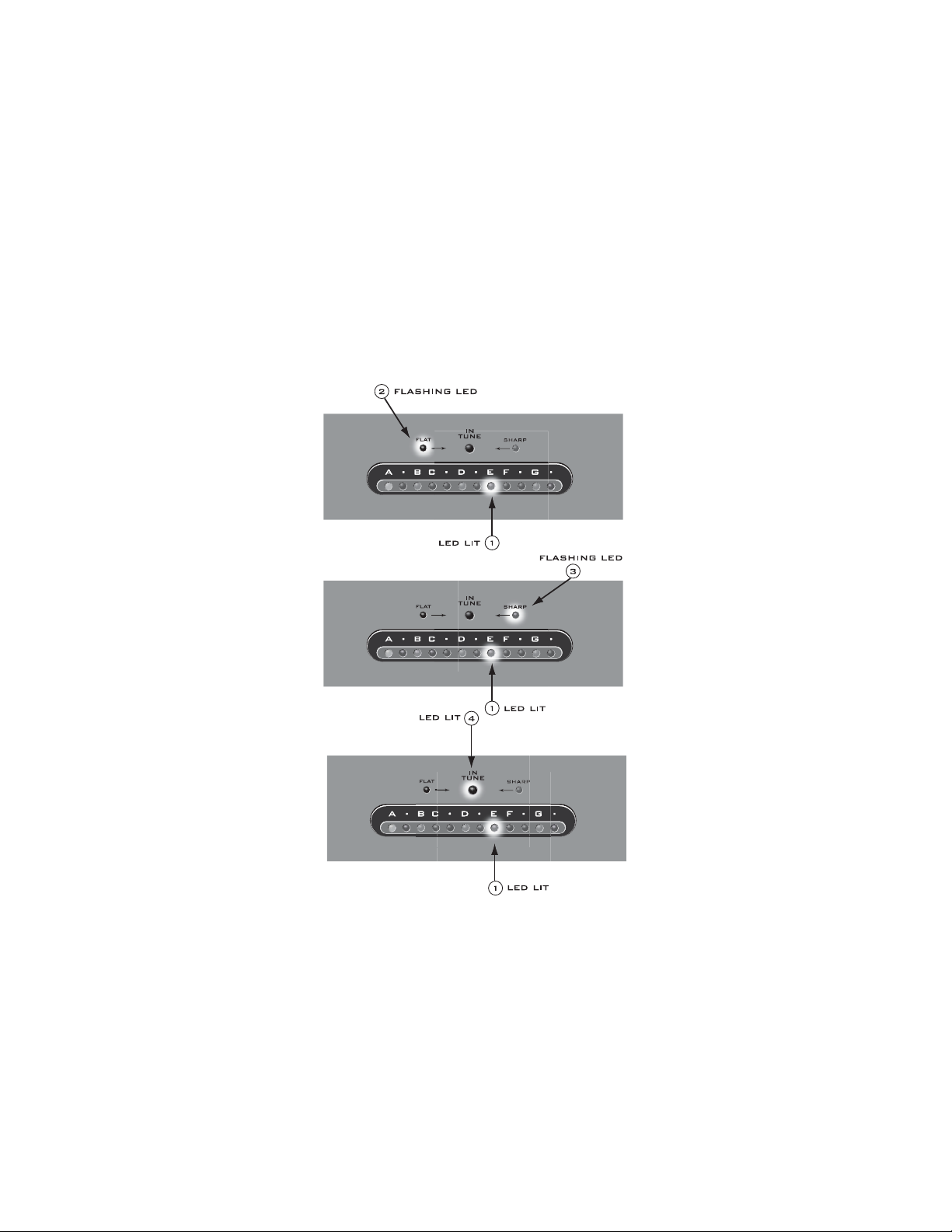
Tuning Instructions Diagram
Page 15

Specifications
Maximum Input
Input Impedance
Current Consumption
Power Requirements
-5dBu
470K
30mA
DC9V>100mA built-in regulator
* CE Approved *
Hints and Tips:
The X-Tune is sensitive - so it is not necessary to strike your string very hard standard string attack will work. Additionally, if you are in a loud environment try
using harmonics to tune your instrument. Lightly touch the string over the 12th fret
of your instrument and pick the string with normal pick attack. This will create a
harmonic. It will work on all strings.
The MUTE Silent Output Jack is ideal for tuning in live situations. This will allow
you to tune without everyone in the audience hearing you tune. Additionally, this
will mute the signal going to your amplifier which will help you keep down noise
generated if you are using a high gain amplifier.
When using the X-Tune with the Continuous Output Jack, make sure you turn off
your tuner once you are done tuning. Leaving the tuner on will run down the
battery.
Page 16

Rocktron Products
Preamps
Gainiac (preamp w/12ax7 tube)
Blue Thunder (bass preamp w/multi-effects)
Chameleon
Voodu Valve
Prophesy (our top of the line preamp with multi-effects)
Rack Effect Processors
Xpression (multi-effects processor)
Noise Reduction
HUSH Super C (guitar noise silencing system)
HUSH The Pedal
Power Amplifier for guitar
Velocity 100 (2x50W Stereo Power Amp for Guitar)
2000 (preamp w/multi-effects)
(preamp w/12ax7 tube and multi-effects)
Page 17

Rocktron Products
Distortion/Overdrive Pedals
Silver Dragon Tube Multi-Distortion Pedal
Metal Planet Distortion
Zombie Rectified Distortion
Rampage Distortion
Sonic Glory Overdrive
Austin Gold Overdrive
Nitro T onal Enhancer/Booster
Effect Pedals
Hypnotic Flange
T sunami Chorus
V ertigo Vibe Rotating Vibe Pedal
Short Timer Digital Delay
Big Crush Compressor
Pulse Tr emolo
Nitro T onal Enhancer/Booster
Heart Attack Dynamic Filter
Essential Pedals
HUSH The Pedal
X-T une Chr omatic Tuner
Black Cat Moan Wah Wah
Banshee T alk Box
Page 18

Rocktron Products
Tube Guitar Amplifiers
Vendetta Head(100 W Head 4-Channels All Tube - MIDI Switchable)
Vendetta Combo (100W 2x12 Combo Celestion 90s all Tube4-Channel MIDI Switchable)
Rampage Guitar Amplifiers
R30RW (30W 1x10 Amp w/built in Digital Recorder)
R80DSP (80W 1x12 Amp w/Digital Effects)
RT80 (80W 1x12 Amp w/Reverb & Built-in Tuner)
R120DSP (120W 2x10 Amp w/Digital Effects)
RT122C (120W 2x12 Amp w/Stereo Chorus, Reverb & Chromatic Tuner)
R50DSP (50 Watt 2x8"Guitar Amp w/Digital Effects)
R50C (50 Watt 2x8"Guitar Amp w/Reverb & Chorus)
R20 (20 Watt 1x8"Amp w/Reverb)
R10 (10 Watt 1x6.5")
Rampage Acoustic Amplifiers
RA50DSP (50W Acoustic Amp w/Digital Effects - Wedge Shape)
RA30DSP (30W Acoustic Amp w/Digital Effects - Wedge Shape)
Page 19

Rocktron Products
Rampage Bass Amplifiers
RB20 (Bass Amp 20W with 8" Speaker)
RB30 (Basss Amp 30W with 10" Speaker)
RB60 (Bass Amp 60W with 12" Speaker)
RB100 (Bass Amp 100W with 15" Speaker)
Foot Controllers and Accessories:
MIDI Mate (Midi Foot Controller)
MIDI XChange(MIDI Foot Controller)
All Access (Midi Foot Controller )
HEX (Expression Pedal)
RMM900(7-pin Din MIDI Cable)
RM4 (MIDI Controller for Vendetta amps)
RFS1 and RFS2 (Single and Double Latching Footswitchs for Rampage Amps)
Page 20
Rocktron - A Division of GHS Corporation
2813 Wilber Ave
Battle Creek MI 49015
USA
Rocktron Phone: 1-(269)-968-3351
Email: [email protected]
www.rocktron.com
2004-0001
Rev. 02/01/04
 Loading...