

Page 1
HEARING AID
HB-41
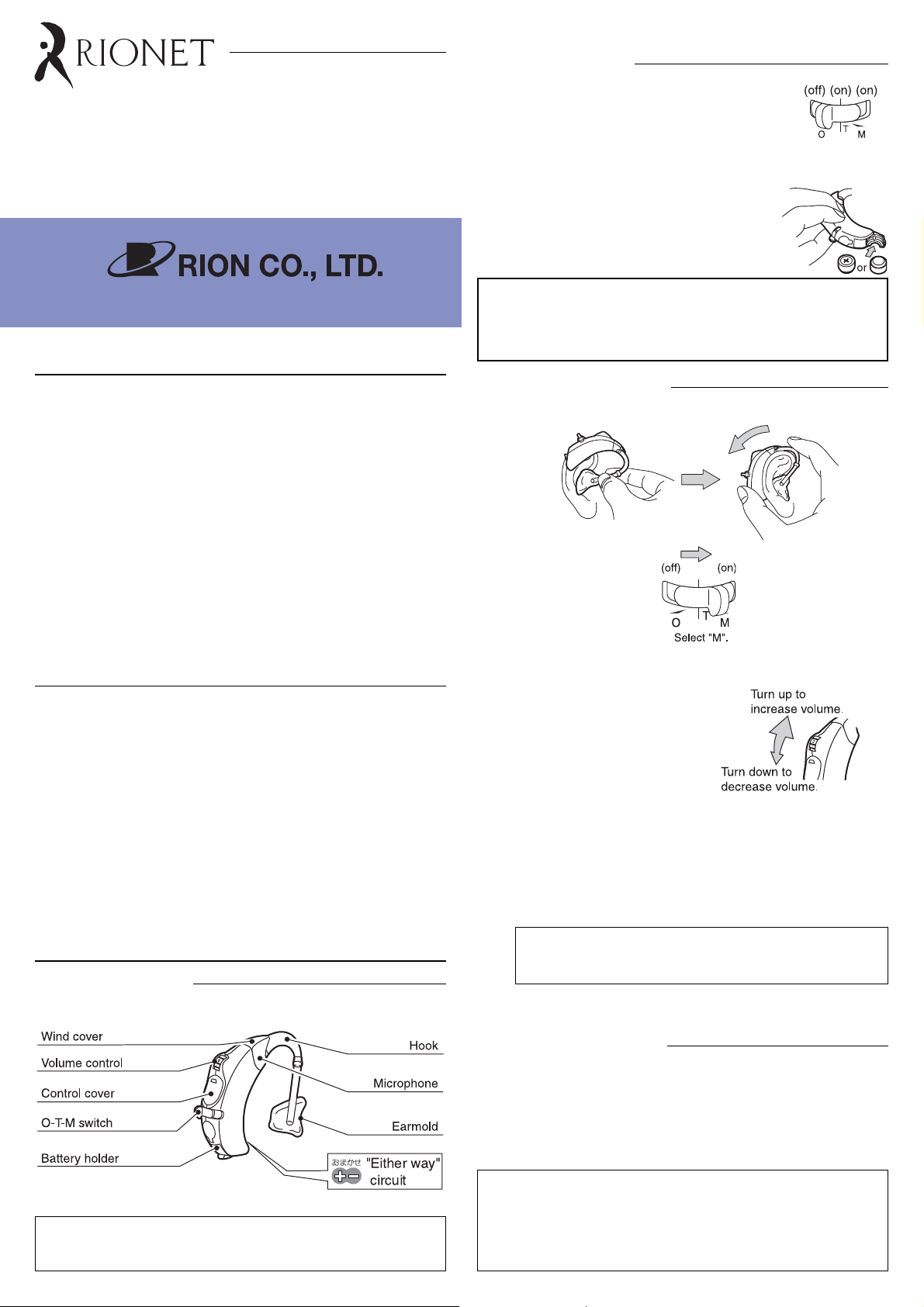
Battery Placement
1. Set the O-T-M switch of the hearing aid to "O"
(power off).
2. Peel off the sticker on the positive side of battery
(PR48 (13) or PR48P (13P) zinc-air battery).
3. Open the battery holder with the tip of your finger.
4. Insert a PR48 (13) or PR48P (13P) battery into
the battery holder. You do not have to worry
about the polarity.
5. Close the battery holder.
3-20-41 Higashimotomachi, Kokubunji, Tokyo 185-8533, Japan
HOW TO USE YOUR FIRST HEARING AID
z Any hearing aid cannot return level of your hearing to normal or
halt further hearing deterioration, but proper use of your hearing
aid can help you hear what is going on around you and let you get
more enjoyment of life.
If this is your first hearing aid, you - like most new users - will probably
z
be surprised at the loudness of the sounds, and after using it for a
short while, you may even feel that it is too noisy. The following three
tips are important in overcoming your concerns.
1) Read this manual and become familiar with the hearing aid's
various mechanisms and how to use them correctly.
2) First, use your hearing aid in a quiet place and listen to quiet
sounds and give yourself sufficient time to get accustomed
to the sound of your hearing aid.
3) If any physical problems develop, consult your doctor.
FOR KEEPING YOUR HEARING AID LONGER
z Always keep the hearing aid clean. Clean the hearing aid with dry
cloth periodically and also remove earwax plugged in the earpiece
or earmold using eyebrush or toothbrush.
z Do not expose the hearing aid to the heat from stoves, etc. Also,
avoid leaving it in places with high humidity.
z Operate the controls with care. Do not press hard.
z If the hearing aid is dropped in water, wipe with dry cloth and ask
the dispenser for check.
z Do not pick the microphone with nail, pin, etc., because this may
damage the microphone.
z Do not disassemble or attempt any repairs by yourself. Ask the
dispenser for repair.
OPERATING INSTRUCTIONS
Parts and Controls
Battery life (For continuous use)
PR48 (13) : Approx. 210 hours
PR48P (13P) : Approx. 160 hours
- Battery life will change depending on the operating condition.
Putting on Hearing Aid
1. Place the hearing aid on the ear.
2. Turn the power on.
3. Adjust the volume control to a suitable level.
z Volume control
Higher numbers mean louder sound.
* Adjust the volume according to the situation (volume of other
voices, ambient noise, etc.).
z O-T-M switch
O: Hearing aid is turned off and no sound is heard.
T: Set to "T" when the hearing aid is used for telephone or
loop system.
When the switch of the hearing aid is set to T, noise may be
heard in the vicinity of electromagnetic fields, such as generated
for example by electronically secured gates or similar.
M: Microphone for ordinary use. This is the normal operating
position.
z Earmold shown above are not included as standard
accessories.
Removing Hearing Aid
1. Set the switch to "O" (power off) before removing the hearing aid. If
the switch is left in the "M" or "T" position, acoustic feedback
(howling) may occur.
2. Be sure to set the switch to "O" and take out the battery, when not
using the hearing aid.
Turn-on precaution
If you switch the hearing aid off and then immediately on again,
there may be no sound, but this is not a defect. In such a case,
return the switch to "O" (Off), wait for at least 10 seconds, and
then set the switch to "M" or "T" again.
Page 2
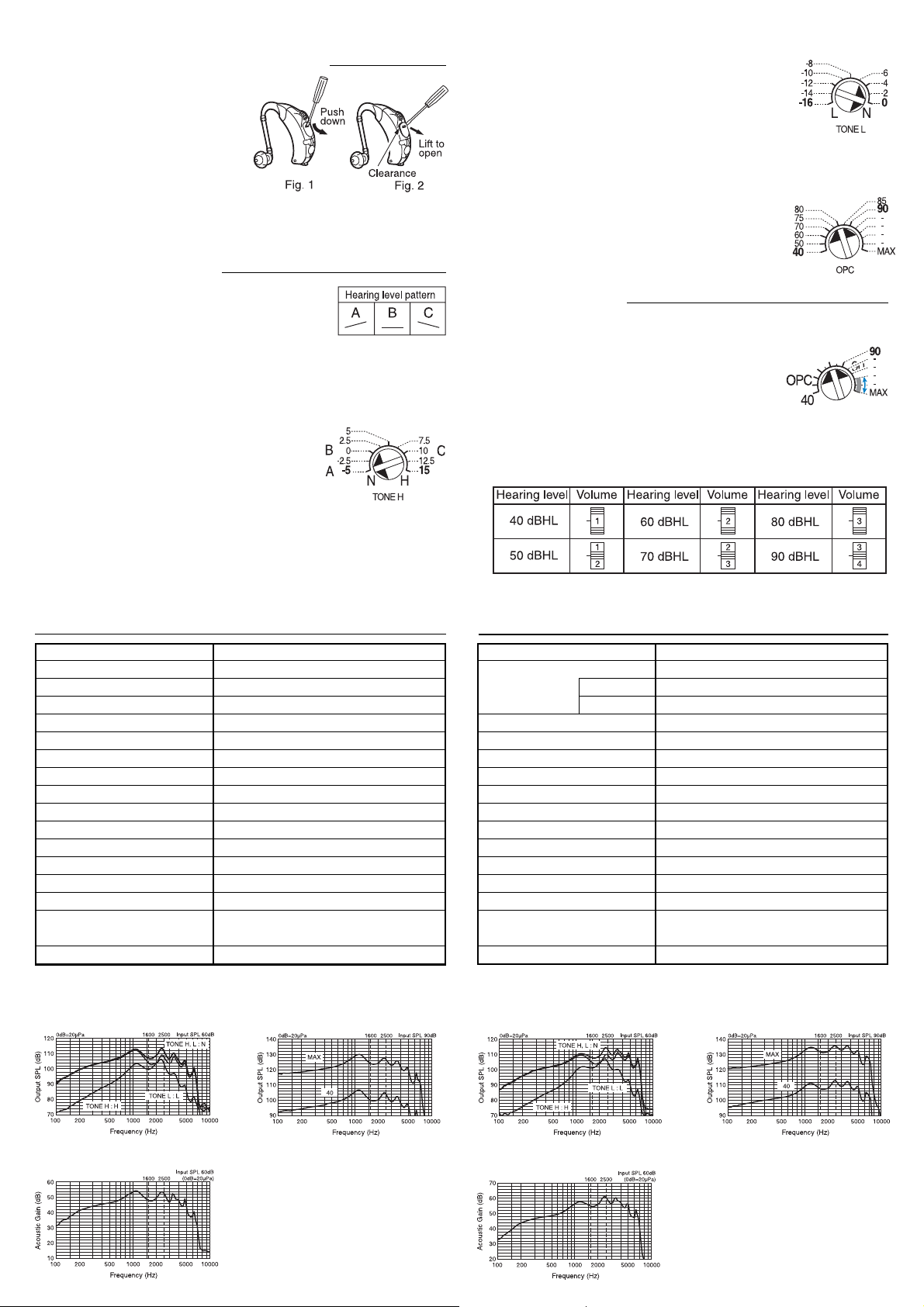
Opening / closing the control cover
1. Insert a screwdriver into the
notch of the control cover, as
shown in Fig. 1, and push the
cover down.
(Only the top section of the
cover will open.)
2. When the top of the cover opens, insert the screwdriver into the
clearance, as shown in Fig. 2, and push the cover out to open it fully.
3. To close the cover, push the entire cover in with finger.
Adjusting the controls
The scales of the tone control (TONE H, TONE L)
and output limiting control (OPC) are shown in the
illustration (Values shown in bold are printed on
the unit.). Use the numbers given on a scale as a guide when adjusting
the control. For information on volume control positions, see the section
"Volume control positions for 2000 Hz hearing level".
z Tone control (TONE H)
As you turn the control from "N" towards "H",
the low range is attenuated and the high range
is emphasized. To make the adjustment using
numerical values, calculate the value as
follows.
TONE H setting = HL (2000 Hz) - HL (500 Hz)
printed scale corresponds to a change of about
4 dB at 4000 Hz.
Normally, the control should be left in the factorydefault position (N). If acoustic feedback (howling)
is a problem or when the hearing level in the low
range seems notably worse than in the high range, turn the control
towards "L".
z Output limiting control (OPC)
Turning the control towards the left reduces the
maximum output level of the hearing aid. Set the
control to a position which matches the average
hearing level. The average hearing level can be
determined according to the following equation.
HL (500 Hz) + { 2 × HL (1000 Hz) } + HL (2000 Hz)
Average hearing level =
4
* About batteries
The generally recommended battery type for the
HB-41 is the PR48, but when the OPC control is
set in the range indicated by the arrows in blue,
the PR48P should be used. With the PR48, the
sound may briefly be interrupted at high levels. The PR48P eliminates
this problem, but this battery type has a slightly shorter service life.
Volume control positions for 2000 Hz hearing level
z Tone control (TONE L)
As you turn the control from "N" towards "L", the high range is
attenuated and the low range is emphasized. Each increment of the
TECHNICAL DATA (According to ANSI standard S3.22 1996)
Maximum-OSPL90 130 dB (1200 Hz)
HFA-OSPL90 127 dB
HFA-full-on Acoustic Gain 52 dB
Reference Test Gain 50 dB
Frequency Range 100 Hz to 6800 Hz
Equivalent Input Noise Level
Total Harmonic Distortion
HFA-SPLIV 112 dB at 31.6 mA/m
AGC OPC (Output AGC)
Attack/Recovery Time Attack: 0.25 msec/Recovery: 32 msec
Operating Switch O-T-M
Output Limiting Control OPC (range: 24 dB)
Tone Control TONE H, TONE L
Gain Control Main VR (range: 38 dB)
Battery Type/Supply Voltage
Battery Current/Battery Life 13: 1.24 mA/Approx. 210 h
Dimensions/Weight
Frequency response curve and
effect of tone control
20 dB
500 Hz: 8.0% 800 Hz: 3.0% 1600 Hz: 3.0%
13 (13P)/1.3 V
13P: 1.24 mA/Approx. 160 h
3.75 × 1.27 × 0.88 cm/4.2 g (excluding battery)
(Typical value with E1 hook)
OSPL 90 curve and effect of
output limiting control
According to IEC standard Pub. 60118-0-1983
TECHNICAL DATA
Reference Test Frequency 1600 Hz
OSPL90 131 dB
Full-on Acoustic Gain 55 dB
Equivalent Input Noise Level
Total Harmonic Distortion
Induction Coil Sensitivity 89 dB at 1 mA/m
AGC OPC (Output AGC)
Attack/Recovery Time Attack: 0.25 msec/Recovery: 32 msec
Operating Switch O-T-M
Output Limiting Control OPC (range: 24 dB)
Tone Control TONE H, TONE L
Gain Control Main VR (range: 38 dB)
Battery Type/Supply Voltage
Battery Current / Battery Life PR48: 1.24 mA/Approx. 210 h
Dimensions/Weight
Basic frequency response curve
and effect of tone control
()
Amendment 1-1994
500 Hz 126 dB
Peak 136 dB
17 dB
500 Hz: 2.0% 800 Hz: 1.0%1600 Hz: 1.0%
PR48 (PR48P)/1.3 V
PR48P: 1.24 mA/Approx. 160 h
3.75 × 1.27 × 0.88 cm/4.2 g (excluding battery)
(Typical value with E1 hook)
OSPL
90 curve and effect of
output limiting control
Full-on gain curve
Note:
(1) Production number (serial
number) is indicated at the
upper rear side of the unit.
(2) Manufacturer's name is
imprinted at the lower rear
side of the unit.
Full-on acoustic gain frequency response curve
No. 39110 04-05
 Loading...