

Page 1

RIGOL
Programming Guide
DG1000 Series
Dual-Channel Function/Arbitrary
Waveform Generator
Aug. 2012
RIGOL Technologies, Inc.
Page 2

Page 3

RIGOL
I
Guaranty and Declaration
Copyright
©2009 RIGOL Technologies, Inc. All Rights Reserved.
Trademark Information
RIGOL is a registered trademark of RIGOL Technologies, Inc.
Publication Number
PGB06108-1110
Notices
RIGOL products are protected by patent law in and outside of P.R. China.
RIGOL reserves the right to modify o r change part of o r all the specifications and
pricing policies at company’s sole decision.
Information in this publication replaces all previously corresponding material.
RIGOL shall not be liable for losses caused by either incidental or consequentia l
in connection with the furnishing, use or performance of this manual as well as
any information contained.
Any par t of this document is forbidden to be copied, photocopied or rearranged
without prior written approval of RIGOL.
Product Certification
RIGOL guarantees this product conforms to the national and industrial standards in
China as well as t he ISO9 001:2 008 s tan dar d and th e ISO 1400 1:200 4 sta nda rd. Other
international standard conformance certification is in progress.
Contact Us
If you have any problem or requirement when using our products, p lease contact
RIGOL Technologies , Inc. or your local distributors, or visit: www.rigol.com.
Programming Guide for DG1000
Page 4

RIGOL
II
Structure of this Document
Chapter 1 Programming Overview
This chapter introduces how to programme DG1000 generator using commands and
how to input the commands in right format.
Chapter 2 DG1000 Command System
This chapter gives detailed information of each command supported by DG1000,
including command syntax, function description, considerations when using command
as well as some application examples.
Chapter 3 Application Examples
This chapter shows you how to realize the examples in DG1000 User’s Guide via
commands.
Appendix: Commands Reference A-Z
The Appendix lists all the commands
alphabetically in favor of quick referen ce.
Note:
DG1000 series Dual-channel Function/Arbitrary W ave form Generat or includes DG1022
and DG1022A. In this manual, DG1022 is taken as an example to illustrate the
command system and its using method.
Programming Guide for DG1000
Page 5

RIGOL
III
Table of Contents
Guaranty and Declaration .......................................................................... I
Chapter 1 Programming Overview ......................................................... 1-1
Communication Interfaces ........................................................................ 1-2
Commands Int roduction ........................................................................... 1-3
Command Syn tax .............................................................................. 1-3
Symbol Desc ri pt ion ........................................................................... 1-4
Parameter Type ................................................................................ 1-5
Command Abbre viation ..................................................................... 1-6
Chapter 2 DG10 00 Command Sys te m .................................................... 2-1
IEEE 488.2 ............................................................................................. 2-2
APPLy ..................................................................................................... 2-3
FUNCtion ................................................................................................ 2-9
FREQuency ........................................................................................... 2-15
VOLTage ............................................................................................... 2-19
OUTPut ................................................................................................ 2-24
PULSe .................................................................................................. 2-28
AM ....................................................................................................... 2-31
FM ....................................................................................................... 2-34
PM ....................................................................................................... 2-37
FSKey................................................................................................... 2-40
SWEep ................................................................................................. 2-43
TRIGger ............................................................................................... 2-45
BURSt .................................................................................................. 2-48
DATA.................................................................................................... 2-52
MEMory ................................................................................................ 2-56
SYSTem ................................................................................................ 2-59
PHASe .................................................................................................. 2-62
DISPlay ................................................................................................ 2-64
COUPling .............................................................................................. 2-65
COUNter ............................................................................................... 2-68
Chapter 3 Application Examples ............................................................. 3-1
Example 1: To Generate a Sine Wave ........................................................ 3-2
Example 2: To Generate a Built-in Arbitrary Wave ....................................... 3-3
Example 3: To Generate an User-defined Arbitrary Wave ............................. 3-4
Programming Guide for DG1000
Page 6

RIGOL
IV
Example 4: To Generate a FSK Wave ......................................................... 3-6
Example 5: To Generate a Linear Sweep Wave ........................................... 3-7
Example 6: To Generate a Burst Wave ....................................................... 3-8
Example 7: To Output Waves via Dual Channels ......................................... 3-9
Example 8: Channel Coupling .................................................................. 3-10
Example 9: Channel Copy ....................................................................... 3-11
Appendix: Commands Reference A-Z ........................................................ 1
Programming Guide for DG1000
Page 7

Programming Overview RIGOL
1-1
Chapter 1 Programming Overview
This chapter introduces how to programme DG1000 series Dual-channel
function/arbitrary waveform generator using commands and how to input commands
in right format.
This chapter contains the following sections:
Communication Interfaces
Commands Introduction
Command Syntax
Symbol Description
Parameter Type
Command Abbreviation
Programming Guide for DG1000
Page 8

RIGOL Programming Overview
1-2
Communication Interfaces
Computers communicate with the generator by sending and recei ving commands over
USB interface. Command is sended and identified in the form of ASCII character
strings for users to easily control the generator and do user-defined development.
Operations that you can do with a computer and a generator include:
Set the generator.
Output waveforms from the generator.
Connection:
Please connect the USB Device port at the rear panel of DG1000 with the
corresponding USB interface on the computer using an USB cable.
Programming Guide for DG1000
Page 9

Programming Overview RIGOL
1-3
Commands Introduction
Command Syntax
The command systems of DG1000 present a hierarchy structure (tre e system) and
each command consists of a “Root” keyword and one or multiple sub-keywords. The
keywords are separated by ":" and are followed by the parameter settings available,
"?" is added at the en d of the com mand string to in dicate query and t he command and
parameter are separated by "space".
For example,
FUNCtion:SQUare:DCYCle {<percent>|MINimum|MAXimum}
FUNCtion:SQUare:DCYCle? [MINimum|MAXimum]
FUNCtion is the root keyword of the commmand, SQUare and DCYCle are the
second-level and third-level keywords respectively, all the keywords are sep ara t ed by
“:”. <percent> denotes the parameter that users can set; “?” denotes query; the
command FUNCtion:SQUare:DCYCle and parameter are separated by “space”.
“,” is usually used to compart multiple parameters existed in one command, for
example,
DATA VOLATILE,<value>,<value>, . . .
Programming Guide for DG1000
Page 10

RIGOL Programming Overview
1-4
Symbol Description
Following symbols are usually used to assist to explain the parameters containd in a
command.
1. Braces { }
The options enclosed in a { } are parameters available in the command. Only one
option could be selected every time, and all the options are separated by “|”.
For ex ampl e, {ON|OFF} indicateds that ON or OFF can be selected.
2. Square Brackets [ ]
The content in square brackets is optional and could be omitted, but could be
executed regardless whether it is omitted. For example,
DATA:COPY <destination arb name>[,VOLATILE]
This command copys the wave from volatile memory to the specified nonvolatile
memory. Wherein, [,VOLATILE] could be omitted.
3. Triangle Brackets < >
The parameter enclosed in < > must be replac ed by an effective value.
For example,
DISPlay:CONTRAST <value>
wherein, <value> must be a numerical value, such as:
DISPlay:CONTRAST 25
Programming Guide for DG1000
Page 11

Programming Overview RIGOL
1-5
Parameter Type
The commands contain 5 kinds of parameters, different parameters have different
setting methods.
1. Boolean Parameters
The parameters could be “OFF” or “ON” (“0” or “1”), for example,
AM:STATE {OFF|ON}
“OFF” denotes disabling AM function. “On” denotes enabling AM function.
2. Consecutive Integer Parameters
The parameters could be a consecutive integer, for example,
DISPlay:CONTRAST <value>
<value> coul d be any integer between 0 and 31(including 0 and 31).
3. Consecutive Real Number Parameters
The parameters could be any value within the effective range and with the
required precision, for example,
FREQuency {<frequency>|MINimum|MAXimum}
For sine wave, <frequency> could be any real number between 1uHz and 20MHz.
4. Discrete Parameters
The parameters could be a cited value, for exa mple,
MEMory:STATe:NAME? {0|1|2|3|4|5|6|7|8|9|10}
The parameter could only be 0, 1, 2, 3, 4, 5, 6. 7, 8, 9 or 10.
5. ASCII Cha racter St ring
The parameters should be the combinations of ASCII characters, f o r examp le,
DATA:COPY <destination arb name>[,VOLATILE]
<destination arb name> is a character string defined by user.
Programming Guide for DG1000
Page 12

RIGOL Programming Overview
1-6
Command Abbreviation
All the commands are case-insensitive, so you can use any kind of them. But if
abbreviation is used, all the capital letters specified in commands must be written
completely. For example,
FUNCtion:SQUare:DCYCle? also can be:
FUNC:SQU:DCYC? or func:squ:dcyc?
Programming Guide for DG1000
Page 13

DG1000 Command System RIGOL
2-1
Chapter 2 DG1000 Command System
This chapter gives detailed information of each command supported by DG1000,
including command syntax, function des cripti on, u sin g considerations as well as some
application examples.
DG1000 contains following command sub-systems:
IEEE 488.2
APPLy
FUNCtion
FREQuency
VOLTage
OUTPut
PULSe
AM
FM
PM
FSKey
SWEep
TRIGger
BURSt
DATA
MEMory
SYSTem
PHASe
DISPlay
COUPling
COUNter
Programming Guide for DG1000
Page 14
RIGOL DG1000 Command System
2-2
IEEE 488.2
IEEE standard defines some common commands for querying basic instrument
information or executing basic operations. These commands usually begin with “*”
and hold 3-character long command keyword.
DG1000 supports following IEEE488.2 commands:
1. *IDN?
1. *IDN?
Syntax *IDN?
Function
Return Value The query returns 4 character segments separated b y commas “,”:
Query ID char acter str ing of instrument.
manufacterer, model, serial number and the edition number that
consists of numbers separated by “.” .
For ex ampl e,
RIGOL TECHNOLOGIES,DG1022,DG1D100,00.02.00.06.00.02.06
Programming Guide for DG1000
Page 15

DG1000 Command System RIGOL
2-3
APPLy
APPLy commands are used to quickly set the output waveforms of DG1000 and
provide the most straightforward method to program the generator over remote
interface.
DG1000 supports following APPLy commands:
1. APPLy:SINusoid
2. APPLy:SQUare
3. APPLy:RAMP
4. APPLy:PULSe
5. APPLy:NOISe
6. APPLy:DC
7. APPLy:USER
8. APPLy?
9. APPLy:SINusoid:CH2
10. APPLy:SQUare:CH2
11. APPLy:RAMP:CH2
12. APPLy:PULSe:CH2
13. APPLy:NOISe:CH2
14. APPLy:DC:CH2
15. APPLy:USER:CH2
16. APPLy:CH2?
Programming Guide for DG1000
Page 16
RIGOL DG1000 Command System
2-4
DC
frequency, amplitude and DC
3. APPLy:RAMP
frequency, amplitude and DC
DC
frequency, amplitude and DC
Detailed information of each command:
1. APPLy:SINusoid
Syntax APPLy:SINusoid [<frequency>[,<amplitude>[,<offset>]]]
Function Generate a sine wave with specif ic frequency, amplitude and DC
offset via C H 1.
Explanations If the parameters you set are less than three, the sequence
would be: <frequency>, <amplitude>, <offset>.
The default units of <frequency>, <amplitude> and <offset>
Example
are Hz, Vpp and V
APPL:SIN 1000,5.0,-1.5
respectively.
2. APPLy:SQUare
Syntax APPLy:SQUare [<frequency>[,<amplitude>[,<offset>]]]
Function Generate a square wave with specific
offset via CH1. This command would overwrite the c urrent duty cycle
setting and select 50% automatically.
Explanations If the parameters you set are less than three, the sequence
would be: <frequency>, <amplitude>, <offset>.
The default units of <frequency>, <amplitude> and <offset>
Example
are Hz, Vpp and V
APPL:SQU 1000,5.0,-1.5
respectively.
DC
Syntax
Function Generate a ramp wave with specif ic
Explanations If the parameters you set are less than three, the sequence
Example APPL:RAMP 1000,5.0,-1.5
4. APPLy:PULSe
Syntax APPLy:PULSe [<frequency>[,<amplitude>[,<offset>]]]
Function
APPLy:RAMP [<frequency>[,<amplitude>[,<offset>]]]
offset via CH1. This command would overwrite the current symmetry
setting and select 50% automatically.
would be: <frequency>, <amplitude>, <offset>.
The default units of <frequency>, <amplitude> and <offset>
are Hz, Vpp and V
respectively.
Generate a pulse wave with specif ic
Programming Guide for DG1000
Page 17
DG1000 Command System RIGOL
2-5
DC
DC
frequency, amplitude and
offset via C H 1.
Explanations If the parameters you set are less than three, the sequence
would be: <frequency>, <amplitude>, <offset>.
The default units of <frequency>, <amplitude> and <offset>
Example
are Hz, Vpp and V
APPL:PULS 1000,5.0,-1.5
respectively.
5. APPLy:NOISe
Syntax APPLy:NOISe [<frequency |DEFault>[,<amplitude>[,<offset>]]]
Function Generate a Gaussian noise with specif ic amplitude and DC offset via
CH1.
Explanations Although the frequency parameter makes no impression on this
command, a value or “DEFault” must be specified. (noise
function has a 5MHz bandwidth)
If the parameters you set are less than three, the sequence
would be: <frequency>, <amplitude>, <offset>.
The default units of <frequency>, <amplitude> and <offset>
Example
are Hz, Vpp and V
APPL:NOIS DEF,5.0,2.0
respectively.
DC
6. APPLy:DC
Syntax APPLy:DC [<frequency|DEFault>[,<amplitude>|DEFault>[,<
offset>]]]
Function Generate a DC signal with electrical lev e l specified by < offset > via
CH1.
Explanations Although the frequency and amplitude parameters make no
impression on this command, a value or “DEFault” must be
specified.
If the parameters you set are less than three, the sequence
would be: <frequency>, <amplitude>, <offset>.
The default units of <frequency>, <amplitude> and <offset>
Example
are Hz, Vpp and V
APPL:DC DEF,DEF,-2.5
respectively.
7. APPLy:USER
Syntax
Function
APPLy:USER [<frequency>[,<amplitude>[,<offset>]]]
Generate an arbitrary wave (with specif ic
Programming Guide for DG1000
Page 18
RIGOL DG1000 Command System
2-6
FUNCtion:USER
DC
of CH1 and the type of wave
DC
DC offset) selected by the
command via CH1.
Explanations If the parameters you set are less than three, the sequence
would be: <frequency>, <amplitude>, <offset>.
The default units of <frequency>, <amplitude> and <offset>
Example
are Hz, Vpp and V
APPL:USER 1000,5.0,-1.5
respectively.
8. APPLy?
Syntax APPLy?
Function Query the current configuration
outputted.
Return Value The query returns a character string enclosed in double quotation
marks, including function, frequency, amplitude and offset. Such as,
CH1:"SIN,1.000000e+03,5.000000e+00,-1.500000e+00"
9. APPLy:SINusoid:CH2
Syntax
APPLy:SINusoid:CH2 [<frequency>[,<amplitude>[,<offset>]]]
Function Generate a sine wave with speci fic frequency, amplitude and DC
offset via C H 2.
Explanations If the parameters you set are less than three, the sequence
would be: <frequency>, <amplitude>, <offset>.
The default units of <frequency>, <amplitude> and <offset>
are Hz, Vpp and V
respectively.
DC
Example APPL:SIN:CH2 1000,5.0,-1
10. APPLy:SQUare:CH2
Syntax
APPLy:SQUare:CH2 [<frequency>[,<amplitude>[,<offset>]]]
Function Generate a square wave with specific frequency, amplitude and DC
offset via CH2. This command would ove rwrite the current duty cycle
setting and select 50% automatically.
Explanations If the parameters you set are less than three, the sequence
would be: <frequency>, <amplitude>, <offset>.
The default units of <frequency>, <amplitude> and <offset>
Example
are Hz, Vpp and V
APPL:SQU:CH2 1000,5.0,-1
respectively.
11. APPLy:RAMP:CH2
Programming Guide for DG1000
Page 19
DG1000 Command System RIGOL
2-7
DC
DC
Syntax
APPLy:RAMP:CH2 [<frequency>[,<amplitude>[,<offset>]]]
Function Generate a ramp wave with specif ic frequency, amplitude and DC
offset via CH2. This command w ould o v erwrite t he cur rent symmetry
setting and select 50% automatically.
Explanations If the parameters you set are less than three, the sequence
would be: <frequency>, <amplitude>, <offset>.
The default units of <frequency>, <amplitude> and <offset>
are Hz, Vpp and V
respectively.
Example APPL:RAMP:CH2 1000,5.0,0.5
12. APPLy:PULSe:CH2
Syntax
APPLy:PULSe:CH2 [<frequency>[,<amplitude>[,<offset>]]]
Function Generate a pulse wave with specif ic frequency, amplitude and DC
offset via C H 2.
Explanations If the parameters you set are less than three, the sequence
would be: <frequency>, <amplitude>, <offset>.
The default units of <frequency>, <amplitude> and <offset>
are Hz, Vpp and V
respectively.
DC
Example APPL:PULS:CH2 1000,5.0,0.5
13. APPLy:NOISe:CH2
Syntax
APPLy:NOISe:CH2[<frequency|DEFault>[,<amplitude>[,<offset>]]]
Function Generate a Gaussian noise with specif ic amplitude and DC offset via
CH2.
Explanations Although the frequency parameter makes no impression on this
command, a value or “DEFault” must be specified. (noise
function has a 5MHz bandwidth)
If the parameters you set are less than three, the sequence
would be: <frequency>, <amplitude>, <offset>.
The default units of <frequency>, <amplitude> and <offset>
Example
are Hz, Vpp and V
APPL:NOIS:CH2 DEF, 5.0, 0.5
respectively.
14. APPLy:DC:CH2
Syntax APPLy:DC:CH2[<frequency|DEFault>[,<amplitude>|DEFault>[,<
offset>]]]
Function
Generate a DC signal with el ec trical level specified by <offset> via
Programming Guide for DG1000
Page 20
RIGOL DG1000 Command System
2-8
ncy, amplitude and
of CH2 and the type of wave
CH2.
Explanations Although the frequency and amplitude parameters make no
impression on this command, a value or “DEFault” must be
specified.
If the parameters you set are less than three, the sequence
would be: <frequency>, <amplitude>, <offset>.
The default units of <frequency>, <amplitude> and <offset>
Example
are Hz, Vpp and V
APPL:DC:CH2 DEF,DEF,1.5
respectively.
DC
15. APPLy:USER:CH2
Syntax
APPLy:USER:CH2 [<frequency>[,<amplitude>[,<offset>]]]
Function Generate an arbitr ary wave (with specific freque
DC offset) selected by the FUNCtion:USER:CH2 command via CH2.
Explanations If the parameters you set are less than three, the sequence
would be: <frequency>, <amplitude>, <offset>.
The default units of <frequency>, <amplitude> and <offset>
Example
are Hz, Vpp and V
APPL:USER:CH2 1000,5.0,-1.5
respectively.
DC
16. APPLy:CH2?
Syntax
APPLy:CH2?
Function Query the current configuration
outputted.
Return Value The query returns a character string enclosed in double quotation
marks, including function, frequency, amplitude and offset. Such as,
CH2:"SIN,1.000000e+03,5.000000e+00,-1.500000e+00".
Programming Guide for DG1000
Page 21

DG1000 Command System RIGOL
2-9
FUNCtion
FUNCtion commands are used for setting the output function and their parameters;
selecting carrier wave function in modulation mode; choosing any one from 48 built-in
arbitrary waveforms and 10 user-defined waveforms, or the waveform downloaded to
volatile memory currently.
DG1000 supports following FUNCtion commands:
1. FUNCtion
2. FUNCtion?
3. FUNCtion:USER
4. FUNCtion:USER?
5. FUNCtion:SQUare:DCYCle
6. FUNCtion:SQUare:DCYCle?
7. FUNCtion:RAMP:SYMMetry
8. FUNCtion:RAMP:SYMMetry?
9. FUNCtion:CH2
10. FUNCtion:CH2?
11. FUNCtion:USER:CH2
12. FUNCtion:USER:CH2?
13. FUNCtion:SQUare:DCYCle:CH2
14. FUNCtion:SQUare:DCYCle:CH2?
15. FUNCtion:RAMP:SYMMetry:CH2
16. FUNCtion:RAMP:SYMMetry:CH2?
Programming Guide for DG1000
Page 22
RIGOL DG1000 Command System
2-10
∧
Detailed information of each command:
1. FUNCtion
Syntax FUNCtion {SINusoid|SQUare|RAMP|PULSe|NOISe|DC|USER}
Function Select the output function for CH1.
Explanation If FUNC DC is sent first and then FUNC USER, the output is still
DC.
Example FUNC SIN
2. FUNCtion?
Syntax FUNCtion?
Function
Query the output function of CH1.
Explanation The query always returns CH1:ARB after sending FUNC DC or
FUNC USER.
Example The query returns CH1:SIN, CH1:SQU, CH1:RAMP, CH1:PULS,
CH1:NOIS or CH1:ARB, the default is CH1:SIN.
3. FUNCtion:USER
Syntax FUNCtion:USER {<name of arbi trary wave>|VOLATILE}
Function Select any wave from built-in arbitrary waves,10 user-defined
waves or waves that have been downloaded into volatile m emory
for CH1.
Explanations The built-in waves contain:
Common:
NegRamp/AttALT/AmpALT/StairDown/StairUp/StairUD/Cpulse/
PPulse/NPulse/Trapezia/RoundHalf/AbsSine/AbsSineHalf/
SINE_TRA/SINE_VER
Math:
Exp_Rise/Exp_Fall/Tan/Cot/Sqrt/X
2/Sinc/Gauss/HaverSine/
Lorentz/Dirichlet/GaussPulse/Airy
Project:
Cardiac/Quake/Gamma/Voice/TV/Combin/BandLimited/
Stepresponse/Butterworth/Che byshev1/ Chebyshev2
Window Function:
Boxcar/Barlett/triang/Blackman/Hamming/Hanning/Kaiser
Others:
Roundpm/DC
Programming Guide for DG1000
Page 23
DG1000 Command System RIGOL
2-11
FUNC DC
any of the
current duty cycle setting, such as
<percent> is the selected percent of symmetry; MIN=0, MAX
8. FUNCtion:RAMP:SYMMetry?
Example
Send the
FUNC:USER VOLATILE
command to select DC.
4. FUNCtion:USER?
Syntax FUNCtion:USER?
Function
Query the name of arbitrary wave generated from CH1.
Explanation This command is invalid when DC is selected.
Return
Value
The query returns the name of built-in arbitrary wave selected
(such as EXP_RISE), VOLATILE or the name of
user-defined waves in nonvolatile memory. The default is
EXP_RISE.
5. FUNCtion:SQUare:DCYCle
Syntax
Function
FUNCtion:SQUare:DCYCle {<percent>|MINimum|MAXimum}
Set the duty cycle of square wave for CH1.
Explanation <percent> is the percent of duty cycle selected, MIN is the
minimum duty cycle of the selected frequency and MAX is the
maximum.
Example FUNC:SQU:DCYC 50
6. FUNCtion:SQUare:DCYCle?
Syntax
Function
Return
Value
FUNCtion:SQUare:DCYCle? [MINimum|MAXimum]
Query the duty cycle of square wave from CH1.
The query returns the
50.000000.
7. FUNCtion:RAMP:SYMMetry
Syntax
Function
Explanation
FUNCtion:RAMP:SYMMetry {<percent>|MINimum|MAXimum}
Set the symmetry of ramp wave output from CH1.
=
100.
Example
FUNC:RAMP:SYMM 50
Syntax
Function
FUNCtion:RAMP:SYMMetry? [MINimum|MAXimum]
Query the symme t ry of ramp wave output from CH1.
Return The query returns the current symmetry setting, such as
Programming Guide for DG1000
Page 24
RIGOL DG1000 Command System
2-12
∧
Value 50.000000.
9. FUNCtion:CH2
Syntax FUNCtion:CH2 {SINusoid|SQUare|RAMP|PULSe|NOISe|DC|USER}
Function Select the output function of CH2.
Explanation If FUNC:CH2 DC is sent first and then FUNC:CH2 USER, t he
output is still DC.
Example FUNC:CH2 SIN
10. FUNCtion:CH2?
Syntax FUNCtion:CH2?
Function
Query the output function of CH2.
Explanation The query always returns CH2:ARB after sending FUNC:CH2 DC
or FUNC:CH2 USER.
Example The query returns CH2:SIN, CH2:SQU, CH2:RAMP, CH2:PULS,
CH2:NOIS or CH2:ARB, the default is CH2:SIN.
11. FUNCtion:USER:CH2
Syntax FUNCtion:USER:CH2 {< name of arbitrary wave >|VOLATILE}
Function Select any owave from built-in arbitrary waves, 10 user-defined
waves or waves that have been loaded into volatile memory for
CH2.
Explanations The built-in waves contain:
Common:
NegRamp/AttALT/AmpALT/StairDown/StairUp/StairUD/Cpulse/
PPulse/NPulse/Trapezia/RoundHalf/AbsSine/AbsSineHalf/
SINE_TRA/SINE_VER
Math:
Exp_Rise/Exp_Fall/Tan/Cot/Sqrt/X
2/Sinc/Gauss/HaverSine/
Lorentz/Dirichlet/GaussPulse/Airy
Project:
Cardiac/Quake/Gamma/Voice/TV/Combin/BandLimited/
Stepresponse/Butterworth/Che byshev1/ Chebyshev2
Window Function:
Boxcar/Barlett/triang/Blackman/Hamming/Hanning/Kaiser
Others:
Roundpm/DC
Programming Guide for DG1000
Page 25
DG1000 Command System RIGOL
2-13
FUNC:CH2 DC
any of the
, MIN is the
and MAX is the
<percent> is the percent of symmetry selected; MIN=0, MAX
16. FUNCtion:RAMP:SYMMetry:CH2?
Example
Send the
FUNC:USER:CH2 SINC
command when DC is used.
12. FUNCtion:USER:CH2?
Syntax FUNCtion:USER:CH2?
Function
Query the name of arbitrary wave generated from CH2.
Explanation This command is invalid when DC is selected.
Return
Value
The query returns the name of built-in arbitrary wave selected
(such as EXP_RISE), VOLATILE or the name of
user-defined waves in nonvolatile memory. The default is
EXP_RISE.
13. FUNCtion:SQUare:DCYCle:CH2
Syntax
Function
FUNCtion:SQUare:DCYCle:CH2 {<percent>|MINimum|MAXimum}
Set the duty cycle of square wave for CH2.
Explanation <percent> is the percent of duty cycle selected
minimum duty cycle of the selected frequency
maximum.
Example FUNC:SQU:DCYC:CH2 50
14. FUNCtion:SQUare:DCYCle:CH2?
Syntax
Function
Return
Value
FUNCtion:SQUare:DCYCle:CH2? [MINimum | MAXimum]
Query the duty cycle of square wave output from CH2.
The query returns the current duty cycle setting, such as:
50.000000.
15. FUNCtion:RAMP:SYMMetry:CH2
Syntax
Function
Explanation
FUNCtion:RAMP:SYMMetry:CH2 {<percent>|MINimum|MAXimum}
Set the symmetry of ramp wave output from CH2.
=
100.
Example
FUNC:RAMP:SYMM:CH2 50
Syntax
Function
FUNCtion:RAMP:SYMMetry:CH2? [MINimum|MAXimum]
Query the symme t ry of ramp wave output from CH2.
Return The query returns the current symmetry setting, such as:
Programming Guide for DG1000
Page 26
RIGOL DG1000 Command System
2-14
Value 50.000000.
Programming Guide for DG1000
Page 27

DG1000 Command System RIGOL
2-15
FREQuency
FREQuency comma nds are used for setting the frequencies of output functions of
dual channels; the start/stop frequency, the cen ter/span fr equency in sweep mod e,
the carrier frequency in modulation. Sweep and modulation are only valid f o r CH1.
DG1000 supports following FREQuency commands:
1. FREQuency
2. FREQuency?
3. FREQuency:CH2
4. FREQuency:CH2?
5. FREQuency:STARt
6. FREQuency:STARt?
7. FREQuency:STOP
8. FREQuency:STOP?
9. FREQuency:CENTer
10. FREQuency:CENTer?
11. FREQuency:SPAN
12. FREQuency:SPAN?
Programming Guide for DG1000
Page 28
RIGOL DG1000 Command System
2-16
2. FREQuency?
4. FREQuency:CH2?
5.
6.
Detailed information of each comman d:
1. FREQuency
Syntax FREQuency {<frequency>|MINimum|MAXimum}
Function Set the frequency of output function for CH1.
Explanation <frequency> is the frequency set by user, the default unit is Hz.
MIN is the minimum f requ ency a v ailable f or the spe cified function,
MAX is the maximum.
Example
FREQ MIN
Syntax
Function
FREQuency? [MINimum|MAXimum]
Query the frequency of output function of CH1.
Return Value The query returns the frequency set in scientific notation and in
Hz, such as: 1.000000e-06.
3. FREQuency:CH2
Syntax FREQuency:CH2 {<frequency>|MINimum|MAXimum}
Function Set the frequency of output function for CH2.
Explanation <frequency> is the frequency set by user, the default unit is Hz.
MIN is the minimum f requ ency available for the specified function,
MAX is the maximum.
Example
Syntax
Function
FREQ:CH2 MIN
FREQuency:CH2? [MINimum|MAXimum]
Query the frequency of output function of CH2.
Return Value The query returns the frequency set in scientific notation and in
Hz, such a s : CH2:1.000000e-06.
FREQuency:STARt
Syntax
Function Set the start frequency (used in conjunction with the stop
Example
FREQuency:STARt?
FREQuency:STARt {<frequency>|MINimum|MAXimum}
frequency) in sweep mode.
FREQ:STAR MIN
Programming Guide for DG1000
Page 29
DG1000 Command System RIGOL
2-17
7.
8.
Syntax
Function
FREQuency:STARt? [MINimum|MAXimum]
Query the start frequency in sweep mode.
Return Value The query returns the start frequency set in scientific notation and
in Hz, such as: 1.000000e-06.
FREQuency:STOP
Syntax
FREQuency:STOP {<frequency>|MINimum|MAXimum}
Function Set the stop frequency (used in conjunction with start frequency)
in sweep mode.
Example
FREQ:STOP MAX
FREQuency:STOP?
Syntax FREQuency:STOP? [MINimum|MAXimum]
Function Query the stop frequency in sweep mode.
Return Value The query returns the stop frequency set in scientific notation and
in Hz, such as: 2.000000e+07.
9. FREQuency:CENTer
Syntax FREQuency:CENTer {<frequency>|MINimum|MAXimum}
Function Set the center frequency (used in conjunction with frequency
span) in sweep mode.
Example
FREQ:CENT 10000000
10. FREQuency:CENTer?
Syntax FREQuency:CENTer? [MINimum|MAXimum]
Function Query the center frequency in sweep mode.
Return Value The query returns the center frequency set in scientific notation
and in Hz, such as: 1.000000e+07.
11. FREQuency:SPAN
Syntax FREQuency:SPAN {<frequency>|MINimum|MAXimum}
Function Set the frequency span (used in conjunction with center
frequency) in swe ep mode.
Example FREQ:SPAN MAX
12. FREQuency:SPAN?
Syntax
FREQuency:SPAN? [MINimum|MAXimum]
Programming Guide for DG1000
Page 30
RIGOL DG1000 Command System
2-18
Function
Query the frequency span in swee p mode.
Return Value The query returns the frequency span set in scientific notation and
in Hz, such as: 2.000000e+07.
Programming Guide for DG1000
Page 31

DG1000 Command System RIGOL
2-19
VOLTage
VOLTage commands are used for setting the voltage amplitude, offset voltage, high
level, low level, or the voltage unit for each channel.
DG1000 supports following VOLTage commands:
1. VOLTage
2. VOLTage?
3. VOLTage:HIGH
4. VOLTage:HIGH?
5. VOLTage:LOW
6. VOLTage:LOW?
7. VOLTage:OFFSet
8. VOLTage:OFFSet?
9. VOLTage:UNIT
10. VOLTage:UNIT?
11. VOLTage:CH2
12. VOLTage:CH2?
13. VOLTage:HIGH:CH2
14. VOLTage:HIGH:CH2?
15. VOLTage:LOW:CH2
16. VOLTage:LOW:CH2?
17. VOLTage:OFFSet:CH2
18. VOLTage:OFFSet:CH2?
19. VOLTage:UNIT:CH2
20. VOLTage:UNIT:CH2?
Programming Guide for DG1000
Page 32
RIGOL DG1000 Command System
2-20
4. VOLTage:HIGH?
5. VOLTage:LOW
Detailed information of each command:
1. VOLTage
Syntax VOLTage {<amplitude>|MINimum|MAXimum}
Function Set the output amplitude of CH1 and the default unit is Vpp.
Explanation <amplitude> is the amplitude set by users. MIN selects the
minimum amplitude of the selected function and MAX selects the
maximum amplitude.
Unit VPP, VRMS or DBM. Note that DBM coul d be use d on ly in non-high
resistance. The unit of voltage could be changed via sending
VOLTage:UNIT.
Example VOLT MIN
2. VOLTage?
Syntax VOLTage?
Function Query the output amplitude of CH1.
Return Value The query returns the amplitude of the function currently selected
in scientific notation, such as: 4.000000e-03.
3. VOLTage:HIGH
Syntax VOLTage:HIGH {<voltage>|MINimum|MAXimum}
Function Set the high level of waves output from CH 1 and the defa ult unit is
V.
Explanation <voltage>is the high level set by users. MIN selects the minimum
high level available and MAX selects the maximum high level
available.
Example
VOLT:HIGH MAX
Syntax
Function
Return Value The query returns the high level set in scientific notation, such as:
Syntax
Function
VOLTage:HIGH?
Query the high level of wave s output from CH1.
1.000000e+01.
VOLTage:LOW {<voltage>|MINimum|MAXimum}
Set the low level of waves output from CH1 and the default unit is
Programming Guide for DG1000
Page 33
DG1000 Command System RIGOL
2-21
V.
Explanation <voltage>is the low level set by users. MIN selects the minimum
low level available and MAX selects the maximum low level
available.
Example VOLT:LOW MIN
6. VOLTage:LOW?
Syntax
Function
VOLTage:LOW?
Query the low level of waves output from CH1.
Return Value The query returns the low level set in scientific notation, such as:
-1.000000e+01.
7. VOLTage:OFFSet
Syntax
Function
VOLTage:OFFSet {<offset>|MINimum|MAXimum}
Set the offset voltag e of CH1 in VDC.
Explanation < offset >is the offset voltage set by users. MIN selects the
minimum DC offset voltage for specified function and amplitude.
MAX selects the maximum value.
Example VOLT:OFFS MIN
8. VOLTage:OFFSet?
Syntax
Function
VOLTage:OFFSet?
Query the offse t voltage of CH1.
Return Value The query returns the offset voltage set in scientific notation, such
as: -9.998000e+00.
9. VOLTage:UNIT
Syntax
Function
VOLTage:UNIT {VPP|VRMS|DBM}
Set the unit of voltage output from CH1.
Explanation DBM could be used only in non-high resist ance.
Example
VOLT:UNIT VPP
10. VOLTage:UNIT?
Syntax VOLTage:UNIT?
Function Query the unit of voltage output from CH1.
Return Value The query returns VPP, VRMS or DBM.
Programming Guide for DG1000
Page 34
RIGOL DG1000 Command System
2-22
11. VOLTage:CH2
Syntax
Function
VOLTage:CH2 {<amplitude>|MINimum|MAXimum}
Set the output amplitude of CH2 and the default unit is Vpp.
Explanation <amplitude> is the amplitude set by users. MIN selects the
minimum amplitude of the specified function and MAX selects the
maximum amplitude.
Unit VPP, VRMS or DBM. Note that DBM could be used only in non-high
resistance. The unit of voltage could be changed via sending
VOLTage:UNIT:CH2.
Example
VOLT:CH2 MIN
12. VOLTage:CH2?
Syntax
VOLTage:CH2?
Function Query the output amplitude of CH2.
Return Value The query returns the amplitude of the function currently selected
in scientific notation, such as: CH2: 4.000000e-03.
13. VOLTage:HIGH:CH2
Syntax VOLTage:HIGH:CH2 {<voltage>|MINimum|MAXimum}
Function Set the high level of waves output from CH2 and the defualt unit is
V.
Explanation <voltage>is the high level set by users. MIN selects the minimum
high level available and MAX selects the maximum high level
available.
Example VOLT:HIGH:CH2 MAX
14. VOLTage:HIGH:CH2?
Syntax
Function
VOLTage:HIGH:CH2?
Query the high level of waves output from CH2.
Return Value The query returns the high leve set in scientific notation such as:
1.500000e+00.
15. VOLTage:LOW:CH2
Syntax
VOLTage:LOW:CH2 {<voltage>|MINimum|MAXimum}
Function Set the low level of waves output from CH2 and the default unit is
V.
Explanation <voltage>is the low level set by users. MIN selects the minimum
Programming Guide for DG1000
Page 35
DG1000 Command System RIGOL
2-23
16. VOLTage:LOW:CH2?
17. VOLTage:OFFSet:CH2
18. VOLTage:OFFSet:CH2?
19. VOLTage:UNIT:CH2
low level available and MAX selects the maximum low level
available.
Example
VOLT:LOW:CH2 MIN
Syntax
Function
VOLTage:LOW:CH2?
Query the low level of waves output from CH2.
Return Value The query returns the low leve set in scientific notation such as:
-1.500000e+00.
Syntax
VOLTage:OFFSet:CH2 {<offset>|MINimum|MAXimum}
Function Set the offset voltage of CH2 in VDC.
Explanation <offset>is the offset voltage set by users. MIN selects the
minimum DC offset voltage for specified function and amplitude.
MAX selects the maximum value.
Example
VOLT:OFFS:CH2 MIN
Syntax
Function
VOLTage:OFFSet:CH2?
Query the offset volt a ge of CH2.
Return Value The query returns the offset voltage set in scientific notation, such
as: -0.000000e+00.
Syntax
Function
Explanation DBM could be used only in non-high resist ance.
Example VOLT:UNIT:CH2 VPP
20. VOLTage:UNIT:CH2?
Syntax
Function
Return Value The query returns VPP, VRMS or DBM.
Programming Guide for DG1000
VOLTage:UNIT:CH2 {VPP|VRMS|DBM}
Set the unit of voltage output from CH2.
VOLTage:UNIT:CH2?
Query the unit of voltage output from CH2.
Page 36

RIGOL DG1000 Command System
2-24
OUTPut
OUTPut commands are used for setting the output parameters, such as: the output
switch, the output loads, the polarity of the wavef orm, t he sync output signal and th e
trigger output of CH1.
DG1000 supports following OUTPut commands:
1. OUTPut
2. OUTPut?
3. OUTPut:LOAD
4. OUTPut:LOAD?
5. OUTPut:POLarity
6. OUTPut:POLarity?
7. OUTPut:SYNC
8. OUTPut:SYNC?
9. OUTPut:TRIGger:SLOPe
10. OUTPut:TRIGger:SLOPe?
11. OUTPut:TRIGger
12. OUTPut:TRIGger?
13. OUTPut:CH2
14. OUTPut:CH2?
15. OUTPut:LOAD:CH2
16. OUTPut:LOAD:CH2?
17. OUTPut:POLarity:CH2
18. OUTPut:POLarity:CH2?
Programming Guide for DG1000
Page 37
DG1000 Command System RIGOL
2-25
Detailed information of each command:
1. OUTPut
Syntax OUTPut {OFF|ON}
Function Disable or enable the [Output] connector of CH1 at the f ront panel.
The default is “OFF”.
Example
OUTP ON
2. OUTPut?
Syntax OUTPut?
Function Query the state of the [Output] connector of CH1 at the front
panel.
Return Value The query returns OFF or ON.
3. OUTPut:LOAD
Syntax
OUTPut:LOAD {<ohm>|INFinity|MINimum|MAXimum}
Function Select the desired output termination of CH1. The specif ied value
is only used for amplitude and offset voltage.
Explanations Ω is the unit of <ohm>, the default is 50Ω.
“INFinity” sets the output terminal as “High Z”.
Example
OUTP:LOAD 50
4. OUTPut:LOAD?
Syntax OUTPut:LOAD? [MINimum|MAXimum]
Function Query the current load setting of CH1.
Return Value The query returns the current load set ting in Ω or returns “Infinity”.
5. OUTPut:POLarity
Syntax
Function
Example
OUTPut:POLarity {NORMal|INVerted}
Set the polarity of waveform output from CH1.
OUTP:POL NORM
6. OUTPut:POLarity?
Syntax OUTPut:POLarity?
Function Query the polarity of waveform output from CH1.
Return Value The query returns NORM or INV.
Programming Guide for DG1000
Page 38
RIGOL DG1000 Command System
2-26
7. OUTPut:SYNC
10. OUTPut:TRIGger:SLOPe?
12. OUTPut:TRIGger?
on rear
Syntax
Function
OUTPut:SYNC {OFF|ON}
Disable or enable the rear panel [Sync Output] connector of CH1.
Explanation Only CH1 provides sync signal output.
Example OUTP:SYNC OFF
8. OUTPut:SYNC?
Syntax
OUTPut:SYNC?
Function Query the state of the [Sync Out] connector of CH1 on the rear
panel.
Return Value The query returns SYNC OFF or SYNC ON.
9. OUTPut:TRIGger:SLOPe
Syntax
OUTPut:TRIGger:SLOPe {POSitive|NEGative}
Function Select the edge of “tirgger output”.
If the OUTPut:TRIGger command is enabled, TTL-compatible
square wave with specified edge will be generated from [Ext
Trig/FSK/Burst] conncetor on the rear panel when the sweep
starts.
Explanations The command is used in Burst and Sweep operation.
Select “POS” to output a pulse with a rising edge.
Select “NEG” to output a pulse with a falling edge.
Example
OUTP:TRIG:SLOP POS
Syntax
Function
OUTPut:TRIGger:SLOPe?
Query the edge of “tirgger output”.
Return Value The query returns POSITIVE or NEGATIVE.
11. OUTPut:TRIGger
Syntax
Function
Example
Syntax
Function
OUTPut:TRIGger {OFF|ON}
Disable or enable the [Ext Trig/FSK/Burst] connector on re ar panel.
OUTP:TRIG OFF
OUTPut: TRIGger?
Query the state of the [Ext Trig/FSK/Burst] connector
Programming Guide for DG1000
Page 39
DG1000 Command System RIGOL
2-27
15. OUTPut:LOAD:CH2
panel.
Return Value The query returns OFF or ON.
13. OUTPut:CH2
Syntax OUTPut:CH2 {OFF|ON}
Function Disable or enable the front-panel [Output] connector of CH2. The
default is OFF.
Example OUTP:CH2 ON
14. OUTPut:CH2?
Syntax OUTPut:CH2?
Function
Query the state of front-panel [Output] connector of CH2.
Return Value The query returns OFF or ON.
Syntax
OUTPut:LOAD:CH2 {<ohm>|INFinity|MINimum|MAXimum}
Function Select the desired output termination of CH2. The specif ied value
is only used for amplitude and offset voltage.
Explanations Ω is the unit of <ohm>, the default is 50Ω.
“INFinity” sets the output terminal as “High Z”.
Example
OUTP:LOAD:CH2 MIN
16. OUTPut:LOAD:CH2?
Syntax
Function
OUTPut:LOAD:CH2? [MINimum|MAXimum]
Query the current load setting of CH2.
Return Value The query returns the current load set ting in Ω or returns “Infinity”.
17. OUTPut:POLarity:CH2
Syntax OUTPut:POLarity:CH2 {NORMal|INVerted}
Function Set the polarity of waveform output from CH2.
Example OUTP:POL:CH2 NORM
18. OUTPut:POLarity:CH2?
Syntax
Function
OUTPut:POLarity:CH2?
Query the polarity of waveform output from CH2.
Return Value The query returns NORM or INV.
Programming Guide for DG1000
Page 40
RIGOL DG1000 Command System
2-28
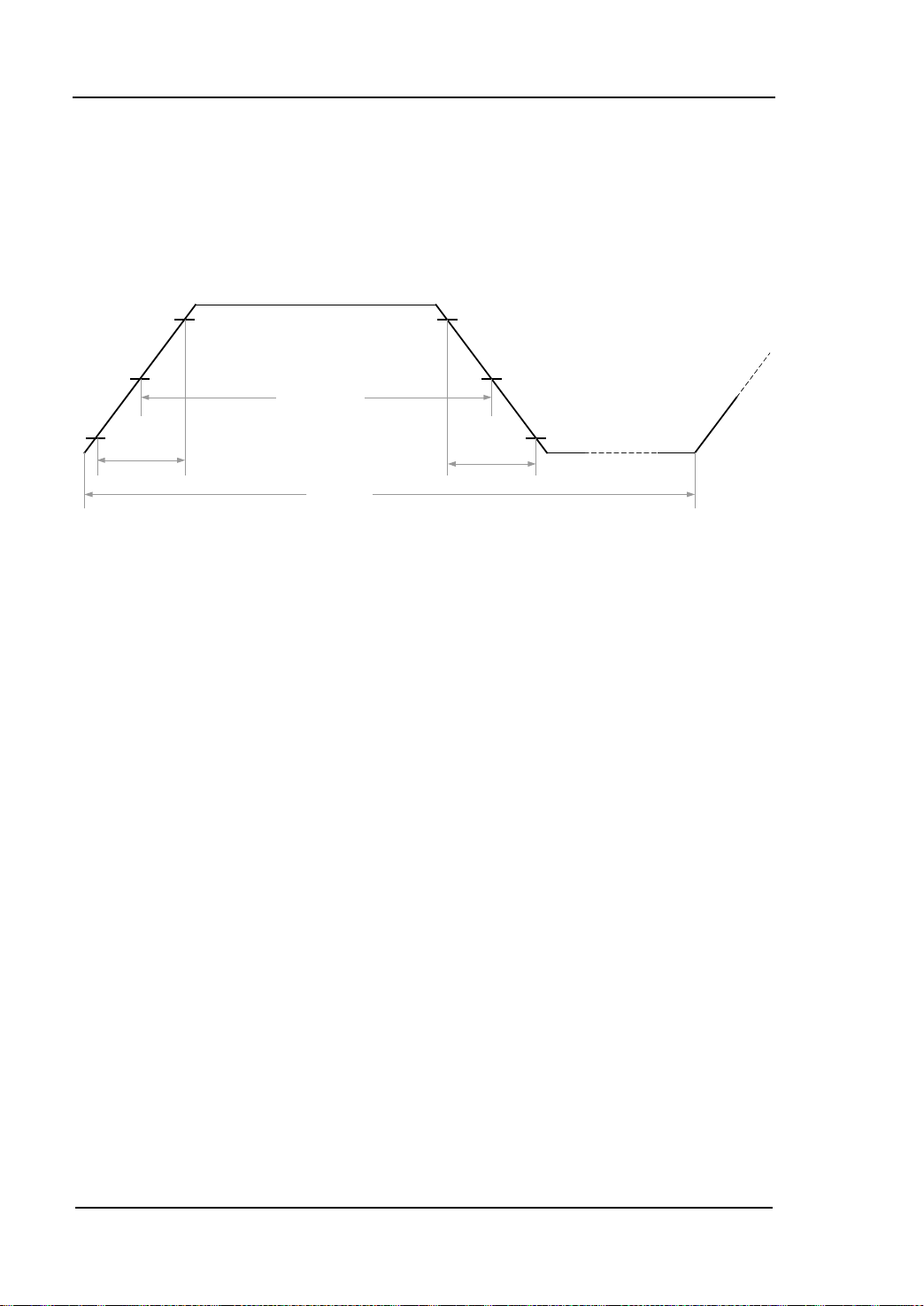
90% 90%
50% 50%
10% 10%
Pulse Width
Period
Rise Time
Fall Time
PULSe
PULSe commands are used for configuring the paramete rs of p ul se w aves from dual
channels, such as: period, pulse width, duty cycle and others . Follow ing fi gure is g oing
to help you comprehend the parameters about pulse wave.
DG1000 supports following PULSe commands:
1. PULSe:PERiod
2. PULSe:PERiod?
3. PULSe:WIDTh
4. PULSe:WIDTh?
5. PULSe:DCYCle
6. PULSe:DCYCle?
7. PULSe:PERiod:CH2
8. PULSe:PERiod:CH2?
9. PULSe:WIDTh:CH2
10. PULSe:WIDTh:CH2?
11. PULSe:DCYC:CH2
12. PULSe:DCYC:CH2?
Programming Guide for DG1000
Page 41
DG1000 Command System RIGOL
2-29
3. PULSe:WIDTh
6. PULSe:DCYCle?
7. PULSe:PERiod:CH2
Detailed information of each command:
1. PULSe:PERiod
Syntax PULSe:PERiod {<seconds>|MINimum|MAXimum}
Function Set the period of pulse output from CH1 in sec onds.
Example PULS:PER 0.01
2. PULSe:PERiod?
Syntax
Function
PULSe:PERiod? [MINimum|MAXimum]
Query the period of pulse output from CH1.
Return Value The query returns the pulse period in scientific notation and in
seconds, such as: 1.000000e-02.
Syntax
Function
Example
PULSe:WIDTh {<seconds>|MINimum|MAXimum}
Set the width of pulse for CH1 in seconds.
PULS:WIDT 0.005
4. PULSe:WIDTh?
Syntax PULSe:WIDTh? [MINimum|MAXimum]
Function
Query the width of pulse output from CH1.
Return Value The qurey returns the pulse width in scientific notation and in
seconds, such as: 5.000000e-03.
5. PULSe:DCYCle
Syntax PULSe:DCYCle {<percent>|MINimum|MAXimum}
Function
Example
Syntax
Function
Set the duty cycle of pulse for CH1.
PULS:DCYC 50
PULSe:DCYCle? [MINimum|MAXimum]
Query the duty cycle of pulse output from CH1.
Return Value The qurey returns the percent of duty cycle of pulse in scientific
notation, such as: 5.000000e+01.
Syntax
Programming Guide for DG1000
PULSe:PERiod:CH2 {<seconds>|MINimum|MAXimum}
Page 42
RIGOL DG1000 Command System
2-30
10. PULSe:WIDTh:CH2?
11. PULSe:DCYC:CH2
Function
Example
Set the period of pulse for CH2 in seconds.
PULS:PER:CH2 0.01
8. PULSe:PERiod:CH2?
Syntax PULSe:PERiod:CH2? [MINimum|MAXimum]
Function
Query the period of pulse output from CH2.
Return Value The qurey returns the peri o d of pu ls e in scientific notation and in
seconds, such as: 1.000000e-02.
9. PULSe:WIDTh:CH2
Syntax PULSe:WIDTh:CH2 {<seconds>|MINimum|MAXimum}
Function
Example
Syntax
Function
Set the pulse width for CH2 in sec onds.
PULS:WIDT:CH2 0.005
PULSe:WIDTh:CH2? [MINimum|MAXimum]
Query the pulse width of CH2.
Return Value The qurey returns the pulse width in scientific notation and in
seconds, such as: 5.000000e-03.
Syntax
Function
PULSe:DCYC:CH2 {<percent>|MINimum|MAXimum}
Set the duty cycle of pulse output from CH2.
Example PULS:DCYC:CH2 50
12. PULSe:DCYC:CH2?
Syntax
Function
PULSe:DCYC:CH2? [MINimum|MAXimum]
Query the duty cycle of pulse output from CH2.
Return Value The qurey returns the percent of duty cycle in scientific notation,
such as: 5.000000e+01.
Programming Guide for DG1000
Page 43

DG1000 Command System RIGOL
2-31
AM
In AM, the amplitude of carrier varies with the instantaneous voltage of the
modulating waveform. For DG1000, CH1 can output AM modulated waveform. AM
commands could be used f or these settings: modulation sou rce, modulating waveform,
modulating frequency, modulation depth and AM modulation state.
DG1000 supports following AM commands:
1. AM:SOURce
2. AM:SOURce?
3. AM:INTernal:FUNCtion
4. AM:INTernal:FUNCtion?
5. AM:INTernal:FREQuency
6. AM:INTernal:FREQuency?
7. AM:DEPTh
8. AM:DEPTh?
9. AM:STATe
10. AM:STATe?
Programming Guide for DG1000
Page 44
RIGOL DG1000 Command System
2-32
wave could be sine,
negative ramp , trian gle, noise or arbit rary w av e, the
Detailed information of each command:
1. AM:SOURce
Syntax AM:SOURce {INTernal|EXTernal}
Function Select internal or external modulation source, the default is INT.
Example AM:SOUR EXT
2. AM:SOURce?
Syntax
Function
AM:SOURce?
Query the modulation source of AM.
Return Value The query returns INT or EXT.
3. AM:INTernal:FUNCtion
Syntax AM:INTernal:FUNCtion
{SINusoid|SQUare|RAMP|NRAMp|TRIangle|NOISe|USER}
Function
Select the internal modulating wave of AM.
Explanation In internal modulation mode, the modulating
square, ramp,
default is sine.
Example AM:INT:FUNC SQU
4. AM:INTernal:FUNCtion?
Syntax
Function
AM:INTernal:FUNCtion?
Query the internal modulating wave selected .
Return Value The query returns SIN, SQU, RAMP, NRAM, TRI, NOIS or USER.
5. AM:INTernal:FREQuency
Syntax AM:INTernal:FREQuency {<frequency>|MINimum|MAXimum}
Function Set the frequency of AM internal modulation in Hz.
Explanation Frequency range: 2mHz to 20kHz
Example AM:INT:FREQ 200
6. AM:INTernal:FREQuency?
Syntax
Function
AM:INTernal:FREQuency?
Query the frequency of AM internal modulation.
Return Value The query returns the frequency of AM internal modulation in
scientific notation and the default unit is Hz, such as:
Programming Guide for DG1000
Page 45
DG1000 Command System RIGOL
2-33
9. AM:STATe
2.000000e+02.
7. AM:DEPTh
Syntax AM:DEPTh {<depth percent>|MINimum|MAXimum}
Function Set the depth of AM internal modulation in percent.
Explanation Depth range: 0% to 120%
Example
AM:DEPT 70
8. AM:DEPTh?
Syntax
Function
AM:DEPTh? [MINimum|MAXimum]
Query the depth of AM internal modulation.
Return Value The qurey returns the percent of the depth of AM internal
modulation in scientific notation, such a s: 7.000000e+01.
Syntax
Function
AM:STATe {OFF|ON}
Disable or enable AM function.
Example AM:STAT OFF
10. AM:STATe?
Syntax AM:STATe?
Function
Query the modulation state of AM .
Return Value The query returns OFF or ON.
Programming Guide for DG1000
Page 46

RIGOL DG1000 Command System
2-34
FM
In FM, the frequency of carrier varies with the instantaneous voltage of the
modulating waveform. For DG1000, CH1 can output FM modulated waveform. FM
commands could be used f or these settings: modulation s ource, modulating waveform,
modulating frequency, frequency deviation and FM modulation state.
DG1000 supports following FM commands:
1. FM:SOURce
2. FM:SOURce?
3. FM:INTernal:FUNCtion
4. FM:INTernal:FUNCtion?
5. FM:INTernal:FREQuency
6. FM:INTernal:FREQuency?
7. FM:DEViation
8. FM:DEViation?
9. FM:STATe
10. FM:STATe?
Programming Guide for DG1000
Page 47
DG1000 Command System RIGOL
2-35
wave could be sine,
amp, triangle, n oise or a rbitrar y wa ve, the
Detailed information of each command:
1. FM:SOURce
Syntax FM:SOURce {INTernal|EXTernal}
Function Select internal or external modulation source, the default is INT.
Example FM:SOUR EXT
2. FM:SOURce?
Syntax
Function
FM:SOURce?
Query the modulation source of FM.
Return Value The query returns INT or EXT.
3. FM:INTernal:FUNCtion
Syntax FM:INTernal:FUNCtion
{SINusoid|SQUare|RAMP|NRAMp|TRIangle|NOISe|USER}
Function
Select the internal modulating wave of FM.
Explanation In internal modulation mode, the modulating
square, ramp, negative r
default is sine.
Example FM:INT:FUNC SQU
4. FM:INTernal:FUNCtion?
Syntax
Function
FM:INTernal:FUNCtion?
Query the internal modulating wave selected .
Return Value The query returns SIN, SQU, RAMP, NRAM, TRI, NOIS or USER.
5. FM:INTernal:FREQuency
Syntax FM:INTernal:FREQuency {<frequency>|MINimum|MAXimum}
Function Set the frequency of FM internal modulation in Hz.
Explanation Frequency range: 2mHz to 20kHz
Example FM:INT:FREQ 200
6. FM:INTernal:FREQuency?
Syntax
Function
FM:INTernal:FREQuency?
Query the frequency of FM internal modulation.
Return Value The query returns the frequency of FM internal modulation in the
scientific notation and the default unit is Hz, such as:
Programming Guide for DG1000
Page 48
RIGOL DG1000 Command System
2-36
9. FM:STATe
2.000000e+02.
7. FM:DEViation
Syntax FM:DEViation{<frequency deviation> |MINimum|MAXimum}
Function Set the frequency deviation of FM in Hz.
Example
FM:DEV 100
8. FM:DEViation?
Syntax
Function
FM:DEViation? [MINimum|MAXimum]
Query the frequency deviation of FM.
Return Value The query returns the frequency deviation of FM in the scientific
notation and in Hz, such as: 1.000000e+02
Syntax
Function
Example
FM:STATe {OFF|ON}
Disable or enable FM function.
FM:STAT OFF
10. FM:STATe?
Syntax FM:STATe?
Function Query the modulation state of FM.
Return Value The query returns OFF or ON.
Programming Guide for DG1000
Page 49

DG1000 Command System RIGOL
2-37
PM
In PM, the phase of carrier varies with the instantaneous voltage of the modulating
waveform. For DG1000, CH1 can output PM modulated waveform. PM commands
could be used for these settings: modulation source, modulating waveform,
modulating frequency, phase deviation and PM modulation state.
DG1000 supports following PM commands:
1. PM:SOURce
2. PM:SOURce?
3. PM:INTernal:FUNCtion
4. PM:INTernal:FUNCtion?
5. PM:INTernal:FREQuency
6. PM:INTernal:FREQuency?
7. PM:DEViation
8. PM:DEViation?
9. PM:STATe
10. PM:STATe?
Programming Guide for DG1000
Page 50
RIGOL DG1000 Command System
2-38
wave could be sine,
gative ramp , triangle, noise or arbitr ary w av e, the
Detailed information of each command:
1. PM:SOURce
Syntax PM:SOURce {INTernal|EXTernal}
Function Select internal or external modulation source, the default is INT.
Example PM:SOUR EXT
2. PM:SOURce?
Syntax
Function
PM:SOURce?
Query the modulation source of PM.
Return Value The query returns INT or EXT.
3. PM:INTernal:FUNCtion
Syntax PM:INTernal:FUNCtion
{SINusoid|SQUare|RAMP|NRAMp|TRIangle|NOISe|USER}
Function
Select the internal modulating wave of PM.
Explanation In internal modulation mode, the modulating
square, ramp, ne
default is sine.
Example PM:INT:FUNC SQU
4. PM:INTernal:FUNCtion?
Syntax
Function
PM:INTernal:FUNCtion?
Query the internal modulating wave selected .
Return Value The query returns SIN, SQU, RAMP, NRAM, TRI, NOIS or USER.
5. PM:INTernal:FREQuency
Syntax PM:INTernal:FREQuency {<frequency>|MINimum|MAXimum}
Function Set the frequency of PM internal modulation in Hz.
Explanation Frequency range: 2mHz to 20kHz
Example PM:INT:FREQ 200
6. PM:INTernal:FREQuency?
Syntax
Function
PM:INTernal:FREQuency?
Query the frequency of PM internal modulation.
Return Value The query returns the frequency of PM internal modulation in
scientific notation and the default unit is Hz, such as:
Programming Guide for DG1000
Page 51
DG1000 Command System RIGOL
2-39
9. PM:STATe
2.000000e+02.
7. PM:DEViation
Syntax PM:DEViation {<phase deviation>|MINimum|MAXimum}
Function Set the phase deviation of PM in degree.
Explanation Phase deviation range: 0° to 360°
Example PM:DEV 180
8. PM:DEViation?
Syntax
Function
PM:DEViation? [MINimum|MAXimum]
Query the phase deviation of PM.
Return Value The query returns the phase deviation of PM in scientific notation
and in degree, s u ch as : 1.800000e+02.
Syntax
Function
PM:STATe {OFF|ON}
Disable or enable PM function.
Example PM:STAT OFF
10. PM:STATe?
Syntax PM:STATe?
Function
Query the modulation state of PM.
Return Value The query returns OFF or ON.
Programming Guide for DG1000
Page 52

RIGOL DG1000 Command System
2-40
FSKey
In FSK modulation, you can configure the generator to “shift” its output frequency
between two preset frequencies (called the “carrier frequency” and the “hop
frequency”). The frequency at which the output frequency shifts between the carrier
frequency and the hop frequency is called “FSK rate”. FSK rate is determined by
internal modulating frequency or signal level at the [Ext Trig/FSK/Burst] connector on
the rear panel.
For DG1000, CH1 can output FSK modulated waveform. FSK commands could be
used for these settings: modulation source, hop frequency, FSK rate and FSK
modulation state. DG1000 supports following FSK commands:
1. FSK:SOURce
2. FSK:SOURce?
3. FSK:FREQuency
4. FSK:FREQuency?
5. FSK:INTernal:RATE
6. FSK:INTernal:RATE?
7. FSK:STATe
8. FSK:STATe?
Programming Guide for DG1000
Page 53
DG1000 Command System RIGOL
2-41
5. FSK:INTernal:RATE
the rate at which the output frequency “shifts” between the
6. FSK:INTernal:RATE?
Detailed information of each command:
1. FSK:SOURce
Syntax FSK:SOURce {INTernal|EXTernal}
Function Select internal or external modulation source, the default is INT.
Example FSK:SOUR EXT
2. FSK:SOURce?
Syntax
Function
FSK:SOURce?
Query the modulation source of FSK.
Return Value The query returns INT or EXT.
3. FSK:FREQuency
Syntax FSK:FREQuency {<frequency>|MINimum|MAXimum}
Function Set the hop frequency of FSK in Hz.
Example FSK:FREQ 10
4. FSK:FREQuency?
Syntax
Function
FSK:FREQuency?
Query the hop frequency of FSK.
Return Value The query returns the hop frequenc y of FSK in scientific notation
and in Hz, such as: 1.000000e+01.
Syntax
FSK:INTernal:RATE {<rate>|MINimum|MAXimum}
Function Set
carrier and hop frequencies, the unit is Hz.
Explanation Rate range: 2mHz to 50kHz
Example
Syntax
FSK:INT:RATE 100
FSK:INTernal:RATE?
Function Query the FSK rate.
Return Value The query returns the FSK ratein scientific notation, such as:
1.000000e+02.
7. FSK:STATe
Programming Guide for DG1000
Page 54
RIGOL DG1000 Command System
2-42
Syntax
Function
Example
FSK:STATe {OFF|ON}
Disable or enable FSK function.
FSK:STAT OFF
8. FSK:STATe?
Syntax
Function
FSK:STATe?
Query the modulation state of FSK.
Return Value The query returns OFF or ON.
Programming Guide for DG1000
Page 55

DG1000 Command System RIGOL
2-43
SWEep
In frequency sweep mode, the generator “steps” from the start frequency to the stop
frequ enc y at the specif ied sweep rate. You can sweep up or do wn in frequ ency with
either linear or logarithmic spacing.
In addition, you can conf ig ure the generator to output a single sweep (sweep from
start frequency to stop frequency) by applying an external or manual trigger. The
generator can produce a frequency sweep for sine, square, ramp or arbitrary
waveforms (pulse, noise, and DC are not allowed) from CH1.
DG1000 supports following SWEep commands:
1. SWEep:SPACing
2. SWEep:SPACing?
3. SWEep:TIME
4. SWEep:TIME?
5. SWEep:STATe
6. SWEep:STATe?
Programming Guide for DG1000
Page 56
RIGOL DG1000 Command System
2-44
he default is
3. SWEep:TIME
6. SWEep:STATe?
Detailed information of each command:
1. SWEep:SPACing
Syntax SWEep:SPACing {LINear|LOGarithmic}
Function Select linear or logarithmic spacing for the sweep, t
Linear.
Example
SWE:SPAC LIN
2. SWEep:SPACing?
Syntax SWEep:SPACing?
Function Query the current sweep mode.
Return Value The query returns LINEAR or LOG.
Syntax
SWEep:TIME {<seconds>|MINimum|MAXimum}
Function Set the sweep time needed for the generator to sweep from the
start frequency to the stop frequency, the default time is 1 s .
Explanation <seconds> is the sweep time set by users, the unit is s.
MIN=1ms, MAX=500s.
Example SWE:TIME 10
4. SWEep:TIME?
Syntax
SWEep:TIME?
Function Query the sweep time needed for the generator to sweep from the
start frequency to the stop frequency.
Return Value The query returns t he sweep t ime in scientific notation and in
seconds, such as: 1.000000e+01.
5. SWEep:STATe
Syntax SWEep:STATe {OFF|ON}
Function
Example
Disable or enable the sweep mode.
SWE:STAT OFF
Syntax
Function
Return Value The query returns OFF or ON.
SWEep:STATe?
Query the sweep state.
Programming Guide for DG1000
Page 57

DG1000 Command System RIGOL
2-45
TRIGger
TRIGger commands are only available in Sweep and Burst mode. As only CH1
supports sweep and burst modes, TRIGger commands are only applicable to CH1.
DG1000 supports following TRIGger commands:
1. TRIGger:SOURce
2. TRIGger:SOURce?
3. TRIGger:SLOPe
4. TRIGger:SLOPe?
5. TRIGger:DELay
6. TRIGger:DELay?
Programming Guide for DG1000
Page 58
RIGOL DG1000 Command System
2-46
internal trigger
5. TRIGger:DELay
Set the trigger delay in seconds. Note: this command is only
6. TRIGger:DELay?
Detailed information of each command:
1. TRIGger:SOURce
Syntax TRIGger:SOURce {IMMediate|EXTernal|BUS}
Function Select the trigger source for generator, including
(IMM), external trigger (EXT) from the [Ext Trig/FSK/Burst]
connector on the rear panel and manual trig ger (BUS). The default
is IMM.
Example TRIG:SOUR EXT
2. TRIGger:SOURce?
Syntax
Function
TRIGger:SOURce?
Query the trigger source of generator.
Return Value The query returns IMM, EXT or BUS.
3. TRIGger:SLOPe
Syntax
TRIGger:SLOPe {POSitive|NEGative}
Function Set the generator to use the rising edge (POS) or falling edge
(NEG) of the trigger signal from the [Ext Trig/FSK/Burst] connector
on the rear panel. The default is POS (rising edge).
Explanation This command could be used only when OUTPut:TRIGger is
enabled.
Example TRIG:SLOP POS
4. TRIGger:SLOPe?
Syntax
Function
TRIGger:SLOPe?
Query the edge selected for trigger signal .
Return Value The query returns POS or NEG.
Syntax
TRIGger:DELay {<second>|MINimum|MAXimum}
Function
applicable to Burst mode.
Example
Syntax
TRIG:DEL 0.000005
TRIGger:DELay?
Programming Guide for DG1000
Page 59
DG1000 Command System RIGOL
2-47
Function
Query the trigger delay.
Return Value The query returns the selected delay time in scientific notation and
in seconds, such as: 5.000000e-06.
Programming Guide for DG1000
Page 60

RIGOL DG1000 Command System
2-48
BURSt
BURSt commands are used for setting the generator to output waveforms (called
burst) with specified cycles. DG1000 c an generate bu rst using sine, squar e, ramp,
pulse or arbitrary waveform and output it from CH1.
DG1000 supports following BURSt commands:
1. BURSt:MODE
2. BURSt:MODE?
3. BURSt:NCYCles
4. BURSt:NCYCles?
5. BURSt:INTernal:PERiod
6. BURSt:INTernal:PERiod?
7. BURSt:PHASe
8. BURSt:PHASe?
9. BURSt:STATe
10. BURSt:STATe?
11. BURSt:GATE:POLarity
12. BURSt:GATE:POLarity?
Programming Guide for DG1000
Page 61
DG1000 Command System RIGOL
2-49
3. BURSt:NCYCles
Detailed information of each command:
1. BURSt:MODE
Syntax BURSt:MODE {TRIGgered|GATed}
Function Set the burst mode to trigger (TRIGgered) or gated (GATed).
Explanations In trigger mode, t he gene r ator outputs a w a ve wit h s pecified
number of cycles once it receives a trigger from the specified
trigger source (via sending TRIGger:SOURce).
In gated mode, the output state of waves (“ON” or “OFF”)
depends on the external signal level at the [Ext
Trig/FSK/Burst] connector on the rear pan e l.
The default burst mode is trigger.
Example BURS:MODE GAT
2. BURSt:MODE?
Syntax BURSt:MODE?
Function
Query the burst mode.
Return Value The query returns TRIG or GAT.
Syntax
Function
BURSt:NCYCles {<cycle>|INFinity|MINimum|MAXimum}
Set the cycle number of burst (only used in triggermode).
Explanations <cycle> is the cycle number set by users.
MIN=1, MAX=50,000, INF is infinite.
Example
BURS:NCYC 100
4. BURSt:NCYCles?
Syntax BURSt:NCYCles?
Function Query the cycle number of burst.
Return Value The query returns the burst counting in scientific notation (such
as 1.000000e+02) or returns “Infinite”.
5. BURSt:INTernal:PERiod
Syntax BURSt:INTernal:PERiod {<second>|MINimum|MAXimum}
Function Set the period of burst in internal trigger mode.
Explanations <second> is the burst period set by users, the default unit is
s.
Programming Guide for DG1000
Page 62
RIGOL DG1000 Command System
2-50
conncetor on the rear panel, the default is
MIN=0.000001, MAX=500.
Example
BURS:INT:PER 10
6. BURSt:INTernal:PERiod?
Syntax BURSt:INTernal:PERiod? [MINimum|MAXimum]
Function
Query the period of burst in internal trigger mode.
Return Value The query returns the burst period in scientific notation and the
default unit is s, such as: 1.000000e+01.
7. BURSt:PHASe
Syntax BURSt:PHASe {<angle>|MINimum|MAXimum}
Function
Set the initial phase of burst.
Explanations <angle> is the phase set by users, the default unit is degree.
MIN=-180, MAX=180.
Example BURS:PHAS 150
8. BURSt:PHASe?
Syntax
Function
BURSt:PHASe? [MINimum|MAXimum]
Query the initial phase of burst.
Return Value The query returns the initial phase of burst in scientific notation
and the default unit is degree, such as: 1.500000e+02.
9. BURSt:STATe
Syntax
Function
Example
BURSt:STATe {OFF|ON}
Enable or disable burst mode.
BURS:STAT OFF
10. BURSt:STATe?
Syntax BURSt:STATe?
Function Query the state of burst mode.
Return Value The query returns OFF or ON.
11. BURSt:GATE:POLarity
Syntax
BURSt:GATE:POLarity {NORMal|INVerted}
Function Set the polarity of external gated signal at the [Ext
Trig/FSK/Burst]
NORMal.
Programming Guide for DG1000
Page 63
DG1000 Command System RIGOL
2-51
Example
BURS:GATE:POL INV
12. BURSt:GATE:POLarity?
Syntax BURSt:GATE:POLarity?
Function Query the polarity of external gated signal from the rear panel.
Return Value The query returns NORM or INV.
Programming Guide for DG1000
Page 64

RIGOL DG1000 Command System
2-52
DATA
DATA commands are used for editing or saving arbitrary waves and outputing those
waves via CH1. You can store ten user-def ined waveforms at most in non-volatile
memory in addition to one in volatile memory. Each waveform can contain 1 to
524,288 data points.
DG1000 supports following DATA commands:
1. DATA
2. DATA:DAC
3. DATA:COPY
4. DATA:DELete
5. DATA:CATalog?
6. DATA:RENAME
7. DATA:NVOLatile:CATalog?
8. DATA:NVOLatile:FREE?
9. DATA:ATTRibute:POINts?
10. DATA:LOAD
Programming Guide for DG1000
Page 65
DG1000 Command System RIGOL
2-53
m to
fter downloading the waveform
2. DATA:DAC
command to copy the waveform to
fter downloading the waveform
Detailed information of each command:
1. DATA
Syntax DATA VOLATILE,<value>, <value>, . . .
Function Load the floating point numbers between -1 and 1 into volatile
memory.
Explanations The DATA command would overwrit e the previous waveform
in volatile memory (doe s not generate e rror).
Use the DATA:COPY
command to copy the wavefor
non-volatile memory.
Use the DATA:DELete command to delete the waveform in
volatile memor y or any of the ten user-def ined waveforms in
nonvolatile memory.
Use the DATA:CATalog? command to list all waveforms
currently stored in volatile and non-volatile memories.
Use the FUNCtion:USER
command t o output the waves th a t
have been edited and stored a
data to memory.
Example
DATA VOLATILE,1,0.67,0.33,0,-0.33,-0.67,-1
Syntax
DATA:DAC VOLATILE,<value>, <value>, . . .
Function Download decimal integer values from 0 to 16383 into volatile
memory. Wherein, 0 and 16383 correspond to the minimum
amplitude and maximum amplitude respectively.
Explanations The DATA:DAC command would overwrite the previous
waveform in volatile memory ( does not generate error).
Use the DATA:COPY
non-volatile memory.
Use the DATA:DELete command to delete the waveform in
volatile memor y or any of the ten user-def ined waveforms in
nonvolatile memory.
Use the DATA:CATalog? command to list all waveforms
currently stored in volatile and non-volatile memories.
Use the FUNCtion:USER
command t o output the waves th a t
have been edited and stored a
data to memory.
Programming Guide for DG1000
Page 66
RIGOL DG1000 Command System
2-54
The arb name may contain up to 12 characters. The first
), the remaining
command to delete the waveform in
command to list all waveforms
6. DATA:RENAME
Example
DATA:DAC VOLATILE,8192,16383,8192,0
3. DATA:COPY
Syntax DATA:COPY < destination arb name >[,VOLATILE]
Function Copy the waveform from volatile memory to the specified
non-volatile memory.
Explanations
character must be a letter (A-Z or a-z
characters can be numbers (0-9) or th e underscore c haracter
(“_”). Blank space is invalid.
The VOLATILE parameter is optional and can be omitted. Note
that the keyword “VOLATILE” does not have abbreviation.
Use the DATA:DELete
volatile m emory or any of the ten user-def ined waveforms in
non-volatile memory.
Use the DATA:CATalog?
currently stored in volatile and non-volatile memories.
Example DATA:COPY a1,VOLATILE
4. DATA:DELete
Syntax DATA:DELete <arb name>
Function Delete the specified arbitrary waveform from either volatile
memory or non-volatile memory.
Example DATA:DEL a1
5. DATA:CATalog?
Syntax
Function
DATA:CATalog?
Query the names of all wa vef orms currentl y av ailabl e for selection.
Return Value The query returns the names of the five built-in waveforms
(non-volatile memory), “VOLATILE” (if a waveform is currently
downloaded to volatile memory), and all user-defi ned waveforms
downloaded t o non-volatile memory, such as:
"VOLATILE","EXP_RISE","EXP_FALL","NEG_RAMP", "SINC",
"CARDIAC","A","B","C","D","E","F","G","H","I","J".
Syntax
DATA:RENAME <destination arb name>,<new arb name>
Programming Guide for DG1000
Page 67
DG1000 Command System RIGOL
2-55
defined arbitrary waveforms
8. DATA:NVOLatile:FREE?
Function
Example
Rename user-defined arbitrary waves in non-volatile memory.
DATA:RENAME A, new
7. DATA:NVOLatile:CATalog?
Syntax DATA:NVOLatile:CATalog?
Function Query the names of all user-
downlo aded to non-volat i le m em ory.
Return Value The query returns the names (enclosed in quotation marks) of up
to 10 waveforms, such as: "A","B","C","D","E","F","G","H","I","J".
Syntax
DATA:NVOLatile:FREE?
Function Query the number of locations available for saving user-defined
waveforms in non-volatile memory.
Return Value The query returns 0 (the memory is full), 1, 2, 3, 4, 5, 6, 7, 8, 9 or
10.
9. DATA:ATTRibute:POINts?
Syntax
Function
DATA:ATTRibute:POINts? <destination arb name>
Query the number of points in the specified arbitrary waveform.
Return Value The query returns a value within 0 and 524,288, such as: 4096.
10. DATA:LOAD
Syntax DATA:LOAD [<destination arb name>]
Function Upload the specified arbitrary wave to the application software.
Programming Guide for DG1000
Page 68

RIGOL DG1000 Command System
2-56
MEMory
The generator has 10 storage locations (STATE1 to STATE10) in non-volatile memory
to store instrument states. The locations are numbered from 1 to 10. Lo cation 0 is
volatile memory and the generator automatically use s locatio n “0” to h old t he sta te of
the instrument at power-down. MEMory commands can be used to read the location
names, delete the stored instrument states, automatically recall instrument state and
query the available storage locations. You can also assign a user-defined na me to
each of the locations (1 to 10) from the front panel.
DG1000 supports following MEMory commands:
1. MEMory:STATe:NAME
2. MEMory:STATe:NAME?
3. MEMory:STATe:DELete
4. MEMory:STATe:RECall:AUTO
5. MEMory:STATe:RECall:AUTO?
6. MEMory:STATe:VALid?
7. MEMory:NSTates?
Programming Guide for DG1000
Page 69
DG1000 Command System RIGOL
2-57
3. MEMory:STATe:DELete
down state
N” to
Query the specified storage location to determine if a valid state
Detailed information of each command:
1. MEMory:STATe:NAME
Syntax MEMory:STATe:NAME {0|1|2|3|4|5|6|7|8|9|10} [,<name>]
Function Assign a user-defined name for specified memory location.
Example MEM:STAT:NAME 1,A1
2. MEMory:STATe:NAME?
Syntax
Function
MEMory:STATe:NAME? {0|1|2|3|4|5|6|7|8|9|10}
Query the name of specified memory location.
Return Value The query returns the name of specified memory location such as
A1. If no name was assigned, the return is empty.
Syntax
Function
Example
MEMory:STATe:DELete {0|1|2|3|4|5|6|7|8|9|10}
Delete the contents in specified memory location.
MEM:STAT:DEL 1
4. MEMory:STATe:RECall:AUTO
Syntax MEMory:STATe:RECall:AUTO {OFF| ON}
Function Disable or enable the automatic recall of the power-
from storage location “0” at power-on. Select “O
automatically recall power-down state at power-on and select
“OFF” (default) to execute a reset.
Example MEM:STAT:REC:AUTO OFF
5. MEMory:STATe:RECall:AUTO?
Syntax
Function
MEMory:STATe:RECall:AUTO?
Query the power-down recall state
Return Value The query returns OFF or ON.
6. MEMory:STATe:VALid?
Syntax MEMory:STATe:VALid? {0|1|2|3|4|5|6|7|8|9|10}
Function
has already been stored in that location.
Return Value Return “0” if no state has been stored or if it has been deleted. or
else return “1 ”.
Programming Guide for DG1000
Page 70
RIGOL DG1000 Command System
2-58
Query the total number of memory locations available for state
7. MEMory:NSTates?
Syntax
MEMory:NSTates?
Function
storage.
Return Value Always return “11” (including memory location “0”).
Programming Guide for DG1000
Page 71

DG1000 Command System RIGOL
2-59
SYSTem
SYSTem commands provide information about state storage, power-down recall,
error state and s creen control of the front panel as well as other information about the
instrument.
DG1000 supports following SYSTem commands:
1. SYSTem:ERRor?
2. SYSTem:VERSion?
3. SYSTem:BEEPer:STATe
4. SYSTem:BEEPer:STATe?
5. SYSTem:LOCal
6. SYSTem:RWLock
7. SYSTem:REMote
8. SYSTem:CLKSRC
9. SYSTem:LANGuage
Programming Guide for DG1000
Page 72
RIGOL DG1000 Command System
2-60
when error occurs on front panel or
5. SYSTem:LOCal
dicator and unlock the front
6. SYSTem:RWLock
Detailed information of each comman d:
1. SYSTem:ERRor?
Syntax SYSTem:ERRor?
Function Read and clear an error from error queue.
Return Value The query returns an error informatio n in following format:
-118,"Invalid parameter"
2. SYSTem:VERSion?
Syntax SYSTem:VERSion?
Function Query the current edition number of the instrument.
Return Value The query returns a character string in following format:
00.02.00.06.00.02.06
3. SYSTem:BEEPer:STATe
Syntax
SYSTem:BEEPer:STATe {OFF|ON}
Function Enable or disable the beep
remote interface.
Example SYST:BEEP:STAT OFF
4. SYSTem:BEEPer:STATe?
Syntax
Function
SYSTem:BEEPer:STATe?
Query the state of beeper.
Return Value The query returns 0 (OFF) or 1 (ON).
Syntax
Function Activate local state, delete RMT in
Syntax
Function Activate remote state with locking function, display R-LOCK
7. SYSTem:REMote
Syntax
SYSTem:LOCal
panel.
SYSTem:RWLock
indicator and lock the front panel (including the Local button)
SYSTem:REMote
Programming Guide for DG1000
Page 73
DG1000 Command System RIGOL
2-61
epts the
Function Activate remote state, display RMT indicator and lock the front
panel (except the Local button) .
8. SYSTem:CLKSRC
Syntax
SYSTem:CLKSRC {EXT|INT}
Function Select the system clock source as internal or external, the default
is INT.
Explanation When external clock source is activated, the system acc
clock source from [10 MHz In] connector on the rear panel.
Example SYST:CLKSRC EXT
9. SYSTem:LANGuage
Syntax
Function
Example
SYSTem:LANGuage {CHINESE|ENGLISH}
Select the system language as Chinese or English.
SYST:LANG CHINESE
Programming Guide for DG1000
Page 74

RIGOL DG1000 Command System
2-62
PHASe
PHASe commands are us ed for setting the initial phase of signals from each channel
and setting the align phase output of dual channels.
DG1000 supports following PHASe commands:
1. PHASe
2. PHASe?
3. PHASe:CH2
4. PHASe:CH2?
5. PHASe:ALIGN
Programming Guide for DG1000
Page 75
DG1000 Command System RIGOL
2-63
5. PHASe:ALIGN
Detailed information of each command:
1. PHASe
Syntax PHASe {<angle>|MINimum|MAXimum}
Function Set the initial phase of signals output from CH1.
Explanation <angle> is the phase set by users, the default unit is degree.
MIN=-180°, MAX=180°。
Return Value PHAS 90
2. PHASe?
Syntax PHASe? [MINimum|MAXimum]
Function
Query the initial phase of signals output from CH1.
Return Value The query returns any numerical value between -180 and 180,
such as: 90.000.
3. PHASe:CH2
Syntax
Function
PHASe:CH2 { <angle>|MINimum|MAXimum}
Set the initial phase of signals output from CH2.
Explanation <angle> is the phase set by users, the default unit is degree.
MIN=-180, MAX=180.
Return Value PHAS:CH2 90
4. PHASe:CH2?
Syntax
Function
PHASe:CH2? [MINimum|MAXimum]
Query the initial phase of signals output from CH2.
Return Value The query returns any numerical value between -180 and 180,
such as: 90.000.
Syntax
Function
Programming Guide for DG1000
PHASe:ALIGN
Enable the align phase output of dual channels.
Page 76
RIGOL DG1000 Command System
2-64
DISPlay
DISPlay commands are used for controlling the display of front panel.
DG1000 supports following DISPlay commands:
1. DISPlay
2. DISPlay:CONTRAST
3. DISPlay:LUMINANCEDISPlay:LUMINANCE
Detailed information of each command:
1. DISPlay
Syntax
Function
Example
2. DISPlay:CONTRAST
Syntax
Function Set the contrast of display within 0 and 31.
Example DISP:CONTRAST 25
3. DISPlay:LUMINANCE
Syntax
Function
Example
DISPlay {OFF|ON}
Enable or disable the display function of front panel.
DISP OFF
DISPlay:CONTRAST <value>
DISPlay:LUMINANCE <value>
Set the luminance of display within 0 and 31.
DISP:LUMINANCE 25
Programming Guide for DG1000
Page 77

DG1000 Command System RIGOL
2-65
COUPling
COUPling comm and s are us ed for channel coupling or copying.
DG1000 supports following COUPling commands:
1. COUPling
2. COUPling?
3. COUPling:BASEdchannel
4. COUPling:BASEdchannel?
5. COUPling:PHASEDEViation
6. COUPling:PHASEDEViation?
7. COUPling:FREQDEViation
8. COUPling:FREQDEViation?
9. COUPling:CHANNCopy
Programming Guide for DG1000
Page 78
RIGOL DG1000 Command System
2-66
unit is
Detailed information of each command:
1. COUPling
Syntax COUPling {OFF|ON}
Function Enable or disable coupling function.
Example COUP OFF
2. COUPling?
Syntax
Function
COUPling?
Query the coupling state.
Return Value The query returns OFF or ON.
3. COUPling:BASEdchannel
Syntax COUPling:BASEdchannel{:CH1|:CH2}
Function Select the base channel of channel coupling.
Example COUP:BASE:CH1
4. COUPling:BASEdchannel?
Syntax
Function
COUPling:BASEdchannel?
Query the base channel selected.
Return Value The query returns CH1 or CH2.
5. COUPling:PHASEDEViation
Syntax COUPling:PHASEDEViation <value>
Function Set the phase deviation of channel coupling, the default
degree.
Explanation <value>: -180° to 180
Example COUP:PHASEDEV 10
6. COUPling:PHASEDEViation?
Syntax COUPling:PHASEDEViation?
Function
Query the phase deviation.
Return Value The query returns the phase deviation in scientific notation and the
default unit is degree, such as: 1.000000e+01.
7. COUPling:FREQDEViation
Syntax
COUPling:FREQDEViation <value>
Programming Guide for DG1000
Page 79
DG1000 Command System RIGOL
2-67
and the default
Function Set the frequency deviation of channel coupling
unit is Hz.
Explanation <value>: 0Hz to 20MHz
Example
COUP:FREQDEV 100
8. COUPling:FREQDEViation?
Syntax
COUPling:FREQDEViation?
Function Query the frequenc y devia ti on.
Return Value The query returns the frequency deviation in scientific notation
and the default unit is Hz, such as: 1.000000e+02.
9. COUPling:CHANNCopy
Syntax COUPling:CHANNCopy {1>2|2>1}
Function Copy CH1 to CH2 or copy CH2 to CH1.
Example COUP:CHANNC 1>2
Programming Guide for DG1000
Page 80

RIGOL DG1000 Command System
2-68
COUNter
COUNter commands are used to enable the counter and set or query related
parameters.
DG1000 supports following COUNter commands:
1. COUNter
2. COUNter:COUPling
3. COUNter:COUPling?
4. COUNter:SENSitivity
5. COUNter:SENSitivity?
6. COUNter:TLEVel
7. COUNter:TLEVel?
8. COUNter:HFRS
9. COUNter:HFRS?
10. COUNter:FREQuency?
11. COUNter:PERiod?
12. COUNter:DCYCle?
13. COUNter:POSWidth?
14. COUNter:NEGWidth?
Programming Guide for DG1000
Page 81
DG1000 Command System RIGOL
2-69
, namely the
. For example, if the input value is
Detailed information of each command:
1. COUNter
Syntax COUNter {OFF|ON}
Function Disable or enable the counter.
Example COUN ON
2. COUNter:COUPling
Syntax COUNter:COUPling {AC|DC}
Function Set the coupling mode to AC or DC.
Example COUN:COUP AC
3. COUNter:COUPling?
Syntax COUNter:COUPling?
Function Query the coupling mode selected.
Return Value The query returns AC or DC.
4. COUNter:SENSitivity
Syntax COUNter:SENSitivity {LOW|M ED IUM|HIGH}
Function Set the trigger sensitivity to High, Medium or Low.
Example COUN:SENS HIGH
5. COUNter:SENSitivity?
Syntax COUNter:SENSitivity?
Function Query the trigger sensitivity selected.
Return Value The query returns LOW, MEDIUM or HIGH.
6. COUNter:TLEVel
Syntax COUNter:TLEVel {MIN|MAX|<value>}
Function Set the trigger level.
Explanations <value> is a consecutiv e real number parameter and its range
is from 0.0 to 99.9, wh erein MIN=0.0 and MAX=99.9.
The trigger level (-3V to +3V) is equally divided into 1000 (0.0
to 99.9) segments and each segment is 6mV
regulation interval is 6mV
“62.0”, the trigger level is -3V +(62.0 / 0.1)× 6mV = 0.72V.
Example COUNter:TLEVel 62
Programming Guide for DG1000
Page 82
RIGOL DG1000 Command System
2-70
frequency signal with frequency lower than
frequency signal with frequency lower than
frequency reject when measuring
10. COUNter:FREQuency?
7. COUNter:TLEVel?
Syntax COUNter:TLEVel?
Function Query the trigger level set.
Return Value The query returns the trigger level currently set in decimal format,
such as: 62.000000.
8. COUNter:HFRS
Syntax COUNter:HFRSl {ON|OFF}
Function Enable or disable high-frequency reject.
Explanation When measuring low-
1kHz, enbale high-frequency reje ct to filter out the high-frequency
noise; disable high-frequency reject when measuring
high-frequency signal with frequency greater than 1kHz.
Example COUNter:HFRS ON
9. COUNter:HFRS?
Syntax COUNter:HFRS?
Function Query the state of high-fr equency reject.
Explanation Whe n measuring low-
1kHz, enbale high-frequency re ject t o filte r out the high-frequency
noise; disable highhigh-frequency signal with frequency greater than 1kHz.
Return Value The query returns ON or OFF.
Syntax COUNter:FREQuency?
Function Query the frequency measurement value of the counter.
Return Value The query returns the frequency in decimal fo rmat a nd the def aul t
unit is Hz, such as: 999.989319.
11. COUNter:PERiod?
Syntax COUNter:PERiod?
Function Query the period measurement value of the counter.
Return Value The query returns the period in de cimal format and t he default unit
is s, such as: 0.001000.
Programming Guide for DG1000
Page 83
DG1000 Command System RIGOL
2-71
12. COUNter:DCYCle?
Query the positive pulse width measurement value of the counter.
Query the negative pulse width mw asurement v alue of the counter.
Syntax COUNter:DCYCle?
Function Query the duty cycle measurement value of the counter.
Return Value The query returns the duty cycle in percentage, such as: 50.0%.
13. COUNter:POSWidth?
Syntax COUNter:POSWidth?
Function
Return Value The query returns the positive pulse width in scientific notation
and in seconds, such as: 5.00358e-04.
14. COUNter:NEGWidth?
Syntax COUNter:NEGWidth?
Function
Return Value The query returns the negative pulse width in scientific notation
and in seconds, such as: 5.00000e-04.
Programming Guide for DG1000
Page 84

Page 85

Application Examples RIGOL
3-1
Chapter 3 Application Examples
This chapter shows you how to realize the examples in DG1000 User’s Guide via
commands, you can compare it with the introduction in User’s Guide to get deeper
understanding of the usage of commands.
The number before every command in these examples is not the content of command.
The content enclosed in “ / * ” and “ * / ” behind every command is note (not a part of
the command) which is used to assist user to understand the command well.
Before executing every example, please make sure that all the corresponding devices
have been connected correctly.
Programming Guide for DG1000
Page 86

RIGOL Application Examples
3-2
Example 1: To Generate a Sine Wave
Target: Generate a si ne wave with 20 kHz frequ ency, 2.5 Vpp amplitude, 500mV
offset and 10°phase v ia CH1.
How to realize via commands?
Method1:
0 *IDN? /* Query ID to check the operating state */
1 VOLT:UNIT VPP /* Set the unit of amplitude */
2 APPL:SIN 20000,2.5,0.5 /*Set the frequency, amplitude and offset of th e
sine wave*/
3 PHAS 10 /* Set the initial phase */
4 OUTP ON /*Enable the [Output] connector of CH1 at front
panel */
Method2:
0 *IDN? /* Query ID to check the operating state */
1 FUNC SIN /*Select sine function*/
2 FREQ 20000 /* Set the output frequency*/
3 VOLT:UNIT VPP /* Set the unit of amplitude*/
4 VOLT 2.5 /* Set the output amplitude */
5 VOLT:OFFS 0.5 /* Set the offset*/
6 PHAS 10 /* Set the initial phase */
7 OUTP ON /*Enable the [Output] connector of CH1 at front
panel */
Note:
The function of the “VOLT:UNIT VPP” and “APPL:SIN 20000,2.5,0.5” commands is the
same with that of the “FUNC SIN, FREQ 20000”, “VOLT:UNIT VPP”, “VOLT 2.5” and
“VOLT:OFFS 0.5” commands.
DC
Programming Guide for DG1000
Page 87

Application Examples RIGOL
3-3
Example 2: To Generate a Built-in Arbitrary Wave
Target: G enerate an ExpRise wave with 2MHz frequency, 5V
offset and 60°phase via CH1.
How to realize via commands?
0 *IDN? /*Qu e r y ID to check the operating state */
1 FUNC:USER EXP_RISE /* Select built-in wave function */
2 FREQ 2000000 /* Set the output frequency */
3 VOLT:UNIT VRMS /* Set the unit of amplitude */
4 VOLT 5 /*Set the output amplitude */
5 VOLT:OFFS 0.01 /* Set the offset */
6 PHAS 60 /*Set the initial phase */
7 OUTP ON /*Enable the [Output] connector of CH1 at the
front panel */
RMS amplitude, 10mVDC
Programming Guide for DG1000
Page 88
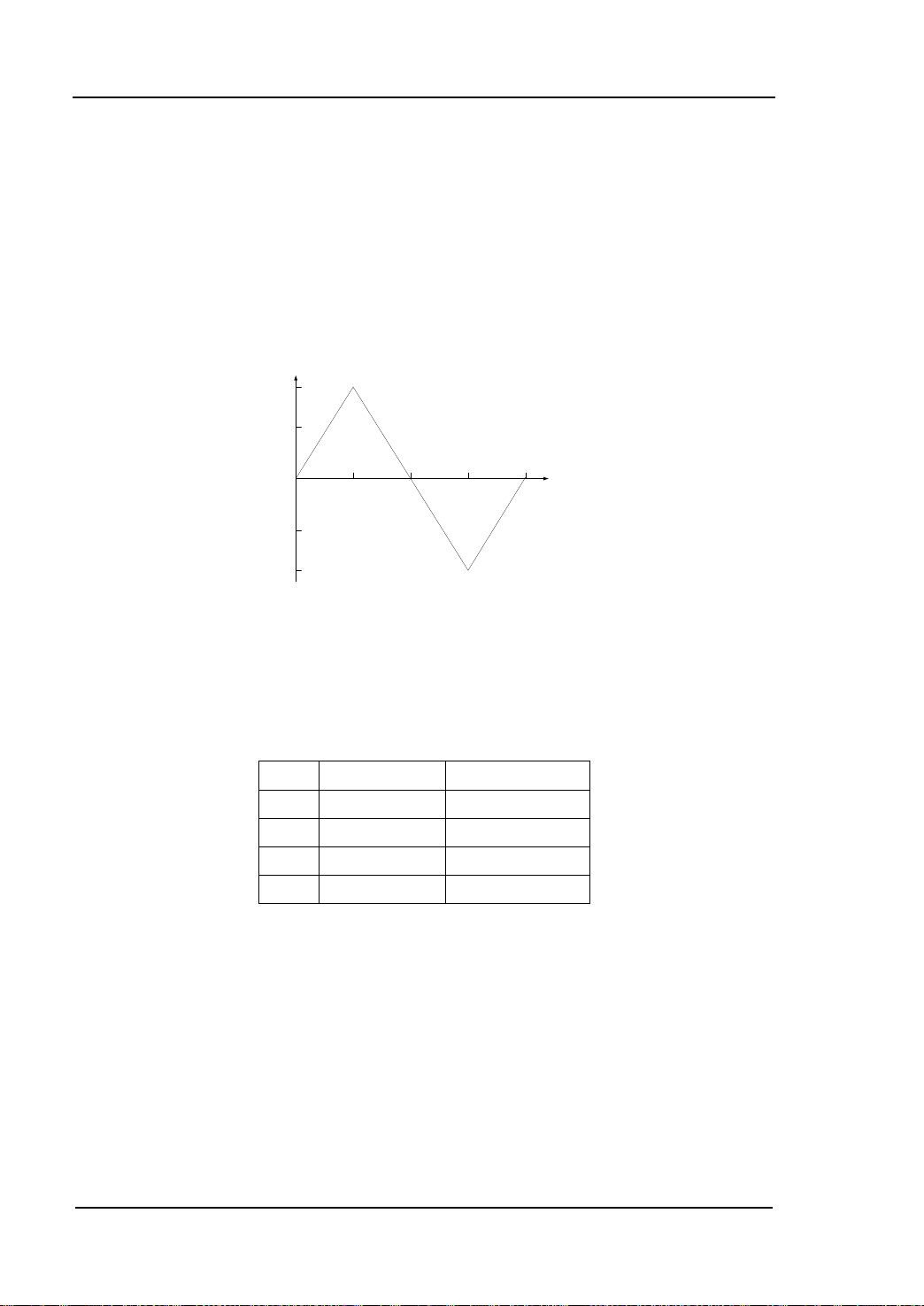
RIGOL Application Examples
3-4
4
-4
0
2.5
5 7.5
10
μs
Vpp
2
-2
① ②
①
③
④
Example 3: To Generate an User-defined Arbitrary Wave
Target: Generate a user-defined arbitrary ramp wave with 10μs period, 4V high lev el
and -4V low level.
The vertical resolution of user-defined arbitrary wave is 14 bits, 0 and 16383
separately correspond to the minmum and maximum amplitudes, that is: -4 V
corresponds to 0 and 4 V corresponds to 16383. So, edit the points in following table
to generate the specified ramp wave..
Point Time Value (voltage) Value
1 0s (0V) 8192
2 2.5μs (4V) 16383
3 5μs (0V) 8192
4 7.5μs (-4V) 0
How to realize via commands?
0 *IDN? /*Qu e ry ID to check the operating state */
1 FUNC USER /*Select user-defined arbitrary wave*/
2 FREQ 100000 /* Set the frequency as 100kHz (period: 10μs)*/
3 VOLT:UNIT VPP /* Set the unit of voltage*/
4 VOLT: HIGH 4 /* Set the high level*/
5 VOLTage:LOW -4 /*Set the low level*/
6 DATA:DAC VOLATILE,8192,16383,8192,0
Programming Guide for DG1000
Page 89

Application Examples RIGOL
3-5
/*Load the 4 decimal numbers to volatile
memory */
7 FUNC:USER VOLATILE /*Output the waves in volatile memory */
8 OUTP ON /* Enable the [Output] connec tor of CH1 at the
front panel */
Programming Guide for DG1000
Page 90

RIGOL Application Examples
3-6
Example 4: To Generate a FSK Wave
Target: Generate a FSK wave with 10 k Hz, 5 Vpp, 0 V
modulation source, 800 Hz hop frequency and 200 Hz FSK rate.
How to realize via commands?
0 *IDN? /* Query ID to check the operating state */
1 FUNC SIN /*Select carrier function*/
2 FREQ 10000 /* Set the frequency of carrier*/
3 VOLT:UNIT VPP /* Set the amplitude unit of carrier */
4 VOLT 5 /*Set the amplitude of carrier */
5 VOLT:OFFS 0 /* Set the offset of carrier */
6 FSK:STAT ON /* Enable FSK function*/
7 FSK:SOUR INT /* Select internal modulation source */
8 FSK:FREQ 800 /* Set the hop frequency */
9 FSK:INT:RATE 200 /* Set the FSK rate*/
10 OUTP ON /* Enable the [Output] connector of CH 1 at the
front panel */
carrier wave (Sine), internal
DC
Programming Guide for DG1000
Page 91

Application Examples RIGOL
3-7
Example 5: To Generate a Linear Sweep Wave
Target: Generate a sweep sine wave with 100 Hz to 10 kHz frequency, internal trigger,
linear mode and 1 s sweep time.
How to realize via commands?
0 *IDN? /* Query ID to check the operating state */
1 FUNC SIN /* Select the sweep function */
2 SWE:STAT ON /* Enable frequency sweep */
3 SWE:SPAC LIN /* Select linear sweep mode */
4 FREQ:STAR 100 /* Set the start frequency */
5 FREQ:STOP 10000 /* Set the stop frequency */
6 SWE:TIME 1 /* Set the sweep time */
7 TRIG:SOUR IMM /* Select internal trigger source */
8 OUTP ON /* Enable the [Output] connec tor of CH1 at the
front panel */
Programming Guide for DG1000
Page 92

RIGOL Application Examples
3-8
Example 6: To Generate a Burst Wave
Target: G enerate a burst: 3-cycle sq uare, 0°initial phas e, 10 ms burst p eriod and
internal trigger.
How to realize via commands?
0 *IDN? /* Query ID to check the operating state */
1 FUNC SQU /* Select burst function */
2 BURS:STAT ON /* Enable burst output */
3 BURS:MODE TRIG /* Select th e burst mode */
4 BURS:NCYC 3 /* Set the cycle number */
5 BURS:PHAS 0 /* Set the initial phase*/
6 BURS:INT:PER 0.01 /* Set the period */
7 TRIG:SOUR IM M /* Select internal trigger source */
8 OUTP ON /* Enable the [Output] connec tor of CH1 at the
front panel */
Programming Guide for DG1000
Page 93

Application Examples RIGOL
3-9
Example 7: To Output Waves via Dual Channels
Target: Output a 1kHz, 2.5Vpp, 500mV
1 V
, 20° ramp wave via CH2.
DC
How to realize via commands?
0 *IDN? /* Query ID to check the operating state */
1 VOLT:UNIT VPP /* Set the amplitude unit of CH1 */
2 APPL:SIN 1000,2.5,0.5 /* Set the frequency, amplitude and offset of
3 PHAS 10 /* Set the initial phase of wave output from CH1
4 OUTP ON /* Enable the [Output] connec tor of CH1 at the
5 VOLT:UNIT:CH2 VPP /* Set the amplitude unit of CH2*/
6 APPL:RAMP:CH2 1500,5,1 /*Set the frequency, amplitude and offset of
7 PHAS:CH2 20 /*Set the initial phase of wave output from
8 OUTP:CH2 ON /* Enable the [Output] con nector of CH2 at the
9 PHAS:ALIGN /*Enable align phase output of dual channels*/
, 10° sine wave, via CH1 and a 1.5kHz, 5Vpp,
DC
sine wave output from CH1 */
*/
front panel */
ramp wave output from CH2*/
CH2*/
front panel */
Programming Guide for DG1000
Page 94

RIGOL Application Examples
3-10
Example 8: Channel Coupling
Target: Output a 1kHz, 5Vpp, 0V
0° ramp wave via CH2, and then, ta ke CH1 as the base channel and set t he pha se
deviation as 10°, finally, obser v e t he phas e of wave output from CH2 after coupling.
How to realize via commands?
0 *IDN? /* Query ID to check the operating state */
1 VOLT:UNIT VPP /* Set the amplitude unit of CH1 */
2 APPL:SIN 1000,5,0 /*Set the frequency, amplitude and offset of sine
3 PHAS 0 /* Set the initial phase of wave output from
4 VOLT:UNIT:CH2 VPP /* Set the amplitude unit of CH2*/
5 APPL:RAMP:CH2 1500,5,0 /*Set the frequency, amplitude and offset of
6 PHAS:CH2 0 /*Set the initial phase of wave output from
7 COUP ON /* Enable channel coupling function */
8 COUP:BASE:CH1 /* Select CH1 as the base channel */
9 COUP:PHASEDEV 10 /* Set the phase deviation */
10 PHAS 2 /*Change the phase of wave output from CH1*/
11 PHAS:CH2? /*Query the phase of wav e output f rom CH2 and
Notes:
1 The return value of PHAS:CH2? is 12, which indicates that the phase of CH2
varies with the phase of CH1 and keeps a 10°phase deviation.
2 The setting method of frequency coupling is the same with that of phase
coupling.
, 0° sine wave via CH1 and a 1.5kHz, 5Vpp, 0 VDC,
DC
wave output from CH1 */
CH1*/
ramp wave output from CH2*/
CH2*/
the query returns 12 */
Programming Guide for DG1000
Page 95

Application Examples RIGOL
3-11
Example 9: Channel Copy
Target: Output a 1kHz, 5Vpp, 500mV
0 V
, 0° ramp wave via CH2, and then obs erve the parameters of wave from CH2
DC
after copying CH1 to CH2.
How to realize via commands?
0 *IDN? /* Query ID to check the operating state */
1 VOLT:UNIT VPP /* Set the amplitude unit of CH1*/
2 APPL:SIN 1000,5,0.5 /* Set the frequency, amplitude and offset of
3 PHAS 10 /* Set the initial phase of wave from CH1*/
4 VOLT:UNIT:CH2 VPP /* Set the amplitude unit of CH2*/
5 APPL:RAMP:CH2 1500,2,0 /* Set the frequency, amplitude and offset of
6 PHAS:CH2 0 /* Set the initial phase of wave from CH2*/
7 COUP OFF /*Disable channel coupling */
8 COUP:CHANNC 1>2 /* Copy the wav e paramete rs of CH1 to CH2 */
9 FREQuency:CH2? /* Return 1.000000e+03 (1kHz)*/
10 VOLTage:CH2? /* Return 5.000000e+00 (5Vpp)*/
11 VOLTage:OFFSet:CH2? /* Return 5.000000e-01 (500mV
12 PHAS:CH2? /* Return 10.000 (10°)*/
Notes:
1 Channel Copy function is o nly valid fo r wave pa rameters but n ot for wa ve shapes.
2 Channel Copy function could only be enabledafter Channel Coupling is disabled.
3 Channel Copy function is limited by parameter verification, for the details please
refer to DG1000 User’s Guide.
, 10° sine wa ve via CH1 and a 1.5kHz, 2Vpp,
DC
sine wave from CH1*/
ramp wave from CH2*/
/* Query the wave parameters of CH2 after
copying */
)*/
DC
Programming Guide for DG1000
Page 96

Page 97

Appendix: Comma nds Reference A-Z RIGOL
1
Appendix: Commands Reference A-Z
*IDN? 2-2
A
AM:SOURce 2-32
AM:SOURce? 2-32
AM:INTernal:FUNCtion 2-32
AM:INTernal:FUNCtion? 2-32
AM:INTernal:FREQuency 2-32
AM:INTernal:FREQuency? 2-32
AM:DEPTh 2-33
AM:DEPTh? 2-33
AM:STATe 2-33
AM:STATe? 2-33
APPLy:SINusoid 2-4
APPLy:SQUare 2-4
APPLy:RAMP 2-4
APPLy:PULSe 2-4
APPLy:NOISe 2-5
APPLy:DC 2-5
APPLy:USER 2-5
APPLy? 2-6
APPLy:SINusoid:CH2 2-5
APPLy:SQUare:CH2 2-5
APPLy:RAMP:CH2 2-6
APPLy:PULSe:CH2 2-6
APPLy:NOISe:CH2 2-6
APPLy:DC:CH2 2-6
APPLy:USER:CH2 2-8
APPLy:CH2? 2-8
B
BURSt:MODE 2-49
BURSt:MODE? 2-49
BURSt:NCYCles 2-49
BURSt:NCYCles? 2-49
BURSt:INTernal:PERiod 2-49
BURSt:INTernal:PERiod? 2-50
BURSt:PHASe 2-50
BURSt:PHASe? 2-50
BURSt:STATe 2-50
BURSt:STATe? 2-50
BURSt:GATE:POLarity 2-50
BURSt:GATE:POLarity? 2-51
C
COUNter 2-69
COUNter:COUPling 2-69
COUNter:COUPling? 2-69
COUNter:SENSitivity 2-69
COUNter:SENSitivity? 2-69
COUNter:TLEVel 2-69
COUNter:TLEVel? 2-70
COUNter:HFRS 2-70
COUNter:HFRS? 2-70
COUNter:FREQuency? 2-70
COUNter:PERiod? 2-70
COUNter:DCYCle? 2-71
COUNter:POSWidth? 2-71
COUNter:NEGWidth? 2-71
COUPling 2-66
COUPling? 2-66
COUPling:BASEdchannel 2-66
COUPling:BASEdchannel? 2-66
COUPling:PHASEDEViation 2-66
COUPling:PHASEDEViation? 2-66
COUPling:FREQDEViation 2-66
COUPling:FREQDEViation? 2-67
COUPling:CHANNCopy 2-67
Programming Guide for DG1000
Page 98

RIGOL Appendix: Commands Reference A-Z
2
D
DATA 2-53
DATA:DAC 2-53
DATA:COPY 2-54
DATA:DELete 2-54
DATA:CATalog? 2-54
DATA:RENAME 2-54
DATA:NVOLatile:CATalog? 2-55
DATA:NVOLatile:FREE? 2-55
DATA:ATTRibute:POINts? 2-55
DATA:LOAD 2-55
DISPlay 2-64
DISPlay:CONTRAST 2-64
DISPlay:LUMINANCE 2-64
F
FM:SOURce 2-35
FM:SOURce? 2-35
FM:INTernal:FUNCtion 2-35
FM:INTernal:FUNCtion? 2-35
FM:INTernal:FREQuency 2-35
FM:INTernal:FREQuency? 2-35
FM:DEViation 2-36
FM:DEViation? 2-36
FM:STATe 2-36
FM:STATe? 2-36
FREQuency 2-16
FREQuency? 2-16
FREQuency:CH2 2-16
FREQuency:CH2? 2-16
FREQuency:STARt 2-16
FREQuency:STARt? 2-16
FREQuency:STOP 2-17
FREQuency:STOP? 2-17
FREQuency:CENTer 2-17
FREQuency:CENTer? 2-17
FREQuency:SPAN 2-17
FREQuency:SPAN? 2-17
FSK:SOURce 2-41
FSK:SOURce? 2-41
FSK:FREQuency 2-41
FSK:FREQuency? 2-41
FSK:INTernal:RATE 2-41
FSK:INTernal:RATE? 2-41
FSK:STATe 2-41
FSK:STATe? 2-42
FUNCtion 2-10
FUNCtion? 2-10
FUNCtion:USER 2-10
FUNCtion:USER? 2-11
FUNCtion:SQUare:DCYCle 2-11
FUNCtion:SQUare:DCYCle? 2-11
FUNCtion:RAMP:SYMMetry 2-11
FUNCtion:RAMP:SYMMetry? 2-11
FUNCtion:CH2 2-12
FUNCtion:CH2? 2-12
FUNCtion:USER:CH2 2-12
FUNCtion:USER:CH2? 2-13
FUNCtion:SQUare:DCYCle:CH2 2-13
FUNCtion:SQUare:DCYCle:CH2? 2-13
FUNCtion:RAMP:SYMMetry:CH2 2-13
FUNCtion:RAMP:SYMMetry:CH2? 2-13
M
MEMory:STATe:NAME 2-57
MEMory:STATe:NAME? 2-57
MEMory:STATe:DELete 2-57
MEMory:STATe:RECall:AUTO 2-57
MEMory:STATe:RECall:AUTO? 2-57
MEMory:STATe:VALid? 2-57
MEMory:NSTates? 2-58
O
OUTPut 2-25
OUTPut? 2-25
Programming Guide for DG1000
Page 99

Appendix: Commands Reference A-Z RIGOL
3
OUTPut:LOAD 2-25
OUTPut:LOAD? 2-25
OUTPut:POLarity 2-25
OUTPut:POLarity? 2-25
OUTPut:SYNC 2-26
OUTPut:SYNC? 2-26
OUTPut:TRIGger:SLOPe 2-26
OUTPut:TRIGger:SLOPe? 2-26
OUTPut:TRIGger 2-26
OUTPut:TRIGger? 2-26
OUTPut:CH2 2-27
OUTPut:CH2? 2-27
OUTPut:LOAD:CH2 2-27
OUTPut:LOAD:CH2? 2-27
OUTPut:POLarity:CH2 2-27
OUTPut:POLarity:CH2? 2-27
P
PHASe 2-63
PHASe? 2-63
PHASe:CH2 2-63
PHASe:CH2? 2-63
PHASe:ALIGN 2-63
PM:SOURce 2-38
PM:SOURce? 2-38
PM:INTernal:FUNCtion 2-38
PM:INTernal:FUNCtion? 2-38
PM:INTernal:FREQuency 2-38
PM:INTernal:FREQuency? 2-38
PM:DEViation 2-39
PM:DEViation? 2-39
PM:STATe 2-39
PM:STATe? 2-39
PULSe:PERiod 2-29
PULSe:PERiod? 2-29
PULSe:WIDTh 2-29
PULSe:WIDTh? 2-29
PULSe:DCYCle 2-29
PULSe:DCYCle? 2-29
PULSe:PERiod:CH2 2-29
PULSe:PERiod:CH2? 2-30
PULSe:WIDTh:CH2 2-30
PULSe:WIDTh:CH2? 2-30
PULSe:DCYC:CH2 2-30
PULSe:DCYC:CH2? 2-30
S
SWEep:SPACing 2-44
SWEep:SPACing? 2-44
SWEep:TIME 2-44
SWEep:TIME? 2-44
SWEep:STATe 2-44
SWEep:STATe? 2-44
SYSTem:ERRor? 2-60
SYSTem:VERSion? 2-60
SYSTem:BEEPer:STATe 2-60
SYSTem:BEEPer:STATe? 2-60
SYSTem:LOCal
2-60
SYSTem:RWLock 2-60
SYSTem:REMote 2-60
SYSTem:CLKSRC 2-61
SYSTem:LANGuage 2-61
T
TRIGger:SOURce 2-46
TRIGger:SOURce? 2-46
TRIGger:SLOPe 2-46
TRIGger:SLOPe? 2-46
TRIGger:DELay 2-46
TRIGger:DELay? 2-46
V
VOLTage 2-20
VOLTage? 2-20
VOLTage:HIGH 2-20
VOLTage:HIGH? 2-20
Programming Guide for DG1000
Page 100

RIGOL Appendix: Commands Reference A-Z
4
VOLTage:LOW 2-20
VOLTage:LOW? 2-21
VOLTage:OFFSet 2-21
VOLTage:OFFSet? 2-21
VOLTage:UNIT 2-21
VOLTage:UNIT? 2-21
VOLTage:CH2 2-21
VOLTage:CH2? 2-21
VOLTage:HIGH:CH2 2-22
VOLTage:HIGH:CH2? 2-22
VOLTage:LOW:CH2 2-22
VOLTage:LOW:CH2? 2-23
VOLTage:OFFSet:CH2 2-23
VOLTage:OFFSet:CH2? 2-23
VOLTage:UNIT:CH2 2-23
VOLTage:UNIT:CH2? 2-23
Programming Guide for DG1000
 Loading...