

Page 1
Read This First
Manuals Provided with This Machine
Safety Information for This Machine
Other Information for This Machine
Appendix
For information not found in paper manuals, see the online manuals available on our
web site (http://www.ricoh.com/) or via the
control panel.
Read this manual carefully before you use this machine and keep
it handy for future reference. For safe and correct use, be sure to
read the Safety Information in this manual before using the
machine.
Page 2

Page 3

TABLE OF CONTENTS
How to Read the Manuals................................................................................................................................. 2
Symbols Used in the Manuals.......................................................................................................................2
Disclaimer........................................................................................................................................................2
Notes...............................................................................................................................................................3
1. Manuals Provided with This Machine
Manuals for This Machine................................................................................................................................. 5
How to Use the Operating Instructions............................................................................................................. 7
Read HTML Manuals..................................................................................................................................... 7
Read the HTML manuals on the control panel.............................................................................................8
2. Safety Information for This Machine
Safety Symbols for This Machine...................................................................................................................... 9
Safety Information............................................................................................................................................10
Safety During Operation.............................................................................................................................10
Safety Precautions to Be Followed............................................................................................................. 10
Safety Labels of This Machine.........................................................................................................................17
Positions of WARNING and CAUTION labels.........................................................................................17
Symbols for Power Switch...........................................................................................................................17
3. Other Information for This Machine
Laws and Regulations...................................................................................................................................... 19
Duplication and Printing Prohibited............................................................................................................19
Notice to Users in EEA Countries................................................................................................................19
Overseas Affiliates and Noise Emission Information................................................................................ 19
EMC Directive.............................................................................................................................................. 20
User Information on Electrical and Electronic Equipment (For Users in India)........................................20
4. Appendix
Trademarks....................................................................................................................................................... 21
1
Page 4
How to Read the Manuals
Symbols Used in the Manuals
This manual uses the following symbols:
Indicates points to pay attention to when using the machine, and explanations of likely causes of paper
misfeeds, damage to originals, or loss of data. Be sure to read these explanations.
Indicates supplementary explanations of the machine's functions, and instructions on resolving user
errors.
This symbol is located at the end of sections. It indicates where you can find further relevant information.
[ ]
Indicates the names of keys on the machine's display or control panels.
Indicates instructions displayed on the control panel.
Indicates instructions in sheet form.
(mainly Europe)
(mainly North America)
Differences in the functions of Region A and Region B models are indicated by two symbols. Read the
information indicated by the symbol that corresponds to the region of the model you are using. For
details about which symbol corresponds to the model you are using, see "Model-Specific Information",
Getting Started .
Disclaimer
To the maximum extent permitted by applicable laws, in no event will the manufacturer be liable for any
damages whatsoever arising out of failures of this machine, losses of the registered data, or the use or
non-use of this product and operation manuals provided with it.
Make sure that you always copy or have backups of the data registered in this machine. Documents or
data might be erased due to your operational errors or malfunctions of the machine.
2
Page 5

In no event will the manufacturer be responsible for any documents created by you using this machine or
any results from the data executed by you.
Notes
Contents of this manual are subject to change without prior notice.
The manufacturer shall not be responsible for any damage or expense that might result from the use of
parts other than genuine parts from the manufacturer with your office products.
For good output quality, the manufacturer recommends that you use genuine ink from the manufacturer.
Some illustrations in this manual might be slightly different from the machine.
Colors on color keys or the color circle may differ slightly from the colors of actual copies.
The color samples in this manual may differ slightly from the colors of actual copies.
Certain options might not be available in some countries. For details, please contact your local dealer.
Depending on which country you are in, certain units may be optional. For details, please contact your
local dealer.
3
Page 6

4
Page 7
1. Manuals Provided with This Machine
This chapter explains manuals for this machine.
Manuals for This Machine
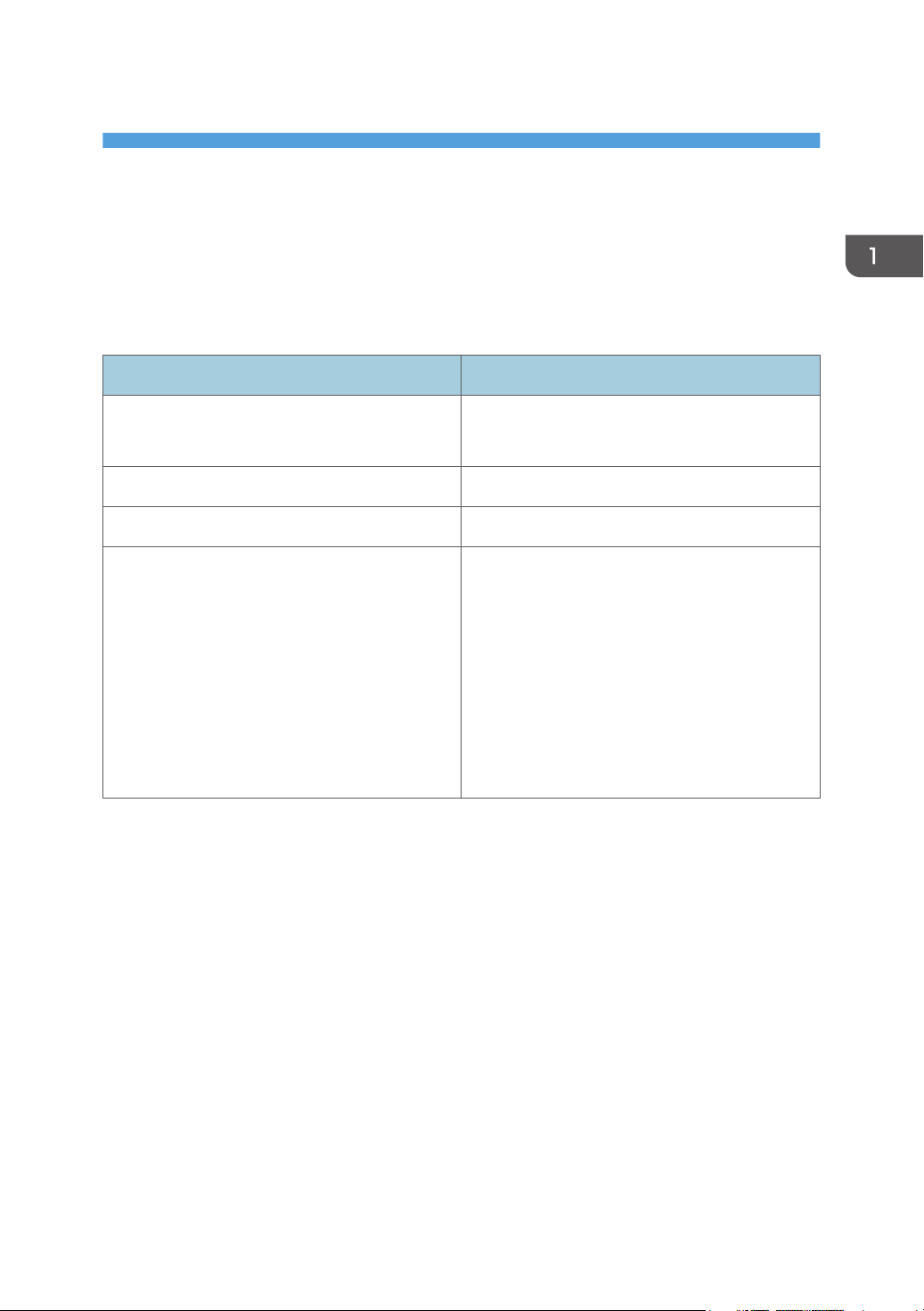
The operating instructions of this machine are provided in the following formats:
Format Manuals
Printed manuals • Read This First
• Start Guide
CD-ROM • Driver Installation Guide
Manuals displayed on the control panel • Operating Instructions (HTML manuals)
Web page • Read This First
• User Guide
• Start Guide
• Operating Instructions (HTML manuals)
• Quick Reference Guide
• Driver Installation Guide
• Setting Paper/ How to Set Up the Output
Basket
Read This First
Before using the machine, be sure to read the section of this manual entitled Safety Information. It
also describes each regulation and environmental conformance.
Start Guide
Describes how to read manuals on the control panel. It also describes how to log in to the machine.
User Guide
Regarding the basic usage of this machine, frequently used functions, troubleshooting when an
error message appears, etc., summaries are provided for each user manual.
Operating Instructions (HTML manuals)
Describes the setup for using the machine, how to use functions to copy, print, scan or for
maintenance and specifications, troubleshooting, system settings, and security functions.
Manuals are available in English, German, French, Italian, Spanish, Dutch, and Russian.
User Guide and Security Guide are available in the seven languages above and other languages.
5
Page 8
1. Manuals Provided with This Machine
For details about how to use the HTML manuals, see page 7 "How to Use the Operating
Instructions".
Quick Reference Guide
Describes per page the basic functions of copy and scan.
• Quick Reference Copy Guide
• Quick Reference Scanner Guide
Driver Installation Guide
Describes how to install and configure each driver. This manual is included in the drivers CD.
Setting Paper/ How to Set Up the Output Basket
Explains how to load roll paper onto the paper input location and configure the output basket.
• Before you configure the extended security and authentication settings, refer to "Before Using This
Machine" in the Security Guide .
• Using the machine’s security function prevents unauthorized use of the machine, data tampering, or
information leakage. For enhanced security, we recommend that you first make the following
settings:
• Install the Device Certificate.
• Enable SSL (Secure Sockets Layer) Encryption.
• Change the user name and password of the administrator.
• You can see the following manuals on the Web page.
• Appendix
• DHCP Option 204
6
Page 9
How to Use the Operating Instructions
How to Use the Operating Instructions
This chapter describes the operating instructions of this machine.
Read HTML Manuals
The following browsers are recommended to read the HTML manuals.
• Internet Explorer 8/9/10/11
• Firefox 29
• Safari 5.1.7
• Chrome 35
• If JavaScript is disabled or unavailable in your browser, you will not be able to search or use
certain buttons in the HTML documentation.
• The required display resolution is 1,024 × 768 pixels or greater.
• In the help on the top right of the top page, you can check how to use the HTML manuals. The help
topics explain the icons and buttons that are displayed in the HTML manuals.
Search for what you want to do or can do
Using Easy Search, you can search for what want to do or can do with this machine.
1. Click Easy Search on the top right of the top page.
2. Click a title to display the item you want to read.
Search by entering a keyword
You can search through the HTML manuals.
This section explains how to search for "duplex".
1. Enter "duplex" in the search box on the top left of the top page.
2. Click
A list of titles or descriptions that include "duplex" appears.
A search result appears in the search result window. In addition you can use the drop-down menu
to select a manual.
.
3. Click a title to display the item you want to read.
7
Page 10
1. Manuals Provided with This Machine
• Use keywords to search for items you want to query. Depending on the keyword you enter, related
keywords might also appear.
• Items including the used keyword is appear in the search result window.
• If you put a space between keywords, pages that contain both keywords are displayed. For
example, if you enter "duplex" and a space and "copy", items including both words appear in the
search result window.)
Read the HTML manuals on the control panel
You can also read the HTML manuals on the control panel. For details about how to read the HTML
manuals on the control panel, see Start Guide .
8
Page 11
2. Safety Information for This Machine
This chapter describes the safety precautions.
Safety Symbols for This Machine
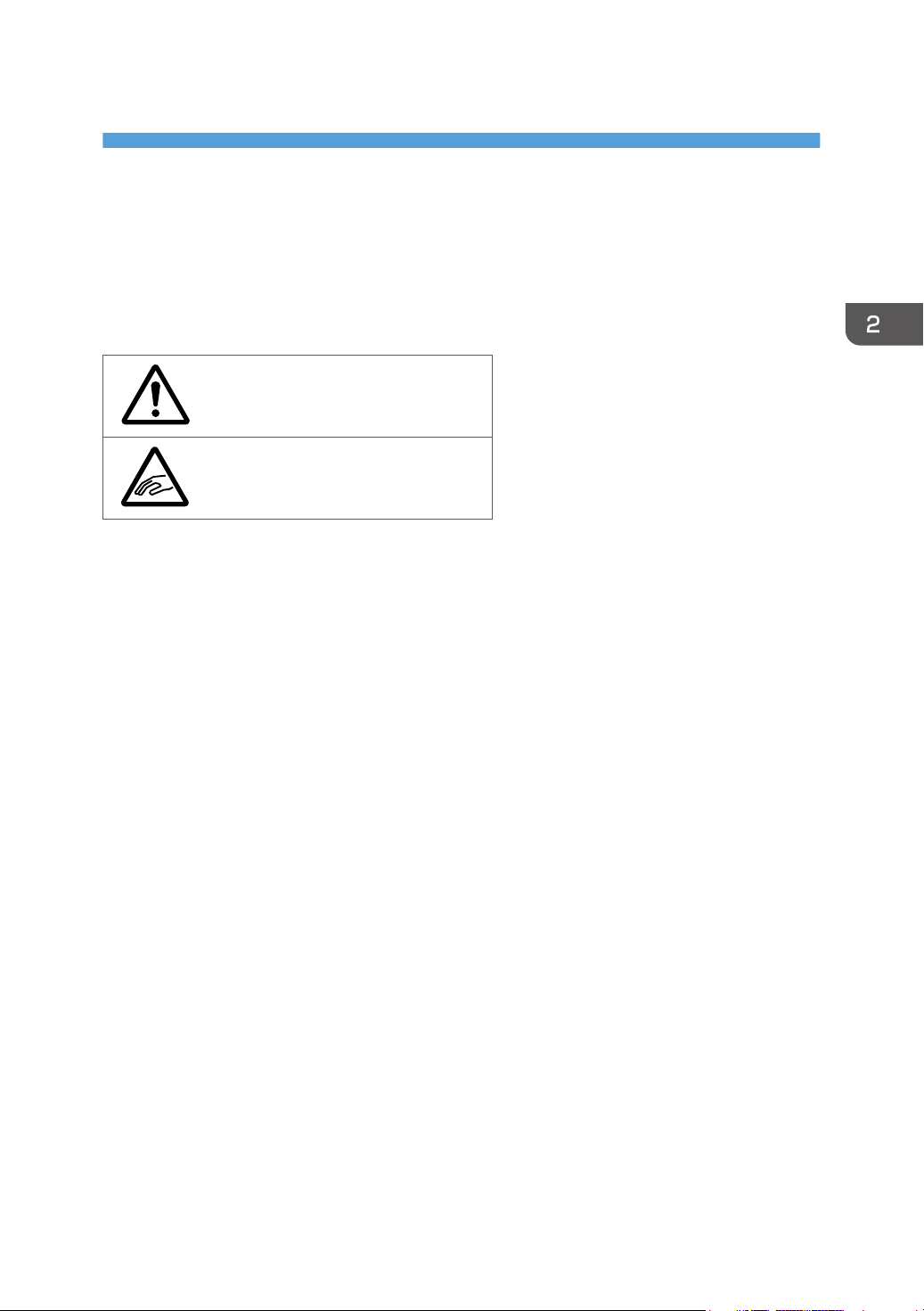
The meanings of the safety symbols for this machine are as follows:
Caution
Caution, risk of having hands or arms
caught
9
Page 12
2. Safety Information for This Machine
Safety Information
Safety During Operation
In this manual, the following important symbols are used:
Indicates a potentially hazardous situation which, if instructions are not followed, could result in death
or serious injury.
Indicates a potentially hazardous situation which, if instructions are not followed, may result in minor
or moderate injury or damage to property.
Safety Precautions to Be Followed
This section explains safety precautions that should always be followed when using this machine.
Environments where the machine can be used
This section explains safety precautions about environments where the machine can be used.
• Do not use flammable sprays or solvents in the vicinity of this machine. Also, avoid placing these
items in the vicinity of this machine. Doing so could result in fire or electric shock.
• Do not place vases, plant pots, cups, toiletries, medicines, small metal objects, or containers
holding water or any other liquids, on or close to this machine. Fire or electric shock could result
from spillage or if such objects or substances fall inside this machine.
• Keep the machine away from humidity and dust. Otherwise a fire or an electric shock might
occur.
• Do not place the machine on an unstable or tilted surface. If it topples over, an injury might
occur.
• Do not place heavy objects on the machine. Doing so can cause the machine to topple over,
possibly resulting in injury.
10
Page 13
Safety Information
• Make sure the room where you are using the machine is well ventilated and spacious. Good
ventilation is especially important when the machine is used heavily.
• Do not obstruct the machine's vents. Doing so risks fire caused by overheated internal
components.
Handling power cords and power cord plugs
This section explains safety precautions about handling power cords and power cord plugs.
• Do not use any power sources other than those that match the specifications shown. Doing so
could result in fire or electric shock.
• Do not use any frequencies other than those that match the specifications shown. Doing so could
result in fire or electric shock.
• Do not use multi-socket adaptors. Doing so could result in fire or electric shock.
• Do not use extension cords. Doing so could result in fire or electric shock.
• Do not use power cords that are damaged, broken, or modified. Also, do not use power cords
that have been trapped under heavy objects, pulled hard, or bent severely. Doing so could
result in fire or electric shock.
• Touching the prongs of the power cable's plug with anything metallic constitutes a fire and
electric shock hazard.
• The supplied power cord is for use with this machine only. Do not use it with other appliances.
Doing so could result in fire or electric shock.
• It is dangerous to handle the power cord plug with wet hands. Doing so could result in electric
shock.
• If the power cord is damaged and its inner wires are exposed or broken, contact your service
representative for a replacement. Use of damaged power cords could result in fire or electric
shock.
11
Page 14
2. Safety Information for This Machine
• Be sure to disconnect the plug from the wall outlet at least once a year and check for the
following:
• There are burn marks on the plug.
• The prongs on the plug are deformed.
• If any of the above conditions exist, do not use the plug and consult your dealer or service
representative. Use of the plug could result in fire or electric shock.
• Be sure to disconnect the power cord from the wall outlet at least once a year and check for the
following:
• The power cord's inner wires are exposed, broken, etc.
• The power cord's coating has a crack or dent.
• When bending the power cord, the power turns off and on.
• Part of the power cord becomes hot.
• The power cord is damaged.
• If any of the above conditions exist, do not use the power cord and consult your dealer or
service representative. Use of the power cord could result in fire or electric shock.
• Be sure to push the plug of the power cord fully into the wall outlet. Partially inserted plugs
create an unstable connection that can result in unsafe buildup of heat.
• If this machine is not going to be used for several days or longer at a time, disconnect its power
cord from the wall outlet.
• When disconnecting the power cord from the wall outlet, always pull the plug, not the cord.
Pulling the cord can damage the power cord. Use of damaged power cords could result in fire
or electric shock.
• Be sure to disconnect the plug from the wall outlet and clean the prongs and the area around
the prongs at least once a year. Allowing dust to build up on the plug constitutes a fire hazard.
• When performing maintenance on the machine, always disconnect the power cord from the
wall outlet.
• Power Source
220–240 V, 1.9 A, 50/60 Hz
Please be sure to connect the power cord to a power source as above.
12
Page 15
Safety Information
For users in Norway, this product is also designed for an IT power distribution system with phase-tophase voltage of 230V.
Handling the main machine
This section explains safety precautions about handling the main machine.
• Be sure to locate the machine as close as possible to a wall outlet. This will allow easy
disconnection of the power cord in the event of an emergency.
• If the machine emits smoke or odours, or if it behaves unusually, you must turn off its power
immediately. After turning off the power, be sure to disconnect the power cord plug from the
wall outlet. Then contact your service representative and report the problem. Do not use the
machine. Doing so could result in fire or electric shock.
• If metal objects, or water or other fluids fall inside this machine, you must turn off its power
immediately. After turning off the power, be sure to disconnect the power cord plug from the
wall outlet. Then contact your service representative and report the problem. Do not use the
machine. Doing so could result in fire or electric shock.
• Do not touch this machine if a lightning strike occurs in the immediate vicinity. Doing so could
result in electric shock.
• The following explains the warning messages on the plastic bag used in this product's
packaging.
• Keep the polythene materials (bags, etc.) supplied with this machine away from babies
and small children at all times. Suffocation can result if polythene materials are brought into
contact with the mouth or nose.
• Unplug the power cord from the wall outlet before you move the machine. While moving the
machine, take care that the power cord is not damaged under the machine. Failing to take these
precautions could result in fire or electric shock.
• After you move the machine, use the caster fixture to fix it in place. Otherwise the machine might
move or come down to cause an injury.
• Contact your service representative if you need to lift the machine (such as when relocating it to
another floor). Do not attempt to lift the machine without the assistance of your service
representative. The machine will be damaged if it topples or is dropped, resulting in malfunction
and risk of injury to users.
13
Page 16
2. Safety Information for This Machine
• Do not look into the lamp. It can damage your eyes.
• Do not hold the control panel while moving the machine. Doing so may damage the control
panel, cause a malfunction, or result in injury.
• When lifting up or lowering the paper input location cover, be careful not to trap or injure your
fingers.
• When opening or closing the front cover, do not put your fingers over the folding parts of the
covers. Doing so may result in your fingers becoming trapped or injured.
• Protect the machine from dampness or wet weather, such as rain and snow.
• For environmental reasons, do not dispose of the machine or expended supply waste at
household waste collection points. Disposal can take place at an authorized dealer.
• A paper roll may be as heavy as 14 kg (30.9 lb.). Hold the paper roll horizontally with both
hands. If you hold the paper roll vertically or with one hand, the paper roll may fall and cause
an injury.
• Do not place your hand between the original cover and the original table. Doing so may result
in an injury if your fingers are pinched.
Handling the machine's interior
This section explains safety precautions about handling the machine's interior.
• Do not remove any covers or screws other than those explicitly mentioned in this manual. Inside
this machine are high voltage components that are an electric shock hazard. Contact your sales
or service representative if any of the machine's internal components require maintenance,
adjustment, or repair.
• Do not attempt to disassemble or modify this machine. Doing so risks burns and electric shock.
• Some of the internal components of this machine might be fragile. When you remove jammed
paper, do not touch the sensors, connectors, LEDs, or other fragile parts that are shown in the
Troubleshooting manual. Doing so may cause malfunctions.
• When removing jammed paper, make sure not to trap or injure your fingers.
14
Page 17
Safety Information
• When loading paper, take care not to trap or injure your fingers.
• Be careful when replacing the paper, clearing paper jams, or cleaning the platen. Follow the
instructions for these procedures properly. Not doing so could result in injury from the paper
cutter inside.
• When replacing paper rolls, do not touch the spool near the gear. Doing so may cause your
hands to get dirty. If your hands get dirty, wash the affected area thoroughly with soap and
water.
• While safety measures have been installed to prevent accidents, you must not touch the
machine's rollers while it is operating. Doing so could cause injury.
• Do not clean parts other than those explicitly specified in this manual. To clean other parts,
contact your service representative. Fire and breakdown can result from heavy accumulation of
dust. Contact your sales or service representative for details about and charges for cleaning the
machine.
Handling the machine's supplies
This section explains safety precautions about handling the machine's supplies.
• The following explains the warning messages on the plastic bag used in this product's
packaging.
• Keep the polythene materials (bags, etc.) supplied with this machine away from babies
and small children at all times. Suffocation can result if polythene materials are brought into
contact with the mouth or nose.
• Dispose of used ink containers in accordance with local regulations.
• Keep ink and ink containers out of reach of children.
• If ink gets into contact with eyes, wash eyes immediately with running water. Consult a doctor if
necessary.
• If ink is ingested, induce vomiting by drinking a strong saline solution. Consult a doctor
immediately.
15
Page 18
2. Safety Information for This Machine
• When removing jammed paper or replacing ink, avoid getting ink on your clothing. If ink comes
into contact with your clothing, wash the stained area with cold water. Hot water will set the ink
into the fabric and make removing the stain impossible.
• When removing jammed paper or replacing ink, avoid getting ink on your skin. If ink comes into
contact with your skin, wash the affected area thoroughly with soap and water.
• When removing the print cartridge, avoid putting your hand near the place where the print
cartridge is installed. If ink comes in contact with your hands, wash them thoroughly with soap
and water.
• When replacing ink collector unit, avoid getting ink on your clothing. If ink comes into contact
with your clothing, wash the stained area with cold water. Hot water will set the ink into the
fabric and make removing the stain impossible.
• Do not attempt to print on stapled sheets, aluminum foil, carbon paper, or any kind of
conductive paper. Doing so risks fire.
• Keep SD cards or USB flash memory devices out of reach of children. If a child accidentally
swallows an SD card or USB flash memory device, consult a doctor immediately.
16
Page 19
DND001
1
Safety Labels of This Machine
Safety Labels of This Machine
This section explains the machine's safety information labels.
Positions of WARNING and CAUTION labels
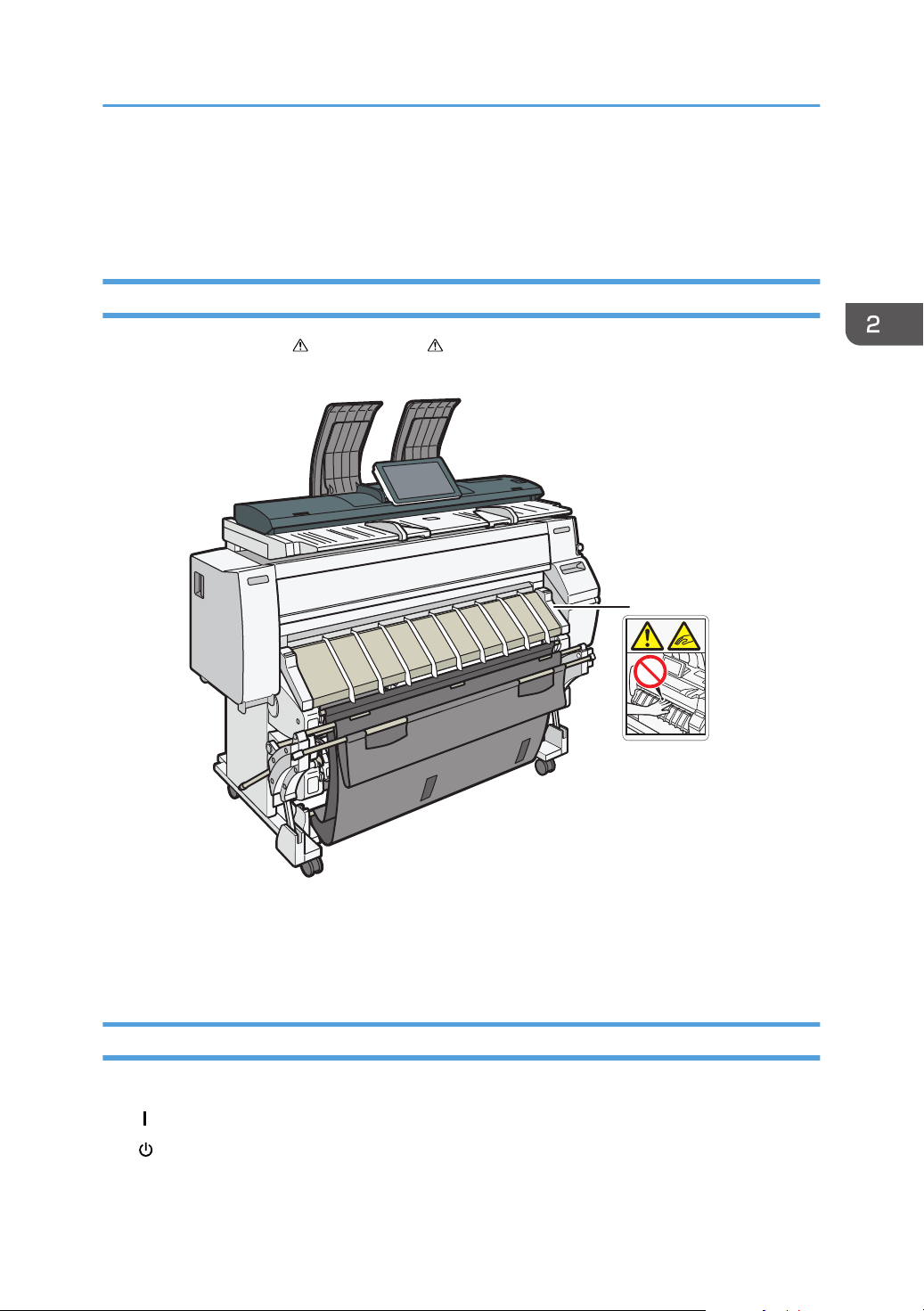
This machine has labels for WARNING and CAUTION at the positions shown below. For safety,
please follow the instructions and handle the machine as indicated.
1.
Do not place your hand on the platen while the printheads are being operated or the front cover is
being closed. Doing so may risk pinching or injuring your fingers.
Symbols for Power Switch
Symbols for power switch that are used for this machine are as follows:
• : POWER ON
• : STANDBY
17
Page 20

2. Safety Information for This Machine
18
Page 21
3. Other Information for This Machine
This chapter describes laws and regulations related to this machine.
Laws and Regulations
Duplication and Printing Prohibited
Do not copy or print any item for which reproduction is prohibited by law.
Copying or printing the following items is generally prohibited by local law:
bank notes, revenue stamps, bonds, stock certificates, bank drafts, checks, passports, driver's licenses.
The preceding list is meant as a guide only and is not inclusive. We assume no responsibility for its
completeness or accuracy. If you have any questions concerning the legality of copying or printing
certain items, consult with your legal advisor.
Notice to Users in EEA Countries
Declaration of Conformity
Notice to Users in EEA Countries
This product complies with the essential requirements and provisions of Directive 1999/5/EC of
the European Parliament and of the Council of 9 March 1999 on radio equipment and
telecommunications terminal equipment and the mutual recognition of their conformity.
The CE Declaration of Conformity is available by accessing the URL:
http://www.ricoh.co.jp/fax/ce_doc/ and selecting the product applicable.
Overseas Affiliates and Noise Emission Information
In accordance with TUV “GS Symbol” requirements, details of the EU office or representative
company are given below.
Overseas Affiliates
Ricoh Europe PLC
20 Triton Street, London. NW1 3BF, United Kingdom
19
Page 22
3. Other Information for This Machine
Noise Emission
Maschinenlärminformations-Verordnung 3. GPSGV:
Der höchste Schalldruckpegel beträgt 70 dB(A) oder weniger gemäss EN ISO 7779
EMC Directive
Warning on Class A Product
Warning:
This is a Class A product. In a domestic environment this product may cause radio interference in which
case the user may be required to take adequate measures.
Warning:
This equipment is compliant with Class A of CISPR 32. In a residential environment this equipment may
cause radio interference.
As this machine is not a household appliance, it does not conform to ErP Directive 2009/125/EC
which was revised in 2013.
Equipment complying with IEC 61000-3-12
Installing the Ferrite Core
An Ethernet interface cable with a ferrite core must be used for RF interference suppression.
User Information on Electrical and Electronic Equipment (For Users in India)
This product complies with the "India E-waste Rule 2011" and prohibits use of lead, mercury,
hexavalent chromium, polybrominated biphenyls or polybrominated diphenyl ethers in concentrations
exceeding 0.1 weight % and 0.01 weight % for cadmium, except for the exemptions set in Schedule 2
of the Rule.
20
Page 23

4. Appendix
This appendix describes trademarks for the machine.
Trademarks
Adobe is a trademark of Adobe Systems Incorporated in the United States and/or other countries.
Firefox is a registered trademark of the Mozilla Foundation.
Google and Chrome are trademarks of Google Inc.
Microsoft, Windows, and Internet Explorer are either registered trademarks or trademarks of Microsoft
Corporation in the United States and/or other countries.
Safari is a trademark of Apple Inc., registered in the United States and other countries.
The SD is a trademark of SD-3C, LLC.
The proper names of Internet Explorer 8, 9, 10 and 11 are as follows:
• Windows® Internet Explorer® 8
• Windows® Internet Explorer® 9
• Internet Explorer® 10
• Internet Explorer® 11
Other product names used herein are for identification purposes only and might be trademarks of their
respective companies. We disclaim any and all rights to those marks.
21
Page 24

MEMO
22
Page 25

MEMO
23
Page 26

MEMO
GB
24 EN
D262-7509
Page 27

© 2015
Page 28

D262-7509
GB
EN
 Loading...