

Page 1
Read This First
Manuals Provided with This Machine
Safety Information for This Machine
Other Information for This Machine
Appendix
For information not found in paper manuals, see the online manuals available on our
web site (http://www.ricoh.com/) or via the
control panel.
Read this manual carefully before you use this machine and keep
it handy for future reference. For safe and correct use, be sure to
read the Safety Information in this manual before using the
machine.
Page 2

Page 3

TABLE OF CONTENTS
How to Read the Manuals.................................................................................................................................2
Symbols Used in the Manuals.......................................................................................................................2
Disclaimer........................................................................................................................................................2
Notes...............................................................................................................................................................3
Machine Types............................................................................................................................................... 3
1. Manuals Provided with This Machine
Manuals for This Machine................................................................................................................................. 5
Manuals List.................................................................................................................................................... 7
How to Use the Operating Instructions.............................................................................................................9
Formats of the Operating Instructions...........................................................................................................9
Read HTML Manuals..................................................................................................................................... 9
Read the HTML manuals on the control panel.......................................................................................... 10
2. Safety Information for This Machine
Safety Symbols for This Machine....................................................................................................................11
Safety Information............................................................................................................................................12
Safety During Operation.............................................................................................................................12
Safety Precautions to Be Followed.............................................................................................................12
Safety Labels of This Machine.........................................................................................................................19
Positions of WARNING and CAUTION labels.........................................................................................19
Symbols for Earth, Insulation, and Power Switch......................................................................................19
3. Other Information for This Machine
Laws and Regulations...................................................................................................................................... 21
Duplication and Printing Prohibited............................................................................................................21
Laser Safety.................................................................................................................................................. 21
Notes to USA Users of FCC Requirements................................................................................................ 22
Important Safety Instructions for Facsimile Unit.........................................................................................24
Notes to Canadian Users of Wireless Devices......................................................................................... 25
Notes to Canadian Users of Facsimile Unit...............................................................................................26
4. Appendix
Trademarks....................................................................................................................................................... 27
1
Page 4

How to Read the Manuals
Symbols Used in the Manuals
This manual uses the following symbols:
Indicates points to pay attention to when using the machine, and explanations of likely causes of paper
misfeeds, damage to originals, or loss of data. Be sure to read these explanations.
Indicates supplementary explanations of the machine's functions, and instructions on resolving user
errors.
This symbol is located at the end of sections. It indicates where you can find further relevant information.
[ ]
Indicates the names of keys on the machine's display or control panels.
Indicates instructions displayed on the control panel.
Indicates instructions in sheet form.
(mainly Europe and Asia), (mainly Europe), or (mainly Asia)
(mainly North America)
Differences in the functions of Region A and Region B models are indicated by two symbols. Read the
information indicated by the symbol that corresponds to the region of the model you are using. For
details about which symbol corresponds to the model you are using, see "Model-Specific Information",
Getting Started .
Disclaimer
To the maximum extent permitted by applicable laws, in no event will the manufacturer be liable for any
damages whatsoever arising out of failures of this machine, losses of the registered data, or the use or
non-use of this product and operation manuals provided with it.
Make sure that you always copy or have backups of the data registered in this machine. Documents or
data might be erased due to your operational errors or malfunctions of the machine.
2
Page 5

In no event will the manufacturer be responsible for any documents created by you using this machine or
any results from the data executed by you.
Notes
Contents of this manual are subject to change without prior notice.
The manufacturer shall not be responsible for any damage or expense that might result from the use of
parts other than genuine parts from the manufacturer with your office products.
For good output quality, the manufacturer recommends that you use genuine toner from the
manufacturer.
Some illustrations in this manual might be slightly different from the machine.
Colors on color keys or the color circle may differ slightly from the colors of actual copies.
The color samples in this manual may differ slightly from the colors of actual copies.
Machine Types
Check the type of your machine before reading the manuals.
• Type 1: MP C306ZSPF
• Type 2: MP C406ZSPF
Certain types might not be available in some countries. For details, please contact your local dealer.
Certain options might not be available in some countries. For details, please contact your local dealer.
Depending on which country you are in, certain units may be optional. For details, please contact your
local dealer.
3
Page 6

4
Page 7
1. Manuals Provided with This Machine
This chapter explains manuals for this machine.
Manuals for This Machine
Read this manual carefully before you use this machine.
Refer to the manuals that are relevant to what you want to do with the machine.
• Media differ according to manual.
• Adobe® Reader® must be installed in order to view the manuals as PDF files.
• A Web browser must be installed in order to view the html manuals.
User Guide
Regarding the basic usage of this machine, frequently used functions, troubleshooting when an
error message appears, etc., summaries are provided below for each user manual.
Read This First
Before using the machine, be sure to read the section of this manual entitled Safety Information. It
also describes each regulation and environmental conformance.
Start Guide
Describes how to read manuals on the control panel. It also describes how to log in to the machine.
Easy Search
You can search for a description by what you want to do. Also, this machine's distinctive functions
are explained.
Getting Started
Describes preparations for using the machine, operating instructions, and character input methods.
Paper Specifications and Adding Paper
Describes how to load originals and sheets and about their specifications.
Convenient Functions
Describes how to register frequently used settings, customize the Home Screen, and display a Web
page on the control panel. It also describes how to manage a job.
Maintenance and Specifications
Describes how to replace supplies and how to install and clean this machine. It also describes the
specifications of the main unit and options.
Troubleshooting
Provides a guide for resolving common usage-related problems.
5
Page 8

1. Manuals Provided with This Machine
Copy/ Document Server
Explains Copier and Document Server functions and operations. Also refer to this manual for
explanations on how to specify the settings for originals.
Fax
Explains Facsimile functions and operations.
Print
Describes how to print using the printer driver. It also describes the functions available for printing.
Scan
Describes how to scan paper data using this machine and how to send the scanned data to a
computer and store the data.
Connecting the Machine/ System Settings
Explains how to connect the machine to a network, and configure and operate the machine in a
network environment. Also explains how to change User Tools settings and how to register
information in the Address Book.
PostScript 3
Explains how to set up and use PostScript® 3TM.
Extended Feature Settings
Describes how to configure the extended features using the control panel or Web Image Monitor.
Security Guide
This manual is for administrators of the machine. It explains security functions that you can use to
prevent unauthorized use of the machine, data tampering, or information leakage. For enhanced
security, we recommend that you first make the following settings:
• Install the Device Certificate.
• Enable SSL (Secure Sockets Layer) Encryption.
• Change the user name and password of the administrator.
For details, see "Before Using This Machine", Security Guide
.
Be sure to read this manual when setting the enhanced security functions, or user and administrator
authentication.
Driver Installation Guide
Describes how to install and configure each driver. This manual is included in the drivers CD.
Other Manuals
• Quick Reference Copy Guide
• Quick Reference Fax Guide
• Quick Reference Scanner Guide
• Appendix
6
Page 9
Manuals for This Machine
• DHCP Option 204
• You can download information about the machine's certification, which is based on an IT security
certification system (hereafter CC Certification), from https://support-download.com/services/
device/ccmanual/mp_c306Z_c406Z/en/download_admin.html and https://supportdownload.com/services/device/ccmanual/mp_c306Z_c406Z/en/download_user.html. This
information is about how to set up the machine. If you have purchased a CC Certified machine, be
sure to read it before operating the machine so you can make the correct settings before using it.
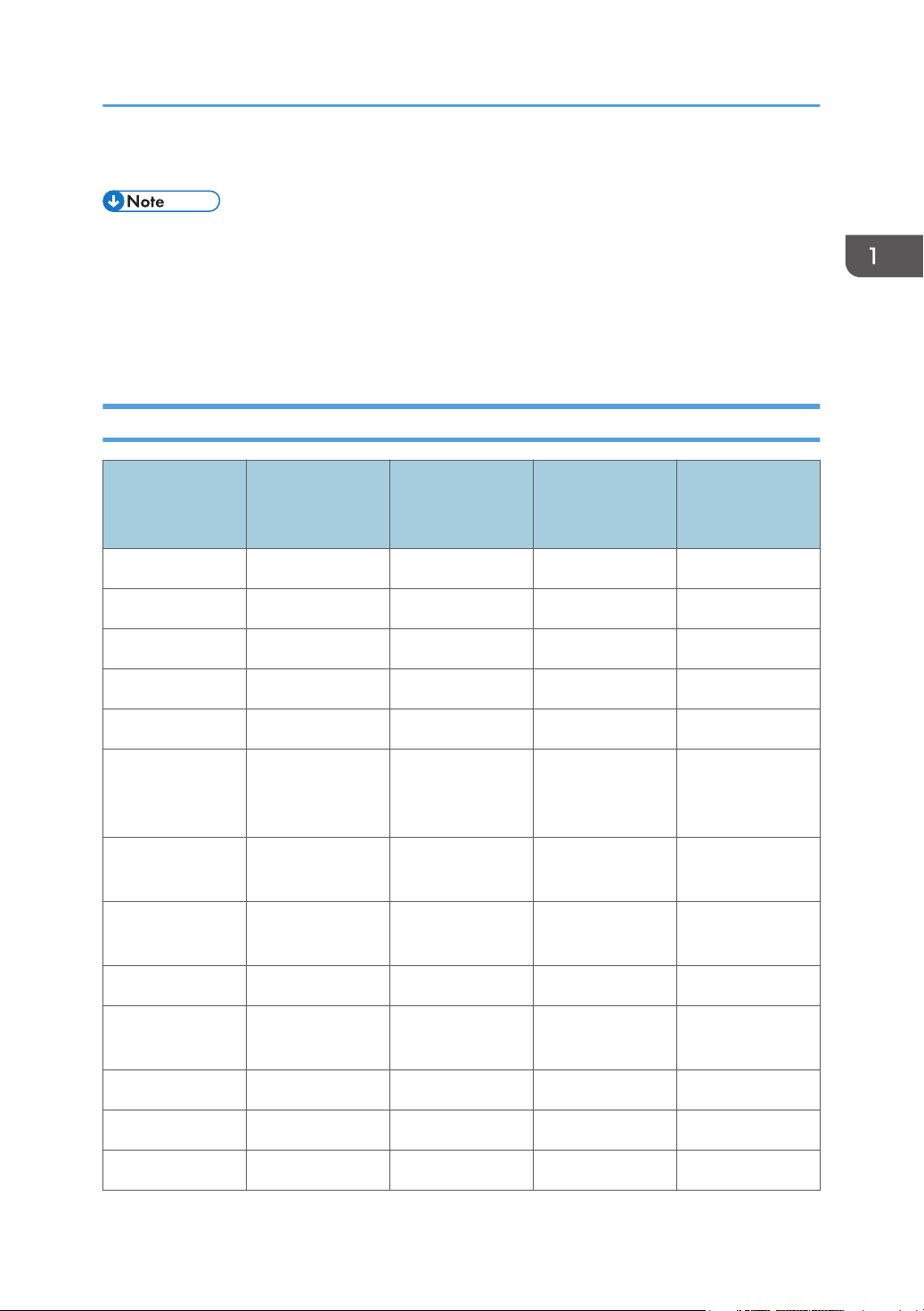
Manuals List
Manuals
displayed on the
control panel
*1
Yes
PDF Manuals
Provided
Yes
Manual Name
Printed Manuals
Provided
HTML Manuals
Provided
User Guide No Yes
*1
Read This First Yes No No Yes
Start Guide Yes No No Yes
Easy Search No Yes
Getting Started No Yes
Paper
No Yes
*2
*2
*2
Yes
Yes
Yes
*2
*2
*2
No
No
No
Specifications and
Adding Paper
Convenient
No Yes
*2
Yes
*2
No
Functions
Maintenance and
No Yes
*2
Yes
*2
No
Specifications
Troubleshooting No Yes
*2
Yes
*2
No
Copy/ Document
No Yes
Server
Fax No Yes
Print No Yes
Scan No Yes
*2
*2
*2
*2
Yes
Yes
Yes
Yes
*2
*2
*2
*2
No
No
No
No
7
Page 10
1. Manuals Provided with This Machine
Manuals
displayed on the
control panel
*2
Yes
PDF Manuals
Provided
No
Manual Name
Connecting the
Printed Manuals
Provided
No Yes
HTML Manuals
Provided
*2
Machine/ System
Settings
PostScript 3 No Yes
Extended Feature
No Yes
*3
*2
Yes
Yes
*3
*2
No
No
Settings
Security Guide No Yes Yes No
Driver Installation
No No No Yes
Guide
Quick Reference
No No No Yes
Copy Guide
Quick Reference
No No No Yes
Fax Guide
Quick Reference
No No No Yes
Scanner Guide
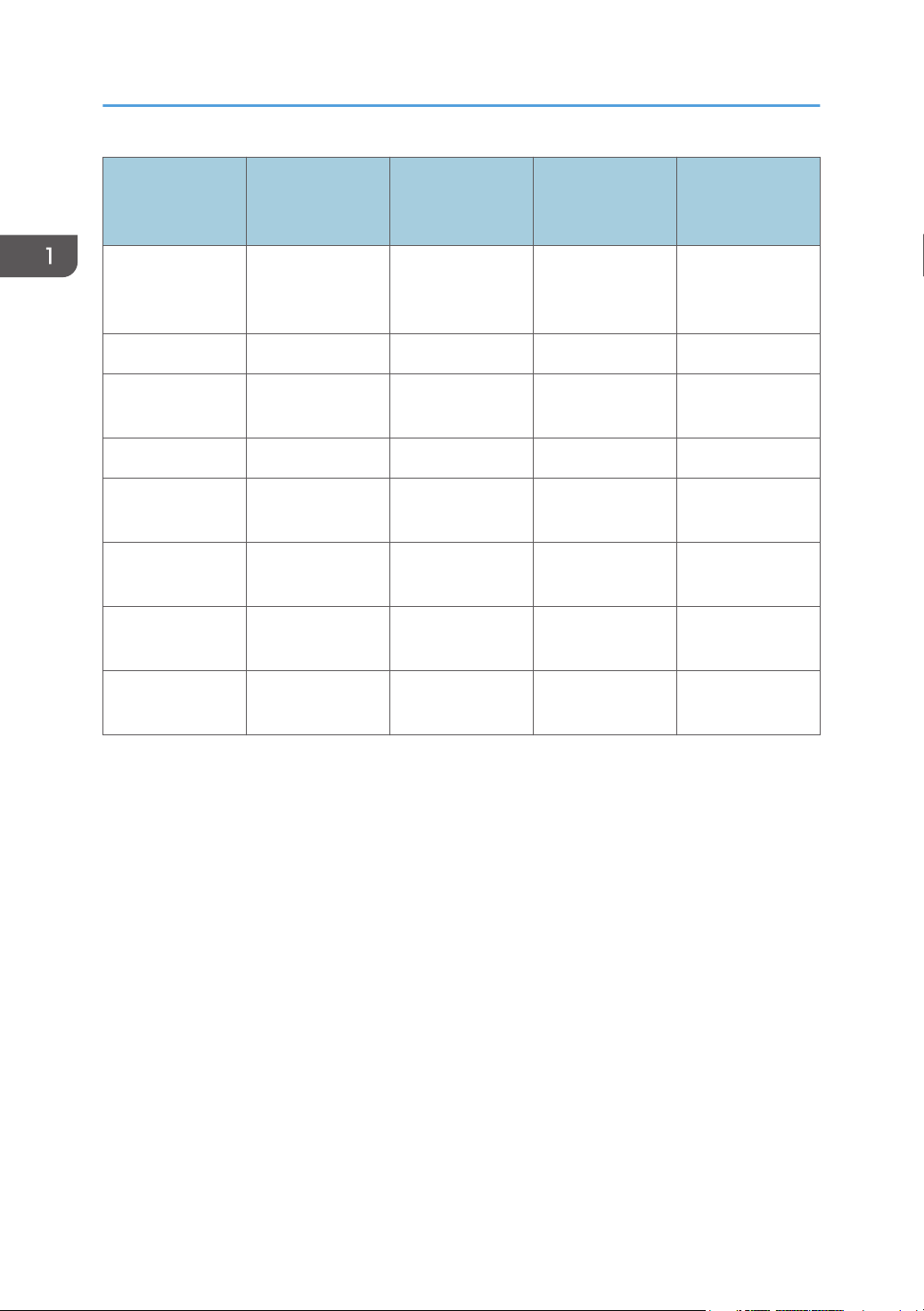
*2
This manual is available in Brazilian Portuguese.
*1
These manuals are available in English, German, French, Italian, Spanish, Dutch, and Russian.
*2
This manual is available in English, German, French, Italian, Spanish, and Dutch.
*3
8
Page 11
How to Use the Operating Instructions
How to Use the Operating Instructions
This chapter describes the operating instructions of this machine.
Formats of the Operating Instructions
The operating instructions of this machine are provided in the following formats:
• Printed manuals
• HTML manuals
• Manuals displayed on the control panel
• PDF manuals
For details about the contents of each manual, see page 5 "Manuals for This Machine". The various
manuals are available in different formats. For details about availability, see page 7 "Manuals List".
Read HTML Manuals
The following browsers are recommended to read the HTML manuals.
• Internet Explorer 8/9/10/11
• Firefox 29
• Safari 5.1.7
• Chrome 35
• If JavaScript is disabled or unavailable in your browser, you will not be able to search or use
certain buttons in the HTML documentation.
• The required display resolution is 1,024 × 768 pixels or greater.
• In the help on the top right of the top page, you can check how to use the HTML manuals. The help
topics explain the icons and buttons that are displayed in the HTML manuals.
Search for what you want to do or can do
Using Easy Search, you can search for what want to do or can do with this machine.
1. Click Easy Search on the top right of the top page.
2. Click a title to display the item you want to read.
9
Page 12
1. Manuals Provided with This Machine
Search by entering a keyword
You can search through the HTML manuals.
This section explains how to search for "duplex".
1. Enter "duplex" in the search box on the top left of the top page.
2. Click .
A list of titles or descriptions that include "duplex" appears.
A search result appears in the search result window. In addition you can use the drop-down menu
to select a manual.
3. Click a title to display the item you want to read.
• Use keywords to search for items you want to query. Depending on the keyword you enter, related
keywords might also appear.
• Items including the used keyword is appear in the search result window.
• If you put a space between keywords, pages that contain both keywords are displayed. For
example, if you enter "duplex" and a space and "copy", items including both words appear in the
search result window.)
Read the HTML manuals on the control panel
You can also read the HTML manuals on the control panel. For details about how to read the HTML
manuals on the control panel, see Start Guide .
10
Page 13
2. Safety Information for This Machine
This chapter describes the safety precautions.
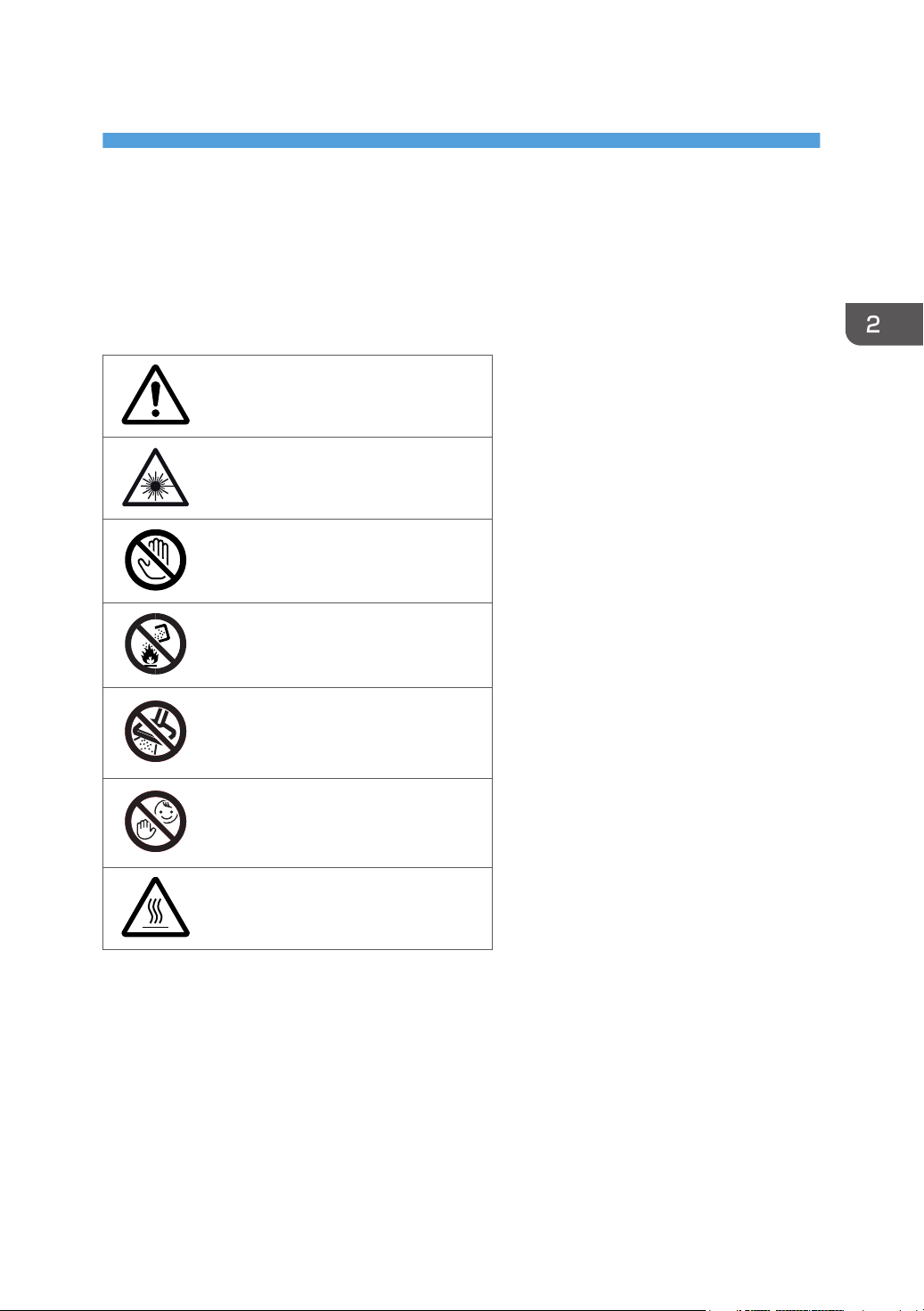
Safety Symbols for This Machine
The meanings of the safety symbols for this machine are as follows:
Caution
Warning; Laser beam
Do not touch
Do not throw into the fire
Do not use the cleaner
Keep out of reach of children
Caution, hot surface
11
Page 14
2. Safety Information for This Machine
Safety Information
Safety During Operation
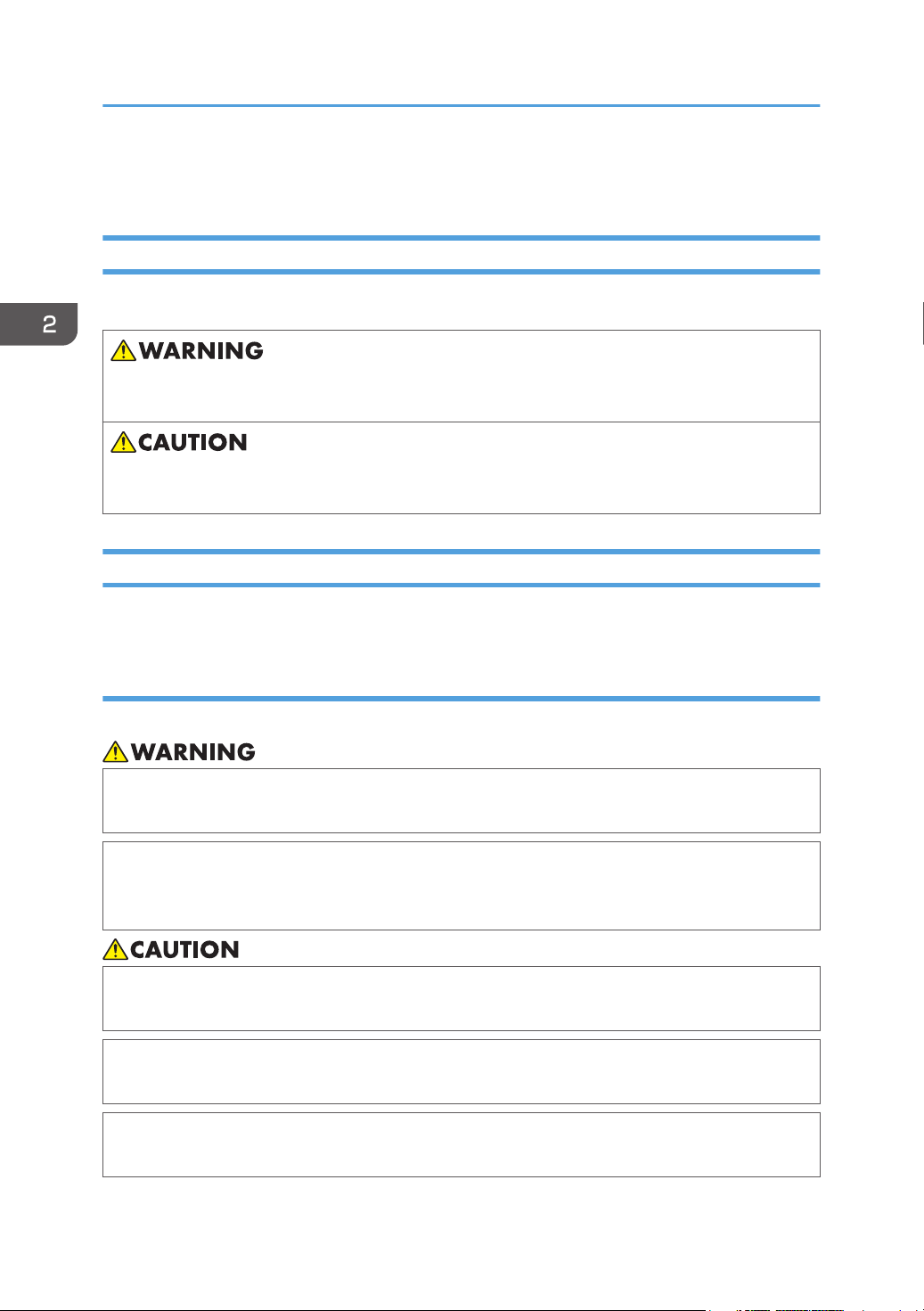
In this manual, the following important symbols are used:
Indicates a potentially hazardous situation which, if instructions are not followed, could result in death
or serious injury.
Indicates a potentially hazardous situation which, if instructions are not followed, may result in minor
or moderate injury or damage to property.
Safety Precautions to Be Followed
This section explains safety precautions that should always be followed when using this machine.
Environments where the machine can be used
This section explains safety precautions about environments where the machine can be used.
• Do not use flammable sprays or solvents in the vicinity of this machine. Also, avoid placing these
items in the vicinity of this machine. Doing so could result in fire or electric shock.
• Do not place vases, plant pots, cups, toiletries, medicines, small metal objects, or containers
holding water or any other liquids, on or close to this machine. Fire or electric shock could result
from spillage or if such objects or substances fall inside this machine.
• Keep the machine away from humidity and dust. Otherwise a fire or an electric shock might
occur.
• Do not place the machine on an unstable or tilted surface. If it topples over, an injury might
occur.
• Do not place heavy objects on the machine. Doing so can cause the machine to topple over,
possibly resulting in injury.
12
Page 15
Safety Information
• Make sure the room where you are using the machine is well ventilated and spacious. Good
ventilation is especially important when the machine is used heavily.
• Do not obstruct the machine's vents. Doing so risks fire caused by overheated internal
components.
Handling power cords and power cord plugs
This section explains safety precautions about handling power cords and power cord plugs.
• Do not use any power sources other than those that match the specifications shown. Doing so
could result in fire or electric shock.
• Do not use any frequencies other than those that match the specifications shown. Doing so could
result in fire or electric shock.
• Do not use multi-socket adaptors. Doing so could result in fire or electric shock.
• Do not use extension cords. Doing so could result in fire or electric shock.
• Do not use power cords that are damaged, broken, or modified. Also, do not use power cords
that have been trapped under heavy objects, pulled hard, or bent severely. Doing so could
result in fire or electric shock.
• Touching the prongs of the power cable's plug with anything metallic constitutes a fire and
electric shock hazard.
• The supplied power cord is for use with this machine only. Do not use it with other appliances.
Doing so could result in fire or electric shock.
• It is dangerous to handle the power cord plug with wet hands. Doing so could result in electric
shock.
• If the power cord is damaged and its inner wires are exposed or broken, contact your service
representative for a replacement. Use of damaged power cords could result in fire or electric
shock.
13
Page 16
2. Safety Information for This Machine
• Be sure to disconnect the plug from the wall outlet at least once a year and check for the
following:
• There are burn marks on the plug.
• The prongs on the plug are deformed.
• If any of the above conditions exist, do not use the plug and consult your dealer or service
representative. Use of the plug could result in fire or electric shock.
• Be sure to disconnect the power cord from the wall outlet at least once a year and check for the
following:
• The power cord's inner wires are exposed, broken, etc.
• The power cord's coating has a crack or dent.
• When bending the power cord, the power turns off and on.
• Part of the power cord becomes hot.
• The power cord is damaged.
• If any of the above conditions exist, do not use the power cord and consult your dealer or
service representative. Use of the power cord could result in fire or electric shock.
• Be sure to push the plug of the power cord fully into the wall outlet. Partially inserted plugs
create an unstable connection that can result in unsafe buildup of heat.
• If this machine is not going to be used for several days or longer at a time, disconnect its power
cord from the wall outlet.
• When disconnecting the power cord from the wall outlet, always pull the plug, not the cord.
Pulling the cord can damage the power cord. Use of damaged power cords could result in fire
or electric shock.
• Be sure to disconnect the plug from the wall outlet and clean the prongs and the area around
the prongs at least once a year. Allowing dust to build up on the plug constitutes a fire hazard.
• When performing maintenance on the machine, always disconnect the power cord from the
wall outlet.
• Power Source
120–127 V, 10 A, 60 Hz
Please be sure to connect the power cord to a power source as above.
14
Page 17
Safety Information
Handling the main machine
This section explains safety precautions about handling the main machine.
• Be sure to locate the machine as close as possible to a wall outlet. This will allow easy
disconnection of the power cord in the event of an emergency.
• If the machine emits smoke or odours, or if it behaves unusually, you must turn off its power
immediately. After turning off the power, be sure to disconnect the power cord plug from the
wall outlet. Then contact your service representative and report the problem. Do not use the
machine. Doing so could result in fire or electric shock.
• If metal objects, or water or other fluids fall inside this machine, you must turn off its power
immediately. After turning off the power, be sure to disconnect the power cord plug from the
wall outlet. Then contact your service representative and report the problem. Do not use the
machine. Doing so could result in fire or electric shock.
• Do not touch this machine if a lightning strike occurs in the immediate vicinity. Doing so could
result in electric shock.
• The following explains the warning messages on the plastic bag used in this product's
packaging.
• Keep the polythene materials (bags, etc.) supplied with this machine away from babies
and small children at all times. Suffocation can result if polythene materials are brought into
contact with the mouth or nose.
• Unplug the power cord from the wall outlet before you move the machine. While moving the
machine, take care that the power cord is not damaged under the machine. Failing to take these
precautions could result in fire or electric shock.
• If you have to move the machine when the optional paper tray unit is attached, do not push on
the main unit's top section. Doing so can cause the optional paper tray unit to detach, possibly
resulting in injury.
• If Tray 2 and 3 are installed, do not pull out more than one tray at a time when you are
changing or replenishing paper or resolving paper jams. Pressing down forcefully on the
machine's upper surfaces can result in malfunctions and/or user injury.
15
Page 18
2. Safety Information for This Machine
• Contact your service representative if you need to lift the machine (such as when relocating it to
another floor). Do not attempt to lift the machine without the assistance of your service
representative. The machine will be damaged if it topples or is dropped, resulting in malfunction
and risk of injury to users.
• Do not look into the lamp. It can damage your eyes.
• Do not hold the control panel while moving the machine. Doing so may damage the control
panel, cause a malfunction, or result in injury.
• Keep your hands away from the hinges and exposure glass when lowering the ADF. Not doing
so result in an injury if your hands or fingers are pinched.
Handling the machine's interior
This section explains safety precautions about handling the machine's interior.
• Do not remove any covers or screws other than those explicitly mentioned in this manual. Inside
this machine are high voltage components that are an electric shock hazard and laser
components that could cause blindness. Contact your sales or service representative if any of the
machine's internal components require maintenance, adjustment, or repair.
• Do not attempt to disassemble or modify this machine. Doing so risks burns and electric shock.
Note again that exposure to the laser components inside this machine risks blindness.
• Some of this machine's internal components get very hot. For this reason, take care when
removing misfed paper. Not doing so could result in burns.
• Some of the internal components of this machine might be fragile. When you remove jammed
paper, do not touch the sensors, connectors, LEDs, or other fragile parts that are shown in the
Troubleshooting manual. Doing so may cause malfunctions.
• When removing jammed paper, make sure not to trap or injure your fingers.
• When loading paper, take care not to trap or injure your fingers.
• While safety measures have been installed to prevent accidents, you must not touch the
machine's rollers while it is operating. Doing so could cause injury.
16
Page 19
Safety Information
• If the machine's interior is not cleaned regularly, dust will accumulate. Fire and breakdown can
result from heavy accumulation of dust inside this machine. Contact your sales or service
representative for details about and charges for cleaning the machine's interior.
Handling the machine's supplies
This section explains safety precautions about handling the machine's supplies.
• Do not incinerate toner (new or used) or toner containers. Doing so risks burns. Toner will ignite
on contact with naked flame.
• Do not store toner (new or used) or toner containers anywhere near naked flames. Doing so
risks fire and burns. Toner will ignite on contact with naked flame.
• Do not use a vacuum cleaner to remove spilled toner (including used toner). Absorbed toner
may cause a fire or explosion due to electrical contact flickering inside the vacuum cleaner.
However, it is possible to use a vacuum cleaner that is explosion-proof and dust ignition-proof. If
toner is spilled on the floor, remove the spilled toner slowly using a wet cloth, so that the toner is
not scattered.
• The following explains the warning messages on the plastic bag used in this product's
packaging.
• Keep the polythene materials (bags, etc.) supplied with this machine away from babies
and small children at all times. Suffocation can result if polythene materials are brought into
contact with the mouth or nose.
• Do not crush or squeeze toner containers. Doing so can cause toner spillage, possibly resulting
in dirtying of skin, clothing, and floor, and accidental ingestion.
• Store toner (new or used), toner containers, and components that have been in contact with
toner out of reach of children.
• If toner or used toner is inhaled, gargle with plenty of water and move into a fresh air
environment. Consult a doctor if necessary.
• If toner or used toner gets into your eyes, flush immediately with large amounts of water. Consult
a doctor if necessary.
17
Page 20
2. Safety Information for This Machine
• If toner or used toner is swallowed, dilute by drinking a large amount of water. Consult a doctor
if necessary.
• When removing jammed paper or replacing toner, avoid getting toner (new or used) on your
clothing. If toner comes into contact with your clothing, wash the stained area with cold water.
Hot water will set the toner into the fabric and make removing the stain impossible.
• When removing jammed paper or replacing toner, avoid getting toner (new or used) on your
skin. If toner comes into contact with your skin, wash the affected area thoroughly with soap and
water.
• When replacing a toner or waste toner container or consumables with toner, make sure that the
toner does not splatter. Put the waste consumables in a bag after they are removed. For
consumables with a lid, make sure that the lid is shut.
• Do not attempt to print on stapled sheets, aluminum foil, carbon paper, or any kind of
conductive paper. Doing so risks fire.
• Keep SD cards or USB flash memory devices out of reach of children. If a child accidentally
swallows an SD card or USB flash memory device, consult a doctor immediately.
18
Page 21
DCQ001
1
Safety Labels of This Machine
Safety Labels of This Machine
This section explains the machine's safety information labels.
Positions of WARNING and CAUTION labels
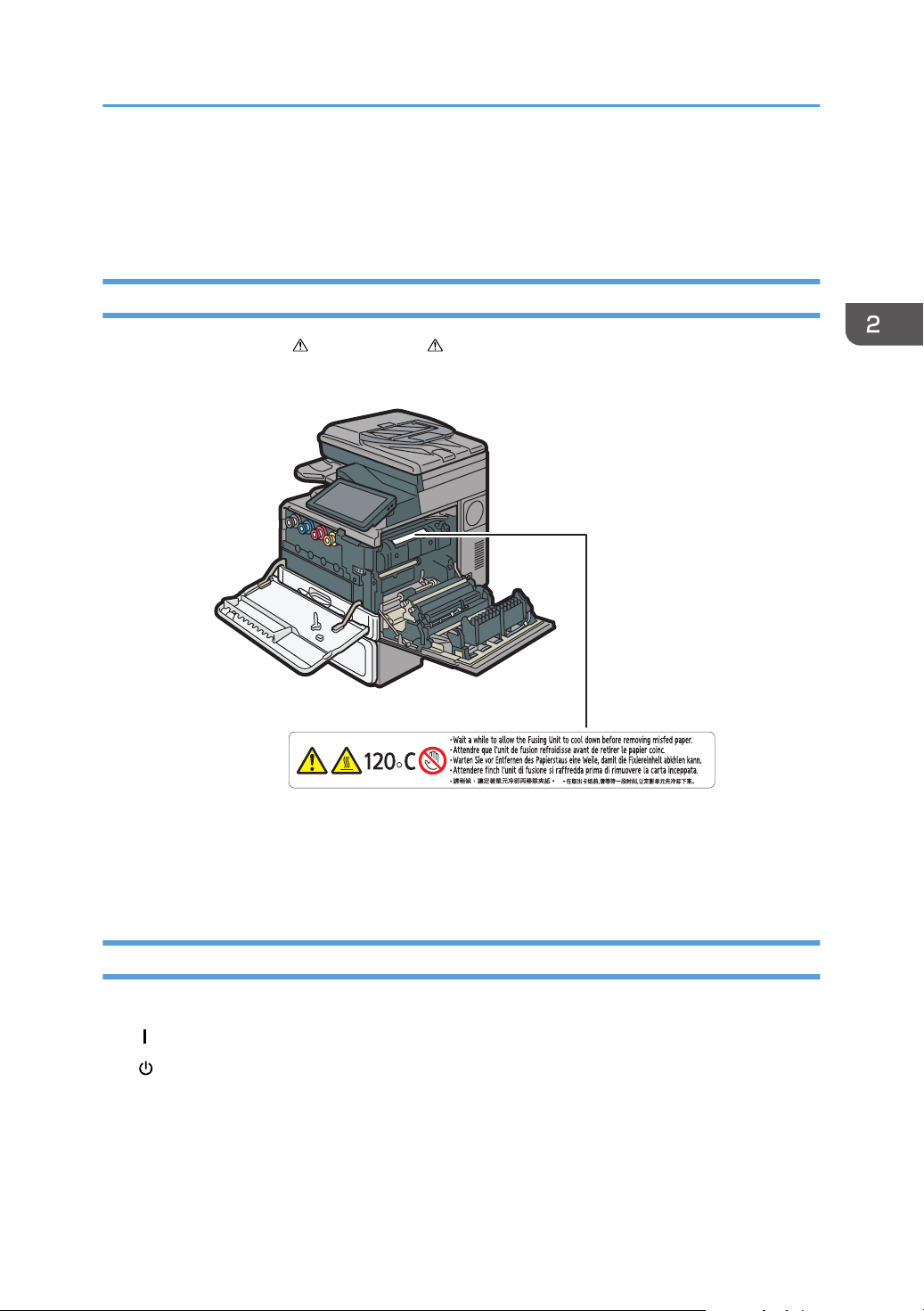
This machine has labels for WARNING and CAUTION at the positions shown below. For safety,
please follow the instructions and handle the machine as indicated.
1.
High temperature parts. Wait a while to allow the Fusing Unit to cool down before removing misfed
paper.
Symbols for Earth, Insulation, and Power Switch
Symbols for earth, insulation, and power switch that are used for this machine are as follows:
• : POWER ON
• : STANDBY
19
Page 22

2. Safety Information for This Machine
20
Page 23

3. Other Information for This Machine
This chapter describes laws and regulations related to this machine.
Laws and Regulations
Duplication and Printing Prohibited
Do not copy or print any item for which reproduction is prohibited by law.
Copying or printing the following items is generally prohibited by local law:
bank notes, revenue stamps, bonds, stock certificates, bank drafts, checks, passports, driver's licenses.
The preceding list is meant as a guide only and is not inclusive. We assume no responsibility for its
completeness or accuracy. If you have any questions concerning the legality of copying or printing
certain items, consult with your legal advisor.
Laser Safety
Laser Safety for Type 1
CDRH Regulations
This equipment complies with requirements of 21 CFR Subchapter J for class I laser product. This
equipment contains four laser diodes, 648–663 nanometer wavelength. The beam divergence angle is
28 degrees (minimum) and 35 degrees (maximum) in the vertical direction, and 7 degrees (minimum)
and 10 degrees (maximum) in the horizontal direction, and laser beams are generated in Continuous
Wave (CW) mode. The maximum output power of the light source is 9 milliwatt.
Caution
Use of controls or adjustments or performance of procedures other than those specified in this manual
might result in hazardous radiation exposure.
Laser Safety for Type 2
CDRH Regulations
This equipment complies with requirements of 21 CFR Subchapter J for class I laser product. This
equipment contains four 2ch-Laser Diode Arrays (2ch-LDA), 650–663 nanometer wavelength for each
emitter. The beam divergence angle is 15 degrees (minimum) and 25 degrees (maximum) in the vertical
direction, and 7 degrees (minimum) and 13 degrees (maximum) in the horizontal direction, and laser
beams are generated in Continuous Wave (CW) mode. The maximum output power of the light source
is 15 milliwatt.
21
Page 24

3. Other Information for This Machine
Caution
Use of controls or adjustments or performance of procedures other than those specified in this manual
might result in hazardous radiation exposure.
Notes to USA Users of FCC Requirements
Part 15 of the FCC Rules
Note:
This equipment has been tested and found to comply with the limits for a Class B digital device,
pursuant to Part 15 of the FCC Rules. These limits are designed to provide reasonable protection
against harmful interference in a residential installation. This equipment generates, uses and can
radiate radio frequency energy and, if not installed and used in accordance with the instructions,
may cause harmful interference to radio communications. However, there is no guarantee that
interference will not occur in a particular installation. If this equipment does cause harmful
interference to radio or television reception, which can be determined by turning the equipment off
and on, the user is encouraged to try to correct the interference by one or more of the following
measures:
• Reorient or relocate the receiving antenna.
• Increase the separation between the equipment and receiver.
• Connect the equipment into an outlet on a circuit different from that to which the receiver is
connected.
• Consult the dealer or an experienced radio /TV technician for help.
Caution:
Changes or modifications not expressly approved by the party responsible for compliance could
void the user's authority to operate the equipment.
This transmitter must not be co-located or operated in conjunction with any other antenna or
transmitter.
This equipment complies with FCC radiation exposure limits set forth for an uncontrolled
environment and meets the FCC radio frequency (RF) Exposure Guidelines. This equipment should
be installed and operated keeping the radiator at least 20 cm or more away from person’s body
(excluding extremities: hands, wrists, feet and ankles).
Declaration of Conformity
This device complies with Part 15 of the FCC Rules.
Operation is subject to the following two conditions:
(1) This device may not cause harmful interference, and
22
Page 25

Laws and Regulations
(2) this device must accept any interference received, including interference that may cause
undesired operation.
Responsible party: Ricoh Americas Corporation
Address: 5 Dedrick Place, West Caldwell, NJ 07006
Telephone number: 973-882-2000
Product Name: Multi Function Peripheral
Model Number:
• MP C306ZSPF
• MP C406ZSPF
Installing the Ferrite Core
An Ethernet interface cable connected to the USB Device Server Option port and a telephone line
cable with a ferrite core must be used for RF interference suppression.
Part 68 of the FCC Rules regarding Facsimile Unit
1. This equipment complies with Part 68 of the FCC rules and requirements adopted by the ACTA. On
the cover of this equipment is a label that contains, among other information, a product identifier in
the format US:AAAEQ##TXXXXX. If requested, this number must be provided to the telephone
company.
2. This equipment uses the RJ11C USOC jack.
3. A plug and jack used to connect this equipment to the premises wiring and telephone network must
comply with the applicable FCC Part 68 rules and requirements adopted by the ACTA. A
compliant telephone cord and modular plug is provided with this product. It is designed to be
connected to a compatible modular jack that is also compliant. See installation instructions for
detail.
4. The REN is used to determine the number of devices that may be connected to a telephone line.
Excessive RENs on a telephone line may result in the devices not ringing in response to an incoming
call. In most but not all areas, the sum of RENs should not exceed five (5.0). To be certain of the
number of devices that may be connected to a line, as determined by the total RENs, contact the
local telephone company. The REN for this product is part of the product identifier that has the
format US:AAAEQ##TXXXXX. The digits represented by ## are the REN without a decimal point
(e.g., 03 is a REN of 0.3).
5. If this equipment causes harm to the telephone network, the telephone company will notify you in
advance that temporary discontinuance of service may be required. But if advance notice is not
practical, the telephone company will notify the customer as soon as possible. Also, you will be
advised of your right to file a complaint with the FCC if you believe it is necessary.
6. The telephone company may make changes in its facilities, equipment, operations or procedures
that could affect the operation of the equipment. If this happens the telephone company will
23
Page 26

3. Other Information for This Machine
provide advance notice in order for you to make necessary modifications to maintain uninterrupted
service.
7. If trouble is experienced with this equipment, for repair or warranty information, please contact
Ricoh Americas Corporation Customer Support Department at 1-800-FASTFIX. If this device is
causing problems with your telephone network, the telephone company may request that you
disconnect the equipment until the problem is resolved.
8. In the event of operation problems (document jam, copy jam, communication error indication), see
the manual provided with this machine for instruction on resolving the problem.
9. Connection to party line service is subject to state tariffs. Contact the state public utility commission,
public service commission or corporation commission for information.
10. If your home has specially wired alarm equipment connected to the telephone line, ensure the
installation of this equipment does not disable your alarm equipment. If you have questions about
what will disable alarm equipment, consult your telephone company or a qualified installer.
WHEN PROGRAMMING EMERGENCY NUMBERS AND/OR MAKING TEST CALLS TO
EMERGENCY NUMBERS:
1. Remain on the line and briefly explain to the dispatcher the reason for the call before hanging
up.
2. Perform such activities in the off-peak hours, such as early morning hours or late evenings.
The Telephone Consumer Protection Act of 1991 makes it unlawful for any person to use a computer or
other electronic device, including FAX machines, to send any message unless such message clearly
contains in a margin at the top or bottom of each transmitted page or on the first page of the
transmission, the date and time it is sent and an identification of the business or other entity, or other
individual sending the message and the telephone number of the sending machine or such business,
other entity, or individual. (The telephone number provided may not be a 900 number or any other
number for which charges exceed local or long-distance transmission charges.)
In order to program this information into your FAX machine, you should complete the following steps:
Follow the FAX HEADER programming procedure in the Programming chapter of the operating
instructions to enter the business identification and telephone number of the terminal or business. This
information is transmitted with your document by the FAX HEADER feature. In addition to the information,
be sure to program the date and time into your machine.
Important Safety Instructions for Facsimile Unit
When using your telephone equipment, basic safety precautions should always be followed to reduce
the risk of fire, electric shock and injury to persons, including the following:
• Do not use this product near water, for example, near a bath tub, wash bowl, kitchen sink or
laundry tub, in a wet basement or near a swimming pool.
24
• Avoid using a telephone during an electrical storm. There may be a remote risk of electric shock
from lightning.
Page 27

Laws and Regulations
• Do not use a telephone in the vicinity of a gas leak to report the leak.
• Use only the power cord and batteries indicated in this manual. Do not dispose of batteries in a
fire. They may explode. Check with local codes for possible special disposal instructions.
Save these instructions.
IMPORTANTES MESURES DE SÉCURITÉ de l'unité Fax
Certaines mesures de sécurité doivent être prises pendant l'utilisation de material téléphonique afin de
réduire les risques d'incendie, de choc électrique et de blessures. En voici quelques-unes:
• Ne pas utiliser l'appareil près de l'eau, p.ex., près d'une baignoire, d'un lavabo, d'un évier de
cuisine, d'un bac à laver, dans un sous-sol humide ou près d'une piscine.
• Éviter d'utiliser le téléphone (sauf s'il s'agit d'un appareil sans fil) pendant un orage électrique. Ceci
peut présenter un risque de choc électrique causé par la foudre.
• Ne pas utiliser l'appareil téléphonique pour signaler une fuite de gaz s'il est situé près de la fuite.
• Utiliser seulement le cordon d'alimentation et le type de piles indiqués dans ce manual. Ne pas
jeter les piles dans le feu: elles peuvent exploser. Se conformer aux règlements pertinents quant à
l'élimination des piles.
Conserver ces instructions.
Notes to Canadian Users of Wireless Devices
This device complies with Industry Canada licence-exempt RSS standard(s).
Operation is subject to the following two conditions:
(1) this device may not cause interference, and
(2) this device must accept any interference, including interference that may cause undesired operation
of the device.
Under Industry Canada regulations, this radio transmitter may only operate using an antenna of a type
and maximum (or lesser) gain approved for the transmitter by Industry Canada. To reduce potential
radio interference to other users, the antenna type and its gain should be so chosen that the equivalent
isotropically radiated power (e.i.r.p.) is not more than that necessary for successful communication.
Remarques à l'attention des utilisateurs canadiens d'appareils sans fil
Le présent appareil est conforme aux CNR d'Industrie Canada applicables aux appareils radio exempts
de licence.
L'exploitation est autorisée aux deux conditions suivantes :
(1) l'appareil ne doit pas produire de brouillage, et
25
Page 28
3. Other Information for This Machine
(2) l'appareil doit accepter tout brouillage radioélectrique subi, même si le brouillage est susceptible
d'en compromettre le fonctionnement.
Conformément à la réglementation d'Industrie Canada, le présent émetteur radio peut fonctionner avec
une antenne d'un type et d'un gain maximal (ou inférieur) approuvé pour l'émetteur par Industrie
Canada. Dans le but de réduire les risques de brouillage radioélectrique à l'intention des autres
utilisateurs, il faut choisir le type d'antenne et son gain de sorte que la puissance isotrope rayonnée
équivalente (p.i.r.e.) ne dépasse pas l'intensité nécessaire à l'établissement d'une communication
satisfaisante.
Notes to Canadian Users of Facsimile Unit
This product meets the applicable Industry Canada technical specifications.
The Ringer Equivalence Number is an indication of the maximum number of devices allowed to be
connected to a telephone interface. The termination on an interface may consist of any combination of
devices subject only to the requirement that the sum of the RENs of all the devices does not exceed five.
Remarques à l'attention des utilisateurs canadiens de l'unité Fax
Le présent matériel est conforme aux spécifications techniques applicables d'Industrie Canada.
L'indice d'équivalence de la sonnerie (IES) sert à indiquer le nombre maximal de terminaux qui peuvent
être raccordés à une interface téléphonique. La terminaison d'une interface peut consister en une
combinaison quelconque de dispositifs, à la seule condition que la somme d'indices d'équivalence de la
sonnerie de tous les dispositifs n'excède pas 5.
26
Page 29

4. Appendix
This appendix describes trademarks for the machine.
Trademarks
Adobe, PostScript, PostScript 3, and Reader are either registered trademarks or trademarks of Adobe
Systems Incorporated in the United States and/or other countries.
Firefox is a registered trademark of the Mozilla Foundation.
Google and Chrome are trademarks of Google Inc.
Microsoft, Windows, and Internet Explorer are either registered trademarks or trademarks of Microsoft
Corporation in the United States and/or other countries.
Safari is a trademark of Apple Inc., registered in the United States and other countries.
The SD is a trademark of SD-3C, LLC.
The proper names of Internet Explorer 8, 9, 10 and 11 are as follows:
• Windows® Internet Explorer® 8
• Windows® Internet Explorer® 9
• Internet Explorer® 10
• Internet Explorer® 11
Other product names used herein are for identification purposes only and might be trademarks of their
respective companies. We disclaim any and all rights to those marks.
27
Page 30

MEMO
US
28 EN
D219-7011A
Page 31

© 2015
Page 32

D219-7011A
US
EN
 Loading...