

Page 1
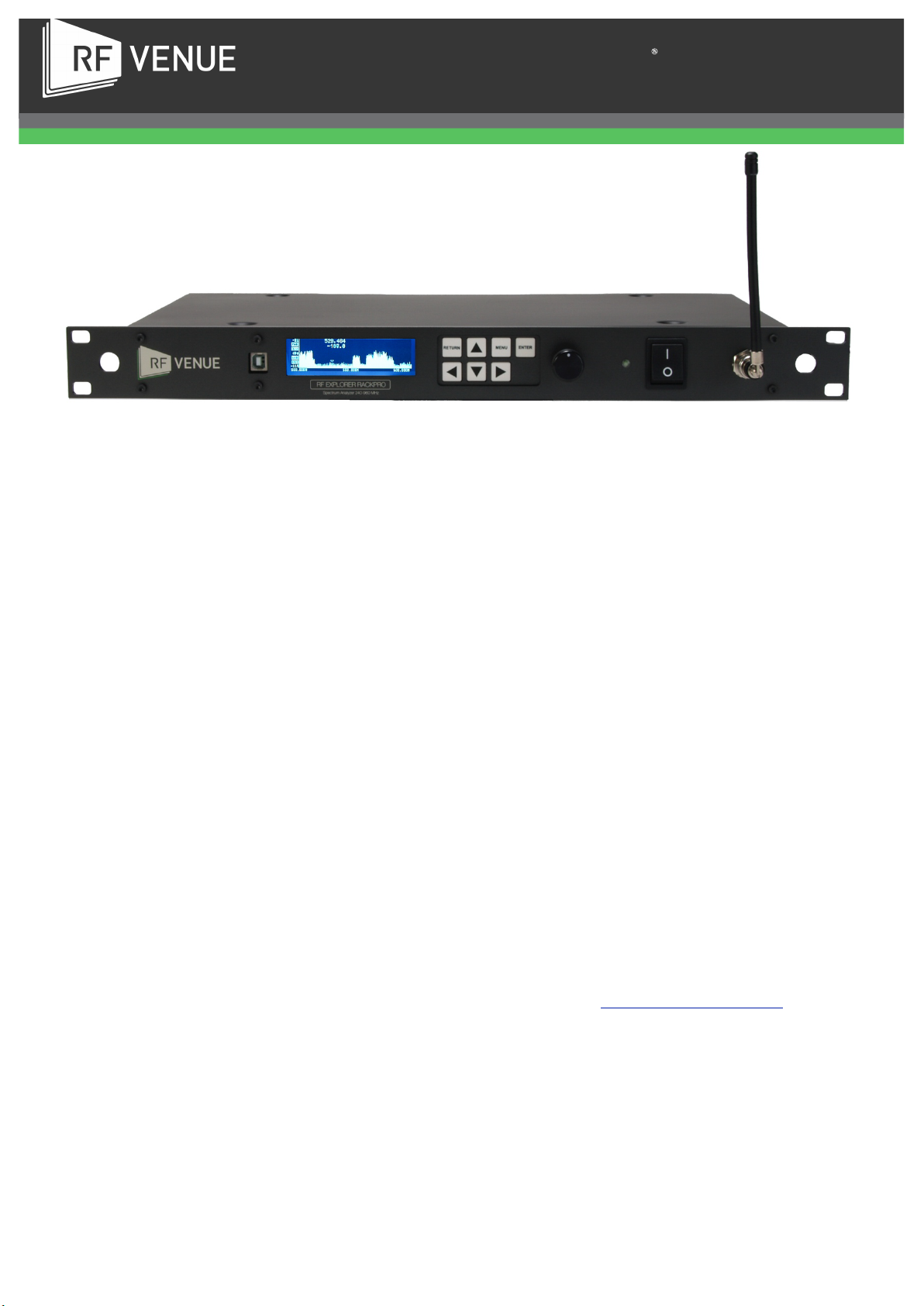
RF Explorer RackPRO™
User Manual
Introduction
Greetings fellow traveler on the RF spectrum.
The RF Explorer RackPRO (referred to in this
document in shorthand as “RackPRO”) has been
designed to be intuitive and easy to use. There is no need to read large user manuals to get
advantage of its advanced functionality.
Most of the complexity inherent to full sized Spectrum Analyzers is simplified with
automatic functionality resolved by the firmware. For instance, you do not need to adjust
Resolution Bandwidth (RBW) every time you select a different frequency span. Actually, you
do not even need to know what RBW is. You can progress in your RF learning curve and
come back to this manual and growing library of online tutorials anytime.
We welcome your feedback and look for ideas to make this manual more useful. Please
contribute with ideas, suggestions, and comments via email to [email protected].
Happy signal hunting,
RF Venue, Inc.
Page 2
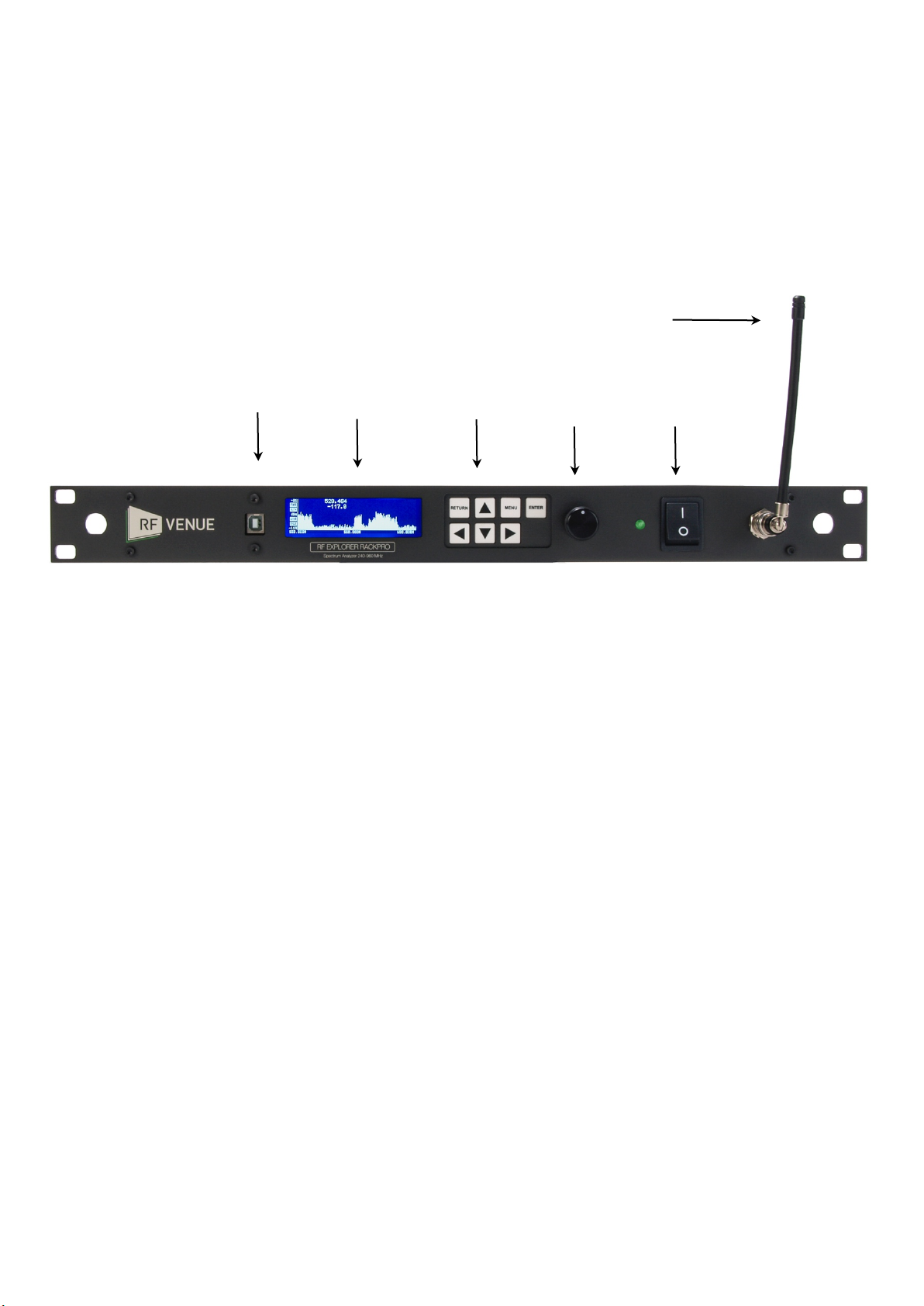
RackPRO at a glance
USB
Connector
LCD
Display
Control
Interface
Rotary
Marker
Control
Power
Switch
Detachable Dipole Antenna / BNC RF Input
Page 3
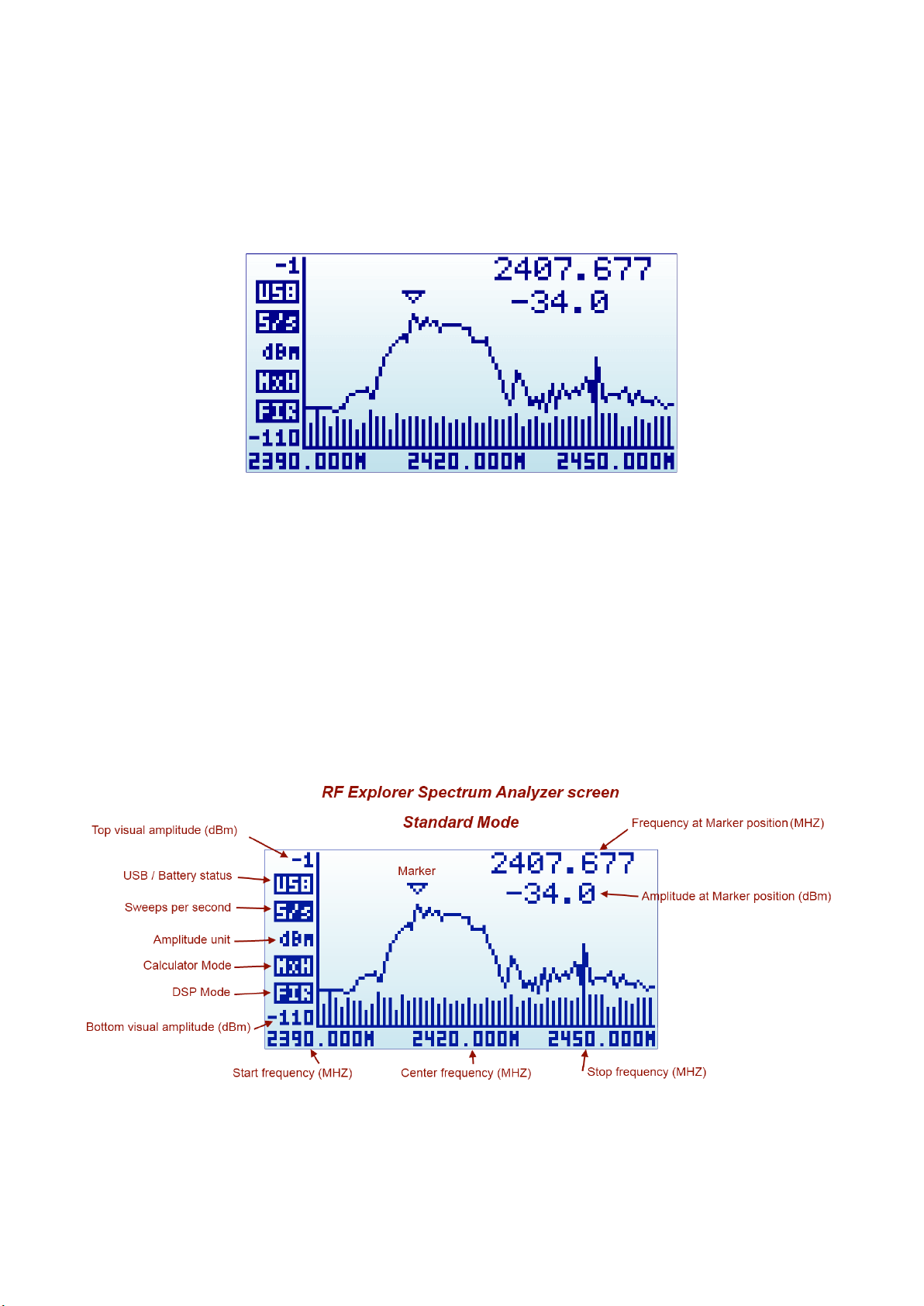
Spectrum Analyzer Mode - Main Screen
Upon start, RackPRO goes to Spectrum Analyzer mode automatically.
The X axis represents frequency in MHZ and Y axis display actual received power in dBm or
dBuV (selectable).
Configuration settings such as amplitude reference and frequency span are preserved
between sessions, stored in internal FLASH memory.
The main screen automatically displays a small marker with a triangle shape. This will
indicate the peak amplitude found in the current frequency span, being the first text line the
frequency in MHZ and the second line the amplitude at that particular point.
The main screen has a number of additional indicators:
Page 4

The available indicators are:
• USB / battery status: this indicator will display USB1 when a valid 5V USB
connection is available. This will be true even if the connection is through a wall wart
charger, so it does not actually means a data connection but a power bus connection.
Alternatively, a battery icon with charge level indicator will display when the
RackPRO unit power switch is set to ON. If both connections are enabled, then USB
and Battery will alternate and, in this case, the battery will be charging.
• Sweeps per second: this is an approximate value of the number of full screen
sweeps happening every second. In the example above, there are 5 sweeps per
second or, in equivalent terms, one sweep every 200ms.
• Calculator mode: this indicator may have different values as specified by the
Calculator mode in the frequency menu.
• DSP mode: this indicator shows the actual value being used by the Analyzer. The
DSP:Auto is the recommended setting in the Frequency Menu so RackPRO will select
the best possible option as per below:
o FST: Fast mode. This is the standard mode available in all models.
• Marker: There are different operational modes for the marker, see Configuration
Menu in page 20.
The analyzer screen can be turned into advanced mode using the [Return] key:
1 USB refers to Universal Serial Bus, the standard connectivity bus in all modern computers. Our fellow HAM
users should not confuse this with Upper Side Band communication, even though uses the same mnemonic.
Page 5
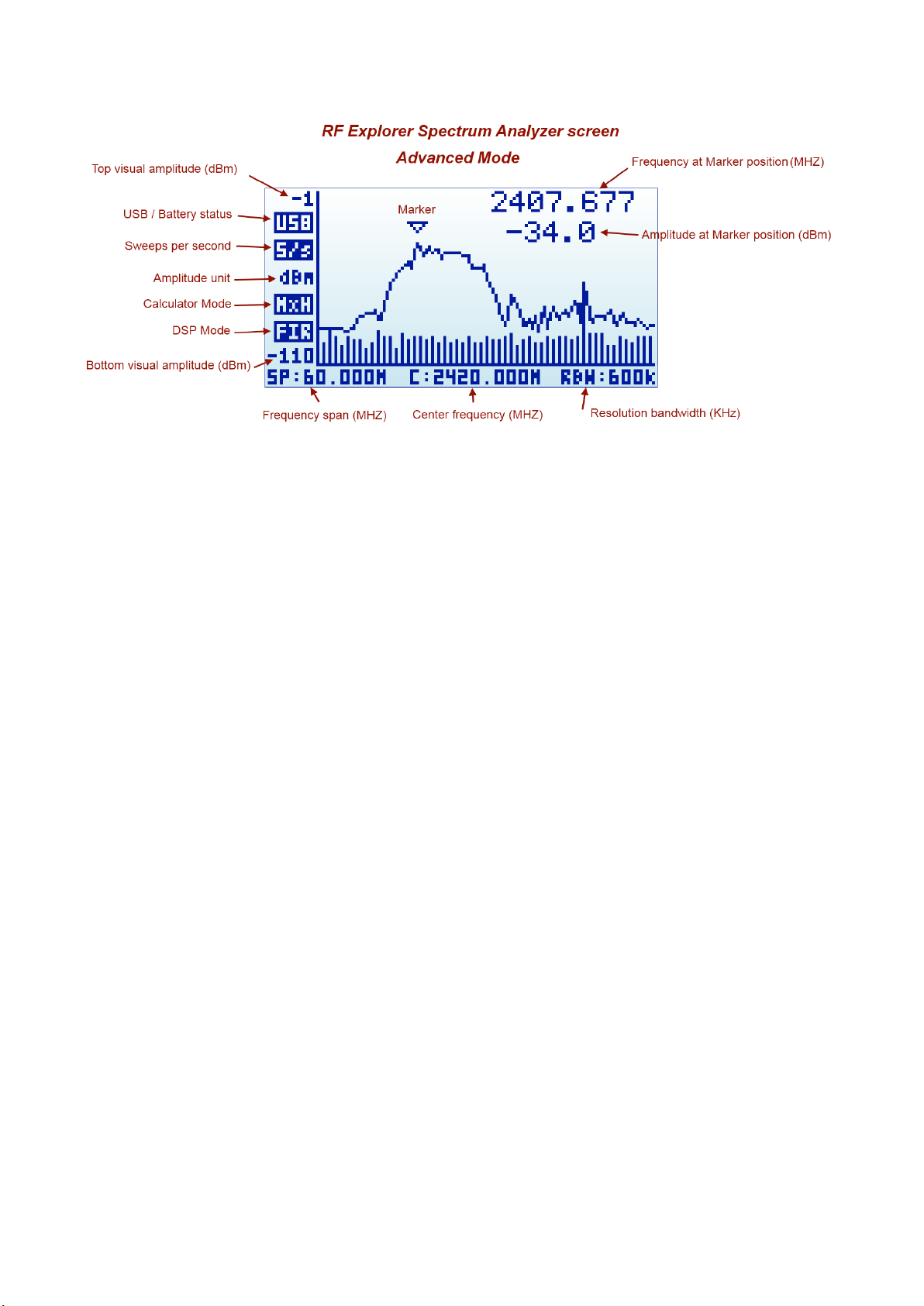
Note the frequency axis indicators changes at the bottom. More details about this screen
mode in section Analyzer screen page 16.
Page 6
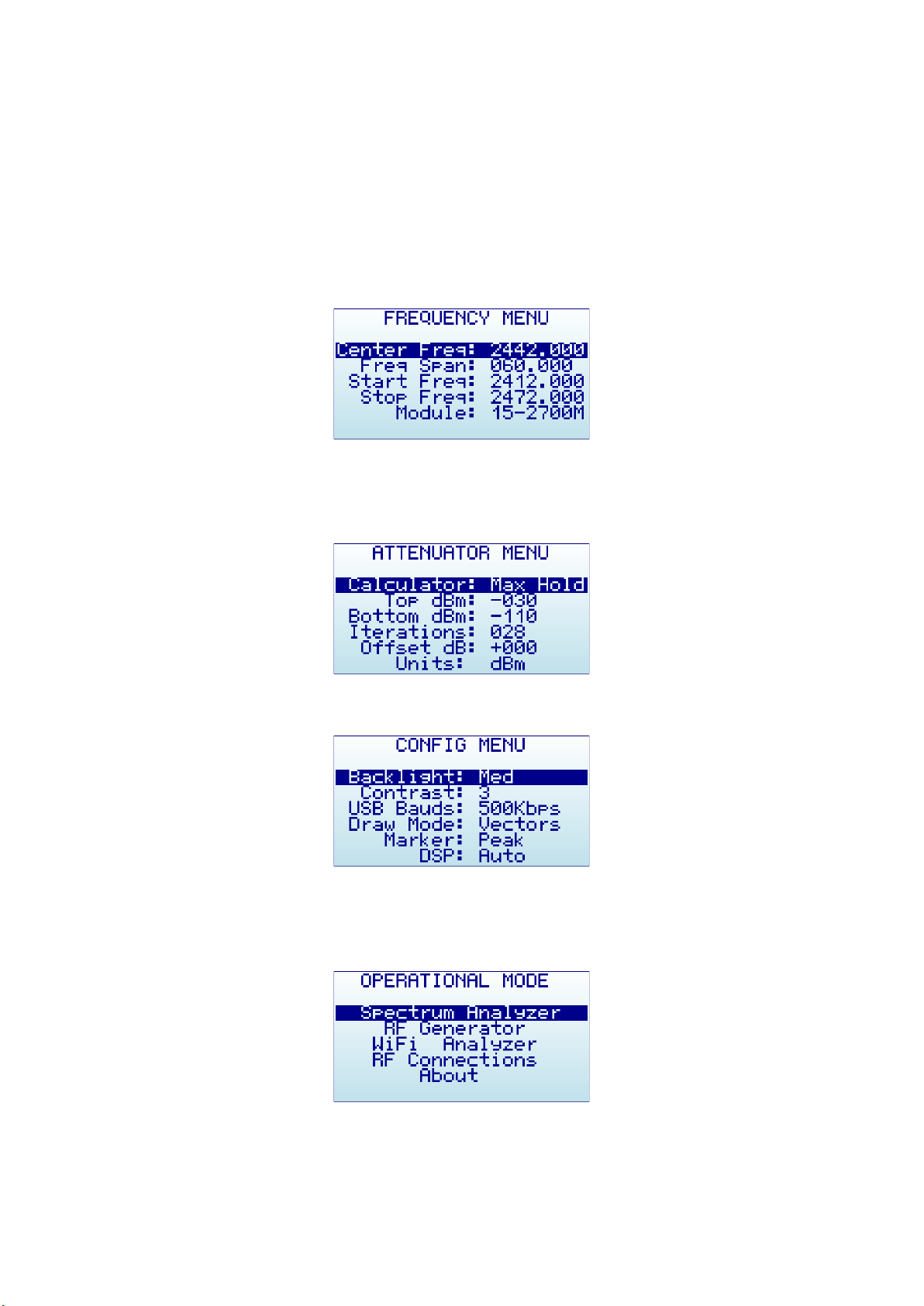
Using menus
There are several menus in RackPRO. They are organized on different screens, which you
can iterate through by using the [Menu] key. If you click [Menu] button multiple times, you
will visit every one of them:
Optionally, you can use the [Left] and [Right] keys to go from one screen to another.
You can exit from a menu anytime by using the [Return] key.
Page 7

The first time you click on [Menu] button in a RackPRO session, Frequency Menu will open.
This may change as we will see later, so every time you click on [Menu] from Spectrum
Analyzer main screen, you actually re-open the last menu you were working with. In this
way you save time by not having to navigate through all the menus to go the same place you
were before.
Page 8
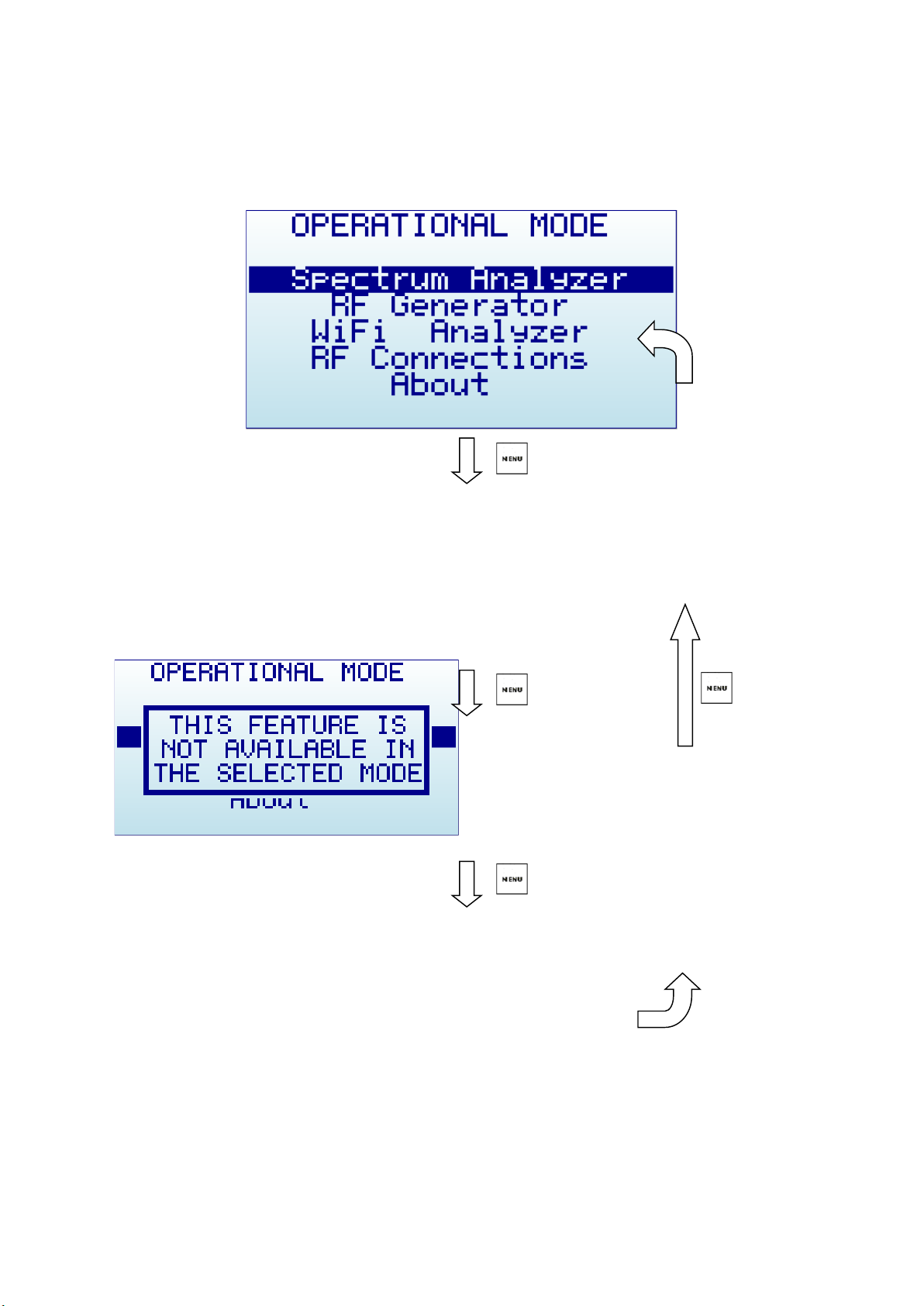
Operational Mode menu
The menu display different functional modes available in your Analyzer.
Use [Up] and [Down] arrow keys to select the desired mode and click on [Enter] to
activate it immediately.
• Spectrum Analyzer mode is the default mode, available in all RackPRO models
• RF Generator is available in a subset of models only. These include models ISM
Combo, 2.4G, 433M, 868M and 915M. If this mode is selected in a model with no RF
Generator available, it will display this message below
If your analyzer includes two modules (e.g. ISM Combo) only one of the
modules may be the one with the available functionality. Make sure to select the
right module before trying to use the functionality (e.g. the ISM Combo has the 2.4G
module enabled on the SMA module at the right) otherwise above message will
popup.
• WiFi Analyzer is available in a subset of models only, including 2.4G, WSUB3G, 3G
Combo and ISM Combo.
• RF Connections enumerates the installed RF modules and how each one is
connected to each SMA RF port. This example below shows a standard 3G Combo
Page 9
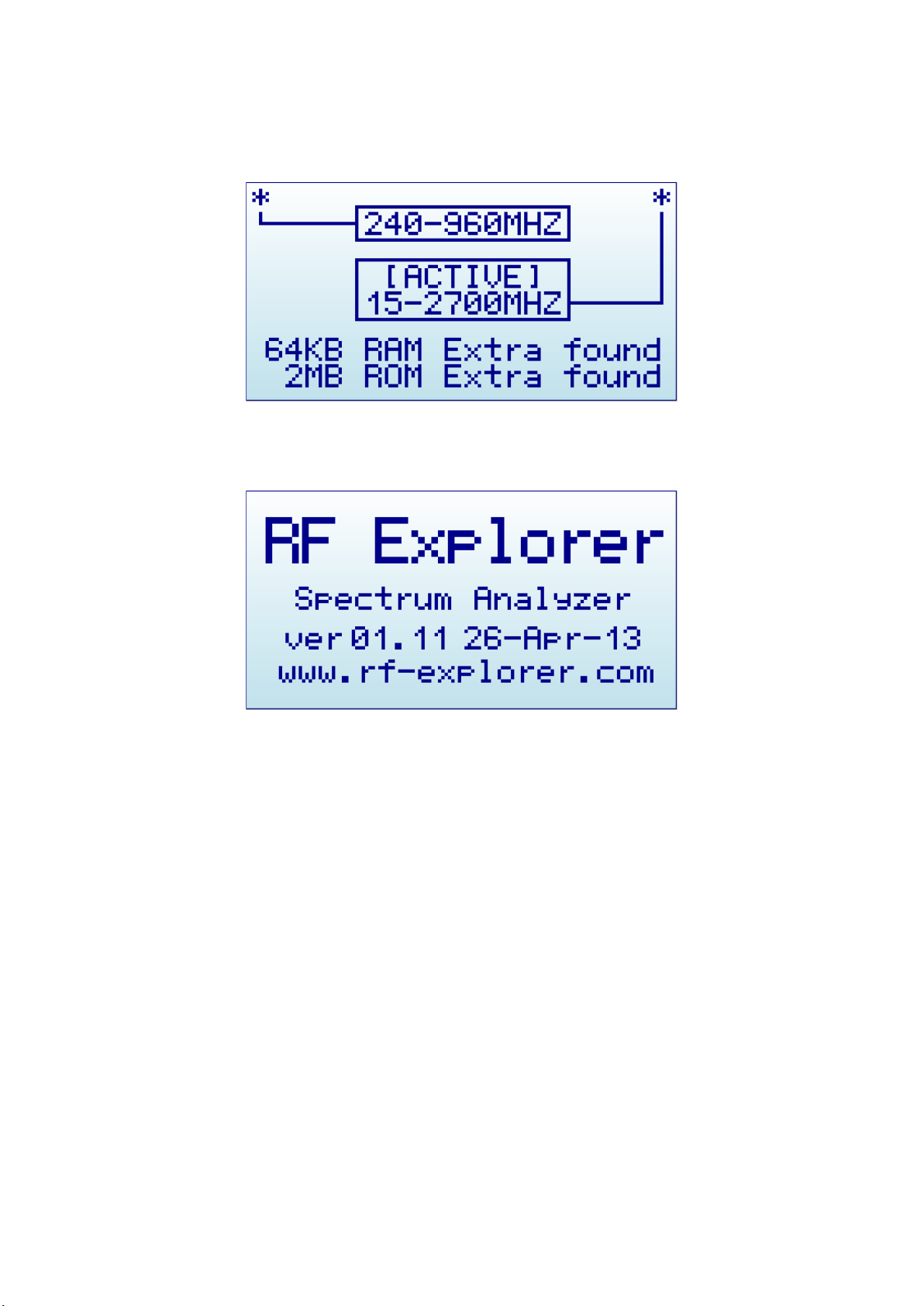
with a 240-960MHz connection on the left port, and 15-2700MHz on the right port.
Click on any key to get out of this screen.
• About displays information about installed firmware and versioning. Use any key to
get out of this screen.
Note: if you enable this screen for more than 30 seconds while connected to USB port
and power switch in the unit set to ON, RackPRO will automatically go to low power mode
and will switch the LCD off, but will keep charging the battery. This is suggested when
you intent to charge the internal battery but not make use of the unit for measurement.
Page 10
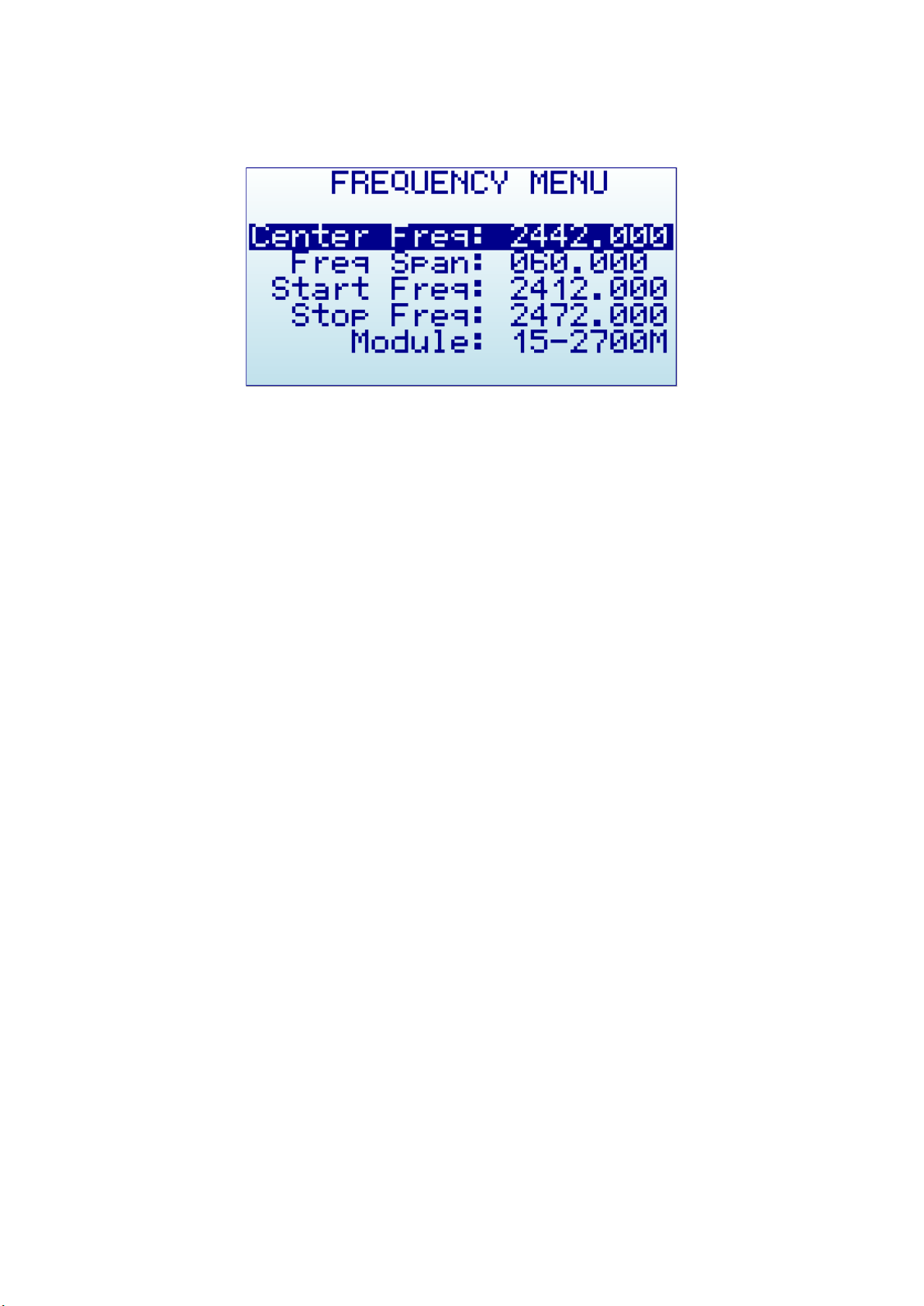
Frequency Menu
• Center Freq: Center frequency in MHZ
• Freq Span: Frequency span (or range) to display on screen in MHZ
• Start Freq: Lower frequency range to display on screen in MHZ
• Stop Freq: Higher frequency range to display on screen in MHZ
• Module: Active selected RF module. When an expansion module is installed, click
[Enter] key to enable the module you need.
The selected frequency band to display can be specified in two different but complementary
ways:
• Center/Span: This is the traditional Spectrum Analyzer format all engineers are
used to. You basically select the Center frequency at which the band will be
displayed, and then a Frequency Span.
• Start/Stop: This alternative mode is very useful to select frequency range between
two frequencies of interest, with no need to manually calculate the Center or the
Span.
The valid values for Frequency and Span are defined based on RackPRO model and
operational mode.
As you edit Center/Span or Start/Stop, the other values are updated accordingly, so feel
free to use the method you prefer. In general, you will use Center/Span more frequently
when you know the frequency you want to look at, and probably Start/Stop when you just
want to look at a larger span to see what is happening in a specific range.
To navigate through the menu, just use [Up] and [Down] keys to go to the option you want,
then click on [Enter] to edit that option, [Left] or [Right] to go to the digit you want to
change, and [Enter] to confirm or [Return] to cancel.
Page 11
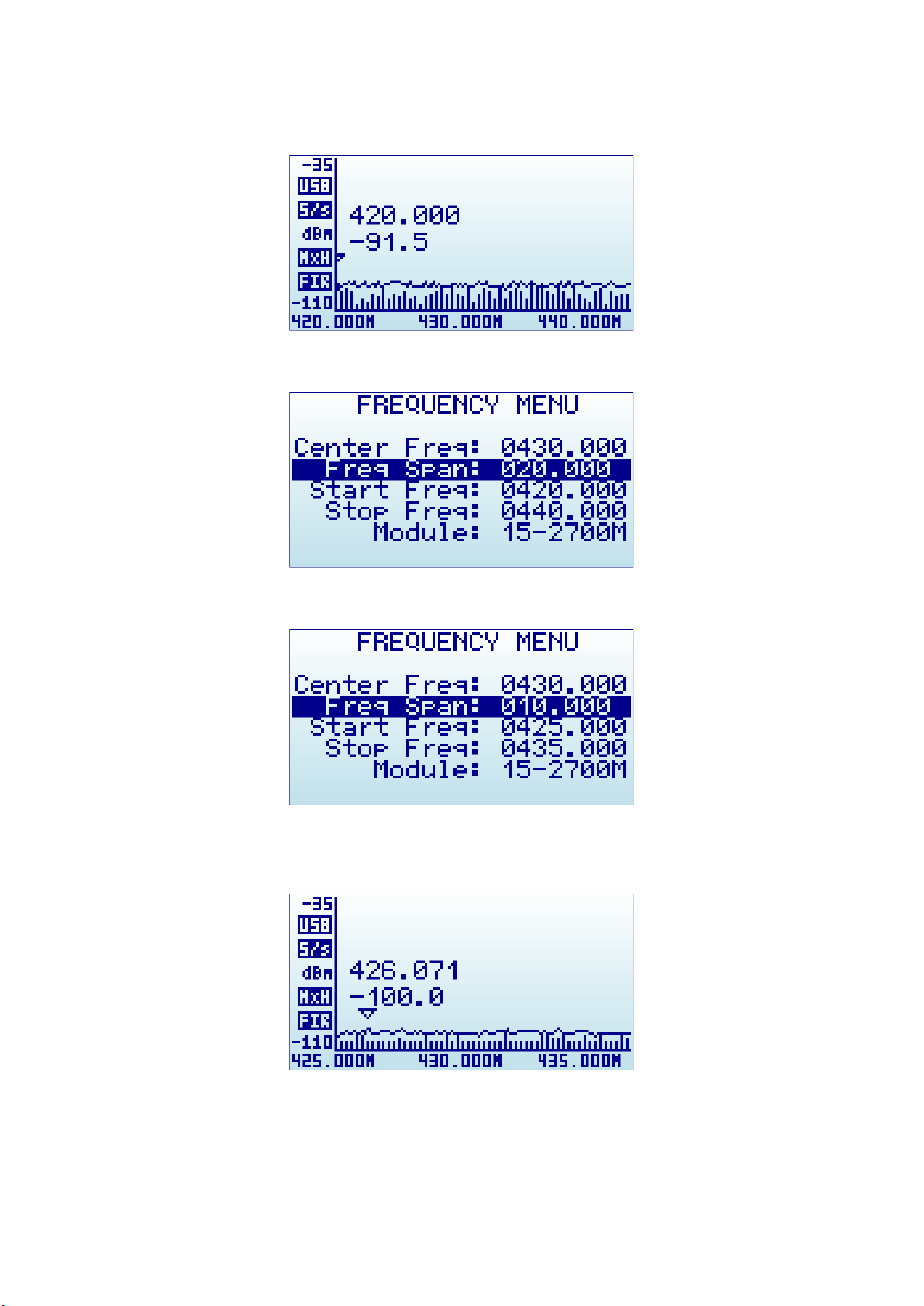
As an example, a center frequency of 430MHz with a 20MHz span:
A click on [Menu] button will open the Frequency Menu:
Selecting a span of 10MHz, the Start/Stop frequency changes accordingly:
A click on [Return] button will close the menu and go back to Spectrum Analyzer main
screen.
Note: While RackPRO Spectrum Analyzer screen is enabled, the [Left] and [Right] buttons can
be used to increase or decrease the Start/Stop frequency, virtually moving the visible spectrum
Page 12
to the left or the right 25% on every key press. This is helpful in order to offset the visual range
without need to specify a new numeric range.
Analyzer screen in Advanced Mode
Alternatively, there is a simpler way to increase and decrease frequency span while
keeping the center frequency. As this is a usual workflow, the RackPRO Spectrum Analyzer
screen enables the [Return] key to switch between standard visualization mode and
advanced mode.
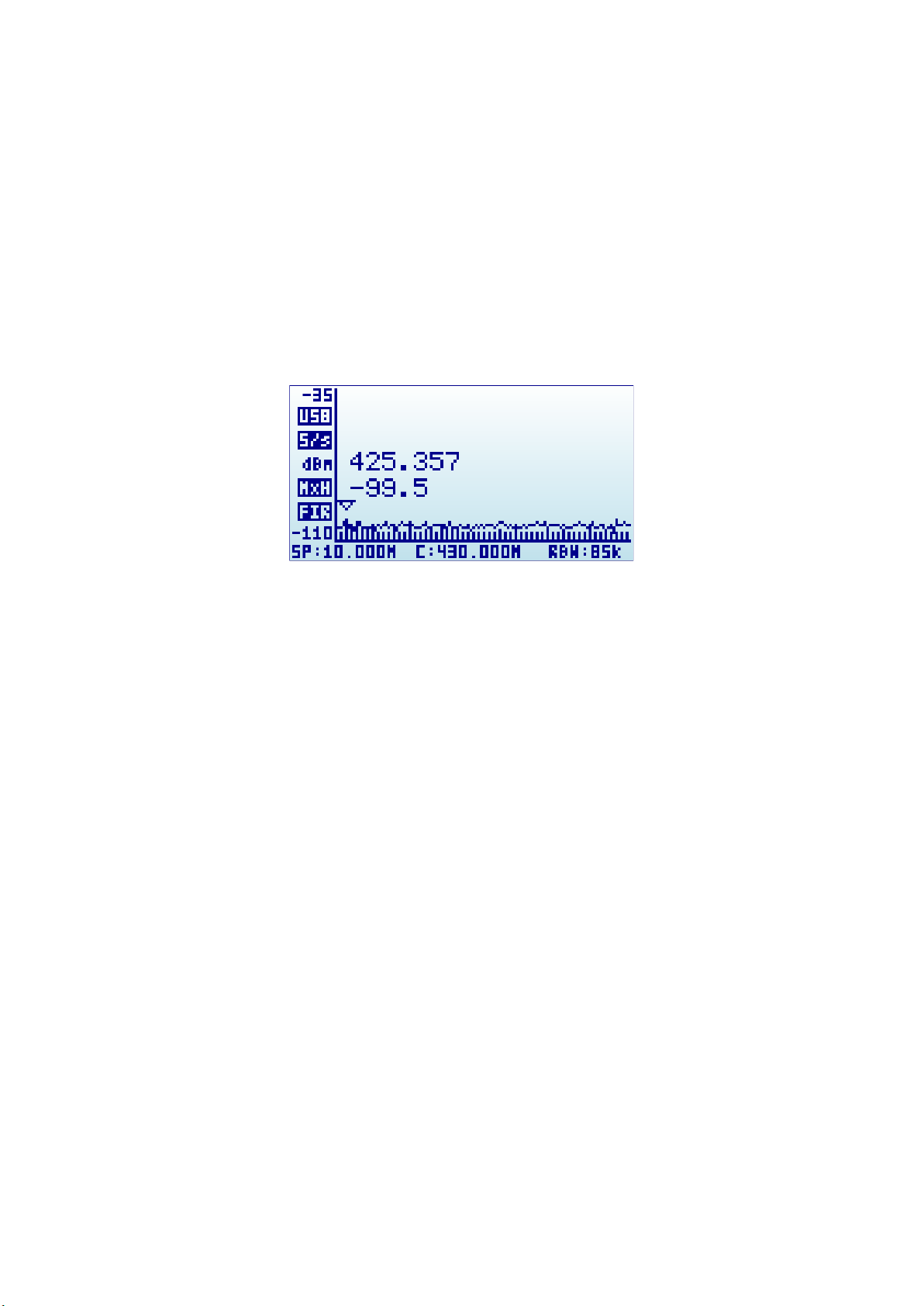
In this screen above, the frequency reading at the bottom changed from Start/Center/Stop
frequency to Span/Center/RBW. When this mode is enabled, a key press on [Left] or [Right]
button will increase or decrease to double and half frequency span respectively.
As an example, to increase the span from 10MHz to 20MHz, a single click to the [Left]
button is enough, no need to go back to the Frequency Menu.
Advanced: Understanding RBW
The advanced mode displays the currently selected RBW (Resolution Band Width). This is
an important concept for advanced users.
The RBW references the internal filter used to discriminate the bandwidth of each sweep
step. In RackPRO, each measurement dot represents a range of frequencies, and there are
exactly 112 steps on each sweep. As an example, in a 10MHz span, each of the 112
measurement steps represents 10MHz/112=0.089MHz or, in other words, 89KHz.
The range of frequencies represented on each sweep step is a level of uncertainty; screen
resolution is limited to that RBW. With a resolution of 89KHz on screen (for a 10MHz span),
the best accuracy expected is exactly that value. In other words, a frequency reading of
430.100MHz on screen may mean a range of +-44.5KHz each side, as the filter will not
discriminate further than that for a 10MHz span.
Page 13

In addition to that, RBW has an important impact on the sensitivity of the Spectrum
Analyzer. The wider the filter bandwidth, the higher the spectral noise and therefore the
lower the sensitivity. This is visible by an increasing noise floor as the RBW is larger, and
lower noise floor as the RBW is narrower. Based on this, the narrowest RBW would look
like the better choice for all measurements but as you get a narrower RBW you also
decrease the scan speed notably, due to the slower nature of narrow filter as well as the
need to measure more sweep points to cover the full span.
To put it simple: Selecting the best combination of RBW, scan speed and sensitivity requires
significant experience. In most Spectrum Analyzers, operator needs to fully understand and
select RBW for each measurement, being this one of the most challenging aspects of
proper Spectrum Analyzer usage.
Fortunately, this is not the case with RackPRO: The design of the internal DSP includes
sophisticated internal tables and algorithms to make the best possible choice at all times
automatically. No user intervention is required to get the best compromise between scan
speed, noise floor and sensitivity every time.
In all cases, the internal RBW can be checked anytime on the advanced screen mode.
Page 14
Attenuator Menu
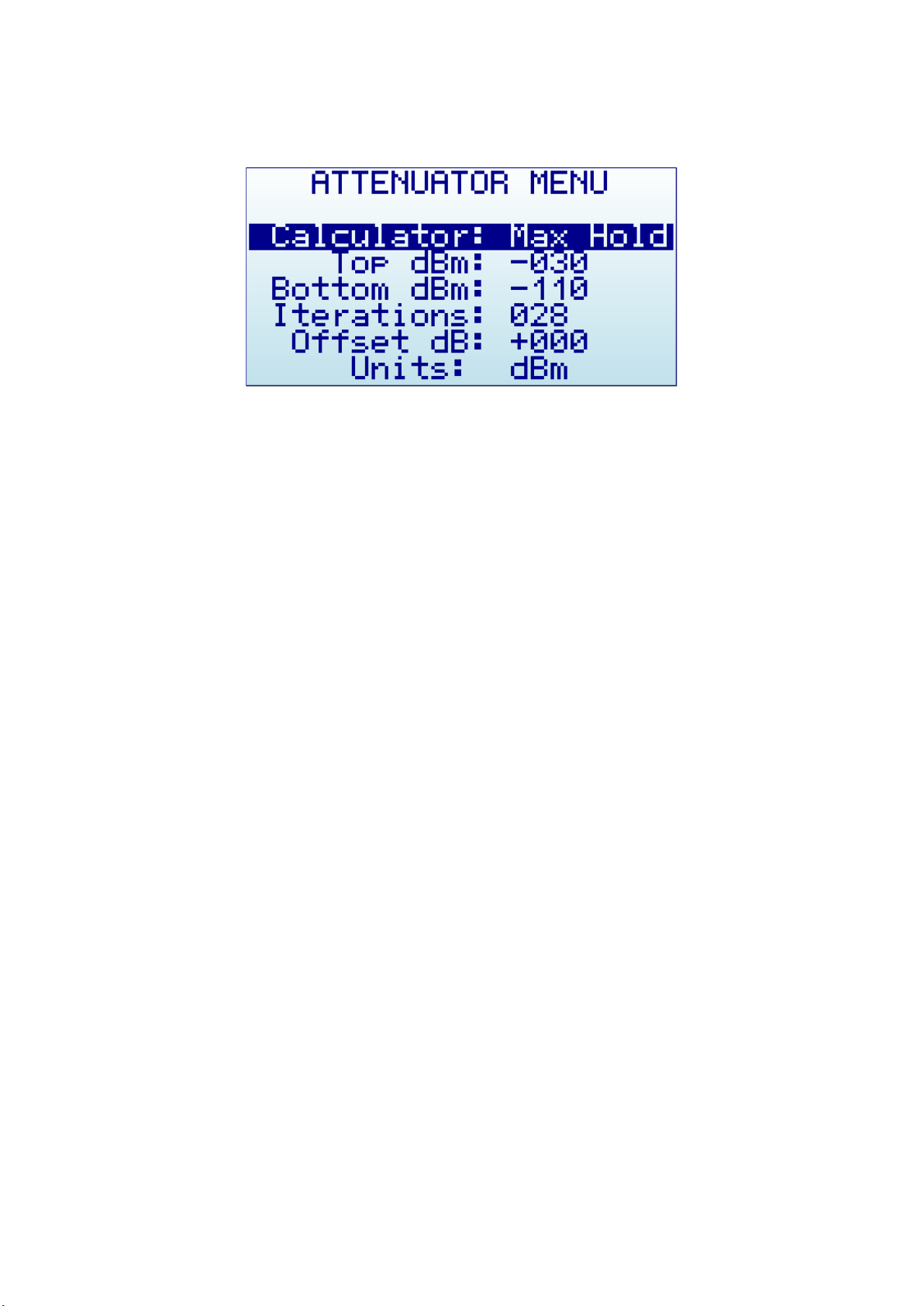
• Calculator: internal DSP calculator mode.
• Top dBm: Visual max amplitude on screen.
• Bottom dBm: Visual min amplitude on screen.
• Iterations: Internal DSP calculator iterations.
• Offset dB: external dB attenuation or gain value to compensate for external devices,
such as attenuators or amplifiers.
• Units: dBm or dBuV.
RackPRO automatically handles internal pre-amplifier and attenuator in order to provide
the best possible dynamic range with no need of manual selection. The selected Top and
Bottom dBm are visual limits, not real internal limits.
The internal DSP optionally performs advanced calculations in order to configure the
analyzer for the required measurement:
• Calculator offers multiple modes to display data, to change mode click on [Enter]
key:
o Max: Peak values are used from the last sweep Iterations (see menu option at
the bottom). This is the standard mode you will want to use to detect rapidly
changing DSS signals or find for worst case channel occupancy.
o Max Hold: Capture all activity in the band including the Max signal envelope
mode with vector graphics and real-time activity with vertical bars. Use this
mode anytime you want to detect activity for a long period of time. It is a very
powerful mode to detect activity in busy bands such as 2.4 GHz. As this is a
cumulative mode, while on Spectrum Analyzer screen you can clear the
spectrum anytime with the RETURN button.
Page 15

o Average: Arithmetic media average is calculated over the last sweep
Iterations. This is the best possible choice to remove unwanted white noise
from screen, particularly useful in constant wave (CW) and channel signals
display.
o Normal: No calculation is done, just raw data as result of the realtime sweep.
o Overwrite: Useful to track unlimited activity in the band. Darker areas will
point to high activity signal. You can clear the spectrum anytime with the
RETURN button.
• Iterations: The number of sweep data iterations to perform calculations on. It goes
from 1 to 28. As an example, a value of 5 with Calculator: Average means the DSP
will use 5 complete accumulated sweeps to average data.
Note: Selecting a higher or lower Top dBm value is a very frequent workflow, as you typically
want to zoom in or out based on signal power being measured. RackPRO Spectrum Analyzer
main screen offers two keyboard shortcuts: [Up] and [Down] arrow keys can be used to increase
or decrease Top dBm respectively by 5dBm each time. This shortcut, together with [Left] and
[Right] for moving Center Frequency or Span as described before, are very convenient to make
configuration changes real-time with no need to visit the Menu.
Page 16
Configuration Menu
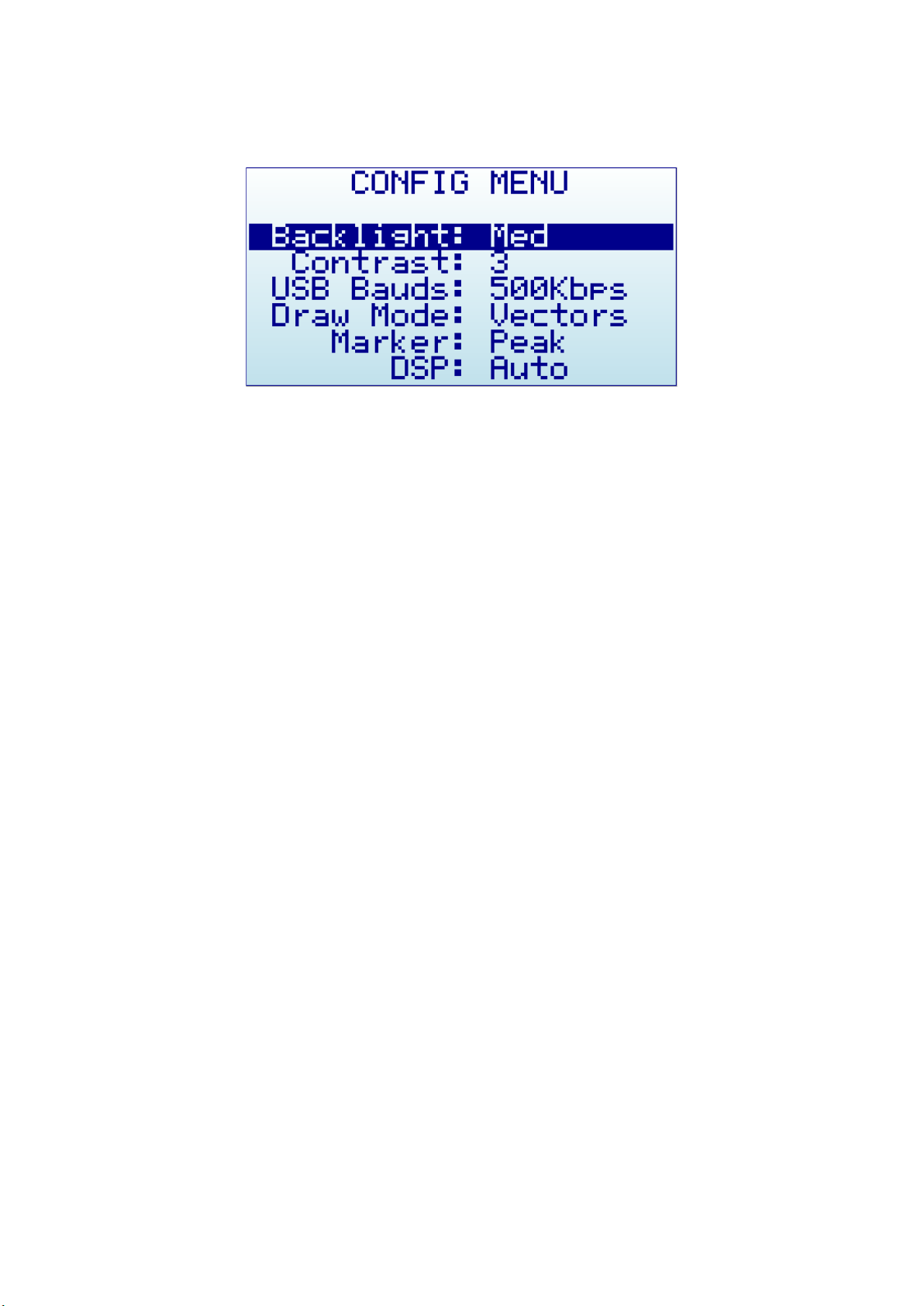
• Backlight: Several levels of display backlight. RackPRO has good visibility indoor and
outdoor, including direct sunlight. The level of backlight should be the appropriate
for each condition, and you may want to limit backlight brightness to preserve
battery capacity.
• Contrast: There are 10 different display contrast levels to choose from.
• USB Bauds: Default is 500Kbps, which is also the recommended setting. In the rare
case you experience a problem when connecting with the PC, you may want to
change this to 2400bps slower speed. However, this is not recommended as the
connection will go really slow, so do this only if there is a good reason to. The port
speed in the RackPRO and PC Client settings must match to properly establish a
connection.
• Draw mode: Vectors is the standard mode, and Fill can be specified if additional
contrast is required by filling the area behind the signal.
• Marker: There are three different modes available for the Marker on the Spectrum
Analyzer screen:
o Peak: The marker will automatically detect the peak value on screen.
o Manual: The marker can be manually moved anywhere on screen by using
[Left] and [Right] buttons. When this mode is selected, the standard functions
to move Center Frequency or Span are disabled.
o None: The marker is not displayed.
• DSP: The DSP (Digital Signal Processor) can be configured in different ways in order
to select the best possible choice of noise reduction, image rejection and scan
speed.
Page 17

o Auto: This is the recommended option for all users. When Auto mode is
enabled, the internal configuration tables will select the best possible
algorithm. The Spectrum Analyzer screen will display a FIR (Filter) or FST
(Fast) mode to indicate the actual DSP mode being used.
o Filter: This mode is currently functional in the 15-2700MHz module only, but
other modules may implement it in the future. When Filter mode is enabled,
the DSP will scan the spectrum several times in order to reject unwanted
spurs and image frequency out of the screen. As result of that, the scan speed
is slower than compared with Fast mode.
o Fast: This mode is recommended for advanced users only. When it is selected
on the 15-2700MHz module, the DSP will not process spurs and therefore
unwanted signals may display on screen.
Page 18

Page 19

Protecting your instrument from damage
RackPRO is a very sensitive device. It can detect signals as low as -120dBm, which is 10E12mW or 9nA over a 50ohm load.
This extreme sensitivity comes at the price of some fragility; your device needs care
handling and protection in order to run for many years without problems.
Most RF technicians know the RF instruments have to be protected in order to survive the
high Electro Magnetic (EM) fields that may be in the environment.
Expensive instruments like $50,000 full sized Spectrum Analyzers and Signal Analyzers
comes with a long list of handling procedures the operator must observe in order to limit
any chance of damage.
The first and most obvious precaution is to make sure the input RF power is not beyond the
acceptable levels of the instrument.
RackPRO 3G Combo and RFEMWSUB3G models are well protected up to +30dBm (1Watt)
input power, which is plenty to play safe in pretty much any environment. No extra
protection is needed for this model.
However, other RackPRO models have a maximum safe input power of +5dBm, which is
3mW in the RF SMA port. As a reference, that is the power captured by the RF antenna from
a cell phone a distance of 10cm, or from a Microwave oven at about 1 meter distance. Not
all the ovens or cell phones work the same, so take this as an indication only.
What may not be obvious to all users is this is a limit in any RF frequency band, even if the
RackPRO is powered off.
As an example, the RackPRO WSUB1G -with a frequency range of 240-960MHz- will not
detect a microwave oven (2.4GHz) on the screen but can be very well damaged by it.
Similarly, a strong 2m HAM or FM high power transmit station won’t be detected by this
model, but still induces enough RF power to kill the RF circuitry with ease. And that doesn’t
depend on RackPRO being ON or OFF because the antenna will receive that powerful signal
and will inject it into the spectrum analyzer, with serious risk of damage.
Page 20

Specifications
Acknowledgments
This product could not be possible without the SeeedStudio Team who manufacture, test
and distribute RackPRO worldwide.
RackPRO is a reality thanks to the great community behind, always suggesting features and
providing useful feedback.
FCC and CE regulations
RackPRO is a Test and Measurement device, and therefore compatible with US FCC
regulation 47 CFR Part 15.103(c).
RackPRO is certified for CE compliance under regulations EN/IEC61236 and EN/IEC61000.
License
RackPRO embedded firmware is copyrighted © by Ariel Rocholl, 2010-2013
RackPRO for Windows is Open Source software released under GPL v3, so you are free to
modify, distribute and use it based on GPL terms.
RackPRO is a registered trademark in USA, Australia and all EU Countries.
 Loading...