

Page 1
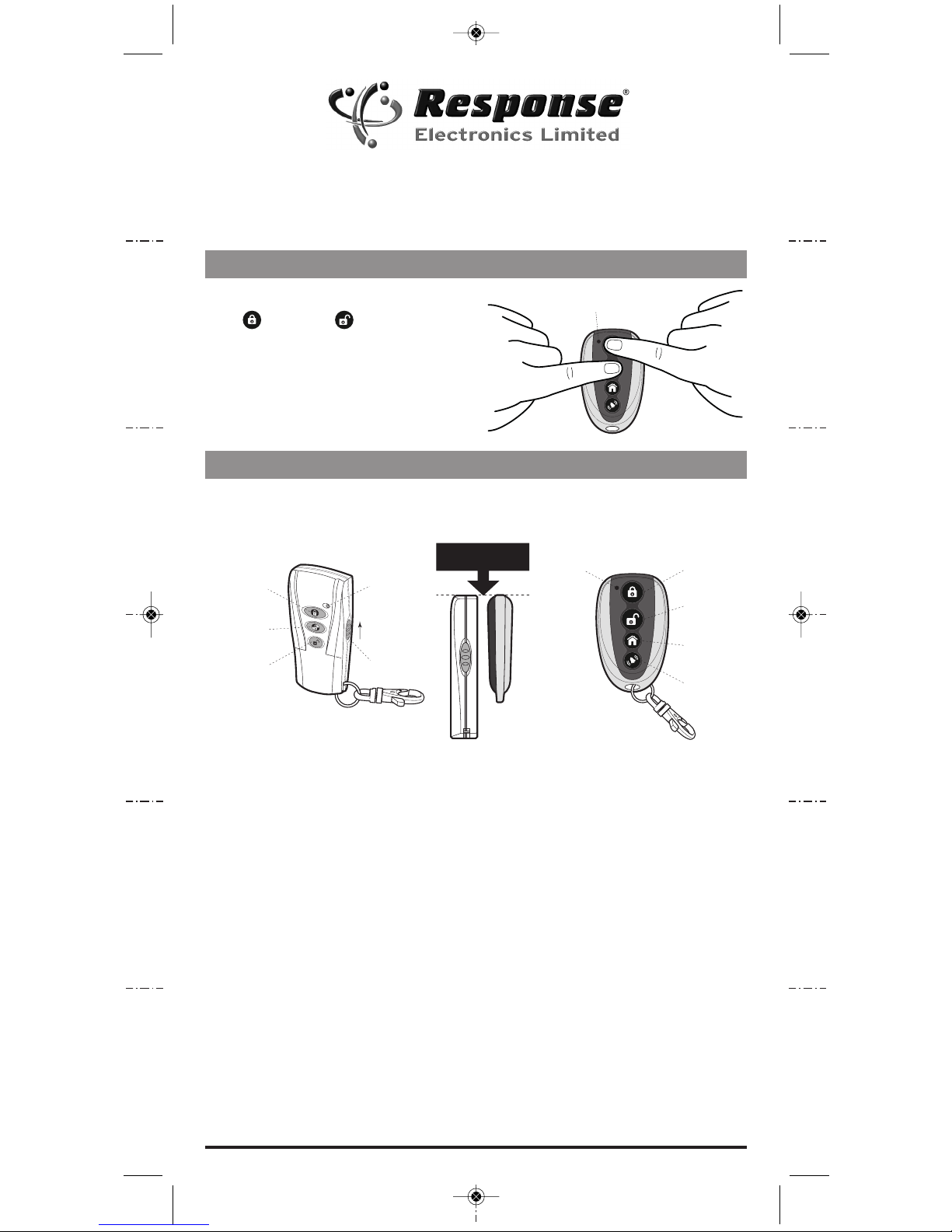
Press and hold the top two buttons, Instant
-Arm and Disarm simultaneously for
approximately 15 seconds until the LED
indicator begins to flash.
The SAURC Remote Control is now ready
for programming.
1. Place your original Remote Control
BACK to BACK with your new Universal
Remote Control (SAURC).
2. Programme each button/function as
follows:
INSTANT-ARM
Simultaneously press and hold the
Instant-Arm Button on both Remote
Controls until the LED indicator on the
SAURC begins to flash rapidly indicating
that the Instant-Arm Button has been
successfully programmed.
DISARM
Simultaneously press and hold the
Disarm Button on both Remote Controls
until the LED indicator on the SAURC
begins to flash rapidly indicating that the
Disarm Button has been successfully
programmed.
PART-ARM / DELAY-ARM
Simultaneously press and hold the
Part-Arm /Delay-Arm Button on both
Remote Controls until the LED
indicator on the SAURC begins to
flash rapidly indicating that the PartArm /Delay-Arm Button has been
successfully programmed.
PERSONAL ATTACK
Activate the Personal Attack Switch on
the original Remote Control by pushing
it up and holding whilst simultaneously
depressing the Personal Attack Button
on the SAURC.
Transmit LED
Indicator
Universal Remote Control (SAURC)
Programming Instructions
Part 1: Preparing the SAURC for Programming
Part 2: Programming
Slide up
to operate
Transm it
LED
Personal
Attack
Disarm
Instant-Arm
Part-Arm/
Delay-Arm*
Personal
Attack
Disarm
Instant-Arm
Part-Arm/
Delay-Arm*
IMPORTANT: When programming place both Remotes BACK to BACK and make
sure the battery in your original Remote is fully serviceable.
Transm it
LED
* Part-Arm wi th Control Unit systems or
Delay-Arm w ith Siren only systems
Both Remotes mus t be
aligned at the t op edge
SAURC Ed3_Universal Remote Control_Instructions_Art:-) 12/09/2014 22:46 Page 1
Page 2
Response Electronics Ltd.
Roman House, Lysons Avenue, Ash Vale, Surrey GU12 5QF
Email: [email protected]
Web: www.responseelectronics.com
Technical Support Helpline:
0345 257 1000
(Local Call Rate - lines open 09.00 to 17. 00 Monday to Friday)
SAURC Ed.3
Troubleshooting
• Ensure the battery in your original
Remote Control is in a fully serviceable
condition.
• Keep the two Remote Controls back to
back throughout programming.
• If programming is not successful repeat
Part 1 and Part 2.
• If, after two attempts, programming has
failed then attempt programming in a
different physical location, this will rule
out the possibility of it being due to local
Radio Frequency interference in your area
.
For advice and support please call our
Customer Support Helpline (details below)
or email [email protected].
Disposal and Recycling
Disposal of this product
is covered by the Waste
Electrical or Electronic
Equipment (WEEE) Directive.
It should not be disposed of with other
household or commercial waste.
At the end of its useful life the packaging
and product should be disposed of via a
suitable recycling centre. Please contact
your local authority or the retailer from
where the product was purchased for
information on available facilities.
Technical Specifications
Application: Response SA 433 MHz Alarms
Operating frequency: 433 MHz
Battery type: 12V 27A Alkaline
Battery life: 1 year (typical)
Antenna type: Internal
Transmitting distance: up to 75 metres
(open space clear line of sight)
Colour: Black with Chrome finish
Programming: Fast – copy enabled
Dimensions: 52 x 32 x 8 mm
Warranty: 1 year parts and labour
Manufacturing: High-quality SMT Manufactured
Certification: CE, R&TTE, FFC Compatible (2)
Guarantee
The product is guaranteed for one year from the date of purchase against faulty materials and
workmanship. No liability can be accepted for any problems caused by fair wear and tear, buyer’s
negligence, improper fitting or use, wilful or accidental damage, or any consequential loss or
damage howsoever caused. This guarantee does not affect your statutory rights and is valid for
UK and EIRE only.
If you believe the product to be faulty or in the unlikely event of the product developing a fault
during the warranty period, then please contact our Technical Support Team (contact details
shown below) for product assistance. Product repair or replacement will be offered for faulty
products only with our prior agreement. Should you need to return a products then:
1. Contact the Help Line on the number below to obtain a Return Authorisation Number.
2. Adequately package your product to prevent damage in transit and include
the following:
a. A copy of your original invoice/receipt.
b. A covering letter giving your full contact details, including email address
(if applicable).
c. A description of the fault or problem.
SAURC Ed3_Universal Remote Control_Instructions_Art:-) 12/09/2014 22:46 Page 2
 Loading...