

Page 1
User Manual
Manual number:
PTI-06-08/12/09/A
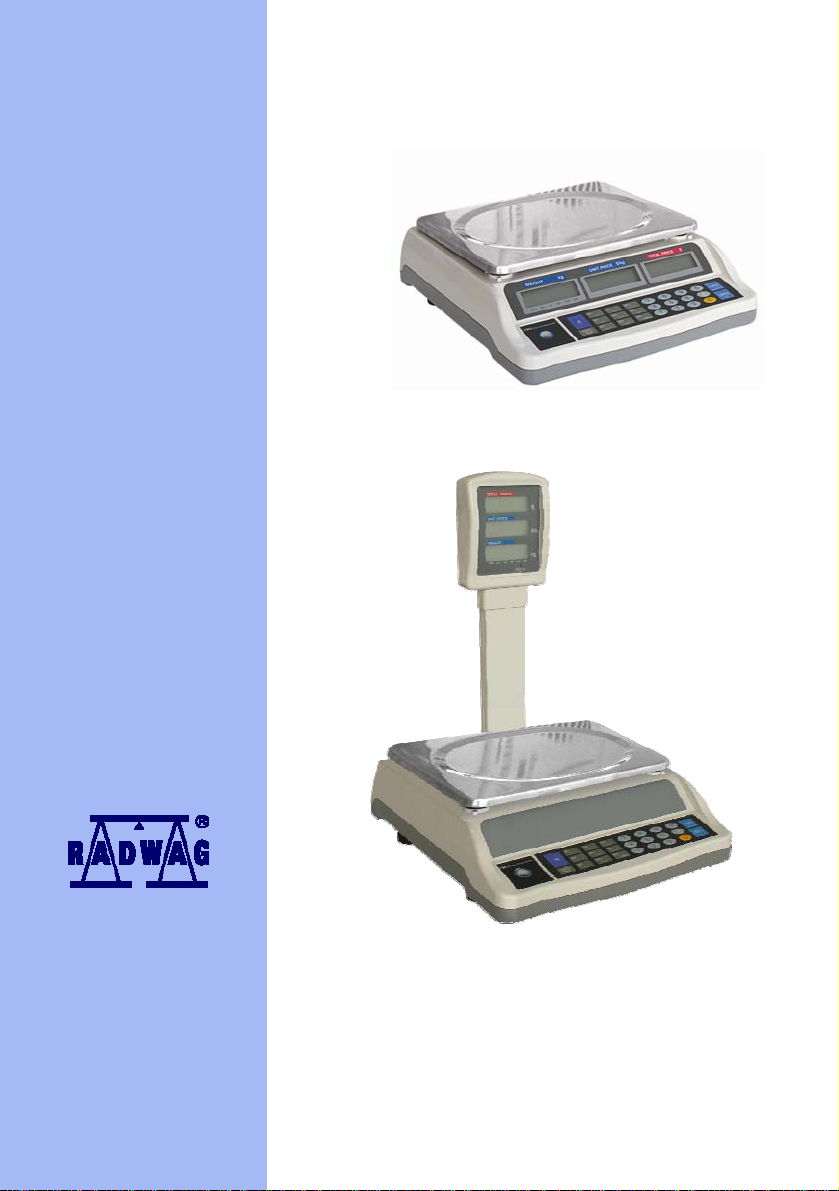
Retail scales
WTC 6/S, WTC 15/S, WTC 30/S
WTC 6/SW, WTC 15/SW, WTC 30/SW
MANUFACTURER OF ELECTRONIC
WEIGHING INSTRUMENTS
RADWAG Wagi Elektroniczne
26 – 600 Radom Bracka 28 Street - POLAND
Phone +48 48 384 88 00, phone/fax. +48 48 385 00 10
Selling department +48 48 366 80 06
www.radwag.com
Page 2

Table of Contents
1. APPLICATION....................................................................................................................... 3
2. PRECAUTIONS.....................................................................................................................3
3. WARRANTY CONDITIONS...................................................................................................4
4. DIMENSIONS.........................................................................................................................5
5. SCALES ASSEMBLY............................................................................................................5
6. STARTING AND OPERATION..............................................................................................6
7. POWER SUPPLY.................................................................................................................. 7
7.1. Battery charging............................................................................................................. 7
8. SCALE KEYBOARD.............................................................................................................. 8
9. SCALE DISPLAY................................................................................................................... 8
10. KEYS FUNCTIONS.............................................................................................................. 9
11. WEIGHING........................................................................................................................... 9
11.1. Scale tarring............................................................................................................... 10
11.2. Scale zeroing.............................................................................................................10
12. FUNCTIONS OF COMPUTING SCALES..........................................................................10
12.1. Inserting and cancellation of unit price.......................................................................11
12.2. Saving unit price........................................................................................................ 11
12.3. Recalling of saved unit price...................................................................................... 12
12.4. Checking the stored unit price................................................................................... 12
13. OTHER FUNCTIONS......................................................................................................... 13
13.1. Power save mode ...................................................................................................... 13
13.2. Overload warning.......................................................................................................13
13.3. Backlight function....................................................................................................... 13
14. RS232 INTERFACE...........................................................................................................14
15. ERROR COMMANDS........................................................................................................15
16. TECHNICAL PARAMETERS............................................................................................. 15
- 2 -
Page 3

1. APPLICATION
Retail scale WTC type is a perfect weighing device for application in small
and standard trade. power supply by inbuilt batteries allows for application on
location, with no access to power supply, like market place. Scale is equipped
with three backlit LCD displays enabling readout of result by person standing
in front of it. Scales have plastic casing and stainless steel pan.
Scales functions:
• Backlight of display,
• Overload warning,
• Tarring in full measuring range,
• Memory of 100 unit prices of goods,
• Quick access to 9 prices assigned to goods,
by means of quick access keys,
2. PRECAUTIONS
A. Please, read carefully this user manual before and use the device
according to its intended use;
B. Device should be operated in dust and vibration free environment;
C. Weighed loads should be placed in possibly central part
of scale pan;
D. Do not clean the device with agents causing corrosion;
E. Weighing pan should be loaded with goods having gross
mass lower than maximal capacity of the scale;
F. Do not leave for longer period of time higher loads on the pan;
G. In case of failure, immediately disconnect scale power supply;
H. Devices that are to be withdrawn from usage should be utilized
according to the law.
I. On finish of working day, turn off the scale with switch
additionally, for safety and power saving purposes, unplug
the scale from A/C mains.
J. Dead batteries (accumulators) should be utilized according
to the law;
- 3 - - 4 -
Page 4

3. WARRANTY CONDITIONS
A. RADWAG is obliged to repair or change those elements that
appear to be faulty because of production or construction reason,
B. Defining defects of unclear origin and outlining methods of elimination
can be settled only in participation of a user and a manufacturer
representatives,
C. RADWAG does not take any responsibility connected with destructions
or losses derived from non-authorized or inappropriate (not adequate to
manuals) production, usage or service procedures,
D. Warranty does not cover:
• Mechanical failures caused by inappropriate maintenance
of the device or failures of thermal or chemical origin or caused
by atmospheric discharge or other
random event,
• Inappropriate cleaning.
E. Loss of warranty appears after:
• Access by an unauthorized service,
• Intrusion into mechanical or electronic construction
by unauthorized people,
• Removing or destroying protection stickers.
F. The detailed warranty conditions one can find in warranty certificate.
G. Contact with the central authorized service:
+48 48 384 88 00 ext. 114.
Notice:
Calibration procedure is inaccessible for end users. Users cannot change
main settings of retail scales designed for retail trade purposes!
Page 5
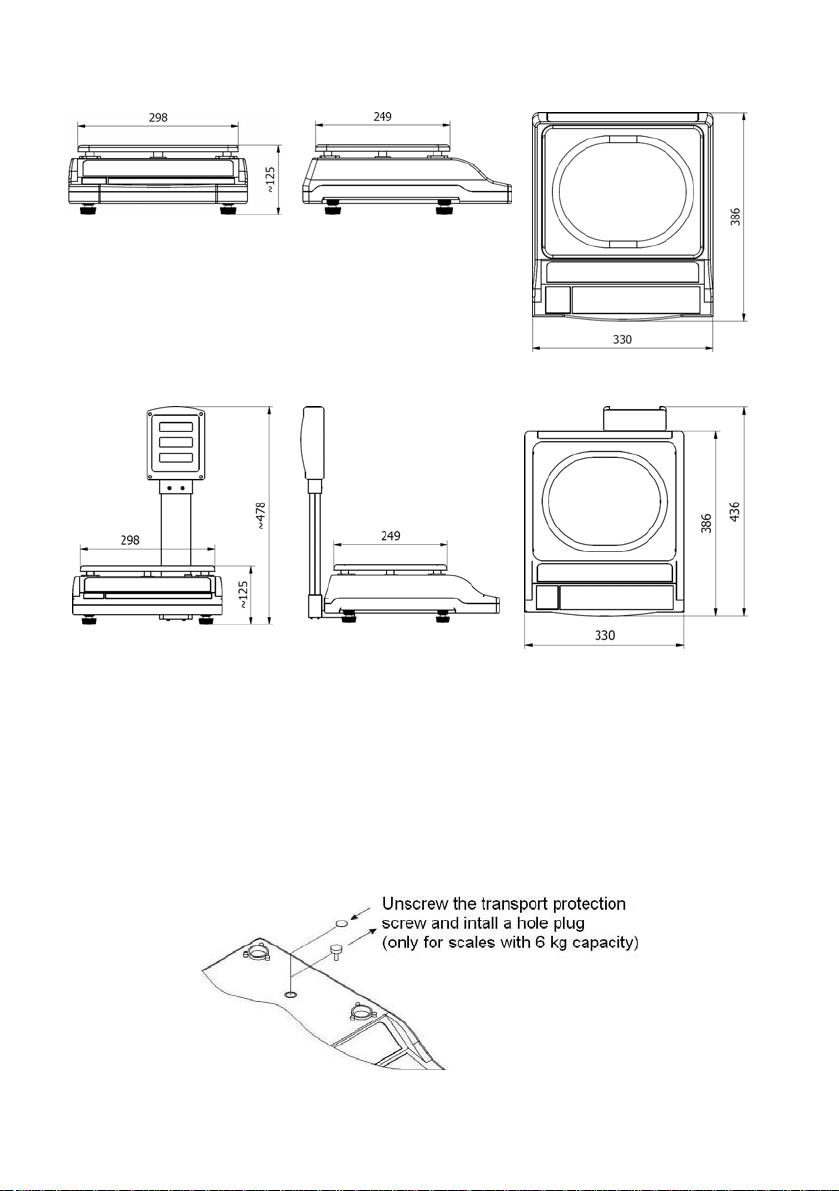
4. DIMENSIONS
Dimensions of scales of WTC/S series
Dimensions of scales of WTC/SW series
5. SCALES ASSEMBLY
Remove the scale from the factory package and place the scale on a flat
and hard surface far from heat sources and then:
• Pull out the transport protections (applies only to scales with max.
capacity 6kg):
- 5 -
Page 6
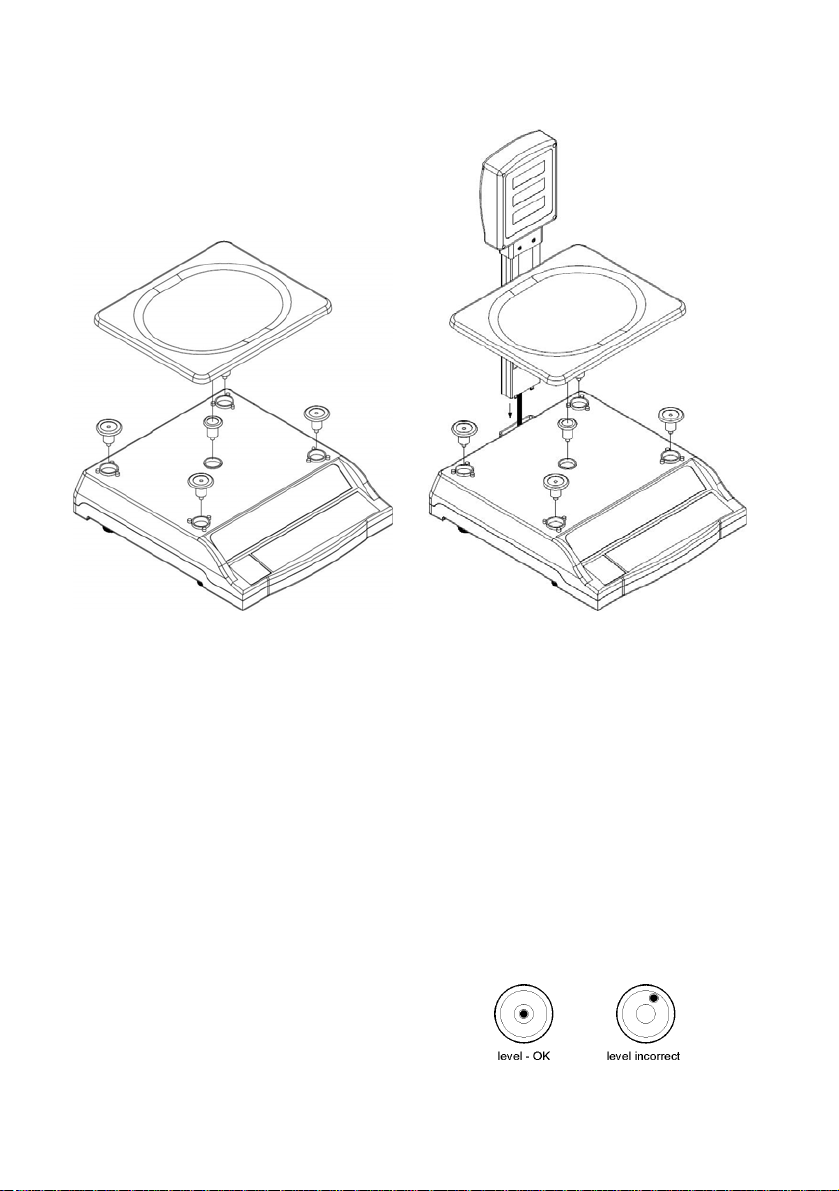
• Install the pan and the pillar (WTC/SW scales) according to below
drawing:
Assembly of WTC/S
Assembly of WTC/SW
Caution:
1. During assembly of the pillar in the WTC/SW scale pay attention
to not “cutting” display connection wire tape,
2. Before starting weighing remove (tear off) the foil protecting the scale pan.
6. STARTING AND OPERATION
• After assembly (see point 5 of the manual) place the scale on a flat
and hard surface far from heat sources.
• The scale should be levelled by turning regulation feet. The level is
correct when the air bubble stays in the
central position of the level indicator
placed in the left part of the casing:
- 6 -
Page 7
• Turn on the supply pressing switch situated in the right
bottom side of the casing,
• After turning on the supply, wait until the scale test is finished,
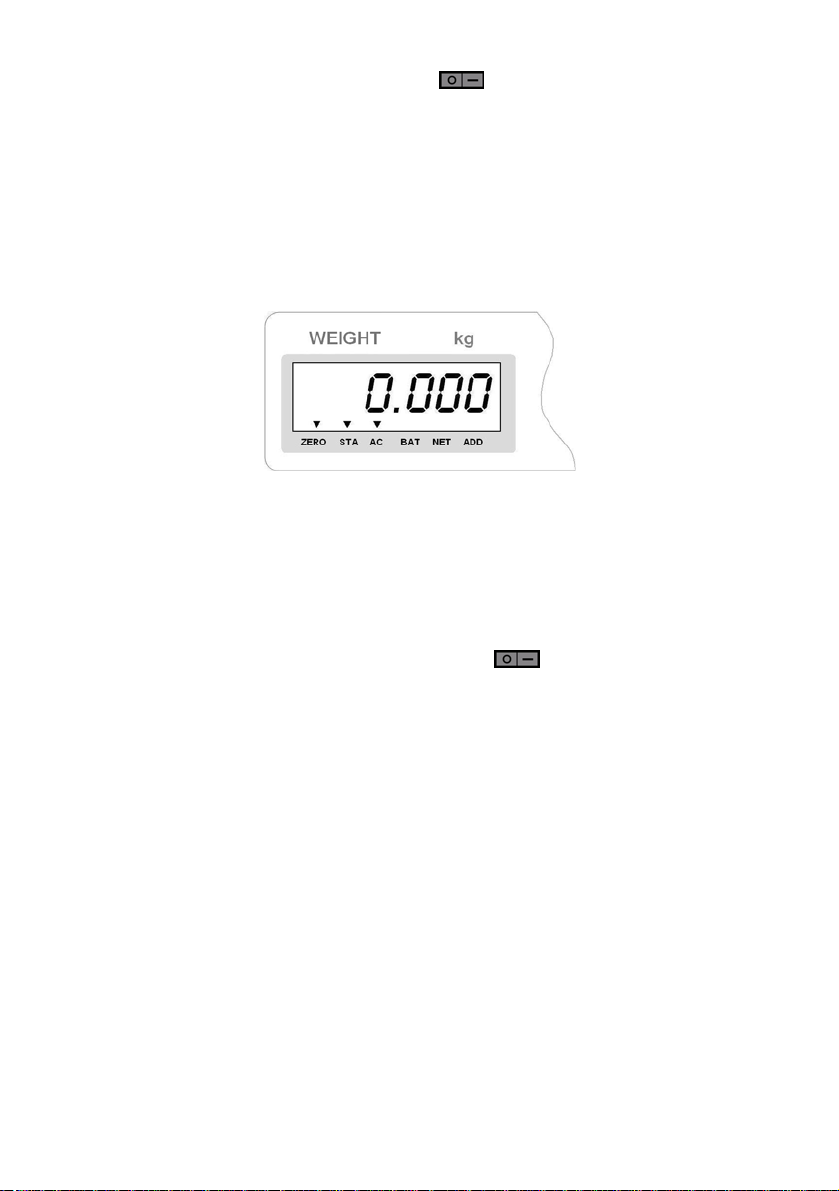
• After the scale test is completed in display window <WEIGHT kg>
mass indication equal zero will be indicated and symbol
▼will be displayed above marks:
ZERO - indication of precise zero
STA - weighing result stable
AC - scale power supply from an external A/C adapter
• If a weighing result is different form zero – press the zeroing key.
7. POWER SUPPLY
Retail scales of WTC series use two power supply sources. The scale casing
is equipped with A/C adapter socket and switch
(right) part of the casing. The socket is used only for connecting of an
external A/C adapter provided with the scale.
The scale is equipped with accumulator 6V/4.5Ah. Max. operation time
with fully charged accumulator is 60 hours (without backlight) and around
24 hours (with LED backlight on).
7.1. Battery charging
Scale software automatically checks the state of accumulator. If the
accumulator is significantly discharged, symbol ▼is displayed above
BAT pictogram in display window <WEIGHT kg>. It means that it
needs to be immediately charged or the scale will stop operation.
Notice:
In case a user does not connect the scale to mains when the battery is
discharged the scale will be switched off to protect the battery form destroying.
situated in the lower
- 7 -
Page 8
In order to charge the battery:
• Connect the A/C power adapter delivered with the scale,
• Press
placed in lower (right) part of casing to power up the scale.
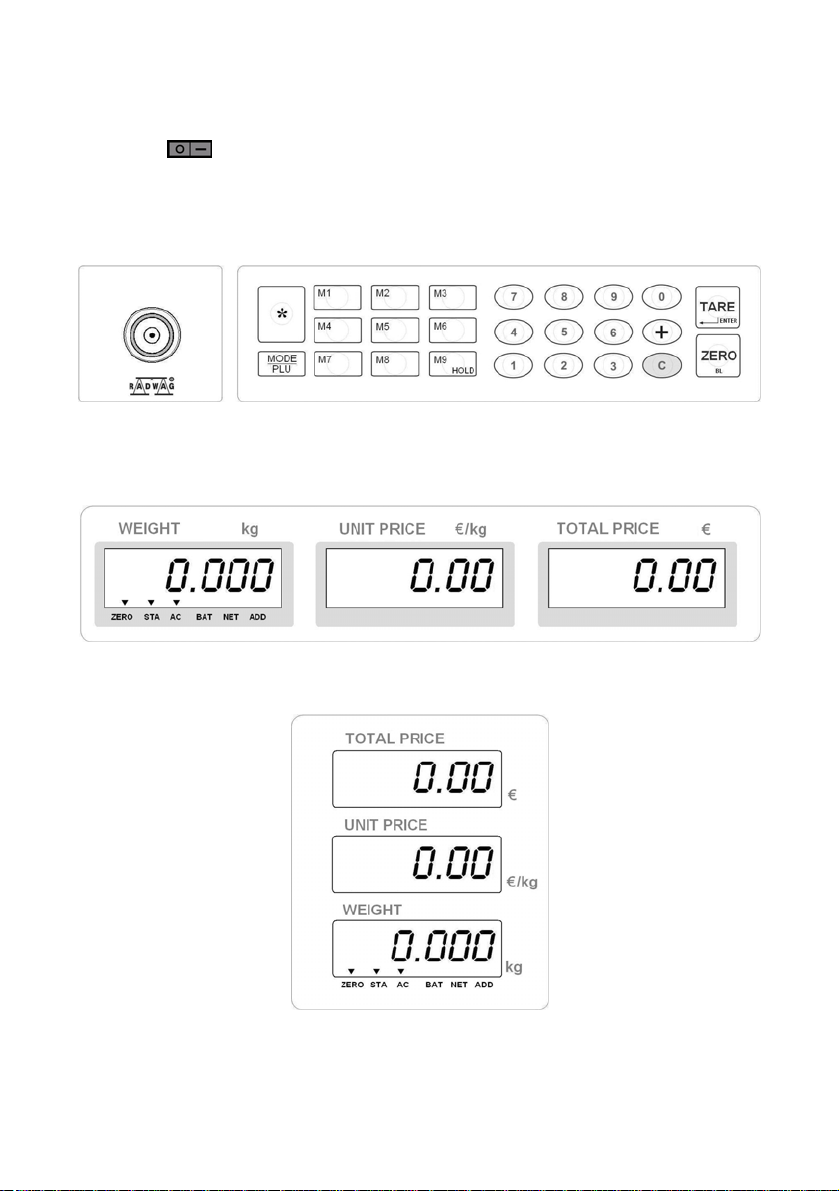
8. SCALE KEYBOARD
9. SCALE DISPLAY
Display of scale series WTC/S
- 8 -
Display of scale series WTC/SW
Page 9
Notice:
Because the functionality and the use of both display types is identical the
further part of this instruction will be based on the display of scales series
WTC/S.
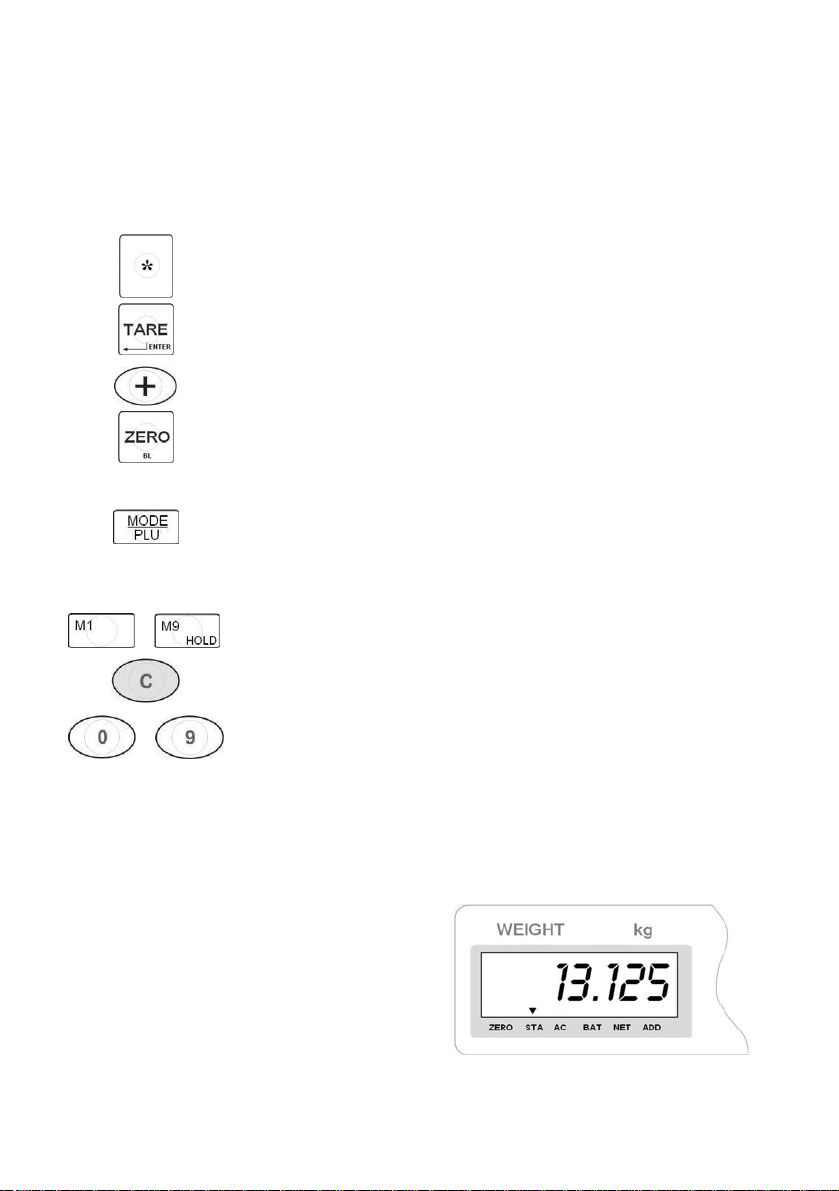
10. KEYS FUNCTIONS
Used in calibration
…
…
Tarring or enter (confirmation of current operation)
N/A
a. Zeroing the scale within the permitted range,
b. Used in calibration procedure,
c. Used when storing the unit price,
d. Switch on or switch off backlight.
a. Check corresponding unit price of the product number,
b. Store and recall the unit price,
c. Enter or exit unit price storing state,
d. Shift the division valued cooperating with [8] in the calibration
mode.
Directly recall the unit price of product No. from 1 to 9
a. Clear unit price,
b. Clear product number.
a. Input unit price,
b. Input product number when recalling the unit price,
c. Input the Max. Capacity and the value of the loaded weight,
in calibration mode.
11. WEIGHING
Place a load on the pan . When symbol
▼ is displayed above the STA mark
in display window <WEIGHT kg>,
weighing result can be read:
- 9 -
Page 10

11.1. Scale tarring
To determine net mass put load packaging and when indication is stable
press key
<WEIGHT kg> symbol ▼ will be indicated above mark NET.
(mass indication will return to zero, in display window
After placing the load, scale display will indicate net mass. Tarring can
be done many times in full measuring range of scale. While using the tare
function, pay attention not to exceed max measuring range of scale. After
removing load and packaging indication equal to sum of tarred masses with
minus sign will be displayed.
In order to clear the tare buffer press
again. Symbol ▼ over NET
will be off and the indication zeroed.
11.2. Scale zeroing
In order to zero mass indication press key
<WEIGHT kg> symbols ▼ will be indicated above ZERO and STA.
. In display window
Zeroing is the same as setting new zero point, which is treated by the
scale as precise zero. Zeroing is possible only when display state is stable.
Notice:
Zeroing display state is possible only in range up to ±2% of scale max
capacity.
12. FUNCTIONS OF COMPUTING SCALES
User of retail scales series WTC has possibility of using following computing
functions:
• Direct inserting of unit prices,
• Cancellation of unit prices,
• Saving unit prices in scale memory,
• Recalling of saved unit prices from scale memory,
• Checking the saved unit price.
- 10 -
Page 11
12.1. Inserting and cancellation of unit price
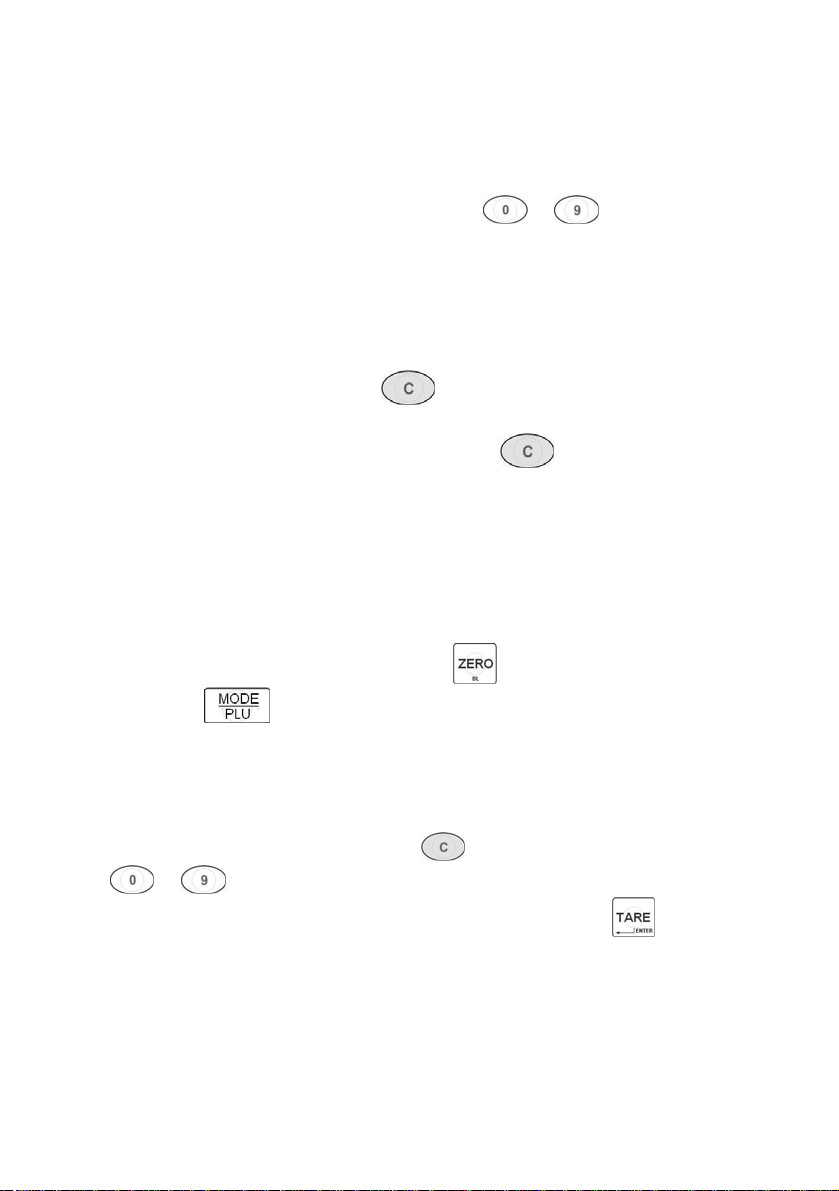
The user can directly enter a unit price.
Procedure:
• Enter the required price using digital keys to ,
• The entered price will be displayed in the middle display window
<UNIT PRICE €/kg>,
• After loading the pan the scale software will automatically indicate
the charge in <€> in display window <TOTAL PRICE €> calculated
on the basis of the entered value,
• To cancel unit price press key
,
• After inserting price wait about 5s, now it is possible to insert new price
without cancellation of previous on with key
.
12.2. Saving unit price
Software enables to save 99 unit prices in scale memory.
Procedure:
• While in weighing mode keep pressed
and press
,
• In display window <TOTAL PRICE €> message <Id 1> appears
(first position of unit price in the scale memory) but in window
<UNIT PRICE €/kg> the current price attributed to the position
above is displayed ,
• In order to change the price press
and then using keys
to enter a new price,
• Enter the inscribed price to the scale memory and press
,
then Id in window <TOTAL PRICE €> will be increased by 1,
• Saving procedure of remaining unit prices to scale memory is
analogous to procedure described above.
• After overpassing the product number 99 the Id in window
<TOTAL PRICE €> will be changed to 1.
- 11 -
Page 12
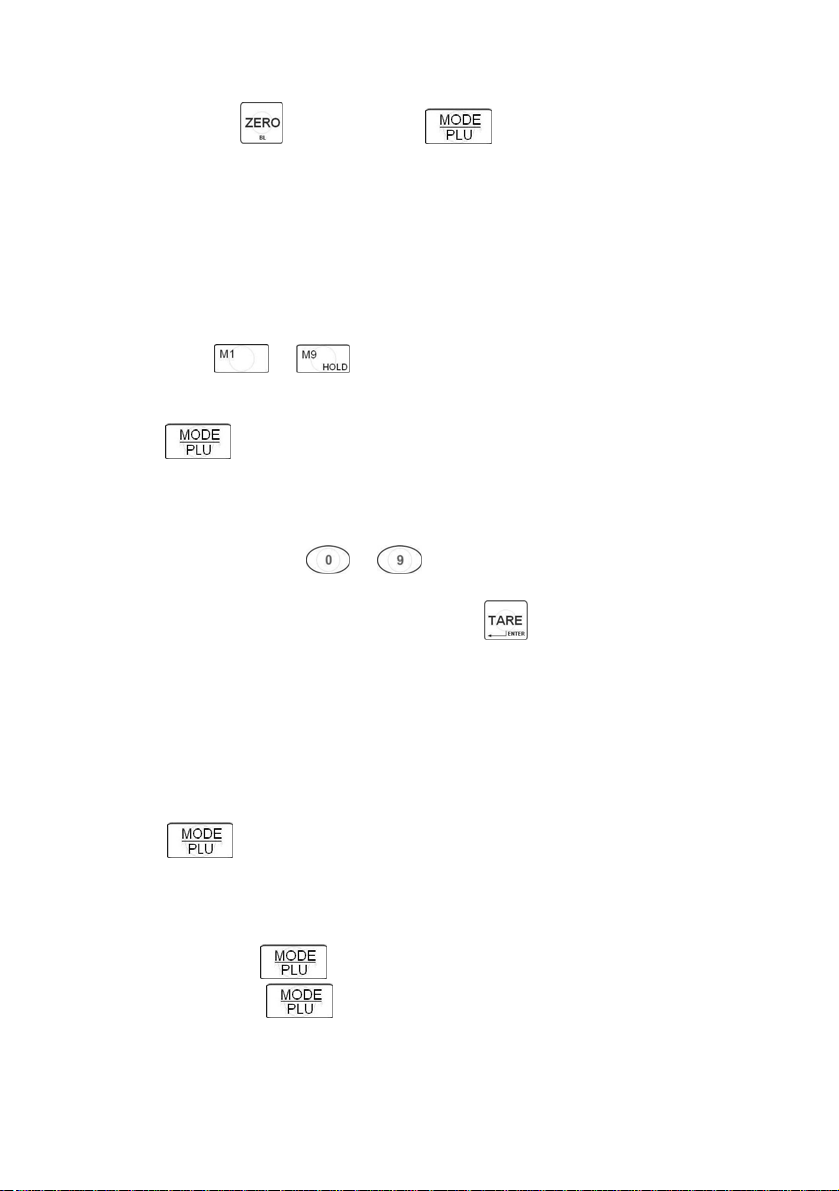
Return to weighing:
• Keep pressed and then press .
12.3. Recalling of saved unit price
Users can recall a unit price from the database by choosing the appropriate
product <Id>, to which it is attributed.
Recalling first 9 unit prices from the memory is possible by pressing direct
access buttons (
to ).
In order to recall unit prices of products with Id equal 10 to 99:
• press
,
• In the display window <TOTAL PRICE €> message <Id - -> appears
and then in window <UNIT PRICE €/kg> message < - - - - - > is
displayed,
• Using numerical keys
to enter the required product Id
to which the unit price is attributed,
• After the change is confirmed by pressing
the scale automatically
returns to weighing and in window <UNIT PRICE €/kg> the price
attributed to the selected product number is displayed.
12.4. Checking the stored unit price Procedure:
• Press
key twice,
• In display window <TOTAL PRICE €> message <Idc 1> appears
(first unit price in the memory) and window <UNIT PRICE €/kg>
displays the price of this position,
• Next pressing of
• Keeping pressed
increases the position number <Idc> by 1,
causes scrolling of positions <Idc> together
with attributed prices.
- 12 -
Page 13

Return to weighing:
• Press .
13. OTHER FUNCTIONS
The scale software is equipped with additional functions, which can influence
scale operation:
• Power save mode,
• Backlight control,
• Overload warning.
13.1. Power save mode
The scale is equipped in the power saving function that prolongs the operation
time while supplying from batteries. If the scale indicates zero for 5 seconds
and no key is pressed function „POWER SAVE” automatically switches of
the backlight.
13.2. Overload warning
Overload is signalled over the maximum weighing range increased by 9
reading divisions. In case a load is equal or greater than the defined one the
weighing window shows warning < u u u u u > and alarming sound is audible.
13.3. Backlight function
The backlight can be switched on or off by users.
In order to switch off backlight keep pressed for 3 seconds.
The backlight is off and then the scale returns to the weighing mode.
In order to switch on backlight keep pressed for 3 seconds.
The backlight is on and then the scale returns to the weighing mode.
- 13 -
Page 14
14. RS232 INTERFACE
WTC retail scales can be optionally equipped in an RS232 interface allowing
transmission from the scale to an external device. Transmission parameters:
1200.7.N.1. (baud rate 1200, 7 bits of data, no parity, 1 stop bit). There is
continuous transmission set without possibility to change it.
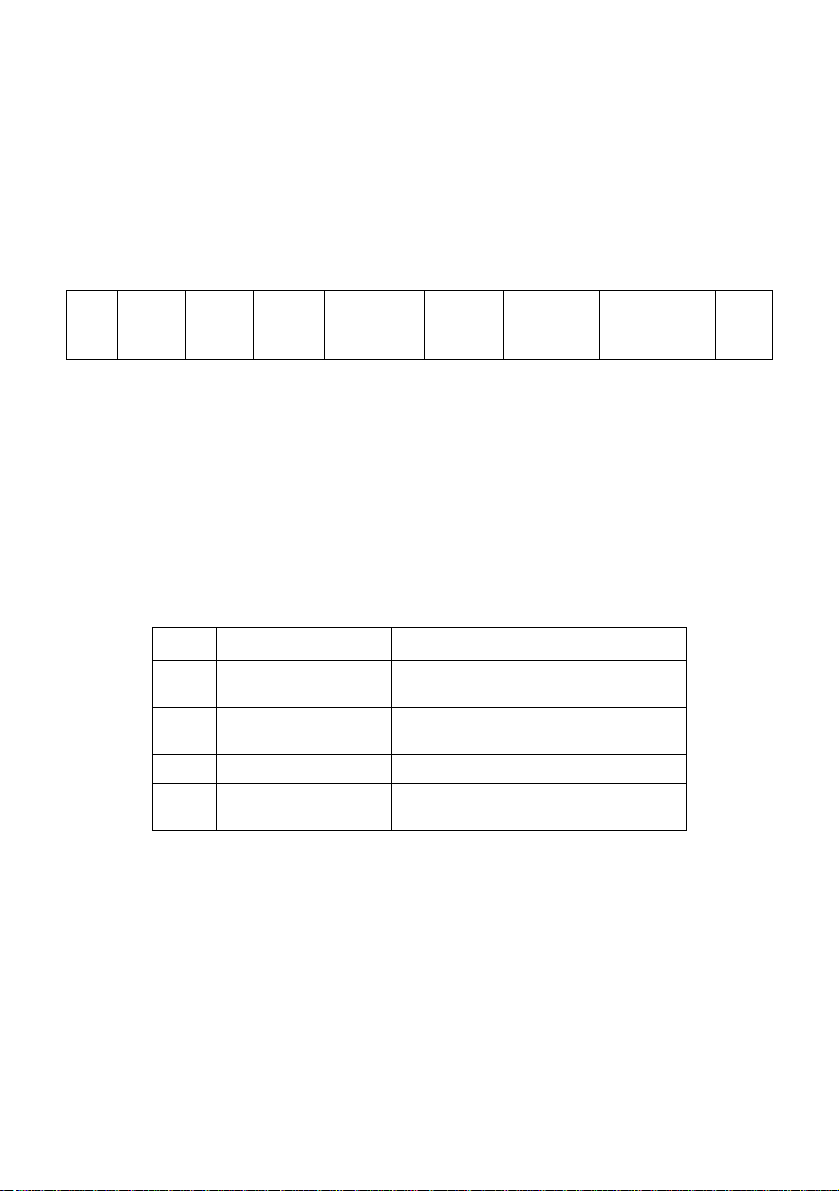
Frame format:
Unit price
display
6-digits
02h
status
byte A
status
byte B
status
byte C
weight
display
6-digits
Tare
6-digits
Status byte A
Unit and work mode– always 2Dh in retail scales.
Status byte B
Scale status and point position:
More significant nibble – always 3.
Status value
D3 Equilibrium
D2 Overweight
0 - stabilisation
1 – no stabilisation
0 – weighing
1 – overweight
D1 Indication sign N/A
D0 tare
0 – no tare
1 – tare set
Status byte C
Reserved, always 20h (space).
Indications from displays are sent in a format of 6 digits, justified to the right,
with leading zeros.
To-pay value
display
6-digits
0Dh
- 14 -
Page 15
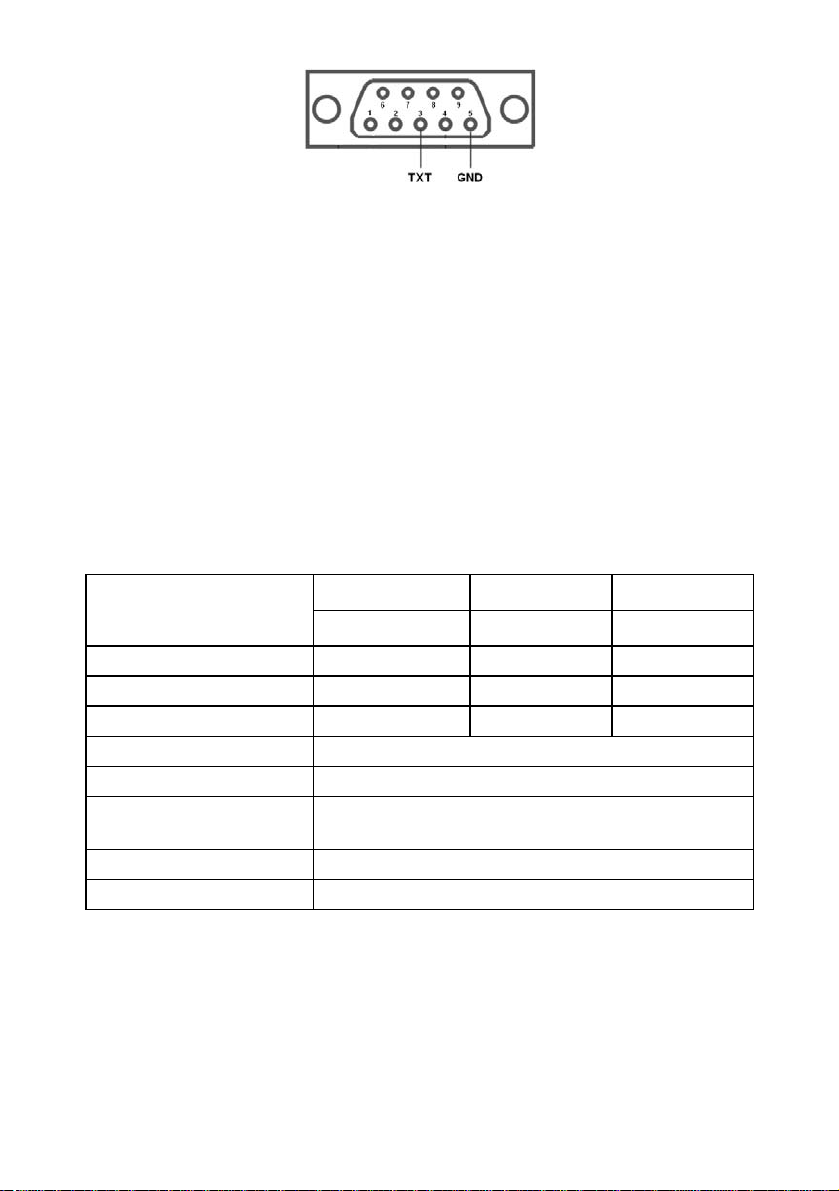
RS232 connector
15. ERROR COMMANDS
u u u u u
H H H H H
S - H X X
X X X X X
- Measurement range overflow
- Check the scale – contact authorized service
- Check the scale – contact authorized service
- Check the scale – contact authorized service
16. TECHNICAL PARAMETERS
Scale type:
Max capacity 6 kg 15 kg 30 kg
Readability 2 g 5 g 10 g
Tare range -6 kg -15 kg -30 kg
Pan size 250×300 mm
Working temperature
Power supply
Display LCD × 3 pcs
Interface RS232
WTC 6/S WTC 15/S WTC 30/S
WTC 6/SW WTC 15/SW WTC 30/SW
+5°C ÷ +35°C
230V AC / 9V DC
and internal adaptor 6V, 4,5Ah
- 15 -
Page 16
MANUFACTURER
OF ELECTRONIC WEIGHING
INSTRUMENTS
RADWAG WAGI ELEKTRONICZNE
26 – 600 Radom, Bracka 28 Street
POLAND
Tel. +48 48 38 48 800, tel./fax. + 48 48 385 00 10
Selling departament + 48 48 366 80 06
www.radwag.com
- 16 -
 Loading...