

Page 1
Congratulations on the purchase of your BladeRunner Series R/C Helicopter. The BladeRunner Extreme Indoor Rescue
Helicopter is designed for fun and easy flying. Even though the BladeRunner Extreme Indoor Rescue Helicopter is
easy to fly, the helpful tips in this pilot's manual will enhance your skill, so take time to read the following pages and learn about
your helicopter. Look for these symbols for extra help.
PILOT INFORMATION MANUALPILOT INFORMATION MANUAL
TM
PILOT INFORMATION MANUAL
PRE FLIGHT- SYSTEM PREPARATION
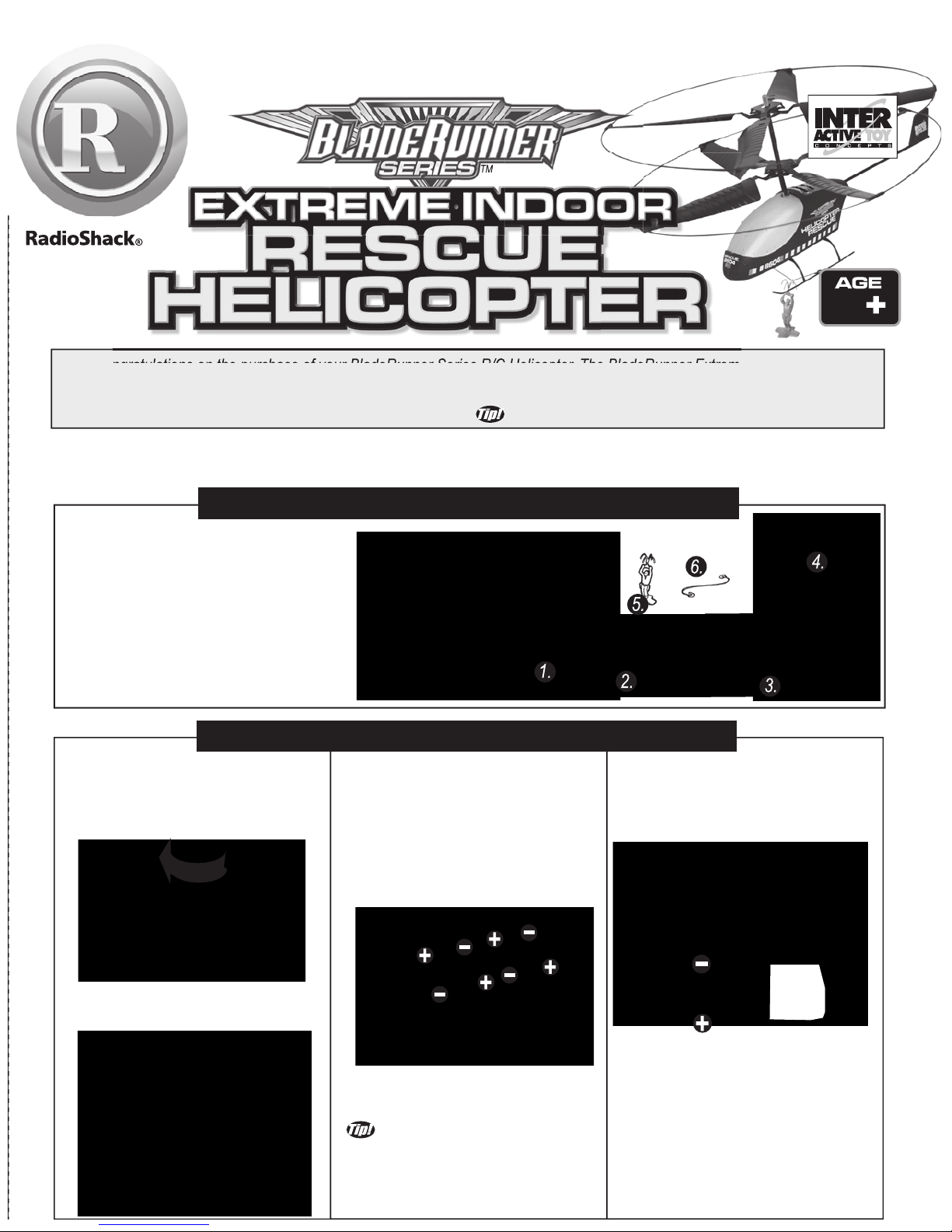
Basic Assembly:
1)Insert the antenna into the
transmitter and screw firmly into
place finger tight (as shown).
3) Replace the battery cover and
secure by tightening the screws.
FOR BEST PERFORMANCE
ONLY USE NEW ALKALINE
BATTERIES, DO NOT MIX
OLD AND NEW BATTERIES.
2) Install the battery with correct
polarity.
3) Replace the battery cover.
4) Mo
ve the throttle to the full ON
position and back to the transmitter
position to initialize the controller.
The power LED lights.
1. Rescue Helicopter.
2. Portable Charger.
3. Radio T ransmitter.
4. Radio Transmitter Antenna.
5. Rescue Figure.
6. Rescue Line.
Also required; (not included)
One 9V alkaline battery (transmitter).
Four C size alkaline batteries (charger).
PACKAGE CONTENTS:
The Helicopter Charger requires
four C size alkaline batteries to
charge the Helicopter.
Installation:
1) Open the charger battery cover
by removing the screws.
2) Be sure to install the batteries
in the correct orientation
(as shown).
The transmitter requires
one 9V alkaline battery.
Installation:
1) Open the battery cover.
TM
8
HOOK LINE
ON BOTH SIDES
2) If desired, install the rescue
line to the landing gear
(as shown).
Page 2
PRE FLIGHT- SYSTEM PREPARATION -Continued
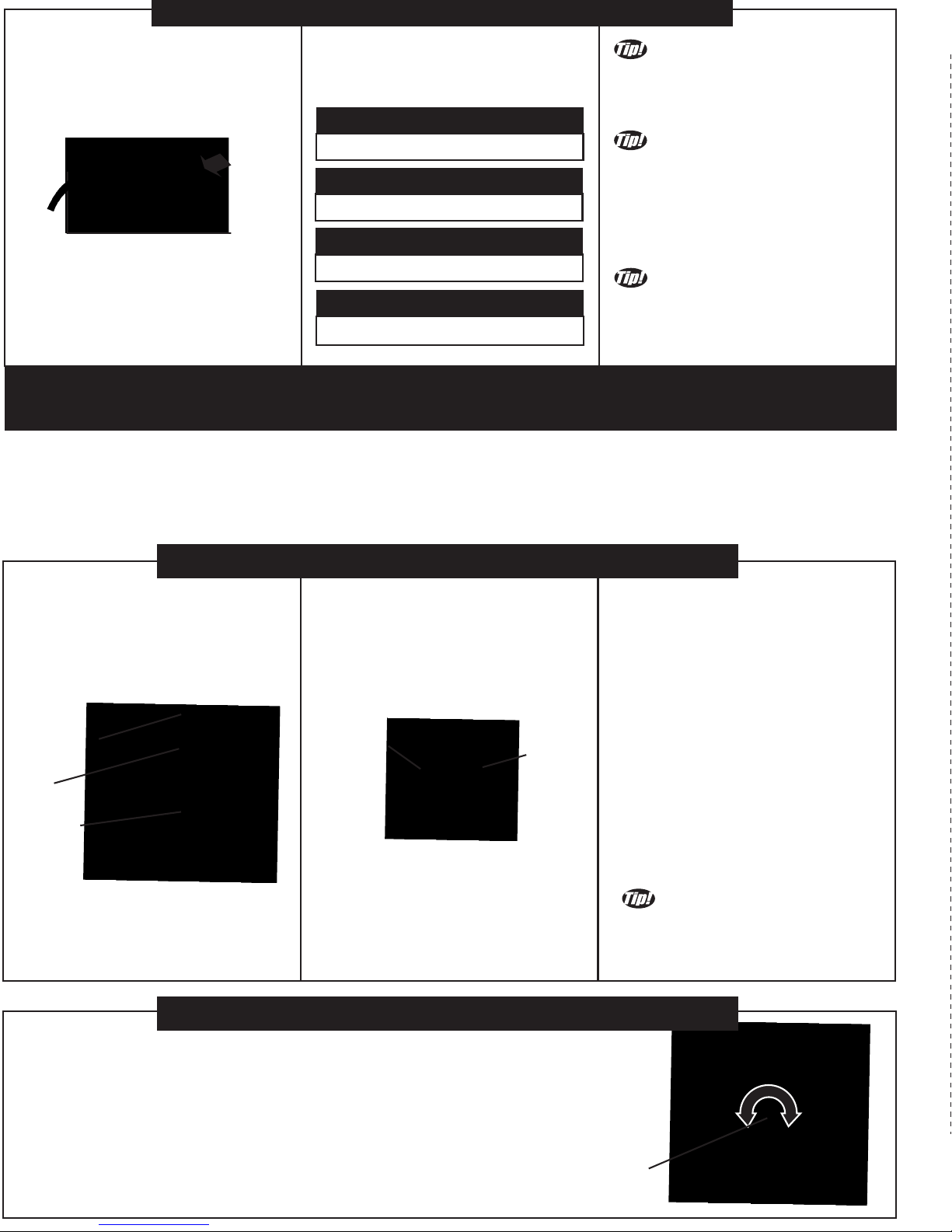
Charging your helicopter:
1) Ensure the helicopter's
on/off
switch is in the OFF position.
2) Plug the charger into the
helicopter (as shown).
3) Ensure charger is ON- charging
will start automatically.
4) Let the charger run its charge
cycle. When charge is finished
the green LED goes out.
Red LED is ON:
Power switch in "ON" position.
Green LED is OFF:
The helicopter is fully charged.
Red LED Dim:
The battery voltage is low.
Green LED is ON:
The helicopter is charging.
GET IN THE AIR FAST!!!
THE RESCUE HELICOPTER IS
PARTIALLY CHARGED SO YOU CAN
FLY IMMEDIATELY OUT OF THE BOX.
CHARGE TIME VARIES BASED
ON HELICOPTER AND CHARGER
BATTERY CONDITIONS. TYPICALLY
AFTER A 10 MINUTE FLIGHT THE
HELICOPTER WILL NEED A 30
MINUTE CHARGE.
YOU DO NOT NEED TO WAIT FOR
THE CHARGE TO BE COMPLETE TO FLY,
SHORTER CHARGE TIMES = SHORTER FLIGHT TIMES.
WARNING!: Interrupting the charge before the charge cycle is completed will not damage the battery, however for the
longest flight times please let the charger finish its charge cycle.
PILOT INFORMATION NOTICE!PILOT INFORMATION NOTICE!PILOT INFORMATION NOTICE!
The BladRunner is an indoor helicopter only. The technology that makes the helicopter
stable and easy to fly will prevent you from flying in winds!
GETTING TO KNOW THE BLADERUNNER HELICOPTER
Pre-Flight Checklist:
1) Extend transmitter antenna.
2) Turn on transmitter.
3) Turn helicopter on.
4) Set helicopter on a horizontal
flat surface for the best take off.
5) Push UP/DOWN completely to
UP, then back to DOWN to
initialize speed control.
6) Gently increase the UP/DOWN
throttle to ensure that the rotors
start spinning.Now that you know
your helicopter is functioning as
it should-
RELAX! -DO NOT TAKE OFF!
Be sure to read the next
section on "FIRST FLIGHTTRIMMING YOUR
HELICOPTER"
before your first flight!
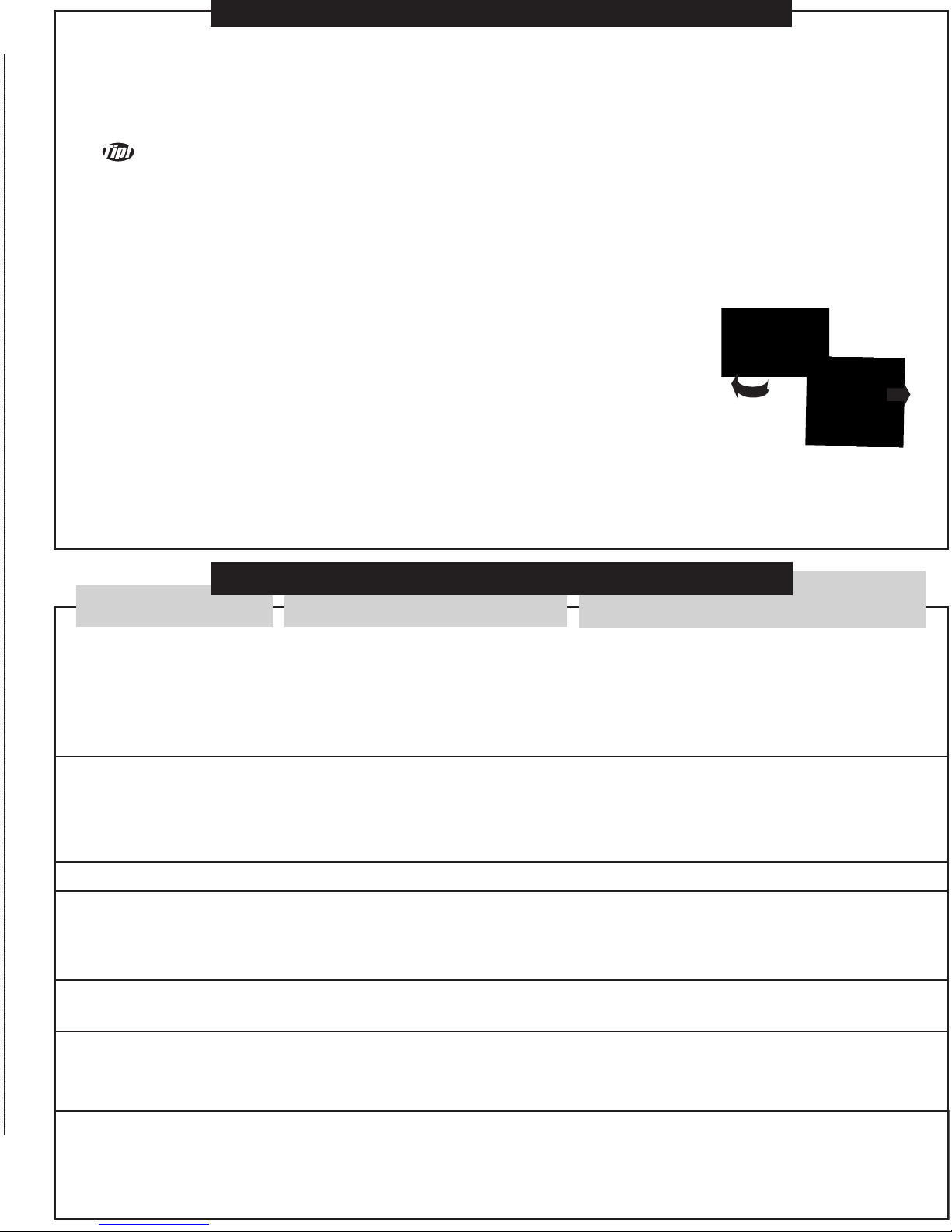
Basic Functions:
On / Off Switch - turns the
transmitter
on and off.
LED - turns on when the transmitter is on.
Antenna - Fully extend to ensure the
greatest control range.
ON/OFF
ANTENNA
UP/DOWN
LEFT/
RIGHT
FIRST FLIGHT-TRIMMING YOUR HELICOPTER
TRIM CONTROL KNOB
LED
Your helicopter must be "trimmed" to stop unwanted rotation. First, using the "UP"
control stick, simply raise the helicopter to eye level and turn the trim control knob
(as shown) on the transmitter unit either left or right till the helicopter stops spinning.
This should be done everytime you fly your helicopter after charging.
Trim setting will vary as the helicopter battery drains.
Re-adjust trim during flight as required.
Transmitter Function:
LEFT/RIGHT - controls left/right
steering direction of the helicopter.
Move the Stick Left -helicopter turns
to the left.
Move the Stick Right -helicopter
turns to the right
UP/DOWN - controls the rotor
speed and vertical movement of
the helicopter. The further you
push UP, the higher the helicopter
will fly.
The transmitter is a digital
proportional radio, therefore small
movements in the control stick
produce
precise control.
Color LED showing battery
power and charging status
Page 3
Take off - To take off, the rotors need to spin upto speed to produce lift. For great take offs use the following steps.
1) Push the UP/DOWN throttle completely to UP and watch the helicopter leap off the ground.
2) Once off the ground, gently reduce the throttle so that the helicopter is at the desired height above the ground.
Altitude Control - the throttle control is a digital proportional system, therefore fine movement of the throttle stick will
produce minor changes in the
helicopter
altitude.
Take time to practice controlling the altitude and getting accustomed to the throttle sensitivity.
Note: The
helicopter
will always fly forward based on its design.
CORRECTIVE ACTION:
CAUSE:
FLYING TIPS!
TROUBLESHOOTING
ISSUE:
Helicopter will not start,
LED on helicopter is OFF.
1) Helicopter not turned on.
2) Battery is not charged.
3) Helicopter was not set to
OFF during charging.
4) Rotors locked for overload
protection.
1) Turn helicopter on.
2) Ensure helicopter is off and charge battery.
3) Ensure batteries are fresh.
4) Adjust helicopter's on/off switch to OFF,
then switch on again.
Helicopter will not start,
LED on helicopter is ON.
1) Transmitter is not turned ON.
2) Speed control is not initialized .
3) Battery is low.
1) Turn transmitter on.
2)
Push UP/DOWN completely to UP, then
back to DOWN to initialize speed control.
3) Ensure helicopter is OFF and charge battery.
Helicopter is flying too high.
1) You need to reduce the throttle.
1) Move the throttle stick down.
Helicopter is flying too
low.
1) Needs more power/throttle.
2) The battery in the helicopter is low.
3) The batteries in the charger are
drained.
1) Move the throttle stick up.
2) Ensure the helicopter is OFF and charge the battery.
3) Remove batteries from charger & replace
with new batteries and charge the helicopter again.
Helicopter doesn't hover.
1) The helicopter is designed to
always fly forward.
1) No corrective action required.
Helicopter doesn't fly
forward fast enough.
1) The helicopter is not designed for
fast flight.
1) If desired, add a small amount of weight to
the bottom side of the nose (ie. tape a small
coin to nose of the bottom of the helicopter).
Helicopter always turns.
1) Trim control is not set correctly.
2) The rotor blades have sustained
damage / or wear from use:
a. Helicopter spins counter clockwise.
b. Helicopter spins clockwise.
1) Adjust the trim control knob.
See the FLYING TIPS section.
2) Gently bend more curvature into the blades.
a. Adjust the top rotor blades.
b. Adjust the lower rotor blades.
T rimming - Once flying at the desired height the helicopter may be spinning under the rotors instead of holding a heading.
Adjust the trim control so that the
helicopter
body does not spin: Turn the trim control left if the body is
spinning right (Clockwise)- Turn the trim control right if the body is spinning left (Counter Clockwise).
Note: many factors affect the trim of the helicopter such as battery condition, throttle setting and damage to the rotors.
It may be required to adjust the trim control more than once during a flight - once trimmed minor corrections can be
managed using the steering control. See the troubleshooting section for more information.
Direction control - Direction control convention is based as if you were sitting in the
pilot's seat of the
helicopter
. The LEFT/RIGHT stick on the transmitter controls the
steering of the helicopter. Pushing the stick left results in a left turn.
Pushing the stick right results in a right turn.
Control Reversal - When the
helicopter
is flying towards you the steering will appear
to reverse.
Figure Play - Place the figure in an open area where the helicopter will have a clear approach. Pilot the helicopter
towards the figure controlling direction and height. When the rescue line or landing gear reaches below the figure's
hook, increase the throttle to pick up the figure. Placing the figure down requires more skill - nearly land the helicopter
so that the figure is standing and turn the helicopter away from the figure to clear the rescue line & gear from the figure's hook.
Page 4
Web site: www.interactivetoy.com
PLEASE! DO NOT RETURN THISPLEASE! DO NOT RETURN THIS
PRODUCT TO ANY RETAIL STORE!PRODUCT TO ANY RETAIL STORE!
PLEASE! DO NOT RETURN THIS
PRODUCT T
O ANY RETAIL STORE!
For any questions or problems with this product please contact us at:
Email: info@interactivetoy.com
Phone: Outside North America: +1 416 444 6873
Inside North America: 1 866 214 2220
Address: Interactive Toy Concepts
1192 Martin Grove Road
Toronto, Ontario, Canada
M9W 5M9
IMPORTANT SAFETY INFORMATION
Keep the helicopter away from face, eyes and hair at all times. Keep fingers away from moving rotors or propellers.
Do not fly the plane near or at other people or animals. Use caution when flying, make sure people around you
know that you are playing with the helicopter.
Recommended for use indoors only in rooms without obstacles, breakable objects or fans.
The charger provided in this package is for charging the helicopter ONLY . Do not use any other source to charge the helicopter.
Do not attempt to overcharge your helicopter. Follow the charging instructions provided in this instruction manual.
IMPORTANT BATTERY INFORMATION
Use only batteries recommended in this instruction manual. Do not mix old and new batteries.
Battery installation should be performed by an adult. Be careful to install the batteries with the correct polarity, as indicated.
Do not use rechargeable batteries. Do not mix alkaline, standard, lithium, rechargeable, or different types of batteries.
The supply terminals are not to be short-circuited. Exhausted batteries are to be removed as they will hinder performance.
Never leave a battery unattended while it is being charged. Never leave a battery
unattended in the presence of children. Helicopter charging time will increase with usage as the condition of the C cells diminish.
The Helicopter takes one 9V battery and four C size batteries (not included).
FCC NOTE: U.S. ONLY
This device complies with Part 15 of the FCC Rules. Operation is subject to the following two conditions:
1) This device may not cause harmful interference.
2) This device must accept any interference received including interference that may cause undesired operation.
Note: This equipment has been tested and found to comply with the limits for a class B digital device, pursuant to Part 15 of the
FCC Rules. These Limits are designed to provide reasonable protection against harmful interference in a residential installation.
This generates, uses and can radiate radio frequency energy and if not installed and used in accordance with the instructions,
may cause harmful interference to radio communications. However, there is no guarantee that interference will not occur in a
particular installation. If this equipment does cause harmful interference to radio or television reception, which can be determined
by turn the equipment off and on, the user is encouraged to try and correct the interference by one or more of the following measures:
-
Reorient or relocate the receiving antenna - Increase the separation between the equipment and receiver - Connect the equipment
to an outlet on a circuit different from that to which the receiver is connected - Consult the dealer or an experienced radio/TV technician for help.
Lithium Polymer
Rechargeable Batteries
must be recycled or
disposed of properly.
© 2006. RadioShack and the RadioShack® logo are trademarks of RadioShack Corporation. All rights reserved.
Extreme Indoor Rescue Helicopter and BladeRunner Series are registered trademarks of
Interactive Toy Concepts © 2006 All Rights Reserved.
Manufactured by and distributed by Interactive Toy Concepts Ltd.
Conforms to Safety Standards ASTM F963-03 Regulatory Requirements.
Products and colors may vary.
MADE IN CHINA.
INS-61215-60223-CAN
Limited 90-day warranty
This product is warranted by Interactive Toy Ltd. against manufacturing defects in material and workmanship
under normal use for ninety (90) days from the date of purchase.
 Loading...