

Page 1
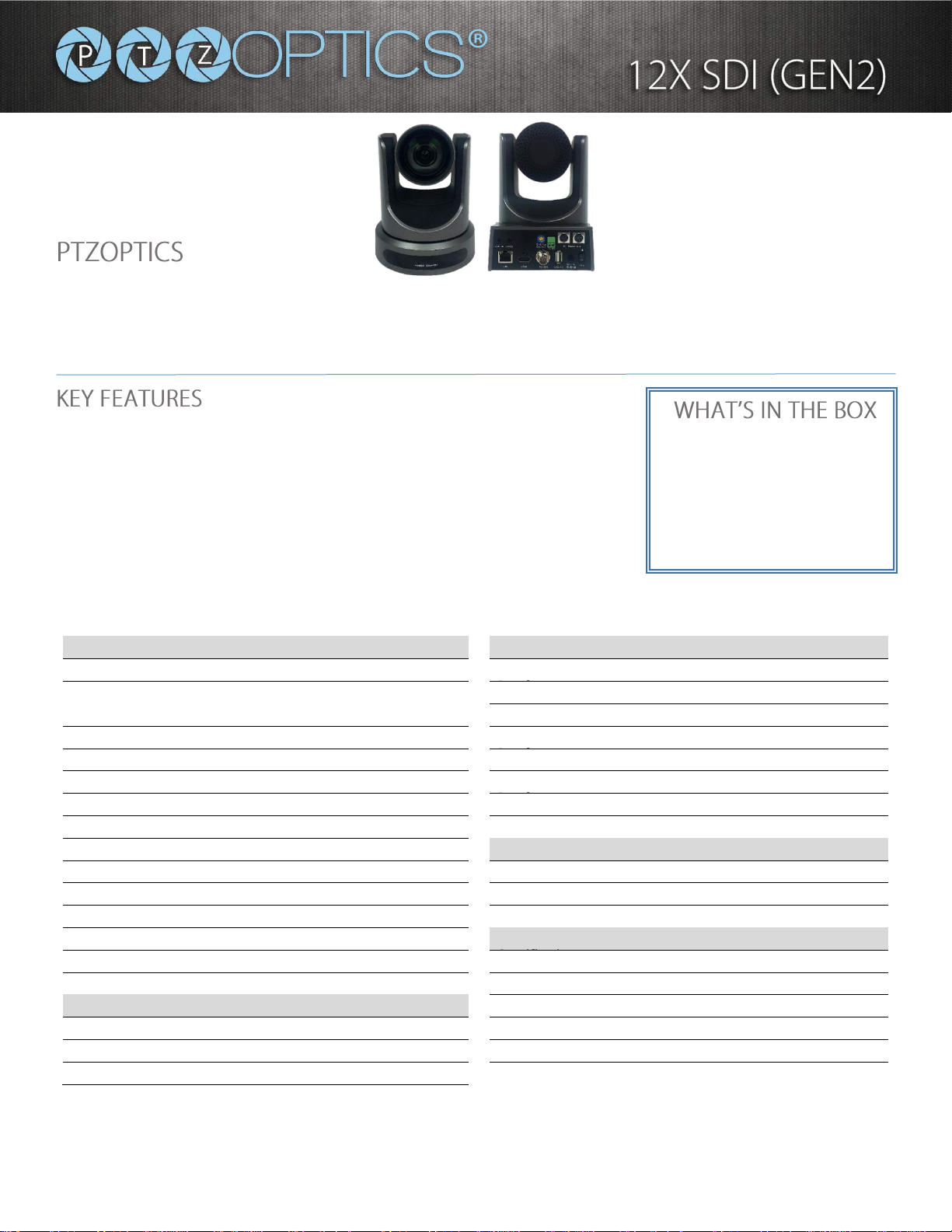
Broadcast Quality Made Affordable
Please check PTZOPTICS.com for the most up to date version of this document Rev. 1.3 /17
Model Number:
PT12X-SDI-GY-G2 (gray)
PT12X-SDI-WH-G2 (white)
http://ptzoptics.com/12x-sdi/
Broadcast & Conference Camera
The PTZOptics 12X-SDI is a 1080p camera with 12X optical zoom for capturing both wide angles and long
shots. With support for 3G-SDI, HDMI, and IP streaming (H.264, H.265, & MJPEG), this camera is ideal for
broadcasting high definition video signals for broadcast, recording, or video conferencing applications.
• 72.5 degree wide-angle lens.
• High performance in low light scenarios with Wide Dynamic Range.
• Full 1920x1080p HD Resolutions up to 60 frames per second.
• 2D and 3D noise reduction with our latest “low noise CMOS sensor”.
• RS232 & RS485 (Serial), and IP (LAN/WAN) control
• H.264, H.265, & MJPEG Streaming over RJ-45 LAN port
• HDMI, 3G-SDI, & IP streaming (all 3 simultaneously)
• PoE (Power over Ethernet) or 12VDC
• RTMP & RTSP IP streaming
Camera & Lens
Rear Board
Video Sensor
1/2.7” CMOS, 2.12 Mega Pixels
Video Output
HDMI, 3G-SDI, IP Streaming, CVBS
Frame Rates
1080p/60, 50, 30 & 25, 1080/60 &
50, 720p/60, 50, 30 & 25
Network Interface
RJ45
Audio Interface
Line In, 3.5mm (HDMI & IP Stream Only)
Frame Rates (CVBS)
576i/30, 480i/30
Communication
RS-232, RS-485, PELCO-D/P,
Focal Length
12x, F3.5mm-42.3mm, F1.8-F2.8
Baud Rate
2400/4800/9600 bits
Lens Zoom
12x Power Supply
JEITA type Power Adapter (DC IN 12V)
Field of View
72.5°
3G-SDI Interface
BNC – 75 Ohm, Female
Min Lux
0.5 Lux at F1.8, AGC ON
USB 2.0 Interface
Future Use
Shutter Speed
1/30s - 1/10000s
Electrical Index
SNR
≥55dB
Power Supply
12W (Max)
Vertical Flip & Mirror
Supported
Input Voltage
12V DC (10.8 - 13.0V DC) or PoE 802.3af
Horizontal Angle of View
6.9° (tele) to 72.5° (wide)
Vertical Angle of View
3.9° (tele) to 44.8°(wide)
Physical
Working Environment
Indoor
Dimension (in.)
5.6W x 6.5H x 6.7D (7.88H max w/ Tilt)
Dimensions (mm)
142W x 164H x 169D (189H max w/ Tilt)
Pan & Tilt Movement
Box Dimensions
9”x9”x10” | 229mmx254mmx229mm
Pan Movement
±170°
Camera Weight
3.05 lbs. (1.38 kg)
Tilt Rotation
Up: 90°, Down: 30°
Boxed Weight
5.4 lbs. (2.45 kg)
Presets
10 via IR (255 via Serial or IP)
12X Zoom 3G-SDI Camera
Power Adapter + Cord
IR Remote Control
RS-232C Cable
User Manual
Page 2
OPTICS
DATA SHEET PTZ Optics Specifications & Diagrams
152 Robbins Road Downingtown, PA 19335 PTZOptics.com 800-486-5276
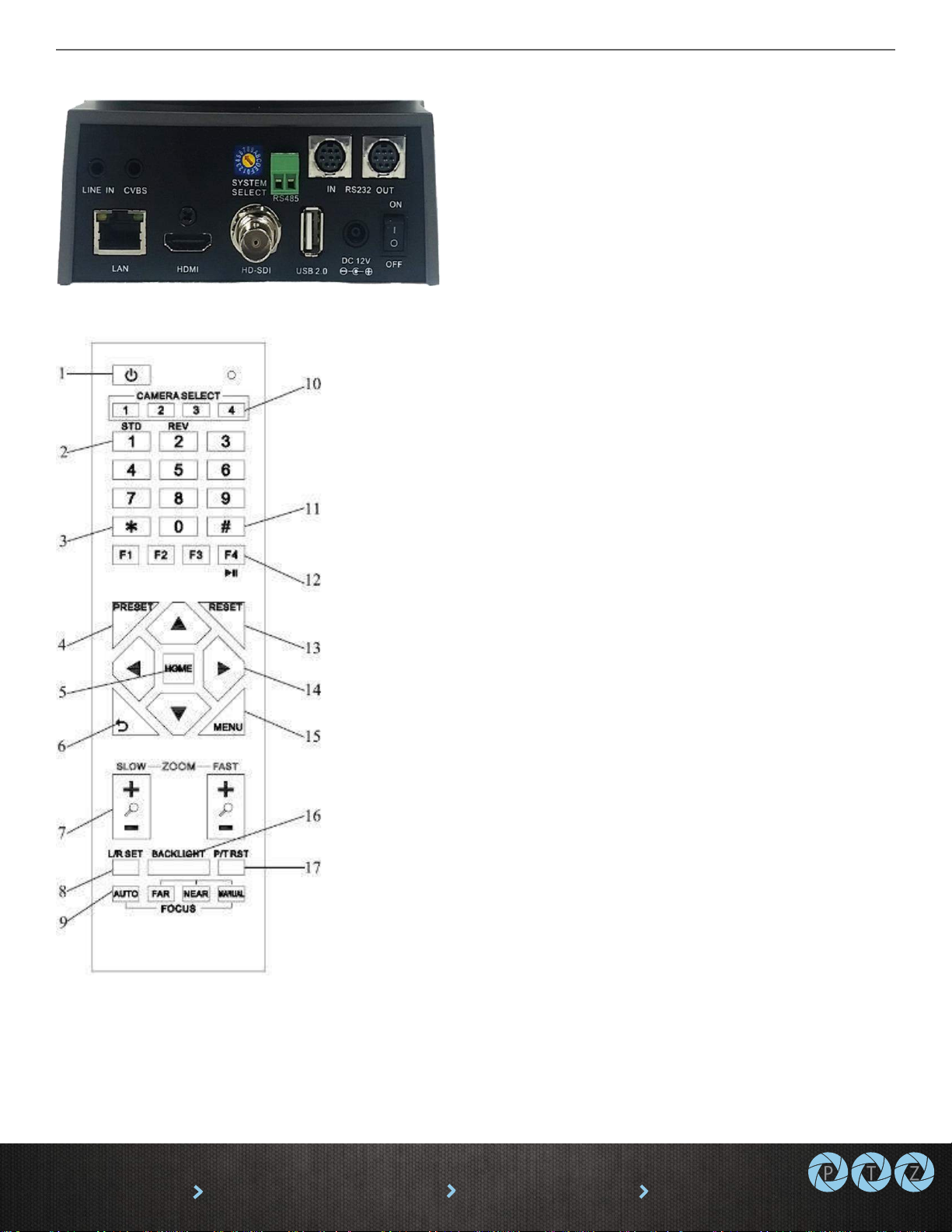
1. Standby Button
Press this button to enter standby mode.
Press it again to enter normal mode.
NOTE: Power consumption in standby mode
is approximately half of the normal mode.
2. Position Buttons (0-9)
To set preset or call presets and for Special
Shortcut Functions.
3. * (asterisk) Button
For use with multiple function buttons (see
12)
4&13. Set/Clear Preset Buttons
Set preset: Store a preset position [PRESET]
+ Numeric button (0-9): Setting a
corresponding numeric key preset position.
Clear preset: Erase a preset position
[RESET] + Numeric button (0-9)
Note: [*] + [#] + [RESET]: Erase all presets.
5&14. Pan/Tilt & Home Control Buttons
Press the arrow buttons to perform panning
and tilting. Press the [HOME] button to face
the camera back to its Home position.
6. Return Button
Press button to return to previous menu.
7. Zoom Buttons (Slow & Fast)
Zoom+: Zoom In (Slow and fast speeds)
Zoom-: Zoom Out (Slow and fast speeds)
8. L/R Set Button
Set the left & right direction of panning
control. Hold [L/R Set] + Press [1]: Normal
panning direction. Hold [L/R Set] + Press [2]:
Left and right panning direction will be
reversed.
9. Focus Buttons
Used for focus adjustment. Press [AUTO] to
adjust the focus on the center of the object
automatically. To adjust the focus manually,
press the [MANUAL] button, and then
adjust focus with [Far] (focus on far object)
and [Near] focus on near object).
10. Camera Address Select Buttons
Press the button corresponding to the
camera which you want to operate with
the IR remote controller.
11. # Button
For use with multiple function buttons (see
12)
12. Multiple Function Buttons
Function 1. Set camera IR address function:
Press 3 keys consecutively to set the camera’s
IR address as follow:
[*] + [#] + [F1]: IR Address 1
[*] + [#] + [F2]: IR Address 2
[*] + [#] + [F3]: IR Address 3
[*] + [#] + [F4]: IR Address 4
Function 2. Image freezing function: Press [F4]
to start the freeze function. The word "Freeze"
displays on the upper left corner. After five
seconds, the display disappears automatically
(though the freeze feature continues). To cancel
the freeze, press the [F4] key the word
"Unfreeze" displays on the upper left corner.
After five seconds, the display disappears
automatically.
15. Menu Button
OSD Menu Settings: Press this button to enter
or exit the OSD (on screen display) menu.
16. Backlight Button
Backlight (aka BLC) button: Press this button to
enable backlight compensation. Press it again to
disable backlight compensation. NOTE:
Effective only in auto exposure mode. NOTE: If
there is a light behind the subject, the subject
will appear dark (i.e. silhouetted). In this case,
press the backlight button to turn BLC On . To
cancel this function, press the backlight button
to turn BLC Off.
17. P/T RST Button
Press the button to self-calibrate the pan and tilt
positions and limits.
Special Shortcut Functions
[*] + [#] + [1]: Display OSD menu in English
[*] + [#] + [3]: Display OSD menu in Chinese
[*] + [#] + [4]: Show IP address
[*] + [#] + [6]: Quickly restore default settings
[*] + [#] + [8]: Show the camera FW version
[*] + [#] + [9]: Quickly set mounting mode
(vertical flip / normal)
Page 3
OPTICS
152 Robbins Road Downingtown, PA 19335 HuddleCamHD.com 800-486-5276
Broadcast Quality Made Affordable
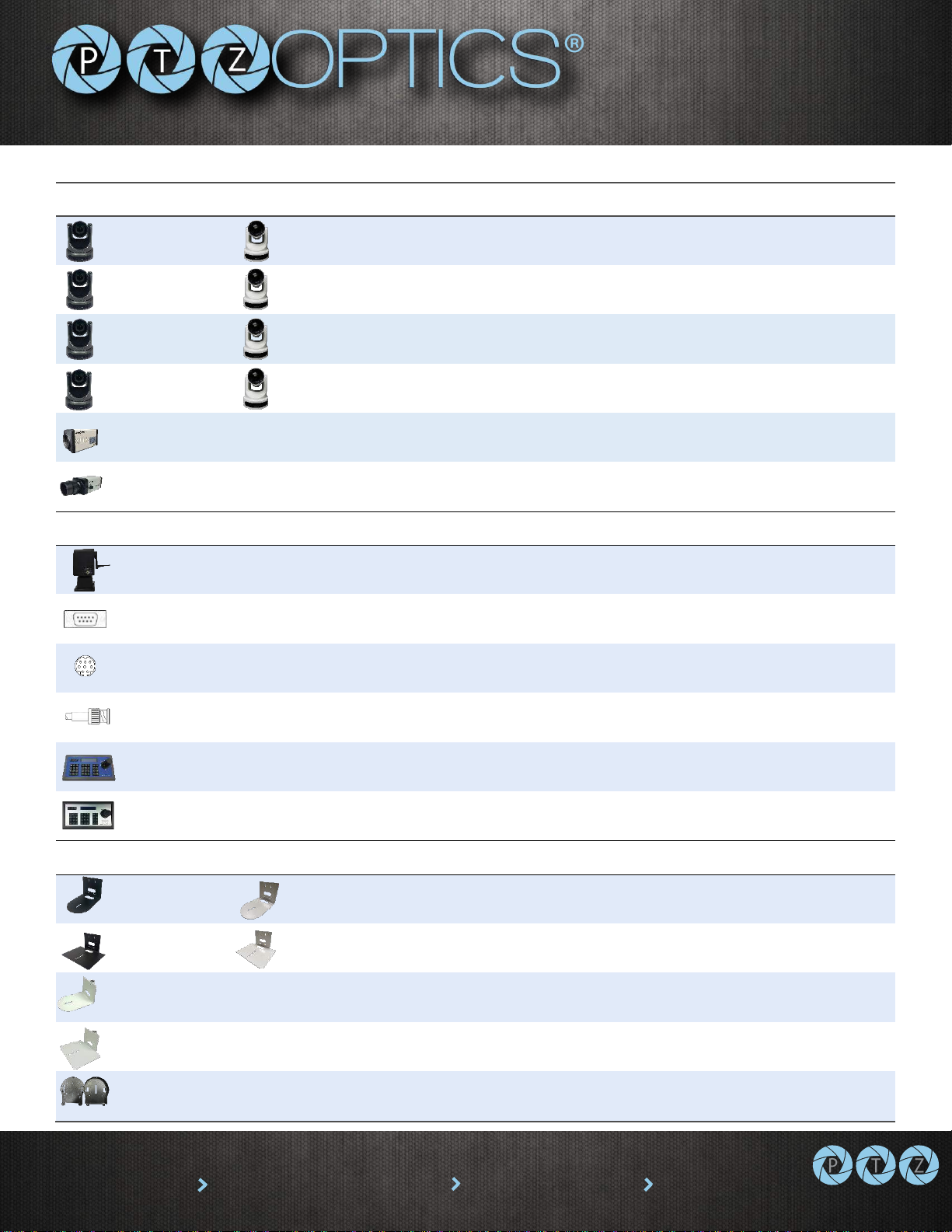
Product Line
PT12X-SDI-GY-G2
PT12X-SDI-WH-G2
1080p PTZ camera, 12X optical zoom, 3G-SDI, HDMI, IP Streaming
PT12X-USB-GY-G2
PT12X-USB-WH-G2
1080p PTZ camera, 12X optical zoom, USB3.0, HDMI, IP Streaming
PT20X-SDI-GY-G2
PT20X-SDI-WH-G2
1080p PTZ camera, 20X optical zoom, 3G-SDI, HDMI, IP Streaming
PT20X-USB-GY-G2
PT20X-USB-WH-G2
1080p PTZ camera, 20X optical zoom, USB3.0, HDMI, IP Streaming
PT20X-ZCAM-G2
1080p Box Camera, 20X optical zoom, 3G-SDI, IP Streaming
PTVL-ZCAM-G2
1080p Box Camera, Variable Lenses (4X included), 3G-SDI, IP Streaming
Control Accessories
PT-BRDCSTR-(L,E,P)
Remote PTZ Head for handheld-broadcast cameras (3 models)
DB9M-F-xx
Extension Cable, DB9M-F, Plenum, 4 lengths shown in ft. (xx=25, 50, 75, 100)
VISCA-xx
Daisy Chain Cable, miniDIN8-MM, 4 lengths shown in ft. (xx=25, 50, 75, 100)
HDSDI-xx
3G SDI Cable, BNC-MM, Plenum, 4 lengths shown in ft. (xx=25, 50, 75, 100)
HC-JOY-G2
RS232, RS485, RS422, 3D Joystick and Keyboard, VISCA, Pelco-P, Pelco-D
PT-JOY
IP control, 4D Joystick and Keyboard, Durable Metal Case
Mounting Accessories
HCM-1-BK
HCM-1-WH
Small Wall Mount, mounts directly to wall or box with supplied hardware
HCM-2-BK
HCM-2-WH
Large Wall Mount, mounts directly to wall or box with supplied hardware
HCM-1C-WH
Small Open Ceiling Mount, mounts to 1”NPT pipe
HCM-2C-WH
Large Open Base Ceiling Mount, mounts to 1”NPT pipe
PT-CM-1-BK
Surface Ceiling Mount, mounts directly to ceiling or box w/ suppl. hardware
 Loading...