

Page 1
Update
Reference Guide
Directions for Use
Vital Signs Monitor
English
Keep this update in the back pocket of your manual.
Deutsch
Bewahren Sie diese Aktualisierung in der Tasche in der hinteren Umschlagseite des
Handbuchs auf.
Français
cette mise à jour dans la pochette à l'arrière de votre manuel.
Español
actualización en el boisillo trasero de su manual.
Italiano
Conservate questo aggiornamento nella tasca in fondo al vostro manuale.
Nederlands
Bewaar deze update in de houder op de achterzijde van uw handleiding.
Português
2.0X-2.1X. Manter esta actualização na contracapa do manual.
Svenska
denna uppdatering i fickan sist i handboken.
Update for software versions 2.0X-2.1X.
Aktualisierung zur Software-Version 2.0X-2.1X Gebrauchsanweisung.
Mise à jour jusqu’à la version logiciel 2.0X-2.1X Guide de référence. Gardez
Actualizar al software Guía de Referencia 2.0X-2.1X. Guarde esta
Aggiornamento della Guida di Riferimento del software versione 2.0X-2.1X.
Update voor de gebruiksaanwijzing van software versie 2.0X-2.1X.
Actualização das Instruções de Utilização da versão de software
Uppdatering till bruksanvisning till version 2.0X-2.1X av mjukvaran. Spara
Page 2
Copyright © 2000, Protocol Systems, Inc.
Protocol®, Propaq®, Propaq Encore®, Acuity®, Protocol Cordless®, and Flexible Monitoring® are
registered trademarks and Smartcuf™ is a trademark of Protocol Systems, Inc. Protocol Systems, Inc. is
protected under various patents and patents pending.
Copyright Notice:
All rights are reserved. The software is protected by United States of America copyright laws and
international treaty provisions applicable all over the world. Under such laws, you are licensed to use the
copy of the software incorporated with this instrument as intended in the operation of the product in which
it is embedded, but the software may not be copied, decompiled, reverse-engineered, disassembled or
otherwise reduced to human-perceivable form. This is not a sale of the software or any copy of the
software; all right, title and ownership of the software remains with Protocol or its vendors. Protocol
Systems, Inc. will make available specifications necessary for interoperability of this software on request;
however, users should be aware that use of Protocol hardware and software with devices or software not
sold by Protocol or its authorized dealers and affiliates may lead to erroneous results and consequent
danger in patient care, and may also void Protocol's warranty.
DISCLAIMERS:
Protocol Systems, Inc. cautions the reader of this manual:
• This manual may be wholly or partially subject to change without notice.
• All rights are reserved. No one is permitted to reproduce or duplicate, in any form, the whole or part of
this manual without permission from Protocol Systems, Inc.
• Protocol Systems, Inc. will not be responsible for any injury to the user or other person(s) that may
result from accidents during operation of the Propaq Encore.
• Protocol assumes no responsibility for usage not in accordance with this manual that results in illegal
or improper use of the Propaq Encore.
Software in this Product is Copyright© 2000 by Protocol Systems, Inc., or its vendors.
Send correspondence regarding this manual and other Protocol products to:
Protocol Systems, Inc.
Customer Service
8500 SW Creekside Place
Beaverton, Oregon 97008-7107 USA
Within USA, toll free:
Phone: (800) 289-2500
Phone Technical Services: (800) 289-2501
Worldwide:
Phone: (503) 526-8500
Fax: (503) 526-4200
Fax Technical Services: (503) 526-4910
Internet
http://www.protocol.com
Technical Services email:
[email protected]
Marketing Department email:
[email protected]
Protocol Medical Systems Ltd.:
NW Europe
Derby Service Centre
St. Georges House, Vernon Gate
Derby DE1 1UQ
United Kingdom
Phone: 44 1332 206208
Fax: 44 1332 206209
Email: [email protected]
Protocol Systems, Inc.: Asia/Pacific
P.O. Box 29020
Christchurch 5
New Zealand
Phone: 64 3 37 94 429
Fax: 64 3 37 92 374
Reorder No.
810-0980-03 Rev. A, 5/00
Printed in USA
0123
Page 3

Contents
English . . . . . . . . . . . . . . . . . . . . . . . . . . . . . . . . . . . . . . . . .5
Improve NIBP Accuracy with Smartcuf™ . . . . . . . . . . . . . . . . . . . . . . . . . . . .5
NIBP Cuff Symbols. . . . . . . . . . . . . . . . . . . . . . . . . . . . . . . . . . . . . . . . . . . . .7
NIBP Display Default Settings . . . . . . . . . . . . . . . . . . . . . . . . . . . . . . . . . . . .7
Press NET OFF to Disconnect from Acuity . . . . . . . . . . . . . . . . . . . . . . . . . .8
Capnography (CO
Time/Day Settings and Trends . . . . . . . . . . . . . . . . . . . . . . . . . . . . . . . . . . .10
Deutsch . . . . . . . . . . . . . . . . . . . . . . . . . . . . . . . . . . . . . . .11
Mit Smartcuf™ erhöhen Sie die Genauigkeit nicht-invasiver
Blutdruckmessungen . . . . . . . . . . . . . . . . . . . . . . . . . . . . . . . . . . . . . . . . .11
NIBP-Manschettensymbole . . . . . . . . . . . . . . . . . . . . . . . . . . . . . . . . . . . . .13
NIBP-Standardeinstellungen der Anzeige . . . . . . . . . . . . . . . . . . . . . . . . . .13
Betätigen Sie NETZ AUS, um die Verbindung zu Acuity zu trennen . . . . . .14
Kapnographie (CO
Zeit/Tag-Einstellungen und Trends) . . . . . . . . . . . . . . . . . . . . . . . . . . . . . . .16
Français . . . . . . . . . . . . . . . . . . . . . . . . . . . . . . . . . . . . . . .17
Améliorez la précision de la PSNI grâce à Smartcuf™ . . . . . . . . . . . . . . . .17
Symboles de brassard PSNI. . . . . . . . . . . . . . . . . . . . . . . . . . . . . . . . . . . . .19
Réglages par défaut de l’affichage de la PSNI. . . . . . . . . . . . . . . . . . . . . . .19
Appuyez sur RES INAC pour vous déconnecter d’Acuity. . . . . . . . . . . . . . .20
Capnographie (CO
Paramètres heure/jour et tendances . . . . . . . . . . . . . . . . . . . . . . . . . . . . . .22
) . . . . . . . . . . . . . . . . . . . . . . . . . . . . . . . . . . . . . . . . . . . .9
2
). . . . . . . . . . . . . . . . . . . . . . . . . . . . . . . . . . . . . . . . . . .15
2
). . . . . . . . . . . . . . . . . . . . . . . . . . . . . . . . . . . . . . . . . . .21
2
Español . . . . . . . . . . . . . . . . . . . . . . . . . . . . . . . . . . . . . . .23
Mejore la precisión de la PSNI con Smartcuf™ . . . . . . . . . . . . . . . . . . . . . .23
Símbolos de manga PSNI . . . . . . . . . . . . . . . . . . . . . . . . . . . . . . . . . . . . . .25
Valores por Defecto de la Pantalla de PSNI. . . . . . . . . . . . . . . . . . . . . . . . .25
Pulse RED NO para Desconectar de Acuity. . . . . . . . . . . . . . . . . . . . . . . . .26
Capnografia (CO2) . . . . . . . . . . . . . . . . . . . . . . . . . . . . . . . . . . . . . . . . . . . .27
Configuración de Hora/Día y Tendencias. . . . . . . . . . . . . . . . . . . . . . . . . . .28
Italiano . . . . . . . . . . . . . . . . . . . . . . . . . . . . . . . . . . . . . . . .29
L'uso di Smartcuf™ serve a migliorare la precisione delle
misurazioni NIBP . . . . . . . . . . . . . . . . . . . . . . . . . . . . . . . . . . . . . . . . . . . .29
Simboli del bracciale NIBP . . . . . . . . . . . . . . . . . . . . . . . . . . . . . . . . . . . . . .31
Impostazioni predefinite di visualizzazione NIBP . . . . . . . . . . . . . . . . . . . . .31
Premere RETE OFF per scollegarsi da Acuity . . . . . . . . . . . . . . . . . . . . . . .32
Capnografia (CO
Impostazioni relative a ora/giorno e tendenze . . . . . . . . . . . . . . . . . . . . . . .34
Propaq Encore 2.0X-2.1X Reference Guide/Directions for Use 3
Update
) . . . . . . . . . . . . . . . . . . . . . . . . . . . . . . . . . . . . . . . . . . . .33
2
Page 4

Contents (cont.)
Nederlands . . . . . . . . . . . . . . . . . . . . . . . . . . . . . . . . . . . . 35
Verbeter NIBP nauwkeurigheid met Smartcuf™ . . . . . . . . . . . . . . . . . . . . . 35
NIBP-manchetsymbolen . . . . . . . . . . . . . . . . . . . . . . . . . . . . . . . . . . . . . . . 37
Standaardinstellingen NIBP-scherm . . . . . . . . . . . . . . . . . . . . . . . . . . . . . . 37
Druk op NET UIT om de verbinding met Acuity te verbreken . . . . . . . . . . . 38
Capnografie (CO
Tijd/dag-instellingen en trends. . . . . . . . . . . . . . . . . . . . . . . . . . . . . . . . . . . 40
). . . . . . . . . . . . . . . . . . . . . . . . . . . . . . . . . . . . . . . . . . . . 39
2
Português . . . . . . . . . . . . . . . . . . . . . . . . . . . . . . . . . . . . . 41
Melhore a precisão de PNI com Smartcuf™ . . . . . . . . . . . . . . . . . . . . . . . . 41
Símbolos de braçadeira de PNI. . . . . . . . . . . . . . . . . . . . . . . . . . . . . . . . . . 43
Ajustes Predefinidos do Ecrã PNI . . . . . . . . . . . . . . . . . . . . . . . . . . . . . . . . 43
Prima REDE OFF para se desligar da rede Acuity . . . . . . . . . . . . . . . . . . . 44
Capnografia (CO
Definições de Dia/Hora e Tendências. . . . . . . . . . . . . . . . . . . . . . . . . . . . . 46
)I . . . . . . . . . . . . . . . . . . . . . . . . . . . . . . . . . . . . . . . . . . . 45
2
Svenska. . . . . . . . . . . . . . . . . . . . . . . . . . . . . . . . . . . . . . . 47
Förbättra noggrannheten för NIBP med Smartcuf™ . . . . . . . . . . . . . . . . . . 47
NIBP manschettsymboler . . . . . . . . . . . . . . . . . . . . . . . . . . . . . . . . . . . . . . 49
NIBP - Visa fabriksinställningar . . . . . . . . . . . . . . . . . . . . . . . . . . . . . . . . . . 49
Tryck på NÄT AV för att koppla ned från Acuity . . . . . . . . . . . . . . . . . . . . . 50
Capnografi (CO2). . . . . . . . . . . . . . . . . . . . . . . . . . . . . . . . . . . . . . . . . . . . . 51
Tid/dag-inställningar och trender. . . . . . . . . . . . . . . . . . . . . . . . . . . . . . . . . 52
4 Protocol Systems, Inc.
Page 5
English
Improve NIBP Accuracy with Smartcuf™
Software Versions
2.0X-2.1X
(NOTE: SMARTCUF button
only available for 2.1X)
NIBP measurements can be adversely affected by many factor such as cardiac
arrhythmias, sudden changes in blood pressure, body motions such as convulsions or
shivering, bumping the cuff, vibration, vehicle motion, or weak pulses.
The patented Smartcuf software filtering technology greatly increases NIBP
measurement accuracy in the presence of motion artifact or diminished pulses.
Smartcuf synchronizes the NIBP reading with the R-wave of the patient’s ECG to
eliminate noise created by external stimuli such as patient motion or vibration. The
monitor must perform ECG monitoring while using Smartcuf.
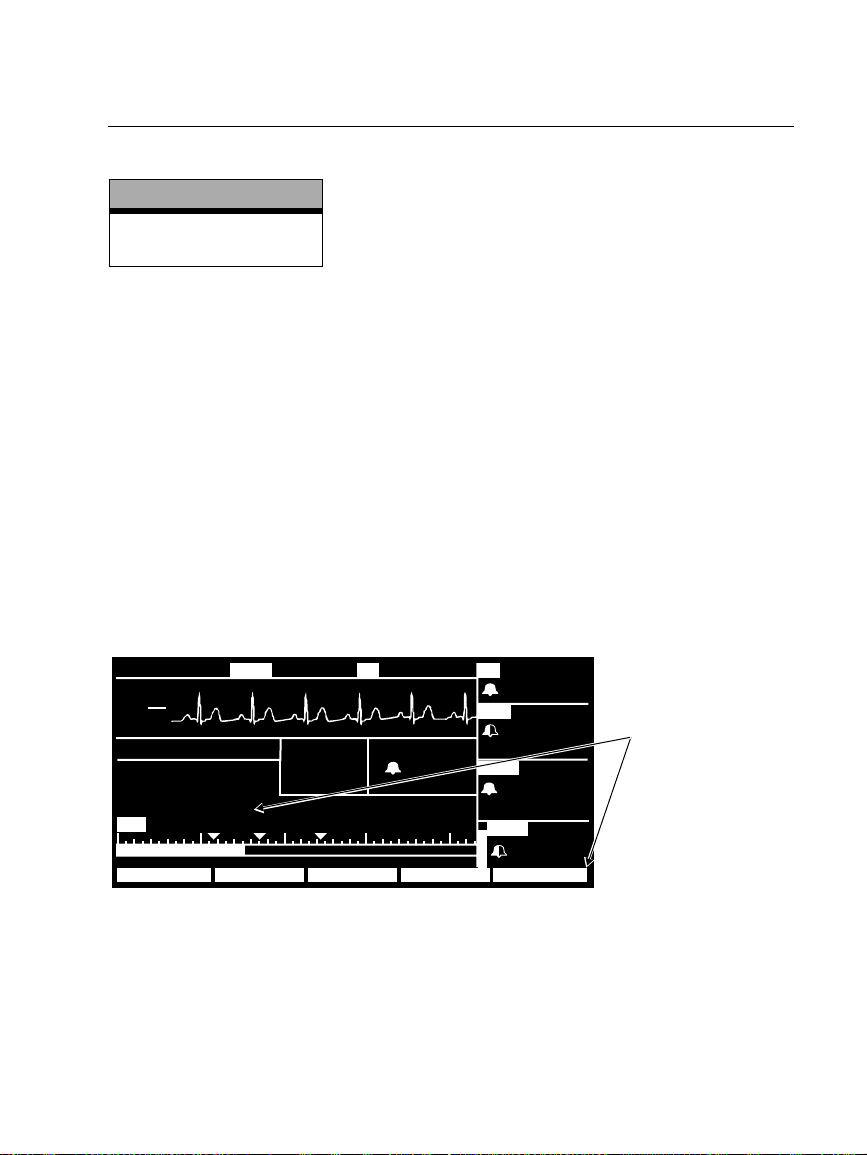
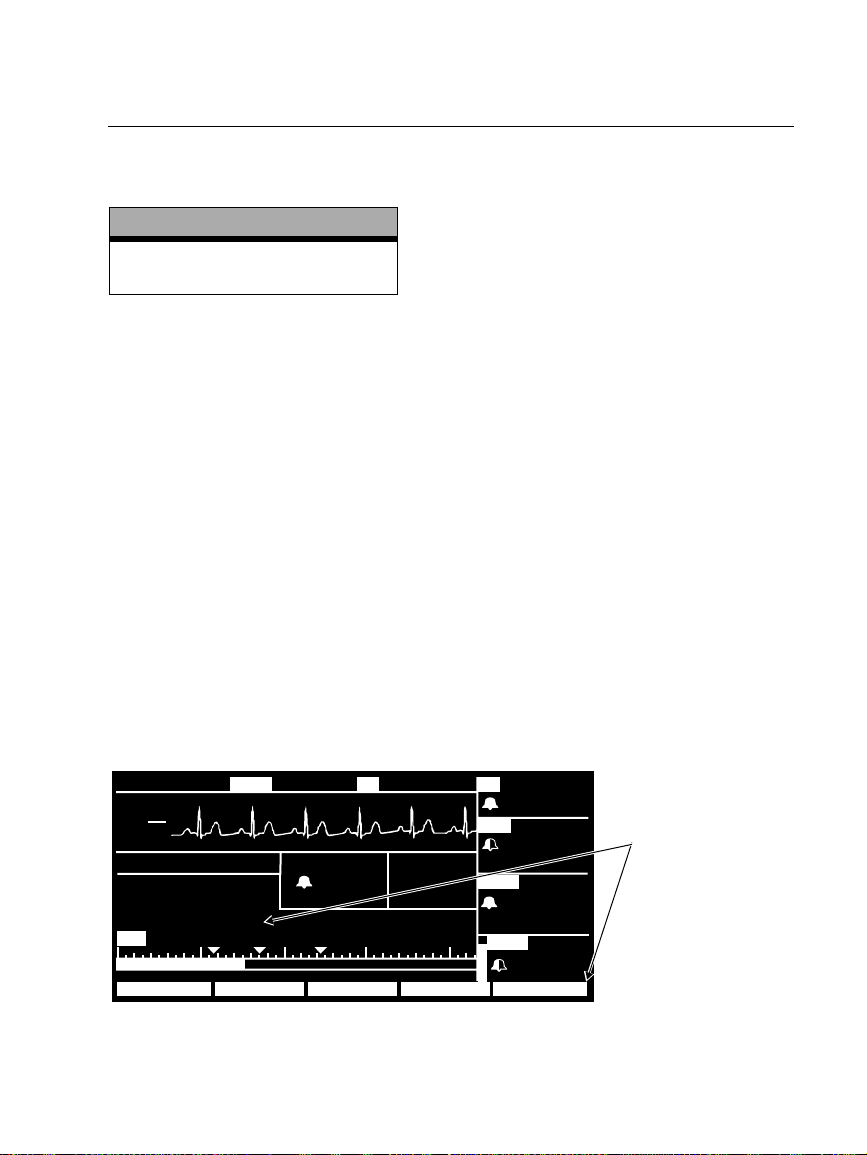
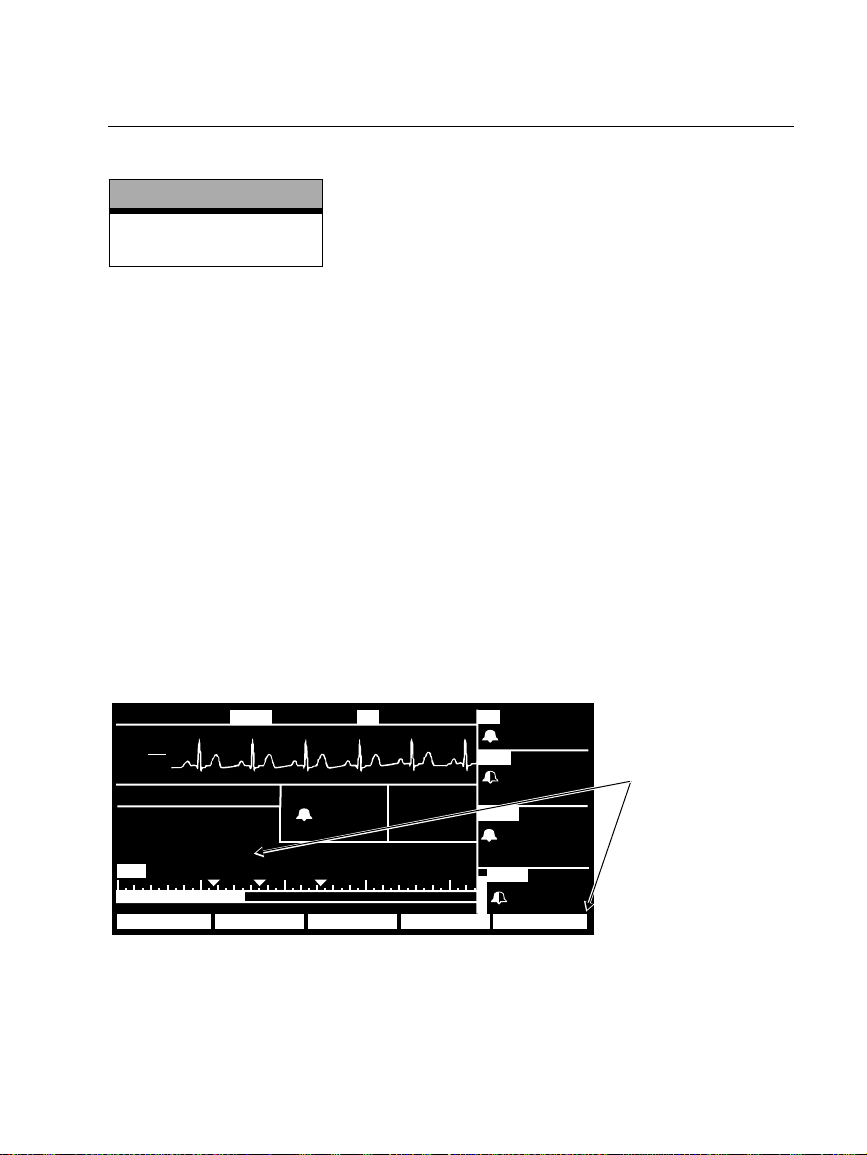
To enable the Smartcuf filter:
• Connect the ECG leads to the patient and perform ECG monitoring during NIBP.
• From the Main Menu, press
ON.
NIBP
to display the NIBP Menu and set Smartcuf to
18:46:00
III
mV
1
cm
MON
NIBP ADULT
MODE : TURBOCUF
TIME : 4:21
SMARTCUF : ON
85 50 100 150 200
S 122
18:45:28
1NIBP
mmH
85
102.3
g
122
58
°
F
HRT
80
ART
( 87)
NIBP
85
SpO2
109
72
122
58
Set SMARTCUF ON
99
STOP SMARTCUFINTERVAL TURBOCUFAUTO/MAN
Propaq Encore 2.0X-2.1X Reference Guide/Directions for Use 5
Update
Page 6
English (cont.)
M
(
D
P
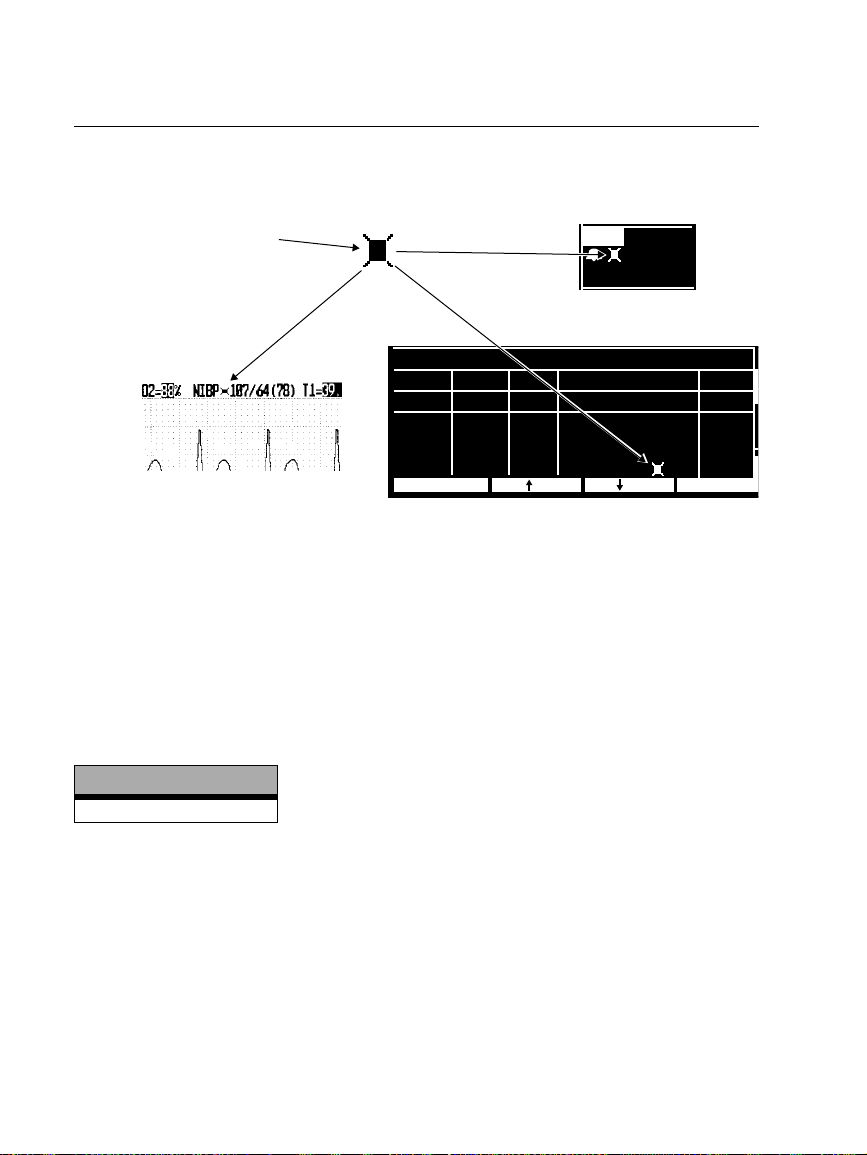
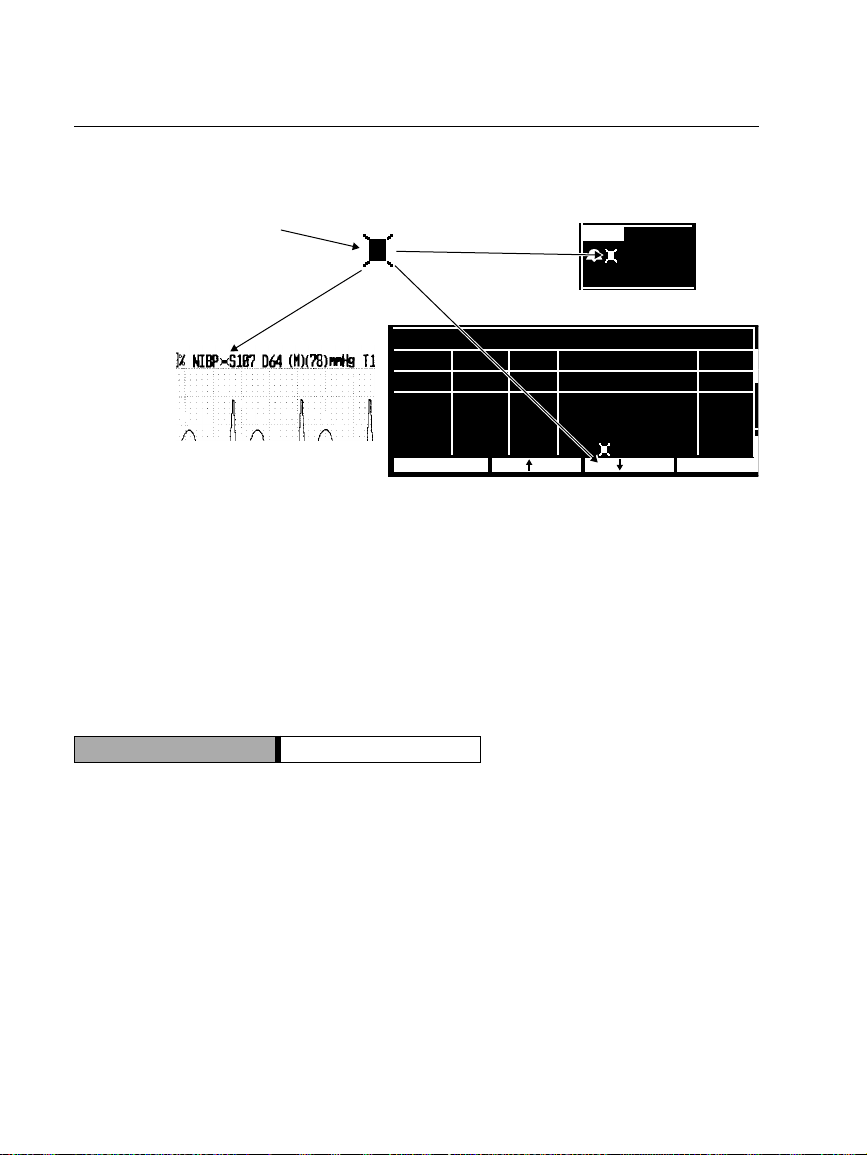
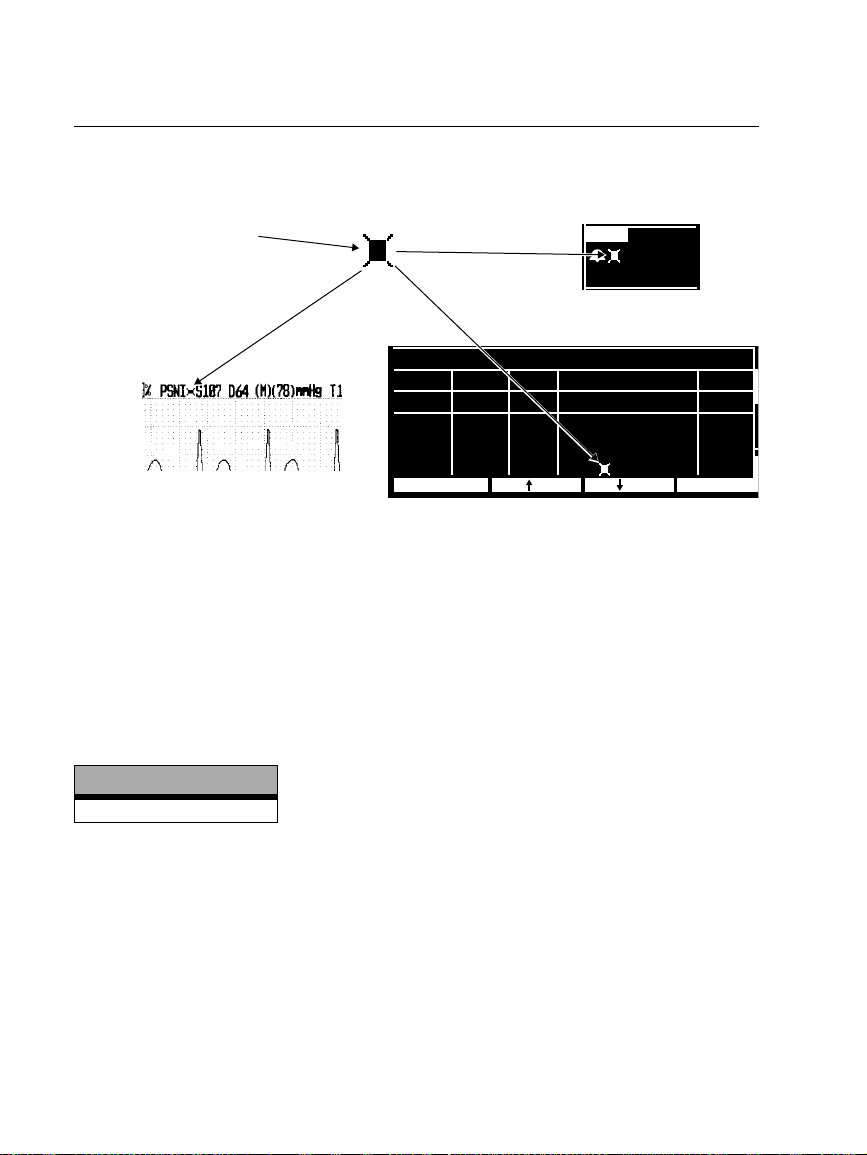
If artifact is so severe while Smartcuf is enabled that it affects the accuracy of an NIBP
measurement, that measurement is marked with a special symbol on the display and
on printouts
This symbol indicates the NIBP
reading was taken in the
presence of high artifact while
monitoring ECG with Smartcuf
enabled. Artifact can affect
accuracy.
mmHg
122
85
58
Numeric Display
NIBP TREND
Printout
TIME BRSYS/DIA-MEANHR/PR
10:01
9:46
9:31
9:20
PRINT NXT TRN
BPM
101
88
93
91
SpO2
% mmH
98
139/ 74 106
SRCH
142/ 83 110
OFF
145/ 87 112
100
126/ 85 91
Trend Display
g
Br/MHH:MM
11
10
5
11
There may be some situations where it is desirable to disable Smartcuf. This may
include situations with very extreme motion artifact, certain types of arrhythmias, or
other situations where it is not possible to obtain a good ECG signal. NIBP
measurements can still be performed when Smartcuf is disabled.
To disable Smartcuf, from the Main Menu press
NIBP
to display the NIBP Menu and
set Smartcuf to OFF.
NIBP Equipment Alert Message
Software Versions
2.1X
ARTIFACT PRESENT, MINIMIZE ARTIFACT (ERR# 15). The monitor has detected
too much artifact to allow accurate readings. Take steps to reduce artifact. Position the
patient’s limb away from the body so the applied cuff is not in contact with the
patient’s body or any other object such as a bed rail. If the Smartcuf motion artifact
filter is on, make sure that the ECG leads are properly connected to perform ECG
monitoring during NIBP. If the Smartcuf motion artifact filter is off, consider turning it
on (and connect ECG if not already connected).
6 Protocol Systems, Inc.
Page 7
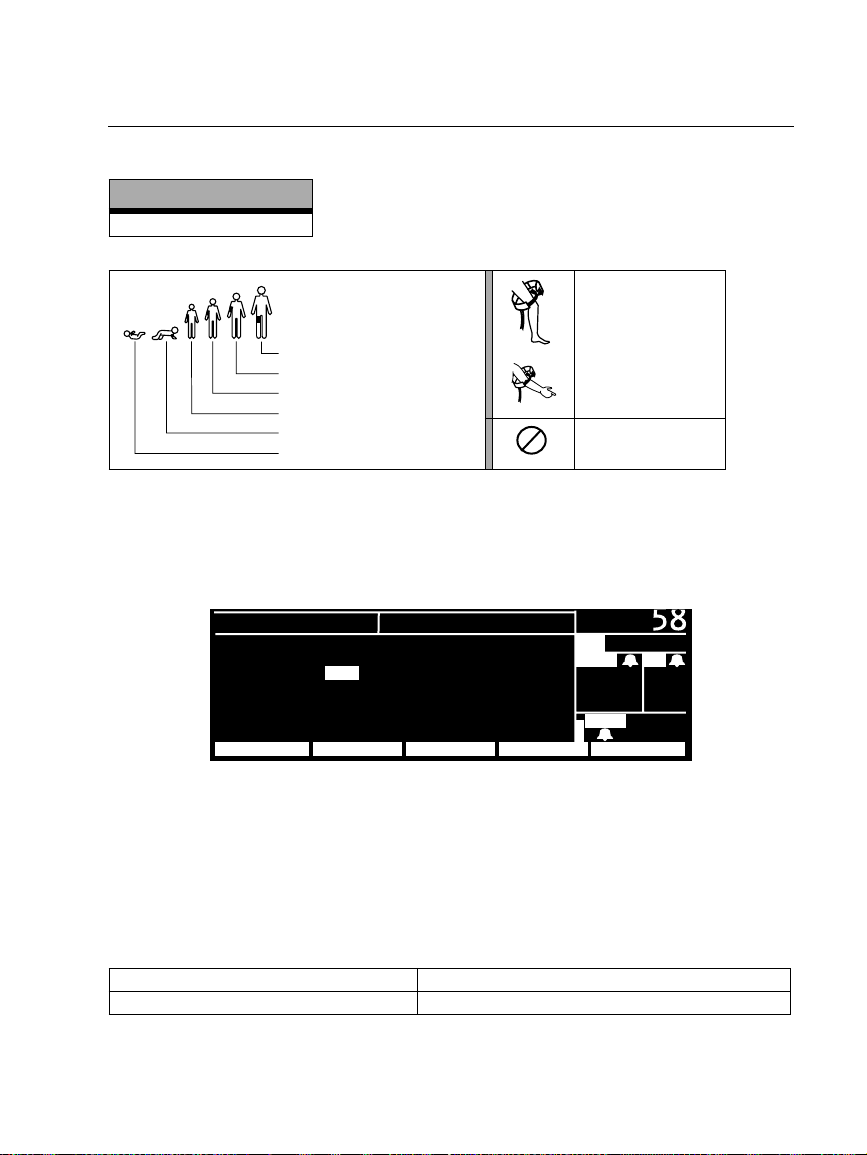
NIBP Cuff Symbols
Software Versions
2.0X-2.1X
English (cont.)
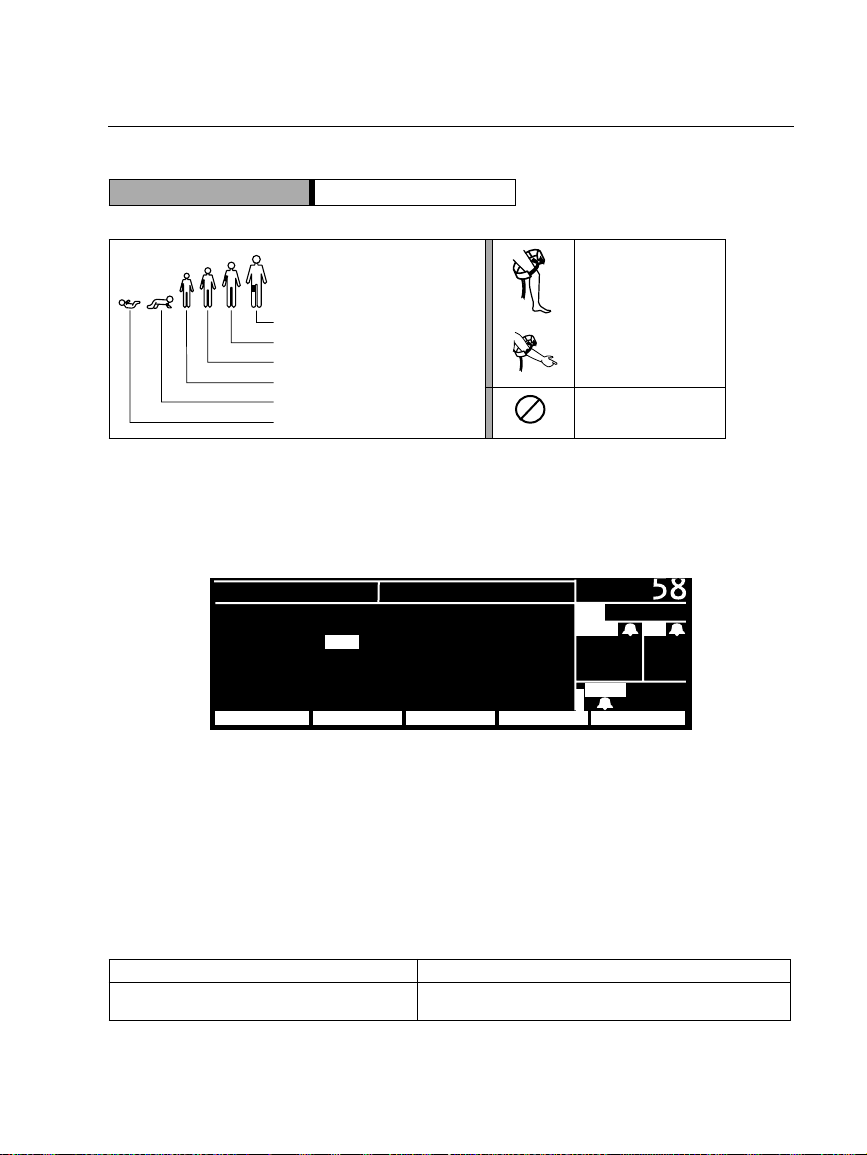
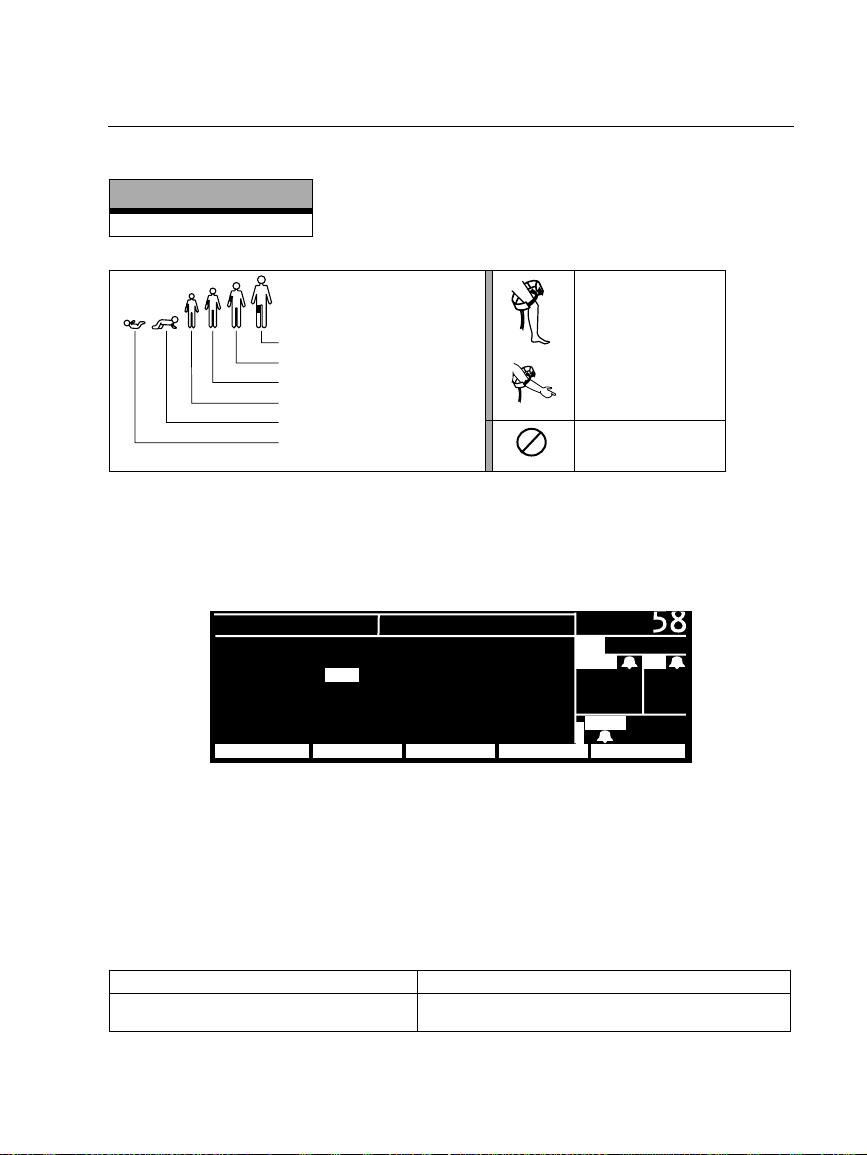
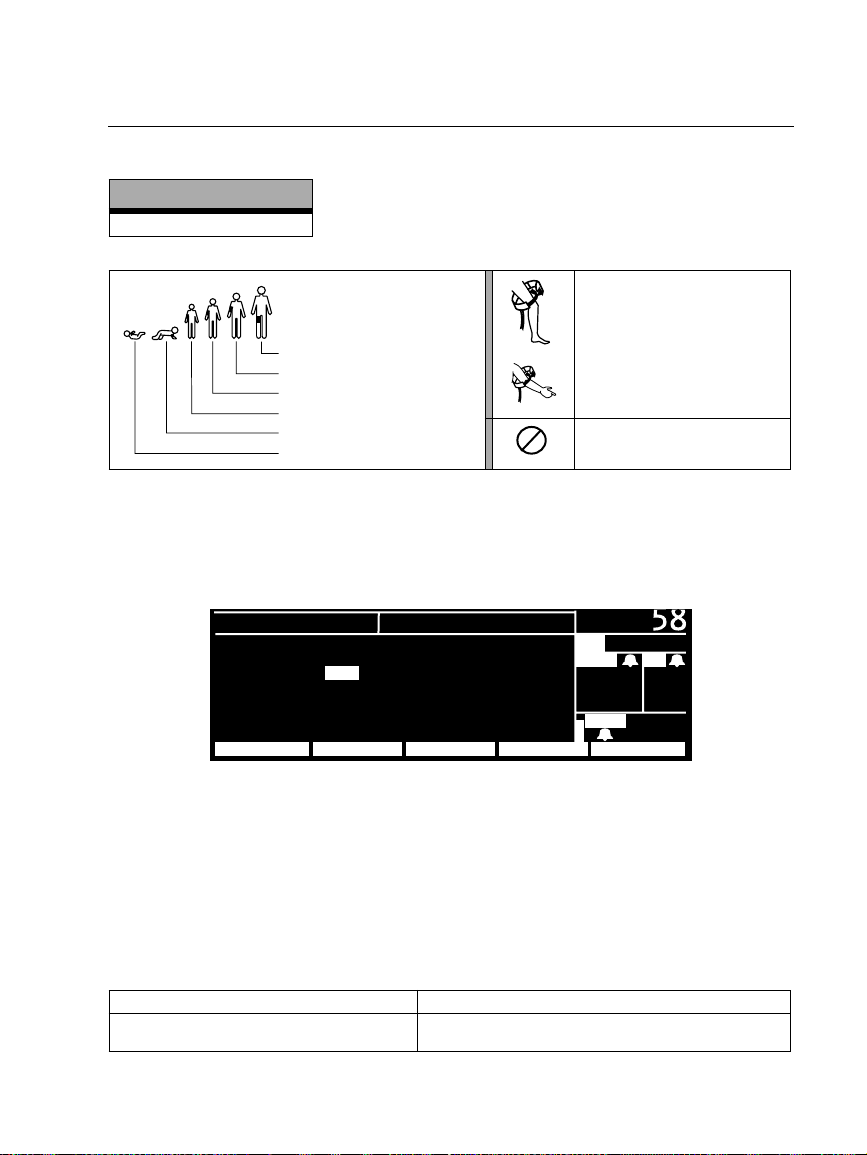
NIBP cuff sizes:
Thigh
Large adult
Adult
Small adult
Child
Infant
Apply the NIBP cuff
as shown.
Single-use only (not
2
reusable).
NIBP Display Default Settings
To select which vital sign waveforms are displayed, press
WAVE SEL
To enable the display of a waveform or large NIBP numerics, select ON (ECG cannot
be set to OFF). The monitor displays the first three active waveforms set to ON in the
order of priority listed in the Wave Select window. If NIBP is ON and only one or two
other waveforms are ON and active, the monitor displays large NIBP numerics in a
waveform window.
to display the Wave Select window.
SETUP
ECG : ON RESP : OFF
ART : ON SpO2 : ON
PA : OFF NIBP : ON
CO
2 : OFF
NEXT PREV MENUINSERVON/OFF
WAVE SELECT
MAIN MENU, SETUP,
( 85)
PA
35/ 18
MCO
2 BR
35
12
g
mmH
SpO
2
92
The factory default settings for waveform display are:
Software version 2.03.00-2.1X All waveforms and NIBP are ON.
Software version 2.00.00-2.02.00 All waveforms are ON. NIBP is OFF.
Propaq Encore 2.0X-2.1X Reference Guide/Directions for Use 7
Update
Page 8
English (cont.)
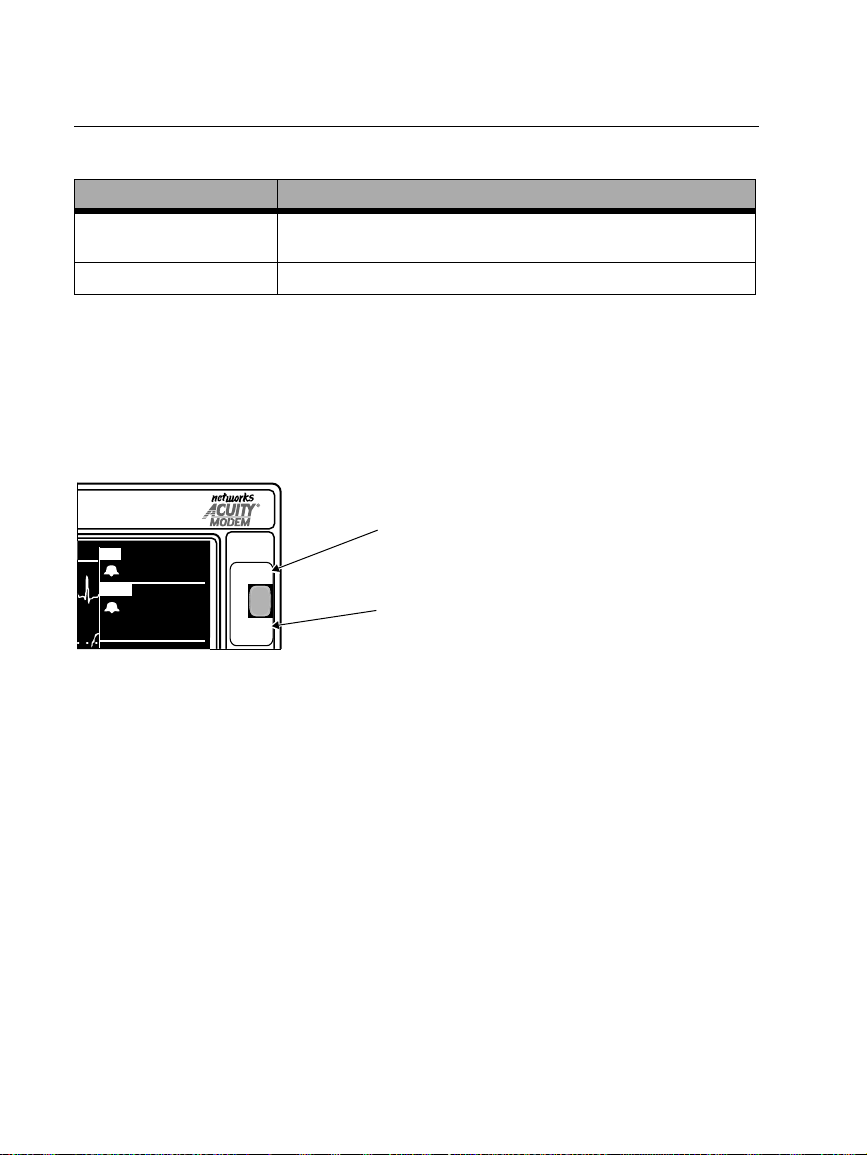
Press NET OFF to Disconnect from Acuity
Software Versions Access to NET OFF
2.03.00-2.1X
2.00.00-2.02.00
NET OFF
NET OFF
NET OFF
button on front panel
softkey (
softkey (
SETUP, ACUITY, NET OFF
SETUP, ACUITY, NET OFF
)
)
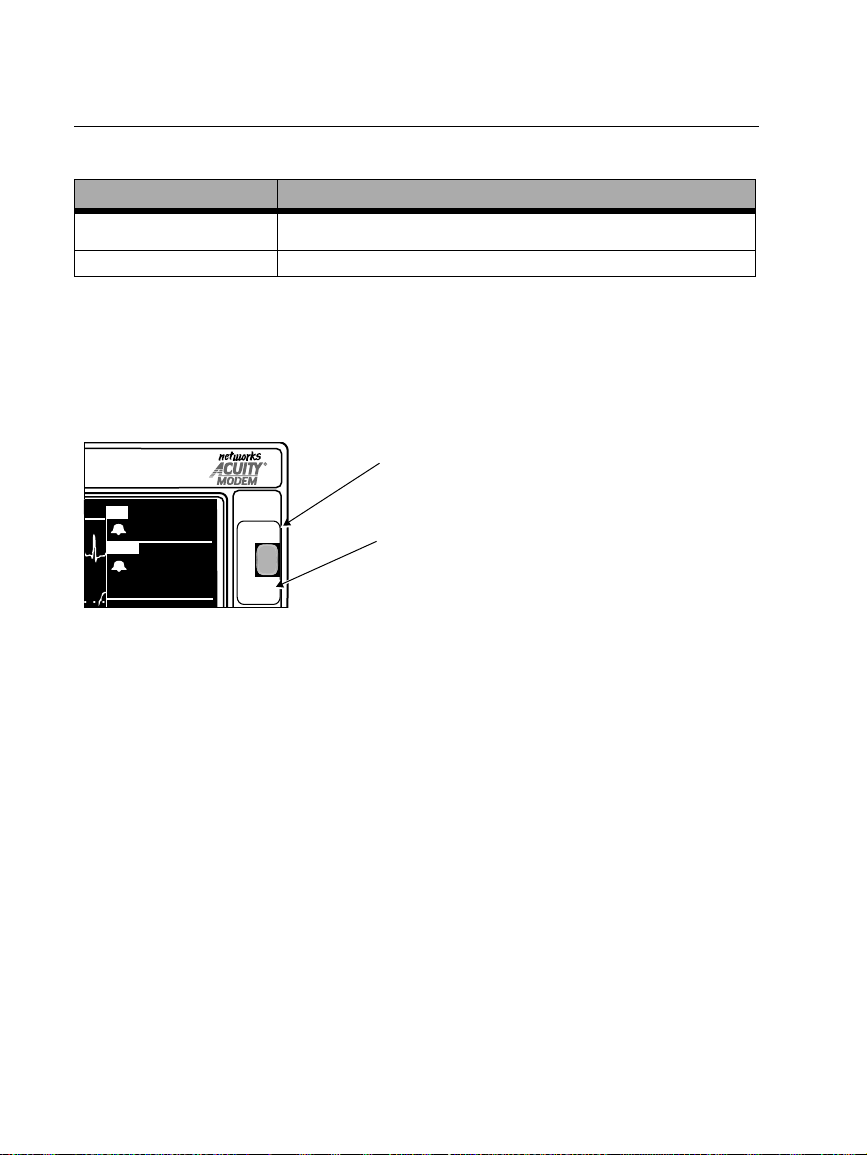
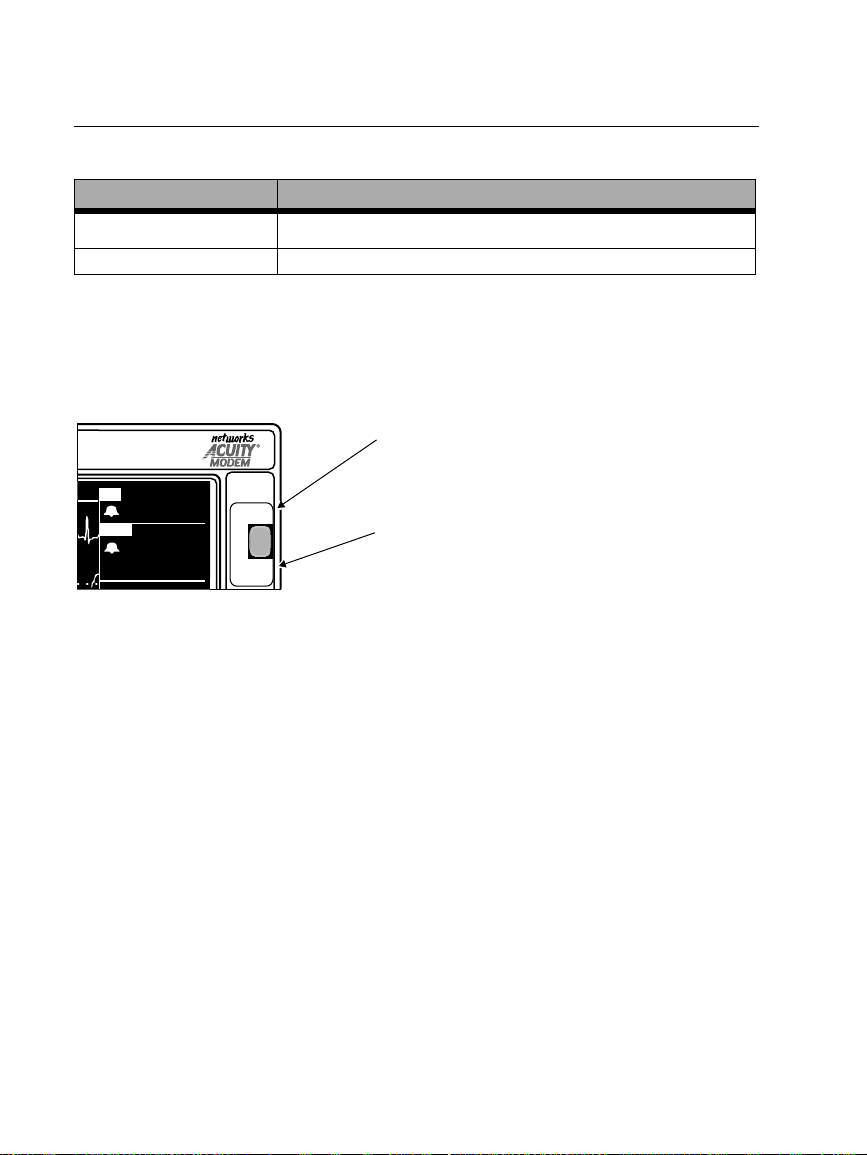
When you want to disconnect the monitor from Acuity, be sure to use the
button as described below. The
NET OFF
button is a safety feature to help make sure
NET OFF
the patient is not disconnected accidentally. If you simply disconnect the Acuity
network cable from the monitor without using the
NET OFF
button, the monitor and
Acuity both generate equipment alert messages that must be acknowledged by an
operator.
NET OFF
When the monitor is connected to Acuity,
HR
80
ART
122
58
( 85)
1.
To disconnect the Propaq Encore from the Acuity network, press the front
panel
2.
Within 15 seconds, disconnect the Acuity network cable fr om either the Pr opaq
NET OFF
FREEZE/
UNFREEZE
NET OFF
button.
pressing this button disconnects the monitor
from the Acuity network.
FREEZE/UNFREEZE
When the monitor is NOT connected to Acuity, pressing
this button freezes or unfreezes the displayed waveforms.
Encore side panel or the bedside jack. If the patient will no longer be monitored
with the Propaq Encore, turn off the monitor to erase trend information.
If you do not disconnect the Acuity network cable within about 30 seconds, the
monitor and Acuity attempt to reconnect and prompt you to confirm the
patient ID.
Whenever the monitor is connected to Acuity, the
FREEZE/UNFREEZE function for the
NET OFF
front panel button. Therefore, you
NET OFF
function overrides the
cannot freeze the displayed waveforms when the monitor is connected to Acuity. Also,
you cannot initiate a Freeze Print at Acuity when connected to Acuity. When the
monitor is not connected to Acuity, pressing the FREEZE/UNFREEZE button freezes
or unfreezes the displayed waveforms.
8 Protocol Systems, Inc.
Page 9
Capnography (CO2)
Software Versions
2.0X-2.1X
English (cont.)
General CO2 Specifications (Mainstream CO2
Characteristic Specification
CO
Display
2
Accuracy
Accuracy ±1 breaths/min or ±5%, whichever is greater
Specification Per ISO 9918:1993 (E) / EN 864:1996
1. Based on these airway conditions: sensor temperature = 42°C, airway adapter temperature = 33°C,
water vapor pressure = 38 mmHg; standard gas mixture = CO
barometric pressure = 760 mmHg and flow = 60 ml/min.
2. Based on the following additional airway conditions: Sample line = 7 ft, 0.055 in ID (2.13 m, 1.4 mm ID);
Sample flow rate = 175 ml/min; Protocol watertrap (new/unused); Respiratory rate
±
3 breaths/min; Inspired/Expired time ratio = 1:2; Barometric pressure = 760 mmHg.
3. For Sidestream CO2, this applies only for BR≤50.
Mainstream1:
Sidestream2:
Breath Rate Display
CO
0-30 mmHg, ±3 mmHg
31-99 mmHg, ±10% of value
0-30 mmHg, ±3 mmHg
31-99 mmHg, ±10% of value
Performance
2
and Sidestream CO2)
3
in balance air, fully hydrated at 33°C;
2
≤
50 bpm, stable to
Sidestream CO2 Monitoring
Warning
If the Sidestream CO2 option is connected to a ventilatory circuit, be sure to adjust
appropriate ventilator or anesthesia system settings to compensate for the
sampling flow volume (90 or 175 ml/min) that is aspirated from the ventilatory
circuit by the Sidestream CO
option.
2
INCO2 Numeric Display
The monitor only displays the numeric value for inspired CO2 (INCO2) if it is in alarm
or if it is greater than or equal to 7.5 mmHg (or ≥1 kPa or 1%). Refer to the CO2
specifications in the
Propaq Encore 2.0X-2.1X Reference Guide/Directions for Use 9
Update
Propaq Encore Reference Guide
for more information.
Page 10
English (cont.)
Time/Day Settings and Trends
Software Versions
2.0X-2.1X
Warning
Changing the hour/minute/second setting for the monitor in the Time/Day window
can cause the monitor to erase previously stored patient trend data.
When you change the hour/minute/second setting for the monitor in the Time/Day
window, the monitor deletes any patient trend data that is older than five hours for
non-NIBP trends or older than eight hours for NIBP trends according to the new clock
setting.
However, if the monitor has not yet stored the full capacity of trends and you change
the hour/minute/second setting to a time that is within the stored trend period,
previously stored trends are not erased.
Changing the day, month, or year setting does not affect the stored patient trends.
10 Protocol Systems, Inc.
Page 11
Deutsch
Mit Smartcuf™ erhöhen Sie die Genauigkeit nicht-invasiver Blutdruckmessungen
Software-Versionen
HINWEIS: Die Taste SMARTCUF steht
nur bei Version 2.1X zur Verfügung.
Die Meßgenauigkeit bei nicht-invasiver Blutdruckmessung kann durch zahlreiche
Faktoren wie Herzrhythmusstörungen, plötzliche Veränderungen des Blutdrucks,
Konvulsionen, Zittern oder andere Körperbewegungen, Anstoßen der Manschette,
Vibrationen, Bewegung eines Fahrzeugs oder durch einen schwachen Puls
beeinträchtigt werden.
Dank der patentierten Filtermethode der Smartcuf-Software wird die
Blutdruckmeßgenauigkeit bei vorhandenen Bewegungsartefakten oder vermindertem
Puls deutlich erhöht. Smartcuf synchronisiert die NIBP-Messung mit der R-Zacke des
Patienten-EKG und beseitigt dadurch Störungen, die durch äußere Einwirkungen wie
Patientenbewegungen und Vibrationen verursacht werden. Der Monitor muß die
EKG-Überwachung durchführen, während Smartcuf verwendet wird.
So schalten Sie die Smartcuf-Filterfunktion ein:
• Schließen Sie die EKG-Ableitungen an den Patienten an, und führen Sie die EKGÜberwachung während der nicht-invasiven Blutdruckmessung durch.
• Im Hauptmenü drücken Sie auf
Smartcuf EIN.
2.0X-2.1X
NIBP, um das NIBP-Menü aufzurufen und schalten
18:46:00
III
mV
1
cm
MON
NIBP S D (M)
MODUS : KONT
ZEIT : 4:21
SMARTCUF : EIN
85 50 100 150 200
S 122
g
mmH
( 85)
1NIBP
122
58
°C
37,0
18:45:28
HFT
ART
( 87)
NIBP
mmH
S 122
D 58
(M)( 85)
SpO2
80
109
72
Schalten Sie
SMARTCUF EIN.
g
99
STOP SMARTCUFINTERVAL KONTAUTO/MAN
Propaq Encore 2.0X-2.1X Reference Guide/Directions for Use 11
Update
Page 12
Deutsch (verv.)
H
(
P
Sind die Artefakte bei eingeschaltetem Smartcuf so stark, daß die NIBPMeßgenauigkeit darunter leidet, wird diese Messung sowohl auf der Anzeige als auch
auf dem Ausdruck mit einem Sondersymbol gekennzeichnet.
Dieses Symbol zeigt an, daß die
NIBP-Messung beim
Vorhandensein starker Artefakte
unter EKG-Überwachung mit
aktiviertem Smartcuf
durchgeführt wurde. Die
Artefakte können die
Meßgenauigkeit beeinflussen.
Ausdruck
NIBP TREND
ZEIT AFS D (M)HF/PF
10:01
9:46
9:31
9:20
DRUCKEN NÄ TRND
1/min 1/minh:min
101
88
93
91
SpO2
% mmH
98
SUCH
AUS
100
NIBP
mmH
S 122
D 58
(M)( 85)
Numerische Anzeige
139 74 (106)
142 83 (110)
145 87 (112)
126 85 ( 91)
Trendanzeige
In manchen Situationen erscheint es sinnvoll, Smartcuf zu deaktivieren. Dazu gehören
Situationen mit extrem starken Bewegungsartefakten, bestimmte Arrhythmiearten
oder andere Umstände, unter denen kein ausreichendes EKG-Signal empfangen wird.
Auch bei deaktiviertem Smartcuf kann der Blutdruck weiterhin nicht-invasiv
gemessen werden.
g
g
11
10
5
11
Um Smartcuf zu deaktivieren, drücken Sie im Hauptmenü auf
NIBP, um das NIBP-
Menü anzuzeigen, und stellen Smartcuf dann auf AUS.
NIBP-Gerätealarmmeldungen
Software-Versionen 2.1X
ARTEFAKTE, ARTEFAKTE MINIMIEREN (ERR# 15). Der Monitor hat eine zu
große Menge Artefakte festgestellt, um eine Ermittlung aussagekräftiger
Werte zu ermöglichen. Unternehmen Sie geeignete Schritte zur
Artefaktverminderung. Positionieren Sie die betroffene Extremität des
Patienten weg vom Körper , so daß die angelegte Manschette keine Berührung
mit dem Körper des Patienten oder irgendeinem anderen Objekt wie dem
Bettgeländer hat. Stellen Sie bei aktiviertem Smartcuf-BewegungsArtefaktfilter sicher, daß die EKG-Ableitungen ordnungsgemäß
angeschlossen sind, damit die EKG-Überwachung während der nichtinvasiven Blutdruckmessung durchgeführt werden kann. Bei inaktiviertem
Smartcuf-Bewegungs-Artefaktfilter diesen ggf. einschalten und die EKGAbleitungen entsprechend anschließen.
12 Protocol Systems, Inc.
Page 13
NIBP-Manschettensymbole
Software-Versionen 2.0X-2.1X
Deutsch (verv.)
NIBP-Manschettengrößen:
Oberschenkel
Große Erwachsene
Erwachsene
Kleinkinder
Kinder
Säuglinge
Legen Sie die
Manschette wie
abgebildet an.
Einwegartikel (nicht
2
wiederverwenden).
NIBP-Standardeinstellungen der Anzeige
Um Auszuwählen, welche V italfunktionskurven angezeigt werden sollen, drücken Sie
HAUPTMENÜ, SETUP, KURVEN, um das Kurvenauswahlfenster aufzurufen.
SETUP
EKG : EIN RESP : AUS
ART : EIN SpO2 : EIN
PA : AUS NIBP : EIN
CO
2 : AUS
WAHL VOR. MENÜSIMULATEIN/AUS
Um die Anzeige von Kurven oder hohen Blutdruckwerten zu aktivieren, wählen Sie
EIN (das EKG kann nicht auf AUS geschaltet werden). Der Monitor zeigt die ersten
drei aktiven Kurven, die EINgeschaltet wurden, nach der im Kurvenauswahlfenster
aufgelisteten Priorität an. Wenn NIBP auf EIN geschaltet wurde und nur eine oder
zwei andere Kurven auf EIN gestellt und aktiv sind, werden hohe Blutdruckwerte in
einem Kurvenfenster des Monitors angezeigt.
KURVENWAHL
( 85)
PA
HCO
2 AF
35
mmH
SpO
35/ 18
g
2
12
92
Es gibt folgende werksseitige Standardeinstellungen für die Kurvenanzeige:
Software-versionen 2.03.00-2.1X Alle Kurven und NIBP sind EIN (geschaltet).
Software-versionen 2.00.00-2.02.00 Alle Kurven sind EIN (geschaltet).
Propaq Encore 2.0X-2.1X Reference Guide/Directions for Use 13
Update
NIBP ist AUS.
Page 14
Deutsch (verv.)
Betätigen Sie NETZ AUS, um die Verbindung zu Acuity zu trennen
Software-Versionen
2.03.00-2.1X
2.00.00-2.02.00
Der Schalter NETZ AUS
Der Softkey NETZ AUS (SETUP, ACUITY, NETZ AUS)
Der Softkey NETZ AUS (SETUP, ACUITY, NETZ AUS)
NETZ AUS
Verwenden Sie, wie im folgenden beschrieben, den Schalter NETZ AUS, um die
Verbindung des Monitors von Acuity zu trennen. Der Schalter
NETZ AUS stellt eine
Sicherheitsvorkehrung dar, mit deren Hilfe ein unbeabsichtigtes Trennen der
Verbindung zwischen Patient und dem Acuity-Netz vermieden werden soll. Wird das
Acuity-Netzwerkkabel ohne Betätigung des Schalters
NETZ AUS vom Monitor
getrennt, so geben sowohl der Monitor als auch Acuity eine Alarmmeldung aus, die
vom Bediener bestätigt werden muß:
NETZ AUS
Ist der Monitor an Acuity angeschlossen,
trennt dieser Schalter die Verbindung
HF
ART
( 85)
80
122
58
NETZ AUS
STOP/
AKTIV
zwischen Monitor und dem Acuity-Netzwerk.
STOP/AKTIV
Ist der Monitor NICHT an Acuity angeschlossen,
fixiert dieser Schalter die angezeigten Kurven
bzw. setzt diese wieder in Fluß.
1. Soll der Propaq Encore vom Acuity-Netzwerk getrennt werden, betätigen Sie
zunächst den Schalter
NETZ AUS auf der Monitor- Vorderseite.
2. Entfernen Sie den Anschluß des Acuity-Netzwerkkabels innerhalb von 15
Sekunden entweder an der rechten Seitenplatte des Propaq Encore oder an der
bettseitigen Netzwerkbuchse. Wenn der Patient nicht länger mit dem Propaq
Encore überwacht werden soll, schalten Sie den Monitor aus, um die
Trendinformationen zu löschen.
Wenn Sie das Acuity-Netzwerkkabel nicht innerhalb von 30 Sekunden
herausziehen, werden der Monitor und Acuity versuchen, die Verbindung
wieder herzustellen, und Sie zur Bestätigung der Patienten-ID auffordern.
Sobald der Monitor an Acuity angeschlossen wird, ist die Funktion
Schalter
NETZ AUS auf der vorderen Konsolenseite aktiviert und gleichzeitig die
NETZ AUS bzw . der
Funktion STOP/AKTIV desaktiviert. Die angezeigten Kurven können daher nicht
arretiert werden, wenn der Monitor an Acuity angeschlossen ist. Ebenso können keine
arretierten Kurven ausgedruckt werden, solange eine Verbindung zu Acuity besteht.
Ist der Monitor nicht an Acuity angeschlossen, fixiert der Schalter STOP/AKTIV die
angezeigten Kurven bzw. setzt diese wieder in Fluß.
14 Protocol Systems, Inc.
Page 15
Deutsch (verv.)
Kapnographie (CO
Software-Versionen 2.0X-2.1X
)
2
Allgemeine CO2-Spezifikationen (Hauptstrom- und Nebenstrom-CO2)
Merkmal Technische Daten
CO2-Anzeige
Genauigkeit
Genauigkeit ±1 APM oder ± 5%, je nachdem, welcher Wert größer ist
Technische Daten nach der ISO 9918:1993 (E) / EN 864:1996
1. Basierend auf folgenden Atemwegsbedingungen: Temperatur des Sensor = 42°C, Temperatur des
Atemwegsadapters = 33°C, Wasserdampfdruck = 38 mmHg; Standard-Gasmischung = CO2 in
Gleichgewicht mit Luft, vollständig hydriert bei 33°C; Luftdruck = 760 mmHg und Fluß = 60 ml/min.
2. Basierend auf folgenden zusätzlichen Atemwegsbedingungen: Entnahmeleitung = 2,13 m,
Innendurchmesser 1,4 mm); Durchflußrate bei der Probenentnahme = 175 ml/min; ProtocolWasserfalle (neu/ungebraucht); Respirationsfrequenz
Zeitliches Verhältnis Einatmung/Ausatmung = 1:2;
3. Bei Nebenstrom-CO2 gilt dies nur für AF≤50.
Überwachung des Nebenstrom-CO
Hauptstrom1: 0-30 mmHg, ±3 mmHg
Nebenstrom2: 0-30 mmHg, ±3 mmHg
Anzeige Atemfrequenz
31-99 mmHg, ±10% des Werts
31-99 mmHg, ±10% des Werts
CO2-Leistung
≤50 bpm, stabil bis zu ±3 Atemzüge/Minute;
Luftdruck = 760 mmHg.
2
3
Warnung
Falls die Nebenstrom-CO2-Option an ein Beatmungssystem angeschlossen ist,
stellen Sie sicher, da
ß die geeigneten Einstellungen des Beatmungs.- oder
Anästhesiesystems zur Kompensation des Volumens der Gasprobenentnahme
(90 oder 175 ml/min), das aus dem Beatmungssystem durch die Nebenstrom-
-Option abgesaugt wird, vorgenommen werden.
CO
2
Meldungen für die Option Nebenstrom-CO
2
Gerätemeldungen für die Option Nebenstrom-CO2 erscheinen entwerder in der
Anzeige in einem entsprechenden Alarmfenster.
FLACHE KURVE-WARTUNG ERFORDERLICH. Lassen Sie den Propaq durch
einen Biomedizintechniker warten.
Propaq Encore 2.0X-2.1X Reference Guide/Directions for Use 15
Update
Page 16
Deutsch (verv.)
Anzeige der INCO2-Werte
Der Monitor zeigt die numerischen W erte für eingeatmetes CO2 (INCO2) nur dann an,
wenn die Alarmgrenze überschritten wurde oder wenn der Wert größer oder gleich
7,5 mmHg (bzw. = 1 kPa oder 1%) beträgt. Weitere Informationen können den CO
Angaben in der Betriebsanleitung des Propaq Encore entnommen werden.
-
2
Zeit/Tag-Einstellungen und Trends)
Software-Versionen 2.0X-2.1X
Warnung
Das Ändern der Einstellung für Stunde/Minute/Sekunde im Zeit/Tag-Fenster des
Propaq CS-Monitors kann dazu führen, daß die zuvor gespeicherten Trenddaten
eines Patienten gelöscht werden.
Wenn Sie die Einstellung für Stunde/Minute/Sekunde im Zeit/Tag-Fenster des
Propaq ändern, werden alle Trenddaten eines Patienten gelöscht, die laut der
neueingestellten Uhrzeit älter als fünf Stunden (bei Nicht-NIBP-Trends) bzw. 8
Stunden (bei NIBP-Trends) sind.
Falls der Propaq die vollständigen Trenddaten noch nicht gespeichert hat und Sie die
Stunde/Minute/Sekunde-Einstellung auf eine Uhrzeit stellen, die innerhalb des
gespeicherten Trend-Zeitraums liegt, werden die zuvor gespeicherten Trends jedoch
nicht gelöscht.
Das Ändern der Einstellung für Tag, Monat oder Jahr hat keinerlei Einfluß auf
gespeicherte Patiententrends.
16 Protocol Systems, Inc.
Page 17
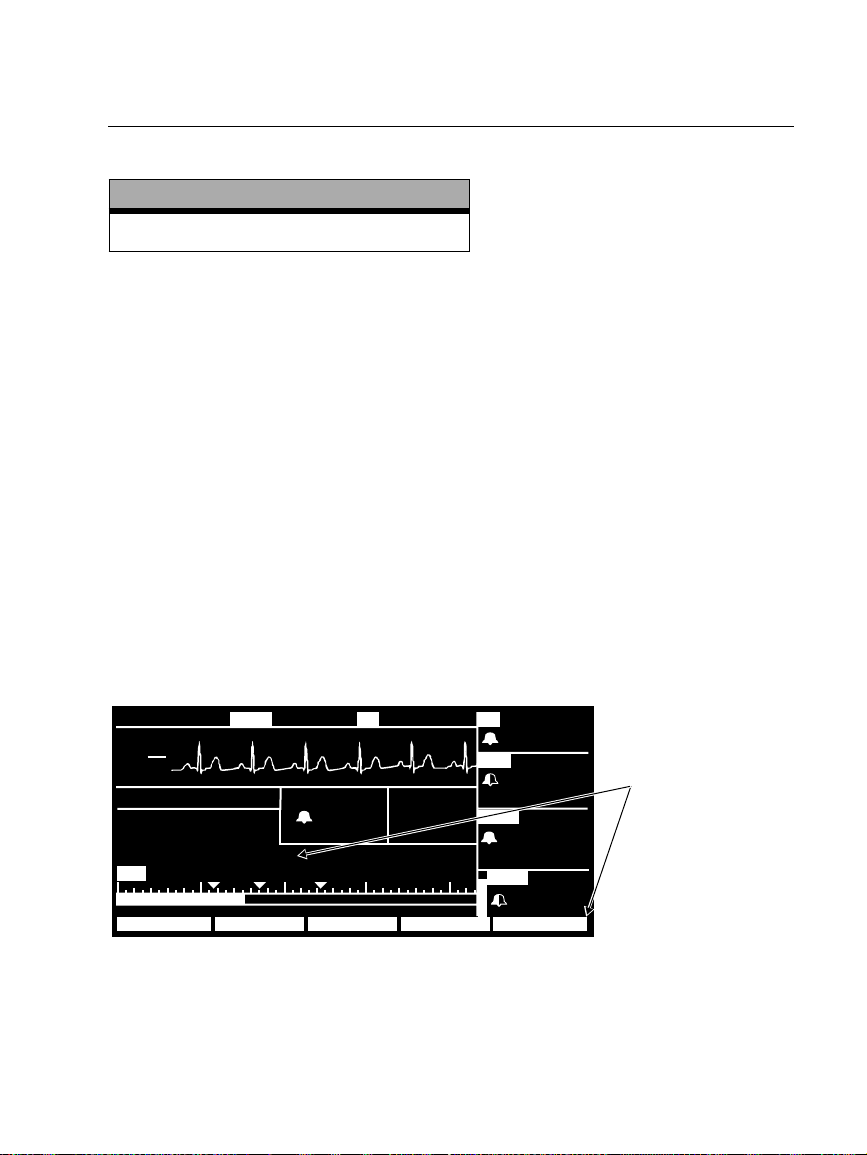
Français
Améliorez la précision de la PSNI grâce à Smartcuf™
Versions logicielles
2.0X-2.1X (REMARQUE : Le bouton SMARTCUF
n’est disponible que dans la version 2.1.X.)
Les mesures de la PSNI peuvent être faussées par de nombreux facteurs tels que des
troubles du rythme cardiaque, des changements brusques de pression sanguine, des
mouvements corporels tels que des convulsions ou des frissons, le fait de taper le
brassard, des vibrations, les mouvements d’un véhicule ou des pulsations diminuées.
La technologie brevetée de filtrage du logiciel Smartcuf augmente significativement la
précision des mesures de la PSNI en présence d’un artéfact de mouvement ou en cas
de pulsations diminuées. Smartcuf synchronise la lecture de la PSNI par rapport à
l’onde R de l’ECG du patient pour éliminer les bruits causés par des stimuli extérieurs
tels qu’un mouvement du patient ou une vibration. Le moniteur doit également
procéder à une surveillance de l’ECG durant l’utilisation de Smartcuf.
Pour activer le filtre Smartcuf :
• Reliez les dérivations ECG au patient et effectuez une surveillance de l’ECG
pendant la PSNI.
• A partir du Menu principal, appuyez sur
Smartcuf sur MARCHE.
PSNI pour afficher le Menu PSNI et réglez
18:46:00
III
mV
1
cm
MON
PSNI S D (M)
MODE : TURBO
HEURE : 4:21
SMARTCUF : MARCHE
85 50 100 150 200
S 122
g
mmH
( 85)
122
58
39,1
1PSNI
°
C
18:45:28
FCT
ART
( 87)
PSNI
mmH
S 122
D 58
(M)( 85)
SpO2
80
109
72
Réglez SMARTCUF sur
MARCHE.
g
99
ANNULER SMARTCUFINTERVAL TURBOAUTO/MAN
Propaq Encore 2.0X-2.1X Reference Guide/Directions for Use 17
Update
Page 18
Français (suite)
C
(
V
A
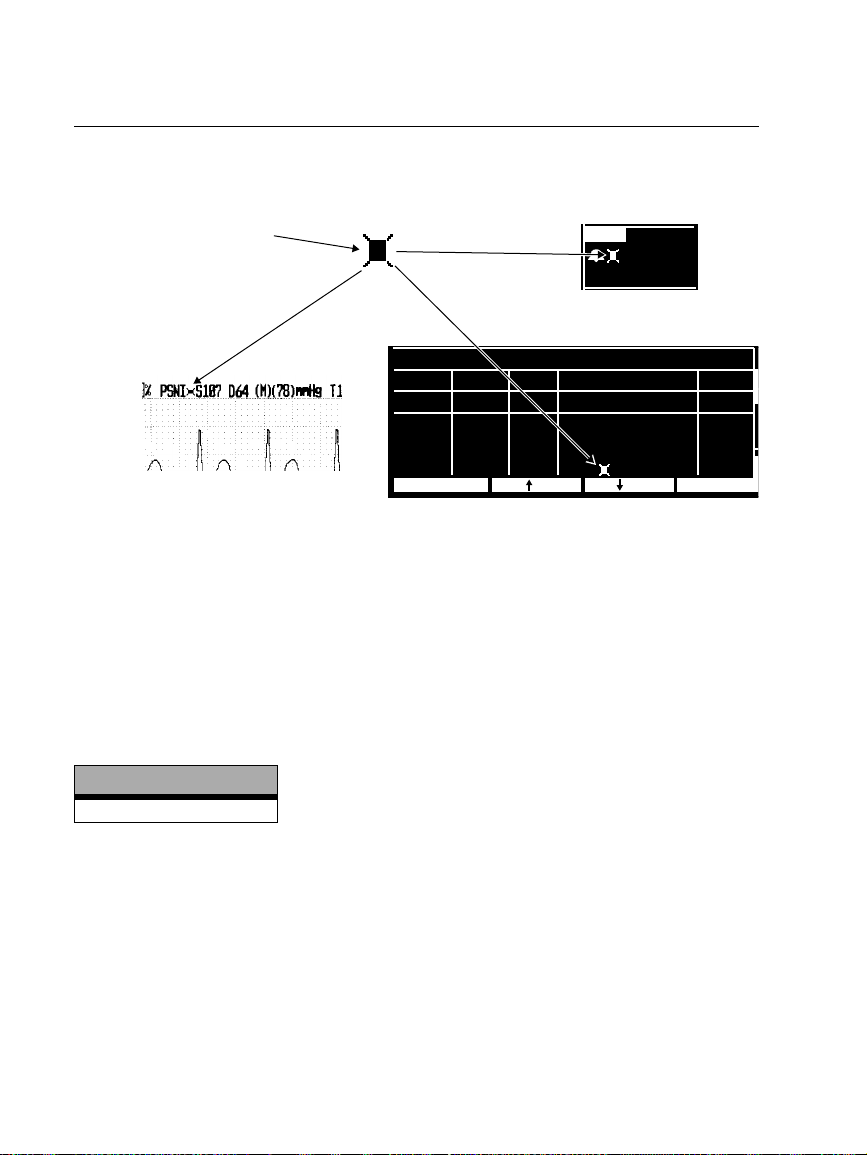
Si l’artéfact est si élevé pendant que le Smartcuf est activé que cela affecte la précision
de la mesure de la PSNI, cette mesure sera accompagnée d’un symbole spécial qui sera
affiché sur l’écran et sur les impressions.
Ce symbole indique que la
lecture de la PSNI a été
réalisée en présence
d’artéfact élevé lors de la
surveillance de l’ECG
pendant que le Smartcuf est
activé. L’artéfact peut affecter
la précision.
PSNI
mmH
S 122
D 58
(M)( 85)
Affichage numérique
g
TENDANCE PSNI
Impression
HEURE FRS D (M)FC/FP
10:01
9:46
9:31
9:20
IMPRIMER TND SUI
SpO2
1/min 1/minh:min
% mmH
98
101
RECH
88
AR
93
100
91
Affichage des tendances
g
139 74 (106)
142 83 (110)
145 87 (112)
126 85 ( 91)
11
10
5
11
Dans certains cas, il peut s’avérer préférable de désactiver Smartcuf. Il s’agit de
situations d'artéfact de mouvement extrême, de certains types de troubles du rythme
ou d’autres situations dans lesquelles il est impossible d’obtenir un bon signal d’ECG.
Les mesures de la PSNI peuvent être réalisées même si Smartcuf est désactivé.
Pour désactiver Smartcuf, appuyez sur
PSNI dans le Menu principal pour afficher le
Menu PSNI et réglez Smartcuf sur ARRET.
PSNI messages d'alerte matériel
Versions logicielles
2.1X
ARTEFACTS PRESENTS. LES REDUIRE (ERR# 15). Le moniteur a détecté des
artéfacts trop importants pour obtenir des résultats précis. Faites le nécessaire
pour les réduire. Installez le patient de telle sorte que le membre qui porte le
brassard ne touche rien, ni le corps du patient ni le rail du lit. Si le filtre
d’artéfact du Smartcuf est activé, assurez-vous que les dérivations ECG sont
correctement branchées pour surveiller l’ECG pendant la PSNI. S’il est
désactivé, mettez-le en marche (et connectez les dérivations ECG le cas
échéant).
18 Protocol Systems, Inc.
Page 19
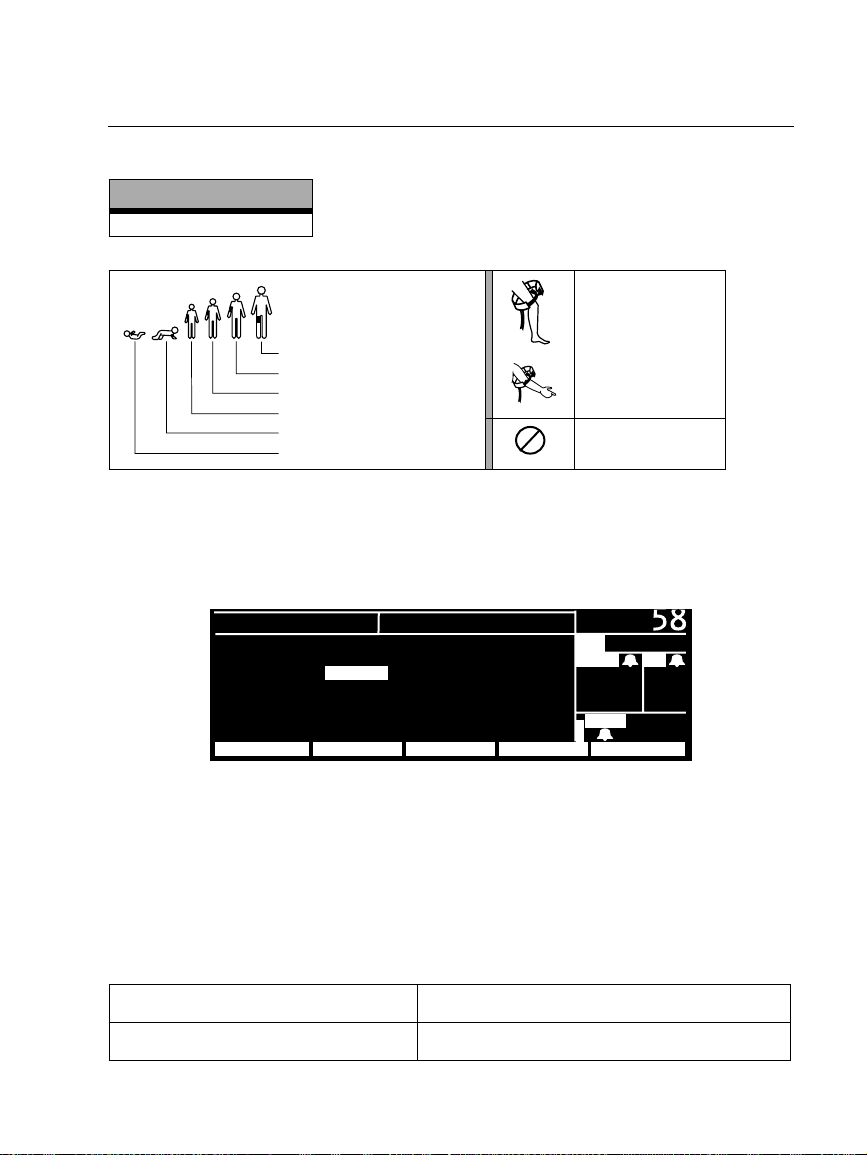
Symboles de brassard PSNI
Versions logicielles
2.0X-2.1X
Français (suite)
Tailles du brassard PSNI :
Cuisse
Grand adulte
Adulte
Petit enfant
Enfant
Nouveau-né
Poser le brassard
PSNI comme
indiqué.
A usage unique
2
(non réutilisable).
Réglages par défaut de l’affichage de la PSNI
Pour sélectionner les types de courbes de signes vitaux à afficher, appuyez sur MENU
PRIN, CONFIG, ONDES pour afficher la fenêtre Sélectionner ondes.
CONFIGURATION
ECG : MARCHE RESP : ARRET
ART : MARCHE SpO2 : MARCHE
AP : ARRET PSNI : MARCHE
CO
2 : ARRET
SUIVANT MENU PRECDEMONSTRMA/AR
Pour activer l’affichage d’un type d’ondes ou de grandes données numériques de
PSNI, sélectionnez MARCHE (l’ECG ne peut pas être réglé sur ARRET). Le moniteur
affiche les trois premiers types d’ondes activés dans l’ordre de priorité inscrit dans la
fenêtre Sélectionner Ondes. Si la PSNI est réglée sur MARCHE et que seuls un ou deux
autres types d’ondes sont réglés sur MARCHE et activés, le moniteur affichera les
grandes données numériques de PSNI dans la fenêtre de types d’ondes.
CHOIX COURBES
( 85)
AP
M
CO
2 FR
35
mmH
SpO
35/ 18
g
2
12
92
Les réglages par défaut du fabricant pour l’affichage des types d’ondes sont les
suivants :
Versions logicielles 2.03.00-2.1X Tous les types d’ondes et la PSNI sont réglés sur
Versions logicielles 2.00.00-2.02.00 Tous les types d’ondes sont réglés sur MARCHE.
Propaq Encore 2.0X-2.1X Reference Guide/Directions for Use 19
Update
MARCHE.
La PSNI est réglée sur ARRET.
Page 20
Français (suite)
Appuyez sur RES INAC pour vous déconnecter d’Acuity
Versions logicielles RES INAC
2.03.00-2.1X
2.00.00-2.02.00
Le bouton
La touche de fonction
La touche de fonction
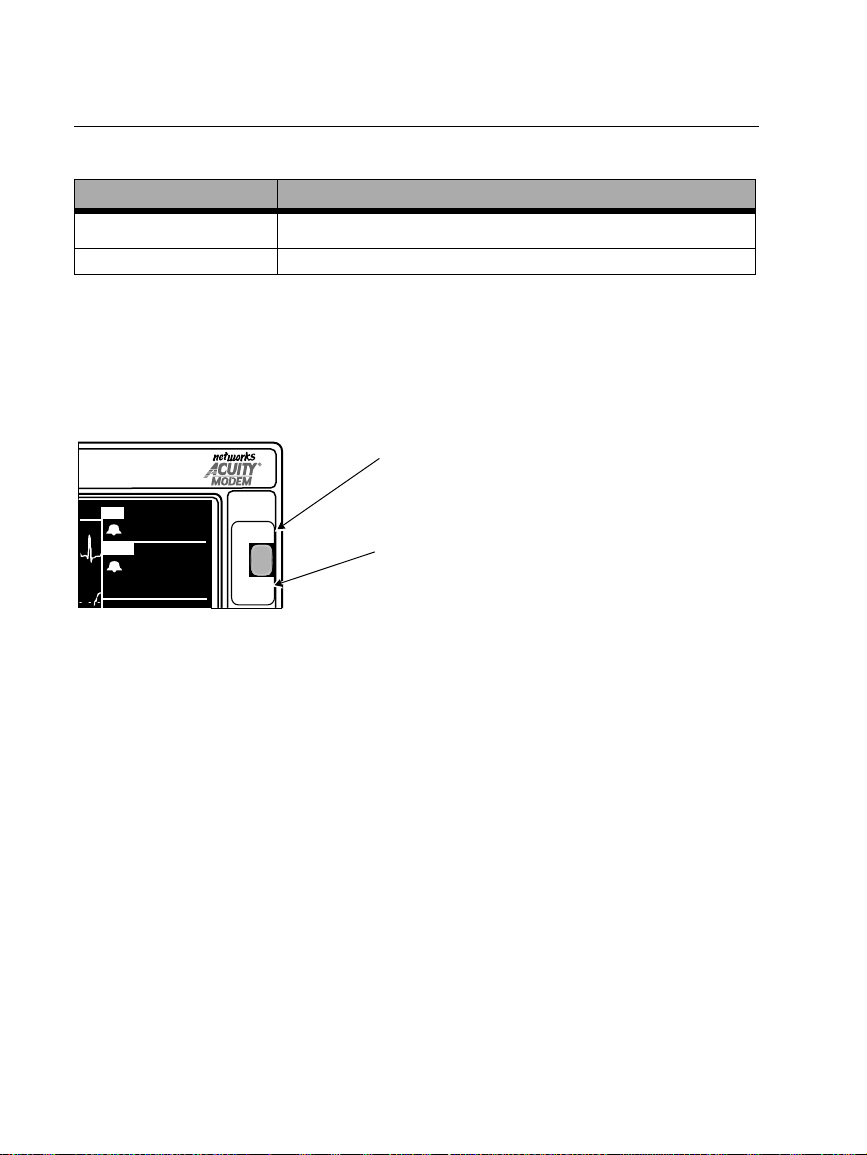
Déconnectez le moniteur d’Acuity à l’aide du bouton RES INAC, qui est une fonction
de sécurité destinée à empêcher que le patient soit débranché accidentellement. Si
vous n’utilisez pas le bouton
réseau Acuity, le moniteur et Acuity génèrent des messages d’alerte d’équipement qui
nécessitent l’intervention d’un utilisateur.
FC
ART
80
RES INAC
122
( 85)
58
1. Pour déconnecter le Propaq Encore du réseau Acuity, appuyez sur le bouton
RES INAC sur le panneau avant.
2. Vous disposez de 15 secondes pour débrancher le câble réseau Acuity, soit du
panneau latéral du Propaq Encore soit de la prise de chevet. Si le patient n’est
plus surveillé avec le Propaq Encore, éteignez le moniteur pour effacer les
tendances.
Si le câble réseau Acuity n’est pas débranché dans les 30 secondes, le moniteur
et Acuity essaient de se reconnecter et vous invitent à confirmer l’ID patient.
GEL/
DEGEL
RES INAC du panneau avant
RES INAC et que vous débranchez simplement le câble
RES INAC (CONFIG, ACUITY, RES INAC)
RES INAC (CONFIG, ACUITY, RES INAC)
RES INAC
Lorsque le moniteur est connecté à Acuity, ce
bouton permet de déconnecter le moniteur
du réseau Acuity.
GEL/DEGEL
Lorsque le moniteur n’est PAS connecté à
Acuity , ce bouton permet de geler ou de dégeler
les courbes affichées.
Lorsque le moniteur est connecté à Acuity, la fonction
fonction GEL/DEGEL pour le bouton
RES INAC du panneau avant. Ainsi, lorsque le
RES INAC se substitue à la
moniteur est connecté à Acuity, vous ne pouvez geler ni les courbes affichées ni les
imprimer. Lorsque le moniteur n’est pas connecté à Acuity, le bouton GEL/DEGEL
permet de geler ou de dégeler les courbes affichées.
20 Protocol Systems, Inc.
Page 21
Français (suite)
Capnographie (CO
Versions logicielles
2.0X-2.1X
)
2
Spécifications générales CO2 (CO2 Mainstream et CO2 Sidestream)
Caractéristique Spécification
Affichage CO
Précision
Précision ±1 RESP/M ou ±5%, selon valeur la plus grande
Spécification Selon ISO 9918:1993 (E) / EN 864:1996
1. Sur la base de ces conditions des voies aériennes : température du capteur = 42°C, température de
l'adaptateur des voies aériennes = 33°C, pression de la vapeur d'eau = 38 mmHg; mélange de gaz
standard = CO
débit = 60 ml/min.
2. Sur la base des conditions des voies aériennes supplémentaires suivantes : Ligne de prélèvement = 7
ft, 0,055 in DI (2,13 m, 1,4 mm DI) ; Débit de prélèvement = 175 ml/min ; Piège à eau Protocol (neuf/
non utilisé); Fréquence respiratoire ≤50/min., stable à ±3 respirations/min ; Rapport de la durée
d'inspiration/expiration = 1:2; Pression barométrique= 760 mmHg.
3. Pour le CO2 Sidestream, applicable uniquement pour FR≤50.
2
Mainstream1: 0-30 mmHg, ±3 mmHg
Sidestream2: 0-30 mmHg, ±3 mmHg
Affichage de la Fréquence Respiratoire
Performance CO
sous air contrôlé, parfaitement hydraté à 33°C; pression barométrique = 760 mmHg et
2
31-99 mmHg, ±10% de la valeur
31-99 mmHg, ±10% de la valeur
3
2
Surveillance CO2 Sidestream
Mise en Garde
Si l’option CO2 Sidestream est connectée à un circuit ventilatoire, veillez à ajuster
les réglages du système de ventilation ou d’anesthésie correspondant pour
compenser le volume de prélèvement (de 90 à 175 ml/minute) aspiré depuis le
circuit ventilatoire par l’option CO
Affichage numérique de INCO
Le moniteur affiche uniquement la valeur numérique pour le CO2 inspiré (INCO2) si
elle est en état d’alarme ou si elle est supérieure ou égale à 7,5 mmHg (ou = 1 kPa ou
1%). Pour de plus amples informations, reportez-vous aux spécifications CO
indiquées dans le Guide de référence du Propaq Encore.
Propaq Encore 2.0X-2.1X Reference Guide/Directions for Use 21
Update
Sidestream.
2
2
2
Page 22
Français (suite)
Paramètres heure/jour et tendances
Versions logicielles
2.0X-2.1X
Mise en Garde
Si vous modifiez le paramètre heure/minute/seconde dans la fenêtre Heure/Jour,
le moniteur risque d’effacer les données stockées relatives aux tendances du
patient.
Si vous modifiez le paramètre heure/minute/seconde dans la fenêtre Heure/Jour, le
moniteur supprime toutes les données relatives aux tendances du patient, au-delà de
huit heures pour les tendances de la PSNI et au-delà de cinq heures pour les autres
tendances, selon le nouveau réglage de l’heure.
Si le moniteur n’a pas encore utilisé la totalité de sa capacité de stockage de tendances
et que vous modifiez le paramètre heure/minute/seconde en indiquant une heure
comprise dans la période des tendances stockées, celles qui ont été stockées
antérieurement ne sont toutefois pas effacées.
La modification du jour, du mois ou de l’année n’a aucune répercussion sur les
tendances stockées.
22 Protocol Systems, Inc.
Page 23
Español
Mejore la precisión de la PSNI con Smartcuf™
Versiones del software
(NOTA: El botón Smartcuf sólo
Las mediciones de PSNI pueden afectarse adversamente por muchos factores, como
arritmias cardíacas, cambios súbitos de presión sanguínea, movimientos corporales
como convulsiones o estremecimientos, golpes en la manga, vibraciones, movimientos
del vehículo o pulso débil.
La tecnología de filtrado patentada del software Smartcuf aumenta enormemente la
precisión de las mediciones de PSNI en presencia de artefactos de movimiento o pulso
disminuido. Smartcuf sincroniza la lectura de PSNI con la onda R del ECG del
paciente para eliminar el ruido generado por estímulos externos como movimientos
del paciente o vibraciones. El monitor debe realizar control de ECG utilizando
Smartcuf.
Para activar el filtro Smartcuf:
• Conecte los electrodos ECG al paciente y realice control de ECG durante la PSNI.
• En el menú Principal, pulse
2.0X-2.1X
está disponible para 2.1X.)
PSNI para mostrar el menú PSNI y establezca Smartcuf
como SI.
18:46:00
III
mV
1
cm
MON
PSNI S D (M)
MOD0 : CONTINUO
TIEMPO: 4:21
SMARTCUF : SI
85 50 100 150 200
S 122
g
mmH
( 85)
1PSNI
122
58
°
37,0
C
18:45:28
FCT
ART
( 87)
PSNI
mmH
S 122
D 58
(M)( 85)
SpO2
60
109
72
Establezca Smartcuf
en SI.
g
99
INICIAR SMARTCUFINTERVAL CONTINUOAUTO/MAN
Propaq Encore 2.0X-2.1X Reference Guide/Directions for Use 23
Update
Page 24
Español (cont.)
(
E
A
C
Mientras Smartcuf está activado, si se produce un artefacto tan intenso que afecta a la
precisión de una medición de PSNI, esa medición se señala con un símbolo especial en
la pantalla y en las copias impresas.
Este símbolo indica que la
lectura de PSNI se tomó en
presencia de un artefacto
intenso al controlar el ECG con
Smartcuf activado. Los
artefactos pueden afectar a la
precisión.
PSNI
mmH
S 122
D 58
(M)( 85)
Pantalla numérica
g
TENDENCIA PSNI
Copia impresa
HORA FAS D (M)FC/P
10:01
9:46
9:31
9:20
IMPRIMIR TEND ST
SpO2
1/min 1/minh:min
% mmH
98
101
BUSC
88
NO
93
100
91
Pantalla de tendencias
g
139 74 (106)
142 83 (110)
145 87 (112)
126 85 ( 91)
11
10
5
11
En algunas situaciones es deseable desactivar Smartcuf. Entre ellas pueden estar
situaciones con artefactos de movimiento extremadamente intensos, ciertos tipos de
arritmias u otras situaciones en las que no es posible obtener una buena señal ECG.
Las mediciones de PSNI se pueden continuar cuando Smartcuf está desactivado.
Para desactivar Smartcuf, en el menú Principal pulse
PSNI para mostrar el menú PSNI
y establezca Smartcuf como NO.
PSNI Mensajes de alerta del equipo
Versiones del software
2.1X
ARTEFACTO PRESENTE, MINIMICE ARTEF. (ERR# 15). El monitor ha detectado
demasiados artefactos que impiden una lectura exacta. Siga los pasos para reducir los
artefactos. Coloque la extremidad del paciente de forma que la manga que se aplica no
esté en contacto con el cuerpo del paciente ni con ningún otro objeto como una barra
de la cama. Si el filtro de artefactos de movimiento Smartcuf está activado, compruebe
que los electrodos ECG están conectados correctamente para realizar el control del
ECG durante la PSNI. Si el filtro de artefactos de movimiento Smartcuf está
desactivado, considere la posibilidad de activarlo (y conecte ECG si aún no lo ha
hecho).
24 Protocol Systems, Inc.
Page 25
Símbolos de manga PSNI
Versiones del software
2.0X-2.1X
Español (cont.)
Tamaños de manga PSNI:
Muslo
Adulto de complexión grande
Adulto
Niño de complexión pequeña
Niño
Infantil
Aplique la manga
PSNI como se indica.
Un solo uso (no
2
reutilizable).
Valores por Defecto de la Pantalla de PSNI
Para seleccionar qué curvas de constantes vitales se van a mostrar, pulse MENU
PRINCIPAL, CONFIG, SEL CURV para mostrar la ventana Selección de curvas.
CONFIGURACION
ECG : SI RESP : NO
ART : SI SpO2 : SI
AP : NO PSNI : SI
CO
2 : NO
PROXIMO MENU ANTSIMULARSI/NO
Para permitir la visualización de una curva o de cifras altas de PSNI, seleccione SI
(ECG no se puede desactivar). El monitor muestra las tres primeras curvas activadas
establecidas en el orden de prioridad indicado en la ventana Selección de curvas. Si
PSNI está activada, y únicamente otras dos curvas están activadas, el monitor muestra
las cifras altas de PSNI en una ventana de curva.
SELECCION DE CURVAS
( 85)
AP
CO
2P FA
35
mmH
SpO
35/ 18
g
2
12
92
Los parámetros preasignados en fábrica para la visualización de curvas son:
Versiones del software 2.03.00-2.1X Todas las curvas y PSNI están activadas.
Versiones del software 2.00.00-2.02.00 Todas las curvas están activadas.
PSNI está desactivada.
Propaq Encore 2.0X-2.1X Reference Guide/Directions for Use 25
Update
Page 26
Español (cont.)
Pulse RED NO para Desconectar de Acuity
Versiones del software RED NO
El botón
2.03.00-2.1X
2.00.00-2.02.00
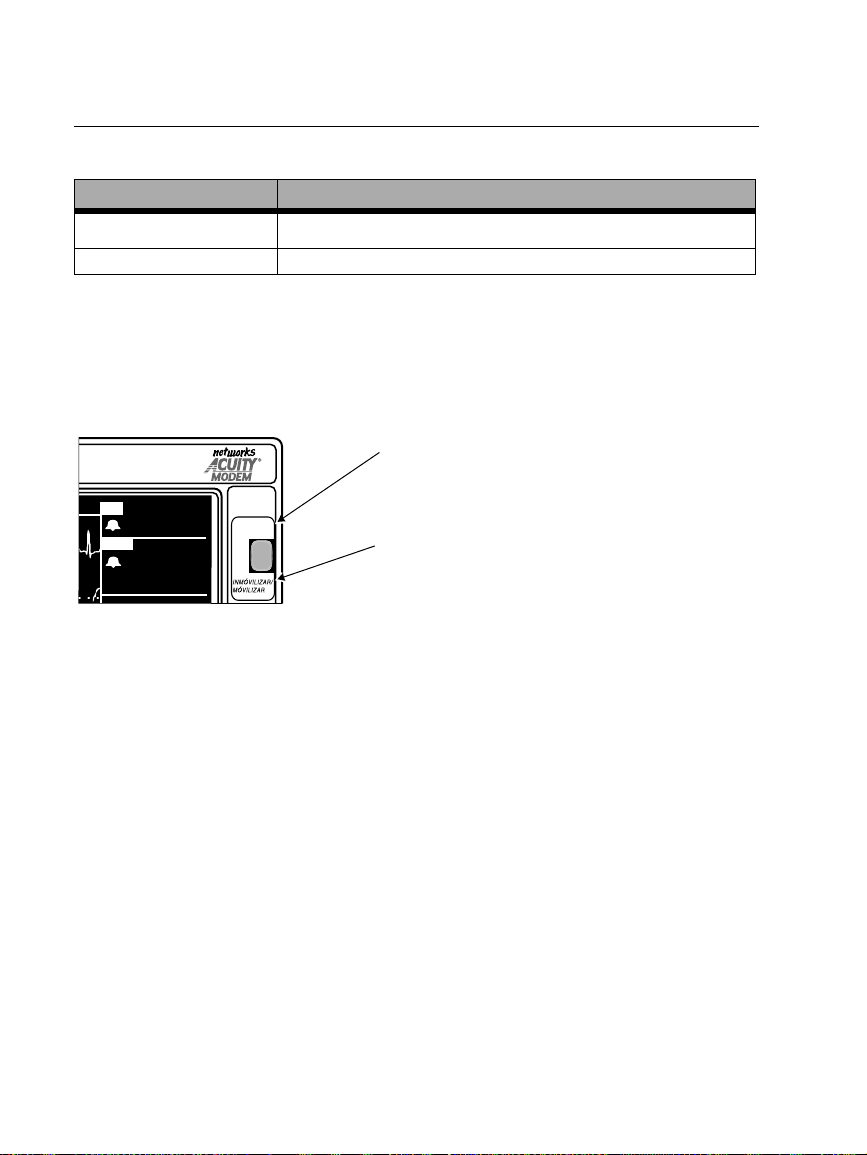
Si desea desconectar el monitor de Acuity, asegúrese de utilizar el botón RED NO que
se describe a continuación. El botón
asegurar que el paciente no se ha desconectado por accidente. Si desconecta el cable de
red Acuity del monitor sin utilizar el botón
mensajes de alerta del equipo que deberán ser aceptados por un operario.
FC
ART
( 85)
80
122
58
RED NO
1. Para desconectar el Propaq Encore de la red Acuity, pulse el botón RED NO
situado en el panel frontal.
2. Pasados 15 segundos, desconecte el cable de red Acuity del panel lateral del
Propaq Encore o de la clavija de la cabecera. Si no se va a controlar más al
paciente mediante Propaq Encore, desconecte el monitor para eliminar la
información sobre tendencias.
Si pasados 30 minutos no desconecta el cable de red Acuity, el monitor y Acuity
volverán a conectarse y le pedirá que confirme la identificación del paciente.
RED NO situado en el panel frontal
La opción
La opción
RED NO (CONFIG, ACUITY, RED NO)
RED NO (CONFIG, ACUITY, RED NO)
RED NO es una función de seguridad para
RED NO, el monitor y Acuity generarán
RED NO
Pulsando este botón se desconecta el
monitor de la red Acuity.
INMOVILIZAR/MOVILIZAR
Si el monitor no está conectado a Acuity,
pulsando este botón se congelan o se anula la
congelación de las curvas.
Siempre que el monitor esté conectado a Acuity, la función
función INMOVILIZAR/MOVILIZAR para el botón
RED NO sustituirá a la
RED NO del panel frontal. Por
consiguiente, si el monitor está conectado a Acuity no podrá congelar las curvas que se
muestran. Si no está conectado a Acuity, puede congelar o anular la congelación de las
curvas que se muestran pulsando el botón INMOVILIZAR/MOVILIZAR.
26 Protocol Systems, Inc.
Page 27
Español (cont.)
Capnografia (CO
Versiones del software
2.0X-2.1X
)
2
Especificaciones generales de CO2
(Corriente principal de CO2 y Corriente secundaria de CO2)
Característica Especificación
Represención de Función de CO
Precisión
Precisión ±1 alientos por minuto o ±5%, el valor más alto
Especificación Según ISO 9918:1993 (E) / EN 864:1996
1. Sobre la base de estas condiciones de las vías aéreas: temperatura del sensor = 42°C; temperatur a del
adaptador de vías aéreas de 33°C; presión del vapor de agua = 38 mmHg; mezcla gaseosa estándar =
CO
en aire de equilibrio, completamente hidratado a 33°C; presión barométrica = 760 mmHg y flujo =
2
60 ml/min.
2. Sobre la base de las siguientes condiciones adicionales de las vías aéreas: línea de muestreo = 2,13 m,
DI de 1,4 mm; frecuencia del flujo de muestreo = 175 ml/min; colector de agua Protocol (nuevo/sin
utilizar); frecuencia respiratoria ≤50 respiraciones/min, estable a ±3 respiraciones/min; relación de
tiempo de inspiración/espiración = 1:2; presión barométrica = 760 mmHg.
3. En el caso de la Corriente secundaria de CO2, esto sólo es válido para FR≤50.
Corriente principal1: 0-30 mmHg, ±3 mmHg
31-99 mmHg, ±10% del valor
Corriente secundaria2: 0-30 mmHg, ±3 mmHg
31-99 mmHg, ±10% del valor
Visualización de frecuencia de aliento
Rendimiento de CO
2
3
2
Monitorización de Medición Lateral de CO
2
Advertencia
Si se conecta la opción de Medición Lateral de CO2 a un circuito ventilatorio,
asegúrese de fijar adecuadamente los ajustes del sistema ventilador o de
anestesia para compensar el volumen de muestreo (90 ó 175 ml/min) que es
aspirado desde el circuito ventilatorio mediante la opción de Medición Lateral de
.
CO
2
Propaq Encore 2.0X-2.1X Reference Guide/Directions for Use 27
Update
Page 28
Español (cont.)
Pantalla del Valor Numérico de INCO
El monitor sólo muestra el valor numérico si el CO2 inspirado (INCO2) está en
situación de alarma o si es superior o igual que 7,5 mmHg (o bien = 1 kPa o 1%). Si
desea obtener información más detallada, consulte las especificaciones relacionadas
con el CO
en la Guía de Referencia del Propaq Encore.
2
2
Configuración de Hora/Día y Tendencias
Versiones del software
2.0X-2.1X
Advertencia
Al cambiar la configuración de hora/minuto/segundo del monitor en la ventana
Hora/Día, el monitor podría borrar la información de tendencias del paciente
previamente almacenada.
Al cambiar la configuración de hora/minuto/segundo del monitor en la ventana
Hora/Día, el monitor borra toda la información de tendencias que lleve más de 5
horas almacenada en el caso de tendencias no PSNI o más de ocho si se trata de
tendencias PSNI según la nueva configuración del reloj
En cualquier caso, si el monitor aún no ha completado toda la capacidad de
almacenaje de tendencias y cambia la configuración de hora/minuto/segundo a una
hora que se encuentre dentro del periodo de tendencias almacenado, las tendencias
almacenadas previamente no se borrarán.
Los cambios en la configuración del día, el mes o el año no afectan a la información de
tendencias del paciente almacenada.
28 Protocol Systems, Inc.
Page 29
Italiano
L'uso di Smartcuf™ serve a migliorare la precisione delle misurazioni NIBP
Software versione
(NOTA - Il pulsante SMARTCUF
Sulle misurazioni NIBP possono influire negativamente numerosi fattori, come le
aritmie cardiache, gli sbalzi improvvisi della pressione arteriosa, i movimenti del
corpo come convulsioni o brividi, i colpi sul bracciale, le vibrazioni, il passaggio di
autoveicoli o le pulsazioni deboli.
La tecnologia di filtrazione brevettata del software Smartcuf migliora
considerevolmente la precisione delle misurazioni NIBP in presenza di artefatti da
movimento o di pulsazioni ridotte. Lo Smartcuf sincronizza le letture NIBP con l'onda
R dell'ECG del paziente, eliminando il rumore generato da stimoli esterni, come il
movimento del paziente o le vibrazioni. Durante l'uso dello Smartcuf, il monitor deve
eseguire il monitoraggio ECG.
Per attivare il filtro Smartcuf, procedere come segue.
• Collegare al paziente le derivazioni ECG ed eseguire il monitoraggio ECG durante
le misurazioni NIBP.
• Dal menu principale, premere
Smartcuf su ON (attivato).
2.0X-2.1X
è disponibile solo per 2.1X.)
NIBP per visualizzare il menu NIBP e impostare
18:46:00
III
mV
1
cm
MON
NIBP S D (M)
MOD. : TURBOCUF
ORA : 4:21
SMARTCUF : ON
85 50 100 150 200
S 122
g
mmH
( 85)
1NIBP
122
58
°
39,1
C
18:45:28
FCT
ART
( 87)
NIBP
mmH
S 122
D 58
(M)( 85)
SpO2
80
109
72
Impostare SMARTCUF
su ON (attivato).
g
99
STOP SMARTCUFINTERVAL TURBOCUFAUTO/MAN
Propaq Encore 2.0X-2.1X Reference Guide/Directions for Use 29
Update
Page 30
Italiano (cont.)
M
(
A
C
Quando è attivato lo Smartcuf, se l'artefatto è così grave da compromettere la
precisione di una misurazione NIBP, la misurazione viene contrassegnata con un
simbolo particolare sia sul display che sugli stampati.
Il simbolo indica che la lettura
NIBP è stata effettuata in
presenza di un artefatto
rilevante durante il
monitoraggio ECG con lo
Smartcuf attivato. L'artefatto
può compromettere la
precisione.
ORA FRS D (M)FC/FP
TEND. NIBP
SpO2
NIBP
mmH
S 122
D 58
(M)( 85)
Display numerico
% mmH
Stampato
10:01
9:46
9:31
9:20
STAMPA
98
101
CERC
88
OFF
93
100
91
Display delle tendenze
139 74 (106)
142 83 (110)
145 87 (112)
126 85 ( 91)
In alcuni casi potrebbe essere necessario disabilitare lo Smartcuf, come ad esempio in
presenza di artefatti da movimento molto accentuati, di alcuni tipi di aritmia o di altre
condizioni in cui non è possibile ottenere un segnale ECG adeguato. È possibile
eseguire le misurazioni NIBP anche quando lo Smartcuf è disattivato.
g
g
1/min1/minh:m
11
10
5
11
TND SUC
Per disattivare lo Smartcuf, premere
NIBP dal menu principale per visualizzare il
menu NIBP e impostare Smartcuf su OFF (disattivato).
NIBP anomalia tecnica
Software versione
2.1X
ARTEFATTO PRESENTE, RIDURRE AR TEF. (error e n. 15). Il monitor ha rilevato
la presenza di troppo artefatto per consentire letture accurate. Provvedere a
ridurre gli artefatti. Allontanar e l'arto del paziente dal corpo in modo tale che
il bracciale applicato non entri in contatto con il corpo del paziente o altri
oggetti come il bordo del letto. Se il filtro degli artefatti da movimento
Smartcuf è attivato, assicurarsi che le derivazioni ECG siano collegate
correttamente per eseguire il monitoraggio ECG durante la misurazione
NIBP. Se il filtro degli artefatti da movimento Smartcuf è disattivato,
provvedere ad attivarlo (e collegare le derivazioni ECG, se non sono già
collegate).
30 Protocol Systems, Inc.
Page 31
Simboli del bracciale NIBP
Software versione
2.0X-2.1X
Italiano (cont.)
Dimensioni del bracciale
NIBP:
Coscia
Adulto robusto
Adulto
Bambino non robusto
Bambino
Neonato
Applicare il bracciale NIBP
come illustrato.
Esclusivamente monouso
2
(non riutilizzabile).
Impostazioni predefinite di visualizzazione NIBP
Per selezionare il tipo di forma d'onda per i segni vitali da visualizzare, premere MENU
PRINCIPALE, IMPOSTA, SEL ONDA per visualizzare la finestra Selezione onda.
IMPOSTAZIONE
ECG : ON RESP : OFF
ART : ON SpO2 : ON
AP : OFF NIBP : ON
CO
2 : OFF
SUCC MENU PRECSIMULAT.ON/OFF
Per consentire la visualizzazione di una forma d'onda o di valori numerici NIBP
elevati, selezionare ON (ECG non può essere su OFF). Il monitor visualizza le prime
tre forme d'onda attive su ON nell'ordine di priorità elencato nella finestra Selezione
onda. Se NIBP è ON e solo una o due forme d'onda sono ON e attivate, il monitor
visualizza valori numerici NIBP elevati in una finestra di forme d'onda.
SELEZIONE ONDA
( 85)
AP
MCO
2 FR
35
mmH
SpO
35/ 18
g
2
12
92
Le impostazioni predefinite per la visualizzazione delle forme d'onda sono le
seguenti.
Software versione 2.03.00-2.1X Tutte le forme d'onda e NIBP sono ON.
Software versione 2.00.00-2.02.00 Tutte le forme d'onda sono ON.
Propaq Encore 2.0X-2.1X Reference Guide/Directions for Use 31
Update
NIBP è OFF.
Page 32
Italiano (cont.)
Premere RETE OFF per scollegarsi da Acuity
Software versione RETE OFF
2.03.00-2.1X
2.00.00-2.02.00
Il pulsante
Il tasto programmabile
Il tasto programmabile
Quando si desidera scollegare il monitor da Acuity, assicurarsi di usare il pulsante
RETE OFF come descritto di seguito. Il pulsante RETE OFF costituisce un elemento di
sicurezza che serve a garantire che il paziente non si scolleghi in modo casuale. Se il
cavo della rete Acuity viene semplicemente scollegato dal monitor senza usare il
pulsante
RETE OFF, il monitor e Acuity generano entrambi messaggi di allarme che
devono essere riconosciuti da un operatore.
FC
ART
( 85)
80
122
58
RETE OFF
BLOCCO/
SBLOCCO
1. Per scollegare Propaq Encore dalla rete Acuity, premere il pulsante RETE OFF
posto sul pannello frontale.
2. Nell’arco di 15 secondi, scollegare il cavo della rete Acuity dal pannello laterale
di Propaq Encore o dalla presa presso il letto del paziente. Se il paziente non
deve essere più sottoposto al monitoraggio con Propaq Encore, disattivare il
monitor per cancellare le informazioni relative alle tendenze.
Se il cavo della rete Acuity non viene scollegato entro circa 30 secondi, il
monitor e Acuity tentano di ricollegarsi e visualizzano la richiesta di conferma
dell’ID del paziente.
RETE OFF posto sul pannello frontale
RETE OFF (IMPOSTA, ACUITY, RETE OFF)
RETE OFF (IMPOSTA, ACUITY, RETE OFF)
RETE OFF
Quando il monitor è collegato ad Acuity,
premendo questo pulsante viene scollegato il
monitor dalla rete Acuity.
BLOCCO/SBLOCCO
Quando il monitor NON è collegato ad Acuity,
premendo questo pulsante si bloccano/
sbloccano le forme d’onda visualizzate.
Quando il monitor è collegato ad Acuity, la funzione
funzione BLOCCO/SBLOCCO per il pulsante
RETE OFF ha la priorità sulla
RETE OFF posto sul pannello frontale.
Quindi, quando il monitor è collegato ad Acuity non è possibile bloccare le forme
d’onda visualizzate. Inoltre, non è possibile avviare una stampa dell’onda bloccata in
Acuity quando vi è il collegamento ad Acuity. Quando il monitor non è collegato ad
Acuity, premendo il pulsante BLOCCO/SBLOCCO si bloccano/sbloccano le forme
d’onda visualizzate.
32 Protocol Systems, Inc.
Page 33
Italiano (cont.)
Capnografia (CO
Software versione
2.0X-2.1X
)
2
Specifiche generali CO2 (CO2 Mainstream e CO2 Sidestream)
Caratteristica Specifica
Visualizzazione CO
Precisione
Precisione ±1 respiri/min o ±5%, a seconda di quale dei due è maggiore
Specifica Conforme a ISO 9918:1993 (E) / EN 864:1996
1. In base a queste condizioni di respirazione: temperatura sensore = 42˚C; temperatura adattatore di
respirazione = 33˚C; pressione vapore acqueo = 38 mmHg; miscela gas standard = CO
bilanciata, totalmente idratata a 33˚C; pressione barometrica = 760 mmHg e flusso = 60 ml/min.
2. In base alle seguenti ulteriori condizioni di respirazione: linea di campionamento = 7 piedi, 0,055 pollici
ID (2,13 m, 1,4 mm ID); velocità del flusso di campionamento = 175 ml/min; pozzetto Protocol (nuovo/
non usato); frequenza di respirazione ≤ 50 respiri/min, stabile a ±3 respiri/min; rapporto tempo
Inspirazione/Espirazione = 1:2; pressione barometrica = 760 mmHg.
3. In CO2 Sidestream, è valido solo per FR ≤ 50.
Mainstream1: 0-30 mmHg, ±3 mmHg
31-99 mmHg, ±10% del valore
Sidestream2: 0-30 mmHg, ±3 mmHg
31-99 mmHg, ±10% del valore
Visualizzazione frequenza di respirazione
Prestazioni CO
2
2
in aria
2
Monitoraggio di CO2 Sidestream
3
Avvertenze
Se l’opzione CO2 Sidestream viene collegata ad un circuito ventilatorio, assicurarsi
di regolare in modo appropriato le impostazioni del ventilatore o del sistema di
anestesia in modo da compensare il volume di campionamento aspirato dal
circuito ventilatorio dall’opzione CO
Visualizzazione numerica INCO
Sidestream.
2
2
Il monitor visualizza solo il valore numerico per CO2 inspirata (INCO2), se si attiva
l’allarme o se il valore è maggiore o uguale a 7,5 mmHg (o =1 kPa o 1%). Per ulteriori
informazioni, fare riferimento alle specifiche CO
contenute nel manuale di
2
riferimento di Propaq Encore.
Propaq Encore 2.0X-2.1X Reference Guide/Directions for Use 33
Update
Page 34
Italiano (cont.)
Impostazioni relative a ora/giorno e tendenze
Software versione
2.0X-2.1X
Avvertenze
La modifica dell'impostazione relativa a ora/minuto/secondo nella finestra Ora/
Giorno del monitor può determinare la cancellazione dei dati sulle tendenze di un
paziente.
Modificando l'impostazione relativa a ora/minuto/secondo nella finestra Ora/Giorno
del monitor , vengono cancellati tutti i dati sulle tendenze di un paziente registrati oltr e
cinque ore prima per le tendenze non NIBP o otto ore per le tendenze NIBP, in base
alla nuova impostazione dell'orologio.
Tuttavia, se il monitor non ha ancora memorizzato tutte le tendenze che è in grado di
registrare e l'impostazione relativa a ora/minuto/secondo rientra nel periodo delle
tendenze memorizzate, le tendenze memorizzate precedentemente non vengono
cancellate.
La modifica dell'impostazione relativa a giorno, mese o anno non influenza le
tendenze del paziente memorizzate.
34 Protocol Systems, Inc.
Page 35
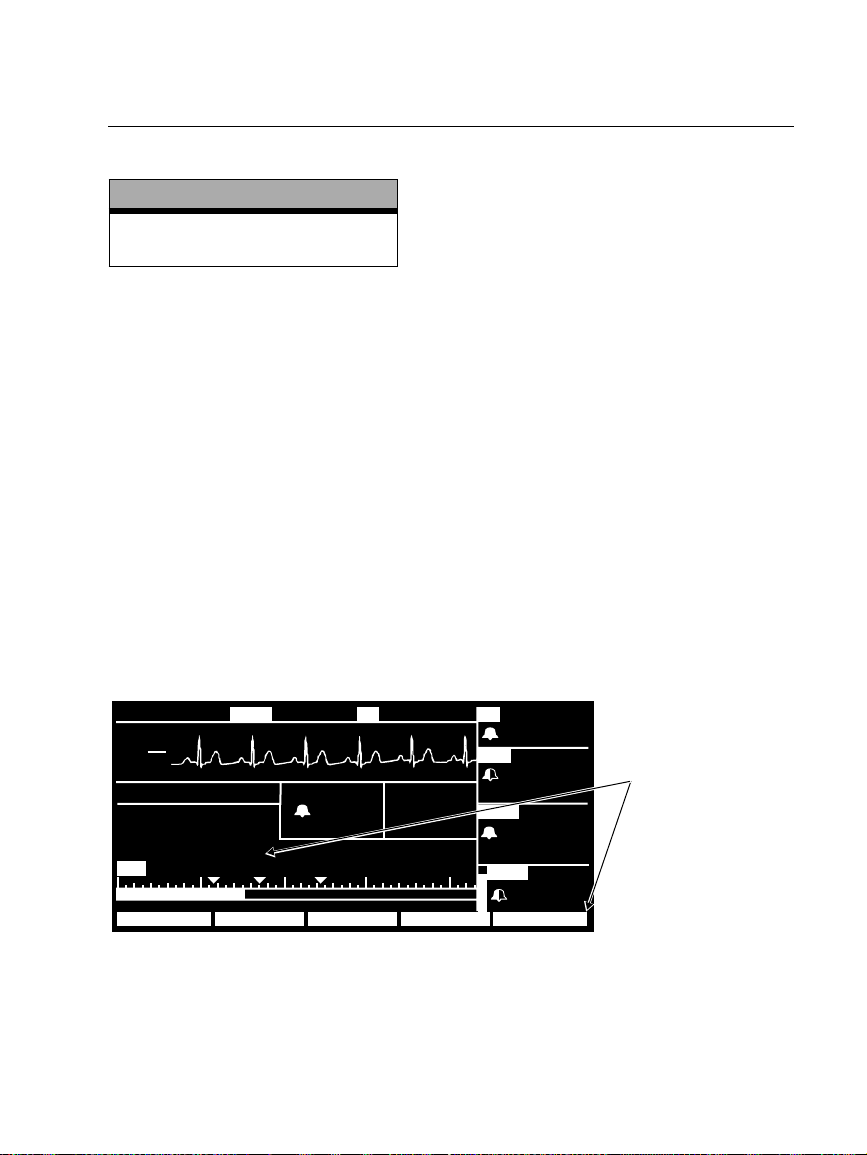
Nederlands
Verbeter NIBP nauwkeurigheid met Smartcuf™
Software versie
(OPMERKING: SMARTCUF-knop
uitsluitend beschikbaar voor 2.1X.)
NIPB-metingen kunnen nadelig worden beïnvloed door vele factoren zoals
hartaritmie, plotselinge wijzigingen in de bloeddruk, lichaamsbewegingen zoals
convulsies of rillingen, tegen het manchet stoten, trilling, beweging van het voertuig
of een zwakke polsslag.
De gepatenteerde Smartcuf filtertechnologie verhoogt in grote mate de NIBP
meetnauwkeurigheid in de aanwezigheid van bewegingsartefact of zwakkere pols.
Smartcuf synchroniseert de NIBP-meting met de R-golf van de patiënts ECG en
elimineert daardoor het door externe stimuli zoals beweging van de patiënt of trilling
veroorzaakt geluid. De monitor moet ECG-monitoring uitvoeren tijdens het gebruik
van Smartcuf.
Het inschakelen van de Smartcuf-filter:
• Sluit de ECG-leads op de patiënt aan en voer ECG-monitoring uit tijdens de NIBP.
• Druk in het hoofdmenu op
op AAN in.
2.0X-2.1X
NIBP om het NIBP-menu weer te geven en stel Smartcuf
18:46:00
III
mV
1
cm
MON
NIBP S D (M)
MODE : TURBO
TIJD : 4:21
SMARTCUF : AAN
85 50 100 150 200
S 122
g
mmH
( 85)
122
58
39,1
1NIBP
18:45:28
°
C
HFT
80
ART
( 87)
NIBP
( 85)
SpO2
109
72
122
58
Stel SMARTCUF
in op AAN.
99
STOP SMARTCUFINTERVAL TURBOAUTO/MAN
Propaq Encore 2.0X-2.1X Reference Guide/Directions for Use 35
Update
Page 36
Nederlands (verv.)
M
(
D
P
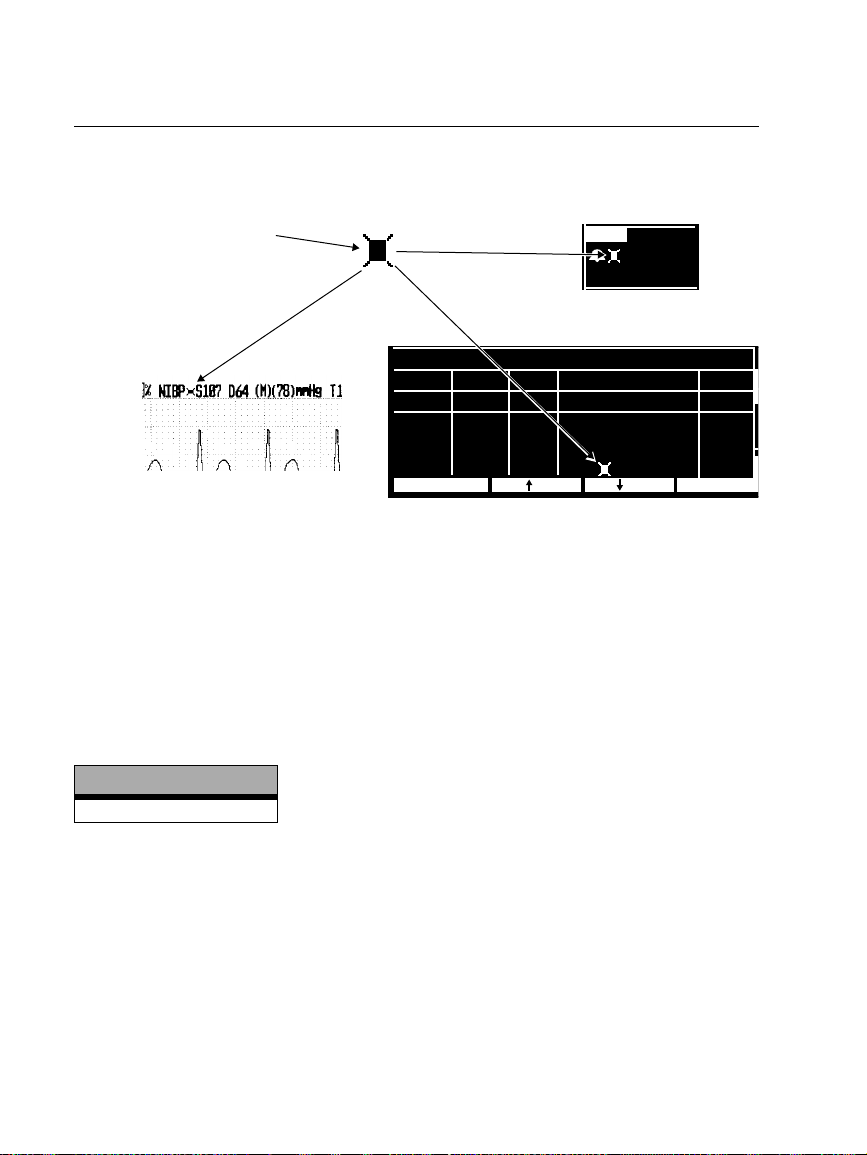
Als artefact zo sterk is terwijl de Smartcuf is ingeschakeld dat dit invloed heeft op de
nauwkeurigheid van een NIBP-meting wordt die meting aangeduid door een speciaal
symbool op de display en op de afdruk:
Dit symbool geeft weer dat de
NIBP-meting is uitgevoerd bij
een hoog bewegingsartefact
tijdens ECG-monitoring met de
smartcuf ingeschakeld.
Artefacten kunnen de
nauwkeurigheid beïnvloeden.
NIBP
mmH
S 122
D 58
(M)( 85)
Numerieke weergave
g
NIBP TREND
Afdruk
TIJD AF S D (M)HF/PF
10:01
9:46
9:31
9:20
AFDRUKKEN VLG TRN
1/min
101
88
93
91
SpO2
% mmH
98
139 74 (106)
ZOEK
142 83 (110)
UIT
145 87 (112)
100
126 85 ( 91)
Weergave trend
g
1/minh:min
11
10
5
11
Er kunnen situaties zijn waar het wenselijk is Smartcuf uit te schakelen. Hieronder
vallen situaties met bovenmatige bewegingsartefact, bepaalde soorten aritmie of
andere situaties waarin het niet mogelijk is een goed ECG-signaal te krijgen. NIBPmetingen kunnen nog steeds worden uitgevoerd ook al is Smartcuf uitgeschakeld.
Om Smartcuf uit te schakelen drukt u in het hoofdmenu op
NIBP en stelt u Smartcuf in
op UIT.
NIBP apparaatwaarschuwingsberichten
Software versie
2.1X
ARTEFACT AANW., MINIMALISEER ARTEF. ( (FOUT# 15). De monitor registreert
teveel artefact om nauwkeurige meting mogelijk te maken. Onderneem stappen om
artefact te verminderen. Plaats het lichaamsdeel van de patiënt op afstand van het
lichaam, zodat het aangebrachte manchet niet in contact komt met het lichaam van de
patiënt of met een voorwerp, zoals de bedrand. Als de Smartcuf
bewegingsartefactfilter aan is, controleer dan of de ECG-leads juist zijn aangesloten
voor het uitvoeren van ECG-monitoring tijdens NIBP. Overweeg om de Smartcuf
bewegingsartefactfilter aan te zetten als die uit is (en sluit de ECG aan als die niet al
aangesloten is).
36 Protocol Systems, Inc.
Page 37
NIBP-manchetsymbolen
Software versie
2.0X-2.1X
Nederlands (verv.)
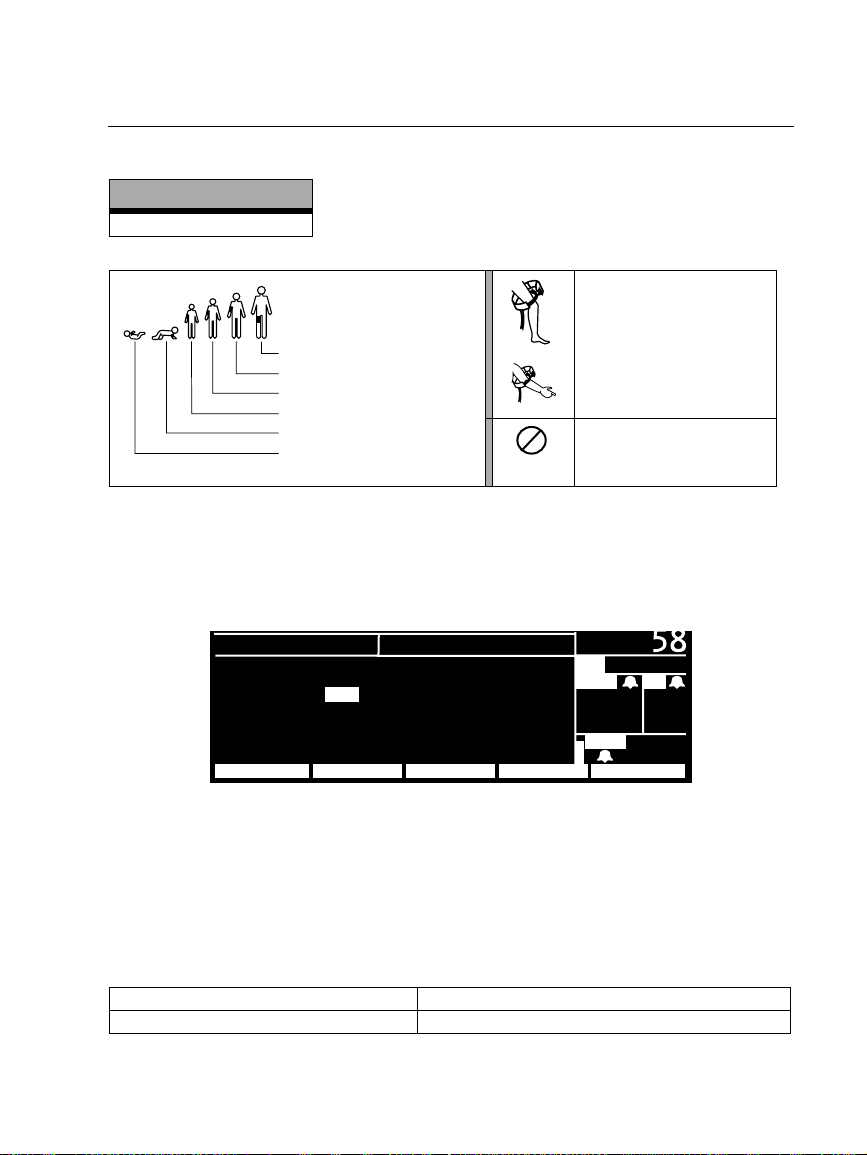
NIBP-manchetmaten:
Dijbeen
Grote volwassene
Volwassene
Klein kind
Kind
Baby
Breng het NIBP-manchet
zoals afgebeeld aan.
Uitsluitend voor eenmalig
2
gebruik (niet opnieuw
gebruiken)
Standaardinstellingen NIBP-scherm
Om te selecteren welke golfvormen er voor vitale functies worden weergegeven drukt
u op:
HOOFDMENU, INSTELL. en CURVESEL om het venster Curve selecteren weer te
geven.
INSTELLEN
ECG : AAN RESP : UIT
ART : AAN SpO2 : AAN
PA : UIT NIBP : AAN
CO
2 : UIT
VOLGENDE VRG MENUSIMULAT.AAN/UIT
Om het weergeven van een golfvorm of grote NIBP-nummers in te schakelen,
selecteert u AAN (ECG kan niet op UIT worden ingesteld). De monitor geeft de eerste
drie op AAN ingestelde actieve golfvormen weer in de volgorde van de in het venster
Curve selecteren vermelde prioriteit. Als NIBP AAN is en slechts één of twee andere
golfvormen zijn AAN en actief, geeft de monitor grote NIBP-nummers in een
golfvormvenster weer.
CURVE SELECTIE
( 85)
PA
MCO
2 AF
35
mmH
SpO
35/ 18
g
2
12
92
De in de standaard-fabrieksinstellingen voor golfvormweergave zijn:
Software versie 2.03.00-2.1X Alle golfvormen en NIBP zijn AAN.
Software versie 2.00.00-2.02.00 Alle golfvormen zijn AAN. NIBP is UIT.
Propaq Encore 2.0X-2.1X Reference Guide/Directions for Use 37
Update
Page 38
Nederlands (verv.)
Druk op NET UIT om de verbinding met Acuity te verbreken
Software versie NET UIT
2.03.00-2.1X
2.00.00-2.02.00
De knop
De softkey
De softkey
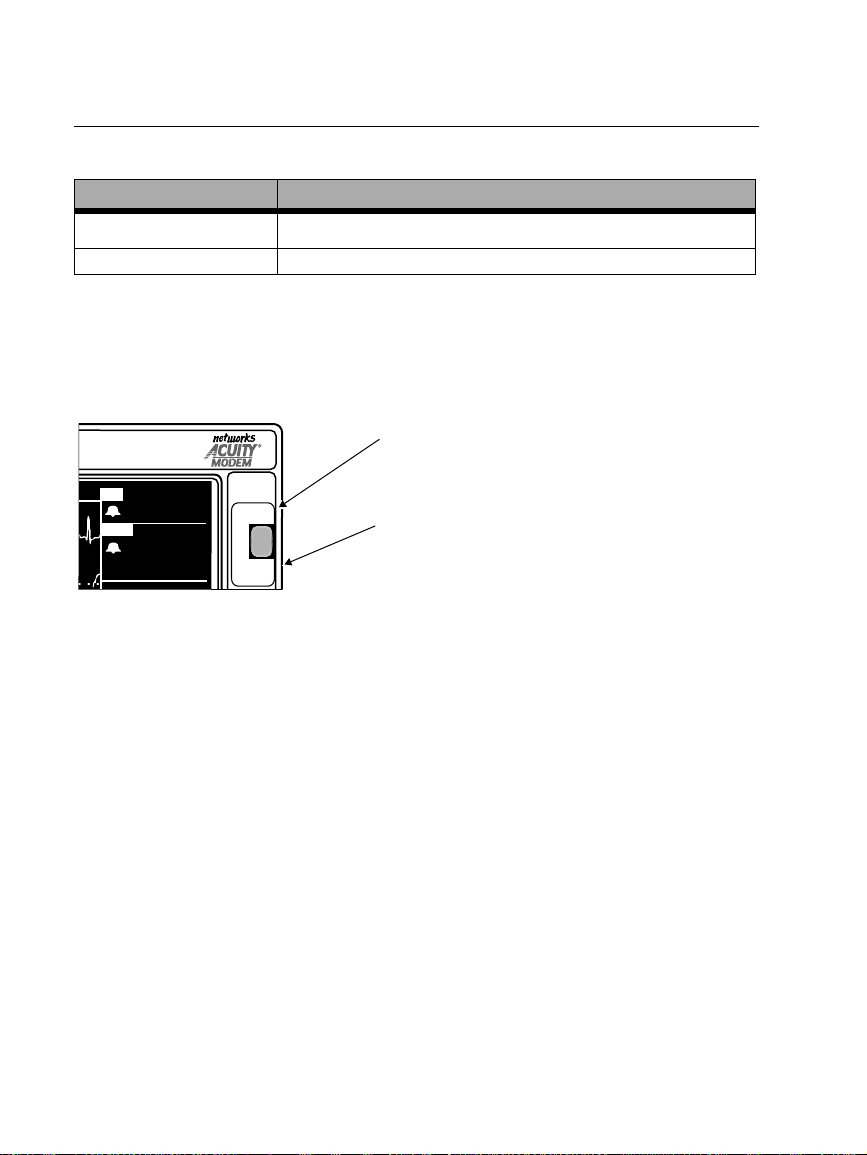
Als u de verbinding tussen de monitor en Acuity wilt verbreken, dient u de knop
NET UIT te gebruiken zoals hieronder wordt beschreven. De knop NET UIT is een
beveiligingsfunctie die voorkomt dat de patiënt per ongeluk wordt afgesloten. Als u
de Acuity-netwerkkabel uit de monitor neemt zonder de knop
genereren de monitor en Acuity beide apparaatwaarschuwingsberichten die moeten
worden bevestigd.
HF
ART
( 85)
80
FRYS/
FRYS/
FRYS UPP
FRYS UPP
122
58
NET UIT
BEVRIEZEN/
ONTVRIEZEN
1. Als u de verbinding tussen de Propaq Encore en het Acuity-netwerk wilt
verbreken, drukt u op de knop
2. Verwijder de Acuity-netwerkkabel binnen 15 seconden uit het zijpaneel van de
Propaq Encore of uit het aansluitpunt aan het bed. Als de patiënt niet langer
met de Propaq Encore zal worden gemonitord, schakelt u de monitor uit om
trendgegevens te wissen.
Als u de Acuity-netwerkkabel niet binnen ongeveer 30 seconden verwijdert,
proberen de monitor en Acuity een nieuwe verbinding tot stand te brengen en
wordt u gevraagd de patiënt-ID te bevestigen.
NET UIT op het voorpaneel
NET UIT (INSTELL., ACUITY, NET UIT)
NET UIT (INSTELL., ACUITY, NET UIT)
NET UIT te gebruiken,
NET UIT
Als de monitor op Acuity is aangesloten, wordt de
verbinding tussen de monitor en het Acuity-netwerk
verbroken wanneer deze knop wordt ingedrukt.
BEVRIEZEN\ONTVRIEZEN
Als de monitor NIET op Acuity is aangesloten, worden
de weergegeven golfvormen bevroren wanneer deze
knop wordt ingedrukt of wordt het bevriezen van de
golfvormen ongedaan gemaakt.
NET UIT op het voorpaneel.
Als de monitor op Acuity is aangesloten, overschrijft de functie
BEVRIEZEN/ONTVRIEZEN voor de knop
NET UIT op het voorpaneel. U kunt de
NET UIT de functie
weergegeven golfvormen daarom niet bevriezen wanneer de monitor op Acuity is
aangesloten. Ook kunt u de functie BEVR. PRINT niet op Acuity starten wanneer de
monitor op Acuity is aangesloten. Als de monitor niet op Acuity is aangesloten,
worden de weergegeven golfvormen bevroren wanneer de knop BEVRIEZEN/
ONTVRIEZEN wordt ingedrukt of wordt het bevriezen van de golfvormen ongedaan
gemaakt.
38 Protocol Systems, Inc.
Page 39
Nederlands (verv.)
Capnografie (CO
Software versie
2.0X-2.1X
)
2
Algemene specificaties CO2 (mainstream CO2 en sidestream CO2)
Kenmerk Specificatie
CO2-scherm
Nauwkeurigheid
Nauwkeurigheid ±1 ademhaling/min. of ±5%, welke van de twee het grootst is
Specificatie Volgens ISO 9918:1993 (E) / EN 864:1996
1. Gebaseerd op de volgende luchtwegtoestand: temperatuur sensor = 42°C; temperatuur
luchtwegadapter = 33°C; waterdampdruk = 38 mmHg; standaardgasmengsel = CO
volledig gehydrateerd bij 33°C; barometerdruk = 760 mmHg en stroomsnelheid = 60 ml/min.
2. Gebaseerd op de volgende bijkomende luchtwegtoestand: monsterleiding = 2,13 m, ID 1,4 mm (7 ft, ID
0,055 in); stroomsnelheid monster = 175 ml/min; Protocol-vochtreservoir (nieuw/ongebruikt);
Respiratoire frequentie ≤50 ademhalingen/min., stabiel tot ± 3 ademhalingen/min.; Tijdsverhouding
ingeademd/uitgeademd = 1:2; barometerdruk = 760 mmHg.
3. V oor sidestream CO2 geldt dit alleen voor AF≤50.
Mainstream1: 0-30 mmHg, ±3 mmHg
31-99 mmHg, ±10% van waarde
Sidestream2: 0-30 mmHg, ±3 mmHg
31-99 mmHg, ±10% van waarde
Scherm Ademhalingsfrequentie
CO2-prestaties
in balanslucht,
2
3
Propaq Encore 2.0X-2.1X Reference Guide/Directions for Use 39
Update
Page 40
Nederlands (verv.)
Tijd/dag-instellingen en trends
Software versie
2.0X-2.1X
Waarschuwing
Als u de instellingen uur/minuut/seconde voor de Propaq wijzigt in het venster Tijd/
dag, kan het voorkomen dat de monitor eerder opgeslagen patiënttrendgegevens
wist.
Als u de instellingen uur/minuut/seconde voor de Propaq wijzigt in het venster Tijd/
dag, worden patiënttrendgegevens die ouder zijn dan vijf uur (niet-NIBP-trends) of
ouder dan acht uur (NIBP-trends) verwijderd op basis van de nieuwe klokinstelling.
Als de volledige opslagcapaciteit van de Propaq voor trends nog niet is benut en u de
instelling van uur/minuut/seconde wijzigt in een tijdstip dat binnen de periode voor
opgeslagen trends ligt, worden eerder opgeslagen trends niet gewist.
Als u de instelling van de dag, maand of het jaar wijzigt, heeft dit geen gevolgen voor
de opgeslagen patiënttrends.
40 Protocol Systems, Inc.
Page 41
Português
Melhore a precisão de PNI com Smartcuf™
Versão de software
(NOTA: O botão SMARTCUF
só está disponível para 2.1X.)
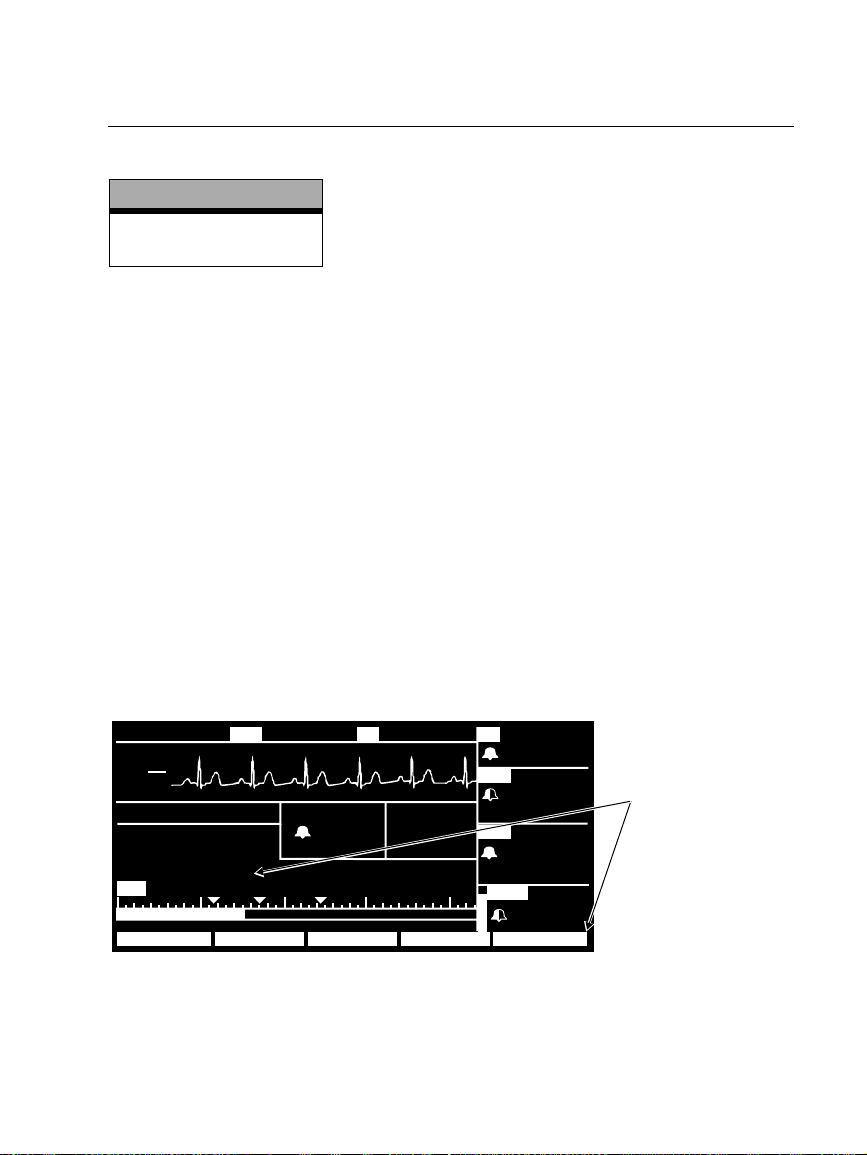
As medições de PNI podem ser afectadas adversamente por vários factores, tais como
arritmias cardíacas, alterações súbitas de tensão, movimentos corporais tais como
convulsões ou tremores, pancadas na braçadeira, vibrações, movimentos de veículos
ou pulsação fraca.
O software de tecnologia de filtragem patenteado Smartcuf aumenta
consideravelmente a precisão das medições de PNI na presença de artefactos de
movimento ou de pulsação reduzida. O Smartcuf sincroniza a leitura de PNI com a
onda R do ECG do paciente, para eliminar o ruído criado por estímulos externos, tais
como vibração ou movimento do paciente. O monitor tem de realizar a monitorização
de ECG enquanto utiliza o Smartcuf.
Para activar o filtro Smartcuf:
• Ligue os terminais de ECG ao paciente e realize a monitorização de ECG durante a
• No Menu Principal, prima
2.0X-2.1X
PNI.
PNI para ver o Menu de PNI e coloque Smartcuf em ON
(ligado).
18:46:00
III
mV
1
cm
MON
PNI
MODO : CONTINUO
HORA : 4:21
SMARTCUF : ON
85 50 100 150 200
S D (M)
S 122
g
mmH
( 85)
122
58
39,1
1PNI
18:45:28
°
C
FCT
80
ART
( 87)
PNI
( 85)
SpO2
109
72
122
58
Ligue o SMARTCUF
(ON).
99
PARAR SMARTCUFINTERVAL CONTINUOAUTO/MAN
Propaq Encore 2.0X-2.1X Reference Guide/Directions for Use 41
Update
Page 42
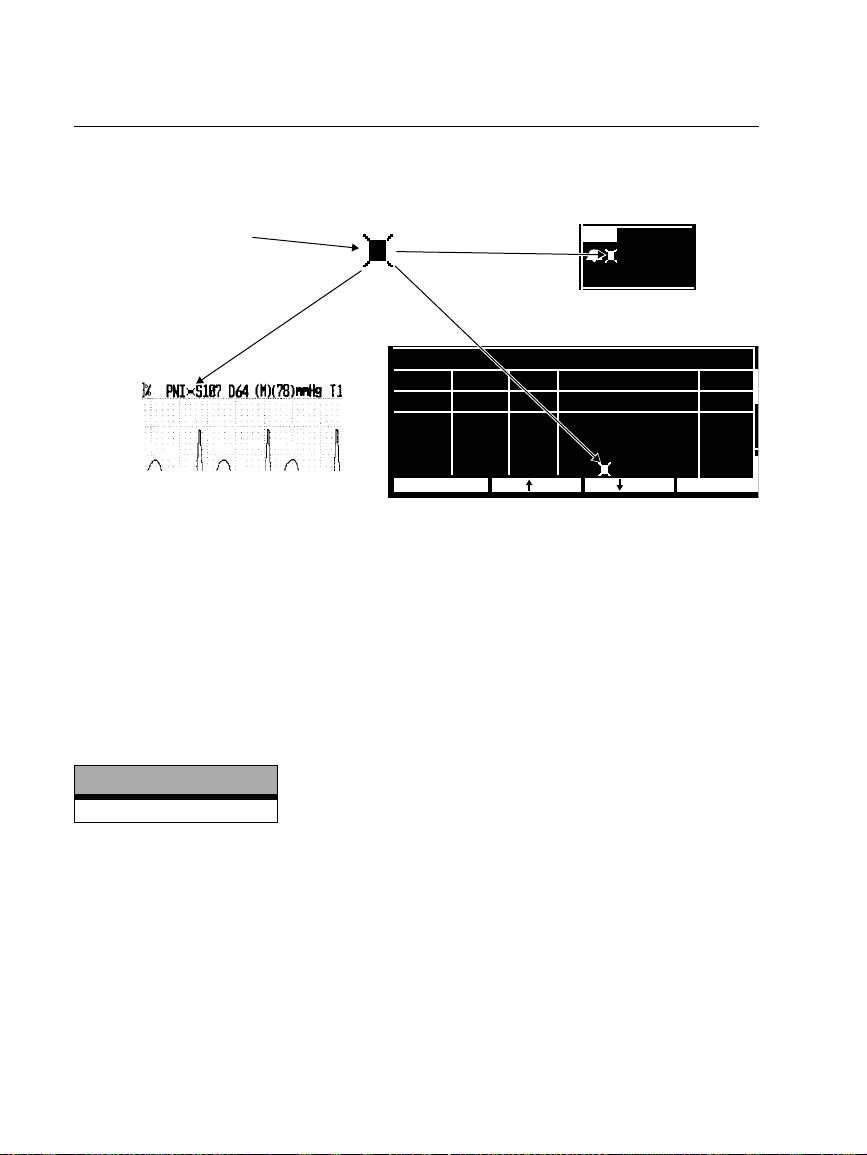
Português (cont.)
M
(
D
P
Se o artefacto for tão severo enquanto o Smartcuf estiver activo que afecte a precisão
de uma medição de PNI, essa medição é marcada com um símbolo especial no ecrã e
nas impressões:
Este símbolo indica que a
leitura de PNI foi feita na
presença de artefacto alto
enquanto se monitorizava o
ECG com o Smartcuf activo.
O artefacto pode afectar a
precisão.
PNI
mmH
S 122
D 58
(M)( 85)
Ecrã numérico
g
PNI TEND.
Impressão
HORA FR S D (M)FC/FP
10:01
9:46
9:31
9:20
IMPRIMIR
1/min
101
88
93
91
SpO2
% mmH
98
139 74 (106)
PROC
142 83 (110)
OFF
145 87 (112)
100
126 85 ( 91)
Ecrã de tendência
g
1/minh:min
11
10
5
11
PRX TEN
Podem haver situações em que seja desejável desactivar o Smartcuf. Isto pode incluir
situações com artefacto de movimento extremo, certos tipos de arritmia ou outras
situações em que não seja possível obter um bom sinal de ECG. As medições de PNI
podem ser realizadas mesmo com o Smartcuf desactivado.
Para desactivar o Smartcuf, a partir do Menu Principal prima
PNI para exibir o Menu
de PNI e coloque Smartcuf em OFF (desligado).
PNI Mensagens de Alerta de Equipamento
Versão de software
2.1X
ARTEFACTO PRESENTE, MINIMIZAR ARTEF (ERR# 15). O monitor detectou
demasiado artefacto para permitir uma leitura precisa. Siga as etapas para
reduzir o artefacto. Posicione o membro do paciente longe do corpo para que
a braçadeira não esteja em contacto com o corpo do paciente ou com
quaisquer outros objectos tais como a grade da cama. Se o filtro de artefacto
de movimento Smartcuf estiver ligado, certifique-se de que os terminais de
ECG estão ligados adequadamente para realizar monitorização de ECG
durante a PNI. Se o filtro de artefacto de movimento Smartcuf estiver
desligado, veja se o pode ligar (e ligue o ECG se ainda não estiver ligado).
42 Protocol Systems, Inc.
Page 43
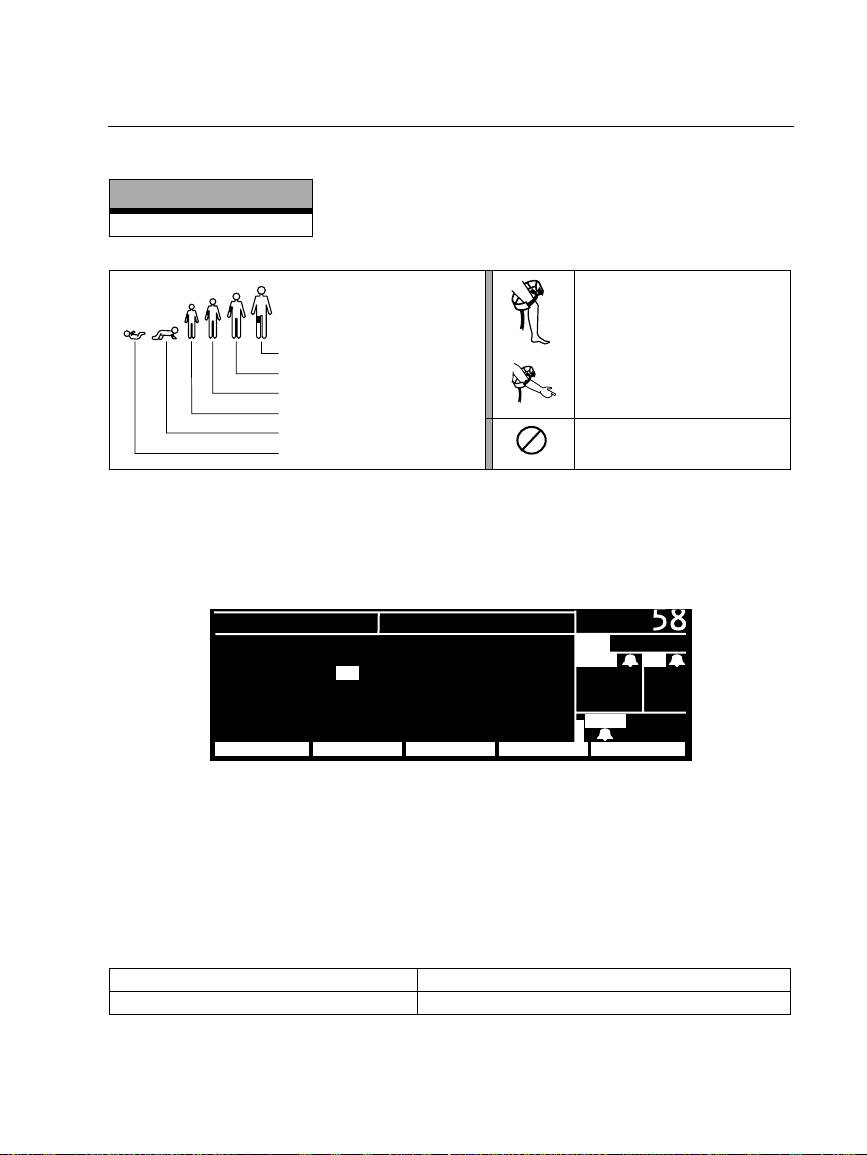
Símbolos de braçadeira de PNI
Versão de software
2.0X-2.1X
Português (cont.)
Tamanhos da braçadeira
de PNI:
Coxa
Adulto grande
Adulto
Criança pequena
Criança
Bebé
Aplique a braçadeira de PNI
tal como mostrado.
Apenas para utilização única
2
(não reutilizável).
Ajustes Predefinidos do Ecrã PNI
Para seleccionar que curvas de sinais vitais são exibidas, prima MENU PRINCIPAL,
CONFIG., SEL.CURVA, para exibir a janela Seleccionar curva.
CONFIG.
ECG : ON RESP : OFF
ART : ON SpO2 : ON
PAP : OFF PNI : ON
CO
2 : OFF
PROXIMO MENU ANT EMSERV.ON/OFF
Para activar a exibição de uma curva ou de números de PNI grandes, seleccione ON (o
ECG não pode estar em OFF). O monitor exibe as primeiras três curvas activas em ON,
pela ordem das prioridades estabelecidas na janela Seleccionar curva. Se a PNI estiver
em ON e apenas uma ou duas outras curvas estiverem em ON e activas, o monitor
exibe números grandes de PNI numa janela de curvas.
SELEC. CURVA
( 85)
PA
P
MCO
35
mmH
SpO
35/ 18
2 FR
12
g
2
92
Os ajustes predefinidos de fábrica para a apresentação de curvas são:
Versão de software 2.03.00-2.1X Todas as curvas e PNI estão em ON.
Versão de software 2.00.00-2.02.00 Todas as curvas estão em ON. PNI está em OFF.
Propaq Encore 2.0X-2.1X Reference Guide/Directions for Use 43
Update
Page 44
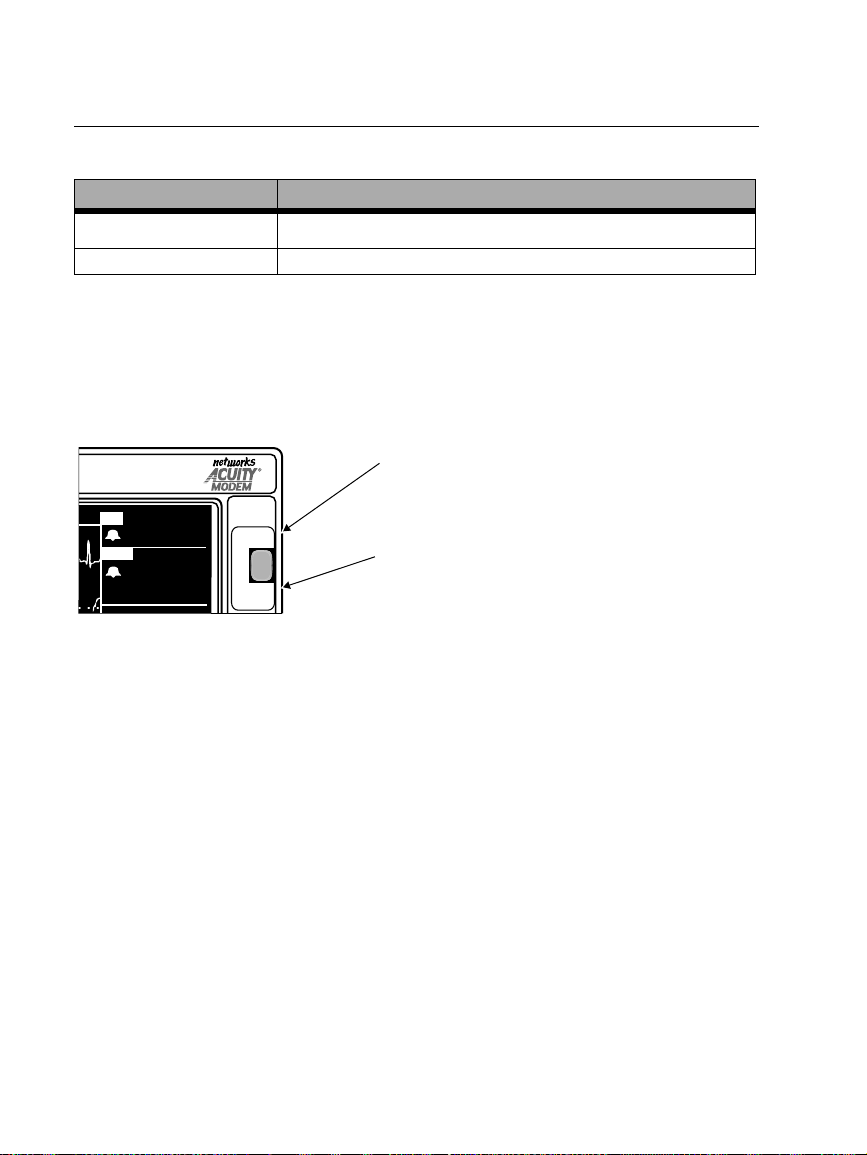
Português (cont.)
Prima REDE OFF para se desligar da rede Acuity
Versão de software REDE OFF
O botão
2.03.00-2.1X
2.00.00-2.02.00
Quando pretender desligar o monitor da Acuity, assegure-se de que utiliza o botão
REDE OFF como indicado a seguir. O botão REDE OFF é uma função de segurança para
ajudar a garantir que o paciente não é desconectado acidentalmente. Se desligar
simplesmente o cabo de rede Acuity do monitor sem utilizar o botão
o monitor como a rede Acuity geram mensagens de alerta que têm de ser reconhecidas
pelo operador.
FC
ART
( 85)
80
122
58
REDE OFF
CONGELAR/
RETOMAR
1. Para desligar o Propaq Encore da rede Acuity, prima o botão REDE OFF no
painel frontal.
2. Dentro de 15 segundos, desligue o cabo de rede Acuity do painel lateral do
Propaq Encore ou da ficha de rede de cabeceira. Se o paciente não voltar a ser
monitorizado com o Propaq Encore, desligue o monitor para apagar as
informações de tendências.
Se não desligar o cabo de rede Acuity dentro de 30 segundos, o monitor e a
rede Acuity tentam a reconexão e pedem-lhe para confirmar a identidade do
paciente.
REDE OFF no painel dianteiro
REDE OFF (CONFIG., ACUITY, REDE OFF)
A tecla
A tecla
REDE OFF (CONFIG., ACUITY, REDE OFF)
REDE OFF
Quando o monitor está ligado à Acuity , premir
este botão desliga o monitor da rede Acuity.
CONGELAR/RETOMAR
Quando o monitor NÃO estiver ligado à Acuity,
premir este botão congela ou retoma as curvas
visualizadas.
REDE OFF, tanto
Sempre que o monitor estiver ligado à rede Acuity, a função
função CONGELAR/RETOMAR do botão
REDE OFF no painel frontal. Assim, não é
REDE OFF sobrepõe-se à
possível congelar as curvas visualizadas quando o monitor está ligado à Acuity. Não
pode, de igual forma, iniciar a impressão duma curva congelada na rede Acuity,
quando estiver ligado à Acuity. Quando o monitor não estiver ligado à Acuity, premir
o botão CONGELAR/RETOMAR congela ou retoma as curvas visualizadas.
44 Protocol Systems, Inc.
Page 45
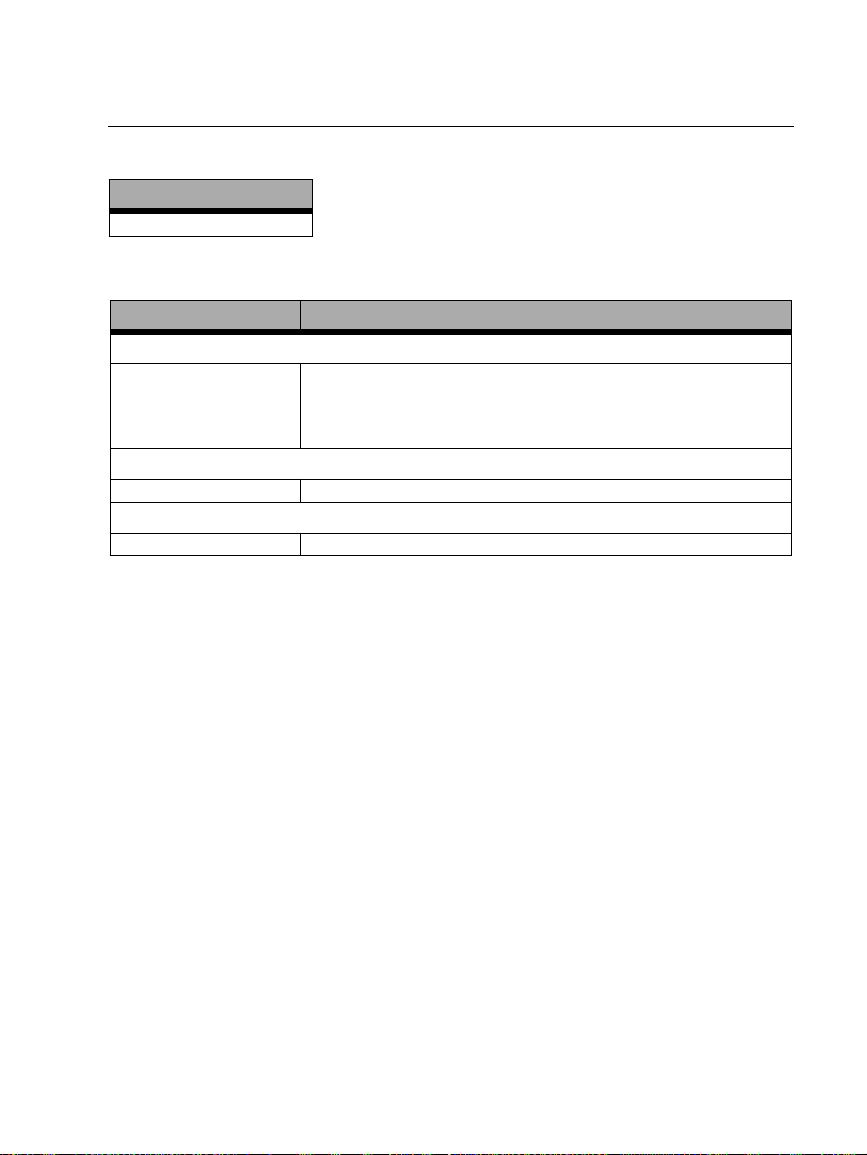
Português (cont.)
Capnografia (CO
Versão de software
2.0X-2.1X
)I
2
Geral CO2 Especificações (Mainstream CO2 e Sidestream CO2)
Característica Especificação
Visualização do CO
Exactidão
Mainstream1: 0-30 mmHg, ±3 mmHg
31-99 mmHg, ±10% do valor
Sidestream2: 0-30 mmHg, ±3 mmHg
31-99 mmHg, ±10% do valor
Apresentação de Frequência Respiratória
Exactidão ±1 respiração/min ou ±5%, aquele que for maior
Funcionamento da CO
Especificação Conforme ISO 9918:1993 (E) / EN 864:1996
1. Com base nestas condições das vias aéreas: temperatura do sensor 42°C; adaptador temperatura das
vias aéreas = 33°C; pressão de vapor de água = 38 mmHg; mistura padrão de gás = CO
equilibrado, totalmente hidratado a 33°C; pressão barométrica = 760 mmHg e fluxo = 60 ml/min.
2. Com base nas seguintes condições adicionais das vias aéreas: tubo de amostra = 7 ft, 0,055 in ID (2,13
m, 1,4 mm ID); fluxo de amostra = 175 ml/min; condensador de humidade Protocol (novo/não utilizado);
frequência respiratória ≤50 respirações/min, estável até ±3 respirações/min; razão de tempo Inspirado/
Expirado = 1:2; pressão barométrica = 760 mmHg.
3. Para Sidestream CO2, isto aplica-se apenas para a FR ≤50.
2
3
2
em ar
2
Propaq Encore 2.0X-2.1X Reference Guide/Directions for Use 45
Update
Page 46
Português (cont.)
Definições de Dia/Hora e Tendências
Versão de software
2.0X-2.1X
Aviso
A alteração da definição de hora/minuto/segundo do monitor na janela Dia/Hora
pode resultar no monitor apagar os dados de tendência do paciente previamente
armazenados.
Ao alterar a definição de hora/minuto/segundo do monitor na janela Hora/Dia, o
monitor apaga todos os dados de tendência do paciente superiores a cinco horas no
caso de tendências não-PNI ou superiores a oito horas no caso de tendências PNI de
acordo com a nova definição do relógio.
No entanto, se o monitor ainda não tiver armazenado a capacidade total de tendências
e for efectuada uma alteração da definição de hora/minuto/segundo para um
momento que se encontre dentro do período das tendências armazenadas, estas não
serão apagadas.
A alteração da definição do dia, mês ou ano não afecta as tendências de paciente
armazenadas.
46 Protocol Systems, Inc.
Page 47
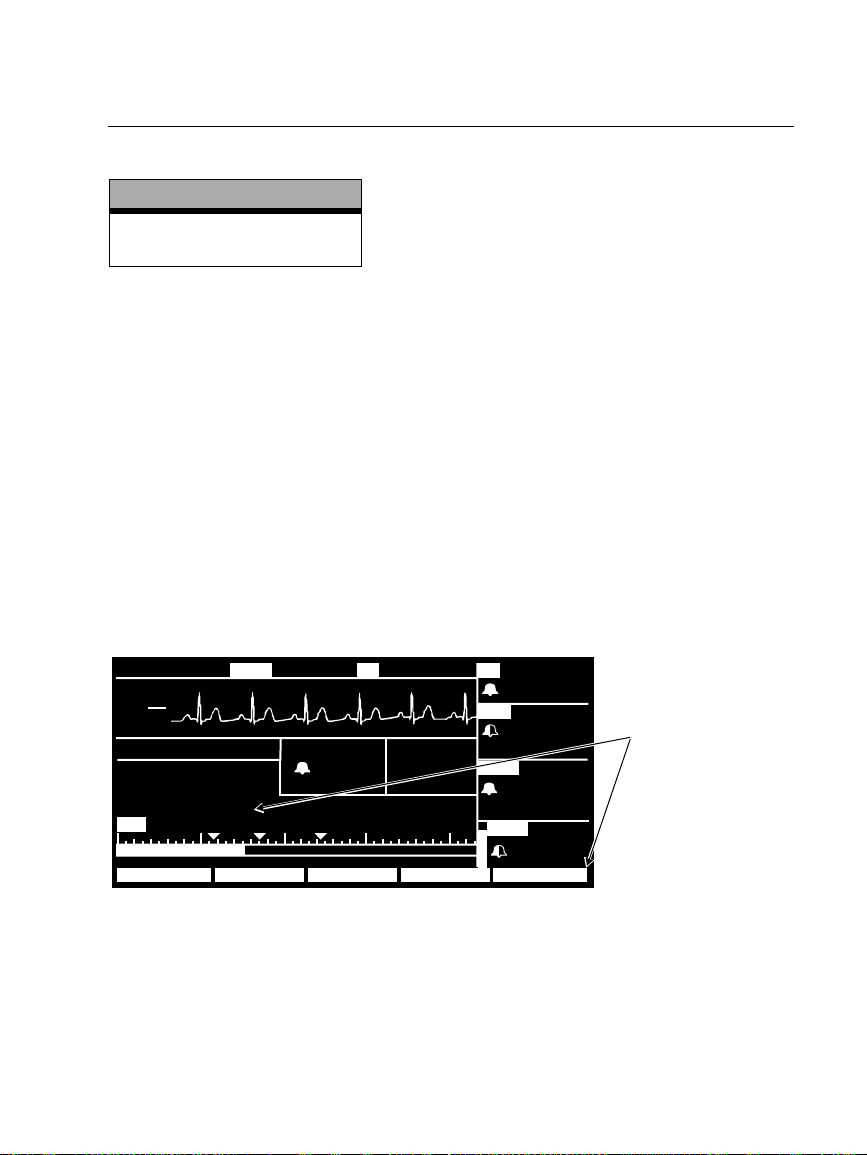
Svenska
Förbättra noggrannheten för NIBP med Smartcuf™
Mjukvaruversion
(OBS! Smartcuf-knappen finns
NIBP-mätningar kan påverkas negativt av många faktorer , t ex hjärtarytmier, plötsliga
blodtrycksförändringar , kr oppsrör elser såsom konvulsioner eller darrningar, slag mot
manschetten, vibrationer, fordonsrörelser eller svag puls.
Den patenterade mjukvarubaserade filtreringstekniken för Smartcuf ger en kraftigt
förbättrad mätnoggrannhet för NIBP vid förekomst av rörelseartefakt eller försvagad
puls. Smartcuf synkroniserar NIBP-värdet med R-vågen i patientens EKG för att
eliminera brus som skapas av externa stimuli, t ex patientrörelser eller vibrationer.
Monitorn måste utföra EKG-övervakning då Smartcuf används.
Aktivering av Smartcuf-filter:
• Anslut EKG-avledningarna till patienten och utför EKG-övervakning under NIBP.
• Tryck på
läge PÅ.
2.0X-2.1X
endast för 2.1X.)
NIBP på huvudmenyn för att kalla fram NIBP-menyn och sätt Smartcuf i
18:46:00
III
mV
1
cm
MON
NIBP S D (M)
LÄGE: TURBOCUF.
TID: 4:21
SMARTCUF : PÅ
85 50 100 150 200
S 122
g
mmH
( 85)
122
58
39,1
1NIBP
18:45:28
°
C
HFT
80
ART
( 87)
NIBP
( 85)
SpO2
109
72
122
58
Ställ Smartcuf i
läge PÅ.
99
STOPP SMARTCUFINTERVAL TURBOCUFAUTO/MAN
Propaq Encore 2.0X-2.1X Reference Guide/Directions for Use 47
Update
Page 48
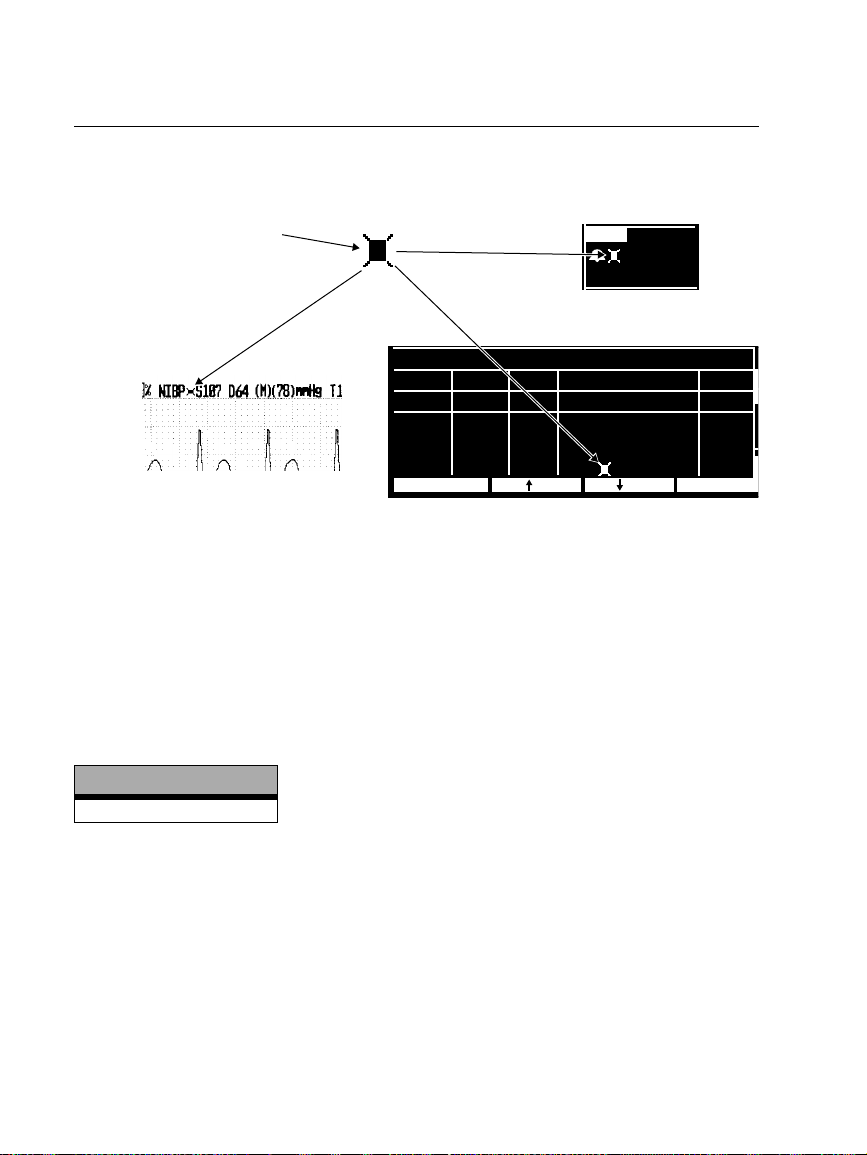
Svenska (fort.)
M
(
D
P
Om artefakten är så allvarlig när Smartcuf är aktivt att den påverkar noggrannheten
för NIBP-mätningen, markeras denna mätning med en speciell symbol på displayen
och på utskrifter.
Denna symbol anger att NIBPmätningen gjorts i närvaro av
en kraftig artefakt under EKGövervakning med Smartcuf
aktivt. En artefakt kan påverka
noggrannheten.
NIBP
mmH
S 122
D 58
(M)( 85)
Numerisk display
g
NIBP-TREND
Utskrift
TID AF S D (M)HF/PF
10:01
9:46
9:31
9:20
UTSKRIFT NÄST TR
1/min
101
88
93
91
SpO2
% mmH
98
139 74 (106)
SÖK
142 83 (110)
AV
145 87 (112)
100
126 85 ( 91)
Trenddisplay
g
1/minh:min
11
10
5
11
Det kan uppstå situationer då det kan vara önskvärt att deaktivera Smartcuf. Detta
kan inträffa vid extrem rörelseartefakt, vissa typer av arytmier eller andra situationer,
då det inte är möjligt att få en bra EKG-signal. NIBP-mätningar kan utföras även om
Smartcuf inte är aktivt.
Smartcuf deaktiveras från huvudmenyn. Tryck på
NIBP så att NIBP-menyn visas och
ställ Smartcuf i läge AV.
NIBP utrustningsvarningar
Mjukvaruversion
2.1X
ARTEFAKT, MINIMERA ARTEFAKT (FEL# 15).
Monitorn känner av en allför hög artefaktmängd vilket hindrar tillförlitlig mätning.
Vidta åtgärd för att reducera mängden. Flytta patientens arm så att manschetten inte
kommer i kontakt med patientens kropp eller något annat föremål, t ex sänggrinden.
Om rörelseartefaktfiltret för Smartcuf är påslaget ska du se till att EKG-avledningarna
är korrekt anslutna för EKG-övervakning under NIBP. Om artefaktfiltret är avstängt
bör du aktivera det (och ansluta EKG-apparaten om denna inte redan är ansluten).
48 Protocol Systems, Inc.
Page 49
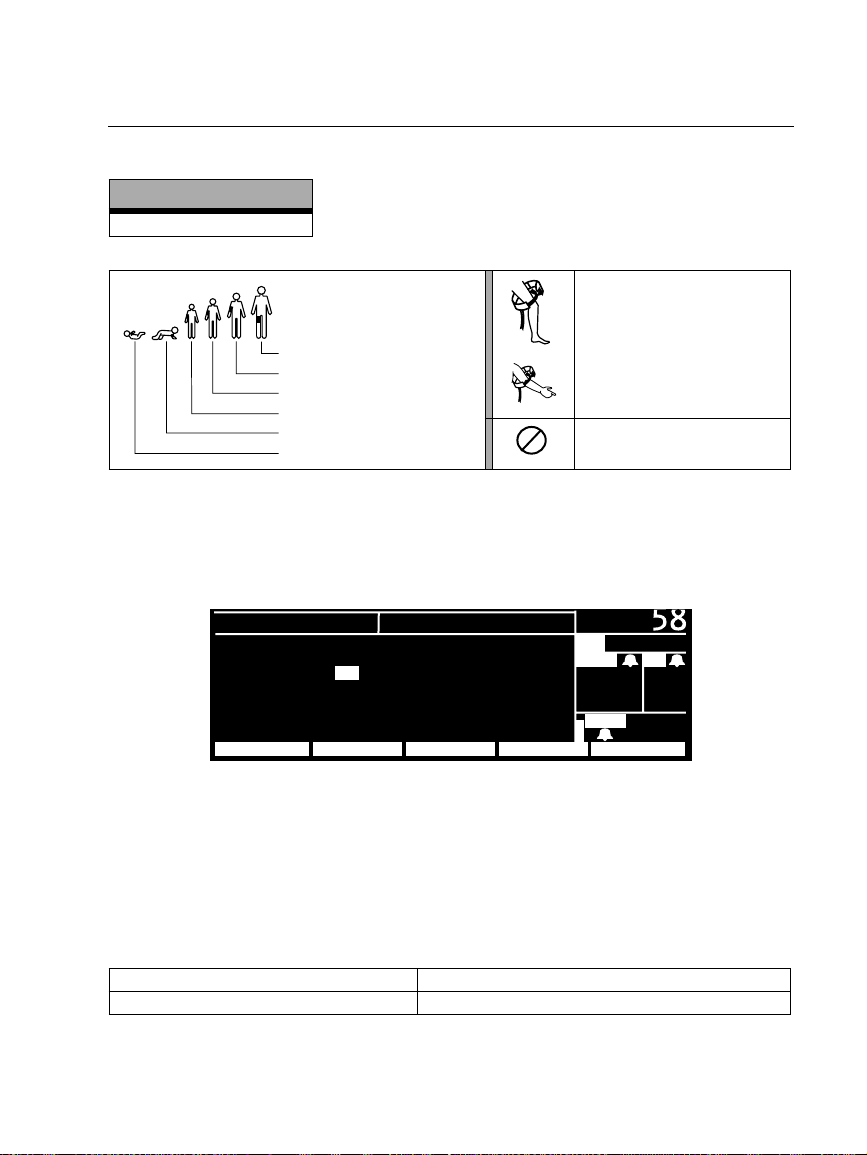
NIBP manschettsymboler
Mjukvaruversion
2.0X-2.1X
Svenska (fort.)
NIBP manschettstorlekar:
Lår
Stor vuxen
Vuxen
Litet barn
Barn
Spädbarn
Sätt på NIBP-manschetten
som figuren visar.
Endast för engångsbruk (får
2
ej återanvändas).
NIBP - Visa fabriksinställningar
För att välja de vitala parametrar vågformer som ska visas tryck på HUVUDMENY,
INSTÄLLN, VÅGVAL och kalla fram vågvalsfönstret.
INSTÄLLNING
EKG : PÅ RESP : AV
ART : PÅ SpO2 : PÅ
PA : AV NIBP : PÅ
CO
2 : AV
NÄSTA FÖREG MNY INSERVPÅ/AV
För att aktivera visningen av en vågform eller stora NIBP-siffror välj PÅ (EKG kan inte
ställas i läge AV). Monitorn visar de första tre aktiva vågformerna som är PÅ i den
prioritetsordning som anges i vågvalsfönstret. Om NIBP är PÅ och endast en eller två
andra vågformer är PÅ och aktiva, visar monitorn stora NIBP-siffror i ett
vågvalsfönster.
VÅGVAL
( 85)
PA
MCO
2 AF
35
mmH
SpO
35/ 18
g
2
12
92
Fabriksinställningar för visning av vågformer är:
Mjukvaruversion 2.03.00-2.1X Alla vågformer och NIBP är PÅ.
Mjukvaruversion 2.00.00-2.02.00 Alla vågformer är PÅ. NIBP är AV.
Propaq Encore 2.0X-2.1X Reference Guide/Directions for Use 49
Update
Page 50
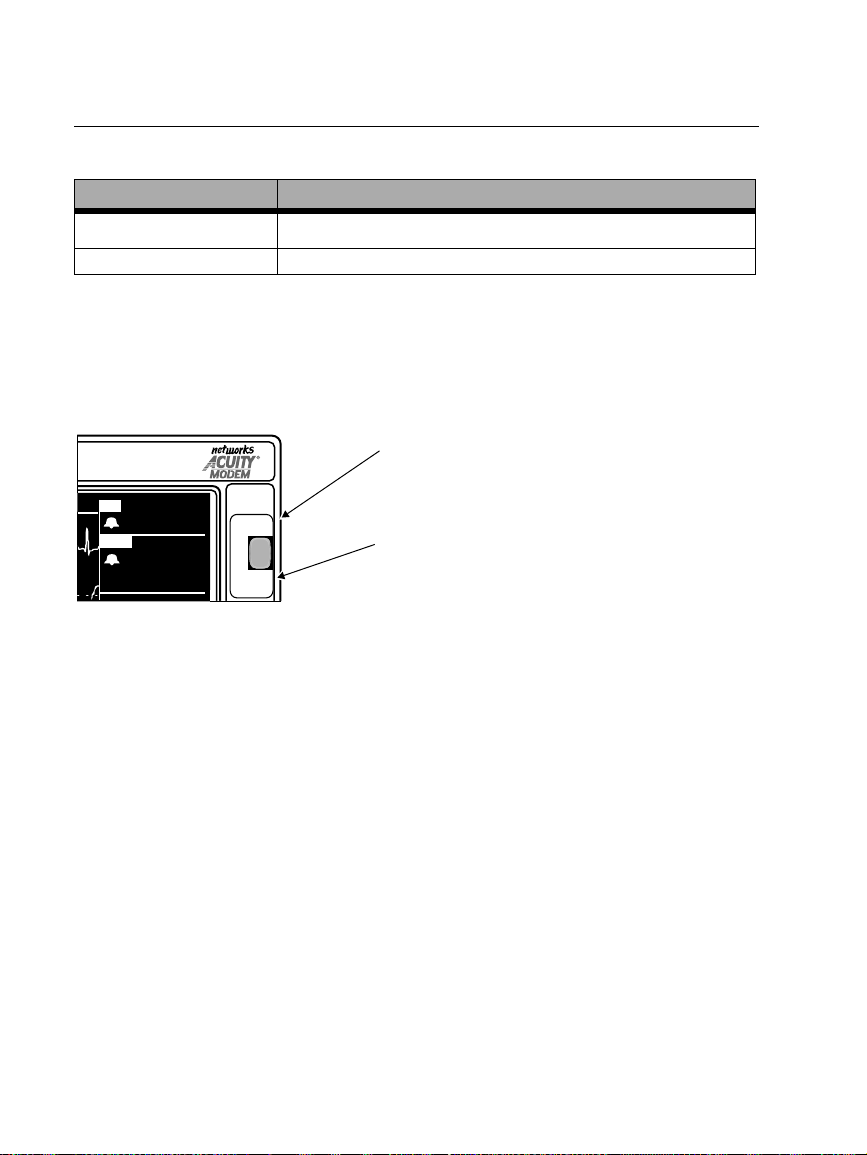
Svenska (fort.)
Tryck på NÄT AV för att koppla ned från Acuity
Mjukvaruversion NÄT AV
2.03.00-2.1X
2.00.00-2.02.00
Knappen
Programtangenten
Programtangenten
När du vill koppla ned monitorn från Acuity, ska du använda knappen NÄT AV som
beskrivs nedan. Knappen
NÄT AV är en säkerhetsfunktion som minskar risken för att
patienten kopplas bort av misstag. Om du kopplar bort Acuity-nätets kabel från
monitorn utan att använda knappen
utrustningsvarningar som måste kvitteras (bekräftas) av en operatör.
HF
ART
( 85)
80
FRYS/
FRYS/
FRYS UPP
FRYS UPP
122
58
NÄT AV
FRYS/
FRYS UPP
1. Om du vill koppla ned Propaq Encore från Acuity-nätet, trycker du på
knappen
NÄT AV på frontpanelen.
2. Koppla inom 15 sekunder bort Acuity-nätets kabel, antingen från sidopanelen
på Propaq Encore eller från Acuity-nätets kontakt invid sängen. Om patienten
inte längre ska övervakas med Propaq Encore, slår du av strömmen till
monitorn så att trendinformationen raderas.
Om du inte kopplar bort Acuity-nätets kabel inom ca 30 sekunder, försöker
monitorn och Acuity att återansluta och du ombeds att bekräfta patient-ID.
NÄT AV på frontpanelen
NÄT AV (INSTÄLLN, ACUITY, NÄT AV)
NÄT AV (INSTÄLLN, ACUITY, NÄT AV)
NÄT AV, ger både monitorn och Acuity
NÄT AV
När monitorn är ansluten till Acuity och du
trycker på den här knappen kopplas monitorn
ned från Acuity-nätet.
FRYS/FRYS UPP
När monitorn INTE är ansluten till Acuity och du trycker
på den här knappen fryses vågformerna eller stoppas
frysningen av vågformerna på skärmen.
När monitorn är ansluten till Acuity gäller i första hand funktionen
knappen
NÄT AV på frontpanelen (och inte funktionen FRYS/FRYS UPP). Därför kan
NÄT AV för
du inte frysa vågformerna när monitorn är ansluten till Acuity. Du kan inte heller göra
frysutskrift på Acuity när du är ansluten till Acuity. När monitorn inte är ansluten till
Acuity kan du trycka på knappen FRYS/FR YS UPP och då frysa eller stoppa frysning
av vågformerna.
50 Protocol Systems, Inc.
Page 51
Svenska (fort.)
Capnografi (CO
Mjukvaruversion
2.0X-2.1X
)
2
Allmänna CO2-specifikationer (Mainstream-CO2 och Sidestream-CO2)
Karakteristik Specifikation
CO2-visning
Noggrannhet
Noggrannhet ±1 andetag/min eller ±5%, vilket som är störst
Specifikation Enligt ISO 9918:1993 (E) / EN 864:1996
1. Baserat på de här tillstånden i luftvägarna: temperatur för sensor = 42°C; temperatur för luftvägsadapter
= 33°C; vattenångetryck = 38 mmHg; standardgasblandning = CO
vid 33°C; barometriskt tryck = 760 mmHg och flöde = 60 ml/min.
2. Baserad på följande ytterligare luftvägstillstånd: Provtagningsrör = 2,13 m, 1,4 mm innerdiameter;
Typisk flödestakt = 175 ml/min; Protocol-vattenlås (nytt/oanvänt); Andningsfrekvens ≤50 andetag/min,
stabilt på ±3 andetag/min; förhållande inandningstid/utandningstid = 1:2; barometriskt tryck = 760
mmHg.
3. För Sidestream-CO2 gäller detta enbart för AF≤50.
Mainstream1: 0-30 mmHg, ±3 mmHg
31-99 mmHg, ±10% av värdet
Sidestream2: 0-30 mmHg, ±3 mmHg
31-99 mmHg, ±10% av värdet
Visning av andningsfrekvens
CO2-prestanda
i balanserad luft, fullt vattenhaltig
2
3
Propaq Encore 2.0X-2.1X Reference Guide/Directions for Use 51
Update
Page 52
Svenska (fort.)
Tid/dag-inställningar och trender
Mjukvaruversion
2.0X-2.1X
Varning
Ändring av monitorns inställningar för timme/minut/sekund i tid-/dagfönstret kan
medföra att tidigare lagrade patienttrenddata raderas.
Om du ändrar monitorns inställningar för timme/minut/sekund i tid-/dagfönstret,
raderas alla patienttrenddata som är äldre än fem timmar när det inte gäller NIBPtrender eller åtta timmar när det gäller NIBP-trender enligt den nya
klockinställningen.
Men om full trendkapacitet ännu inte lagrats i monitorn och du ändrar inställningarna
för timme/minut/sekund till en tid inom den lagrade trendperioden, raderas inte
trenderna.
Ändring av inställning för dag, månad och år påverkar inte lagrade patienttrender.
52 Protocol Systems, Inc.
Page 53

Propaq Encore 2.0X-2.1X Reference Guide/Directions for Use 53
Update
Page 54

54 Protocol Systems, Inc.
Page 55

Page 56

 Loading...