

Page 1
Manual
for Incubator
Operating Manual for Incubator
CTD7
Page 2

Content
Installing your Grumbach Incubator
................................................................ 4
Safety instructions
Important! .................................................................................................. 4
The incubating room .................................................................................. 4
Safety thermostat
Tank flap .................................................................................................... 6
Turning of eggs .......................................................................................... 6
Light switch
Putting in the eggs .................................................................................... 6
The hatch ................................................................................................... 7
Cleansing and disinfection ......................................................................... 8
Operation..................................................................................................... 10
Technical data .......................................................................................... 11
Service ..................................................................................................... 11
Home ....................................................................................................... 12
Menu ....................................................................................................... 13
1. Temperature and humidity target ........................................................ 14
2. Cooling Phases .................................................................................... 15
...................................................................................... 4
....................................................................................... 5
................................................................................................ 6
3. Rotation phase ..................................................................................... 16
4. Offset, temperature unit ..................................................................... 17
5. Brood Calendar, data logging and language ........................................ 18
6. Limits ................................................................................................... 19
7. E-mail, live data .................................................................................... 20
8. Device description, display settings .................................................... 21
9. Test ...................................................................................................... 22
10.1 Ethernet Connection (LAN) ............................................................ 23
10.2 WiFi connection (WLAN) ................................................................. 24
11. Error page .......................................................................................... 25
2
Page 3

12. Info page ............................................................................................ 26
Web browser .............................................................................................. 27
1. Home ................................................................................................... 27
2. Calendar ............................................................................................... 28
3. Graph ................................................................................................... 29
2. Logs ..................................................................................................... 30
3. Website ProCon-Grumbach ................................................................. 31
Breeding recommendation.......................................................................... 32
attachment 1: Privacy Policy ....................................................................... 33
3
Page 4

Installing your Grumbach Incubator
Dear Customer!
For your GRUMBACH-incubator we would like to wish you every success.
Before you start incubating you should read the manual.
Safety instructions
We accept no liability for damage caused by non-observance of these
instructions or improper handling. In these cases, all warranty claims expire.
Read these instructions completely before using the incubator
for the first time!
For safety reasons, any unauthorized design changes to the device and the
components intended for use with the device are not permitted!
The determination of valid measurement results, conclusions and measures
derived therefrom are the sole responsibility of the user! A liability or
guarantee for the correctness of the provided results (data) is excluded. Under
no circumstances will liability be assumed for damages resulting from the use
of the retrieved measurement results.
Important!
Be sure to pull the electrical plug to disconnect from power supply before
cleaning the incubator.
For incubator CTD7, please check the filters regularly every eight days. In
young birds with feathers, dust formation is very high.
The incubating room
The operating conditions can be different according to the place of setting.
Components like the outside temperature, outer humidity, strength of the
electric current can be relevant.
Your incubator should be installed in a room free of an excess amount of
vibration like passing cars and trucks or other machinery. Basements are an
4
Page 5

ideal place, normally they offer an optimal incubating room climate. The
temperature where your machine is installed should be around 18-20 degrees
Celsius / 60-65 degrees and not higher than 25 °C!
Hygiene is necessary in the incubating room. Bacteria, virus and fungi which
are brought to the room with shoes can get into the incubator if you allow
them to stay in the incubating room. The floor should be disinfected at least
once a week and all surfaces (of the incubator and others) must be kept clean.
Inspect your incubator before using!
Despite all care and effort to insure safe transportation, you should thoroughly
check out all systems to make sure the unit is functioning properly. A 2-3 days
run without eggs should be carried out.
Starting
Make sure you are familiar with the incubator and its controls. After plugging
into a properly grounded 230 voltage safety socket, which is according to the
regulations, your incubator is operational.
Safety thermostat
Additionally, we installed a safety thermostat in all incubators, which prevents
over- heating. For safety reasons, the adjustment is made with a thin screw
driver:
1/10 of a turning is equal to 1 °C. A turn to the right causes an increase of the
shutdown temperature, a turn to the left reduces it.
The shutting down of the temperature will be confirmed with a quiet click and
the extinction of the thermo- and the humidity control lights.
It is necessary that the stopper is fixed to its shut down temperature after the
test run. Please turn it very carefully, as a minimum turn already changes the
shutdown temperature.
When you let the temperature rise with the thermo adjustment you can
decide about the exact shut down temperature. The shutdown temperature
should be at least 1 °C above the incubating temperature because the feeler
sensor of the protective thermostat is located next to the heating spiral and
senses a higher temperature there than inside the breeding room.
5
Page 6

Tank flap
The flap is only to be used when you wish to reduce humidity while the tank
is full. Behind the knob is a flap which opens or closes the installed filler pipes.
Position 3 means “open”. This adjustment is necessary if you use the
automatic humidity, so humid air can be blown from the tank into the breeding
room. The six o’clock setting means that the flap closes the tank and no
unnecessary moisture enters the incubating chamber; additionally, the set
value for the moisture must be reduced to 5 %. This rotary control saves a
pouring out of the water from the tank when the air humidity in the breeding
room has gone up.
Turning of eggs
There are trays situated in every incubator to hold the eggs. The ground of
these trays is made of covered punch metal. The eggs must be laid on the
rollers so that the pointed sides are opposite the blunt sides (in such a way,
that the blunt ends and the pointed ends point towards each other). This
prevents a rolling away of the eggs into one direction. Always fill the trays
from the middle to the outside to support the air circulation.
The eggs should lie on the trays horizontally during incubating. It does not
matter though if the eggs are half diagonal- if done so the capacity is higher.
Depending on the egg, from the 1st to the 3rd breeding day, they can be
turned. In manual machines the turning is done by pushing the egg tray to the
back of the incubator, then pulling to the front.
Light switch
The light switch works the light for the breeding room of the incubator. With
normal switching, the light stays on for at least 1minute. This time prologues
when you use switches on the touch panel. If you want the light to stay on
permanently Turn on the light switch while holding for 2 seconds.
Putting in the eggs
If the incubator has been working without faults during a 2-3 days testing
period, you can start to put in the eggs. Once the eggs are inside the incubator
the temperature will fall. There is no need to worry- because, when the
6
Page 7

incubator was open, a lot of heat has escaped, and the temperature of the
eggs is much lower. It would be wrong to turn up
the heat, as the eggs first must adopt the breeding temperature. After a few
hours the thermometer will show the correct temperature.
The eggs trays with rollers are adjustable to each size of egg by fitting the
gaps between the rollers to the egg size, the egg lies horizontally on two
rollers. The eggs’ blunt ends should lie towards each other blunt ends and the
pointed eggs towards each other, so the eggs do not pile up.
Incubating temperature
The ideal temperature recommended by experts is 37,5 °C in the beginning.
A proven fact is, that the temperature to strive for is 37,8 °C / 100 °F. For the
three days before hatching the temperature can be about 0,5 °C to 1 °C less.
The hatch
If the incubating has gone well, you can be relaxed while you await the day
of hatching. You should then move the eggs to the Hatcher, or, if you plan to
do the hatching in the same incubator, suit the temperature and the humidity
to the eggs. Take out the trays with rollers and put the eggs on the grating
floor. It is often more favorable to put the eggs in special hatching trays.
To avoid bad pollution during hatching you could cover the floor of the
incubator with paper before. The temperature for the hatch should be around
37° C. To raise the intake of oxygen for the chicks, experts recommend
putting eggs into a diluted hydrochloric acid solution. This will remove the
layer of fat. (5 liters of water, 1 tablespoon of 18 per cent hydrochloric acid).
The temperature in the leach should be about 37 °C, after the bath the eggs
should be cleaned thoroughly with fresh water (also 37 °C warm). For other
eggs it is enough to brush of the layer of fat carefully to enable a better way
through for the oxygen.
To supply the eggs with the necessary humidity during the hatch, at first, the
openings for the fresh air should stay closed. By adjusting the openings, you
can dispense the humidity in the incubator.
Please do not open the incubator unnecessarily until the last chick has freed
itself from its shell.
7
Page 8

Cleansing and disinfection
After the completed hatch, the incubator should be cleaned thoroughly with
a damp cloth. The drawers can be scoured with soapy water and the trays of
Compact and closet incubators can be just cleaned with water. After that, the
incubator should be heated and disinfected.
Before the eggs are put in, you could disinfect those reliably with our
recommended disinfectant. Afterwards you should let some air in. When the
incubating season is over, and the incubator has been cleaned thoroughly it
should be left open, so the humidity
left in the incubator can escape. Before the next incubating, it is necessary to
clean the filter and change the filter paper.
It is senseless to ignore little faults and hope that they can repaired later. The
incubator must work faultlessly.
The determination of valid measurement results, conclusions and
measures derived therefrom are exclusively subject to the user's own
responsibility! A liability or guarantee for the correctness of the
provided results (data) is excluded. In no case will liability be assumed
for damages resulting from the use of the retrieved measurement
results.
8
Page 9

Checkpoints before putting in the eggs:
• Range of temperature
• constant temperature
• air humidity
• noise pollution
Incubator:
• horizontal position of the incubator
• measuring instruments (thermometer)
• operating elements (controls)
• test run
• water sterilized by boiling
• trouble-free running
Applies to all menu items:
All values which have to be changed during operation in the menu are
directly confirmed on the respective page and are then only active.
The changed values become active with a time delay. All values of the
individual menu items refer to 24 hours.
9
Page 10
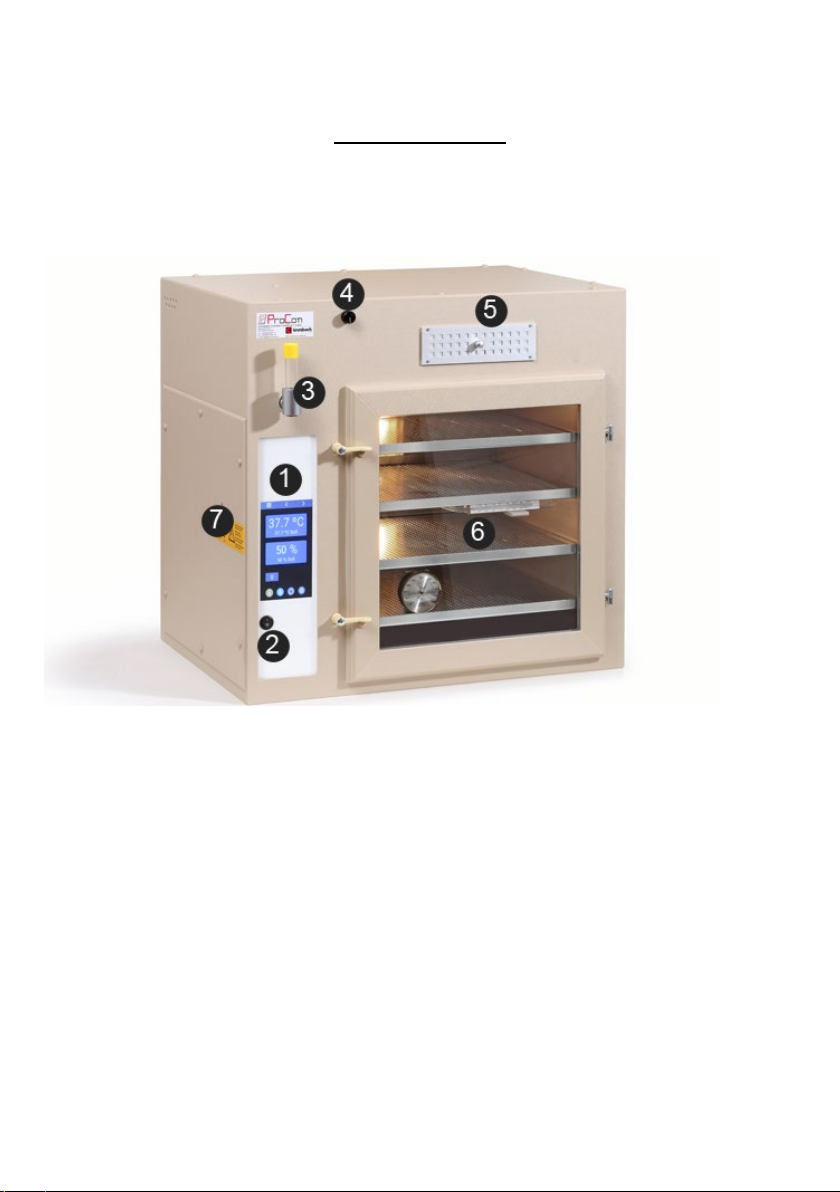
Operation
1.
Premium Touch Display
2. Main switch
3. Water fill in/Water drain plug
4. Tank flap
5. Fresh air
6. Egg trays with rollers
7. Security thermostat
10
Page 11

Technical data
Eggs
Bantams
Parrot
Pheasants
Quail
Ducks
Geese
EMU
Nandu
Ostriches
42
48
62
120
30
15
8-12
4-5
Voltage 230 V
Frequency 50th... 60 Hz
Rating: 500 w/AC-1
Capacity of different egg sizes per turning horde:
Service
ProCon automatic systems GmbH & Co. KG ·Bettwiesenweg 18 · D-35325
Mücke Phone +49 (0) 64 00/956 91-15 · Fax +49 +49 (0) 64 00/956 91-29
E-mail: info@grumbach-brutgeraete.de
·
Internet: www.grumbach brutgeraete.de
Important!
Since 1 January 1996, the CE marking has been compulsory in conjunction with the
EMC Directive.
Our products are subject to DIN EN 55104 (December 1995) regarding the immunity
of household appliances and meet the EMC requirements.
If the incubator is disturbed by high-frequency currents from the network, a temporary
impairment of the operating behavior may occur. After the fault, the device works as
intended.
11
Page 12
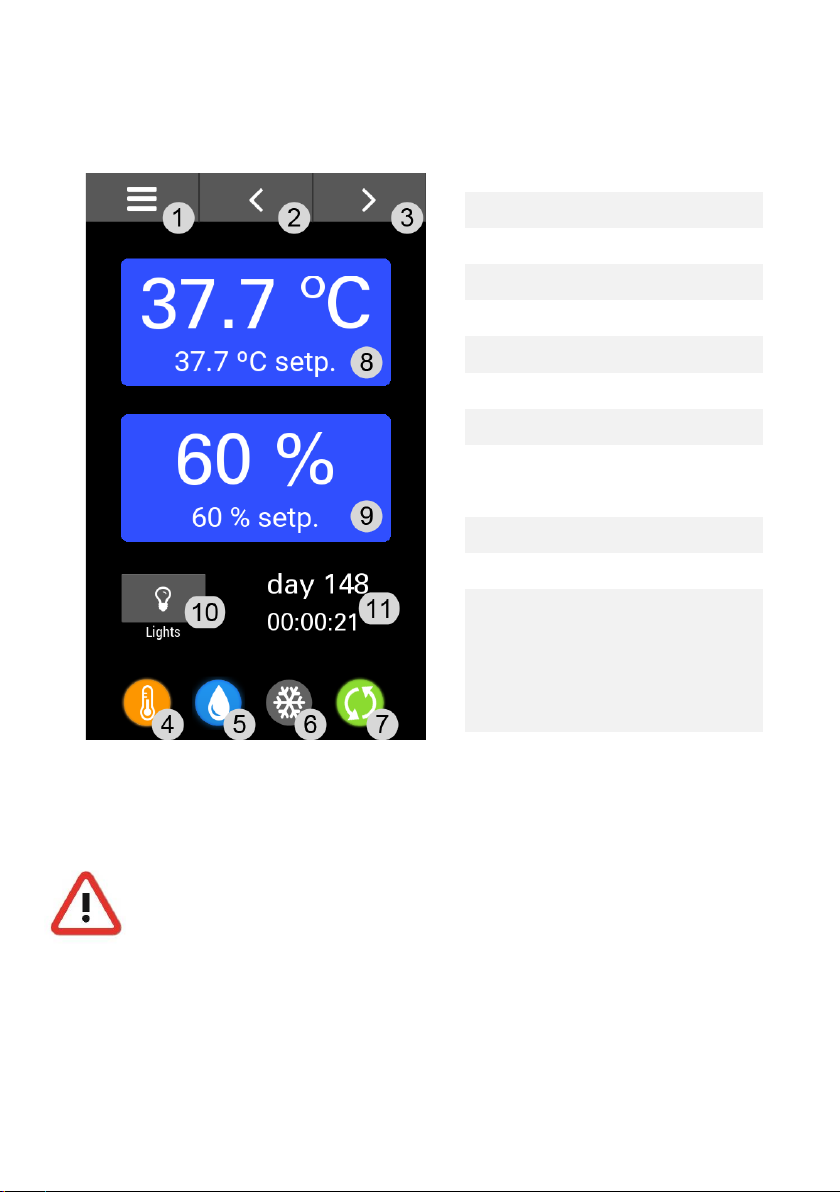
Home
page forward
6
cooling
7
turn/unlock
8
Setpoint
9
humidity
10
light
11
calendar breeding
1 menu/home
2 page back
3
4 temperature
5 humidity/water tank
temperature
time (visible, if
active-see under
Important!
Be sure to unplug the appliance before cleaning the incubator.
For incubator CTD7 Please check the filters regularly every eight
days. In the case of young animals with plumage, dust.
point 5-)
12
Page 13
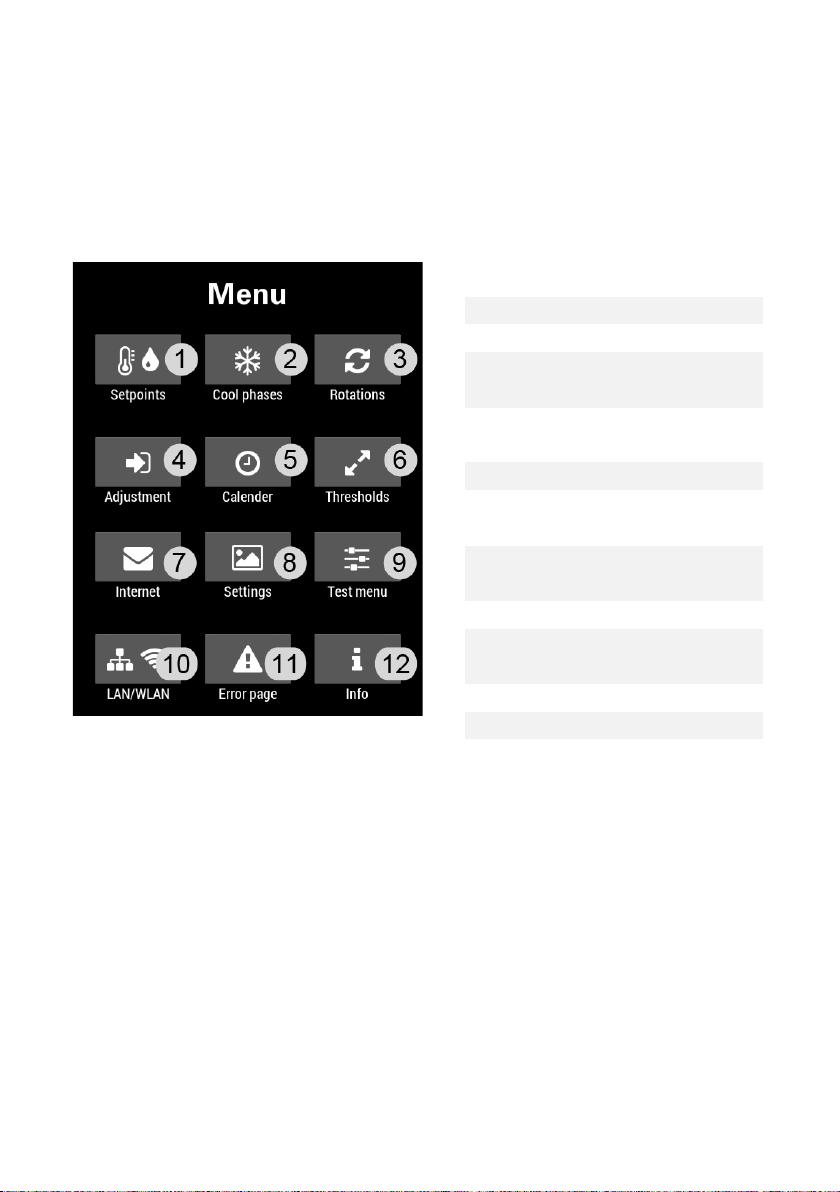
Menu
1
Temperature and
humidity set points
5
Breed calendar,
8
Display and language
9
Test site
11
Error page
12
Info page
Configuration sites can be reached via (<) and (>) buttons, as well as the
(☰) button.
2 Cooling phases
3 Rotation phases
4 Offset and
temperature unit
screen lock, logging
6 Threshold values
7 Email and internet
connection
settings
10 Ethernet (network
cable) / Wifi
13
Page 14
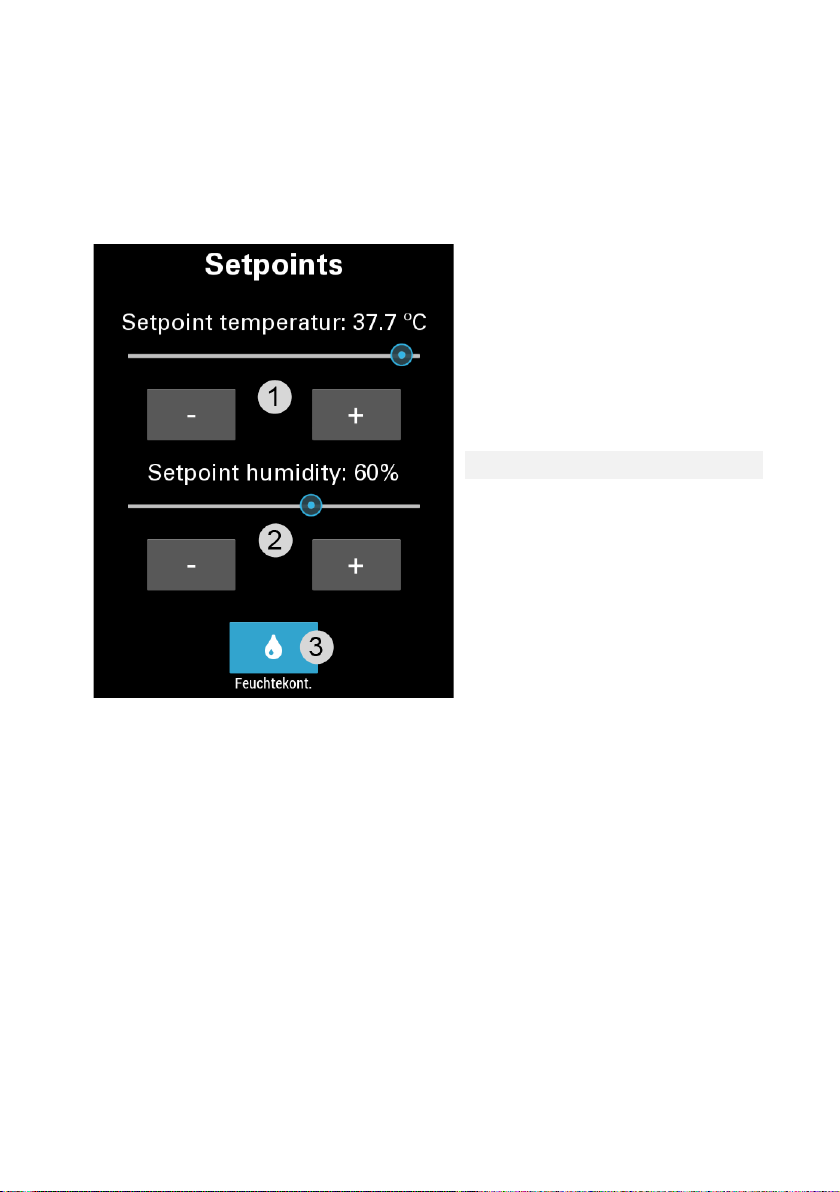
1. Temperature and humidity target
Set point
2
Set point humidity
Humidity regulation
This menu can also be reached on the home screen by touching the
temperature or humidity.
1
temperature
3
active/inactive
Note:
If the slider and the buttons are disabled (grayed out), the calendar is
active (see
language).
Under point 5. Brood Calendar, data logging went,
14
Page 15
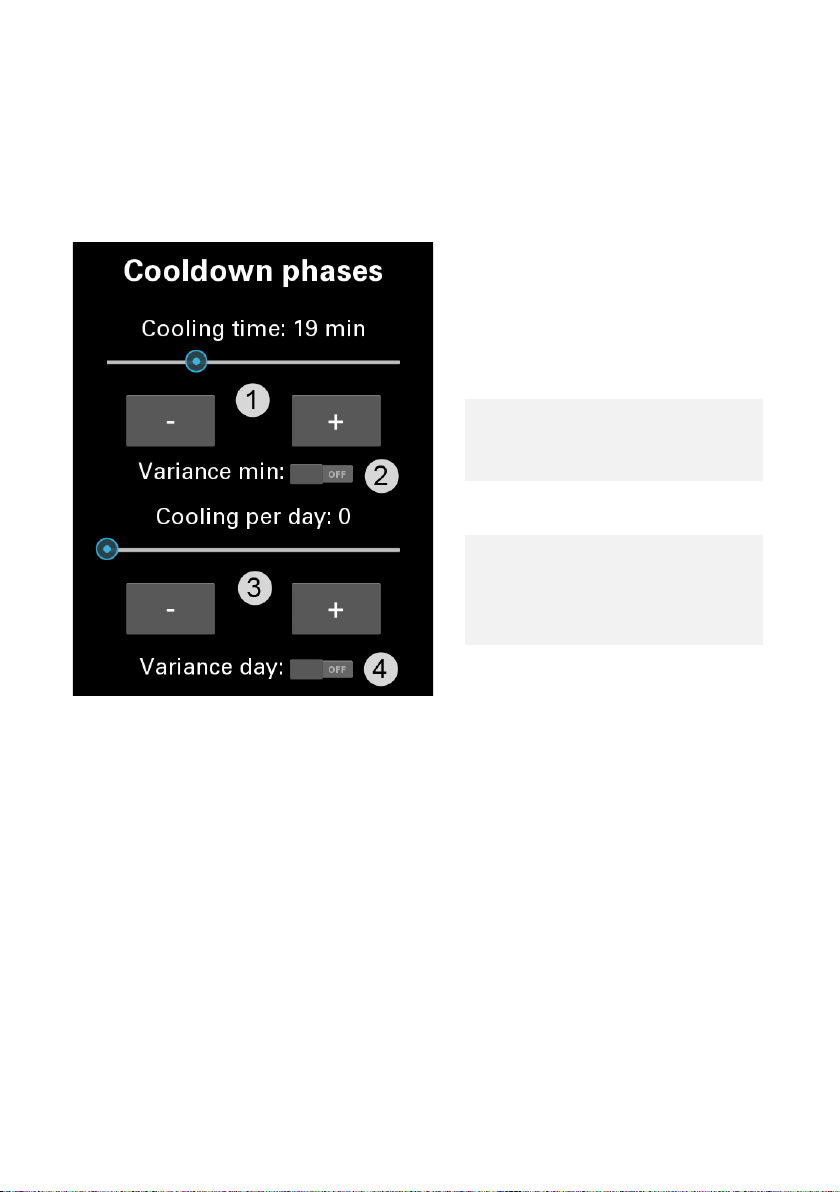
2. Cooling Phases
1
Cooling phase
2
When activated, the
3
Cooling per day (0-
4
When activated, the
Please note that no active cooling is possible. The "cooling" of the brood
chamber is based on the supplied air of the room.
length (1-90
minutes)
set cooling time will
vary by up to 30%
12)
set cooling rate is
varied up to 30%
Note:
If the slider and the buttons are disabled (grayed out), the calendar is
active (see
language).
Under point 5. Brood Calendar, data logging went,
15
Page 16
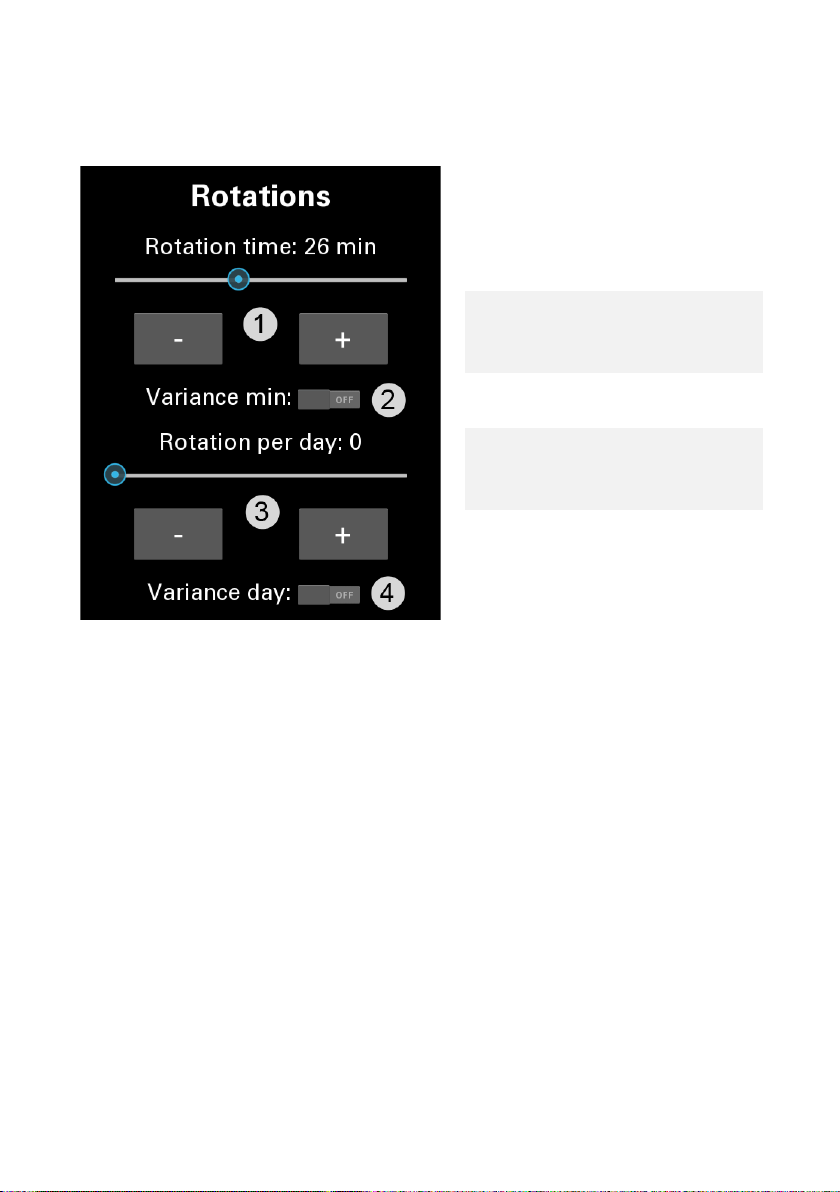
3. Rotation phase
1
Rotation time (1-30
2
When activated, the
3
Rotations per day (0-
4
When activated, the
minutes)
set rotation time will
vary by up to 30%
24)
set rotation quantity
is varied up to 30%
Note:
If the slider and the buttons are disabled (grayed out), the calendar is
active (see
language).
Under point 5. Brood Calendar, data logging went,
16
Page 17
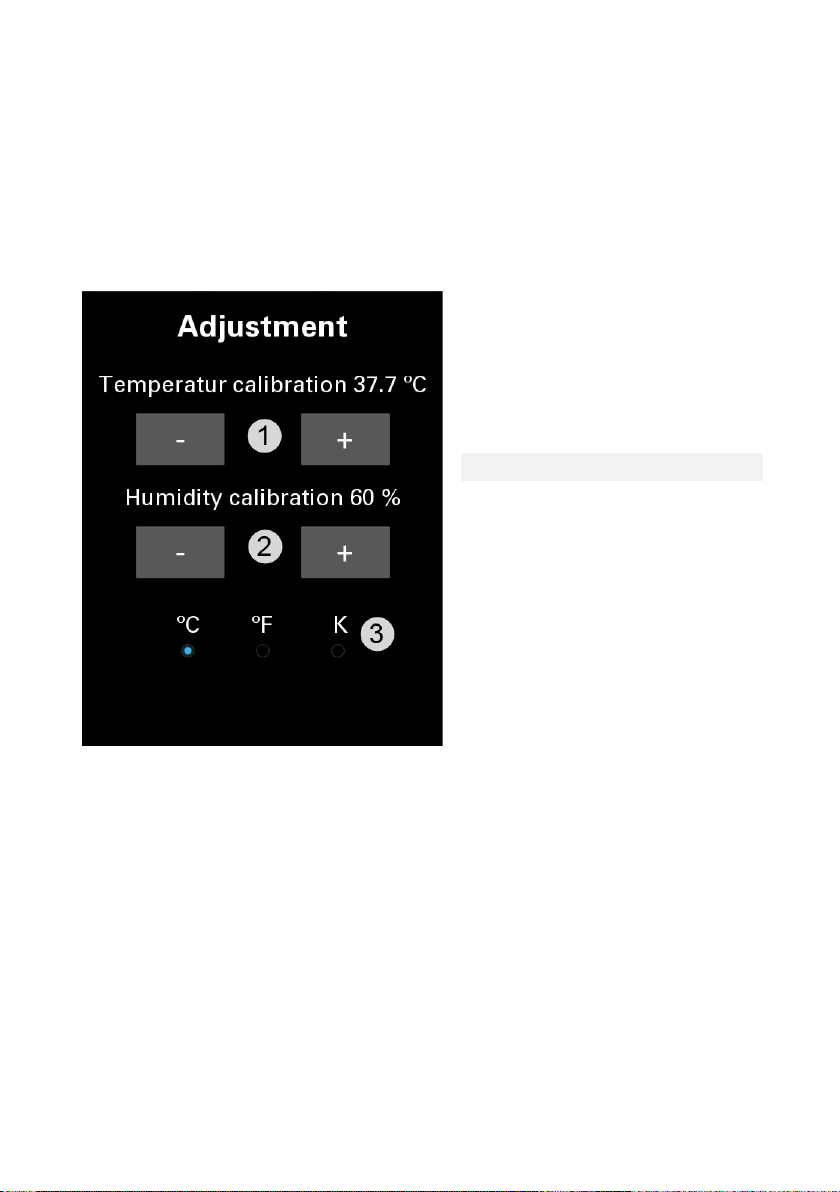
4. Offset, temperature unit
1
corrected temperature
2
corrected humidity
3
Selection: Celsius,
To obtain the highest possible accuracy of temperature and relative humidity,
we recommend you the use of the supplied Capillary Thermometer and Hair
Hygrometer.
Fahrenheit, Kelvin
17
Page 18
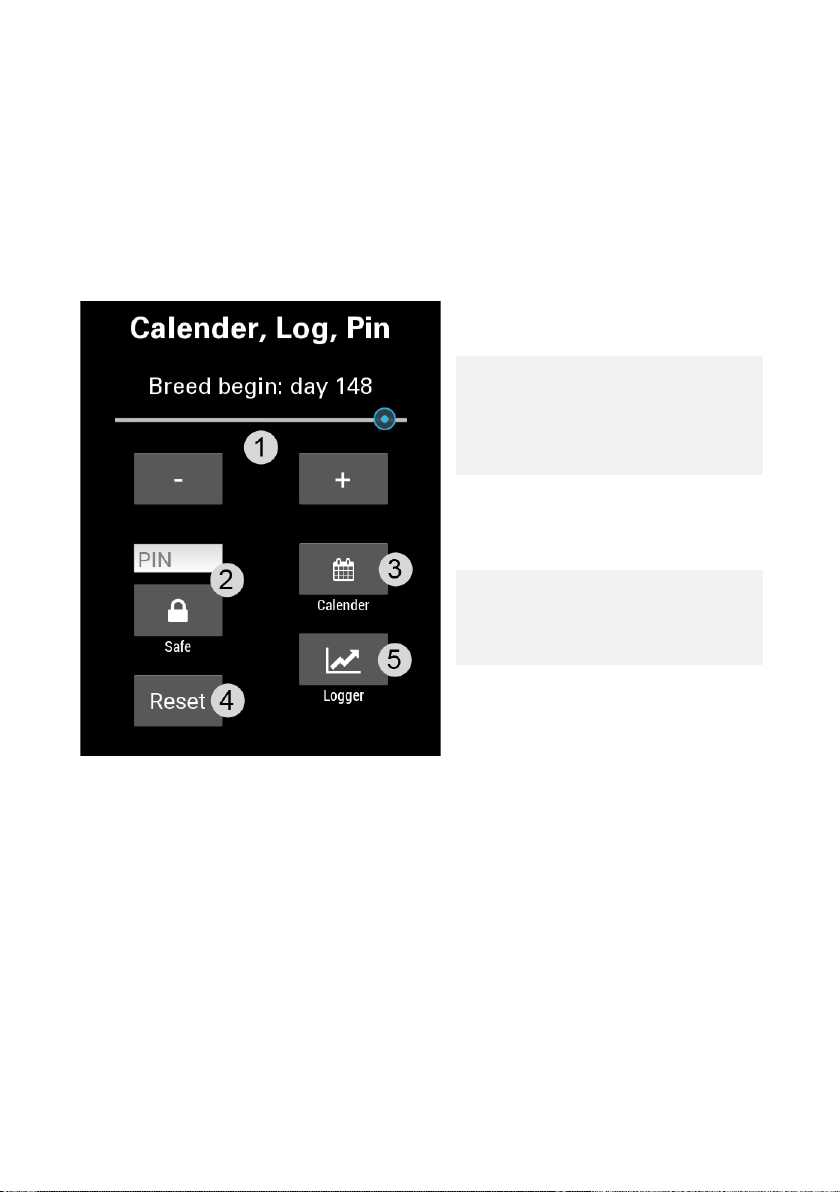
5. Brood Calendar, data logging and
1
Selection of breeding
start day
Automatic screen
3 seconds
3
Activation of the
Browser
Restart of the
cooling phase
5
Log to USB-Stick Logs
formatted USB-Stick
language
The breeding time display and the setting of the incubation day are only valid
if the calendar is activated.
Note:
2
lock. To unlock, press
the cooling
icon(bottom right) for
breeding calendar
configured via
4
breeding cycle
including rotation and
the device status
every minute an
FAT16/FAT32/FAText
If the calendar is enabled, only the values entered in the Web browser
are accepted (see Web browser
Sub 2nd. Calendar.)
18
Page 19
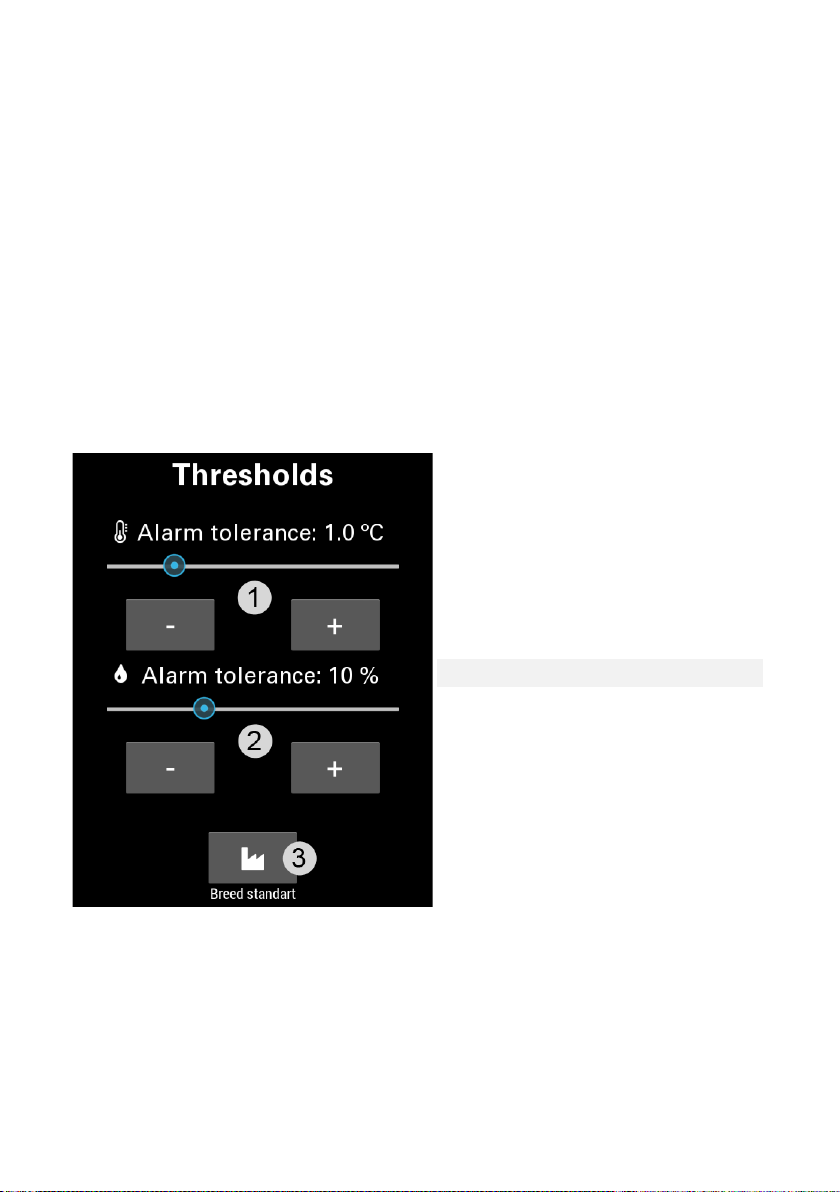
6. Limits
1
Tolerance Value
2
Tolerance Value Humidity
3
Establishing the breeding
A tolerance value monitors unusual fluctuation in temperature and humidity
outside the cooling phases. As soon as the desired temperature and target
humidity has been reached, the tolerance monitoring begins.
If the present temperature/humidity is outside the tolerance value, the
background color of the temperature/humidity changes to red, as well as a
corresponding error on the error page is visible. In addition, the alarm is also
triggered if there is no approximation to the target temperature/target air
humidity for an extended period. This also triggers any set alarm mails and
can be viewed in the log as well as the browser.
temperature
standard (default)
19
Page 20
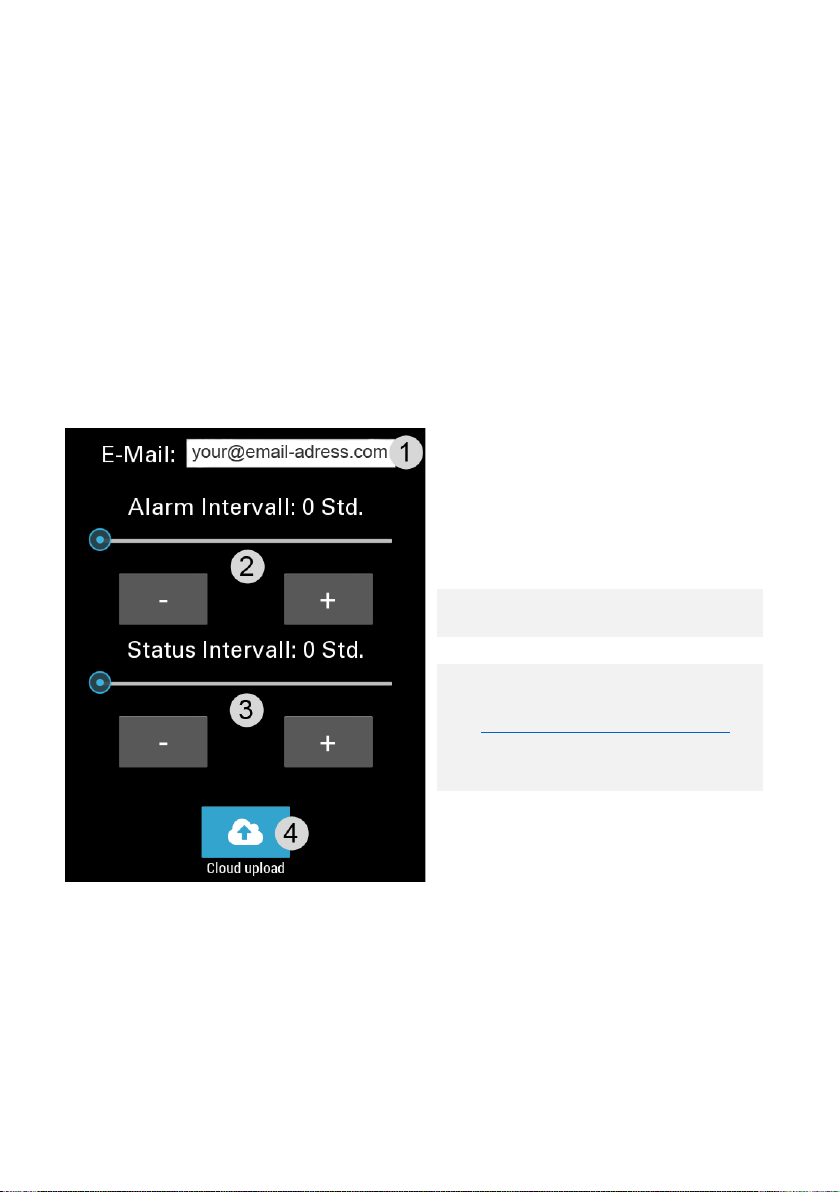
7. E-mail, live data
1
Email address Enter email
2
Alarm interval in hours
before this email is resent
3
Interval of status emails
Send the state data to our
If you want to keep up-to-date with important values of your incubator, there
are several possibilities:
• Receive emails when there is an alarm
• Track emails about the state every n hours, as well as live data
of the incubator by browser.
Note: Default is 0 hrs = inactive.
address for alert and status
emails
4
servers.
Https://procon-grumbach.de
(see Web browser
3rd.Procon-Grumbach)
20
Page 21
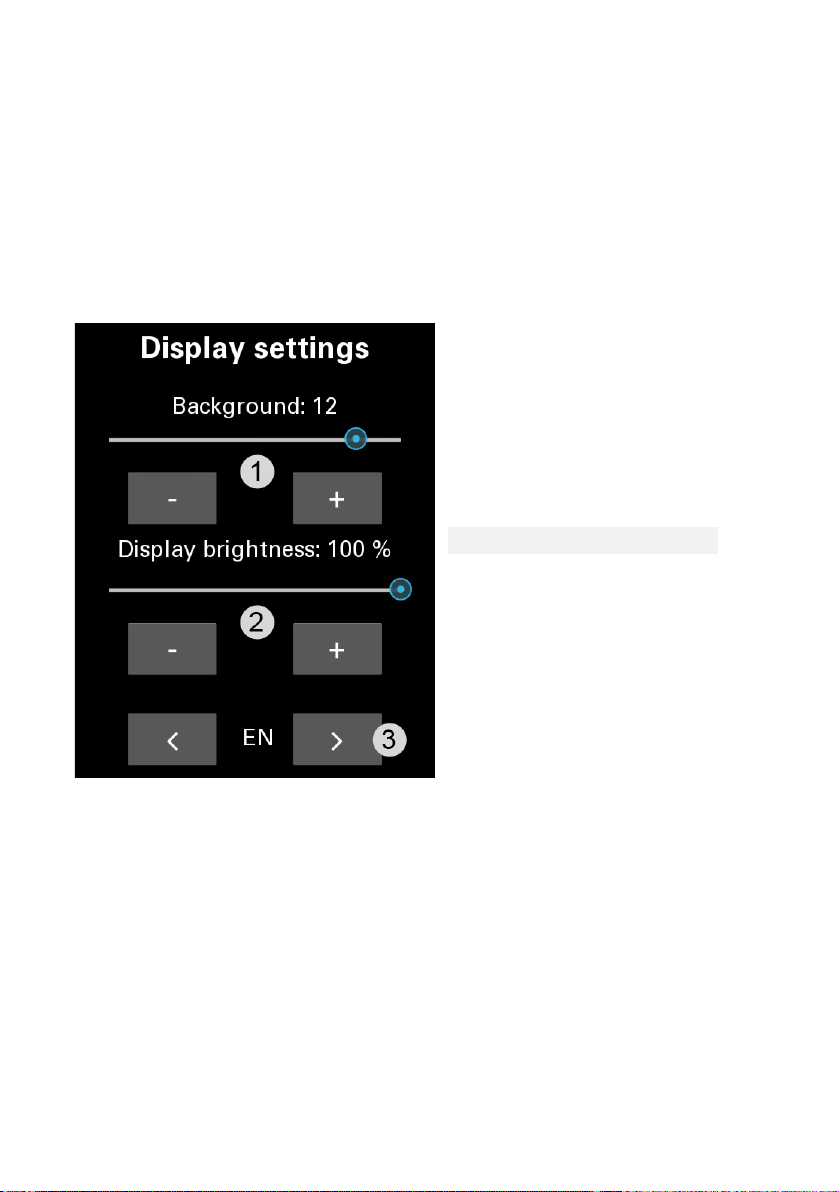
8. Device description, display settings
1
Background
Display brightness
Language settings
By adjusting the display brightness, you get the possibility to reduce your
power consumption.
color/Background
image
2
3
21
Page 22
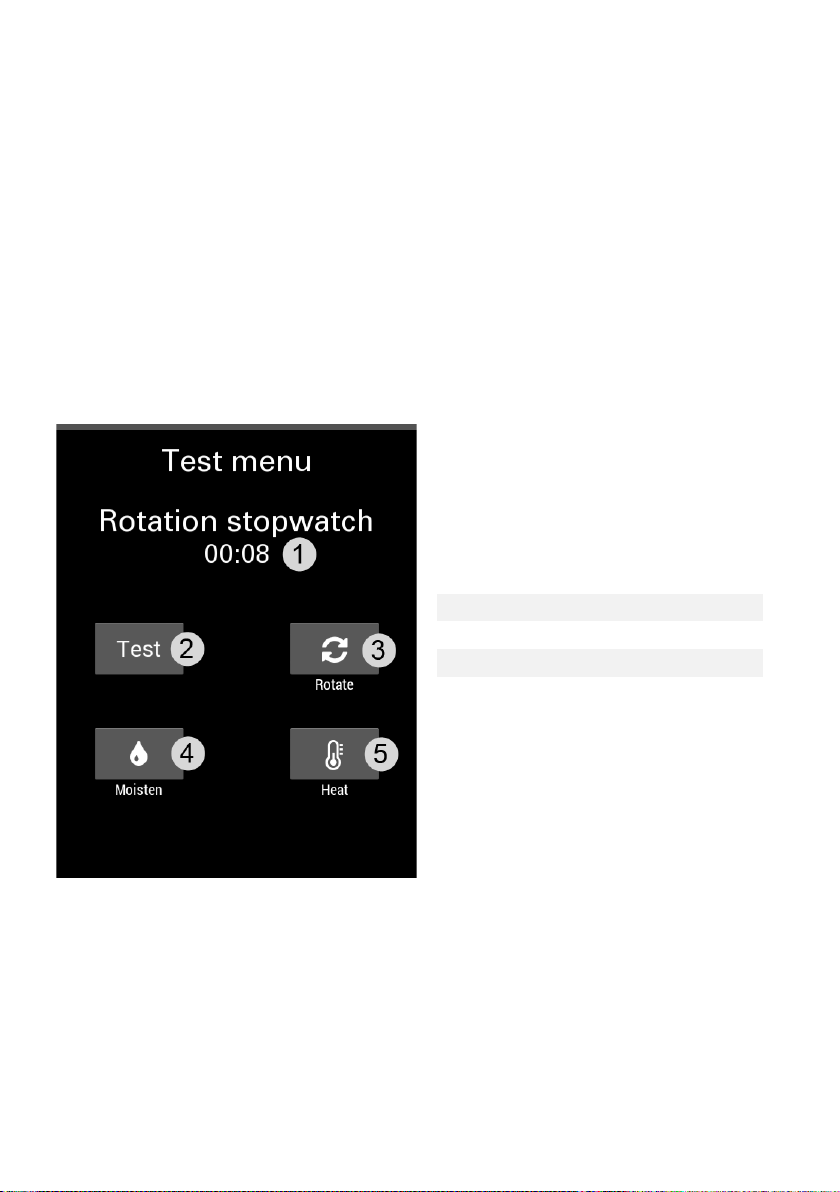
9. Test
1
Stopwatch
2
Test switch
3
Rotate
4
Moisturize
5
Heating
To test the functions of your incubator, first activate the test switch (current
regulation is interrupted). The stopwatch runs when the test switch and the
rotary switch are pressed. It stops as soon as the rotary switch is confirmed
again.
When switching to another side, the normal incubator control is continued.
22
Page 23
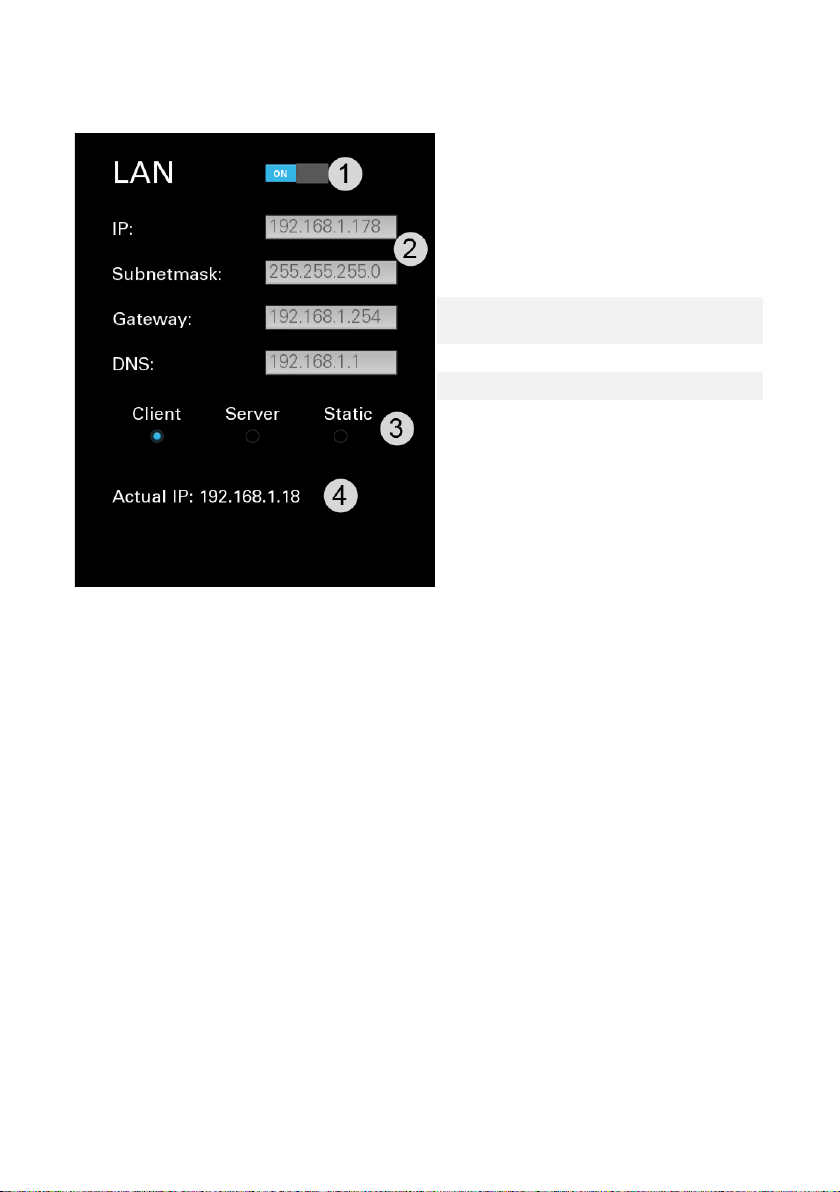
10.1 Ethernet Connection (LAN)
1
Activating the connection
connection is selected
Choice of connection Type
4
Display of the current IP
Setting data when a static
2
3
Select the type of connection:
- Client is recommended if there is already an existing DHCP server
on the network (router, etc.)
- Static if you want to set the connection manually
- Server creates a specified network in the network area
"192.168.40/8" With the IP "192.168.40.1". Computers can then
automatically connect to it. This setting is not recommended for
existing DHCP on the network.
Note:
The settings data will only be active if the connection types be selected
statically or server.
23
Page 24
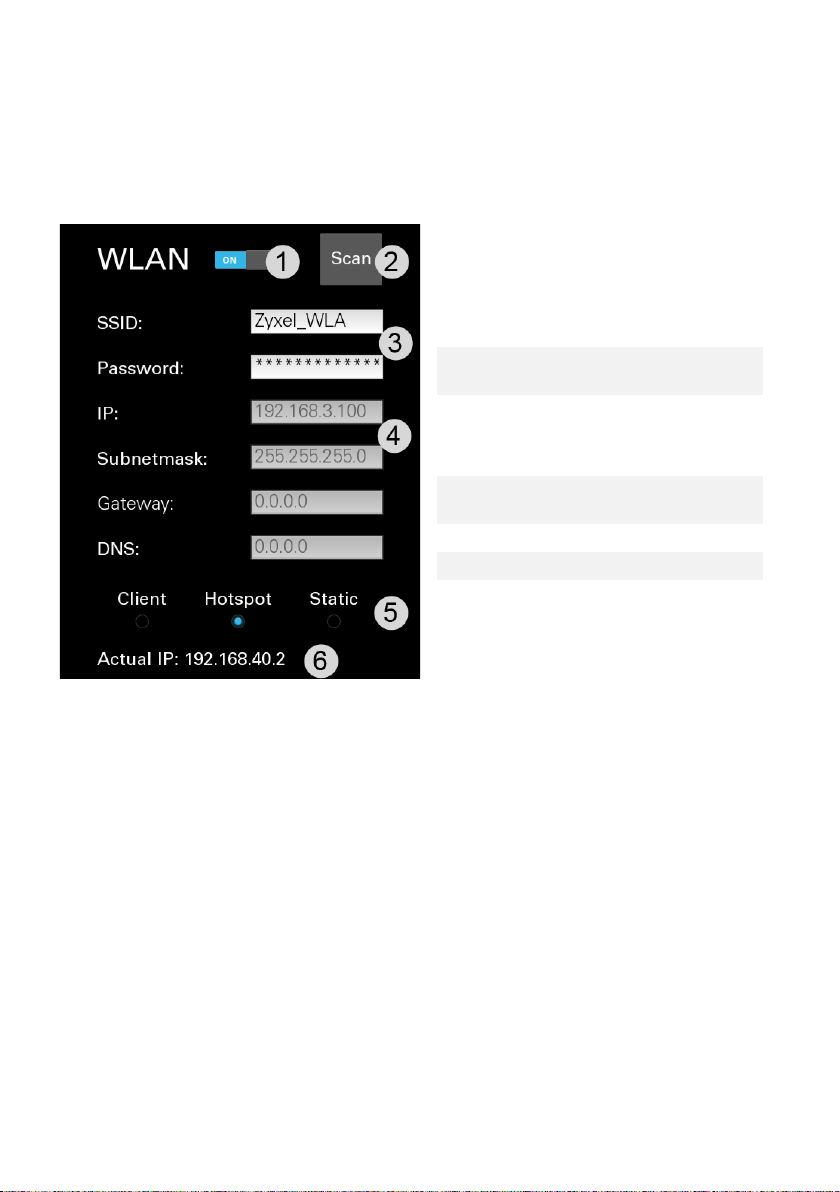
10.2 WiFi connection (WLAN)
1
Activating the connection
2
Displays available networks
Data of the WLAN Network
Setting data when selecting
a static connection
5
Choice of connection type
6
Current IP of the CTD7
3
you want to connect to or
create
4
Select the type of connection:
- Automatic Network setting client.
- Static if you want to manually set the network address.
- Server creates a hotspot with specified network IM Network
Area "192.168.40/8" with IP "192.168.40.2".
24
Page 25
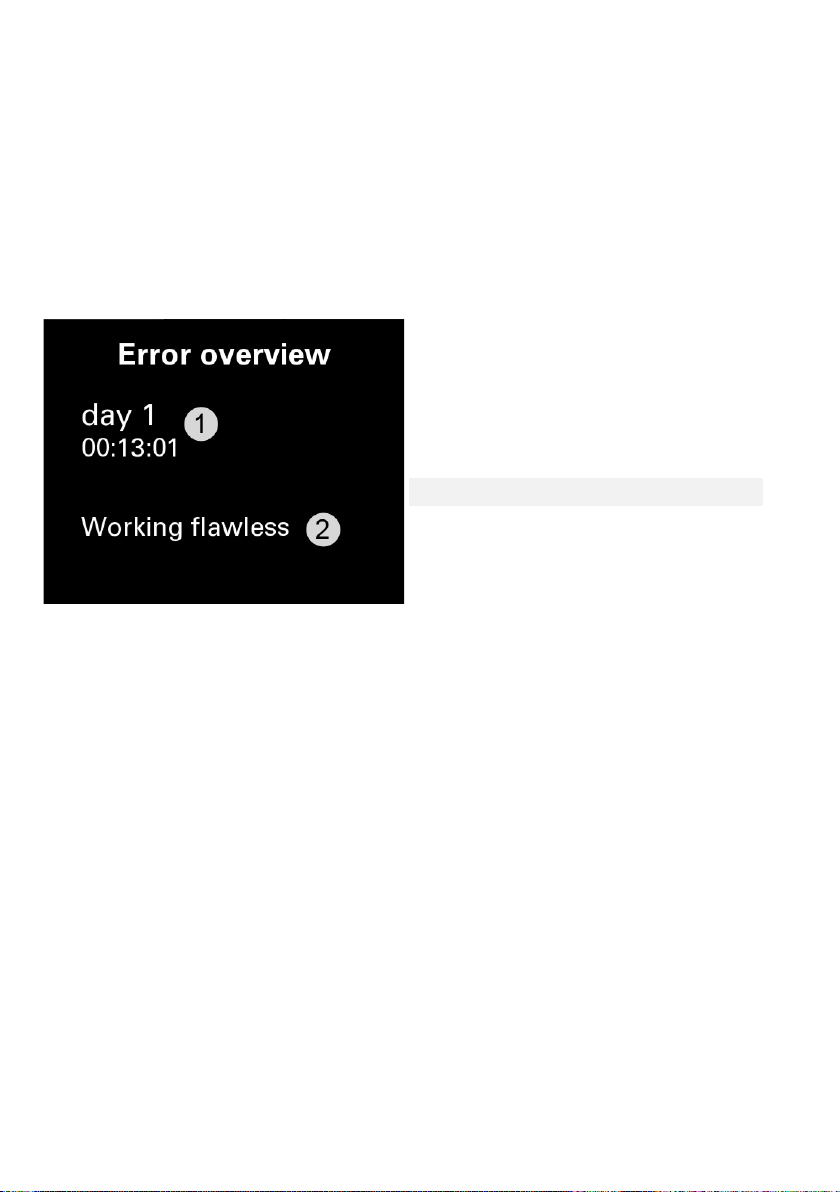
11. Error page
Breeding time of the last
processor
2
Listing of possible errors
When the background color of the bottom icons on the main screen is
colored red, an error occurred. Those errors can be looked up here.
1
connection to the regulation
25
Page 26
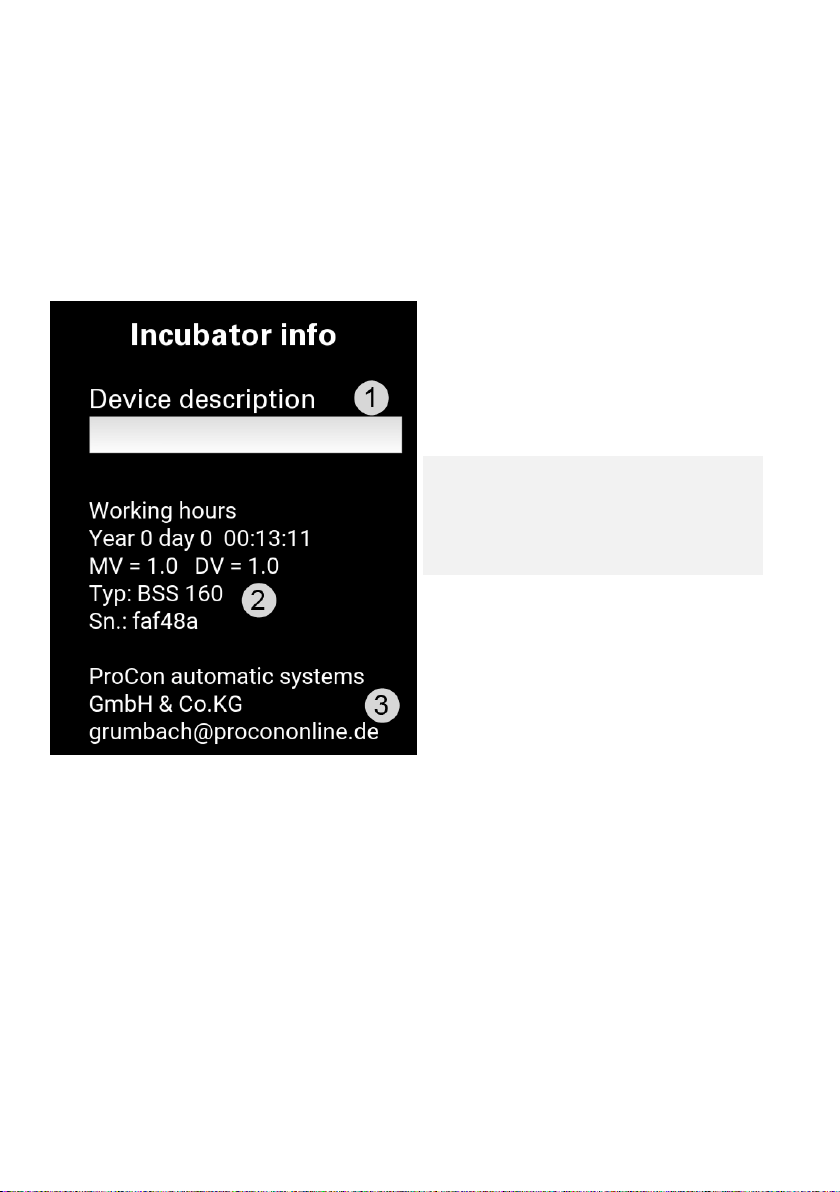
12. Info page
Here you can enter a
description of the device
2
List of the complete duration
serial number
3
Contact
1
of your incubator,
microcontroller version,
display version, device type,
26
Page 27
Web browser
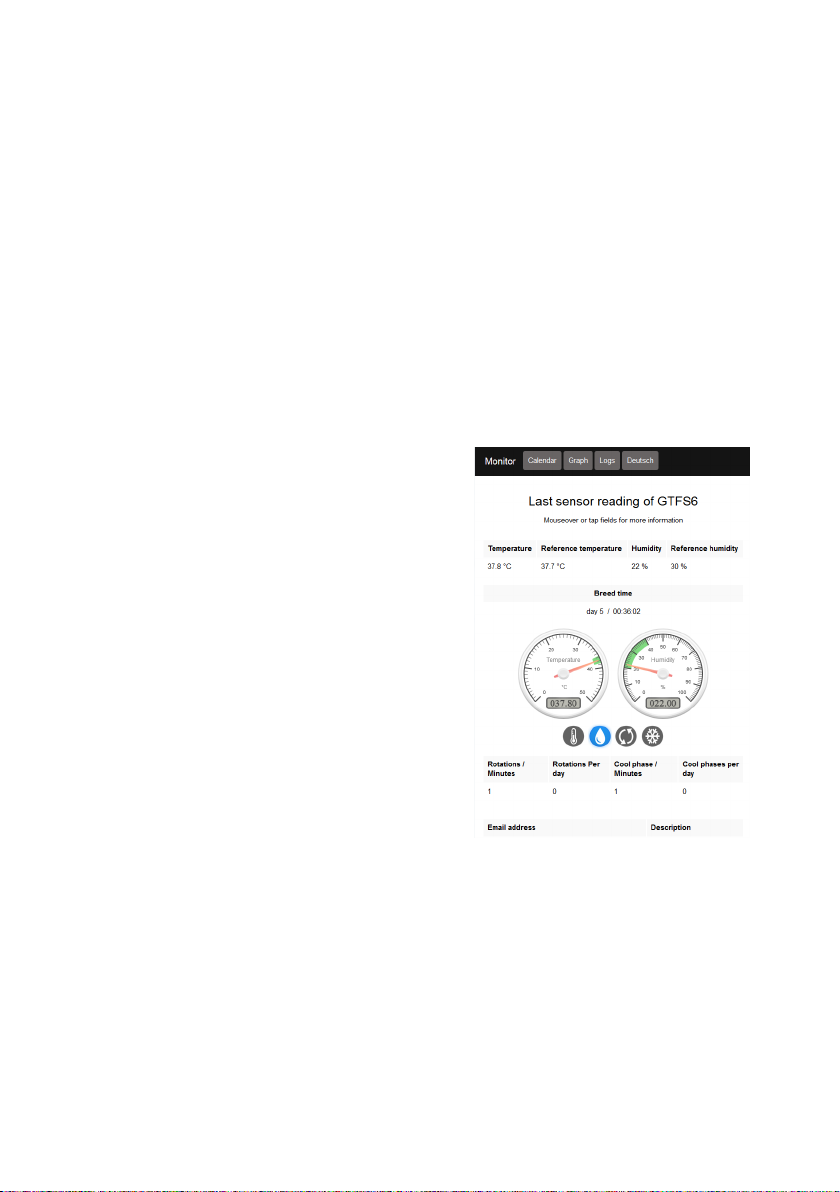
As described in points 10.1 and 10.2, you can read your current IP address (if
the device is connected to a network) on these pages. This can then be entered
in your Web browser of your device, which is connected to the same network,
and is connected directly to the main page.
1. Home
Once you have built a working
Netzwerkverindung, you can connect to
your favorite PC/smartphone via a
browser. The address, which must be
entered in the browser, can be found on
the Ethernet or WiFi page in the display,
under current IP.
For example, if 192.168.40.1 is displayed,
enter http://192.168.40.1 in the browser.
On the now visible main Page you can
select sub-pages in the top panel or
change the language to English.
The main page gives you an overview of
the most important settings and real-time
data of your incubator.
Page 28
2. Calendar
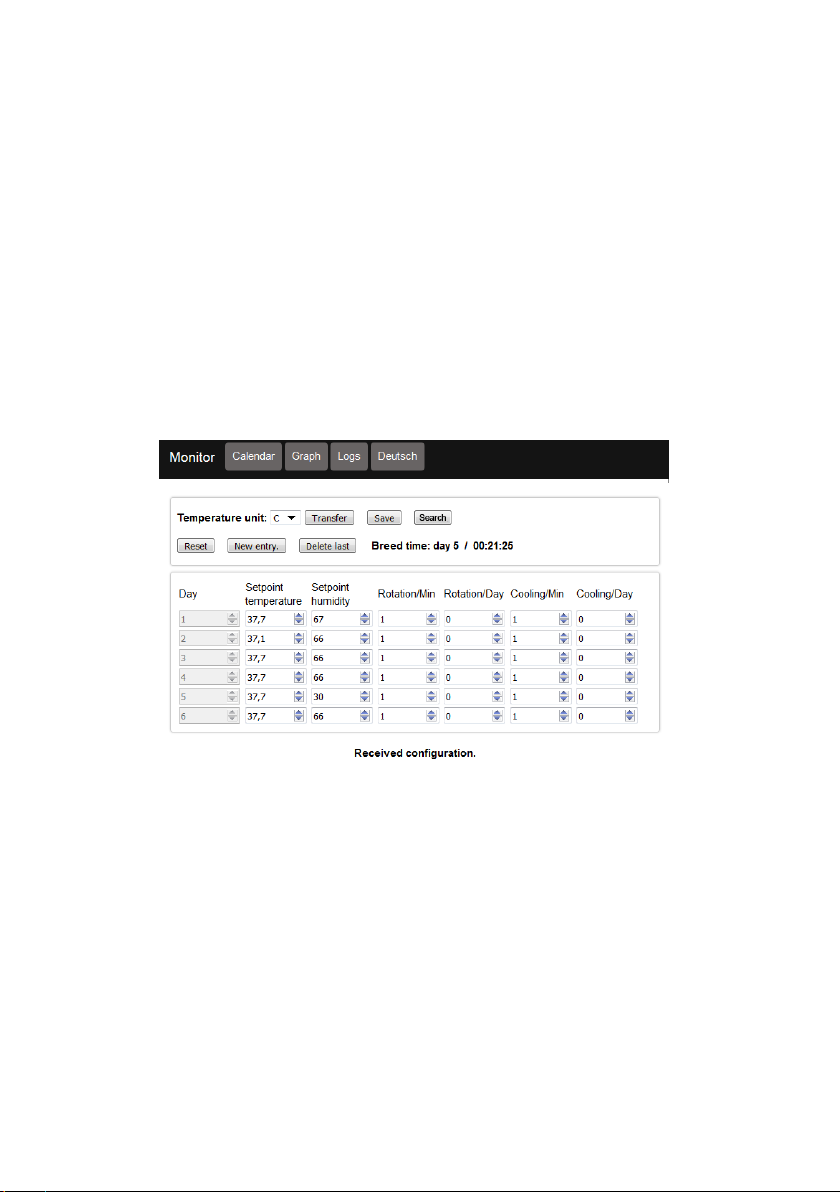
A complete breeding cycle of a maximum of 160 days can be predefined. The
new entry button can be used to add a tag and remove the last day with last
delete. With "Save" You can download your settings to your PC and read
them back with the button "browse" if desired.
Transfer will eventually send the settings to your incubator. For security
reasons, these must be read directly on the display before they become
active. On the Display page "Brood Calendar, data logging, language" Activate
the calendar and confirm the settings.
28
Page 29
3. Graph
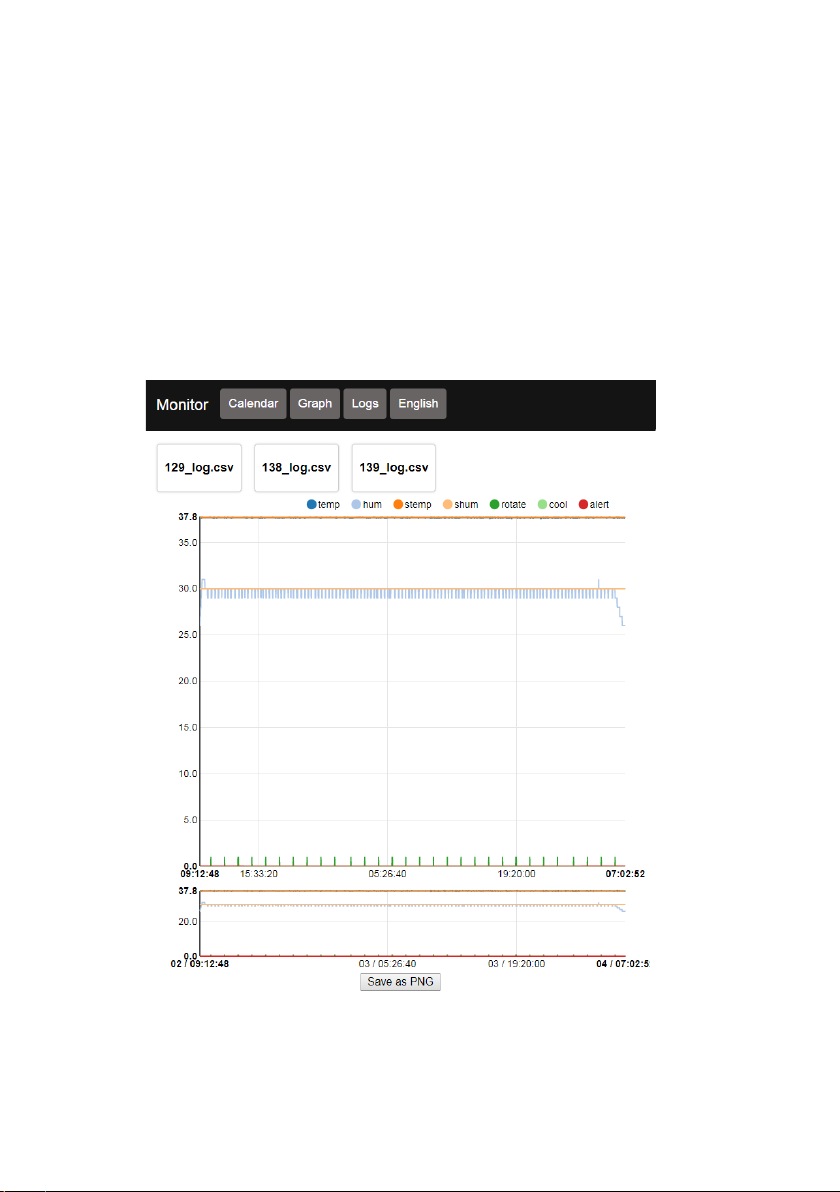
Already logged data on the USB-Stick can be visualised here. Just click on the
disired log be patiend till the diagramm is build up entirely on your Browser.
In the lower graph area you can zoom by marking the time area.
Single Linevaluesets can be blended out by clicking there names on the
legend.
With the search Button you can also visualize logs that are stored on your
pc/smartphone
29
Page 30
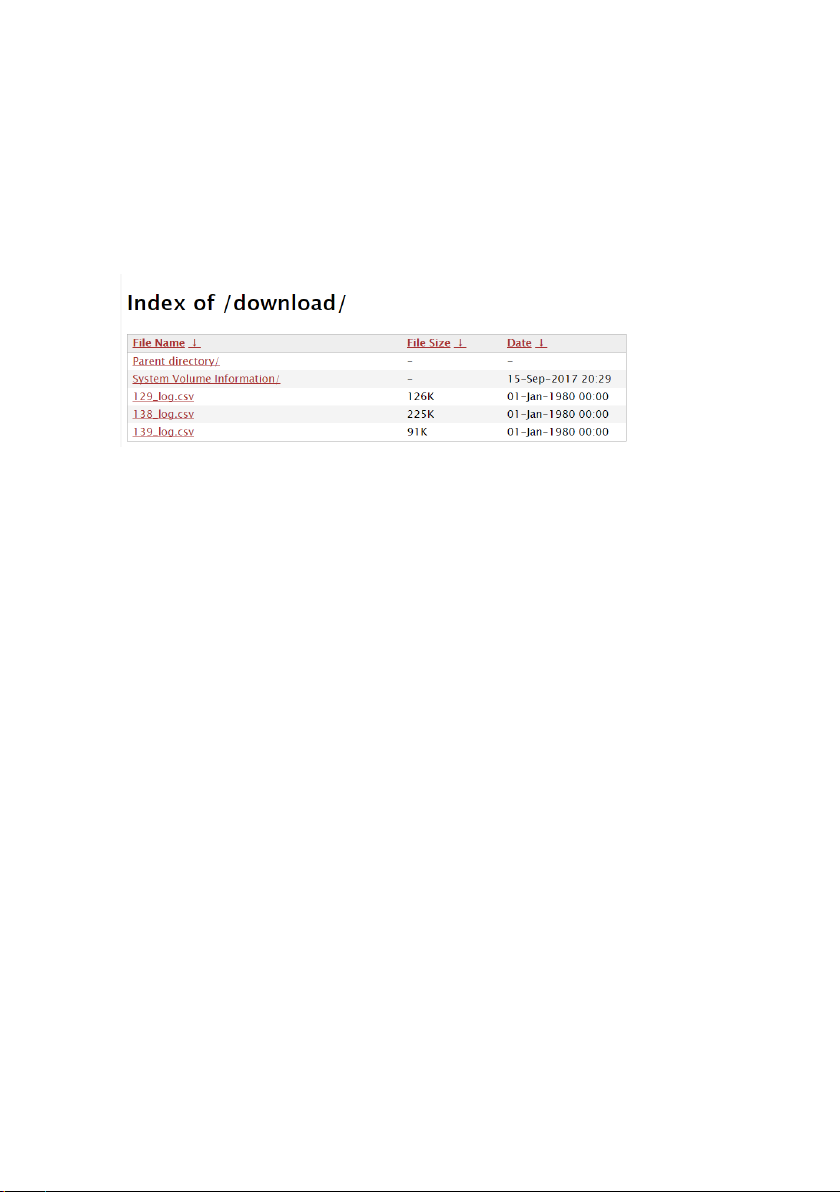
2. Logs
Existing logs on the USB stick can be downloaded here on the
PC/smartphone.
The determination of valid measurement results, conclusions and
measures derived therefrom are exclusively subject to the user's own
responsibility! A liability or guarantee for the correctness of the
provided results (data) is excluded. In no case will liability be assumed
for damages resulting from the use of the retrieved measurement
results.
30
Page 31
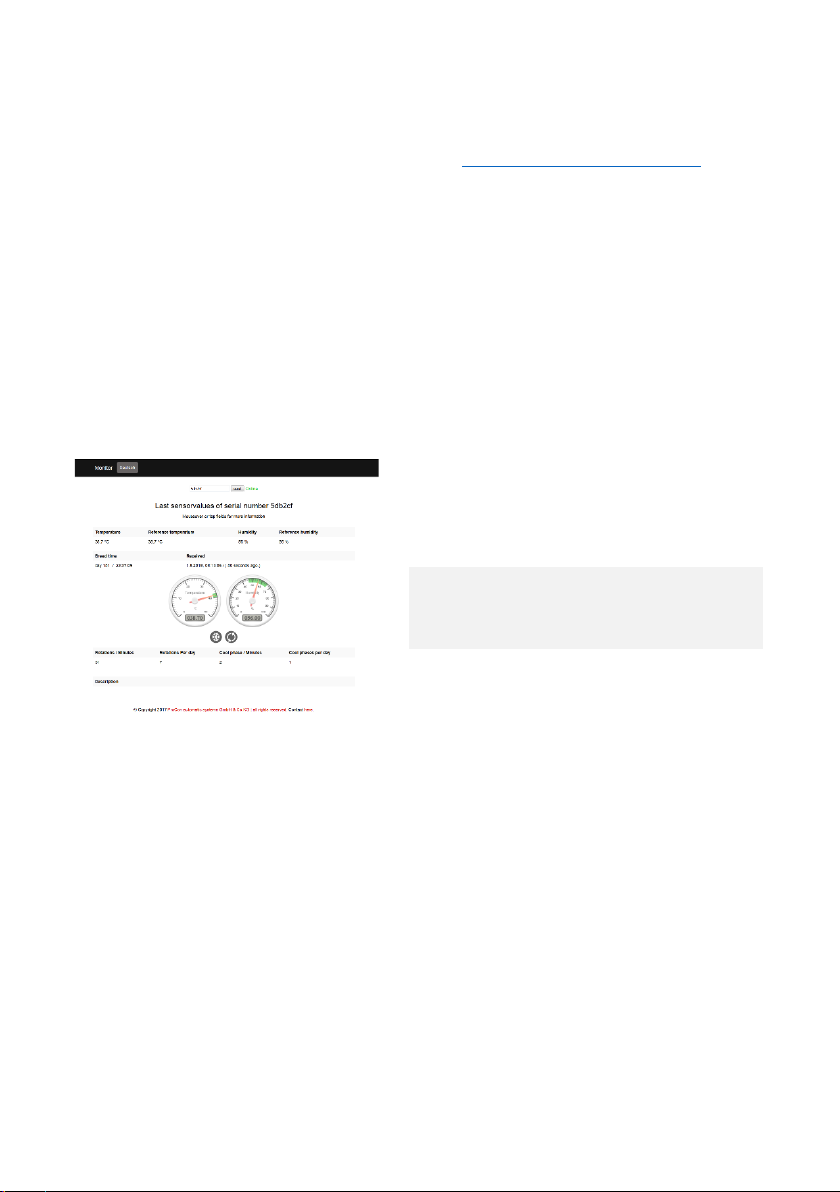
3. Website ProCon-Grumbach
1
Here you can enter the serial
2
List of possible faults such as
The worldwide access is done via the page www.procon-grumbach.de
enter The Serial number of your device (operation 12. info page) and click
Submit.
On this page you will see new data of the machine in 60 seconds.
Note:
The incubator must have access to the Internet via The network.
Furthermore, the Cloudupload must be activated (see operation
mail, live data).
number
empty water tank, tripping of
the safety thermostat
. Just
7. E-
31
Page 32

Breeding recommendation
Fowls breeding Duration of breeding: 21 days
Temperature: 1. – 17. day 37,8 °C
18. – 21. day 37,0 °C (hatch)
Humidity: 1. – 19. day 55 – 60 % relative humidity
20. – 21. day 70 % relative humidity
Turning: 3. – 17. day 5 times daily
Candeling: 4. + 17. day
Duck breeding Duration of breeding: 28 days
Temperature: 1. – 22. day 37,6 – 37,7 °C
23. – 28. day 37,0 – 37,5 °C
Humidity: 1. – 22. day 55 – 60 % relative humidity
Cooling: from 10. day 2 times daily until picking
Turning: 2. – 22. day 3 – 6 times daily
Candeling: 14.; 17. + 22. day
Parrot breeding Temperature Humidity
Cockatoo 37,1 – 37,2 °C 38 – 42 % relative humidity
Macaw 37,1 – 37,2 °C 48 % relative humidity
Amazone 37,0 – 37,3 °C 50 – 52 % relative humidity
Different species 37,0 – 37,3 °C 45 – 47 % relative humidity
Recommendation: Breeding after loss of weight of 15 %
During hatching: 36,8 °C 75 % relative humidity
Turning: 6 times daily
Falcon breeding Duration of breeding: 32 days
Temperature: 1. – 30. day 37,5 °C
Pecking 37 °C
Humidity: 1. – 30. day 50 – 55 % relative humidity
Pecking 75 – 80 % relative humidity
Turning: 1. – 30. day 6 times daily
32
Page 33

attachment 1: Privacy Policy
Privacy Policy
We are very delighted that you have shown interest in our enterprise. Data protection is of a
particularly high priority for the management of the ProCon automatic systems GmbH &
Co.KG. The use of the Internet pages of the ProCon automatic systems GmbH & Co.KG is
possible without any indication of personal data; however, if a data subject wants to use
special enterprise services via our website, processing of personal data could become
necessary. If the processing of personal data is necessary and there is no statutory basis for
such processing, we generally obtain consent from the data subject.
The processing of personal data, such as the name, address, e-mail address, or telephone
number of a data subject shall always be in line with the General Data Protection Regulation
(GDPR), and in accordance with the country-specific data protection regulations applicable
to the ProCon automatic systems GmbH & Co.KG. By means of this data protection
declaration, our enterprise would like to inform the general public of the nature, scope, and
purpose of the personal data we collect, use and process. Furthermore, data subjects are
informed, by means of this data protection declaration, of the rights to which they are
entitled.
As the controller, the ProCon automatic systems GmbH & Co.KG has implemented
numerous technical and organizational measures to ensure the most complete protection
of personal data processed through this website. However, Internet-based data
transmissions may in principle have security gaps, so absolute protection may not be
guaranteed. For this reason, every data subject is free to transfer personal data to us via
alternative means, e.g. by telephone.
1. Definitions
The data protection declaration of the ProCon automatic systems GmbH & Co.KG is based
on the terms used by the European legislator for the adoption of the General Data
Protection Regulation (GDPR). Our data protection declaration should be legible and
understandable for the general public, as well as our customers and business partners. To
ensure this, we would like to first explain the terminology used.
In this data protection declaration, we use, inter alia, the following terms:
a) Personal data
Personal data means any information relating to an identified or identifiable natural person
(“data subject”). An identifiable natural person is one who can be identified, directly or
indirectly, in particular by reference to an identifier such as a name, an identification
33
Page 34

number, location data, an online identifier or to one or more factors specific to the physical,
physiological, genetic, mental, economic, cultural or social identity of that natural person.
b) Data subject
Data subject is any identified or identifiable natural person, whose personal data is
processed by the controller responsible for the processing.
c) Processing
Processing is any operation or set of operations which is performed on personal data or on
sets of personal data, whether or not by automated means, such as collection, recording,
organisation, structuring, storage, adaptation or alteration, retrieval, consultation, use,
disclosure by transmission, dissemination or otherwise making available, alignment or
combination, restriction, erasure or destruction.
d) Restriction of processing
Restriction of processing is the marking of stored personal data with the aim of limiting their
processing in the future.
e) Profiling
Profiling means any form of automated processing of personal data consisting of the use of
personal data to evaluate certain personal aspects relating to a natural person, in particular
to analyse or predict aspects concerning that natural person's performance at work,
economic situation, health, personal preferences, interests, reliability, behaviour, location
or movements.
f) Pseudonymisation
Pseudonymisation is the processing of personal data in such a manner that the personal
data can no longer be attributed to a specific data subject without the use of additional
information, provided that such additional information is kept separately and is subject to
technical and organisational measures to ensure that the personal data
are not attributed to an identified or identifiable natural person.
g) Controller or controller responsible for the processing
Controller or controller responsible for the processing is the natural or legal person, public
authority, agency or other body which, alone or jointly with others, determines the
purposes and means of the processing of personal data; where the purposes and means of
34
Page 35

such processing are determined by Union or Member State law, the controller or the specific
criteria for its nomination may be provided for by Union or Member State law.
h) Processor
Processor is a natural or legal person, public authority, agency or other body which
processes personal data on behalf of the controller.
i) Recipient
Recipient is a natural or legal person, public authority, agency or another body, to which the
personal data are disclosed, whether a third party or not. However, public authorities which
may receive personal data in the framework of a particular inquiry in accordance with Union
or Member State law shall not be regarded as recipients; the processing of those data by
those public authorities shall be in compliance with the applicable data protection rules
according to the purposes of the processing.
j) Third party
Third party is a natural or legal person, public authority, agency or body other than the data
subject, controller, processor and persons who, under the direct authority of the controller
or processor, are authorised to process personal data.
k) Consent
Consent of the data subject is any freely given, specific, informed and unambiguous
indication of the data subject's wishes by which he or she, by a statement or by a clear
affirmative action, signifies agreement to the processing of personal data relating to him or
her.
2. Name and Address of the controller
Controller for the purposes of the General Data Protection Regulation (GDPR), other
data protection laws applicable in Member states of the European Union and other
provisions related to data protection is:
ProCon automatic systems GmbH & Co.KG
Bettwiesenweg, 18
35325 Mücke
Hessen
35
Page 36

Phone: 06400956910
Email: [email protected]
Website: www.procononline.de;www.procon-grumbach.de
3.General principles for processing of personal data
In order to ensure that your personal data is processed correctly and with a
suitable level of data protection, ProCon automatic System GmbH & Co.KG
has adopted the following processing principles:
- Personal data is processed lawfully, fairly and in a transparent
manner;
- Personal data is collected only for specified, explicit and legitimate
purposes and not further processed in a manner that is incompatible
with those purposes.
- Personal data shall be adequate, relevant and limited to what is
necessary in relation to the purposes for which they are processed.
- Personal Data shall be accurate and, where necessary kept up to
date and inaccurate or incomplete personal data will be rectified or
erased or further processing suspended.
- Personal data shall not be kept in a form which permits identification
of the Data Subjects for longer time than necessary for the purposes
for which the data was collected or for which it is further processed.
- Personal data shall be processed in a manner that ensures
appropriate security of the personal data.
4. Types of personal data
We will collect and process your personal data in a number of ways when
you engage with us via the various existing channels.
Some of the personal data is necessary to process in order for us to provide
you with the services you have requested and some personal data you can
choose to provide voluntarily. We will always let you know which personal
data is necessary (e.g. via the use of an asterisk (*)) and the consequences of
not providing such data to us, for instance that we will not be able to (fully)
satisfy your request.
The personal data that we collect and process can generally be divided into
the following categories:
36
Page 37

- Contact information such as name, address, phone number, email
address, title, place of work, etc.
- Information that you provide when contacting us via online contact
forms, emails or phone
- Profile information in case you create a profile or account with us,
including username and password
- User information such as technical data regarding usage and viewing,
including IP addresses when you visit our websites or applications,
including on third party sites
- Transaction information, including credit card information when you
purchase goods or services from us
- Information from smart metering, metering the consumption of
heating, cooling, water and other utilities
As a general rule we will not process any special categories of personal
data (special personal data) about you unless you have provided your
explicit consent thereto or we are required to do in order to comply with
applicable regulation.
5. Our purposes for processing your personal data
We only process your personal in order to pursue a legitimate purpose and
generally we will only process your personal data if:
- You have provided your consent to such processing; or
- The processing is necessary for the performance of a contract; or
- The processing is necessary for compliance with a legal obligation
that we are subject to; or
- The processing is necessary for the purposes of the legitimate
interests pursued by us or by a third party and such processing is not
considered to be harmful towards you.
We process your personal data for the following purposes:
- To provide you with products, services and information that you
request from us; or
- To send you newsletters or other marketing material, including
surveys; or
37
Page 38

- To administer our business relations and negotiate and execute
agreements; or
- To provide general customer service and support; or
- To gain customer insights and knowledge of how our various
services, including websites and applications, and products are used
as well as evaluation and improvement hereof; or
- To communicate with you regarding various matters; or
- comply with any applicable law.
6. Cookies
We may use cookies on our websites or our applications. Please read more
about the use of cookies in our cookie policy, which you can find in the footer
of each website.
The purposes of processing of data collected by the use of cookies, are the
following:
• to operate, improve and optimise the performance and user experience of
the website and its services,
• perform customer and user analysis and segmentation in order to improve
our understanding of our users, and provide better and tailored services to
users, including you,
• statistical purposes.
Disclosure, transfer and making available personal data to recipients
7.
Personal data will only be disclosed in the following cases:
Meet any applicable law, regulation, legal process, or
-
enforceable governmental request. We share information about
the number and type of requests we receive from governments
in our Transparency Report.
- Enforce applicable Terms of Service, including investigation of
potential violations.
38
Page 39

-
Detect, prevent, or otherwise address fraud, security, or
technical issues.
We may share personally identifiable information with our partners, such as
our distributors.
8. Your consent
As stated above some of our processing activities will be based on your
consent. In such case, you will have the right to withdraw your consent at
any time.
If you withdraw your consent, we will cease to process your personal data,
unless and to the extent the continued processing or storage is permitted or
required according to the applicable personal data legislation or other
applicable laws and regulations.
Please note that the withdrawal of your consent will not affect the lawfulness
of processing conducted prior to the withdrawal. Further, as a consequence
of your withdrawal of your consent, we may not be able to satisfy your
requests or provide you with our services.
9. Data Security
In order to safeguard your personal data, ProCon has implemented
appropriate technical and organizational measures to ensure a level of
security appropriate to the risks represented by the processing and the
nature of the personal data to be protected, having regard to the state of art
and the costs of their implementation.
Following the evaluation of the risk, ProCon has taken measures to protect
personal data against accidental or unlawful destruction or accidental loss,
alteration, unauthorized disclosure or access, in particular where the
processing involves the transmission of personal data over a network, and
against all other unlawful forms of processing.
39
Page 40

10. Your rights
You have the right to access to the data processed about you, subject to
certain statutory exceptions. Furthermore, you can object to the collection
and further processing of your personal data. In addition, you have the right to
correct your personal data, if necessary. You may also choose to request us
to restrict the processing.
We will delete or correct any information, which is inaccurate or out of date
by reason of the time elapsed since it was collected or by reason of any other
information in our possession.
If you provide us with a written request, we will also delete your personal
data without undue delay, unless we have a legal basis to continue the
processing, e.g. if the processing is necessary to establish, exercise or defeat
a legal claim or necessary to the performance of a contract with you.
In order to make use of any of the rights mentioned above, please contact us
via the points of contacts listed in section 16.
With regard to such requests, kindly provide us with relevant information to
take care of your request, including your full name and email address so that
we can identify you. We will respond to your request as soon as possible and
within one month.
If you disagree with our processing of your personal data please be informed
that you can lodge a complaint with your local data protection agency.
11. Links to other websites, etc.
Our websites may contain links to other websites or to integrated sites. We
are not responsible for the contents of the websites of other companies
(third-party websites) or for the practices of such companies regarding the
collection of personal data. When you visit third-party websites, you should
read the owners' policies on the protection of personal data and other
relevant policies.
15. Changes to this Privacy Policy
40
Page 41

We reserve the right to amend this Privacy Policy in the future due to
changes in applicable legislation. We will inform you of any such
amendments.
41
 Loading...