

Page 1

912/9982
– PaperShredder
Installation&UserInstructions
Pleasekeepforfuturereference
–
Important – Pleasereadtheseinstructionsfullybeforeinstallingorusing
Theseinstructionscontainimportantinformationwhichwillhelpyougetthebestfromyour
applianceandensuresafeandcorrectinstallation,useandmaintenance.
Ifyouneedhelporhavedamagedormissingparts,callthe CustomerHelpline:03456400800
Page 2
Contents
1
SafetyInformation 2
Parts 3
Installation 4-5
Location 4
ElectricalConnection 5
UserInstructions 6-7
Beforefirstuse 6
Usingyourappliance 6
CareandMaintenance 8
General 8
TroubleShooting 8
TechnicalSpecifications 9
Disposalinformation 9
Guarantee 10
Productcodes
VS1008CD
Page 3

Safety
Information
Important
–
Please
read
these
instructions
fully
before
installation
Before
use
During
use
Ÿ
Dispose
of
all
packaging
carefully
and
indoor
use
only
Do
not
use
the
appliance
for
industrial
and
MUST
Ÿ
Please
use
the
shredder
withacorrect
power
Do
not
Do
not
immerse
the
machine
in
water
or
any
Ÿ
Please
don't
spay
any
flammable
gasoroil
on
Do
not
Please
unplug
the
shredder
when
emptying
the
WARNING!
Keep
all
loose
articles
of
clothing,
Ÿ
Please
keep
soft
cloths
and
ties
far
away
from
the
Ÿ
This
appliance
is
not
intended
for
usebypersons
This
appliance
is
not
intended
for
usebyyoung
Do
not
operate
the
appliance
withadamaged
Do
not
2
responsibly.
Ÿ Theapplianceisdesignedfor
Donot useoutdoor.
Thisapplianceisdesignedforhouseholduse.
Ÿ
Ÿ
commercialuse,oranyotherpurpose.
Ÿ Theappliance
levelbase.
bepositionedonafirm
Ÿ
ties,jewellery,longhairorotherlooseobjects
.
awayfromopening,injurymayresult!
Neverinsertfingersintoopening.Seriousinjury
Ÿ
mayresult!
paperentry.
Ÿ Pleasekeepyourhairfarawayfromtheshredder.
Alwaysoperateonaflathorizontalsurface.
Ÿ
supply.
Ÿ
Keepthepowercordawayfromhotsurface.
Ÿ
Ÿ
otherliquidtoprotectagainstelectricshock.
Ÿ Keepchildrenawayfromthemachine.This
machineshouldbeoperatedbyadultsonly.
thisshredder,itmaycauseafire.
Ÿ
ormoisture.
Ÿ
wastebinornon-inuseormovingtheshredder.
useapplianceforotherthanintendeduse.
allowthisappliancetobeexposedtorain
(includingchildren)withreducedphysical,
sensoryormentalcapabilities,orlackof
experienceandknowledge,unlesstheyhave
beengivensupervisionorinstructionconcerning
useoftheappliancebyapersonresponsiblefor
theirsafety.Childrenshouldbesupervisedto
ensurethattheydonotplaywiththeappliance.
Ÿ
childrenorinfirmpersonsunlesstheyhavebeen
adequatelysupervisedbyaresponsiblepersonto
ensurethattheycanusetheappliancesafely.
Youngchildrenshouldbesupervisedtoensure
thattheydonotplaywiththeappliance.
Ÿ
cordorplugoraftertheappliancemalfunctions,
orhasbeendamagedinanymanner.
Ÿ
ContacttheCustomerHelpline:08456400800
attempttorepairtheapplianceyourself.
Page 4
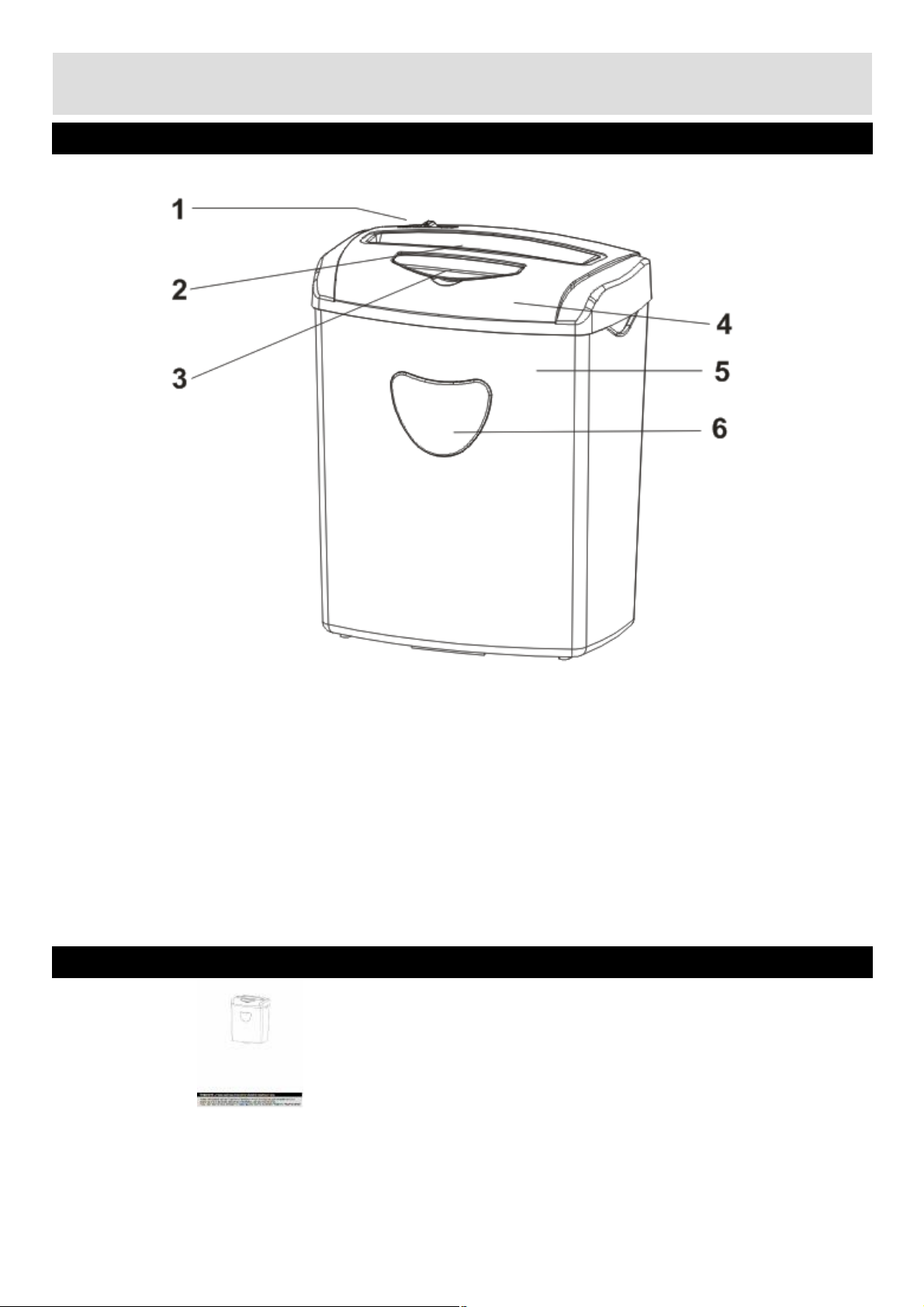
Part
1.
Function
switch
(Auto,
Off,
Rev)
4.Main
unit
2.Paper
in
throat
5.
Waste
bin
3
Please
familiarize
yourself
with
the
parts
and
accessories
listed
below
3.CDinthroat 6.Viewingwindows
Accessoriesincluded
Instructionsx1
Page 5
Installation
Location
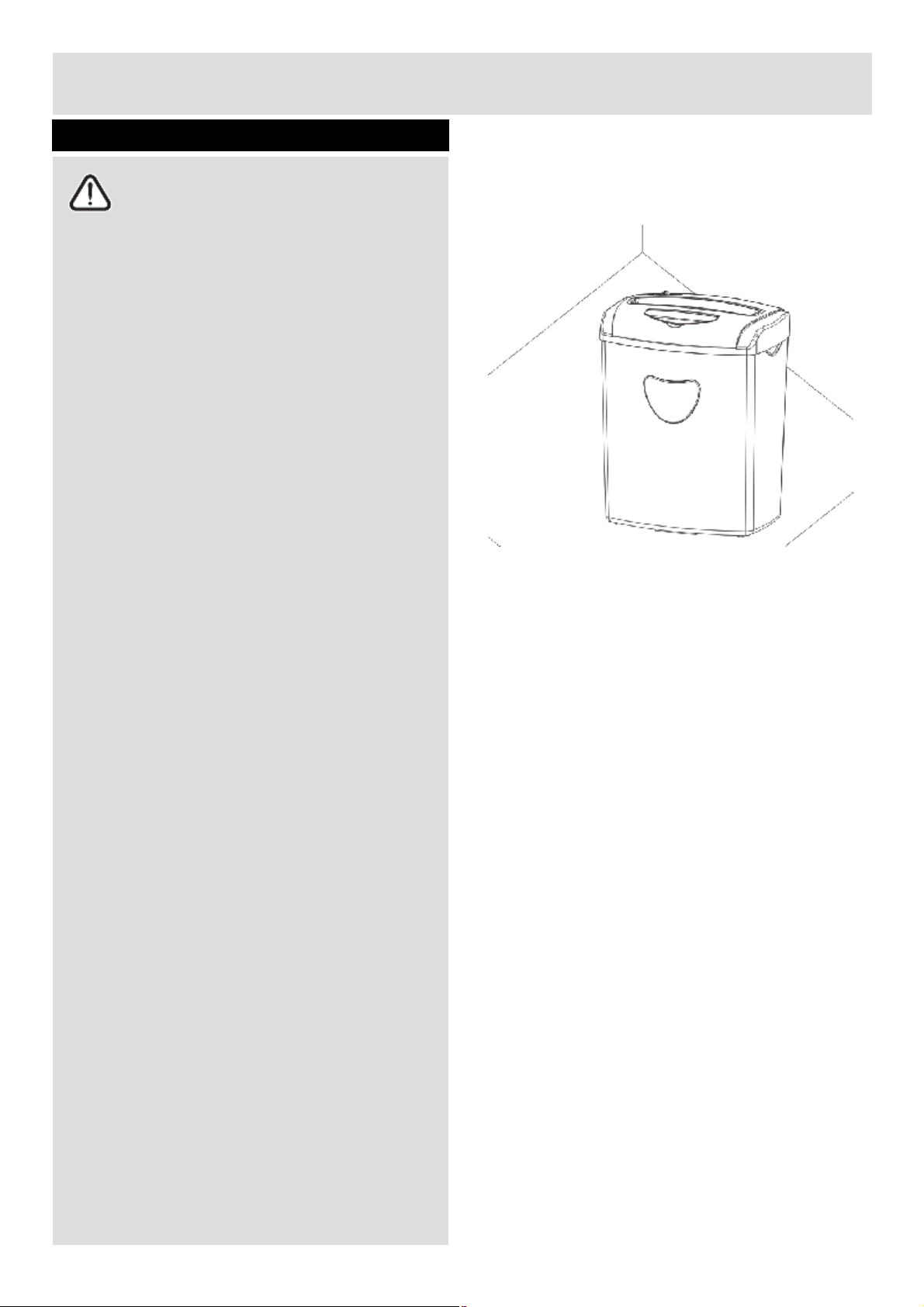
Ensure
the
supply
cable
is
not
caught
under
Ÿ
Do
not
operate
under
or
near
curtains
or
other
Do
not
place
the
appliance
near
a
heat
source
4
Caution: Alwaysoperatethisproducton
aflathorizontalsurface.
Carefullyremoveallpackagingmaterialsand
Ÿ
disposeofcorrectly.
Ÿ
theappliance.
combustiblematerials
Ÿ
orindirectsunlight.
Page 6
Installation
Electrical
connection
Do
not
bend,
stretch
or
pull
the
supply
cable
to
The
supply
voltage
should
be
the
same
as
that
If
the
socket
outlets
in
your
home
are
not
The
appliance
must
be
connected
toa220-
Should
the
fuse
need
tobereplaced,
a5amp
5
Anyelectricalworkthatisrequiredto
installthisapplianceMUSTbecarriedoutby
aqualifiedelectrician.
Beforemakinganyelectricalconnections,
ensurethat:
Ÿ
avoidelectricshock.
Ensurethepowersocketissuitableforthe
Ÿ
maximumpowerofthemachine.
Ÿ
indicatedinthetechnicalspecificationsand
theapplianceratingplate.
Ÿ
suitablefortheplugsuppliedwiththisunit
checkwithaqualifiedelectricianfor
replacement.
Ÿ Theuseofadapters,multipleconnectorsor
extensioncablesarenotrecommended.
Ÿ
240volt50HzACsupplybymeansofathree
pinsocket,suitablyearthedandprotectedbya
5ampfuse.
Ÿ
fuseapprovedtoBS1362mustbeused.
Theplugcontainsaremovablefusecoverthat
Ÿ
mustberefittedwhenthefuseisreplaced.If
thefusecoverislostordamaged,theplug
mustnotbeuseduntilareplacementcover
hasbeenfittedortheplugisreplaced.
Adamagedplugshouldbecutoffascloseto
Ÿ
theplugbodyaspossible,thefuseshouldbe
removedandtheplugdisposedofsafely.
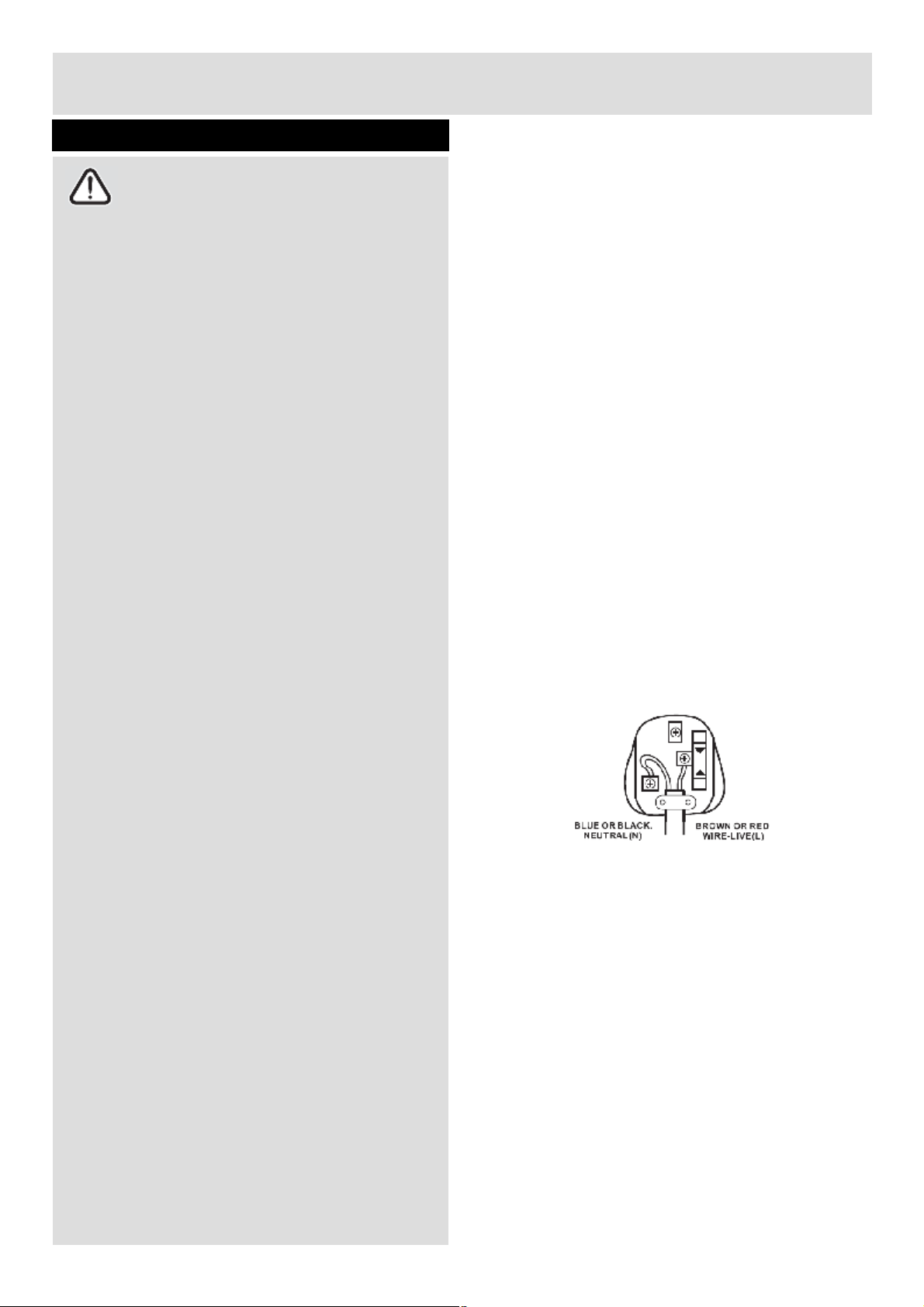
Plugreplacement(UK&Irelandonly)
Shouldyouneedtoreplacetheplug;thewiresin
thepowercablearecolouredinthefollowing
way:
Blue – Neutral ‘N’
Brown – Live ‘L’
Asthecoloursofthewiresinthepowercable
maynotcorrespondwiththecolouredmarkings
identifyingtheterminalsinyourplug,and
proceedasfollows:
Thebluewiremustbeconnectedtotheterminal
thatismarkedwiththeletterN.
Thebrownwiremustbeconnectedtothe
terminalthatismarkedwiththeletterL.
Ifpowersupplycordisdamaged,itmust
replacedbythemanufactureroritsservice
agentorasimilarqualifiedpersoninorderto
avoidahazard.
Page 7
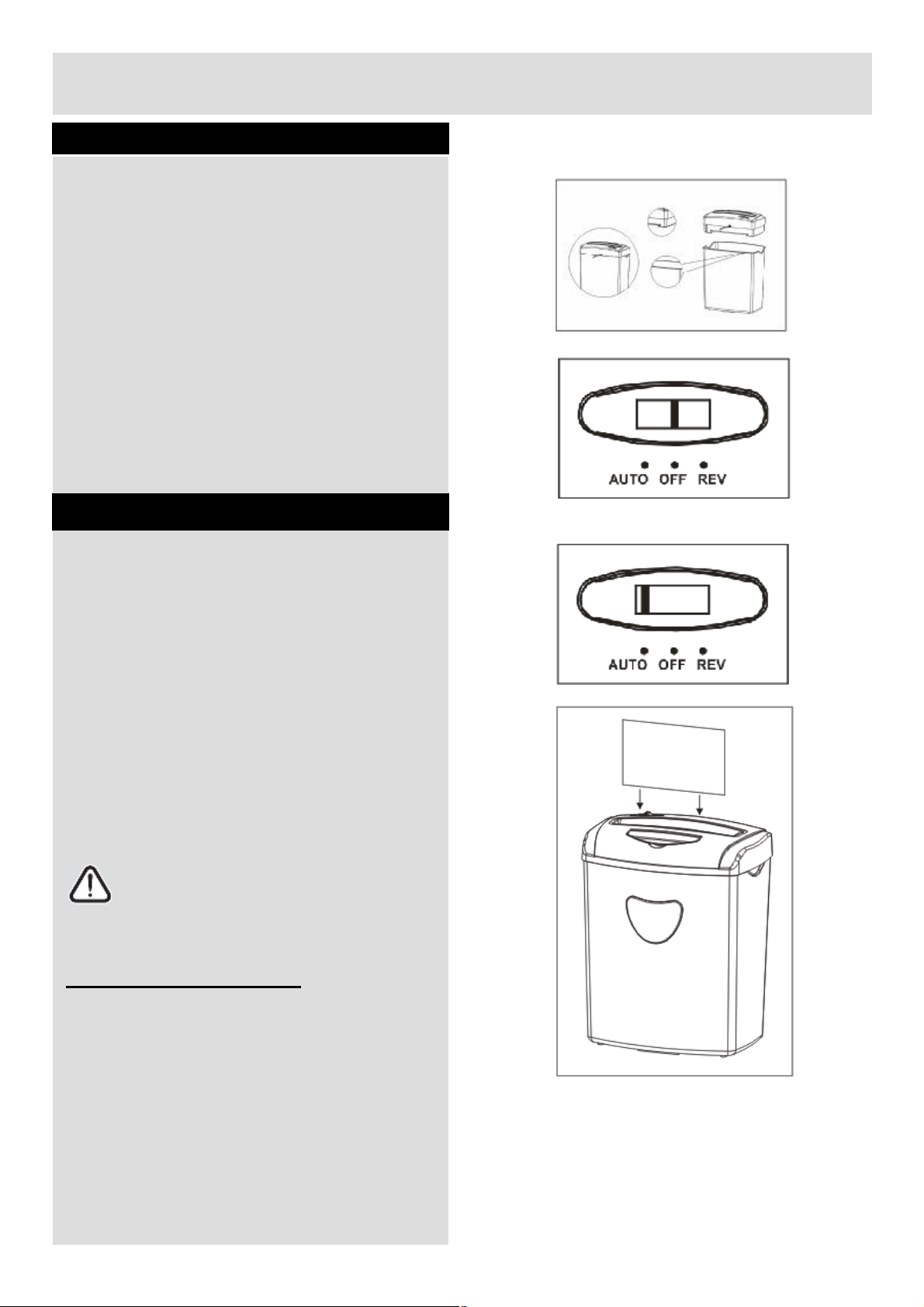
Before
first
use
UserInstructions
2.
Place
the
waste
binona
firm
level
surface
in
3.
This
appliance
is
equipped
withasafety
5.
Make
sure
the
function
switch
is
at“OFF
”
The
shredder
will
operate
to
shred
the
paper
/
6
Settinguptheshredder
1.Removetheshredderfromthepackaging
andunwindthecordtoitsfulllength.
astableuprightposition.
system.Iftheshredderheadandwastebin
arenotcorrectlyinplace,theappliancewill
notfunction.
4.Takethemainunitandputitontothewaste
bin.
position.
6.Connecttheplugtothe220-240VACmains.
Usingyourappliance
1.AUTOmode
Tousethismode,turnthefunctionswitchto
Ÿ
“Auto”.
Ÿ Feedthepaperintothepaperin-throator
openthecoverofCDin-throatandputtheCD
in,themicro-switchinthethroatwillbe
pressed.
Ÿ
CD.
Onceallthepapers/CDhavebeenshredded,
Ÿ
itwillstopitself.
Whenthemotorisoverheated,themachine
Ÿ
willbeshutoffautomatically,afteracooldown
timeof30minutesaround,themachinecan
bestartedworkingagain.
NOTE:Themaximumpapercanbefed
are10sheets.Shouldtheshredderbe
overfed,itwillstopworkingduetopaperjam.
OVERHEATSAFETYDEVICE
Yourshredderisfittedwithasafetydevicethat
switchesofftheunitineventofoverload.
Shouldtheunitstopworking,turntheunitoff
andunplugfromthemains.Allowthemotorto
cooldowntoroomtemperature(approx.30mins)
beforeresumingoperation.
Iftheunitfailstooperateorthesafetydevice
switchestheunitoffagain,returntheunittoyour
nearestservicecenterforexaminationorrepair.
Page 8
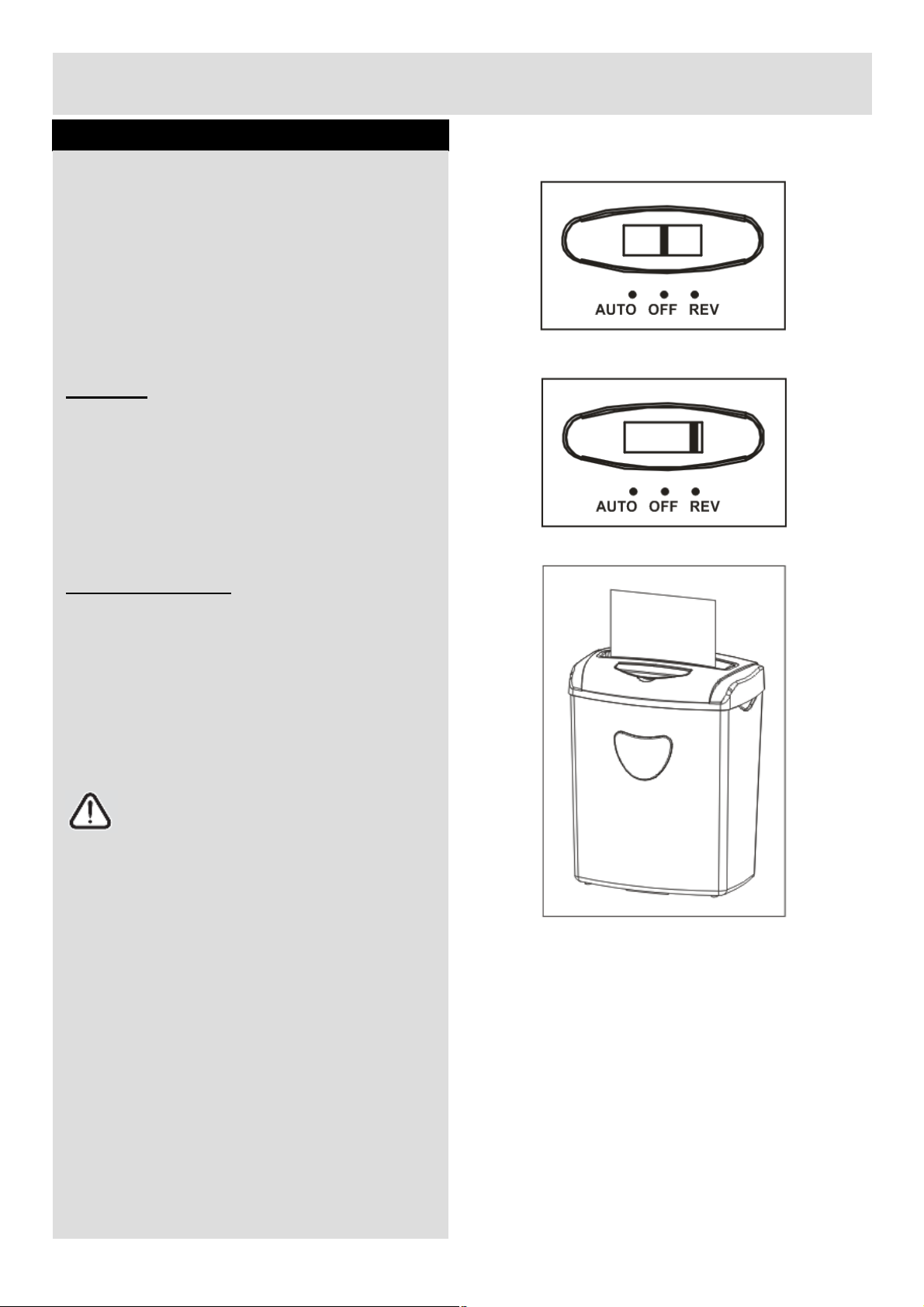
Using
your
appliance
UserInstructions
ŸToswitch
off
the
shredder,
turn
the
function
Turn
the
function
switch
to“REV
”
position.
Ÿ
Pull
out
the
paper
carefully
to
clear
the
throat.
Empty
the
bin.
7
2.OFFMODE
switchto “OFF” position.
3.REVERSEmode
Ÿ
Thecuttingbladeinshredderwillrunin
Ÿ
reversedirection.
Paperjam
Ÿ Turnthefunctionswitchto “REV” positionto
letthecuttingbladerunninginreverse
direction.Thenthepaperwillcomeoutfrom
thethroat.
Ÿ Oncethejammedpaperisremoved,turnthe
functionswitchto “AUTO” positionfornormal
operation.
Emptythewastebin
SwitchofftheunitanddisconnectfromtheAC
Ÿ
mains.
Ÿ Removethemainunitfromthebinandputon
thefloor.
Ÿ
Placethebinonthefloorafteremptyandput
Ÿ
themainunitback.Makesureitispositioning
ingoodcondition.
ConnecttotheACmains.
Ÿ
Note:Alwaysemptythebinwhileitis
fulltoavoidhazard.
Page 9
CareandMaintenance
Never
use
any
sharp
instruments
or
abrasive
substances,
soap,
household
cleaner,
detergent
or
wax
Ÿ
Fuses
of
the
electrical
system
at
Ÿ
Check
the
protection
devices
and
General
Important:Alwaysunplugtheappliancefromthepowersocketduringcleaningand
maintenance.
Ÿ
polishforcleaning.
Uselukewarmwatertocleanthecabinetoftheapplianceandwipeitdry.
Ÿ
Nevercleantheappliancewithflammablefluids.Itcouldcauseadamageandfirehazard.
Ÿ
Ÿ Ensuretheunitisdrybeforeconnecttothemains.
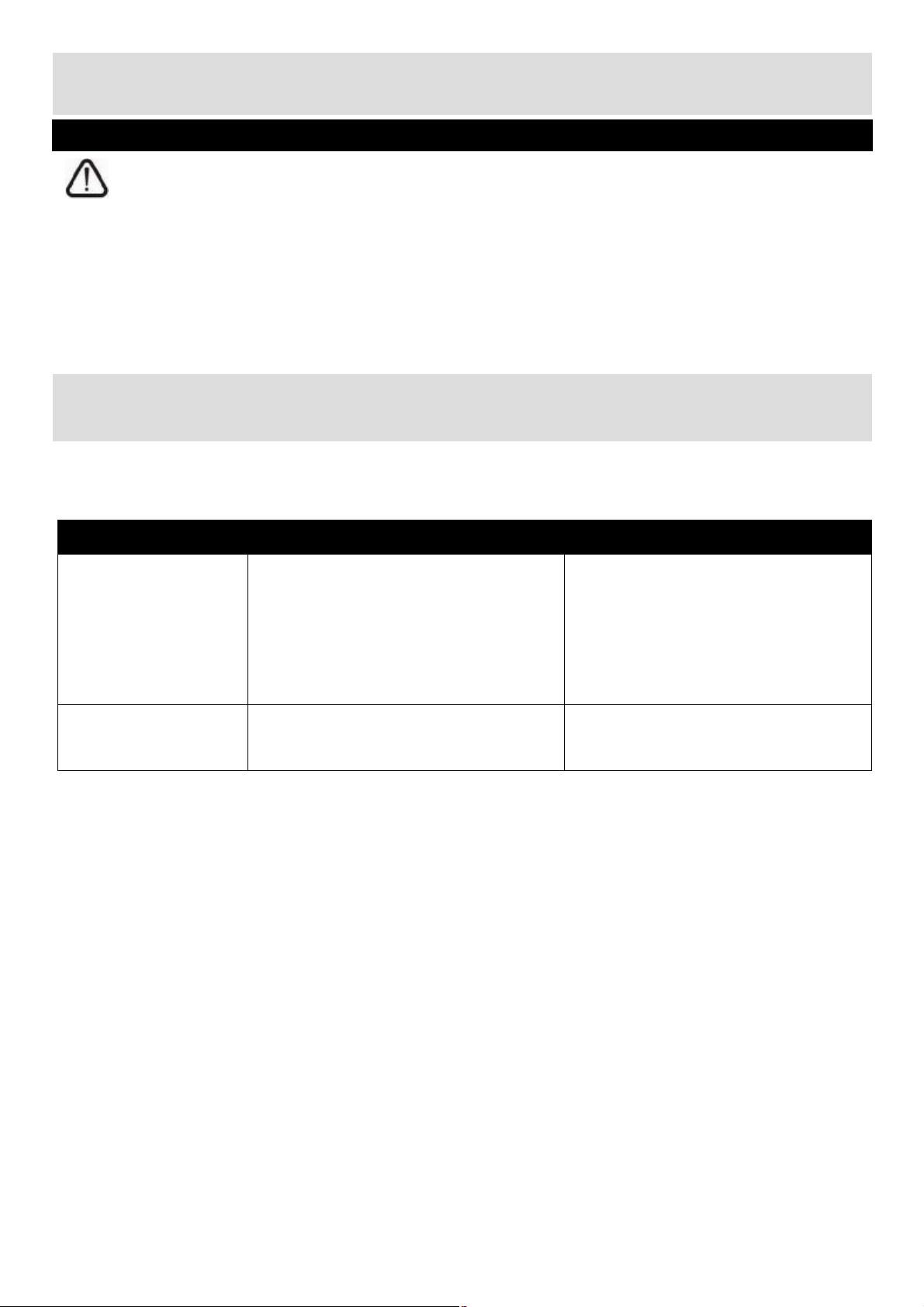
TroubleShooting
Intheunlikelyeventofdifficultieswithyourappliancepleasefollowthetroubleshootingguidebelow.If
theproblempersists,contacttheretailerifthemachineisstillunderguaranteeon 03456400800
Problem Possiblecause Solution
Appliancedoesnot
start
Motorisrunningbut
cannotshredthe
papers
ŸThemainsplugisnotpluggedin.
homeopen.
ŸOverheatprotectiondeviceis
activated.
ŸWastebinisfull. ŸEmptythewastebin.
ŸInsertthemainsplug.
fuses.
ŸAllowthemotortocooldownto
roomtemperature(approx.30mins)
beforeresumingoperation.Donot
overfedtheshredder.
8
Page 10
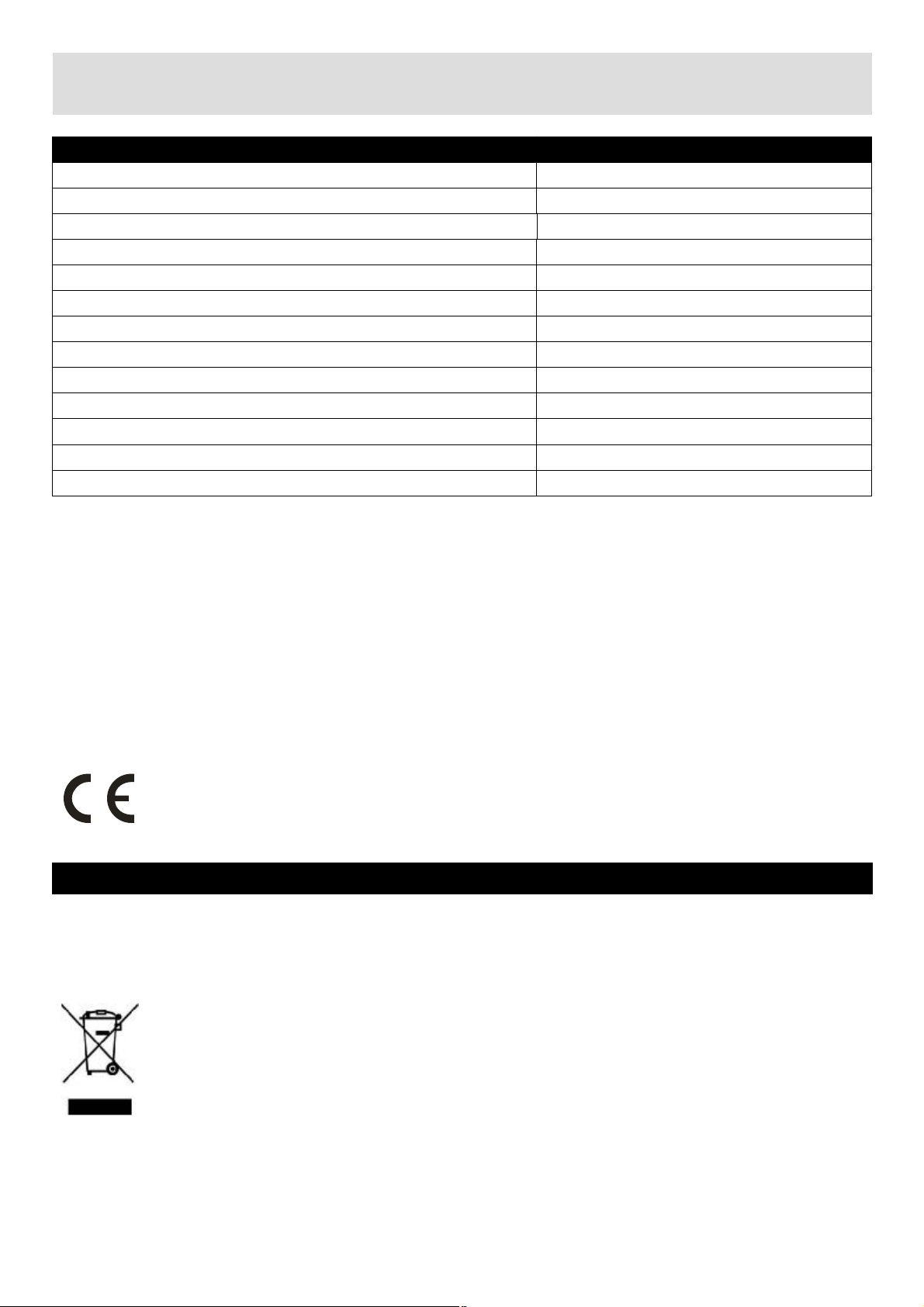
TechnicalSpecifications
9
Model VS1008CD
Voltage 220-240V50Hz
Paperentrywidth 220mm
Shredsize 4x39mm
Shredpapercapacity 10sheets(80g/m2,A4)
Shredspeed 2.2m/min
Acceptstaples
Acceptcreditcard
AcceptCD Yes
WastebinVolume 21Litre
Noiselevel 72dB
Dutycycle Approximate2minutes
Netweight 5.4kg
Dimension 326x227x418mm
Weapologiseforanyinconveniencecausedbyanyminorinconsistenciesintheseinstructions,whichmay
occurasaresultofproductimprovementsanddevelopment.
No
Yes
ThisappliancecomplieswiththefollowingEECdirectives:
2006/95/EECLowvoltagedirective
2004/108/EECEMCdirective
Disposalinformation
Thesymbolontheproductoritspackagingindicatesthatthisproductmaynotbetreatedas
householdwaste.Insteaditshouldbehandedovertotheapplicablecollectionpointforthe
recyclingofelectricalandelectronicequipment.Byensuringthisproductisdisposedof
correctly,youwillhelppreventpotentialnegativeconsequencesfortheenvironmentand
humanhealth,whichcouldotherwisebecausedbyinappropriatewastehandlingofthis
product.Formoredetailedinformationaboutrecyclingthisproduct,pleasecontactyourlocal
counciloffice,yourhouseholdwastedisposalserviceortheshopwheretheproductwas
purchased.
Page 11
Guarantee
The
product
must
be
correctly
installed
and
operated
in
accordance
with
the
instructions
Thisproductisguaranteedagainstmanufacturingdefectsforaperiodof
PRODUCTGUARANTEE
Year
Thisproductisguaranteedfortwelvemonthsfromthedateoforiginalpurchase.
Anydefectthatarisesduetofaultymaterialsorworkmanshipwilleitherbereplaced,
refundedorrepairedfreeofchargewherepossibleduringthisperiodbythedealerfrom
whomyoupurchasedtheunit.
Theguaranteeissubjecttothefollowingprovisions:
Theguaranteedoesnotcoveraccidentaldamage,misuse,cabinetparts,knobsor
Ÿ
consumableitems.
Ÿ
containedinthismanual.
Itmustbeusedsolelyfordomesticpurpose.
Ÿ
Theguaranteewillberenderedinvalidediftheproductisre-soldorhasbeendamagedby
Ÿ
inexpertrepair.
Ÿ Specificationsaresubjecttochangewithoutnotice.
Ÿ Themanufacturerdisclaimsanyliabilityfortheincidentalorconsequentialdamages.
Theguaranteeisinadditionto,anddoesnotdiminishyourstatutoryorlegalrights.
Ÿ
Guarantor:ArgosLtd
489-499AveburyBoulevard
CentralMiltonKeynes
MK92NW
 Loading...