

POSIFLEX Business Machines MR2000-2, MR2000S-3, MR2000U-2, MR2000U-3, MR2000S-2 User Manual
...Page 1

MR2000-2/MR2000-3/MR2000S-2/MR2000S-3/MR2000U-2/MR2000U-3
MAGNETIC STRIPE READER
Rev.: B
FEATURES:
l Double or triple tracks as indicated in MODEL IDENTIFICATION.
l Built-in keyboard wedge interface or RS232 interface or USB interface as
indicated in MODEL IDENTIFICATION.
l Built-in decoder
l Dual directional operation
l Interface cable included
l Heavy duty die-cast case
FCC NOTES
accordance with the instructions manual, may cause interference to radio communications. It has been tested and found to
comply with limits for a Class A digital device pursuant to subpart J of Part 15 of FCC Rules, which are designed to provide
reasonable protection against interference when operated in a commercial environment. Operation of this equipment in a
residential area is likely to cause interference in which case the user at his own expense will be required to take whatever
measures to correct the interference.
WARRANTY LIMITS
technicians. The user should consult his/her dealer for the problem happened. Warranty voids if the user does not follow the
instructions in application of this merchandise. The manufacturer is by no means responsible for any damage or hazard
caused by improper application.
Mustek Corp. further disclaims all implied warranties including without limitation any implied warranties of merchantability
or of fitness for a particular purpose. The entire risk arising out of the use or performance of the software and documentation
remains with you.
ABOUT THIS MANUAL
reader MR2000 series of Posiflex POS products. This series of products provide excellent flexibility and reliability in
application. This manual covers both operational and technical aspects of these units.
modify this manual without notice due to the rapid and constant progress and improvement on science and technology. The
user may always obtain the most up to date information through our web site: http://www.posiflex.com.tw .
transmitted in any form or by any means, electronic, mechanical, photocopying, or otherwise, without the prior written
consent of Mustek Corp. the publisher of this documentation.
TRADE MARKS AND SERVICE MARKS
respective owners.
SOME IMPORTANT NOTES:
This equipment generates, uses, and can radiate radio frequency energy and, if not installed and used in
Warranty will terminate automatically when the machine is opened by any person other than the authorized
The hardware utility program, including instructions for its use, is provided “AS IS” without warranty of any kind.
This manual is written in an attempt with full strength to assist the user to utilize the stand-alone magnetic stripe
The manufacturer of the MR2000 series heartily apologizes to the user for reserving the right to change or to
©
All rights are strictly reserved. No part of this documentation may be reproduced, stored in a retrieval system, or
POSIFLEX is a registered trademark of Mustek Corp..
Other brand and product names are trademarks and registered trademarks and service marks of their
Copyright Mustek Corp. 2002
MANUFACTURED BY: MUSTEK CORP.
AN ISO-9001 AND ISO-14001 CERTIFIED MANUFACTURER
p. - 1
P/N: 19030900020
Page 2
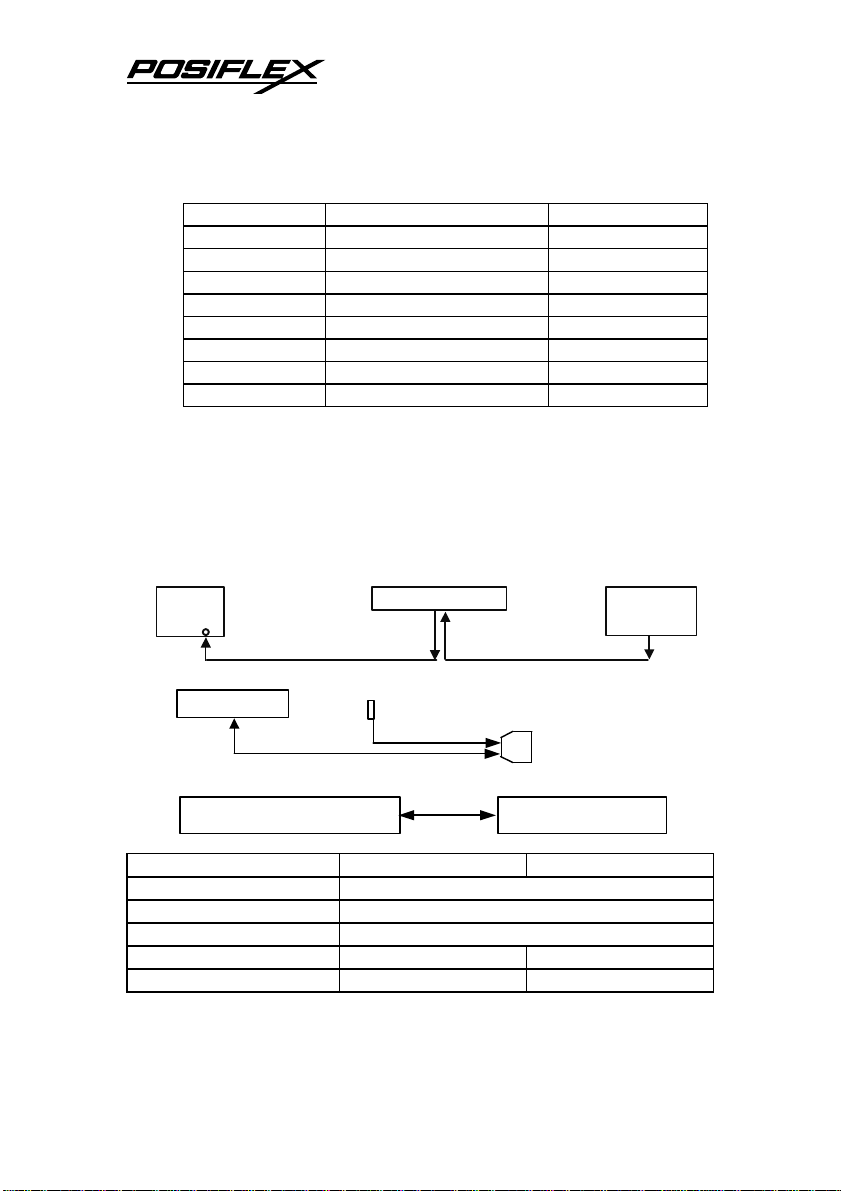
KB I/P
D sub 9 P Female
to COM port
PC USB port or USB hub
MR2000U-2/3/JIS
MODEL IDENTIFICATION:
MODEL NAME TRACKS APPLICABLE INTERFACE
MR2000-2 1 & 2 PS2 KB WEDGE
MR2000-3 1, 2 & 3 PS2 KB WEDGE
MR2000-JIS JIS I + II PS2 KB WEDGE
MR2000S-2 1 & 2 RS232
MR2000S-3 1, 2 & 3 RS232
MR2000U-2 1 & 2 USB
MR2000U-3 1, 2 & 3 USB
MR2000U-JIS JIS I + II USB
SPECIFICATIONS:
l Dimensions: 14.5 cm (L) X 3.7 cm (W) X 3.4 cm (H)
l Weight: 490 gm
l Rated voltage: 5 VDC
l Rated current: 100 mA max.
l LED: dual color -- green for good read or ready to read
red for invalid read
l Cable connection for KB WEDGE models (MR2000-2/3/JIS)
PC
l Cable connection for RS232 interface models (MR2000S-2/3)
MR2000S-2/3
l Cable connection for USB interface models (MR2000U-2/3/JIS)
l Reader specification
Applicable card type ISO 7811 JIS X 6302
Card feed method Manual
Card feed direction Bi-direction
Read / write function Read only
Card feed speed 5 to 55 inches/sec. 100 ~ 1200 mm/sec.
Error rate Less than 0.5% Less than 0.1%
Mini DIN 6 p Male Mini DIN 6 P Female
MR2000-2/3/JIS
Keyboard
4 p RJ plug to CCBLA-141 power kit
PC
MR2000 Series User’s Manual
p. - 2
Page 3

SELECTION &
PARITY
J2
J4
U3
U4
U2
U1
X1
S4 S7
l Card data format
Data standard IATA ABA THRIFT JIS I JIS II
Track used Track 1 Track 2 Track 3 (Track 2)
Applicable to
models
Recording method F2F (FM)
Recording density 210 BPI 75 BPI 210 BPI 75 BPI 210 BPI
Recording capacity
characters / bits
MR2000-2/3
MR2000S-2/3
MR2000U-2/3
79 / 7 40 / 5 107 / 5 40 / 5 72 / 7
MR2000-3
MR2000S-3
MR2000U-3
MR2000U-JIS
Note: Data format for track 3 of ISO cards includes those specific in
AAMVA and CA DMV standards
l Adjustable parameters:
ü For MR2000-2/3 and MR2000S-2/3:
Changing the status of each selector in the 2 dotted areas that are the
enlarged images of the shaded areas on the control PCB determines parameters
illustrated in following 2 tables. (S1 ~ S6 apply to MR2000S-2/3 only) (T3
applies to MR2000-3 and MR2000S-3 only) (for MR2000–2/3, software control
is applicable and available)
S8 S6
LOCATIONS OF SELECTORS
on PCB inside die cast case
Table 1
FUNCTION
STATUS
SHORT
OPEN
DEFAULT
Table 2
BPS
DEFAULT 19200 9600 4800 2400 1200 600 300 150
SELECT
ON S1
OFF S2
OFF S3
DATA
ALT +
PARITY
CHECK
S4 S5 S6 S7 S9 T1 T2 T3
OFF EVEN 7 NO OFF ENABLED ENABLED ENABLED
ON ODD 8 YES ON DISABLED DISABLED DISABLED
SHORT OPEN OPEN SHORT OPEN SHORT SHORT SHORT
BITS
OFF ON OFF ON OFF ON OFF ON
OFF OFF ON ON OFF OFF ON ON
OFF OFF OFF OFF ON ON ON ON
NUM
LEADING &
STOP CODE
SH10
C17
S9
T2
TRACK 1 TRACK 2 TRACK 3
Rear
side
MR2000-JIS
S5 S3 S1
OP4
SH1
R5
T3
T1
S2
R6
p. - 3
MR2000 Series User’s Manual
Page 4

ü For MR2000U-2/3
Changing the jumper status indicated on the control PCB inside die cast
case determines parameters illustrated in the table below. (for MR2000U-JIS,
only J3 is applicable) (for MR2000U-2, T3 is not applicable)
STATUS
CN2
JUMPER
FUNCTION
SHORT
OPEN
DEFAULT
U3
U1
CN1
T1 T2 T3 J1 J2 J3
TRACK 1 TRACK 2 TRACK 3
ENABLED ENABLED ENABLED DISABLED N.A. JIS II
DISABLED DISABLED DISABLED ENABLED N.A. ISO
SHORT SHORT SHORT OPEN OPEN OPEN
T1
T2
T3
J1
J2
J3
LEADING /
STOP CODE
RESERVED CARD TYPE
Note 1: To use the USB interface MSR in operating system without USB
support, please set USB keyboard enabled in BIOS (CMOS) setup.
Note 2: Since this USB interface MSR works as a USB keyboard which is
a normal HID (Human Interface Devices) in USB classification, no
special driver shall be required.
MR2000 Series User’s Manual
p. - 4
 Loading...