

Page 1
T
P
g.
Quick Guide
US
®
IVe
FCC/IC: 3
z
C
z
Visi
f
g
instructions.
L
44.04 - 354.00 MH
E: 433.62 - 434.22 MH
t
wiki.pocketwizard.com
or complete operatin
hank you for your purchase of this PocketWizard radio!
lease read this Quick Guide thoroughly before operatin
Page 2

Congratulations
2
PocketWi
and thank you for
your purchase of a
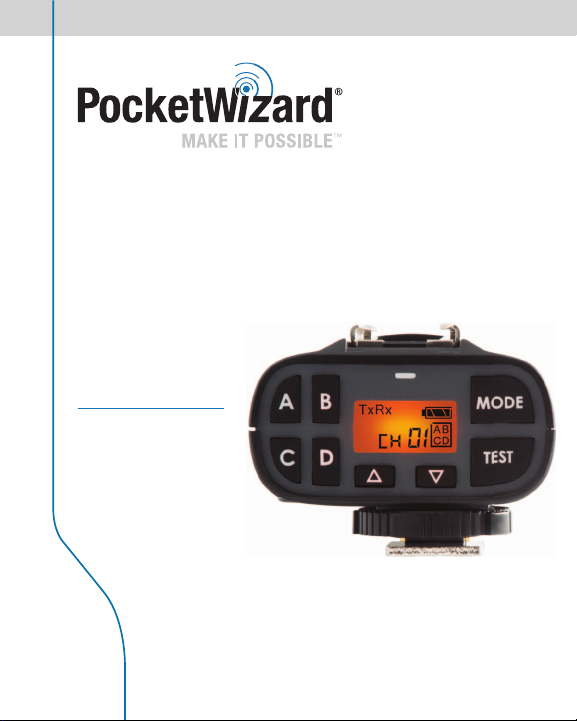
PocketWizard Plus IVe
Transceiver!
The Plus IVe Auto-Sensing Transceiver allows
you to have the benefi t of on-camera TTL fl ash
combined with remote manual fl ash. It delivers
the best of both worlds in one easy to use, reliable
wireless radio trigger system for cameras and
fl ashes. Versatile, practical, and dependable
types of remote photography.
for all
zard Plus IVe
Page 3

y
g
.
r
ill
h
g
.
s
g
i
.
g
gg
.
A
y
f
.
y
g
ff
)
y
gg
f
e
.
p
dio b
h
!
Key Features
3
ncredible Range and Reliabilit
With the new E Series technology, the Plus IVe can trigger remote cameras and fl ashes
in the tou
hest situations from thousands of meters (yards) away
Auto Sensing Transceive
e Plus IVe w
our patented auto sensing technology. Simply make connections and start workin
with near zero configuration time
32 E Channels and 80 LR (Long Range) Channel
hoose your own Channel so there’s no interference from other shooters.
uad Zone Triggerin
Now available on all 112 Channels. Wirelessly activate or deactivate your remote fl ashes or
cameras
Remote Camera Triggerin
et up as many remote cameras as you want to catch a different angle from one single
tri
er. Two stage triggering gives you faster response time to catch the action
uto Rela
Trigger remote fl ashes in sync with your remote camera for even more creative and
pro
essional images
PocketWizard Compatibilit
The Plus IVe will work with all PocketWizard E Series radios and you can downgrade the
fi rmware to work with all Le
radios work on di
be compatible.
amera & Flash Compatibilit
The Plus IVe will work with virtually any camera or flash capable of triggering from a
center pin tri
mode, up to your camera’s X-sync speed. It can provide pass through T TL
ash for most manufacturers. A remote Plus IVe will not support TTL communication.
imple User Interfac
Everything is right at your fi ngertips with the intuitive soft touch keypad. Press any button
except test) to illuminate the LCD if you’re in low light
Fast and Easy Setu
On the camera, slide it into the hot shoe and tighten the locking ring. Connect the fl ash to
your remote ra
the Channels and Zones, and you’re ready to go
automatically switch between transmitting and receiving as needed wit
n 4 separately controllable Zones
acy PocketWizards as well. (note: FCC and CE PocketWizard
erent frequencies-all of your radios must have the same frequency to
er or with the appropriate sync cable and can sync a flash in manual
y using the secure miniphone connection. Turn on the radios, matc
or on-camera
tWizard.com
Page 4
)
)
ggle
s
)
)
)
)
)
)
)
iggering Mod
)
ess/Fu
ess
)
)
PocketWi
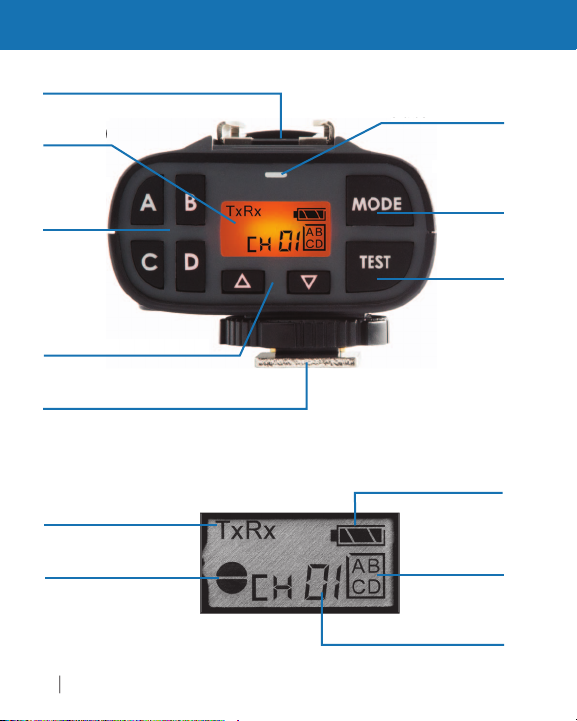
PLUS IVe Auto Sensing Transceiver
Hot Shoe with Sync Contacts (pg. 20
see below
one To
tton
pg. 7
Channel Select Buttons (pg. 7
ounting Foot with Locking Ring/Pin and
Sync Contacts (pg. 20
Select
tton
pg. 15
est
tton
pg. 19
r
pgs. 15-17
Half Pr
ndicator (pg. 19
e
ll Pr
zard Plus IVe
attery Level (pg. 19
lected Zones
pg. 7
Channel (pg. 7
Page 5
.
yp
.
eac
.
.
/Camera Port
o
)
nting
t w
cki
Rin
g
)
2
2
locked
)
)
)
Antenn
a
t
)
e
rop
y
ty
A
5
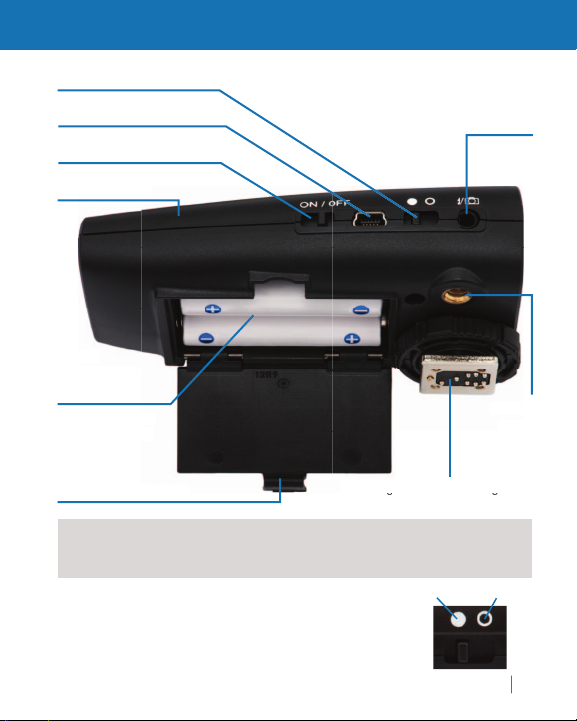
PLUS IVe Auto Sensing Transceiver
eypad Lock (see below
USB/DC Port (pg. 8
ower Switch (pg. 8
attery
Comartmen
pg. 8
ot
er batter
orientation/polari
2x
Pin and Sync Contacts (pg. 20
NOTE You need at least two PocketWizard radios; one for your camera and
ne for
Batteries and cables not included. See pages 13 and 20
h remote fl ash
Keypad Lock
lash
3.5mm (1/8") stere
n
et to fi lled-in circle (near USB port) for normal operation
et to open circle (near sync port) to lock settings and
disable all ke
ad buttons except TEST
tWizard.com
pg. 13
1/4"-
t
pg. 1
ng
Page 6
C:
W)
.
:
W)
PocketWizard Plus IVe
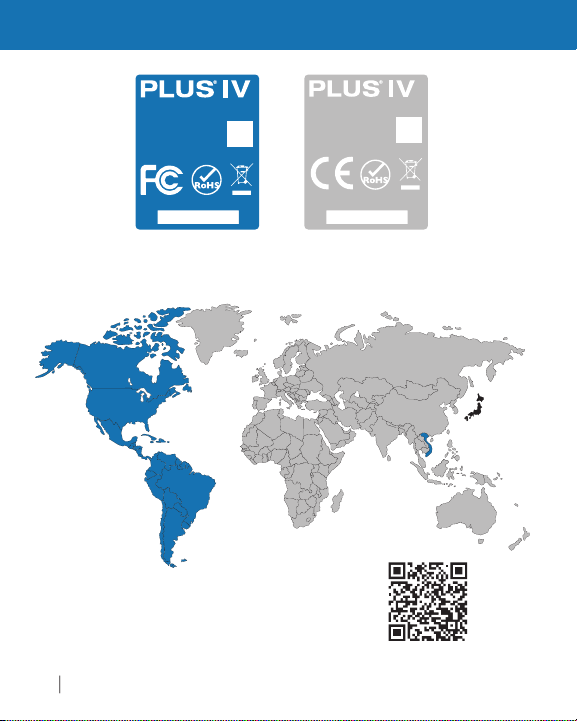
Frequency
Model: P4-FCC
344.04 - 354.00 MHz
FCC ID: KDS-PW4-100
IC: 2170A-PW4100
Made in USA
U.S. Pat.: www.pwpatents.com
S/N: XXXXXXXXXX
344.04-354.00 MHz (<1m
I
Model: P4-CE
433.62 - 434.22 MHz
Made in USA
U.S. Pat.: www.pwpatents.com
S/N: XXXXXXXXXX
E
433.62-434.22 MHz (<1m
FCC/ IC and CE radios are not compatible with each other
PocketWizard.com/wheretobuy/frequency
Page 7

uses
ffere
e
o
g
ill
d
y
k with Leg
iMAX
s
m
PocketWi
ili
.
You
eeds to be o
d
(pg
.
7
PLUS IVe Transceiver Basics
PocketWizard Compatibility
ketWizard
egacy and E Release. The fi rmware installed in this Plus IVe is the E Releas
and your radio is a member of the PocketWizard E Series family. The
Release uses a new communication protocol that enables your Plus IVe t
have greater range, enhanced reliability, and more features than a Plus IV
usin
the Legacy fi rmware.
s Plus IVe w
to E Release fi rmware operating on the same frequency. PocketWizard
ffers two frequencies: FCC for North and South America and CE versions
for most of the rest of the world. E Series fi rmware will not work with Legac
rmware but the Plus IVe can be downgraded to the Legacy fi rmware to
wor
lexTT5, etc). It can be upgraded again as often as you like at no additional
ost. Your existing radios may be upgradeable.
you choose to downgrade your Plus IVe to Legacy fi rmware, some function
nd settings may operate differently. Please refer to wiki.pocketwizard.co
or a list of compatible radios, information on how to upgrade or downgrade
your
rmware with your Plus IVe
Channels & Zones
r Plus IVe n
adios to work together. Channels can be set via the Plus IVe’s Channel
/down buttons . The Plus IVe has 4 Zones (ABCD). See “Channels
& Zones” section
two di
work with any other PocketWizard that has been upgrade
acy PocketWizard radios (such as the Plus II, Mult
zards using the PocketWizard Ut
. 18) for more info
nt families of fi rmware to control their radio:
ty, and how to use Legacy
n the same Channel and Zone as other PocketWizar
,
tWizard.com
Page 8
ill
)
ill
ff
)
.
lid
LED will blink
g
igg
d.
p
s.
PocketWizard Plus IVe
PLUS IVe Transceiver Basics
Batteries
ake sure batteries are properly installed (pg. 5). The Plus IVe w
perate reliably using almost any pair of ~1.5 volt AA (IEC: LR6
atteries. Rechargeable batteries w
e reduced and battery level display may not be as accurate. Always
all equipment (PocketWizard radios, fl ashes, cameras, etc
turn o
before making connections or replacing batteries. Remove batteries
uring storage
Powering on/off
lide switch from o to | to power on the unit. To power off the radio,
e the switch back to o. When turning on, the status
s
red-green-red-green pattern once for E Release fi rmware (or a single
reen blink if unit has been downgraded to Legacy fi rmware) then
bold
blink every few seconds to indicate normal operation. See the Status LED
section (pg. 19) for details about power levels. It will blink red when a
er is transmitted or receive
tr
USB
he Plus IVe’s mini B USB port is located beside the power switch.
t can be used with the PocketWizard Utility to install fi rmware updates
r downgrade to Legacy fi rmware. It can also be used to power the
unit with a com
wiki.PocketWizard.comfor more detail
atible AC adapter or USB power source.
work, though operation time may
Page 9
y
Power everything ON
ON
,
adio
E
.
be
ual mod
g f
a
shes
.
9
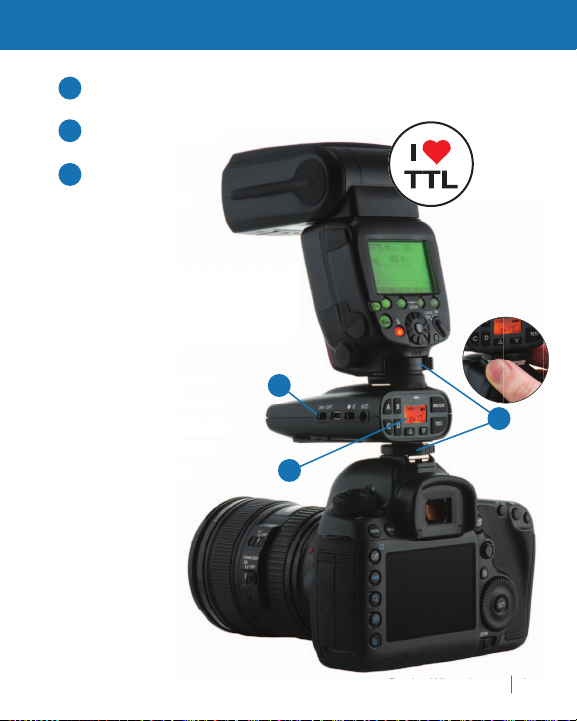
Triggering a Remote Flash
Connect everything securel
1
2
Set Channel
3
one, and Mode
n r
NOT
On-camera speedlight optional.
ay be TTL-enabled or full manual
Remote fl ashes mut
t to man
syncin
rom a Plus IVe on
mera. Remote fl
will not perform TTL
when
2
1
3
tWizard.com
Page 10
Connect everything securely
ly
l p
r
adio Take Pictures
E
p
.
Po
zar
d P
e
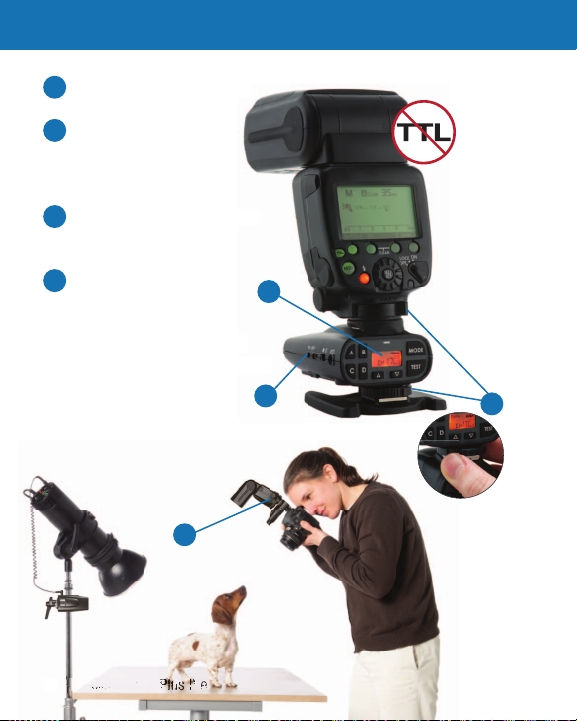
Triggering a Remote Flash
4
Power everything ON
5
nd set speedlight/fl ash
to manua
Set Channel, Zone, and Mode
6
n r
owe
7
NOT
peedlights mounted on remote
lus IVe radios do not perform TTL.
Set a manual
ower level
7
6
5
4
Page 11
.
a
E
TTL
hi
p
,
a
,
off camera
11
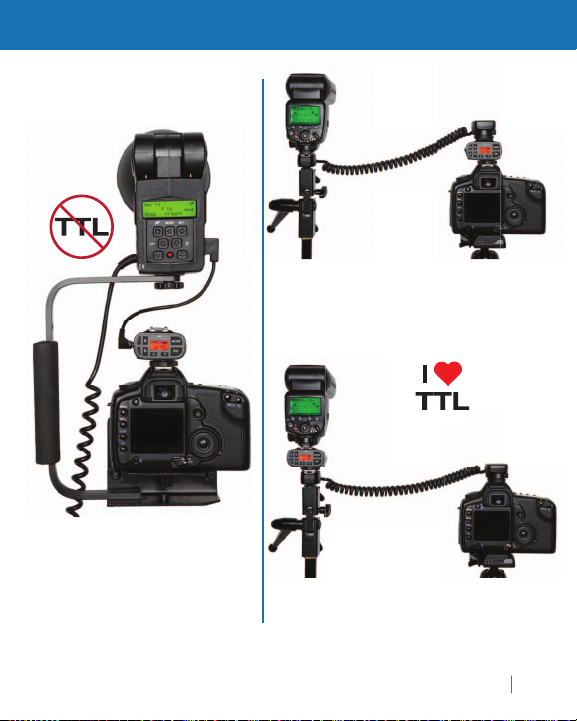
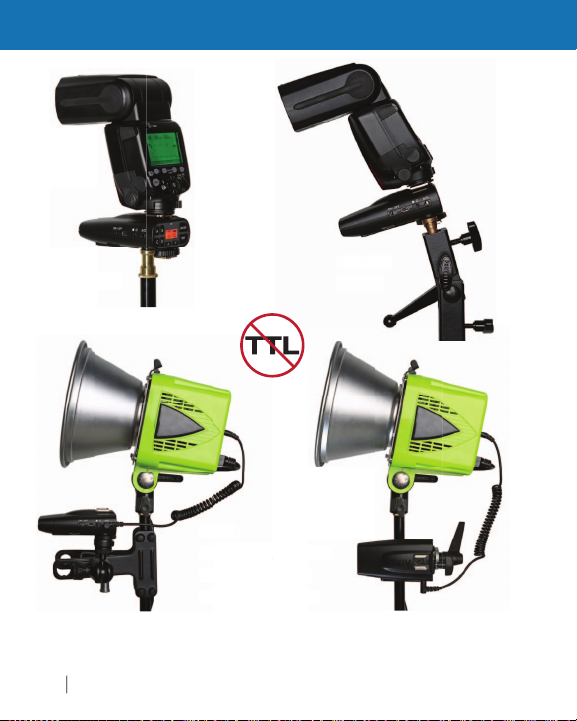
Other Transmitter Mounting Suggestions
Non-TTL fl ash on bracket
r near camer
TTL off-camera shoe cord
on camer
NOT
ompatible TTL fl ashes will
work with correct
-camera shoe cord in
t
s setu
TTL off-camera shoe cord
io
Cables and mounting hardware not included.
isit your local dealer for PocketWizard accessories
tWizard.com
Page 12
y
E
Plu III
a
for recommend
asremote stud
d
el
p
p
PocketWi
Other Remote Mounting Suggestions
t stan
pring clam
zard Plus IVe
adapter
T
rd
tWiz
Visit
our local dealer for PocketWizard accessories.
io fl
uper clam
ables and mounting hardware not included.
Page 13
cables not included
f
.
ggle B
.
Full Press
e
.
IVe on camera
d
g)
IVe connected to
a
g)
13
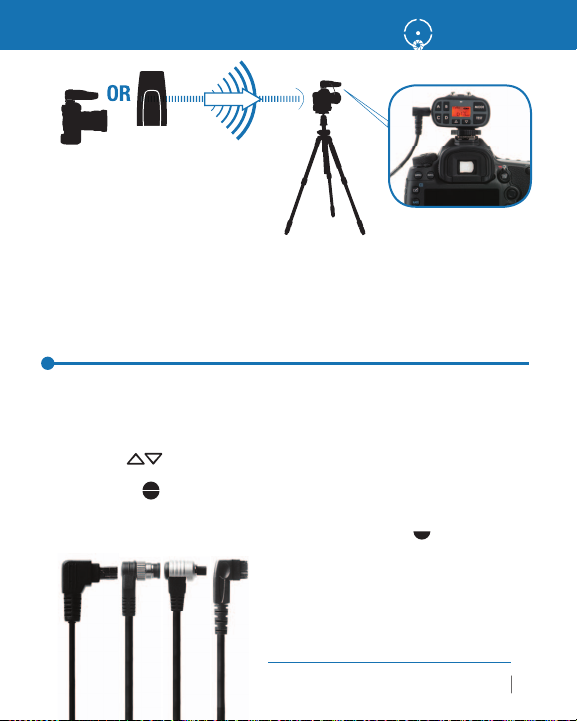
Triggering a Remote Camera
ransmittin
ORin han
Receivin
Triggering a Remote Camera with your
Plus IVe Transceiver
1. Connect a Plus IVe to your remote camera via the appropriate remote
amera cable. The receiving Plus IVe does not need to be in the hot shoe
2. Select a Channel and Zone A, B, C, or D via the Channel up/down
ttons and Zone To
.
the TEST button on the transmitting PocketWizard radio
r the shutter button on the handheld camera to fi re the remot
camera. See page 19 for details about half press
uttons
mote camera
Find the correct cable
mera or fl ash:
pocketwizard.com/cablefinder
Remote Camer
or your remote
tWizard.com
.
Page 14
IVe
g)
1
a
)
1
)
g)
desired Channel and Zone.
a
a’s hot shoe.
e
d
.
-
he
Plus IVe radios.
a.
PocketWizard Plus IVe
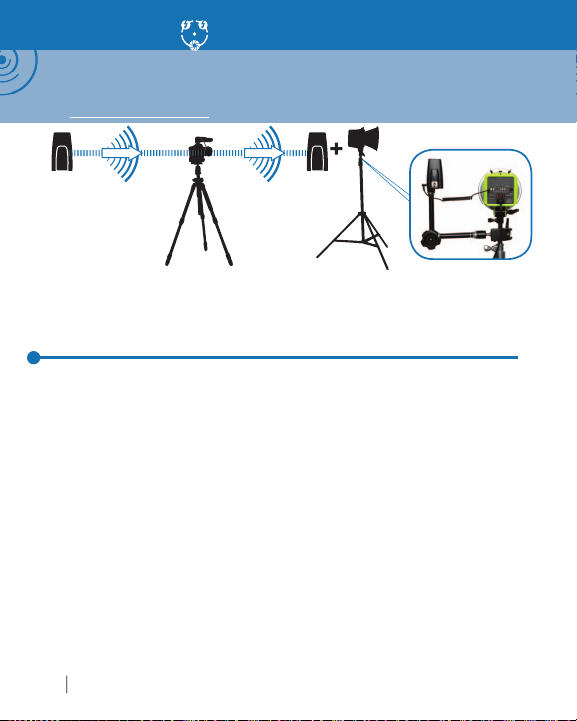
Auto-Relay
NOTE: Auto-Relay allows you to trigger remote fl ashes in sync with a remote camera
and requires three PocketWizard radios. With Auto-Relay, not all radios are set to the
same Channel: The relaying radio transmits on one Channel higher than it received on.
Visit wiki.PocketWizard.com for additional information.
Tran smit tin
hannel
Autom atically tran smits on Chann el 2
mote Camer
Relaying Plus IVe
hannel
Receivin
hannel 2
Using Auto-Relay
1. Set the transmitting PocketWizard radio in your hands to Tx Mode and
the
onnect the Relaying Plus IVe’s Flash/Camera Port to the remote camer
triggering port of the camera via a remote camera cable and place the
in the camer
.
et the Relaying Plus IVe attached to your remote camera to TxRx Mod
and also to the same Channel and Zone as the transmitting PocketWizar
adio in your hands
. Connect a remote fl ash to a receiving PocketWizard radio via the appro
riate sync cable and set it to TxRx or Rx ONLY Mode and one Channel
er than the transmitting PocketWizard radio in your hands. Match t
nes to the other
5. Press and release TEST on the transmitting PocketWizard to fi re the
remote camera. Remote fl ashes will be automatically synchronized with
the remote camer
Page 15
Y
li
g
.
allows the radio to be used as
ached to a camera or as a
eceiver connected to a remote fl ash o
e
ically
s is
defau
ode.
(
) f
y
g
Thi
ill
(
) f
y
Use
ode
e
g
.
5
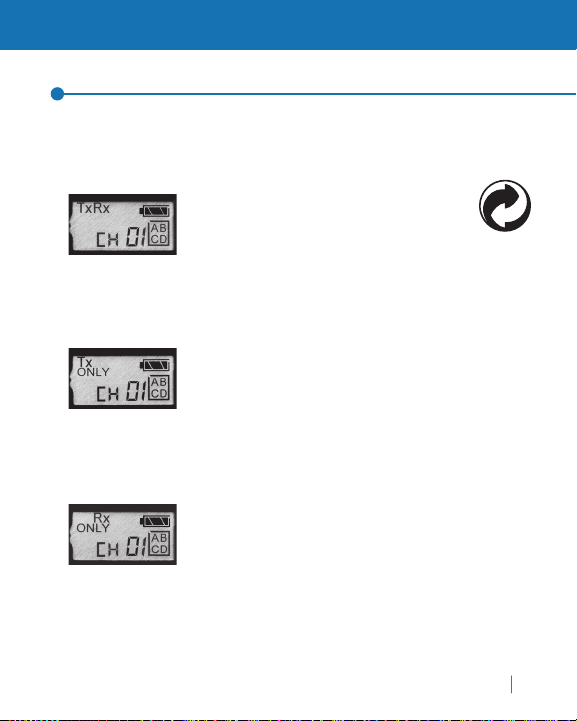
Triggering Modes: Transmit & Receive
Modes of Operation
our Plus IVe Transceiver supports six modes of triggering for different
cations. You can switch between modes by pressing and quickly
app
the MODE button
releasin
TxR x
transmitter att
r
camera. As an Auto-Sensing Transceiver, the Plus IVe
automat
Thi
Tx ONLY
and allows you to use your Plus IVe as a transmitter
only. Use this mode when sharin
with other photographers.
other photographers from triggering the Plus IVe on
our camera.
Rx ONLY
allowing you to use your Plus IVe radios as receivers
r remote fl ashes or remote cameras.
when you do not want a remote Plus IVe to perform
relay functions when mounted in the shoe of a remot
camera, or to prevent a remote Plus IVe from triggerin
other radios when its TEST button is pressed
switches between transmit and receive.
the
lt m
ode disables all receiving
s mode w
ode disables all transmit
remote fl ashes
tWizard.com
r remot
unctionalit
prevent
unctionalit
this m
1
Page 16
shortens
,
ote cameras o
g
adio
(Hig
).
lly i
g
h
bled
g
iggering
f
.
Mode butto
select LR mode. You ca
d
t
igg
g
.
see
s.
gag
g
h
.
PocketWizard Plus IVe
Triggering Modes: HSR & LR
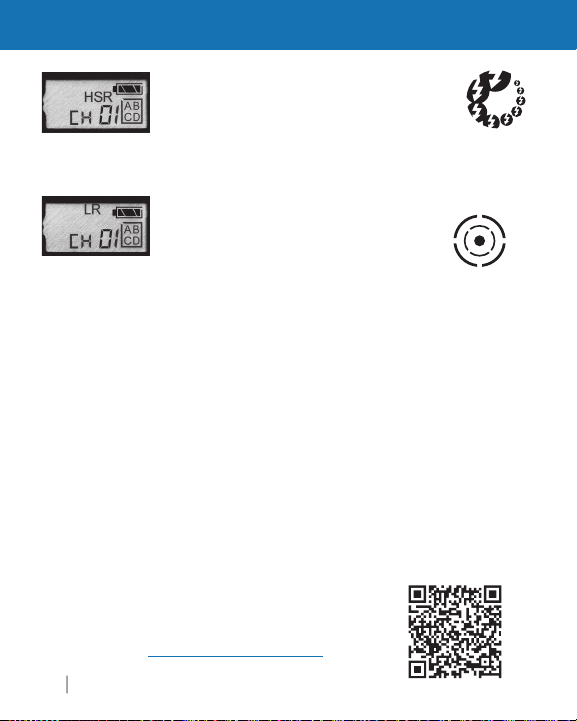
HSR (High Speed Receive)
the contact time of the Flash/Camera Port
allowing for triggering ofm
fl ashes at hi
does not support HSS
LR (Long Range)
the maximum ran
ooting environment. LR Mode must be
s
ena
adios. Use when tr
her FPS (frames per second).
h Speed Sync
ode dramatica
e of a radio in a given
on both transmitting and receivin
remote cameras at
r
r
ncreases
reater distances. It can also be used with remote
ash, but there will be a reduction in maximum X-sync
speed. Line o
t
sight is recommended
n to
n now
hoose from LR Channels 1-80. E Channels 1-32 an
R Channels 1-80 use different frequencies and will no
tr
er each other. Both the transmitting and receivin
adios must be set to the same type ofhannel
NOTE:If you are using a Plus IVe set to LR mode in a remote camera’s hot shoe,
the remote Plus IVe will automatically en
transmittin
ash or not. If you do not want that behavior, remove the Plus IVe from the hot
s
ngaging Auto Relay
signal on the next highest Channel, whether you are using a remote
oe, disable the camera’s hot shoe, or cover the center pin contacts to prevent
e Auto Relay mode and send out a
If you choose to downgrade your Plus IVe to Legacy
rmware, Long Rangesettings operate differently.
wiki.PocketWizard.comfor detail
Page 17
y
see
s.
itting
i
iggering di
f y
Thi
iggering
eductio
X-sy
This i
A
.
r
ease
g
m
esults.
d
).
r
).
17
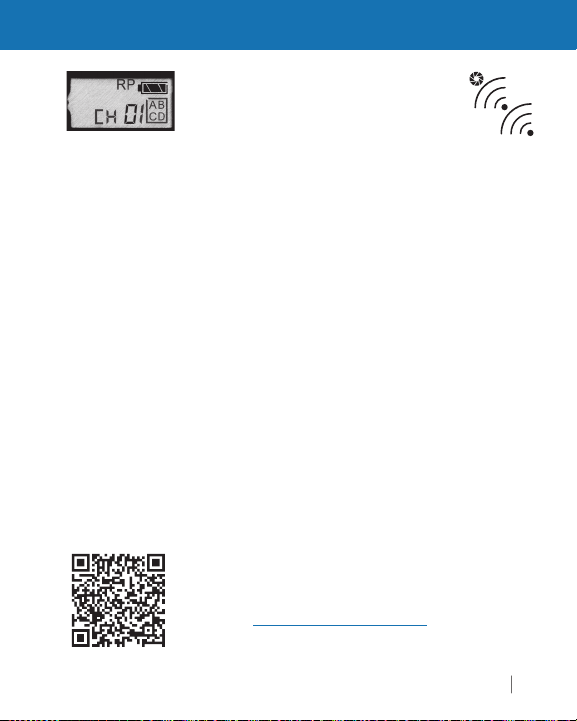
Triggering Modes: RP
RP (Repeater)
ode allows you add one
r more Plus IVe radio(s) between a pair of
transm
max
i
epeater to reach 400 meters.
sed when tr
and receiving units to increase
mum tr
stance. For example,
ou can reach 200 meters, you can add a
s mode can be
remote cameras. It can also be
with fl ash but there is a r
nc speed.
s not the same operation as
n in maximum
uto-Relay Mode
RP mode with E Release fi rmware requires a multiple
hannel setup. Set the transmitting and fi rst Repeate
radio to the same Channel. Then incr
the Channel
umber for each successive repeater unit. Make sure
each Repeatin
radio can only receive the signal fro
ne other radio, otherwise an endless loop could occur.
Put the transmitting radio into Tx ONLY Mode for
t r
or example:If you are using one Repeater in the middle, set the transmitting an
epeater radio to Channel 1. Set the receiving radio to Channel 2. (Ch1>Ch1>Ch2
you are using a total of fi ve radios for very long distance, set the transmitter and
fi r s t R epeater to Channel 1, the second Repeater to Channel 2, the third Repeate
to Channel 3, and the receiving radio to Channel 4. (Ch1>Ch1>Ch2>Ch3>Ch4
If you choose to downgrade your Plus IVe to Legacy
rmware, Repeater settings operate differentl
wiki.PocketWizard.com for detail
tWizard.com
Page 18
C
p
ff
gg
.
.
itting PocketWi
g
.
d.
PocketWi
IVe
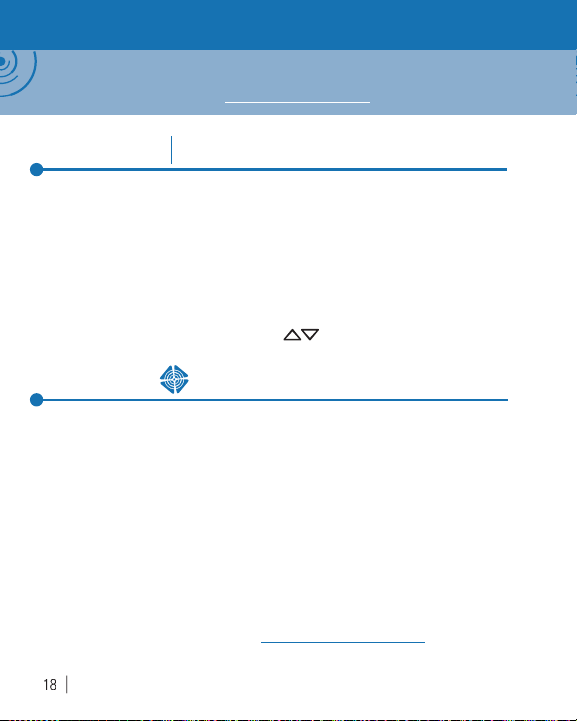
Channels and Zones
NOTE: This Pocket Wizard Plus IVe uses the new E Release fi rmware. This protocol will
not work with Legacy fi rmware. T his Plus IVe can be downgraded via the Utility to work
with Legacy fi rmware. Please see wiki.PocketWizard.com for more information.
Channels
he Plus IVe Transceiver supports 32 different E Channels and
80 different LR
transmitted on s
any photographers to work in the same area or for one photographer
to exclusively control di
ny number of receiving PocketWizard radios set to the same Channel.
Radios set to different Channels will not tri
Press the Channel up/down buttons to change Channels
32
E Channels80LR Channels
hannels. Each Channel represents a digital code
ecifi c PocketWizard radio frequencies. This enables
erent sets of receivers. A Plus IVe will trigger
er each other
Using Zones
Zones can be used to toggle remote cameras or fl ashes on or off from a
transm
ashes with another photographer so only some of the remote fl ashes
re shared, even when using the same Channel
Zones A, B, C, and D are selectable via the Plus IVe’s Zone Toggle
Buttons and are available on all E and LR Channels. The enabled Zones
re displayed in a box on the right side of the LCD. You can enable any
ombination of all four Zones. A receiving Plus IVe will only trigger if the
transmitting PocketWizard radio has at least one matching Zone enable
TE: If you choose to downgrade to Legacy fi rmware, Channels and Zones
will operate differently. Please see wiki.PocketWizard.com for details.
zard radio. Zones can also be used when sharin
zard Plus
Page 19
/4
/2
/2
y
di
CD p
y
dicator.
A
g
itting Pl
III
igg
ing
III
(
ill
kly
y
es.
y
defau
ode after a rese
Rx
abled.
ease search fo
f
.
19
Other Functions
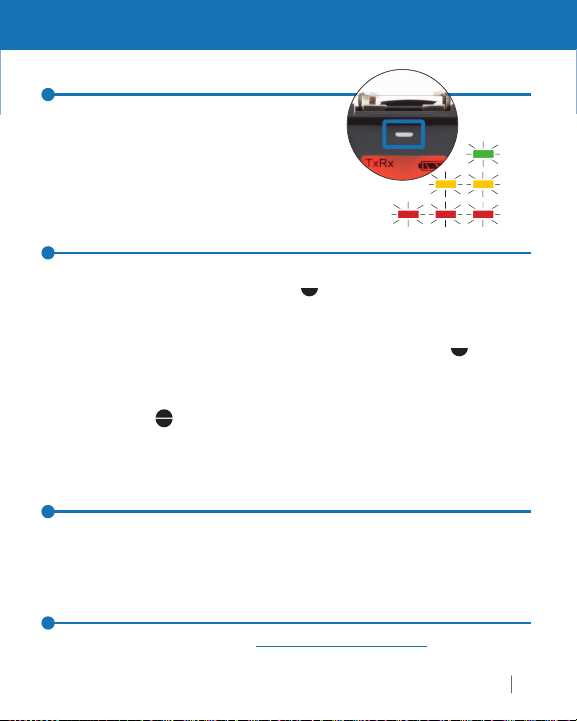
Status LED/Battery Level Indicator
tatus LED blinks regularly to show
level and illuminates red briefl y when the
ra
o sends or receives a signal. The
front L
vel in
anel will also show a batter
TEST Button (Two Stage Trigger)
Plus IVe cannot send a half press signal but it can receive one from
a transmittin
transm
us
remote camera cable
utton w
also reduces batter
ully pressingthe TEST button on a Plus IVe or Plus IIIe fires an
remote cameras or fl ashes connected to receiving PocketWizard radios
t to the same Channel and Zones.
Plus IIIe. Half pressingthe TEST button on a handheld
us
e can wake up and pre-tr
a Plus
e or Plus IVe as the receiving radio with the correct
available separately). Half pressingthe test
make the camera respond more quic
life. It will not affect remote
Reset
To reset your Plus IVe Transceiver to the default setting, hold the TEST
utton as you power
n Channel 1 with all Zones en
the radio on. The
More Information
l
to date and detailed in
r Plus IVe at wiki.PocketWizard.com for the most up
ormation about your Plus IVe
atter
er a remote camera when
and consistently but
ash
lt m
> 1
< 1
< 1
t isx
tWizard.com
Page 20
F)
C
)
C
F)
C
F)
g
)
p
dligh
ill d
IV.
z
)
.
A
second
300 Volts
p
dous status.
300 V
00s
S
")
")
)
A
)
A
.
A
)
hout batteries.
IVe
Technical Information
Hot Shoe/Metal Foot
for pin/electrically compatible equipment includin
ISO compatible, on-camera TTL pass-through
most Canon, Nikon,
Panasonic, and Olympus speedlights and cameras (and some compatible third
party equipment
Frequency
. Sony Multi-Interface cameras and speedlights compatible for
ARNING: Panasonic battery-less spee
ts w
FCC 340.00 – 354.00 MHz; CE: 433.62 – 434.22 MH
amage your Plus
Transmit Output Power: Less than 1 milliwatt (1/1000 of a watt
Batteries/Power: 2 x AA (IEC:LR6) Alkaline recommended for ~50 hour life
External USB Power at ~5 volts and < 100m
Trigg er ing Delay: 1/1200 of a
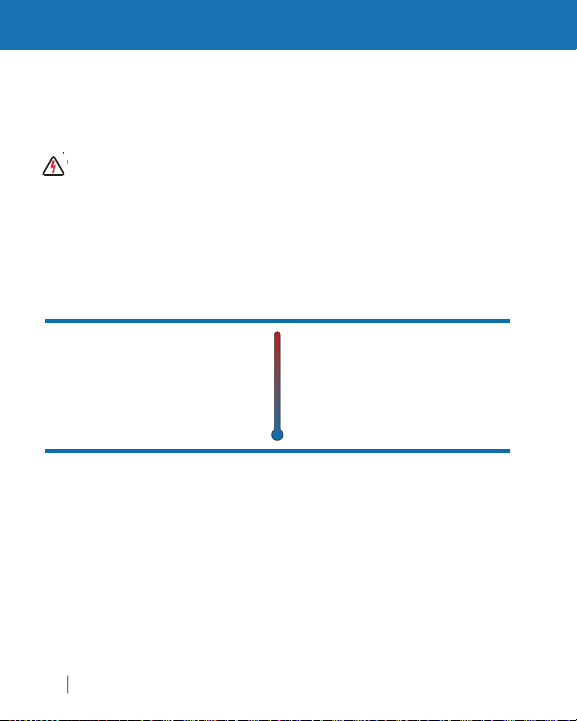
°
Operating Temperature:
bove -15° C (5° F) and
below 50° C (120 ° F
lways use fresh batteries
120 °
-15°
° C
5° F
n cold temperatures
Flash/Camera Port Sync Voltage Tolerance
Backlit LCD
The Plus IVe’s backlit LCD activates automatically when any button
other than TEST is
ressed. It turns off after 5 seconds.
Storage Temperature
185°
(without battery):
bove -30° C (-22° F) and
below 85° C (185° F
°
-22°
wit
LEDs: Red LEDs are used for dim light application
nd do not indicate a hazar
Maximum Sync Voltage:
Radio delay: 1/12
X-Sync: Up to 1/250, 14.5 FP
Dimensions: 10.7 cm (4.2") x 5.3 cm (2.1
x 3.0 cm (1.2
Weight
<110 g (3.9 oz
20 PocketWizard Plus
Page 21
radios away from
.
f
d k
high
!
ills.
Plus IVe Transceiver’s antenna is omnidirectional and
s
g
ill al
.
east a
lli
f
.
d
cmmm
21
Sustaining High Performance
m
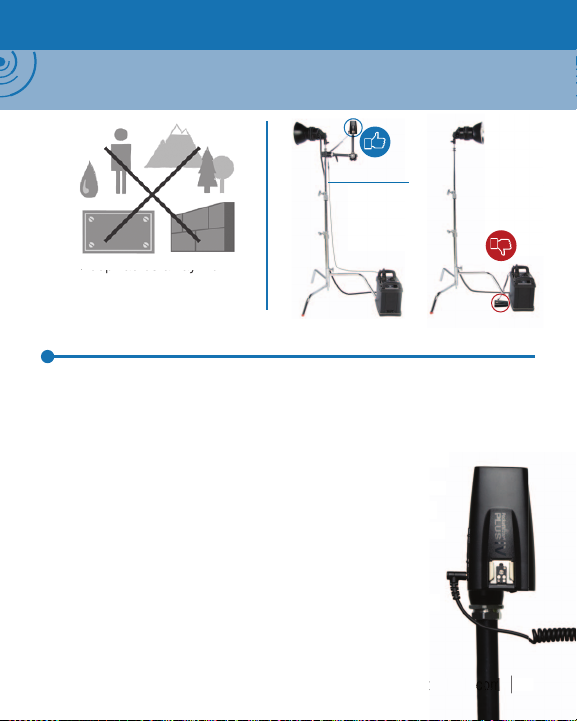
NOTE: Your PocketWizard r adios use the environment as a medium for transmitting and receiving
radio signals. The performance of your radios depends on their placement in the environment,
nearby radio interference, and the radios’ orient ation and position relative to each other.
3.5mm (1/8") to
*
3.5mm (1/8")
metal, concrete, or
water-content objects
Wireless Basics
e Plus IVe is designed to work in many challenging environments. For the
ormance with any radio, maintain a line of sight between radios
best per
eep antennas parallel. Make sure radios are not near any large metal,
an
concrete, or
water-content objects. People and trees are mostly water
(MMX)
orientation should not signifi cantly impact performance in
most shootin
w
Maintain at l
rect antenna contact with anything meta
ave a number of causes, but the solution is usually the
same: move the radio a
roblem area. Always obey the laws of physics
scenarios, but optimizing for radio receptio
ways improve the maximum range
12˝ distance between antennas. Avoid
ew inches or feet away from the
it
c. “Dead spots
zar
co
Page 22

USA - The FCC wants you to know:
p
.
g
-
d
f
g
f
:
.
.
p.
:
d
h
.
illag
g
.
sceive
00
sceiver C
00
PocketWizard Plus IVe
WARNING: Changes or modifi cations to this unit not expressly approved by the part y
OTE: This equipment has been tested and found to comply with the limit s for a Class B
ital device, pursuant to Part 15 of the FCC rules. These limits are designed to provide
di
easonable protection against harmful interference in a residential installation. This equip
ment generates, uses, and can radiate radio frequency energy, and, if not installed and use
in accordance with the instructions, may cause harmful interference to radio communications.
ounting and cable connections detailed in this document represent the intended usage,
owever, there is no guarantee that interference will not occur in a par ticular installation. I
this equipment does cause harmful interference to radio or television reception, which can
be determined by turnin
the inter
1. Reorient or relocate the receiving antenna
2. Increase the separation between the equipment and the receiver
3. Consult the dealer or an experienced radio or television technician for hel
onsible for compliancecould void the user’s authority to operate the
res
uipment
erence by one or more of the following measures
the equipment off and on, the user is encouraged to try to correct
USA / Canada
his device complies with Par t 15 of the FCC rules and with Industry Canada
icence-exempt RSS Standards. Operation is subject to the following two conditions
1. This device may not cause harmful interference, an
2. This device must accept any interference received, including interference
at may cause undesired operation
t
e présent appareil est conforme aux C NR d’Industrie Canada applicables aux appareils
adio exempts de licence. L’exploitation est autorisée aux deux conditions suivantes:
1. l’appareil ne doit pas produire de brou
2. l’utilisateur de l’appareil doit accepter tout brouillage radioélectrique subi, même
si le brouilla
Tran
Tran
e est susceptible d’en compromettre le fonctionnement
r FCC ID Number: KDS-PW4-1
ANADA IC: 2170A-PW41
e, et
Page 23
g
prop
.
0
Simplifi ed EU Declaration of Conformity
adio
ereby, LPA Design Inc. South Burlington VT USA declares that the
equipment type PocketWizard Plus IVe CE wireless photographic remote
ontrol is in compliance with Directive 2014/53/EU. The full text of the
U declaration of conformity is available at the following internet address:
www.pocketwizard.com/support/reference/CE/
r
change without notice. PocketWizard, ControlTL, MiniTT1, FlexTT5, FlexTT6,HyperSync,
Plus, and MultiMA X are either trademarks or re
other trademarks contained herein are the
atent information: www.pwpatents.com
7 v1.
istered trademarks of LPA Design. All
erty of their respective owners
 Loading...