

Page 1
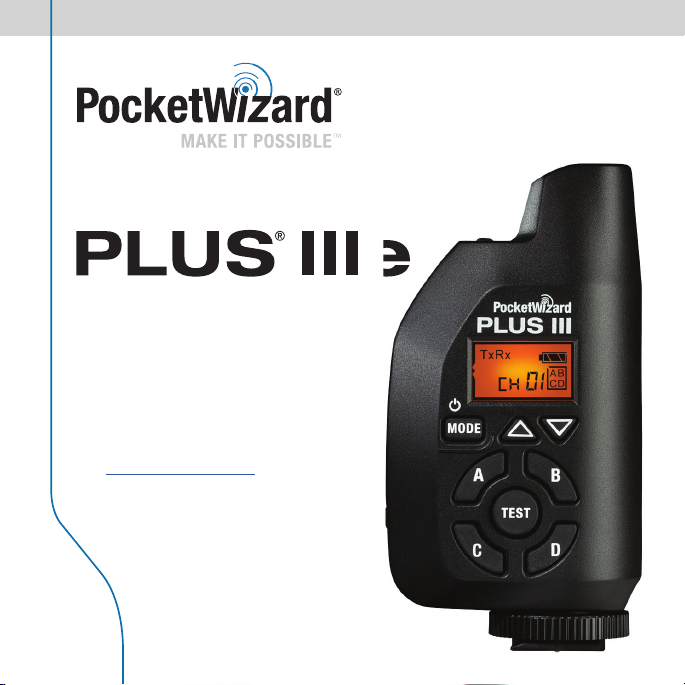
Quick Guide
CC/IC: 340.00
z
z
f
his PocketWizard radio! Please
f
g.
Visi
l
.
F
E: 433.42 - 434.42 MH
Thank you for your purchase o
t
ead this Quick Guide thoroughly
be
ore operatin
t wiki.pocketwizard.comfor
comp
ete operating instructions
- 354.00 MH
Page 2

PocketWizard Plus IIIe
Congratulations
and thank you for
your purchase of a
PocketWizard Plus IIIe
Transceiver!
The Plus IIIe is our most reliable and easy
to use solution for remote fl ash and camera
triggering available. It is a feature packed
wireless radio trigger system for cameras
and flashes, giving you high performance,
consistency, and dependability for all types
of remote photography.
Page 3

.
A
The Pl
III
ill
.
Q
g
.
g
S
ge
.
A
y
Trigg
.
y
f
)
y
TTL
S
e
.
p
!
3
Key Features
Incredible Range and Reliability
With the new E Series technology, the Plus IIIe can trigger remote cameras and fl ashes in the toughest
situations from thousands of meters (yards) away
uto Sensing Transceiver
us
e w
auto sensing technology. Simply make connections and start working with near zero confi guration time
32 E Channels and 80 LR (Long Range) Channels
Choose your own Channel so there’s no interference from other shooters.
uad Zone Triggerin
Now available on all 112 Channels. Wirelessly activate or deactivate your remote fl ashes or cameras in
4 separately controllable Zones
Remote Camera Triggerin
et up as many remote cameras as you want to catch a different angle from one single trigger. Two sta
triggering gives you faster response time to catch the action
uto Rela
er remote fl ashes in sync with your remote camera for even more creative and professional images
PocketWizard Compatibilit
The Plus IIIe will work with all PocketWizard E Series radios and you can downgrade the fi rmware to
work with all Legacy PocketWizards as well. (note: FCC and CE PocketWizard radios work on different
requencies-all of your radios must have the same frequency to be compatible.
Camera & Flash Compatibilit
The Plus IIIe will work with virtually any camera or fl ash capable of triggering from a center pin trigger
or with the appropriate sync cable and can sync a fl ash in manual mode, up to your camera’s X-sync
speed. It does not support
imple User Interfac
Everything is right at your fi ngertips with the intuitive soft touch keypad. Press any button (except test)
to illuminate the LCD if you’re in low light
Fast and Easy Setu
On the camera, slide it into the hot shoe and tighten the locking ring. Connect the fl ash to your remote
radio by using the secure miniphone connection. Turn on the radios, match the Channels and Zones,
and you’re ready to go
automatically switch between transmitting and receiving as needed with our patented
communication.
tWizard.com
Page 4
a
)
CD
)
)
)
)
s
)
g
)
l
)
l
)
iggering Mode
)
ess
)
es
)
)
)
)
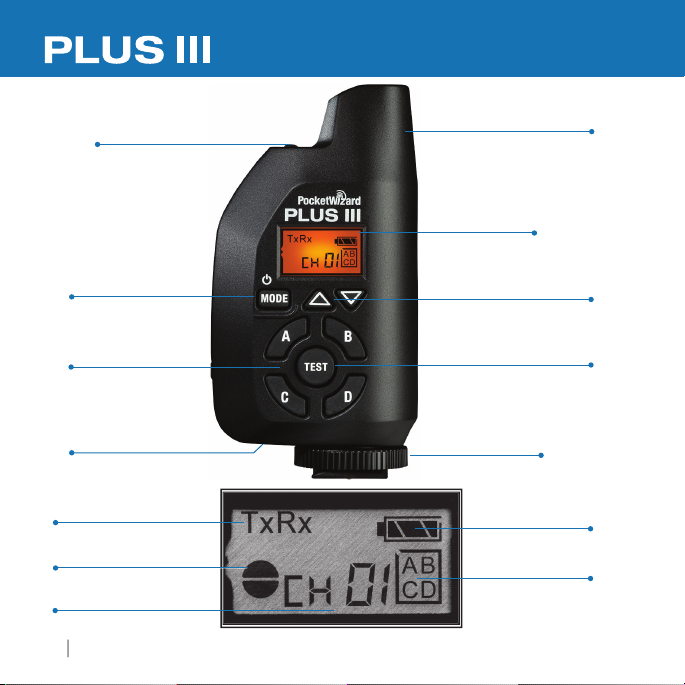
e Auto Sensing Transceiver
4
PocketWizard Plus IIIe
tatus LED
pg. 16
ower/MODE Button
pg. 8
Zone Toggle Buttons
A, B, C, D)
pg. 7
B Port
pg. 8
r
pg. 12-14
lf/Full Pr
pg. 16
hanne
pg. 7
Indicator
nternal Antenn
pg. 18
Backlit L
see below
hannel Up/Down Button
(Two Stage Trigger
Hot Shoe with
ocking Rin
pg. 9
attery Leve
lected Zon
pg. 7
t Button
pg. 16
pg. 16
pg. 7
Page 5
)
> PC
(
)
)
> 3.5mm (1/8")
(MM3)
yar
d
e Auto Sensing Transceiver
5
d.
)
y.
a
t
p
fo
a
or fl ash cable
and Latch
d:
> 6.35mm (1/4")
)
g
TE:
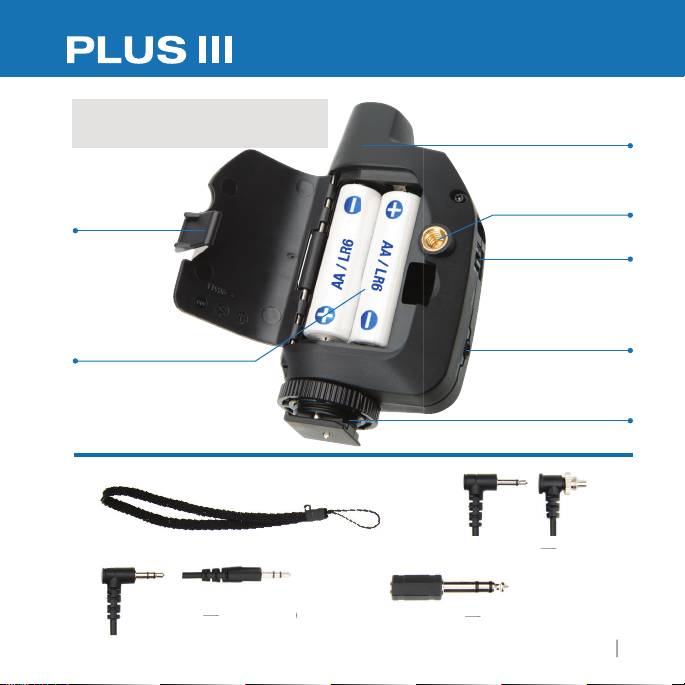
You need at least two PocketWizard E Series radios.
atteries not Include
nternal Antenn
attery Door
attery Compar tment (pg. 8
ote proper battery orientation/polarit
2 x AA/LR6 1.5V
nclude
3.5mm (1/8"
3.5mm (1/8")
1/4"-20 Moun
r remote camer
ot Shoe with Locking Rin
3.5mm (1/8"
tWizard.com
anyard Loo
niphone port
PC3N
(MFPM
Page 6
Frequency
6
PocketWizard Plus IIIe
.
340.00
W)
33
W)
S
X
X
– 354.00 MHz
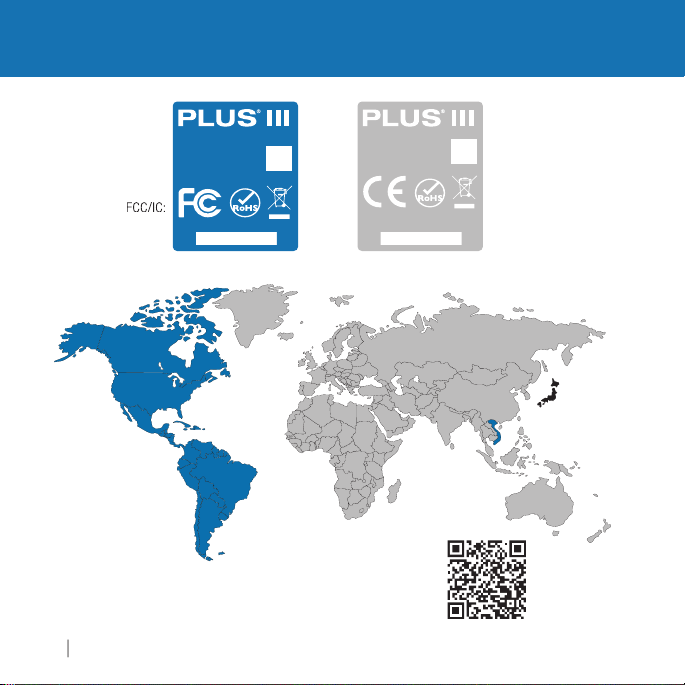
FCC/IC and CE radios are not compatible with each other
< 1 m
Model: P3-FCC
340.00 – 354.00 MHz
FCC ID: KDS-PW3-100
IC: 2170A-PW3100
Made in USA
Pat. www.pwpatents.com
/N: P3UXXXXXX
Model: P3-CE
433.42 – 434.42 MHz
Made in USA
Pat. www.pwpatents.com
S/N: P3UXXXXXX
PocketWizard.com/wheretobuy/frequency
E:
.42 – 434.42 MHz
4
< 1m
Page 7
Plus IIIe Transceiver Basics
7
fi
y
l th
III
bili
f
This Pl
III
ill
g
CC
Sou
fi
g
)
isting
g
g
.
You
eeds to be o
os
.
PocketWizard Compatibility
PocketWizard uses two different families of fi rmware to control their radio: Legacy and
E Release. The
member of the PocketWizard E Series famil
protoco
eatures than a Plus III using the Legacy fi rmware.
us
fi r m w a r e o p e r a t i n
for North and
rmware will not work with Legacy fi rmware but the Plus IIIe can be downgraded to the
acy fi rmware to work with Legacy PocketWizard radios (such as the Plus II, MultiMA X,
Le
FlexTT5, etc
ex
If you choose to downgrade your Plus IIIe to Legacy fi rmware, some functions and
settin
compatible radios, information on how to upgrade or downgrade your PocketWizards
the PocketWizard Utility, and how to use Legacy fi rmware with your Plus IIIe
usin
Channels & Zones
r Plus IIIe n
to work together. Channels can be set via the Plus IIIe’s Channel up/down buttons
The Plus IIIe has 4 Zones (ABCD). See “Channels & Zones” section (pg. 15) for more info
rmware installed in this Plus IIIe is the E Release and your radio is a
. The E Release uses a new communication
at enables your Plus
e w
work with any other PocketWizard that has been upgraded to E Release
on the same frequency. PocketWizard offers two frequencies: F
th America and CE versions for most of the rest of the world. E Series
. It can be upgraded again as often as you like at no additional cost. Your
radios may be upgradeable.
s may operate differently. Please refer to wiki.pocketwizard.com for a list of
e to have greater range, enhanced relia
n the same Channel and Zone as other PocketWizard radi
ty, and more
tWizard.com
Page 8
Plus IIIe Transceiver Basics
8
PocketWizard Plus IIIe
III
ill
g
hough
A
g
ge
ff
f
d
igg
d.
fi
p
s.
Batteries
ake sure batteries are properly installed (pg. 5). The Plus
almost any pair of ~1.5 volt AA (IEC: LR6) batteries. Rechargeable batteries will work,
t
operation time may be reduced and battery level display may not be as accurate.
lways turn off all equipment (PocketWizard radios, fl ashes, cameras, etc) before makin
connections or replacing batteries. Remove batteries during stora
Powering on/off
old down the Power/Mode button for about two seconds to power on or power
o
the unit. When turning on, the status LED will blink a red-green-red-green
pattern once
owngraded to Legacy firmware) then blink every few seconds to indicate normal
operation. See the Status LED section (pg. 16) for details about power levels. It will
nk red when a tr
or E Release firmware (or a single bold green blink if unit has been
er is transmitted or receive
USB
The Plus IIIe’s mini B USB port is located on the underside by the hot shoe. It can be
used with the PocketWizard Utility to install
fi rmware. It can also be used to
ower source. See wiki.PocketWizard.com for more detail
ower the unit with a compatible AC adapter or USB
rmware updates or downgrade to Legacy
e w
operate reliably usin
Page 9
h
C
.
p
d
(
)
d.
l.
.
See
e
shoe
(
g)
Any
connected to remote fl ash
(
g)
n
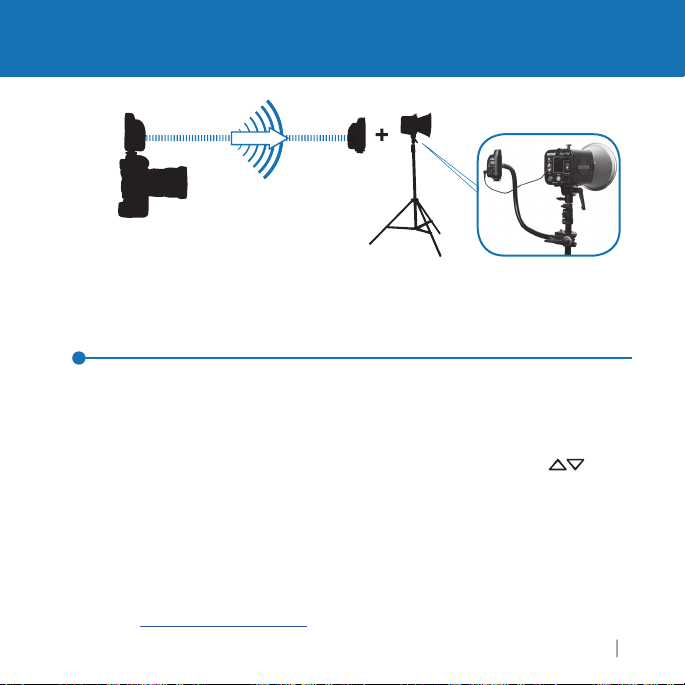
Triggering a Remote Flash
9
*Optimal Mounting Positio
mera with Plus III
Triggering a Remote Flash with your Plus IIIe Transceiver
1. Attach a Plus IIIe to your camera’s hot shoe. Slide a Plus IIIe into your camera’s hot
s
Plus IIIe to your camera’s P
2. Connect a Plus IIIe to your remote fl ash via the appropriate sync cable.
3. Select a Channel and Zone A, B, C, or D via Channel u
Zone Toggle Buttons. Set any other PocketWizard radios to a matching Channel
and Zone.
4. Take pictures normally at or below your camera’s X-sync spee
Notes: The Plus IIIe does not support TTL communication.
Momentarily pressing the TEST button will test trigger the fl ash
*
n hot
Tran smit tin
PocketWizard E Series receiver
Receivin
oe and twist locking ring until snug. Do not overtighten. You may also connect the
sync port using the included cable
/down buttons an
See the “Using Zones” section (pg. 15) for more information
ashes must be set to Manua
wiki.PocketWizard.com for more mounting suggestions.
tWizard.com
Page 10
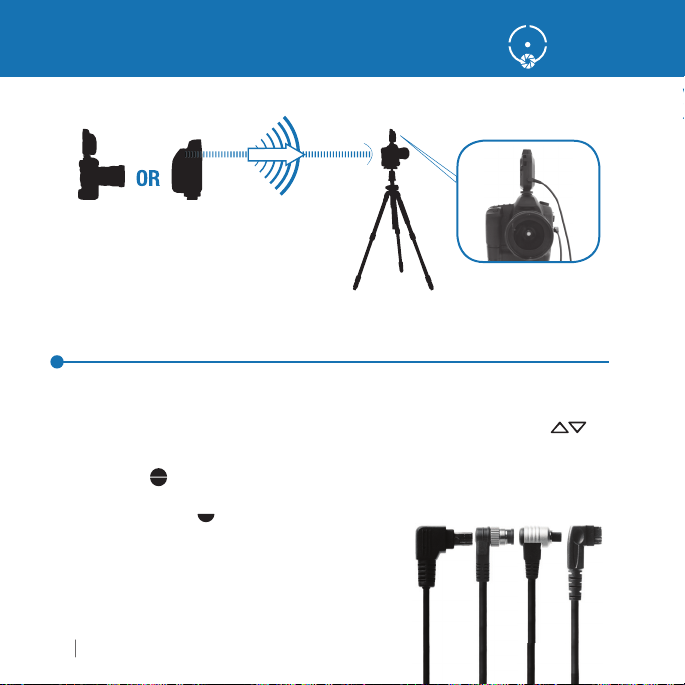
Triggering a Remote Camera
Th
IIIe d
.
ggle B
.
3
S
f
.
IIIe on camera
d
(T
)
IIIe connected to
a
(R
g)
PocketWizard Plus IIIe
Triggering a Remote Camera with your Plus IIIe Transceiver
1. Connect a Plus IIIe to your remote camera via the appropriate remote camera cable.
e receiving Plus
2. Select a Channel and Zone A, B, C, or D via the Channel up/down buttons
and Zone To
. Full Pressthe TEST button on the transmitting PocketWizard radio or the shutter
button on the handheld camera to fi re the remote camera.
about hal
emote camera cables not included.
ind the correct cable for your remote camera or fl ash:
ocketwizard.com/cablefi nder
ransmitting
press
OR in han
oes not need to be in the hot shoe
uttons
Remote Camer
eceivin
ee page 16 for details
Page 11
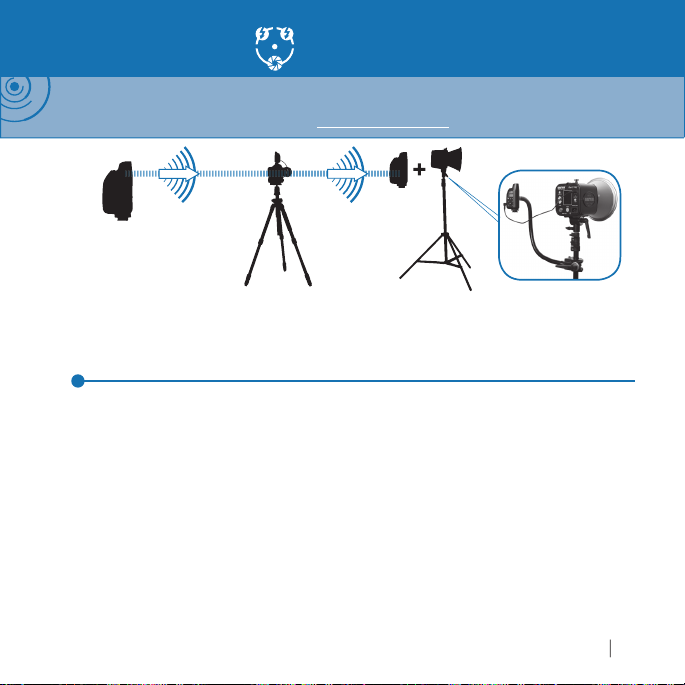
Auto-Relay
IIIe
(T
g)
Channe
a
(Relaying Pl
IIIe)
Channel 1
(
)
ash
(R
g)
Channel 2
e.
t
of
.
C
.
4.
c
g
III
.
fl
.
11
NOTE: Auto-Relay allows you to trigger remote fl ashes in sync with a remote camera and requires three
PocketWizard radios. With Auto-Relay, not all radios are set to the same Channel: The relaying radio transmits
on one Channel higher than it received on. Visit wiki.PocketWizard.com for additional information.
ransmittin
l 1
Remote Camer
us
Autom atical ly tran smits o n Channel 2
mote Fl
eceivin
Using Auto-Relay
1. Set the transmitting PocketWizard radio in your hands to Tx Mode and the desired
hannel and Zon
.
onnect the Relaying Plus IIIe’s Flash/Camera Port to the remote camera triggering por
the camera via a remote camera cable and place the radio in the camera’s hot shoe
3. Set the Relaying Plus IIIe attached to your remote camera to TxRx Mode and also to
the same
onnect a remote fl ash to a receiving PocketWizard radio via the appropriate syn
cable and set it to TxRx or Rx ONLY Mode and one Channel higher than the transmittin
ocketWizard radio in your hands. Match the Zones to the other Plus
5. Press and release TEST on the transmitting PocketWizard to fi re the remote camera.
Remote
hannel and Zone as the transmitting PocketWizard radio in your hands
ashes will be automatically synchronized with the remote camera
e radios
tWizard.com
Page 12
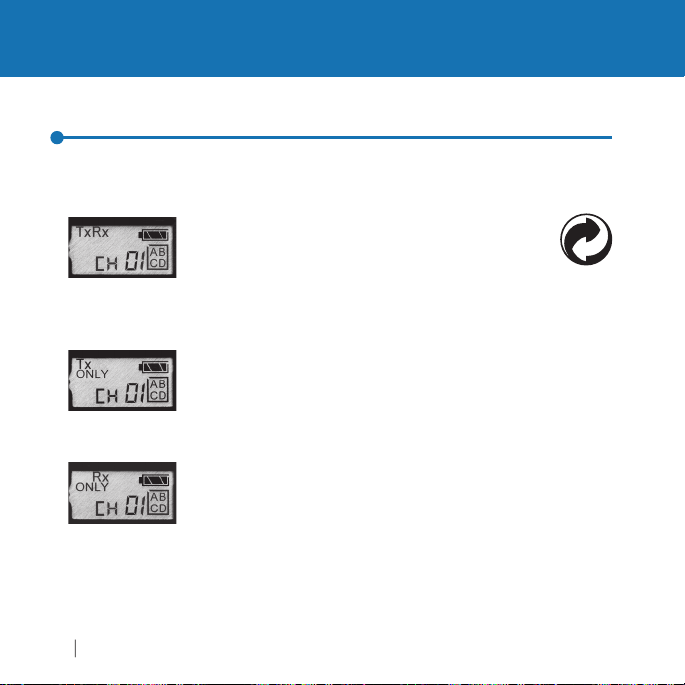
Triggering Modes: Transmit & Receive
PocketWizard Plus IIIe
Y
You
.
allows the radio to be used as a
attached to a
camera or as a receiver connected to a remote
fl ash o
III
lly
eceive
s is
defau
ode.
(
) f
Pl
III
g
(
Tx
) f
y
U
III
f
.
Modes of Operation
our Plus IIIe Transceiver supports six modes of triggering for different applications.
can switch between modes by pressing and quickly releasing the MODE button
TxR x
us
Thi
Tx ONLY
to use your
emote fl ashes with other photographers. This mode will prevent other
photo
Rx ONLY
to use
cameras.
erform relay functions when mounted in the shoe of a remote camera,
or to prevent a remote Plus IIIe
TEST button is pressed
r remote camera.As an Auto-Sensing Trans cei ver, the
e automatica
the
ode disables all receiving
raphers from triggering the Plus IIIe on your camera.
ode disables all transmit
our Plus IIIe radios as receivers for remote fl ashes or remote
se this mode when you do not want a remote Plus
transmitter
switches
lt m
us
e as a transmitter only. Use this mode when sharing
tween transmit and r
unctionality and allows you
unctionality allowing you
rom triggering other radios when its
.
e to
Page 13
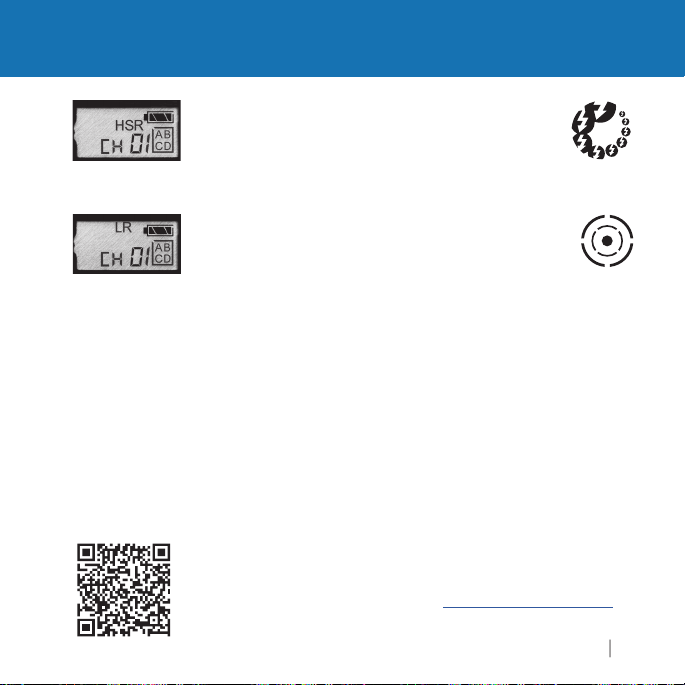
Triggering Modes: HSR & LR
lly i
g
b
iggering
a
f
.
ode butto
ode
oose fro
use d
f
g
.
III
ill
a
g
f
,
o
.
ge
for details.
13
shortens the contac
/C
).
HSR (High Speed Receive)
time of the Flash
remote cameras or fl ashes at higher FPS (frames per second).
This radio does not support HSS (High Speed Sync
LR (Long Range)
e of a radio in a given shooting environment. LR Mode
ran
e enabled on both transmitting and receiving radios.
must
se when tr
lso be used with remote fl ash, but there will be a reduction in
maximum X-sync speed. Line o
it M
hannels 1-80. E Channels 1-32 and LR Channels 1-80
requencies and will not trigger each other. Both the transmitting and
radios must be set to the same type of Channel
receivin
NOTE:If you are using a Plus IIIe set to LR mode in a remote camera’s
ot shoe, the remote Plus
nd send out a transmitting signal on the next highest Channel, whether
you are usin
remove the Plus IIIe
r cover the center pin contacts to prevent engaging Auto Relay
If you choose to downgrade your Plus IIIe to Legacy fi rmware, Long Ran
settings operate differently. Please see wiki.PocketWizard.com
amera Port, allowing for triggering of
ode dramatica
remote cameras at greater distances. It can
n to select LR m
a remote fl ash or not. If you do not want that behavior,
rom the hot shoe, disable the camera’s hot shoe
ncreases the maximum
sight is recommended
. You can now ch
e w
automatically engage Auto Relay mode
t
tWizard.com
m LR
ifferent
Page 14
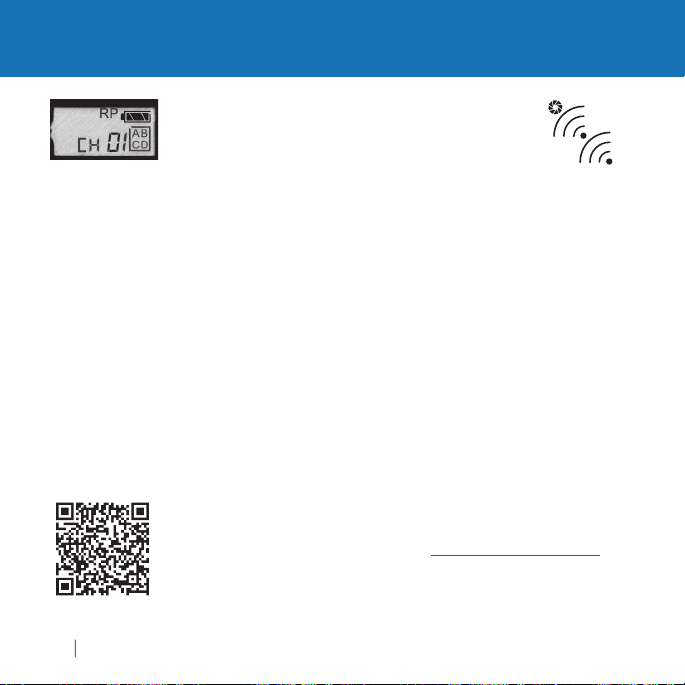
Triggering Modes: RP
III
(s)
gg
h
Thi
iggering
fl
X
This i
.
g
g
di
O
.
:
g
g
).
g
for details.
PocketWizard Plus IIIe
RP (Repeater)
between a pair of transmitting and receiving units to
radio
increase maximum tri
can reac
400 meters.
It can also be used with
-sync speed.
RP mode with E Release fi rmware requires a multiple Channel setup.
Set the transmittin
increase the Channel number for each successive repeater unit. Make
sure each Repeatin
o, otherwise an endless loop could occur. Put the transmitting radio
ra
into Tx
For example
If you are using one Repeater in the middle, set the transmitting and
epeater radio to Channel 1. Set the receiving radio to Channel 2.
Ch1>Ch1>Ch2). If you are using a total of fi ve radios for very lon
distance, set the transmitter and fi rst Repeater to Channel 1, the
second Repeater to Channel 2, the third Repeater to Channel 3, and
the receivin
If you choose to downgrade your Plus IIIe to Legacy fi rmware, Repeater
s operate differently. Please see wiki.PocketWizard.com
settin
ode allows you add one or more Plus
200 meters, you can add a Repeater to reach
NLY Mode for best results
radio to Channel 4. (Ch1>Ch1>Ch2>Ch3>Ch4
ering distance. For example, if you
s mode can be used when tr
ash but there is a reduction in maximum
s not the same operation as Auto-Relay Mode
and fi rst Repeater radio to the same Channel. Then
radio can only receive the signal from one other
remote cameras.
e
Page 15
f
g
gg
.
.
g
g
same Channel.
available on a
g
g
hing Z
d.
ff
s.
Channels and Zones
15
NOTE: This Pocket Wizard Plus IIIe uses the new E Release fi rmware. This protocol will not work with
Legacy fi rmware. This Plus IIIe can be downgraded via the Utility to work with Legacy fi rmware. Please
see
wiki.PocketWizard.com
for more information.
Channels
The Plus IIIe Transceiver supports 32 different E Channels and 80 different LR Channels.
Each Channel represents a digital code transmitted on specifi c PocketWizard radio
requencies. This enables many photographers to work in the same area or for one
photographer to exclusively control different sets of receivers. A Plus IIIe will trigger any
number of receivin
Channels will not tri
Press the Channel up/down buttons to change Channels
32
E Channels80LR Channels
PocketWizard radios set to the same Channel. Radios set to different
er each other
Using Zones
Zones can be used to toggle remote cameras or fl ashes on or off from a transmittin
PocketWizard radio. Zones can also be used when sharing flashes with another
photo
rapher so only some of the remote fl ashes are shared, even when using the
Zones A, B, C, and D are selectable via the Plus IIIe’s Zone Toggle Buttons and are
ri
ht side of the LCD. You can enable any combination of all four Zones. A receivin
Plus IIIe will only trigger if the transmitting PocketWizard radio has at least one
matc
NOTE: If you choose to downgrade to Legacy fi rmware, Channels and Zones will operate
di
erently. Please see wiki.PocketWizard.comfor detail
ll E and LR Channels. Theenabled Zones are displayed in a box on the
one enable
Page 16
g
ill
kly
.
g
r
defau
ode after a rese
s
TxRx
on
C
s
enabled.
ease search fo
f
.
Other Functions
PocketWizard Plus IIIe
S
y
adio sends o
eceives a
h
.
/2 1/
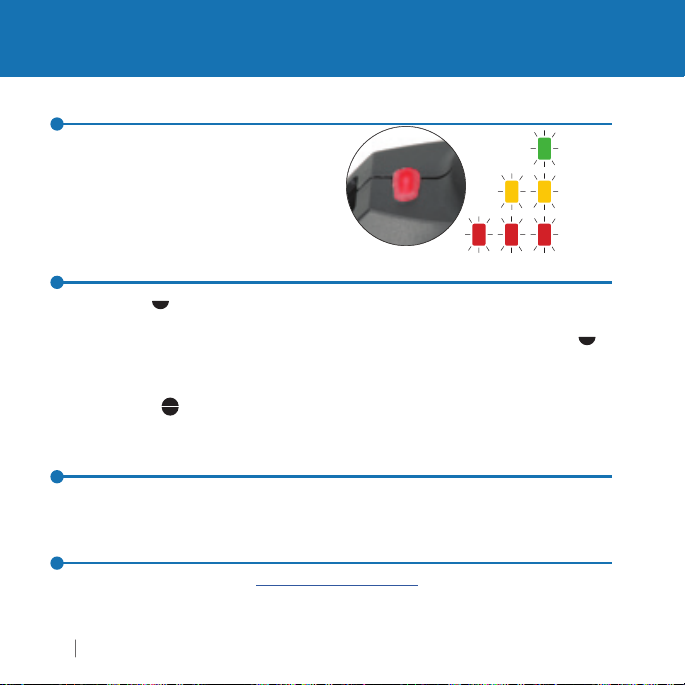
Status LED/Battery Level Indicator
tatus LED blinks regularly to show
battery level and illuminates red briefl
when the r
signal. The front LCD panel will also
ow a battery level indicator
s
TEST Button (Two Stage Trigger)
Half pressingthe TEST button on a handheld transmitting Plus IIIe can wake up and
pre-trigger a remote camera when using a Plus IIIe or Plus IVe as the receiving
adio with the correct remote camera cable (available separately). Half pressin
the test button w
educes battery life. It will not affect remotefl ashes
ully pressingthe TEST button fi res any remote cameras or fl ashes connected
to receivin
Reset
To reset your Plus IIIe Transceiver to the default setting, hold the TEST button as you powe
the radio on. The
More Information
Pl
detailed in
r r
make the camera respond more quic
PocketWizard radios set to the same Channel and Zones.
lt m
r Plus IIIe at wiki.PocketWizard.com for the most up to date and
ormation about your Plus IIIe
t i
and consistently but also
hannel 1 with all Zone
2
< 1
< 1/4
Page 17
Plus
®
CC/IC: 340.00
z
®
z
)
ies
.
A
iggering
second
300 Volts
S
.
.
300 V
00s
X-Sync: Up
S
:
A
(
)
A
.
):
A
C (
)
hout batteries.
Technical Information
17
50° C
(
F)
C
(
)
85° C
(
F)
C
(
F)
:
")
)
requency:
IIIe F
– 354.00 MH
IIIe CE: 433.42 – 434.42 MH
Trans mit Ou tput Power:Less than 1 milliwatt (1/1000 of a watt
Batter
: 2 x AA (IEC:LR6) Alkaline recommended for ~50 hour life
External USB Power at ~5 volts and < 100m
Tr
Delay:1/1200 of a
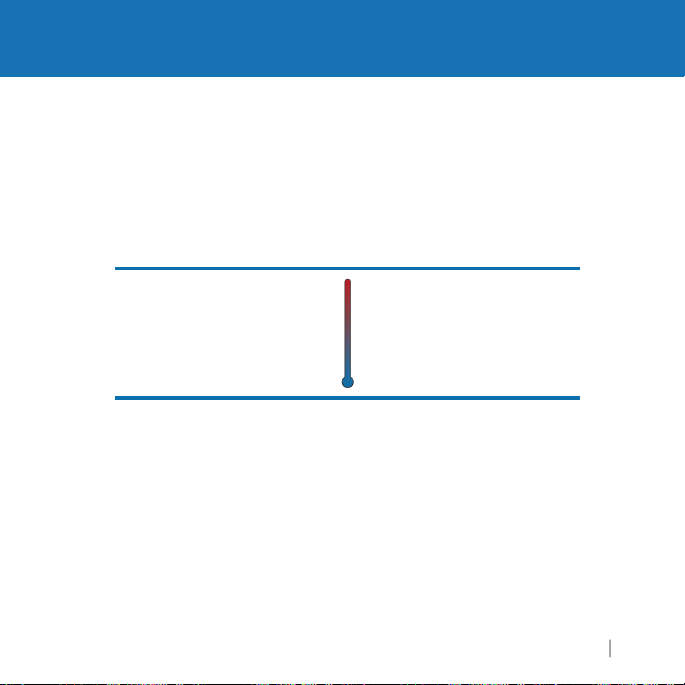
Operating Temperat ure
bove -15° C (5° F) and
below 50° C
120 ° F
lways use fresh batteries
n cold temperatures
120 °
-15°
5° F
Storage Temperature
185°
without battery
bove -30° C (-22° F) and
below 85°
-30°
wit
-22°
185° F
Flash/Camera Port Sync Voltage Tolerance:
Backlit LCD: The Plus IIIe’s backlit LCD activates automatically when any button other
T is pressed. It turns off after 5 seconds
than TE
: Red LEDs are used for dim light application and do not indicate a hazardous status
Maximum Sync Voltage:
Radio delay: 1/12
to 1/250, 14.5 FP
Dimensions
10.7 cm (4.2") x 5.3 cm (2.1") x 3.0 cm (1.2
Weight:<110 g (3.9 oz
tWizard.com
Page 18
e
high
le
hills.
The Pl
IIIe T
idi
gnifi
.
east a
y
.
s
f
.
.
Sustaining High Performance
PocketWizard Plus IIIe
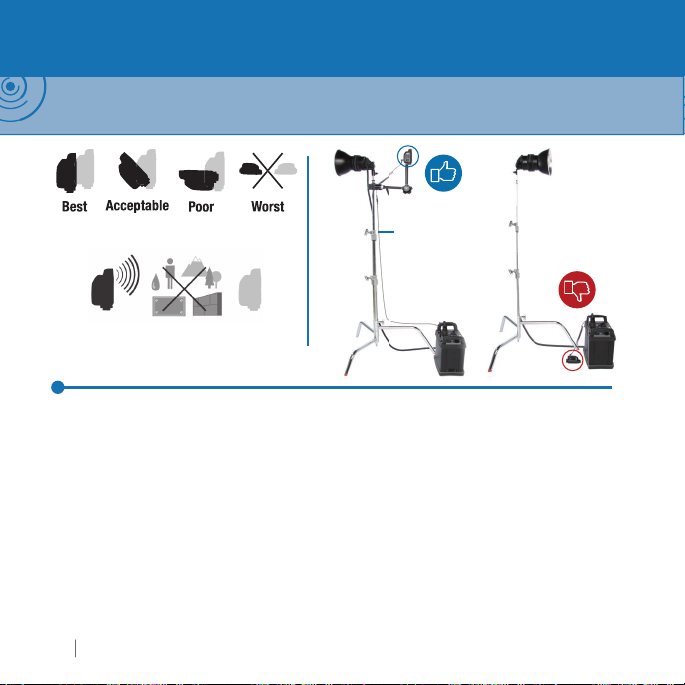
NOTE: Your PocketWizard radios use the environment as a medium for transmitting and receiving
radio signals. The per formance of your radios depends on their placement in the environment, nearby radio
interference, and the radios’ orientation and position relative to each other.
rientation of transmitting and receiving
Plus IIIe’
or high water-content objects
Wireless Basics
The Plus IIIe is designed to work in many challenging environments. For the best performance
with any radio, maintain a line of sight between radios and keep antennas parallel. Mak
sure radios are not near any large metal, concrete, or
and trees are mostly water! Make sure radios are not blocked by these objects or by
us
cantly impact performance in most shooting scenarios, but optimizing for radio
si
reception will always improve the maximum range
intain at l
anything metallic. “Dead spots” have a number of causes, but the solution is usually the
same: move the radio a few inches or feet away from the problem area. Always obe
the laws of physics
or optimal radio reception
ransceiver’s antenna is omn
12˝ distance between antennas. Avoid direct antenna contact with
3.5mm (1/8") to
*
3.5mm (1/8")
rectional and its orientation should not
(MMX)
water-content objects. Peop
Page 19

9
W
e
.
-
f
a
c
s
c
off
:
.
.
p.
:
d
y
.
p
illag
p
.
sceive
00
sceiver C
00
USA - The FCC wants you to know:
ARNING: Changes or modifi cations to this unit not expressly approved by the party responsible for complianc
could void the user’s authority to operate the equipment
NOTE: This equipment has been tested and found to comply with the limits for a Class B digital device, pursuant
to Part 15 of the FCC rules. These limits are designed to provide reasonable protection against harmful inter
erence in a residential installation. This equipment generates, uses, and can radiate radio frequency energy,
nd, if not installed and used in accordance with the instructions, may cause harmful interference to radio
ommunications. Mounting and cable connections detailed in this document represent the intended usage,
however, there is no guarantee that interference will not occur in a par ticular installation. If this equipment doe
ause harmful interference to radio or television reception, which can be determined by turning the equipment
and on, the user is encouraged to try to correct the interference by one or more of the following measures
1. Reorient or relocate the receiving antenna
2. Increase the separation between the equipment and the receiver
3. Consult the dealer or an experienced radio or television technician for hel
USA / Canada
This device complies with Part 15 of the FCC rules and with Industry Canada Licence-exempt RSS Standards.
peration is subject to the following two conditions
1. This device may not cause harmful interference, an
2. This device must accept any interference received, including interference
cause undesired operation
that ma
Le présent appareil est conforme aux C NR d’Industrie C anada applicables aux appareils radio exempts de
licence. L’ex
Tran
Tran
loitation est autorisée aux deux conditions suivantes:
1. l’appareil ne doit pas produire de brou
2. l’utilisateur de l’appareil doit accepter tout brouillage radioélectrique subi, même si le brouillage est
tible d’en compromettre le fonctionnement
susce
r FCC ID Number: KDS-PW3-1
ANADA IC: 2170A-PW31
e, et
tWizard.com
1
Page 20
Simplifi ed EU Declaration of Conformity
g
y
f
g
.
0
Hereby, LPA Design Inc. South Burlington VT USA declares that the radio equipment type
PocketWizard Plus IIIe CE wireless photo
Directive 2014/53/EU. The full text of the EU declaration of conformit
ollowing internet address: www.pocketwizard.com/support/reference/CE/
© 2019 LPA Design. All rights reser ved. Product features and specifi cations are subject to change without
otice. PocketWizard, ControlTL, MiniTT1, FlexTT5, FlexTT6, HyperSync, Plus, and MultiMAX are either
trademarks or re
roperty of their respective owners
tent information: www.pwpatents.com
v 1.
istered trademarks of LPA Design. All other trademarks contained herein are the
raphic remote control is in compliance with
is available at the
 Loading...