

Page 1
Legion Meter USB
User Manual
PLX
© PLX Devices Inc. 2014 All Rights Reserved
devices inc.
Patents Pending
Page 2

Contents
1 Introduction
Patents
Warnings
Key Features
Package Contents
2 Overview
Intelligent OLED Display
3 Operating Legion Meter
Charging Your Device with Legion Meter
Toggling Menus
About Legion Meter Menus
Display Orientation
Data Pass rough Switch
4 Product Care and Maintenance
Storage
Safety
Disposal
6 Technical Specications
Introduction
3
3
3
3
3
4
4
5
5
6
6
6
6
7
7
7
7
8
1
Patents
PLX Devices Inc. currently has patents pending on the charge accelerator hardware, rmware, and algorithms.
Warnings
Do not use this product and its accessories in any way other than specied by PLX Devices Inc. PLX Devices
Inc. is not liable for accidents or damage caused by misuse of this product.
Do not tamper, disassemble, or modify this product. is may cause an accident, re, electric shock, or
product malfunction.
Features
1. Plug and Play: Installs in Seconds
2. Integrated High Contrast Organic LED Display
3. Reads USB Voltage, Current, and Power
4. Resettable Battery Capacity Counter
5. Dynamically Switchable Apple and Android Charge Accelerator
6. Compatible with all USB Ports
Package Contents
1. Legion Meter Unit
2. Quickstart Guide
2
3
PLX
devices inc.
www.plxdevices.com www.plxdevices.com
PLX
devices inc.
Page 3
2
Overview
Operating Legion Meter
3
Charging Your Device with Legion Meter
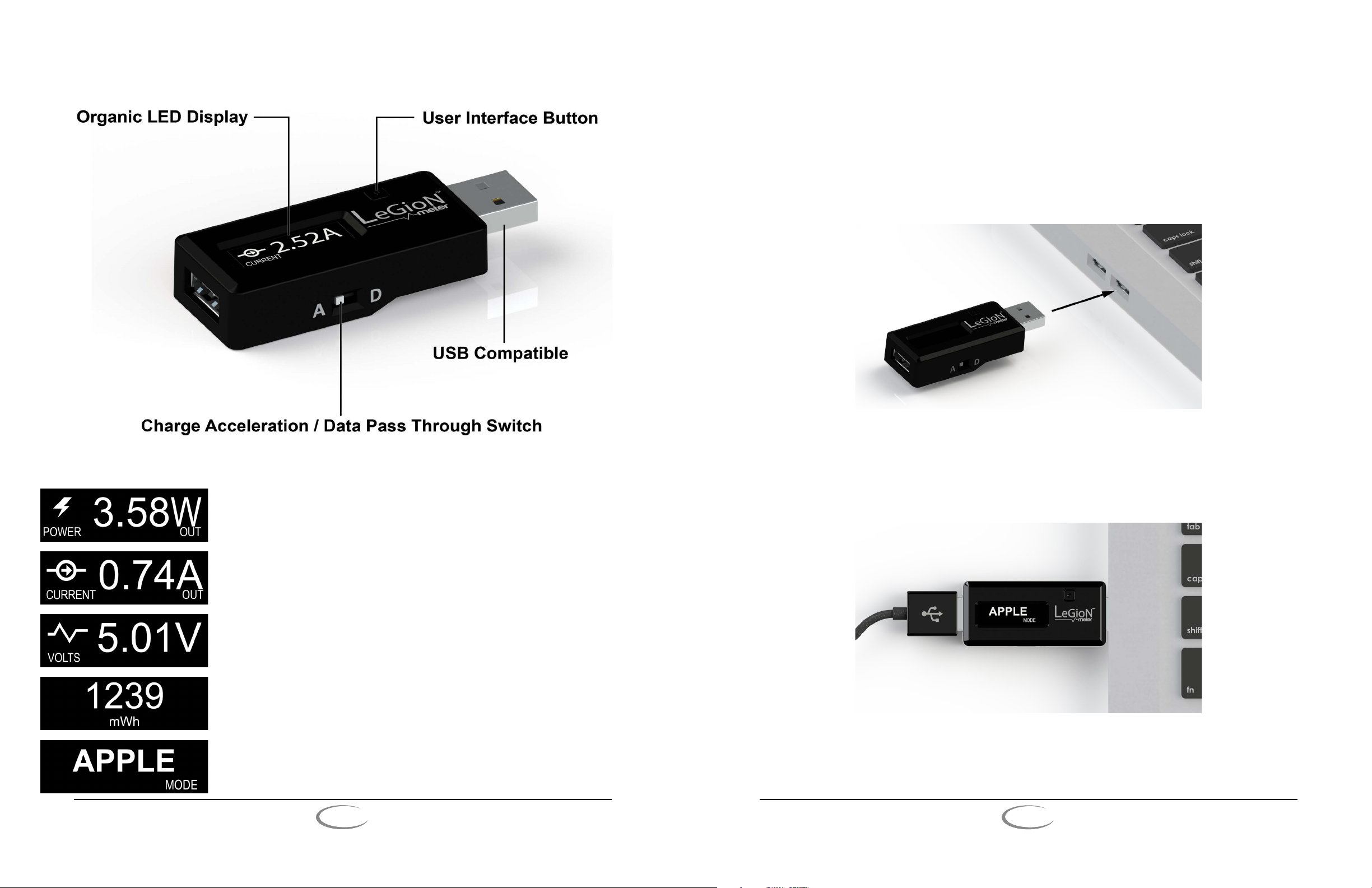
1. Insert the USB Male A end of Legion Meter into any USB power source and make sure the data pass
through slide switch is in the “A” position to enable accelerated charging.
2. Press the interface button until the Mode screen is accessed and select your charge accelerator mode.
NOTE: To switch between “Apple” mode and “Android” mode, press and hold the interface button.
Intelligent OLED Display
Shows the power in Watts your USB port is currently delivering to your
device.
Shows the current in Amps your USB port is currently delivering to your
device.
Shows the voltage of your USB port.
Resettable milliwatt-hours counter used to diagnose battery storage capacity.
3. Plug in any USB charging cable to the USB Female A end of Legion Meter.
NOTE: Connecting the cable improperly may cause serious damage to the device. Any damage caused by
misuse is not covered by the warranty.
4. Insert the other end of your cable into the charging port of the device you want to charge.
Toggling Menus
Charge accelerator mode allows you to optimize the charge speed of any
USB port.
PLX
devices inc.
www.plxdevices.com www.plxdevices.com
To toggle through the menus, press and release the user interface button located to the right of the OLED display.
4
PLX
devices inc.
5
Page 4
About Legion Meter Menus
Five dierent menus may be displayed on Legion Meter’s OLED display. ese menus include Voltage, Current,
Power, Milliwatt Hour, and Charge Accelerator mode selection.
Voltage, Current, and Power
e Voltage, Current, and Power modes allow you to use Legion Meter as a multimeter for any USB port.
Storage Capacity
e Milliwatt Hour mode is useful for analyzing the storage capacity of batteries. To reset the mWh counter,
press and hold the user interface button while in the Milliwatt Hour mode until the counter resets to zero.
Product Care and Maintenence
4
Your Legion Meter is a product of superior design and should be treated with care. e guidelines below will
allow you to enjoy this product for years to come.
Storage
Legion Meter should be stored at room temperature in cool or shaded areas, ideally between 10°C (50°F) to 25°C
(77°F).
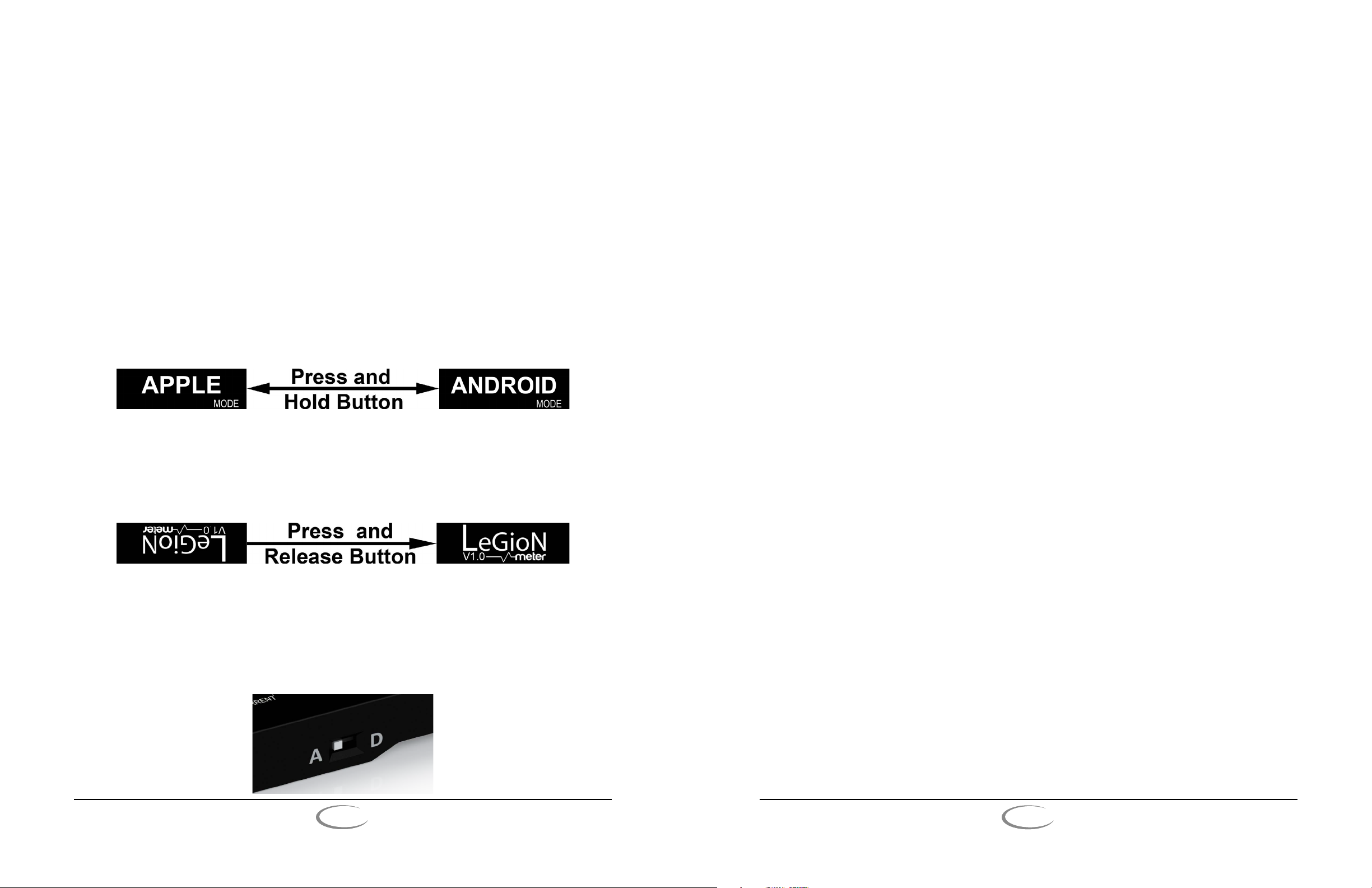
Charge Accelerator Mode
e Charge Accelerator mode has two modes of operation: Apple mode and Android mode. is user selectable
mode dynamically converts any USB port to optimize the charge speed by signaling your mobile device to safely
draw the maximum amount of charge possible. To switch modes, press and hold the user interface button while
in the charge accelerator mode until the screen changes, as shown below.
NOTE: Switch must be in charge accelerator (“A”) position for Charge Accelerator mode to be eective.
Display Oreintation
In some cases, Legion Meter’s display may appear upside down to the user. If you would like to change the
orientation of the display, press the user interface button while on the “Legion Meter” screen that appears when
Legion Meter is initially plugged into a USB port, as shown below.
Data Pass rough Switch
When the integrated data pass through slide switch (shown below) is in Charge Accelerated mode (“A” position),
the USB port’s data lines (D+ and D-) are physically disconnected . is prevents any data from being transferred
or synced, providing ultimate safety for your data while accelerating your charge speed at the same time. However, if you would like to enable data pass through on your Legion Meter, simply move the slide switch to Data Pass
rough mode (“D” position).
Safety
PLX Devices, Inc. DOES NOT recommend disassembling this product on your own accord. Disassembly of
the product will result in void of warranty. If you believe your unit is damaged or needs to be replaced, contact
technical support at www.plxdevices.com for inspection and replacement information. Only qualied personnel
should service this product. Faulty service may be dangerous and may invalidate any warranty applicable to the
device.
Exposure to Liquid or Moisture
Do not expose this product to liquid or moisture. Liquids can get into and aect the internal components of the
product, and moisture can lead to corrosion. is may result in product malfunction, re, and/or electric shock.
Even if Legion Meter appears dry and operating normally aer exposure, corrosion can still occur and pose a
safety hazard.
Exposure to Heat
Do not operate or store this product in or near a heat source, or under direct sunlight for extended periods of
time. Excessive heat can damage the plastic enclosures. If your Legion Meter is exposed to liquid or moisture, do
not attempt to dry your Legion Meter with a heat source, such as a microwave oven or hair dryer.
Disposal
For those in the United States, please visit the following website for more information on proper electronics disposal laws and guidelines:
http://www.electronicsrecycling.org/public/
Be aware that dierent states might have dierent laws regarding proper disposal of electronics.
6
PLX
devices inc.
www.plxdevices.com www.plxdevices.com
PLX
devices inc.
7
Page 5

Technical Specications
6
Legion Meter
Voltage Range:
Current Range:
Power Range:
Operating Temperature:
Connector Type:
Display:
Physical Dimensions:
Weight:
Meters:
Intellectual Properties:
Human Interface:
Construction:
Modes: Power Metering, Current Counter, Charge Accelerator
3.0 - 6.0 Volts
0 - 3.7 Amps
0 - 22.2 Watts
0 - 85 Degrees Celsius
1 USB Male A, 1 USB Female A (Gold Plated)
High Contrast OLED 128 x 32 Pixels
2.5 x 0.9 x 0.5” (6.3 x 2.3 x 1.3 cm)
0.8oz
Voltage, Current (in/out), Power, mWh Counter
PLX Intelligent Battery Monitoring and Metering, PLX USB Charge Accelerator
1 Digital Push Button, 1 Slide Switch
ABS Plastic
Patents Pending
TERMS OF USE – PLX Devices Inc. does not guarantee product functionality with any third party device. Implementation and
integration of PLX products with any other device(s) must be done at your own risk.
LIMITED WARRANTY – PLX Devices Inc. warrants this product to be free from defects for 1 year from the date of purchase. If
applicable, non-serviceable items are excluded from stated warranty. Serviceable goods must be determined by PLX Devices to be
defective before any warranty or replacement is issued. PLX Devices’ obligation under warranty shall be limited to repairing or
replacing, under the discretion of PLX Devices, any part proven defective. is warranty is limited to the repair or replacement of parts
in the manufactured good and the necessary labor done to aect its repair or replacement.
SERVICE UNDER WARRANTY – In the unlikely event that your PLX Devices hardware should fail during the warranty period, a
Return Material Authorization number (RMA) must be rst retrieved from PLX Devices Customer Support. Support can be
contacted through email: [email protected] or by phone: +1-408-745-7591. All serviceable goods must be packaged securely with
proof of purchase, RMA number, with all shipping charges prepaid and shipped to PLX Devices Inc. Goods returned under warranty must be received by PLX Devices Inc. within (10) business days aer the RMA number has been issued. Goods received aer this
period is
subject to fees for the service of repair or replacement. All repaired or replaced items shall be warranted for the remainder of the
original product warranty.
RETURNS AND RESTOCKING FEE – All returns must be within 30 days of receipt. A 15% restocking fee will apply to applicable
PLX Devices products returned for refund. All returns are to be packed in original condition including packaging, documentation,
manuals, and accessories. Returns that do not include all the accessories and components may be returned to the customer or charged
on a per item basis. e customer assumes responsibility for product until receipt at PLX Devices Inc. Shipping via an insurable carrier
is recommended. Any unauthorized shipping charges will be billed to the customer or shipment will be refused.
DISCLAIMER – PLX Devices Inc. shall not be liable for direct, special, incidental, or consequential damages resulting from any legal
theory including, but not limited to, lost prots, downtime, goodwill, damage, injury to persons, or replacement of equipment and
property due to improper installation, integration and/or misuse of any PLX Devices Inc.’s product(s). is warranty applies to the
original purchaser of product and is non-transferable. All implied warranties shall be limited in duration to the said 1 year warranty
period.
8
PLX
devices inc.
www.plxdevices.com www.plxdevices.com
PLX
devices inc.
LegionMeterG1_USB_UGV1.0
9
 Loading...