

Page 1
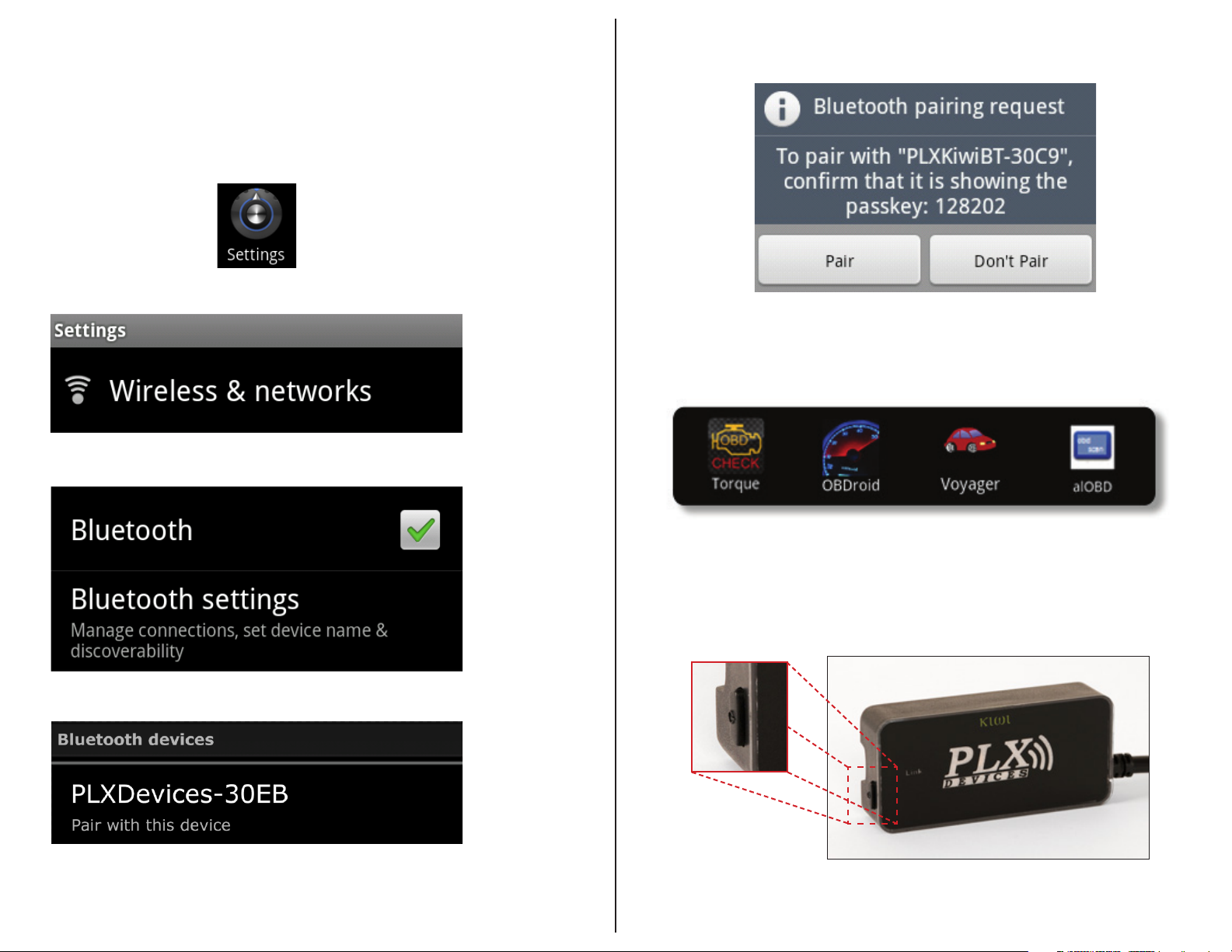
Setting up the Kiwi 2 Bluetooth
Step One
Plug Kiwi® 2 Bluetooth into OBD II port
e OBD II port is typically located under the steering column and should not require any tools to access.
Press and hold power button
Step Two
Go to Settings on your Android phone
Step ree
Tap on Wireless & networks
Step Four
Check the Bluetooth box and then tap Bluetooth settings, select Scan for Devices
Step Five
Tap Pair
Step Six
Launch your favorite app!
Under Bluetooth Devices, tap on PLXKiwiBT to begin pairing
Standby function
e Kiwi® 2 Bluetooth has a <sleep> feature which allows for power savings
when not in use. It will go into <sleep> mode 5 minutes aer the user exits
the Android app on their mobile device or a period of no data transmission.
e Kiwi® 2 Bluetooth can be awakened by a single press of the side button.
Version 1.0
Page 2
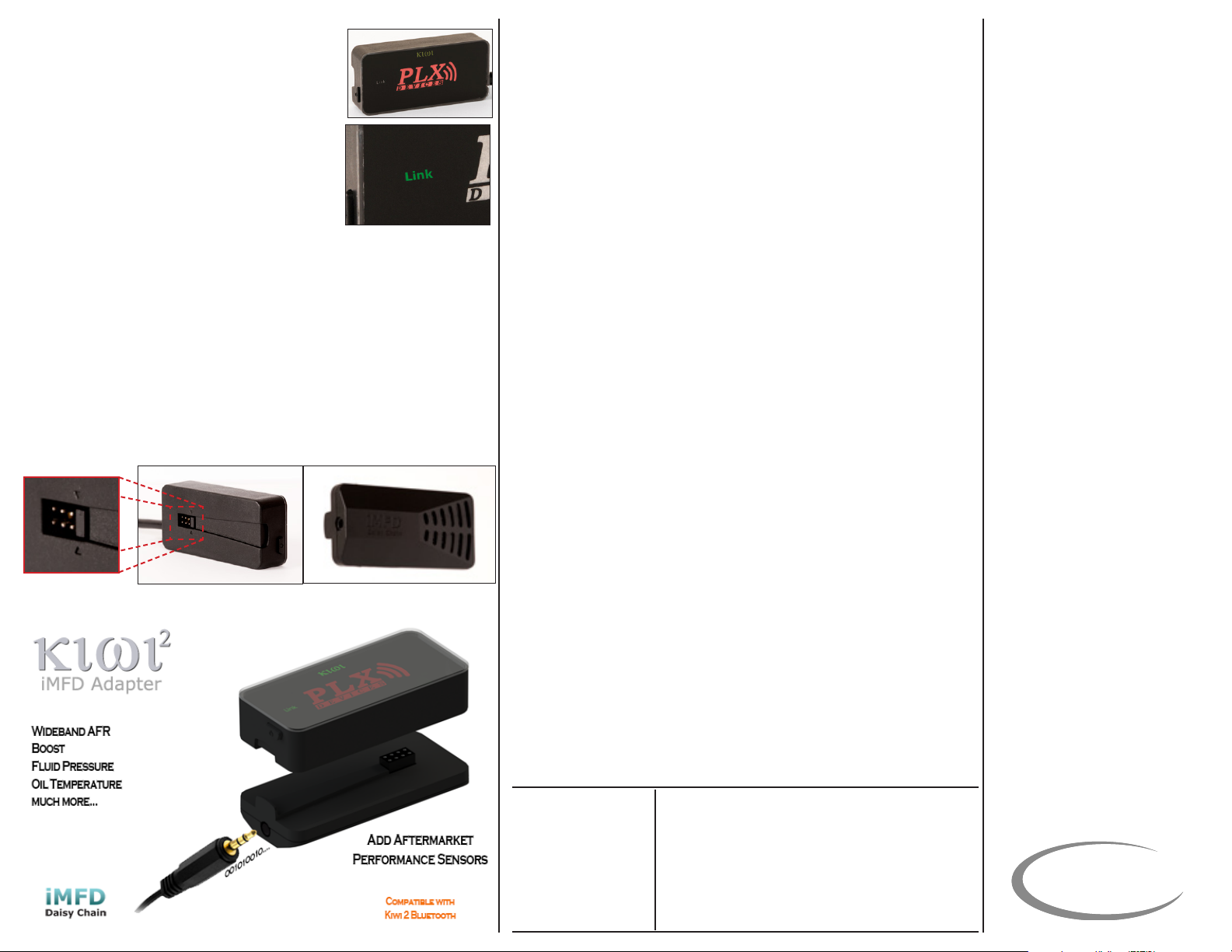
LED Indications
PLX Devices logo:
Blink 2/second – no device connected
Solid – App activity detected
Link:
O – no data transfer
Blink (at any rate) – data being transferred/
requested
iMFD Port
Only remove termination jumper if connecting iMFD Adapter
e iMFD port is for adding additional aermarket sensors not typically found in
OBD II data like air/fuel ratio, EGT, vacuum/boost.
e iMFD Adapter is an additional part that connects directly to your
Kiwi® 2 Bluetooth. Simply remove the termination jumper on the back of the
Kiwi® 2 Bluetooth, connect the iMFD Adapter, and connect a serial data cable
from any PLX Sensor Module to view this information on your Android phone.
More information can be found at:
www.plxdevices.com
Troubleshooting:
My Kiwi® 2 Bluetooth does not turn on:
Is the Kiwi® 2 Bluetooth plugged into the OBD II port of the vehicle?
Verify that the Kiwi® 2 Bluetooth is fully plugged into the OBD II port.
e t should be snug, but force should not be necessary.
Does the vehicle have the required pins populated for the Kiwi® 2 Bluetooth turn
on?
e Kiwi® 2 Bluetooth requires pin 4, 5, and 16 to power on. Pin 16 is the
power pin. Pins 4 and 5 are grounds.
Tap the sleep switch.
I can’t see the Bluetooth:
Is the Kiwi® 2 Bluetooth powered?
Verify that you have 12v of power on your OBD II port using a digital
multimeter on pins 16 and 5.
Have you turned on your bluetooth adapter?
Verify that you have Bluetooth turned on in your device.
My Kiwi® 2 Bluetooth is paired but not connected:
Once pairing is successful, your phone will tell you that
PLXKiwiBT-XXXX is paired, but not connected. To successfully connect to your
vehicle, your app will need to establish a connection.
My Kiwi® 2 Bluetooth does not work with my iPhone:
Kiwi® 2 Bluetooth is not compatible with iOS Devices. e Kiwi® 2 Wi
was designed for iOS Devices.
Included Items:
Kiwi® 2 Bluetooth Main Unit
User Manual
* All applications are downloaded through the Google Play Store.
Some apps may need to be purchased separately from the Kiwi® 2 Bluetooth.
Specications:
Physical Dimensions
Power Consumption
Power Saving
OBDII/CAN Protocols
Compatible Vehicles
Operating Temperature
Operating Voltage
Wireless Standard
Range
Enclosure
Additional Sensor Support
1.25 x 2.72 x 0.60” (32 x 69 x 15mm) L x W x H
1.24 Watts (Typical), 0.1 Watt (Sleep)
Intelligent Low Power Sleep Circuitry
ISO-9141,VPW,PWM,KWP 2000,11Bit,29Bit CAN
1996 and Later Vehicles (US)
-40 - 105 Degress Celsius
10 - 18 V
Wi 802.11 a/b/g
~ 50 Line of Sight
Automotive Grade Plastic
Compatible with PLX iMFD Daisy Chain Adapter
TERMS OF USE
PLX Devices Inc. does not guarantee product functionality
with any ECU, data logger or other devices that uses the
output signals. Implementation and integration of the PLX
products with any other device(s) must be done at your own
risk. Improper installation and usage may lead to engine
damage. Mount and install PLX products in a location
where it does not obstruct the driver’s view and/or ability to
safely control the vehicle.
PLX Devices Inc. does not guarantee product functionality
with ALL vehicles. Implementation and integration of the
PLX products with any other device(s) must be done at your
own risk. Improper installation and usage may lead to engine damage. Mount and install PLX products in a location
where it does not obstruct the driver’s view and/or ability or
safely control the vehicle
LIMITED WARRANTY
PLX Devices Inc. warrants this product to be free from
defects for 1 year from the date of purchase. If applicable,
Oxygen sensors and other non-serviceable items are
excluded from stated warranty. Serviceable goods must
be determined by PLX Devices to be defective before any
warranty or replacement is issued. PLX Devices’ obligation
under warranty shall be limited to repairing or replacing,
under the discretion of PLX Devices, any part proven defective. is warranty is limited to the repair or replacement
of parts in the manufactured good and the necessary labor
done to aect its repair or replacement.
SERVICE UNDER WARRANTY
In the unlikely event that your PLX Devices hardware
should fail during the warranty period, a Return Material
Authorization number (RMA) must be rst retrieved from
PLX Devices Customer Support. Support can be contacted
through email: [email protected] or by phone: 408-745-
7591. All serviceable goods must be packaged securely with
proof of purchase, RMA number, with all shipping charges
prepaid and shipped to PLX Devices Inc. Goods returned
under warranty must be received by PLX Devices Inc.
within ten (10) business days aer the RMA number has
been issued. Goods received aer this period are subject to
fees for the service of repair or replacement. All repaired or
replaced items shall be warranted for the remainder of the
original product warranty.
RETURNS AND RESTOCKING FEE
All returns must be within 30 days of receipt. A 15%
restocking fee may be assessed to applicable PLX Devices
products for refund. All returns are to be packed in original
condition including packaging, documentation, manuals,
and accessories. Returns that do not include all the accessories and components may be returned to the customer
or charged on a per item basis. e customer assumes
responsibility for product until receipt at PLX Devices Inc.,
shipping via an insurable carrier is recommended. Any unauthorized shipping charges will be billed to the customer
or shipment will be refused.
DISCLAIMER
PLX Devices Inc. shall not be liable for direct, special, incidental, or consequential damages resulting from any legal
theory including, but not limited to, lost prots, downtime,
goodwill, damage, injury to persons, or replacement of
equipment and property due to improper installation, integration and/or misuse of any PLX Devices Inc.’s product(s).
is warranty applies to the original purchaser of product
and is non-transferable. All implied warranties shall be
limited in duration to the said 1 year warranty period.
PLX
devices inc.
Version 1.0
 Loading...