

Page 1
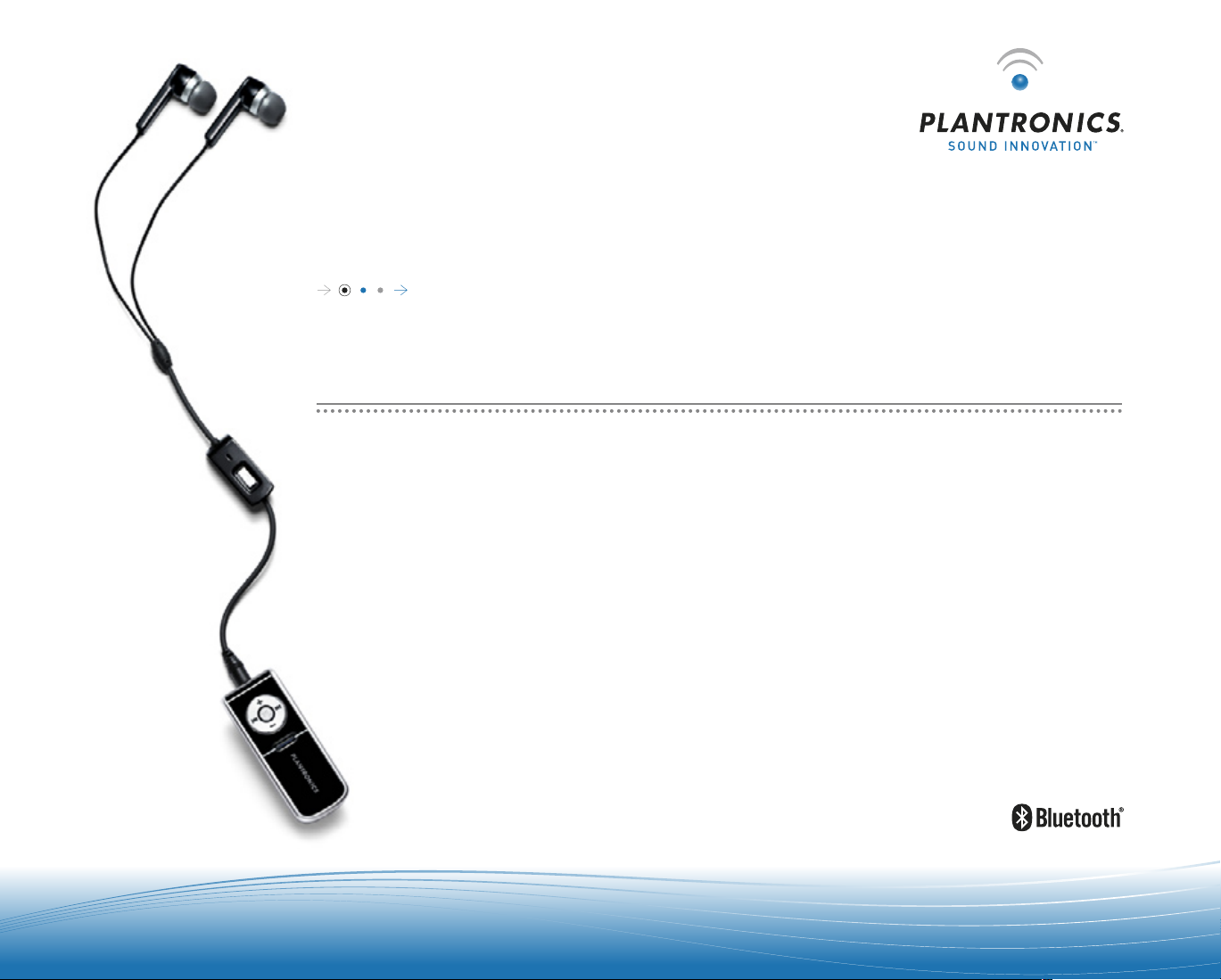
PL A NTRONICS PUL SAR™ 260
US E R GU I DE
STEREO BLUETOOTH HEADSET
Page 2
2
|
|
3
WELCOME
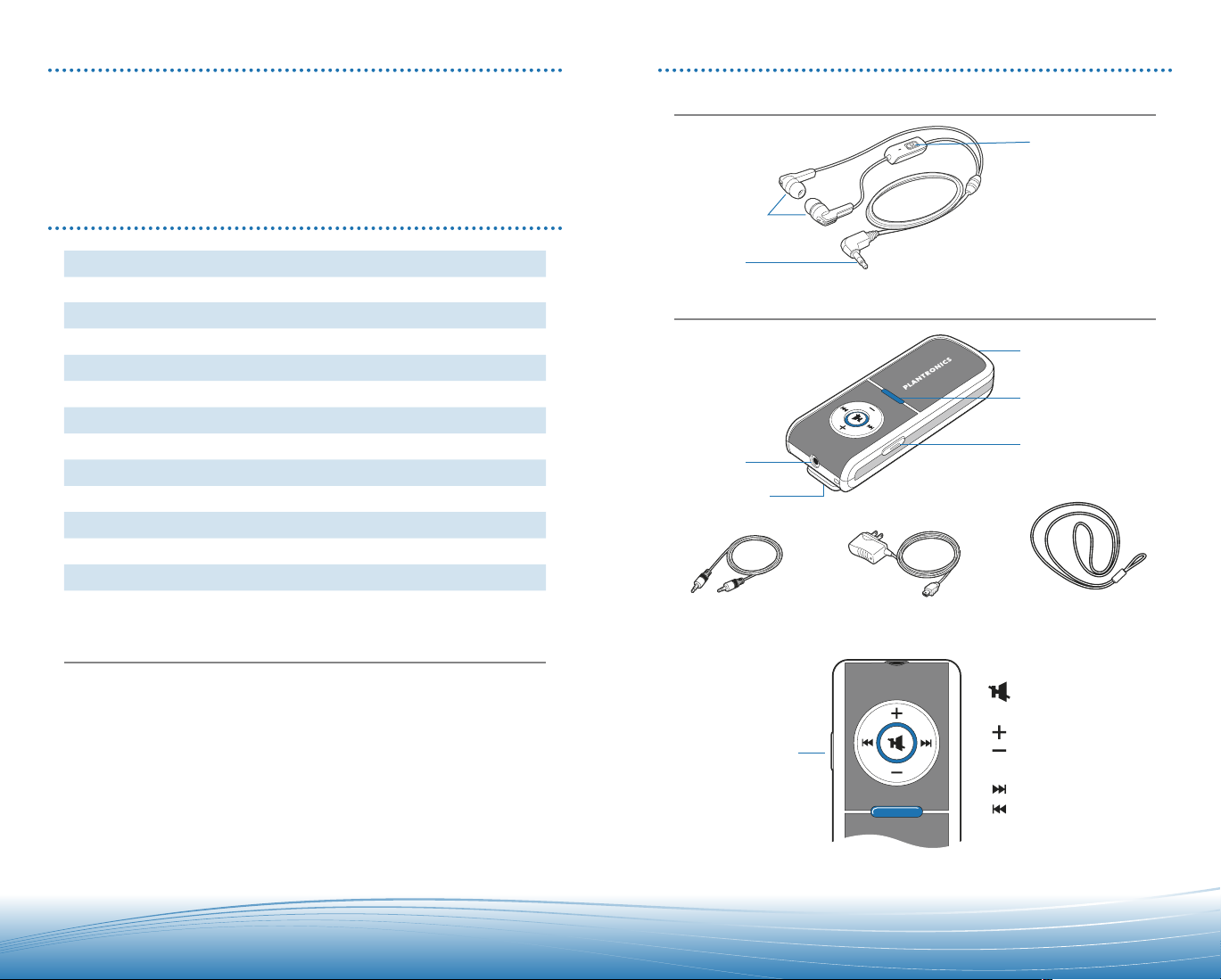
PACKAGE CONTENTS & FEATURES
This User Guide provides instructions on the setup and usage of the Plantronics Pulsar™
260 Bluetooth
in your package.
For additional help, service or support information, refer to product warranty card,
Troubleshooting on page 9 or
®
Headset. Before getting star ted, please review the safety booklet included
visit www.plantronic s.com.
TABLE OF CONTENTS
Package Contents and Feataures 3
Charging
Powering
Indicator Lights
Pairing
Making/Answering/Ending Calls 5
Wearing Options
Powered Speaker & Stereo Uses
Pod Controls
Headset Controls 8
Troubleshooting
System Reset
Product Specifications 10
Technical Assistance
10
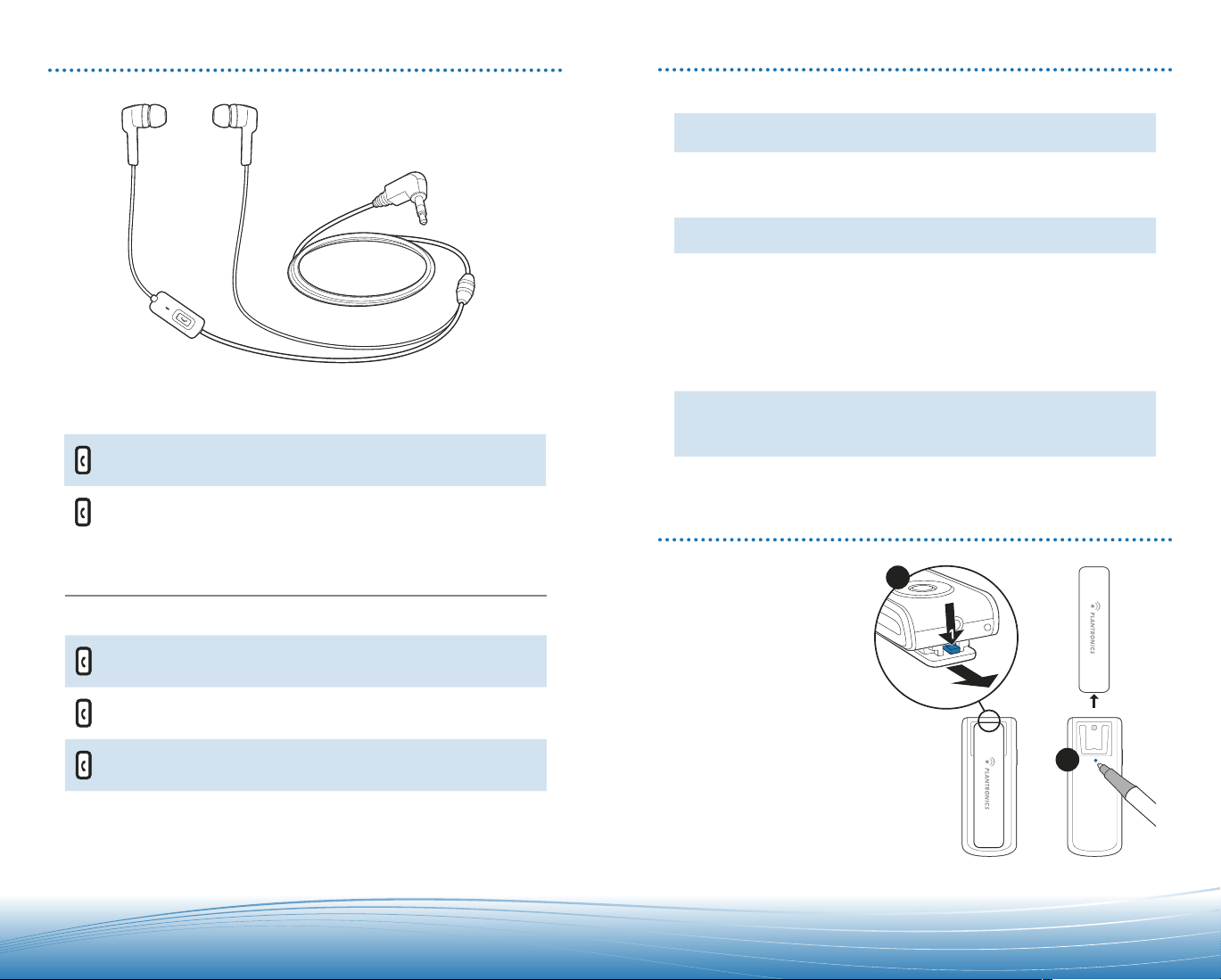
Pulsar 260 Headset
Microphone with call
control button
Sound-isolating
earbuds
2.5mm plug
4
4
4
5
6
6
7
9
9
Stereo Bluetooth Pod
2.5mm port
Detachable clip
Audio-out cable
Mini-USB port
Indicator light
Power on/off/Pairing
LanyardAC charger
Regist er Your Product Online
Visit www.plantronics.com/productregistration to register your product online so we
can provide you with the best possible ser vice and technical support.
Pod Controls :
Mute/Play/Pause
Volume up
Power on/off/Pairing
Volume down
Track forward
Track back
Page 3
4
|
|
5
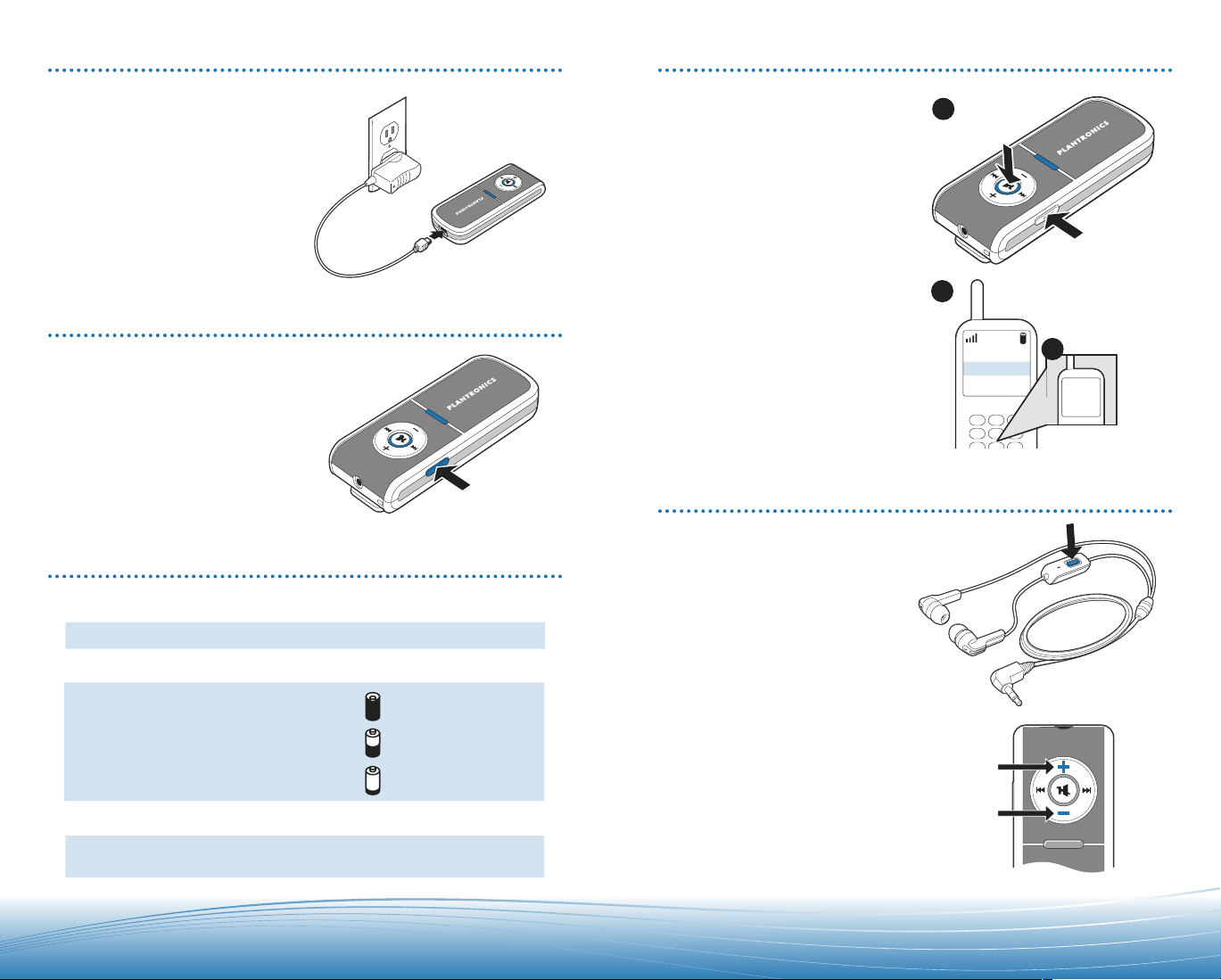
CHARGING
NOTE: Flashes red
when
headset is
initially powered on
.
Pairing/connect Flashes red and blue
Fully charged Solid blue
Charging
Actio
n
Flashes re
d
Ligh
t
Bluetooth pod
connected
to
headset
Flashes blue
Power/battery status
3 red flashes
=
2 red flashes
=
1 red flash
=
1
260Plantronics
M3000 Plantronics
M2500 Plantronic
s
2
0000
Enter
Passke
y
3
PAIRING
You must charge for 3 hours before first use.
To charge, connect AC charger to pod
mini-USB socket.
Pod indicator light flashes red when charging
and changes to solid blue when fully charged.
POWERING ON/OFF
Press and hold power on/off switch for >2 seconds.
POD INDICATOR LIGHTS
To pair pod with phone:
Begin with pod powered on.
1. Press and hold both the
mute/play/pause button and the
power on/off/pairing button
simultaneously. When the
indicator light flashes red and
blue, release buttons.
2. While pod is flashing red and blue,
use the phone menu to search for
Bluetooth devices and select “260
Plantronics.”
3. When prompted for passkey,
enter 0000
Pod flashes blue when paired
successfully.
For set up and pairing instructions with
Bluetooth devices other than mobile
phones, please consult your Bluetooth
device user guide.
.
MAKING/ANSWERING/ENDING CALLS
To make a call:
Dial on phone; call transfers
automatically to headset.
To answer or end a call:
Briefly press call control
button on headset.
To adjust volume:
Short press
pod for incremental change, hold
for continuous change.
or – buttons on
+
Page 4
6
|
|
7
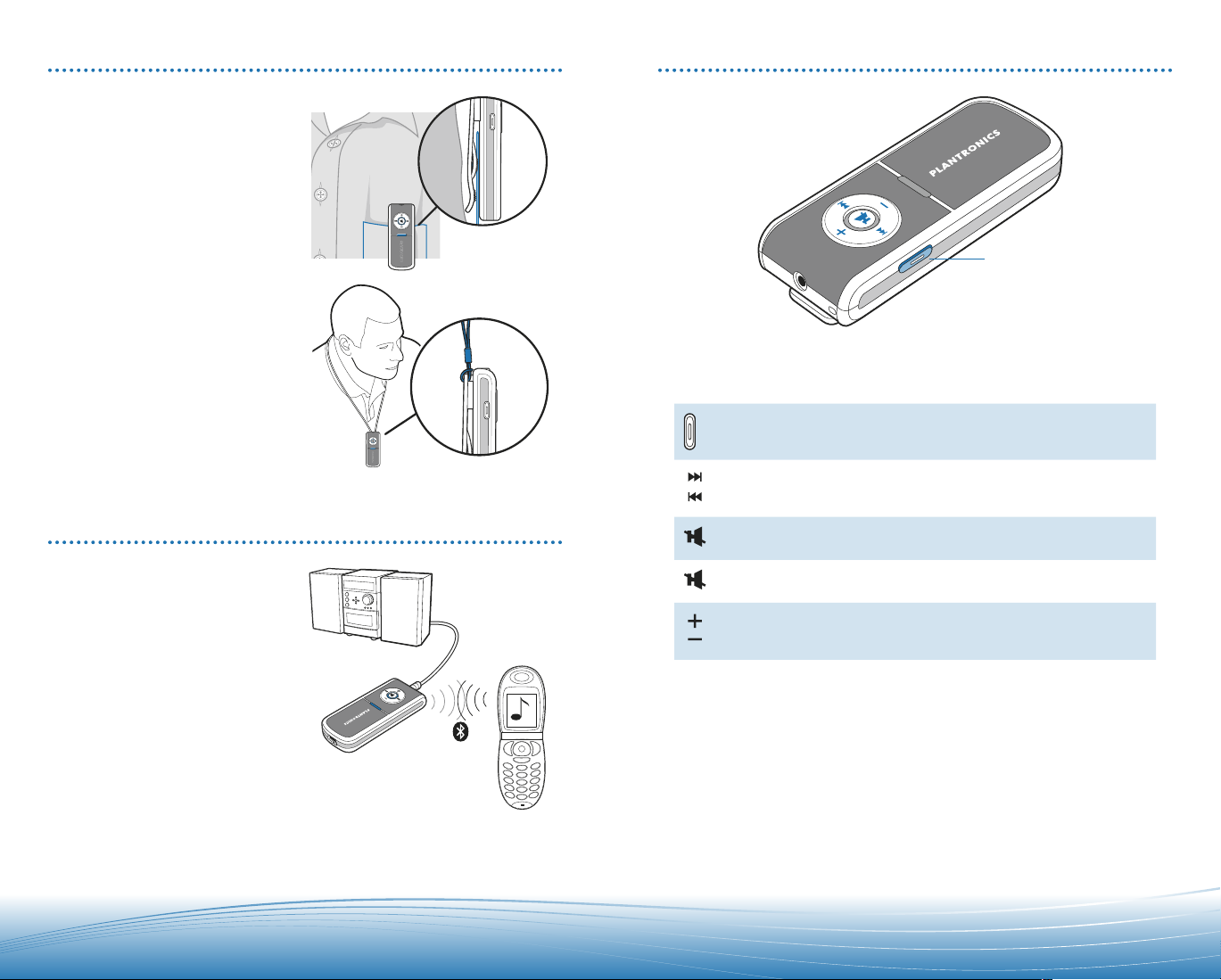
WEARING OPTIONS
Pulsar 260 can be worn in two ways:
• Clipped to your belt or clothing
• Around your neck using the
lanyard
POD CONTROLS
Key Feature Action Tone
Power on/off Short press
Power on/off
No tone
POWERED SPEAKER & STEREO USES
For public listening you can connect the
stereo Bluetooth pod directly to powered
speakers or your home stereo with the
included audio-out cable (provided your
speakers/ home stereo is fitted with a
Line-in or Auxiliary 3.5mm audio socket).
Please consult your equipment guide.
1. Ensure the stereo Bluetooth pod
and your speakers/home stereo
are powered off.
2. Connect the audio-out cable
2.5mm plug to the stereo Bluetooth
pod and the 3.5mm plug to to the
powered speakers/home stereo
Line-in or Auxiliary 3.5mm audio
socket as shown below.
3. Power on both the stereo
Bluetooth pod and your
speakers/home stereo.
Track forward
and back*
Mute call/audio Short press to mute/unmute Repeating low tone
Play and pause* Short press to pause/
Adjusting volume
* Only works if Bluetooth device supports Bluetooth Audio/Video Remote Control
Profile (AVRCP)
Short press to skip to
next track or to go back
to previous track
resume audio
Short press
High tone
every 60 seconds
High tone
Mid tone for each
adjustment, double
low tone at limit
Page 5
8
|
|
9
2
1
2
HEADSET CONTROLS
Key Feature Action Tone
Making/answering/ending
calls
Short key press High tone
TROUBLESHOOTING
Problem Solution
My headset does not work
with my phone.
Callers cannot hear me.
Callers say my voice is
too quiet.
I cannot hear caller/dial
tone or audio sound.
I cannot hear music from
my powered speakers/Hi-Fi
when using the audio-out
cable.
• See page 5 “Pairing.”
• Perform a reset on Pulsar 260 as described below.
• Headset is muted. Press the mute button on the
pod to unmute the microphone.
• Be sure pod is powered on and headset is paired
with audio device. See pages 5 “Pairing.”
Ensure that microphone is pointing towards your
mouth.
• Pod is turned off. Check the indicator light for
status.
• Headset is out of range. Walk to within 10 metres of
the phone and check the Bluetooth link on your
phone’s display.
• Batter y is dead. Charge your battery using the AC
charger supplied.
• Listening volume is too low. Press the volume up
button to increase the sound heard in the headset.
• Pod must be turned on and connected to the
powered speakers/Hi-Fi with the audio-out cable.
• Check music player on Bluetooth phone is switched
on and Pulsar 260 is the active Bluetooth device.
Switching an active call
from headset to phone or
phone to headset
Long key press High tone
Hands-Free Features
Key Feature Action Tone
Activate last
number redial
Activate voice dial Long key press High tone followed
Call reject Long key press High tone followed
Features must be supported by Bluetooth device or service provider.
Double short key press High tone for each
followed by
low tone
key press
by low tone
by low tone
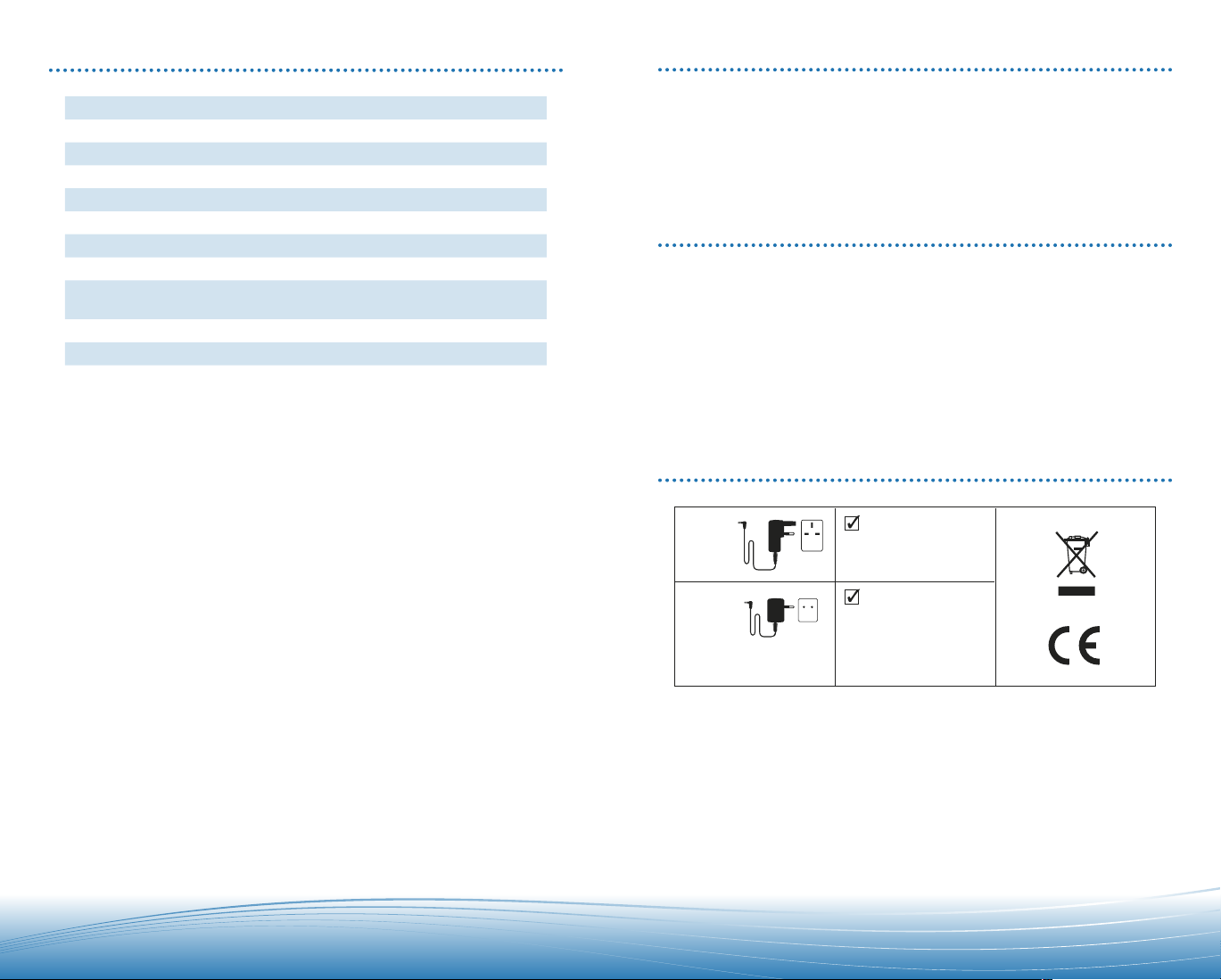
SYSTEM RESET
A reset button is located
(recessed) behind the
clothing clip.
To reset:
1. Remove clip as shown
at right.
2. Press and release
button using a pen.
Page 6
10
|
|
11
GBR
37677-04
37677-05
AUT, BEL, DEU, DNK, ESP,
FRA, GRC, ITA, IRL, LUX,
NLD, PRT, SWE, FIN, CYP,
CZE, EST, HUN, LVA, LTU,
MLT, POL, SVK, SVN.
PRODUCT SPECIFICATIONS
TECHNICAL ASSISTANCE
Listen Time* Up to 7 hours
Talk Time* Up to 9 hours
Standby Time* Up to 200 hours
Charge Time 3 hours
Range Bluetooth standard 10 metres
Headset and Pod Weight 25 grams
Power Requirements 5VDC - 300 mA
Batter y Type Lithium Ion Polymer
Speaker Frequency Response • Telephony 300 Hz to 3600 Hz (CVSD)
Impedance 32 +-4 Ohms x1 kHz
Distortion <5% to 19 kHz
Version Bluetooth 2.0
Supports Bluetooth Hands-Free and Headset Profiles, Advanced Audio Distribution
Profile (A2 DP), Audio/Video Remote Control Profile (AVRCP), and Generic Audio/
Video Distribution Profile (GAVDP). For stereo sound, Bluetooth-enabled devices
must support the Advanced Audio Distribution Profile (A 2DP).
*Performance may vary by device.
• Stereo Audio 20 Hz to 20 kHz(16-bit 48kHz SBC Coding)
Visit our Web site at www.plantronics.com/support for technical support including
frequently asked questions, compatibility and accessibility information.
The Plantronics Technical Assistance Centre (TAC) is also ready to assist you on
0800 410014 from the UK.
EXPOSURE TO RF RADIATION
The internal wireless radio operates within the guidelines found in radio frequency
safety standards and recommendations, which reflect the consensus of the scientific
community. Independent studies have shown that the internal wireless radio is safe
for use by consumers. Visit www.plantronics.com for more information.
NOTE: Modifications not expressly approved by Plantronics, Inc. could void the user’s
authority to operate the equipment.
MODEL AND COUNTRY INFORMATION
Page 7

Federal Communications Commission (FCC) Statement
15.21
You are cautioned that changes or modifications not expressly approved by the part responsible for
compliance could void the user’s authority to operate the equipment.
15.105(b)
This equipment has been tested and found to comply with the limits for a Class B digital device,
pursuant to part 15 of the FCC rules. These limits are designed to provide reasonable protection
against harmful interference in a residential installation. This equipment generates, uses and can
radiate radio frequency energy and, if not installed and used in accordance with the instructions,
may cause harmful interference to radio communications. However, there is no guarantee that
interference will not occur in a particular installation. If this equipment does cause harmful
interference to radio or television reception, which can be determined by turning the equipment off
and on, the user is encouraged to try to correct the interference by one or more of the following
measures:
-Reorient or relocate the receiving antenna.
-Increase the separation between the equipment and receiver.
-Connect the equipment into an outlet on a circuit different from that to which the receiver is
connected.
-Consult the dealer or an experienced radio/TV technician for help.
Operation is subject to the following two conditions:
1) this device may not cause harmful interference and
2) this device must accept any interference received, including interference that may cause undesired
operation of the device.
FCC RF Radiation Exposure Statement:
This equipment complies with FCC radiation exposure limits set forth for an uncontrolled
environment. End users must follow the specific operating instructions for satisfying RF exposure
compliance. This transmitter must not be co-located or operating in conjunction with any other
antenna or transmitter.
Page 8

WARNINGS
Use of a headset that covers both ears will impair your ability to hear
other sounds. Use of such a headset while operating a motor vehicle or
riding a bicycle may create a serious hazard to you and/or others, and is
illegal in most regions.
Do not use headphones / headsets at high volumes for an extended
period of time. Doing so can cause hearing loss. Always listen at
moderate levels.
Plantronics Ltd
Interface Business Park
Bincknoll Lane
Wootton Bassett
Wiltshire SN4 8QQ, ENGLAND
Tel: 0800 410 014
Plantronics B.V.
Hoofddorp, Nederland
Tel:
0800 752 6876 (NL)
00800 752 687 66 (BE/LUX)
Plantronics Sarl
Noisy-le-Grand, France
No Indigo : 0825 082599
0 , 15 4 TTC / mn
+33 14167 4141
Plantronics GmbH
Hürth, Deutschland
Tel: 0800 9323400
Österreich: 0800 242 500
Schweiz: 0800 932 340
Plantronics Acoustics
Italia Srl
Milano, Italia
Numero Verde: 800 950 934
Plantronics Iberia, S.L.
Madrid, España
Tel: 902 415 191
+34 91 640 47 44 (ES)
Tel: 800 844 517 (PT)
Nordic Region
Tel: Finland: 0800 117 095
Tel: Sverige: 02002 14681
Tel: Danmark: 8088 4610
Tel: Norge: 800 113 36
Plantronics Middle East,
Eastern Europe, and Africa
Tel: +44 1793 842 443
Plantronics, Inc.
345 Encinal Street
Santa Cruz, CA 95060 USA
Tel: 1 831 426 5868
©2006 Plantronics, Inc. All rights reserved. Plantronics, the logo design, Plantronics Sound Innovation
and Pulsar are trademarks or registered trademarks of Plantronic s, Inc. The Bluetooth
logos are owned by the Bluetooth SIG, Inc. and any use of such marks by Plantronics, Inc. is under license.
Patents Pending.
Printed in USA. (05-06)
12
|
®
word mark and
 Loading...