

Page 1

Backbeat® Go 2
plus charge case
User Guide
Page 2

Contents
Welcome 3
What's in the box 4
Headset overview 5
Be safe 5
Charge case overview 6
Pair 7
Pair first time 7
Pair another device 7
Multi-connectivity 7
Charge 8
Check battery level 8
Use charge case 9
Fit 10
The Basics 11
Power the earbuds on or off 11
Audio 11
Adjust the volume 11
Mute 11
Make/Take/End Calls 11
More Features 13
Deepsleep Mode 13
Stay connected 13
Voice alerts 13
Restore factory settings 13
Specifications 14
Support 15
2
Page 3

Welcome
Congratulations on purchasing your new Plantronics product. This guide contains instructions
for setting up and using your Backbeat Go 2 earbuds.
Please refer to the safety instructions in the quick start guide for important product safety
information prior to installation or use of the product.
3
Page 4
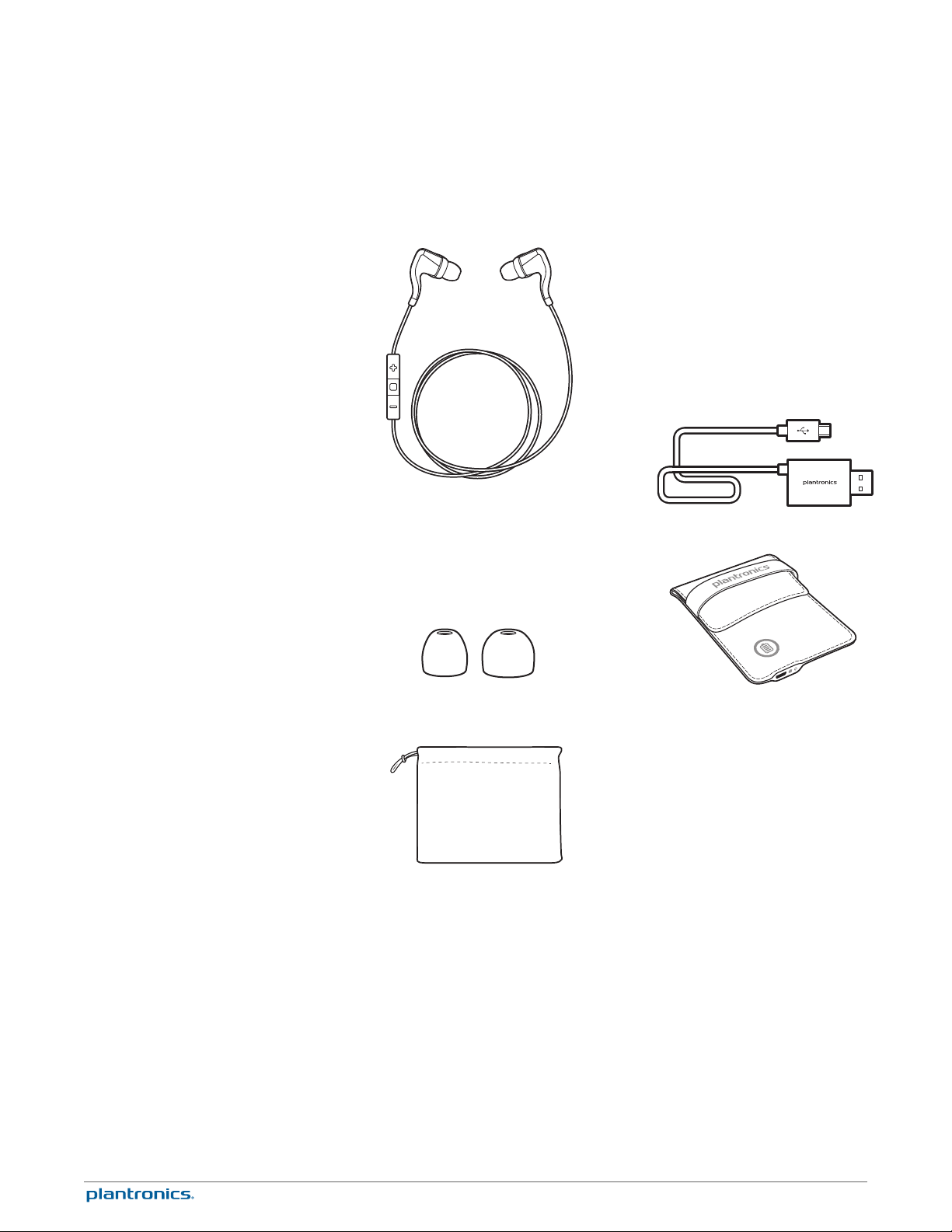
What's in the box
Earbuds with microphone (stabilizers and medium eartips
installed) Combo cable charger
Eartips (small and large) Charge case
Pouch
4
Page 5
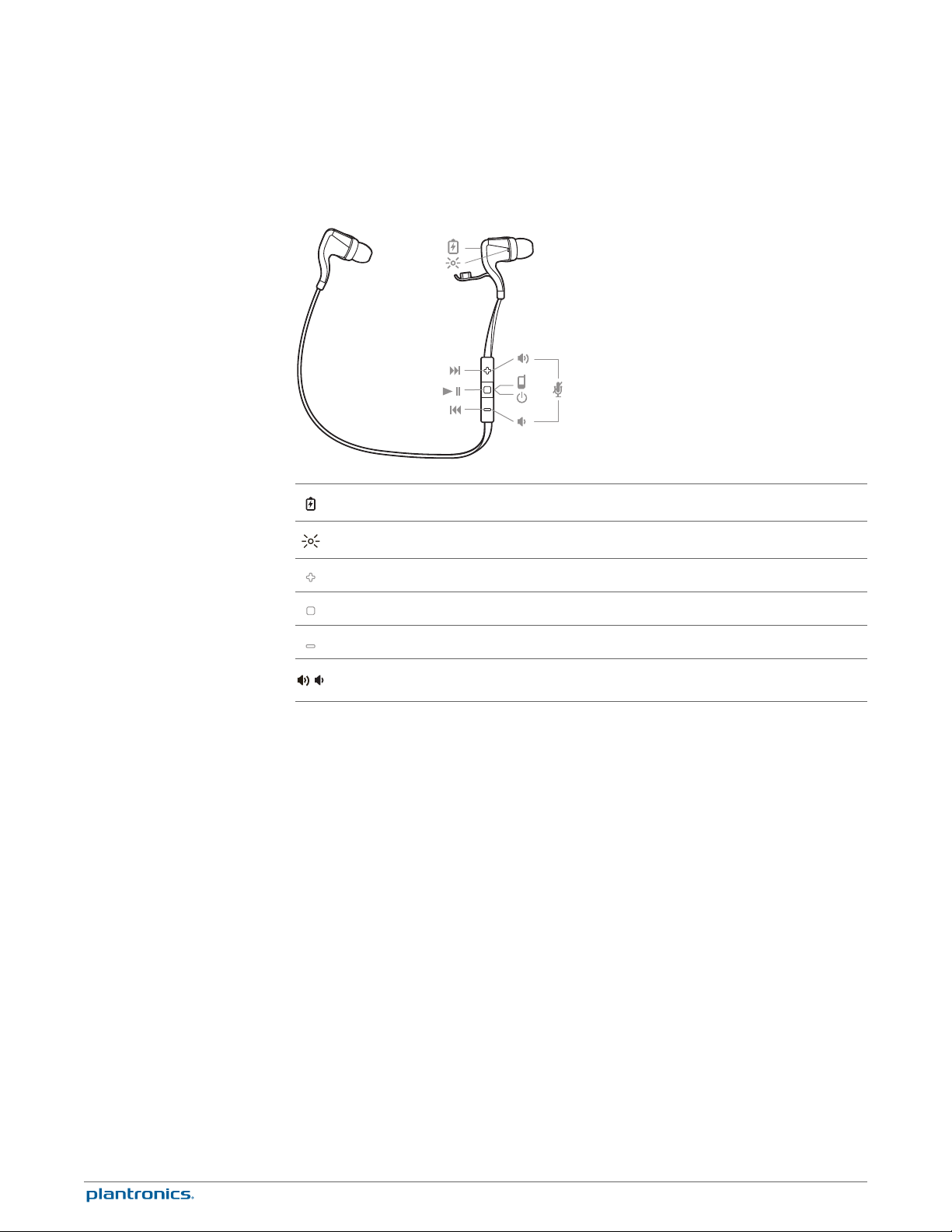
Headset overview
Charge port
Headset indicator light (LED)
Be safe
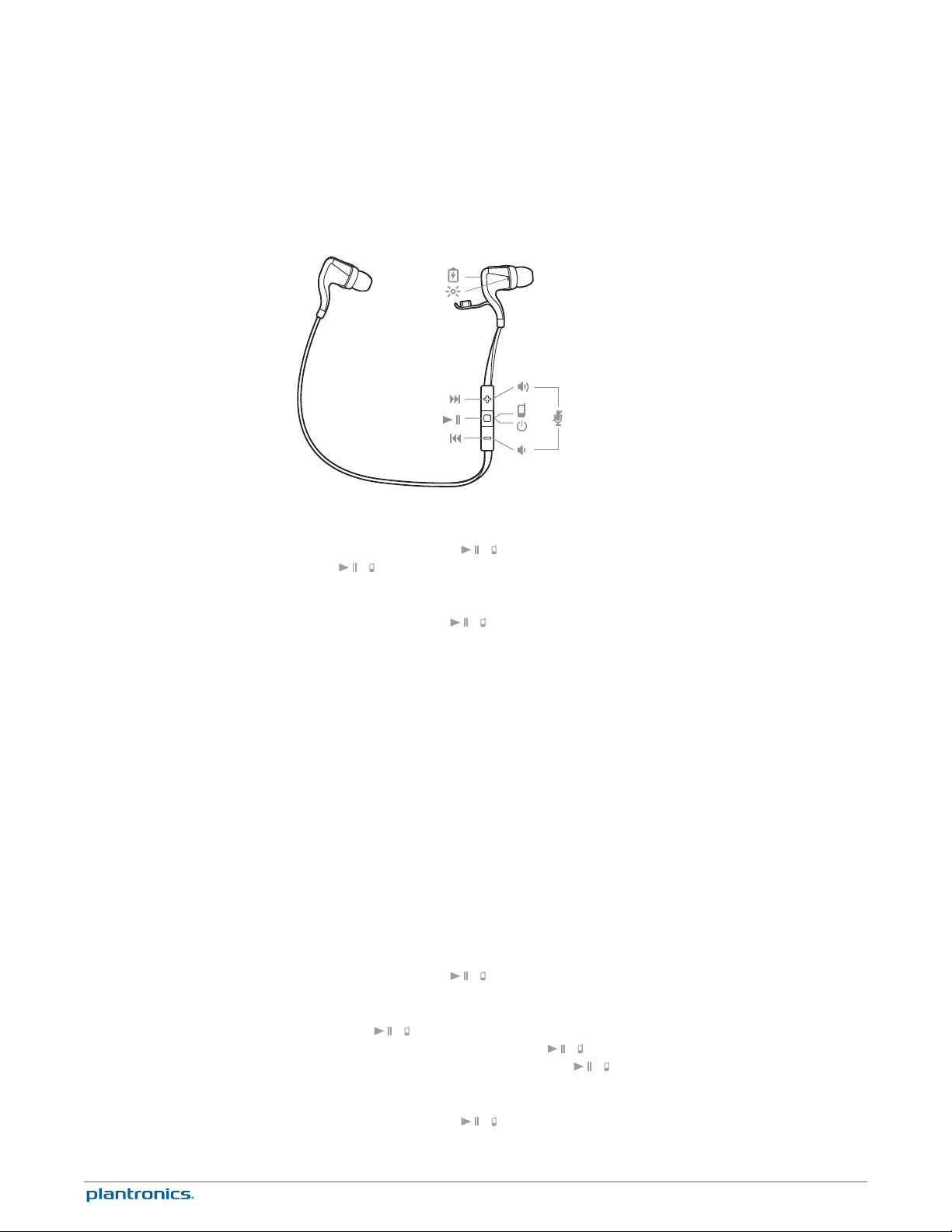
Volume up button: Increases volume, skips to next track
Audio/call button: Powers on/off earbuds, answers/ends/declines call, plays/pauses music
Volume down button: Decreases volume, plays previous track
Mute/Unmute
/
Please read the safety guide for important safety, charging, battery and regulatory information
before using your new headset.
5
Page 6
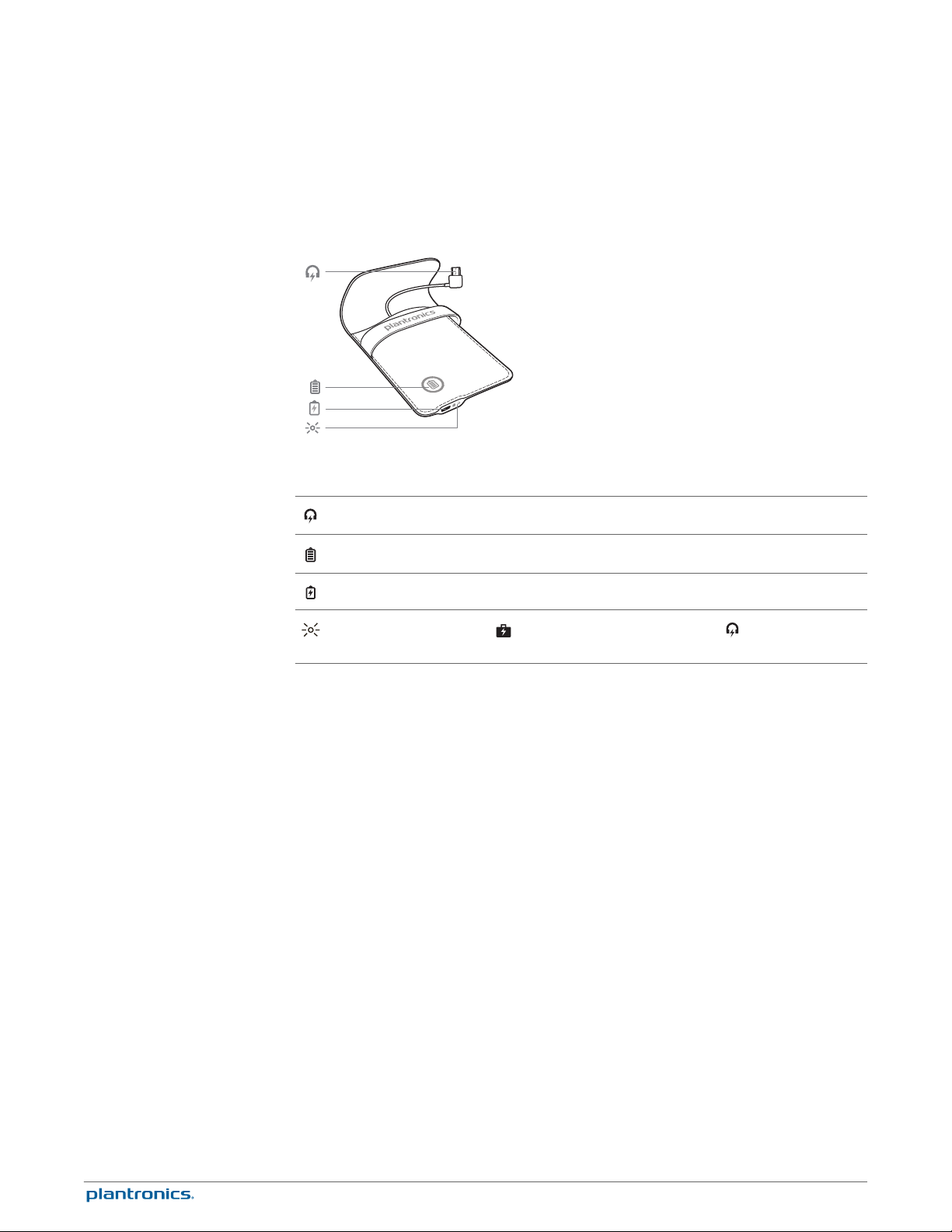
Charge case overview
Micro USB plug
Press for charge case battery level
Micro USB charge port
Charge case indicator lights; indicates charge case battery level and indicates charge
state of earbuds
6
Page 7
Pair
Pair first time
Pair another device
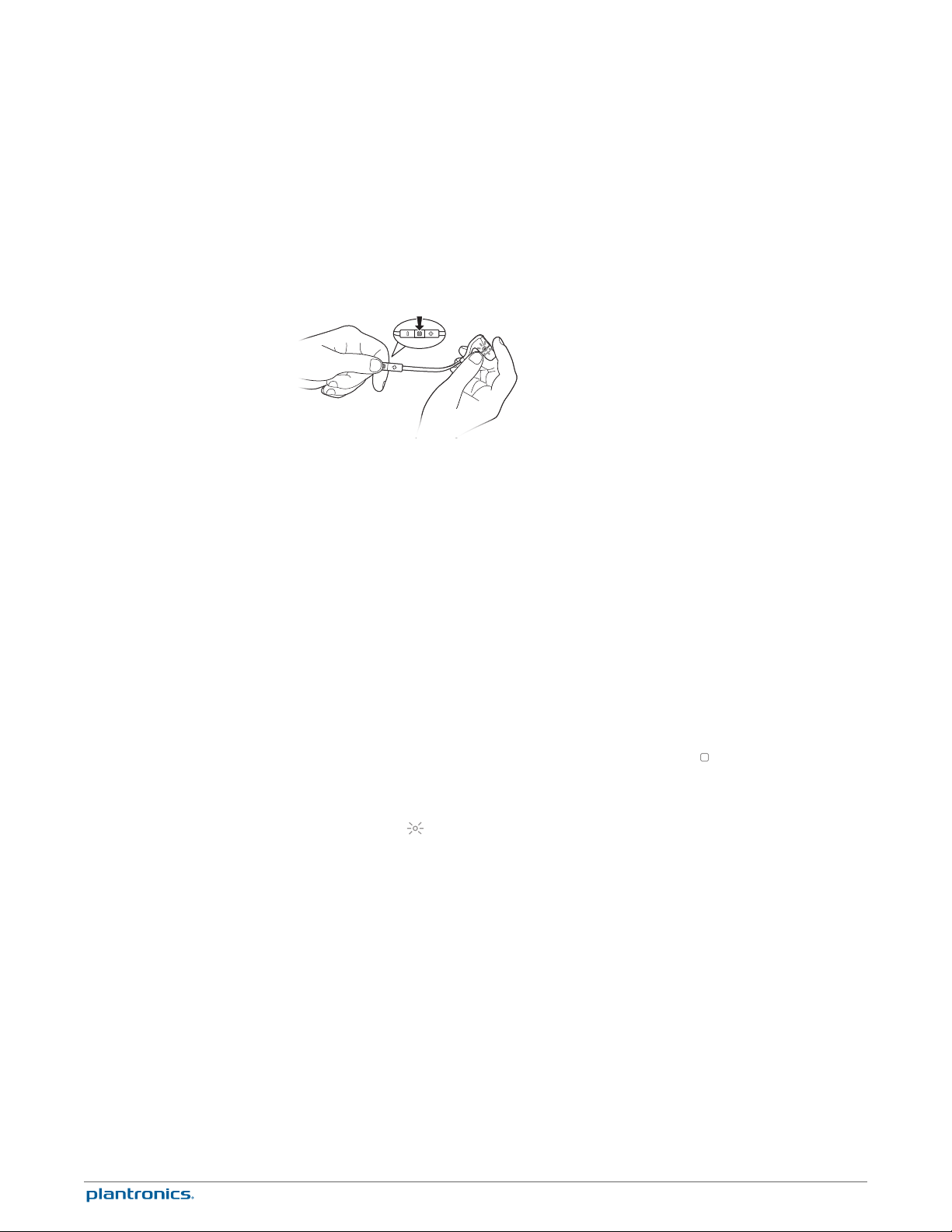
The first time you power on your earbuds, it begins the pairing process.
1
Power on the earbuds. The indicator light, located on the right earbud, flashes red and blue to
indicate pairing mode.
2
Activate Bluetooth® on your phone and set it to search for new devices.
•
iPhone* Settings > Bluetooth > On
•
Android™ Smartphones* Settings > Wireless & Networks > Bluetooth: On > Scan for devices
NOTE * Menus may vary by device.
3
Select “PLT_BBTGO2.”
If necessary, enter four zeros (0000) for the passcode or accept the connection.
Once successfully paired, you hear “pairing successful” and the earbud indicator light stops
flashing.
After pairing your earbuds to your phone, you may want to pair another phone or device, such
as a tablet. You can pair and remember up to eight devices, supporting Handsfree and Advanced
Audio Distribution (A2DP) profiles.
1
Put the earbuds in pairing mode. Choose:
• With the earbuds powered off, press and hold the Audio/call button
until you hear "pairing" or
Multi-connectivity
• With the earbuds powered on and not during a call, press and hold the volume up (+) and
volume down (–) buttons until you hear "pairing"
The indicator light
2
Activate Bluetooth on your phone and set it to search for new devices.
3
Select “PLT_BBTGO2.”
If necessary, enter four zeros (0000) for the passcode or accept the connection.
Once successfully paired, you hear “pairing successful” and the headset indicator lights stop
flashing.
When you have more than one device paired to your earbuds, multi-connectivity allows you to
toggle the connection between the devices from the Bluetooth device list of your phone/music
device (The earbuds can only be connected to one device at a time.).
For example, if you are connected to a tablet and are finished listening to music and want to
switch to one of your other paired phone/music devices, then do the following:
1
Go to the paired device list in your Bluetooth settings menu on your phone.
2
Select "PLT_BBTGO2."
After, the earbuds accept the new connection, there is no need to delete and re-pair your
devices each time; they are remembered and ready to connect anytime when in range.
, on the right earbud, flashes red and blue to indicate pairing mode.
7
Page 8
Charge
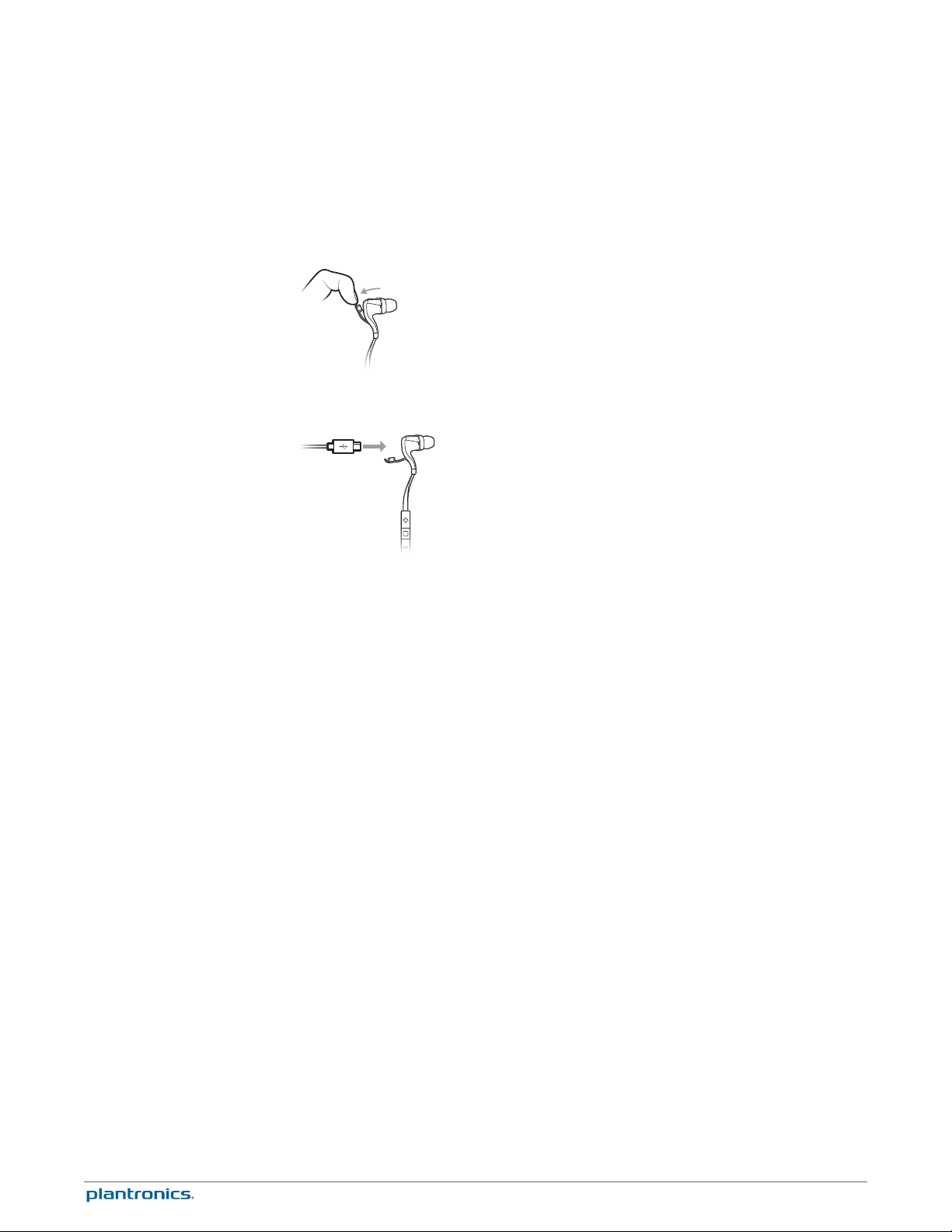
Your new earbuds have enough power to pair and make a few calls. To access the charging
port, insert your fingernail into the groove on top of the right earbud and pull down.
It takes up to 2.5 hours to fully charge the earbuds. While charging, the indicator light is red
and turns blue once charging is complete.
Check battery level
You can check the battery level by tapping either of the Volume buttons when the headset is
idle. Your earbuds announce battery status and the indicator light flashes to show the charge
level.
"Battery level high" = battery OK to fully charged
"Battery level low" = less than 1 hour remaining
"Recharge headset" = under 15 minutes remaining
Blue flash = battery OK to fully charged
Double red flash = battery low, less than 1 hour remaining
Triple red flash = under 15 minutes remaining
8
Page 9
Use charge case
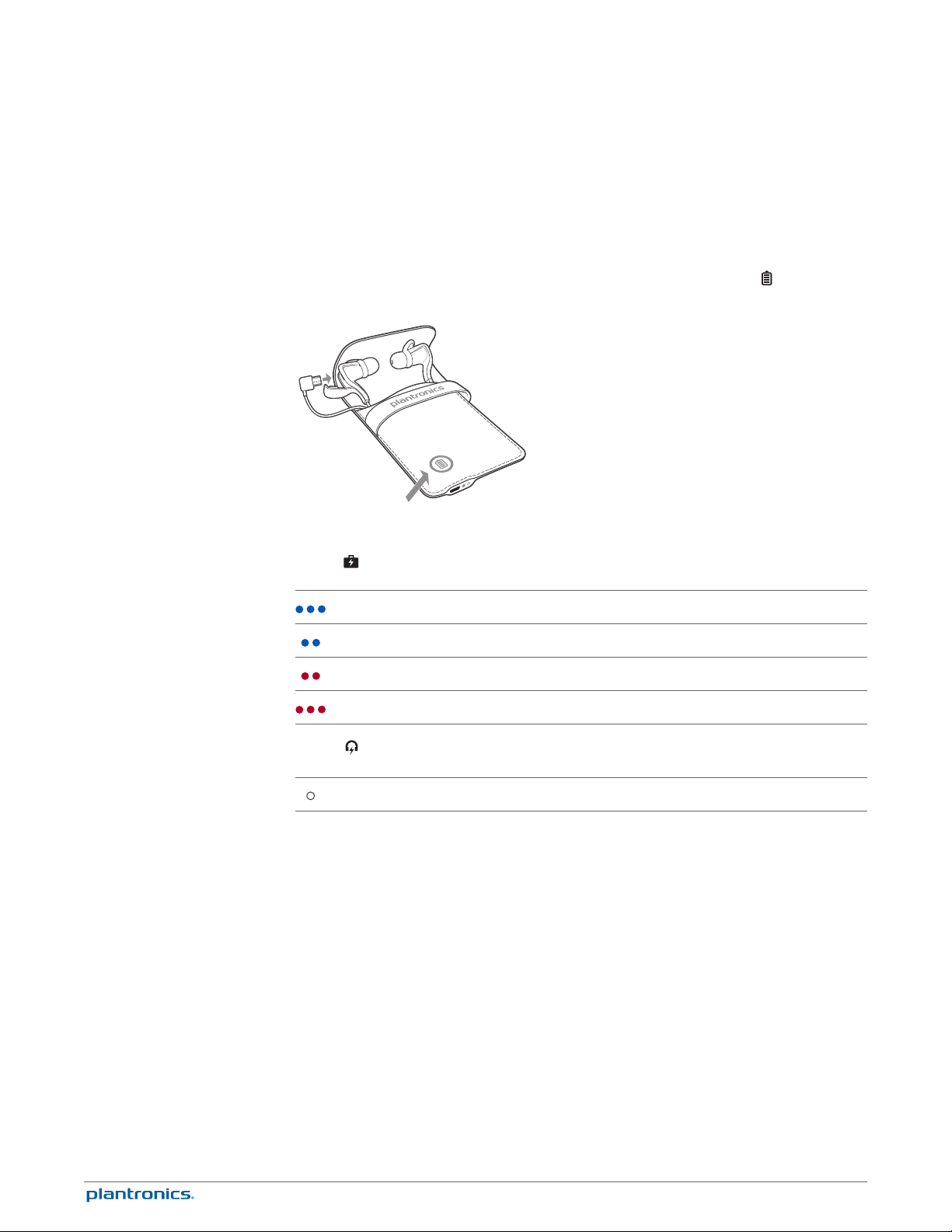
With a fully charged case, charge your earbuds for 20 minutes to add up to an hour of power.
Charge the earbuds for 2.5 hours for a full charge.
You can check charge case battery level by pressing the Battery status button .
Table 1: Charge case indicator light
Battery high
Battery medium
Battery low
Battery critical
Table 2: Earbud indicator light
Flashes white every 10 seconds to indicate charging; stops flashing when fully charged
9
Page 10
Fit
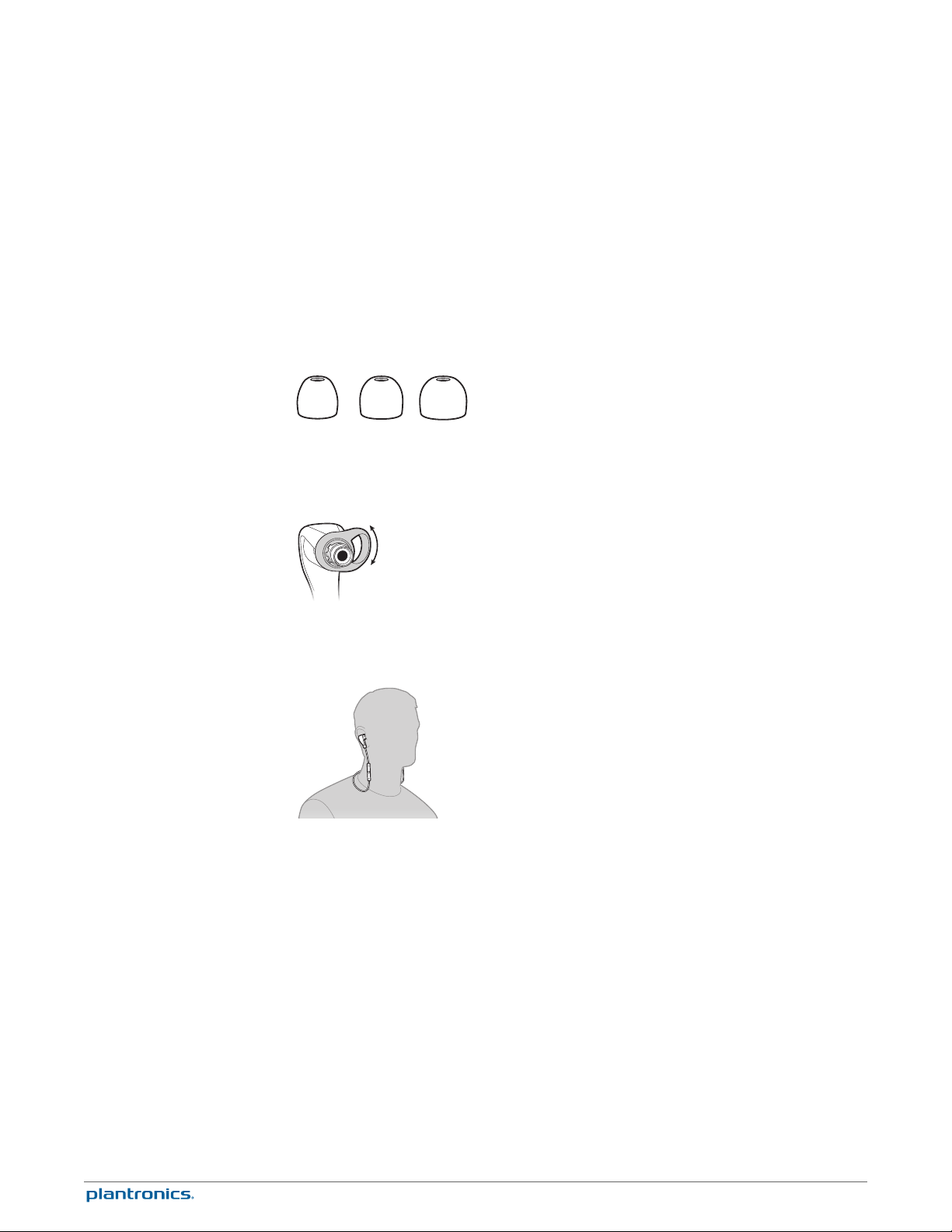
Selecting the right size eartip is essential for you to fully appreciate the
premium audio quality the earbuds offer.
1
Acoustic seal Out of the box, the medium eartips are installed on the earbuds. We recommend
that you try each eartip (small, medium and large), perform a sound check and choose the eartip
that gives the best sound experience. A snug fit will ensure a rich bass response.
2
Comfort and stability The stabilizers can be rotated to three pre-set positions. Rotate the
stabilizer to adjust the angle to achieve optimal fit and stability.
3
Drape the earbuds around the back of your neck and enjoy.
10
Page 11
The Basics
Power the earbuds on or
off
Audio
Adjust the volume
Mute
Make/Take/End Calls
Press the Audio/call button
button
Play or pause audio
Tap the Audio/call button / .
Skip to next track
Press the Volume up (+) button for more than 1 second.
Play previous track
Press the Volume down (–) button for more than 1 second to restart the current track. Press the
button twice (each press more than 1 second) to go to the previous track.
Tap the Volume up (+) or down (–) button.
During a conversation, simultaneously tap the Volume (+) and (–) buttons. You will hear “mute
on” or “mute off.” An alert repeats every 5 minutes when mute is on.
You will hear an incoming call alert while listening to audio. When you take the call, your stored
audio (downloaded tunes, video or podcasts) will pause. If you are listening to live streaming
audio then it will mute, not pause, during your call. Once you end your call, your playback or
streaming will resume.
Answer or end a call
Tap the Audio/call button
/ for 4 seconds until you hear "power off."
/ until you hear “power on." To power off, press the Audio/call
/ .
Use call waiting
First, tap the / button to put the first call on hold and answer the second call. To switch
between calls, press the Audio/call button
retrieve the first call, tap the Audio/call button / .
Decline a call
Press the Audio/call button / for 2 seconds.
/ for 2 seconds. To end the second call and
11
Page 12

Redial
Double tap the Audio/call / button to dial the last number you called.
12
Page 13

More Features
Deepsleep Mode
Stay connected
Voice alerts
If you leave your headset powered on but out of range of your paired phone for more than 20
minutes, your headset will conserve its battery power by entering into a DeepSleep™ mode.
Once back in range with your phone, press any button to exit DeepSleep mode. If your phone is
also ringing, tap the Call button again to answer your call.
Bluetooth has a working “range” of up to 33 feet between the phone and earbuds before audio
degrades and the connection is lost.
Your earbuds try to reconnect after a lost Bluetooth connection. If they can’t, then tap the
Audio/call button once or manually reconnect via the phone’s Bluetooth device menu.
Your headset speaks English.
Voice alerts list
• "Battery low/medium/high"
• "Connection switched"
• "Headset connected"
• "Not connected"
• "Mute on/off"
• "Pairing"
• "Pairing successful"
Restore factory settings
• "Power on/off"
• "Recharge headset"
• "Redial"
When you restore the earbuds to its factory settings, the paired devices list is deleted.
1
First, put the earbuds in pairing mode. Choose from the following:
• With the earbuds powered off, press and hold the Audio/call button until you hear "pairing" or
• With the earbuds powered on and not during a call, press and hold the volume up (+) and
volume down (–) buttons until you hear "pairing"
The indicator light, on the right earbud, flashes red and blue to indicate pairing mode.
2
Second, while the earbuds are in pairing mode, press and hold the volume up (+) and volume
down (–) buttons until the LED flashes purple.
After the reset, the earbuds power off.
13
Page 14

Specifications
Talk/Listening time
Standby time
DeepSleep technology
Operating distance (range)
Headphones weight
Audio
Noise reduction
Moisture protection
Charge connector
Battery type
Up to 4.5 hours listen/5 hours talk*
Up to 10 days*
Provides up to 180 days* of battery readiness
Up to 33 feet from phone or tablet
14 grams
HQ custom SBC codec, 6mm neodymium speakers,
Frequency response 20-20,000 Hz, Total Harmonic
Distortion <5%, sensitivity 104 dBspl/mW @ 1 kHz
Digital Signal Processing (DSP) :
• Full duplex echo cancellation
• Real time noise reduction
• Voice clarity
P2i nano-coating for sweat and moisture protection
Micro USB charging
Rechargeable, non-replaceable lithium-ion polymer
Charge time (maximum)
Bluetooth 2.1 + EDR
Operating and storage temperature
2.5 hours (Power requirements 5V DC - 180 mA)
Advanced Audio Distribution Profile (A2DP) v1.2, Audio/
Video Remote Control Profile (AVRCP) v1.4, Handsfree
Profile (HFP) v1.6 and Headset Profile (HSP) v1.1
32°F – 104°F (0 – 40°C)
NOTE * Performance is dependent upon battery and usage and may vary by device.
14
Page 15

Support
plantronics.com/support
EN
Tel: 0800 410014
AR
Tel: +44 (0)1793 842443*
CS
Tel: +44 (0)1793 842443*
DA
Tel: 80 88 46 10
DE
Deutschland 0800 9323 400
Österreich 0800 242 500
Schweiz 0800 932 340
EL
Tel: +44 (0)1793 842443*
ES
Tel: 900 803 666
FI
Tel: 0800 117095
FR
Tel: 0800 945770
GA
Tel: 1800 551 896
HE
Tel: +44 (0)1793 842443*
HU
Tel: +44 (0)1793 842443*
IT
Tel: 800 950934
NL
NL 0800 7526876
BE 0800 39202
LUX 800 24870
NO
Tel: 80011336
PL
Tel: +44 (0)1793 842443*
PT
Tel: 0800 84 45 17
RO
Tel: +44 (0)1793 842443*
RU
Tel: 8-800-200-79-92
Tel: +44 (0)1793 842443*
SV
Tel: 0200 21 46 81
TR
Tel: +44 (0)1793 842443*
NOTE *Support in English
Safety information: see the separate “For Your Safety” booklet
2-year limited warranty details: plantronics.com/warranty
15
Page 16

NEED MORE HELP?
plantronics.com/support
Plantronics BV
South Point Building C
Scorpius 140
2132 LR Hoofddorp, Netherlands
©
2013 Plantronics, Inc. All Rights Reserved. Bluetooth is a registered trademark of Bluetooth SIG, Inc. and any use by Plantronics is under license. All
other trademarks are the property of their respective owners.
US Patents Pending
201075-06 (09.13)
 Loading...