

Planet Networking & Communication WGSD-24040R, WGSW-24040HP4, WGSW-20160HP, WGSW-24040HP, WGSW-48040HP Command Manual
...Page 1
Command Guide
-1-
Page 2

Command Guide
Contents
Chapter 1 COMMAND LINE INTERFACE ........................................................ 20
1.1 Accessing the CLI ....................................................................................................... 20
1.2 Command Line Modes ................................................................................................ 20
1.3 Requirements .............................................................................................................. 21
1.4 Command Support ...................................................................................................... 22
Chapter 2 CONSOLE CLI MANAGEMENT ...................................................... 24
2.1 Terminal Setup ............................................................................................................ 24
2.2 Logon to the Console ................................................................................................. 26
2.3 Configuring IP Address .............................................................................................. 26
Chapter 3 TELNET CLI MANAGEMENT .......................................................... 29
3.1 Te l net Login ................................................................................................................. 29
Chapter 4 Commands for CLI Configuration ................................................. 30
4.1 clear ............................................................................................................................. 30
4.1.1 clear access management statistics .................................................................................................................... 30
4.1.2 clear access-list ace stati st ic s.............................................................................................................................. 30
4.1.3 clear dot1x statistics interface ............................................................................................................................. 31
4.1.4 clear eps .............................................................................................................................................................. 31
4.1.5 clear erps ............................................................................................................................................................. 31
4.1.6 clear erps st atistics .............................................................................................................................................. 32
4.1.7 clear evc statistics ............................................................................................................................................... 32
4.1.8 clear ip arp ........................................................................................................................................................... 33
4.1.9 clear ip dhcp detailed statistics all ....................................................................................................................... 33
4.1.10 clear ip dhcp detailed statistics client ................................................................................................................. 34
4.1.11 clear ip dhcp detailed statistics helper ............................................................................................................... 34
4.1.12 clear ip dhcp detailed statistics server ............................................................................................................... 35
4.1.13 clear ip dhcp detailed statistics snooping .......................................................................................................... 35
4.1.14 clear ip dhcp relay stati stic s ............................................................................................................................... 36
4.1.15 clear ip dhcp server binding ............................................................................................................................... 36
4.1.16 clear ip dhcp server binding automat ic .............................................................................................................. 36
4.1.17 clear ip dhcp server binding ex pired .................................................................................................................. 37
4.1.18 clear ip dhcp server binding manual .................................................................................................................. 37
-2-
Page 3

Command Guide
4.1.19 clear ip igmp snooping statisti cs ........................................................................................................................ 38
4.1.20 clear ip igmp snooping vlan ............................................................................................................................... 38
4.1.21 clear ip statisti cs icmp icmp-msg ....................................................................................................................... 39
4.1.22 clear ip statistics icmp interface vlan ................................................................................................................. 39
4.1.23 clear ip statistics system icmp icmp-msg ........................................................................................................... 40
4.1.24 clear ip statistics system icmp interface vlan ..................................................................................................... 40
4.1.25 clear ipv6 mld snooping stat ist ic s ...................................................................................................................... 41
4.1.26 clear ipv6 mld snooping vlan ............................................................................................................................. 41
4.1.27 clear ipv6 neighbors .......................................................................................................................................... 42
4.1.28 clear ipv6 statistics icmp icmp-msg ................................................................................................................... 42
4.1.29 clear ipv6 statistics icmp interface vlan .............................................................................................................. 43
4.1.30 clear ipv6 statistics system icmp icmp-msg ....................................................................................................... 43
4.1.31 clear ipv6 statistics system icmp interface vlan ................................................................................................. 44
4.1.32 clear lacp statisti cs ............................................................................................................................................ 44
4.1.33 clear lldp stati sti cs ............................................................................................................................................. 45
4.1.34 clear logging error info ....................................................................................................................................... 45
4.1.35 clear logging error warn ing ................................................................................................................................ 45
4.1.36 clear logging info error ....................................................................................................................................... 46
4.1.37 clear logging info warning .................................................................................................................................. 46
4.1.38 clear logging warning error ................................................................................................................................ 47
4.1.39 clear logging warning info .................................................................................................................................. 47
4.1.40 clear mac address-table .................................................................................................................................... 47
4.1.41 clear mep ........................................................................................................................................................... 48
4.1.42 clear mvr name .................................................................................................................................................. 48
4.1.43 clear mvr statistics ............................................................................................................................................. 49
4.1.44 clear mvr vlan .................................................................................................................................................... 49
4.1.45 clear network-clock clk-source .......................................................................................................................... 49
4.1.46 clear spanning-tree detected-protocols interf ac e * ............................................................................................ 50
4.1.47 clear spanning-tree detected-protocols interf ac e * ............................................................................................ 50
4.1.48 clear spanning-tree detected-protocols interf ac e Gigabit Ethernet ..................................................................... 51
4.1.49 clear spanning-tree detected-protocols interf ac e 10Gigabit Et her n et ................................................................. 51
4.1.50 clear spanning-tree statistics interface * ............................................................................................................ 52
4.1.51 clear spanning-tree statistics interface GigabitEthernet ..................................................................................... 52
4.1.52 clear spanning-tree statistics interface 10GigabitEthernet ................................................................................. 52
4.1.53 clear stat istics * .................................................................................................................................................. 53
4.1.54 clear statistic s GigabitEthernet .......................................................................................................................... 53
4.1.55 clear statistic s 10Gigab itEthernet ...................................................................................................................... 54
4.2 configure terminal ....................................................................................................... 54
4.2.1 aaa authentication login console local ................................................................................................................. 54
4.2.2 aaa authentication login console radius ............................................................................................................... 55
4.2.3 aaa authentication login console ta cac s .............................................................................................................. 55
-3-
Page 4

Command Guide
4.2.4 aaa authentication login http local ....................................................................................................................... 55
4.2.5 aaa authentication login http radiu s ..................................................................................................................... 56
4.2.6 aaa authentication login http t aca cs .................................................................................................................... 56
4.2.7 aaa authentication login ssh local ........................................................................................................................ 57
4.2.8 aaa authentication login ssh radius ..................................................................................................................... 57
4.2.9 aaa authentication login ssh tac ac s ..................................................................................................................... 58
4.2.10 aaa authentication login telnet local................................................................................................................... 58
4.2.11 aaa authentication login telnet radius ................................................................................................................ 59
4.2.12 aaa authentication login telnet tacacs ................................................................................................................ 59
4.2.13 access management ......................................................................................................................................... 60
4.2.14 access-list ace ................................................................................................................................................... 60
4.2.15 access-list ace update ....................................................................................................................................... 61
4.2.16 access-list rate-limiter ........................................................................................................................................ 63
4.2.17 access-list rate-limiter pps ................................................................................................................................. 63
4.2.18 aggregation mode.............................................................................................................................................. 64
4.2.19 aggregation mode.............................................................................................................................................. 64
4.2.20 banner ............................................................................................................................................................... 65
4.2.21 banner exec ....................................................................................................................................................... 66
4.2.22 banner login ....................................................................................................................................................... 66
4.2.23 banner motd ...................................................................................................................................................... 67
4.2.24 clock summer-time ............................................................................................................................................ 68
4.2.25 clock time zone .................................................................................................................................................. 68
4.2.26 default access-list rate-limiter ............................................................................................................................ 69
4.2.27 dot1x authentication timer inactivity ................................................................................................................... 69
4.2.28 dot1x authentication timer re-authenticate ......................................................................................................... 70
4.2.29 dot1x feature ..................................................................................................................................................... 70
4.2.30 dot1x guest-vlan ................................................................................................................................................ 70
4.2.31 dot1x guest-vlan supplicant ............................................................................................................................... 71
4.2.32 dot1x max-reauth-req ........................................................................................................................................ 71
4.2.33 dot1x system-auth-control ................................................................................................................................. 72
4.2.34 dot1x timeout quiet-period ................................................................................................................................. 72
4.2.35 dot1x timeout tx-period ...................................................................................................................................... 73
4.2.36 enable password ............................................................................................................................................... 73
4.2.37 enable password level ....................................................................................................................................... 74
4.2.38 enable secret ..................................................................................................................................................... 75
4.2.39 end .................................................................................................................................................................... 76
4.2.40 erps <1-64> guard ............................................................................................................................................. 76
4.2.41 erps <1-64> holdoff ........................................................................................................................................... 77
4.2.42 erps <1-64> major ............................................................................................................................................. 77
4.2.43 erps <1-64> mep ............................................................................................................................................... 78
4.2.44 erps <1-64> mep ............................................................................................................................................... 78
-4-
Page 5

Command Guide
4.2.45 erps <1-64> rpl neighbor ................................................................................................................................... 79
4.2.46 erps <1-64> rpl owner ....................................................................................................................................... 79
4.2.47 erps <1-64> sub ................................................................................................................................................ 80
4.2.48 erps <1-64> topology-change propagate ........................................................................................................... 80
4.2.49 erps <1-64> topology-change propagate ........................................................................................................... 81
4.2.50 erps <1-64> vlan ................................................................................................................................................ 81
4.2.51 evc ..................................................................................................................................................................... 82
4.2.52 evc ece .............................................................................................................................................................. 83
4.2.53 evc ece update .................................................................................................................................................. 86
4.2.54 evc policer ......................................................................................................................................................... 88
4.2.55 evc policer update ............................................................................................................................................. 89
4.2.56 evc update ......................................................................................................................................................... 90
4.2.57 exit ..................................................................................................................................................................... 91
4.2.58 green-ethernet led interval ................................................................................................................................. 92
4.2.59 green-ethernet led on-event .............................................................................................................................. 92
4.2.60 gvrp ................................................................................................................................................................... 93
4.2.61 gvrp max-vlans .................................................................................................................................................. 93
4.2.62 gvrp time ............................................................................................................................................................ 94
4.2.63 help .................................................................................................................................................................... 94
4.2.64 hostname ........................................................................................................................................................... 95
4.2.65 interface * | 10GigabitEthernet | GigabitEthernet ............................................................................................... 96
4.2.65.1 access-list action permit .......................................................................................................................... 96
4.2.65.2 access-list action deny ............................................................................................................................ 97
4.2.65.3 access-list logging ................................................................................................................................... 97
4.2.65.4 access-list policy ..................................................................................................................................... 98
4.2.65.5 access-list port-state ............................................................................................................................... 98
4.2.65.6 access-list rate-limiter .............................................................................................................................. 99
4.2.65.7 access-list redirect interface .................................................................................................................... 99
4.2.65.8 access-list shutdown ............................................................................................................................. 100
4.2.65.9 aggregation group ................................................................................................................................. 100
4.2.65.10 description ........................................................................................................................................... 101
4.2.65.11 do ........................................................................................................................................................ 101
4.2.65.12 dot1x guest-vlan .................................................................................................................................. 102
4.2.65.13 dot1x port-control ................................................................................................................................ 102
4.2.65.14 dot1x radius-qos .................................................................................................................................. 103
4.2.65.15 dot1x radius-vlan ................................................................................................................................. 103
4.2.65.16 dot1x re-authenticate ........................................................................................................................... 104
4.2.65.17 duplex .................................................................................................................................................. 104
4.2.65.18 end ...................................................................................................................................................... 105
4.2.65.19 evc dei ................................................................................................................................................. 105
4.2.65.20 evc l2cp discard(GG ) ........................................................................................................................... 106
-5-
Page 6

Command Guide
4.2.65.21 evc l2cp forward(GG) .......................................................................................................................... 106
4.2.65.22 evc l2cp peer(GG) ............................................................................................................................... 107
4.2.65.23 evc update dei ..................................................................................................................................... 108
4.2.65.24 excessive-restart ................................................................................................................................. 108
4.2.65.25 exit ....................................................................................................................................................... 109
4.2.65.26 flow control .......................................................................................................................................... 109
4.2.65.27 green-ethernet energy-detect(GG) ...................................................................................................... 110
4.2.65.28 green-ethernet sh ort-reach(GG) .......................................................................................................... 110
4.2.65.29 gvrp join-request vlan(GG) .................................................................................................................. 111
4.2.65.30 gvrp leave-request vlan(GG) ............................................................................................................... 111
4.2.65.31 ip arp inspection check-vlan ................................................................................................................ 112
4.2.65.32 ip arp inspection logging ...................................................................................................................... 112
4.2.65.33 ip arp inspection trust .......................................................................................................................... 113
4.2.65.34 ip dhcp snooping trust ......................................................................................................................... 113
4.2.65.35 ip igmp snooping filter ......................................................................................................................... 114
4.2.65.36 ip igmp snooping immediate-leave ...................................................................................................... 114
4.2.65.37 ip igmp snooping max-groups ............................................................................................................. 115
4.2.65.38 ip igmp snooping mrouter .................................................................................................................... 115
4.2.65.39 ip verify source .................................................................................................................................... 116
4.2.65.40 ip verify source limit ............................................................................................................................. 116
4.2.65.41 ipv6 mld snooping filter ........................................................................................................................ 117
4.2.65.42 ipv6 mld snooping immediate-leave .................................................................................................... 117
4.2.65.43 ipv6 mld snooping max-groups ............................................................................................................ 118
4.2.65.44 ipv6 mld snooping mrouter .................................................................................................................. 118
4.2.65.45 lacp ...................................................................................................................................................... 119
4.2.65.46 lacp key ............................................................................................................................................... 119
4.2.65.47 lacp port-priority ................................................................................................................................... 120
4.2.65.48 lacp role ............................................................................................................................................... 120
4.2.65.49 lacp timeout ......................................................................................................................................... 121
4.2.65.50 lldp cdp-aware ..................................................................................................................................... 121
4.2.65.51 lldp med media-vlan policy-list ............................................................................................................. 122
4.2.65.52 lldp med transmit-tlv ............................................................................................................................ 122
4.2.65.53 lldp receive .......................................................................................................................................... 123
4.2.65.54 lldp tlv-select management-address .................................................................................................... 123
4.2.65.55 lldp tlv-select port-description .............................................................................................................. 124
4.2.65.56 lldp tlv-select system-capabilities......................................................................................................... 124
4.2.65.57 lldp tlv-select system-description ......................................................................................................... 125
4.2.65.58 lldp tlv-select system-name ................................................................................................................. 125
4.2.65.59 lldp transmit ......................................................................................................................................... 126
4.2.65.60 loop-protect ......................................................................................................................................... 126
4.2.65.61 loop-protect action ............................................................................................................................... 127
-6-
Page 7

Command Guide
4.2.65.62 loop-protect tx-mode ........................................................................................................................... 127
4.2.65.63 loop-protect tx-mode ........................................................................................................................... 128
4.2.65.64 mac address-table learning ................................................................................................................. 128
4.2.65.65 media-type........................................................................................................................................... 129
4.2.65.66 mtu ...................................................................................................................................................... 129
4.2.65.67 mvr immediate-leave ........................................................................................................................... 130
4.2.65.68 mvr name ............................................................................................................................................ 130
4.2.65.69 mvr vlan ............................................................................................................................................... 131
4.2.65.70 network-clock sy nch roniz atio n ssm ..................................................................................................... 132
4.2.65.71 no ........................................................................................................................................................ 132
4.2.65.72 ping ip .................................................................................................................................................. 133
4.2.65.73 poe mode ............................................................................................................................................ 133
4.2.65.74 poe pdcheck IP .................................................................................................................................... 134
4.2.65.75 poe pdcheck action ............................................................................................................................. 134
4.2.65.76 poe pdcheck enable ............................................................................................................................ 135
4.2.65.77 poe pdcheck interval ........................................................................................................................... 136
4.2.65.78 poe pdcheck reboot-time ..................................................................................................................... 136
4.2.65.79 poe pdcheck retry-count ...................................................................................................................... 137
4.2.65.80 poe power limit .................................................................................................................................... 137
4.2.65.81 poe priority........................................................................................................................................... 138
4.2.65.82 poe time-range .................................................................................................................................... 138
4.2.65.83 port-security ......................................................................................................................................... 139
4.2.65.84 port-security maximum ........................................................................................................................ 139
4.2.65.85 port-security violation .......................................................................................................................... 140
4.2.65.86 port-security violation .......................................................................................................................... 141
4.2.65.87 pvlan .................................................................................................................................................... 141
4.2.65.88 pvlan isolation ...................................................................................................................................... 142
4.2.65.89 qos cos ................................................................................................................................................ 142
4.2.65.90 qos dei ................................................................................................................................................. 143
4.2.65.91 qos dpl ................................................................................................................................................. 143
4.2.65.92 qos dscp-classify ................................................................................................................................. 144
4.2.65.93 qos dscp-remark .................................................................................................................................. 144
4.2.65.94 qos dscp-translate ............................................................................................................................... 145
4.2.65.95 qos map cos-tag .................................................................................................................................. 145
4.2.65.96 qos map tag-cos .................................................................................................................................. 146
4.2.65.97 qos pcp ................................................................................................................................................ 147
4.2.65.98 qos policer ........................................................................................................................................... 148
4.2.65.99 qos queue-poli cer q ueue ..................................................................................................................... 148
4.2.65.100 qos queue-sha per queue .................................................................................................................. 149
4.2.65.101 qos shaper ......................................................................................................................................... 149
4.2.65.102 qos storm broadcast .......................................................................................................................... 150
-7-
Page 8

Command Guide
4.2.65.103 qos storm unicast .............................................................................................................................. 150
4.2.65.104 qos storm unknown ........................................................................................................................... 151
4.2.65.105 qos tag-remark .................................................................................................................................. 152
4.2.65.106 qos tag-remark mapped .................................................................................................................... 152
4.2.65.107 qos trust dscp .................................................................................................................................... 153
4.2.65.108 qos trust tag ....................................................................................................................................... 153
4.2.65.109 rmon collection his t ory ....................................................................................................................... 154
4.2.65.110 rmon collection st a ts .......................................................................................................................... 155
4.2.65.111 shutdown ........................................................................................................................................... 155
4.2.65.112 spanning-tree .................................................................................................................................... 156
4.2.65.113 spanning-tree auto-edge ................................................................................................................... 156
4.2.65.114 spanning-tree bpdu-guard ................................................................................................................. 157
4.2.65.115 spanning-tree edge ........................................................................................................................... 157
4.2.65.116 spanning-tree link-type ...................................................................................................................... 158
4.2.65.117 spanning-tree mst <Instance : 0-7> cost ........................................................................................... 158
4.2.65.118 spanning-tree mst <Instance : 0-7> cost ........................................................................................... 159
4.2.65.119 spanning-tree restricted-role .............................................................................................................. 159
4.2.65.120 spanning-tree restricted-tcn ............................................................................................................... 160
4.2.65.121 speed ................................................................................................................................................ 160
4.2.65.122 switchport acces s v lan ...................................................................................................................... 161
4.2.65.123 switchport forbidden vlan add ............................................................................................................ 162
4.2.65.124 switchport forbidden vlan remove ...................................................................................................... 162
4.2.65.125 switchport hybrid acceptable-frame-type ........................................................................................... 163
4.2.65.126 switchport hybrid allowed vlan ........................................................................................................... 163
4.2.65.127 switchport hybrid egress-tag .............................................................................................................. 164
4.2.65.128 switchport hybrid ingress-filtering ...................................................................................................... 165
4.2.65.129 switchport hybrid native vlan ............................................................................................................. 165
4.2.65.130 switchport hybrid port-type ................................................................................................................ 166
4.2.65.131 switchport mode ................................................................................................................................ 166
4.2.65.132 switchport vlan ip-subnet ................................................................................................................... 167
4.2.65.133 switchport vlan mac ........................................................................................................................... 168
4.2.65.134 switchport vlan mapping .................................................................................................................... 168
4.2.65.135 switchport vlan protocol group ........................................................................................................... 169
4.2.65.136 switchport voice vlan discovery-protocol ........................................................................................... 169
4.2.65.137 switchport voice vlan mode ............................................................................................................... 170
4.2.65.138 switchport voice vlan security ............................................................................................................ 171
4.2.66 interface vlan ................................................................................................................................................... 171
4.2.66.1 do .......................................................................................................................................................... 172
4.2.66.2 end ........................................................................................................................................................ 172
4.2.66.3 exit ......................................................................................................................................................... 173
4.2.66.4 ip address .............................................................................................................................................. 173
-8-
Page 9

Command Guide
4.2.66.5 ip address dhcp ..................................................................................................................................... 174
4.2.66.6 ip address dhcp fallback ........................................................................................................................ 174
4.2.66.7 ip dhcp server ........................................................................................................................................ 175
4.2.66.8 ip igmp snooping ................................................................................................................................... 175
4.2.66.9 ip igmp snooping compatibili ty ............................................................................................................... 176
4.2.66.10 ip igmp snooping last-member-query-interval ...................................................................................... 177
4.2.66.11 ip igmp snooping priority ..................................................................................................................... 177
4.2.66.12 ip igmp snooping querier address ....................................................................................................... 178
4.2.66.13 ip igmp snooping querier election ........................................................................................................ 178
4.2.66.14 ip igmp snooping query-interval ........................................................................................................... 179
4.2.66.15 ip igmp snooping query-max-response-time........................................................................................ 180
4.2.66.16 ip igmp snooping robustness-variable ................................................................................................. 180
4.2.66.17 ip igmp snooping unsolicited-report-interval ........................................................................................ 181
4.2.66.18 ipv6 address ........................................................................................................................................ 181
4.2.66.19 ipv6 mld snooping ............................................................................................................................... 182
4.2.66.20 ipv6 mld snooping compatibility ........................................................................................................... 182
4.2.66.21 ipv6 mld snooping last-member-query-interval .................................................................................... 183
4.2.66.22 ipv6 mld snooping priority .................................................................................................................... 183
4.2.66.23 ipv6 mld snooping querier ele cti on ...................................................................................................... 184
4.2.66.24 ipv6 mld snooping query-interval ......................................................................................................... 185
4.2.66.25 ipv6 mld snooping query-max-response-time ...................................................................................... 185
4.2.66.26 ipv6 mld snooping robustness-variable ............................................................................................... 186
4.2.66.27 ipv6 mld snooping unsolicited-report-interval ...................................................................................... 186
4.2.66.28 no ........................................................................................................................................................ 187
4.2.67 ip arp inspection .............................................................................................................................................. 187
4.2.68 ip arp inspection entry interface ....................................................................................................................... 188
4.2.69 ip arp inspection translate ................................................................................................................................ 189
4.2.70 ip arp inspection translate interface ................................................................................................................. 189
4.2.71 ip arp inspection vlan ....................................................................................................................................... 190
4.2.72 ip dhcp excluded-address ................................................................................................................................ 191
4.2.73 ip dhcp pool ..................................................................................................................................................... 191
4.2.73.1 broadcast............................................................................................................................................... 192
4.2.73.2 client-identifier fqdn ............................................................................................................................... 192
4.2.73.3 client-identifier mac-address.................................................................................................................. 193
4.2.73.4 client-name ............................................................................................................................................ 193
4.2.73.5 default-router ......................................................................................................................................... 194
4.2.73.6 dns-server ............................................................................................................................................. 194
4.2.73.7 do .......................................................................................................................................................... 195
4.2.73.8 domain-name ........................................................................................................................................ 195
4.2.73.9 end ........................................................................................................................................................ 196
4.2.73.10 exit ....................................................................................................................................................... 196
-9-
Page 10

Command Guide
4.2.73.11 hardware-address ............................................................................................................................... 197
4.2.73.12 host ..................................................................................................................................................... 197
4.2.73.13 lease .................................................................................................................................................... 198
4.2.73.14 netbios-name-server ........................................................................................................................... 198
4.2.73.15 netbios-node-type ................................................................................................................................ 199
4.2.73.16 netbios-scope ...................................................................................................................................... 199
4.2.73.17 network ................................................................................................................................................ 200
4.2.73.18 nis-domain-name ................................................................................................................................. 200
4.2.73.19 nis-server............................................................................................................................................. 201
4.2.73.20 no ........................................................................................................................................................ 201
4.2.73.21 ntp-server ............................................................................................................................................ 202
4.2.73.22 vendor ................................................................................................................................................. 202
4.2.74 ip dns proxy ..................................................................................................................................................... 203
4.2.75 ip helper-address ............................................................................................................................................. 203
4.2.76 ip http secure-redirect ...................................................................................................................................... 204
4.2.77 ip http secure-server ........................................................................................................................................ 204
4.2.78 ip igmp host-proxy ........................................................................................................................................... 205
4.2.79 ip igmp host-proxy leave-proxy ........................................................................................................................ 205
4.2.80 ip igmp snooping ............................................................................................................................................. 206
4.2.81 ip igmp snooping vlan ...................................................................................................................................... 206
4.2.82 ip igmp ssm-range ........................................................................................................................................... 207
4.2.83 ip igmp unknown-flooding ................................................................................................................................ 208
4.2.84 ip name-server ................................................................................................................................................ 208
4.2.85 ip name-server dhcp ........................................................................................................................................ 209
4.2.86 ip name-server dhcp interface vlan.................................................................................................................. 209
4.2.87 ip route ............................................................................................................................................................ 210
4.2.88 ip routing .......................................................................................................................................................... 210
4.2.89 ip source binding interface ............................................................................................................................... 211
4.2.90 ip ssh ............................................................................................................................................................... 211
4.2.91 ip verify source ................................................................................................................................................ 212
4.2.92 ip verify source translate .................................................................................................................................. 212
4.2.93 ipmc profile ...................................................................................................................................................... 213
4.2.94 ipmc profile <word16> ..................................................................................................................................... 213
4.2.94.1 default range ......................................................................................................................................... 214
4.2.94.2 description ............................................................................................................................................. 214
4.2.94.3 do .......................................................................................................................................................... 215
4.2.94.4 end ........................................................................................................................................................ 215
4.2.94.5 exit ......................................................................................................................................................... 216
4.2.94.6 no .......................................................................................................................................................... 216
4.2.94.7 range ..................................................................................................................................................... 217
4.2.95 ipv6 mld host-proxy ......................................................................................................................................... 217
-10-
Page 11

Command Guide
4.2.96 ipv6 mld host-proxy leave-proxy ...................................................................................................................... 218
4.2.97 ipv6 mld snooping............................................................................................................................................ 218
4.2.98 ipv6 mld snooping vlan .................................................................................................................................... 219
4.2.99 ipv6 mld ssm-range ......................................................................................................................................... 219
4.2.100 ipv6 mld unknown-flooding ............................................................................................................................ 220
4.2.101 ipv6 route ....................................................................................................................................................... 221
4.2.102 lacp system-priority ........................................................................................................................................ 222
4.2.103 line ................................................................................................................................................................. 222
4.2.103.1 do ........................................................................................................................................................ 223
4.2.103.2 editing .................................................................................................................................................. 223
4.2.103.3 end ...................................................................................................................................................... 224
4.2.103.4 exec-banner ........................................................................................................................................ 224
4.2.103.5 exec-timeout ........................................................................................................................................ 225
4.2.103.6 exec-timeout ........................................................................................................................................ 225
4.2.103.7 exit ....................................................................................................................................................... 226
4.2.103.8 history size .......................................................................................................................................... 226
4.2.103.9 length .................................................................................................................................................. 227
4.2.103.10 location .............................................................................................................................................. 227
4.2.103.11 motd-banner ...................................................................................................................................... 228
4.2.103.12 no ...................................................................................................................................................... 228
4.2.103.13 privilege level ..................................................................................................................................... 229
4.2.103.14 width .................................................................................................................................................. 229
4.2.104 lldp holdtime .................................................................................................................................................. 230
4.2.105 lldp med datum .............................................................................................................................................. 230
4.2.106 lldp med fast .................................................................................................................................................. 231
4.2.107 lldp med location-tlv altitude .......................................................................................................................... 231
4.2.108 lldp med location-tlv elin-addr ........................................................................................................................ 232
4.2.109 lldp med location-tlv latitude .......................................................................................................................... 232
4.2.110 lldp med locatio n-tlv longitude ........................................................................................................................ 233
4.2.111 lldp med media-vlan-policy ............................................................................................................................. 233
4.2.112 lldp reinit ........................................................................................................................................................ 234
4.2.113 lldp timer ........................................................................................................................................................ 235
4.2.114 lldp transmission-delay .................................................................................................................................. 235
4.2.115 logging host ................................................................................................................................................... 236
4.2.116 logging level ................................................................................................................................................... 236
4.2.117 logging on ...................................................................................................................................................... 237
4.2.118 loop-protect .................................................................................................................................................... 237
4.2.119 loop-protect shutdown-time ............................................................................................................................ 238
4.2.120 loop-protect transmit-time .............................................................................................................................. 238
4.2.121 mac address-table aging-time ....................................................................................................................... 239
4.2.122 mac address-table static ................................................................................................................................ 239
-11-
Page 12

Command Guide
4.2.123 mep <Instance> ais ....................................................................................................................................... 240
4.2.124 mep <Instance> ap s ...................................................................................................................................... 241
4.2.125 mep <Instance> cc ........................................................................................................................................ 242
4.2.126 mep <Instance> client domain ....................................................................................................................... 242
4.2.127 mep <Instance> client flow ............................................................................................................................ 243
4.2.128 mep <Instance> dm ....................................................................................................................................... 244
4.2.129 mep <Instance> dm ns .................................................................................................................................. 245
4.2.130 mep <Instance> dm overflow-reset ............................................................................................................... 245
4.2.131 mep <Instan ce> dm pr opr ietary ..................................................................................................................... 246
4.2.132 mep <Instance> dm sy nchr onized ................................................................................................................. 246
4.2.133 mep <Instance> dow n ................................................................................................................................... 247
4.2.134 mep <Instance> lb ......................................................................................................................................... 248
4.2.135 mep <Instance> lc k ....................................................................................................................................... 249
4.2.136 mep <Instance> lev el .................................................................................................................................... 249
4.2.137 mep <Instance> lm ........................................................................................................................................ 250
4.2.138 mep <Instance> lt .......................................................................................................................................... 251
4.2.139 mep <Instance> meg-id ................................................................................................................................. 252
4.2.140 mep <Instance> mep-id ................................................................................................................................. 252
4.2.141 mep <Instance> peer-mep-id......................................................................................................................... 253
4.2.142 mep <Instance> perfo r man ce-monitoring ...................................................................................................... 254
4.2.143 mep <Instance> tst ........................................................................................................................................ 254
4.2.144 mep <Instance> up ........................................................................................................................................ 255
4.2.145 mep <Instance> vid ....................................................................................................................................... 256
4.2.146 mep <Instance> voe ...................................................................................................................................... 256
4.2.147 monitor destination ........................................................................................................................................ 257
4.2.148 monitor source ............................................................................................................................................... 257
4.2.149 mvr ................................................................................................................................................................ 258
4.2.150 mvr name <mvr_name> chan nel ................................................................................................................... 258
4.2.151 mvr name <mvr_name> frame priority ........................................................................................................... 259
4.2.152 mvr name <mvr_name> frame tagged .......................................................................................................... 259
4.2.153 mvr name <mvr_name> igmp-address .......................................................................................................... 260
4.2.154 mvr name <mvr_name> last-member-query-interval ..................................................................................... 261
4.2.155 mvr name <mvr_name> mode....................................................................................................................... 261
4.2.156 mvr vlan <vlan_list> ....................................................................................................................................... 262
4.2.157 mvr vlan <vlan_list> channel ......................................................................................................................... 262
4.2.158 mvr vlan <vlan_list> frame priority ................................................................................................................. 263
4.2.159 mvr vlan <vlan_list> tagged ........................................................................................................................... 263
4.2.160 mvr vlan <vlan_list> igmp-address ................................................................................................................ 264
4.2.161 mvr vlan <vlan_list> last-member-query-interval ........................................................................................... 264
4.2.162 mvr vlan <vlan_list> mode ............................................................................................................................. 265
4.2.163 mvr vlan <vlan_list> nam e ............................................................................................................................. 266
-12-
Page 13

Command Guide
4.2.164 network-clock clk-source <clk-source> aneg-mode ....................................................................................... 266
4.2.165 no .................................................................................................................................................................. 267
4.2.166 ntp ................................................................................................................................................................. 267
4.2.167 ntp server ...................................................................................................................................................... 268
4.2.168 poe admin-mode enable ................................................................................................................................ 268
4.2.169 poe management mode ................................................................................................................................. 269
4.2.170 poe sequential enable ................................................................................................................................... 269
4.2.171 poe sequential interval ................................................................................................................................... 270
4.2.172 poe sequential rule ........................................................................................................................................ 270
4.2.173 poe supply ..................................................................................................................................................... 271
4.2.174 poe temperature-protection enable................................................................................................................ 271
4.2.175 poe temperature-threshold ............................................................................................................................ 272
4.2.176 poe usage-threshold ...................................................................................................................................... 272
4.2.177 poe-time-range .............................................................................................................................................. 273
4.2.177.1 do ........................................................................................................................................................ 274
4.2.177.2 end ...................................................................................................................................................... 274
4.2.177.3 exit ....................................................................................................................................................... 275
4.2.177.4 no ........................................................................................................................................................ 275
4.2.177.5 periodic ................................................................................................................................................ 275
4.2.177.6 reboot-only .......................................................................................................................................... 277
4.2.178 port-security ................................................................................................................................................... 277
4.2.179 port-security aging ......................................................................................................................................... 278
4.2.180 port-security aging time ................................................................................................................................. 278
4.2.181 privilege ......................................................................................................................................................... 279
4.2.182 qos map cos-dscp ......................................................................................................................................... 280
4.2.183 qos map dscp-classify ................................................................................................................................... 281
4.2.184 qos map dscp-cos ......................................................................................................................................... 282
4.2.185 qos map dscp-egress-translation................................................................................................................... 283
4.2.186 qos map dscp-ingress-translation .................................................................................................................. 284
4.2.187 qos qce .......................................................................................................................................................... 285
4.2.188 qos qce update .............................................................................................................................................. 287
4.2.189 qos qce refresh .............................................................................................................................................. 288
4.2.190 qos wred ........................................................................................................................................................ 289
4.2.191 radius-server attribute 32 ............................................................................................................................... 290
4.2.192 radius-server attribute 4 ................................................................................................................................. 290
4.2.193 radius-server attribute 95 ............................................................................................................................... 291
4.2.194 radius-server deadtime .................................................................................................................................. 291
4.2.195 radius-server host .......................................................................................................................................... 292
4.2.196 radius-server key ........................................................................................................................................... 293
4.2.197 radius-server retransmit ................................................................................................................................. 293
4.2.198 radius-server timeout ..................................................................................................................................... 294
-13-
Page 14

Command Guide
4.2.199 rmon alarm .................................................................................................................................................... 294
4.2.200 rmon event .................................................................................................................................................... 295
4.2.201 sflow agent-ip ................................................................................................................................................ 296
4.2.202 sflow collector-address .................................................................................................................................. 297
4.2.203 sflow collector-port ......................................................................................................................................... 297
4.2.204 sflow max-datagram-size ............................................................................................................................... 298
4.2.205 sflow timeout ................................................................................................................................................. 298
4.2.206 sfp temperature-threshold ............................................................................................................................. 299
4.2.207 snmp-server .................................................................................................................................................. 299
4.2.208 snmp-server access ...................................................................................................................................... 300
4.2.209 snmp-server communi ty ................................................................................................................................ 301
4.2.210 snmp-server contact ...................................................................................................................................... 301
4.2.211 snmp-server engine-id ................................................................................................................................... 302
4.2.212 snmp-server host ........................................................................................................................................... 302
4.2.212.1 do ........................................................................................................................................................ 303
4.2.212.2 end ...................................................................................................................................................... 303
4.2.212.3 exit ....................................................................................................................................................... 304
4.2.212.4 host ..................................................................................................................................................... 304
4.2.212.5 no ........................................................................................................................................................ 305
4.2.212.6 informs ................................................................................................................................................ 306
4.2.212.7 shutdown ............................................................................................................................................. 306
4.2.212.8 traps .................................................................................................................................................... 307
4.2.212.9 version ................................................................................................................................................. 308
4.2.213 spanning-tree aggregation ............................................................................................................................. 308
4.2.213.1 do ........................................................................................................................................................ 309
4.2.213.2 end ...................................................................................................................................................... 309
4.2.213.3 exit ....................................................................................................................................................... 310
4.2.213.4 no ........................................................................................................................................................ 310
4.2.213.5 spanning-tree auto-edge ..................................................................................................................... 311
4.2.213.6 spanning-tree bpdu-guard ................................................................................................................... 311
4.2.213.7 spanning-tree edge ............................................................................................................................. 312
4.2.213.8 spanning-tree link-type ........................................................................................................................ 312
4.2.213.9 spanning-tree mst <instance> cost ...................................................................................................... 313
4.2.213.10 spanning-tree mst <instance> port-priority ........................................................................................ 313
4.2.213.11 spanning-tree restricted-role .............................................................................................................. 314
4.2.213.12 spanning-tree restricted-tcn ............................................................................................................... 315
4.2.214 switchport vlan mappi ng ................................................................................................................................ 315
4.2.215 tacacs-server deadtime ................................................................................................................................. 316
4.2.216 tacacs-server host ......................................................................................................................................... 316
4.2.217 transport email authentication ....................................................................................................................... 317
4.2.218 transport email from ....................................................................................................................................... 317
-14-
Page 15

Command Guide
4.2.219 transport email smtp-server ........................................................................................................................... 318
4.2.220 transport email to ........................................................................................................................................... 319
4.2.221 upnp .............................................................................................................................................................. 319
4.2.222 upnp advertising-duration .............................................................................................................................. 320
4.2.223 upnp ttl ........................................................................................................................................................... 320
4.2.224 username ...................................................................................................................................................... 321
4.2.225 vlan ................................................................................................................................................................ 321
4.2.225.1 do ........................................................................................................................................................ 322
4.2.225.2 end ...................................................................................................................................................... 322
4.2.225.3 exit ....................................................................................................................................................... 323
4.2.225.4 name ................................................................................................................................................... 323
4.2.225.5 no ........................................................................................................................................................ 324
4.2.226 vlan ethertype s-custom-port ......................................................................................................................... 324
4.2.227 vlan protocol .................................................................................................................................................. 325
4.2.228 voice vlan ...................................................................................................................................................... 326
4.2.229 voice vlan aging-time ..................................................................................................................................... 326
4.2.230 voice vlan class ............................................................................................................................................. 327
4.2.231 voice vlan oui ................................................................................................................................................. 327
4.2.232 voice vlan vid ................................................................................................................................................. 328
4.2.233 web privilege group ....................................................................................................................................... 328
4.3 copy ........................................................................................................................... 329
4.3.1 copy ................................................................................................................................................................... 329
4.4 debug ......................................................................................................................... 330
4.4.1 debug ................................................................................................................................................................ 330
4.5 delete ......................................................................................................................... 330
4.5.1 delete ................................................................................................................................................................. 330
4.6 dir ............................................................................................................................... 331
4.6.1 dir ...................................................................................................................................................................... 331
4.7 disable ....................................................................................................................... 332
4.7.1 disable ............................................................................................................................................................... 332
4.8 do ............................................................................................................................... 332
4.8.1 do ...................................................................................................................................................................... 332
4.9 dot1x .......................................................................................................................... 333
4.9.1 dot1x initialize .................................................................................................................................................... 333
4.10 enable ...................................................................................................................... 334
4.10.1 enable .............................................................................................................................................................. 334
4.11 erps .......................................................................................................................... 334
-15-
Page 16

Command Guide
4.11.1 erps .................................................................................................................................................................. 334
4.12 exit ............................................................................................................................ 335
4.12.1 exit ................................................................................................................................................................... 335
4.13 firmware ................................................................................................................... 335
4.13.1 firmware swap ................................................................................................................................................. 335
4.13.2 firmware upgrade............................................................................................................................................. 336
4.14 ip ............................................................................................................................... 336
4.14.1 ip dhcp retry interface vlan .............................................................................................................................. 336
4.15 logout ....................................................................................................................... 337
4.15.1 logout ............................................................................................................................................................... 337
4.16 more ......................................................................................................................... 338
4.16.1 more ................................................................................................................................................................ 338
4.17 no ............................................................................................................................. 338
4.17.1 no .................................................................................................................................................................... 338
4.18 ping .......................................................................................................................... 339
4.18.1 ping ip .............................................................................................................................................................. 339
4.18.2 ping ipv6 .......................................................................................................................................................... 340
4.19 reload ....................................................................................................................... 341
4.19.1 reload cold ....................................................................................................................................................... 341
4.19.2 reload default s ................................................................................................................................................. 341
4.20 send ......................................................................................................................... 342
4.20.1 send ................................................................................................................................................................. 342
4.21 show ......................................................................................................................... 343
4.21.1 show aaa ......................................................................................................................................................... 343
4.21.2 show access management .............................................................................................................................. 343
4.21.3 show access-list .............................................................................................................................................. 344
4.21.4 show access-list .............................................................................................................................................. 345
4.21.5 show access-list ace-status ............................................................................................................................. 347
4.21.6 show aggregation ............................................................................................................................................ 348
4.21.7 show aggregation mode .................................................................................................................................. 348
4.21.8 show clock ....................................................................................................................................................... 349
4.21.9 show clock detail ............................................................................................................................................. 350
4.21.10 show dot1x statistics ...................................................................................................................................... 351
4.21.11 show dot1x status .......................................................................................................................................... 352
4.21.12 show eps ....................................................................................................................................................... 353
4.21.13 show erps ...................................................................................................................................................... 354
-16-
Page 17

Command Guide
4.21.14 show evc ....................................................................................................................................................... 355
4.21.15 show evc statistics ......................................................................................................................................... 356
4.21.16 show green-ethernet ...................................................................................................................................... 356
4.21.17 show green-ethernet energy-detect ............................................................................................................... 357
4.21.18 show green-ethern et s hor t-reach................................................................................................................... 357
4.21.19 show history .................................................................................................................................................. 358
4.21.20 show interface <port_type> <port_type_list> capabilities .............................................................................. 358
4.21.21 show interface <port_type> <port_type_list> statistics .................................................................................. 359
4.21.22 show interface <port_type> <port_type_list> status ...................................................................................... 360
4.21.23 show interface <port_t y pe> <port _li st> switchport......................................................................................... 360
4.21.24 show interface <port_type> <port_type_list> veriphy .................................................................................... 361
4.21.25 show interface <port_type> <port_type_list> veriphy .................................................................................... 362
4.21.26 show interface vlan ........................................................................................................................................ 362
4.21.27 show ip arp .................................................................................................................................................... 363
4.21.28 show ip arp inspection ................................................................................................................................... 364
4.21.29 show ip arp inspection ................................................................................................................................... 364
4.21.30 show ip arp inspection entry .......................................................................................................................... 365
4.21.31 show ip dhcp deta ile d st atistics ..................................................................................................................... 366
4.21.32 show ip dhcp excluded-address .................................................................................................................... 367
4.21.33 show ip dhcp pool .......................................................................................................................................... 368
4.21.34 show ip dhcp relay ......................................................................................................................................... 369
4.21.35 show ip dhcp server ....................................................................................................................................... 369
4.21.36 show ip dhcp server binding (GG) ................................................................................................................. 370
4.21.37 show ip dhcp server declined-ip (GG) ........................................................................................................... 371
4.21.38 show ip dhcp server statist ic s ........................................................................................................................ 371
4.21.39 show ip dhcp snooping .................................................................................................................................. 372
4.21.40 show ip dhcp snooping table ......................................................................................................................... 373
4.21.41 show ip http server secure status .................................................................................................................. 374
4.21.42 show ip igmp snooping .................................................................................................................................. 374
4.21.43 show ip igmp snooping mrouter ..................................................................................................................... 375
4.21.44 show ip interface brief .................................................................................................................................... 376
4.21.45 show ip name-server ..................................................................................................................................... 376
4.21.46 show ip route ................................................................................................................................................. 377
4.21.47 show ip source binding .................................................................................................................................. 377
4.21.48 show ip ssh .................................................................................................................................................... 378
4.21.49 show ip statistics ............................................................................................................................................ 378
4.21.50 show ip verify source ..................................................................................................................................... 380
4.21.51 show ipmc profile ........................................................................................................................................... 381
4.21.52 show ipmc range ........................................................................................................................................... 381
4.21.53 show ipv6 interface ........................................................................................................................................ 382
4.21.54 show ipv6 mld snooping ................................................................................................................................ 383
-17-
Page 18

Command Guide
4.21.55 show ipv6 mld snooping mrouter ................................................................................................................... 384
4.21.56 show ipv6 neighbor ........................................................................................................................................ 384
4.21.57 show ipv6 route ............................................................................................................................................. 385
4.21.58 show ipv6 statistics ........................................................................................................................................ 386
4.21.59 show lacp ...................................................................................................................................................... 388
4.21.60 show line ....................................................................................................................................................... 388
4.21.61 show lldp med media-vlan-policy ................................................................................................................... 389
4.21.62 show lldp med remote-device ........................................................................................................................ 390
4.21.63 show lldp neighbors ....................................................................................................................................... 390
4.21.64 show lldp sta tis t ic s ......................................................................................................................................... 391
4.21.65 show logging ................................................................................................................................................. 391
4.21.66 show loop-protect .......................................................................................................................................... 392
4.21.67 show mac address-table ................................................................................................................................ 393
4.21.68 show mep ...................................................................................................................................................... 394
4.21.69 show mvr ....................................................................................................................................................... 395
4.21.70 show network-clock ....................................................................................................................................... 396
4.21.71 show ntp status .............................................................................................................................................. 396
4.21.72 show platform phy ......................................................................................................................................... 397
4.21.73 show platform phy failover ............................................................................................................................. 398
4.21.74 show platform phy id ...................................................................................................................................... 398
4.21.75 show platform phy status ............................................................................................................................... 399
4.21.76 show port-security port .................................................................................................................................. 399
4.21.77 show port-security switch .............................................................................................................................. 400
4.21.78 show privilege ................................................................................................................................................ 401
4.21.79 show pvlan .................................................................................................................................................... 401
4.21.80 show pvlan isolation ...................................................................................................................................... 402
4.21.81 show qos ....................................................................................................................................................... 402
4.21.82 show radius-server ........................................................................................................................................ 405
4.21.83 show rmon alarm ........................................................................................................................................... 405
4.21.84 show rmon event ........................................................................................................................................... 406
4.21.85 show rmon history ......................................................................................................................................... 407
4.21.86 show rmon statistic s ...................................................................................................................................... 407
4.21.87 show running-config ...................................................................................................................................... 408
4.21.88 show snmp .................................................................................................................................................... 410
4.21.89 show snmp access ........................................................................................................................................ 412
4.21.90 show snmp community v3 ............................................................................................................................. 413
4.21.91 show snmp host............................................................................................................................................. 413
4.21.92 show snmp mib context ................................................................................................................................. 414
4.21.93 show snmp mib ifmib ifIndex ......................................................................................................................... 416
4.21.94 show snmp security-to-group ........................................................................................................................ 418
4.21.95 show snmp user ............................................................................................................................................ 419
-18-
Page 19

Command Guide
4.21.96 show snmp view ............................................................................................................................................ 419
4.21.97 show spanning-tree ....................................................................................................................................... 420
4.21.98 show switchport forbid den ............................................................................................................................. 421
4.21.99 show tacacs-server ........................................................................................................................................ 422
4.21.100 show terminal .............................................................................................................................................. 422
4.21.101 show upnp ................................................................................................................................................... 423
4.21.102 show users .................................................................................................................................................. 424
4.21.103 show version ............................................................................................................................................... 425
4.21.104 show vlan .................................................................................................................................................... 426
4.21.105 show vlan ip-subnet ..................................................................................................................................... 426
4.21.106 show vlan mac ............................................................................................................................................. 427
4.21.107 show vlan protocol ....................................................................................................................................... 427
4.21.108 show voice vlan ........................................................................................................................................... 428
4.21.109 show web privilege group ............................................................................................................................ 429
4.22 terminal .................................................................................................................... 431
4.22.1 terminal editing ................................................................................................................................................ 431
4.22.2 terminal exec-timeout ...................................................................................................................................... 431
4.22.3 terminal history size ......................................................................................................................................... 432
4.22.4 terminal length ................................................................................................................................................. 432
4.22.5 terminal width .................................................................................................................................................. 433
-19-
Page 20

Command Guide
Chapter 1 COMMAND LINE INT ERFACE
1.1 Accessing the CLI
When accessing the management interface for the switch over a direct connection to the server’s console port, or via a Telnet
connection, the switch can be managed by entering command keywords and parameters at the prompt. Using the switch's
command-line interface (CLI) is very similar to entering commands on a UNIX system.
This chapter describes how to use the Command Line Interface (CLI).
1.2 Command Line Modes
The CLI groups all the co mmands i n appr opriate m odes ac cording t o the n ature o f the com mand. A sample of the CLI command
modes is described below. Each of the command modes supports specific software commands.
Mode-based Command Hierarchy
The Command Line Interf ace ( CLI) groups all the com ma nd s in ap pr opr iate mo des by the nature of the command s. Examples
of the CLI command modes are described below. Each of the command modes supports specific switch’s commands. The CLI
Command Modes table captures the command modes, the prompts visible in that mode and the exit method from that mode.
Command Mode Access Method Prompt Exit or Access Previous Mode
This is the first level of
User Mode
Privileged Mode
Global Config
Mode
access. Perform basic tasks
and list system information.
From the User Mode, enter
the enable command.
From the Privileged Mode,
enter the configuration
command.
COMMAND> Enter Logout command
To exit to the User Mode, enter
Switch#
exit or logout.
To exit to the Privileged Mode,
Switch (Config)#
enter the exit command.
Interface Config
Mode
The CLI is divided into various modes. The commands in one mode are not available until the operator switches to that
particular mode. The commands available to the oper at or at any point i n time depend upon the mode. Ent erin g a que sti on mark
(?) at the CLI prompt will display a list of the available commands and descriptions of the commands.
From the Global Config
mode, enter the interface
<port#> command.
Switch (Interface <port#>)#
To exit to the Global Config
mode, enter exit.
Table 1-1 CLI Command Modes
-20-
Page 21

Command Guide
The CLI provides the following modes:
User Mode
When the operator log s into the CLI, the User Mode is the initial mode. The User Mode con tains a limited set of command s . T he
command prompt shown at this level is:
Command Prompt: switch>
Privileged Mode
To have access to the full suite of commands, the operator must enter the Privileged Mode. The Privileged Mode requires
password authentication. From Privileged Mode, the operator can issue any Exec command to enter the Global Configuration
mode. The command prompt shown at this level is:
Command Prompt: switch#
Global Config Mode
This mode permits the operator to make modifications to the running configuration. General setup commands are grouped in
this mode. From the Global Configuration mode, the operator can enter the Interface Configuration mode. The command
prompt at this level is:
Command Prompt: switch (Config)#
From the Global Config mode, the operator may enter the following configuration modes:
Interface Config Mode
Many features are enabled for a particular interface. The Interface commands enable or modify the operation of an interface. In
this mode, a physical port is set up for a specific logical connection opera tio n. The command prompt at this level is:
Command Prompt: Switch(Interface <port#>)#
1.3 Requirements
Workstations running Windows XP/Vista/7/8/, Windows 2003/2008, MAC OS X or later, Linux, UNIX, or other platforms
are compatible with TCP/IP protocols.
Workstatio ns are installed with Ethernet NIC (Network Interface Card)
Serial Port Connection (Terminal)
The above Workstations come with COM Port (DB9) or USB-to-RS-232 converter.
The above Workstation s have been installed with termi nal e mulator, such as Hyper Terminal included in Windows
XP/2003.
Serial cable -- one end is attached to the RS-232 serial port, while the other end to t he con sole port of t he Industrial
Managed Switch.
Ethernet Port Connection
Network cables -- Use standard network (UTP) cables with RJ45 connectors.
The above PC is installed with Web browser and JAVA runtime environment plug-in.
-21-
Page 22

Command Guide
1.4 Command Support
As shown in the following table, some command groups or commands are supported on particular switch models.
Command Group or Command 10Gigabit Ethernet Power over Ethernet
Standalone Commerical Switches
WGSD-10020(v2) - - - - WGSD-10020HP(v3) - ■ - - WGSW-24040/R - - - - WGSW-20160HP - ■ - - WGSW-24040HP/HP4 - ■ - - XGSW-28040 ■ - - - -
XGSW-28040HP ■ ■ ■ - -
WGSW-48040HP - ■ - - GS-5220-16S8C/16S8CR - - - - GS-5220-16T4S2X/16T4S2XR ■ - - - -
GS-5220-20T4C4X/20T4C4XR ■
GS-5220-44S4C - - - - GS-5220-46S2C4X ■ - - - -
E.R.P.S
DIDO IEEE1588 PTP
(Ring)
GS-5220-48T4X ■ - - - -
GS-5220-24P4X/24P4XR ■ ■ - - -
GS-5220-24PL4X/24PL4XR ■ ■ - - -
GS-5220-16UP4S2X/16UP4S2XR ■ ■ - - -
GS-5220-24UP4X/24UP4XR ■ ■ - - -
GS-5220-24UPL4X/24UPL4XR ■ ■ - - -
GS-5220-48P4X/R ■ ■ - - -
GS-5220-48PL4X/R ■ ■ - - -
Stackable Commercial Switches
SGS-5220-24T2X ■ - - - -
SGS-5220-24P2X ■ ■ - - -
SGS-5220-24S2XR ■ ■
Metro Ethernet Switches
MGSW-24160F(v3) - - - ■
MGSW-28240F ■ - ■ ■ -
Industrial Grade Ethernet Switches
IGS-10020MT(v2) - - ■ - IGS-10020PT - ■ ■ ■ IGS-10020HPT - ■ ■ ■ IGS-10080MFT - - ■ ■ IGS-20040MT - - ■ ■ ■
-22-
Page 23

Command Guide
Command Group or Command 10Gigabit Ethernet Power over Ethernet
Industrial Grade Ethernet Switches
IGSW-24040T(v3) - - ■ ■ ■
IGS-5225-16T4S - - ■ ■ ■
IGS-5225-20T4C2X ■ - ■ ■ ■
IGS-604HPT-RJ - ■ ■ - ■
IGS-604HPT-M12 - ■ ■ - ■
IGS-5226-4P2T - ■ ■ - ■
■ = Supported, - = Not supported
E.R.P.S
DIDO IEEE1588 PTP
(Ring)
-23-
Page 24
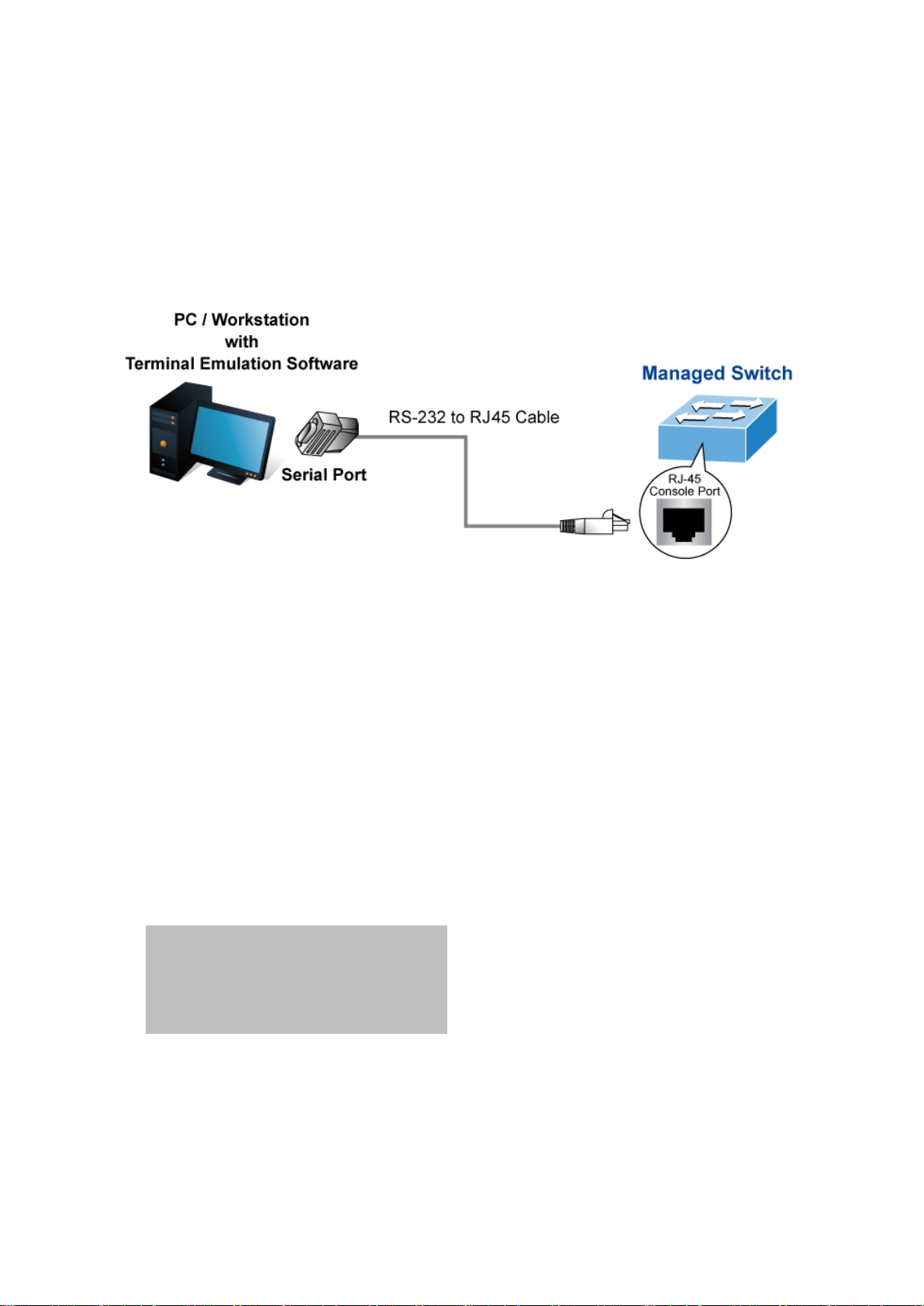
Command Guide
♦
♦
♦
♦
♦
Chapter 2 CONSOLE CLI MANAGEMENT
2.1 Terminal Setup
To configure the system, connect a serial cable to a COM port on a PC or notebook computer and to RJ45 type of serial
(console) port of the Industrial Managed Switch.
Figure 2-1 Industrial Managed Switch Console Connectivity
The console port of the Industrial Managed Switch is an RJ45 type, RS-232 serial port connector. It is an interface for
connecting a terminal directly. Through the console port, it provides rich diagnostic information including IP address setting,
factory reset, port management, link status and system setting. Users can use the attached RS-232 cable in the package and
connect to the console port on the device. After the connection, users can run any terminal emulation program (Hyper Terminal,
ProComm Plus, Telix, Winterm and so on) to enter the startup screen of the device.
A terminal program is required to make the software connection to the Industrial Managed Switch. W indows' Hyper Terminal
program may be a good choice. The Hyper Terminal can be accessed from the Start menu.
1. Click START, then Programs and Accessories, and then Hyper Terminal.
2. When the following screen appears, make sure that the COM port should be configured as:
Baud : 115200
Data bits : 8
Parity : None
Stop bits : 1
Flow control : None
-24-
Page 25
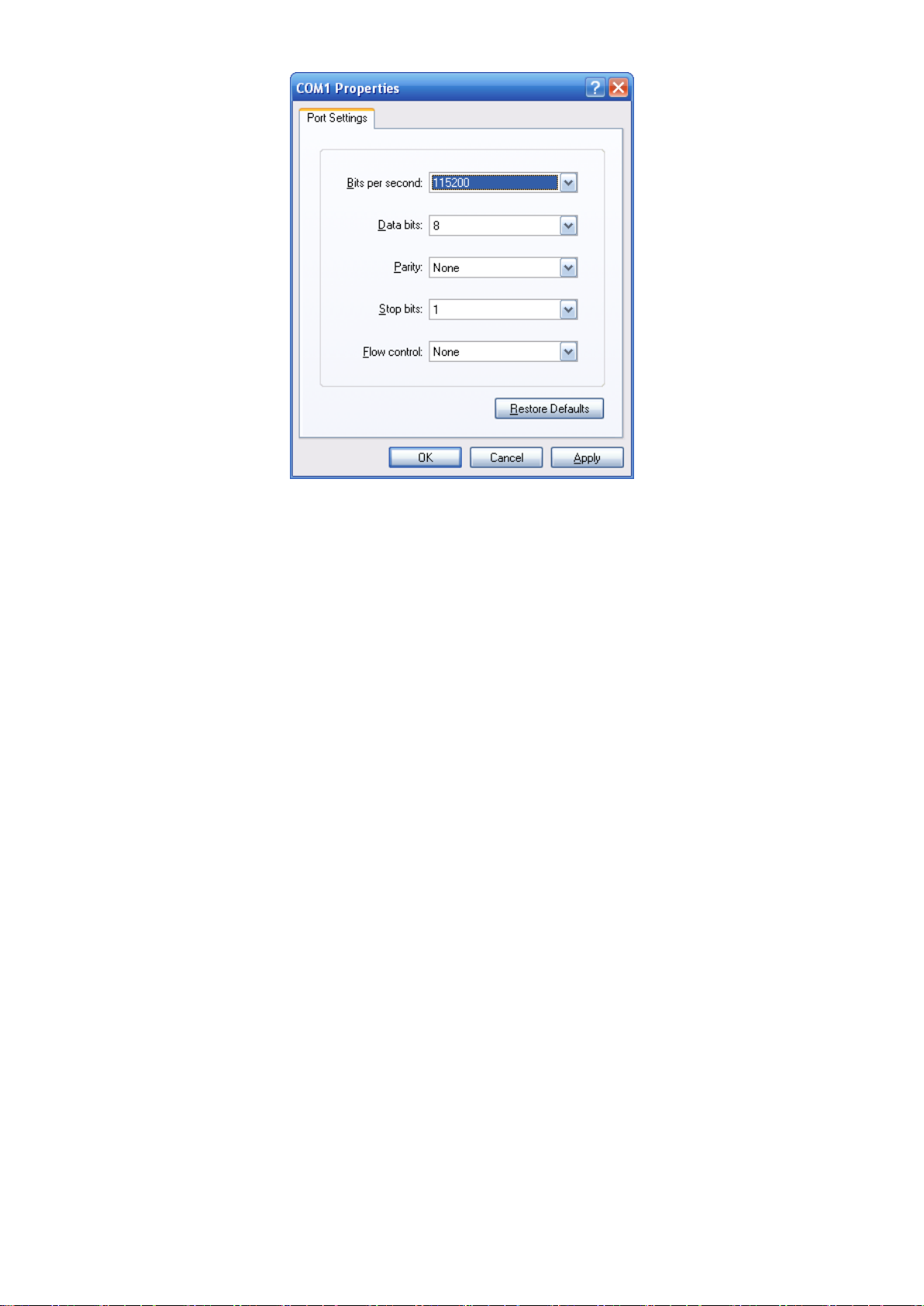
Command Guide
Figure 2-3 Hyper Terminal COM Port Configuration
You can change these settings, if desired, after you log on. This management method is often preferred because you can
remain connected and monitor the system during system reboots. Also, certain error messages are sent to the serial port,
regardless of the interface through which the associated action was initiated. A Macintosh or PC attachment can use any
terminal-emulation program for connecting to the terminal serial port. A workstation attachment under UNIX can use an
emulator such as TIP.
-25-
Page 26
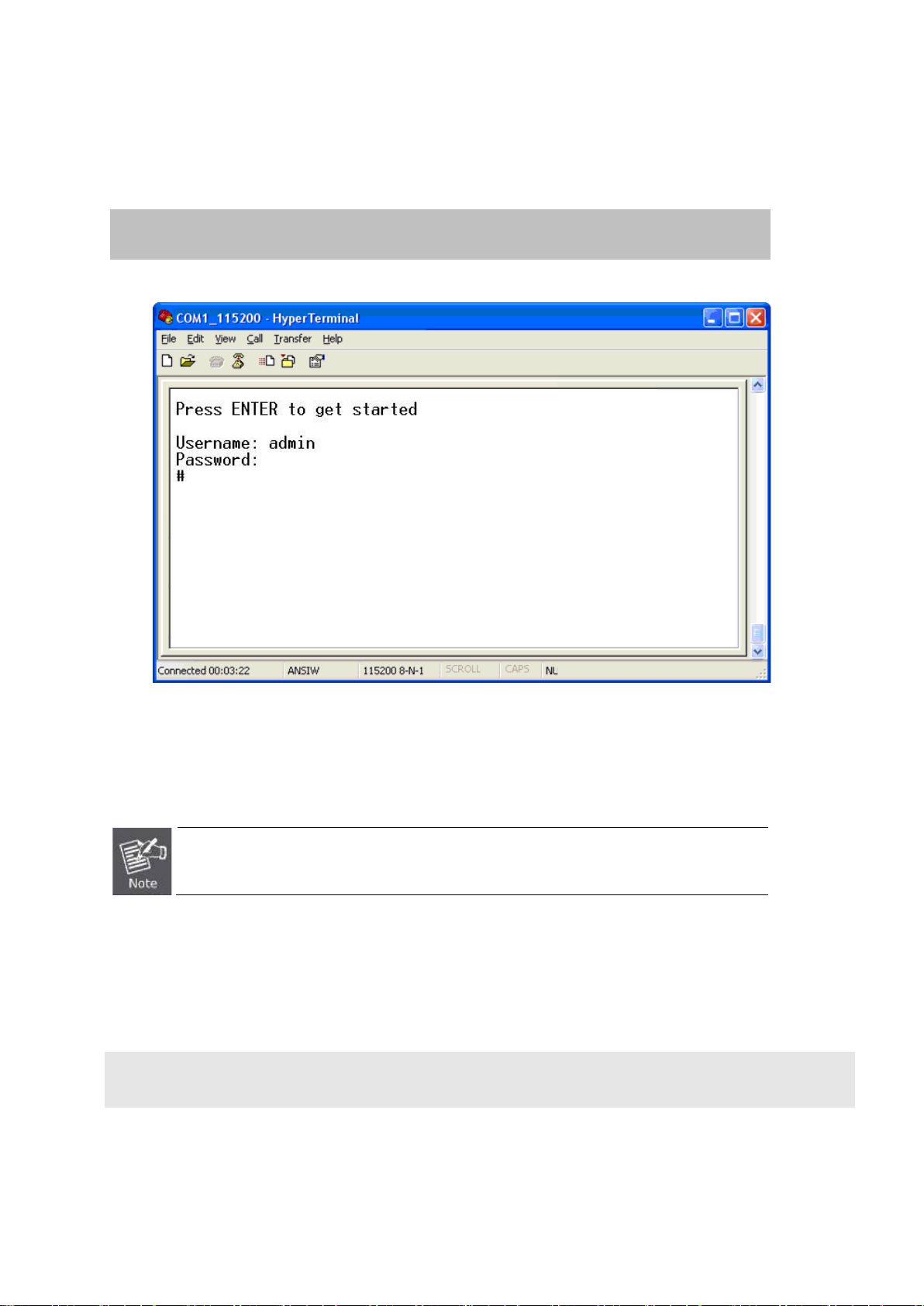
Command Guide
2.2 Logon to the Console
Once the terminal is connected to the device, power on the Industrial Managed Switch, and the terminal will display “running
testing procedures”. Then, the following message asks to log-in user name and password. The factory default user name and
password are shown as follows and the login screen in Figure 3-1 appears.
Username: admin
Password: admin
Figure 3-1: Industrial Managed Switch Console Login Screen
The user can now enter commands to manage the Industrial Managed Switch. For a detailed description of the commands,
please refer to the following chapters.
1. For security reason, please change and memorize the new password after this first setup.
2. Only accept command in lowercase letter under console interface.
2.3 Configuring IP Address
The Industrial Managed Switch is shipped with default IP address shown below.
IP Address: 192.168.0.100
Subnet Mask: 255.255.255.0
-26-
Page 27
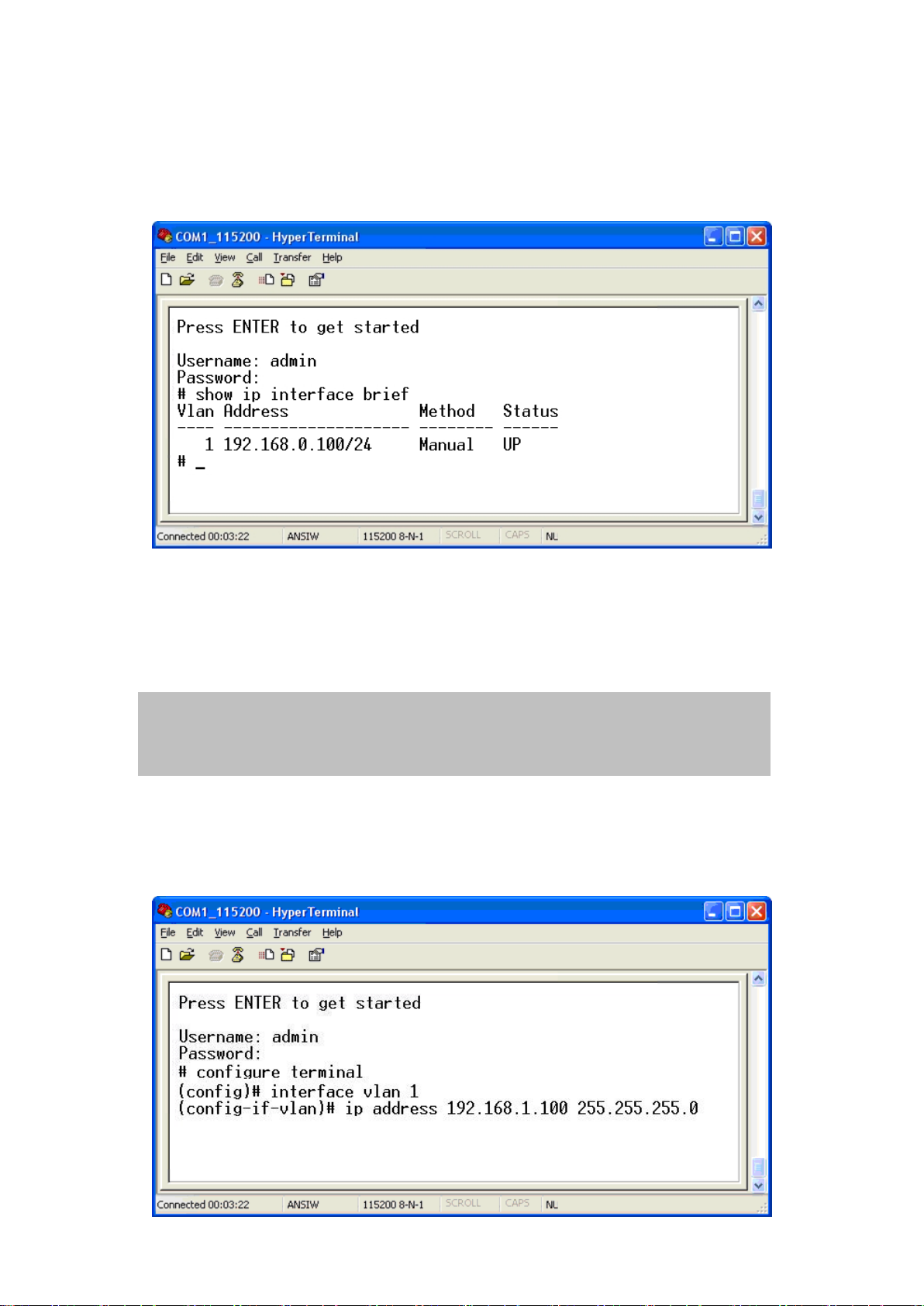
Command Guide
To check the current IP address or modify a new IP address for the Switch, please use the procedures as follows:
Show the current IP Address
1. At the “#” prompt, enter “show ip interface brief”.
2. The screen displays the current IP address and subnet mask as shown in Figure 3-2.
Figure 3-2: IP Information Screen
Configuring IP Address
3. At the “#” prompt, enter the following command and press <Enter> as shown in Figure 3-3.
# configure terminal
(config)# interface vlan 1
(config-if-vlan)# ip address 192.168.1.100 255.255.255.0
The previous command would apply the following settings for the Industrial Managed Switch.
IP Address: 192.168.1.100
Subnet Mask: 255.255.255.0
-27-
Page 28
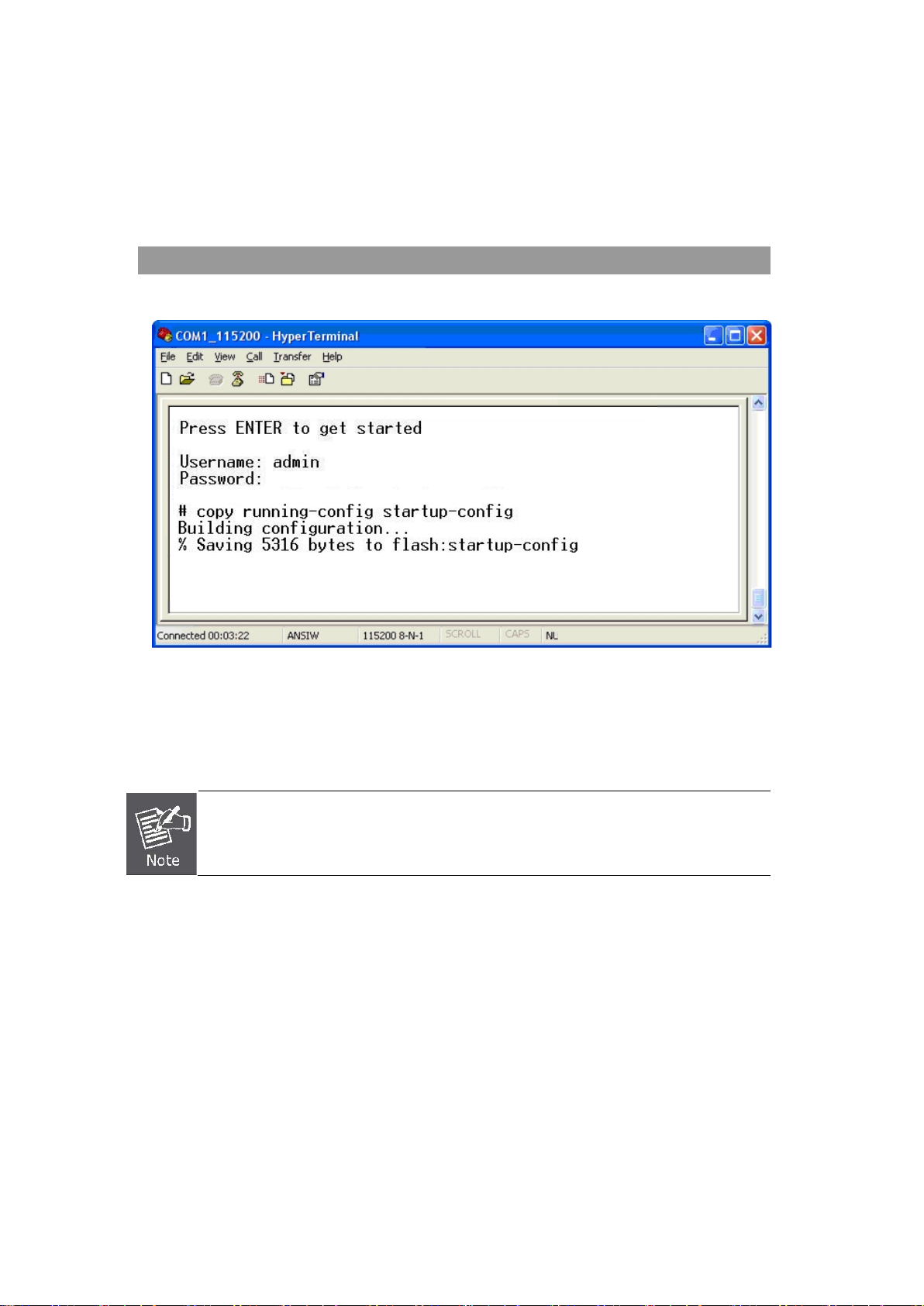
Figure 3-3: Configuring IP Address Screen
anytime
4. Repeat step 1 to check if the IP address has changed.
Storing current sw i tch configur ation
5. At the “#” prompt, enter the following command and press <Enter>.
# copy running-config startup-config
Command Guide
Figure 3-4: Saving Current Configuration Command Screen
If the IP is successfully configured, the Industrial Managed Switch will apply the new IP address setting immediately. You can
access the Web interface of the Industrial Managed Switch through the new IP address.
If you are not familiar with the console command or the re lat ed parameter, enter “ ?”
in console to get the help description.
-28-
Page 29
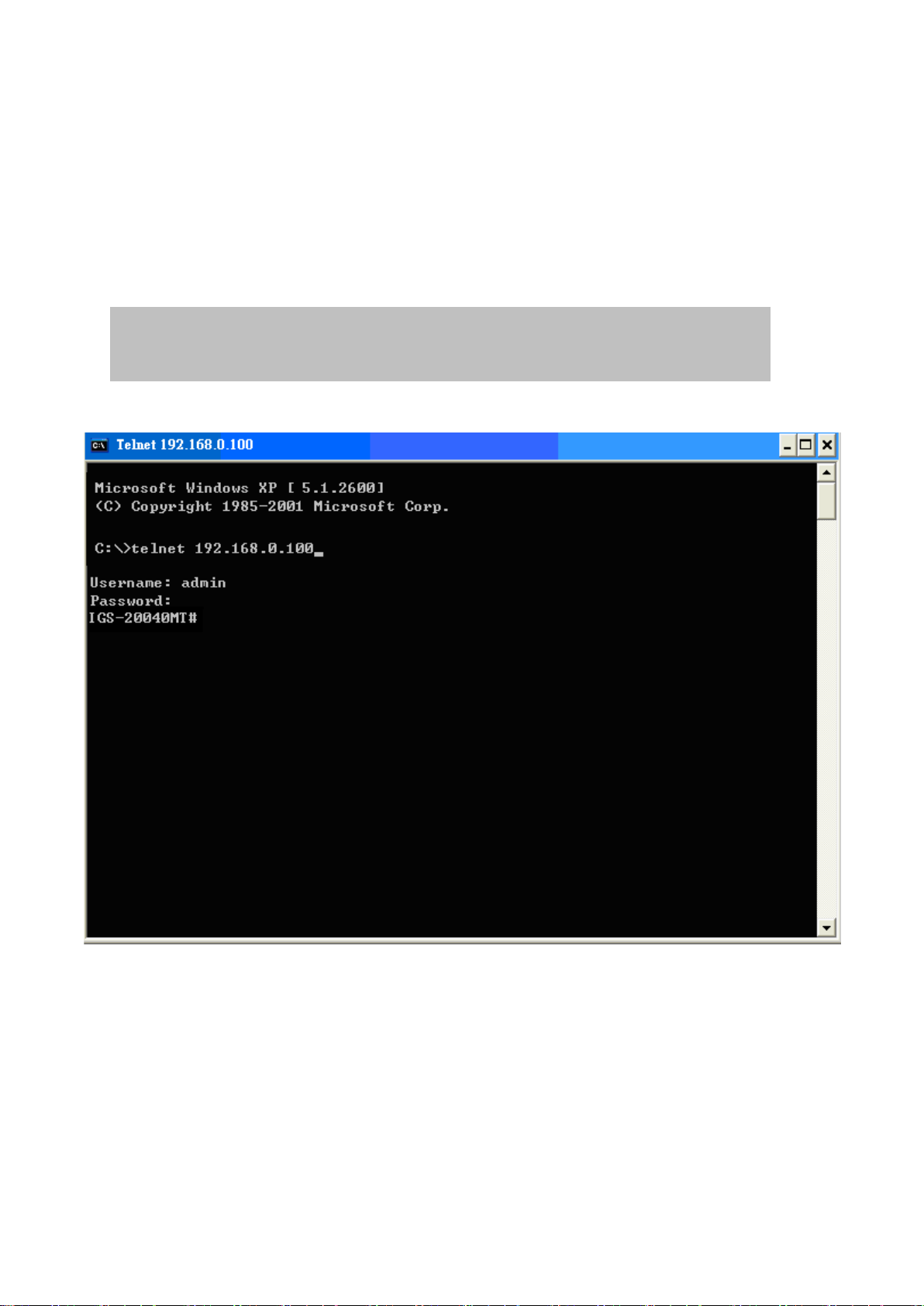
Command Guide
Chapter 3 TELNET CLI MANAGEMENT
3.1 Telnet Login
The Industrial Managed Switch also supports telnet for remote management. The switch asks for user name and password for
remote login when using telnet; please use “admin” for both username and password.
Default IP address: 192.168.0.100
Username: admin
Password: admin
Figure 3-1 Industrial Managed S w it ch Telnet Login Screen
-29-
Page 30

Chapter 4 Commands for CLI Configuration
4.1 clear
4.1.1 clear access management statistics
Command:
clear access management statistics
Default:
N/A
Usage Guide:
Command Guide
To clear the access management statistics.
Example:
To clear the Switch’s access management statistics.
Switch# clear access management statistics
4.1.2 clear access-list ace statistics
Command:
clear access-list ace statistics
Default:
N/A
Usage Guide:
To clear the Access list entry statistics.
Example:
To clear the Switch’s Access list entry statistics.
Switch# clear access-list ace statistics
-30-
Page 31

4.1.3 clear dot1x statistics interface
Command:
clear dot1x statistics interface GigabitE t her net | 10Giga bitEt hernet
Default:
N/A
Usage Guide:
To clear the dot1x statistics.
Example:
To clear the Switch’s GigabitEthernet 1/25 dot1x statistics.
Switch# clear dot1x statistics interface GigabitEthernet 1/25
Command Guide
4.1.4 clear eps
Command:
clear eps <Inst : uint>
<Inst : uint> The EPS instance number.
Default:
N/A
Usage Guide:
To clear the EPS instance number.
4.1.5 clear erps
Command:
clear erps < ERPS group numbers > statistics
Default:
N/A
Usage Guide:
To clear the ERPS group numbers statistics.
-31-
Page 32

Example:
To clear the Switch’s ERPS group 1 statistics.
Switch# # clear erps 1 statistics
4.1.6 clear erps statistics
Command:
clear erps statistics
Default:
N/A
Command Guide
Usage Guide:
To clear the ERPS statistics.
Example:
To clear the Switch’s ERPS statistics.
Switch# clear erps statistics
4.1.7 clear evc statistics
Command:
clear evc statistics
Default:
N/A
Usage Guide:
To clear the Ethernet Virtual Connections statistics.
Example:
To clear the Switch’s Ethernet Virtual Connections statistics.
Switch# clear evc statistics
-32-
Page 33

4.1.8 clear ip arp
Command:
clear ip arp
Default:
N/A
Usage Guide:
To clear the ARP cache.
Example:
To clear the Switch’s ARP cache.
Switch# clear ip arp
Command Guide
4.1.9 clear ip dhcp detailed statistics all
Command:
clear ip dhcp detailed statistics all
Default:
N/A
Usage Guide:
To clear the DHCP detailed statistics for all.
Example:
To clear the Switch’s DHCP detailed statistics for all.
Switch# clear ip dhcp detailed statistics all
-33-
Page 34

4.1.10 clear ip dhcp detailed statistics client
Command:
clear ip dhcp detailed statistics client
Default:
N/A
Usage Guide:
To clear the DHCP client statistics.
Example:
To clear the Switch’s DHCP client statistics.
Switch# clear ip dhcp detailed statistics client
Command Guide
4.1.11 clear ip dhcp detailed statistics helper
Command:
clear ip dhcp detailed statistics helper
Default:
N/A
Usage Guide:
To clear the DHCP normal L2 or L3 forward statistics.
Example:
To clear the Switch’s DHCP normal L2 or L3 forward statistics.
Switch# clear ip dhcp detailed statistics helper
-34-
Page 35

4.1.12 clear ip dhcp detailed statistics server
Command:
clear ip dhcp detailed statistics server
Default:
N/A
Usage Guide:
To clear the DHCP server statistics.
Example:
To clear the Switch’s DHCP server statistics.
Switch# clear ip dhcp detailed statistics server
Command Guide
4.1.13 clear ip dhcp detailed statistics snooping
Command:
clear ip dhcp detailed statistics snooping
Default:
N/A
Usage Guide:
To clear the DHCP snooping statistics.
Example:
To clear the Switch’s DHCP normal L2 or L3 forward statistics.
Switch# clear ip dhcp detailed statistics snooping
-35-
Page 36

4.1.14 clear ip dhcp relay statistics
Command:
clear ip dhcp relay statistics
Default:
N/A
Usage Guide:
To clear the DHCP relay statistics.
Example:
To clear the Switch’s DHCP relay statistics.
Switch# clear ip dhcp relay statistics
Command Guide
4.1.15 clear ip dhcp server binding
Command:
clear ip dhcp server binding <IP>
<IP> A.B.C.D
Default:
N/A
Usage Guide:
To clear the DHCP server binding cache.
Example:
To clear the Switch’s DHCP server(192.168.0.100) binding cache.
Switch# clear ip dhcp server binding 192.168.0.100
4.1.16 clear ip dhcp server binding automatic
Command:
clear ip dhcp server binding automatic
Default:
N/A
-36-
Page 37

Usage Guide:
To clear the DHCP automatic bindings cache.
Example:
To clear the Switch’s DHCP automatic bindings cache.
Switch# clear ip dhcp server binding automatic
4.1.17 clear ip dhcp server binding expired
Command:
clear ip dhcp server binding expired
Command Guide
Default:
N/A
Usage Guide:
To clear the DHCP expired bindings for free.
Example:
To clear the Switch’s DHCP expired bindings for free.
Switch# clear ip dhcp server binding expired
4.1.18 clear ip dhcp server binding manual
Command:
clear ip dhcp server binding manual
Default:
N/A
Usage Guide:
To clear the DHCP server manual binding cache.
Example:
To clear the Switch’s DHCP server manual binding cache.
Switch# clear ip dhcp server binding manual
-37-
Page 38

4.1.19 clear ip igmp snooping statistics
Command:
clear ip igmp snooping statistics
Default:
N/A
Usage Guide:
To clear the IGMP snooping statistics.
Example:
To clear the Switch’s IGMP snooping statist ics.
Switch# clear ip igmp snooping statistics
Command Guide
4.1.20 clear ip igmp snooping vlan
Command:
clear ip igmp snooping vlan < vlan_list> statistics
<vlan_list> VLAN identifier(s): VID
Default:
N/A
Usage Guide:
To clear the IGMP snooping vlan < vlan_list> statistics.
Example:
To clear the Switch’s IGMP snooping vlan 1 statistics.
Switch# clear ip igmp snooping vlan 1 statistics
-38-
Page 39

4.1.21 clear ip statistics icmp icmp-msg
Command:
clear ip statistics icmp icmp-msg <Type : 0~255>
<Type : 0~255> ICMP message type ranges from 0 to 255
Default:
N/A
Usage Guide:
To clear the IPv4 ICMP traffic for designated message type.
Example:
To clear the Switch’s IPv4 ICMP traffic for designated message type 0.
Switch# clear ip statistics icmp icmp-msg 0
Command Guide
4.1.22 clear ip statistics icmp interface vlan
Command:
clear ip statistics icmp interface vlan <vlan_list>
<vlan_list> VLAN identifier(s): VID
Default:
N/A
Usage Guide:
To clear the IPv4 interface/ICMP statistics for specific VLAN.
Example:
To clear the Switch’s IP interface/ICMP statistics for specific VLAN 1.
Switch# clear ip statistics icmp interface vlan 1
-39-
Page 40

4.1.23 clear ip statistics system icmp icmp-msg
Command:
clear ip statistics system icmp icmp-msg <Type : 0~255>
<Type : 0~255> ICMP message type ranges from 0 to 255
Default:
N/A
Usage Guide:
To clear the IPv4 ICMP statistics for specific ICMP message type.
Example:
To clear the Switch’s IPv4 ICMP statistics for specific ICMP message type 0.
Switch# clear ip statistics system icmp icmp-msg 0
Command Guide
4.1.24 clear ip statistics system icmp interface vlan
Command:
clear ip statistics system icmp interface vlan
<vlan_list> VLAN identifier(s): VID
Default:
N/A
Usage Guide:
To clear the IPv4 ICMP interface statistics for specific VLAN .
Example:
To clear the Switch’s IPv4 ICMP interface statistics for specific VLAN 1.
Switch# clear ip statistics system icmp interface vlan 1
-40-
Page 41

4.1.25 clear ipv6 mld snooping statistics
Command:
clear ipv6 mld snooping statistics
Default:
N/A
Usage Guide:
To clear the ipv6 mld snooping statistics.
Example:
To clear the Switch’s ipv6 mld snooping statistics.
Switch# clear ipv6 mld snooping statistics
Command Guide
4.1.26 clear ipv6 mld snooping vlan
Command:
clear ipv6 mld snooping vlan <vlan_list> statistics
<vlan_list> VLAN identifier(s): VID
Default:
N/A
Usage Guide:
To clear the ipv6 mld snooping statistics for spe cif ic VLAN.
Example:
To clear the Switch’s ipv6 mld snooping statistics for specific VLAN 1.
Switch# clear ipv6 mld snooping vlan 1 statistics
-41-
Page 42

4.1.27 clear ipv6 neighbors
Command:
clear ipv6 neighbors
Default:
N/A
Usage Guide:
To clear the ipv6 neighbors.
Example:
To clear the Switch’s ipv6 neighbors.
Switch# clear ipv6 neighbors
Command Guide
4.1.28 clear ipv6 statistics icmp icmp-msg
Command:
clear ipv6 statistics icmp icmp-msg <Type : 0~255>
<Type : 0~255> ICMP message type ranges from 0 to 255
Default:
N/A
Usage Guide:
To clear the IPv6 ICMP traffic for designated message type.
Example:
To clear the Switch’s IPv6 ICMP traffic for designated message type 0.
Switch# clear ipv6 statistics icmp icmp-msg 0
-42-
Page 43

4.1.29 clear ipv6 statistics icmp interface vlan
Command:
clear ipv6 statistics icmp interface vlan <vlan_list>
<vlan_list> VLAN identifier(s): VID
Default:
N/A
Usage Guide:
To clear the IPv6 interface/ICMP statistics for specific VLAN.
Example:
To clear the Switch’s IPv6 interface/ICMP statistics for specific VLAN 1.
Command Guide
Switch# clear ipv6 statistics icmp interface vlan 1
4.1.30 clear ipv6 statistics system icmp icmp-msg
Command:
clear ipv6 statistics system icmp icmp-msg <Type : 0~255>
<Type : 0~255> ICMP message type ranges from 0 to 255
Default:
N/A
Usage Guide:
To clear the IPv6 ICMP statistics for specific ICMP message type.
Example:
To clear the Switch’s IPv6 ICMP statistics for specific ICMP message type 0.
Switch# clear ipv6 statistics system icmp icmp-msg 0
-43-
Page 44

4.1.31 clear ipv6 statistics system icmp interface vlan
Command:
clear ipv6 statistics system icmp interface vlan
<vlan_list> VLAN identifier(s): VID
Default:
N/A
Usage Guide:
To clear the IPv6 ICMP interface statistics for specific VLAN.
Example:
To clear the Switch’s IPv6 ICMP interface statistics for specific VLAN 1.
Switch# clear ipv6 statistics system icmp interface vlan 1
Command Guide
4.1.32 clear lacp statistics
Command:
clear lacp statistics
Default:
N/A
Usage Guide:
To clear the lacp statistics.
Example:
To clear the Switch’s lacp statistics.
Switch# clear lacp statistics
-44-
Page 45

4.1.33 clear lldp statistics
Command:
clear lldp statistics
Default:
N/A
Usage Guide:
To clear the lldp statistics.
Example:
To clear the Switch’s lldp statistics.
Switch# clear lldp statistics
Command Guide
4.1.34 clear logging error info
Command:
clear logging error info
Default:
N/A
Usage Guide:
To clear the logging error info.
Example:
To clear the Switch’s logging error info.
Switch# clear logging error info
4.1.35 clear logging error warning
Command:
clear logging error warning
Default:
N/A
-45-
Page 46

Usage Guide:
To clear the logging error warning.
Example:
To clear the Switch’s logging error warning.
Switch# clear logging error warning
4.1.36 clear logging info error
Command:
clear logging info error
Default:
Command Guide
N/A
Usage Guide:
To clear the logging info error.
Example:
To clear the Switch’s logging info error.
Switch# clear logging info error
4.1.37 clear logging info warning
Command:
clear logging info warning
Default:
N/A
Usage Guide:
To clear the logging info warning.
Example:
To clear the Switch’s logging info warning.
Switch# clear logging info warning
-46-
Page 47

4.1.38 clear logging warning error
Command:
clear logging warning error
Default:
N/A
Usage Guide:
To clear the logging warning error.
Example:
To clear the Switch’s logging warning error.
Switch# clear logging warning error
Command Guide
4.1.39 clear logging warning info
Command:
clear logging warning info
Default:
N/A
Usage Guide:
To clear the logging warning info.
Example:
To clear the Switch’s logging warning info.
Switch# clear logging warning info
4.1.40 clear mac address-table
Command:
clear mac address-table
Default:
N/A
-47-
Page 48

Usage Guide:
To clear the mac address-table.
Example:
To clear the Switch’s mac address-table.
Switch# clear mac address-table
4.1.41 clear mep
Command:
clear mep <Inst : uint>
<Inst : uint> The MEP instance.
Command Guide
Default:
N/A
Usage Guide:
To clear the MEP instance profiles.
4.1.42 clear mvr name
Command:
clear mvr name <MvrName : word16 >
<MvrName : word16> MVR multicast VLAN name
Default:
N/A
Usage Guide:
To clear the mvr name profiles.
-48-
Page 49

4.1.43 clear mvr statistics
Command:
clear mvr statistics
Default:
N/A
Usage Guide:
To clear the mvr statistics.
Example:
To clear the Switch’s mvr statistics.
Switch# clear mvr statistics
Command Guide
4.1.44 clear mvr vlan
Command:
clear mvr vlan <vlan_list> statistics
<vlan_list> MVR multicast VLAN list
Default:
N/A
Usage Guide:
To clear the mvr vlan statistics for specific VLAN.
Example:
To clear the Switch’s mvr vlan statistics for specific VLAN 1.
Switch# clear mvr vlan 1 statistics
4.1.45 clear network-clock clk-source
Command:
clear network-clock clk-source <clk-source : 1-2>
<clk-source : 1-2> Clock source numb er
Default:
N/A
-49-
Page 50

Command Guide
Usage Guide:
To clear the ERPS WTR timer for a specific profile.
Example:
To clear the Switch’s ERPS WTR timer for a specific profile 1.
Switch# clear network-clock clk-source 1
4.1.46 clear spanning-tree detected-protocols interface *
Command:
clear spanning-tree detected-protocols interface *
Default:
N/A
Usage Guide:
To clear the spanning-tree detected-protocols for all.
Example:
To clear the Switch’s spanning-tree detected-protocols for all.
Switch# clear spanning-tree detecte d-protocols interface *
4.1.47 clear spanning-tree detected-protocols interface *
Command:
clear spanning-tree detected-protocols interf a ce *
Default:
N/A
Usage Guide:
To clear the spanning-tree detected-protocols for all.
Example:
To clear the Switch’s spanning-tree detected-protocols for all.
Switch# clear spanning-tree detecte d-protocols interface *
-50-
Page 51

4.1.48 clear spanning-tree detected-protocols interface GigabitEthernet
Command:
clear spanning-tree detected-protocols interf a ce GigabitEthernet <PORT_LIST>
<PORT_LIST> Port list in X/X-XX
Default:
N/A
Usage Guide:
To clear the spanning-tree detected-protocols for specific GigabitEthernet port.
Example:
To clear the Switch’s spanning-tree detected-protocols for specific GigabitEthernet 1/1.
Command Guide
Switch# clear spanning-tree detecte d-protocols interface GigabitEthernet 1/1
4.1.49 clear spanning-tree detected-protocols interface 10GigabitEthernet
Command:
clear spanning-tree detected-protocols interf a ce 10GigabitEthernet <PORT_LIST>
<PORT_LIST> Port list in X/X-XX
Default:
N/A
Usage Guide:
To clear the spanning-tree detected-protocols for specific 10GigabitEthernet port.
Example:
To clear the Switch’s spanning-tree detected-protocols for specific 10GigabitEthernet 1/1.
Switch# clear spanning-tree detecte d-protocols interface 10GigabitEthernet 1/1
-51-
Page 52

4.1.50 clear spanning-tree statistics interface *
Command:
clear spanning-tree statistics interface *
Default:
N/A
Usage Guide:
To clear the spanning-tree statistics for all.
Example:
To clear the Switch’s spanning-tree statistics for all.
Switch# clear spanning-tree statistics interface *
Command Guide
4.1.51 clear spanning-tree statistics interface GigabitE thern e t
Command:
clear spanning-tree statistics interface GigabitEthernet <PORT_LIST>
<PORT_LIST> Port list in X/X-XX
Default:
N/A
Usage Guide:
To clear the spanning-tree statistics for specific GigabitEthernet port.
Example:
To clear the Switch’s spanning-tree statistics for specific GigabitEthernet 1/1.
Switch# clear spanning-tree statistics interface GigabitEthernet 1/1
4.1.52 clear spanning-tree statistics interface 10GigabitEthernet
Command:
clear spanning-t ree statistics interface 10GigabitEthernet <PORT_LIST>
<PORT_LIST> Port list in X/X-XX
Default:
N/A
-52-
Page 53

Usage Guide:
To clear the spanning-tree statistics for specific 10GigabitEthernet port.
Example:
To clear the Switch’s spanning-tree statistics for specific 10GigabitEthernet 1/1.
Switch# clear spanning-tree statistics interface 10GigabitEthernet 1/1
4.1.53 clear statistics *
Command:
clear statistics *
Command Guide
Default:
N/A
Usage Guide:
To clear the statistics for all.
Example:
To clear the Switch’s statistics for all.
Switch# clear statistics *
4.1.54 clear statistics GigabitEthernet
Command:
clear statistics GigabitEthernet <PORT_LIST>
<PORT_LIST> Port list in X/X-XX
Default:
N/A
Usage Guide:
To clear the statistics for specific GigabitEthernet port.
Example:
To clear the Switch’s statistics for specific GigabitEthernet 1/1.
Switch# clear statistics GigabitEthernet 1/1
-53-
Page 54

4.1.55 clear statistics 10GigabitEthernet
Switch (config)# aaa authentication login console local
Command:
clear statistics 10GigabitEthernet <PORT_LIST>
<PORT_LIST> Port list in X/X-XX
Default:
N/A
Usage Guide:
To clear the statistics for specific 10GigabitEthernet port.
Example:
To clear the Switch’s statistics for specific 10GigabitEthernet 1/1.
Switch# clear statistics 10GigabitEthernet 1/1
Command Guide
4.2 configure terminal
4.2.1 aaa authentication login console local
Command:
aaa authentication login console local
Default:
console : local
Usage Guide:
To authenticate the local account via console only.
Example:
To authenticate the local account via console.
Switch# configure terminal
-54-
Page 55

4.2.2 aaa authentication login console radius
Switch (config)# aaa authentication login console local radius
Switch (config)# aaa authentication login console local radius tacacs
Command:
aaa authentication login console radius
Default:
console : local
Usage Guide:
To authenticate the radius account via console only.
Example:
To authenticate the local and radius account via console.
Switch# configure terminal
Command Guide
4.2.3 aaa authentication login console tacacs
Command:
aaa authentication login console tacacs
Default:
console : local
Usage Guide:
To authenticate the tacacs account via console only.
Example:
To authenticate the local and radius and tacacs account via console.
Switch# configure terminal
4.2.4 aaa authentication login http local
Command:
aaa authentication login http local
Default:
http : local
-55-
Page 56

Usage Guide:
Switch (config)# aaa authentication login http local
Switch (config)# aaa authentication login http local radius
To authenticate the local account via http only.
Example:
To authenticate the local account via http.
Switch# configure terminal
4.2.5 aaa authentication login http radius
Command:
aaa authentication login http radius
Command Guide
Default:
http : local
Usage Guide:
To authenticate the radius account via http only.
Example:
To authenticate the local and radius account via http.
Switch# configure terminal
4.2.6 aaa authentication login http tacacs
Command:
aaa authentication login http tacacs
Default:
http : local
Usage Guide:
To authenticate the tacacs account via http only.
Example:
To authenticate the local and radius and tacacs account via http.
-56-
Page 57

Switch# configure terminal
Switch (config)# aaa authentication login http local radius tacacs
Switch (config)# aaa authentication login ssh local
Switch (config)# aaa authentication login ssh local radius
4.2.7 aaa authentication login ssh local
Command:
aaa authentication login ssh local
Default:
ssh : local
Usage Guide:
To authenticate the local account via ssh only.
Command Guide
Example:
To authenticate the local account via ssh.
Switch# c onfigure terminal
4.2.8 aaa authentication login ssh radius
Command:
aaa authentication login ssh radius
Default:
ssh : local
Usage Guide:
To authenticate the radius account via ssh only.
Example:
To authenticate the local and radius account via ssh.
Switch# configure terminal
-57-
Page 58

4.2.9 aaa authentication login ssh tacacs
Switch (config)# aaa authentication login ssh local radius tacacs
Switch (config)# aaa authentication login telnet local
Command:
aaa authentication login ssh tacacs
Default:
ssh : local
Usage Guide:
To authenticate the tacacs account via ssh only.
Example:
To authenticate the local and radius and tacacs account via console.
Switch# configure terminal
Command Guide
4.2.10 aaa authentication login telnet local
Command:
aaa authentication login telnet local
Default:
telnet : local
Usage Guide:
To authenticate the local account via telnet only.
Example:
To authenticate the local account via telnet.
Switch# configure terminal
-58-
Page 59

4.2.11 aaa authentication login telnet radius
Switch (config)# aaa authentication login telnet local radius
Switch (config)# aaa authentication login telnet local radius tacacs
Command:
aaa authentication login telnet radius
Default:
telnet : local
Usage Guide:
To authenticate the radius account via telnet only.
Example:
To authenticate the local and radius account via telnet.
Switch# configure terminal
Command Guide
4.2.12 aaa authentication login telnet tacacs
Command:
aaa authentication login telnet tacacs
Default:
telnet : local
Usage Guide:
To authenticate the tacacs account via telnet only.
Example:
To authenticate the local and radius and tacacs account via telnet.
Switch# configure terminal
-59-
Page 60

4.2.13 access management
<AddrRangeStart :
ipv4_addr | ipv6_addr> all | snmp | telnet | to | Web
Switch (config)# access man a gemen t 1 1 2001::7788 all
<TagPriority :
0-7>, any} | vid {<Vid : 1-4095>, any}
Command:
access management <AccessId : 1-16> <AccessVid : 1-4095>
<AccessId : 1-16> ID of access management entry
<AccessVid : 1-4095> The VLAN ID for the access management entry
<AddrRangeStart : ipv4_addr> St ar t IPv4 address
<AddrRangeStart : ipv6_addr> St ar t IPv6 addr e ss
all All services
snmp SNMP service
telnet TELNET/SSH service
to End address of the range
web Web service
Command Guide
Default:
access management : disable
Usage Guide:
To enable the access management profile to allow SNMP / Telnet / HTTP services.
Example:
To create a Profile 1 enabling all services for VLAN 1 (IPv6 address 2001::7788) .
Switch# configure terminal
4.2.14 access-list ace
Command:
access-list ace <AceId : 1-512> action {deny, permit} | dmac-type {any, broadcast,
multicast, unicast} | frametype {any, arp, etype, ipv4, ipv4-icmp, ipv4-tcp, ipv4-udp,
ipv6, ipv6-icmp, ipv6-tcp, ipv6-udp} | ingress {any, interface 10GigabitEthernet |
GigabitEthernet <PORT_ID>} | logging {disable, next, policy, rate-limiter, shutdown,
tag-priority, vid} | next {< Ac eI d : 1 -512>, last}| policy <PolicyId : 0-255> | rate-limiter
{<RateLimiterId : 1-16>, disable} | redirect {disable, interface 10GigabitEthernet |
GigabitEthernet <PORT_ID>} | tag-priority {0-1, 0-3, 2-3, 4-5, 4-7, 6-7,
<AceId : 1-512> ACE ID
-60-
Page 61

action Access list action
type unicast frametype
ipv4-icmp ingress any logging disable policy 1 rate-limiter 1 tag-priority 1 vid 1
<PolicyId : 0-255> | rate-limiter {<RateLimiterId : 1-16>, disable} | redirect {disable,
dmac-type The type of destination MAC address
frametype Frame type
ingress Ingress
logging Logging frame information. Note: The logging feat ur e only
works when the packet length is less than 1518 (without
VLAN tags) and the System Log memory size and logging rate
are limited.
next Insert the current ACE before the next ACE ID
policy Policy
rate-limiter Rate limiter
redirect Redirect frame to specif ic port
shutdown Shutdown incoming port. The shutdown feature only works
when the packet length is less than 1518 (without VLAN
tags).
Command Guide
tag-priority Tag priority
vid VID field
Default:
N/A
Usage Guide:
To create and set up a profile for the access list.
Example:
To set a Profile 1 up (action: permit, dmac-type: unicast, frametype: ipv4-icmp, ingress: any, logging: disable, policy:
1, rate-limiter: 1, tag-priority: 1. vid: 1).
Switch# configure terminal
Switch (config)# access-list ace 1 action permit dmac-
4.2.15 access-list ace update
Command:
access-list ace update <AceId : 1-512> action {deny, permit} | dmac-type {any,
broadcast, multicast, unicast} | frametype {any, arp, etype, ipv4, ipv4-icmp, ipv4-tcp,
ipv4-udp, ipv6, ipv6-icmp, ipv6-tcp, ipv6-udp} | ingress {any, interface
10GigabitEthernet | GigabitEthernet <PORT_ID>} | logging {disable, next, policy,
rate-limiter, shutdown, tag-priority, vid} | next {<AceId : 1-512>, last}| policy
-61-
Page 62

interface 10GigabitEthernet | GigabitEthernet <PORT_ID>} | tag-priority {0-1, 0-3, 2-3,
4-5, 4-7, 6-7, <TagPriority : 0-7>, any} | vid {<Vid : 1-4095>, any}
Switch (config)# access-list ace update 1 action deny dmac-type any
<AceId : 1-512> ACE ID
action Access list action
dmac-type The type of destination MAC address
frametype Frame type
ingress Ingress
logging Logging frame information. Note: The logging feat ur e only
works when the packet length is less than 1518 (without
VLAN tags) and the System Log memory size and logging rate
are limited.
next Insert the current ACE before the next ACE ID
policy Policy
rate-limiter Rate limiter
redirect Redirect frame to specif ic port
Command Guide
shutdown Shutdown incoming port. The shutdown feature only works
when the packet length is less than 1518 (without VLAN
tags).
tag-priority Tag priority
vid VID field
Default:
N/A
Usage Guide:
To update the specific profile for the access list.
Example:
Original:
Profile 1 (action: permit, dmac-type: unicast, frametype: ipv4-icmp, ingress: any, logging: disable, policy: 1,
rate-limiter: 1, tag-priority: 1. vid: 1).
Updated:
Profile 1 (action: deny, dmac-type: any, frametype: ipv4-icmp, ingress: any, logging: disable, policy: 1, rate-limiter:
1, tag-priority: 1. vid: 1).
Switch# configure terminal
-62-
Page 63

4.2.16 access-list rate-limiter
Switch (config)# access-list rate-limiter 1 pps 10000
Switch (config)# access-list rate-limiter pps 100
Command:
access-list rate-limiter <RateLimiterList : 1~16> pps <PpsRate : 0-131071>
<RateLimiterList : 1~16> Rate limi ter ID
<PpsRate : 0-131071> Rate value
Default:
0
Usage Guide:
To set pps rate for specific rate-limiter ID.
Example:
To set pps rate(10000 pps) for specific rate-limiter ID 1.
Command Guide
Switch# configure terminal
4.2.17 access-list rate-limiter pps
Command:
access-list rate-limiter pps <PpsRate : 0-131071>
<PpsRate : 0-131071> Rate value
Default:
0
Usage Guide:
To set pps rate for all rate-limiter ID.
Example:
To set pps rate(10000 pps) for all rate-limiter ID.
Switch# configure terminal
-63-
Page 64

4.2.18 aggregation mo de
Switch (config)# access-list rate-limiter pps 100
Command:
aggregation mode dmac | ip | port | smac
dmac Destination MAC affects the distribution
ip IP address affects the distribution
port IP port affects the distribution
smac Source MAC affects the distribution
Default:
SMAC : Enabled
DMAC : Disabled
IP : Enabled
Port : Enabled
Command Guide
Usage Guide:
To configure static aggregation mode type.
Example:
To configure static aggr egat ion mode type with Destination MA C aff ects the distribution and Sourc e MAC affects the
distribution only.
Switch# configure terminal
4.2.19 aggregation mo de
Command:
aggregation mode dmac | ip | port | smac
dmac Destination MAC affects the distribution
ip IP address affects the distribution
port IP port affects the distribution
smac Source MAC affects the distribution
Default:
SMAC : Enabled
DMAC : Disabled
IP : Enabled
Port : Enabled
-64-
Page 65

Command Guide
Switch (config)# access-list rate-limiter pps 100
1
Username:
Usage Guide:
To configure static aggregation mode type.
Example:
To configure static aggr egat ion mode type with Destination MA C aff ects the distribution and Sour c e MAC affects the
distribution only.
Switch# configure terminal
4.2.20 banner
Command:
banner <LINE>
<LINE> c banner-text c, where 'c' is a delimiting character
Default:
N/A
Usage Guide:
To configure banner-text.
Example:
To configure banner-text with word “ddddd”.
Switch# configure terminal
Switch (config)# banner 1
Enter TEXT message. End with the character '1'.
ddddd
Telnet 192.168.0.100
ddddd
-65-
Page 66

4.2.21 banner exec
1
#
Command:
banner login <LINE>
<LINE> c banner-text c, where 'c' is a delimiting character
Default:
N/A
Usage Guide:
To configure login banner-text.
Example:
To configure login banner-text with word “wwwwwwwwww”.
Switch# configure terminal
Command Guide
Switch (config)# banner exec 1
Enter TEXT message. End with the character '1'.
gggggg
Telnet 192.168.0.100:
Username: admin
Password:
gggggg
4.2.22 banner login
Command:
banner login <LINE>
<LINE> c banner-text c, where 'c' is a delimiting character
Default:
N/A
Usage Guide:
To configure login banner-text.
-66-
Page 67

Example:
1
Password:
1
To configure login banner-text with word “wwwwwwwwww”.
Switch# configure terminal
Switch (config)# banner login 1
Enter TEXT message. End with the character '1'.
wwwwwwwwww
Console:
Press ENTER to get started
wwwwwwwwww
Command Guide
Username: admin
4.2.23 banner motd
Command:
banner motd <LINE>
<LINE> c banner-text c, where 'c' is a delimiting character
Default:
N/A
Usage Guide:
To configure motd banner-text.
Example:
To configure motd banner-text with word “ffffff”.
Switch# configure terminal
Switch (config)# banner motd 1
Enter TEXT message. End with the character '1'.
ffffff
-67-
Page 68

Console:
Username:
31> <Yearstart:
<Timeend: hh:mm > <Offset minutes: 1-1440 >
Switch (config)# clock summer-time 1 date 2 3 2013 8:8 12 31 2013 8:8 60
ffffff
Press ENTER to get started
4.2.24 clock summer-time
Command:
clock summer-time <WORD> date <Monthstart: 1-12> <Daystart: 1-
Command Guide
1-12> <Timestart: hh:mm > <Monthend: 1-12> <Dayend: 1-31> <Yearend: 1-12>
Default:
N/A
Usage Guide:
To set daylight saving.
Example:
To set daylight saving (Started time: Feb, 3. 2013 8:8AM, End time: Dec, 31. 2013 8:8AM, Offset time: 60 minutes).
Switch# configure terminal
4.2.25 clock time zone
Command:
clock timezone <WORD> <timezone: -23-23>
<WORD> name of time zone
Default:
0
Usage Guide:
To set time zone.
-68-
Page 69

Example:
Switch (config)# clock timezone 1 -15
default access-list rate-limiter 1
dot1x authentication timer inactivity 147
To set time zone (GMT -15) with profile 1.
Switch# configure terminal
4.2.26 default access-list rate-limiter
Command:
default access-list rate-limiter <RateLimiterId : 1-16>
<RateLimiterId : 1-16> Rate limiter ID
Default:
Command Guide
0
Usage Guide:
To default the Rate limiter.
Example:
To default the Rate limiter ID 1.
Switch# configure terminal
Switch (config)#
4.2.27 dot1x authentication timer inactivity
Command:
dot1x authentication timer inactivity <10-1000000>
Default:
Aging period: 300
Usage Guide:
To set the Aging period for Network Access Server.
Example:
To set the Aging period (147 seconds).
Switch# configure terminal
Switch (config)#
-69-
Page 70

4.2.28 dot1x authentication timer re-authenticate
Switch (config)# dot1x authentication timer re-authenticate 777
Switch (config)# dot1x authentication timer re-authenticate 777
Command:
dot1x authentication timer re-authenticate <1-3600>
Default:
Re-authenticated Period: 3600
Usage Guide:
To set the Re-authenticated Period for Network A ccess Server.
Example:
To set the Re-authenticated Period (777 seconds).
Switch# configure terminal
Command Guide
4.2.29 dot1x feature
Command:
dot1x feature guest-vlan | radius-qos | radius-vlan
Default:
Disable
Usage Guide:
To enable the guest-vlan, radius-qos, radius-vlan for Network Access Server
Example:
To enable the guest-vlan, radius-qos, radius-vlan for Network Access Server.
Switch# configure terminal
4.2.30 dot1x guest-vlan
Command:
dot1x guest-vlan <1-4095>
-70-
Page 71

<1-4095> Guest VLAN ID used when entering the Guest VLAN.
Switch (config)# dot1x guest-vlan 2
Switch (config)# dot1x guest-vlan supplicant
Default:
1
Usage Guide:
To set the value of guest-vlan for Network Access Server
Example:
To set the value of guest-vlan(2) for Network Access Server
Switch# configure terminal
4.2.31 dot1x guest-vlan supplicant
Command Guide
Command:
dot1x guest-vlan supplicant
supplicant The switch remembers if an EAPOL frame has been received on the port for the life-time of the port. Once the
switch considers whether to enter the Guest VLAN, it will first check if this option is enabled or disabled.
Default:
Disable
Usage Guide:
To allow all frames automatically entering guest-vlan for Network Access Server
Example:
To allow all frames automatically entering guest-vlan for Network Access Server
Switch# configure terminal
4.2.32 dot1x max-reauth-req
Command:
dot1x max-reauth-req <1-255>
-71-
Page 72

Default:
Switch (config)# dot1x max-reauth-req 78
Switch (config)# dot1x system-auth-control
2
Usage Guide:
To define 802.1X re-authentication frequency for Network Access Server
Example:
To define 802.1X re-authentication frequency with 78 times for Network Access Server
Switch# configure terminal
4.2.33 dot1x system-auth-control
Command:
Command Guide
dot1x system-auth-control
Default:
Disable
Usage Guide:
To enable 802.1X service for Network Access Server
Example:
To enable 802.1X service for Network Access Server
Switch# configure terminal
4.2.34 dot1x timeout quiet-period
Command:
dot1x timeout quiet-period <10-1000000>
quiet-period Time in seconds before a MAC-address that failed authentication gets a new authentication chance.
Default:
10
Usage Guide:
To configure 802.1X hold time for Net work Access Server
Example:
To configure 802.1X hold time(12 seconds) for Network Access Server
-72-
Page 73

Switch (config)# dot1x timeout quiet-period 12
Switch (config)# dot1x timeout tx-period 45
Switch# configure terminal
4.2.35 dot1x timeout tx-period
Command:
dot1x timeout tx-period <1-65535>
tx-period The time between EAPOL retransmissions.
Default:
30
Command Guide
Usage Guide:
To configure 802.1X EPOAL timeout for Network Access Server
Example:
To configure 802.1X EPOAL timeout (45 seconds) for Network Access Server
Switch# configure terminal
4.2.36 enable password
Command:
enable passw ord <WORD>
<WORD> The UNENCRYPTED (cleartext) password.
Default:
Disable
Usage Guide:
To configure enable password for user
Example:
To configure enable password(admin) for user
-73-
Page 74

Command Guide
#
#
Switch# configure terminal
Switch (config)# enable password admin
Press ENTER to get started
Username:
Password:
> enable
Password: *****
4.2.37 enable password level
Command:
enable password level <1-15> <WORD>
<1-15> Level number
<WORD> The UNENCRYPTED (cleartext) password.
Default:
Disable
Usage Guide:
To configure enable password and specific level for user
Example:
To configure enable password(admin) and specific level(15) for user
Switch# configure terminal
Switch (config)# enable password level 15 admin
Press ENTER to get started
Username:
Password:
> enable
Password: admin
-74-
Page 75

4.2.38 enable secret
#
Command:
enable secret 0 | 5 level <1-15> <WORD>
0 Specifies an UNENCRYPTED password will follow
5 Specifies an ENCRYPTED secret will follow
<1-15> Level number
<WORD> The UNENCRYPTED (cleartext) / ENCRYPTED(MD5) password.
Default:
Disable
Usage Guide:
To configure enable password to encrypted secret in the system configurations and specific level for user
Example:
Command Guide
To configure enable password(cisco) to encrypted secret in the syste m configurations and specific level(15) for user
Switch# configure terminal
Switch (config)# enable secret 0 level 15 cisco
# show running-config
Building configuration...
enable secret 5 level 15 FC89368B9513DE0760290BCE9A1DA90A
……………
Press ENTER to get started
Username:
Password:
> enable
Password: cisco
-75-
Page 76

4.2.39 end
#
Switch (config)# erps 1 guard 178
Command:
end
Default:
N/A
Usage Guide:
To level the configure terminal mode
Example:
To level the configure terminal mode
Switch# configure terminal
Switch (config)# end
Command Guide
4.2.40 erps <1-64> guard
Command:
erps <1-64> guard <10-2000>
<1-64> ERPS group number
<10-2000> Guard time in ms
Default:
500
Usage Guide:
To configure the Guard Time for ERPS.
Example:
To configure the Guard Time(178 ms) for ERPS(Profile 1)
Switch# configure terminal
-76-
Page 77

4.2.41 erps <1-64> holdoff
Switch (config)# erps 1 holdoff 900
port1 interface {10GigabitEthernet, GigabitEthernet} <PORT1_ID> [ interconnect ]
erps 1 major port0 interface GigabitEthernet 1/1 port1 interface
GigabitEthernet 1/2
Command:
erps <1-64> holdoff < 0-10000>
<1-64> ERPS group number
< 0-10000> Holdoff time in ms
Default:
0
Usage Guide:
To configure the Hold Off Time for ERPS
Example:
To configure the Hold Off Time (178 ms) for ERPS(Profile 1)
Command Guide
Switch# configure terminal
4.2.42 erps <1-64> major
Command:
erps <1-64> major port0 interface {10GigabitEthernet, GigabitEthernet} <PORT0_ID>
<1-64> ERPS group number
interconnect Major ring is interconnected
Default:
0
Usage Guide:
To create a profile and configure the Major ERPS interface port 0, port 1.
Example:
To create a profile 1 and configure the Major ERPS inte rface port 0(GigabitEthernet 1/1), port 1(GigabitEthernet 1/2)
without interconnected mode
Switch# configure terminal
Switch (config)#
-77-
Page 78

4.2.43 erps <1-64> mep
aps <p1_aps: 1-100>
Switch (config)# erps 1 mep port0 sf 2 aps 1 port1 sf 4 aps 3
Switch (config)# erps 1 revertive 5
Command:
erps <1-64> mep port0 sf <p 0_sf: 1-100> aps <p0_a ps: 1-100> port1 sf <p1 _sf: 1-100>
<1-64> ERPS group number
<p0_sf: 1-100> Index of Port 0 SignalFail MEP
<p0_aps: 1-100> Index of Port 0 APS MEP
<p1_sf: 1-100> Index of Port 1 SignalFail MEP
<p1_aps: 1-100> Index of Port 1 APS MEP
Default:
0
Usage Guide:
To configure ERPS Instance Data for specific ERPS profile.
Command Guide
Example:
To configure ERPS Instance Data(Port0: SF MEP = 2, APS MEP = 1. Port1: SF MEP = 4, APS MEP = 3) f or specific
ERPS profile(1).
Switch# configure terminal
4.2.44 erps <1-64> mep
Command:
erps <1-64> revertive <wtr_time_minutes: 1-12>
<1-64> ERPS group number
<wtr_time_minutes: 1-12> Wait-to-restore time in minutes
Default:
0
Usage Guide:
To configure WTR time for specific ERPS profile.
Example:
To configure WTR time(5 minutes) for specific ERPS profile 1.
Switch# configure terminal
-78-
Page 79

4.2.45 erps <1-64> rpl neighbor
Switch (config)# erps 1 rpl neighbor port0
Switch (config)# erps 1 rpl owner port0
Command:
erps <1-64> rpl neighbor { port0 | port1 }
port0 ERPS Port 0 interface
port1 ERPS Port 1 interface
Default:
N/A
Usage Guide:
To configure Ring Protection Link Neighbor Role for specific ERPS interface.
Example:
To configure Ring Protection Link Neighbor Role for specific ERPS interface..
Command Guide
Switch# configure terminal
4.2.46 erps <1-64> rpl owner
Command:
erps <1-64> rpl owner { port0 | port1 }
port0 ERPS Port 0 interface
port1 ERPS Port 1 interface
Default:
N/A
Usage Guide:
To configure Ring Protection Link Owner Role for specific ERPS interface.
Example:
To configure Ring Protection Link Owner Role for specific ERPS interface..
Switch# configure terminal
-79-
Page 80

4.2.47 erps <1-64> sub
<major_ring_id: 1-64> [ virtual-channel ] } }
port1 interface
GigabitEthernet 1/6
erconnect 1
virtual-channel
Command:
erps <1-64> sub port0 interface {10GigabitEthernet, GigabitEthernet} <PORT0_ID>
{ { port0 interface {10GigabitEthernet, GigabitEthernet} <PORT1_ID> }, {interconnect
<1-64> ERPS group number
interconnect Sub ring is interconnected
<major_ring_id: 1-64> Major ring group number
virtual-channel Enable virtual channel for sub-ring
Default:
0
Usage Guide:
To create a profile and configure the Sub ERPS interface port 0, port 1.
Command Guide
Example 1:
To c reate a profile 3 and configure the Sub ERPS interface port 0(GigabitEthernet 1/5), port 1(GigabitEthernet 1/6)
without interconnected mode and Major Ring group and virtual-channel
Switch# configure terminal
Switch (config)# erps 3 sub port0 interface GigabitEthernet 1/5
Example 2:
To create a profile 2 and configure the Sub ERPS int erface port 0(GigabitEthernet 1/3), port 1(GigabitEthernet 1/4) with
interconnected mode and Major Ring group 1 and virtual-channel
Switch# configure terminal
Switch (config)# erps 1 sub port0 interface GigabitEthernet 1/3 int
4.2.48 erps <1-64> topology-change propagate
Command:
erps <1-64> topology-change propagate
<1-64> ERPS group number
topology-change Topology Change
propagate Propagate
-80-
Page 81

Default:
Switch (config)# erps 1 topology-change propagate
Switch (config)# erps 1 version 1
N/A
Usage Guide:
To configure topology change notification (TCN) propagation for the specific profile.
Example:
To configure topology change notification (TCN) propagation for the specific profile 1
Switch# configure terminal
4.2.49 erps <1-64> topology-change propagate
Command:
Command Guide
erps <1-64> version 1 | 2
<1-64> ERPS group number
version Version
Default:
V2
Usage Guide:
To configure ERPS version number for the specific profile.
Example:
To configure ERPS version 1 for the specific profile 1.
Switch# configure terminal
4.2.50 erps <1-64> vlan
Command:
erps <1-64> vlan { none | [ add | remove ] <vlans> }
<1-64> ERPS group number
<vlan_list> List of VLANs
add Add to set of included VLANs
none Do not include any VLANs
remove Remove from set of included VLANs
-81-
Page 82

Default:
Switch (config)# erps 1 vlan add 5-8
none | discard }
V2
Usage Guide:
To configure ERPS VLANs for the specific profile.
Example:
To configure ERPS VLANs(VLAN5 - VLAN8) for the specific profile 1.
Switch# configure terminal
4.2.51 evc
Command:
Command Guide
evc <EvcId : 1-4096> vid <evc_vid> ivid <ivid> interface ( * | 10GigabitEthernet |
GigabitEthernet [ <port_list> ] ) learning [ disable ] policer { <PolicerId : 1-2048> |
<EvcId : 1-4096> EVC identifier
vid Setup EVC VLAN ID
<EvcVid : 1-4095> EVC VLAN ID
ivid Setup internal EVC VLAN ID
<Ivid : vlan_id> Internal VLAN ID
interface Setup NNI
learning Setup learning
policer Policer (ingress bandwidth profile)
<PolicerId : 1-2048> Policer ID
<vlan_list> List of VLANs
discard Map to policer discarding all frames
none Map to policer allowing all frames
Default:
0
Usage Guide:
To configure Ethernet Virtual Circuits (EVC).
Example:
To configure Ethernet Virtual Circuits (EVC identifier: 1, EVC VLAN ID: 2, GigabitEthernet Port: 1/1, 1/2, Internal
VLAN ID: 3, Disable learning, Policer ID: 4).
-82-
Page 83

Switch# configure terminal
policer 4
<EvcId :
<PolicyNo : 0-255> pop <Pop : 0-2>
Switch (config)# evc 1 vid 2 interface GigabitEthernet 1/1-2 ivid 3 learning disable
4.2.52 evc ece
Command:
evc ece <EceId : 1-4096> direction {both | nni-to-uni | uni-to-nni} evc {
1-4096> | none} frame-type {any | ipv4 | ipv6} inner-tag { add {dei <AddDei : 0-1> |
pcp <AddPcp : 0-7> | preserve | type [c-tag | none | s-custom-tag | s-tag] | vid
<AddVid : vlan_id>}, match {dei [<MatchDei : 0-1> | any]| pcp [<MatchPcp : pcp> |
any] | type [any | c-tagged | s-tagged | tagged | untagged] | vid [<Vid : 0-4095> |
any]} } interface [* | 10GigabitEthernet | GigabitEthernet] <PORT_ID> next [<EceId :
Command Guide
1-4096> | last] outer-tag { add {dei <AddDei : 0-1> | pcp <AddPcp : 0-7> | preserve |
type [c-tag | none | s-custom-tag | s-tag] | vid <AddVid : vlan_id>}, match {dei
[<MatchDei : 0-1> | any]| pcp [<MatchPcp : pcp> | any] | mode [disable | enable] | vid
[<Vid : 0-4095> | any] } policer {<PolicerId : 1-2048> | discard | evc | n one} policy
<EceId : 1-4096> ECE identifier
direction Setup ECE direction
both Bidirectional traffic flow
nni-to-uni NNI-to-UNI traffic flow
uni-to-nni UNI-to-NNI traffic flow
evc EVC mapping
<EvcId : 1-4096> EVC identifier
none Map to no EVC ID
frame-type Setup matched frame type
any Match any frame type
ipv4 Match IPv4 frames
ipv6 Match IPv6 frames
inner-tag Setup inner tag options
add Setup inner tag add properties.
dei Setup added tag DEI
<AddDei : 0-1> Added tag DEI
pcp Setup added tag PCP
-83-
Page 84

<AddPcp : 0-7> Added tag PCP
preserve Setup tag PCP/DEI preservation
type Setup added tag type
c-tag Add C-tag
none No tag added
s-custom-tag Add custom S-tag
s-tag Add S-tag
vid Setup added tag VLAN ID
<AddVid : vlan_id> Added tag VLAN ID
match Setup inner tag match proper tie s
dei Setup matched DEI
<MatchDei : 0-1> Matched DEI
any Match any DEI
pcp Setup matched PCP
Command Guide
<MatchPcp : pcp> Matched PCP value/range
any Match any PCP
type Setup matched tag type
any Match tagged and untagged frames
c-tagged M atch C -tagged frames
s-tagged M atch S-tagged frames
tagged Match tagged frames
untagged Match untagged fram es
vid Setup matched VLAN ID
<Vid : 0-4095> Matched VLAN ID value/range
any Match any VLAN ID
interface Setup UNI
next Setup the ECE ID of the next entry
<EceId : 1-4096> Select ECE ID of an existing entry
last Make the ECE the last entry
outer-tag Setup outer tag options
add Setup outer tag add properties
dei Setup added tag DEI
<AddDei : 0-1> Added tag DEI
mode Setup NNI-to-UNI outer tag add mode
disable No tag added when forwarding to UNI
enable Add tag when forwarding to UNI
pcp Setup added tag PCP
<AddPcp : 0-7> Added tag PCP
-84-
Page 85
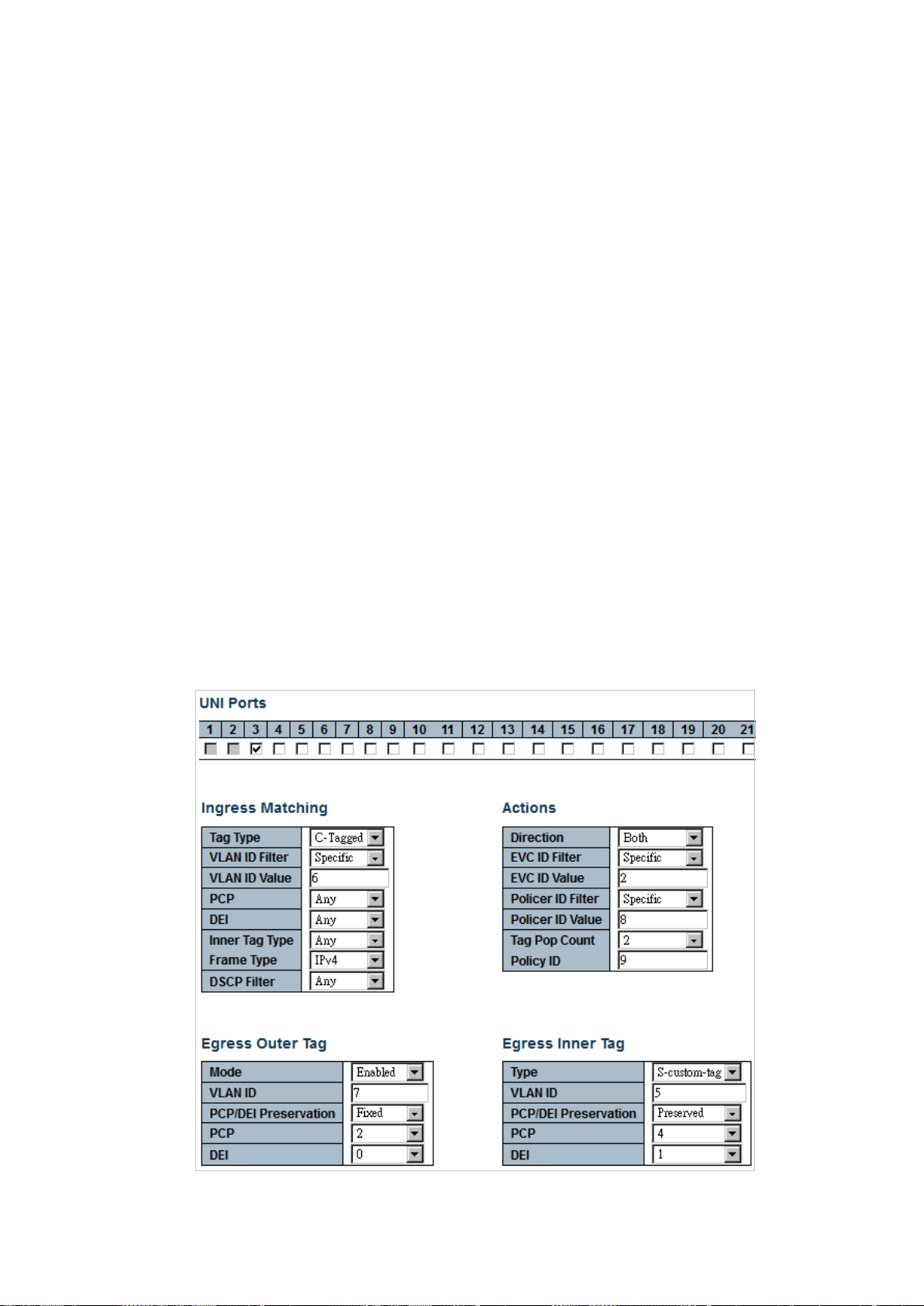
preserve Setup tag PCP/DEI preservation
vid Setup added tag VLAN ID
<AddVid : vlan_id> Added tag VLAN ID
match Setup outer tag mat ch prope rt ie s
policer Policer (ingress bandwidth profile)
<PolicerId : 1-2048> Policer ID
discard Map to policer discarding all frames
evc Use policer setup for EVC
none Map to policer allowing all frames
policy Setup ACL policy
<PolicyNo : 0-255> ACL policy
pop Setup tag popping
<Pop : 0-2> Number of tags popped
Command Guide
Default:
N/A
Usage Guide:
To configure EVC Control Entry.
Example:
To configure EVC Control Entry as tabled below.
-85-
Page 86

policy 9 pop 2
<PolicyNo : 0-255> pop <Pop : 0-2>
Switch# configure terminal
Switch (config)# evc ece 1 direction both evc 2 frame-type ipv4 inner-tag add dei 1
pcp 4 preserve type s-custom-tag vid 5 interface GigabitEthernet 1/3 outer-tag add
dei 0 mode enable pcp 2 vid 7 match dei any pcp any type c-tagged vid 6 policer 8
4.2.53 evc ece update
Command:
evc ece update <EceId : 1-4096> direction {both | nni-to-uni | uni-to-nni} evc
{<EvcId : 1-4096> | none} frame-type {any | ipv4 | ipv6} inner-tag { add {dei <AddDei :
0-1> | pcp <AddPcp : 0-7> | preserve | type [c-tag | none | s-custom-tag | s-tag] | vid
Command Guide
<AddVid : vlan_id>}, match {dei [<MatchDei : 0-1> | any]| pcp [<MatchPcp : pcp> |
any] | type [any | c-tagged | s-tagged | tagged | untagged] | vid [<Vid : 0-4095> |
any]} } interface [* | 10GigabitEthernet | GigabitEthernet] <PORT_ID> next [<EceId :
1-4096> | last] outer-tag { add {dei <AddDei : 0-1> | pcp <AddPcp : 0-7> | preserve |
type [c-tag | none | s-custom-tag | s-tag] | vid <AddVid : vlan_id>}, match {dei
[<MatchDei : 0-1> | any]| pcp [<MatchPcp : pcp> | any] | mode [disable | enable] | vid
[<Vid : 0-4095> | any] } policer {<PolicerId : 1-2048> | discard | evc | none} policy
<EceId : 1-4096> ECE identifier
direction Setup ECE direction
both Bidirectional traffic flow
nni-to-uni NNI-to-UNI traffic flow
uni-to-nni UNI-to-NNI traffic flow
evc EVC mapping
<EvcId : 1-4096> EVC identifier
none Map to no EVC ID
frame-type Setup matched frame type
any Match any frame type
ipv4 Match IPv4 frames
ipv6 Match IPv6 frames
inner-tag Setup inner tag options
add Setup inner tag add properties.
-86-
Page 87

dei Setup added tag DEI
<AddDei : 0-1> Added tag DEI
pcp Setup added tag PCP
<AddPcp : 0-7> Added tag PCP
preserve Setup tag PCP/DEI preservation
type Setup added tag type
c-tag Add C-tag
none No tag added
s-custom-tag Add custom S-tag
s-tag Add S-tag
vid Setup added tag VLAN ID
<AddVid : vlan_id> Added tag VLAN ID
match Setup inner tag match proper tie s
dei Setup matched DEI
Command Guide
<MatchDei : 0-1> Matched DEI
any Match any DEI
pcp Setup matched PCP
<MatchPcp : pcp> Matched PCP value/range
any Match any PCP
type Setup matched tag type
any Match tagged and untagged frames
c-tagged M atch C -tagged frames
s-tagged M atch S-tagged frames
tagged Match tagged frames
untagged Match untagged fram es
vid Setup matched VLAN ID
<Vid : 0-4095> Matched VLAN ID value/range
any Match any VLAN ID
interface Setup UNI
next Setup the ECE ID of the next entry
<EceId : 1-4096> Select ECE ID of an existing entry
last Make the ECE the last entry
outer-tag Setup outer tag options
add Setup outer tag add properties
dei Setup added tag DEI
<AddDei : 0-1> Added tag DEI
mode Setup NNI-to-UNI outer tag add mode
-87-
Page 88

disable No tag added when forwarding to UNI
Switch (config)# evc ece 1 direction nni-to-uni
coupled] rate-type [data | line] type [mef | single]
enable Add tag when forwarding to UNI
pcp Setup added tag PCP
<AddPcp : 0-7> Added tag PCP
preserve Setup tag PCP/DEI preservation
vid Setup added tag VLAN ID
<AddVid : vlan_id> Added tag VLAN ID
match Setup outer tag mat ch prope rt ie s
policer Policer (ingress bandwidth profile)
<PolicerId : 1-2048> Policer ID
discard Map to policer discarding all frames
evc Use policer setup for EVC
none Map to policer allowing all frames
policy Setup ACL policy
Command Guide
<PolicyNo : 0-255> ACL pol icy
pop Setup tag popping
<Pop : 0-2> Number of tags popped
Default:
N/A
Usage Guide:
To update EVC Control Entry for specific ECE profile.
Example 1:
To update “direction nni-to-uni” for ECE profile 1.
Switch# configure terminal
4.2.54 evc policer
Command:
evc policer <PolicerId : 1-2048> [enable | disable] cbs <Cbs : 0-100000> cir < Cir :
0-10000000> ebs <Ebs : 0-100000> eir <Eir : 0-10000000> mode [aware | blind |
<PolicerId : 1-2048> Policer ID
cbs Setup CBS
<Cbs : 0-100000> Committed Burst Size [bytes]
-88-
Page 89
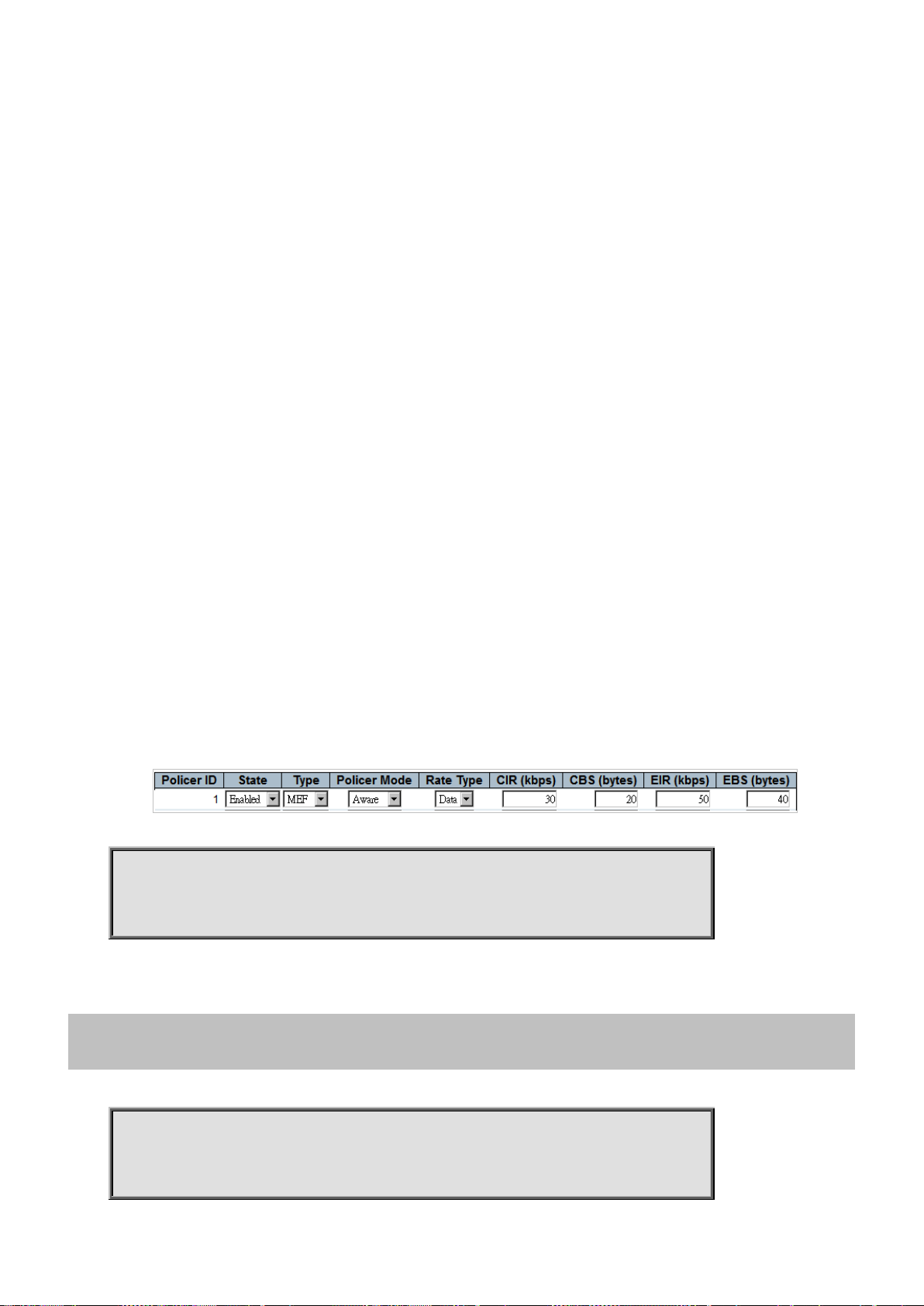
cir Setup CIR
data type mef
coupled] rate-type [data | line] type [mef | single]
<Cir : 0-10000000> Committed Information Rate [kbps]
disable Disable policer
ebs Setup EBS for MEF policer
<Ebs : 0-100000> Excess Burst Size [bytes]
eir Setup EIR for MEF policer
<Eir : 0-10000000> Excess Information Rate [kbps]
enable Enable policer
mode Setup policer mode
aware Color-aware mode
blind Color-blind mode
coupled Coupling mode
rate-type Setup rate type
data Data rate policing
line Line rate policing
Command Guide
type Setup policer type
mef MEF ingress bandwidth profile
single Single bucke t poli cer
Default:
N/A
Usage Guide:
To configure a profile for EVC Policer (Ingress Bandwidth Profile) .
Example:
To configure EVC Policer (Ingress Bandwidth Profile) as tabled below.
Switch# configure terminal
Switch (config)# evc policer 1 enable cbs 20 cir 30 ebs 40 eir 50 mode aware rate-type
4.2.55 evc policer update
Command:
evc policer update <PolicerId : 1-2048> [enable | disable] cbs <Cbs : 0-100000> cir
<Cir : 0-10000000> ebs <Ebs : 0-100000> eir <Eir : 0-10000000> mode [aware | blind |
<PolicerId : 1-2048> Policer ID
-89-
Page 90

cbs Setup CBS
Switch (config)# evc policer update 1 eir 1000
learning [ disable ] policer
{ <PolicerId : 1-2048> | none | discard }
<Cbs : 0-100000> Committed Burst Size [bytes]
cir Setup CIR
<Cir : 0-10000000> Committed Information Rate [kbps]
disable Disable policer
ebs Setup EBS for MEF policer
<Ebs : 0-100000> Excess Burst Size [bytes]
eir Setup EIR for MEF policer
<Eir : 0-10000000> Excess Information Rate [kbps]
enable Enable policer
mode Setup policer mode
aware Color-aware mode
blind Color-blind mode
coupled Coupling mode
rate-type Setup rate type
Command Guide
data Data rate policing
line Line rate policing
type Setup policer type
mef MEF ingress bandwidth profile
single Single bucke t poli cer
Default:
N/A
Usage Guide:
To update a profile for EVC Policer (Ingress Bandwidth Profile).
Example:
To update EVC Policer (Ingress Bandwidth Profile) with EIR 1000 for policer 1
Switch# configure terminal
4.2.56 evc update
Command:
evc update <EvcId : 1-4096> vid <evc_vid> ivid <ivid> interface ( * |
10GigabitEthernet | GigabitEthernet [ <port_list> ] )
<EvcId : 1-4096> EVC identifier
vid Setup EVC VLAN ID
-90-
Page 91

<EvcVid : 1-4095> EVC VLAN ID
Switch (config)# evc update 1 vid 10
#
ivid Setup internal EVC VLAN ID
<Ivid : vlan_id> Internal VLAN ID
interface Setup NNI
learning Setup learning
policer Policer (ingress bandwidth profile)
<PolicerId : 1-2048> Policer ID
<vlan_list> List of VLANs
discard Map to policer discarding all frames
none Map to policer allowing all frames
Default:
0
Usage Guide:
To update an ID for Ethernet Virtual Circuits (EVC).
Command Guide
Example:
To update Ethernet Virtual Circuits (EVC identifier: 1, EVC VLAN ID: 10).
Switch# configure terminal
4.2.57 exit
Command:
exit
Default:
N/A
Usage Guide:
To exit configure terminal mode.
Example:
To exit configure terminal mode.
Switch# configure terminal
Switch (config)# exit
-91-
Page 92
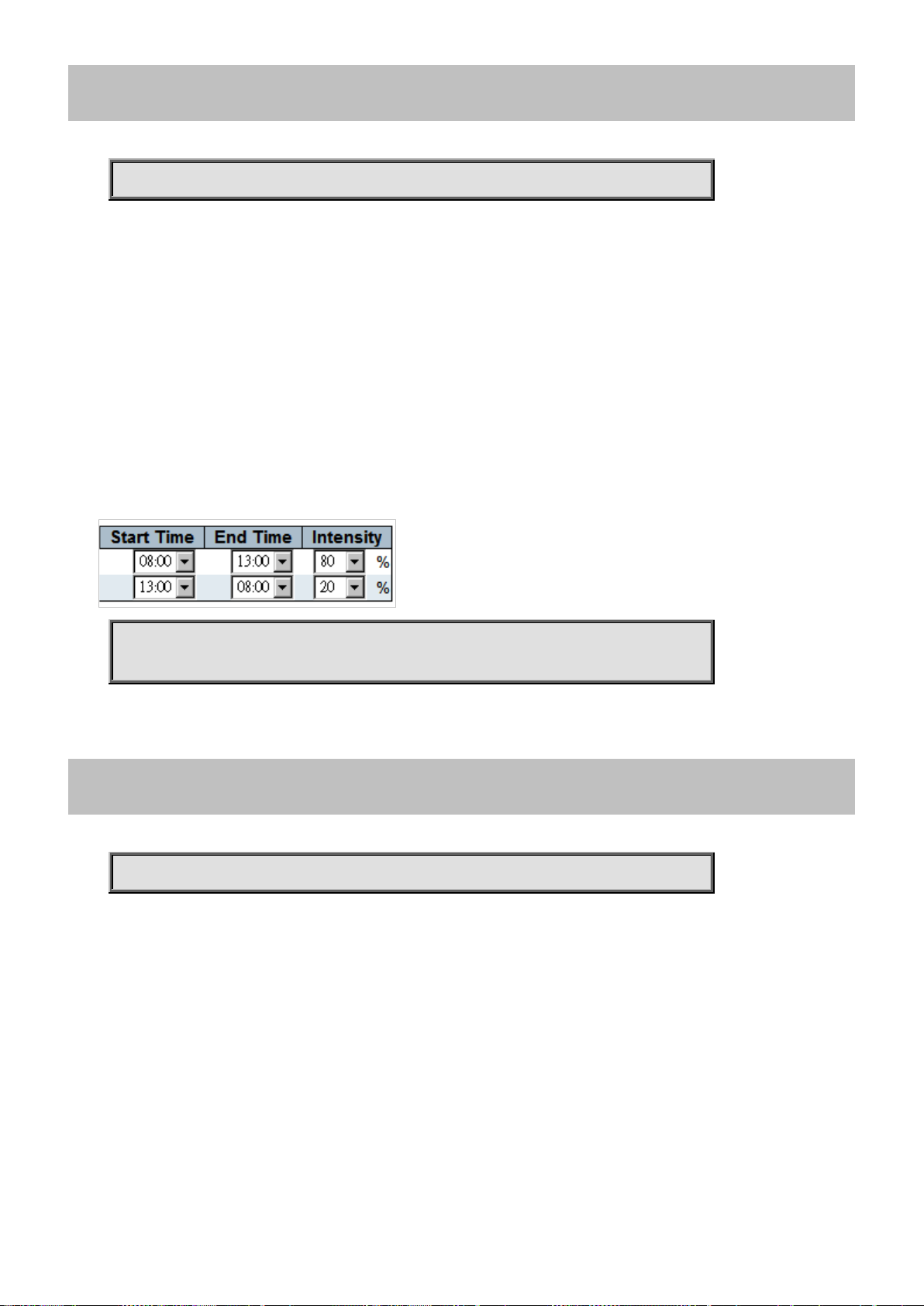
4.2.58 green-ethernet led interval
Switch (config)# green-ethernet led interval 8-13 intensity 80
Command:
green-ethernet led interval <0~24> intensity <0-100>
<0~24> Inter v al from 00.00 to 24. 00 (00 is used to st art at midni ght ,
while 24 is used to stop at midnight).
intensity LED s inte ns ity.
<0-100> Intensity from 0% (LEDs OFF) to 100%
Default:
N/A
Usage Guide:
To configure LED Power reduction for interval time.
Example:
Command Guide
To configure LED Power reduction as tabled below.
Switch# configure terminal
4.2.59 green-ethernet led on-event
Command:
green-ethernet led on-event error | link-change <0-65535>
error Set LEDs intensity to 100% if an error occurs.
link-change Specifies how long to turn LEDs intensity into 100%, when a link changes state.
<0-65535> Number of seconds to set LEDs intensity at 100% at link change.
Default:
N/A
Usage Guide:
To configure LED Power on-event to trigger LED light
Example:
To configure LED Power on-event as tabled below:
-92-
Page 93

Switch# configure terminal
Switch (config)# green-ethernet led on-event error link-change 55
Switch (config)# gvrp
Switch (config)# gvrp max-vlans 200
4.2.60 gvrp
Command:
gvrp
Default:
Command Guide
Disable
Usage Guide:
To enable GVRP.
Example:
To enable GVRP.
Switch# configure terminal
4.2.61 gvrp max-vlans
Command:
gvrp max-vlans <1-4095>
Default:
20
Usage Guide:
To configure how many VLANs will be in GVRP.
Example:
To configure 200 VLANs in GVRP.
Switch# configure terminal
-93-
Page 94
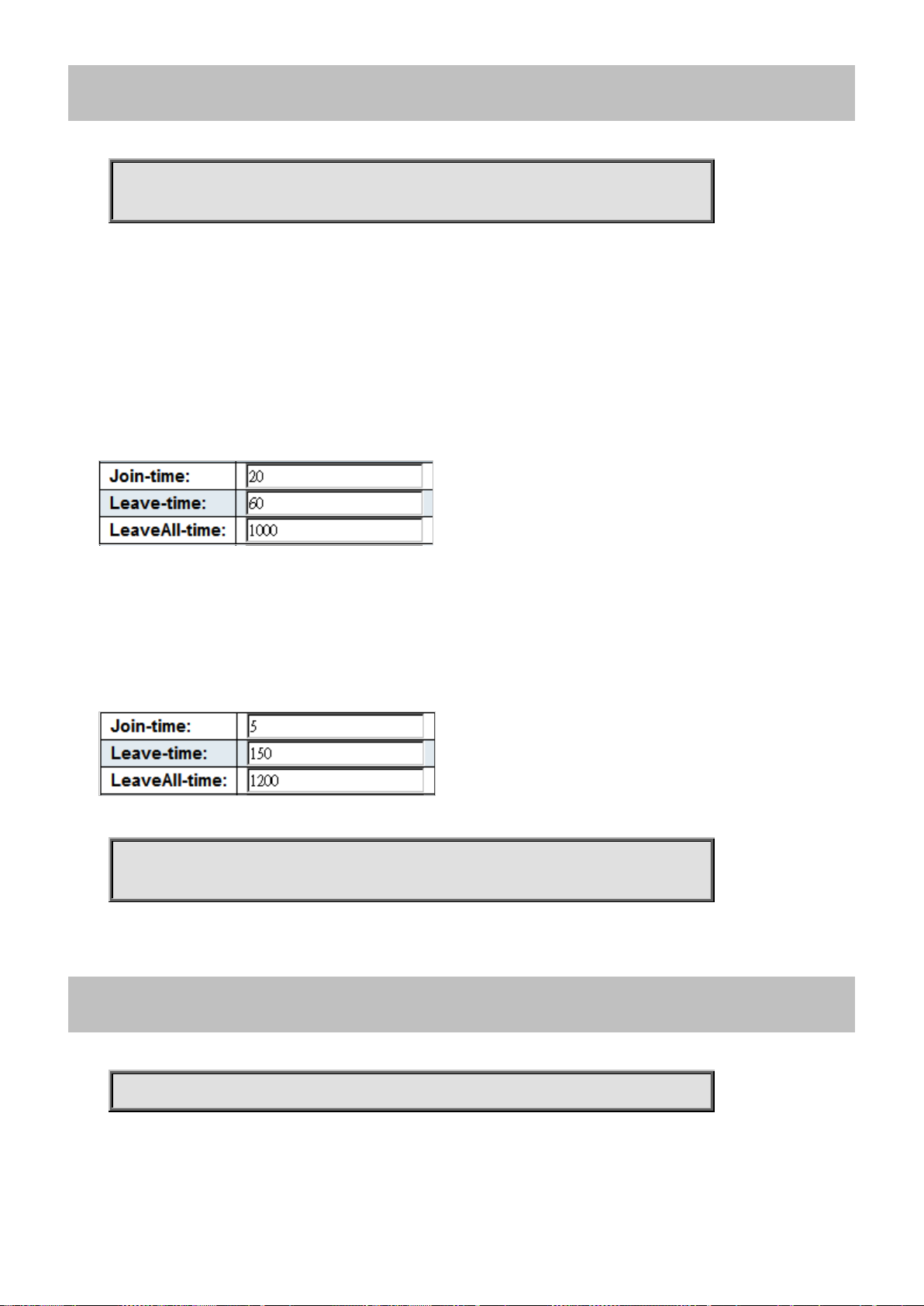
Command Guide
leave-time <Leavetime : 60-300>
Switch (config)# gvrp time join-time 5 leave-all-time 1200 leave-time 150
4.2.62 gvrp time
Command:
gvrp time join-time <Jointime : 1-20> leave-all-time <Leavealltime : 1000-5000>
join-time Set GARP protocol parameter JoinTime. See IEEE 802.1D-2004, clause 12.11
<Jointime : 1-20> join-time in units of centi seconds. Range is 1-20. Default is 20.
leave-all-time Set GARP protocol parameter LeaveAllTime. See IEEE 802.1D-2004, clause 12.11
<Leavealltime : 1000-5000> leave-all-time in units of centi seconds Range is 1000-5000. Default is 1000.
leave-time Set GARP protocol parameter LeaveTime. See IEEE 802.1D-2004, clause 12.11
<Leavetime : 60-300> leave-time in units of centi seconds. Range is 60-300. Default is 60.
Default:
Usage Guide:
To configure Join-time, Leave-time, Leave all-time for G VRP.
Example:
To configure Join-time, Leave-time, Leave all-time for GVRP as tabled below .
Switch# configure terminal
4.2.63 help
Command:
help
Default:
N/A
-94-
Page 95

Usage Guide:
(e.g. 'show pr?'.)
planetbestswitch(config)#
To explain how to use commands.
Example:
To explain how to use commands.
Switch# configure terminal
Switch (config)# help
Help may be requested at any point in a command by entering
a question mark '?'. If nothing matches, the help list will
be empty and you must back up until entering a '?' showing the
available options.
Two styles of help are provided:
1. Full help is available when you are ready to enter a
command argument (e.g. 'show ?') and describes each possible
argument.
Command Guide
2. Partial help is provided when an abbreviated argument is entered
and you want to know what arguments match the input
4.2.64 hostname
Command:
hostname < WORD >
< WORD > This system's network name
Default:
N/A
Usage Guide:
To configure switch’s hostname.
Example:
To configure switch’s hostname with “planetbestswitch”
Switch# configure terminal
Switch (config)# hostn ame pl anet be stswitch
-95-
Page 96

4.2.65 interface * | 10GigabitEthernet | GigabitEthernet
Switch (config-if) #
Switch (config-if) # access-list action permit
Command:
interface * | 10GigabitEthernet <port_type_list> | GigabitEthernet <port_type_list>
* All switches or All ports
GigabitEthernet 1 Gigabit Ethernet Port
10GigabitEthernet 10 Gigabit Ethernet Port
Default:
N/A
Usage Guide:
To enter the interface mode.
Example:
To enter the interface 10GigabitEthernet 1/2
Command Guide
Switch# configure terminal
Switch (config)# interface 10GigabitEthernet 1/2
4.2.65.1 access-list action permit
Command:
access-list action permit
action Access list actio n
Default:
Permit
Usage Guide:
To configure Permit for the ACL action.
Example:
To configure Permit ACL action for the GigabitEthernet X/X.
Switch# configure terminal
Switch (config)# interface GigabitEthernet X/X
-96-
Page 97

4.2.65.2 access-list action deny
Switch (config-if) # access-list action deny
Switch (config-if) # access-list logging
Command:
access-list action deny
action Access list actio n
Default:
Deny
Usage Guide:
To configure Deny for the ACL action.
Example:
To configure Deny ACL action for the GigabitEthernet X/X.
Switch# configure terminal
Command Guide
Switch (config)# interface GigabitEthernet X/X
4.2.65.3 access-list logging
Command:
access-list logging
logging Logging frame information. Note: The logging feature only works when the packet length is less than
1518 (without VLAN tags) and the System Log memory size and logging rate is limited.
Default:
Disable
Usage Guide:
To enable Logging function for the ACL.
Example:
To enable ACL Logging function for the GigabitEthernet X/X.
Switch# configure terminal
Switch (config)# interface GigabitEthernet X/X
-97-
Page 98

4.2.65.4 access-list polic y
Switch (config-if) # access-list policy 1
Switch (config-if) # access-list port-state
Command:
access-list policy <PolicyId : 0-255>
policy Policy
<PolicyId : 0-255> Policy ID
Default:
Policy ID: 0
Usage Guide:
To configure Policy ID for the ACL.
Example:
To configure ACL Policy ID 1 for the GigabitEthernet X/X.
Command Guide
Switch# configure terminal
Switch (config)# interface GigabitEthernet X/X
4.2.65.5 access-list port-state
Command:
access-list port-state
port-state Re-enable shutdown port that was shutdown by access-list module
Default:
Enable
Usage Guide:
To enable Port-state function for the ACL.
Example:
To configure ACL Port-state function for the GigabitEthernet X/X.
Switch# configure terminal
Switch (config)# interface GigabitEthernet X/X
-98-
Page 99

4.2.65.6 access-list rate-limiter
Switch (config-if) # access-list rate-limiter 1
<port_type_list>
Switch (config-if) # access-list redirect interface GigabitEthernet 1/2
Command:
access-list rate-limiter <RateLimiterId : 1-16>
rate-limiter Rate limiter
<RateLimiterId : 1-16> Rate limiter ID
Default:
Disable
Usage Guide:
To apply Rate Limiter ID for the ACL.
Example:
To apply ACL Rate Limiter ID 1 for the GigabitEthernet X/X.
Command Guide
Switch# configure terminal
Switch (config)# interface GigabitEthernet X/X
4.2.65.7 access-list redirect interface
Command:
access-list redirect interface 10GigabitEthernet <port_type_list> | GigabitEthernet
redirect Redirect frame to specific port
Default:
Disable
Usage Guide:
To redirect frames to specific Port.
Example:
To redirect GigabitEthernet X/X frames to GigabitEthernet 1/2.
Switch# configure terminal
Switch (config)# interface GigabitEthernet X/X
-99-
Page 100

Command Guide
Switch (config-if) # access-list shutdown
Switch (config-if) # aggregation group 7
4.2.65.8 access-list shutdown
Command:
access-list shutdown
shutdown Shut down incoming port. The shutdown feature only works when the packet length is less than 1518
(without VLAN tags).
Default:
Disable
Usage Guide:
To enable Shutdown function for the ACL.
Example:
To enable ACL Shutdown function for the GigabitEthernet X/X.
Switch# configure terminal
Switch (config)# interface GigabitEthernet X/X
4.2.65.9 aggregation gr o up
Command:
aggregation group <uint>
aggregation Create an aggregation
group Create an aggregation group
<uint> The aggregation group id
Default:
N/A
Usage Guide:
To configure aggregation group.
Example:
To configure aggregation group 7 for the GigabitEthernet X/X.
Switch# configure terminal
Switch (config)# interface GigabitEthernet X/X
-100-
 Loading...