

Page 1
Command Guide
-1-
Page 2

Command Guide
Contents
Chapter 1 COMMAND LINE INTERFACE........................................................... 8
1.1 Accessing the CLI.........................................................................................................8
1.2 Command Line Modes..................................................................................................8
1.3 Requirements................................................................................................................9
Chapter 2 CONSOLE CLI MANAGEMENT ....................................................... 10
2.1 Terminal Setup............................................................................................................10
2.2 Logon to the Console.................................................................................................12
2.3 Configuring IP Address..............................................................................................12
Chapter 3 TELNET CLI MANAGEMENT .......................................................... 14
3.1 Telnet Login................................................................................................................. 14
Chapter 4 Commands for CLI Configuration.................................................. 15
4.1 build.............................................................................................................................15
4.1.1 build running-state file .........................................................................................................................................15
4.2 clear .............................................................................................................................15
4.2.1 clear arp-cache....................................................................................................................................................15
4.2.2 clear ip dhcp snooping binding............................................................................................................................16
4.2.3 clear clear ip igmp snooping group......................................................................................................................16
4.2.4 clear ip prefix-list .................................................................................................................................................17
4.2.5 clear lacp.............................................................................................................................................................17
4.2.6 clear logging........................................................................................................................................................ 18
4.2.7 clear mac address-table dynamic........................................................................................................................18
4.2.8 clear spanning-tree detected protocols................................................................................................................19
4.3 configure terminal.......................................................................................................19
4.3.1 aaa authentication login console local.................................................................................................................19
4.3.2 exit.......................................................................................................................................................................20
4.3.3 help......................................................................................................................................................................20
4.3.4 hostname.............................................................................................................................................................21
4.3.5 interface xe | ge | range.......................................................................................................................................21
4.3.5.1 bandwidth..................................................................................................................................................22
4.3.5.2 channel-group ...........................................................................................................................................22
-2-
Page 3

Command Guide
4.3.5.3 description.................................................................................................................................................23
4.3.5.4 exit.............................................................................................................................................................23
4.3.5.5 flowcontrol.................................................................................................................................................24
4.3.5.6 instance.....................................................................................................................................................24
4.3.5.7 ip dhcp snooping.......................................................................................................................................25
4.3.5.8 jumbo-frame..............................................................................................................................................25
4.3.5.9 ip arp inspection check-vlan......................................................................................................................26
4.3.5.10 ip arp inspection logging..........................................................................................................................26
4.3.5.11 ip arp inspection trust ..............................................................................................................................27
4.3.5.12 ip dhcp snooping trust .............................................................................................................................28
4.3.5.13 lacp port-priority.......................................................................................................................................28
4.3.5.14 lacp timeout.............................................................................................................................................29
4.3.5.15 line-rate ...................................................................................................................................................29
4.3.5.16 lldp admin-status.....................................................................................................................................30
4.3.5.17 lldp frame-format.....................................................................................................................................30
4.3.5.18 lldp management-address.......................................................................................................................31
4.3.5.19 mac-address-learning enable..................................................................................................................31
4.3.5.20 mirror interface........................................................................................................................................32
4.3.5.21 no............................................................................................................................................................32
4.3.5.22 path-cost..................................................................................................................................................33
4.3.5.23 priority .....................................................................................................................................................33
4.3.5.24 shutdown.................................................................................................................................................34
4.3.5.25 spanning-tree auto-edge .........................................................................................................................34
4.3.5.26 spanning-tree edgeport ...........................................................................................................................35
4.3.5.27 spanning-tree force-version.....................................................................................................................35
4.3.5.28 spanning-tree guard root.........................................................................................................................36
4.3.5.29 spanning-tree link-type............................................................................................................................36
4.3.5.30 spanning-tree portfast..............................................................................................................................37
4.3.5.31 speed ......................................................................................................................................................37
4.3.5.32 storm-control ...........................................................................................................................................38
4.3.5.33 switchport access vlan ............................................................................................................................38
4.3.5.34 switchport hybrid vlan..............................................................................................................................39
4.3.5.35 switchport hybrid allowed vlan.................................................................................................................39
4.3.5.36 switchport mode......................................................................................................................................40
4.3.5.37 switchport mode hybrid acceptable-frame-type.......................................................................................41
4.3.5.38 switchport mode trunk acceptable-frame-type.........................................................................................41
4.3.5.39 switchport mode access acceptable-frame-type......................................................................................42
4.3.5.40 switchport mode hybrid ingress-filter.......................................................................................................42
4.3.5.41 switchport mode trunk ingress-filter.........................................................................................................43
4.3.5.42 switchport mode access ingress-filter ......................................................................................................43
4.3.5.43 switchport port-security ...........................................................................................................................44
-3-
Page 4

Command Guide
4.3.5.44 switchport private-vlan.............................................................................................................................44
4.3.5.45 switchport private-vlan host-associationGG ............................................................................................45
4.3.5.46 switchport trunk allowed vlan...................................................................................................................45
4.3.5.47 vlan classifier activate .............................................................................................................................46
4.3.6 interface sa | po...................................................................................................................................................46
4.3.6.1 port-channel load-balance.........................................................................................................................47
4.3.6.2 static-channel-group member....................................................................................................................47
4.3.7 interface vlan1.....................................................................................................................................................48
4.3.7.1 arp-ageing-timeout ....................................................................................................................................48
4.3.7.2 end............................................................................................................................................................49
4.3.7.3 exit.............................................................................................................................................................49
4.3.7.4 ip address..................................................................................................................................................50
4.3.8 ip dhcp snooping .................................................................................................................................................50
4.3.9 ip igmp snooping .................................................................................................................................................51
4.3.10 ip interface vlan .................................................................................................................................................52
4.3.11 ip route...............................................................................................................................................................53
4.3.12 lacp system-priority............................................................................................................................................53
4.3.13 line vty...............................................................................................................................................................54
4.3.13.1 login local ................................................................................................................................................54
4.3.13.2 connected count......................................................................................................................................55
4.3.13.3 exec-timeout............................................................................................................................................55
4.3.13.4 executed number.....................................................................................................................................55
4.3.13.5 exit...........................................................................................................................................................56
4.3.14 lldp.....................................................................................................................................................................56
4.3.15 logging host.......................................................................................................................................................57
4.3.16 logging record-priority........................................................................................................................................58
4.3.17 mac-address-table ageing-time.........................................................................................................................58
4.3.18 mac address-table static....................................................................................................................................58
4.3.19 multiple-spanning-tree enable ...........................................................................................................................59
4.3.20 no ......................................................................................................................................................................59
4.3.21 service advanced-vty.........................................................................................................................................60
4.3.22 service terminal length.......................................................................................................................................60
4.3.23 snmp-server community ....................................................................................................................................61
4.3.24 snmp-server contact..........................................................................................................................................61
4.3.25 snmp-server enable traps..................................................................................................................................62
4.3.26 snmp-server group ............................................................................................................................................62
4.3.27 snmp-server host...............................................................................................................................................63
4.3.28 snmp-server location.........................................................................................................................................63
4.3.29 static-channel-group..........................................................................................................................................64
4.3.30 system-monitor debug.......................................................................................................................................64
4.3.31 username ..........................................................................................................................................................65
-4-
Page 5

Command Guide
4.3.32 vlan classifier rule..............................................................................................................................................65
4.3.33 vlan database....................................................................................................................................................67
4.3.34 web....................................................................................................................................................................67
4.4 copy .............................................................................................................................68
4.4.1 copy .....................................................................................................................................................................68
4.5 debug...........................................................................................................................69
4.5.1 debug arp ............................................................................................................................................................69
4.5.2 debug igmp snooping..........................................................................................................................................69
4.5.3 debug ip...............................................................................................................................................................70
4.5.4 debug lacp...........................................................................................................................................................70
4.5.5 debug lldp............................................................................................................................................................71
4.5.6 debug mstp..........................................................................................................................................................71
4.5.7 debug pkt filter.....................................................................................................................................................72
4.5.8 debug snmp.........................................................................................................................................................72
4.6 disable .........................................................................................................................73
4.6.1 disable.................................................................................................................................................................73
4.7 dump............................................................................................................................74
4.7.1 dump running-state..............................................................................................................................................74
4.8 enable ..........................................................................................................................74
4.8.1 enable..................................................................................................................................................................74
4.9 erase ............................................................................................................................75
4.9.1 erase ...................................................................................................................................................................75
4.10 exit..............................................................................................................................75
4.10.1 exit.....................................................................................................................................................................75
4.11 no................................................................................................................................7
4.11.1 no.......................................................................................................................................................................76
6
4.12 ping............................................................................................................................76
4.12.1 ping....................................................................................................................................................................76
4.13 reboot.........................................................................................................................77
4.13.1 reboot................................................................................................................................................................77
4.14 show...........................................................................................................................78
4.14.1 show cpuusage .................................................................................................................................................78
4.14.2 show debugging ................................................................................................................................................78
4.14.3 show flowcontrol................................................................................................................................................79
4.14.4 show history ......................................................................................................................................................79
4.14.5 show interface ...................................................................................................................................................80
-5-
Page 6

Command Guide
4.14.6 show ip arp........................................................................................................................................................81
4.14.7 show ip dhcp snooping......................................................................................................................................81
4.14.8 show ip igmp snooping......................................................................................................................................82
4.14.9 show ip interface brief........................................................................................................................................83
4.14.10 show ip route...................................................................................................................................................83
4.14.11 show lacp.........................................................................................................................................................84
4.14.12 show lldp .........................................................................................................................................................84
4.14.13 show logging ...................................................................................................................................................85
4.14.14 show mac address-table..................................................................................................................................85
4.14.15 show memory-utilization..................................................................................................................................86
4.14.16 show mirror......................................................................................................................................................86
4.14.17 show port-security ...........................................................................................................................................87
4.14.18 show privilege..................................................................................................................................................87
4.14.19 show process ..................................................................................................................................................88
4.14.20 show running-config ........................................................................................................................................88
4.14.21 show snmp ......................................................................................................................................................89
4.14.22 show spanning-tree mst ..................................................................................................................................90
4.14.23 show startup-config .........................................................................................................................................90
4.14.24 show static-channel-group...............................................................................................................................91
4.14.25 show storm-control..........................................................................................................................................92
4.14.26 show system-runtime.......................................................................................................................................92
4.14.27 show systime...................................................................................................................................................92
4.14.28 show user........................................................................................................................................................ 93
4.14.29 show version ...................................................................................................................................................93
4.14.30 show vlan ........................................................................................................................................................94
4.15 systime ......................................................................................................................95
4.15.1 systime..............................................................................................................................................................95
4.16 telnet..........................................................................................................................95
4.16.1 telnet..................................................................................................................................................................95
4.17 terminal......................................................................................................................96
4.17.1 terminal length...................................................................................................................................................96
4.17.2 terminal monitor................................................................................................................................................. 96
4.18 trace-route.................................................................................................................97
4.18.1 trace-route.........................................................................................................................................................97
4.19 undebug.....................................................................................................................97
4.19.1 undebug all........................................................................................................................................................97
4.19.2 undebug arp ......................................................................................................................................................98
4.19.3 undebug ip.........................................................................................................................................................98
-6-
Page 7

Command Guide
4.20 vty...............................................................................................................................99
4.20.1 vty unlock ..........................................................................................................................................................99
4.21 who.............................................................................................................................99
4.21.1 who....................................................................................................................................................................99
4.22 write .........................................................................................................................100
4.22.1 write.................................................................................................................................................................100
-7-
Page 8

Command Guide
Chapter 1 COMMAND LINE INTERFACE
1.1 Accessing the CLI
When accessing the management interface for the switch over a direct connection to the server’s console port, or via a Telnet
connection, the switch can be managed by entering command keywords and parameters at the prompt. Using the switch's
command-line interface (CLI) is very similar to entering commands on a UNIX system.
This chapter describes how to use the Command Line Interface (CLI).
1.2 Command Line Modes
The CLI groups all the commands in appropriate modes according to the nature of the command. A sample of the CLI command
modes is described below. Each of the command modes supports specific software commands.
Mode-based Command Hierarchy
The Command Line Interface (CLI) groups all the commands in appropriate modes by the nature of the commands. Examples
of the CLI command modes are described below. Each of the command modes supports specific switch’s commands. The CLI
Command Modes table captures the command modes, the prompts visible in that mode and the exit method from that mode.
Command Mode Access Method Prompt Exit or Access Previous Mode
This is the first level of
User Mode
Privileged Mode
Global Config
Mode
access. Perform basic tasks
and list system information.
From the User Mode, enter
the enable command.
From the Privileged Mode,
enter the configuration
command.
COMMAND>
Switch#
Switch (Config)#
Enter Logout command
To exit to the User Mode, enter
exit or logout.
To exit to the Privileged Mode,
enter the exit command.
Interface Config
Mode
The CLI is divided into various modes. The commands in one mode are not available until the operator switches to that
particular mode. The commands available to the operator at any point in time depend upon the mode. Entering a question mark
(?) at the CLI prompt will display a list of the available commands and descriptions of the commands.
From the Global Config
mode, enter the interface
<port#> command.
Table 1-1 CLI Command Modes
Switch (Interface <port#>)#
To exit to the Global Config
mode, enter exit.
-8-
Page 9

Command Guide
The CLI provides the following modes:
User Mode
When the operator logs into the CLI, the User Mode is the initial mode. The User Mode contains a limited set of commands. The
command prompt shown at this level is:
Command Prompt: switch>
Privileged Mode
To have access to the full suite of commands, the operator must enter the Privileged Mode. The Privileged Mode requires
password authentication. From Privileged Mode, the operator can issue any Exec command to enter the Global Configuration
mode. The command prompt shown at this level is:
Command Prompt: switch#
Global Config Mode
This mode permits the operator to make modifications to the running configuration. General setup commands are gr ouped in
this mode. From the Global Configuration mode, the operator can enter the Interface Configuration mode. The command
prompt at this level is:
Command Prompt: switch(Config)#
From the Global Config mode, the operator may enter the following configuration modes:
Interface Config Mode
Many features are enabled for a particular interface. The Interface commands enable or modify the operation of an interface. In
this mode, a physical port is set up for a specific logical connection operation. The command prompt at this level is:
Command Prompt: Switch(Interface <port#>)#
1.3 Requirements
Workstations running Windows XP/Vista/7/8/10, Windows 2003/2008, MAC OS X or later, Linux, UNIX, or other platforms
are compatible with TCP/IP protocols.
Workstations are installed with Ethernet NIC (Network Interface Card)
Serial Port Connection (Terminal)
The above Workstations come with COM Port (DB9) or USB-to-RS232 converter.
The above Workstations have been installed with terminal emulator, such as Hyper Terminal, PuTTY.
Serial cable -- one end is attached to the RS232 serial port, while the other end to the console port of the Industrial
Managed Switch.
Ethernet Port Connection
Network cables -- Use standard network (UTP) cables with RJ45 connectors.
The above PC is installed with Web browser and JAVA runtime environment plug-in.
-9-
Page 10
Command Guide
Chapter 2 CONSOLE CLI MANAGEMENT
2.1 Terminal Setup
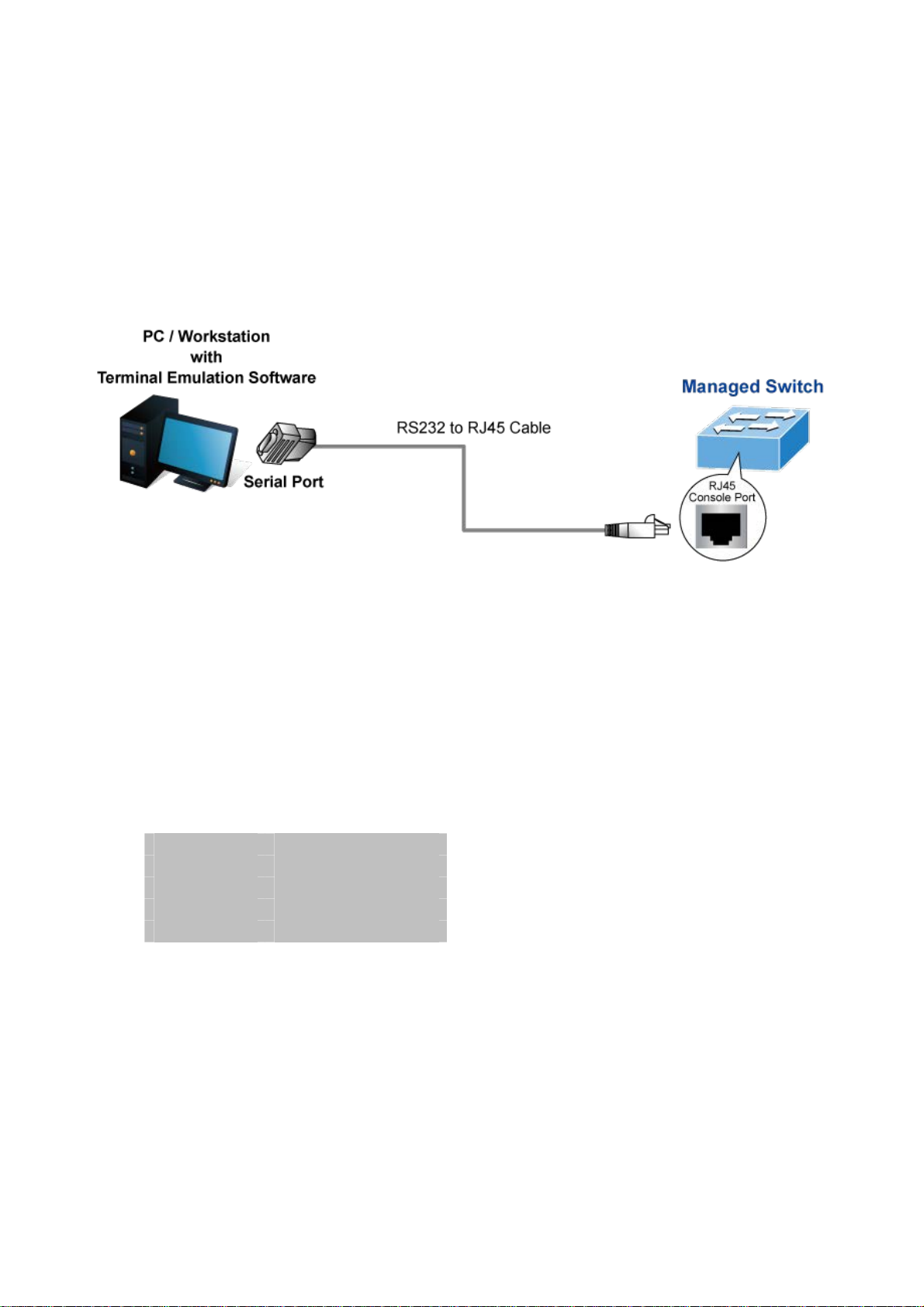
To configure the system, connect a serial cable to a COM port on a PC or notebook computer and to RJ4 5 type of serial
(console) port of the Industrial Managed Switch.
Figure 2-1 Industrial Managed Switch Console Connectivity
The console port of the Industrial Managed Switch is an RJ45 type, RS232 serial port connector. It is an interface for connecting
a terminal directly. Through the console port, it provides rich diagnostic information including IP address setting, factory reset,
port management, link status and system setting. Users can use the attached RS232 cable in the package and connect to the
console port on the device. After the connection, users can run any terminal emulatio n program (Hyper Terminal, ProComm
Plus, Telix, Winterm and so on) to enter the startup screen of the device.
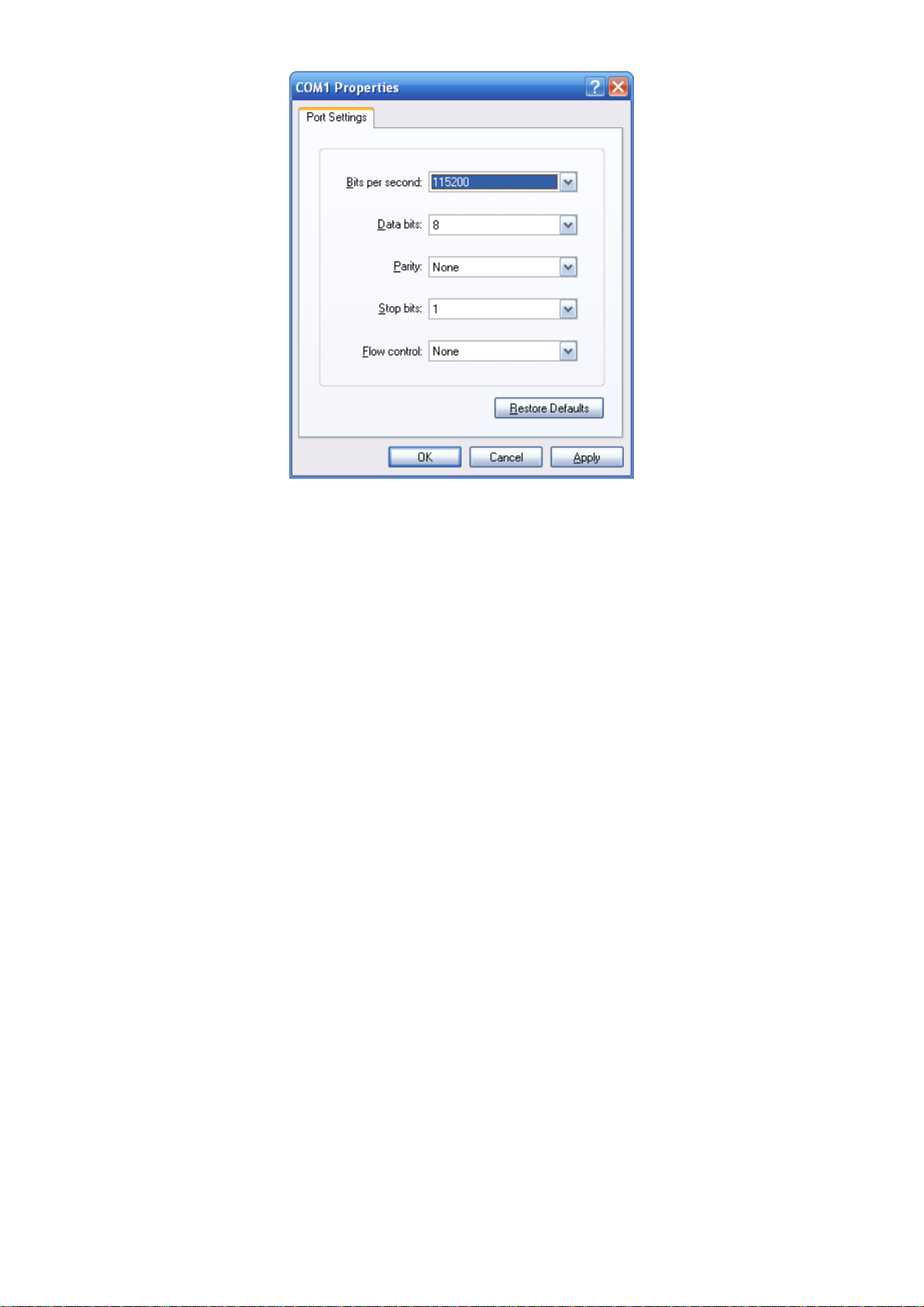
1. When the following screen appears, make sure that the COM port should be configured as:
Baud : 115200
Data bits : 8
Parity : None
Stop bits : 1
Flow control : None
-10-
Page 11
Command Guide
Figure 2-3 Terminal emulatior COM Port Configuration
You can change these settings, if desired, after you log on. This management method is often preferred because you can
remain connected and monitor the system during system reboots. Also, certain error messag es are sent to the serial port,
regardless of the interface through which the associated action was initiated. A Macintosh or PC attachment can use any
terminal-emulation program for connecting to the terminal serial port. A workstation attachment under UNIX can use an
emulator such as TIP.
-1
1-
Page 12
Command Guide
2.2 Logon to the Console
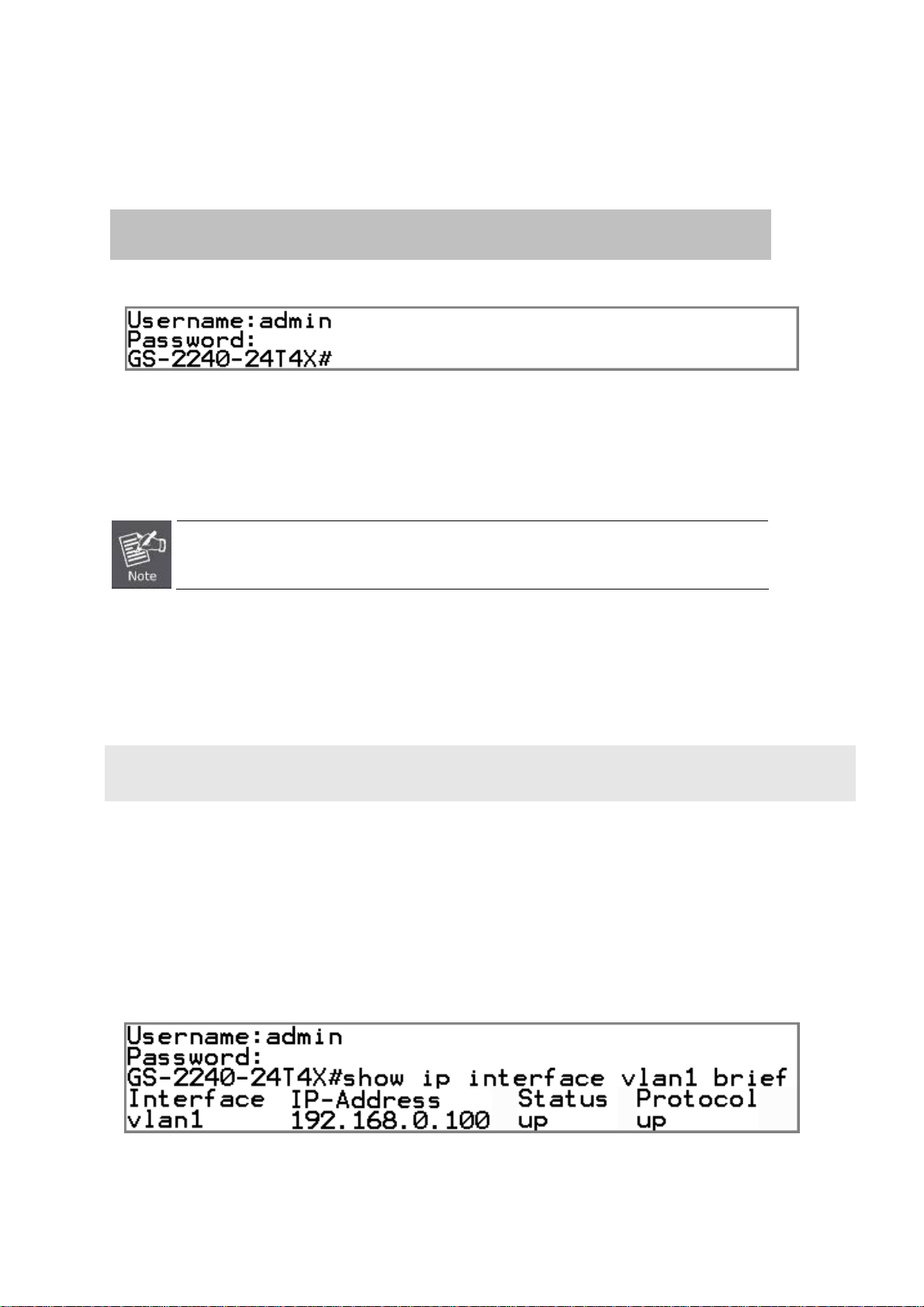
Once the terminal is connected to the device, power on the Industrial Managed Switch, and the terminal will display “runni ng
testing procedures”. Then, the following message asks to log-in user name and password. The factory default user name and
password are shown as follows and the login screen in Figure 3-1 appears.
Username: admin
Password: admin
Figure 3-1: Switch Console Login Screen
The user can now enter commands to manage the Industrial Managed S witch. For a detailed description of the commands,
please refer to the following chapters.
1. For security reason, please change and memorize the new password after this first setup.
2. Only accept command in lowercase letter under console interface.
2.3 Configuring IP Address
The Industrial Managed Switch is shipped with default IP address shown below.
IP Address: 192.168.0.100
Subnet Mask: 255.255.255.0
To check the current IP address or modify a new IP address for the Switch, please use the procedures as follows:
Show the current IP Address
1. At the “#” prompt, enter “show ip interface vlan1 brief”.
2. The screen displays the current IP address and Subnet Mask as shown in Figure 3-2.
Figure 3-2: IP Information Screen
-
-12
Page 13
Configuring IP Address
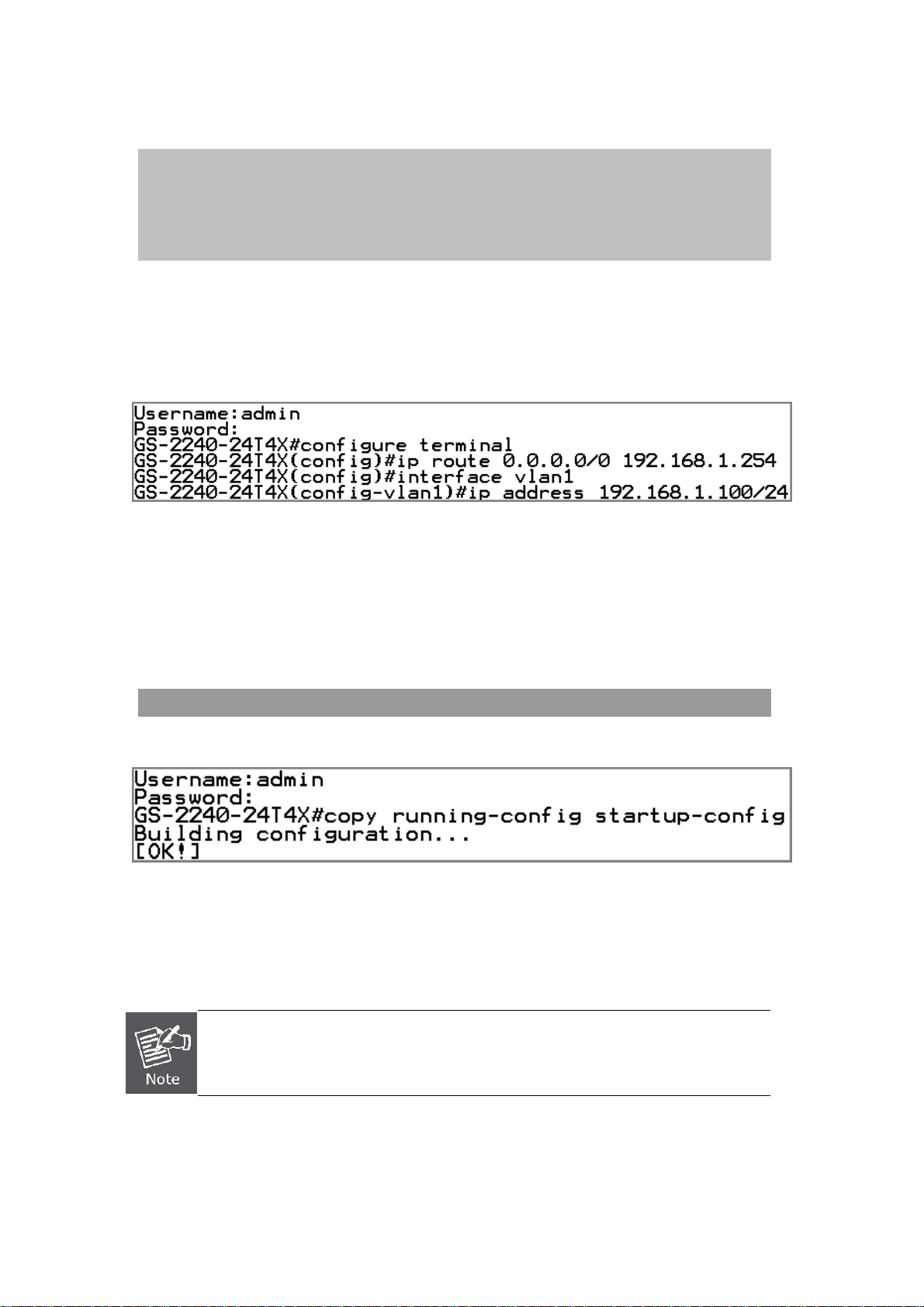
3. At the “#” prompt, enter the following command and press <Enter>.as shown in Figure 3-3.
# configure terminal
(config)# ip route 0.0.0.0/0 192.168.1.254
(config)# interface vlan 1
(config-vlan1)# ip address 192.168.1.100/24
The previous command would apply the following settings for the Industrial Mana ged Switch.
IP Address: 192.168.1.100
Subnet Mask: 255.255.255.0
Gateway: 192.168.1.254
Figure 3-3: Configuring IP Address Screen
Command Guide
4. Repeat step 1 to check if the IP address is changed.
Store current switch configuration
5. At the “#” prompt, enter the following command and press <Enter>.
# copy running-config startup-config
Figure 3-4: Saving Current Configuration Command Screen
If the IP is successfully configured, the Industrial Managed Switch will apply the new IP address setting immediately. You can
access the Web interface of the Industrial Managed Switch through the new IP address.
If you are not familiar with the console command or the related parameter, enter “ ?” anytime
in console to get the help description.
-
-13
Page 14
Command Guide
Chapter 3 TELNET CLI MANAGEMENT
3.1 Telnet Login
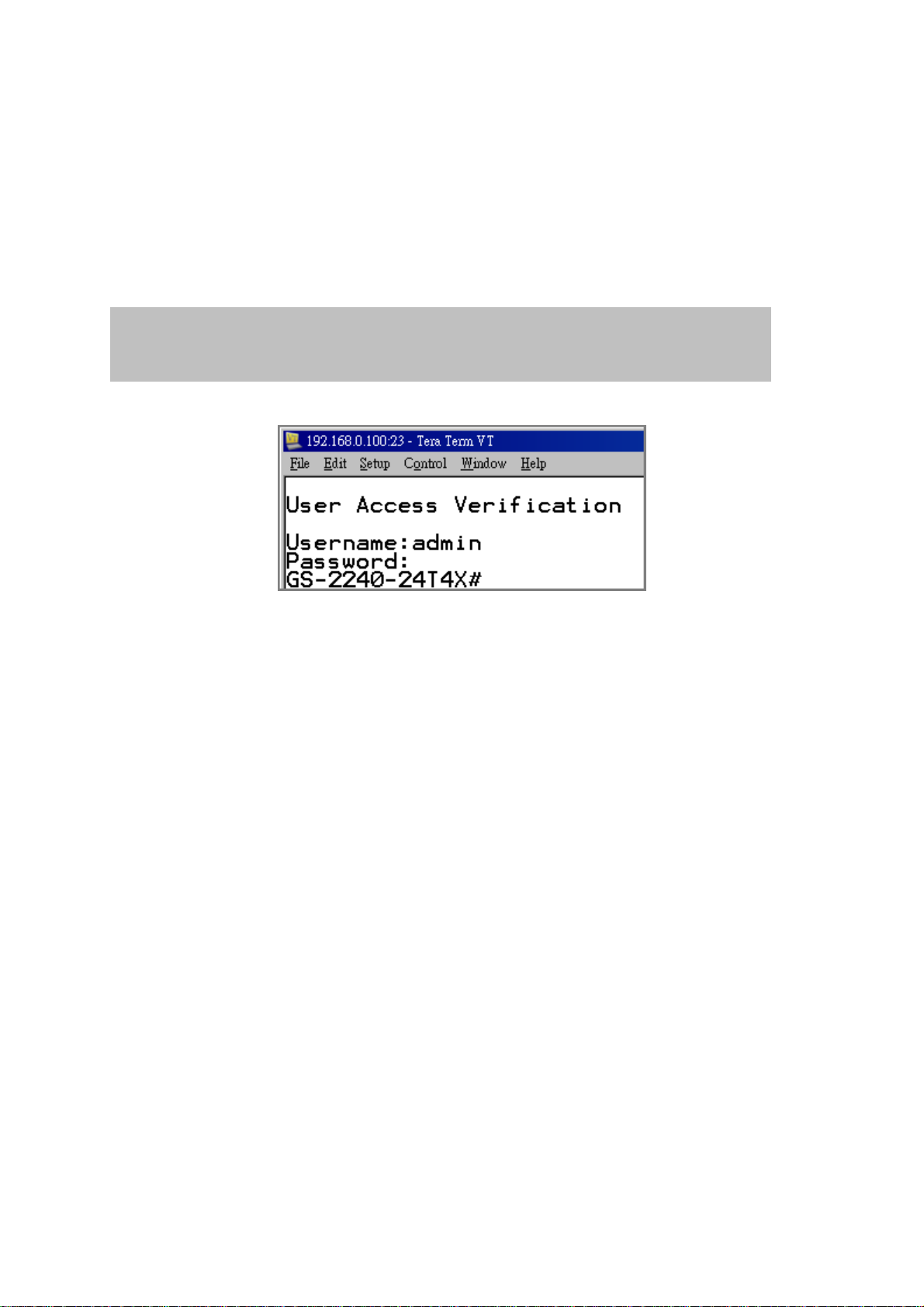
The Industrial Managed Switch also supports telnet for remote management. T he switch asks for user name a nd password for
remote login when using telnet, please use “admin” for both username and password.
Default IP address: 192.168.0.100
Username: admin
Password: admin
Figure 3-1 Industrial Managed Switch Telnet Login Screen
-14
-
Page 15

Chapter 4 Commands for CLI Configuration
4.1 build
4.1.1 build running-state file
Command:
build running-state file
Default:
N/A
Usage Guide:
To build the running-state file.
Command Guide
Example:
To build the running-state file.
Switch# build running-state file
4.2 clear
4.2.1 clear arp-cache
Command:
clear arp-cache
Default:
N/A
Usage Guide:
To clear the arp-cache.
Example:
To clear the Switch’s arp-cache.
Switch# clear arp-cache
-15
-
Page 16

4.2.2 clear ip dhcp snooping binding
Command:
clear ip dhcp snooping binding <A.B.C.D> | dynamic
<A.B.C.D> IP address.
dynamic Dynamic IP address.
Default:
N/A
Usage Guide:
To clear the dhcp snooping binding statistics.
Example:
Command Guide
To clear the Switch’s dhcp snooping binding statistics for dynamic IP.
Switch# clear ip dhcp snooping binding dynamic
4.2.3 clear clear ip igmp snooping group
Command:
clear clear ip igmp snooping {<A.B.C.D>} | {interface <Port list>} | {vlan <VLAN ID>}
<A.B.C.D> IP address.
<Port list> Port list.
<VLAN ID> VLAN ID.
Default:
N/A
Usage Guide:
To clear the IGMP snooping statistics.
Example:
To clear the Switch’s IGMP snooping statistics.
Switch# clear clear ip igmp snooping
-16
-
Page 17

4.2.4 clear ip prefix-list
Command:
clear ip prefix-list <WORD>
<WORD> Name of a prefix list.
Default:
N/A
Usage Guide:
To clear the IP .
Example:
To clear the Switch’s ERPS group 1 statistics.
Command Guide
Switch# # clear ip prefix-list
4.2.5 clear lacp
Command:
clear lacp {counters} | {<1-32> counters}
<1-32> channel-group number.
counters clear lacp counters.
Default:
N/A
Usage Guide:
To clear the LACP statistics.
Example:
To clear the Switch’s LACP statistics.
Switch# # clear lacp counters
-17
-
Page 18

4.2.6 clear logging
Command:
clear logging
Default:
N/A
Usage Guide:
To clear the system log.
Example:
To clear the Switch’s system log.
Switch# clear logging
Command Guide
4.2.7 clear mac address-table dynamic
Command:
clear mac address-table dynamic {address <HHHH.HHHH.HHHH>} | {interface <Port
list>} | {vlan <VLAN ID>}
<HHHH.HHHH.HHHH> MAC address.
<Port list> Port list.
<VLAN ID> VLAN ID.
Default:
N/A
Usage Guide:
To clear the MAC address table.
Example:
To clear the Switch’s VLAN 1 MAC address table.
Switch# clear mac address-table dynamic vlan 1
-18
-
Page 19

4.2.8 clear spanning-tree detected protocols
Command:
clear spanning-tree detected protocols{ bridge | <1-32> } | { interface <Port list> }
Default:
N/A
Usage Guide:
To clear the STP statistics.
Example:
To clear the Switch’s bridge 1 STP statistics.
Switch# clear spanning-tree detected protocols bridge 1
Command Guide
4.3 configure terminal
4.3.1 aaa authentication login console local
Command:
arp <ip> <HHHH.HHHH.HHHH>
<ip> IP address.
<HHHH.HHHH.HHHH> MAC address.
Default:
N/A
Usage Guide:
To configure static ARP table in the VLAN1.
Example:
To configure static ARP table(IP address: 192.168.0.79, MAC address: 00:30:20:00:30:00) in the VLAN1.
Switch# configure terminal
Switch (config)# arp 192.168.0.79 0030.2000.3000
-
-19
Page 20

4.3.2 exit
Command:
exit
Default:
N/A
Usage Guide:
To exit configure terminal mode.
Example:
To exit configure terminal mode.
Switch# configure terminal
Switch (config)# exit
Command Guide
#
4.3.3 help
Command:
help
Default:
N/A
Usage Guide:
To explain how to use commands.
Example:
To explain how to use commands.
Switch# configure terminal
Switch (config)# help
FOS CLI provides advanced help feature. When you need help,
anytime at the command line please press '?'.
If nothing matches, the help list will be empty and you must backup
until entering a '?' shows the available options.
-20
-
Page 21

Two styles of help are provided:
1. Full help is available when you are ready to enter a
command argument (e.g. 'show ?') and describes each possible
argument.
2. Partial help is provided when an abbreviated argument is entered
and you want to know what arguments match the input
(e.g. 'show ve?'.)
4.3.4 hostname
Command:
hostname < WORD >
Command Guide
< WORD > This system's network name
Default:
N/A
Usage Guide:
To configure switch’s hostname.
Example:
To configure switch’s hostname with “planetbestswitch”
Switch# configure terminal
Switch (config)# hostname planetbestswitch
planetbestswitch(config)#
4.3.5 interface xe | ge | range
Command:
interface range <port_type_list> | xe <port_type_list> | ge <port_type_list>
range Interface range
ge 1 Gigabit Ethernet Port
xe 10 Gigabit Ethernet Port
Default:
N/A
Usage Guide:
To enter the interface mode.
-21
-
Page 22

Example:
To enter the interface ge1 and ge2
Switch# configure terminal
Switch (config)# interface range ge1 - 2
Switch(config-if-range)#
4.3.5.1 bandwidth
Command:
access-list action deny
action Access list action
Command Guide
Default:
Deny
Usage Guide:
To configure Deny for the A CL action.
Example:
To configure Deny ACL action for the ge4.
Switch# configure terminal
Switch (config)# interface ge4
Switch (config-ge4) # access-list action deny
4.3.5.2 channel-group
Command:
channel-group <1-32> mode [active | passive]
<1-32> Channel group number
mode Channel mode commands
active Enable initiation of LACP negotiation on a port
passive Disable initiation of LACP negotiation on a port
Default:
Disable
Usage Guide:
To enable active or passive mode for the LACP.
-
-22
Page 23

Example:
To enable active mode for the LACP profile 1 in the ge4.
Switch# configure terminal
Switch (config)# interface ge4
Switch (config-ge4) # channel-group 1 mode active
4.3.5.3 description
Command:
description <description>
<description> Interface specific description
Command Guide
Default:
Disabled
Usage Guide:
To configure specific description for the interface description.
Example:
To configure specific description(internet) for the interface ge4 description.
Switch# configure terminal
Switch (config)# interface ge4
Switch (config-ge4) # description internet
4.3.5.4 exit
Command:
exit
exit Exit from current mode
Default:
None
Usage Guide:
To exit current mode
Example:
To exit current mode.
-23
-
Page 24

Switch# configure terminal
Switch (config)# interface ge4
Switch (config-ge4) # exit
Switch (config)#
4.3.5.5 flowcontrol
Command:
flowcontrol {receive | send} {off | on}
flowcontrol Traffic flow control.
receive Flow control on receive.
Command Guide
send Flow control on send.
off Disable flow control.
on Enable flow control.
Default:
Disable
Usage Guide:
To enable Flow-control for specific interface
Example:
To enable Flow-control(RX) for ge4
Switch# configure terminal
Switch (config)# interface ge4
Switch (config-ge4) # flowcontrol receive on
4.3.5.6 instance
Command:
instance <1-15> { path-cost <1-200000000> | priority <0-240> }
<1-15> Green ethernet (Power reduction)
path-cost Enable power saving for ports with no link partner.
<1-200000000> Enable power saving for ports with no link partner.
priority Enable power saving for ports with no link partner.
<0-240> Enable power saving for ports with no link partner.
-
-24
Page 25

Default:
N/A
Usage Guide:
To configure MSTP instance path-cost or priority for ports.
Example:
To configure MSTP instance (1) or priority(16) for ge4
Switch# configure terminal
Switch (config)# interface ge4
Switch (config-ge4) # instance 1 priority 16
4.3.5.7 ip dhcp snooping
Command Guide
Command:
ip dhcp snooping { limit rate <1-2048> | trust }
limit rate DHCP-snooping limit rate
<1-2048> DHCP packets numbers per sec
trust DHCP-snooping trust
Default:
Unlimited
Usage Guide:
To configure DHCP snooping trust-port or limit rate for ports.
Example:
To configure DHCP snooping trust-port for ge4
Switch# configure terminal
Switch (config)# interface ge4
Switch (config-ge4) # ip dhcp snooping trust
4.3.5.8 jumbo-frame
Command:
jumbo-frame < 1500-13312 >
< 1500-13312 > jumbo-frame in bytes
-25
-
Page 26

Default:
13312 bytes
Usage Guide:
To configure jumbo frame size for ports.
Example:
To configure jumbo frame size (2000 bytes) for ge4
Switch# configure terminal
Switch (config)# interface ge4
Switch (config-ge4) # jumbo-frame 2000
4.3.5.9 ip arp inspection check-vlan
Command Guide
Command:
ip arp inspection check-vlan
arp Address Reso lution Protocol
inspection ARP inspection
check-vlan ARP inspection VLAN mode config
Default:
Disable
Usage Guide:
To configure Check-VLAN mode into ARP inspection for specific interface
Example:
To configure Check-VLAN mode (Enabled) into ARP inspection for ge4
Switch# configure terminal
Switch (config)# interface ge4
Switch (config-ge4) # ip arp inspection check-vlan
4.3.5.10 ip arp inspection logging
Command:
ip arp inspection logging all | deny | permit
arp Address Reso lution Protocol
inspection ARP inspection
-26
-
Page 27

logging ARP inspection logging mode config
all log all entries
deny log denied entries
permit log permitted entries
Default:
None
Usage Guide:
To configure Logging type into ARP inspection for specific interface
Example:
To configure Logging type (All) into ARP inspection for ge4
Switch# configure terminal
Switch (config)# interface ge4
Switch (config-ge4) # ip arp inspection logging all
Command Guide
4.3.5.11 ip arp inspection trust
Command:
ip arp inspection trust
arp Address Reso lution Protocol
inspection ARP inspection
trust ARP inspection trust config
Default:
Trusted
Usage Guide:
To configure Trusted into ARP inspection for specific interface
Example:
To configure Trusted into ARP inspection for ge4
Switch# configure terminal
Switch (config)# interface ge4
Switch (config-ge4) # ip arp inspection trust
-
-27
Page 28

4.3.5.12 ip dhcp snooping trust
Command:
ip dhcp snooping trust
Default:
Trusted
Usage Guide:
To configure Trusted into DHCP Snooping for specific interface
Example:
To configure Trusted into DHCP Snooping for ge4
Switch# configure terminal
Switch (config)# interface ge4
Command Guide
Switch (config-ge4) # ip dhcp snooping trust
4.3.5.13 lacp port-priority
Command:
lacp port-priority <1-65535>
lacp Enable LACP on this interface
port-priority LACP priority of the port
<1-65535> Priority value, lower means higher priority
Default:
32768
Usage Guide:
To configure LACP port-priority for specific interface
Example:
To configure LACP port-priority (555) for ge4
Switch# configure terminal
Switch (config)# interface ge4
Switch (config-ge4) # lacp port-priority 555
-28
-
Page 29

4.3.5.14 lacp timeout
Command:
lacp timeout short | long
lacp Enable LACP on this interface
timeout The period between BPDU transmissions
short Transmit BPDU each second (fast timeout)
long Transmit BPDU each 30th second (slow timeout)
Default:
Short
Usage Guide:
To configure LACP timeout type for specific interface
Example:
Command Guide
To enable LACP timeout type (long) for ge4
Switch# configure terminal
Switch (config)# interface ge4
Switch (config-ge4) # lacp timeout long
4.3.5.15 line-rate
Command:
line-rate { egress <line rate> [burst <burstsize>] | ingress <line rate> [burst
<burstsize> }
egress Egress rate
ingress Ingress rate
<line rate> Limit rate <64-10485760 kbps> (usable units : k, m, g, must be a multiple of 64k)
<burstsize> Burst size <32 kbit - 128 Mbit> (usable units : k, m, must be a multiple of 32k)
Default:
Disable
Usage Guide:
To configure line rate for specific interface
Example:
To configure line rate (Egress rate: 120Mbps) for for ge4
-
-29
Page 30

Switch# configure terminal
Switch (config)# interface ge4
Switch (config-ge4) # line-rate egress 120m
4.3.5.16 lldp admin-status
Command:
lldp admin-status { disable | rx | tx | txrx }
disable The port can neither transmit nor receive LLDP frames
rx The port can only receive LLDP frames
tx The port can only transmit LLDP frames
txrx The port can both transmit and receive LLDP frames
Command Guide
Default:
Disable
Usage Guide:
To configure LLDP Rx only mode for specific interface
Example:
To configure LLDP Rx only mode for ge4
Switch# configure terminal
Switch (config)# interface ge4
Switch (config-ge4) # lldp admin-status rx
4.3.5.17 lldp frame-format
Command:
lldp frame-format {direct | snap}
direct Direct-encoded LLDP frame format
snap SNAP-encoded LLDP frame format.
Default:
Enabled
Usage Guide:
To configure frame-format of LLDP TLV for specific interface
Example:
To configure frame-format(SNAP mode) of LLDP TLV for ge4
-30
-
Page 31

Switch# configure terminal
Switch (config)# interface ge4
Switch (config-ge4) # lldp frame-format snap
4.3.5.18 lldp management-address
Command:
lldp management-address <ip>
<ip> IP address (e.g. 10.0.0.1)
Default:
Command Guide
Disabled
Usage Guide:
To configure management address of LLDP TLV for specific interface
Example:
To configure management address (192.168.0.100) of LLDP TLV for ge4
Switch# configure terminal
Switch (config)# interface ge4
Switch (config-ge4) # lldp management-address 192.168.0.100
4.3.5.19 mac-address-learning enable
Command:
mac-address-learning enable
Default:
Enabled (Auto)
Usage Guide:
To enable learning of MAC address table for specific interface
Example:
To enable learning of MAC address table for ge4
Switch# configure terminal
-31
-
Page 32

Switch (config)# interface ge4
Switch (config-ge4) # mac-address-learning enable
4.3.5.20 mirror interface
Command:
mirror interface <port> { both | receive | transmit}
<port> Mirrored Port
both Mirror traffic in both directions
receive Mirror received traffic
transmit Mirror transmit traffic
Command Guide
Default:
Disabled
Usage Guide:
To configure Mirrored Port
Example:
To set Mirrored Port (ge11, Tx + Rx)
Switch# configure terminal
Switch (config)# interface ge4
Switch (config-ge4) # mirror interface ge11 direction both
4.3.5.21 no
Command:
no
no Negate a command or set its defaults
Default:
N/A
Usage Guide:
To default the function for specific interface
Example:
To enable the function (mirror interface ge11 direction both) for ge4.
-
-32
Page 33

Switch# configure terminal
Switch (config)# interface ge4
Switch (config-ge4) # no mirror interface ge11 direction both
4.3.5.22 path-cost
Command:
path-cost <1-200000000>
<1-200000000> Enable power saving for ports with no link partner.
Default:
N/A
Command Guide
Usage Guide:
To configure CIST path-cost for ports.
Example:
To configure CIST path-cost (200) for ge4
Switch# configure terminal
Switch (config)# interface ge4
Switch (config-ge4) # path-cost 200
4.3.5.23 priority
Command:
priority <0-240>
<0-240> Enable power saving for ports with no link partner.
Default:
N/A
Usage Guide:
To configure CIST priority for ports.
Example:
To configure CIST priority(16) for ge4
-33
-
Page 34

Switch# configure terminal
Switch (config)# interface ge4
Switch (config-ge4) # priority 16
4.3.5.24 shutdown
Command:
shutdown
Default:
No shutdown
Usage Guide:
Command Guide
To shut down specific interface
Example:
To shut down ge4
Switch# configure terminal
Switch (config)# interface ge4
Switch (config-ge4) # shutdown
4.3.5.25 spanning-tree auto-edge
Command:
spanning-tree auto-edge
Default:
Enabled
Usage Guide:
To enable Auto Edge of CIST Normal Port Configuration for specific interface
Example:
To enable Auto Edge of CIST Normal Port Configuration for ge4
Switch# configure terminal
Switch (config)# interface ge4
Switch (config-ge4) # spanning-tree auto-edge
-
-34
Page 35

4.3.5.26 spanning-tree edgeport
Command:
spanning-tree edgeport
Default:
Non-Edge
Usage Guide:
To enable edge port of CIST Normal Port Configuration for specific interface
Example:
To enable edge port of CIST Normal Port Configuration for ge4
Switch# configure terminal
Command Guide
Switch (config)# interface ge4
Switch (config-ge4) # spanning-tree edgeport
4.3.5.27 spanning-tree force-version
Command:
spanning-tree force-version <0-3>
<0-3> Version identifier - 0- STP ,1- Not supported ,2 -RSTP, 3- MSTP
Default:
MSTP
Usage Guide:
To cnfigure STP version for specific interface
Example:
To cnfigure STP version(MSTP) for for ge4
Switch# configure terminal
Switch (config)# interface ge4
Switch (config-if) # spanning-tree force-version 3
-35
-
Page 36

4.3.5.28 spanning-tree guard root
Command:
spanning-tree guard root
Default:
Disabled
Usage Guide:
To enable BPDU Guard of CIST Normal Port Configuration for specific interface
Example:
To enable BPDU Guard(root mode) of CIST Normal Port Configuration for ge4
Switch# configure terminal
Switch (config)# interface ge4
Command Guide
Switch (config-if) # spanning-tree guard root
4.3.5.29 spanning-tree link-type
Command:
spanning-tree {point-to-point | shared}
point-to-point Forced to point-to-point
shared Forced to Shared
Default:
N/A
Usage Guide:
To configure point to point mode of CIST Normal Port Configuration for specific interface
Example:
To enable point to point mode (shared) of CIST Normal Port Configuration for ge4
Switch# configure terminal
Switch (config)# interface ge4
Switch (config-ge4) # spanning-tree link-type shared
-
-36
Page 37

4.3.5.30 spanning-tree portfast
Command:
spanning-tree portfast { bpdu-filter [default | disable | enable] | bpdu-guard [default |
disable | enable]}
bpdu-filter Set the portfast bpdu-filter for the port
bpdu-guard Guard the port against reception of BPDUs
default Default
disable Disable
enable Enable
Default:
Disabled
Usage Guide:
To enable prot-fast mode of CIST Normal Port Configuration for specific interface
Command Guide
Example:
To enable prot-fast mode (bpdu-filter) of CIST Normal Port Configuration for ge4
Switch# configure terminal
Switch (config)# interface ge4
Switch (config-ge4) # spanning-tree portfast bpdu-filter enable
4.3.5.31 speed
Command:
speed [100-full | 100-half | 1000-full | 10000-full | auto]
100-full 100Mbps-full
100-half 100Mbps-half
1000-full 1Gbps
10000-full 10Gbps
Auto Auto
Default:
Auto
Usage Guide:
To configure line speed for specific interface
Example:
To configure line speed (100Mbps-full) for ge4
-37
-
Page 38

Switch# configure terminal
Switch (config)# interface ge4
Switch (config-ge4) # speed 100-full
4.3.5.32 storm-control
Command:
storm-control [broadcast | dlf | multicast] {disable | level pps <0-100000>}
broadcast 100Mbps-full
dlf 100Mbps-half
multicast 1Gbps
Command Guide
disable 10Gbps
level pps Threshold Level
<0-100000> Threshold pps
Default:
Auto
Usage Guide:
To configure storm-control for specific interface
Example:
To configure storm-control (1000 PPS) for ge4
Switch# configure terminal
Switch (config)# interface ge4
Switch (config-ge4) # storm-control broadcast level pps 1000
4.3.5.33 switchport access vlan
Command:
switchport access vlan <vlan_id>
<vlan_id> VLAN ID of the VLAN when this port is in access mode
Default:
1
-38
-
Page 39

Usage Guide:
To configure access VLAN ID for specific interface
Example:
To configure access VLAN ID (5) for ge4
Switch# configure terminal
Switch (config)# interface ge4
Switch (config-ge4) # switchport access vlan 5
4.3.5.34 switchport hybrid vlan
Command:
switchport hybrid vlan <vlan_list>
Command Guide
<vlan_list> <2-4094> The default VID for the interface
Default:
PVID=1
Usage Guide:
To configure PVID of Hybrid VLAN for specific interface
Example:
To configure PVID 2 of Hybrid VLAN of Hybrid VLAN for ge4
Switch# configure terminal
Switch (config)# interface ge4
Switch (config-ge4) # switchport hybrid vlan 2
4.3.5.35 switchport hybrid allowed vlan
Command:
switchport hybrid allowed vlan [all | none | add <vlan_list> | remove <vlan_list> |
except <vlan_list>]
switchport Switching mode cha racteristics
hybrid Change PVID for hybrid port
allowed Set allowed VLAN characteristics when interface is in hybrid mode
<vlan_list> VLAN IDs of the allowed VLANs when this port is in hybrid mode
add Add VLANs to the current list
-
-39
Page 40

all All VLANs
except All VLANs except the following
none No VLANs
remove Remove VLANs from the current list
Default:
All
Usage Guide:
To configure VLAN list of Hybrid VLAN for specific interface
Example:
To configure VLAN list (None) of Hybrid VLAN for ge4
Switch# configure terminal
Switch (config)# interface ge4
Switch (config-ge4) # switchport hybrid allowed vlan none
Command Guide
4.3.5.36 switchport mode
Command:
switchport mode { access | hybrid | private-vlan | trunk }
switchport Switching mode characteristics
forbidden Adds or removes forbidden VLANs from the current list of forbidden VLANs
vlan Add or modify VLAN entry in forbidden table.
remove Remove from existing list.
<vlan_list> VLAN IDs
Default:
1
Usage Guide:
To remove forbidden VLAN ID for specific interface
Example:
To remove forbidden VLAN ID (5) for ge4
Switch# configure terminal
Switch (config)# interface ge4
Switch (config-ge4) # switchport forbidden vlan remove 5
-40
-
Page 41

Command Guide
4.3.5.37 switchport mode hybrid acceptable-frame-type
Command:
switchport mode hybrid acceptable-frame-type [ all | vlan-tagged | vlan-untagged ]
all Allow all frames
vlan-tagged Allow only tagged frames
vlan-untagged Allow only untagged frames
Default:
All
Usage Guide:
To configure acceptable-frame-type of hybrid VLAN for specific interface
Example:
To configure acceptable-frame-type (all) of hybrid VLAN for ge4
Switch# configure terminal
Switch (config)# interface ge4
Switch (config-if) # switchport mode hybrid acceptable-frame-type all
4.3.5.38 switchport mode trunk acceptable-frame-type
Command:
switchport mode trunk acceptable-frame-type [ all | vlan-tagged ]
all Allow all frames
vlan-tagged Allow only tagged frames
Default:
All
Usage Guide:
To configure acceptable-frame-type of trunk VLAN for specific interface
Example:
To configure acceptable-frame-type (all) of trunk VLAN for ge4
Switch# configure terminal
Switch (config)# interface ge4
Switch (config-if) # switchport mode trunk acceptable-frame-type all
-
-41
Page 42

Command Guide
4.3.5.39 switchport mode access acceptable-frame-type
Command:
switchport mode access acceptable-frame-type [ all | vlan-untagged ]
all Allow all frames
vlan-untagged Allow only untagged frames
Default:
All
Usage Guide:
To configure acceptable-frame-type of access VLAN for specific interface
Example:
To configure acceptable-frame-type (all) of access VLAN for ge4
Switch# configure terminal
Switch (config)# interface ge4
Switch (config-if) # switchport mode access acceptable-frame-type all
4.3.5.40 switchport mode hybrid ingress-filter
Command:
switchport mode hybrid ingress-filter [disable | enable ]
disable Disable ingress filtering
enable Enable ingress filtering
Default:
Disabled
Usage Guide:
To configure ingress filter of hybrid VLAN for specific interface
Example:
To configure ingress filter (enabled) of hybrid VLAN for ge4
Switch# configure terminal
Switch (config)# interface ge4
Switch (config-if) # switchport mode hybrid ingress-filter enable
-42
-
Page 43

4.3.5.41 switchport mode trunk ingress-filter
Command:
switchport mode trunk ingress-filter [disable | enable ]
disable Disable ingress filtering
enable Enable ingress filtering
Default:
Disabled
Usage Guide:
To configure ingress filter of trunk VLAN for specific interface
Example:
To configure ingress filter (enabled) of trunk VLAN for ge4
Command Guide
Switch# configure terminal
Switch (config)# interface ge4
Switch (config-if) # switchport mode trunk ingress-filter enable
4.3.5.42 switchport mode access ingress-filter
Command:
switchport mode access ingress-filter [disable | enable ]
disable Disable ingress filtering
enable Enable ingress filtering
Default:
Disabled
Usage Guide:
To configure ingress filter of access VLAN for specific interface
Example:
To configure ingress filter (enabled) of access VLAN for ge4
Switch# configure terminal
Switch (config)# interface ge4
Switch (config-if) # switchport mode access ingress-filter enable
-43
-
Page 44

4.3.5.43 switchport port-security
Command:
switchport port-security {mac-address <mac> vlan <vlan id> | maximum < 1-1024>}
mac-address Secure MAC address
<mac> MAC address in HHHH.HHHH.HHHH format
vlan VLAN.
<vlan id> VLAN ID
maximum Max secure addresses
<1-1024> Maximum addresses
Default:
N/A
Command Guide
Usage Guide:
To configure switchport port-security mode for specific interface
Example:
To configure switchport port-security mode (2 entries) for ge4
Switch# configure terminal
Switch (config)# interface ge4
Switch (config-ge4) # switchport port-security maximum 2
4.3.5.44 switchport private-vlan
Command:
switchport private-vlan [host-association | mapping] <vlan_list> add <vlan_list>
host-association Host-association
mapping Mapping
add Switching mode characteristics
<vlan_list> VLAN IDs
Default:
N/A
Usage Guide:
To configure private VLAN host-association for specific interface
Example:
To configure private VLAN host-association (Primary VLAN: 4, Secondary VLAN: 5, host mode) for ge4
-
-44
Page 45

Switch# configure terminal
Switch (config)# interface ge4
Switch (config-ge4) # switchport private-vlan host-association 4 add 5
4.3.5.45 switchport private-vlan host-associationGG
Command:
switchport private-vlan [host-association | mapping] <vlan_list> add <vlan_list>
host-association Host-association
mapping Mapping
add Switching mode characteristics
Command Guide
<vlan_list> VLAN IDs
Default:
N/A
Usage Guide:
To configure private VLAN host-association for specific interface
Example:
To configure private VLAN host-association (Primary VLAN: 4, Secondary VLAN: 5) for ge4
Switch# configure terminal
Switch (config)# interface ge4
Switch (config-ge4) # switchport private-vlan host-association 4 add 5
4.3.5.46 switchport trunk allowed vlan
Command:
switchport trunk allowed vlan [none | add <vlan_list> | remove <vlan_list> | except
<vlan_list>]
<vlan_list> VLAN IDs of the allowed VLANs when this port is in hybrid mode
add Add VLANs to the current list
except All VLANs except the following
none No VLANs
remove Remove VLANs from the current list
-
-45
Page 46

Default:
All
Usage Guide:
To configure VLAN list of trunk VLAN for specific interface
Example:
To configure VLAN list (Add VLAN ID6) of trunk VLAN for ge4
Switch# configure terminal
Switch (config)# interface ge4
Switch (config-ge4) # switchport trunk allowed vlan add 6
4.3.5.47 vlan classifier activate
Command:
Command Guide
vlan classifier activate [ip-subnet-vlan | mac-vlan | protocol-vlan]
ip-subnet-vlan IP-subnet VLAN
mac-vlan MAC based VLAN
protocol-vlan Protocol based VLAN
Default:
N/A
Usage Guide:
To configure VLAN type mode for specific interface
Example:
To configure VLAN type mode (MAC-based VLAN) for ge4
Switch# configure terminal
Switch (config)# interface ge4
Switch (config-ge4) # vlan classifier activate mac-vlan
4.3.6 interface sa | po
Command:
interface sa | po
sa static aggregation group
po LACP group
-46
-
Page 47

Default:
N/A
Usage Guide:
To enter the aggregation group.
Example:
To enter the aggregation group(po1)
Switch# configure terminal
Switch (config)# interface po1
Switch (config-po1)#
4.3.6.1 port-channel load-balance
Command:
Command Guide
port-channel load-balance { dst-ip | dst-mac | src-dst-ip | src-dst-mac | src-ip |
src-mac }
dst-ip Destination IP address based load balancing
dst-mac Destination Mac address based load balancing
src-dst-ip Source and Destination IP address based load balancing
src-dst-mac Source and Destination Mac address based loa d balancing
src-ip Source IP address based load balancing
src-mac Source Mac address based load balancing
Default:
N/A
Usage Guide:
To configure load-balance rule for groups.
Example:
To configure load-balance rule(dst-ip) for groups sa1
Switch# configure terminal
Switch (config)# interface sa1
Switch (config-sa1) # port-channel load-balance dst-ip
4.3.6.2 static-channel-group member
Command:
static-channel-group member { add | remove }
-
-47
Page 48

add Add aggregator member
remove Remove aggregator member
Default:
N/A
Usage Guide:
To configure static-channel-group member for groups.
Example:
To add static-cha nne l-grou p me mber (ge10) for groups sa1
Switch# configure terminal
Switch (config)# interface sa1
Switch (config-sa1) # static-channel-group member add interface ge10
Command Guide
4.3.7 interface vlan1
Command:
interface vlan1
Vlan1 VLAN 1 interface configuratio ns
Default:
N/A
Usage Guide:
To enter the VLAN 1 interface mode.
Example:
To enter the VLAN 1 interface mode
Switch# configure terminal
Switch (config)# interface vlan1
Switch (config-vlan1)#
4.3.7.1 arp-ageing-timeout
Command:
arp-ageing-timeout <100-3000>
<100-3000> ARP Ageing timeout in sec
-48
-
Page 49

Default:
300seconds
Usage Guide:
To configure ARP age time for the vlan1.
Example:
To configure ARP age time(200seconds) for the vlan1.
Switch# configure terminal
Switch (config)# interface vlan1
Switch (config- vlan1) # arp-ageing-timeout 200
4.3.7.2 end
Command:
Command Guide
end
end Go back to EXEC mode
Default:
Auto
Usage Guide:
To back to EXEC mode
Example:
To back to EXEC mode
Switch# configure terminal
Switch (config)# interface vlan X
Switch (config-vlan1)# end
Switch#
4.3.7.3 exit
Command:
exit
exit Exit from current mode
Default:
None
-49
-
Page 50

Usage Guide:
To exit current mode
Example:
To exit current mode.
Switch# configure terminal
Switch (config)# interface vlan X
Switch (config-vlan1)# exit
Switch (config)#
4.3.7.4 ip address
Command:
Command Guide
ip address <ip >
<ip > IP address (e.g. 10.0.0.1/8)
Default:
192.168.0.100/24
Usage Guide:
To configure IP address for vlan1.
Example:
To configure IP address (192.168.0.100/24) for vlan1
Switch# configure terminal
Switch (config)# interface vlan1
Switch (config- vlan1) # ip address 192.168.0.100/24
4.3.8 ip dhcp snooping
Command:
ip dhcp snooping { [binding vlan <VLAN ID> interface <Port> <I P address> <MAC
address>] | database write-delay <15-86400> | errdisable recovery cause
dhcp-rate-limit | errdisable recovery interval <1-3600> | verify mac-address | vlan
<VLAN ID> }
binding vlan DHCP-snooping binding entry
<VLAN ID> VLAN ID
-50
-
Page 51

<Port> Port
<IP address> IP address
<MAC address> MAC address
database write-delay DHCP-snooping write-delay
<15-86400> Delay time to write(default: 30s)
errdisable recovery cause dhcp-rate-limit DHCP-snooping -rate-limit
errdisable recovery interval DHCP-snooping interval
<1-3600> DHCP-snooping interval(default: 30)
verify mac-address DHCP-snooping verify
vlan VLAN
Default:
N/A
Usage Guide:
Command Guide
To enable DHCP-snooping for VLAN
Example:
To enable DHCP-snooping for VLAN ID 1
Switch# configure terminal
Switch (config)# ip dhcp snooping vlan 1
4.3.9 ip igmp snooping
Command:
ip igmp snooping { delay-time <0-260> vlan <VLAN ID> | fast-leave vlan < VL AN ID> |
last-member-query-count <2-7> vlan <VLAN ID> | last-member-query-interval
<1000-25500> vlan <VLAN ID> | mrouter interface <Port> vlan <VLAN ID> |
multicast-vlan interface vlan <VLAN ID> | querier vlan <VLAN ID> |
querier-timeout <60-300> vlan <VLAN ID> | query-interval <1-18000> vlan <VL AN ID>
| query-max-response-time <1-25> vlan <VLAN ID> | report-suppression vlan <VLAN
ID> | robustness-variable <2-7> vlan <VLAN ID> | source-ip <IP> vlan <VLAN ID> |
static-group <IP> vlan <VLAN ID> | version <1-3> vlan <VLAN ID> | vlan <VLAN ID>}
delay-time Delay time for dynamic leave group record
fast-leave Fast Leave Processing
last-member-query-count Last Member Query Count
last-member-query-interval Last Member Query Interval
limit IGMP Limit
mrouter Multicast Router
-
-51
Page 52

multicast-vlan IGMP Snooping Multicast vlan
querier Querier
querier-timeout IGMP previous querier timeout
query-interval Query Interval
query-max-response-time IGMP Max Query Response Time
report-suppression IGMPv1/V2 Report Suppression
robustness-variable Robustness Variable
source-ip Source IP for Querier
static-group Static Group to be Joined
version IGMP Version
vlan Identify the VLAN to use
<0-260> Delay time(default:12s)
<VLAN ID> VLAN ID
<2-7> Last Member Query Count value (Default: 2)
<1000-25500> Last Member Query Interval value (D efault: 1000 ms)
Command Guide
<Port> Port
<60-300> IGMP previous querier timeout value
<1-18000> Query Interval value (Default: 125 s)
<1-25> Query Reponse Time (Default: 10 s)
<IP> Multicast IP
<1-3> Version Number (Default: 3)
Default:
N/A
Usage Guide:
To configure IGMP snooping settings.
Example:
To configure Router port for ge2 and VLAN 1.
Switch# configure terminal
Switch (config)# ip igmp snooping mrouter interface ge2 vlan 1
4.3.10 ip interface vlan
Command:
ip interface vlan <VLAN ID>
<VLAN ID> VLAN ID
Default:
N/A
-52
-
Page 53

Usage Guide:
To enable IP VLAN interface.
Example:
To enable IP VLAN interface(VLAN 2).
Switch# configure terminal
Switch (config)# ip interface vlan 2
4.3.11 ip route
Command:
ip route <IP Network> <Next Hop>
<IP Network> IP Network
<Next Hop> Next Hop
Command Guide
Default:
N/A
Usage Guide:
To configure static route.
Example:
To configure static route(Network: 192.168.1.0/24, Next Hop: 192.168.0.10).
Switch# configure terminal
Switch (config)# ip route 192.168.1.0/24 192.168.0.10
4.3.12 lacp system-priority
Command:
lacp system-priority <1-65535>
<1-65535> LACP system priority <1-65535> default 32768
Default:
32768
Usage Guide:
To configure system priority of LACP.
Example:
To configure system priority (32768) of LACP.
-
-53
Page 54

Switch# configure terminal
Switch (config)# lacp system-priority 32768
4.3.13 line vty
Command:
line vty
Default:
N/A
Usage Guide:
To enter line mode
Command Guide
Example:
To enter line mode (vty)
Switch# configure terminal
Switch (config)# line vty
Switch (config-line)#
4.3.13.1 login local
Command:
login local
Default:
Enable
Usage Guide:
To enable password checking for VTY
Example:
To enable password checking for VTY
Switch# configure terminal
Switch (config)# line vty
Switch (config-line)# login local
-54
-
Page 55

4.3.13.2 connected count
Command:
connected count <0-15>
exec-banner Input the number between 0 to 15
Default:
Enabled
Usage Guide:
To enable the connected count of the VTY
Example:
To enable the connected count(15) of the VTY
Switch# configure terminal
Command Guide
Switch (config)# line vty
Switch (config-line)# connected count 15
4.3.13.3 exec-timeout
Command:
exec-timeout < 0-35791 >
< 0-35791 > Timeout in minutes
Default:
N/A
Usage Guide:
To configure EXEC timeout
Example:
To configure EXEC timeout (10 minutes)
Switch# configure terminal
Switch (config)# line vty
Switch (config-line)# exec-timeout 10
4.3.13.4 executed number
Command:
executed number <1-2000>
-55
-
Page 56

<1-2000> Timeout in minutes
Default:
N/A
Usage Guide:
To configure EXEC number
Example:
To configure EXEC number (2000)
Switch# configure terminal
Switch (config)# line vty
Switch (config-line)# executed number 2000
Command Guide
4.3.13.5 exit
Command:
exit
exit Exit from current mode
Default:
None
Usage Guide:
To exit current mode
Example:
To exit current mode.
Switch# configure terminal
Switch (config)# line vty
Switch (config-line)# exit
Switch (config)#
4.3.14 lldp
Command:
lldp { enable | timer <5-300> }
enable Enable LLDP
-56
-
Page 57

timer Set the interval at which packets are sent
<5-300> Rate at which LLDP packets are sent (in sec)
Default:
N/A
Usage Guide:
To configure the LLDP.
Example:
To enable the LLDP.
Switch# configure terminal
Switch (config)# lldp enable
Command Guide
4.3.15 logging host
Command:
logging host <hostname> | <ipv4_ucast>
logging Syslog
host host
<hostname> Domain name of the log server
<ipv4_ucast> IP address of the log server
Default:
0
Usage Guide:
To configure address of log server
Example:
To configure address of log server
Switch# configure terminal
Switch (config)# logging host 192.168.5.5
-57
-
Page 58

4.3.16 logging record-priority
Command:
logging record-priority
Default:
Disabled
Usage Guide:
To enable logging record-priority
Example:
To enable logging record-priority
Switch# configure terminal
Switch (config)# logging record-priority
Command Guide
4.3.17 mac-address-table ageing-time
Command:
mac-address-table ageing-time <0,10-1000000>
<0,10-1000000> Aging time in seconds, 0 disables aging
Default:
300
Usage Guide:
To configure Aging Time of MAC Address Table
Example:
To configure Aging Time (888) of MAC Address Table
Switch# configure terminal
Switch (config)# mac-address-table ageing-time 888
4.3.18 mac address-table static
Command:
mac address-table static <mac_addr> vlan <vlan_id> [interface <port_type_list> |
drop]
-58
-
Page 59

<mac_addr> MAC address
vlan VLAN keyword
<vlan_id> VLAN IDs 1-4095
interface Select an interface to configure
<port_type_list> Port list
drop drop frames
Default:
N/A
Usage Guide:
To configure Static MAC Address T able
Example:
To configure Static MAC Address Table(Drop MAC address: 0033.4455.5555, VLAN 1).
Switch# configure terminal
Command Guide
Switch (config)# mac-address-table static 0033.4455.5555 vlan 1 drop
4.3.19 multiple-spanning-tree enable
Command:
multiple-spanning-tree enable
Default:
Disabled
Usage Guide:
To enable MSTP
Example:
To enable MSTP
Switch# configure terminal
Switch (config)# multiple-spanning-tree enable
4.3.20 no
Command:
no
-59
-
Page 60

no Negate a command or set its defaults
Default:
N/A
Usage Guide:
To default the function
Example:
To disable the function (mac-address-table static 0033.4455.5555 vlan 1 drop)
Switch# configure terminal
Switch (config)# no mac-address-table static 0033.4455.5555 vlan 1 drop
4.3.21 service advanced-vty
Command Guide
Command:
service advanced-vty
Default:
Disabled
Usage Guide:
To enable the advanced mode vty interface
Example:
To enable the advanced mode vty interface
Switch# configure terminal
Switch (config)# service advanced-vty
4.3.22 service terminal length
Command:
service terminal length <lines>
<lines: 0 or 3-512> Number of lines of VTY (0 means no line control)
Default:
N/A
Usage Guide:
To configure length of command display for current terminal session.
-
-60
Page 61

Example:
To configure length of command display with 5 lines for current terminal session.
Switch # service terminal length 5
4.3.23 snmp-server community
Command:
snmp-server community <comm> [ ro | rw ]
<comm> Community word
ro R ead only
rw Read write
Command Guide
Default:
None
Usage Guide:
To configure the Read / Write / Source network Community of SNMP
Example:
To configure the Read / Write / Source network Community (Read only, Community: 22) of SNMP
Switch# configure terminal
Switch (config)# snmp-server community 22 ro
4.3.24 snmp-server contact
Command:
snmp-server contact <line>
<line> contact string
Default:
None
Usage Guide:
To configure the sysContact string of SNMP
Example:
To configure the sysContact string (Server123) of SNMP
-61
-
Page 62

Switch# configure terminal
Switch (config)# snmp-server contact Server123
4.3.25 snmp-server enable traps
Command:
snmp-server enable traps
Default:
Disabled
Usage Guide:
Command Guide
To enable the SNMP trap Service
Example:
To enable the SNMP trap Service
Switch# configure terminal
Switch (config)# snmp-server enable traps
4.3.26 snmp-server group
Command:
snmp-server group <group_name> v3 { auth |noauth | priv }
<GroupName> group name
v3 v3 security model
auth authNoPriv S ecurity Level
noauth noAuthNoPriv Security Level
priv authPriv Security Level
Default:
None
Usage Guide:
To configure the Group of SNMP
Example:
To configure the Group (Level: Auth, Group: qq) of SNMP
-62
-
Page 63
Switch# configure terminal
Switch (config)# snmp-server group qq v3 auth
4.3.27 snmp-server host
Command:
snmp-server host <IP> <conf_name>
<IP> SNMP host's IP address
<conf_name> Name of the host configuration
Default:
None
Command Guide
Usage Guide:
To configure the SNMP Trap Configuration
Example:
To configure the SNMP Trap Configuration (below table)
Switch# configure terminal
Switch (config)# snmp-server host 192.168.0.4 traps www
4.3.28 snmp-server location
Command:
snmp-server location <line>
<line> contact string
Default:
None
Usage Guide:
To configure the sysLocation string of SNMP
Example:
To configure the sysLocation string (Server123) of SNMP
-63
-
Page 64

Switch# configure terminal
Switch (config)# snmp-server location Server123
4.3.29 static-channel-group
Command:
static-channel-group <1-32>
<1-32> Channel group number
Default:
Disabled
Usage Guide:
Command Guide
To enable the static-channel-group ID
Example:
To enable the static-channel-group ID 1
Switch# configure terminal
Switch (config)# static-channel-group 1
4.3.30 system-monitor debug
Command:
system-monitor debug
Default:
Disable
Usage Guide:
To enable the system-monitor of debug mode
Example:
To enable the system-monitor of debug mode
Switch# configure terminal
Switch (config)# system-monitor debug
-64
-
Page 65

4.3.31 username
Command:
username <username> password <password>
username Establish User Name Authentication
<username > Define username
password Specify the password for the user
<Password> Define password
Default:
Username: admin
Password: admin
Usage Guide:
To configure the Profiles of Username
Command Guide
Example:
To configure the Profiles of Username (Username: aa, Password: bb)
Switch# configure terminal
Switch (config)# username aa password bb
Username: aa
Password: bb
#
4.3.32 vlan classifier rule
Command:
vlan classifier rule {<1-999> mac <mac> vlan <vlan>} | {<1000-1999> ipv4 <ipv4
subnet> vlan <vlan>} | {<2000-2099> proto [<0-65535> | arp | atalkaarp | atalkddp |
atmmulti | atmtransport | dec |deccustom | decdiagnostics | decdnadumpload
decdnaremoteconsole | decdnarouting | declat | decsyscomm | g8bpqx25 |
ieeeaddrtrans | ieeepup | ip | ipv6 | ipx | pppdiscovery | pppsession | rarp | x25
| xeroxaddrtrans | xeroxpup ] encap [ethv2 | nosnapllc | snapllc] vlan <vlan>}
<1-999> MAC-based VLAN rule ID
mac MAC address
<mac> MAC address in HHHH.HHHH.HHHH format
vlan VLAN ID
-65
-
Page 66

<vlan> VLAN ID
<1000-1999> IP Subnet-based VLAN rule ID
ipv4 IP address
<ipv4 subnet> IP address in A.B.C.D/M format
<2000-2099> Protocol-based VLAN rule ID
proto proto - specify an ethernet protocol classification
<2000-2099> Protocol-based VLAN rule ID
<0-65535> ethernet decimal
arp protocol - Address Resolution
atalkaarp protocol - Appletalk AARP
atalkddp protocol - Appletalk DDP
atmmulti protocol - MultiProtocol Over ATM
atmtransport protocol - Frame-based ATM Transport
dec protocol - DEC Assigned
deccustom protocol - DEC Customer use
Command Guide
decdiagnostics protocol - DEC Diagnostics
decdnadumpload protocol - DEC DNA Dump/Load
decdnaremoteconsole protocol - DEC DNA Remote Console
decdnarouting protocol - DEC DNA Routing
declat protocol - DEC LAT
decsyscomm protocol - DEC Systems Comms Arch
g8bpqx25 protocol - G8BPQ AX.25
ieeeaddrtrans protocol - Xerox IEEE802.3 PUP Address Translation
ieeepup protocol - Xerox IEEE802.3 PUP
ip protocol - IP
ipv6 protocol - IPv6
ipx protocol - IPX
pppdiscovery protocol - PPPoE discovery
pppsession protocol - PPPoE session
rarp protocol - Reverse Address Resolution
x25 protocol - CCITT X.25
xeroxaddrtrans protocol - Xerox PUP Address Translation
xeroxpup protocol - Xerox PUP
encap encap - specifify packet encapsulation
ethv2 ethernet v2
nosnapllc IEEE802.2LLC
snapllc IEEE802.2
Default:
None
Usage Guide:
To define specific rules for classifying frames to selected VLANs based on IP, protocol and MAC addresses
LLC + SNAP
-66
-
Page 67

Example:
To configure the MAC address (00:30:44:44:55:55) for MAC-based VLAN 2
Switch# configure terminal
Switch (config)# vlan classifier rule 1 mac 0030.4444.5555 vlan 2
4.3.33 vlan database
Command:
Switch(config)#vlan database
Switch(config-vlan)# {vlan <2-4094> | private-vlan <2-4094> [association | community |
isolated | primary]}
vlan database Configure VLAN database
Command Guide
vlan VLAN ID
<2-4094> Create VLAN ID
private-vlan VLAN ID
association Set vlan type to secondary VLAN
community Set vlan type to community VLAN
isolated Set vlan type to isolated VLAN
primary Set vlan type to primary VLAN
Default:
N/A
Usage Guide:
To create the VLAN ID of VLAN
Example:
To create the VLAN ID (2, 3, 4, 5) of VLAN
Switch# configure terminal
Switch (config)# vlan database
Switch(config-vlan)# vlan 2-5
4.3.34 web
Command:
web {disable | enable | max-connect <1-8> | refresh-interval <100-10000> }
-67
-
Page 68

disable disable web function
enable enable web function
max-connect max-connect
<1-8> max num of connect
refresh-interval refresh-interval
<100-10000> time of refresh interval (default 1000 ms)
Default:
N/A
Usage Guide:
To configure the web service
Example:
To disable the web service
Command Guide
Switch# configure terminal
Switch (config)# web disable
4.4 copy
4.4.1 copy
Command:
copy { flash| tftp |startup-config | running-config | <source_path> } { startup-config |
running-config | <destination_path> | flash| tftp } [ syntax-check ]
copy Copy from source to destination
flash:filename | tftp://server/path-and-filename File in FLASH or on TFTP server
running-config Currently running configuration
startup-config Startup configuration Output modifiers
syntax-check Perform syntax check on source configuration
Default:
None
Usage Guide:
To copy configuration from source to destination
Example:
To copy configuration from source (running-config) to destination (startup-config)
Switch# copy running-config startup-config
-
-68
Page 69

4.5 debug
4.5.1 debug arp
Command:
debug arp
arp IP ARP and switch transactions
Default:
None
Usage Guide:
To enable debug mode of ARP
Command Guide
Example:
To enable debug mode of ARP
Switch # debug arp
4.5.2 debug igmp snooping
Command:
debug igmp snooping all | decode | encode | event | fsm | recv | send | tib
all Enable all debugging
decode IGMP Snooping packet decode
encode IGMP Snooping packet encode
event IGMP Snooping event
fsm IGMP Snooping FSM
recv IGMP Snooping packet receive
send IGMP Snooping packet send
tib IGMP Snooping Tree-Info-Base (TIB)
Default:
None
Usage Guide:
To enable debug mode of IGMP snooping
Example:
To enable debug mode of IGMP snooping
-69
-
Page 70

Switch # debug igmp snooping
4.5.3 debug ip
Command:
debug ip dhcp | icmp | packet | tcp | udp
dhcp DHCP based transactions
icmp ICMP transactions
packet IP packets
tcp TCP information
udp UDP based transactions
Command Guide
Default:
None
Usage Guide:
To enable debug mode of IP
Example:
To enable debug mode of ICMP
Switch # debug ip icmp
4.5.4 debug lacp
Command:
debug lacp all | cli | event | message | packet | snmp | sync | timer
all all - turn on all debugging
cli cli - echo commands to console
event event - echo events to console
message message - echo lacp message to console
packet packet - echo packet contents to console
snmp snmp debugging
sync sync - echo synchronization to console
timer timer - echo timer to console
-70
-
Page 71

Default:
None
Usage Guide:
To enable debug mode of LACP
Example:
To enable debug mode of LACP
Switch # debug lacp all
4.5.5 debug lldp
Command:
debug lldp all | events | packet | protocol
Command Guide
all Turn on all LLDP debugging
events LLDP events
packet LLDP packets
protocol LLDP protocol
Default:
None
Usage Guide:
To enable debug mode of LLDP
Example:
To enable debug mode of LLDP
Switch # debug lldp
4.5.6 debug mstp
Command:
debug mstp all | cli | message | packet | protocol | roles | snmp | state | timer
all all
cli CLI Commands
message message
-71
-
Page 72

packet MSTP Packets
protocol Protocol
roles MSTP Role
snmp snmp debugging
state MSTP St ate
timer MSTP Timers
Default:
None
Usage Guide:
To enable debug mode of MSTP
Example:
To enable debug mode of MSTP
Switch # debug mstp all
Command Guide
4.5.7 debug pkt filter
Command:
debug pkt filter
Default:
None
Usage Guide:
To enable debug mode of packet filter
Example:
To enable debug mode of packet filter
Switch # debug pkt filter
4.5.8 debug snmp
Command:
debug snmp all | detail | error-string | cess | receive | send | xdump
all all debugging (included hexa-dump and error-string)
-72
-
Page 73

detail Detail debugging
error-string Error string display
cess Packet process
receive Packet receive
send Packet send
xdump Packet hexa dump
Default:
None
Usage Guide:
To enable debug mode of SNMP
Example:
To enable debug mode of SNMP
Switch # debug snmp all
Command Guide
4.6 disable
4.6.1 disable
Command:
disable
Default:
None
Usage Guide:
To exit enable mode
Example:
To exit enable mode
Switch # disable
Switch >
-
-73
Page 74

4.7 dump
4.7.1 dump running-state
Command:
dump running-state
Default:
None
Usage Guide:
To dump the running status
Example:
To dump the running status
Command Guide
Switch # dump running-state
4.8 enable
4.8.1 enable
Command:
enable
enable Turn on privileged commands
Default:
None
Usage Guide:
To enter enable mode
Example:
To enter enable mode
Switch > enable
Switch #
-74
-
Page 75

4.9 erase
4.9.1 erase
Command:
erase {file | private-config | startup-config}
file The file on flash
private-config Erase configuration in NV memory
startup-config Erase configuration in NV memory
Default:
None
Usage Guide:
To erase data of Flash
Command Guide
Example:
To erase startup-config to default factory configuration(Factory Reset)
Switch # erase startup-config
erase startup-config? (y/n): y
4.10 exit
4.10.1 exit
Command:
exit
exit Exit from EXEC mode
Default:
None
Usage Guide:
To exit EXEC mode
Example:
To exit EXEC mode
Switch # disable
-75
-
Page 76

Switch > exit
Press ENTER to get started
4.11 no
4.11.1 no
Command:
no
no Negate a command or set its defaults
Command Guide
Default:
N/A
Usage Guide:
To default the function
Example:
To disable the function (lacp system-priority 1)
Switch# no lacp system-priority 1
4.12 ping
4.12.1 ping
Command:
ping <ip_addr>
<ip_addr> ICMP destination address
Default:
N/A
Usage Guide:
To run the IPv4 Ping function
Example:
To run the IPv4 Ping (192.168.0.5) function
-76
-
Page 77

Switch# ping 192.168.0.5
PING 192.168.0.5 (192.168.0.5): 100 data bytes
100 bytes from 192.168.0.5: icmp_seq=0 time=1.763 ms
100 bytes from 192.168.0.5: icmp_seq=1 time=0.957 ms
100 bytes from 192.168.0.5: icmp_seq=2 time=1.313 ms
100 bytes from 192.168.0.5: icmp_seq=3 time=0.931 ms
100 bytes from 192.168.0.5: icmp_seq=4 time=1.280 ms
----192.168.0.5 PING Statistics---5 packets transmitted, 5 packets received, 0% packet loss
round-trip min/avg/max = 0.931/1.248/1.763 ms
4.13 reboot
Command Guide
4.13.1 reboot
Command:
reboot {unconditionally}
unconditionally no interactivity
Default:
None
Usage Guide:
To reboot the switch
Example:
To reboot the switch
Switch # reboot
System configuration has been modified. Save? [y/n]: y
Building configuration...
[OK!]
Proceed with reboot? [y/n]y
-
-77
Page 78

4.14 show
4.14.1 show cpuusage
Command:
show cpuusage
Default:
N/A
Usage Guide:
To display the CPU usage.
Example:
To display the CPU usage.
Command Guide
Switch # show cpuusage
cpu0: 32%
4.14.2 show debugging
Command:
show debugging
Default:
N/A
Usage Guide:
To display debugging functions.
Example:
To display debugging functions.
Switch # show debugging
NSM debugging status:
Snmp debugging is off
LLDP debugging status:
IGMP Snooping Debugging status:
LACP debugging status:
-78
-
Page 79

Snmp debugging is off
MSTP debugging status:
Snmp debugging is off
DHCP snooping debugging status:
4.14.3 show flowcontrol
Command:
show flowcontrol
Command Guide
Default:
N/A
Usage Guide:
To display IEEE 802.3x Flow Control Statistics.
Example:
To display IEEE 802.3x Flow Control Statistics.
Switch # show flowcon trol
Port Send FlowControl Receive FlowControl RxPause TxPause
admin oper admin oper
----- ------- -------- ------- -------- ------- -------
4.14.4 show history
Command:
show history
Default:
N/A
Usage Guide:
To display the command history.
Example:
To display the command history.
-79
-
Page 80

Switch # show history
service terminal-length 1
do sh ru
service terminal-length
snmp-server community 22 ro
snmp-server contact snmp-server contact Server123
snmp-server contact Server123
snmp-server enable traps
snmp-server group qq
snmp-server group qq v3 auth
snmp-server host 192.168.0.4
snmp-server host 192.168.0.4 traps www
snmp-server location 123
snmp-server location Server123
show cpuusage
Command Guide
show debugging
show flash
show flow
show flowcontrol
show history
4.14.5 show interface
Command:
show interface [<port_type_list> | switchport]
<port_type_list> port_type_list
switchport Show interface switchport informati on
Default:
N/A
Usage Guide:
To display the interface information.
Example:
To display the interface information for interface ge1.
Switch # show interface ge1
Interface ge1
-80
-
Page 81

Hardware is Ethernet, address is 005e.be00.05b4 (bia 0 05e.be00.05b4)
index 5001 metric 1 jumbo-frame 13312 duplex-half
<UP,BROADCAST,MULTICAST>
VRF Binding: Not bound
DHCP client: no started
input packets 00, bytes 00, dropped 00, multicast packets 00
output packets 00, bytes 00, multicast packets 00 broadcast packets 00
4.14.6 show ip arp
Command:
show ip arp
Command Guide
Default:
N/A
Usage Guide:
To display the ARP table.
Example:
To display the ARP table for all.
Switch # show ip arp
192.168.0.45 via VLAN1:d4-3d-7e-fd-e3-ac
192.168.0.78 via VLAN1:00-30-4f-97-72-2d
4.14.7 show ip dhcp snooping
Command:
show ip dhcp snooping
Default:
N/A
Usage Guide:
To display the DHCP Snooping configuration.
Example:
To display the DHCP Snooping configuration.
-81
-
Page 82

Switch # show ip dhcp snooping
switch DHCP snooping is enabled
DHCP snooping is configured on following VLANS:
1
Verification of hwaddr field is enabled
4.14.8 show ip igmp snooping
Command:
show ip igmp snooping [ vlan <vlan_list> ] [ group ( vlan <vlan_list> ) ] [mrouter
( vlan <vlan_list> ) ] ] [querier ( vlan <vlan_list> )]
group IGMP Snooping group information
mrouter IGMP Snooping Mrouter information
Command Guide
querier IGMP Snooping Querier information
vlan Identify the VLAN to use
Default:
N/A
Usage Guide:
To display the IGMP Snooping information.
Example:
To display the IGMP Snooping information (Querier mode, VLAN 1).
Switch # show ip igmp snooping querier vlan 1
Global IGMP Snooping Querier Configuration
------------------------------------
vlan :1
-----------------------------------Admin State :Disable
Querier IP Address :0.0.0.0
Last-Member-Query-Count :2
Last-Member-Query-Interval :1000(ms)
Query Interval :125(s)
Other Querier Interval :255(s)
Query Response Time :10(s)
-
-82
Page 83

4.14.9 show ip interface brief
Command:
show ip interface brief
brief Brief IP interface status
Default:
N/A
Usage Guide:
To display the IP interface status.
Example:
To display the IP interface status.
Switch # show ip interface brief
Interface IP-Address Status Protocol
Command Guide
ge1 unassigned up down
ge2 unassigned up down
4.14.10 show ip route
Command:
show ip route
Default:
N/A
Usage Guide:
To display the IP Routing table.
Example:
To display the IP Routing table.
Switch # show ip route
Codes: C - connected, S - static, R - RIP, B - BGP
O - OSPF, IA - OSPF inter area
N1 - OSPF NSSA external type 1, N2 - OSPF NSSA external type 2
E1 - OSPF external type 1, E2 - OSPF external type 2
i - IS-IS, L1 - IS-IS level-1, L2 - IS-IS level-2, ia - IS-IS inter area
* - candidate default
Gateway of last resort is 192.168.0.254 to network 0.0.0.0
-
-83
Page 84

S* 0.0.0.0/0 [1/0] via 192.168.0.254, vlan1
C 127.0.0.0/8 is directly connected, lo
C 192.168.0.0/24 is directly connected, vlan1
S 192.168.1.0/24 [1/0] via 192.168.0.10, vlan1
4.14.11 show lacp
Command:
show lacp { counter | etherchannel | port | sys-id }
counter LACP counters
etherchannel LACP channel commands
port port commands
Command Guide
sys-id sys-id - LACP system id and priority
Default:
N/A
Usage Guide:
To display the LACP counter information.
Example:
To display the LACP counter information.
Switch # show lacp counter
% Traffic statistics
Port LACPDUs Marker Pckt err
Sent Recv Sent Recv Sent Recv
4.14.12 show lldp
Command:
show lldp { local-information | neighbor | running-info | traffic }
local-information port commands
neighbor LLDP neighbor information
running-info port commands
traffic LLDP traffic
-84
-
Page 85

Default:
N/A
Usage Guide:
To display the LLDP neighbor information.
Example:
To display the LLDP neighbor information.
Switch # show lldp neighbor
LLDP Neighbors Number: 0
4.14.13 show logging
Command:
Command Guide
show logging
Default:
N/A
Usage Guide:
To display the Syslog information.
Example:
To display the Syslog information
Switch # show logging
logging record_priority: enable
Log Buffer (1048576 bytes):
%Jan 01 02:31:19 GS-2240-24T4X: web client login from 192.168.0.5
%Jan 01 02:57:35 GS-2240-24T4X: vty login from 192.168.0.5
4.14.14 show mac address-table
Command:
show mac address-table { ageing-time | count }
ageing-time Aging time
count Total number of MAC addresses
Default:
N/A
-85
-
Page 86

Usage Guide:
To display the MAC address table.
Example:
To display the MAC address table counter.
Switch # show mac-address-table count
Mac-address-table count:
Static: 1
Dynamic: 1
4.14.15 show memory-utilization
Command:
Command Guide
show memory-utilization
Default:
N/A
Usage Guide:
To display the System Memory information.
Example:
To display the System Memory information.
Switch # show memory-utilization
MemTotal: 222672 kB
MemFree: 173656 kB
Buffers: 0 kB
Cached: 21552 kB
SwapCached: 0 kB
4.14.16 show mirror
Command:
show mirror
Default:
N/A
-86
-
Page 87

Usage Guide:
To display the Port Mirroringinformation.
Example:
To display the Port Mirroring information.
Switch # show mirror
4.14.17 show port-security
Command:
show port-security [address]
Command Guide
address Show secure address
Default:
N/A
Usage Guide:
To display the MAC Addresse s of Port Security.
Example:
To display the MAC Addresse s of Port Security.
Switch # show port-security address
Secure Port MAC-ADDRESS VLAN
----------- -------------- ----
4.14.18 show privilege
Command:
show privilege
Default:
N/A
Usage Guide:
To display the Privilege information.
Example:
To display the Privilege information.
-87
-
Page 88

Switch # show privilege
4.14.19 show process
Command:
show process
Default:
N/A
Usage Guide:
To display the System Process ID.
Example:
Command Guide
To display the System Process ID.
Switch # show process
PID NAME TIME FD
1 nsm 00:08:59 9
15 lacpd 00:08:55 11
18 mstpd 00:08:56 10
28 Dhcp-snooping 00:08:55 12
4.14.20 show running-config
Command:
show running-config [interface <list>] [switch{ bridge | lacp | mstp | vlan }
interface <list> Show specific interface(s)
bridge Bridge group commands
lacp Link Aggregation Control Protocol (LACP)
mstp Multiple Spanning Tree Protocol (MSTP)
vlan Add, delete, or modify values associated with a single VLAN
Default:
N/A
Usage Guide:
To display the running-config.
Example:
To display the running-config.
-
-88
Page 89

Command Guide
Switch # show running-config
!
!
spanning-tree mst config
!
no multiple-spanning-tree enable
!
interface lo
mtu 32768
!
interface vlan1
ip address 192.168.0.100/24
!
interface ge1
jumbo-frame 13312
4.14.21 show snmp
Command:
show snmp {community | contact | engine-id | group | host | location | sub-agent |
user | view}
community show community information
contact contact
engine-id engineID of the local agent
group show SNMPv3 groups
host notify target information
location location
sub-agent sub agent
user show SNMPv3 users
view show SNMPv3 views
Default:
N/A
Usage Guide:
To display the SNMP information.
Example:
To display the SNMP information
-89
-
Page 90

Switch # show snmp
% SNMP agent not enabled
4.14.22 show spanning-tree mst
Command:
show spanning-tree mst [ brief | config | detailed [ interface <port_type> ] | instance
<1-15> | interface <port_type>
brief Display Brief information
config Display Configuration information
detail Display detailed information
instance Display instance information
interface Interface information
<1-15> instance_id
Command Guide
<port_type> Port Type
Default:
N/A
Usage Guide:
To display the STP information.
Example:
To display the STP information.
Switch # show spanning-tree mst brief
Multiple spanning tree protocol Disabled
%% MST 0 VLAN : 1
Root ID 32768-0011.2233.4457
Bridge ID 32768-0011.2233.4457
Reg Root ID 32768-0011.2233.4457
4.14.23 show startup-config
Command:
show startup-config
Default:
N/A
-90
-
Page 91

Usage Guide:
To display the startup-config.
Example:
To display the startup-config.
Switch # show startup-config
!
!
spanning-tree mst config
!
no multiple-spanning-tree enable
!
interface lo
mtu 32768
!
Command Guide
interface vlan1
ip address 192.168.0.100/24
!
interface ge1
jumbo-frame 13312
4.14.24 show static-channel-group
Command:
show static-channel-group
Default:
N/A
Usage Guide:
To display the Static channel.
Example:
To display the Static channel.
Switch # show static-channel-group
-91
-
Page 92

4.14.25 show storm-control
Command:
show storm-control <port_type>
<port_type> Port Type
Default:
N/A
Usage Guide:
To display the storm-control configuration.
Example:
To display the storm-control configuration with ge1.
Switch # show storm-control ge1
Command Guide
Port BcastLevel McastLevel DlfLevel
ge1 disable disable disable
4.14.26 show system-runtime
Command:
show system-runtime
Default:
N/A
Usage Guide:
To display the system-runtime information.
Example:
To display the system-runtime information.
Switch # show system-runtime
The system running time:DAY:0 HOUR:0 MIN:39 SEC:26
4.14.27 show systime
Command:
show systime
-92
-
Page 93

Default:
N/A
Usage Guide:
To display the system time information.
Example:
To display the system time information.
Switch # show systime
The current time:2000-01-01 00:40:05
4.14.28 show user
Command Guide
Command:
show user
Default:
N/A
Usage Guide:
To display the user status.
Example:
To display the user status for all.
Switch # show user
username admin password ******
4.14.29 show version
Command:
show version
Default:
N/A
Usage Guide:
To display the software and system information.
Example:
-93
-
Page 94

To display the software and system information.
Switch # show verison
Version : 1.0b151208
Created : 2015-12-08 17:02:08
Product Name: GS-2240-48T4X
MAC Address : 0011.2233.4455
DRAM SIZE : 262144K bytes
FLASH SIZE : 32768K bytes
Running Time: DAY:0 HOUR:0 MIN:41 SEC:58
4.14.30 show vlan
Command:
Command Guide
show vlan [ <vlan_list> | {classifier [interface <port_type> | rule <1-2999>] } |
private-vlan ]
<vlan_list> VLAN status by VLAN id
<port_type> Port Type
classifier VLAN classification commands
interface Interface vlan classifier activated on
rule VLAN classifier rule id
<1-999> VLAN classifier mac rule id
<1000-1999> VLAN classifier ipv4 rule id
<2000-2999> VLAN classifier protocol rule id
private-vlan Private VLAN information
Default:
N/A
Usage Guide:
To display the VLAN information.
Example:
To display the Private VLAN information.
Switch # show vlan private-vlan
PRIMARY SECONDARY TYPE(VLAN/IFP) INTERFACES
------- --------- ---------- ----------------
------- --------- ---------- ----------------
-94
-
Page 95

4.15 systime
4.15.1 systime
Command:
systime <data> <time>
<data> Date format:2010-01-01
<time> Time format:23:59:59
Default:
None
Usage Guide:
To configure the system time
Example:
Command Guide
To configure the system time
Switch # systime 2015-02-02 22:45:45
4.16 telnet
4.16.1 telnet
Command:
telnet <ip> <1-65535>
<ip> host IP address (e.g. 10.0.0.1)
<1-65535> port
Default:
None
Usage Guide:
To run the telnet client
Example:
To run the telnet client to access 192.168.0.5
Switch # telnet 192.168.0.5 23
-95
-
Page 96

4.17 terminal
4.17.1 terminal length
Command:
terminal length <0-512>
<0-512> Number of lines on screen (0 for no pausing)
Default:
The default length is 24.
Usage Guide:
To use this command to set the number of lines to display on the screen.
Command Guide
Example:
To set the number of lines to display on the screen to 30.
Switch # terminal length 30
4.17.2 terminal monitor
Command:
terminal (no) monitor
Default:
N/A
Usage Guide:
To
use this command to enable or disable the display of the log and debug outputs on a terminal.
Example:
To enable the display of the log and the debug outputs on a terminal.
Switch # terminal monitor
-
-96
Page 97

4.18 trace-route
4.18.1 trace-route
Command:
trace-route <ip>
<ip> host IP address (e.g. 10.0.0.1)
Default:
None
Usage Guide:
To trace routing the IP address
Example:
To trace routing the 192.168.0.5
Command Guide
Switch # trace-route 192.168.0.5
4.19 undebug
4.19.1 undebug all
Command:
undebug all
all Turn off all debugging
Default:
None
Usage Guide:
To disable debug mode.
Example:
To disable debug mode.
Switch # undebug all
-97
-
Page 98

4.19.2 undebug arp
Command:
undebug arp
arp IP ARP and switch transactions
Default:
None
Usage Guide:
To disable debug mode of ARP
Example:
To disable debug mode of ARP
Switch # undebug arp
Command Guide
4.19.3 undebug ip
Command:
undebug ip dhcp | icmp | packet | tcp | udp
dhcp DHCP based transactions
icmp ICMP transactions
packet IP packets
tcp TCP information
udp UDP based transactions
Default:
None
Usage Guide:
To disable debug mode of IP
Example:
To disable debug mode of ICMP
Switch # undebug ip icmp
-98
-
Page 99

4.20 vty
4.20.1 vty unlock
Command:
vty unlock
Default:
None
Usage Guide:
To unlock the vty
Example:
To unlock the vty
Command Guide
Switch # vty unlock
4.21 who
4.21.1 who
Command:
who
Default:
None
Usage Guide:
To dump the vty user status
Example:
To dump the vty user status
Switch # who
vty[0] connected from console
vty[14] connected from console
-99
-
Page 100

4.22 write
4.22.1 write
Command:
write { <file> | memory | terminal }
<file> Write to file
memory Write to NV memory
terminal Write to terminal
Default:
None
Usage Guide:
To write running configuration to memory or terminal.
Command Guide
Example:
To write running configuration to memory.
Switch # write memory
Building configuration...
[OK!]
-100-
 Loading...