

Page 1
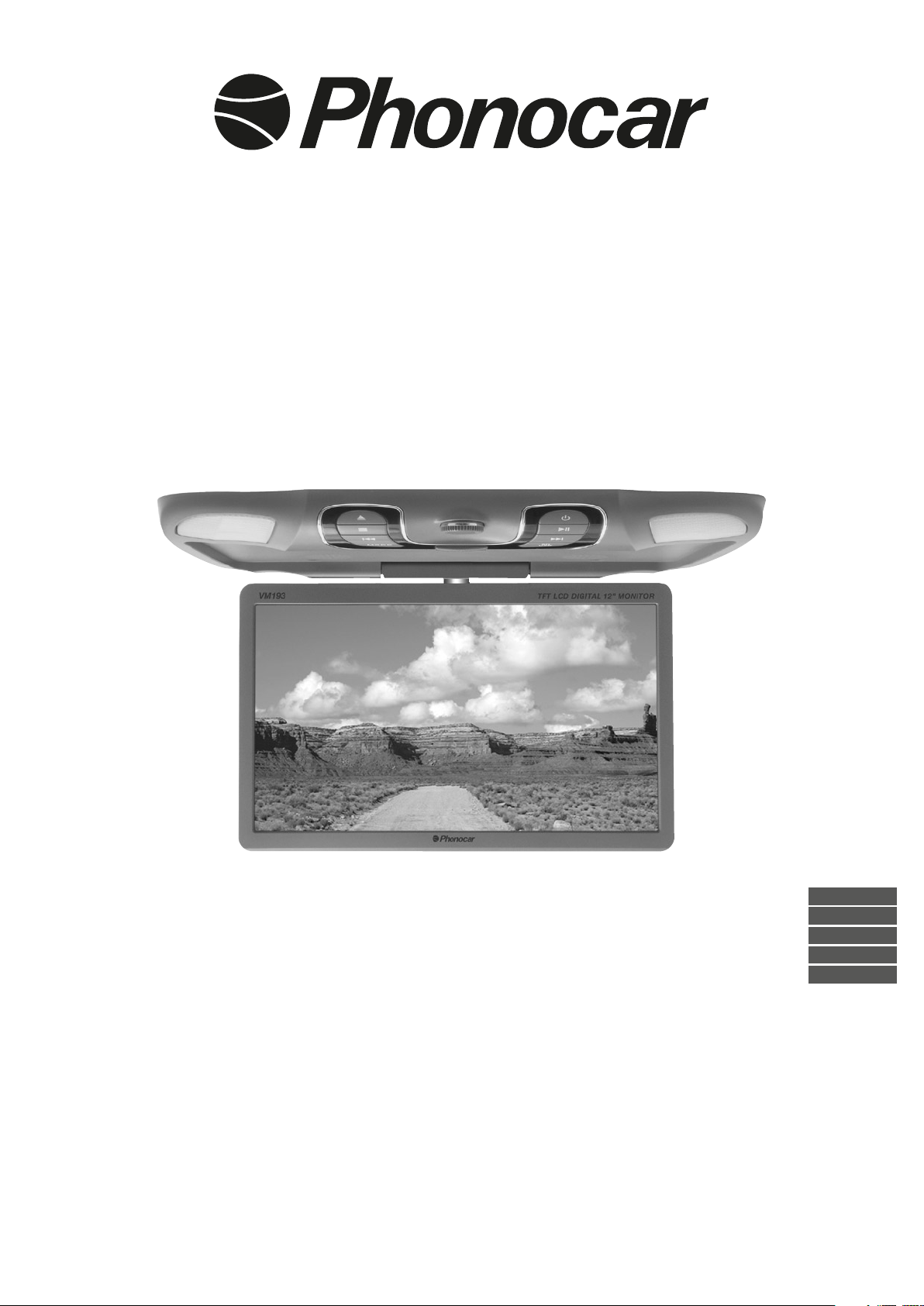
MONITOR
USB/SD PLAYER
12,1” - TFT/LCD
ISTRUZIONI DI MONTAGGIO
MOUNTING INSTRUCTIONS
INSTRUCTIONS DE MONTAGE
MONTAGE-ANLEITUNGEN
INSTRUCCIONES PARA EL MONTAJE
VM 193
ITALIANO
ENGLISH
FRANÇAIS
DEUTSCH
ESPAÑOL
Page 2
3
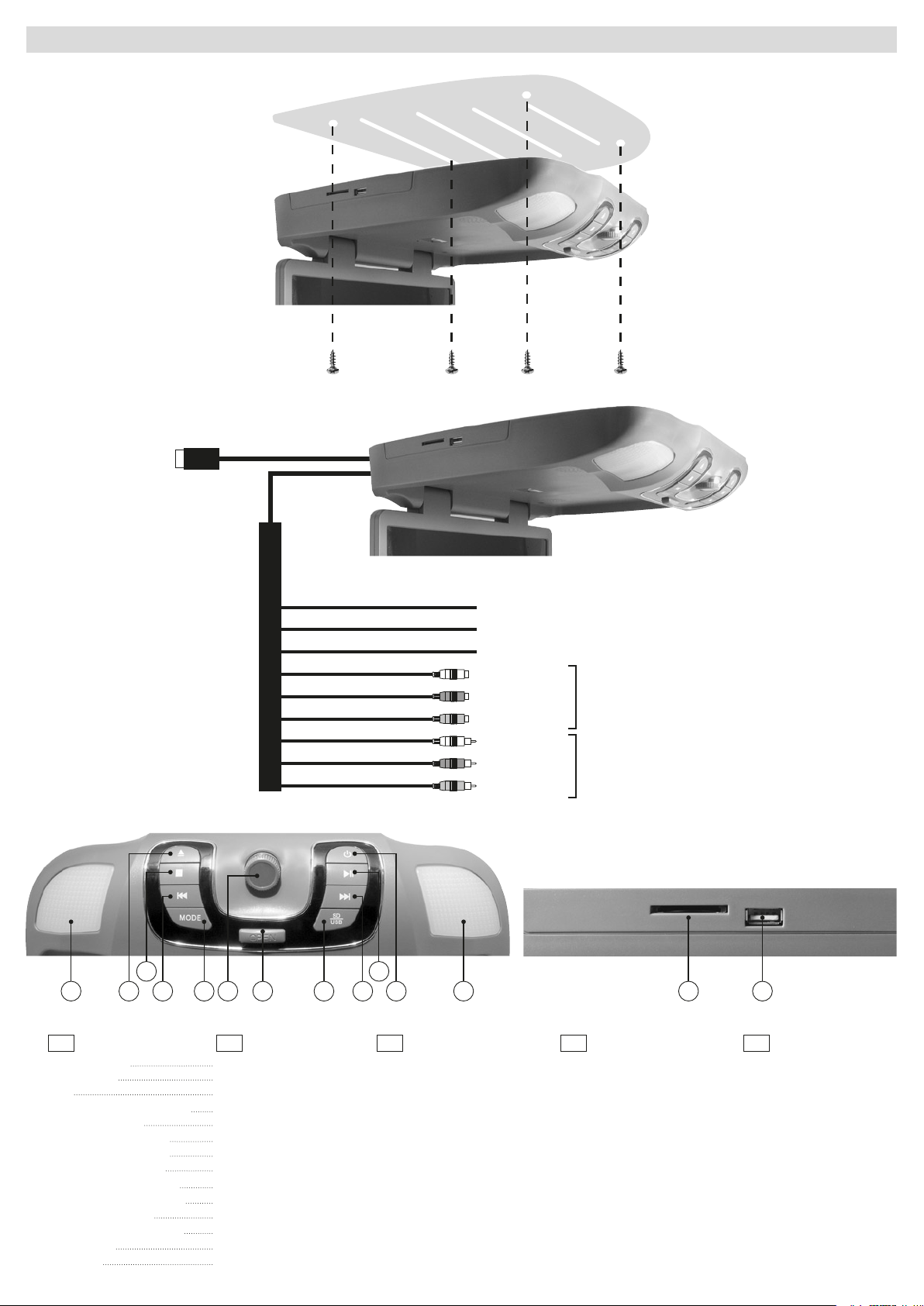
COLLEGAMENTI • CONNECTIONS • CONNEXIONS • ANSCHLÜSSE • CONEXIONS
INGRESSO/INPUT
USB
NERO/BLACK
ROSSO/RED
GIALLO/YELLOW
G N D
+12V DC SOTTOCHIAVE / INJECTION KEY
+12 V LUCI DI CORTESIA/ COURTESY LIGHTS
BIANCO/WHITE
ROSSO/RED
GIALLO/YELLOW
BIANCO/WHITE
ROSSO/RED
GIALLO/YELLOW
INGRESSO/INPUT A/V
USCITA/INPUT A/V
3 10
1 1
FUNZIONI / FUNCTIONS / FONCTIONS / FUNKTIONEN / FUNCIÓNES
I GB FR D E
1) Luci di cortesia
2) Non utilizzare
3) Stop
4) Precedente o Indietro veloce
5) Seleziona sorgente
6) Premere per Menu base
Ruotare per VOL+/VOL-
7) Apertura schermo LCD
8) Per selezionare USB o SD
9) Successivo o avanti veloce
10) Pausa e riproduzione
11) Accensione / Spegnimento
12) Slot SD Card
13) Porta USB
6
5 84 11
72
Courtesy-lights
Dot not use
Stop
Previous or fast Rewind
Select source
Press to enter basic Menu
Rotate to enter VOL+/VOL-
Opening the LCD screen
To select USB or SD
Next or fast Forward
Pause and Play
ON/OFF
SD CARD slot
USB port
9
Lumière de courtoisie
Ne pas utiliser
Stop
Précédente ou Revient rapide
Sélectionne Sources
Appuyez pour entrer base Menu
Tournez pour VOL + / VOLTouche ouverture LCD
Pour sélectionner USB ou SD
Successive ou Avance rapide
Pause et Reproduction
ON/OFF
Slot Carte SD
Port USB
12 13
Stand-Licht
Verwenden Sie keine
Stop
Titel vorher / Rückwärts
Quelle wählen
Drücken Sie Menü
Wenden Sie sich an VOL+ / VOL-
LCD-Bildschirm öffnen
Auf USB oder SD wählen
Titel nachher / Vorwärts
Pause und Wiedergabe
ON/OFF
SD CARD-Öffnung
USB-Öffnung
Luces de cortesía
No utilizar
Stop
Canción precedente / Atrás
Selecciona fuentes
Presionar para Menú de base
Girar para VOL + / VOL Abertura pantalla LCD
Seleccione USB o SD
Canción siguiente / Adelante
Pausa / Reproducción
ON/OFF
Ranura SD CARD
Puerto USB
Page 3
3
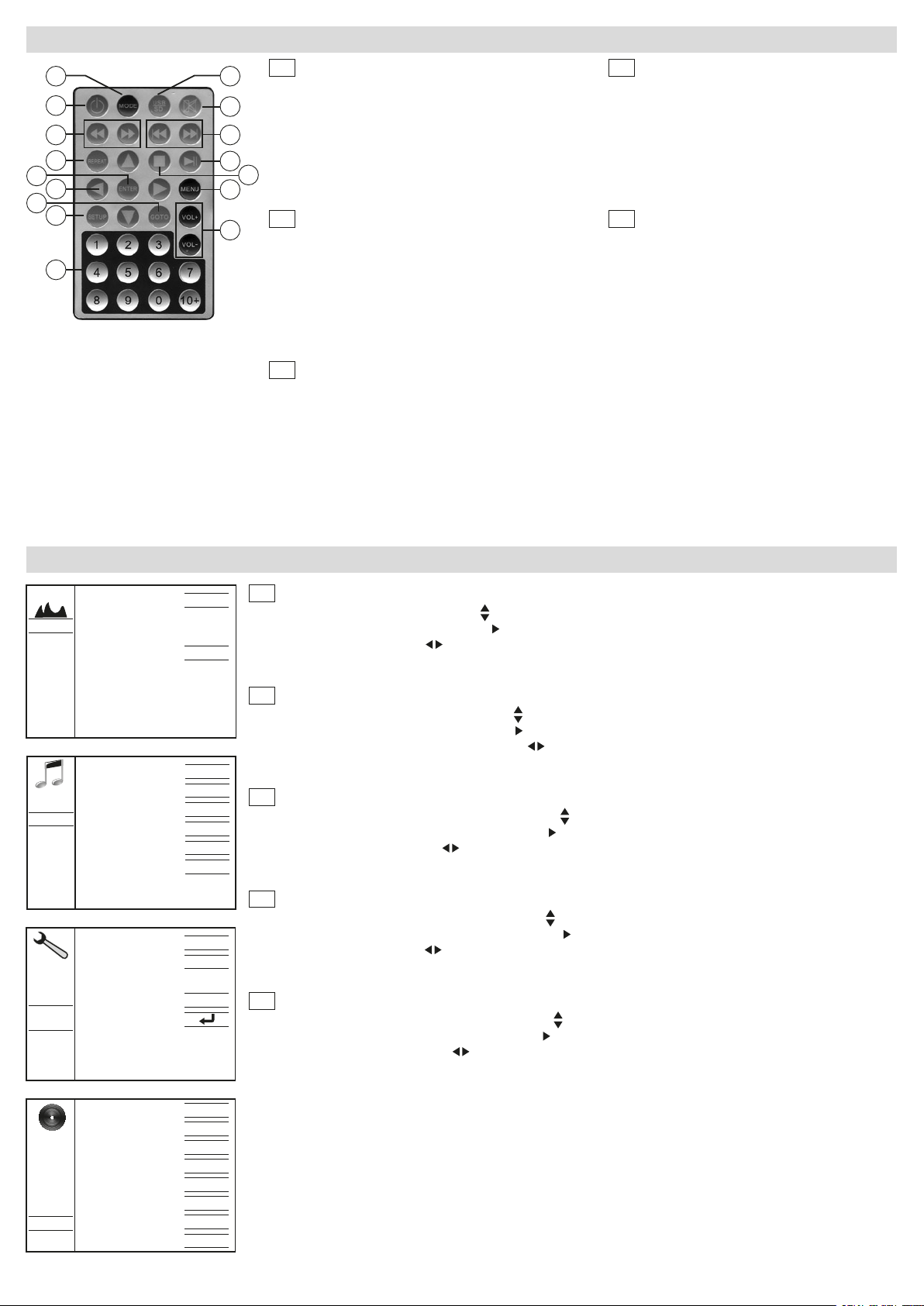
TELECOMANDO • REMOTE CONTROL • TÉLÉCOMMANDE • FERNBEDIENUNG • MANDO A DISTANCIA
1
2
3
4
16
15
14
13
5
6
7
8
11
10
9
I
1) Selezione sorgenti
2) ON/OFF
3) Avanti - Indietro
4) Ripeti
5) Conferma selezione
6) Tasti direzionali
12
7) Funzione precedente
8) Menù configurazione
GB
1) Select Sources
2) ON/OFF
3) Forward / Backward
4) Repeat
5) Confirm selection
6) Cursor-moving keys
7) Back to previous function
8)Setup
9) Tastiera numerica
10) Volume - / Volume +
11) Menù regolazioni
12) Ferma riproduzione
13) Riproduzione / Pausa
14) Tr. succ. / prec.
15) Silenzia audio
16) Seleziona USB / SD
9) Number-keys
10) Vol - / Vol +
11) Settings menu
12) Stop playback
13) Play / Pause
14) Track after / before
15) Mute
16) Select sources USB/SD
FR
1) Sélectionne Sources
2) ON/OFF
3) Forward / Backward
4) Repeat
5) Confirm selection
6) Déplacement curseur
7) Fonction précédente
8)Menu configuration
9) Clavier numérique
10) Vol - / Vol +
11) Menu paramètres
12) Stop reproduction
13) Reproduction / Pause
14) Tr. successive / précédente
15) Mute
16) Sélectionne USB/SD
D
1) Quelle wählen
2) ON/OFF
3) Vorwärts / Rückwärts
4) Repeat
5) Wahl bestätigen
6) Läufer-Bewegungstasten
7)Vorherige Funktion
8) Konfigurations-Menü
9) Nummern-Tasten
10) Laut - / Laut +
11) Setup-Menü
12) Wiedergabe stoppen
13) Wiedergabe / Pause
14) Titel nachher / vorher
15) Mute
16) Wählen Sie USB / SD
E
1) Selecciona fuentes AV
2) ON/OFF
3) Adelante - Atrás
4) Repite
5) Confirma selección
6) Desplazamiento del cursor
7) Función precedente
8) Menú de configuración
10) Volumen - / Volumen +
11) Ajustes del menú
12) Stop reproducción
13) Pausa / Reproducción
14) Canción precedente
Canción siguiente
15) Mute
16) Selección USB / SD
9) Teclado numérico
IMMAGINE
SUONO
SYSTEM
SET UP
IMPOSTAZIONI • SETUP • REGLAGE • EINSTELLUNGEN • CONFIGURACIÓN
STANDARDPICTURES MODE
TEMP. COLORE STANDARD
STANDARDSOUND MODE
DOWN MIX LT/RT
OP MODE LINE OUT
DISATTIVADYNAMIC RANGE
IR OUT DISATTIVA
FM OUT DISATTIVA
ITALIANLINGUA
ORARIO OSD NEVER
VIDEO OUTPUT DISATTIVA
RIPRISTINA
I
• Per accedere al Menu premere il tasto MENU sul telecomando o il tasto (6) sul pannello.
• Per selezionare il sottomenu premere i tasti
• Per selezionare la funzione premere ENTER o
• Per modificare i valori premere
ENTER sul Telecomando.
• Per uscire dal menù impostazioni premere il tasto MENU sul telecomando.
GB
• To get the Menu, press MENU-key on the remote control or the key (6) on panel.
• To select the requested Sub-Menu press the keys
• To select the requested Function, press ENTER or
• To modify the settings, press remote-control-keys
on the remote-control.
• To quit the Set-Up-Menu, press MENU on the remote control.
F
• Pour accéder au Menu, appuyer la touche MENU sur la télécommande ou la touche (6) sur le panneau.
• Pour sélectionner le sous-menu désiré appuyer les touches
• Pour sélectionner la fonction désirée, appuyer ENTER ou
• Pour modifier les valeurs, appuyer
touche ENTER sur la télécommande.
• Pour sortir du menu des réglages, appuyer la touche MENU.
D
• Um das Menü zu betreten, MENÜ-Taste auf dem fernbedienung drücken. Sie die Menü-Taste (6) auf dem Bedienfeld.
• Um das gewünschte Unter-Menü zu betreten die Tasten
• Um die gewünschte Funktion zu wählen, Taste ENTER oder
• Um Einstellungen abzuändern,
Fernbedienung oder Drehknopf auf dem Bedienteil verwenden. Dann mit ENTER-
Taste auf der Fernbedienung bestätigen.
• Um das Einstellungs-Menü wieder zu verlassen, oder Taste MENU.
E
• Para acceder al Menú presionar la tecla MENU en el mando a distancia o el botón (6) en el panel.
• Para seleccionar el submenú deseado presionar las teclas en el mando a distancia.
• Para seleccionar la función deseada presionar ENTER o
• Para modificar los valores presionar
tecla ENTER en el mando a distancia.
• Para salir del menú de ajuste presionar la tecla MENU.
sul telecomando.
sul Telecomando.
sul telecomando oppure ruotare il tasto rotativo sul pannello e confermare con tasto
on the remote-control.
on the remote-control.
or rotate knob on the panel. Then confirm by pressing ENTER
sur la télécommande.
sur la télécommande.
sur la télécommande ou tourner le bouton rotatif sur le panneau et valider avec la
oder die Richtungs-Tasten auf der Fernbedienung.
auf der Fernbedienung drücken.
en el mando a distancia.
en el mando a distancia, o bien girar el mando giratorio y confirmar con la
SCREEN SAVER DISATTIVA
ASPETTO 4:3 LB
SOMMARIO ON
AUDIO LANG. ENGLISH
SUBTITLE LANG. ENGLISH
PLAYER
MENU LANG. ENGLISH
AUTOTV SYSTEM
-----------PASSWORD
Page 4
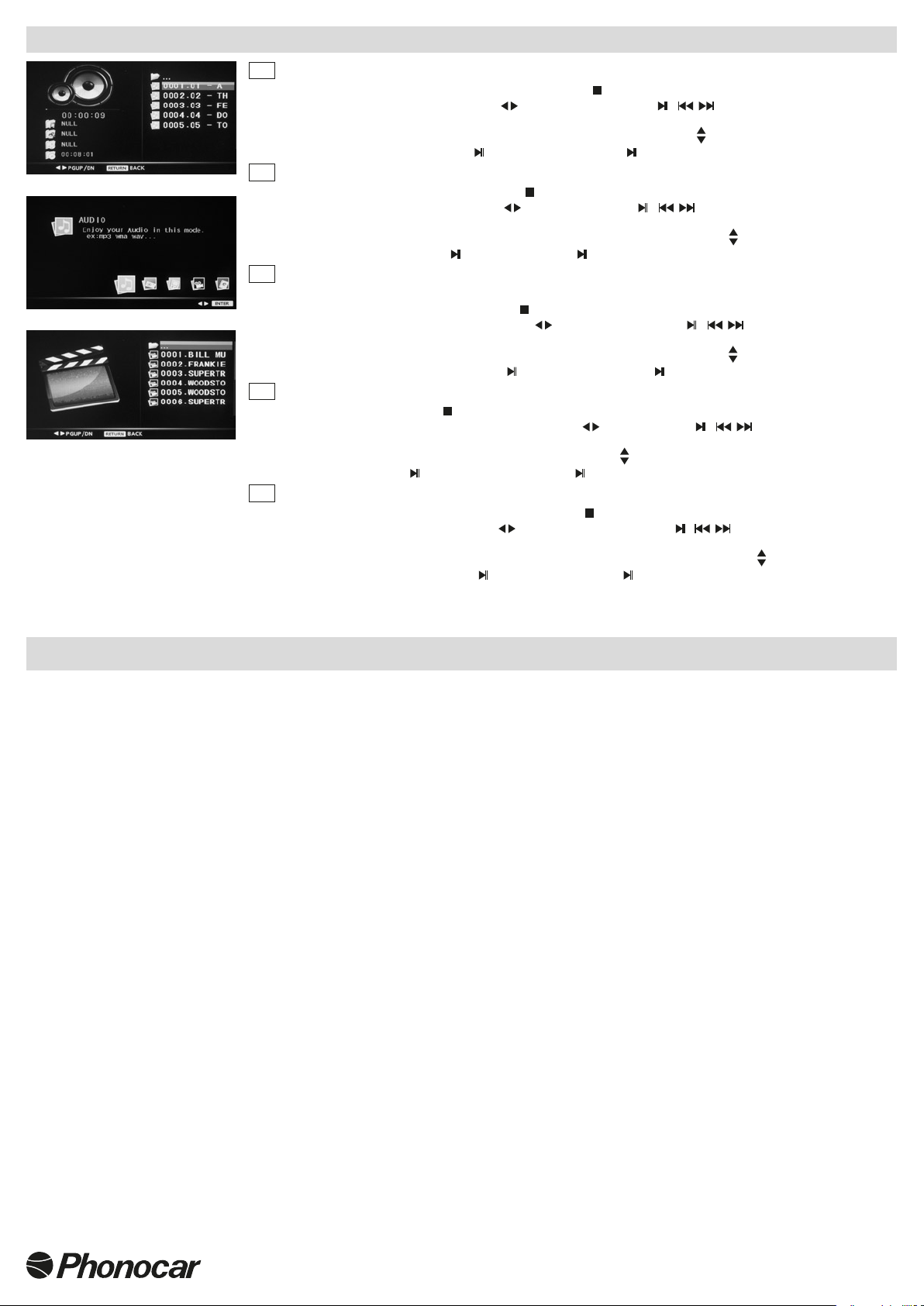
FUNZIONI • FUNCTIONS • FONCTIONS • FUNKTION • FUNCION USB / SD CARD
I
• Dopo aver inserito USB o SD CARD la riproduzione si attiverà in automatico con i brani musicali.
• Per tornare al menu USB / SD Card premere due volte il tasto
• Per muoversi nel menù USB/ SD usare i tasti
sul telecomando oppure / sul pannello.
• Per confermare la scelta premere ENTER sul telecomando.
• Per muoversi nell’elenco dei: brani / immagini / giochi / video / ebook usare i tasti
• Per riprodurre premere il tasto ENTER o
GB
• Once USB or SD have been introduced, reproduction starts automatically from the musical tracks.
• To return to the USB/SD-Menu, press related key
• To move within the USB/SD-Menu, press key
sul telecomando, oppure sul pannello.
twice, either on panel or on remote-control.
on remote-control or / on the panel.
• To confirm selection, press ENTER on the remote-control.
• To move within the lists: Tracks / Pictures / Games / Videos / e-books, use related keys
• To start reproduction, press ENTER
F
• Après avoir insérée la USB ou Carte SD, la reproduction s’activera automatiquement en commençant par les
on remote-control or on the panel.
chansons.
• Pour retourner au menu USB/Carte SD, appuyer
• Pour parcourir le menu USB/SD utiliser les touches
deux fois la touche sur le panneau ou sur la télécommande.
sur la télécommande ou / sur le panneau.
• Pour confirmer le choix, appuyer ENTER sur la télécommande.
• Pour parcourir la liste des: morceaux / images / jeux / vidéo / ebook, utiliser les touches
• Pour reproduire, appuyer la touche ENTER ou
D
• Nachdem USB oder SD eingegeben worden sind, startet die Wiedergabe automatisch bei den Musikstücken.
• Zurück zum USB/SD-Menü: Taste
2 Mal drücken, entweder auf Bedienteil oder Fernbedienung.
sur la télécommande, ou sur le panneau.
• Bewegungen innerhalb des USB/SD-Menüs: Fernbedienung
• Wahl bestätigen: ENTER auf der Fernbedienung drücken.
• Register-Handhabung: Stücke / Bilder / Spiele / Videos / E-books,
• Wiedergabe starten: ENTER
E
• Después de introducir la USB o SD CARD la reproducción se activara automáticamente con los archivos de música.
drücken, auf Fernbedienung oder Bedienteil.
• Para volver al menú USB / SD Card presionar dos veces la tecla
• Para desplazarse en la USB/ SD usar las teclas
en el mando a distancia o bien / mediante las teclas de la pantalla.
• Para confirmar la elección presionar ENTER en el mando a distancia.
• Para desplazarse en el listado de las canciones / imágenes / juegos / video / ebook usar las teclas
• Para reproducir presionar la tecla ENTER o
en el mando a distancia o bien en el teclado de la pantalla.
sul pannello o sul telecomando.
.
.
.
verwenden oder / auf dem Bedienteil.
Tasten verwenden.
en el teclado de la pantalla o bien en el mando a distancia.
.
CARATTERISTICHE TECNICHE • TECHNICAL SPECIFICATIONS • CARACTERISTIQUES TECHNIQUES
TECHNISCHE DATEN • CARACTERISTICAS TECNICAS
• Formato / Aspect ratio 16:9-4:3
• Sistema / System PAL/NTSC auto-switch
• Risoluzione / Resolution RGB 800 (H) x 600 (V)
• Angolo di visione / View angle 60°-70° orizzont. - 45-65° vertic.
• Regolazioni colore/contrasto/luminosità / Regulations color/contrast/brightness
• Trasmettitore IR integrato per cuffie senza fili/ Built in infrared transmitter for wireless headphones
• Trasmettitore IR 2 canali / Double channel IRtransmitter
• 1 Porta / Port USB 8 GB MAX
• 1 Slot SD Card 8 GB MAX
• Con 2 altoparlanti integrati / With 2 integrated speakers
• Memoria ultima posizione / Last memory position
• Menùmultilingue/Multilanguage menu
• Telecomando infrarossi con tutte le funzioni / Full Function Wireless Remote Control
•
Interruttore luci / Car lighting switch
• 1 Ingresso / Input Audio/Video
• 1Uscita/Ouput Audio/Video
• Alimentazione / Power DC12
• Dimensioni / Dimensions: L. 330 - P. 320 - H. 60 mm.
• Compatibilità / Compatible: MP3-MP4-MP5-JPEG-JPG-TXT-PDF
S.p.A. - Via F.lli Cervi, 167/C • 42124 Reggio Emilia (Italy) • Tel. ++39 0522 941621 • Fax ++39 0522 942452
 Loading...