

Page 1
Register your product and get support at
www.philips.com/welcome
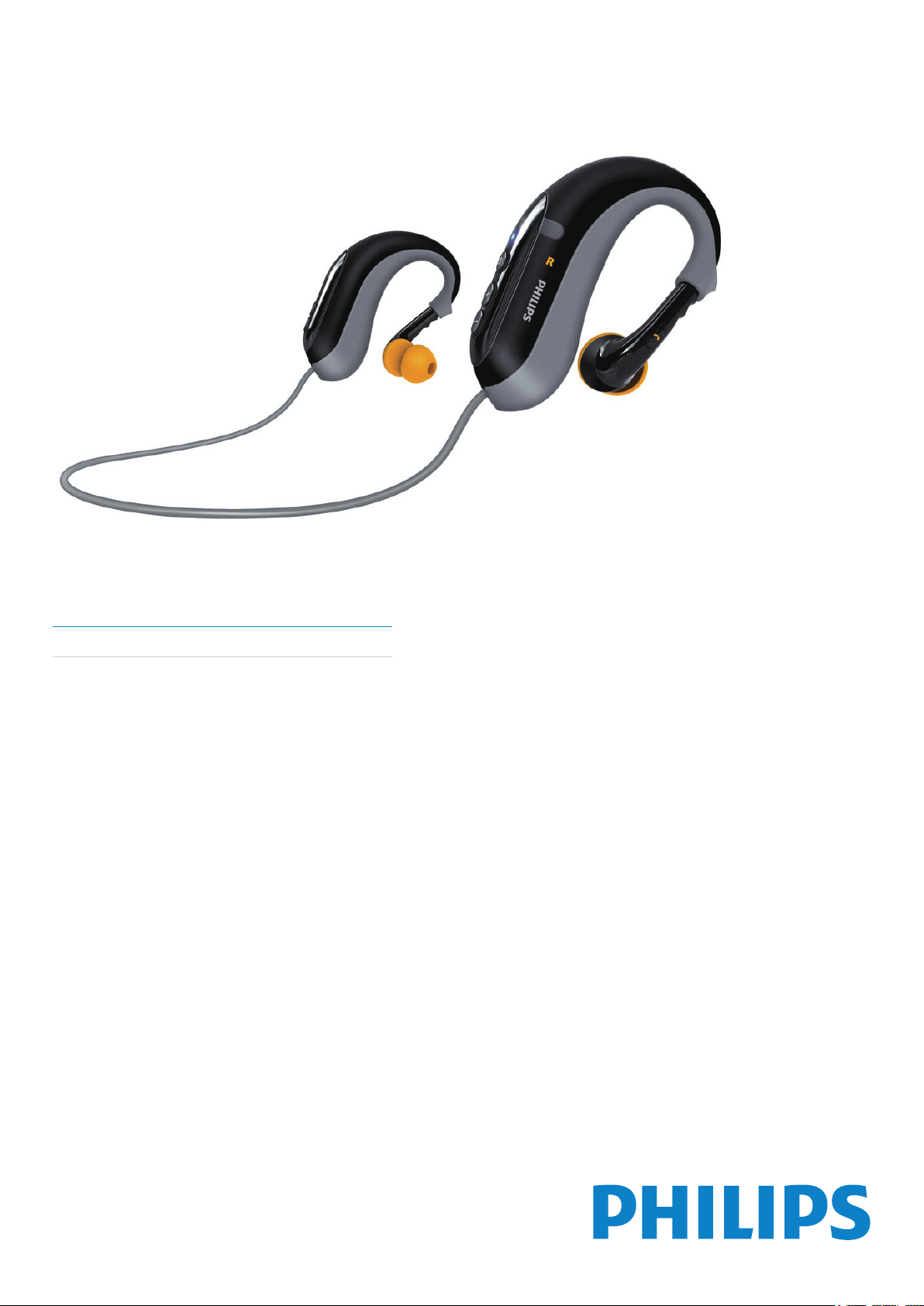
Bluetooth stereo headset
SHB6000/28
EN User manual
Page 2

Contents
1 Important 2
Hearing Safety 2
Electric-, Magnetic- and Electromagnetic Fields (EMF) 2
General information 2
Disposal of your old product 2
Battery disposal 2
Remove the integrated battery 2
Notice for USA (FCC) 3
Notice for Canada 3
Trademarks 3
2 Your bluetooth stereo headset 4
Introduction 4
What’s in the box 4
Compatibility 4
Overview of your Bluetooth stereo headset 5
3 Get started 6
Charge the headset 6
Pair the headset with your mobile phone 6
4 Use the headset 7
Connect the headset to your mobile phone 7
Automatic power saving 7
Get the best t 7
Operate the headset 7
Manage 3-way calls 7
LED and sound indication 7
Clean the headset 7
English
5 Technical data 8
6 Frequently asked questions 9
EN
1
Page 3
2
1 Important
Hearing Safety
Danger
To avoid hearing damage, limit the time you use the headphones at high volume and set •
the volume to a safe level. The louder the volume, the shor ter is the safe listening time.
Be sure to observe the following guidelines when using your
headphones.
Listen at reasonable volumes for reasonable periods of time.•
Be careful not to adjust the volume continuously upwards as •
your hearing adapts.
Do not turn up the volume so high that you can’t hear what’s •
around you.
You should use caution or temporarily discontinue use in •
potentially hazardous situations.
Excessive sound pressure from earphones and headphones •
can cause hearing loss.
Using this headset with both ears covered while driving is not •
recommended and may be illegal in some areas while driving.
For your safety, avoid distractions from music or phone calls •
while in trafc or other potentially dangerous environments.
Electric-, Magnetic- and Electromagnetic Fields (EMF)
About operating and storage temperatures
Do not operate or store in a place where temperature is •
below -15ºC (5ºF) or above 55ºC (131ºF) as this may shor ten
your battery life.
The integrated battery shall not be exposed to excessive heat •
such as sunshine, re or the like.
Ensure that there is no foreign objects inside the USB cover •
and close the cover tightly.
Disposal of your old product
Your product is designed and manufactured with high quality
materials and components, which can be recycled and reused.
When this crossed-out wheeled bin symbol is attached to a product
it means that the product is covered by the European Directive
2002/96/EC.
Please inform yourself about the local separate collection system for
electrical and electronic products.
Please act according to your local rules and do not dispose of your
old products with your normal household waste. Correct disposal of
your old product helps to prevent potential negative consequences
for the environment and human health.
Battery disposal
Your product contains batteries covered by the European Directive
2006/66/EC, which cannot be disposed of with normal household
waste.
1. Royal Philips Electronics manufactures and sells many products
targeted at consumers, which, like any electronic apparatus, in
general have the ability to emit and receive electromagnetic signals.
2. One of Philips’ leading Business Principles is to take all necessary
health and safety measures for our products, to comply with all
applicable legal requirements and to stay well within the EMF
standards applicable at the time of producing products.
3. Philips is committed to develop, produce and market products that
cause no adverse health effects.
4. Philips conrms that if its products are handled properly for their
intended use, they are safe to use according to scientic evidence
available today.
5. Philips plays an active role in the development of international
EMF and safety standards, enabling Philips to anticipate further
developments in standardization for early integration in its products.
General information
To avoid damage or malfunction:
Do not expose the headset to excessive heat.•
Do not drop your headset.•
The headset can be washable under running water while •
the USB charging cable or USB power adaptor shall not be
exposed to dripping or splashing.
Do not allow your headset to be submerged in water.•
Do not use any cleaning agents containing alcohol, ammonia, •
benzene, or abrasives.
The main plug of AC/DC adaptor is used as the disconnect •
device, the disconnect device shall be readily operable.
Please inform yourself about the local rules on separate collection
of batteries. The correct disposal of batteries helps prevent
potentially negative consequences on the environment and human
health.
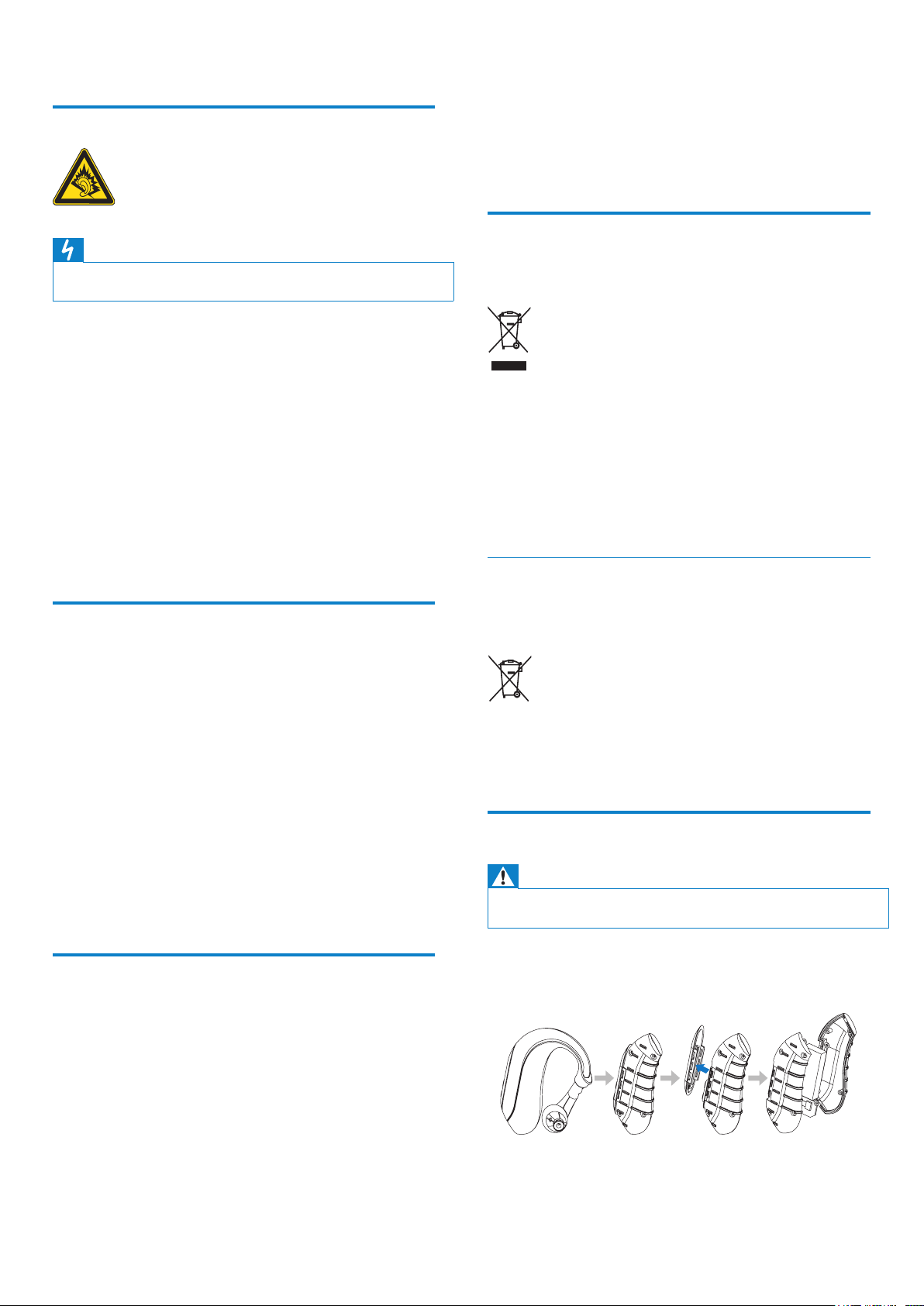
Remove the integrated battery
Warning
Make sure the headset is disconnec ted from the USB charging cable •
before removing the bat tery.
If there is no collection/recycling system for electronic products in
your country, you can protect the environment by removing and
recycling the battery before disposing the headset.
EN
Page 4
3
Notice for USA (FCC)
This device complies with Part 15 of the FCC Rules. Operation is
subject to the following two conditions: (1) this device may not cause
harmful interference, and (2) this device must accept any interference
received, including interference that may cause undesired operation.
This equipment has been tested and found to comply with the limits
for a Class B digital device, pursuant to part 15 of the FCC Rules.
These limits are designed to provide reasonable protection against
harmful interference in a residential installation. This equipment
generates, uses and can radiate radio frequency energy and, if not
installed and used in accordance with the instruction manual, may
cause harmful interference to radio communications.
However, there is no guarantee that interference will not occur
in a particular installation. If this equipment does cause harmful
interference to radio or television reception, which can be
determined by turning the equipment off and on, the user is
encouraged to try to correct the interference by one or more of the
following measures:
Relocate the receiving antenna.•
Increase the separation between equipment and receiver.•
Connect the equipment into an outlet on a circuit different •
from that to which the receiver is connected.
Consult the dealer or an experienced radio/TV technician for •
help.
Warning
Changes or modications made to this equipment not expressly approved •
by Philips may void the FCC authorization to operate this equipment.
English
Note
FCC/IC Radiation Exposure Statement: This equipment complies •
with FCC/IC r adiation exposure limits set forth for an uncontrolled
environment. End users mus t follow the specic operating instructions for
satisfying RF exposure compliance.
This transmitter must not be co-located or operating in conjunction with •
any other antenna or transmit ter.
Philips Consumer Lifestyle
A division of Philips Electronics North America Corporation
P.O.Box 10313
Stamford, CT 06904
Phone: 1-888-PHILIPS (744-5477)
Notice for Canada
Operation is subject to the following two conditions:
a This device may not cause interference3 and
b This device must accept any interference, including
interference that may cause undesired operation of the
device. The term “IC:” before the certication / registration
number only signies that registration was performed based
on a Declaration of Conformity indicating that Industry
Canada technical specications were met. It does not imply
that Industry Canada approved the equipment.
Trademarks
Trademarks are the property of Koninklijke Philips Electronics N.V.
or their respective owners. The Bluetooth word mark and logos
are owned by the Bluetooth SIG, Inc. and any use of such marks by
Koninklijke Philips Electronics N.V. is under license.
EN
Page 5
4
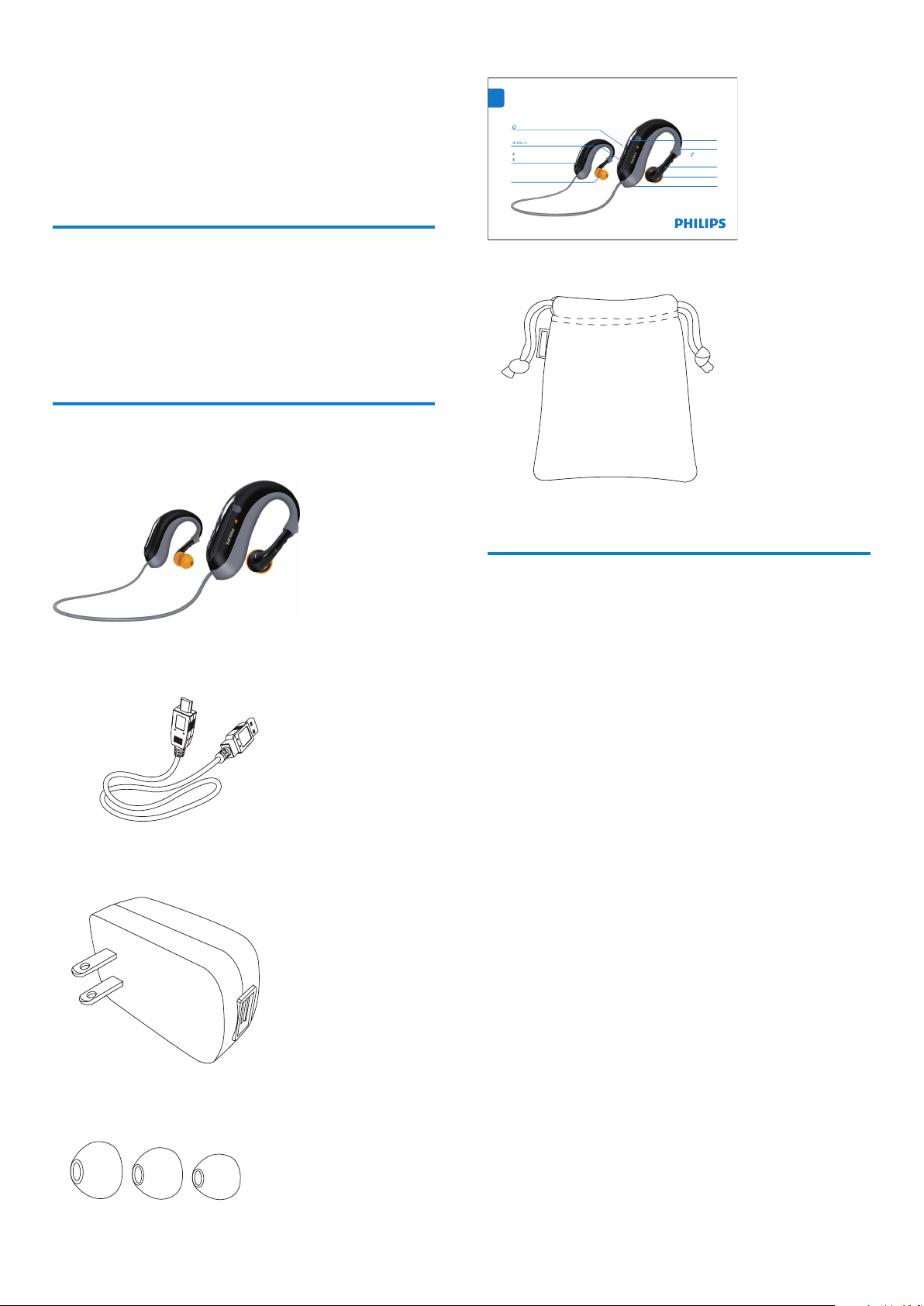
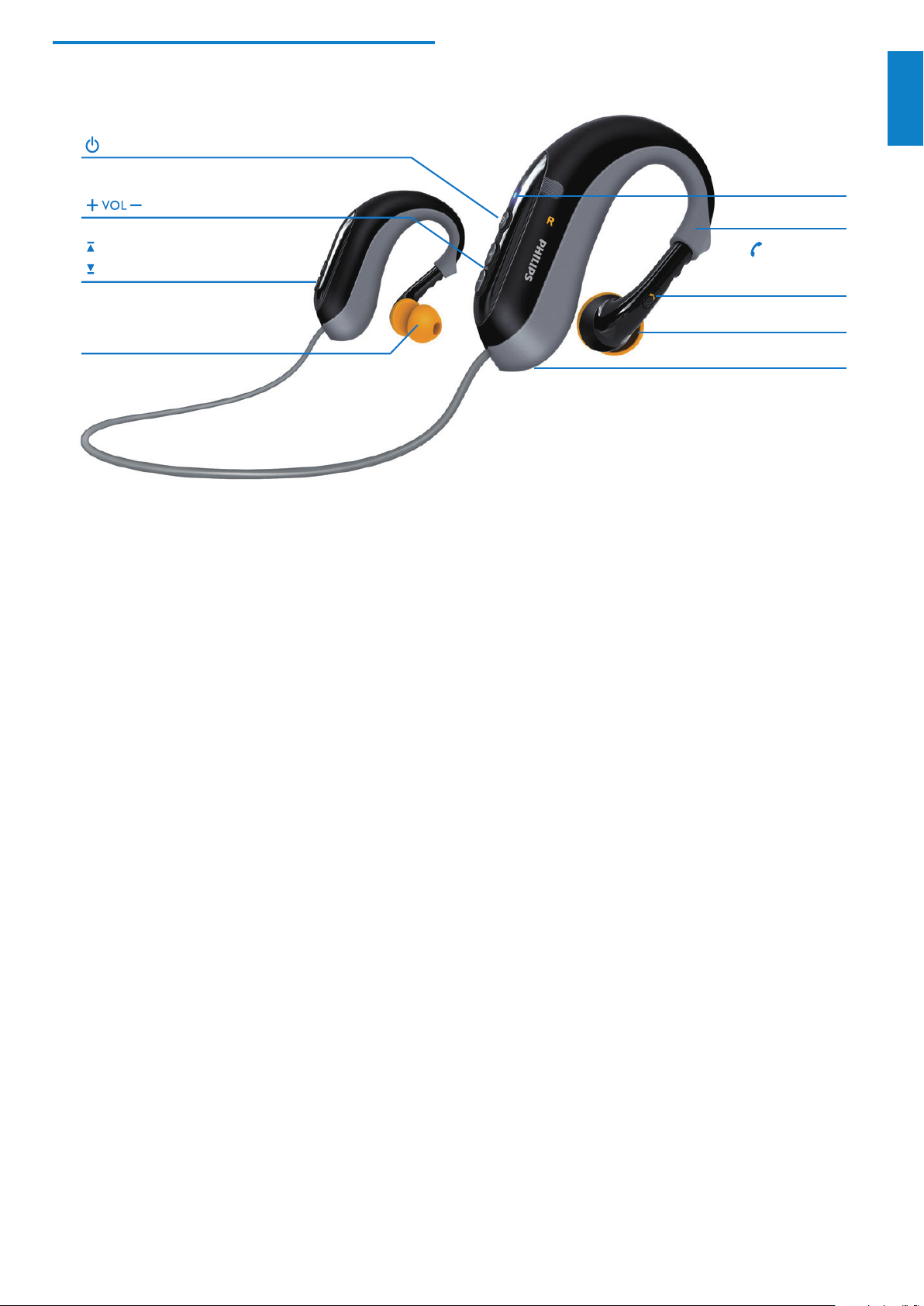
Exchangeable ear caps
Next track
Power on/off
Volume control
Previous track
Mic
LED indicator light
Adjustable ear hook
Pick/End call
Play/Pause music
Charging socket
EN
Quick Start Guide
Philips Bluetooth stereo headset SHB6000
2 Your bluetooth stereo
headset
Congratulations on your purchase, and welcome to Philips! To fully
benet from the support that Philips offers, register your product at
www.philips.com/welcome.
Exchangeable rubber ear caps•
Introduction
With the Philips Bluetooth stereo headset SHB6000, you can enjoy
convenient wireless hands-free call. Ergonomically designed soft ear
bud provides all-day wearing comfort. You can simply recharge your
headset on your computer or with a USB charger.
Spend a few minutes to learn more about your headset to enjoy your
Philips Bluetooth stereo headset to its fullest.
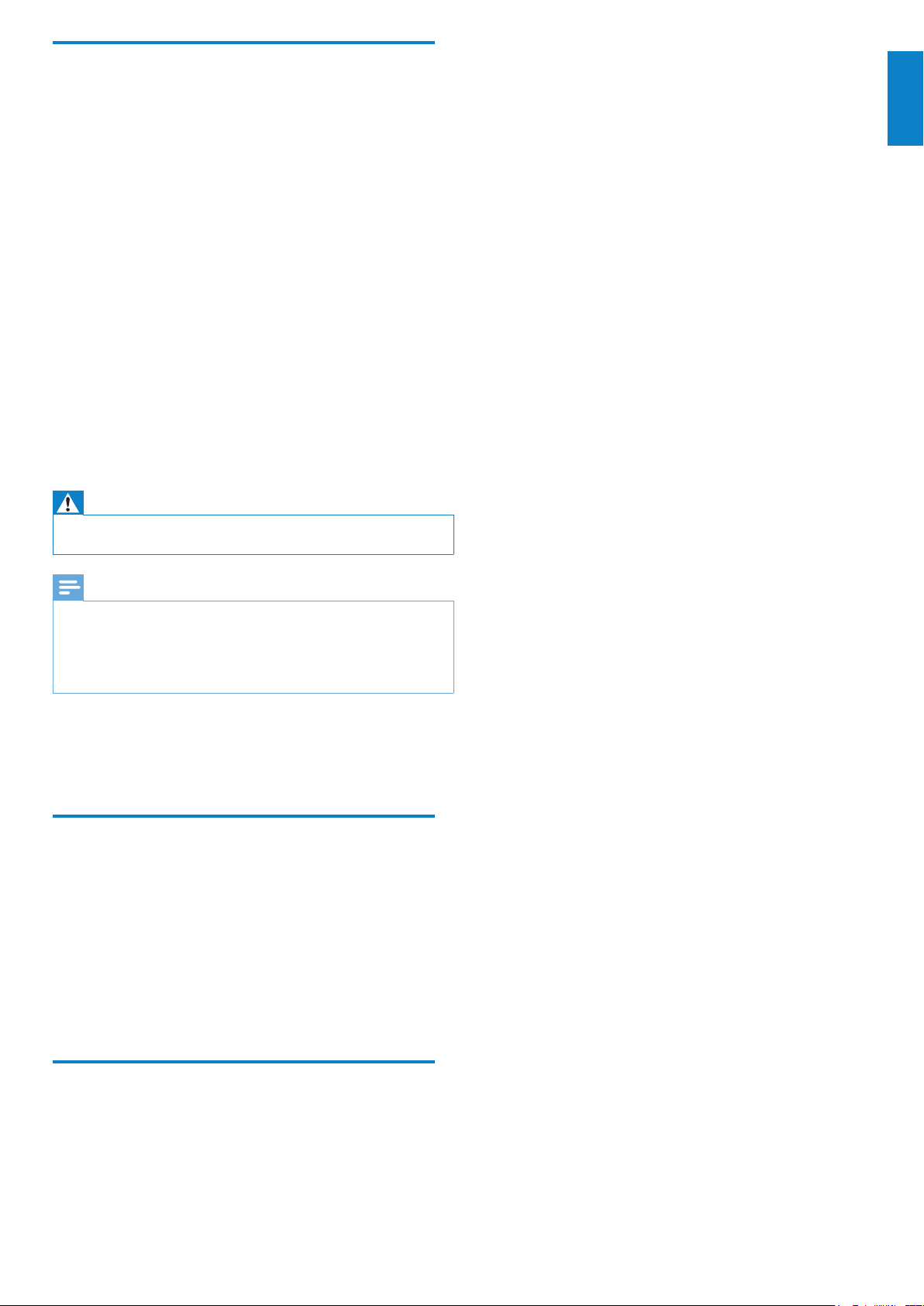
What’s in the box
Check and identify the contents of your package:
Bluetooth headset•
Quick star t guide•
Pouch•
Compatibility
Your headset is compatible with Bluetooth enabled mobile phones.
It features Bluetooth version 2.1+EDR. It also works with devices
featuring other Bluetooth versions that support the Headset prole
(HSP), Hands-free prole (HFP) and Audio/Video remote control
prole (AVRCP).
USB charging cable •
USB adaptor•
EN
Page 6
5
Overview of your Bluetooth stereo
Exchangeable ear caps
Next track
Power on/off
Volume control
Previous track
Mic
LED indicator light
Adjustable ear hook
Pick/End call
Play/Pause music
Charging socket
headset
English
EN
Page 7
6
Settings
Select
Back
Connectivity
10:37
Enter Password
****
0000
Settings
Bluetooth
Select
Back
Connectivity
10:35
Add
Bluetooth
device
Settings
Devices Found
Select
Back
10:36
Philips SHB6000
3 Get started
Charge the headset
Warning
Before you use your headset for the rst time, charge the bat tery for four •
hours for optimum battery capacity and lifetime.
Use only the original USB charging cable to avoid any damage. •
Finish your call before charging the headset, as connecting the headset for •
charging will power off the unit.
You can operate the headset normally during charge. •
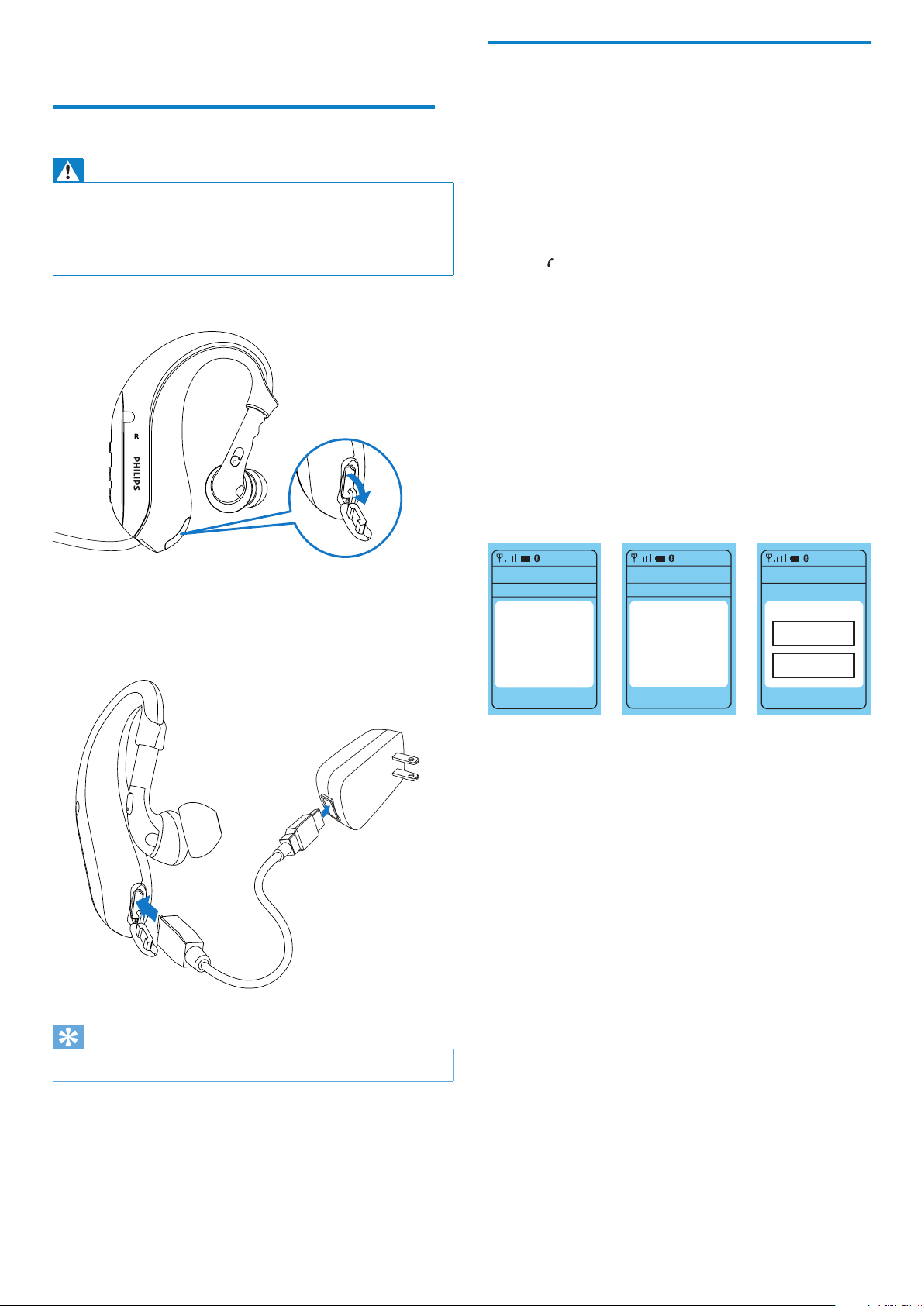
1 Remove the USB cap.
Pair the headset with your mobile phone
Before you use the headset with a mobile phone for the rst time,
pair it with the mobile phone. A successful pairing establishes a
unique encrypted link between the headset and the mobile phone.
The headset stores the last eight links in the memory. If you try to
pair more than eight devices, the link for the earliest paired device is
overwritten.
1 Ensure that the mobile phone is turned on and its Bluetooth
feature is activated.
2 Ensure that the headset is charged and turned off.
3 Press until the LED starts ashing red and blue alternately.
Do not stop pressing the button after seeing the blue LED
only.
The headset is in pairing mode, which lasts ve minutes. »
4 Pair the headset with the mobile phone. For details, refer to
the user manual of the mobile phone.
A sample pairing is shown below.
1 Under Bluetooth menu on the mobile phone, search for the
headset.
2 On mobile phones using Bluetooth 2.1+EDR or higher, you do
not need to enter a pass code.
3 From the found devices, select Philips SHB6000.
Enter “• 0000” (4 zeros), if prompted to enter the pin code
of the headset.
2 Plug the headset into the USB adaptor with USB charging
cable.
LED turns red during charge and turns off when the headset »
is fully charged.
Tip
Typically, a full charge takes two hours. •
EN
Page 8
7
4 Use the headset
Connect the headset to your mobile phone
1 With the mobile phone turned on, press until the LED lights up,
to turn on the headset.
Once turned on, the headset reconnects automatically to »
the last device it was connected to.
If the last connected device is not available, the headset »
tries to reconnect to the second to last device that was
connected to the headset. If it cannot nd this device, it
will look for all previously paired devices in the order of
last usage, until it nds a device to connect to. The headset
stores up to eight previously paired devices.
Tip
If you turn on the mobile phone or its Bluetooth feature • after turning
on the headset, connect the headset from the Bluetooth menu of your
mobile phone.
Automatic power saving
Operate the headset
Enter pairing mode Ensure the headset is off. Press until
Check battery When rst use: Hold for 2 seconds.
Turn headset on/off Hold until LED turns on/off.
Play/Pause music Tap
Stop music Hold
Next / Previous track Tap /
Adjust volume Press VOL +/VOL -
Pick up / End a call Tap
Reject a call Hold
Redial the last number Press twice quickly.
Activate voice dialing* Hold until beep occurs.
Mute/Unmute the Mic Double tap during a call.
Transfer a call to a
mobile phone
* Available if supported by your mobile phone.
LED starts blinking red/blue alternately.
During operation: Hold VOL + and VOL
- simultaneously.
>50%: 1 blue ash
>25%: 2 red ash
<25%: 3 red ash
Hold during a call.
English
If the headset cannot nd any Bluetooth device to connect to in
range within ve minutes, it automatically powers down to save
battery life.
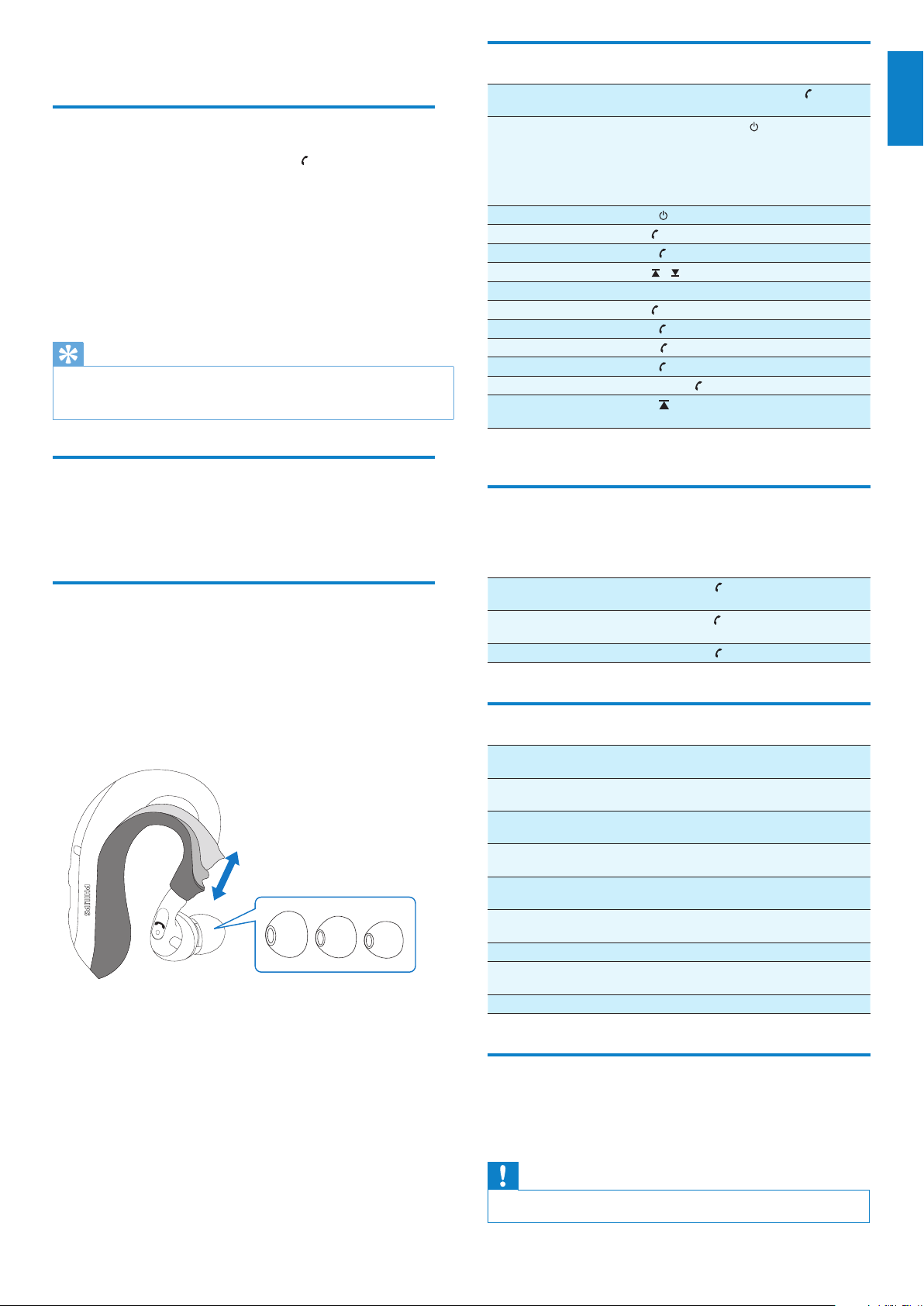
Get the best t
1 Choose the earbuds that best t for your ear canal.
2 Gently blend the ear hook to t into your ears.
3 Adjust the rubber part of the ear hook to the height that you
feel t.
4 Twist the earbuds to the right position for best t and noise
isolation.
Manage 3-way calls
If your mobile phone and network operator support 3-way-calls, you
can manage 3-way-calls via the headset.
To hold the active call and
accept a waiting call
To drop the active call and
accept a waiting call
To swap a call Press during a call.
Press while the 2nd call is
coming in.
Hold while the 2nd call is
coming in.
LED and sound indication
The red/blue LED ashes alternately. The headset is ready for
The blue LED ashes once ever y 3
seconds.
The blue LED ashes twice every 3
seconds.
The blue LED ashes once ever y half
a second.
The blue LED ashes once ever y
second.
The red LED ashes three times and
beeps twice ever y minute.
Solid red LED. The headset is charging.
The LED is off. The headset is off./Charging
The headset beeps every 5 seconds. The Mic is muted.
pairing.
The headset is connected
to the device.
The headset is not
connected.
There is an incoming/
outgoing call.
The headset is active on
a call.
The battery is low in
powe r.
is nished.
Clean the headset
A few ways to clean the headset:
Wipe with clean cloth.•
Wash it under running tape water.•
Caution
Do not dive with this product or immerse it into water. •
EN
Page 9

8
5 Technical data
Up to 4.5 hours of playtime or 5 hours of talk time•
Up to 200 hours of standby time•
Typical time for a full charge: 2 hours•
Rechargeable Lithium-Polymer battery (105 mAh)•
Bluetooth 2.1+EDR, Bluetooth stereo suppor t •
(A2DP-Advanced Audio Distribution Prole, AVRCP-Audio/
Video Remote Control Proie), Bluetooth mono support
(HSP-Headset Prole, HFP-Hands-Free Prole)
Acoustic echo cancelation •
Dual mic noise suppression•
Adjustable ear hook•
Noise isolating in-ear design•
Operating range up to 10 meters (33 feet)•
3 sizes of ear caps included•
Quick-dry pouch included•
Sweat proof and fully washable•
Specications are subject to change without notice.
EN
Page 10

9
6 Frequently asked
questions
No connection to a mobile phone.
Bluetooth disabled.•
Enable the Bluetooth feature on your mobile phone and »
turn on the mobile phone before you turn on the headset.
Pairing does not work.
The headset is not in pairing mode.•
Follow the steps described in this user manual. »
Ensure that you see the LED light ashes red and blue »
alternately before you release the button. Do not stop
pressing the button after seeing the blue LED only.
The mobile phone cannot nd the headset.
• The headset may be connected to another previously paired
device.
Turn the currently connected device off or move it out of »
range.
• Pairings may have been reset or headset has been previously
paired with other device.
Pair the headset with the mobile phone again as described in »
the user manual.
Voice dialing or redialing does not work.
• Your mobile phone may not support this feature.
The other side cannot hear me, and I hear a beep noise every
couple of seconds.
The microphone is muted.•
Quickly press » twice to enable the microphone.
Audio quality is poor and crackling noises can be heard.
Bluetooth audio source is out of range.•
Reduce the distance between the headset and the Bluetooth »
audio source, or remove obstacles between them.
The earbud is not positioned correctly.•
Ensure that you position the earbud as described in this user »
manual and adjust the ear hook to the best t of your ears.
I hear but cannot control the music on my device
(e.g. skip forward/backward).
Bluetooth audio source does not support AVRCP.•
Check the user manual of your audio source. »
English
Please visit www.philips.com/welcome for additional support.
EN
Page 11

© 2010 Koninklijke Philips Electronics N.V.
All rights reserved.
SHB6000_UM_28_V1.0
 Loading...