

Page 1

Welcome
Quick start guide
EN
1
1
2
2
3
3
Connect
Install
Enjoy
Page 2

What’s in the box
Handset
User Guide
Belt clip
USB cable
Base station
2 AAA rechargeable
batteries
Quick Start Guide
Headset
Power supply for
base station
Line cord
Battery door
Warranty card
Installation CD
The line adaptor may not be attached to the line cord. In this case, you have to connect the line adaptor
to the line cord first before plugging the line cord to the line socket.
In multihandset packs, you will find one or more additional handsets, chargers with power supply units
and additional rechargeable batteries.
WARNING Always use the cables and batteries that came with your phone.
2
Page 3
EN
Connect
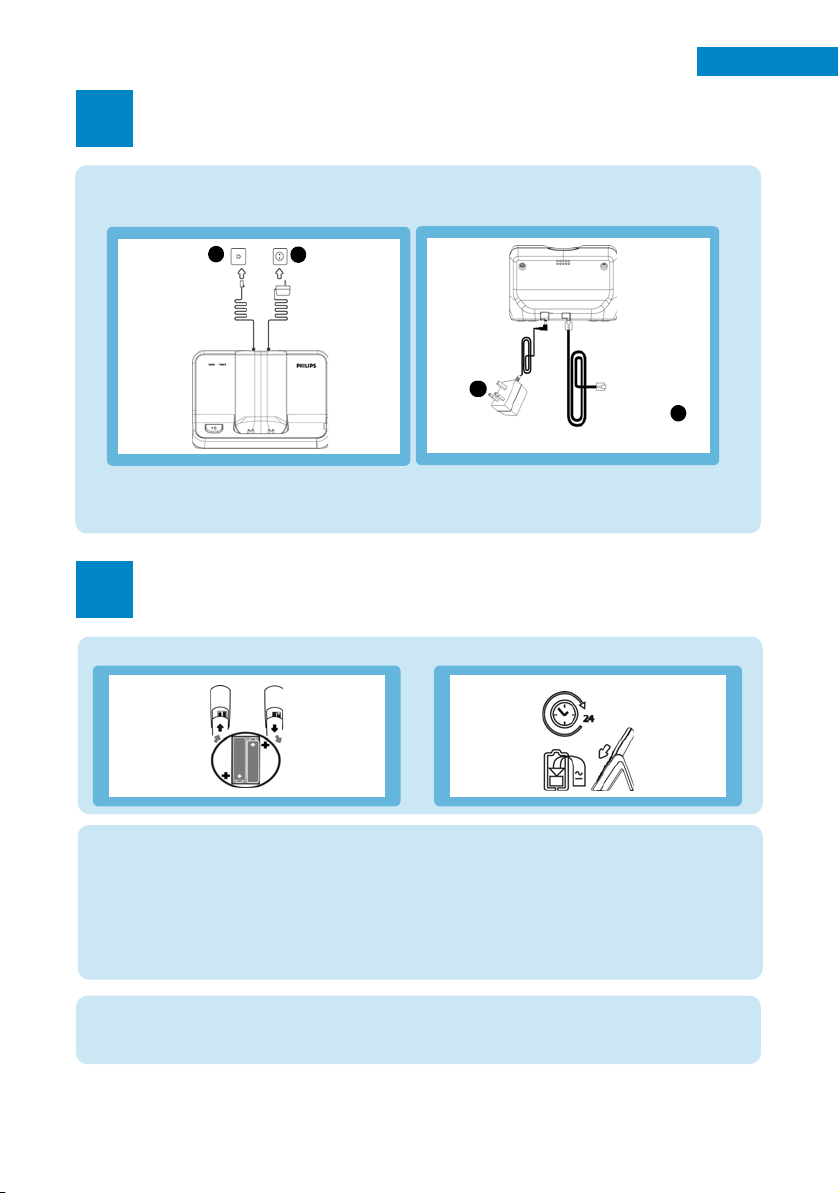
Connect the base station
1
1. Place the base station in a central location near the telephone line socket and electricity sockets.
2. Connect the line cord and the power cable to the proper connector at the back of the base station.
1.
3. Connect the other end of the line cord to the telephone line socket and the other end of the power
cable to the electricity socket.
BA
A
2.
Connect
the power
supply
A
Connect the line
cord to the
line socket
B
Install
Insert batteries and charge
2
Insert batteries Charge handset for 24 hours
Set date and time
1. Press mMENU.
: to Clock & Alarm and press mSELECT.
2. Scroll
3. Press
mSELECT to enter Set Date/Time.
4. Enter current time (HH:MM) and current date (DD/MM/YY) and press
Now, you are ready to use your phone.
USB connection
For the installation of USB software, please refer to p.16 of SE730 user manual and p.17 of SE735 user
manual.
mOK.
3
Page 4

Enjoy
3
Make a call
Enter the phone number and press r.
OR
Press
r and enter the phone number.
Answer a call
When the phone rings, press r key.
End a call
Press e key.
Adjust earpiece volume during a call
Press : to select from Volume 1 to Volume 5.
Set the ring melody
1. Press mMENU, scroll : to Personal Set and press mSELECT, press mSELECT to enter
Handset Tones, scroll
2. Scroll
: to your desired melody to play the melody.
3. Press
mSELECT to set the ring melody.
A validation tone is emitted and the screen returns to previous menu.
Store a contact in the phonebook
1. Press mMENU, scroll : to Phonebook and press mSELECT, press mSELECT to enter
New Entry.
2. Enter the name of the contact (maximum 14 characters) and press
3. Enter the number (maximum 20 digits) and press
4. Enter the SMS Box number and press
(The default SMS Box is 9. To modify, press
: to choose a group (<No Group>, <Group A>, <Group B>, <Group C>) and press
5. Scroll
mSELECT.
: to the picture you wish to associate with the contact or select No Picture and press
6. Scroll
mSELECT.
A validation tone is emitted.
Access the phonebook
1. Press d in stand-by mode or press mMENU, scroll : to Phonebook and press mSELECT,
scroll
: to List and press mSELECT.
2. Press
: to browse the phonebook.
: to Ring Melody and press mSELECT.
mOK.
mOK.
mOK (only for UK).
>CLEAR and then enter the number (0 to 9).)
4
Page 5

Switch the handset On/Off
Press and hold e key for 3 seconds to switch off the handset in stand-by mode.
Short press
Keypad lock/unlock
Press and hold * key for 2 seconds to lock or unlock the keypad in stand-by mode.
Paging
1. Short press c key on the base. The handset starts to ring.
2. Once retrieved, press any key on the handset to end the paging.
Press To
m
(Left soft key)
>
(Right soft key)
r
e
u
d
c
e key to switch on the handset again.
Enter the main menu from stand-by mode.
Select the function displayed on the handset screen directly above it.
Activate mute function during a call.
Switch on the backlight.
Go to redial list from stand-by mode.
Select the function displayed on the handset screen directly above it.
Initiate a second call, call transfer or consult the phonebook during a call.
Switch on the backlight.
Answer an incoming external or internal call.
Insert R for operator services when on the line.
Hang up a call.
Return to stand-by mode.
Long press in stand-by mode to switch off the handset, short press to switch on the
handset again.
Access call log from stand-by mode.
Scroll up a menu list or go to the previous phonebook or call log record.
Increase earpiece volume during a call.
Go to the previous character in editing mode.
Access phonebook from stand-by mode.
Scroll down a menu list or go to the next phonebook or call log record.
Decrease earpiece volume during a call.
Go to the next character in editing mode.
Initiate an internal call.
EN
v
#
*
Answer an incoming call in handsfree mode.
Activate and deactivate the loudspeaker during a call.
Dial # in stand-by mode.
Long press to mute the ringer in stand-by mode.
Long press to insert a pause in dialling mode.
Long press to switch between upper and lower case in editing mode.
Dial * in stand-by mode.
Long press to activate and deactivate keypad lock.
5
Page 6

Troubleshooting
For more information, please refer to p.58 of SE730 user manual and p.66 of SE735 user manual.
Problem Solution
• No dialling tone • Check the connections
• Charge the batteries for at least 24 hours
• Use the line cable provided
• Poor audio quality • Move closer to the base station
• Move the base station at least one metre away from
any electrical appliances
• The icon is blinking
• Caller Line Identification
(CLI) service does not work
• Register the handset to the base station
• Move closer to the base station
• Check your subscription with your network operator
Need help?
User Manual
Refer to the User Manual that is supplied with your SE730/735.
Online Support
www.philips.com/support
3111 285 27791
6
 Loading...