

Page 1

Philips GoGe ar SD card player
Quick start guide
Guide de mise en route
Kurzanleitung
Guida rapida
Quick start guide
Register your product and get support at
www.philips.com/welcome
SA3SDV00
Page 2

Unpack
Déballage Auspacken
Aprire la confezione
XP (SP3) / Vista / 7
Philips GoGear MP3 player
Quick start guide
Register your product and get support at
www.philips.com/welcome
500Mb
SA02802
Page 3

Install
1
Philips Songbird
Download Songbird from www.philips.com/Songbird |
Téléchargez SongBird depuis www.philips.com/Songbird |
Download von Philips Songbird unter www.philips.com/Songbird
| Scarica Songbird da www.philips.com/Songbird
Installation Installieren
Impostazione
Setup.exe
Page 4
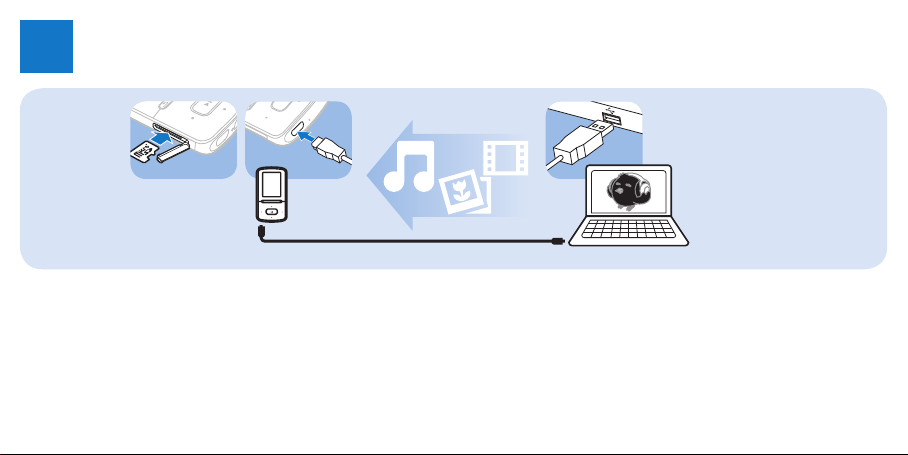
Sync
2
* SD card sold separately | Carte SD: vendu séparément | SD-Karte
separat erhältlich | Scheda SD venduta separatamente
Synchronisation Synchronisation
Sincronizzazione
*
Page 5
3
Use
Utilisation Verwendung
Uso
y
/
RESET
2;
/
y
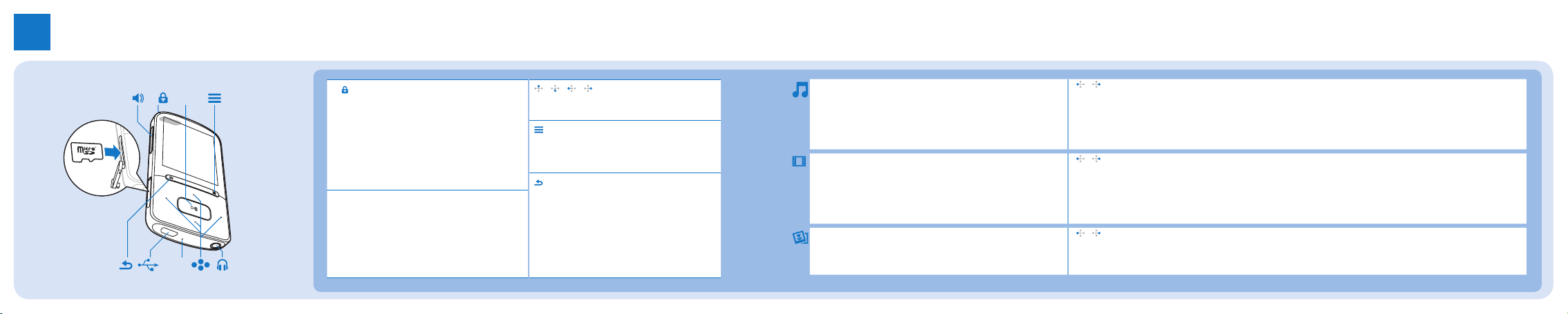
Press and hold to switch on/off; press to lock/
unlock | Maintenez cette touche enfoncée
pour allumer/éteindre ; Maintenez cette touche
enfoncée pour verrouiller/déverrouiller | Gedrückt
halten, um das Gerät ein-/auszuschalten; drücken,
um das Gerät zur sperren/entsperren | Tenere
premuto per accendere/spegnere; premere per
bloccare/sbloccare
2;
Select options; start/pause/resume play |
Sélectionner les options ; lancer/suspendre/
reprendre la lecture | Auswahl von Optionen;
Wiedergabe starten/unterbrechen/fortsetzen |
Per selezionare le opzioni; avvio/pausa/riavvio della
riproduzione
/ / /
Navigation buttons | Touches de navigation |
Navigationstasten | Tasti di navigazione
View the options menu | Afcher le menu
d’options | Anzeigen des Optionsmenüs |
=Visualizza il menu delle opzioni
Back one level; press and hold to return to
Home screen | Retour au niveau supérieur ;
maintenir la touche enfoncée pour revenir à
l’écran d’accueil | Eine Ebene zurück; gedrückt
halten, um zum Startbildschirm zurückzukehren
| Indietro di un livello; tenere premuto per
tornare alla schermata principale
2;
Press to start, pause, or resume play | Appuyer sur cette touche
pour lancer, suspendre ou reprendre la lecture | Drücken, um
die Wiedergabe anzuhalten, zu unterbrechen oder fortzusetzen
| Premere per avviare, sospendere o riprendere la riproduzione
2;
Press to start, pause, or resume play | Appuyer sur cette touche
pour lancer, suspendre ou reprendre la lecture | Drücken, um
die Wiedergabe anzuhalten, zu unterbrechen oder fortzusetzen
| Premere per avviare, sospendere o riprendere la riproduzione
2;
Press to start play | Appuyez sur cette touche pour
commencer la lecture | Drücken, um die Wiedergabe zu
starten | Premere per avviare la riproduzione
/
On the play screen, press to skip songs; press and hold to fast forward or rewind. | Sur l’écran de lecture, appuyer
sur la touche pour passer les chansons ; maintenir la touche enfoncée pour faire déler rapidement vers l’avant ou
l’arrière. | Auf dem Wiedergabebildschirm: drücken, um Titel zu überspringen; gedrückt halten für schnellen Vor- oder
Rücklauf. | Sulla schermata di riproduzione, premere per saltare le canzoni; tenere premuto per andare avanti o
indietro veloce.
/
On the play screen, press to skip videos; press and hold to fast forward or rewind. | Dans l’écran de lecture,
appuyez sur cette touche pour passer des vidéos ; maintenez-la enfoncée pour faire déler rapidement vers l’avant
ou l’arrière. | Auf dem Wiedergabebildschirm: drücken, um Videos zu überspringen; gedrückt halten für Vor- bzw.
Rücklauf. | Nella schermata di riproduzione, premere per saltare i video; tenere premuto per andare avanti/indietro
veloce.
/
Press to skip pictures. | Appuyez sur cette touche pour ignorer des images. | Drücken, um Bilder zu überspringen. |
Premere per saltare le immagini.
Page 6
Help
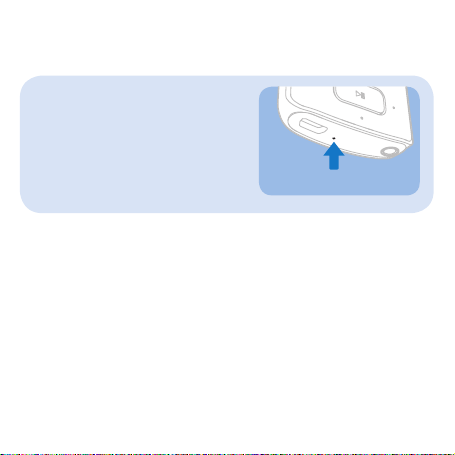
RESET
Device does not power on | Les
appareils ne s’allument pas | Das Gerät
schaltet sich nicht ein | Il dispositivo
non si accende
See support information in the user manual for more | Consultez les
informations d’assistance du manuel d’utilisation pour plus d’informations/
de détails | Weitere Informationen nden Sie in den Support-Informationen
im Handbuch | Vedere le informazioni di supporto all’interno del manuale
dell’utente per ulteriori informazioni
Aide Hilfe
Guida
Page 7
All rights reserved.
www.philips.com
Specifications are subject to change without notice.
Trademarks are the property of Koninklijke Philips Electronics N.V.
or their respective owners
© 2011 Koninklijke Philips Electronics N.V.
Printed in China
SA3SDV00_02_QSG_V1.0
wk11361
 Loading...