

Page 1

For product information and support, visit
www.philips.com/dictation
Foot control
LFH 2210
LFH 2310
LFH 2320
LFH 2330
Page 2

EN User manual 3
DE Benutzerhandbuch 11
FR Manuel de l‘utilisateur 19
ES Manual del usuario 27
NL Gebruikershandleiding 35
IT Manuale di istruzioni 43
Page 3

Welcome1
Congratulations on your purchase and welcome to Philips! To fully benefit from the support that
Philips oers, visit our Website for support information such as user manuals, software downloads,
warranty information and more: www.philips.com/dictation.
Overview1.1
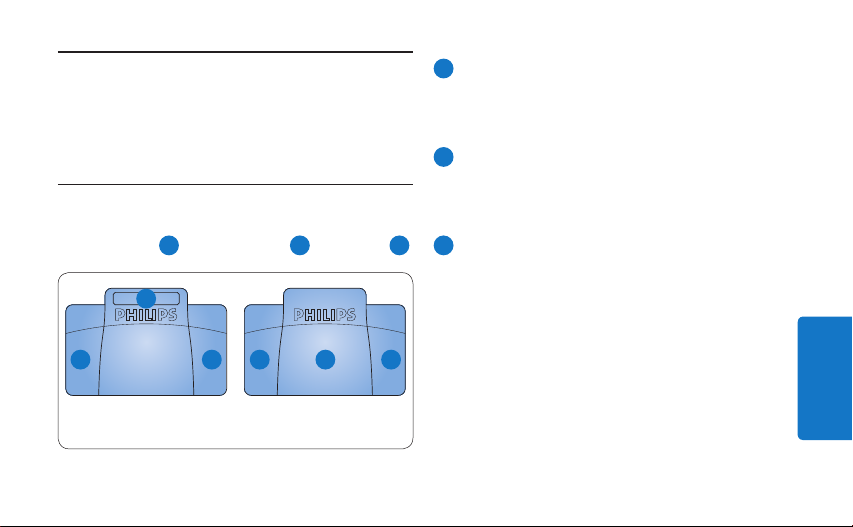
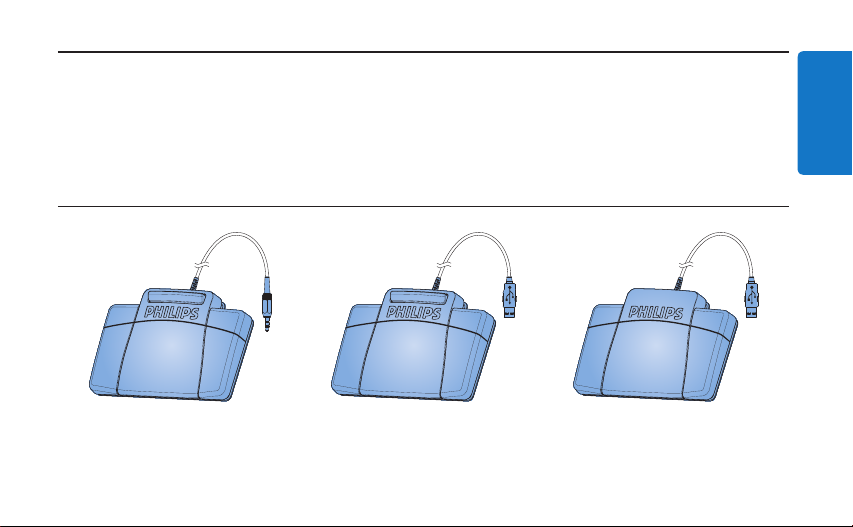
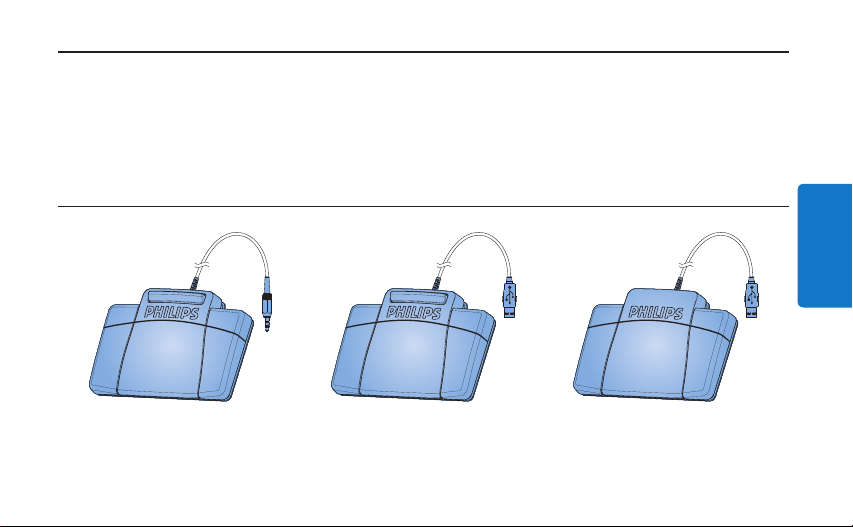
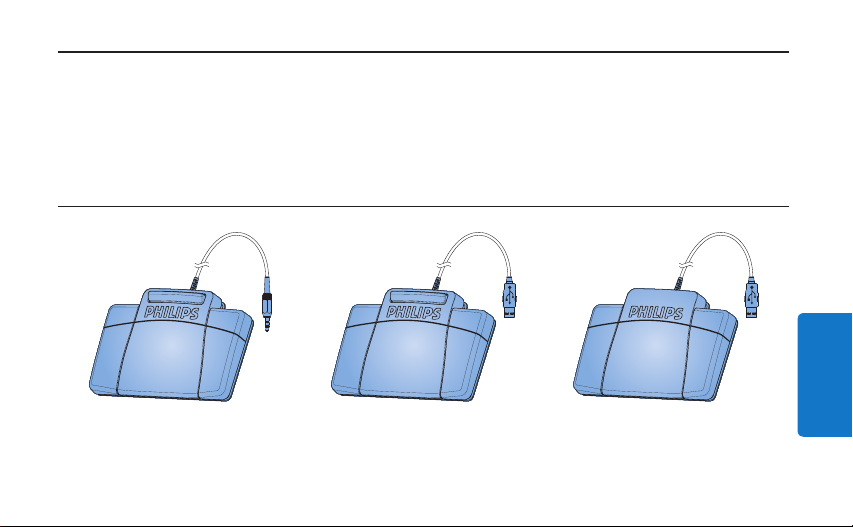
Foot control 2210
with analog connector
Foot control 2310 / 2330
with USB connector
Foot control 2320
with USB connector
ENGLISH
3User manual
Page 4

4 User manual
Disposal of your old product2.2
Important2
Your product is designed and manufactured •
with high quality materials and components,
Safety2.1
To avoid short circuit, do not expose the •
product to rain or water.
Do not expose the device to excessive •
heat caused by heating equipment or direct
sunlight.
Protect the cables from being pinched, •
particularly at plugs and the point where they
exit from the device.
Back up your files. Philips is not responsible •
for any loss of data.
that can be recycled and re-used.
When this crossed-out wheeled bin •
symbol is attached to a product, it
indicates that the product is covered
by the European Directive 2002/96/
EC.
Please become informed about the local •
separate collection system for electrical and
electronic products.
Please act according to your local rules and •
do not dispose of old products with your
normal household waste. The correct disposal
of old products will help prevent potential
negative consequences for the environment
and human health.
Page 5

5User manual
ENGLISH
Technical support and warranty2.3
This Philips product was designed and
manufactured to the highest quality standards.
If your Philips product is not working correctly
or is defective, contact your supplying Philips
Speech Processing dealer who will provide
you with the necessary information on how to
proceed.
If you have questions that your dealer cannot
answer or any other related question, visit
www.philips.com/dictation to contact us.
No components are user-serviceable. Do not
open or remove covers and do not insert
objects not suitable for the specific connectors.
Repairs may be made only by Philips service
centers and ocial repair facilities. Failure to do
so will void any warranty, stated or implied. Any
operation expressly prohibited in this manual,
any adjustments, or assembly procedures not
recommended or authorized in this manual will
void the warranty.
Page 6

6 User manual
Foot control 2310 / 2320 / 2330 with 3.2
Installation3
Foot control 2210 with analog 3.1
connector
Connect the plug of the foot control to the 1
foot control socket of the transcription unit.
E Tip
The foot control 2210 also can be connected
to a PC in combination with the optional Philips
USB adapter 6220.
USB connector
Connect the foot control to a free USB port 1
on the PC.
Insert the installation CD in the CD-ROM 2
drive. The set-up program should start
automatically. If it does not, open the CD
contents in Windows Explorer and doubleclick the autorun.exe file.
Click the 3 Install button.
Follow the on-screen instructions of the 4
set-up program to install the driver software
on the PC.
D Note
Administrator rights are required to install
the software. For more help, contact your
administrator.
Page 7

7User manual
ENGLISH
Use the foot control4
Foot control 2210 / 2310 / 23204.1
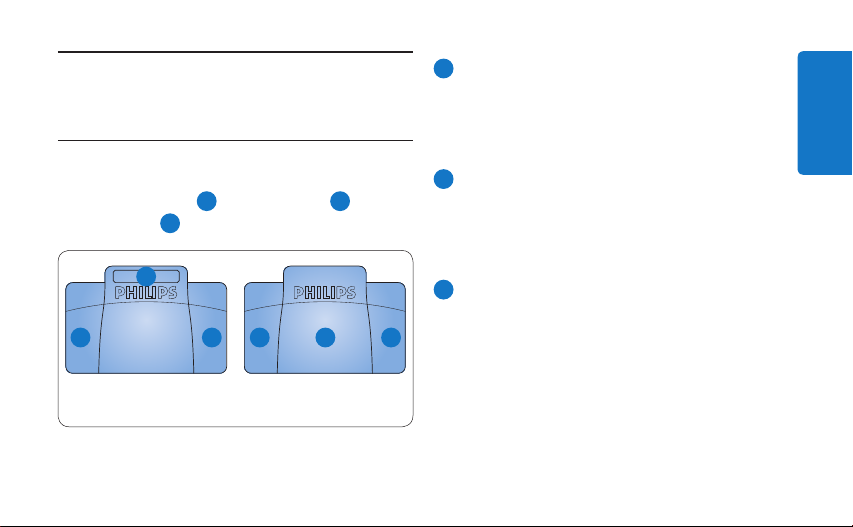
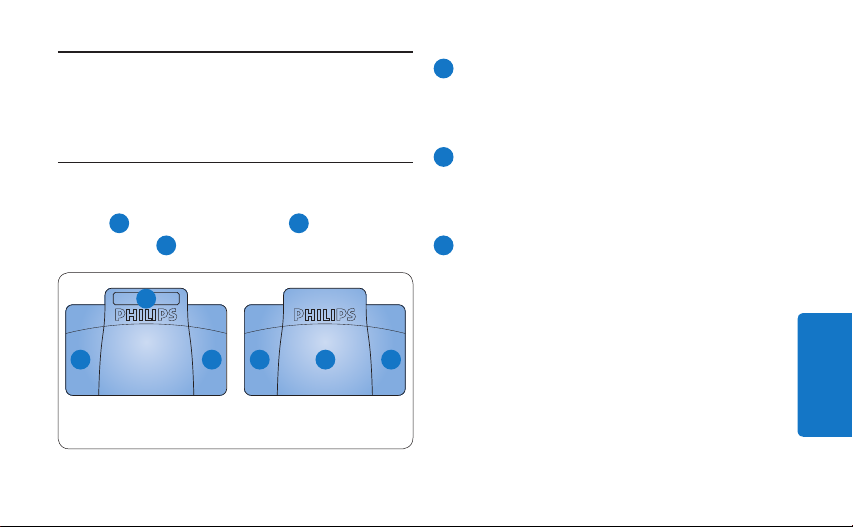
The foot control has three pedals: fast rewind
1
, fast forward 2 and playback 3.
2
1 3
LFH 2210 / 2310 LFH 2320
32 1
1
Press and hold the pedal for fast rewind.
When rewinding reaches the desired
position, release the pedal.
2
Press and hold the pedal to fast forward.
When forwarding reaches the desired
position, release the pedal.
3
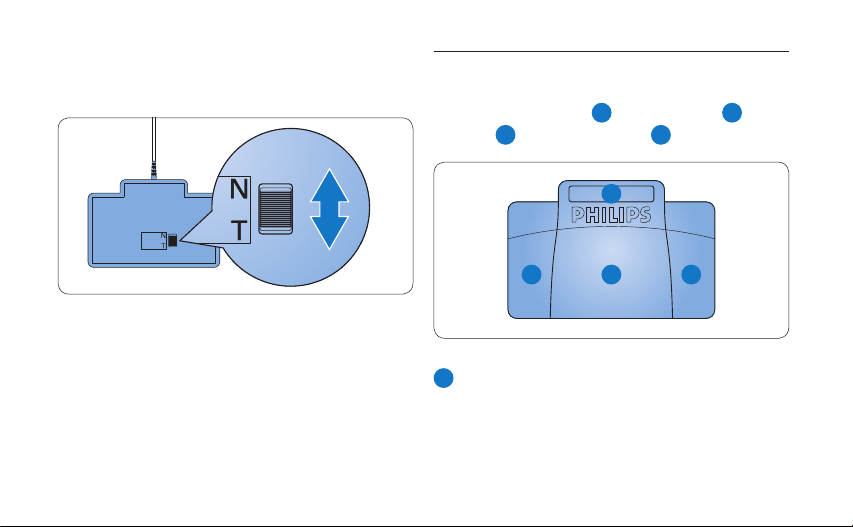
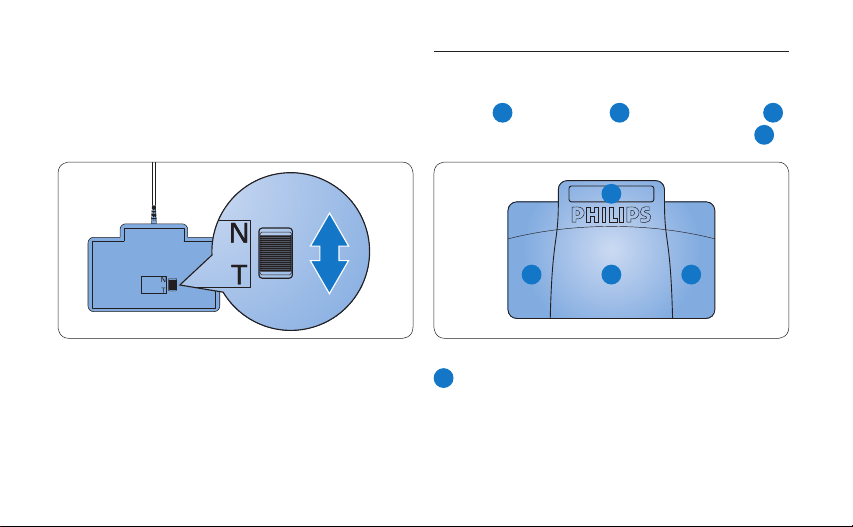
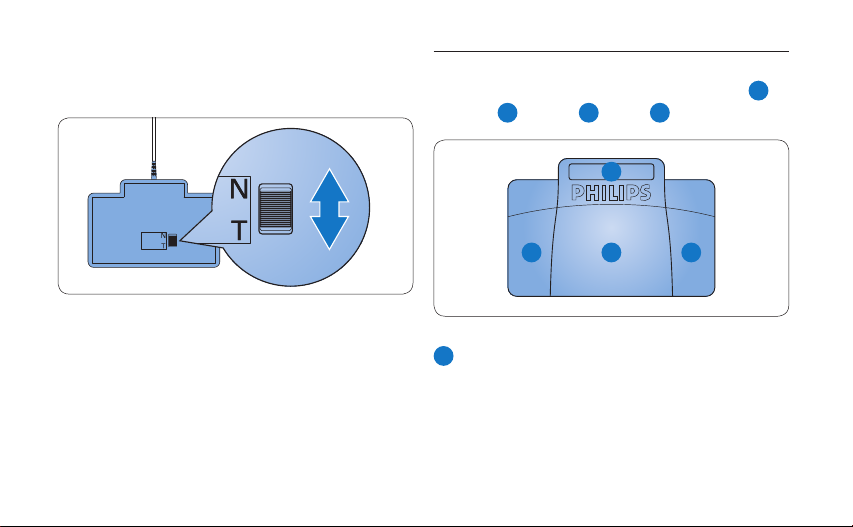
The pedal starts playback. The behavior for
starting and stopping playback depends on
the setting of the playback switch on the
underside of the foot control:
N (Neutral) position:• Press and hold the
right pedal for playback. When the pedal
is released, playback is stopped.
T (Toggle) position: • Press and release the
right pedal to start continuous playback.
Press the right pedal again to stop
playback.
Page 8

8 User manual
Foot control 23304.2
The foot control has four pedals: a left
2
middle
, a right 3 and a top 4 pedal.
4
1
, a
1 3
1
Press and hold the left pedal to fast forward.
2
When forwarding reaches the desired
position, release the pedal.
2
Press and release the middle pedal to start
continuous playback. Press the middle pedal
Page 9

9User manual
ENGLISH
again to stop playback.
3
Press and hold the right pedal for fast
rewind. When rewinding reaches the desired
position, release the pedal.
4
Press and release the top pedal to finish a
dictation.
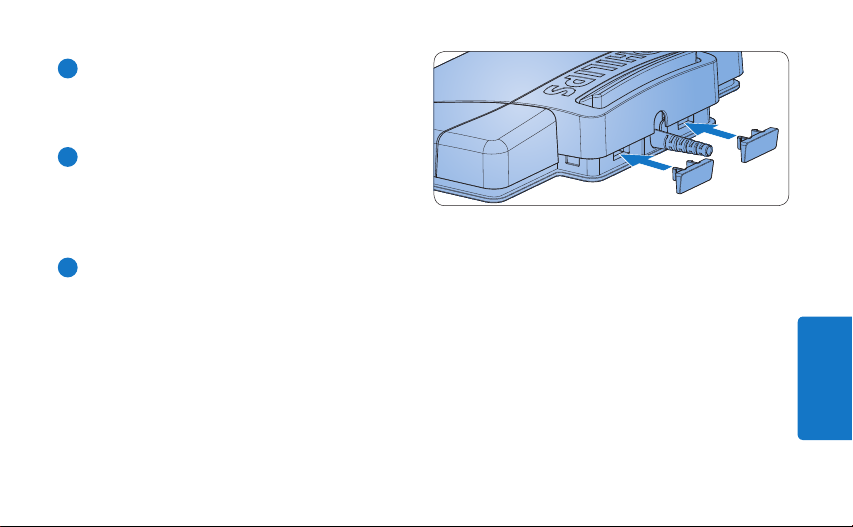
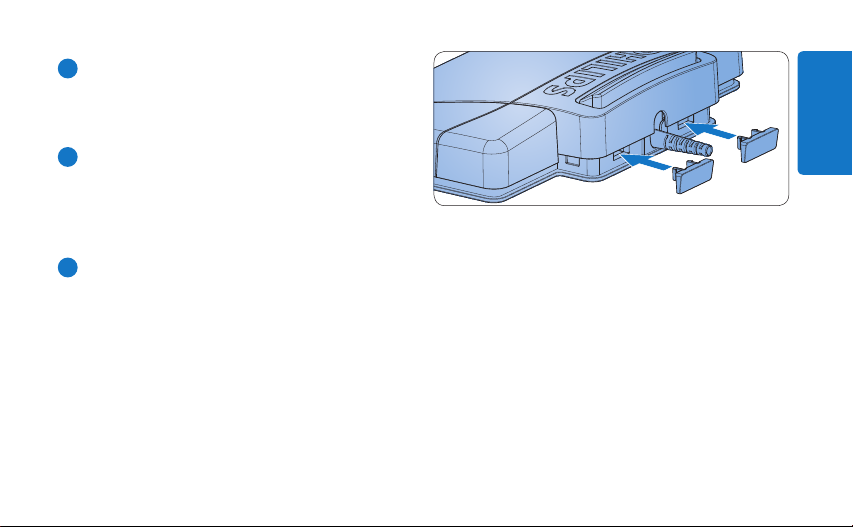
E Tip
If the middle pedal has been disabled with the
Device Configuration Tool (see next chapter),
it can be secured with the plastic locking tabs
(included).
Page 10

Advanced confi guration5
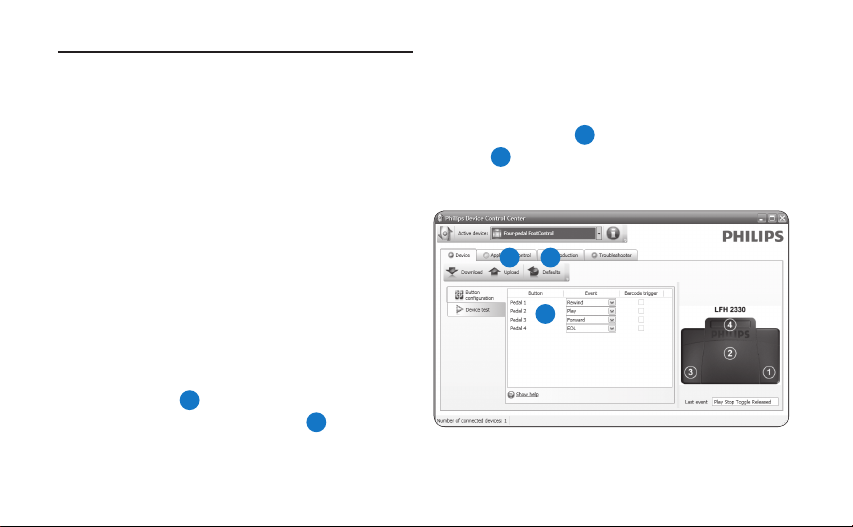
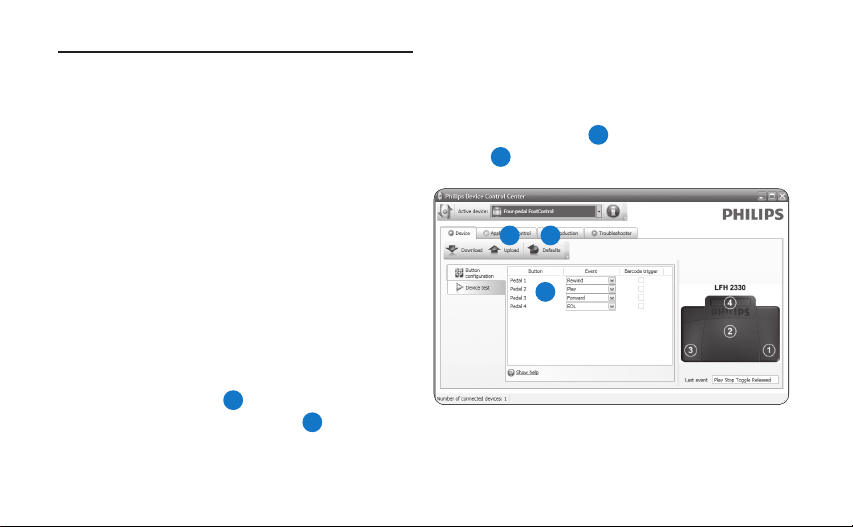
Use the Device Control Center to change the
pedal functions of foot controls with USB
connector.
D Note
The foot control can be reset to its factory
default confi guration by clicking the Defaults
3
button
. Click the Upload button 2 to save
the default settings.
Connect the foot control to a free USB port 1
on the PC.
2 3
Start the Device Control Center by opening 2
the Windows start menu and selecting All
1
Programs > Philips Speech Control > Philips
Device Control Center.
Change the function of the pedals according 3
to your preferences.
1
Click the 4 Upload button 2 to save the new
settings.
10 User manual
Page 11

Willkommen1
Herzlichen Glückwunsch zu Ihrem Kauf und willkommen bei Philips! Besuchen Sie unsere
Webseite für zusätzliche Informationen wie Benutzerhandbücher, Software-Downloads,
Garantieinformationen und vieles mehr: www.philips.com/dictation.
Übersicht1.1
DEUTSCH
Fußschalter 2210
mit analogem Anschluss
Fußschalter 2310 / 2330
mit USB-Anschluss
Fußschalter 2320
mit USB-Anschluss
11Benutzerhandbuch
Page 12

12 Benutzerhandbuch
Entsorgung Ihres Altgeräts2.2
Wichtig2
Ihr Gerät wurde unter Verwendung •
hochwertiger Materialien und Komponenten
Sicherheit2.1
Um Kurzschlüsse zu vermeiden, darf das Gerät •
nicht Regen oder Wasser ausgesetzt werden.
Setzen Sie das Gerät keinen hohen •
Temperaturen durch Wärmequellen oder
direkter Sonneneinstrahlung aus.
Schützen Sie Kabel vor unbeabsichtigen Be-•
schädigungen durch Knicken oder Quetschen,
besonders im Bereich von Steckers und der
Austrittsstelle des Kabels aus dem Gehäuse.
Bitte erstellen Sie Sicherungskopien Ihrer •
Dateien. Philips haftet nicht für den Verlust
von Dateien.
entwickelt und hergestellt, die recycelt und
wieder verwendet werden können.
Befindet sich dieses Symbol (durch-•
gestrichene Abfalltonne auf Rädern)
auf dem Gerät, bedeutet dies, dass
für dieses Gerät die Europäischen
Richtlinie 2002/96/EG gilt.
Informieren Sie sich über die geltenden Bestim-•
mungen zur getrennten Sammlung von Elektround Elektronik-Altgeräten in Ihrem Land.
Richten Sie sich bitte nach den geltenden •
Bestimmungen in Ihrem Land, und entsorgen
Sie Altgeräte nicht über Ihren Haushaltsabfall.
Durch die korrekte Entsorgung Ihrer
Page 13

13Benutzerhandbuch
DEUTSCH
Altgeräte werden Umwelt und Menschen vor
möglichen negativen Folgen geschützt.
Technische Unterstützung und 2.3
Garantie
Philips-Geräte entsprechen dem neuesten
Stand der Technik und werden nach strengsten
Qualitätsnormen gefertigt. Sollte Ihr PhilipsProdukt dennoch einen Mangel aufweisen oder
defekt sein, kontaktieren Sie bitte Ihren Philips
Speech Processing Händler, um Informationen
zur weiteren Vorgangsweise zu erhalten.
Wenn Sie Fragen haben, die Ihr Händler
nicht beantworten kann, besuchen Sie unsere
Website www.philips.com/dictation, um uns zu
kontaktieren.
Das Gerät enthält keine Teile, die vom
Benutzer repariert werden können.
Gehäuseabdeckungen dürfen nicht geönet
oder entfernt werden. Reparaturen dürfen nur
vom Philips Kundendienst und von oziellen
Reparaturbetrieben durchgeführt werden.
Bei Nichtbeachtung erlischt jegliche Garantie,
gleich ob ausdrücklich oder konkludent. Jeder
Betrieb, der in diesem Handbuch ausdrücklich
untersagt wird, und jegliche Einstellungen oder
Montageverfahren, die in diesem Handbuch
nicht empfohlen oder autorisiert werden, führen
zum Erlöschen der Garantie.
Page 14

14 Benutzerhandbuch
Fußschalter 2310 / 2320 / 2330 mit 3.2
Installation3
Fußschalter 2210 mit analogem 3.1
Anschluss
Stecken Sie den Fußschalter an 1
den Fußschalter-Anschluss Ihres
Wiedergabesystems an.
E Tipp
Der Fußschalter 2210 kann in Verbindung mit
dem optionalen Philips USB-Adapter 6220 auch
an einem PC angeschlossen werden.
USB-Anschluss
Stecken Sie den Fußschalter an einen freien 1
USB-Anschluss des PCs an.
Legen Sie die Installations-CD in das CD-2
ROM-Laufwerk ein. Das Setup-Programm
sollte automatisch ausgeführt werden.
Falls nicht, zeigen Sie den Inhalt der CD im
Windows Explorer and und doppelklicken
Sie auf die Datei autorun.exe.
Klicken Sie auf die Schaltfläche 3 Installieren.
Befolgen Sie die Anleitungen auf dem 4
Bildschirm, um die Software-Treiber zu
installieren.
D Hinweis
Zur Installation der Software benötigen Sie Administrator-Rechte. Falls Sie weitere Hilfe benötigen,
kontaktieren Sie bitte Ihren Administrator.
Page 15

15Benutzerhandbuch
DEUTSCH
Den Fußschalter verwenden4
Fußschalter 2210 / 2310 / 23204.1
Der Fußschalter hat drei Pedale: schneller
Rücklauf
Wiedergabe
1
, schneller Vorlauf 2 und
3
.
2
1 3
32 1
LFH 2210 / 2310 LFH 2320
1
Drücken und halten Sie das Pedal für
den schnellen Rücklauf. Wenn beim
Zurückspulen die gewünschte Position
erreicht ist, lassen Sie das Pedal los.
2
Drücken und halten Sie das Pedal für den
schnellen Vorlauf. Wenn beim Vorspulen die
gewünschte Position erreicht ist, lassen Sie
das Pedal los.
3
Mit dem Pedal starten Sie die Wiedergabe.
Das Verhalten beim Starten und Stoppen
der Wiedergabe ist von den Einstellungen
des Wiedergabeschalters auf der Unterseite
des Fußschalters abhängig:
Position N:• Drücken und halten Sie das
Pedal während der Wiedergabe. Wenn Sie
das Pedal loslassen, wird die Wiedergabe
Page 16

16 Benutzerhandbuch
gestoppt.
Position T:• Drücken Sie das Pedal,
und lassen Sie es wieder los, um die
Wiedergabe zu starten. Drücken Sie das
Pedal nochmal, um die Wiedergabe zu
stoppen.
Fußschalter 23304.2
Der Fußschalter hat vier Pedale: ein linkes
ein mittleres
4
.
2
, ein rechtes 3 und ein oberes
4
1
,
1 3
1
Drücken und halten Sie das linke Pedal für
2
den schnellen Vorlauf. Wenn beim Vorspulen
die gewünschte Position erreicht ist, lassen
Sie das Pedal los.
Page 17
17Benutzerhandbuch
DEUTSCH
2
Drücken Sie das mittlere Pedal, und lassen
Sie es wieder los, um die Wiedergabe zu
starten. Drücken Sie das Pedal nochmal, um
die Wiedergabe zu stoppen.
3
Drücken und halten Sie das rechte Pedal
für den schnellen Rücklauf. Wenn beim
Zurückspulen die gewünschte Position
erreicht ist, lassen Sie das Pedal los.
4
Drücken Sie das obere Pedal kurz, um ein
Diktat zu beenden.
E Tipp
Wenn das mittlere Pedal mit dem Device
Configuration Tool deaktiviert wurde (siehe
nächstes Kapitel), können Sie es mit den beiden
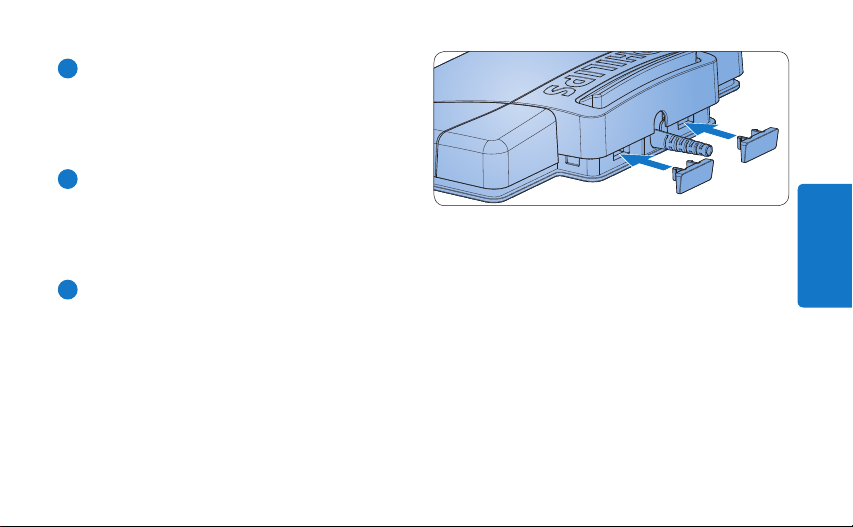
beigelegten Klemmen fixieren.
Page 18
D Hinweis
Weitergehende Konfi guration5
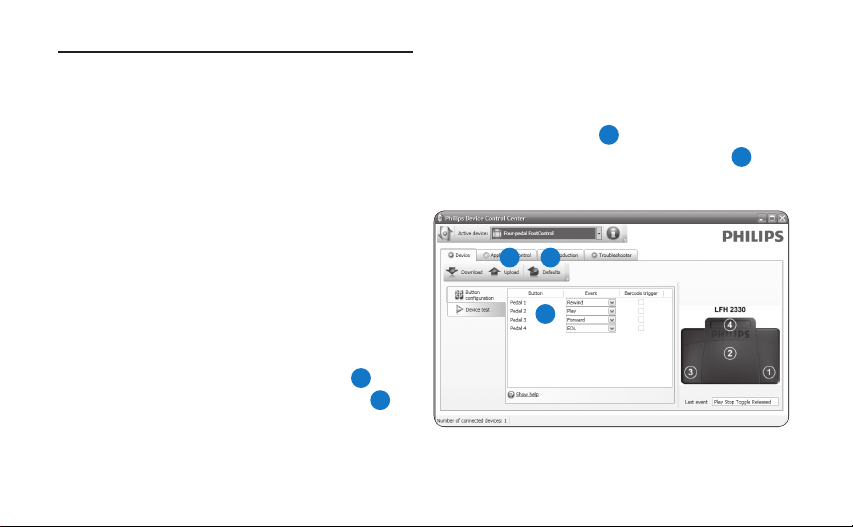
Der Fußschalter kann durch einen Klick auf die
Schaltfl äche Defaults auf die Werkseinstellungen
Verwenden Sie das Device Control Center um die
Funktion der Pedal des Fußschalters mit USBAnschluss zu verändern.
zurückgesetzt werden
anschließend auf die Schaltfl äche Upload
die Werkseinstellungen zu speichern.
3
. Klicken Sie
2
, um
Stecken Sie den Fußschalter an einen freien 1
USB-Anschluss des PCs an.
Starten Sie das Device Control Center 2
2 3
indem Sie im Windows Startmenü den
Eintrag Programme > Philips Speech Control
1
> Philips Device Control Center auswählen.
Ändern Sie die Funktion der Pedale 3
entsprechend Ihren Anforderungen.
1
Klicken Sie auf die Schaltfl äche 4 Upload 2,
um die neuen Einstellungen zu speichern.
18 Benutzerhandbuch
Page 19
Bienvenue1
Félicitations pour votre achat et bienvenue dans l’univers Philips ! Pour profiter pleinement de
l’assistance proposée par Philips, vous pouvez consulter notre site Internet où vous obtiendrez
des informations sur les manuels de l’utilisateur, les téléchargements de logiciels, l’information de
garantie et bien d’autres choses encore, à l’adresse suivante : www.philips.com/dictation.
Aperçu général1.1
FRANÇAIS
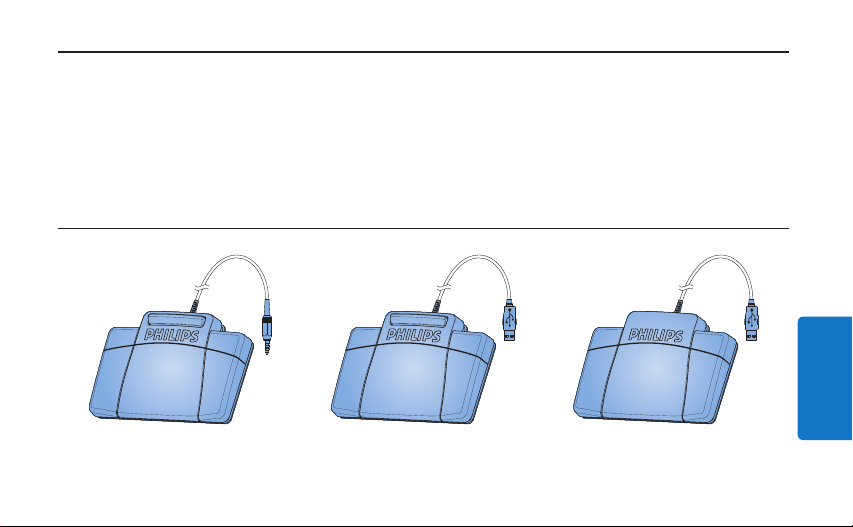
Pédale de commande 2210
avec connecteur analogique
Pédale de commande 2310/2330
avec connecteur USB
Pédale de commande 2320
avec connecteur USB
19Manuel de l‘utilisateur
Page 20
20 Manuel de l‘utilisateur
Mise au rebut de votre ancien 2.2
Important2
Sécurité2.1
Pour éviter tout court-circuit, n’exposez pas •
le produit à la pluie ou à l’eau.
N’exposez pas l’appareil à une chaleur •
excessive causée par un appareil de chauage
ou le rayonnement direct du soleil.
Protégez les câbles pour éviter qu’ils soient •
pliés, en particulier au niveau des prises et à
l’endroit où ils sont connectés à l’appareil.
Sauvegardez vos fichiers. Philips décline toute •
responsabilité en cas de perte de fichiers.
produit
Votre produit a été conçu et fabriqué à l’aide •
de matériaux et composants de haute qualité,
recyclables et réutilisables.
Le symbole de poubelle barrée sur •
un produit indique que ce dernier est
conforme à la directive européenne
2002/96/EC.
Veuillez vous renseigner sur les systèmes •
locaux de collecte des produits électriques ou
électroniques.
Veillez à respecter les réglementations locales; •
ne mettez pas au rebut vos anciens produits
comme des déchets ménagers. La mise au
rebut de votre ancien produit permet de
protéger l’environnement et la santé.
Page 21

21Manuel de l‘utilisateur
FRANÇAIS
Support technique et garantie2.3
Ce produit Philips a été élaboré et fabriqué
selon les standards de meilleure qualité. Si votre
produit Philips ne fonctionne pas correctement
ou est défectueux, veuillez contacter votre
fournisseur Philips Speech Processing qui vous
apportera les informations nécessaires sur la
marche à suivre.
Pour toute autre question ou question à laquelle
votre fournisseur ne peut répondre, consultez
le site www.philips.com/dictation afin de nous
contacter.
Aucun composant ne peut être réparé par
l’utilisateur. Vous ne pouvez ni ouvrir ni retirer
les panneaux situés à l’intérieur du produit.
Seuls les Centres Service Agréés Philips et les
ateliers de réparation ociels sont autorisés
à réparer nos produits. Le non-respect de
cette consigne entraîne l’annulation de toute
garantie, expresse ou tacite. Toute opération
expressément interdite dans ce manuel, ou tout
réglage ou toute procédure d’assemblage non
recommandé(e) ou autorisé(e) par le présent
manuel, entraîne l’annulation de la garantie.
Page 22

22 Manuel de l‘utilisateur
Pédale de commande 2310 / 2320 / 3.2
Installation3
Pédale de commande 2210 avec 3.1
connecteur analogique
Connectez la prise de la pédale de 1
commande à l’entrée prévue à cet eet sur
votre appareil de transcription.
E Conseil
La pédale de commande 2210 peut aussi
être connectée à un PC en combinaison avec
l’adaptateur USB Philips 6220 (en option).
2330 avec connecteur USB
Connectez la pédale de commande à un 1
port USB libre du PC.
Insérez le CD d‘installation dans votre lecteur 2
de CD-ROM. Le programme d‘installation
doit s‘ouvrir automatiquement. Si ce n‘est pas
le cas, achez le contenu du CD à l‘aide de
l‘explorateur de Windows puis double-cliquez
sur le fichier autorun.exe pour le lancer.
Cliquez sur le bouton 3 Installer.
Suivez à l’écran les instructions du 4
programme de mise en place afin d’installer
sur le PC le driver du logiciel.
D Note
Vous devez disposer des droits d‘administrateur
pour installer le logiciel. Si vous avez besoin
d‘aide, contactez votre administrateur.
Page 23
23Manuel de l‘utilisateur
FRANÇAIS
Utilisation de votre pédale 4
de commande
Pédale de commande 2210/2310/23204.1
La pédale de commande comporte 3 parties :
retour rapide
1 3
LFH 2210 / 2310 LFH 2320
1
, avance rapide 2 et lecture 3.
2
32 1
1
Pour le retour rapide, appuyez en continu
sur la pédale. Lorsque vous avez atteint la
position voulue, relâchez la pédale.
2
Pour l‘avance rapide, appuyez en continu
sur la pédale. Lorsque vous avez atteint la
position voulue, relâchez la pédale.
3
Cette pédale sert à déclencher la lecture.
Le fonctionnement de cette pédale dépend
de la configuration eectuée au niveau
de l‘interrupteur placé sous la pédale de
commande :
Position N :• appuyez sur la pédale en
continu pendant la lecture. Lorsque vous
relâchez la pédale, la lecture s‘arrête.
Position T :• appuyez et relâchez la
pédale pour lancer la lecture. Appuyez
Page 24
24 Manuel de l‘utilisateur
de nouveau sur la pédale pour arrêter la
lecture.
Pédale de commande 23304.2
La pédale de commande comporte quatre
parties: une à gauche
à droite
3
, et une au-dessus 4.
1
, une au milieu 2, une
4
1 3
1
Pour l‘avance rapide, appuyez en continu
2
sur la pédale de gauche. Lorsque vous avez
atteint la position voulue, relâchez la pédale
de gauche.
Page 25
25Manuel de l‘utilisateur
FRANÇAIS
2
Appuyez et relâchez la pédale du milieu pour
lancer la lecture. Appuyez de nouveau sur la
pédale pour arrêter la lecture.
3
Pour le retour rapide, appuyez en continu
sur la pédale de droite. Lorsque vous avez
atteint la position voulue, relâchez la pédale
de droite.
4
Appuyez et relâchez la pédale du dessus
pour terminer une dictée.
E Conseil
Si vous avez désactivé la pédale du milieu à l’aide
de l’Outil de Configuration de l’Appareil (voir
chapitre suivant), vous pouvez la bloquer avec
les fixations.
Page 26
D Note
Confi guration avancée5
La pédale de commande peut récupérer sa
confi guration usine par défaut en cliquant sur
Utilisez l’Outil de Confi guration de l’Appareil
(Device Control Center) pour changer les fonctions
des pédales de commande avec connecteur USB.
le bouton Defaults
Upload
2
pour enregistrer des paramètres par
défaut.
3
. Cliquez sur le bouton
Connectez la pédale de commande à un 1
port USB libre du PC.
Démarrez l’Outil de Confi guration de 2
2 3
l’Appareil en ouvrant le menu de démarrage
de Windows et en sélectionnant Tous les
1
programmes > Philips Speech Control >
Philips Device Control Center.
Changez la fonction des pédales selon vos 3
préférences.
1
Cliquez sur le bouton 4 Upload 2 pour
enregistrer les nouvelles caractéristiques.
26 Manuel de l‘utilisateur
Page 27
Bienvenido1
Enhorabuena por su adquisición y bienvenido a Philips! Para poder beneficiarse de toda la ayuda que
le ofrece Philips, visite nuestra página Web para obtener información de soporte como manuales de
usuario, descargas de software, información de garantía, etc. en: www.philips.com/dictation.
Generalidades1.1
Pedal de control 2210
con conexión analógica
Pedal de control 2310 / 2330
con conexión USB
Pedal de control 2320
con conexión USB
27Manual del usuario
ESPAÑOL
Page 28
28 Manual del usuario
Desecho del producto antiguo2.2
Importante2
El producto se ha diseñado y fabricado con •
materiales y componentes de alta calidad, que
Seguridad2.1
Para evitar cortocircuitos, no exponga el •
producto a la lluvia ni al agua.
No lo expongas a excesivo calor procedente •
de aparatos de calefacción o de la luz directa
del sol.
Evite pisar o apretar los cables, especialmente •
en los enchufes y el punto en que salen del
aparato.
Realice copias de seguridad de los archivos. •
Philips no se hace responsable de la pérdida
de archivos.
se pueden reciclar y volver a utilizar.
Cuando este símbolo de contenedor •
de ruedas tachado se muestra en un
producto indica que éste cumple la
directiva europea 2002/96/EC.
Obtenga información sobre la recogida •
selectiva local de productos eléctricos y
electrónicos.
Cumpla con la normativa local y no deseche •
los productos antiguos con los desechos
domésticos. El desecho correcto del producto
antiguo ayudará a evitar consecuencias
negativas para el medioambiente y la salud
humana.
Page 29

29Manual del usuario
ESPAÑOL
Soporte técnico y garantía2.3
Este producto de Philips fue diseñado y
fabricado con los más altos estándares. Si tu
producto Philips no funciona correctamente o
tiene algún defecto, contacta con el distribuidor
de Philips Speech Processig que te proveyó del
equipo quien te dará la información necesaria y
te dirá el procedimiento a seguir.
Si tienes preguntas que nuestros distribuidores
no pueden responder o cualquier inquietud,
contacta con nosotros enww.philips.com/
dictation.
Ninguno de los componentes puede ser
reparado por el usuario. No abra ni quite las
tapas del interior del producto. Las reparaciones
sólo podrán llevarlas a cabo los centros de
servicio y establecimientos de reparación
oficiales de Philips. De lo contrario, cualquier
garantía expresa o implícita quedará invalidada.
Cualquier funcionamiento prohibido de manera
expresa en el presente manual, o cualquier
ajuste o procedimiento de montaje no
recomendado o no autorizado en el presente
invalidarán la garantía.
Page 30

30 Manual del usuario
Pedal de control 2310 / 2320 / 2330 3.2
Instalación3
Pedal de control 2210 con conexión 3.1
analógica
Conecte el cable de su pedal de control a su 1
equipo de transcripción.
E Consejo
El pedal de control 2210 puede también ser
conectado a su ordenador en combinación con
el adaptador USB 6220 opcional.
con conexión USB
Conecte el pedal de control a un puerto 1
USB de su ordenador.
Inserte el CD de instalación en la unidad 2
CD-ROM de su ordenador. El programa de
configuración debe iniciarse automáticamente. Si esto no ocurre, abra el contenido del
CD con el Explorador de Windows y haga
doble clic en el archivo autorun.exe.
Haga clic en el botón 3 Instalar.
Siga las instrucciones de configuración de 4
la pantalla para instalar los drivers en su
ordenador.
D Nota
Se requieren los derechos del administrador
para instalar el software. Si necesita más ayuda,
póngase en contacto con su administrador.
Page 31
31Manual del usuario
ESPAÑOL
Uso del pedal de control4
Pedal de control 2210 / 2310 / 23204.1
El pedal de control posee tres pedales:
rebobinado rápido
reproducción
2
1 3
LFH 2210 / 2310 LFH 2320
1
, avance rápido 2 y
3
.
32 1
1
Para el rebobinado rápido, presione y
mantenga presionado el pedal. Cuando
el rebobinado haya alcanzado la posición
deseada, suelte el pedal.
2
Para el avance rápido, presione y mantenga
presionado el pedal. Cuando el avance haya
alcanzado la posición deseada, suelte el
pedal.
3
Para iniciar la reproducción presione el
pedal. El comportamiento del inicio y la
detención de la reproducción dependerá del
ajuste del interruptor en la parte de abajo
del pedal de control:
Posición N: • Mantenga presionado el pedal
durante la reproducción. Al soltar el pedal
la reproducción se detiene.
Page 32
32 Manual del usuario
Posición T:• Presione y suelte el pedal
para iniciar la reproducción. Presione
nuevamente el pedal para detener la
reproducción.
Pedal de control 23304.2
El pedal de control tiene 4 pedales: uno a la iz-
quierda
1
, uno central 2, uno a la derecha 3
y uno en la parte superior del pedal central
4
4
.
1 3
1
Para el avance rápido, presione y mantenga
2
presionado el pedal izquierdo. Cuando el
avance haya alcanzado la posición deseada,
suelte el pedal izquierdo.
Page 33
33Manual del usuario
ESPAÑOL
2
Presione y suelte el pedal central para iniciar
la reproducción. Presione nuevamente el
pedal para detener la reproducción.
3
Para el rebobinado rápido, presione y
mantenga presionado el pedal derecho.
Cuando el rebobinado haya alcanzado la
posición deseada, suelte el pedal derecho.
4
Presione y suelte el pedal superior para
finalizar un dictado.
E Consejo
Si ha desactivado el pedal central con la
Herramienta de Configuración del Dispositivo
(observe el siguiente capítulo), podrá fijar el
pedal con las dos piezas de fijación.
Page 34
Confi guración avanzada5
Use la Herramienta de Confi guración del
Dispositivo (Device Control Center) para cambiar
las funciones de los pedales.
D Nota
El pedal de control puede ser reseteado a las
funciones originales de fábrica haciendo clic
en el botón Defaults
Upload
2
para guardar los ajustes originales.
3
. Haga clic en el botón
Conecte el pedal de control a un puerto 1
USB de su ordenador.
2 3
Inicie la Herramienta de Confi guración 2
del Dispositivo abriendo el menú Inicio
1
de Windows y seleccionando Todos los
programas > Philips Speech Control >
Philips Device Control Center.
Cambie la función de los pedales de acuerdo 3
a sus preferencias.
1
Haga clic en el botón 4 Upload 2 para
guardar los nuevos ajustes.
34 Manual del usuario
Page 35
Welkom1
Gefeliciteerd met uw aankoop en welkom bij Philips! Om volop te genieten van de ondersteuning
die Philips biedt, kunt u een bezoek brengen aan onze website voor informatie zoals gebruikershandleidingen, softwaredownloads, garantie informatie en heel wat meer: www.philips.com/dictation.
Overzicht1.1
NEDERLANDS
Voetpedaal 2210
met analoge aansluiting
Voetpedaal 2310 / 2330
met USB aansluiting
Voetpedaal 2320
met USB aansluiting
35Gebruikershandleiding
Page 36
36 Gebruikershandleiding
Hergebruik van uw oude product2.2
Belangrijk2
Uw product is ontworpen met en vervaardigd •
van kwalitatief hoogwaardige materialen en
Veiligheid2.1
Stel het product niet bloot aan regen of water •
om kortsluiting te voorkomen.
Het toestel niet blootstellen aan •
warmtebronnen zoals verwarmingsapparatuur
of aan direct zonlicht.
Zorg ervoor dat de kabels niet afgeklemd •
worden, vooral aan de stekkers en de plaats
waar ze uit het toestel komen.
Maak een reservekopie van uw bestanden. •
Philips is niet verantwoordelijk voor
gegevensverlies.
onderdelen, welke gerecycled en opnieuw
gebruikt kunnen worden.
Producten die voorzien zijn van •
een symbool met een doorstreepte
afvalcontainer op wieltjes vallen
onder EU-richtlijn 2002/96/EC.
Laat u voorlichten over de manier waarop •
elektrische en elektronische producten in uw
regio gescheiden worden ingezameld.
Neem bij het verwijderen van oude producten •
de lokale wetgeving in acht, en plaats deze
niet bij het gewone huishoudelijke afval. Als u
oude producten op de juiste wijze verwerkt,
dan voorkomt u negatieve gevolgen voor het
milieu en de volksgezondheid.
Page 37

37Gebruikershandleiding
NEDERLANDS
Technische support en garantie2.3
Dit Philips product werd ontworpen
en gefabriceerd volgens de hoogste
kwaliteitsnormen. Mocht uw Philips product
niet correct werken of defect zijn, gelieve
dan contact op te nemen met uw Philips
Speech Processing leverancier die u de
nodige informatie zal geven over de te volgen
procedure.
Mocht u vragen hebben die uw dealer niet kan
beantwoorden, ga dan naar www.philips.com/
dictation om ons te contacteren.
De onderdelen kunnen niet door de gebruiker
worden onderhouden. Open of verwijder geen
kleppen die het binnenwerk van het product
afschermen. Reparaties mogen uitsluitend
worden uitgevoerd door servicecentra van
Philips en erkende reparateurs. Als u zich
hier niet aan houdt, vervallen alle garanties,
uitdrukkelijk dan wel impliciet. De garantie
vervalt in geval van handelingen die in deze
handleiding uitdrukkelijk worden verboden
of in geval van aanpassingen of montages die
niet in deze handleiding worden aanbevolen of
goedgekeurd.
Page 38

38 Gebruikershandleiding
Voetpedaal 2310 / 2320 / 2330 met 3.2
Installatie3
Voetpedaal 2210 met analoge 3.1
aansluiting
Steek de stekker van het voetpedaal in de 1
aansluiting van uw transcriptietoestel.
E Tip
Het voetpedaal 2210 kan ook verbonden
worden met een PC in combinatie met de
optionele Philips USB adapter 6220.
USB aansluiting
Steek het voetpedaal in een vrije USB poort.1
Plaats de installatie CD in uw CD-ROM 2
drive. Het instelprogramma zou automatisch
moeten starten. Indien dit niet het geval is,
open de CD inhoud in Windows Explorer
(Verkenner) en dubbelklik op het autorun.exe
bestand.
Klik op de 3 Install knop.
Volg de instructies van het instelprogramma 4
op het scherm om de driver software te
installeren op de PC.
D Opmerking
Administrator rechten zijn vereist om de
software te installeren. Voor meer hulp,
contacteer uw administrator.
Page 39
39Gebruikershandleiding
NEDERLANDS
1
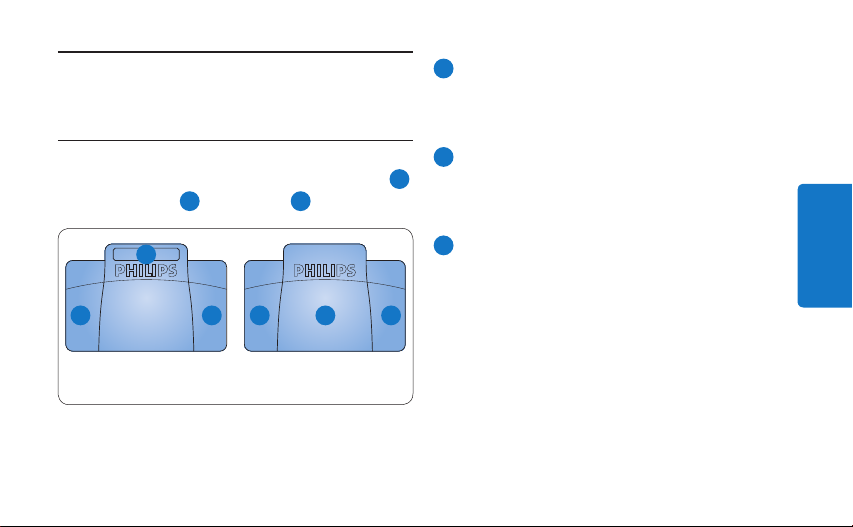
Houd het pedaal ingedrukt om snel terug
Uw voetpedaal gebruiken4
te gaan. Laat het pedaal los wanneer de
gewenste positie werd bereikt.
Voetpedaal 2210 / 2310 / 23204.1
Het voetpedaal heeft drie pedalen: snel terug
2
2
en afspelen 3.
32 1
snel voorwaarts
1 3
LFH 2210 / 2310 LFH 2320
2
Houd het pedaal ingedrukt om snel
1
voorwaarts te gaan. Laat het pedaal los
,
wanneer de gewenste positie werd bereikt.
3
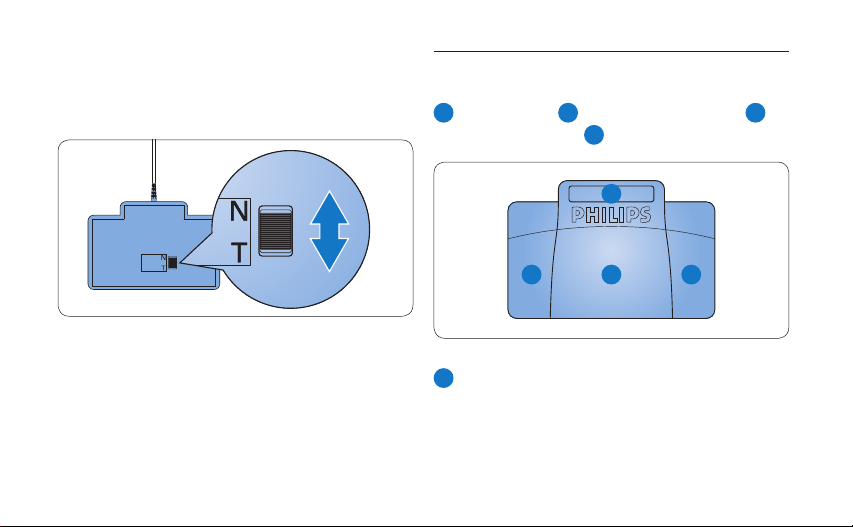
Met het pedaal start u het afspelen. Hoe
het start- en stopproces tijdens het afspelen
verloopt, is afhankelijk van de instelling
van de afspeelschakelaar onderaan het
voetpedaal:
N positie: • Houd het pedaal ingedrukt
tijdens het afspelen. Wanneer het pedaal
wordt losgelaten, wordt het afspeelproces
gestopt.
T positie: • Druk het pedaal in om het
Page 40
40 Gebruikershandleiding
afspelen te starten en laat los. Druk
nogmaals op het pedaal om het afspelen
te stoppen.
Voetpedaal 23304.2
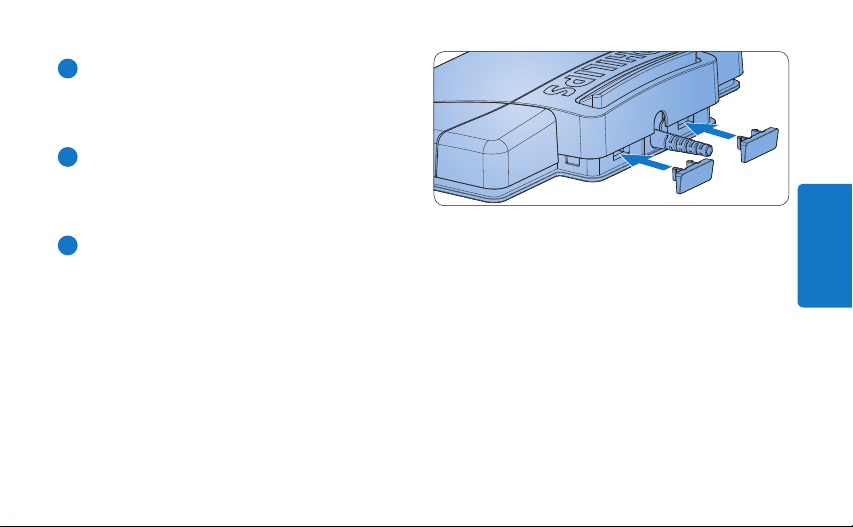
Het voetpedaal heeft vier pedalen: een linker-
1
, een midden- 2, en een rechterpedaal 3 en
het bovenste pedaal
4
.
4
1 3
1
Houd het linkerpedaal ingedrukt om snel
2
voorwaarts te gaan. Laat het pedaal los
wanneer de gewenste positie werd bereikt.
Page 41
41Gebruikershandleiding
NEDERLANDS
2
Druk het middenpedaal in om het afspelen
te starten en laat los. Druk nogmaals op het
pedaal om het afspelen te stoppen.
3
Houd het rechterpedaal ingedrukt om snel
terug te gaan. Laat het pedaal los wanneer
de gewenste positie werd bereikt.
4
Druk het bovenste pedaal in en laat los om
een dictaat te beëindigen.
E Tip
Indien u het middenpedaal onbruikbaar heeft
gemaakt met de Device Configuration Tool (zie
volgend hoofdstuk), kan deze vastgezet worden
met de bijgeleverde plaatjes.
Page 42
Geavanceerde confi guratie5
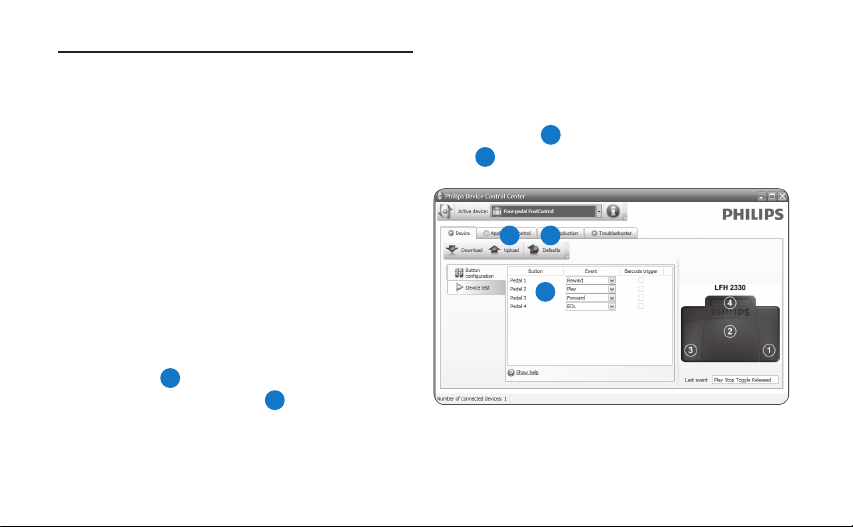
Gebruik de Device Control Center om de
pedaalfuncties te wijzigen van voetpedalen met
USB aansluiting.
D Opmerking
Het voetpedaal kan weer ingesteld worden naar
de standaard fabrieksconfi guratie door op de
Defaults knop
2
knop
3
te klikken. Klik op de Upload
om de standaardinstellingen op te slaan.
Steek het voetpedaal in een vrije USB poort 1
van de PC.
2 3
Start de Device Control Center door het 2
Windows start menu te openen en Alle
1
programma’s > Philips Speech Control >
Philips Device Control Center.
Wijzig de functie van de pedalen volgens uw 3
voorkeur.
1
Klik op de 4 Upload knop 2 om de nieuwe
instellingen op te slaan.
42 Gebruikershandleiding
Page 43
Benvenuto1
Congratulazioni per l’acquisto e benvenuto da Philips! Per poter beneficiare del servizio oerto
da Philips, sul nostro sito web sono disponibili informazioni di supporto quali manuali per l’utente,
download di software, informazioni sulla garanzia e altro ancora: www.philips.com/dictation.
Panoramica1.1
Comando a pedale 2210
con connessione analogica
Comando a pedale 2310 / 2330
con connessione USB
Comando a pedale 2320
ITALIANO
con connessione USB
43Manuale di istruzioni
Page 44
44 Manuale di istruzioni
Smaltimento di vecchi prodotti2.2
Importante2
Il prodotto è stato progettato e realizzato •
con materiali e componenti di alta qualità che
Sicurezza2.1
Al fine di evitare cortocircuiti, non esporre il •
prodotto a pioggia o acqua.
Non esporre il prodotto a calore eccessivo •
causato da elementi riscaldanti o dalla luce
diretta del sole.
Proteggere i cavi da schiacciamento, con •
particolare attenzione ai punti di connessione
e di uscita da/verso il prodotto.
Eseguire il backup dei file. Philips non è •
responsabile di eventuali perdite di contenuto.
possono essere riciclati e riutilizzati.
Se su un prodotto si trova il simbolo •
del bidone con una croce sopra, significa che il prodotto è oggetto della
Direttiva comunitaria 2002/96/CE.
Informarsi sulle modalità di raccolta dei •
prodotti elettrici ed elettronici in vigore nella
propria zona.
Attenersi alle normative locali per lo •
smaltimento dei rifiuti e non gettare i vecchi
prodotti nei normali rifiuti domestici. Uno
smaltimento adeguato dei prodotti aiuta
a prevenire l’inquinamento ambientale e
possibili danni alla salute.
Page 45

45Manuale di istruzioni
ITALIANO
Supporto tecnico e garanzia2.3
Questo prodotto è stato progettato e costruito
con i più alti standard qualitativi. Se il vostro
prodotto Philips non funzionasse correttamente
contattate il vostro rivenditore Philips
Speech Processing che provvederà a darvi le
informazioni necessarie su come procedere.
Per maggiori informazioni oppure domande
alle quali il vostro rivenditore non è in grado di
rispondere, visitate il nostro sito e contattateci
direttamente www.philips.com/dictation.
I componenti di questo prodotto non sono
riparabili dall’utente. Non aprire né rimuovere
i coperchi di protezione e non inserire oggetti
non idonei per i connettori specifici. Le
riparazioni possono essere eseguite soltanto
presso i centri di assistenza e di riparazione
autorizzati. Il mancato rispetto di questa
condizione renderà nulle tutte le garanzie
esplicite e implicite. Tutte le operazioni
espressamente vietate in questo manuale, le
procedure di regolazione o montaggio non
consigliate o autorizzate nel presente manuale
invalidano la garanzia.
Page 46

46 Manuale di istruzioni
Comando a pedale 2310 / 2320 / 3.2
Installazione3
Comando a pedale 2210 con 3.1
connessione analogica
Connettete il comando a pedale 1
l’apparecchio di trascrizione.
E Consigli
Il comando a pedale 2210 può essere anche
collegato al PC tramite adattatore USB 6220
(optional).
2330 con connessione USB
Connettere il comando a pedale alla porta 1
USB del PC.
Inserire nell‘unità CD-ROM il CD di instal-2
lazione. Il programma di installazione si dovrebbe avviare automaticamente. Se così non
fosse, aprire in Esplora risorse il contenuto
del CD e fare doppio clic sul file autorun.exe.
Fare clic sul pulsante 3 Install.
Seguire le istruzioni del programma per 4
installare i driver del software sul PC.
D Nota
Per poter installare il software l‘utente deve
disporre dei diritti amministratore. Contattare
l‘amministratore per ricevere ulteriore assistenza.
Page 47
47Manuale di istruzioni
ITALIANO
Come usare il comando a 4
pedale
Comando a pedale 2210 / 2310 / 23204.1
Il comando dispone di tre pedali: riavvolgimento
1
rapido
riproduzione
, avanzamento rapido 2 e
3
.
2
1 3
32 1
LFH 2210 / 2310 LFH 2320
1
Tenere premuto il pedale per il
riavvolgimento rapido. Una volta raggiunta la
posizione desiderata, rilasciare il pedale.
2
Tenere premuto il pedale per l‘avanzamento
rapido. Una volta raggiunta la posizione
desiderata, rilasciare il pedale.
3
Il pedale avvia la riproduzione. Il modo in cui
si avvia e si arresta la riproduzione dipende
da come è stato impostato l‘interruttore
di riproduzione posto sotto il comando a
pedale:
Posizione N: • tenere premuto il pedale
durante la riproduzione. Quando si rilascia
il pedale, la riproduzione si interrompe.
Posizione T: • tenere premuto il pedale
per avviare la riproduzione. Premere
Page 48
48 Manuale di istruzioni
nuovamente il pedale per interrompere la
riproduzione.
Comando a pedale 23304.2
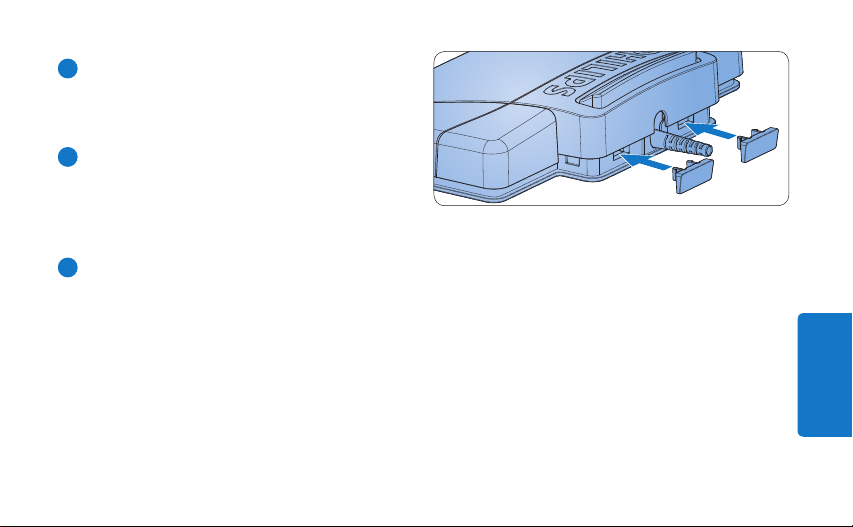
Questo comando a quattro pedali: sinistro
centrale
2
, destro 3 e alto 4.
4
1
,
1 3
1
Tenere premuto il pedale sinistro per
2
l‘avanzamento rapido. Una volta raggiunta
la posizione desiderata, rilasciare il pedale
sinistro.
Page 49
49Manuale di istruzioni
ITALIANO
2
Tenere premuto il pedale centrale per avvia-
re la riproduzione. Premere nuovamente il
pedale per interrompere la riproduzione.
3
Tenere premuto il pedale destro per il
riavvolgimento rapido. Una volta raggiunta
la posizione desiderata, rilasciare il pedale
destro.
4
Premere e rilasciare il pedale alto per finire
la dettatura.
E Consigli
Se avete disabilitato il pedale centrale tramite
configurazione via software (consultare il
prossimo capitolo) potete bloccarlo con la
piastra che trovate nella confezione.
Page 50
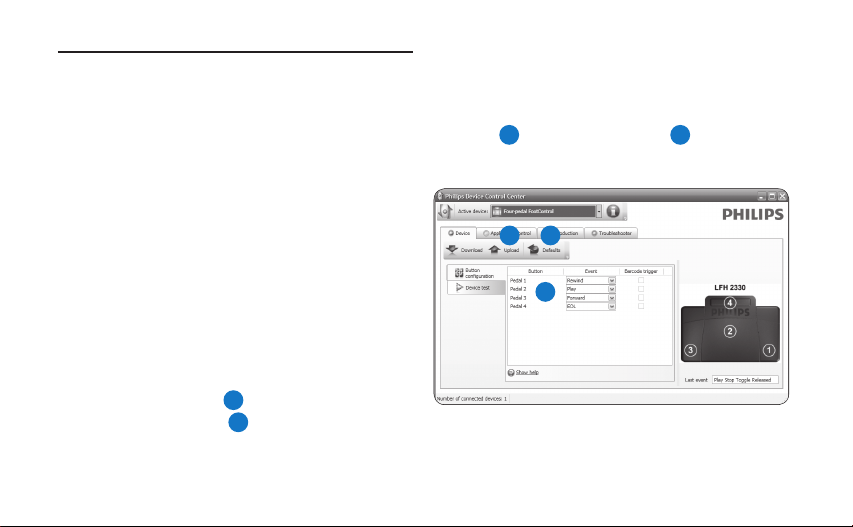
Confi gurazione avanzata5
Usate la confi gurazione avanzata per cambiare le
funzioni dei pedali dei comandi con connessione
USB.
D Nota
Il comando a pedale può essere resettato alle
sue impostazioni precedenti cliccando il pulsante
Defaults
3
. Cliccare su Upload 2 per salvare
le impostazioni di default.
Connettere il comando a pedale alla porta 1
USB del PC.
2 3
Aprire la confi gurazione del comando a 2
pedale (Device Control Center) tramite
1
il menù Start di Windows e selezionando
Tutti i programmi > Philips Speech Control
> Philips Device Control Center.
Cambiare le funzioni dei pedali secondo le 3
vostre preferenze.
1
Cliccare su 4 Upload 2 per salvare le nuove
impostazioni.
50 Manuale di istruzioni
Page 51
Declaration of Conformity
Tested to comply with FCC standards
FOR HOME OR OFFICE USE
Model Number: LFH 2210 / LFH 2310 / LFH 2320 / LFH 2330
Trade Name: Philips Foot Control
Responsible Party: Philips Speech Processing, 64 Perimeter Center East, Atlanta, GA 30346, USA, Tel. 888-260- 6261
This device complies with Part 5 of the FCC Rules. Operation is subject to the following two conditions:
) This device may not cause harmful interference.
2) This device must accept any interference received, including interference that may cause undesired operation.
The CE mark confirms that the device corresponds to the relevant guidelines of the European Union.
The cardboard used for packaging can be recycled. This electronic device contains recyclable material.
Page 52

Discover the comprehensive range of professional dictation products from Philips
www.philips.com/dictation
Specifications are subject to change without notice.
Trademarks are the property of Royal Philips Electronics or their respective owners.
© 2009 Royal Philips Electronics. All rights reserved.
Document version 4.0, 27/02/2009.
5103 109 9701.4
 Loading...