

Page 1
Sonicare
toothbrush
for teens
Page 2
Page 3
1
3
4
5
6
72
1
Page 4

Page 5

English 6
简体中文
16
繁體中文
26
Page 6

English
6
Introduction
Congratulations on your purchase and welcome to Philips! To fully
benefit from the support that Philips offers, register your product at
www.philips.com/welcome.
Important safety information
Read this important information carefully before you use the device
and save it for future reference.
Danger
- Keep the charger away from water. Do not place or store it over or
near water contained in a bathtub, washbasin, sink etc. Do not
immerse the charger in water or any other liquid. After cleaning,
make sure the charger is completely dry before you connect it to
the mains.
Warning
- The mains cord cannot be replaced. If the mains cord is damaged,
discard the charger.
- Always have the charger replaced with one of the original type in
order to avoid a hazard.
- Do not use the charger outdoors or near heated surfaces.
- If the appliance is damaged in any way (brush head, toothbrush
handle or charger), stop using it. This appliance contains no
serviceable parts. If the appliance is damaged, contact the
Consumer Care Centre in your country (see chapter ‘Guarantee
and support').
- This appliance is not intended for use by persons (including
children) with reduced physical, sensory or mental capabilities, or
lack of experience and knowledge, unless they have been given
supervision or instruction concerning use of the appliance by a
person responsible for their safety.
- Children should be supervised to ensure that they do not play with
the appliance.
Caution
- Do not clean the brush head, the handle or the charger in the
dishwasher.
English
Page 7

English
- If you have had oral or gum surgery in the previous 2 months,
consult your dentist before you use the toothbrush.
- Consult your dentist if excessive bleeding occurs after using this
toothbrush or if bleeding continues to occur after 1 week of use.
Also consult your dentist if you experience discomfort or pain
when you use the Philips Sonicare.
- The Philips Sonicare toothbrush complies with the safety
standards for electromagnetic devices. If you have a pacemaker or
other implanted device, contact your physician or the device
manufacturer of the implanted device prior to use.
- If you have medical concerns, consult your doctor before you use
the Philips Sonicare.
- This appliance has only been designed for cleaning teeth, gums
and tongue. Do not use it for any other purpose. Stop using the
appliance and contact your doctor if you experience any
discomfort or pain.
- The Philips Sonicare toothbrush is a personal care device and is
not intended for use on multiple patients in a dental practice or
institution.
- Stop using a brush head with crushed or bent bristles. Replace the
brush head every 3 months or sooner if signs of wear appear. Do
not use other brush heads than the ones recommended by the
manufacturer.
- If your toothpaste contains peroxide, baking soda or bicarbonate
(common in whitening toothpastes), thoroughly clean the brush
head with soap and water after each use. This prevents possible
cracking of the plastic.
Electromagnetic fields (EMF)
This Philips appliance complies with all applicable standards and
regulations regarding exposure to electromagnetic fields.
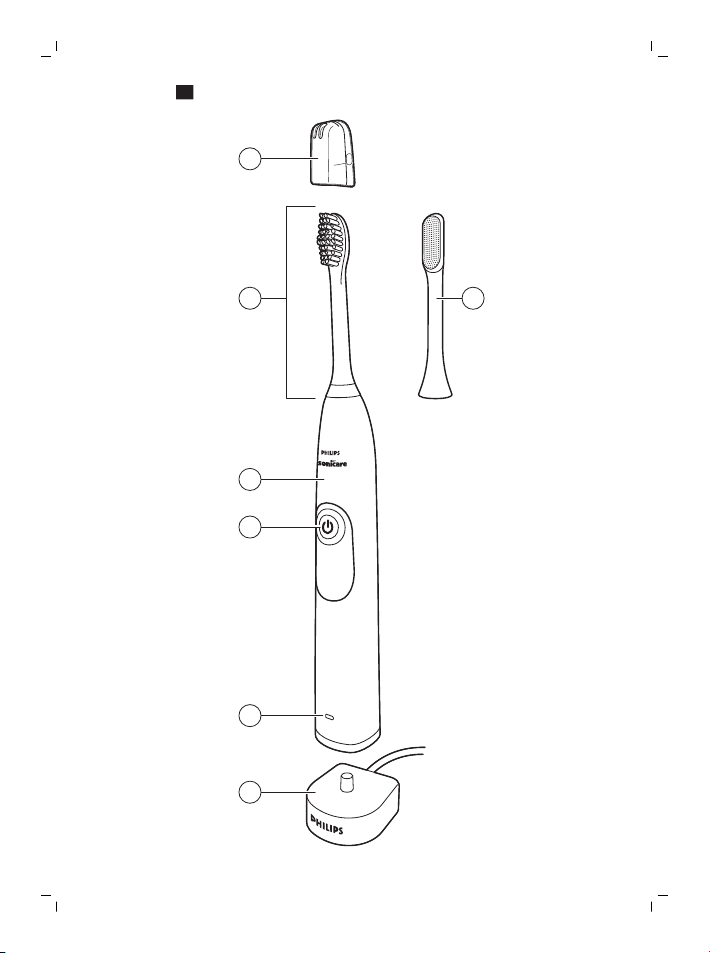
General description (Fig. 1)
1 Hygienic travel cap
2 Brush head with unique identifier
3 Handle
4 Power on/off button
5 Battery level indicator
7
Page 8

English
8
6 Charger
7 TongueCare+ Tongue brush
- Not shown: Travel case
Note: The content of the box may vary based on the model
purchased.
Note: Brush head type may vary based on the model purchased
(different appearance as the picture shown here)
Preparing for use
Attaching the brush head
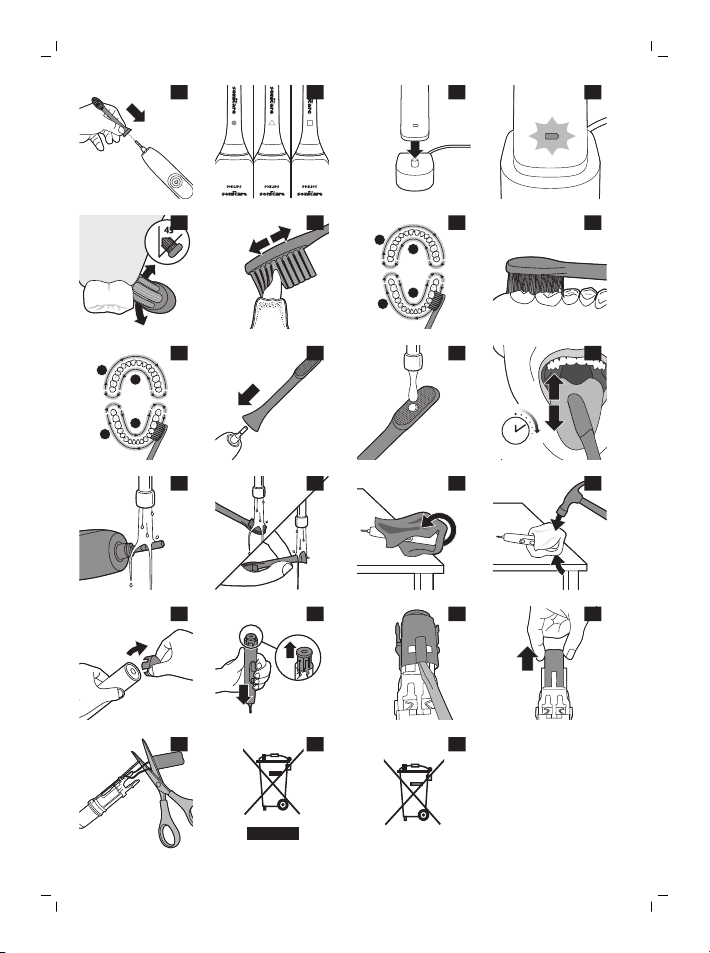
1 Align the brush head so the bristles point in the same direction as
the front of the handle (Fig. 2).
2 Firmly press the brush head down onto the metal shaft until it
stops.
Note: Philips Sonicare brush heads are imprinted with icons to easily
identify your brush head (Fig. 3).
Charging the appliance
1 Plug the charger into an electrical outlet.
2 Place the handle on the charger (Fig. 4).
- The battery level indicator flashes to indicate that the toothbrush
is charging. When the light stops flashing and turns solid green the
toothbrush is fully charged. (Fig. 5)
Note: It can take up to 48 hours to fully charge the battery, but the
Philips Sonicare may be used before it is fully charged.
Using the appliance
Brushing instructions
1 Wet the bristles and apply a small amount of toothpaste.
2 Place the toothbrush bristles against the teeth at a slight angle (45
degrees), pressing firmly to make the bristles reach the gumline or
slightly beneath the gumline (Fig. 6).
Note: Keep the center of the brush in contact with the teeth at all
times.
Page 9

English
3 Press the power on/off and mode button to turn on the Philips
Sonicare.
4 Gently keep the bristles placed on the teeth and in the gumline.
Brush your teeth with small back and forth motion so the bristles
reach between the teeth. Continue this motion throughout your
brushing cycle.
Note: The bristles should slightly flare. Do not scrub.
5 To clean the inside surfaces of the front teeth, tilt the brush handle
semi-upright and make several vertical overlapping brushing
strokes on each tooth (Fig. 7).
Note: To make sure you brush evenly throughout the mouth,
divide your mouth into 4 sections using the Quadpacer feature
(see chapter ‘Features’).
6 Begin brushing in section 1 (outside upper teeth) and brush for 30
seconds before you move to section 2 (inside upper teeth).
Continue brushing in section 3 (outside lower teeth) and brush for
30 seconds before you move to section 4 (inside lower teeth (Fig.
8)).
7 After you have completed the brushing cycle, you can spend
additional time brushing the chewing surfaces of your teeth and
areas where staining occurs. (Fig. 9)
Your Philips Sonicare toothbrush is safe to use on:
- Braces (brush heads wear out sooner when used on braces)
Dental restorations (fillings, crowns, veneers)
Note: Ensure that braces or dental restorations are properly adhered
and not compromised. If not, braces or dental restorations may be
damaged when they come into contact with the brush head.
Note: When the Philips Sonicare toothbrush is used in clinical studies,
the handle should be fully charged and the Easy-start feature
deactivated.
Battery status (when handle is not on charger)
- A yellow battery level indicator indicates a low charge.
- A green battery level indicator indicates a high charge.
9
Page 10

English
10
- The battery level indicator turns off when the battery is in between
a low and a high charge.
Note:When you hear 3 beeps and the yellow LED of the battery level
indicator flashes, this means the battery charge is below 10% and the
toothbrush should be recharged.
Note:To keep the battery fully charged at all times, you may keep the
Sonicare on the charger when not in use.
Features
Quadpacer
- The Quadpacer is an interval timer that has a short beep and
pause to remind you to brush the 4 sections of your mouth evenly
and thoroughly. (Fig. 10)
Smartimer
The Smartimer indicates that your brushing cycle is complete by
automatically turning off the toothbrush at the end of the brushing
cycle.
Dental professionals recommend brushing no less than 2 minutes
twice a day.
Note: If you press the power on/off button after you started the
brushing cycle, the toothbrush will pause. After a pause of 30
seconds, the Smartimer resets.
Easy-start
The Easy-start feature gently increases power over the first 14
brushings to help you get used to brushing with the Philips Sonicare
toothbrush. This Philips Sonicare toothbrush comes with the Easystart feature activated.
Activating or deactivating the Easy-start feature:
Place the handle in the plugged-in charger.
- To activate Easy-start:
Press and hold the power on/off button for 2 seconds. You hear 2
beeps and the battery level indicator lights up green to indicate
that the Easy-start feature has been activated.
Page 11

English
- To deactivate Easy-start:
Press and hold the power on/off button for 2 seconds. You hear 1
beep and the battery level indicator lights up yellow to indicate
that the Easy-start feature has been deactivated.
Note: Each of the first 14 brushings must last at least 1 minute to move
through the Easy-start ramp-up cycle properly.
Note: Use of the Easy-start feature beyond the initial ramp-up period
is not recommended and reduces the effectiveness of the Philips
Sonicare toothbrush in removing plaque.
Attaching the TongueCare+ Tongue brush
1 Remove the brush head.
2 Align the TongueCare+ Tongue brush so the MicroBristles face the
front of the handle. (Fig. 11)
3 Firmly click the TongueCare+ Tongue brush down on the metal
shaft until it stops.
Using your TongueCare+ Tongue brush
Cleaning your tongue
1 Wet MicroBristles. (Fig. 12)
Note: Mouthwash can be used on the middle of the tongue before
using the TongueCare+ Tongue brush.
2 Place TongueCare+ Tongue brush so that MicroBristles are
positioned against your tongue and apply light pressure.
3 Turn power on, begin cleaning.
- Lightly rub the TongueCare+ Tongue brush front to back on the
tongue, going only as far back as is comfortable for you. (Fig. 13)
- Clean evenly over the entire tongue for 20 seconds.
4 Rinse and repeat to ensure a total of 3 times.
11
Getting comfortable
Using a powered tongue cleaner for the first time?
Page 12

English
12
Tingling
Your tongue cleaner is powered by Philips Sonicare technology, with
31,000 vibrations per minute to get your tongue squeaky clean. These
vibrations are safe for the tongue, but you may experience some
tingling as you adjust. This is a normal reaction and usually fades after
a week of use.
Gagging
Any form of tongue cleaning can elicit a gag reflex for new users. To
avoid triggering a gagging response, start slowly and only bring your
TongueCare+ Tongue brush as far back as is comfortable, working
your way deeper over time as you adjust.
Cleaning
You should clean your Philips Sonicare toothbrush regularly to
remove toothpaste and other residue. Failure to clean your Philips
Sonicare toothbrush may result in an unhygienic product and
damage to it may occur.
Warning: Do not clean brush heads, the handle or the charger in the
dishwasher.
Toothbrush handle
1 Remove the brush head and rinse the metal shaft area with warm
water. Make sure you remove any residual toothpaste (Fig. 14).
Caution: Do not push on the rubber seal on the metal shaft with
sharp objects, as this may cause damage.
2 Wipe the entire surface of the handle with a damp cloth.
Brush head
1 Rinse the brush head and bristles after each use (Fig. 15).
2 Remove the brush head from the handle and rinse the brush head
connection with warm water at least once a week. Rinse the travel
cap as often as needed.
Charger
1 Unplug the charger before you clean it.
Page 13

English
2 Wipe the surface of the charger with a damp cloth.
13
TongueCare+ Tongue brush
Do not clean TongueCare+ Tongue brush in dishwasher.
1 Rinse TongueCare+ Tongue brush after each use.
2 Remove TongueCare+ Tongue brush from the handle and rinse
the tongue brush connection at least once a week with warm
water.
Storage
If you are not going to use the product for a long time, unplug it, clean
it (see chapter 'Cleaning') and store it in a cool and dry place away
from direct sunlight.
Replacement
Brush head and TongueCare+ Tongue brush
Replace Philips Sonicare brush heads and TongueCare+ Tongue
brushes every 3 months to achieve optimal results. Use only Philips
Sonicare replacement brush heads and tongue brushes.
Ordering accessories
To buy accessories or spare parts, visit
www.shop.philips.com/service or go to your Philips dealer. You can
also contact the Philips Consumer Care Center in your country (see
the international warranty leaflet for contact details)
Recycling
- This symbol means that this product shall not be disposed of with
normal household waste (2012/19/EU) (Fig. 23).
- This symbol means that this product contains a built-in
rechargeable battery which shall not be disposed of with normal
household waste (Fig. 24) (2006/66/EC). We strongly advise you
to take your product to an official collection point or a Philips
service centre to have a professional remove the rechargeable
battery.
Page 14

English
14
- Follow your country’s rules for the separate collection of electrical
and electronic products and rechargeable batteries. Correct
disposal helps prevent negative consequences for the
environment and human health.
Removing the rechargeable battery
Warning: Only remove the rechargeable battery when you
discard the appliance. Make sure the battery is completely
empty when you remove it.
Warning: Please note that this process is not reversible.
To remove the rechargeable battery, you need a towel or cloth, a
hammer and a flat-head (standard) screwdriver. Observe basic safety
precautions when you follow the procedure outlined below. Be sure
to protect your eyes, hands, fingers, and the surface on which you
work.
1 To deplete the rechargeable battery of any charge, remove the
handle from the charger, turn on the Philips Sonicare toothbrush
and let it run until it stops. Repeat this step until you can no longer
turn on the Philips Sonicare toothbrush.
2 Remove and discard the brush head. Cover the entire handle with
a towel or cloth (Fig. 16).
3 Hold the top of the handle with one hand and strike the handle
housing 0.5 inch above the bottom end. Strike firmly with a
hammer on all 4 sides to eject the end cap (Fig. 17).
Note: You may have to hit on the end several times to break the
internal snap connections.
4 Remove the end cap from the toothbrush handle. If the end cap
does not release easily from the housing, repeat step 3 until the
end cap is released (Fig. 18).
5 Holding the handle upside down, press the shaft down on a hard
surface. If the internal components do not easily release from the
housing, repeat step 3 until the internal components are released
(Fig. 19).
Page 15

English
6 Remove the inner assembly from the housing by fully inserting a
small flat-head screwdriver into the slot opposite the circuit board
and pry until it comes apart (Fig. 20).
7 Grab the battery and pull it out of the internal assembly (Fig. 21).
Caution: Be aware of the sharp edges of the battery tabs so as
to avoid injury to your fingers.
8 Cut the battery wires from the circuit board close to the battery
(Fig. 22).
9 Cover the battery contacts with tape to prevent any electrical short
from residual battery charge. The rechargeable battery can now be
recycled and the rest of the product discarded appropriately.
15
Guarantee and support
If you need information or support, please visit
www.philips.com/support or read the separate worldwide guarantee
leaflet.
Guarantee restrictions
The terms of the international guarantee do not cover the following:
- Brush heads.
- Damage caused by use of unauthorised replacement parts.
- Damage caused by misuse, abuse, neglect, alterations or
unauthorised repair.
- Normal wear and tear, including chips, scratches, abrasions,
discolouration or fading.
Page 16

简体中文
16
简介
感谢您的惠顾,欢迎光临飞利浦! 为了让您能充分享受飞利浦提供的支
持,请在 www.philips.com/welcome 上注册您的产品。
重要安全信息
使用本产品之前,请仔细阅读本使用说明书,并
妥善保管以供日后参考。
危险
-
使充电器远离水源。 切勿将它放置或存放在任
何有水的容器的上方或附近,如:浴盆、脸盆、
水池等。切勿将充电器浸入水或任何其他液体中
。 清洁后,确保充电器完全干燥,再将其连接
至电源。
警告
-
必须安装需要固定的部件,以免它们掉入水中。
-
不得更换电源线。 如果电源线损坏,请丢弃充
电器。
-
应始终使用原装型号的充电器进行更换,以免发
生危险。
-
切勿在户外或高温表面附近使用充电器。
Page 17

简体中文
-
如果本产品受到任何损坏(牙刷头、牙刷柄或充
电器),请勿再使用。 本产品包含不可维 修的
部件。 如果本产品已损坏,请联系您所在国家
/地区的客户服务中心(请参阅“保修和支持”一
章)。
-
肢体不健全、精神有障碍及取乏相关经验和知识
的人(包括儿童)必须在监护人的监督及指导下
使用。
-
请照看好儿童,确保他们不会把本产品当成玩具
。
警告
-
请勿在洗碗机中清洗牙刷头、牙刷柄或充电器。
-
如果您在前 2 个月中曾做过口腔或牙龈手术,
请在使用本产品前先咨询您的牙医。
-
如果使用本产品后牙龈大量出血或在使用 1 周后
仍会出血,请咨询您的牙医。 如果使用飞利浦
Sonicare 时感觉不适或疼痛,也请咨询您的牙
医。
-
飞利浦 Sonicare 牙刷符合电磁装置的安全标准
。 有关任何涉及心脏起搏器或其他植入装置的
问题,请在使用之前咨询医生或相关植入装置的
设备制造商。
17
Page 18

简体中文
18
-
如果您有医学问题,请在使用飞利浦 Sonicare
前咨询医生。
-
本产品设计仅用于清洁牙齿、牙龈和舌头。 请
勿将其用作任何其它用途。 如果感觉任何不适
或疼痛,请停止使用本产品并与医生联系。
-
飞利浦 Sonicare 牙刷为私人用品,不可供牙医
诊所或机构对多位患者使用。
-
请停止使用变形或刷毛弯曲的牙刷头。 请每 3
个月更换一次牙刷头,如果出现磨损迹象,应提
前更换。 切勿使用非制造商推荐的其他刷头。
-
如果您所用的牙膏中含有过氧化物、碳酸氢钠或
其它重碳酸盐(增白牙膏中的常见成份),则请
务必在每次使用后用肥皂和水彻底清洗刷头。
这可以预防可能出现的塑料破裂。
电磁场 (EMF)
本飞利浦产品符合所有有关暴露于电磁场的适用
标准和法规。
基本说明(图 1)
1 旅行用卫生保护盖
2 带有标识符的刷头
3 手柄
4 开/关按钮
Page 19

简体中文
5 电池电量指示灯
6 充电器
7 舌苔清洁刷头
-
未显示: 1 个旅行收藏盒
注意: 包装盒内物品可能会因所购买型号而异。
注意: 牙刷头类型因购买型号而异(外观不同,
如此处图中所示)
使用准备
安装牙刷头
1 对齐牙刷头,使刷毛方向与牙刷柄 (图 2)正面的方向一致。
2 用力将牙刷头向下按到金属轴上,直到按不动为止。
注意: 飞利浦 Sonicare 刷头印有图标,便于识别刷头 (图 3)。
为产品充电
1 将充电器插入电源插座。
2 将牙刷柄放在充电器 (图 4)上。
- 电池电量指示灯闪烁表示牙刷正在充电。 充电指示灯停止闪烁,并呈绿
色持续亮起,即代表牙刷已经完全充满。 (图 5)
注意: 电池充满电需要 48 小时,但飞利浦 Sonicare 在未充满电时亦可使
用。
19
使用本产品
刷牙说明
1 浸湿刷毛并挤上少量牙膏。
2 将牙刷的刷毛以小角度(45 度)放在牙齿上,用力按下以使刷毛接触牙
龈或牙龈 (图 6)略下方。
注意: 始终将牙刷中间与牙齿接触。
3 按下电源开/关和模式按钮,打开飞利浦 Sonicare。
Page 20

简体中文
20
4 将刷毛轻轻放置于牙齿和牙龈上, 来回小幅度缓慢移动,这样可以让刷
毛能够刷到牙缝。 在整个刷牙周期中连续这样移动即可。
注意: 刷毛应稍微呈喇叭形, 请勿过度用力。
5 要清洁门牙内表面,请将牙刷柄呈半直立状倾斜,在每颗牙齿 (图 7)上
反复垂直震动。
注意: 为确保牙刷能均匀清洁整个口腔,可使用 Quadpacer 30 秒时段
计时器功能将口腔分为 4 个区域(参见“功能”一章)。
6 从第 1 个刷牙区域(上牙外侧)开始,刷 30 秒钟,然后移到第 2 个刷
牙区域(上牙内侧)。 继续刷第 3 个刷牙区域(下牙外侧),刷 30 秒
钟,然后移到第 4 个刷牙区域(下牙 (图 8)内侧)。
7 在完成刷牙周期之后,可以多花一些时间刷洗牙齿的咀嚼面以及污垢容
易出现的区域。 (图 9)
您的飞利浦 Sonicare 声波震动牙刷可安全用于:
- 牙齿矫正器(在牙齿矫正器上使用时,牙刷头磨损较快)
修复牙体(补牙、齿冠、烤瓷牙)
注意: 确保牙齿矫正器或修复牙体正确固着并且未损坏。 否则,当其与牙
刷头接触时可能会损坏。
注意: 飞利浦 Sonicare 声波震动牙刷用于临床研究时,刷柄必须充满电且
应禁用 Easy-start 功能。
电池状态(牙刷柄未置于充电器上时)
- 黄色电池电量指示灯表示电池电量低。
- 绿色电池电量指示灯表示电池电量高。
- 电池电量处于低电量和高电量之间时,电池电量指示灯将熄灭。
注意:听到 3 声蜂鸣音且电池电量指示灯的黄色 LED 闪烁时,表示电池电
量低于 10%,应该为牙刷充电。
注意:为确保电池始终电量充沛,可在不使用时将 Sonicare 声波震动牙刷
置于充电器上。
功能
Quadpacer 30 秒时段计时器
- Quadpacer 30 秒时段计时器是一种会发出短暂蜂鸣音并暂停的时段计
时器,提醒您均匀彻底 (图 10)地刷净口腔的四个区域。
Page 21

简体中文
21
Smartimer 两分钟智能计时器
Smartimer 两分钟智能计时器在刷牙周期结束时会自动关闭牙刷,指示您的
设定刷牙周期已完成。
牙科专家建议每天刷牙两次,每次不少于 2 分钟。
注意: 如果在开始刷牙周期后按下电源开/关按钮,牙刷将暂停。 暂停 30
秒后,Smartimer 两分钟智能计时器将重置。
Easy-start 刷牙动力增强功能
Easy-start 刷牙动力增强功能在最初 14 次刷牙时会缓慢增加动力,以帮助
您适应使用飞利浦 Sonicare 声波震动牙刷刷牙。 本型号的飞利浦
Sonicare 声波震动牙刷出厂时已激活 Easy-start 刷牙动力增强装置。
启用或禁用 Easy-start 刷牙动力增强功能:
将牙刷柄放到连接电源的充电座中。
- 要启用 Easy-start 刷牙动力增强功能:
按住电源开/关按钮 2 秒钟。 您会听到 2 声蜂鸣音且电池电量指示灯会
呈绿色亮起,表示 Easy-start 刷牙动力增强功能已启用。
- 要禁用 Easy-start刷牙动力增强功能:
按住电源开/关按钮 2 秒钟。 您会听到 1 声蜂鸣音且电池电量指示灯会
呈黄色亮起,表示 Easy-start 刷牙动力增强功能已禁用。
注意: 最初 14 次刷牙必须每次至少持续 1 分钟,以便正确渡过 Easy-start
动力增强的循序渐进期。
注意: 建议在初始动力递增阶段后,不使用 Easy-start 刷牙动力增强功
能,以免减弱飞利浦 Sonicare 牙刷去除牙菌斑的效果。
安装 舌苔清洁刷头
1 取下刷头。
2 对齐 舌苔清洁刷头,使小刷毛面向手柄 (图 11)的正面。
3 用力将 舌苔清洁刷头向下按到金属轴上,直到按不动为止。
使用 舌苔清洁刷头
清洁您的舌头
1 浸湿小刷毛 (图 12)。
注意: 使用 舌苔清洁刷头前,可以使用漱口水清洁舌头中间部位。
2 将 舌苔清洁刷头放入口中,让小刷毛接触舌头,并稍稍用力。
Page 22

简体中文
22
3 打开电源,开始清洁。
- 在舌头上从前到后轻轻摩擦 舌苔清洁刷头,请仅清洁至您 (图 13)感觉
舒适的区域。
- 均匀地清洁整个舌头 20 秒。
4 冲洗并重复上述流程(共计 3 次)。
获得舒适体验
第一次使用电动舌头清洁器?
刺痛
舌头清洁器采用飞利浦 Sonicare 技术,每分钟可振动 31,000 次,让您的
舌头无比洁净。 振动不会伤害您的舌头,但在适应过程中您可能会感到少
许刺痛。 这是正常反应,而且该反应通常会在使用一周后消失。
呕吐
对于新用户,任何形式的舌头清洁都可能引发呕吐反射。 为避免产生呕吐
反应,开始使用时先使用 舌苔清洁刷头缓缓地清洁至您认为舒适的区域,
待您适应一段时间后再逐步向舌根部推进。
清洁
您应当定期清洗您的飞利浦 Sonicare 声波震动牙刷以清除牙膏和其他残留
物。 否则可能会导致产品不洁净并可能损坏产品。
警告: 请勿用洗碗机清洗刷头、刷柄或充电器。
牙刷柄
1 卸下牙刷头并用温水冲洗金属轴。 确保清除所有残留牙膏 (图 14)。
警告: 请勿使用尖锐物品按压金属轴上的橡胶密封圈,否则可能造成损
坏。
2 使用湿布擦拭牙刷柄的整个表面。
刷头
1 每次刷牙 (图 15)后冲洗牙刷头和刷毛。
2 从牙刷柄上卸下牙刷头,每周至少用温水冲洗一次牙刷头连接处。 请根
据需要经常冲旅行保护盖。
充电器
1 清洁产品前,请先将充电器电源拔掉。
Page 23

简体中文
2 使用湿布擦拭充电器的表面。
23
舌苔清洁刷头
请勿在洗碗机中清洗 舌苔清洁刷头。
1 每次使用后冲洗 舌苔清洁刷头。
2 从手柄上卸下 舌苔清洁刷头,每周至少用温水冲洗一次舌清洁刷的连接
处。
存放
如果长时间不使用产品,应拔下插头,清洁产品(请参阅“清洁”一章)
并将其存放在远离阳光直射的阴凉干燥处。
更换
牙刷头和 舌苔清洁刷头
每 3 个月更换一次飞利浦 Sonicare 牙刷头和 舌苔清洁刷头,以获得更佳效
果。 仅可使用飞利浦 Sonicare 替换牙刷头和舌头清洁刷。
订购配件
要购买配件或备件,请访问 www.shop.philips.com/service 或联系您的飞
利浦经销商。 您还可以联系所在国家/地区的飞利浦客户服务中心(请参阅
全球保修卡了解详细联系信息)
回收
- 此符号表示该产品不能与一般的生活垃圾一同处理 (2012/19/EU) (图
23)。
- 此符号表示该产品含有一个内置的充电电池,该电池不能与一般生活垃
圾 (图 24) (2006/66/EC) 一同丢弃。 强烈建议您将自己的产品送到官方
收集点或飞利浦服务中心,让专业人士移除充电电池。
- 遵循您的国家/地区有关分类回收电子电气产品和充电电池的规定。 正
确弃置产品有助于避免对环境和人类健康造成不良后果。
Page 24
мȞġĈҴˀΙĀǩ؆Ӎߒʔ
ˌɫǩ؆
ĈҴˀΙ
(Pb)
᰽
(Hg)
⬡
(Cd)
ԣᲱ
(Cr (VI) )
Ġ⅑ԓ᧠
(PBB)
Ġ⅑ȕ᧠⓭
(PBDE)
PCB’s
מŪǗɢذ
X O O O O O
ǕȪϜ֪֙SJ/T 11364Āܪǭৠ뺯
OȪФ˽ĈҴˀΙć˽ˌɫǨĈߴΙࠒնġĀߒʔߴćGB/T 26572ܪǭĀՄʔđŘĪ뺯
XȪФ˽ĈҴˀΙψɺć˽ˌɫĀԚĂߴΙࠒնġĀߒʔɸŜGB/T 26572ܪǭĀՄʔđ뺯
简体中文
24
*该表格中所显示的 "有害物质" 在产品正常使用情况下不会对人身和环境产
生任何伤害。
*该表格中所显示的 "有害物质" 及其存在的部件向消费者和回收处理从业者
提供相关物质的存在信息, 有助于产品废弃时的妥善处理。
拆下充电电池
警告: 仅在丢弃产品时取出充电电池。 在取出电池时请确保电池
电量已耗尽。
警告: 请注意,此过程是不可逆的。
要拆下充电电池,您需要一块毛巾或布、一个锤子和一个平头(标准)螺
丝刀。 按照下面列出的步骤执行操作时,请遵循基本的安全措施。 务必保
护好您的眼睛、手、手指以及工作台面。
1 要耗尽充电电池的电量,可以从充电器上取下牙刷柄,打开飞利浦
Sonicare 声波震动牙刷并让其运行直到停止。 重复这一步骤,直至飞利
浦 Sonicare 声波震动牙刷无法再打开。
2 取下并丢弃刷头。 用毛巾或布 (图 )包住整个牙刷柄。
3 用一只手握住牙刷柄顶部,敲击底部以上 0.5 英寸处的牙刷柄外壳。 用
锤子在所有 4 个侧面用力敲打,使端盖 (图 17)弹出。
注意: 可能要在底部敲打多次,才能将内部的扣合式连接分开。
4 从牙刷柄上取下端盖。 如果很难从外壳中取出端盖,请重复步骤 3,直
至将其取出 (图 18)。
5 将牙刷柄倒置,然后将轴向下按到坚硬表面上。 如果很难从外壳中取出
内部组件,请重复步骤 3,直至将其取出 (图 19)。
Page 25

简体中文
6 将小型平头螺丝刀完全插入与电路板相对的插槽,并加以撬动直至打开
(图 20),即可将内部组件从外壳中取出。
7 拿起电池,将其从内部组件 (图 21)中拉出。
警告: 请注意电池卡舌的锋利边缘,以免伤到手指。
8 剪断电池电线,将其与电池 (图 22)附近的电路板分开。
9 用胶带包住电池触点,以防止电池剩余电量导致短路。 充电电池即可回
收,产品的其它部件也要适当地弃置。
保修和支持
如需信息或支持,请访问 www.philips.com/support 或阅读单独的全球保修
卡。
保修条款
国际保修条款中不包括以下各项:
- 牙刷头。
- 因使用未授权的备件而造成的损坏。
- 由于误用、滥用、疏忽、改装或擅自修理造成的损坏。
- 正常磨损和撕裂,包括裂口、擦痕、磨损、变色或褪色等。
25
Page 26

繁體中文
26
簡介
感謝您購買本產品。歡迎來到飛利浦的世界! 為充分享受飛利浦為您提供
的好處,請至下列位址註冊產品:www.philips.com/welcome。
重要安全資訊
使用裝置之前,請先仔細閱讀此使用手冊,並保留說明以供日後參考。
危險
- 請勿讓充電器沾到水。 請勿將其放置或存放於裝水的澡盆、洗臉盆、洗
臉槽的上方或附近。請勿將充電器浸入水中或任何液體中。 清潔之後,
請確定充電器完全乾燥,然後再接上電源。
警告
- 必須安裝需要固定的部件,以免它們掉入水中。
- 不可更換電源線。 如果電源線損壞,請丟棄充電器。
- 請務必以原型號的充電器更換,以免發生危險。
- 充電器不可在室外或高熱表面附近使用。
- 如果產品有任何機件受損 (刷頭、牙刷握柄或充電器),請停止使用產
品。 本產品未包含可維修零件。 如果產品損壞,請聯絡您所在國家/地
區的客戶服務中心 (參見「保固與支援」單元)。
- 本產品不適合供下列人士 (包括孩童) 使用:身體官能或心智能力退化
者,或是經驗與使用知識缺乏者。他們需要有負責其安全的人員在旁監
督,或指示產品的使用方法,方可使用。
- 請看管孩童,避免他們將本產品當成玩具。
注意事項
- 請勿將刷頭、握柄或充電器放入洗碗機中清洗。
- 如果您的口腔或牙齦在過去 2 個月內曾動過手術,使用本牙刷前請諮詢
您的牙醫。
- 如果您在使用本牙刷後大量出血,或出血狀況延續超過 1 星期,請諮詢
您的牙醫。 使用飛利浦 Sonicare 時,如果有明顯的不適或疼痛,也請
諮詢牙醫。
- 飛利浦 Sonicare 牙刷符合電磁裝置的安全標準。 若您裝有心律調節器
或其他植入裝置,使用本產品之前請先諮詢您的醫師或植入裝置的裝置
製造商。
- 若您有醫療方面的顧慮,使用飛利浦 Sonicare 之前請先諮詢您的醫師。
Page 27

繁體中文
- 本用品只適用於清潔牙齒、牙齦與舌頭。 請勿用於其他用途。 如果發
生任何不適或疼痛,請停止使用產品並聯絡您的醫師。
- 飛利浦 Sonicare 電動牙刷為個人保健用品,不宜在牙醫診所或醫療機構
供多名病患使用。
- 若刷頭的刷毛斷裂或彎折,請停止使用。 請每 3 個月或出現磨損跡象時
提前更換刷頭。 請勿使用非製造商推薦的刷頭。
- 如果牙膏內含過氧化氫、小蘇打或重碳酸鹽 (常見於美白用牙膏),請在
刷牙完畢後以肥皂及水徹底清洗牙刷刷頭。 這樣可以防止塑膠裂開。
27
電磁波 (EMF)
本飛利浦產品符合所有電磁波暴露的相關適用標準和法規。
一般說明 (圖 1)
1 旅行用衛生保護蓋
2 具獨特識別標記的刷頭
3 握柄
4 電源開關按鈕
5 電池電量指示燈
6 充電器
7 舌苔清潔刷頭
- 未顯示: 旅行盒
注意: 包裝內容視購買型號而定。
注意: 刷頭類型視購買型號而定 (外觀不同,如圖所示)
使用前準備
安裝刷頭
1 將刷頭對齊,使刷毛朝向握柄正面 (圖 2)。
2 將刷頭用力下壓到金屬軸上,至到底為止。
注意: 飛利浦 Sonicare 刷頭印有圖示,方便您辨識自己的刷頭 (圖 3)。
為產品充電
1 將充電器插入電源插座。
2 將握柄置於充電器 (圖 4)上。
- 電池電量指示燈會閃爍,表示牙刷正在充電。 指示燈停止閃爍並轉為持
續亮綠光時,表示牙刷已充飽電。 (圖 5)
Page 28

繁體中文
28
注意: 產品充飽電需要長達 48 小時的時間,但是在充飽電之前即可使用飛
利浦 Sonicare。
使用本產品
刷牙方法
1 沾濕刷毛,擠上少量牙膏。
2 將牙刷刷毛略呈傾斜 (45 度) 放置於牙齒表面,用力下壓使刷毛接觸牙
齦線或牙齦線 (圖 6)稍下方。
注意: 隨時讓牙刷中央與牙齒保持接觸。
3 按下電源開關與模式按鈕,開啟飛利浦 Sonicare 電源。
4 輕輕讓刷毛置於牙齒表面及牙齦上。 以小幅動作在牙齒表面來回刷動,
讓刷毛能深入牙齒間細縫。 刷牙週期當中,請全程持續此動作。
注意: 刷毛應稍微展開。 請勿用力刷。
5 如要清潔門齒內側表面,請直握牙刷握柄,使其呈半傾斜,在每顆牙齒
(圖 7)上進行數次垂直重疊的刷拂。
注意: 為確保牙刷能均衡地清潔牙齒,請利用 Quadpacer 四分象限計
時器功能將牙齒劃分為 4 個區域 (請參閱「功能」單元)。
6 從第 1 區 (上方外側牙齒) 開始刷牙,刷 30 秒,再移到第 2 區 (上方內
側牙齒)。 繼續在第 3 區 (下方外側牙齒) 刷牙,並刷牙 30 秒鐘,再移
到第 4 區 (下方內側牙齒 (圖 8))。
7 完成刷牙週期後,可多花些時間刷洗牙齒咬合面及齒垢堆積處。 (圖 9)
您的飛利浦 Sonicare 牙刷在以下狀態可安全使用:
- 牙齒矯正器 (如果裝有矯正器,牙刷刷毛會較快磨損)
牙齒復形 (填補、牙套、牙面鑲嵌)
注意: 請確認牙齒矯正器或牙齒補綴物牢固附著且未鬆脫。 否則可能會在
與刷頭接觸時,導致牙齒矯正器或牙齒補綴物損壞。
注意: 若在臨床研究中使用飛利浦 Sonicare 牙刷,握柄應完整充電,
Easy-start 功能應關閉。
電池狀態 (若握柄不在充電器上)
- 黃色電池電量指示燈表示電力不足。
- 綠色電池電量指示燈表示電力充足。
- 當電池電量處於電力不足與電力充足之間時,電池電量指示燈會關閉。
Page 29

繁體中文
注意:如果您聽見 3 聲嗶聲,並且看到電池電量指示燈的黃色 LED 燈在閃
爍,這表示電池充電低於 10% 且牙刷應該要重新充電。
注意:若要讓電池隨時保持完全充電狀態,可在不用的時候,將 Sonicare
放在充電器上。
29
功能
Quadpacer 四分象限計時器
- Quadpacer 四分象限計時器是區間計時器,會發出短嗶聲並暫停,以提
醒您平均且充分 (圖 10)地刷洗您口腔的 4 個區域。
智慧型計時器
Smartimer 智慧計時器能在刷牙週期結束時自動關閉牙刷的電源,表示您的
刷牙週期已經完成。
牙科專家建議,每日應刷牙兩次,每次 2 分鐘以上。
注意: 如果您在刷牙循環開始後,按下電源開關按鈕,牙刷將暫停。 暫停
30 秒後,智慧型計時器將重設。
Easy-start 循序漸進功能
Easy-start 功能在前 14 次的使用中會緩慢增加力道,讓您能逐漸適應飛利
浦 Sonicare 牙刷。 此飛利浦的 Sonicare 牙刷原已啟用 Easy-start 功能。
啟動或關閉 Easy-start 功能:
將握柄放進插入式充電器。
- 若要啟用 Easy-start:
按住電源 on/off (開/關) 按鈕約 2 秒。 如果聽到 2 次嗶聲且電池電量指
示燈亮起綠燈,即表示 Easy-start 功能已經啟動。
- 若要關閉 Easy-start:
按住電源 on/off (開/關) 按鈕約 2 秒。 如果聽到 1 次嗶聲且電池電量指
示燈亮起黃燈,即表示 Easy-start 功能已經停用。
注意: 為正確完成 Easy-start 循序漸進的週期,前 14 次刷牙皆須維持至少
1 分鐘。
注意: 我們不建議在最初循序漸進週期以外的時間使用 Easy-start 功能,
這樣會降低飛利浦 Sonicare 清除牙菌斑的效果。
安裝 舌苔清潔刷頭
1 取下刷頭。
Page 30

繁體中文
30
2 對準 舌苔清潔刷頭,使 小刷毛朝向握柄正面。 (圖 11)
3 將 舌苔清潔刷頭用力下扣到金屬軸上,至到底為止。
使用 舌苔清潔刷頭
清潔舌頭
1 沾濕 小刷毛
注意: 使用 舌苔清潔刷頭前,可在舌頭中間使用漱口水。
2 將 舌苔清潔刷頭上的 小刷毛 對準舌頭,並略微施力。
3 開啟電源,開始清潔。
- 輕壓 舌苔清潔刷頭,在舌頭上來回施力,清潔您覺得不會引發嘔吐感的
地方。 (圖 13)
- 刷遍整條舌頭,為時 20 秒。
4 沖洗並來回輕刷,確保重覆此動作 3 次。
清潔舌頭如何能舒適不費力
第一次使用舌頭自動清潔器嗎?
刺痛
舌頭清潔器具備飛利浦 Sonicare 技術,每分鐘可振動 31,000 次,全面清
潔舌頭。 這些振動不會傷害舌頭,但在使用過程中,您可能會感到些許刺
痛。 這是正常的反應,通常使用一週後刺痛感就會消失。
喉嚨塞入感
若您是剛開始清潔舌頭,任何一種清潔方式都可能引發嘔吐反射。 為避免
引發嘔吐反射,開始清潔時請放慢動作,先依您的舒適程度,輕刷舌頭前
端,再慢慢將 舌苔清潔刷頭伸入舌頭根部。
清潔
飛利浦 Sonicare 牙刷應定期清潔,以清除牙膏和其他殘留物。 若未善加清
潔飛利浦 Sonicare 牙刷,可能導致產品不衛生或損壞。
警告: 請勿將刷頭、握柄或充電器放入洗碗機中清洗。
牙刷握柄
1 取下刷頭,用溫水沖洗金屬軸部分。 確實去除殘留的牙膏 (圖 14)。
Page 31

繁體中文
注意事項: 請勿使用尖銳物品按壓金屬軸的橡膠套,這可能會造成牙刷毀
壞。
2 用濕布擦拭整個握柄的表面。
31
刷頭
1 每次使用 (圖 15)完畢後,請沖洗刷頭及刷毛。
2 每週至少一次將刷頭從握柄取下,用溫水沖洗刷頭連接部位。 視需要可
經常沖洗旅行用保護蓋。
充電器
1 進行清潔前,請先拔下充電器電源。
2 用濕布擦拭整個充電器的表面。
舌苔清潔刷頭
請勿使用洗碗機清理 舌苔清潔刷頭。
1 每次使用後請沖洗 舌苔清潔刷頭。
2 每週至少一次將 舌苔清潔刷頭從握柄取下,用溫水沖洗刷毛連接部位。
收納
如果您將長時間不使用本產品,請拔除插頭並進行清潔 (請參閱「清潔」單
元),然後存放在無陽光直射的乾燥陰涼處所。
更換
刷頭與 舌苔清潔刷頭
至少每隔 3 個月更換一次飛利浦 Sonicare 刷頭和 舌苔清潔刷頭,以獲得最
佳的清潔效果。 請僅使用飛利浦 Sonicare 的替換刷頭和舌頭刷毛。
訂購配件
若要購買配件或備用零件,請造訪 www.shop.philips.com/service,或洽詢
您的飛利浦經銷商。 您也可以聯絡您所在國家/地區的飛利浦客戶服務中心
(詳細聯絡資料請參閱全球保證書)。
回收
- 此符號表示本產品不得與一般家用廢棄物一併丟棄 (2012/19/EU) (圖
23)。
Page 32

繁體中文
32
- 此符號表示本產品含有內建充電式電池,不得與一般家用廢棄物 (圖
24)一併丟棄 (2006/66/EC)。請將產品攜至政府回收站或 Philips 服務中
心,由專業人員取出充電式電池。
- 請按照您所在國家/地區的規定,分類與回收電子電器產品及充電式電
池。正確處理廢棄產品有助於避免對環境和人類健康帶來負面影響。
取出充電式電池
警告: 請僅在棄置本產品前取出充電式電池。 取出電池前,請確
認其電力已完全耗盡。
警告: 請注意,本程序是不可回復的。
若要取出充電式電池,必須使用毛巾或布、槌子和一字 (標準) 螺絲起子。
進行下列程序時,請遵守基本安全注意事項。 務必保護您的眼睛、雙手、
手指和工作區域表面。
1 若要將充電電池的電力完全耗盡,請將握柄從充電器取下,開啟飛利浦
Sonicare 牙刷的電源,讓它運轉至停為止。 重複此步驟,直到無法再開
啟飛利浦 Sonicare 牙刷的電源。
2 取下並棄置刷頭。 以毛巾或布 (圖 )覆蓋整個握柄。
3 以單手握住握柄頂部,敲擊底端上方 0.5 英吋處的握柄外殼位置。 用槌
子用力敲擊全部四側以取下尾端蓋 (圖 17)。
注意: 您可能必須在尾端多敲幾下,才能敲斷內部的卡榫。
4 取下牙刷握柄的尾端蓋。 如果無法輕易從外殼拔下尾端蓋,請重複步驟
3 直到尾端蓋完全鬆脫 (圖 18)為止。
5 將握柄上下顛倒,在堅硬的表面上將軸向下壓。 如果內部組件無法輕易
從外殼鬆脫,請重複步驟 3 直到內部組件鬆脫 (圖 19)為止。
6 將小型平頭螺絲起子完全插入電路板對側的插槽並撬開,直到電路板分
開 (圖 20),再從外殼中取出內部組件。
7 抓住電池,將電池從內部組件 (圖 21)中拉出來。
警告: 電池突片的邊緣很銳利,請小心不要弄傷手指。
8 剪斷電路板上靠近電池 (圖 22)的電池電線。
9 用膠帶貼住電池接點,以免殘留的電力造成任何電氣短路。 現在可以回
收充電式電池,並妥善丟棄產品的其他部分。
Page 33

繁體中文
保固與支援
如需資訊或支援,請造訪:www.philips.com/support,或另行參閱全球保
證書。
保固限制
下列項目不在全球保固範圍內:
- 刷頭。
- 使用未經授權之更換零件所造成的損害。
- 因不當使用、濫用、疏忽、改裝或未經授權的維修所造成之損害。
- 正常的磨損,包括剝落、刮痕、磨損、變色或褪色。
33
Page 34
23456
7
1
2
4
3
8
9
1
2
4
3
101112
20 sec.
131415161718192021
222324
Page 35

Page 36

www.philips.com/Sonicare
©2016 Koninklijke Philips N.V. (KPNV). All rights reserved.
Philips and the Philips shield are trademarks of KPNV.
Sonicare and the Sonicare logo are trademarks
of Philips Oral Healthcare, LLC and/or KPNV.
4235.021.2221.1 (8/2016)
>75% recycled paper
>75% papier recyclé
 Loading...