

Page 1
iOS
Android
AW5000
Always there to help you
Register your product for further support at
www.philips.com/welcome
Question?
Contact
Philips
Question?
Contact
Philips
wireless Hi-Fi speaker
A5
Quick start guide
Guide de démarrage rapide
Guía de configuración rápida
EN
ES
FR
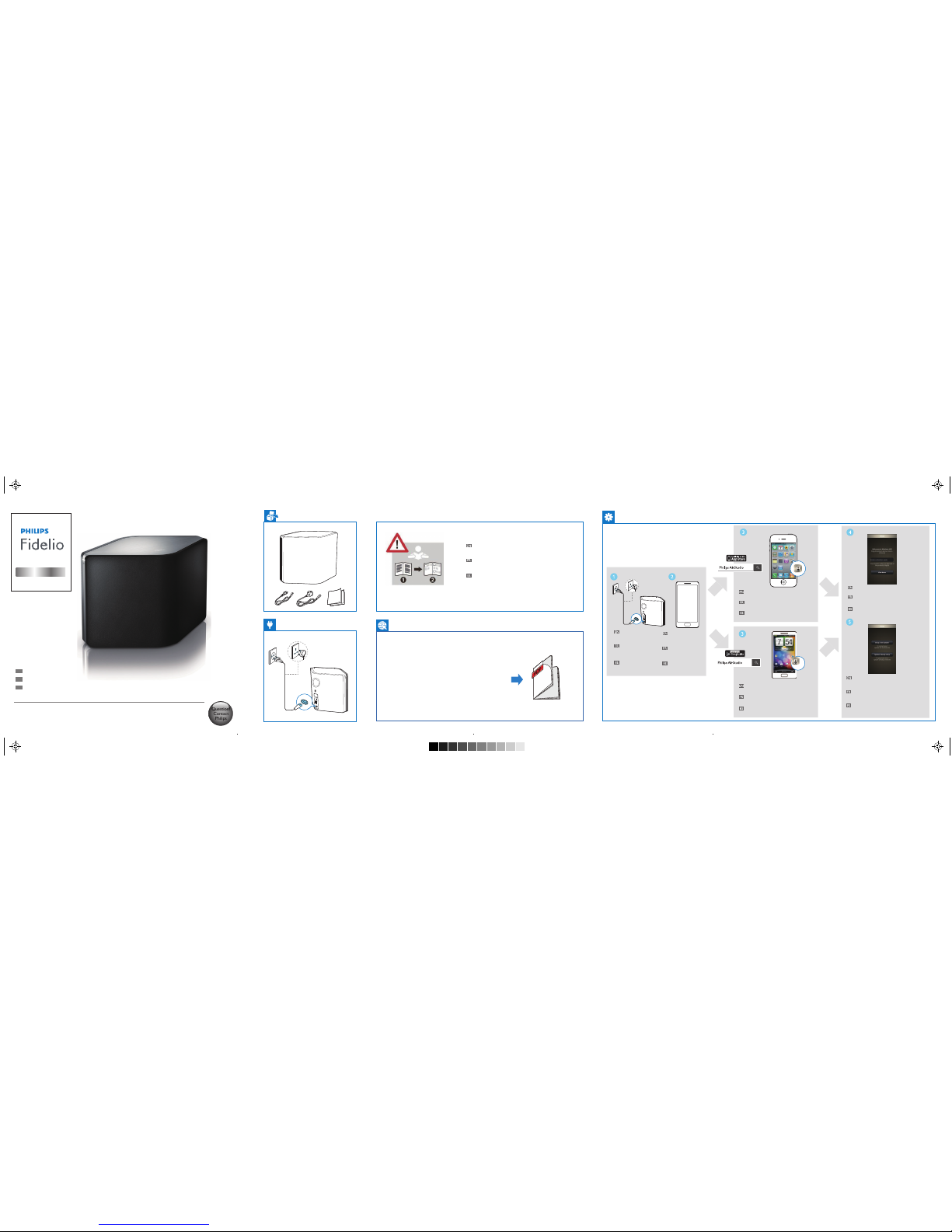
Install Philips AirStudio from Apple App
Store and run the app.
Installez Philips AirStudio à partir de l'App
Store d'Apple et exécutez l'application.
Instale Philips AirStudio desde Apple App
Store y ejecute la aplicación.
Find the activation code on the bottom of the
speaker, type in the box, and then tap Next.
Recherchez le code d'activation en bas du
haut-parleur, saisissez-le dans la zone
correspondante, puis appuyez sur Suivant.
Busque el código de activación en la parte
inferior del altavoz, escríbalo en el cuadro y, a
continuación, toque Siguiente.
Tap Setup a new speaker, then follow the
on-screen instructions to set up Wi-Fi
connection of your speaker.
Appuyez sur Configurer une nouvelle enceinte,
puis suivez les instructions à l'écran pour
configurer la connexion Wi-Fi de votre enceinte.
Toque Configurar un nuevo altavoz y, a
continuación, siga las instrucciones en pantalla
para configurar la conexión Wi-Fi del altavoz.
Install Philips AirStudio from Google Play
Store and run the app.
Installez Philips AirStudio à partir du Play
Store de Google et exécutez l'application.
Instale Philips AirStudio desde Google Play
Store y ejecute la aplicación.
Connect power to
the speaker.
Branchez l'enceinte
sur le secteur.
Conecte el altavoz a la
alimentación.
Check the OS of
your smartphone
or tablet.
Vérifiez le système
d'exploitation de votre
smartphone ou tablette.
Compruebe el sistema
operativo del smartphone
o la tableta.
Before using your product, read all accompanying
safety information
Avant d'utiliser votre produit, lisez toutes les
informations sur la sécurité fournies.
Antes de utilizar el producto, lea toda la información de
seguridad que se adjunta.
www.philips.com/support
AC IN ~
AC N ~
AW5000-QSG-130mmX 130mm_WITHOUTCD_EN-ES-FR.pdf 1 4/27/2012 11:13:30 AM
Page 2
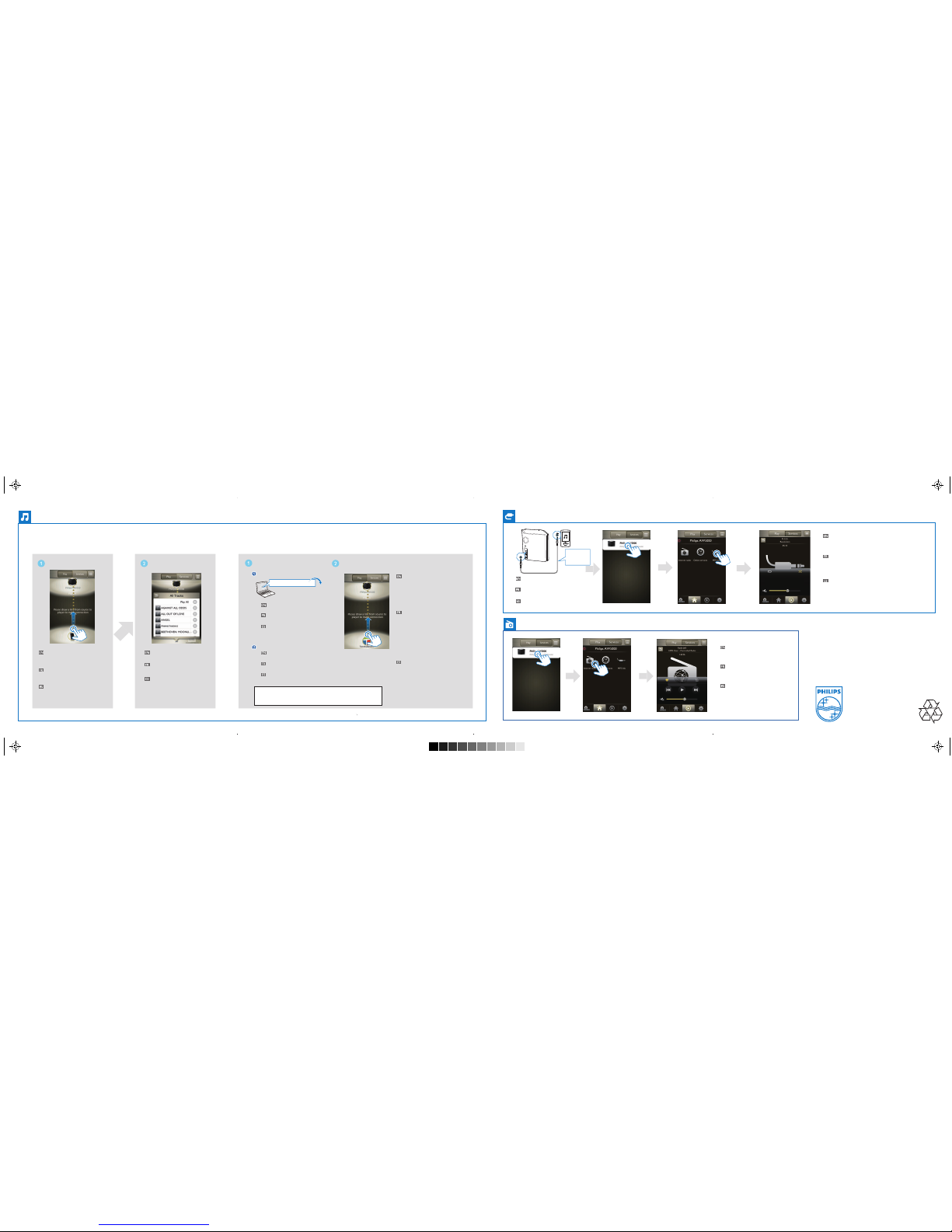
Run Philips AirStudio, then hold
and drag the smartphone icon
towards the speaker icon.
Exécutez Philips AirStudio, puis maintenez
enfoncée et faites glisser l'icône du
smartphone vers l'icône de l'enceinte.
Ejecute Philips AirStudio y, a continuación,
arrastre el icono del smartphone hacia el
icono del altavoz.
Select and play your favorite
music.
Sélectionnez et lancez la lecture
de votre musique préférée.
Seleccione y reproduzca su
música favorita.
Download Media Manager from
www.philips.com/mediamanager.
Téléchargez Media Manager sur
www.philips.com/mediamanager.
Descargue Media Manager desde
www.philips.com/mediamanager.
Install it onto your PC/Mac with the
following license key.
Installez-le sur votre PC/MAC avec la
clé de licence suivante.
Instálelo en su PC/Mac con la
siguiente clave de licencia.
Run Philips AirStudio, tap Services
->Philips AW5000 ->Internet Radio,
and then select the radio stations you
prefer.
Exécutez Philips AirStudio, appuyez sur
Services ->Philips AW5000 ->Internet
Radio, puis sélectionnez vos stations de
radio préférées.
Ejecute Philips AirStudio, toque Services
(Servicios) ->Philips AW5000 ->Internet
Radio (Radio por Internet) y, a
continuación, seleccione las emisoras de
radio que prefiera.
Run Philips AirStudio on your smartphone/tablet, then
tap Services ->Philips AW5000 ->MP3 Link to select
the MP3 link source.
Start music play on the auxiliary device.
Exécutez Philips AirStudio sur votre smartphone/tablette,
puis appuyez sur Services ->Philips AW5000 ->MP3 Link
pour sélectionner la source MP3 Link.
Lancez la lecture de musique sur le périphérique auxiliaire.
Ejecute Philips AirStudio en el smartphone o la tableta y,
a continuación, toque Services (Servicios) ->Philips
AW5000 -> MP3 Link para seleccionar la fuente de
conexión MP3.
Inicie la reproducción de música en el dispositivo auxiliar.
MP3 LNK
Stream music from your smartphone/tablet
Diffusion de la musique de votre smartphone/tablette
Transferencia de música desde el smartphone o la tableta
Stream music from your PC/Mac
Diffusion de la musique de votre PC/Mac
Transferencia de música desde el PC o Mac
Connect an MP3 player to the
MP3 LINK socket.
Connect an MP3 player to the
MP3 LINK socket.
Connectez un lecteur MP3 à
la prise MP3 LNK.
Connectez un lecteur MP3 à
la prise MP3 LNK.
Conecte un reproductor de MP3
a la toma MP3 LNK.
Conecte un reproductor de MP3
a la toma MP3 LNK.
www.philips.com/mediamanager
Make sure that your PC/Mac is connected
to the same Wi-Fi network as the
wireless Hi-Fi speaker.
Run Philips AirStudio on your
smartphone/tablet, then hold and drag
the laptop icon towards the speaker icon.
Select and play your favorite music.
Assurez-vous que votre PC/MAC est
connecté au même réseau Wi-Fi que
l'enceinte hi-fi sans fil.
Exécutez Philips AirStudio sur votre
smartphone/tablette, puis maintenez
enfoncée et faites glisser l'icône de
l'ordinateur portable vers l'icône de
l'enceinte.
Sélectionnez et lancez la lecture de votre
musique préférée.
Asegúrese de que el PC o Mac está
conectado a la misma red Wi-Fi que el
altavoz Hi-Fi inalámbrico.
Ejecute Philips AirStudio en el smartphone
o la tableta y, a continuación, arrastre el
icono del portátil hacia el icono del altavoz.
Seleccione y reproduzca su música favorita.
All registered and unregistered trademarks are
property of their respective owners.
© 2012 Koninklijke Philips Electronics N.V.
All rights reserved.
AW5000_10_QSG_V1.1
Not supplied
Non fourni
No incluido
AW5000-QSG-130mmX 130mm_WITHOUTCD_EN-ES-FR.pdf 2 4/27/2012 11:13:30 AM
 Loading...