

Page 1

Page 2

Page 3
54
English
English
Controls/Quick start ...........................6-7
Power supply/Line out ......................8–9
Headphones/remote control ...............10
General information ............................11
In-car connection.................................12
CD play ..........................................13–14
Features.........................................15–19
MP3-CD playback..........................20–25
Troubleshooting.............................26–27
Français
Français
Commandes.........................................28
Mise en service rapide........................29
Alimentation électrique/Line out...30-31
Ecouteurs/Télécommande...................32
Informations générales .......................33
Raccordement en voiture ....................34
Lecture CD.....................................35–36
Fonctions spéciales.......................37–41
Lecture d’un CD MP3 ....................42–47
Pannes et remèdes .......................48–49
Español
Español
Controles/Descripción rápida .......50–51
Suministro eléctrico ......................52–53
Auriculares/control remoto .................54
Información general ............................55
Conexiòn para el automóvil ................56
Reproducción de CD......................57–58
Características ..............................59–63
Reproducción de CD MP3 .............64–69
Localización de averías.................70–71
Guarantees
Philips product warranty for
Australia......................................94–95
Guarantee and service for
New Zealand ....................................96
Certificado de Garantia
Brasil..................................................97
Ploiza de Garantía
México.........................................98–99
∑
∑
Controls/Quick start .......................72-73
Power supply/Line out ..................74–75
Headphones/remote control ...............76
General information ............................77
In-car connection.................................78
CD play ..........................................79–80
Features.........................................81–85
MP3-CD playback..........................86–91
Troubleshooting.............................92–93
Page 4
English
QUICK START
7
0
0
E
PROGRAM
E
C
OMPATIBLE
NI
C SKIP PROTECTION
MODE
PR
O
G
R
A
M
CD REWRITABLE COMPATIBLE
MAGIC ELECTRONIC SKIP PROTECTION
0
MODE
P
R
O
G
R
A
M
CD REWRITABLE COMPATIBLE
MAGIC ELECTRONIC SKIP PROTECTION
0
1
AA
LR6
UM3
3 CD 4 5
HOLD➟OFF
6 PLAY 7 VOLUME
!!!
~1sec
2 OPEN
2.
1.
M
O
DE
PROGRAM
CD REWRITABLE COMPATIBLE
MAGIC ELECTRONIC SKIP PROTECTION
0
M
O
D
E
P
R
O
G
R
A
M
CD REW
RITABLE COMPATIBLE
MAGIC ELECTRONIC SKIP PROTECTION
0
0
6
OF
OFF/RESUME/HOLD
1.
2.
Page 5
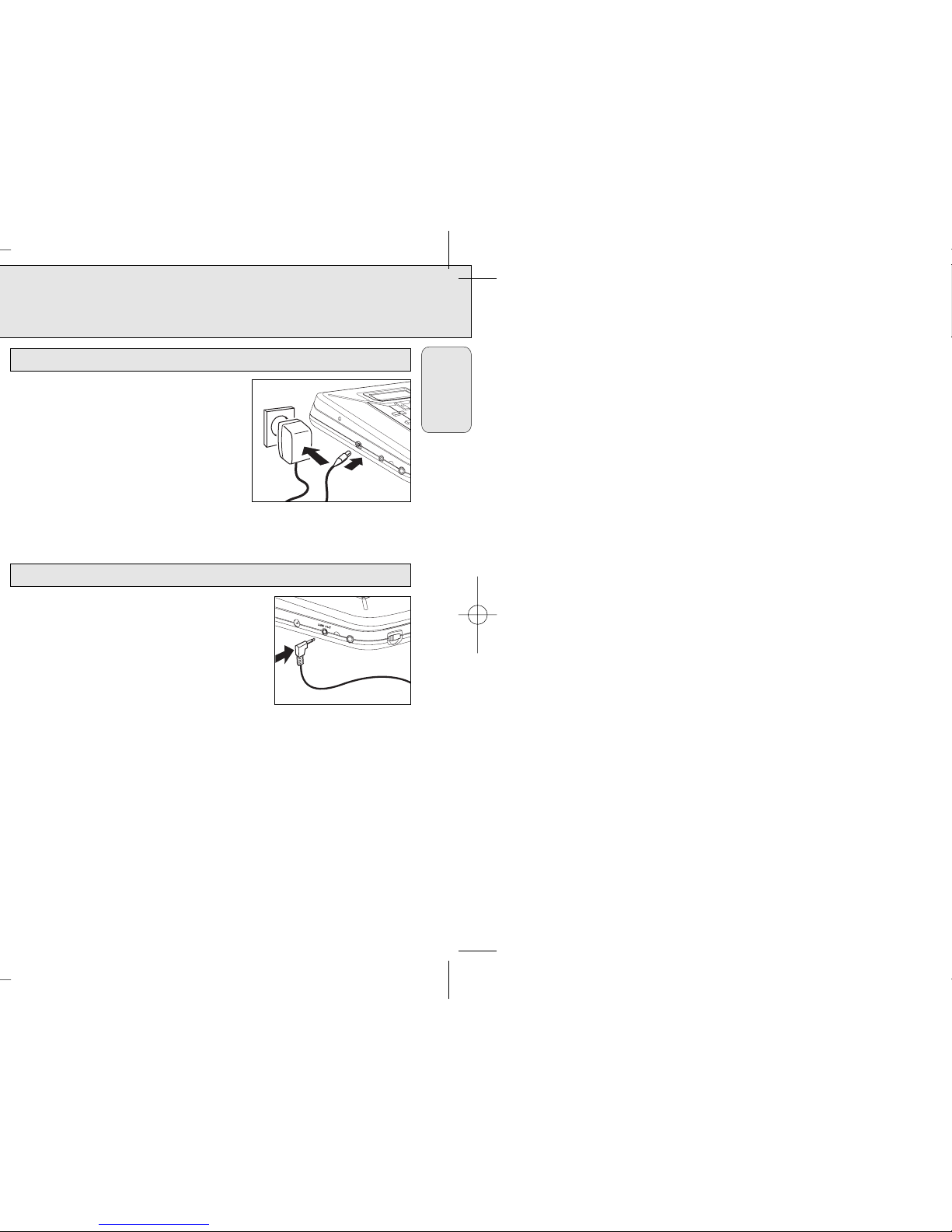
Only use the AY 3170 mains adapter
(4.5 V/300mA direct current, positive pole to the
centre pin). Any other product may damage the set.
1 Make sure the local voltage corresponds to the
adapter’s voltage.
2 Connect the mains adapter to the 4.5V DC
socket of the player and to the wall socket.
Note: Always disconnect the adapter when you are not using it.
You can connect the CD player to an additional
appliance, E.g. amplifier, radio cassette recorder, etc.,
with a LINE IN socket.
1 Turn down the volume on the additional appliance.
2 Connect an audio signal cable (not supplied,) to the
LINE OUT socket of the CD player and the CD IN,
AUX IN or LINE IN socket of the additional appliance.
3 To adjust the sound and volume, use the controls on
the connected appliance.
Line out
MODE
CD REWRITABLE COMPATIBLE
MAGIC ELECTRONIC SKIP PROTECTION
Mains adapter (supplied or optionally available)
English
0
Page 6
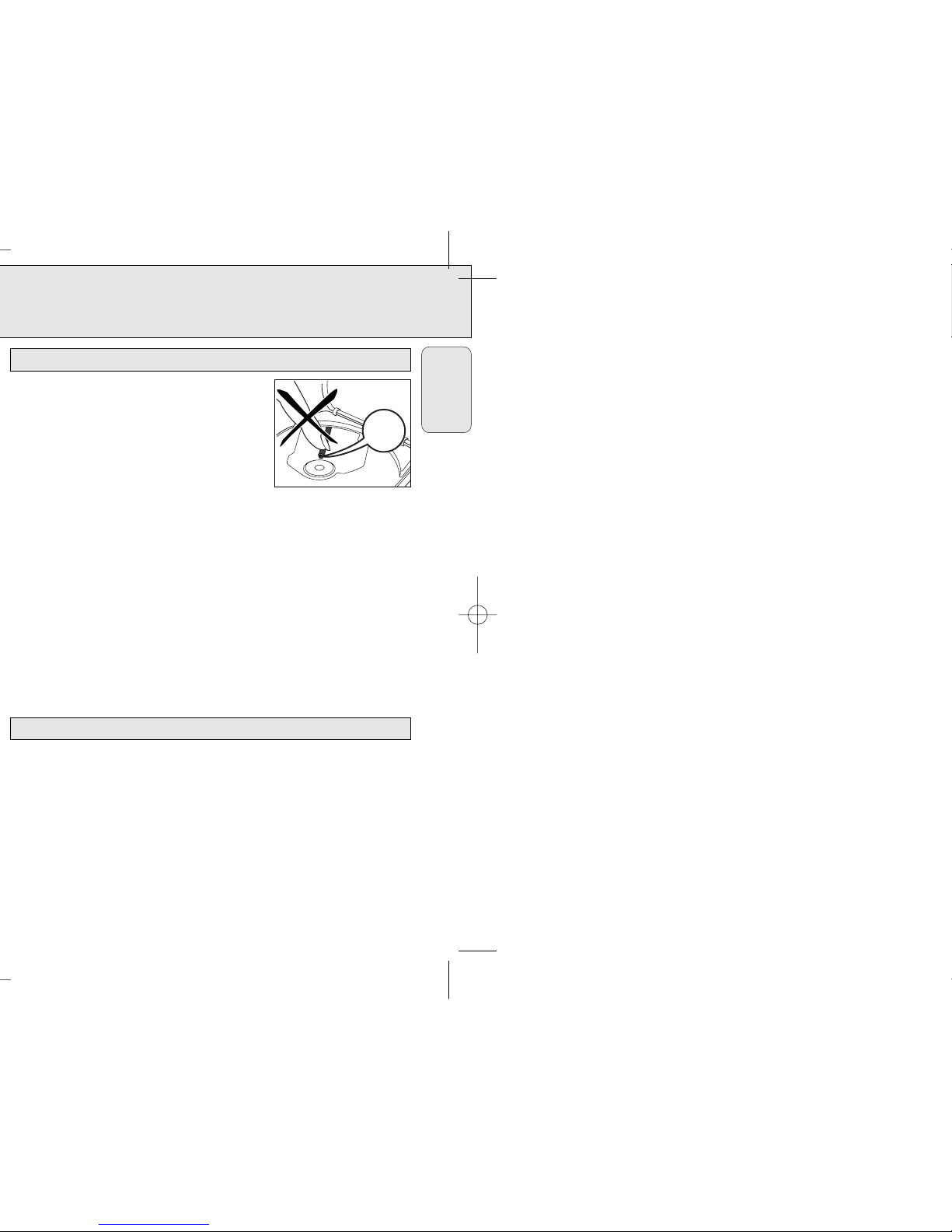
• Do not touch the lens A of the CD player.
• Do not expose the set, batteries or CDs to humidity,
rain, sand or excessive heat (caused by heating
equipment or direct sunlight).
• You can clean the CD player with a soft, slightly
dampened lint-free cloth. Do not use any cleaning
agents as they may have a corrosive effect.
• To clean the CD, wipe it in a straight line from the centre toward the edge using a
soft, lint-free cloth. A cleaning agent may damage the disc! Never write on a CD or
attach a sticker to it.
• The lens may cloud over when the set is moved suddenly from cold to warm
surroundings. Playing a CD is not possible then. Leave the CD player in a warm
environment until the moisture evaporates.
• Active mobile phones in the vicinity of the CD player may cause malfunctions.
• Avoid dropping the set as this may cause damage.
• All redundant packing material has been omitted. We have done our utmost to
make the packaging easily separable into three materials: cardboard (box),
polystyrene foam (buffer) and polyethylene (bags, protective foam sheet).
• Your set consists of materials which can be recycled if disassembled by a
specialized company. Please observe the local regulations regarding the disposal of
packing materials, exhausted batteries and old equipment.
Environmental information
A
CD player and CD handling
English
Page 7
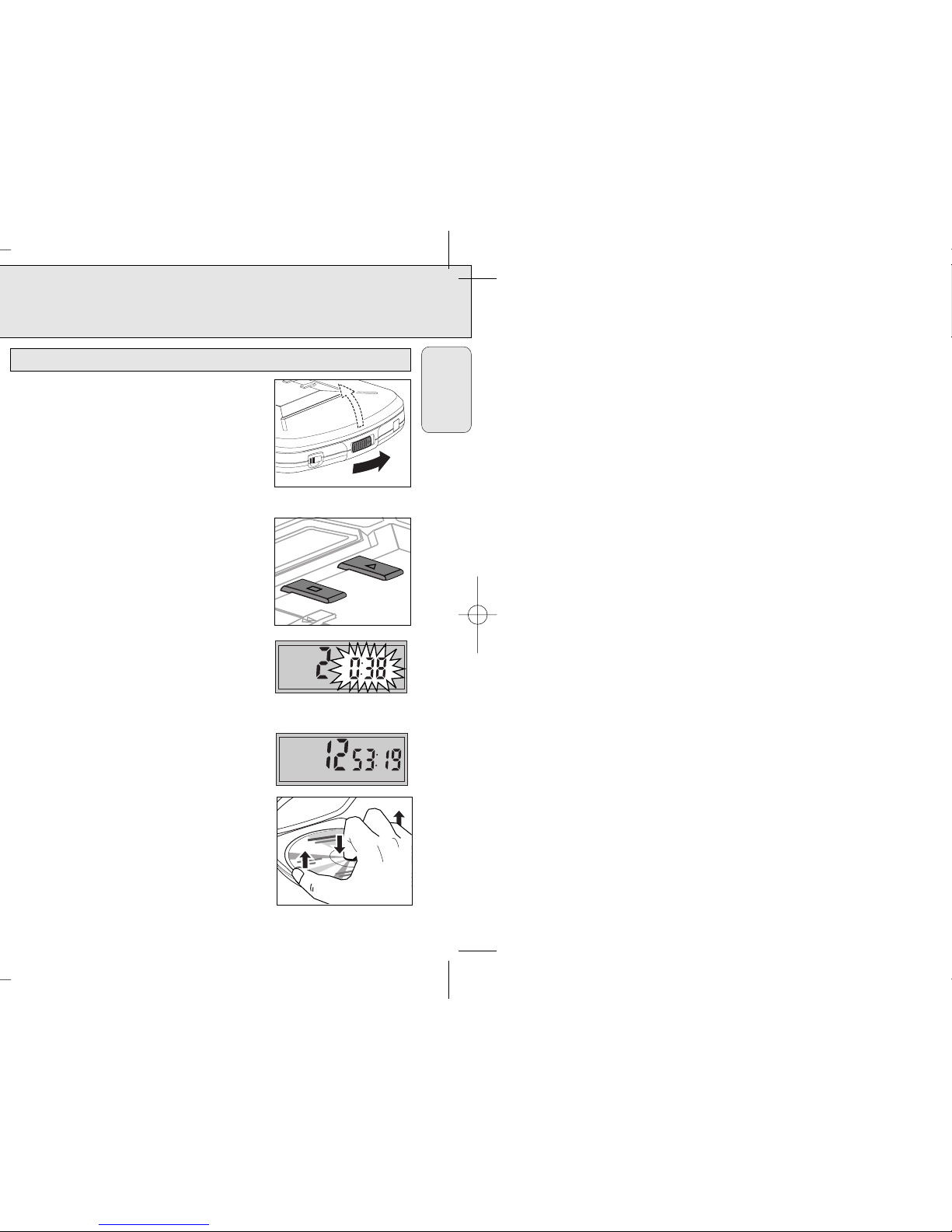
CD PLAY
13
This CD player can play all kinds of Audio Discs and
MP3 CD-ROM such as CD Recordables and CD
Rewritables. Do not try to play a CDi, CDV or computer
CD or DVD.
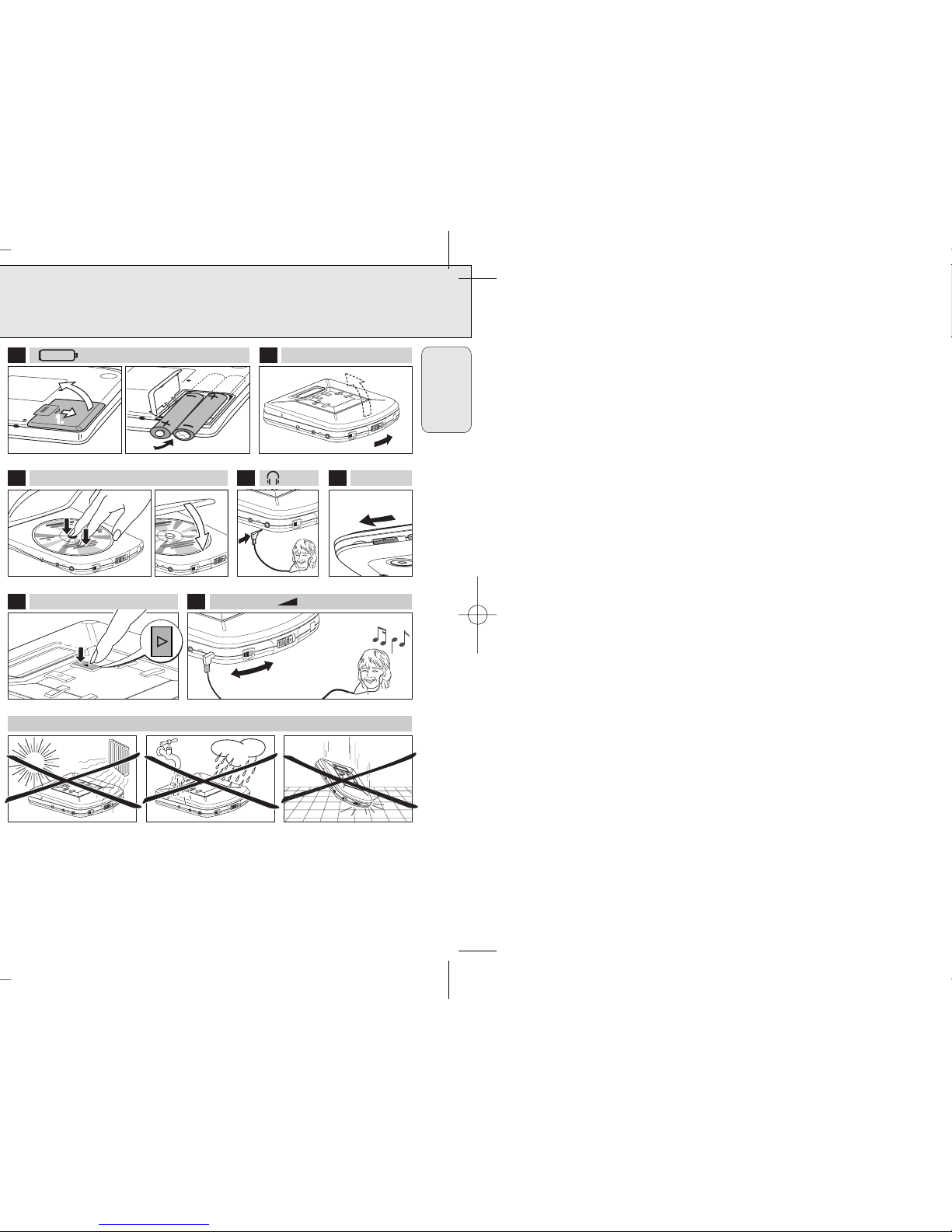
1 Push the OPEN 2 slider.
y The lid opens.
2 Insert an audio CD, printed side up, by pressing
gently on the CD centre so that it fits onto the hub.
Close the lid by pressing it down on the left side.
3 Press 2 for approximately 1 second to switch the set
on and start playback.
y The current track number and the elapsed
playing time are displayed.
• You can interrupt playback by pressing 2.
y The time where playback was interrupted is
flashing.
• Continue playback by pressing 2 again.
4 Press 9 to stop playback.
y The total number of tracks and the total playing
time of the CD are displayed.
5 Press 9 again to switch off the set.
6 To remove the CD, hold it by its edge and press
the hub gently while lifting the CD.
PROGRAM
0
Playing a CD
English
0
Page 8
FEATURES
15
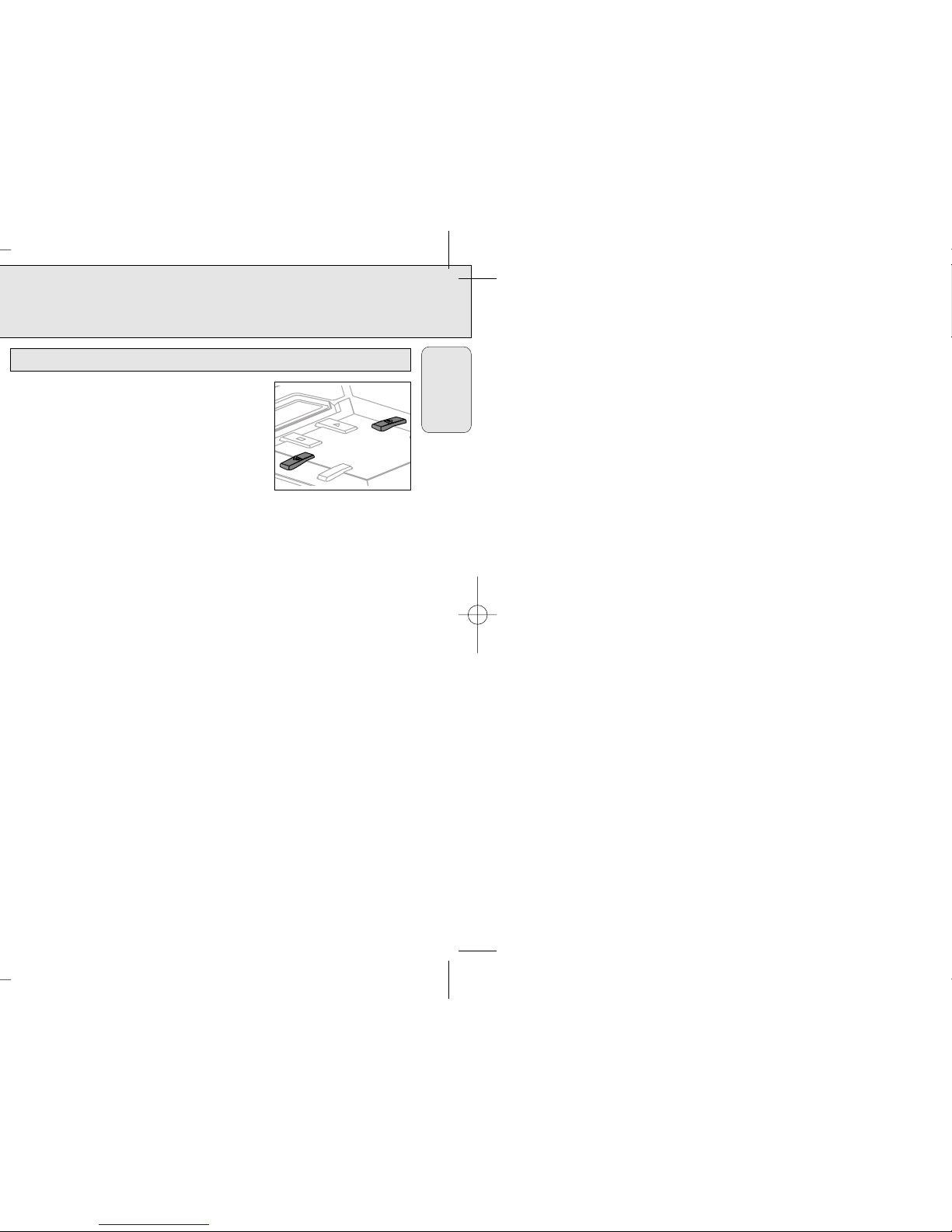
Selecting a track during playback
• Briefly press 5 or 6 once or several times to skip
to the current, previous or subsequent track start.
y Playback continues with the selected track and
its number is displayed.
Selecting a track when playback is stopped
1 Briefly press 5 or 6 once or several times.
y The selected track number is displayed.
2 Press 2 to start CD play.
y Playback starts with the selected track.
Searching for a passage during playback
1 Keep 5 or 6 depressed to find a particular passage in a backward or forward
direction.
y Searching is started and playback continues at a low volume. After 2 seconds
the search speeds up.
2 Release the button when you reach the desired passage.
y Normal playback continues from this very position.
Notes: – During SCAN, searching is not possible.
– During SHUFFLE, SHUFFLE REPEAT ALL, REPEAT or while playing a program
searching is possible only within the particular track.
– Searching is not possible while playing MP3 tracks.
MODE
Selecting a track and searching
English
Page 9
FEATURES
17
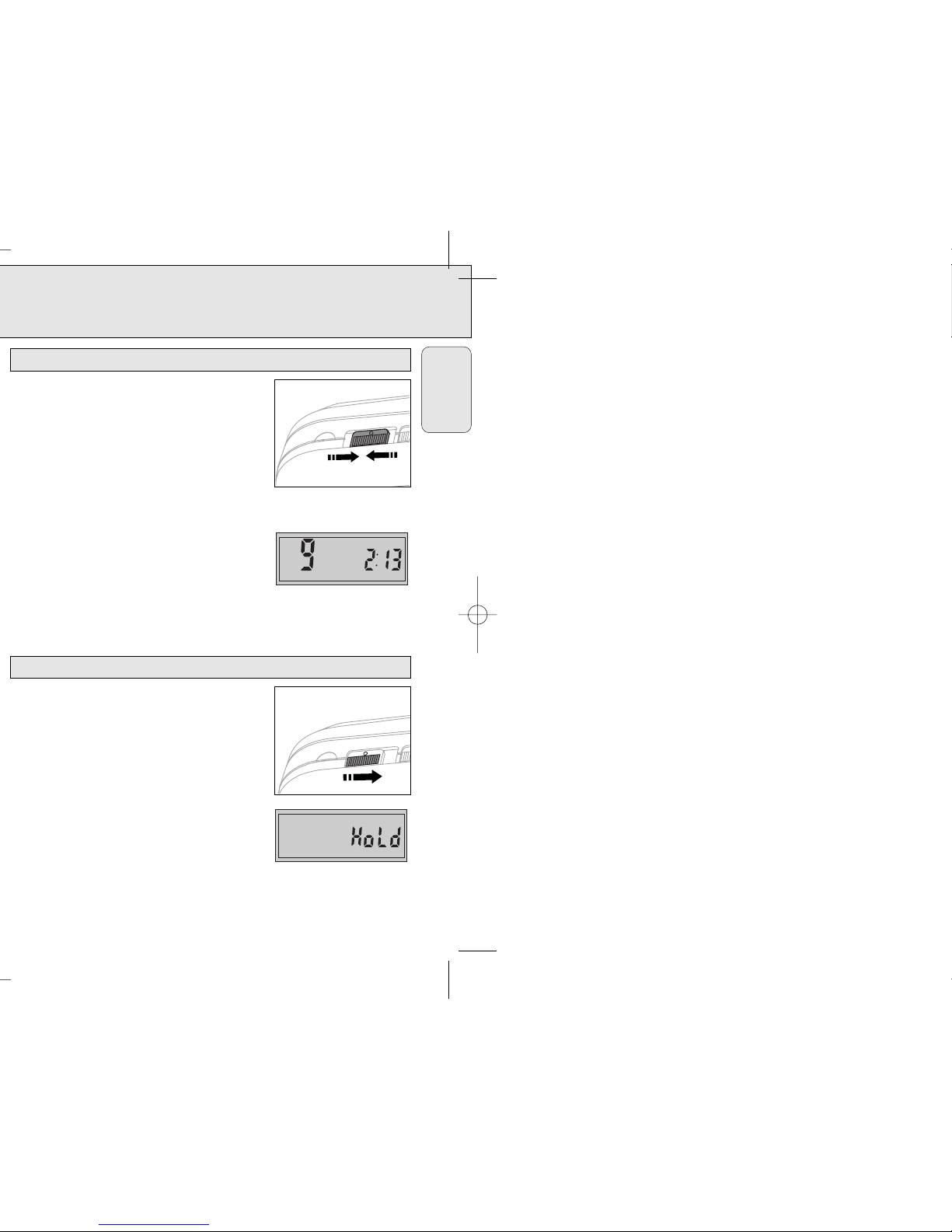
You can store the last position played. When restarting,
playback continues from where you have stopped,
according to CD Audio or MP3 playback.
1 Switch the slider to RESUME during playback to
activate RESUME.
y RESUME is shown.
2 Press 9 whenever you want to stop playback.
3 Press 2 whenever you want to resume playback.
y RESUME is shown and playback continues from
where you have stopped (CD Audio), or from the
last track played (MP3).
• To deactivate RESUME, switch the slider to OFF.
y RESUME goes off.
You can lock the buttons of the set. When a key is
pressed, no action will be executed then.
1 Switch the slider to HOLD to activate HOLD.
y All buttons are locked. HoLd is displayed by
pressing any key. If the set is switched off,
HoLd is displayed only by pressing 2 and 9.
2 To deactivate HOLD, switch the slider to OFF.
Note: When you deactivate HOLD by switching the
slider to RESUME and restart, playback continues
from where you have stopped (CD Audio), or from
the last track played (MP3).
O
OFF/RESUME/HOLD
Locking all buttons – HOLD
RESUME
O
OFF/RESUME/HOLD
Storing the last position played – RESUME
English
Page 10
FEATURES
19
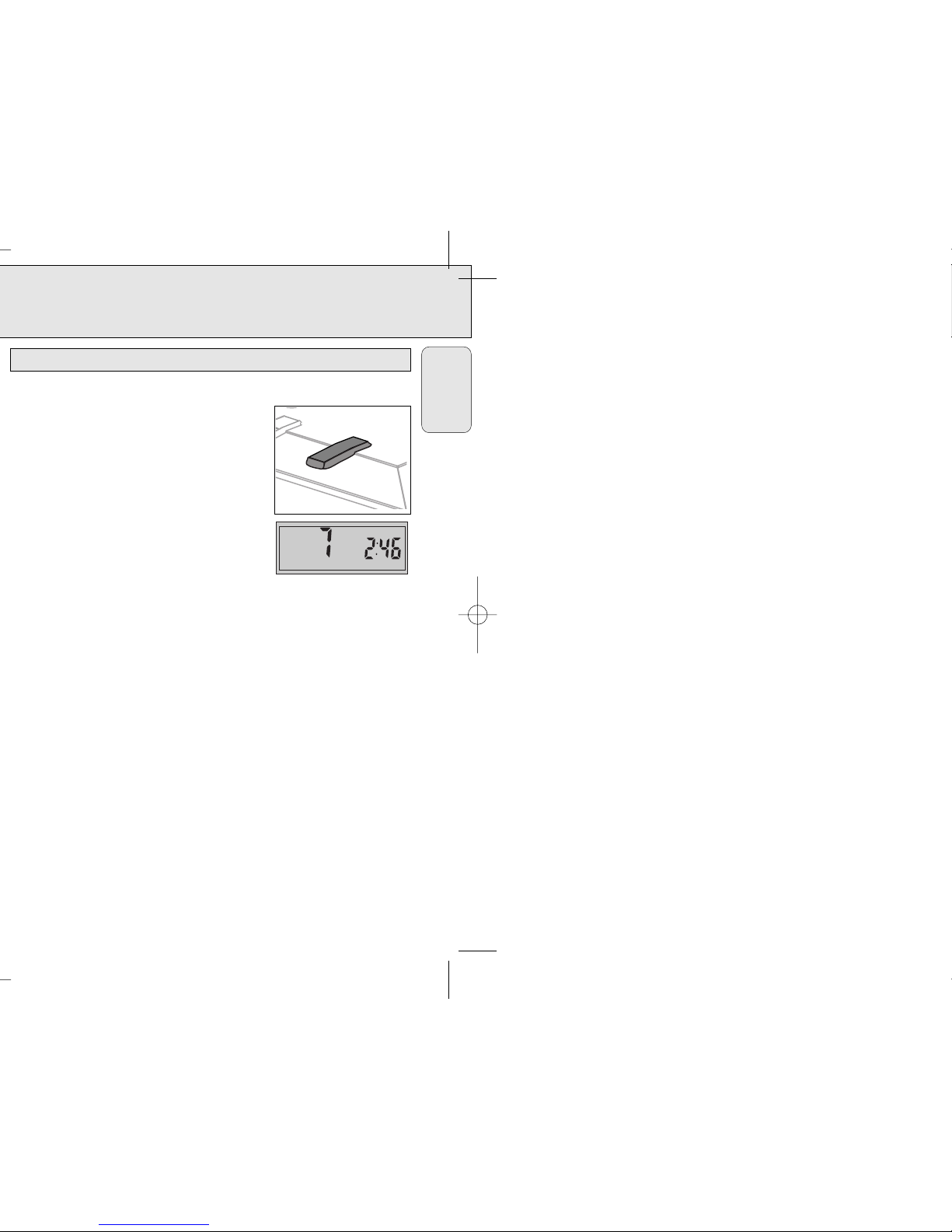
It is possible to play tracks in random order, to repeat a track or the CD and to play the
first few seconds of each track.
1 Press MODE during playback as often as necessary
until the display shows either:
y SHUFFLE: All tracks of the CD are played in random
order until all of them have been played once.
y SHUFFLE REPEAT ALL: All tracks of the CD are
played repeatedly in random order.
y REPEAT: The current track is played repeatedly.
y REPEAT ALL: The entire CD is played repeatedly .
y SCAN: The first 10 seconds of each of the
remaining tracks are played in sequence.
2 Playback starts in the chosen mode after 2 seconds.
3 To return to normal playback, press MODE until the
display indication disappears.
SHUFFLE REPEAT ALL
MODE
Selecting different playing options – MODE
English
Page 11
21
English
MP3-CD PLAYBACK
The following table shows the different functions available for the 5 ,6 controls
when playing CD Audio or MP3 CDs.
• AL 00 is the set’s display for a MP3 CD with only a root directory. This has no
additional albums (folders).
• With albums means a MP3 CD with more than one album (folders), and is shown
by AL and a number on the set’s display, e.g. AL 09.
5 , 6 CD audio MP3 MP3
function (AL 00) (with albums)
Select track ✓✓✓
Music search ✓
Fast track select ✓
Fast album select ✓
Select track
To select the next or previous track.
• Press 5 or 6 briefly once or more during playback.
y Playback is interrupted and starts from the beginning of the selected track.
Music search
To fast search only within a CD Audio track.
• During playback, press and hold down 5 or 6 . Release button at the desired
passage.
Selecting and searching a track/album
Page 12
MP3-CD PLAYBACK
23
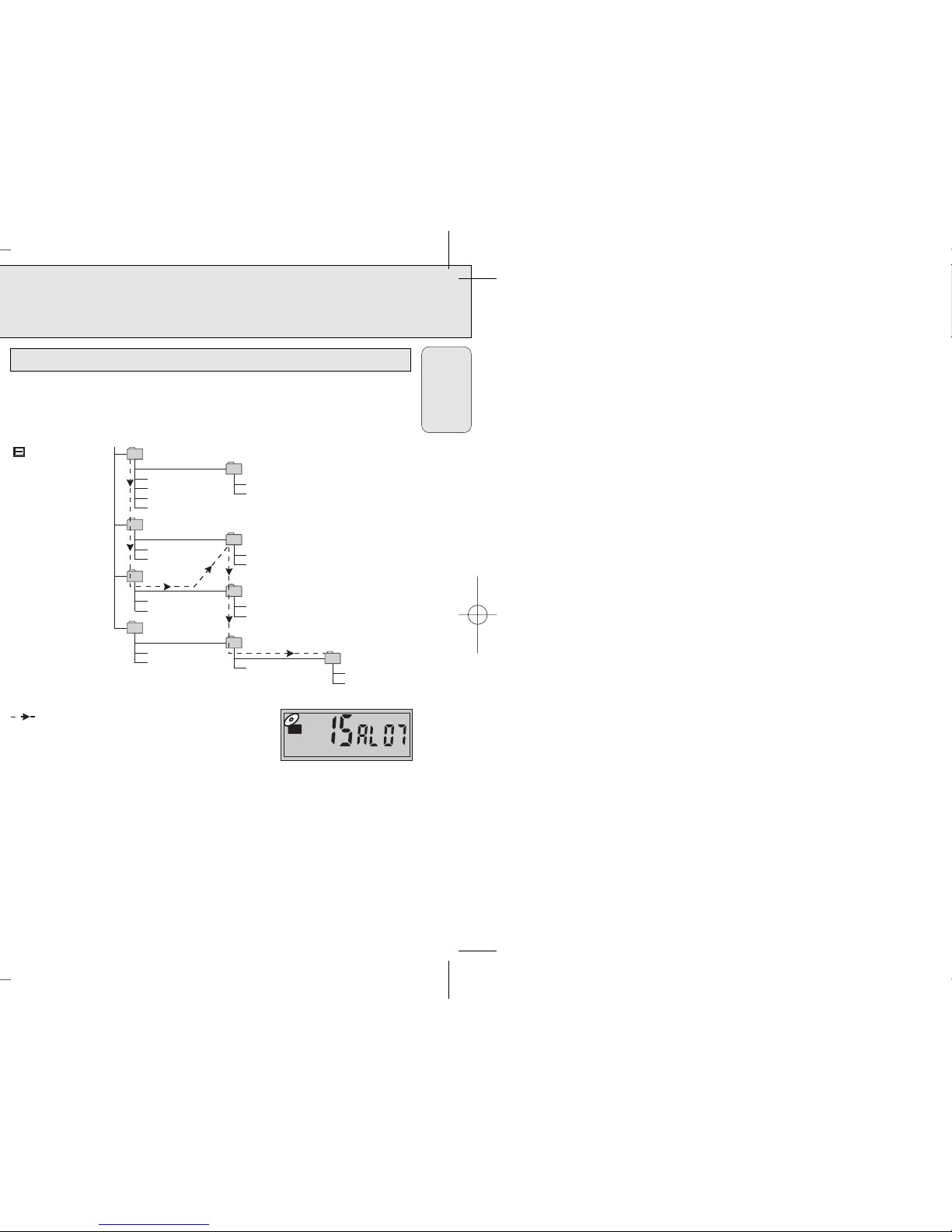
The following chart is an example of a Windows Explorer display for a single
session MP3 CD ROM with albums. Check the added Notes to help you understand
the MP3 CD unit display, and the playback sequence of albums and tracks on single
session MP3 CDs.
Notes:
Arrow pathway shows the sequence of MP3
album and track playback.
AL 01 - AL 07 This CD ROM example has a total number
of 7 MP3 albums (folders).
Blur01.mp3-Twain15.mp3 This CD ROM example has a total number of 15 tracks,
where ‘01’ is the first track and ‘15’ is the last track.
Skipped Denotes an album which contains non-audio files only, eg. .jpg, .wav, .
doc. These cannot be detected nor played on the MP3-CD player, and are hence
‘skipped’. Where an album contains mixed format files, the non-MP3 files will be
skipped.
Single session
English
AL 01
AL 02
AL 03
Skipped
Skipped
AL 04
AL 05
AL 06
AL 07
(E) CD-ROM drive
Blur01.mp3
Spice05.mp3
2men07.mp3
Abba01.wav
Blur.jpg
Girl09.mp3
Boyz11.mp3
Blur02.mp3
Spice06.mp3
2men08.mp3
Abba02.wav
Lyric.doc
Girl10.mp3
Boyz12.mp3
Bread13.mp3
Blur03.mp3
Blur04.mp3
T wain15.mp3
Marx14.mp3
ESP
MP3
Page 13
25
English
MP3-CD PLAYBACK
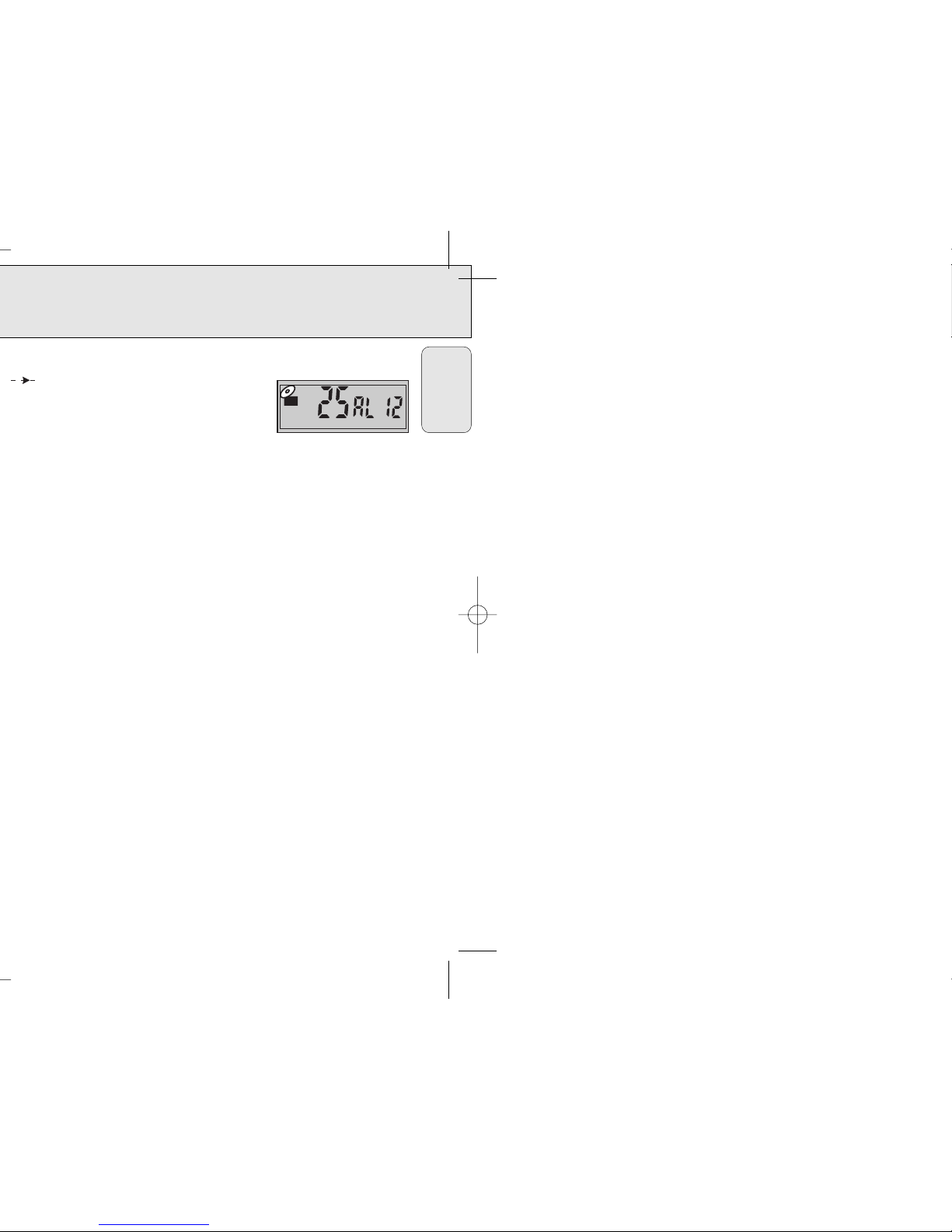
Notes:
Arrow pathway shows the sequence of MP3
album and track playback.
AL 01 - AL 12 This CD ROM example has a total
number of 12 MP3 albums (folders).
Blur01.mp3-Eagles25.mp3 This CD ROM example has a total number of 25 tracks,
where ‘01’ is the first track and ‘25’ is the last track.
Skipped Denotes an album which contains non-audio files only, eg. .jpg, .wav, .
doc. These cannot be detected nor played on the MP3-CD player, and are hence
‘skipped.’ Where an album contains mixed format files, the non-MP3 files will be
skipped.
ESP
MP3
Page 14
TROUBLESHOOTING
27
Symptom Check point Treatment
Playback does Is the RESUME or PROGRAM Switch off the RESUME
not start from function activated? function or clear the
first track PROGRAM.
No sound or poor Are connection plugs Check all connections.
sound quality inserted properly?
Is the volume set too low? Adjust the volume.
Is the headphone plug dirty? Clean the headphone plug.
Is the set located near Move the set away from
strong magnetic fields? strong magnetized fields.
In-car use
Adapter cassette is Insert the adapter cassette
inserted incorrectly? correctly.
Is the adaptor cassette Insert the adapter
inserted properly? cassette correctly.
Is the temperature inside Let the set adjust to the
car too high/low? temperature.
Is the cigarette lighter Clean the cigarette lighter
socket dirty? socket.
Is the playback direction of Change the auto reverse
car cassette player’s auto- direction.
reverse feature?
English
The typeplate is located on the bottom of the set.
 Loading...