

Page 1
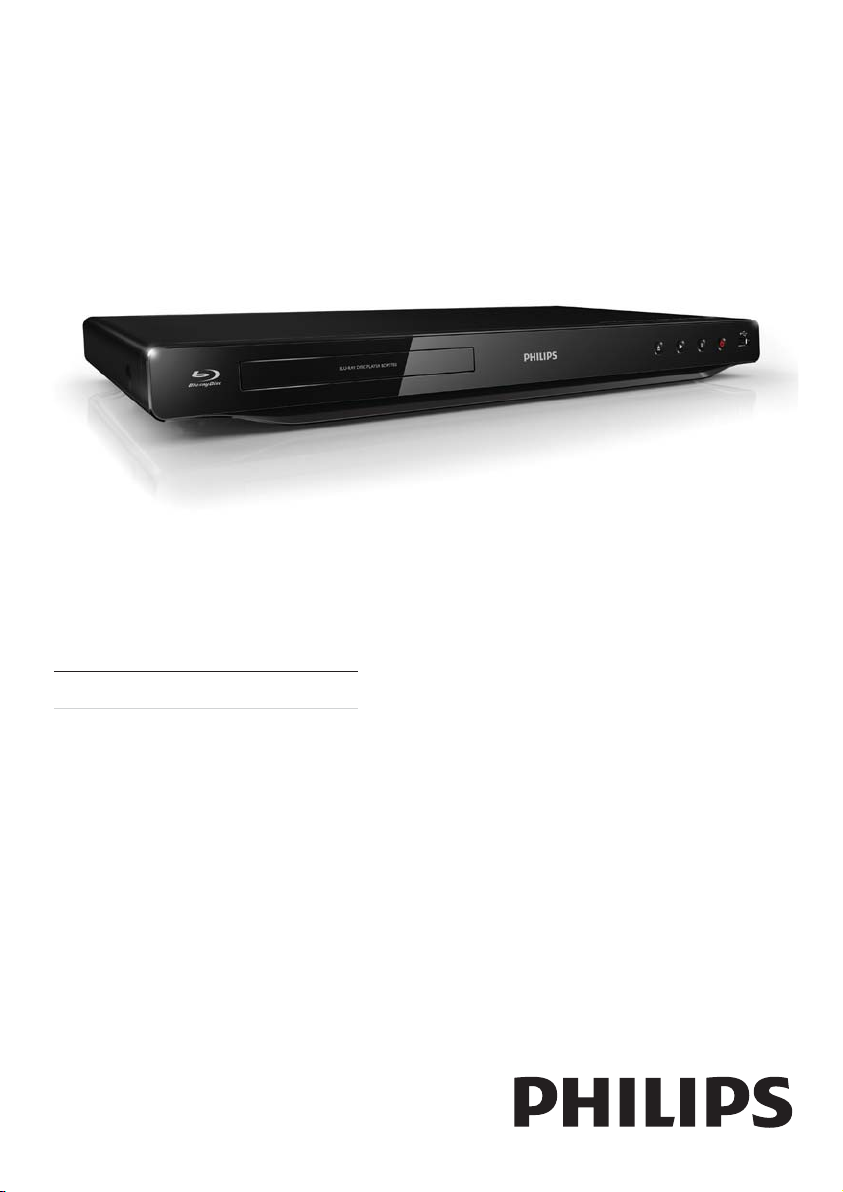
Register your product and get support at
www.philips.com/welcome
BDP2800
BDP2850
FI Käyttöopas
Page 2

Important notes for users in U.K.
Mains plug
This apparatus is fitted with an approved moulded
plug. Should it become necessary to replace the
main fuse, this must be replaced with a fuse of
same value as indicated on the plug (example 10A).
1. Remove fuse cover and fuse.
2. The replacement fuse must comply with
BS1362 and have the A.S.T.A. approval mark. If
the fuse is lost, contact your dealer in order to
verify the correct type.
3. Refit the fuse cover.
In order to maintain conformity to the EMC
directive, the mains plug on this player must not
be detached from the mains cord.
Copyright in the U.K.
Recording and playback of material may require
consent. See Copyright Act 1956 and The
Performer’s Protection Acts 1958 to 1972.
LASER
CAUTION:
USE OF CONTROLS OR ADJUSTMENTS OR
PERFORMANCE OF PROCEDURES OTHER
THAN THOSE SPECIFIED HEREIN MAY RESULT
IN HAZARDOUS RADIATION EXPOSURE.
CAUTION:
VISIBLE AND INVISIBLE LASER RADIATION
WHEN OPEN AND INTERLOCK DEFEATED.
DO NOT STARE INTO BEAM.
LOCATION:
INSIDE, NEAR THE DECK MECHANISM.
Italia
DICHIARAZIONE DI CONFORMITA’
Si dichiara che l’apparecchio BDP2800, BDP2850,
Philips risponde alle prescrizioni dell’art. 2 comma
1 del D.M. 28 Agosto 1995 n.548.
Fatto a Eindhoven
Norge
Typeskilt fi nnes på apparatens underside.
Observer: Nettbryteren er sekundert innkoplet.
Den innebygde netdelen er derfor ikke
frakoplet nettet så lenge apparatet er tilsluttet
nettkontakten.
For å redusere faren for brann eller elektrisk
støt, skal apparatet ikke utsettes for regn eller
fuktighet.
DK
Advarsel: Usynlig laserstråling ved åbning når
sikkerhedsafbrydere er ude af funktion. Undgå
utsættelse for stråling.
Bemærk: Netafbryderen er sekundært indkoblet
og ofbryder ikke strømmen fra nettet. Den
indbyggede netdel er derfor tilsluttet til lysnettet
så længe netstikket sidder i stikkontak ten.
S
Klass 1 laseraparat
Varning! Om apparaten används på annat sätt
än i denna bruksanvisning specifi cerats, kan
användaren utsättas för osynlig laserstrålning, som
överskrider gränsen för laserklass 1.
Observera! Stömbrytaren är sekundärt kopplad
och bryter inte strömmen från nätet. Den
inbyggda nätdelen är där för ansluten till elnätet så
länge stickproppen sitter i vägguttaget.
SF
Luokan 1 laserlaite
Varoitus! Laitteen käyttäminen muulla kuin
tässä käyttöohjeessa mainitulla tavalla saattaa
altistaa käyttäjän turvallisuusluokan 1 ylittävälle
näkymättömälle lasersäteilylle.
Oikeus muutoksiin varataan. Laite ei saa
olla alttiina tippu-ja roiskevedelle. Huom.
Toiminnanvalitsin on kytketty toisiopuolelle,
eikä se kytke laitetta irti sähköverkosta.
Sisäänrakennettu verkko-osa on
kytkettynä sähköverkkoon aina silloin, kun pistoke
on pistorasiassa.
Philips, Glaslaan 25616 JB Eindhoven,
Philips Consumer Lifestyles
The Netherlands
2
Producent zastrzega możliwość wprowadzania
zmian technicznych.
Page 3

ČESKA REPUBLIKA
Výstraha! Tento přístroj pracuje s laserovým
paprskem. Při nesprávné manipulaci s přístrojem
(v rozporu s tímto návodem) můże dojít k
nebezpečnému ozáření. Proto přístroj za chodu
neotevírejte ani nesnímejte jeho kryty. Jakoukoli
opravu vždy svěřte specializovanému servisu.
Nebezpečí! Při sejmutí krytů a odjištění
bezpečnostních spínačů hrozí nebezpečí
neviditelného laserového záření!
Chraňte se před přímým zásahem laserového
paprsku.
Pokud byste z jakéhokoli důvodu přístroj
demontovali, vždy nejdříve vytáhněte síťovou
zástrčku.
Přístroj chraňte před jakoukoli vlhkostí i před
kapkami vody.
Technické údaje laseru:
Typ laseru: •
Laserová dioda disku BD: SLD3134VL•
Laserová dioda disku DVD: SLN6167XL•
Laserová dioda disku CD: SLN6167XL•
Vlnová délka: •
BD: 405 nm (typ.)•
DVD: 658 nm (typ.)•
CD: 790 nm (typ.)•
Výstupní výkon: •
BD: Max. jmenovitý: 20 mW•
DVD: Max. jmenovitý: 7 mW•
CD: Max. jmenovitý: 7 mW•
This player is in compliance with the EEE directive.
EEE yönergesine uygundur.
3
Page 4
Trademark notice
‘Blu-ray Disc’ and ‘Blu-ray Disc’ logo are trademarks.
HDMI, and HDMI logo and High-Definition
Multimedia Interface are trademarks or registered
trademarks of HDMI licensing LLC in the United
States and other countries.
Manufactured under license from Dolby
Laboratories. Dolby and the double-D symbol are
trademarks of Dolby Laboratories.
Manufactured under license under U.S. Patent #’s:
5,451,942; 5,956,674; 5,974,380; 5,978,762; 6,487,535
& other U.S. and worldwide patents issued &
pending. DTS and the Symbol are registered
trademarks, & DTS 2.0+ Digital Out and the DTS
logos are trademarks of DTS, Inc. Product includes
software. © DTS, Inc. All Rights Reserved.
DivX Ultra® Certified to play DivX® video with
advanced features and premium content.
BONUSVIEW™
‘BD LIVE’ and ‘BONUSVIEW’ are trademarks of
Blu-ray Disc Association.
‘DVD Video’ is a trademark of DVD Format/Logo
Licensing Corporation.
Java and all other Java trademarks and logos are
trademarks or registered trademarks of Sun
Microsystems, Inc. in the United States and/or other
countries.
DivX®, DivX Cer tified® and associated logos are
registered trademarks of DivX, Inc. and are used
under license.
ABOUT DIVX VIDEO: DivX
format created by DivX, Inc. This is an official
DivX Certified device that plays DivX video.
Visit www.divx.com for more information and
software tools to convert your files into DivX video.
ABOUT DIVX VIDEO-ON-DEMAND: This DivX
®
Certified
play DivX Video-on-Demand (VOD) content. To
generate the registration code, locate the DivX
VOD section in the device setup menu. Go to vod.
divx.com with this code to complete the registration
process and learn more about DivX VOD.
4
device must be registered in order to
®
is a digital video
Page 5

Sisällysluettelo
1 Tärkeää 6
Turvallisuus ja tärkeä huomautus 6
2 Blu-Ray-soitin 7
Keskeiset ominaisuudet 7
Toistettavissa olevat tallennusvälineet 7
Tuotteen yleiskuvaus 7
3 Liitännät 9
Video-/äänikaapelien liitännät 9
Äänen ohjaaminen muihin laitteisiin 10
USB-laitteen liittäminen 10
Liittäminen verkkoon 10
Virran kytkeminen 11
4 Television käyttäminen 11
Kaukosäätimen valmisteleminen 11
Televisiotulon etsiminen 11
Aloitusvalikon käyttäminen 11
Valikon selaaminen 12
Valikkokielen valitseminen 12
Verkon määrittäminen 12
Philips Easylink -toiminnon käyttäminen 13
5 Toistaminen 13
Levyn toistaminen 13
Toistaminen USB-laitteesta 13
Videon toistaminen 14
Valokuvien toistaminen 16
Musiikin toistaminen 17
Suomi
6 Asetusten määrittäminen 18
Videoasetukset 18
Ääniasetukset 19
Verkkoasetukset 19
EasyLink-määritys 20
Omat asetukset 20
Lisäasetukset 21
7 Lisätietoja 22
Ohjelmiston päivittäminen 22
Hoitaminen 23
Teknisiä tietoja 23
8 Vianmääritys 24
9 Sanastossa 25
5
FI
Page 6
1 Tärkeää
Turvallisuus ja tärkeä huomautus
Vakava varoitus
Ylikuumenemisen vaara! Älä koskaan asenna tuotetta •
ahtaaseen tilaan. Jätä tuotteen ympärille vähintään 10 cm
tilaa, jotta ilma pääsee k ier tämään. Varmista, että verhot
tai muut esineet eivät peit ä tuotteen ilmastointiaukkoja.
•
Älä pidä tuotet ta, kaukosäädintä tai paristoja avotulen
tai muiden lämmönlähteiden, kuten auringonvalon,
läheisyydessä.
•
Käytä tuotetta ainoastaan sisällä. Pidä tuote erillään
vedestä, kosteudesta ja nesteitä sisältävistä esineistä.
•
Älä koskaan aseta tuotetta muiden laitteiden päälle.
Pysy pois tuotteen lähelt ä ukkosmyrskyjen aikana. •
Kun järjestelmän virta katkaistaan laitteen katkaisimesta •
tai ir rottamalla pistoke, laite on helppo ottaa uudelleen
käyttöön.
•
Näkyvää ja näkymätöntä lasersäteilyä, kun laite on auki.
Vältä altistumista säteelle.
CLASS 1
LASER PRODUCT
Tämä laite on Euroopan unionin radiohäiriöitä
koskevien vaatimusten mukainen.
Vanhan tuotteen sekä vanhojen akkujen ja
paristojen hävittäminen
Tuotteen suunnittelussa ja valmistuksessa on
käytetty laadukkaita materiaaleja ja osia, jotka
voidaan kierrättää ja käyttää uudelleen.
Tuotteeseen kiinnitetty yliviivatun roskakorin
kuva tarkoittaa, että tuote kuuluu Euroopan
parlamentin ja neuvoston direktiivin 2002/96/
EY soveltamisalaan. Tutustu paikalliseen sähkö- ja
elektroniikkalaitteiden keräysjärjestelmään.
Toimi paikallisten sääntöjen mukaan äläkä hävitä
vanhoja tuotteita talousjätteiden mukana.
Tuotteen asianmukainen hävittäminen auttaa
vähentämään ympäristölle ja ihmisille mahdollisesti
koituvia haittavaikutuksia.
Tuotteessa on akkuja tai paristoja, joita EU:n
direktiivi 2006/66/EY koskee. Niitä ei saa hävittää
tavallisen kotitalousjätteen mukana.
Tutustu paikalliseen akkujen ja paristojen
keräysjärjestelmään.Hävittämällä tuotteet oikein
ehkäiset ympäristö- ja henkilöhaittoja.
Tekijänoikeuksia koskeva huomautus
Tämä laite sisältää kopiosuojatekniikkaa, joka on
suojattu Yhdysvaltain patenteilla ja muilla Rovi
Corporationin immateriaalioikeuksilla. Tekniikan
valmistustavan selvittäminen ja laitteen purkaminen
on kiellettyä.
Avoimen lähdekoodin ohjelmisto
Philips Electronics Hong Kong Pte Ltd. lupaa täten
toimittaa pyydettäessä kopion tässä tuotteessa
käytettyjen tekijänoikeussuojattujen avoimen
lähdekoodin ohjelmistopakettien täydellisestä
lähdekoodista, mikäli tämä mahdollisuus mainitaan
vastaavassa käyttöoikeussopimuksessa.
Tämä tarjous on voimassa tämän tiedon
vastaanottaneille kolmen vuoden ajan tuotteen
ostopäivästä. Jos haluat lähdekoodin, kirjoita
osoitteeseen [email protected]. Jos et
halua käyttää sähköpostia tai et saa kuittausta
viikon kuluessa viestin lähettämisestä tähän
sähköpostiosoitteeseen, kirjoita osoitteeseen
Open Source Team, Philips Intellectual Property &
Standards, P.O. Box 220, 5600 AE Eindhoven, The
Netherlands. Jos et saa kohtuullisen ajan kuluessa
kuittausta kirjeeseesi, lähetä sähköpostia edellä
mainittuun sähköpostiosoitteeseen.
6
FI
Page 7
2 Blu-Ray-soitin
Olet tehnyt erinomaisen valinnan ostaessasi Philipsin
laitteen! Hyödynnä Philipsin tuki (esim. laitteiden
ohjelmistopäivitykset), ja rekisteröi laitteesi osoitteessa
www.philips.com/welcome.
Kun otat yhteyttä Philipsiin, sinulta kysytään soittimen
mallia ja sarjanumeroa. Malli- ja sarjanumero ovat
soittimen taustapuolella. Kirjoita numerot tähän:
Mallinumero __________________________
Sarjanumero ___________________________
Keskeiset ominaisuudet
Varmista tämän soittimen optimaalinen
suorituskyky päivittämällä soittimen ohjelmisto
säännöllisesti.
Teräväpiirtoviihdettä
Katsele teräväpiirtosisältölevyjä HDTV:llä (High
Definition Television). Liitä se nopealla HDMIkaapelilla (1.3 tai luokka 2). Kuvan tarkkuus voi olla
jopa 1080p, nopeus 24 kuvaa/sekunti käytettäessä
Progressive Scan -toimintoa.
BD-Live
LAN-por tin kautta voit siirtyä Blu-ray-soittimella
elokuvastudion sivustoon ja käyttää ajantasaista
sisältöä (kuten tuoreita ennakkoesityksiä ja
erikoisfilmejä).
Toistettavissa olevat
tallennusvälineet
Tämä soitin toistaa seuraavia muotoja:
BD-Video, BD-R/RE2.0•
DVD, DVD-video, DVD+R/+RW, DVD-R /-•
RW, DVD+R/-R DL (Dual Layer)
Video-CD/SVCD•
CD-äänilevy, CD-R/CD-RW, MP3-, WMA-, •
JPEG-tiedostot
DivX (Ultra) -tiedostot•
USB Flash -asema•
Tuotteen yleiskuvaus
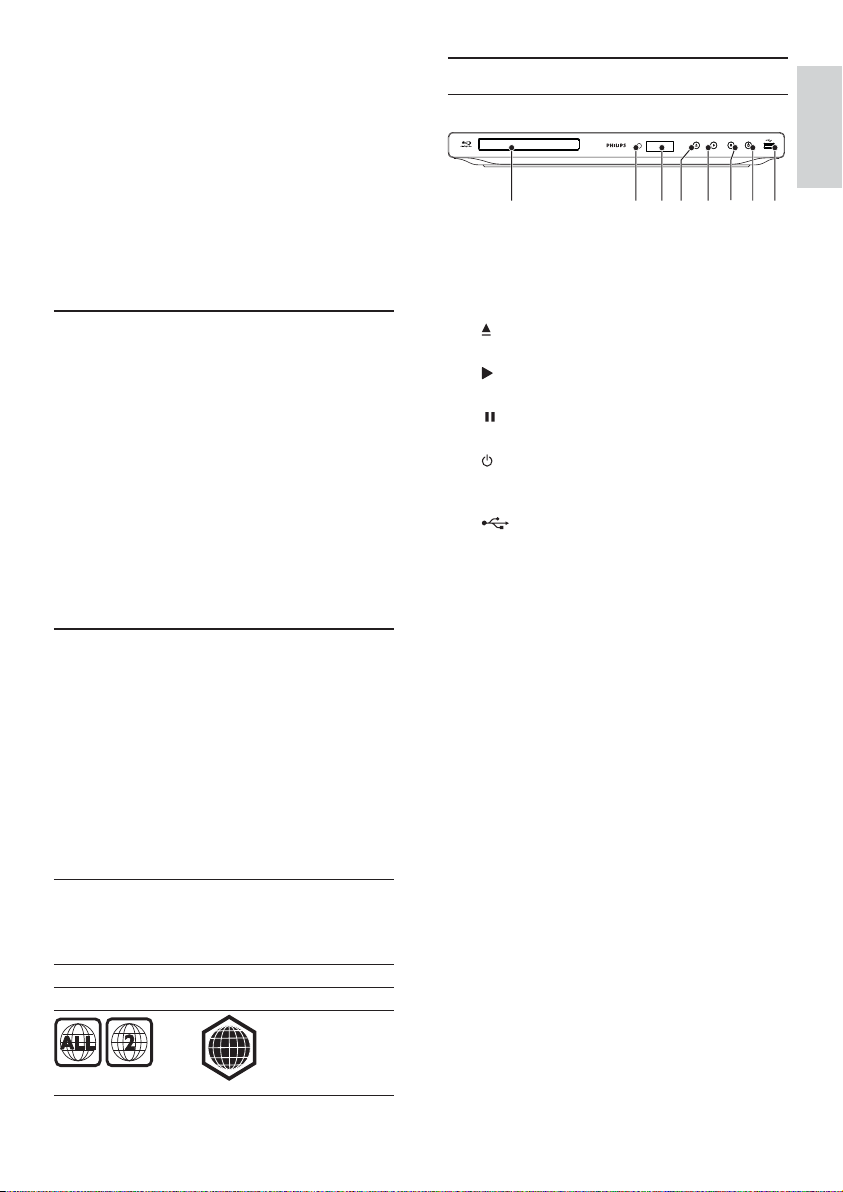
Päälaite
abcdefgh
a Levyalusta
b Infrapunatunnistin
c Näyttö
d
e
f
g
h
Levykelkan avaaminen tai sulkeminen. •
Toiston aloittaminen tai jatkaminen.•
Toiston keskeyttäminen.•
Soittimen virran kytkeminen tai •
valmiustilaan asettaminen
-liitäntä
USB-aseman liittäminen. •
Suomi
Aluekoodit
Laite toistaa levyjä, joilla on jokin seuraavista
aluekoodeista.
Aluekoodi Maat
DVD Blu-ray
Eurooppa,
Iso-Britannia
B
7
FI
Page 8
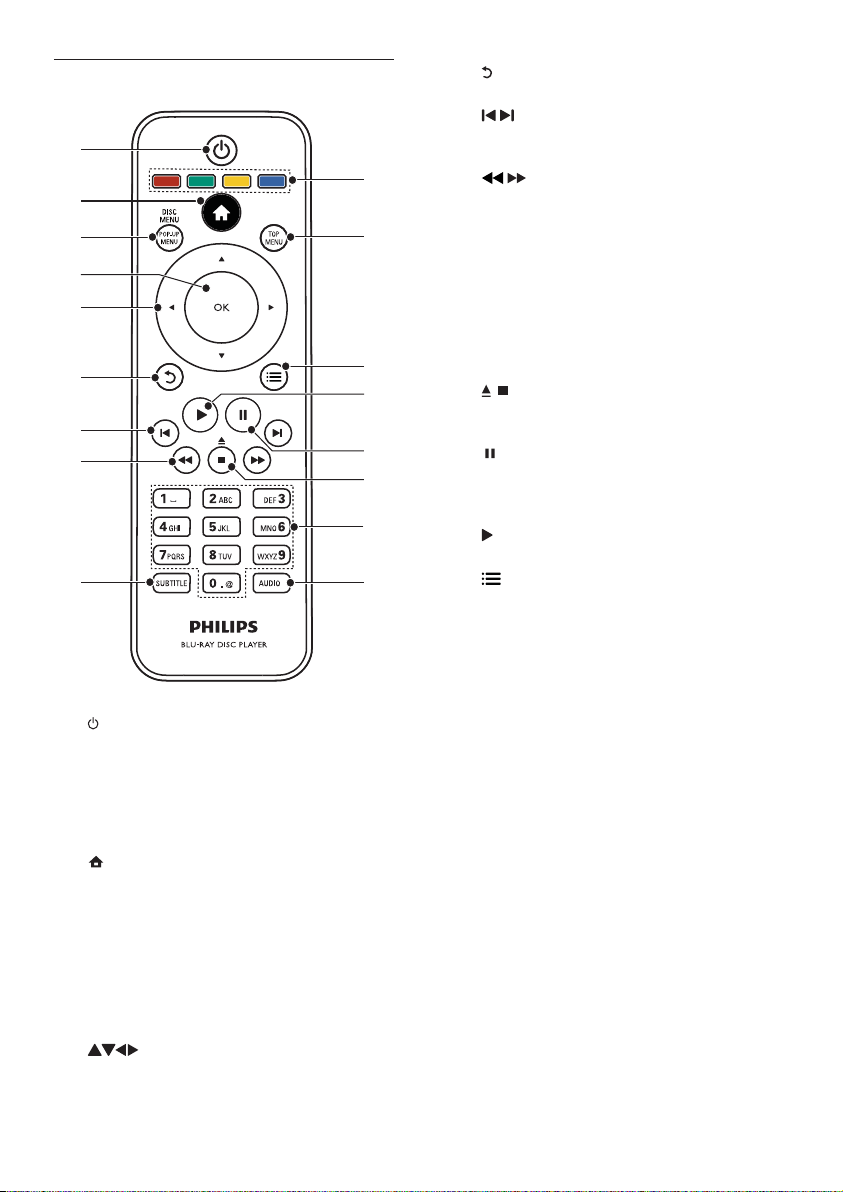
Kaukosäädin
a
b
c
d
e
f
g
h
i
a
Soittimen virran kytkeminen tai •
valmiustilaan asettaminen
Kun EasyLink on käytössä, paina •
painiketta vähintään kolme sekuntia, jotta
kaikki liitetyt HDMI CEC -yhteensopivat
laitteet siirtyvät valmiustilaan.
b
Soittimen aloitusvalikon avaaminen.•
c DISC MENU / POP-UP MENU
• BD: ponnahdusvalikon avaaminen tai
sulkeminen.
• DVD: levyvalikon käyttäminen tai
sulkeminen..
d OK
Merkinnän tai valinnan vahvistaminen.•
e
Siirtyminen valikoissa.•
f
g
q
p
o
n
m
l
k
j
h
i SUBTITLE
j AUDIO
k Aakkosnumeeriset painikkeet
l
m
n
o
p TOP MENU
q Väripainikkeet
Palaaminen edelliseen näyttövalikkoon.•
/
Siirtyminen edelliseen tai seuraavaan •
nimikkeeseen, osaan tai raitaan.
/
Haku eteen- ja taaksepäin.•
Tekstityskielen valitseminen levyltä.•
Levyn äänen kielen tai kanavan •
valitseminen.
Toistettavan kohteen valitseminen.•
Arvojen määrittäminen.•
/
Toiston keskeyttäminen.•
Avaa/sulje levykelkka pitämällä alhaalla.•
Toiston keskeyttäminen.•
Siir tyminen keskeytetyssä toistossa yhden •
kuvan eteenpäin.
Toiston aloittaminen tai jatkaminen.•
Nykyisen toiminnon tai valinnan •
asetusten avaaminen.
• BD: päävalikon avaaminen.
• DVD: nimikevalikon avaaminen.
• BD: toimintojen tai asetusten
valitseminen.
8
FI
Page 9
3 Liitännät
Kaikki ääni-/videokaapelit on hankittava erikseen.
Seuraavassa esitellään soittimen käyttöön tarvittavat
liitännät.
Perusliitännät:
Video•
Ääni•
Virta•
Valinnaiset liitännät:
Äänen ohjaaminen muihin laitteisiin•
HDMI-yhteensopiva AV-vastaanotin/-•
vahvistin
Digitaalinen AV-vahvistin/-vastaanotin•
Analoginen stereojärjestelmä•
USB-laite•
LAN (verkko)•
Huomautus
Tuotteen takaosan tai pohjan tyyppikilvessä on •
tunnistetietoja ja jännitemerkintä.
•
Varmista ennen liitäntöjen tekemistä, että kaik ki laitteet
on irrotettu virtalähteestä.
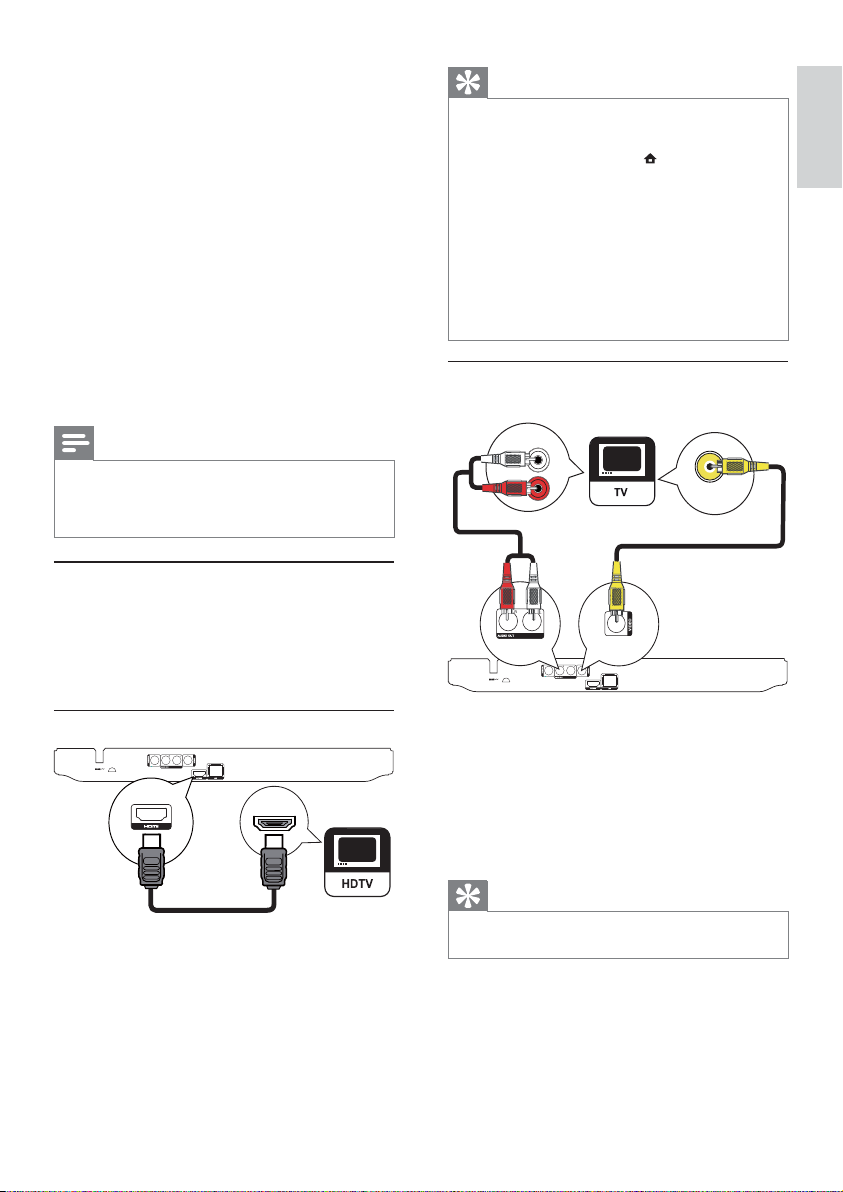
Video-/äänikaapelien liitännät
Valitse paras videoliitäntä, jota TV tukee.
• Vaihtoehto 1: liittäminen HDMI-liitäntään
(HDMI-, DVI- tai HDCP-yhteensopiva TV).
• Vaihtoehto 2: liittäminen
komposiittivideoliitäntään (tavallinen TV).
Vaihtoehto 1: liittäminen HDMI-liitäntään
HDMI IN
Vihje
Jos TV:ssä on vain DVI-liitäntä, käytä HDMI/DVI- •
sovitinta. Käytä äänentoistoon äänikaapelia.
•
Jos ruutu on tyhjä HDMI-liitännän aik ana, palauta
kuva painamalla kaukosäätimen -painiketta ja sitten
numeropainikkeilla 731.
•
Jos soitin lii tetään 1080 p- tai 1080p/24Hzyhteensopivaan televisioon, Philips suosittelee HDMI
Cat 2 -kaapelia eli High Speed HDMI -kaapelia par haan
mahdollisen kuvan- ja äänenlaadun varmistamisek si.
•
Blu-ray- tai DVD-levyllä olevan digitaalivideokuvan
toistaminen HDMI-liitännän kautta edellyttää, että sekä
soitin että näyttölaite (tai AV-viritinvahvis tin) tukevat
HDCP (high-bandwidth digital content protection)
-kopiosuojausjärjestelmää.
•
Tämä liitäntä tarjoaa parhaan kuvanlaadun.
Vaihtoehto 2: liittäminen
komposiittivideoliitäntään
AUDIO IN
VIDEO IN
1 Liitä komposiittivideokaapeli
2 Liitä äänikaapelit
tämän soittimen • VIDEO (CVBS)
-liitäntään
TV:n VIDEO-tuloliitäntään.•
tämän soittimen • AUDIO OUT
-liitäntöihin
TV:n AUDIO-tuloliitäntöihin.•
Suomi
1 Liitä HDMI-kaapeli (lisävaruste)
tämän soittimen • HDMI -liitäntään
television HDMI-liitäntään. •
Vihje
Television videotuloliitännässä voi olla merkintä A/ V IN, •
VIDEO IN, COMPOSITE tai BASEBAND.
9
FI
Page 10
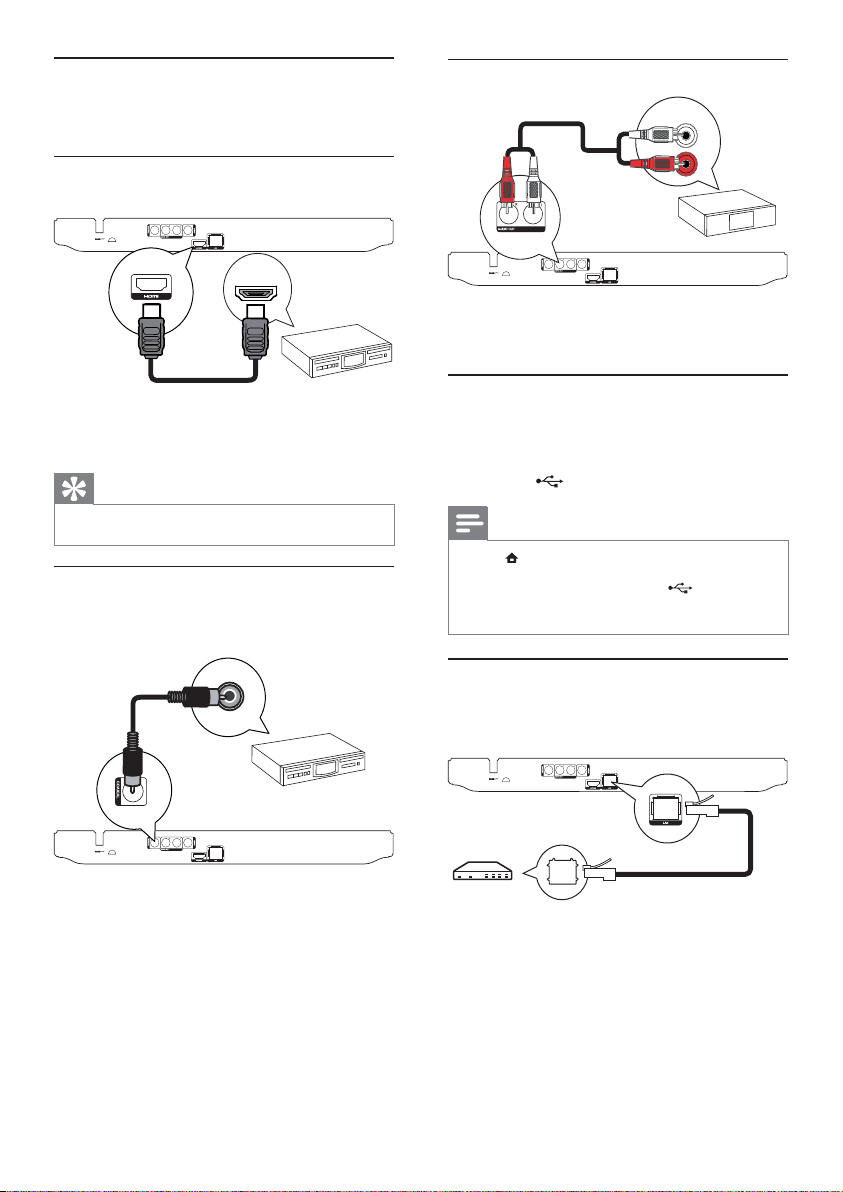
Äänen ohjaaminen muihin
laitteisiin
Voit ohjata soittimen äänen muihin laitteisiin.
Liittäminen HDMI-yhteensopivaan AVvastaanottimeen/-vahvistimeen
Analogisen stereojärjestelmän liittäminen
AUDIO IN
HDMI IN
1 Liitä HDMI-kaapeli (lisävaruste)
tämän soittimen • HDMI -liitäntään
Laitteen HDMI-tuloliitäntä.•
Vihje
HDMI-liitäntä takaa parhaan mahdollisen äänenlaadun. •
Liittäminen digitaaliseen AV-vahvistimeen/
vastaanottimeen
Liittäminen koaksiaaliliitäntään
COAXIAL
1 Liitä äänikaapelit
USB-laitteen liittäminen
USB-laitteella saadaan lisämuistia
ohjelmistopäivityksiä ja BD-Live-materiaalia varten.
1 Liitä USB-laite soittimen takapaneelissa
Liittäminen verkkoon
Liittämällä tämän soittimen verkkoon voit käyttää
ohjelmistopäivityksiä ja BD-Live-palvelua.
tämän soittimen • AUDIO OUT-liitäntään
laitteen AUDIO-tuloliitäntöihin.•
olevaan
Huomautus
Paina • -painiketta ja tois ta sisältöä valitsemalla valikos ta
[USB:n selaaminen].
• -liitäntään.
Liit ä USB-laite vain tämän soittimen
•
Philips ei takaa yhteensopivuutta kaikkien USB-laitteiden
kanssa.
(USB) -liitäntään.
1 Liitä koaksiaalikaapeli (lisävaruste)
10
tämän soittimen • COAXIAL -liitäntään
laitteen COAXIAL/DIGITAL-•
tuloliitäntään.
FI
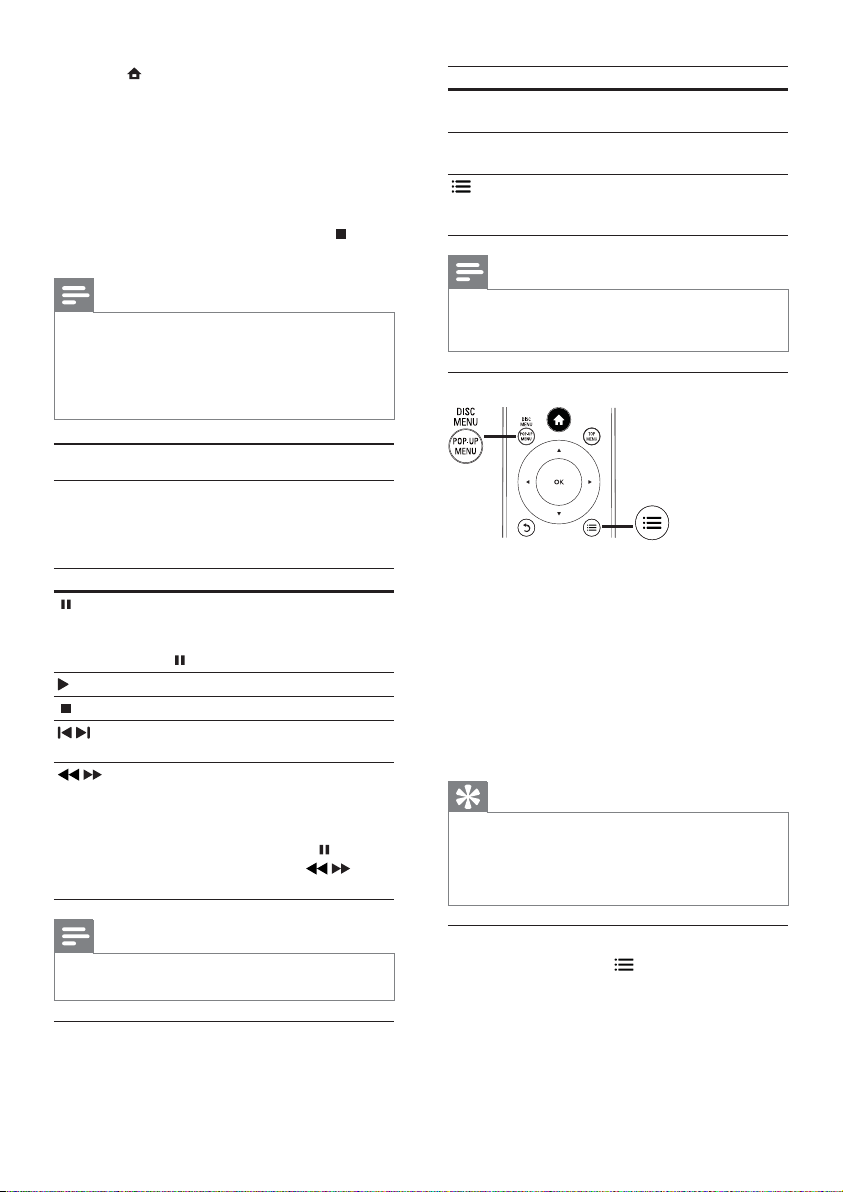
1 Liitä verkkokaapeli (lisävaruste)
tämän soittimen • LAN -liitäntään
laajakaistamodeemin tai reitittimen LAN-•
liitäntään.
Page 11
Huomautus
Kaikki reitittimet ja Internet-palveluntarjoajat eivät •
välttämättä salli ohjelmistopäivitysten lataamista Philipsin
sivustosta. Pyydä lisätietoja Internet-palveluntarjoajalta.
Virran kytkeminen
Varoitus
Tuotteen vahingoittumisen vaara! Varmista, että •
vir talähteen jännite vastaa soit timen takapaneeliin
merkittyä jännitettä.
•
Varmista ennen ver kkolaitteen vir tajohdon liittämistä,
että kaikki muut liitännät on tehty.
Huomautus
Tyyppikilpi on soittimen takaosassa. •
4 Television käyttäminen
Varoitus
Ohjeesta poikkeavien säädinten tai säätöjen k äyt täminen •
toimenpiteisiin saattaa aiheuttaa vaarallisen altistumisen
säteilylle tai heikentää käyttöturvallisuutta.
Noudata aina tämän luvun ohjeita järjestyksessä.
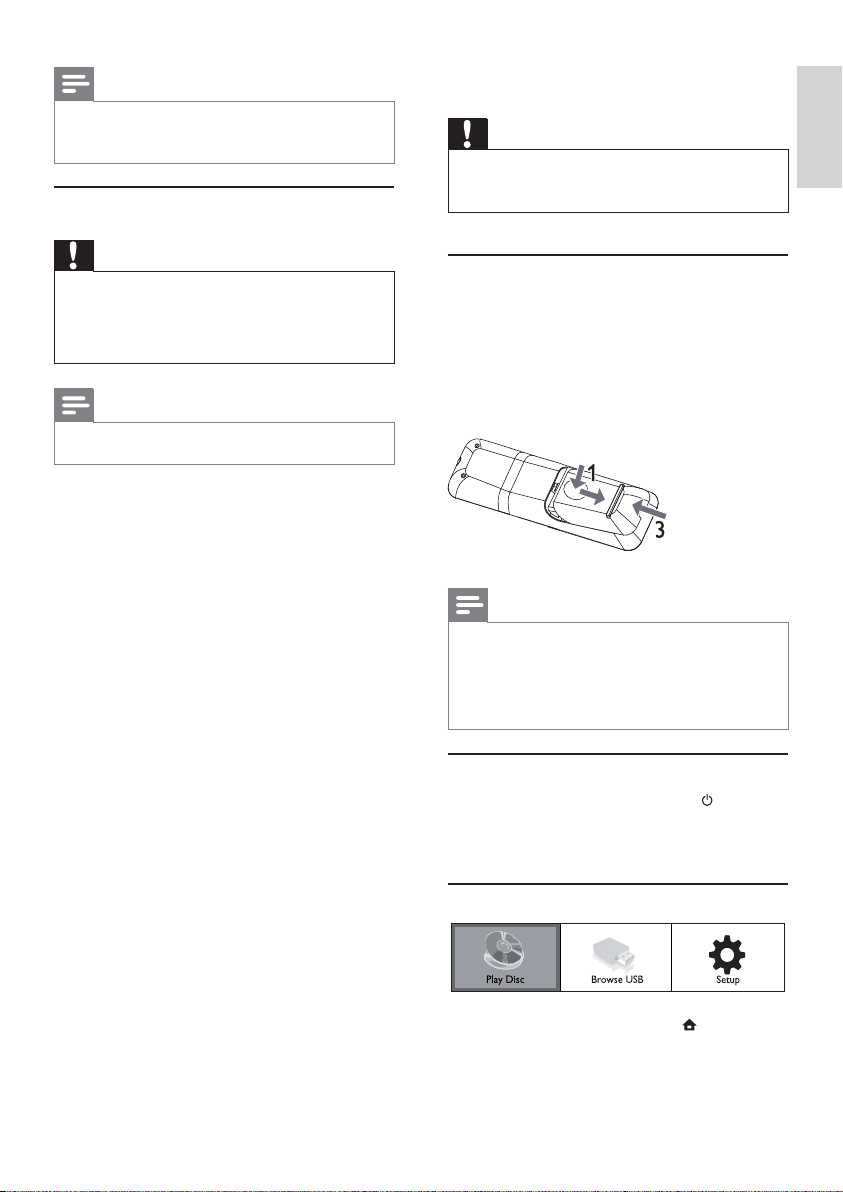
Kaukosäätimen valmisteleminen
1 Paina paristokoteloa ja liu’uta se auki (kuvan
kohta 1).
2 Aseta kaksi AAA-paristoa kuvan mukaisesti
siten, että pariston navat ovat oikein päin (+/-).
3 Paina ja liu’uta paristokotelo takaisin paikalleen
(kuvan kohta 3).
Suomi
1 Liitä virtajohto seinäpistorasiaan.
Soitin on valmis määritettäväksi käyttöön. »
Huomautus
Poist a paristot kaukosäätimes tä, jos et aio käytt ää sit ä •
pitkään aikaan.
•
Älä sekoita vanhoja ja uusia tai hiili- ja alkalipohjaisia
paristoja keskenään.
•
Paristot ovat ongelmajätettä: toimita käytetyt paristot
keräyspisteeseen.
Televisiotulon etsiminen
1 Kytke soittimeen virta painamalla -painiketta.
2 Kytke virta televisioon ja siirr y videotuloon
(lisätietoja A/V-tulon valitsemisesta on TV:n
käyttöoppaassa).
Aloitusvalikon käyttäminen
1 Avaa aloitusvalikko painamalla -painiketta.
Aloita levyn toisto valitsemalla •
[toista levy].
FI
11
Page 12
Näytä USB-laitteen sisältö valitsemalla •
[USB:n selaaminen].
Avaa asetusvalikot valitsemalla • [Asennus].
Valikon selaaminen
1 Kun valikko on avautunut, voit selata sitä
kaukosäätimen painikkeilla.
Painike Toimenpide
Siirtyminen ylös- tai alaspäin.
Siirtyminen vasemmalle tai
oikealle.
OK Valinnan vahvistaminen.
Numeroiden kirjoittaminen.
Valikkokielen valitseminen
Huomautus
Jos soi tin on liitetty HDMI CEC -yhteensopivaan •
televisioon , voit ohittaa tämän vaiheen. Siinä tapauksessa
se valitsee TV:n asetusta vastaavan valikkokieliasetuksen
automaattisesti (jos tämä soitin tukee TV:ssä asetettua
kieltä).
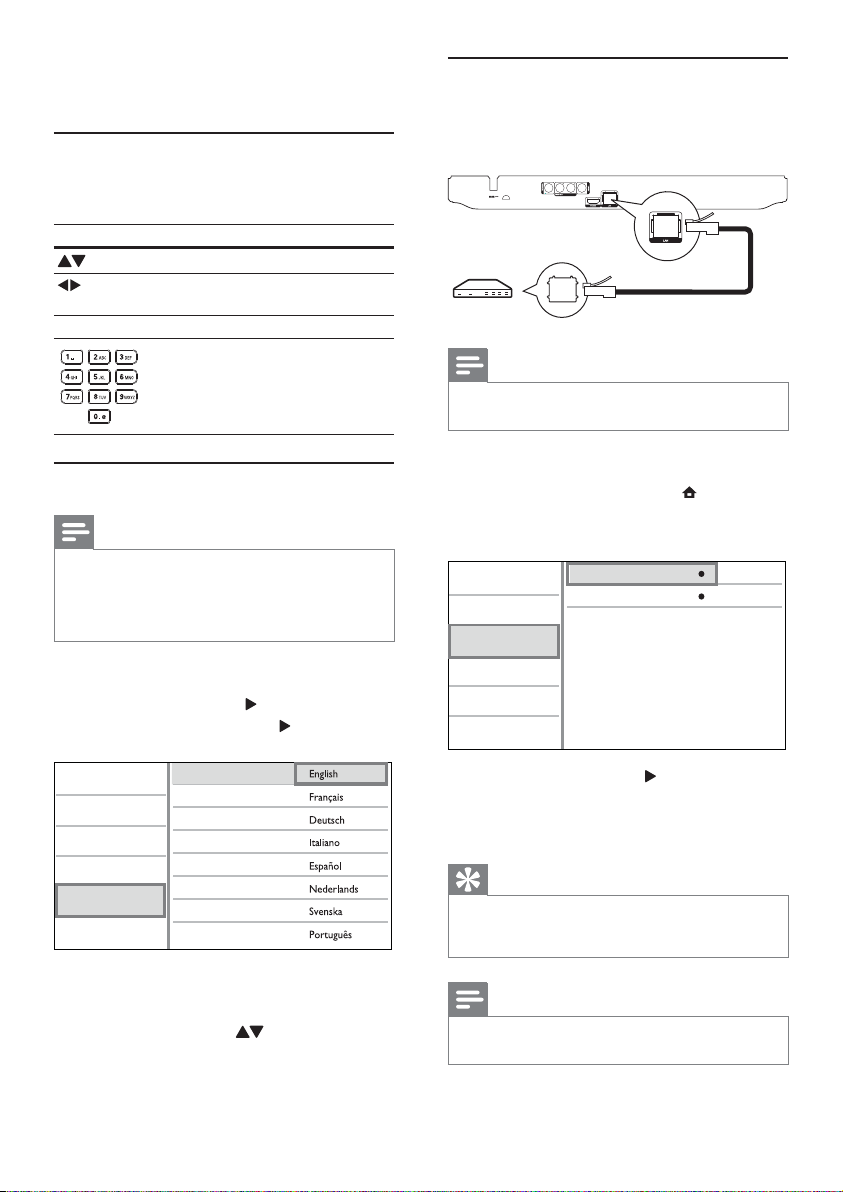
1 Valitse aloitusvalikosta [Asennus] ja paina OK-
painiketta.
2 Valitse [Etusija] ja paina -painiketta.
3 Valitse [Valikkokieli] ja paina -painiketta.
Video Setup
Audio Setup
Network Setup
EasyLink Setup
Preference Setup
Advanced Setup
4 Valitse kieli painamalla -painiketta ja paina
OK-painiketta.
Menu Language
Audio
Subtitle
Disc Menu
Parental Control
Screen Saver
Auto Subtitle Shift
Change Password
Kieliasetukset voivat vaihdella alueen •
mukaan.
Verkon määrittäminen
Jos haluat päivittää soittimen ohjelmistoa tai käyttää
joidenkin levyjen BD-Live-materiaaleja, määritä
verkkoyhteys.
Huomautus
Varmista, että verkkokaapeli on liitetty oikein ja reititin •
on käynnissä.
1 Liitä tämä soitin laajakaistamodeemiin tai
-reitittimeen.
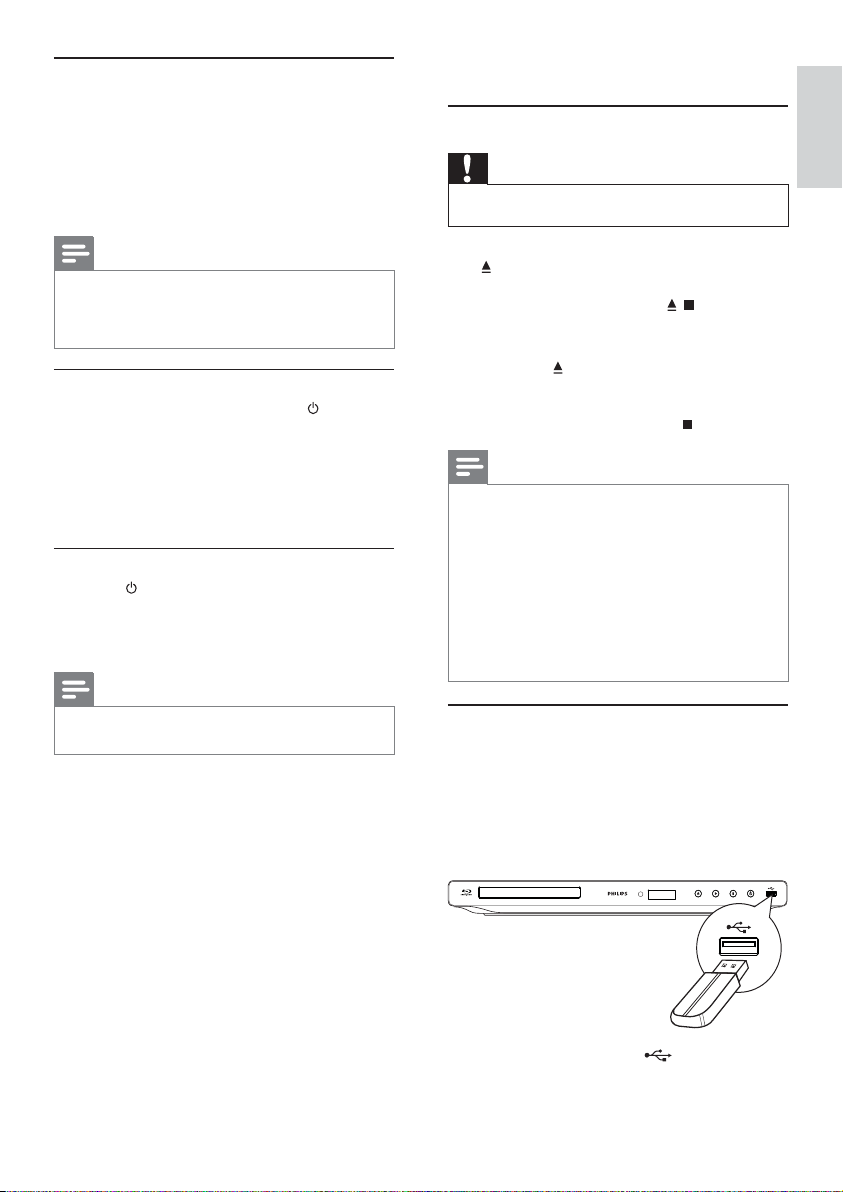
2 Avaa aloitusvalikko painamalla -painiketta.
3 Valitse [Asennus] ja paina sitten OK-
painiketta.
Video Setup
Audio Setup
Network Setup
EasyLink Setup
Preference Setup
Advanced Setup
4 Valitse [Verkko] ja paina -painiketta.
5 Valitse [Verkkoasennus] ja paina OK-
painiketta.
6 Asenna verkko noudattamalla näytön ohjeita.
Vihje
Voit tarkistaa soittimen kiinteän yhteyden tilan (k atso •
Asetusten määrittäminen > Ver kkoasetuk set > [Näytä
verkkoasetukset]).
Network Installation
View Network Settings
Huomautus
BD- Live-sisällön lataaminen internetistä voi kestää jonkin •
aikaa tiedostokoon ja internet-yhteysnopeuden mukaan.
12
FI
Page 13
Philips Easylink -toiminnon
käyttäminen
Soitin tukee Philips EasyLink -toimintoa, joka käyttää
HDMI CEC (Consumer Electronics Control)
-protokollaa. Voit ohjata yhdellä kaukosäätimellä
HDMI-liitäntöjen kautta liitettyjä EasyLinkyhteensopivia laitteita.
5 Toistaminen
Levyn toistaminen
Varoitus
Älä aseta levykelkkaan muita esineitä kuin levyjä. •
Suomi
Huomautus
Jotta EasyLink-toiminto voidaan ottaa käyttöön, HDMI •
CEC -toiminnot on otettava käyttöön TV:ssä ja siihen
liitetyissä laitteissa. Lisätietoja on TV:n ja laitteiden
käyttöoppaissa.
Toisto yhdellä painikkeella
1
Kytke soittimeen virta painamalla
(valmiustila) -painiketta.
TV (jos se tukee toistoa yhdellä painikkeella) »
käynnistyy automaattisesti ja siirtyy oikealle
videotulokanavalle.
Jos soittimessa on levy, sen toisto alkaa »
automaattisesti.
Valmiustila yhdellä painikkeella
1
Paina (valmiustila) -painiketta yli 3 sekuntia.
Kaikki liitetyt laitteet (jos ne tukevat toistoa »
yhdellä painikkeella) siirtyvät automaattisesti
valmiustilaan.
Huomautus
Philips ei tak aa yhteensopivuutta muiden HDMI CEC •
-laitteiden kanssa.
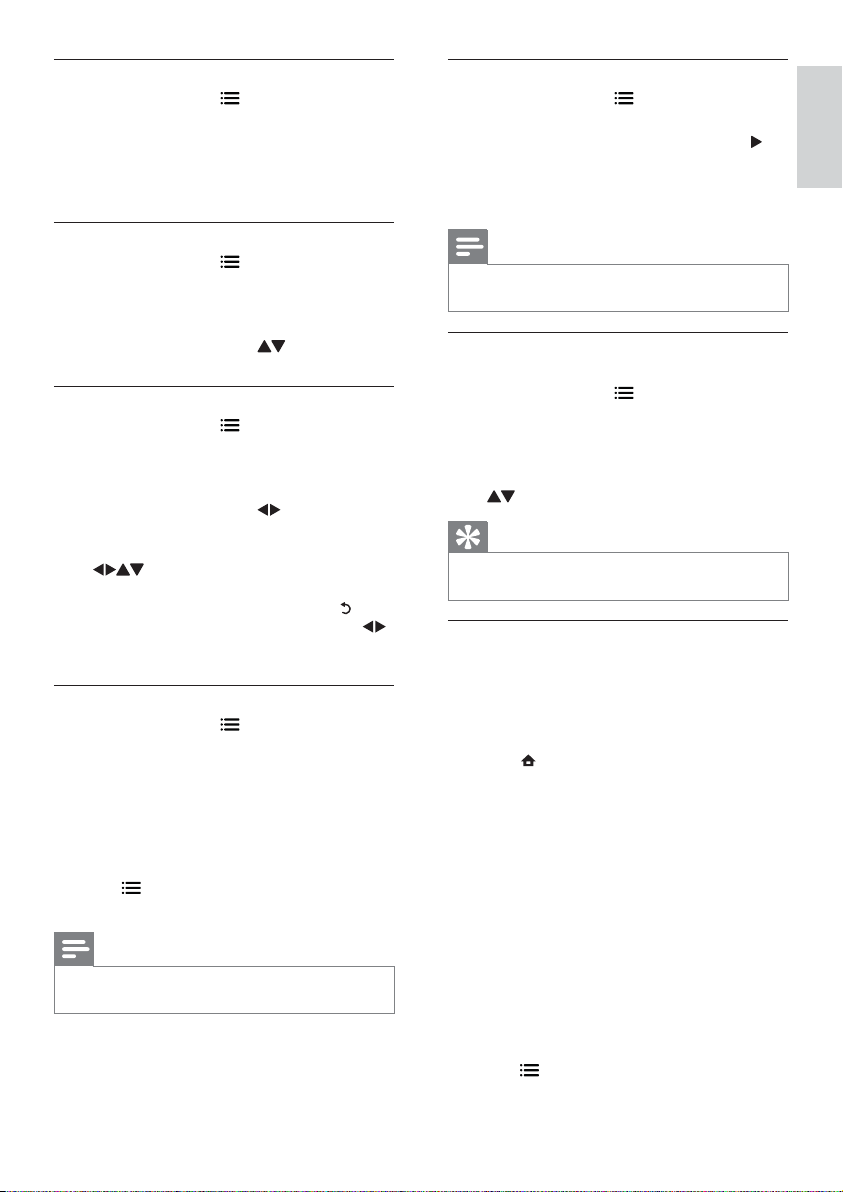
1 Avaa levykelkka vetämällä etupaneelin
-liuskaa.
Voit avata/sulkea levykelkan pitämällä •
alhaalla kaukosäätimen
/ -painiketta.
2 Aseta levy soittimeen tekstipuoli ylöspäin.
3 Sulje levykelkka ja aloita levyn toisto
painamalla
Huomautus
Tarkista tuetut levy-/tiedostomuodot (katso kohtaa Blu- •
ray-soitin > Tois tett avissa olevat t allennusvälineet).
•
Jos salasanan kirjoitus valik ko avautuu, lukitun t ai
rajoitetun levyn toisto edelly ttää salasanan antamista
(katso Asetusten määrittäminen > Omat asetukset >
[Lapsilukko]).
•
Jos keskeytät tai lopetat levyn toiston, näytönsäästäjä
käynnistyy 10 minuutin kuluttua. Voit sulkea
näytönsäästäjän painamalla jotain painiketta.
•
Jos lev yn toiston keskeyt tämisen jälkeen mit ään
painiketta ei paineta 30 minuutin kuluessa, soitin siirtyy
automaattisesti valmiustilaan.
-painiketta.
Aloita levyn katseleminen valitsemalla •
TV:n videotulo.
Lopeta toisto painamalla •
-painiketta.
Toistaminen USB-laitteesta
Toista mediatiedostoja seuraavista USB-laitteista:
Flash-asemat•
muistikortinlukijat•
kiintolevy (soitin tunnistaa ainoastaan •
kannettavan kiintolevyaseman, jonka USBvirran vir tahuippu on yli 500 mA.)
1 Liitä USB-laite soittimen (USB) -liitäntään.
FI
13
Page 14
2 Paina -painiketta, valitse [USB:n selaaminen]
ja paina OK-painiketta.
Sisältövalikko avautuu. »
3 Valitse toistettava tiedosto ja paina OK-
painiketta.
Toisto alkaa (lisätietoja on kohdissa Videon »
toistaminen, Valokuvien toistaminen, Musiikin
toistaminen).
Voit lopettaa toiston painamalla •
-painiketta tai irrottamalla USB-laitteen.
Huomautus
Philips ei takaa yhteensopivuutta kaikkien USB-laitteiden •
kanssa.
•
Kaikkia digitaalikameroita ei tueta. Tietokoneohjelman
asennusta edellyttäviä digitaalikameroita ei tueta.
•
NTFS (New Technology File System) -tietomuotoa ei
tueta.
Videon toistaminen
Videotoiston hallinta
1
Nimikkeen toistaminen
2 Toistoa hallitaan kaukosäätimellä.
Painike Toimenpide
Toiston keskeyttäminen.
Voit toistaa levyä hitaasti •
kuvaruutu kerrallaan painamalla
-painiketta toistuvasti.
Toiston aloittaminen tai jatkaminen.
Toiston keskeyttäminen.
/
Edelliseen tai seuraavaan
nimikkeeseen tai osaan siirtyminen.
Pikakelaus taakse- tai eteenpäin.
/
Hakunopeus muuttuu toistuvasti
painettaessa.
Voit toistaa hitaasti eteen- tai •
taaksepäin painamalla
-painiketta kerran ja /
-painiketta toistuvasti.
Painike Toimenpide
AUDIO Levyn äänen kielen tai kanavan
SUBTITLE Tekstityskielen valitseminen levyltä
Huomautus
Kaikki toiminnot eivät ehkä toimi kaikkien levyjen •
yhteydessä. Lisätietoja saat lev yn muk ana toimitetuista
materiaaleista.
valitseminen suoraan.
suoraan.
Edellä mainittujen toimien tai
lisäasetusten (esim. uusinta- tai
satunnaistoisto) käyttäminen.
Näyttövalikko
BD-videolevy
• TOP MENU lopettaa levyn toiston ja näyttää
levyvalikon. Ominaisuus on levykohtainen.
• POP-UP MENU avaa BD-videolevyn valikon
keskeyttämättä levyn toistoa.
DVD-videolevy
• TOP MENU levyn päävalikon avaaminen.
• DISC MENU näyttää levyn tiedot ja sen
käytettävissä olevat toiminnot.
VCD-/SVCD-/DivX-levy:
• DISC MENU näyttää levyn sisällön.
Vihje
Jos PBC-asetus ei ole käytössä, VCD/SVCD ohi ttaa •
valikon ja aloittaa toiston ensimmäisestä nimikkeestä.
Voit näy ttä ä valikon ennen toistoa ottamalla käyttöön
PBC-asetuksen (katso Asetus ten määrit täminen -
[Etusija] > [VCD PBC]).
Huomautus
Java-sovelluksia sisältävillä BD-levyillä toiston jatkaminen •
määr äytyy lev yn mukaan.
Videotoiston muuttaminen
1
Nimikkeen toistaminen
2 Muuta toistoa kaukosäätimellä.
14
FI
Toistotietojen näyttäminen
1
Paina toiston aikana -painiketta.
Toistoasetusvalikko avautuu. »
2 Valitse valikossa [Tiedot] ja paina OK-
painiketta.
Levytoiston nykyinen tila näytetään. »
Page 15
Nimikkeen/osan valinta
1
Paina toiston aikana -painiketta.
Toistoasetusvalikko avautuu. »
2 Valitse valikossa [Nimike] tai [Osat] ja paina
OK-painiketta.
3 Valitse nimikkeen tai osan numero ja paina
OK-painiketta.
Videon katselukulman vaihtaminen
1
Paina toiston aikana -painiketta.
Toistoasetusvalikko avautuu. »
2 Valitse valikossa [Kulmaluettelo] ja paina
-painiketta.
3 Valitse katselukulma ja paina OK-painiketta.
Toistoa jatketaan valitusta kuvakulmasta. »
Suomi
Siirtyminen toistettaessa tiettyyn kohtaan
1
Paina toiston aikana -painiketta.
Toistoasetusvalikko avautuu. »
2 Valitse valikossa [Aikahaku] ja paina OK-
painiketta.
3 Valitse selauspainikkeilla ( ) aika, johon
haluat siirtyä, ja paina OK-painiketta.
Lähentäminen ja loitontaminen
1
Paina toiston aikana -painiketta.
Toistoasetusvalikko avautuu. »
2 Valitse valikossa [Zoom] ja paina OK-
painiketta.
3 Valitse selauspainikkeilla ( )zoomauskerroin
ja paina sitten OK-painiketta.
4 Siirry zoomatussa kuvassa selauspainikkeilla
(
).
Jos haluat sulkea zoomaustilan, avaa •
zoomauskerroinpalkki painamalla
-painiketta ja paina selauspainikkeita ( )
toistuvasti, kunnes zoomauskerroin [x1]
on valittu.
Tietyn osan uusintatoisto
1
Paina toiston aikana -painiketta.
Toistoasetusvalikko avautuu. »
2 Valitse valikossa [Toista A-B] ja määritä
aloituskohta painamalla OK-painiketta.
3 Etsi haluamasi lopetuspiste ja määritä se
painamalla OK-painiketta.
Uusintatoisto alkaa. »
Voit sulkea uusintatoistotilan painamalla •
-painiketta, valitsemalla [Toista A-B] ja
painamalla OK-painiketta.
Huomautus
Jakson merkitseminen uusintatoistettavaksi on •
mahdollist a ainoastaan raidan tai nimikkeen sisällä.
Huomautus
Koskee ainoastaan niitä levyjä, joiden kohtausten •
kuvakulmia voi vaihtaa.
Tekstityksen siirtäminen manuaalisesti
Voit siir tää tekstitystä TV-ruudussa itse.
1 Paina toiston aikana -painiketta.
Toistoasetusvalikko avautuu. »
2 Valitse valikossa [Tekstityksen siirto] ja paina
OK-painiketta.
3 Siirrä tekstitys painamalla selauspainikkeita
(
) ja paina OK-painiketta.
Vihje
Tekstityk sen siirtoa ei tueta DivX-videossa, jossa on •
ulkoinen tekstitys.
BD-video-toisto
Blu-ray-videon kapasiteetti on tavallista suurempi,
ja se tukee esimerkiksi teräväpiir tovideoita,
monikanavaista surround-ääntä ja vuorovaikutteisia
valikkoja.
1 Aseta soittimeen BD-videolevy.
2 Paina -painiketta, valitse [toista levy] ja
paina OK-painiketta.
3 Toisto alkaa automaattisesti. Voit aloittaa
toiston myös valitsemalla toistovaihtoehdon
valikosta ja painamalla OK-painiketta.
Toiston aikana voit näyttää levyn •
lisätiedot, ominaisuudet tai muun sisällön
painamalla TOP MENU -painiketta.
Toiston aikana voit avata levyvalikon •
keskeyttämättä toistoa painamalla POP-
BONUSVIEW
(Ainoastaan levy, joka tukee BONUSVIEW- tai
Picture-in Picture-ominaisuutta)
Voit näyttää lisäsisältöä (kuten kommentteja) heti
ruudussa näkyvässä pienessä ikkunassa.
UP MENU -painiketta.
1 Paina .
Toistoasetusvalikko avautuu. »
15
FI
Page 16
2 Valitse valikosta [PIP-valinta] ja [PIP] ja paina
OK-painiketta.
Toissijainen videoikkuna avautuu. »
3 Valitse valikossa [2. äänen kieli] tai [2.
tekstityskieli] ja paina
-painiketta.
4 Valitse toistettava kieli ja paina OK-painiketta.
BD-LIVE
(Ainoastaan levy, joka tukee BD-Live-lisämateriaalia.
Varmista, että soittimen Internet-yhteys toimii.)
Soittimen kiintolevylle tai liitettyyn USBtallennuslaitteeseen voi ladata lisäsisältöä, kuten
elokuvatrailereita ja tekstityksiä. Erikoisvideotietoja
voi toistaa lataamisen aikana.
BD-Live-toimintoa tukevan levyn toiston aikana
levyn tunnukset saatetaan lähettää sisällöntarjoajalle
internetin kautta. Käytettävissä olevat palvelut ja
toiminnot vaihtelevat levyn mukaan.
DivX®-videon toistaminen
DivX-video on digitaalinen mediatiedostomuoto,
joka säilyttää alkuperäisen kuvan laadukkuuden,
vaikka pakkausaste on suuri.
1 Aseta laitteeseen levy tai liitä USB-laite, jossa
on DivX-videoita.
2 Paina -painiketta, valitse [toista levy] tai
[USB:n selaaminen] ja paina OK-painiketta.
Sisältövalikko avautuu. »
3 Valitse videokansio ja paina OK-painiketta.
4 Valitse toistettava tiedosto ja paina OK-
painiketta.
5 Toistoa hallitaan kaukosäätimellä.
Painike Toimenpide
AUDIO Äänen kielen tai kanavan
SUBTITLE Tekstityskielen valitseminen.
Huomautus
Voit toistaa ainoastaan DivX-videoita , jotka on vuokrattu •
tai ostettu tämän tuotteen DivX-rekisteröintikoodilla
(katso kohtaa Asetusten määrittäminen >
[Lisäasetukset] > [DivX
•
Voit toistaa enintä än 4 Gt:n kokoisia DivXvideotiedostoja.
•
Soitin voi näy ttä ä teks tityksessä enintään 45 merkkiä.
valitseminen.
Toiston keskeyttäminen.
®
VOD Code]).
Valokuvien toistaminen
Valokuvien toistaminen diaesityksenä
Soittimella voi toistaa JPEG-valokuvia
(tiedostotunniste on .jpeg tai .jpg).
1 Aseta laitteeseen levy tai liitä USB-laite, jossa
on JPEG-valokuvia.
2 Paina -painiketta, valitse [toista levy]tai
[USB:n selaaminen] ja paina OK-painiketta.
Sisältövalikko avautuu. »
3 Valitse valokuvakansio ja avaa se OK-
painikkeella.
Valitse valokuva • selauspainikkeilla.
Voit suurentaa valitun valokuvan ja •
käynnistää diaesityksen painamalla OK-
painiketta.
4 Aloita diaesityksen toisto -painikkeella.
Huomautus
Jos yhdellä levyllä on paljon kappaleita tai valokuvia , •
levyn sisällön näyttäminen T V:ssä saattaa kestää tavallista
kauemmin.
•
Tällä soittimella voi näyttää vain digikameralla otettuja,
JPEG -EXIF-muotoisia kuvia. Useimmat digikamerat
käyttävät tätä tiedos tomuotoa. Tällä soit timella ei voi
näyttää Motion JPEG -kuvia tai kuvia, jotka ovat jossain
muussa kuin JPEG-muodossa, tai kuvia , joihin on liitetty
äänileikkeitä.
•
Soitin ei näytä eikä toist a laitteen rajoituksen ylittäviä
kansioita eikä tiedostoja.
Valokuvatoiston hallinta
1
Toista diaesitys.
Avaa toistovaihtoehdot •
valitse jokin niistä ja paina OK-painiketta.
Diaesityksen aikana voit myös kääntää •
kuvan vaaka- tai pystysuunnassa
painamalla
Jos diaesitys pysähtyy, jatka sitä painamalla •
-painiketta.
-painiketta.
Diaesityksen nopeuden ja animoinnin
asettaminen
1
Paina toiston aikana -painiketta.
Toistoasetusvalikko avautuu. »
2 Valitse valikossa [Dian kesto] ja paina OK-
painiketta.
3 Valitse luokka ja paina OK-painiketta.
4 Valitse valikossa [Dian animointi] ja paina OK-
painiketta.
5 Valitse animointitehoste ja paina OK-painiketta.
-painikkeella,
16
FI
Page 17
Musiikkidiaesityksen toistamminen
Luo musiikkidiaesitys, jossa toistetaan MP3/
WMA-musiikkitiedostoja ja JPEG-kuvatiedostoja
samanaikaisesti.
Huomautus
MP3/ WMA- ja JPEG-tiedostojen on oltava samalla levyllä •
tai samassa USB-laitteessa.
1 Toista MP3/WMA-musiikkia.
2 Palaa päävalikkoon painamalla -painiketta.
3 Siirry haluamaasi valokuvakansioon ja aloita
diaesitys painamalla OK-painiketta.
Diaesitys alkaa ja jatkuu kuvakansion »
loppuun asti.
Äänen toisto jatkuu, kunnes levy loppuu. »
Lopeta diaesityksen toisto painamalla •
-painiketta.
Lopeta musiikin toisto painamalla •
-painiketta uudelleen.
Musiikin toistaminen
Raidan hallinta
1
Toista raita.
2 Toistoa hallitaan kaukosäätimellä.
Painike Toimenpide
Toiston keskeyttäminen.
Toiston aloittaminen tai
jatkaminen.
Toiston keskeyttäminen.
/
Siirtyminen edelliseen tai
seuraavaan raitaan.
Toistettavan kohteen
valitseminen.
1 Aseta levykelkkaan levy tai liitä USB-laite, jossa
on MP3/WMA-musiikkia.
2 Paina -painiketta, valitse [toista levy] tai
[USB:n selaaminen] ja paina sitten OK-
painiketta.
Sisältövalikko avautuu. »
3 Valitse musiikkikansio ja paina OK-painiketta.
4 Valitse toistettava tiedosto ja paina OK-
painiketta.
Palaa päävalikkoon •
Huomautus
Jos lev yllä on useita istuntoja, vain ensimmäinen istunto •
toistetaan.
•
DRM-suojattua WMA-tiedostoa ei voi toistaa tällä
soittimella.
•
Tämä soitin ei tue MP3PRO-äänimuotoa.
Jos MP3-raidan nimessä (ID3) tai albumin nimessä on •
erikoismerkkejä, ne eivät ehkä näy oikein, koska niitä ei
tueta.
•
Soitin ei näytä eikä toist a laitteen rajoituksen ylittäviä
kansioita eikä tiedostoja.
-painikkeella.
Suomi
/
MP3/WMA-musiikin toisto
MP3/WMA on äänitiedostojen pakkausmuoto
(tiedostotunniste on .mp3 tai .wma).
Pikakelaus taakse- tai eteenpäin.
Hakunopeus muuttuu toistuvasti
painettaessa.
Uusinta- tai satunnaistoistotilan
käynnistäminen.
17
FI
Page 18
6 Asetusten
määrittäminen
Huomautus
Jos asetusvaihtoehto näkyy har maana, asetusta ei voi •
vaihtaa nykyisessä tilassa.
Videoasetukset
1 Paina -painiketta.
2 Valitse [Asennus] ja paina OK-painiketta.
3 Valitse [Video] ja paina -painiketta.
Video Setup
Audio Setup
Network Setup
EasyLink Setup
Preference Setup
Advanced Setup
4 Valitse jokin vaihtoehto ja paina OK-painiketta.
5 Valitse asetus ja paina OK-painiketta.
Palaa edelliseen valikkoon •
Poistu valikosta painamalla •
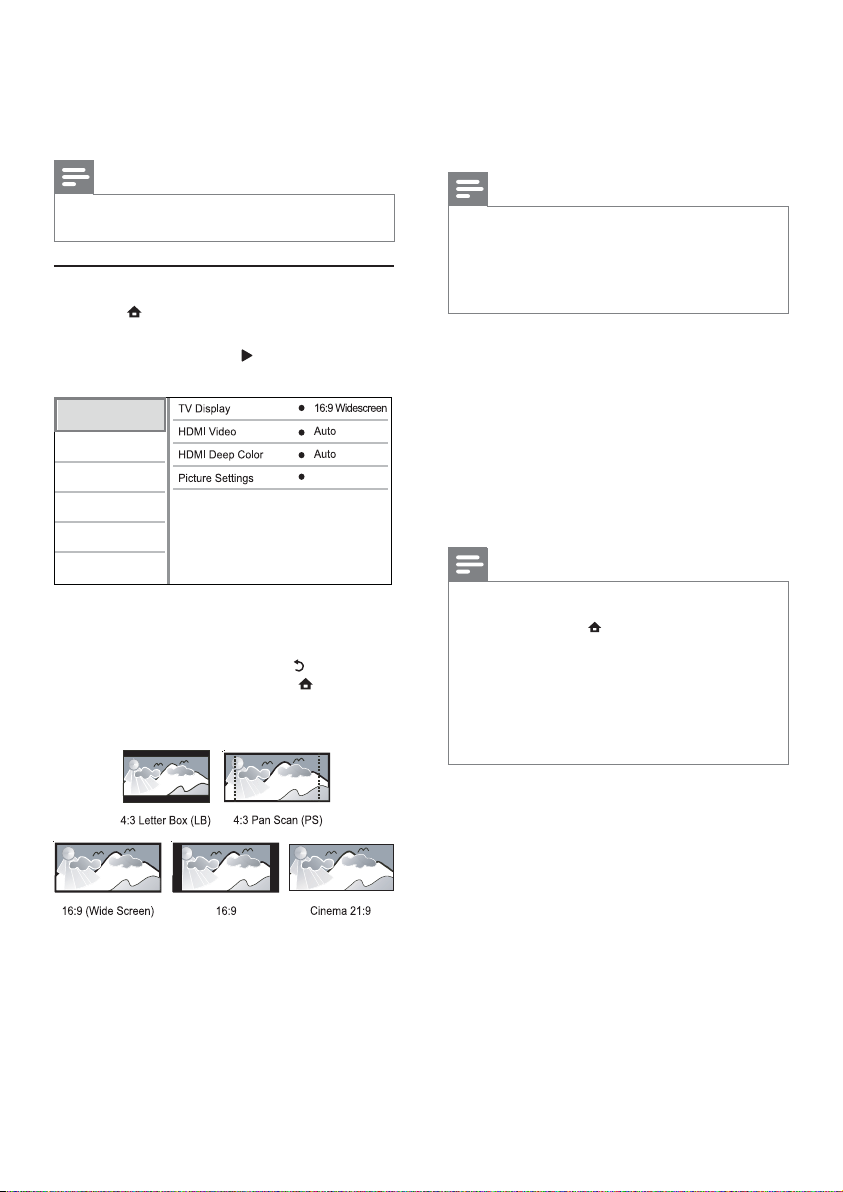
[TV-ruutu]
Valitse näyttömuoto:
Standard
-painikkeella.
-painiketta.
• [16:9] – 16:9-TV: 4:3-levyn toistaminen
4:3-kuvasuhteella. Kuvaruudun vasemmalla ja
oikealla reunalla näkyvät mustat palkit.
• [21:9 Cinema] - laajakuvatelevisiolle
(kuvasuhde 21:9).
Huomautus
Jos lev y ei tue • [4:3 Panscan]-vaihtoehtoa, kuvasuhde on
[4:3 Letterbox].
•
Ohjetekstin näyttö on käytettävissä kaikissa muissa
tiloissa paitsi [21:9 Cinema] -tilassa.
•
Lisätietoja Philips Cinema 21:9 -TV:n parhaista
katseluasetuksista on TV:n käyttöoppaassa.
[HDMI-video]
Valitse HDMI-videolähtötarkkuus, joka vastaa TV:n
näyttöominaisuuksia.
• [Auto] - havaitsee ja valitsee parhaan tuetun
videotarkkuuden automaattisesti.
• [Alkuperäinen] - valitsee alkuperäisen
videotarkkuuden.
• [480i/576i], [480p/576p], [720p], [1080i],
[1080p], [1080p/24Hz] - valitsee TV:n
tukeman parhaan videotarkkuuden. Lisätietoja
on TV:n käyttöoppaassa.
Huomautus
Jos televisiosi ei tue valittua videotarkkuutta ja r uutu •
on tyhjä, odota kuvan palau tumis ta 10 sekuntia tai
paina k aukosäätimen
numeropainikkeilla 731.
•
Jos videokuva ei näy, kun käytössä on komposiit ti (CVBS)
-liitäntä ja videotarkkuudeksi on kohdassa [HDMI-video]
määritetty HD-tarkkuus (1080p/24Hz, 1080p, 1080i,
720p), liitä tämä soitin televisioon HDMI-kaapelilla, jotta
voit toistaa HD-videoita (lisätietoja HDMI-liitännä stä on
kohdassa Lii tännät > Vaihtoehto 1: liittäminen HDMIliitäntään).
-painiketta ja paina sitten
• [4:3 Letterbox] – 4:3-TV: laajakuva ja mustat
palkit kuvan ylä- ja alareunassa.
• [4:3 Panscan] – 4:3-TV: täyskorkuinen kuva,
jonka reunat on rajattu.
• [16:9 laajakulma] - laajakuvatelevisiolle
(kuvasuhde 16:9).
18
FI
[HDMI Deep Color]
Tämä ominaisuus on käytettävissä ainoastaan silloin,
kun näyttölaite tukee deep colour -ominaisuutta ja
on liitetty soittimeen HDMI-kaapelilla.
• [Auto] - valitsemalla tämän voit nauttia yli
miljardista värisävystä Deep Color -TV:ssä
• [On] - valitsemalla tämän voit nauttia yli
miljardista värisävystä Deep Color -TV:ssä
käyttää 12-bittisiä värejä, jotka vähentävät
liian suuren kontrastin (“posterisaatio”)
esiintymistä.
• [Ei] - käytetään tavallisia 8-bittisiä värejä
[Kuva-asetukset]
Valitse esimääritetyt kuvan väriasetukset.
• [Vakio] – alkuperäinen väriasetus.
• [Eloisa] – kirkas väriasetus.
• [Kylmä] - pehmeä väriasetus.
Page 19
• [Toiminta] – Terävä väriasetus. Se parantaa
tummien alueiden tarkkuutta. Ihanteellinen
toimintaelokuviin.
• [Animaatio] – Kontrastiväriasetus. Soveltuu
erityisesti animaatioihin.
Ääniasetukset
1 Paina -painiketta.
2 Valitse [Asennus] ja paina OK-painiketta.
3 Valitse [Audio] ja paina -painiketta.
Video Setup
Audio Setup
Network Setup
EasyLink Setup
Preference Setup
Advanced Setup
4 Valitse jokin vaihtoehto ja paina OK-painiketta.
5 Valitse asetus ja paina OK-painiketta.
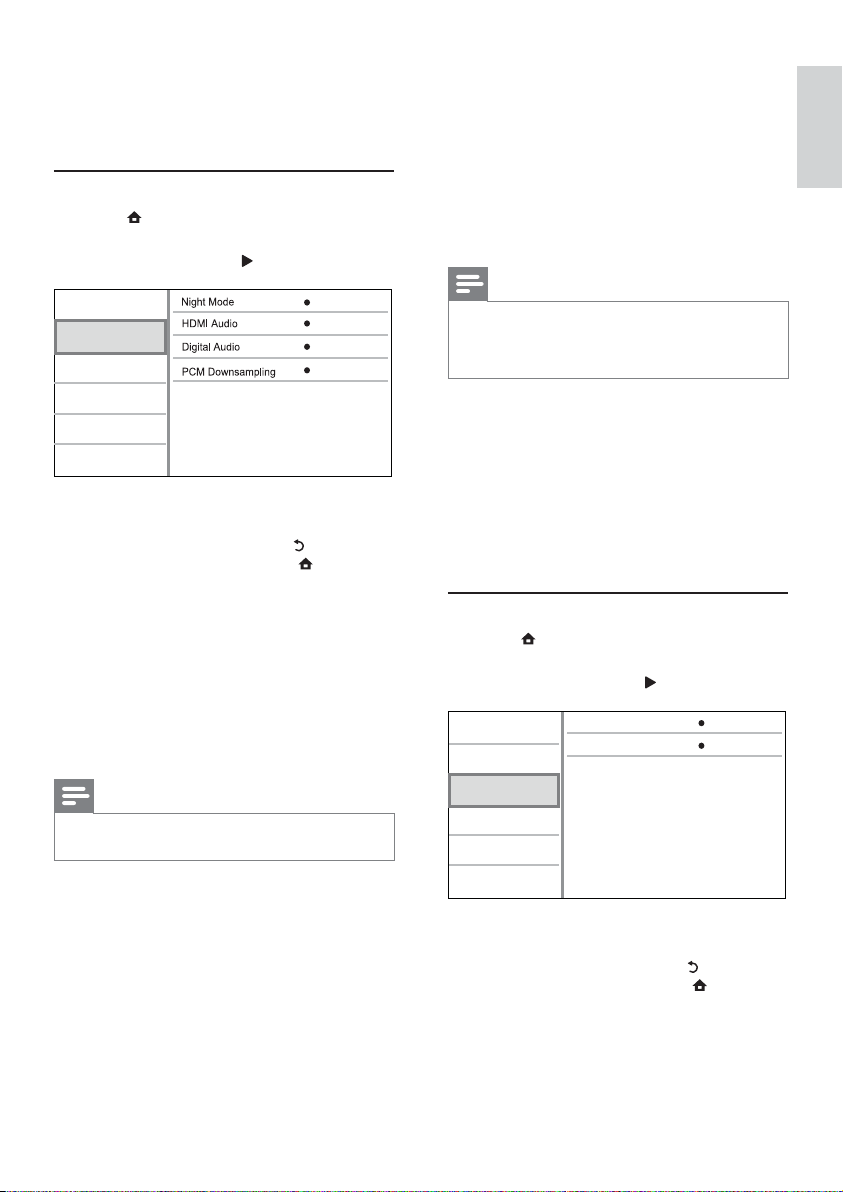
[Yökuuntelu]
Lisää hiljaisten äänten voimakkuutta ja vähennä
kovien äänten voimakkuutta, jotta voit toistaa levyä
hiljaisella äänenvoimakkuudella.
• [Auto] - tunnista ja valitse paras äänentaso
• [On] – hiljaiseen yökatseluun.
• [Ei] – surround-äänen koko dynamiikka.
[HDMI-ääni]
Valitse HDMI-äänilähtö, kun soitin liitetään TV-/
äänilaitteeseen HDMI-kaapelilla.
• [Bittivirta] – Jos liitetty HDMI-laite tukee
• [Auto] – havaitsee ja valitsee parhaan tuetun
Palaa edelliseen valikkoon •
Poistu valikosta painamalla •
käytettäessä hiljaista äänenvoimakkuutta.
Käytetään vain raitoihin, joissa on Dolby True
HD -ääni.
Huomautus
Koskee ainoas taan Dolby-koodattuja DVD - tai BD- •
video-levyjä.
sopivaa HD-äänidekooderia, levyn alkuperäistä
äänimuotoa käytetään. Muutoin käytetään
LPCM-ääntä.
ääniformaatin automaattisesti.
Off
Auto
Auto
On
-painikkeella.
-painiketta.
[Digitaalinen ääni]
DIGITAL OUT -liitännän äänilähdön muodon
(koaksiaalinen/optinen) valitseminen.
• [Auto] - havaitsee ja valitsee parhaan tuetun
ääniformaatin automaattisesti.
• [PCM] – äänilaite ei tue monikanavaisuutta.
Ääni muunnetaan kaksikanavaiseksi.
• [Bittivirta] - valitsemalla tämän voit naut tia
Dolby- tai DTS-äänestä (BD-Videon
erikoisäänitehoste ei ole käytössä).
Huomautus
Varmista, että levy ja liitetty äänilaite (vahvistin/ •
vastaanotin) tukee äänimuotoa.
• [Bittivirta] on vallittu, inter aktiiviset äänet, kuten
Kun
painikeäänet, on mykistetty.
[PCM- näyte]
Määritä PCM-äänilähtö näytteenoton DIGITAL
OUT -liitännästä (koaksiaalinen/optinen).
• [On] - PCM-äänen alinäytteistystaajuus
48 kHz.
• [Ei] – jos BD- tai DVD-levy on tallennettu
LPCM-formaatissa ilman kopiosuojausta,
kaksikanavaiset äänisignaalit, joiden
taajuus on korkeintaan 96 kHz, lähetetään
muuntamattomina LPCM-signaaleina.
Verkkoasetukset
1 Paina .
2 Valitse [Asennus] ja paina OK-painiketta.
3 Valitse [Verkko] ja paina -painiketta.
Video Setup
Audio Setup
Network Setup
EasyLink Setup
Preference Setup
Advanced Setup
4 Valitse jokin vaihtoehto ja paina OK-painiketta.
5 Valitse asetus ja paina OK-painiketta.
Palaa edelliseen valikkoon •
Poistu valikosta painamalla •
[Verkkoasennus]
Verkkoyhteyden asentaminen.
[Näytä verkkoasetukset]
Nykyisen verkon tilan tietojen näyttäminen.
Network Installation
View Network Settings
Suomi
-painikkeella.
-painiketta.
FI
19
Page 20
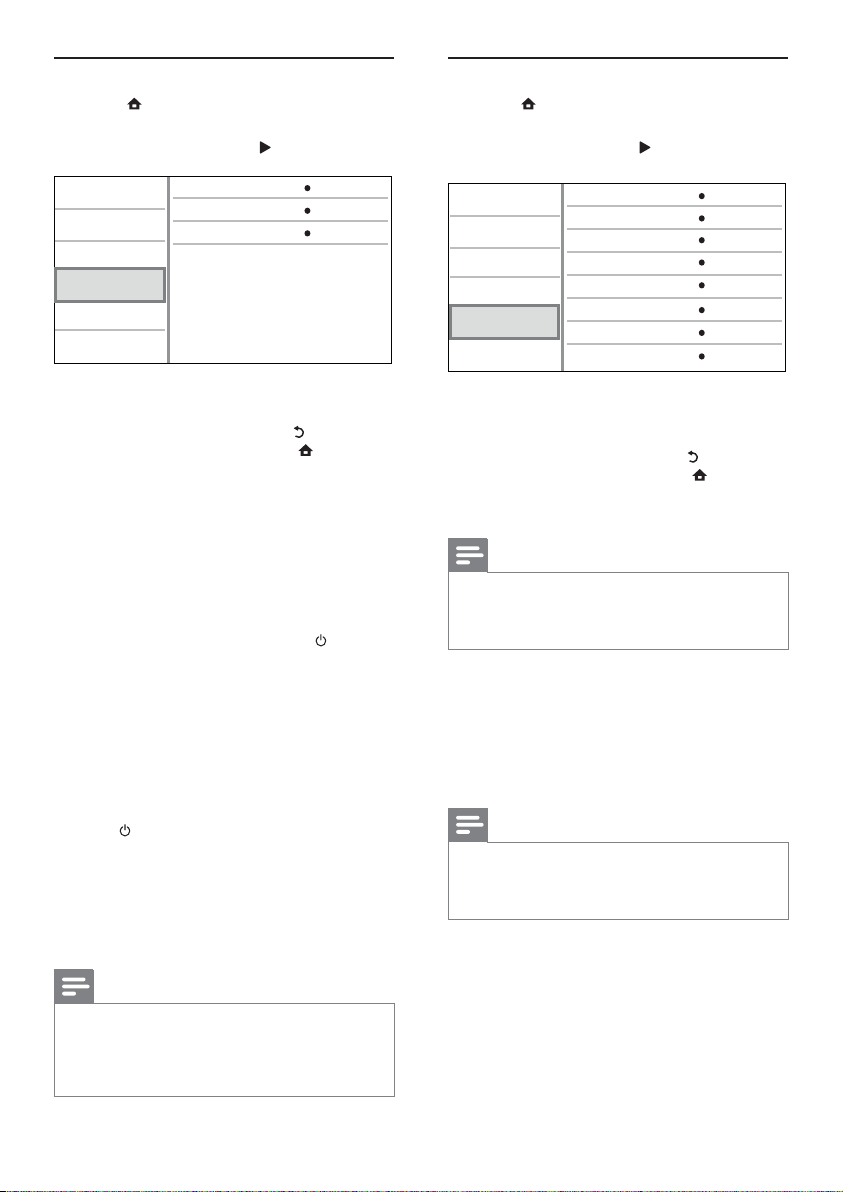
EasyLink-määritys
1 Paina .
2 Valitse [Asennus] ja paina OK-painiketta.
3 Valitse [EasyLink] ja paina -painiketta.
Omat asetukset
1 Paina -painiketta.
2 Valitse [Asennus] ja paina OK-painiketta.
3 Valitse [Etusija] ja paina -painiketta.
Video Setup
Audio Setup
Network Setup
EasyLink Setup
Preference Setup
Advanced Setup
EasyLink
One Touch Play
One Touch Standby
On
On
On
4 Valitse jokin vaihtoehto ja paina OK-painiketta.
5 Valitse asetus ja paina OK-painiketta.
Palaa edelliseen valikkoon •
[EasyLink]
Soitin tukee Philips EasyLink -toimintoa, joka käyttää
HDMI CEC (Consumer Electronics Control)
-protokollaa. Voit ohjata yhdellä kaukosäätimellä
kaikkia HDMI-liitäntöjen kautta liitettyjä EasyLinkyhteensopivia laitteita.
• [On] - ottaa käyttöön EasyLink-ominaisuudet.
• [Ei] - poistaa käytöstä EasyLink-ominaisuudet.
[1 kosk. toisto]
Kun kytket soittimeen virran painamalla
(valmiustila) -painiketta, TV (jos se tukee toistoa
yhdellä painikkeella) käynnistyy automaattisesti ja
siir tyy videotulokanavalle. Levyn toisto alkaa, jos
soittimessa on levy.
• [On] - ottaa käyttöön yhden kosketuksen
• [Ei] - poistaa käytöstä yhden kosketuksen
[1 kosk. valmius]
Kun pidät
kaikki liitetyt HDMI CEC -laitteet (jos ne tukevat
toimintoa) siirtyvät valmiustilaan samanaikaisesti.
• [On] - ottaa käyttöön yhden kosketuksen
• [Ei] - poistaa käytöstä yhden kosketuksen
Poistu valikosta painamalla •
toiston.
toiston.
(valmiustila) -painiketta alhaalla,
valmiustilan.
valmiustilan.
Huomautus
HDMI CEC -toiminnot on otettava käy ttöön TV:ssä/ •
lait teissa, ennen kuin EasyLink-ohjausta voi käy ttä ä.
Lisätietoja on television ja laitteiden käyttöoppaissa.
•
Philips ei tak aa täydellistä yhteensopivuut ta kaikkien
HDMI CEC -yhteensopivien laitteiden kanssa .
-painikkeella.
-painiketta.
Menu Language
Audio
Subtitle
Disc Menu
Parental Control
Screen Saver
Auto Subtitle Shift
Change Password
Video Setup
Audio Setup
Network Setup
EasyLink Setup
Preference Setup
Advanced Setup
4 Valitse jokin vaihtoehto ja paina OK-painiketta.
5 Valitse asetus ja paina OK-painiketta.
Palaa edelliseen valikkoon •
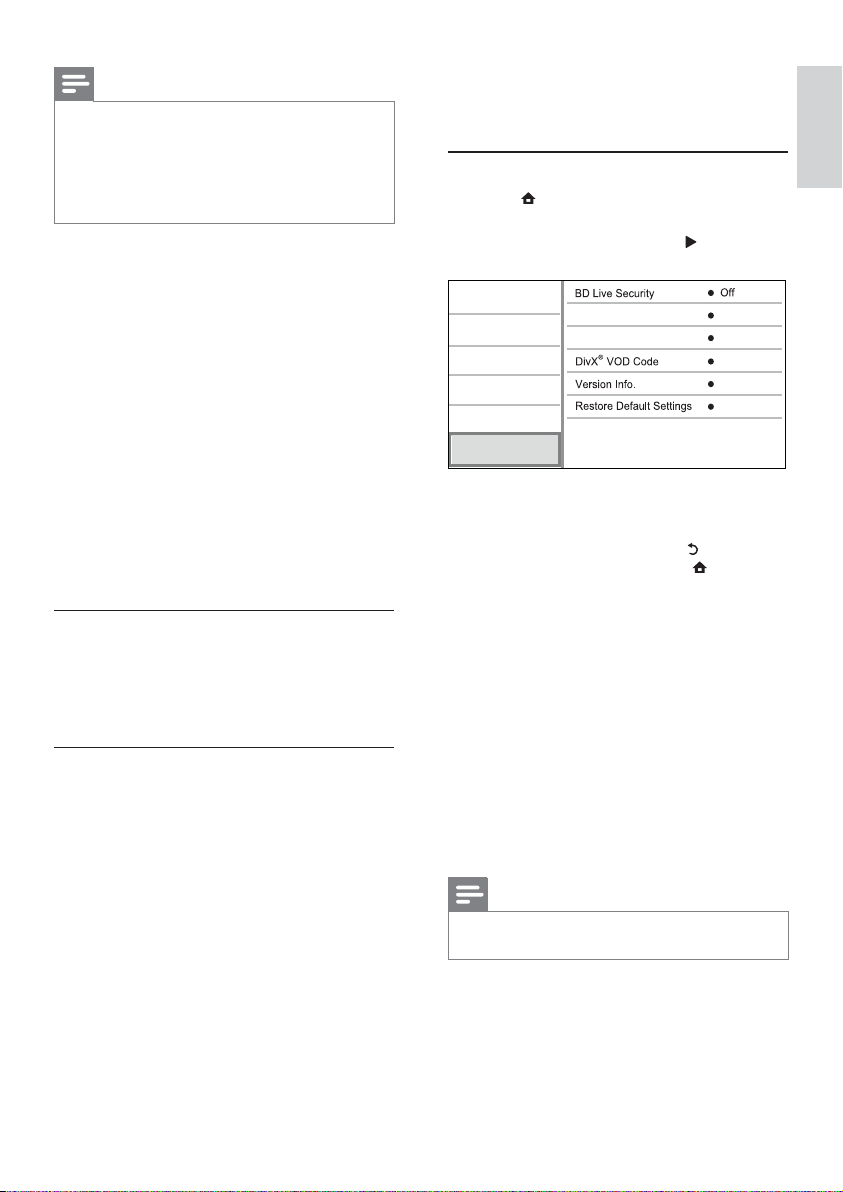
[Valikkokieli]
Näyttövalikon kielen valitseminen.
[Ääni]
Valitse levyn toistamisessa käytettävän äänen kieli.
[Tekstitys]
Valitse levyn toistamisessa käytettävän tekstityksen
kieli.
[Levyvalikko]
Valitse levyvalikon kieli.
[Lapsilukko]
Voit rajoittaa lapsille sopimattomien levyjen käyttöä.
Ikäluokituksen on oltava tallennettuna levyille.
Voit käyttää lapsilukkoa antamalla viimeksi
määritetyn salasanan tai koodin 0000.
Poistu valikosta painamalla •
Huomautus
Jos lii tät soittimen HDMI CEC -yhteensopivaan •
televisioon HDMI-kaapelilla, laitteen valikkokieleksi
vaihtuu automaattisesti televisiossa valittu kieliasetus (jos
tämä soitin tukee TV:ssä asetettua kiel tä).
Huomautus
Jos valitsemasi kieli ei ole käytettävissä levyllä, laite •
käyttää levyn oletuskieltä.
•
Joissakin levyissä tekstit yksen tai äänen kielen voi vaihta a
vain levyvalikossa.
English
English
Off
English
Off
On
On
-painikkeella.
-painiketta.
20
FI
Page 21
Huomautus
Jos levyn ikäluokitus ylittää • [Lapsilukko]-asetukselle
määr itetyn arvon, lev yn toistaminen edellyttää salasanaa.
•
Luokitukset ovat maakohtaisia. Voit sallia levyjen toiston
valitsemalla arvon 8 DVD-videolle ja BD-Videolle.
•
Joihinkin levyihin on painettu ikäluokitus, mutta sitä ei ole
tallennettu itse levylle. Tämä toiminto ei koske sellaisia
levyjä.
[Näytönsäästäjä]
Näytönsäästäjätilan poistaminen käytöstä ja
ottaminen käyttöön. Näytönsäästäjä suojaa TVruutua vioilta, joita pitkään näkyvä staattinen kuva
saattaa aiheuttaa.
• [On] - määrittää näytönsäästäjän
käynnistymään, kun laitetta ei ole käytetty
10 minuuttiin (esimerkiksi tauko- tai
pysähdystilassa)
• [Ei] – poistaa näytönsäästäjän käytöstä.
[Automaattinen tekstityksen siirto]
Tekstityksen automaattisen siirron ottaminen
käyttöön ja poistaminen käytöstä.
• [On] - Tekstityksen paikka TV-ruudussa
määrittyy automaattisesti.
• [Ei] - Tekstityksen automaattisen poistaminen
käytöstä.
[Muuta salasana]
Salasanan määrittäminen tai vaihtaminen.
1) Anna salasana tai viimeksi määritetty salasana
numeropainikkeilla. Jos unohdat salasanan, anna
koodi 0000 ja paina OK-painiketta.
2) Anna uusi salasana.
3) Anna sama salasana uudelleen.
4) Siirry valikon kohtaan [Vahvista] ja paina OK-
painiketta.
[Valmiustila]
Automaattisen valmiustilaan siirtymisen
poistaminen käytöstä tai ottaminen käyttöön. Tämä
on virransäästöominaisuus.
• [On] – soitin siirtyy valmiustilaan, kun sitä ei
ole käytetty 30 minuuttiin (esimerkiksi kun
toisto on keskey tetty tai pysäytetty).
• [Ei] - automaattisen valmiustilan poistaminen
käytöstä.
[VCD PBC]
PBC-toistonohjaustoiminnon sisältävien VCD-/
SVCD-levyjen sisältövalikon ottaminen käyttöön ja
poistaminen käytöstä.
• [On] - hakemistovalikko avautuu, kun levy
ladataan toistettavaksi.
• [Ei] - valikon ohittaminen ja toiston aloittaminen
ensimmäisestä kappaleesta
Lisäasetukset
1 Paina .
2 Valitse [Asennus] ja paina OK-painiketta.
3 Valitse [Lisäasetukset] ja paina -painiketta.
Video Setup
Audio Setup
Network Setup
EasyLink Setup
Preference Setup
Advanced Setup
4 Valitse jokin vaihtoehto ja paina OK-painiketta.
5 Valitse asetus ja paina OK-painiketta.
Palaa edelliseen valikkoon •
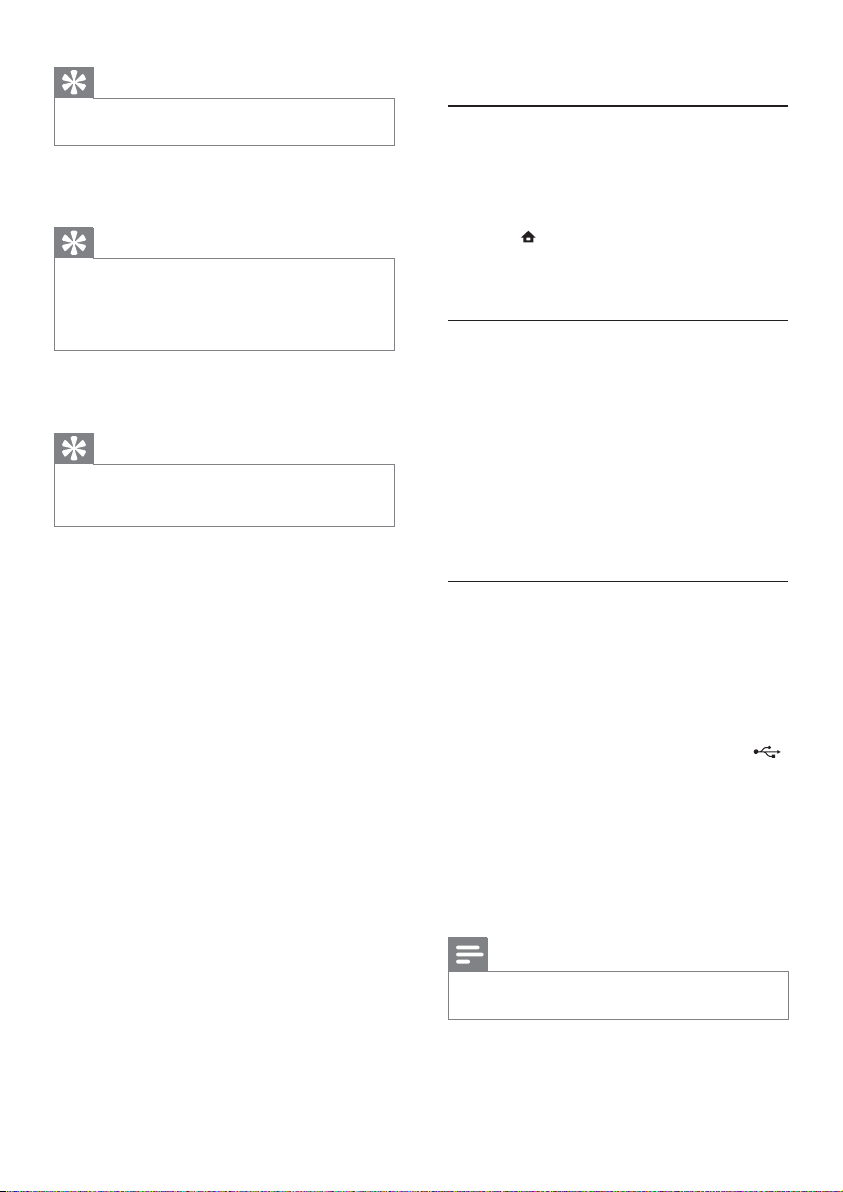
[BD-Live-suojaus]
Voit rajoittaa joillakin Blu-ray-levyillä käytettävissä
olevien BD-Live-lisämateriaalien internet-käyttöä.
• [On] - Internet-käyttö on estetty kaiken BD-
• [Ei] - Internet-käyttö on sallittu kaiken BD-
[Ohjelmistopäivitys]
Päivitä soittimen ohjelmisto ( jos uudempi versio on
saatavissa Philipsin sivustossa) soittimen toiminnan
parantamiseksi.
• [USB] - Ohjelmiston päivittäminen soittimeen
• [Network] - Ohjelmiston päivittäminen
[Tyhjennä muisti]
Poista BD-Live-tiedot, jotka ladataan liitettyyn USBlaitteeseen automaattisesti.
Poistu valikosta painamalla •
Live-sisällön yhteydessä.
Live-sisällön yhteydessä.
liitetystä USB-laitteesta
internetin kautta.
Huomautus
Lisätietoja ohjelmiston päivittämisestä on kohdassa •
Lisätietoja > Ohjelmiston päivit täminen.
Software Update
Clear Memory
-painikkeella.
-painiketta.
Suomi
FI
21
Page 22
Vihje
Liitettyyn USB-laitteeseen luodaan automaattisesti •
BUDA-kansio, johon ladatut BD-Live-tiedot tallennetaan.
®
[DivX
VOD Code]
Hanki DivX
purkukoodi.
[Versiotiedot]
Soittimen ohjelmistoversion ja MAC-osoitteen
näyttäminen.
[Palauta oletusasetukset]
Kaikkien muiden paitsi [Lapsilukko] -asetuksen
palauttaminen tehdasasetuksiin.
®
-rekisteröintikoodi ja rekisteröinnin
Vihje
Käytä soittimen DivX-rekisteröintikoodia, kun vuokr aat •
tai os tat videon osoitteesta w ww.divx.com/vod. DivX®
VOD (Video On Demand) -palvelusta vuokrattuja
tai ostettuja DivX-videoita voi toistaa ainoastaan sillä
lait teella, johon koodi on rekis teröi ty.
Vihje
Näiden tietojen avulla voit selvit tää, onko Philipsin •
sivustosta ladattavissa uusi ohjelmistoversio, jonka voit
asentaa.
7 Lisätietoja
Ohjelmiston päivittäminen
Jos haluat parantaa soittimen toimintaa
ohjelmistopäivityksen avulla, vertaa soittimen
ohjelmistoversiota Philipsin sivustosta mahdollisesti
saatavissa olevaan uusimpaan versioon.
1 Paina .
2 Valitse [Asennus] ja paina OK-painiketta.
3 Valitse [Lisäasetukset] > [Versiotiedot] ja
paina OK-painiketta.
Ohjelmistopäivitys verkon kautta
1
Määritä internet-yhteys (katso kohtaa
Aloitus > Verkon määrittäminen).
2 Valitse aloitusvalikosta [Asennus] >
[Lisäasetukset] > [Ohjelmistopäivitys] >
[Network].
Saat kehotteen aloittaa päivityksen, jos »
päivitystiedostoja havaitaan.
3 Vahvista päivitys noudattamalla TV:n ohjeita.
Ohjelmistopäivitys USB-yhteyden kautta
1
2 Lataa ohjelmisto USB-laitteeseen:
3 Aseta USB Flash -asema tämän soittimen
4 Valitse aloitusvalikosta [Asennus] >
5 Vahvista päivitys noudattamalla TV:n ohjeita.
Kun ohjelmistopäivitys on valmis, soittimen »
virta katkeaa automaattisesti ja se käynnistyy
uudelleen.
Tarkista soittimen uusin ohjelmistoversio
osoitteesta www.philips.com/support.
a Pura ladattu tiedosto ja varmista, että
puretun kansion nimi on UPG.
b Siirrä UPG-kansio ylätason hakemistoon.
(USB) -liitäntään.
[Lisäasetukset] > [Ohjelmistopäivitys] >
[USB].
Kun ohjelmistopäivitys on valmis, soittimen »
virta katkeaa automaattisesti ja se käynnistyy
uudelleen.
Huomautus
Älä katkaise soittimesta vir taa tai irrota USB-laitetta •
ohjelmistopäivityksen aikana, ettei soitin vahingoitu.
FI
22
Page 23
Hoitaminen
Varoitus
Älä käytä liuottimia, kuten bentseeniä, ohentimia, •
kaupoissa my ytäviä puhdistusainei ta tai vinyylilevyille
tarkoitettuja antistaattisia suihkeita.
Levyjen puhdistaminen
Puhdista levy pyyhkimällä sitä mikrokuituliinalla levyn
keskustasta suoraan reunaa kohti.
Teknisiä tietoja
Huomautus
Tekniset tiedot voivat muuttua ilman erillistä ilmoitusta •
Video
Signaalijärjestelmä: PAL/NTSC•
Komposiittivideolähtö: 1 Vp-p (75 ohmia)•
HDMI-lähtö: 480p, 576p, 720p, 1080i, 1080p, •
1080p24
Ääni
2-kanavainen analoginen lähtö•
Ääni, etu V+O : 2 Vrms (> 1 kohmia)•
Digitaalilähtö: 0,5 Vp-p (75 ohmia)•
Koaksiaali•
HDMI-lähtö•
Näytteenottotaajuus:•
MP3: 32 kHz, 44,1 kHz, 48 kHz•
WMA: 44,1 kHz, 48 kHz•
Vakiobittinopeus:•
MP3: 112–320 kpbs•
USB
Päälaite
Laitteen mukana toimitettavat lisätarvikkeet
WMA: 48–192 kpbs•
Yhteensopivuus: Hi-Speed USB (2.0)•
Luokat: UMS (USB Mass Storage Class)•
Käyttöjännite: 220~230 V ~AC, ~50 Hz•
Virrankulutus: 18 W•
Virrankulutus valmiustilassa: alle 1 W•
Mitat (l x k x s): 435 x 44 x 223 mm•
Nettopaino: 2,15 kg•
Kaukosäädin ja paristot•
Pikaopas•
Käyttöopas•
CD-ROM, jossa on monikielinen käy ttöopas •
Lasertiedot
Lasertyyppi: •
Aallonpituus: •
Lähtöteho: •
BD-laserdiodi: SLD3134VL•
DVD-laserdiodi: SLN6167XL•
CD-laserdiodi: SLN6167XL_•
BD: 405 nm (tav.)•
DVD: 658 nm (tav.)•
CD: 790 nm (tav.)•
BD: enimmäisluokitus: 20 mW•
DVD: enimmäisluokitus: 7 mW•
CD: enimmäisluokitus: 7 mW•
Suomi
FI
23
Page 24

8 Vianmääritys
Vakava varoitus
Sähköiskun vaara . Älä koskaan avaa soittimen runkoa. •
Älä yritä korjata soitinta itse, jotta takuu ei mitätöidy.
Jos sinulla on ongelmia soittimen käytön kanssa,
tarkista seuraavat seikat, ennen kuin otat yhteyden
huoltoon. Jos ongelma ei ratkea, rekisteröi soitin ja
saat tukea osoitteessa www.philips.com/welcome.
Päälaite
Laite ei reagoi kaukosäätimeen.
Liitä soitin pistorasiaan.•
Osoita kaukosäätimellä etupaneelin •
infrapunatunnistimeen.
Aseta paristot kaukosäätimeen oikein.•
Vaihda kaukosäätimeen uudet paristot.•
Kuva
Ei kuvaa.
Television käyttöoppaassa on lisätietoja oikean •
videotulon valitsemisesta. Vaihda TV-kanavaa,
kunnes näkyviin tulee Philips-näyttö.
HDMI-liitännän kautta ei näy kuvaa.
Jos soitin on liitetty muuhun kuin suositeltuun •
näyttölaitteeseen HDMI-kaapelilla, ääni- tai
videosignaali ei välttämättä välity.
Tarkista, ettei HDMI-kaapeli ole vioittunut. •
Vaihda tilalle uusi HDMI-kaapeli.
Paina kaukosäätimen •
sitten numeropainikkeilla 731.
Televisiossa ei näy teräväpiirtovideosignaalia.
Varmista, että levy sisältää teräväpiirtovideota.•
Varmista, että TV tukee teräväpiirtovideota. •
Ääni
TV:stä ei kuulu ääntä.
Varmista, että äänikaapelit on liitetty TV:n •
äänituloon.
Määritä television äänitulo vastaamaan videotuloa. •
Lisätietoja on television käyttöoppaassa.
Äänilaitteen (kotiteatteri/vahvistin/vastaanotin)
kaiuttimista ei kuulu ääntä.
Varmista, että äänikaapelit on liitetty •
äänilaitteen äänituloon.
Valitse äänilaitteessa oikea äänilähde.•
HDMI-liitännän kautta ei kuulu ääntä.
-painiketta ja paina
HDMI-liitännän kautta ei ehkä kuulu ääntä, jos •
liitetty laite ei ole HDCP-yhteensopiva tai vain
DVI-yhteensopiva.
Ei toissijaista äänilähtöä PIP-ominaisuudelle.
Kun • [Bittivirta] on valittu [HDMI-ääni]- tai
[Digitaalinen ääni] -valikosta, interaktiiviset
äänet, kuten PIP-ominaisuuden toissijainen
ääni, mykistetään. Poista [Bittivirta]-kohdan
valinta.
Toistaminen
Levyä ei voi toistaa.
Varmista, että levy on asetettu paikalleen oikein.•
Varmista, että soitin tukee levyä. Katso •
kohtaa Blu-ray-soitin > Toistettavissa olevat
tallennusvälineet.
Varmista, että soitin tukee DVD- tai BD-levyn •
aluekoodia.
DVD±RW- tai DVD±R-levyt: varmista, että •
levy on viimeistelty.
Puhdista levy. •
Datatiedostoja (JPEG, MP3, WMA) ei voi toistaa
tai lukea.
Varmista, että datatiedostot on tallennettu •
UDF-, ISO9660- tai JOLIET-muodossa.
Varmista, ettei levyllä ole yli 9 999 tiedostoa, •
jos kyseessä on DVD, tai yli 999 tiedostoa, jos
kyseessä on CD.
Varmista, että JPEG-tiedostotunniste on .jpg, •
.JPG, .jpeg tai .JPEG.
Varmista, että MP3/WMA-tiedostojen •
tunniste on .mp3 tai .MP3 ja .wma tai .WMA,
jos käytössä on Windows Media™ Audio.
DivX-videotiedostojen toisto ei onnistu.
Varmista, että DivX-videotiedosto on •
kokonainen.
Varmista, että tiedoston tunniste on oikea. •
USB Flash -aseman sisältöä ei voi lukea
USB Flash -asema ei ole yhteensopiva •
soittimen kanssa.
Tuetun muistin enimmäiskoko on 160 Gt. •
TV-ruudussa näkyy teksti No entry tai x.
Toimintoa ei voi käyttää. •
EasyLink-ominaisuus ei toimi.
Varmista, että soitin on liitetty Philipsin •
EasyLink-televisioon, ja valikon[EasyLink]-
asetus on [On].
BD-Live-toiminnon käyttäminen ei onnistu.
Tarkista verkkoyhteys tai varmista, että verkko •
on määritetty.
Vapauta paikallista tallennustilaa, mahdollista •
sisäistä muistia tai USB-laitteen tilaa.
Varmista, että BD-levy tukee BD Live -toimintoa.•
FI
24
Page 25

9 Sanastossa
A
Aluekoodi
Järjestelmä, joka mahdollistaa levyjen toistamisen
vain niille määritetyn alueen sisällä. Laitteen avulla
voidaan toistaa vain levyjä, joiden aluekoodi
on soittimen kanssa yhteensopiva. Soittimen
aluekoodi on merkitty tuotteeseen. Jotkin levyt
ovat yhteensopivia usealla alueella tai kaikilla alueilla,
jolloin levyjen alueeksi on merkitty ALL.
B
Blu-ray-levy (BD-levy)
Blu-ray-levy on uuden sukupolven optinen
videolevy, jonka tallennuskapasiteetti on viisi
kertaa suurempi kuin tavallisen DVD-levyn. Suuren
kapasiteetin mahdollistamia ominaisuuksia ovat mm.
teräväpiirtovideot, monikanavainen surround-ääni
sekä interaktiiviset valikot.
BONUSVIEW
BonusView, myös Profile 1.1. Tavallisten
interaktiivisten ja toisto-ominaisuuksien lisäksi
31.10.2007 jälkeen käyttöön otetuissa BonusViewsoittimissa on PiP (Picture-in-Picture) -toiminto
sekä toissijaiset ääniominaisuudet (kätevä esim.
pelattaessa pelejä, joissa on lisä-ääniraita elokuvan
toiston aikana) toistettaessa yhteensopivia
BonusView-levyjä.
D
Digitaalinen ääni (Digital Audio)
Digitaalinen ääni on äänisignaali, joka on muutettu
luvuiksi. Digitaalista ääntä voi siirtää useiden
kanavien kautta. Analogista ääntä voi siir tää vain
kahden kanavan kautta.
DivX Video-On-Demand
Tämä DivX Certified
jotta sillä voi toistaa DivX VOD (Video-onDemand) -sisältöä. Voit luoda rekisteröintikoodin
laitteen asetusvalikon DivX VOD -osassa. Suorita
rekisteröinti loppuun ja lue lisää DivX-videosta
käyttämällä tätä koodia osoitteessa vod.divx.com.
Dolby Digital
Dolby Laboratories -yhtiön kehittämä Surroundäänijärjestelmä, jossa ääni muodostetaan
korkeintaan kuuden digitaalisen äänikanavan
®
-laite on rekisteröitävä,
avulla (etuvasen ja -oikea, vasen surround ja oikea
surround, keskikaiutin ja subwoofer.)
DTS
Digital Theatre Systems. Surround-äänijärjestelmä,
joka tarjoaa 5.1-kanavaisia erillisiä digitaaliäänellä
varustettuja viihde-elektroniikkatuotteita ja
ohjelmistoja. Tämä ei ole Dolby Digitalin kehittämä.
H
HDCP
High-bandwidth Digital Content Protection
Tekninen toiminto, jonka ansiosta digitaalista
sisältöä voidaan siir tää turvallisesti eri laitteiden
välillä (laiton kopiointi ei onnistu).
HDMI
HDMI (High-Definition Multimedia Interface)
on nopea digitaalinen liitäntä, joka lähettää
pakkaamatonta HD-videokuvaa ja digitaalista,
monikanavaista ääntä. Se tuottaa täydellistä kuvaa
ja laadukasta ääntä täysin ilman kohinaa. HDMI on
täysin DVI-yhteensopiva.
HDMI-standardi edellyttää, että jos HDMI- tai DVItuotteet liitetään ilman HDCP (High-bandwidth
Digital Content Protection) -suojausta, kuvaa tai
ääntä ei tule.
J
JPEG
Tavallinen digitaalivalokuvien muoto.
Digitaalivalokuvien tiedonpakkausjärjestelmä, jonka
Joint Photographic Exper t Group on luonut. Siinä
kuvan laatu pienenee vähän, vaikka pakkaussuhde
on suuri. Tiedostojen tunniste on .jpg tai .jpeg.
K
Kuvasuhde
Kuvasuhteella viitataan television kuvan leveyteen
suhteessa korkeuteen. Tavallisen television
kuvasuhde on 4:3, kun taas teräväpiirto- tai
laajakuvatelevision kuvasuhde on 16:9. Letter box
-ominaisuudella tarkoitetaan kuvaa, jossa kuvan
perspektiivi on laajempi tavallisessa 4:3-näytössä.
L
LAN (lähiverkko, lyhenne sanoista Local Area
Network)
Joukko toisiinsa liitettyjä laitteita yrityksessä,
koulussa tai kotona. Osoittaa tietyn verkon rajat.
Suomi
FI
25
Page 26

M
MP3
Äänen pakkaamiseen tarkoitettu tiedostomuoto.
MP3 on lyhenne sanoista Experts Group 1 (tai
MPEG-1) Audio Layer 3. MP3-muotoa käytettäessä
CD-R- tai CD-RW-levylle voidaan lisätä 10 kertaa
enemmän tietoa kuin tavallisesti.
P
Paikallinen tallennus
Tätä tallennustilaa käytetään kohteena
tallennettaessa BD Live -yhteensopivaa BD-Videolisämateriaalia.
PBC
Playback Control. Järjestelmä, jossa voit siirtyä
Video-CD-levyllä tai Super-VCD-levyllä
kuvaruudussa näkyvien valikkojen avulla, jotka on
tallennettu levylle. Voit käyttää vuorovaikutteisia
toisto- ja hakuominaisuuksia.
PCM
(Pulse Code Modulation, pulssikoodimodulaatio)
Digitaalinen äänen koodausjärjestelmä.
W
WMA
Windows Media™ Audio. WMA on Microsoft
Corporationin kehittämä äänen pakkaustekniikka.
WMA-muotoinen tieto voidaan koodata Media
Playerin versiolla 9 tai Windows Media Player for
Windows XP -sovelluksella. WMA-tiedostojen
tunniste on .wma.
FI
26
Page 27

Suomi
HUOMAUTUS
OHJELMISTON KÄYTTÖOIKEUSSOPIMUS
TÄMÄ OHJELMISTON KÄYTTÖOIKEUSSOPIMUS (“TÄMÄ SOPIMUS”) ON LAILLINEN JA SITOVA SOPIMUS
KÄYTTÄJÄN (JOKO HENKILÖ TAI YHTEISÖ) JA PHILIPS CONSUMER LIFESTYLE B.V.:N, HOLLANTILAISEN
OSAKEYHTIÖN, JONKA PÄÄKONTTORI ON OSOITTEESSA HIGH TECH CAMPUS 37, 5656 AE EINDHOVEN,
THE NETHERLANDS, JA SEN TYTÄRYHTIÖIDEN (ERIKSEEN JA KOKONAISUUTENA “PHILIPS”) VÄLILLÄ. TÄMÄ
SOPIMUS ANTAA KÄYTTÄJÄLLE OIKEUDEN KÄYTTÄÄ TIETTYÄ OHJELMISTOA (“OHJELMISTO”) MUKAAN
LUKIEN SÄHKÖISESSÄ MUODOSSA OLEVAT KÄYTTÖOPPAAT, JOTK A ON VOITU TOIMITTAA ERIKSEEN TAI
PHILIPS-TUOTTEEN (“LAITE”) TAI TIETOKONEEN MUKANA. LATAAMALLA, ASENTAMALLA TAI MUUTEN
KÄYT TÄMÄLLÄ OHJELMISTOA KÄYTTÄJÄ HYVÄKSYY TÄMÄN SOPIMUKSEN JA SITOUTUU KAIKKIIN SEN
MÄÄRÄYKSIIN JA EHTOIHIN. JOS KÄYTTÄJÄ EI HYVÄKSY NÄITÄ MÄÄRÄYKSIÄ JA EHTOJA, KÄYTTÄJÄN
EI TULE LADATA, ASENTAA TAI MUUTEN KÄYTTÄÄ OHJELMISTOA. JOS KÄYTTÄJÄ ON HANKKINUT
OHJELMISTON KIINTEÄLLÄ TALLENNUSVÄLINEELLÄ, KUTEN CD-LEVYLLÄ, EIKÄ HÄNELLÄ OLE OLLUT
MAHDOLLISUUTTA TUTUSTUA TÄHÄN SOPIMUKSEEN JA HÄN EI HYVÄKSY NÄITÄ EHTOJA, OHJELMISTON
MAHDOLLINEN HANKINTAHINTA KORVATAAN HÄNELLE KOKONAISUUDESSAAN, MIKÄLI HÄN PALAUTTAA
KÄYTTÄMÄTTÖMÄN OHJELMISTON JA MAKSUTOSITTEEN KOLMENKYMMENEN PÄIVÄN KULUESSA
OSTOPÄIVÄSTÄ.
1. Käyttöoikeuden myöntäminen Tällä Sopimuksella Käyttäjälle myönnetään ei-yksinomainen, ei siirrettävissä oleva,
ei alilisensioitavissa oleva oikeus asentaa ja käyttää Laitteessa tai tietokoneessa yhtä (1) kappaletta Ohjelmiston
määritettyä versiota objek tikoodimuodossa, kuten käyttöoppaassa on määritetty, ainoastaan Käyttäjän
henkilökohtaiseen käyttöön. Ohjelmisto on “käytössä”, kun se on ladattu tietokoneen tai Laitteen väliaikaiseen tai
pysyvään muistiin (esimerkiksi RAM-muistiin tai kiintolevylle).
2. Omistusoikeus Ohjelmistoa ei myydä vaan Käyttäjälle luovutetaan siihen käyttöoikeus. Tällä Sopimuksella Käyttäjälle
myönnetään vain oikeus käyttää Tuotetta. Käyttäjä ei saa Ohjelmistoon mitään muita nimenomaisia tai oletettuja
oikeuksia kuin ne, mitä tässä Sopimuksessa on määritetty. Tuotetta koskevat kaikki oikeudet, nimikkeet ja edut,
mukaan lukien kaikki Tuotteeseen sisältyvät patentit, tekijänoikeudet, liikesalaisuudet ja muut immateriaalioikeudet
säily vät Philipsillä ja sen lisenssinantajilla. Ohjelmisto on tekijänoikeuslakien, kansainvälisten sopimusten säädösten ja
muiden immateriaalioikeuslakien suojaama. Näin ollen Käyttäjä ei saa kopioida Tuotetta muutoin kuin tavalla, joka
tässä erityisesti määrätään, ilman Philipsin etukäteen myöntämää kirjallista valtuutusta, lukuun ottamatta sitä, että
Käyttäjä saa tehdä Ohjelmistosta yhden (1) kopion käytettäväksi pelkästään varmuuskopiona. Käyttäjä ei saa kopioida
mitään Ohjelmiston mukana toimitettavia painettuja asiakirjoja tai tulostaa useampaa kuin yhden (1) kappaleen
sähköisessä muodossa toimitettavista käyttöoppaista, lukuun ottamatta sitä, että Käyttäjä saa tehdä mainituista
painetuista asiakirjoista yhden (1) kopion käytettäväksi pelkästään varmuuskopiona.
3. Käyttöoikeuden rajoitukset Lukuun ottamatta sitä, mitä tässä toisin säädetään, Käyttäjä ei saa vuokrata, alilisensioida,
myydä, luovuttaa, lainata tai muuten siirtää Ohjelmistoa. Käyttäjä ei saa itse eikä myöntää kolmannelle osapuolelle
lupaa selvittää Ohjelmiston valmistustapaa tai purkaa tai hajottaa
Ohjelmistoa, paitsi niiltä osin kuin edellä mainittu rajoitus on soveltuvan lain mukaisesti nimenomaisesti kielletty.
Käyttäjä ei saa poistaa tai tuhota Ohjelmistosta mitään tuotetunnisteita, tekijänoikeuslausekkeita tai muita
omistajuutta osoittavia merkintöjä tai rajoituksia. Kaikki nimikkeet, tavaramerkit, tekijänoikeuslausekkeet ja
rajoitettuihin oikeuksiin liittyvät lausekkeet tulee jäljentää Käy ttäjän Ohjelmistosta tekemään varmuuskopioon.
Käyttäjä ei saa muokata tai muuttaa Ohjelmistoa, sisällyttää Ohjelmistoa toiseen ohjelmaan tai luoda Ohjelmistoon
perustuvia johdannaistuotteita.
4. Vastuunrajoitus OHJELMISTON ON TARKOITETTU AUTTAMAAN KÄYTTÄJÄÄ SELLAISEN AINEISTON
SIIRTÄMISESSÄ, JOHON HÄNELLÄ ON TEKIJÄNOIKEUS TAI JONKA SIEPPAAMISEEN JA SIIRTÄMISEEN HÄN
ON SAANUT LUVAN TEKIJÄNOIKEUDEN HALTIJALTA. JOS KÄYT TÄJÄLL Ä EI OLE TEKIJÄNOIKEUTTA TAI
TEKIJÄNOIKEUDEN HALTIJAN LUPAA AINEISTON SIEPPAAMISEEN JA SIIRTOON, HÄN SAATTAA RIKKOA
TEKIJÄNOIKEUSLAKIA JA JOUTUA VASTAAMAAN VAHINGONKORVAUS- JA MUIHIN VAATEISIIN. JOS
KÄYT TÄJÄ ON EPÄTIETOINEN OIKEUKSISTAAN, HÄNEN TULEE OTTAA YHTEYTTÄ LAINOPILLISEEN
NEUVONANTAJAAN. K ÄYTTÄJÄ OTTAA TÄYDEN VASTUUN OHJELMISTON LAINMUKAISESTA JA
VASTUUNTUNTOISESTA KÄYTÖSTÄ.
Page 28

5. Kolmansien osapuolten vastuunrajoitus ja WM-DRM-rajoitukset: WM-DRM: Sisällöntuottajat käyttävät Windows
Median digitaalisten oikeuksien hallinnoimisteknologiaa (“WM-DRM”) suojellakseen tuottamaansa sisältöä (“Suojattu
sisältö”), jotta sisältöön liittyviä immateriaalioikeuksia, tekijänoikeudet mukaan lukien, ei käytetä väärin. Tämän
ohjelmiston ja muiden kolmansien osapuolten sovellusten (“WM-DRM-ohjelmisto”) osat käyttävät WM-DRMtekniikkaa Suojatun sisällön siir tämiseen tai toistamiseen. Jos WM-DRM-ohjelmiston suojaus on vaarassa, Suojatun
sisällön omistajat (“Suojatun sisällön omistajat”) voivat pyytää Microsoftia peruuttamaan WM-DRM-ohjelmiston
oikeudet kopioida, näyttää, siirtää ja/tai toistaa Suojattua sisältöä. Peruuttaminen ei estä WM-DRM-ohjelmistoa
toistamasta suojaamatonta sisältöä. Peruutetut oikeudet sisältävien WM-DRM-ohjelmistojen luettelo lähetetään
tietokoneeseen aina, kun Käyttäjä lataa suojatun sisällön käyttöoikeuden Internetistä. Microsoft voi tällaisen
käyttöoikeuden yhteydessä ladata peruutusluettelon Käyttäjän tietokoneelle myös Suojatun sisällön omistajien
puolesta. Suojatun sisällön omistajat saattavat myös edellyttää, et tä Käyttäjä päivittää joitakin tämän Ohjelmiston WMDRM-osia (“WM-DRM-päivitykset”) ennen Suojatun sisällön käyttämistä. Kun Käyttäjä yrittää toistaa tällaista sisältöä,
Microsoftin valmistama WM-DRM-ohjelmisto ilmoittaa, että käyttäminen edellyttää WM-DRM-päivitystä, ja pyy tää
Käyttäjän lupaa WM-DRM-päivityksen lataamiseen. Kolmansien osapuolten käyttämä WM-DRM-ohjelmisto saattaa
toimia samoin. Jos Käyttäjä ei hyväksy päivitystä, WM-DRM-päivitystä edellyttävää sisältöä ei voi käyttää. Käyttäjä voi
kuitenkin käyttää edelleen suojaamatonta sisältöä ja sellaista Suojattua sisältöä, joka ei edellytä päivitystä.
6. Avoimen Lähdekoodin Ohjelma. (a) Tämä ohjelmisto saattaa sisältää komponentteja, joihin sovelletaan avoimen
lähdekoodin ehtoja, jotka on esitetty Laitteen mukana toimitetuissa asiakirjoissa. Tämä Sopimus ei koske tällaista
ohjelmistoa. (b) Tässä Sopimuksessa määritelty käyttöoikeus ei myönnä Käyttäjälle oikeutta tai käyttöoikeutta
käyttää, jakaa tai luoda Ohjelmistosta johdannaistuotteita millään tavalla, joka siirtäisi Ohjelmiston Avoimen
Lähdekoodin Ehtojen piiriin. “Avoimen Lähdekoodin Ehdoilla” tarkoitetaan käyttöoikeussopimuksen ehtoja,
jotka suorasti tai epäsuorasti (1) luovat tai joiden väitetään luovan Philipsille velvollisuuksia Ohjelmiston ja/tai
siihen perustuvien johdannaistuotteiden suhteen; tai (2) myöntävät tai joiden väitetään myöntävän kolmansille
osapuolille oikeuksia tai vapauksia Ohjelmistoa tai siihen perustuvaa johdannaistuotetta koskeviin immateriaali- tai
omistusoikeuksiin.
7. Päättyminen Tämä Sopimus on voimassa ohjelmiston asentamisesta tai ensimmäisestä käyttökerrasta eteenpäin
ja päättyy (i) Philipsin niin päättäessä, jos Käyttäjä ei ole noudattanut tämän Sopimuksen ehtoja; tai (ii) kun kaikki
Philipsin Käyttäjälle täten toimittamat ohjelmiston kopiot ja siihen liittyvät materiaalit on tuhottu. Philipsin oikeudet ja
Käyttäjän velvollisuudet ovat voimassa tämän Sopimuksen päättymiseen asti.
8. Päivitykset Philips voi oman harkintansa mukaan tehdä Ohjelmistoon päivityksiä, jotka julkaistaan ilmoittamalla niistä
verkkosivuilla tai muulla tavoin. Mainitut päivitykset voidaan luovuttaa tämän Sopimuksen ehtojen mukaisesti tai ne
tarjotaan Käyttäjälle edellyttäen, että tämä hy väksyy toisen sopimuksen
9. Tukipalvelut Philips ei ole velvollinen tarjoamaan Ohjelmistoon liittyvää teknistä tai muuta tukea (“Tukipalvelut”). Jos
Philips tarjoaa Käyttäjälle Tukipalveluita, palveluihin sovelletaan erillisiä ehtoja, joista Käyttäjä sopii Philipsin kanssa.
10. Ohjelmiston rajoitettu takuu Philips toimittaa Ohjelmiston “sellaisenaan” ilman mitään takuita lukuun ottamatta
sitä, että Ohjelmisto toimii olennaisilta osiltaan Ohjelmiston mukana toimitettavien asiakirjojen mukaisesti
yhdeksänkymmenen (90) päivän ajan siitä, kun Käyttäjä on ensimmäisen kerran ladannut tai asentanut Ohjelmiston
tai käyttänyt Ohjelmistoa, sen mukaan, mikä näistä tapahtuu ensimmäisenä. Philipsin täysi vastuu ja Käyttäjän
yksinomainen korvaus tämän takuun rikkomisesta on Philipsin harkinnan mukaan joko (i) Käyttäjän Ohjelmistosta
maksaman hinnan (jos sellainen on) hyvittäminen; tai (b) tässä annetun takuun vastaisen Ohjelmiston, joka on
palautettu Philipsille ostokuitin kopion kanssa, korjaaminen tai vaihtaminen. Tämä rajoitettu takuu ei päde, jos
Ohjelmiston vika on aiheutunut onnettomuudesta, väärinkäytöstä tai virheellisestä tai laittomasta käytöstä.
Korvaavan Ohjelmiston takuu on voimassa alkuperäisen takuuajan loppuun saakka tai 30 päivän ajan sen mukaan,
kumpi ajanjakso on pitempi. Tämä rajoitettu takuu ei koske Käyttäjää, jos Ohjelmisto on toimitettu Käyttäjälle
ilmaiseksi ainoastaan arviointia varten.
11. EI MUITA TAKUITA. LUKUUN OTTAMATTA SITÄ, MITÄ YLLÄ ON MÄÄRÄTTY, PHILIPS JA SEN
LISENSSINANTAJAT EIVÄT TAKAA, ETTÄ OHJELMISTO TOIMII VIRHEET TÖMÄSTI TAI ILMAN KESKEYTYKSIÄ
TAI ETTÄ SE VASTAA K ÄYTTÄJÄN VAATIMUKSIA . KAIKKI VASTUU AIOTTUUN KÄYTTÖTARKOITUKSEEN
SOVELTUVAN OHJELMISTON VALITSEMISESTA, OHJELMISTON ASENTAMISESTA JA KÄYTÖSTÄ SEKÄ
OHJELMISTON AVULLA SAAVUTETUISTA TULOKSISTA ON KÄYTTÄJÄLLÄ. SIINÄ MÄÄRIN KUIN
SOVELTUVA LAKI ENIMMILLÄÄN SALLII, PHILIPS JA SEN LISENSSINANTAJAT SANOUTUVAT IRTI KAIKISTA
NIMENOMAISISTA JA OLETETUISTA TAKUISTA JA EHDOISTA, MUKAAN LUKIEN R AJOITUKSETTA
KAIKKI OLETETUT TAKUUT OHJELMISTON MY YNTIKELPOISUUDESTA, SOVELTUVUUDESTA TIETTYYN
TARKOITUKSEEN JA TULOSTEN OIKEELLISUUDESTA JA TÄYDELLISYYDESTÄ OHJELMISTON JA MUK ANA
TOIMITETTAVIEN MATERIAALIEN SUHTEEN. OIKEUDENLOUKKAUSTA VASTAAN EI MYÖNNETÄ TAKUUTA.
PHILIPS EI TAKAA, ETTÄ KÄYTTÄJÄ VOI LADATA, KOPIOIDA, TALLENTAA, NÄYTTÄÄ, SIIRTÄÄ JA/TAI
TOISTAA SUOJATTUA SISÄLTÖÄ.
Page 29

12. KORVAUSVASTUUN RAJOITUS PHILIPS TAI SEN LISENSSINANTAJAT EIVÄT VASTAA MISSÄÄN OLOSUHTEISSA
MISTÄÄN VÄLILLISISTÄ, ERITYISISTÄ, EPÄSUORISTA, SATUNNAISISTA TAI SEURAAMUSVAHINGOISTA,
MUK AAN LUKIEN RAJOITUKSETTA TULOJEN MENETYS, LIIKETOIMINNAN KESKEYTYMINEN, LIIKETIETOJEN
MENETYS, TIETOJEN MENETYS, KÄYTÖN ESTYMINEN TAI MUU RAHALLINEN MENETYS, VAIKKA PHILIPSIÄ
TAI SEN LISENSSINANTAJIA OLISI VAROITETTU TÄLLAISTEN VAHINKOJEN MAHDOLLISUUDESTA. PHILIPSIN
TAI SEN LISENSSINANTAJIEN TÄSTÄ SOPIMUKSESTA AIHEUTUVA KOKONAISVASTUU VAHINGOISTA EI
MISSÄÄN TAPAUKSESSA YLITÄ KÄYTTÄJÄN OHJELMISTOSTA MAKSAMAA HINTAA TAI VIITTÄ (5,00) EUROA.
13. Tavaramerkit Tietyt tässä Sopimuksessa, Ohjelmistossa ja painetuissa käyttöoppaissa käytetyt tuotteiden ja Philipsin
nimet saattavat olla Philipsin, sen lisenssinantajien tai muiden kolmansien osapuolten tavaramerkkejä. Käyttäjällä ei ole
oikeutta käyttää näitä tavaramerkkejä.
14. Vientirajoitukset Käyttäjä hyväksyy, että Käyttäjä ei vie tai vie uudelleen Ohjelmistoa suoraan tai epäsuorasti maahan,
jonne vienti edellyttää Yhdysvaltojen Export Administration Act -lain tai vastaavan Yhdysvaltojen asetuksen tai
säädöksen nojalla vientilupaa tai muuta Yhdysvaltojen hallinnon myöntämää hy väksyntää, ellei asiaankuuluvaa lupaa
tai hyväksyntää ole saatu etukäteen. Käyttäjä sitoutuu noudattamaan tätä vientisäännöstä lataamalla tai asentamalla
Ohjelmiston.
15. Sovellettava laki. Tätä Sopimusta säätelee Käyttäjän asuinmaan lainsäädäntö ottamatta huomioon lakien
ristiriitaisuuksia. Tähän Sopimukseen liittyvät kiistat Käyttäjän ja Philipsin välillä käsitellään ei-yksinomaisesti Käyttäjän
asuinmaan tuomioistuimessa.
16. Yleistä Tämä Sopimus muodostaa Käyttäjän ja Philipsin välisen koko sopimuksen ja se syrjäyttää kaikki aiemmat esitykset,
sitoumukset tai muut Ohjelmistoon ja käyttöoppaisiin liittyvät viestit tai mainokset. Vaikka jotain osaa tästä Sopimuksesta
pidettäisiin pätemättömänä, muu Sopimus pysyy voimassa. Tämä Sopimus ei vaikuta kuluttajana toimivien osapuolten
lainmukaisiin oikeuksiin.
EULA-Finnish
April 2010
Page 30

1
License Texts and Acknowledgements for any open source software used in
this Philips product
Instructions to obtain source code for this software can be found in the user manual, or in the supplied safety
leaet (if available).
1. U-boot
#
# (C) Copyright 20 00 - 2008
# Wolfgang Denk, DENX Sof tware Engineering, [email protected].
#
# See le CREDITS for list of people who contributed to this
# project.
#
# This program is free software; you can redistribute it and/or
# modif y it under the terms of the GNU General Public License as
# published by the Free Sof tware Foundation; either version 2 of
# the License, or (at your option) any later version.
#
# This program is distributed in the hope that it will be useful,
# but WITHOUT ANY WARR ANT Y; without even the implied warranty of
# MERCHANTABILITY or FITNESS FOR A PARTICULAR PURPOSE. See the
# GNU General Public License for more details.
#
# You should have received a copy of the GNU General Public License
# along with this program; if not, write to the Free Soft ware
# Foundation, Inc., 59 Temple Place, Suite 330, Boston,
# MA 02111-1307 USA
#
A copy of the GPL is included below at item 2.
2. Linux kernel
NOTE! This copyright does *not* cover user programs that use kernel services by normal system calls - this is
merely considered normal use of the kernel, and does *not* fall under the heading of “derived work ”.
Also note that the GPL below is copyrighted by the Free Software Foundation, but the instance of code that it
refer s to (the linux kernel) is copyrighted by me and others who actually wrote it.
Also note that the only valid version of the GPL as far as the kernel is concerned is _this_ particular version of
the license (ie v2, not v2.2 or v3.x or whatever), unless explicitly otherwise stated.
Linus Torvalds
----------------------------------------
GNU GENER AL PUBLIC LICENSE
Version 2, June 1991
Copyright (C) 1989, 1991 Free Software Foundation, Inc.
675 Mass Ave, Cambridge, MA 02139, USA
Ever yone is permit ted to copy and distribute verbatim copies of this license document, but changing it is not
allowed.
Preamble
The licenses for most software are designed to take away your freedom to share and change it. By contrast,
the GNU General Public License is intended to guarantee your freedom to share and change free software--to
make sure the software is free for all its users. This General Public License applies to most of the Free Software
Foundation’s software and to any other program whose authors commit to using it. (Some other Free Sof tware
Foundation software is covered by the GNU Library General Public License instead.) You can apply it to your
programs, too.
When we speak of free software, we are referring to freedom, not pr ice. Our Gener al Public Licenses are
designed to make sure that you have the freedom to distribute copies of free sof tware (and charge for this
service if you wish), that you receive source code or can get it if you want it, that you can change the software or
use pieces of it in new free programs; and that you know you can do these things.
Page 31

2
To protect your rights, we need to make restrictions that forbid anyone to deny you these rights or to ask you
to surrender the rights. These restrictions translate to certain responsibilities for you if you distribute copies of
the sof tware, or if you modify it.
For example, if you distribute copies of such a program, whether gratis or for a fee, you must give the recipients
all the rights that you have. You must make sure that they, too, receive or can get the source code. And you
must show them these terms so they know their rights.
We protect your rights with two steps: (1) copyright the software, and (2) offer you this license which gives you
legal permission to copy, distribute and/or modif y the sof tware.
Also, for each author’s protection and our s, we want to make certain that everyone unders tands that there
is no warranty for this free software. If the sof tware is modied by someone else and passed on, we want its
recipients to know that what they have is not the original, so that any problems introduced by others will not
reect on the original authors’ reputations.
Finally, any free program is threatened cons tantly by softwar e patents. We wish to avoid the danger that
redistributors of a free program will individually obtain patent licenses, in effect making the program proprietary.
To prevent this, we have made it clear that any patent must be licensed for everyone’s free use or not licensed at
all.
The precise terms and conditions for copying, distribution and modication follow.
GNU GENER AL PUBLIC LICENSE
TERMS AND CONDITIONS FOR COPYING, DISTRIBUTION AND MODIFIC ATION
0. This License applies to any program or other work which contains a notice placed by the copyright holder
saying it may be distributed under the terms of this General Public License. The “Program”, below, refers to
any such program or work, and a “work based on the Program” means either the Program or any derivative
work under copyright law: that is to say, a work containing the Program or a portion of it, either verbatim
or with modications and/or translated into another language. (Hereinafter, tr anslation is included without
limitation in the term “modication”.) Each licensee is addressed as “you”.
Activities other than copying, distribution and modication are not covered by this License; they are outside
its scope. The act of running the Program is not res tricted, and the output from the Program is covered only
if its contents constitute a work based on the Program (independent of having been made by r unning the
Program). Whether that is true depends on what the Program does.
1. You may copy and distribute verbatim copies of the Program’s source code as you receive it, in any medium,
provided that you conspicuously and appropriately publish on each copy an appropriate copyr ight notice
and disclaimer of warr anty; keep intact all the notices that refer to this License and to the absence of any
warranty; and give any other recipients of the Program a copy of this License along with the Program.
You may charge a fee for the physical act of transferring a copy, and you may at your option offer warranty
protection in exchange for a fee.
2. You may modify your copy or copies of the Program or any por tion of it, thus forming a work based on the
Program, and copy and distribute such modications or work under the terms of Section 1 above, provided
that you also meet all of these conditions:
a) You must cause the modied les to carry prominent notices stating that you changed the les and the
date of any change.
b) You must cause any work that you distribute or publish, that in whole or in part contains or is derived
from the Program or any par t thereof, to be licensed as a whole at no charge to all third parties under
the terms of this License.
c) If the modied program normally reads commands interactively when r un, you must cause it, when
started running for such interactive use in the most ordinar y way, to print or display an announcement
including an appropriate copyright notice and a notice that there is no warrant y (or else, saying that you
provide a warranty) and that users may redistribute the program under these conditions, and telling
the user how to view a copy of this License. (Exception: if the Program itself is interactive but does not
normally print such an announcement, your work based on the Program is not required to print an
announcement.)
These r equir ement s ap ply to the modif ied work a s a whole. If identif iable sect ions of that wor k ar e
not derived from the Progr am, and can be reasonably considered independent and separate works in
themselves , then this License, and its terms, do not apply to those sections when you distribute them as
separ ate works. But when you distribute the same sections as part of a whole which is a work based on the
Program, the distribution of the whole must be on the terms of this License, whose permissions for other
licensees extend to the entire whole, and thus to each and every part regardless of who wrote it.
Page 32

3
Thus, it is not the intent of this section to claim rights or contest your rights to work written entirely by you;
rather, the intent is to exercise the right to control the distribution of derivative or collective works based
on the Program.
In addition, mere aggregation of another work not based on the Program with the Program (or with a work
based on the Program) on a volume of a storage or distribution medium does not bring the other work
under the scope of this License.
3. You may copy and distribute the Program (or a wor k based on it, under Section 2) in object code or
executable form under the ter ms of Sections 1 and 2 above provided that you also do one of the following:
a) A cco mpany it with the complete corr espondi ng machine-reada ble source code , which mu st be
distributed under the terms of Sections 1 and 2 above on a medium customarily used for software
interchange; or,
b) Accompany it with a written offer, valid for at least three years, to give any third party, for a charge no
more than your cost of physically performing source distr ibution, a complete machine-readable copy
of the corresponding source code, to be distributed under the terms of Sections 1 and 2 above on a
medium customarily used for sof tware interchange; or,
c) Accompany it with the information you received as to the offer to distribute corresponding source
code. (This alternative is allowed only for noncommercial distribution and only if you received the
program in object code or executable form with such an offer, in accord with Subsection b above.)
The source code for a work means the preferred form of the work for making modications to it. For an
executable wor k, complete source code means all the source code for all modules it contains, plus any
associated interface definition f iles, plus the scr ipts used to control compilation and installation of the
executable. However, as a special exception, the source code distributed need not include any thing that is
normally distributed (in either source or binary form) with the major components (compiler, kernel, and so
on) of the operating system on which the executable runs, unless that component itself accompanies the
executable.
If distribution of executable or object code is made by offering access to copy from a designated place, then
offering equivalent access to copy the source code from the same place counts as distribution of the source
code, even though third parties are not compelled to copy the source along with the object code.
4. You may not copy, modify, sublicense, or distribute the Program except as expressly provided under this
License . Any attempt otherwise to copy, modify, sublicense or dist ribute the Progr am is void, and will
automatically terminate your rights under this License. However, parties who have received copies, or rights,
from you under this License will not have their licenses terminated so long as such par ties remain in full
compliance.
5. You are not required to accept this License, since you have not signed it. However, nothing else gr ants you
permission to modify or distribute the Program or its derivative works. These actions are prohibited by law if
you do not accept this License. Therefore, by modifying or distributing the Program (or any work based on the
Program), you indicate your acceptance of this License to do so, and all its terms and conditions for copying,
distributing or modifying the Program or works based on it.
6. Each time you redistribute the Program (or any work based on the Program), the recipient automatically
receives a license from the original licensor to copy, distribute or modify the Program subject to these terms
and conditions. You may not impose any further restrictions on the recipients’ exercise of the rights granted
herein. You are not responsible for enforcing compliance by third parties to this License.
7. If, as a consequence of a court judgment or allegation of patent infringement or for any other reason (not
limited to patent issues), conditions are imposed on you (whether by court order, agreement or other wise)
that contradict the conditions of this License, they do not excuse you from the conditions of this License.
If you cannot distribute so as to satisfy simultaneously your obligations under this License and any other
per tinent obligations, then as a consequence you may not distribute the Program at all. For example, if a
patent license would not per mit royalty-free redistribution of the Program by all those who receive copies
directly or indirectly through you, then the only way you could satisf y both it and this License would be to
refrain entirely from distribution of the Progr am.
If any por tion of this section is held invalid or unenforceable under any particular circumstance, the balance
of the section is intended to apply and the section as a whole is intended to apply in other circumstances.
It is not the purpose of this section to induce you to infringe any patents or other proper ty right claims or
to contest validity of any such claims; this section has the sole purpose of protecting the integrity of the
free sof tware distribution system, which is implemented by public license prac tices. Many people have
made generous contributions to the wide range of software distributed through that system in reliance on
consistent application of that system; it is up to the author/donor to decide if he or she is willing to distribute
software through any other system and a licensee cannot impose that choice.
Page 33

4
This section is intended to make thoroughly clear what is believed to be a consequence of the rest of this
License.
8. If the distribution and/or use of the Program is restric ted in cer tain countries either by patent s or by
copyrighted inter faces, the original copyr ight holder who places the Progr am under this License may add an
explicit geographical distribution limitation excluding those countries, so that distribution is permit ted only
in or among countries not thus excluded. In such case, this License incorporates the limitation as if written in
the body of this License.
9. The Free Software Foundation may publish revised and/or new versions of the General Public License from
time to time. Such new ver sions will be similar in spirit to the present version, but may differ in detail to
address new problems or concerns.
Each version is given a distinguishing version number. If the Progr am specif ies a version number of this
License which applies to it and “any later version”, you have the option of following the terms and conditions
either of that version or of any later version published by the Free Sof tware Foundation. If the Program
does not specify a version number of this License, you may choose any version ever published by the Free
Software Foundation.
10. If you wish to incor porate par ts of the Program into other free programs whose dis tribution conditions are
different, write to the author to ask for permission. For sof tware which is copyrighted by the Free Software
Foundation, write to the Free Software Foundation; we sometimes make exceptions for this. Our decision
will be guided by the two goals of preserving the free status of all derivatives of our free software and of
promoting the sharing and reuse of soft ware generally.
NO WARRANTY
11. BECAUSE THE PROGR AM IS LICENSED FREE OF CHARGE, THERE IS NO WARR ANTY FOR THE
PROGR AM, TO TH E E XTEN T PERMITTED BY APPLICABLE LAW. E XCEPT WHEN OTHERWI SE
STATED IN WRI TI NG THE COPY RIG HT HOLDERS AND/OR OT HE R PART IE S PROVIDE TH E
PROGRAM “AS IS” WIT HO UT WAR R ANT Y OF ANY KI ND, EITHER EXP RE SS ED OR IMPL IE D,
INC LU D ING , BUT NOT LI M ITE D TO, THE IMP L IED WA RRAN T IES OF M ERC HAN TABIL ITY
AN D F IT NESS FOR A PART ICULAR PUR POSE . THE ENTI RE RISK AS TO TH E QUALITY AND
PERFORMANCE OF THE PROGRAM IS WITH YOU. SHOULD THE PROGRAM PROVE DEFECTIVE,
YOU ASSUME THE COST OF ALL NECESSARY SERVICING, REPAIR OR CORRECTION.
12. IN NO EVENT UNLESS REQUIRED BY APPLICABLE LAW OR AGREED TO IN WRITING WILL ANY
COPYRIGHT HOLDER, OR ANY OTHER PARTY WHO MAY MODIFY AND/OR REDISTRIBUTE THE
PROGR AM AS PERMIT TED ABOVE, BE LIABLE TO YOU FOR DAMAGES, INCLUDING ANY GENERAL,
SPECIAL, INCIDENTAL OR CONSEQUENTIAL DAMAGES ARISING OUT OF THE USE OR INABILITY
TO USE THE PROGRAM (INC LUDING BUT NOT LIMITED TO LOSS OF DATA OR DATA B EING
RENDERED INACCURATE OR LOSSES SUSTAINED BY YOU OR THIRD PARTIES OR A FAILURE OF
THE PROGRAM TO OPER ATE WITH ANY OTHER PROGRAMS), E VEN IF SUCH HOLDER OR OTHER
PARTY HAS BEEN ADVISED OF THE POSSIBILITY OF SUCH DAMAGES.
END OF TERMS AND CONDITIONS
Appendix: How to Apply These Terms to Your New Programs
If you develop a new program, and you want it to be of the greates t possible use to the public, the best way to
achieve this is to make it free software which ever yone can redistribute and change under these terms.
To do so, attach the following notices to the program. It is safest to attach them to the star t of each source le
to most effectively convey the exclusion of warranty; and each le should have at least the “copyright” line and a
pointer to where the full notice is found.
<one line to give the program’s name and a brief idea of what it does.>
Copyright (C) 19yy <name of author>
This program is free software; you can redistribute it and/or modify it under the ter ms of the GNU General
Public License as published by the Free Sof tware Foundation; either ver sion 2 of the License, or (at your option)
any later version.
This program is distributed in the hope that it will be useful, but WITHOUT ANY WARRANTY; without even
the implied warranty of MERCHANTABI LITY or FITNESS FOR A PARTICULAR PURPOSE. See the GNU
General Public License for more details.
You should have received a copy of the GNU General Public License along with this program; if not, write to the
Free Software Foundation, Inc., 675 Mass Ave, Cambridge, MA 02139, USA.
Also add information on how to contact you by electronic and paper mail.
Page 34

5
If the program is inter active, make it output a shor t notice like this when it star ts in an interactive mode:
Gnomovision version 69, Copyright (C) 19yy name of author
Gnomovision comes with ABSOLUTELY NO WARRANTY; for details type `show w’.
This is free software, and you ar e welcome to redis tribute it under certain conditions; type `show c’ for
details.
The hypothetical commands `show w’ and `show c’ should show the appropriate parts of the General Public
License. Of course, the commands you use may be called something other than `show w’ and `show c’; they
could even be mouse-clicks or menu items--whatever suits your program.
You should also get your employer (if you work as a programmer) or your school, if any, to sign a “copyright
disclaimer” for the program, if necessary. Here is a sample; alter the names:
Yoyodyne, Inc., hereby disclaims all copyr ight interest in the program `Gnomovision’ (which makes passes at
compilers) written by James Hacker.
<signature of Ty Coon>, 1 April 1989
Ty Coon, President of Vice
This General Public License does not permit incorporating your program into propriet ary programs. If your
program is a subroutine library, you may consider it more useful to permit linking proprietary applications with
the library. If this is what you want to do, use the GNU Librar y General Public License instead of this License.
3. Busybox, the Linux IR control package and SquashFS
Busybox, the Linux IR control package and SquashFS are subject to the GPL, a copy of which is included at item 2.
4. DirectFB, glibc, libusb-compat,libusb and mtd-utils
DirectFB glibc, libmtp and libusb are subjec t to the following license:
GNU LESSER GENERAL PUBLIC LICENSE
Version 2.1, February 1999
Copyright (C) 1991, 1999 Free Software Foundation, Inc.
59 Temple Place, Suite 330, Boston, MA 02111-1307 USA
Ever yone is permit ted to copy and distribute verbatim copies of this license document, but changing it is not
allowed.
[This is the rst released version of the Lesser GPL. It also counts as the successor of the GNU Library Public
License, version 2, hence the version number 2.1.]
Preamble
The licenses for most software are designed to take away your freedom to share and change it. By contrast, the
GNU General Public Licenses are intended to guarantee your freedom to share and change free software--to
make sure the sof tware is free for all its users.
This license, the Lesser General Public License, applies to some specially designated software packages--typically
libraries--of the Free Software Foundation and other authors who decide to use it. You can use it too, but we
suggest you rst think carefully about whether this license or the ordinary General Public License is the bet ter
strategy to use in any particular case, based on the explanations below.
When we speak of free software, we are referring to freedom of use, not price. Our General Public Licenses
are designed to make sure that you have the freedom to distribute copies of free software (and charge for this
service if you wish); that you receive source code or can get it if you want it; that you can change the sof tware
and use pieces of it in new free programs; and that you are informed that you can do these things.
To protect your rights, we need to make restrictions that forbid distributors to deny you these rights or to ask
you to sur render these rights. These restrictions translate to certain responsibilities for you if you distribute
copies of the library or if you modify it.
For example, if you distribute copies of the librar y, whether gratis or for a fee, you must give the recipients all the
rights that we gave you. You mus t make sure that they, too, receive or can get the source code. If you link other
code with the library, you must provide complete object les to the recipients, so that they can relink them with
the librar y after making changes to the librar y and recompiling it. And you must show them these terms so they
know their rights.
We protect your rights with a two-step method: (1) we copyright the library, and (2) we offer you this license,
which gives you legal permission to copy, distribute and/or modify the library.
Page 35

6
To protect each distributor, we want to make it very clear that there is no warranty for the free library. Also,
if the library is modied by someone else and passed on, the recipients should know that what they have is
not the original version, so that the original author’s reputation will not be affected by problems that might be
introduced by others.
Finally, software patents pose a constant threat to the existence of any free program. We wish to make sure that
a company cannot effectively restric t the users of a free program by obtaining a restrictive license from a patent
holder. Therefore, we insist that any patent license obtained for a ver sion of the library must be consistent with
the full freedom of use specied in this license.
Most GNU sof tware, including some libraries, is covered by the ordinary GNU General Public License. This
license, the GNU Lesser General Public License, applies to cer tain designated libraries, and is quite different
from the ordinar y General Public License. We use this license for cer tain libraries in order to permit linking
those libraries into non-free programs.
When a program is linked with a library, whether statically or using a shared library, the combination of the two
is legally speaking a combined wor k, a derivative of the original library. The ordinary General Public License
therefore permits such linking only if the entire combination ts its criteria of freedom. The Lesser General
Public License permits more lax criteria for linking other code with the libr ary.
We call this license the “Lesser” General Public License because it does Less to protect the user’s freedom than
the ordinary General Public License. It also provides other free sof tware developers Less of an advantage over
competing non-free programs. These disadvantages are the reason we use the ordinar y General Public License
for many libraries. However, the Lesser license provides advantages in certain special circumstances.
For example, on rare occasions, there may be a special need to encourage the widest possible use of a certain
library, so that it becomes a de-facto standard. To achieve this, non-free programs must be allowed to use the
library. A more frequent case is that a free librar y does the same job as widely used non-free libr aries. In this
case, there is little to gain by limiting the free libr ary to free software only, so we use the Lesser General Public
License.
In other cases, permission to use a particular library in non-free programs enables a greater number of people
to use a large body of free software. For example, permission to use the GNU C Library in non-free programs
enables many more people to use the whole GNU operating system, as well as its var iant, the GNU/Linux
operating system.
Although the Lesser Gener al Public License is Less protective of the users’ freedom, it does ensure that the user
of a program that is linked with the Librar y has the freedom and the wherewithal to run that program using a
modied version of the Library.
The precise terms and conditions for copying, distribution and modication follow. Pay close attention to the
difference between a “work based on the library” and a “work that uses the library”. The former contains code
derived from the libr ary, whereas the lat ter must be combined with the library in order to run.
GNU LESSER GENERAL PUBLIC LICENSE
TERMS AND CONDITIONS FOR COPYING, DISTRIBUTION AND MODIFIC ATION
0. This License Agreement applies to any software librar y or other program which contains a notice placed by
the copyright holder or other authorized party saying it may be distributed under the ter ms of this Lesser
General Public License (also called “this License”).
Each licensee is addressed as “you”.
A “library” means a collection of software functions and/or data prepared so as to be conveniently linked
with application programs (which use some of those functions and data) to form executables.
The “Librar y”, below, refers to any such software library or work which has been distributed under these
terms. A “work based on the Librar y” means either the Library or any derivative work under copyright law:
that is to say, a work containing the Librar y or a portion of it, either verbatim or with modications and/or
translated straightforwardly into another language. (Hereinafter, translation is included without limitation in
the term “modication”.)
“Source code” for a work means the preferred form of the work for making modications to it. For a library,
complete source code means all the source code for all modules it contains, plus any associated interface
denition les, plus the scripts used to control compilation and installation of the library.
Activities other than copying, distribution and modication are not covered by this License; they are outside
its scope. The act of running a program using the Libr ary is not restricted, and output from such a program
is covered only if its contents constitute a work based on the Library (independent of the use of the Library
in a tool for writing it). Whether that is true depends on what the Librar y does and what the program that
uses the Library does.
Page 36

7
1. You may copy and distribute verbatim copies of the Library’s complete source code as you receive it, in any
medium, provided that you conspicuously and appropriately publish on each copy an appropriate copyright
notice and disclaimer of warranty; keep intact all the notices that refer to this License and to the absence of
any warranty; and distribute a copy of this License along with the Library.
You may charge a fee for the physical act of transferring a copy, and you may at your option offer warranty
protection in exchange for a fee.
2. You may modify your copy or copies of the Library or any portion of it, thus forming a work based on the
Library, and copy and distribute such modications or work under the terms of Section 1 above, provided
that you also meet all of these conditions:
a) The modied work must itself be a software library.
b) You must cause the les modied to carry prominent notices stating that you changed the les and the
date of any change.
c) You must cause the whole of the work to be licensed at no charge to all third parties under the ter ms
of this License.
d) If a facility in the modied Library refers to a function or a table of data to be supplied by an application
program that uses the facility, other than as an argument passed when the facility is invoked, then you
must make a good faith effor t to ensure that, in the event an application does not supply such function
or table, the facility still operates, and performs whatever part of its purpose remains meaningful.
(For example, a function in a library to compute square roots has a purpose that is entirely well-dened
independent of the application. Therefore, Subsection 2d requires that any application-supplied function
or table used by this function mus t be optional: if the application does not supply it, the square root
function must still compute square roots.)
These requirements apply to the modied work as a whole. If identiable sections of that work are not
derived from the Librar y, and can be reasonably considered independent and separate works in themselves,
then this License, and its terms , do not apply to those sections when you dis tribute them as separate
works. But when you distribute the same sections as part of a whole which is a work based on the Library,
the distribution of the whole must be on the terms of this License, whose permissions for other licensees
extend to the entire whole, and thus to each and every par t regardless of who wrote it.
Thus, it is not the intent of this section to claim rights or contest your rights to work written entirely by you;
rather, the intent is to exercise the right to control the distribution of derivative or collective works based
on the Library.
In addition, mere aggregation of another work not based on the Library with the Library (or with a work
based on the Library) on a volume of a storage or distribution medium does not bring the other wor k under
the scope of this License.
3. You may opt to apply the terms of the ordinar y GNU General Public License instead of this License to a
given copy of the Library. To do this, you must alter all the notices that refer to this License, so that they
refer to the ordinary GNU General Public License, version 2, instead of to this License. (If a newer version
than version 2 of the ordinary GNU General Public License has appeared, then you can specify that version
instead if you wish.) Do not make any other change in these notices.
Once this change is made in a given copy, it is irreversible for that copy, so the ordinary GNU General Public
License applies to all subsequent copies and derivative works made from that copy.
This option is useful when you wish to copy part of the code of the Library into a program that is not a
library.
4. You may copy and distribute the Library (or a portion or derivative of it, under Section 2) in object code
or executable form under the terms of Sec tions 1 and 2 above provided that you accompany it with the
complete corresponding machine-readable source code, which must be distributed under the terms of
Sections 1 and 2 above on a medium customarily used for software interchange.
If distribution of object code is made by offering access to copy from a designated place, then offering
equivalent access to copy the source code from the same place satises the requirement to distribute the
source code, even though third par ties are not compelled to copy the source along with the object code.
5. A program that contains no derivative of any portion of the Library, but is designed to work with the Librar y
by being compiled or linked with it, is called a “work that uses the Library”. Such a work, in isolation, is not a
derivative work of the Library, and therefore falls outside the scope of this License.
However, linking a “work that uses the Library” with the Library creates an executable that is a der ivative
of the Librar y (because it contains portions of the Library), rather than a “work that uses the library”. The
executable is therefore covered by this License.
Page 37

8
Section 6 states terms for distribution of such executables.
When a “work that uses the Library” uses material from a header le that is par t of the Library, the object
code for the work may be a derivative work of the Library even though the source code is not.
Whether this is true is especially signicant if the wor k can be linked without the Librar y, or if the work is
itself a library. The threshold for this to be true is not precisely dened by law.
If such an object file uses only numerical parameters, data structure layouts and accessors, and small
macros and small inline functions (ten lines or less in length), then the use of the object le is unrestricted,
regardless of whether it is legally a derivative work. (Executables containing this object code plus por tions of
the Librar y will still fall under Section 6.)
Otherwise, if the wor k is a derivative of the Library, you may distribute the object code for the work under
the terms of Sec tion 6.
Any executables containing that work also fall under Section 6, whether or not they are linked directly with
the Librar y itself.
6. As an exception to the Sections above, you may also combine or link a “work that uses the Library” with the
Library to produce a work containing portions of the Library, and distribute that work under terms of your
choice, provided that the terms permit modication of the work for the customer’s own use and reverse
engineering for debugging such modications.
You must give prominent notice with each copy of the work that the Library is used in it and that the Librar y
and its use are covered by this License. You mus t supply a copy of this License. If the work during execution
displays copyright notices, you mus t include the copyright notice for the Library among them, as well as a
reference directing the user to the copy of this License. Also, you must do one of these things:
a) Accompany the work with the complete corresponding machine-readable source code for the Library
including whatever changes were used in the work (which must be distributed under Sections 1 and 2
above); and, if the work is an executable linked with the Library, with the complete machine-readable
“work that uses the Libr ary”, as object code and/or source code, so that the user can modify the Library
and then relink to produce a modied executable containing the modied Library. (It is understood
that the user who changes the contents of denitions les in the Library will not necessarily be able to
recompile the application to use the modied denitions.)
b) Use a suitable shared library mechanism for linking with the Libr ary. A suitable mechanism is one that
(1) uses at run time a copy of the librar y already present on the user’s computer system, rather than
copying library functions into the executable, and (2) will operate properly with a modied version
of the library, if the user installs one, as long as the modied version is interface-compatible with the
version that the work was made with.
c) Accompany the work with a written of fer, valid for at least three year s, to give the same user the
materials specified in Subsection 6a, above, for a charge no more than the cost of performing this
distribution.
d) If distribution of the work is made by offering access to copy from a designated place, of fer equivalent
access to copy the above specied materials from the same place.
e) Verify that the user has already received a copy of these materials or that you have already sent this user
a copy.
For an executable, the required form of the “work that uses the library” must include any data and utility
programs needed for reproducing the executable from it. However, as a special exception, the materials to
be distributed need not include any thing that is normally distributed (in either source or binary form) with
the major components (compiler, kernel, and so on) of the operating system on which the executable runs,
unless that component itself accompanies the executable.
It may happen that this requirement contradic ts the license restrictions of other proprietary libraries that do
not normally accompany the operating system. Such a contradiction means you cannot use both them and
the Librar y together in an executable that you distribute.
7. You may place librar y facilities that are a work based on the Library side-by-side in a single library together
with other librar y facilities not covered by this License, and dis tribute such a combined libr ary, provided that
the separate distribution of the work based on the Library and of the other librar y facilities is otherwise
permitted, and provided that you do these two things:
a) Accompany the combined librar y with a copy of the same work based on the Libr ary, uncombined with
any other library facilities. This must be distributed under the terms of the Sections above.
b) Give prominent notice with the combined libr ary of the fact that par t of it is a work based on the
Library, and explaining where to nd the accompanying uncombined form of the same work.
Page 38

9
8. You may not copy, modify, sublicense, link with, or distribute the Library except as expressly provided under
this License. Any attempt otherwise to copy, modify, sublicense, link with, or distribute the Library is void,
and will automatically terminate your rights under this License. However, parties who have received copies,
or rights, from you under this License will not have their licenses terminated so long as such par ties remain
in full compliance.
9. You are not required to accept this License, since you have not signed it. However, nothing else grants you
permission to modify or distribute the Librar y or its derivative works. These actions are prohibited by law
if you do not accept this License. Therefore, by modifying or distributing the Librar y (or any work based
on the Library), you indicate your acceptance of this License to do so, and all its terms and conditions for
copying, distributing or modifying the Library or works based on it.
10. Each time you redis tribute the Libr ar y (or any work based on the Librar y), the recipient au tomatically
receives a license from the original licensor to copy, distribute, link with or modify the Library subject to
these terms and conditions. You may not impose any further restrictions on the recipients’ exercise of the
rights granted herein.
You are not responsible for enforcing compliance by third par ties with this License.
11. If, as a consequence of a cour t judgment or allegation of patent infringement or for any other reason (not
limited to patent issues), conditions are imposed on you (whether by court order, agreement or other wise)
that contradict the conditions of this License, they do not excuse you from the conditions of this License.
If you cannot distribute so as to satisfy simultaneously your obligations under this License and any other
per tinent obligations, then as a consequence you may not distribute the Librar y at all. For example, if a
patent license would not permit royalty-free redistribution of the Librar y by all those who receive copies
directly or indirectly through you, then the only way you could satisf y both it and this License would be to
refrain entirely from distribution of the Library.
If any por tion of this section is held invalid or unenforceable under any particular circumstance, the balance
of the section is intended to apply, and the section as a whole is intended to apply in other circumstances.
It is not the purpose of this section to induce you to infringe any patents or other proper ty right claims
or to contest validity of any such claims; this sec tion has the sole pur pose of protecting the integrity of
the free sof tware distribution system which is implemented by public license practices. Many people have
made generous contributions to the wide range of software distributed through that system in reliance on
consistent application of that system; it is up to the author/donor to decide if he or she is willing to distribute
software through any other system and a licensee cannot impose that choice.
This section is intended to make thoroughly clear what is believed to be a consequence of the rest of this
License.
12. If the distrib ution and/or use of t he L ibrary is restricted in cer ta in countries either by patents or by
copyrighted interfaces, the original copyright holder who places the Library under this License may add an
explicit geographical distribution limitation excluding those countries, so that distribution is permit ted only
in or among countries not thus excluded. In such case, this License incorporates the limitation as if written in
the body of this License.
13. The Free Sof tware Foundation may publish revised and/or new versions of the Lesser General Public
License from time to time. Such new versions will be similar in spirit to the present version, but may differ in
detail to address new problems or concerns.
Each version is given a distinguishing version number. If the Library species a version number of this License
which applies to it and “any later version”, you have the option of following the ter ms and conditions either
of that version or of any later version published by the Free Software Foundation. If the Libr ar y does
not specify a license version number, you may choose any version ever published by the Free Software
Foundation.
14. If you wish to incorporate par ts of the Library into other free programs whose distribution conditions are
incompatible with these, write to the author to ask for permission. For software which is copyrighted by
the Free Software Foundation, write to the Free Software Foundation; we sometimes make exceptions for
this. Our decision will be guided by the two goals of preserving the free status of all der ivatives of our free
software and of promoting the sharing and reuse of software generally.
NO WARRANTY
15. BECAUSE THE LIBR ARY IS LICEN SED FR EE OF CHARG E, THERE IS NO WARR ANTY FOR TH E
LIBRARY, TO THE EXTENT PERMITTED BY APPLICABLE LAW. EXCEPT WHEN OTHERWISE STATED
IN WRITING THE COPYRIGHT HOLDERS AND/OR OTHER PARTIES PROVIDE THE LIBRARY “AS IS”
WITHOUT WAR RANTY OF ANY KIND, EITHER EXPRESSED OR IMPLIED, INCLUDING, BUT NOT
LIMITED TO, THE IMPLIED WARRANTIES OF MERCHANTABILITY AND FITNESS FOR A PARTICULAR
PURPOSE. THE ENTIRE RISK AS TO THE QUALITY AND PERFORMANCE OF THE LIBRARY IS WITH
Page 39

10
YOU. SHOUL D THE L IBRARY PROVE DEFECTIVE, YOU ASSUME THE COST OF ALL NECESSA RY
SERVICING, REPAIR OR CORRECTION.
16. IN NO EVENT UNLESS REQUIRED BY APPLICABLE L AW OR AGREED TO IN WRITING WILL ANY
COPYRIGHT HOLDER, OR ANY OTHER PARTY WHO MAY MODIFY AND/OR REDISTRIBUTE THE
LIBRARY AS PERMITTED ABOVE, BE LIABLE TO YOU FOR DAMAGES, INCLUDING ANY GENER AL,
SPECIAL, INCIDENTAL OR CONSEQUENTIAL DAMAGES ARISING OUT OF THE USE OR INABILITY
TO USE THE LI BRARY (INCLU DING BU T N OT LIM IT ED TO LOSS O F DATA O R DATA B EI NG
RENDERED INACCURATE OR LOSSES SUSTAINED BY YOU OR THIRD PARTIES OR A FAILURE OF
THE LIBRARY TO OPER ATE WITH ANY OTHER SOFTWARE), EVEN IF SUCH HOLDER OR OTHER
PARTY HAS BEEN ADVISED OF THE POSSIBILITY OF SUCH DAMAGES.
END OF TERMS AND CONDITIONS
How to Apply These Terms to Your New Libraries
If you develop a new library, and you want it to be of the greatest possible use to the public, we recommend
making it free software that ever yone can redistribute and change. You can do so by permitting redistribution
under these terms (or, alternatively, under the terms of the ordinary General Public License).
To apply these terms, attach the following notices to the library. It is safest to attach them to the star t of each
source le to most effectively convey the exclusion of warranty; and each le should have at least the “copyright”
line and a pointer to where the full notice is found.
<one line to give the library’s name and a brief idea of what it does.>
Copyright (C) <year> <name of author>
This librar y is free software; you can redistribute it and/or modify it under the terms of the GNU Lesser General
Public License as published by the Free Software Foundation; either version 2.1 of the License, or (at your
option) any later ver sion.
This librar y is distributed in the hope that it will be useful, but WITHOUT ANY WARRANTY; without even the
implied warranty of MERCHANTABILITY or FITNESS FOR A PARTICULAR PURPOSE. See the GNU Lesser
General Public License for more details.
You should have received a copy of the GNU Lesser General Public License along with this librar y; if not, write
to the Free Software Foundation, Inc., 59 Temple Place, Suite 330, Bos ton, MA 02111-1307 USA
Also add information on how to contact you by electronic and paper mail.
You should also get your employer (if you work as a programmer) or your school, if any, to sign a “copyright
disclaimer” for the library, if necessary. Here is a sample; alter the names:
Yoyodyne, Inc., hereby disclaims all copyright interest in the library `Frob’ (a library for tweaking knobs) written
by James Random Hacker.
<signature of Ty Coon>, 1 April 1990
Ty Coon, President of Vice
That’s all there is to it!
5. IJG: JPEG software decoder
The authors make NO WARRANTY or representation, either express or implied, with respec t to this software,
its quality, accuracy, merchantability, or tness for a particular purpose. This software is provided “AS IS”, and
you, its user, assume the entire risk as to its quality and accuracy.
This software is copyright (C) 1991-1998, Thomas G. Lane.
All Rights Reserved except as specied below.
Permission is hereby granted to use, copy, modify, and distribute this sof tware (or por tions thereof ) for any
purpose, without fee, subject to these conditions:
(1) If any par t of the source code for this software is distributed, then this README le must be included, with
this copyright and no-warranty notice unaltered; and any additions, deletions, or changes to the original les
must be clearly indicated in accompanying documentation.
(2) If only executable code is distributed, then the accompanying documentation must state that “this software
is based in par t on the work of the Independent JPEG Group”.
(3) Permission for use of this software is granted only if the user accepts full responsibility for any undesirable
consequences; the authors accept NO LIABILITY for damages of any kind.
Page 40

11
6. WPA Supplicant
Copyright (c) 2003-2009, Jouni Malinen <j @w1.> and contributors
All Rights Reserved.
Redistribution and use in source and binary forms, with or without modication, are permitted provided that
the following conditions are met:
1. Redistributions of source code mus t retain the above copyright notice, this list of conditions and the
following disclaimer.
2. Redistributions in binar y form must reproduce the above copyright notice, this list of conditions and the
following disclaimer in the documentation and/or other materials provided with the distribution.
3. Neither the name(s) of the above-listed copyright holder(s) nor the names of its contributors may be used
to endorse or promote products derived from this sof tware without specic prior written permission.
TH IS S OF T WA RE I S PROVI DED BY T HE CO PYR IGH T HOL DER S AND CO NTR IBU TO RS “AS I S”
AND ANY E XPRESS OR IMPL IED WARR ANTIES, INCLUDING , BUT NOT L IMITED TO, THE IMPLIED
WARRANTIES OF MERCHANTABILITY AND FITNESS FOR A PARTICUL AR PURPOSE ARE DISCL AIMED.
IN NO EVENT SHALL THE COPYRIGHT OWNER OR CONTRIBUTORS BE LIABLE FOR ANY DIRECT,
INDIRECT, INCIDENTAL, SPECIAL, EXEMPLARY, OR CONSEQUENTIAL DAMAGES (INCLUDING, BUT
NOT LIMITED TO, PROCUREMENT OF SUBSTITUTE GOODS OR SERVICES; LOSS OF USE, DATA, OR
PROFITS; OR BUSINESS I NTERRUPTION) HOWEVER CAUSED AND ON ANY THEORY OF LIABILITY,
WHETHER IN CONTRACT, STRICT LIABILITY, OR TORT (INCLUDING NEGLIGENCE OR OTHERWISE)
ARISING IN ANY WAY OUT OF THE USE OF THIS SOFT WARE, EVEN IF ADVISED OF THE POSSIBILITY
OF SUCH DAMAGE.
7. Unicode Bidirectional Algorithm
For the general privacy policy governing access to this site, see the Unicode Privacy Policy. For trademark usage,
see the Unicode Consor tium® Trademar ks and Logo Policy.
Notice to End User : Terms of Use
Carefully read the following legal agreement (“Agr eement”). Use or copying of the software and/or codes
provided with this agreement (The “Software”) constitutes your acceptance of these terms
Unicode Copyright.
Copyright © 1991-2009 Unicode, Inc. All rights reserved.
Cer tain documents and les on this website contain a legend indicating that “Modication is permitted.” Any
person is hereby au thorized, without fee, to modify such documents and f iles to create de rivative works
conforming to the Unicode® Standard, subject to Terms and Conditions herein.
Any person is hereby authorized, without fee, to view, use, reproduce, and distribute all documents and les
solely for informational pur poses in the creation of products suppor ting the Unicode Standard, subject to the
Terms and Conditions herein.
Further specications of rights and restrictions per taining to the use of the par ticular set of data les known as
the “Unicode Charac ter Database” can be found in Exhibit 1.
Each version of the Unicode Standard has further specications of rights and restrictions of use. For the book
editions, these are found on the back of the title page. For the online edition, cer tain les (such as the PDF les
for book chapters and code charts) carr y specic restrictions. All other les are covered under these general
Terms of Use. To request a permission to reproduce any part of the Unicode Standard, please contact the
Unicode Consor tium.
No license is granted to “mirror” the Unicode website where a fee is charged for access to the “mirror” site.
Modication is not permitted with respect to this document. All copies of this document must be verbatim.
Restricted Rights Legend. Any technical data or software which is licensed to the United States of America, its
agencies and/or instrumentalities under this Agreement is commercial technical data or commercial computer
soft ware developed exclusively at private expense as dened in FAR 2.101, or DFARS 252.227-7014 (June 1995),
as applicable. For technical data, use, duplication, or disclosure by the Government is subject to restrictions as
set forth in DFARS 202.227-7015 Technical Data, Commercial and Items (Nov 1995) and this Agreement. For
Software, in accordance with FAR 12-212 or DFARS 227-7202, as applicable, use, duplication or disclosure by the
Government is subjec t to the restrictions set for th in this Agreement.
Warranties and Disclaimers.
This publication and/or website may include technical or typographical errors or other inaccuracies . Changes
are periodically add ed to the information herein; the se changes will be incorpor ated in new editi ons of
Page 41

12
the publication and/or website. Unicode may make improvements and/or changes in the product(s) and/or
program(s) described in this publication and/or website at any time.
If this le has been purchased on magnetic or optical media from Unicode, Inc. the sole and exclusive remedy for
any claim will be exchange of the defective media within ninety (90) days of original purchase.
EXCEPT AS PROVIDED IN SECTION C.2, THIS PUBLICATION AND/OR SOFTWARE IS PROVIDED “AS IS”
WITHOUT WARR ANT Y OF ANY KIND EITHER EXPRESS, IMPLIED, OR STATUTORY, INCLUDING, BUT
NOT LIMITED TO, ANY WARR ANTIES OF MERCHANTABILITY, FITNESS FOR A PARTICUL AR PURPOSE,
OR NON-INFRINGEMENT. UNICODE AND ITS LICENSORS ASSUME NO RESPONSIBILITY FOR ERRORS
OR OMISSIONS IN THIS PUBLICATION AND/OR SOFTWARE OR OTHER DOCUMENTS WHICH ARE
REFERENCED BY OR LINKED TO THIS PUBLICATION OR THE UNICODE WEBSITE.
Waiver of Damages. In no event shall Unicode or its licensors be liable for any special, incidental, indirect or
consequential damages of any kind, or any damages whatsoever, whether or not Unicode was advised of the
possibilit y of the damage, including, without limitation, those resulting from the following: loss of use, data or
prots, in connection with the use, modication or distribution of this information or its derivatives.
Trademarks.
Unicode and the Unicode logo are registered trademar ks of Unicode, Inc.
This site contains product names and corporate names of other companies. All product names and company
names and logos mentioned herein are the trademarks or registered trademark s of their respective owners.
Other products and corporate names mentioned herein which are trademarks of a third party are used only for
explanation and for the owners’ benet and with no intent to infringe.
Use of third par ty products or infor mation referred to herein is at the user’s risk .
Miscellaneous.
Jur isdiction and Venue. This server is operated from a location in the St ate of Califor nia , United States of
America. Unicode makes no representation that the materials are appropriate for use in other locations. If you
access this ser ver from other locations, you are responsible for compliance with local laws. This Agreement,
all use of this site and any claims and damages resulting from use of this site are governed solely by the laws of
the State of California without regard to any principles which would apply the laws of a different jurisdiction.
The user agrees that any disputes regarding this site shall be resolved solely in the cour ts located in Santa Clara
County, California. The user agrees said courts have personal jurisdiction and agree to waive any right to transfer
the dispute to any other for um.
Modication by Unicode Unicode shall have the right to modify this Agreement at any time by posting it to this
site. The user may not assign any par t of this Agreement without Unicode’s pr ior written consent.
Taxes. The user agrees to pay any taxes arising from access to this website or use of the information herein,
except for those based on Unicode’s net income.
Severability. If any provision of this Agreement is declared invalid or unenforceable, the remaining provisions of
this Agreement shall remain in effect.
Entire Agreement. This Agreement constitutes the entire agreement between the par ties.
-------------------------------------------------------------------------------EXHIBIT 1
UNICODE, INC. LICENSE AGREEMENT - DATA FILES AND SOFTWARE
Unicode Data Files include all data files under the directories http://www.unicode.org/Public/, http://www.
unicode.org/repor ts /, and http://ww w.unicode.org/cldr/data/ . Unicode Soft ware includes any source code
published in the Unicode Standard or under the directories http://www.unicode.org/Public/, http://www.unicode.
org/repor ts/, and http://www.unicode.org/cldr/data/.
NOTICE TO USER: C ar efully read the following legal agr ee ment. BY DOWN LOADING, IN STALLING ,
COPYING OR OTHERWISE USING UNICODE INC .’S DATA FILES (“DATA FILES”), AND/OR SOF TWARE
(“SOFTWARE”), YOU UNEQUIVOCALLY ACCEPT, AND AGREE TO BE BOUND BY, ALL OF THE TERMS
AND CONDITIONS OF THIS AGREEMENT. IF YOU DO NOT AGREE, DO NOT DOWNLOAD, INSTALL,
COPY, DISTRIBUTE OR USE THE DATA FILES OR SOFTWARE.
COPYRIGHT AND PERMISSION NOTICE
Copyright © 1991-2009 Unicode, Inc. All rights reserved. Distributed under the Terms of Use in http://www.
unicode.org/copyright.html.
Permission is hereby granted, free of charge, to any person obtaining a copy of the Unicode data les and any
associated documentation (the “Data Files”) or Unicode sof tware and any associated documentation (the
“Software”) to deal in the Data Files or Software without restriction, including without limitation the rights
to use, copy, modify, merge, publish, dis tribute, and/or sell copies of the Data Files or Software, and to permit
per sons to whom the Data Files or Software are furnished to do so, provided that (a) the above copyr ight
notice(s) and this permission notice appear with all copies of the Data Files or Soft ware, (b) both the above
Page 42

13
copyright notice(s) and this permission notice appear in associated documentation, and (c) there is clear notice
in each modied Data File or in the Sof tware as well as in the documentation associated with the Data File(s) or
Software that the data or sof tware has been modied.
THE DATA FI LES AND SOFTWARE ARE PROVIDED “AS IS”, WITHOU T WARRANTY OF ANY KIND,
EXPRESS OR IMPLIED, INCLUDING BUT NOT LIMITED TO THE WARR ANTIES OF MERCHANTABILITY,
FITNESS FOR A PART ICUL AR PUR POSE A ND NONINFRINGEMENT OF THIRD PART Y R IGHTS. I N
NO EVENT SHALL THE COPYR IGHT HOLDER OR HOLDERS INCLUDED IN THIS NOTICE BE LIABLE
FOR ANY CL AIM, OR ANY SPECIAL INDIRECT OR CONSEQUENTIAL DAMAGES, OR ANY DAMAGES
WHATSOEVER RESULTING FROM LOSS OF USE, DATA OR PROFITS, WHETHER IN AN ACTION OF
CONTR ACT, NEGLIGENCE OR OTHER TORTIOUS ACTION, ARISING OUT OF OR IN CONNECTION
WITH THE USE OR PERFORMANCE OF THE DATA FILES OR SOFT WARE.
Except as contained in this notice, the name of a copyright holder shall not be used in adver tising or otherwise
to promote the sale, use or other dealings in these Data Files or Software without prior written authorization of
the copyright holder.
-------------------------------------------------------------------------------Unicode and the Unicode logo are trademarks of Unicode, Inc., and may be registered in some jur isdic tions. All
other trademarks and registered trademar ks mentioned herein are the proper ty of their respective owners.
----------------- -------------- ------------------------------- ------------------
8. OpenSSL.
Open SSL is an Open Source toolkit implementing the Secure Sockets Layer (SSL v2/v3) and Transport Layer
Security ( TLS v1) protocols as well as a full-streng th general purpose cryptography library.
See http://w ww.openssl.org/, and in particular http://www.openssl.org/source/license.html.
The license conditions are copied below.
The OpenSSL toolkit stays under a dual license, i.e. both the conditions of the OpenSSL License and the original
SSLeay license apply to the toolkit.
See below for the actual license tex ts. Actually both licenses are BSD-style
Open Source licenses. In case of any license issues related to OpenSSL, please contact openssl-core @openssl.
org.
OpenSSL License
---------------
/* =====================================================
* Copyright (c) 1998-2008 The OpenSSL Project. All rights reserved.
*
* Redistribution and use in source and binary forms, with or without
* modication, are permit ted provided that the following conditions
* are met:
*
* 1. Redistributions of source code mus t retain the above copyright
* notice, this list of conditions and the following disclaimer.
*
* 2. Redistributions in binary form must reproduce the above copyright
* notice, this list of conditions and the following disclaimer in
* the documentation and/or other materials provided with the
* distribution.
*
* 3. All adver tising materials mentioning features or use of this
* software must display the following acknowledgment:
* “This product includes software developed by the OpenSSL Project
* for use in the OpenSSL Toolkit. (http://ww w.openssl.org/)”
*
* 4. The names “OpenSSL Toolkit” and “OpenSSL Project” mus t not be used to
* endorse or promote products derived from this software without
* prior written permission. For wr itten permission, please contact
* [email protected].
*
* 5. Products derived from this software may not be called “OpenSSL”
Page 43

14
* nor may “OpenSSL” appear in their names without prior written
* permission of the OpenSSL Project.
*
* 6. Redistributions of any for m whatsoever must retain the following
* acknowledgment:
* “This product includes software developed by the OpenSSL Project
* for use in the OpenSSL Toolkit (http://www.openssl.org/)”
*
* THIS SOFT WARE IS PROVIDED BY THE OpenSSL PROJECT ``AS IS’’ AND ANY
* EXPRESSED OR IMPLIED WARR ANTIES, INCLUDING, BUT NOT LIMITED TO, THE
* IMPLIED WARR ANTIES OF MERCHANTABILIT Y AND FITNESS FOR A PARTICULAR
* PURPOSE ARE DISCLAIMED. IN NO EVENT SHALL THE OpenSSL PROJECT OR
* ITS CONTRIBUTORS BE LIABLE FOR ANY DIRECT, INDIRECT, INCIDENTAL,
* SPECIAL, EXEMPLARY, OR CONSEQUENTIAL DAMAGES (INCLUDING, BUT
* NOT LIMITED TO, PROCUREMENT OF SUBSTITUTE GOODS OR SERVICES;
* LOSS OF USE, DATA, OR PROFITS; OR BUSINESS INTERRUPTION)
* HOWEVER CAUSED AND ON ANY THEORY OF LIABILITY, WHETHER IN
* CONTR ACT, STRICT LIABILITY, OR TORT (INCLUDING NEGLIGENCE OR
* OTHERWISE) ARISING IN ANY WAY OUT OF THE USE OF THIS SOFTWARE,
* EVEN IF ADVISED OF THE POSSIBILITY OF SUCH DAMAGE.
* ======================================================
*
* This product includes cryptographic sof tware written by Eric Young
* ([email protected]). This product includes soft ware written by Tim
* Hudson ([email protected]).
*
*/
Original SSLeay License
-----------------------
/* Copyright (C) 1995-1998 Eric Young ([email protected])
* All rights reserved.
*
* This package is an SSL implementation written
* by Eric Young ([email protected]).
* The implementation was written so as to conform with Netscapes SSL.
*
* This librar y is free for commercial and non-commercial use as long as
* the following conditions are aheared to. The following conditions
* apply to all code found in this distribution, be it the RC4, RSA ,
* lhash, DES, etc., code; not just the SSL code. The SSL documentation
* included with this distribution is covered by the same copyright terms
* except that the holder is Tim Hudson ([email protected]).
*
* Copyright remains Eric Young’s, and as such any Copyright notices in
* the code are not to be removed.
* If this package is used in a product, Eric Young should be given attribution
* as the author of the par ts of the library used.
* This can be in the form of a tex tual message at program startup or
* in documentation (online or textual) provided with the package.
*
* Redistribution and use in source and binary forms, with or without
* modication, are permit ted provided that the following conditions
* are met:
* 1. Redistributions of source code mus t retain the copyright
* notice, this list of conditions and the following disclaimer.
* 2. Redistributions in binary form must reproduce the above copyright
* notice, this list of conditions and the following disclaimer in the
* documentation and/or other materials provided with the distr ibution.
* 3. All adver tising materials mentioning features or use of this software
* must display the following acknowledgement:
Page 44

15
* “This product includes cryptographic sof tware written by
* Eric Young ([email protected])”
* The word ‘cryptographic’ can be left out if the rouines from the librar y
* being used are not cr yptographic related :-).
* 4. If you include any Windows specic code (or a derivative thereof) from
* the apps directory (application code) you must include an acknowledgement:
* “This product includes software written by Tim Hudson ([email protected])”
*
* THIS SOFT WARE IS PROVIDED BY ERIC YOUNG ``AS IS’’ AND ANY EXPRESS OR
* IMPLIED WARR ANTIES, INCLUDING, BUT NOT LIMITED TO, THE IMPLIED
* WARRANTIES OF MERCHANTABILITY AND FITNESS FOR A PARTICULAR
* PURPOSE ARE DISCLAIMED. IN NO EVENT SHALL THE AUTHOR OR
* CONTRIBUTORS BE LIABLE FOR ANY DIRECT, INDIRECT, INCIDENTAL,
* SPECIAL, EXEMPLARY, OR CONSEQUENTIAL DAMAGES (INCLUDING, BUT
* NOT LIMITED TO, PROCUREMENT OF SUBSTITUTE GOODS OR SERVICES; LOSS
* OF USE, DATA, OR PROFITS; OR BUSINESS INTERRUPTION) HOWEVER
* CAUSED AND ON ANY THEORY OF LIABILITY, WHETHER IN CONTRACT,
* STRICT LIABILITY, OR TORT (INCLUDING NEGLIGENCE OR OTHERWISE)
* ARISING IN ANY WAY OUT OF THE USE OF THIS SOFT WARE, EVEN IF ADVISED
* OF THE POSSIBILITY OF SUCH DAMAGE.
*
* The licence and distribution terms for any publically available version or
* derivative of this code cannot be changed. i.e. this code cannot simply be
* copied and put under another distribution licence
* [including the GNU Public Licence.]
*/
9. Zlib general purpose compression library
See http://w ww.zlib.net/, and in particular ht tp://www.zlib.net/zlib_license.html.
/* zlib.h -- interface of the ‘zlib’ general purpose compression library version 1.2.3, July 18th, 2005
Copyright (C) 1995-2005 Jean-loup Gailly and Mark Adler
This software is provided ‘as-is’, without any express or implied warranty. In no event will the authors be held
liable for any damages arising from the use of this software.
Permission is gr anted to anyone to use this software for any purpose, including commercial applications, and to
alter it and redistribute it freely, subject to the following restrictions:
1. The origin of this software must not be misrepresented; you must not claim that you wrote the original
software. If you use this sof tware in a product, an acknowledgment in the product documentation would be
appreciated but is not required.
2. Altered source versions must be plainly mar ked as such, and must not be misrepresented as being the
original software.
3. This notice may not be removed or altered from any source distribution.
Jean-loup Gailly [email protected]
Mark Adler [email protected]
*/
10. cURL
COPYRIGHT AND PERMISSION NOTICE
Copyright (c) 1996 - 2009, Daniel Stenberg, <[email protected]>.
All rights reserved.
Permission to use, copy, modify, and dis tribute this software for any purpose with or without fee is hereby
granted, provided that the above copyright notice and this permission notice appear in all copies.
THE SOFTWARE IS PROVIDED “AS IS”, WITHOUT WARRANTY OF ANY K IND, EXPRESS OR IMPLIED,
IN CLUDIN G B UT NOT LI MITED TO THE WARR A NT IE S O F MERCHANTABIL IT Y, FITNESS FOR A
PARTICULAR PUR POSE AND NONINFRINGEMENT OF THIRD PART Y RIGHTS . IN NO EVENT SHALL
TH E AUT HO RS OR CO PYRIG HT HOLDERS BE LIABL E F OR AN Y CLAIM, DAMAGES OR OT HE R
Page 45

16
LIABILITY, WHETHER IN AN ACTION OF CONTRACT, TORT OR OTHERWISE, ARISING FROM, OUT OF
OR IN CONNECTION WITH THE SOFTWARE OR THE USE OR OTHER DEALINGS IN THE SOFTWARE.
Except as contained in this notice, the name of a copyright holder shall not be used in adver tising or otherwise
to promote the sale, use or other dealings in this Software without prior written authorization of the copyright
holder.
11. Freetype, a Free, High-Quality, and Portable Font Engine
The sof tware is based in par t of the work of the FreeType Team.
See http://freetype.sourceforge.net/, and in particular http://freetype.sourceforge.net/FTL.TXT.
Portions of the relevant license conditions are copied below.
The FreeType Project LICENSE 2006-Jan-27
Copyright 1996-2002, 2006 by David Turner, Rober t Wilhelm, and Werner Lemberg
…
1. No Warranty
------------------
TH E FRE ETY PE PROJECT IS PR OVIDED `AS IS’ W IT HO UT WAR R ANT Y OF ANY KIND, EI THER
EXPRESS OR IMPLIED, INCLUDING, BUT NOT LIMITED TO, WARRANTIES OF MERCHANTABILITY
AND FITNESS FOR A PARTICULAR PURPOSE . IN NO EVENT WILL ANY OF THE AU THORS OR
COPYRIGHT HOLDERS BE LIABLE FOR ANY DAMAGES CAUSED BY THE USE OR THE INABILITY TO
USE, OF THE FREETYPE PROJECT.
2. Redistribution
-------------------
This license grants a worldwide, royalty-free, perpetual and irrevocable right and license to use, execute,
perform, compile, display, copy, create derivative works of, distribute and sublicense the FreeType Project (in
both source and object code for ms) and derivative works thereof for any pur pose; and to authorize other s to
exercise some or all of the rights granted herein, subject to the following conditions:
…
o Redistribution in binary form must provide a disclaimer that states that the sof tware is based in part of
the work of the FreeType Team, in the distribution documentation. We also encourage you to put an
URL to the FreeType web page in your documentation, though this isn’t mandator y.
…
12. International Components for Unicode
COPYRIGHT AND PERMISSION NOTICE
Copyright (c) 1995-2009 International Business Machines Corporation and others
All rights reserved.
Permission is hereby granted, free of charge, to any person obtaining a copy of this sof tware and associated
documentation les (the “Soft ware”), to deal in the Software without restriction, including without limitation the
rights to use, copy, modify, merge, publish, distribute, and/or sell copies of the Software, and to permit per sons
to whom the Software is fur nished to do so, provided that the above copyright notice(s) and this permission
notice appear in all copies of the Software and that both the above copyright notice(s) and this permission notice
appear in supporting documentation.
THE SOFTWARE IS PROVIDED “AS IS”, WITHOUT WARRANTY OF ANY K IND, EXPRESS OR IMPLIED,
IN CLUDIN G B UT NOT LI MITED TO THE WARR A NT IE S O F MERCHANTABIL IT Y, FITNESS FOR A
PARTICULAR PUR POSE AND NONINFRINGEMENT OF THIRD PART Y RIGHTS . IN NO EVENT SHALL
THE COPYRIGHT HOLDER OR HOLDERS INCLUDED IN TH IS NOTICE BE LIABLE FOR ANY CLAIM ,
OR ANY SPECIAL INDI RECT OR CONSEQUEN TIAL DAMAGES, OR ANY DAMAG ES WHATSOEVER
RESULTING FROM LOS S OF USE , DATA OR PROF ITS, W HE THER IN AN ACTION OF CO NTRACT,
NEGLIGENCE OR OTHER TORTIOUS ACTION, ARISING OUT OF OR IN CONNECTION WITH THE USE
OR PERFORMANCE OF THIS SOF TWARE.
Except as contained in this notice, the name of a copyright holder shall not be used in adver tising or otherwise
to promote the sale, use or other dealings in this Software without prior written authorization of the copyright
holder.
Page 46

17
13. Expat
Copyright (c) 1998, 1999, 2000 Thai Open Source Software Center Ltd and Clark Cooper
Copyright (c) 2001, 2002, 2003, 2004, 2005, 2006 Expat maintainers.
Permission is hereby granted, free of charge, to any person obtaining a copy of this sof tware and associated
documentation les (the “ Software”), to deal in the Software without restriction, including without limitation
the rights to use, copy, modify, merge, publish, dis tribute, sublicense, and/or sell copies of the Software, and to
permit persons to whom the Sof tware is furnished to do so, subject to the following conditions:
The above copyright notice and this permission notice shall be included in all copies or substantial por tions of
the Sof tware.
THE SOFTWARE IS PROVIDED “AS IS”, WITHOUT WARRANTY OF ANY K IND, EXPRESS OR IMPLIED,
IN CLUDIN G B UT NOT LI MITED TO THE WARR A NT IE S O F MERCHANTABIL IT Y, FITNESS FOR A
PARTICULAR PURPOSE AND NONINFRINGEMENT.
IN NO E VE NT SHA LL THE AUTH OR S OR COPY RIG HT HOLDE RS BE L IABLE FO R ANY CLAIM,
DAMAGES OR OTHER LIABILITY, WHETHER IN AN ACTION OF CONTR ACT, TORT OR OTHERWISE,
ARISING FROM, OUT OF OR IN CON NE CT ION WI TH THE SOF T WAR E OR THE USE OR OTHER
DEALINGS IN THE SOFTWARE.
14. DNS Resolver
The DNS resolver code, taken from BIND 4.9.5, is copyrighted both by UC Berkeley and by Digital Equipment
Corporation. The DEC por tions are under the following license:
Portions Copyright (C) 1993 by Digital Equipment Cor poration.
Permission to use, copy, modify, and dis tribute this software for any purpose with or without fee is hereby
granted, provided that the above copyr ight notice and this permission notice appear in all copies, and that the
name of Digital Equipment Corporation not be used in advertising or publicity pertaining to distribution of the
document or software without specic, wr itten prior permission.
THE SOFTWARE IS PROVIDED ``AS IS’’ AND DIGITAL EQUIPMENT CORP. DISCLAIMS ALL WARRANTIES
WITH REGARD TO THIS SOFTWARE, INCLUDING ALL IMPLIED WARRANTIES OF MERCHANTABILITY
AND FITNES S. IN NO E VE NT SHALL DIGITAL EQUIPMENT CORPORATION BE LIABLE FOR ANY
SPE CIAL, DIR EC T, INDIR EC T, OR CONSEQUENT IAL DAMAGES OR ANY DAM AGES WHATSOE VER
RESULTING FROM LOS S OF USE , DATA OR PROF ITS, W HE THER IN AN ACTION OF CO NTRACT,
NEGLIGENCE OR OTHER TORTIOUS ACTION, ARISING OUT OF OR IN CONNECTION WITH THE USE
OR PERFORMANCE OF THIS SOF TWARE.
15. getnameinfo, getaddrinfo
The les inet/getnameinfo.c and sysdeps/posix/getaddrinfo.c are copyright (C) by Craig Metz and are dis tributed
under the following license:
/* The Inner Net License, Version 2.00
The au thor (s) grant permissi on for redistribution and use in so ur ce and binar y forms, wi th or withou t
modication, of the sof tware and documentation provided that the following conditions are met:
0. If you receive a version of the software that is specically labelled as not being for redistribution (check the
version message and/or README), you are not permitted to redistribute that version of the software in any
way or form.
1. All terms of the all other applicable copyrights and licenses must be followed.
2. Redistributions of source code must retain the authors’ copyright notice(s), this list of conditions, and the
following disclaimer.
3. Redistributions in binary form must reproduce the author s’ copyright notice(s), this list of conditions, and
the following disclaimer in the documentation and/or other materials provided with the dis tribution.
4. [The copyr ight holder has authorized the removal of this clause.]
5. Neither the name(s) of the author(s) nor the names of its contributors may be used to endorse or promote
products derived from this software without specic prior written permission.
THIS SOFT WARE IS PROVIDED BY ITS AUTHORS AND CONTRIBUTOR S ``AS IS’’ AND ANY E XPRESS
OR IMPLIED WAR RANTIES, INCLUDING, BUT NOT LI MI TED TO, THE IM PL IE D WARR ANTIES OF
MERCHANTABILITY AND FITNE SS FOR A PARTI CULAR PURPOSE ARE DISCLAIMED. IN NO EVENT
SHALL THE AUTHORS OR CONTRIBUTORS BE LIABLE FOR ANY DIRECT, INDIR ECT, INCIDENTAL,
Page 47

18
SP ECIAL , EXEM PL ARY, OR CONSE QUENT IAL DAMAGE S (IN CLUDI NG , BUT NOT LIM ITED TO,
PROCUR EM ENT OF SUBST ITUTE GOODS OR SE RV IC ES ; LOSS OF US E, DATA, OR PROFITS; OR
BUSINESS INTERRUPTION) HOWEVER CAUSED AND ON ANY THEORY OF LIABILITY, WHETHER IN
CONTRACT, STRICT LIABILIT Y, OR TORT (INCLU DING NEG LIGENCE OR OTHERWISE) ARISING IN
ANY WAY OUT OF THE USE OF THIS SOFTWARE, EVEN IF ADVISED OF THE POSSIBILITY OF SUCH
DAMAGE.
If these license terms cause you a real problem, contact the author. */
16. libpng
This copy of the libpng notices is provided for your convenience. In case of any discrepancy between this copy
and the notices in the le png.h that is included in the libpng distribution, the latter shall prevail.
COPYRIGHT NOTICE, DISCLAIMER, and LICENSE:
If you modify libpng you may insert additional notices immediately following this sentence.
This code is released under the libpng license.
libpng versions 1.2.6, August 15, 20 04, through 1.2.41, December 3, 2009, are Copyright (c) 2004, 2006-2009
Glenn Randers-Pehrson, and are distributed according to the same disclaimer and license as libpng-1.2. 5 with
the following individual added to the list of Contributing Authors
Cosmin Truta
libpng versions 1.0.7, July 1, 2000, through 1.2.5 - October 3, 2002, are
Copyright (c) 20 00 -2002 Glenn Randers-Pehrson, and are distributed according to the same disclaimer and
license as libpng-1.0.6 with the following individuals added to the list of Contributing Authors
Simon-Pierre Cadieux
Eric S . Raymond
Gilles Vollant
and with the following additions to the disclaimer :
There is no warranty against interference with your enjoyment of the library or against infringement. There
is no warranty that our efforts or the library will fulll any of your particular purposes or needs. This library is
provided with all faults, and the entire risk of satisfac tory quality, per formance, accuracy, and effor t is with the
user.
libpng versions 0.97, Januar y 1998, through 1.0.6, March 20, 2000, are Copyright (c) 1998, 1999 Glenn RandersPehr son, and are distributed according to the same disclaimer and license as libpng-0.96, with the following
individuals added to the list of Contributing Authors:
Tom Lane
Glenn Randers-Pehrson
Willem van Schaik
libpng versions 0.89, June 1996, through 0.96, May 1997, are Copyright (c) 1996, 1997 Andreas Dilger
Distributed according to the same disclaimer and license as libpng-0.88, with the following individuals added to
the list of Contributing Authors:
John Bowler
Kevin Bracey
Sam Bushell
Magnus Holmgren
Greg Roelofs
Tom Tanner
libpng versions 0. 5, May 1995, through 0.88, January 1996, are Copyright (c) 1995, 1996 Guy Eric Schalnat,
Group 42, Inc.
For the pur poses of this copyr ight and license, “Co ntributing Aut hors” is defined as the following set of
individuals:
Andreas Dilger
Dave Mar tindale
Page 48

19
Guy Eric Schalnat
Paul Schmidt
Tim Wegner
The PNG Reference Library is supplied “AS IS”. The Contributing Author s and G roup 42, Inc. disclaim all
warranties, expressed or implied, including, without limitation, the warranties of merchantability and of tness
for any purpose. The Contr ibuting Authors and Group 42, Inc. assume no liability for direct, indirect, incidental,
special, exemplary, or consequential damages, which may result from the use of the PNG Reference Librar y,
even if advised of the possibility of such damage.
Permission is hereby granted to use, copy, modify, and distribute this source code, or portions hereof, for any
purpose, without fee, subject to the following restrictions:
1. The origin of this source code must not be misrepresented.
2. Altered versions must be plainly marked as such and must not be misrepresented as being the original source.
3. This Copyright notice may not be removed or altered from any source or altered source distribution.
The Contributing Authors and Group 42, Inc. specically permit, without fee, and encourage the use of this
source code as a component to suppor ting the PNG le format in commercial produc ts. If you use this source
code in a product, acknowledgment is not required but would be appreciated.
A “png_get _copyright” function is available, for convenient use in “about” boxes and the like:
printf(“%s”,png_get _copyright(NULL));
Also, the PNG logo (in PNG format, of course) is supplied in the les “pngbar.png” and “pngbar.jpg (88x31) and
“pngnow.png” (98x31).
Libpng is OSI Certied Open Source Software. OSI Cer tied Open Source is a cer tication mark of the Open
Source Initiative.
Glenn Randers-Pehrson
glennrp at users.sourceforge.net
December 3, 2009
17. SQLite
All of the deliverable code in SQLite has been dedicated to the HYPERLINK “http://en.wikipedia.org/wiki/
Public_Domain”public domain by the authors. All code authors, and repr esentatives of the companies they
work for, have signed afdavits dedicating their contributions to the public domain and originals of those signed
afdavits are stored in a resafe at the main ofces of HYPERLINK “ht tp://www.hwaci.com”Hwaci. Anyone is
free to copy, modify, publish, use, compile, sell, or distribute the original SQLite code, either in source code form
or as a compiled binary, for any purpose, commercial or non-commercial, and by any means.
The previous paragraph applies to the deliverable code in SQLite - those parts of the SQLite library that you
actually bundle and ship with a larger application. Portions of the documentation and some code used as part
of the build process might fall under other licenses. The details here are unclear. We do not worry about the
licensing of the document ation and build code so much because none of these things are part of the core
deliverable SQLite library.
All of the deliverable code in SQLite has been written from scratch. No code has been taken from other projects
or from the open internet. Every line of code can be traced back to its original author, and all of those authors have
public domain dedications on le. So the SQLite code base is clean and is uncontaminated with licensed code from
other projects.
20 10_B DP_V4.1
Page 49

Page 50

© 2011 Koninklijke Philips Electronics N.V.
All rights reserved.
BDP2800_2850_12_UM_V1.0_1052
 Loading...